KitGuru KitGuru.net – Tech News | Hardware News | Hardware Reviews | IOS | Mobile | Gaming | Graphics Cards


Test System Specifications:
- CPU: AMD Ryzen 9 9950X3D
- Motherboard: ASRock X870E Taichi
- Graphics card: MSI RTX 5080 Gaming Trio White
- RAM: 64GB (2 x 32GB Modules) G.SKILL Trident Z5 RGB DDR5-6000
- Storage: 1TB Corsair MP600 Elite PCIE Gen4 M.2 SSD
- Power Supply: Seasonic Prime TX-1600 Noctua Edition
- CPU Cooler: Arctic Liquid Freezer III 360
- Chassis: Lian Li Lancool III
- Operating System: Windows 11 24H2
Testing Methodology
Our testing focuses on the thermal performance of each fan under three conditions: 100% PWM, 1400 RPM, and 40 dBA noise-normalised operation. All tests are conducted with a manual CPU overclock, locking the all-core frequency and VCORE to ensure consistent load across runs.
Baseline Measurement:
- Ambient temperature is recorded.
- The system is left idle for 10 minutes.
- CPU and GPU temperatures are logged using HWINFO, while case temperatures are monitored with thermocouples placed at three positions:
T1: Behind the front intake fan
T2: In front of the rear exhaust
T3: Above the AIO exhaust
Load Testing:
A combined CPU/GPU stress test is run for 30 minutes using 3DMark Speed Way stress test and Cinebench simultaneously.
Temperature charts show the average CPU/GPU delta over the final 10 minutes of the test, along with the thermocouple readings at the end of the session.
Noise Testing:
Noise levels are measured with a decibel meter placed 30 cm from the front of the system.
This methodology ensures a consistent, real-world comparison of each fan’s thermal efficiency, noise performance, and airflow characteristics.
Test Results:
System Noise: 100% PWM
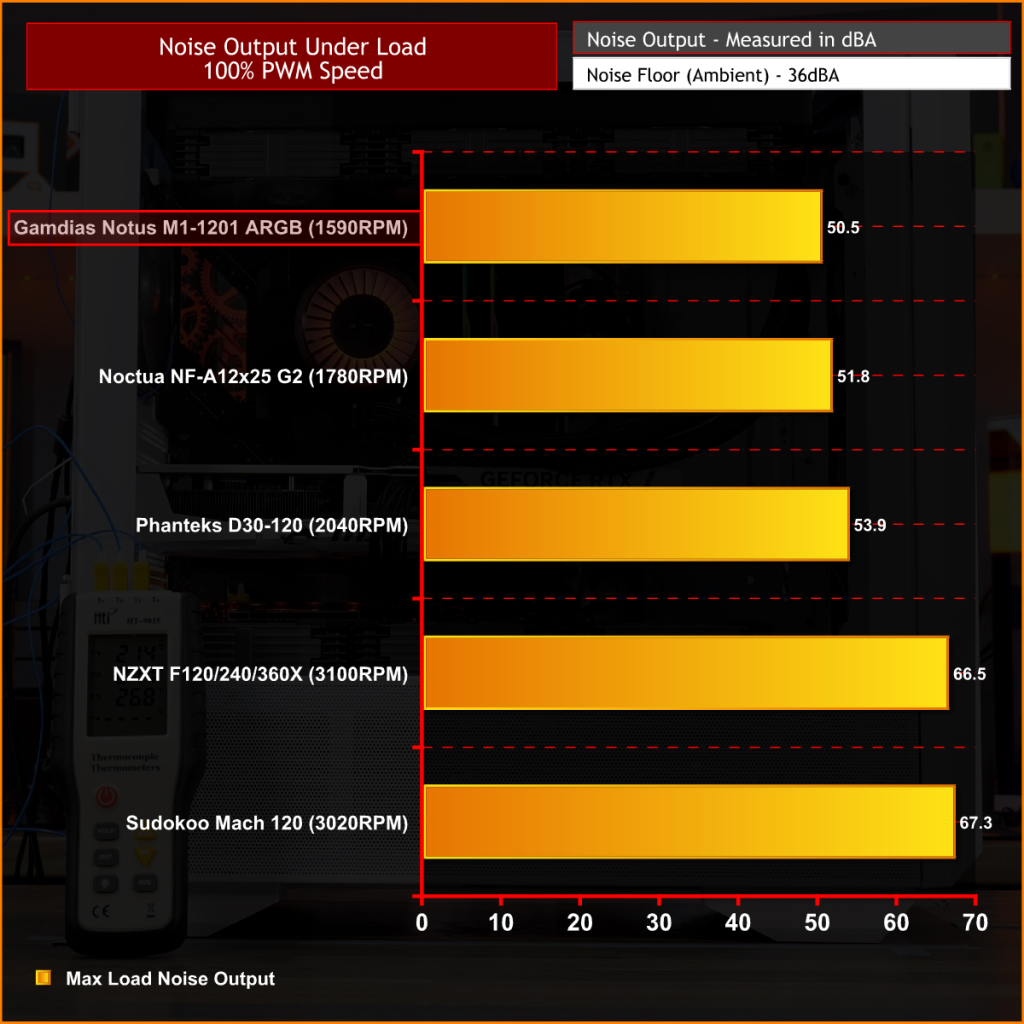
At max RPM, the Notus M1-1201 ARGB peak noise is 50.5 dBA, at just under 1600 RPM, which is a good result. It comes in slightly quieter than the Noctua NF-A12x25 G2 and Phanteks D30-120, while sitting well below the high-RPM options from NZXT and Sudokoo. Gamdias has chosen sensible acoustics rather than high RPM and the result is a fan that remains relatively quiet even when running flat out.
1400RPM Normalised
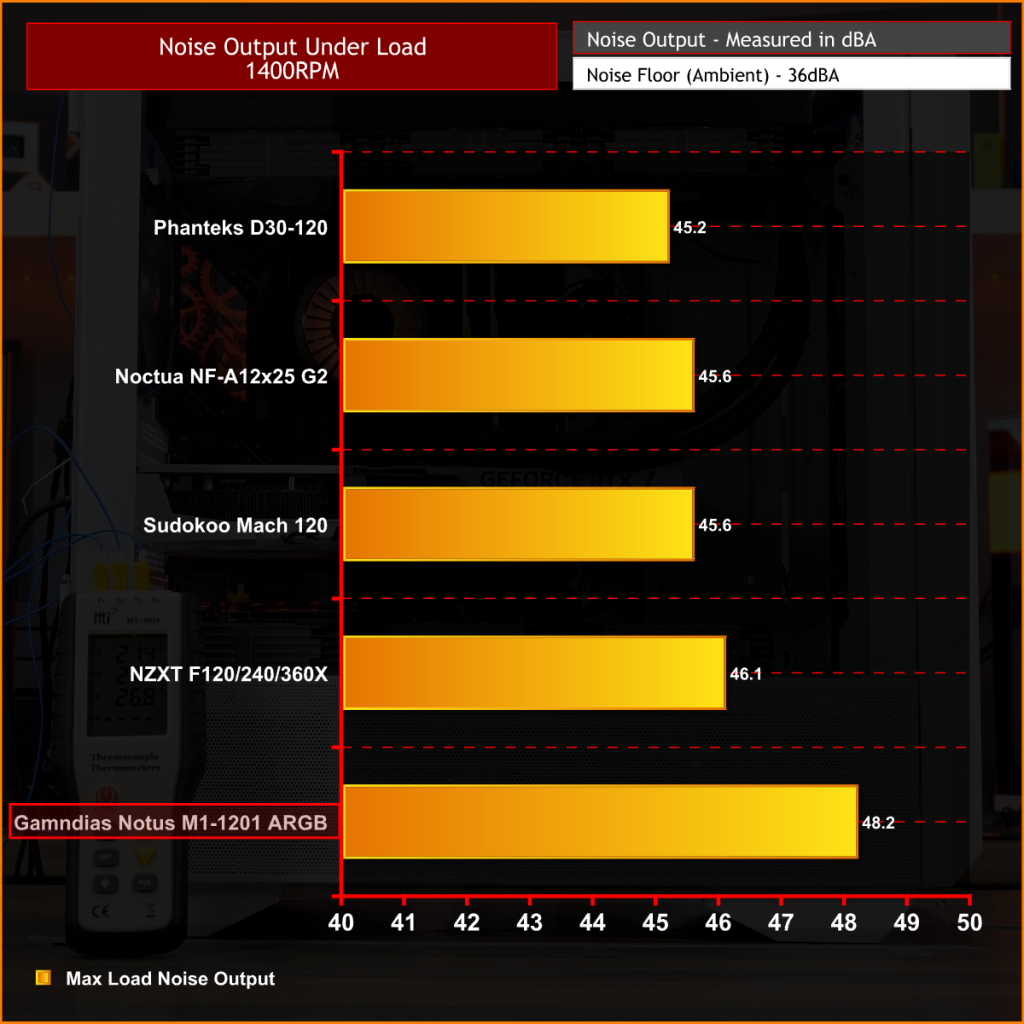
At 1400 RPM, the Notus M1-1201 ARGB records a peak noise output of 48.2 dBA, putting it a few decibels behind the others in this test. It trails the Phanteks D30-120, Noctua NF-A12x25 G2 and Sudokoo Mach 120 by a noticeable margin, while also sitting slightly above the NZXT F Series X. It's not the quietest at 1400 RPM. However, noise levels remain tolerable at this speed, but Notus M1 lacks the acoustic refinement of the others.
Case Temperatures: 100% PWM
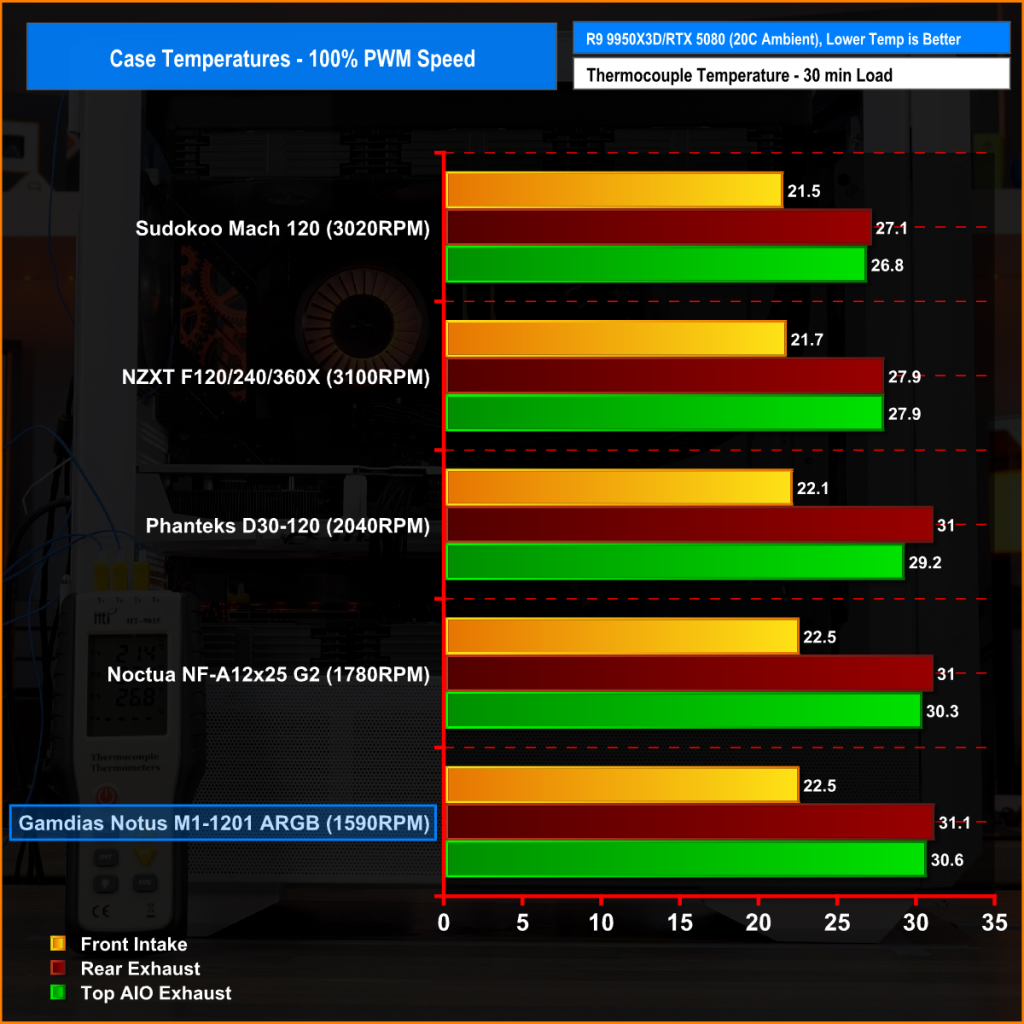
With all system fans running at full speed, the Notus M1-1201 ARGB produces a solid result, especially considering its lower 1590 RPM limit. At the front intake, it matches the Noctua NF-A12x25 G2 at 22.5°C and sits a little behind the much faster Sudokoo and NZXT fans. It’s a similar story for top and rear temperatures, where it stays close to the Noctua and Phanteks but trails the faster-running fans of NZXT and Sudokoo here.
1400RPM Normalised
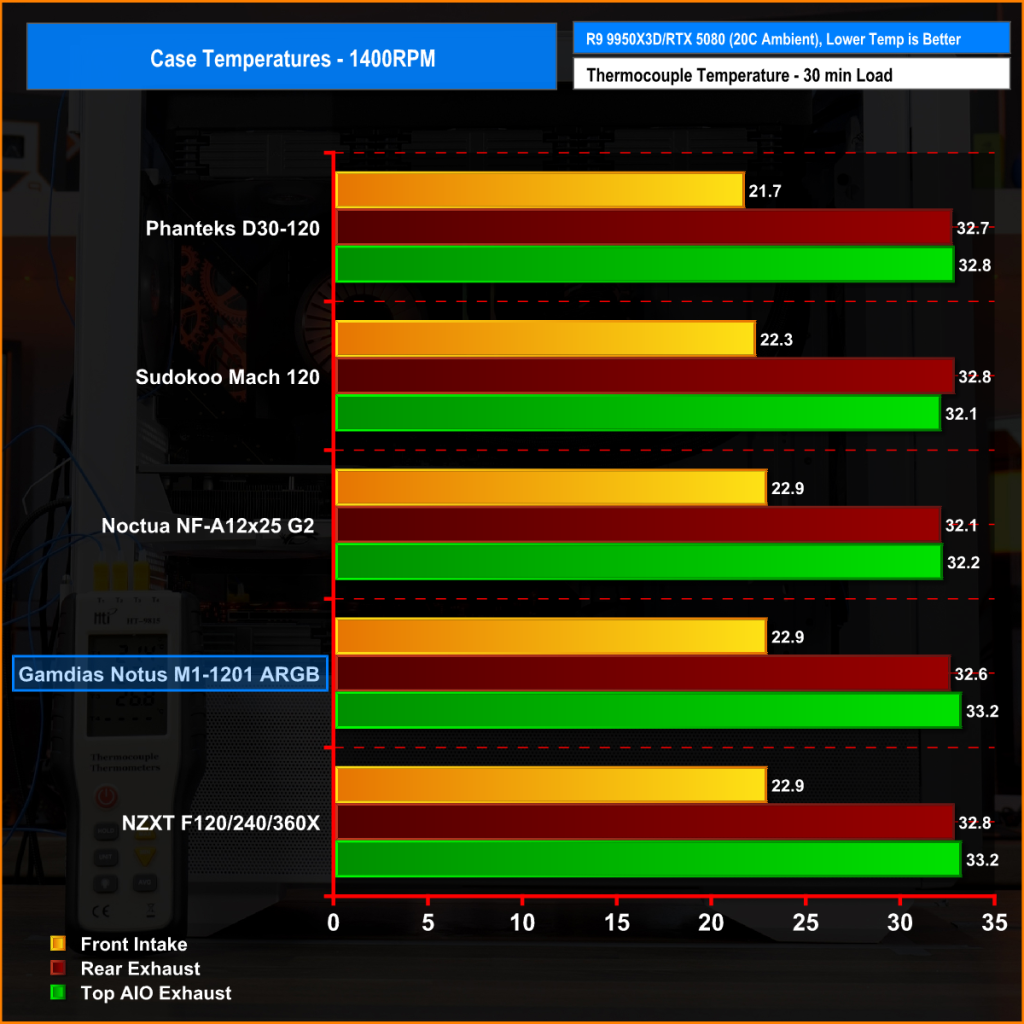
At 1400 RPM, the Notus M1-1201 ARGB delivers solid numbers, almost identical to the more expensive NZXT F Series X. Front intake is at 22.9°C, matching Noctua, while rear exhaust and top AIO exhaust temperatures are a bit higher at 32.6°C and 33.2°C, respectively. At 1400 RPM it stays close to the other fans and shows that even at normalised speeds, it can keep a system reasonably cool, however the Notus M1 has the highest noise at 1400 RPM.
40dBA Noise Normalised
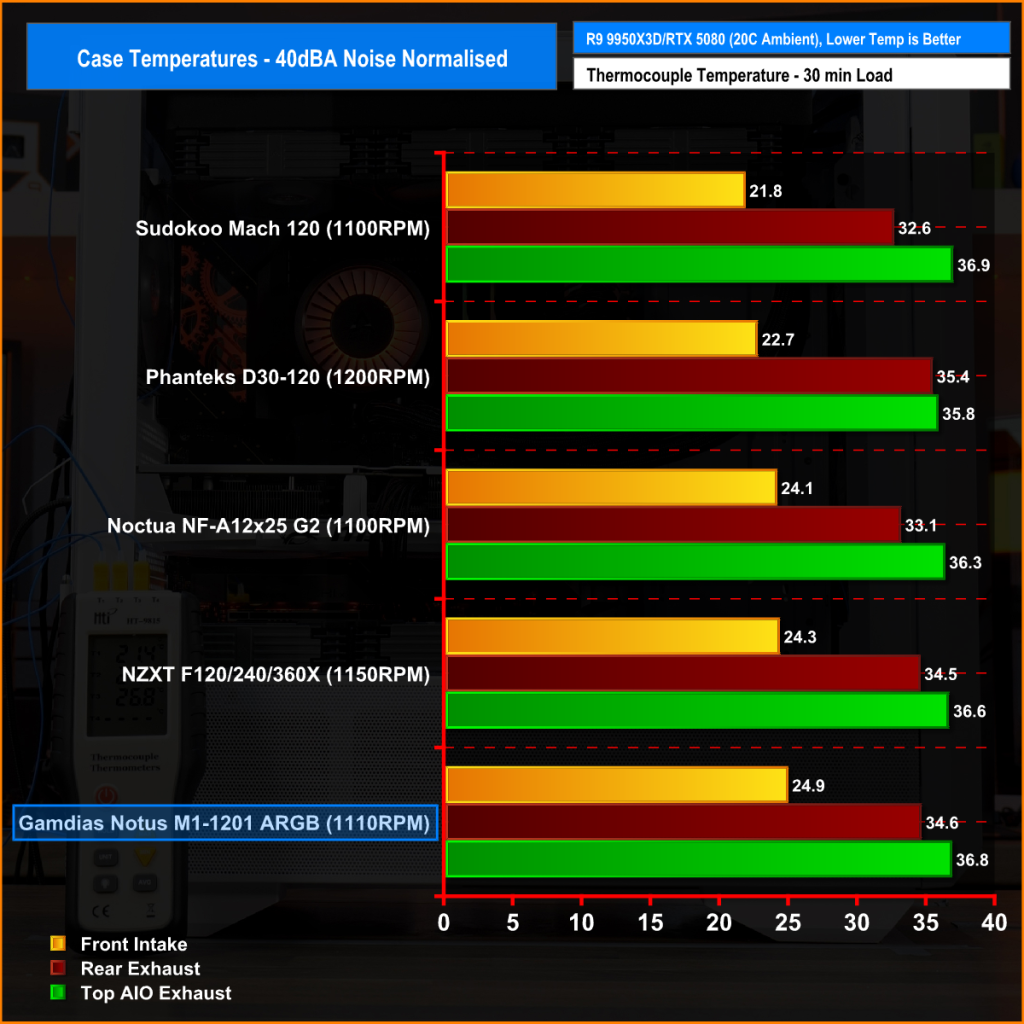
At 40 dBA the Notus M1-1201 ARGB performance drops off compared to the more efficient fans. Front intake sits at 24.9°C, noticeably higher than the Phanteks and Sudokoo options, while rear exhaust and top AIO exhaust hit 34.6°C and 36.8°C. It’s not the coolest in this noise-normalised mode, but the temperatures are still reasonable, showing that the fan can run quietly without letting case temperature get out of hand.
CPU & GPU Temperature: 100% PWM
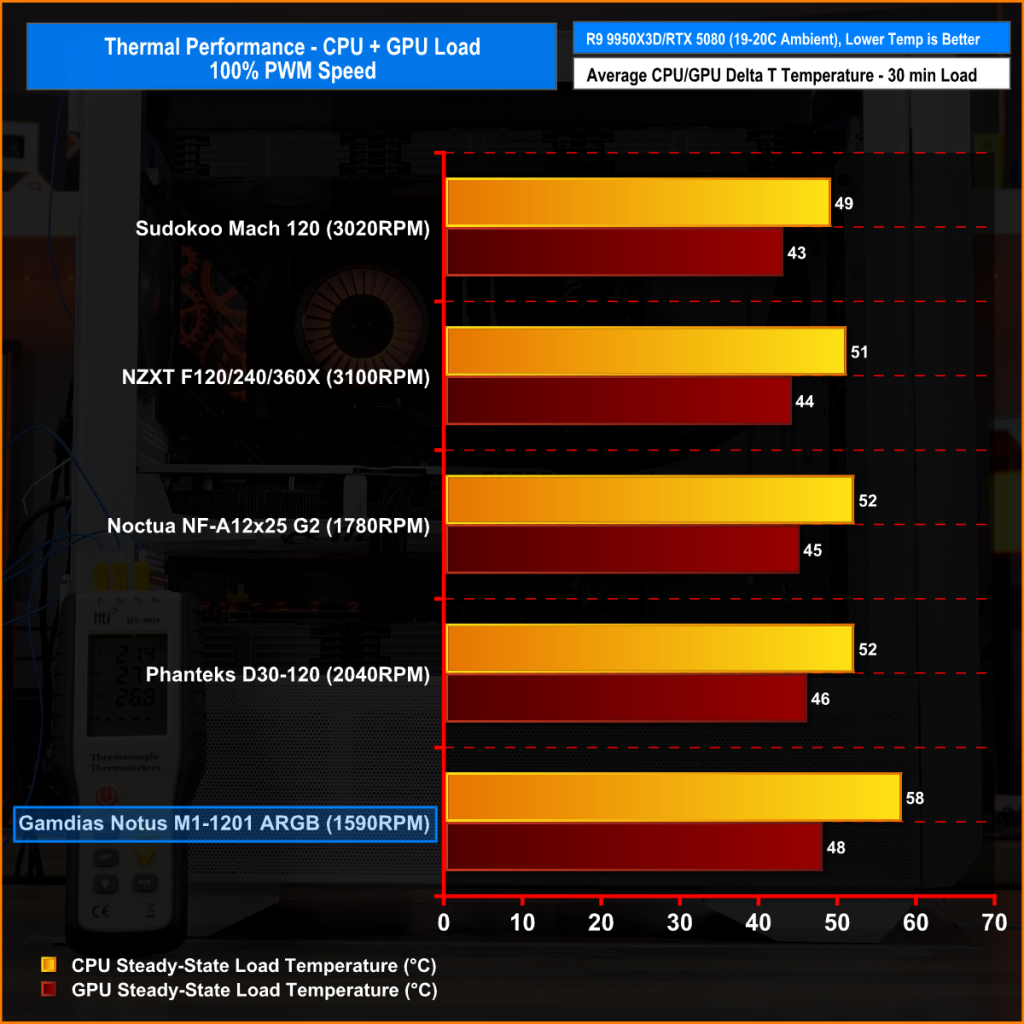
At maximum speed, the Notus M1-1201 ARGB runs the system hotter than the higher RPM rivals, hitting 58°C over ambient on the CPU and 48°C on the GPU. It trails the Sudokoo, NZXT, Noctua, and Phanteks fans by a few degrees, showing that it’s not the strongest performer in raw cooling. The trade-off for lower RPM and quieter operation pushes CPU temperature noticeably higher but still within an acceptable range.
1400RPM Normalised
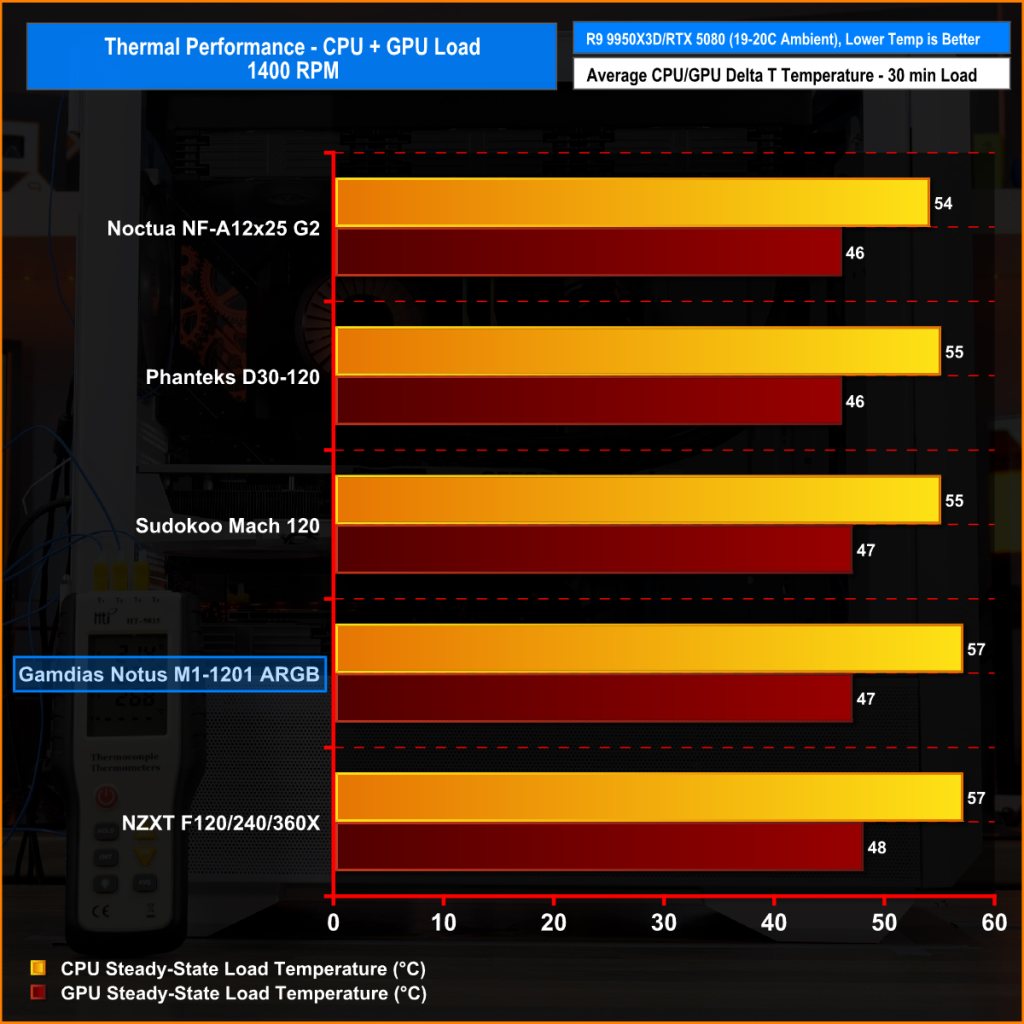
With all fans running at 1400 RPM, the Notus M1-1201 ARGB posts a CPU temperature of 57°C and a GPU temperature of 47°C over ambient. Putting it slightly behind the Noctua, Phanteks, and Sudokoo fans, but on par with the NZXT F120X. The Notus M1 is able to keep temperatures under control at 1400 RPM, but don’t forget they are running louder than the others at this RPM-normalised speed.
40dBA Noise Normalised
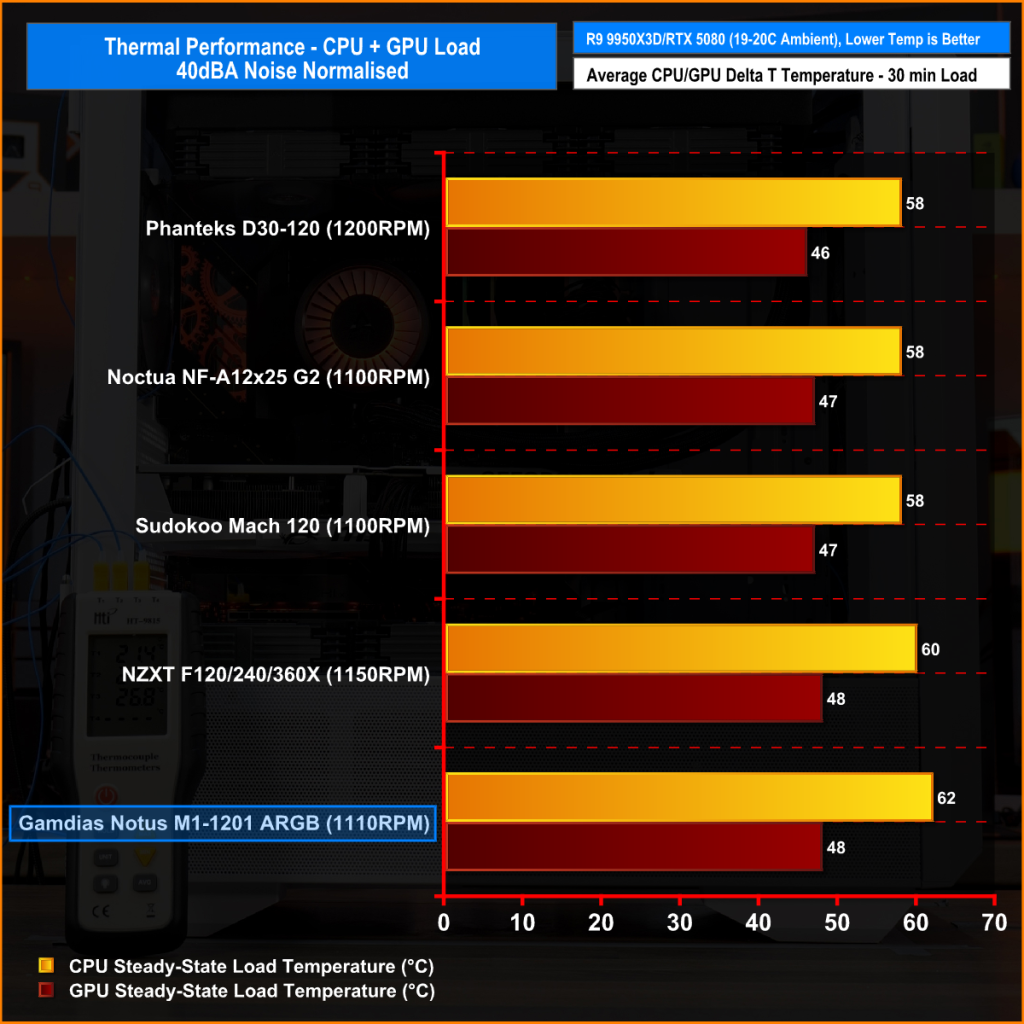
Notus M1-1201 ARGB runs a little warmer than most of the other fans at 40 dBA noise normalised, with CPU temperature at 62°C and GPU temperature at 48°C over ambient. It's just a few degrees behind the Phanteks, Noctua, and Sudokoo fans, which all manage 58/47°C and slightly higher than the NZXT F120 series. While it’s not the coolest option in 40 dBA tests, the temperatures remain within a safe range, showing the Notus M1 can keep both CPU and GPU temperature controlled at low noise levels.