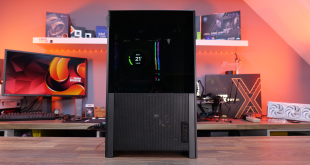
Today we are taking a look at the Cooler Master Cosmos SE. Following in the footsteps of the iconic Cosmos, the Cosmos SE boasts support for up to 18 Solid State Drives, radiators up to 360 mm in length and a large side panel window. The big question is, can the Cosmos SE attract the attention of the discerning enthusiast? Specifications: Dimensions (W x H x D): 263.8 x 569.4 x 524.4 mm / 10.4 x 22.4 x 20.6 inch Motherboard support: ATX, microATX, Mini-ITX 5.25" Drive Bays: 3 (exposed) 3.5" Drive Bays: 8 (hidden) 2.5" Drive Bays: 18 (hidden; 16 converted from 3.5" bays) I/O Panel: USB 3.0 x 2, USB 2.0 x 2, Audio In & Out Maximum CPU cooler height: 175 mm / 6.9 inch Maximum GPU length: 395mm / 15.5 inch Expansion Slots: 7 Cooler Master ship the Cosmos SE in a purple and white box. Styrofoam layers protect the case during transport. The front of the Cosmos SE case is identical to the Cosmos II, though it does not feature the Cosmos II's sliding cover. The handles along the bottom and top of the case make life easier for those moments when the system has to be moved, while adding to the overall aesthetics. A better look at the side panel shows the window has been designed to hide the very bottom and top sections of the case to provide a clear view of the motherboard and hard drives. Moving in closer we can see the top I/O panel houses two USB 3.0 ports, two USB 2.0 ports and audio and mic jacks. Directly above the I/O panel the Power button is situated to the left of the Cosmos logo. On the right-hand side we can see the Restart button. Directly above the restart button is the LED On/Off button which turns the LEDs in the front in-take fans on and off. The 5.25" drive bay face plates have been designed to create the illusion of a flat panel when viewed from the front and can be removed easily by pulling the levers on the left-hand side. The front panel also features a large mesh directly below the 5.25" drive bays. This mesh serves both to complement the exterior's design and as a dust filter. The Cooler Master badge is the only visible Cooler Master branding on the case. Moving to the back gives us a glimpse of one of the pre-installed fans. Three pre-drilled holes are available for water cooling enthusiasts and an additional bracket can be used to mount a reservoir. The side panel features an outward bulge to aid with cable management whilst further enhancing the Cosmos SE's design. Along the very bottom we can see the power supply cut-out sits outward. We will take a closer look at this on the next page. Finally, flipping the case on its side reveals two dust filters. One is situated directly underneath the power supply while the second covers any bottom in-take fans that are installed near the front of the case. Removing the front panel reveals the two pre-installed front in-take fans. The lighting effects of these 120 mm fans can be controlled with the LED On/Off button that we saw on the I/O panel. Directly below the front in-take fans are two drive caddies, allowing users to install two drives from the front. Removing the top mesh of the case shows a large open space behind the I/O panel where users can install either a 240 mm or 280 mm radiator. Alternatively, users can also install two 120 mm or two 140 mm fans. Moving to the inside of the case and starting at the bottom left we can see Cooler Master have chosen to use two long rubber strips to reduce vibrations from the power supply. Directly above these strips are two large rubber grommets, one of which is placed directly behind the power supply. The second rubber grommet still remains easily accessible when using a standard ATX size power supply. A large CPU cut-out is available to facilitate the installation of coolers without removing the motherboard. Along the center of the case are two additional rubber grommets. On the right-hand side of the case we can see 6 drive caddies facing outward. The drive cages can be removed to allow for the installation of a 360 mm radiator in the front. Moving in closer we can see the pre-installed 120 mm rear exhaust fan. An additional molex connector is available for users with a low number of available fan headers on the motherboard. The included fans all ship with an additional molex connector, ensuring users can fully utilize the Cosmos SE's cooling potential without having to worry about their available fan headers. A lower angle shows the included 240 mm top exhaust fan. This angle also shows the use of a 280 mm radiator will block some of the 5.25" drive bays. Not using a locking mechanism for the 5.25" drive bays means water cooling enthusiasts will not have to worry about breaking off any bits and pieces. The plates behind the drive cages can removed. Doing so allows users to rotate the drive cages or remove them completely. To install the power supply users will need to remove the frame surrounding the cut-out to slide the power supply in from outside the case. Around the back we can see there are plenty of cable routing opportunities as well as three additional mounting positions for solid state drives. A closer look at one of these mounting positions shows only two screws are required to secure a drive. Two clips on the opposing side ensure the drive sits in place during installation. As always, we aim to find out how forgiving a case is by stacking cables cable deliberately and only applying minimal cable management. We had to struggle to put the Cosmos SE under pressure, thanks in large part to the curved design of the side panel. Overall, the installation of our system was a breeze. We are using the Cooler Master Hyper 103 cooler to keep our Intel Core i7 3770k cool and perform our tests with the CPU at its default clock speed before then overclocking it to 4.6GHz with the voltage set to 1.3v. Test System: Processor: Intel Core i7 3770k Motherboard: Asus P8Z77-V LX2 Memory: 16GB G.Skill Ares Blue Graphics Card: Sapphire HD 7790 2GB GDDR5 OC Power Supply: OCZ ZT Series 550W Chassis: Cooler Master Cosmos SE Monitor: Acer X243HQ Boot Drive: Intel SSD 510 Storage Drive: 2TB Seagate Barracuda System validation can be found here. Software: CPUID HW Monitor 1.23 CPUID CPU-Z 1.65 Prime95 v27.1 Furmark 1.11.0 We are testing the Cooler Master Cosmos SE's performance as follows: Room temperature is kept at 22° throughout our tests. The CPU Fan is set to 100% to eliminate inconsistencies as a result of PWM control. Idle temperatures are obtained after booting the PC and idling on the desktop for 30 minutes. CPU load temperatures are obtained after running Prime95′s Small FTTs test for 15 minutes. GPU load temperatures are obtained after running Furmark’s Burn-In Test for 15 minutes. To measure noise levels we disable the CPU fans and GPU fan. We cleaned up our cable management to ensure a clear path of airflow to the components we test. Topping out at 49°, the Cosmos SE's airflow definitely aided our cooler's small fan. Excellent results across the board. We measure from a distance of around 1 meter from the closed chassis and 4 foot from the ground to mirror a real world situation. Ambient noise in the room measures close to the limits of our sound meter at 30dBa. We manually adjust the voltages from 5V to 12V. KitGuru noise guide 10dBA - Normal Breathing/Rustling Leaves 20-25dBA – Whisper 30dBA - High Quality Computer fan 40dBA - A Bubbling Brook, or a Refridgerator 50dBA - Normal Conversation 60dBA - Laughter 70dBA – Vacuum Cleaner or Hairdryer 80dBA - City Traffic or a Garbage Disposal 90dBA - Motorcycle or Lawnmower 100dBA – MP3 player at maximum output 110dBA - Orchestra 120dBA – Front row rock concert/Jet Engine 130dBA – Threshold of Pain 140dBA – Military Jet takeoff/Gunshot (close range) 160dBA – Instant Perforation of eardrum Running at 5V the fans did not produce enough noise to register on the lower limits of our noise meter. Increasing the voltage to 12V resulted in an average noise level of 37.0 dBa. Whilst not loud, it does make the system very noticeable. Overall, we are very impressed with the Cooler Master Cosmos SE chassis. Building on a strong foundation, the Cosmos SE's build quality is excellent. The case feels sturdy, well-constructed and the strong handles certainly make moving it around easier. In terms of cooling performance the Cosmos SE has proven itself worthy of standing beside its bigger siblings. With support for a 360 mm radiator in the front and a 280 mm radiator in the top we are certain the enthusiast crowd will be able to produce some impressive system builds. As a premium case, we cannot help but feel slightly disappointed by the lack of metal drive caddies. The plastic caddies, while sufficient, detract from the overall premium experience. We hope Cooler Master will start including these in their high-end offerings with future revisions. Our only other complaint is the windowed side panel. Suffering much like every acrylic window, it collects dust quickly and will require regular maintenance. At the end of the day there is not much left to be said about the Cosmos SE that has not already been said about its bigger siblings. The Cosmos range of cases has rightly earned a great reputation among the enthusiast audience and the SE reviewed today just solidifies the standing. Retailing for £144 inc vat., the Cooler Master Cosmos SE is a fantastic value for money chassis. Those who are not a fan of windowed side panels can order a standard version for £139,99 inc vat. Pros: Excellent build quality. Excellent cooling performance. Great design. A ridiculous amount of storage options. Cons: Side panel collects dusts quickly. Lack of metal caddies detracts slightly from the premium experience. KitGuru says: An excellent case and a perfect fit for those who feel the Cosmos II is too big.
 KitGuru KitGuru.net – Tech News | Hardware News | Hardware Reviews | IOS | Mobile | Gaming | Graphics Cards