 KitGuru KitGuru.net – Tech News | Hardware News | Hardware Reviews | IOS | Mobile | Gaming | Graphics Cards


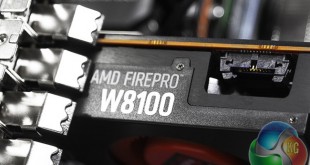
The workstation market is a bit like a parallel universe compared to mainstream desktop computing. But technological developments work both ways. Armari's Magnetar M16E-AW1200-GPU is the first system we have seen with AMD's new FirePro W8100, based on the Hawaii PRO GPU. The Hawaii PRO first saw the light of day in November 2013 as the Radeon R9 290 consumer card – although the FirePro W8100 has many enhancements for professional users. Additionally the Armari has a number of other tricks up its sleeve for the 3D content professional.
Next in line for attention is the superlative 10-core Intel Xeon E5-2690 v2 processor, which may not have the headline clock speed of a frequency-enhanced Core i7, but rendering loves cores, so this is likely to provide render-farm-in-a-box performance.
There's 32GB of RAM and fast Solid State storage, plus the whole package is delivered in a chassis custom-designed by Armari. Overall, this is a powerhouse workstation, although the Xeon is expensive, so this isn't a cheap system either.
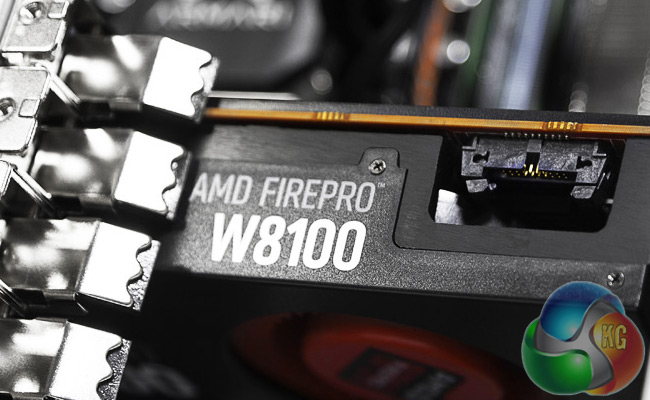
Armari Magnetar M16E-AW1200-GPU Specifications:
- Intel Xeon E5-2690v2 @ 3GHz
- 32GB ECC DDR3 SDRAM @ 1600MHz
- ASUS P9X79-E WS Motherboard
- 240GB Intel SSD 530 SATA III 6Gb/s SSD
- LiteOn DS-6E2SH Blu-ray reader DVD-RW
- 8GB GDDR5 AMD FirePro W8100 Graphics
- Armari custom water cooling
- Intel 1,200W PSU
- Armari M-Series chassis
- Windows 7 64bit
- 3 Year on-site Warranty
Price: £5508.75 inc VAT & Delivery
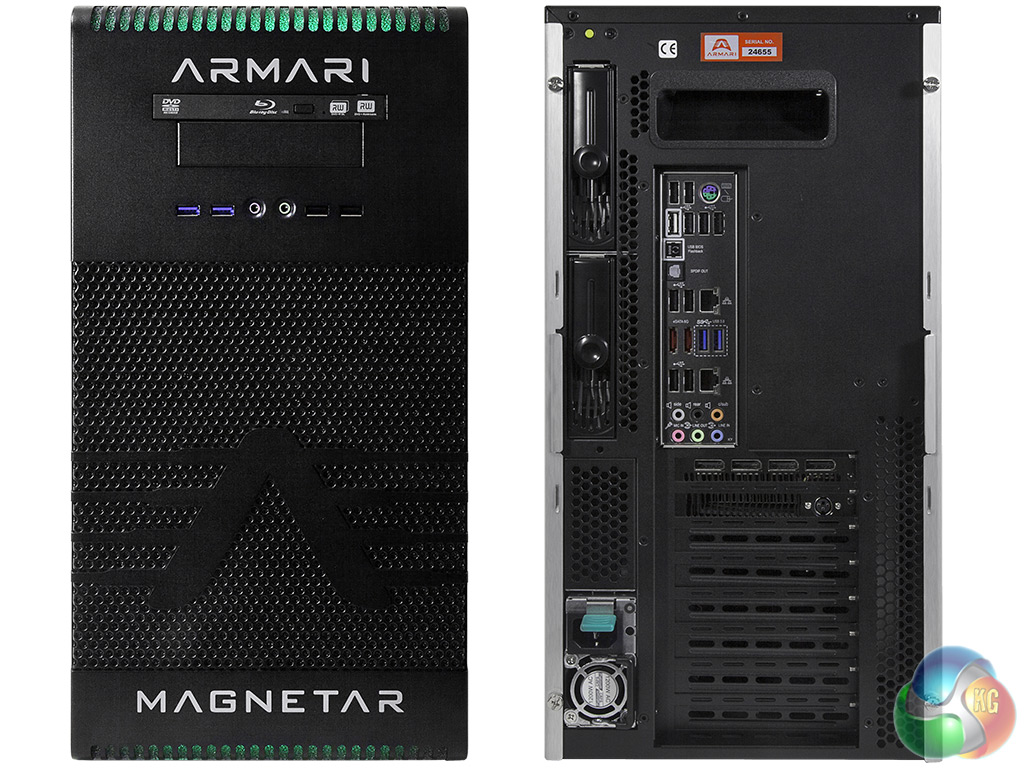
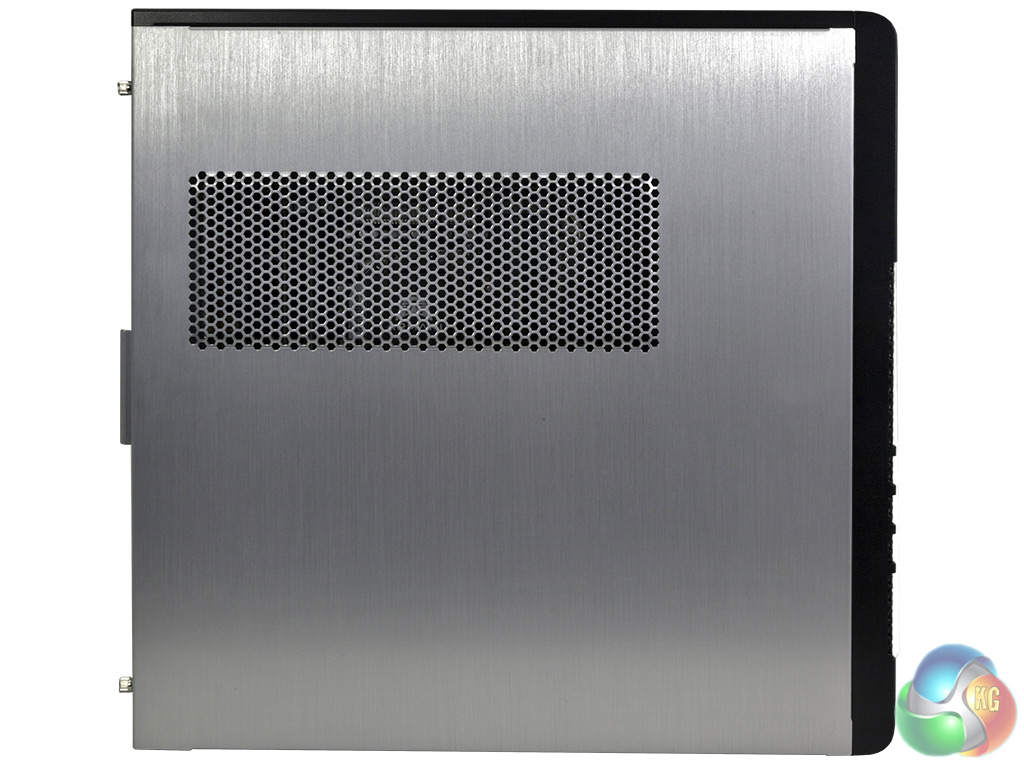
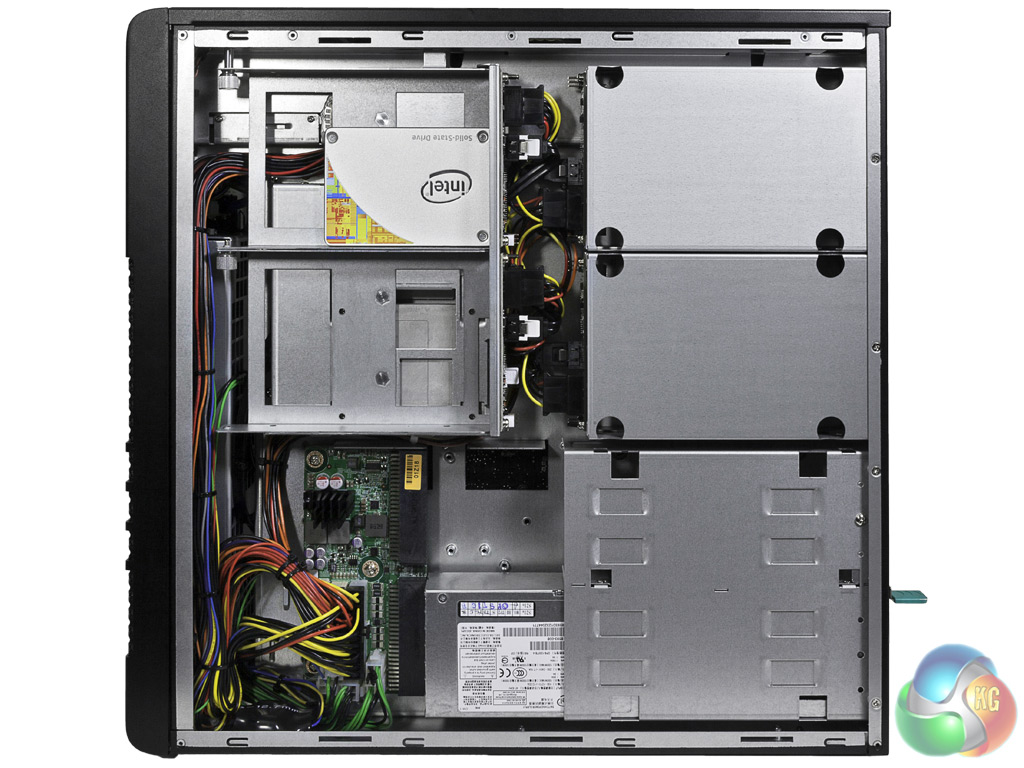
The Magnetar M16E-AW1200-GPU is housed in Armari's M-Series chassis, which is a custom design created by Armari itself, with features specifically tailored for professional workstation users.
There's lots of attention to detail here, with one of our favourite features being the carry-handle on the top, which rotates out for use and then back into the system when not required.
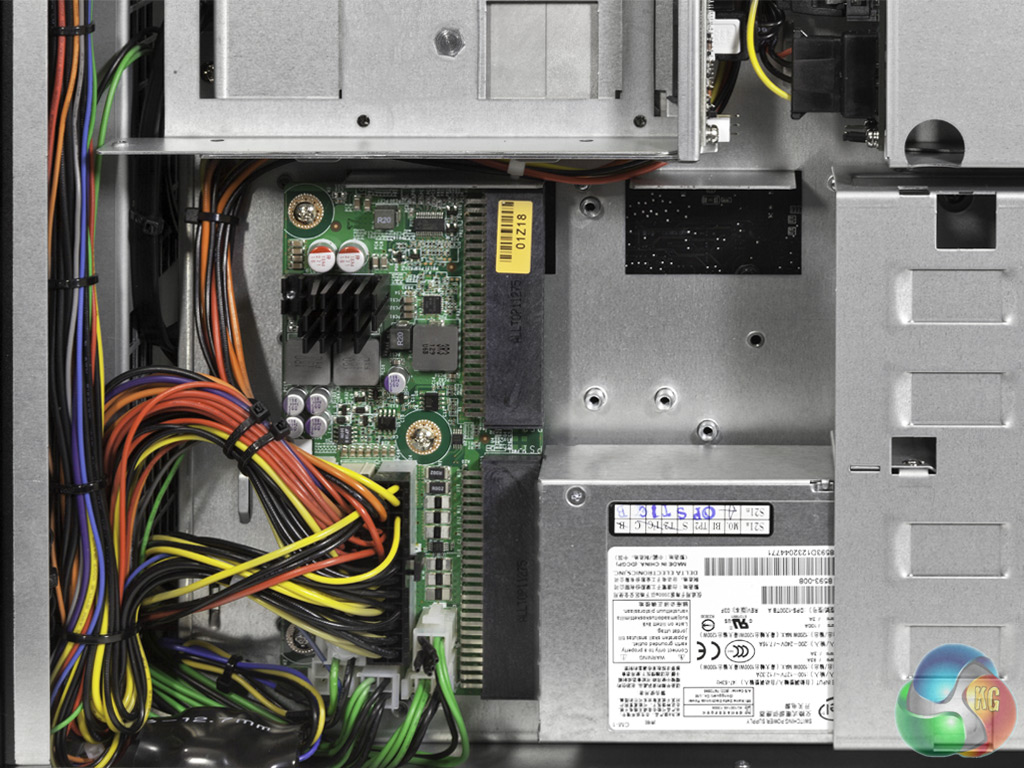
It has space for two Intel 1,200W power supplies, which can be configured for dual redundancy or load balancing as needed. Our sample was supplied with just a single power supply.
The system is based around an Intel Xeon E5-2690v2 processor. This sports a whopping ten cores, and runs at a nominal 3GHZ. However, Turbo Boost is on hand, and it's pretty complicated with ten cores available.
A single core can hit 3.6GHz, two cores can run at 3.5GHz, three cores can run at 3.4GHz, and all cores can run at 3.3GHz, so the 3GHz rating is not very relevant at all.
There's Hyper-Threading on hand as well, so each physical core is split into two virtual ones, for a grand total of 20 processing threads, which will be fantastic for rendering, although the top frequency can't match the clock-enhanced Intel Core i7 processors we often see in single-socket workstations.
Armari keeps the Xeon's temperature down with its custom-designed water cooling system, which keeps the interior very neat and uncluttered.
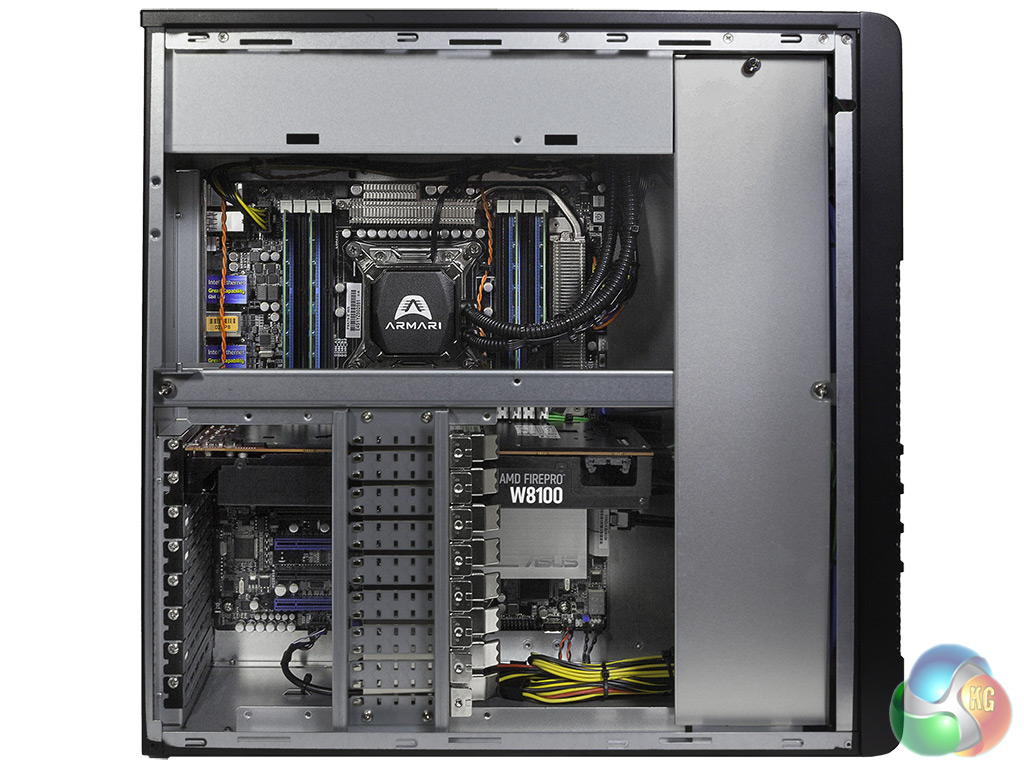
The processor is housed in an ASUS P9X79-E WS motherboard, which provides a single LGA 2011 socket, eight DIMM sockets for quad-channel memory, and seven PCI Express x16 slots, although only four of these operate at the full x16 speed.
Armari has supplied four 8GB modules of 1,600MHz ECC DDR3, giving the full benefit of the quad-channel memory architecture of the Xeon's built-in memory controller, but leaving four DIMM slots free for future upgrade to the motherboard's maximum of 64GB memory.
The motherboard sports six 6Gb/sec SATA ports, plus four 3Gb/sec ports. Armari has only supplied a single 240GB Intel SSD 530, which will be quick and sufficiently capacious for operating system and applications, but there are bays for a quartet of 3.5in drives plus a couple more beneath the first set, all with hot swap ability.
All these bays are positioned in a non-traditional manner on the side panel, rather than front bays, further improving the neatness and airflow of the chassis interior. A workstation of this nature would normally be supplied with a secondary conventional hard disk, and there's plenty of room for this, but our sample was aimed at a particular application where this wasn't required.
A LiteOn DS-6E2SH Blu-ray reader DVD rewriter is supplied as removable storage, but not the multi-card media reader we normally see with Armari workstations.
There are a couple of 6Gb/sec eSATA ports on the motherboard's header, alongside twin Gigabit Ethernet, two USB 3.0 and 10 USB 2.0 ports, plus eight-channel audio. So there are plenty of external connectivity options on the rear.
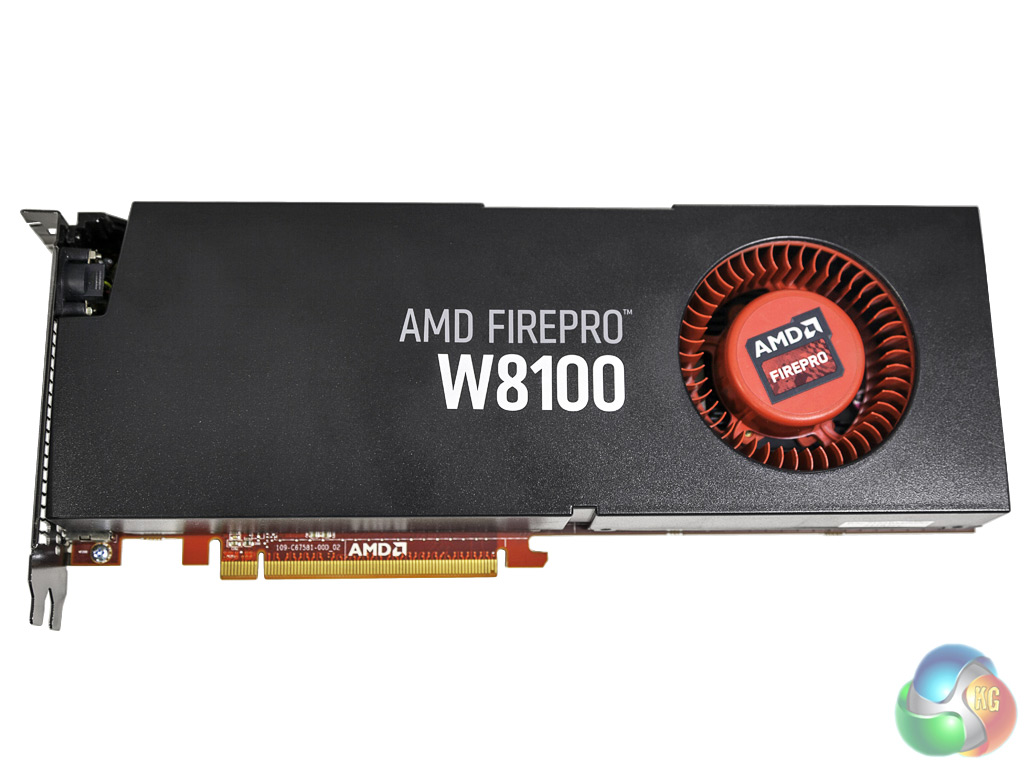
The most significantly new feature of the Armari Magnetar M16E-AW1200-GPU is the AMD Fire Pro W8100, which was only recently launched, and this is our first taste of its abilities.
It was high time there were new members of the FirePro range, as AMD launched the W8000 and W9000 almost exactly two years ago. In the interim, NVIDIA has gone from the Fermi-based Quadro 4000 and 5000 to the Kepler-based K4000 and K5000.
The latter is the most direct competitor to the W8100, and later in this review we will be comparing performance between the two cards on this system.
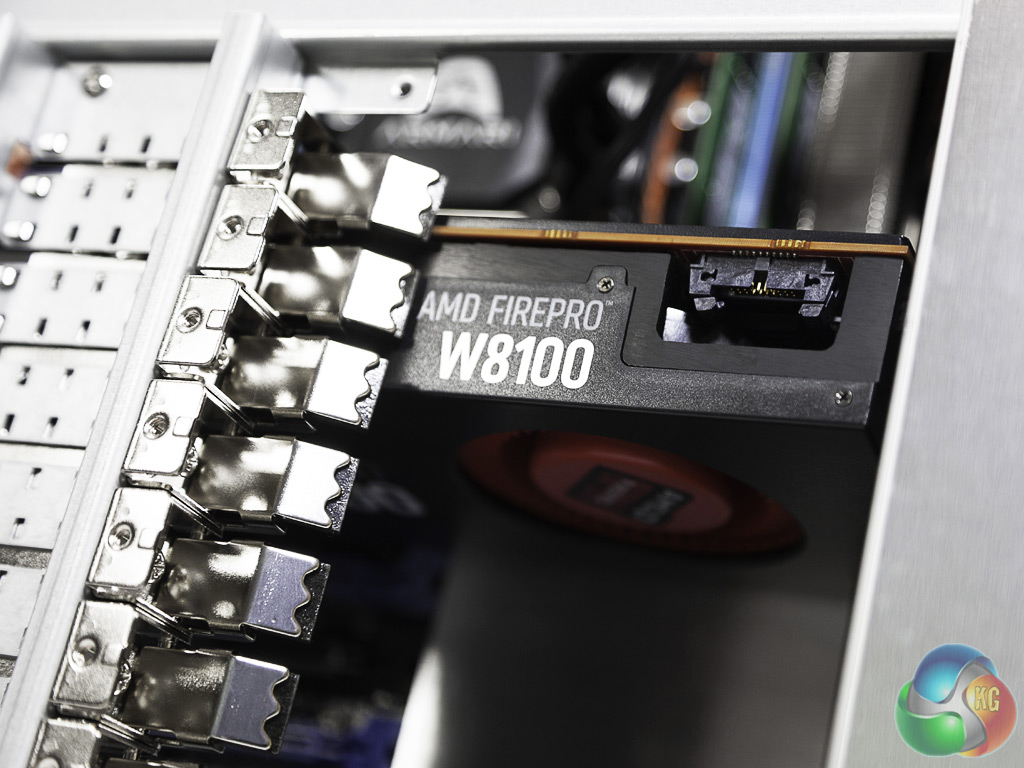
The W8100 is a significant step up from the W8000 it replaces. It now sports 2,560 Stream Processors, compared to the W8000's 1,792, although the core frequency has dropped slightly from 900MHz to 824MHz. The frame buffer complement has doubled from 4GB to 8GB of GDDR5 memory, and although the frequency has dropped from 1,375MHz to 1,250MHz, the bus has doubled from 256-bit to 512-bit, so bandwidth has burgeoned from 176GB/sec to 320GB/sec.
All these figures come together to provide significant on-paper speed increases, with 4.2TFLOPS of single-precision and 2.1TFLOPS of double-precision performance. Acceleration API support has increased slightly, with DirectX 11.2 now supported, alongside OpenCL 2.0, although OpenGL remains at 4.2, rather than the 4.3 support provided by NVIDIA's latest Quadros. On the downside, this is a slightly more Watt-hungry card, with Thermal Design Power increased from 189W to 220W.
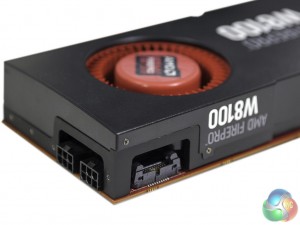
It's a sign of the times that the consumer graphics card based on the same GPU as the W8100 was launched over six months ago. However, NVIDIA has a similarly lengthy hiatus between consumer and professional graphics releases, and the significant increase in processing ability under the W8100's hood means it promises a much greater challenge to NVIDIA's Kepler-based Quadros, in particular the K5000, which has an identical recommended retail price.
The 8GB of frame buffer could be particularly useful as texture maps increase in detail and size.
The Armari system is built around an Intel Ivy Bridge-EP Xeon E5-2690 v2 processor. This has ten cores, but Armari keeps it under control with a custom water cooling system. Armari isn't stressing the CPU beyond specification, though. The Xeon doesn't support the frequency enhancements of the Core i7, so Turbo Boost mode will be the only thing pushing it above its 3GHz nominal frequency.
For comparison, we pitted the Armari against YOYOTech's M-Cube WS and M-Cube WS2. We also tested the Armari with NVIDIA's Quadro K5000 instead of the AMD FirePro W8100, so the performance of the latter could be put in proper perspective.
Software:
PCMark 8
Cinebench R11.5 64 bit
Cinebench R15
SPECviewperf 11
SPECviewpert 12
CrystalDiskMark
SiSoft Sandra
PCMark 8 is the latest version in our series of popular PC benchmarking tools. It is designed to test the performance of all types of PC, from tablets to desktops. With five separate benchmark tests plus battery life testing, PCMark 8 helps you find the devices that offer the perfect combination of efficiency and performance. PCMark 8 is the complete PC benchmark for home and business.
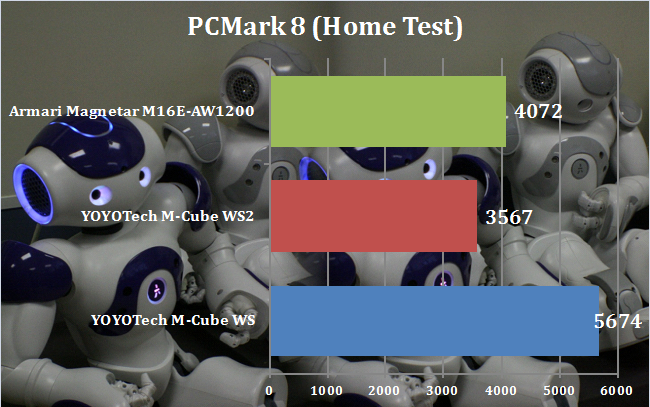
The Armari scores 4,072 points in PC Mark 8, showing decent ability in everyday tasks, although the multiple cores don't provide major benefit here, as can be seen from the comparison with the YOYOTech M-Cube WS, which sports an Intel Core i5-4670K running at 4.3GHz.
In contrast, the eight-core YOYOTech M-Cube WS2 lags even further behind, thanks to its lower clock speed than the Armari system.
The SPECgpcSM project group's SPECviewperf 11, released in late June 2010, is totally new graphics performance evaluation software. Among the major changes are a new GUI, fully updated viewsets traced from newer versions of applications, larger models, and advanced OpenGL functionality such as shading and vertex buffer objects (VBOs).
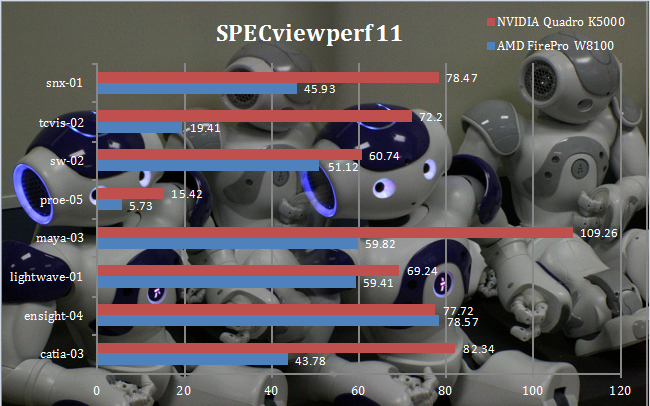
SPECviewperf 11 has been around quite some time, and AMD argues that it is no longer representative of modern professional 3D workloads. But we continue to include it here for backwards reference. The results are decent across the board, but the comparison with the NVIDIA Quadro K5000 is very telling. The K5000 outperforms the W8100 almost across the board, sometimes quite significantly, with the only exception being the Ensight-04 test.
SPECviewperf 12, released by SPEC's Graphics Performance Characterization group (SPECgpc) on December 18, 2013, is an all-new version of the worldwide standard for measuring graphics performance based on professional applications. SPECgpc members at the time of release include AMD, Dell, Fujitsu, HP, Intel, Lenovo, NEC and NVIDIA.
SPECviewperf 12 measures the 3D graphics performance of systems running under the OpenGL and Direct X application programming interfaces. The benchmark’s test files, called viewsets, represent graphics content and behavior from actual applications.
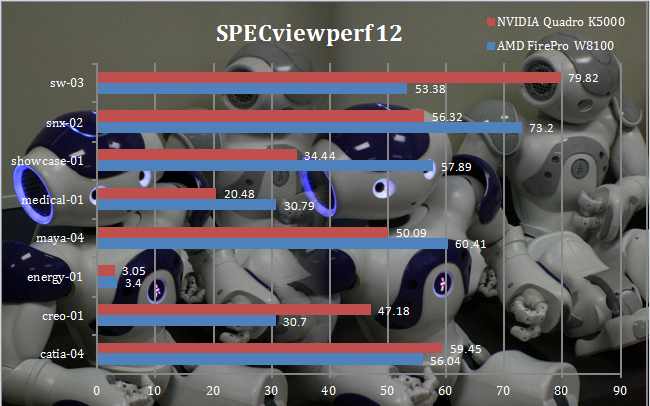
With the AMD FirePro W8100, the Armari posts a commendable set of results, and here the K5000 comparison is a bit more varied. The latter powers ahead in the Solidworks-based sw-03 and creo-01, with a small lead in catia-04. But the W8100 is ahead in snx-02, showcase-01, medical-01 and, perhaps most significantly, the maya-04 viewset, with a small lead in energy-01. So the card to choose really depends on which applications you mostly run.
CINEBENCH R11.5 64 Bit is a real-world cross platform test suite that evaluates your computer’s performance capabilities. CINEBENCH is based on MAXON’s award-winning animation software CINEMA 4D, which is used extensively by studios and production houses worldwide for 3D content creation. MAXON software has been used in blockbuster movies such as Spider-Man, Star Wars, The Chronicles of Narnia and many more.
CINEBENCH is the perfect tool to compare CPU and graphics performance across various systems and platforms (Windows and Mac OS X). And best of all: It’s completely free.
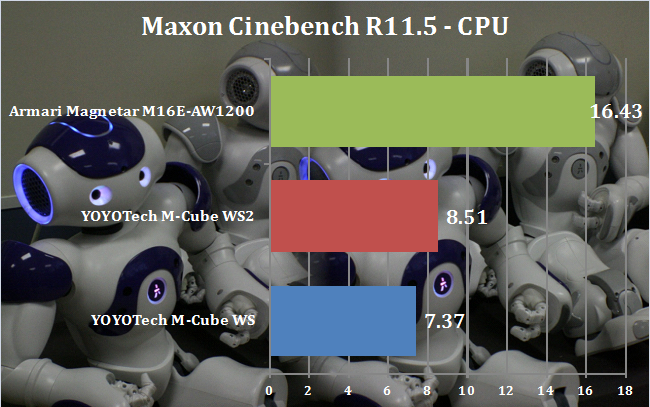
Cinebench's CPU rendering test is fully multi-threaded, so the Xeon E5-2690v2's ten, hyperthreading cores are at an advantage over the frequency-enhanced 4.3GHz Core i5 of the M-Cube WS, or the eight cores of the M-Cube WS2. In fact, with almost twice the performance of the latter, the Armari is almost a render farm-in-a-box – particularly impressive for a single-socket system.
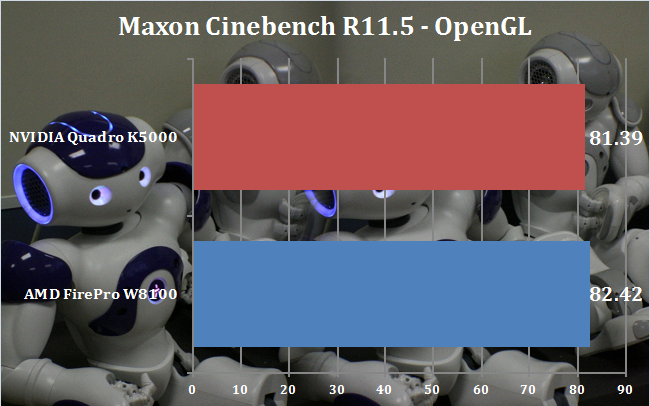
The OpenGL result is good, and this test generally favours AMD graphics cards, although the W8100 is only marginally ahead of the K5000 here.
CINEBENCH 15 is a cross-platform testing suite that measures hardware performance and is the de facto standard benchmarking tool for leading companies and trade journals for conducting real-world hardware performance tests. With the new Release 15, systems with up to 256 threads can be tested.
CINEBENCH is available for both Windows and OS X and is used by almost all hardware manufacturers and trade journals for comparing CPUs and graphics cards.
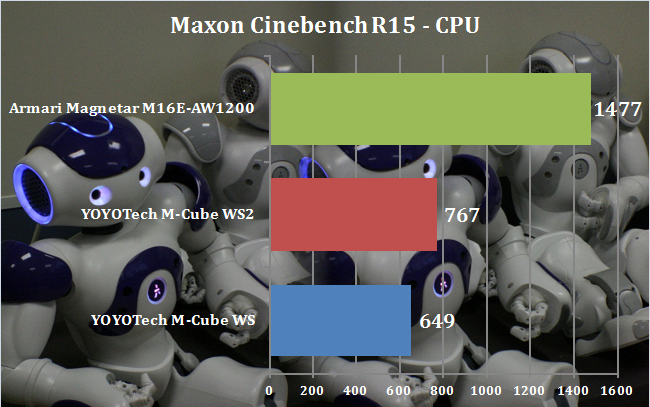
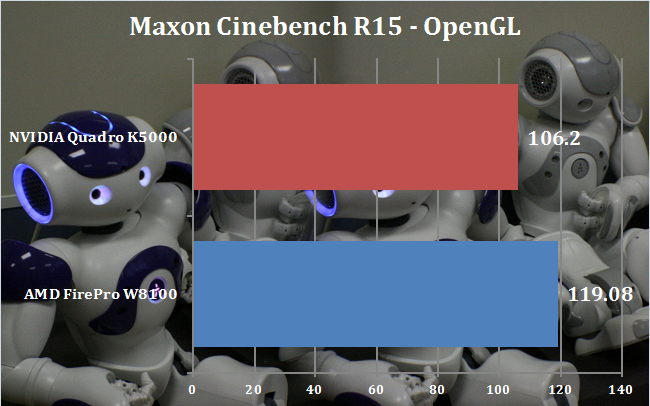
Results in the latest version of Maxon Cinebench parallel those from the previous version, with the Armari's ten 3GHz cores paying huge dividends for rendering, giving it twice the performance of the YOYOTech M-Cube WS2. As before, the AMD FirePro W8100 is ahead of the NVIDIA Quadro K5000, although it's not a complete annihilation.
SiSoftware Sandra (the System ANalyser, Diagnostic and Reporting Assistant) is an information & diagnostic utility. It should provide most of the information (including undocumented) you need to know about your hardware, software and other devices whether hardware or software.
Sandra is a (girl’s) name of Greek origin that means “defender”, “helper of mankind”. We think that’s quite fitting.
It works along the lines of other Windows utilities, however it tries to go beyond them and show you more of what’s really going on. Giving the user the ability to draw comparisons at both a high and low-level. You can get information about the CPU, chipset, video adapter, ports, printers, sound card, memory, network, Windows internals, AGP, PCI, PCI-X, PCIe (PCI Express), database, USB, USB2, 1394/Firewire, etc.
Native ports for all major operating systems are available:
- Windows XP, 2003/R2, Vista, 7, 2008/R2 (x86)
- Windows XP, 2003/R2, Vista, 7, 2008/R2 (x64)
- Windows 2003/R2, 2008/R2* (IA64)
- Windows Mobile 5.x (ARM CE 5.01)
- Windows Mobile 6.x (ARM CE 5.02)
All major technologies are supported and taken advantage of:
- SMP – Multi-Processor
- MC – Multi-Core
- SMT/HT – Hyper-Threading
- MMX, SSE, SSE2, SSE3, SSSE3, SSE 4.1, SSE 4.2, AVX, FMA – Multi-Media instructions
- GPGPU, DirectX, OpenGL – Graphics
- NUMA – Non-Uniform Memory Access
- AMD64/EM64T/x64 – 64-bit extensions to x86
- IA64 – Intel* Itanium 64-bit
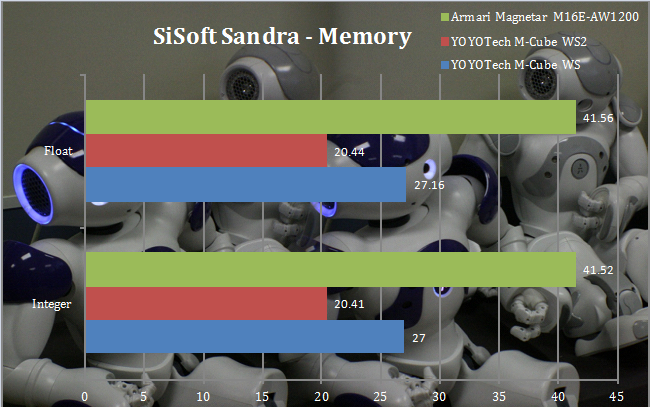
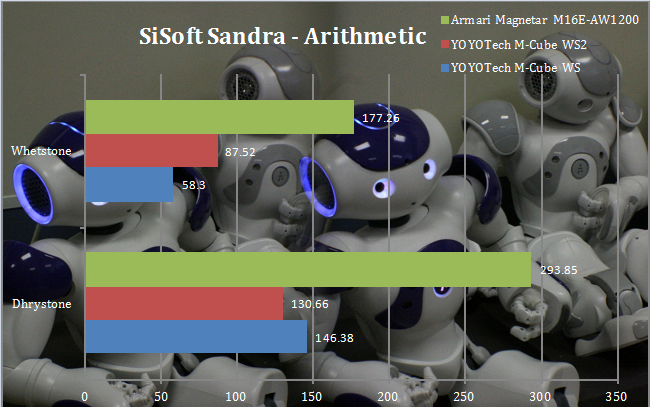
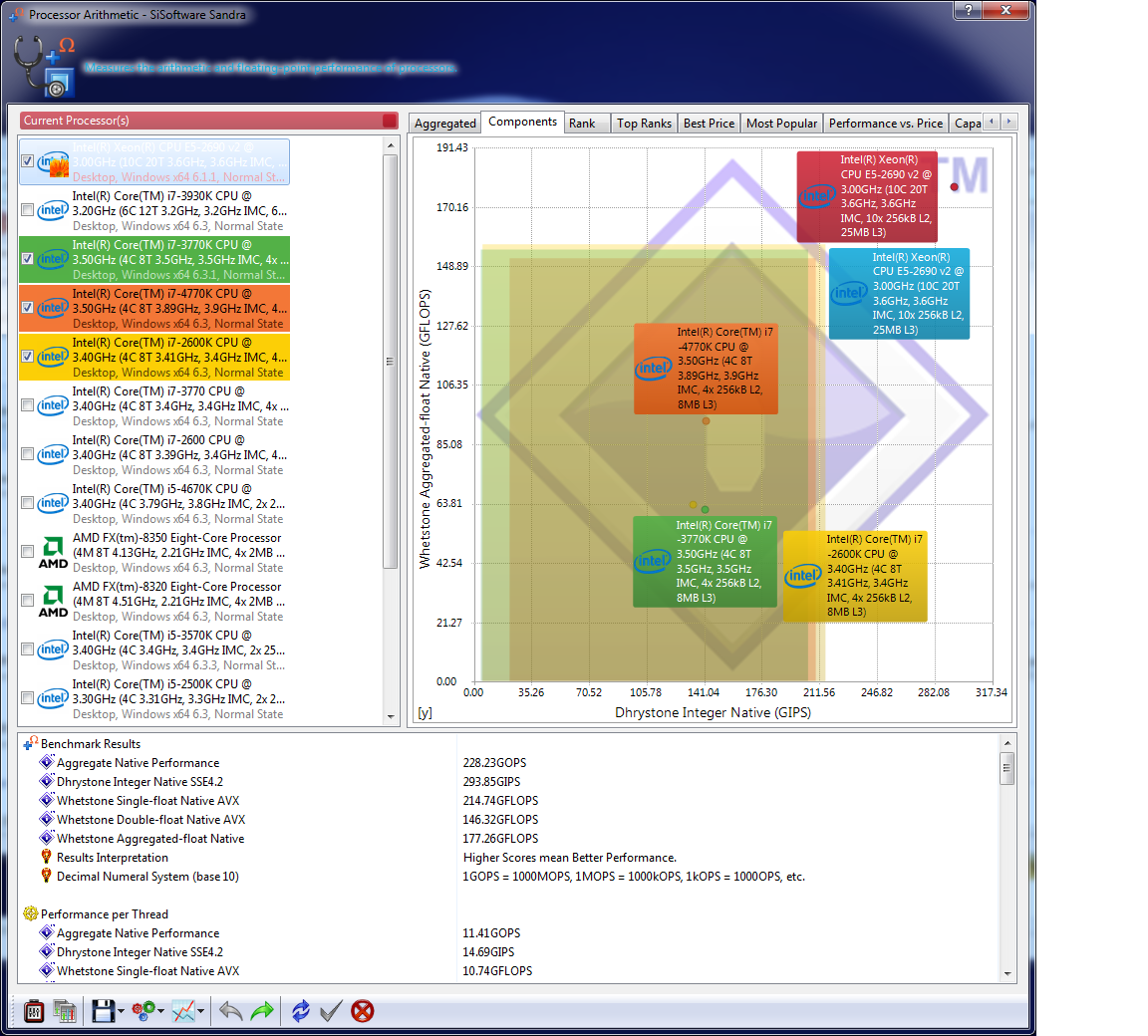
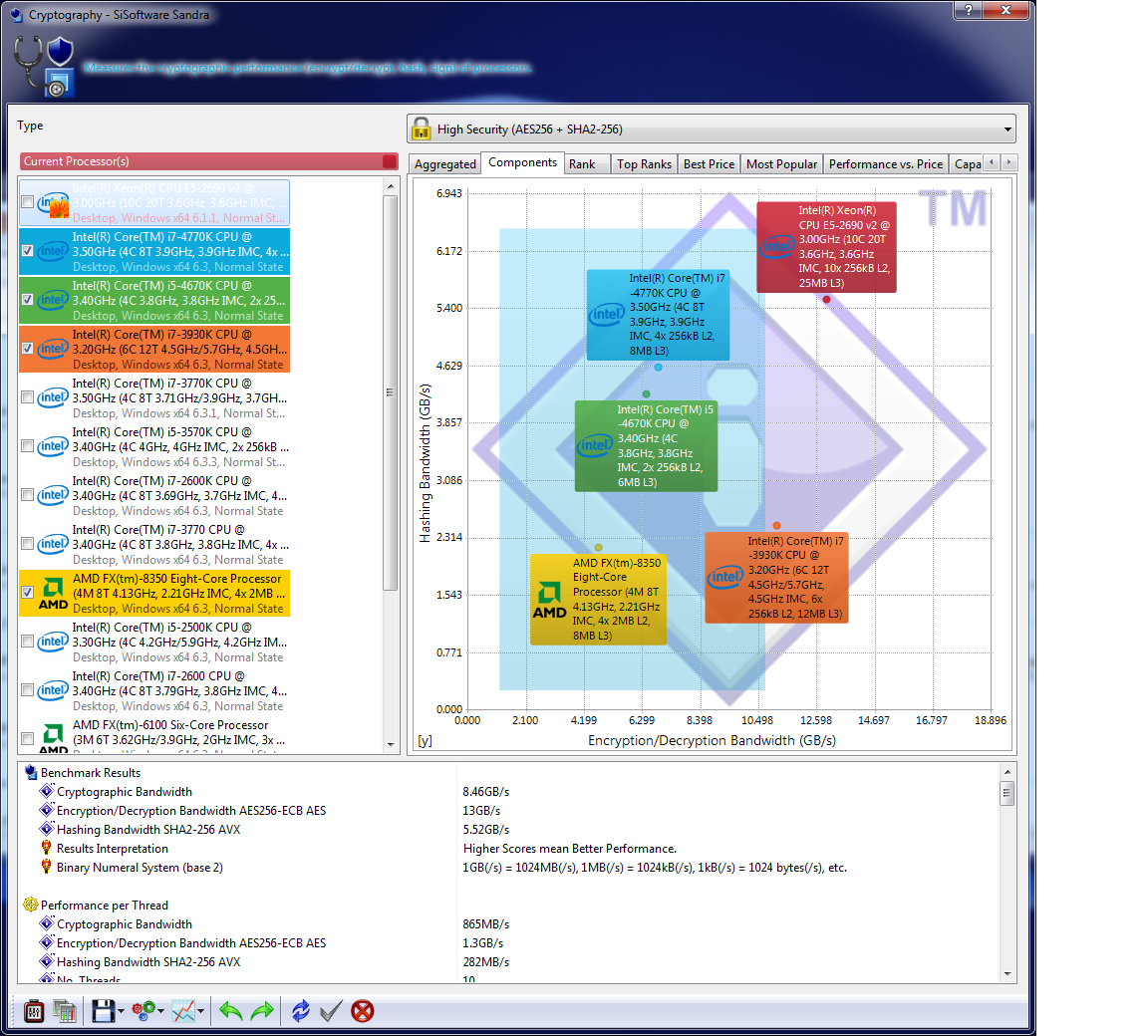
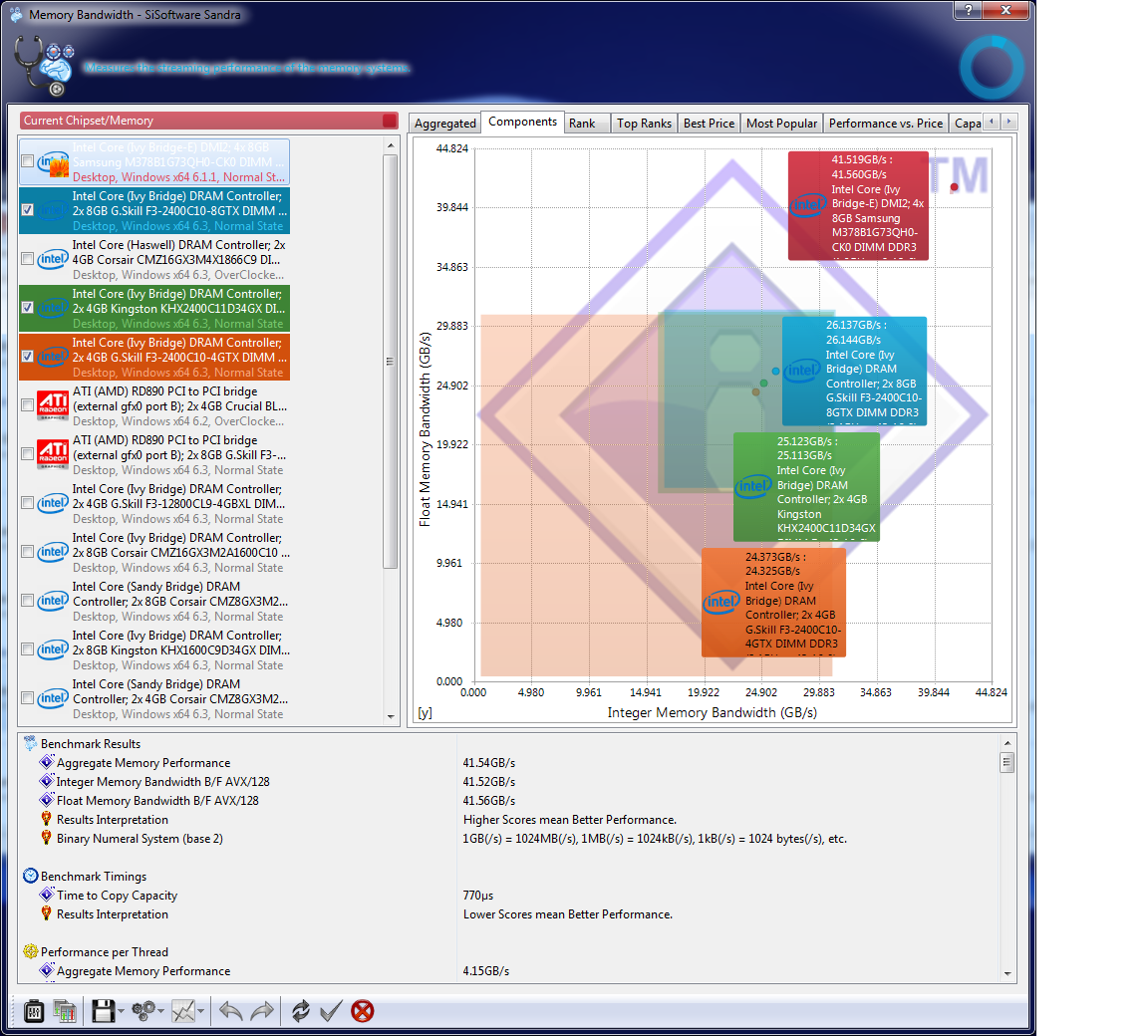
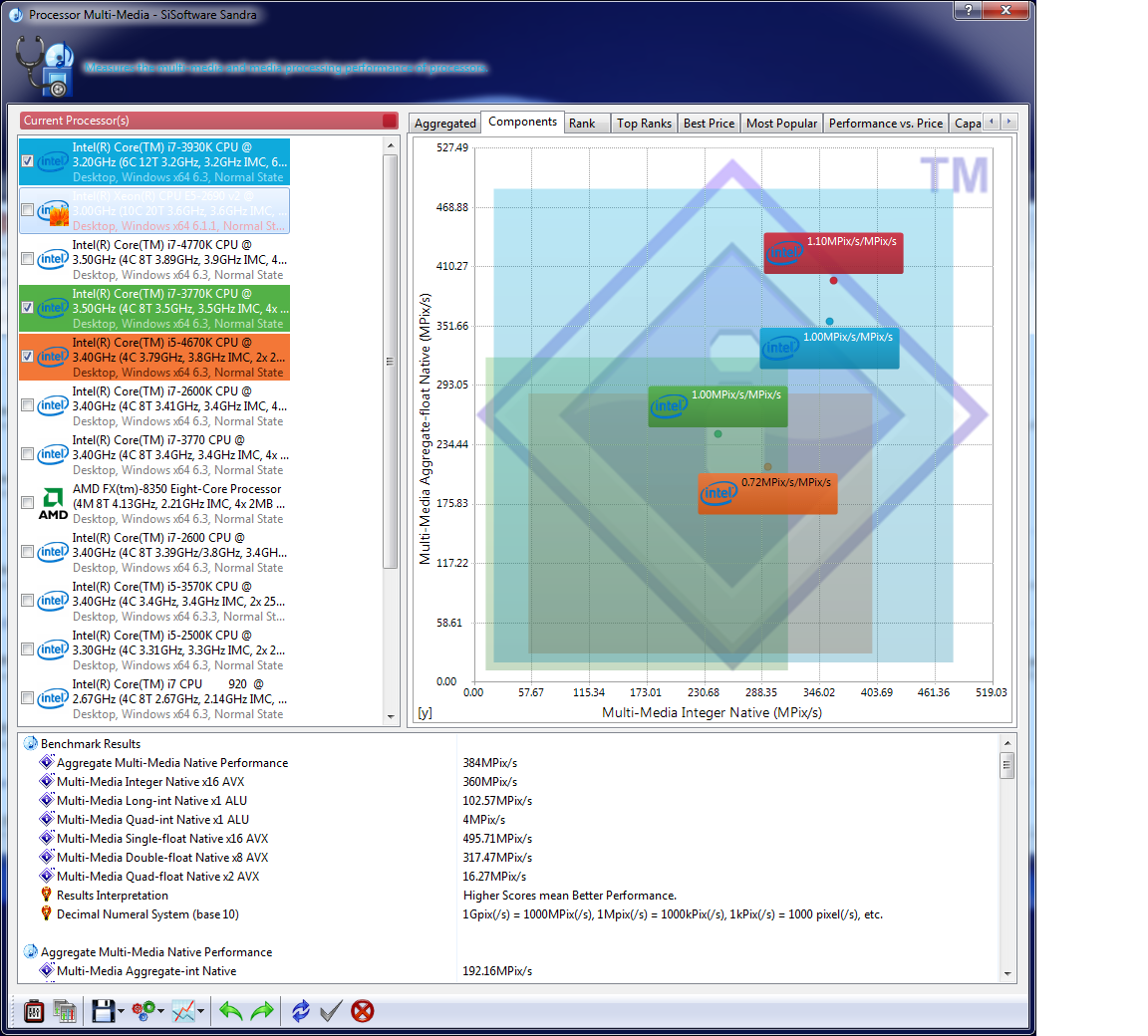
The Armari's quad-channel memory runs rings around either of the YOYOTech systems. Similarly the arithmetic result shows the huge number-crunching ability of the ten-core Xeon processor.
Crystalmark is a useful benchmark to measure theoretical performance levels of hard drives and SSD’s. We are using V3.0 x64. We use this program to test the onboard Intel Solid State Drive.
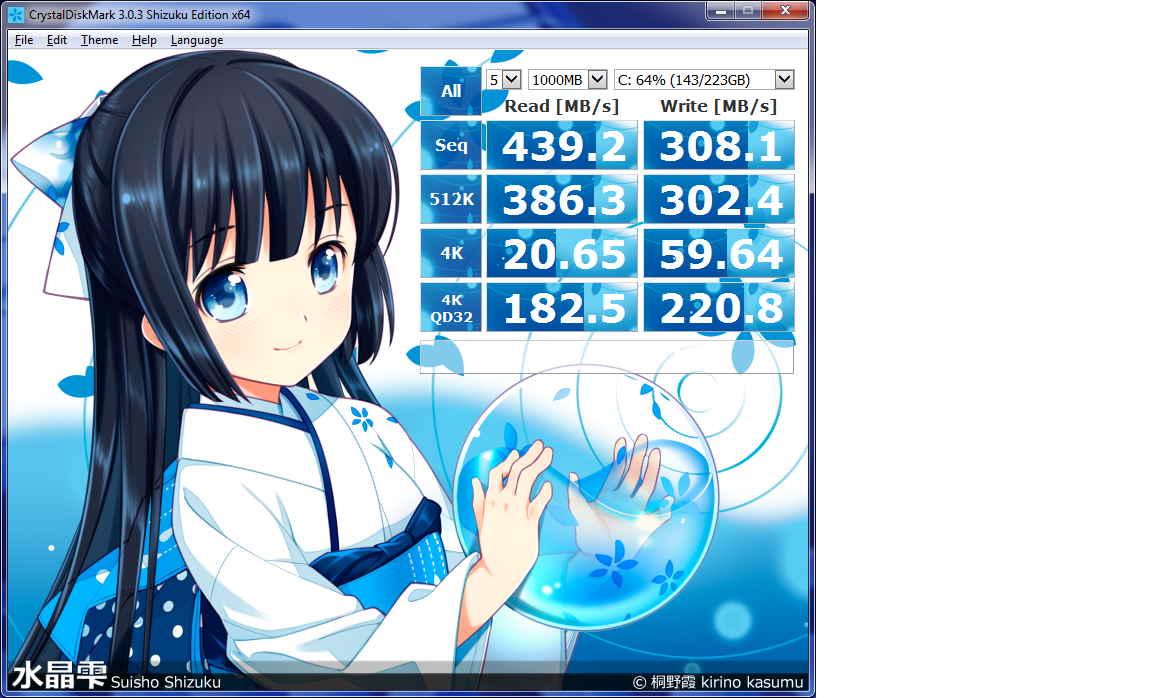
The Intel Series 530 SSD performs well, but it isn't the fastest solid state disk we have seen. It will still be very quick for operating system and application loading.
Ambient noise in the room is around 20-25dBa. We measure from a distance of around 1 meter from the closed chassis and 4 foot from the ground to mirror a real world situation.
Why do this? Well this means we can eliminate secondary noise pollution in the test room and concentrate on only the video card. It also brings us slightly closer to industry standards, such as DIN 45635.
KitGuru noise guide
10dBA – Normal Breathing/Rustling Leaves
20-25dBA – Whisper
30dBA – High Quality Computer fan
40dBA – A Bubbling Brook, or a Refrigerator
50dBA – Normal Conversation
60dBA – Laughter
70dBA – Vacuum Cleaner or Hairdryer
80dBA – City Traffic or a Garbage Disposal
90dBA – Motorcycle or Lawnmower
100dBA – MP3 player at maximum output
110dBA – Orchestra
120dBA – Front row rock concert/Jet Engine
130dBA – Threshold of Pain
140dBA – Military Jet takeoff/Gunshot (close range)
160dBA – Instant Perforation of eardrum
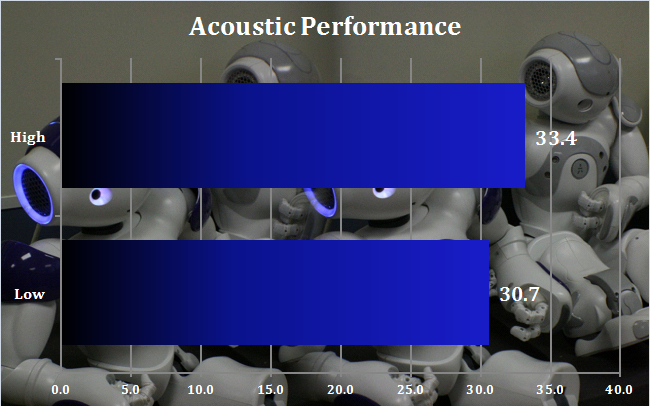
The Armari is only slightly more noisy under load than it is when idle. In both cases, it's incredibly quiet, scarcely audible above the background level. This won't be a system that will be at all irritating to work alongside.
The Armari Magnetar M16E-AW1200-GPU is an undoubtedly powerful system.
It's rendering abilities are incredible for a single-socket workstation, with some of the fastest Maxon Cinebench CPU scores we have seen. However, as a modelling workstation it is merely good, since modelling benefits from processors with higher clock speeds, rather than lots of cores, so a frequency-enhanced Core i7 would be a better choice if modelling is the primary function for the workstation.
On the other hand, whether the AMD FirePro W8100 or the NVIDIA Quadro K5000 is the best graphics choice depends on the applications you run, as both cost around the same.
Either way, at £5508.75 including VAT, this is also a hugely expensive workstation. The processor on its own makes up about £1,500 of that, and the AMD FirePro W8100 graphics a similar amount. Even taking into account the premium motherboard and sizeable complement of RAM, you are still paying a fair bit for the brilliant bespoke chassis design and high-end features such as the hot-swap power supply and drive bays.
We would also recommend buying this system with a secondary hard disk for data, although this won't make an enormous difference to the overall price. As a workstation where rendering is the primary need, but modelling still needs to be capable, this is a high quality system, although not a cheap one.
Discuss on our Facebook page, over HERE.
Pros:
- Incredible rendering performance.
- Good modelling performance.
- Innovative chassis design.
- Excellent build quality.
Cons:
- Expensive.
- Best specified with secondary hard disk.
- Frequency-enhanced Core i7 better for modelling.

Kitguru says: The Armari Magnetar M16E-AW1200-GPU provides immense rendering capabilities and good modelling, but it's expensive.

Looking at this URL http://www.armari.co.uk/custom.asp?SysID=695 , for the “M16-AW1200R-GPU”, I could not see how you came up with a price of £5508.75. Do you have a URL for the System you tested ?
PS: They have a 8-GPU System @ http://www.armari.co.uk/system.asp?SysID=1405 , the “Tyan FT72”.
Thanks for the detailed Review.
Rob
https://www.youtube.com/user/LowLightVideos