KitGuru KitGuru.net – Tech News | Hardware News | Hardware Reviews | IOS | Mobile | Gaming | Graphics Cards


To test real-life performance of a drive, we use a mix of folder/file types, and by using the FastCopy utility (which gives a time as well as MB/s result), we record the performance of the drive reading from & writing to a 2TB Kingston KC3000.
Transfer Details
Data file – 100GB.
BluRay Movie – 42GB.
File folder – 50GB – 28,523 files.
Movie demos 8K – 21GB – (11 demos).
Raw Movie Clips 4K – 16GB – (9 MP4V files).
Movie folder – 12GB – 15 files – (8 @ .MKV, 4 @ .MOV, 3 @ MP4).
Photo Folder – 10GB – 304 files – (171 @ .RAW, 105 @ JPG, 21 @ .CR2, 5 @ .DNG).
Audio Folder – 10GB – 1,483 files – (1479 @ MP3, 4 @ .FLAC files).
Single large image – 5GB – 1.5bn pixel photo.
3D Printer File Folder – 4.25GB – (166 files – 105 @ .STL, 38 @ .FBX, 11 @ .blend, 5 @ .lwo, 4 @ .OBJ, 3@ .3ds).
AutoCAD File Folder – 1.5GB (80 files – 60 @ .DWG and 20 @.DXF).

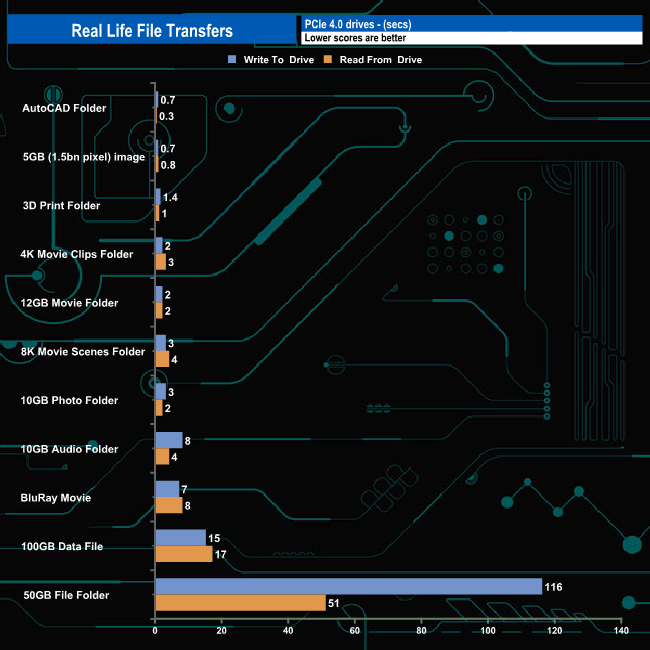
The 8TB Kingston Fury Renegade G5 averaged 4,684MB/s when writing the eleven transfer tests, with the fastest being the 100GB data file at 7,288MB/s (15s transfer time), the slowest being the 50GB file folder at 466MB/s (116s transfer time). Reading back the data, the average was 4,838MB/s with the fastest being the 100GB data file once again at 6,219MB/s (17s) and again, the slowest was the 50GB File Folder at 1,060MB/s (51s transfer time).