 KitGuru KitGuru.net – Tech News | Hardware News | Hardware Reviews | IOS | Mobile | Gaming | Graphics Cards


Sporting an RTX 3060 and Intel’s new Core i7-12700H processor, it may come as a surprise to see the MSI Katana GF66 priced at £1399 in the UK. In fact, the GPU and CPU combination – coupled with 16GB of DDR4 memory, a 1TB SSD, and a 240Hz 1080p display – make this laptop seem like an intriguing asking price of just under fourteen-hundred Great British Pounds.
But how do MSI’s overall design and connectivity choices stack up? And does the blend of hardware perform inside this 15.6”-class chassis? Let's take a closer look.
Timestamps
00:00 Start
00:53 Katana technical details
02:37 The screen
03:12 Connectivity
04:08 WiFi / Bluetooth / Webcam / Speakers
04:43 Trackpad / Keyboard
05:18 Battery / power brick
05:40 Pricing – GF66 12UE
06:16 A look at system, software and install
07:53 Power settings
09:43 Noise output
10:10 SSD performance
10:30 Battery Life
10:48 Test results
12:20 Game results
13:16 Luke's Thoughts
Edit – 9th June 2022: Our initial review coverage and video used the MSI Katana GF66 12UE-406UK model with a reference price of £1099 in the UK. Unbeknownst to us, this was a time-limited promotion for the month of May 2022. The typical retail price of the laptop has now increased to £1399.
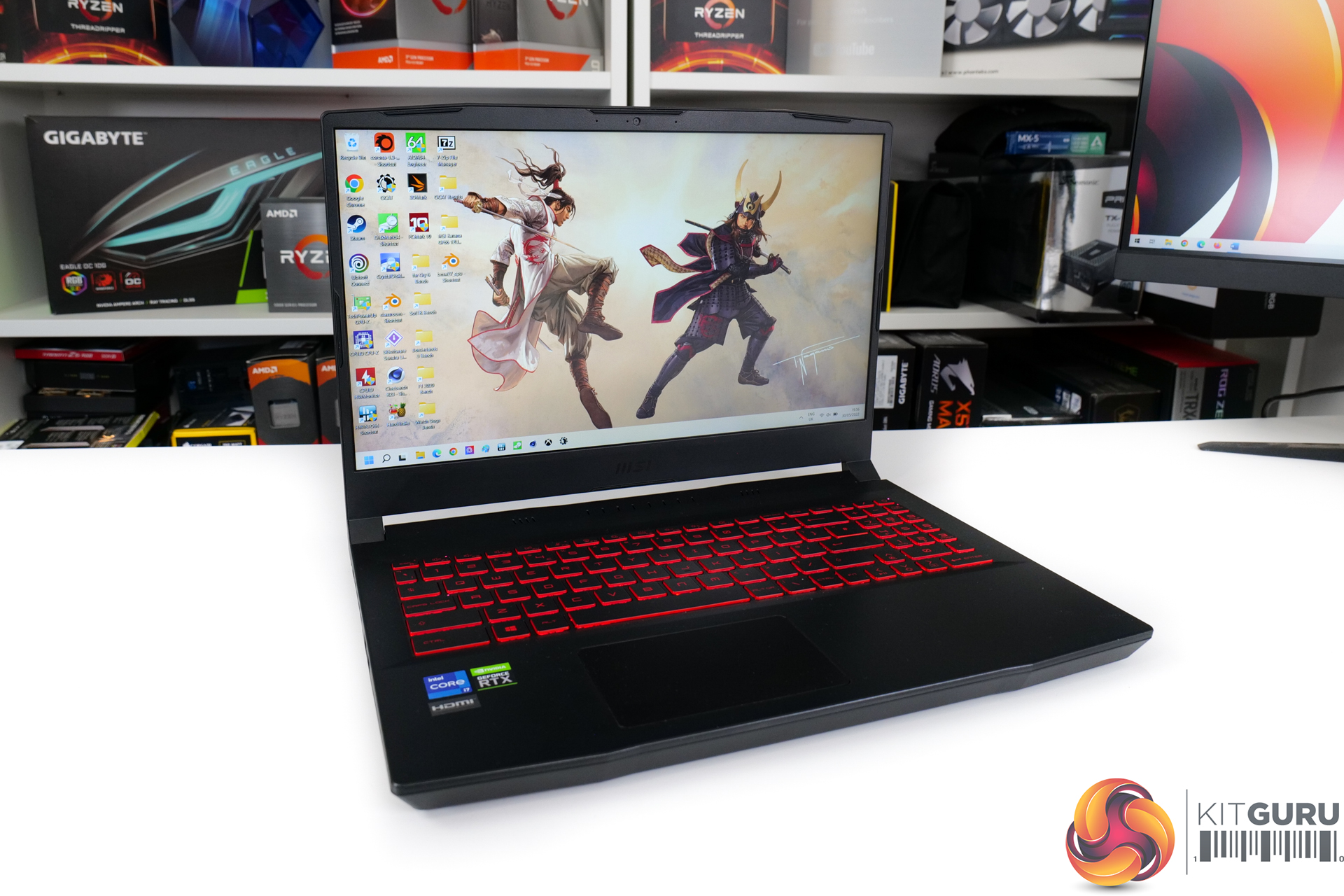
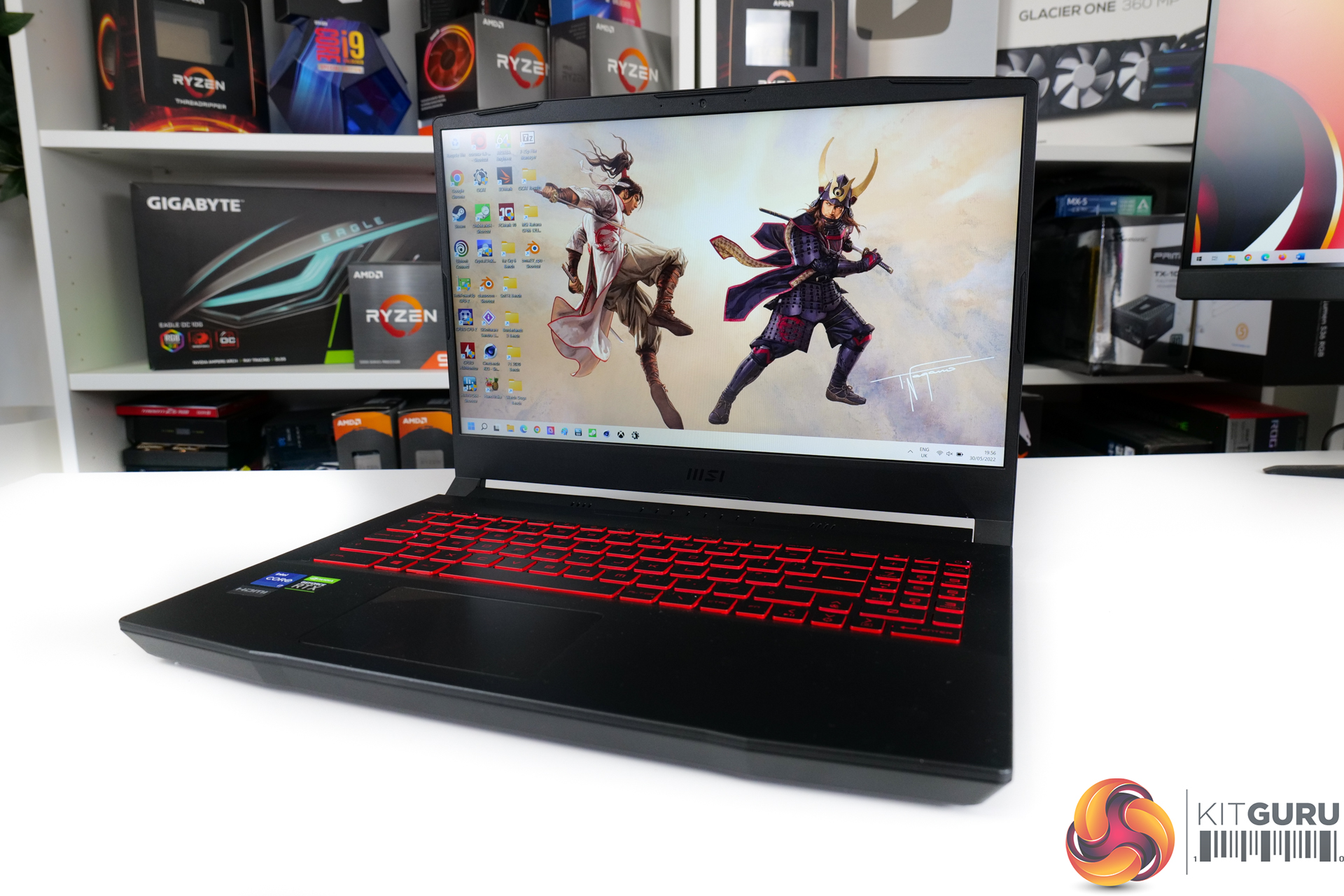
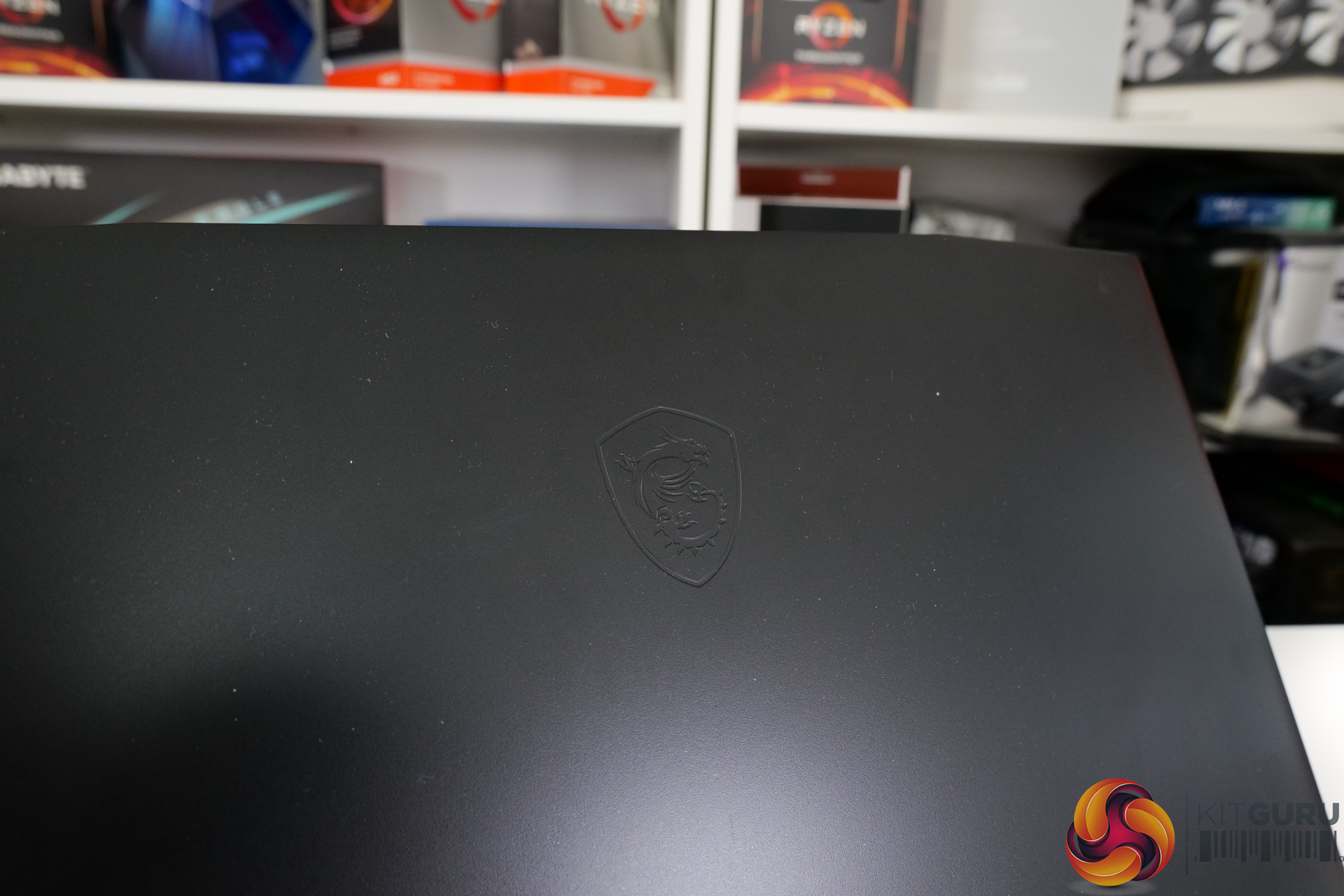
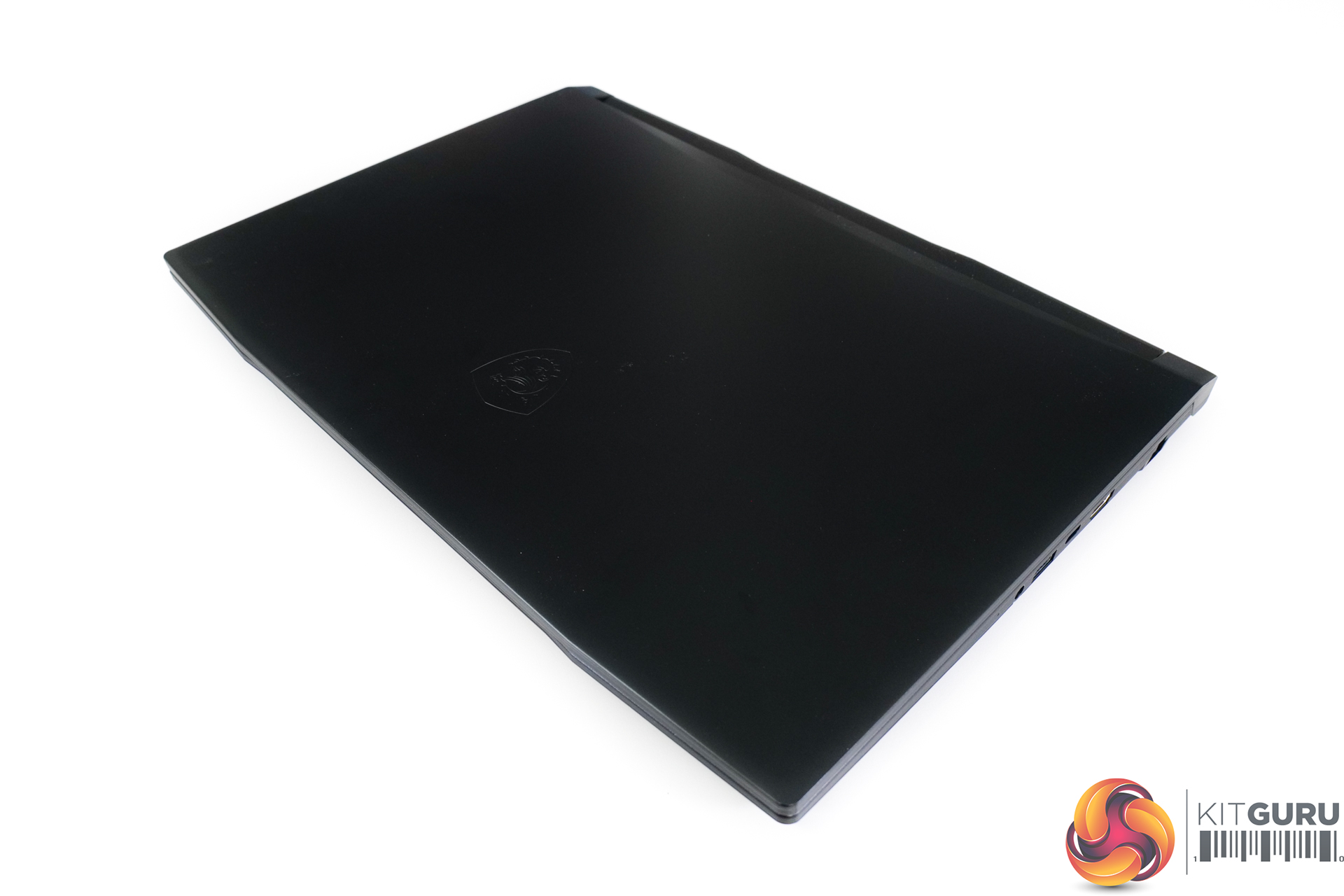
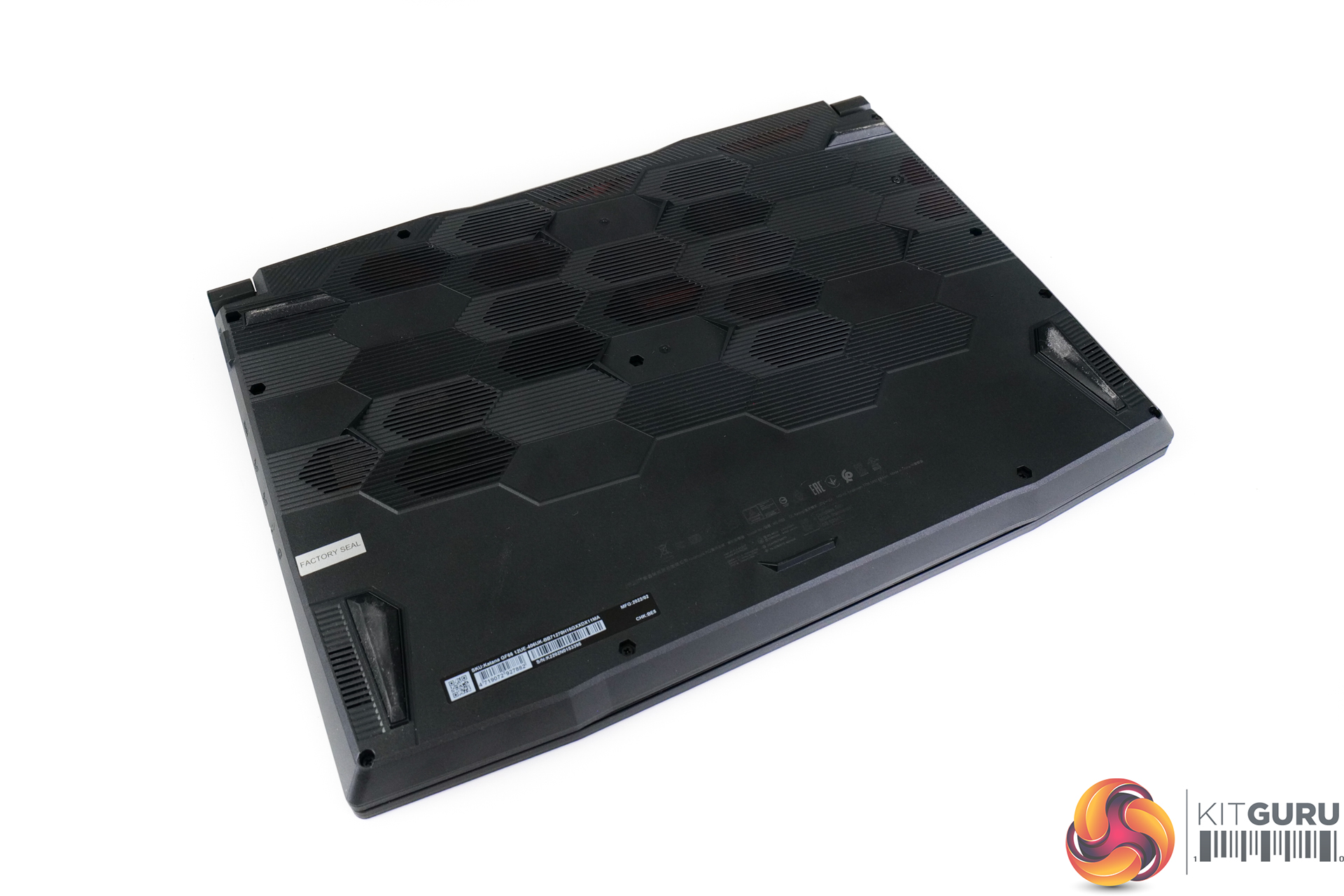
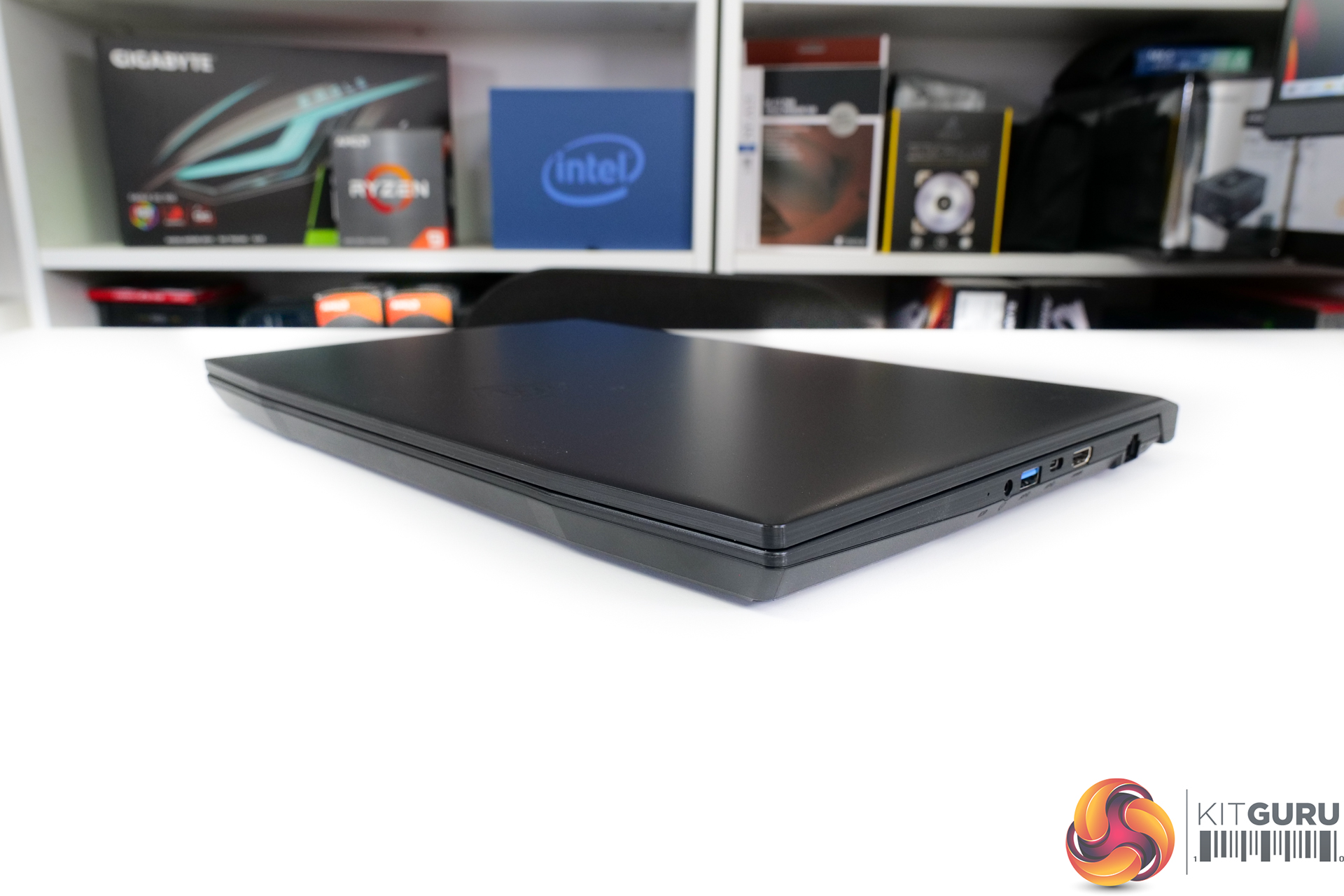
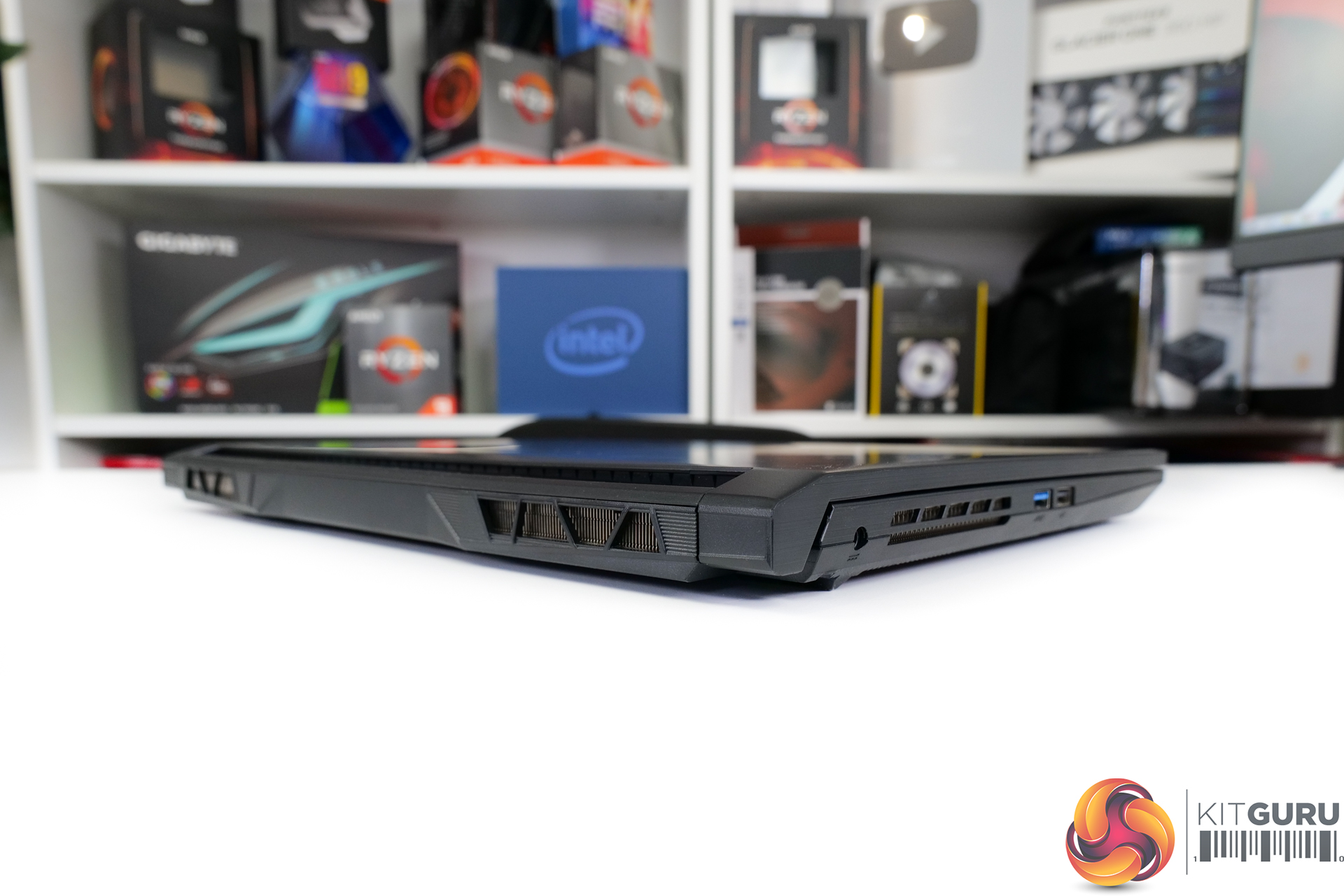
Starting out with a look at the overall design, I wouldn’t say that we are seeing anything particularly fancy from the MSI Katana GF66 12UE. This laptop takes the form of a generic 15.6” chassis – not particularly thin bezels, not particularly sleek thicknesses, and not particularly low weight.
You get a roughly 2.25kg laptop that is over an inch thick with the screen down – or about 23mm thick with the screen open. That weight may seem OK, but you have to add the best part of half a kilo for the 240W barrel-style power brick.
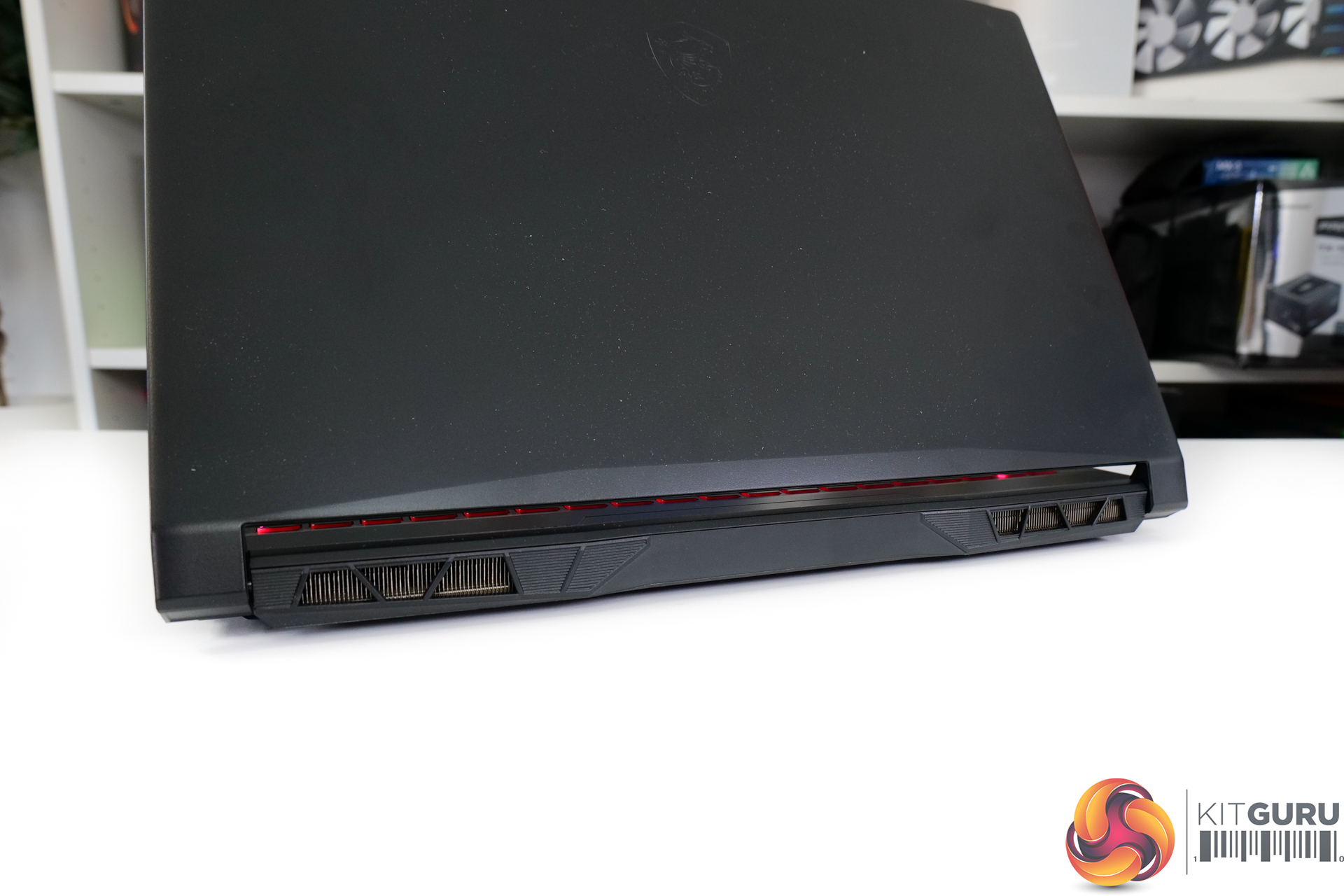
Sleek and eye-catching, this laptop is not, particularly with its largely plastic construction. You do get a good allocation of cooling ventilation on the side, rear, and bottom though. So, that may well appeal to a budget gaming audience more so than slick bezels and metal construction.
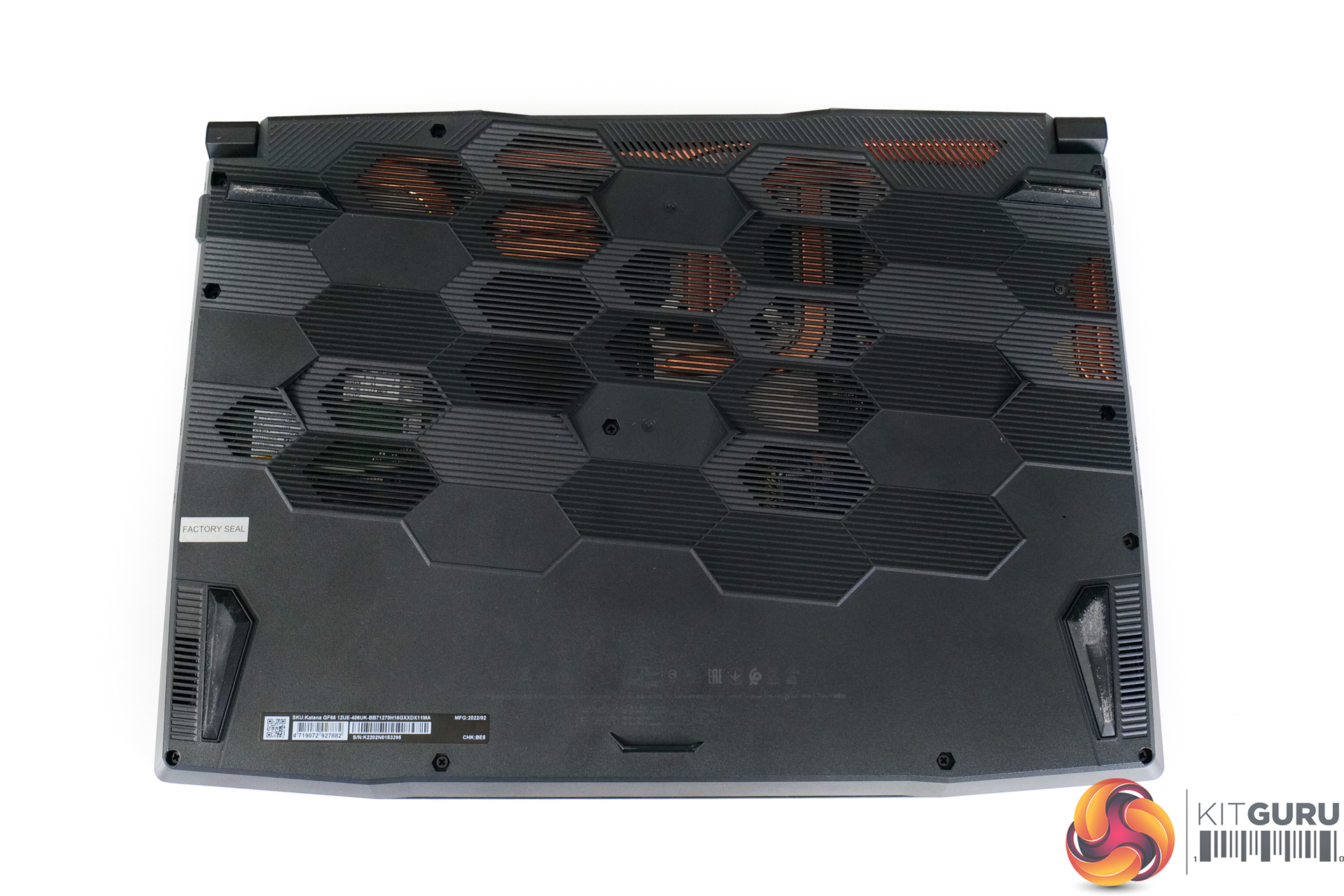
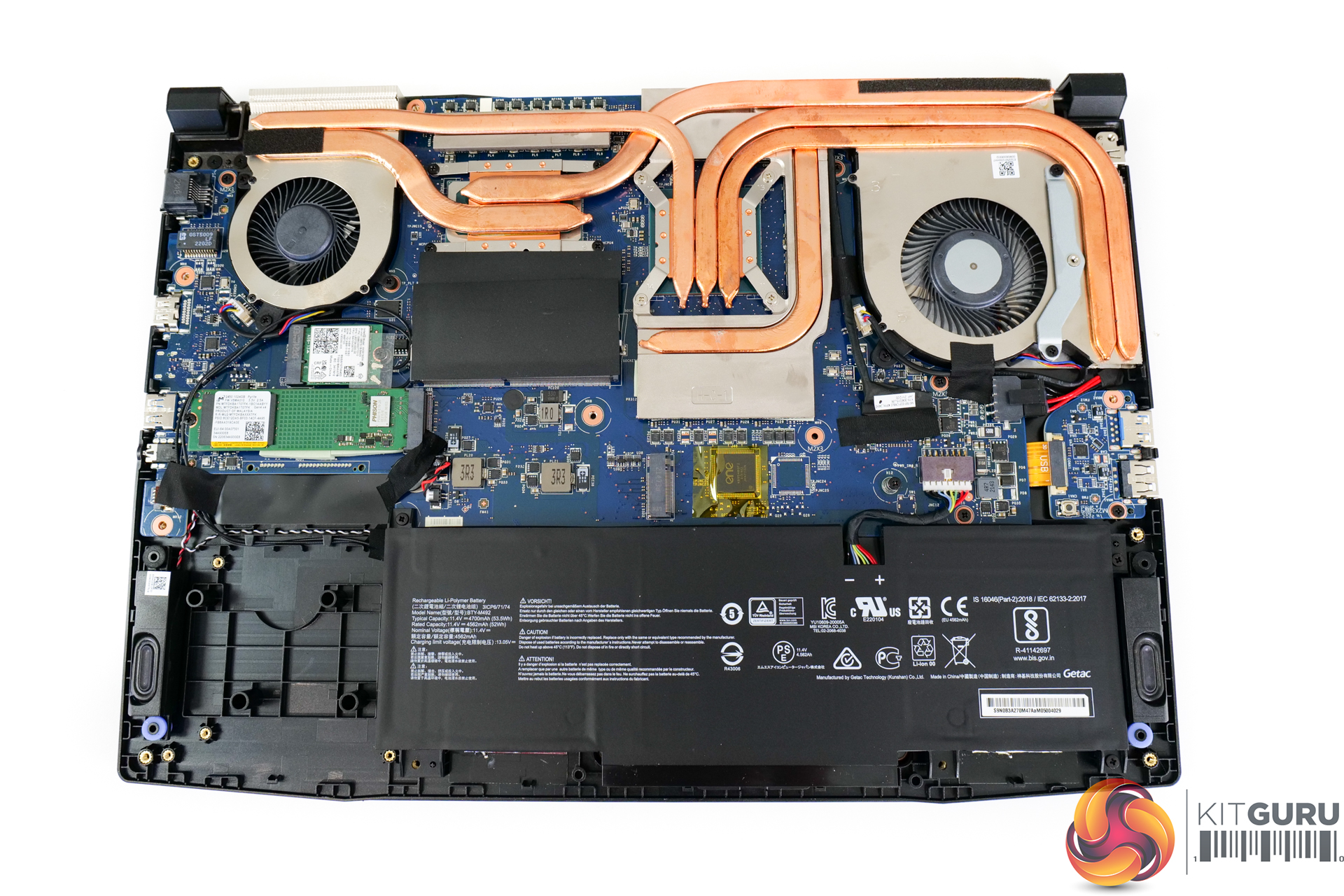
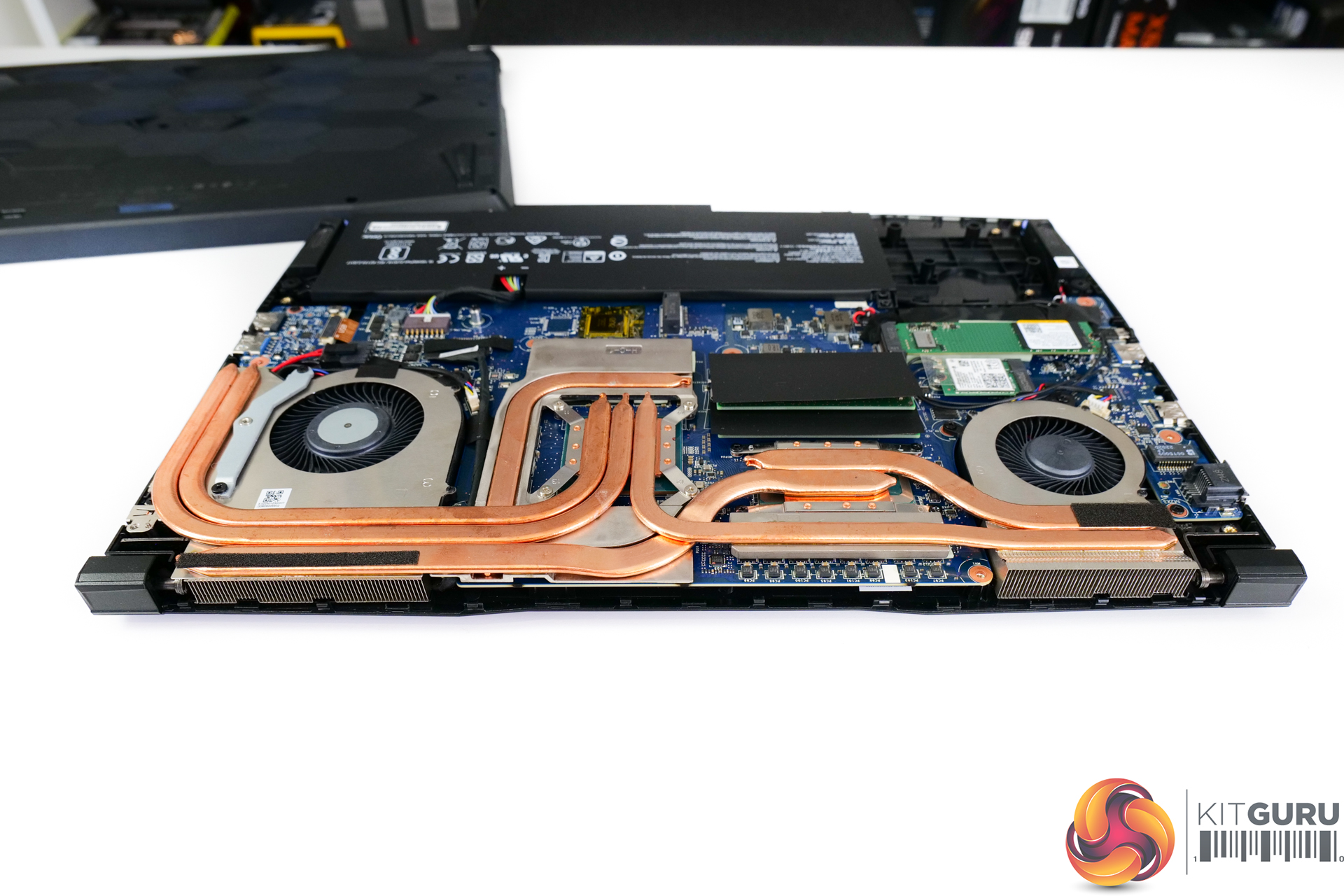
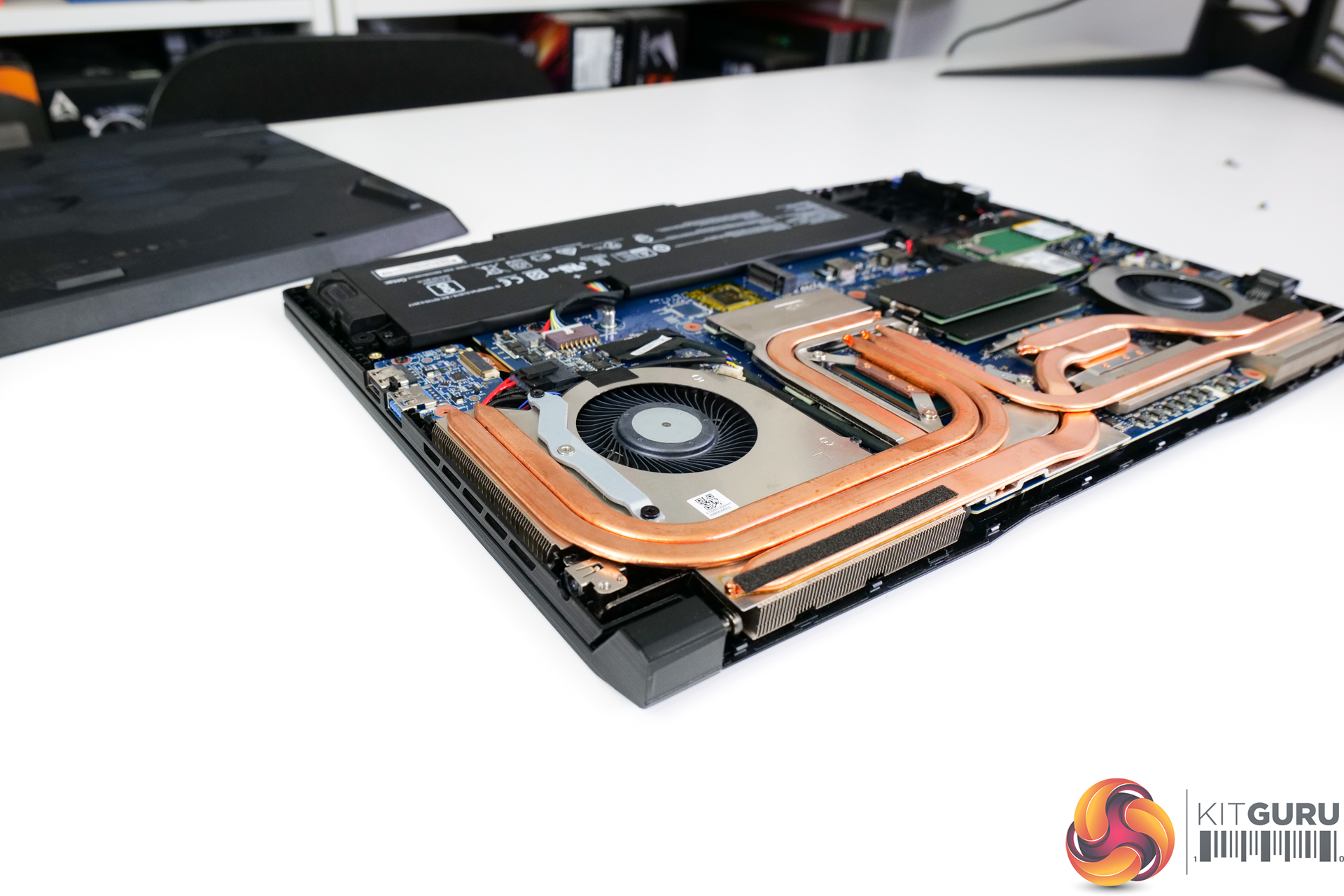
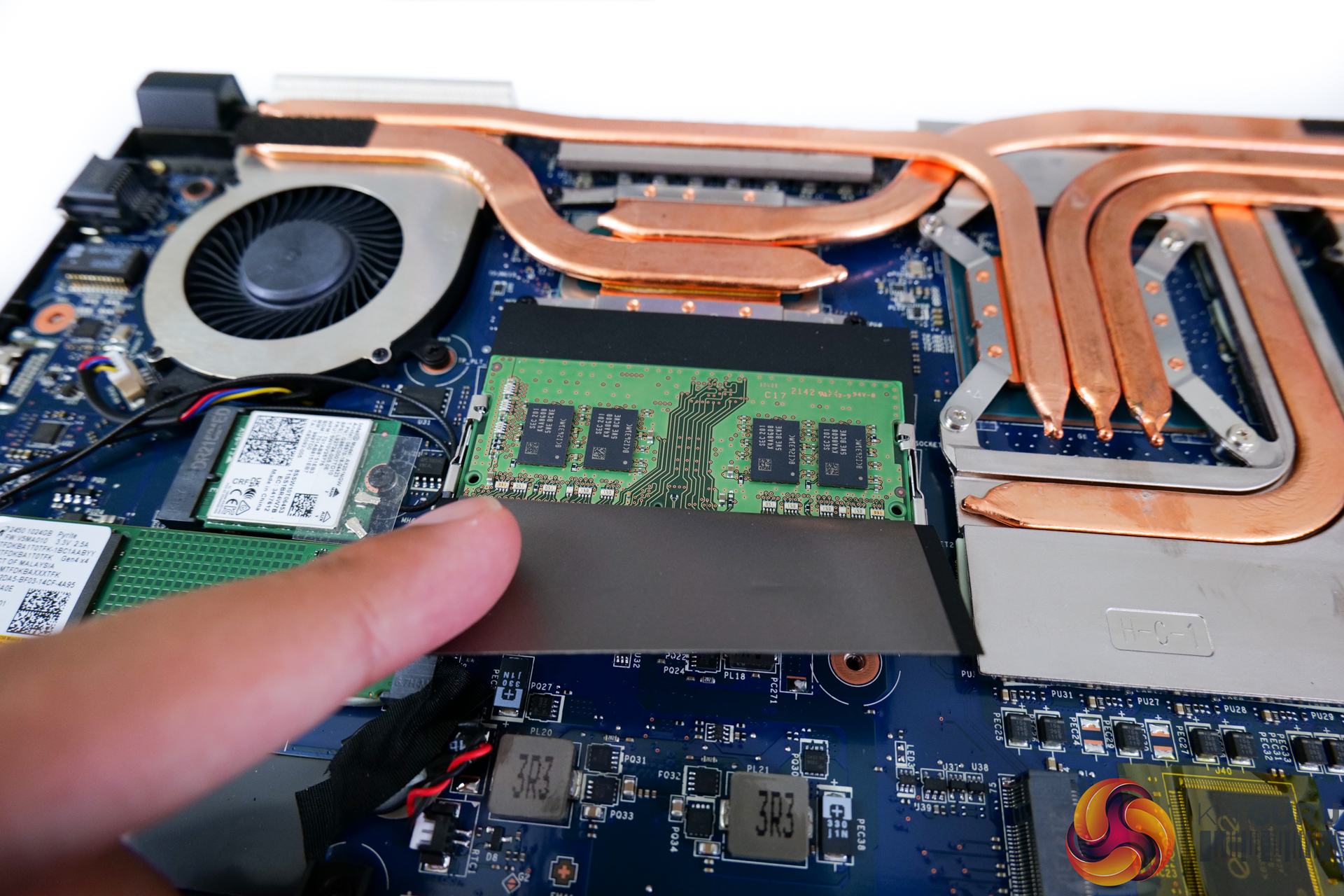
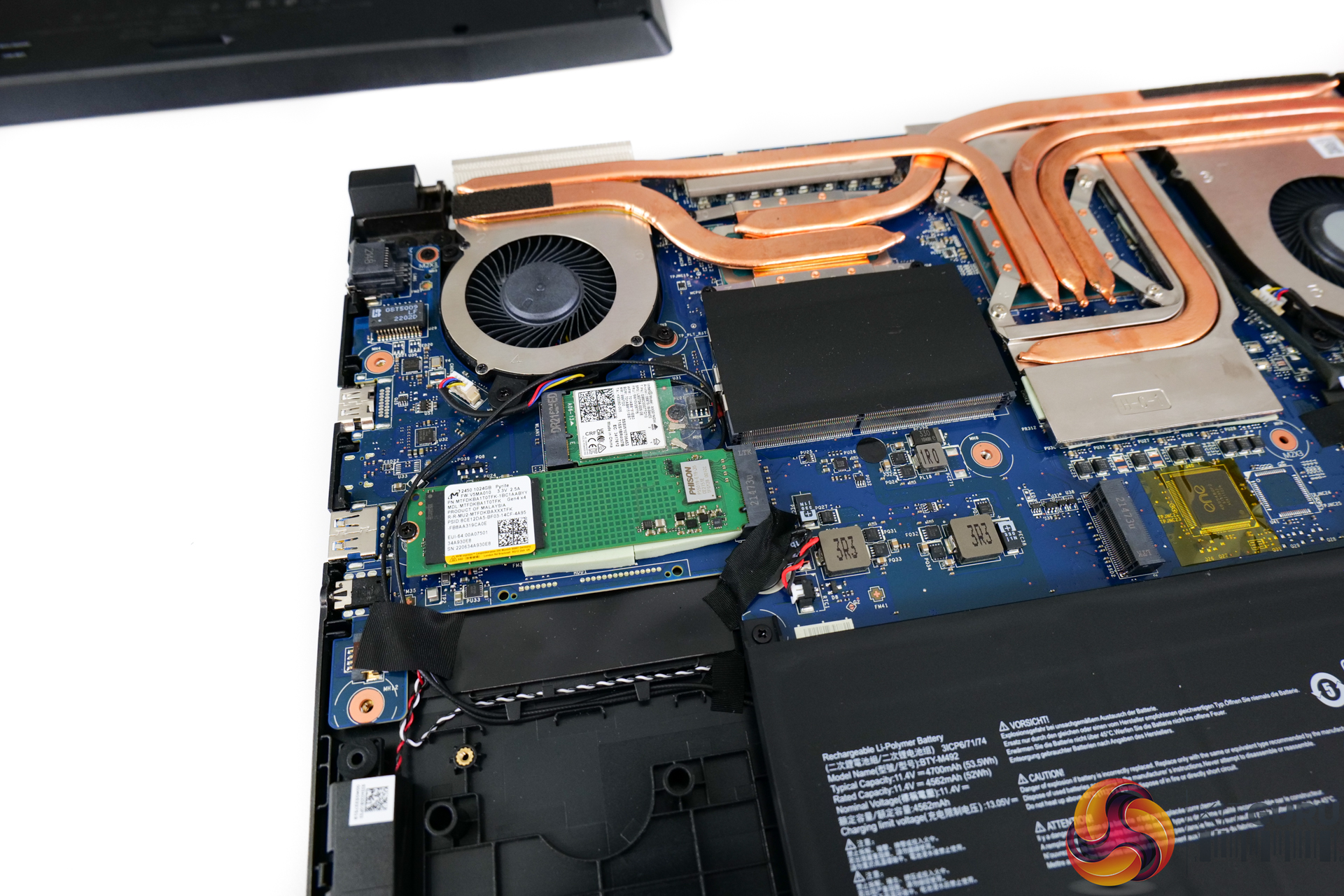
Primary to the under-the-hood hardware is the Intel Core i7-12700H processor. This chip features 6 performance cores and 8 efficient cores for 20 threads total. It can Turbo as high as 4.7GHz with the 35-115W rated power range, but that depends on the manufacturer's deployment, which we will analyse in this review.
You also get the Nvidia RTX 3060 Laptop GPU in its 6GB form. This is rated at 105W maximum power in MSI’s deployment, according to the spec sheet. A 105W RTX 3060 should be a genuinely competent laptop graphics card, though not mind-blowing at this price point.
Memory is 2x8GB of DDR4 3200MHz, which is a cheaper option than DDR5 so is sensible from a budget perspective. And the SSD is a 1TB PCIe Gen 4 model, but there’s a spare M.2 slot for upgrades.
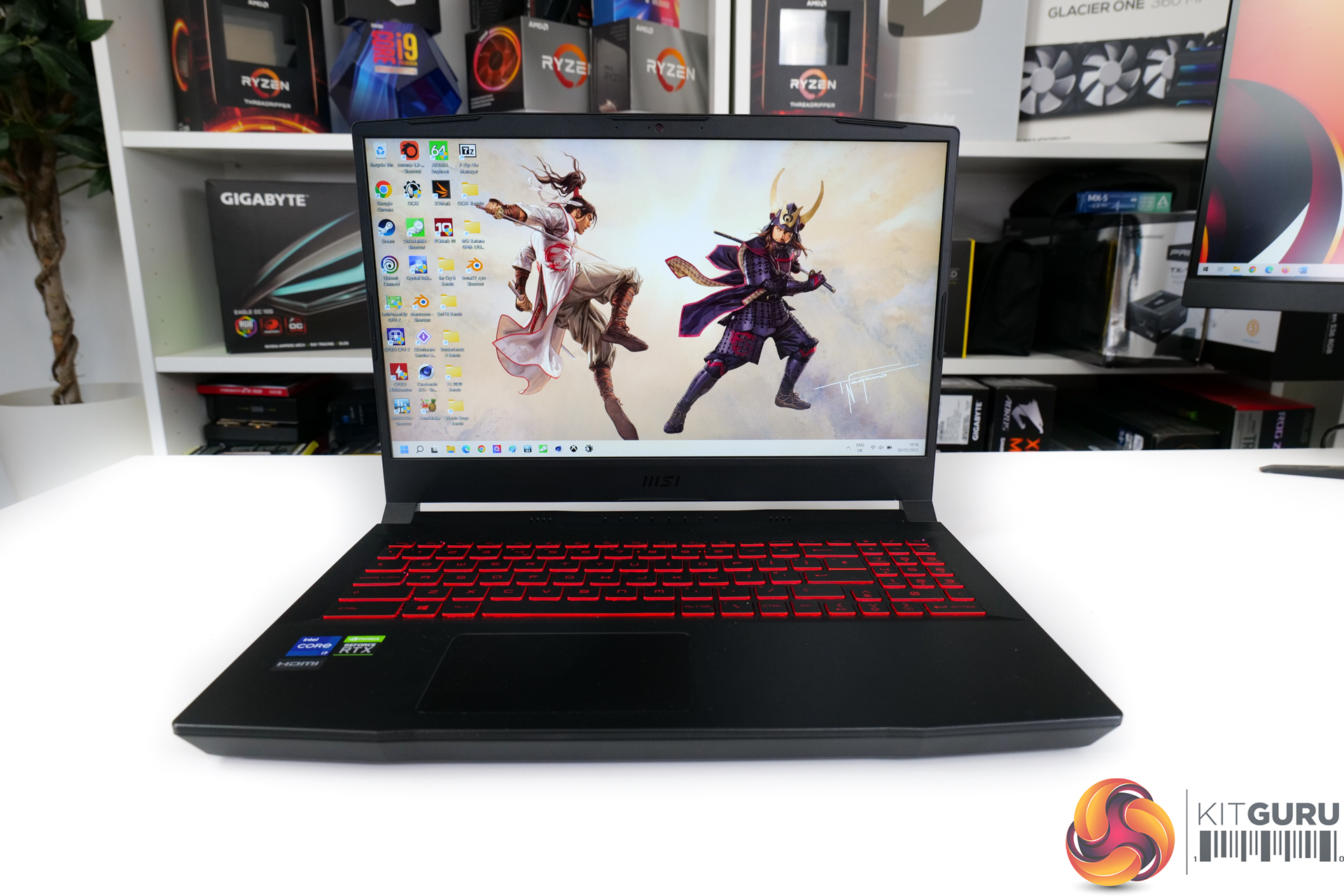
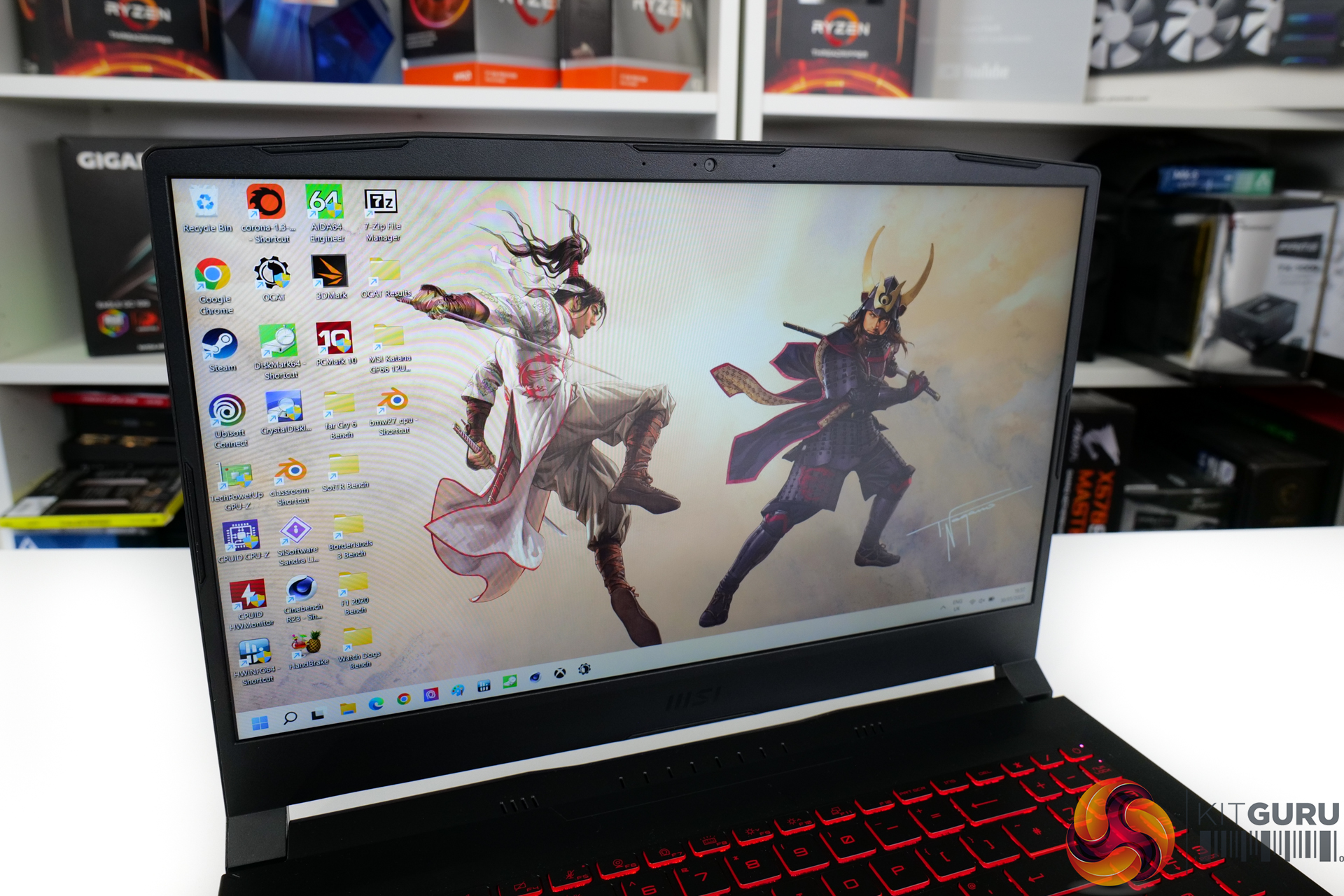
Focusing on the screen, MSI deploys a 15.6” 1920×1080 IPS-level display. That is fine from a budget perspective, but it’s the 240Hz refresh rate that will really appeal to gamers.
No, the screen quality is not the best; peak brightness is mediocre, colour quality is just decent, and the sharpness is undeniably lacking given the 15.6” and 1080p combination. But that refresh rate really does steal the show and it helps translate into an enjoyable gaming experience thanks to the fluid motion.
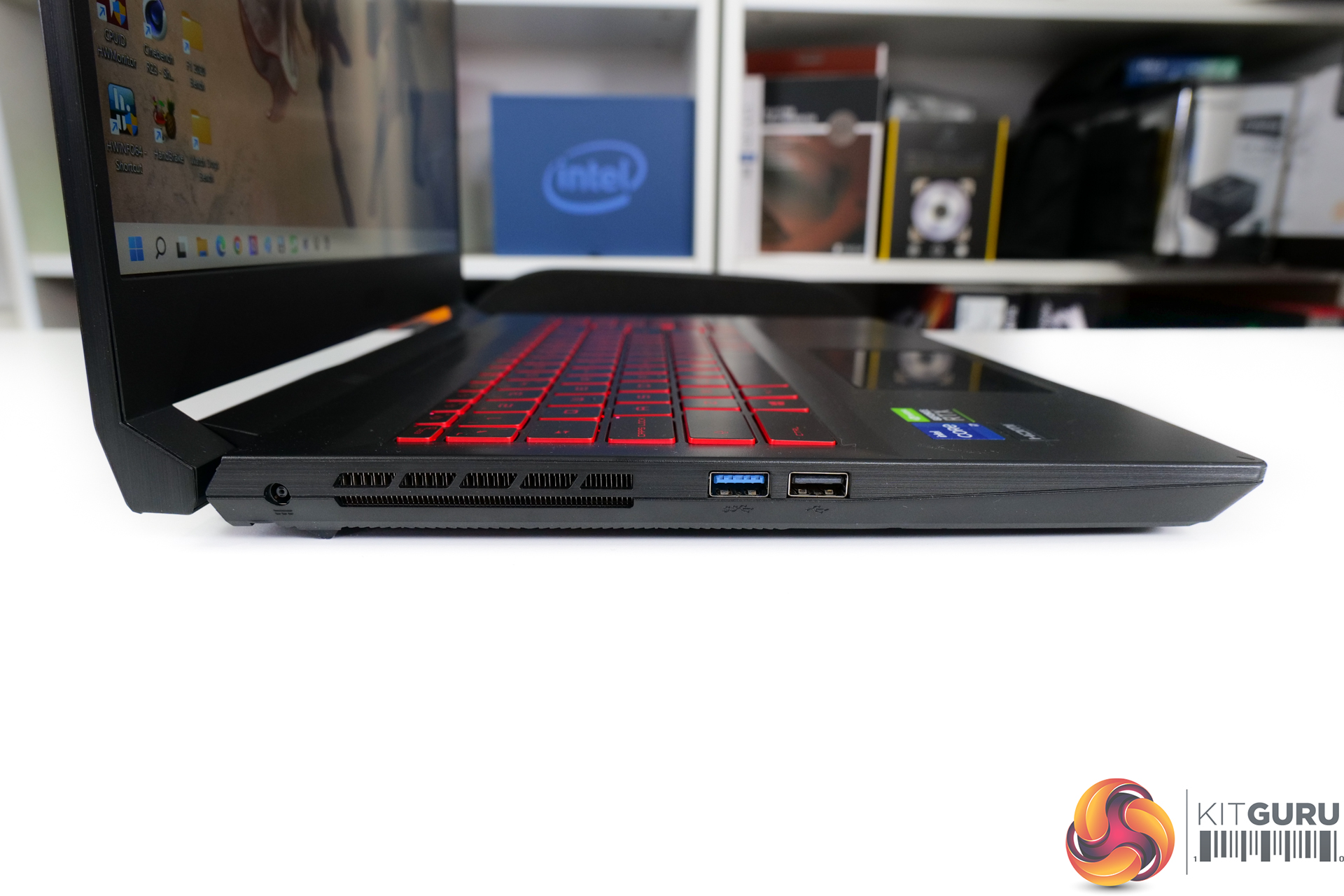
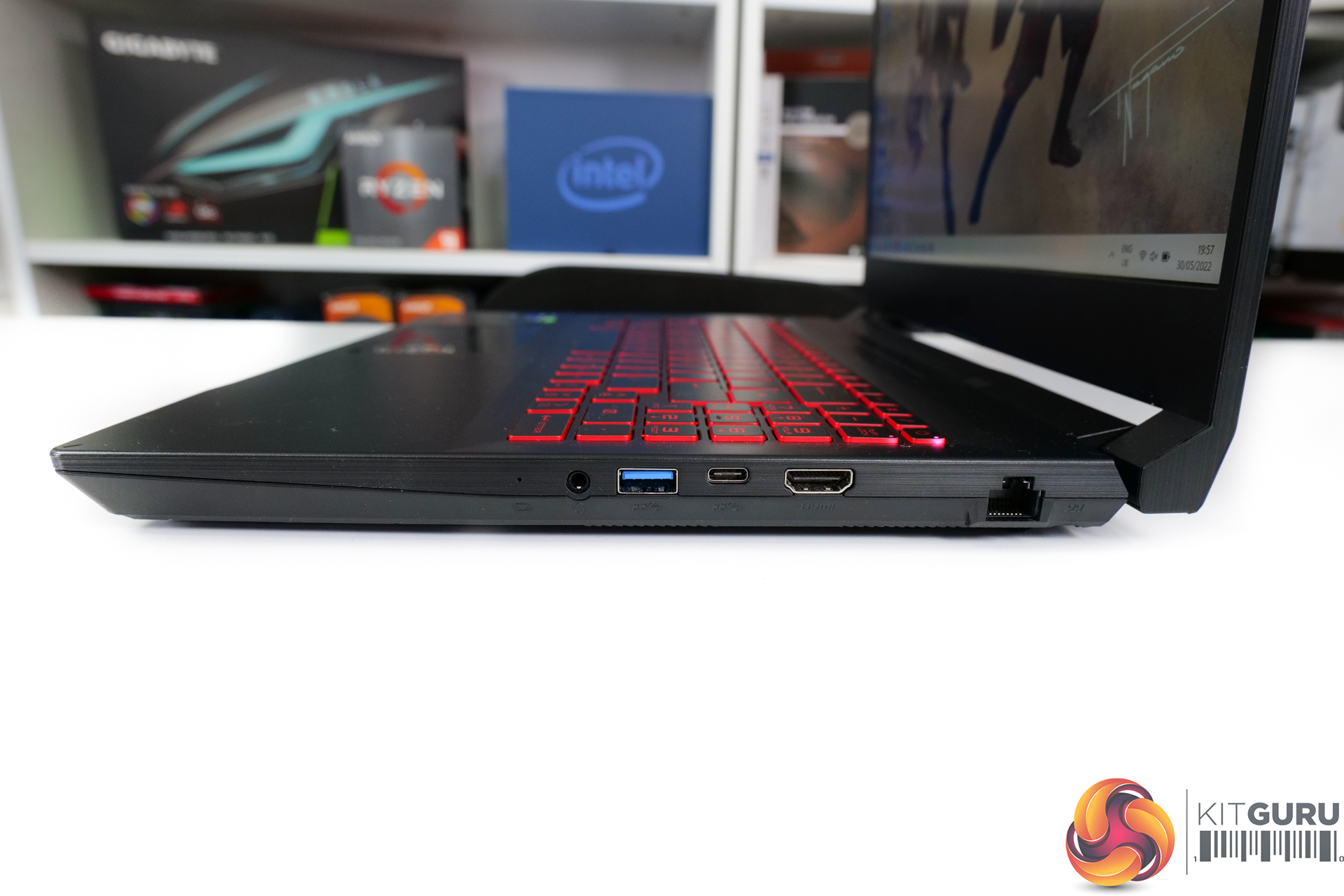
Looking at the physical connectivity for MSI’s Katana GF66, this is another area where we see an undeniably budget feature set.
You get three USB Type-A ports, one of which is actually old USB 2.0 with the other two being 5Gbps. The single USB Type-C port is also 5Gbps and does not handle power or display output. You get Gigabyte Ethernet and 4K60 HDMI, which are good to see. And finishing off is the combo audio jack and the barrel DC power connector.
So, to summarise, there’s only one USB Type-C port, no 10Gbps USB connectivity, and only a single high-resolution video output. That’s pretty atrocious for anybody who wants to connect up more than just the laptop and a single display or odd few peripherals.
Clearly, Thunderbolt is missing but that’s probably fair on this class of laptop. Thankfully, MSI does deploy 802.11ax WiFi 6 capability from the Intel AX201 adapter, and there’s also Bluetooth 5.2.
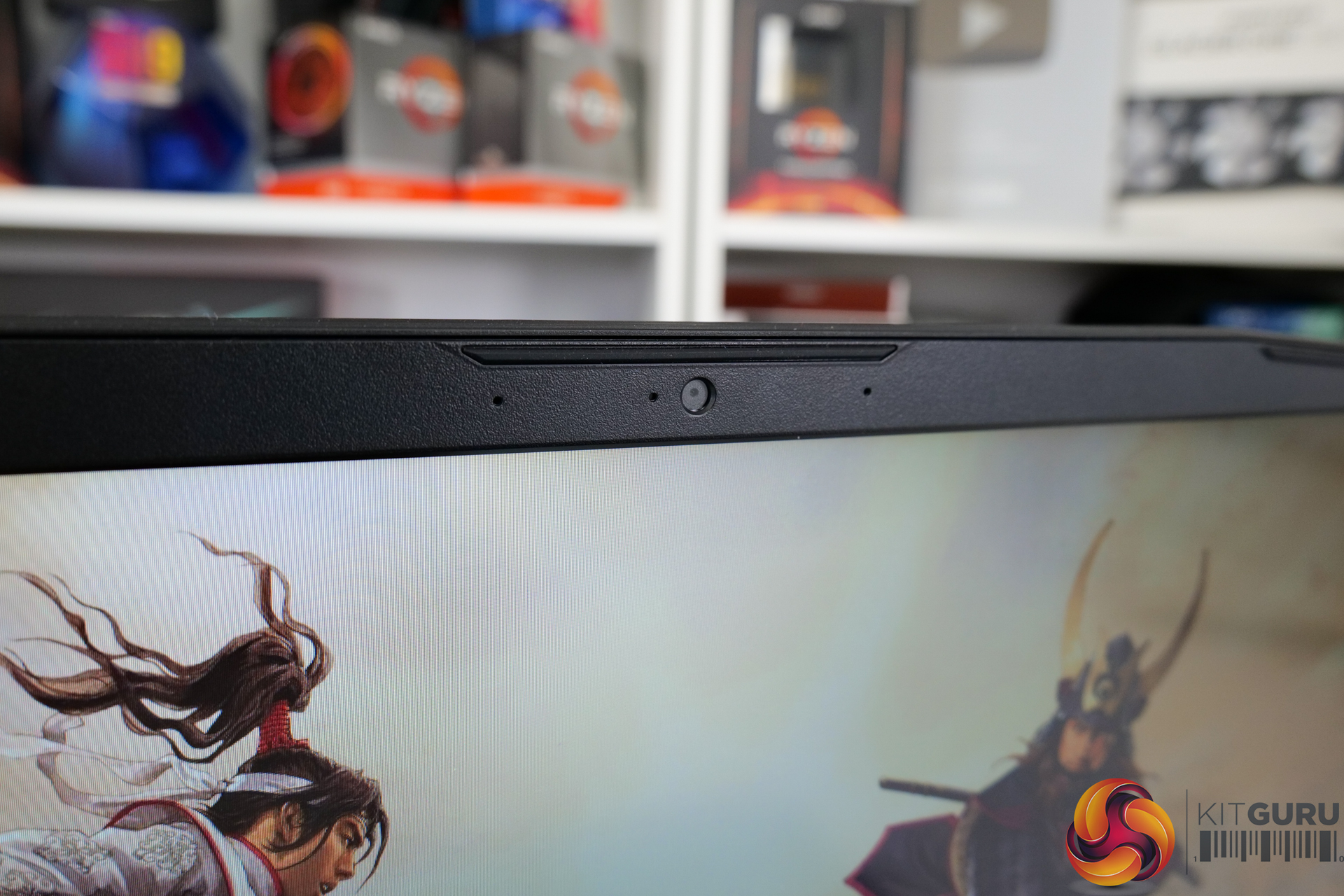
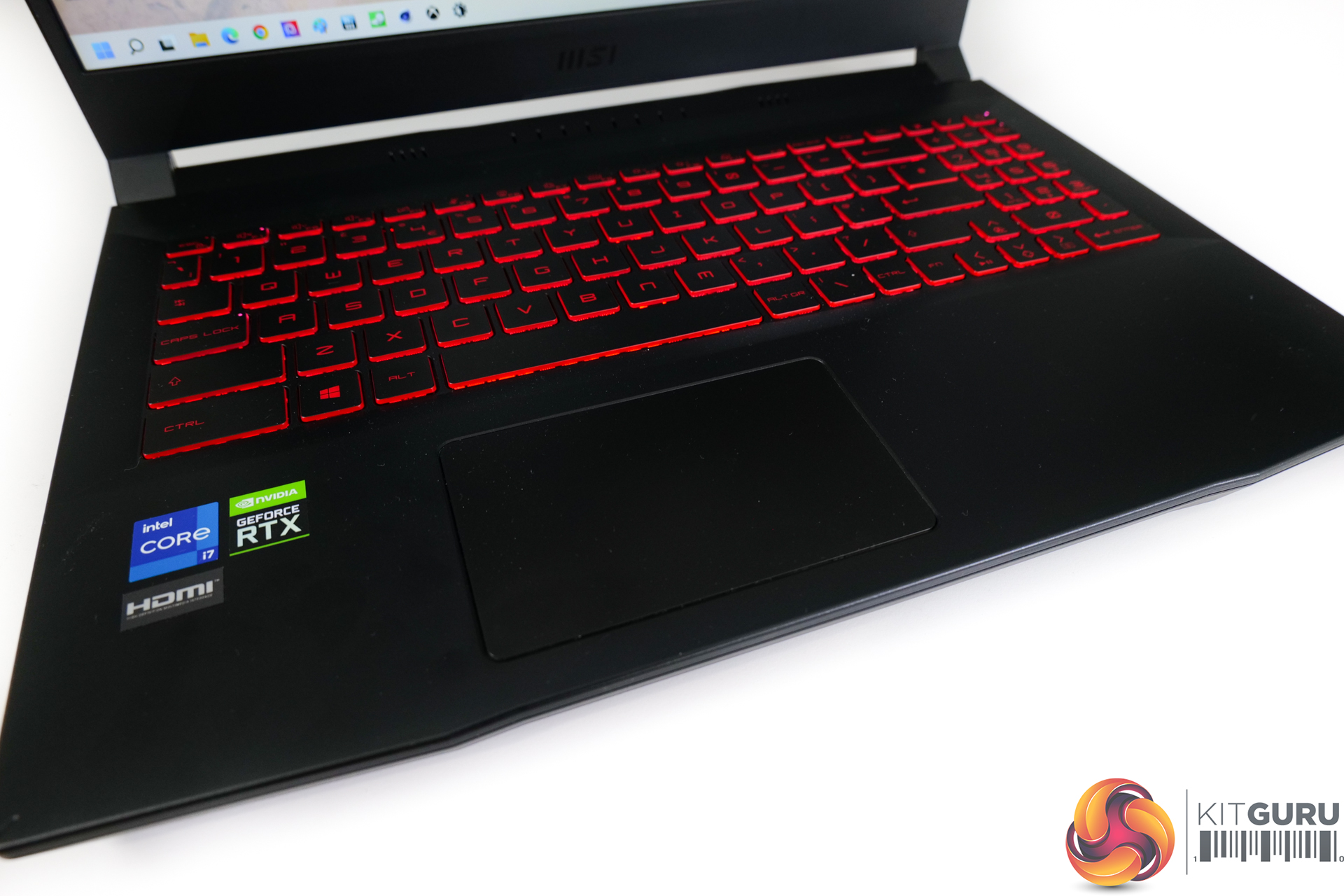
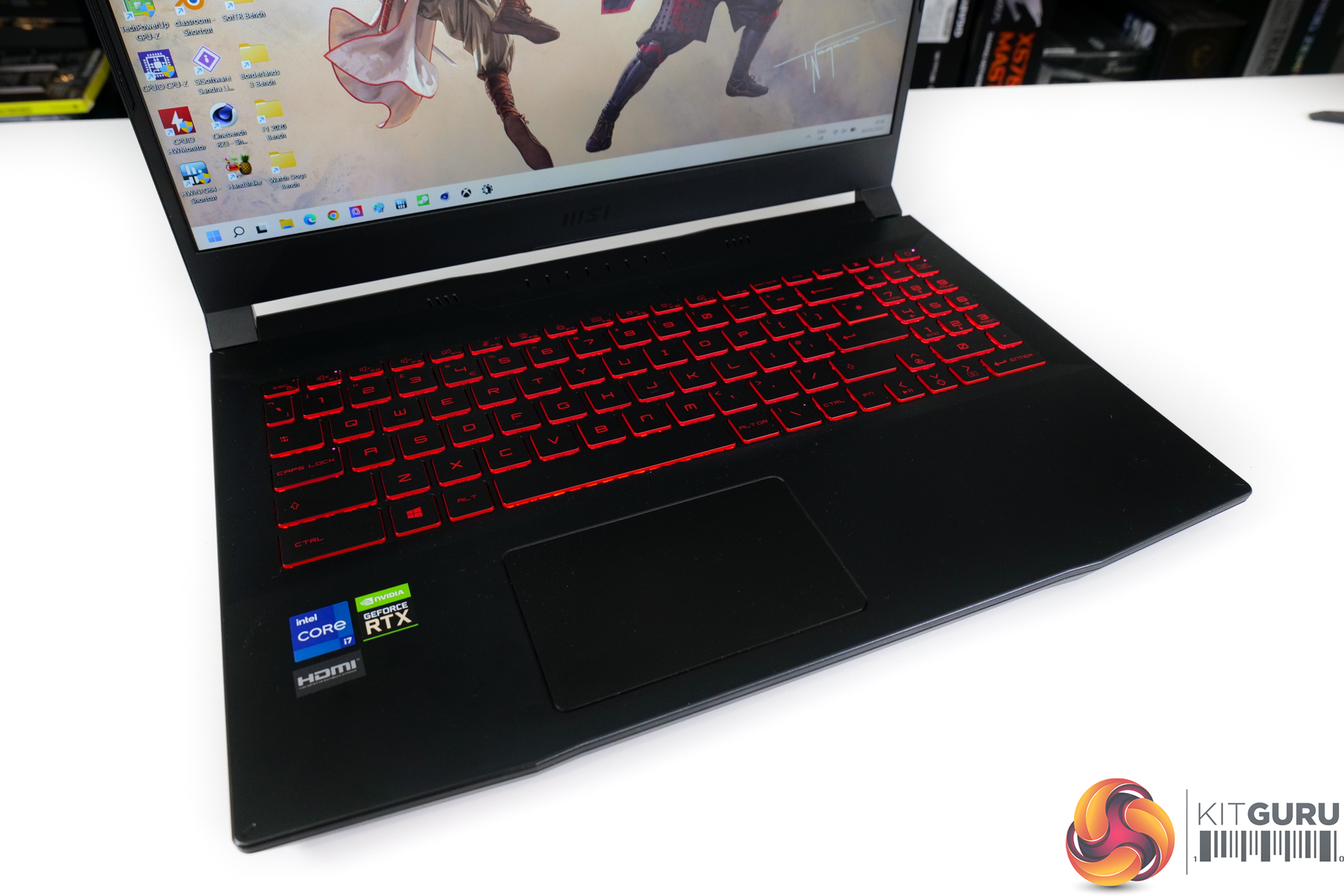
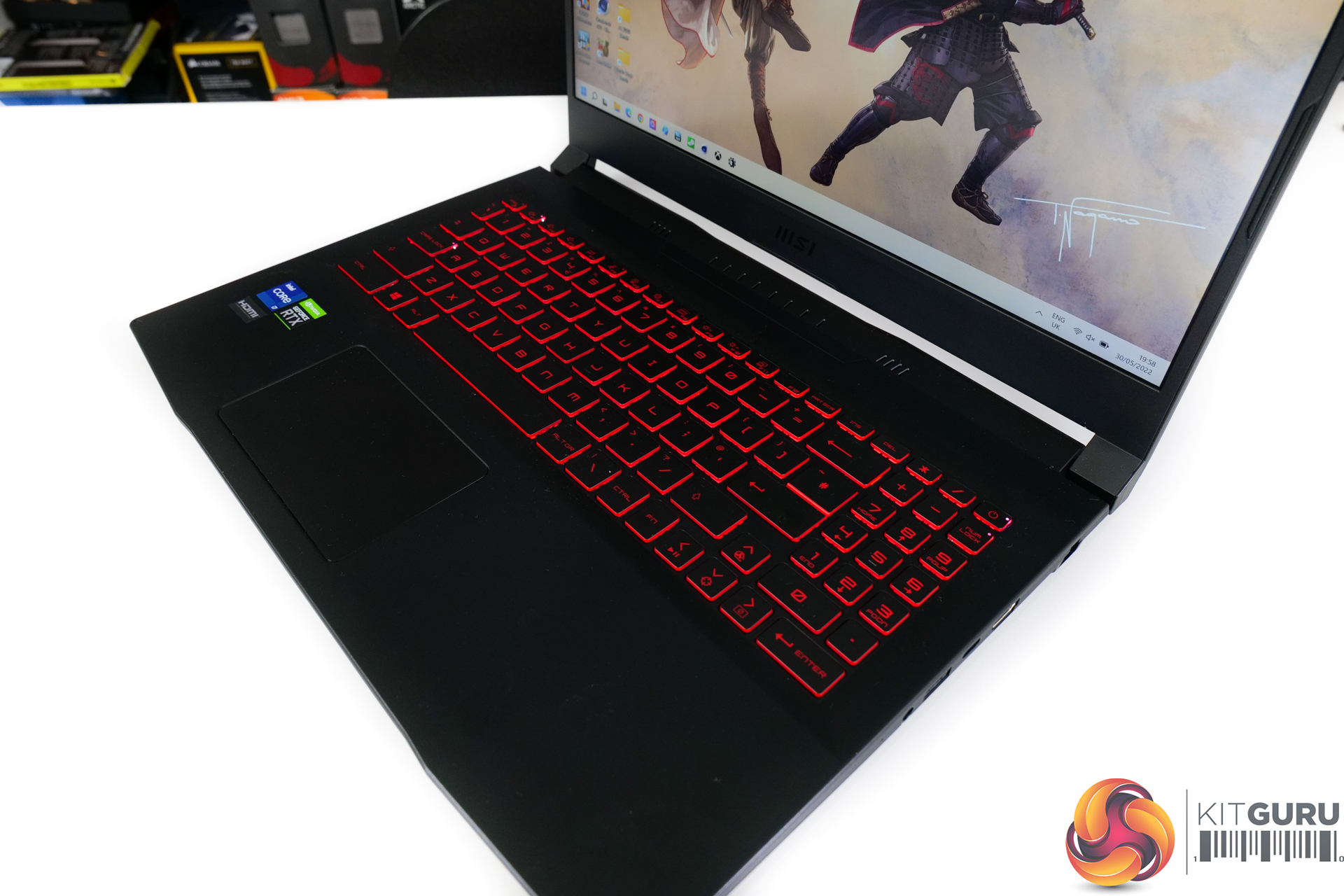
In terms of peripherals, there is a 720p30 webcam, but it doesn’t support Windows Hello and there is no fingerprint scanner. So, advanced sign-in options are limited. The speakers are a pair of 2W units which genuinely surprised me for decent punch to the bass, good maximum loudness, and solid ability to maintain decent quality at high volume outputs.
Trackpad sizing is modest for my giant hands, but the responsiveness and flow of the implementation and the solid clicky buttons were good.
The keyboard is good for my personal preference and large hands. I had very few accidental key strikes because of the sensible key pitch segregating neighbours. I also felt that the actuation point was clear and firm, which enhanced comfort. MSI includes a number pad, which I personally find pointless, but it is there.
One point is that the backlit keyboard cannot be changed away from red, but there are three steps of brightness.
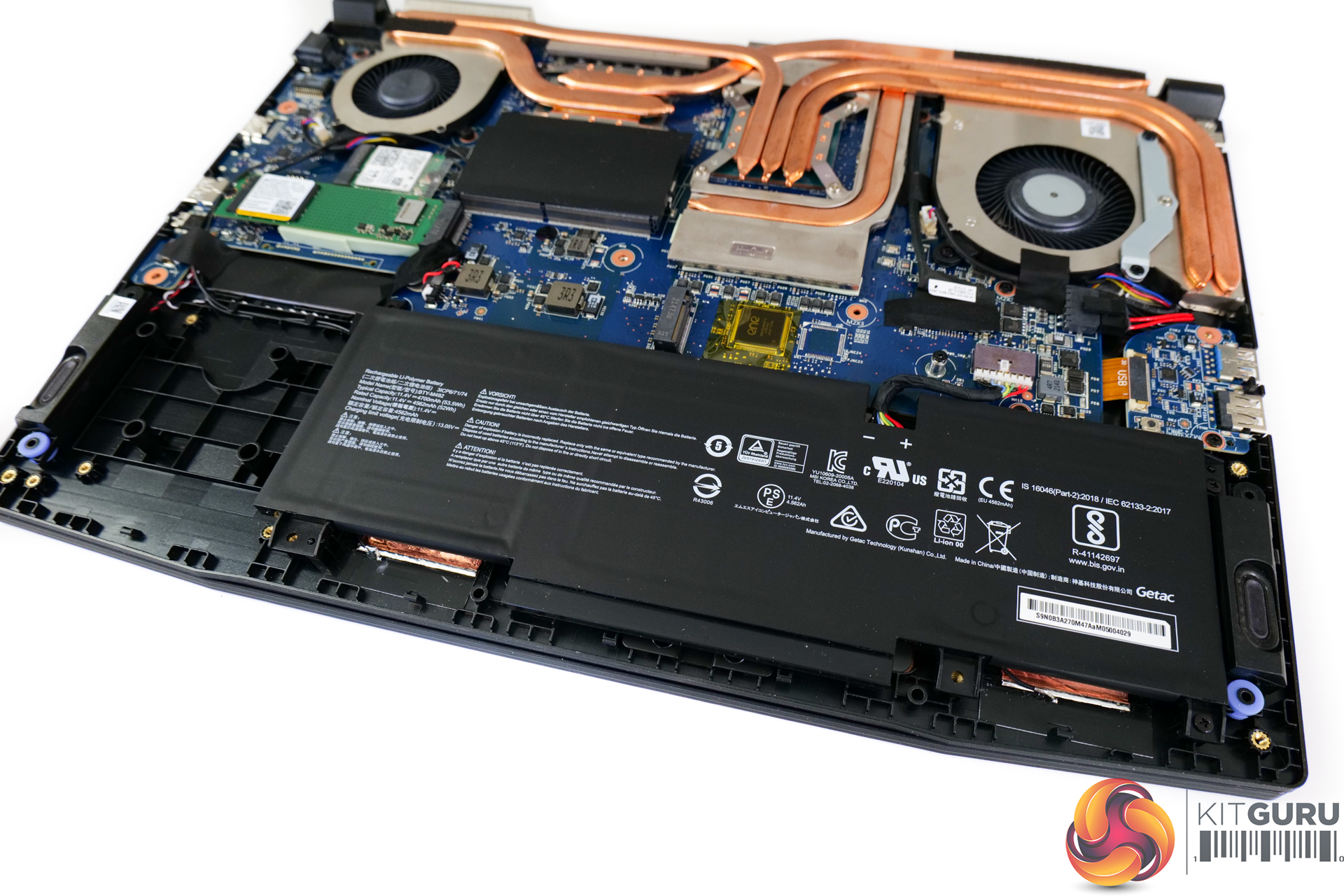
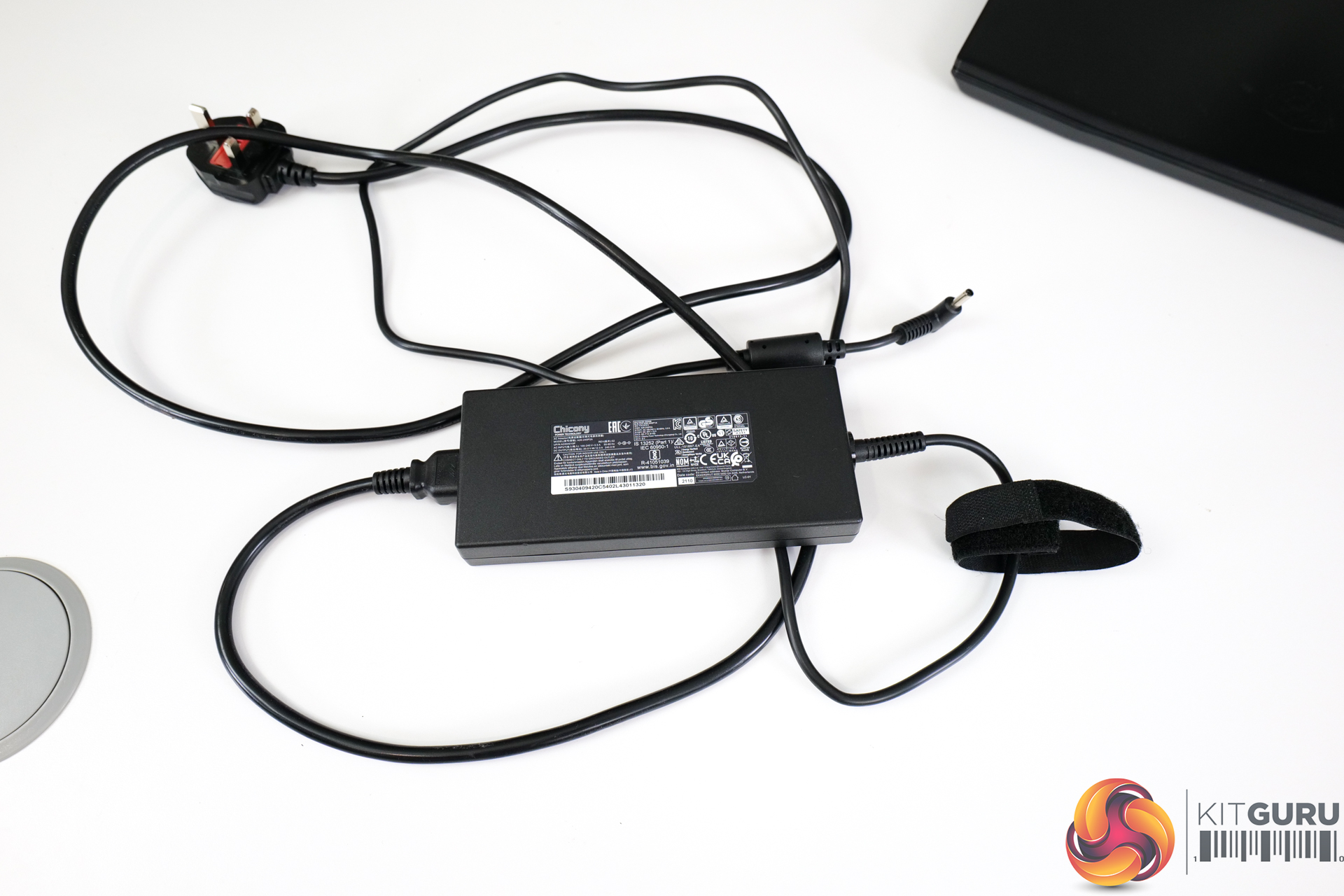
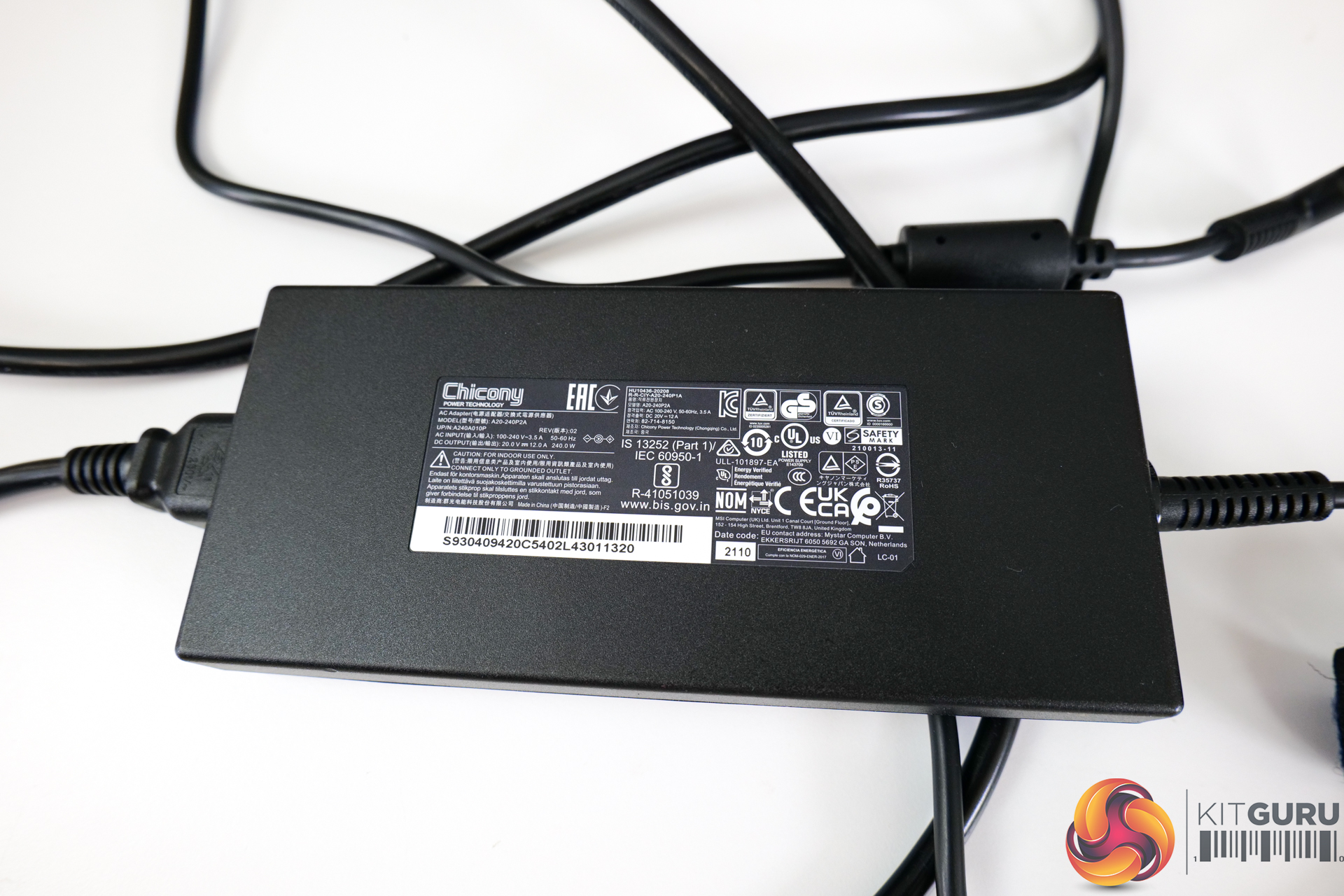
For the battery, a 53.5Whr, 3-cell unit is deployed and used in combination with the sizable 240W power brick. There is no USB-C charging, even for trickle top-ups, which is highly disappointing.
Pricing for the MSI Katana GF66 in its 12UE form as we are testing is £1399 at Currys in the UK. This gives it very tough competition on the market, with competitors from the likes of Acer, ASUS, Gigabyte, and Lenovo all offering models with 45W Ryzen chips and RTX 3070-class graphics. Let's see how the Katana GF66 fairs.
We test in the out-of-the-box state with minimal adjustments made to the laptop, other than installing our test software and Windows updates in addition to removing Norton antivirus that is included by default.
That means that this MSI laptop is tested using its ‘Balanced’ fan and power profile. We do not use the ‘Extreme' power profile which, in some respects, pushes the hardware (particularly the CPU) beyond the intended power limits from a design perspective. We will examine the behaviour of the ‘Balanced' power profile primarily in this review.
We include some comparison data from relevant laptops that we have tested recently.
Notably, we have the new AMD Ryzen 9 6900HS and RX 6800S-powered ROG Zephyrus G14. Make sure to check out our recent review for that impressive laptop.
We also deploy the ASUS ROG STRIX G17 that we reviewed. This uses a 45W-calibre Ryzen 9 5900HX and a 115W RTX 3070 Laptop GPU. Despite being a much larger 17-inch unit, it will be interesting to see the CPU and GPU performance comparison.
And for some additional test data, we include a 21W-running Ryzen 7 5800U-based ASUS ZenBook 13 and a 28W-rated Core i7-1165G7 Tiger Lake-based Razer Blade Stealth 13.
MSI Katana GF66 12UE Laptop Test Configuration:
- Processor: Intel Core i7-12700H (6 P-cores, 8 E-cores, up to 4.7GHz Turbo, 35-115W Rated TDP)
- Memory: 16GB (2x8GB) DDR4 3200MHz SODIMM
- Graphics Card: Nvidia GeForce RTX 3060 Laptop 6GB, up to 105W
- Display: 15.6” 1920×1200 240Hz IPS-level
- System Drive: 1TB Micron 2450 PCIe Gen4x4 NVMe SSD
- Battery: 53.5 Whr, 3-cell battery with 240W barrel-style power adapter
- Design: Around 2.25kg weight with around 25mm chassis thickness
- Operating System: Windows 11
Comparison Systems:
- MSI Crosshair 15 R6E B12UGZ-299UK
- Intel Core i7-12700H (6 P-cores, 8 E-cores, up to 4.7GHz Turbo, 35-115W Rated TDP)
- 32GB (2x16GB) DDR4 3200MHz SODIMM
- Nvidia GeForce RTX 3070 Laptop 8GB, up to 140W
- 15.6” 2560×1440 165Hz IPS-level
- 1TB Micron 2450 PCIe Gen4x4 NVMe SSD
- 90 Whr, 4-cell battery with 240W barrel-style power adapter
- Around 2.47kg weight with around 27mm chassis thickness
- ASUS ROG Flow Z13 (Core i9-12900H System):
- Intel Core i9-12900H (6 P-cores, 8 E-cores, up to 5.0GHz Turbo, 35-115W Rated TDP)
- 16GB LPDDR5 5200MHz
- Nvidia GeForce RTX 3050 Ti 4GB GDDR6, Mux switch
- 13.4” 16:10 WUXGA 1920×1200 120Hz IPS-level
- 1TB Micron 2450 PCIe Gen4x4 NVMe SSD
- 56 Whr battery with 100W USB-C Power Adapter
- Around 1.1-1.2kg weight with around 12mm chassis thickness
- ASUS ROG Zephyrus G14 GA402RK (Ryzen 9 6900HS System):
- AMD Ryzen 9 6900HS (8C/16T, 3.3GHz Base, up to 4.9GHz Boost 35W Rated TDP Mode)
- 32GB DDR5 4800MHz
- AMD Radeon RX 6800S 8GB GDDR6
- 14” 16:10 QHD+ 2560×1600 120Hz IPS-level
- 1TB Micron 2450 PCIe Gen4x4 NVMe SSD
- 76 Whr battery with 240W barrel-style Power Adapter (100W USB-C support)
- 1.75kg weight with around 18.5mm chassis thickness
- ASUS ROG STRIX G17 G713QR (Ryzen 9 5900HX ‘Cezanne' System):
- AMD Ryzen 9 5900HX (8C/16T, up to 4.6GHz Boost, 45W Rated TDP)
- 32GB DDR4 3200MHz SODIMM
- RTX 3070 Laptop GPU 8GB GDDR6 115W
- 17.3-inch FHD (1920 x 1080) 16:9 300Hz IPS-level
- 1TB SK Hynix BC711 PCIe Gen 3×4 NVMe SSD
- 90 Whr battery with 240W barrel-style Power Adapter
- 2.70kg weight with 23.4-28.3mm chassis thickness
- Gigabyte U4 UD-70UK823SO (Core i7-1195G7 ‘Tiger Lake’ System)
- Intel Core i7-1195G7 (4C8T, 28W Rated TDP-up Mode)
- 16GB DDR4 3200MHz (8GB onboard, 8GB SODIMM)
- Integrated Intel Iris Xe iGPU (96 EUs)
- 14″ IPS Full HD 1920×1080 60Hz
- 512GB ESR512GTLG-E6GBTNB4 PCIe Gen4x4 NVMe SSD
- 36 Whr battery with 65W barrel-style Power Adapter
- Slightly below 990g weight with 16.5mm chassis thickness
- Razer Blade Stealth 13 OLED (Core i7-1165G7 ‘Tiger Lake’ System)
- Intel Core i7-1165G7 (4C8T, 28W Rated TDP)
- 16GB LPDDR4 4266MHz
- Nvidia GTX 1650 Ti Max-Q
- 13.3″ OLED Full HD Touch 60Hz
- 512GB Samsung NVMe SSD
- 53.1 Whr battery with 100W USB-C Power Adapter
- 1.41kg weight with 15.3mm thickness
- ASUS ZenBook Flip S OLED UX371 (Core i7-1165G7 ‘Tiger Lake-U’ System):
- Intel Core i7-1165G7 (4C/8T, 1.2GHz Base, 12W Rated TDP-down Mode)
- 16GB LPDDR4X 4266MHz
- Integrated Intel Iris Xe iGPU (96 EUs up to 1.3GHz)
- 13.3” 16:9 UHD 3840×2160 60Hz OLED Touch Display
- 1TB WD SN730 NVMe SSD
- 67 Whr battery with 65W USB-C Power Adapter
- 1.2kg weight with 11.9-13.9mm chassis thickness
- ASUS ZenBook 13 UM325S (Ryzen 7 5800U ‘Cezanne' System):
- AMD Ryzen 7 5800U (8C/16T, 1.9GHz Base, up to 4.4GHz Boost, 15W Rated TDP)
- 16GB LPDDR4X 3733MHz
- Integrated Radeon Vega 8 APU (up to 2GHz)
- 13.3” 16:9 FHD 1920×1080 60Hz OLED Display
- 1TB SK Hynix (HFM001TD3JX013N) NVMe SSD
- 67 Whr battery with 65W USB-C Power Adapter
- 1.12kg weight with 13.9mm chassis thickness
Tests
- Cinebench R23 – All-core & single-core CPU benchmark (CPU Compute), Stress test (Temperatures & Power Consumption)
- Blender 3.0.1 – All-core rendering of the Classroom and BMW scenes (CPU/GPU Compute), Stress test (Temperatures & Power Consumption)
- HandBrake 1.5.1 H264 – Convert 1440p60 H264 video to 1080p60 H264 using the YouTube HQ 1080p60 preset (CPU)
- HandBrake 1.5.1 H265 – Convert 4K30 100Mbps H264 video to 1080p30 40Mbps H265 using the H.265 MKV 1080p30 preset (CPU & Memory)
- 7-Zip 21.07 – Built-in 7-Zip benchmark test (CPU & Memory)
- SiSoft Sandra – Memory bandwidth and Cache & Memory Latency Test (Memory)
- AIDA64 – Memory bandwidth & memory latency (Memory)
- PCMark 10 – Modern Office & Battery Life Test (System Performance & Battery Life)
- 3DMark – Time Spy (1440p) test, CPU Profile test (Gaming)
- Assassin's Creed Valhalla – 1920 x 1080, Ultra High quality preset, DX12
- Borderlands 3 – 1920 x 1080, Badass quality preset, DX11
- F1 2020 – 1920 x 1080, Ultra High quality preset with TAA and 16x AF, DX12
- Far Cry 6 – 1920 x 1080, Ultra quality preset, HD textures OFF, DX12
- Shadow of the Tomb Raider – 1920 x 1080, Highest quality preset, no AA, DX12
- Watch Dogs Legion – 1920 x 1080, Ultra quality preset, DX12 version
Temperatures, Clocks, and Power
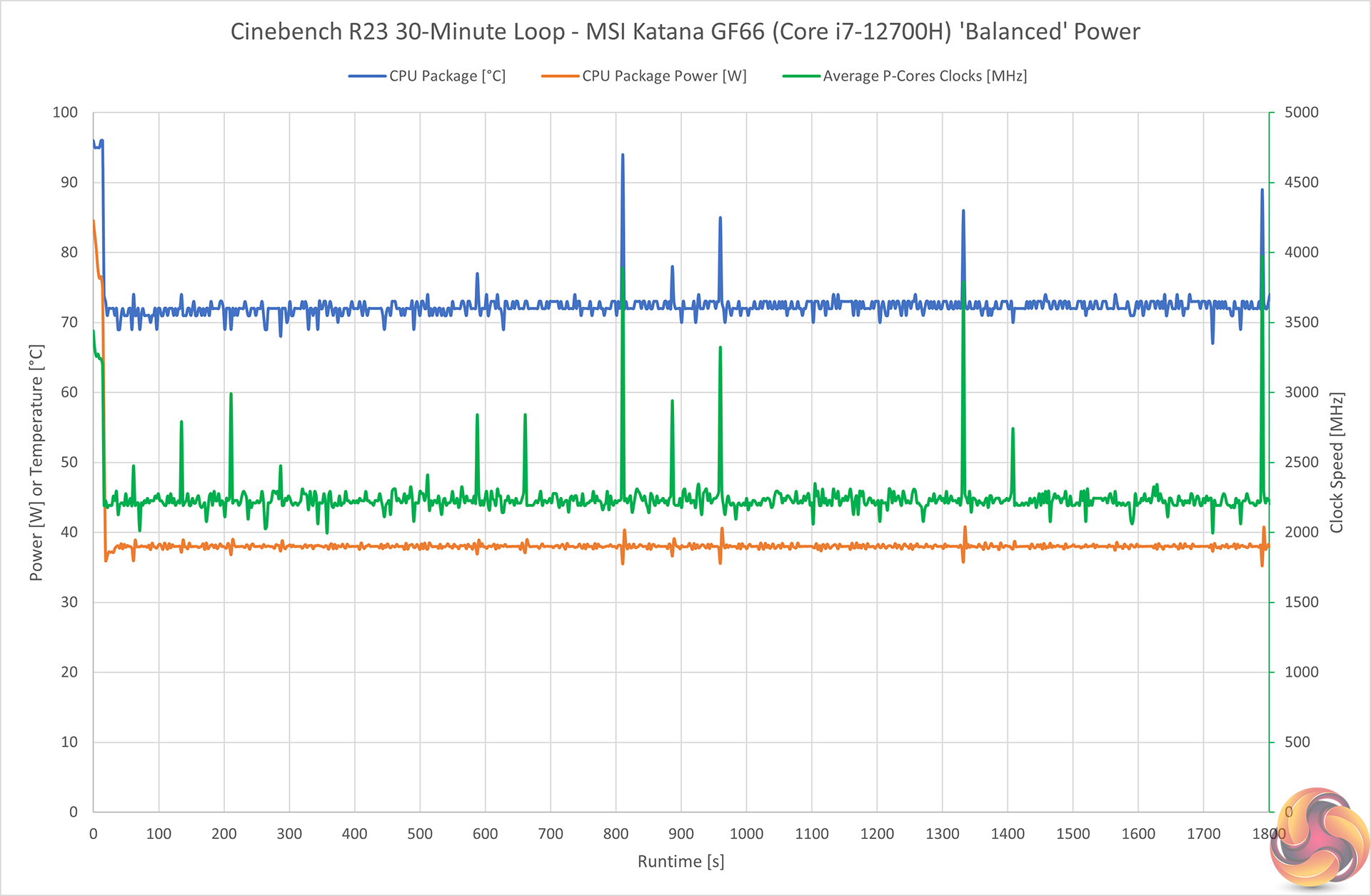
MSI looks to operate the Core i7-12700H at around 38W long-duration package power draw in the Balanced power profile. This corresponds to around 2.25GHz average frequency for the P-cores specifically.
Not gluing the CPU to a typical 45W power draw is disappointing and suggests that MSI has willingly left performance on the table. That’s odd, given that this test doesn’t even add in the GPU heat to the equation.
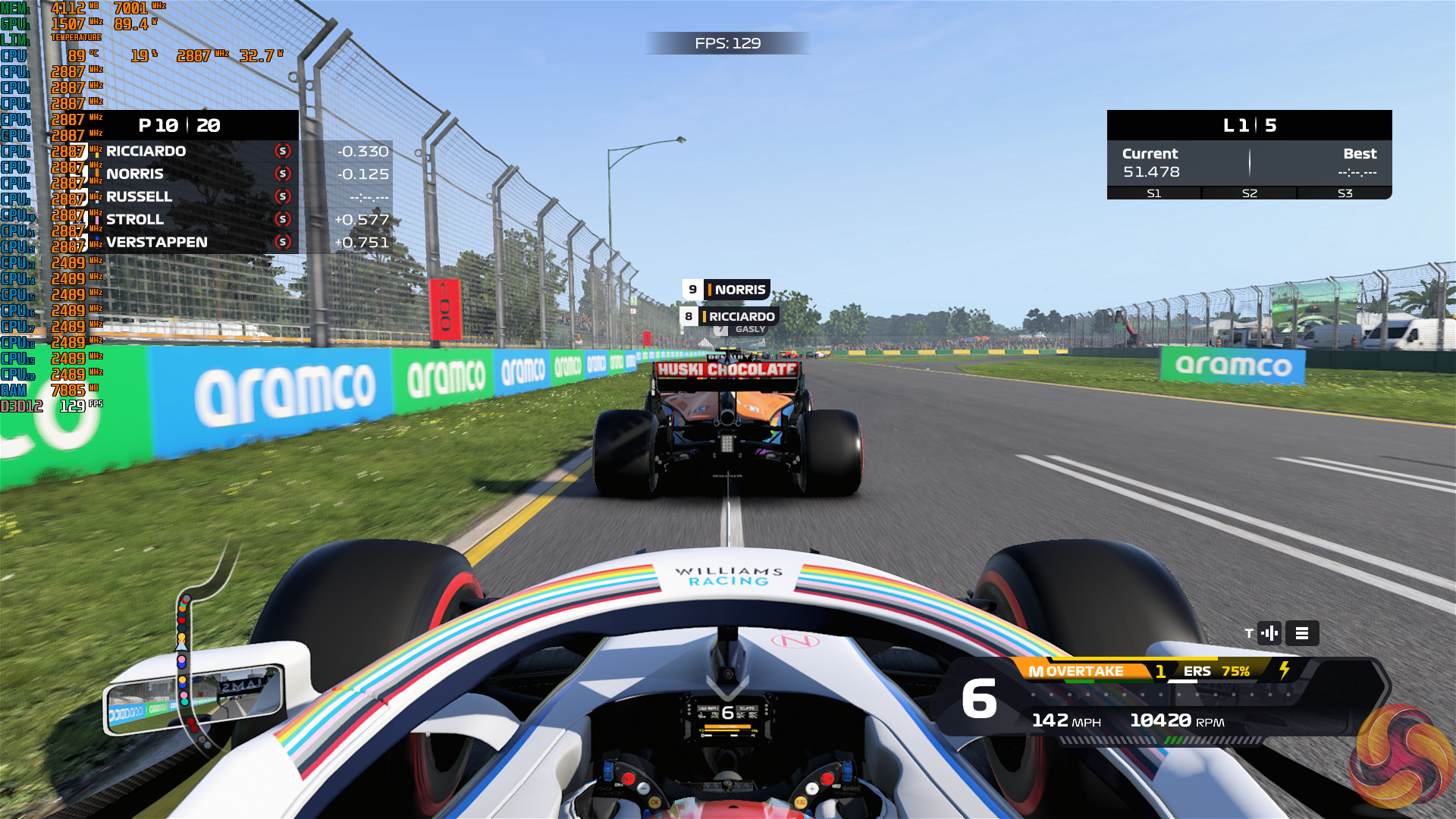
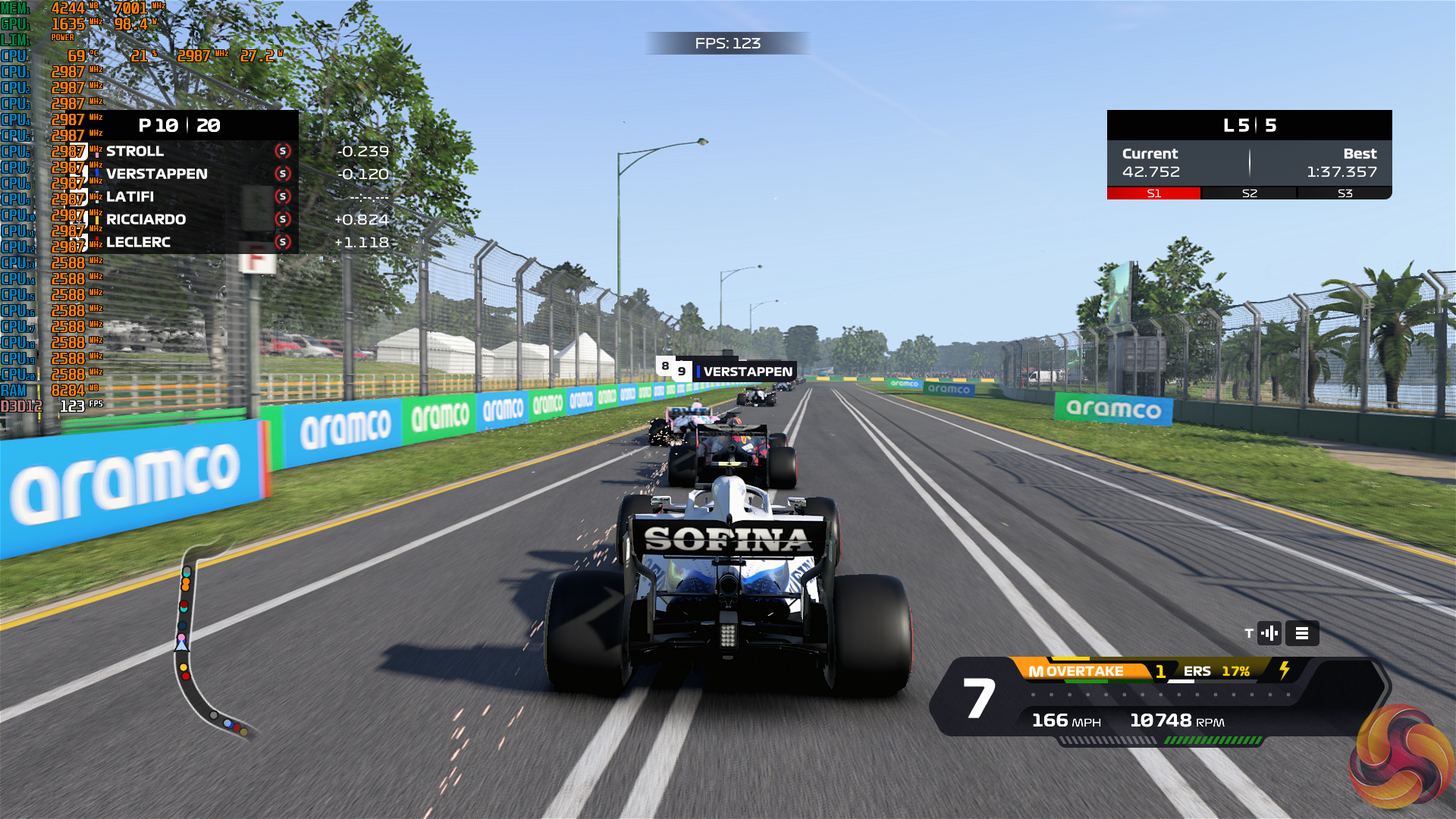
With both the CPU and GPU being loaded in a gaming scenario under the balanced profile, we saw the power allocation trending at around 125W combined.
This was typically segregated as around 25-35W for the CPU and 85-90W for the GPU. That translated into around mid-2GHz for the CPU P-cores with a temperature around the 90C mark. And we recorded around 1500MHz average for the RTX 3060 Laptop GPU clocks with a temperature around the high-80s mark.
We couldn’t help but feel that MSI’s Balanced mode left performance on the table, so we tested out the Extreme Performance Cooler Boost mode.
This ramped up fan speeds massively and made the noise output unpleasant. It did improve power allocation for the CPU-only load, though, with around 75-80W now being delivered under long-duration loading. The temperature was bumping up against the 99C throttling point, but frequency on the P-cores was improved by around 1GHz to around 3.25GHz.
For gaming, though, we saw little change under the Extreme Cooler Boost mode. The combined CPU and GPU power still trended around 125W. The GPU seemed to get a slightly higher share of power – around 90-100W for 1.6GHz instead of 80-90W for 1.5GHz under the Balanced mode. But this just ate away at the CPU’s power budget.
Noise
You can see an example of our noise testing result in the video review.
Noise output using the Balanced power profile for gaming is actually fine. We recorded around 47-48dBA output from a measurement point above the trackpad – near to where a user’s head would be. This was after an extended gaming session of F1 2020 at 1920×1080.
The CPU and GPU were commanding around 125W combined, but the noise output from the fans was perfectly tolerable in my opinion.
SSD
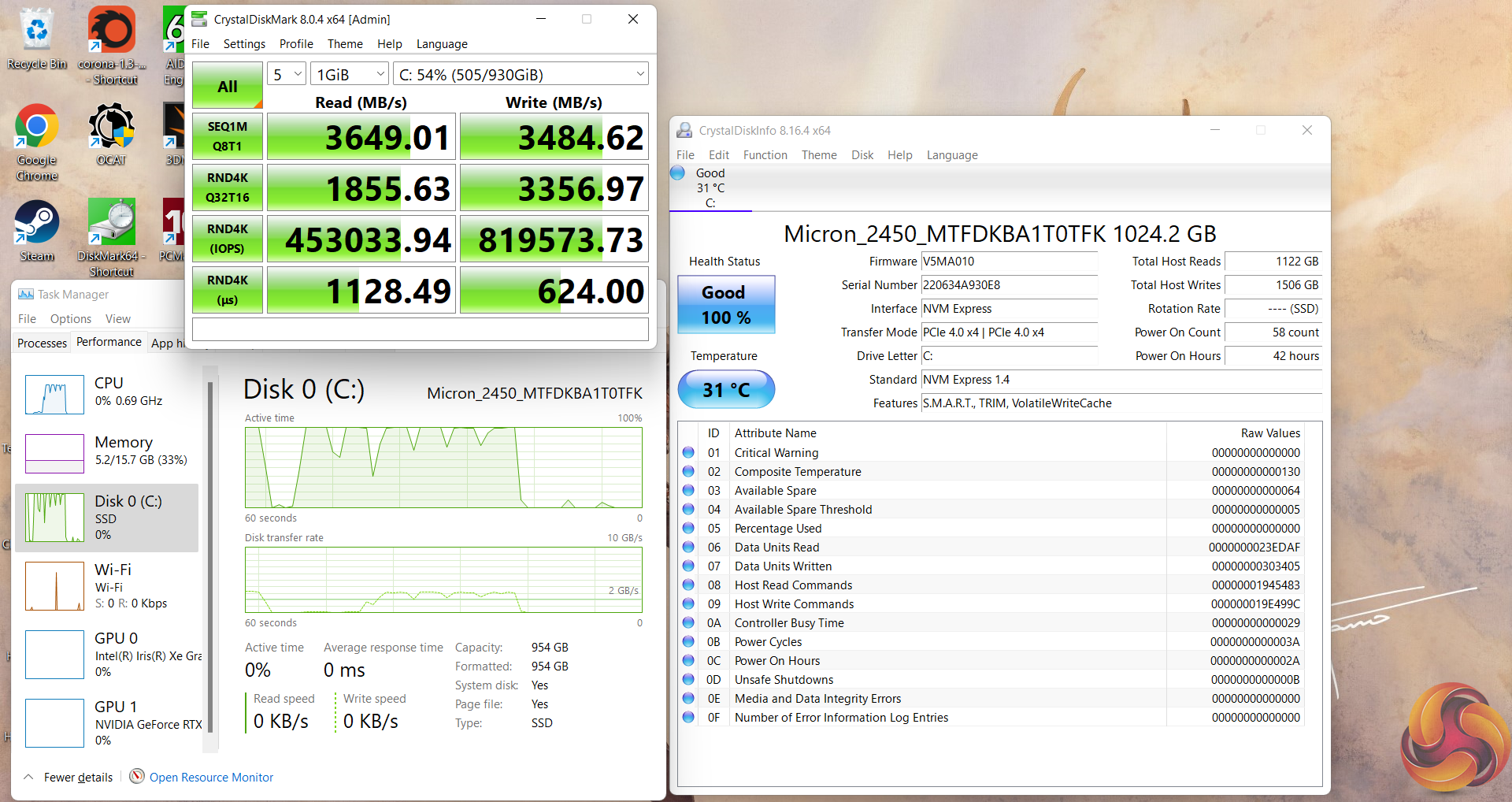
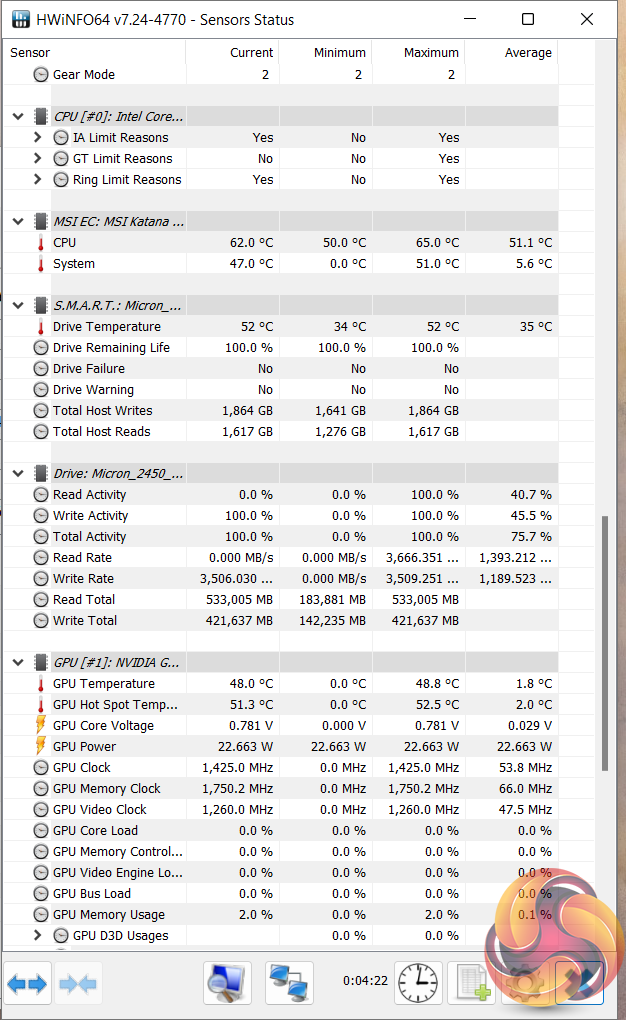
SSD performance from the Micron 2450 is mediocre, but is absolutely fine for this calibre of laptop. In fact, we’ve seen this drive in several more expensive ASUS laptops.
This is supposedly a PCIe Gen 4 x4 SSD, but there is nothing in its performance metrics to indicate that it is any better than a Gen 3 SSD. It kept reasonably cool in MSI’s laptop, though.
Battery
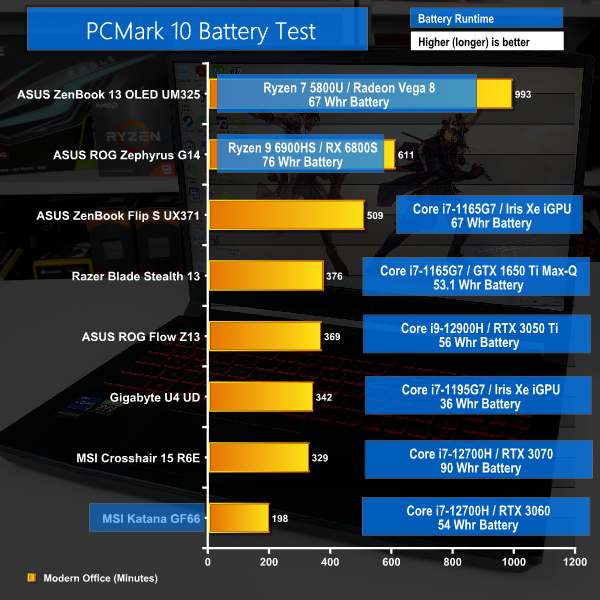
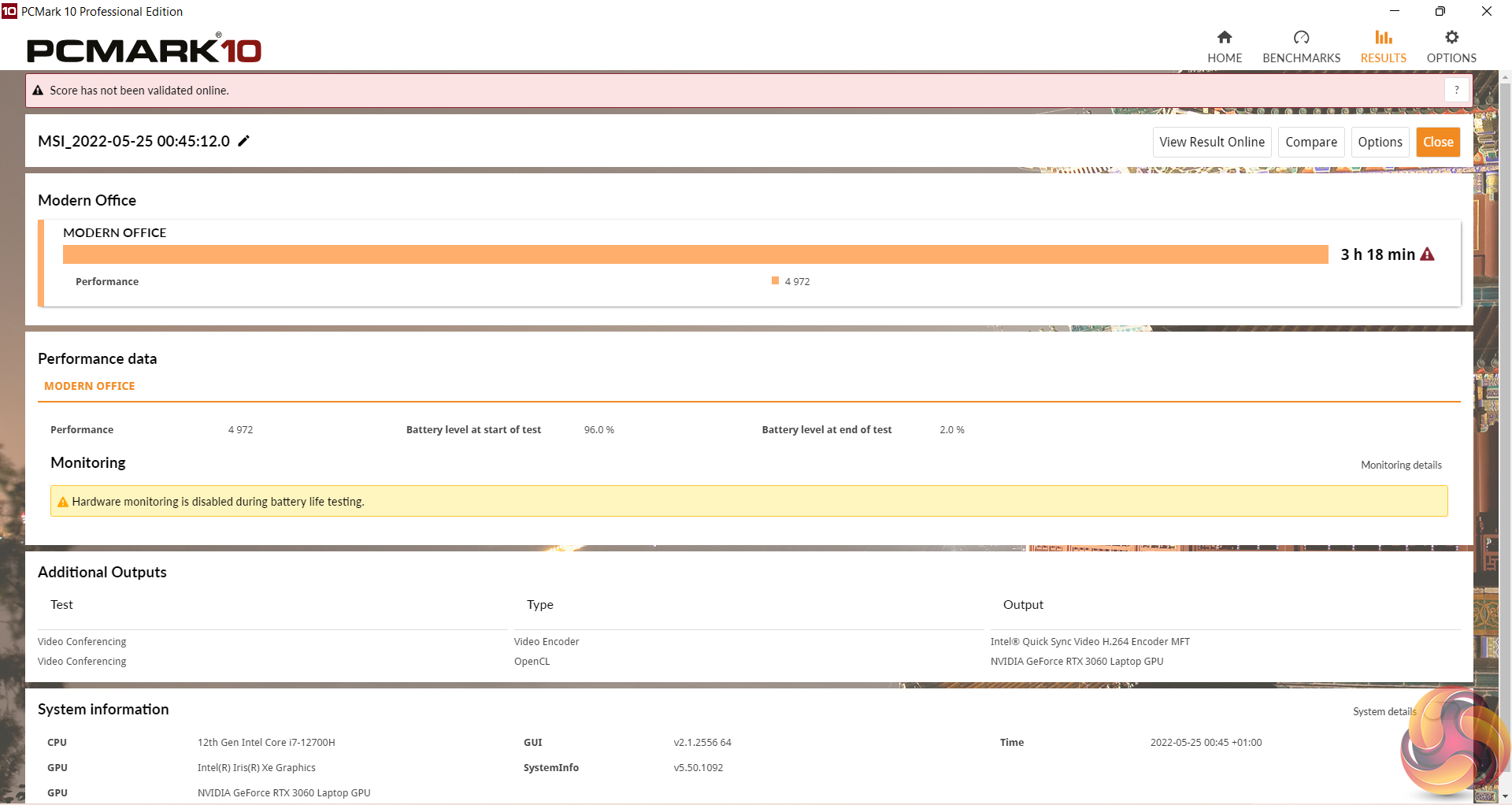
Battery life is very poor at 3 hours and 18 minutes in PCMark 10. That’s down to the modest 53.5 Whr battery capacity for a H-series CPU and 105W dGPU.
The lack of USB-C charging makes quick top-ups less convenient too, particularly with the large power brick one will have to lug around.
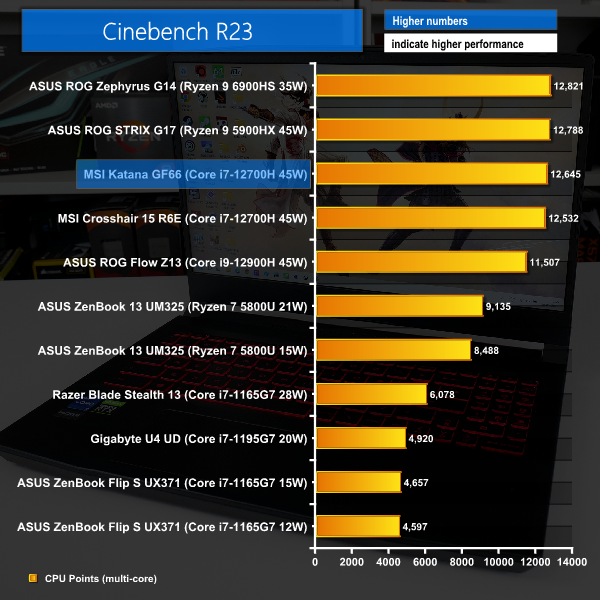
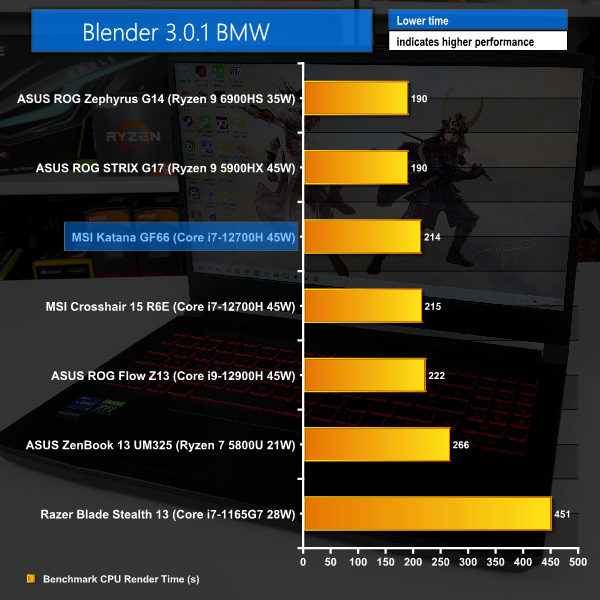
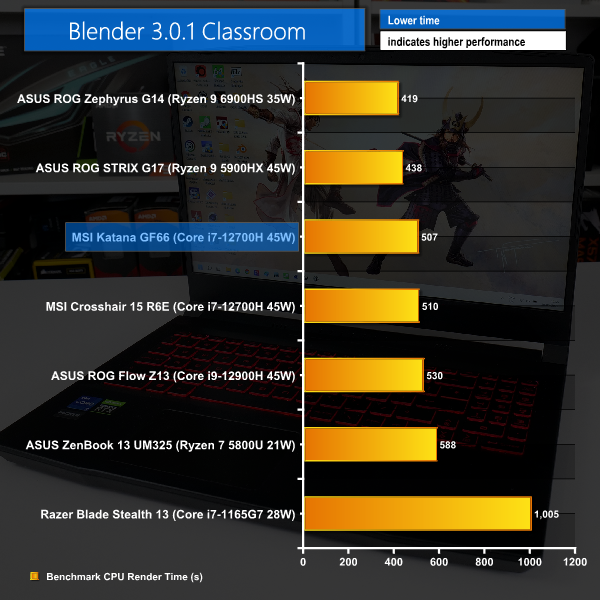
Intel’s Core i7-12700H in the MSI Katana GF66 does well to hang with the Ryzen competitors in the short Cinebench rendering test. But the longer duration Blender runs nullify Intel’s initial – massive – power surges and swing the pendulum in favour of MSI’s Ryzen-equipped competitors.
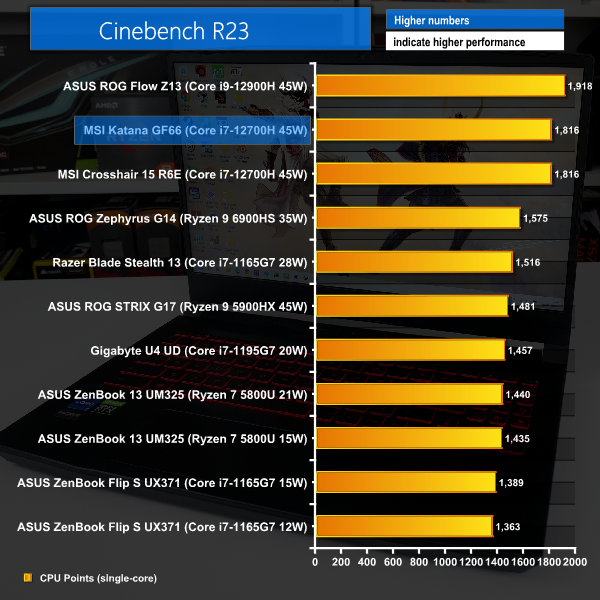
Single-threaded performance is where the Katana GF66 is very strong. That’s thanks to the lofty 4.7GHz rated boost clock of the Core i7-12700H, coupled with its superb architecture.
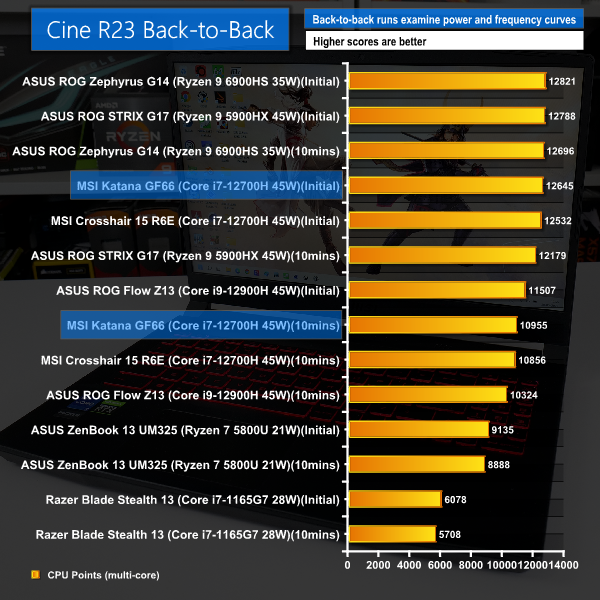
But the performance drop-off in back-to-back Cinebench nT runs is far less impressive.
Here, we see the influence of Intel’s lofty power surge for the initial few seconds of benchmark tests. Disallowing for that power surge – as is the case for sustained all-core tasks – can drop performance by 13%
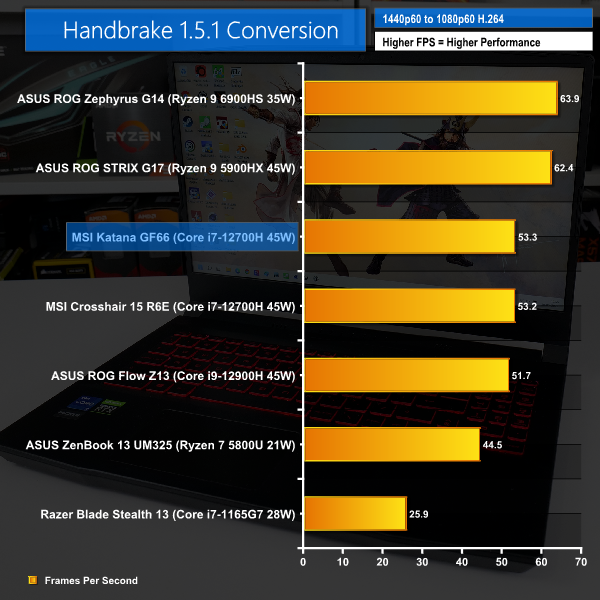
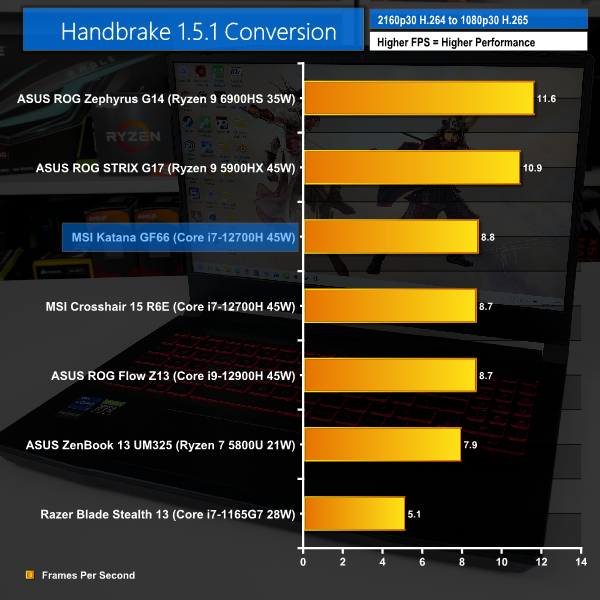
Handbrake shows that same trend as rendering tasks; the MSI GF66 does do well to compete against the other Intel 12th Gen competitors, despite its significantly lower price tag. But Ryzen 45W chips are notably quicker.
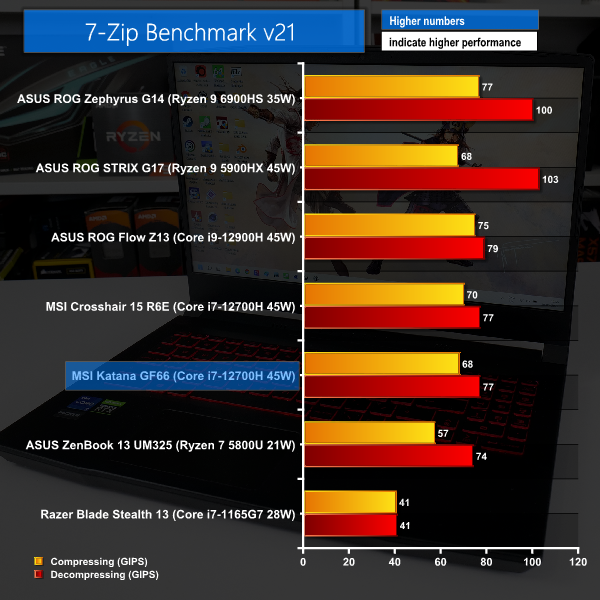
7-Zip is not quite as positive, though, with even the power-restricted ASUS ROG Flow Z13 opening up a performance lead.
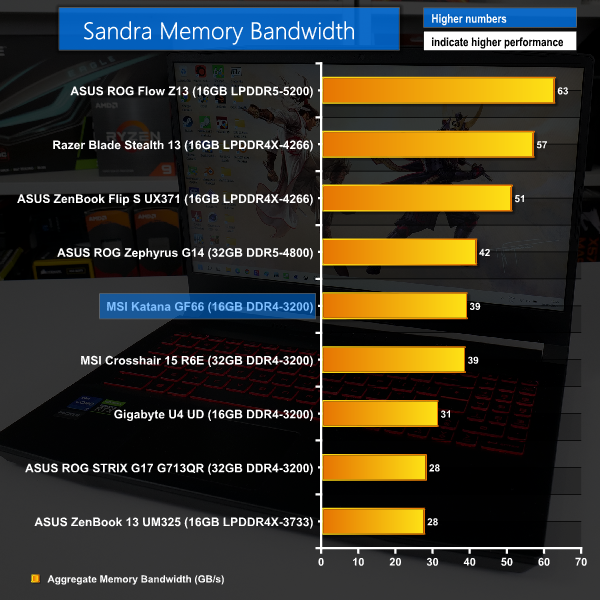
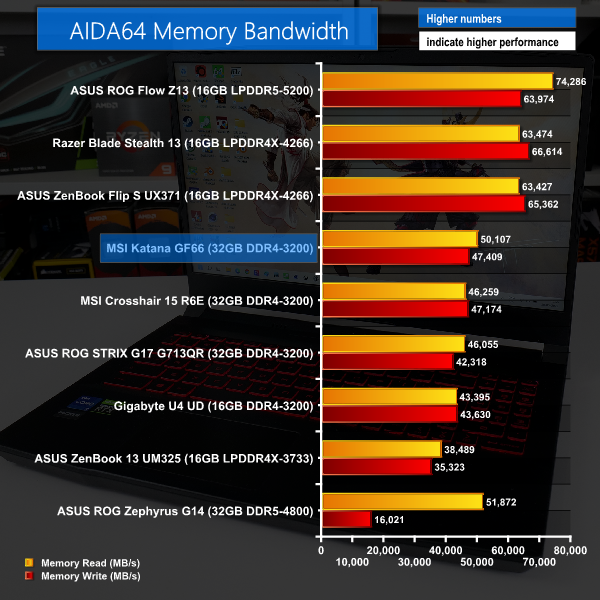
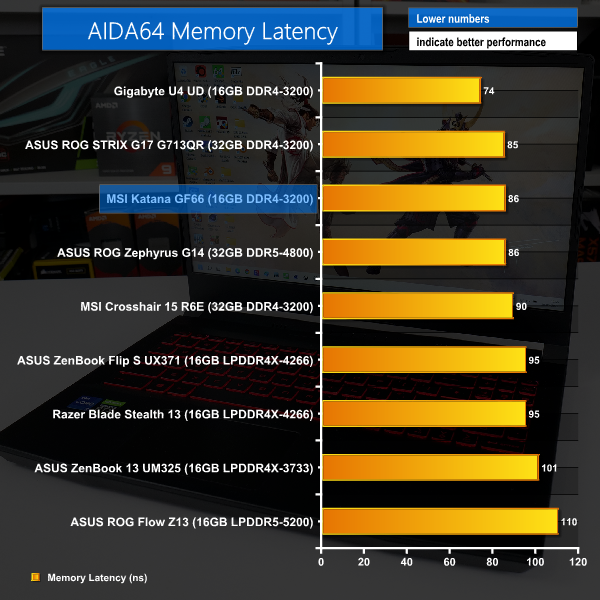
Memory bandwidth from the 16GB of 3200MHz DDR4 is positive and is only handsomely beaten by LPDDR4 or LPDDR5 in AIDA’s test. The latency of plain DDR4 is a solid, too.
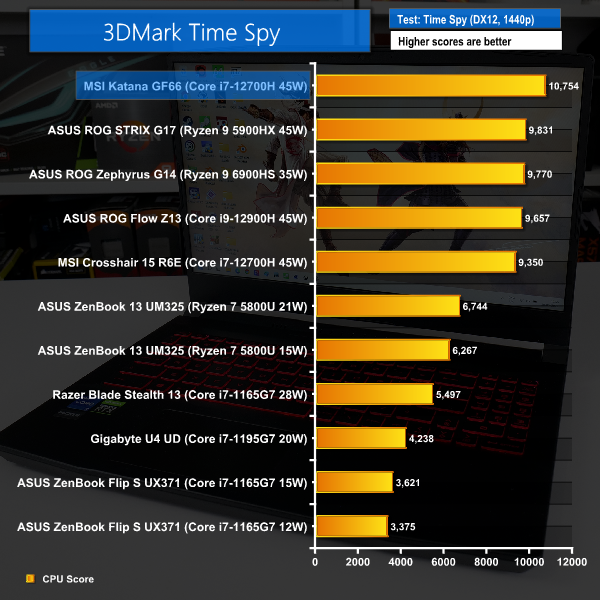
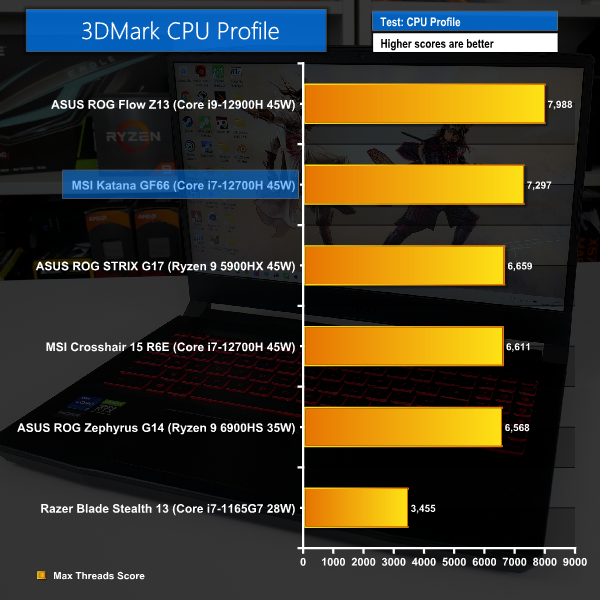
3DMark Time Spy took a very strong liking to our MSI Katana GF66 test sample, likely due to preferential power allocations during the test.
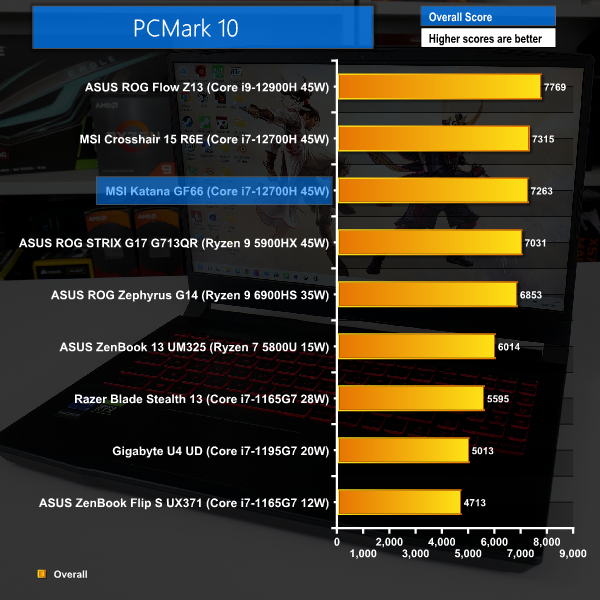
3DMark’s CPU Profile test scored strongly, too. As did PCMark 10 for the overall result.
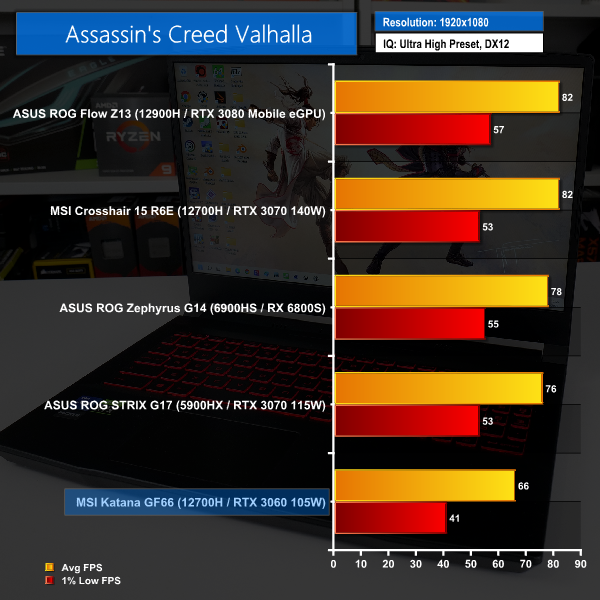

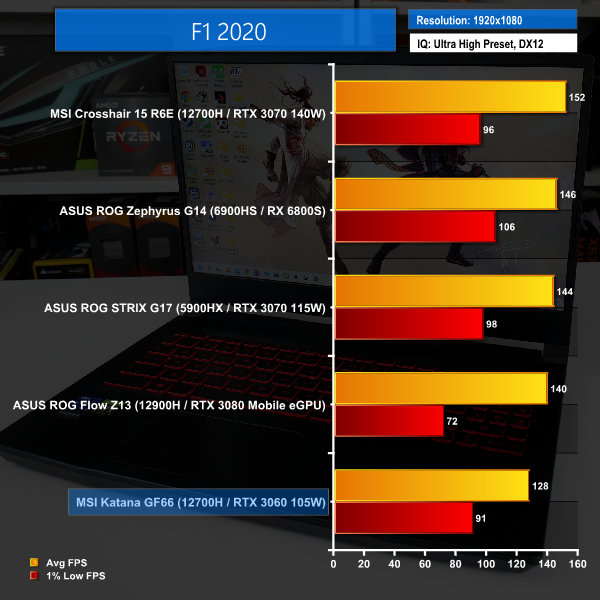
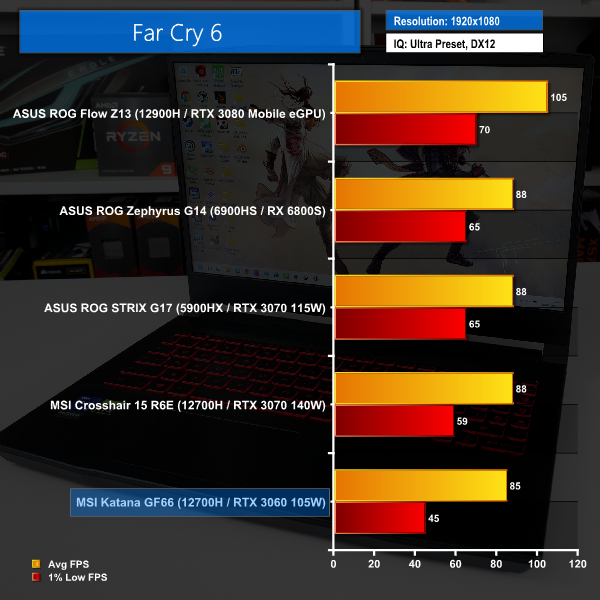
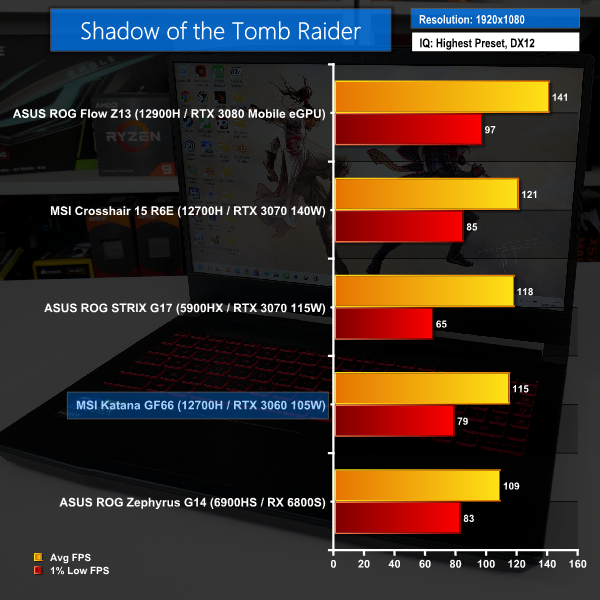
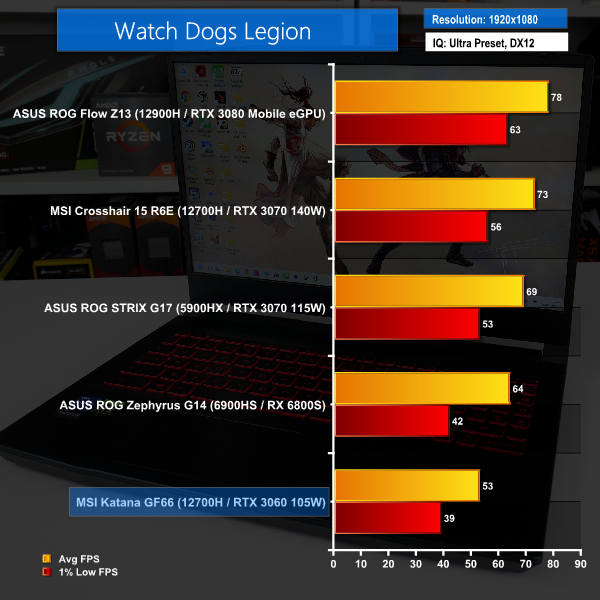
Our charts perhaps paint an awkward picture for the MSI Katana GF66 given that it is compared to pricier competitors. But we can look at the performance results in isolation.
Over 60 FPS average in Assassin’s Creed Valhalla at 1080p Ultra High is a positive start. And Borderlands 3 pushes a little higher for its Badass image quality preset. F1 2020 runs at 128 FPS average, so users wanting to push the laptop’s 240Hz display for high-refresh rate gaming will be pleased by this result.
Notable in Far Cry 6 is how competitive the GF66 is versus the pack in this game. This looks to be induced by CPU power and frequency limitations, which is fine for the GF66 holding its own.
Shadow of the Tomb Raider has MSI’s unit putting in a very positive showing and pushing well above triple-digit average FPS. But Watch Dogs Legion proves too stressful for the RTX 3060 in its Ultra Preset mode – averaging below 60 FPS.
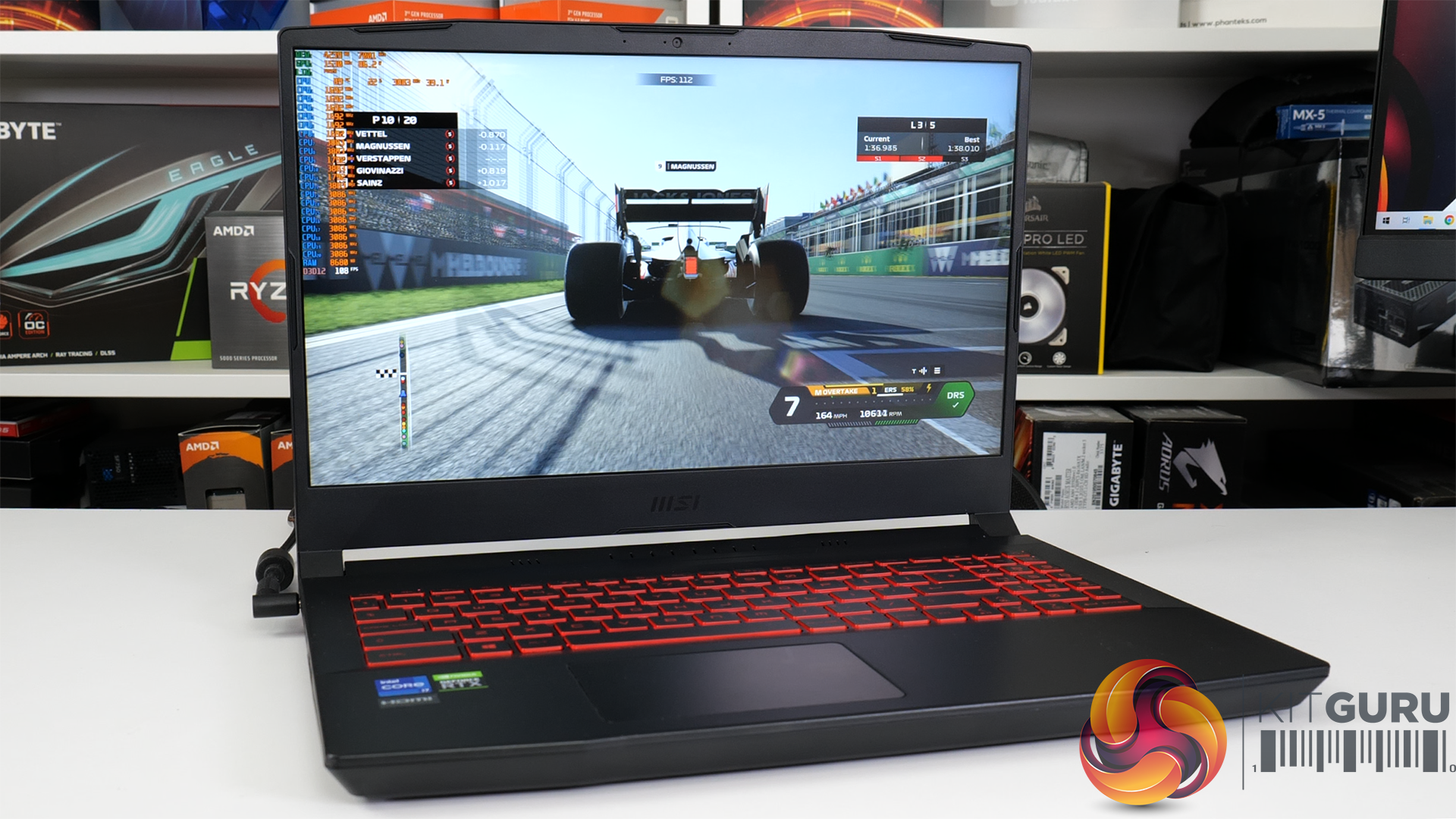
For 1080p gaming, MSI’s chosen hardware combination looks to be reasonable given the budget constraints. Dropping IQ will push AAA titles into triple-digit average frame rates with ease. And there’s genuine possibility to push near that 240Hz refresh rate with some less-demanding or older titles.
Clearly, though, the RTX 3070-class of GPU is far superior to this unit's RTX 3060 Laptop GPU. That's a problem for MSI when its competitors at the £1399 price point often bundle an RTX 3070 Laptop GPU with a 45W-class Ryzen CPU.
Let’s be honest, there’s not much glitz and glamour to the MSI Katana GF66 laptop. Its design is far from sleek, it feels undeniably plasticky, and the quality touches are rationed. But that’s potentially fine given that MSI has prioritised its combination of hardware at an affordable price point.
Squeezing a 105W RTX 3060 Laptop GPU and Core i7-12700H into a £1399 laptop is OK. Just OK. Adding in the 16GB of DDR4 memory and solid 1TB SSD is good, and the 240Hz Full HD screen sweetens the deal. But, competing models often throw an RTX 3070-class GPU into their models around the £1399 price point. This MSI model that we have tested is a way off RTX 3070-level performance.
Still, we had no real issues running our test games close to their maximum image quality settings at perfectly playable frame rates. Plus, lesser demanding titles will look smooth at lofty FPS numbers on the 240Hz display. Nevertheless, the performance uptick from a bundled RTX 3070 would have been noteworthy.
There is definitely CPU performance left on the table. And that’s particularly true if you opt for the – sensible and recommended – Balanced power profile that limits sustained CPU package power to just below 40W in our testing. Of course, the Extreme Performance profile fixes that, but it brings along a significant noise and efficiency penalty.
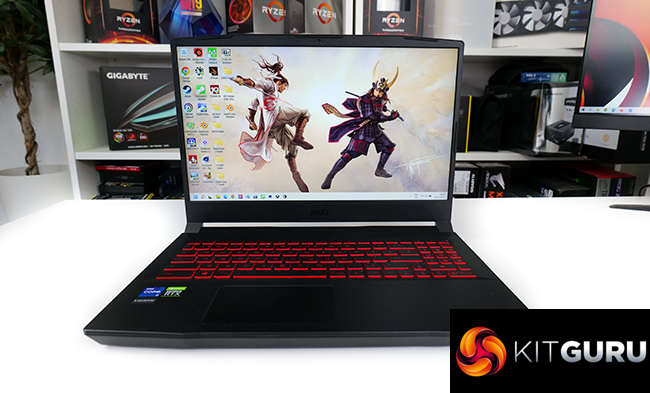
In fact, there's no way around it, the MSI Katana GF66 has plenty of downsides.
The screen quality is mediocre – at best – aside from the refresh rate. The battery life is atrocious and charging options feel archaic. Physical port connectivity is out of touch with the 2022 market. And the glaringly cheap chassis construction leaves plenty to be desired.
But, if you are looking for a cost-effective gaming laptop that is simply going to sit there and push pixels from your favourite games onto the high refresh rate 1080p screen, MSI’s Katana GF66 will do a reasonable job.
It’s not fancy or finesse, but its hardware is cooled well and the 12th Gen Intel CPU will appeal to many.
At £1399 though, there are better options on the market. Particularly the Ryzen 7- and RTX 3070-powered Lenovo Legion 5 or Acer Nitro 5, or the Ryzen 9 and RTX 3070 Gigabyte Aorus A5 X1, or the Ryzen 9 and RX 6800M ASUS ROG STRIX G15. A price point of £1399 really is RTX 3070 (or RX 6800M) territory, but the Katana GF66 12UE sample that we have reviewed in this article does not offer that.
We had initially filmed our video review in the context of the Katana GF66 being priced at £1099. For that money, the laptop and its compromises make a lot more sense. Unfortunately, the £1099 price was only a temporary promotion, and at the new £1399 asking price, the GF66 fails to impress.
We found the Katana GF66 on sale for £1399 at Currys in the UK.
Discuss on our Facebook page HERE.
Pros:
- Solid gaming performance from the RTX 3060 and Core i7-12700H.
- High refresh rate 240Hz screen.
- Keyboard and trackpad are good.
- Speakers are decent.
- Sensible, balanced choice of core hardware.
- Solid 1TB SSD with a spare M.2 slot.
Cons:
- Awful battery life.
- Large power brick with no USB-C charging.
- Mediocre display image quality.
- Poor port connectivity.
- Uncompetitive at the £1399 price point.
KitGuru says: If playing games is your core concern and you don’t really care for slim bezels or fancy laptop materials, the MSI Katana GF66 12UE was a solid, budget-friendly option at the previous price of £1099. But at £1399, the hardware and design are not up to the standard of competition from the likes of Acer, ASUS, Gigabyte, and Lenovo.
