KitGuru KitGuru.net – Tech News | Hardware News | Hardware Reviews | IOS | Mobile | Gaming | Graphics Cards



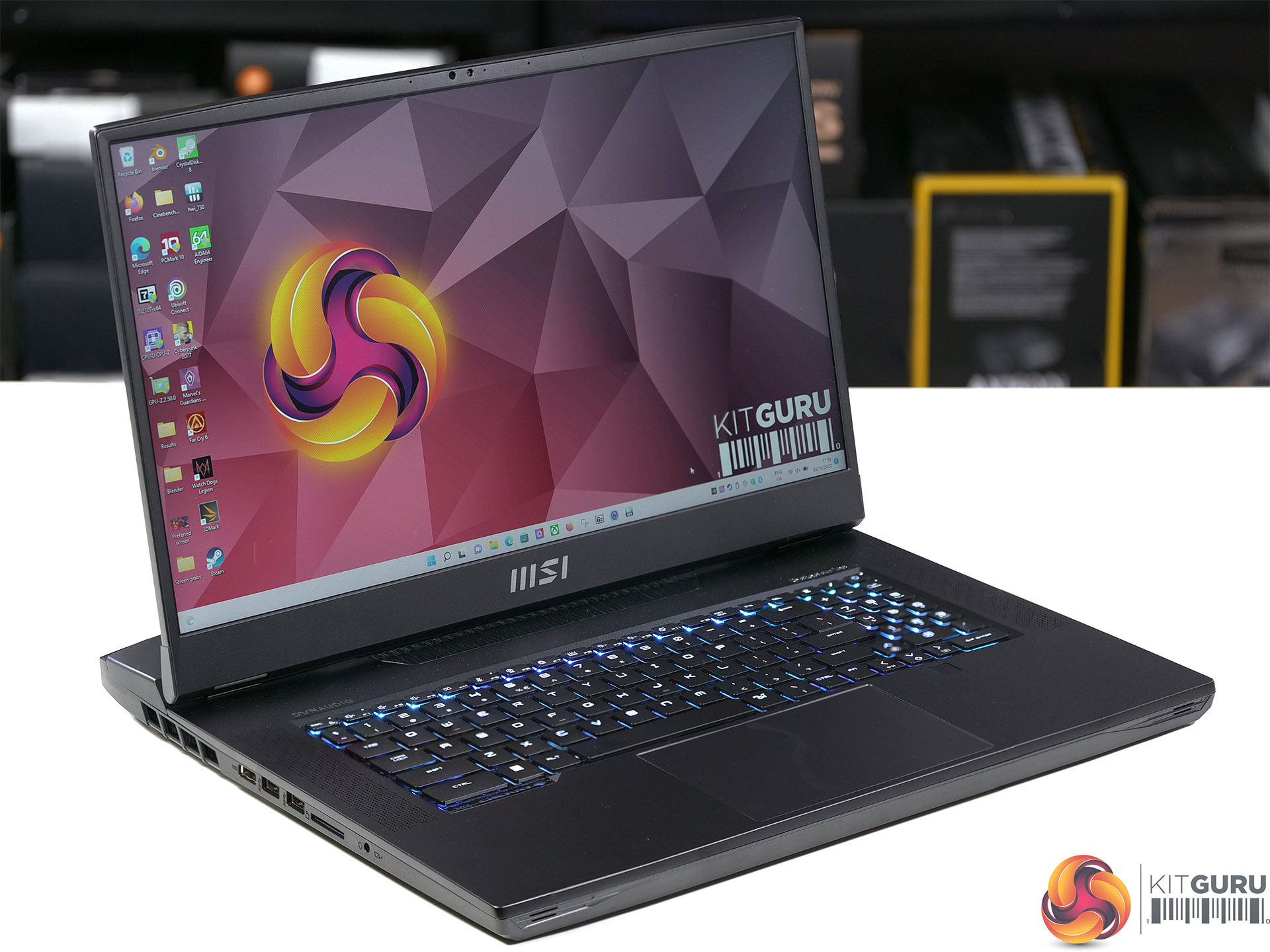
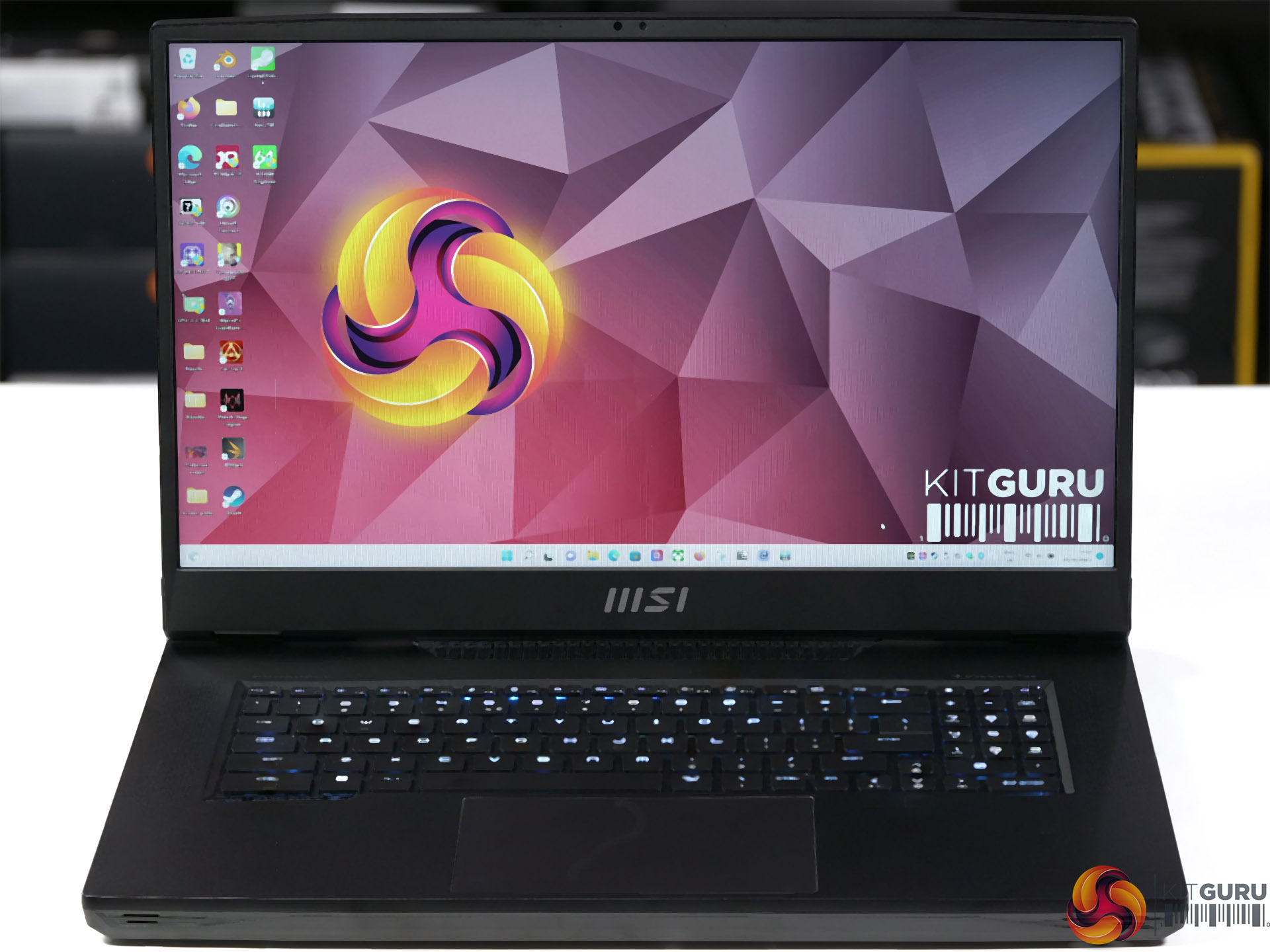
Today we are looking at the MSI Titan GT77 which is a hefty 17.3-inch laptop that packs an Intel Core i9-12900HX processor, and if that model code sounds familiar you are clearly on the ball. We recently reviewed the Asus ROG Strix Scar 17 SE which packs an Intel Core i9-12950HX and you might find it useful to read our news post on the HX family to help you understand the differences between these models of CPU.
Time Stamps
00:00 Start
01:11 It’s a monster!
02:21 Keyboard
02:37 Pricing
03:22 Power profiles
04:18 How does the cooling system cope?
05:12 Combined workload
05:39 RGB and software
06:39 Ports and connectors
07:13 Testing and performance
08:08 Results
11:15 Battery Test
11:31 Closing Thoughts
Features
- Desktop Performance – Up to Intel Core i9-12900HX processor. With up to the latest Intel Core i9-12900HX processor comes with 8 Performance-cores and 8 Efficient-cores, the Titan GT77 provides unprecedented boost in your multitasking projects and performance demanding games.
- More Storage. More Memory. More Expansion. The Titan GT77 is equipped with 4 sets of expansion memory slots for 4x DDR5 memory, just like a desktop. The overall capacity can reach a full 128GB, and the maximum theoretical transfer rate has reached 6.4Gbps. With 4x M.2 SSD (1 PCIe Gen5, 3 PCIe Gen4) slot space design, it can create a high-speed and massive storage space of up to 8TB. The powerful hardware is perfectly integrated into less than a inch of body thickness that significantly improves the mobility.
- Titan Cooling. Experience the next level of cooling solution. The extreme Cooler Boost Titan system helps maximize CPU and GPU performance efficiency to take on any intensive application or games with ease. 4 Fans, 7 Heatpipes and 6 Exhausts.
- Experience Every Actuation
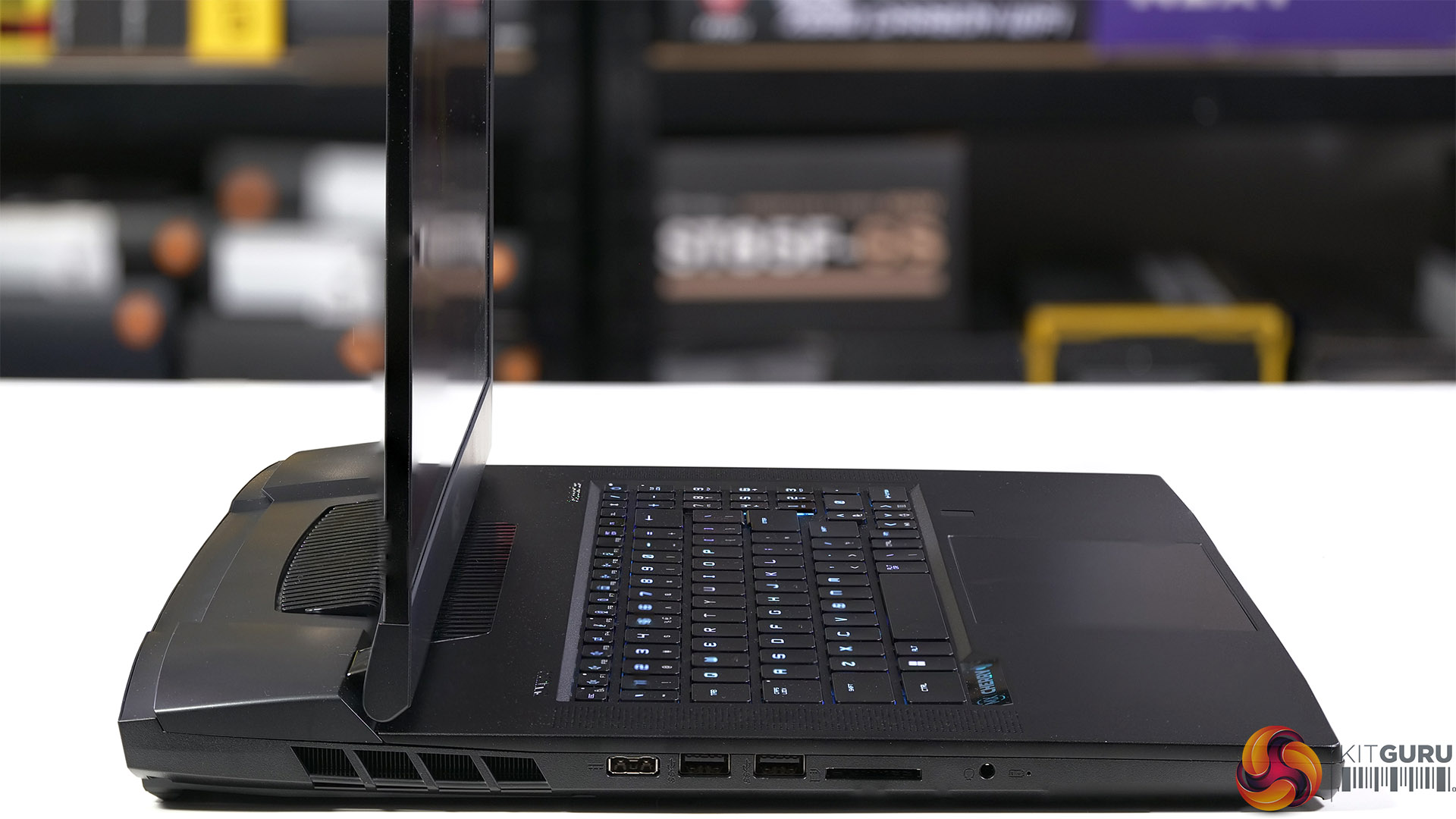
Enjoy every tactile feedback. The Titan GT77 comes with a unique Cherry MX Ultra Low Profile mechanical keyboard specifically tailored for laptops with ultra-slim form. The keyboard features a two-piece keycap structure and gold cross-point contact system to ensure the most crispy tactile and precise actuation during your gaming session.
Specification
- Processor: 12th Gen Intel Core i9-12900HX Processor 2.3 GHz (30MB Cache, up to 5.0 GHz, 8 P-cores and 8 E-cores)
- Graphics: Nvidia GeForce RTX 3080Ti Laptop GPU 16GB GDDR6 (175W) and Intel UHD Graphics
- Display: 17.3-inches 1,920 x 1,080 360Hz
- Memory: 64GB (4x 16GB) DDR5-4800 dual channel
- Keyboard: Cherry Mechanical Per-Key RGB by SteelSeries
- Storage: 4x 1TB Samsung MZVL21T0HCLR (PM9A1) PCIe Gen 4 SSD
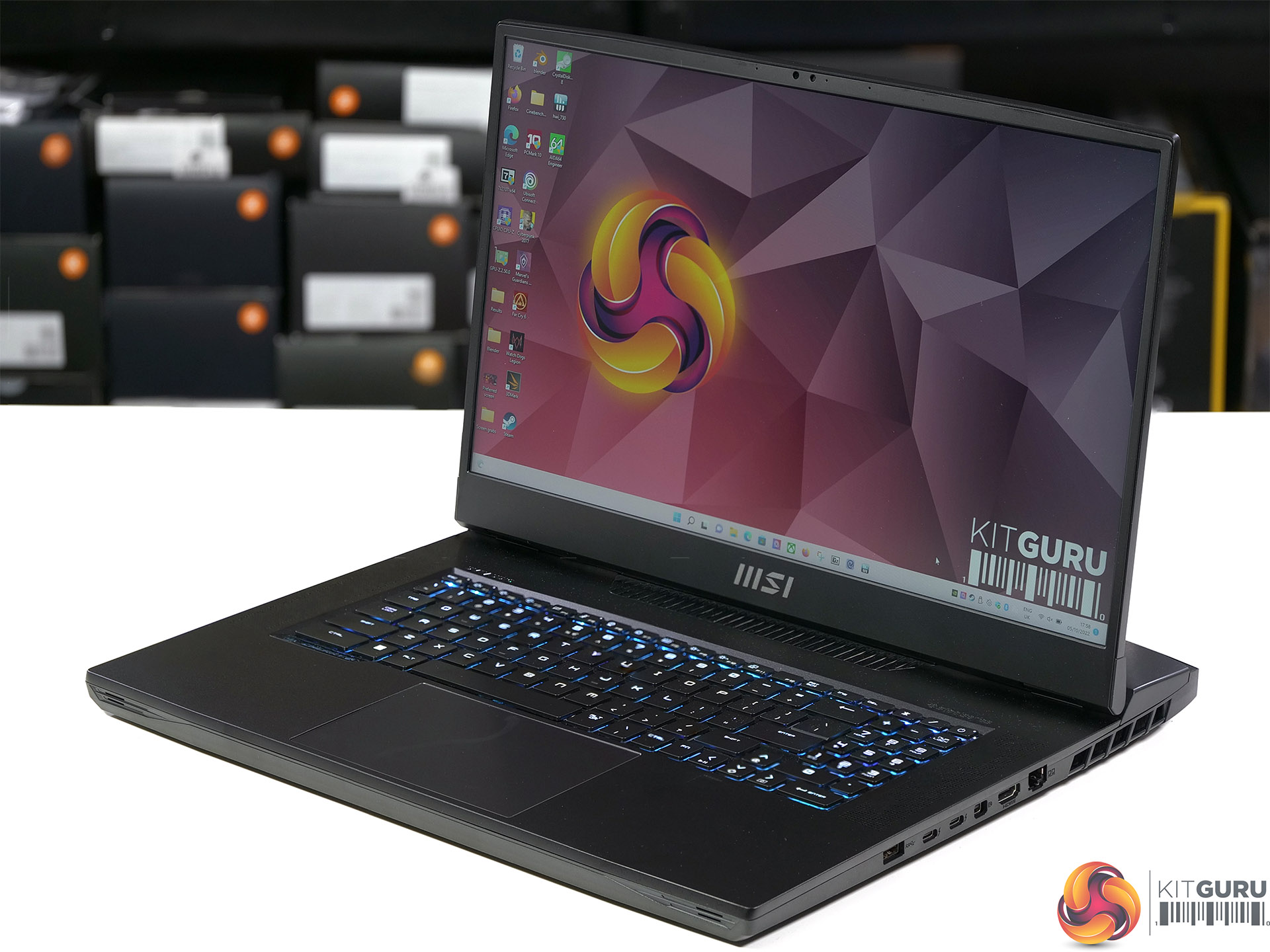
- I/O Ports
- 1x 3.5mm Combo Audio Jack
- 1x HDMI 2.1
- 1x Mini DisplayPort
- 2x Type-C Thunderbolt 4 with DisplayPort 1.4
- 3x USB 3.2 Gen 2 Type-A
- 1x 2.5G RJ45 Ethernet port
- 1x SD Express Card Reader
- Wi-Fi: Killer ax Wi-Fi6E, Bluetooth v5.2
- Audio: 4-speaker system 2x 2W woofer, 2x 2W speaker
- Battery: 99.9Whr/6578mAh 4-cell and 330W Power adapter
- Dimensions: 397mm x 330mm x 33mm
- Weight: 3.3kg plus 1.6kg for power supply and mains cable
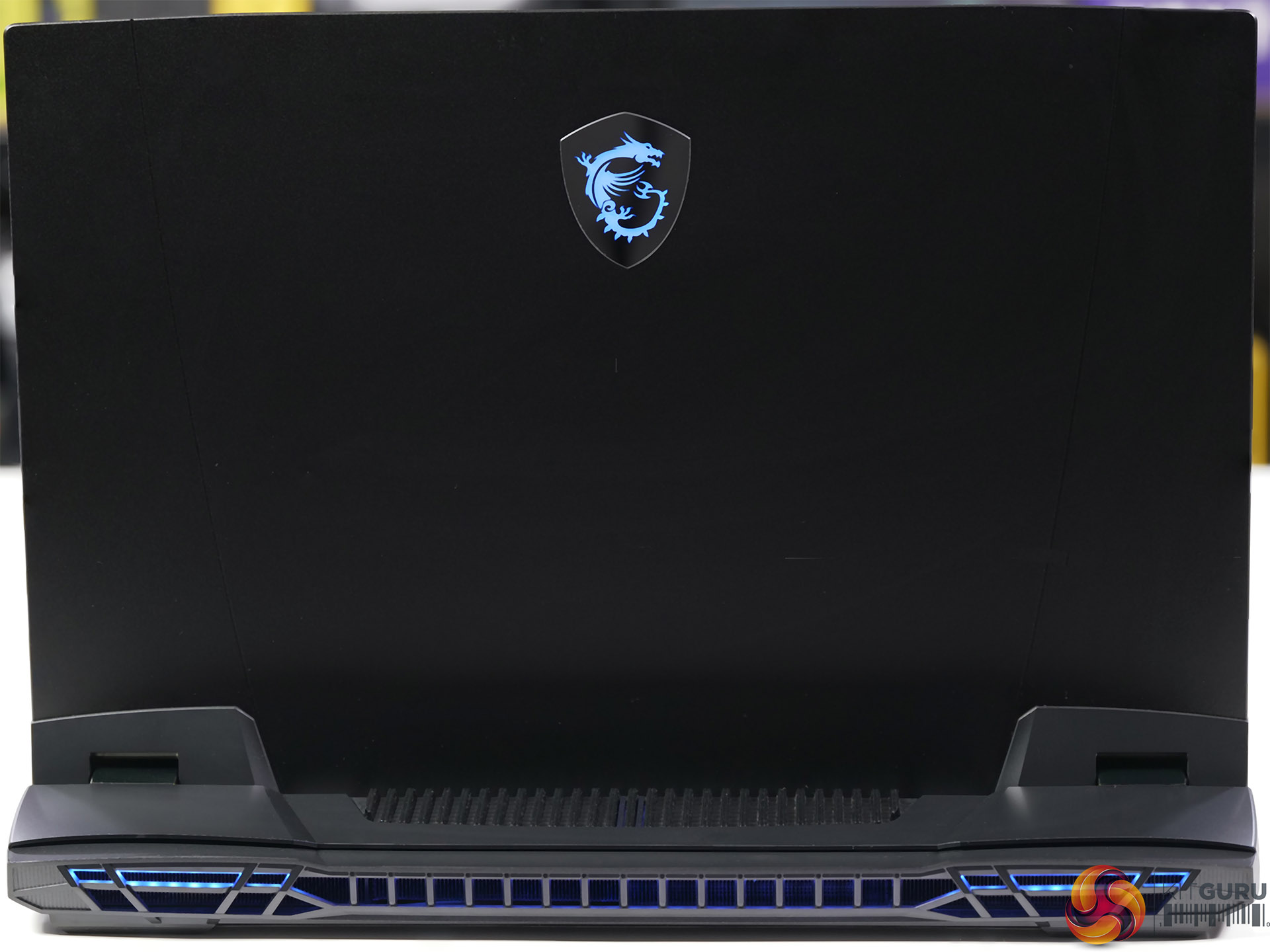
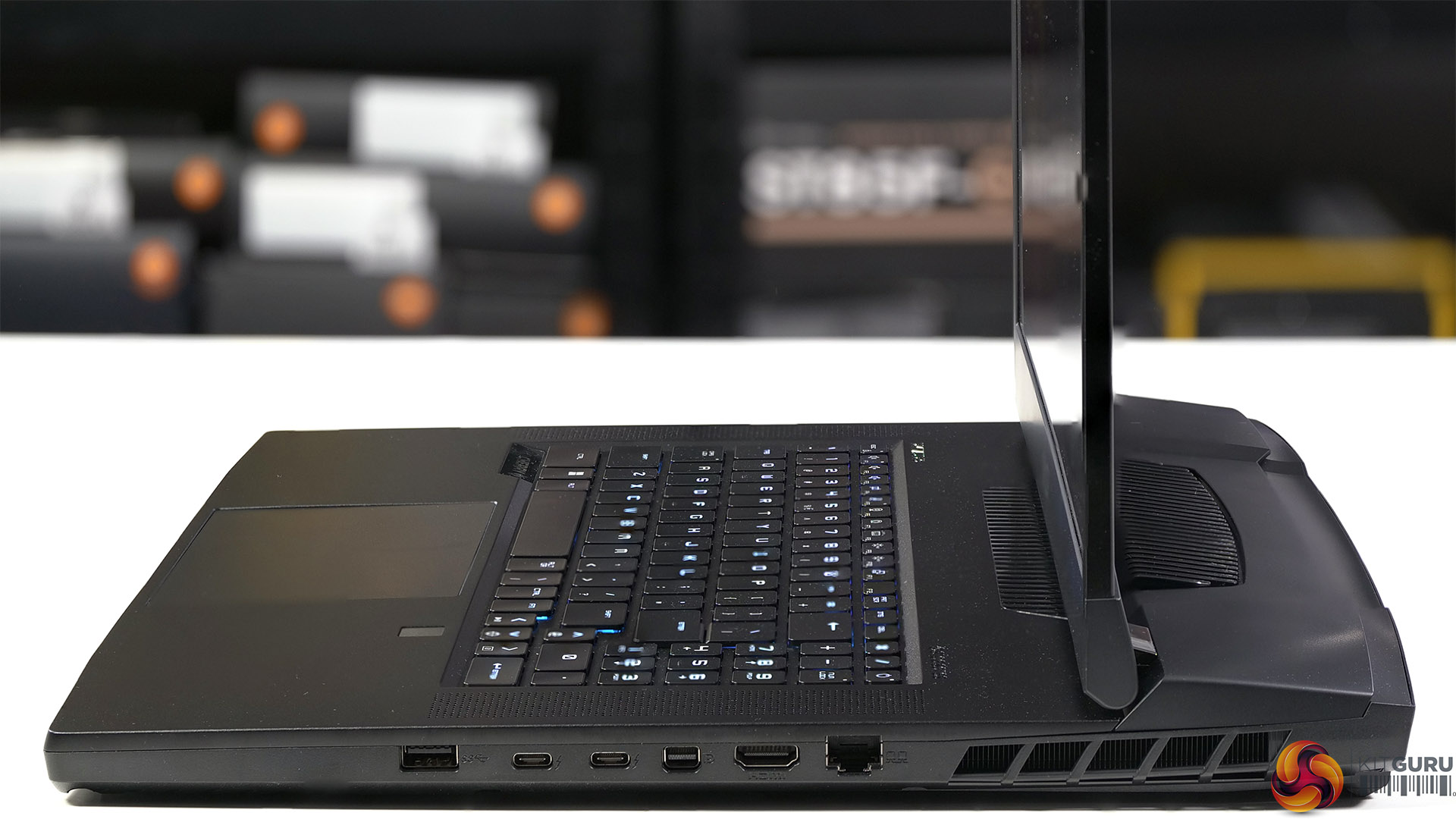
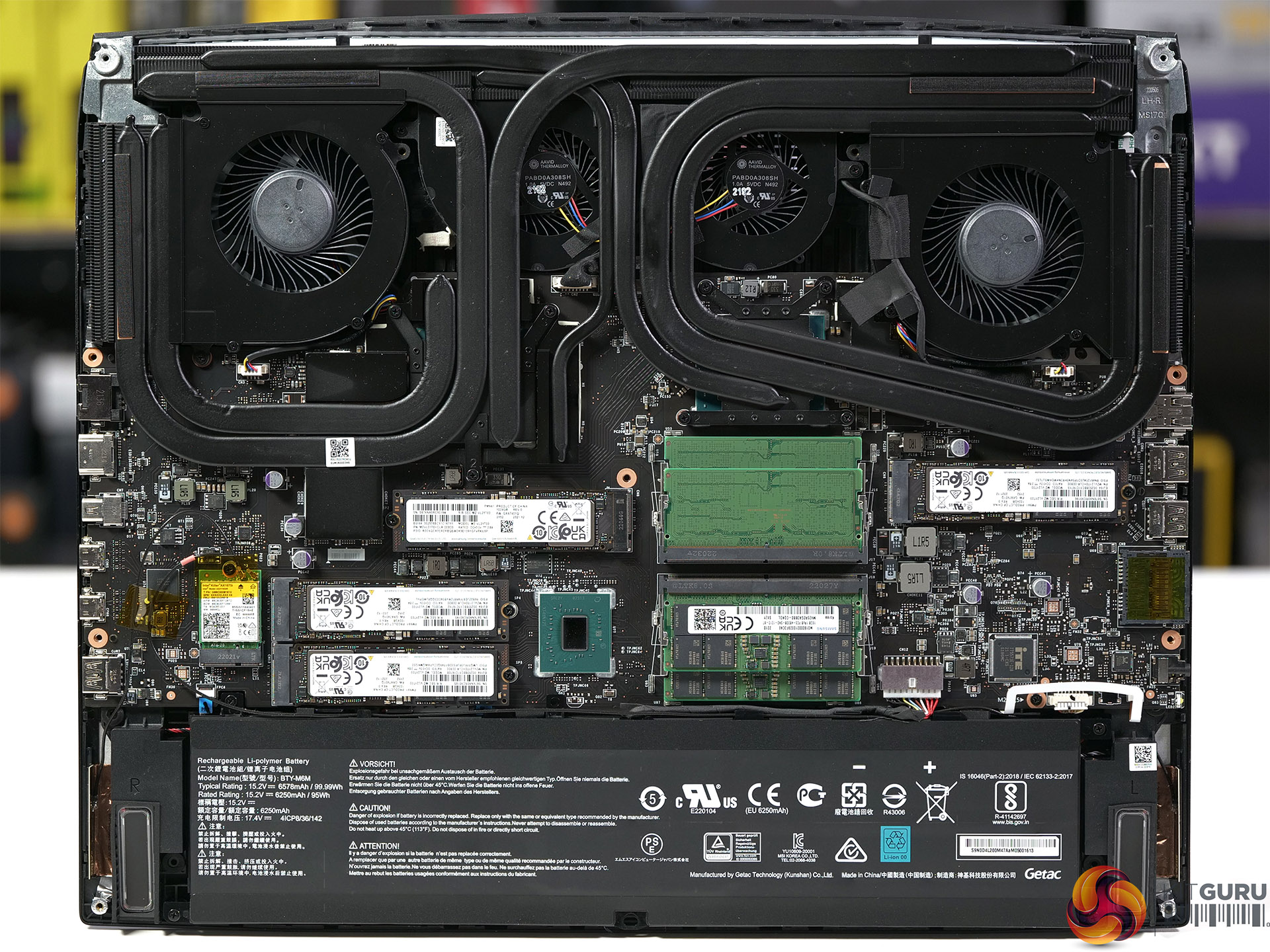
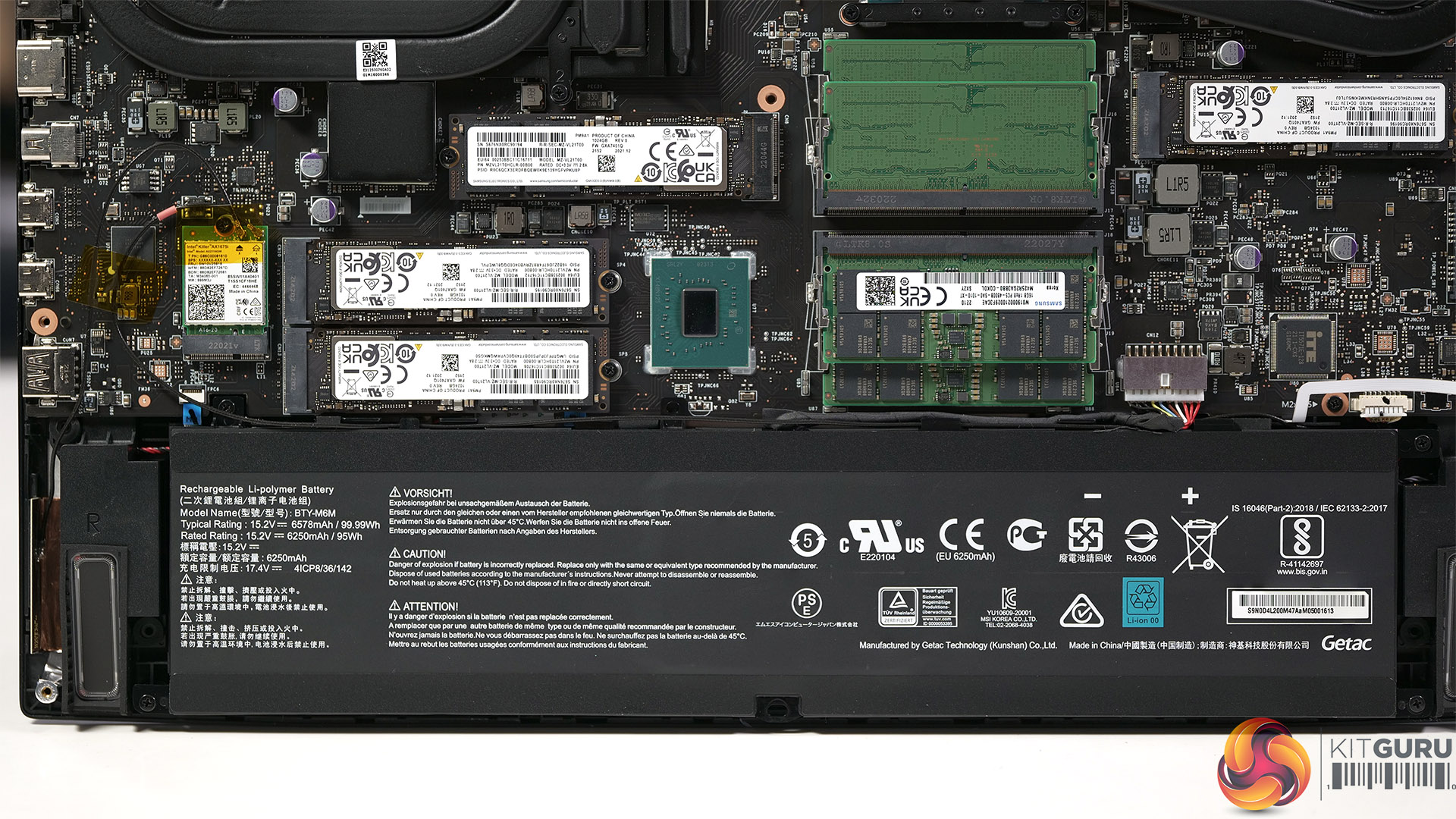
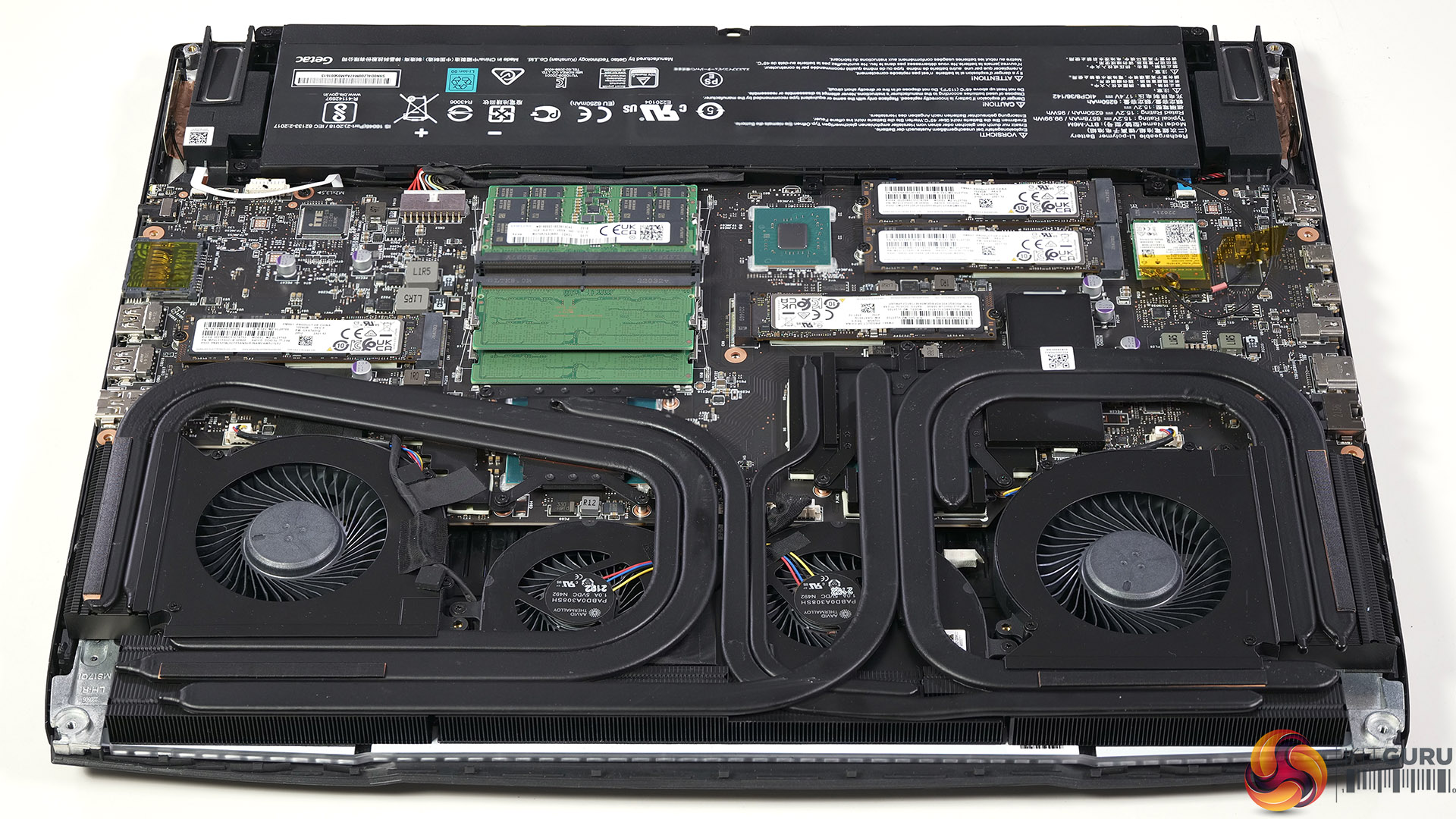
The photos above show some of the extras we received in our engineering sample. Sadly we doubt these parts will be included in a retail version of the Titan GT77. For one thing we have 64GB of DDR5 RAM in four modules and for another we have four separate 1TB Samsung M.2 SSDs that are not connected together in RAID. The final oddity is the 1,920 x 1,080 display panel with a 360Hz refresh rate. That spec may appeal to Esports aficionados however we would have much preferred the regular 3,840 x 2,160 IPS level display that actually ships with Titan GT77.
Cinebench R23 Multi Core
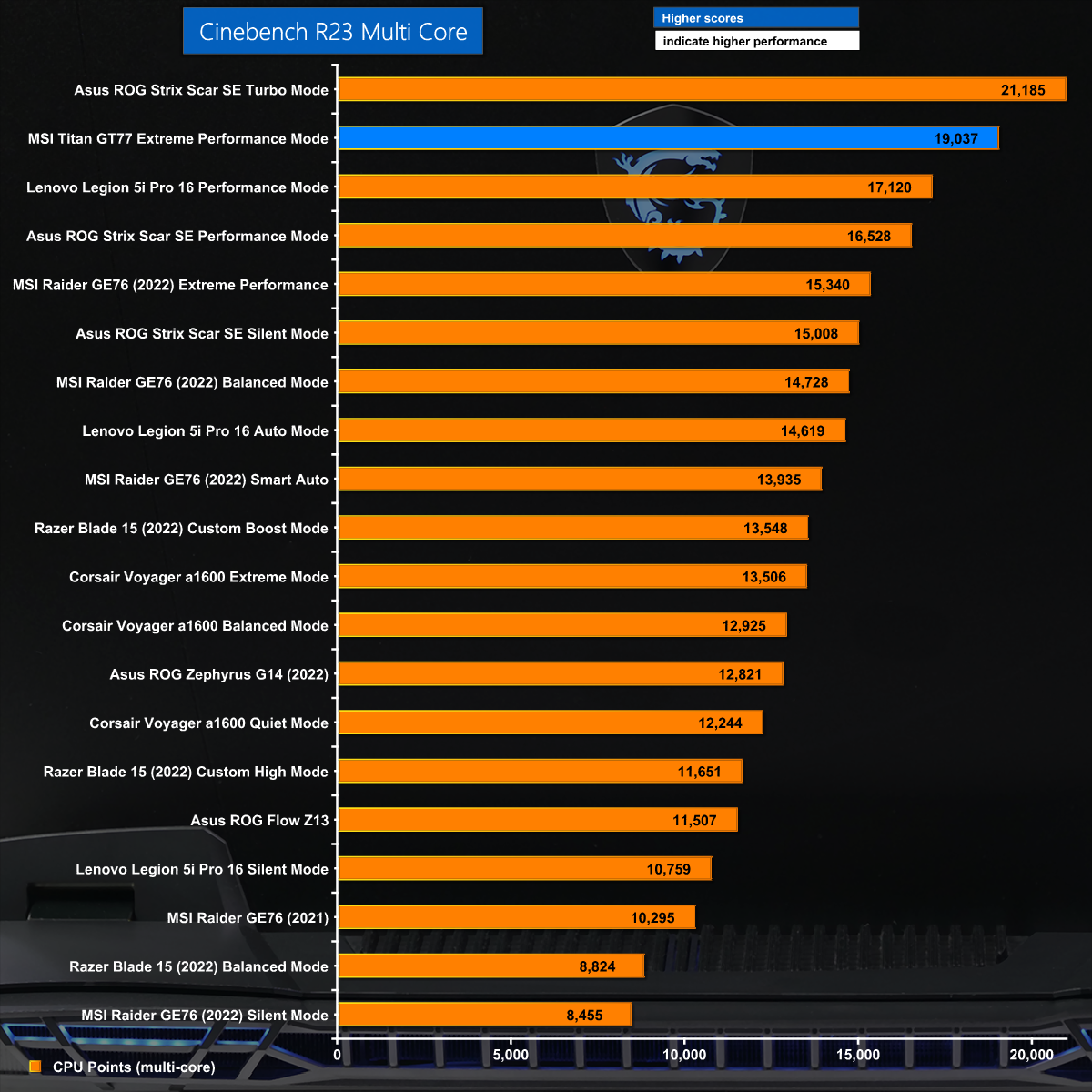
In Cinebench R23 Multi Core we see the MSI losing out to the Asus ROG Strix Scar 17 SE by a significant margin. This looks odd as the two laptops use CPUs that are very similar, however we can see what is going on.
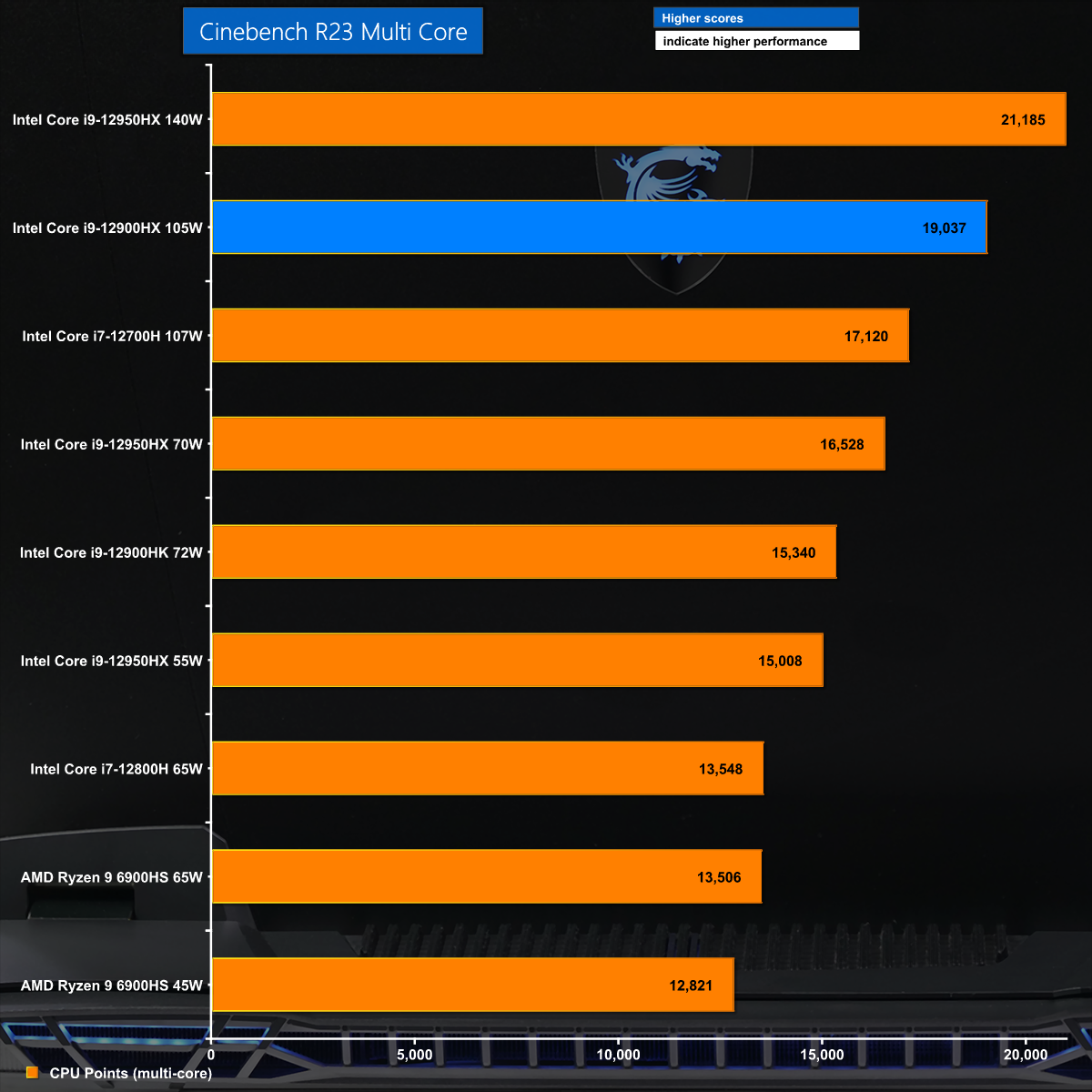
The explanation becomes clear when we look at the specifics of the CPUs in the laptops that perform best in our chart and study the power level they use during the test runs. The Asus supplies 140W to the CPU which runs above 3.8GHz while the MSI is stuck at 105W and 3.5GHz.
Cinebench R23 Single Core
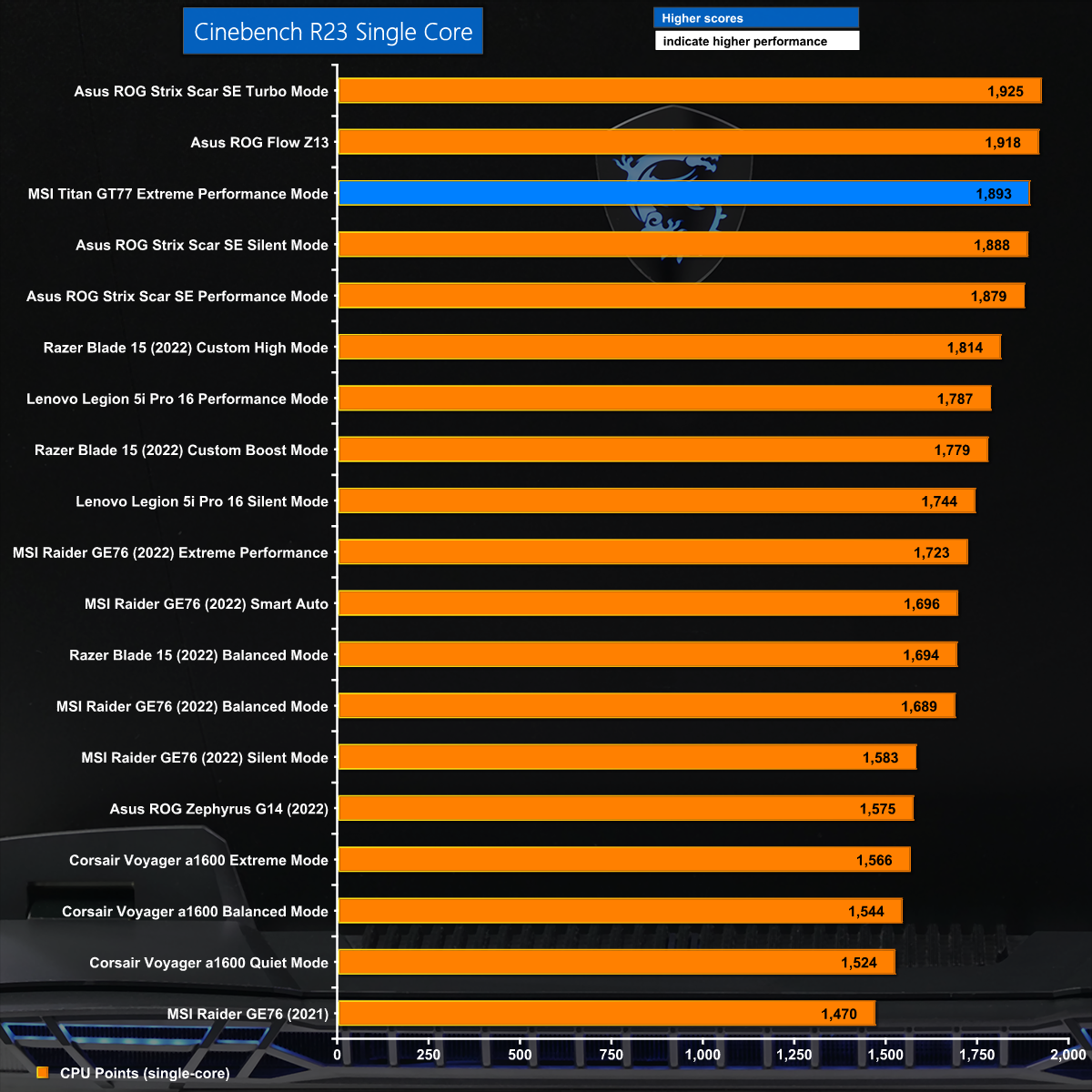
In Cinebench R23 Single Core there is very little to separate the Asus and MSI. As we explain in our video there is only a single test result for the Titan GT77 as the system switches into Extreme Performance Mode as soon as the benchmark test begins.
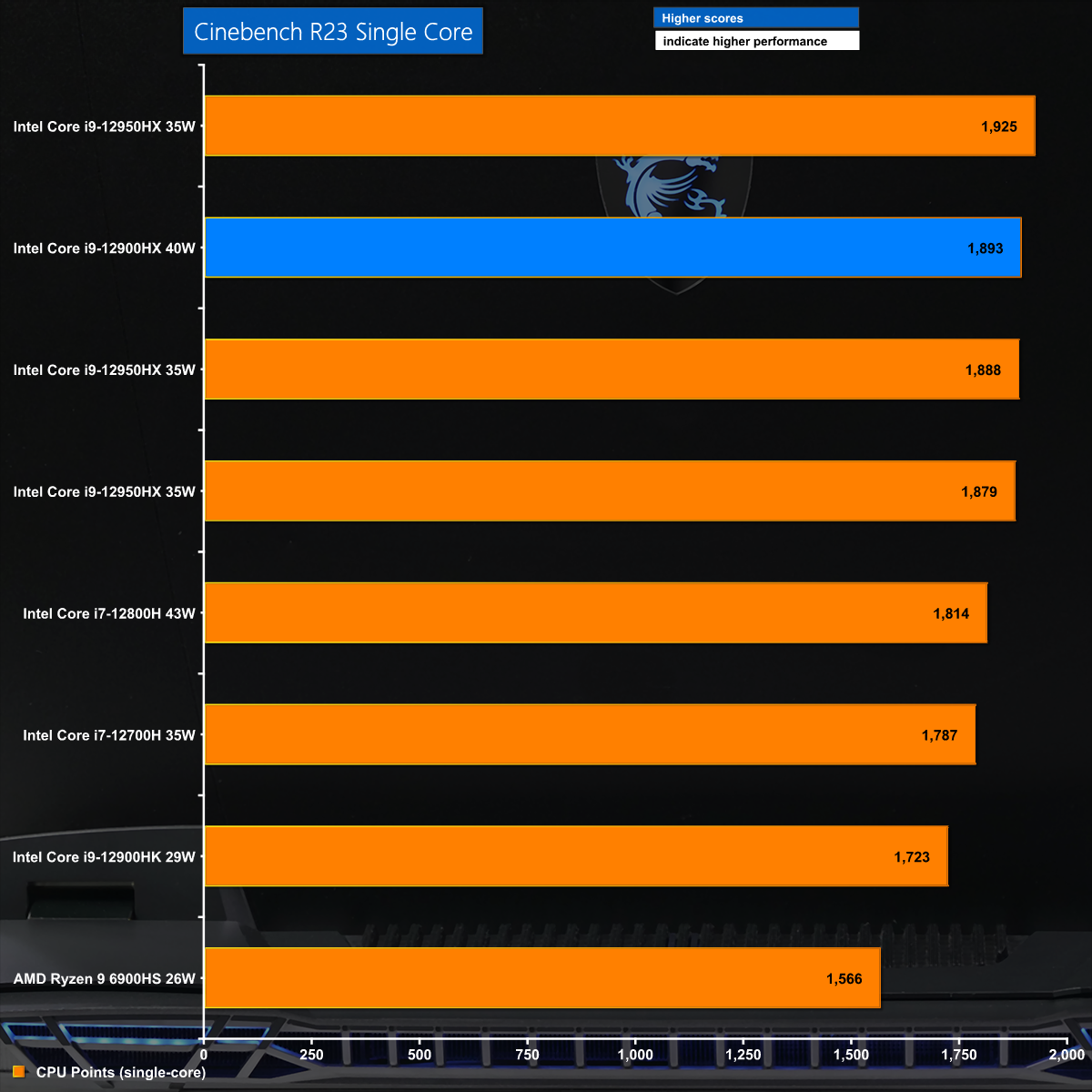
The curious thing is that the CPU in the MSI pulls 40W during the Cinebench test while the Asus only requires 35W. We have to wonder whether the quality of the CPU in this MSI is slightly inferior to the Asus.
Blender 3
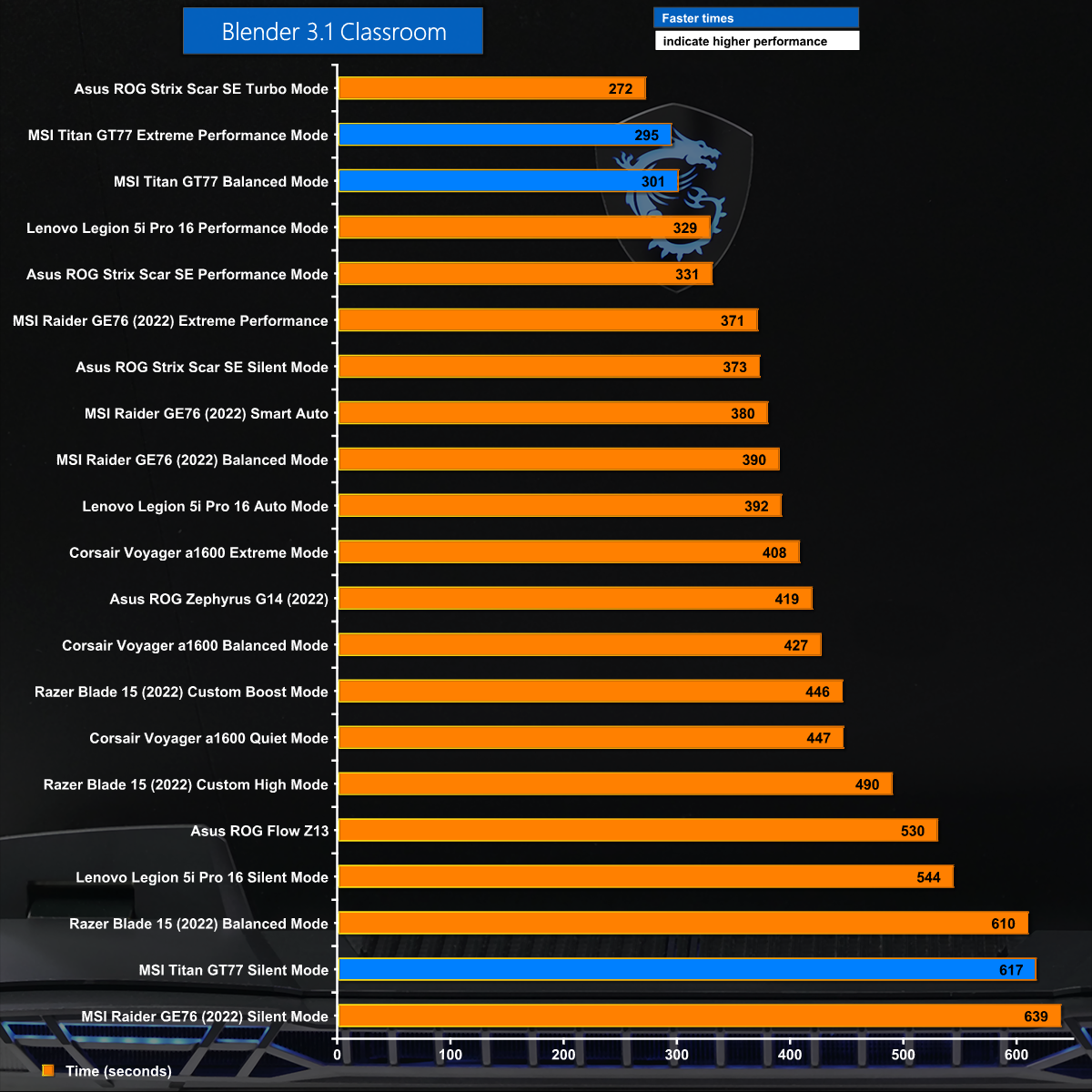
Blender 3 performs differently to Cinebench R23 on the MSI and was happy to run in all three power modes. We can see the MSI does well in Extreme Performance and Balanced modes while Silent mode lives up to its name and caps the CPU at 30W which means it crawls along, but quetly.
BAPCo CrossMark
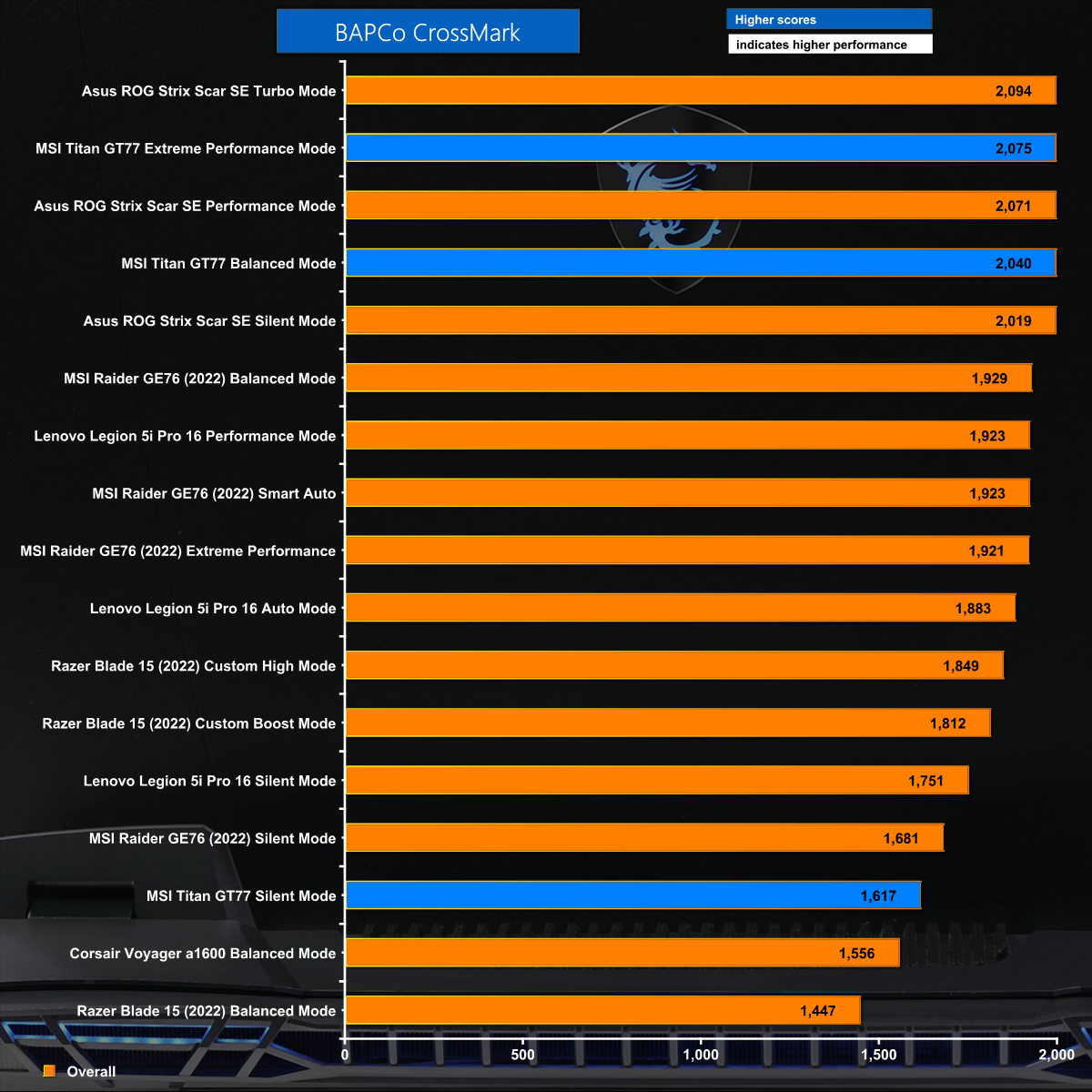
In BAPCo CrossMark the MSI again delivers three test results and again does well in the higher power modes however the it is beaten consistently by the Asus despite their similar CPUs.
7-Zip v21 Decompression
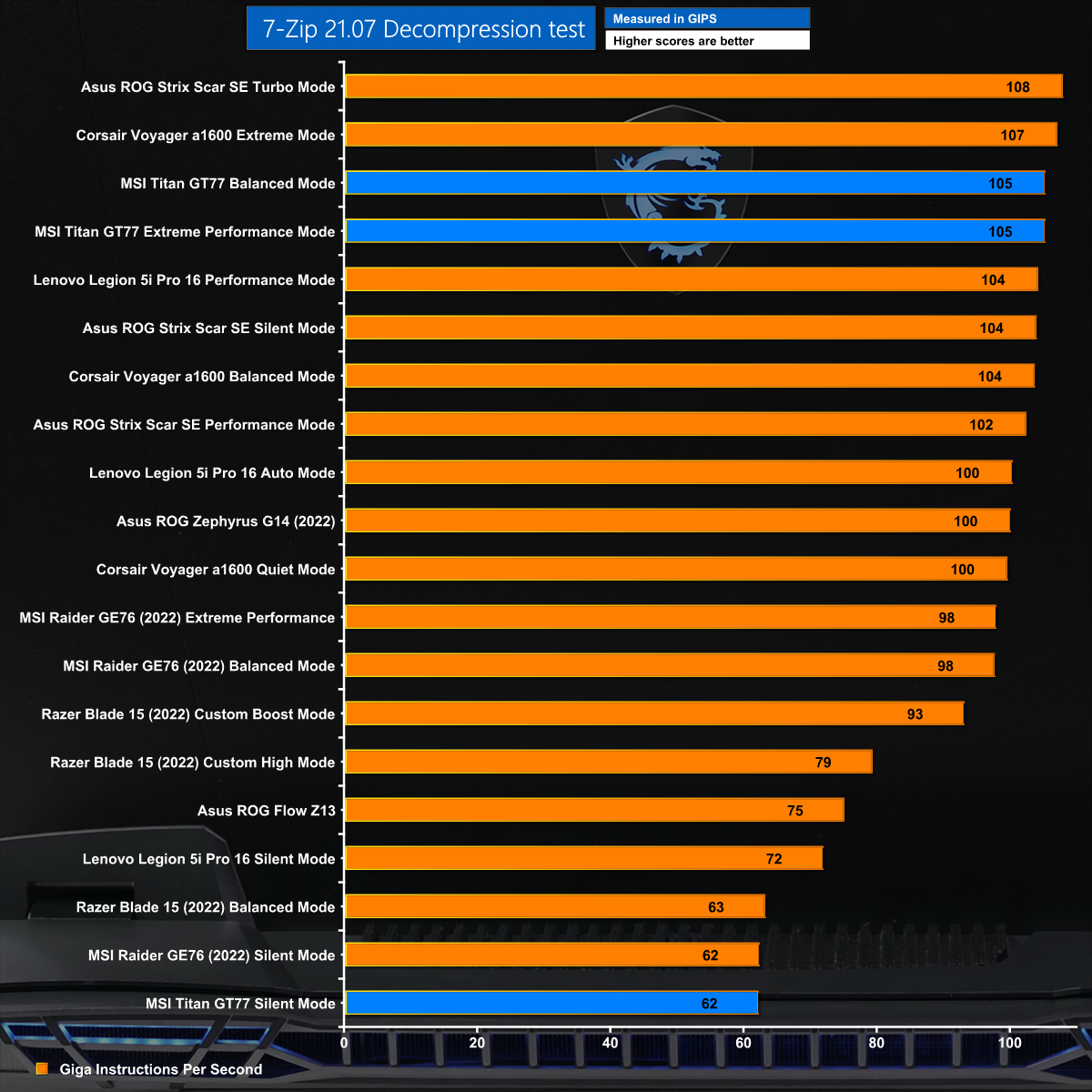
Perhaps the biggest surprise in the 7-Zip Decompression test is that the AMD powered Corsair Voyager a1600 leaps into second place above the MSI Titan GT77 which follows close behind.
7-Zip v21 Compression
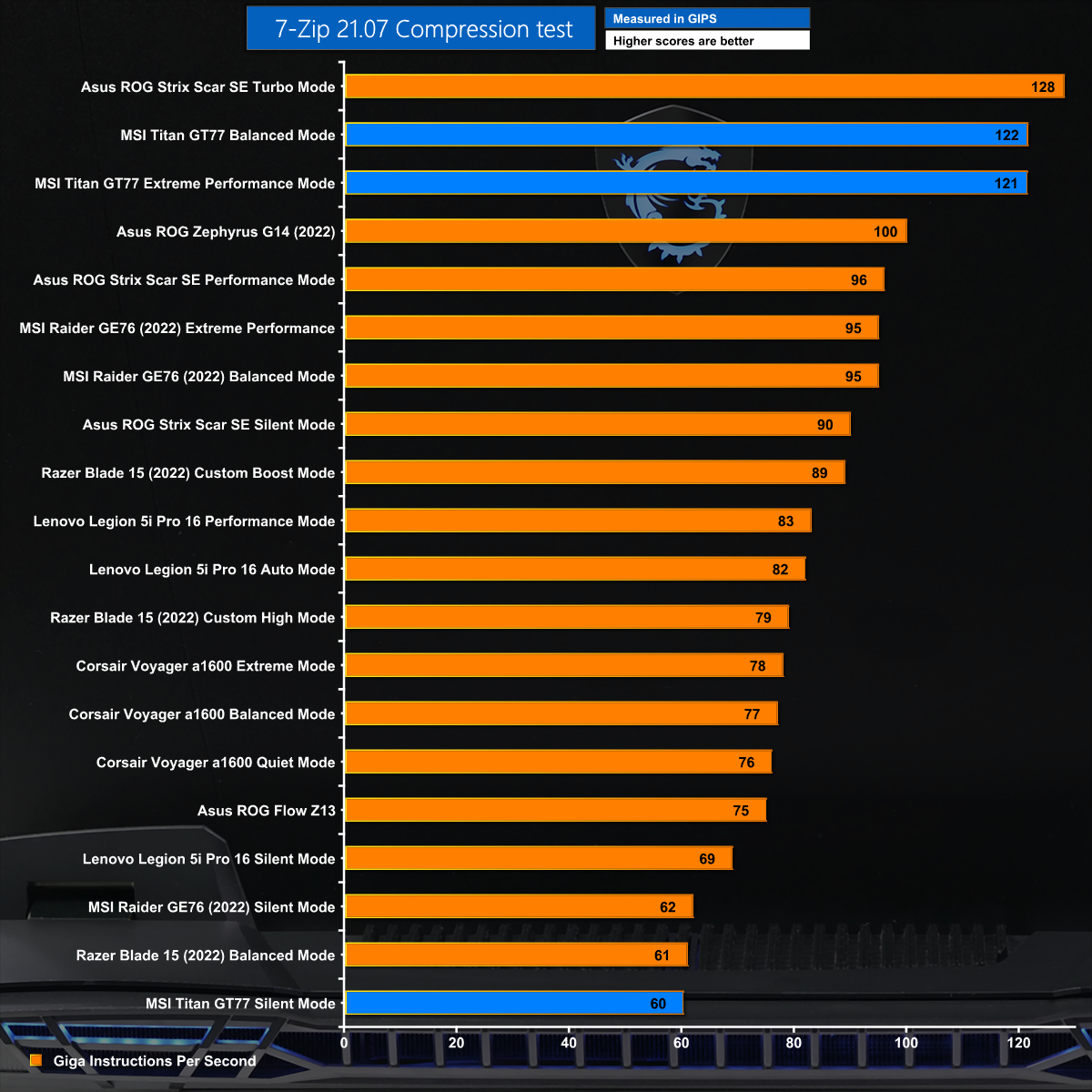
The 7-Zip Compression test looks good for the Titan GT77 however the Asus still leads the field by a significant margin.
3D Mark Time Spy – CPU Test
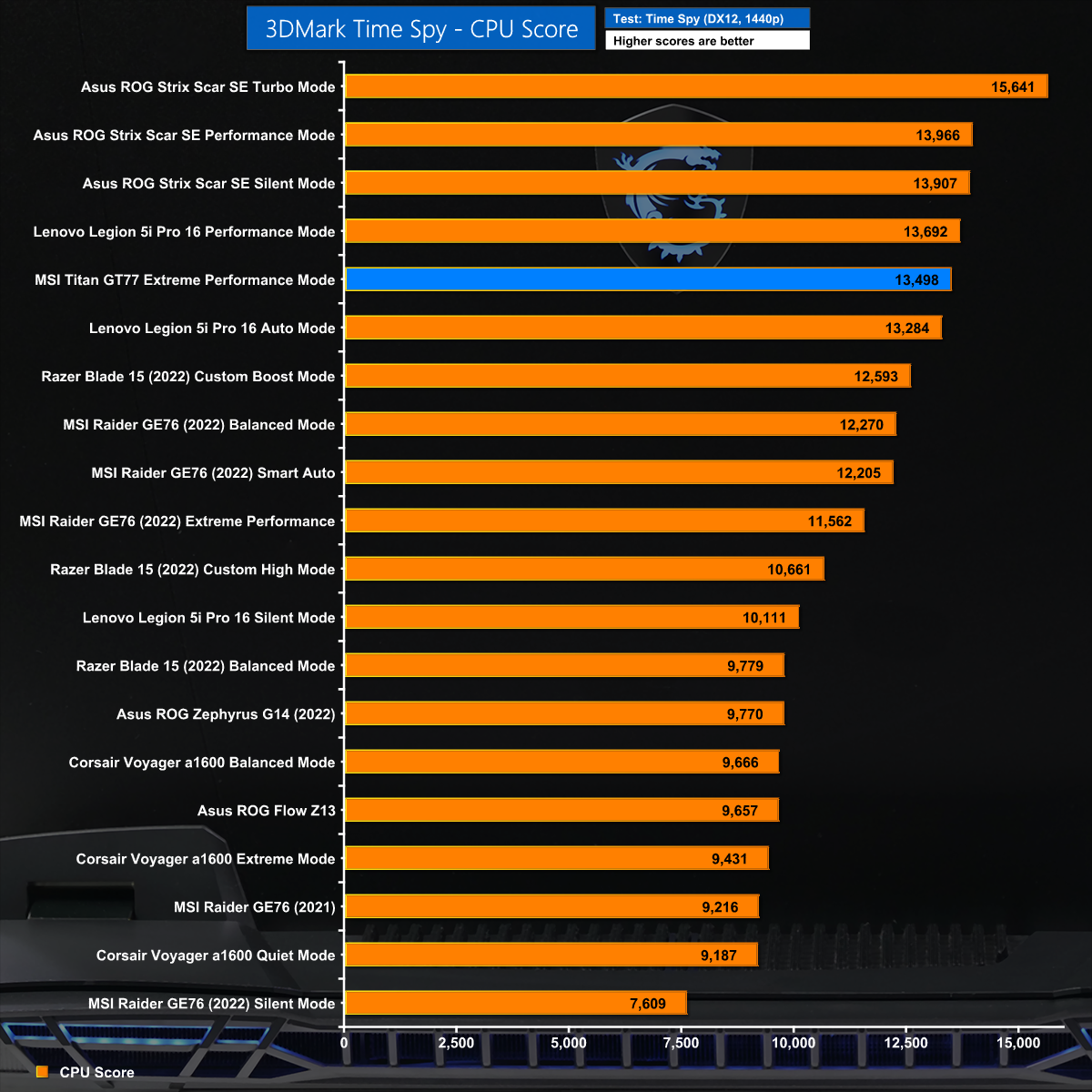
In the CPU test within 3D Mark Time Spy we see a familiar story with the MSI doing OK while simultaneously losing out to the Asus. The point that may not be obvious is that in mixed workloads – such as Time Spy – the graphics receive most of the power while the CPU runs on a power level around 45W.
3D Mark Time Spy – Graphics Test
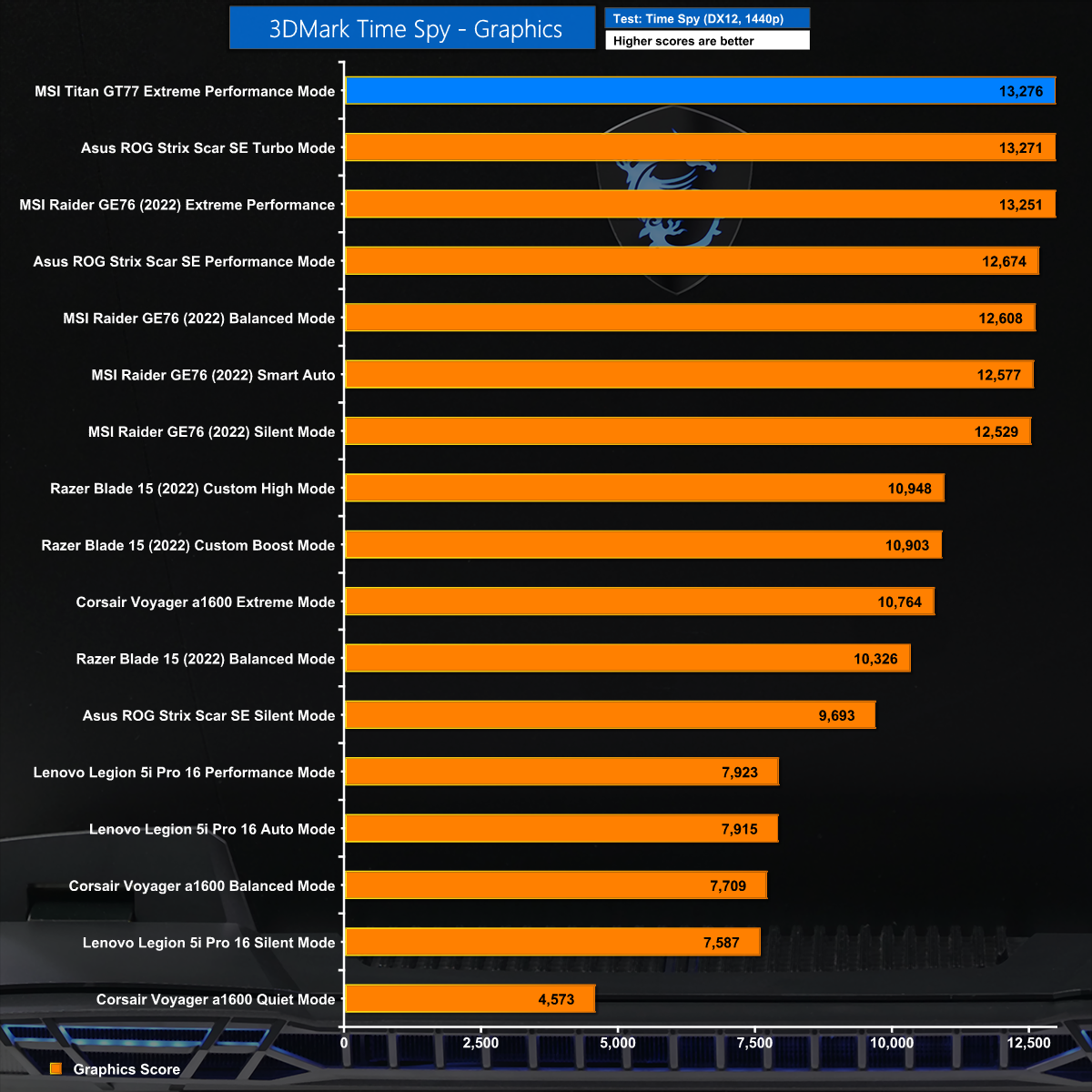
We can see this effect in the graphics test where the MSI Titan GT77 jumps to the top of the chart by a tiny margin. Clearly the graphics side of things is working just fine, even if the CPU might be struggling slightly.
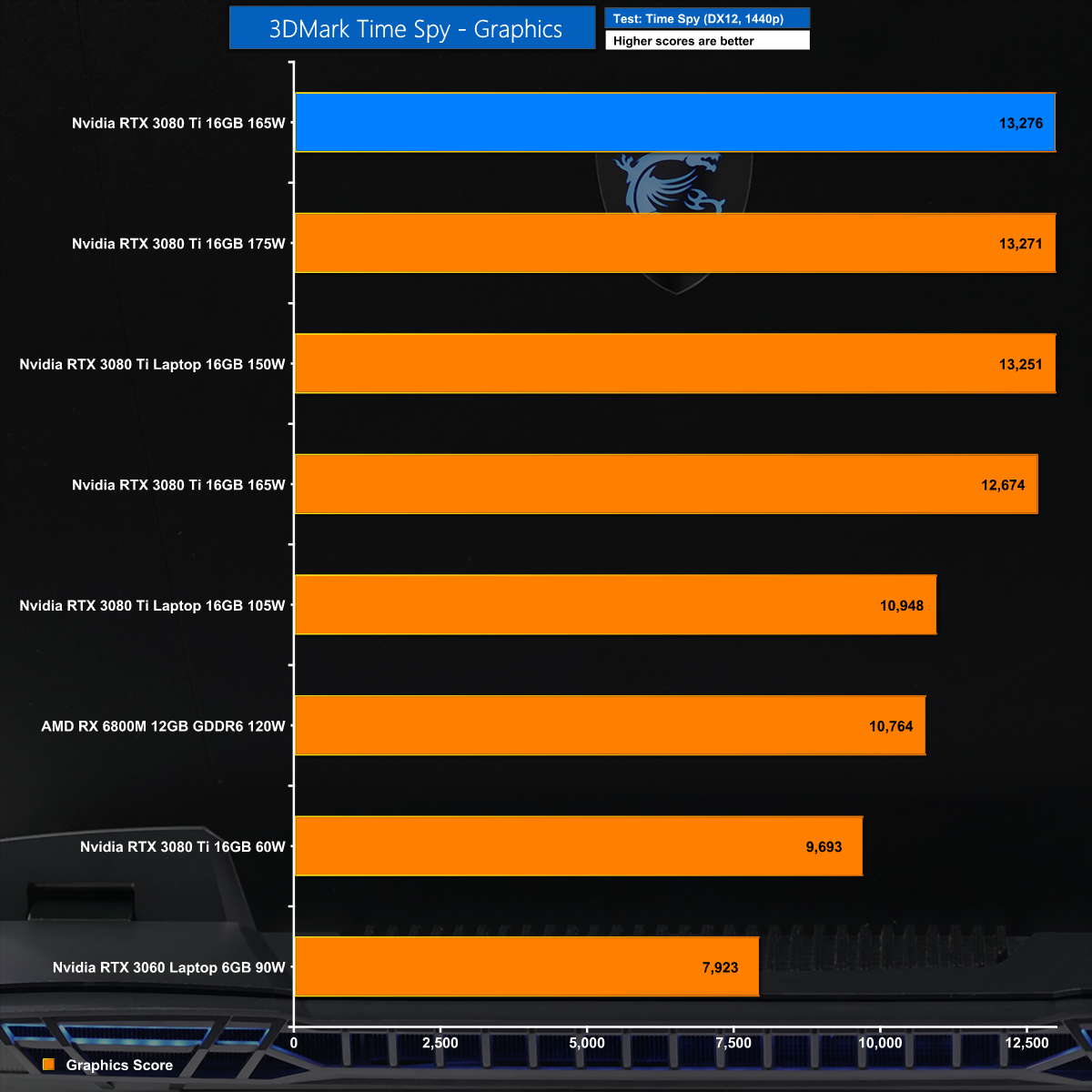
The interesting thing is that MSI is running the RTX 3080 Ti on 165W where Asus is using 175W yet the two laptops are effectively performing the same so we clearly have a level playing field.
3D Mark Time Spy – Overall Test
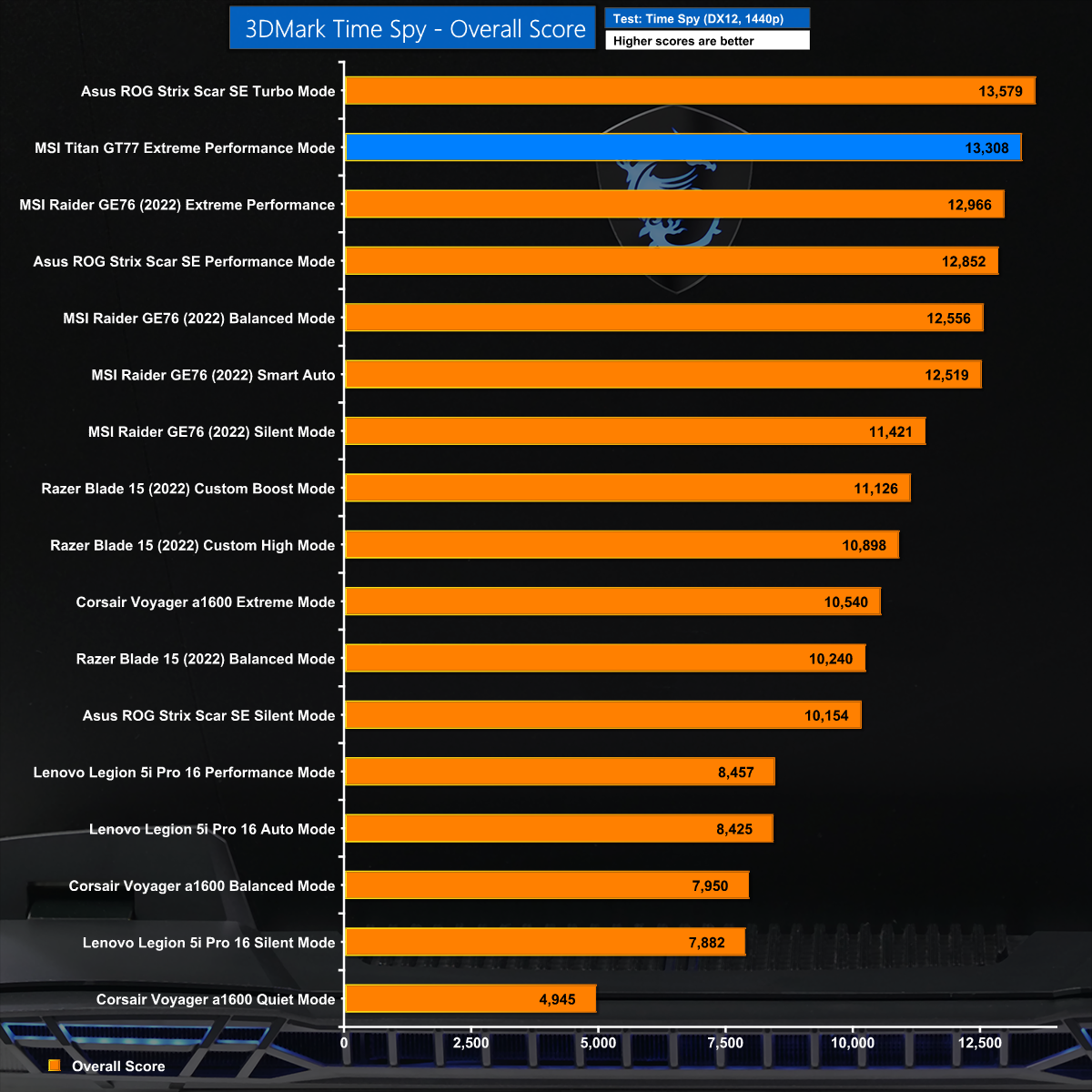
Add together the CPU and graphics elements of Time Spy and we end up with a tiny victory for Asus over MSI which in reality is effectively a tie.
Cyberpunk 2077 at 1080p

Our review sample of the Titan GT77 has a FHD display so we are limited to 1080p. In Cyberpunk 2077 the MSI does well but is beaten convincingly by the Asus.
Marvel's Guardians of the Galaxy at 1080p
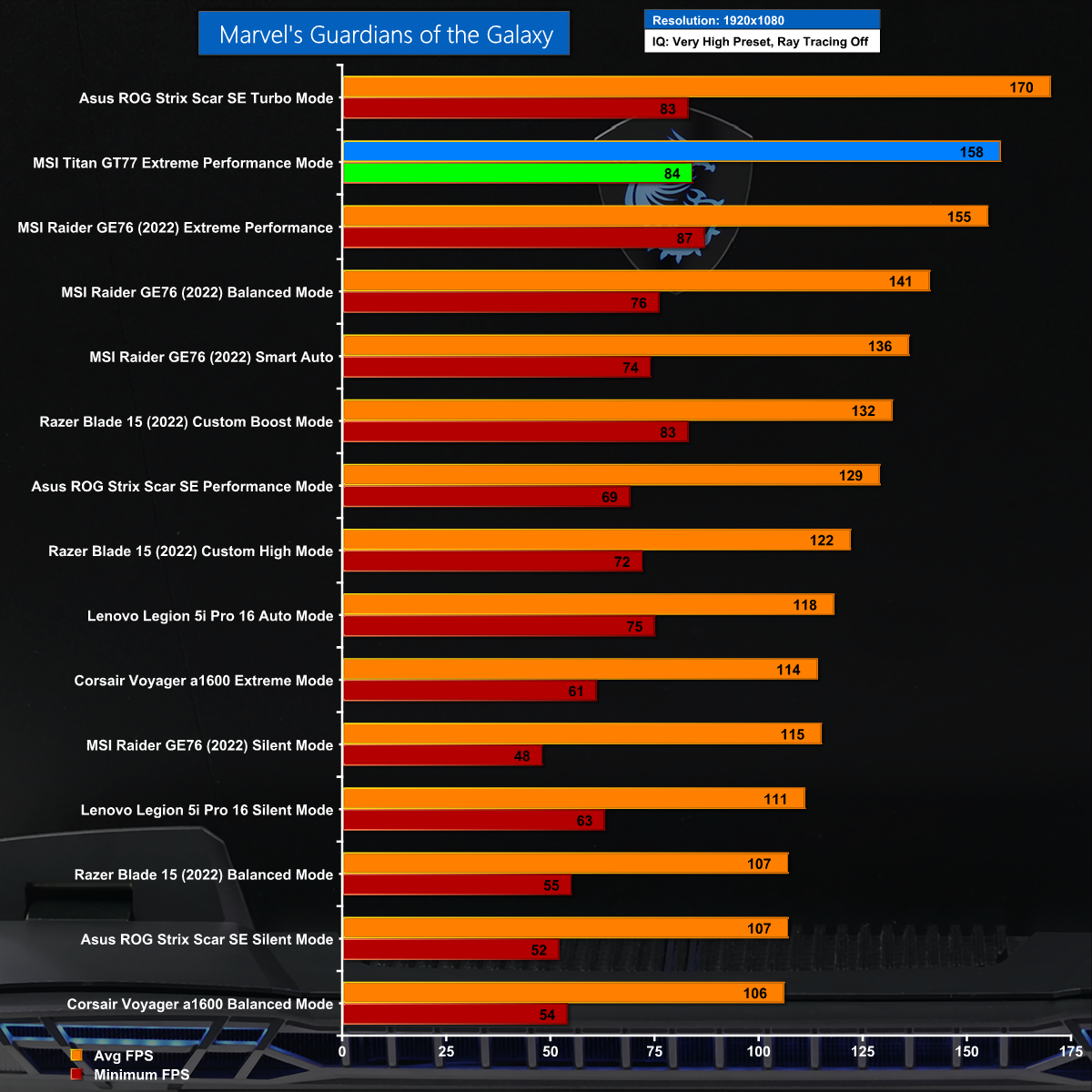
It is a similar story in Marvel's Guardians of the Galaxy where the MSI does well and the Asus does better, once again by 12fps.
Far Cry 6 at 1080p
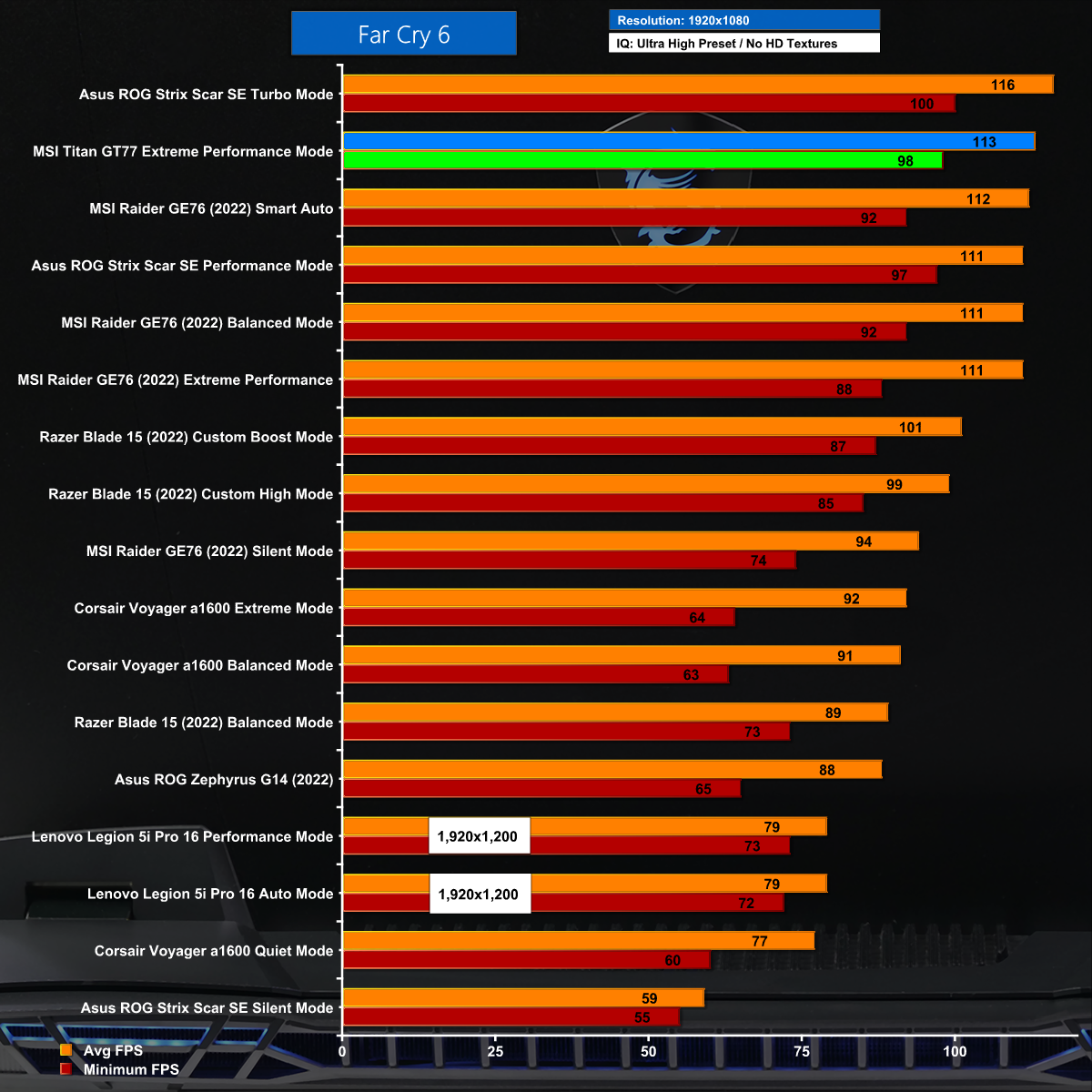
The margin is tighter in Far Cry 6 however the MSI again comes in second to the Asus.
Watch Dogs: Legion at 1080p
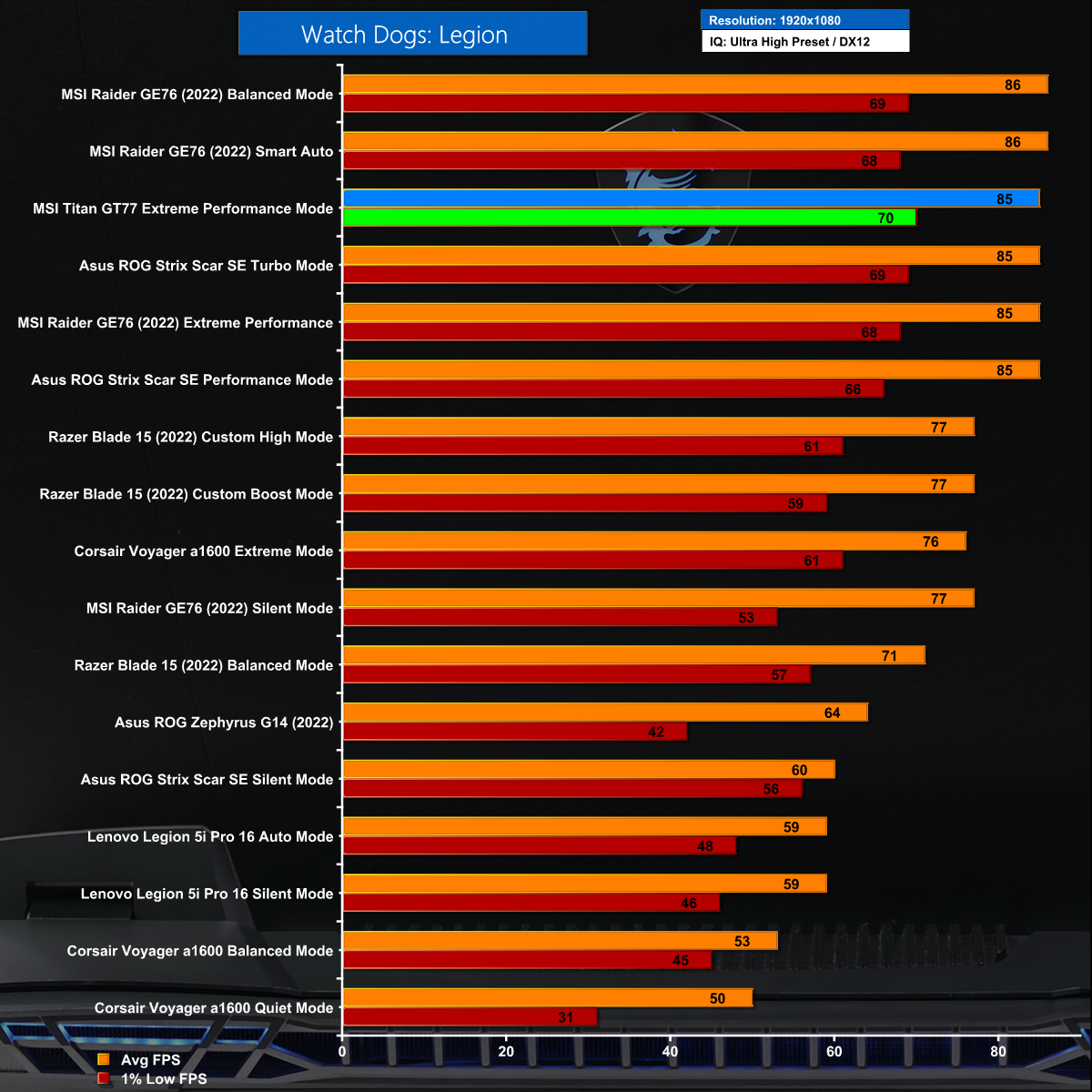
So close, so very close, however the MSI is narrowly beaten by Asus in Watch Dogs: Legion.
Battery
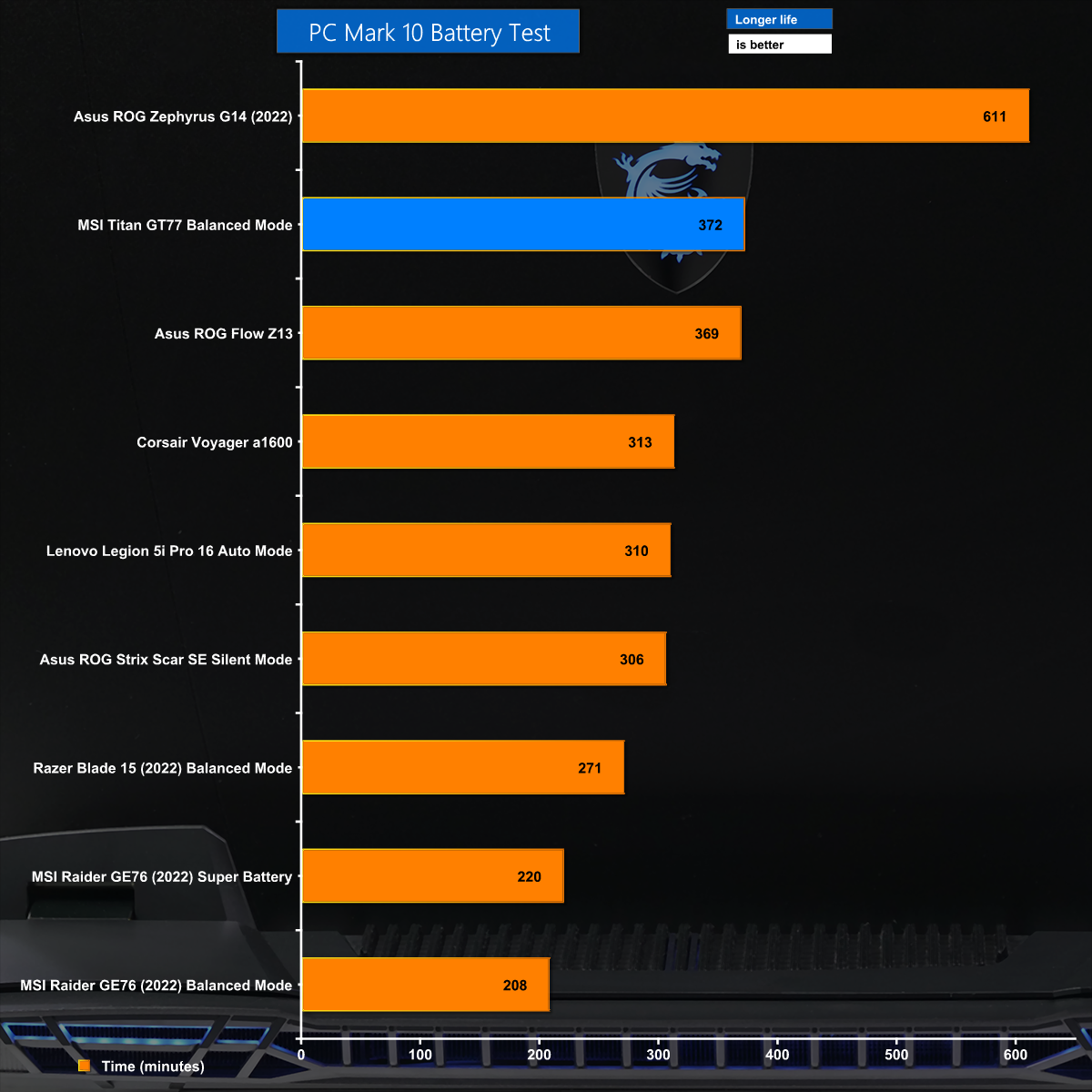
We had very few expectations about battery life for the MSI Titan GT77 as large gaming laptops often exhibit poor battery life so imagine our warm and fuzzy feeling when the MSI turned in a really strong result.
The MSI Titan GT77 is a very interesting laptop as it was sent to us directly by Intel to demonstrate their impressive Core i9 HX CPUs, but instead it achieved something quite different.
We have already reviewed the Asus ROG Strix Scar 17 SE which packs an Intel Core i9-12950HX CPU and yes we were indeed impressed. The MSI Titan GT77 sports a Core i9-12900HX which is very similar to the 12950HX, but despite that the two laptops behave quite differently, and we think that is due to the choice of cooler in each laptop. The MSI uses a huge Cooler Boost Titan system with 4 fans, 7 heatpipes and 6 exhausts vents while Asus has instead chosen a vapour chamber cooler.
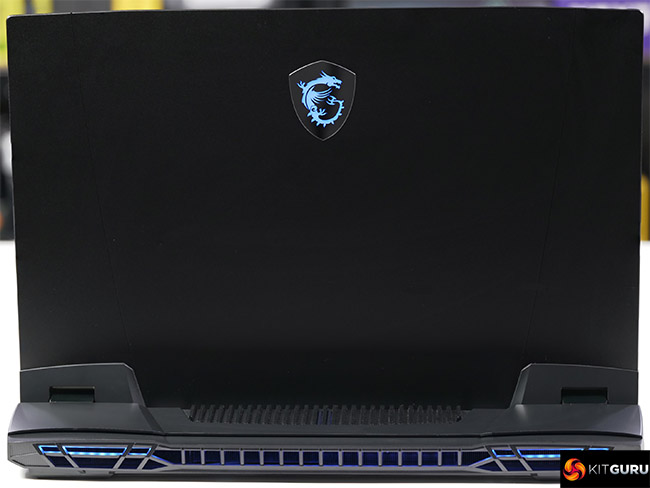
The choice of cooler in turn affects the level of power and heat that each laptop can handle and overall the MSI is slower.
We were clear about the differences in performance as we were running benchmark tests and had the two laptops sat side-by-side, however we are not so sure that a customer who buys the MSI Titan GT77 will be aware they are leaving performance on the table. The Asus Armoury Crate software tells you what the laptop is doing and how it is performing where by contrast the MSI Center software is vague and unhelpful.
This is a large, impressive and fast laptop however we are confident that a more effective cooling system would make it even better.
Discuss on our Facebook page HERE.
Pros:
- Mighty grunt from the CPU and GPU.
- Good selection of ports and connectors.
- Storage and RAM are easy to upgrade.
Cons:
- The Cooler Boost Titan cooling system struggles with this CPU/GPU combo.
- Both the laptop and power adapter are large and heavy.
- MSI Center software is clunky and unhelpful.
- Our sample came with a 360Hz 1080p display makes little sense on a laptop of this size. The 4K 120Hz IPS-level listed on MSI’s website makes much more sense.
KitGuru says: The MSI Titan GT77 is impressive but needs some refinement to reach its full potential.