 KitGuru KitGuru.net – Tech News | Hardware News | Hardware Reviews | IOS | Mobile | Gaming | Graphics Cards


One of the advantages of gaming on a PC – and not on either Microsoft or Sony's latest generation of consoles – is that the frame rate can often reach dizzying heights, well into the triple digits in some of the lower fidelity titles. Keeping track of that though often requires a third-party piece of software, or at least it did until now. In a new update, Steam has the ability to track FPS for you, with a little client overlay.
This new feature is part of the Steam beta program, so you will need to opt-in to that if you want to take part; just head to the settings menu if you are unsure how. Once you've done that – if you hadn't before – there will be a short update which reboots the digital distribution client. Once that's complete, head to the “In-Game,” tab and make sure that the “Show in-game frames/sec (FPS)” checkbox is ticked and you are off and running.
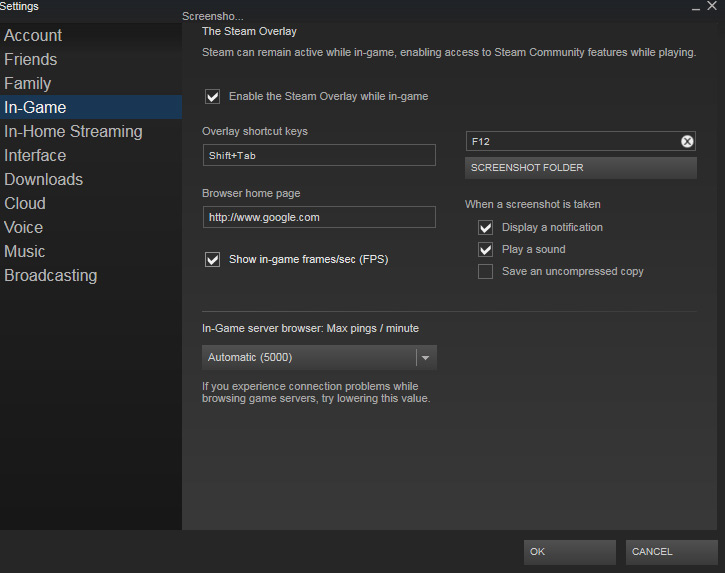
Of course, a lot of ports are going to feature the same FPS caps as their console brethren, but I'm sure you all have plenty of indie and dedicated PC titles to test the feature out on.
Discuss on our Facebook page, HERE.
KitGuru Says: This should come in handy for anyone finding that the latest AAA doesn't feel the smoothest.

Does it have a hotkey? I only use fps counter to check what the fps is when I have dips. A constant overlay would be so annoying
More and likely they will have a hotkey or Key binding of some forum.
PhoneyVirus
https://twitter.com/PhoneyVirus
https://phoneyvirus.wordpress.com/
Yeah, this is beta, so they’ll be testing whether the feature works properly first. It will be very easy for them to integrate it into the overlay and hotkey it once they know it works, but I guess they wanted to tuck it away so that only people who want to test the feature will use it for now.