KitGuru KitGuru.net – Tech News | Hardware News | Hardware Reviews | IOS | Mobile | Gaming | Graphics Cards


We know that Zen 4 is AMD’s latest-and-greatest on the mainstream, desktop CPU market. But let’s not forget about the big dog from years gone by for prosumers and workstation users – Threadripper. Today we put three of AMD's current Threadripper CPUs through their paces.
Watch via our Vimeo Channel (Below) or over on YouTube at 2160p HERE
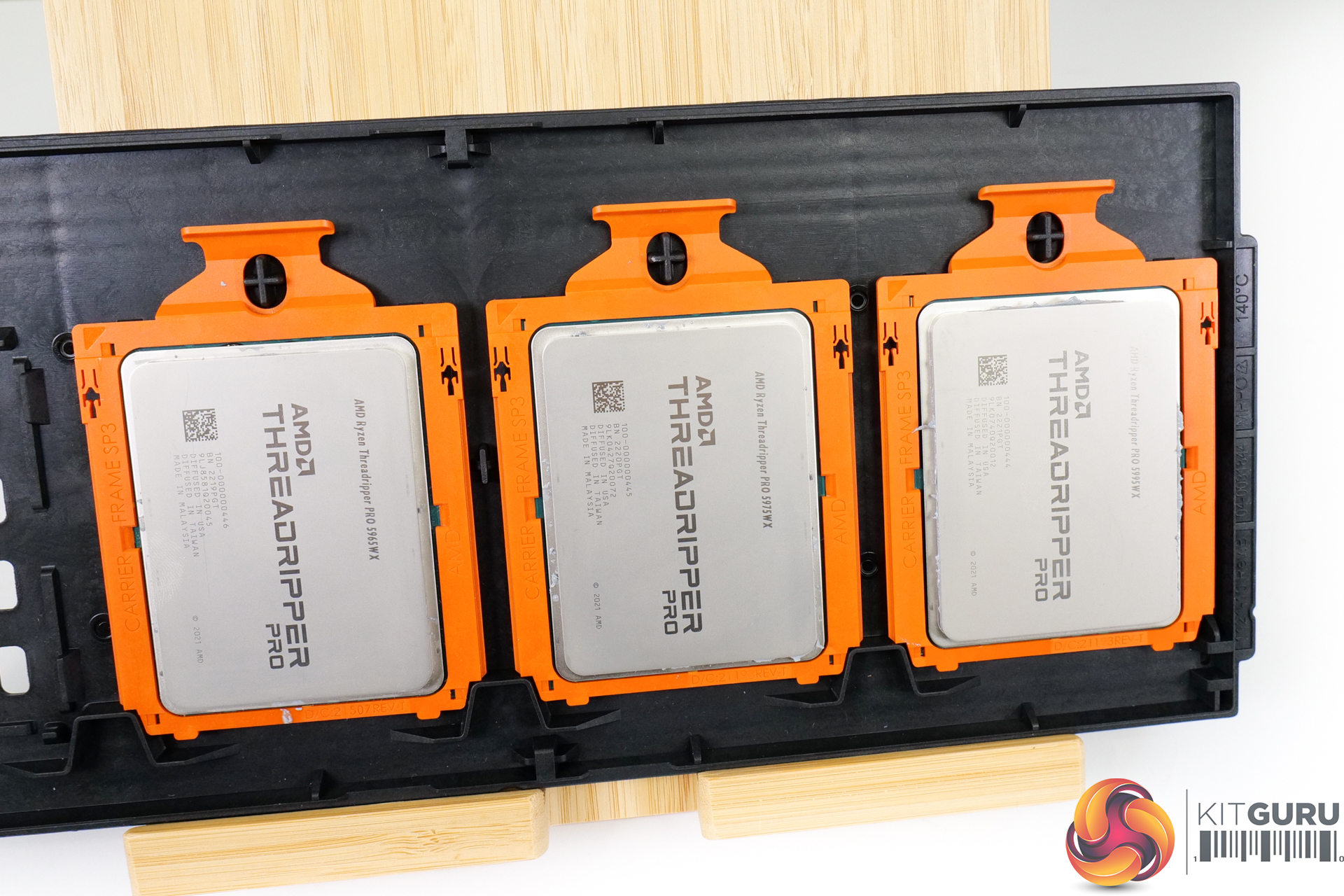
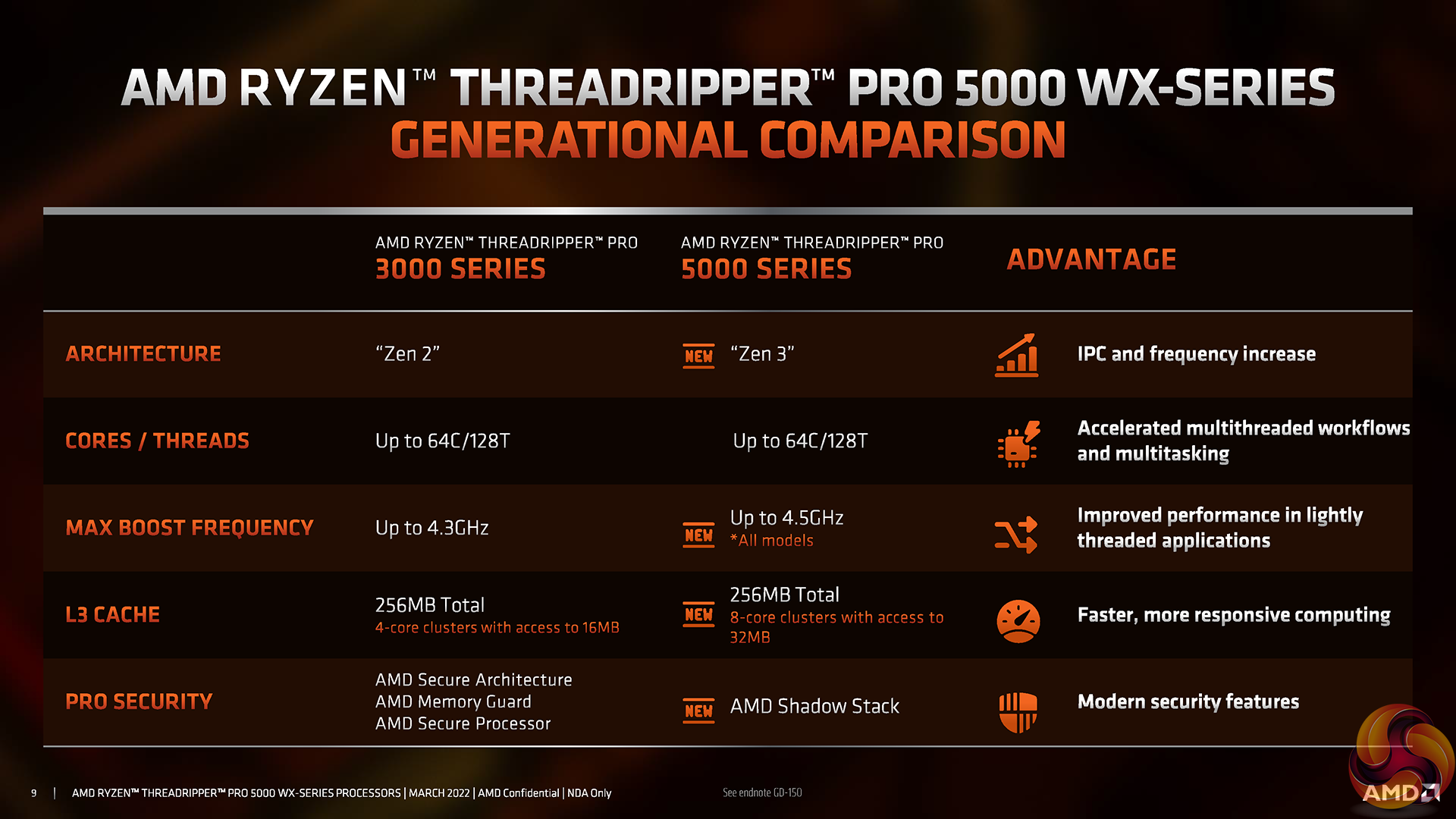
Of course, the last HEDT prosumer-level Threadripper processors that we saw were the Zen 2-based 3000 series that was flagshipped by the awesome 64-core 3990X. AMD has, however, launched the more workstation-focussed Zen 3-based Threadripper Pro 5000 WX-series in recent months.
This line-up is once again led by a 64-core, £7,000 model – the Threadripper Pro 5995WX. We are also looking at the 32-core, £3,500 5975WX and 24-core, £2,500 5965WX in today’s mini review or ‘wow! look at that!’ piece of content.
So, with 120 total cores of Threadripper Pro 5000 WX-series processors, 256GB of DDR4 RAM, and a WRX80 motherboard at hand, let’s take a closer look…
We wrote an introduction article about AMD’s Threadripper Pro 5000 WX-series processors back when AMD announced them in March 2022. They were first deployed in Lenovo’s Thinkstation P620 workstation, as we saw with previous Threadripper Pro. But subsequently, they have been released for purchase through the usual retail channels.
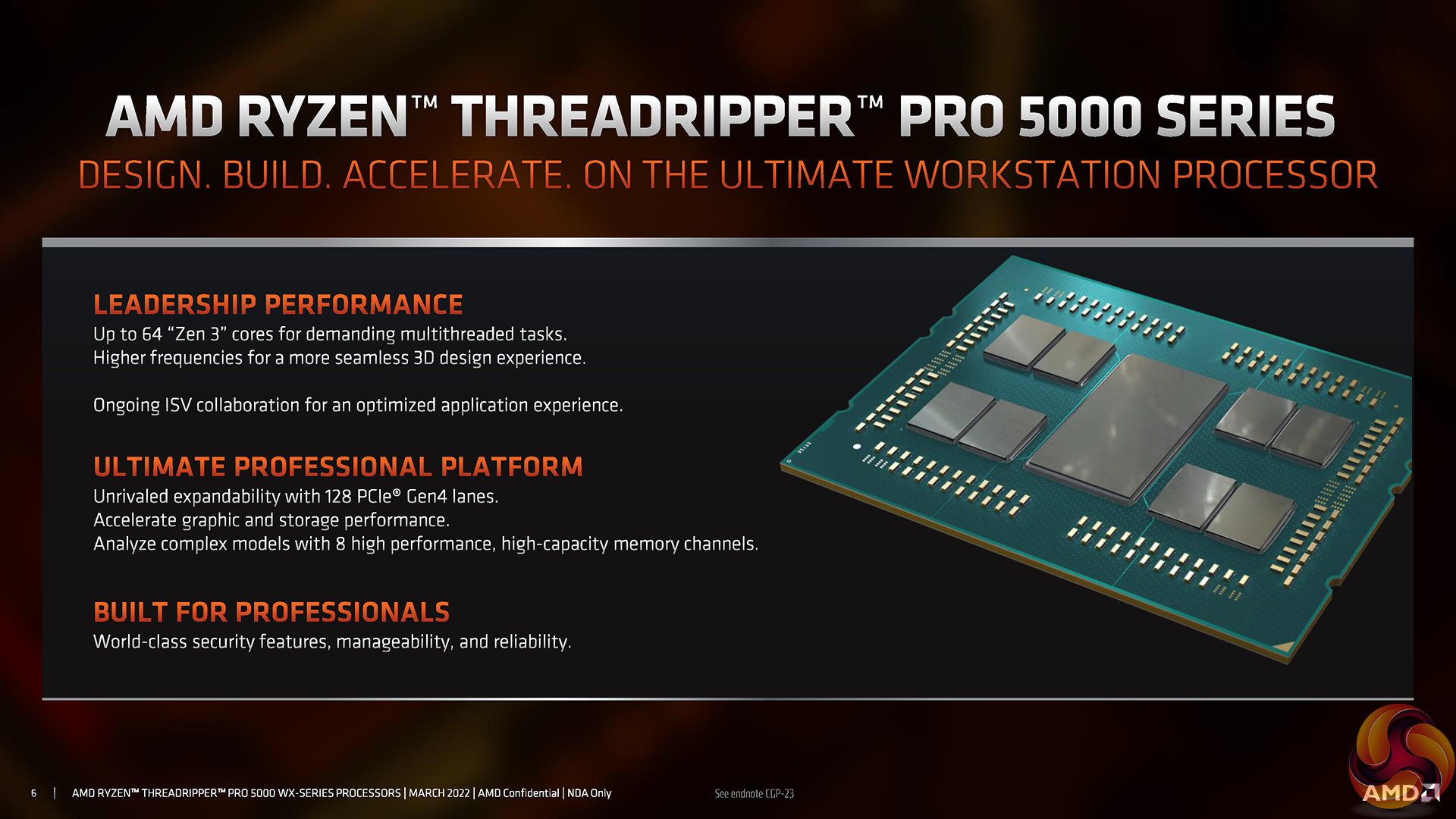
Fundamentally, AMD maintains the consistent formula with this Zen 3 iteration of Threadripper Pro. Zen 3 chiplets deploying 32MB of L3 cache and up to eight cores are deployed alongside a central IO die.
For the flagship 5995WX, that is eight core chiplets that give the processor its 64-cores and 256MB of L3 cache. However, the 32-core 5975WX and 24-core 5965WX use four Zen 3-based chiplets to give their relevant core counts alongside 128MB of L3 cache.
Of course, total cache on the chips is just as reported. But one of the key improvements for the Zen 3 CCX versus Zen 2 was a unified 32MB of L3 cache surrounded by eight cores. That means that the Zen 3 cores get better local access to double the amount of L3 cache, as compared with Zen 2 and its 4-core, 16MB L3 CCXs. There should be less inter-CCX latency for certain cache-sensitive workloads.
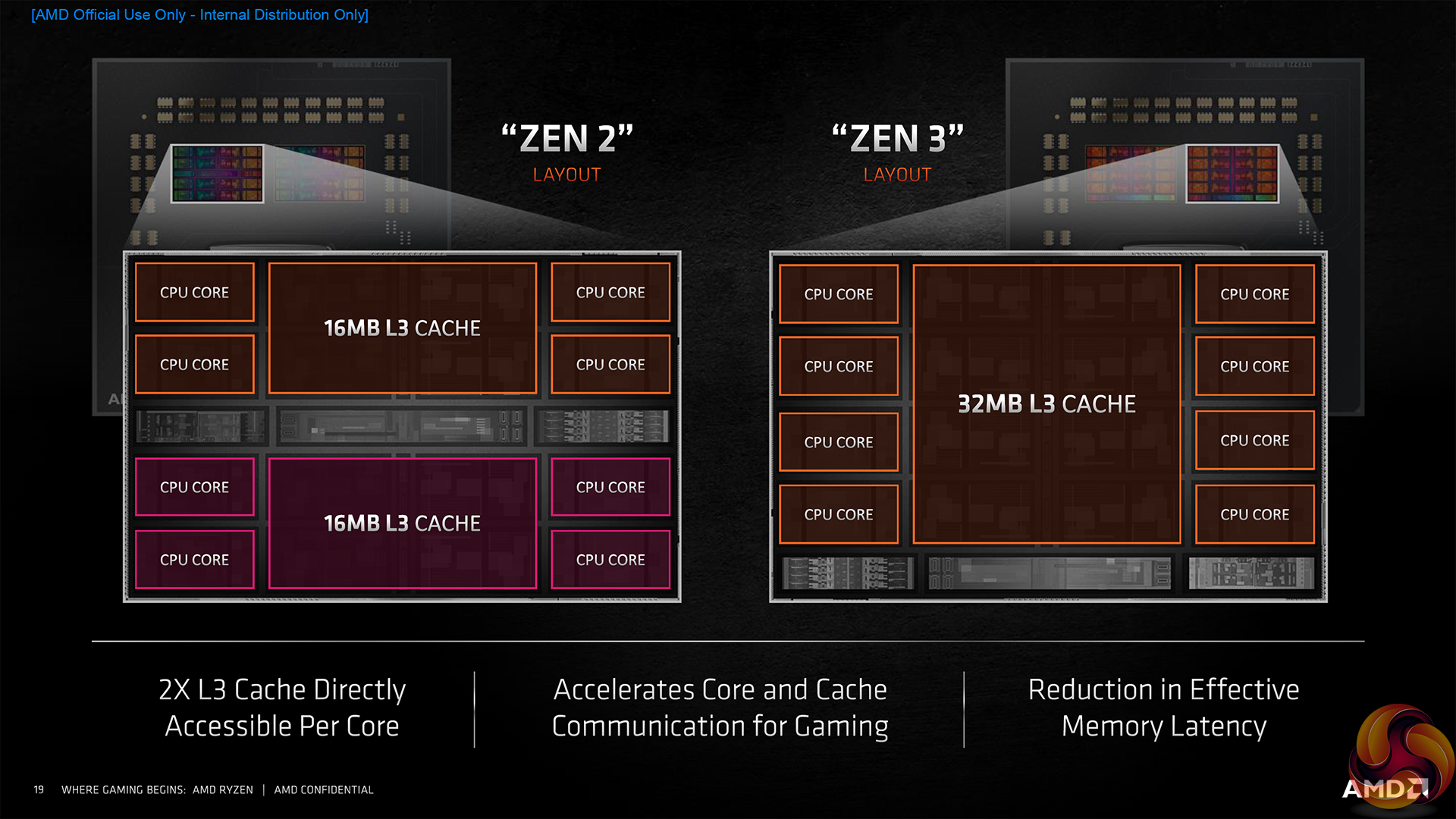
As we expect from Zen 3, TSMC’s 7nm FinFET process node is used for core chiplets.
AMD rates each Threadripper Pro with a beefy 280W TDP. That translates into maximum boost clocks of 4.5GHz on even the flagship 64-core model. Though sustained all-core loaded clocks will obviously be lower, depending on the Precision Boost 2 algorithms dynamic preferences.
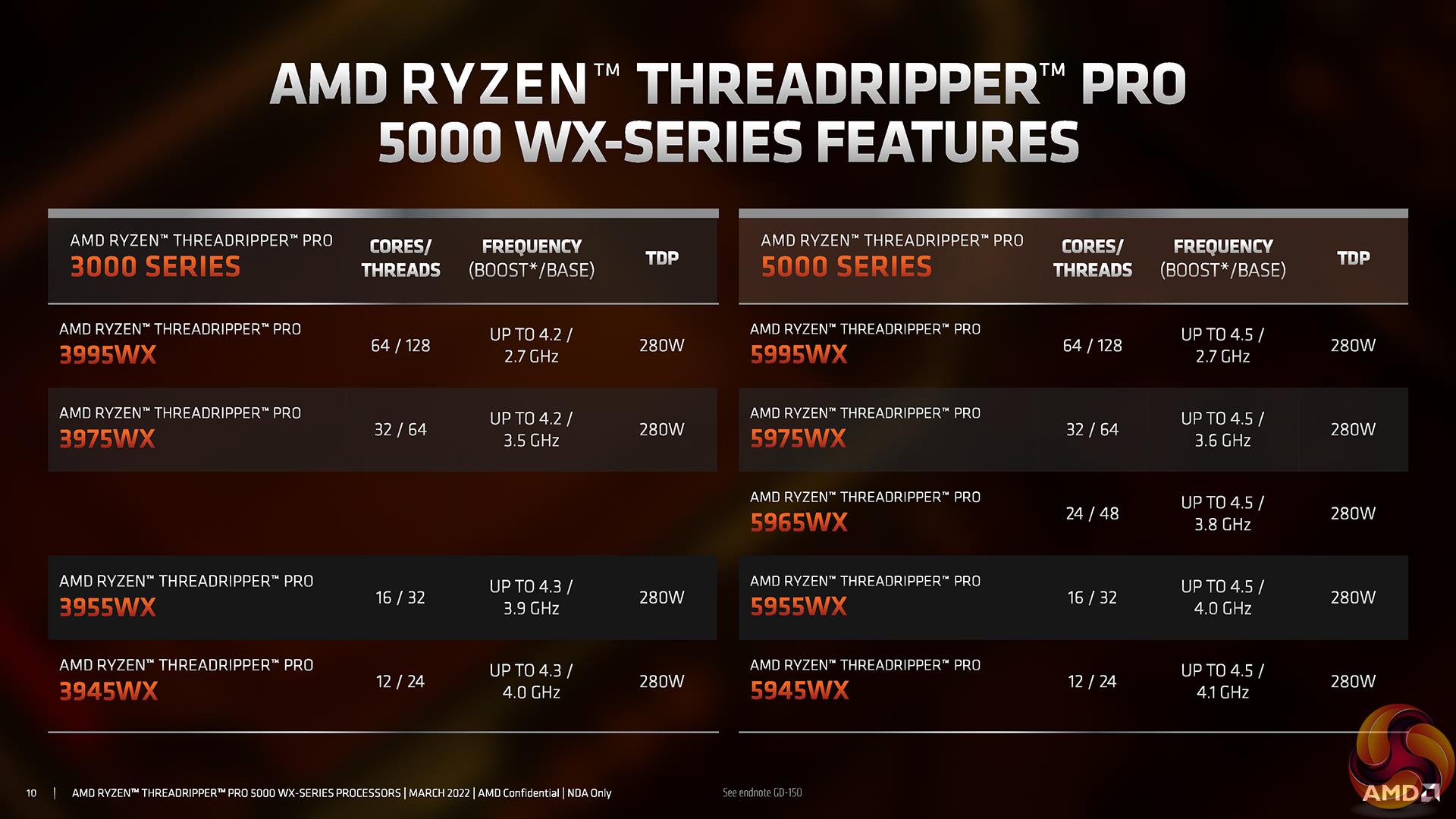
Technically, there is also overclocking capability on these processors, if you really want to push the boat out. Realistically though, this is a bit nuanced.
Firstly, you have to find a motherboard that supports overclocking through the BIOS. WRX80 motherboards are already very rare, and the popular ASUS SAGE model that we have does not support overclocking in its UEFI whatsoever.
Secondly, you have to convince yourself that overclocking and introducing potential instability is a sensible decision for your money-making workstation. Of course, that depends on several factors and personal/company policy. But I can wholeheartedly see why Precision Boost Overdrive, with its low risk, reasonable reward approach could be useful.
Alas, as we said, overclocking is not an option for us as the ASUS test board that we have been supplied with does not support it.
These Zen 3-based Threadripper Pro 5000 WX-series processors drop into the same sWRX8 socket and WRX80 platform as their Zen 2-based predecessors. So, you should be able to upgrade your old Threadripper Pro 3000 WX-series processor if a BIOS update is available.
The WRX80 platform is a bit of a monster! And that is thanks in large to AMD’s outstanding deployment for the Threadripper Pro WX IO die.
Perhaps most importantly to many customers, you get support for eight-channel DDR4 memory. This allows the installation of not Gigabyte levels of system memory, but Terabyte levels, depending on the motherboard and memory DIMM support of course.
You can also choose whether to install ECC or non-ECC memory. Our ASUS WRX80 motherboard is equipped to take either.
And speed-wise, Threadripper Pro is actually pretty good as you get native 3200MHz support. We even used ASUS’s version of XMP to run 3200MHz DIMMs with the click of a button.
3200MHz is very nice indeed, as the corresponding 1600MHz Infinity Fabric frequency isn’t too far away from its 1800MHz Zen 3 sweet spot. So, all-round system latency should be good on that front.
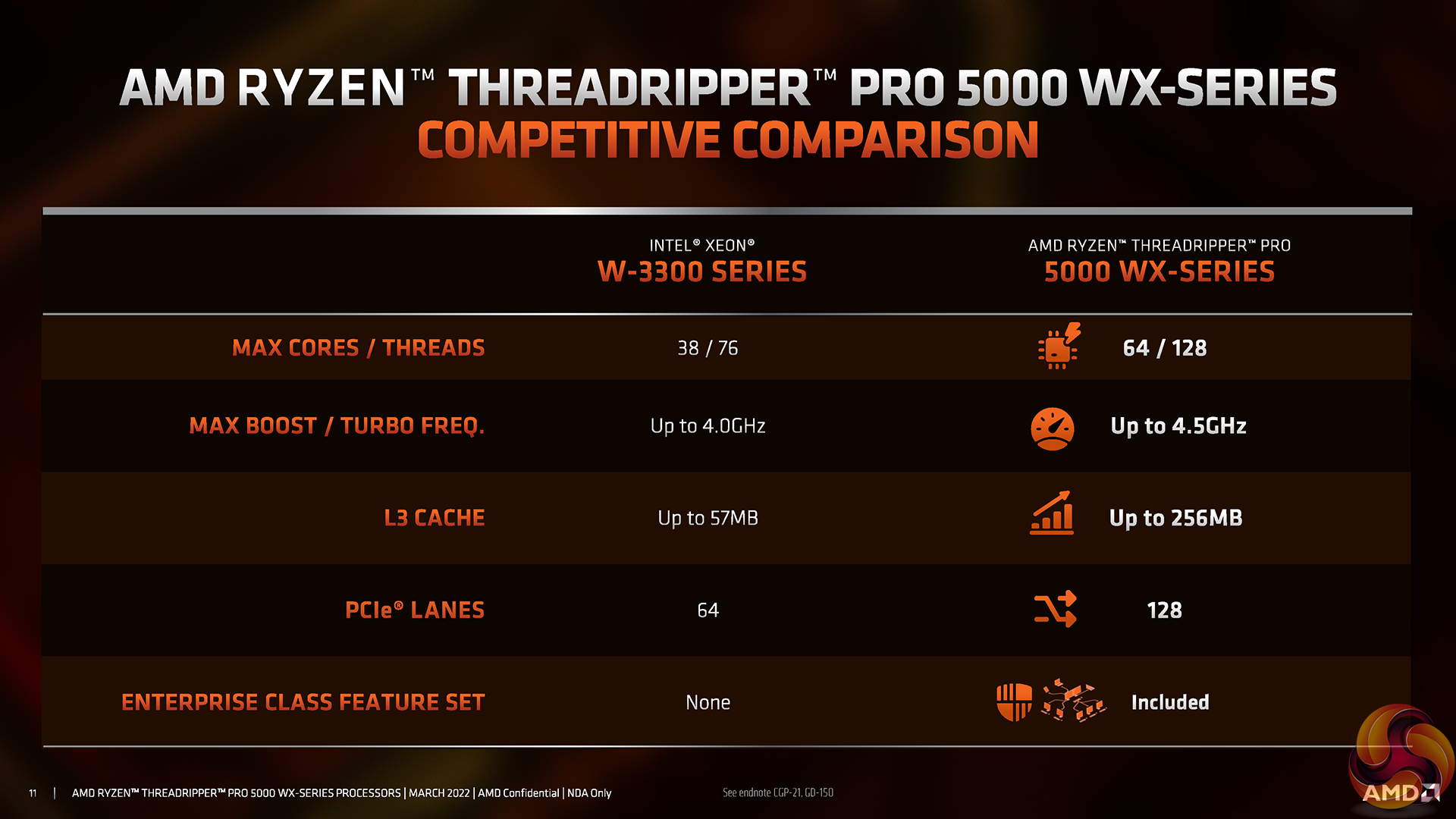
The other key area of excellent connectivity is PCIe lanes.
By default, every Threadripper Pro 5000 WX-series processor handles 128 lanes of PCIe Gen 4.0 capacity. That is absolutely outstanding.
A recent visit to the EKWB booth at CES 2023 actually showed us some real-world use cases where seven GPUs running a total of 112 PCIe lanes between the can be a realistic use case for a rendering studio or an animation system or AI/ML research.
Of course, there is ample remaining connectivity between the processors themselves and the WRX80 platform motherboards.
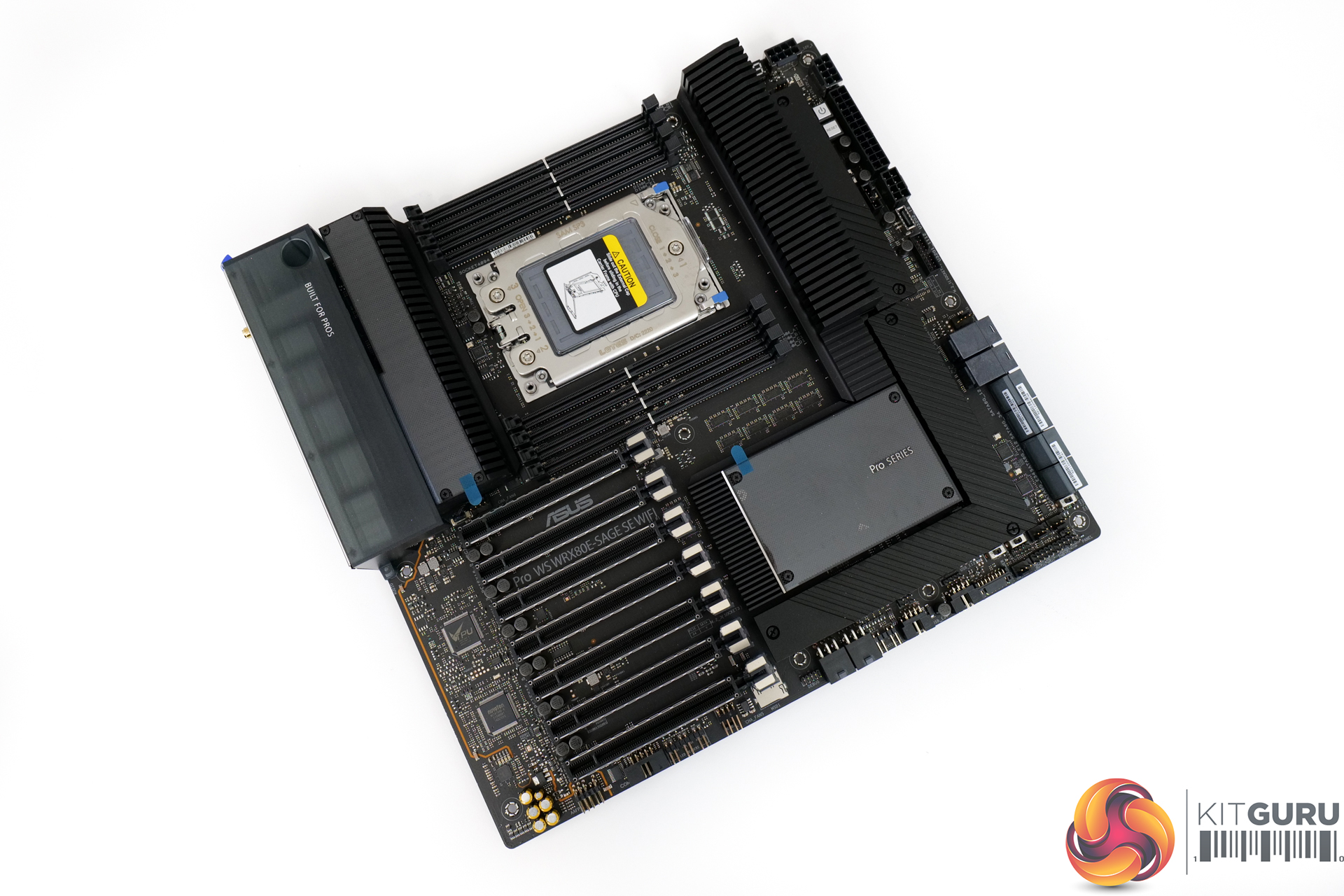
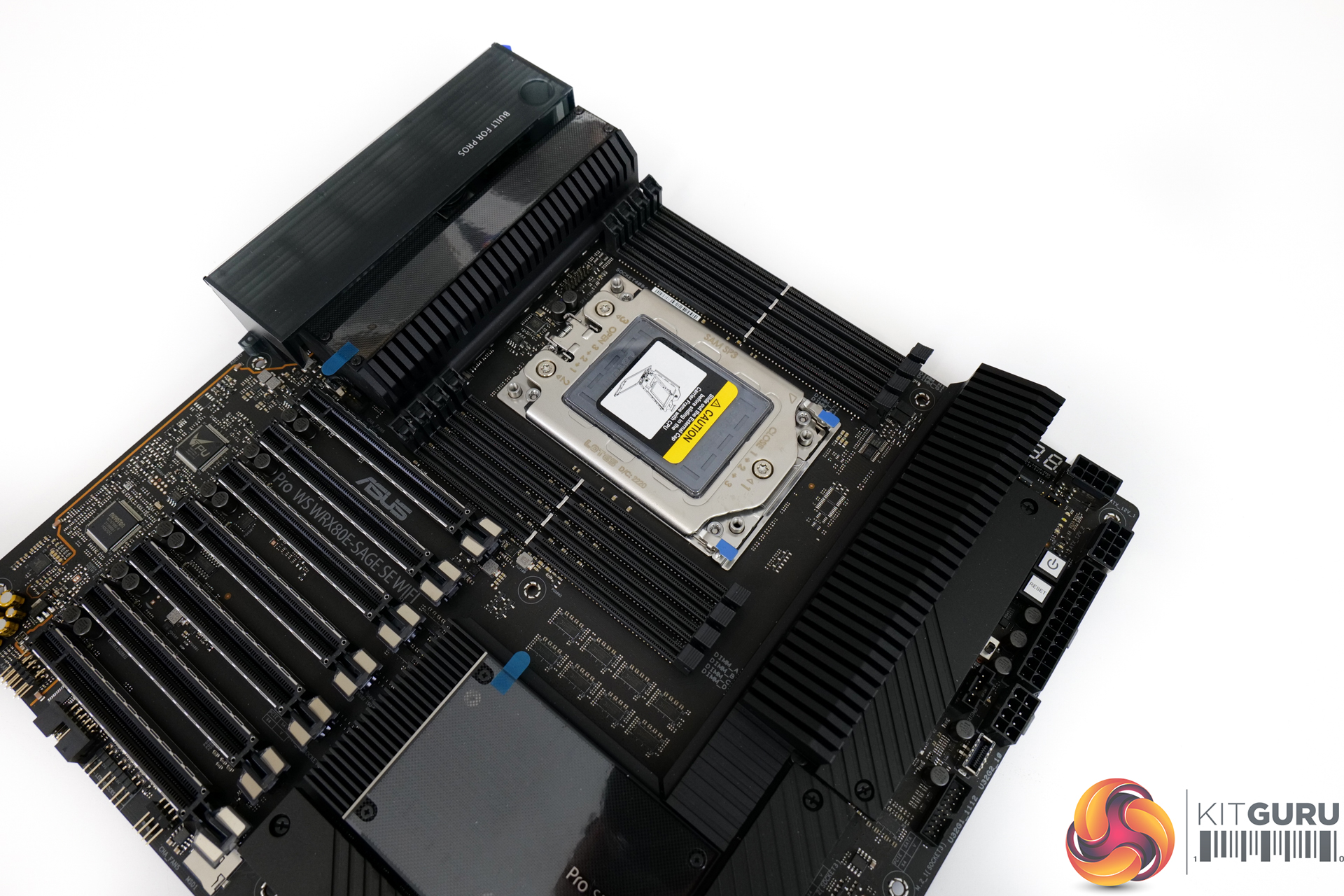
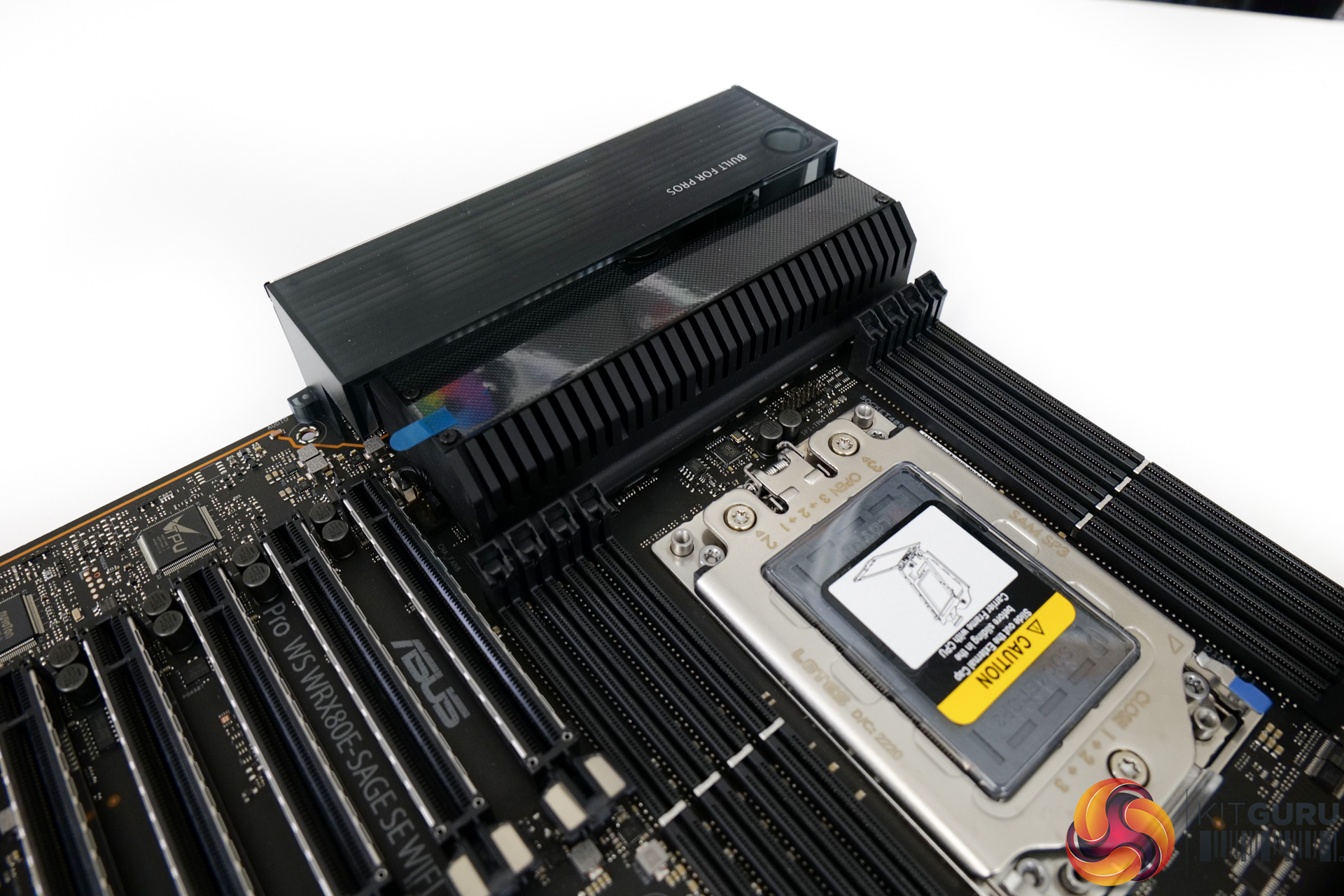
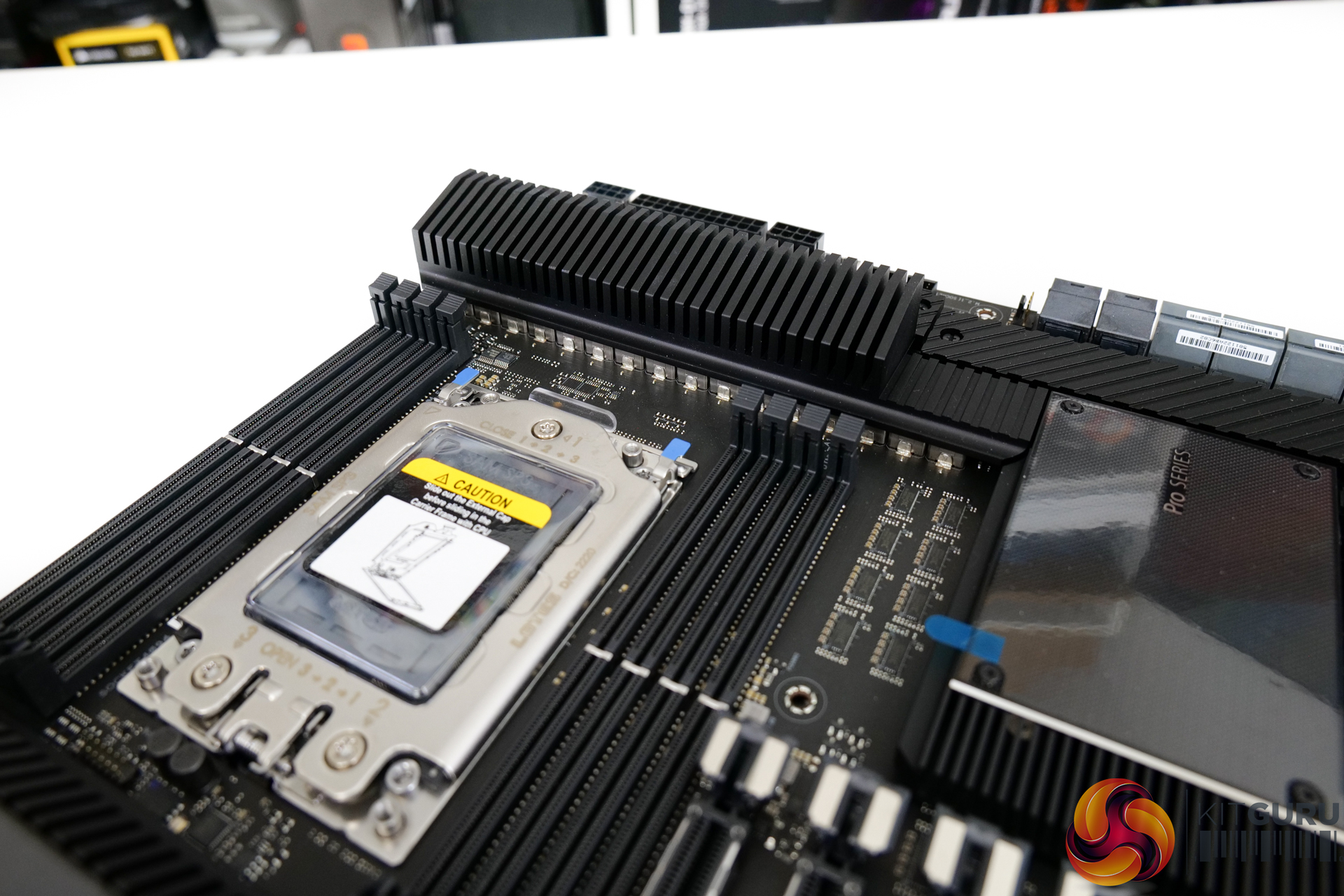
Looking at this ASUS Pro WS WRX80E-SAGE SE WiFi motherboard sample that we have for testing, it is easy to see that it’s an all-round monster. Firstly, the weight is significant, the physical size is massive, and the build quality feels great.
The 16-stage VRM is well-cooled by hefty metal heatsinks, so I have no worry about pushing a sustained 280W processor on this motherboard. Particularly as its UEFI does not currently permit overclocking.
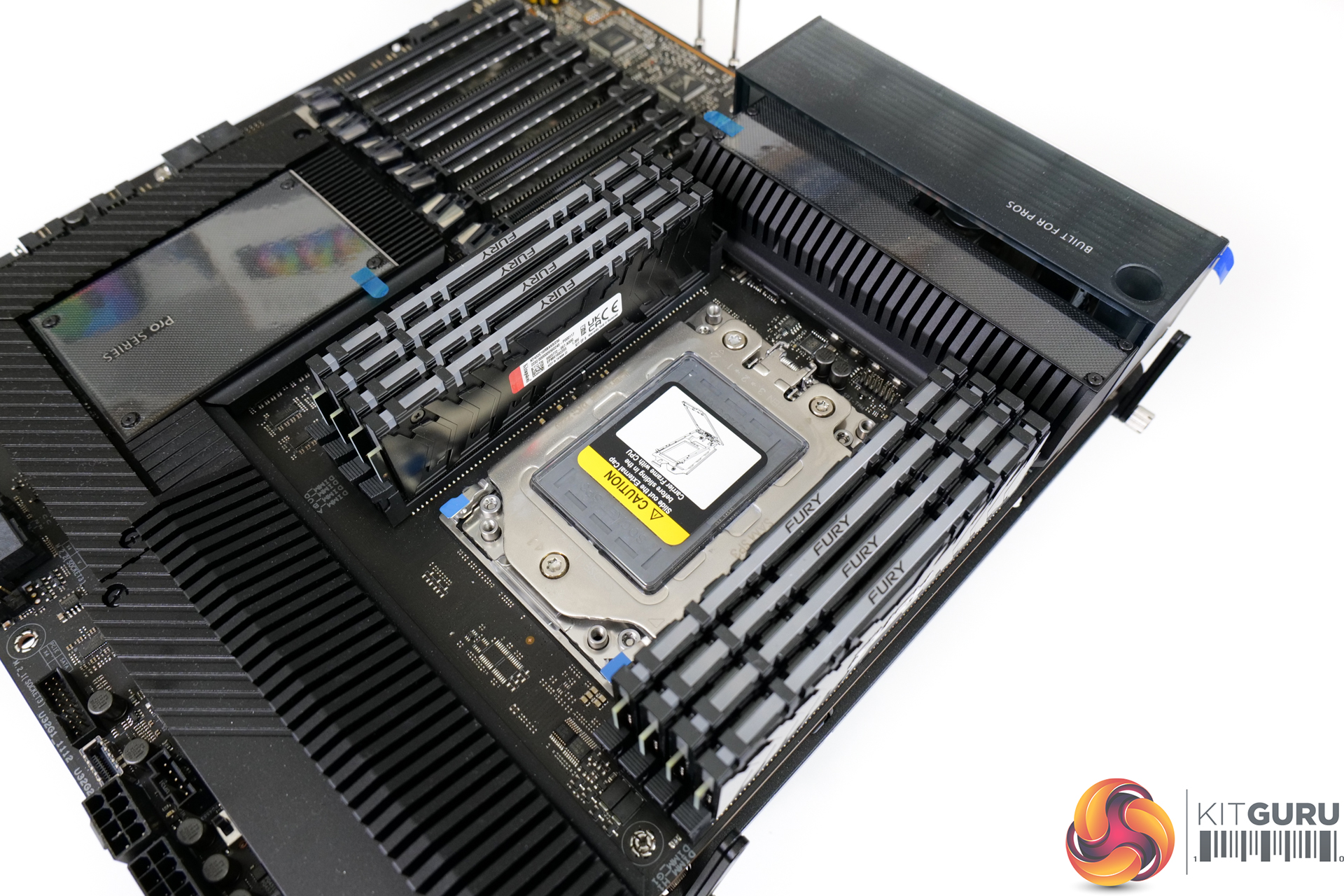
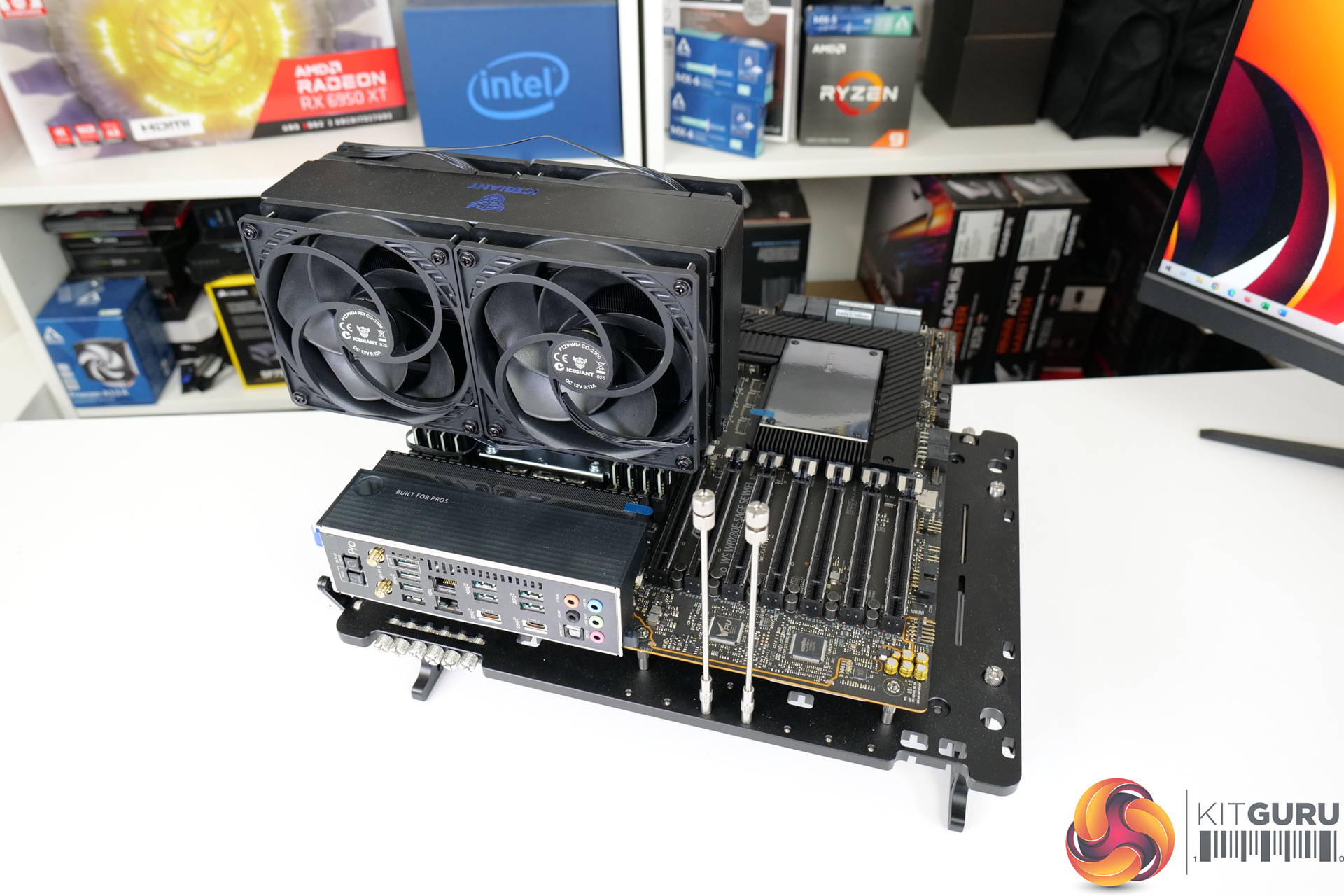
You will notice that the sWRX8 socket is rotated 90-degrees from convention. This changes the eight DIMM slots to be four above and four below the socket.
Fundamentally, this is not an issue, but it can cause some headaches with CPU cooler choice, chassis installation preferences, and airflow directionality.
For example, our IceGiant ProSiphon Elite CPU cooler is an awesome unit for Threadripper-based processors, but it only works in certain orientations due to its unique cooling technology.
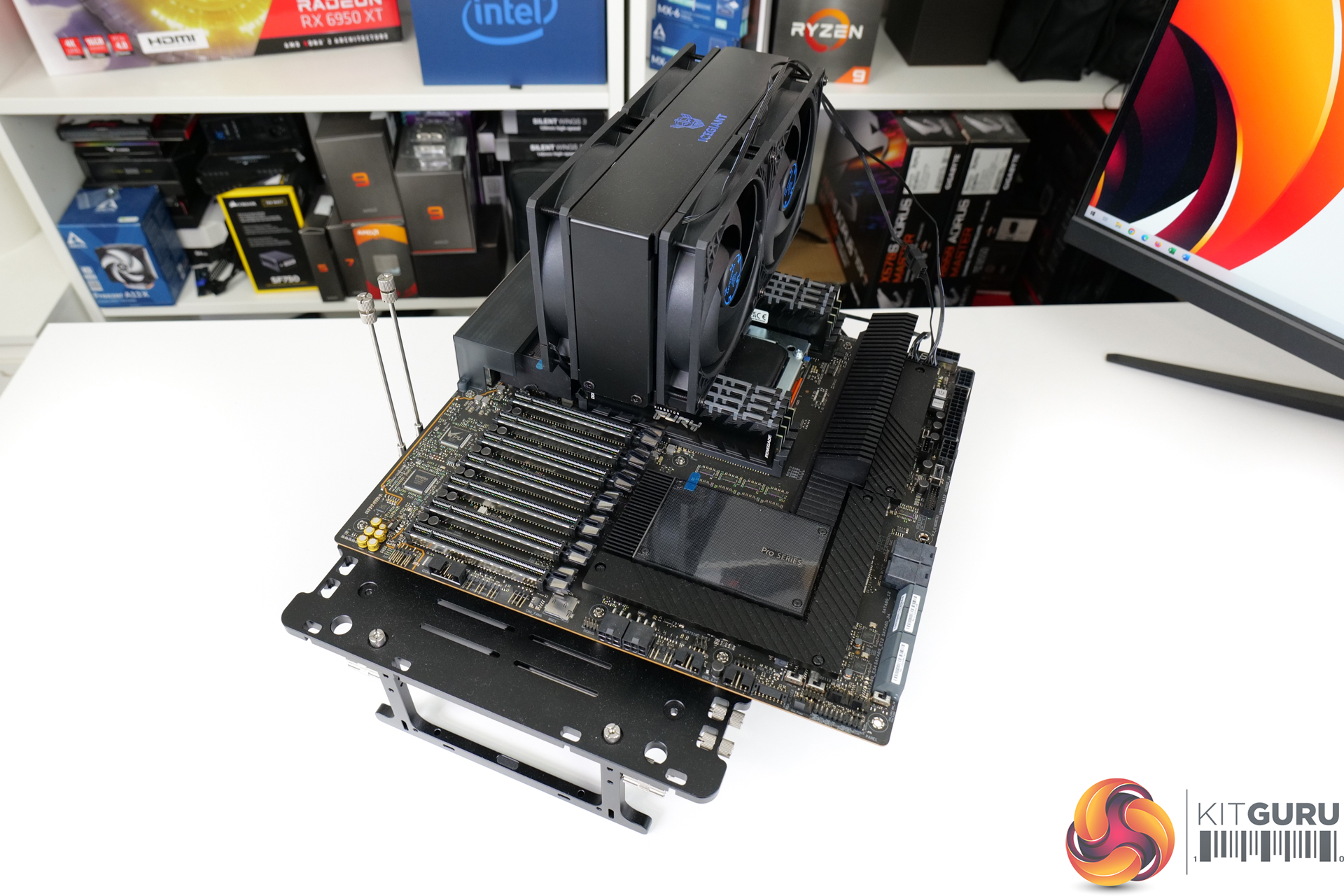
ASUS gives this roughly £1000 motherboard all the usual – and expected – connectivity.
There’s ample SATA, plenty of USB, 20Gbps Type-C, and a good audio NIC. Added into that mix is dual 10Gb Ethernet via an Intel X550-AT2 chipset, plus 2×2 WiFi 6 connectivity. Treble M.2 slots all get decent metal heatsink and can run at PCIe 4.0 x4 bandwidth.
And ASUS even includes a pair of U.2 connectors, which is potentially a reasonable move for a workstation-level product, despite U.2 being dead on the consumer market. Those U.2 ports do share bandwidth with a couple of M.2s though, so watch out for that.
The only omission that I think is annoying is Thunderbolt.
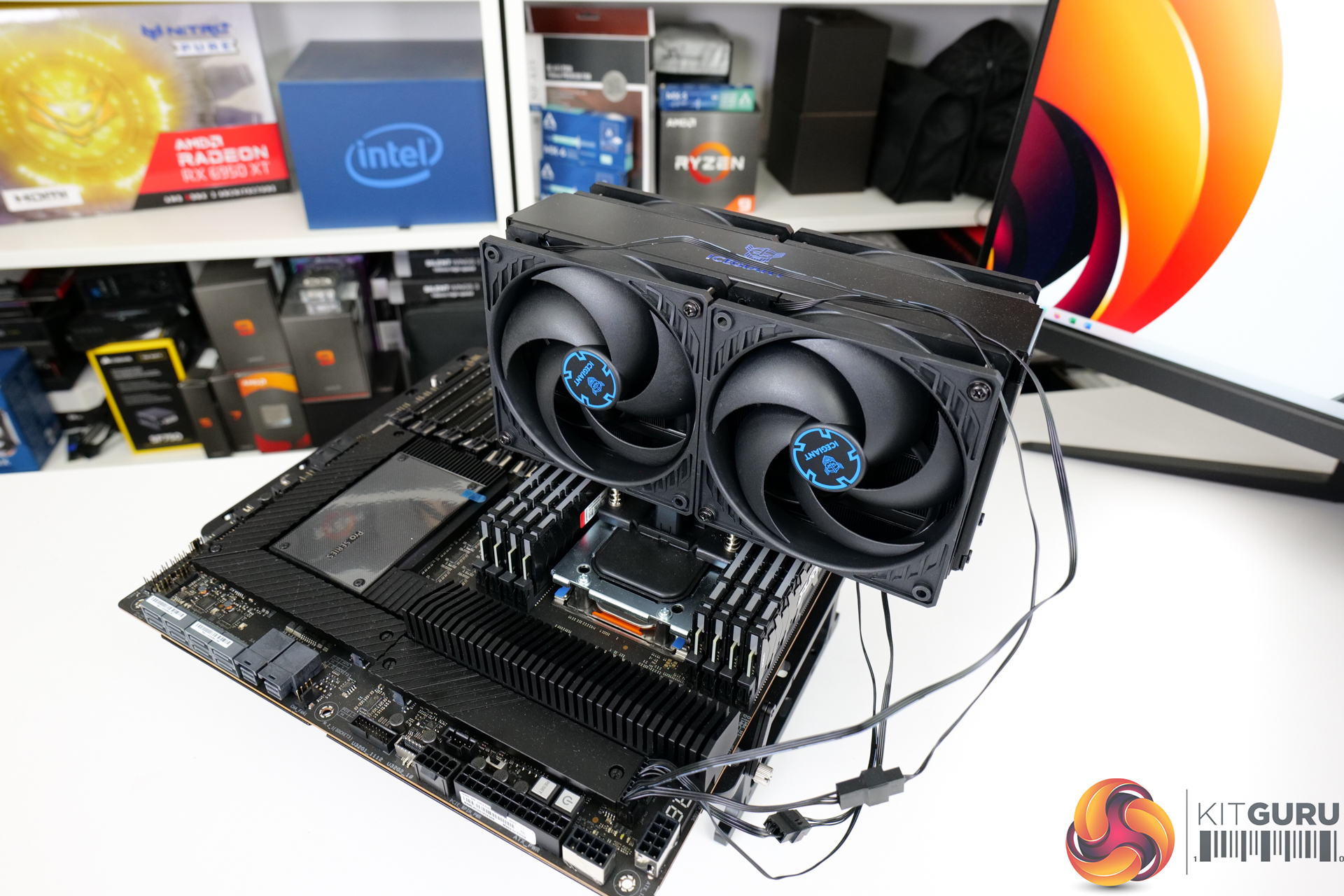
Eight useable fan headers alongside some thermal probe capacity sweetens the deal.
Power is delivered via the usual 24-pin and twin 8-pin EPS connectors. ASUS adds on dual 6-pin PCIe plus a single 8-pin PCIe power connector to deliver extra juice for heavy multi-GPU configurations.
And then as far as professional-level capabilities go, the motherboard features IPMI support, a dedicated BMC, and an ASMB9-iKVM. Plus, there is an onboard Micro SD card slot for secure and onboard license key or OS installations.
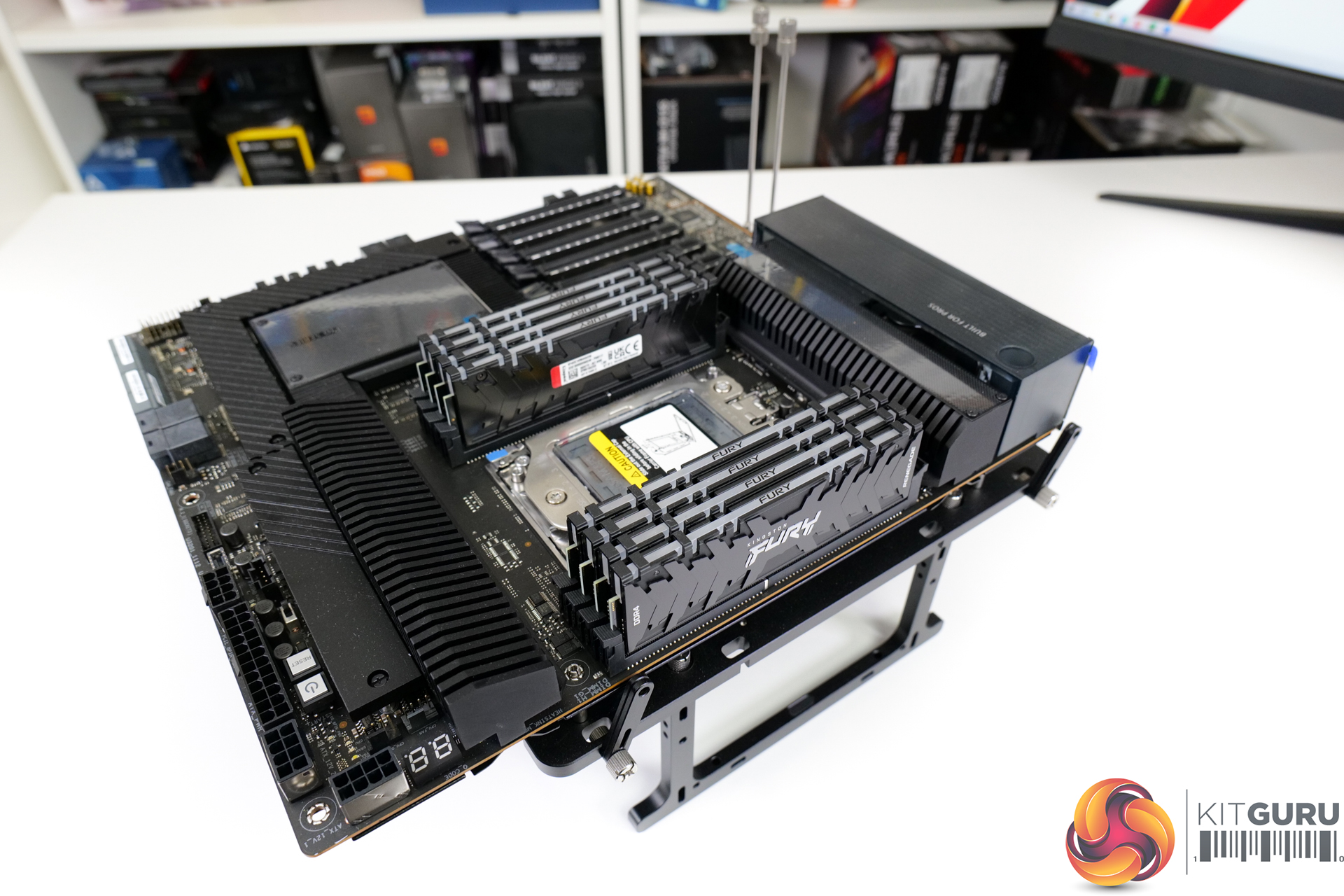
Yes, this motherboard really does have a lot to offer. It’s just a shame it doesn’t allow for overclocking – like some of its competitors do – as that would have been fun to test.
We need to start out by saying that we don’t have access to the Intel Xeon competitors to these Threadripper Pro processors. Instead, this is more of a showcase video for us, where we get to examine the Threadripper Pro platform and see the raw power of the processors in some of our common benchmarks.
That means that we will be putting the CPU’s scores into our recent charts that contain the new mainstream desktop processors from Intel and AMD.
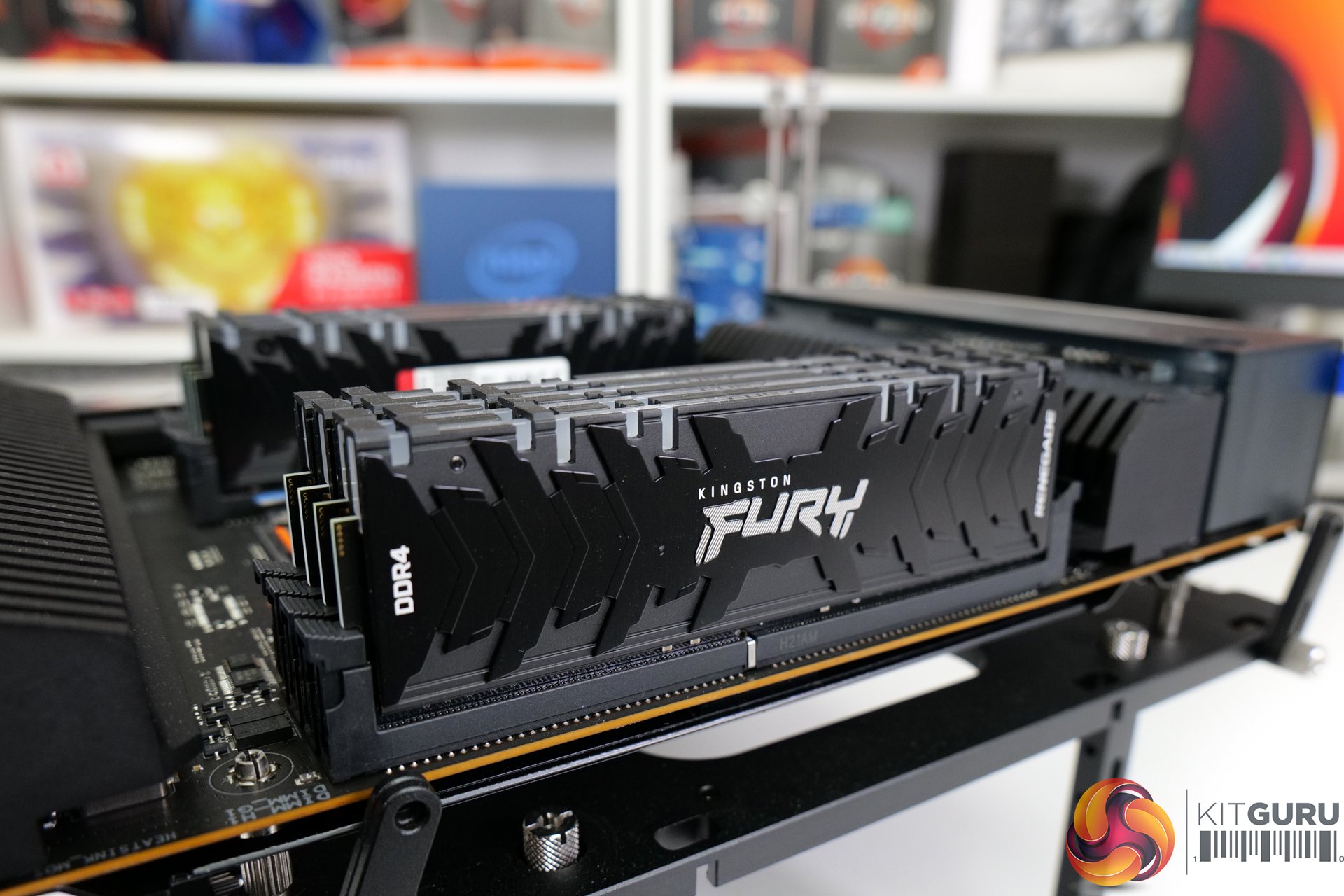
For memory, Kingston kindly loaned us 256GB of their Fury Renegade DDR4 RGB memory. This comes in 8x32GB form so will run eight-channel in this test system.
The memory is non-ECC, but that’s fine for our testing – ECC support is available on the platform if your specific workloads require it. And the speed is 3200MHz CL16 running 1.35V XMP.
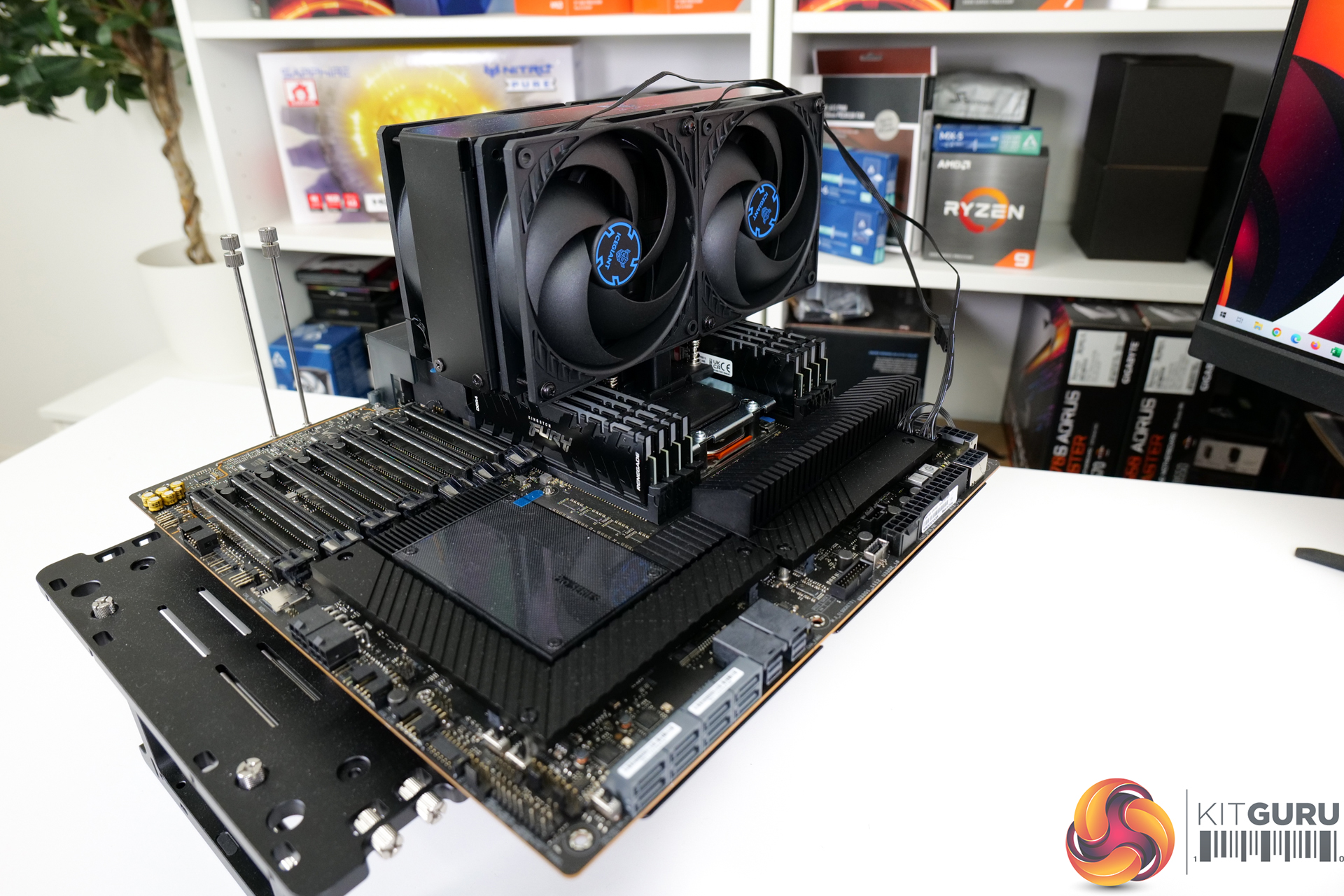
CPU cooling comes in the form of the superb IceGiant ProSiphon Elite. This four-fan, aluminium CPU cooler uses thermosiphon technology to achieve comfortably the best Threadripper cooling performance that we have observed in previous testing.
280W of heat load is easy for this CPU cooler. And that’s particularly true with Threadripper, given the ProSiphon Elite’s ability to fully cover the heatspreader, thanks to its massive base and sturdy mounting solution.
- Ryzen Threadripper Pro 5995WX = around 3.1GHz.
- Ryzen Threadripper Pro 5975WX = around 4.0GHz.
- Ryzen Threadripper Pro 5965WX = around 4.2GHz.
- Core i7-13700K (253W) = 5.3GHz P-cores.
- Core i9-13900K (253W) = 5.5GHz on the P-cores.
- Ryzen 7 5800X3D = around 4.4GHz.
- Ryzen 9 5900X = around 4.25GHz.
- Ryzen 9 5950X = around 3.85GHz.
- Ryzen 9 7900X = around 5.1GHz.
- Ryzen 9 7950X = around 5.05GHz.
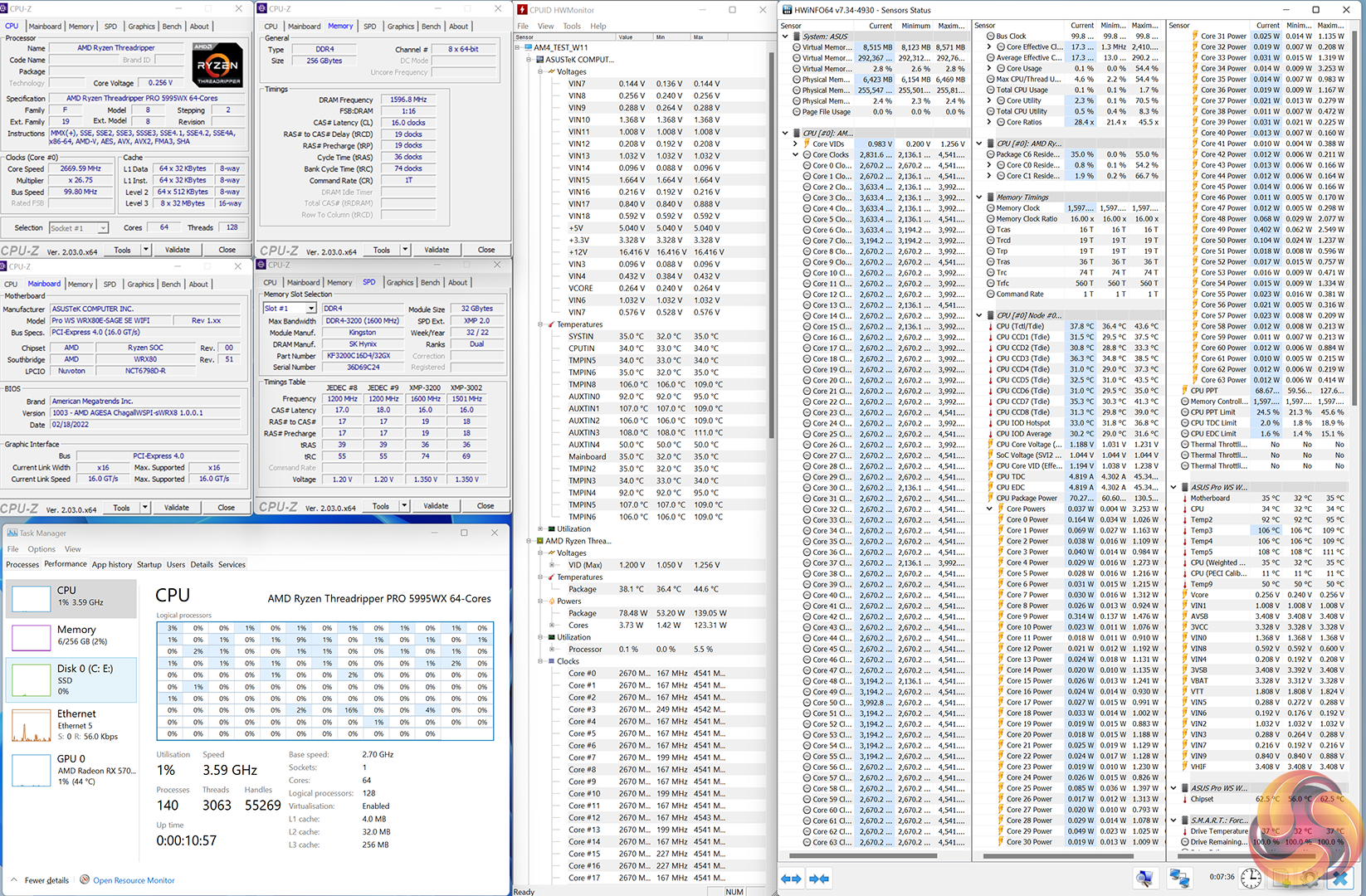
CPU Test System Components:
- WRX80 Motherboard: ASUS Pro WS WRX80E-SAGE SE WiFi
- Memory: 256GB (8x32GB) Kingston Fury Renegade DDR4 RGB 3200MHz CL16 @ 1.35V
- Dedicated Graphics Card: Sapphire Nitro+ Pure Radeon RX 6950 XT
- CPU Cooler: IceGiant ProSiphon Elite
- Power Supply: Seasonic Prime TX-1600
- Operating System: Windows 11 Pro
Tests:
- Cinebench R23 – All-core & single-core CPU benchmark (CPU)
- Blender – All-core rendering of the Classroom benchmark (CPU)
- HandBrake H264 – Convert 1440p60 H264 video to 1080p60 H264 using the YouTube HQ 1080p60 preset (CPU)
- HandBrake H265 – Convert 4K30 100Mbps H264 video to 1080p30 40Mbps H265 using the H.265 MKV 1080p30 preset (CPU & Memory)
- 7-Zip – Built-in 7-Zip benchmark test (CPU & Memory)
- SiSoft Sandra – Memory bandwidth and Cache bandwidth/latency tests (Memory)
- AIDA64 – Memory bandwidth & memory latency (Memory)
For CPU load results, we read the power draw after running 10 minutes of the Cinebench R23 nT all-core rendering test. The same test parameters are used for temperature readings.
The power consumption of our entire test system (at the wall) is shown in the chart. We also include the reported CPU Package Power.
Power Consumption
Power draw readings are accurate to around +/-5W under heavy load due to instantaneous fluctuations in the value.
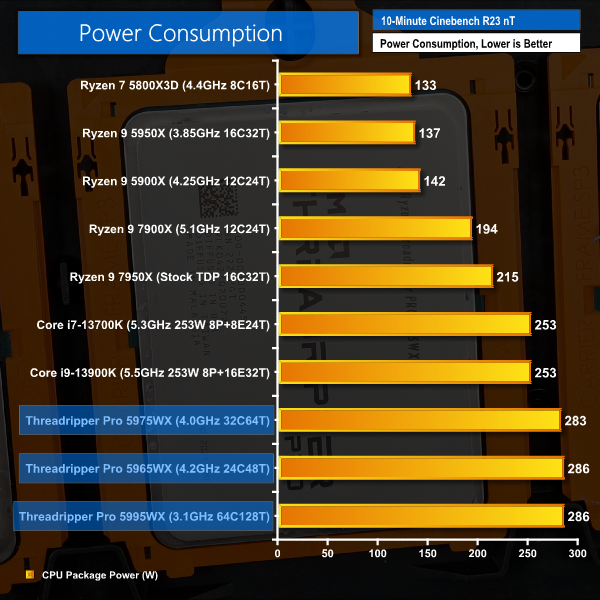
Looking at power consumption, it’s a pretty easy one to analyse. AMD provides the Threadripper Pro 5000 WX-series processors with a 280W TDP across the board. And this 280W TDP means 280W actually delivered (aside from minor overshoots), unlike the Intel and AMD desktop TDP nonsense.
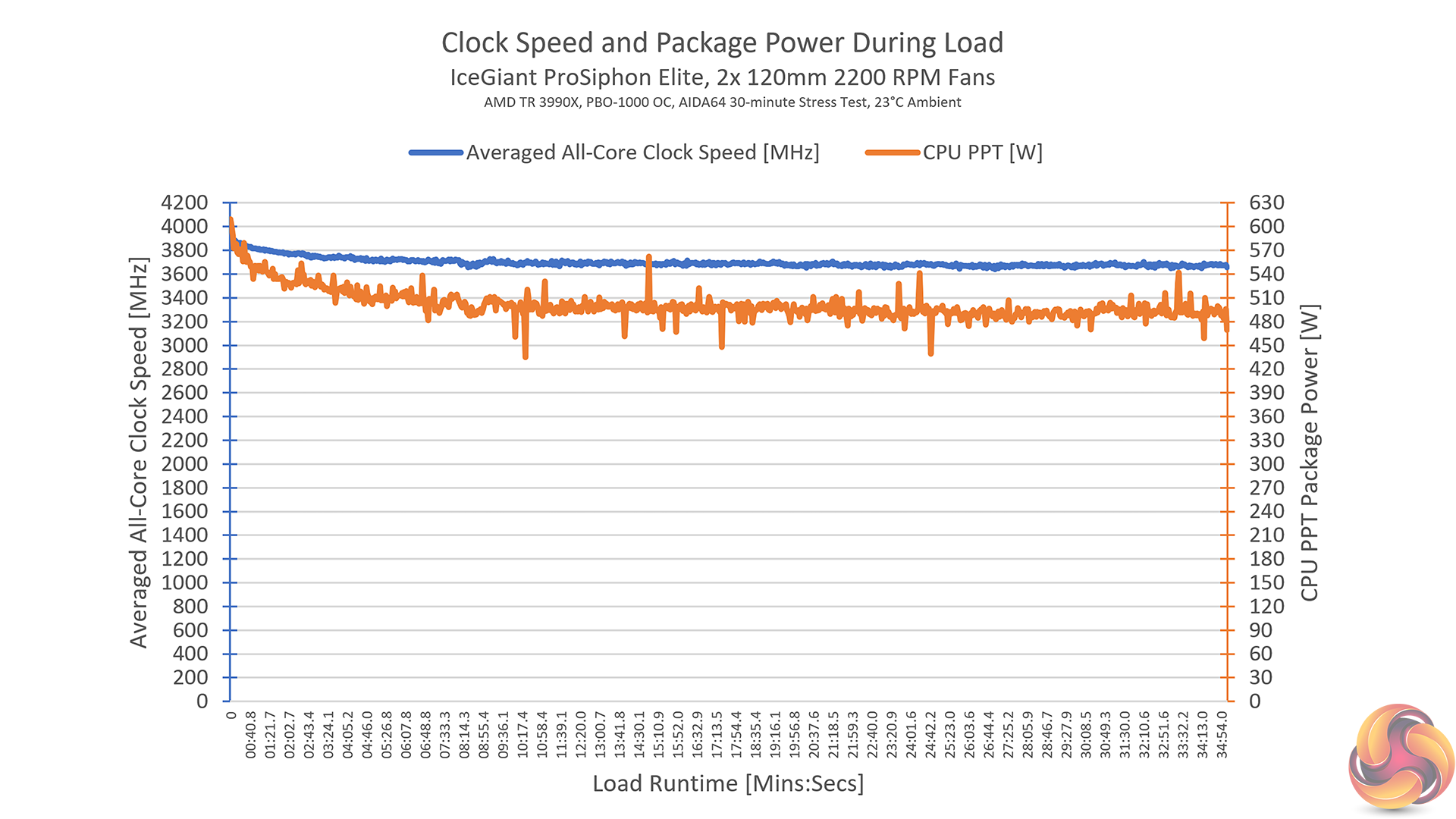
That 280W TDP is likely a restriction for the 64-core chip’s operating clocks, given that it operates almost 1 GHz slower than the 32-core model.
In fact, you can check out some of our previous content with the 64-core Threadripper 3990X non-Pro CPU where we PBO overclocked it to roughly 3.6GHz, which mandated a package power draw of almost 500W.
There’s no reason to suggest why this Threadripper Pro 5995WX couldn’t go to similar frequencies as the 32- and 24-core chip when coupled with a relevant motherboard and CPU cooler.
Temperatures
Temperature recordings were taken using an IceGiant ProSiphon Elite CPU cooler. Ambient temperatures were around 21°C.
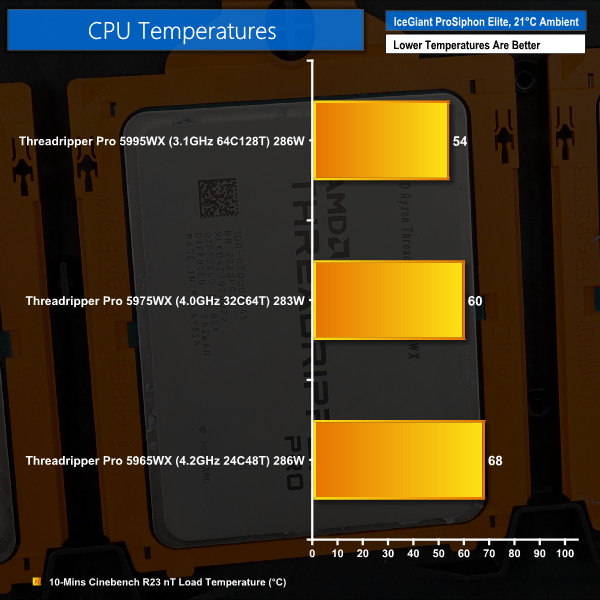
You may be surprised to see such reasonable temperature numbers, given that Ryzen 7000 Series and Intel 13th Gen processors running anywhere near 280W of package power would be operating like furnaces. But this is simply the case with Threadripper, and it seemingly always has been.
Having a heatspreader the size of a mobile phone clearly aids thermal performance. Plus, have all those cores spread across a larger physical PCB area helps to control the thermal density headaches that we often see with mainstream desktop chips.
Now, yes, we are using an incredibly high-end CPU cooler in the IceGiant ProSiphon Elite. But this £150 quad-fan cooler is clearly not out of place for such expensive partnering hardware. The Noctua NH-U14S TR4-SP3 is another cooler that we have had great success with on Threadripper, thanks in large to its full-sized base contact area.
Put simply, there is no reason to see why temperatures will be an issue for Threadripper Pro when used with sensible air coolers. And that’s advantageous, given the usage environments.
Air coolers are ideal for 24/7, low-noise operation – which is exactly how these workstations CPUs may be running. Plus, when we are recording temperatures below 70C under full load, there’s not much concern of long, multi-day rendering or simulation workloads spiralling temperature to the point of clock speed throttling.
Once again, AMD has clearly nailed it when it comes to thermal design for Threadripper Pro.
Blender Classroom
Cinebench R23 nT
Cinebench R23 1T
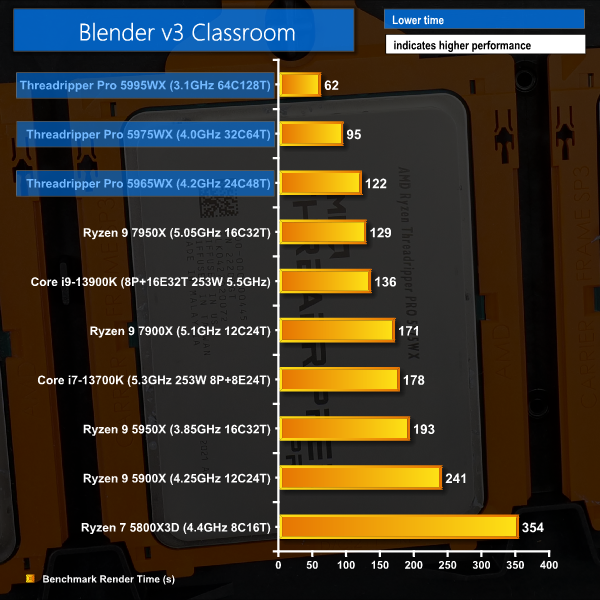
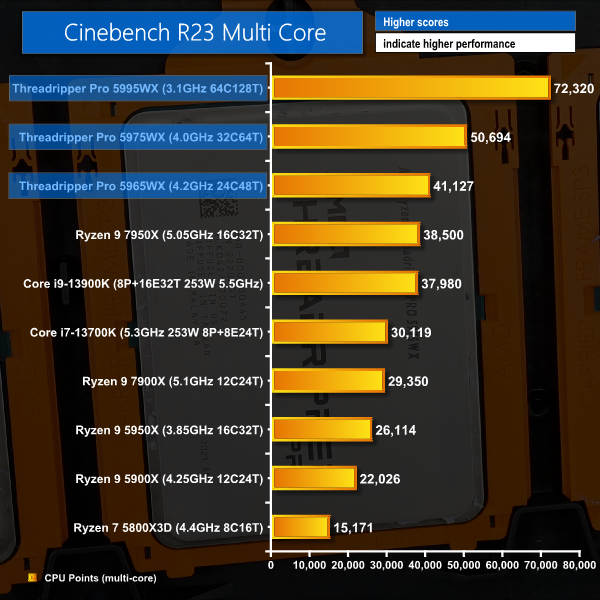
Looking at multi-threaded rendering, it is easy to see the segregation between the mainstream desktop CPUs and the workstation orientated ones.
Put simply, the 128-thread Threadripper Pro 5995WX is an absolute rendering powerhouse. It completes its Blender rendering task in less than half the time of the Ryzen 9 7950X, meaning that a doubling of work queue throughput is achievable.
The 32-core 5975WX is no slouch, either, and sits nicely between the 24- and 64-core models.
Looking at the 5965WX though, this is clearly a processor that is better suited for its arsenal of memory bandwidth and connectivity, as opposed to its raw compute horsepower. And that’s because the less-than-£700, Zen 4-based Ryzen 9 7950X is almost as fast, but much cheaper.
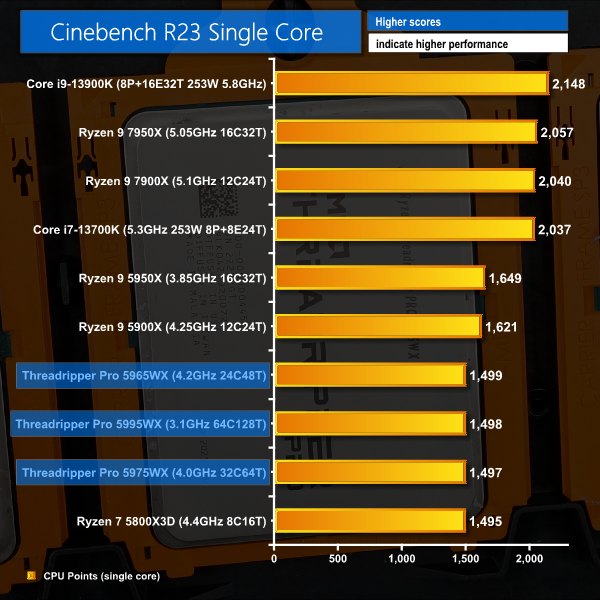
Single-threaded performance is unsurprisingly weak. But that’s because we are looking at Zen 3 cores and clocks in the world of Zen 4 and Raptor Lake.
The key reference point here, however, is that AMD’s lightly threaded performance isn’t significantly disadvantaged when comparing to the chips with the same architecture. This is testament to the excellent abilities of AMD’s Precision Boost 2 algorithm.
AIDA64 Memory Performance
Let’s now look at some memory-related performance for this platform with 8-channel, 3200MHz RAM.
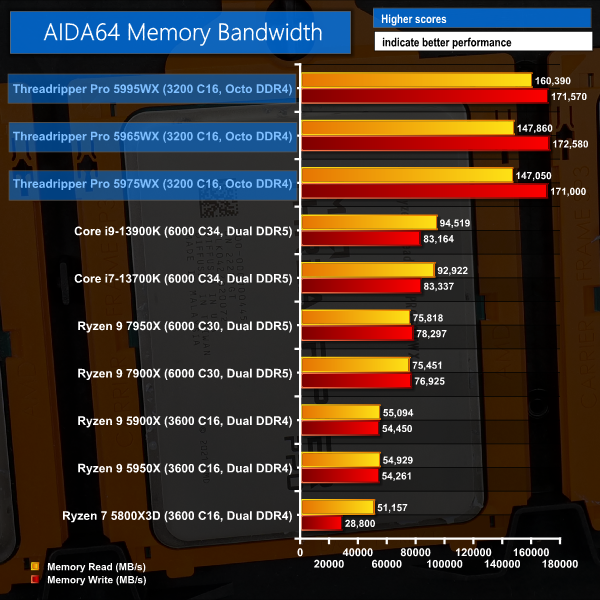
Wow!
Even despite a sizable frequency disadvantage versus DDR5-based mainstream platforms that are using 6000MHz kits, the memory bandwidth numbers output by Threadripper Pro are fantastic.
It is clear to see that eight-channel memory running at solid frequencies of 3200MHz DDR4 is an excellent solution for memory-bandwidth intensive workloads.
Memory bandwidth capacity is clearly one of the star factors for Threadripper Pro.
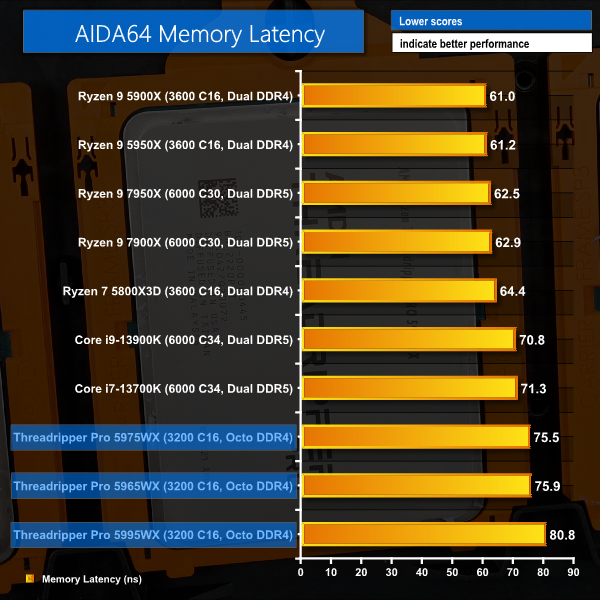
Latency isn’t all that bad, either. Particularly since we are using 3200MHz C16 DIMMs, as opposed to the dual-rank 3600MHz C16 modules used for other DDR5 platforms.
And we won’t see weird memory latency behaviour that we saw with early Threadripper models, either; each core gets better access to the memory controller on the central IO die.
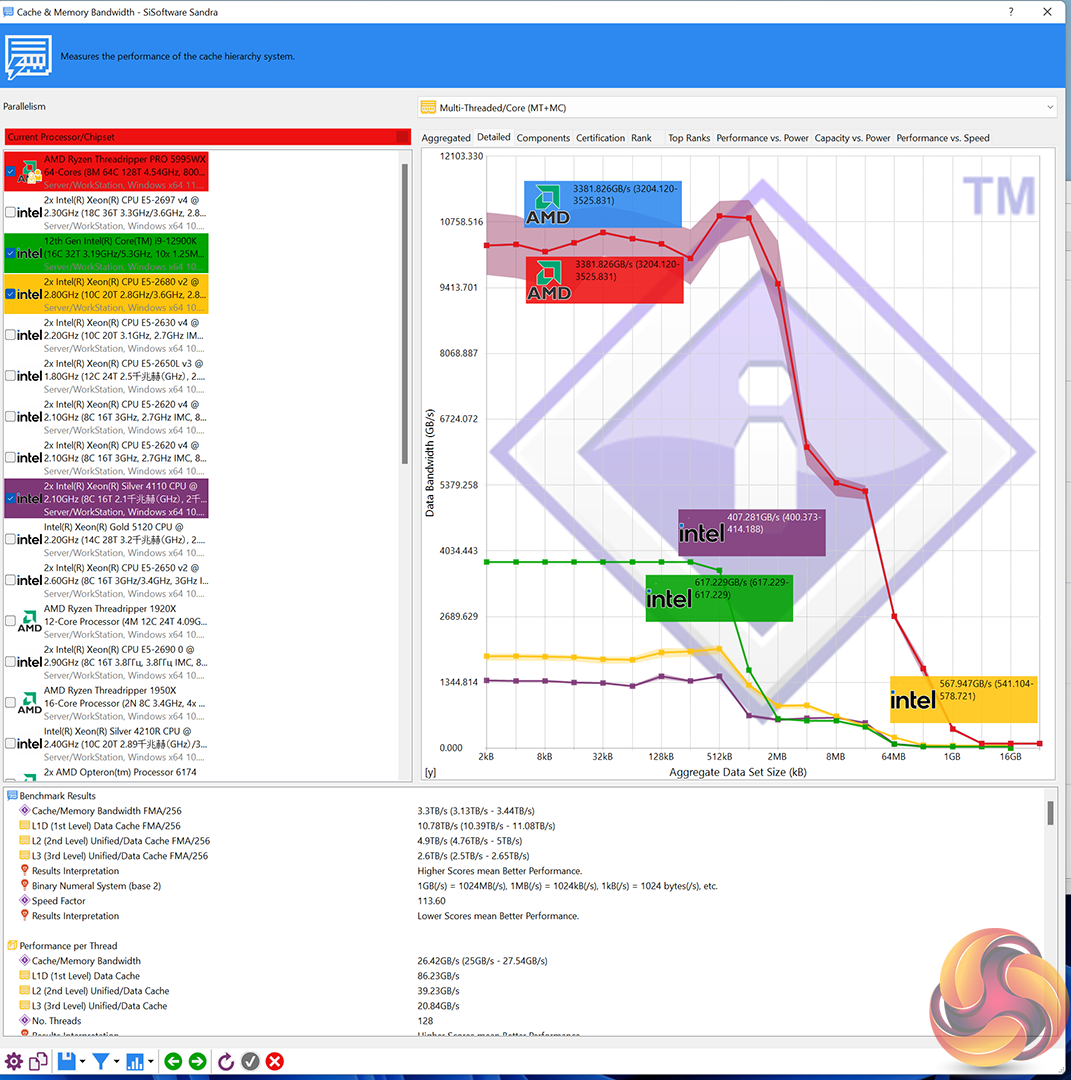
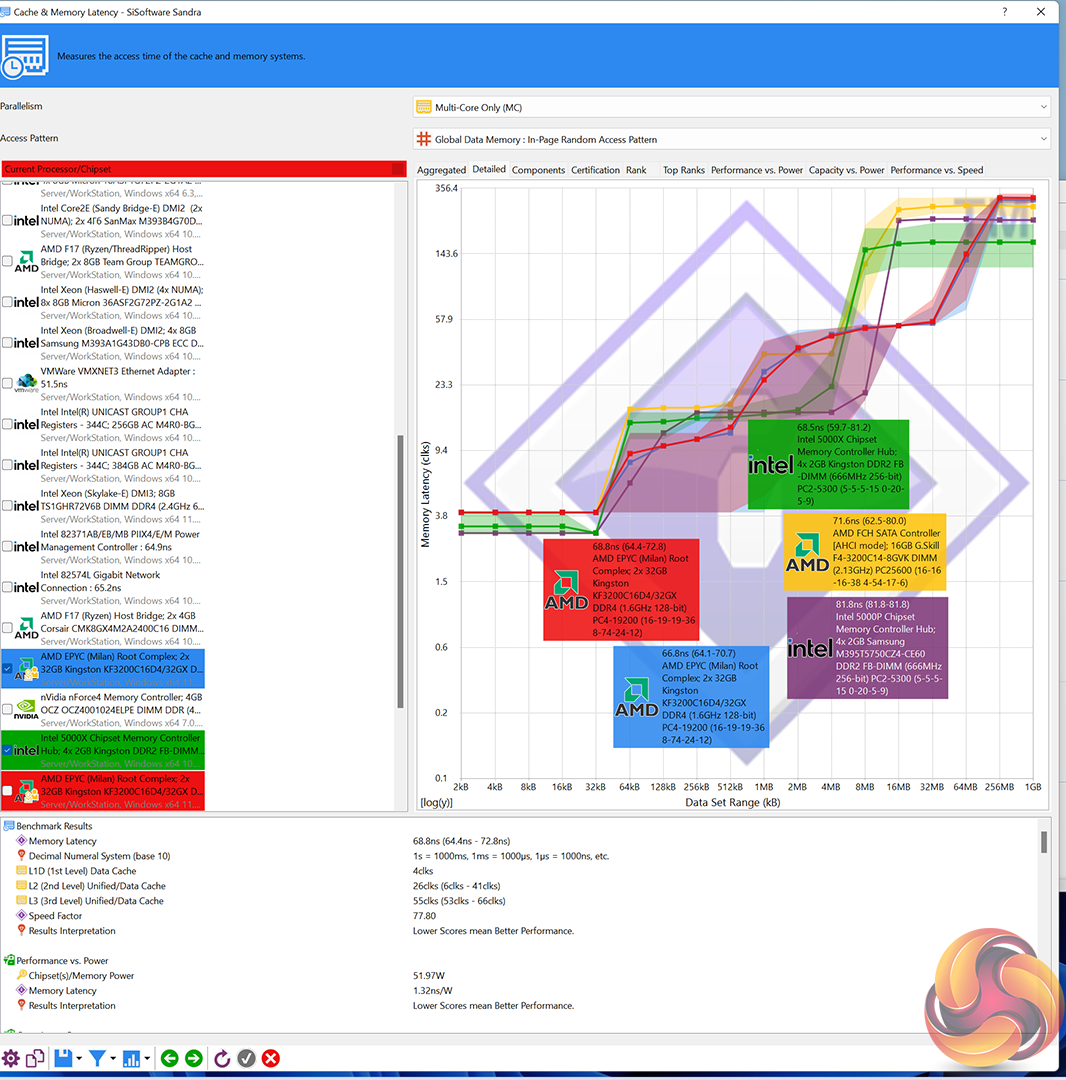
And here are some Cache and Memory Latency and Bandwidth scores from SiSoft Sandra for reference.
Handbrake H264
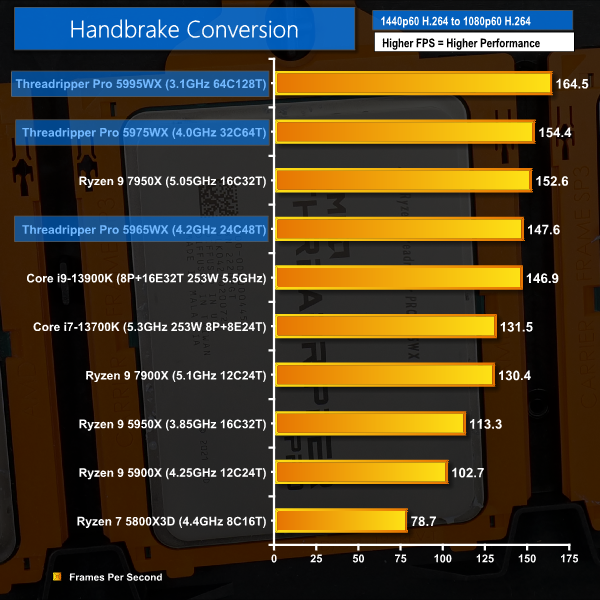
Handbrake H264 performance is strong from Threadripper Pro, given the high core counts.
But the hierarchy of performance is not particularly positive as a single instance of Handbrake simply cannot saturate 64-or-more threads for our X264 workload.
Handbrake H265
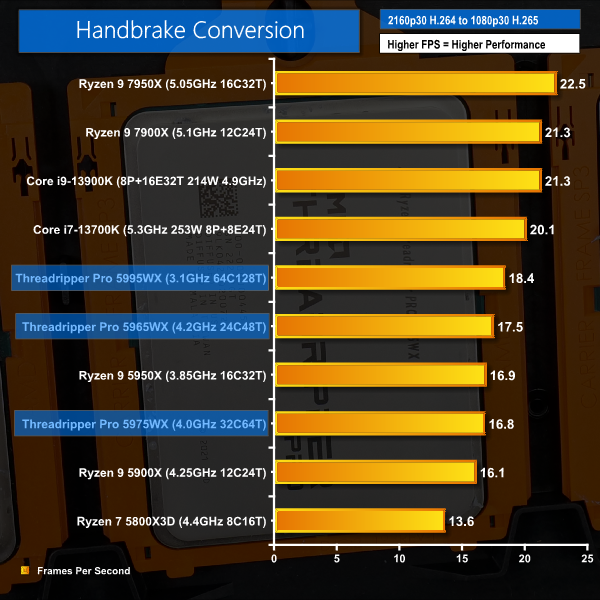
And that is even more the case for H265 conversion, whereby our specific task really struggles to saturate 32-thread and higher CPUs.
Of course, if you have different source media, then this may be a different equation for you.
In this scenario, the obvious solution is to run multiple instances of Handbrake for the video conversion tasks. And this is something that I have done successfully for many years of using Threadripper systems.
Spooling up multiple instances of Handbrake doesn’t improve individual conversion time, per say. But it does allow more conversions to be completed in a given timeframe, thus increasing the work queue throughput.
7-Zip Compression and Decompression
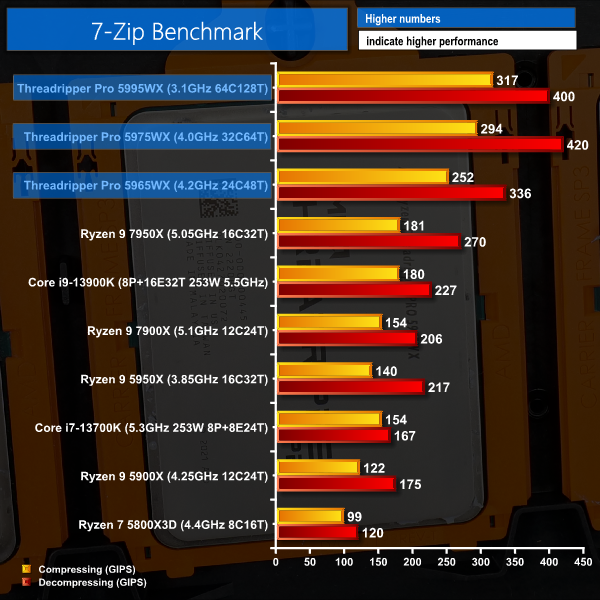
7-Zip performance is incredibly strong, despite being limited to 64 threads of operation. Here, the ludicrously-high memory bandwidth is helping alongside the sizable number of cores and ample cache.
The performance improvement from the 16-core Zen 4 Ryzen 9 7950X to the 24-core Zen 3 Threadripper Pro 5965WX emphasises my previous point about the platform-wide scenarios whereby workstation-grade hardware can show value.
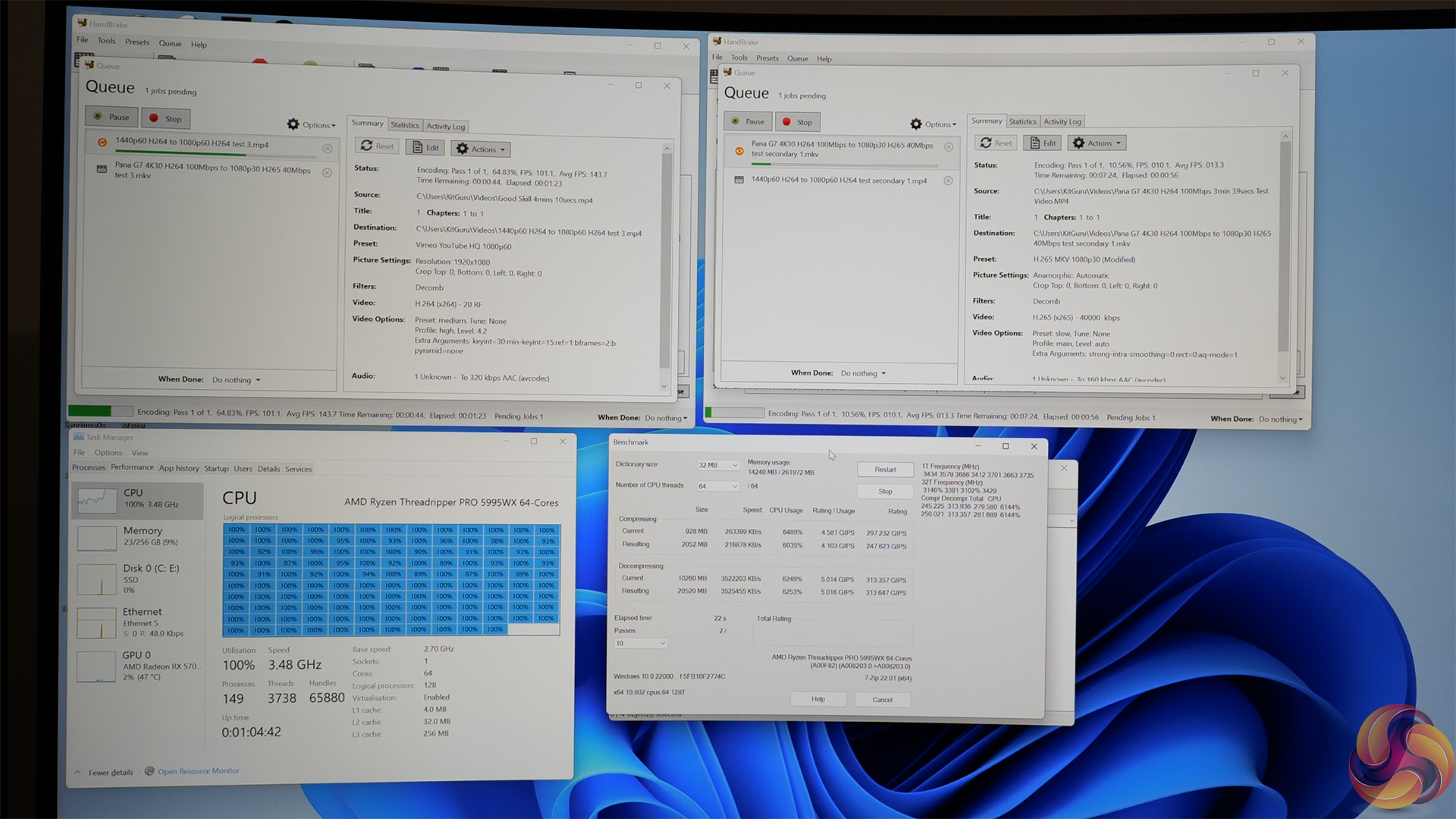
Once again, 7-Zip being limited to 64-threads gives ample opportunity for this workload to run close to full speed whilst also running another hefty workload at the same time.
For example, we ran two instances of Handbrake with different conversion tasks alongside 7-Zip.
While none of these workloads saturate 128 threads by themselves, combined they can force full utilisation of the 64-core Threadripper Pro 5995WX. And they do this with minimal slow down to any of the workloads, thus resulting in a real throughput increase for a user’s tasks.
Cinebench Performance Per Watt
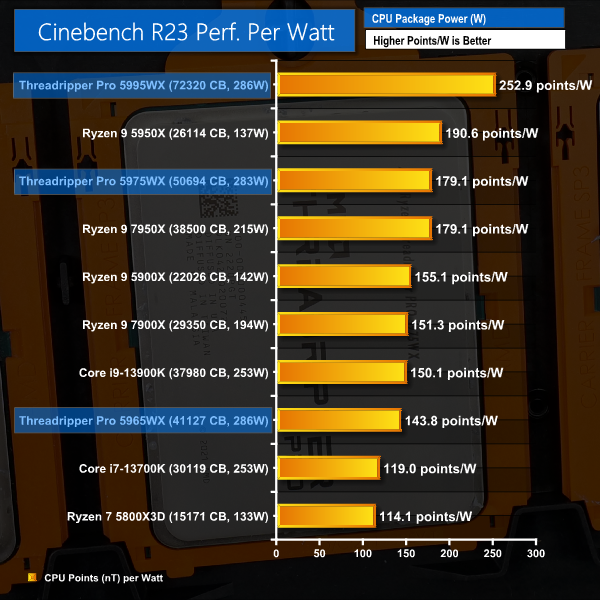
Unsurprisingly, it’s pretty difficult to even compete with the Threadripper Pro 5995WX in Cinebench Performance per Watt data. 128 Threads running at a sensible 280W TDP are very powerful for massively parallel, multi-threaded tasks like rendering.
Interestingly, the same cannot be said for the 24- and 32-core Threadripper Pros. Given their identical 280W TDPs, it is clear that AMD has pushed their frequency beyond its ideal efficiency operating point.
I guess this is fine for extracting maximum performance from the processors, whereby the 64-core almost certainly leaves frequency on the table. Though, for a workstation environment where added power usage translates into more costly electricity infrastructure and usage bills, as well as increased HVAC requirements inside the workplace.
Perhaps an Eco-type mode of maybe 180W TDP would be useful.
AMD’s Threadripper Pro 5000 WX-Series CPUs are super expensive, workstation-grade processors that undoubtedly appeal to a niche target market. But they’re also outstandingly-well though out products that tick many, many boxes and sit in a tier of their own.
At £7,000 the Ryzen Threadripper Pro 5995WX is a true flagship processor. Its 64 cores are fast and efficient, and 256MB of L3 cache is simply ludicrous.
Of course, the pricing is utterly insane to those of us who deal with the consumer desktop market on a day-to-day basis. But if this workstation-orientated 64-core chip allows your skilled video editor, or animator, or simulation engineer to complete value-added work tasks quicker, then it can potentially be justifiable.
If I am a design engineer who can use the Threadripper Pro 5995WX to run 10 simulations instead of 5 before I have to hit my allocated slot on a million dollar additive manufacturing machine. That can have value easily to the tune of tens of thousands of dollars in just a few weeks. And from that perspective, the horsepower on tap is a clearly positive business decision.
The reality, however, is that the 64-core chip is nice, but it isn’t always justifiable. I remember speaking to one of AMD’s team who said that the 64-core actually does very well with customers in the domain of rendering and animation, because those workloads often scale very well.
But for my own video editing workloads, as an example, having the option to choose a 32-core chip for half the price is valuable.
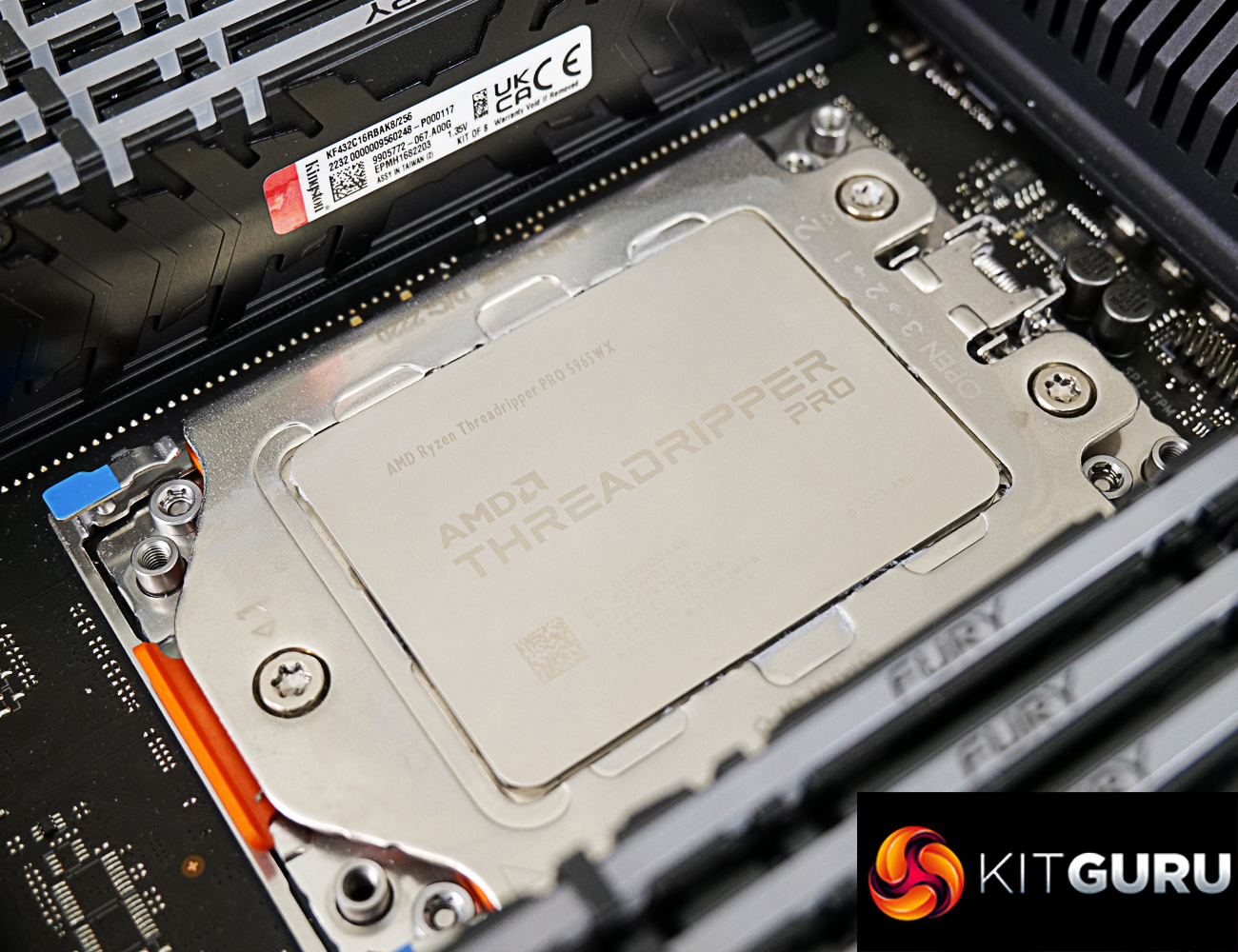
The other key factor with this line-up is the 24-core model. While you aren’t necessarily going to be getting performance that is much better than the sub-£700, 16-core Ryzen 9 7950X, you are getting access to the superb Threadripper Pro WRX80 platform.
I recall dealing with multi-physics simulation workloads in previous years. Often, the software wouldn’t really scale with more than 16 CPU threads, because the licensing made it expensive to do so or because that’s how VMs were often carved up. Some of the software would, however, take as much GPU compute horsepower as you could throw at it.
This is a perfect example of where a 16- or 24-core CPU with 128 lanes of PCIe Gen 4 connectivity and eight-channel memory support can be useful.
I’ve openly proclaimed my love for the Threadripper and Threadripper Pro platform many times in the past. I like the scalability up to 64 cores. I like the fact that all chips get the same – excellent – memory capability and PCIe connectivity. And I like that there’s an element of control and tinkering ability given to those users who want that.
There are also some areas that I think could do with improvement.
The 280W consistent TDP is handy for system integration, no doubt, but it feels wasteful on a 24-core chip that is clearly operating way outside of its efficiency range. Of course, there is frequency adjusting ability but this is not always available on the workstation-geared motherboard, like our ASUS sample.
There’s no real value in me sitting here and giving these uber expensive chips are rating or review score, as this was more of a mini-review or showcase. Plus, individual use cases and workloads for this type of hardware will vary so much.
But hopefully this has been an interesting piece highlighting what sort of power Threadripper Pro can offer versus mainstream parts and where they fit into the market segment that us mainstream-focussed enthusiasts don’t really deal with on a day-to-day basis.
Discuss on our Facebook page HERE.
KitGuru says: AMD's Ryzen Threadripper Pro 5000 WX-Series processors on the WRX80 platform are performance powerhouses. If you need this level of compute and connectivity, you know that you need this level of compute an connectivity.