KitGuru KitGuru.net – Tech News | Hardware News | Hardware Reviews | IOS | Mobile | Gaming | Graphics Cards


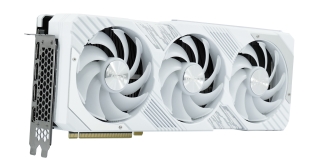
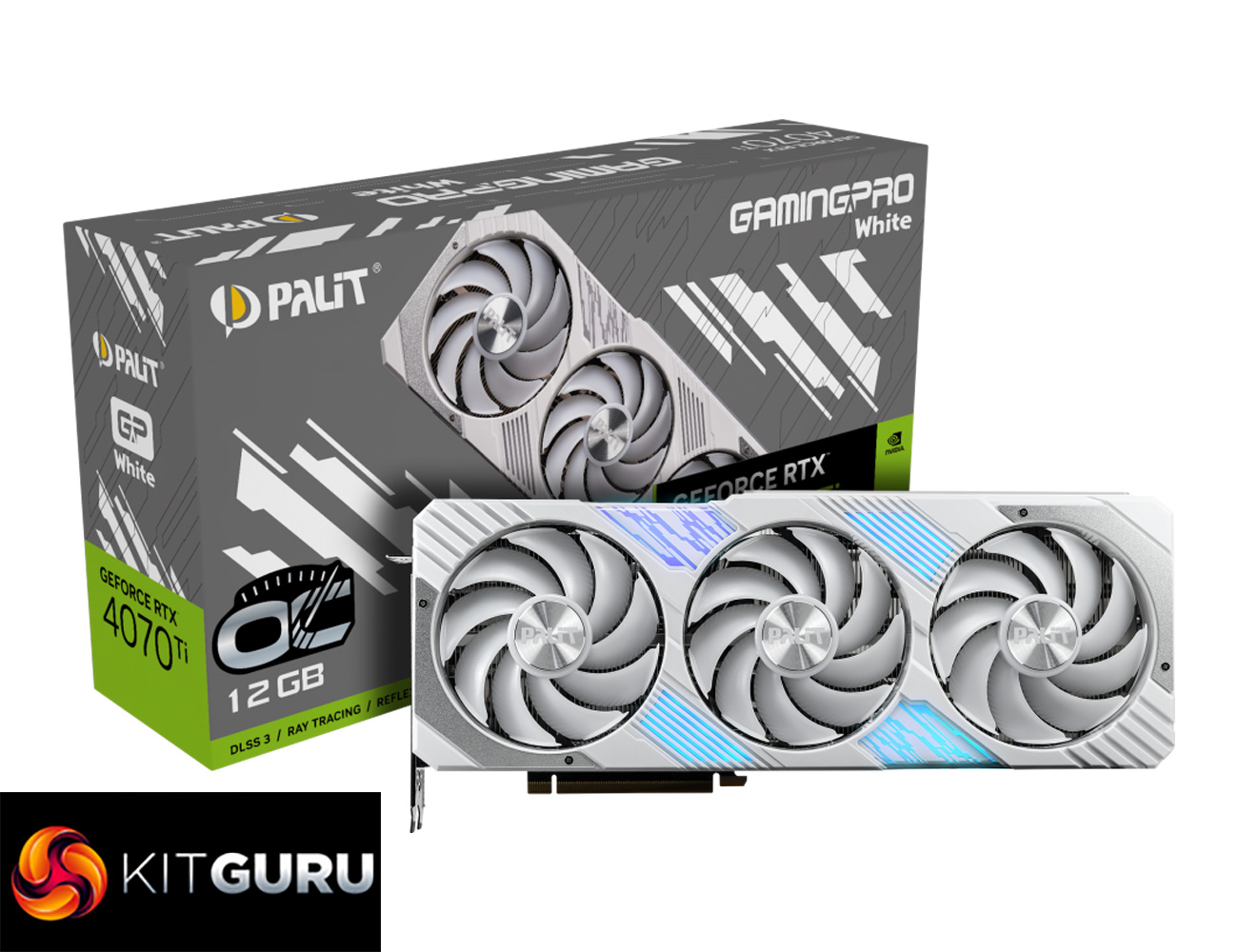
Today we are taking another look at the RTX 4070 Ti Super, as we have Palit's GamingPro White OC model in for review. Sporting a fresh white colour scheme that is complimented by RGB lighting, Palit says this card 'embodies refined purity and powerful aesthetics' while it also ‘exudes grace'. Those are some big claims, so let's put this card through its paces and see how it stacks up to the competition…
There's no denying that white PC components have seen a surge in popularity over the last two years, and most manufacturers have started producing multiple colour options for each new product hitting the market. The same applies for the Palit RTX 4070 Ti Super GamingPro White OC, as it is effectively just a white version of the regular GamingPro card.
That means it still sports a thick triple-fan cooler, factory overclocked core as well as an on-board ARGB header so you can control the lighting via your motherboard. Without further ado, it's time to see what this card can bring to the table…
| RTX 4090 | RTX 4080 Super | RTX 4080 | RTX 4070 Ti Super | RTX 4070 Ti | |
| Process | TSMC N4 | TSMC N4 | TSMC N4 | TSMC N4 | TSMC N4 |
| SMs | 128 | 80 | 76 | 66 | 60 |
| CUDA Cores | 16384 | 10240 | 9728 | 8448 | 7680 |
| Tensor Cores | 512 | 320 | 304 | 264 | 240 |
| RT Cores | 128 | 80 | 76 | 66 | 60 |
| Texture Units | 512 | 320 | 304 | 264 | 240 |
| ROPs | 176 | 112 | 112 | 96 | 80 |
| GPU Boost Clock | 2520 MHz | 2550 MHz | 2505 MHz | 2610 MHz | 2610 MHz |
| Memory Data Rate | 21 Gbps | 23 Gbps | 22.4 Gbps | 21 Gbps | 21 Gbps |
| L2 Cache | 73728 KB | 65536 KB | 65536 KB | 49152 KB | 49152 KB |
| Total Video Memory | 24GB GDDR6X | 16GB GDDR6X | 16GB GDDR6X | 16GB GDDR6X | 12GB GDDR6X |
| Memory Interface | 384-bit | 256-bit | 256-bit | 256-bit | 192-bit |
| Memory Bandwidth | 1008 GB/Sec | 736 GB/Sec | 716.8 GB/Sec | 672 GB/Sec | 504 GB/Sec |
| TGP | 450W | 320W | 320W | 285W | 285W |
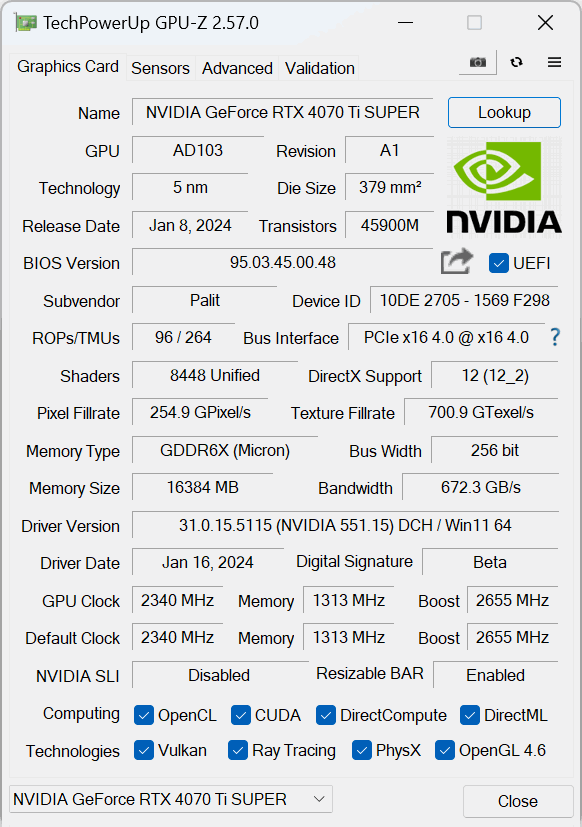
First, a quick spec recap. Unlike the RTX 4070 Ti and RTX 4070 Super which are based on AD104 silicon, the new 4070 Ti Super uses a cut-down AD103 die, measuring 379mm2. The fundamental building blocks are still the same of course, with the RTX 4070 Ti Super offering a total of 66 Streaming Multiprocessors (SMs), each housing 128 CUDA Cores, for a total of 8448. We also find 66 RT cores, 264 Tensor cores, 264 Texture Units, and 96 ROPs.
TSMC's N4 node has Nvidia cranking up the clock speed significantly this generation, with the RTX 4070 Ti Super sporting the same 2610MHz rated boost clock as the 4070 Ti. Palit has increased this to 2655MHz with the GamingPro OC, but we would expect GPU Boost to push things further still.
The memory configuration is arguably the biggest upgrade over the other xx70 series SKUs. Moving to AD103 means the 4070 Ti Super comes equipped with a 256-bit memory interface, paired with 16GB GDDR6X running at 21Gbps, putting total memory bandwidth at 672 GB/s. L2 cache remains the same as the RTX 4070 Ti, with 49152KB.
Considering the increased core-count, it's interesting that power draw remains the same as the RTX 4070 Ti, with the new Super model still boasting a 285W TGP, and Palit has not increased this out of the box.
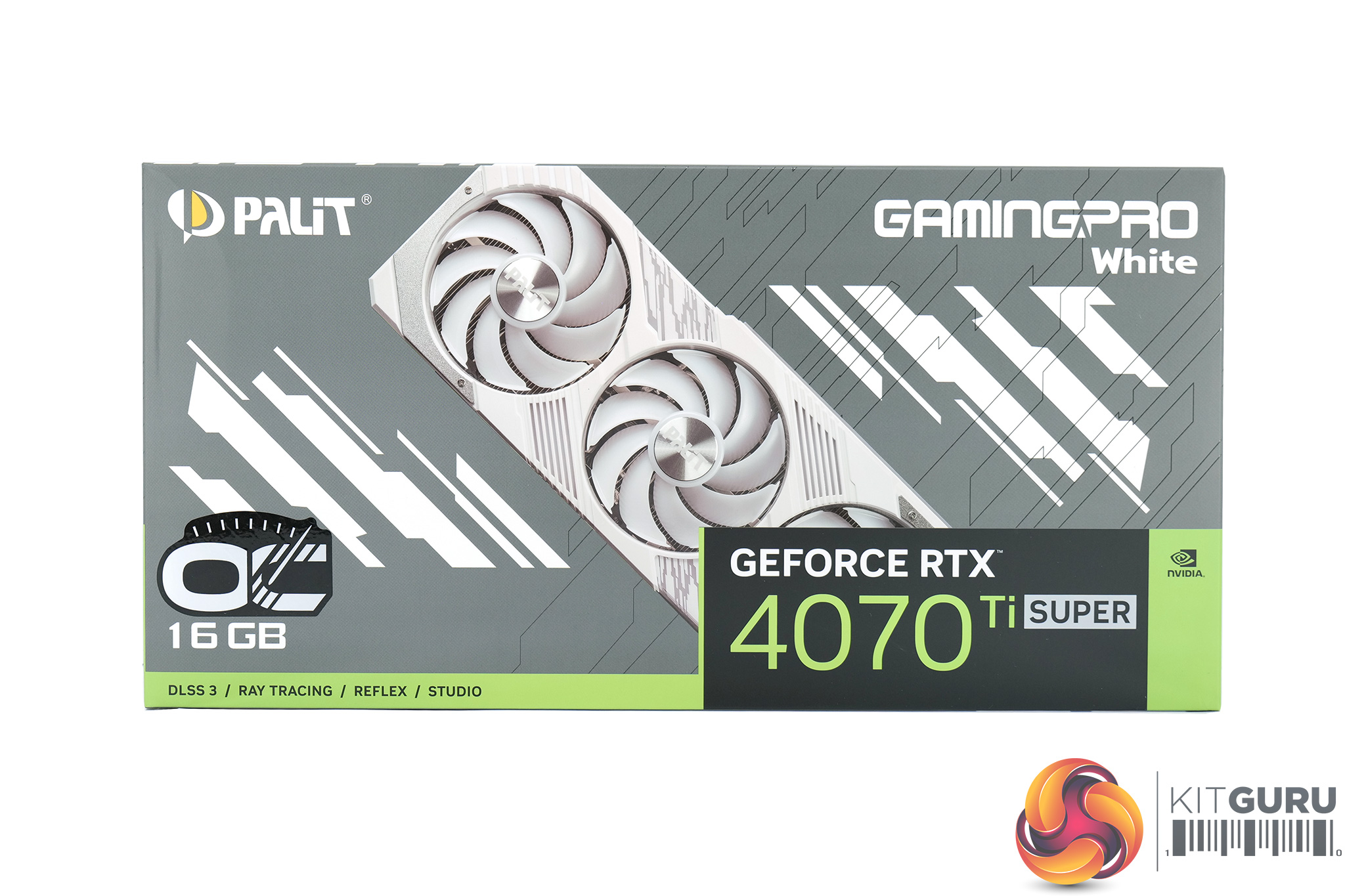
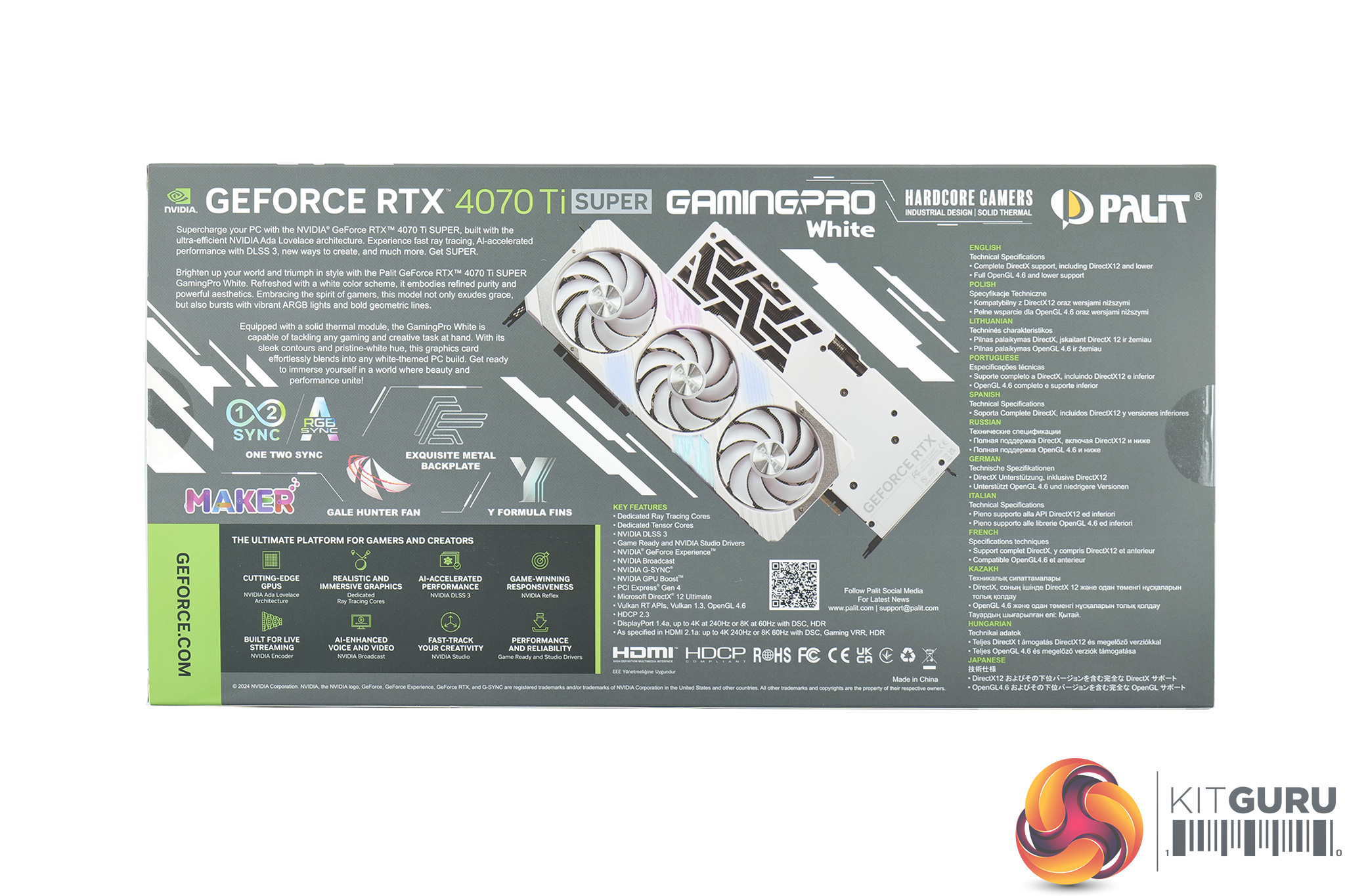
The Palit RTX 4070 Ti Super GamingPro White OC ships in a grey box with an image of the graphics visible on the front, though it is partially obscured by the GeForce RTX branding in the bottom right corner. On the back, Palit highlights various key details of the card and the architecture.
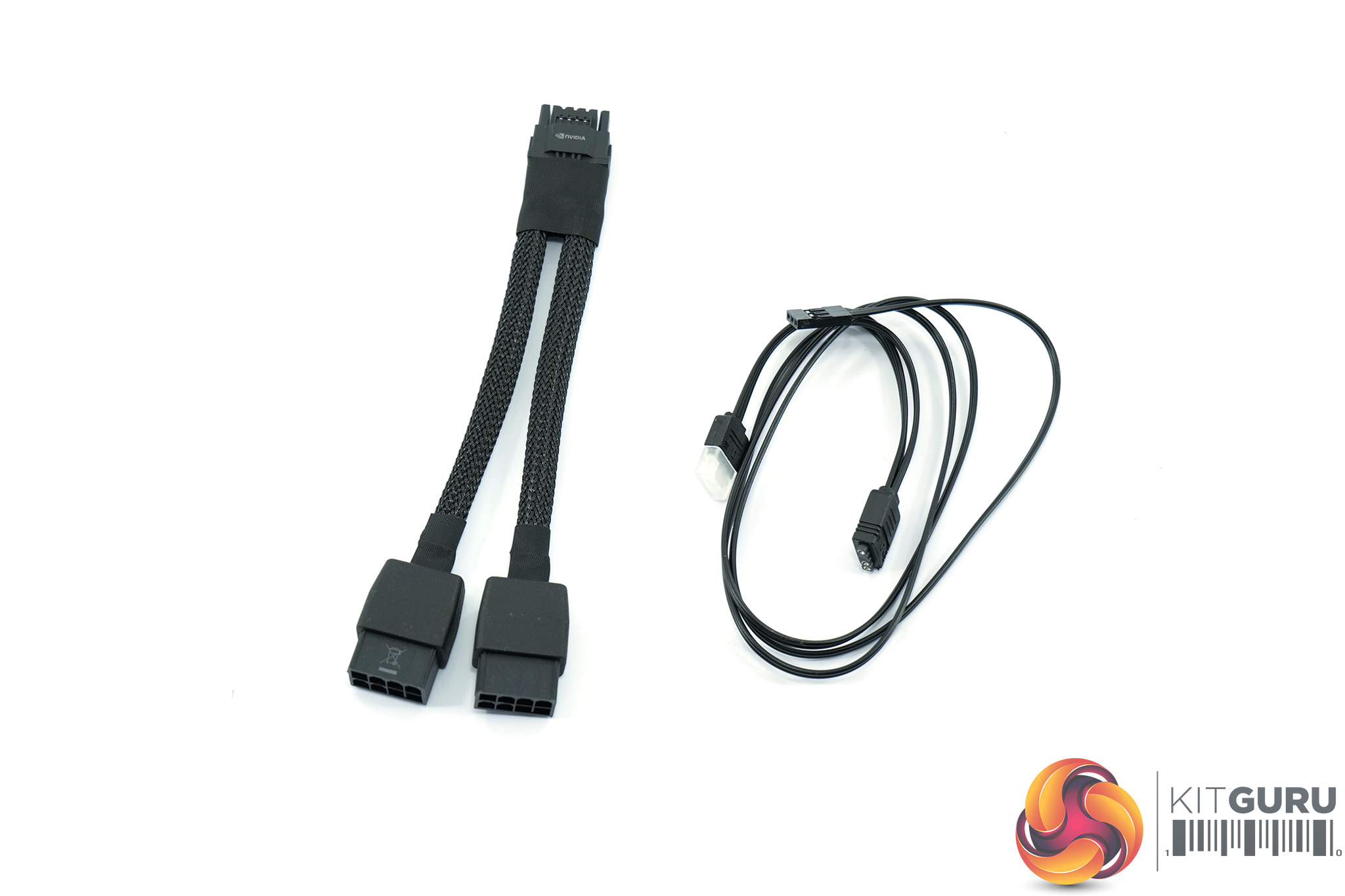
Inside, the only included accessories are a dual 8-pin power adapter as well as an ARGB cable, used to connect the graphics card to your motherboard to enable synchronised lighting.
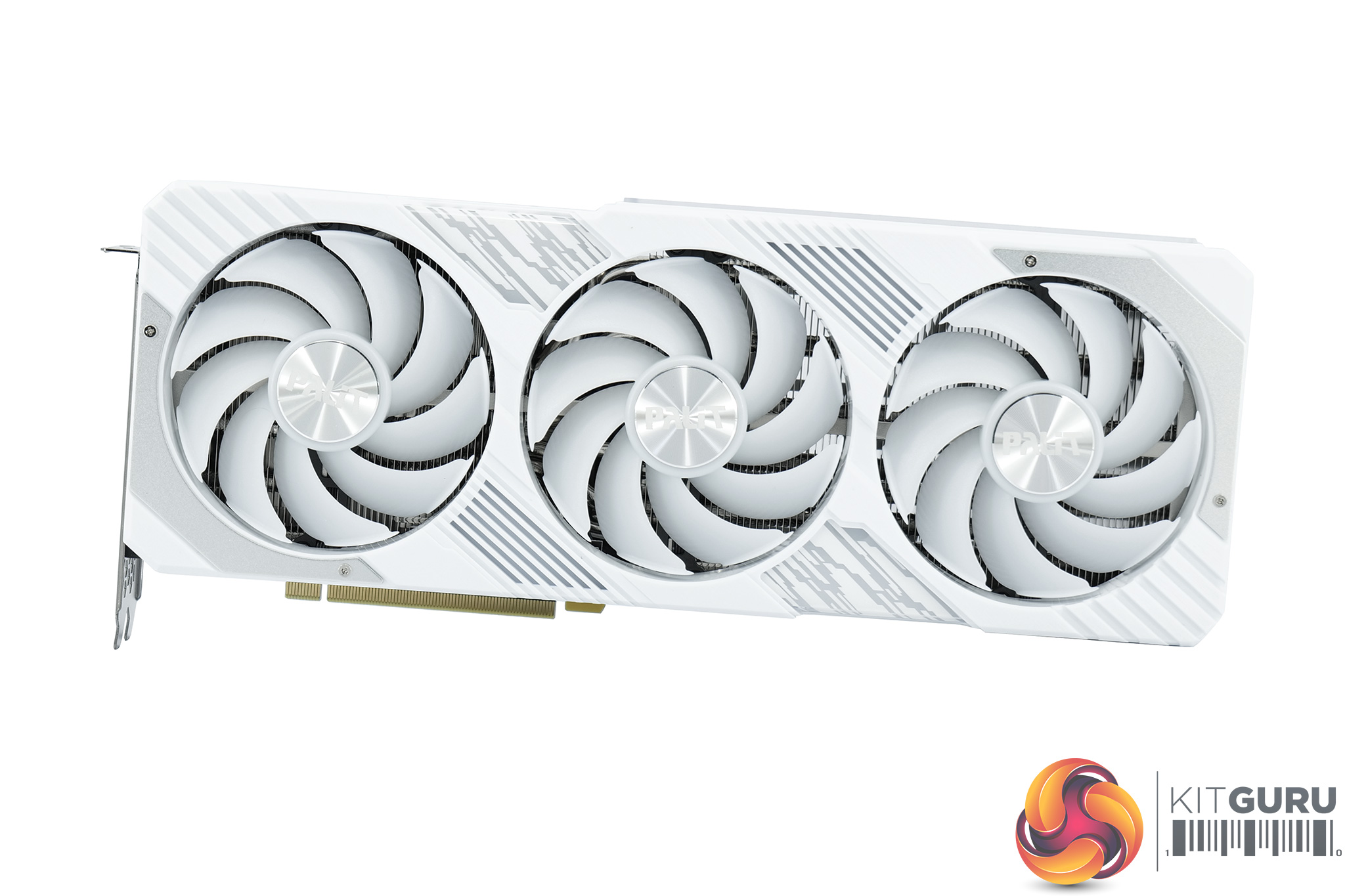
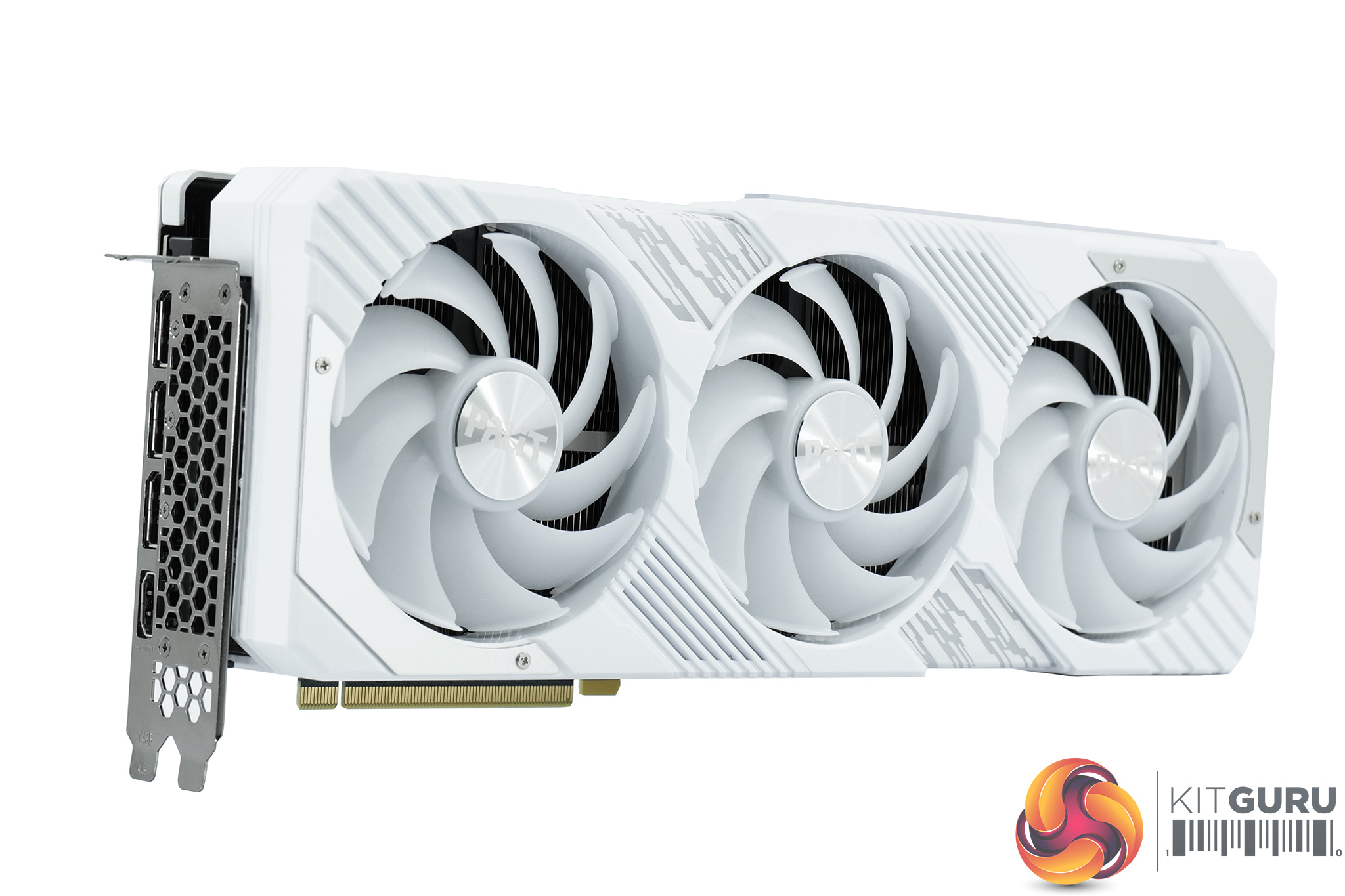
The graphics card itself is a stylish affair, using a white plastic shroud with some grey accents. It is made from plastic, but there are also a couple of brushed metal plates screwed on top of the shroud to add some visual interest. It's certainly a good looking card, and it only gets better when the RGB lighting is enabled, with a couple of zones embedded within the shroud.
The three fans also feature white fan blades, and these use Palit's Gale Hunter design, measuring approximately 95mm in diameter. These also come fitted with ‘winglets' on each fan tail, something Palit claims can help concentrate airflow and avoid the ‘vortex effect'.
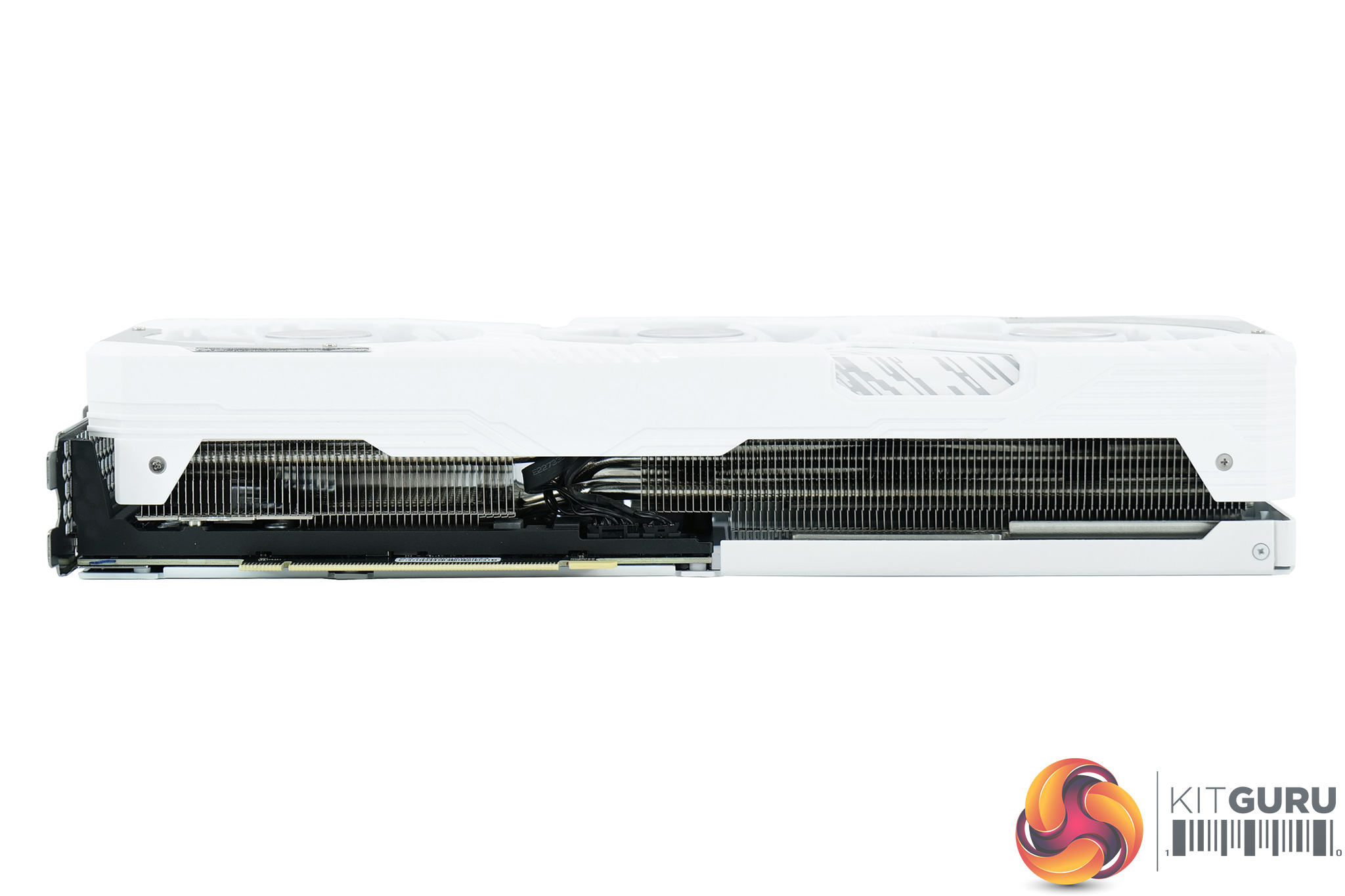
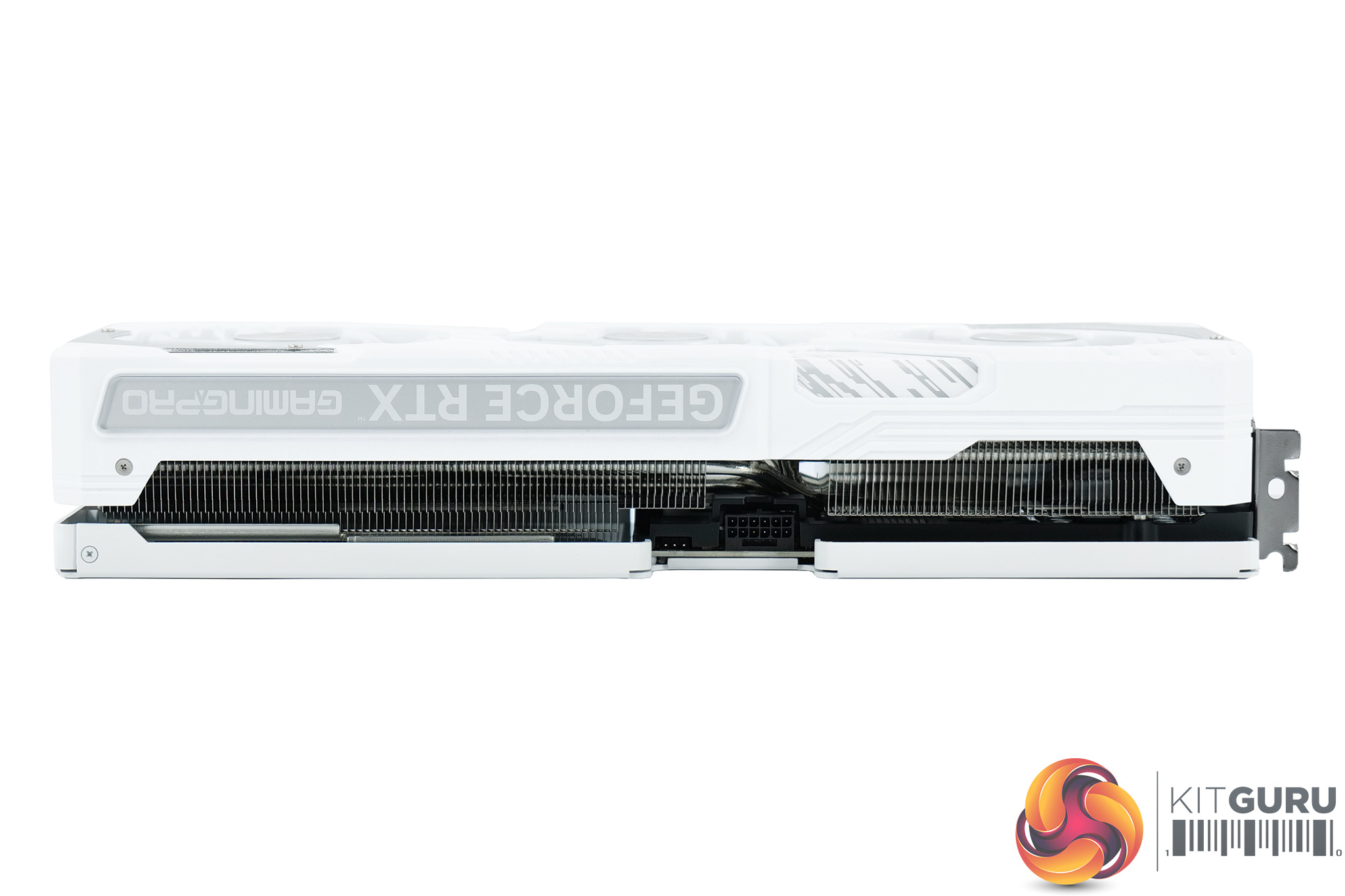
In terms of the card's dimensions, it's fairly large at 328.9 x 132.9 x 63.4 mm, while it weighed in at 1586g on my scales.
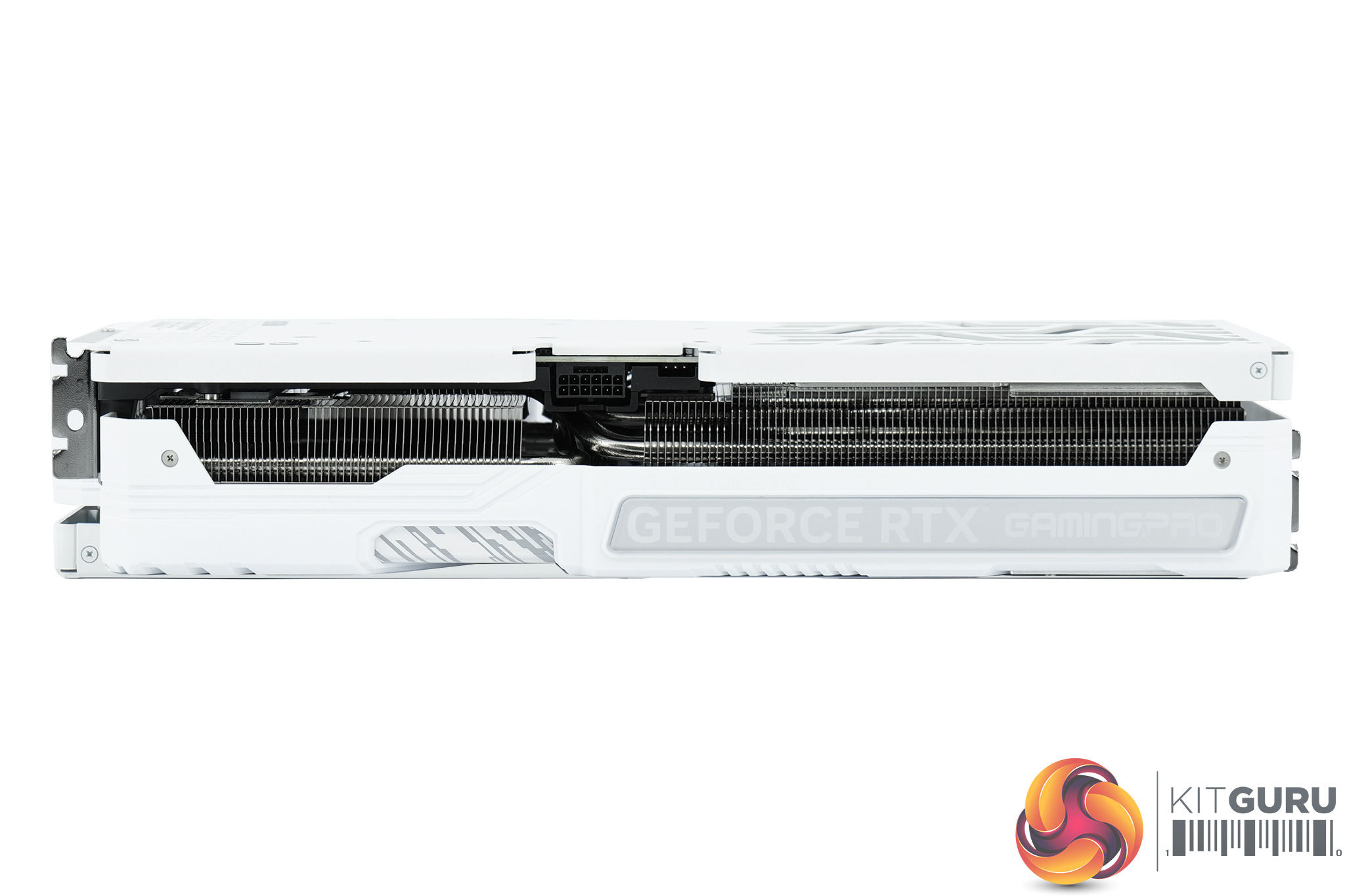
The front side of the card is home to the GeForce RTX and Palit logos, and these also illuminate with RGB LEDs once powered on.
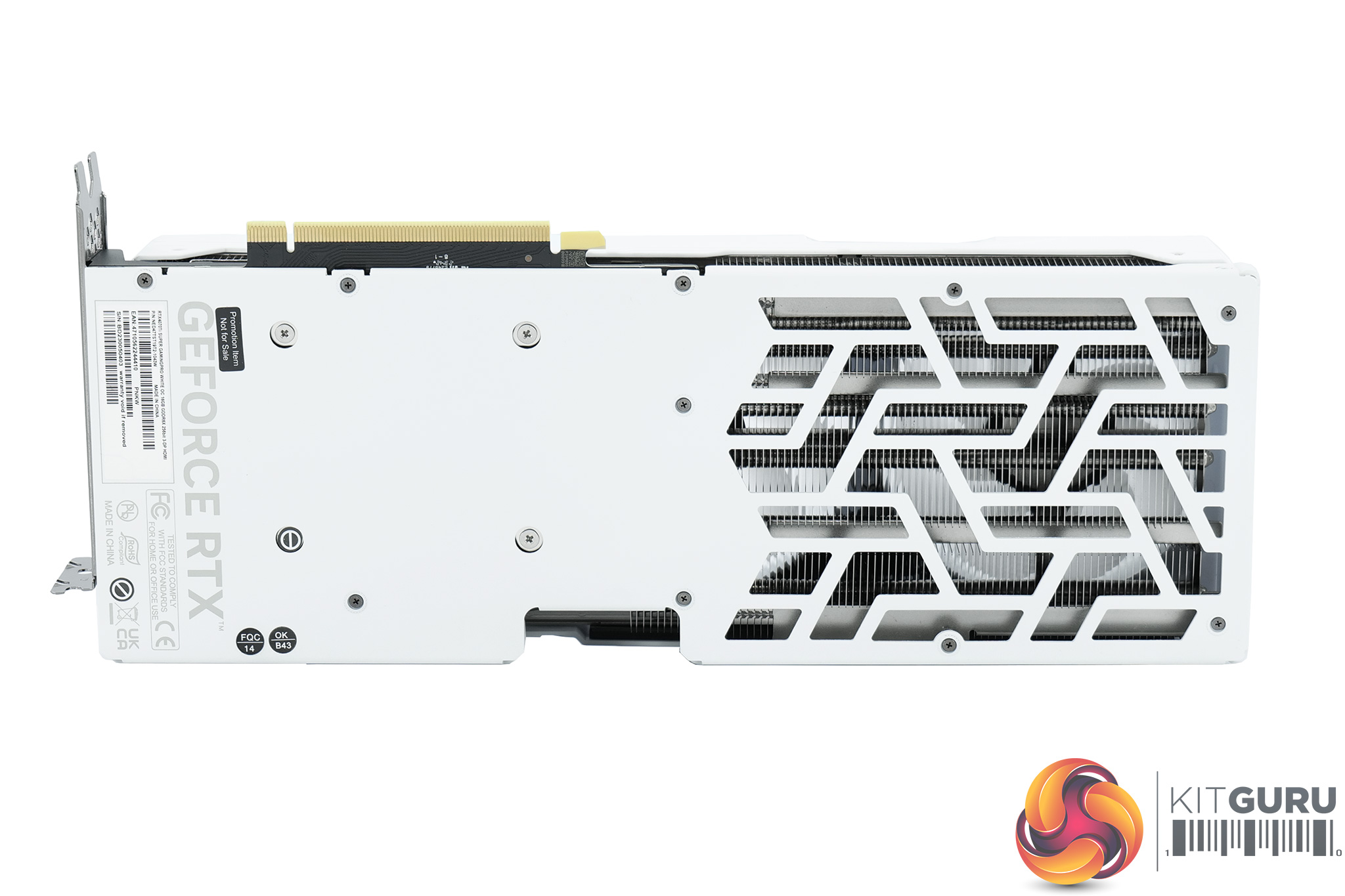
As for the backplate, this is a full-length metal design, though there's some large cutouts towards the end of the card to allow air to pass directly through the heatsink. Palit is also using what it describes as an Anti-Gravity Plate as part of the internal construction of the card which should help prevent sagging. It is also worth noting there is no dual-BIOS switch on the GamingPro OC.
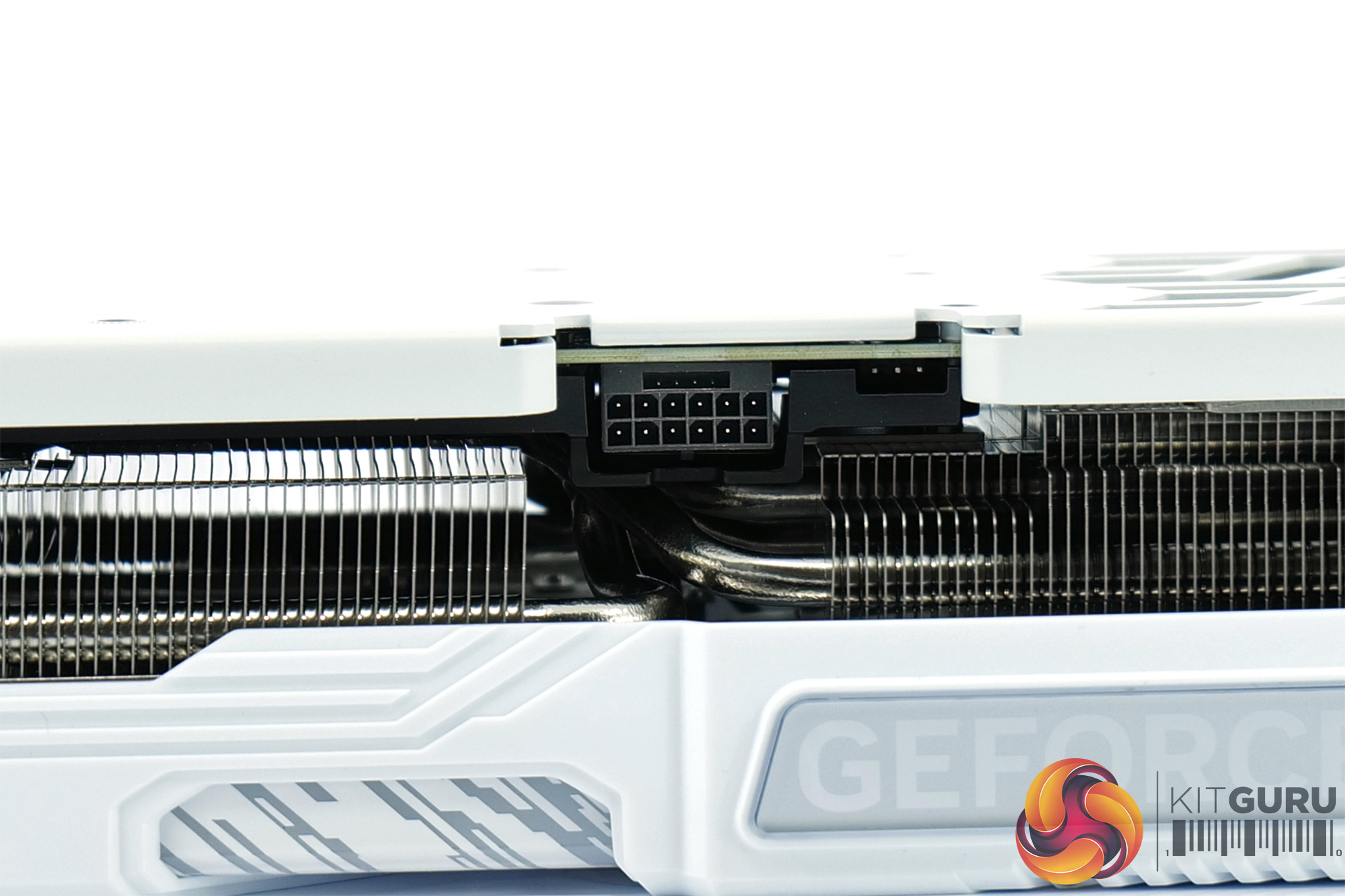
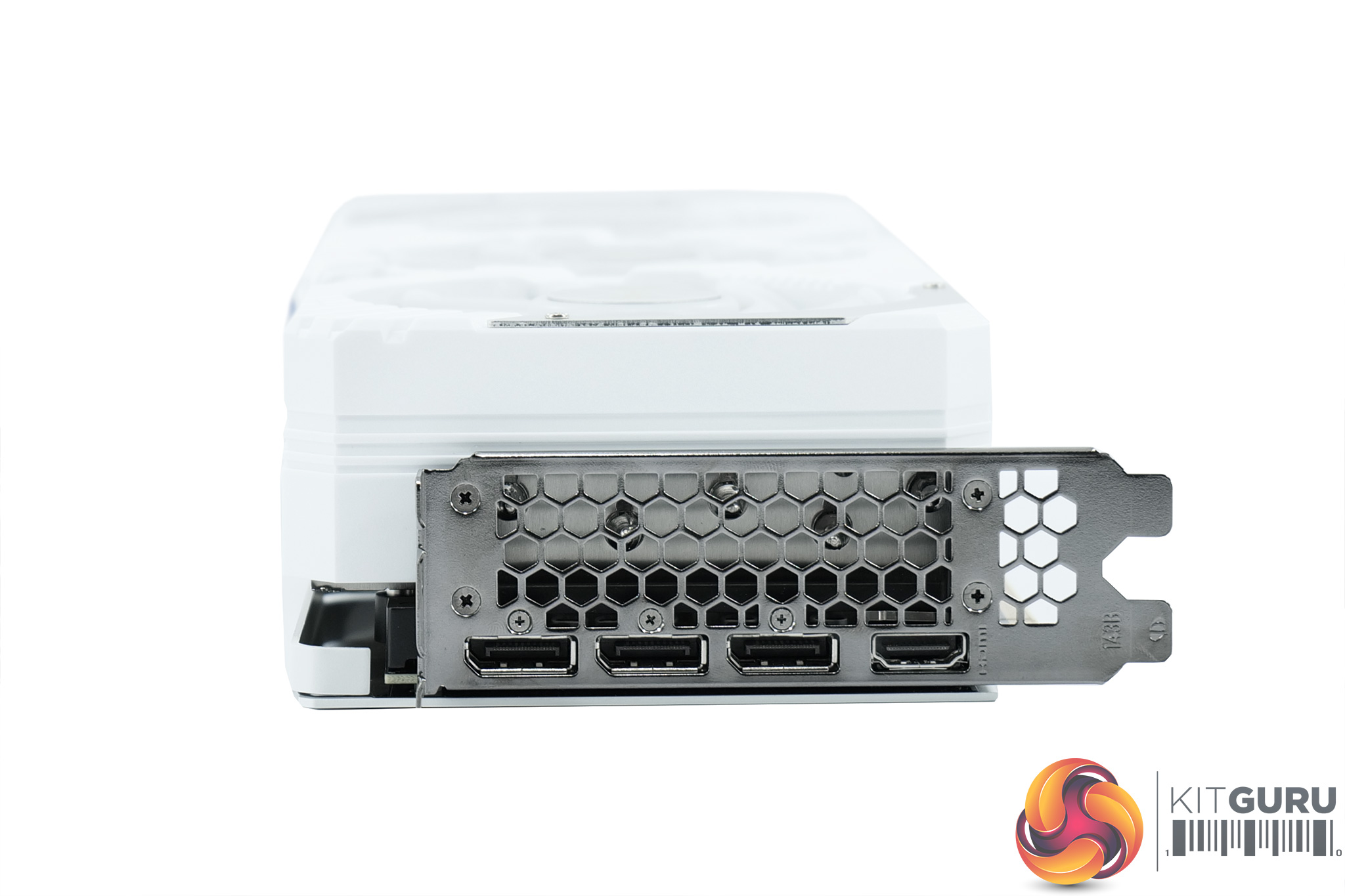
Power is supplied by a single 12VHPWR/PCIe Gen5 power connector, though a dual 8-pin adapter is included in the box. You can also note a small 3-pin header next to the power connector, and this is for the 5V ARGB cable.
Display outputs are standard, with 3x DisplayPort 1.4 and 1x HDMI 2.1 connectors.
Driver Notes
- AMD GPUs were benchmarked with the Adrenalin 23.12.1 driver.
- Nvidia GPUs (except RTX 4070 Super/RTX 4070 Ti Super) were benchmarked with the 546.33 driver.
- RTX 4070 Super was benchmarked with the 546.52 driver supplied to press.
- RTX 4070 Ti Super was benchmarked with the 551.15 driver supplied to press.
- RTX 4080 Super was benchmarked with the 551.22 driver supplied to press.
Results are only directly comparable where this exact configuration has been used.
Test System:
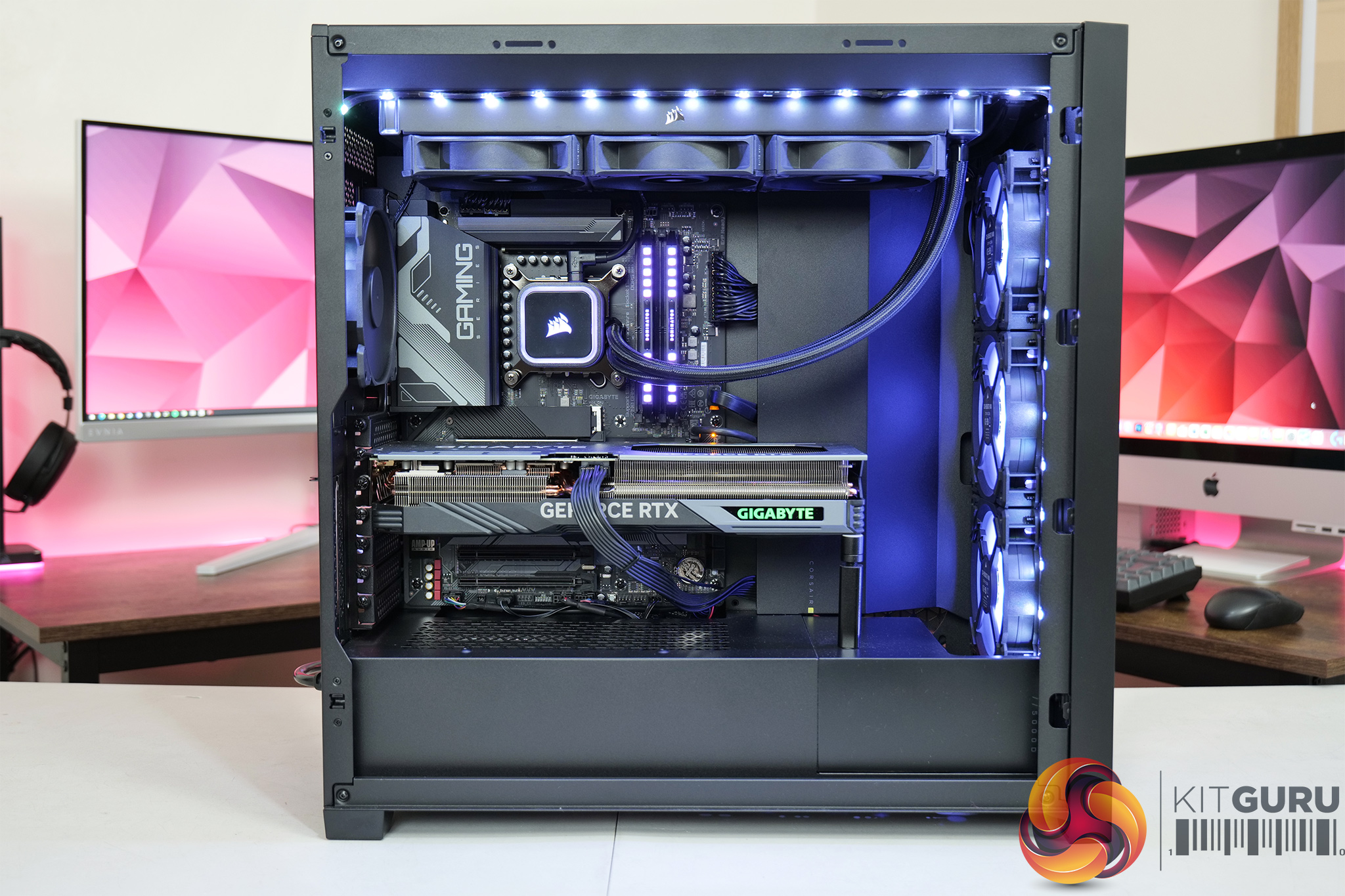
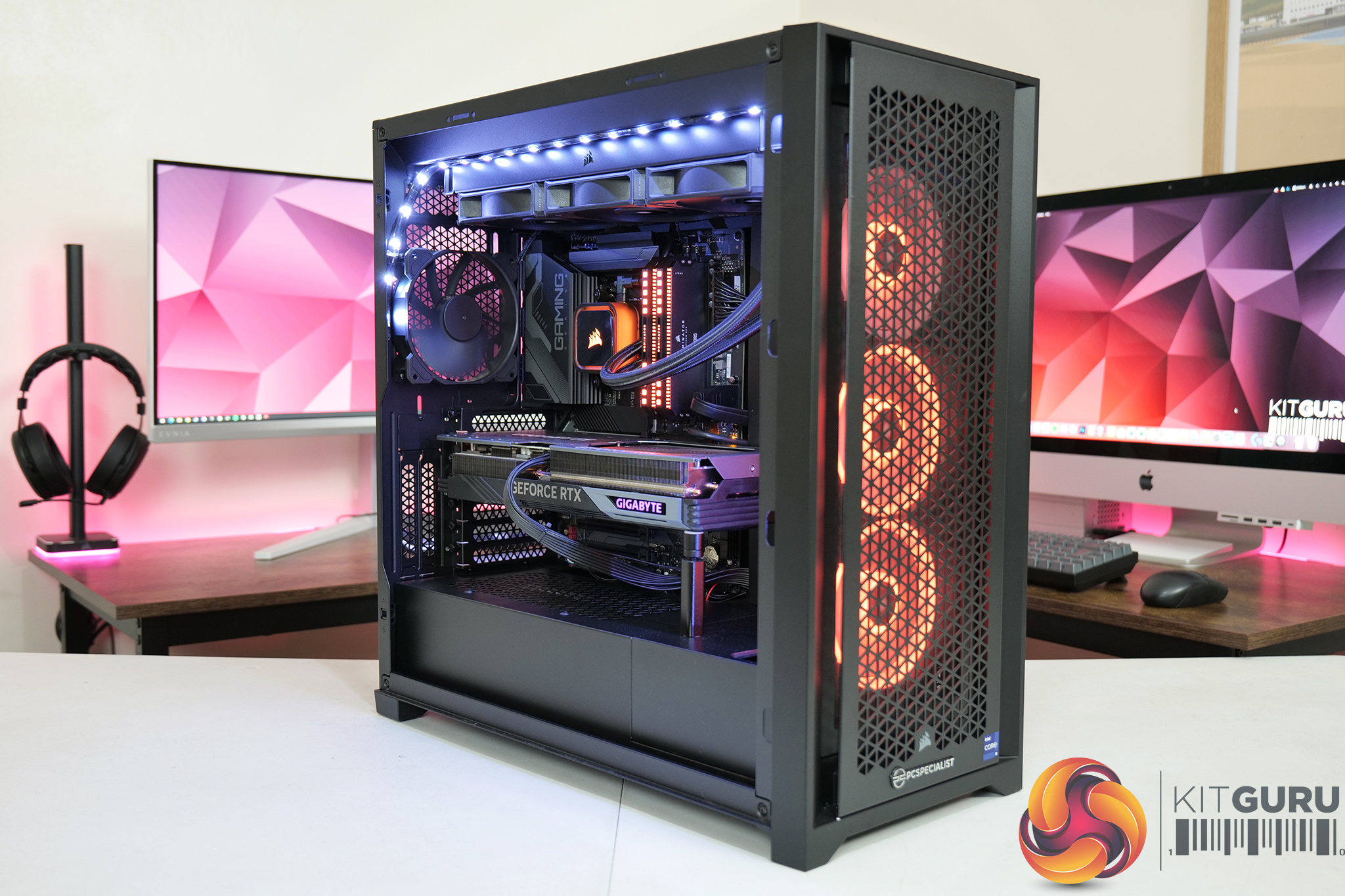
We test using a custom built system from PCSpecialist, based on Intel’s Rocket Lake platform. You can read more about this system HERE and configure your own PCSpecialist system HERE.
| CPU |
Intel Core i9-13900KS
|
| Motherboard |
Gigabyte Z790 Gaming X AX
|
| Memory |
32GB (2x16GB) Corsair Dominator Platinum RGB DDR5 6000MHz
|
| Graphics Card |
Varies
|
| SSD |
4TB Seagate Firecuda 530 Gen 4 PCIe NVMe
|
| Chassis | Corsair 5000D Airflow Tempered Glass Gaming Case |
| CPU Cooler |
Corsair iCUE H150i Elite RGB High Performance CPU Cooler
|
| Power Supply |
Corsair 1600W Pro Series Titanium AX1600i Digital Modular PSU
|
| Operating System |
Windows 11 23H2
|
| Monitor |
MSI Optix MPG321UR-QD
|
| Resizable BAR |
Enabled for all supported GPUs
|
Comparison Graphics Cards List
- AMD RX 7900 XTX 24GB
- AMD RX 7900 XT 20GB
- AMD RX 7800 XT 16GB
- Sapphire RX 7700 XT Pulse 12GB
- AMD RX 6700 XT 12GB
- Nvidia RTX 4090 FE 24GB
- Nvidia RTX 4080 Super FE 16GB
- Nvidia RTX 4080 FE 16GB
- Gigabyte RTX 4070 Ti Super Aero OC 16GB
- MSI RTX 4070 Ti Super Ventus 3X 16GB
- Gigabyte RTX 4070 Ti Gaming 12GB
- Nvidia RTX 4070 FE 12GB
- Nvidia RTX 4060 Ti FE 8GB
- Gigabyte RTX 3080 Eagle 10GB
- Nvidia RTX 3070 FE 8GB
All cards were tested at reference specifications.
Software and Games List
- 3DMark Fire Strike & Fire Strike Ultra (DX11 Synthetic)
- 3DMark Time Spy (DX12 Synthetic)
- 3DMark DirectX Raytracing feature test (DXR Synthetic)
- Alan Wake II (DX12)
- Assassin's Creed Mirage (DX12)
- Avatar: Frontiers of Pandora (DX12)
- Cyberpunk 2077 (DX12)
- F1 23 (DX12)
- Forza Horizon 5 (DX12)
- Hitman 3 (DX12)
- The Last of Us Part 1 (DX12)
- Marvel's Spider-Man Remastered (DX12)
- A Plague Tale: Requiem (DX12)
- Ratchet and Clank: Rift Apart (DX12)
- Red Dead Redemption 2 (DX12)
- Resident Evil 4 (DX12)
- Returnal (DX12)
- Shadow of the Tomb Raider (DX12)
- Starfield (DX12)
- Total War: Pharaoh (DX11)
We run each benchmark/game three times, and present mean averages in our graphs. We use FrameView to measure average frame rates as well as 1% low values (99th percentile) across our three runs.
Here we test five games, all at 3840×2160 resolution using maximum image quality settings.
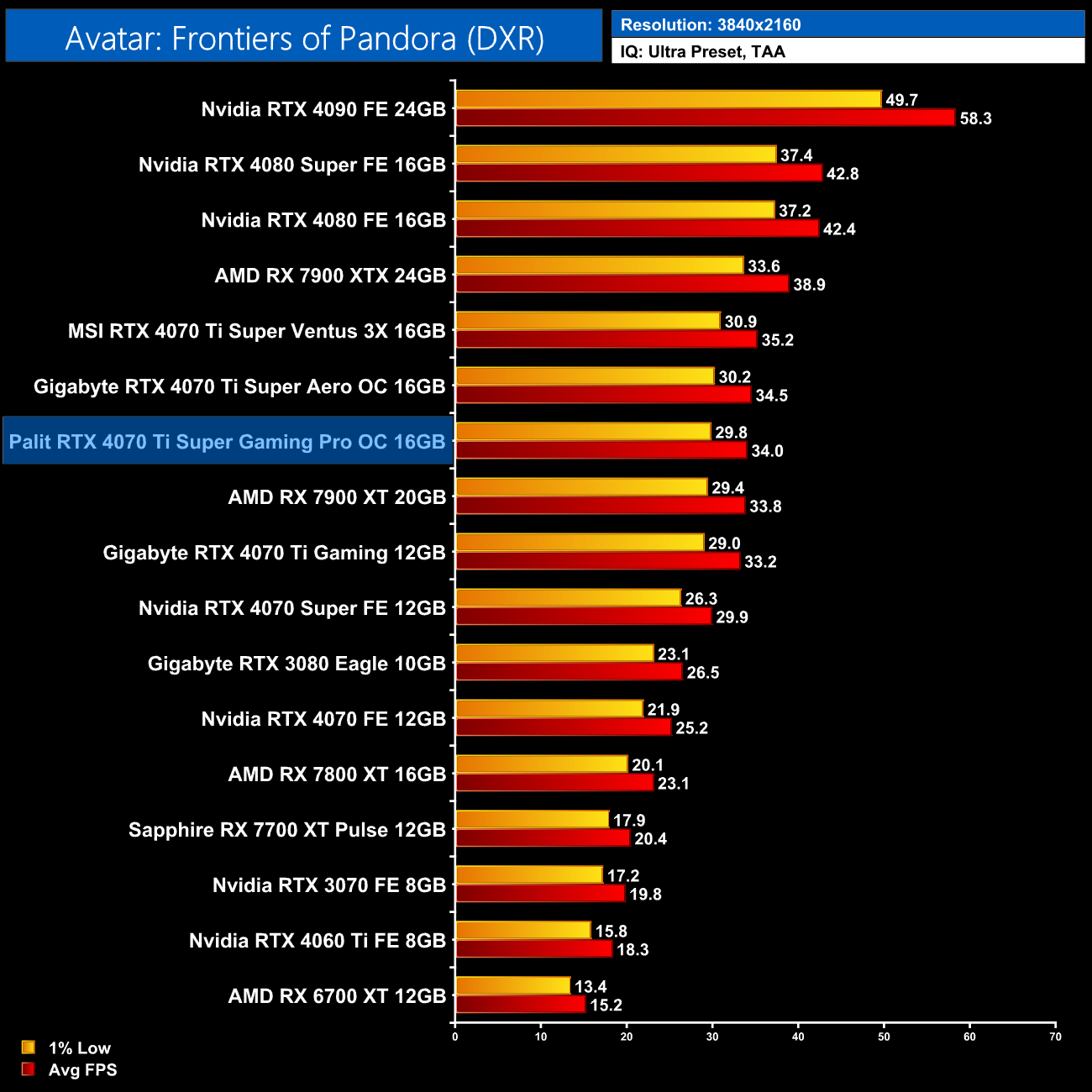
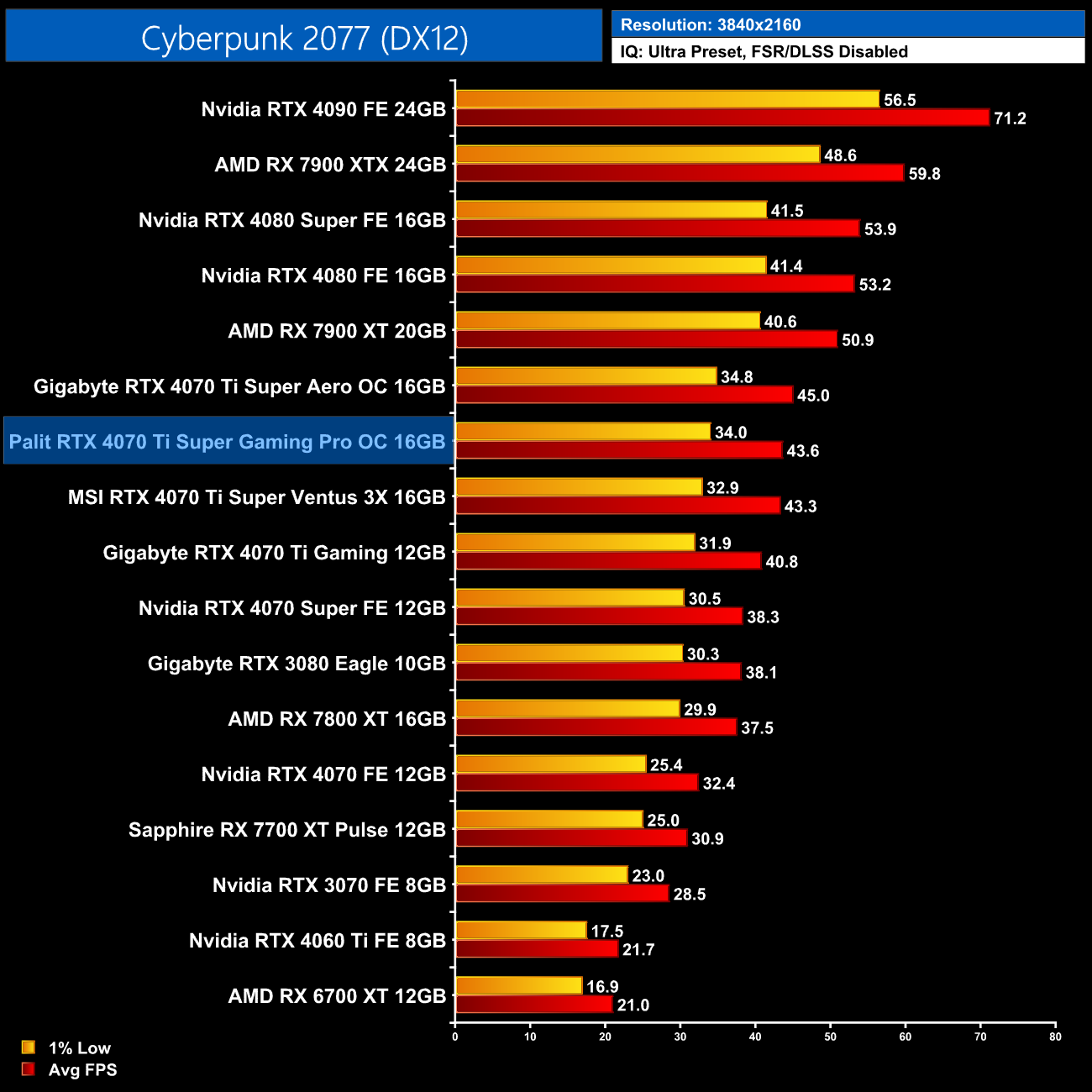
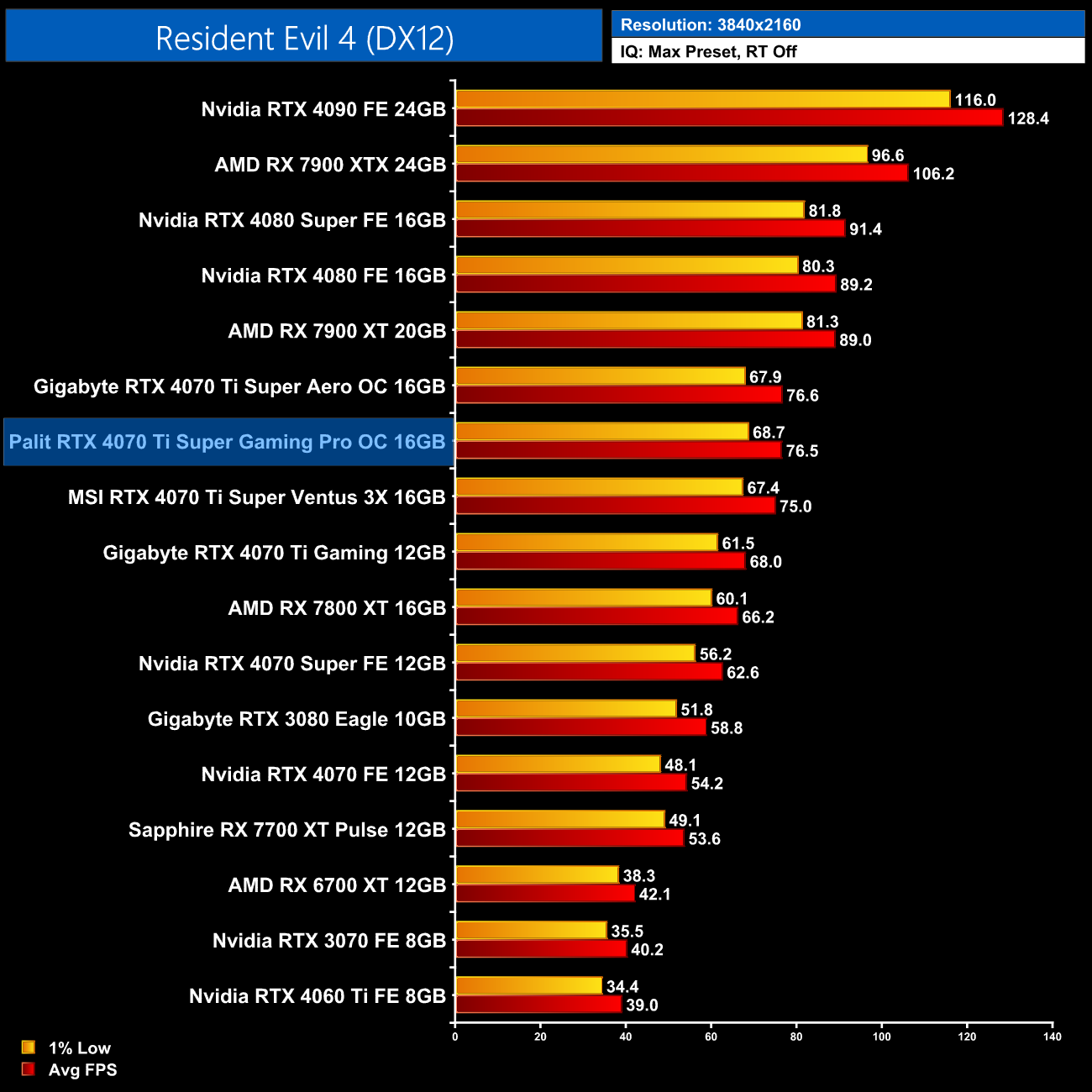
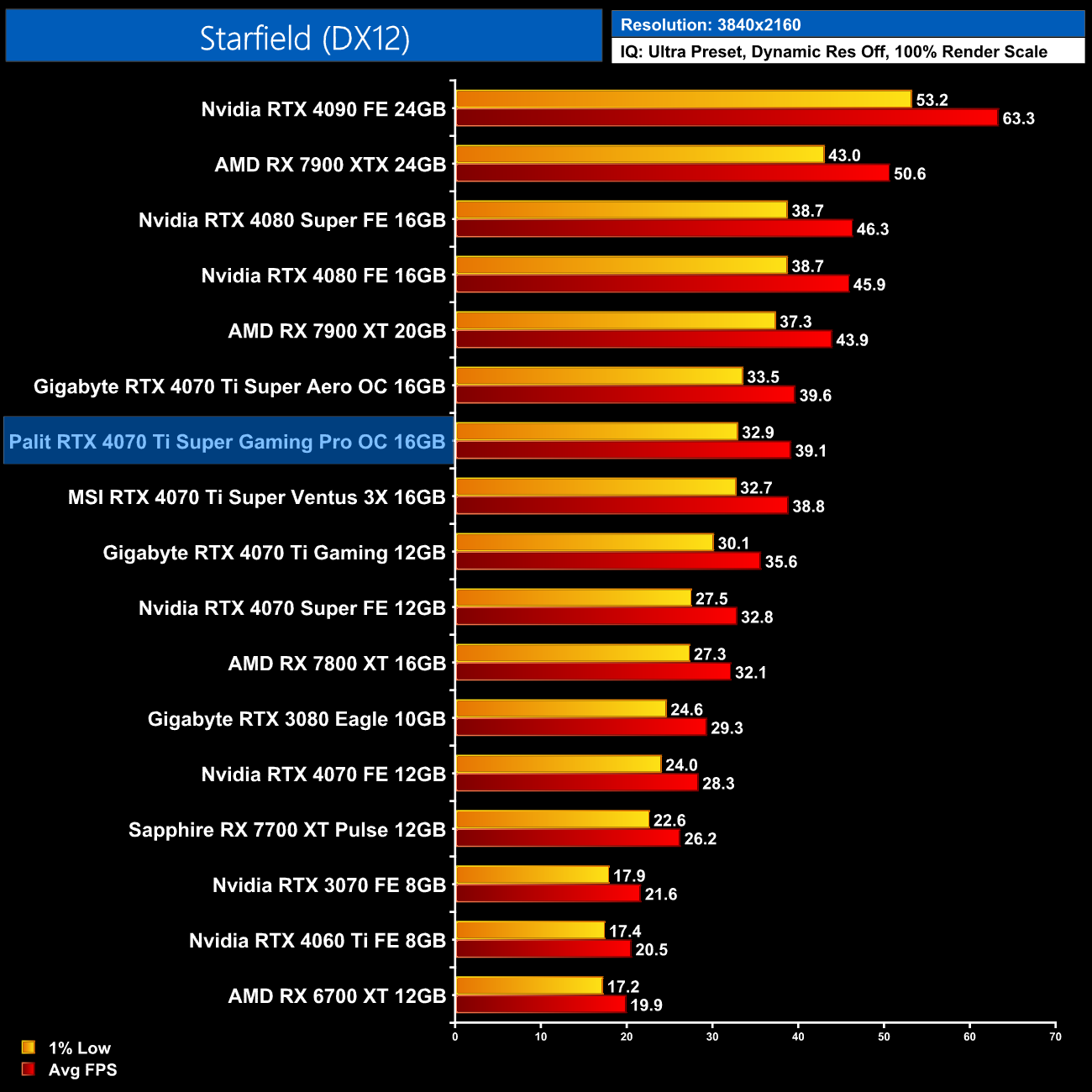
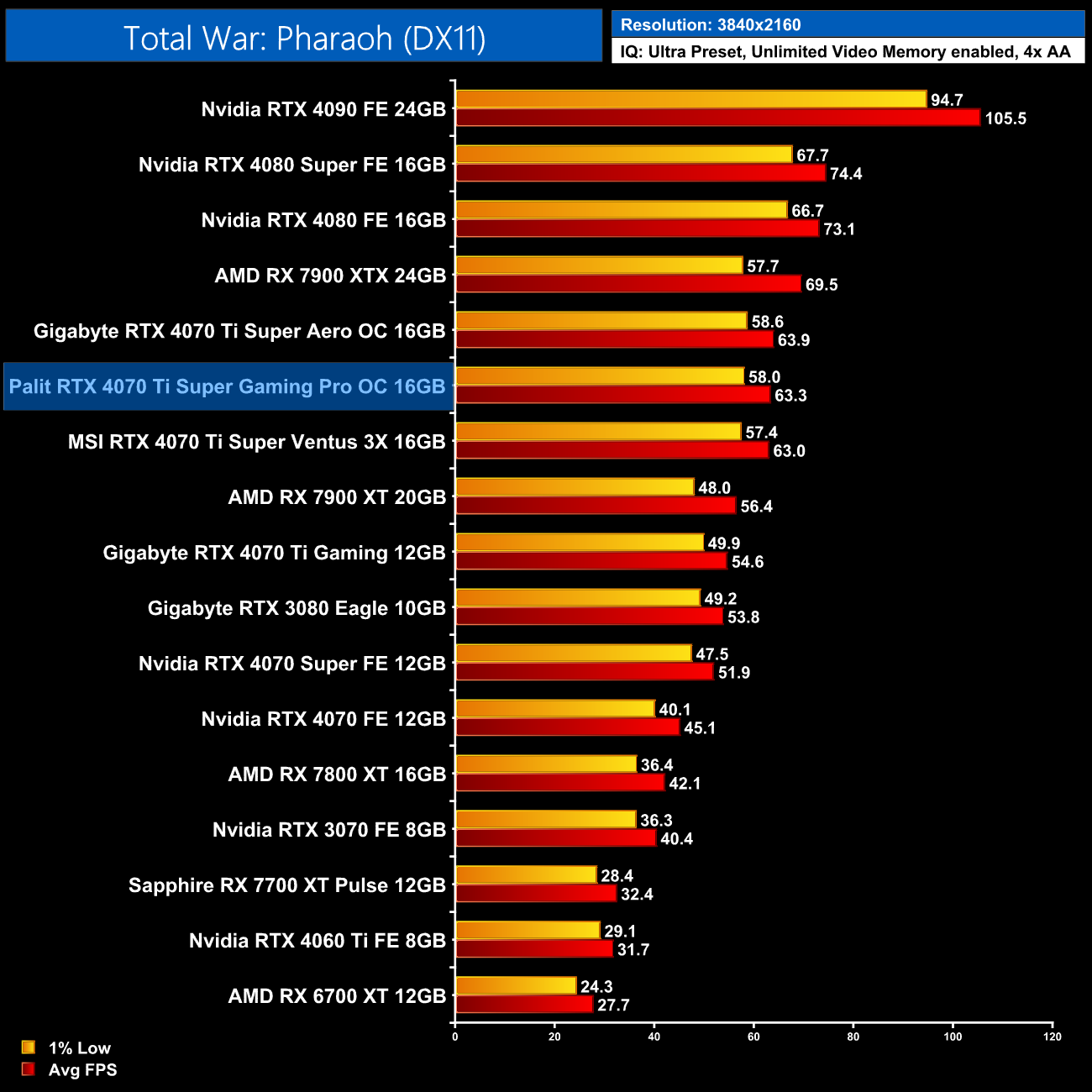
We don't focus heavily on gaming performance in our partner card reviews, for the simple reason that gaming performance is all very similar regardless of the model you opt for. As we can see above, the three RTX 4070 Ti Super card we have tested all perform within 1-2FPS of each other, so there's no discernible difference when gaming in the real world.
Here we present the average clock speed for each graphics card while running Cyberpunk 2077 for 30 minutes. We use GPU-Z to record the GPU core frequency during gameplay. We calculate the average core frequency during the 30 minute run to present here.
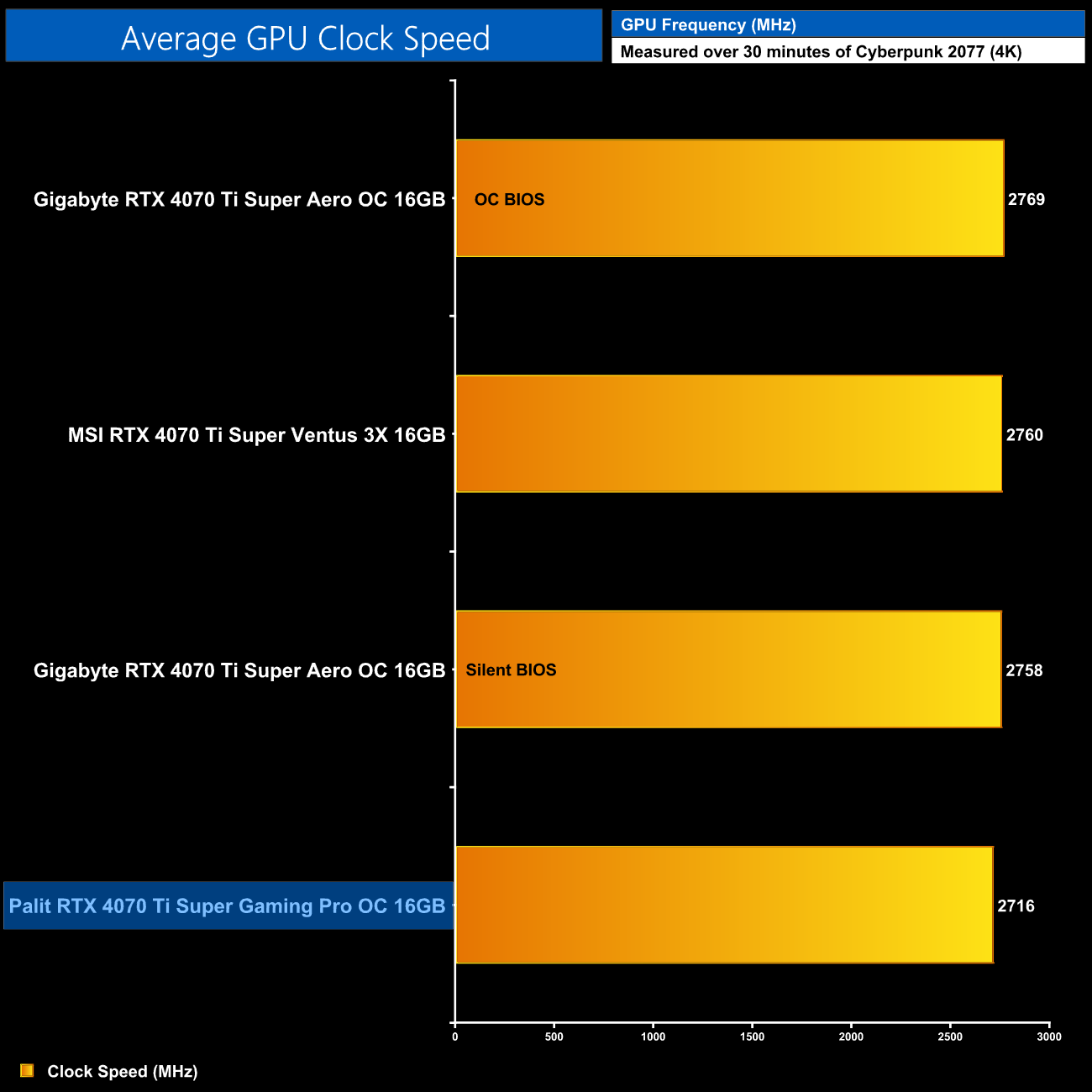
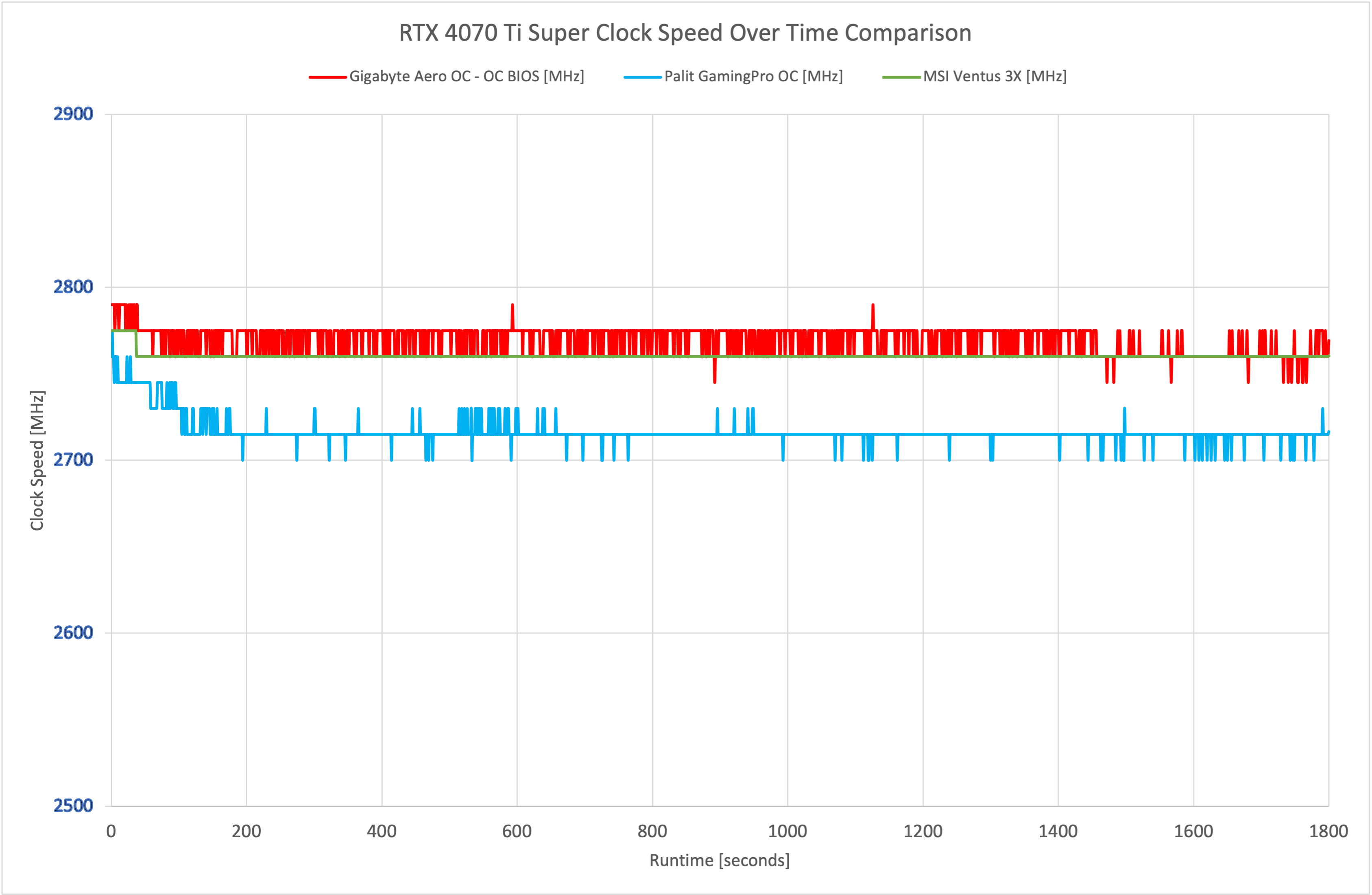
Just like we saw in our gaming benchmarks, there's little to split between the three 4070 Ti cards in terms of operating clock speed. The Palit GamingPro OC did run the slowest, starting off the stress test at 2775MHz before dropping back down to 2715MHz, but it's only 50-60MHz behind the Gigabyte and MSI models.
For our temperature testing, we measure the peak GPU core temperature under load. A reading under load comes from running Cyberpunk 2077 for 30 minutes.
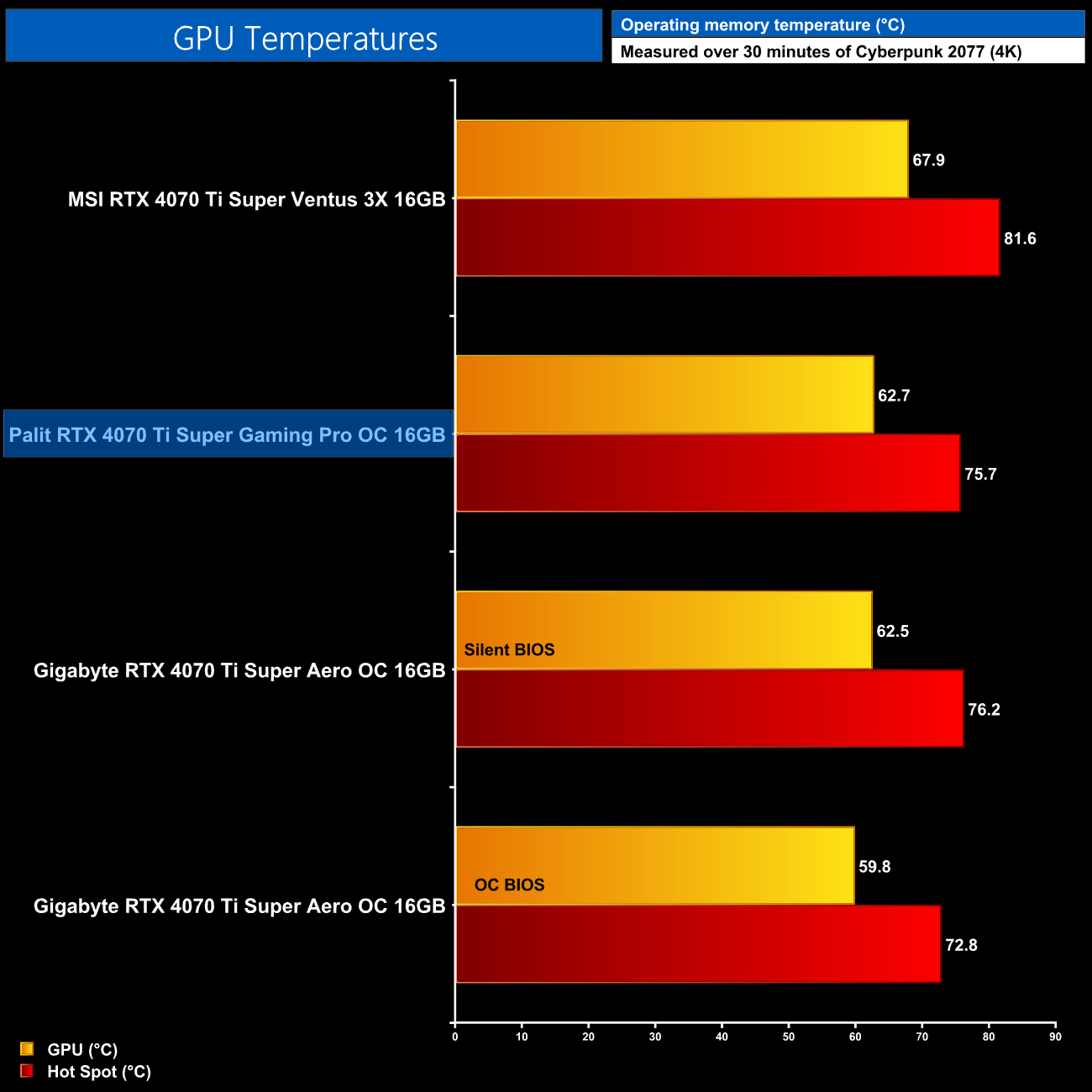
As for out of the box thermals, the GamingPro OC is a solid performer. It saw a peak GPU temperature of 62.7C, with the hot spot at 75.7C, so it's very similar to the Aero OC when using its Silent BIOS. Of course, these results don't take noise levels into account, as the results are taken when using the default fan curve, but we'll move onto noise levels shortly.
For our memory temperature testing, we measure the peak memory temperature under load. A reading under load comes from running Cyberpunk 2077 for 30 minutes.
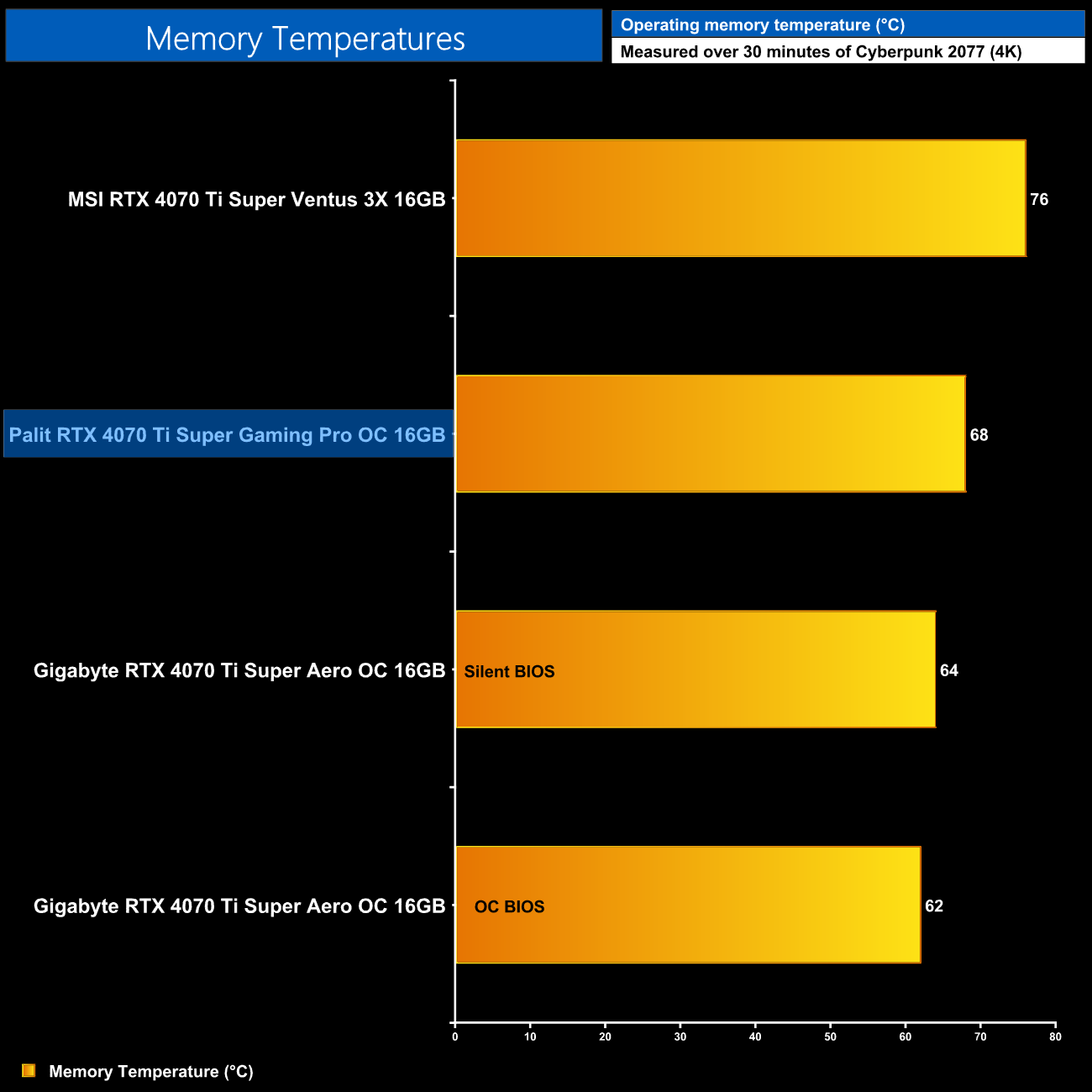
Likewise, memory thermals are absolutely fine, with the GamingPro hitting 68C. The Gigabyte Aero OC does run 4-6C cooler depending on the BIOS used, but this won't make much – if any – difference in the real world.
We take our noise measurements with the sound meter positioned 1 foot from the graphics card. I measured the noise floor to be 32 dBA, thus anything above this level can be attributed to the graphics cards. The power supply is passive for the entire power output range we tested all graphics cards in, while all CPU and system fans were disabled. A reading under load comes from running Cyberpunk 2077 for 30 minutes.
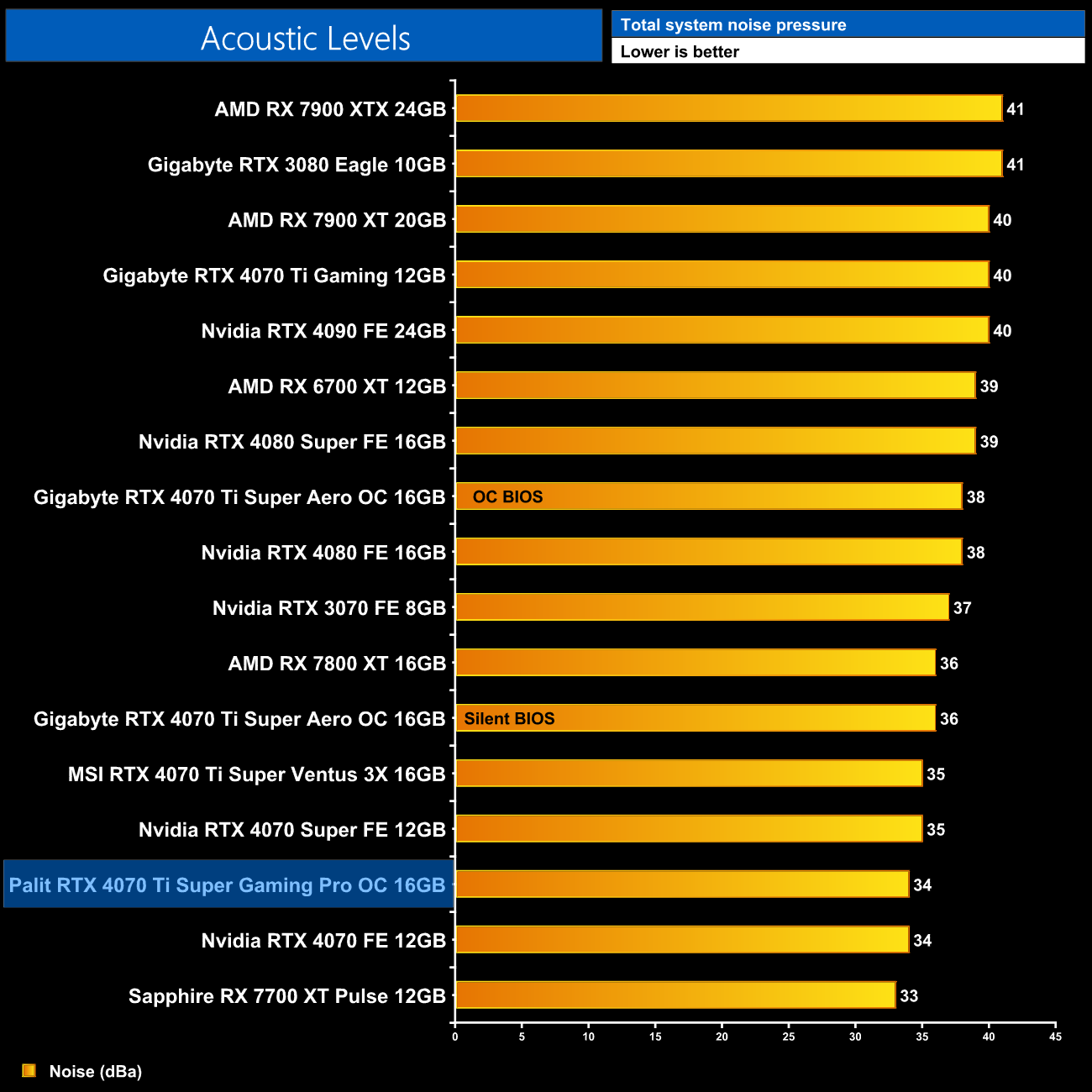
One area where the Palit GamingPro OC excels is out of the box noise levels. We saw the three fans spin at just 33%, which is 1250rpm, resulting in a noise reading of just 34dBa, the quietest of all three 4070 Ti Supers tested.
Following on from our stock thermal and acoustic testing, here we re-test the operating temperature of the GPU, but with noise levels normalised to 40dBa. This allows us to measure the efficiency of the overall cooling solution as varying noise levels as a result of more aggressive fan curves are no longer a factor.
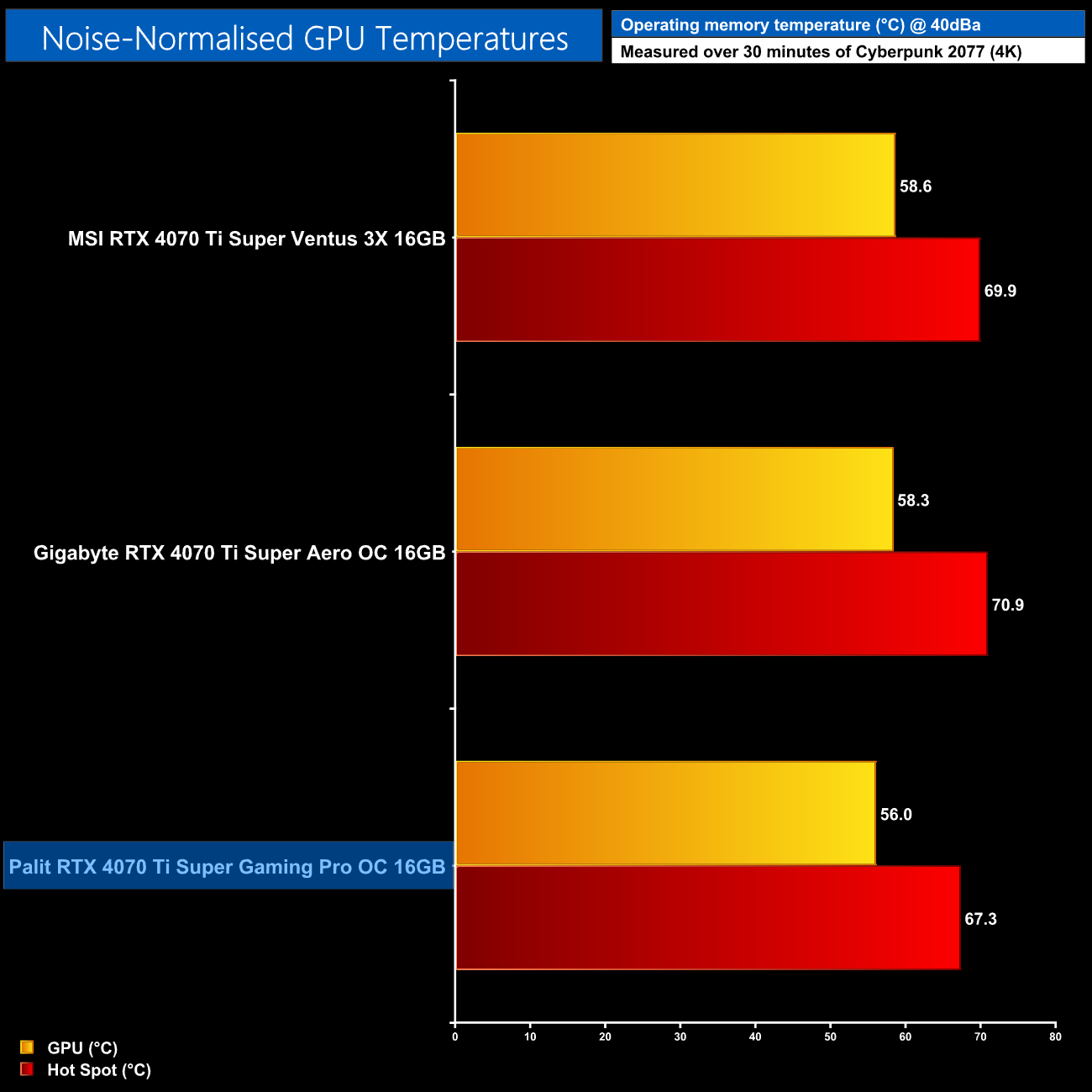
Once we normalised noise levels to 40dBa, the Palit actually delivered the best thermal performance, with a peak GPU temperature of 56C, while the hot spot hit 67.3C. That makes it 2-3C cooler than the Aero OC when noise-normalised, so it's not a massive difference but it does indicate the Palit's cooler is slightly more performant overall – though we would expect that considering it is bigger and heavier!
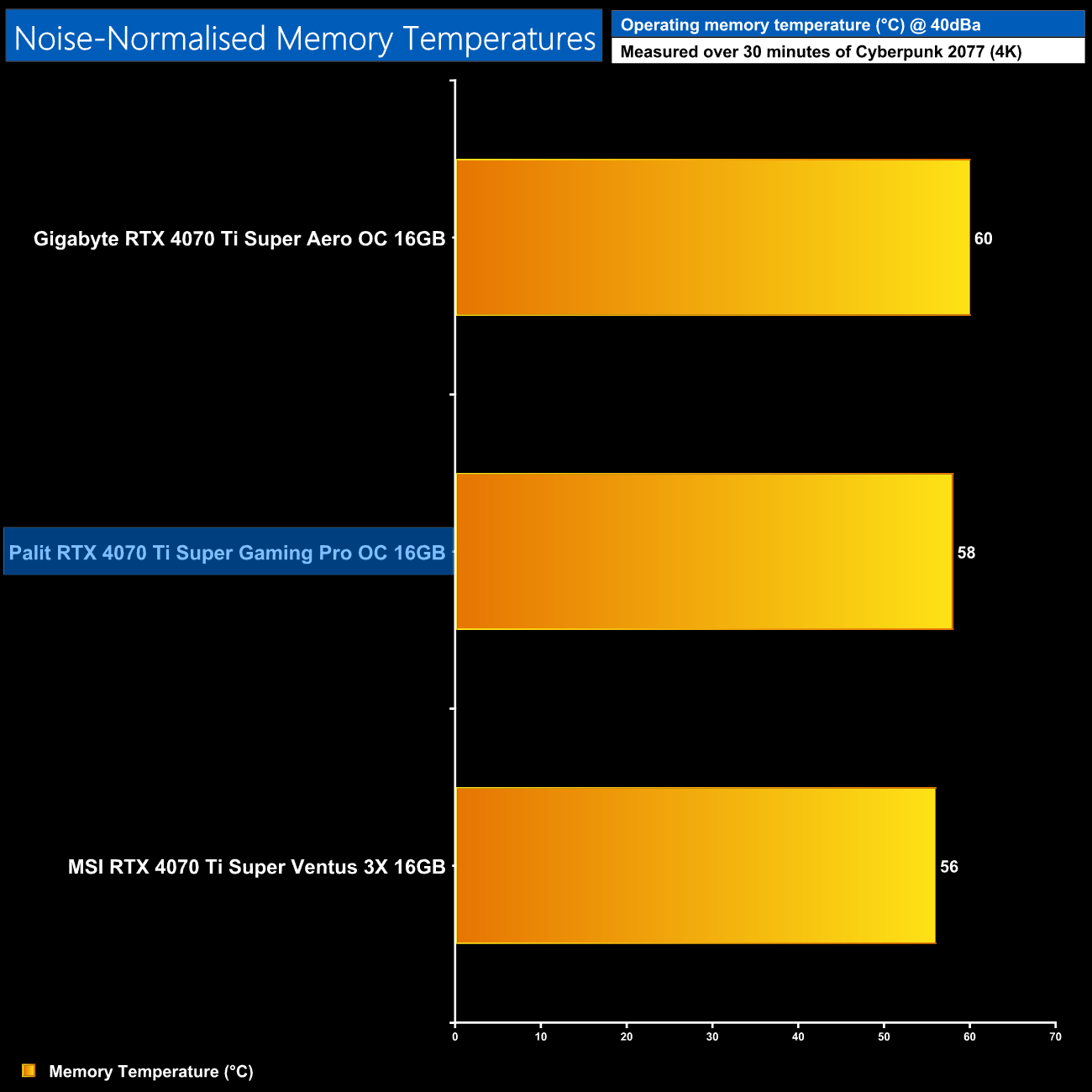
The Palit card hits 58C, compared to 56C for the MSI Ventus 3X and 60C for the Gigabyte Aero OC. All three are great results and indicate strong memory cooling.
We use Nvidia PCAT to measure power draw of the graphics card only, with readings from both the PCIe slot and the PCIe power cables combined into a single figure. We use Cyberpunk 2077 (4K) for this testing.
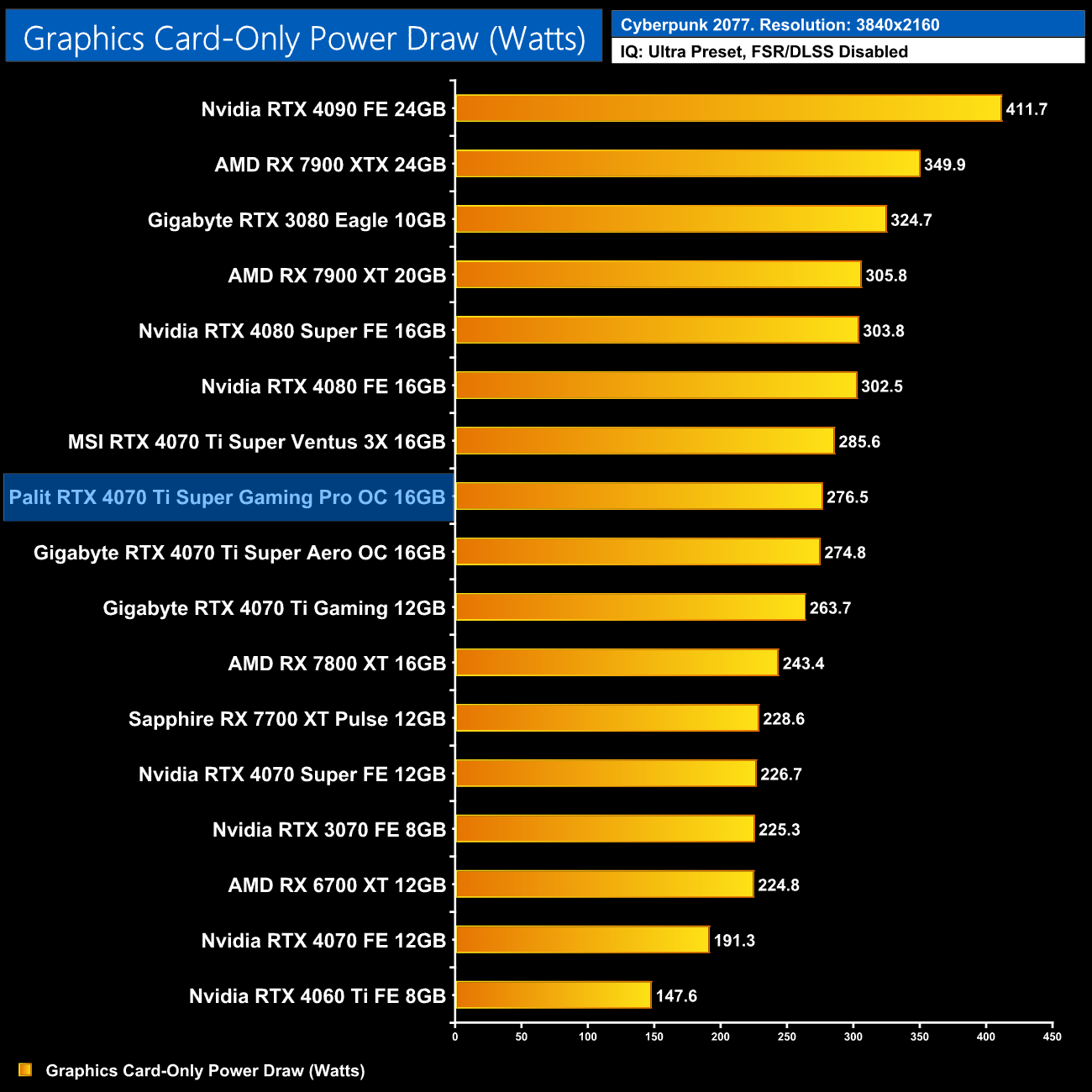
Power draw for the Palit came in a touch below the MSI Ventus 3X, as it hit 276.5W in Cyberpunk 2077 at 4K.
Combining the power draw values shown above with the performance data, we present performance per Watt for each graphics card tested:
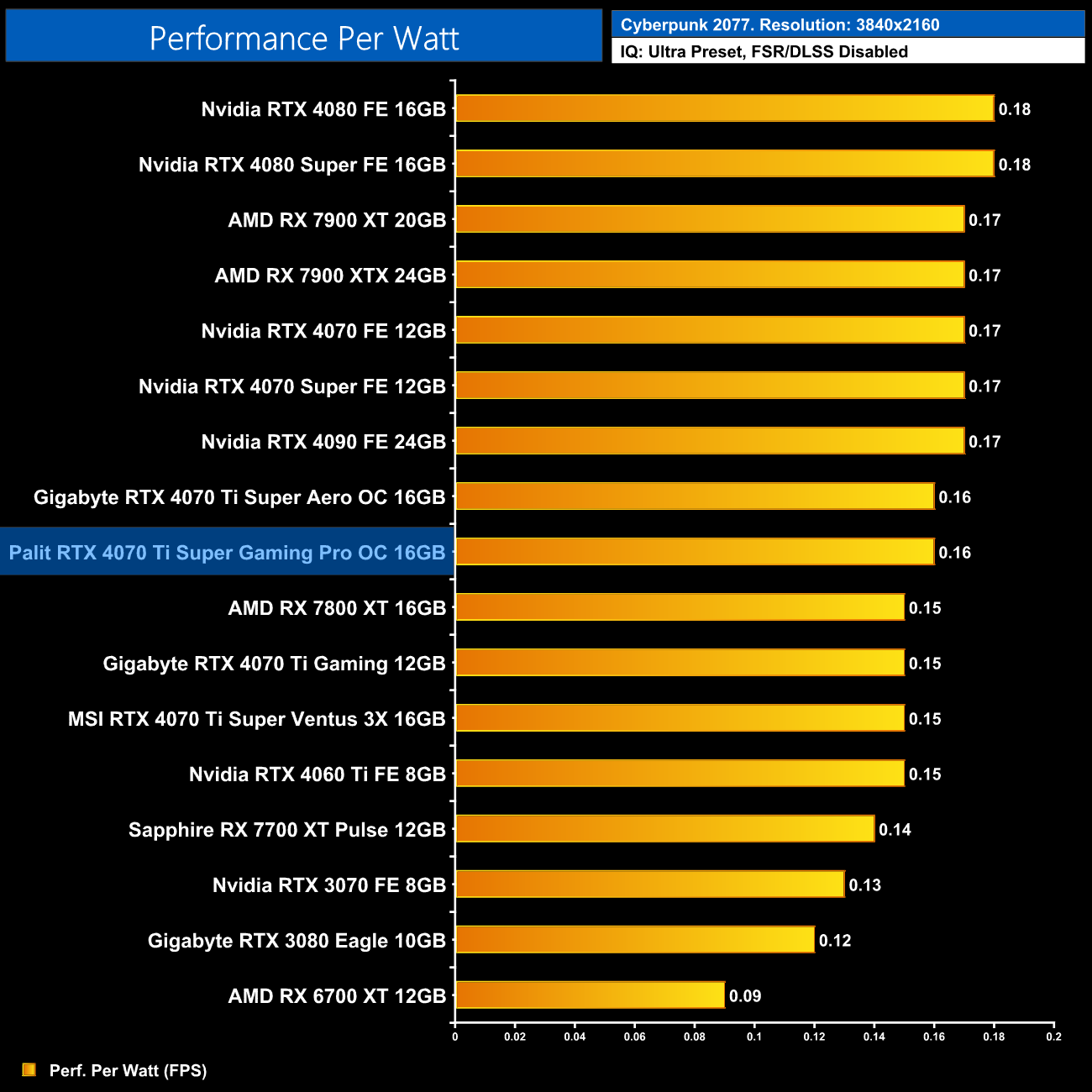
That slight drop in power versus the Ventus 3X does improve efficiency by a hair, but there's not much in it at all.
For our manual overclocking tests, we used MSI Afterburner. Our best results are as below.
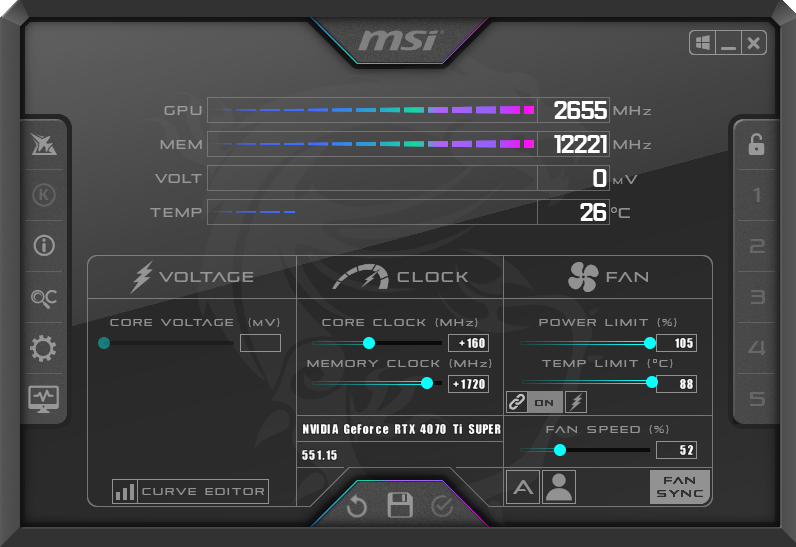
Palit only allows the power limit to be increased to 300W, or up to 105% in MSI Afterburner. With that slider maximised, we were able to add 160MHz to the GPU and 1720MHz to the memory.
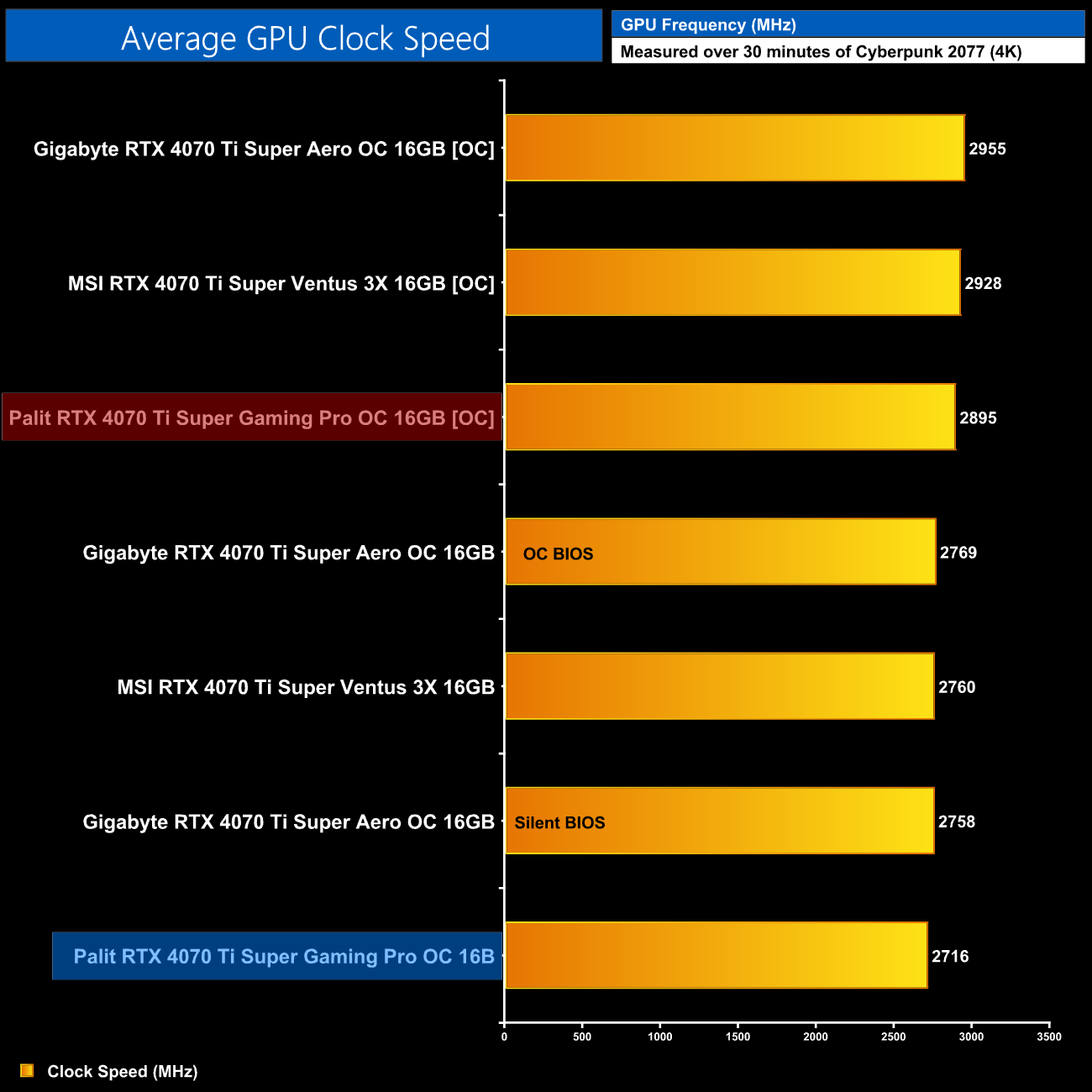
That saw average clock speed increase to just below 2900MHz, which is still about 30-60MHz slower than the other two models tested.
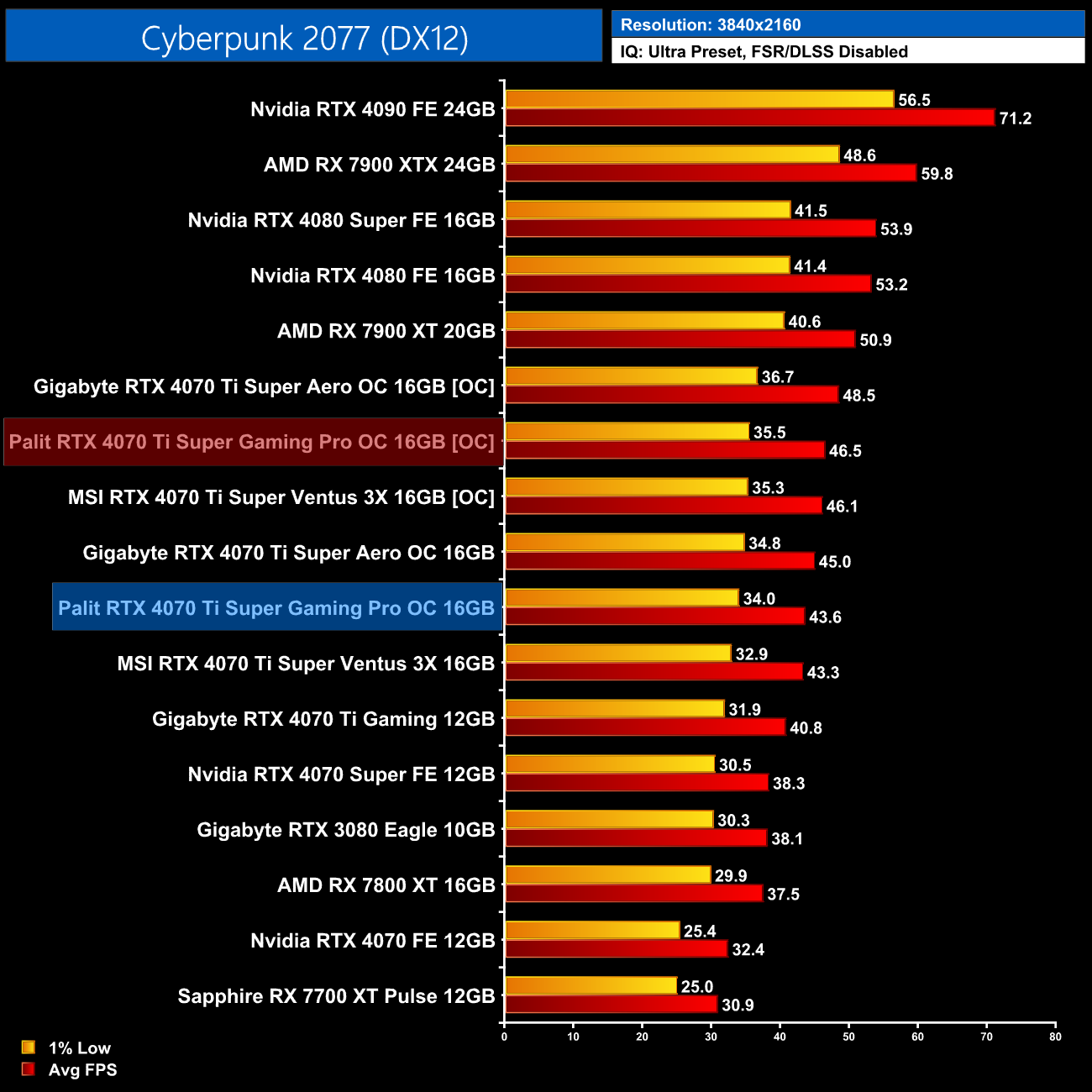
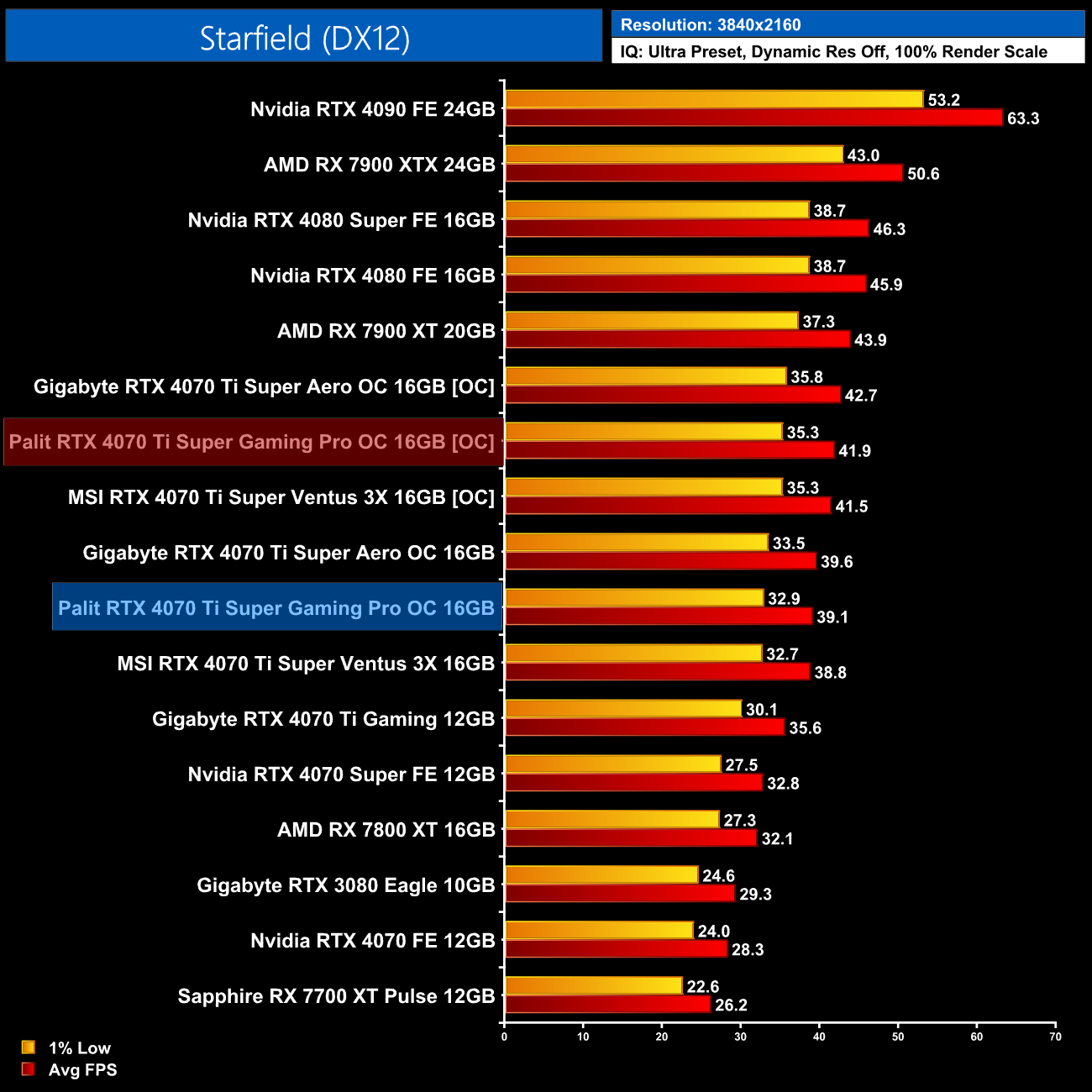
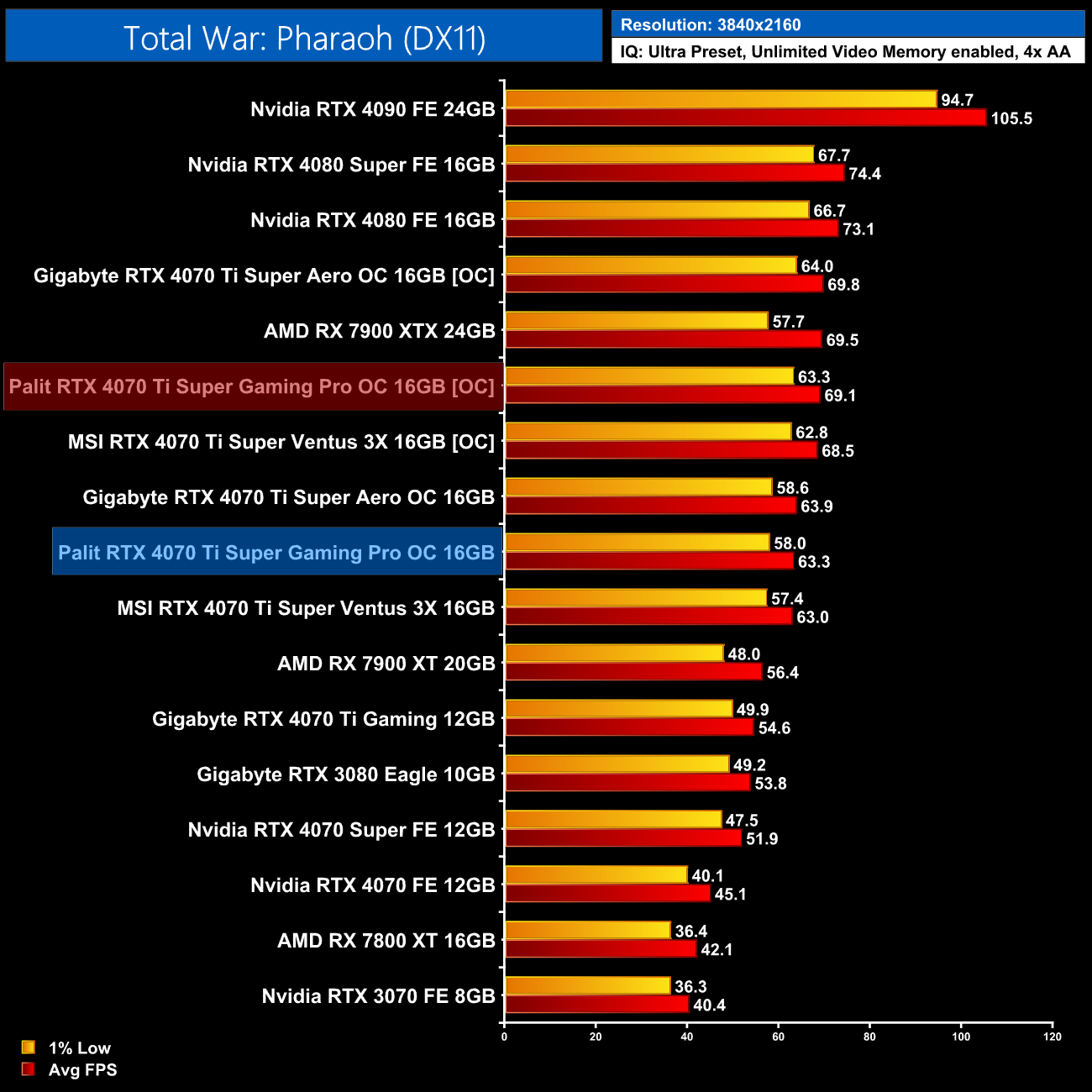
This overclock netted a performance increase of 7-9% in the three titles we re-tested, which is about as expected for an Ada Lovelace GPU.
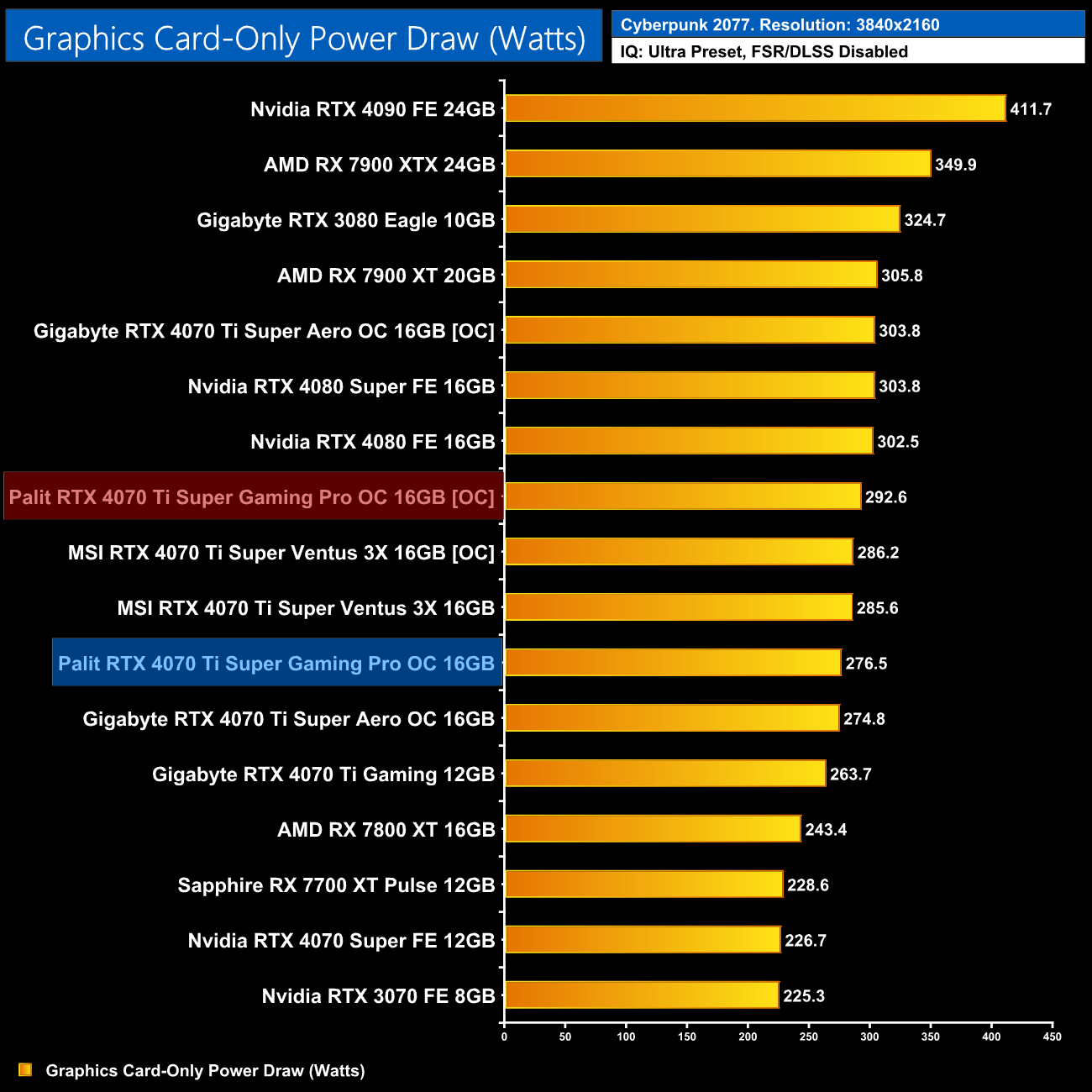
Power draw also rose slightly, up from 276.5W stock, to 292.6W when overclocked, which is only a 6% increase.
Today we have returned to the RTX 4070 Ti Super just a couple weeks on from its launch, with this review of Palit's GamingPro White OC model. While a lot of attention will deservingly go towards the design and aesthetics, Palit has also built an effective cooler that performs well against the competition.
Out of the box, the GPU only peaked at 63C, with the default fan curve being very easy on the ears, as noise-levels hit just 34dBa, making this the quietest of the three 4070 Ti Supers we have tested so far. It also delivered the best noise-normalised thermal results, though we would expect that considering it is also the biggest and heaviest of the three models tested. Still, a win is a win and the cooler here is more than capable of dealing with the 285W AD103 GPU under the hood.
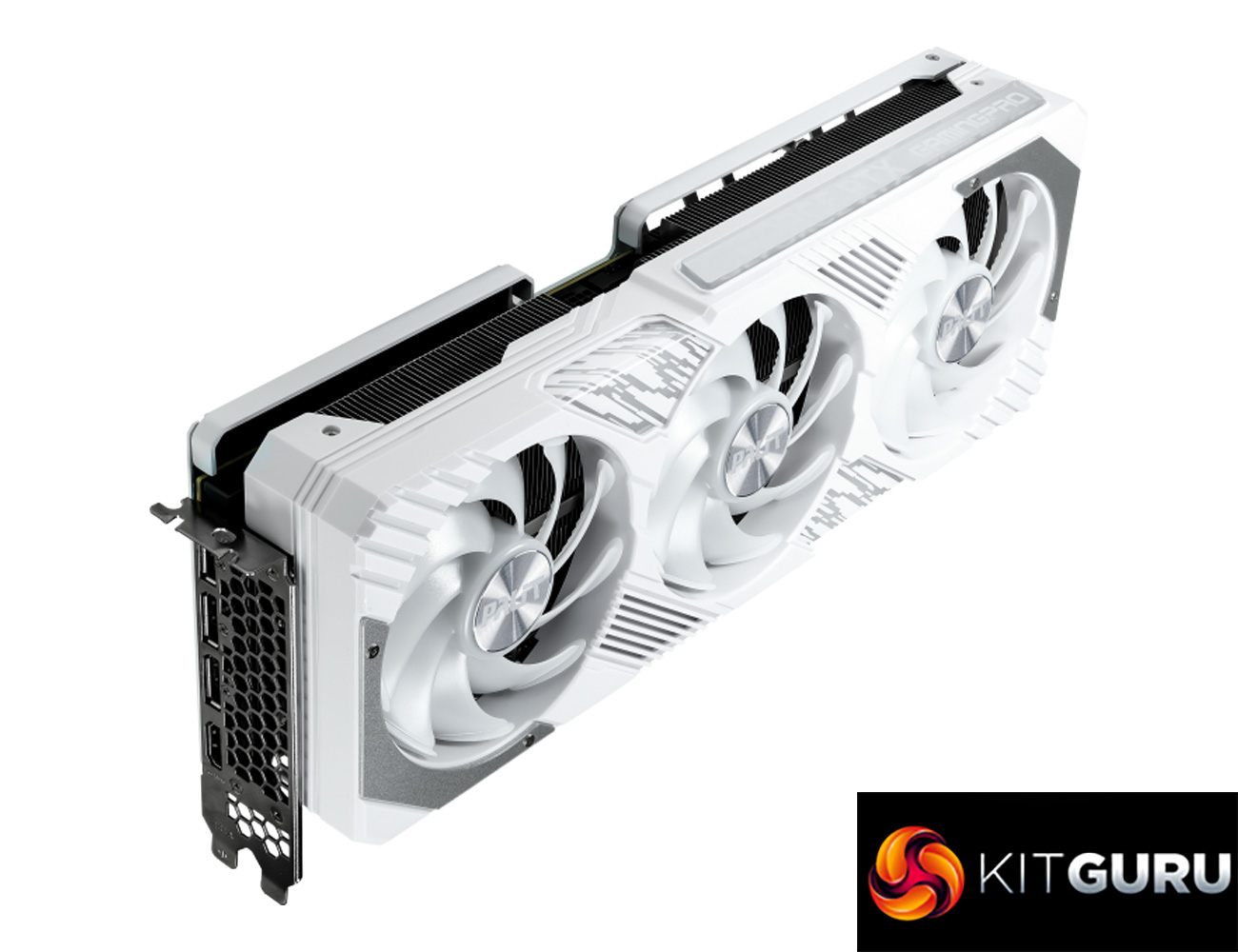
Subjectively, it's a great-looking card too with plentiful RGB lighting. Palit deserves credit for implementing an on-board 5V ARGB header, allowing users an easy way of synchronising the card's lighting with the rest of your system.
While that's a positive, I still find it disappointing there is no dual-BIOS switch, something I would certainly expect at the price point of the 4070 Ti Super as this is not a cheap graphics card. We even said the same in our 4080 Super JetStream OC review and that graphics card is even more expensive, so I do think Palit needs to start adding dual-BIOS as a priority for its next generation graphics cards.
Additionally, Palit is generally quite conservative with its power limits, as this can only be increased to 300W (+5%) with the GamingPro OC. If you're not planning on overclocking it won't make a difference to you, but we did see a higher average clock speed from the Gigabyte Aero OC, which is capable of increasing the power limit to 320W (+12%).
The final quirk is that it's not currently clear how much the GamingPro White OC will cost UK buyers. I found the regular black model for £850, so we'd expect a small premium for the white model. It's definitely worth considering Palit RTX 4070 Ti Super GamingPro White OC if pricing is not too far above the £850 mark, though other models like the Aero OC are similarly priced yet offer higher power limits and dual-BIOS, which is also food for thought.
Discuss on our Facebook page HERE.
Pros
- White aesthetic will have strong appeal.
- Large cooler delivers excellent thermal results.
- Very quiet out of the box.
- Best-performing 4070 Ti Super we've tested when noise-normalised.
- On-board 5V ARGB header.
- Capable for both 1440p and 4K gaming.
- Support for the full RTX feature set including DLSS, ray tracing etc.
Cons
- Power limit can only be increased by 15W (5%).
- No dual-BIOS.
- UK pricing is not clear for the white model.
- Gigabyte Aero OC is smaller and offers better memory thermals.
KitGuru says: If you're shopping for a white graphics card around the £800 mark, the Palit GamingPro OC white is worth looking at, though it faces stiff competition from the likes of the Gigabyte Aero OC.