 KitGuru KitGuru.net – Tech News | Hardware News | Hardware Reviews | IOS | Mobile | Gaming | Graphics Cards


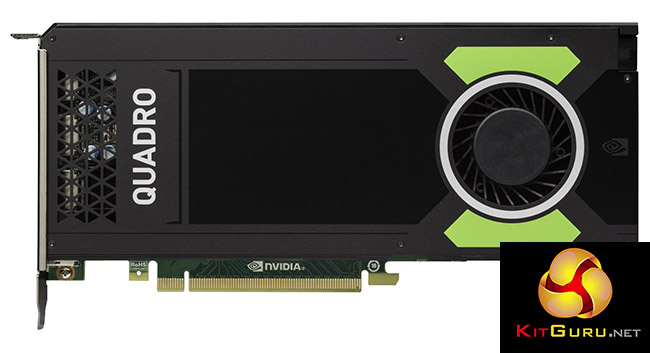
The NVIDIA Quadro M4000 has been out since August, but as the successor to the K4200, it's the flagship mainstream professional graphics card. So we are reviewing it here to show how it compares to its predecessor (and the higher-end K5200). In terms of specification, it's another step forward, despite having a similar £777 inc VAT price.
The M4000 is based on the second spin of NVIDIA's Maxwell architecture, like the Quadro M6000 we saw in the immensely powerful Scan 3XS GW-HTX35, although a more recent revision. It has much more RAM than the K4200 – in fact twice as much – and considerably more CUDA cores too. This promises a significant leap forward in performance.
Here's where the M4000 fits into the current Quadro range and compares to its predecessors:
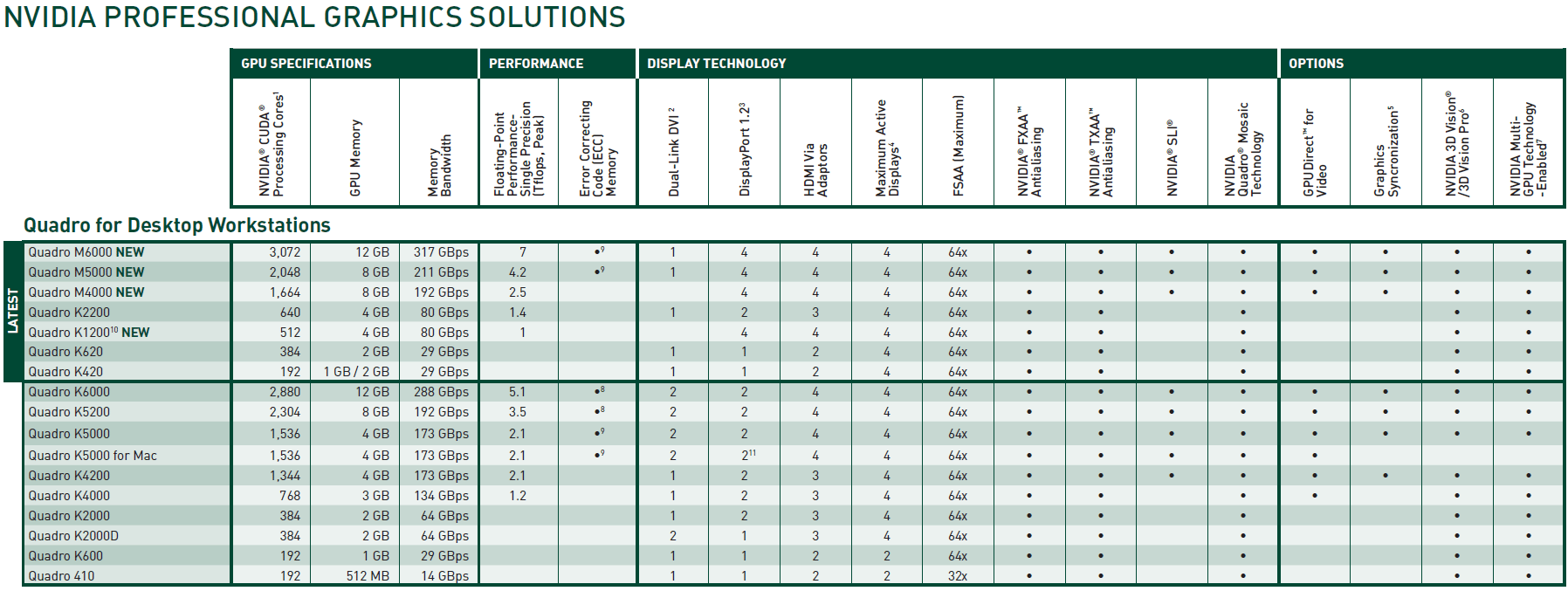
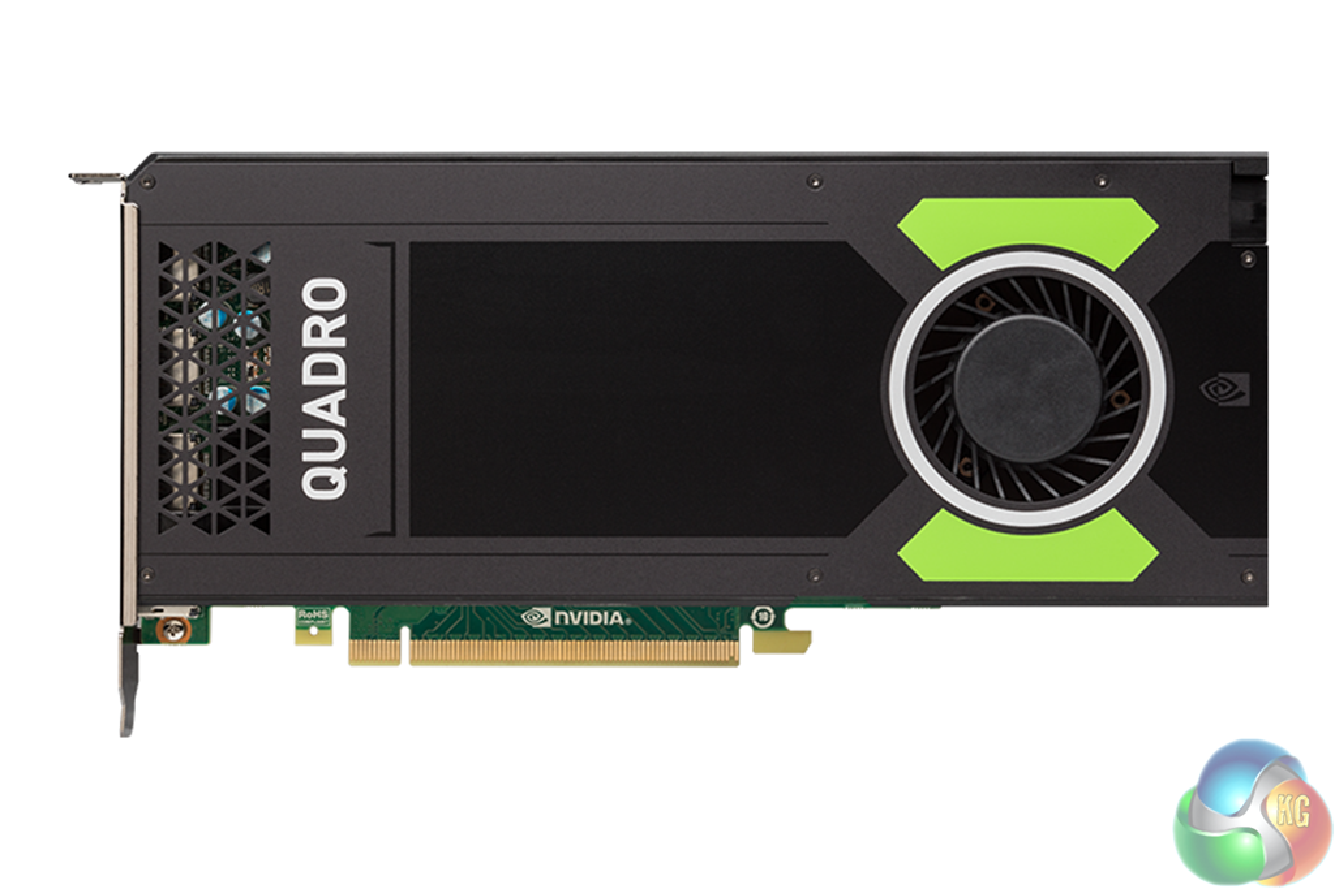
The Quadro M4000 sports 1,664 CUDA cores, compared to the previous K4200's 1,344 – so that's an increase of just under 25 per cent. The GPU uses the GM204GL revision of Maxwell, where the M6000 uses GM200GL. Whilst the K4200 has a GPU core speed of 780MHz, the M4000 uses a very similar 773MHz.
However, it's highly significant that FP64 (64-bit floating point) arithmetic logic units (ALUs) have been further reduced from 1/24 to 1/32 compared to the previous generation, which will put the M4000 at a disadvantage with applications using FP64 operations.
Most 3D content creation software doesn't, but some scientific visualisation software does, making the Kepler-based K4200 potentially still a better choice if you use software that definitely uses a lot of FP64 operations.
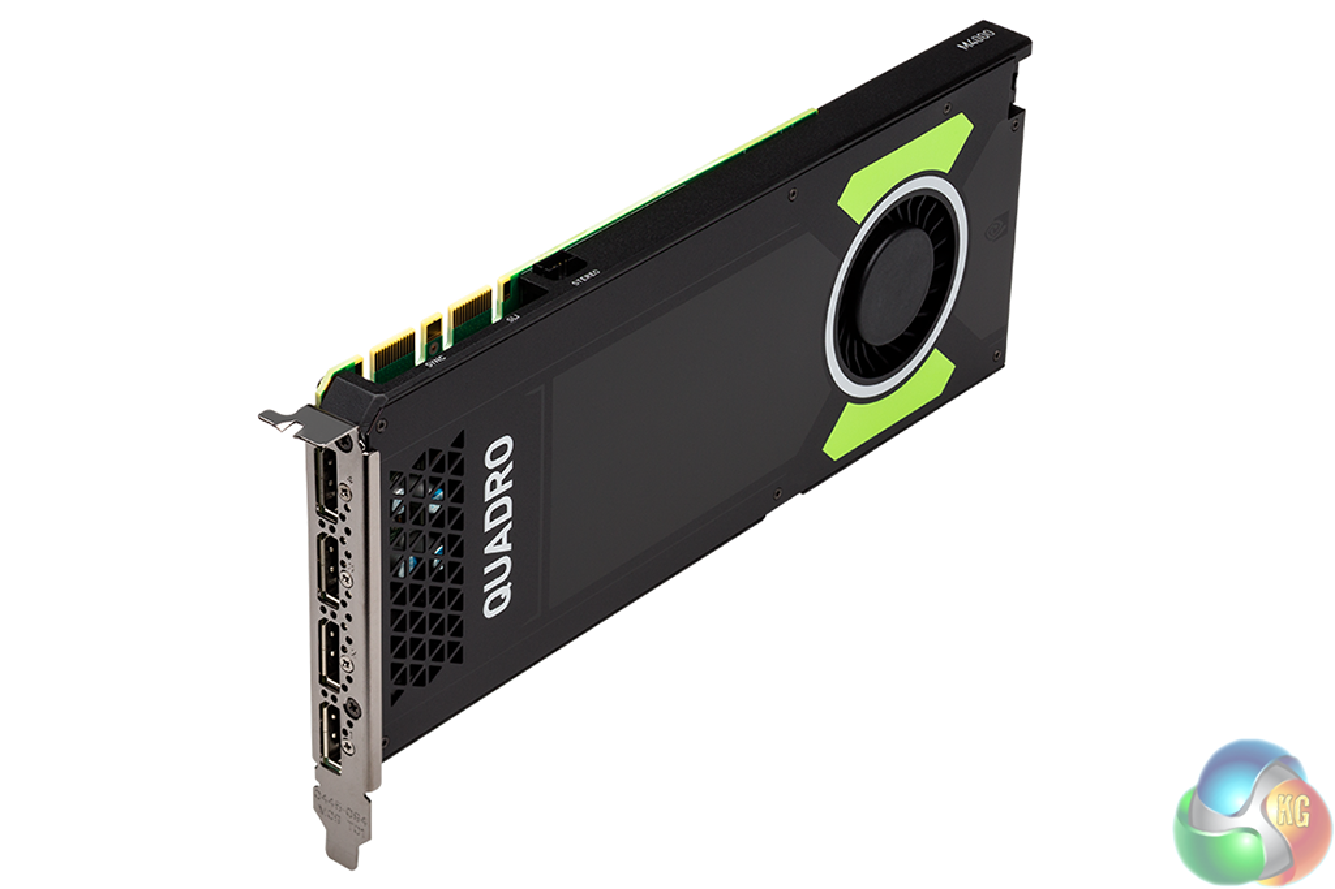
The other significant improvement over the K4200 is the quantity of memory. The M4000 sticks with the 256-bit memory path, but doubles the quantity of GDDR5 to 8GB, the same as the previous-generation ultra-high-end K5200.
This will give it substantially better abilities at handling huge texture sets compared to the K4200. The memory is also slightly faster, running at 1,502MHz compared to 1,350MHz.
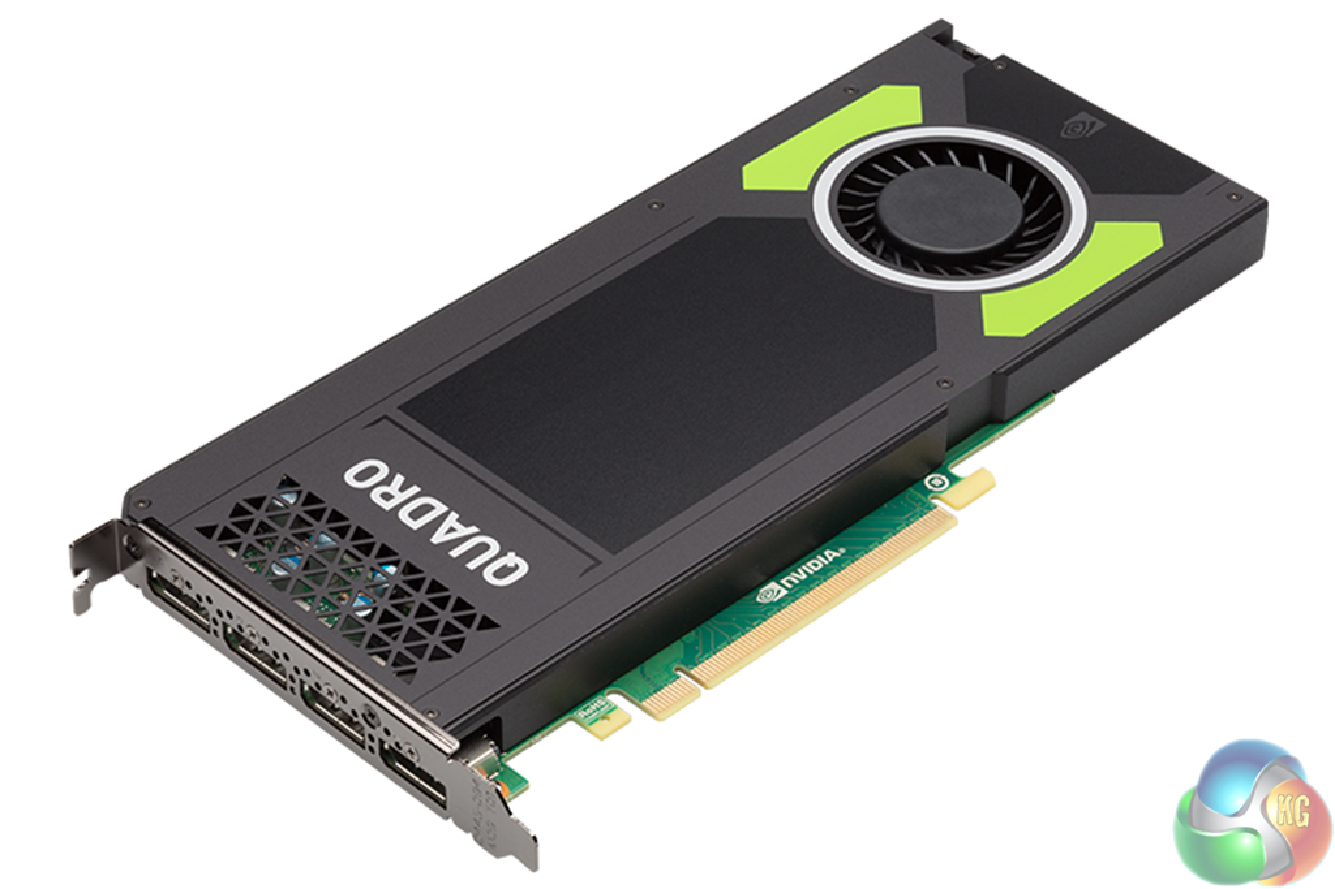
In other words, the new M4000 has the same quantity and speed of memory as the former K5200, which cost more than twice as much. It offers identical bandwidth, too, at 192GB/sec. However, the K5200 has 2,304 CUDA cores – 38 per cent more than the M4000. Whilst these run at 650MHz, it should still be comfortably ahead of the new card. So if you purchased a system with one of these in not long ago, you don't have to feel too much like you wasted your money.
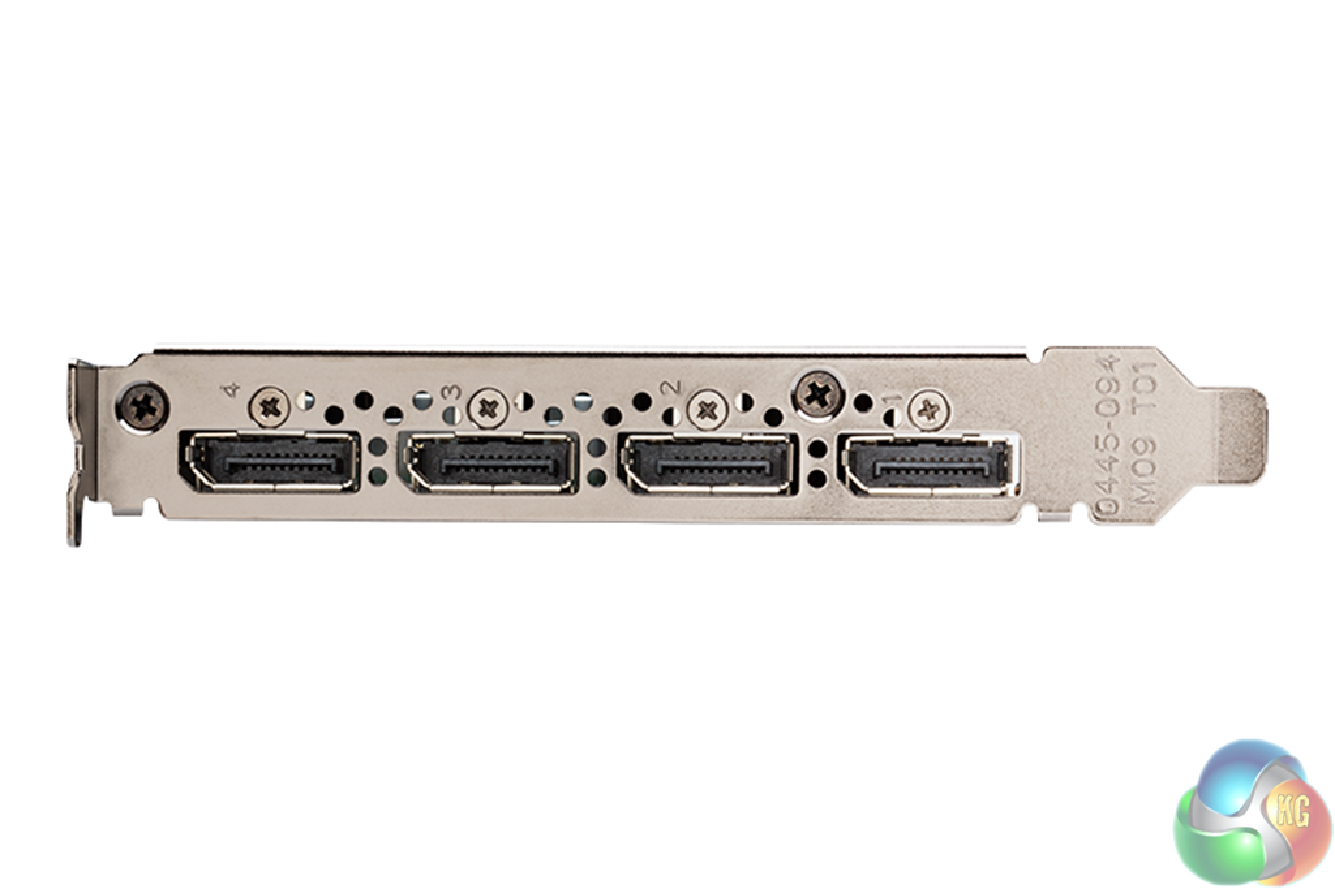
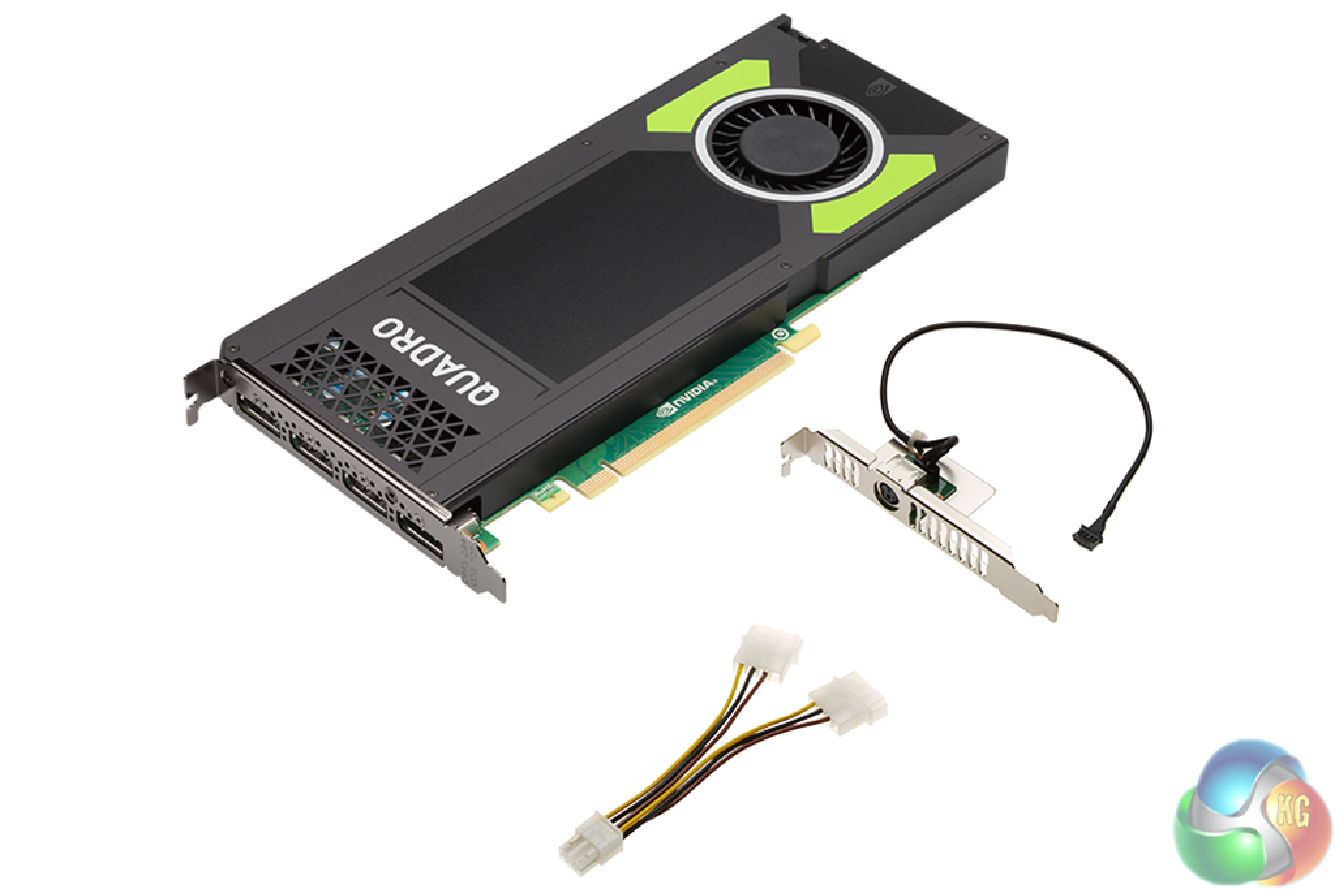
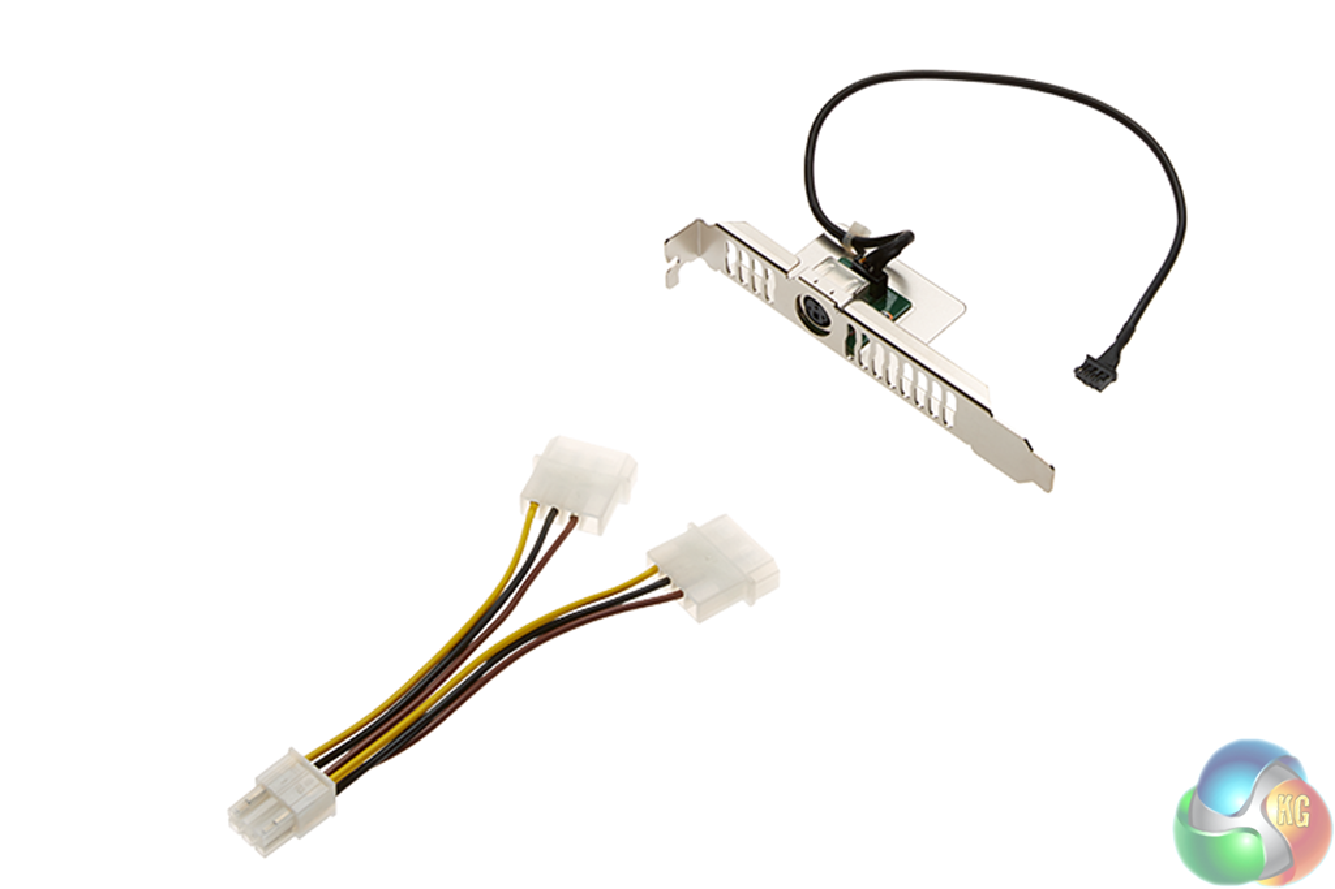
The M4000 sports four DisplayPort 1.2 connections, each one capable of driving monitors up to 4,096 x 2,160 4K resolution, with HDMI and DVD-D adapters also available. There's a separate 3D Stereo connector on an additional bracket.
There's support for all the latest 3D APIs, including DirectX 12, OpenGL 4.5, and Shader Model 5. Compute API supports includes CUDA (of course) plus OpenCL and DirectCompute, so this card can be harnessed for more general purpose number crunching than just 3D rendering. Power consumption has risen to 120W compared to the 108W of the K4200, but that's still not huge.
Only a single six-pin PCI Express power connector is required. Being a professional card, the M4000 comes with a standard three-year RTB warranty, although it's also possible to extend this to five years at time of purchase for a little extra.
We tested the Quadro M4000 in a IPW-SL workstation from InterPro. This is a modelling-focused system based around the Intel Skylake Core i7-6700K processor, backed with 32GB of 2,666MHz DDR4 SRAM.
For comparison, we pitted the M4000 against its K4200 direct predecessor and high-end predecessor the K5200. We used the industry-standard Maxon Cinebench R15's OpenGL test and SPECviewperf 12's suite of benchmarks.
Software:
Maxon Cinebench R15
SPECviewperf 12
SPECviewperf 12.0.2
The majority of this article will be focusing on results from the SPECviewperf test from the Standard Performance Evaluation Corporation. SPECviewperf 12 is the worldwide standard for measuring graphics performance, and is based on professional applications.
The latest version is SPECviewperf 12.0.2, which extends performance measurement from physical to virtualized workstations. SPECgpc members at the time of V12.0.2 release include AMD, Dell, Fujitsu, HP, Intel, Lenovo, Micron and NVIDIA. SPECviewperf 12 measures the 3D graphics performance of systems running under the OpenGL and Direct X application programming interfaces. The benchmark’s workloads, called viewsets, represent graphics content and behavior from actual applications.
InterPro IPW-SL Workstation Specifications:
- Intel Core i7-6700K @ 4.8GHz
- 32GB DDR4 SDRAM @ 2,666MHz
- ASUS Maximus VIII Motherboard
- 400GB Kingston Intel 750 Series NVMe PCI Express M.2 SSD
- 4TB Seagate Desktop HDD.15 SATA III 6Gb/s HDD
- Corsair H110i GTX Hyrdo Cooler
- Corsair RM750 750W Gold Modular PSU
- Fractal Design Define R5 chassis
- Windows 10 Pro 64bit
CINEBENCH 15 is a cross-platform testing suite that measures hardware performance and is the de facto standard benchmarking tool for leading companies and trade journals for conducting real-world hardware performance tests. With the new Release 15, systems with up to 256 threads can be tested.
CINEBENCH is available for both Windows and OS X and is used by almost all hardware manufacturers and trade journals for comparing CPUs and graphics cards. We only ran the Open GL portion of the test, as graphics power has no effect on rendering performance.
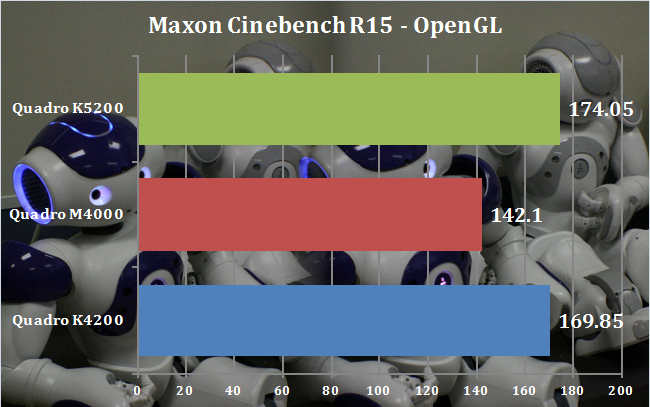
It is fair to say that things did not get off to a flying start with Maxon Cinebench R15. The M4000 placed significantly behind both the K5200 and K4200. We suspect this is related to the M4000's inferior FP64 performance, as Maxon Cinema 4D (upon which this benchmark is based) has supported double precision since 2010.
CATIA viewset (catia-04)
The catia-04 viewset was created from traces of the graphics workload generated by the CATIA V6 R2012 application from Dassault Systemes. Model sizes range from 5.1 to 21 million vertices. The viewset includes numerous rendering modes supported by the application, including wireframe, anti-aliasing, shaded, shaded with edges, depth of field, and ambient occlusion.
Viewset tests:
1. Race car shaded with ambient occlusion and depth of field effect
2. Race car shaded with pencil effect
3. Race car shaded with ambient occlusion
4. Airplane shaded with ambient occlusion and depth of field effect
5. Airplane wireframe
6. Airplane shaded with pencil effect
7. Airplane shaded
8. Airplane shaded with edges
9. Airplane shaded with ambient occlusion
10. SUV1 vehicle shaded with ground reflection and ambient occlusion
11. SUV2 vehicle shaded with ground shadow
12. SUV2 vehicle shaded with ground reflection and ambient occlusion
13. Jet plane shaded with ground reflection and ambient occlusion
14. Jet plane shaded with edges with ground reflection and ambient occlusion
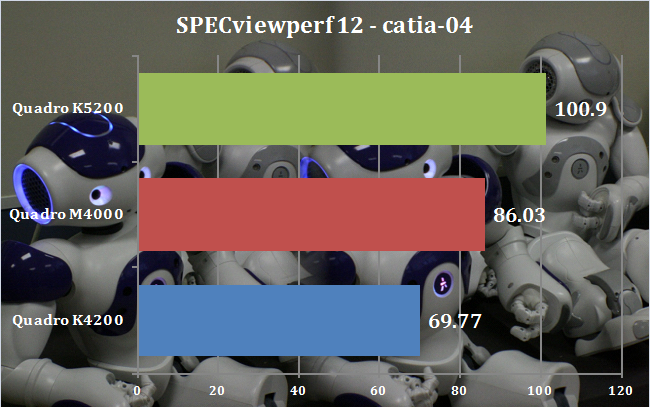
Things get back on track with catia-04. The M4000 is 23 per cent faster than the K4200, although the K5200 is 17 per cent quicker still. So K5200 owners shouldn't feel depressed, but the M4000 is a significantly better option for this application than the K4200.
Creo viewset (creo-01)
The creo-01 viewset was created from traces of the graphics workload generated by the Creo 2™ application from PTC. Model sizes range from 20 to 48 million vertices. The viewset includes numerous rendering modes supported by the application, including wireframe, anti-aliasing, shaded, shaded with edges, and shaded reflection modes.
Viewset tests:
- Worldcar in shaded mode
- Worldcar in wireframe with anti-aliasing enabled
- Worldcar in shaded edges mode
- Worldcar in hidden mode
- Worldcar in shaded reflection mode
- Worldcar in shaded mode
- Worldcar in no-hidden mode with anti-aliasing enabled
- Worldcar in shaded mode with anti-aliasing enabled
- Plane in shaded mode
- Plane in shaded edges mode
- Plane in hidden mode
- Plane in shaded mode with anti-aliasing enabled
- Plane in shaded edges mode with high-quality edges enabled
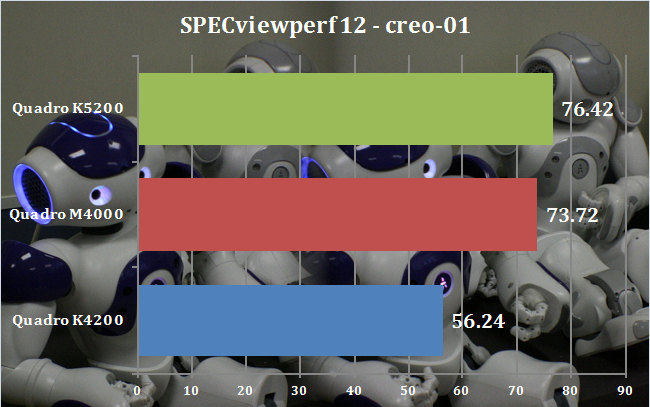
The creo-01 viewset is clearly more sensitive to memory quantity and performance than brute GPU speed. The M4000 cruises past the K4200, beating its score by 31 per cent, and the K5200 is less than 4 per cent further ahead. The double helping of faster GDDR5 over the K4200 is clearly paying dividends here.
Energy viewset (energy-01)
The energy-01 viewset is representative of a typical volume rendering application in the seismic and oil and gas fields. Similar to medical imaging such as MRI or CT, geophysical surveys generate image slices through the subsurface that are built into a 3D grid. Volume rendering provides a 2D projection of this 3D volumetric grid for further analysis and interpretation.
At every frame, depending on the viewer position, a series of coplanar slices aligned with the viewing angle are computed on the CPU and then sent to the graphics hardware for texturing and further calculations such as transfer function lookup, lighting and clipping to reveal internal structures. Finally, the slices are blended together before the image is displayed.
The voxel in the 3D grid is a single scalar value. A transfer function — simply a 1D lookup table — maps the 3D density value to color and alpha values. For lighting calculations, the gradients are computed on the fly using the central differences at each voxel. These state changes exercise various parts of the graphics subsystem. This viewset makes use of hardware support for 3D textures and therefore trilinear interpolation.
The 3D datasets used in this viewset are all procedurally generated using a simple random function. There is a medium-res 1GB dataset and a large-res 3.2GB dataset. The large-res viewsets will exit on cards with less than 4GB graphics memory.
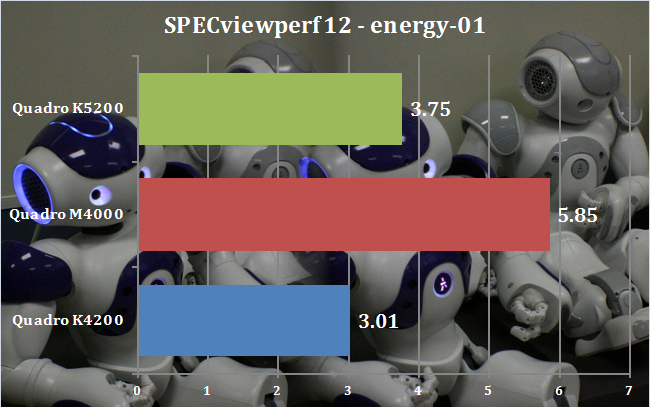
There is clearly something very beneficial for energy-01 from the Maxwell architecture. The M4000 is phenomenal in this test, and the M6000 was even more phenomenal when we tested that in a Scan workstation. With a 56 per cent faster score than the K5200, the M4000 is really in its element here.
Maya viewset (maya-04)
The maya-04 viewset was created from traces of the graphics workload generated by the Maya 2013 application from Autodesk. Model size is 727,500 vertices. The viewset includes numerous rendering modes supported by the application, including shaded mode, ambient occlusion, multi-sample antialiasing, and transparency.
Viewset tests:
- Shaded mode
- Shaded mode with screen-space ambient occlusion
- Shaded mode with screen-space ambient occlusion and multi-sample anti-aliasing
- Shaded mode with screen-space ambient occlusion, multi-sample anti-aliasing, and floating-point render target
- Shaded mode with screen-space ambient occlusion, multi-sample anti-aliasing, floating-point render target, and transparency algorithm weighted average
- Wireframe mode
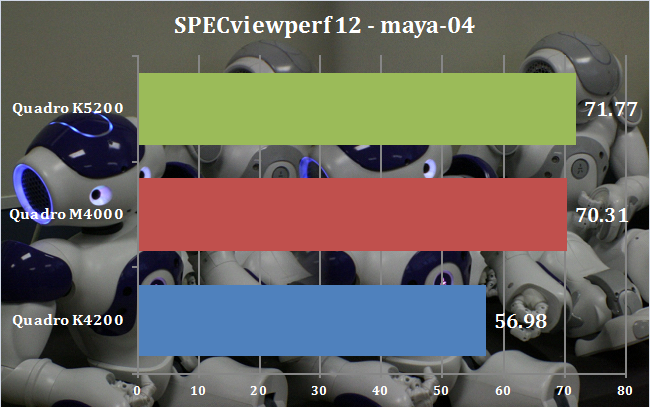
Maya provides similar results to the creo-01 viewset, with the M4000 placing 23 per cent ahead of the K4200, and just 2 per cent behind the K5200. Memory is clearly the main factor here again. With Maya's popularity in 3D animation, this is extremely good news for content creators and NVIDIA alike.
Medical viewset (medical-01)
The medical-01 viewset is representative of a typical volume rendering application that renders a 2D projection of a 3D volumetric grid. A typical 3D grid in this viewset is a group of 3D slices acquired by a scanner (such as CT or MRI).
At every frame, depending on the viewer position, a series of coplanar slices aligned with the viewing angle are computed on the CPU and then sent to the graphics hardware for texturing and further calculations, such as transfer function lookup, lighting and clipping to reveal internal structures. Finally, the slices are blended together before the image is displayed.
The voxel in the 3D grid is a single scalar value. A transfer function – simply a 1D lookup table – maps the 3D density value to color and alpha values. For lighting calculations, the gradients are computed on the fly using the central differences at each voxel. These state changes exercise various parts of the graphics subsystem. This viewset makes use of hardware support for 3D textures and therefore trilinear interpolation.
There are two datasets in this viewset:
- A 4D heart dataset comprising multiple 3D volumes iterated over time. These were obtained from a phase-contrast MRI scanner. The 80MB dataset was contributed by the Department of Radiology, Stanford School of Medicine and Lucile Packard Children's Hospital.
- A stag beetle dataset provided by the Technical University of Vienna. The dataset size is 650MB and represents a workload with larger memory requirements.
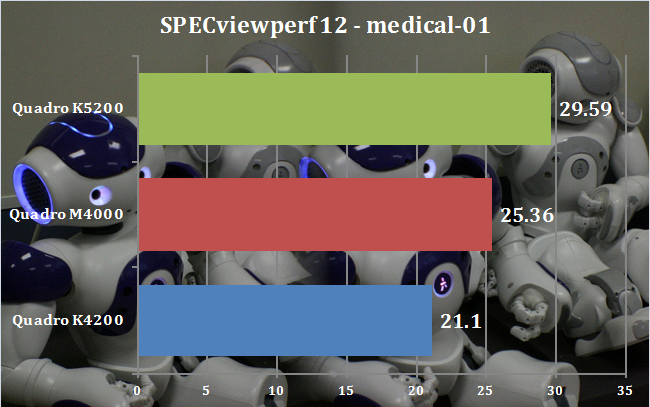
For the medical-01 viewset, the M4000 sits squarely in between the two cards from the previous generation. It's 20 per cent ahead of the K4200 but 17 per cent behind the K5200. Again, K5200 owners shouldn't feel the need to replace their hardware, but the M4000 is a significant upgrade over the K4200.
Showcase viewset (showcase-01)
The showcase-01 viewset was created from traces of Autodesk’s Showcase 2013 application. The model used in the viewset consists of 8 million vertices. The viewset is the first viewset in SPECviewperf to feature DirectX rendering. Rendering modes included in the viewset include shading, projected shadows, and self-shadows.
The following tests are included in the viewset:
- Shaded with self-shadows
- Shaded with self-shadows and projected shadows
- Shaded
- Shaded with projected shadows
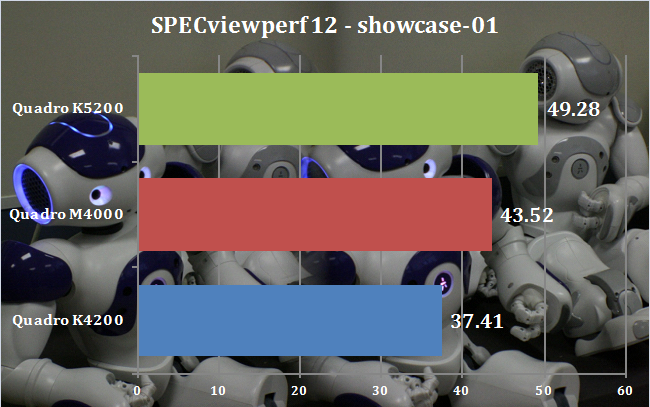
This test is unusual because it measures DirectX rather than OpenGL performance. But results are similar to medical-01, with the M4000 around 16 per cent ahead of the K4200 and 13 per cent behind the K5200. So our conclusion is the same – another win for the M4000, but K5200 owners can rest easy.
Siemens NX viewset (snx-02)
The snx-02 viewset was created from traces of the graphics workload generated by the NX 8.0 application from Siemens PLM. Model sizes range from 7.15 to 8.45 million vertices. The viewset includes numerous rendering modes supported by the application, including wireframe, anti-aliasing, shaded, shaded with edges, and studio mode.
Viewset tests:
- Powertrain in advanced studio mode
- Powertrain in shaded mode
- Powertrain in shaded-with-edges mode
- Powertrain in studio mode
- Powertrain in wireframe mode
- SUV in advanced studio mode
- SUV in shaded mode
- SUV in shaded-with-edges mode
- SUV in studio mode
- SUV in wireframe mode
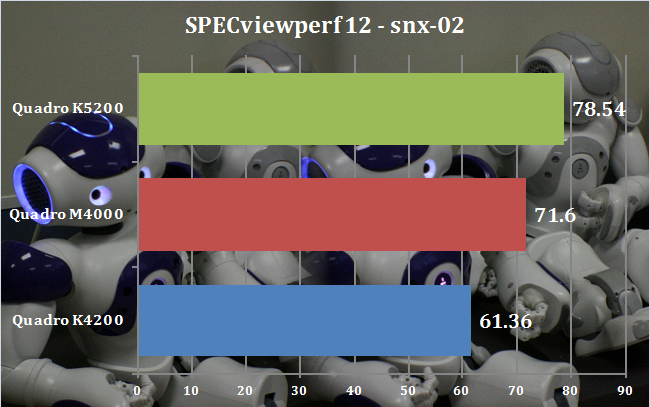
Yet again, we see the M4000 sitting almost equally between its two predecessors. Again, it's 17 per cent faster than the K4200, but 10 per cent behind the K5200.
SolidWorks viewset (sw-03)
The sw-03 viewset was created from traces of Dassault Systemes’ SolidWorks 2013 SP1 application. Models used in the viewset range in size from 2.1 to 21 million vertices. The viewset includes numerous rendering modes supported by the application, including shaded mode, shaded with edges, ambient occlusion, shaders, and environment maps.
Viewset tests:
- Vehicle in shaded mode — normal shader with environment cubemap
- Vehicle in shaded mode — bump parallax mapping with environment cubemap
- Vehicle in shaded mode — ambient occlusion enabled with normal shader with environment map
- Vehicle in shaded-with-edges mode — normal shader with environment cubemap
- Vehicle in wireframe mode
- Rally car in shaded mode — ambient occlusion enabled with normal shader with environment map
- Rally car in shaded mode — normal shader with environment cubemap
- Rally car in shaded-with-edges mode — normal shader with environment cubemap
- Tesla Tower in shaded mode — ambient occlusion enabled with normal shader with environment map
- Tesla Tower in shaded mode — normal shader with environment cubemap
- Tesla Tower in shaded-with-edges mode — normal shader with environment cubemap
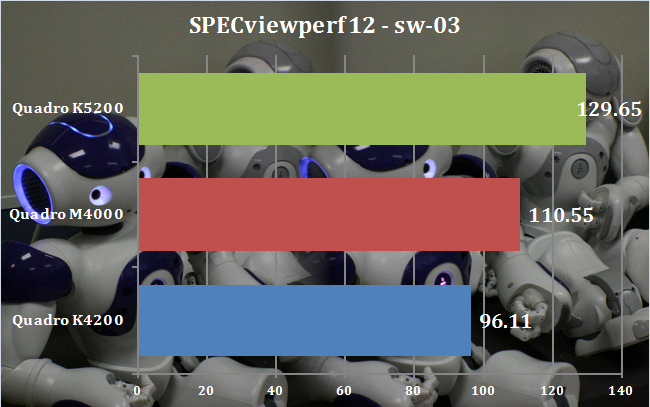
SolidWorks' popularity with product designers and engineers make this a significant test, and the M4000 is comfortably 15 per cent ahead of the K4200, but 17 per cent behind the K5200. So this will be a significantly better card for creating product-focused engineering drawings than the K4200, but existing K5200 owners can remain happy that their more expensive purchase is still providing an even better workflow.
Apart from the disappointing result with Maxon Cinebench R15, the NVIDIA Quadro M4000 provides significantly better performance across the board than its K4200 predecessor. Despite the identical memory quantity and speed to the previous K5200, the M4000 doesn't quite offer enough to make you wish you hadn't bothered paying for the extra over the K4200 (the K5200 cost more than double the price of the K4200).
Nevertheless, the 8GB of GDDR5 memory is the real killer feature for the M4000. It does have a few more CUDA cores than the K4200, but its abilities really show themselves when applications are dealing with large texture sets, as shown by a few of the SPECviewperf 12 tests. These may only be in the minority at the moment, but the constant demand for increasingly realistic 3D will mean the huge amount of memory in the M4000 will make it a worthwhile investment over the years of its useful life.
Since the M4000 costs about the same as its predecessor has done for most of its lifetime, buying the new card is a no brainer, with the only caveat being if you're running FP64-heavy software. Otherwise, even at a greatly discounted “end of line price”, a K4200 won't be worth the economy over a M4000. We expect to see the NVIDIA Quadro M4000 gracing the majority of mainstream modelling workstations from now on – until its successor arrives.
Discuss on our Facebook page, over HERE.
Pros:
- Noticeably better performance than the previous K4200 in most applications.
- Twice as much memory as predecessor.
- Faster memory than predecessor.
- Same price as predecessor.
Cons:
- Worse FP64 performance than the previous generation.
- Slightly greater power consumption than K4200.
Kitguru says: Welcome to the new king of mainstream, high-end professional 3D content creation.

How about a fair comparison with a FirePro card ?
A few days ago new McLaren F1 subsequent after earning 18,512$,,,this was my previous month’s paycheck ,and-a little over, 17k$ Last month ..3-5 h/r of work a day with extra open doors & weekly paychecks. it’s realy the easiest work I have ever Do. I Joined This 7 months ago and now making over 87$, p/h.Learn More right Here
dm……
➤➤
➤➤➤ http://GlobalSuperEmploymentVacanciesReportsMoney/GetPaid/98$hourly…❦.❦.❦.❦.❦.❦.❦.❦.❦.❦.❦.❦.❦.❦.❦.❦.❦.❦.❦.❦.❦.❦.❦.❦.❦.❦.❦.❦.❦.❦.❦.❦.❦.❦.❦.❦.❦.❦
Not sure there’s one that’s fair to compare it to at the moment. The W8100 has a few areas where it can compete with the K4200, but it’s not going to be able to put up much of a fight against the M4000.
A few days ago new McLaren F1 subsequent after earning 18,512$,,,this was my previous month’s paycheck ,and-a little over, 17k$ Last month ..3-5 h/r of work a day ..with extra open doors & weekly paychecks.. it’s realy the easiest work I have ever Do.. I Joined This 7 months ago and now making over 87$, p/h.Learn More right Here
4kkw……
➤➤
➤➤➤ http://GlobalSuperEmploymentVacanciesReportsCloud/GetPaid/98$hourly…❦.❦.❦.❦.❦.❦.❦.❦.❦.❦.❦.❦.❦.❦.❦.❦.❦.❦.❦.❦.❦.❦.❦.❦.❦.❦.❦.❦.❦.❦.❦.❦.❦.❦.❦.❦.❦.❦
Not sure what are you talking about (given you call yourself a doctor you must be able to spit out an informed opinion), why not test it against the direct competitor, the Firepro W7100? Althogh a weaker gpu than the quadro, it has a good 20 – 30% higher gpu frequency and a few times greater double precision performance, nothing comparable to w8100, but still grater than even the quadro m5000.
I’m a doctor of philosophy – that’s from me signing into Disqus via Twitter! It’s not at all relevant here. Here are some SPECviewperf 12 scores from the W7100, in a RENDA PW-E7F (see review on this site), which isn’t a million miles in spec from the test system for the M4000 review:
catia-04: 56.6
creo-01: 51.57
energy-01: 2.81
maya-04: 55.96
medical-01: 24.77
showcase-01: 44.73
snx-02: 62.24
sw-03: 86.48
Compare these to the scores in this review and you will see that the M4000 totally owns it in most tests. The double precision difference is simply not relevant for most professional 3D content creation applications. That’s why NVIDIA has been happy to produce a professional card where this capability has been neutered. Unfortunately, I didn’t have a W7100 or W8100 available when I reviewed the M4000, otherwise these would have made an interesting comparison. I am confident that both would lose out in most tests, though, from previous experience.
A few days ago new McLaren F1 subsequent after earning 18,512$,,,this was my previous month’s paycheck ,and-a little over, 17k$ Last month ..3-5 h/r of work a day ..with extra open doors & weekly paychecks.. it’s realy the easiest work I have ever Do.. I Joined This 7 months ago and now making over 87$, p/h.Learn More right Here
4hxp……
➤➤
➤➤➤ http://GlobalSuperEmploymentVacanciesReportsFirst/GetPaid/98$hourly…❦.❦.❦.❦.❦.❦.❦.❦.❦.❦.❦.❦.❦.❦.❦.❦.❦.❦.❦.❦.❦.❦.❦.❦.❦.❦.❦.❦.❦.❦.❦.❦.❦.❦.❦.❦.❦.
Win in syntetic benchmarks it truly does.
However how in real life it performs?
Yeah, hard to tell what’s happening here, is it just optimizations for a given benchmark and background overclocking and such? Won’t be the first time for Nvidia.
I’m still dissapointed that reviewers still don’t test the cards on 3d model sets that are made by real living designers, architects and such, maybe even someone from engineering industry. Point being, the models won’t be optimized for benchmarks as it would in real life.
You’re not Yoda, are you? Speak like him, you do.
Real life testing is always hard. A test needs to offer a level playing field so you can compare results. I have used 3d model sets and SPECapc before (see other articles on this site), but you need a consistent platform and a test you can repeat identically every time. Having a £2,000 workstation lying around just for testing isn’t economically viable for most publications. Actually, I can’t think of one anywhere in the world that has this kind of facility outside of manufacturers.
The reasons why you don’t see tests like this is not laziness, it’s to do with economics, unfortunately. I’m about the only person in the UK who does workstation testing, and I’m actually a freelance. So I have to make do with what I have to hand. In an ideal world, I’d have a lab full of current kit to compare with. But in reality it’s nearly impossible for anyone to have that, even large publications, and not for niche products like professional workstations.
Get a grip on your self you lazy doctor, it is as easy as ever.
Tedious but super-duper easy, and as financially burdening as any other task in a review channel.
Same as now the PC review editors use often underpaid/unpaid grad student work on making reviews, articles etc.
The same can be done with outsourcing custom 3D models with textures in colaboration with universities in exchange for credit points with/without barebones salary for students.
Jesus, it can be as easy as just making relatively custom 3D scene sets, by just making a similar deal as with GPU maker, get a free and ever so often refreshed package from a few different model and texture sellers (mixing them in a given scene) in exchange for the usual mention in the test setup page and and a few sentence write up what’s it all about with a few pretty pictures.
And if it is so hard to make a review, why call it that, wouldn’t it be a bit more honest to call it a “first look”?
HI! i have recently buy the card. I am disappointed because no specific manual is included on the DVD and also impossible to find online. Only generic multi card installation power connection manual. I like to have a complete hardware manual, explain for example the function of the led light on the rear, between display port connectors.
Would have been interesting to see some power consumption testing. Good review, though. I think I’m going to pick this card up pretty soon.
Getting a new computer for myself with dual xeon E5-2640 V4 cpu’s but would this even be an upgrade for my Titan black, which has a lot more cuda cores for instance? i do game, run virtual machines, movie creation and some 3D using Lightwave/Zbrush.
I use this card every day in an engineering design role (Solidworks). I have been elsewhere over the years but I always come back to the Quadro cards and I’m always impressed when I return. Hard to do a side-by-side comparison in a real-world test, who has the time or the equipment?
I think it depends what you run. I have a Dell Precision workstation with the Quardo M4000 and a reasonably good i7 processor, I also have an Alienware 15R2 with a better processor and a GTX980 connected via the Graphics Amplifier. For gaming the Alienware machine is much better but for Solidworks the Alienware machine is virtually unusable with laggy performance & glitching while the Quadro machine is fast and smooth, not a hint of a glitch. Both machines will run both types of software but the difference is remarkable.
It used to be the case that the Geforce cards were optimized for DirectX and the Quadro cards were optimized for OpenGL, both could do both but each could only do one very well – I don’t know whether that’s still how it works. I can’t help feeling that there’s some price gouging attached to the Quardo cards, after all they use the same chips as the Geforce cards – presumably just using a different config & driver but much more expensive. It’s all a bit cheeky.
Plan is to get more into the more professional stuff, but games will still be a part of my computer time 🙂
Well i have now ordered the PNY P5000 quadro card, now i just need to figure out if i should keep my 40″ UHD monitor or go for the 5k 27″ or 34″ ultrawide, the ultrawide seems very nice i admit.
Thanks for the reply Jaffa99.