KitGuru KitGuru.net – Tech News | Hardware News | Hardware Reviews | IOS | Mobile | Gaming | Graphics Cards


The latest addition to Crucial's range of external SSDs is the X9 Pro. A pocket-sized drive, the X9 Pro comes in three capacities and uses a USB 3.2 Gen 2 x1 (10Gb/s) interface. With the 2TB version currently retailing for £110 here in the UK, is it worth buying?
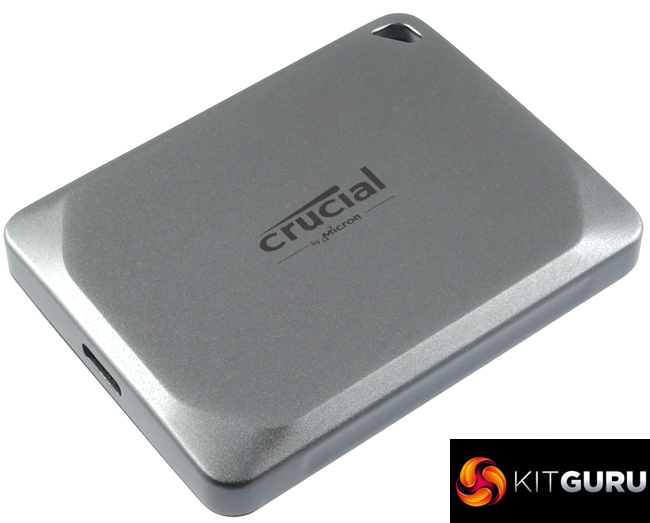
At launch, the X9 Pro comes in three capacities, 1TB, 2TB (the drive we are reviewing here) and a flagship 4TB model. The drive uses a Silicon Motion SM2320 controller which has a built-in USB 3.2 Gen2 x 2 (20Gb/s) interface but for the X9 Crucial is using it at USB 3.2 Gen 2 x1 (10Gb/s) speed. The drive uses Micron's B47R 176-Layer 3D TLC NAND.
Officially the drives are rated as up to 1,050MB/s for Sequential reads and writes.
The drive also supports password protection and 256‐bit AES hardware encryption and carries an IP55 rating for water/dust. It can survive a drop of up to 2 meters (on a carpeted floor) although it would be a little worrying if it couldn't. Crucial backs the drive with a 5-year warranty.
Physical Specifications:
- Usable Capacities: 2TB.
- NAND Components: Micron B47R 176-Layer 3D TLC NAND.
- NAND Controller: Silicon Motion SM2320.
- Interface: USB 3.2 Gen 2 x1 (10Gb/s).
- Form Factor: external
- Dimensions: 65 x 50 x 10mm.
- Drive Weight: 38g.
Firmware Version: U1CR1A03.
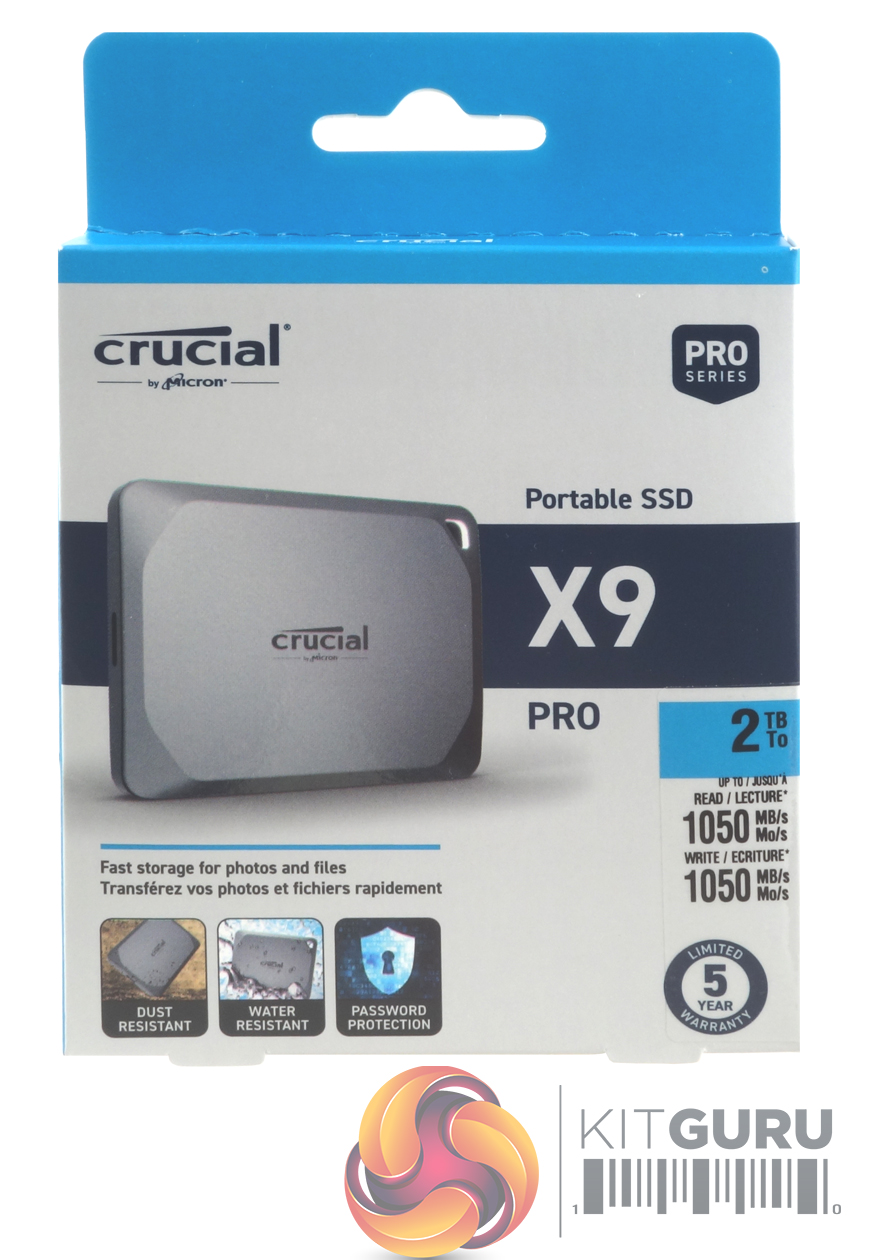
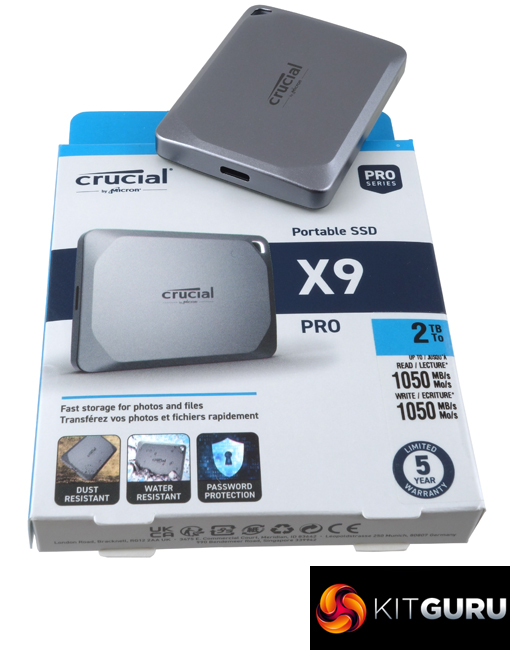
The Crucial X9 Pro comes in a compact box with an image of the drive on the front, which isn't life size but not too far off it. To the right of the image is a sticker that displays the drive's capacity, under which are displayed the read and write ratings in English and French. Under the drive image are two small images stating that the drive is dust and water-resistant. Next to these is an icon representing the fact the drive supports password protection.
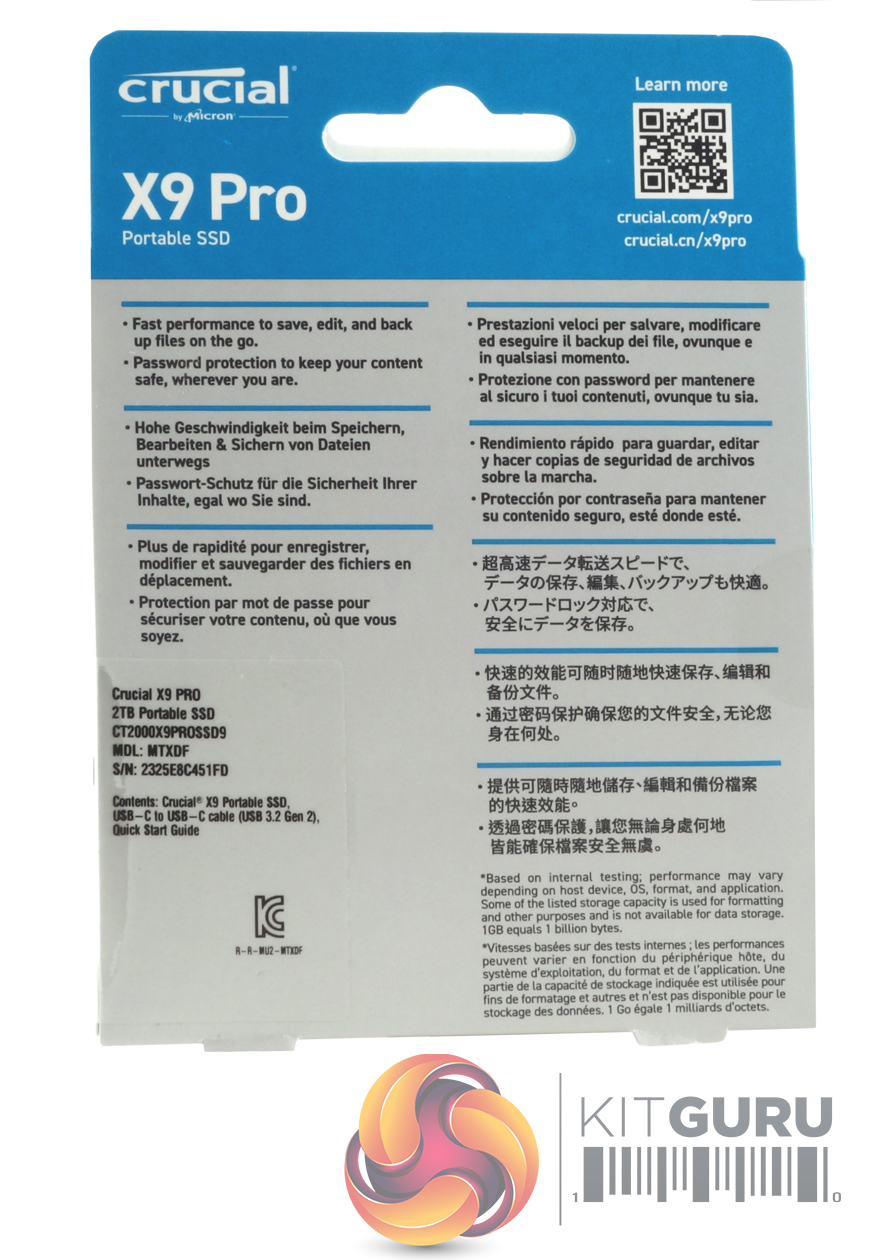
The back of the box has some multi-lingual drive information and a list of what's in the box. At the top, there is a QR code to use if you want more information about the X9 Pro.
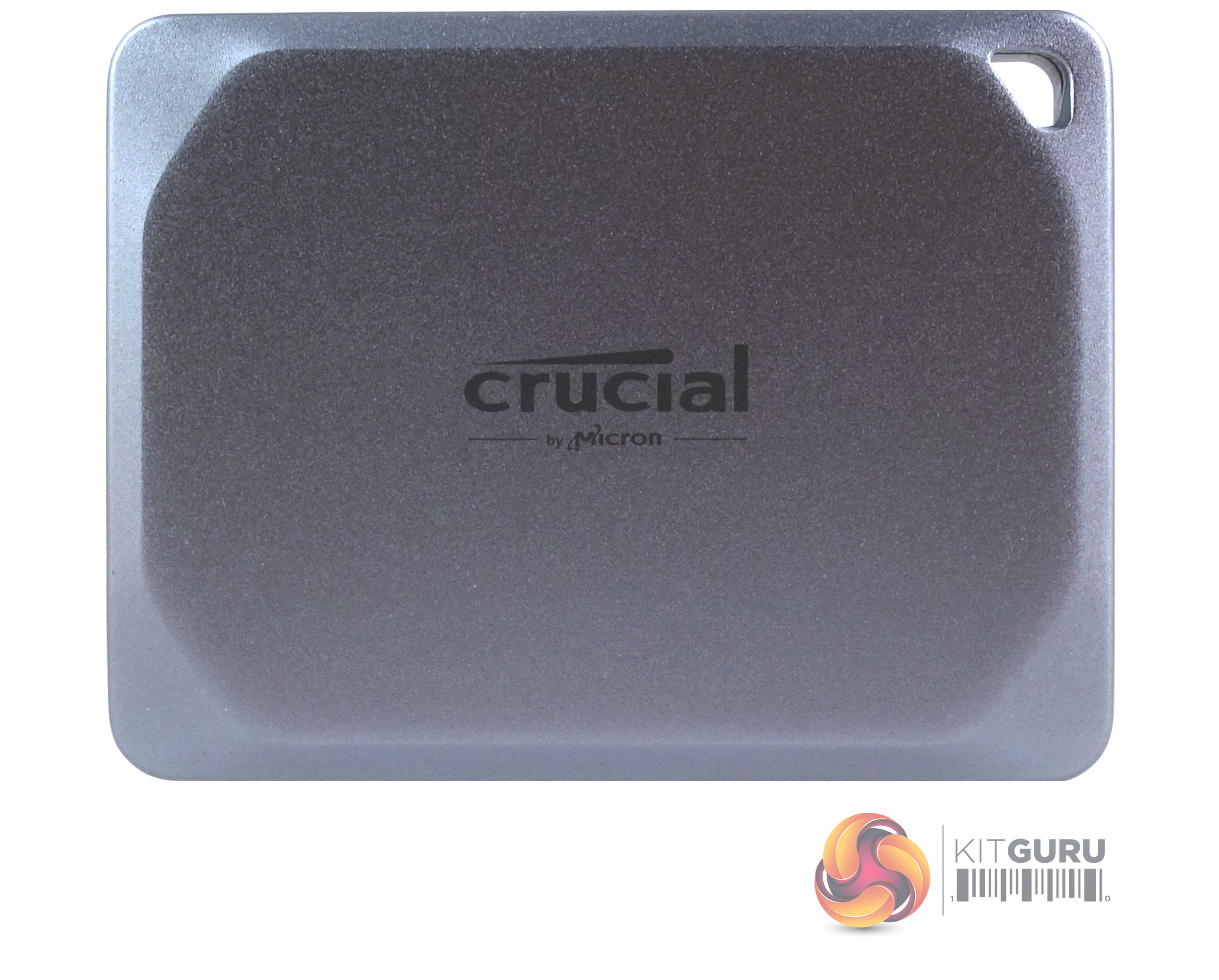
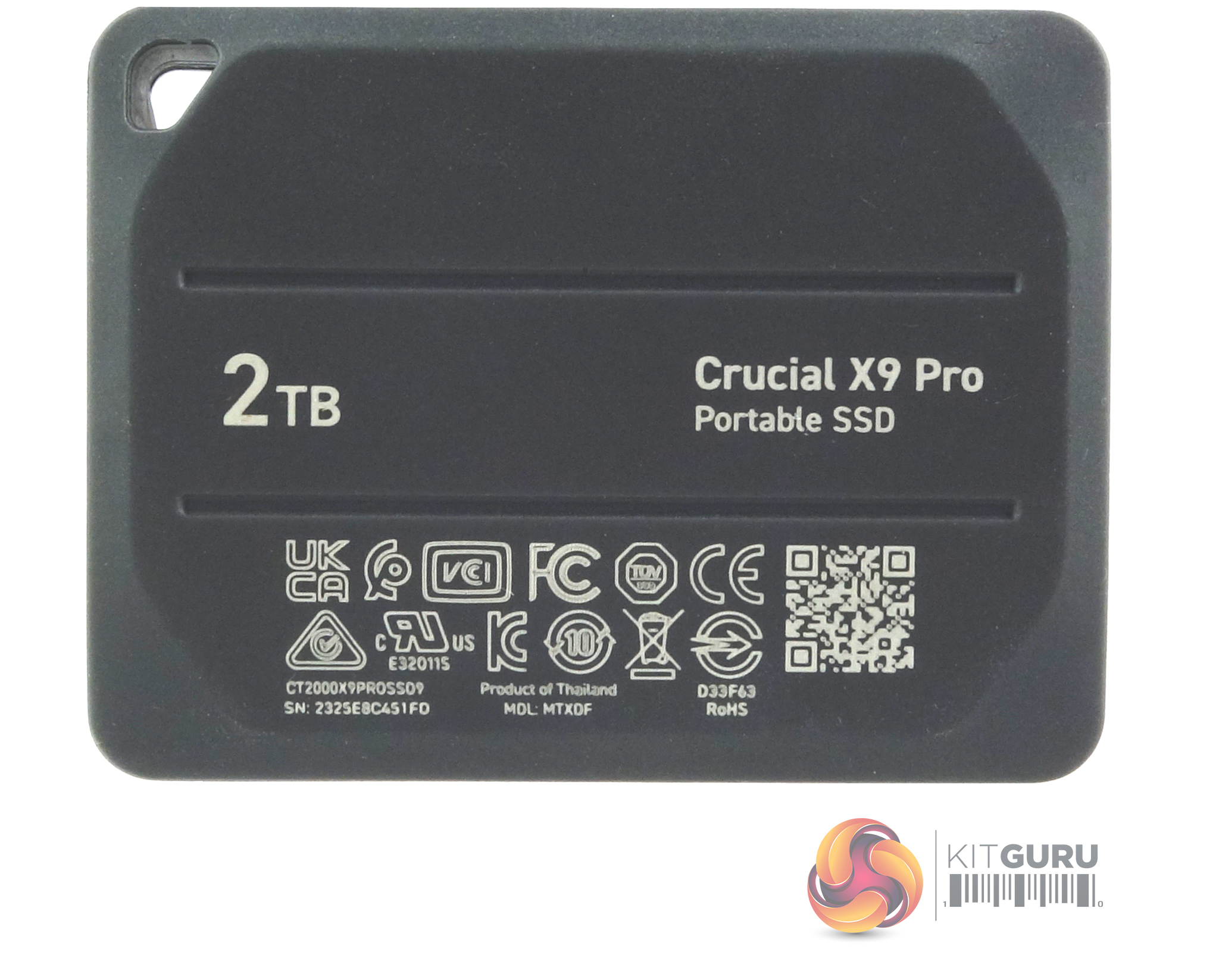
Crucial's X9 Pro is a tiny pocket-sized drive measuring 65 x 50 x 10mm. Constructed from anodised aluminium with a rubberised base it weighs in at just 38g. Two sides of the drive have recesses built into them to give a better grip when handling it. At one end of the drive is a hole for a lanyard (not supplied) and the hole is backlit by a white drive activity LED instead of where you would normally find it, next door to the USB-C port.
Internally the 2TB drive uses two packages of Micron's B47R 176-Layer 3D TLC NAND and a Silicon Motion SM2320 controller. The SM2320 is what is enabling the latest batch of fast-performance pocket-sized drives as it is a single-chip USB 3.2 Gen2 x 2 solution so there is no need to provide the space required for a bridging chip. Although the SM2320 supports USB 3.2 Gen2 x 2 (20Gb/s) speeds, Crucial has it running at USB 3.2 Gen2 x 1, 10Gb/s in the X9 Pro.
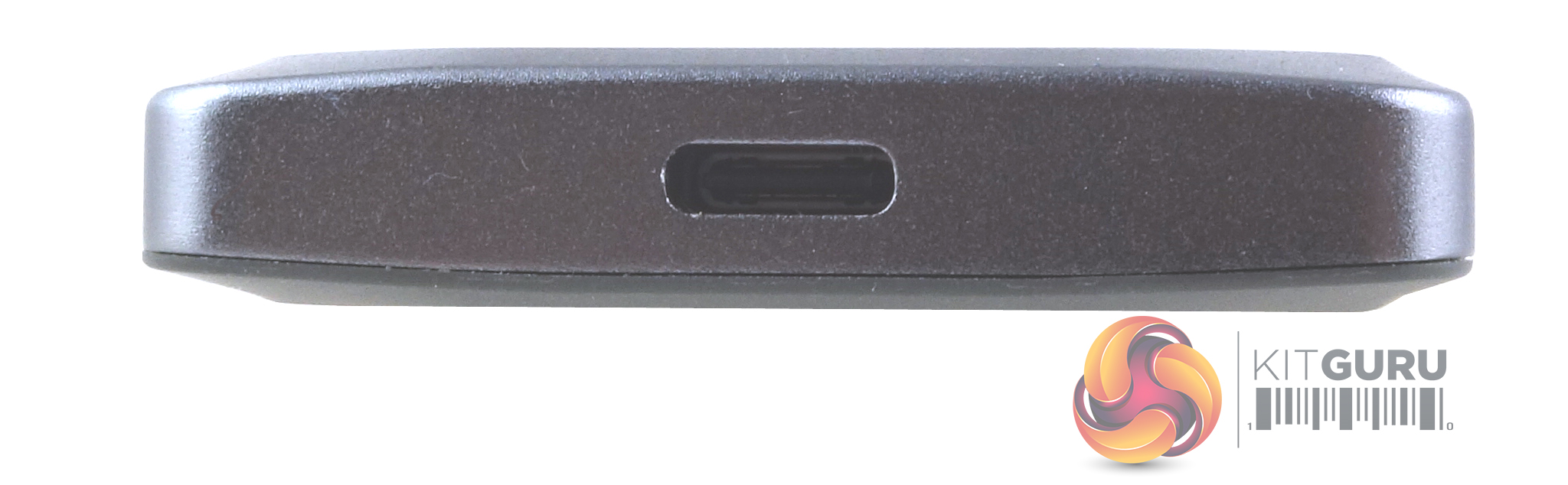
The Crucial X9 Pro uses a USB-C port, with the interface clocked at 10Gb/s (USB 3.2 Gen2 x 1).
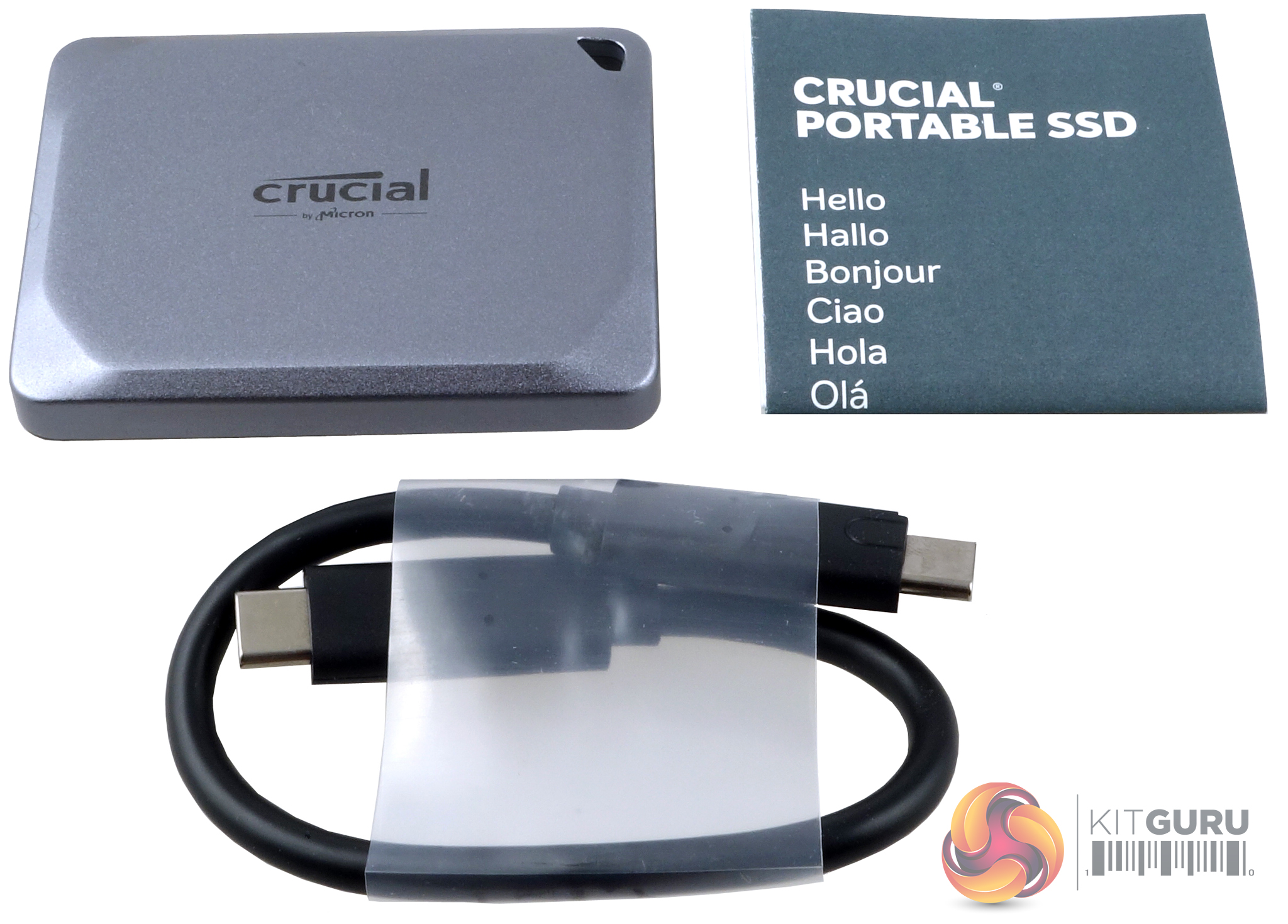
All that comes in the box with the drive is a USB-C to USB-C cable (which could do with being a bit longer) and a Quick Start Guide.
The drive came formatted as exFAT. To carry out our benchmarks we re-formatted the drive to NTFS.
CrystalDiskMark is a useful benchmark to measure the theoretical performance levels of hard drives and SSDs. We are using V7.
The ATTO Disk Benchmark performance measurement tool is compatible with Microsoft Windows. Measure your storage system performance with various transfer sizes and test lengths for reads and writes. Several options are available to customize your performance measurement including queue depth, overlapped I/O and even a comparison mode with the option to run continuously.Use ATTO Disk Benchmark to test any manufacturer's RAID controllers, storage controllers, host adapters, hard drives and SSD drives and notice that ATTO products will consistently provide the highest level of performance to your storage.
AS SSD is a great free tool designed just for benching Solid State Drives. It performs an array of sequential read-and-write tests, as well as random read-and-write tests with sequential access times over a portion of the drive. AS SSD includes a sub suite of benchmarks with various file pattern algorithms but this is difficult in trying to judge accurate performance figures.
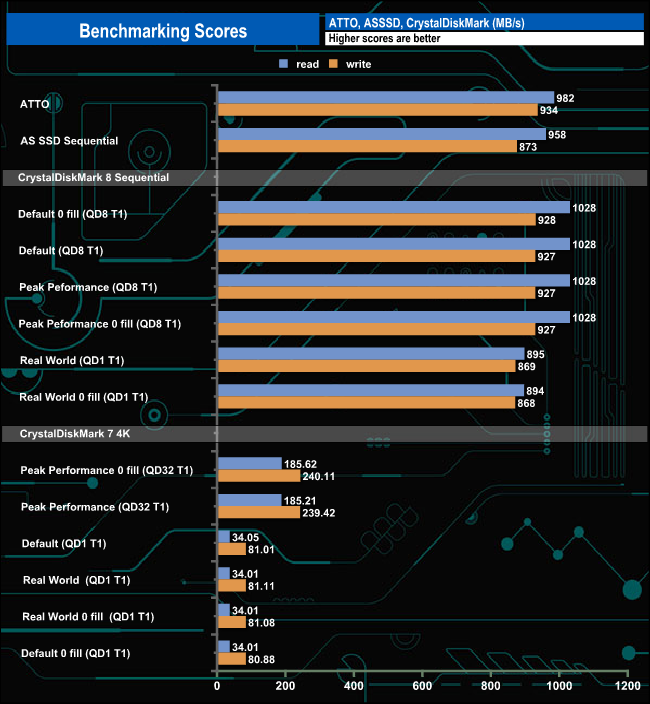
Using the ATTO, AS SSD and CrystalDiskMark 8 benchmarks we couldn't hit those maximum official figures. The best read figure we saw, 1,028MB/s, came from a number of CrystalDiskMark 8 test runs using the same QD8 1T settings with both incompressible and compressible data. Write performance was even further away from the official rating. The best write result we saw of 934MB/s came from the ATTO benchmark testing.
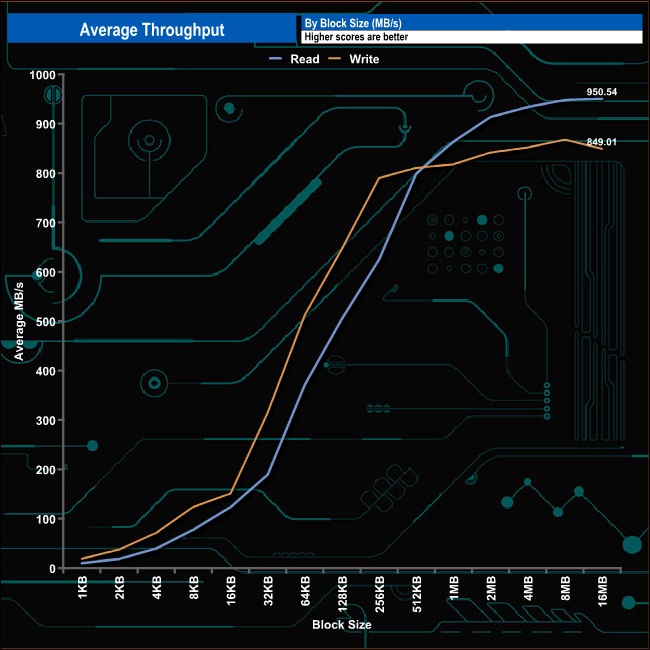
Crucial rates the X9 Pro at up to 1,050MB/s for both Sequential reads and writes. In our throughput tests, the drive didn't quite hit those official maximums with a peak read figure of 950MB/s (16MB) with writes peaking at 867MB/s (8MB). Although the tested read/write figures are shy of the official ratings, the drive still offers strong performance.
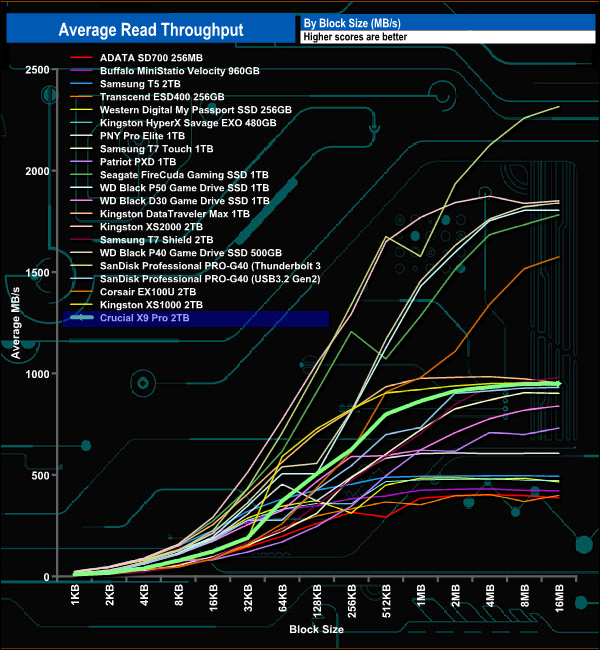
In the read throughput test, the drive peaked at the at end of the test run (16MB Block) at 950.54MB/s.
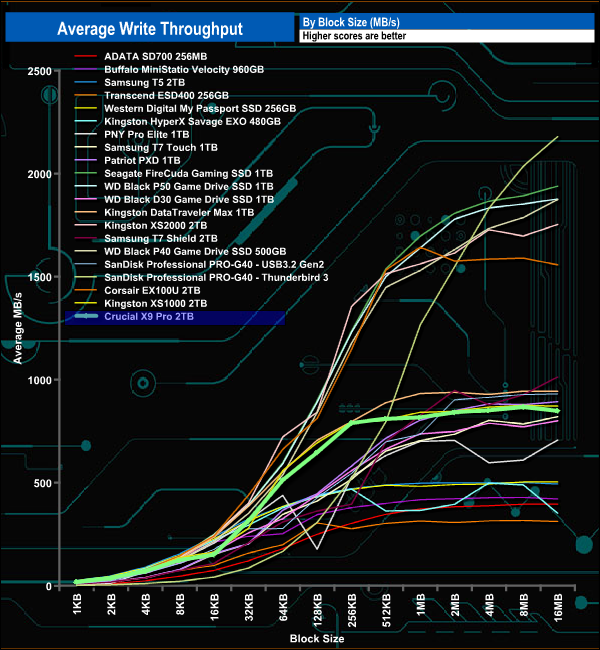
In the write throughput test, the Crucial X9 peaked at the 8MB mark with a test result of 867.42MB/s before dropping back slightly to finish the test run (16MB block) at 849.01MB/s.
The PCMark 10 Data Drive Benchmark has been designed to test drives that are used for storing files rather than applications. You can also use this test with NAS drives, USB sticks, memory cards, and other external storage devices. The Data Drive Benchmark uses 3 traces, running 3 passes with each trace.
Trace 1. Copying 339 JPEG files, 2.37 GB in total, in to the target drive (write test).
Trace 2. Making a copy of the JPEG files (read-write test).
Trace 3. Copying the JPEG files to another drive (read test).
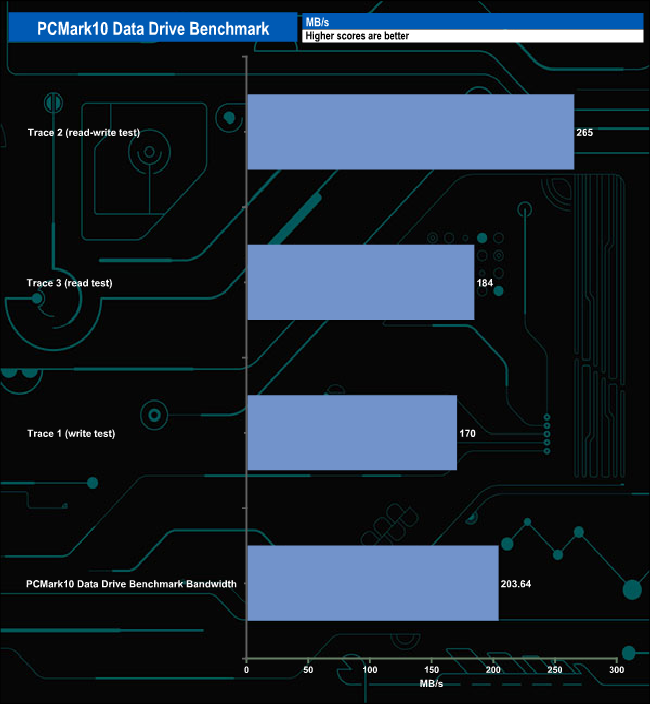
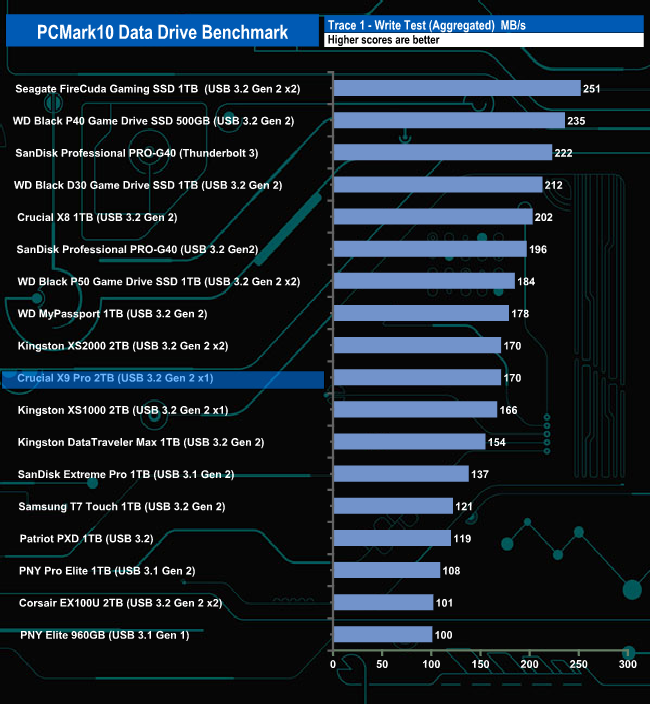
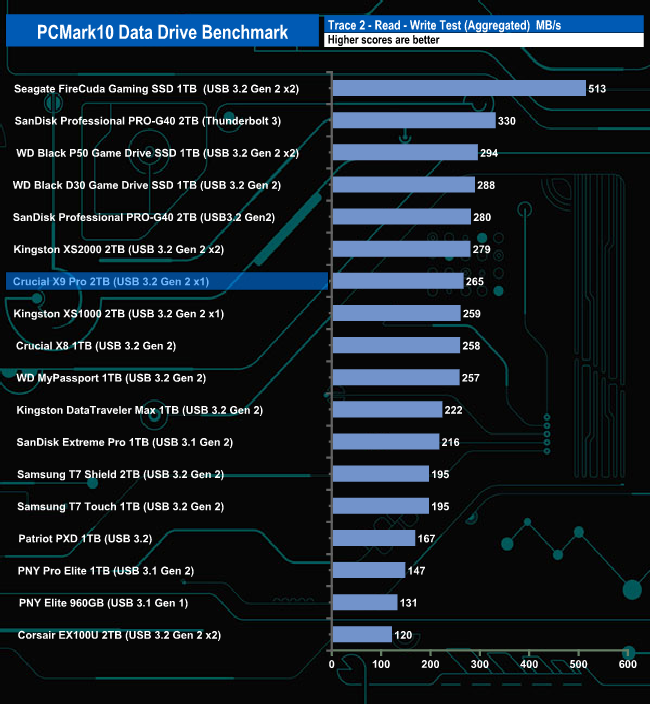
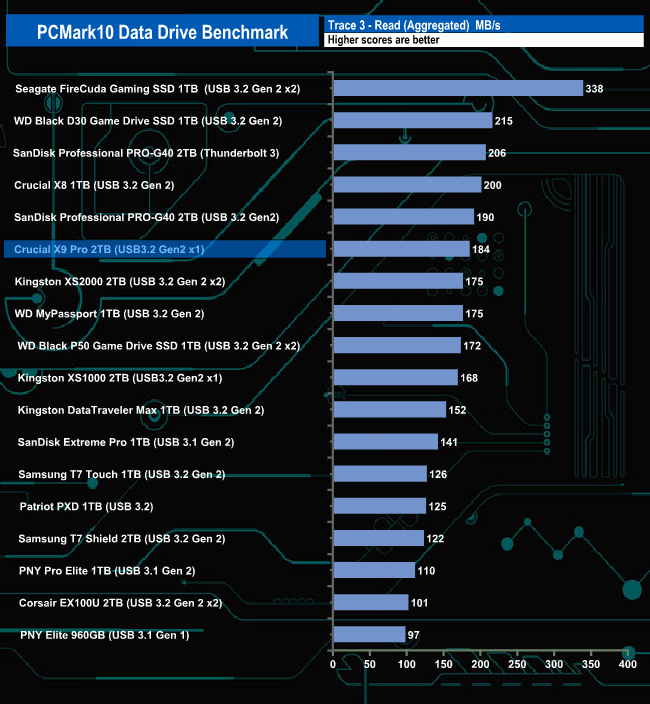
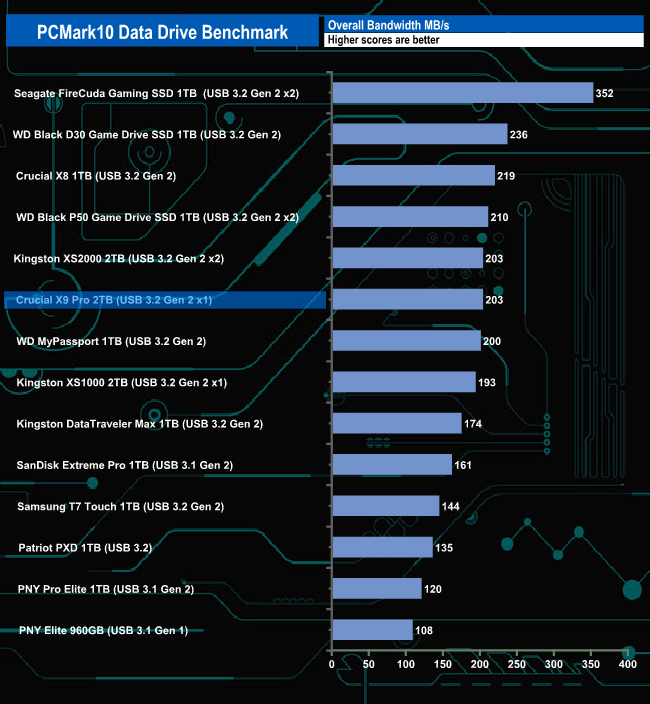
The Crucial X9 Pro does pretty well in PCMark 10 Data Drive Benchmark. It sits in the top 10 drives for the Read-Write and Read tests but the Write test isn't quite as good with the drive sitting in a mid-table position but it still sits in the top 10 overall bandwidth chart with a figure of 203MB/s.
We also tested the time it took to import and export a mix of files from/to the Crucial X9 Pro into various programs.
The programmes we used were:
- Microsoft Office (Word, Excel and PowerPoint)
- Adobe Acrobat Reader.
- Adobe Photoshop.
- VideoPad.
- Audacity.
- The Witcher: Enhanced Edition.
We also timed moving a Win 10 backup file to and from the drive and launching a game from the X9 Pro.
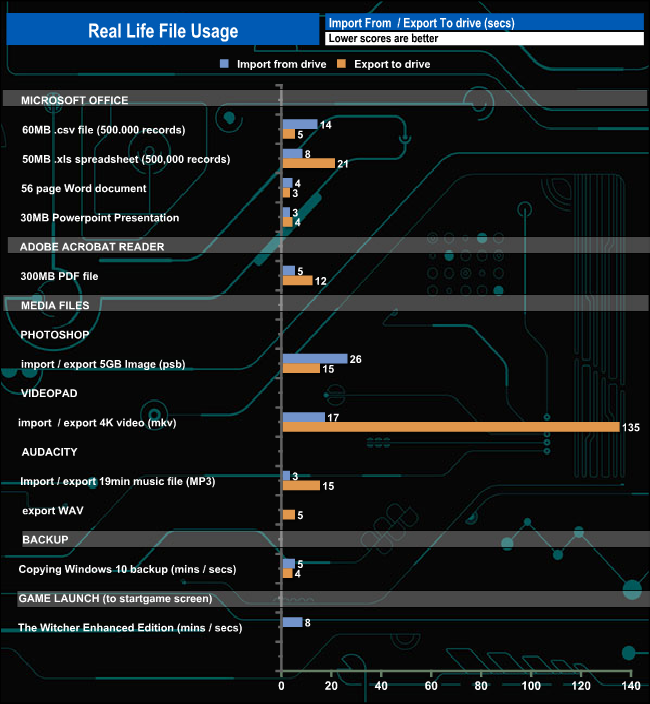
Crucial's X9 Pro shows strong performance for the load / save tests. It takes just 4 minutes to copy the Windows 10 backup (100GB) to the drive while exporting a 2.6GB 4K video from the app to the drive took 135 seconds.
To test the real-life performance of a drive we use a mix of folder/file types and by using the FastCopy utility (which gives a time as well as MB/s result) we record the performance of drive reading from & writing to a 2TB Seagate FireCuda 510.
Transfer Details:
Windows 10 backup – 118GB.
Data file – 100GB.
BluRay Movie – 42GB.
Windows 11 iso – 5.4GB.
File folder – 50GB – 28,523 files.
Steam folder – 222GB (8 games: Alien Isolation, Battlefield 4, BioShock Infinite, Crysis 3, Grand Theft Auto V, Shadow Of Mordor, Skyrim, The Witcher3 Wild Hunt).
Movie demos 8K – 21GB – (11 demos).
Raw Movie Clips 4K – 16GB – (9 MP4V files).
Movie folder – 12GB – 15 files – (8 @ .MKV, 4 @ .MOV, 3 @ MP4).
Photo Folder – 10GB – 304 files – (171 @ .RAW, 105 @ JPG, 21 @ .CR2, 5 @ .DNG).
Audio Folder – 10GB – 1,483 files – (1479 @ MP3, 4 @ .FLAC files).
Single large image – 5GB – 1.5bn pixel photo.
3D Printer File Folder – 4.25GB – (166 files – 105 @ .STL, 38 @ .FBX, 11 @ .blend, 5 @ .lwo, 4 @ .OBJ, 3@ .3ds).
AutoCAD File Folder – 1.5GB (80 files – 60 @ .DWG and 20 @.DXF).
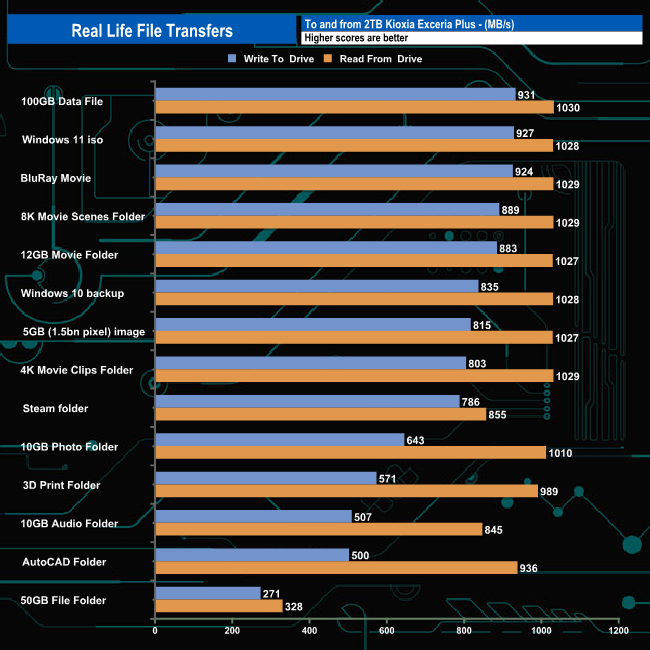
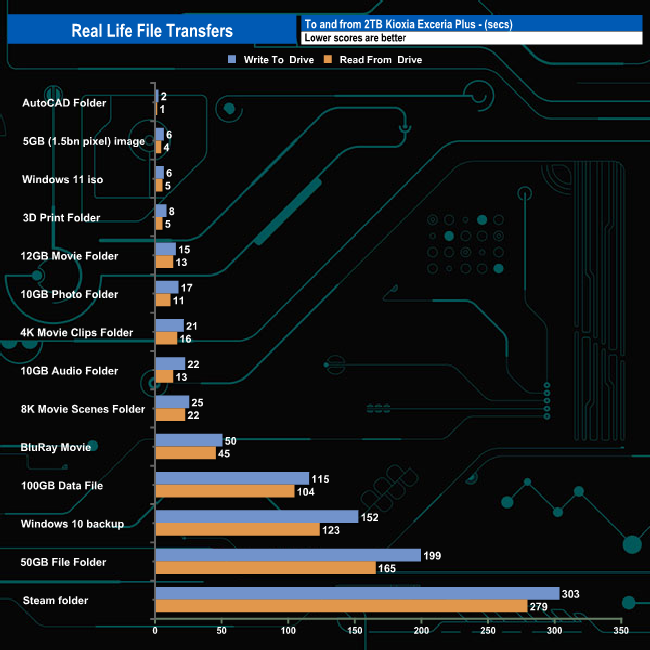
The X9 Pro handled our real-life file transfers without any problems. The drive averaged 734MB/s in write mode for the 14 transfers, the fastest being the 931MB/s for the 100GB data file. As for reads it averaged 942MB/s with the fastest speed being once again obtained from the 100GB Data file at 1,030MB/s.
Crucial's X9 Pro is the company's third-generation external SSD, after the original X8 and the more recent X6. It's also the smallest by a few mm. Measuring 65 x 50 x 10mm and weighing in at just 38g, the drive has an anodised aluminium chassis with a rubber base. Crucial states that it can survive a 2m drop on a carpeted floor without damaging the data stored on the SSD, though quite frankly it would be a touch alarming if it couldn't.
The X9 Pro highlights the progress made in the last couple of years regarding NAND design. Crucial's first portable SSD launched in 2020, the X8, used 64-layer QLC NAND, the X9 Pro uses 176-layer 3D TLC NAND and is half the physical size of the X8 for the same given capacity.
Looking after the NAND is a Silicon Motion SM2320 controller. The SM2320 is a step up from the Silicon Motion SM2263EN used in the X8. Although a 4-channel controller like the 2263EN, the SM2320 ups the ante as it comes with an integrated USB 3.2 Gen2 x 2 (20Gb/s) interface so there is no need for an NVMe bridge chip as used in the X8 although the interface is only running at USB 3.2 Gen2 x 1 (10Gb/s) in the X9.
Performance-wise, Crucial rates the X9 Pro at up to 1,050MB/s for both Sequential reads and writes. In our testing, we couldn't quite get to either of those figures. Using the ATTO benchmark we saw a maximum of 982MB/s for reads with writes reaching 934MB/s. With the tougher AS SSD benchmark, reads dropped to 958MB/s and writes to 873MB/s. Switching over to the CrystalDiskMark 8 benchmark we saw read test results much closer to the official figures with four of the tests producing a figure of 1,028MB/s. The best write result we saw was 928MB/s, some way short of the official figure.
Real-life file transfers saw read performance go over the 1GB/s mark in nine out of the fourteen tests, the fastest when reading the 100GB Data file at 1,030MB/s. When it came to writes, three of the fourteen tests topped 900MB/s. Once again it was the 100GB data file transfer that was the fastest at 931MB/s.
The X9 Pro supports 256‐bit AES hardware encryption and password protection and carries an IP55 rating for water and dust resistance. But a word of caution before you start planning to throw the X9 in the bath. The IP55 rating means although the drive has limited protection from water, it's not waterproof.
Pre-loaded on the drive are links to various useful utilities: Acronis True Image For Crucial, Mylio Photos and although there is a link for Hedge Transfer software, in our case it didn't seem to be working. At the time of writing when you buy and register an X9 Pro you get a one-month complimentary Adobe® Creative Cloud All Apps plan.
We found the 2TB version of the X9 Pro for sale directly from Crucial UK for £109.99 (inc VAT) HERE.
Discuss on our Facebook page HERE.
Pros
- Overall performance.
- Design.
Cons
- The cable is on the short side.
- Couldn't quite hit the official maximum speeds in testing.
KitGuru says: Although we could hit the advertised maximum Sequential speeds with our testing, Crucial's X9 Pro is still a quick, very compact external SSD with the added bonus of hardware encryption and password protection.