KitGuru KitGuru.net – Tech News | Hardware News | Hardware Reviews | IOS | Mobile | Gaming | Graphics Cards


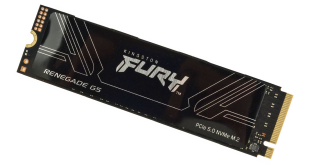
When we looked at Kingston's Fury Renegade G5, the company's first Gen 5 drive in early 2025, the largest capacity available at launch was the 4TB flagship model. Skip ahead seven months, and that capacity limit has been doubled with the latest addition to the lineup, the 8TB Fury Renegade G5.
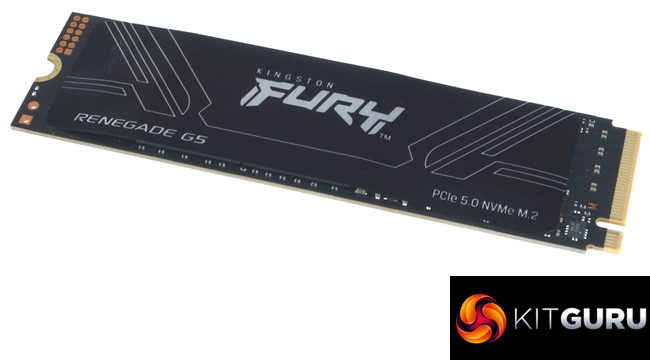
Kingston's Fury Renegade G5 uses a Silicon Motion SM2508 controller combined with 218-layer 3D TLC NAND. There is also an LGDDR4-4266 DRAM cache IC.
The quoted sequential read/write performance figures for the drive are the same as the 4TB model – up to 14,800MB/s reads and up to 14,000MB/s for writes.
As for 4K random performance, the 8TB drive has the same 2,200K IOPS read figure as the rest of the range, with a write figure of up to 2,200K IOPS, the same as the rest of the Fury Renegade G5 family, except for the 1TB model.
Power consumption for the 8TB model is officially quoted as 0.27W average and 7.5W maximum. Kingston quotes an endurance figure for the 8TB drive as 8.0PB, and they back the drive with a 5-year warranty.
Physical Specifications:
- Usable Capacities: 8TB.
- NAND Components: 218-layer 3D TLC NAND.
- NAND Controller: Silicon Motion SM2508.
- Cache: LGDDR4-4266.
- Interface: PCIe Gen 5 x4, NVMe 2.0.
- Form Factor: M.2, 2280.
- Dimensions: 80 x 22 x 3.65mm.
- Drive Weight: 9.2g.
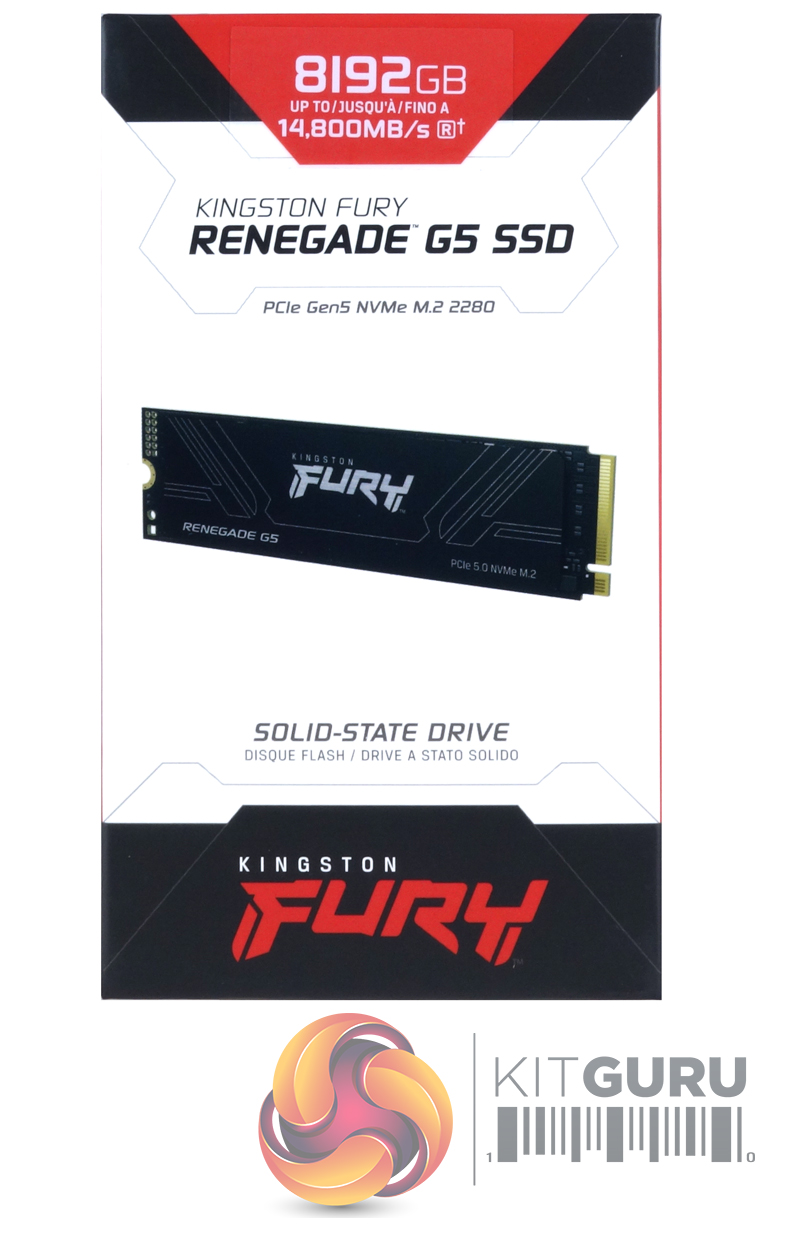

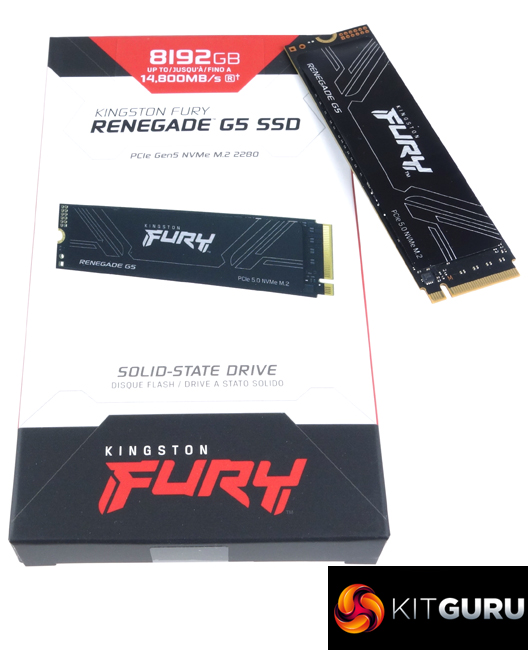
The front of the box has a clear image of the drive on it. Above the image is a line of text displaying that the drive is a PCIe 5.0 NVMe M.2 design. At the top of the box is a label which shows the drive's capacity and its maximum sequential read speed.
On the back, there is a small window to show the drive in the box. The rest of the rear panel is covered in multilingual marketing notes.
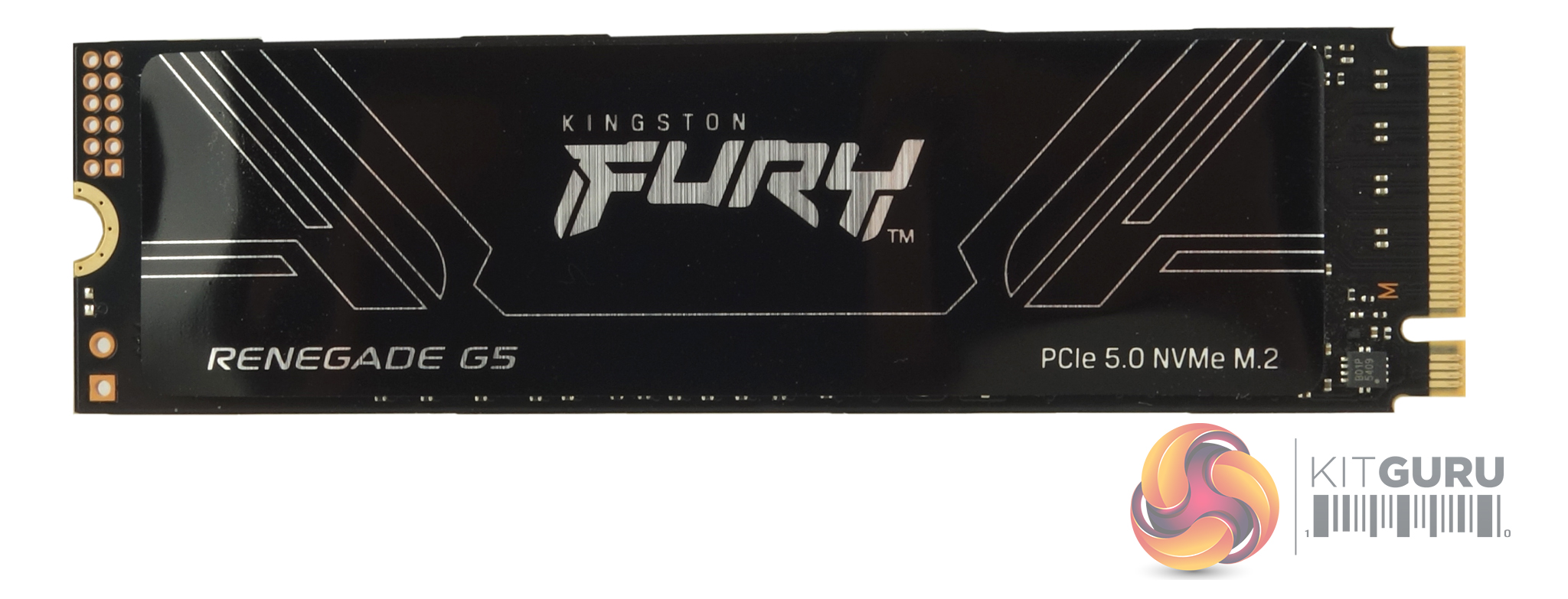
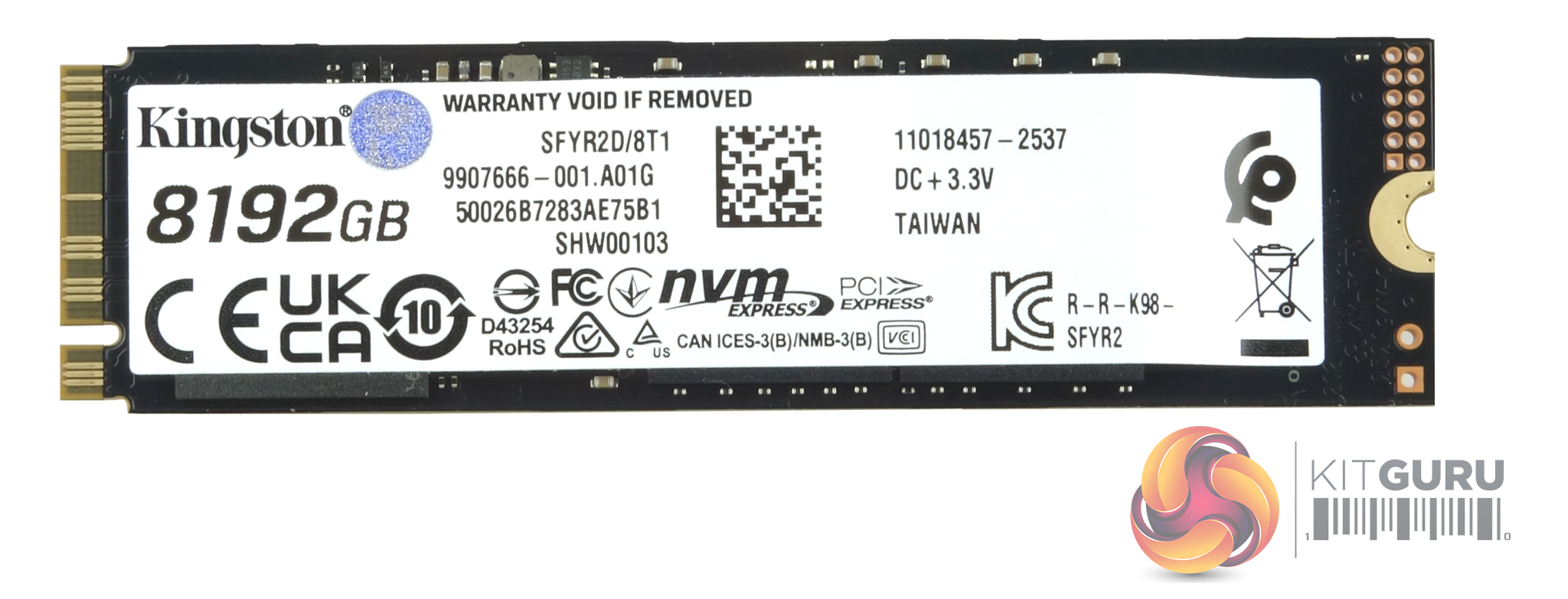
The 8TB Kingston Fury Renegade G5 is a double-sided design. On one side of the PCB sits a Silicon Motion SM2508 eight-channel controller along with two Kingston re-branded 2TB 218-layer 3D TLC NAND packages. On the other side of the PCB are another pair of NAND packages along with an 8GB LGDDR4-4266 DRAM IC.
Silicon Motion's SM2508 controller has been designed to offer both high performance and power efficiency. Using a 6nm process together with a proprietary built-in smart clock-gating mechanism, which intelligently and automatically powers down unused blocks, allows the SM2508 to be very efficient when it comes to power consumption (Silicon Motion claim 30% active power reduction over the previous generation IC). The SM2508 uses a quad-core ARM Cortex R8 CPU that supports four 32Gb/s PCIe lanes. The NAND channels have a bus rate of up to 3,600 MT/s each, which provides up to 14.5 GB/s and 14 GB/s sequential (read and write, respectively) performance and up to 2.5M/2.5M IOPS random read/write performance.
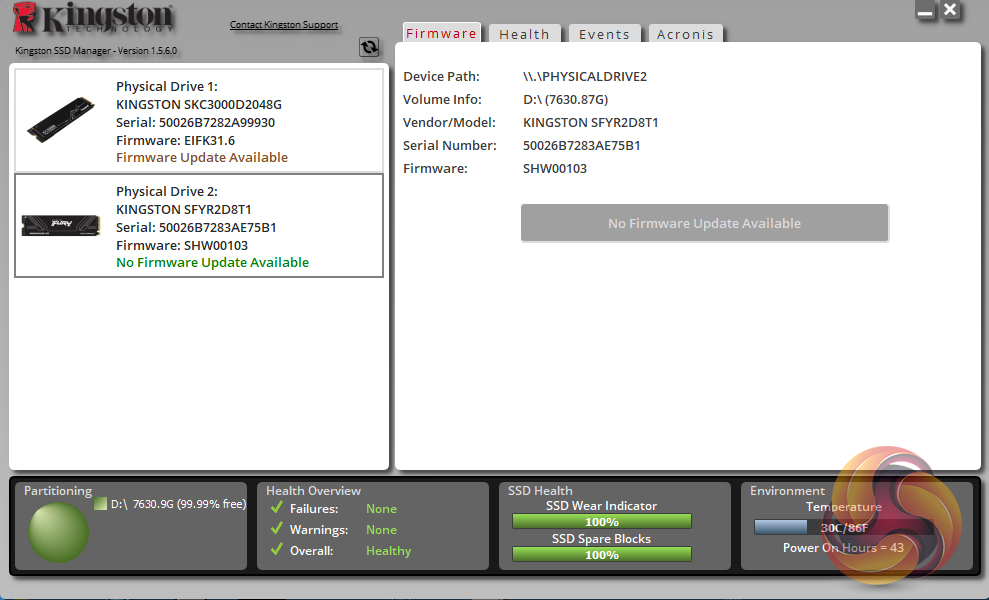
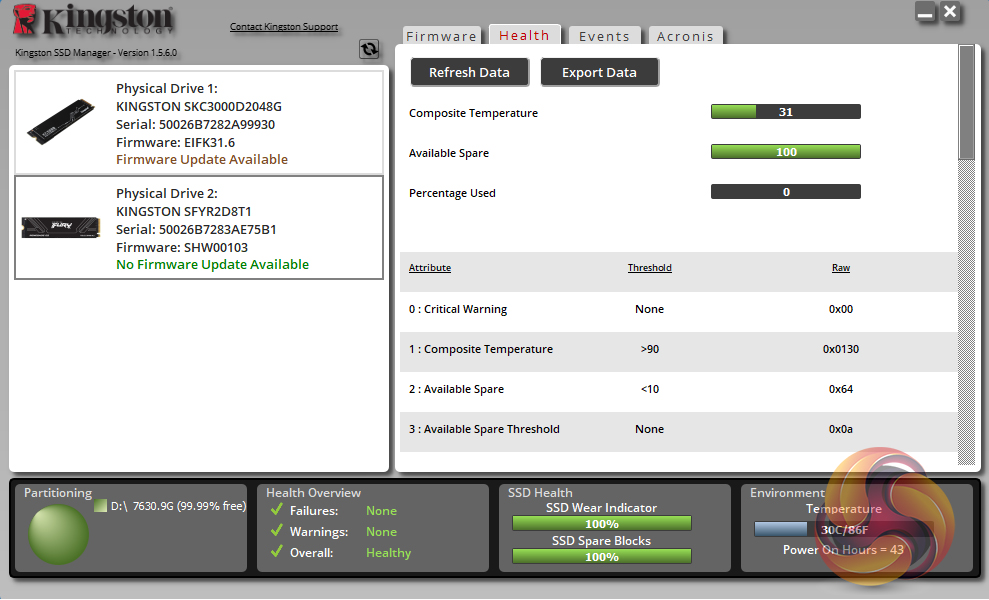
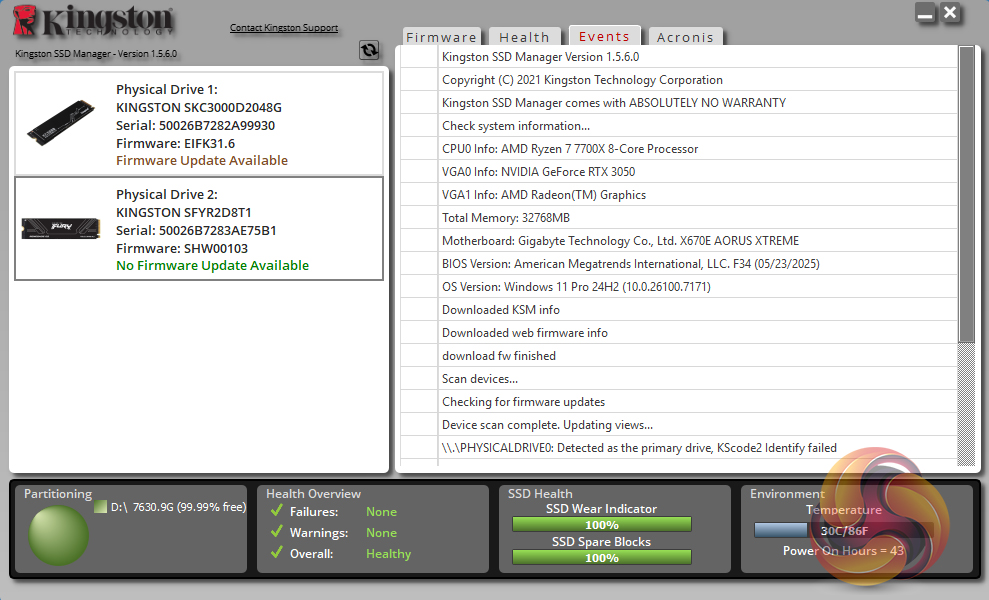
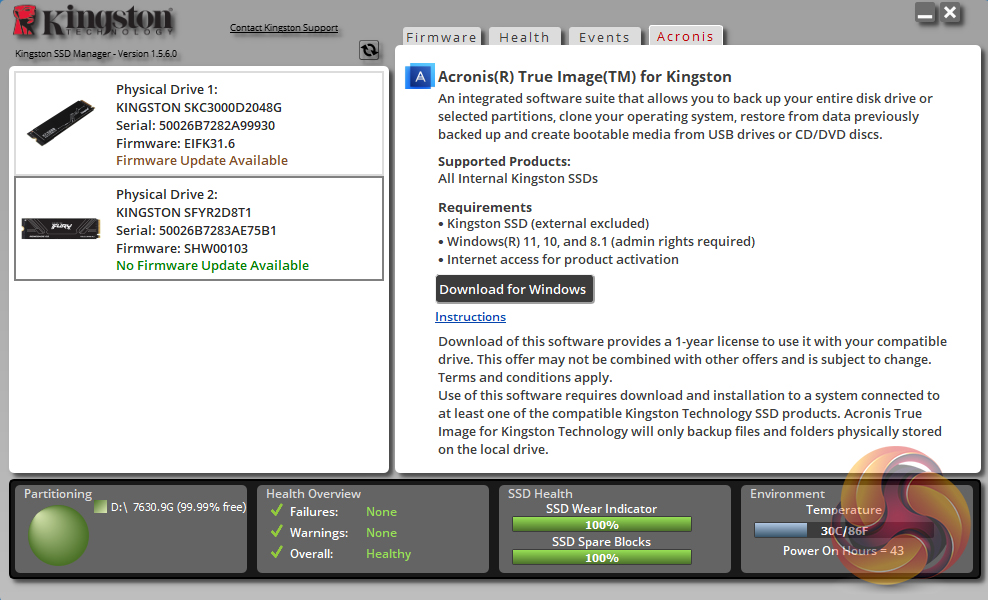
Kingston’s SSD management utility is called SSD Manager (version 1.5.6.0 at the time of testing the drive). It automatically detects any firmware updates, displays drive status, temperatures and SMART information, as well as a link to download Acronis imaging/cloning software.
For testing, the drives are all wiped and reset to factory settings by HDDerase V4. We try to use free or easily available programs and some real-world testing so you can compare our findings against your own system.
This is a good way to measure potential upgrade benefits.
Main system:
AMD Ryzen 7 7700X, 32GB DDR5-6000, Nvidia GeForce RTX 3050 and a Gigabyte AORUS X670E Xtreme motherboard.
Other drives:
ADATA Legend 970 2TB
ADATA Mars 980 Blade 2TB
Biwin Black Opal X570 PRO 2TB
Biwin Black Opal X570 PRO 4TB
Corsair MP700 PRO SE 4TB
Corsair MP700 PRO 2TB
Corsair MP700 PRO XT 2TB
Corsair MP700 Elite 2TB
Corsair MP700 Micro 4TB
Crucial T705 2TB
Crucial T700 2TB
Crucial T700 with Heatsink 2TB
Gigabyte AORUS 10000 2TB
Kingston Fury Renegade G5 2TB
Kioxia Exceria Plus G4 2TB
Klevv Genuine G360 2TB
Netac NV150HK 2TB
Samsung SSD 9100 PRO 2TB
Seagate FireCuda 520 2TB
Sandisk WD Black SN8100 2TB
Software:
Atto Disk Benchmark 4 & 5.
CrystalMark 8.0.0.
AS SSD 2.0.
IOMeter.
UL Solutions PC Mark 10.
UL Solutions 3DMark Storage Benchmark.
Final Fantasy XIV Endwalker Official Benchmark.
CrystalDiskMark is a useful benchmark to measure theoretical performance levels of hard drives and SSD’s. We are using v8.0.5.
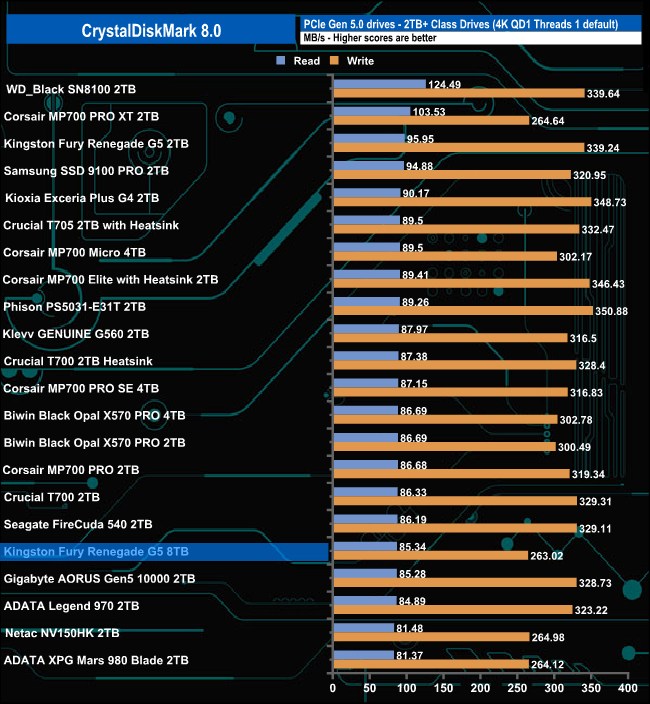
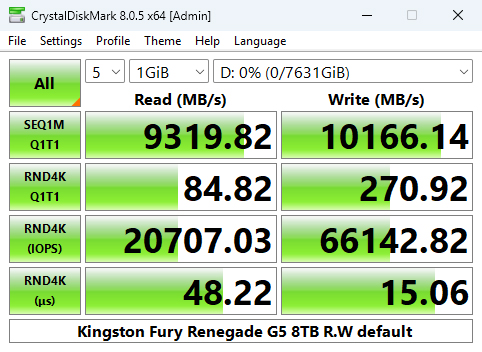
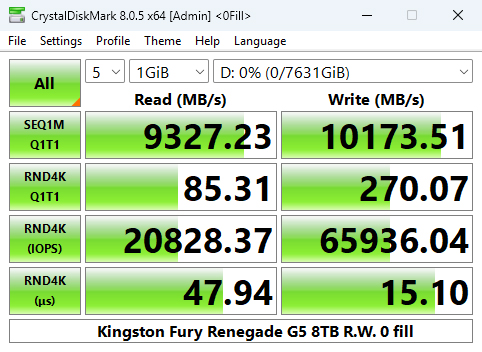
Using the CrystalDiskMark 8 4K QD1 T1 test, the 8TB version of the Fury Renegade G5 produces a read result of 85.34MB/s, 10MB/s slower than the 2TB version. The write result of 263MB/s is also slower.
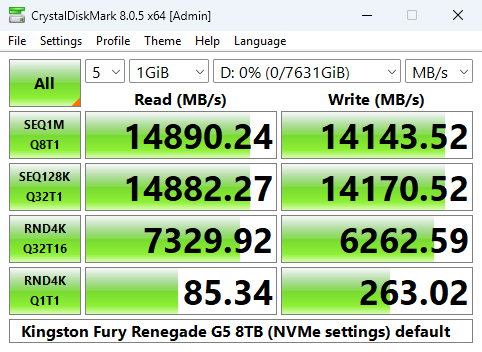
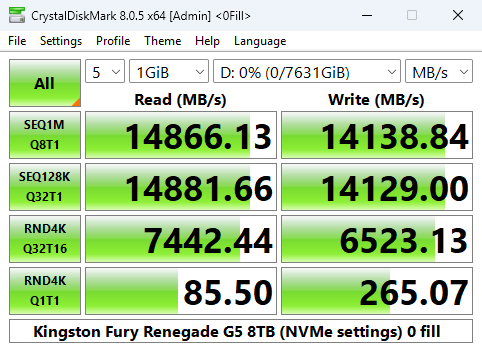
A glance at the benchmark result screens shows that we could confirm the official Sequential ratings of up to 14,800MB/s for reads and up to 14,000MB/s for writes, with test results of 14,890MB/s and 14,143MB/s for reads and writes, respectively.
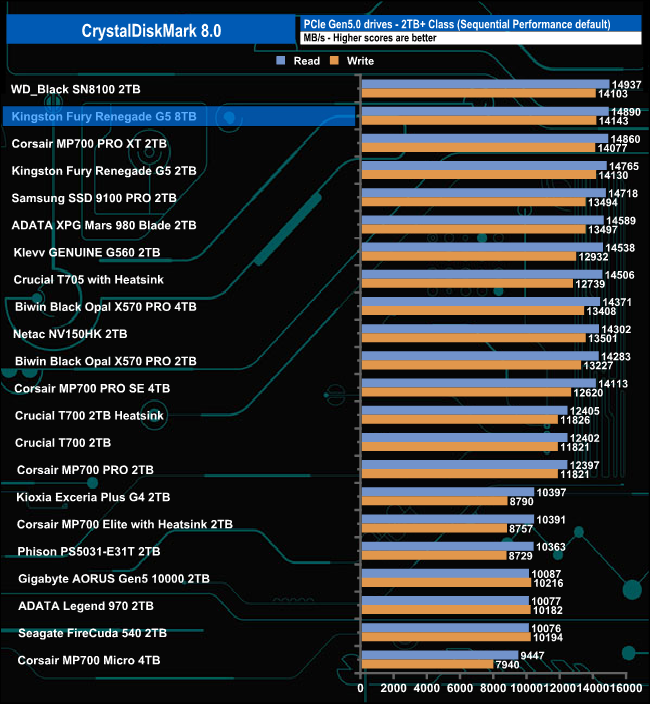
That 14,890MB/s read result places the 8TB Fury Renegade G5 into second place on the results chart, 125MB/s faster than the 2TB model, while its write score of 14,143MB/s is just 13MB/s faster.
Peak Performance profile
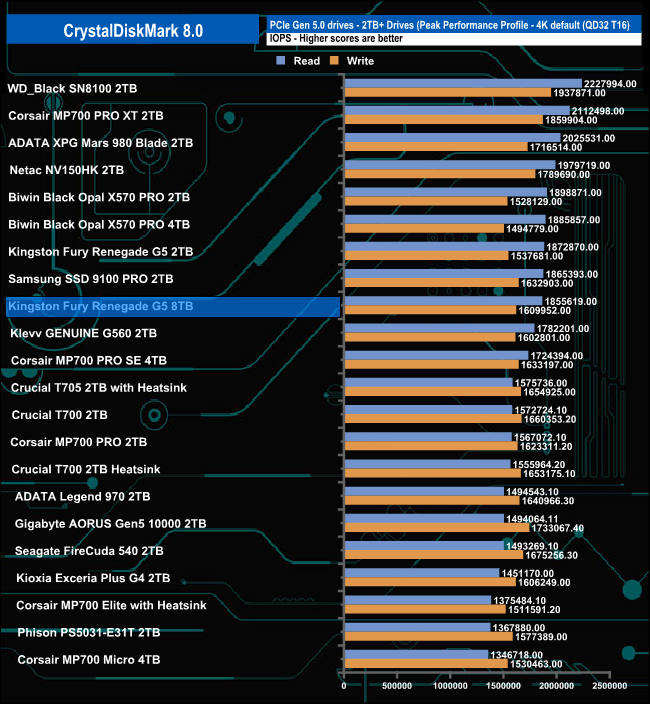
The 8TB Fury Renegade G5 is officially rated as up to 2,200K IOPS for random reads and random writes. Using the Peak Performance profile test in CrystalDiskMark 8, we couldn't reach those official maximums. The best read result we saw was 1,855,619 IOPS, slightly down on the 2TB model, with the best write figure at 1,609,952 IOPS, which is up on the 2TB Fury Renegade G5.

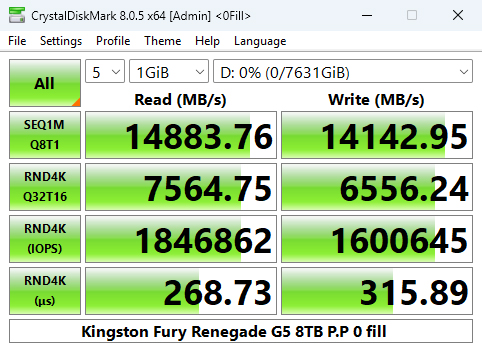
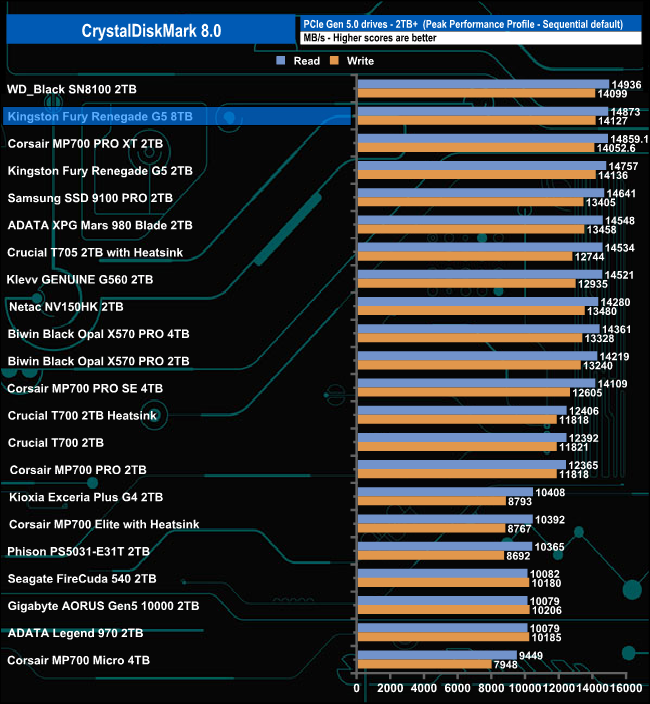
Once again, we can confirm the official sequential figures with Peak Performance profile test results of 14,873MB/s for reads and 14,127MB/s for writes, which put the drive in second place in the results chart.
Real World Profile
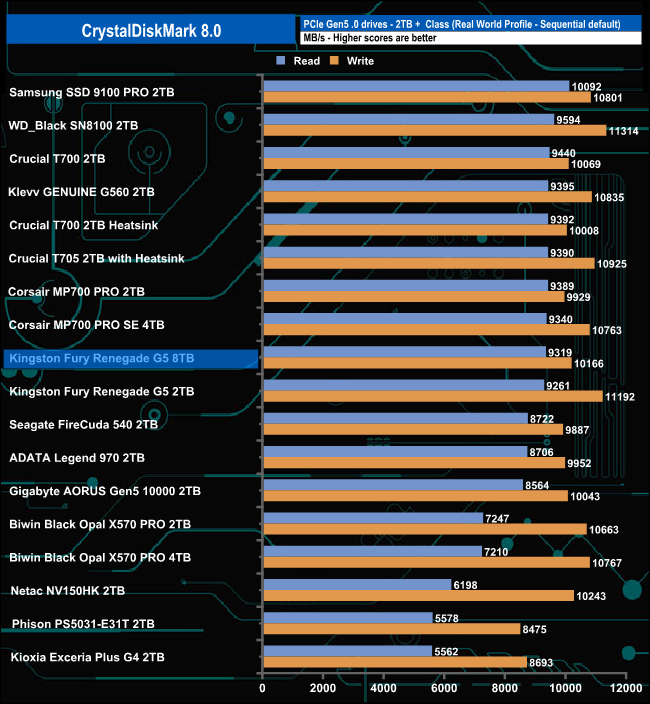
The 8TB Kingston Fury Renegade G5‘s read score in the CrystalDiskMark 8 Real World benchmark sees the drive in a mid-table position, slightly faster than the 2TB version. Its write test result of 10,166MB/s is 1,0256MB/s slower than the 2TB model.
The ATTO Disk Benchmark performance measurement tool is compatible with Microsoft Windows. Measure your storage system's performance with various transfer sizes and test lengths for reads and writes. Several options are available to customise your performance measurement, including queue depth, overlapped I/O and even a comparison mode with the option to run continuously. Use ATTO Disk Benchmark to test any manufacturer's RAID controllers, storage controllers, host adapters, hard drives and SSD drives and notice that ATTO products will consistently provide the highest level of performance to your storage. ATTO uses RAW or compressible data.
We are using version 4.1 for our NVMe disk tests with a set length of 256mb and test both the read and write performance.
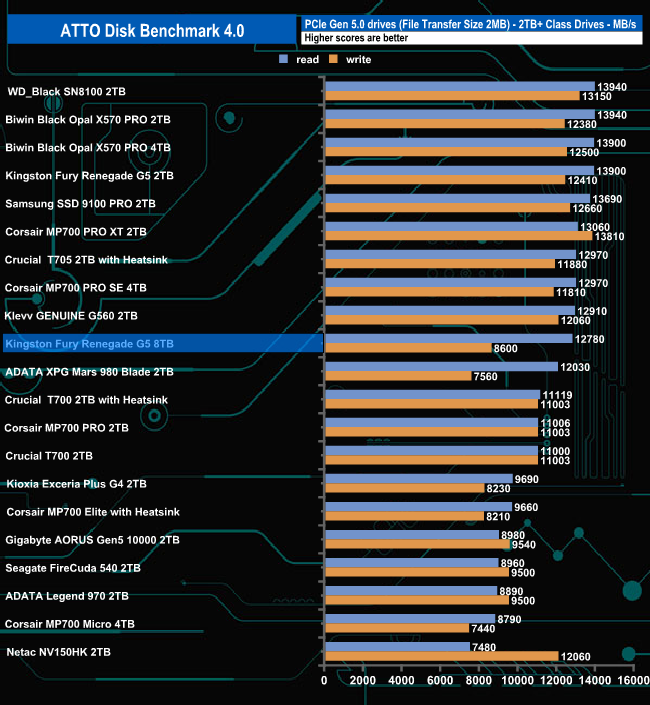
Using the ATTO 4 benchmark, we couldn't hit the official read and write sequential figures of up to 14,800MB/s and 14,000MB/s for reads and writes, respectively, with test figures of 12,780MB/s for reads and 8,600MB/s for writes.
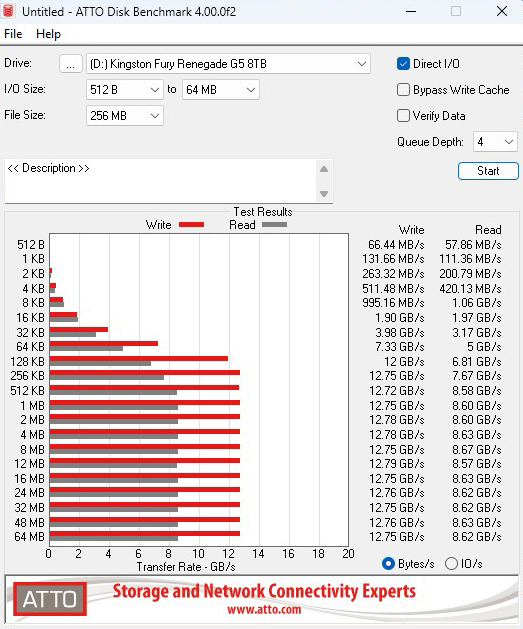
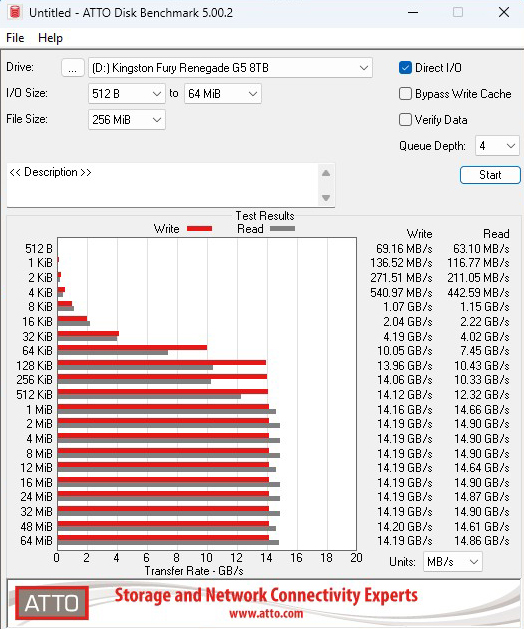
ATTO 5 has new features, enhancements and changes which allow it to benchmark modern SSDs more thoroughly than previous versions.
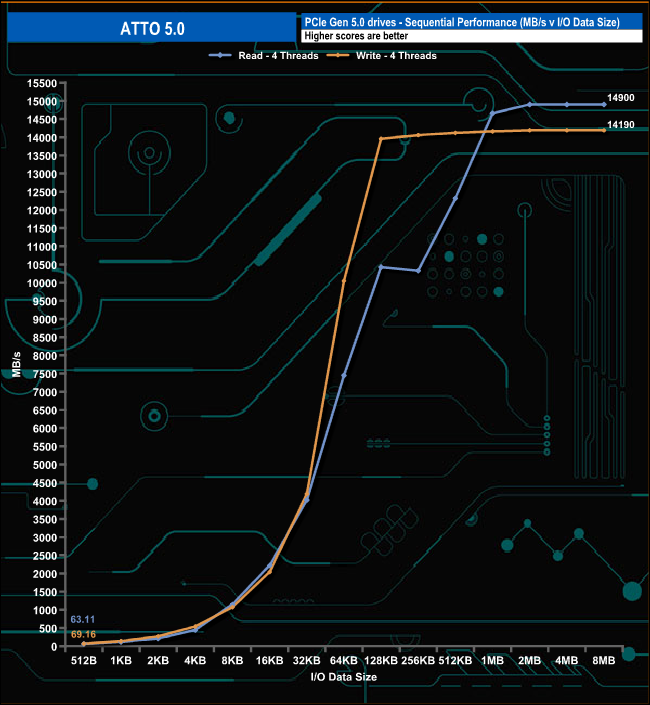
Using this more up-to-date version of ATTO, we could confirm the official Sequential ratings with a read test result of 14,900MB/s and 14,190MB/s for writes.
AS SSD is a great free tool designed just for benchmarking Solid State Drives. It performs an array of sequential read and write tests, as well as random read and write tests with sequential access times over a portion of the drive. It uses
incompressible data samples, which many drives struggle with, so results can be viewed as the worst-case scenarios.
AS SSD includes a sub suite of benchmarks with various file pattern algorithms, but this is difficult in trying to judge accurate performance figures.
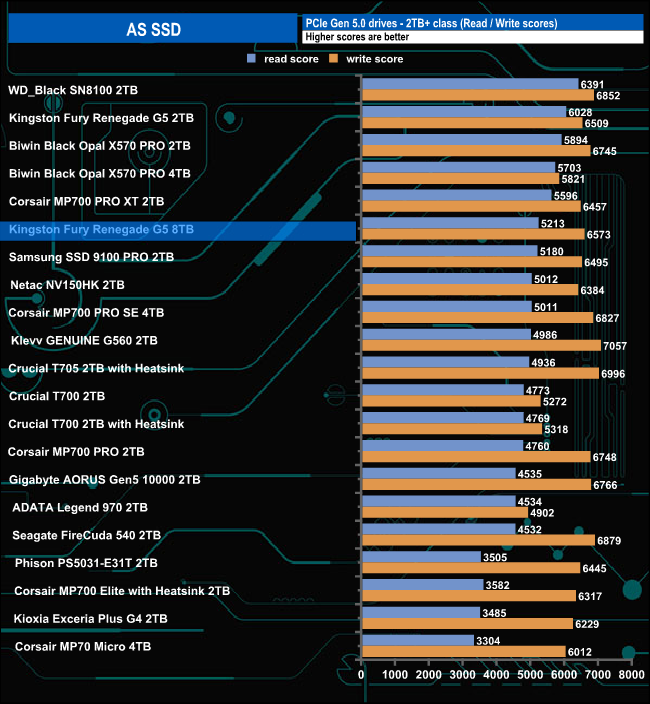
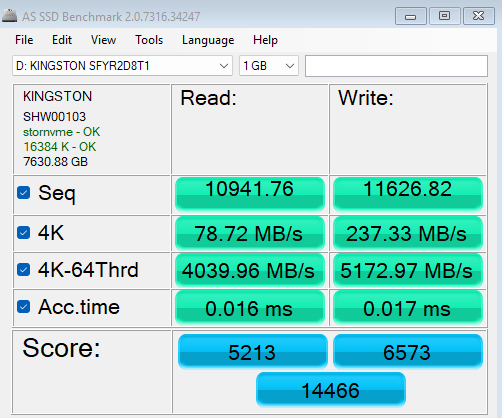
The Kingston 8TB Fury Renegade G5's read score of 5213 in the AS SSD benchmark is 815 points less than the 6028 produced by the 2TB model; however, its write score of 6573 is 64 points better.
We used CrystalDiskMark 8‘s custom settings to test the Sequential read and write performance of the drive through a range of queue depths. The setup for the tests is listed below.
Transfer Request Size: 128KB, Thread(s): 1, Outstanding I/O: 1-32.
128KB Sequential Read / Write.
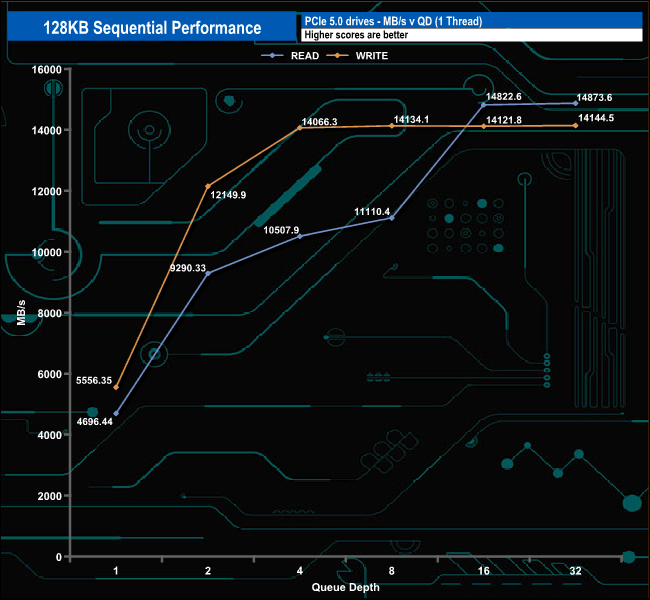
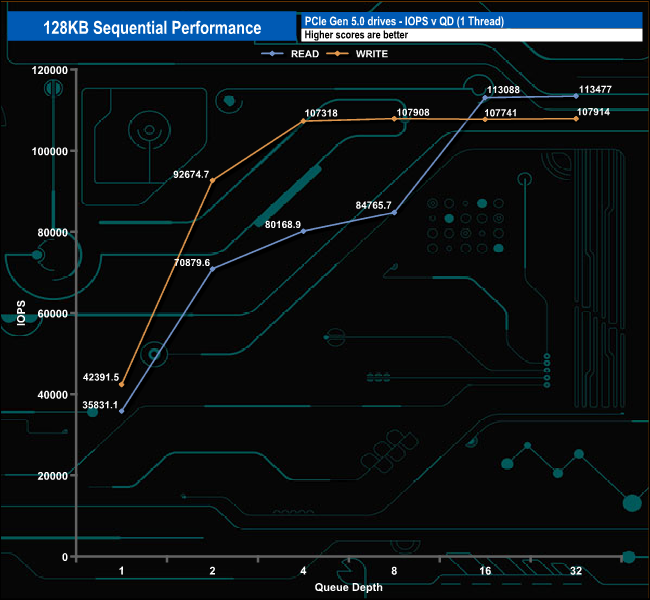
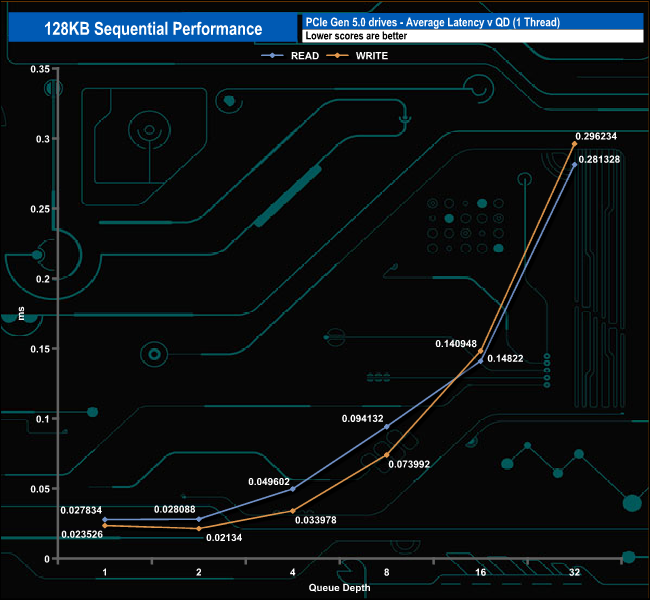
Using this Sequential test, the results confirmed the official Sequential ratings of the drive of up to 14,800MB/s and 14,000MB/s for read and write, respectively, with figures of 14,873MB/s for reads and 14,144MB/s for writes both at Q32.
128KB Sequential Read v QD performance.
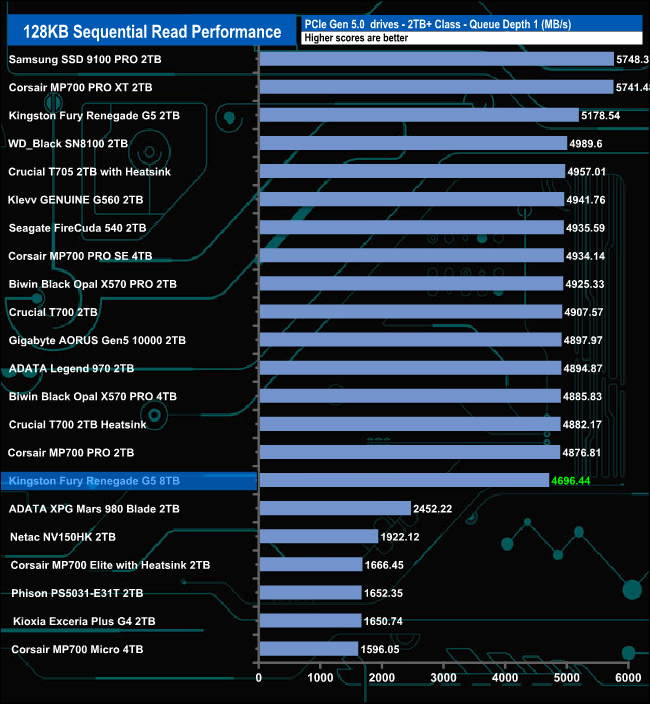
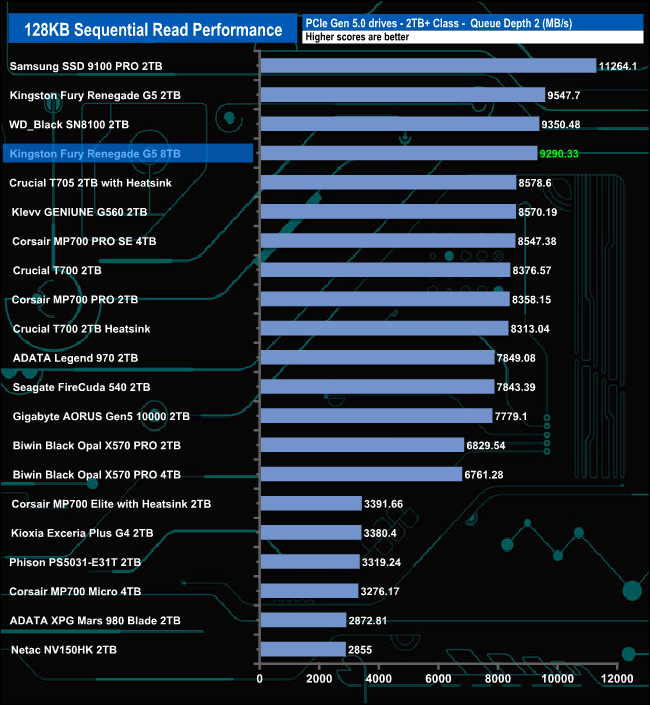
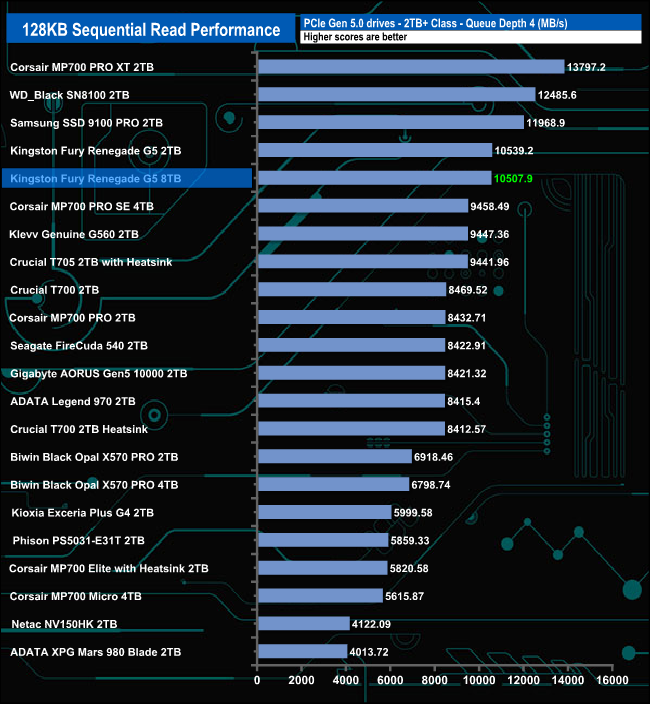
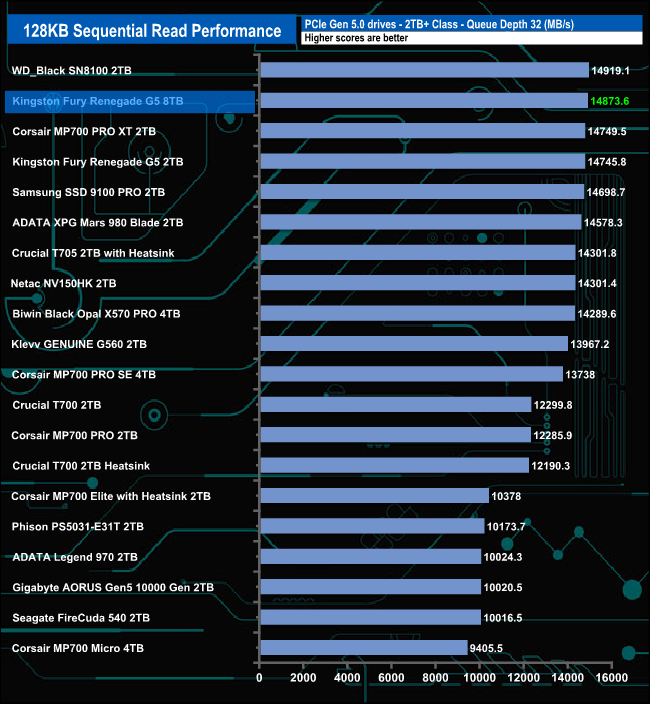
At QD1, the 8TB version of the Fury Renegade G5 is slower than the 2TB version. At QD2 and QD4, the difference between them narrows, but at QD32, the positions swapped, with the larger drive faster.
128KB Sequential Write v QD performance.
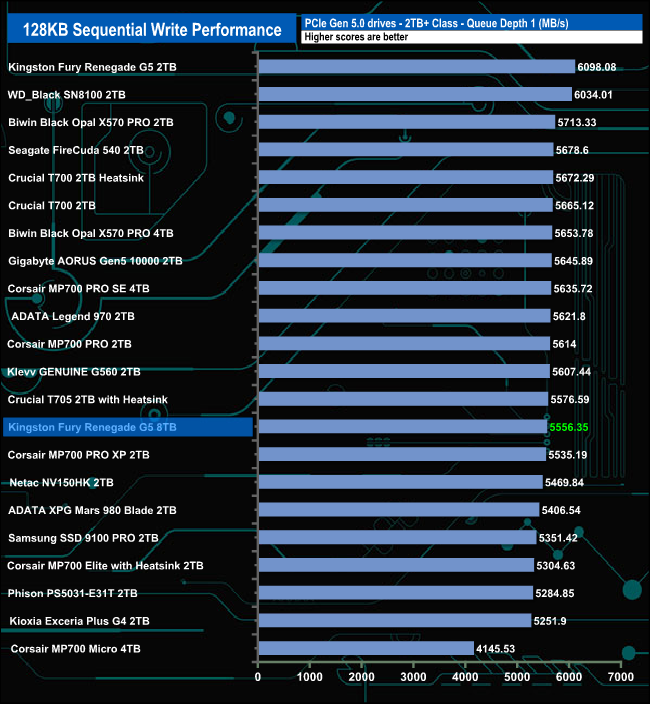
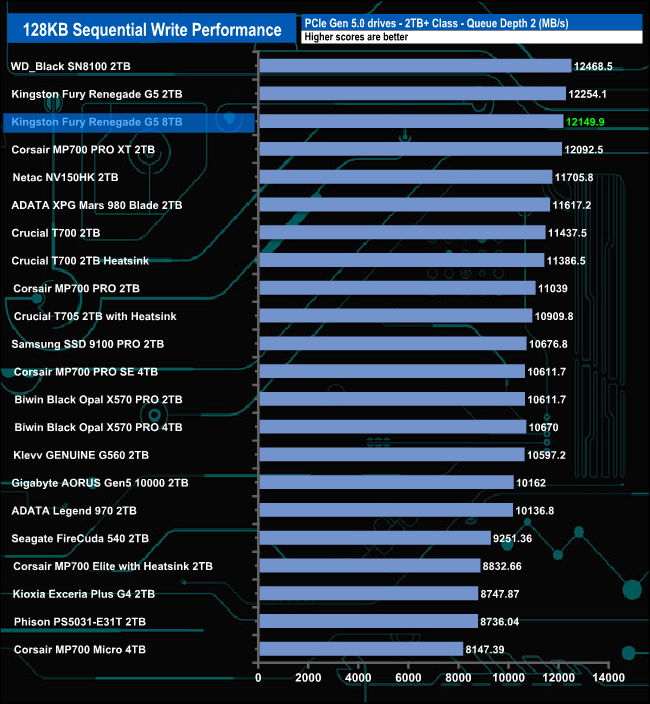
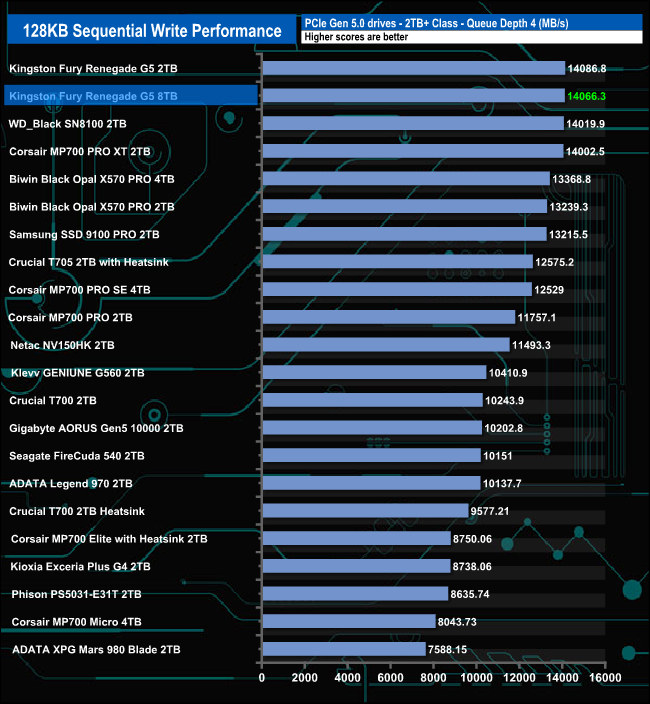
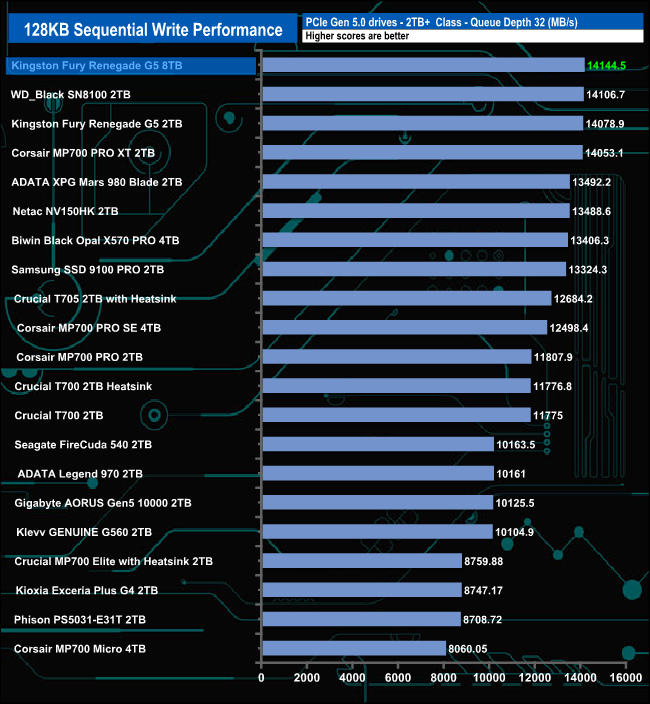
When it comes to the Sequential writes, the 8TB drive is a lot slower than the 2TB version at QD1, however, as the queue depths deepens, the drives get closer to one another until at QD32, the 8TB drive takes over from the 2TB drive and at 14,144.5MB/s its the fastest consumer Gen 5 drive we've seen to date.
We used CrystalDiskMark 8‘s custom settings to test the 4K random read performance of the drive through a range of queue depths. The setup for the tests is listed below.
Transfer Request Size: 4KB, Outstanding I/O: 1-32.
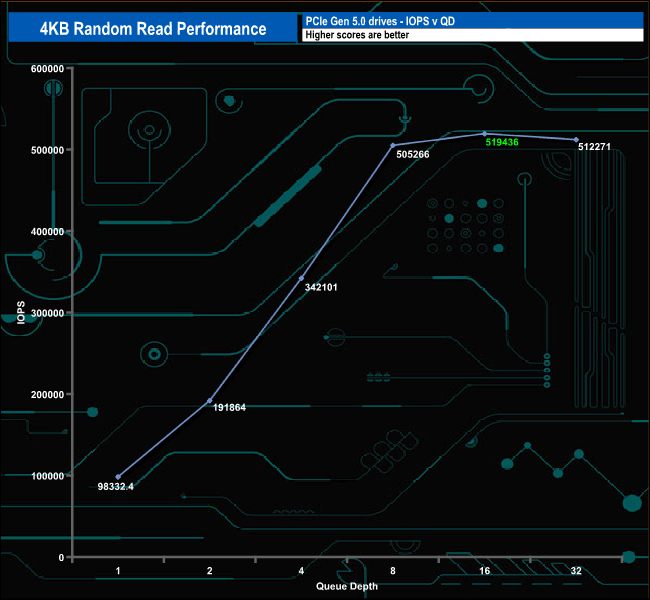
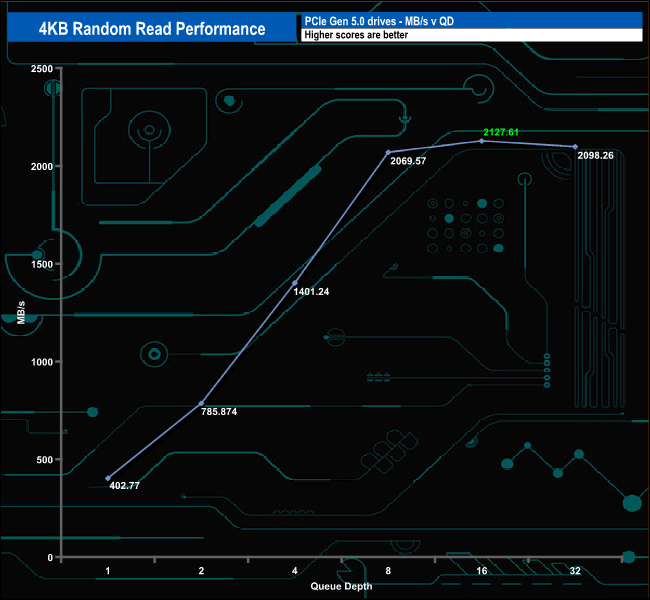
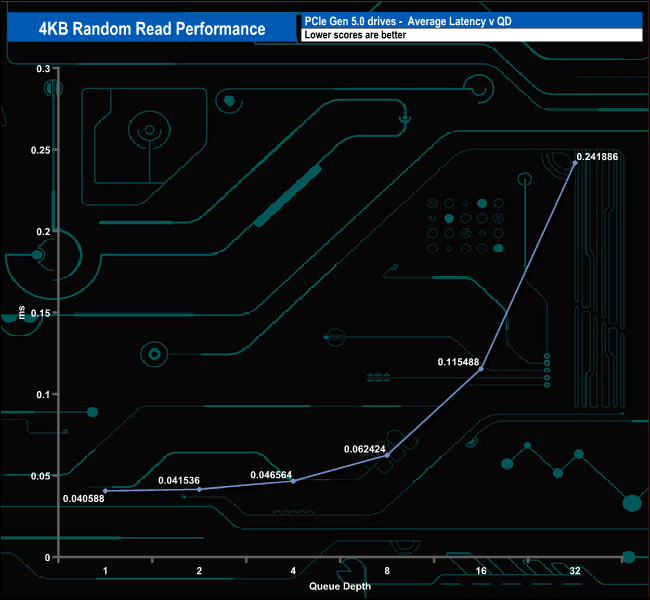
Using our 4-threaded random read 4K tests, we couldn't get close to the official maximum of 2,200,000 IOPS. The best test result was 519,436 IOPS at a queue depth of 16 before the performance backed off a little to finish the test run at 512,271 IOPS (QD32).
4K Random Read v QD Performance
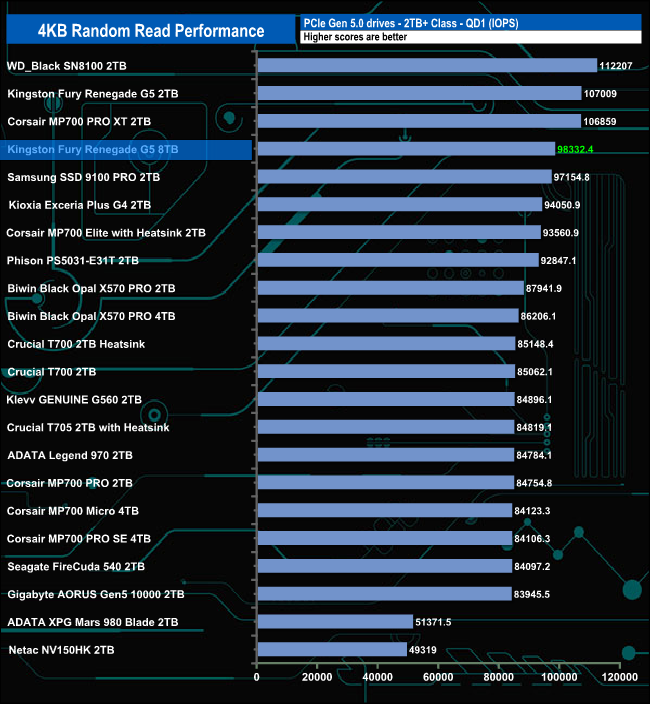
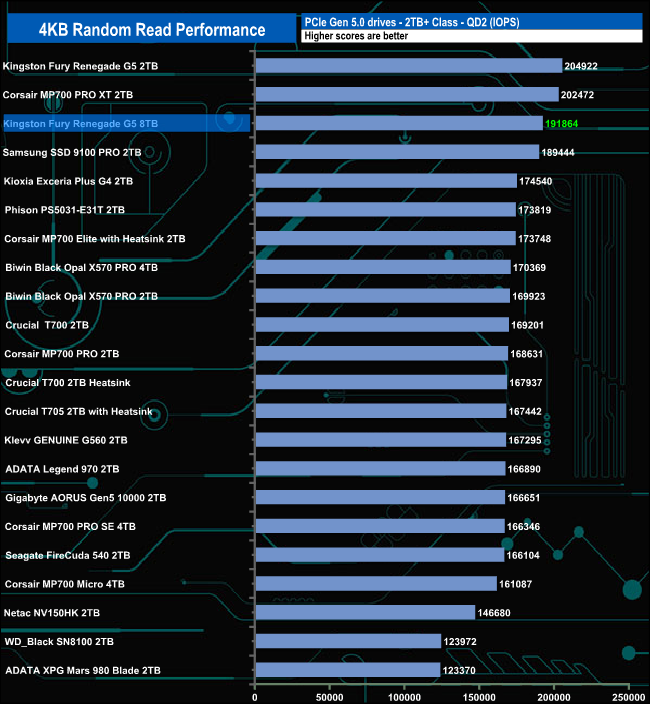
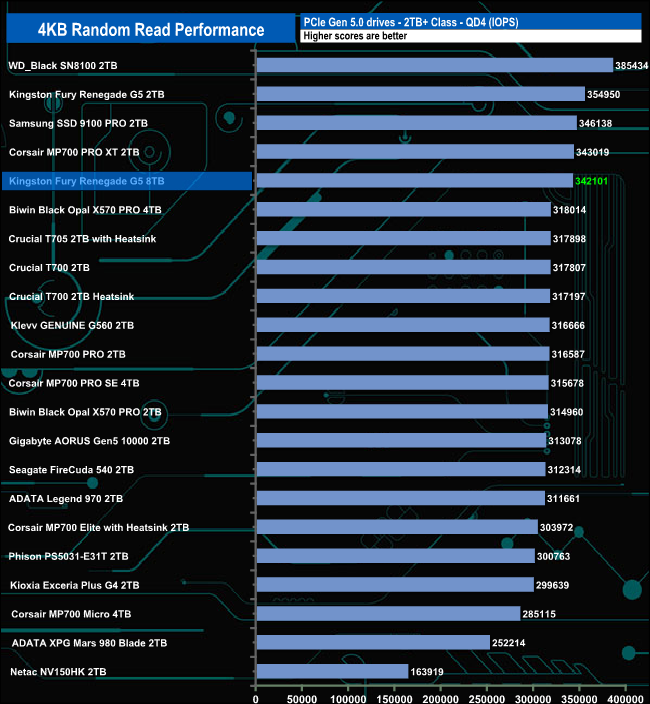
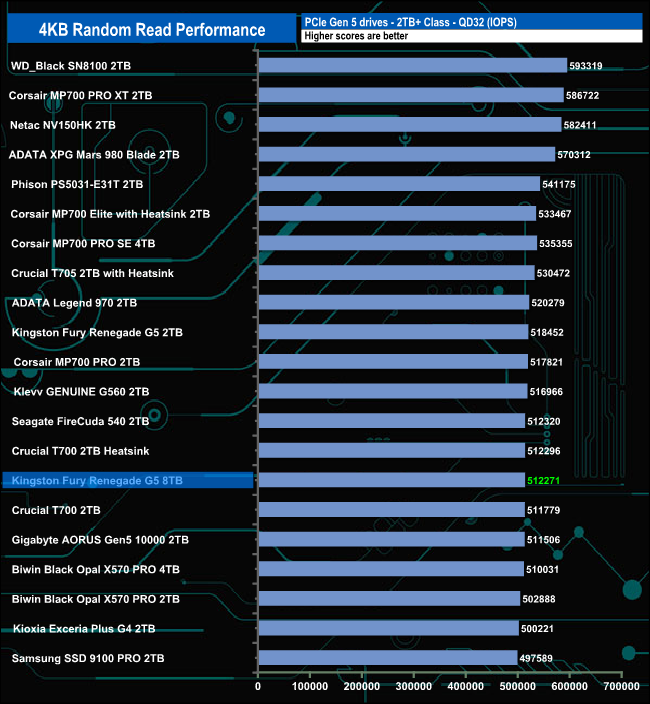
Even though our 4K random read test results were nowhere close to the official maximum figure at any stage, the drive sits in the top five in the results table at QD1, 2 and 4. However, at QD32, it has slipped down the chart, ending up towards the bottom of the table.
We used CrystalDiskMark 8‘s custom settings to test the 4K random write performance of the drive through a range of queue depths. The setup for the tests is listed below.
Transfer Request Size: 4KB, Outstanding I/O: 1-32.
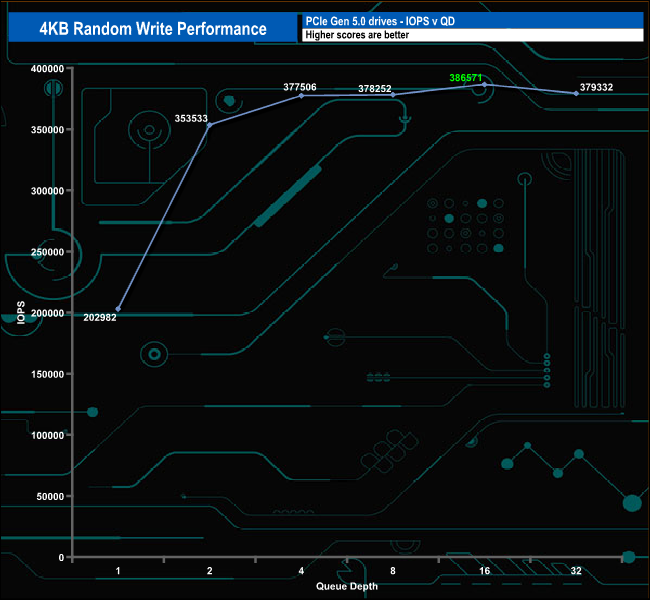
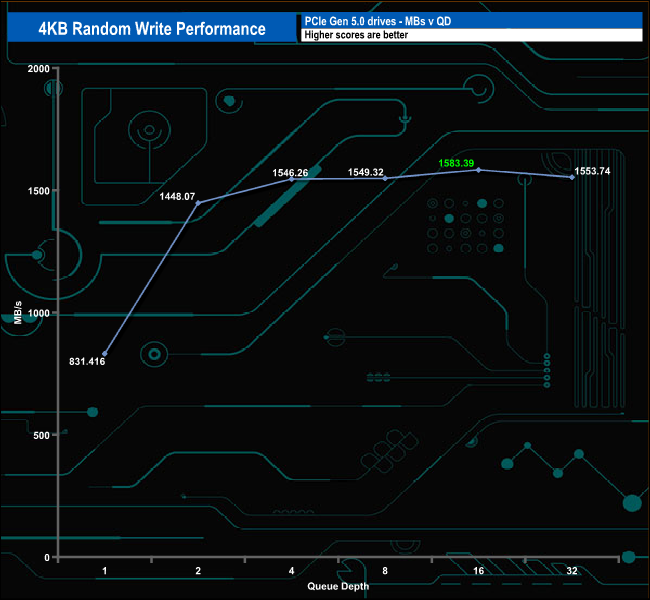
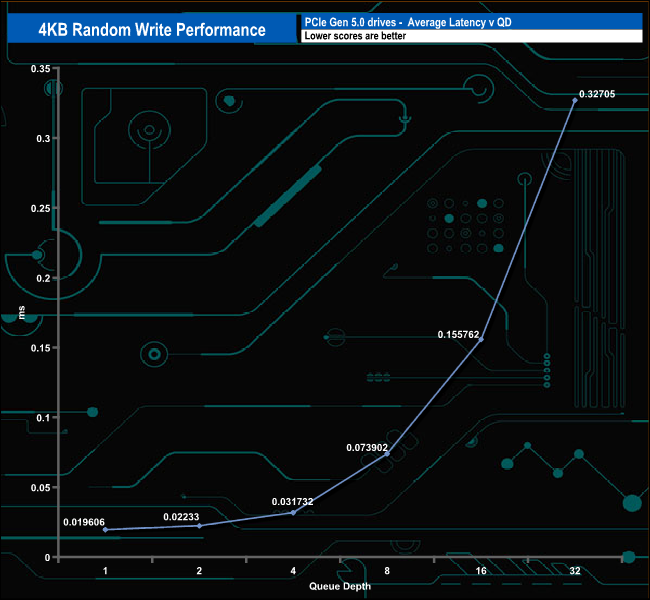
The best result we saw from our 4K random write results was even further away from the official maximum IOPS figure (2,200,000 IOPS) than the random reads at 386,571 IOPS (QD16). The drive finished the test run at 379,332 IOPS (QD32).
4K Random Write v QD Performance
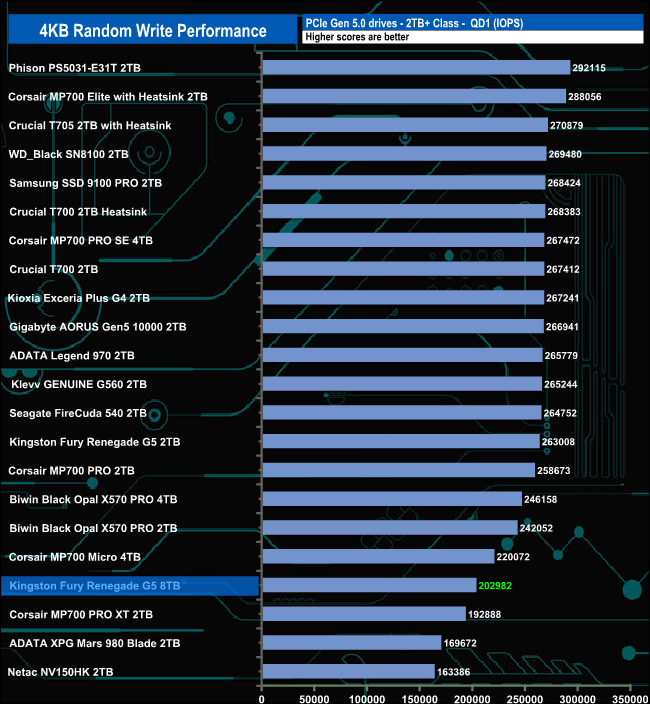
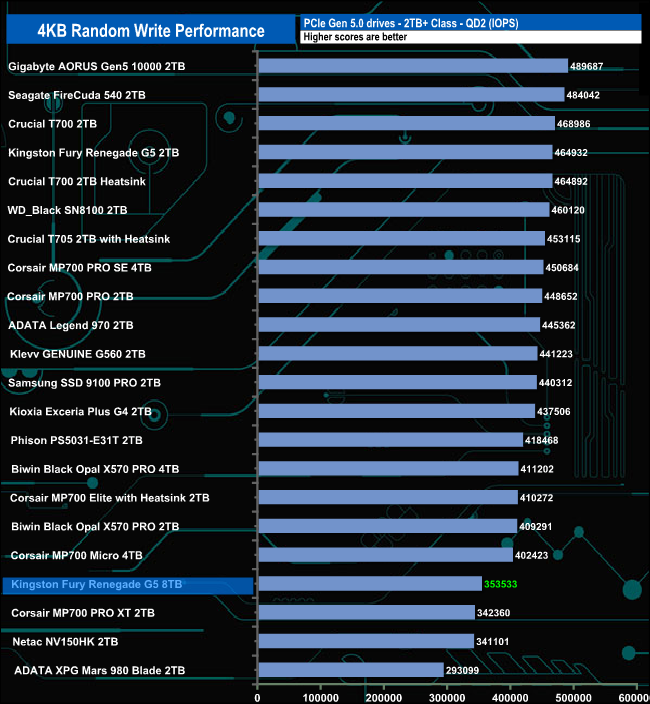
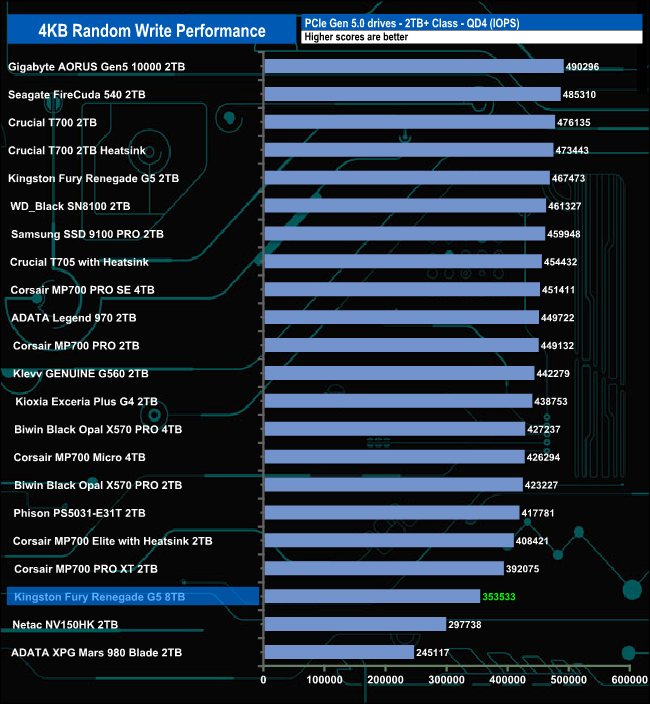
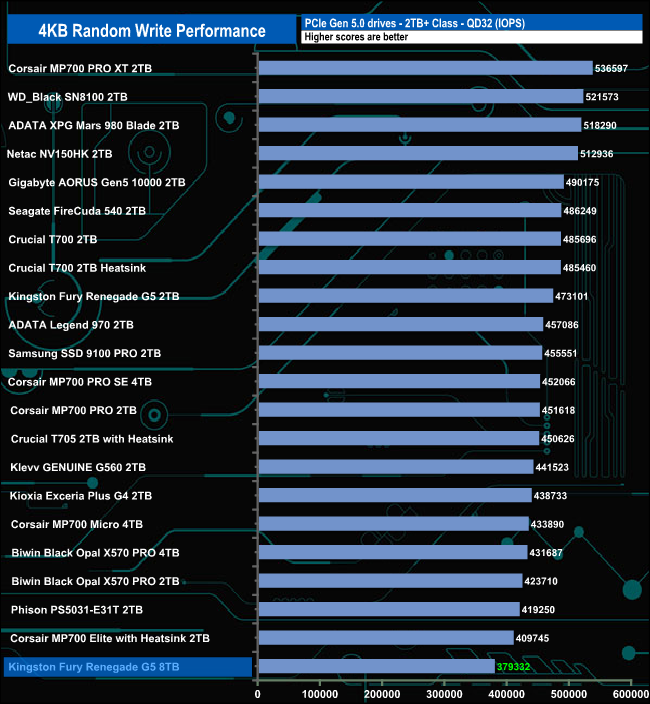
The 8TB version of the Fury Renegade G5 doesn't get out of the bottom half of the results table during any of the test runs.
We used CrystalDiskMark 8’s custom settings to test the 4K 70/30 mixed read/write performance of the drive through a range of queue depths using a single thread and four threads.
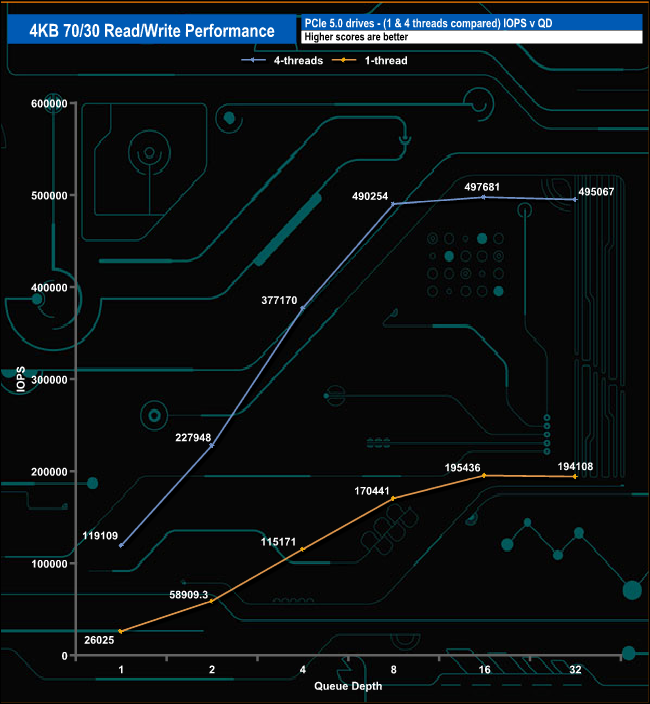
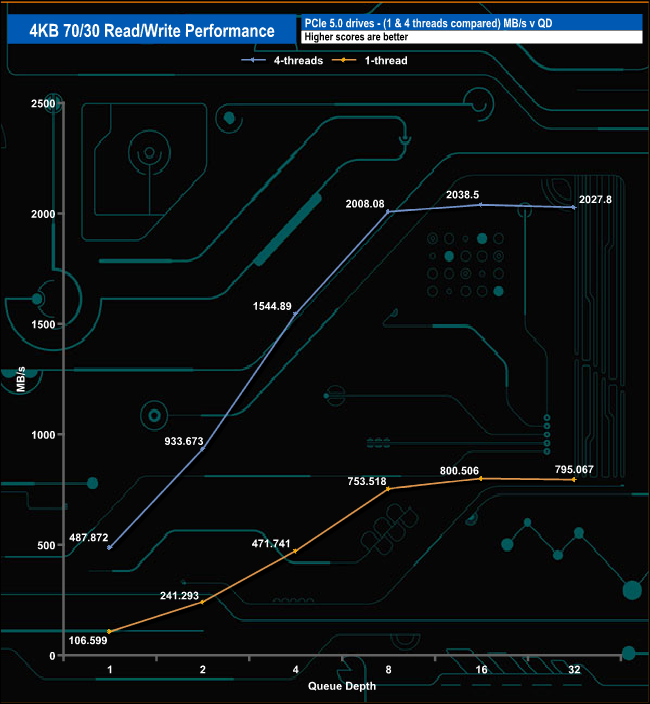
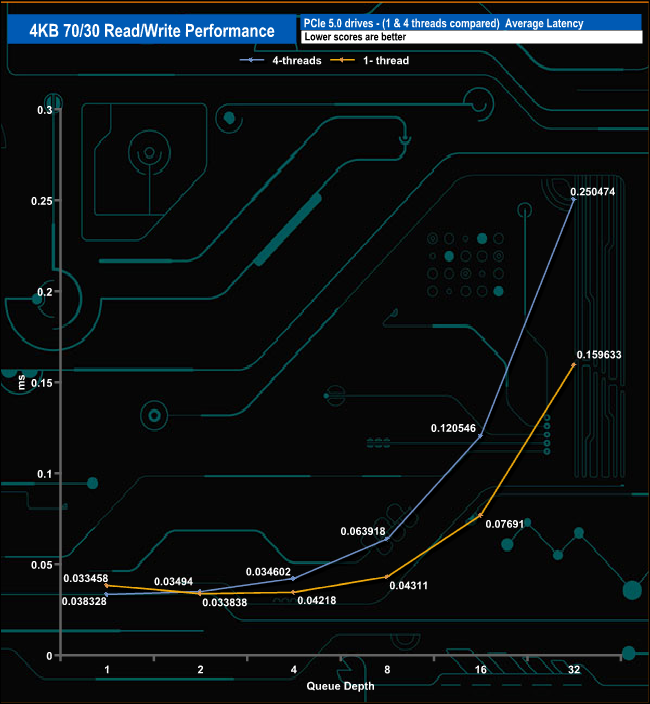
In our 4K 70/30 read/write tests using a single thread, the drive's performance goes from 26,025 IOPS at QD1 up to a peak of 195,436 IOPS at QD16 before dropping back to finish the test run at 194,108 IOPS at QD32. Switching over to using four threads, the performance rises from 119,109 IOPS at QD1 to peak again at QD16 with a figure of 497,681 IOPs, finishing the test run at 495,067 IOPS.
We used CrystalDiskMark 8 to test the random performance of the drive at lower queue depths (QD1 – QD8, where most of the everyday workloads occur) using 1 to 4 threads.
Random Reads
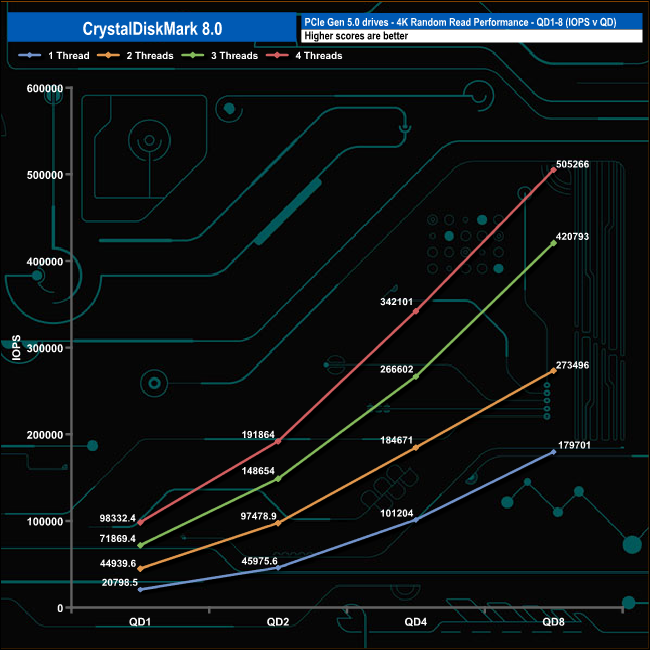
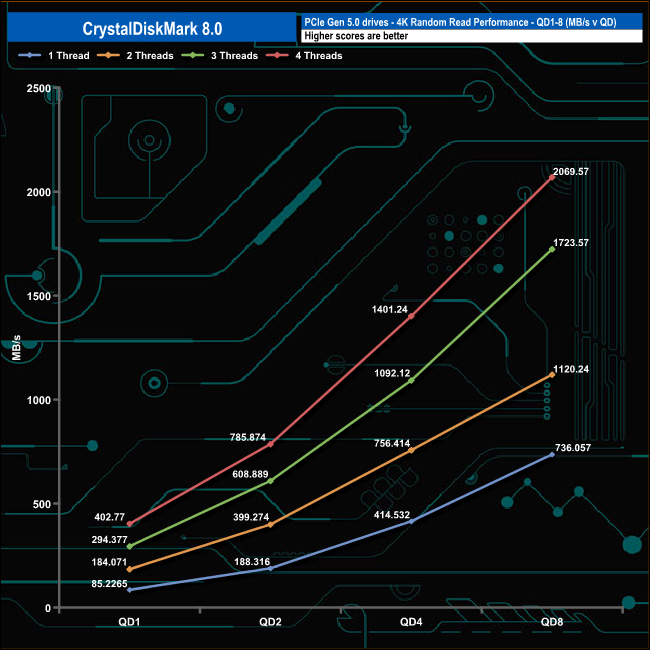
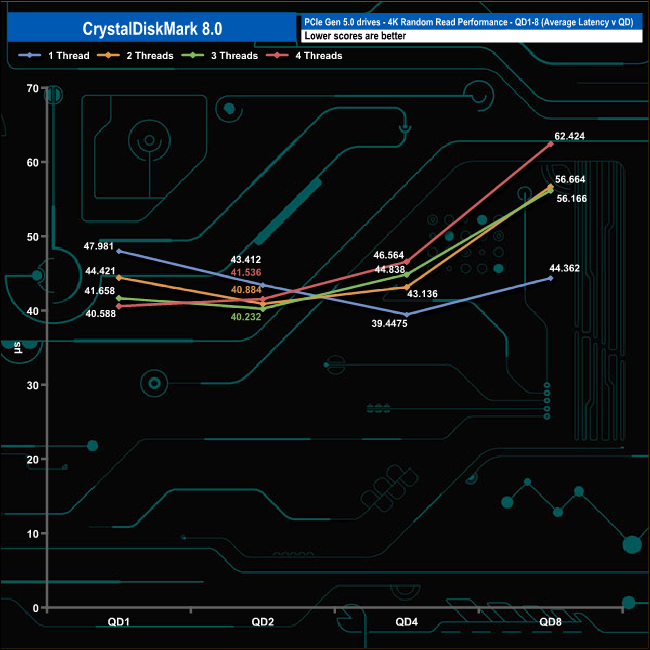
In the QD1-QD8 random read tests, the drive produced smooth increases in performance as the queue depth deepened without any noticeable dramas. At QD1, the drive speed ranges from 20,795 IOPS (85.22MB/s) using a single thread up to 98,332 IOPS (407.77MB/s) using four threads. By the end of the test run at QD8, the drive reached 179,701 IOPS (736.05MB/s) using a single thread, while the four-threaded test reached 505,266 IOPS (2,069MB/s).
Random Write
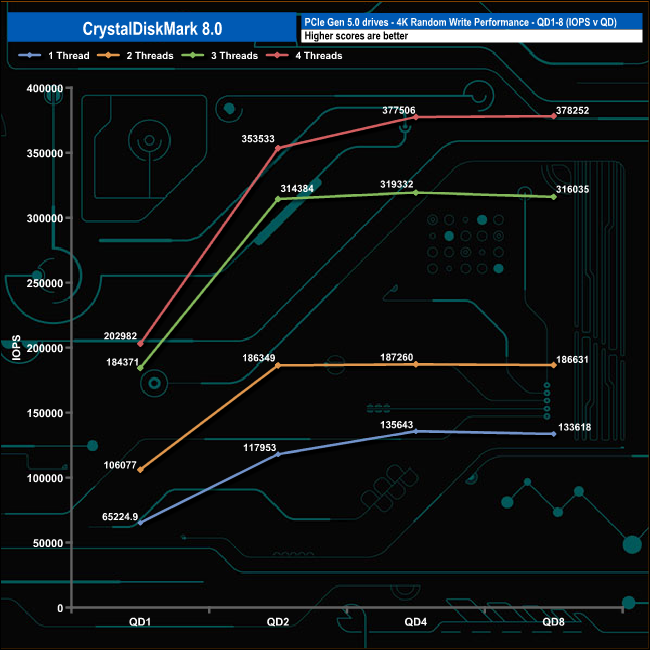
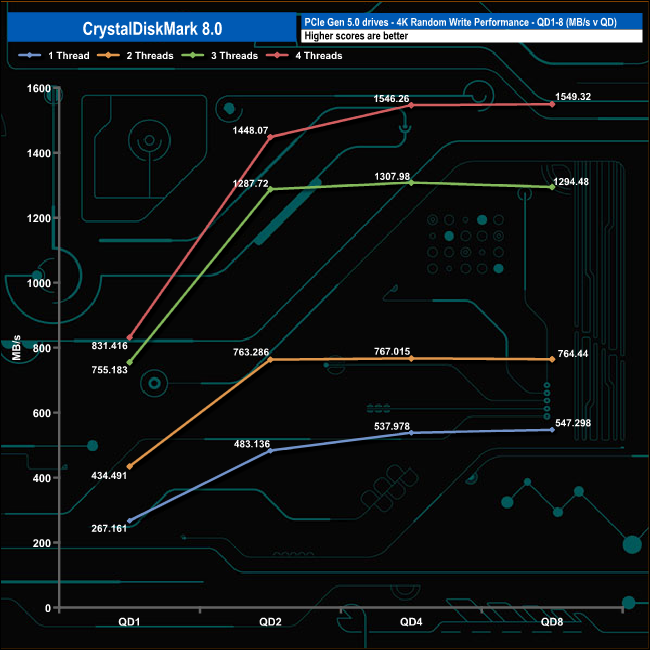
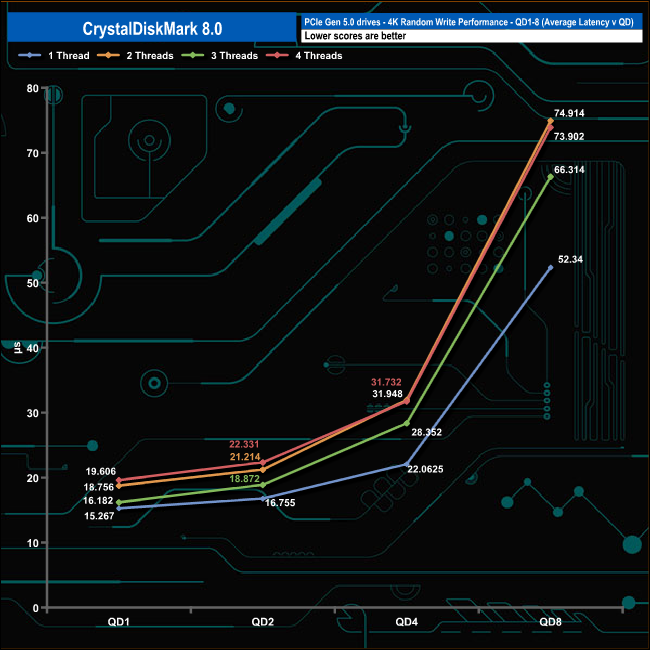
In the 4K write tests, the performance rose quickly from QD1 to QD2 for all four tested threads, with the fastest rise seen in the three and four-threaded tests. The performance began to plateau out at QD2 using two and three threads, but using single and four threads, this plateau didn't happen until QD4
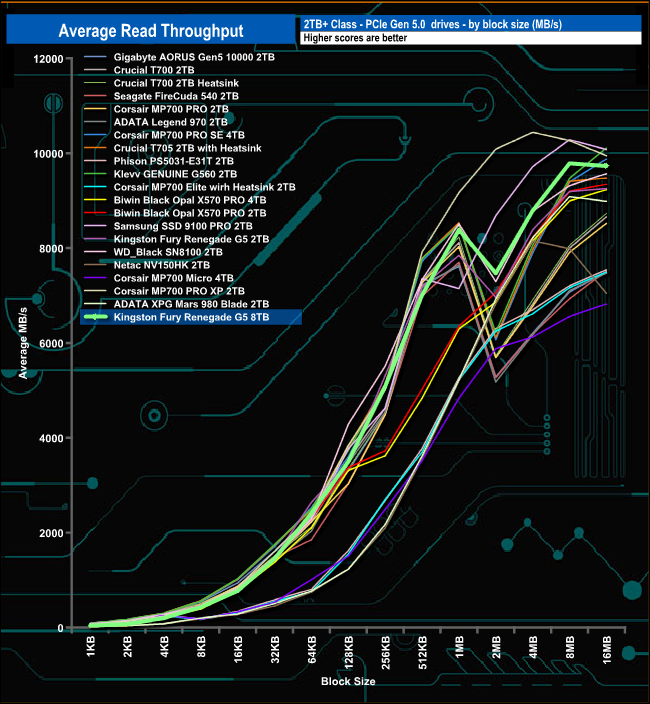
In our read-throughput test, the drive peaked at the 8MB block size at 9,787.16MB/s, quite some way short of the official maximum of 14,800MB/s.
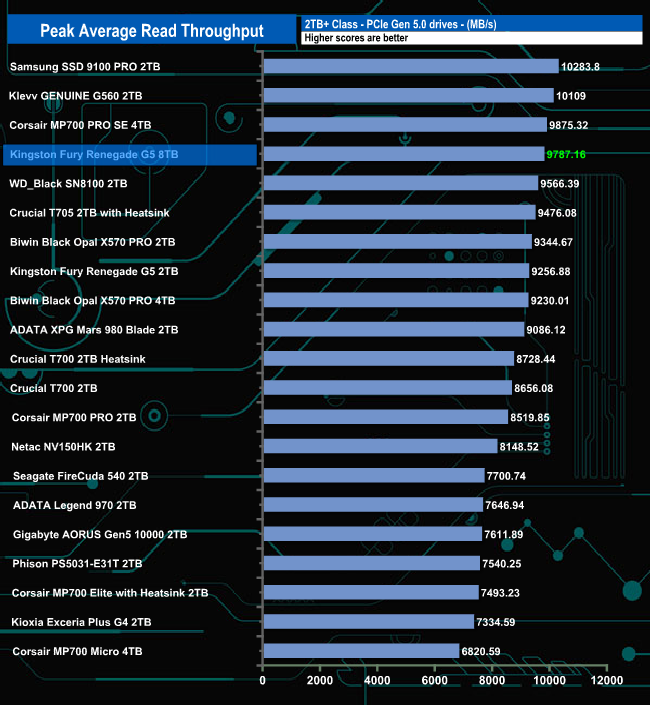
Although the read throughput result is short of the official maximum, it still puts the drive into fourth place in the results chart, some 530.28MB/s faster than the 2TB model.
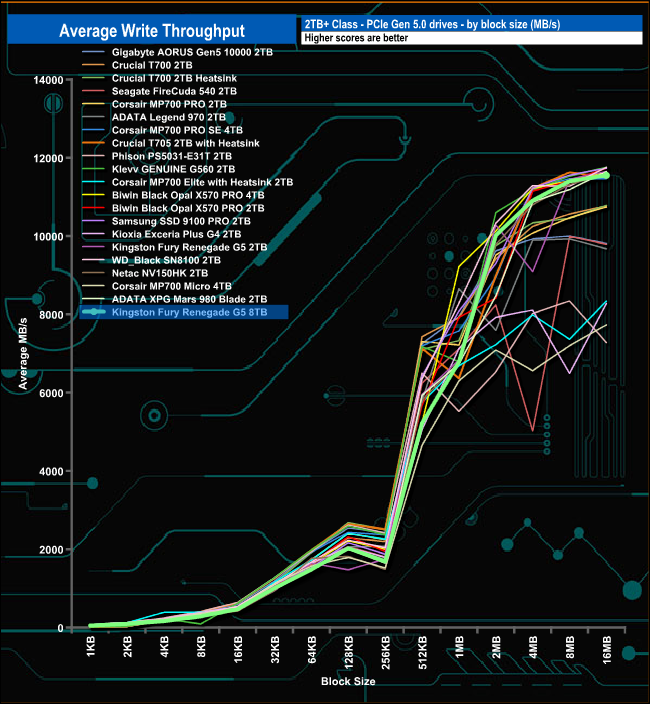
In the write throughput test, the performance drops a little between the 126KB and 256KB block sizes, but the drive soon recovers, finishing the test run 11,557.47MB/s, still some way off the official maximum of 14,000MB/s but closer than the read performance.
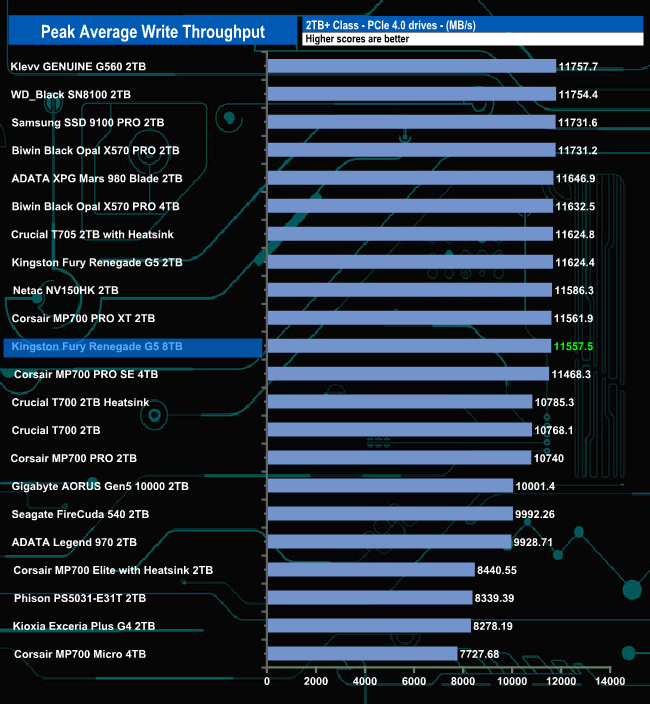
The peak write result of 11,557MB/s sees the drive in a mid-table position, 67MB/s slower than the 2TB Fury Renegade G5.
The PCMark 10 Full System Drive Benchmark uses a wide-ranging set of real-world traces from popular applications and common tasks to fully test the performance of the fastest modern drives. The benchmark is designed to measure performance of fast system drives using the SATA bus at the low end and devices connected via PCI Express at the high end.
The goal of the benchmark is to show meaningful real-world performance differences between fast storage technologies such as SATA, NVMe, and Intel’s Optane. The Full System Drive Benchmark uses 23 traces, running 3 passes with each trace. It typically takes an hour to run.
Traces used:
Booting Windows 10.
Adobe Acrobat – starting the application until usable.
Adobe Illustrator – starting the application until usable Adobe Premiere Pro – starting the application until usable.
Adobe Photoshop – starting the application until usable.
Battlefield V – starting the game until the main menu.
Call of Duty Black Ops 4 – starting the game until the main menu.
Overwatch – starting the game until main menu.
Using Adobe After Effects.
Using Microsoft Excel.
Using Adobe Illustrator.
Using Adobe InDesign.
Using Microsoft PowerPoint.
Using Adobe Photoshop (heavy use).
Using Adobe Photoshop (light use).
cp1 Copying 4 ISO image files, 20 GB in total, from a secondary drive to the target drive (write test).
cp2 Making a copy of the ISO files (read-write test).
cp3 Copying the ISO to a secondary drive (read test).
cps1Copying 339 JPEG files, 2.37 GB in total, to the target drive (write test).
cps2 Making a copy of the JPEG files (read-write test).
cps3 Copying the JPEG files to another drive (read test).
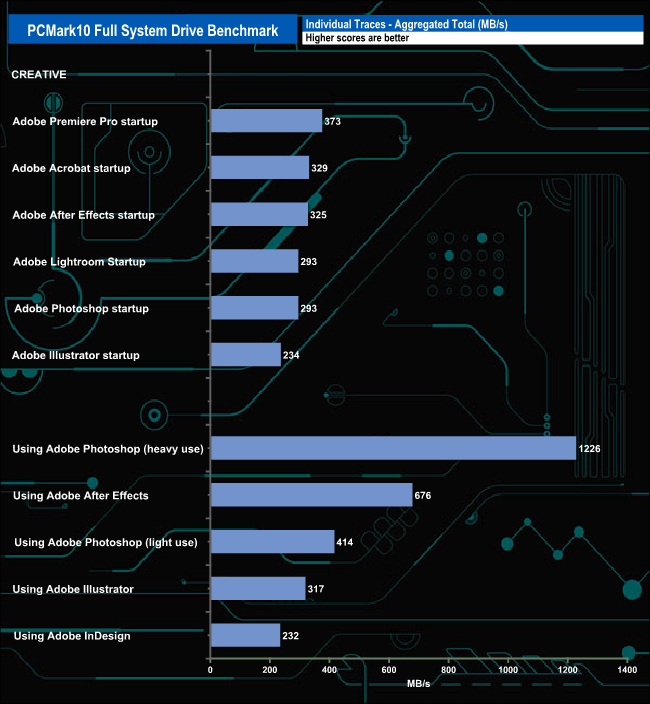
When tested using the Adobe startup traces in PCMark10's Full System Drive benchmark, the drive produced an average of 307MB/s for the six tests. The fastest of these tests was the Premiere Pro trace, at 373MB/s, while the slowest was the Illustrator startup trace, at 234MB/s.
Switching over to the Adobe usage traces, the drive averaged 573MB/s, which includes the 1,226MB/s result for the Adobe Photoshop heavy usage trace. The slowest of the five traces was the InDesign trace at 232MB/s.
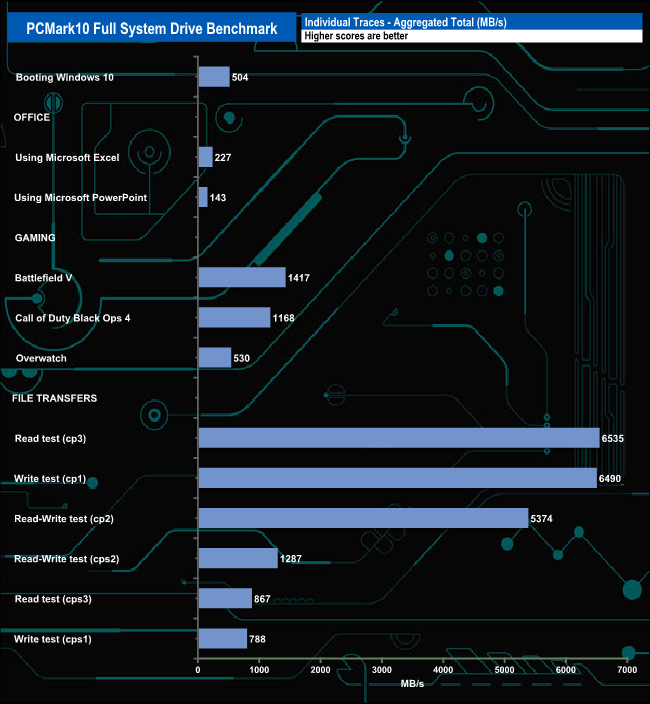
The three gaming traces produced an average result of 1,038MB/s, the fastest being Battlefield V at 1,417MB/s, next came Call Of Duty Black Ops 4 at 1,168MB/s and last and quite some way back, Overwatch at 530MB/s.
For the six file transfer tests, the drive averaged 3,556MB/s with the fastest transfer being the cp3 Read Test at 6,535MB/s.
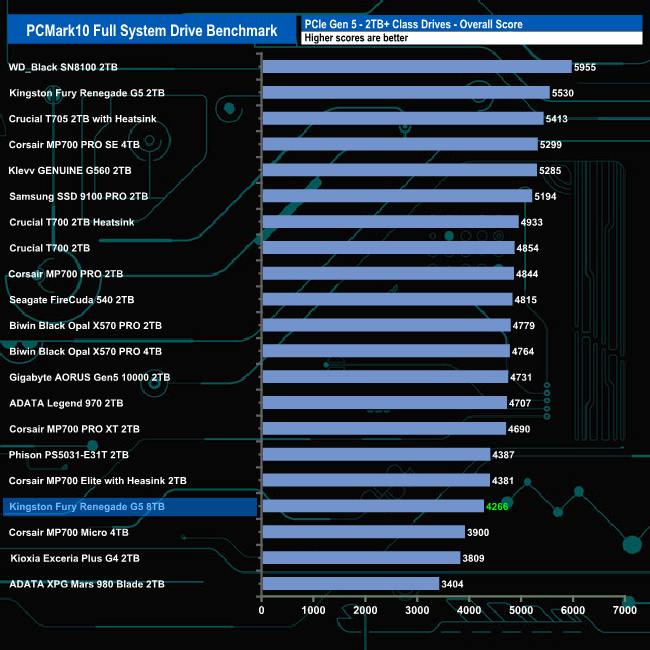
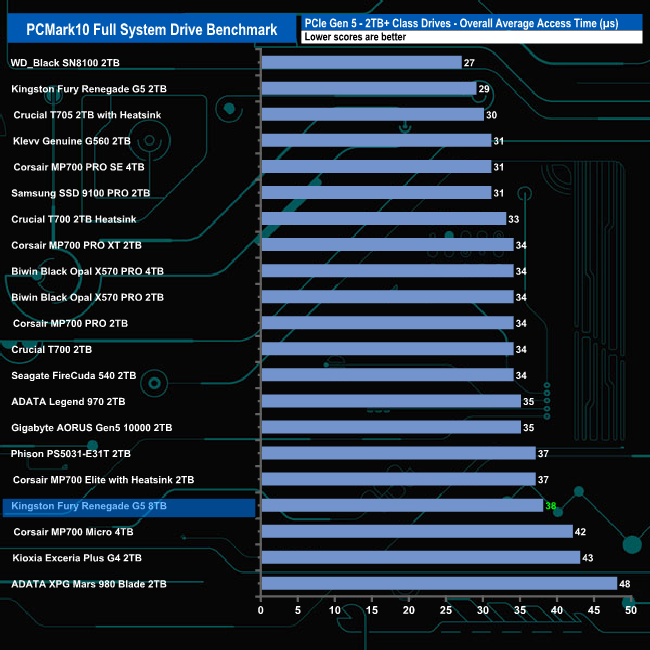
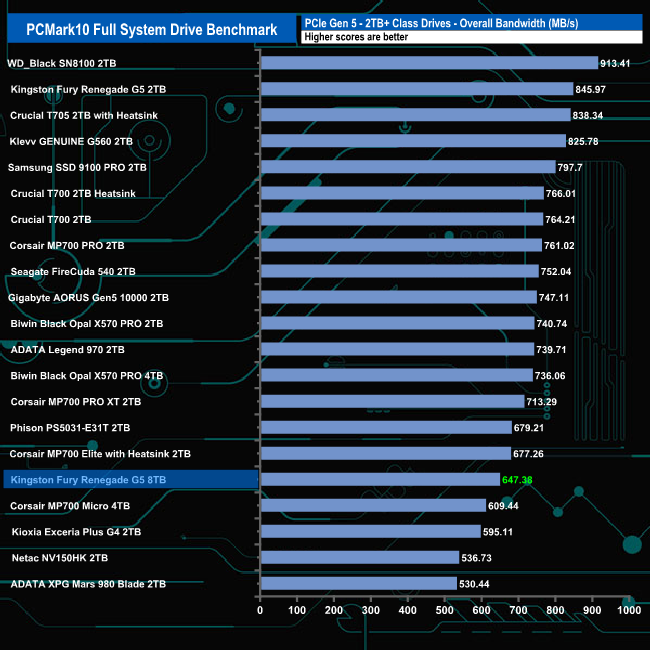
The 8TB version of Kingston's Fury Renegade G5 didn't fare as well in the PCMark10 Full System Drive benchmark as the 2TB drive did, the smaller drive producing a bandwidth result some 198.59MB/s faster than the new flagship drive.
The 3DMark Storage Benchmark uses traces recorded from popular games and gaming-related activities to measure real-world gaming performance.
Traces used:
Battlefield V
Loading Battlefield™ V from launch to the main menu.
Call of Duty Black Ops 4
Loading Call of Duty®: Black Ops 4 from launch to the main menu.
Overwatch
Loading Overwatch® from launch to the main menu.
Game Move
Copying the Steam folder for Counter-Strike®: Global Offensive from an external SSD to the system drive.
Game Recording
Recording a 1080p gameplay video at 60 FPS with OBS (Open Broadcaster Software) while playing Overwatch®.
Installing Game
Installing The Outer Worlds® from the Epic Games Launcher.
Game Saving
Saving progress in The Outer Worlds game.


In 3DMark’s Storage Test, the 8TB Fury Renegade G5 had an average game loading bandwidth figure for the three games of 1,110.80MB/s with an average access time figure of 45µs (0.045ms), all three transfers being slower than the 2TB Fury Renegade G5, which had an average access time figure of 38µs (0.038ms).


In the game, moving, recording, installing and saving test traces, the drive averaged 1,287.08MB/s with an average access time of 39µs (0.039ms) for the four tests.


The drive didn't handle the rigours of the 3DMark Storage Benchmark as well as the 2TB version of the drive, with an average bandwidth result of 727.63MB/s, 208.31MB/s behind the smaller drive.
The Final Fantasy XIV Endwalker Official Benchmark uses actual maps and playable characters to assign a score to your PC and rate its performance, including scene loading times.
The benchmark gives an overall load time as well as loading times by scene.
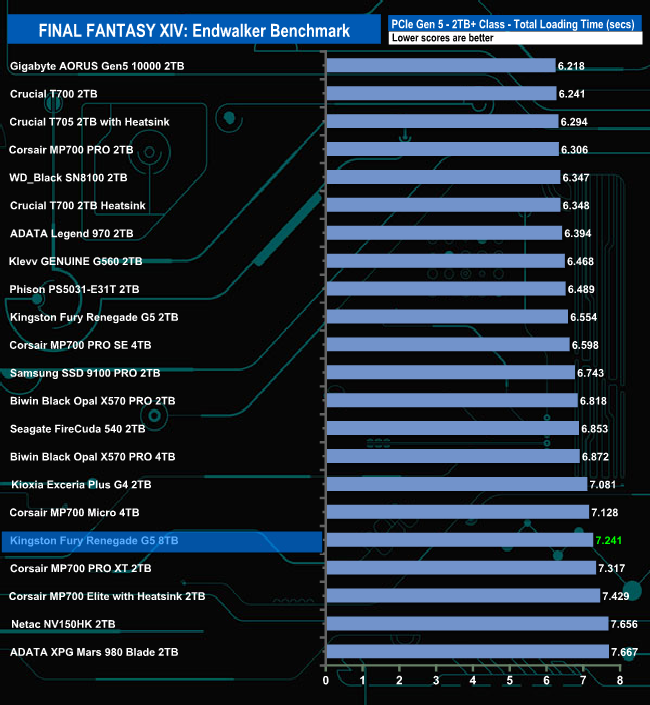
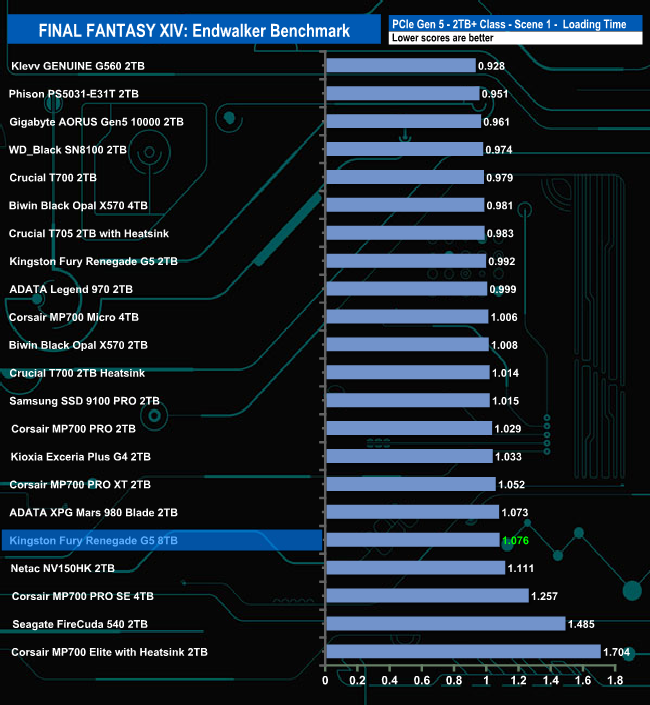
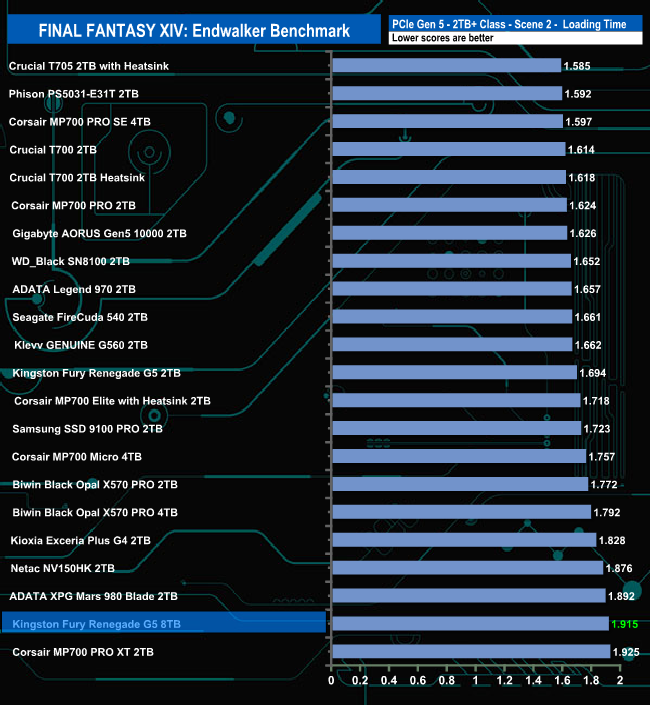
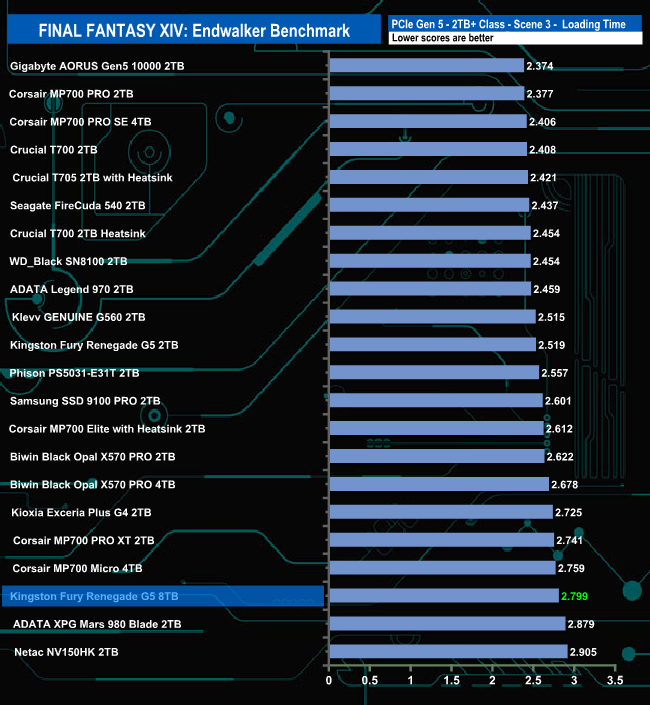
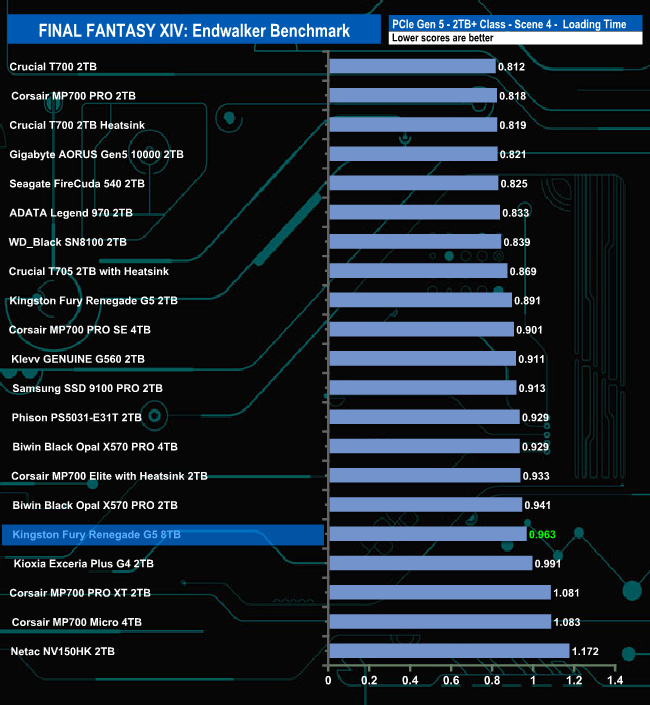
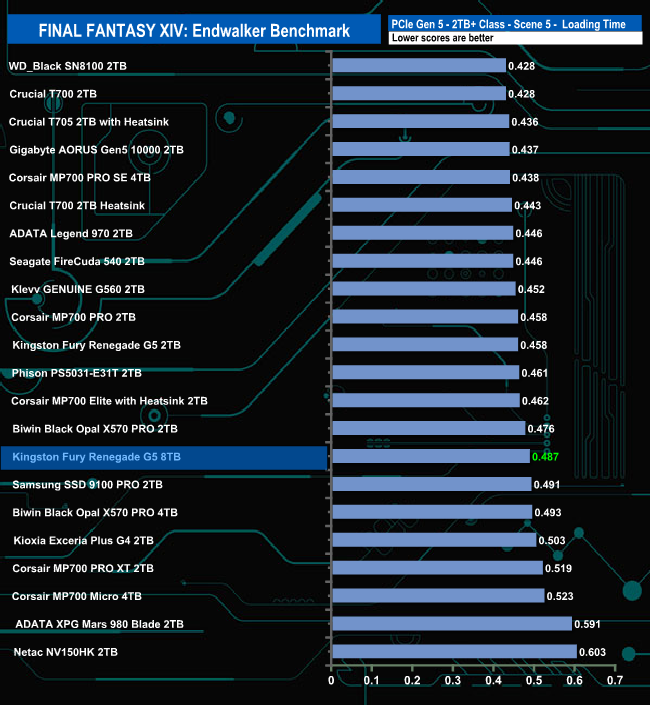
The drive doesn't seem to handle the Final Fantasy XIV Endwalker Official Benchmark too well, as it ends up in the lower half of the overall results chart. The drive appears to handle the Scene 5 load test the best out of the five traces.
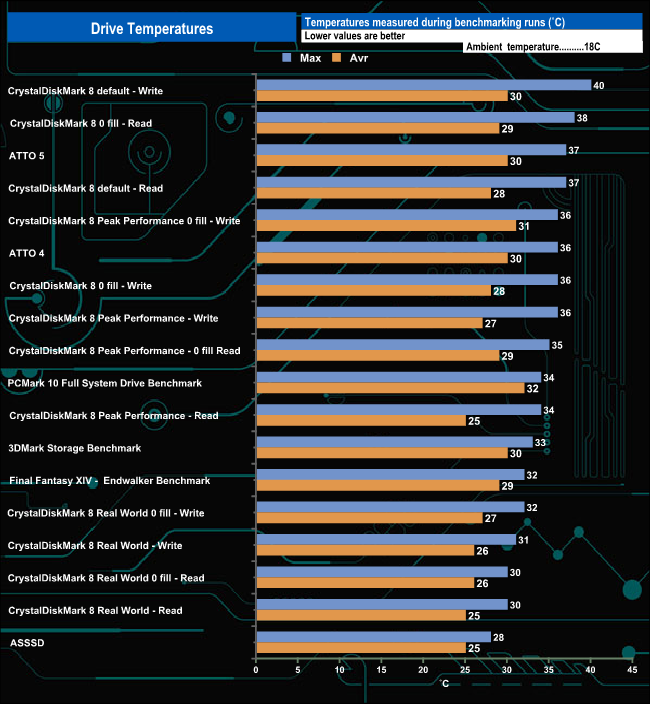
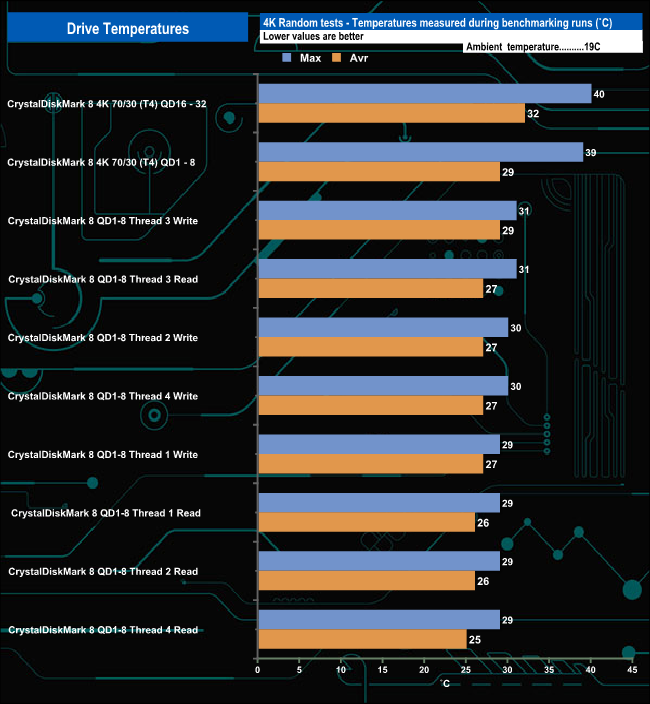
We took note of the drive’s temperature during some of our benchmarking runs. Kingston's Fury Renegade G5 is another of the latest breed of high-end Gen 5 drives that don't need a whopping great heatsink or cooler. We tested the drive sitting under the heatsink of the Gigabyte AORUS X670E Xtreme motherboard, which our test rig uses.
The drive has a few design features to combat the Achilles heel of high-end Gen5 drives, which is heat generation. Chief amongst these is the Silicon Motion SM2508 controller, which uses a TSMC 6nm process rather than the 12nm process used by previous-generation controllers, enabling better thermal management. It works well enough, as the hottest the drive got while benchmarking was 40° C during a CrystalDiskMark 8 default Write test run. For the bulk of our testing, the drive averaged 35° C, with the 4K-focused tests averaging 30° C, both well below the drive's 70° C maximum operating temperature.
To test real-life performance of a drive, we use a mix of folder/file types, and by using the FastCopy utility (which gives a time as well as MB/s result), we record the performance of the drive reading from & writing to a 2TB Kingston KC3000.
Transfer Details
Data file – 100GB.
BluRay Movie – 42GB.
File folder – 50GB – 28,523 files.
Movie demos 8K – 21GB – (11 demos).
Raw Movie Clips 4K – 16GB – (9 MP4V files).
Movie folder – 12GB – 15 files – (8 @ .MKV, 4 @ .MOV, 3 @ MP4).
Photo Folder – 10GB – 304 files – (171 @ .RAW, 105 @ JPG, 21 @ .CR2, 5 @ .DNG).
Audio Folder – 10GB – 1,483 files – (1479 @ MP3, 4 @ .FLAC files).
Single large image – 5GB – 1.5bn pixel photo.
3D Printer File Folder – 4.25GB – (166 files – 105 @ .STL, 38 @ .FBX, 11 @ .blend, 5 @ .lwo, 4 @ .OBJ, 3@ .3ds).
AutoCAD File Folder – 1.5GB (80 files – 60 @ .DWG and 20 @.DXF).

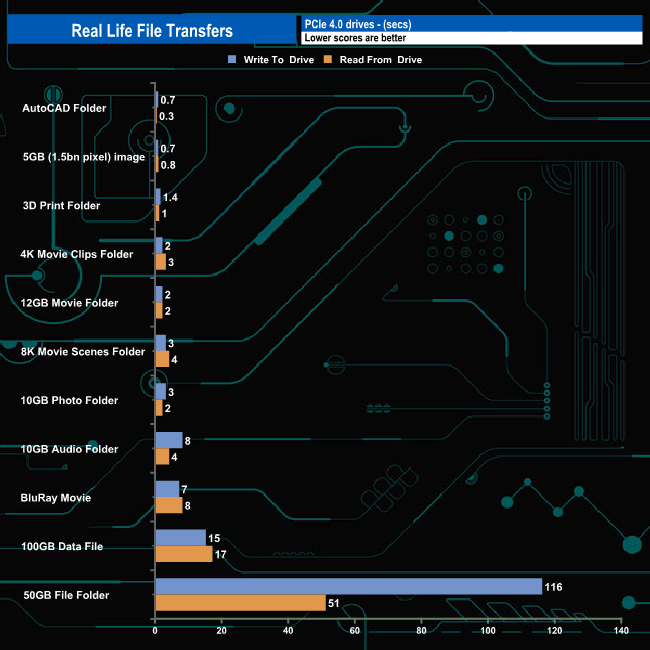
The 8TB Kingston Fury Renegade G5 averaged 4,684MB/s when writing the eleven transfer tests, with the fastest being the 100GB data file at 7,288MB/s (15s transfer time), the slowest being the 50GB file folder at 466MB/s (116s transfer time). Reading back the data, the average was 4,838MB/s with the fastest being the 100GB data file once again at 6,219MB/s (17s) and again, the slowest was the 50GB File Folder at 1,060MB/s (51s transfer time).
When Kingston launched their first Gen 5 PCIe SSD, the Fury Renegade G5, the model line topped out at 4TB. Such is the demand for very large capacity M.2 drives that barely seven months on from the launch of the Fury Renegade G5, Kingston has launched a new flagship drive that doubles the original flagship's capacity to 8TB.
The Fury Renegade G5 is built around a Silicon Motion SM2508 controller, one of the new breed of eight-channel controllers that manage the neat trick of blending performance with cooler-running and better power efficiency, which is why the Fury Renegade G5 doesn't come with a big old heatsink pre-installed.
Kingston rates the Sequential performance of the drive as the same as the 4TB model, up to 14,800MB/s for reads and up to 14,000MB/s for writes. The 8TB drive has the same up to 2,200K IOPS 4K read rating as the rest of the Fury Renegade G5 line-up, with writes rated at the same speed.
When we tested the drive with the ATTO 4 benchmark, the best we saw from the drive was 12,780MB/s for reads and 8,600MB/s for writes, both results well short of the official maximum figures. However, a switch to ATTO 5 confirmed the official figures with a read result of 14,900MB/s and 14,190MB/s for writes. Switching over to the CrystalDiskMark 8 default benchmark, we could again confirm the official maximum figures with test results of 14,890MB/s for reads and 14,143MB/s for writes.
When it came to 4K random performance, we couldn't get anywhere close to the official figures using our 4-threaded testing. Kingston rates the 4K random performance of the 8TB Fury Renegade G5 as up to 2,200K IOPS for both reads and writes. The best we saw from testing was 519,436 IOPS and 386,571 IOPS (both QD16) for reads and writes, respectively. The best performance figures we saw from the drive came from using the default Peak Performance profile in CrystalDiskMark 8 with reads (default) at 1,855,619 IOPS and writes at 1,609,952 IOPS.
The hottest the drive got while benchmarking was 40° C during a CrystalDiskMark 8 default Write test run. For the bulk of our testing, the drive averaged 35° C, with the 4K-focused tests averaging 30° C, both well below the drive's 70° C maximum operating temperature.
We found the 8TB version of the Fury Renegade G5 on Scan for £999.98 (inc VAT) HERE.
Pros
- Overall performance.
- Capacity.
- 5-year warranty.
Cons
- Tested 4K performance couldn’t match the official maximum figures.
- Pricey.
KitGuru says: Kingston's Fury Renegade G5 is already a very good drive, combining speed, power conservation and cool running. Now it comes with a huge capacity option.