KitGuru KitGuru.net – Tech News | Hardware News | Hardware Reviews | IOS | Mobile | Gaming | Graphics Cards


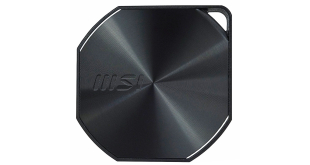
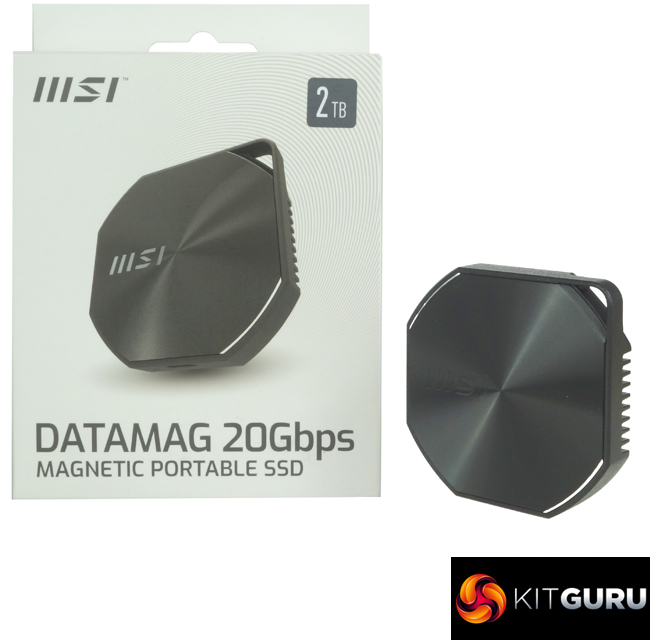
The Datamag is MSI's first external SSD storage device. The drive uses a USB 3.2 Gen2 x2 (20Gbps) interface and fits neatly in the palm of the hand. Priced at around £140 in the UK for the 2TB model, we put it through its paces and find out if it's worth buying.
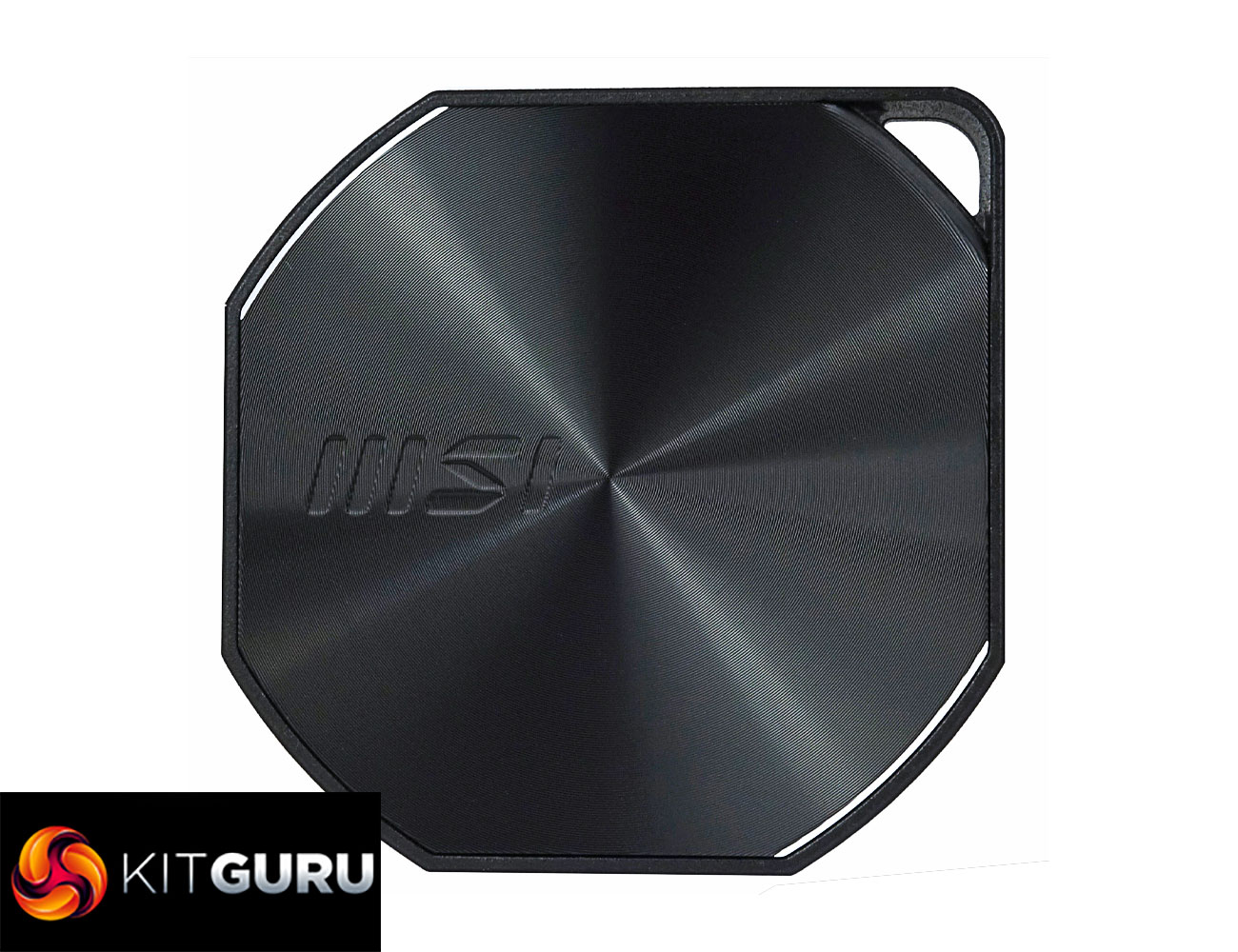
The tiny drive (it measures 66 x 13 x 6mm) is available in three capacities: 1TB, 2TB (the drive we are reviewing) and the flagship 4TB drive. The Datamag uses a Phison PS2251-U18 controller, which looks after 3D TLC NAND. MSI quotes Sequential read / write performance figures for the drive of up to 1,600MB/s and 1,500MB/s, respectively, so a little short of the interface's maximum speed.
The base of the drive includes a magnet, hence the mag part of the drive's name. MSI bundles two steel rings with the drive so it can be attached to non-magnetic surfaces.
Physical Specifications:
- Usable Capacities: 2TB.
- NAND Components: 3D TLC.
- NAND Controller: Phison PS2251-U18.
- Interface: USB 3.2 Gen2 x2.
- Form Factor: External.
- Dimensions: 66 x 13 x 6mm.
- Drive Weight: 81g.
Firmware Version: PMAP.
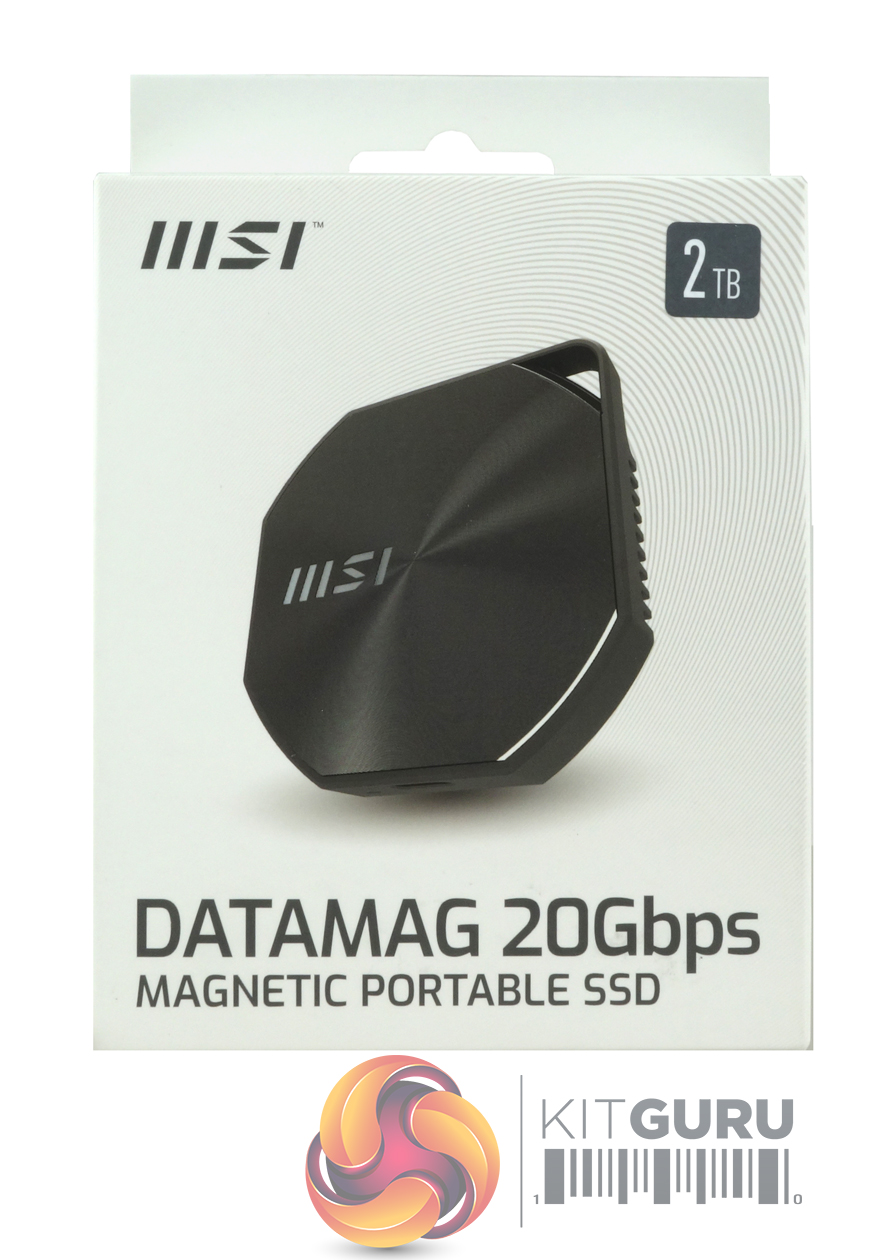
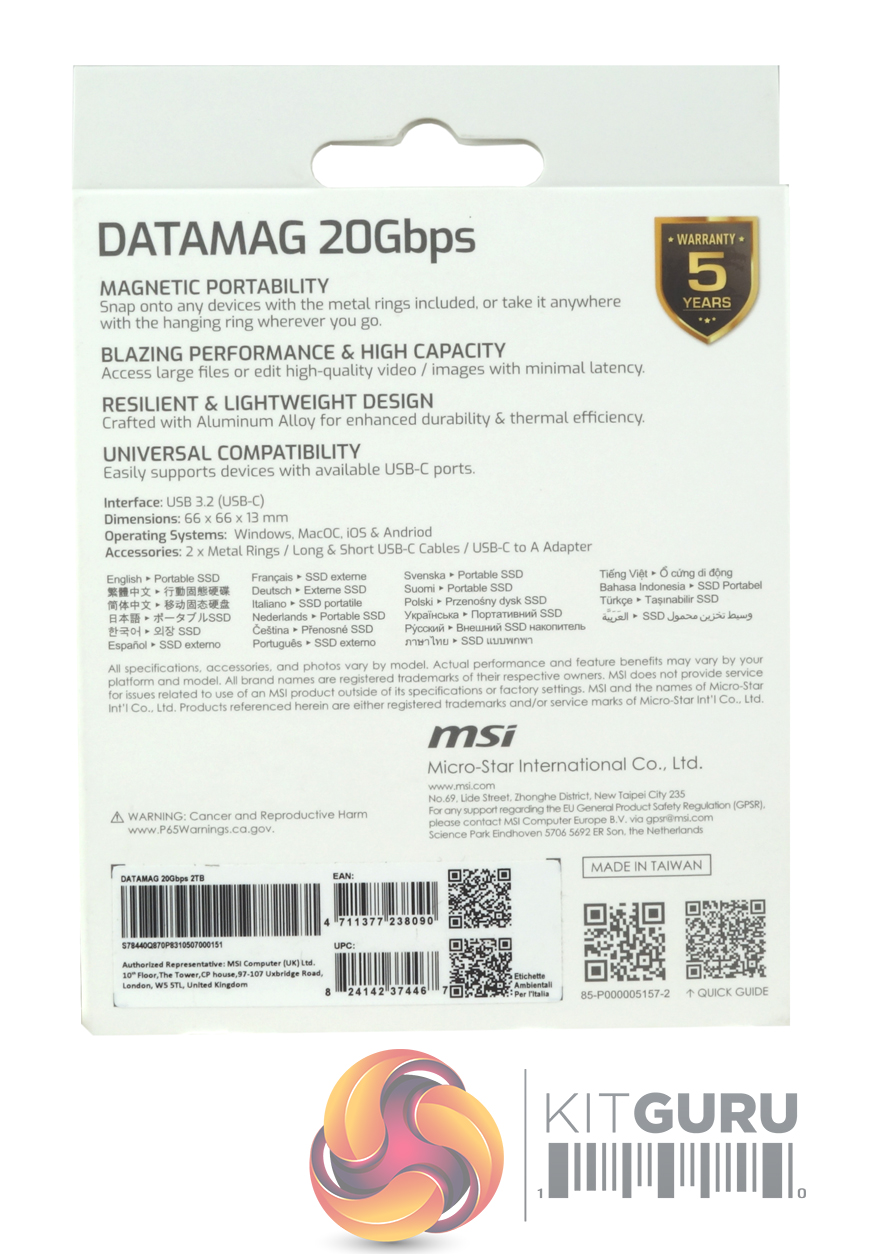
The Datamag 20Gbps comes in a compact box with a large image of the drive on the front. To the top right of the box is a label displaying the drive's capacity. At the top right-hand side of the rear of the box is a logo displaying the five-year warranty that MSI support the drive with. To the left of this is a four-point marketing list of some of the drive's features: portability, performance, design and compatibility. Under this is a four-line specification section, including the OS supported by the drive: Windows, MacOS, iOS and Android. Below is a multilingual description of the drive.
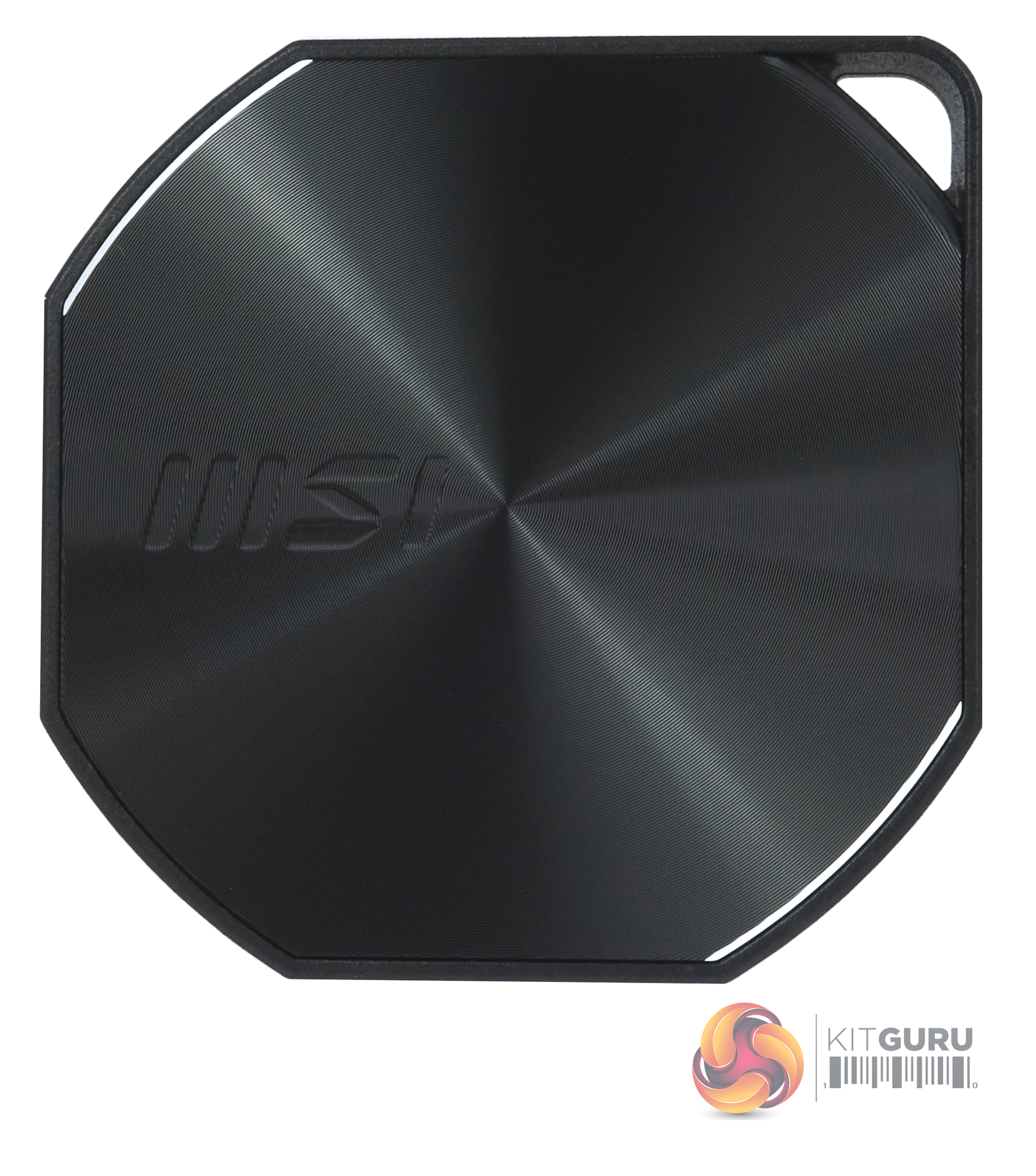
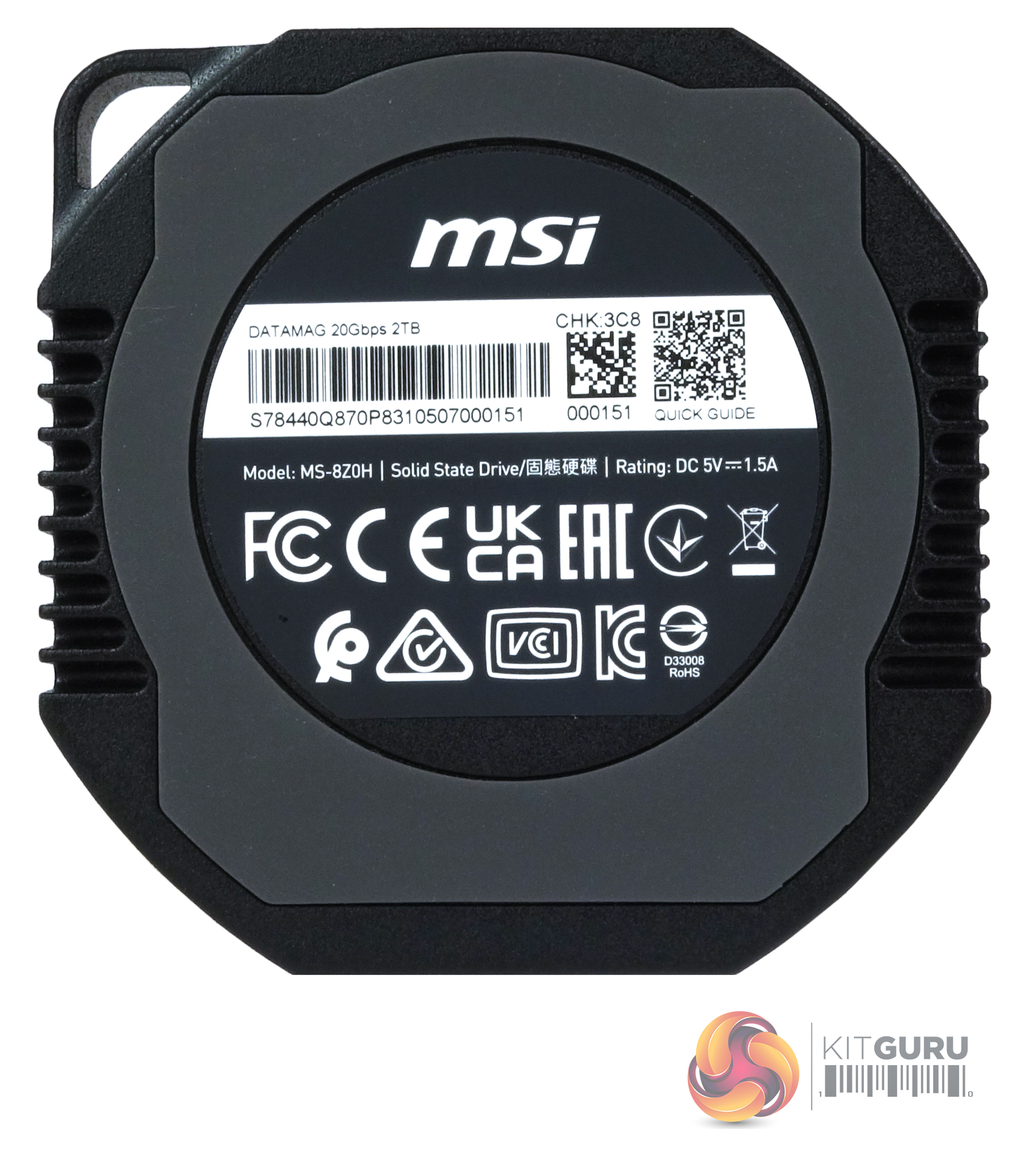
Constructed from lightweight aluminium alloy with built-in cooling fins, the Datamag is a very compact drive measuring 66mm x 13mm x 6mm, weighing in at 81g. The base of the drive has a rubber ring which not only marks where the magnetic ring sits, it also stops the drive from slipping. Unfortunately, the drive doesn't have any form of IP rating, so care needs to be taken around water or dust, etc.
The Datamag uses a Phison PS2251-U18 controller. The PS2251-U18 is a USB 3.2 Gen 2 x2 single-chip solution, and as it doesn't require a bridging chip to work, it saves space. This means that faster, more compact drives can be designed. The interface is backwards compatible down to USB 1.1. The controller is a two-channel solution with a 1200MT/s transfer rate. It supports up to 4TB of TLC or QLC NAND. It is compatible with Windows (XP and later), Mac OS (10 and later), Linux (kernel 2.4.10 and later), iPhone / iPad, Android and game consoles.
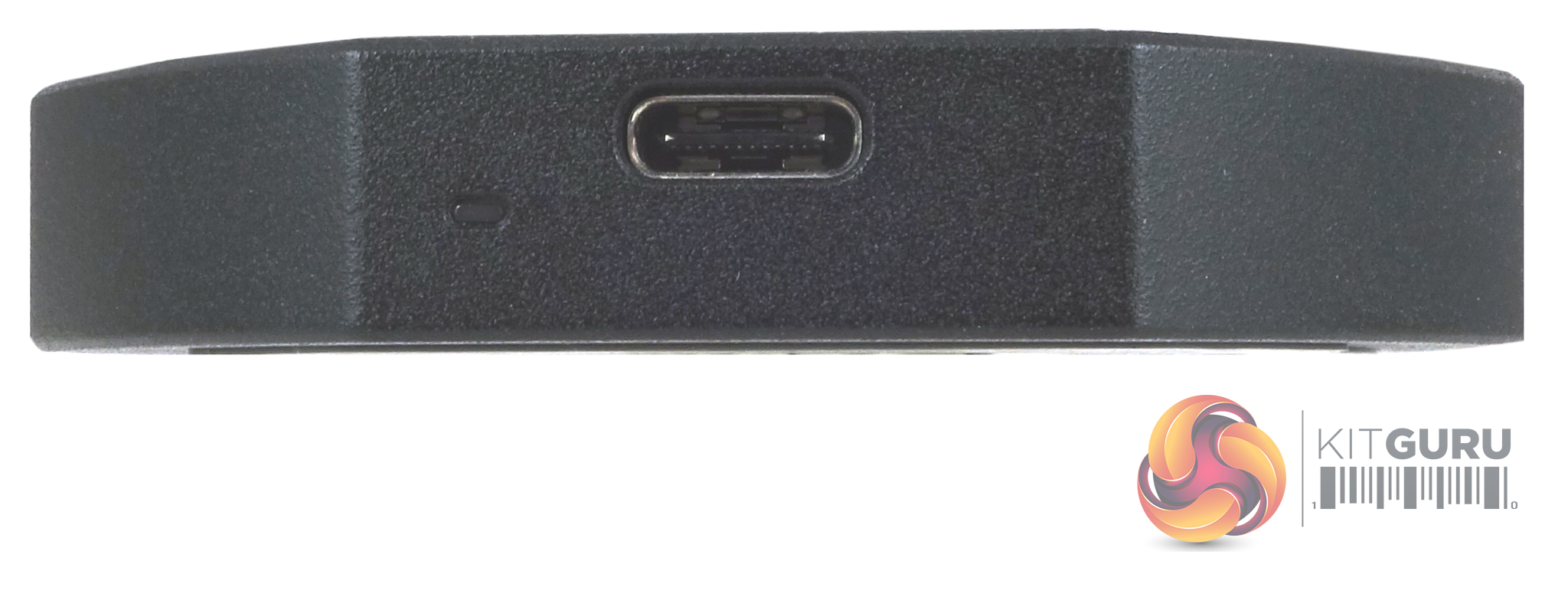
One side of the drive holds the USB-C port, next to which is a very small white LED drive activity indicator.
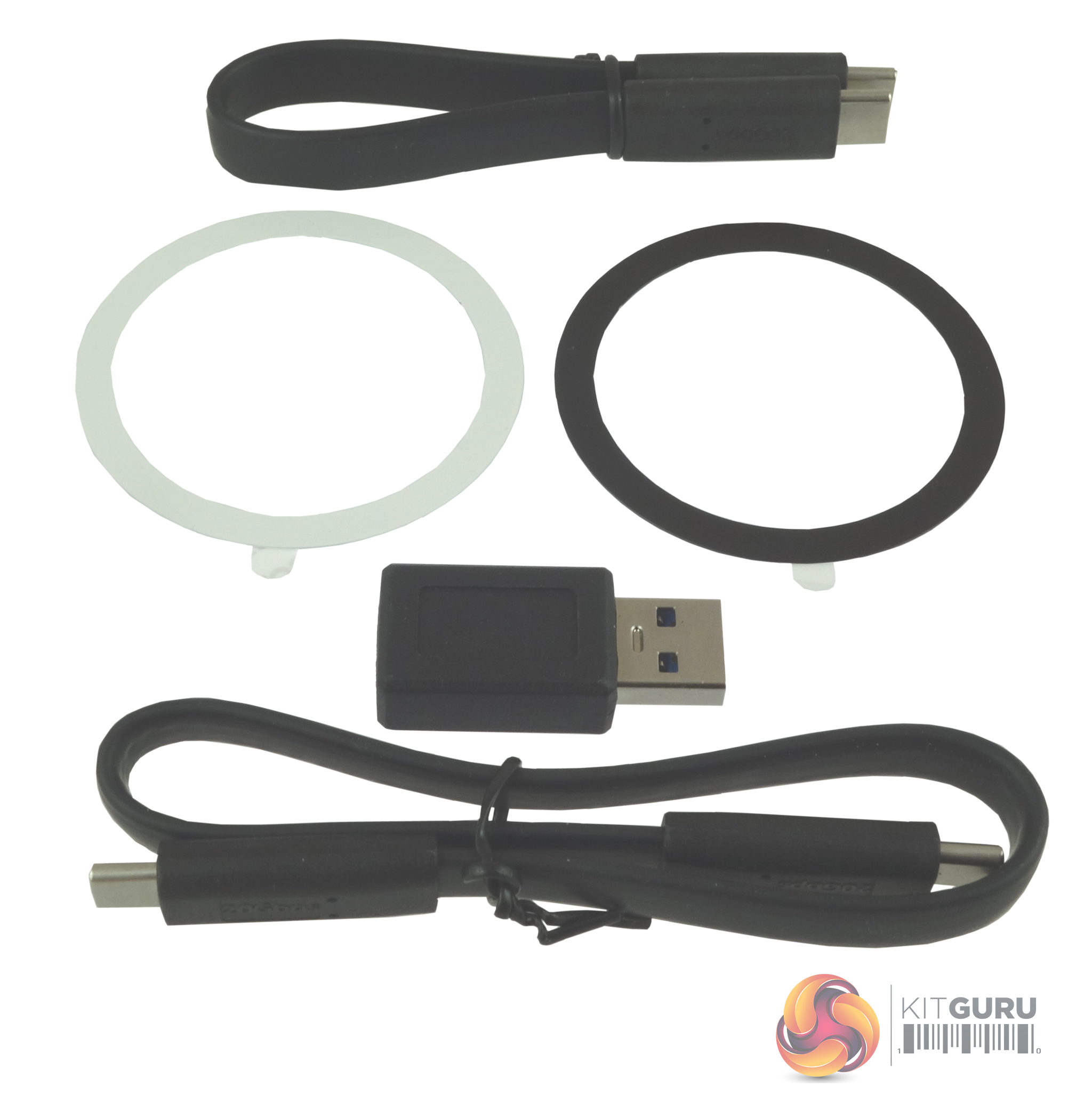
Bundled in with the drive are two metal rings (one black, one white) to attach the drive to non-ferrous devices and two USB-C cables, one short (for connecting to mobiles) and one longer one (although it's not that long) for notebooks/tablets, etc and a USB-C to A adapter.
Out of the box, the drive is factory formatted as exFAT. To run some of our benchmarks, we reformatted the drive to NTFS. To test the drive, we used a Gigabyte GC-USB 3.2 Gen2X2 (rev 1.1) expansion card. Many thanks to Gigabyte for supplying us with the card.
CrystalDiskMark is a useful benchmark to measure the theoretical performance levels of hard drives and SSDs. We are using V8.
The ATTO Disk Benchmark performance measurement tool is compatible with Microsoft Windows. Measure your storage system's performance with various transfer sizes and test lengths for reads and writes. Several options are available to customise your performance measurement, including queue depth, overlapped I/O and even a comparison mode with the option to run continuously. Use ATTO Disk Benchmark to test any manufacturer's RAID controllers, storage controllers, host adapters, hard drives and SSD drives and notice that ATTO products will consistently provide the highest level of performance to your storage.
AS SSD is a great free tool designed just for benchmarking Solid State Drives. It performs an array of sequential read and write tests, as well as random read and write tests with sequential access times over a portion of the drive. AS SSD includes a sub suite of benchmarks with various file pattern algorithms, but this is difficult in trying to judge accurate performance figures.

The maximum Sequential read/write performance figures for the Datamag 20Gbps are up to 1,600MB/s and 1,500MB/s, respectively. Using our test setup with the ATTO benchmark, the best we saw from the drive was 1,670MB/s for reads and 1,910MB/s for writes, both better than the official maximums. The fastest performance we saw from the drive came from testing the drive with the CrystalDiskMark 8 benchmark (using compressed data) with reads at 1,772MB/s and writes at 2,034MB/s, again faster than the official figures.
As for 4K random performance, the best read figure came during the Peak Performance run (using compressed data with a QD of 32 and using 16 threads) at 347.19MB/s. The best write figure, 538.33MB/s, came again during a Peak Performance run (QD of 32, 16 threads). More realistic everyday figures came from the QD1 T1 test, with the best read figure of 51.71MB/s with writes at 125.82MB/s.
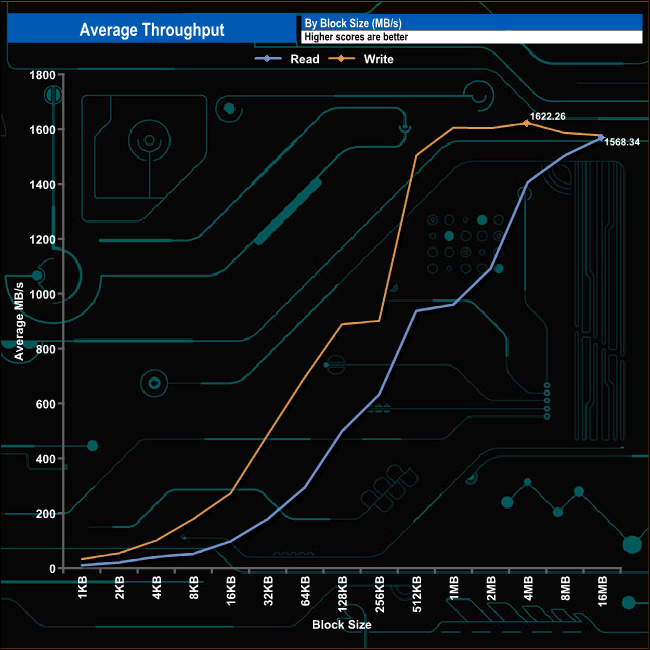
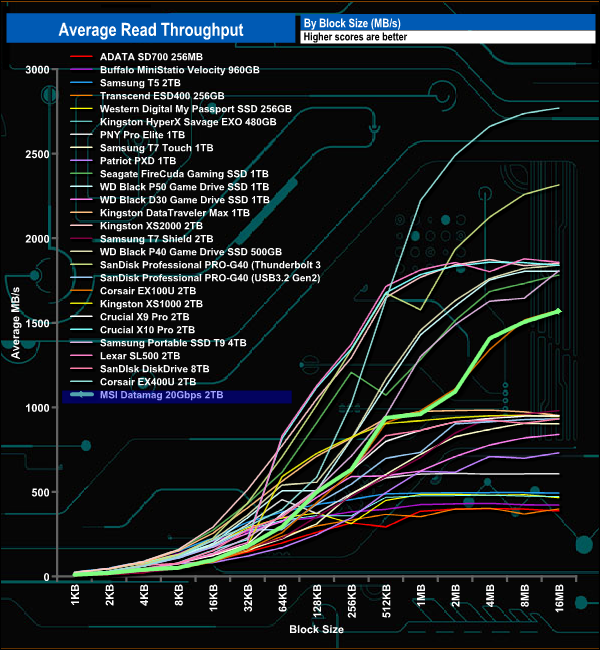
In our read throughput test, the drive peaked at the end of the test at 1,568.34MB/s, 32MB short of the official maximum of 1,600MB/s.
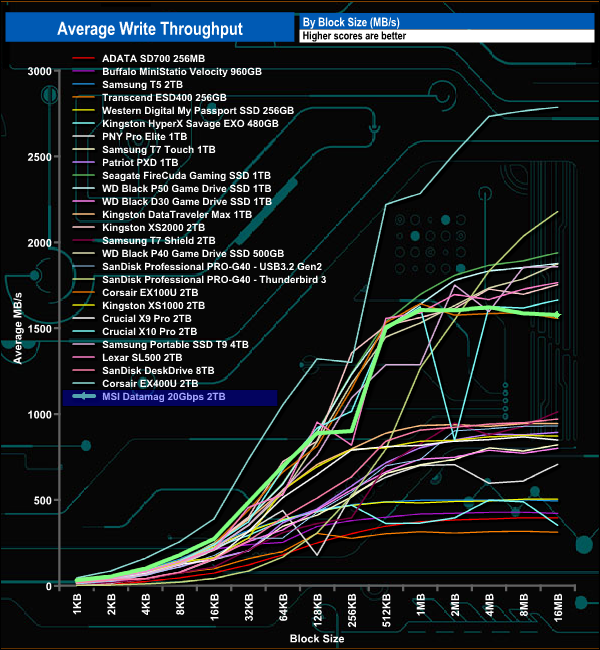
In the write throughput test, the drive's performance peaked at the 4MB block mark at 1,622.26MB/s, before dropping back to finish the test run at 1,577.49MB/s. The peak performance is some 122MB/s faster than the official write figure.
The PCMark 10 Data Drive Benchmark has been designed to test drives that are used for storing files rather than applications. You can also use this test with NAS drives, USB sticks, memory cards, and other external storage devices.
The Data Drive Benchmark uses 3 traces, running 3 passes with each trace.
Trace 1. Copying 339 JPEG files, 2.37 GB in total, onto the target drive (write test).
Trace 2. Making a copy of the JPEG files (read-write test).
Trace 3. Copying the JPEG files to another drive (read test).
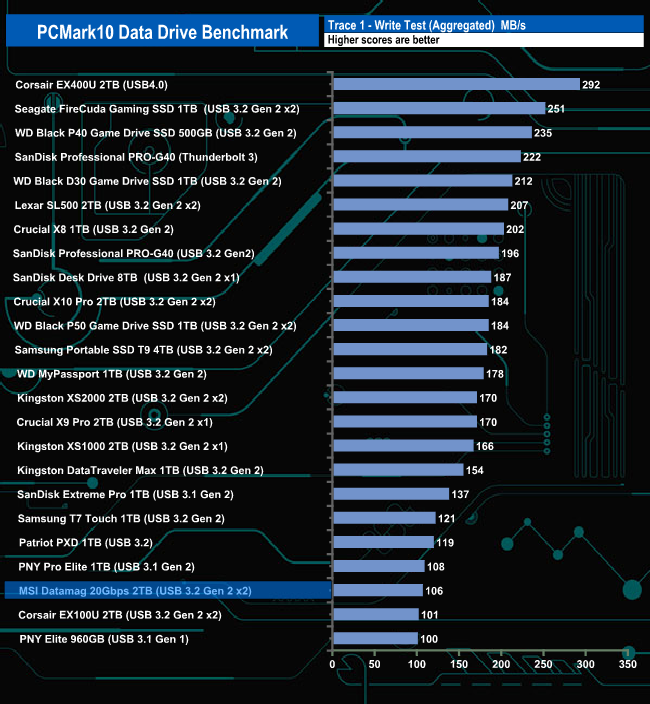
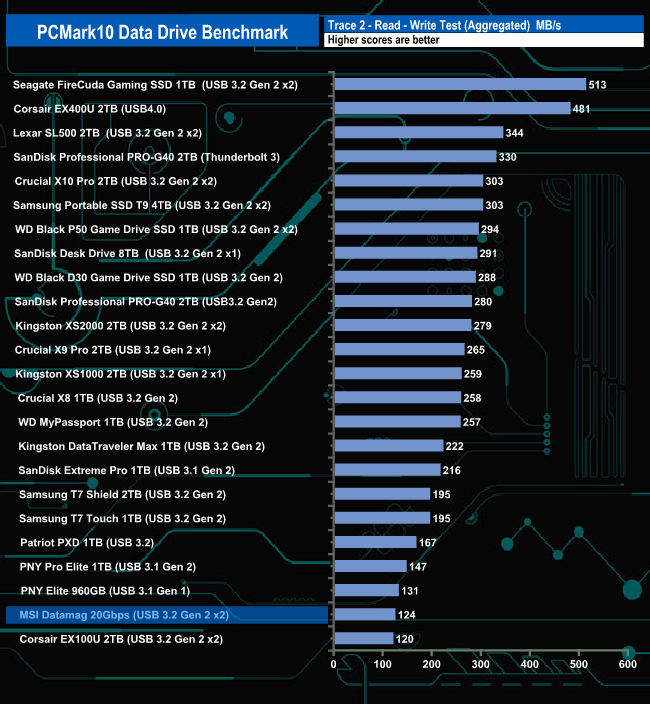
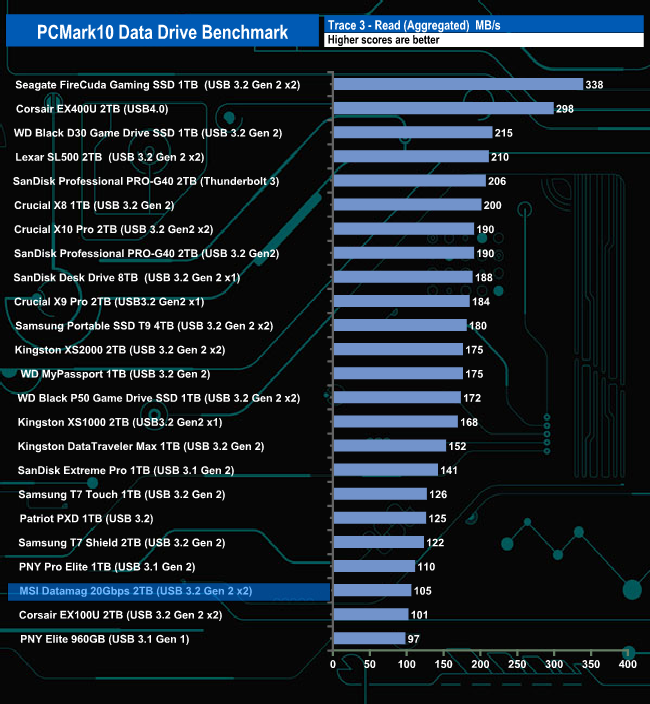
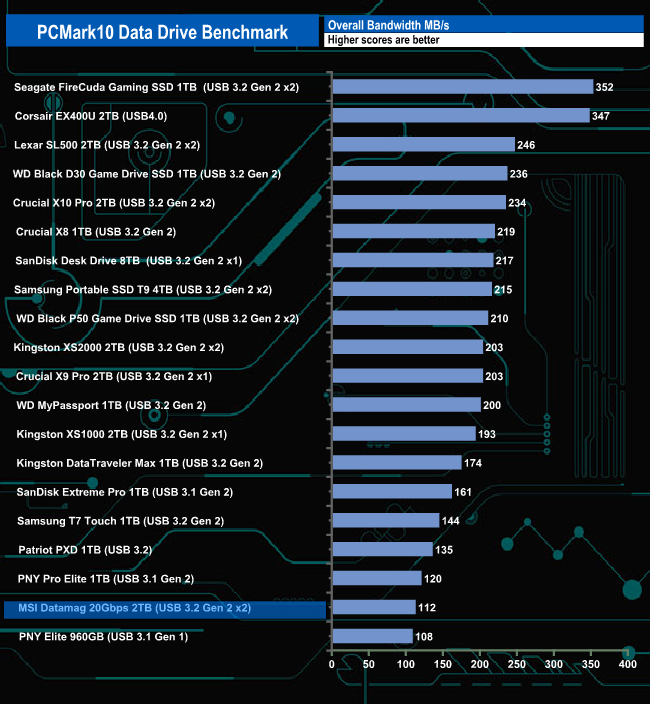
The Datamag 2TB drive doesn't seem to handle the rigours of the PCMark 10 Data Drive Benchmark very well. It sits close to the last position in all three trace tests and in the overall benchmark chart.
The 3DMark Storage Benchmark uses traces recorded from popular games and gaming-related activities to measure real-world gaming performance.
Traces used –
Battlefield V
Loading Battlefield™ V from launch to the main menu.
Call of Duty Black Ops 4
Loading Call of Duty®: Black Ops 4 from launch to the main menu.
Overwatch
Loading Overwatch® from launch to the main menu.
Game Move
Copying the Steam folder for Counter-Strike®: Global Offensive from an external SSD to the system drive.
Game Recording
Recording a 1080p gameplay video at 60 FPS with OBS (Open Broadcaster Software) while playing Overwatch®.
Installing Game
Installing The Outer Worlds® from the Epic Games Launcher.
Game Saving
Saving progress in The Outer Worlds game.
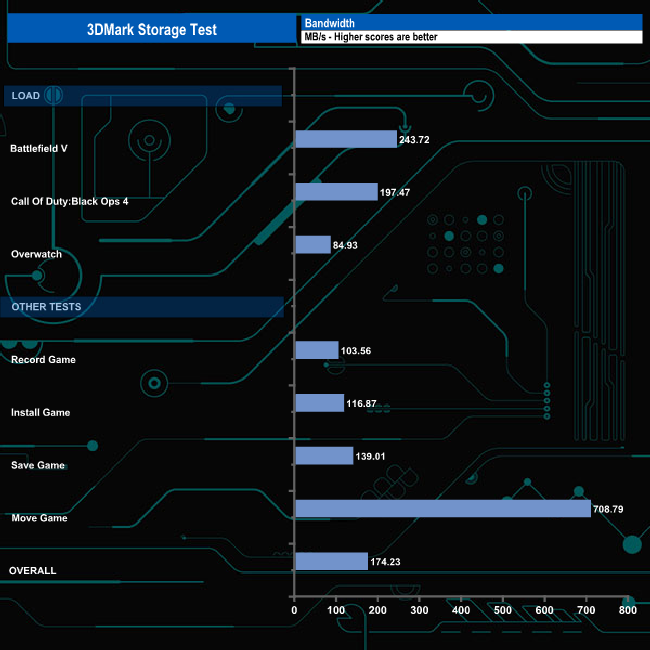
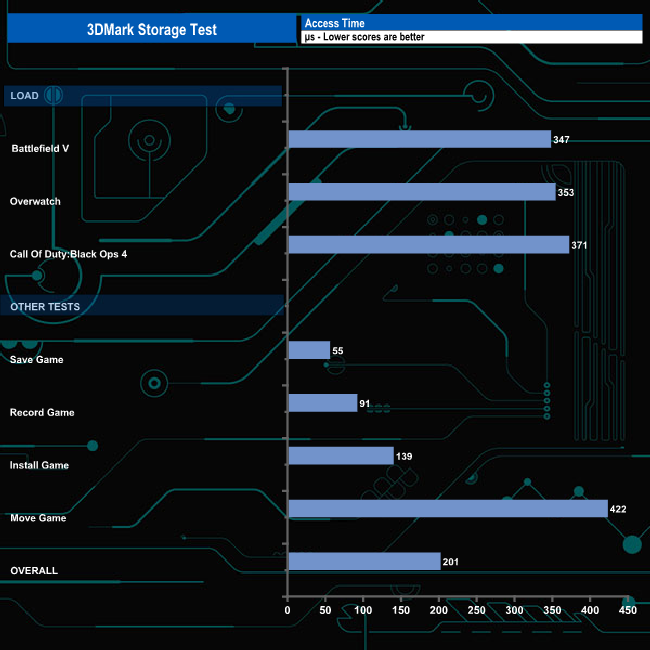
When tested with the 3DMark Storage benchmark, the drive had an average bandwidth of 175.37MB/s when loading the three games (at an average time of 357μs, 0.357ms), the fastest being the 243.72MB/s for Battlefield V trace (347μs, 0.347ms). For the other four tests, the drive averaged 253.84MB/s (average time of 176.7μs). For the whole test, the Datamag averaged 174.23MB/s.
To test the real-life performance of a drive, we use a mix of folder/file types, and by using the FastCopy utility (which gives a time as well as MB/s result), we record the performance of the drive reading from & writing to a 2TB Kingston KC3000 drive.
Transfer Details:
Data file – 100GB.
File folder – 50GB – 28,523 files.
Movie demos 8K – 21GB – (11 demos).
Raw Movie Clips 4K – 16GB – (9 MP4V files).
Audio Folder – 10GB – 1,483 files – (1479 @ MP3, 4 @ .FLAC files).
Single large image – 5GB – 1.5bn pixel photo.
3D Printer File Folder – 4.25GB – (166 files – 105 @ .STL, 38 @ .FBX, 11 @ blend, 5 @ lwo, 4 @ .OBJ, 3@ 3ds).
AutoCAD File Folder – 1.5GB (80 files – 60 @ .DWG and 20 @.DXF).
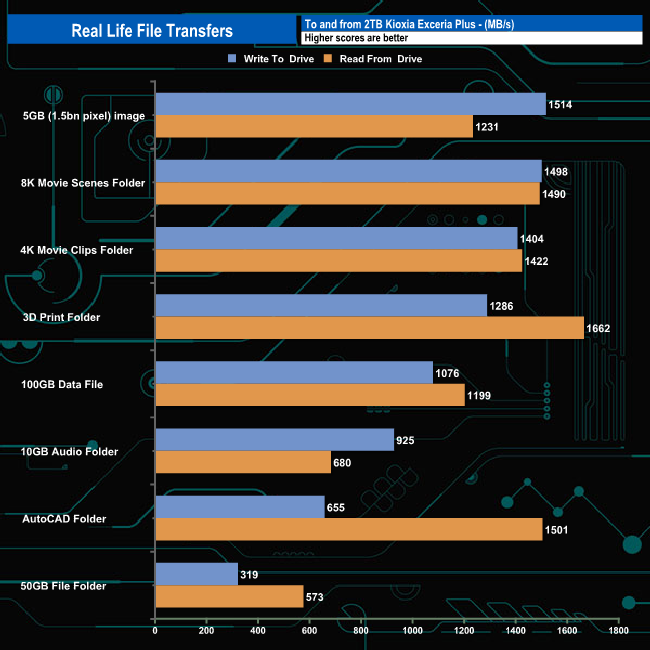
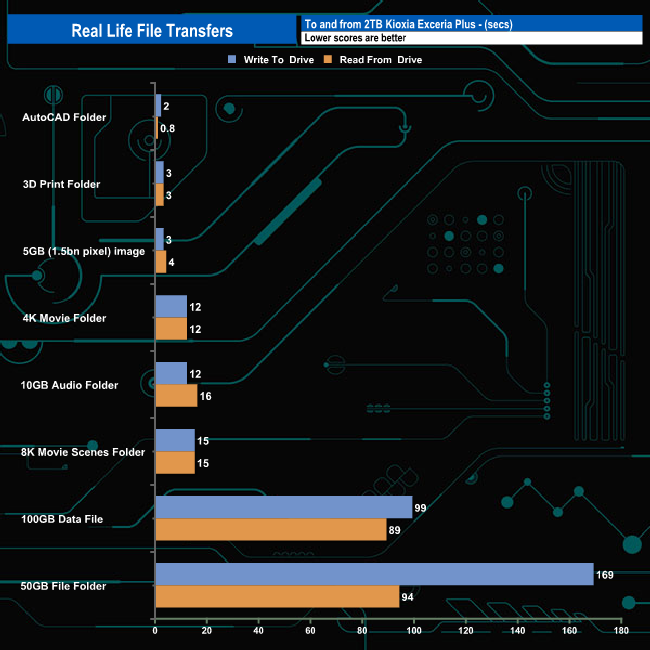
In our real-life file transfer tests, the 2TB Datamag averaged 1,084MB/s when in write mode, with the fastest transfer being the 5GB image at 1,514MB/s (3secs), with the slowest being the 50GB file folder transfer at 319MB/s (169secs). Switching to read mode, the drive averaged 1,219MB/s with the faster transfer this time being the 3D Print folder at 1,662MB/s (3secs) with the 50GB file folder again the slowest at 573MB/s (94secs).
It may be hard to believe, but after launching a range of internal SSDs over the years, the Datamag 20Gbps is MSI's first external SSD. The drive is available at launch in three capacities: 1TB, 2TB (the drive we are reviewing), and a flagship 4TB model.
The drive uses a Phison PS2251-U18, a native USB 3.2 Gen.2×2 two-channel UFD controller. A DRAM-less design, it supports up to 4TB of TLC or QLC NAND with a 1200MT/s transfer rate. The controller comes in a 26mm x 60mm package. Although a USB 3.2 Gen.2×2 controller, it doesn't run at the spec's full 20Gbps speed; instead, it tops out at 1,900MB/s for reads and 1,700MB/s for writes (4TB capacity). For the Datamag 20Gbps, MSI has turned the wick down a little, so the drive is rated at up to 1,600MB/s for reads and 1,500MB/s for writes, respectively. The drive uses 3D TLC NAND, but at the time of writing, we couldn't find what brand of flash the drive is using.
MSI rates the Sequential performance of the Datamag 20Gbps as up to 1,600MB/s for reads and up to 1,500MB/s writes. Using the ATTO benchmark, we got test results that bettered the official ratings, with reads at 1,670MB/s and writes at 1,910MB/s. Switching over to the CrystalDiskMark 8 benchmark, we saw test results that once again bettered the official maximums. The best read result we saw was 1,772MB/s (default compressed data profile test, QD8 T1) while the fastest write performance, 2,035MB/s, came from the Peak Performance profile test (QD8 T1 compressed data).
The Datamag 20Gbps fits in the palm of your hand, measuring just 66 x 13 x 6mm, weighing in at 81g, and is constructed from aluminium. However, the one thing the Datamag lacks is an IP rating, so it's unknown whether it is water or dust-resistant. MSI have bundled two metal rings (one Black, one White) with the drive so it can be attached to non-ferrous devices. There are also two USB-C cables, one short (for connecting to mobiles) and one longer one for notebooks/tablets etc, although to be honest, this could do with being a bit longer still and finally a USB-C to A adapter.
We found the 2TB Datamag 20Gbps on Amazon UK for around £145 (inc VAT) HERE.
Pros
- Overall performance.
- Small size.
- Magnetic connection.
Cons
- No IP rating.
KitGuru says: The latest USB 3.2 Gen 2 x2 native controllers have allowed the design of small-format, fast-performing external drives, the latest of which is MSI's Datamag 20Gbps. The built-in magnet and bundled metal rings allow the Datamag to be attached to phones, game consoles and laptops.