KitGuru KitGuru.net – Tech News | Hardware News | Hardware Reviews | IOS | Mobile | Gaming | Graphics Cards


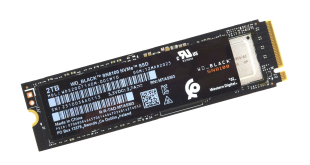
We recently reviewed the first PCIe Gen 5.0 drives from Samsung and Kingston, and now another big hitter, Sandisk, has launched its first Gen 5 drive under the WD_Black banner – the SN8100.
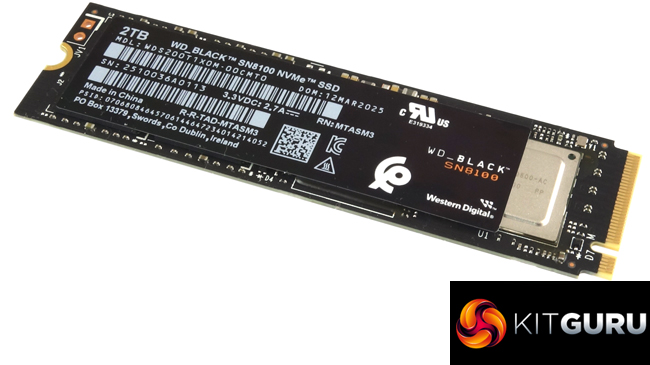
The WD_Black SN8100 comes in three capacities: 1TB, 2TB (the drive we are reviewing here), a flagship 4TB drive, and two versions, one plain and one with a heatsink. An 8TB model is expected later in 2025. The drive uses a combination of a SanDisk controller and Sandisk BiCS8 218-layer TLC 3D. The controller is based on Silicon Motion's SM2508 but with Sandisk's hand firmly in charge of the firmware and feature set.
The 2TB WD_Black 8100's Sequential read/write performance is rated as up to 14,900MB/s and 14,000MB/s, respectively. Both the 1TB and 4TB have the same read rating. The 4TB drive has a write rating of up to 14,000MB/s while the 1TB drive has a up to 11,000MB/s figure.
Random 4K performance is quoted as up to 2.3M IOPS for the 2TB and 4TB drives, with the 1TB drive back at up to 1.6M IOPS. All three drives are rated as up to 2.4M IOPS for random writes.
The 2TB drive's power consumption figures are quoted as 6.5W for average active reads and 7.0W for active writes, with a PS4 sleep rating of 5mW. The 2TB version of the WD_Black SN8100 has an endurance rating of 1,200 TBW, and the drive is backed by a 5-year warranty.
Physical Specifications:
- Usable Capacities: 2TB.
- NAND Components: BiCS TLC 3D CBA NAND.
- NAND Controller: Sandisk (Silicon Motion SM2508).
- Cache: 2GB.
- Interface: PCIe Gen 5 x4, NVMe 2.0.
- Form Factor: M.2, 2280.
- Dimensions: 80 x 22 x 2.3mm.
- Drive Weight: 7.5g
Firmware Version: 810YRC03.
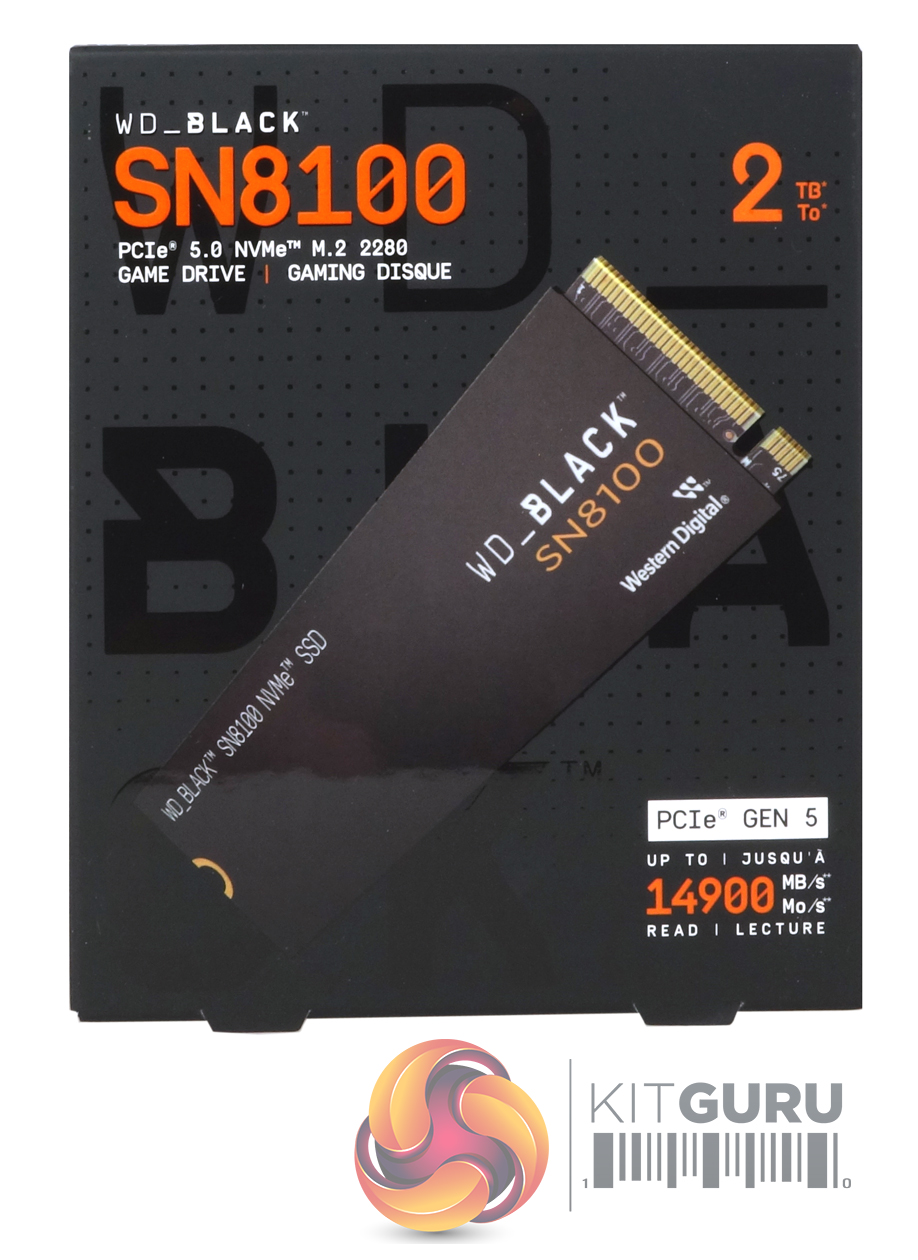
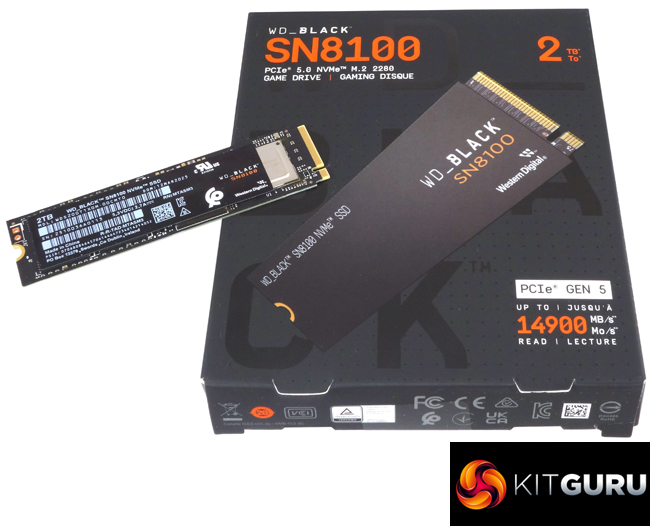
The drive arrives in a smallish box with a clear image of the drive on the front. The drive's capacity is displayed in the top right-hand corner of the box, while the right hand bottom right-hand corner of the box is used to highlight the drive's interface type and the Sequential read performance figure.
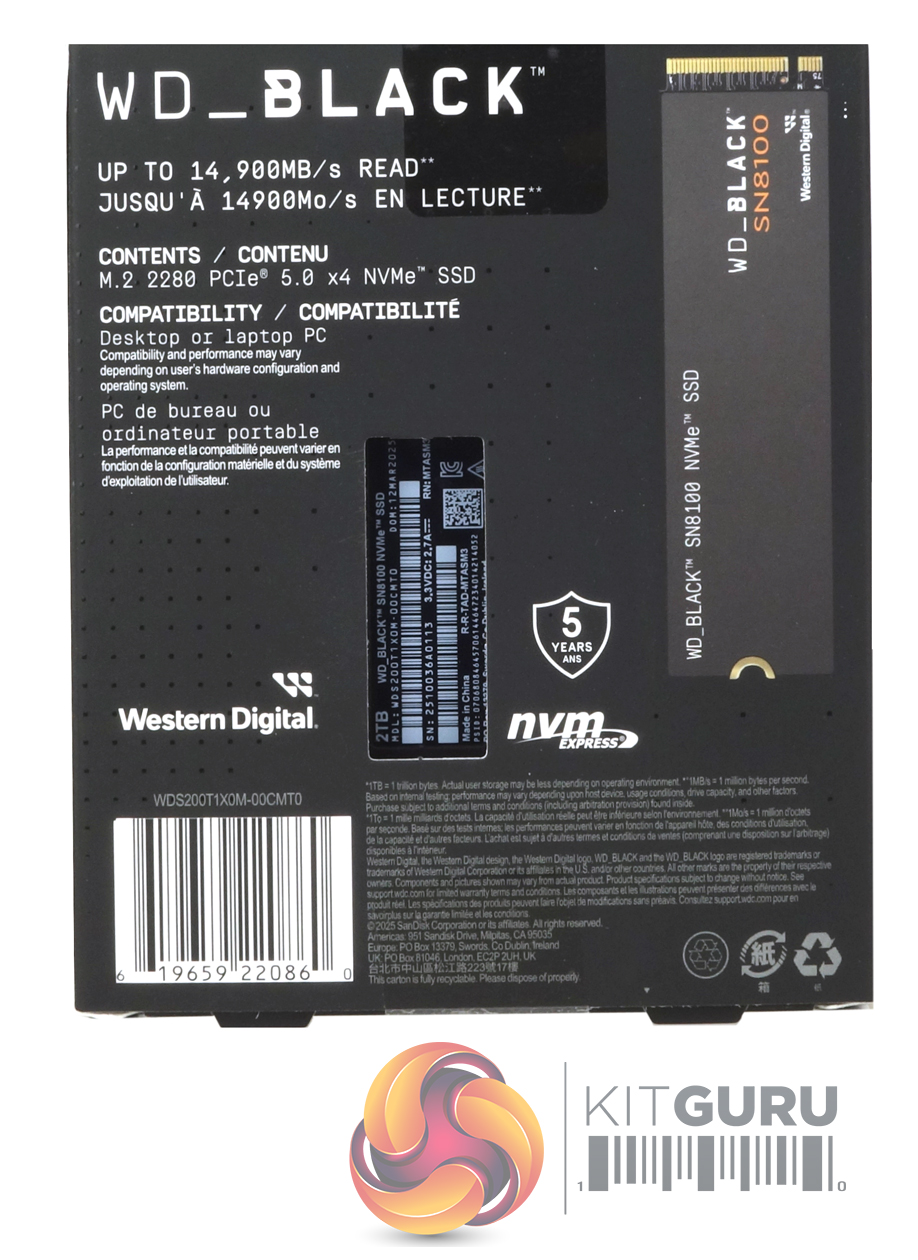
The rear of the box has a small clear plastic panel through which part of the drive is visible, sitting in its protective plastic enclosure. To the right of this panel is another image of the drive, while to the left of it is the Sequential read figure again. All this information is displayed in English and French. Also on the back of the box is an icon displaying the fact that it is supported with a 5-year warranty.
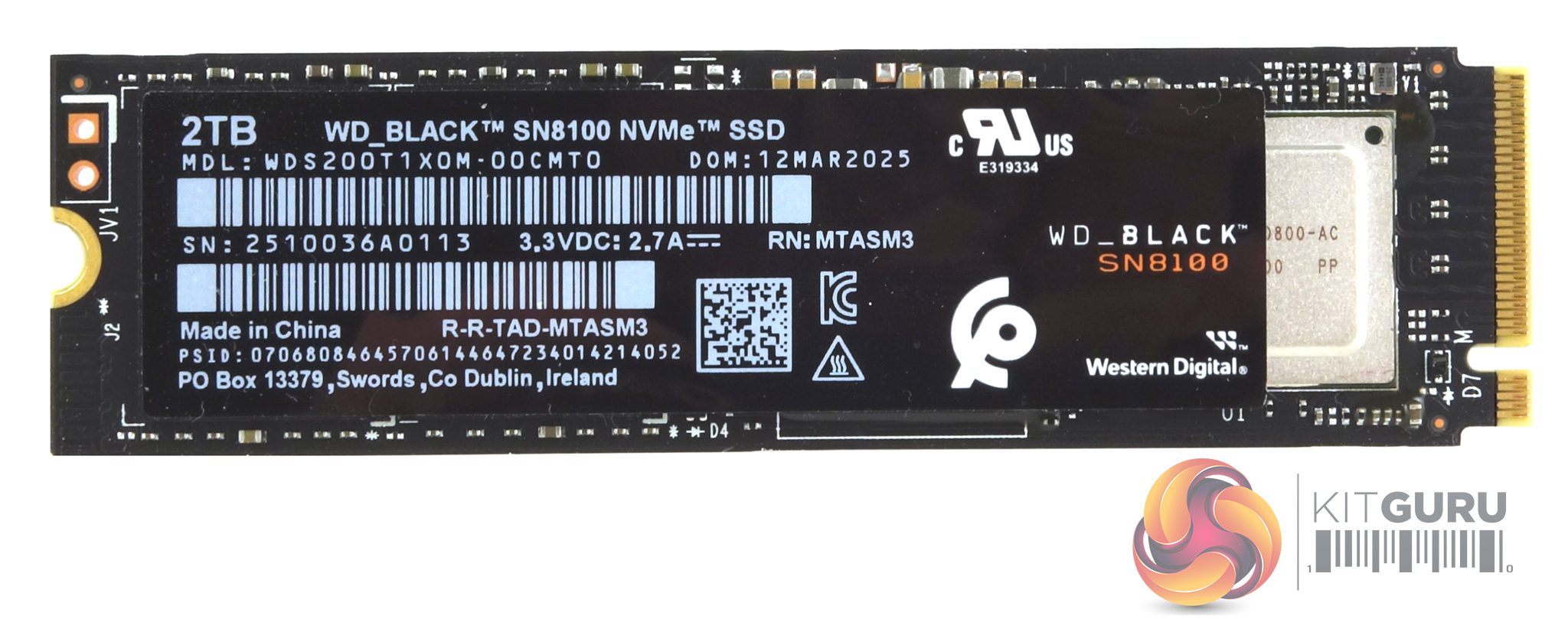
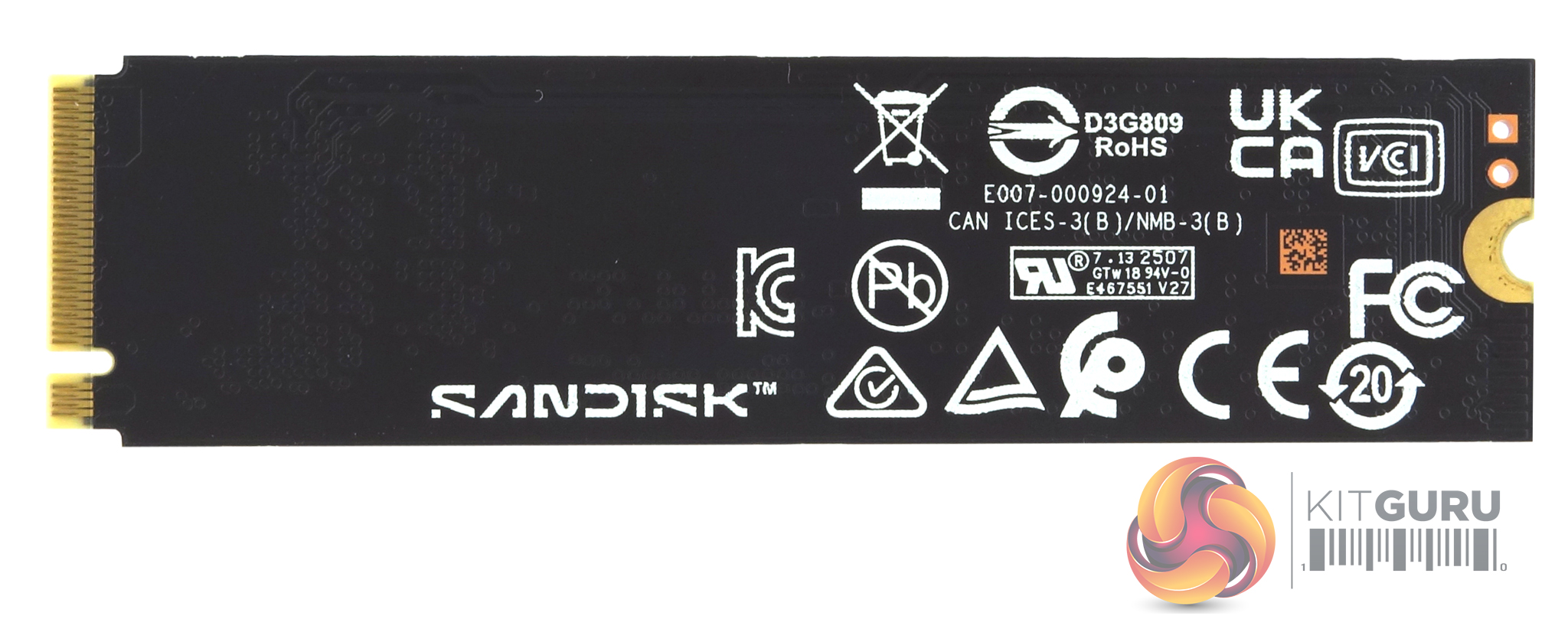
The WD_Black SN8100 is a single-sided design, so all components are on one side of the PCB.
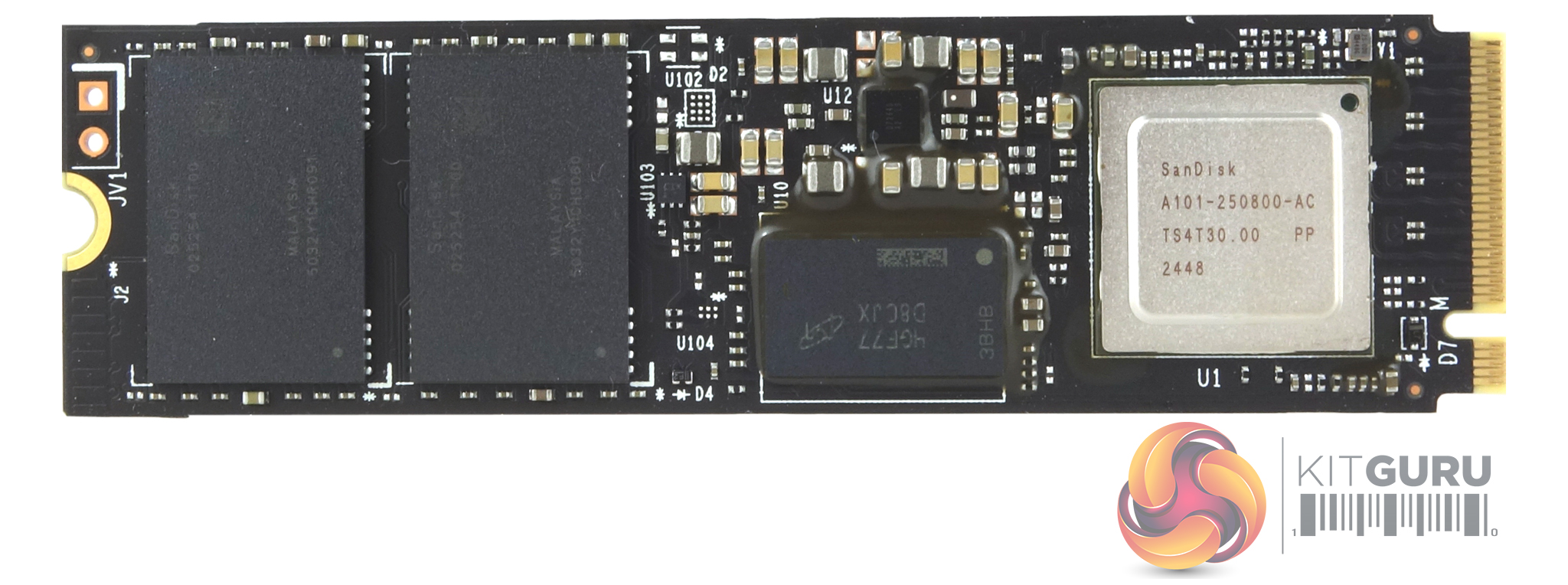
Alongside the Sandisk-branded controller, there are two 1TB BiCS8 218-layer TLC 3D NAND packages and a 2GB DRAM IC. The controller is a Silicon Motion SM2508 eight-channel chip used by several recently released fast Gen 5 drives, although this one is different from the norm as it's Sandisk tuned with the company's hand firmly on the firmware and feature set. The controller uses a 6nm process together with a proprietary built-in smart clock-gating mechanism, which intelligently and automatically powers down unused blocks, allowing the SM2508 to be very efficient when it comes to power consumption, the 2TB WD_Black SN8100 power consumption figures are quoted as 6.5W for average active reads and 7.0W for active writes, with a PS4 sleep rating of 5mW.
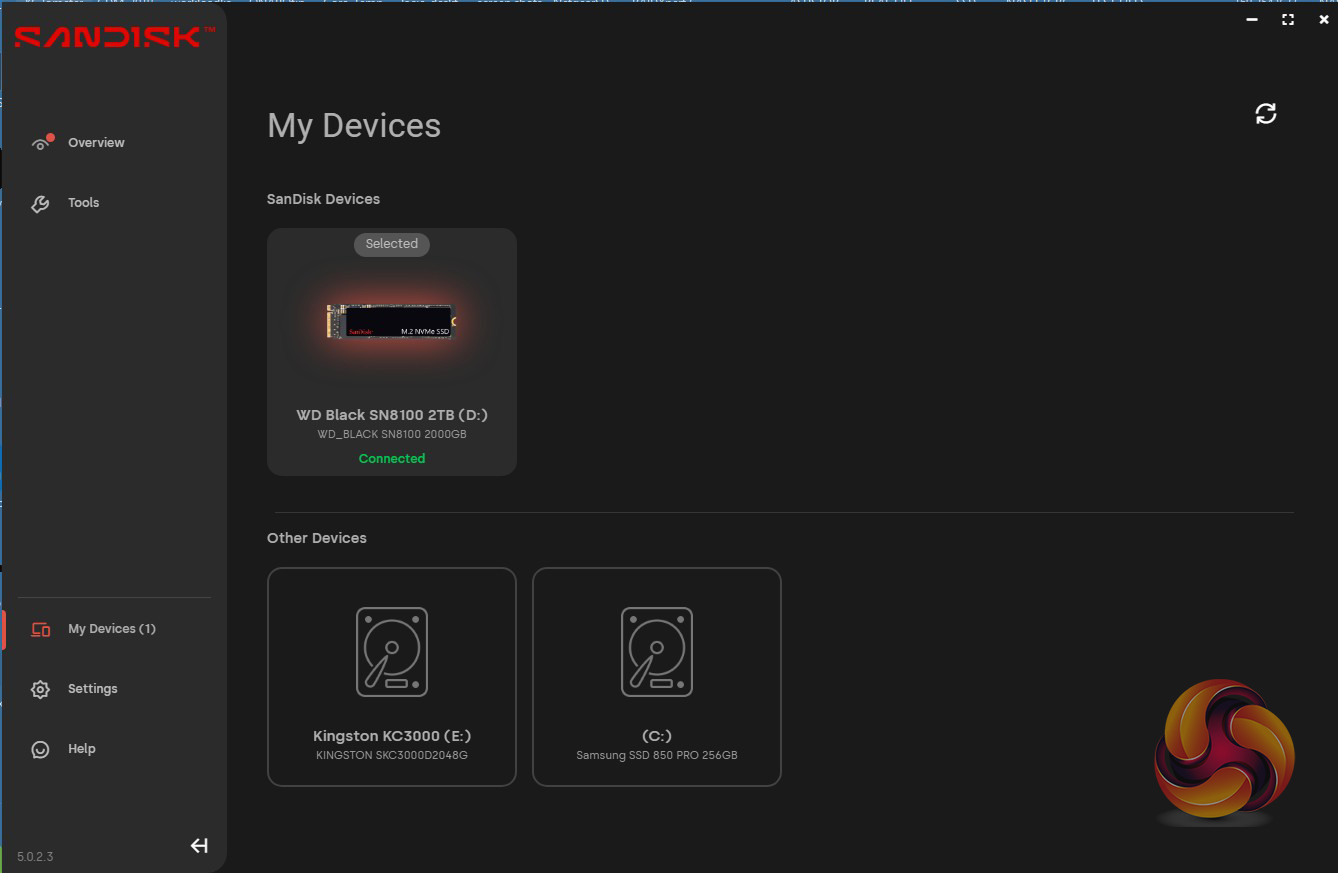
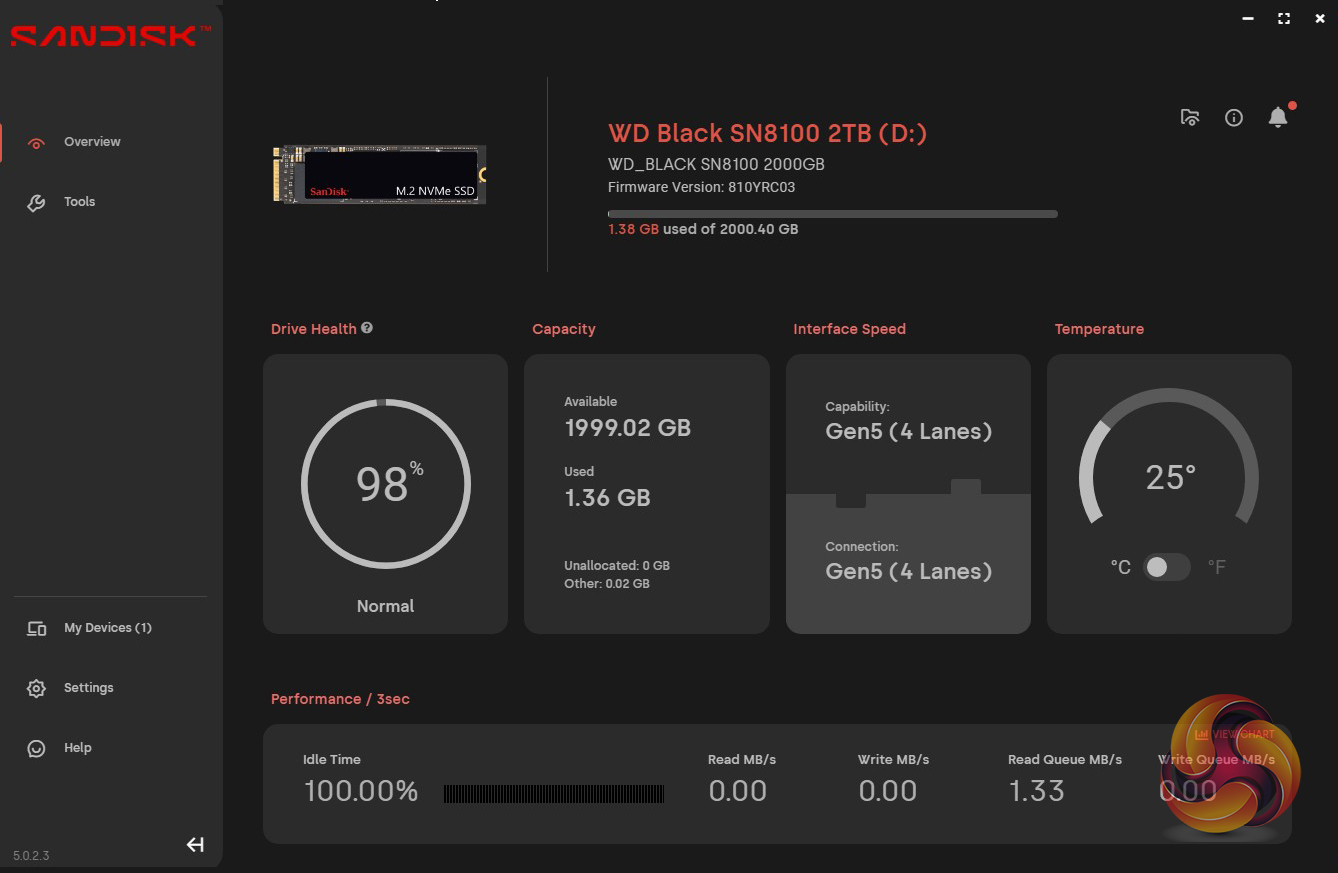
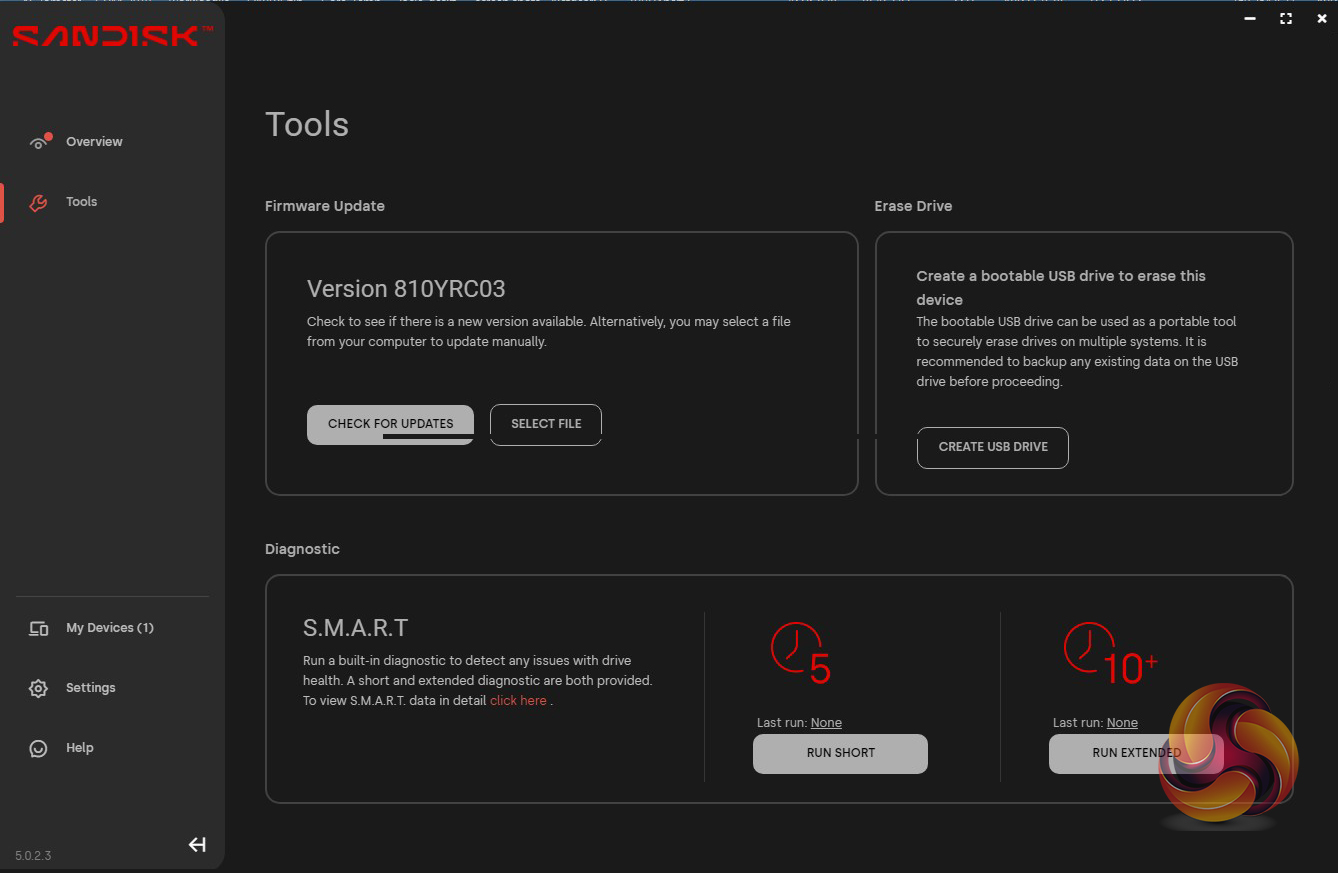
SanDisk's SSD management utility goes under the name of SSD Dashboard. With it, you can monitor drive status and performance, update firmware and monitor temperatures. It also includes a Gaming Mode which, when turned on (requires a system reboot) turns on the Adaptive Thermal Management and Predictive Loading for faster speeds when gaming. There’s no cloning tool integrated into the utility, but you can download Acronis True Image for Sandisk from their website.
For testing, the drives are all wiped and reset to factory settings by HDDerase V4. We try to use free or easily available programs and some real-world testing so you can compare our findings against your own system.
This is a good way to measure potential upgrade benefits.
Main system:
AMD Ryzen 7 7700X, 32GB DDR5-6000, Nvidia GeForce RTX 3050 and a Gigabyte AORUS X670E Xtreme motherboard.
Other drives
Biwin Black Opal X570 PRO 4TB
Biwin Black Opal X570 PRO 2TB
ADATA Legend 970 2TB
Corsair MP700 PRO SE 4TB
Corsair MP700 PRO 2TB
Corsair MP700 Elite 2TB
Crucial T705 2TB
Crucial T700 2TB
Crucial T700 with Heatsink 2TB
Gigabyte AORUS 10000 2TB
Kingston Fury Renegade G5 2TB
Kioxia Exceria Plus G4 2TB Gen 5
Klevv Genuine G360 2TB
Samsung SSD 9100 PRO 2TB
Seagate FireCuda 520 2TB
Software:
Atto Disk Benchmark 4.
CrystalMark 8.0.0.
AS SSD 2.0.
IOMeter.
UL Solutions PC Mark 10.
UL Solutions 3DMark Storage Benchmark.
Final Fantasy XIV Endwalker Official Benchmark.
All our results were achieved by running each test five times with every configuration, which ensures that any glitches are removed from the results. Trim is confirmed as running by typing fsutil behaviour query disabledeletenotify into the command line. A response of disabledeletenotify =0 confirms TRIM is active.
CrystalDiskMark is a useful benchmark to measure theoretical performance levels of hard drives and SSD’s. We are using v8.0.5.
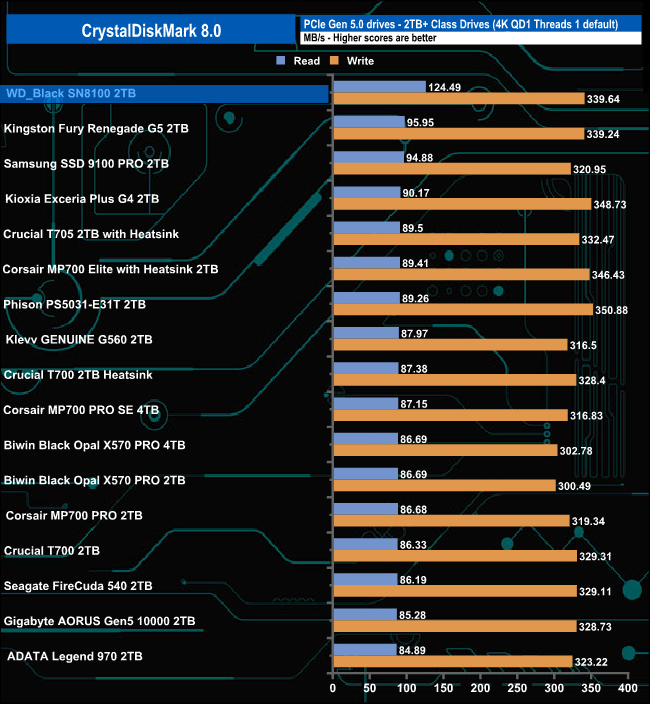
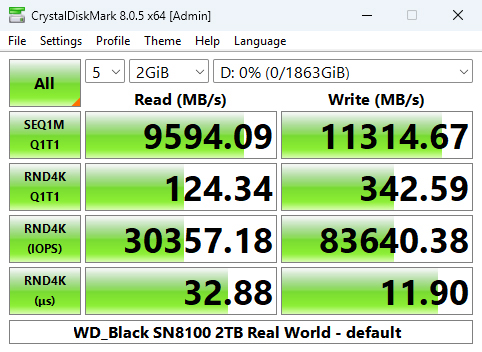
When tested with CrystalDiskMark 8's 4K QD1 1 Thread test, the 2TB WD_Black SN8100 produced a read score of 124.49MB/s, the fastest we've seen to date for a Gen 5 consumer drive. However, its write result of 339.64MB/s is only the fourth fastest.
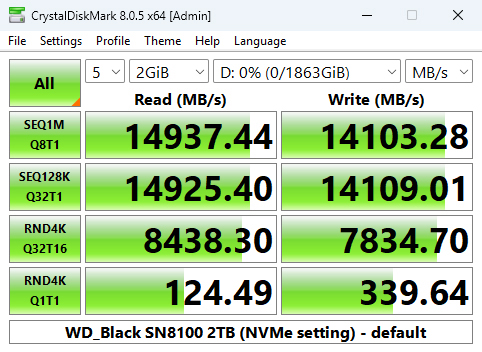
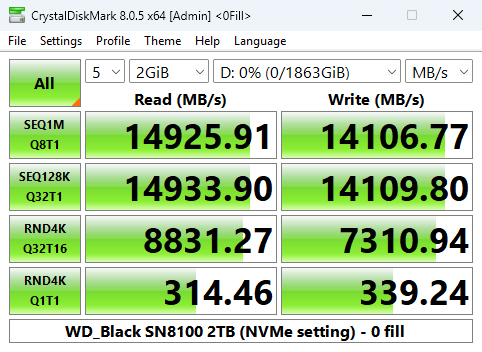
We can confirm the official maximum read/write speeds of the 2TB drive – up to 14,900MB/s and 14,000MB/s, respectively, with a default read test result of 14,937.44MB/s with a write result of 14,103.28MB/s.
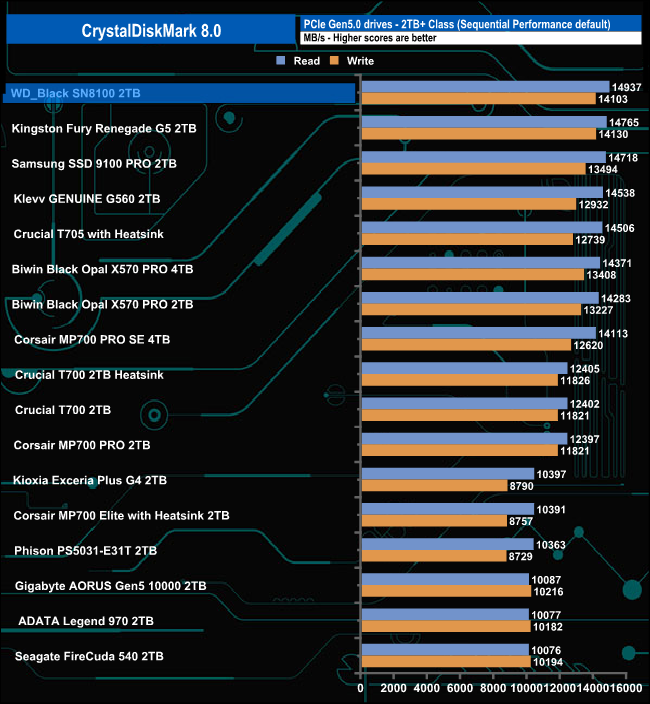
The WD_Black SN8100's Sequential read result of 14,937.44MB/s is the fastest we've seen for a Gen 5 consumer drive, but its write test result of 14,103.28MB/s is slightly slower than Kingston's Fury Renegade G5 drive.
Peak Performance profile
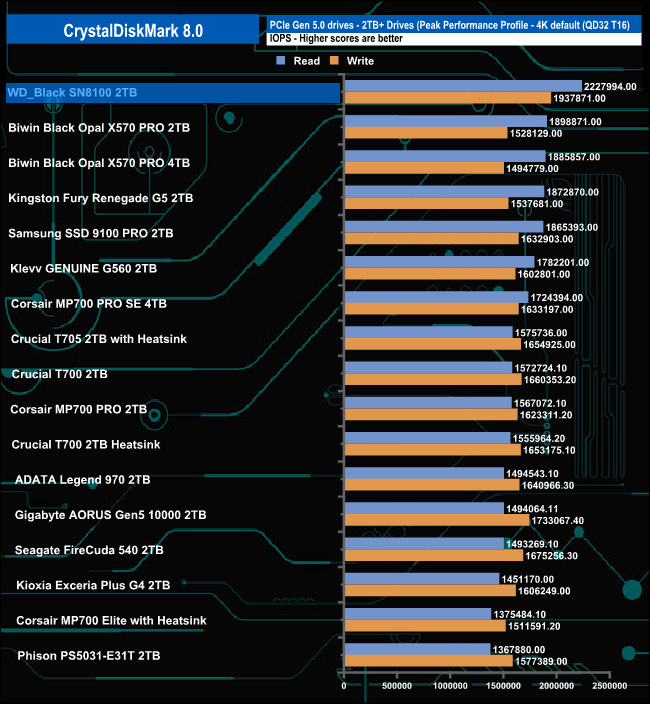
Switching over to the default Peak Performance profile, we saw a 4K random read best test result of 2,227,994 IOPS, a little shy of the official maximum of 2.3M IOPS. Even though it's shy of the official rating, it is the first drive we've seen that's cracked the 2M IOPS mark in this test. The best 4K random write score we saw was 1,937,871 IOPS, which is well short of the official maximum of 2.4M IOPS, but even so, it's still the fastest 4K write result we've seen so far in this test for a consumer Gen 5 drive.
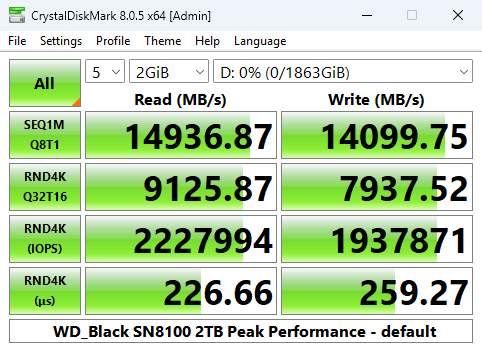
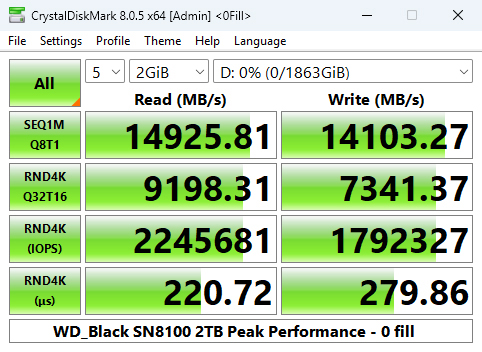
Using this test profile, we could again confirm the official Sequential read / write maximums with results of 14,936.87MB/s and 14,099.75MB/s, respectively.
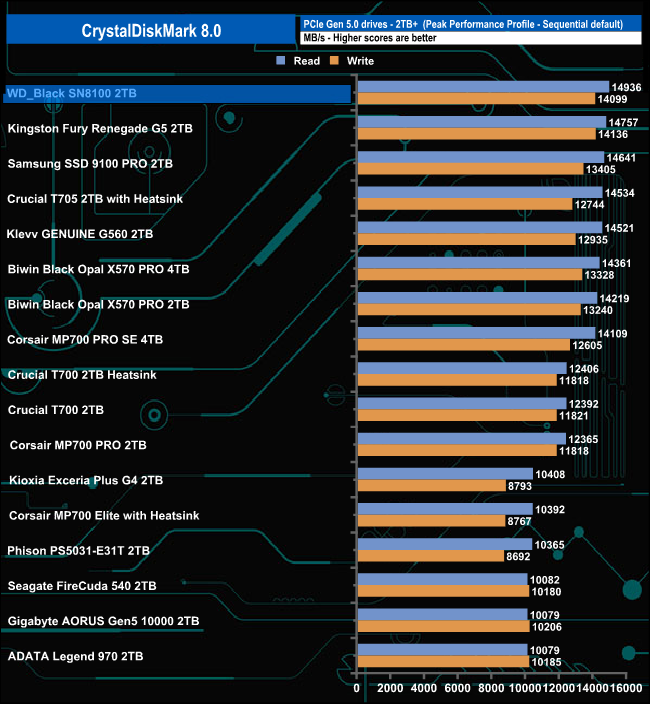
As with the default test, the drive is the fastest we've seen to date in the Peak Performance profile, but only second best in terms of Sequential writes.
Real World profile
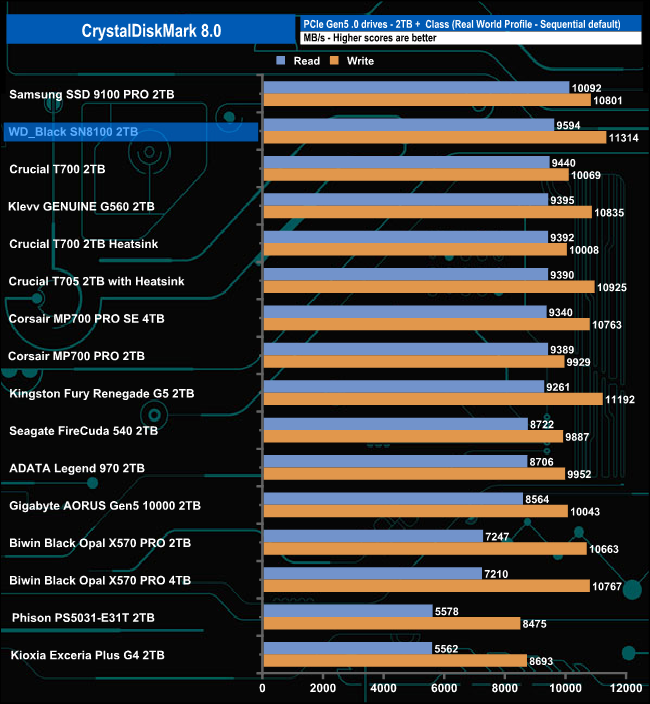
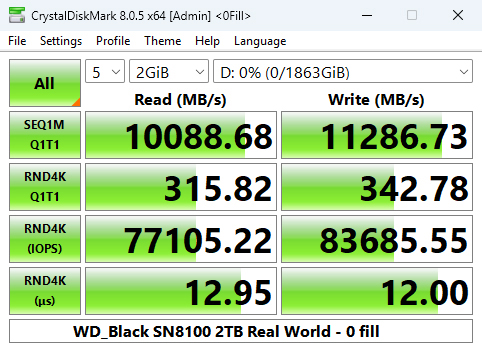
Using the Real World profile sees the drive sitting in second place behind the Samsung SSD 9100 PRO with a read result of 9,954.09MB/s. However, its write score of 11,314MB/s is a good deal faster than the Samsung drive.
The ATTO Disk Benchmark performance measurement tool is compatible with Microsoft Windows. Measure your storage system's performance with various transfer sizes and test lengths for reads and writes. Several options are available to customise your performance measurement, including queue depth, overlapped I/O and even a comparison mode with the option to run continuously. Use ATTO Disk Benchmark to test any manufacturer's RAID controllers, storage controllers, host adapters, hard drives and SSD drives and notice that ATTO products will consistently provide the highest level of performance to your storage. ATTO uses RAW or compressible data.
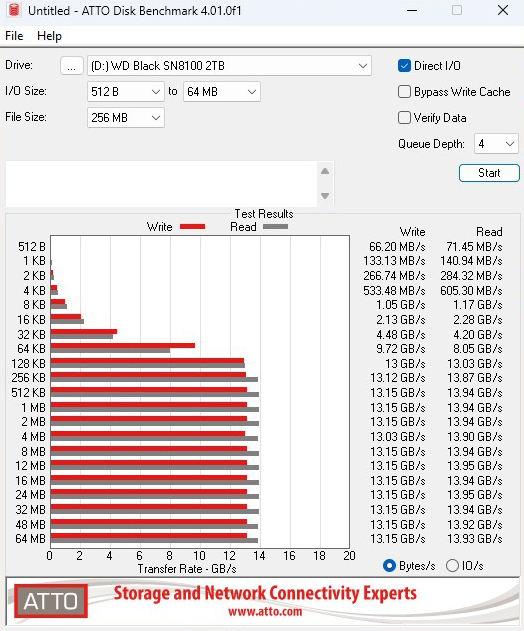
We are using version 4.1 for our NVMe disk tests with a set length of 256mb and test both the read and write performance.
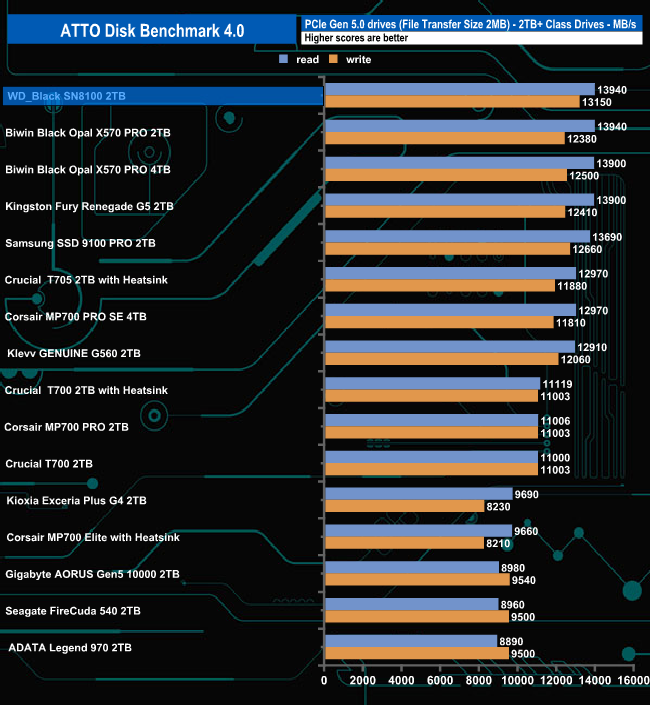
Using the ATTO benchmark, the best Sequential performance we saw from the drive was 13,940MB/s for reads and 13,150MB/s for writes, both well short of the official up to 14,900MB/s and 14,000MB/s for reads and writes, respectively. However, while short of the official ratings, the drive still sits in top spot on the results table, sharing the spotlight on read performance with Biwin's 2TB Black Opal X570 drive. The WD_Black drive, however, has much faster write performance.
AS SSD is a great free tool designed just for benchmarking Solid State Drives. It performs an array of sequential read and write tests, as well as random read and write tests with sequential access times over a portion of the drive. It uses incompressible data samples, which many drives struggle with, so results can be viewed as the worst-case scenarios.
AS SSD includes a sub suite of benchmarks with various file pattern algorithms but this is difficult in trying to judge accurate performance figures.
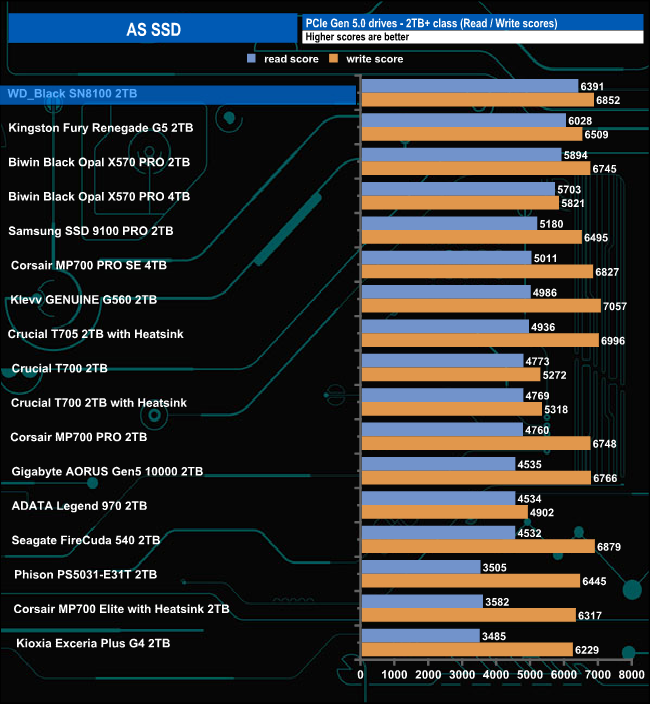
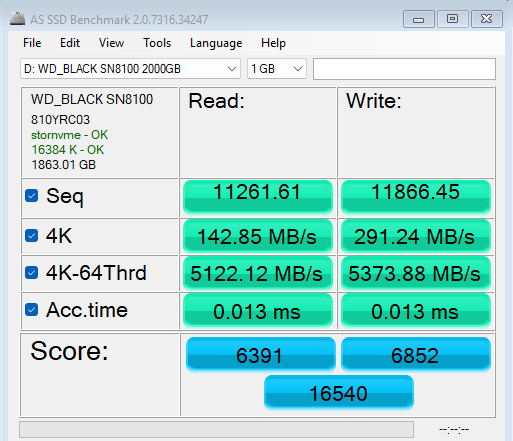
In the AS-SSD benchmark, the WD_Black SN8100 sits in the top spot on the results chart with a read score of 6391, but its write score of 6852 isn't quite as strong as its only the third fastest we've seen to date.
We used CrystalDiskMark 8‘s custom settings to test the Sequential read and write performance of the drive through a range of queue depths. The setup for the tests is listed below.
128KB Sequential Read / Write.
Transfer Request Size: 128KB, Thread(s): 1, Outstanding I/O: 1-32.
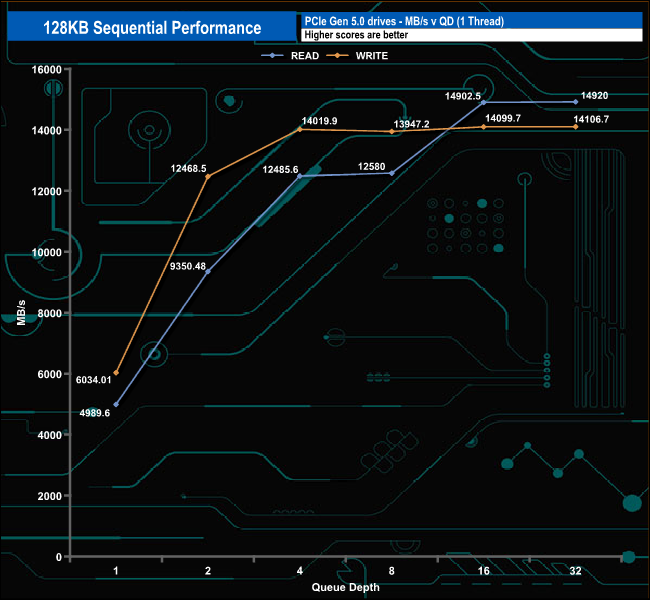
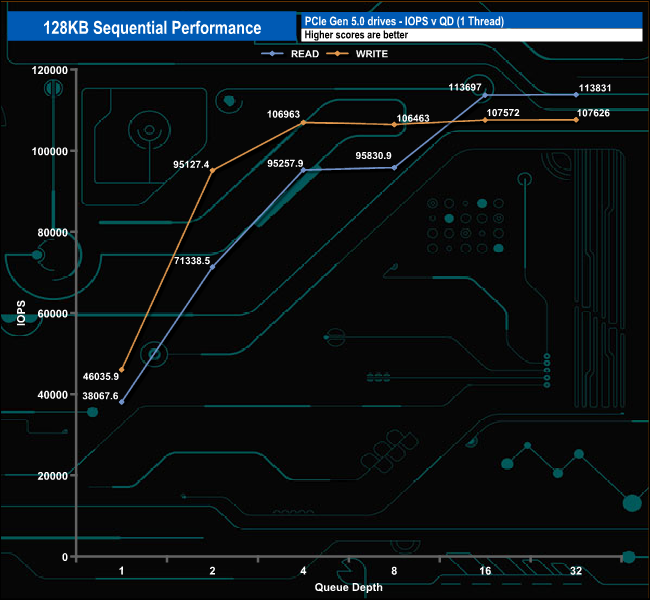
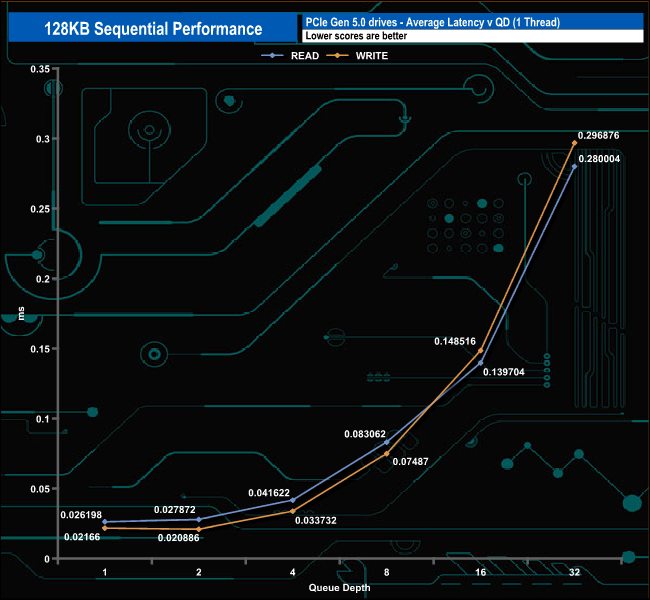
The 2TB WD_Black SN8100's Sequential performance is rated as up to 14,900MB/s and 14,000MB/s for reads and writes, respectively. Using the custom settings option in CrystalDiskMark 8, we could confirm both official figures with test run results of 14,920MB/s and 14,106MB/s, for reads and writes, respectively.
128KB Sequential Read v QD compared
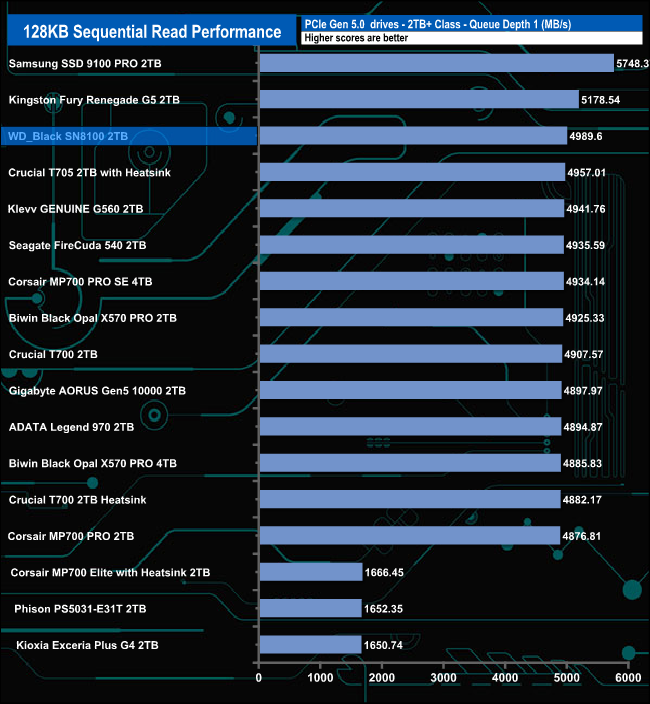
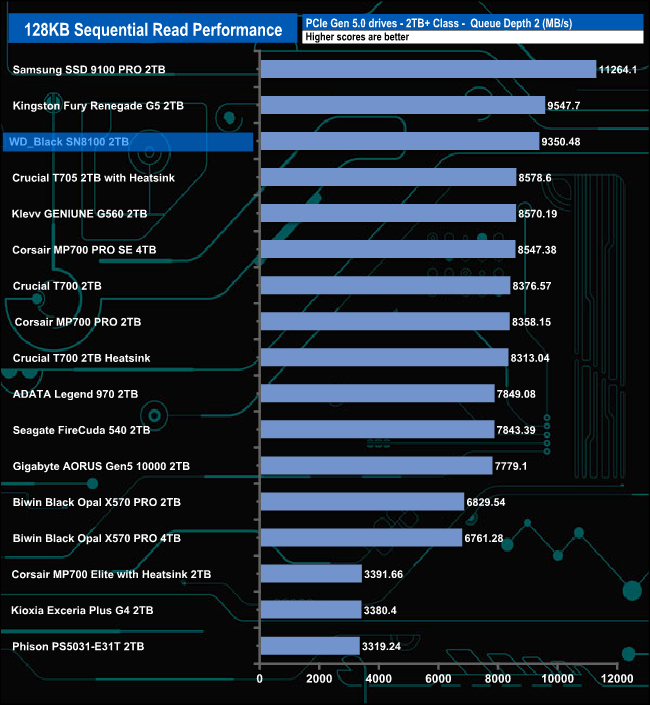
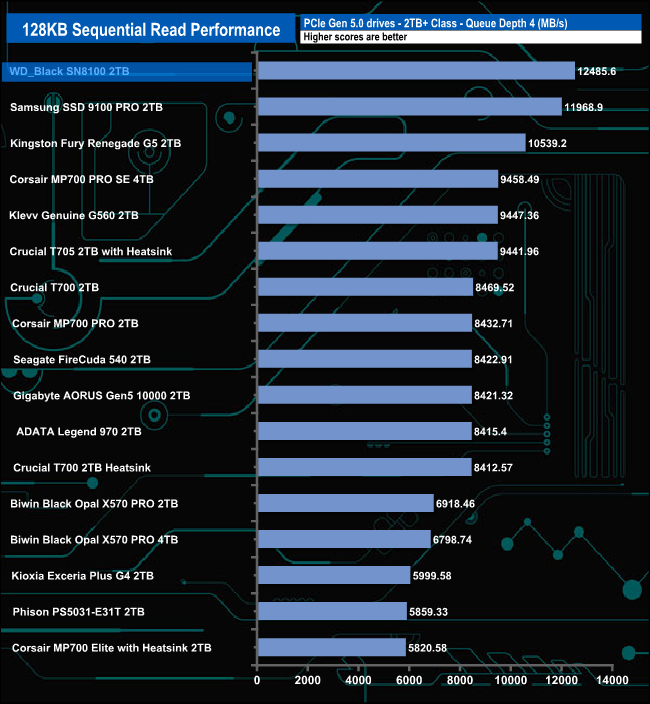

At QDs 1 and 2 the WD_Black SN8100 sits in third place behind the 2TB Samsung SSD 9100 PRO and Kingston Fury Renegade G5 drives, but at QD's 4 and 32, the SN8100 moves above both drives.
128KB Sequential Write v QD compared
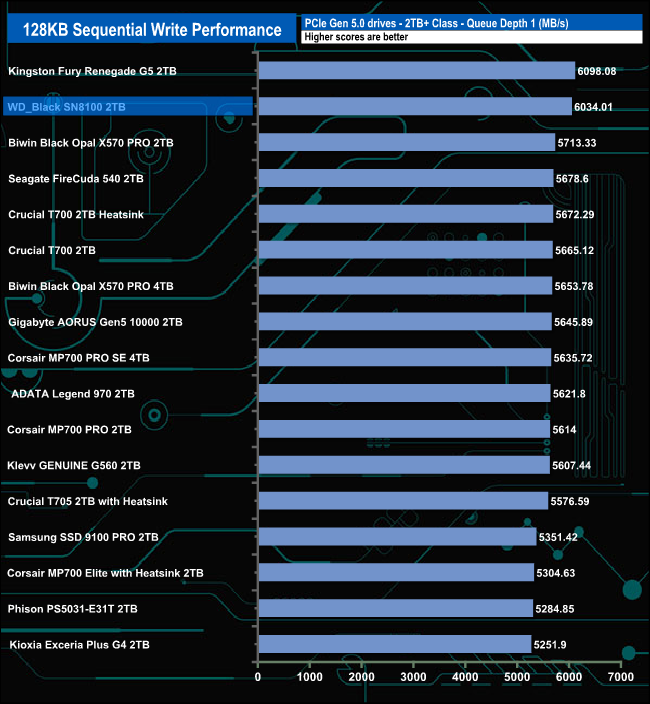
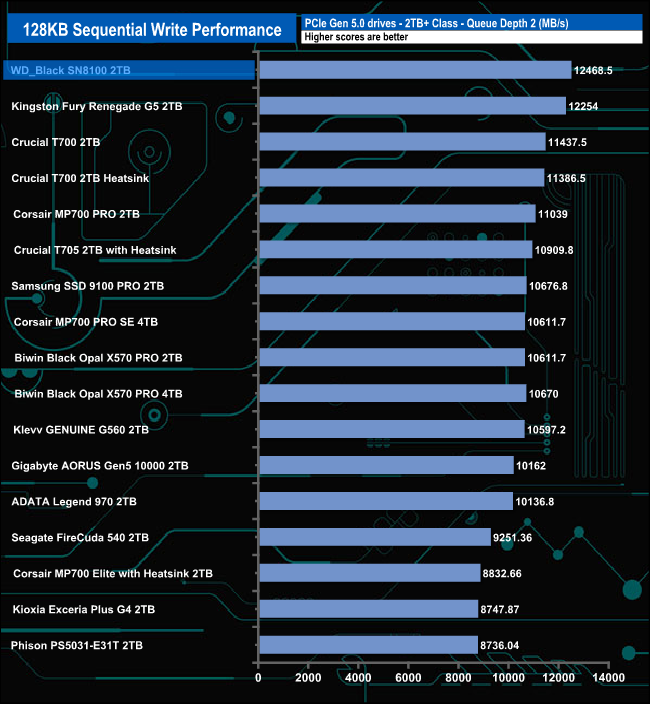
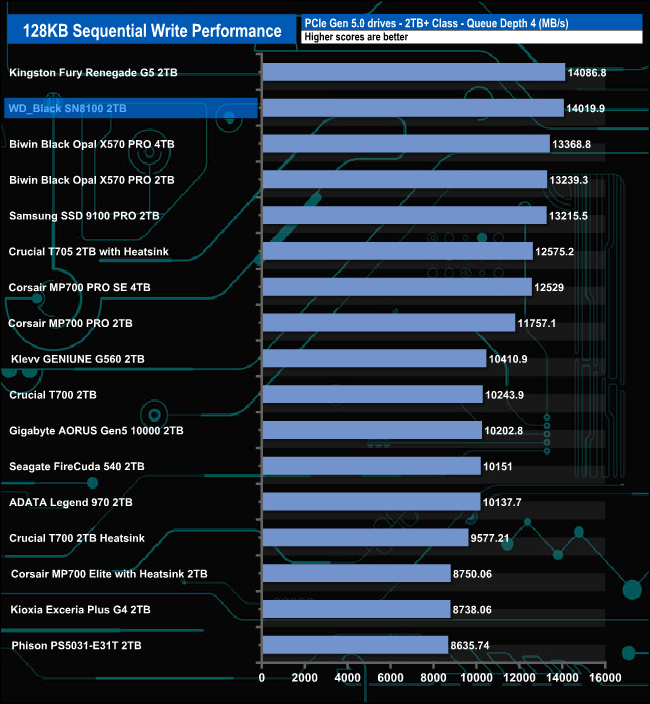
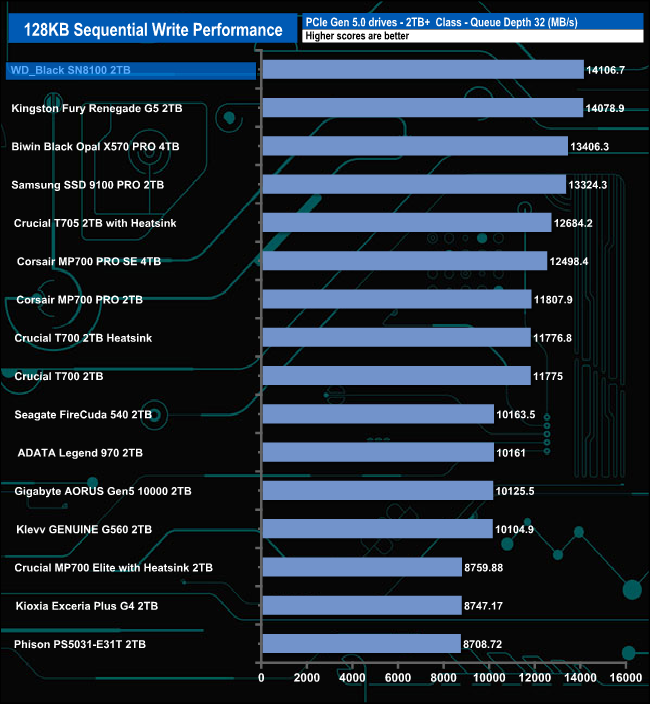
When it comes to Sequential write performance, the drive sits in second spot behind Kingston's Fury Renegade G5 drive at QD1 and QD4; however, at QD's 2 and 32, the positions are reversed.
We used CrystalDiskMark 8‘s custom settings to test the 4K random read performance of the drive through a range of queue depths. The setup for the tests is listed below.
Transfer Request Size: 4KB, Outstanding I/O: 1-32.
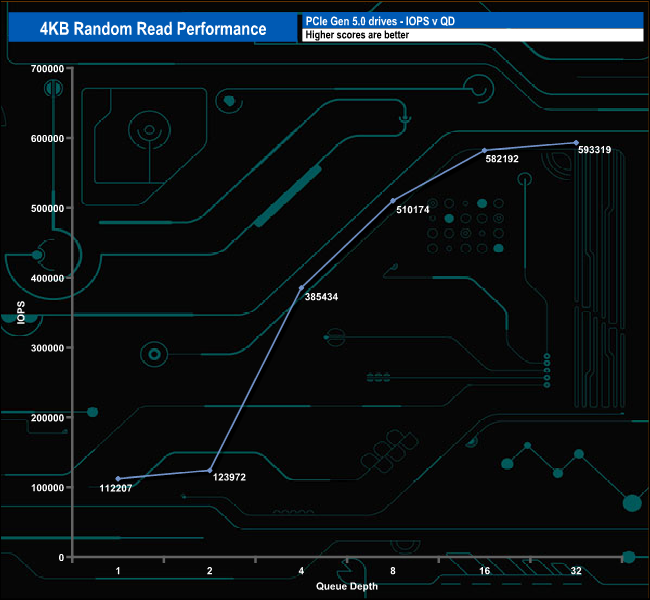
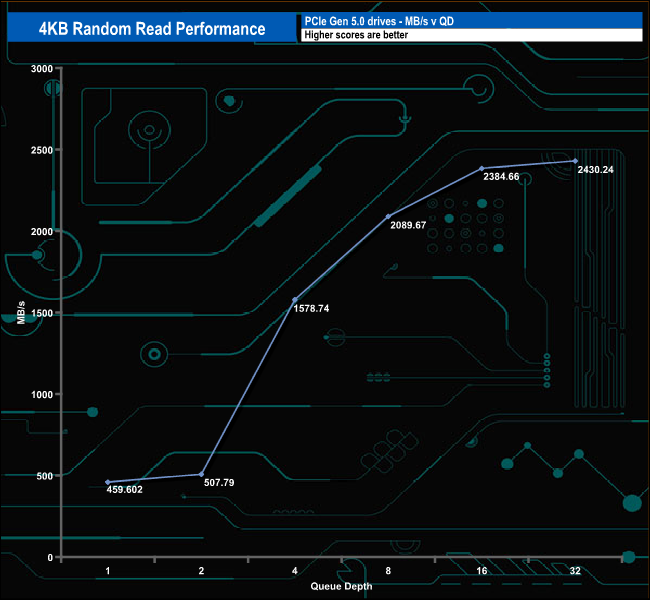
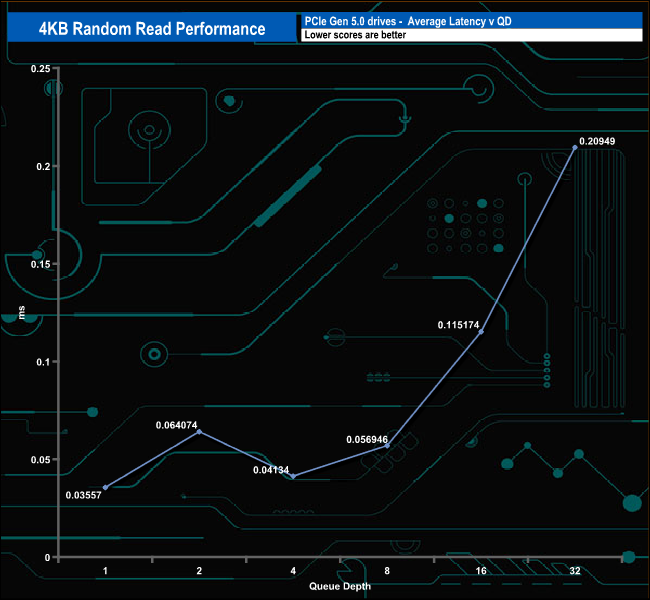
The official maximum 4K random read figure for the drive is 2.3M IOPS. Using our four-threaded tests, the best we saw from the tested drive was 593,319 IOPS, nowhere close to the official rating.
4K Random Read v QD compared
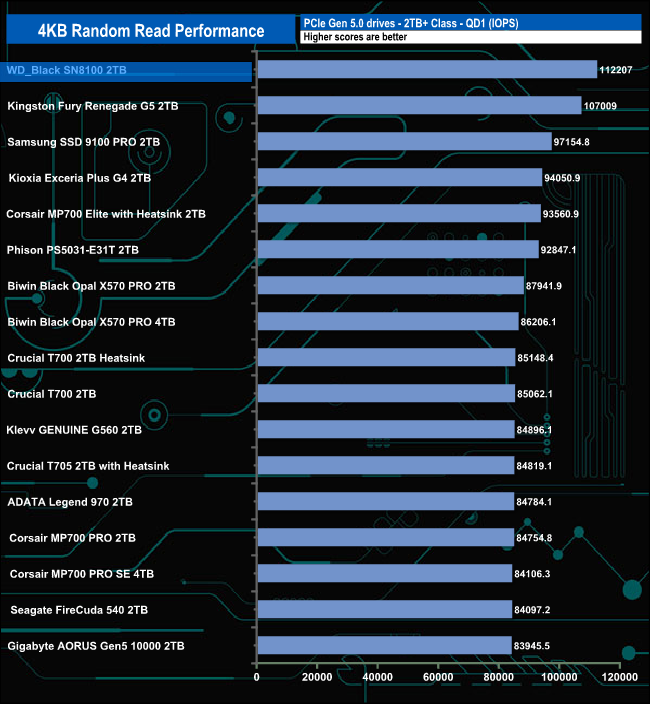
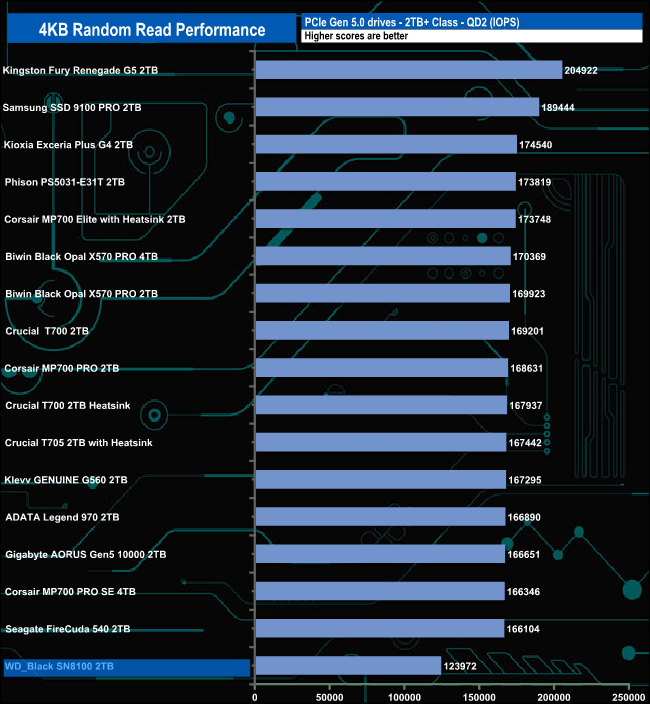
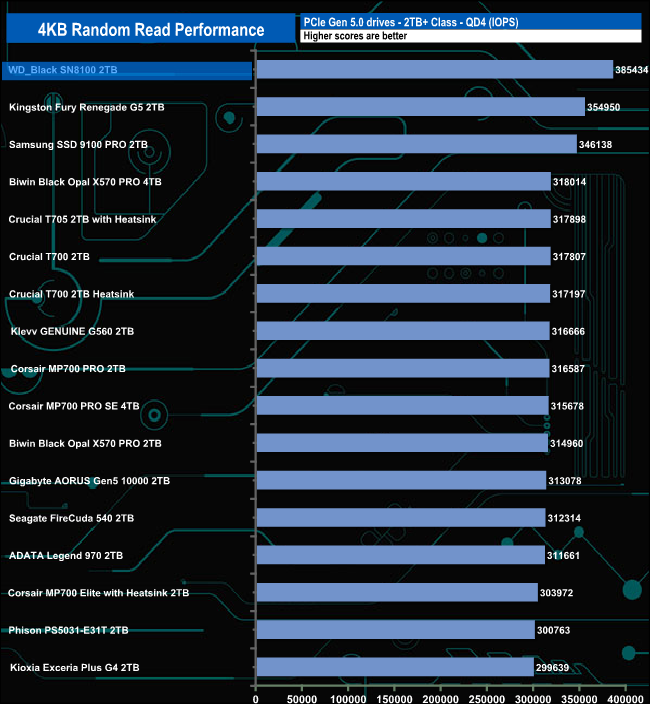
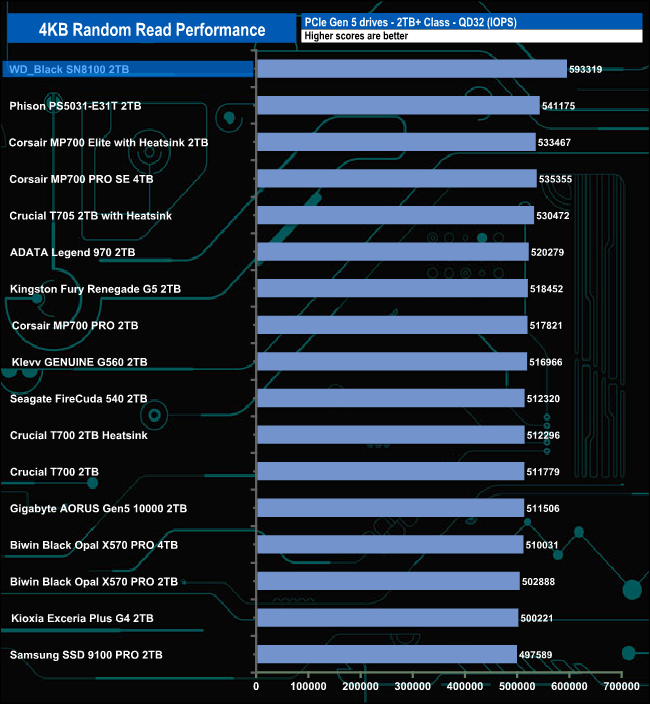
At QD1, the test result of 112,207 IOPS sees the drive as the fastest we've seen to date. In contrast, at QD2 it's the slowest we've seen. But the drive recovers well as it tops the table again by QD4 and at the end of the test run at QD32.
We used CrystalDiskMark 8‘s custom settings to test the 4K random write performance of the drive through a range of queue depths. The setup for the tests is listed below.
Transfer Request Size: 4KB, Outstanding I/O: 1-32.
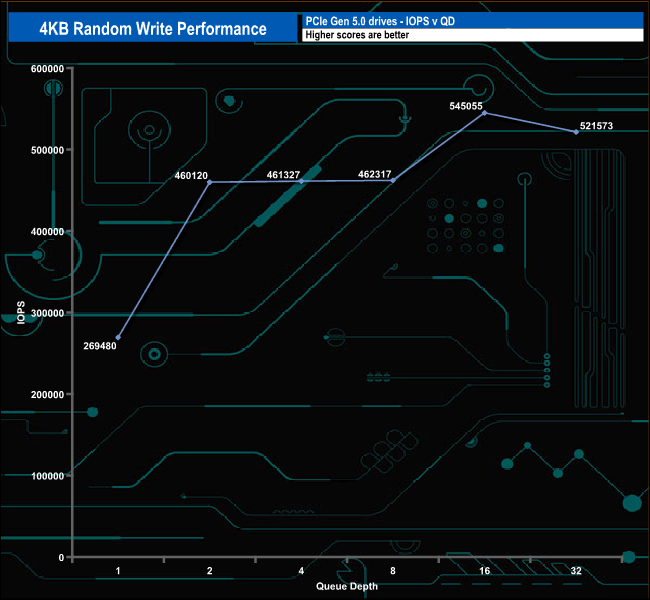
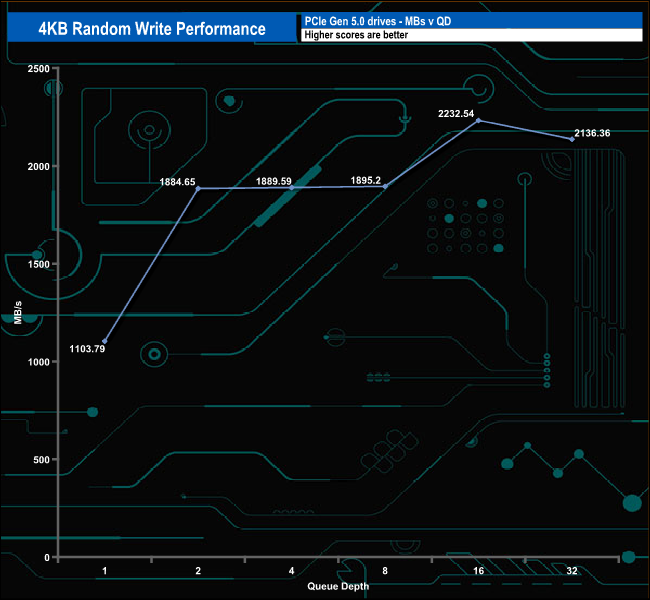
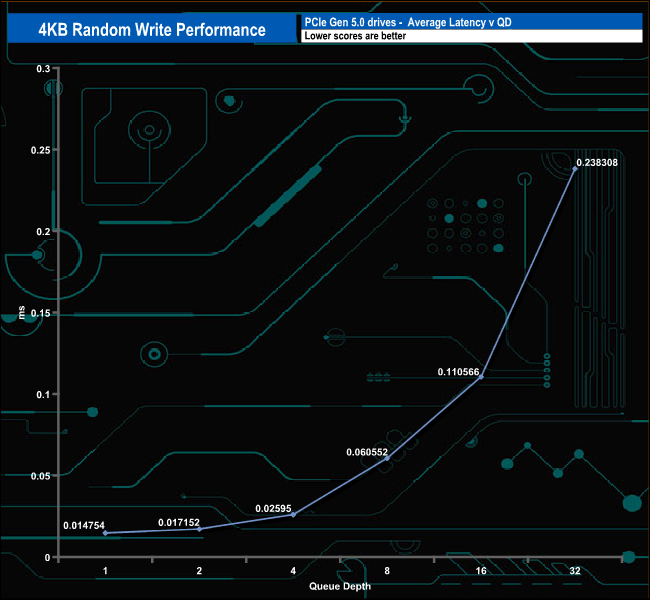
As with the 4K random read tests, the random write test results are well short of the official 2.4M IOPS, peaking at 545,055 IOPS (QD16) before dropping back to finish the test run at 521,573 IOPS.
4K Random Write v QD compared
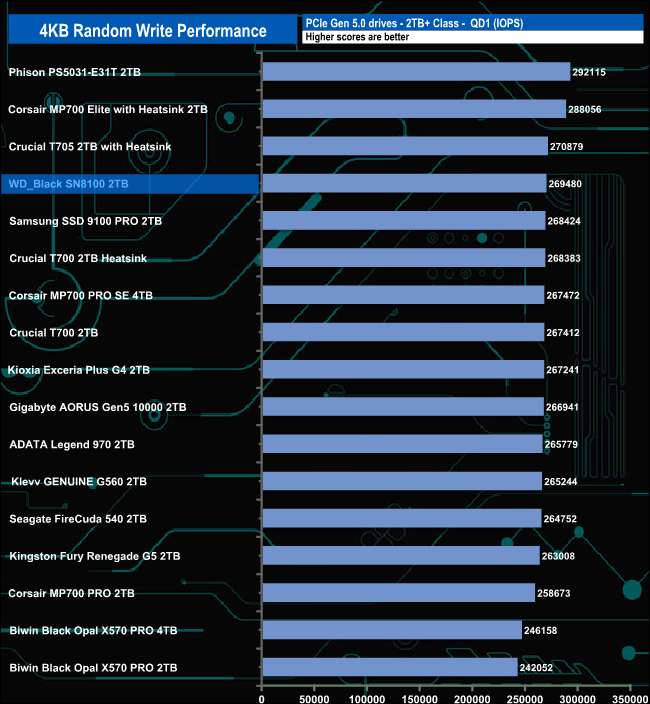
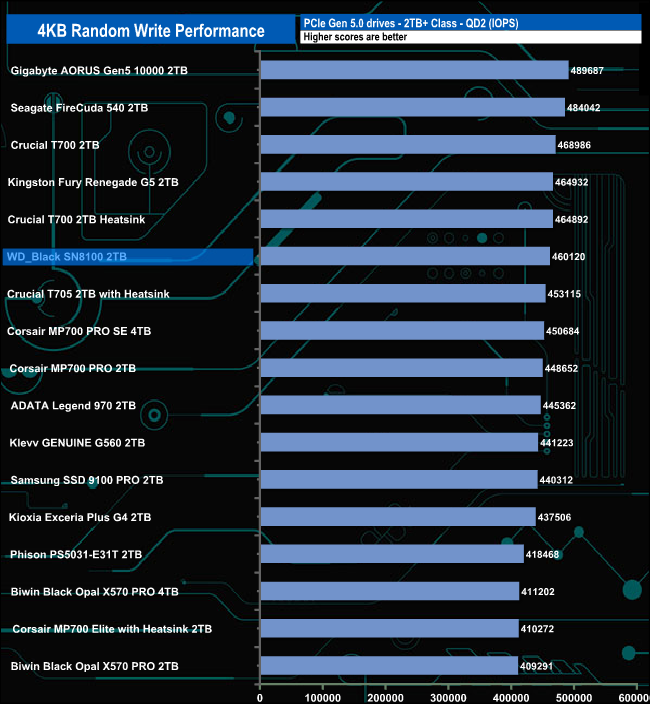
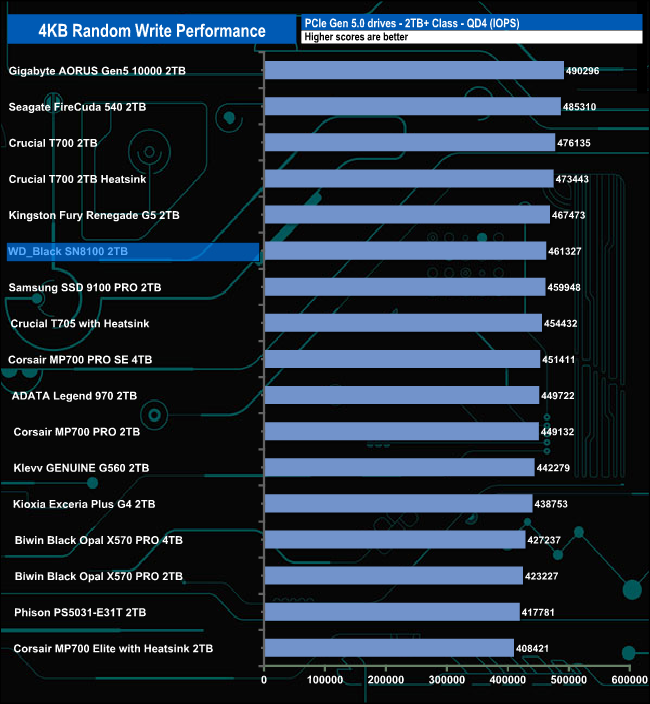
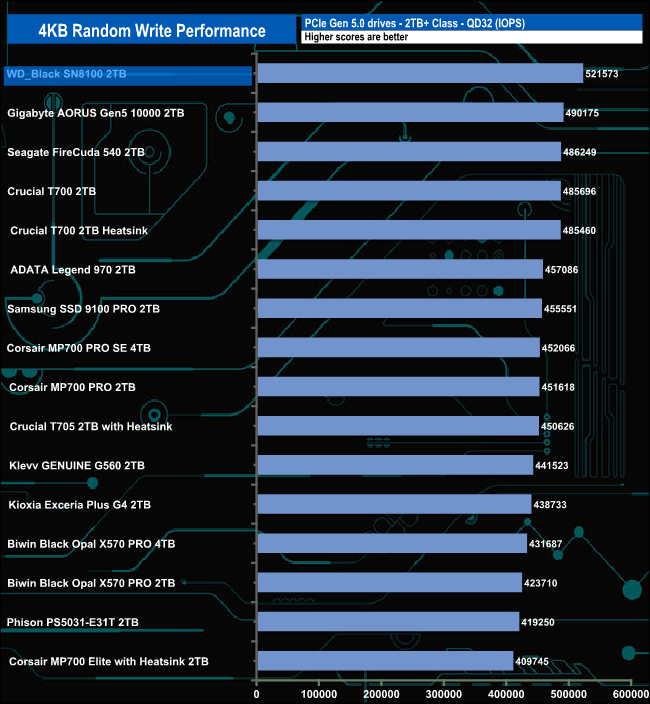
At QD1, the 2TB WD_Black SN8100 sits in fourth place on the results table. At QDs 2 and 4, the drive has slipped to sixth place. But by QD32, it has moved up to the top spot with a test result of 521,573 IOPS.
We used CrystalDiskMark 8’s custom settings to test the 4K 70/30 mixed read/write performance of the drive through a range of queue depths using a single thread and four threads.
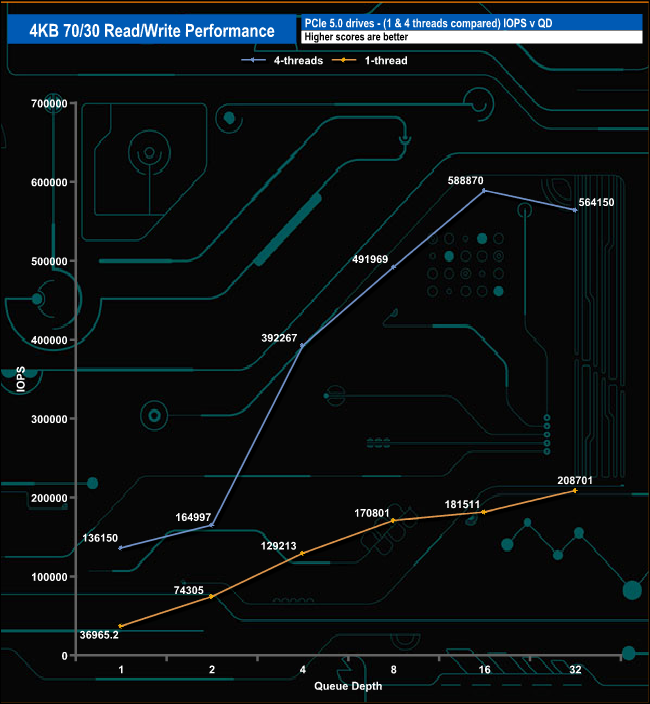
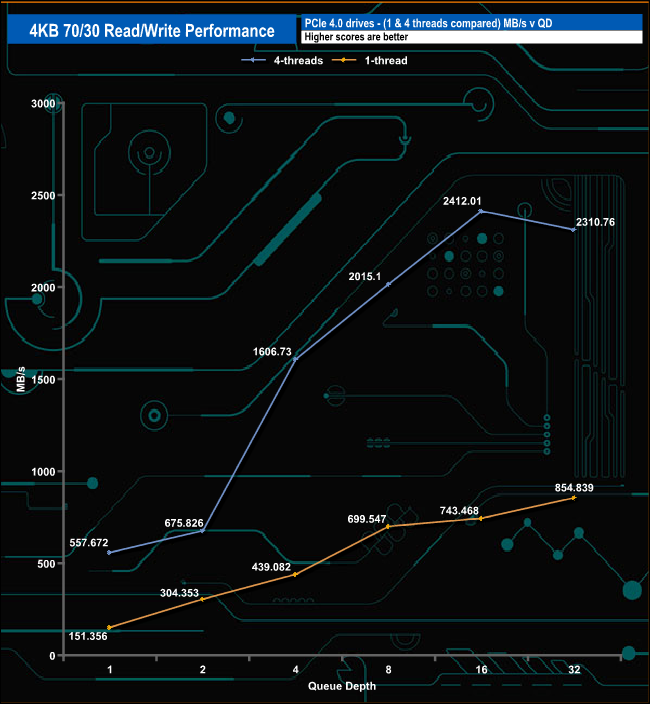
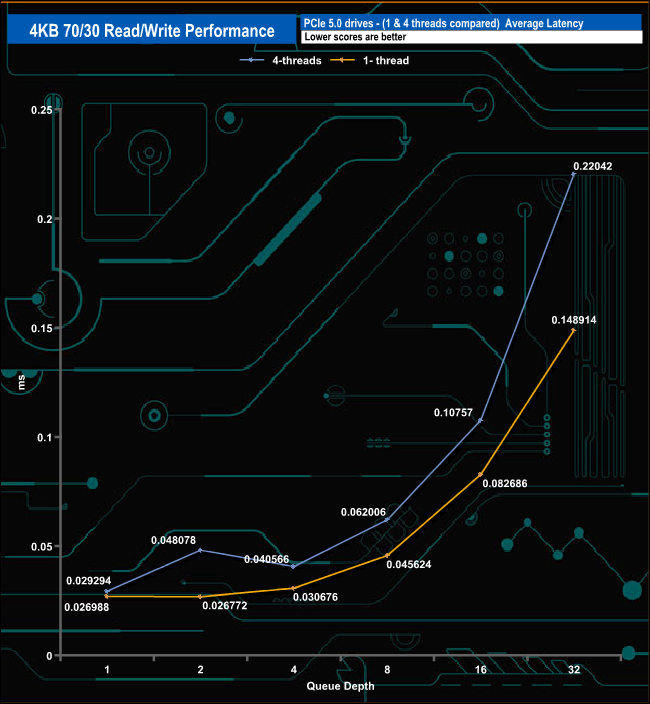
Using a single thread, the performance climbs from 36,965 IOPS (151.35MB/s) at QD1 to 208,701 IOPS (854.83MB/s) at QD32. Using four threads, the performance slowly rose from 136,150 IOPS (557.67MB/s) at QD1 to 164,997 IOPS (675.82MB/s) at QD2 but from that point the drive accelerated up to a peak of 588,870 IOPS (2,412.01MB/s) before dropping back to 546,150 IOPS (2,310.76MB/s) at the end of the test run at QD32.
We used CrystalDiskMark 8 to test the random performance of the drive at lower queue depths (QD1 – QD8, where most of the everyday workloads occur) using 1 to 4 threads.
Random Read
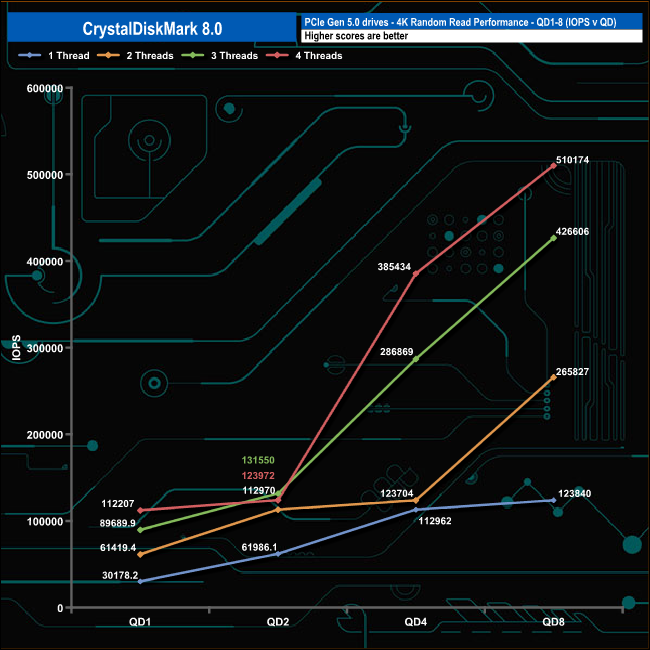
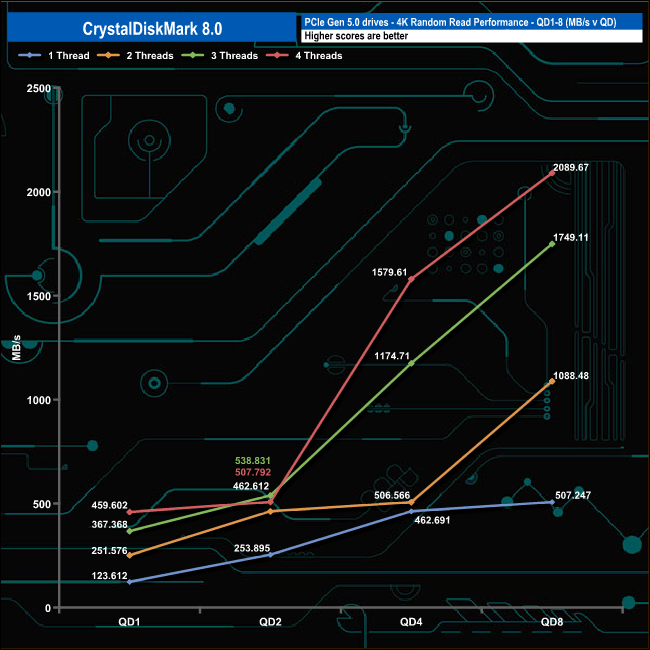
In the random read tests, the 2TB WD_Black SN8100 displays a mixed range of results at various queue depths. Using a single thread, the drive climbs gradually from 30,178 IOPS at QD1 up to 123,840 IOPS at QD8. Using three threads, the drive climbs smoothly from 61,419 IOPS at QD 1 up to 426,606 IOPS at QD8. The drive's performance using two and four threads is anything but smooth.
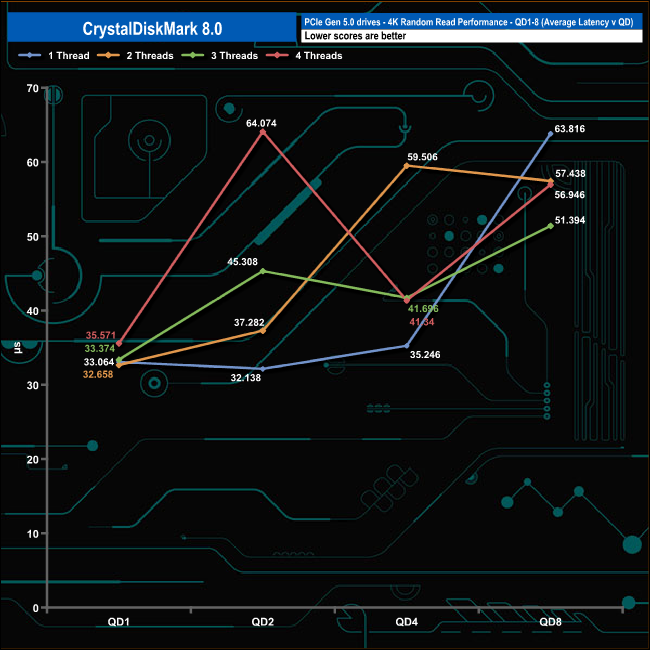
Using two threads, the drive climbs from 61.419 IOPS at QD1 to 112,970 IOPS at QD2, where the rate of acceleration slows down until QD4, when the performance picks back up again. Using four threads, the performance barely moves between QD1 (112,207 IOPS) and QD2 (112,970 IOPS) before rapidly accelerating to finish the test run at 510,174 IOPS. Both of these dips in performance are highlighted by peaks in the drive's latency at these queue depths.
Random Write
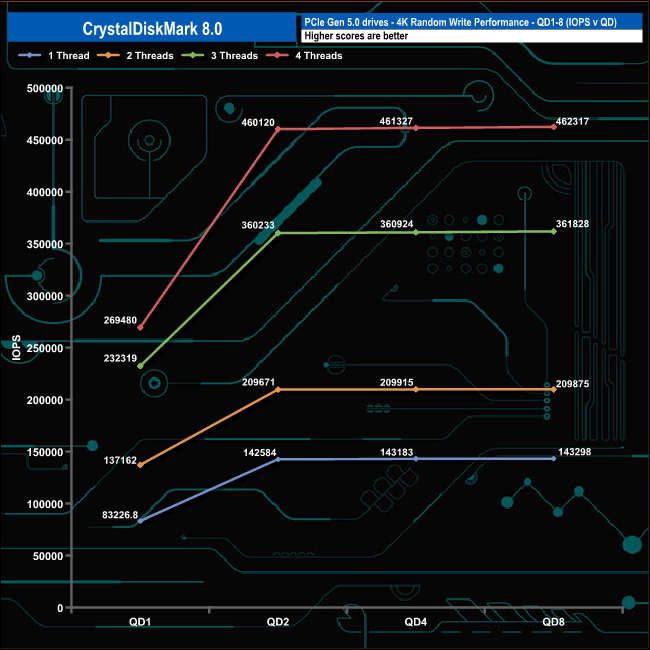
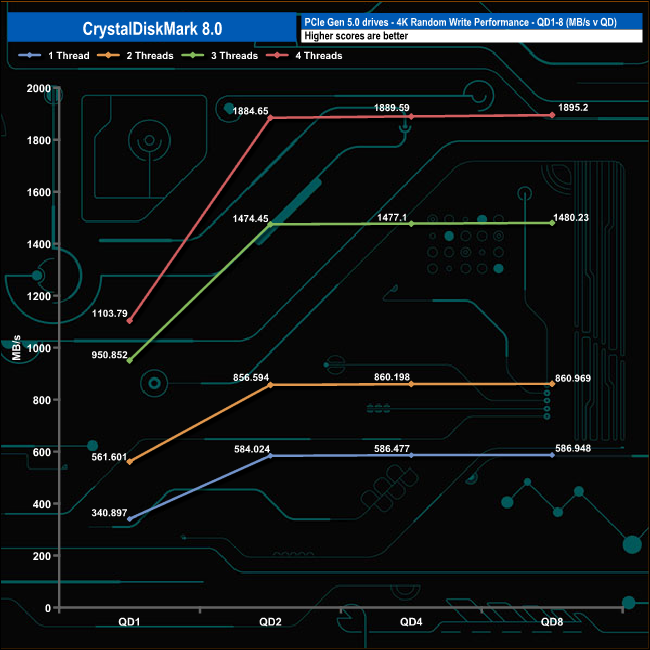
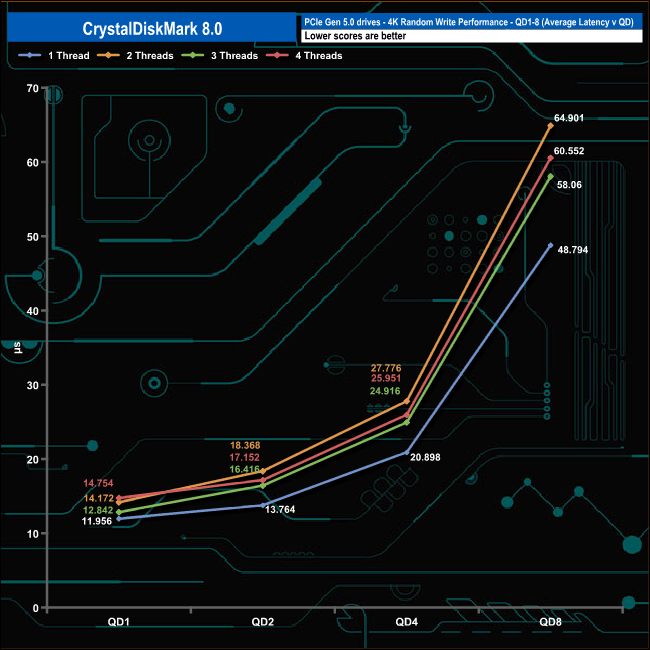
In the 4K write tests, the performance rose quickly from QD1 to QD2 for all four tested threads, with the fastest rise seen in the three and four-threaded tests. All four threads show the performance beginning to plateau after QD2.
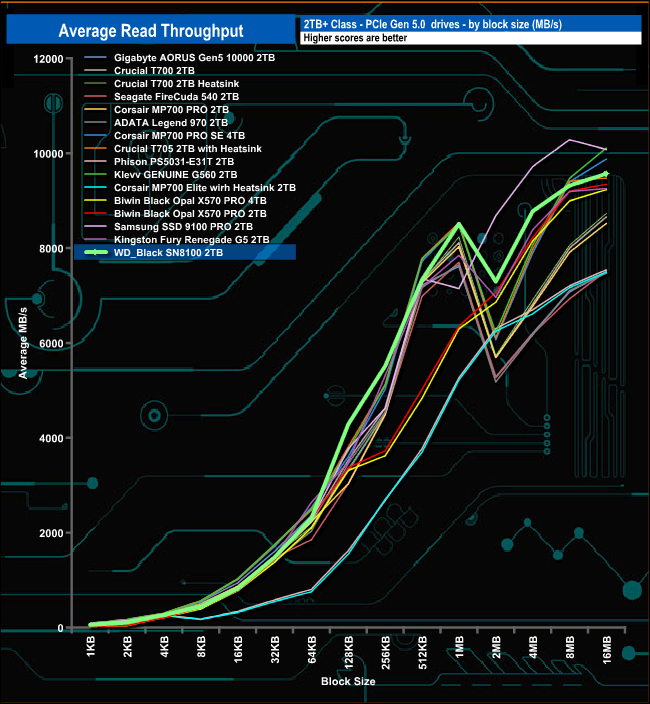
In our read-throughput test, the WD_Black SN8100 peaked at the 16MB block size at 9,566.39MB/s, a long way short of the official maximum of 14,900MB/s.
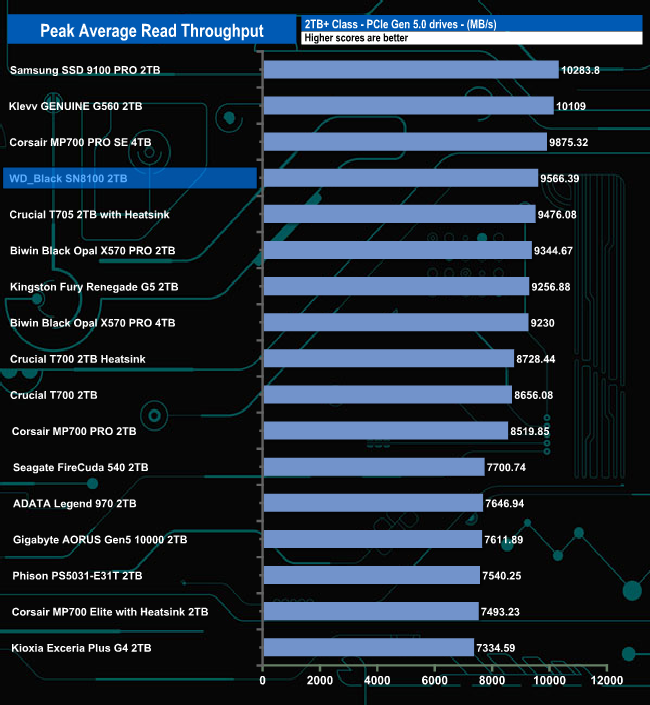
That 9,566.39MB/s test result sees the drive in fourth place on the results chart.
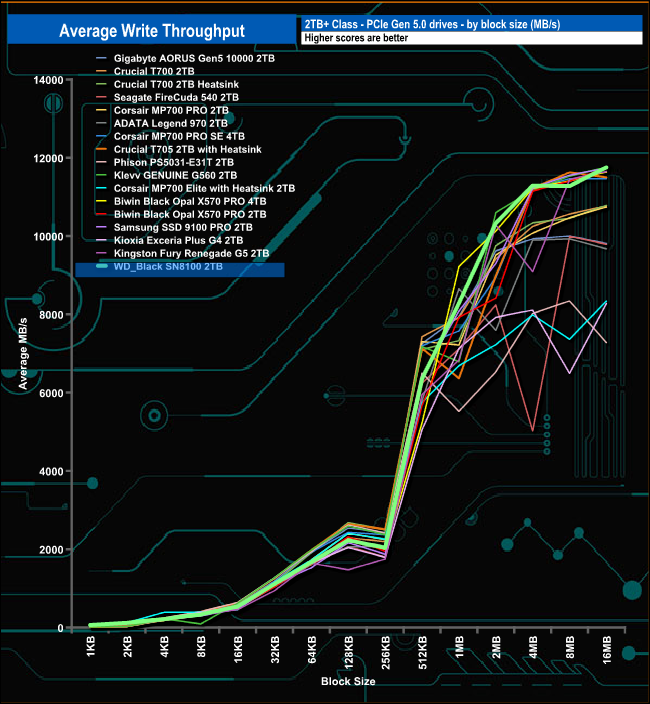
In the write throughput test, the drive peaked at 11,754.38MB/s at the end of the test run. But once again, it was short of the maximum official figure of 14,000MB/s.
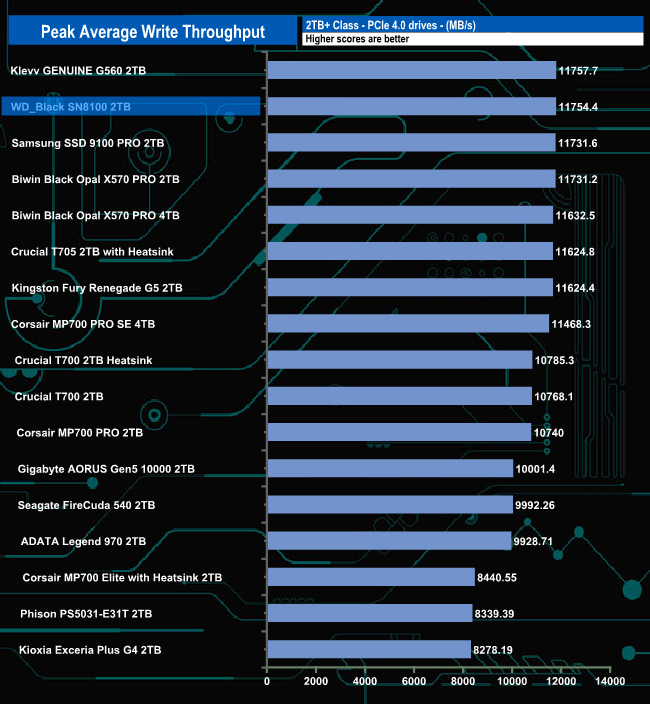
The peak write result we saw of 11,754.38MB/s puts the drive into second place in the results chart, very close to Klevv's GENUINE G560 drive that tops the table.
The PCMark 10 Full System Drive Benchmark uses a wide-ranging set of real-world traces from popular applications and common tasks to fully test the performance of the fastest modern drives. The benchmark is designed to measure the performance of fast system drives using the SATA bus at the low end and devices connected via PCI Express at the high end.
The goal of the benchmark is to show meaningful real-world performance differences between fast storage technologies such as SATA, NVMe, and Intel’s Optane. The Full System Drive Benchmark uses 23 traces, running 3 passes with each trace. It typically takes an hour to run.
Traces used:
Booting Windows 10.
Adobe Acrobat – starting the application until usable.
Adobe Illustrator – starting the application until usable. Adobe Premiere Pro – starting the application until usable.
Adobe Photoshop – starting the application until usable.
Battlefield V – starting the game until the main menu.
Call of Duty Black Ops 4 – starting the game until the main menu.
Overwatch – starting the game until main menu.
Using Adobe After Effects.
Using Microsoft Excel.
Using Adobe Illustrator.
Using Adobe InDesign.
Using Microsoft PowerPoint.
Using Adobe Photoshop (heavy use).
Using Adobe Photoshop (light use).
cp1 Copying 4 ISO image files, 20 GB in total, from a secondary drive to the target drive (write test).
cp2 Making a copy of the ISO files (read-write test).
cp3 Copying the ISO to a secondary drive (read test).
cps1 Copying 339 JPEG files, 2.37 GB in total, to the target drive (write test).
cps2 Making a copy of the JPEG files (read-write test).
cps3 Copying the JPEG files to another drive (read test).
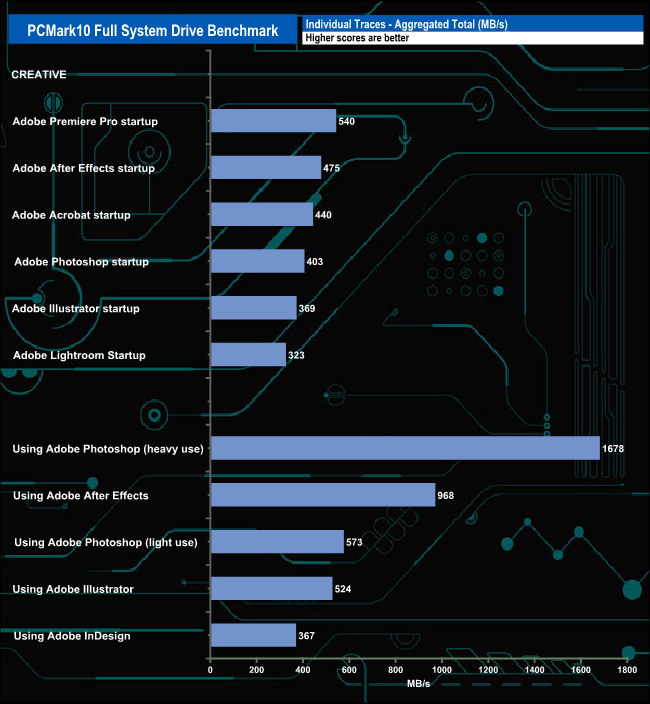
When tested using the Adobe startup traces in PCMark10's Full System Drive benchmark, the drive produced an average of 425MB/s for the six tests. The fastest of these tests was the Premiere Pro trace, at 540MB/s, while the slowest was the Lightroom startup trace, at 323MB/s.
Switching over to the Adobe usage traces, the drive averaged 822MB/s, which includes the 1,678MB/s result for the Adobe Photoshop heavy usage trace. The slowest of the five traces was the InDesign trace at 367MB/s.
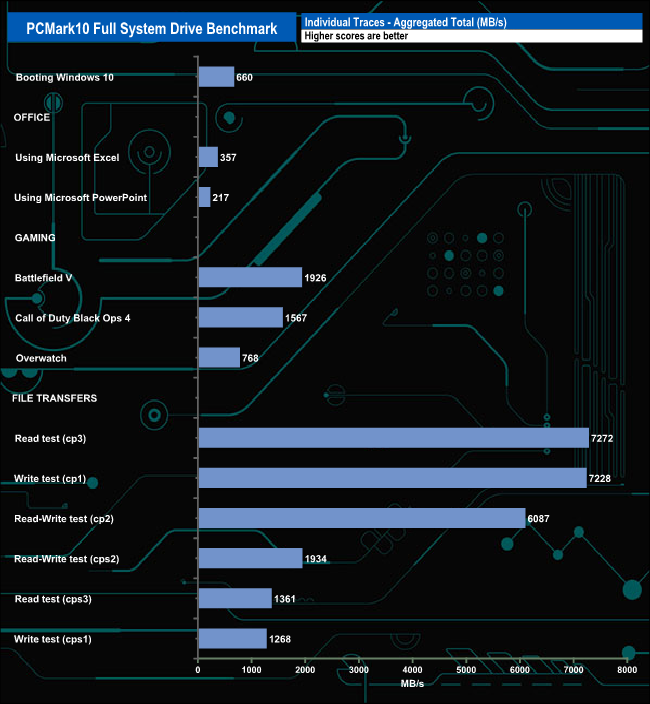
The three gaming traces produced an average result of 1,420MB/s, the fastest being Battlefield V at 1,925MB/s, next came Call Of Duty Black Ops 4 at 1,567MB/s and last and quite some way back, Overwatch at 768MB/s.
The drive averaged 4,191.6MB/s for the six file transfer tests, the fastest being 7,272MB/s for the cp3 write test.
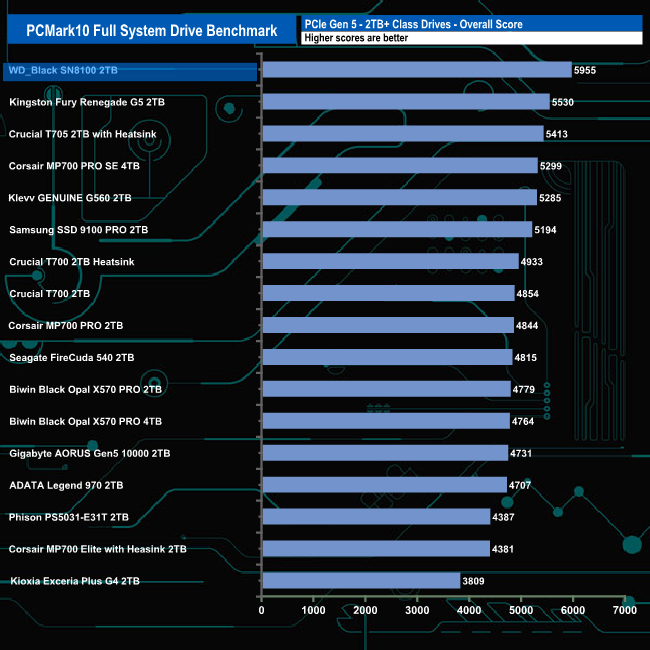
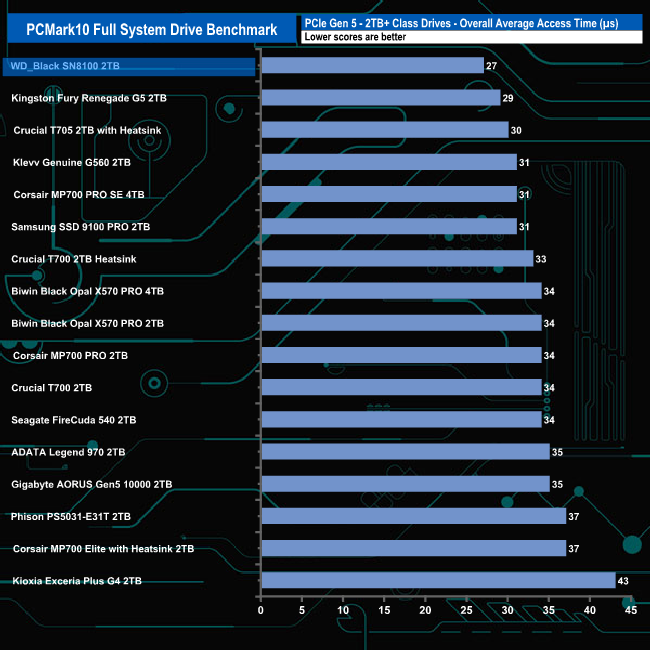
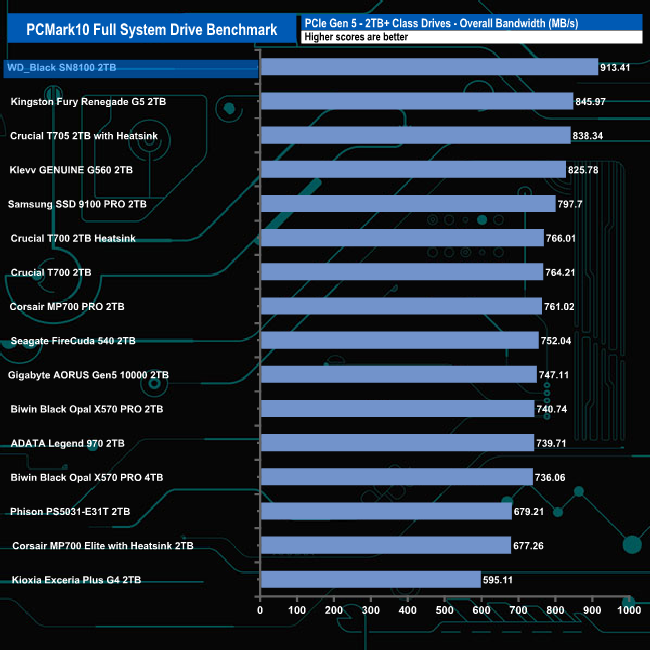
The WD_Black SN8100, with a test result of 913.41MB/s, slots straight into to top spot, 67MB/s faster than Kingston's Fury Renegade G5 drive.
The 3DMark Storage Benchmark uses traces recorded from popular games and gaming-related activities to measure real-world gaming performance.
Traces used:
Battlefield V
Loading Battlefield™ V from launch to the main menu.
Call of Duty Black Ops 4
Loading Call of Duty®: Black Ops 4 from launch to the main menu.
Overwatch
Loading Overwatch® from launch to the main menu.
Game Move
Copying the Steam folder for Counter-Strike®: Global Offensive from an external SSD to the system drive.
Game Recording
Recording a 1080p gameplay video at 60 FPS with OBS (Open Broadcaster Software) while playing Overwatch®.
Installing Game
Installing The Outer Worlds® from the Epic Games Launcher.
Game Saving
Saving progress in The Outer Worlds game.
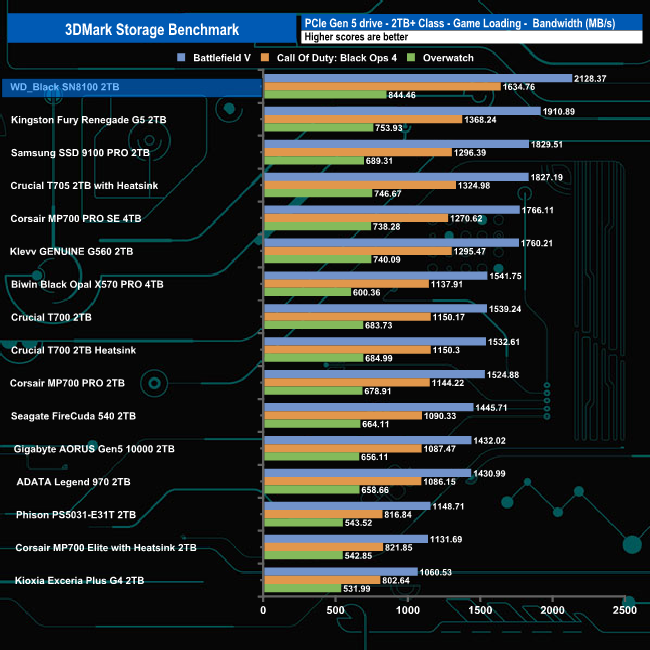
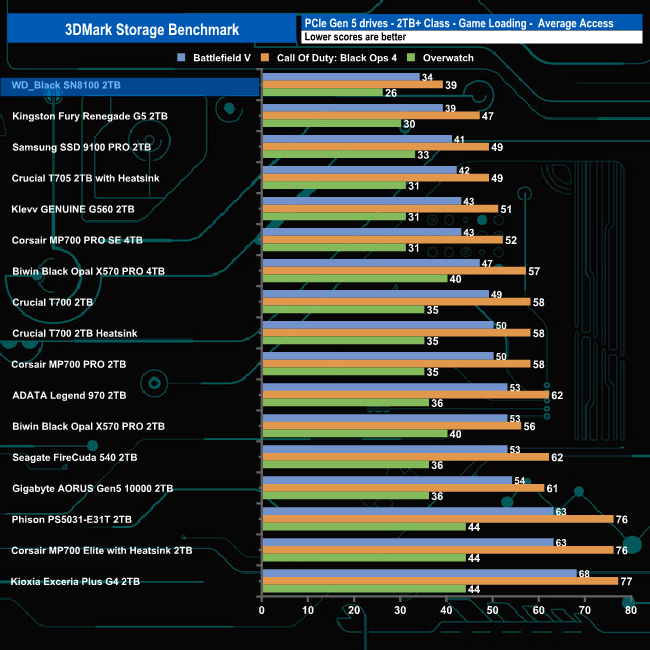
In 3DMark’s Storage Test, the WD_Black SN8100 had an average game loading bandwidth figure for the three games of 1,535.86MB/s, the fastest we've seen to date in this part of the test with an average access time figure of 33µs (0.033m/s), also the fastest figure we've seen to date for the game loading test traces.
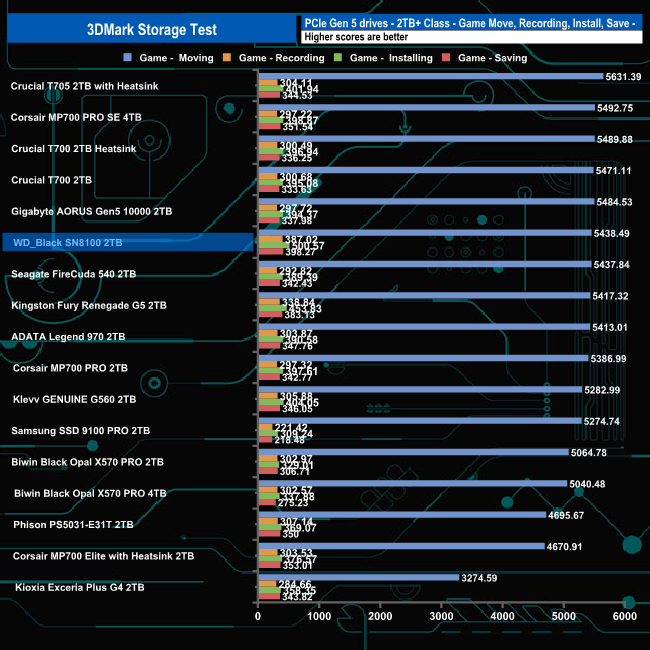
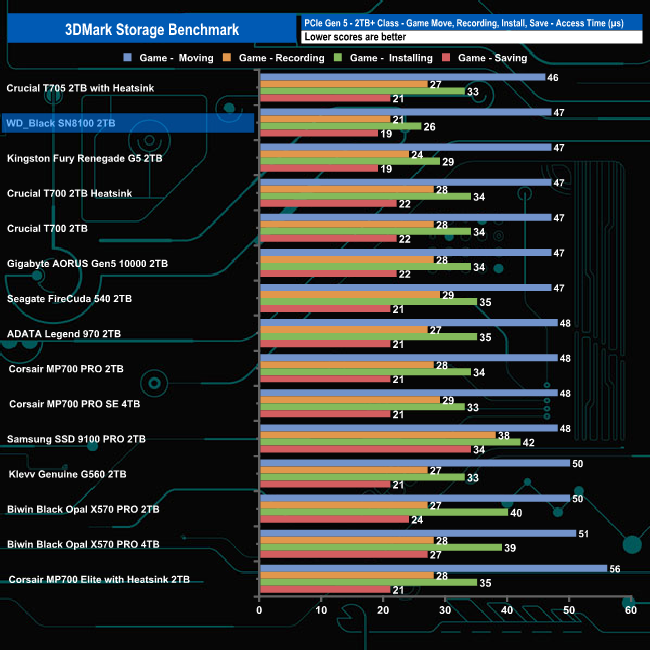
In the game, moving, recording, installing and saving test traces, the drive averaged 1,681.03MB/s (which puts the drive into sixth place) with an average access time of 28µs (0.028m/s) for the four tests.
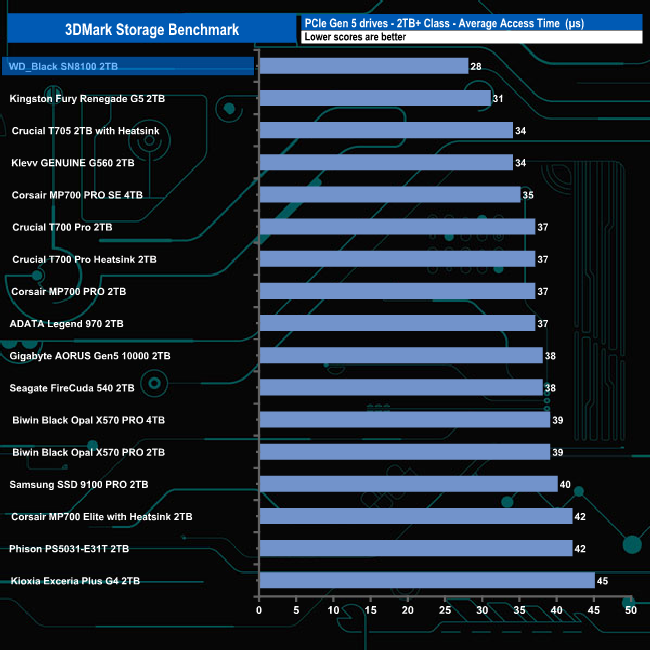
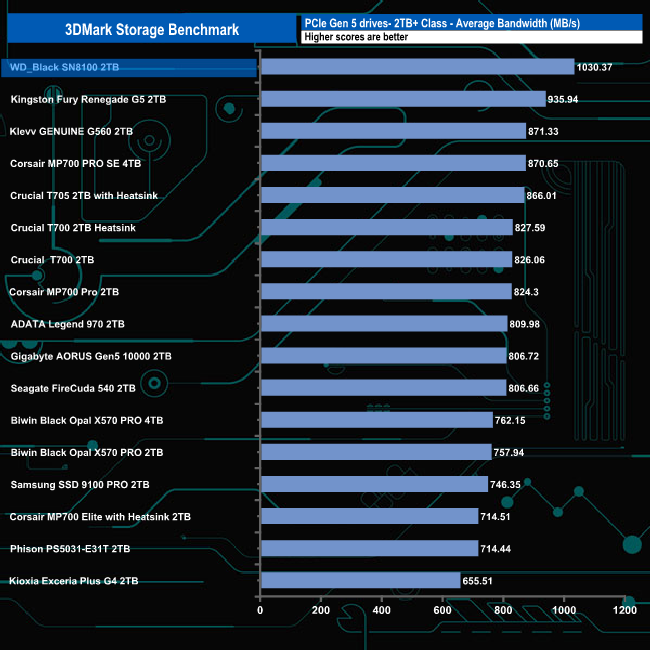
The overall average bandwidth figure for the 2TB WD_Black SN8100 for the complete benchmark run was 1,030MB/s (28µs total average access time), a result which sees the drive topping the table by 94.43MB/s from the Kingston Fury Renegade G5.
The Final Fantasy XIV Endwalker Official Benchmark uses actual maps and playable characters to assign a score to your PC and rate its performance, including scene loading times.
The benchmark gives an overall load time as well as loading times by scene.
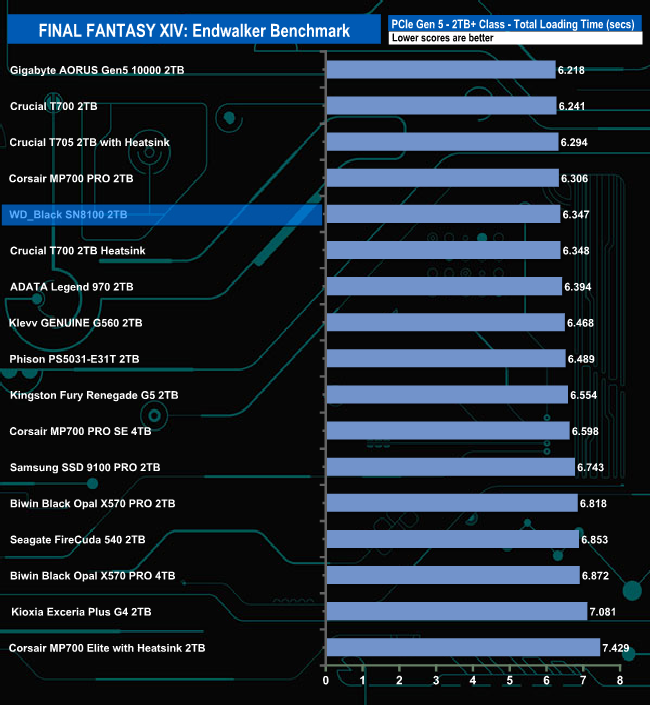
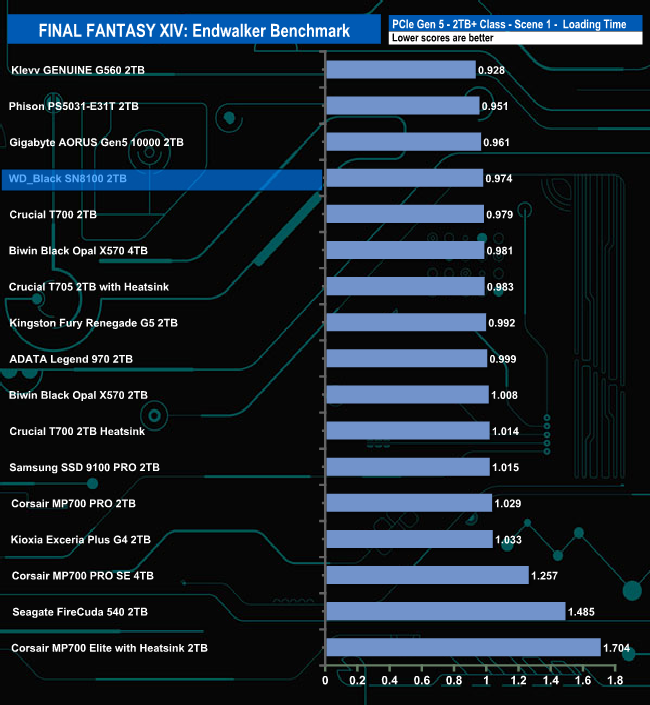
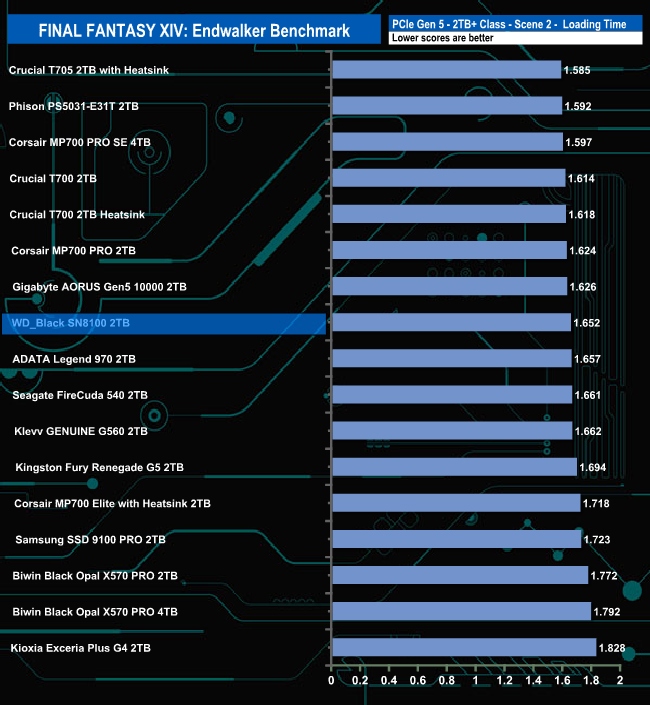
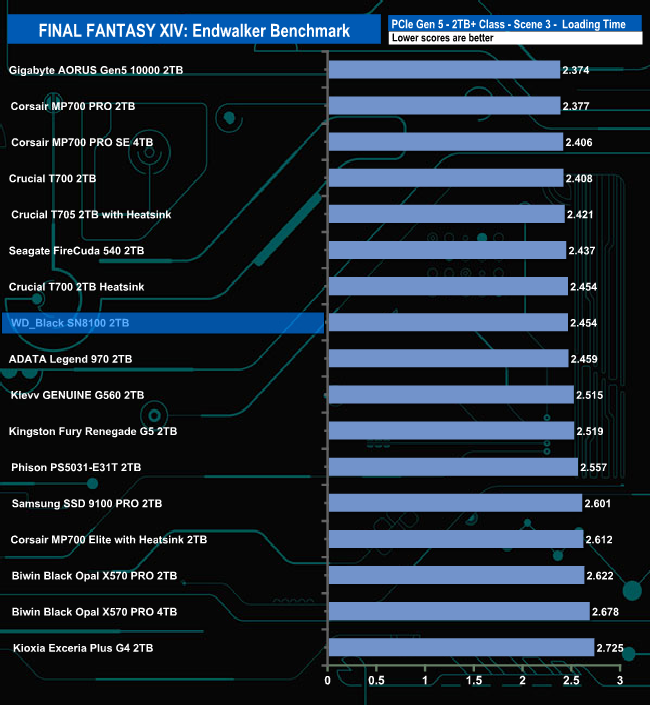
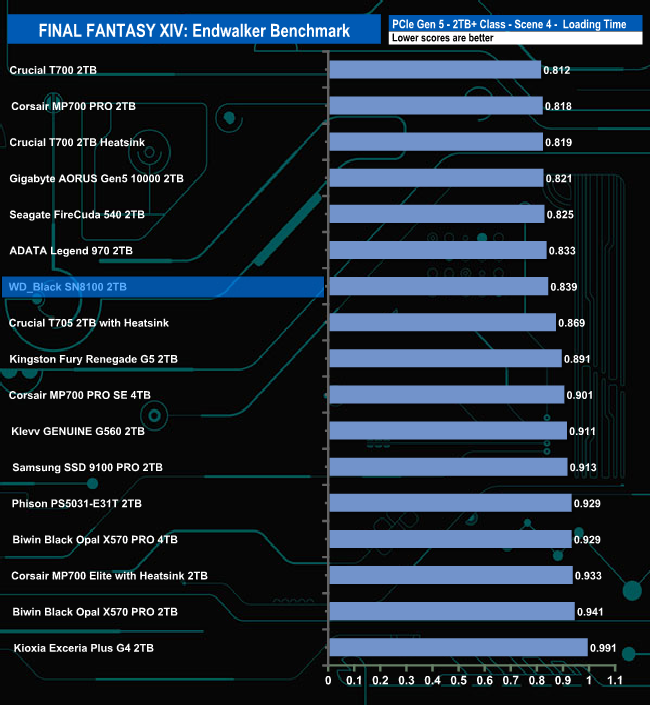
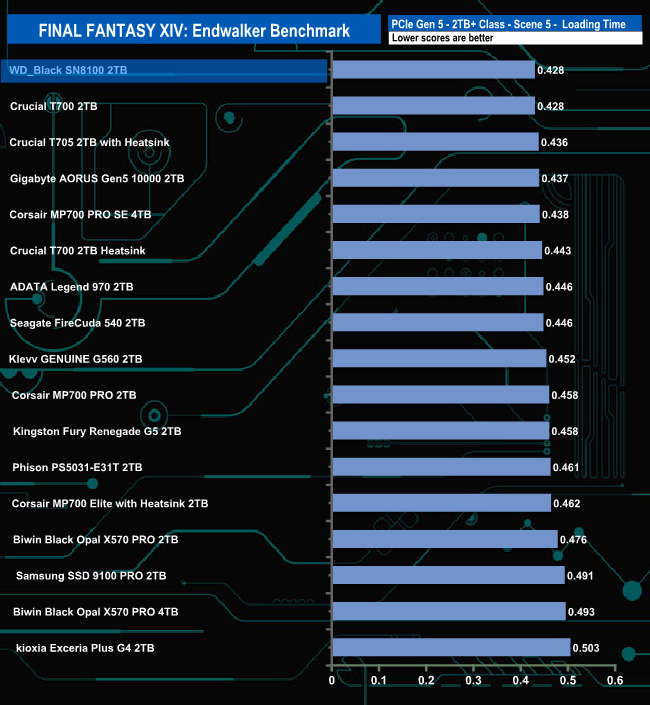
The drive handles the Final Fantasy XIV Endwalker Official Benchmark pretty well, ending up in fifth place. The drive tops the Scene 5 load test table.
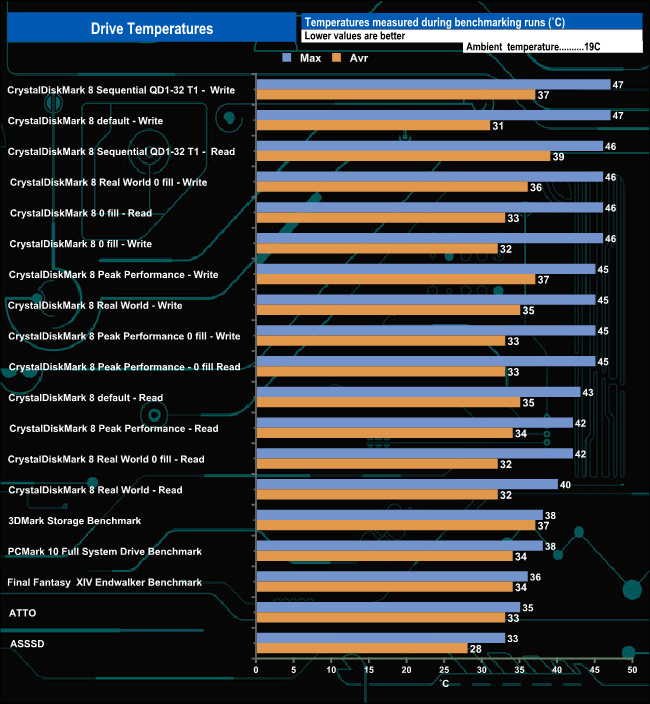
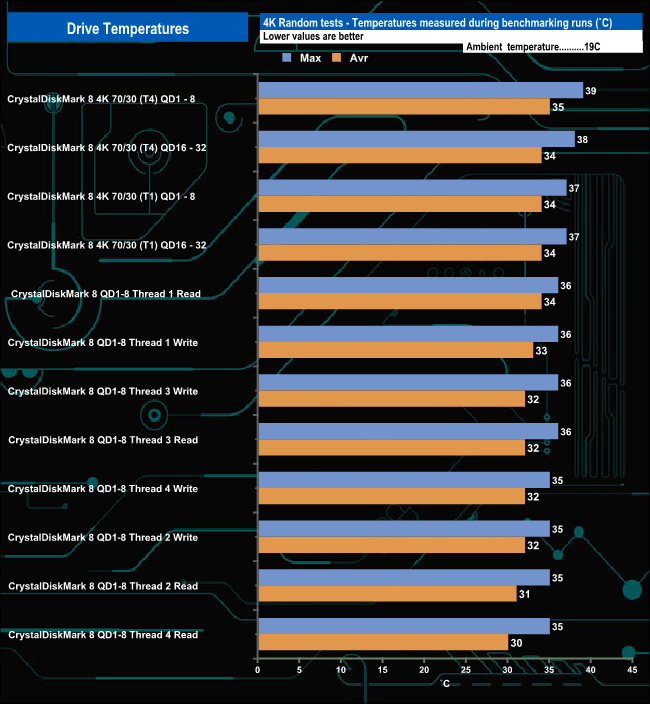
We took note of the drive’s temperature during some of our benchmarking runs. We took note of the drive’s temperature during some of our benchmarking runs. As with the last couple of Gen 5 drives we've looked at, the WD_Black SN8100 we were sent for review doesn't have a dedicated heatsink, although a version with a heatsink is available. We tested the drive sitting under the chunky heatsink of the Gigabyte AORUS X670E Xtreme motherboard, which our test rig uses.
The drive only uses 7W of power when actively writing and 6.5W for reads, and thanks to the controller's 6nm process, it certainly didn't get that hot when being pushed by our benchmarks. The hottest it got was 47° C during a run of CrystalDiskMark 8 Sequential Write QD1-32 T1 test and the default Write test. For the bulk of our testing, the drive averaged 42° C, with the 4K focused tests averaging 36° C, both of these averages a long way from the 85° C maximum operating temperature of the drive.
To test the real-life performance of a drive, we use a mix of folder/file types, and by using the FastCopy utility (which gives a time as well as MB/s result), we record the performance of the drive reading from & writing to a 2TB Kingston KC3000.
Transfer Details
Data file – 100GB.
File folder – 50GB – 28,523 files.
Movie demos 8K – 21GB – (11 demos).
Raw Movie Clips 4K – 16GB – (9 MP4V files).
Movie folder – 12GB – 15 files – (8 @ .MKV, 4 @ .MOV, 3 @ MP4).
Photo Folder – 10GB – 304 files – (171 @ .RAW, 105 @ JPG, 21 @ .CR2, 5 @ .DNG).
Audio Folder – 10GB – 1,483 files – (1479 @ MP3, 4 @ .FLAC files).
Single large image – 5GB – 1.5bn pixel photo.
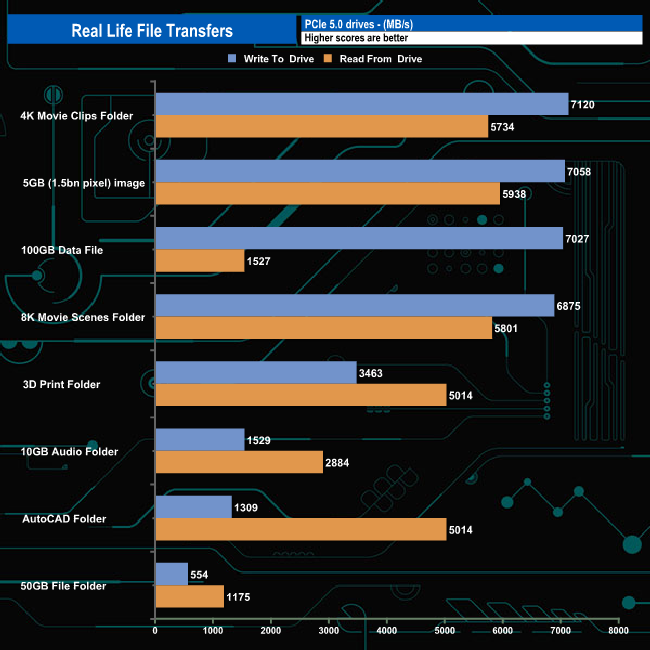
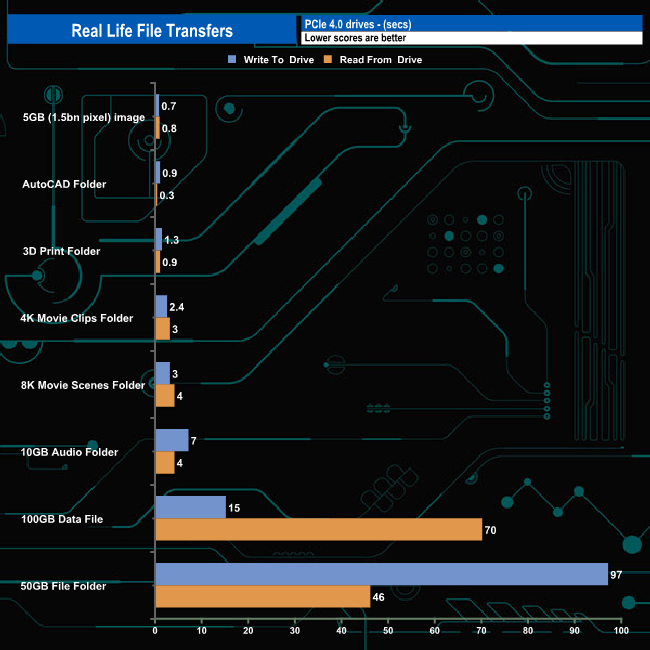
The 2TB WD_Black SN8100 averaged 4,386MB when writing the 8 transfer tests, with the fastest being the 7,120MB/s for the 4K movie folder, with the slowest being the 50GB File Folder transfer at 554MB/s (97 sec).
Reading back the data, the average was 3,984MB/s, with the 5GB image transfer the fastest at 5,938MB/s and again, the slowest was the 50GB File Folder at 1,175MB/s.
Another of the big guns to finally release a PCIe 5.0 SSD is Sandisk, whose WD_Black SN8100 drive is the company's latest flagship drive. Designed for workstations, high-end desktops and notebooks, the drive has official sequential read/write figures of up to 14,900MB/s and 14,000MB/s, respectively.
The new drive lineup consists of three capacities at launch: 1TB, 2TB and 4TB, with an 8TB model expected later in 2025. The WD_Black SN8100 is also available in two versions, plain or with a heatsink.
The WD_Black SN8100 uses a SiliconMotion SM2508 eight-channel controller, but with Sandisk firmly in control of the controller's feature set and firmware, it is unlike any other SM2508 currently available. For the SN8100, it has been combined with BiCS8 218-layer TLC 3D, with, in the case of the 2TB drive, a 2GB DRAM cache IC.
All three launch drives have the same up to 14,900MB/s Sequential read rating, with the 4TB and 2TB drives rated as up to 14,000MB/s for Sequential writes. The 1TB drive makes do with an up to 11,000MB/s rating. When it comes to 4K random performance, all three drives have the same 4K random write rating of up to 2,400,000 IOPS, and while the 2TB and 4TB have the same up to 2,300,000 IOPS speed rating for random reads, while the 1TB drive is rated as up to 1,600,000 IOPS.
When tested with the ATTO benchmark, the drive came up short of the official sequential maximums with test results of 13,940MB/s for reads and 13,150MB/s for writes but even so they are the fastest figures (joint fastest read performance with the 2TB Biwin Black Opal X570) we've seen to date for a Gen 5 consumer drive using this benchmark.
Switching over to the CrystalDiskMark 8 default benchmark, we could confirm the official maximum figures with test results of 14,937MB/s for reads and 14,103MB/s for writes. Again, the read result is the fastest we've seen to date, with the write figure being the second fastest, behind Kingston's Fury Renegade G5.
When it came to 4K random performance, we couldn't get anywhere close to the official figures of 2.3M IOPS (reads) and 2.4M IOPS (writes) using our 4-threaded testing. The best we saw from testing was 593,319 IOPS (QD32) for reads and 545,055 IOPS (QD16) for writes. The best performance figures we saw from the drive came from using the default Peak Performance profile in CrystalDiskMark 8 with reads at 2,227,994 IOPS (the first drive we've tested to crack the 2M IOPS mark in this test) and writes at 1,537,681 IOPS.
There were, however, some odd inconsistencies in the random performance when we were testing the drive. In our four-threaded random read test, the drive is the fastest we've seen at QD1, but at QD2 the performance fell off a cliff as the drive ended up as the slowest drive by quite a considerable margin. But at QD4, the drive was back to being the fastest we've seen. The same thing happened in the QD1-QD8 test. Instead of the usual smooth performance curve from QD1 to 8, there was a levelling off of performance at QD2, accompanied by a large spike in the latency results, but from QD4 onwards, the drive accelerated away as normal.
The official power consumption figures for the 2TB WD_Black SN8100 are 7W for active writes and 6.5W for active reads, thanks to its 6nm process controller. We tested the plain drive (though a heatsink-equipped version is also available) sitting under the heatsink of the Gigabyte AORUS X670E Xtreme motherboard we used for testing. The hottest the drive got was when running the CrystalDiskMark 8 default Write and Sequential Write QD1-32 T1 tests at 47° C, which is a good way off the official 85° C maximum operating temperature of the drive.
We found the 2TB WD_Black SN8100 (without heatsink) on Sandisk's site for £226.99 (inc VAT) HERE.
Pros
- Overall performance.
- Thermal design.
- Endurance.
- 5-year warranty.
Cons
- Tested 4K performance couldn’t match the official maximum figures.
KitGuru says: As we said for the first Gen 5 drives from Samsung and Kingston, it's been a long wait to see a Gen 5 drive carrying WD branding, but safe to say it's been worth it. The WD_Black SN8100 is a very fast SSD which, thanks to the choice of controller it uses, doesn't get stupidly hot while producing table-topping performance.