KitGuru KitGuru.net – Tech News | Hardware News | Hardware Reviews | IOS | Mobile | Gaming | Graphics Cards


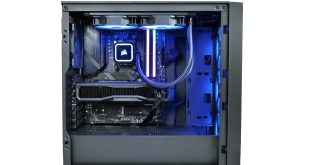
Today we are back with another prebuilt review, this time around we're checking out Cyberpower's Ultra R77 Pro. Packing in AMD's Ryzen 7 7800X3D processor, Radeon RX 7900 GRE graphics, plus 32GB DDR5 memory and a 2TB NVMe SSD, this system lands in upper-midrange territory. Priced at just below £1900 here in the UK, what sort of value is on offer? We take a close look at this system to find out.

Specification:
- Case: Corsair 3000D RGB Airflow Gaming Case – Black (features 3x ARGB 120mm fans)
- CPU (Processor): AMD Ryzen 7 7800X3D – 8-Core 4.20GHz, 5.00GHz Turbo – 96MB L3 Cache Processor w/ Radeon Graphics
- Graphics Card (GPU): AMD Radeon™ RX 7900 GRE – 16GB GDDR6 – HDMI, DP – RDNA™ 3 Architecture, Infinity Cache™ (Single Card)
- CPU Cooling: Corsair iCUE H100x RGB ELITE 240mm Liquid CPU Cooler, Ultimate OC Compatible
- Motherboard: MSI MAG B650 TOMAHAWK WIFI: ATX w/ Wi-Fi 6E, USB 3.2, 3x M.2
- Memory (RAM): 32GB (2x16GB) DDR5/6000MHz Corsair Vengeance RGB Memory
- PSU (Power Supply): MSI MAG A850GL PCIE5 850W 80+ Gold ATX 3.0 Fully Modular Gaming Power Supply
- NVME Drive: 2TB Kingston Fury Renegade M.2 PCIe 4.0 NVMe SSD – 7300MB/s Read & 7000MB/s Write (Single Drive)
- Wired Networking: ONBOARD 10/100/1000 GIGABIT LAN PORT — As standard on all PCs
- Sound Cards: HIGH DEFINITION ON-BOARD AUDIO
- Operating System: Windows 11 Home – with FREE trial of Microsoft 365 and 1 month Xbox Game Pass (64-bit Edition) (No Recovery Media)
- Warranty Service: DESKTOP GOLD WARRANTY: 5 Years' Labour, 2 Years' Parts, 2 Years' Collect and Return plus Life-Time Technical Support
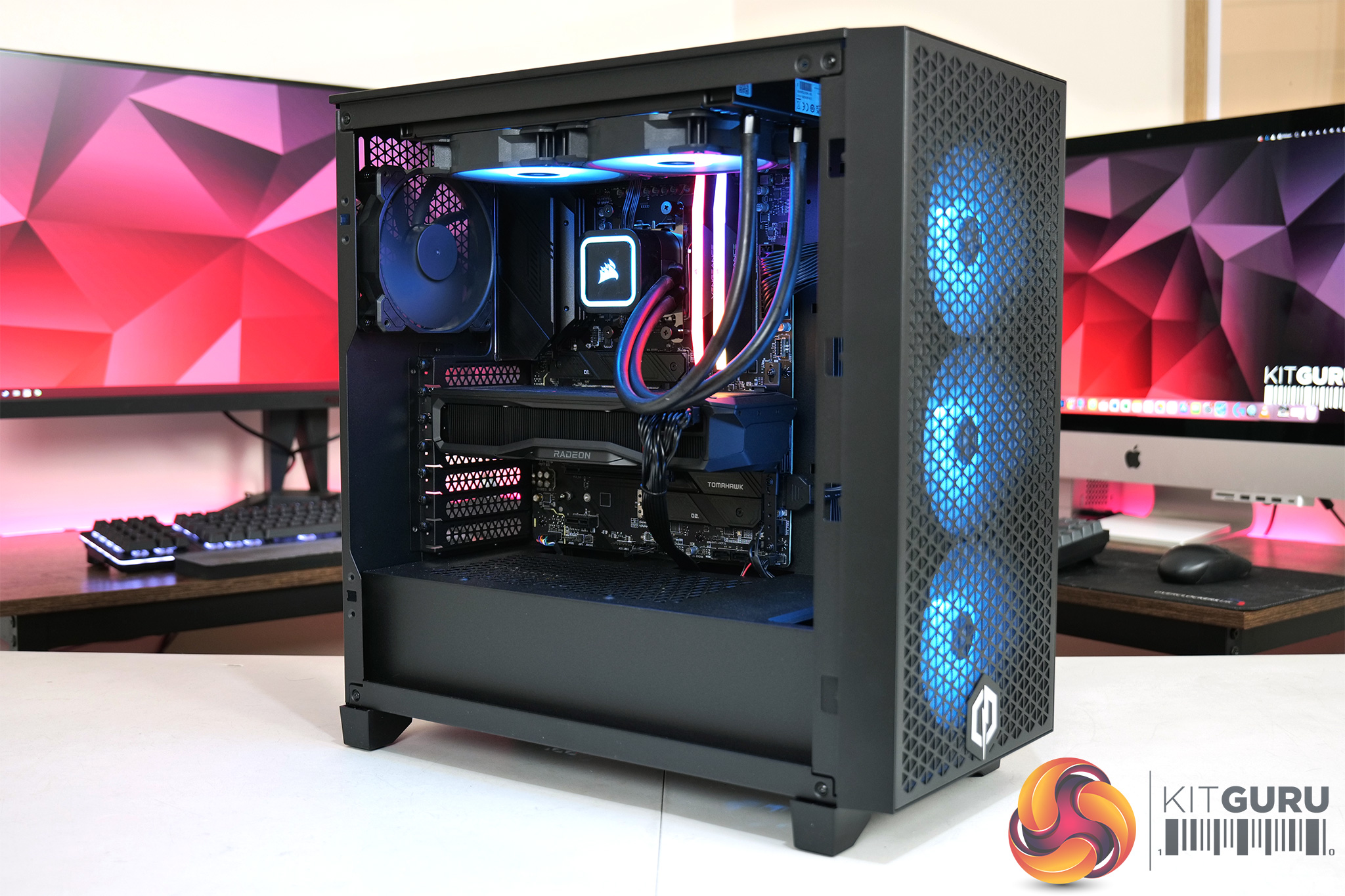
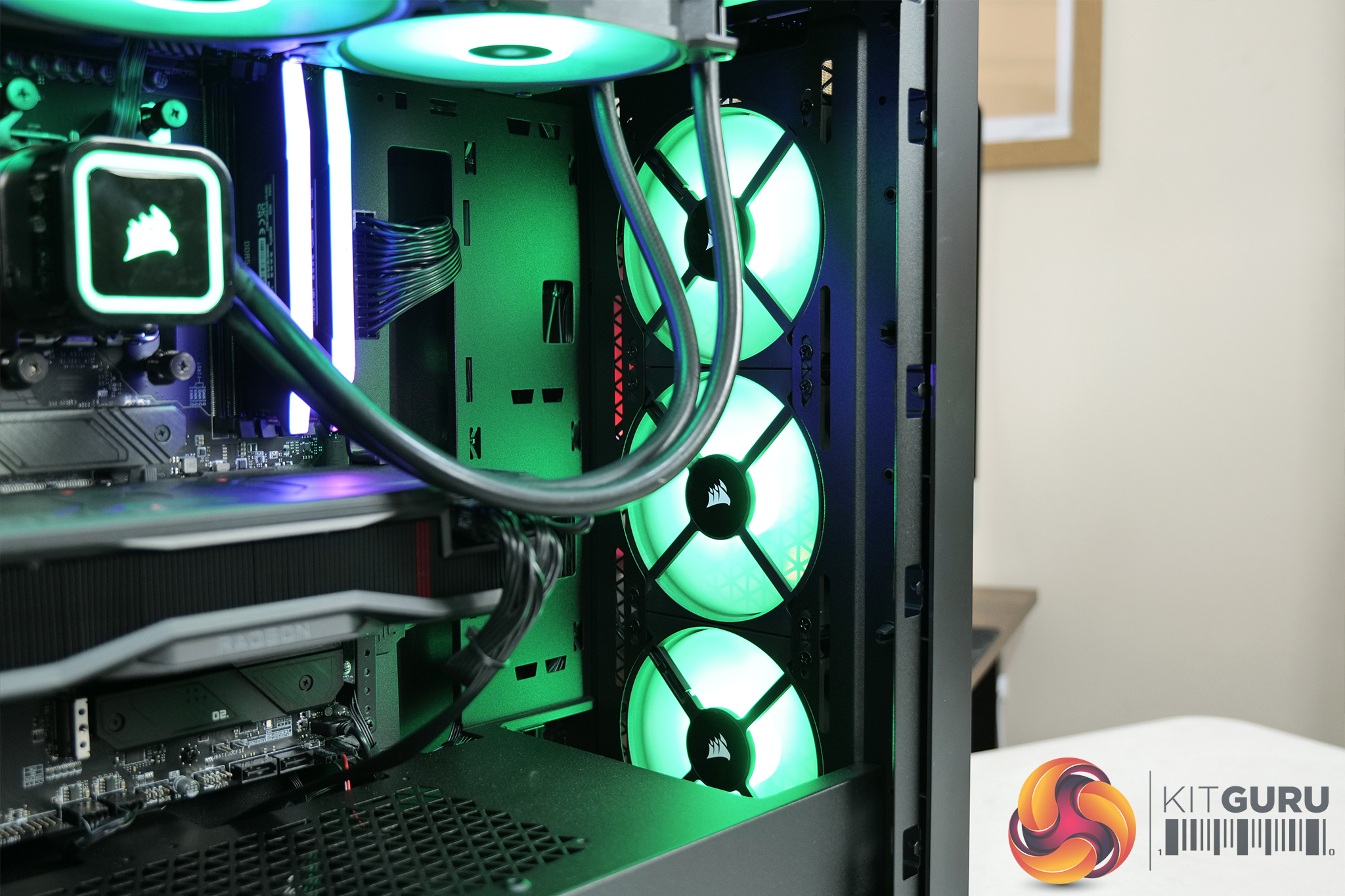
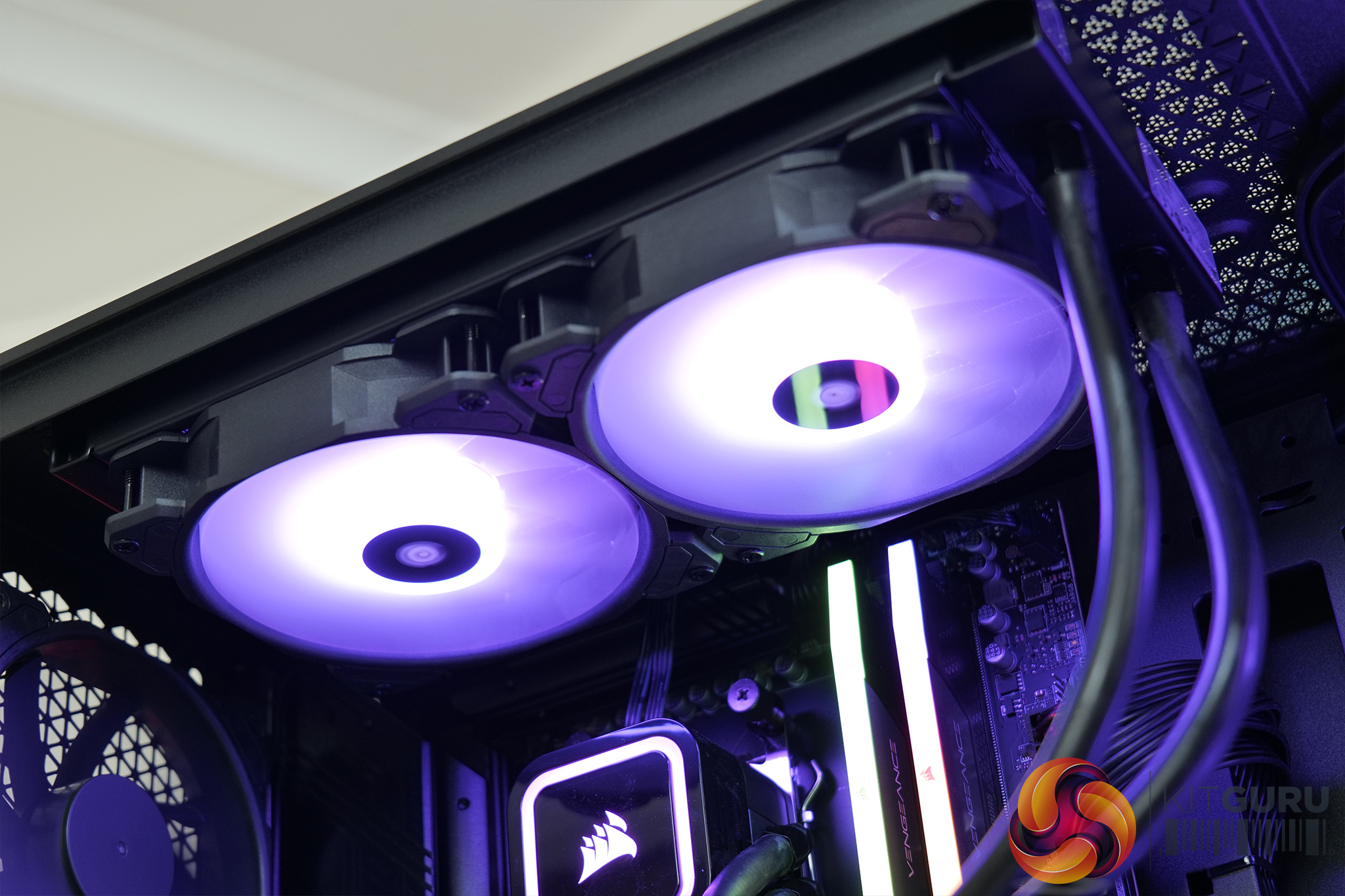
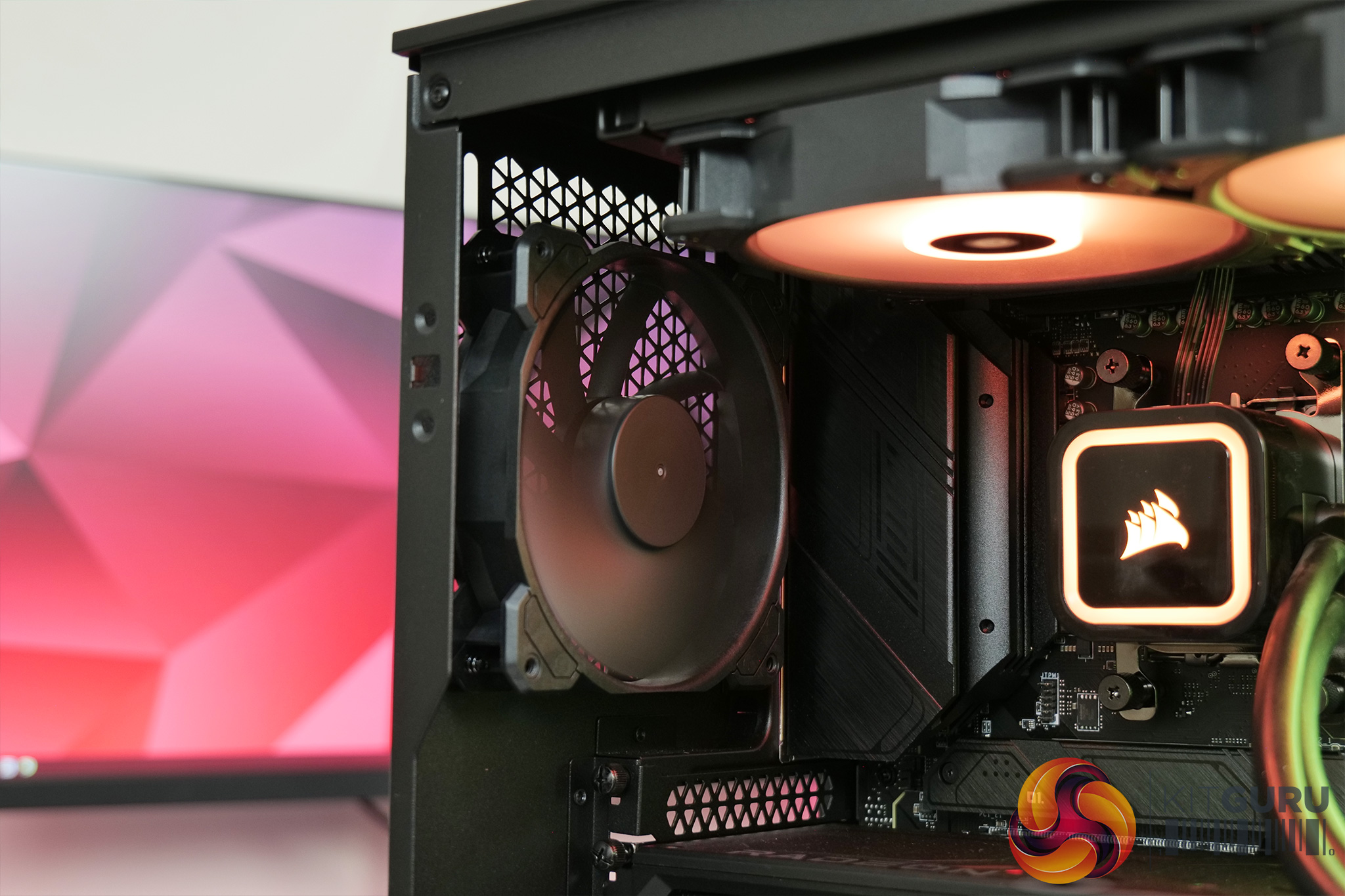
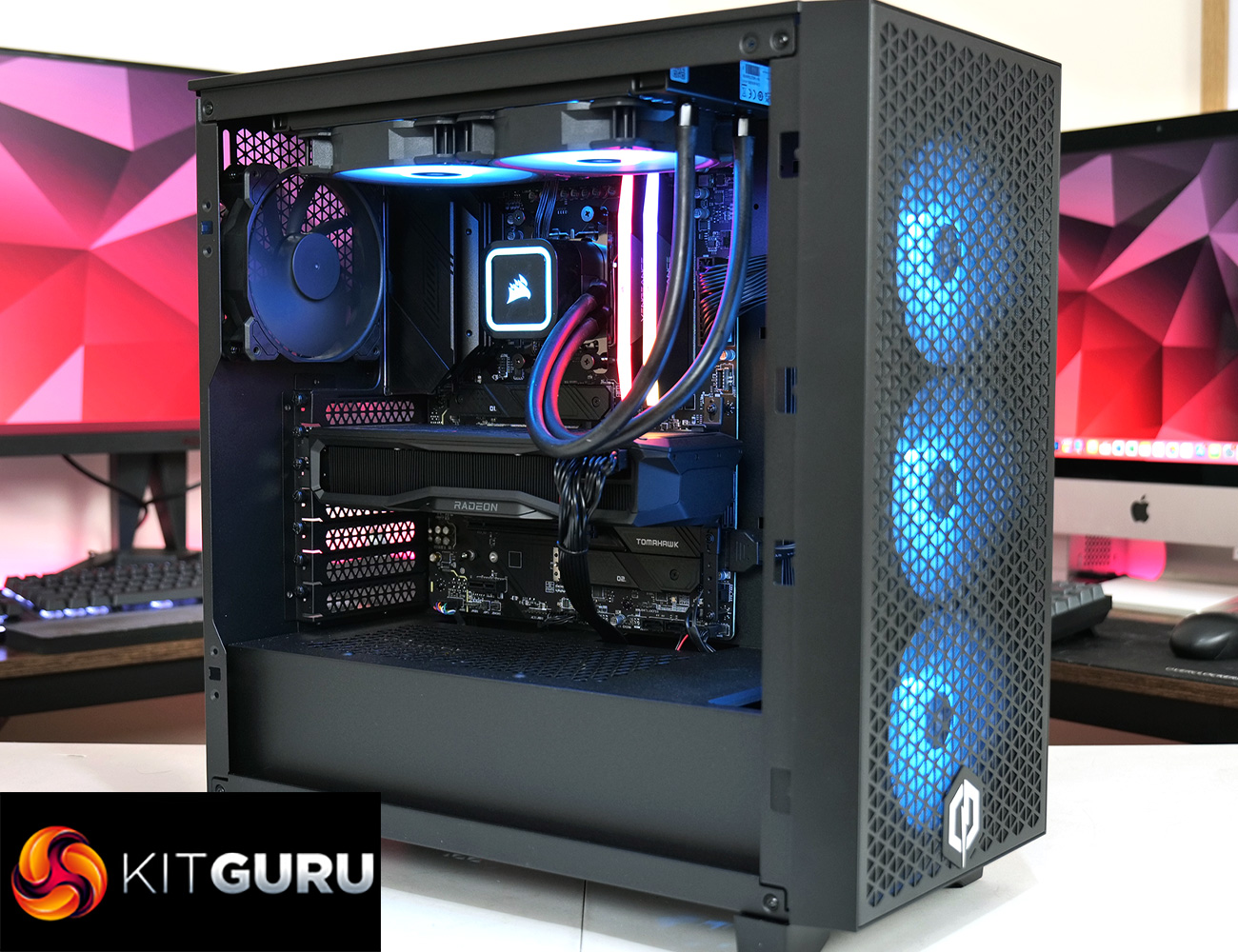
Taking a closer look at the system, we start with the chassis, where Cyberpower has opted for the Corsair 3000D RGB Airflow. We've not reviewed this model but it is popular with system integrators, offering a compact mid-tower design. It's not a particularly feature-rich case but you get a mesh front panel, tempered glass side panel as well as three pre-installed 120mm RGB fans acting as intakes at the front. Cyberpower has added a plain black 120mm to the rear of the case, acting as an exhaust, while the two fans on the radiator are also exhausting out of the roof.
For the CPU itself, here we have the AMD Ryzen 7 7800X3D, which Leo reviewed earlier in the year. This is a fantastic all-round CPU, offering 8-core and 16-threads of Zen4 goodness, but crucially with that added 3D V-Cache which really shines when gaming, making this the fastest gaming CPU on the market right now. It's also relatively low-power, with a 120W TDP, and in the Ultra R77 Pro it is cooled by Corsair's H100x RGB Elite, a 240mm AIO with two 120mm RGB fans.
Cyberpower has paired that CPU with 32GB of Corsair Vengeance RGB memory, running at 6000 MT/s. Timings aren't the tightest, with a CL36 latency, and at the time of writing a CL30 kit only costs about £30 more than the CL36 kit, so that would have been a smart upgrade in my opinion. That said, we'd still expect the CL36 kit to perform fine and we can't argue with the capacity either.
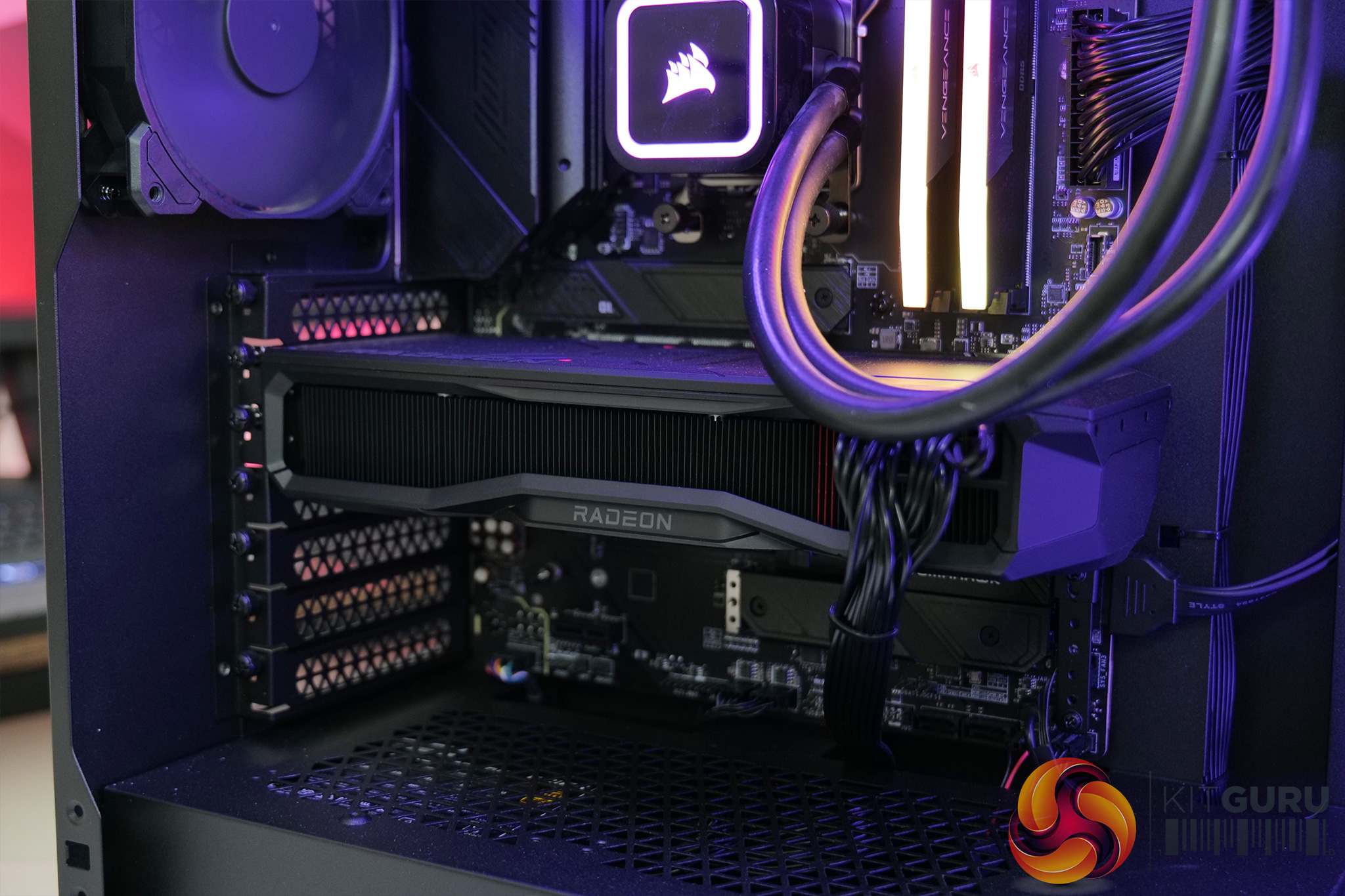
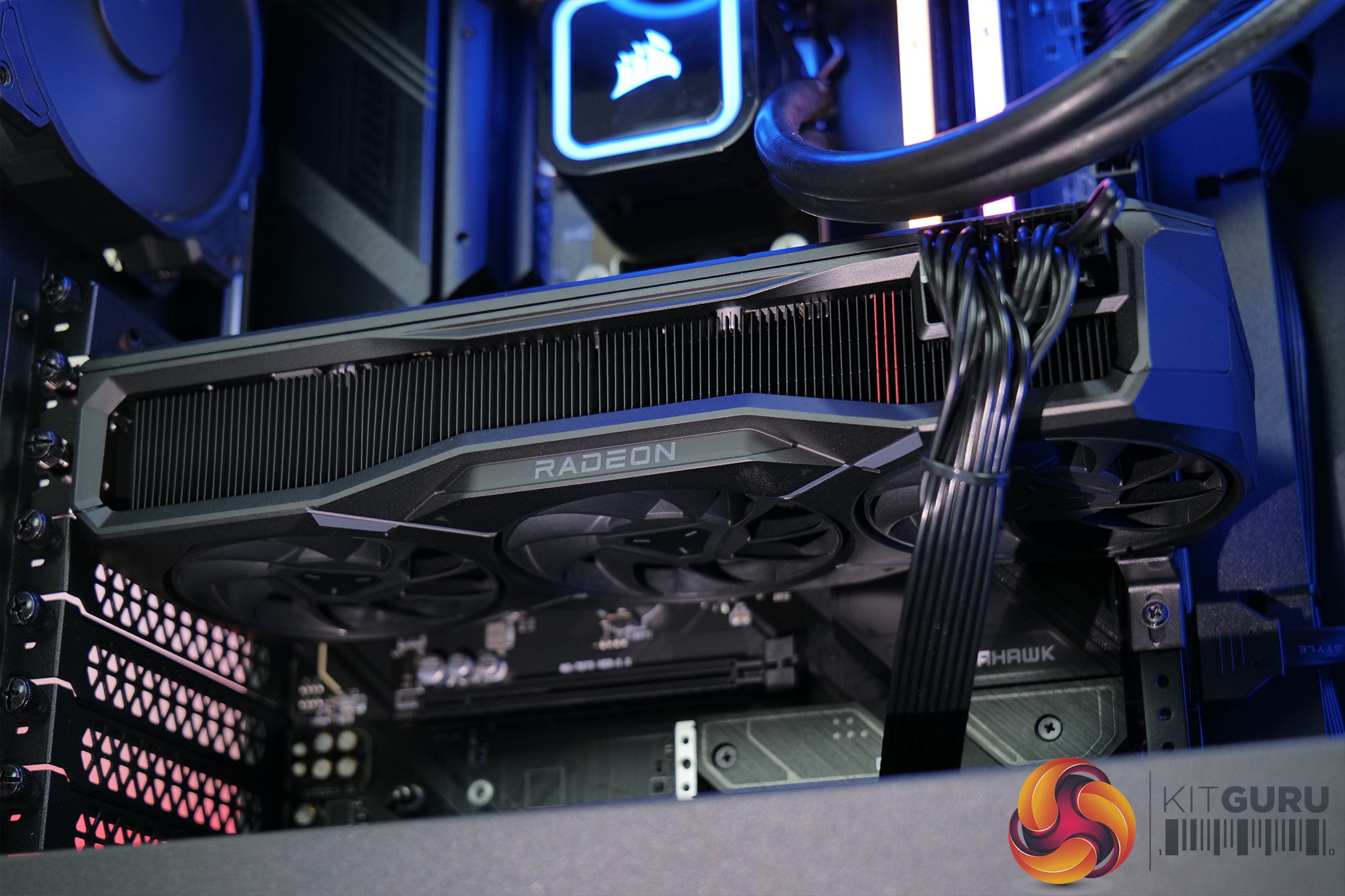
As for the graphics horsepower, this is provided by AMD's RX 7900 GRE, a GPU we've not seen before. It was initially launched to just system integrators, but has just started to appear on the DIY market. It's essentially a RX 7900 XT but with 80 Compute Units, and only four active Memory Cache Dies, giving it 16GB VRAM and 64MB of Infinity Cache. In theory that means it should slot between the 7900 XT and the 7800 XT but we've got plenty of game benchmarks later in the review.
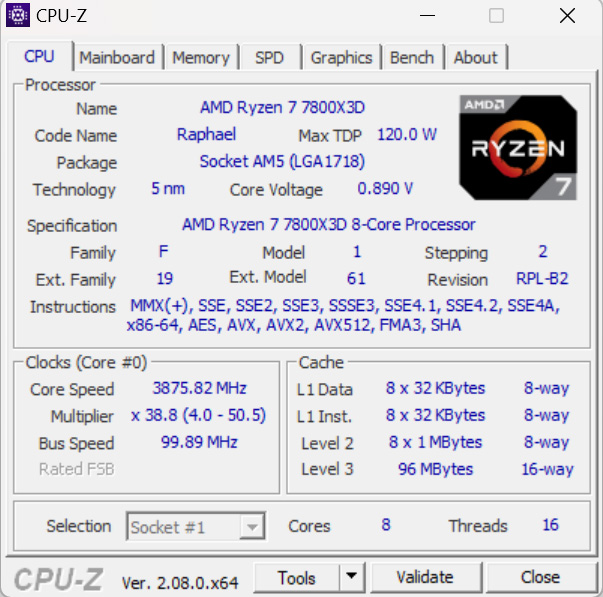
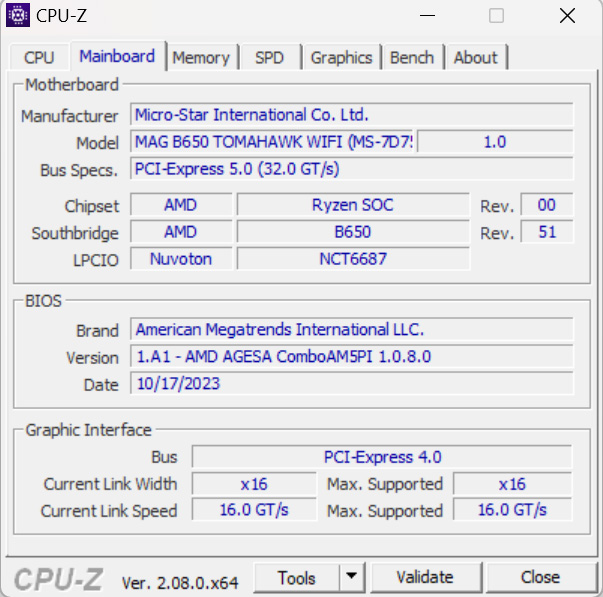
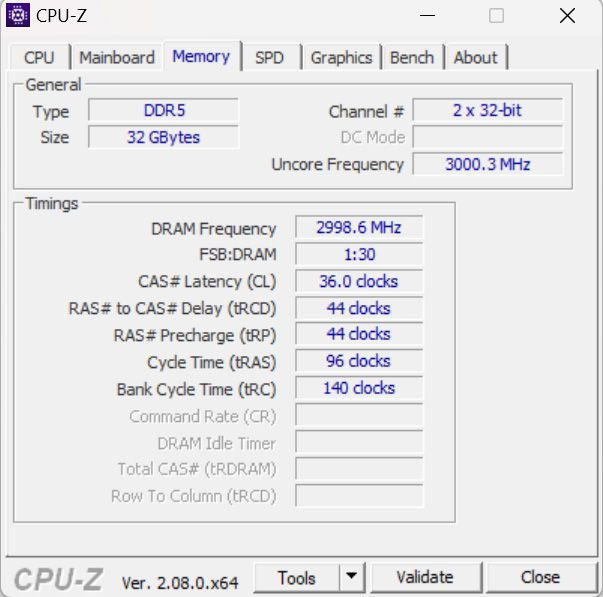
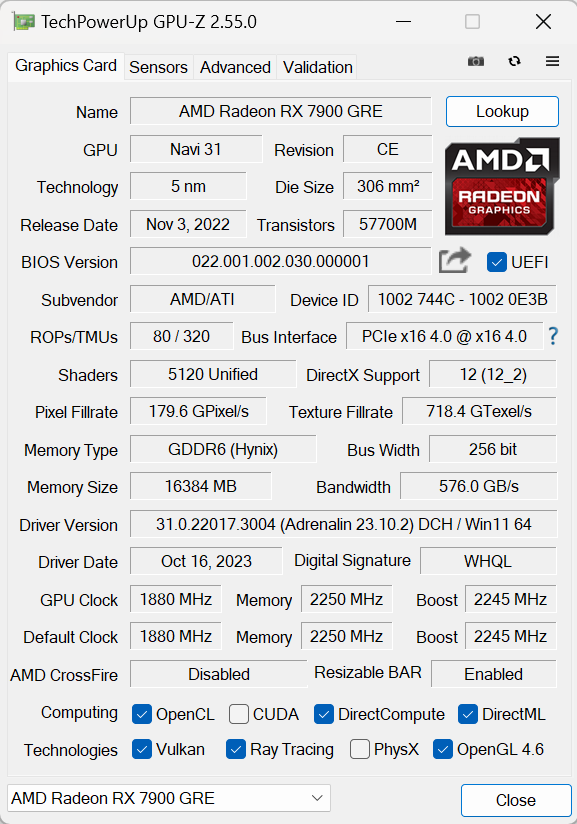
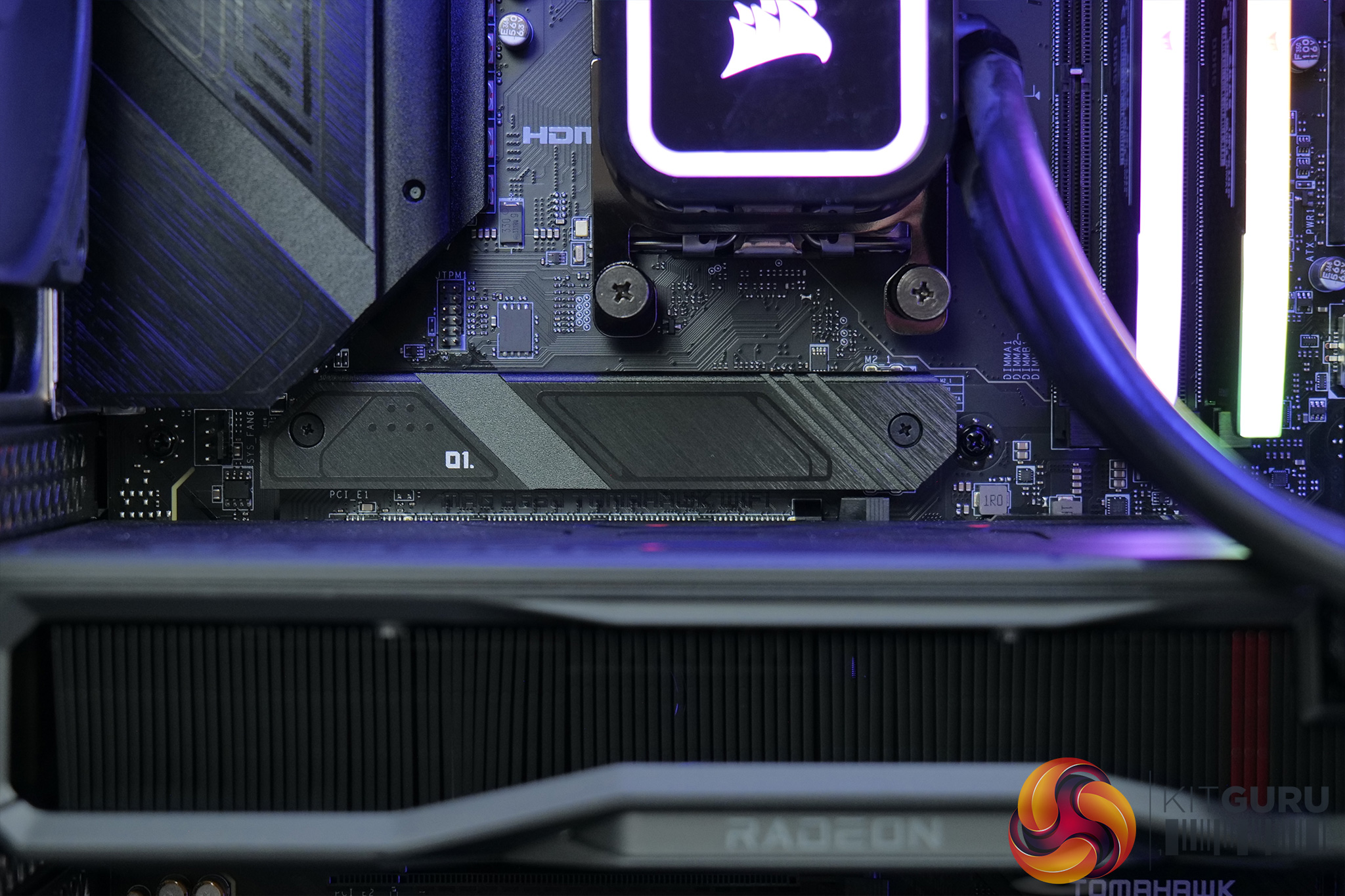
All of that hardware is plugged into the MSI MAGH B650 Tomahawk WiFi motherboard. We've not reviewed this one but I can't have any complaints about it from my experience, it looks solid and offered no issues during my testing. One thing worth noting is that this board doesn't support PCIe 5.0, either for M.2 drives or full-size PCIe slots, which isn't the end of the world but is unusual for a B650 motherboard, especially at this price. I also took a quick look into the BIOS as well where Cyberpower left most things on auto, but XMP and ReBar have been enabled. It's also good to see the system shipped to me with the absolute latest BIOS version installed, so fair play to Cyberpower for keeping on top of that area.
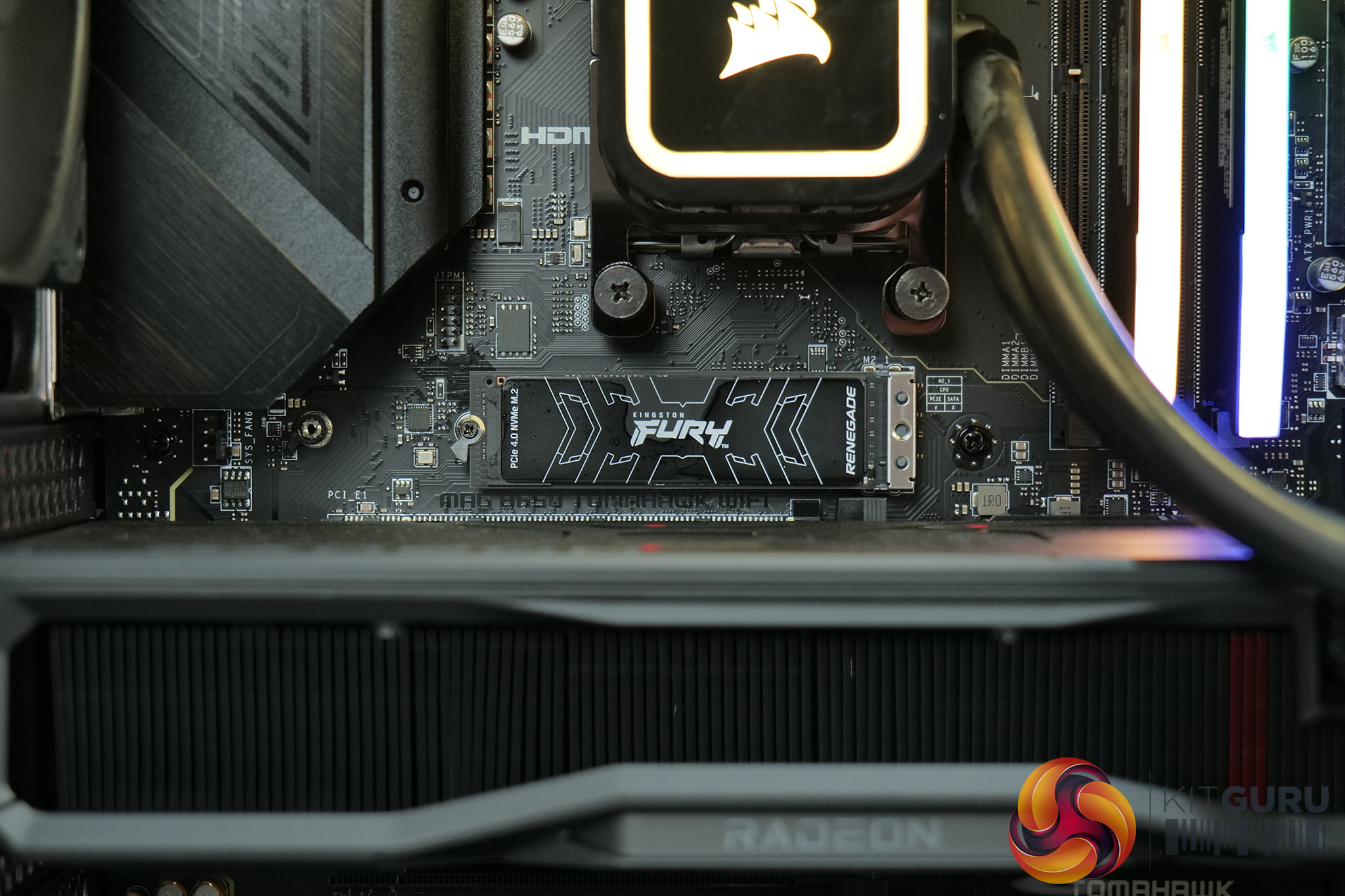
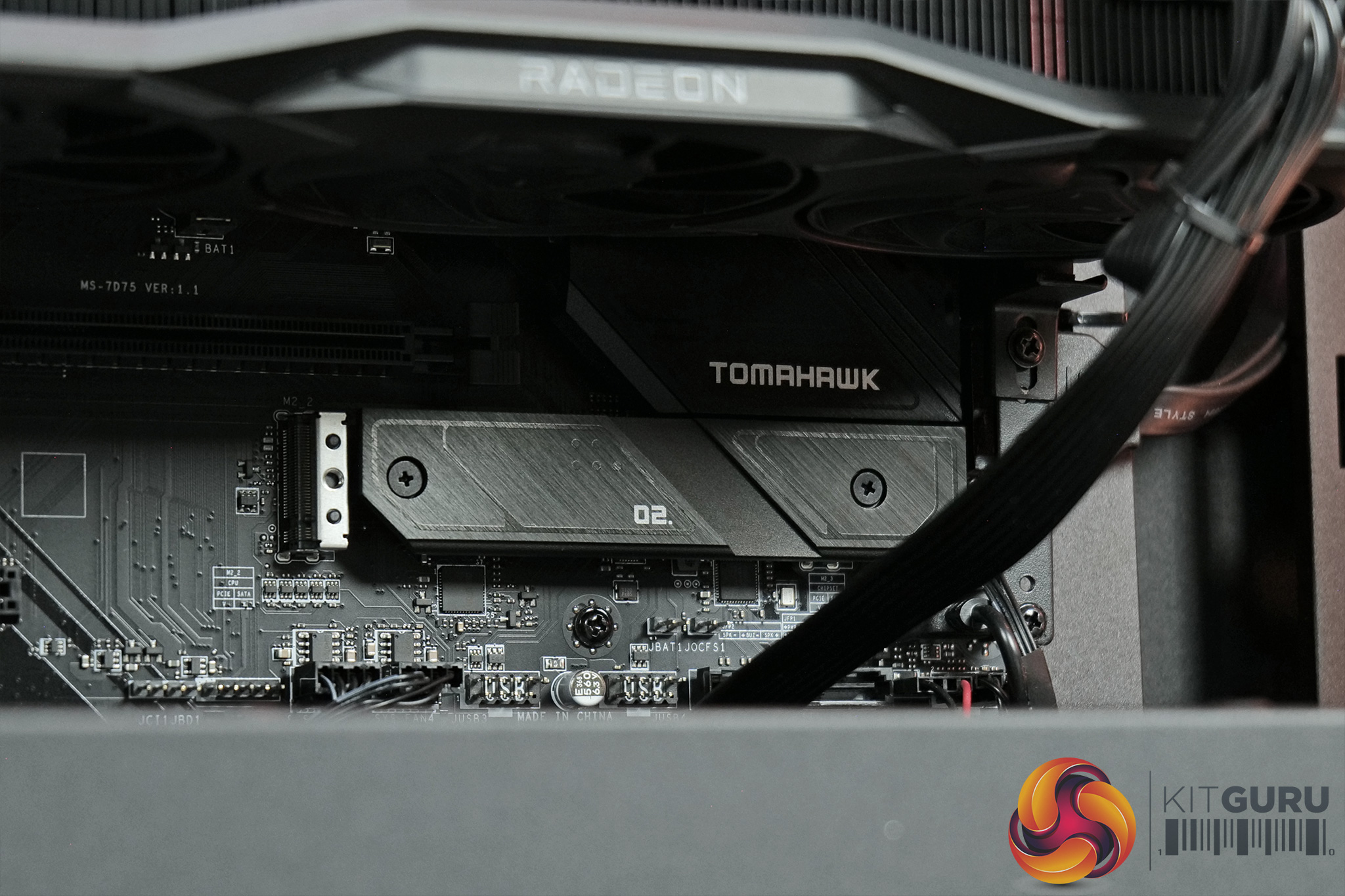
In terms of storage, Cyberpower has fitted a single M.2 drive in the primary slot just above the graphics card, underneath the integrated heatsink. The drive in question is a 2TB Kingston Fury Renegade which we reviewed earlier this year. It's a solid drive, and while it's Gen4 not Gen5, it's still going to be more than good enough for gaming. If you want to add more storage down the line, there is another Gen4 M.2 slot accessible below the graphics card which has its own heatsink too.
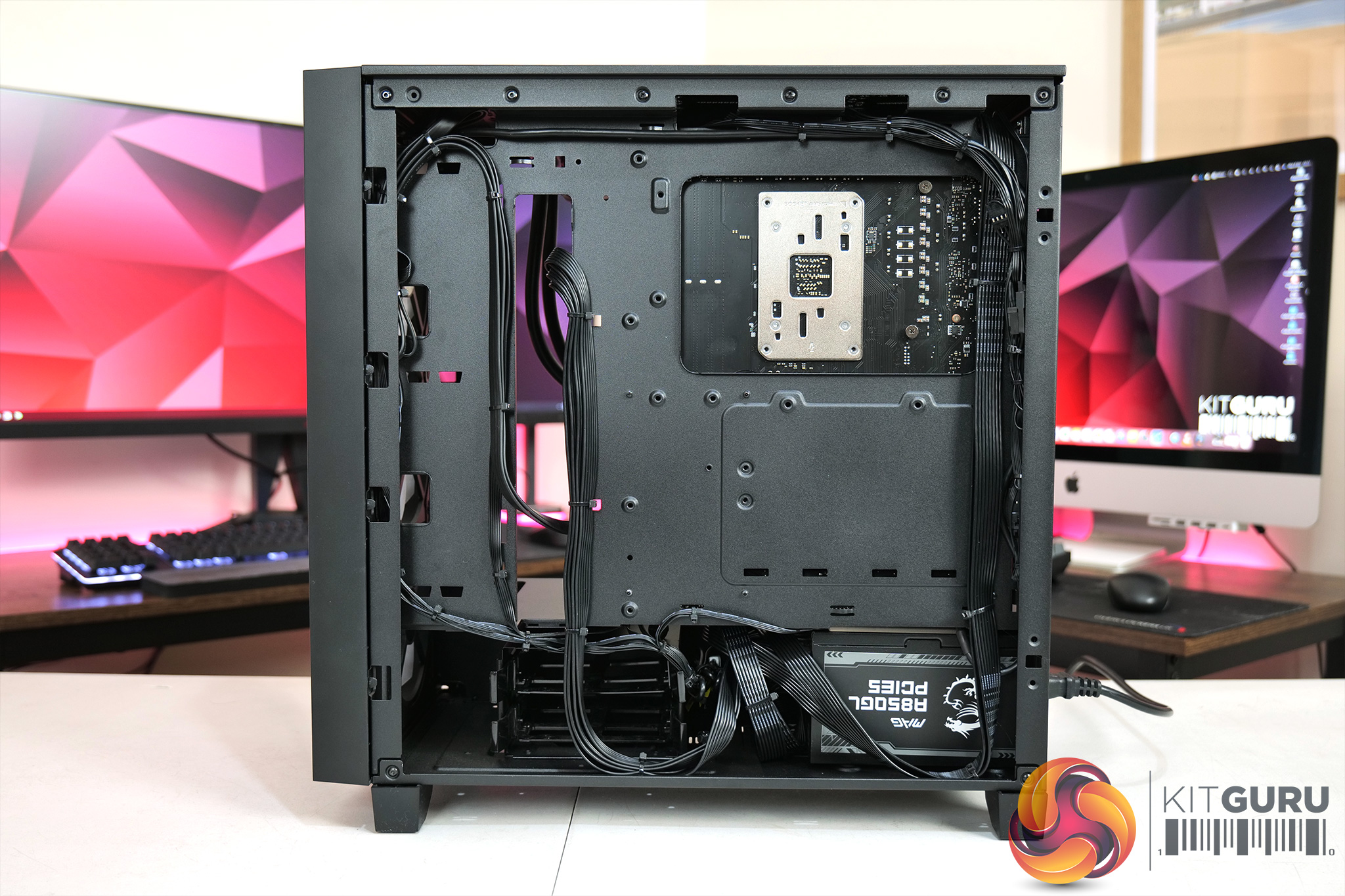
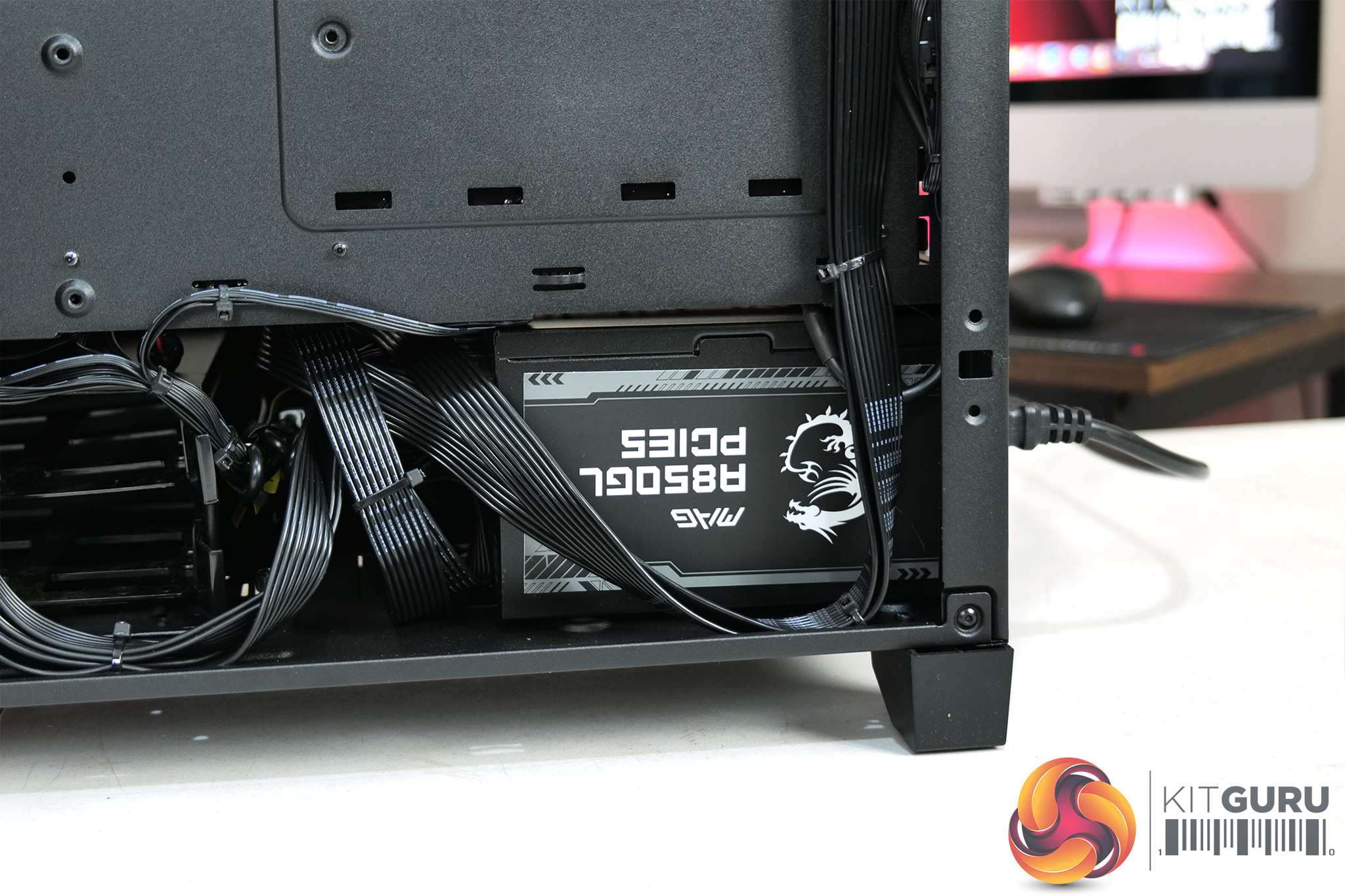
Switching to the back of the case, we can get a look at the power supply, MSI's MAG A850GL PCIe 5.0. We've not reviewed this one, on paper it looks fine offering 850W capacity and 80 Plus Gold certification. The ‘PCIe 5.0' part of the name just means it does support a 12VHPWR connector, which we don't need for the 7900 GRE, but the cable still comes included if you upgraded the GPU down the line.
It's hard to fault Cyberpower's cable management, too. Everything has been tied down and routed incredibly neatly, I certainly couldn't do better than this in a million years. It's just good to see how much care Cyberpower has given it, rather than just shoving everything behind the motherboard tray.
The final thing to mention is the RGB situation. Despite the RGB fans, liquid cooler and memory all being from Corsair, the cooler and fans actually plug directly into the motherboard with standard 5V ARGB headers. This means you can't use iCUE to control all the lighting, as only the memory shows up. You can supposedly use MSI Mystic Light to control Corsair's RGB memory, and it did show up for me, but no matter what I did the memory lighting never actually synchronised with the fans or liquid cooler. I guess it's not the end of the world but I don't think it's too much to ask to have all the RGB gear able to be controlled by a single piece of software.
Software and Games
To test the Cyberpower Ultra R77 Pro, we used the following software/games:
- 3DMark Time Spy
- AIDA64 Engineer
- Cinebench R23
- CrystalDiskMark
- PCMark 10
- Cyberpunk 2077
- F1 23
- Forza Horizon 5
- God of War
- Hogwarts Legacy
- Marvel's Spider-Man: Remastered
- The Last of Us Part 1
- A Plague Tale: Requiem
- Ratchet and Clank: Rift Apart
- Starfield
We used the AMD Adrenalin 23.10.2 driver, which was the latest at the time of testing.
Comparison Systems
Not every system below is compared against the Ultra R77 Pro in every benchmark, but where applicable we have used the following systems as a point of reference:
- Case: CORSAIR 3000D AIRFLOW MID TOWER GAMING CASE
- Processor (CPU): AMD Ryzen 5 7500F Six Core CPU (3.7GHz-5.0GHz/38MB CACHE/AM5)
- Motherboard: ASUS® PRIME B650-PLUS (DDR5, USB 3.2, 6Gb/s) – ARGB Ready!
- Memory (RAM): 32GB Corsair VENGEANCE RGB DDR5 6000MHz (2 x 16GB)
- Graphics Card: 10GB AMD RADEON™ RX 6700 – HDMI, DP – DX® 12
- 1st M.2 SSD Drive: 1TB SOLIDIGM P41+ GEN 4 M.2 NVMe PCIe SSD (up to 4125MB/s R, 2950MB/s W)
- Power Supply: CORSAIR 750W RMe SERIES™ MODULAR 80 PLUS® GOLD
- Power Cable: 1 x 1.5 Metre UK Power Cable (Kettle Lead)
- Processor Cooling: PCS FrostFlow 100 V3 Series High Performance CPU Cooler
-
WIRELESS INTEL® WI-FI 6E AX210 2,400MBPS/5GHZ, 300MBPS/2.4GHZ PCI-E CARD + BT 5.0
- Windows 11 Home 64 Bit – inc. Single Licence [KK3-00027]
- PCS P209 ARGB MID TOWER CASE
- Intel® Core™ i5 Six Core Processor i5-12400F (2.5GHz)
- ASUS® PRIME B660-PLUS D4 (DDR4, USB 3.2, 6Gb/s)
- 16GB Corsair VENGEANCE DDR4 3200MHz (2 x 8GB)
- 8GB AMD RADEON™ RX 6600 – HDMI, DP – DX12
- 1TB PCS PCIe M.2 SSD (2200 MB/R, 1500 MB/W)
- CORSAIR 550W TXm SERIES™ SEMI-MODULAR 80 PLUS® GOLD
- PCS FrostFlow 100 RGB V3 Series High Performance CPU Cooler
- 1x 120mm Black Case Fan
- WIRELESS INTEL® Wi-Fi 6 AX200 2,400Mbps/5GHz, 300Mbps/2.4GHz PCI-E CARD + BT 5.0
- Windows 11 Home 64 Bit
We also use some CPU data from Leo's Ryzen 7 7800X3D review, using his test bench setup:
- Processors: AMD Ryzen 7 7800XD, Ryzen 7 77800X, Ryzen 5 5600X3D, Ryzen 5 5600X and Ryzen 7 5800X3D
- CPU Cooler: Corsair H150i Elite LCD
- Motherboard: Gigabyte B550 Aorus Master
- Memory: 32GB Corsair Vengeance LPX DDR4-3600 C16
- Graphics card: Gigabyte RTX 4080 16GB
- Power supply: Seasonic Prime PX-1600 ATX 3.0
- SSD: PNY CS3140 M.2 NVMe
- OS: Windows 11
- Processor: AMD Ryzen 5 7600X
- CPU Cooler: Corsair H150i Elite LCD
- Motherboard: Gigabyte X670 Aorus Elite
- Memory: 32GB G.Skill Trident Z5 Neo DDR5-6000 C30
- Graphics card: Gigabyte RTX 4080 16GB
- Power supply: Seasonic Prime PX-1600 ATX 3.0
- SSD: Sabrent Rocket 4.0 M.2 NVMe
- OS: Windows 11
And some of my own data from our GPU reviews has also been used, with the following hardware configuration:
- CPU: Intel Core i9-13900KS
- Motherboard: Gigabyte Z790 Gaming X AX
- Memory: 32GB (2x16GB) Corsair Dominator Platinum RGB DDR5 6000MHz
- Graphics Card: RX 7900 XT, RX 7800 XT, RTX 4070 Ti, RTX 4070
- SSD: 4TB Seagate Firecuda 530 Gen 4 PCIe NVMe
- Chassis: Corsair 5000D Airflow Tempered Glass Gaming Case
- CPU Cooler: Corsair iCUE H150i Elite RGB High Performance CPU Cooler
- Power Supply: Corsair 1600W Pro Series Titanium AX1600i Digital Modular PSU
- Operating System: Windows 11 22H2
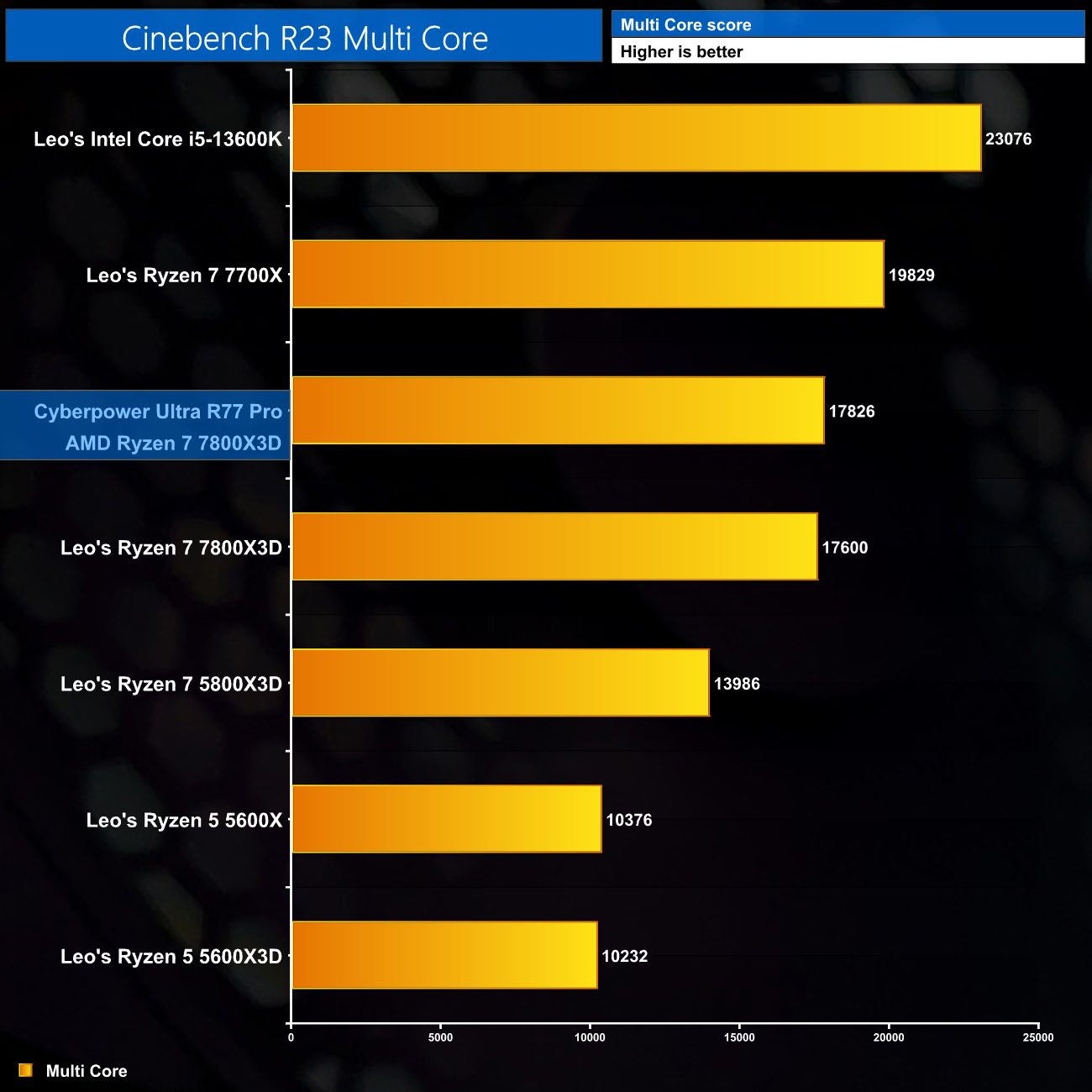
Starting our benchmarks with Cinebench R23, the 7800X3D in the Ultra R77 Pro is marginally outperforming the 7800X3D that Leo tested for his review. Its score of just below 17900 points does make it a touch slower than the 7700X due to the lower clock speed, but you can see the generational leap compared to the 5800X3D.
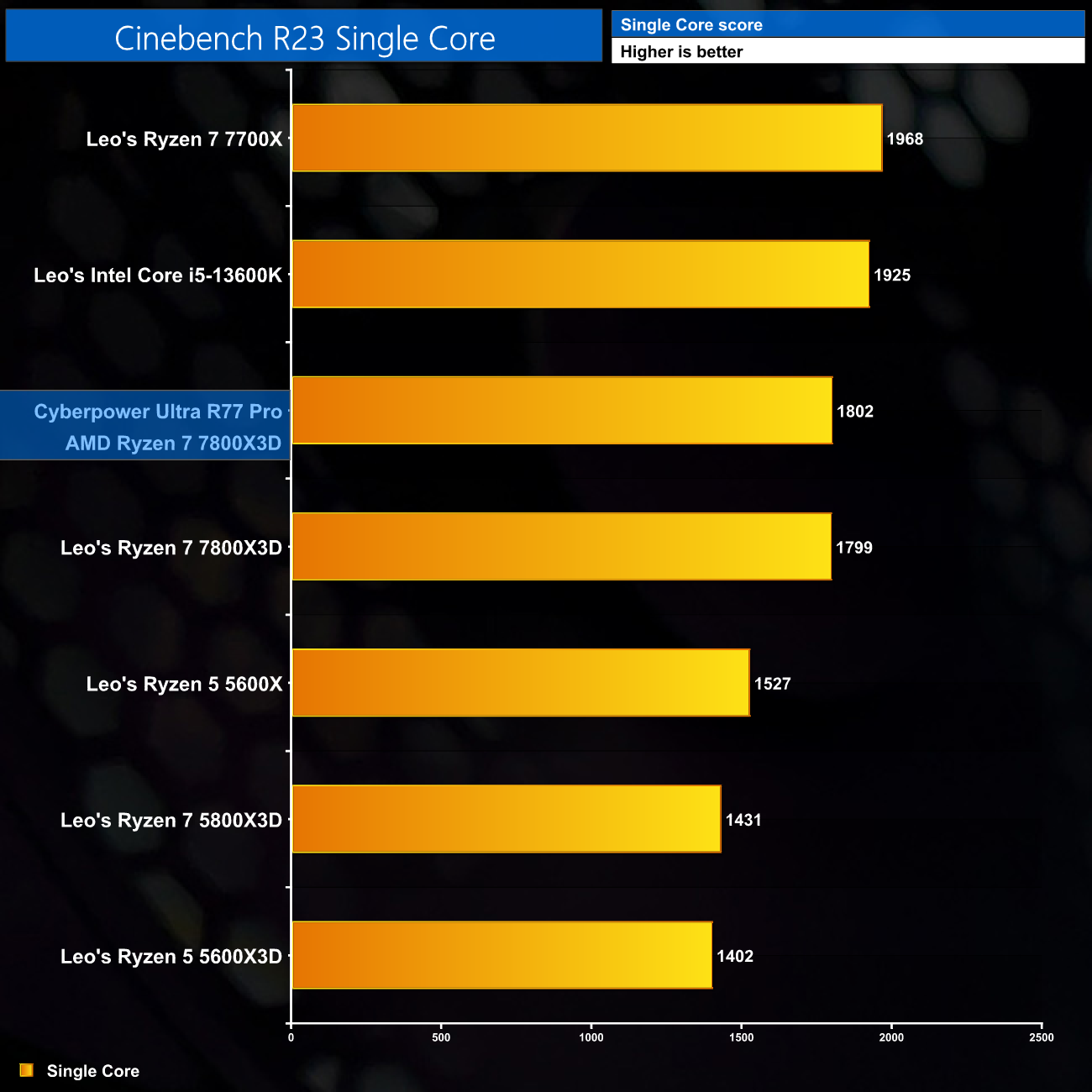
Single core performance is about as expected. The 7800X3D has lower boost clock so can't match the i5-13600K or Ryzen 7700X, but provides a big boost to performance versus Zen 3.
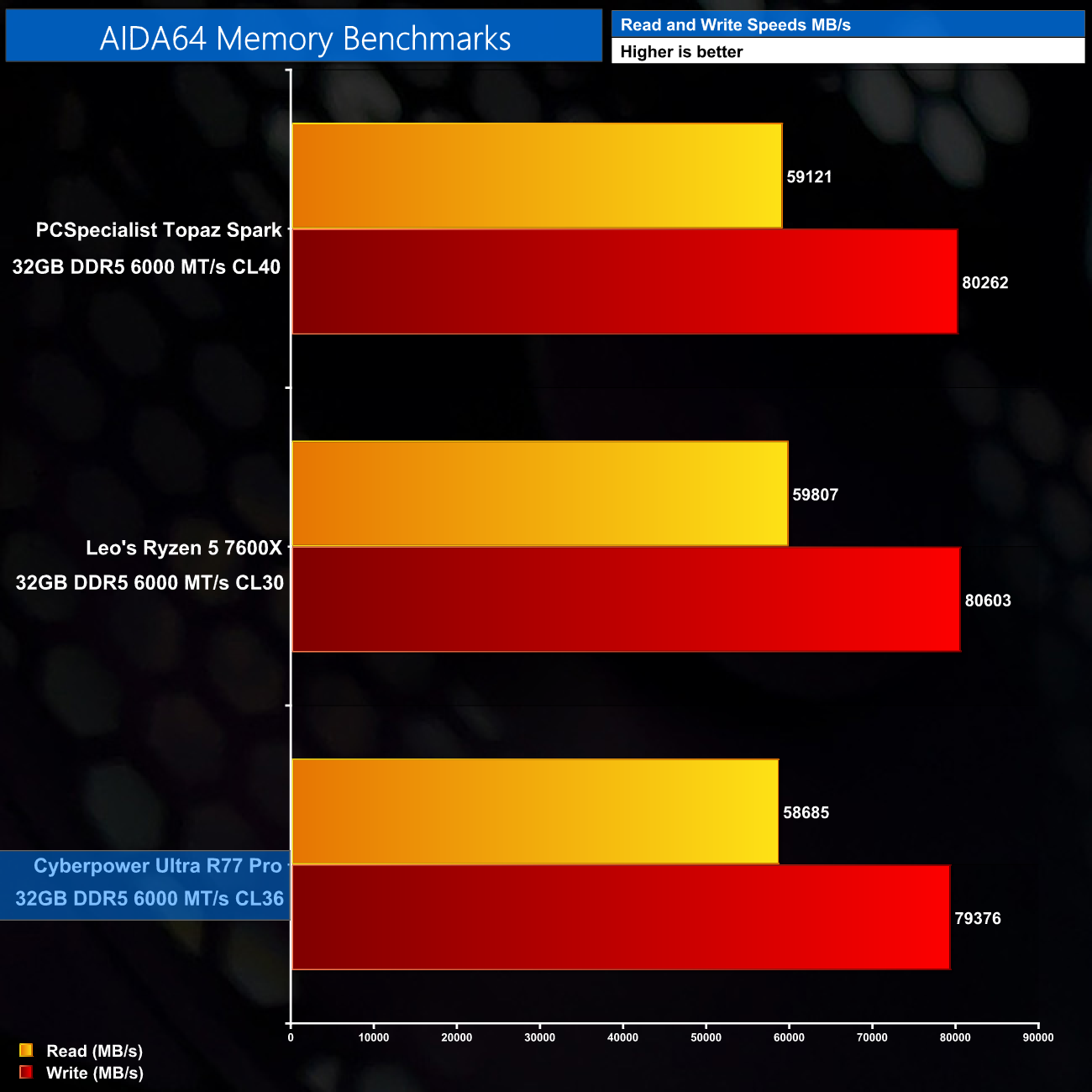
Memory benchmarks follow a similar trend. All three kits shown are DDR5 6000 MT/s memory modules and all produced very similar performance, with reads around 59000 MB/s and writes at or around 80000 MB/s.
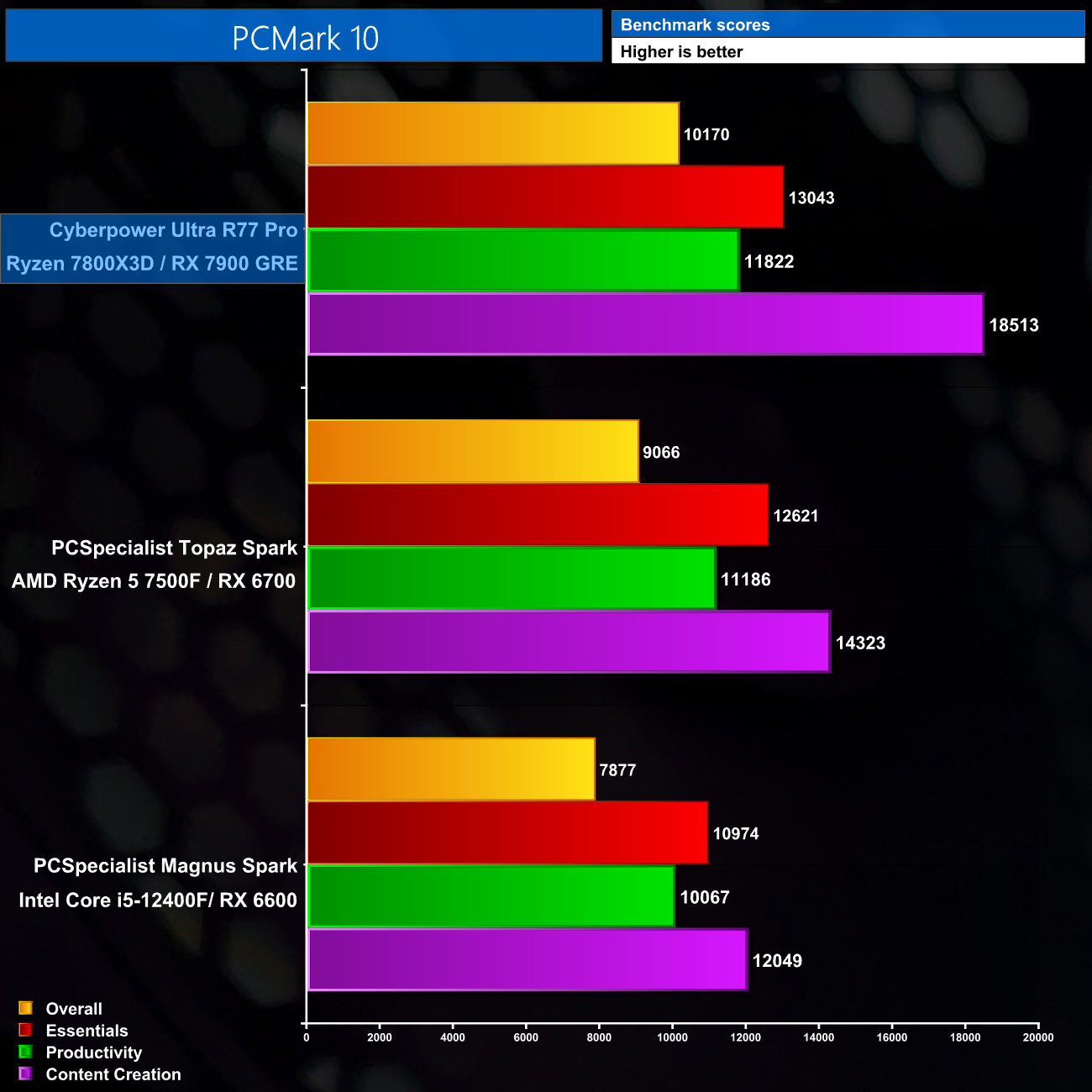
We don't put too much stock onto the PCMark 10 scores but it's a good way to compare the Ultra R77 Pro against your own PC at home. Its content creation score is particularly impressive, hitting over 18K points.
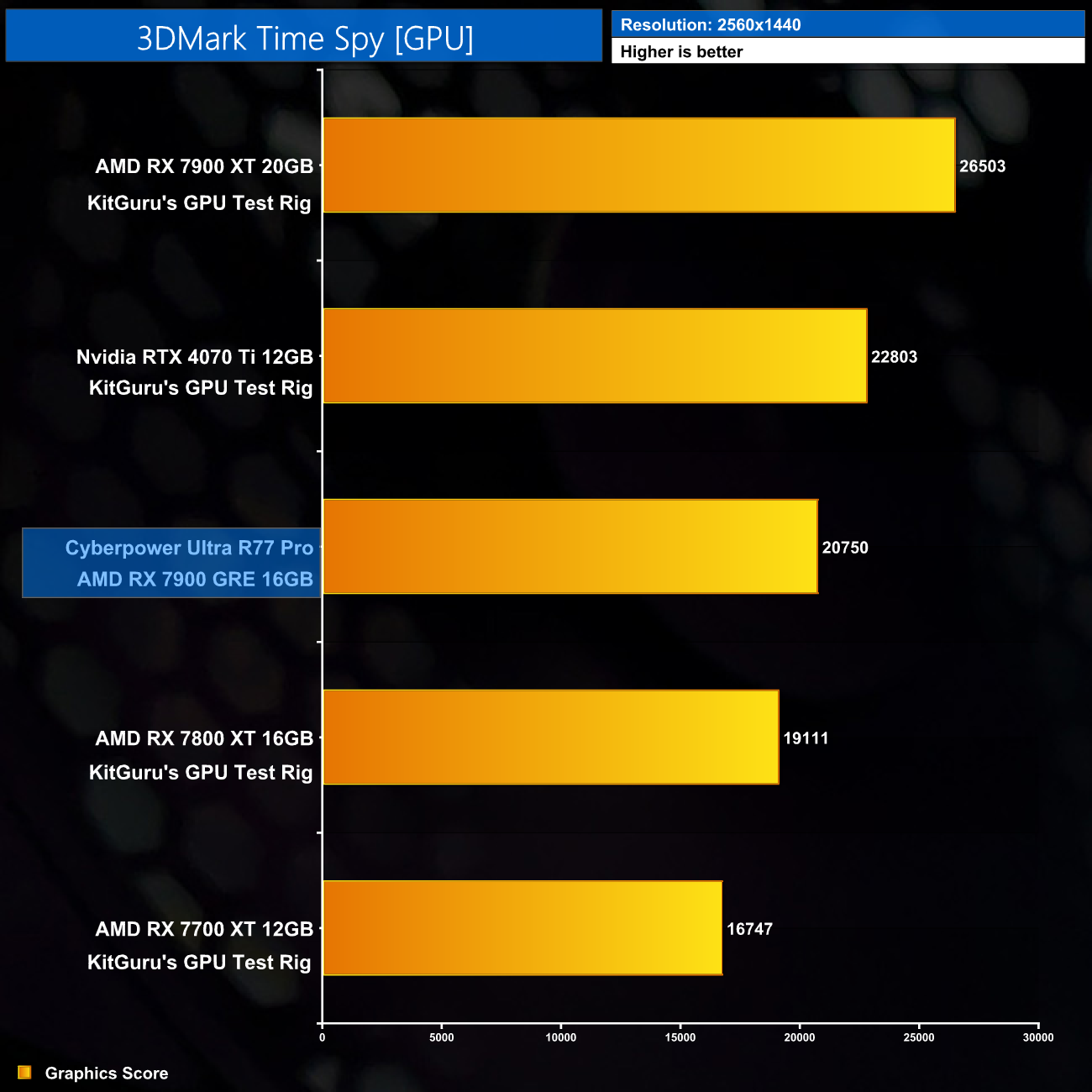
As for GPU performance, in 3DMark Time Spy we can see that the 7900 GRE slots between the 7800 XT and 7900 XT, though it is much closer to the former than it is to the latter. It's also about 2000 points behind the RTX 4070 Ti.
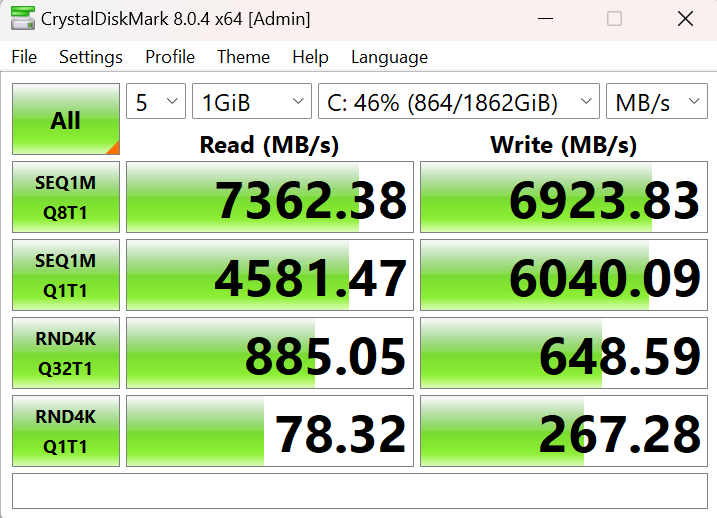
Lastly, the 2TB Kingston Fury Renegade delivers performance about where we'd expect for a premium Gen4 drive. Reads are just over 7.3 GB/s, while writes are a touch below 7 GB/s.
For our game benchmarks, we tested 10 games at max/ultra image quality, at both 1440p and 4K resolution. Ray tracing, DLSS and FSR are disabled for these tests.
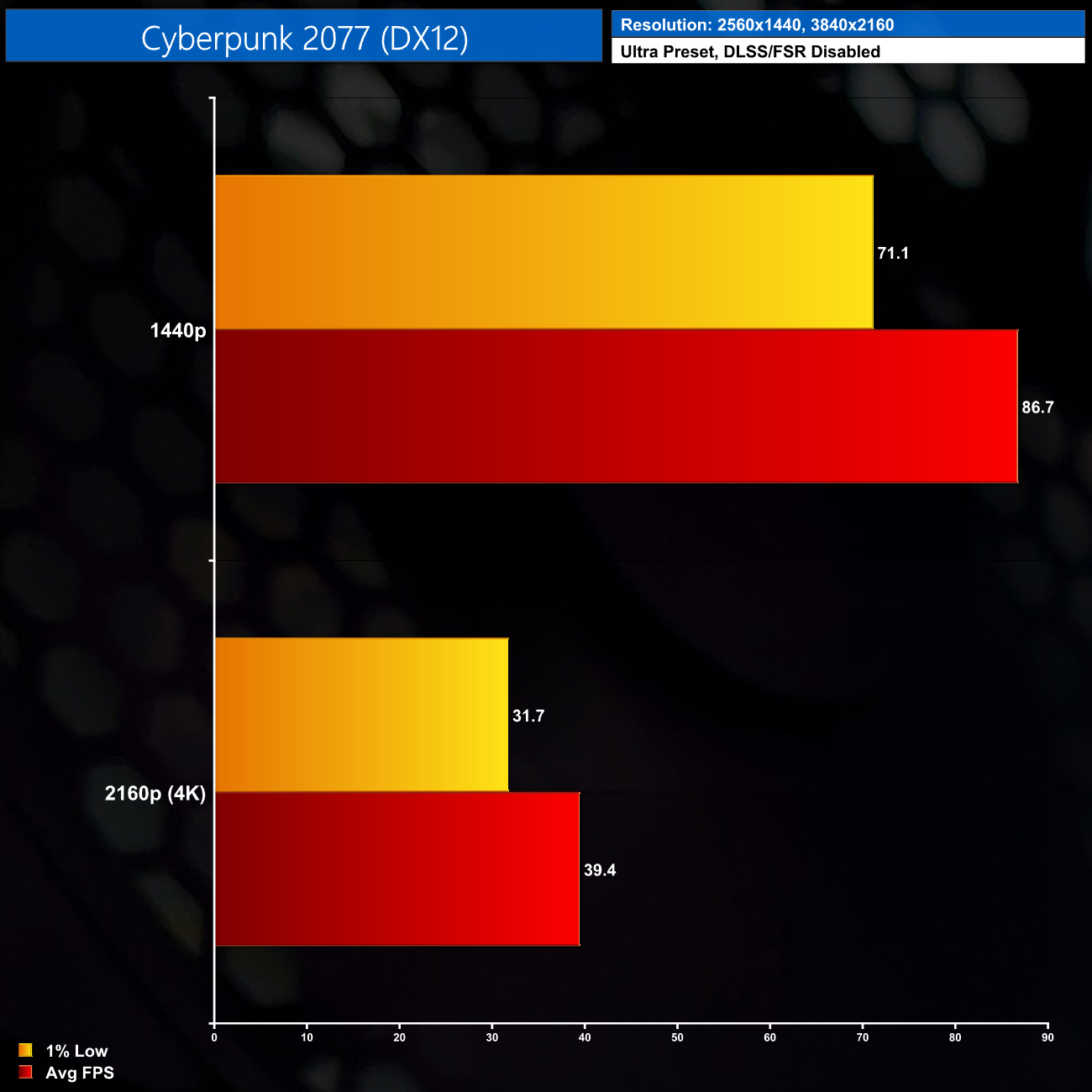
Starting with Cyberpunk 2077, you will likely want to stick to 1440p resolution here, where we got an average of 87FPS. The Ultra R77 Pro only hit 39FPS at 4K – it'd be much more playable with FSR enabled – but for native resolution that's not the smoothest result.
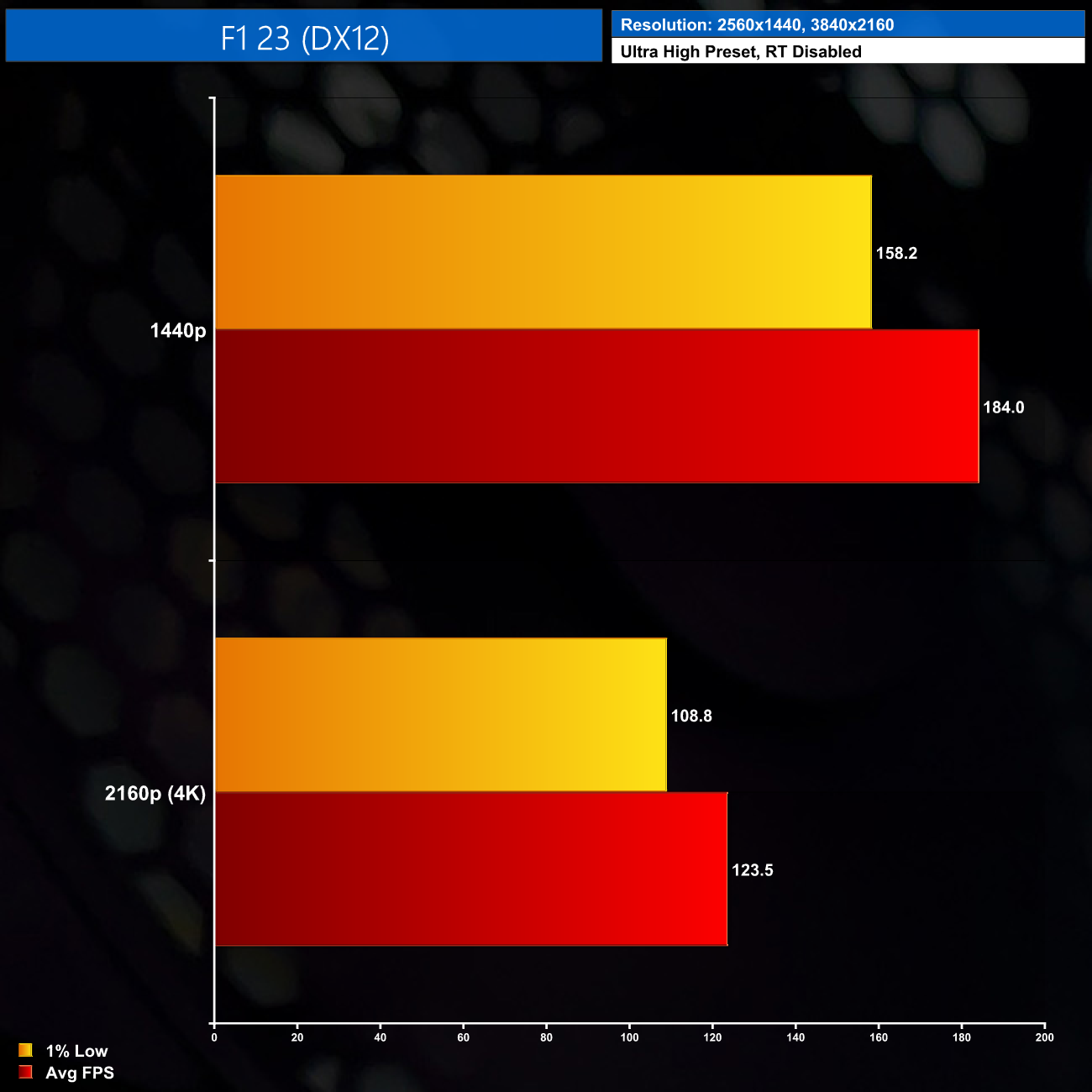
F1 23 is much less demanding however and we even averaged over 120FPS at 4K, so you can get a great racing experience regardless of resolution using the Ultra High settings.
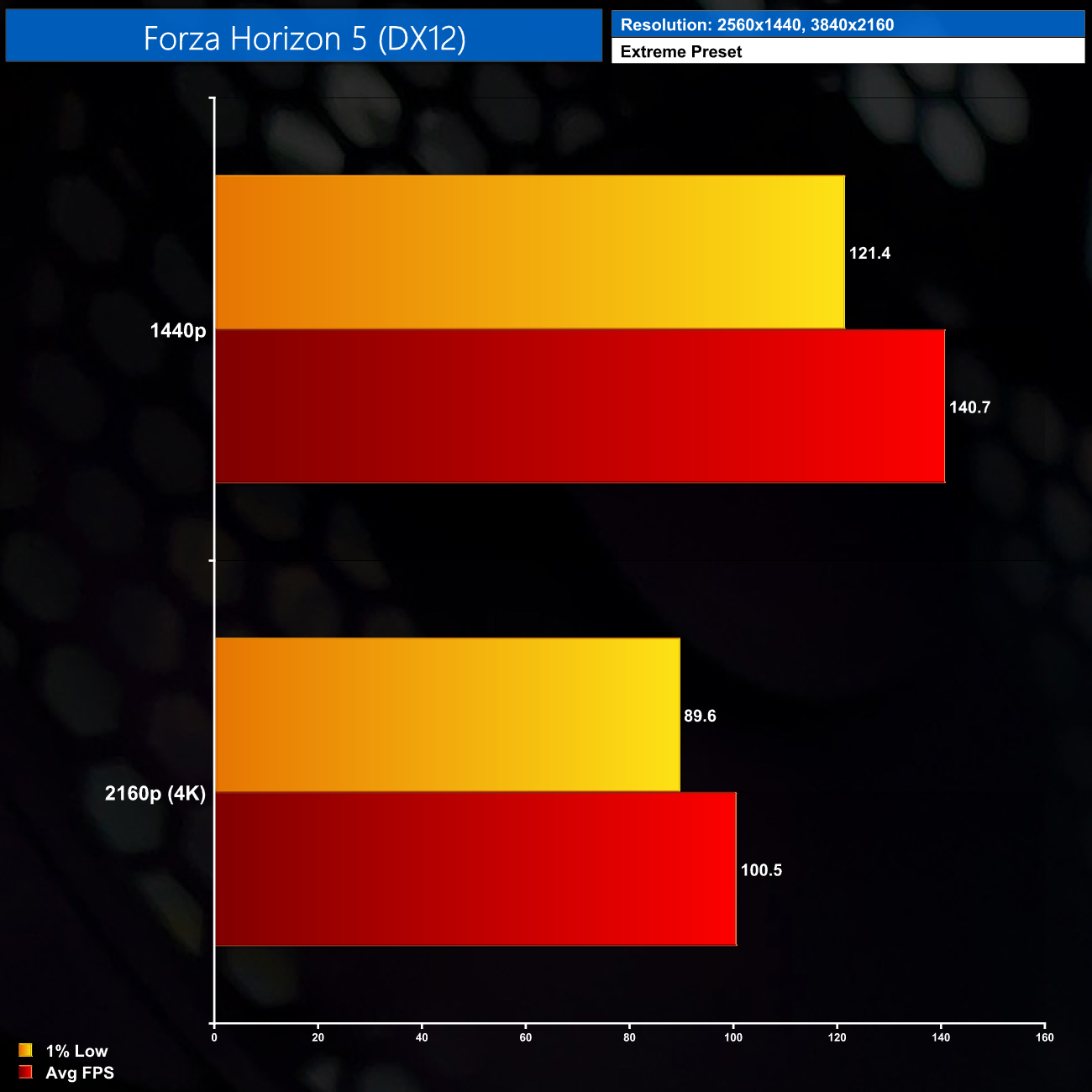
The same goes for Forza Horizon 5 – we're talking 140FPS at 1440p or 100FPS at 4K, so take your pick – both will play very nicely indeed!
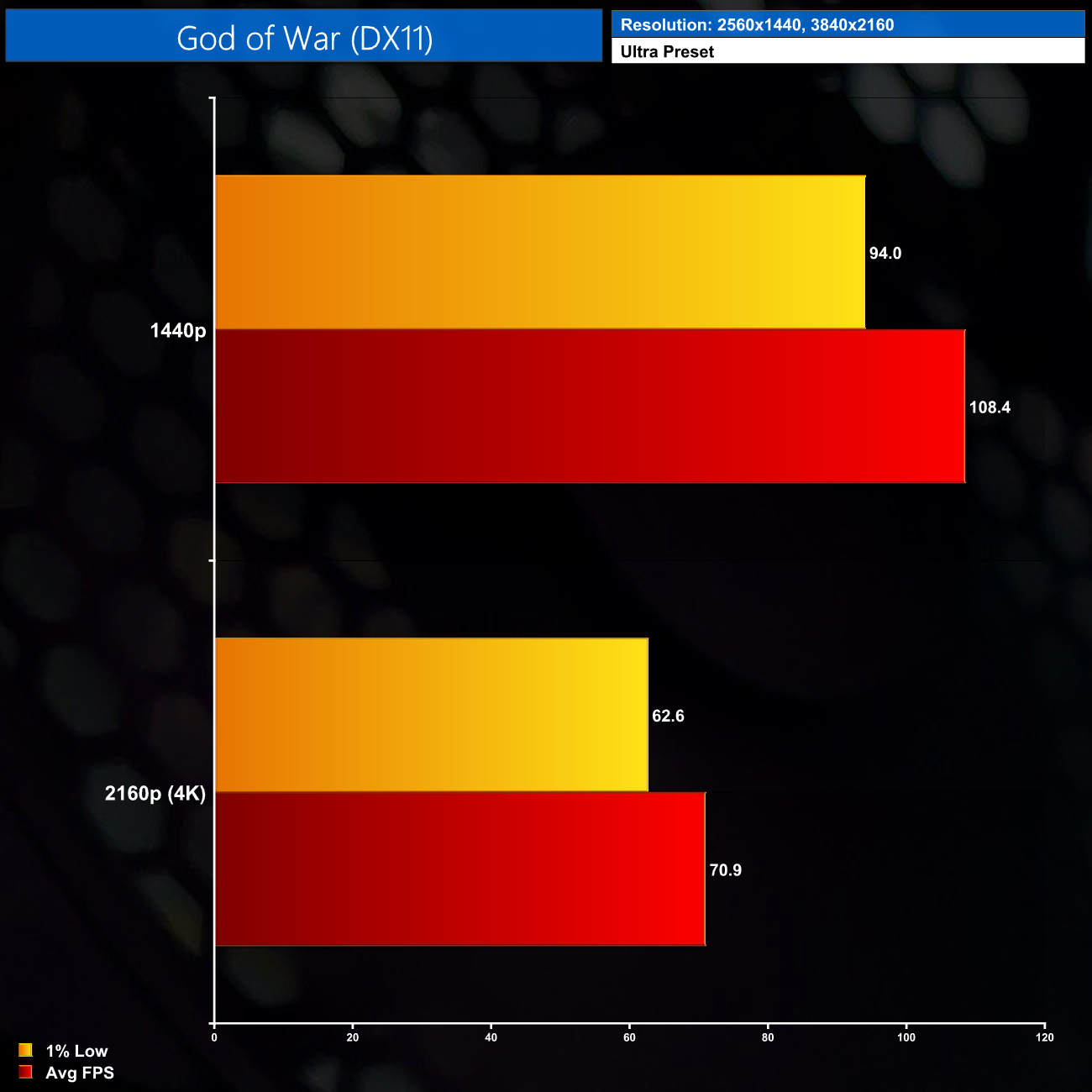
God of War is a bit more demanding at 4K but we still average over 70FPS, and dropping to 1440p increases this to almost 110FPS, so more than enough for an enjoyable experience.
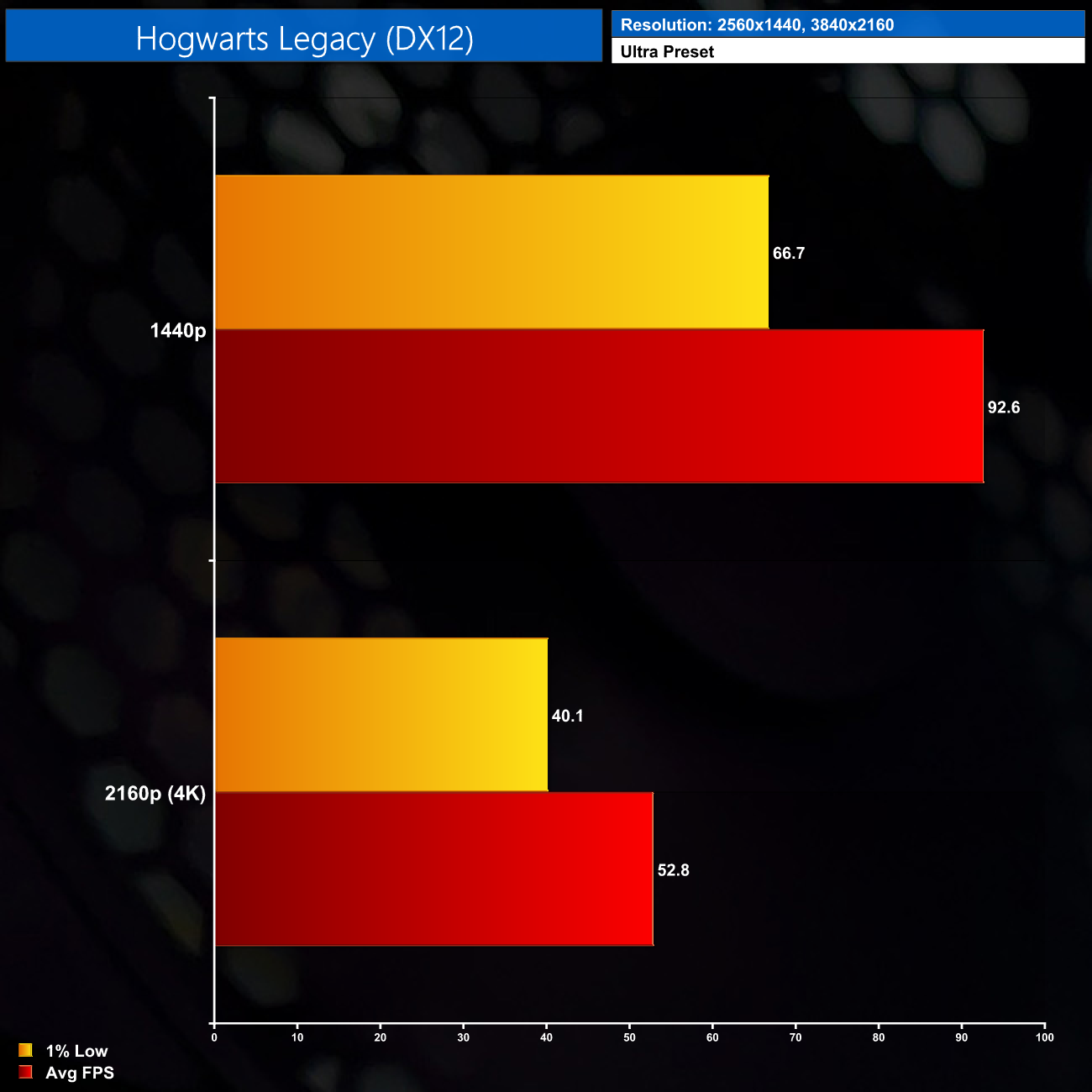
Hogwarts Legacy, however, definitely plays best at 1440p, though this game doesn't have the smoothest 1% lows. At 4K it will drop down to 53FPS on average, but with 1% lows at 40FPS.
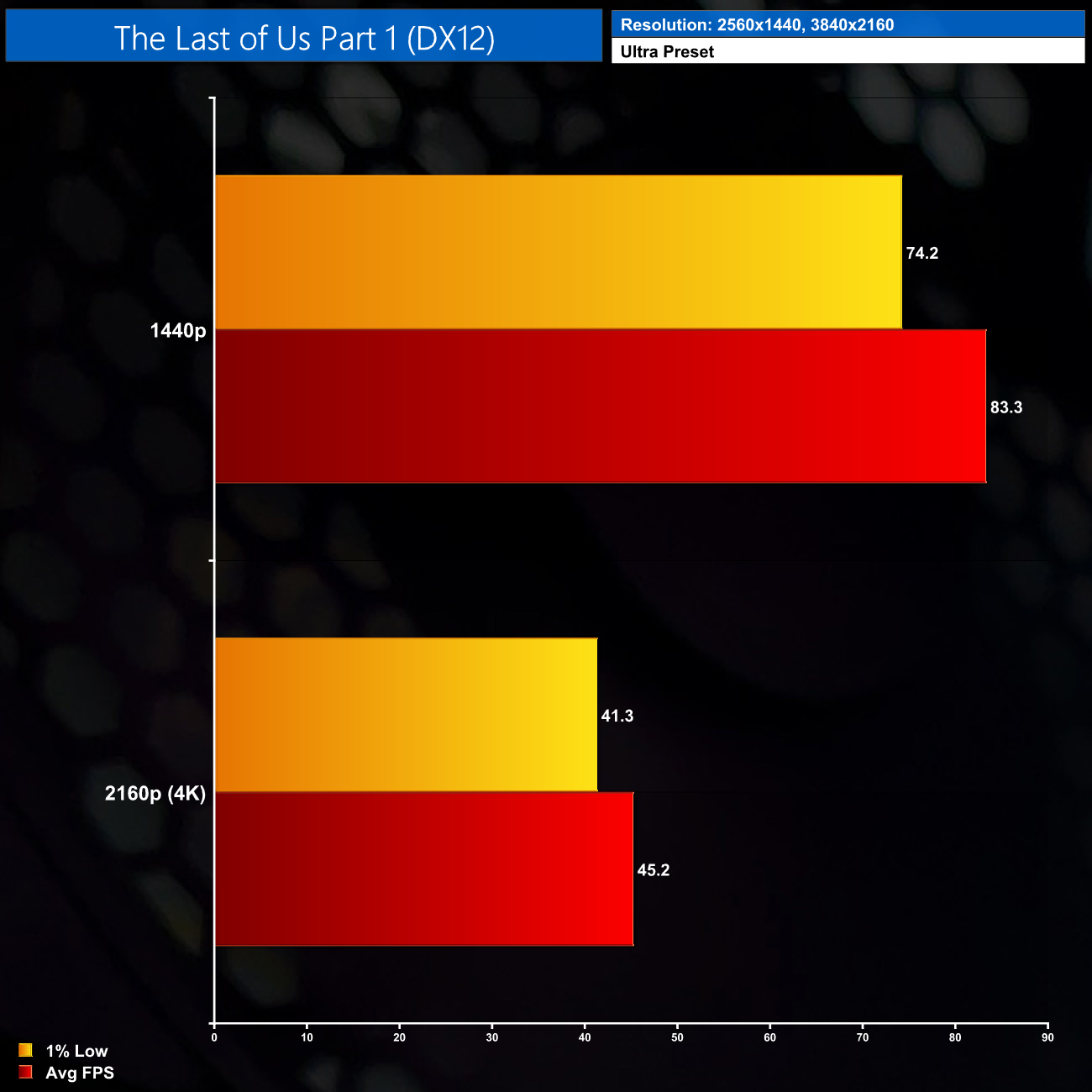
The Last of Us Part 1 is another heavy title, though 83FPS at 1440p is not bad at all. You'll likely want to enable FSR at 4K however, as without it we were looking at 45FPS on average.
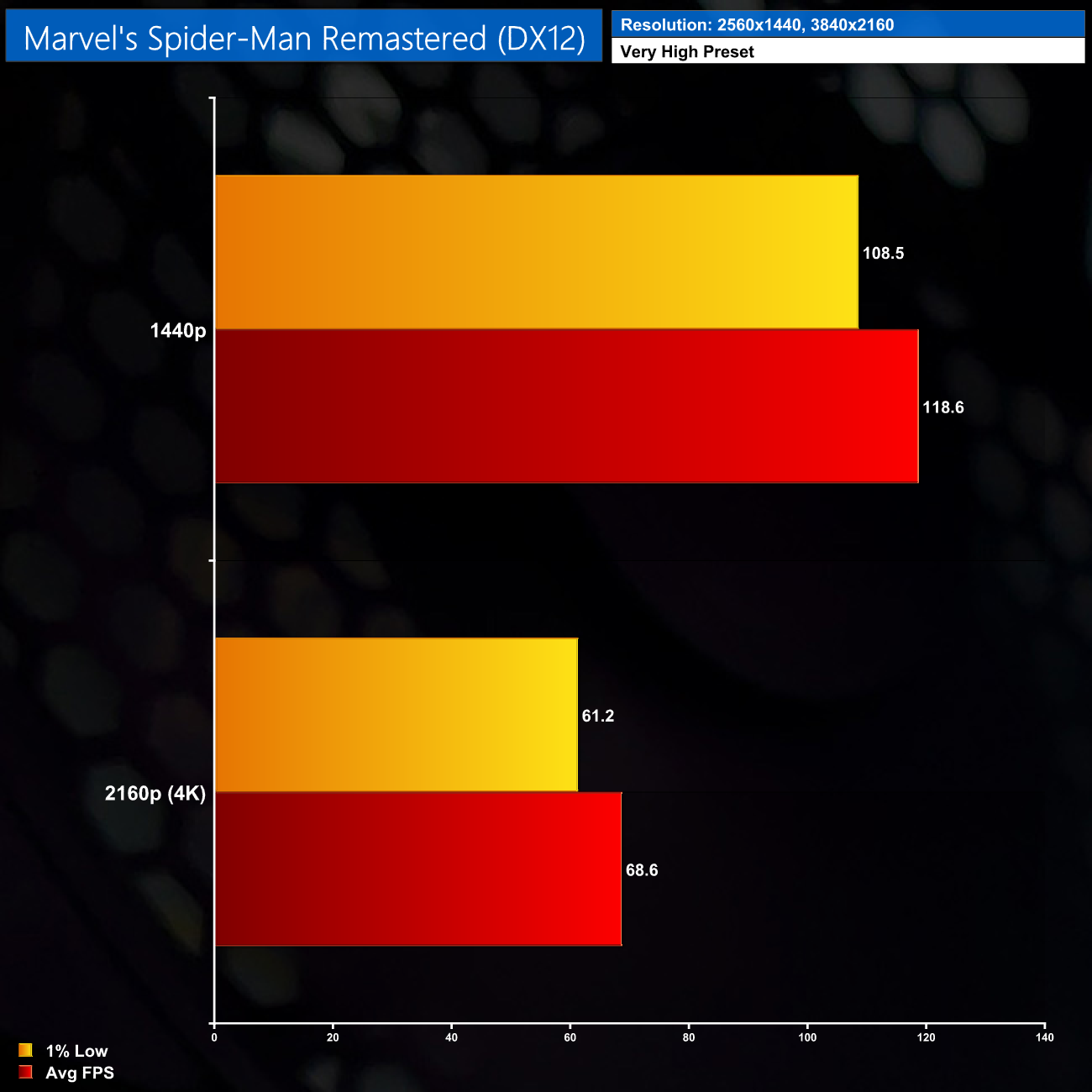
Next up is Spider-Man Remastered, where web-slinging was very smooth at 1440p with almost 120FPS on average. 68FPS at 4K isn't bad either, though in this game I always like to hit 100FPS if I can for super-smooth swinging.
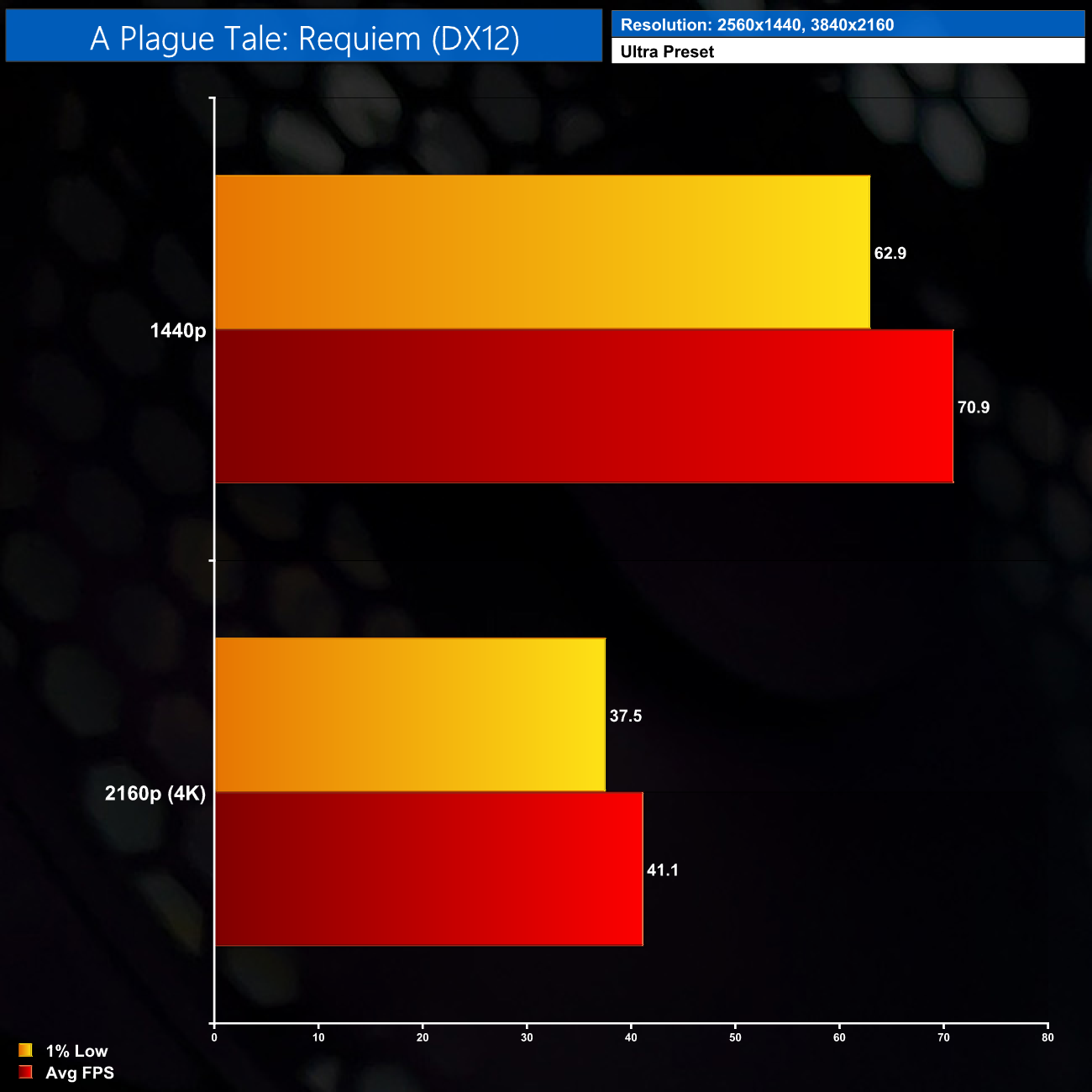
A Plague Tale: Requiem is probably the most demanding title we test but it looks fantastic, and 71FPS on average at 1440p is a decent result. It's not a particularly fast-paced title so even 40FPS at 4K is just about OK, but enabling FSR would help further.
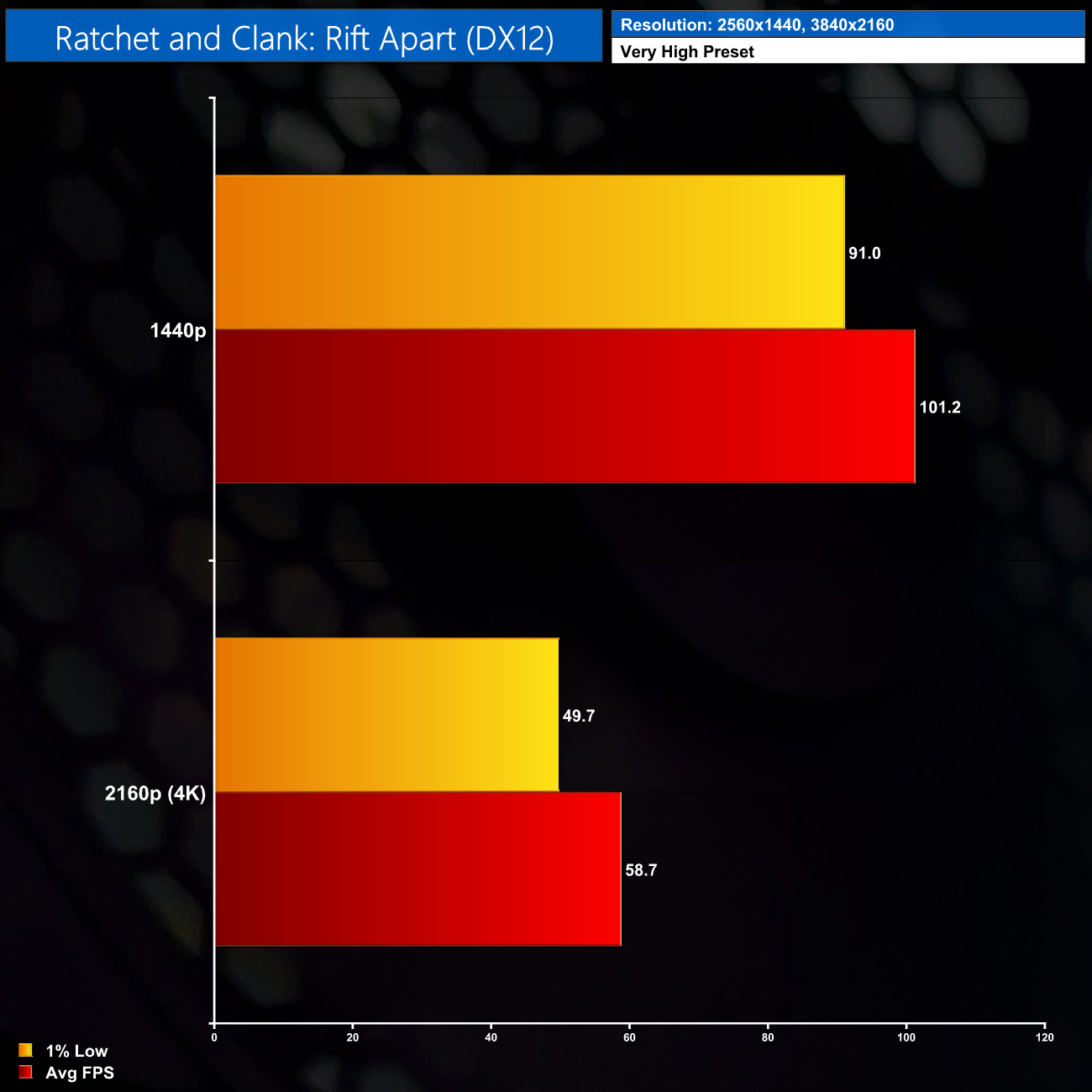
As for Ratchet and Clank, it's a similar story to plenty of other games, with 101FPS at 1440p and then 59FPS at 4K. The latter is still a decent result but everything feels more fluid at 1440p.
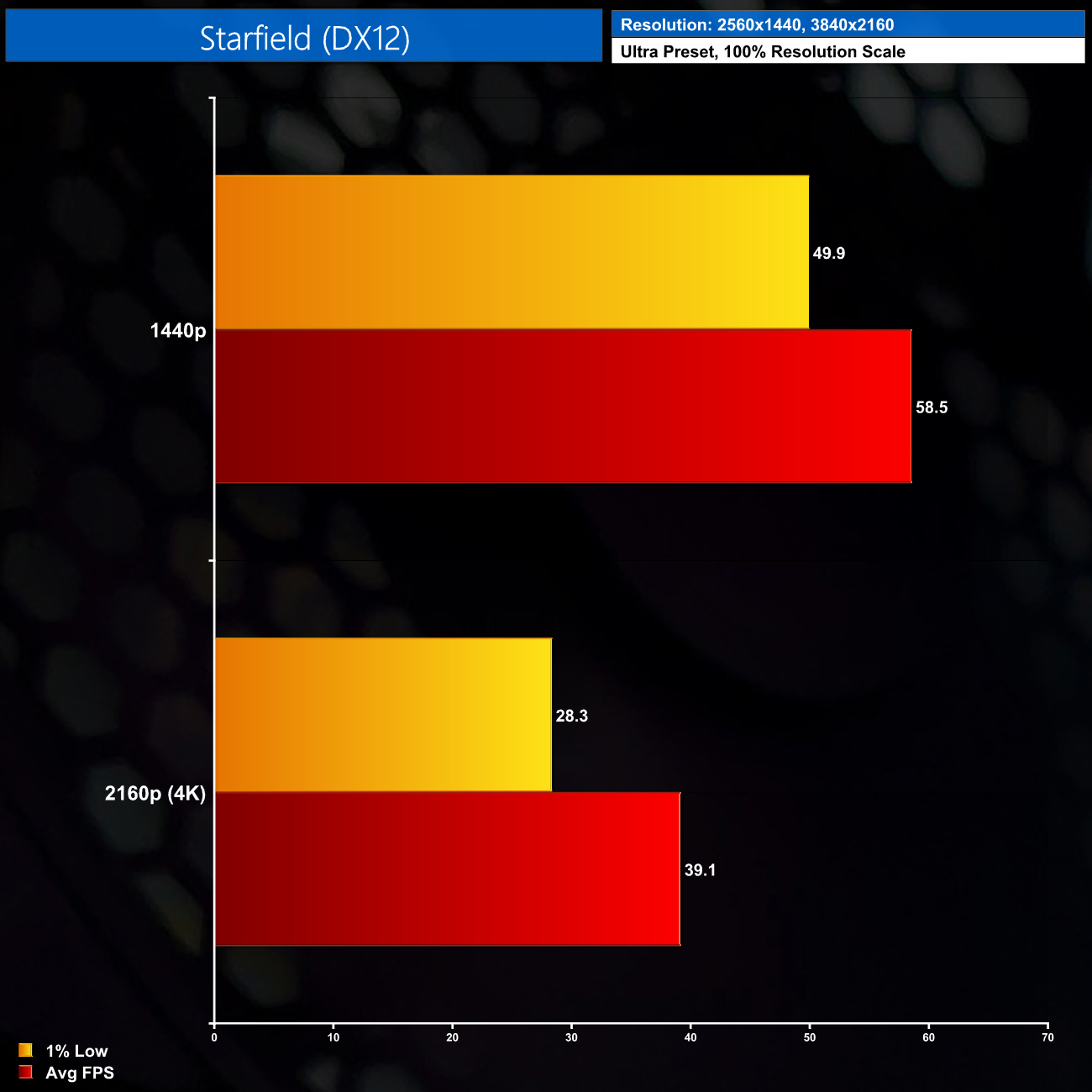
Lastly we come to Starfield, which as we know is a very punishing title. Well-optimised or not, at 1440p we're not even hitting 60FPS, and at 4K we drop below 40FPS, so you'll probably want to tweak the image quality settings for this one.
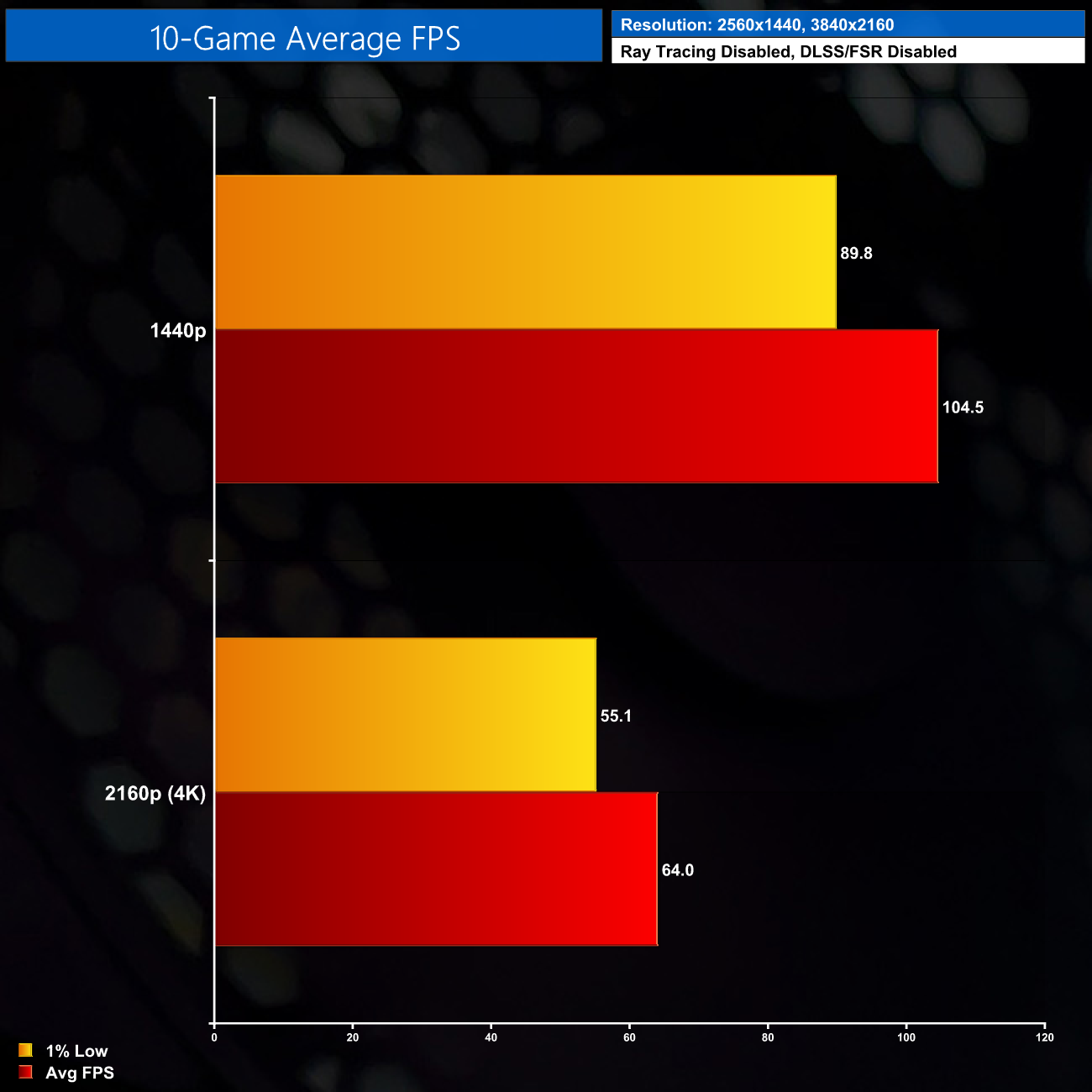
Overall performance is very strong, with most games delivering over 100FPS at 1440p. As we've seen, 4K is not out of the question, but it's more playable in some games than others – but even then, an average of 64FPS is not bad at all.
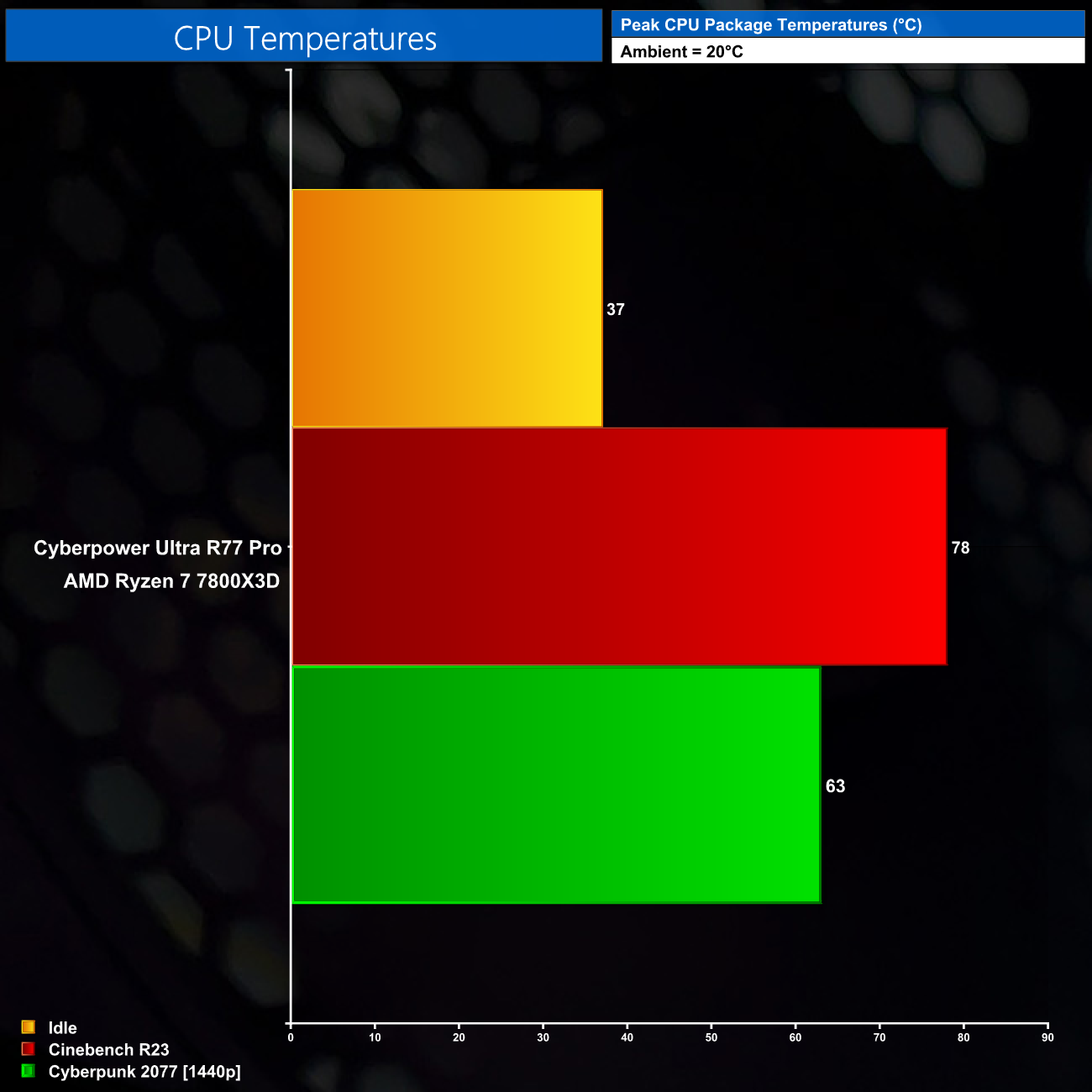
With the CPU running at 4.8-4.9GHz depending on the workload, thermal performance is pretty decent. After a 30-minute run in Cinebench, the Tdie reading was only 78C, and it ran much cooler while gaming – even in Cyberpunk 2077, which is pretty CPU-heavy.
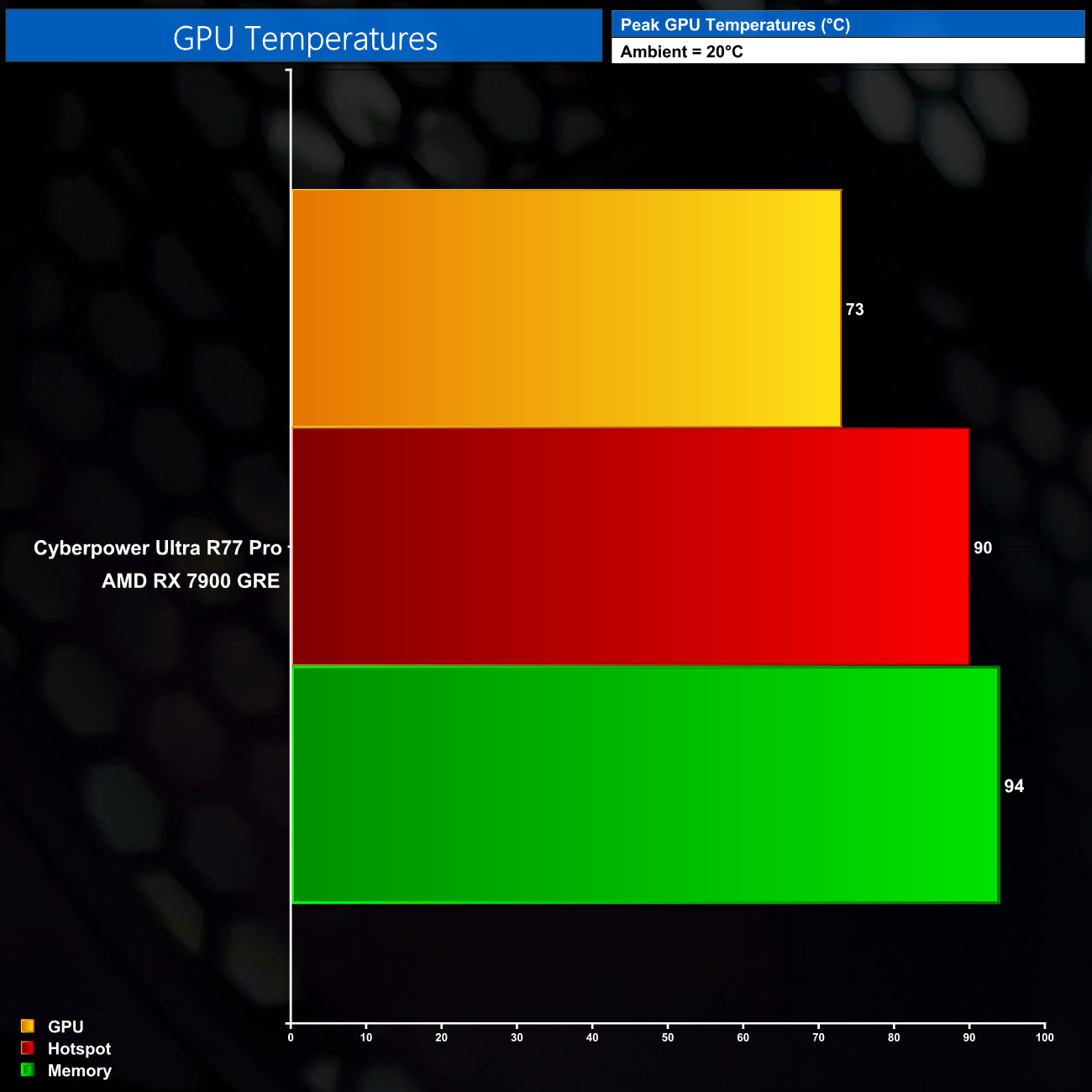
The GPU is generally fine too. The hotspot and memory temperatures both reached 90C or-so, which is a touch warmer than I'd like but as this is an AMD reference card, it's about as expected. AMD maintains up to 110C is safe here so we're well below that.
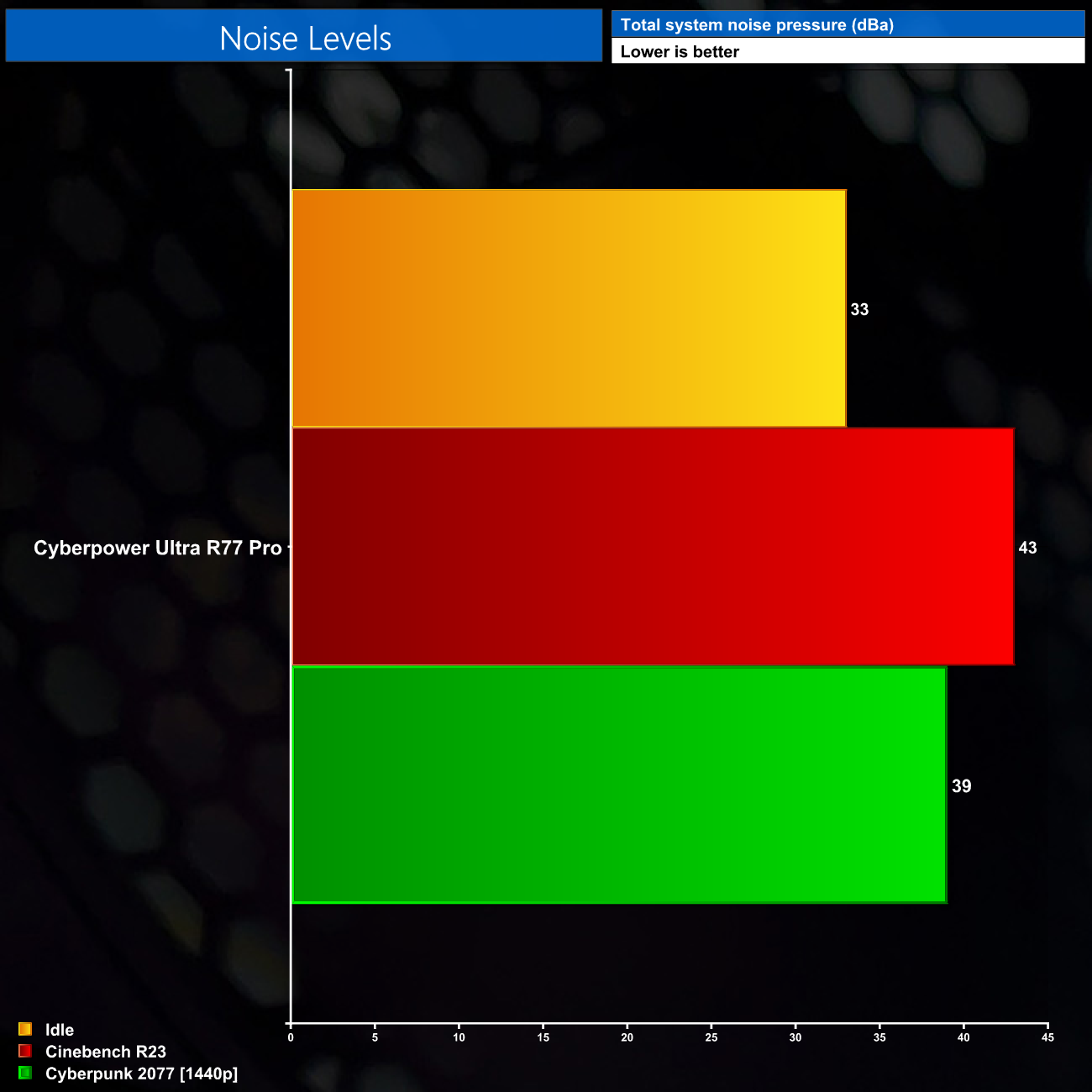
Noise levels aren't always the greatest, however, particularly when the CPU is loaded to the max, as we see in Cinebench. In that instance, it produced 43dBa of noise, which isn't outrageous, but the main problem was the pitch of the fans. The included RGB front fans in the 3000D Airflow don't appear to be of the greatest quality and while spinning at 1800rpm or so (as they get up to when under load) they do emit quite a whiny resonating hum. Gaming is less offensive as the CPU isn't loaded so heavily, but even so the fan pitch is a bit annoying, and be sure to check out the video review to hear the soundtest.
To try and help matters I ran an extra test where I reduced fan speed to 1000rpm on all case and radiator fans. This made a huge difference and dropped noise to 37dBa while cutting out a lot of that annoying whine. It didn't make much of a difference to thermals either, with the CPU now running just 3-4C hotter, which is still well below TJMax, while the GPU appeared unaffected.
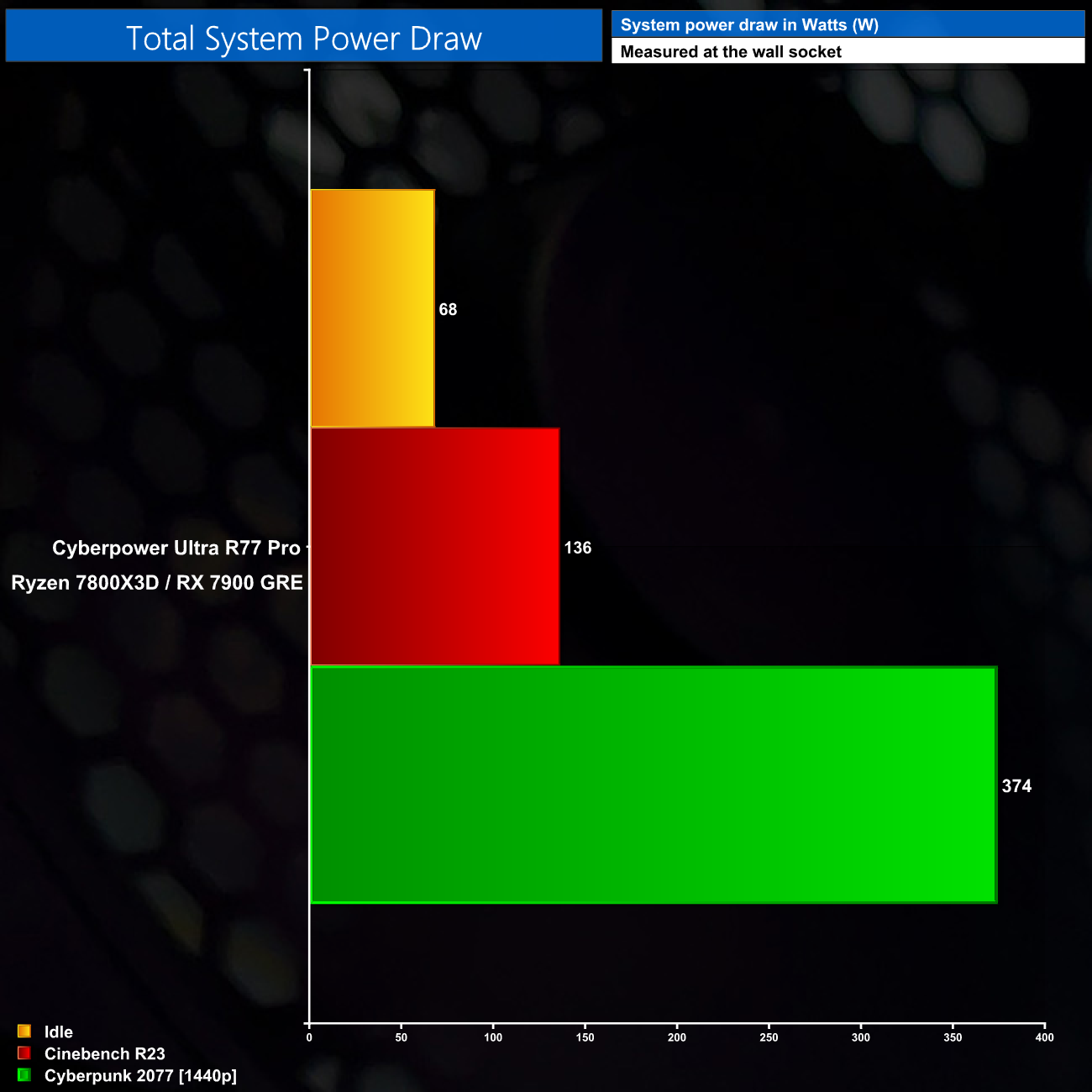
Lastly, total system power draw is very reasonable. We saw below 140W at the socket for an all-core CPU load, and then just over 370W for a 1440p gaming session in Cyberpunk 2077. That means the PSU will be operating at peak efficiency, while there is loads of headroom to upgrade both the CPU and GPU down the line.
Having put the Cyberpower Ultra R77 Pro through its paces over the last week, it's safe to say this is another solid prebuilt PC from the company.
It made a positive impression almost immediately when we took a look inside the system – the cable management is excellent, the RGB lighting adds some pizzazz and the Corsair Airflow 3000D is impressively compact despite the high-end nature of the components inside.
Performance is exactly what we'd expect, too, considering the combination of a Ryzen 7 7800X3D, 32GB of DDR5 6000 MT/s, alongside the Radeon RX 7900 GRE. It makes light work of 1440p gaming and 4K isn't out of the question, though frame rates will dip into the 30-40FPS region in more demanding titles.
The balance of CPU and GPU may not be to everyone's tastes however. By almost all accounts, the 7800X3D is the fastest gaming CPU on the market, while the RX 7900 GRE isn't a whole lot faster than the RX 7800 XT. Of course that's not necessarily a bad thing – getting the best gaming CPU on the market right now means it will likely last for years before needing an upgrade, and you'll be eliminating as many CPU bottlenecks as possible if gaming at 1440p (or especially 1080p). Some people would rather prioritise the graphics horsepower however, perhaps by opting for a 6-core Ryzen 5 7600X, and putting the extra GPU budget into a 7900 XT or RTX 4070 Ti. There's not necessarily a ‘right' or ‘wrong', it just depends on your priorities.
There are a couple of things to improve with the system however. The first is minor, but the RGB lighting is controlled by a mix of MSI Mystic Light and Corsair iCUE. There is supposedly a way to get them to communicate, but despite my efforts, it would just not work. It's not a dealbreaker, but for a PC that costs almost £2000, you would hope to be able to synchronise all the lighting quickly and painlessly.
Noise levels aren't the best either. The 3000D Airflow isn't a particularly high-end case and the 3 front fans it comes with don't appear to be of great quality – they emit quite a whiny hum when the CPU is working hard (though this is less problematic while gaming). I was also able to mitigate the issue by running a custom fan curve and capping fan speed to 1000rpm or so, which didn't hurt temperatures that much, but higher-quality fans would mean this isn't necessary.
Still, those are relatively minor issues in the grand scheme of things and by and large we have been impressed with the Ultra R77 Pro. It's decent value too, as pricing up all the components individually comes to about £1830, give or take considering the 7900 GRE isn't available in the UK DIY market yet, and we've not included a Windows 11 license. Even then, for just a £70 premium, you are getting the system built to a high standard, shipped out and covered by a fantastic warranty, which includes 5 years labour, 2 years parts, 2 years collect and return, plus life-time technical support.
It may not be perfect, but it's a very capable system that offers compelling value under £2000.
You can buy the system, as reviewed, for £1899 direct from Cyberpower HERE.
Discuss on our Facebook page HERE.
Pros
- Expertly built with top-tier cable management.
- Uses the fastest gaming CPU currently on the market.
- Great for 1440p gaming or entry-level 4K.
- Solid all-round spec with 32GB DDR5 memory and 2TB SSD.
- Plenty of headroom with the PSU to allow for future upgrades.
- Good value at £1899 compared to DIY prices.
- Great warranty coverage.
Cons
- Some may prefer more emphasis on GPU grunt, rather than CPU.
- Case fans sound whiny at higher speeds, a custom fan curve is required to eliminate this.
- RGB control is spread across MSI Mystic Light and Corsair iCUE.
KitGuru says: The Cyberpower Ultra R77 Pro is a solid prebuilt PC that offers good value compared to DIY pricing, and it's backed with a 5-year warranty.