KitGuru KitGuru.net – Tech News | Hardware News | Hardware Reviews | IOS | Mobile | Gaming | Graphics Cards


Often when we review prebuilt PCs, the systems are fitted with the latest and greatest components, and it's not surprising to see prices coming in well over £2000. But what if you, or someone you know, is just looking to get into PC gaming for the first time, and wants a capable machine that won't cost thousands upon thousands? Enter the PCSpecialist Cobalt Spark R, offering a solid spec while priced at £799.
00:00 Start
00:49 Pricing and hardware details
05:18 Cable management and a closer look
06:13 CPU behaviour
06:48 Benchmarks
08:47 Gaming performance
11:07 CPU Thermals
11:45 Noise output and power draw
12:25 Closing Thoughts
- Case: PCS SPECTRUM G ARGB MID TOWER CASE (PWM)
- Processor (CPU): Intel® Core™ i3 Quad Core Processor i3-14100F (Up to 4.7GHz) 12MB Cache
- Motherboard: ASUS® PRIME B760M-A WIFI (mATX, LGA1700, DDR5, PCIe 4.0, Wi-Fi 6)
- Memory (RAM): 16GB PCS PRO DDR5 4800MHz (2 x 8GB)
- Graphics Card: 8GB AMD RADEON™ RX 6600 – HDMI, DP – DX® 12
- 1st M.2 SSD Drive: 1TB PCS PCIe M.2 SSD (3500 MB/R, 3200 MB/W)
- Power Supply: CORSAIR 650W RM SERIES™ MODULAR 80 PLUS® GOLD, ULTRA QUIET
- Processor Cooling: PCS FrostFlow 100 V3 Series High Performance CPU Cooler
- Thermal Paste: STANDARD THERMAL PASTE FOR SUFFICIENT COOLING
- Sound Card: ONBOARD 6 CHANNEL (5.1) HIGH DEF AUDIO (AS STANDARD)
- Network Card: ONBOARD LAN PORT
- Wireless Network Card: ONBOARD Wi-Fi (MOTHERBOARD DEPENDENT)
- USB/Thunderbolt Options: MIN. 2 x USB 3.0 & 2 x USB 2.0 PORTS @ BACK PANEL + MIN. 2 FRONT PORTS
- Operating System: Windows 11 Home 64 Bit – inc. Single Licence
- Operating System Language
- United Kingdom – English Language
- Warranty: 3 Year Standard Warranty (6 Month Collect & Return, 1 Year Parts, 3 Year Labour)
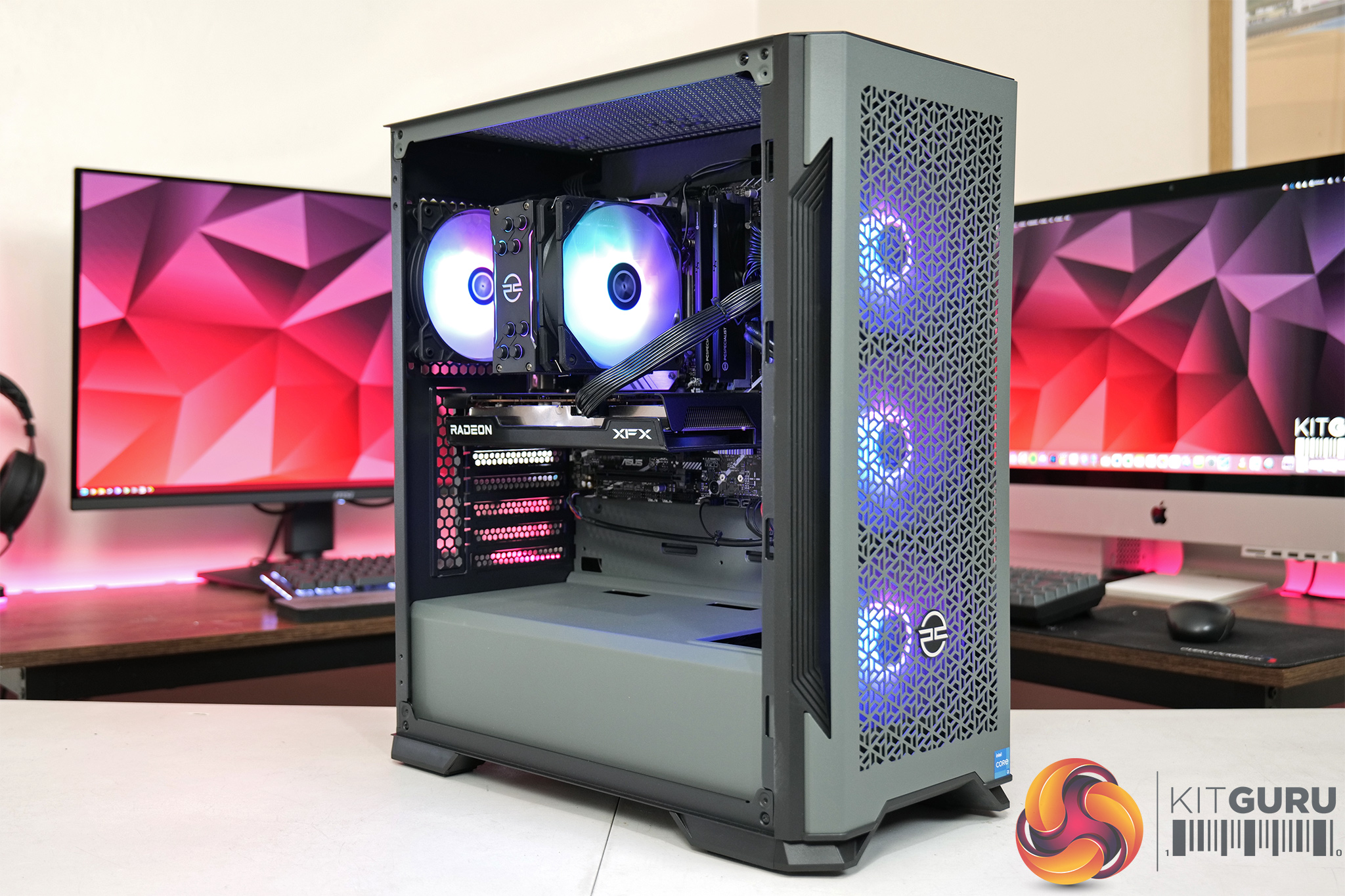
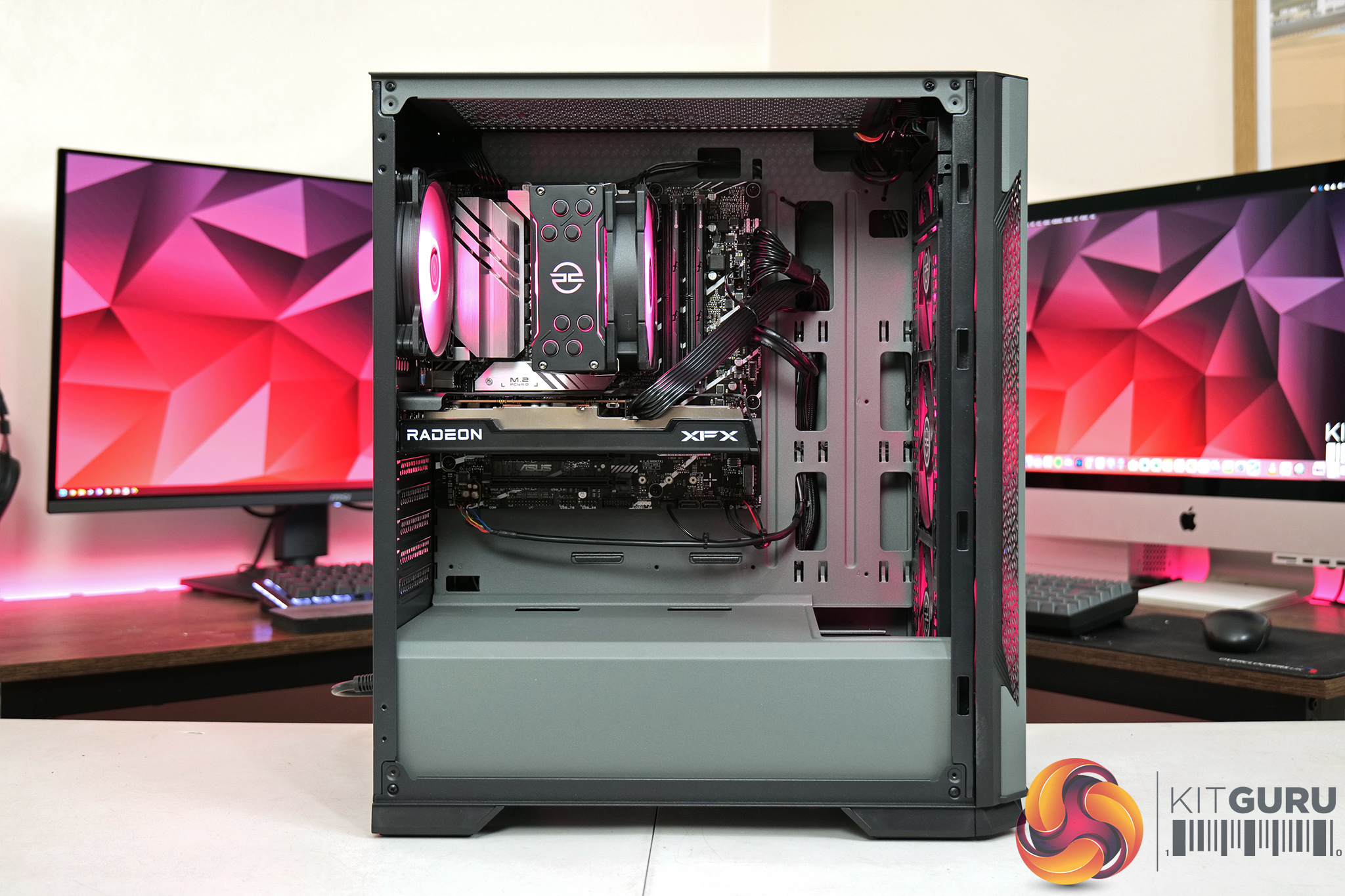
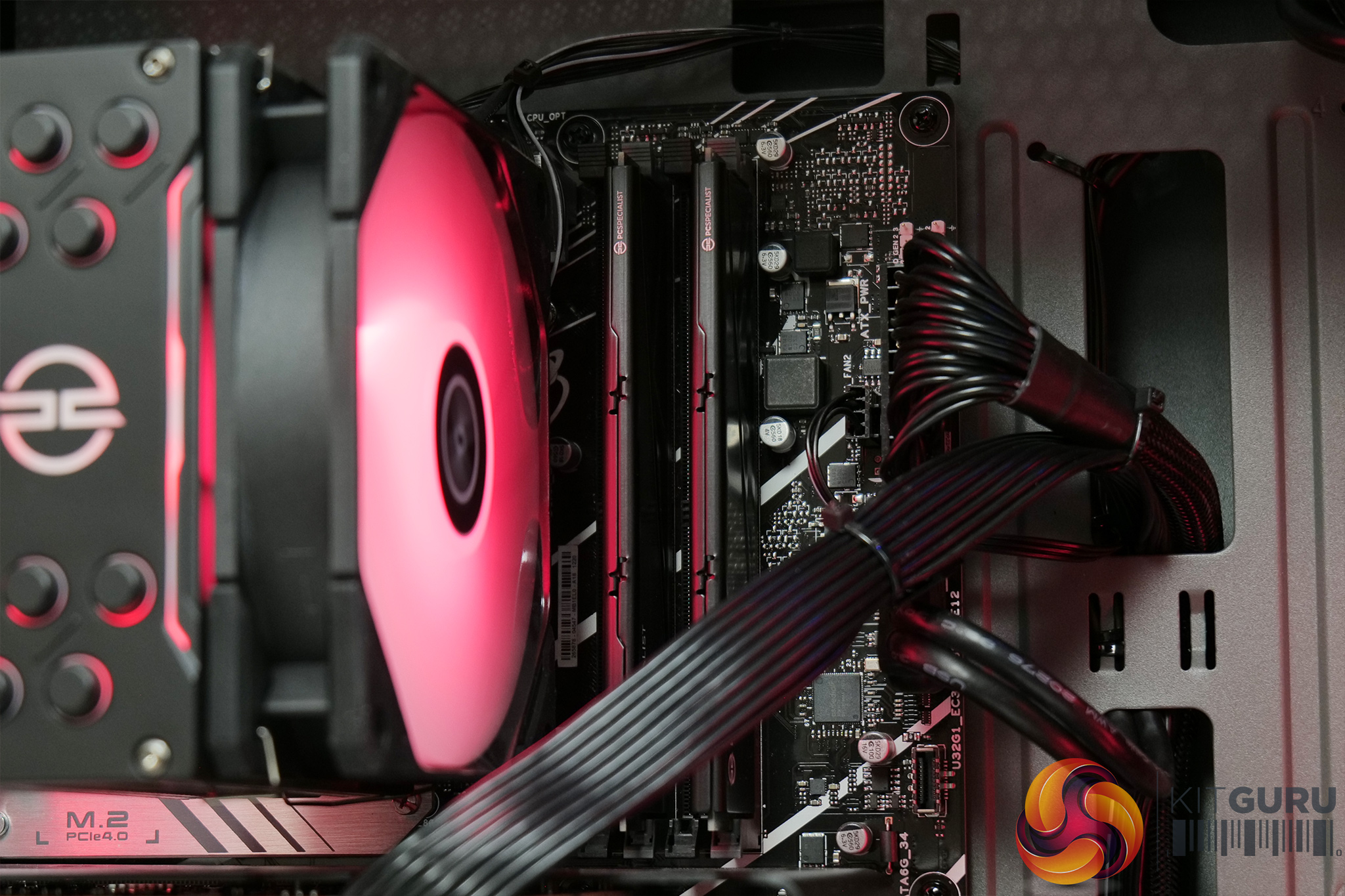
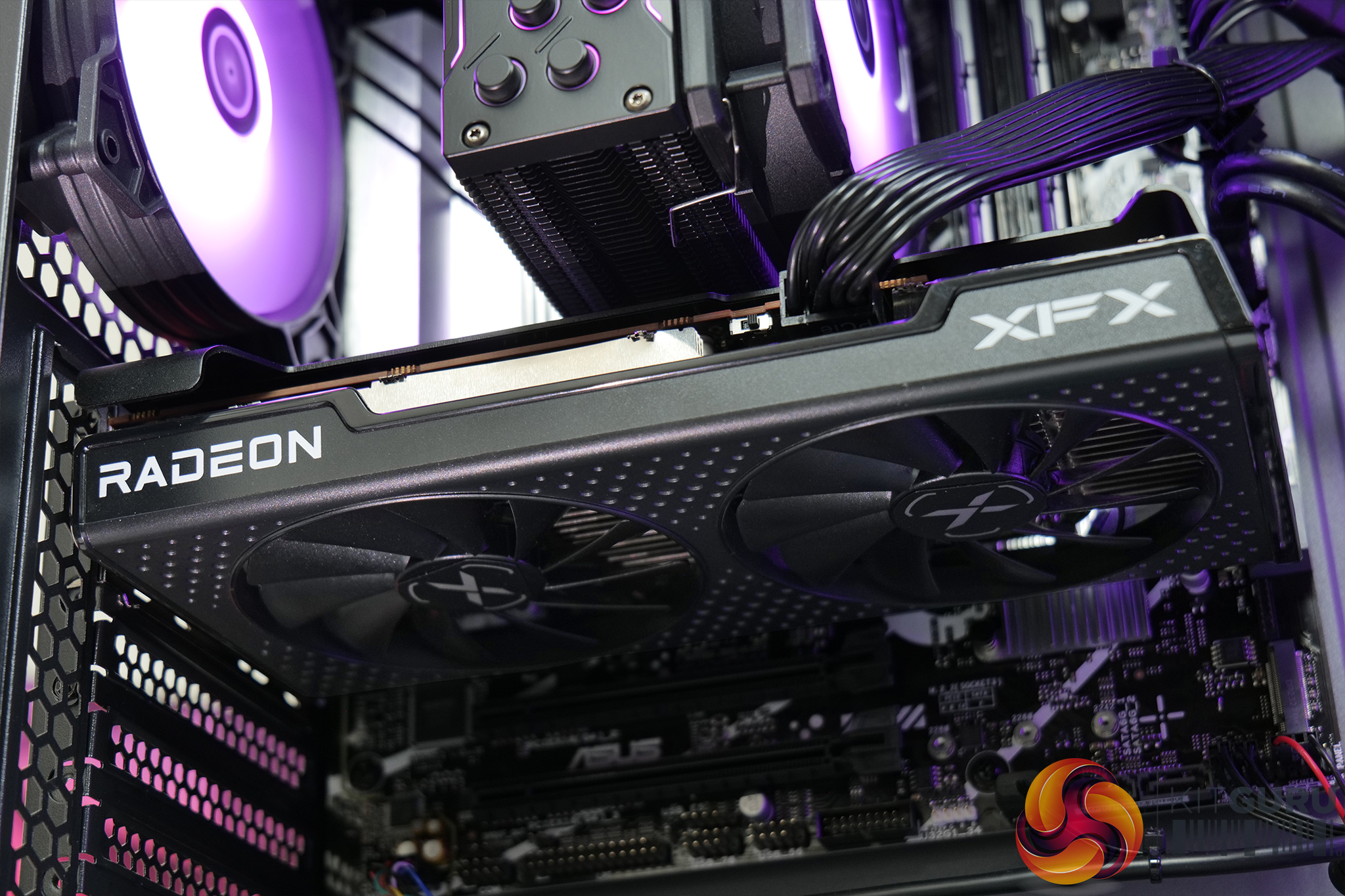
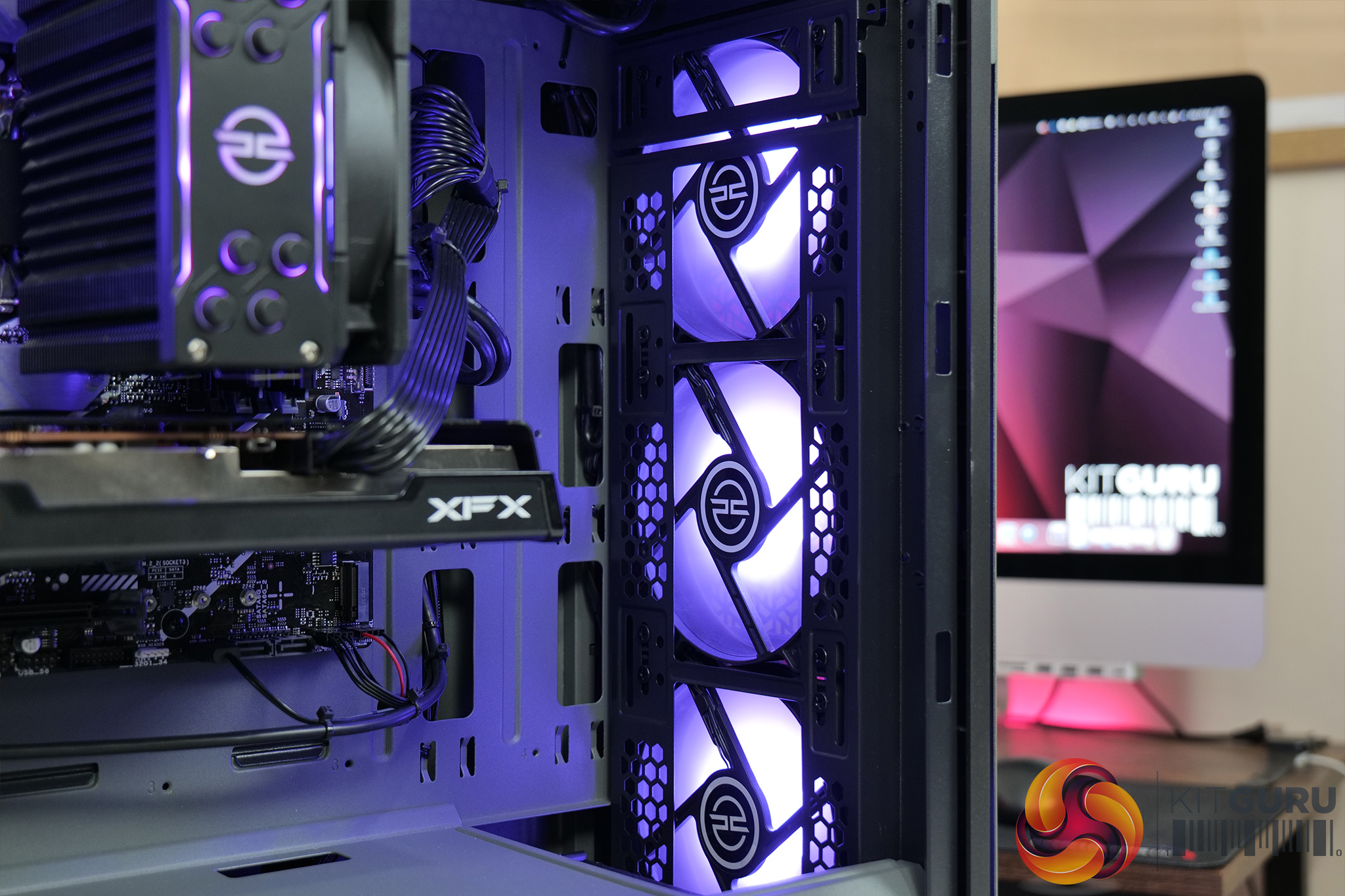
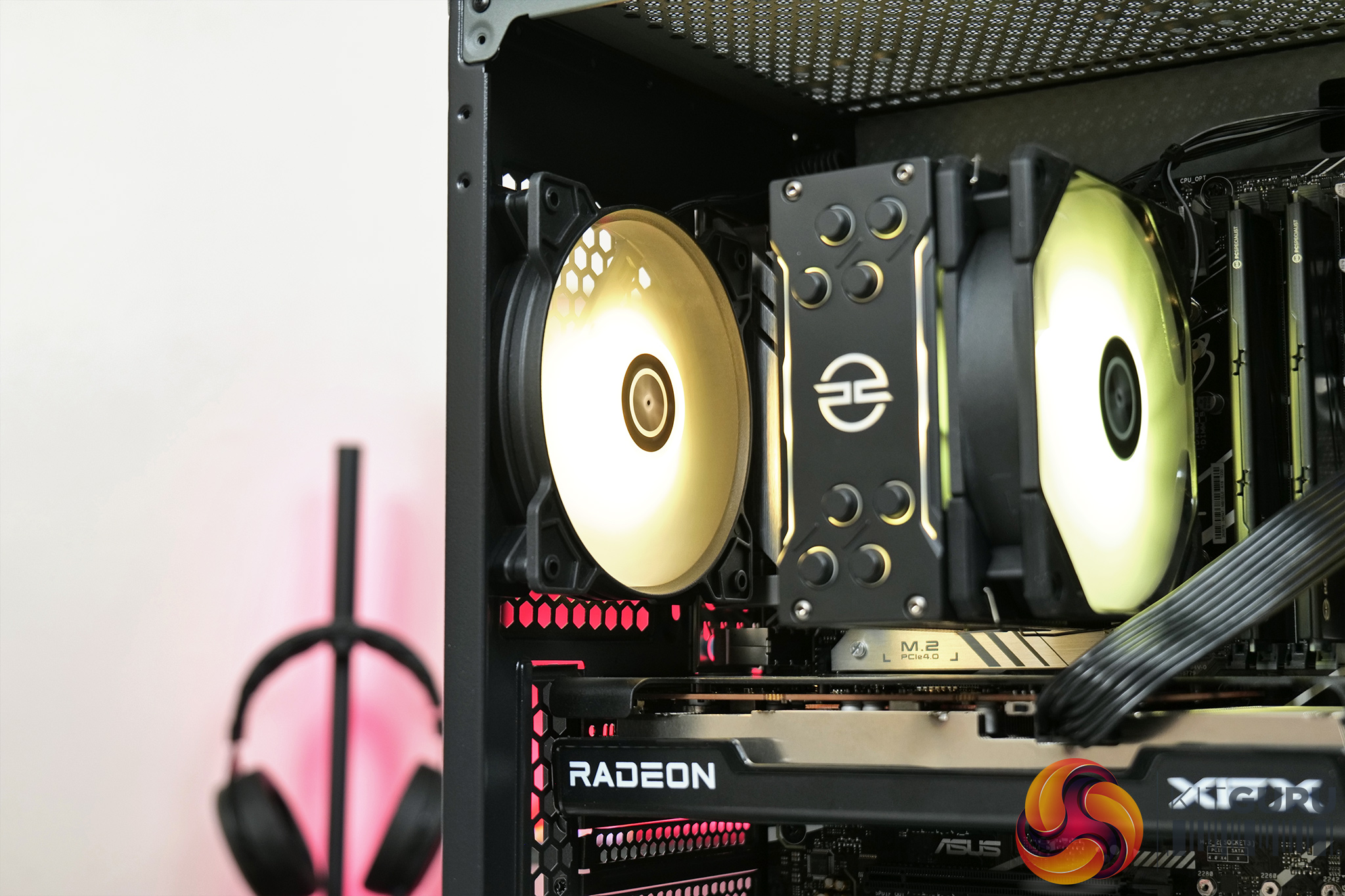
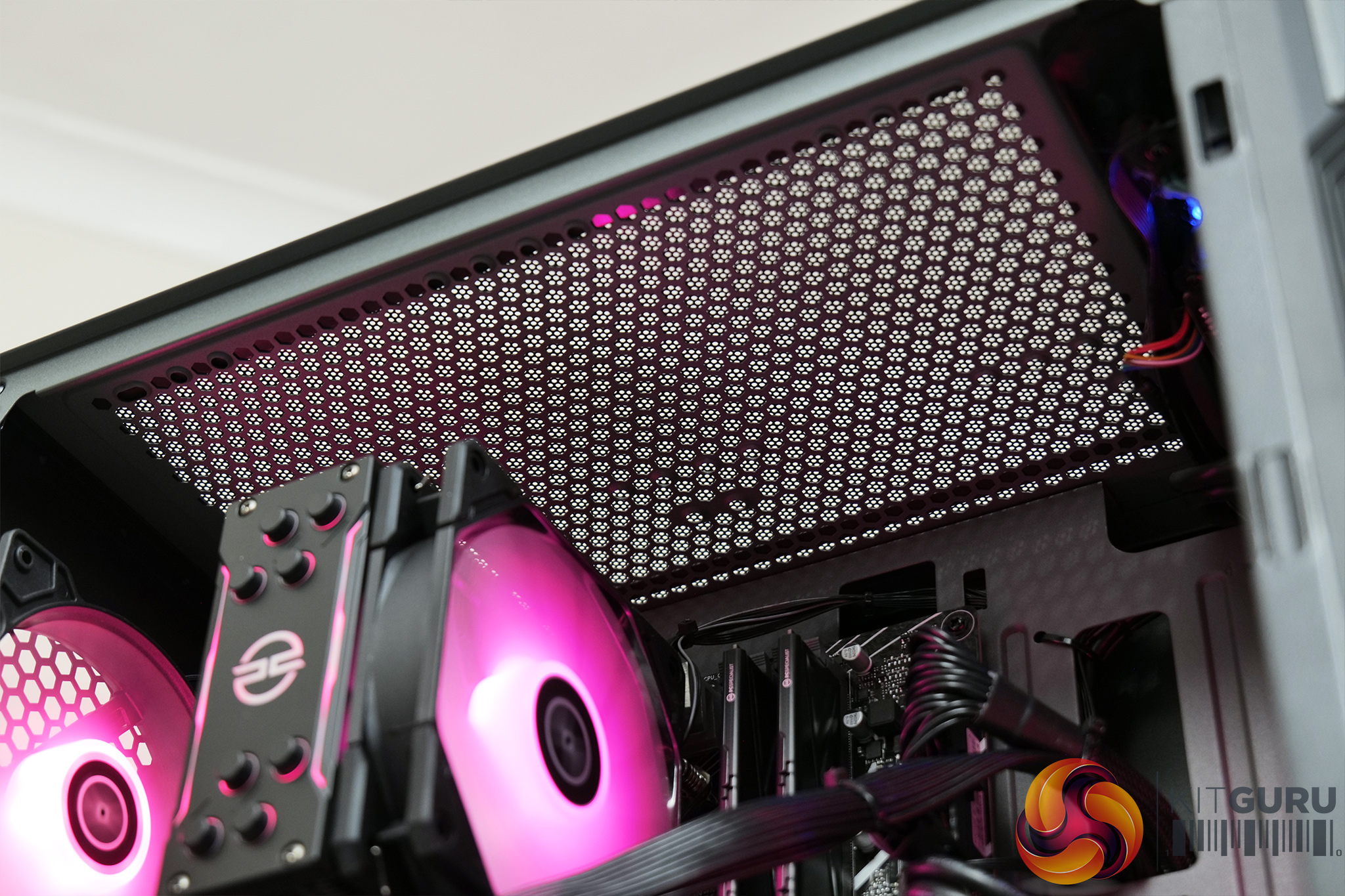
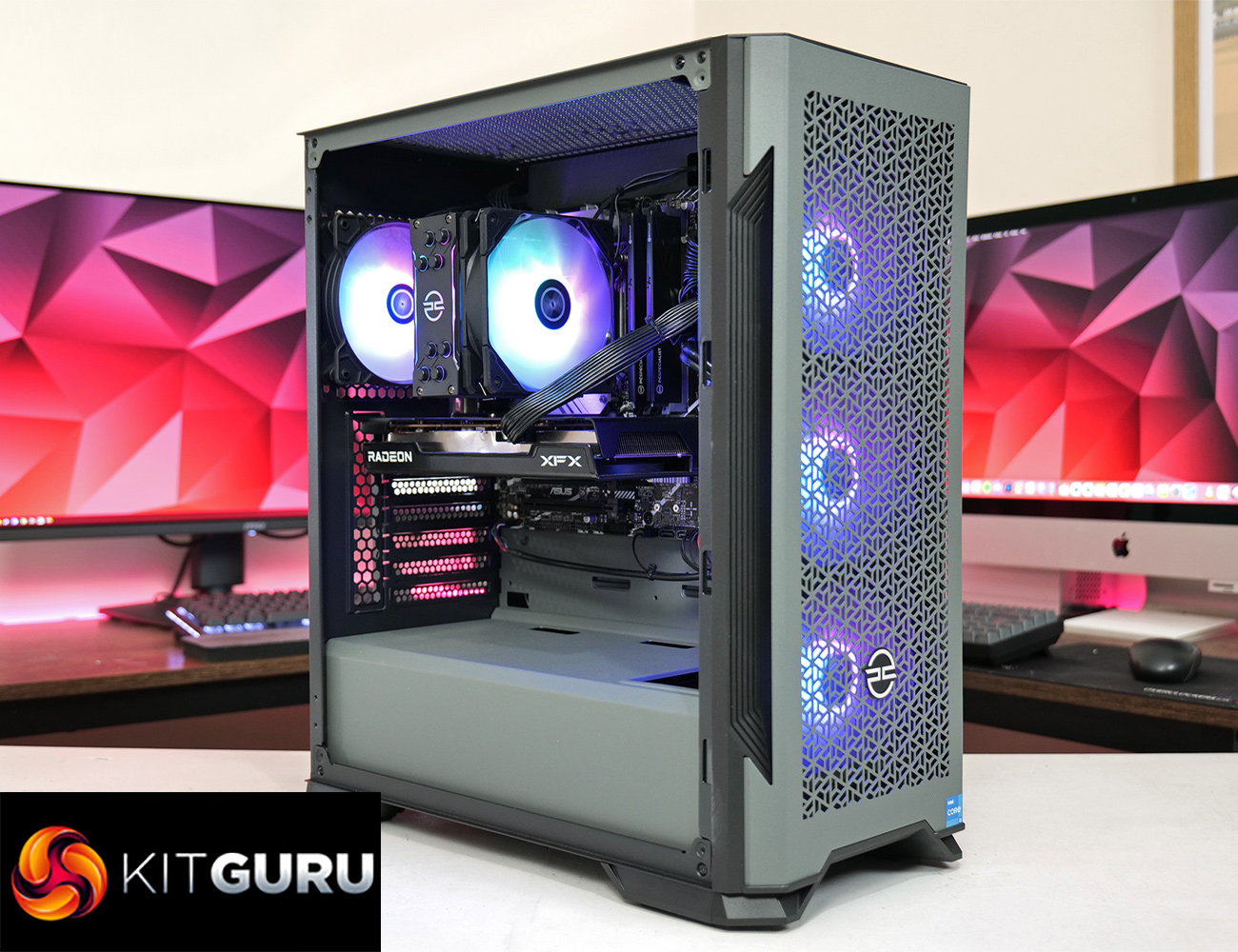
Starting off with a look at the case, PCSpecialist is using an own-brand chassis here, called the PCS Spectrum G ARGB. It's pretty compact mid-tower, with grey steel panels, a meshed front and tempered glass side panel. It's clearly built to a price as the steel panels do feel somewhat flimsy, but it'll get the job done once safely sat on a desk. It also ships with a total of four ARGB fans, three in the front and one in the back, and while the roof is left empty, it does have room for two 120/140mm fans if you wanted to add those in.
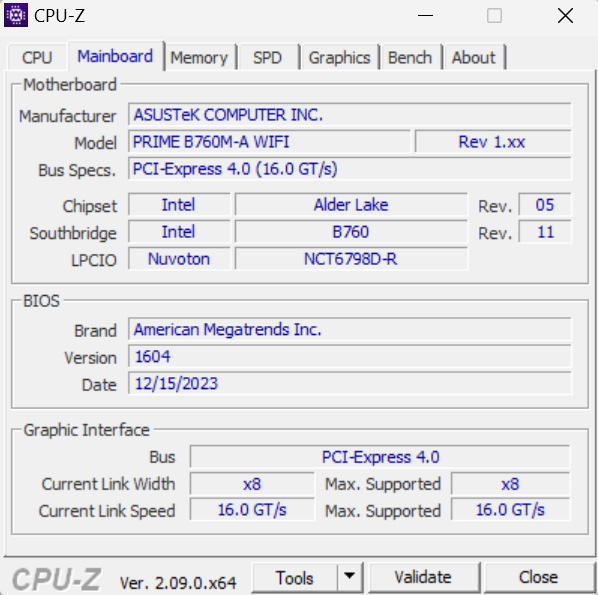
By now you will have probably noticed that this is an ATX mid-tower case, but PCSpecialist has opted for a micro-ATX motherboard, specifically the ASUS Prime B760M-A WiFi. This does mean there is quite of lot of empty space inside the chassis, so it does look slightly odd, but it is clearly a cost-saving measure to use an mATX board. The motherboard itself has been fine during my testing though, I've not had any issues with it I can't fault the BIOS setup either, with the memory at the correct speed and ReSizable BAR enabled out of the box.
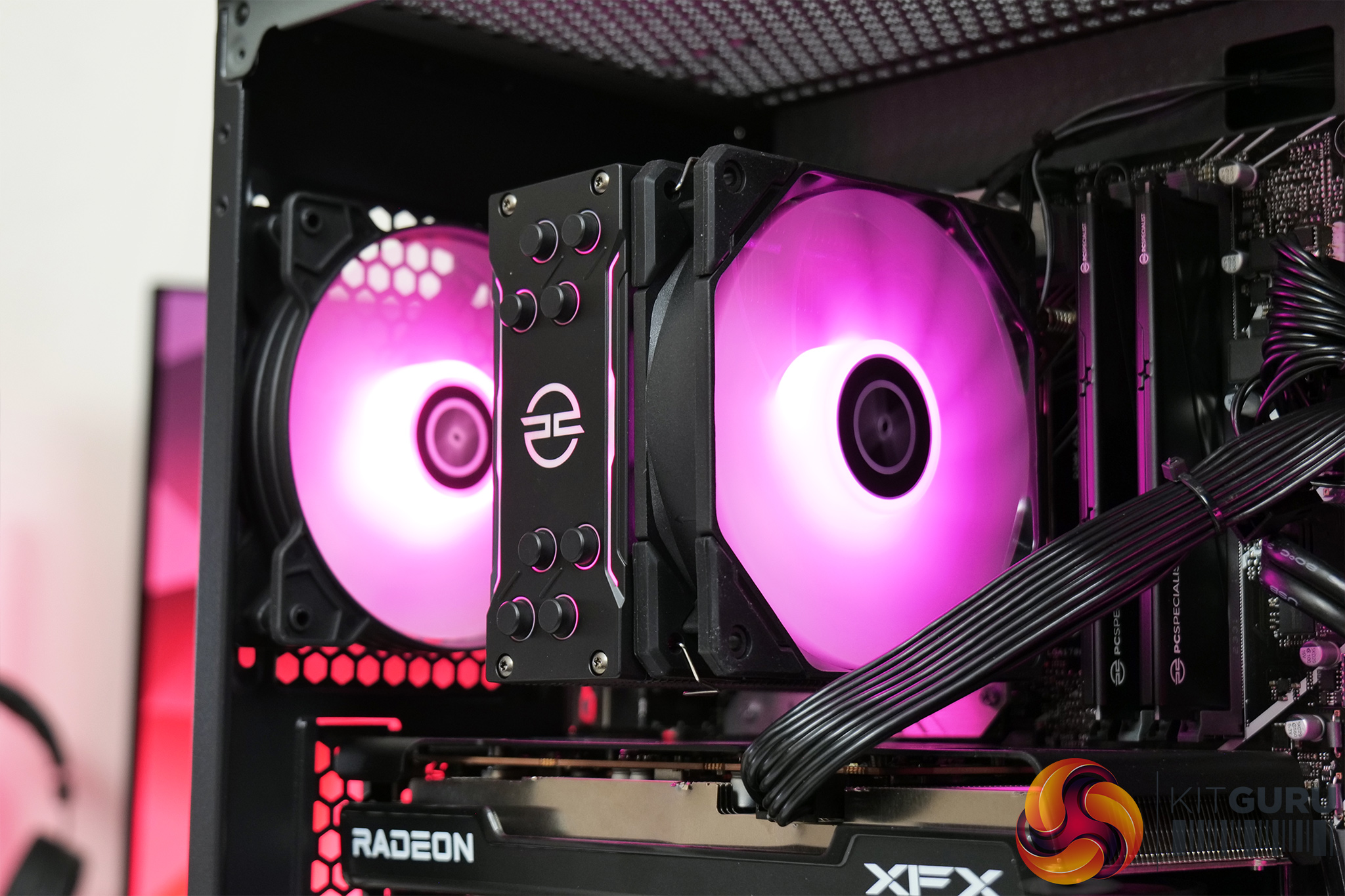
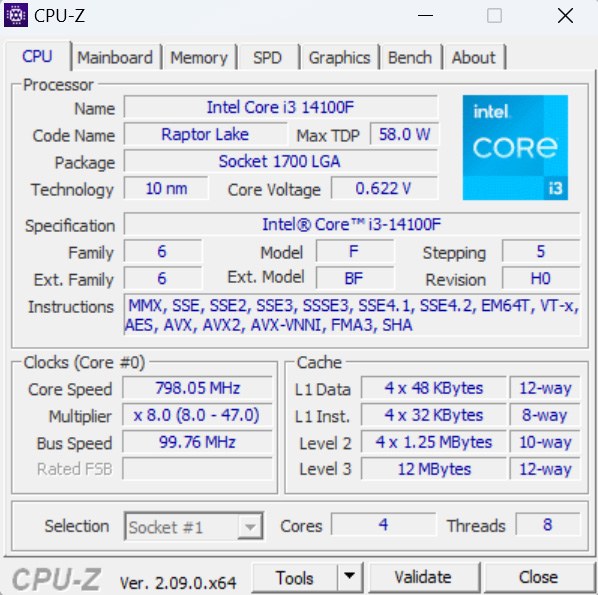
It helps that the CPU is only an Intel Core i3-14100F, offering four performance cores with hyper-threading, but no efficiency cores, and a rated 58W base power draw. It's clearly meant to hit a certain price-point, as the CPU alone is only a little more than £110, but it will be interesting to see how it stacks up for gaming. Its low power draw also means PCSpecialist hasn't gone overboard with the cooler, as we find a PCSpecialist-branded FrostFlow 100V3, a fairly standard-looking 4-heatpipe tower cooler.
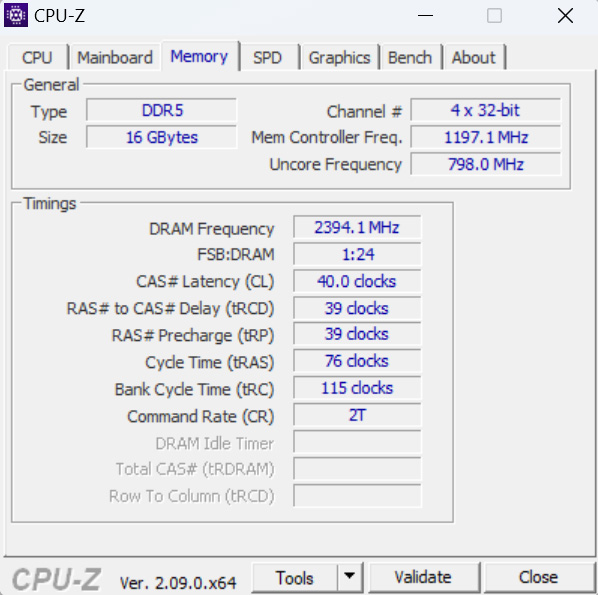
Paired with the i3 CPU we find 16GB of DDR5 memory, clocked at 4800 MT/s. This is again PCSpecialist-branded, but AIDA64 did suggest the modules are manufactured by ADATA. Either way, 16GB is reasonable for a system of the price, though 4800 MT/s is quite slow by modern standards, as is the CL40 latency – but it all comes back to the price-point.
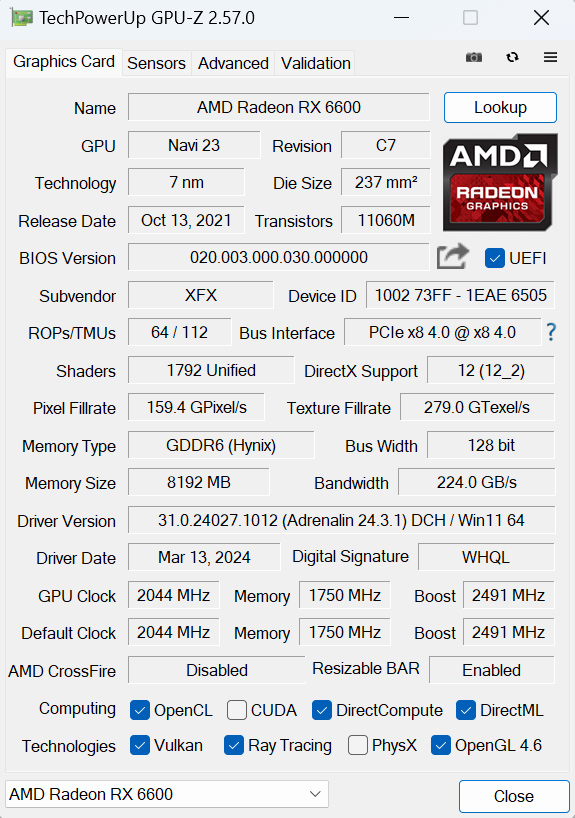
Providing our GPU horsepower, PCSpecialist has opted for an AMD Radeon RX 6600, with the XFX Speedster SWFT 210 model used here. It may be about two and a half years old now but the RX 6600 is still a great choice for budget-conscious gamers and we will be testing it at both 1080p and 1440p later in the review.
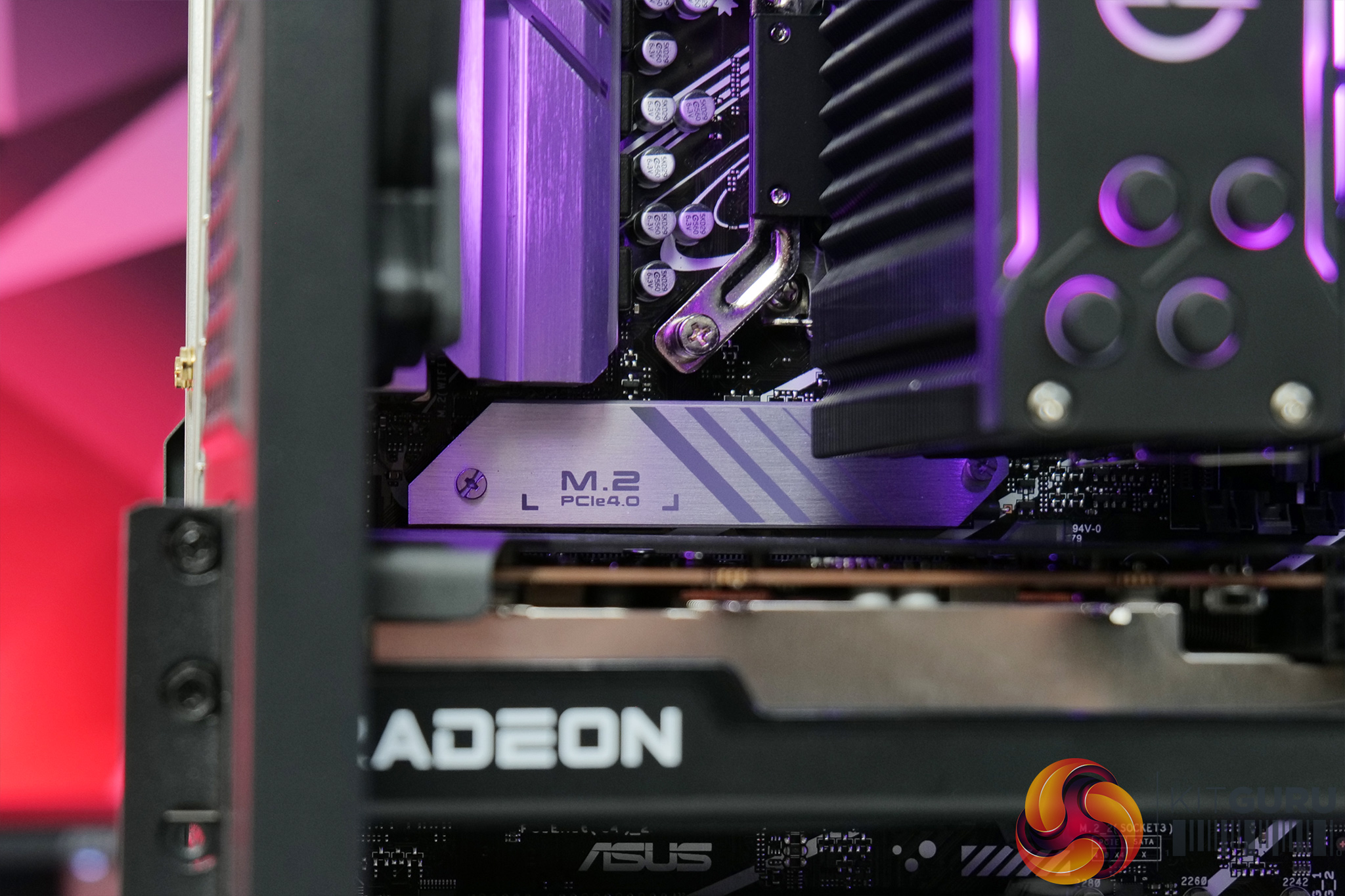
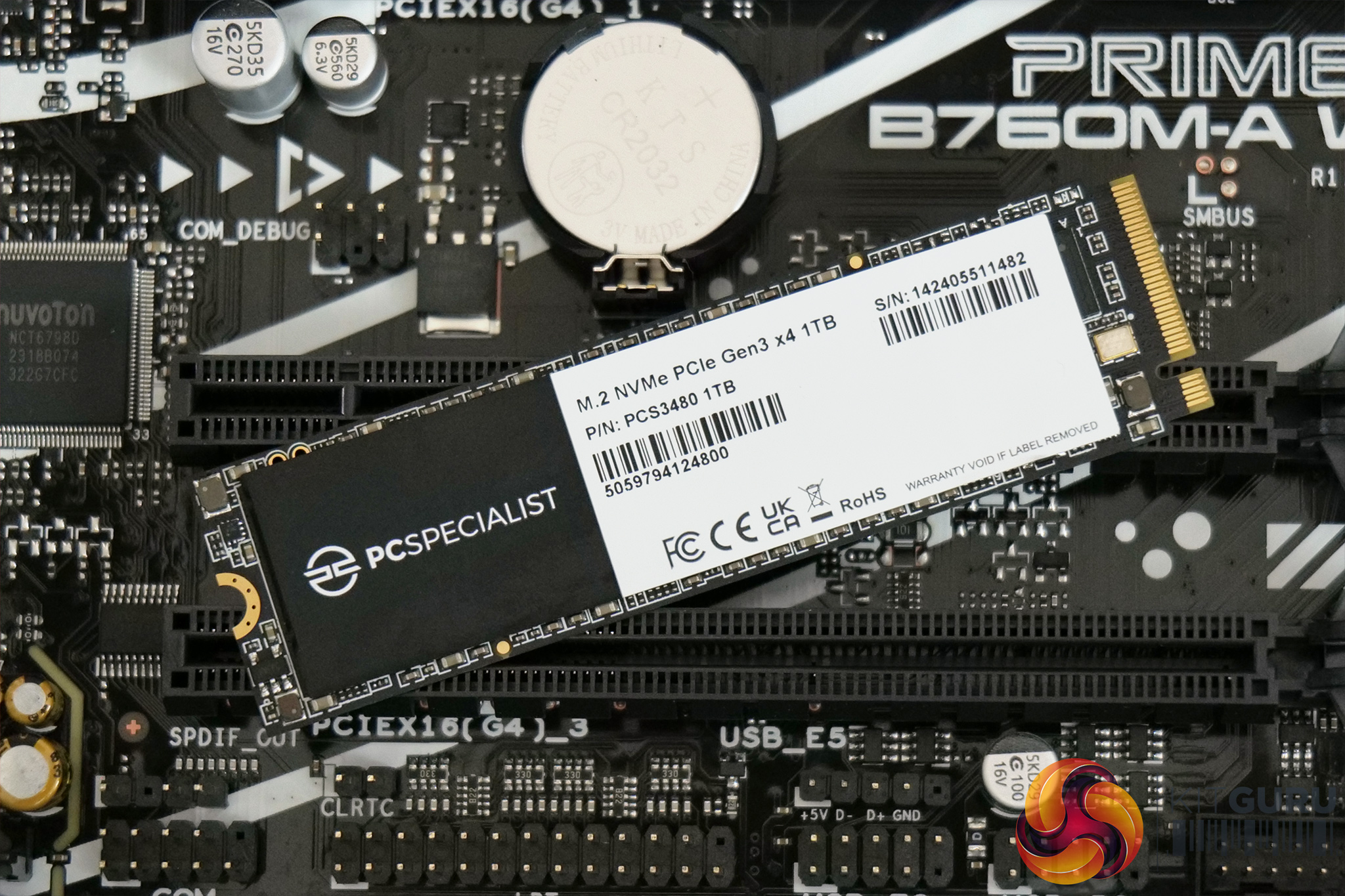
One thing not immediately visible is the SSD. PCSpecialist has opted for a single M.2 drive, and this has been installed in the primary slot underneath the integrated heatsink. Specifically, it's a 1TB PCS3840 own-brand drive, and it's only PCIe Gen 3 speed, rated for 3500 MB/s write and 3200 MB/s read. Obviously 1TB doesn't go very far these days, in fact after I installed just seven games, it was almost full. The good news is another M.2 slot is very easily accessible in the bottom right corner of the motherboard, so adding in another terabyte or two down the line would be a doddle.
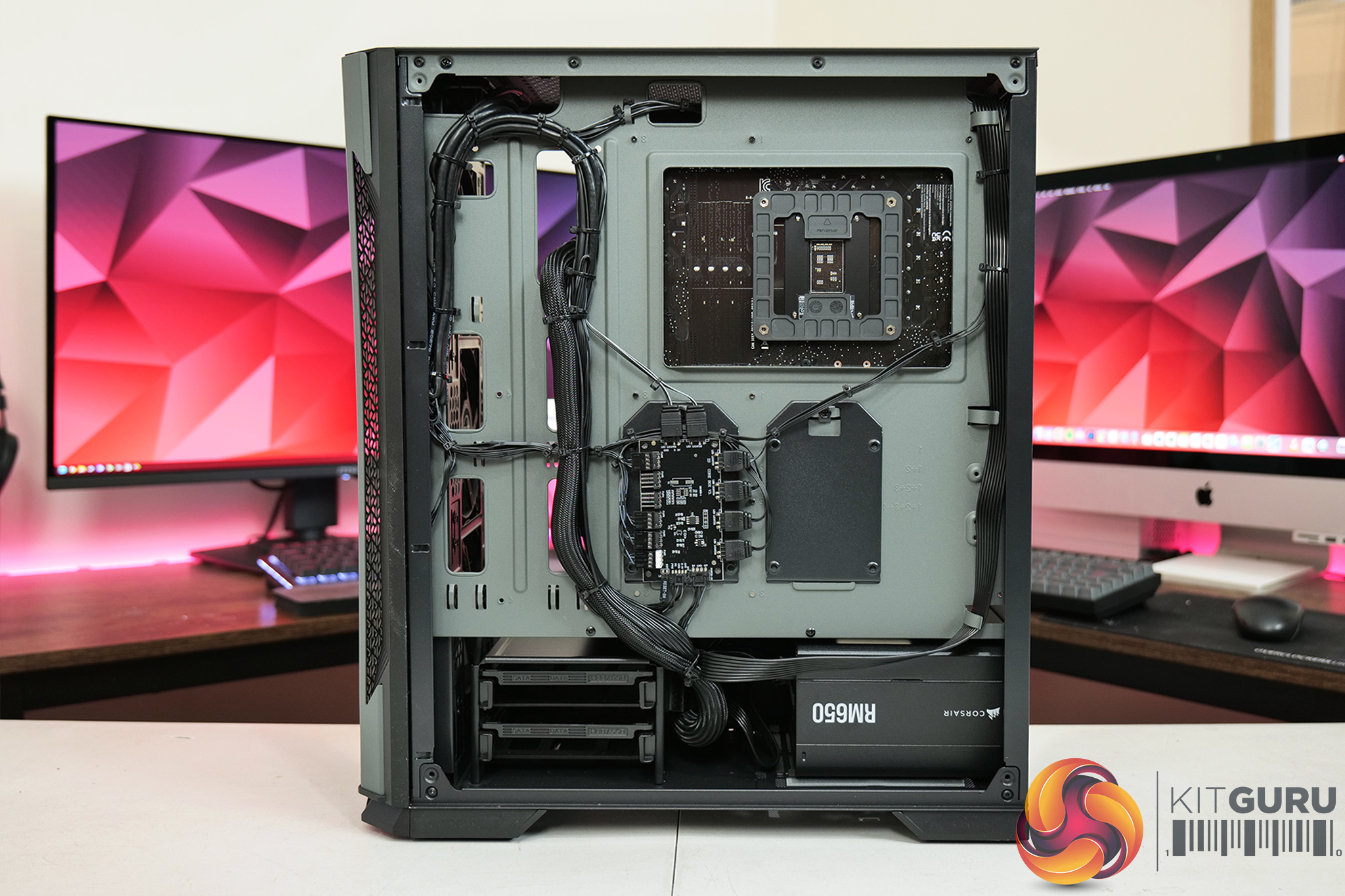
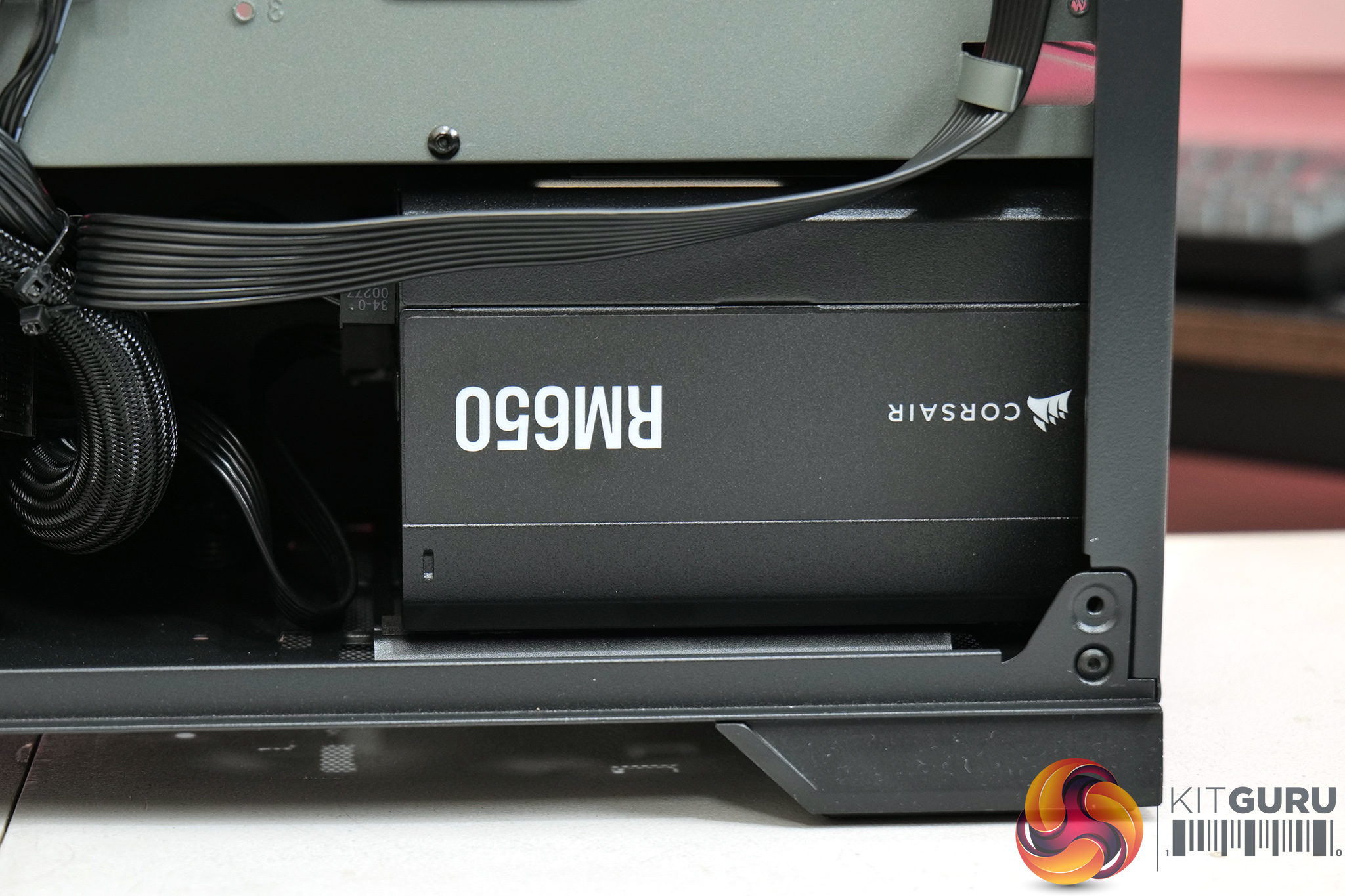
Round the back of the case we get a look at the power supply, a Corsair RM650 unit. This is a fully modular 80+ Gold unit, which I think is a fantastic inclusion at this price point – cheaper prebuilts often skimp with 80+ Bronze, or even 80+ White PSUs, but the RM650 is only £75 on its own and its great to get a quality unity included here. 650W also gives you enough headroom to be able to carry the unit forward even if you upgrade both the CPU and GPU down the line, so again, kudos to PCSpecialist here.
General cable management is also very good as we can see. Round the back everything has been very neatly down behind the motherboard tray, there are a few trailing cables in the main compartment – specifically the HD Audio front panel connector – but it's hard to be overly critical here.
You'll also notice that central control hub round the back, which is both a fan and ARGB controller. All five fans in the system feature ARGB lighting, as well as the PCSpecialist FrostFlow cooler heatsink, and this control hub connects to the reset switch on the front panel so you can change lighting effects and colours without the need for software.
Software and Games
To test the PCSpecialist Cobalt Spark R, we used the following software/games:
- 3DMark Time Spy
- AIDA64 Engineer
- Cinebench R23
- CrystalDiskMark
- PCMark 10
- Call of Duty: Modern Warfare III
- Cyberpunk 2077
- Forza Horizon 5
- Rainbow Six Siege
- Starfield
- Total War: Warhammer III
We used the AMD Adrenalin 24.3.1 driver, which was the latest at the time of testing.
Comparison Systems
Not every system below is compared against the Cobalt Spark R in every benchmark, but where applicable we have used the following systems as a point of reference:
- Case: CORSAIR 3000D AIRFLOW MID TOWER GAMING CASE
- Processor (CPU): AMD Ryzen 5 7500F Six Core CPU (3.7GHz-5.0GHz/38MB CACHE/AM5)
- Motherboard: ASUS® PRIME B650-PLUS (DDR5, USB 3.2, 6Gb/s) – ARGB Ready!
- Memory (RAM): 32GB Corsair VENGEANCE RGB DDR5 6000MHz (2 x 16GB)
- Graphics Card: 10GB AMD RADEON™ RX 6700 – HDMI, DP – DX® 12
- 1st M.2 SSD Drive: 1TB SOLIDIGM P41+ GEN 4 M.2 NVMe PCIe SSD (up to 4125MB/s R, 2950MB/s W)
- Power Supply: CORSAIR 750W RMe SERIES™ MODULAR 80 PLUS® GOLD
- Power Cable: 1 x 1.5 Metre UK Power Cable (Kettle Lead)
- Processor Cooling: PCS FrostFlow 100 V3 Series High Performance CPU Cooler
-
WIRELESS INTEL® WI-FI 6E AX210 2,400MBPS/5GHZ, 300MBPS/2.4GHZ PCI-E CARD + BT 5.0
- Windows 11 Home 64 Bit – inc. Single Licence [KK3-00027]
- PCS P209 ARGB MID TOWER CASE
- Intel® Core™ i5 Six Core Processor i5-12400F (2.5GHz)
- ASUS® PRIME B660-PLUS D4 (DDR4, USB 3.2, 6Gb/s)
- 16GB Corsair VENGEANCE DDR4 3200MHz (2 x 8GB)
- 8GB AMD RADEON™ RX 6600 – HDMI, DP – DX12
- 1TB PCS PCIe M.2 SSD (2200 MB/R, 1500 MB/W)
- CORSAIR 550W TXm SERIES™ SEMI-MODULAR 80 PLUS® GOLD
- PCS FrostFlow 100 RGB V3 Series High Performance CPU Cooler
- 1x 120mm Black Case Fan
- WIRELESS INTEL® Wi-Fi 6 AX200 2,400Mbps/5GHz, 300Mbps/2.4GHz PCI-E CARD + BT 5.0
- Windows 11 Home 64 Bit
We also use some CPU data from Leo's Ryzen 5 5600X3D review, using his test bench setup:
- Processors: AMD Ryzen 5 5600X3D, Ryzen 5 5600X
- CPU Cooler: Corsair H150i Elite LCD
- Motherboard: Gigabyte B550 Aorus Master
- Memory: 32GB Corsair Vengeance LPX DDR4-3600 C16
- Graphics card: Gigabyte RTX 4080 16GB
- Power supply: Seasonic Prime PX-1600 ATX 3.0
- SSD: PNY CS3140 M.2 NVMe
- OS: Windows 11
- Processor: AMD Ryzen 5 7600X
- CPU Cooler: Corsair H150i Elite LCD
- Motherboard: Gigabyte X670 Aorus Elite
- Memory: 32GB G.Skill Trident Z5 Neo DDR5-6000 C30
- Graphics card: Gigabyte RTX 4080 16GB
- Power supply: Seasonic Prime PX-1600 ATX 3.0
- SSD: Sabrent Rocket 4.0 M.2 NVMe
- OS: Windows 11
And some of my own data from our GPU reviews has also been used, with the following hardware configuration:
- CPU: Intel Core i9-13900KS
- Motherboard: Gigabyte Z790 Gaming X AX
- Memory: 32GB (2x16GB) Corsair Dominator Platinum RGB DDR5 6000MHz
- Graphics Card: RX 6600, RX 6600 XT, RX 7600, RTX 3060, RTX 3050, RX 6500 XT
- SSD: 4TB Seagate Firecuda 530 Gen 4 PCIe NVMe
- Chassis: Corsair 5000D Airflow Tempered Glass Gaming Case
- CPU Cooler: Corsair iCUE H150i Elite RGB High Performance CPU Cooler
- Power Supply: Corsair 1600W Pro Series Titanium AX1600i Digital Modular PSU
- Operating System: Windows 11 23H2
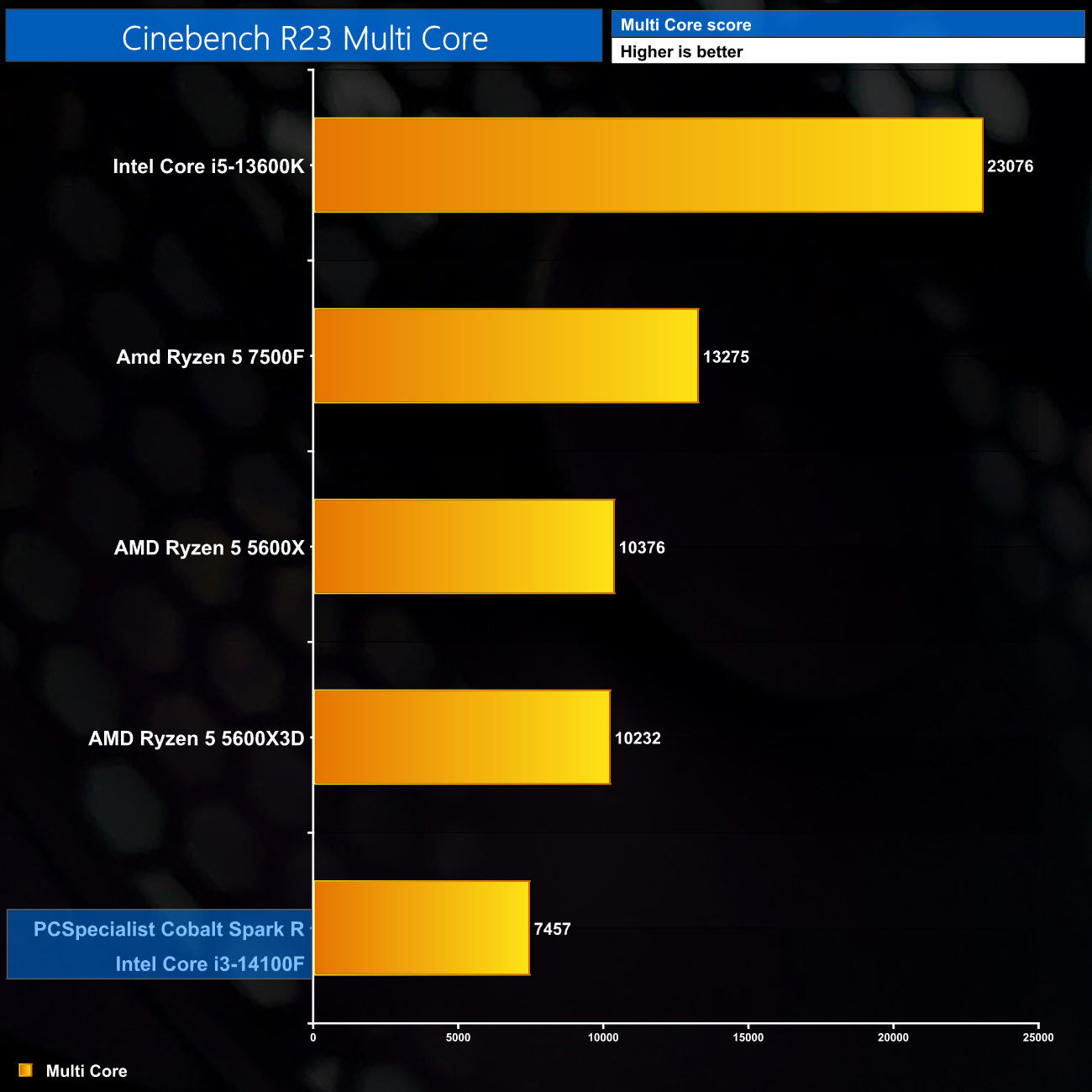
Starting our benchmarks with Cinebench Multi Core, it's not a surprise that a quad-core processor doesn't score too highly here – it's actually been some time since we benchmarked a quad-core CPU in a review so I don't have much relevant real-world data, but suffice to say the Cobalt Spark R is unlikely to be used for much rendering work.
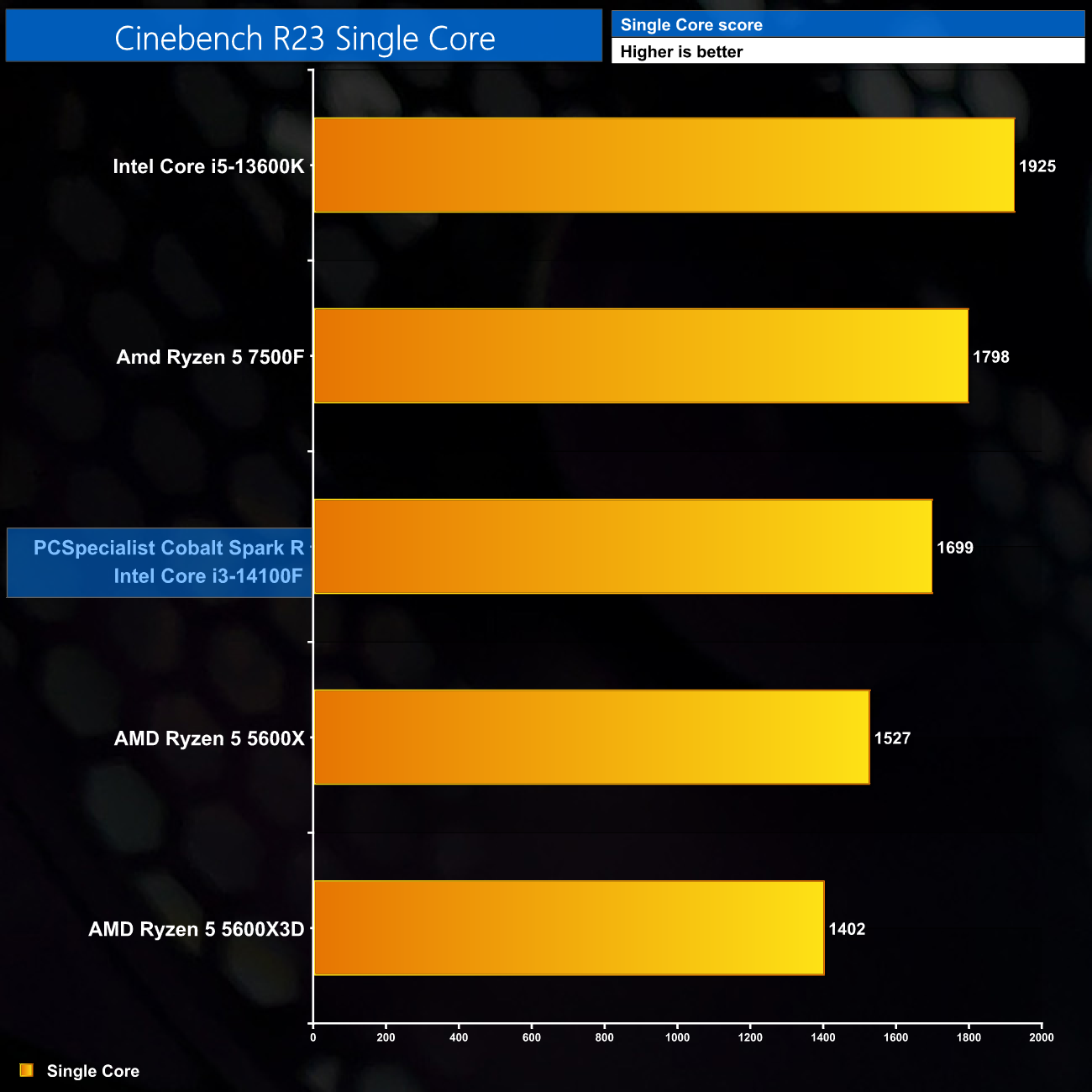
Intel's Raptor Lake processors deliver solid single-core performance however, with the 14100F sitting around 1700 points.
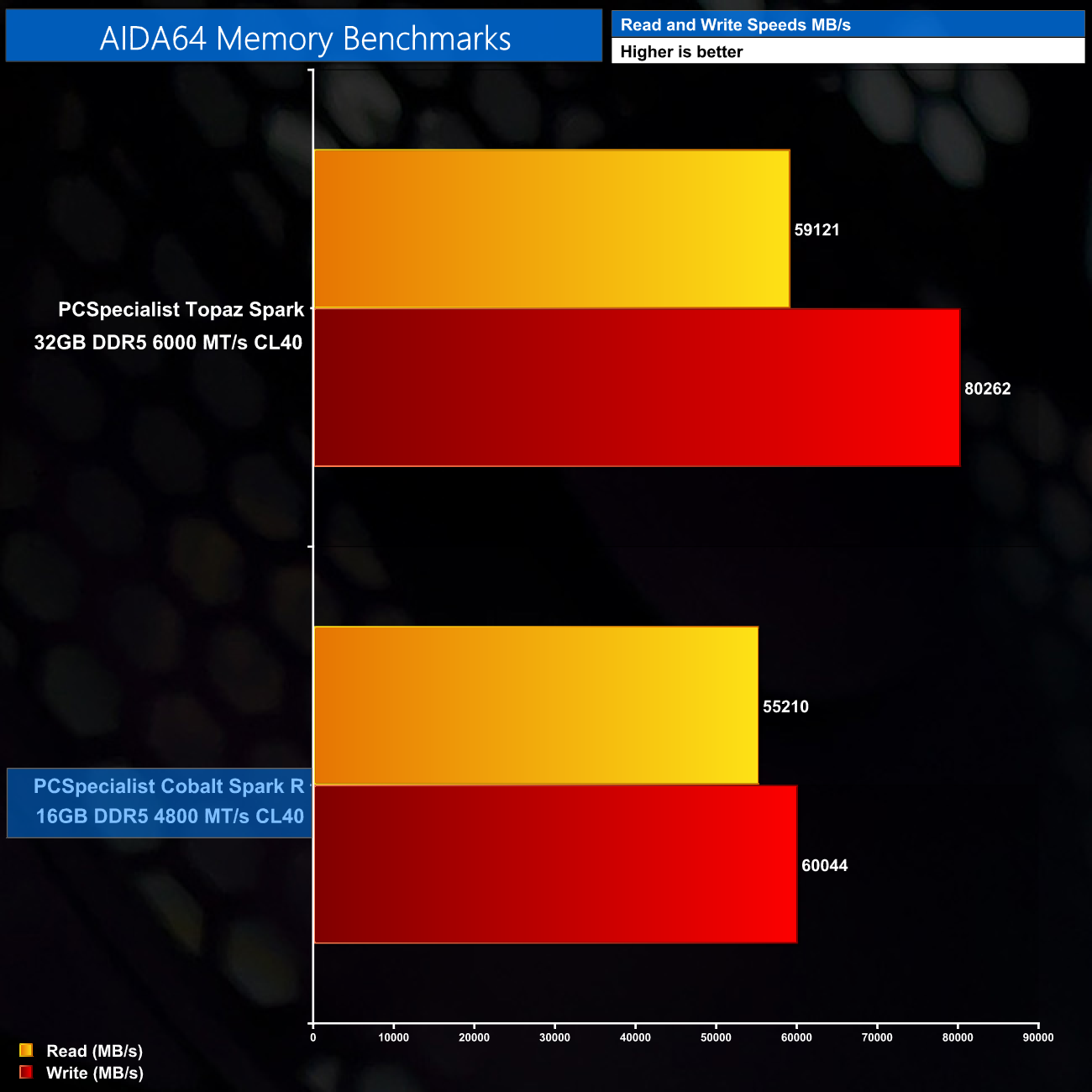
Naturally, with 16GB of fairly slow DDR5 memory, read and write speeds aren't as high as the 6000 MT/s kit found in the PCSpecialist Topaz Spark prebuilt, though they're not awful either, particularly the read speeds.
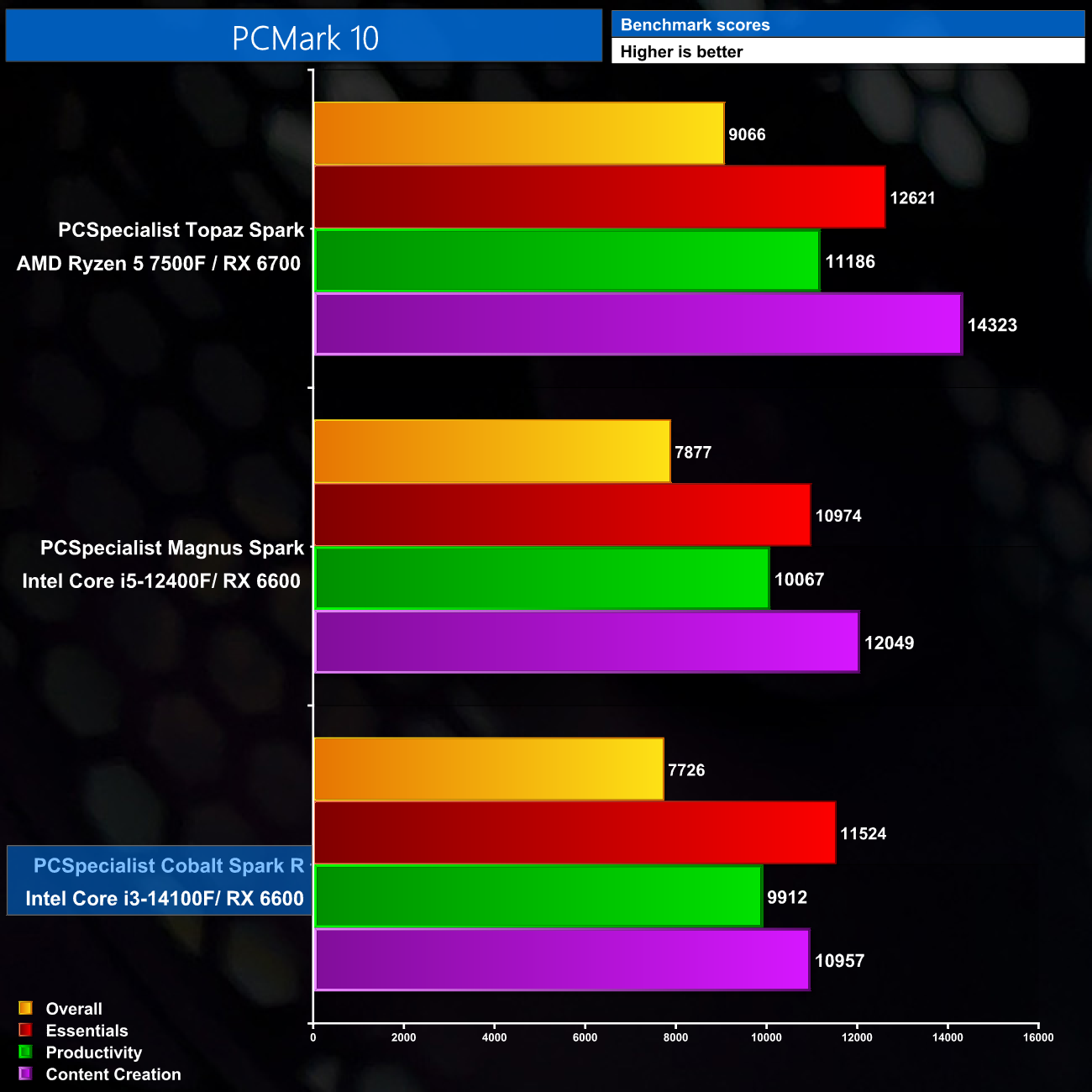
PCMark 10 also shows similar overall performance to the PCSpecialist Magnus Spark that I reviewed about a year ago – that machine cost £999 at the time of the review and offered a six-core 12400F, and the Cobalt Spark R compares reasonably well considering its lower price.
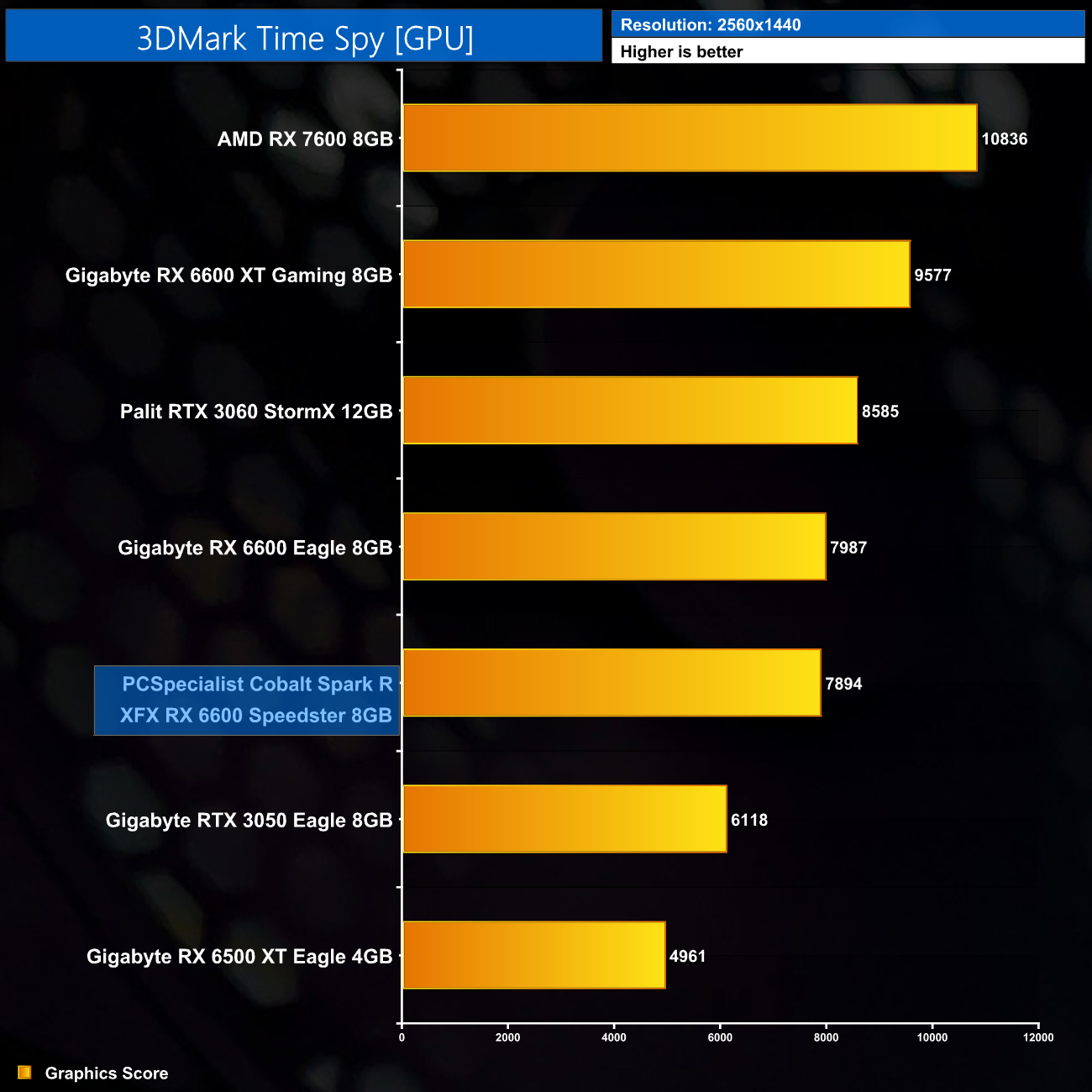
It's also good to see that the XFX RX 6600 used in this system performs as expected, delivering almost 8000 points in 3DMark Time Spy, which is basically the same score that I saw from the Gigabyte Eagle model in my own testing.
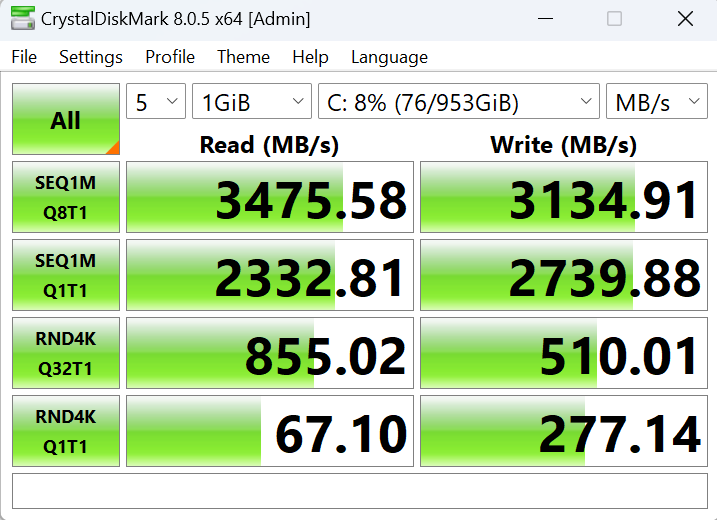
Lastly, the SSD delivers performance that is basically as advertised, we see read speeds just shy of 3.5GB/s, while writes come in a little over 3.1GB/s. It won't win any awards for raw speed, but it is absolutely fine for gaming.
For our game benchmarks we tested at both 1080p and 1440p resolution. Usually we exclusively test using Ultra settings, but this time we made sure to test High settings (or the equivalent) as well. After all, some modern games may be too demanding to play maxed-out on a £799 PC, so it's good to see what it can offer if you dial down the image quality by a small amount.
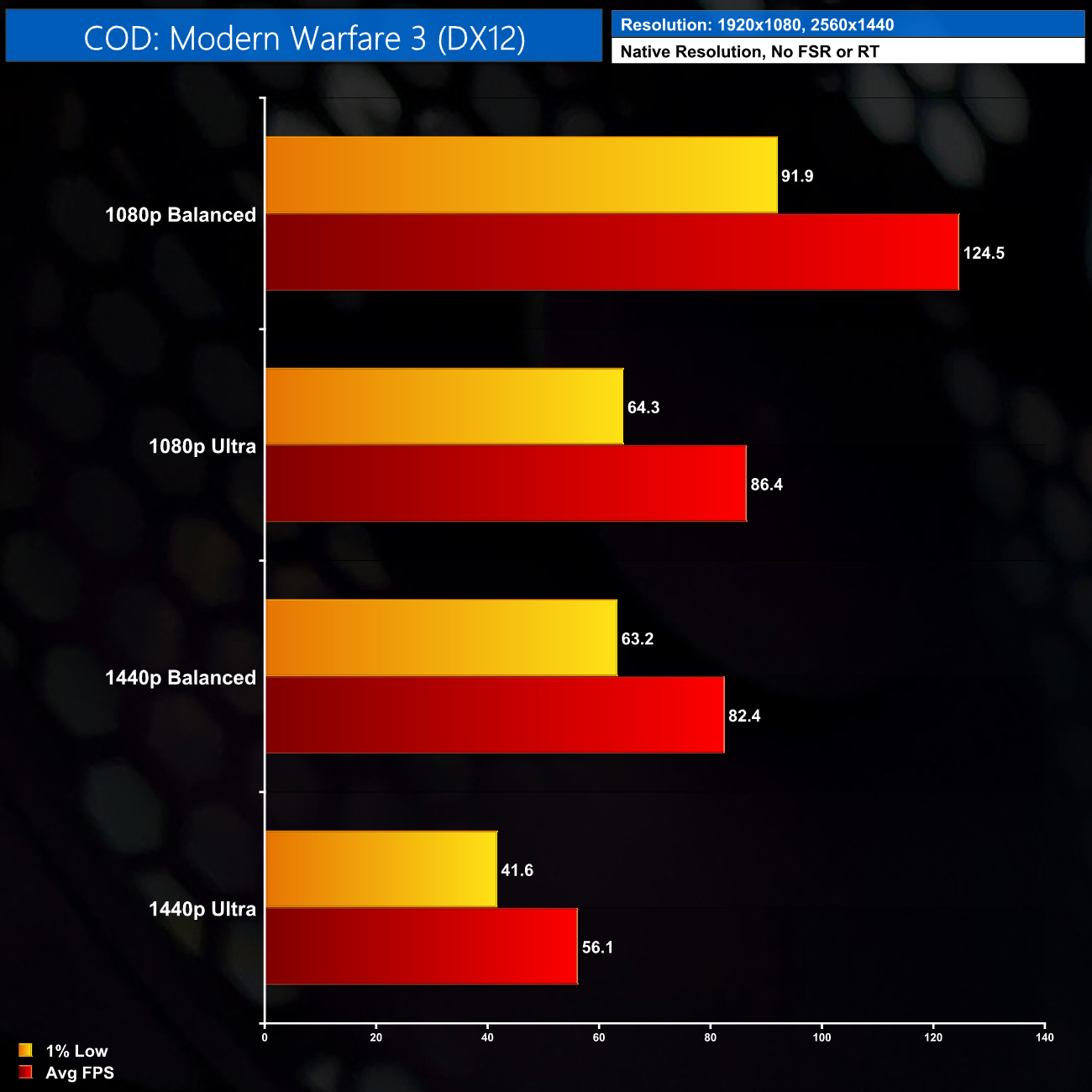
COD: MW3 plays pretty nicely on the Cobalt Spark R, delivering over 120FPS at 1080p using the Balanced preset, and even managing 80FPS at 1440p using the same settings.
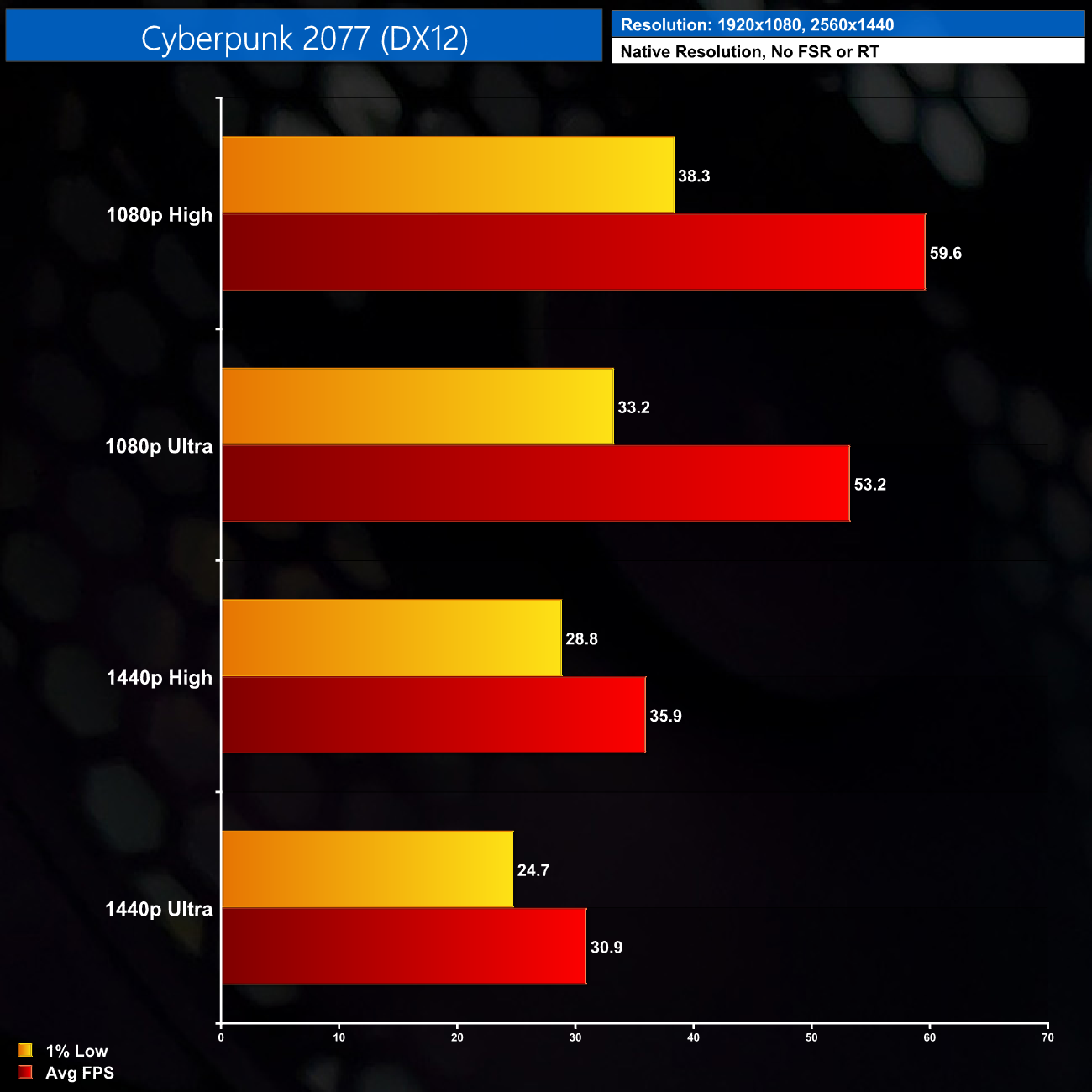
Cyberpunk 2077 is more demanding though, especially so on the CPU, but we still get reasonable performance at 1080p, with the High preset delivering almost 60FPS on average, but you wouldn't be thinking about 1440p in this title.
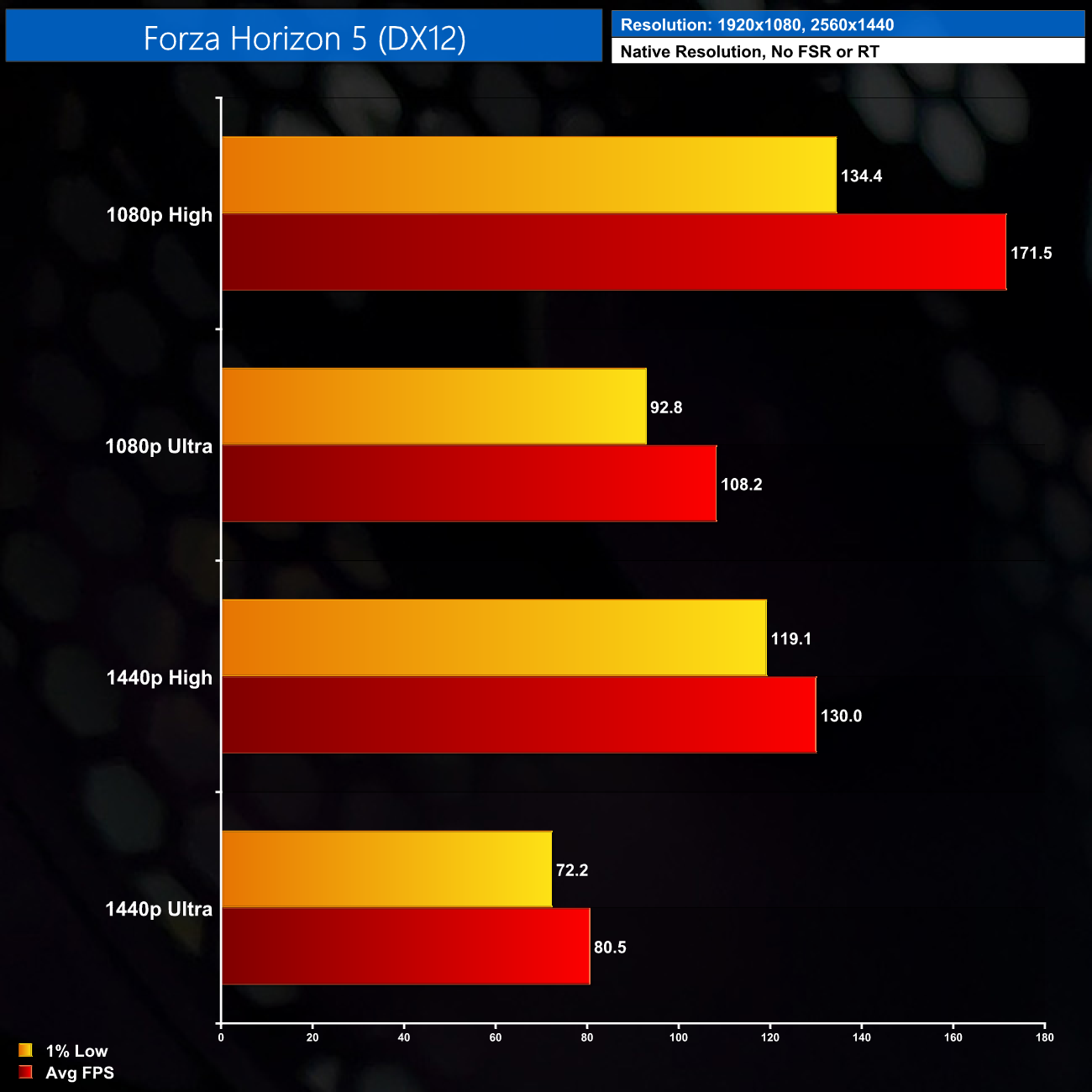
Forza Horizon 5 is very performant across the board, even 1440p using Ultra settings ran very smoothly with tight 1% lows, so I've got no complaints here.
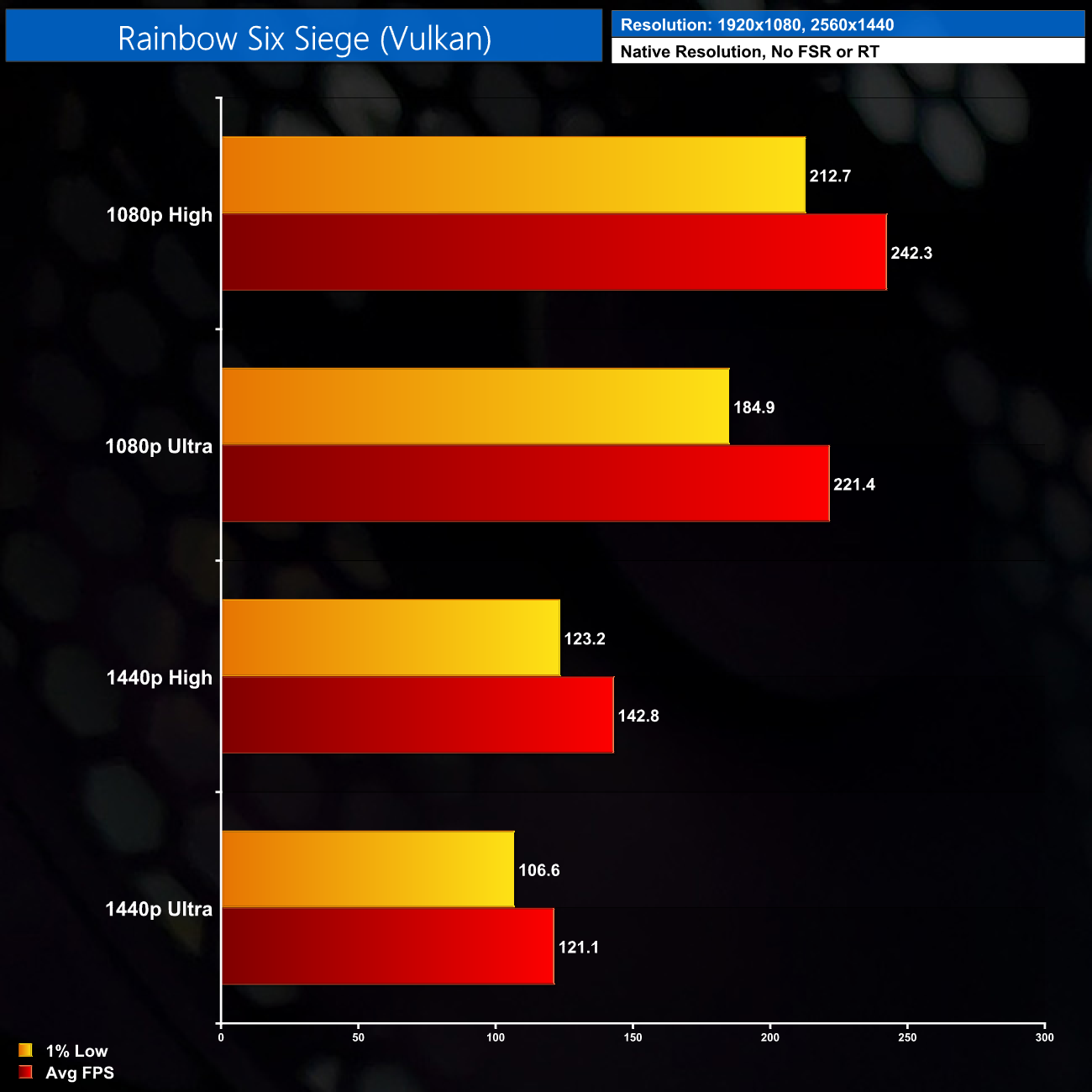
Likewise for Rainbow Six Siege, it is an older game but still very popular, and its performance is typical of other esports titles – the Cobalt Spark R delivered well over 200 FPS at 1080p, and even at 1440p Ultra settings we're still looking at 120FPS on average.
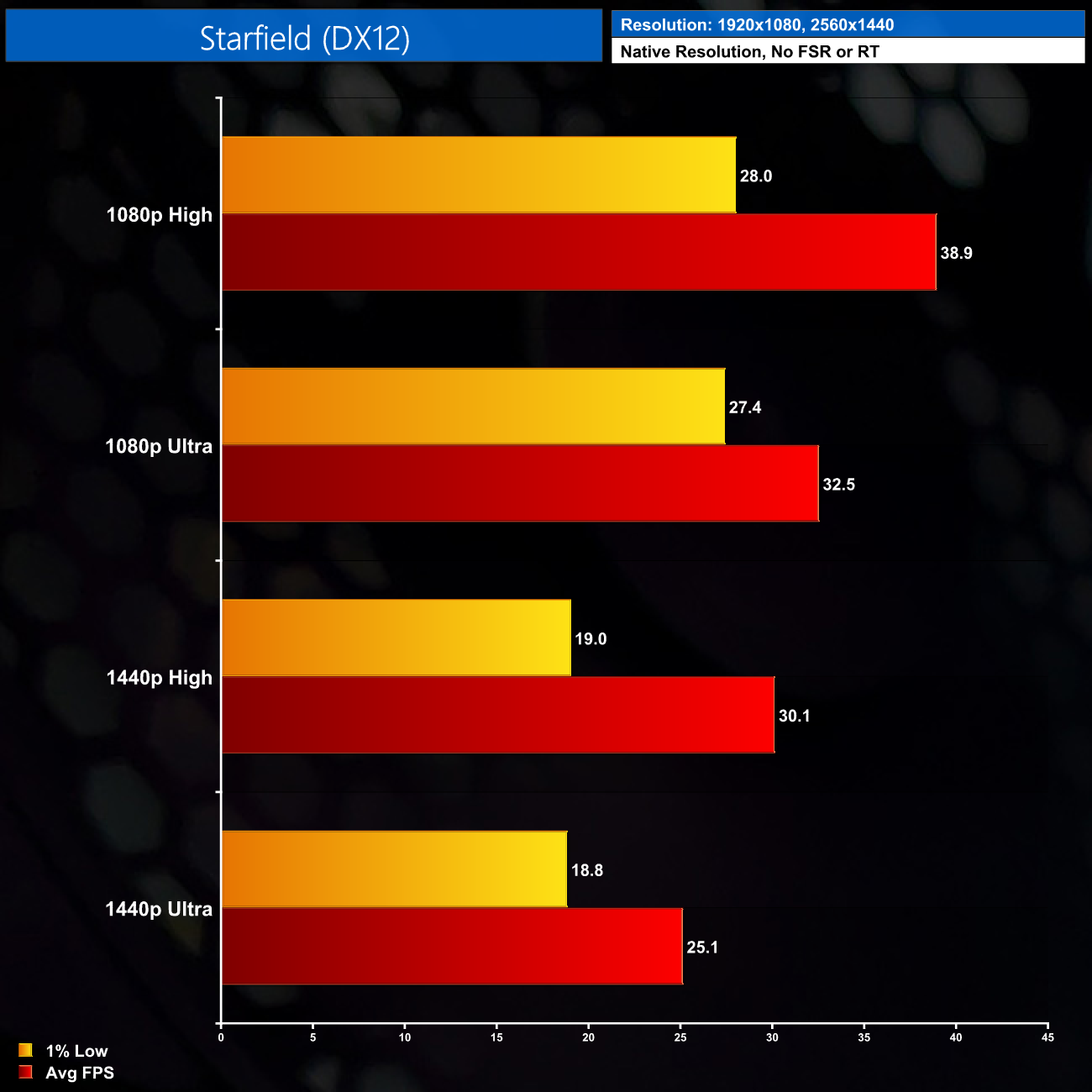
Starfield, however, shows what can happen if you have a game that's heavy on both CPU and GPU, while also not being the most optimised out there – even at 1080p using the High preset, we get just 39FPS on average, with 1% lows dipping below 30FPS.
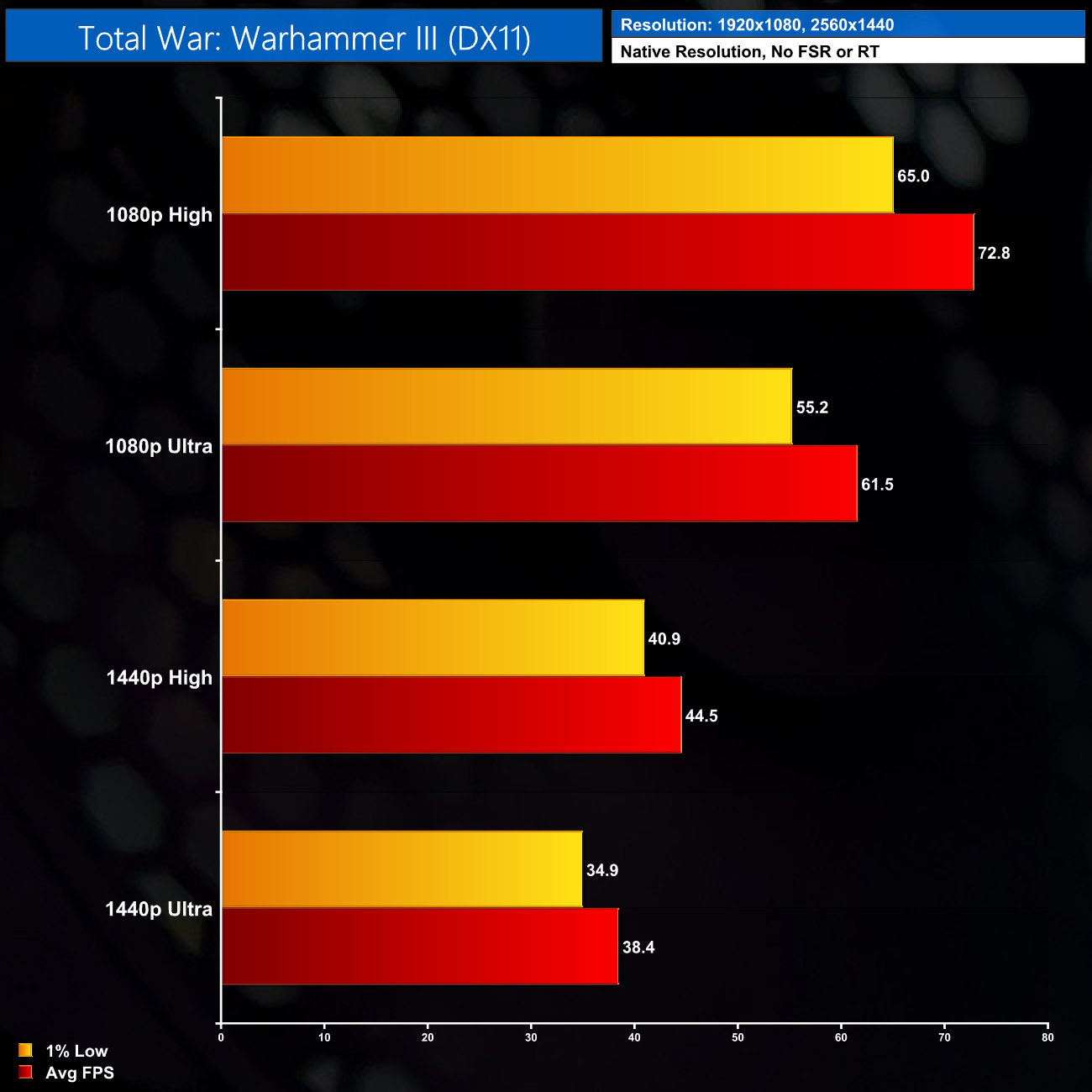
Total War: Warhammer III is fine though, it plays best at 1080p but you don't need super-high frame rates in this game, so 45FPS at 1440p High settings is also manageable.
Overall, I have to say the Cobalt Spark R exceeded my expectations. Of course we have to be realistic and no, it won't play every game at ultra settings – after all, it's an i3 and RX 6600 system that costs less than £800. However, if it's for a kid or someone who only wants to play a bit of COD or CS2, then the results here show it can definitely deliver the goods.
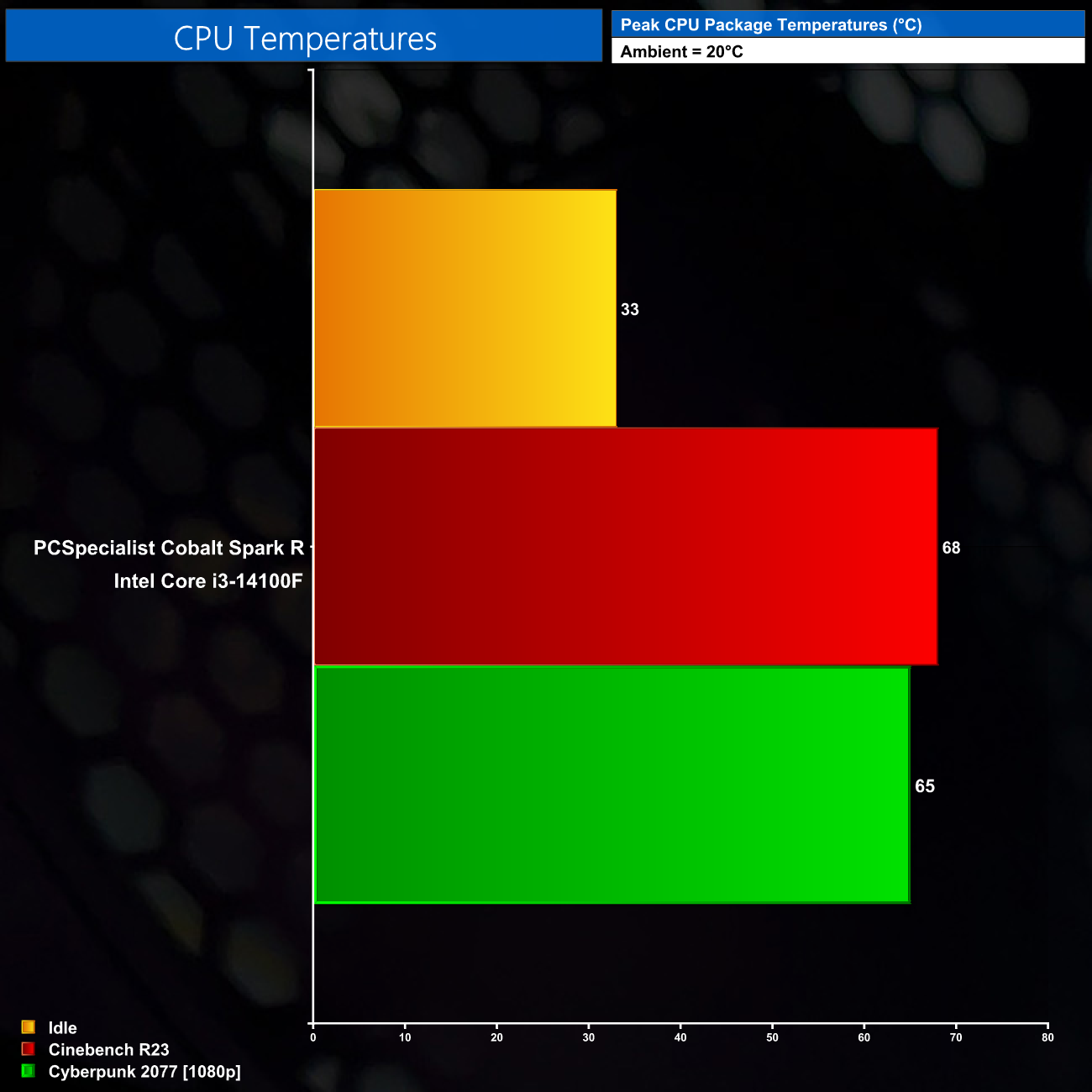
In terms of CPU thermals, the compact PCS FrostFlow air cooler had zero issues dealing with the i3-14100F. During an all-core Cinebench workload, the CPU drew less than 60W package power and it didn't even hit 70C, while we saw similar thermals during a 30-minute stress test in Cyberpunk 2077.
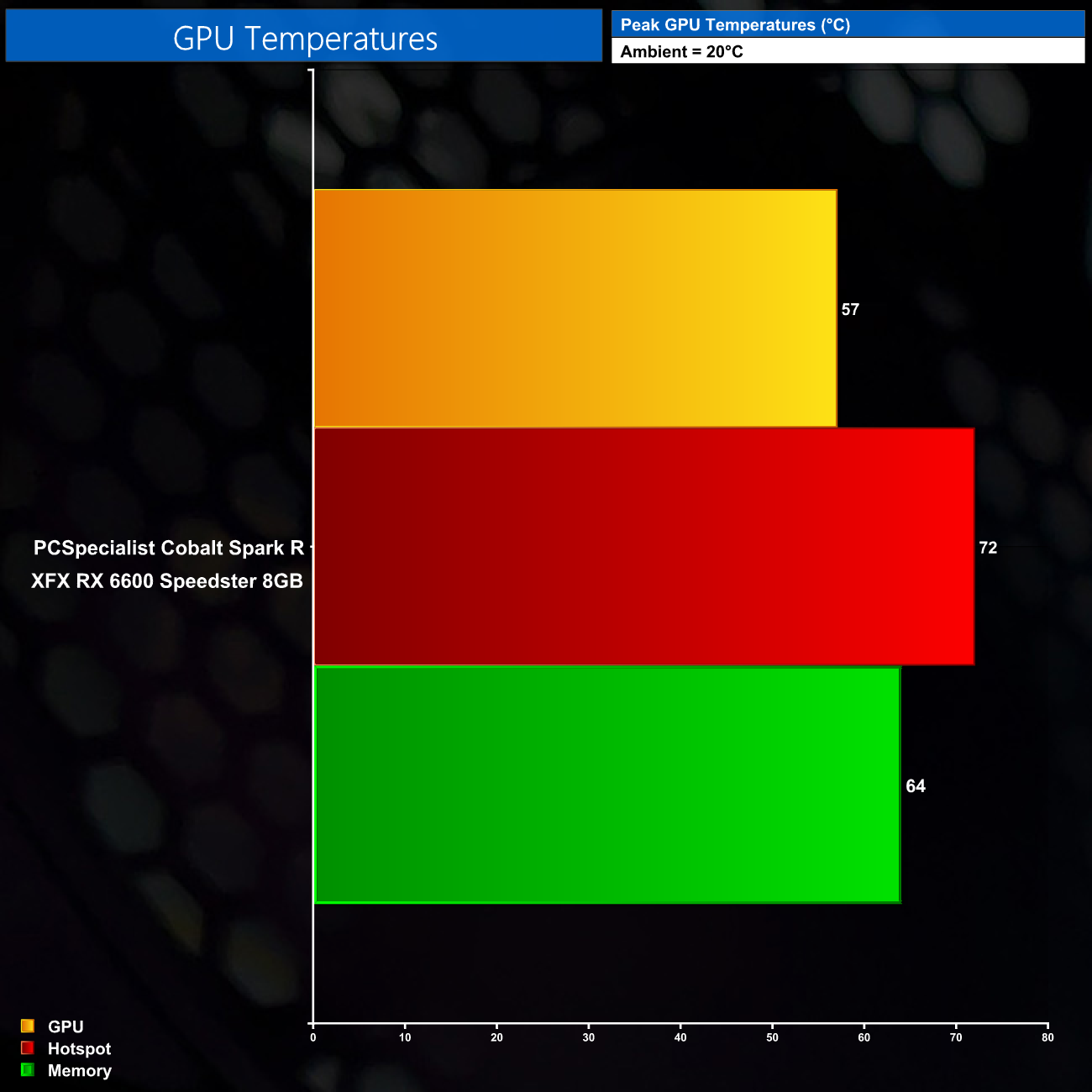
The GPU is also nothing to worry about, with the hot spot hitting just 72C, while the memory ran at just 64C, so it goes to show what happens when you put low-power hardware in a chassis with three intake fans – thermals are very, very good.
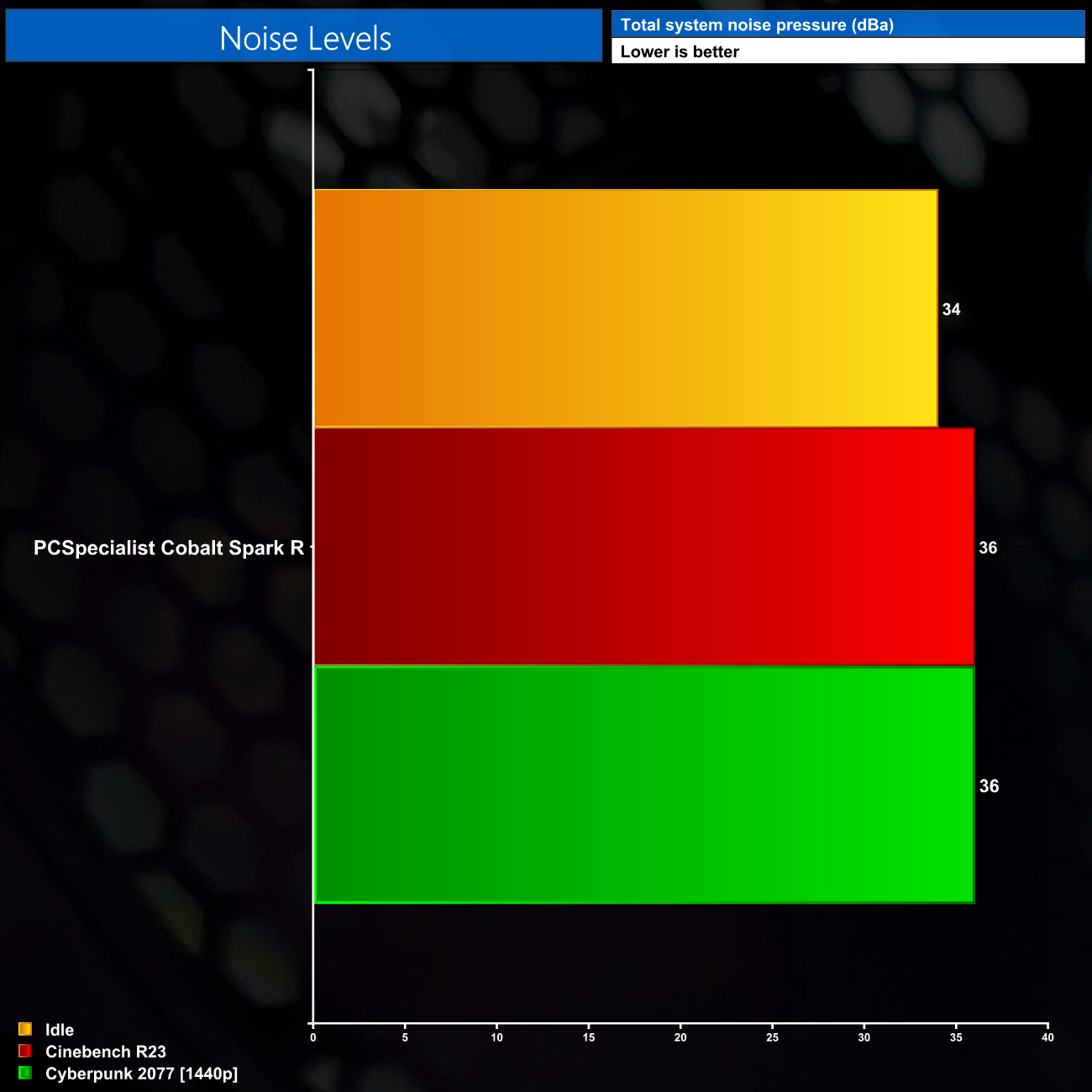
Noise levels are no problem either, in fact the fans barely spin up even when under load, as I measured noise of 36 dBa from a 30cm distance. It is just about audible while idling but the fans would easily be drowned out by even light music from a speaker set.
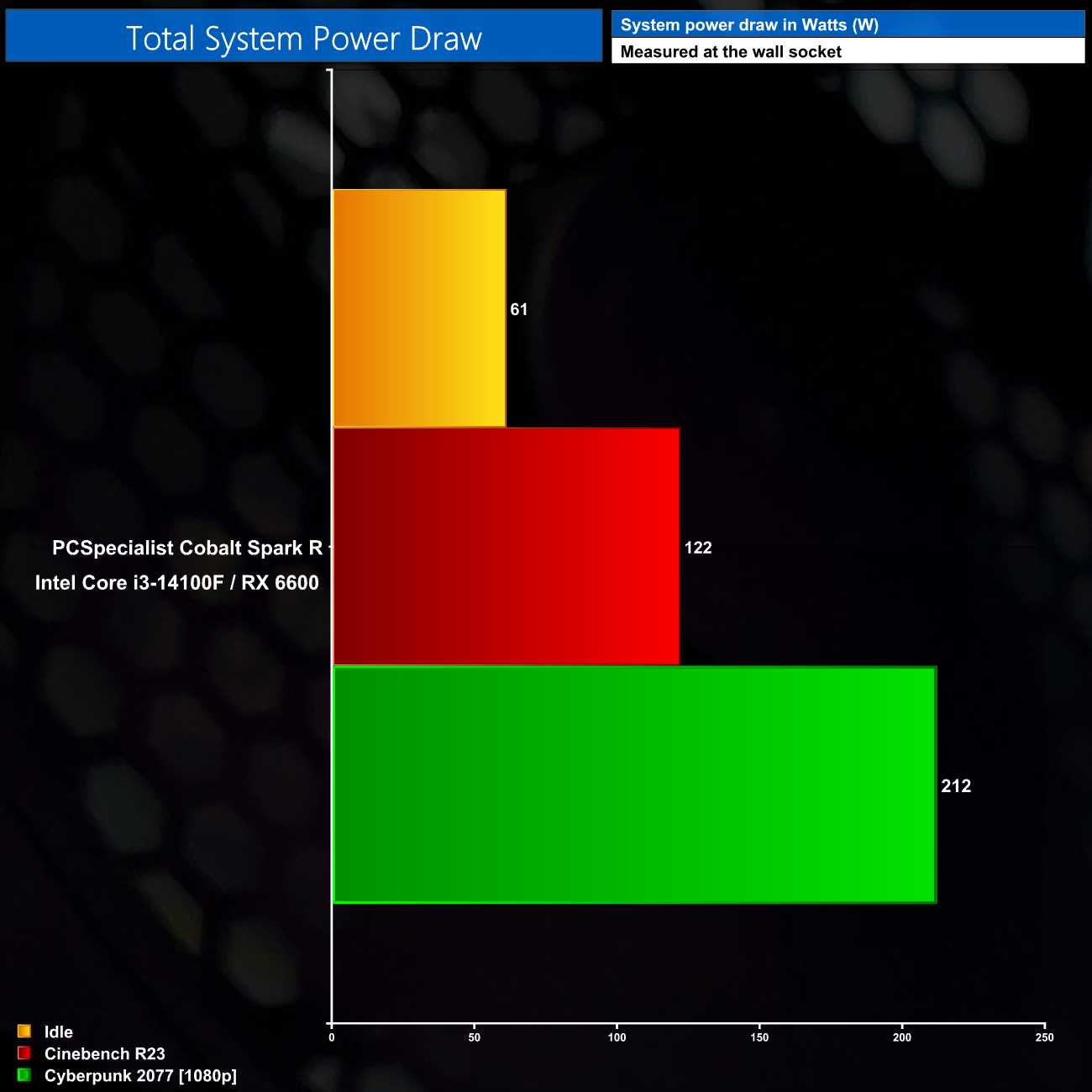
Lastly, power draw is also very low indeed. At full whack in games we saw about 210W at the wall, and this was 90W lower when only loading the CPU in Cinebench. Considering a 650W PSU is installed, that leaves ample room for an upgrade to both the CPU and GPU down the line, which we always like to see.
The PCSpecialist Cobalt Spark R has been a very interesting system to put through its paces over the last week, just because of how difficult it can be to put together a well-balanced system at the affordable price of £799.
I think it can often be tempting with cheaper systems like this to think, ‘oh if you only spent an extra £50 on the GPU', or ‘just an extra £30 on the memory', or ‘why not spend the extra £40 on a better' case – but by the end of the process you have a completely different system that might cost £100, even £200 more.
What PCSpecialist has done for £799 is very solid. The combination of the i3-14100F and RX 6600 delivers the goods for gaming, and while it may not be able to play the latest AAA games at Ultra settings, our benchmarks have shown it is still a potent combo for 1080p High settings gaming, and even 1440p isn't out of the question for esports titles.
The components are also very low-power, so cooling is a doddle, and that means the system is very quiet under load and barely draws more than 200W at the wall, so the choice of a 650W 80+ Gold PSU gives plenty of headroom for any upgrades down the line.
Of course, no system at this price is going to be perfect, and there are clear compromises here. The case feels fairly cheap and flimsy, the DDR5 memory only runs at 4800 MT/s and CL40 latency, while the decision to use a micro-ATX board in an ATX chassis leaves a lot of dead space inside the system. We also have to wonder about how much longer quad-cores will cut it, but as we said, it is managing fine for now.
PCSpecialist is offering solid value, too. Parting up as similar a system as I could using PCPartPicker, I came to a total cost of over £740, which means PCSpecialist is doing all the work for you, shipping it out and covering with their standard 3-year warranty, for barely a £50 premium. If you're looking to get into PC gaming and don't yet fancy building your own machine, the Cobalt Spark R is a solid starter system.
You can buy this system as reviewed for £799 HERE.
Pros
- Affordable price.
- RX 6600 is a solid gaming GPU for 1080p and even some 1440p gaming.
- Low-power components run cool and quiet.
- RGB fans and CPU cooler.
- 650W 80+ Gold PSU will last through several components upgrades.
- Very well built with excellent cable management.
- Great value versus DIY pricing.
- Covered by PCSpecialist's standard warranty.
Cons
- Lots of dead space inside the chassis.
- Case feels flimsy.
- 1TB storage fills up very quickly these days.
- Memory is pretty slow by modern standards.
KitGuru says: The Cobalt Spark R isn't perfect, but it offers a great entry point into the world of PC gaming, at an affordable price.