KitGuru KitGuru.net – Tech News | Hardware News | Hardware Reviews | IOS | Mobile | Gaming | Graphics Cards


Announced at CES 2024, today we are taking a look at the Gigabyte Aorus 16X. This laptop is hitting the market at £1899.99 here in the UK, and for the money you get a 16in QHD+ display, i9-14900HX CPU, RTX 4070 Laptop GPU, 32 gigs of DDR5 memory and 2TB of NVMe storage. On paper it certainly sounds attractive, and Gigabyte also makes a feature of this machine's AI smarts, so let's see what it can do…
Specification:
- CPU: Intel® Core™ i9-14900HX Processor (36M Cache, up to 5.8 GHz, 24 cores : 8 P-core and 16 E-core)
- Video Graphics: NVIDIA® GeForce RTX™ 4070 Laptop GPU 8GB GDDR6, Boost Clock 2175MHz / Maximum Graphics Power 140 W
- Display: 16.0“ 16:10 WQXGA (2560×1600) 165Hz Display (100% sRGB, Pantone® Validated, TÜV Rheinland-certified, Dolby Vision®, NVIDIA® Advanced Optimus, G-SYNC)
- System Memory: 2x DDR5 Slots (DDR5-5600MHz, Up to 64GB)
- Storage: 2x M.2 SSD slots (Supports 2x PCIe® Gen4x4 NVMe™ M.2 SSD, Up to 4TB)
- Keyboard Type: 3-zone RGB Backlit Keyboard, Up to 1.7mm Key-travel (Support N-Key)
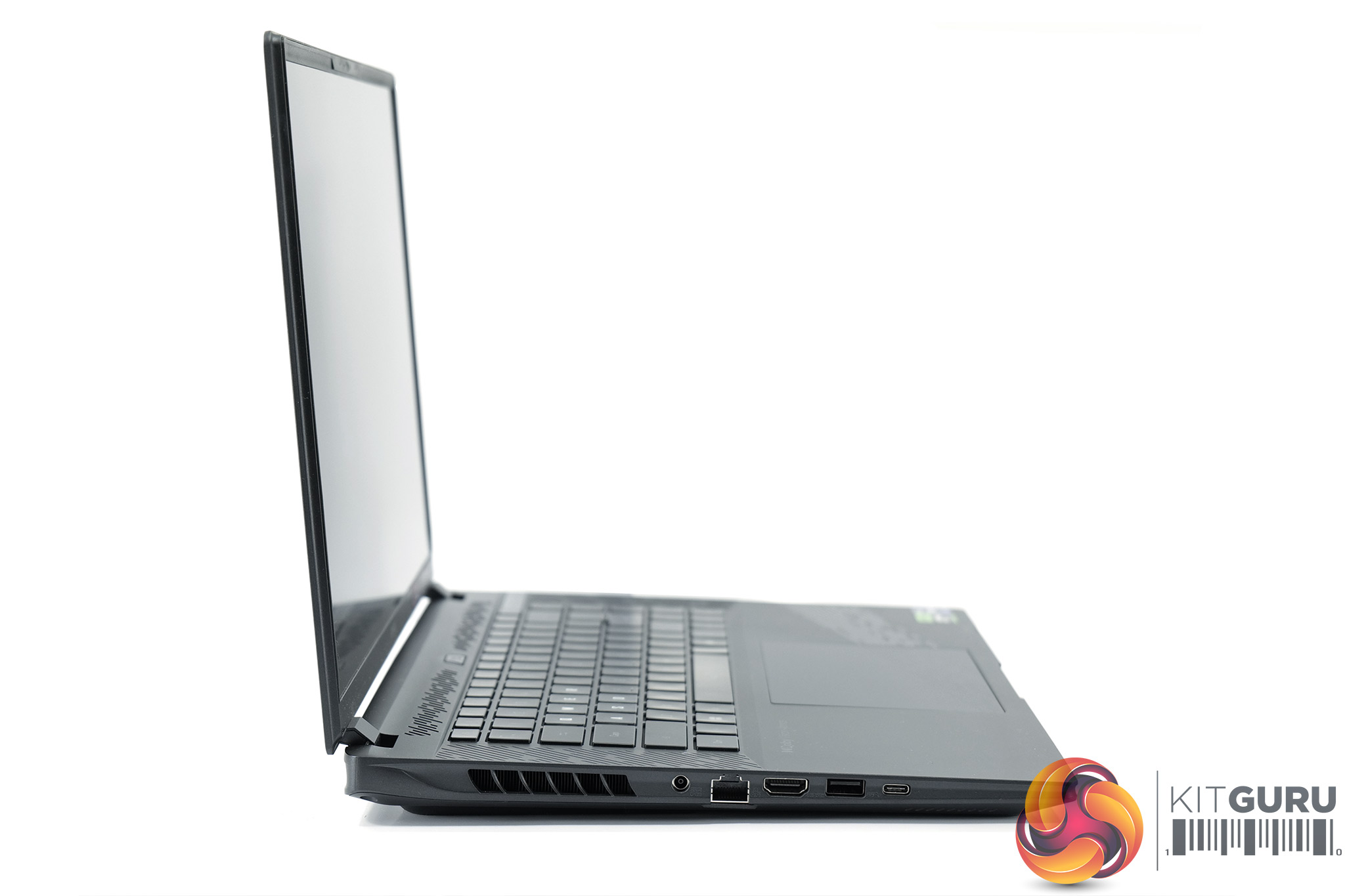
- Left Side I/O:
- 1 x DC in
- 1 x RJ-45
- 1 x HDMI 2.1
- 1 x Type-A support USB3.2 Gen2
- 1 x Type-C with Thunderbolt™4 (support USB4, DisplayPort™ 1.4 and Power Delivery 3.0)
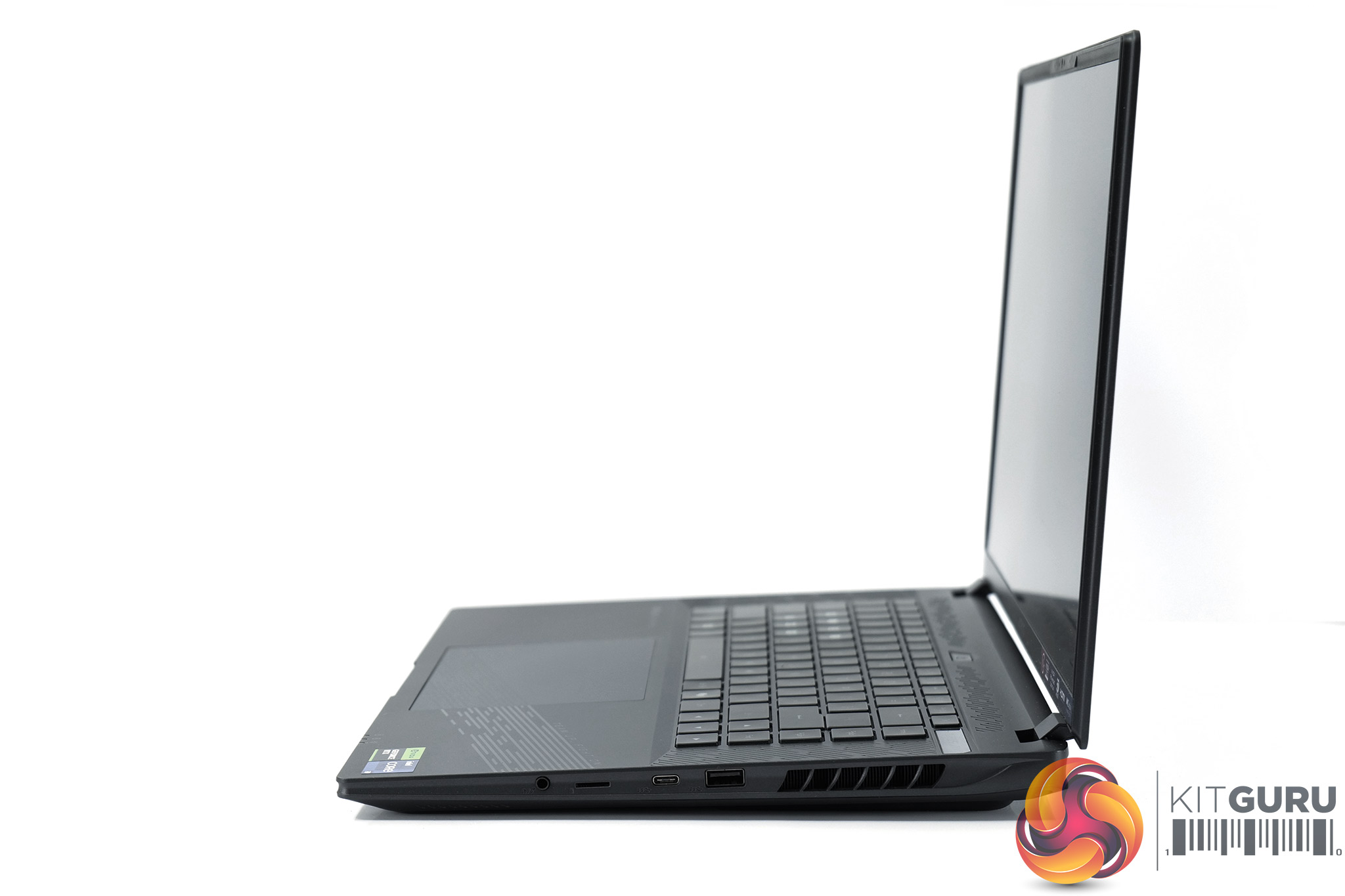
- Right Side I/O:
- 1 x Type-A support USB3.2 Gen2
- 1 x Type-C support USB3.2 Gen2, DisplayPort™ 1.4
- 1 x MicroSD (UHS-II)
- 1 x Audio Jack support mic / headphone combo
- Audio: 2x 2W Speaker
- Communications:
- Wi-Fi: Intel® Wi-Fi 7 Wireless (802.11be 2×2)
- LAN: 1G
- Bluetooth: Bluetooth® V5.4
- Webcam: FHD (1080p) IR Webcam
- Battery: Li Polymer 99Wh
- Adapter: 240W AC Adapter, 100W PD
- Dimensions: 35.6(W) x 25.4(D) x 2.0~2.7(H) cm
- Weight: ~2.3 kg / ~5.07 lb
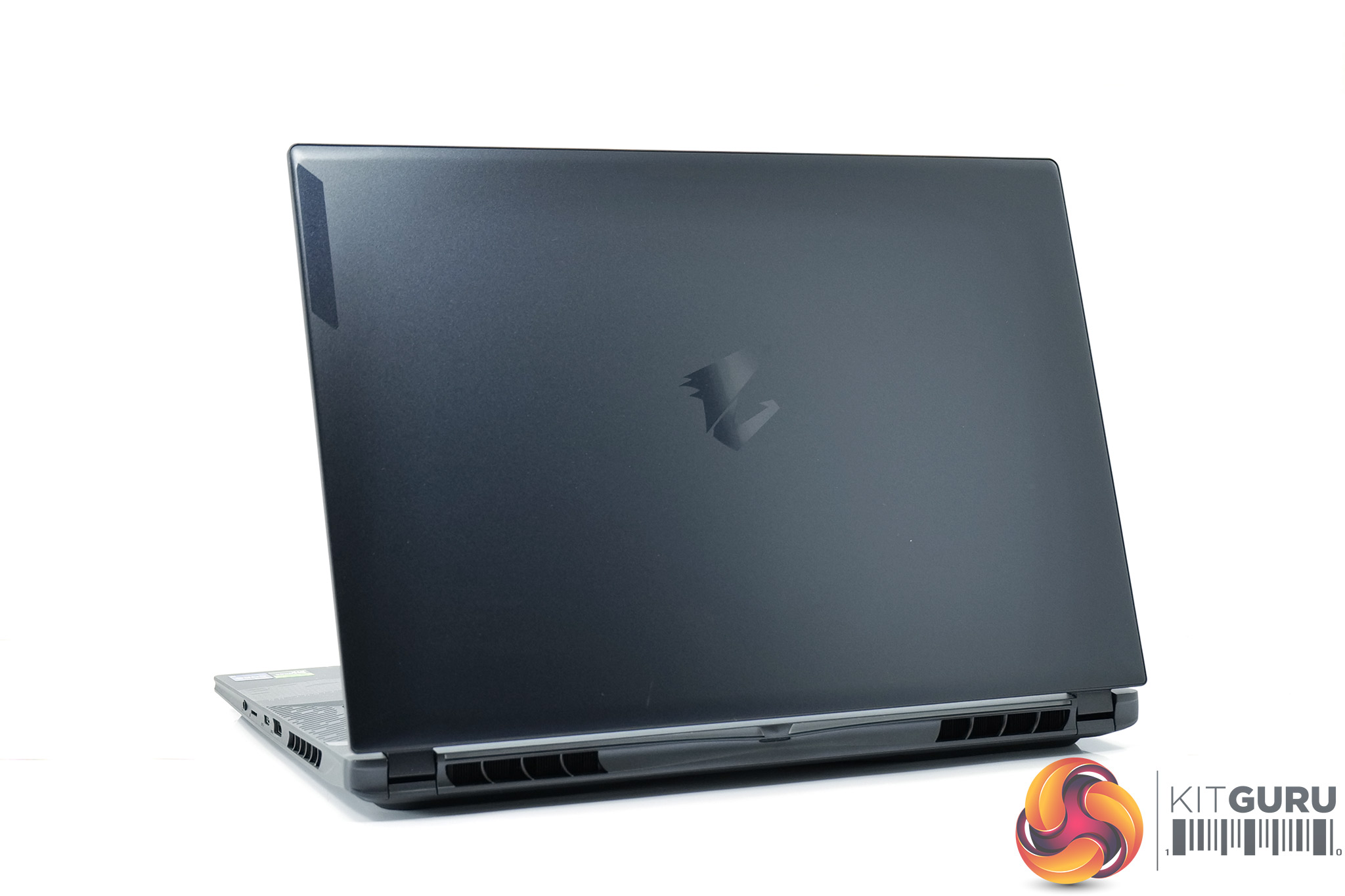
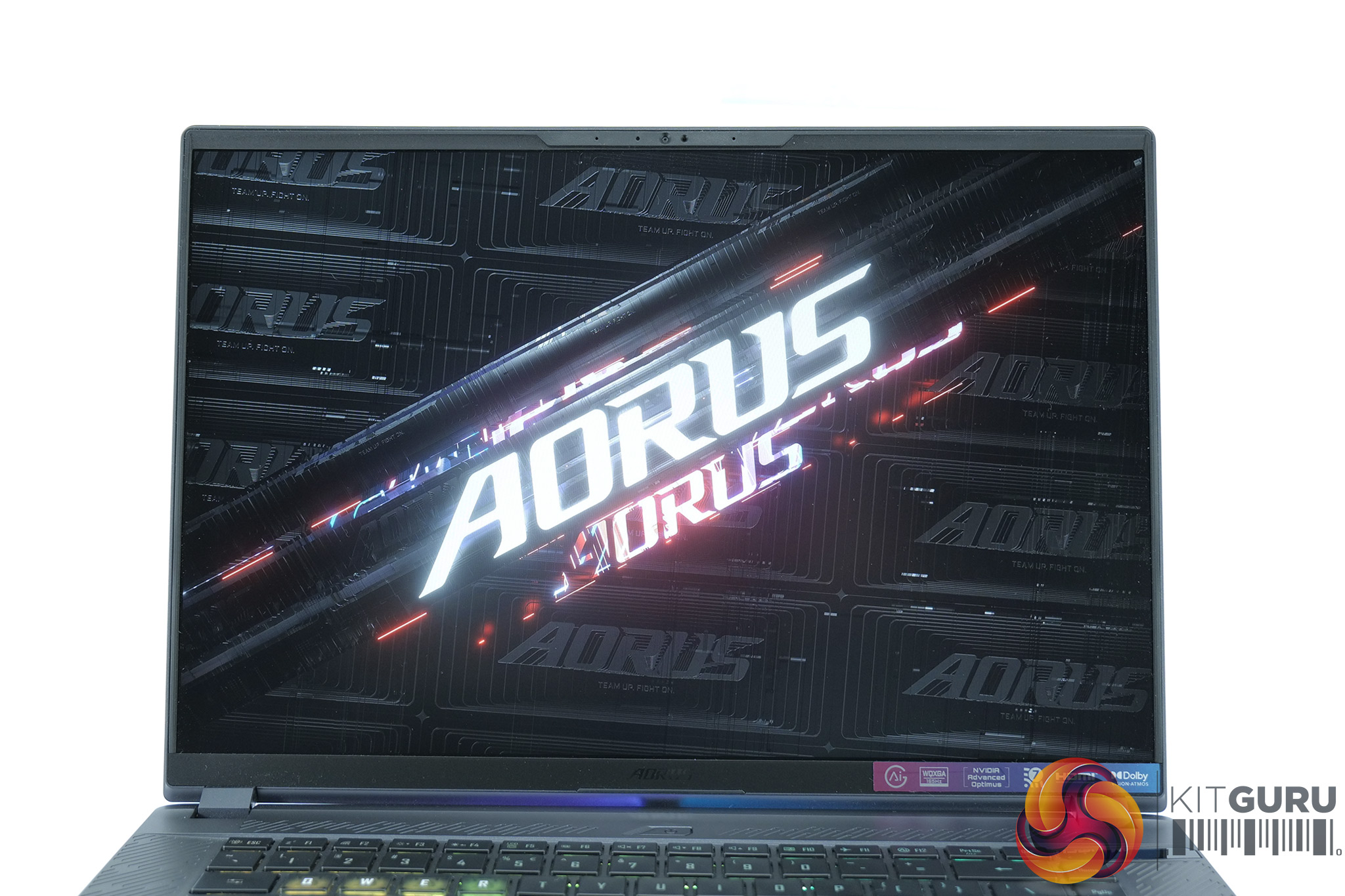
Kicking things off with a look at the design of the Aorus 16X, Gigabyte has kept things pretty understated here. The lid is left almost completely bare save for the Aorus logo and some branding in the upper corner, while you may note there is a very subtle blue-ish hint which I think is a lovely touch. Once turned on there is some RGB lighting on the rear of the machine, but otherwise this is a fairly laid-back design. It's also relatively slender for a gaming machine, coming in at 27mm thick and weighing 2.3 KG.
The lid is made of metal and feels solid, with only a small amount of flex in the screen if you put pressure on both corners (though we obviously don't recommend that!) The inside deck and underside are made from plastic, but it still feels very solid with very little flex in the main body of the machine. Sure, it would have been nice to have an all-aluminium chassis like the MacBook or Razer Blade units, but for the price we can't really complain.
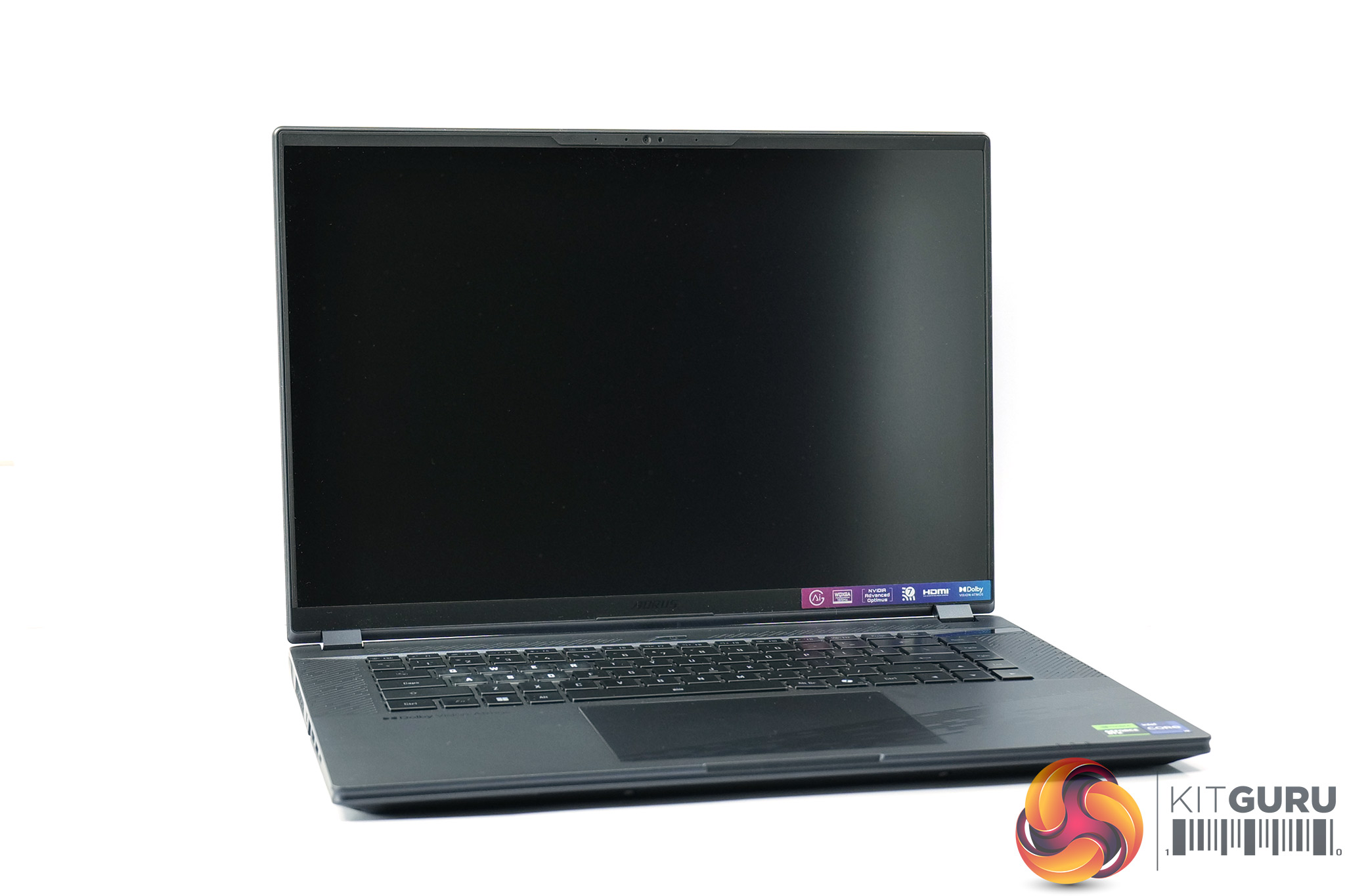
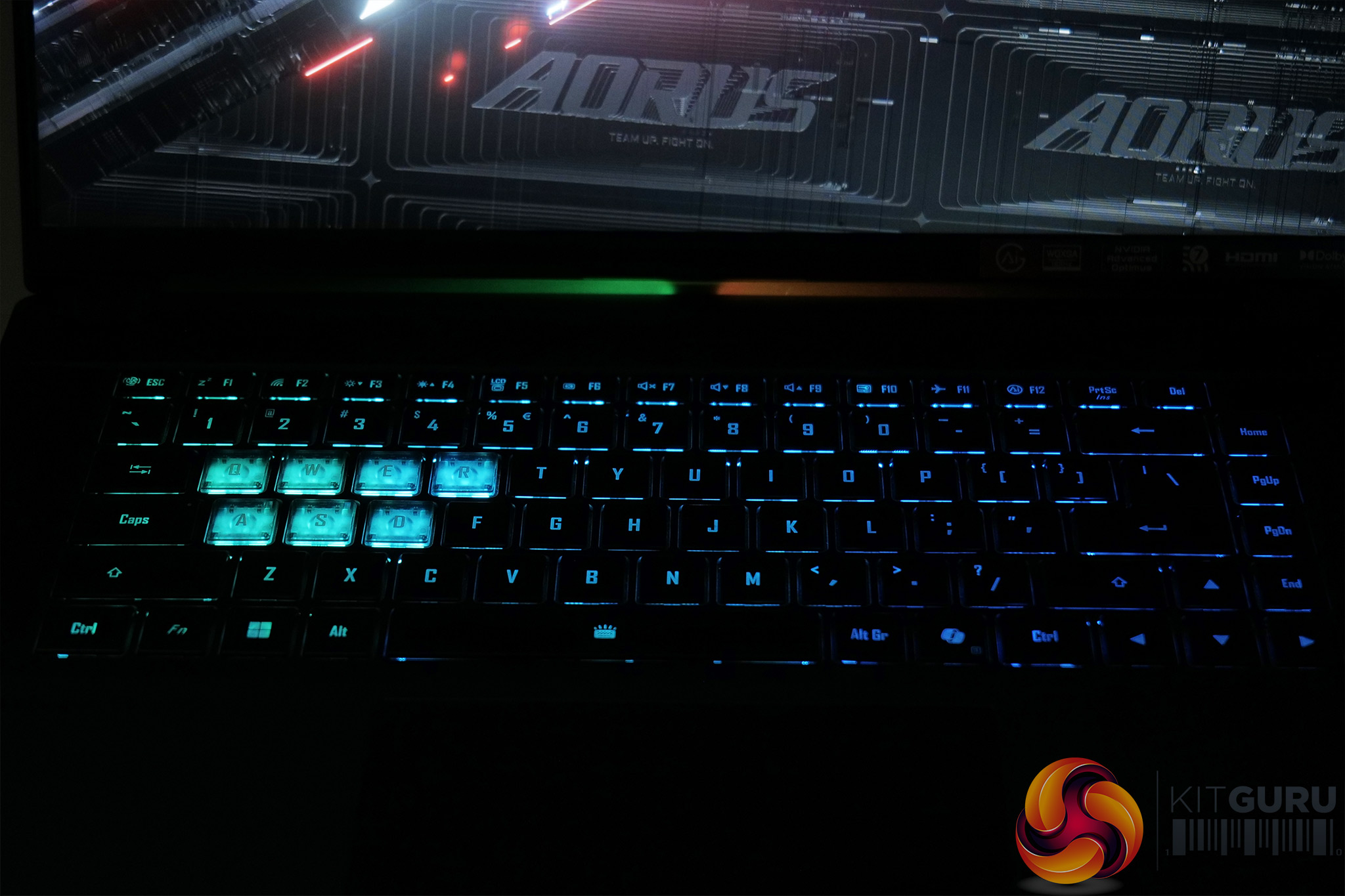
Opening the lid give us a closer look at the keyboard. While the unit I have is a US layout with half-height enter key, Gigabyte assures me UK buyers will get a more familiar ISO layout, but that's the only other difference between my sample and final retail models. The keyboard itself is fine, it's fairly standard laptop scissor-switch fare, while the RGB lighting is customisable in Gigabyte's Control Center software.
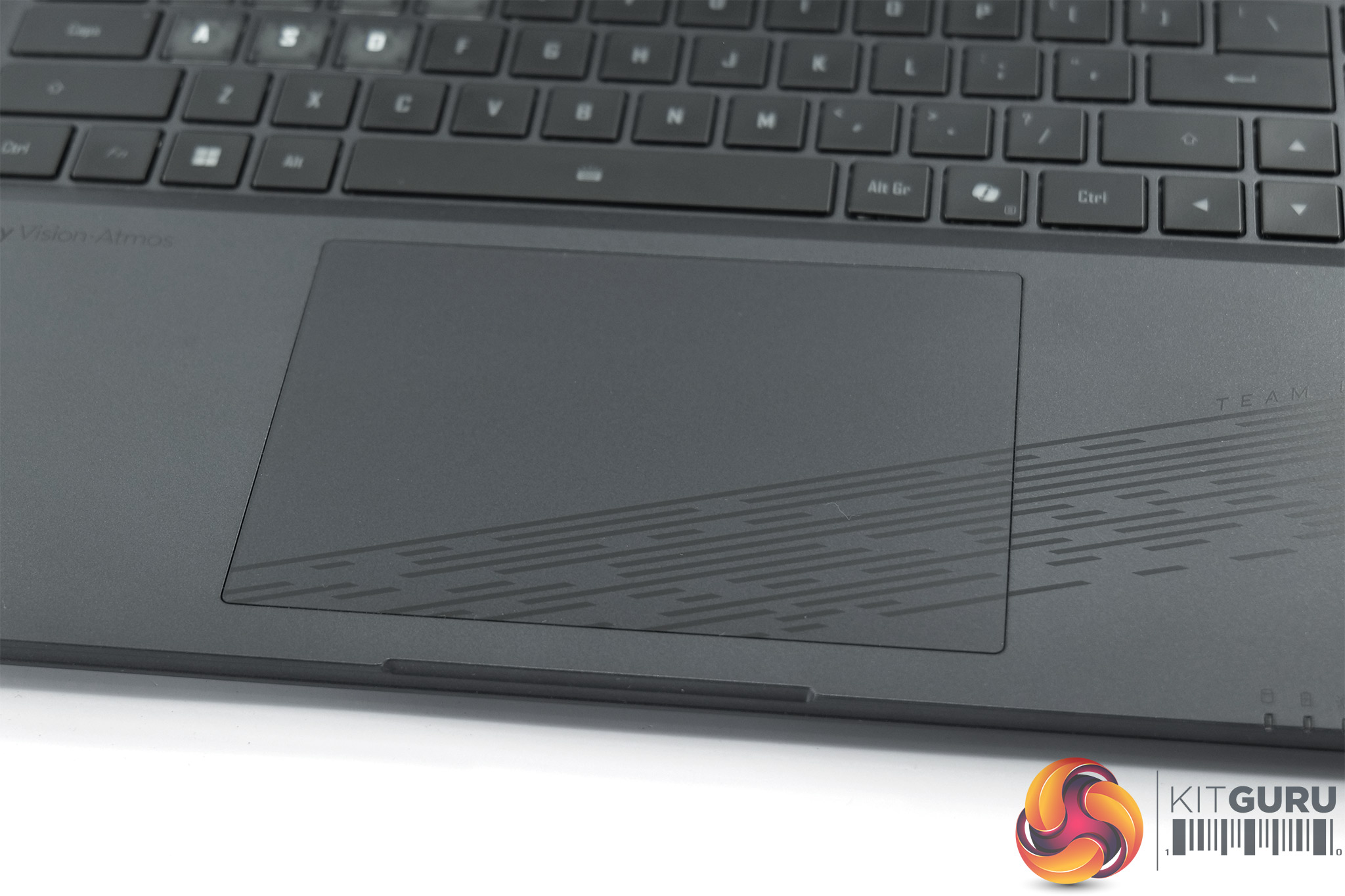
The trackpad is even better to use, being nice and large but very smooth with satisfying buttons. I wouldn't game with it, but for browsing the web or any general usage tasks, it is more than good enough. A 1080p webcam also comes built into the top bezel, which isn't the best quality but is acceptable for any video meetings you may have to sit through.
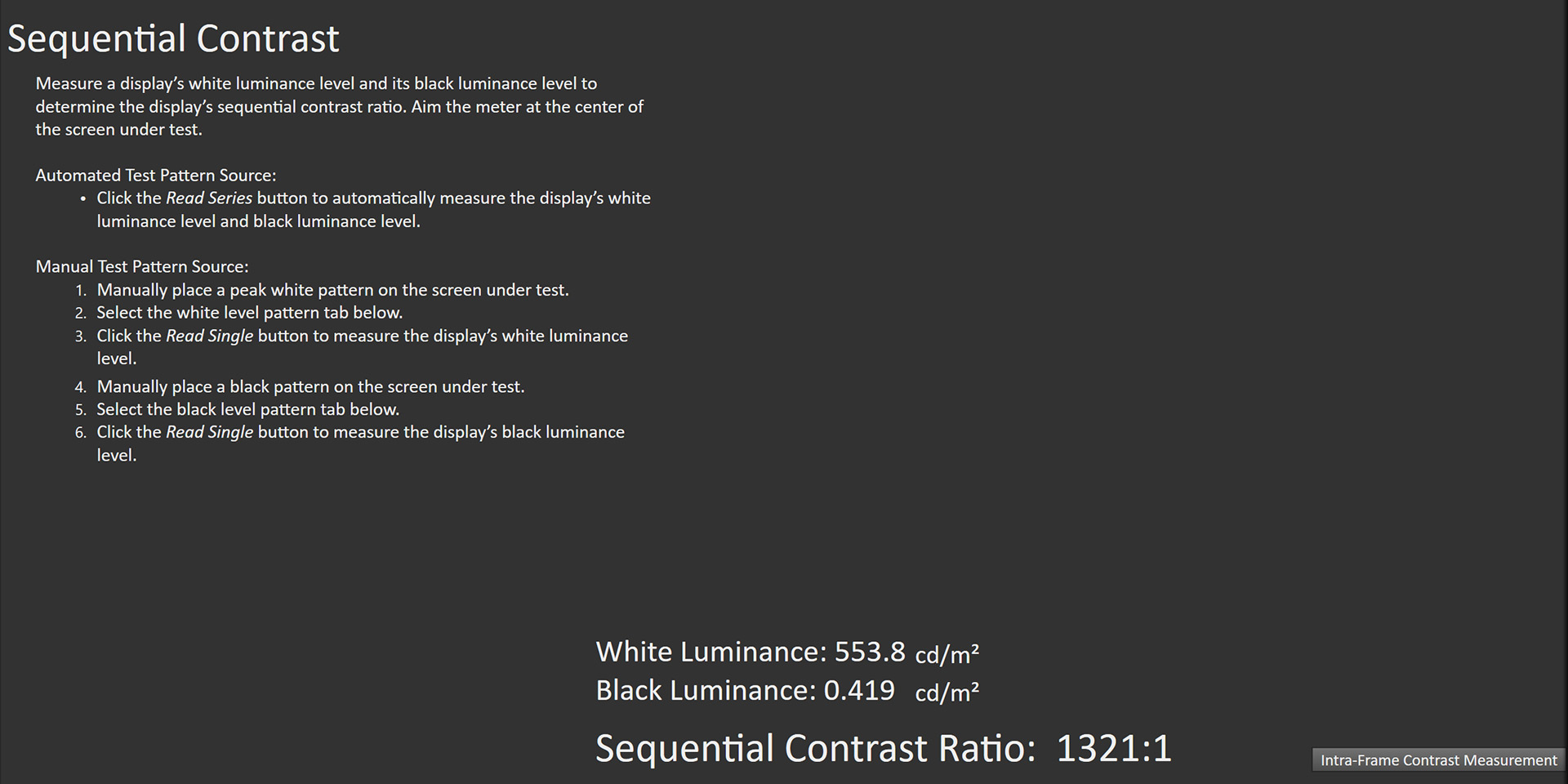
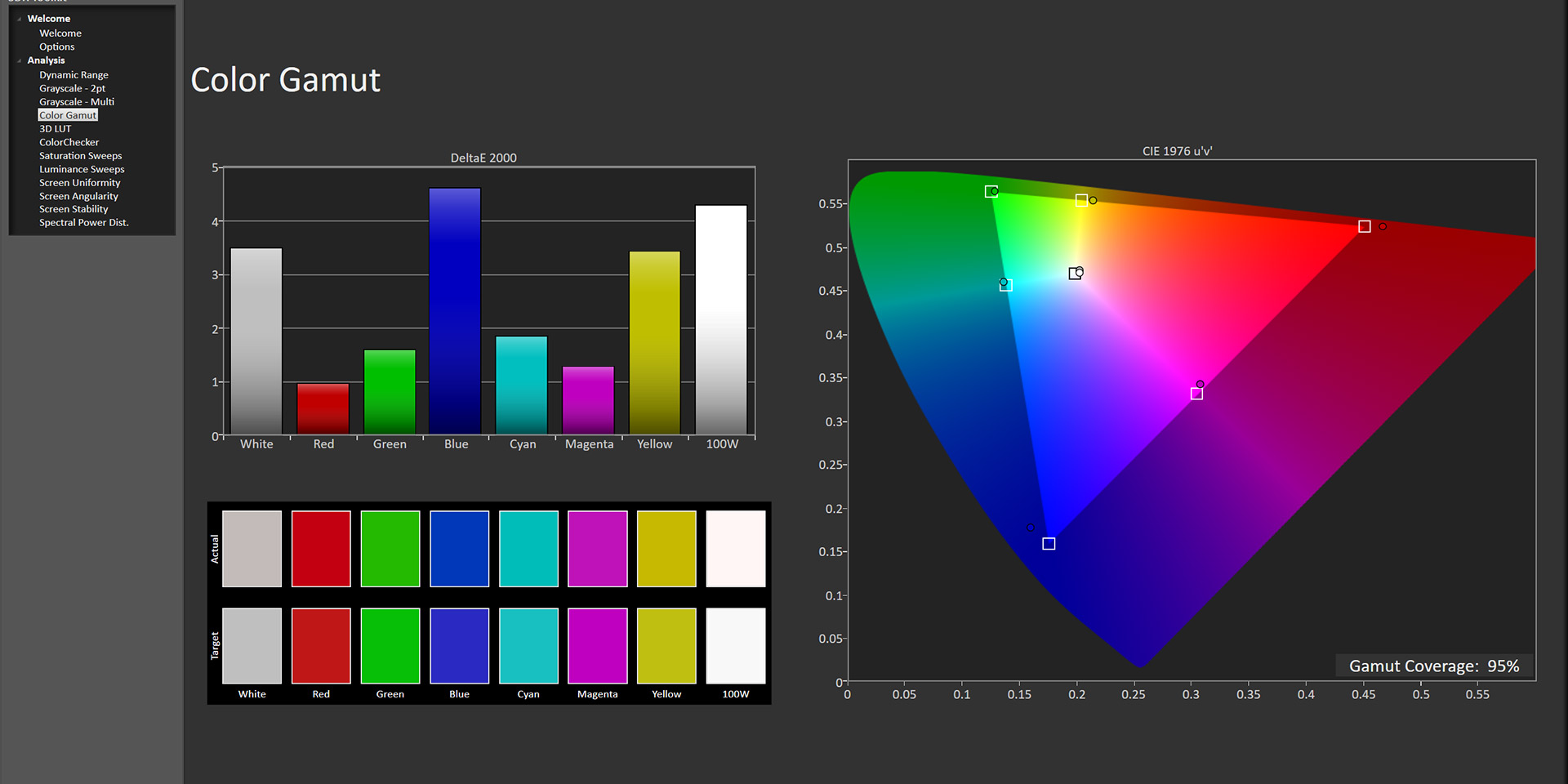
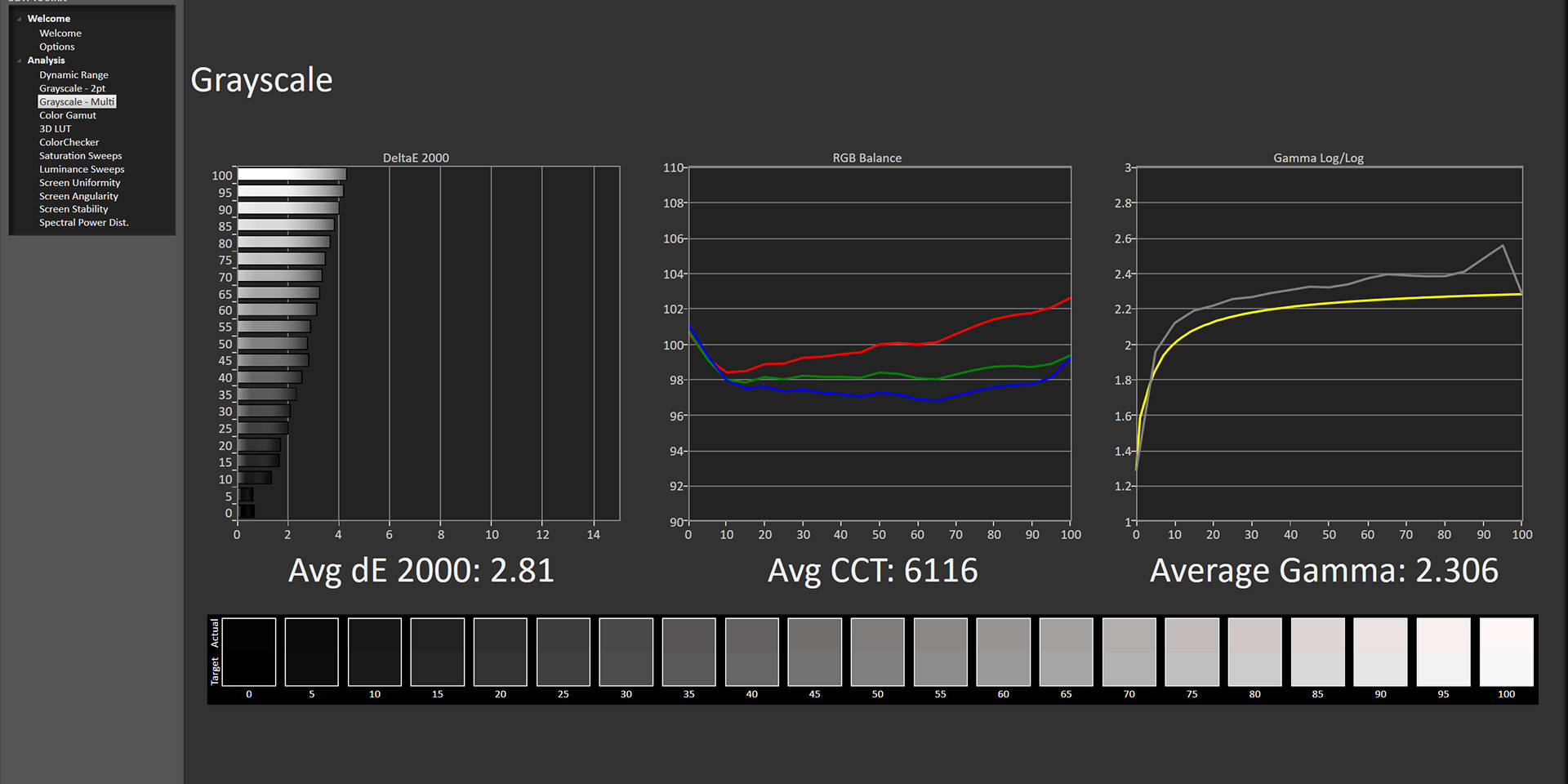
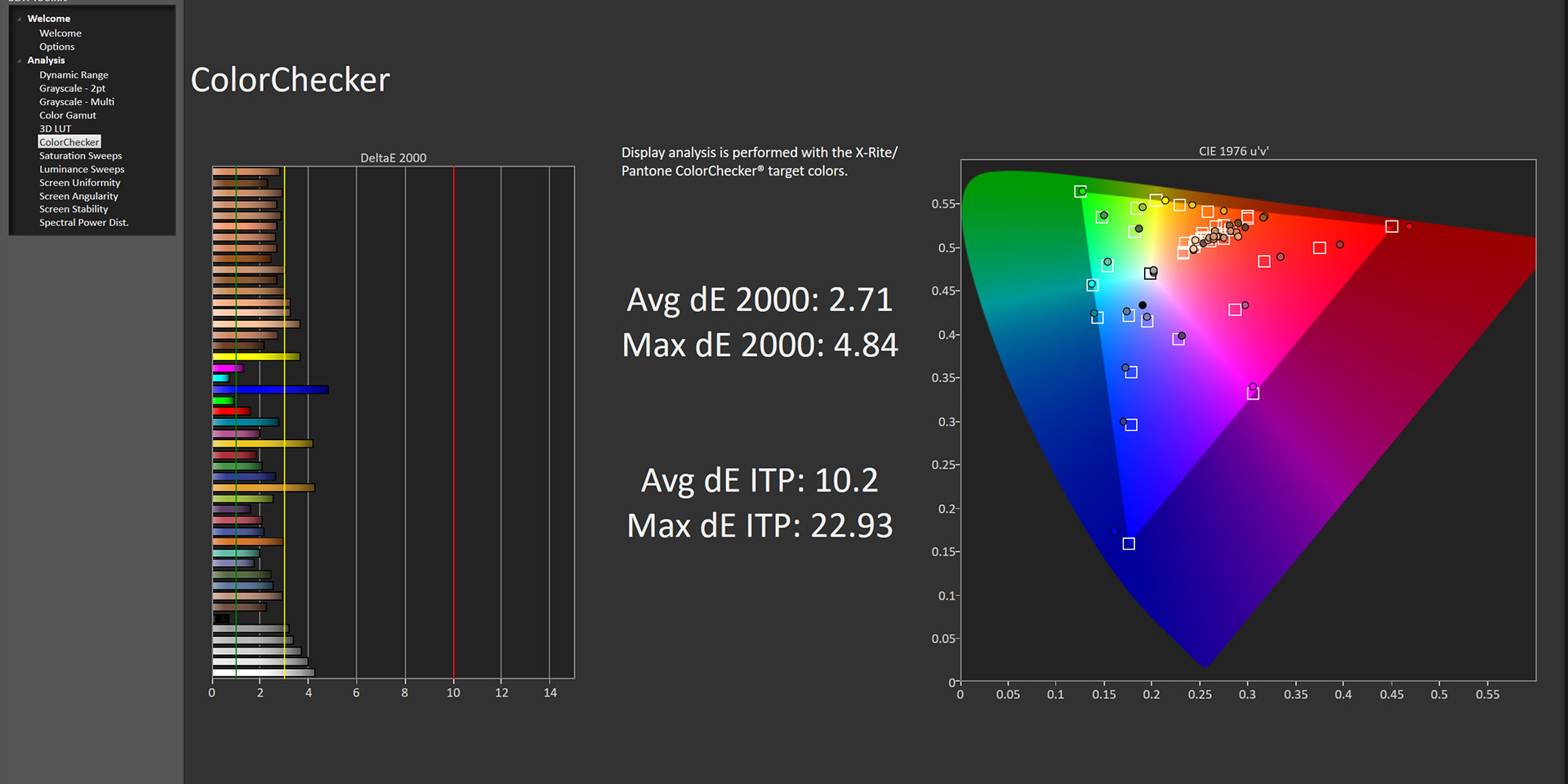
All display tests conducted utilising Portrait Displays' Calman Ultimate software. All results shown relative to the sRGB colour space and D65 target colour balance.
Below that we find the 16in 2560×1600 display, a 16:10 aspect ratio which means there's a bit of extra vertical estate compared to a more typical 16:9 screen. Gigabyte doesn't specify what panel type is used, but it appears to be an IPS-type manufactured by BOE. Gigabyte only claims up to 400 nits but I saw over 550 in my testing at 100% brightness, with a contrast ratio of 1321:1 which is typical of modern IPS displays. Gamut came in a bit below the claimed 100% sRGB coverage however, as I saw 95% coverage in my tests.
Greyscale performance is good though, with an average deltaE of 2.81, though the colour balance is slightly warm, averaging 6116K. Gamma is also a touch high across the board, averaging 2.3, and while I couldn't find any option to tweak this, I did ask Gigabyte if this might be possible. Colour accuracy is another strong point of the display as we saw an average dE of 2.71 and a maximum of 4.84, indicating decent factory calibration. For gaming too, the 165Hz refresh rate delivers a fluid experience with decent response times on offer.
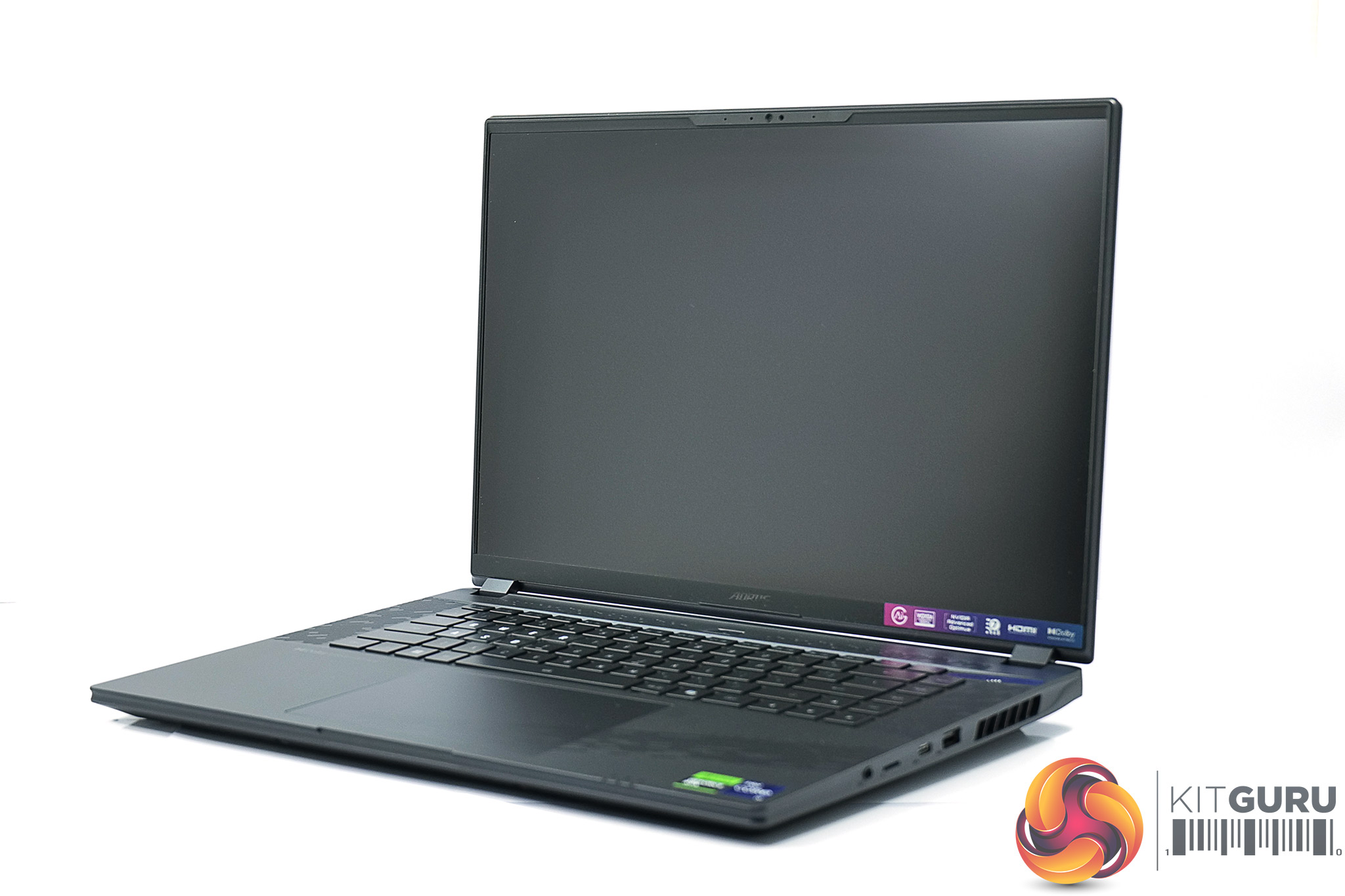
As for the I/O, all the ports are split between the left and right sides. The left side is home to the power input, Ethernet, HDMI 2.1 video output, one USB 3.2 Gen2 Type-A, and one Type-C port that supports Thunderbolt 4, USB, DP 1.4 and PD 3.0. The right side features another two USB 3.2 Gen2 ports – one being Type-A and the other Type-C, along with a microSD slot and combo audio jack. I think this is a decent selection, two type-A ports on a modern laptop is acceptable I think, my only slight quibble is microSD instead of a full-sized version which is much more common for photo and video work, but it's good enough overall.
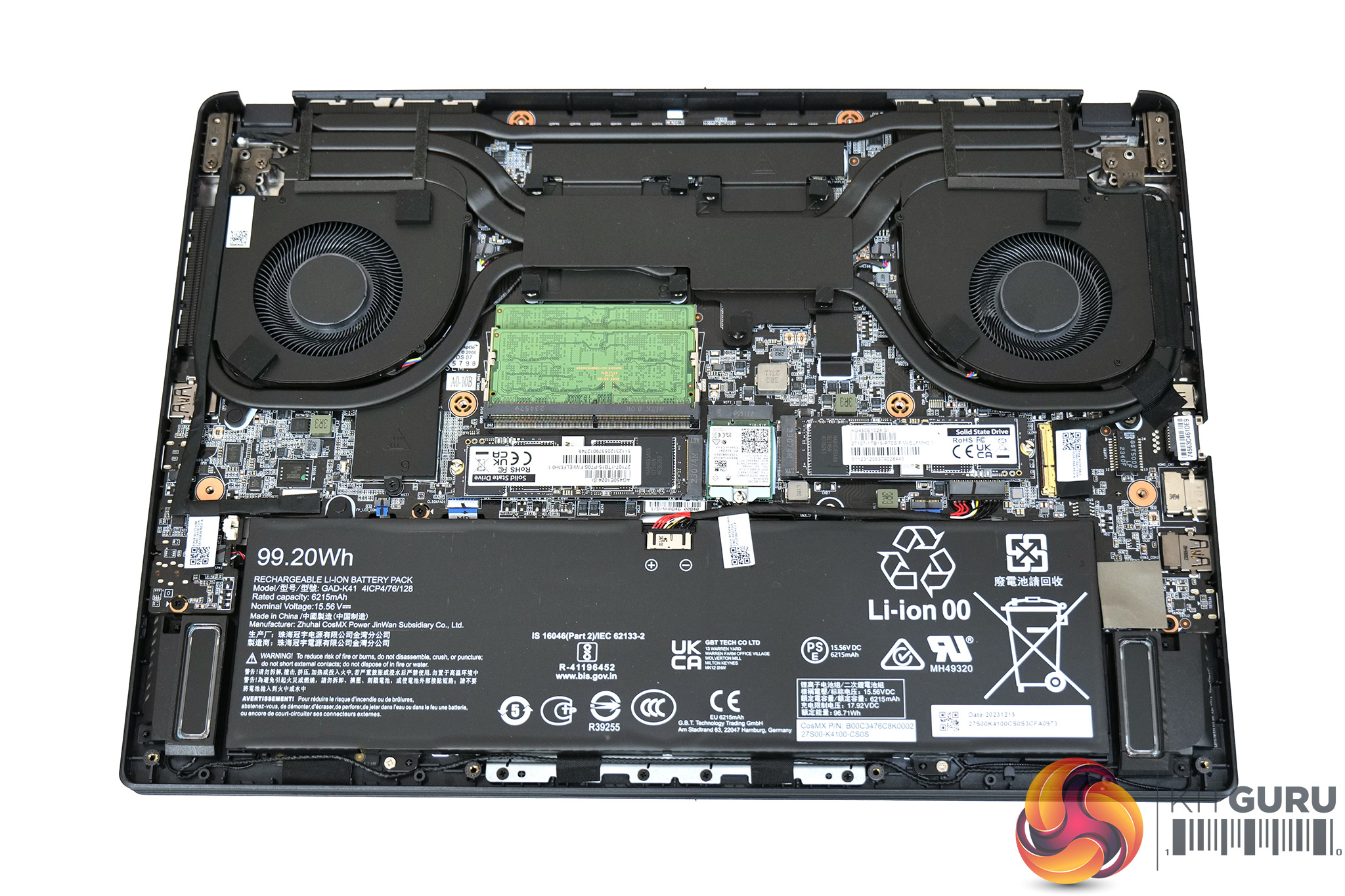
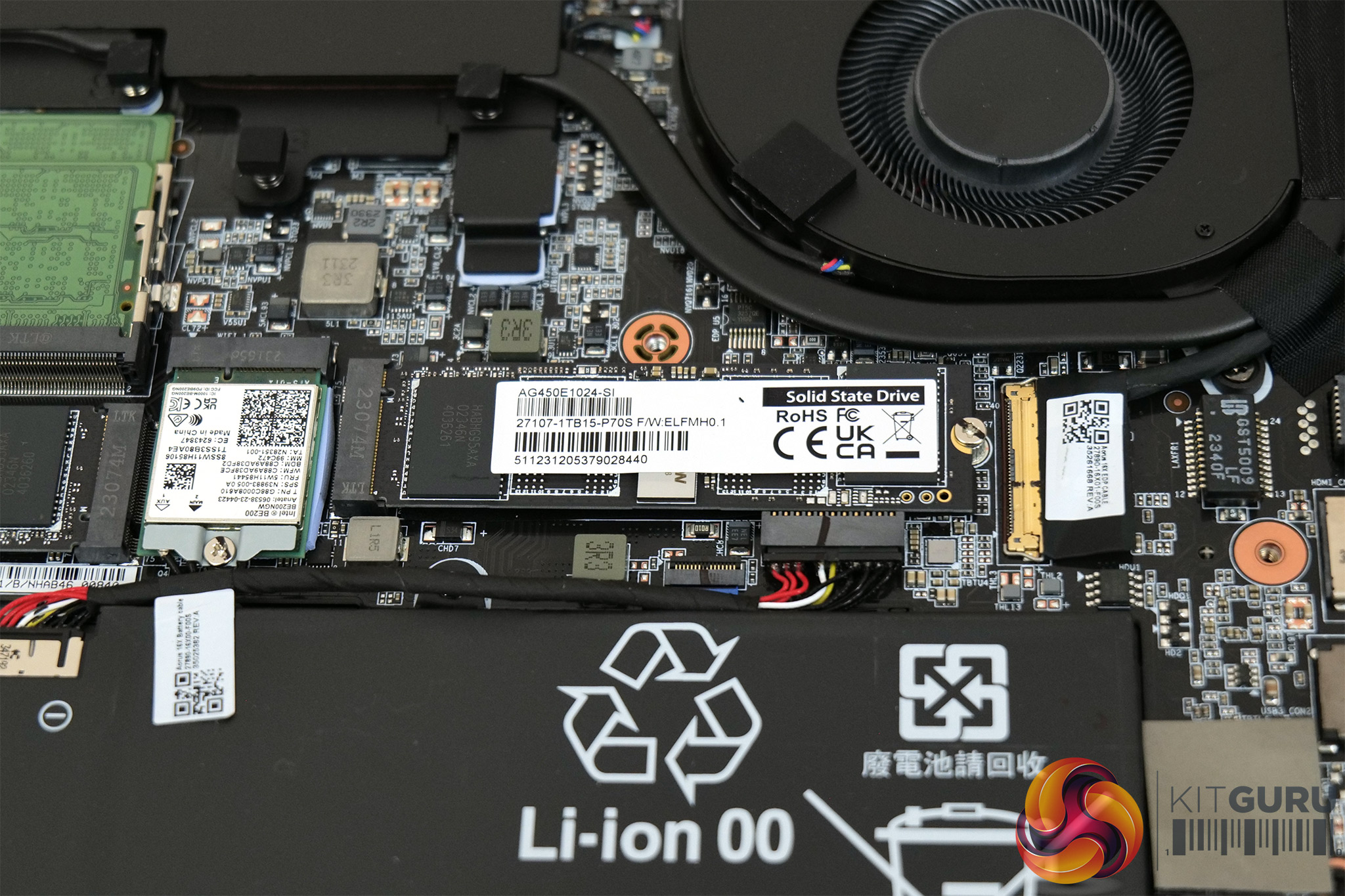
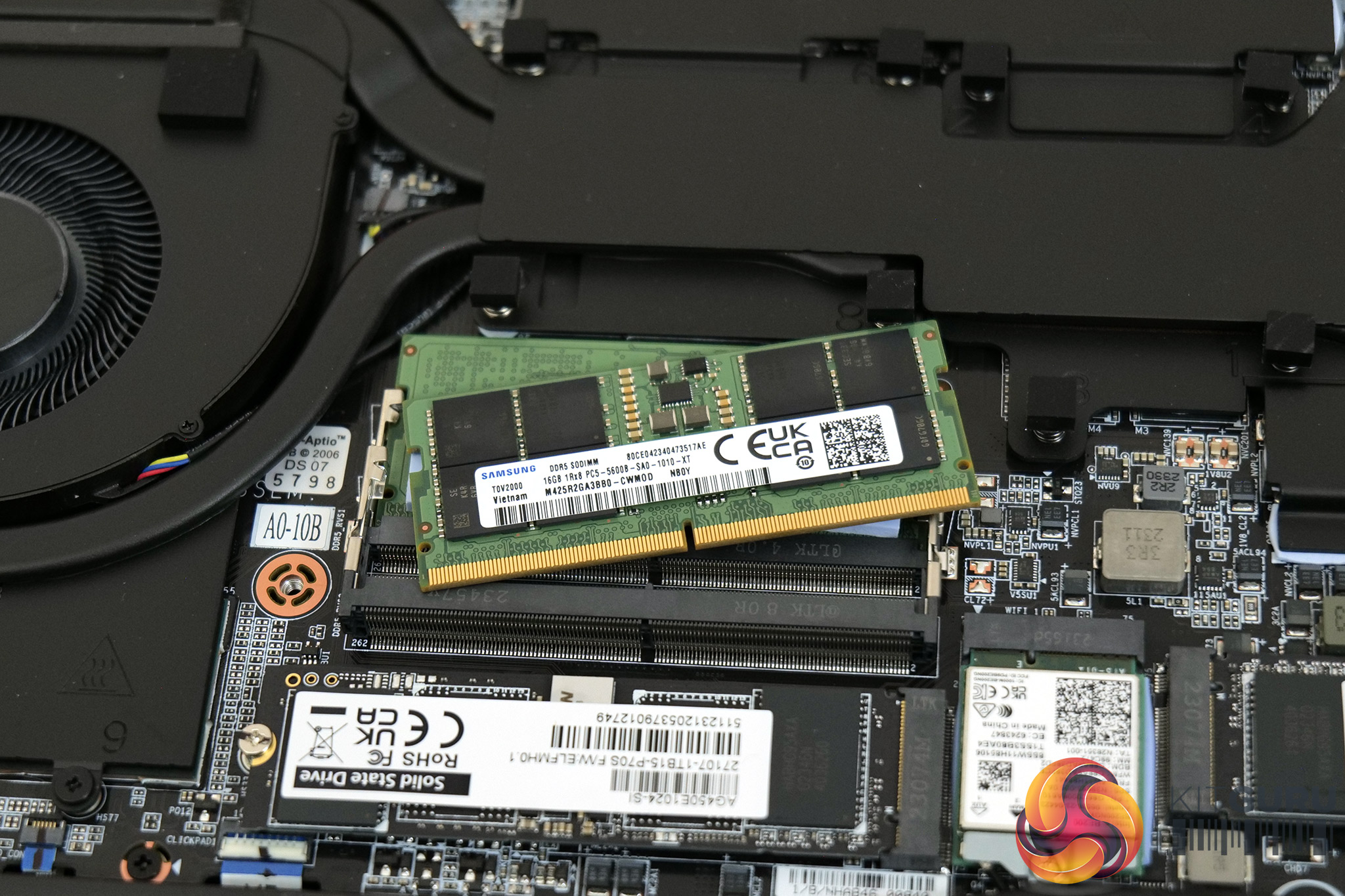
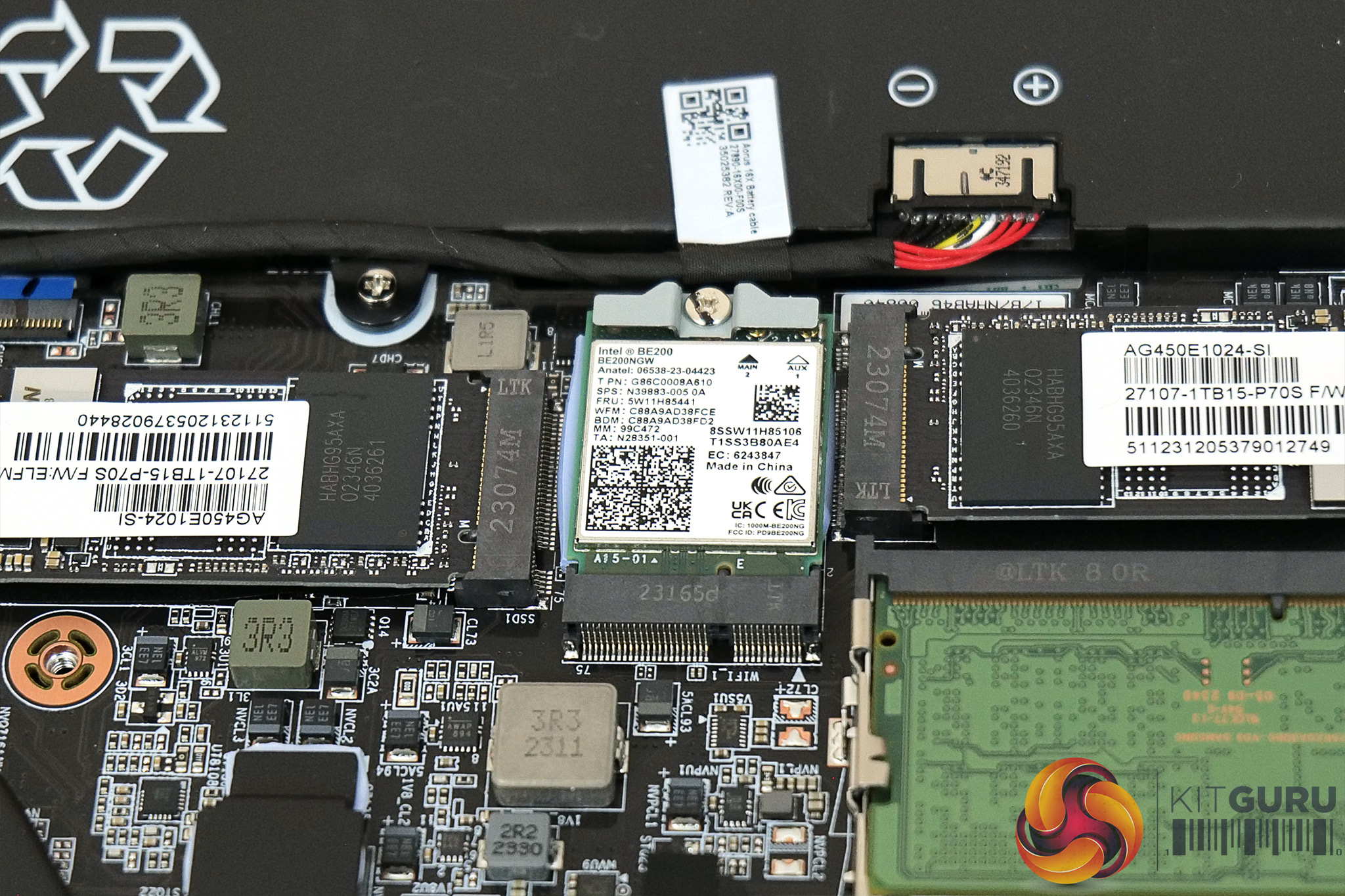
Internally we also have a few things to note. The first is the large 99.2WHr battery, and then we get two M.2 SSDs. These are labelled ‘AG450E', which indicates they are Aorus Gen4 5000E drives, and there's a pair of 1TB units in the 16X. We can also see the two 16GB DDR5 SO-DIMM modules from Samsung, rated at 5600MHz, alongside an Intel BE200 WiFi 7 M.2 card. I have no real issues with the internal layout, other than the fact that both M.2 and memory slots are already occupied, meaning users will have to swap out the existing hardware to make any upgrades to the storage or memory. It's not the end of the world, just something to be aware of.
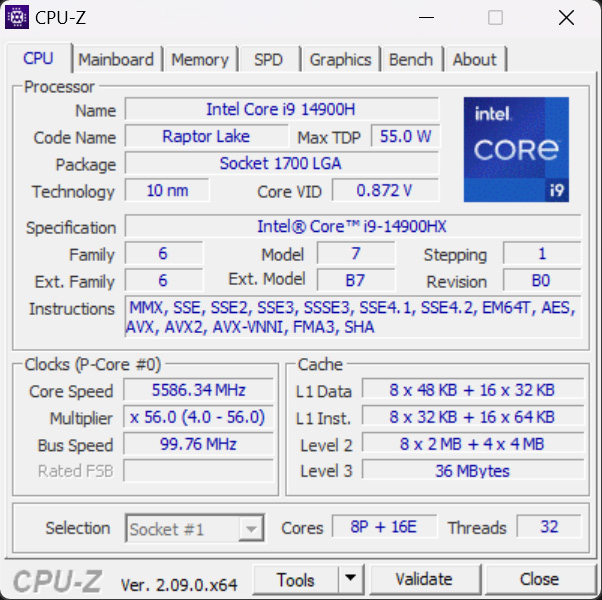
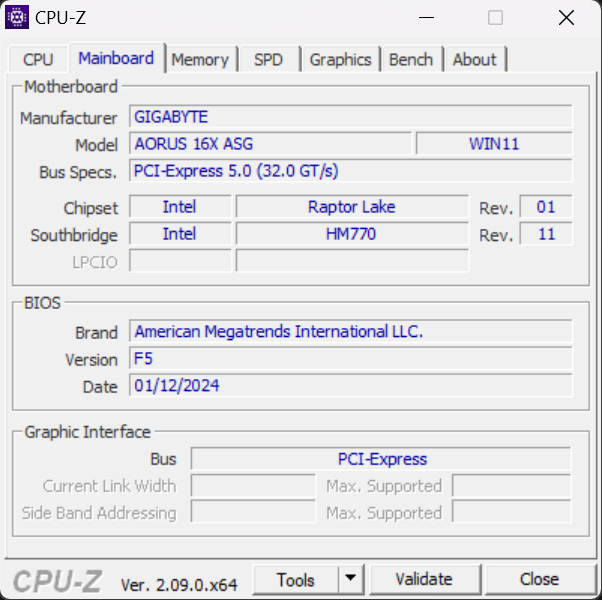
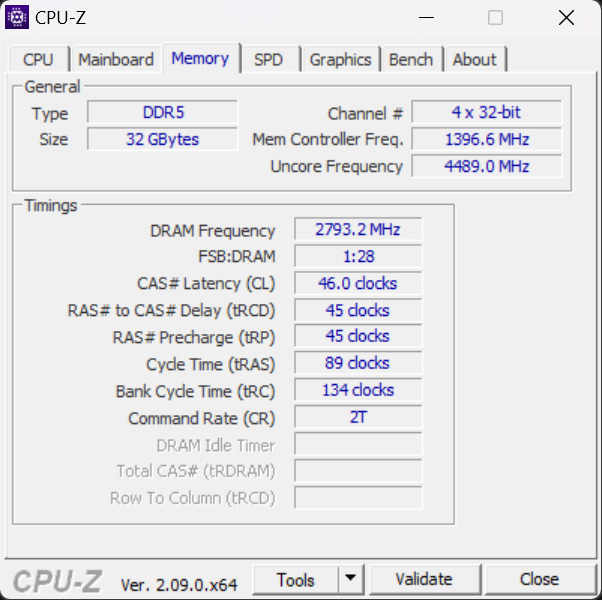
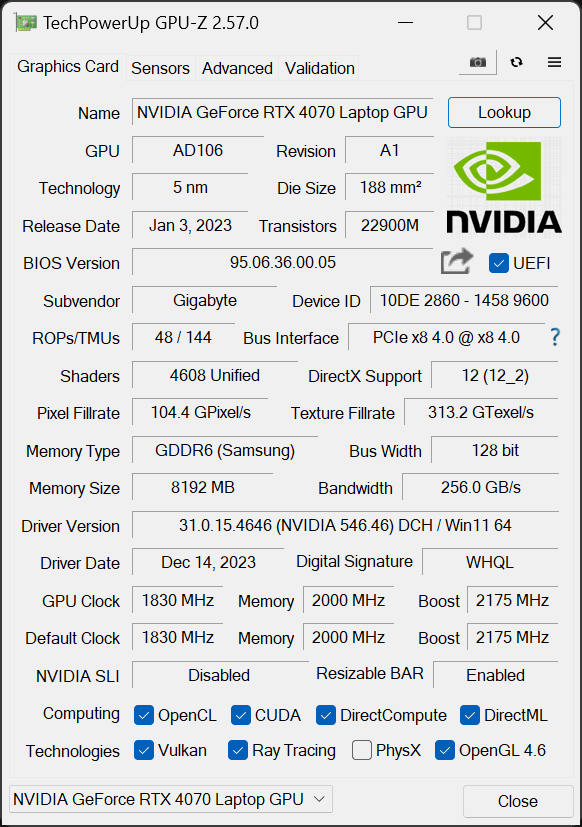
Lastly, just confirming the core spec of the machine with CPU-Z and GPU-Z, the processor is Intel's Raptor Lake Refresh i9-14900HX, offering eight P-cores and sixteen E-cores, with a supposed 55W power budget but we'll talk about that on the next page! 32GB of Samsung DDR5 is supplied, rated at 5600MHz, with 46-45-45-89 timings. Graphics horsepower is provided by the RTX4070 Laptop chip, configured with a 95-140W power budget.
AI Power Profiles
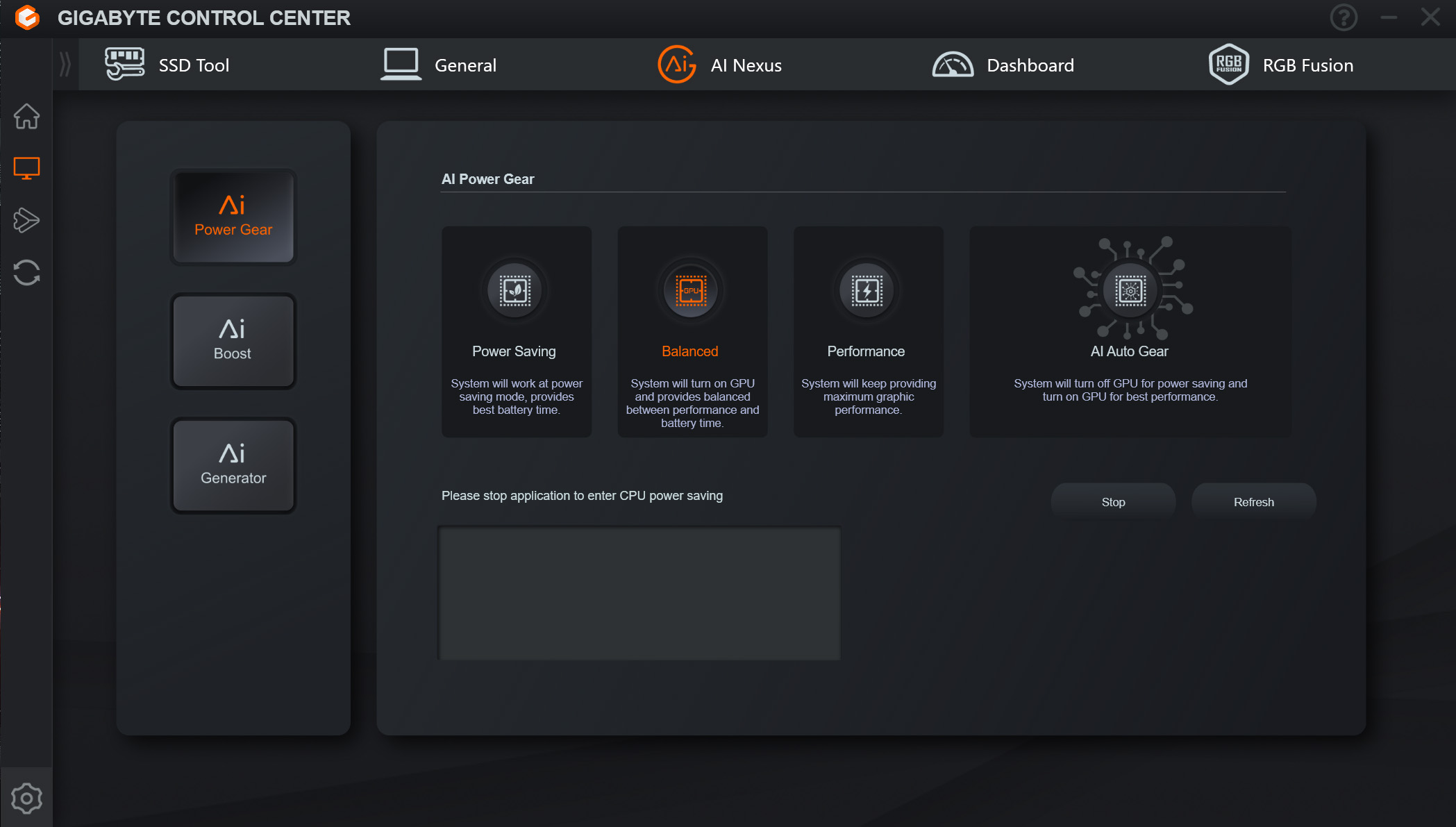
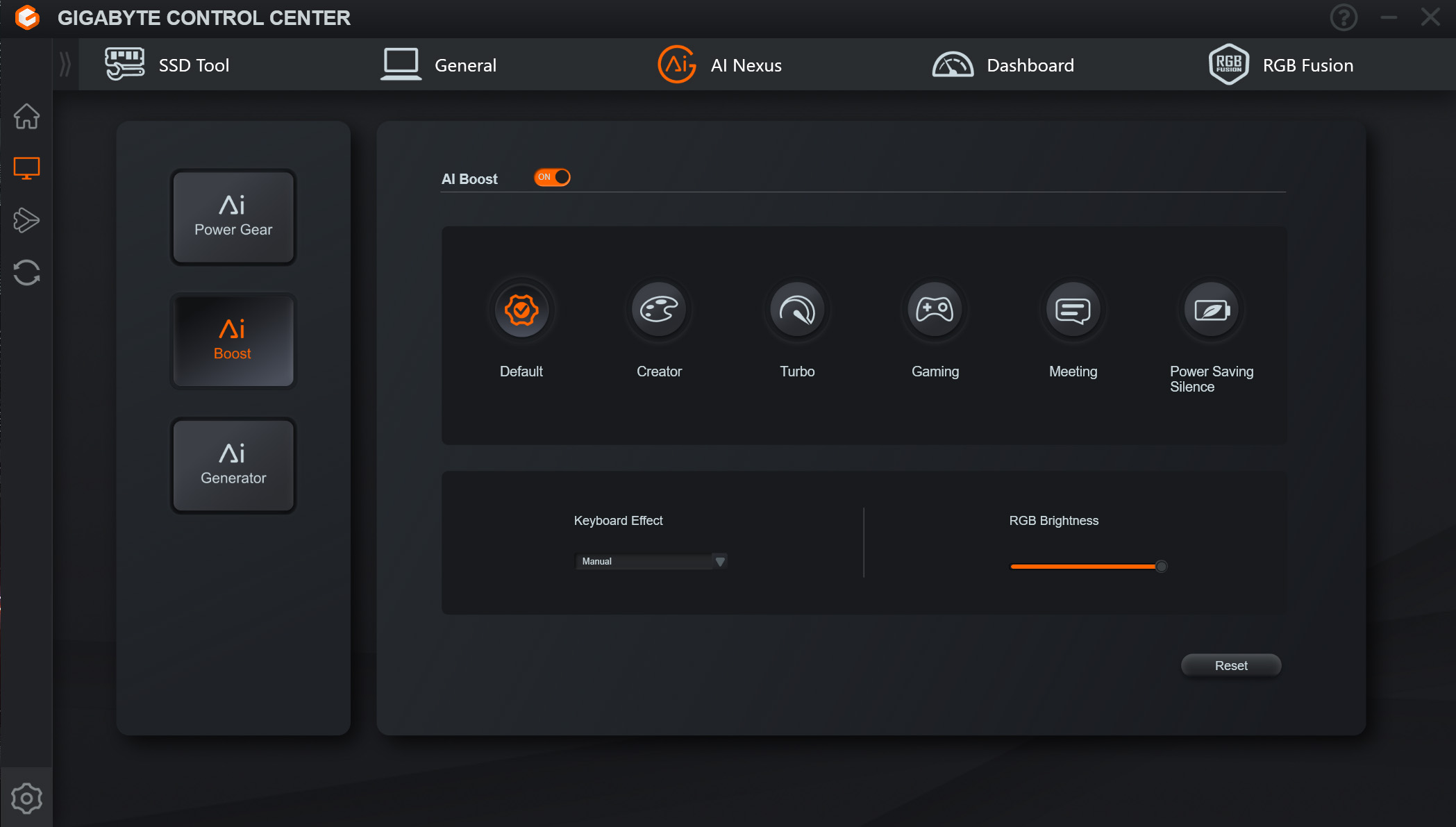
Before diving into the testing results, it's worth quickly going over Gigabyte's AI system, as this essentially boils down to different modes which enable varying power limits for the CPU and GPU. The first stage is choosing the ‘Power Gear', essentially giving a choice between Power Saving, Balance or Performance profiles, though do note enabling a new mode here does require a restart.
The AI Boost feature is more interesting, as this offers a bunch of profiles that are tailored to different tasks. You can enable these manually, but if you simply engage the AI Boost feature, the system will automatically switch profiles when it detects certain software being used. Cinebench, for instance, switched to the Creator profile, while Cyberpunk 2077 engaged the Gaming profile.
Personally I think calling this ‘AI' is somewhat of a stretch, but it is at least a semi-useful system that will funnel more power to either the CPU or GPU, depending on what you are doing.
For my testing today, I tested three different configurations. The first was using the Balanced power option, with AI off – the default, out of the box experience. I then tested again using the same Balanced power mode, but this time with AI Boost on so we can see how the different profiles affect performance. Finally, as an all-out test, I ran the Performance power mode but with the Turbo profile manually selection, to give an indication of the best performance this machine is capable of, though the noise levels were extreme as we will get to!
In terms of behaviour then…
- The Balanced power setting with no AI saw the P-cores boost to 3.6-3.7GHz initially, with power around 120W. After 40 seconds, the power dropped to 85-95W, with P-cores clocking at 3.2-3.3GHz. In Cyberpunk 2077, the GPU clocked around 2370MHz, with power reported at about 95W.
- The Balanced power mode but with AI enabled saw the P-cores boost to 3.9-4GHz initially, with power around 135W. After 40 seconds, the power dropped to about 110W, with P-cores clocking at 3.5-3.6GHz. In Cyberpunk 2077, the GPU clocked around 2565MHz, with power reported at about 110W.
- The Performance power mode using the Turbo profile saw the P-cores boost to 4-4.1GHz initially, with power around 150-160W. After 40 seconds, the power dropped to about 120W, with P-cores clocking at 3.7-3.8GHz. In Cyberpunk 2077, the GPU clocked around 2565MHz, with power reported at about 115W.
Testing
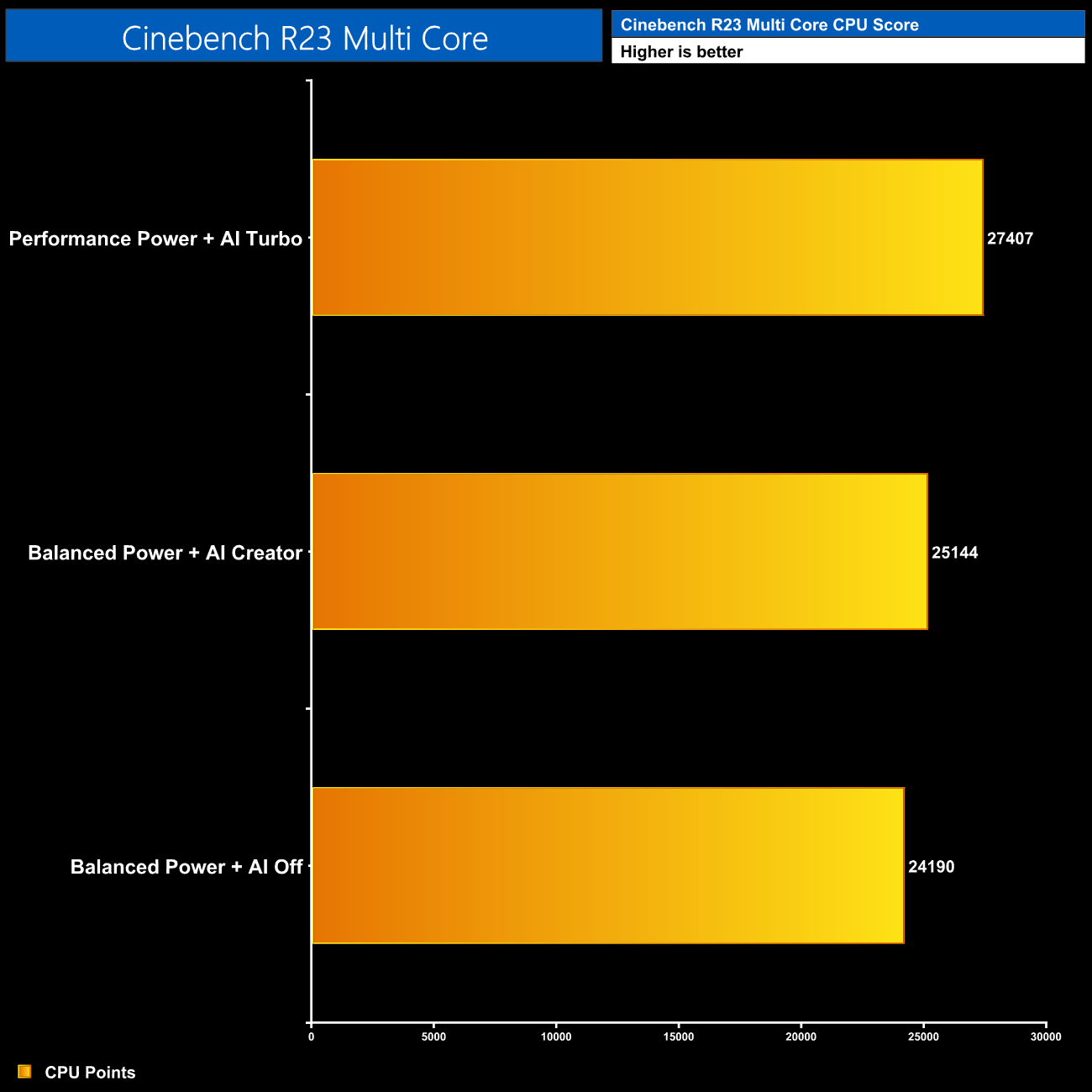
Naturally in Cinebench Multi Core, the higher the power the better the score will be, with our Turbo testing indicating performance can be improved by about 13% compared to the default, out of the box experience.
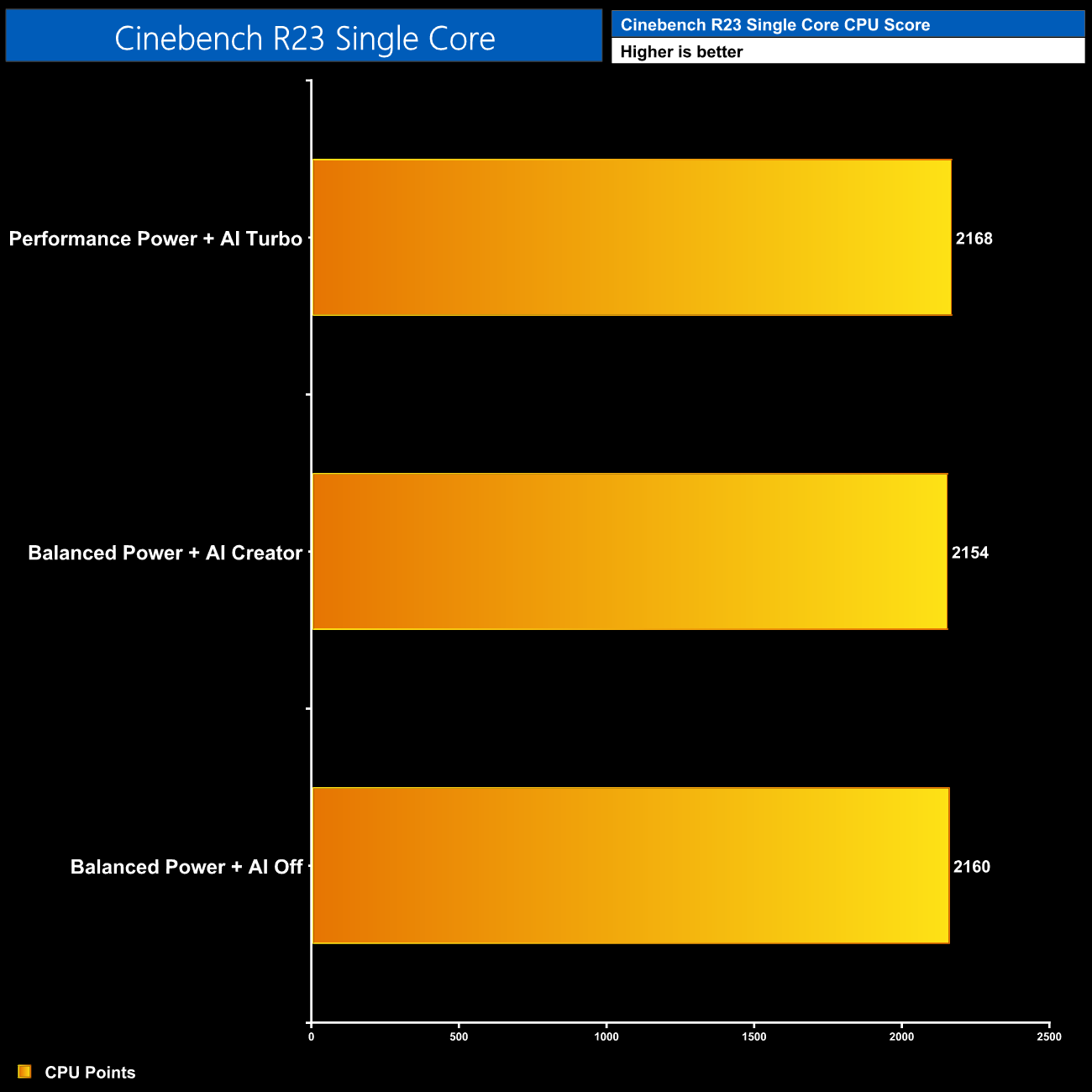
The single core testing saw no real difference in performance however, as the power limit has very little significance with this metric.
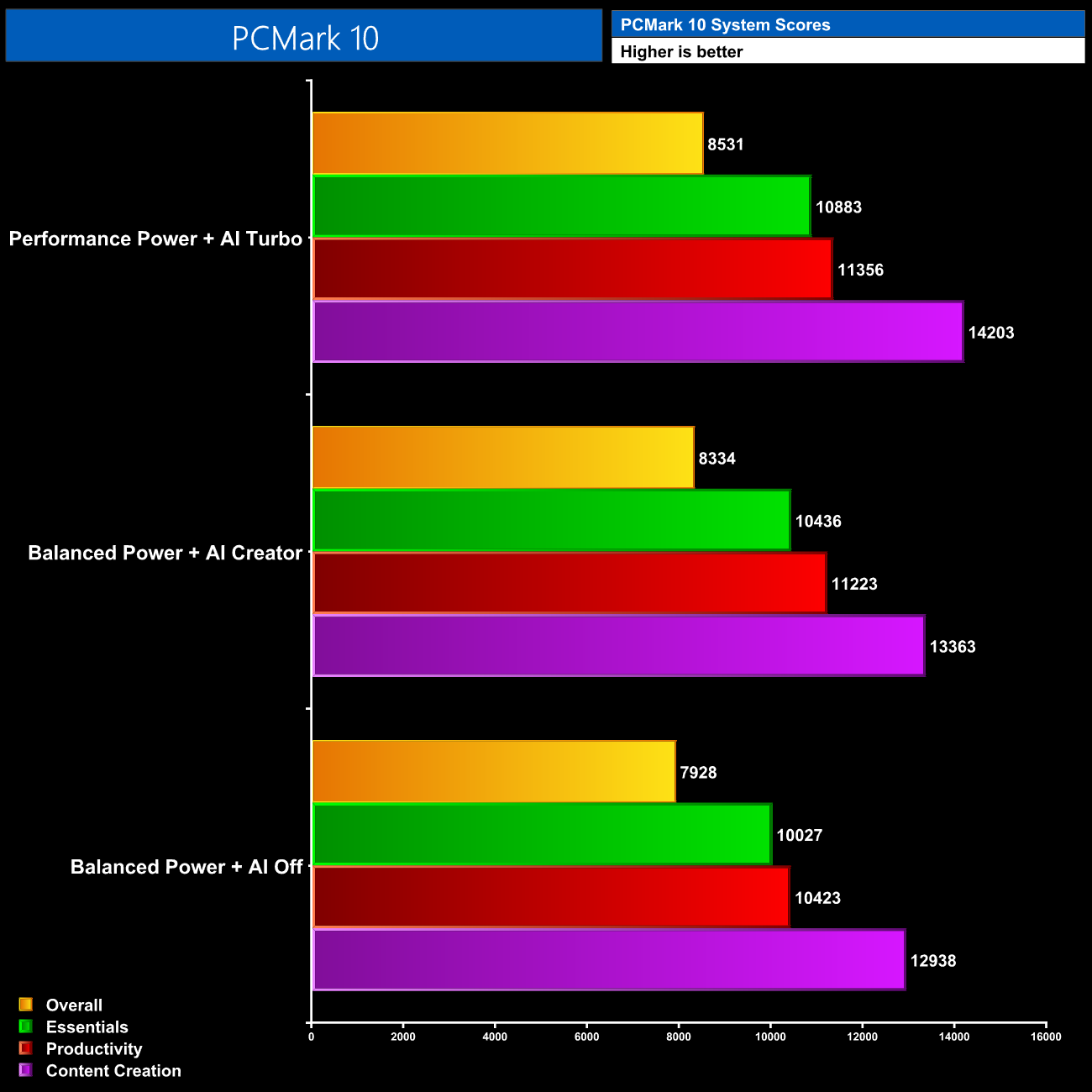
PCMark 10 again shows the benefit of the higher power modes, with scores increasing every time we bumped up the profiles tested. Overall, the Turbo mode is 10% faster than the results with no AI enabled.
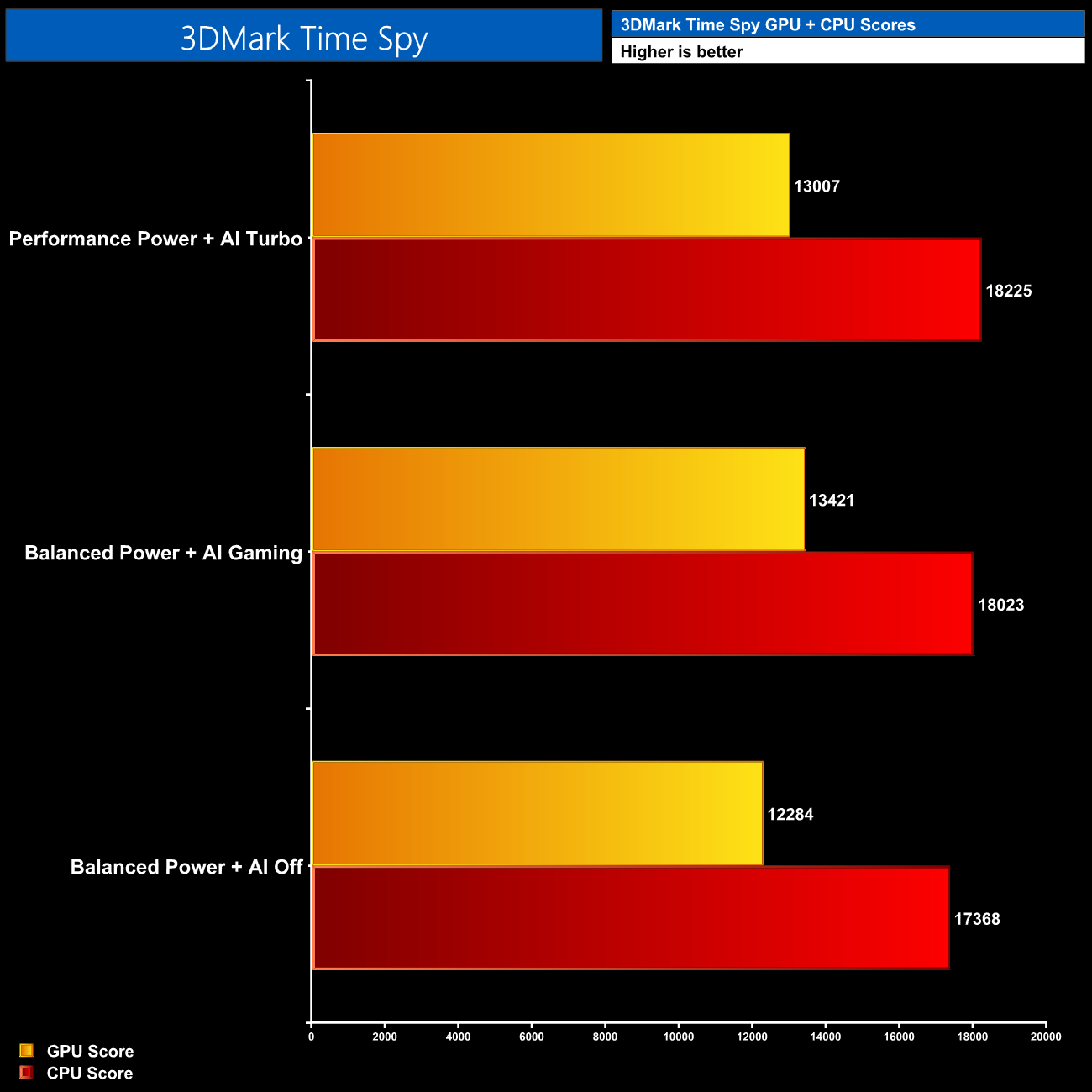
We see the same performance scaling in 3DMark when looking at the CPU score, but interestingly the Turbo GPU score was slightly worse than the Balanced + AI Gaming result. This behaviour cropped up a few times in our game testing too, and it appears to down to the fact that the Turbo mode can sometimes reduce GPU power and clocks compared to the AI Gaming mode, in exchange for higher CPU power.
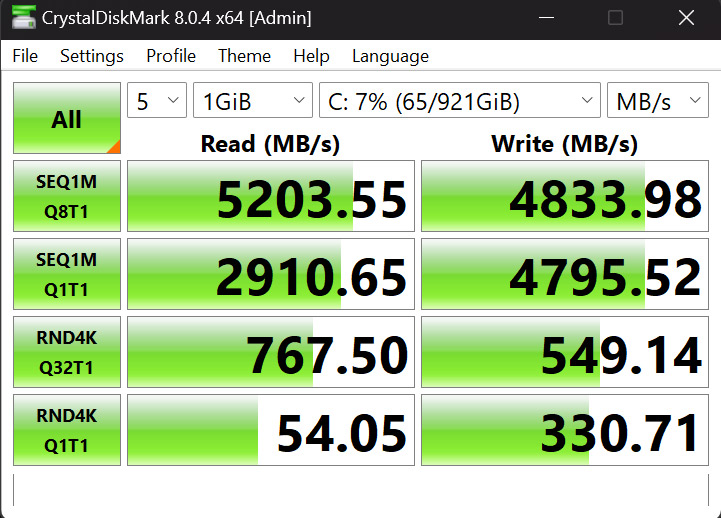
The pair of Aorus Gen4 5000 SSDs used here live up to their name, with sequential reads hitting 5.2GB/s, while sequential writes hit 4.8GB/s. As both SSDs are the same model, performance is identical between the two.
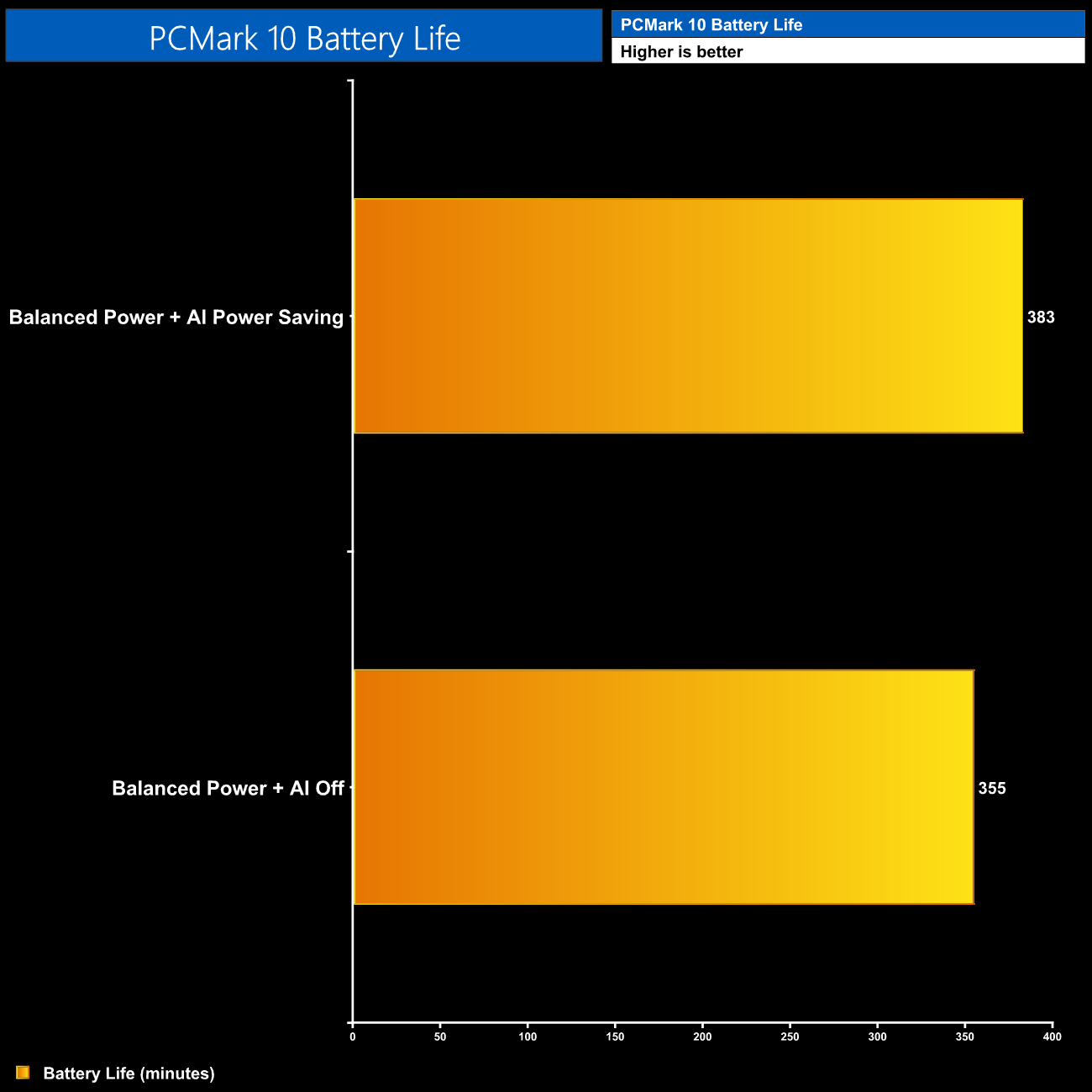
Finally, we tested battery life using the PCMark 10 Modern Office test, using the Balanced profile with no AI, and then again with the AI Power Saving mode engaged. This didn't make much difference, but both results offered about seven hours of battery life for light tasks which I was pretty happy with considering the beefy hardware in this laptop.
Here we test 5 games, all at the native 2560×1600 resolution (or 2560×1440 where 16:10 is not supported), using High or Ultra image quality settings but with DLSS and ray tracing disabled.
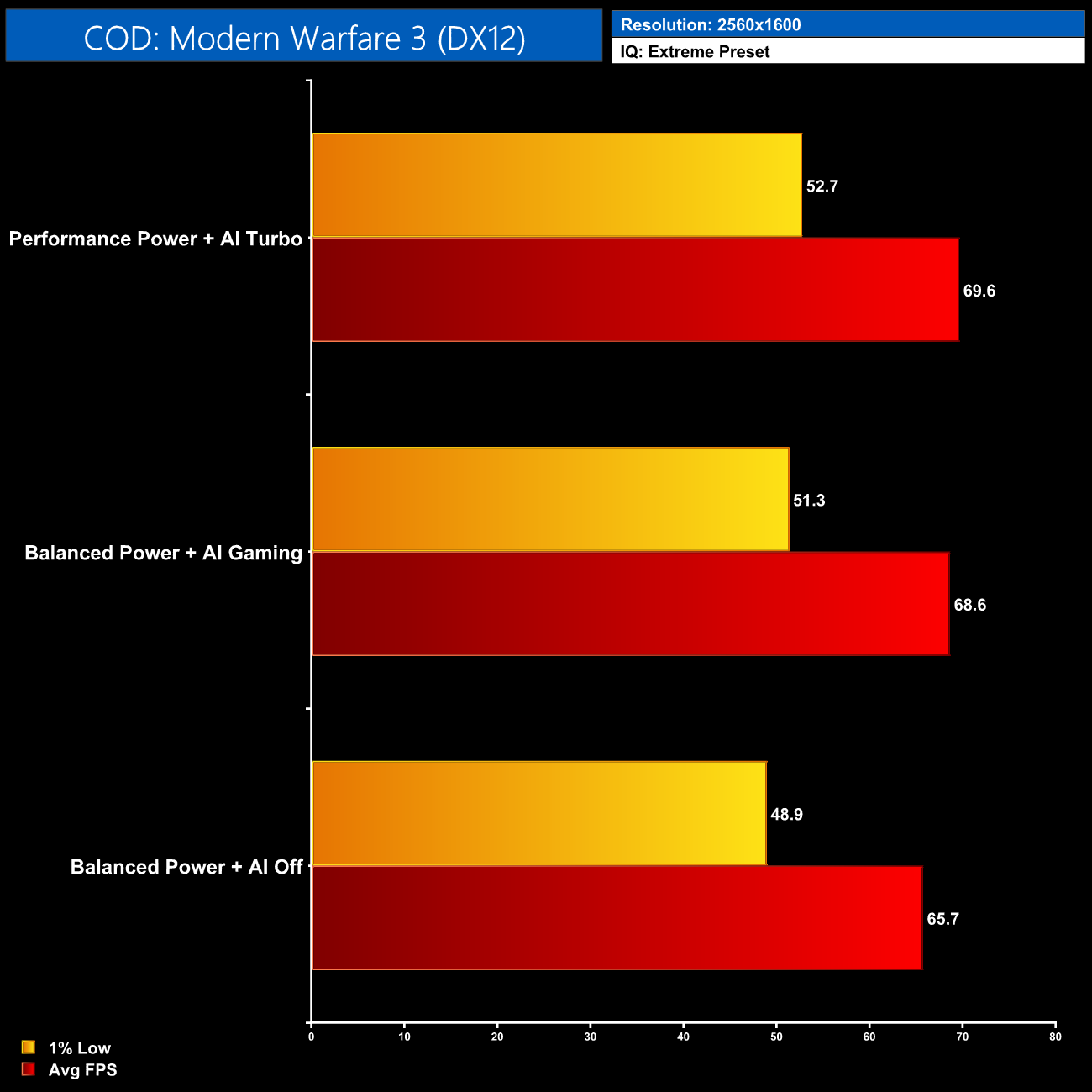
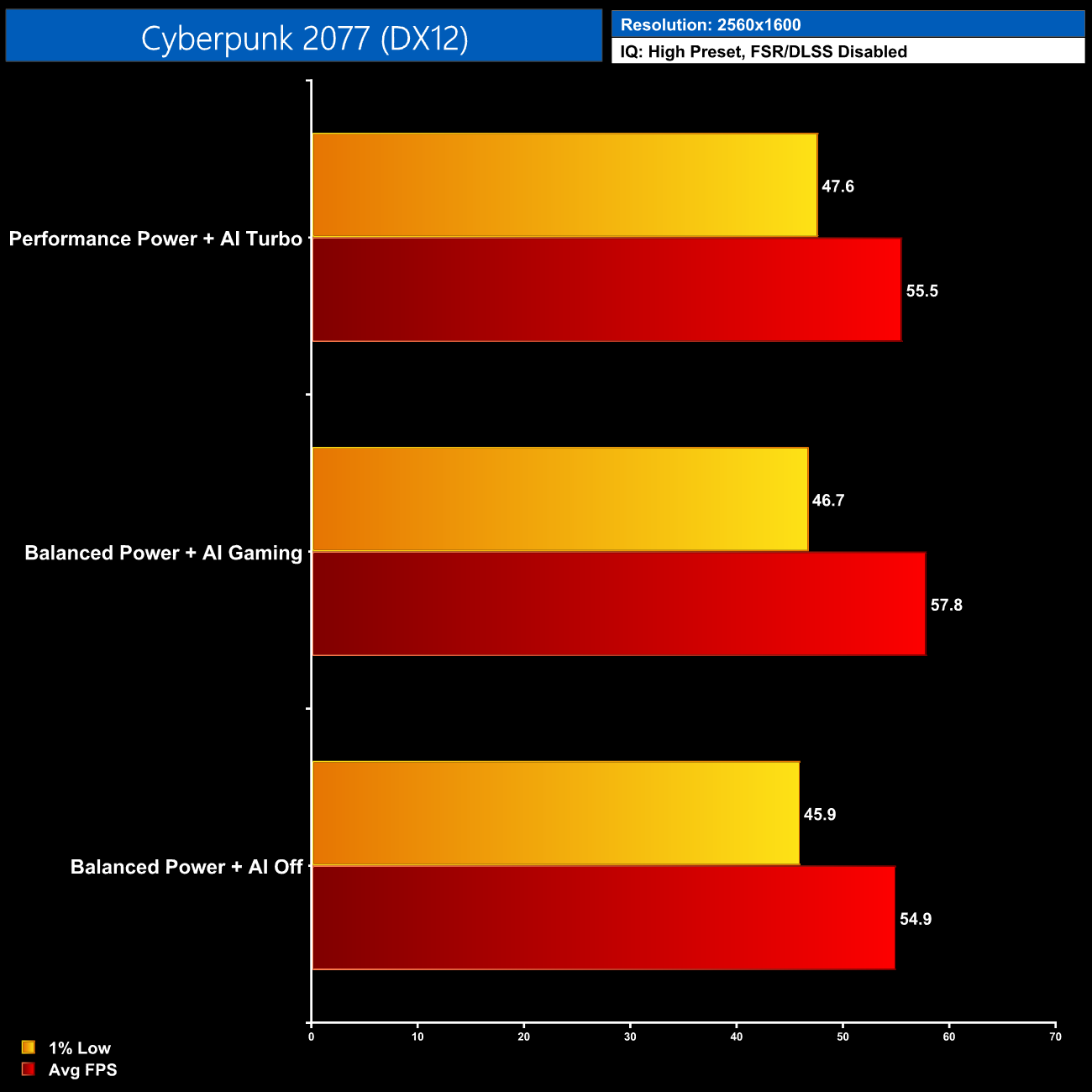
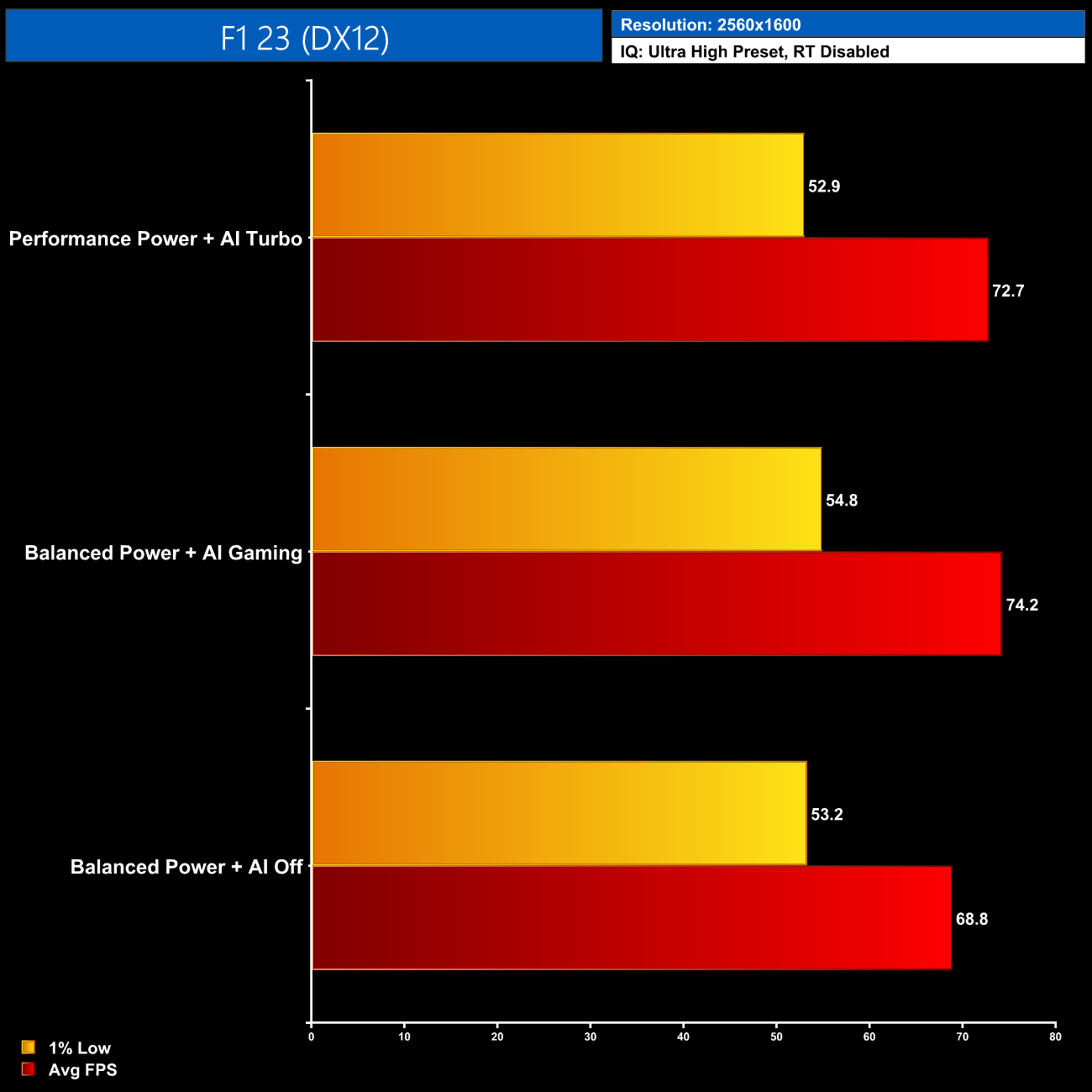
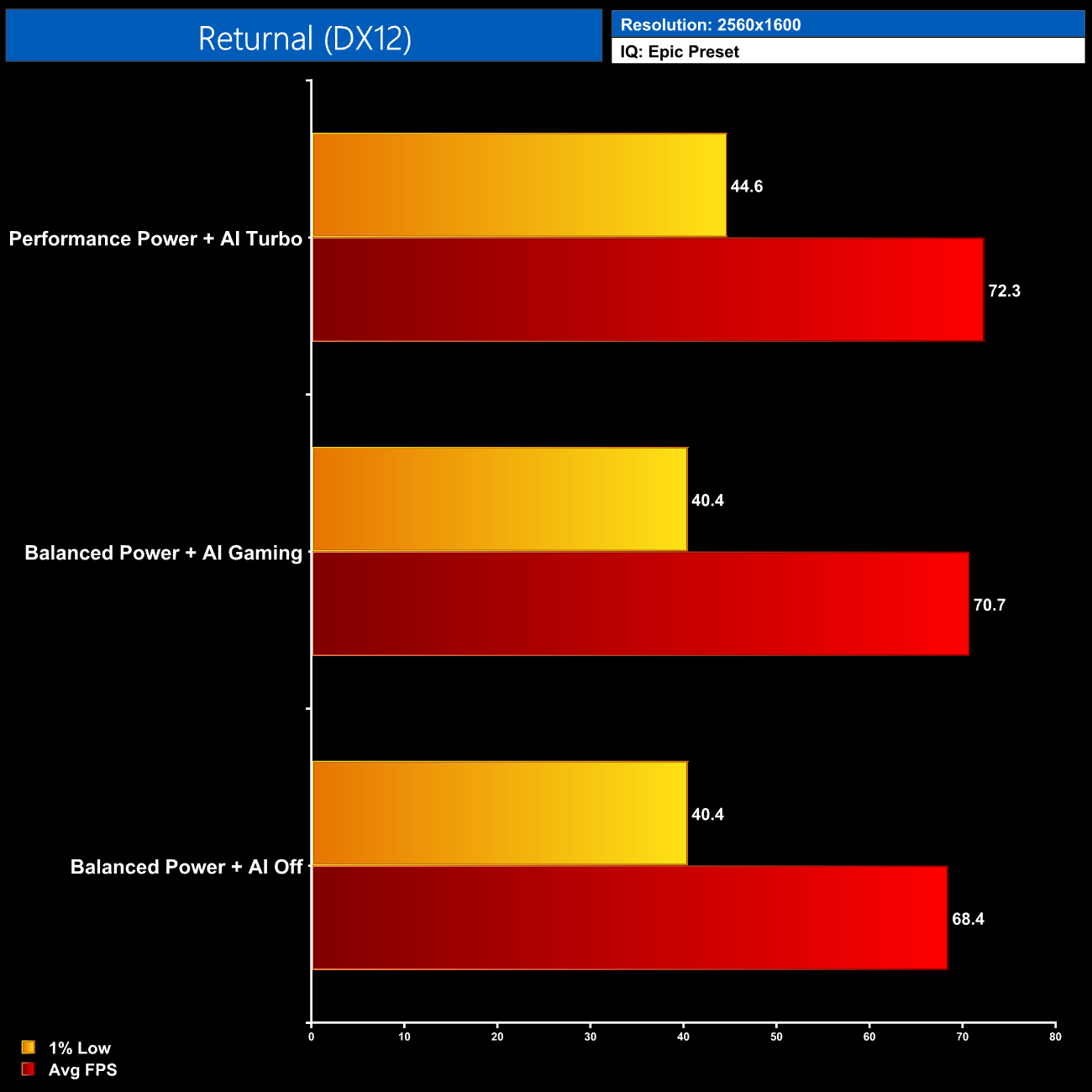
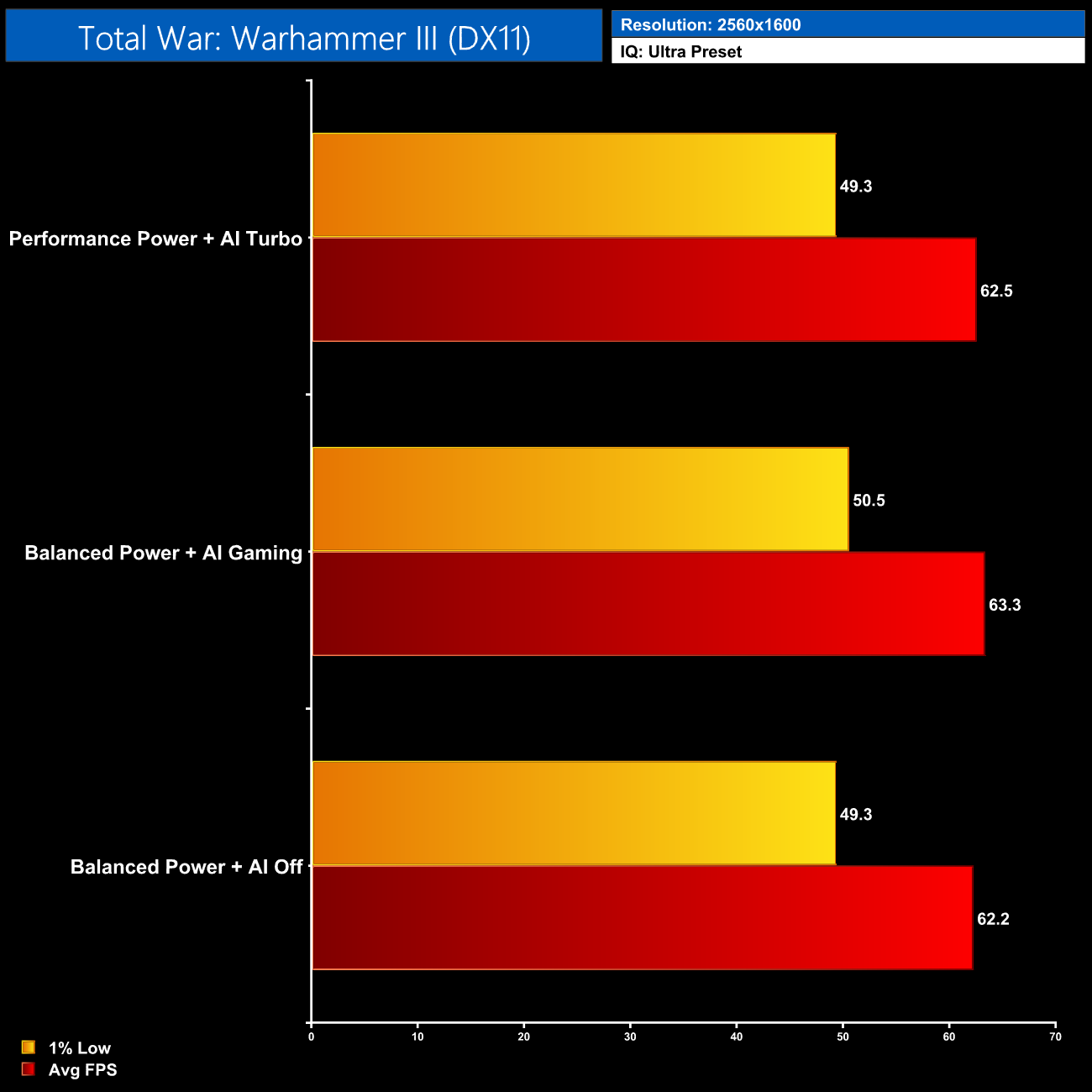
Overall, gaming performance is about as expected from this machine. RTX 4070 Laptop is more akin to the desktop RTX 4060 Ti given they both use the AD106 silicon with 8GB VRAM, so it's not a super-powerful GPU when gaming at the native 1440p+ resolution. It still delivered around 60FPS in the games we tested, but enabling DLSS or dropping down to 1920×1080 will get you closer to the 165Hz max refresh rate of the display.
As noted from our Time Spy testing, there are also a few occasions where the Turbo profile performed slightly worse than the AI Gaming profile, due to the former's high CPU power draw slightly taking away from the GPU power budget on occasion, but this can vary from game to game.
It's also worth pointing out here that the Aorus 16X supports Nvidia Advanced Optimus technology, so it dynamically switches between the CPU iGPU and the 4070 dGPU without any input from the user and with no need to restart the laptop when changing modes. This also means game performance is the same on the built-in screen as it is on an external monitor, which isn't always the case if a laptop does not have a MUX switch.
For our thermal tests, we ran Cinebench R23 and Cyberpunk 2077 for 30 minutes each and recorded steady-state temperatures at the end of the tests.
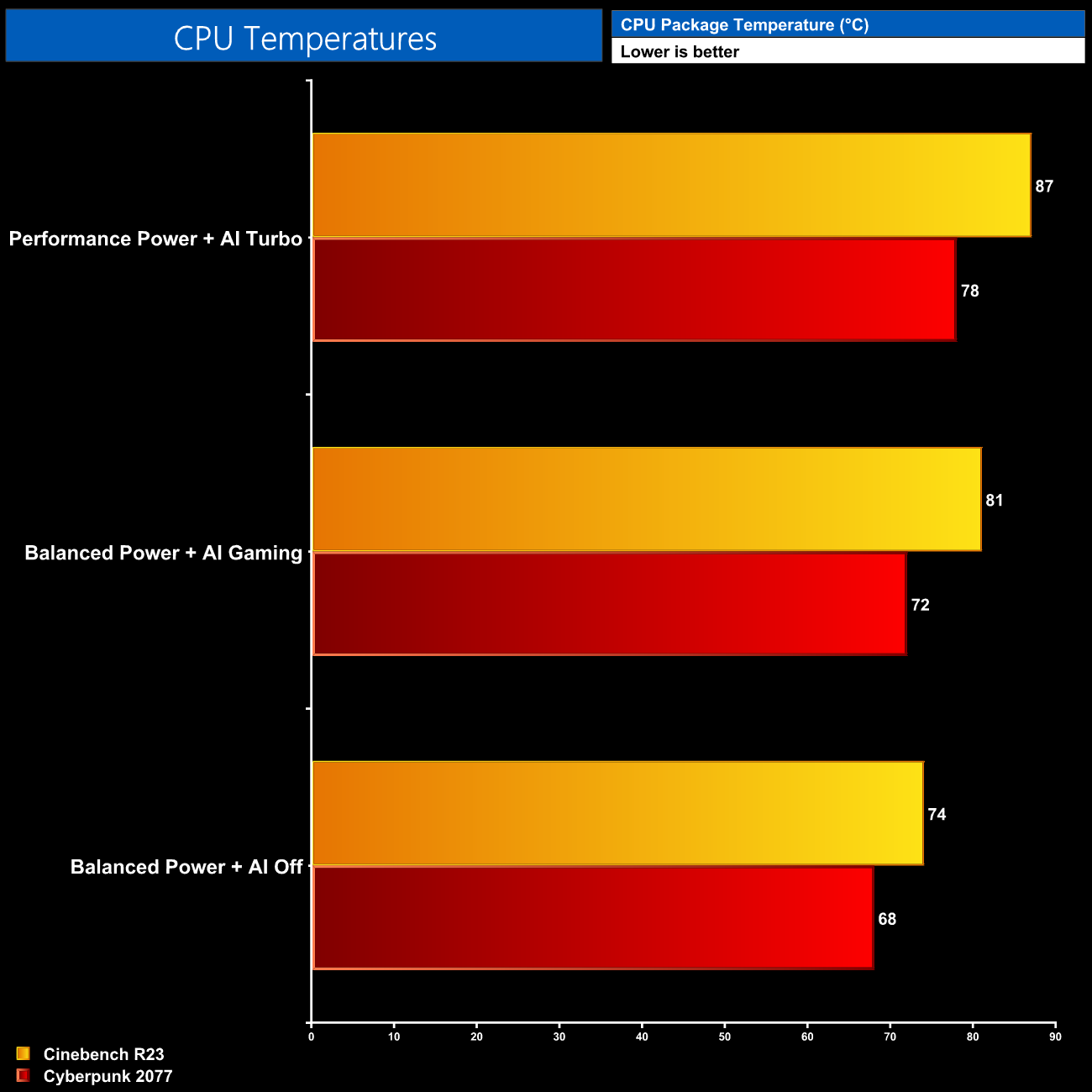
For CPU thermals, it's not a surprise to see the higher the power draw, the hotter the CPU ran, though outside of the initial 40-second boost period, things are kept in check by the Aorus 16X. The AI Gaming results hit 72C in Cyberpunk and 81C in Cinebench, while the Turbo mode still ‘only' hit 87C in Cinebench, which for a CPU drawing about 120W isn't too bad.
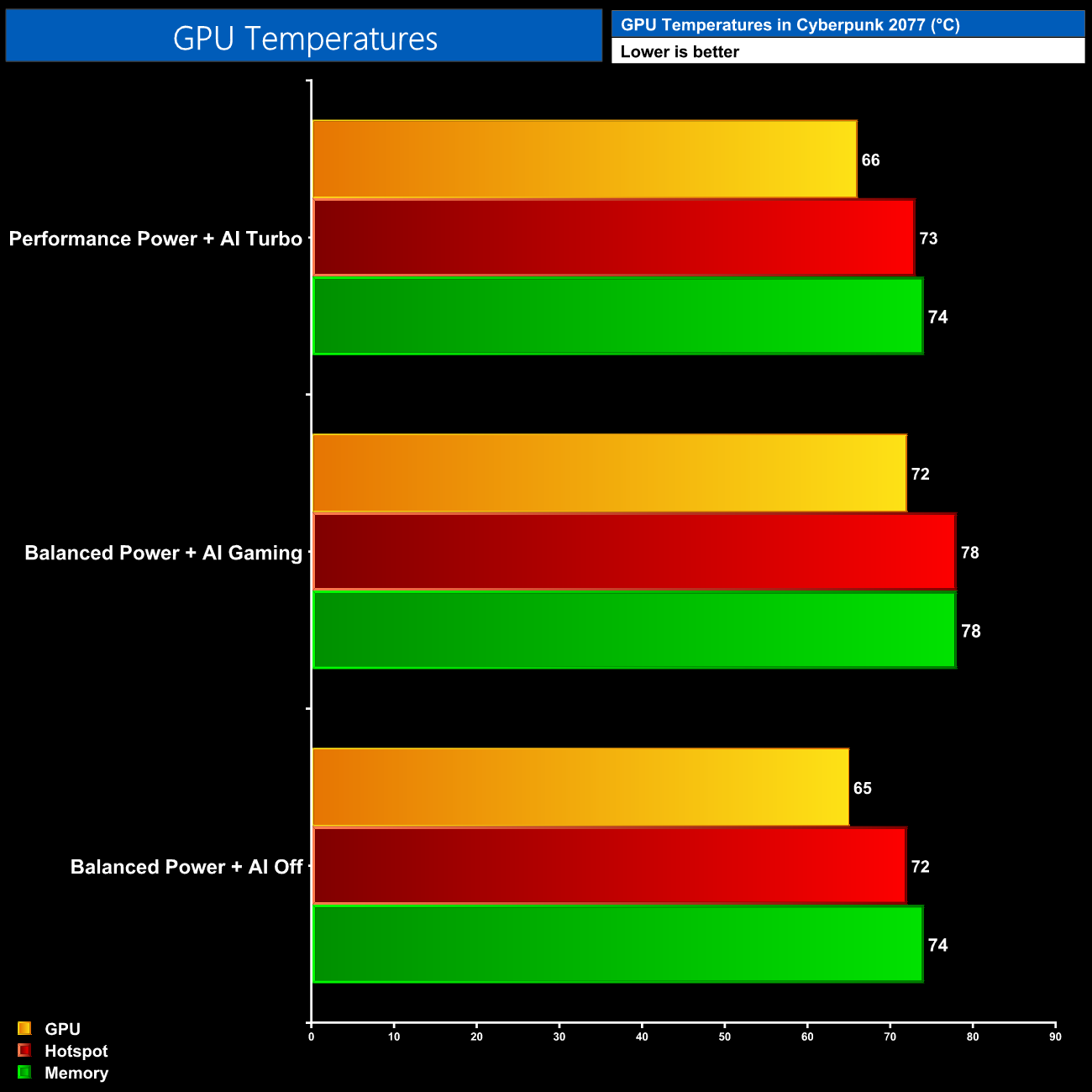
Likewise, GPU thermals are fine regardless of the profile used – the results with AI Off were the coolest due to the 95W power limit, but even at 115W we saw sub-80C temperatures on both the hot spot and memory.
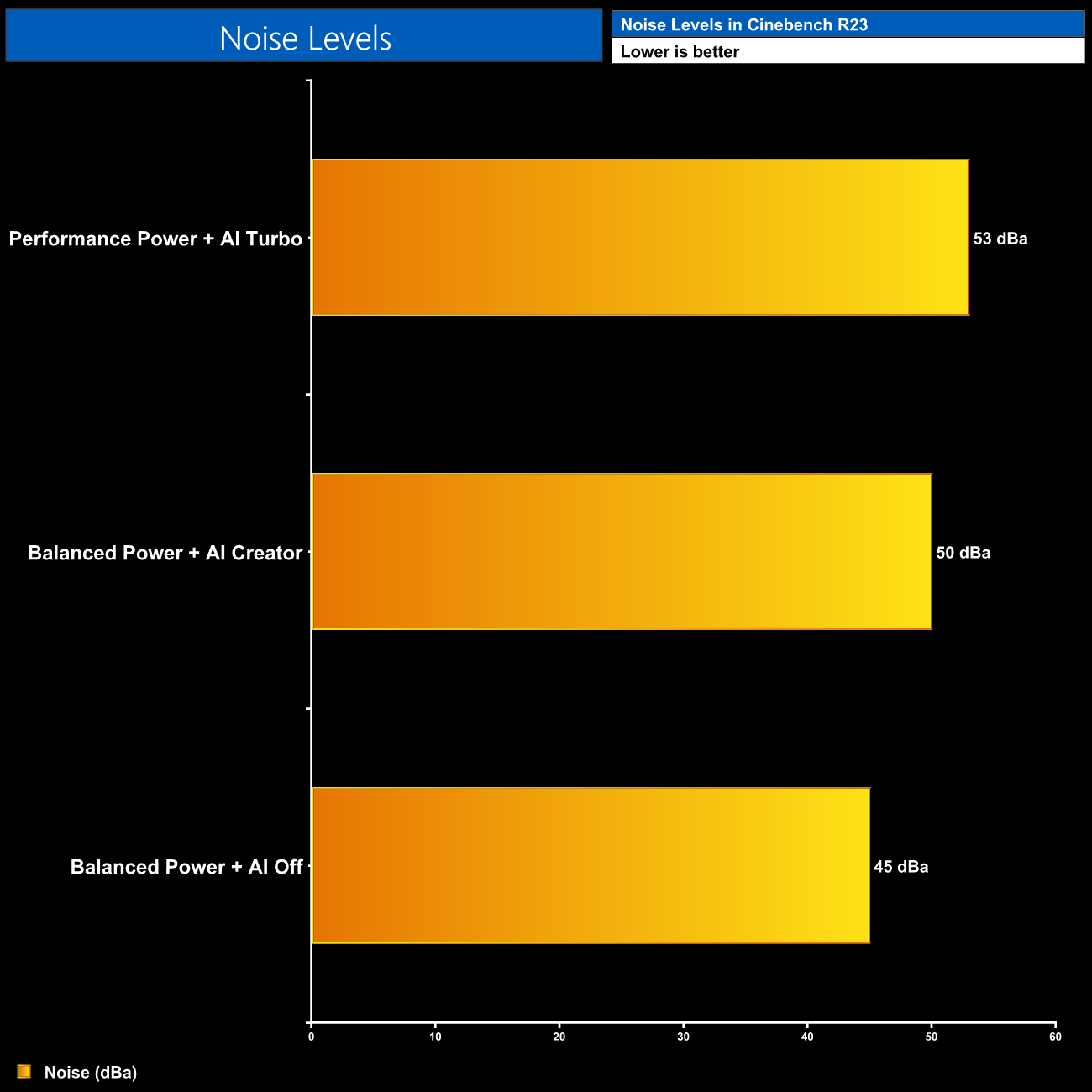
Part of the thermal performance is undoubtedly down to the fan speed however, which can get a bit raucous. As the power draw increases, so too does fan speed, and we measured a 50dBa reading (at a 30cm distance) using the AI Creator profile in Cinebench R23. The Turbo mode puts fan speed up to maximum and increase noise further to 53dBa, which is rather unpleasant – be sure to check out the video review on the first page for a sound test.
After putting the Gigabyte Aorus 16X through its paces over the last week, I have to say I am generally impressed with what Gigabyte has done with this laptop. It may not be class-leading in any one area, but taken as whole it does feels like more than the sum of its parts.
The spec, for instance, is pretty solid, especially in the CPU and memory department, with Intel's top-of-the-line i9-14900HX offering eight P-cores and sixteen E-cores, while that is outfitted with a forward-looking 32GB of memory. 2TB of Gen4 storage is also a welcome inclusion, as is the WiFi 7 module and relatively strong I/O selection.
I'd argue the display is the main highlight here, offering 16 inches of 2560×1600 goodness. It's fast and fluid for gaming with the 165Hz refresh rate and decent response times, but it also offers solid contrast, surprisingly high brightness of over 550 nits, and impressive colour accuracy. When many other laptops in this class are still only using FHD screens, this is great to see.
My main gripe with the Aorus 16X is the choice of graphics. RTX 4070 Laptop is perfectly fine in most instances, offering performance that's broadly equivalent to the RTX 4060 Ti desktop part. It is, however, equipped with just 8GB of VRAM, which is only going to become a more significant limiting factor as time passes. I do appreciate that most laptop gamers are generally going to be happier to compromise on image quality settings than you would on a desktop PC, given the portable nature of the machine and the much smaller display. If you're looking for something to play AAA games at maximum settings for years to come, I don't think 8GB VRAM will be up to the task.
To add to that, RTX 4080 laptops with 12GB VRAM are available for not a whole lot more at the time of writing, typically starting at around £2000, though that is typically for a FHD screen and only 16GB DDR5 so there's two compromises already. RTX 4070 will do the job for most games right now, especially if you enable DLSS, but it is the longevity that concerns me.
My only other real complaint is the noise level, as the laptop does get loud, especially if using the AI Gaming profile – and don't get me started on the Turbo mode! In speaking with my colleague Leo Waldock, he suggested the Windforce Infinity cooling setup looks relatively basic considering the 14900HX CPU used, so high fan speeds may be used to overcome that, resulting in high levels of noise – but the same can also be said for many other portable machines.
Overall, the Gigabyte Aorus 16X is a solid laptop that delivers a good user experience. Depending on the type of games you play, you may want to consider looking at an RTX 4080 laptop instead, but for many I have no doubt that this machine will have strong appeal.
We don't yet have a buy link for this model, but Gigabyte tells us it will be in stock at Curry's in a couple of weeks, priced at £1899.99.
Discuss on our Facebook page HERE.
Pros
- Good-looking machine.
- Decent build quality.
- Keyboard and trackpad get the job done without a fuss.
- Impressively bright 2560×1600 display offers good colour accuracy.
- Healthy selection of ports.
- Strong CPU performance from the i9-14900HX which is a good inclusion at this price.
- Enough grunt for 60FPS in most games at the native resolution.
- Surprisingly capable battery life considering the hardware.
- Nvidia Advanced Optimus is supported and works well.
Cons
- RTX 4070 Laptop only has 8GB VRAM.
- Can get very noisy under load.
- No full-size SD card slot.
KitGuru says: There's a lot to like about the Aorus 16X, and provided you are happy to work within the 8GB GPU framebuffer, it's certainly worth buying.