KitGuru KitGuru.net – Tech News | Hardware News | Hardware Reviews | IOS | Mobile | Gaming | Graphics Cards


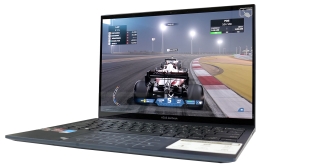
AMD’s new Ryzen 6000 Mobile processors are focussed heavily on strong computational and graphics performance at low power levels. That combination makes the U-series chips right at home inside 15-28W-class, sub-15mm, 1kg ultraportable style laptop chassis; and that’s exactly what we have at hand to examine the performance of AMD’s new 8-core Zen3+ processor – the ASUS ZenBook S 13 OLED.
We have already examined Zen 3+ Mobile in its 35W-class Ryzen 9 6900HS form with the ASUS ROG Zephyrus G14 and that was a glowing success with the chip proving to be absolutely superb. So, let’s see if that outstanding performance and performance-per-Watt translates well for the Ryzen 7 6800U in a market where such metrics are absolutely critical.
Timestamps
00:00 Start
01:10 Introduction to the 6800U
02:49 ASUS ZenBook S 13 OLED
04:50 Test setup and comparisons
06:25 Temps, clocks and overall behaviour
07:45 CPU/System benchmarks
10:27 Gaming benchmarks
13:22 Media consumption
14:54 Noise levels
15:34 SSD and battery
16:35 Closing thoughts
In this review, we are going to primarily focus on the brand-new hardware that ASUS deploys in the ZenBook S 13 OLED UM5302TA laptop. Notably, that is the AMD Ryzen 7 6800U processor and its accompanying LPDDR5 memory. Make sure you check out our previous Ryzen 6000 review videos and written article if you want more details on the SoC features.
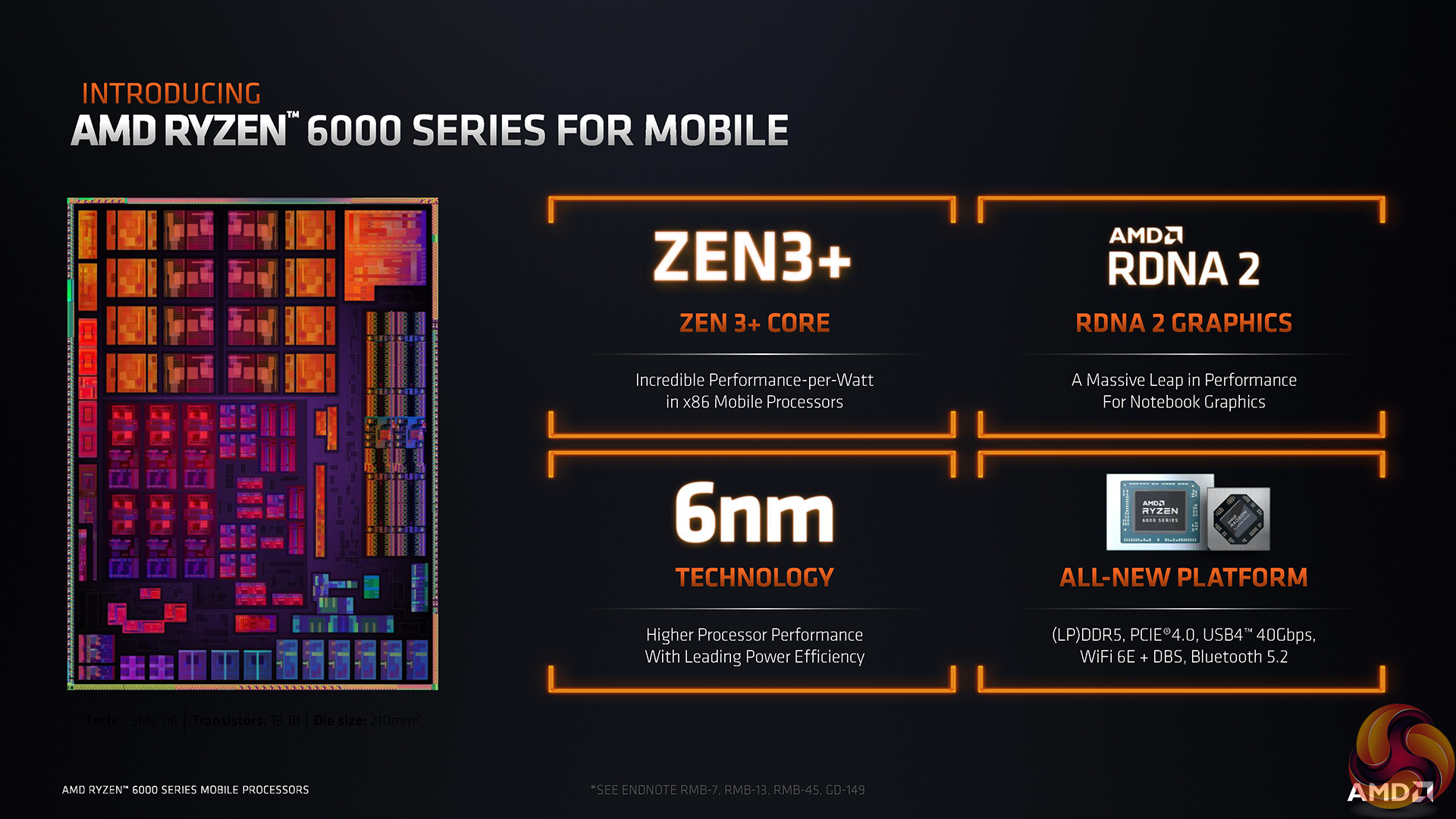
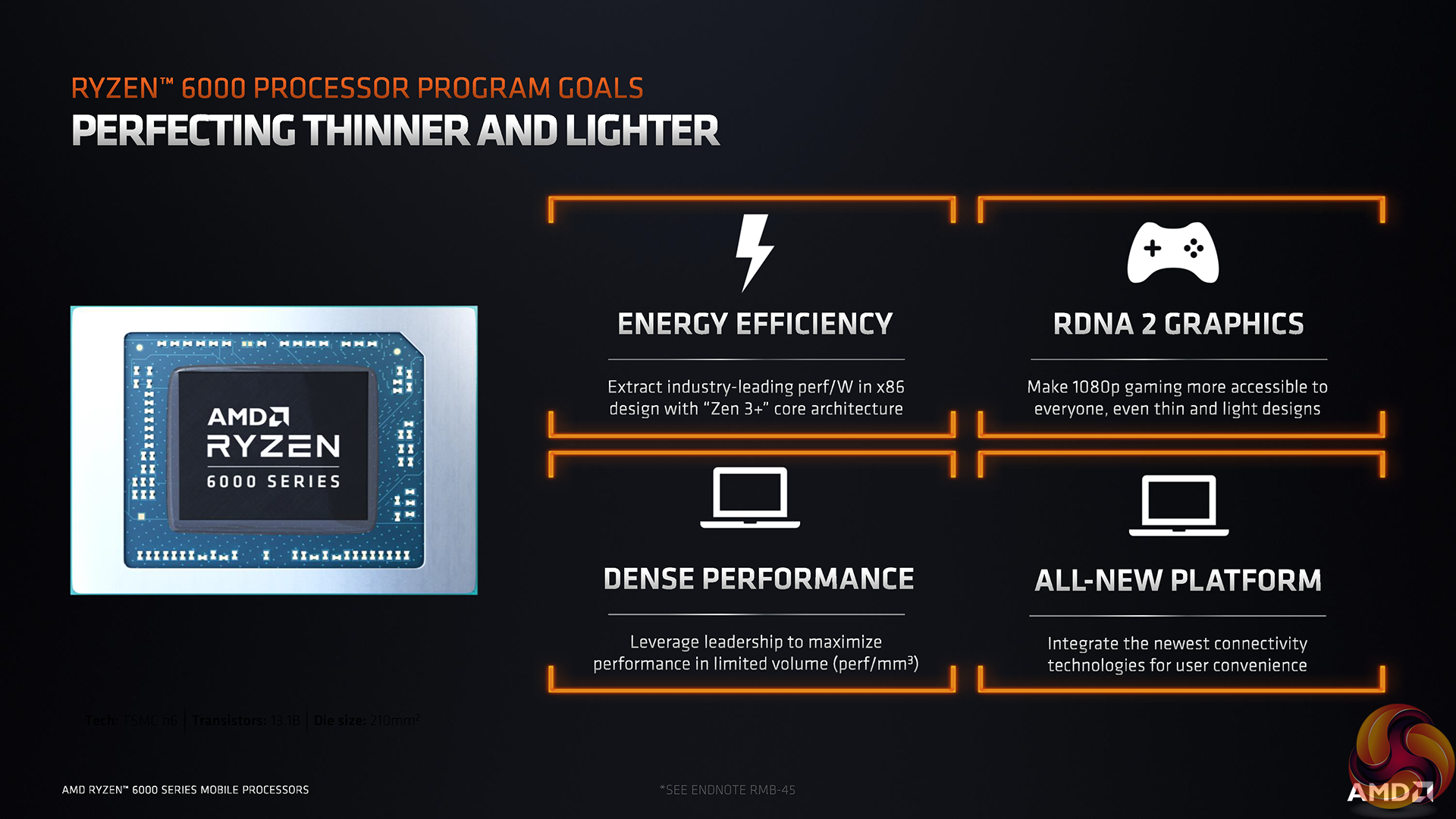
The Zen 3+ Ryzen 7 6800U is an 8-core, 16-thread processor with 2.7GHz base frequency and up to 4.7GHz boost. 20MB of total cache is supplied and the chip is built on TSMC’s 6nm process node to provide 13.1 billion transistors.
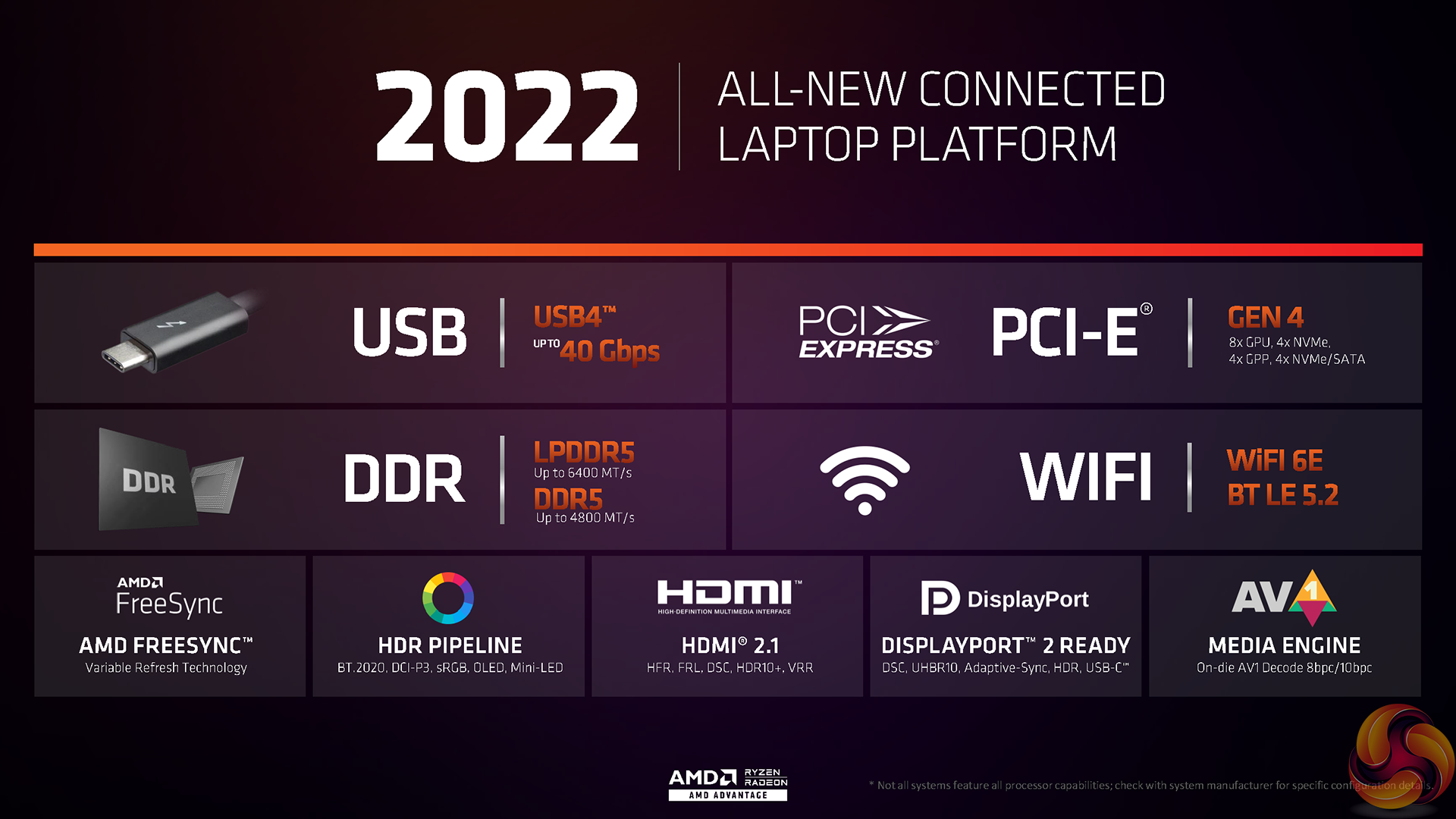
The platform side of things has been improved significantly versus previous generations, too. You now get support for LP or standard DDR5, PCIe Gen 4 connectivity is deployed throughout, and there’s overarching USB4 support too, which is fundamentally critical for ultraportable laptops such as this – particularly with the interoperability with the well-established Thunderbolt ecosystem.
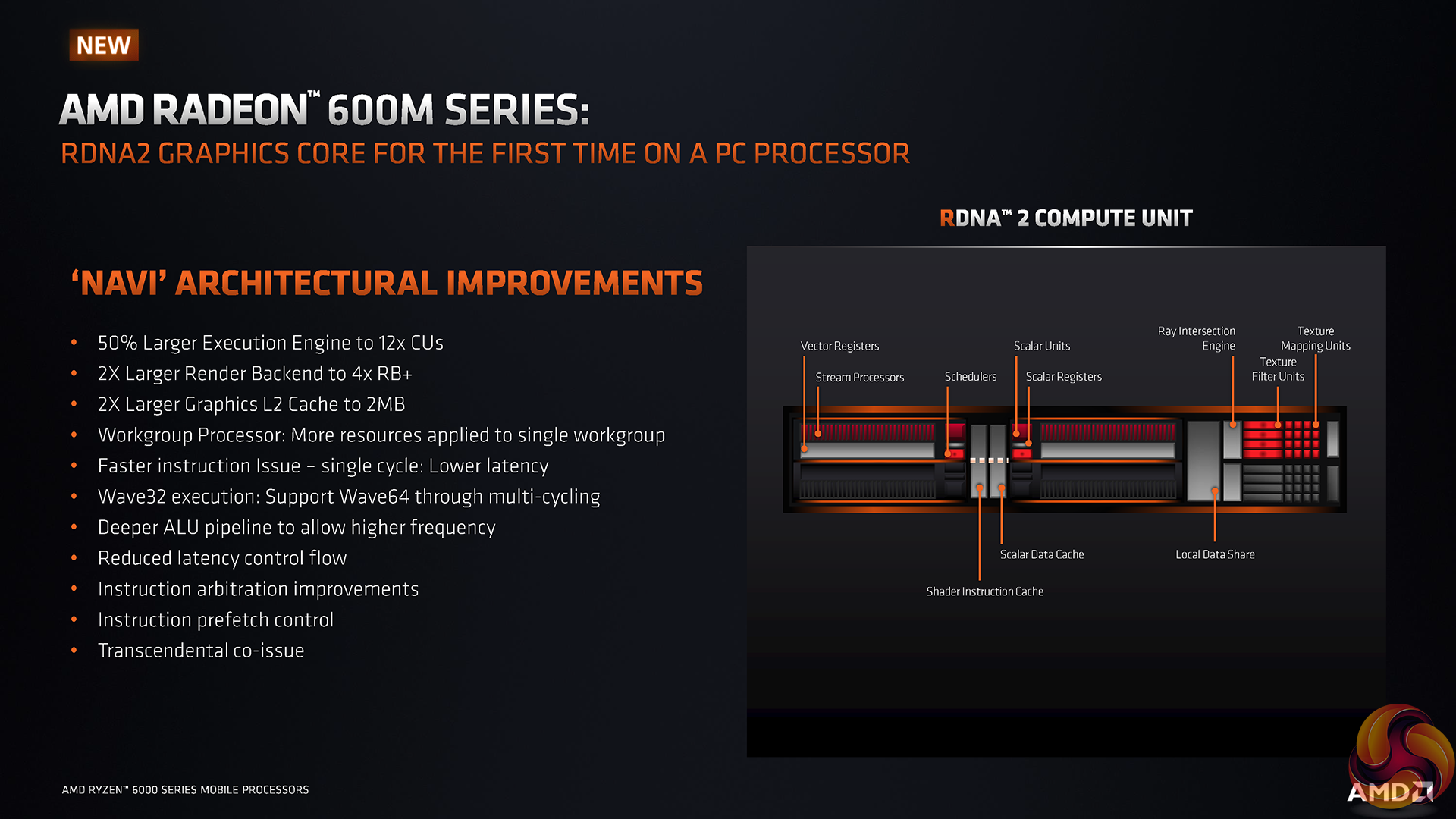
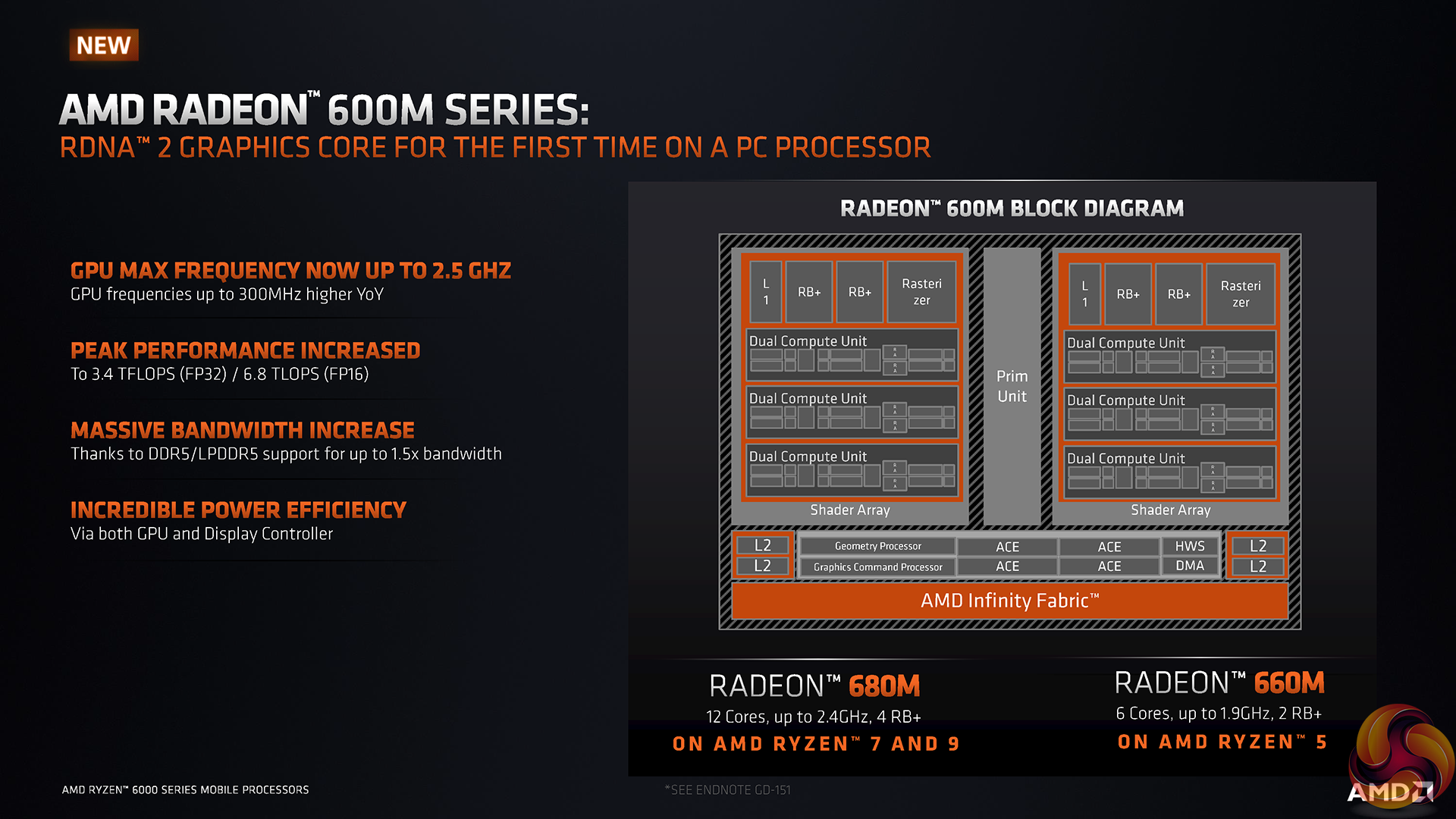
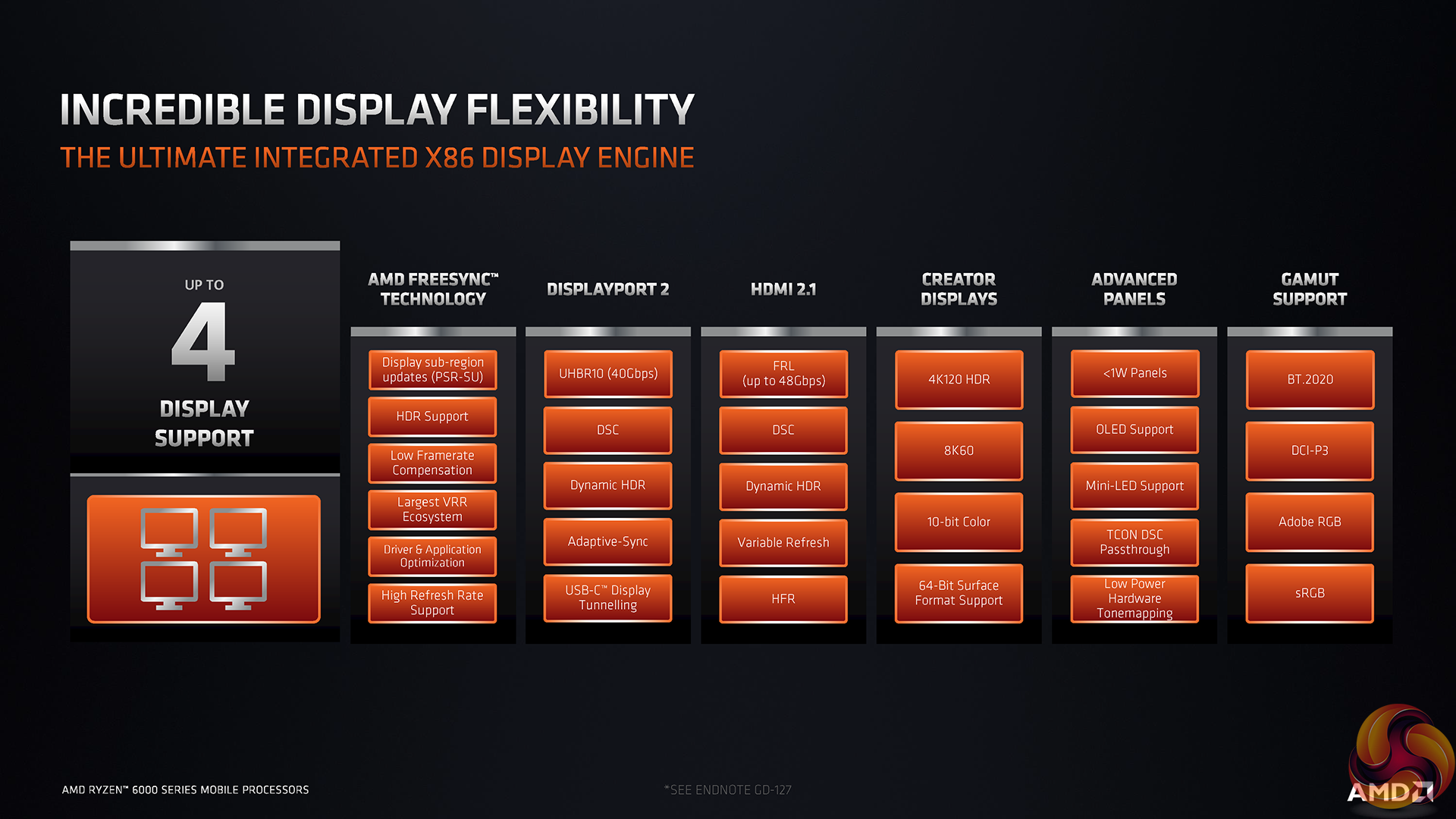
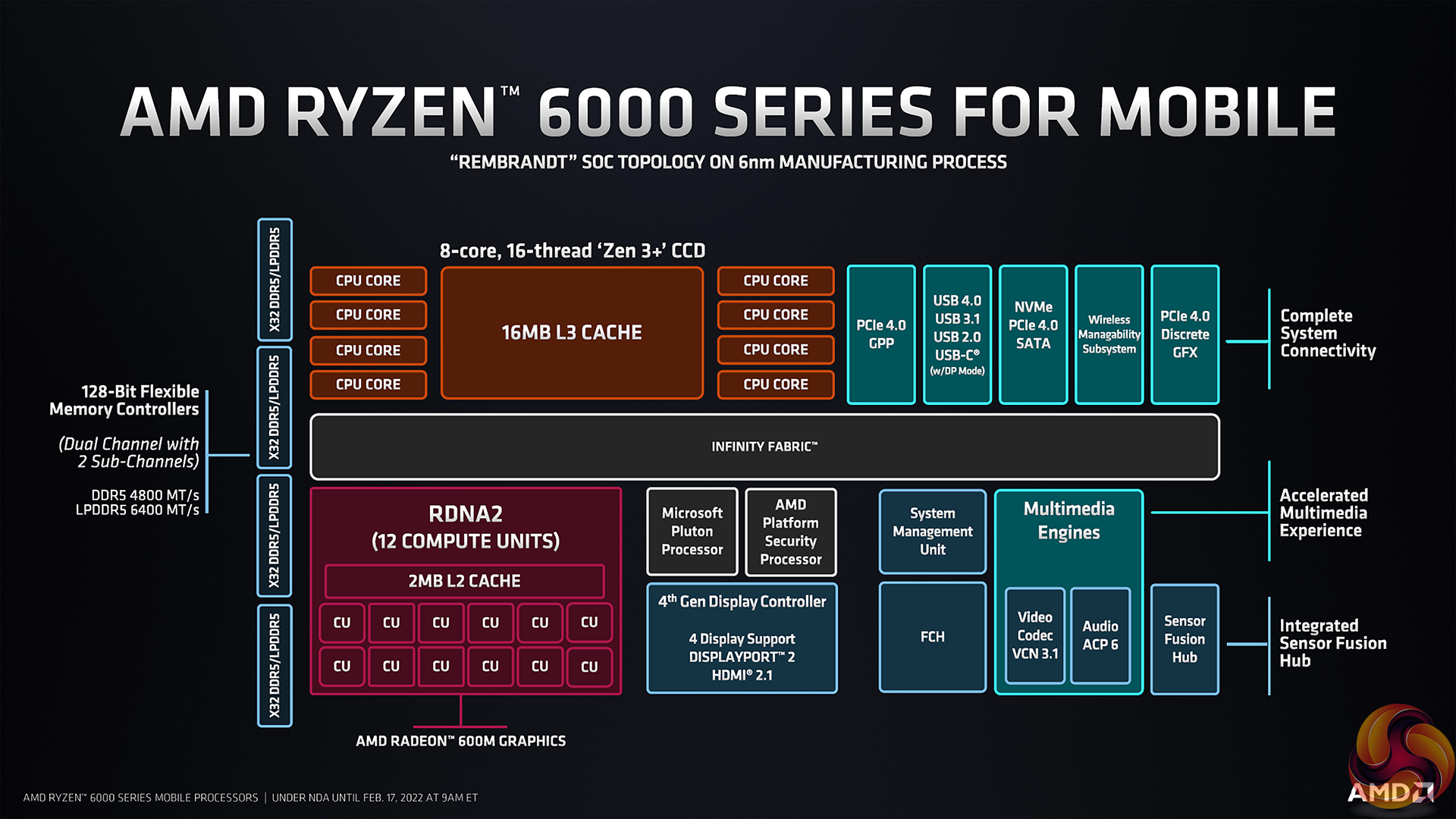
The new Radeon 680M integrated GPU is built around RDNA2 and features 12 Compute Units clocked up to 2.2GHz. Those specs make us intrigued by the possibilities of some light gaming duties.
But the real area where the GPU shines is for its media and general usage performance. Ryzen 6000 offers up AMD’s improved support for H264, H265, and AV1 – all at high resolutions and often high refresh rates. Plus, the new display controllers could be ideal for outputting to high-resolution displays with HDR and other technologies.
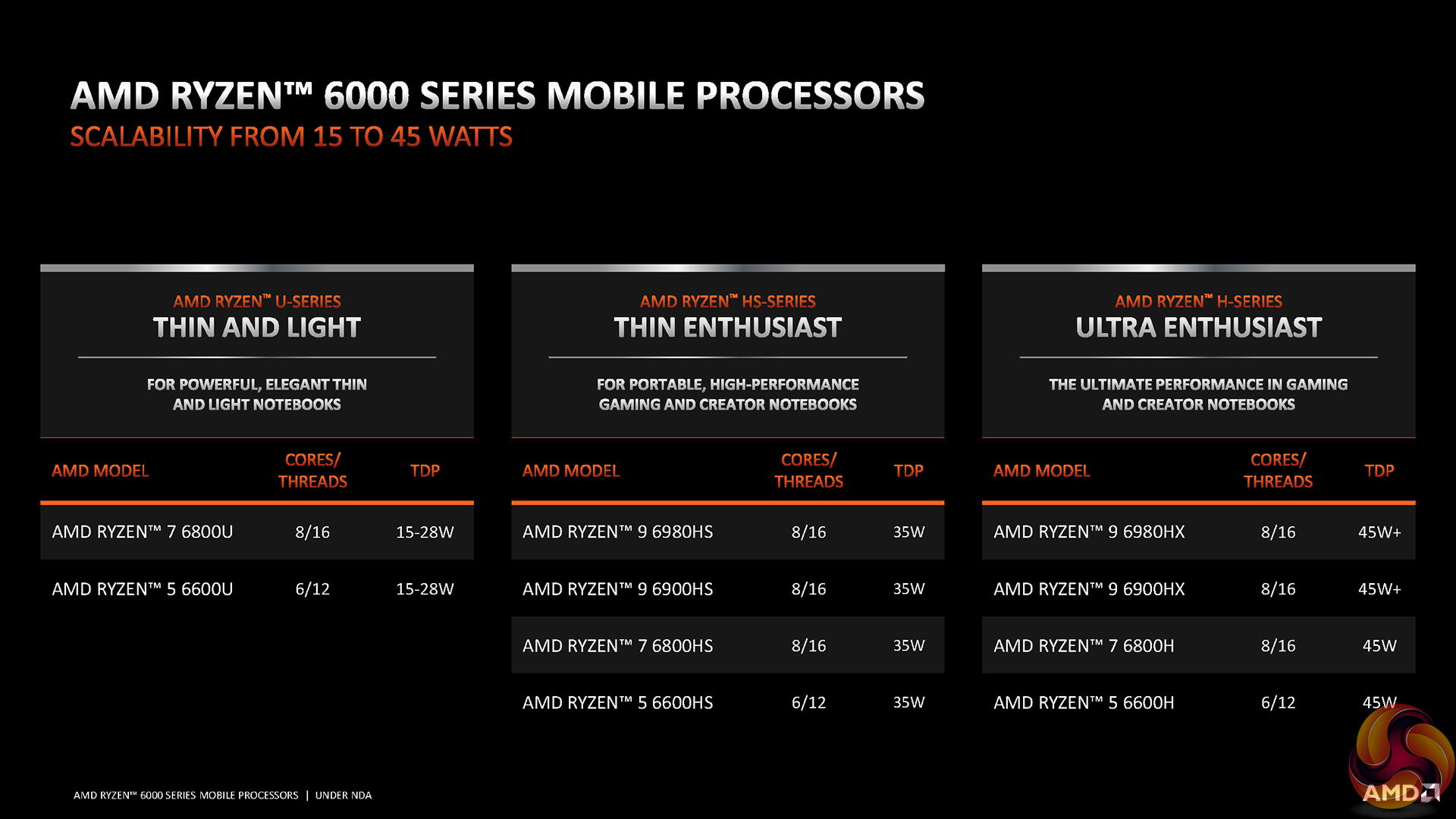
These Ryzen 7 6800U specs are clearly very similar to the higher-end 8-core HS and HX series processors in AMD’ Ryzen 6000 Mobile line-up. Despite similar specs, those HS and HX processors will be notably faster due to their greater power budgets.
For market competition, AMD is realistically targeting Intel’s up-to-28W parts here. Historically, that would be Intel 11th Gen Tiger Lake, but now it is Intel 12th Gen Alder Lake in the form of parts such as the Core i7-1260P.
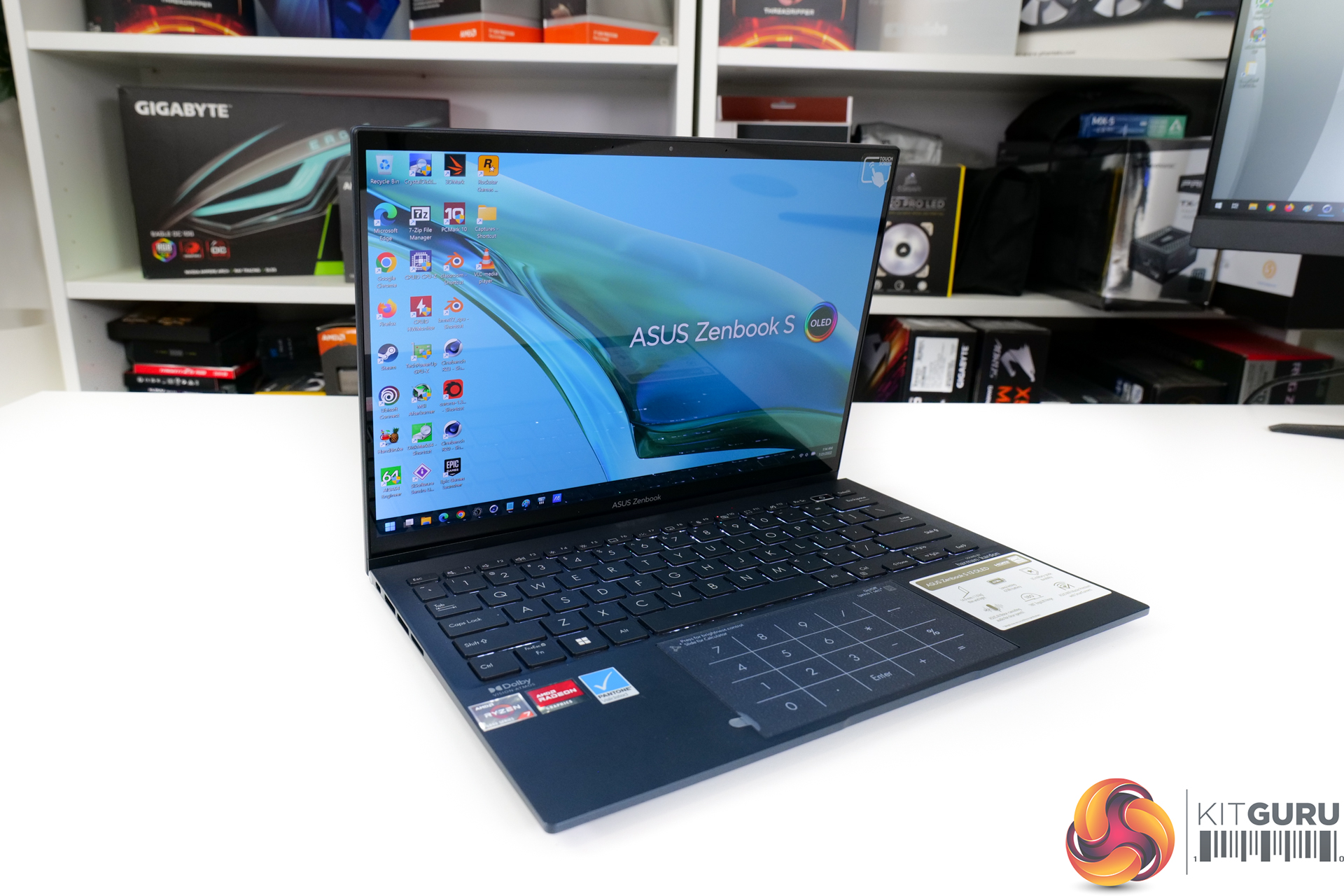
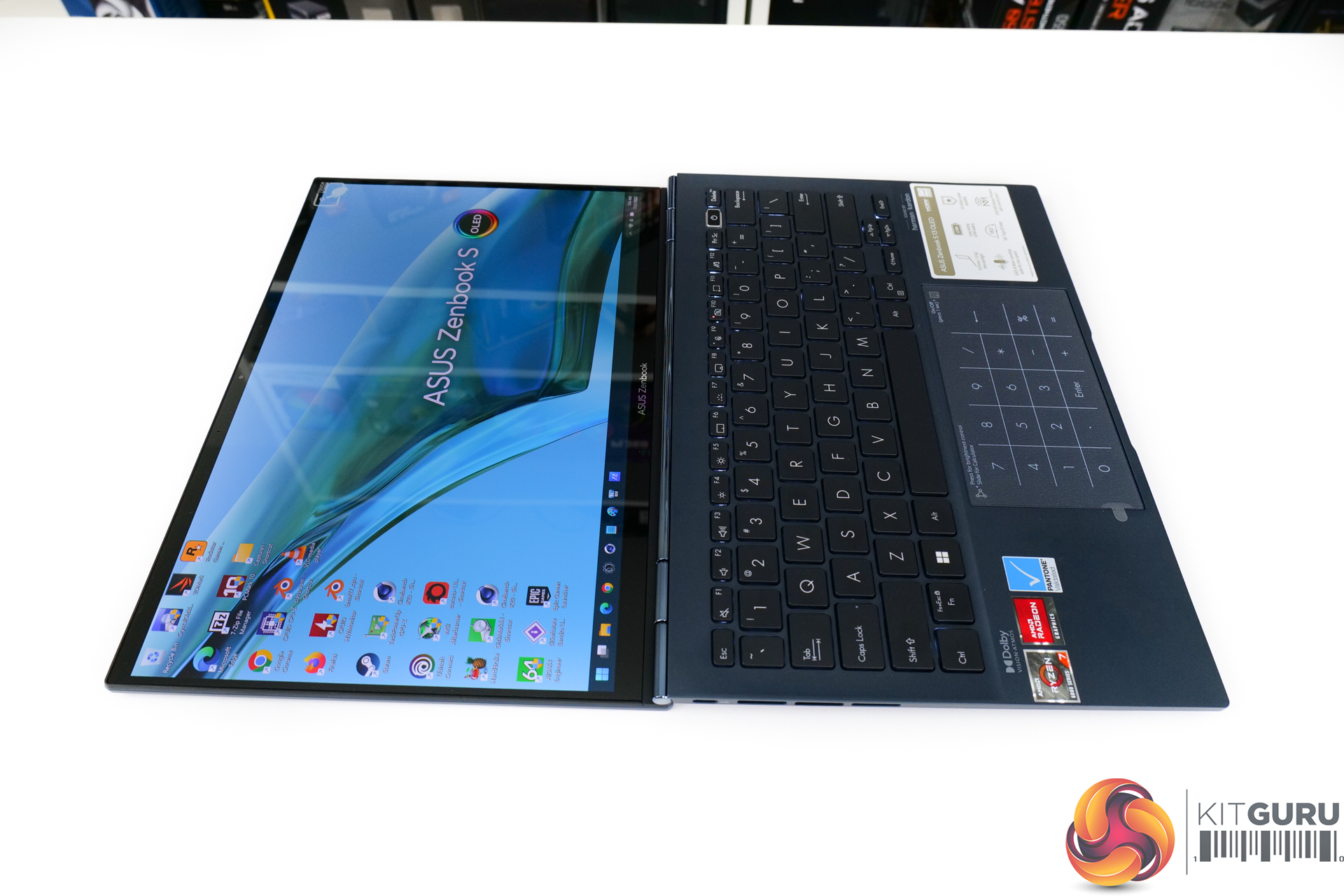
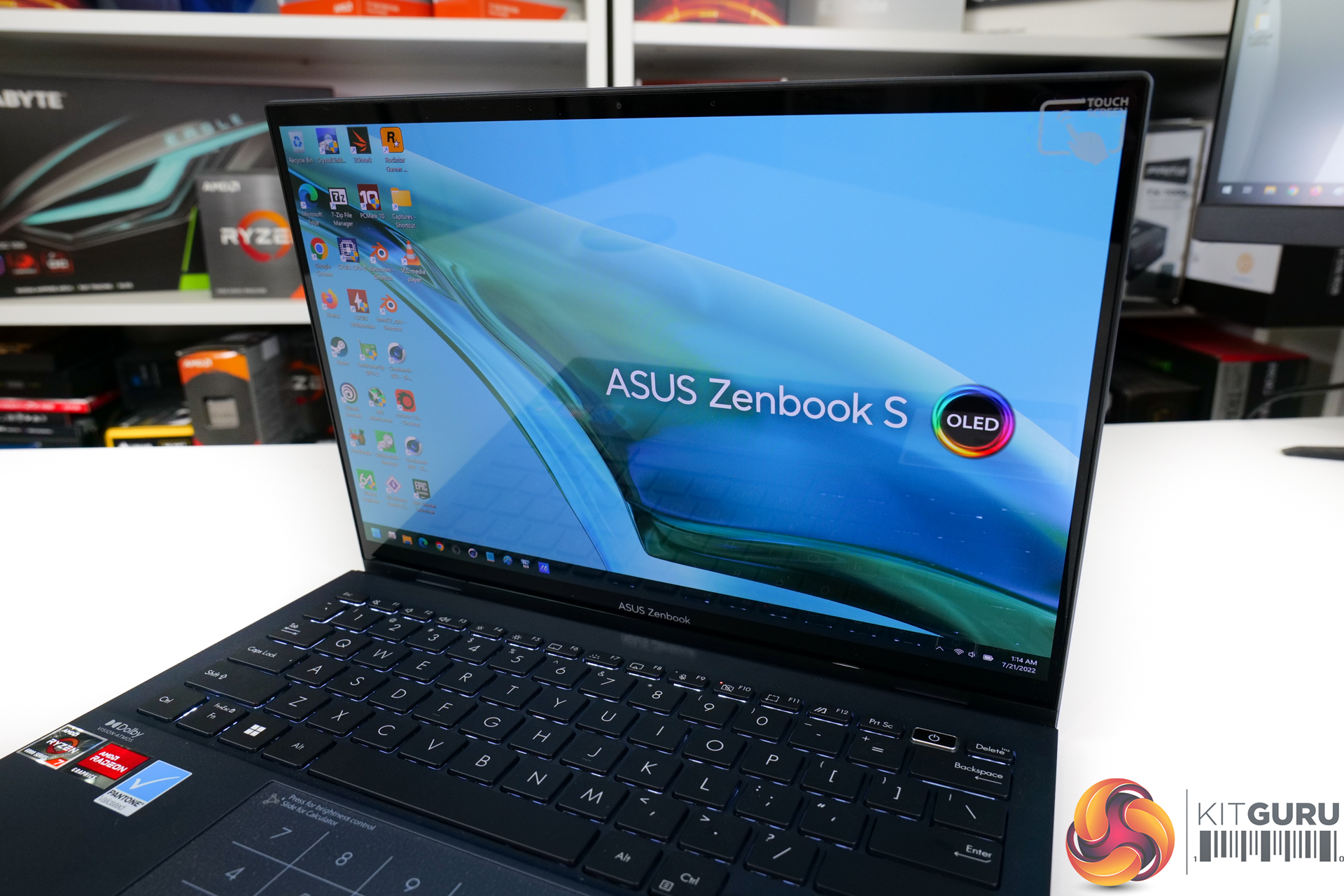
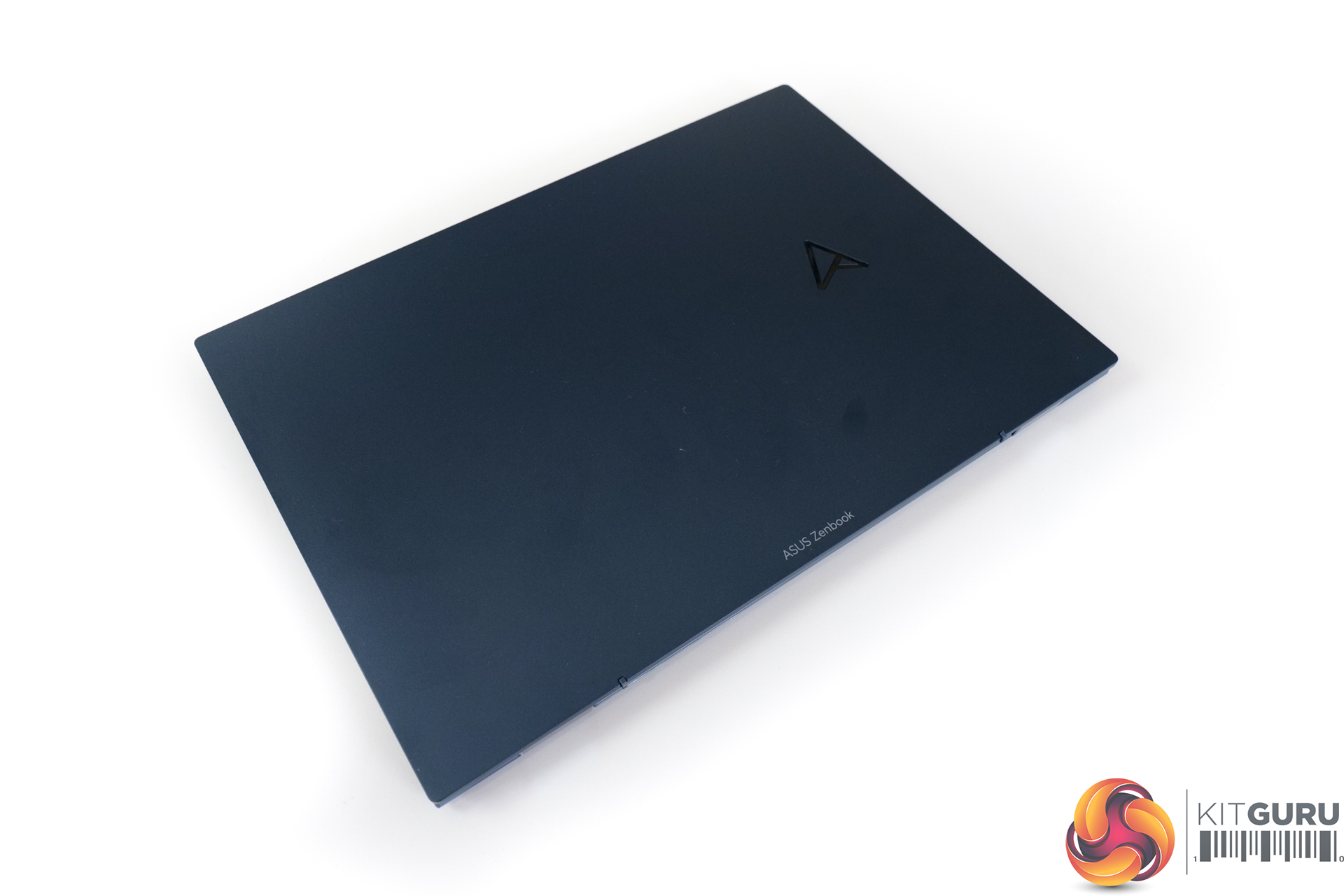
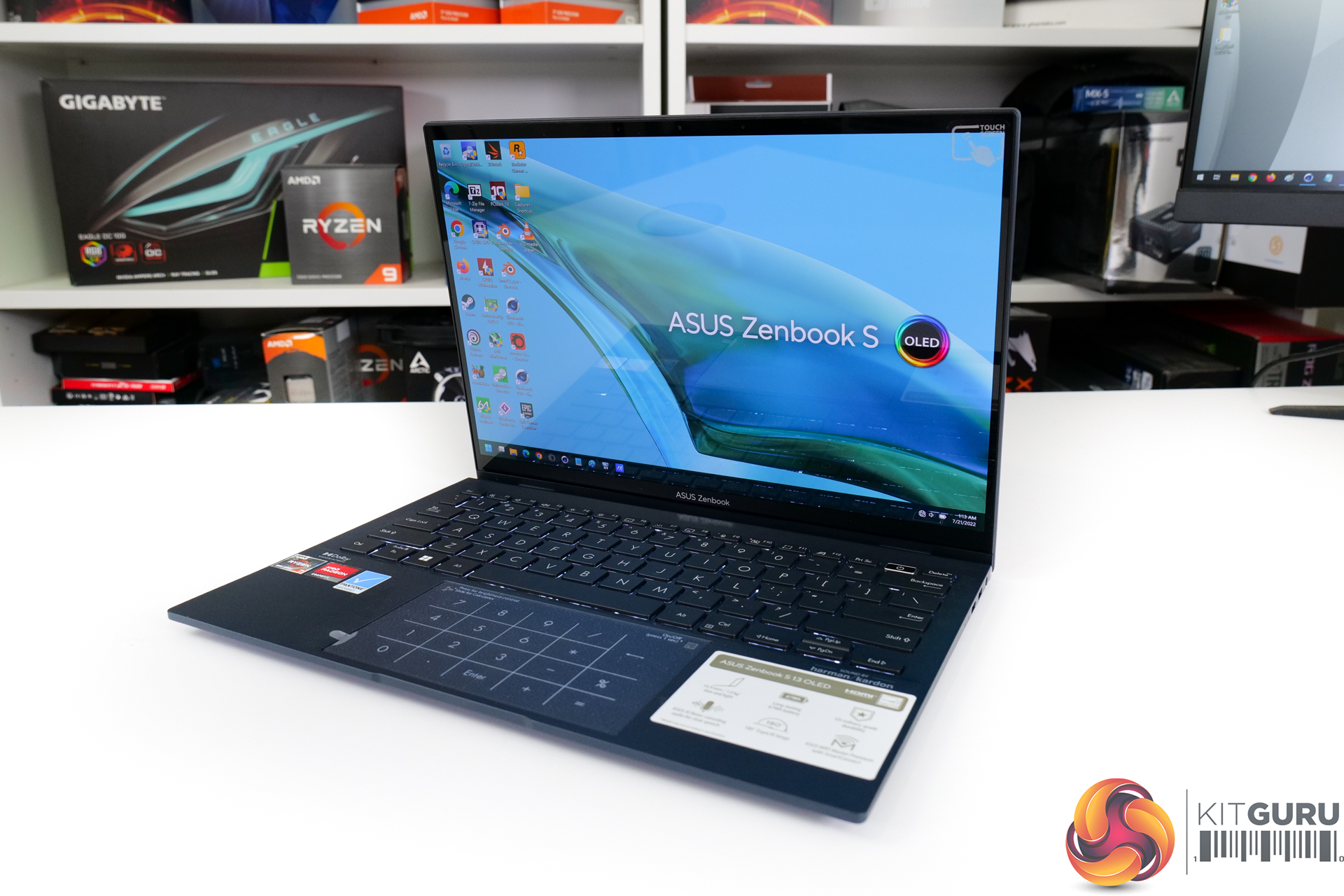
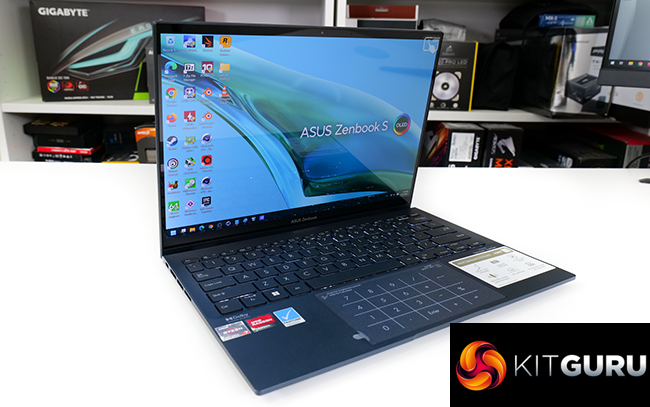
With the Ryzen 7 6800U deployed inside the ASUS Zenbook S 13 OLED laptop that we have been sent for testing, there’s a strong amount of horsepower squeezed into this 13.3-inch class, 14.9 mm-thick magnesium-aluminium chassis that weighs around 1 kilogram.
You get 16GB of LPDDR5 6400MHz memory alongside a 1TB PCIe Gen 4 NVMe SSD. 16GB is a bit slim by modern standards, even for an ultraportable laptop, but it is high speed!
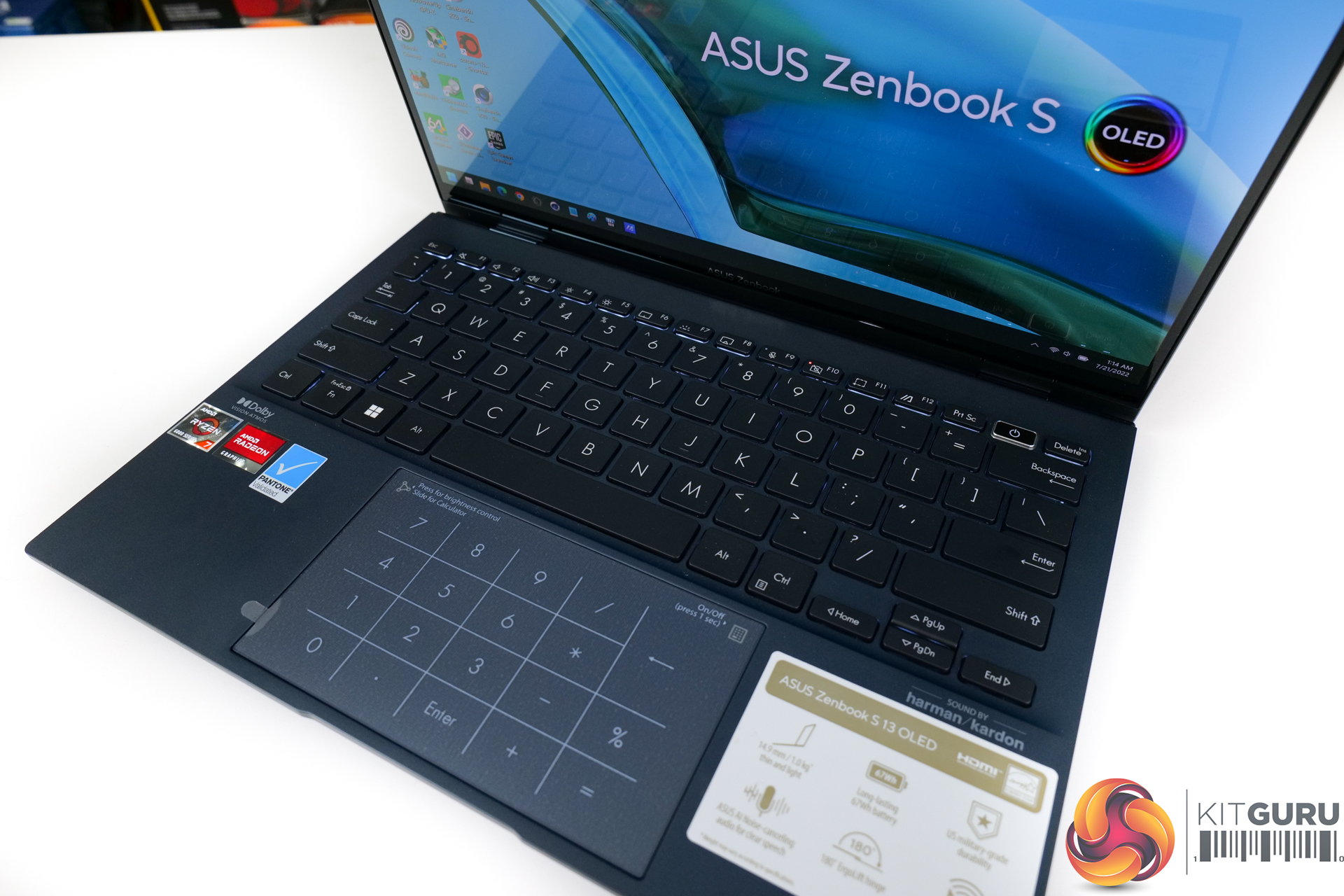
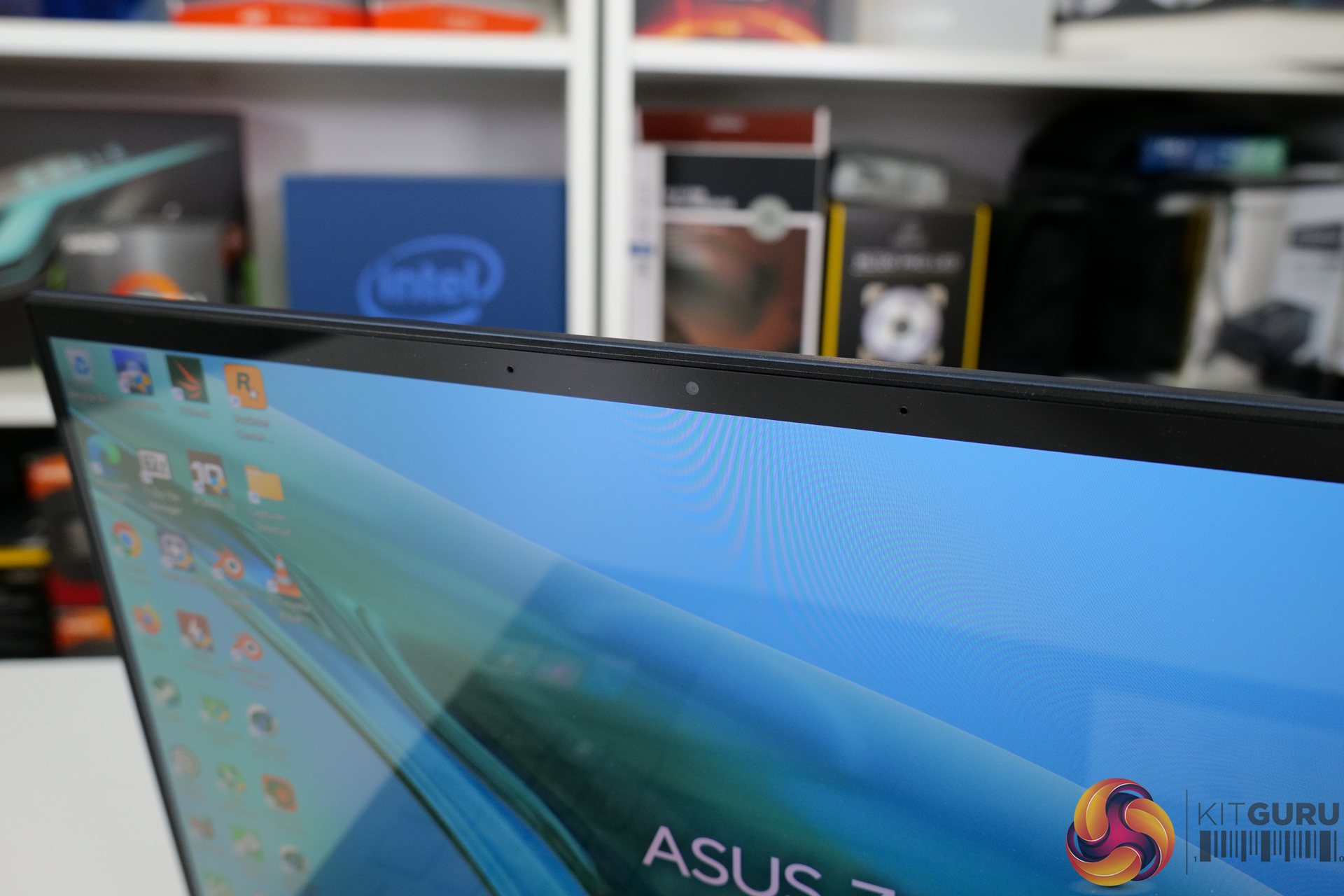
The 13.3-inch touchscreen OLED 16:10 display runs at 2880×1800 resolution and 60Hz. This is a glorious screen with a 1-million-to-1 contrast ratio, HDR support, 100% DCI-P3, 550-nits peak brightness, and Pantone validation. You even get slim bezels from the NanoEdge display, which also supports stylus usage thanks to its swift response time.
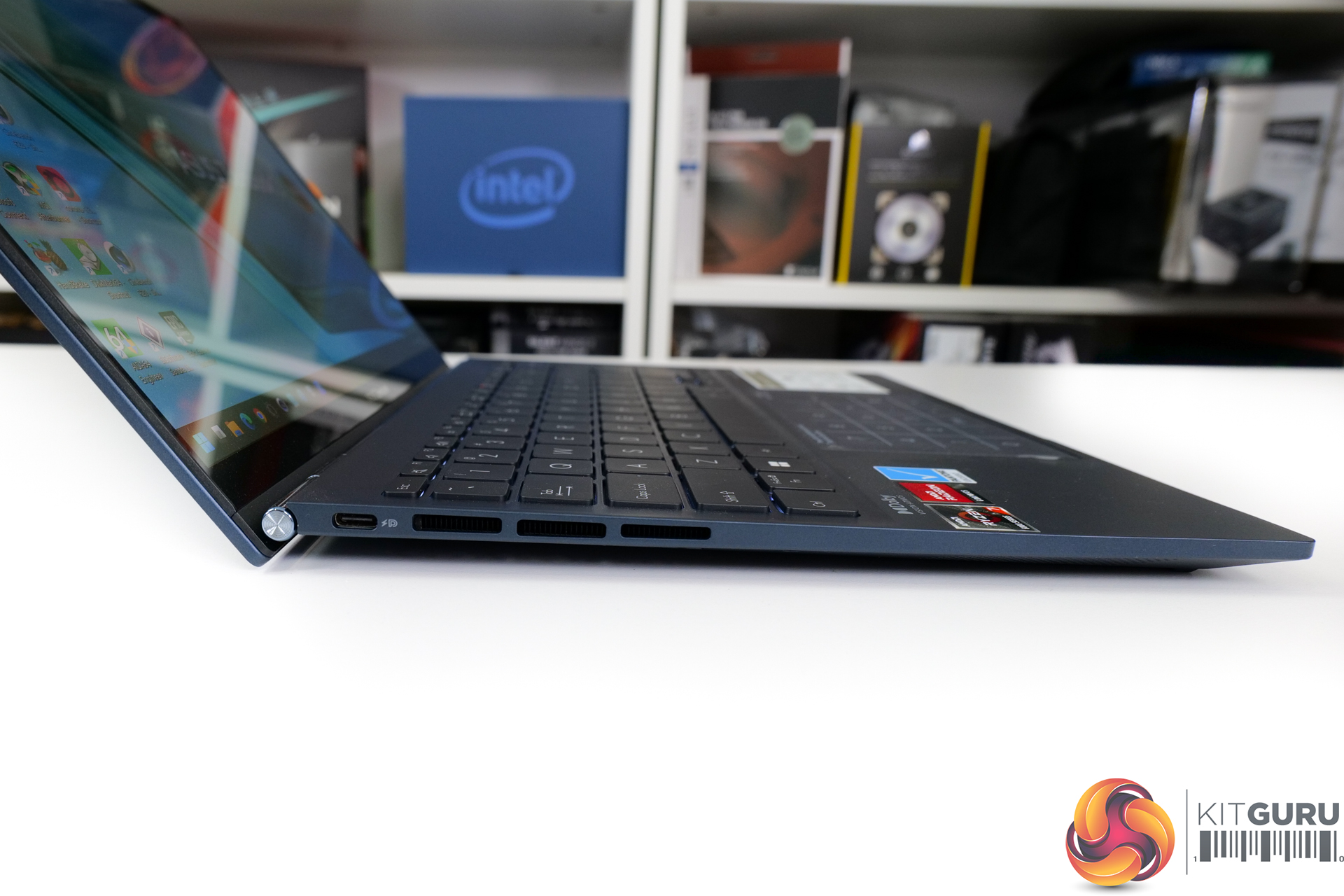
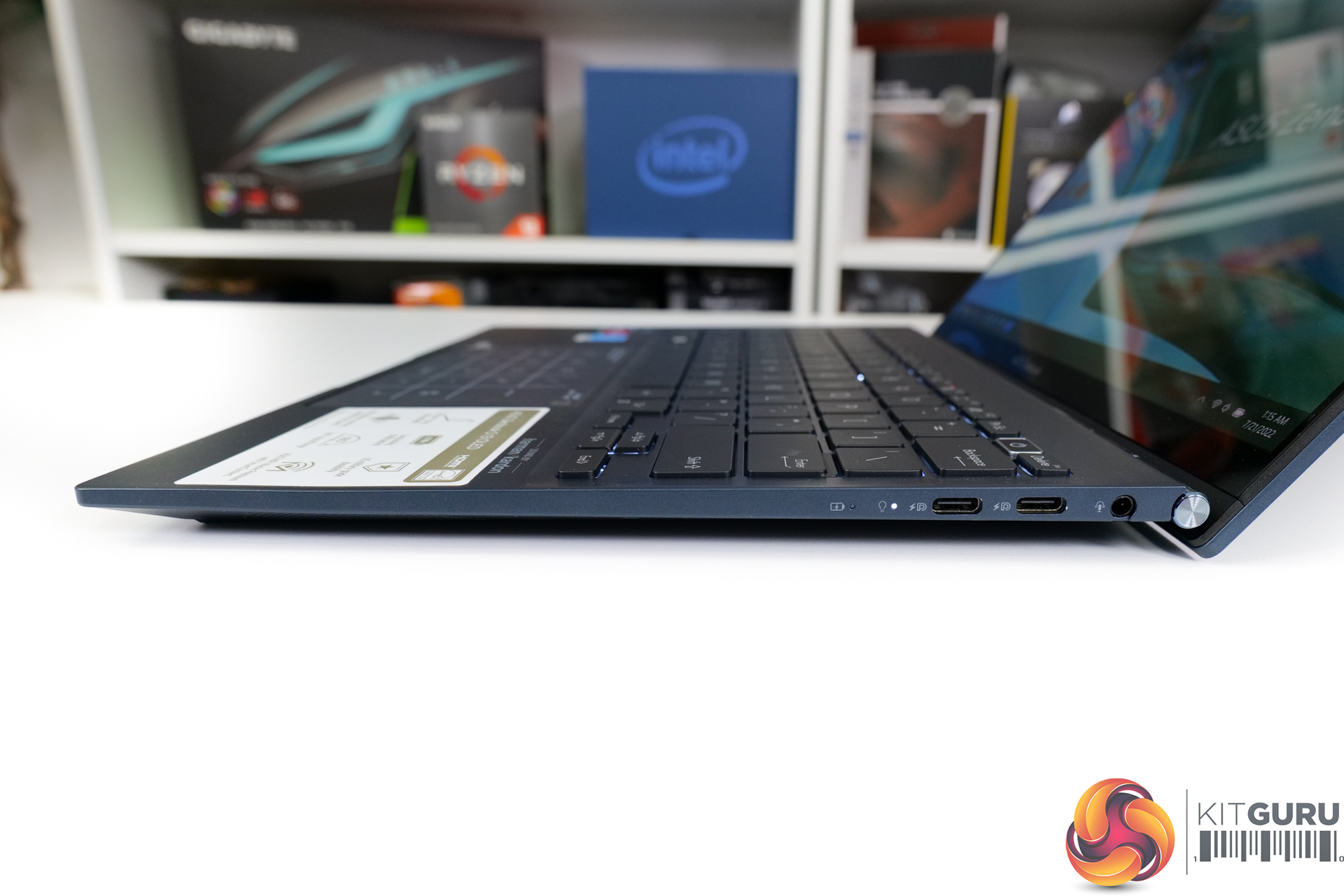
MediaTek/AMD WiFi 6E is provided alongside a 3.5mm audio jack and triple USB 3.2 Gen 2 Type-C connections that all support DisplayPort and power delivery. Plus, AMD’s SoC design means that USB4 support is a BIOS update away.
Charging of the 67 Whr battery is done via the included 65W USB-C adapter. ASUS also has the cool feature where even lower-spec USB-C chargers can deliver power to the laptop, as tested with a 25W Samsung phone fast charging brick.
And peripherals on the laptop are good for my personal preference; the backlit keyboard is functionally solid, I like ASUS’ trackpad that doubles up as a number pad and calculator quick launch, there’s a good enough webcam, and the fingerprint sensor is a useful security feature.
Pricing for the ASUS Zenbook S 13 OLED in its Ryzen 7 6800U form is meant to be $1449 USD according to the documentation we received from AMD. This translates into around £1300 in the UK. But as is typical for the current world we live in; availability seems to be questionable right now.
We test in the out-of-the-box state with minimal adjustments made to the laptop, other than installing our test software and Windows updates in addition to removing antivirus that is included by default.
That means that this ASUS laptop is tested using its ‘Balanced’ fan and power profile, as is the case for the competing laptops.
For testing, we include some comparison data from big, 45W-class laptops that we have examined recently. They’re not direct competitors but the data is useful as reference.
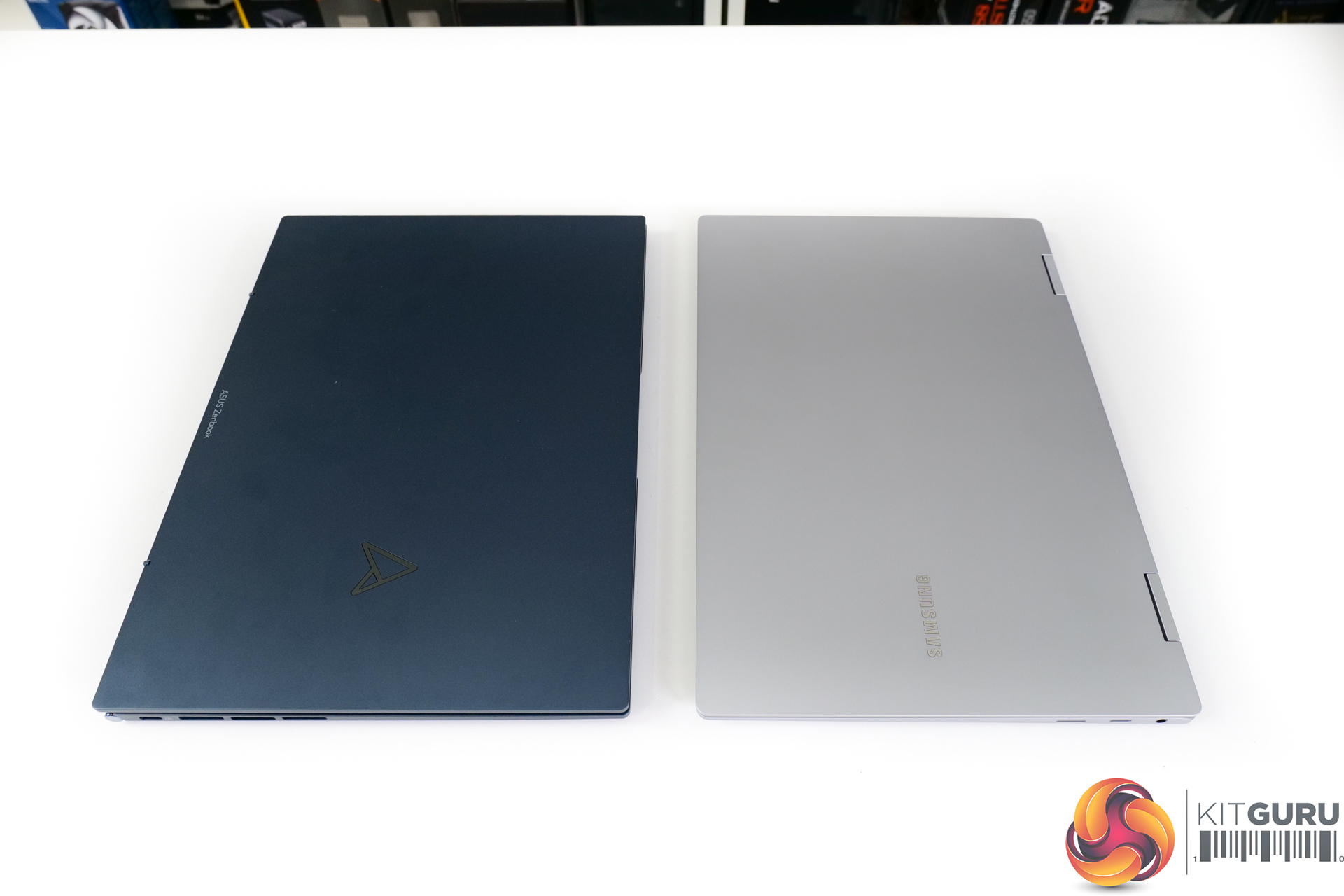
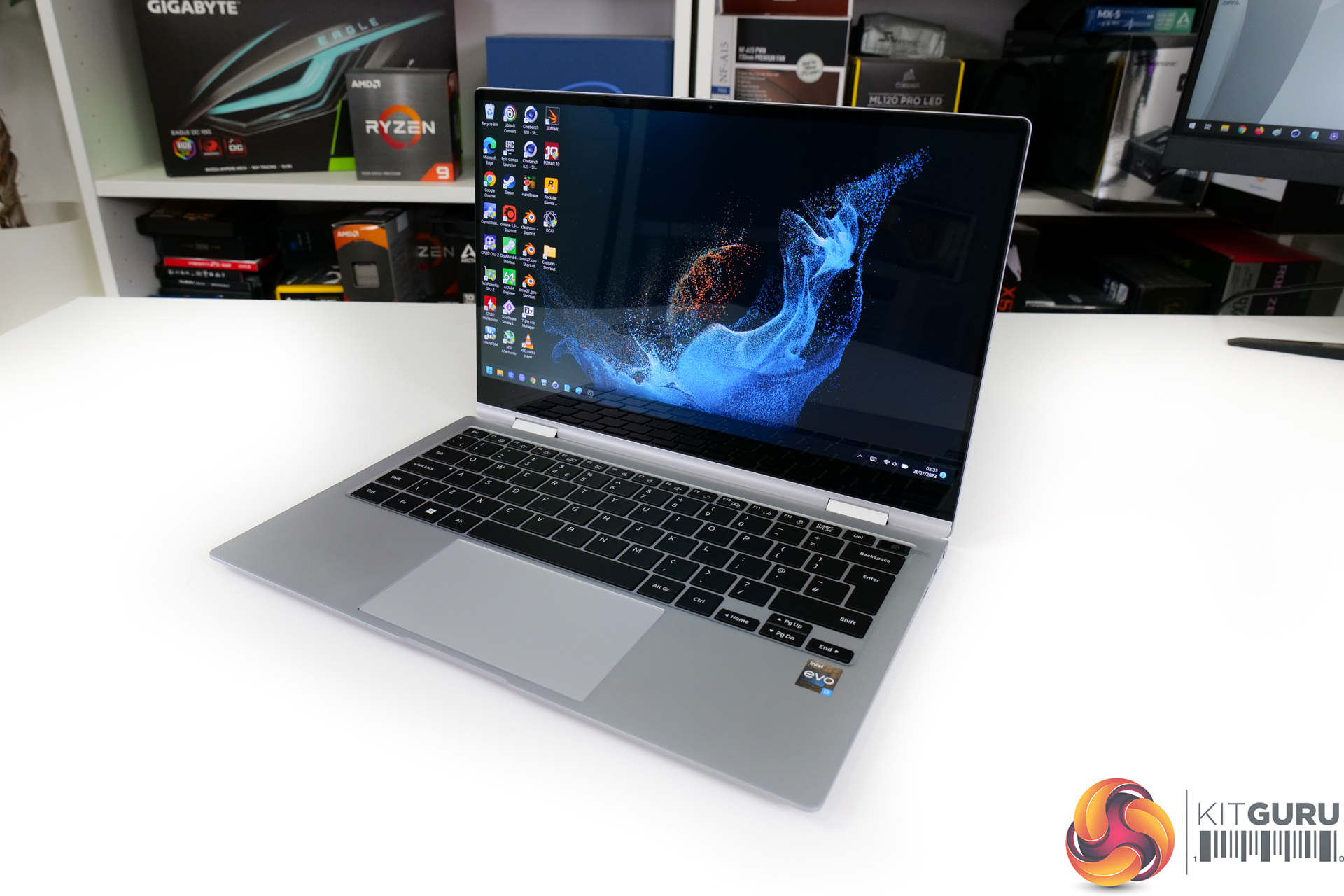
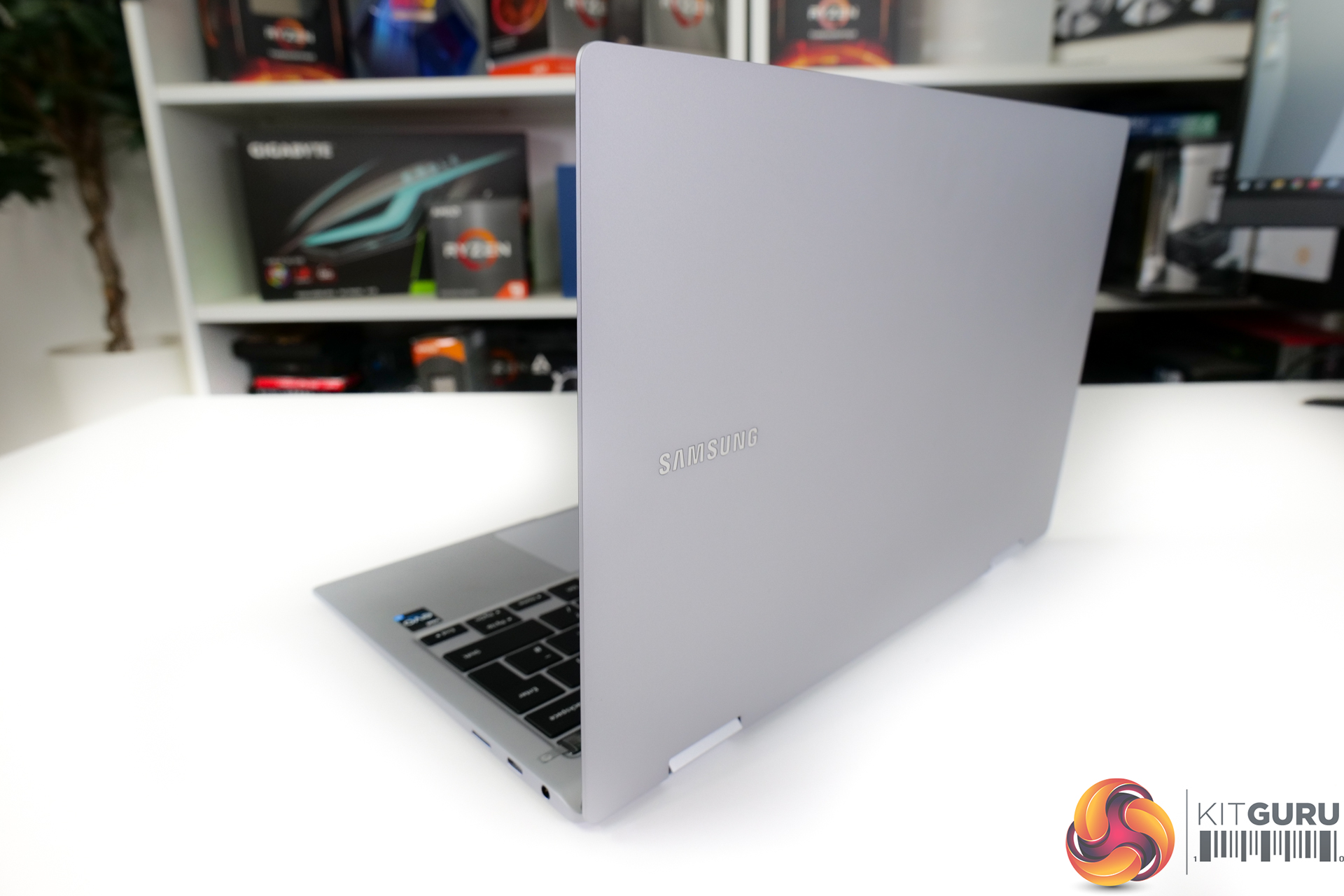
As a more appropriate competitor, we include the Samsung Galaxy Book2 Pro 360. This slim-and-light, 13.3-inch class laptop uses Intel’s 12th Gen Core i7-1260P processor that is a direct competitor to the Ryzen 7 6800U. It also ships with 16GB of LPDDR5 memory, a 512GB SSD, and a 63 Whr battery with 65W charging. And it weighs 1.04kg inside its incredibly slim chassis.
Put simply, this is quite a reasonable Intel Alder Lake competitor to the AMD Zen3+ ASUS Zenbook S 13 OLED. However, Samsung’s heavily restricted and conservative power profiles mean that a direct power-for-power comparison this is not… unfortunately. That’s certainly not ideal, but it’s the best we could get for some Intel comparison at the moment.
We also compare directly to a 21W-running Ryzen 7 5800U-based ASUS ZenBook 13 – this laptop’s effective predecessor. And we include some Intel Tiger Lake data too.
ASUS ZenBook S 13 OLED UM5302TA Laptop Test Configuration:
- Processor: AMD Ryzen 7 6800U (8C/16T, 2.7GHz base, up to 4.7GHz Boost, 15-28W TDP)
- Memory: 16GB LPDDR5 6400MHz
- Graphics Card: Radeon 680M 12CU up to 2.2GHz
- Display: 13.3” 16:10 2.8K OLED Touch Display
- System Drive: 1TB Samsung PCIe Gen4x4 NVMe SSD
- Battery: 67 Whr battery with 65W USB-C Power Adapter
- Design: Around 1kg weight with around 14.9mm chassis thickness
Comparison Systems:
- Samsung Galaxy Book2 Pro 360
- Intel Core i7-1260P (4 P-Cores / 8 E-Cores, up to 4.7GHz, 28W Nominal TDP)
- 16GB LPDDR5 5200MHz
- Intel Iris Xe 96EU 1.4GHz
- 13.3″ FHD AMOLED Tough Display
- 512GB NVMe SSD
- 63 Whr battery with 65W USB-C Power Adapter
- Around 1.04kg weight with around 11.5mm chassis thickness
- MSI Crosshair 15 R6E B12UGZ-299UK
- Intel Core i7-12700H (6 P-cores, 8 E-cores, up to 4.7GHz Turbo, 35-115W Rated TDP)
- 32GB (2x16GB) DDR4 3200MHz SODIMM
- Nvidia GeForce RTX 3070 Laptop 8GB, up to 140W
- 15.6” 2560×1440 165Hz IPS-level
- 1TB Micron 2450 PCIe Gen4x4 NVMe SSD
- 90 Whr, 4-cell battery with 240W barrel-style power adapter
- Around 2.47kg weight with around 27mm chassis thickness
- MSI Katana GF66 12UE:
- Intel Core i7-12700H (6 P-cores, 8 E-cores, up to 4.7GHz Turbo, 35-115W Rated TDP)
- 16GB (2x8GB) DDR4 3200MHz SODIMM
- Nvidia GeForce RTX 3060 Laptop 6GB, up to 105W
- 15.6” 1920×1200 240Hz IPS-level
- 1TB Micron 2450 PCIe Gen4x4 NVMe SSD
- 53.5 Whr, 3-cell battery with 240W barrel-style power adapter
- Around 2.25kg weight with around 25mm chassis thickness
- ASUS ROG Flow Z13 (Core i9-12900H System):
- Intel Core i9-12900H (6 P-cores, 8 E-cores, up to 5.0GHz Turbo, 35-115W Rated TDP)
- 16GB LPDDR5 5200MHz
- Nvidia GeForce RTX 3050 Ti 4GB GDDR6, Mux switch
- 13.4” 16:10 WUXGA 1920×1200 120Hz IPS-level
- 1TB Micron 2450 PCIe Gen4x4 NVMe SSD
- 56 Whr battery with 100W USB-C Power Adapter
- Around 1.1-1.2kg weight with around 12mm chassis thickness
- ASUS ROG Zephyrus G14 GA402RK (Ryzen 9 6900HS System):
- AMD Ryzen 9 6900HS (8C/16T, 3.3GHz Base, up to 4.9GHz Boost 35W Rated TDP Mode)
- 32GB DDR5 4800MHz
- AMD Radeon RX 6800S 8GB GDDR6
- 14” 16:10 QHD+ 2560×1600 120Hz IPS-level
- 1TB Micron 2450 PCIe Gen4x4 NVMe SSD
- 76 Whr battery with 240W barrel-style Power Adapter (100W USB-C support)
- 1.75kg weight with around 18.5mm chassis thickness
- ASUS ROG STRIX G17 G713QR (Ryzen 9 5900HX ‘Cezanne' System):
- AMD Ryzen 9 5900HX (8C/16T, up to 4.6GHz Boost, 45W Rated TDP)
- 32GB DDR4 3200MHz SODIMM
- RTX 3070 Laptop GPU 8GB GDDR6 115W
- 17.3-inch FHD (1920 x 1080) 16:9 300Hz IPS-level
- 1TB SK Hynix BC711 PCIe Gen 3×4 NVMe SSD
- 90 Whr battery with 240W barrel-style Power Adapter
- 2.70kg weight with 23.4-28.3mm chassis thickness
- Gigabyte U4 UD-70UK823SO (Core i7-1195G7 ‘Tiger Lake’ System)
- Intel Core i7-1195G7 (4C8T, 28W Rated TDP-up Mode)
- 16GB DDR4 3200MHz (8GB onboard, 8GB SODIMM)
- Integrated Intel Iris Xe iGPU (96 EUs)
- 14″ IPS Full HD 1920×1080 60Hz
- 512GB ESR512GTLG-E6GBTNB4 PCIe Gen4x4 NVMe SSD
- 36 Whr battery with 65W barrel-style Power Adapter
- Slightly below 990g weight with 16.5mm chassis thickness
- Razer Blade Stealth 13 OLED (Core i7-1165G7 ‘Tiger Lake’ System)
- Intel Core i7-1165G7 (4C8T, 28W Rated TDP)
- 16GB LPDDR4 4266MHz
- Nvidia GTX 1650 Ti Max-Q
- 13.3″ OLED Full HD Touch 60Hz
- 512GB Samsung NVMe SSD
- 53.1 Whr battery with 100W USB-C Power Adapter
- 1.41kg weight with 15.3mm thickness
- ASUS ZenBook Flip S OLED UX371 (Core i7-1165G7 ‘Tiger Lake-U’ System):
- Intel Core i7-1165G7 (4C/8T, 1.2GHz Base, 12W Rated TDP-down Mode)
- 16GB LPDDR4X 4266MHz
- Integrated Intel Iris Xe iGPU (96 EUs up to 1.3GHz)
- 13.3” 16:9 UHD 3840×2160 60Hz OLED Touch Display
- 1TB WD SN730 NVMe SSD
- 67 Whr battery with 65W USB-C Power Adapter
- 1.2kg weight with 11.9-13.9mm chassis thickness
- ASUS ZenBook 13 UM325S (Ryzen 7 5800U ‘Cezanne' System):
- AMD Ryzen 7 5800U (8C/16T, 1.9GHz Base, up to 4.4GHz Boost, 15W Rated TDP)
- 16GB LPDDR4X 3733MHz
- Integrated Radeon Vega 8 APU (up to 2GHz)
- 13.3” 16:9 FHD 1920×1080 60Hz OLED Display
- 1TB SK Hynix (HFM001TD3JX013N) NVMe SSD
- 67 Whr battery with 65W USB-C Power Adapter
- 1.12kg weight with 13.9mm chassis thickness
Tests
- Cinebench R23 – All-core & single-core CPU benchmark (CPU Compute), Stress test (Temperatures & Power Consumption)
- Blender 3.0.1 – All-core rendering of the Classroom and BMW scenes (CPU/GPU Compute), Stress test (Temperatures & Power Consumption)
- HandBrake 1.5.1 H264 – Convert 1440p60 H264 video to 1080p60 H264 using the YouTube HQ 1080p60 preset (CPU)
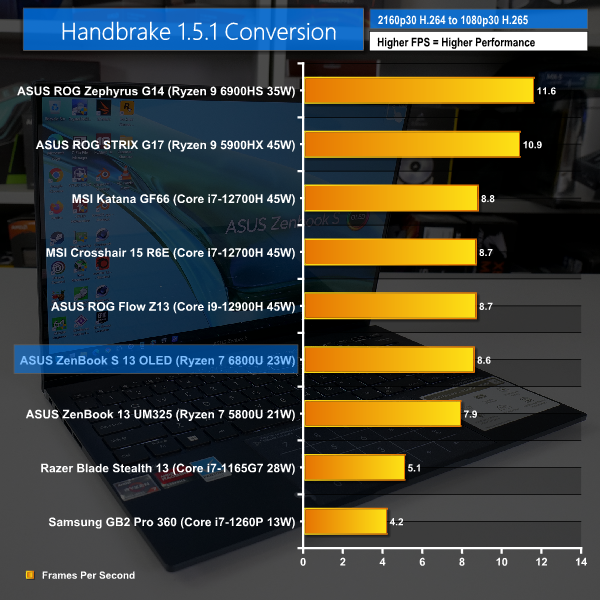
- HandBrake 1.5.1 H265 – Convert 4K30 100Mbps H264 video to 1080p30 40Mbps H265 using the H.265 MKV 1080p30 preset (CPU & Memory)
- 7-Zip 21.07 – Built-in 7-Zip benchmark test (CPU & Memory)
- SiSoft Sandra – Memory bandwidth and Cache & Memory Latency Test (Memory)
- AIDA64 – Memory bandwidth & memory latency (Memory)
- PCMark 10 – Modern Office & Battery Life Test (System Performance & Battery Life)
- 3DMark – Time Spy (1440p) test, CPU Profile test (Gaming)
- F1 2020 – 1920 x 1080, Medium quality preset, DX12
- Far Cry 6 – 1920 x 1080, Low quality preset, HD textures OFF, DX12
- GTA V – 1920 x 1080, Lowest quality settings, DX11
- Shadow of the Tomb Raider – 1920 x 1080, Low quality preset, no AA, DX12
Temperatures, Clocks, and Power
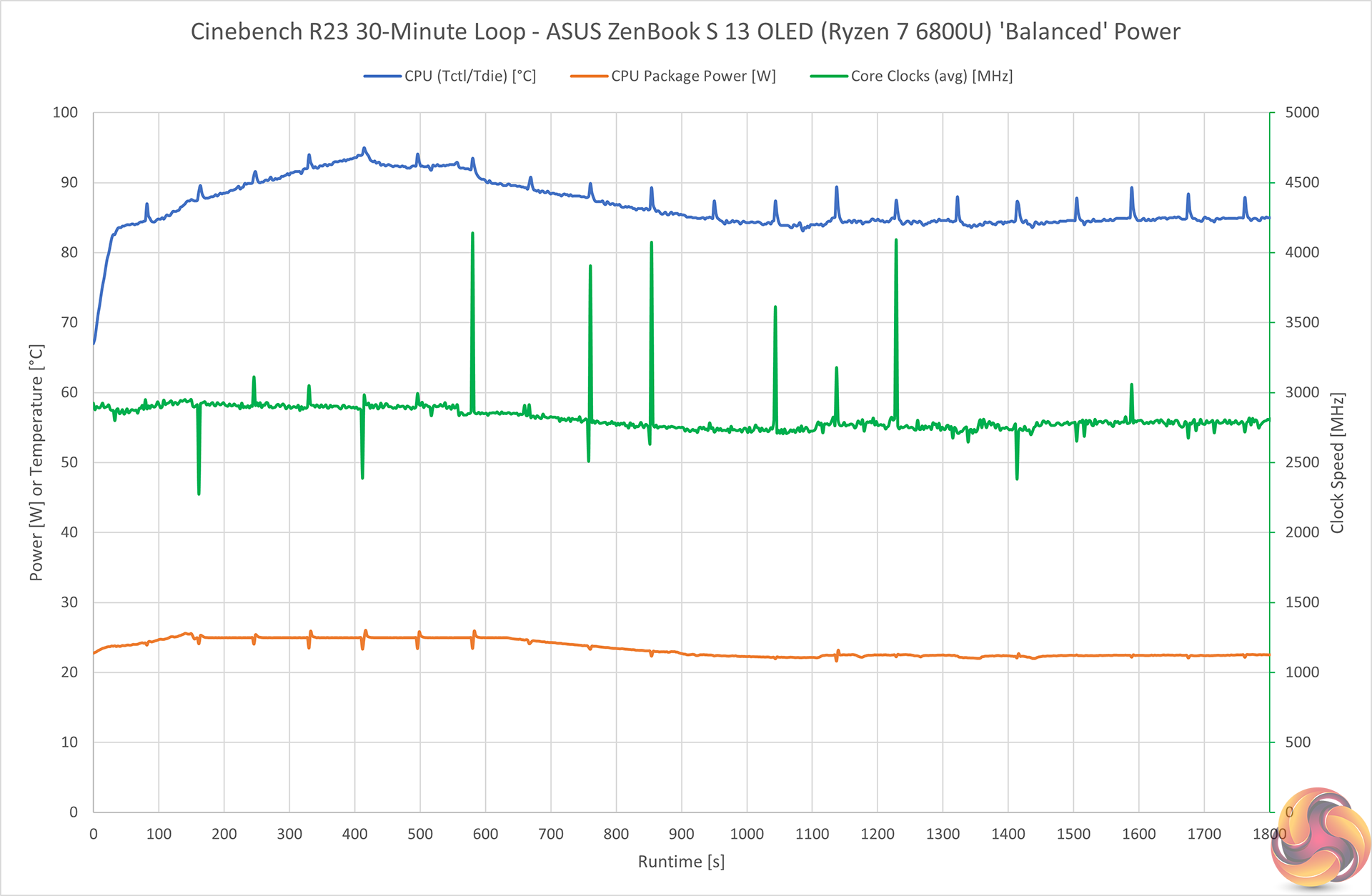
ASUS takes the 15-28W-capable Ryzen 7 6800U processor and slings it inside a sub-15mm, 1kg chassis. So, it is unsurprising to see that we have some sensible power restraints being applied.
Under sustained, all-core loading from Cinebench R23, we see the Ryzen 7 6800U typically operating at around 25W up until roughly the 10-minute mark. It then drops down to around 22-23W sustained all the way to termination of our test run at 30 minutes.
Package power of 25W for the first 10 minutes gives 2.9GHz all-core, then the 23W from there on is 2.8GHz all-core.
Given the physical size limitations of ASUS’ ZenBook S 13 design, I’d say that these sorts of speeds, power tolerances, and temperatures well below 90 degrees – which means no thermal throttling – are all good positives. But let’s see how the performance numbers present.
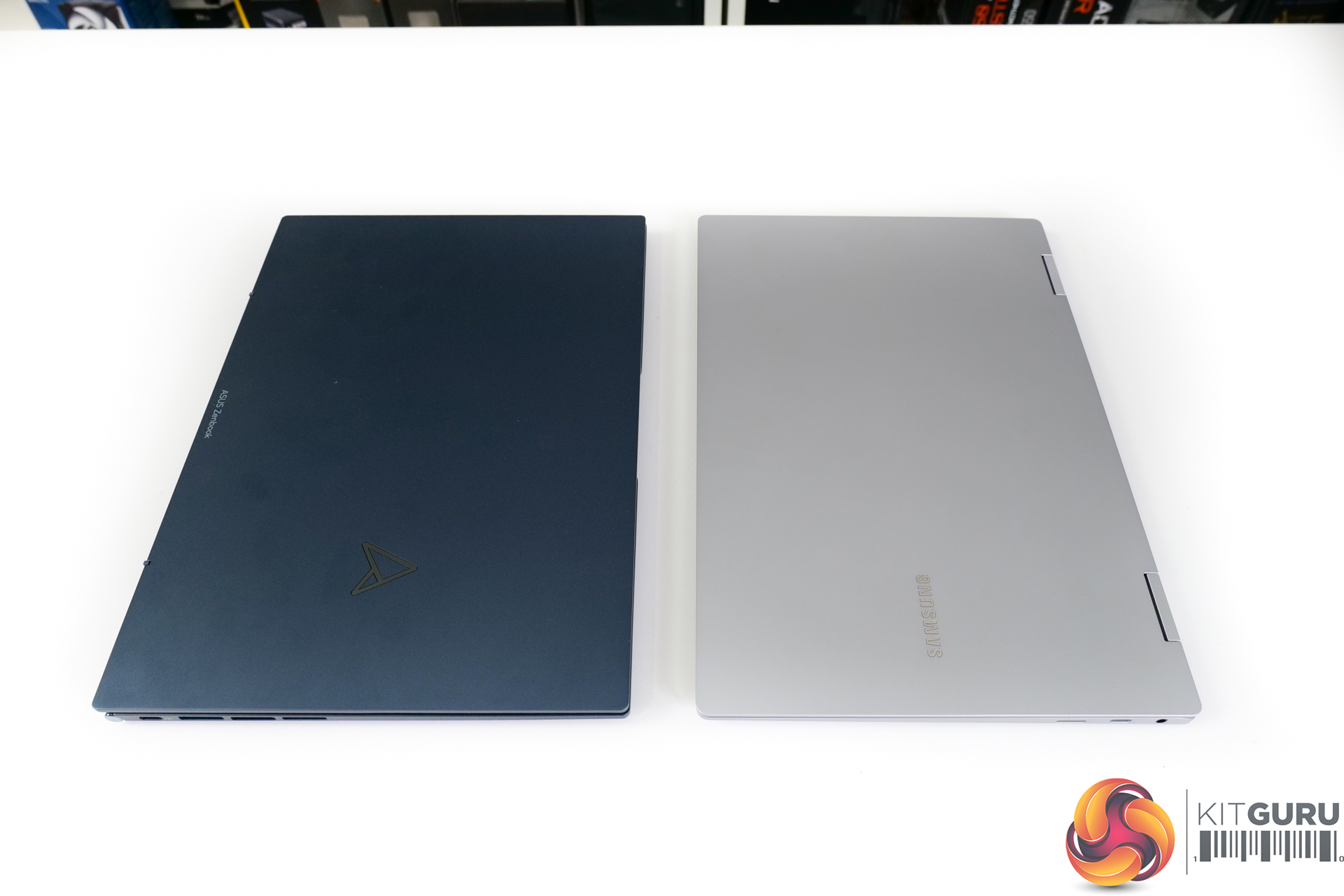
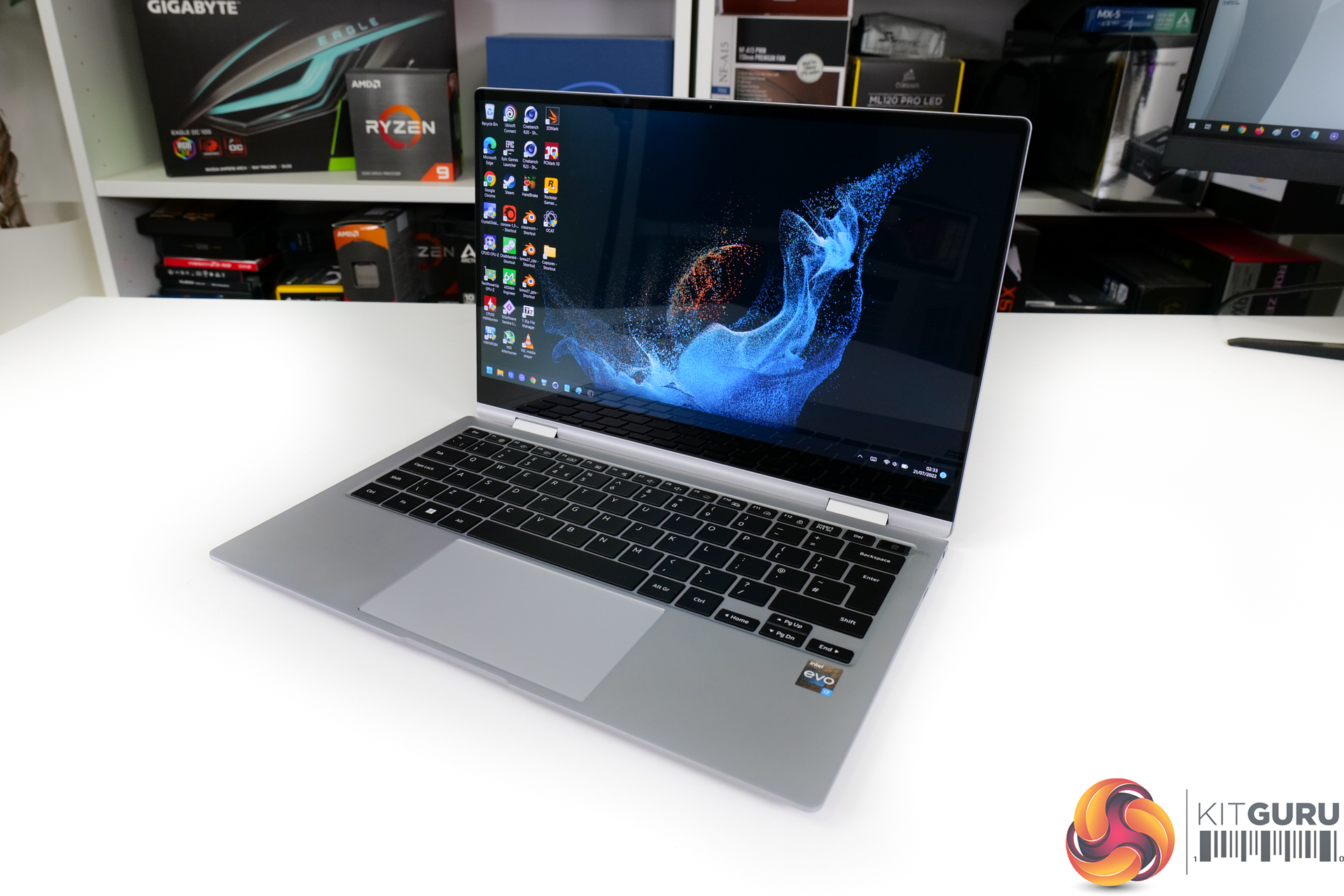
As a quick side note, we tested the laptop in its Performance power mode that is intended to ramp up package power and fan speeds. This resulted in basically identical performance for our test machine with the latest BIOS and Windows updates. So, we stuck to Balanced for the duration of testing, except iGPU gaming.
The competing Intel-based Samsung laptop was far less willing to deploy power to its Core i7-1260P processor. Initial boost saw the usual Intel loftiness, but the machine dropped to between 16W and 19W within the duration of a single Cinebench R23 nT run. And it then stabilised at around the 4-minute mark to its long-duration CPU package power level of 13W.
Noise
You can see an example of our noise testing result in the video review.
I have no problem with the noise levels output by ASUS’ chassis. There’s ample cooling capacity available when needed to keep the chip running at sensible power levels and thermals. And when idle or web browser conditions are present, the fan setup spins down to effectively inaudible levels
There’s no annoying frequent jumping up and down of fan speeds, either, and that’s the most important factor for an ultraportable laptop.
SSD
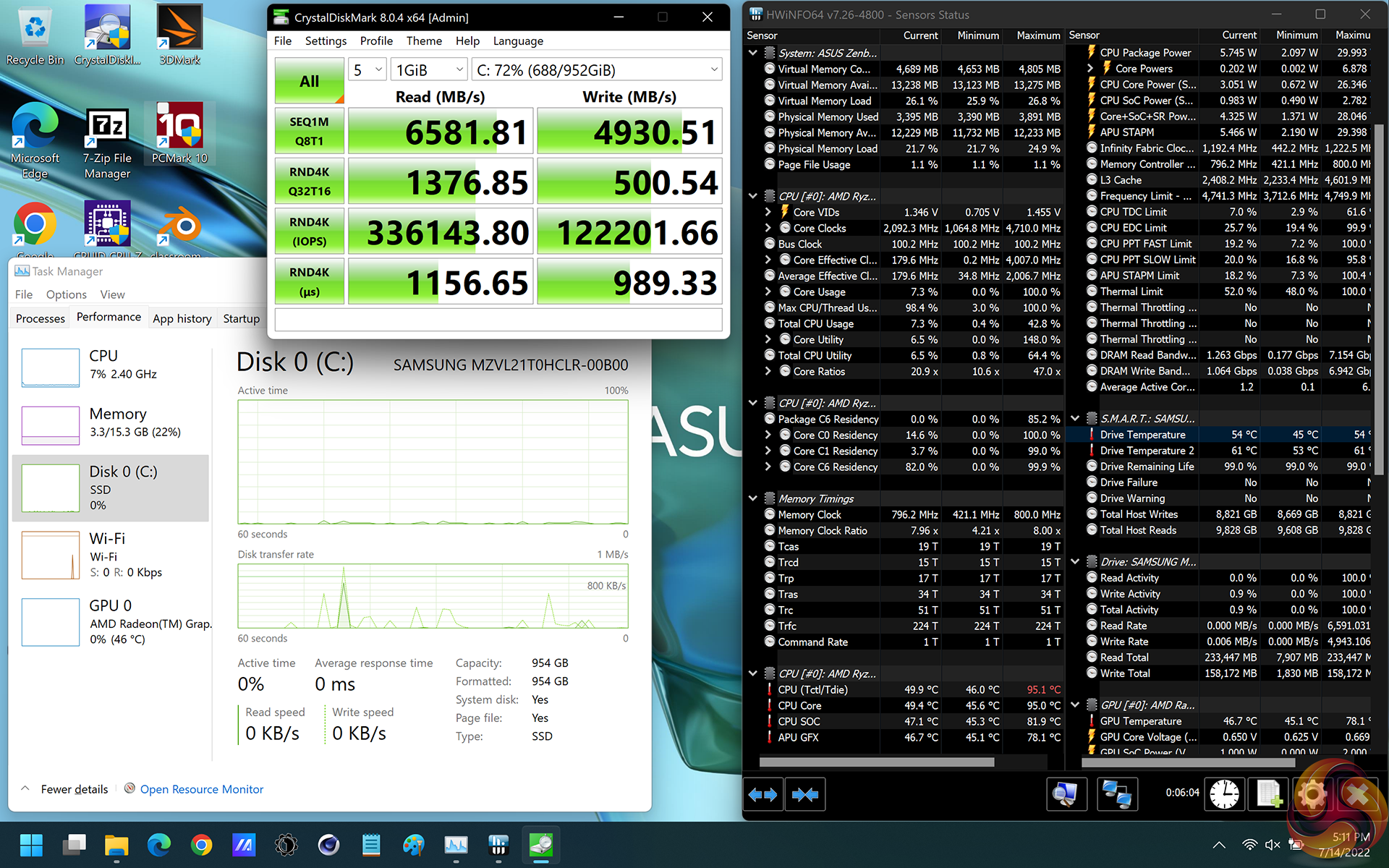
ASUS takes advantage of AMD’s new platform supporting PCIe Gen 4 by deploying a competent Samsung SSD.
5GBps writes and reads over 6GBps will do very nicely. That’s a really good platform improvement versus previous generation Ryzen U-series.
Battery
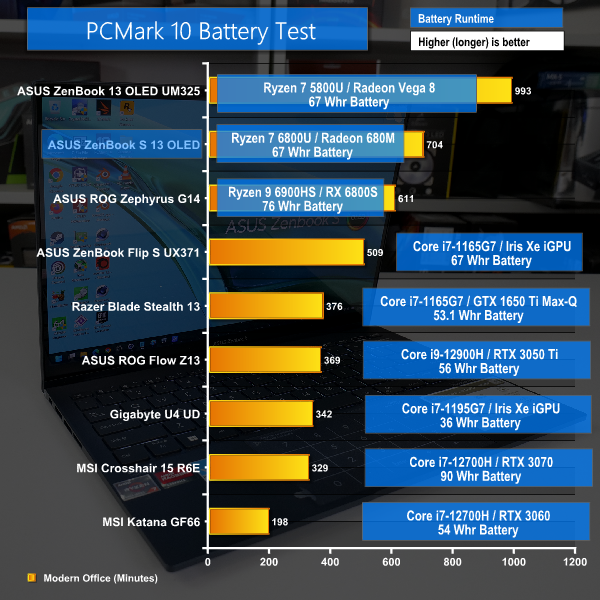
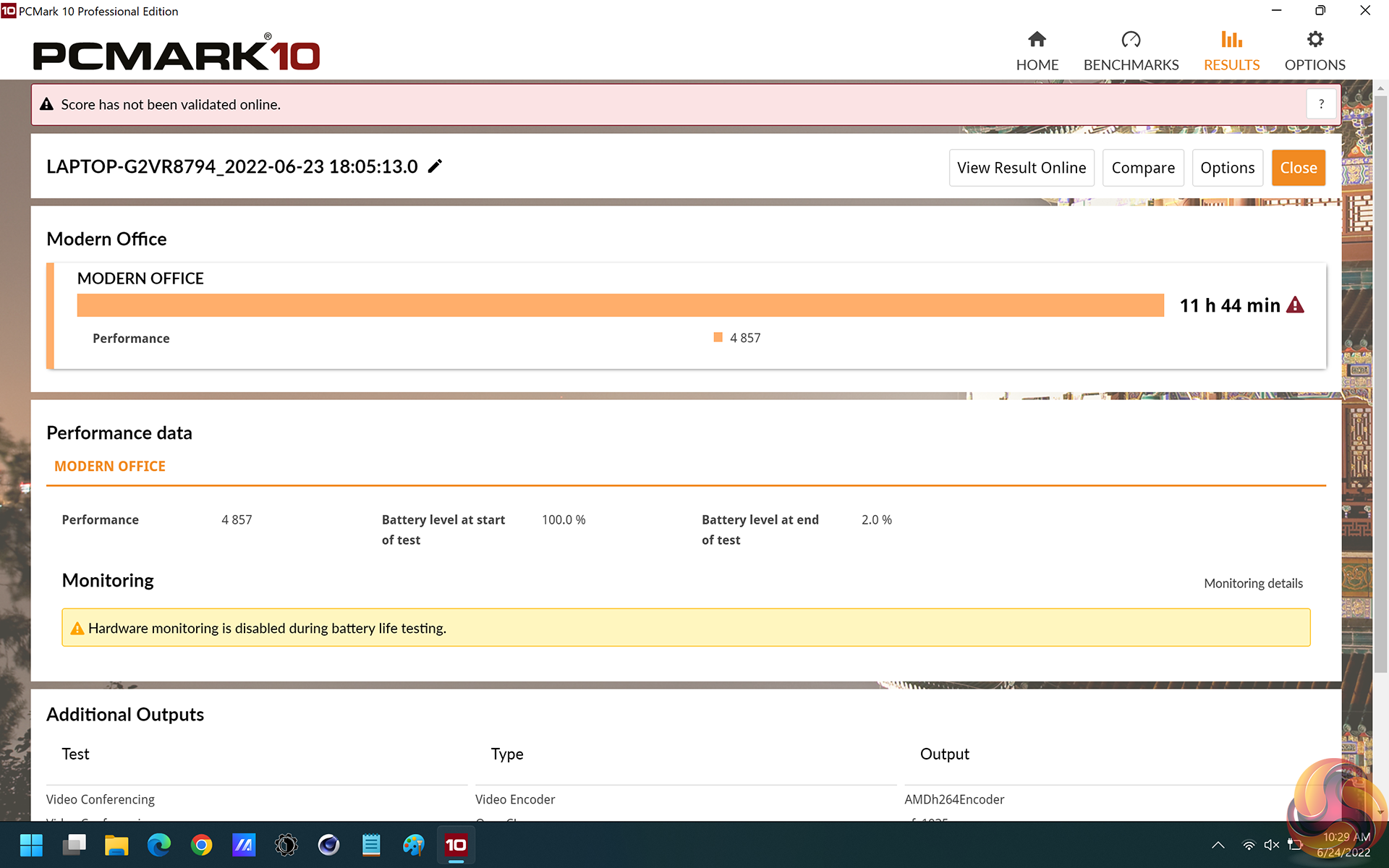
AMD specifically targeted performance-per-Watt and power efficiency as some of its pillars for Ryzen 6000 Mobile, and we see the dividends paying off with excellent battery life results from the Ryzen 7 6800U-powered ASUS ZenBook S 13 OLED.
Bear in mind that this laptop uses a premium 2.8K OLED touchscreen. So, it isn’t going to match the system runtime of the Ryzen 7 5800U ZenBook with its 1080p panel.
Nevertheless, over 11 hours of runtime from a 2.8K screened ultraportable is exceptionally good. That’s a full working or university day from the 67 Whr battery, plus some messing around time for the commute.
So, AMD’s power efficiency improvements for Ryzen 6000 Mobile look to have worked. It’s just a slight shame that the battery test repeatedly failed on the Intel-based Samsung competitor, so we couldn’t get a direct comparison unfortunately.
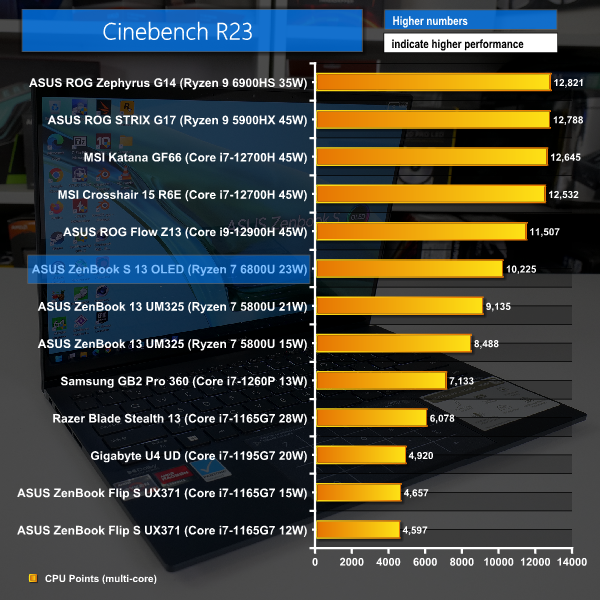
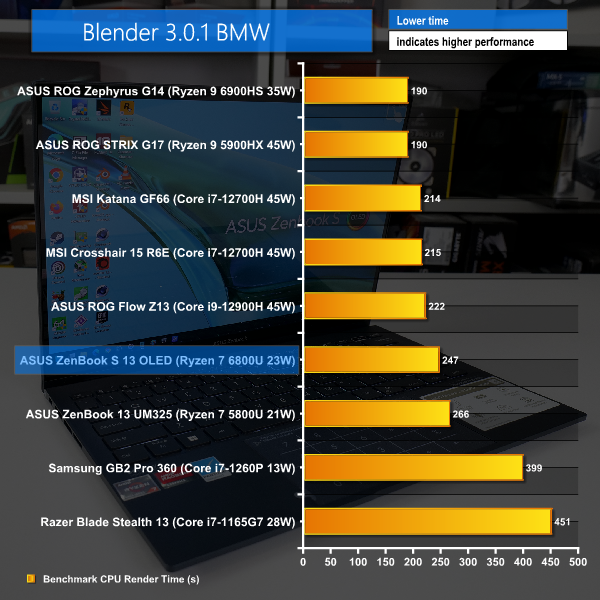
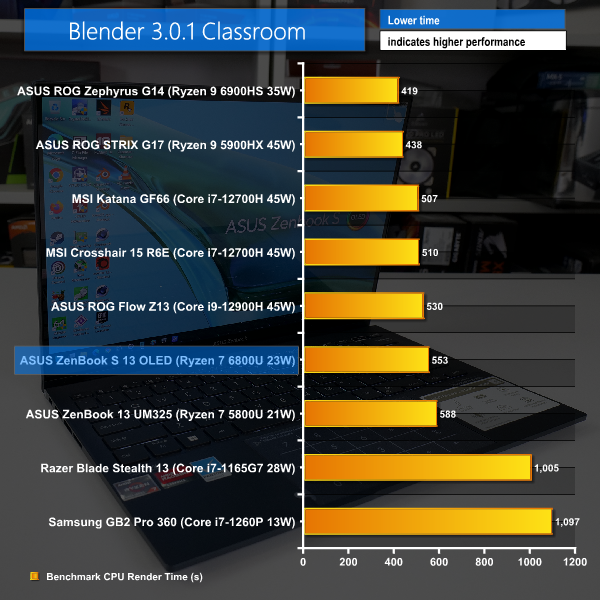
Multi-threaded performance from the Ryzen 7 6800U is very strong. Cinebench R23 is 12% quicker than the Ryzen 7 5800U inside an almost identical laptop. And as we see from the Blender BMW numbers, AMD’s new low-power 6800U isn’t far behind a chassis-restricted Core i9-12900H.
Conservative power budgets on Samsung’s Intel-based laptop give AMD a strong lead versus the Core i7-1260P, particularly for long duration benchmarks.
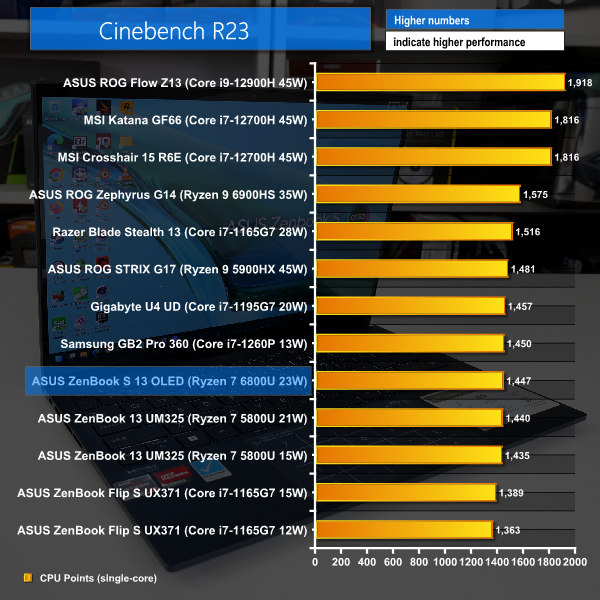
Single-threaded performance from the 6800U is OK, but it’s certainly nothing special. Intel’s ageing Tiger Lake solutions are just as quick and there hasn’t really been an improvement from previous-gen Ryzen 7 5800U.
Intentional restrictions to the short-duration boost power affect AMD’s result here; that’s clearly evident with the chassis-restricted Intel H-series parts now enjoying sizable performance leads.
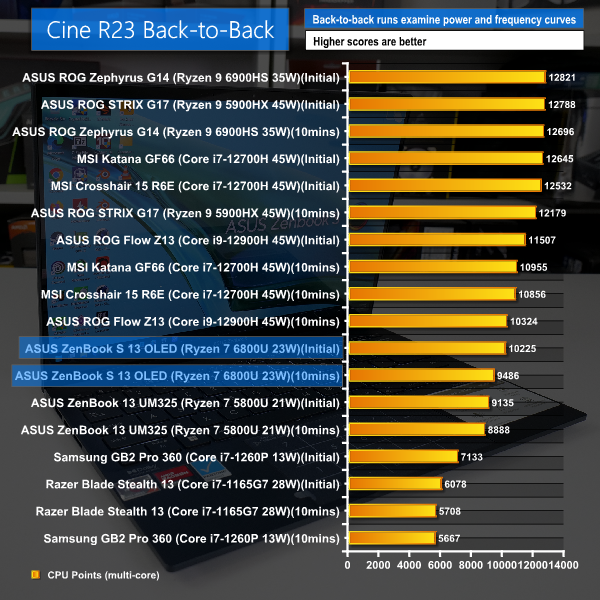
The Ryzen 7 6800U performance is reduced by 7% after 10 minutes of back-to-back Cinebench runs. That’s perfectly reasonable, albeit greater than the performance drop-off seen on the Ryzen 7 5800U solution.
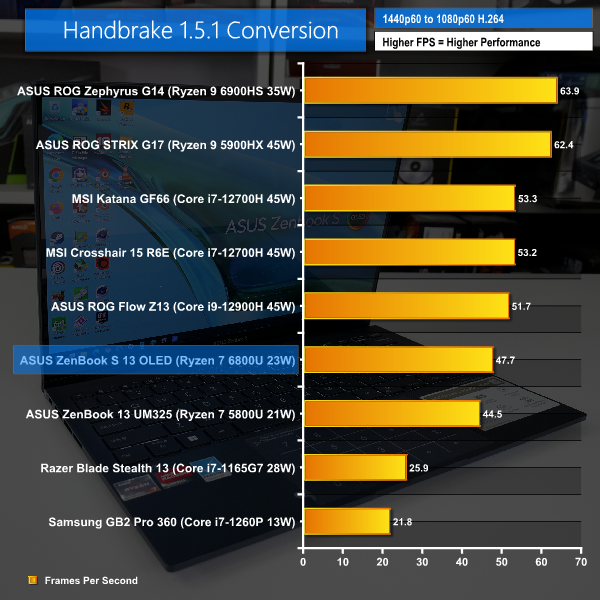
Handbrake’s H264 test sees Ryzen 7 6800U splitting the difference between the power-restricted Core i9-12900H and the highly comparable Ryzen 7 5800U.
Thanks to a strong ability to maintain clock speeds, Ryzen 7 6800U is matching up to the chassis-restricted Core i9-12900H and the power-limited 12700H in Handbrake H265. That final comparison to those big and chunky MSI laptops is very impressive from ASUS and AMD’s 1kg ultraportable.
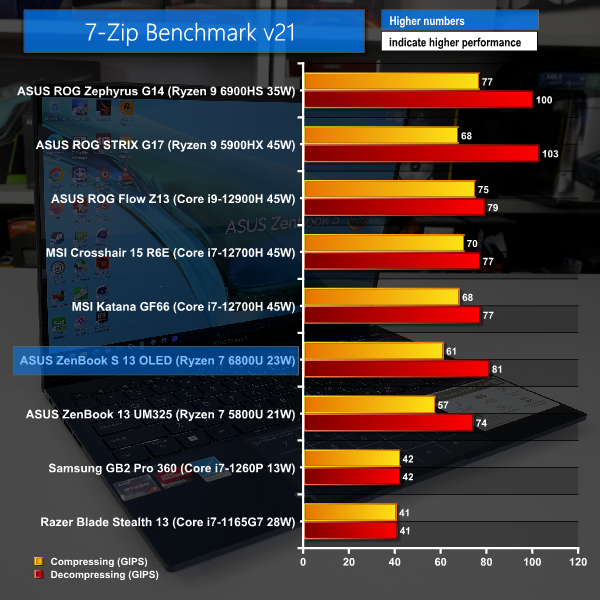
7-Zip shows a solid performance gain for the Ryzen 7 6800U versus its predecessor. This result is likely aided by the deployment of speedy new LPDDR5 memory too. The gap to higher-powered Intel 12th Gen Core processors is not too large, which is favourable for AMD.
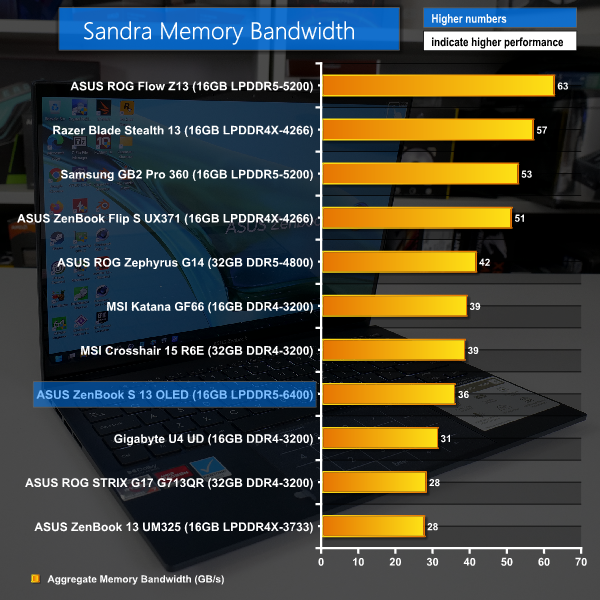
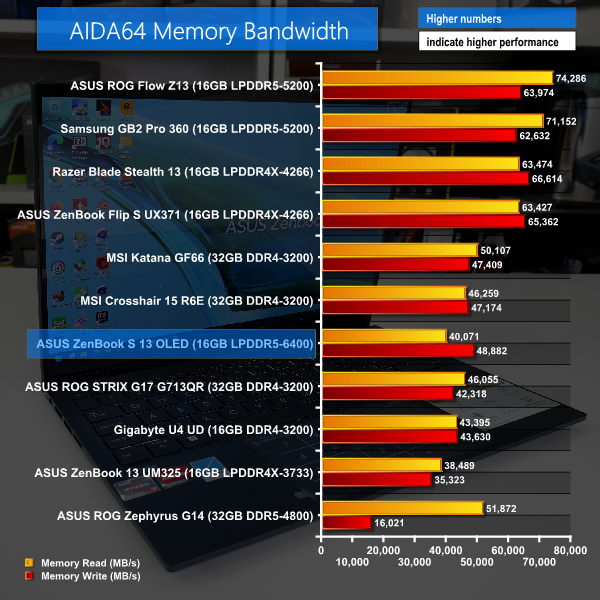
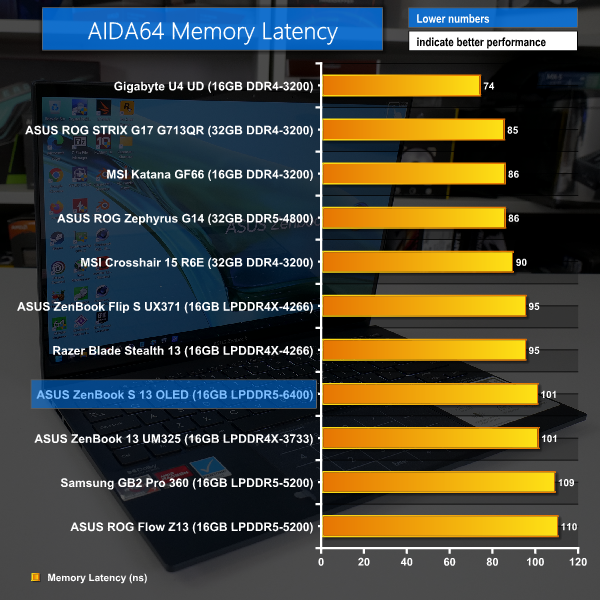
6400MHz LPDDR5 should result in high memory bandwidth scores, but as is often the case for AMD platforms, we don’t see particularly large numbers compared to Intel solutions. It is good to see that there’s no half-speed write penalty on this Ryzen 7 6800U-based ASUS laptop though. And latency isn’t particularly positive, either, as we expect from LPDDR4 or LPDDR5.
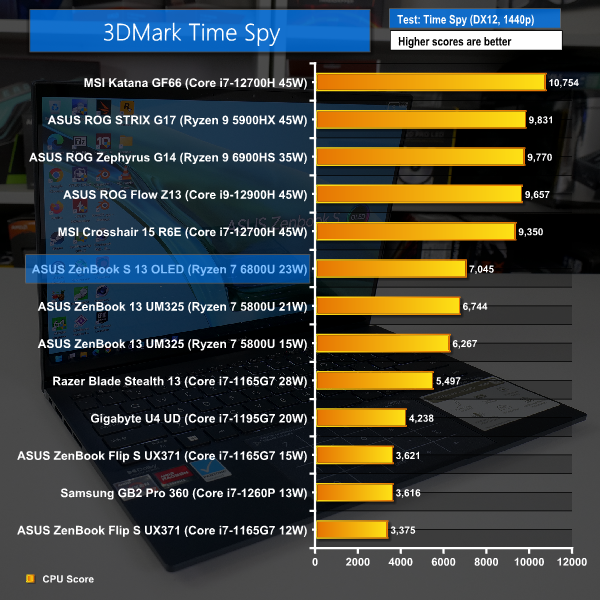
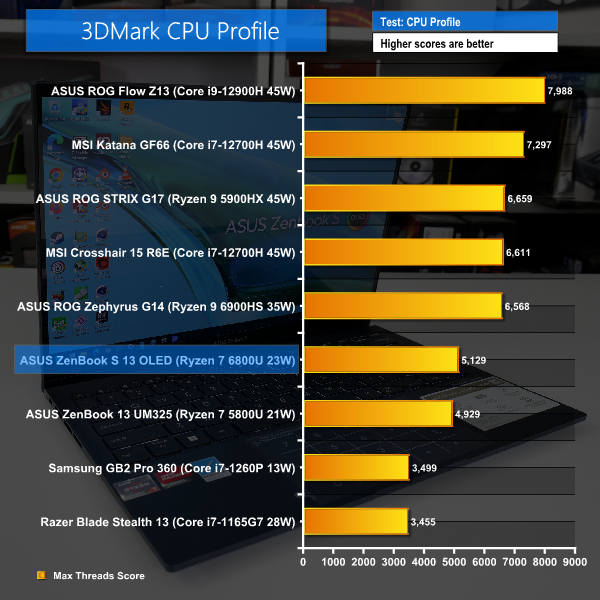
If you’re interested in 3DMark scoring numbers, the Ryzen 7 6800U is marginally quicker than its predecessor for the CPU profile test. And there’s also a small performance boost in Time Spy but the 35W- or 45W-class Intel and AMD chips are far superior.
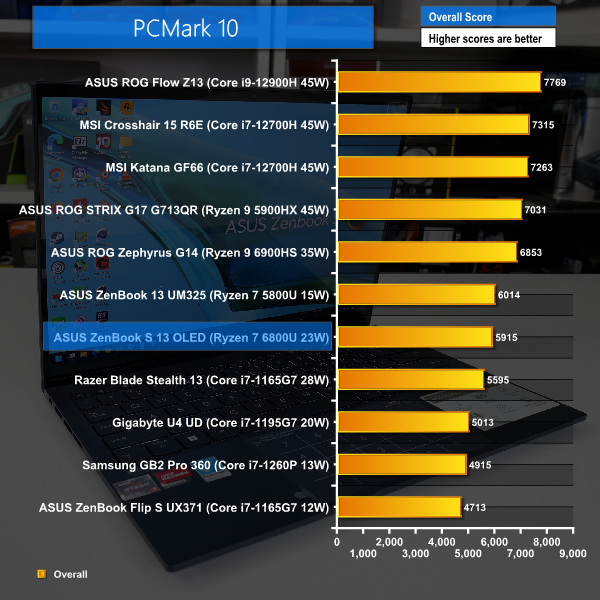
In PCMark 10, we see similar performance for the 6800U and 5800U, but we really don’t put much weight in this benchmark.
The types of laptops that are designed to run low-power, U-series processors simply aren’t intended for gaming, but that doesn’t stop us from trying.
Once again, the two AMD chips are inside 13-inch ASUS ZenBooks so are very, very comparable with their data running inside the Performance Power mode for both cases.
But the Samsung Galaxy Book2 Pro 360 runs the Intel Core i7-1260P at notably lower power levels for longer-duration runs, so this limits the power-to-power comparison. With that said, it is a very reasonable laptop-to-laptop comparison given the similar weights and laptop sizing for the Intel and AMD competing solutions.
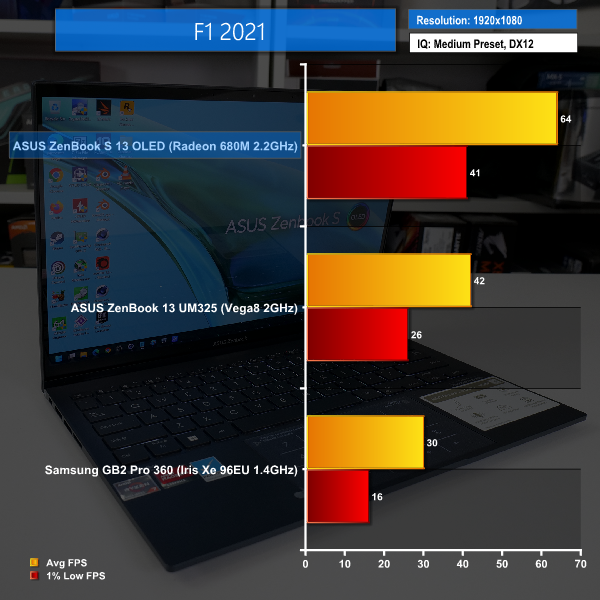
Running F1 2021 under its Medium image quality preset results in actually playable and competent frame rates on the Ryzen 7 6800U’s Radeon 680M iGPU. 60 FPS average is more than enough, so we could happily crank up the image quality a little higher. This is a very large improvement versus the Vega-based iGPU inside the Ryzen 7 5800U.
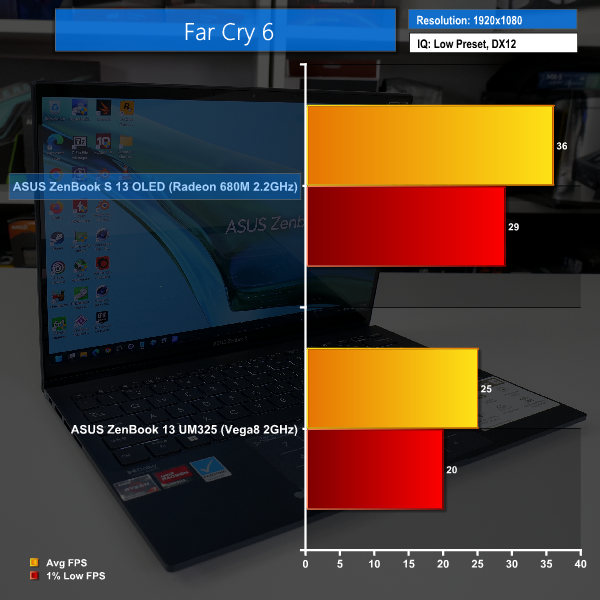
Intel’s power-restricted solution was more-or-less single-digit FPS in Far Cry 6, so we have omitted its data. The RDNA2-based Ryzen 7 6800U once again delivers a sizable performance improvement versus its Vega-based predecessor.
Here, we are running at the lowest image quality settings and get a mid-30s average on the Ryzen 7 6800U at 1080p. That’s probably OK for some casual gaming, but the Ryzen 7 5800U would have to reduce its rendering resolution. So, the 6800U’s performance uplift holds even more value with that point in mind.
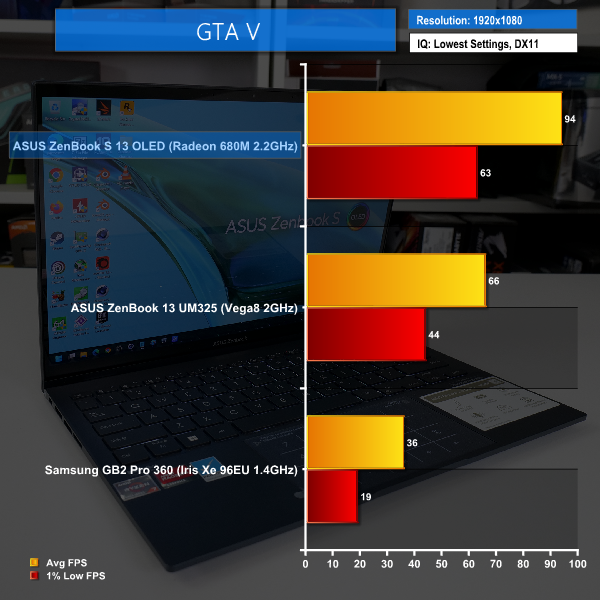
Old, but still a fan favourite, GTA V is now very much playable across a variety of modern hardware. That’s representative of many games that people play when away from their dedicated gaming desktop or laptop.
The new RDNA2-based Radeon 680M solution delivers an excellent 94 FPS average with a 1% low above 60 FPS. That is outstanding performance and means there is plenty of opportunity to increase image quality and gameplay settings beyond the lowest levels that we tested with – far more ability to improve the gameplay experience than with the older Ryzen 7 5800U, which in itself was also competent.
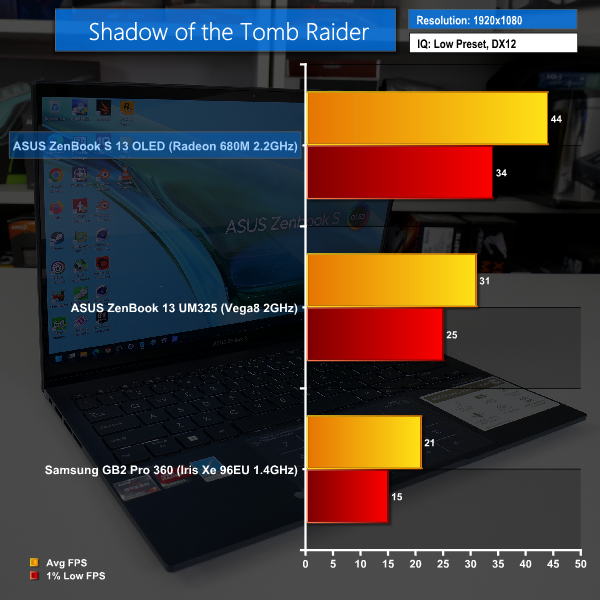
Once again, we see competent light gaming performance from the Ryzen 7 6800U in Shadow of the Tomb Raider.
Here, it’s probably fair to say that the new AMD processor is the difference between a borderline playable experience at 1080p and a perfectly reasonable 44 FPS average. The performance uplift versus the Ryzen 7 5800U is just that good.
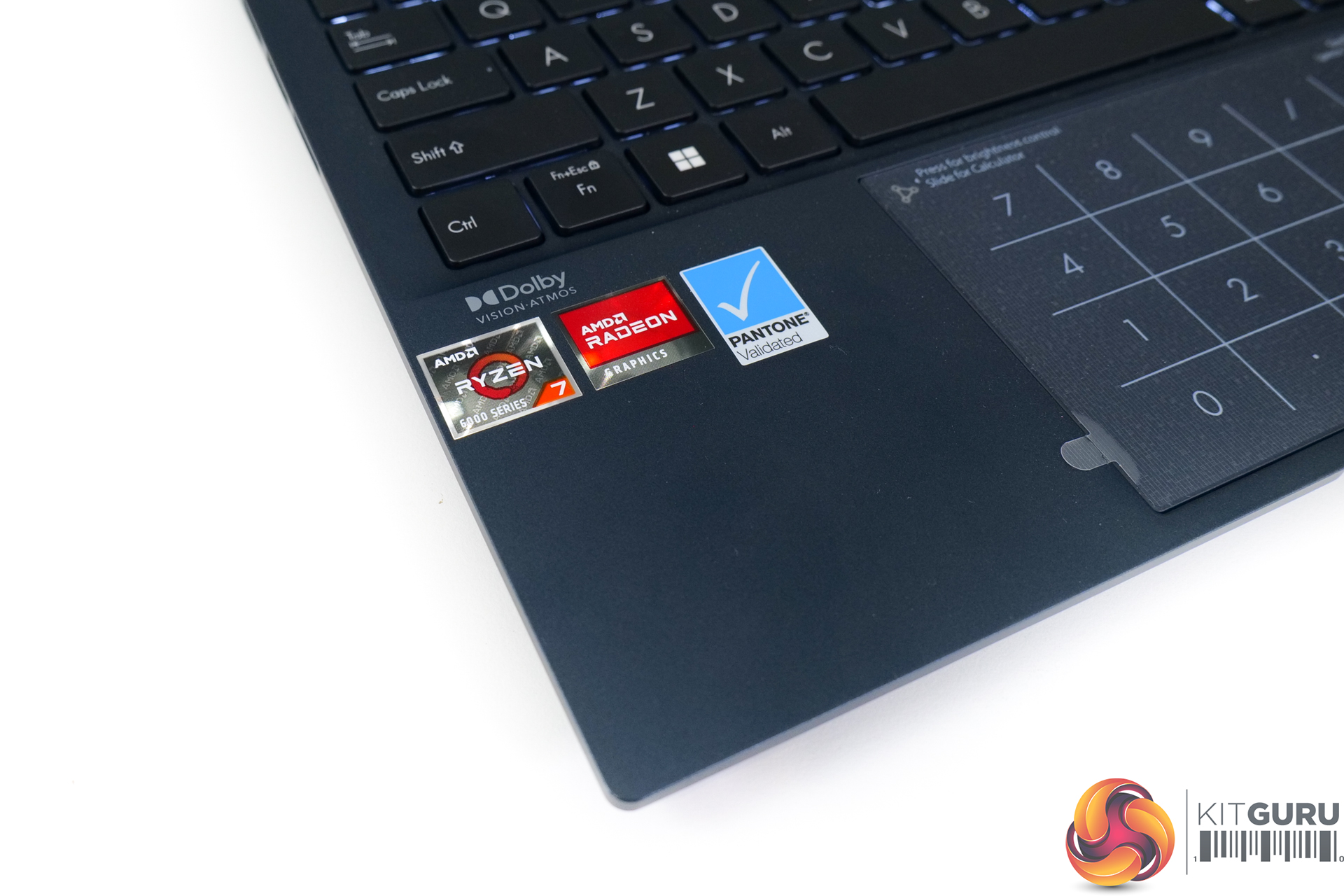
Of course, there’s plenty of horsepower available for casual gaming with less demanding titles, even at 1080p. But seeing the Ryzen 7 6800U and its Radeon 680M integrated GPU deliver competent 1080p performance when squeezed inside a sub-15mm, 1kg chassis is highly, highly impressive!
RDNA2 really is delivering!
Media consumption is one of the areas where AMD targeted sizable improvements with the Ryzen 6000 SoC; we now get decode support for 8-bit and 10-bit H.265/HEVC and VP9, and there’s even support for AV1.
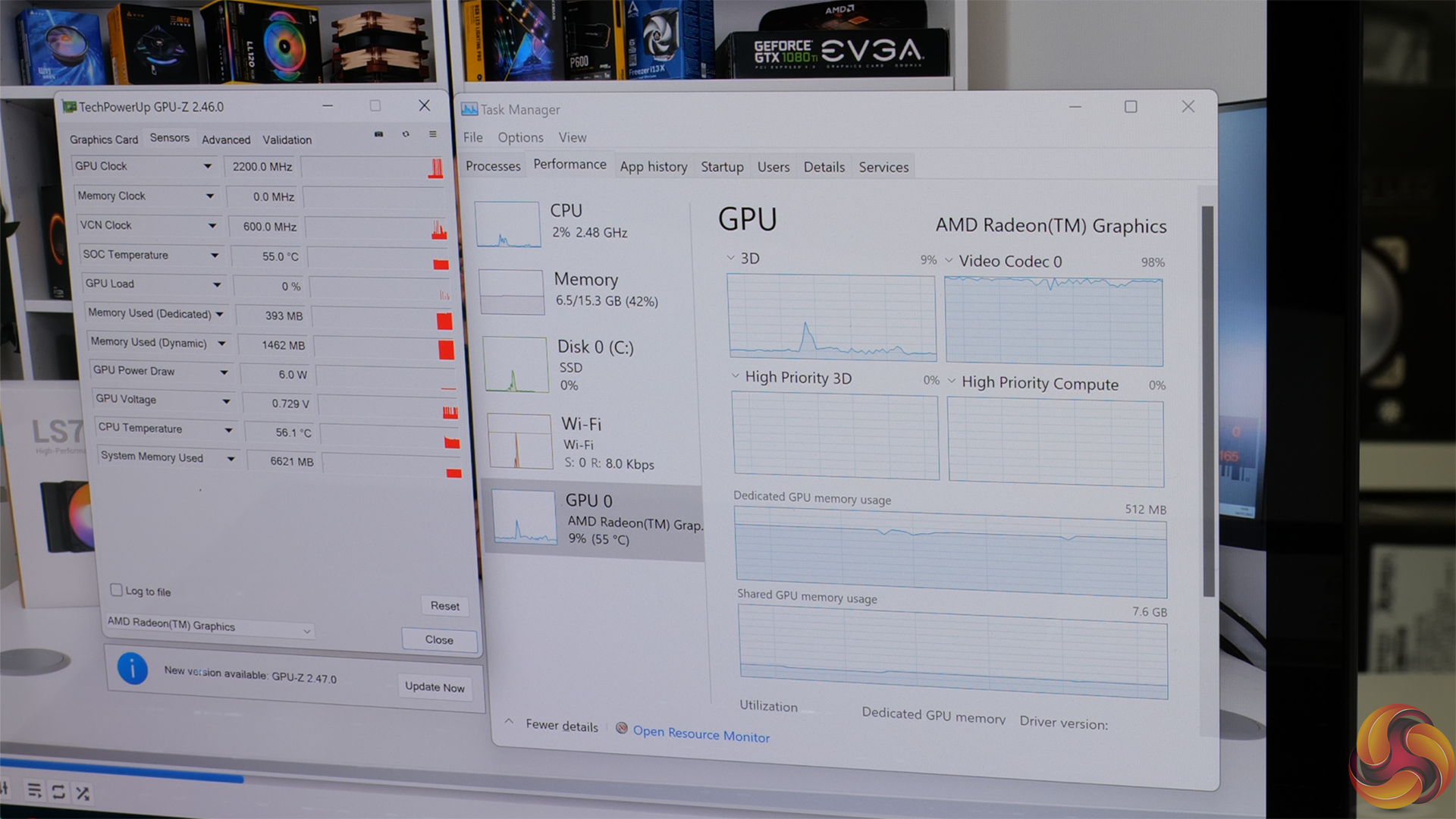
As shown in the video review, we tested with a variety of H264 and HEVC footage from Panasonic DSLRs and GoPros.
AMD’s Ryzen 7 6800U will play this content fine, albeit with occasional judders for the 200Mbps 4K60 HEVC 10-bit Panasonic S5 file. 8K30 YouTube is also fine on the 6800U but 8K60 is unplayable in Chrome.
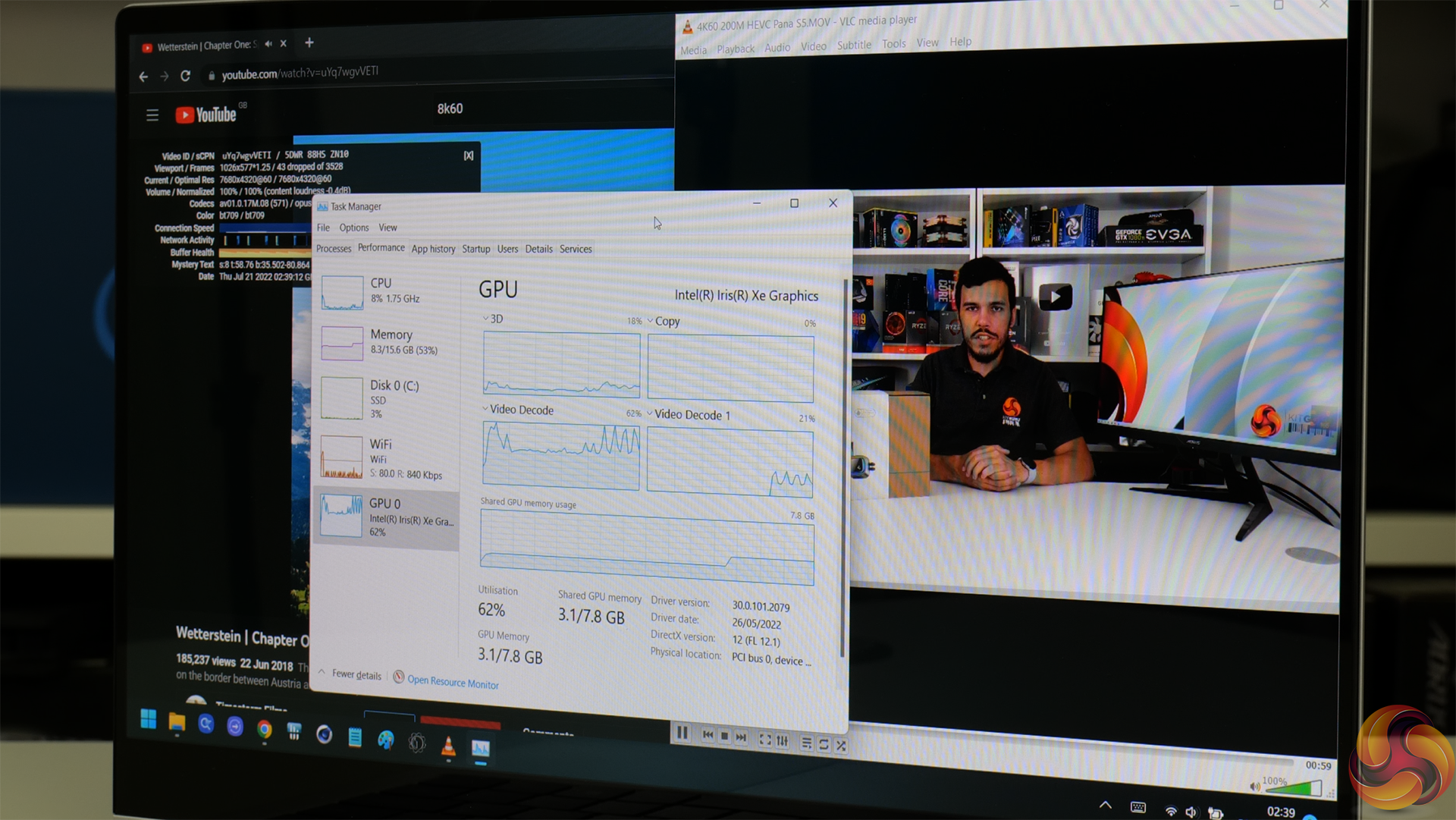
Meanwhile, Intel’s Core i7-1260P or 1165G7 will run all this video media without a sweat. In fact, the Core i7-1260P wasn’t even pushed hard when simultaneously playing 8K60 YouTube alongside the 200Mbps 4K60 10-bit HEVC video file in VLC media player.
Based on my testing with multiple real-world video sources, Intel’s media consumption capabilities are still far superior to AMD’s, but Ryzen 7 6800U is an improvement over Ryzen 7 5800U and is probably good enough for now for most users.
There’s plenty to like with the ASUS ZenBook S 13 OLED laptop, and that’s simply because it combines premium components with the star of the show – AMD’s Ryzen 7 6800U.
The new AMD chip is excellent! Its performance increases versus the already-powerful Ryzen 7 5800U are modest but noticeable in computational workloads, but the overall platform and SoC improvements are incredibly useful. Particularly with reference to improved media consumption capabilities, LPDDR5 support, and PCIe Gen 4 storage.
The area where AMD has really improved with Ryzen 6000 Series Mobile though is the iGPU.
Now deploying RDNA2-based cores, the performance improvement versus the Vega-based Ryzen 7 5800U predecessor is sizable. And that performance uplift is actually useful because it takes some popular games from unplayable at 1080p to perfectly enjoyable at the go-to resolution. That’s a big deal on a 15-28W class of processor.
The most notable downside that I see with the Ryzen 7 6800U is that its media consumption capabilities are still not as good as they should be. Intel’s competing solutions even from as far back as 10th Gen Ice Lake have better capabilities with real-world media types in my own testing. And even in isolation, the inability to play 8K60 content from YouTube is not really a great showing for a 2022 market where 8K60 video output genuinely is not unreasonable.
Still, there’s plenty to like from the Ryzen 7 6800U; excellent power efficiency delivers excellent battery life, and that efficiency also allows the powerful chip to be squeezed inside alluring, ultraportable laptops such as this sub-15mm, 1kg ASUS ZenBook S 13 OLED.
The ASUS laptop is glorious – they’ve done a really good job at deploying high-end hardware that is fitting of the highly-competent Ryzen processor. Ample Type-C connectivity, impending USB4 support, a 2.8K OLED touch display – this laptop ticks many boxes. And many of those features are made possible thanks to the significant SoC and platform improvements brought to the market by AMD’s Ryzen 6000 Series Mobile processors in this low power format.
To summarise, Ryzen 7 6800U is a very good solution for ultraportable laptops, and ASUS has done an excellent job at designing a superb machine to really leverage the processor’s wide range of capabilities.
Discuss on our Facebook page HERE.
Pros:
- Excellent computational performance.
- Very strong iGPU gaming abilities.
- Impressive capabilities for such a low power processor.
- Strong platform features – LPDDR5, PCIe Gen 4, USB4.
- Superb battery life.
- Easy to cool effectively and maintain power delivery and clock speeds.
Cons:
- Media consumption capabilities still well behind Intel, and actually barely tolerable.
- 16GB RAM feels slim (but that’s more of a laptop vendor decision).
KitGuru says: Ryzen 7 6800U is a superb processor and its wide-ranging set of features is exploited extreme well by the outstanding ASUS ZenBook S 13 OLED laptop.