 KitGuru KitGuru.net – Tech News | Hardware News | Hardware Reviews | IOS | Mobile | Gaming | Graphics Cards


Today we take a look at a 2014 model laptop from Dell. The DELL XPS 15 9530 is a pretty standard looking 15″ laptop, but it incorporates an ultra high QHD+ resolution touch-screen (3200 x 1800 pixels), a quad core i7-4702HQ CPU with 16GB of DDR3 and a Nvidia GT 750m. To keep things nippy the company have paired a 32GB caching SSD with a 500GB mechanical hard drive. Today we put it through its paces in a variety of tasks to see if it is worth the money.
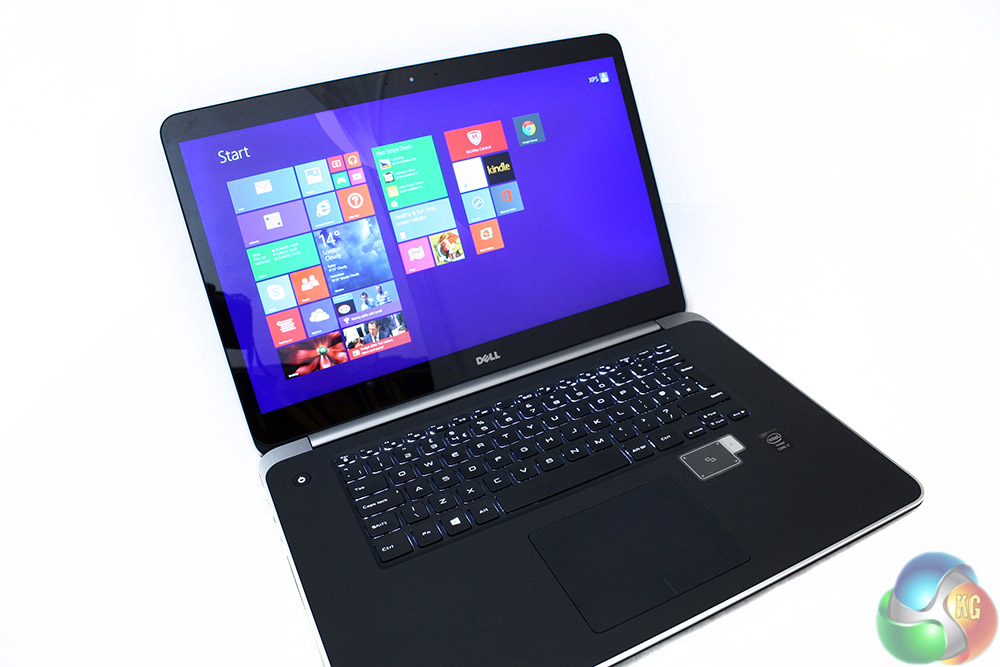
While there are a number of hardware options for the Dell XPS 15-9530, this particular review configuration has the product code: CNX9503 and can be found here – the price is £1,679.00 inc vat.
There are other options available, to see different hardware options and configurations, have a look here.
Processor
- 4th Generation Intel Core i7-4702HQ processor (6M Cache, up to 3.2GHz)
Display
- 15.6” UltraSharp QHD+ (3200×1800) touch display
Memory
- 16GB Dual Channel DDR3L SDRAM at 1600 MHz (2xSoDIMMs)
Graphics
- Intel HD 4600
- NVidia® GeForce GT 750M 2GB GDDR5 (i7-4702HQ)
Storage
- 500GB w/32GB SSD with Intel® Rapid Start Technology and Intel® Smart Response Technology
Battery
- 61WHr (built-in)
Operating System
- Windows 8.1
Dimensions
- Height: 0.3”-0.7”/(8-18mm)
- Width: 14.6” (372mm)
- Depth 10” (254mm)
Weight
- 4.44lbs (2.01kg)
Ports and Connectors
- USB 3.0 w/PowerShare (3), USB 2.0 with PowerShare (1), mini DisplayPort (1), HDMI (1), 3-in-1 media card reader supporting SD, SDIO, SDXC, headset jack (1), Noble lock
Input interface
- Full size, backlit chiclet keyboard
- Glass integrated button touchpad with gesture support
Audio
- Sound High Definition Audio with Waves MaxxAudio® Pro
Wireless
- Intel® Dual Band Wireless-AC 7260 + Bluetooth 4.0
- Intel® Wireless Display (WiDi) 3.0 ready*
- Intel® Smart Connect Technology*
- Near Field Communications
Webcam
- Webcam Widescreen HD webcam with dual array digital microphones
Warranty
- One year Limited Hardware Warranty
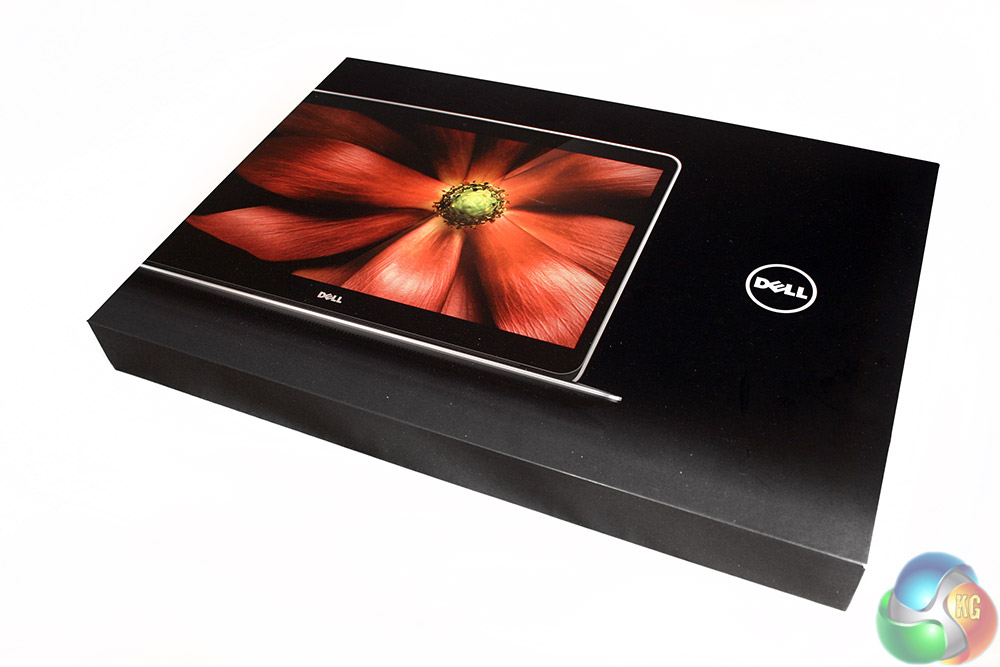
The packaging for the Dell XPS 15 is pretty unassuming, just a lightweight, black box with a large image of the notebook on the front. It looks refined and professional. This is no LED flashing, logo sporting gamer laptop … this is a workhorse with capable discrete graphics under the hood.
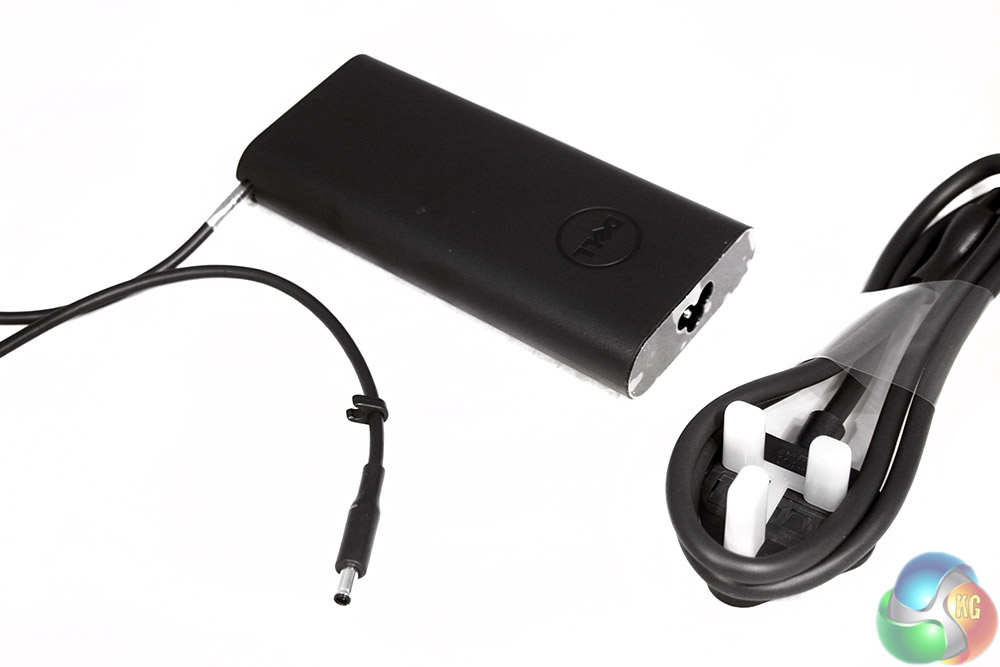
Inside there's a real minimalist approach to accessories. In Dell's way of thinking, you already have a large number of USB cables, driver CDs and manuals – you don't need more. Instead, all you get is a quick starter guide and a power brick.
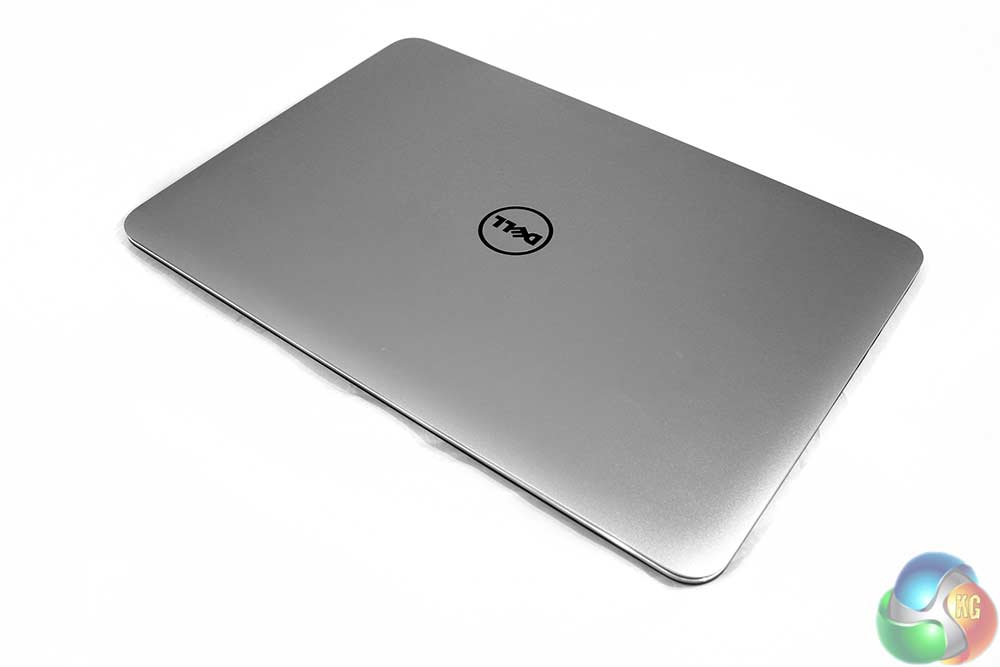
The laptop itself is similarly unassuming. It's got a silver, machined cover made up of a single block of aluminium for added strength, with a central, black, Dell logo – the only thing breaking up the grey expanse.
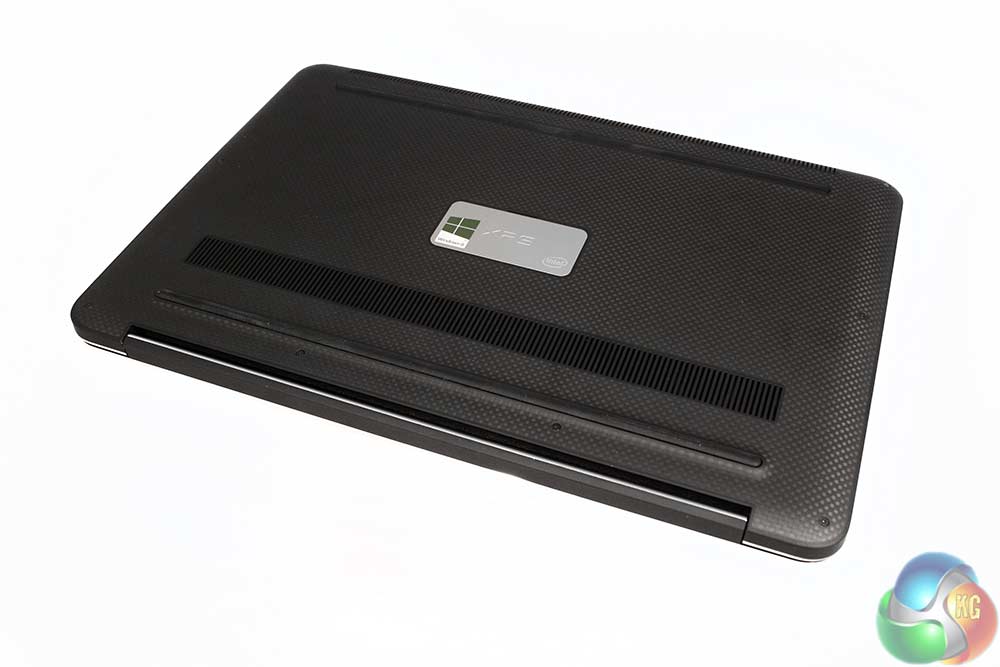
The underside is made of carbon fibre and is therefore light and less heat conductive, meaning you shouldn't end up with a hot lap if you're gaming away for a few hours. For added grip, there's two elongated rubber feet at either end.
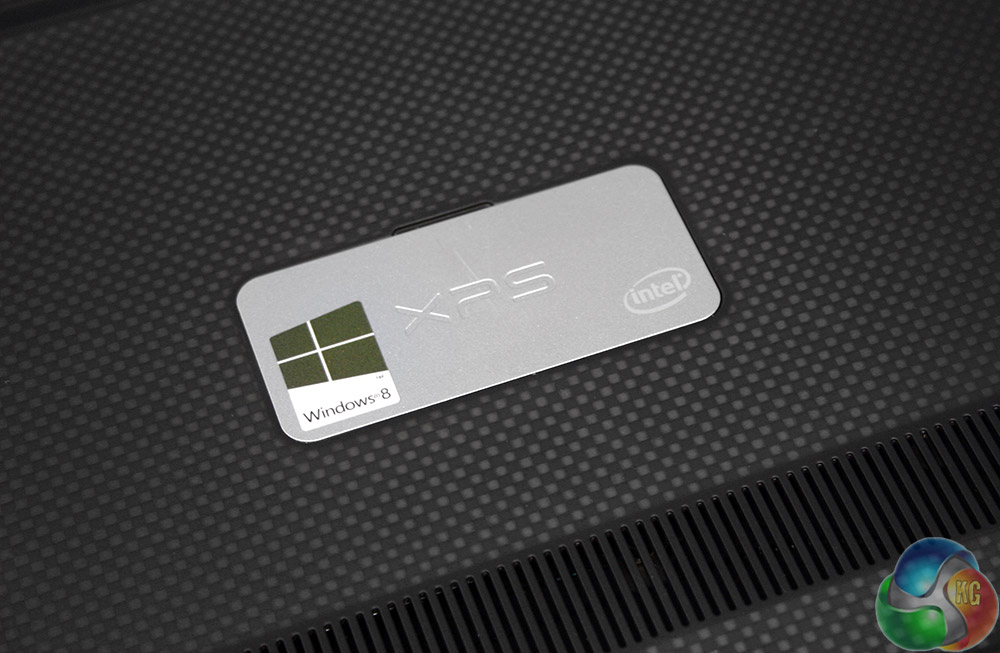
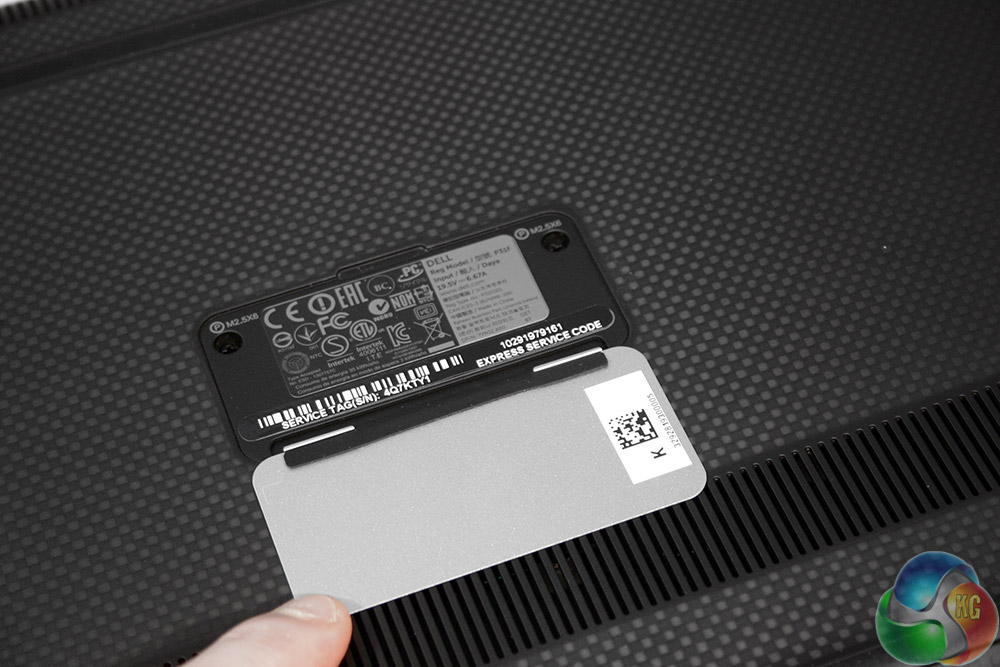
If you're wondering where the model number, barcode and all those other easily-damaged stickers are, they're here, hiding under this hinged Windows 8 badge.
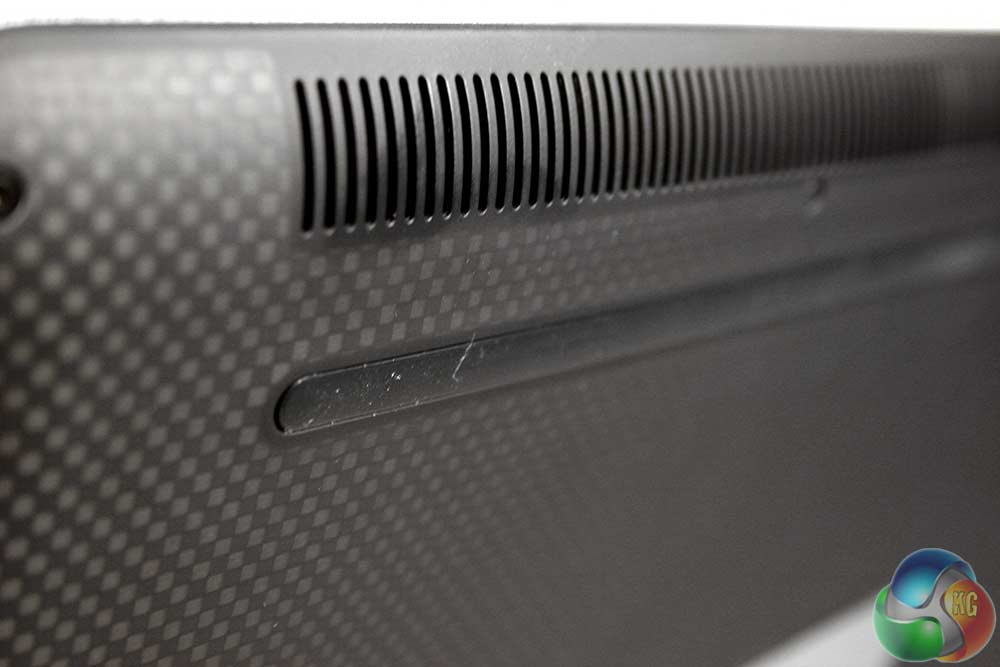
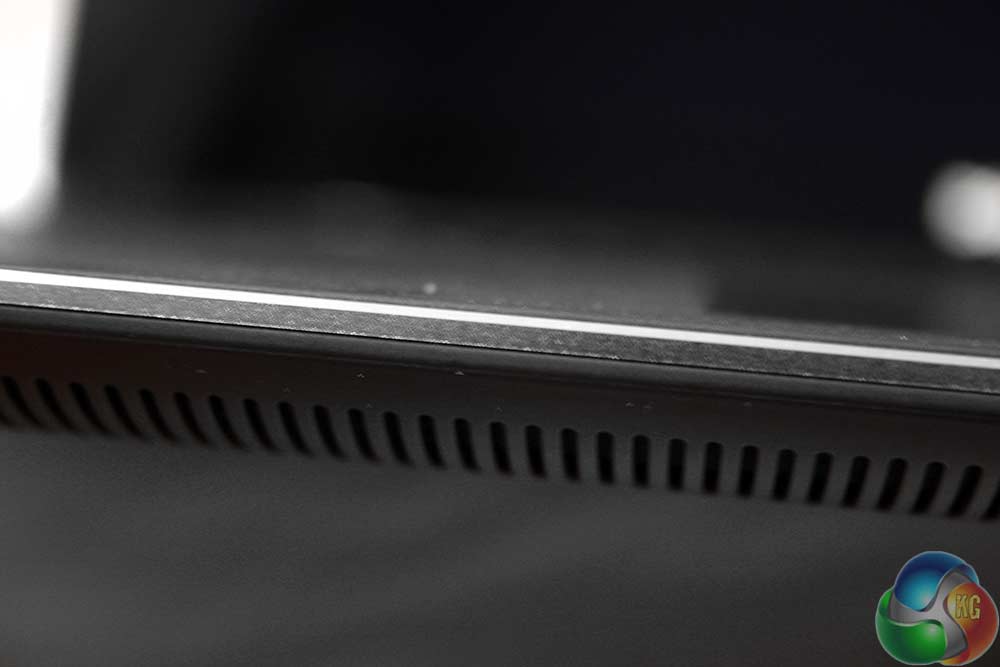
At the front and back of the underbelly you'll also find a pair of grills, one at the rear concerned with aiding ventilation and another at the fore, which has the dual purpose of similarly helping keep interior components cool, whilst also providing a convenient exit for the internal speakers' audio.
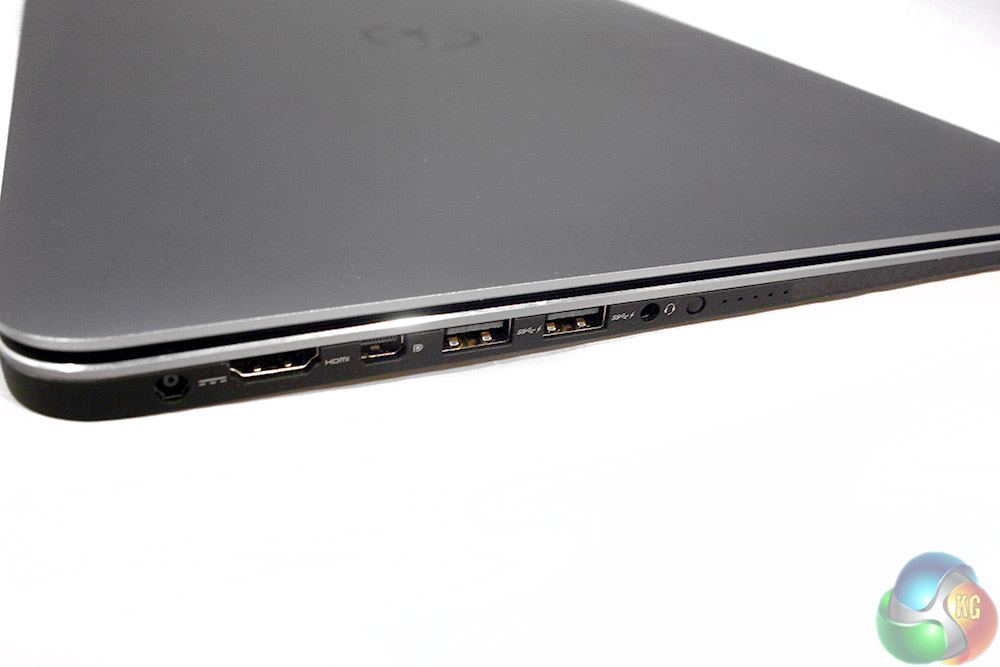
On the left hand side you'll find the DC input, a HDMI ouput, a mini-display output, twin USB 3.0 ports and a single headset port. There's no dedicated mic-connector, so if you're planning on using a gaming headset with twin cables, you'll need a converter to combine them into a single input/ouput.
Running right alongside that, is a small button for turning on the battery charge indicator LEDs. If you don't want them on, another press will switch them off.
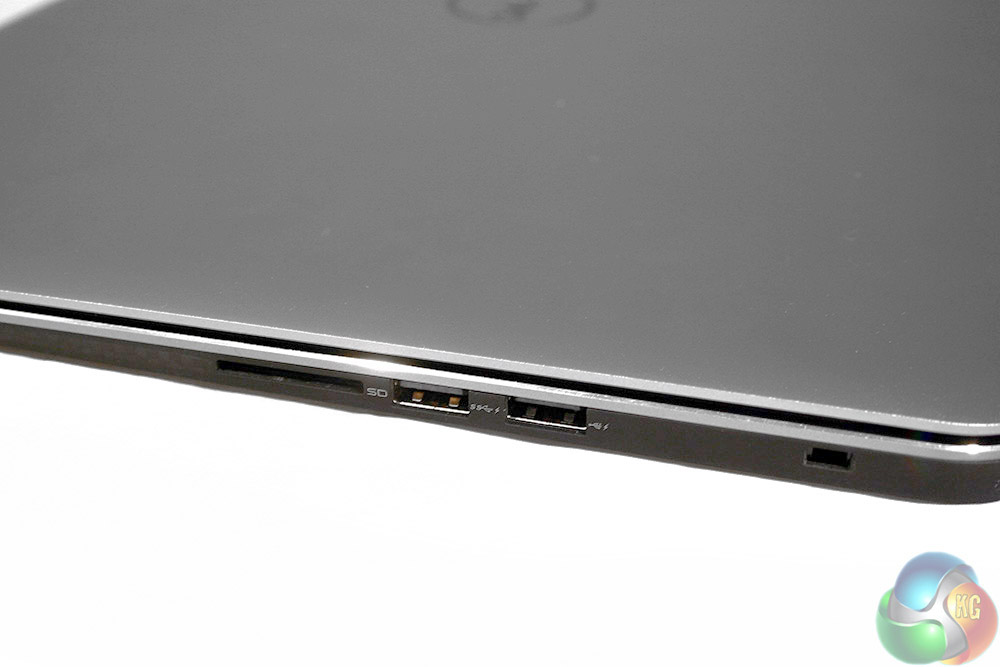
Round the other side, there's an SD card slot, another pair of USB ports (one 3.0, the other 2.0) and a security cable slot.
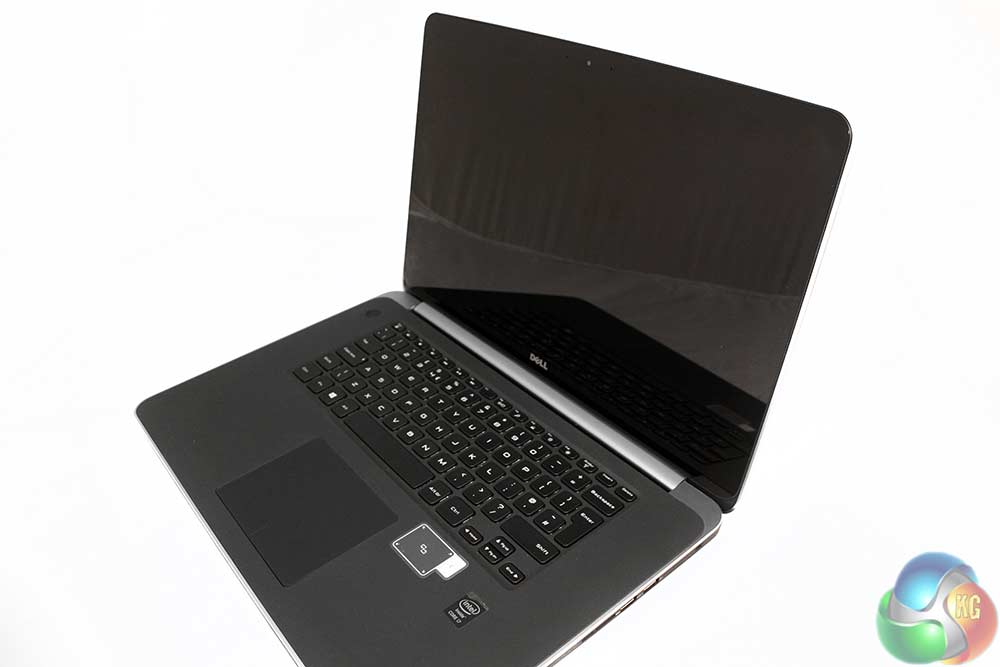
Flipping open the lid, you can see the styling of the 9530's underbelly continues inside, as the whole keyboard surround is coated in silicon. The touch screen features a rounded bezel and is coated in Gorilla Glass, so should be scratch and impact resistant. However, note how reflective it is – we'll come back to that later.
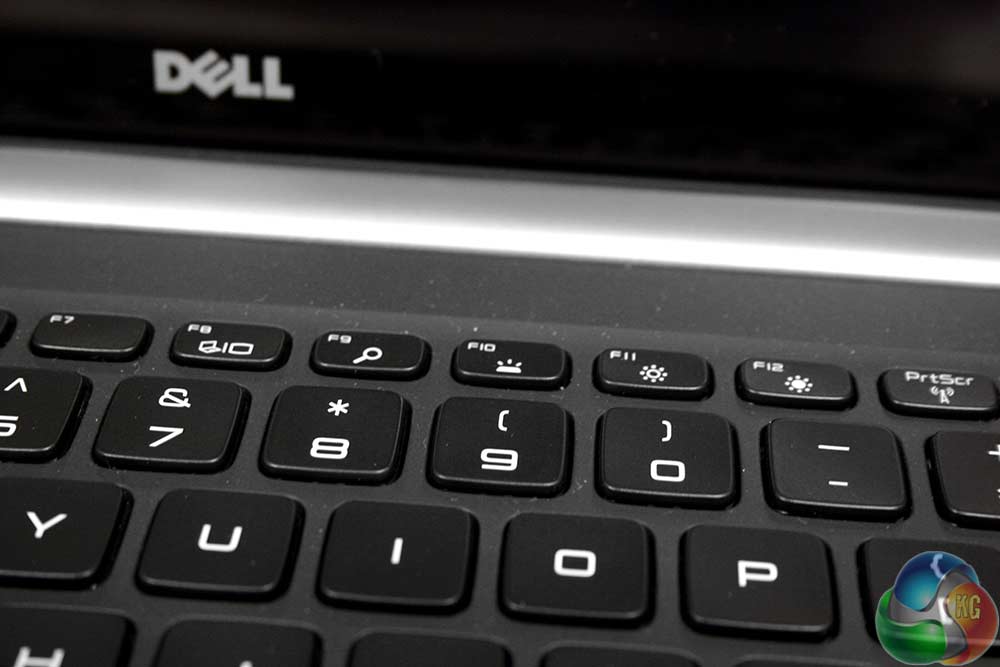

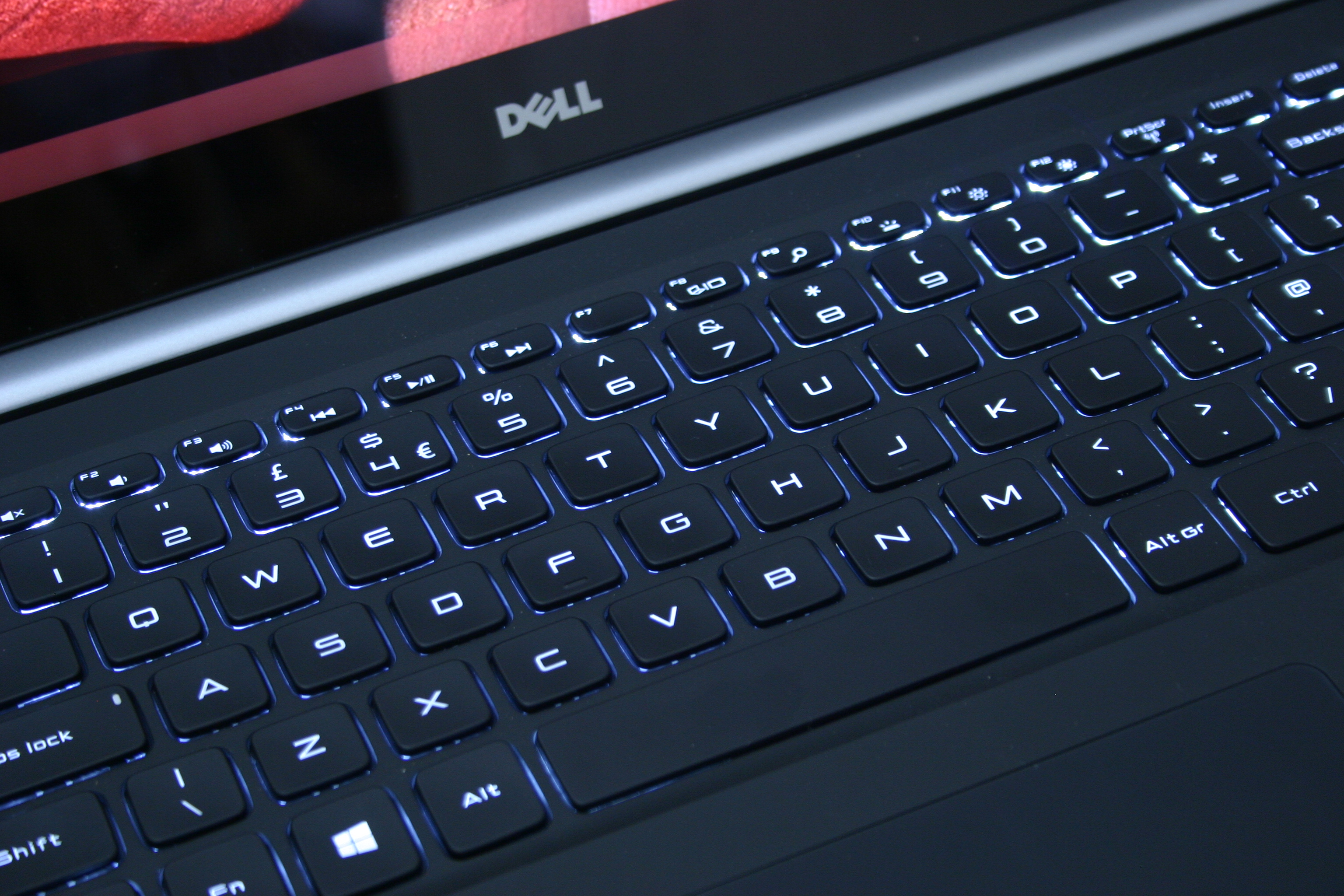
The keys have a slight concave dip and feature laser etched letters. There's some simple blue/white backlighting that can be turned on and off with a function command – handy for use in the dark. This isn't a typists keyboard, but it is perfectly usable for moderate tasks.
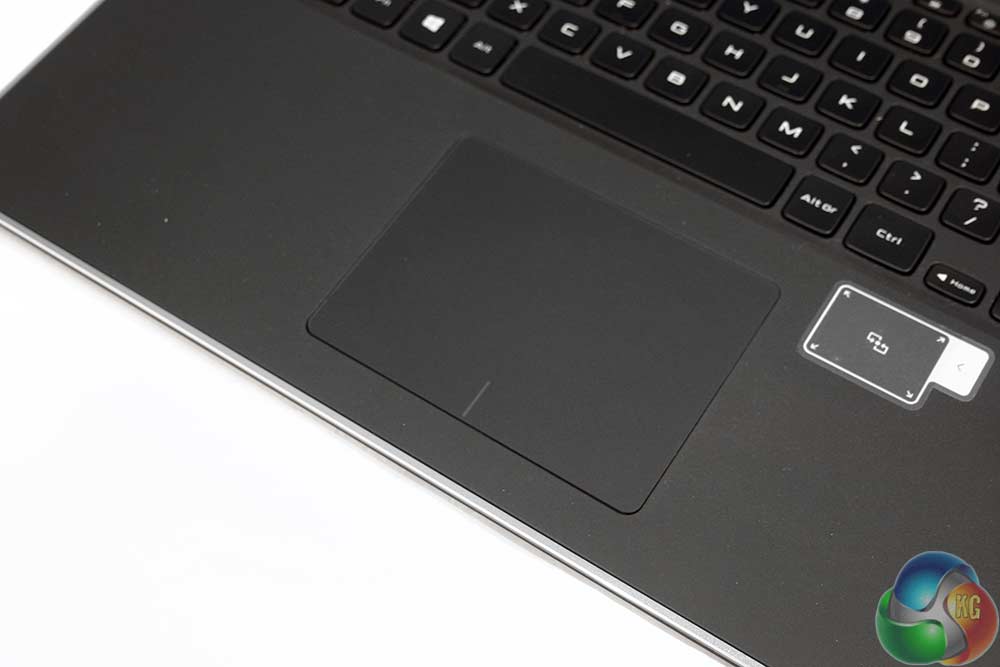
The touchpad has a lovely soft rubber coating with stealth style left and right buttons at the base.
This being a new system, it's worth seeing what sort of extra software and bloatware comes along with it.
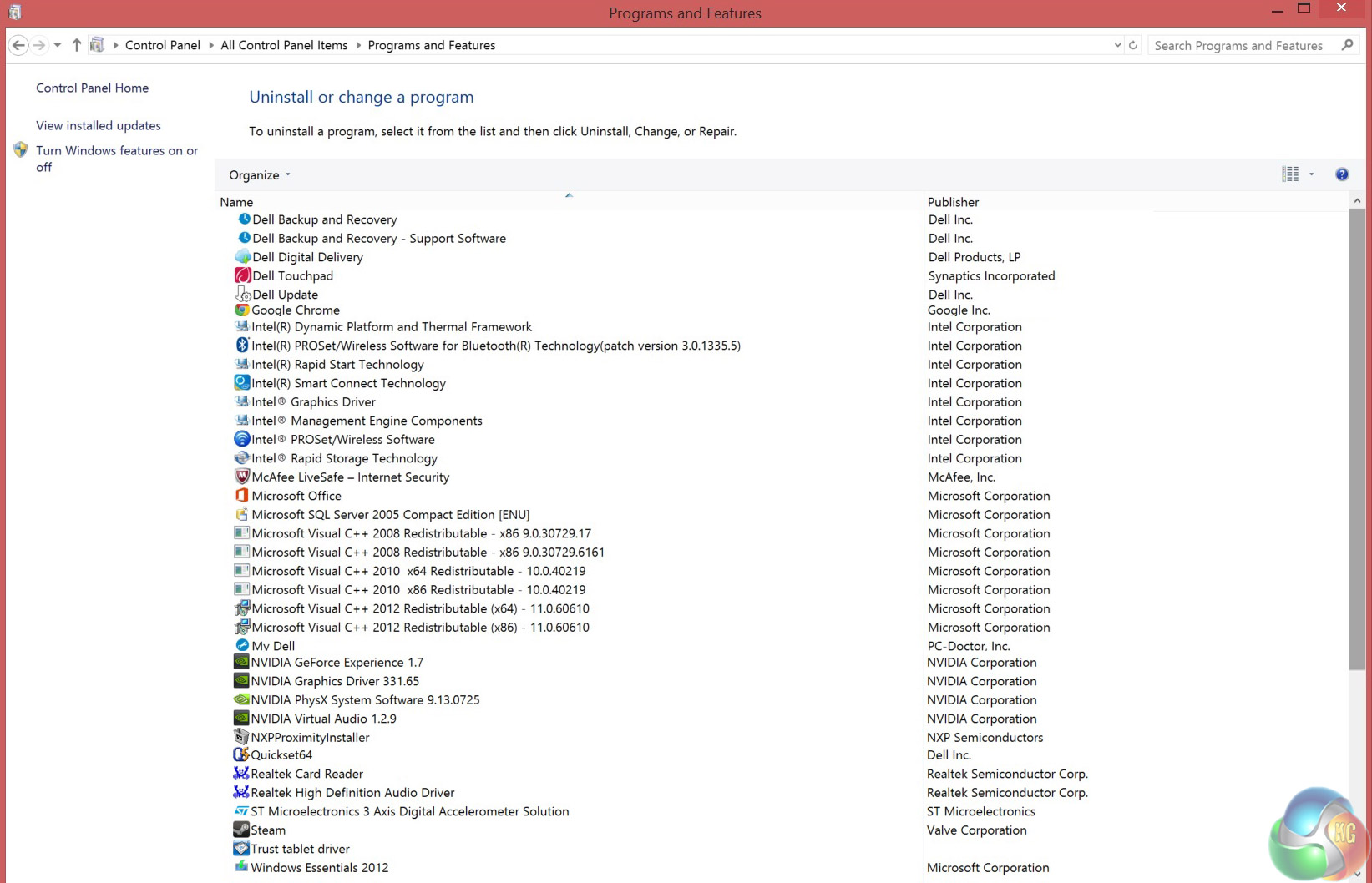
NB. the Steam install was ours
Notice it does come with a pre-installed McAfee Livesafe Internet Security, which while not endorsed by the man who founded the company, is still relatively well respected and you get a year's free subscription to the pro version.
While it did pop up occasionally during testing and is perhaps a little heftier in terms of its CPU usage than we would like, it's ultimately not too distracting and does at least mean you don't need to make downloading antivirus your first port of call when purchasing this notebook.
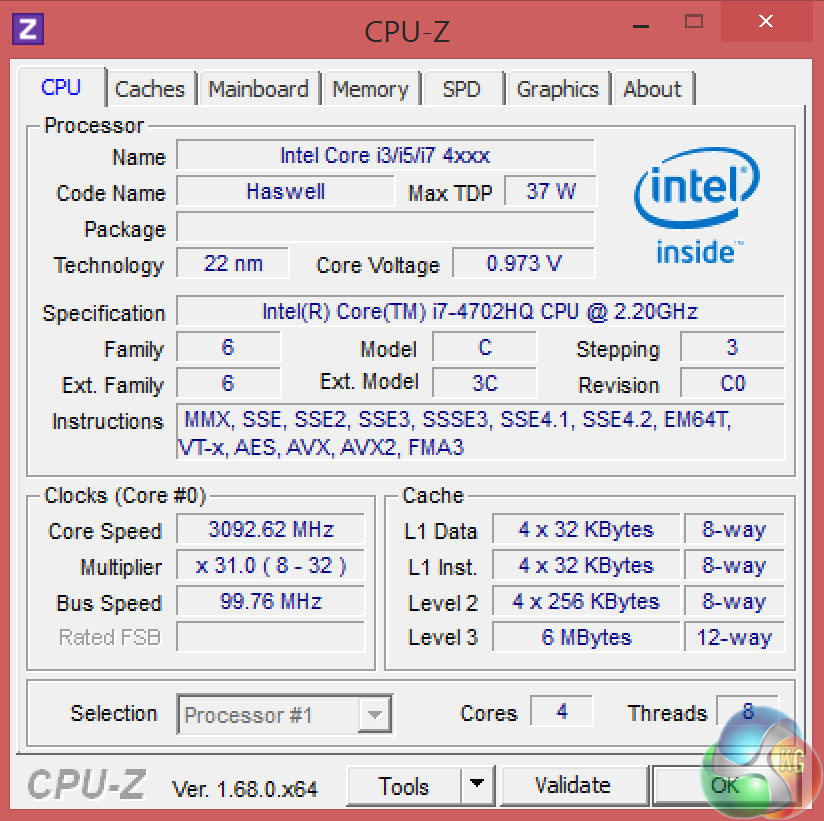
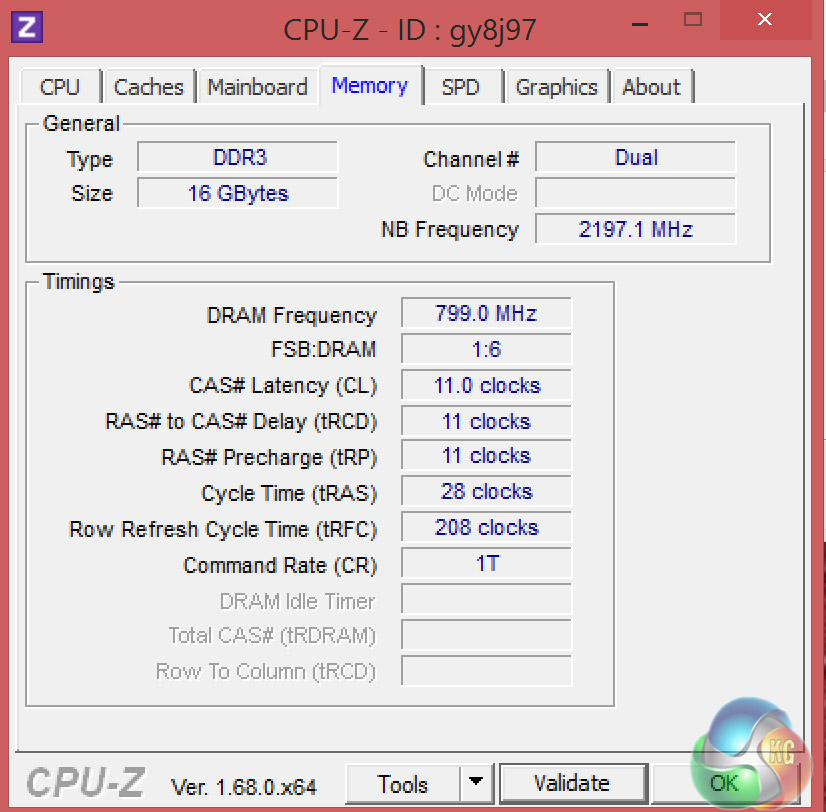
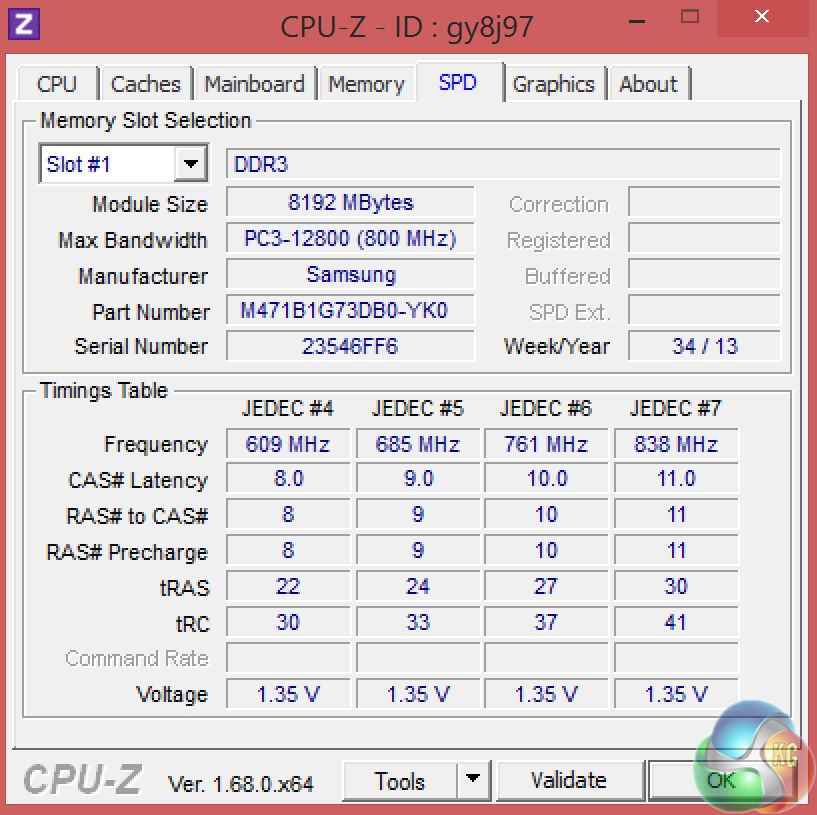
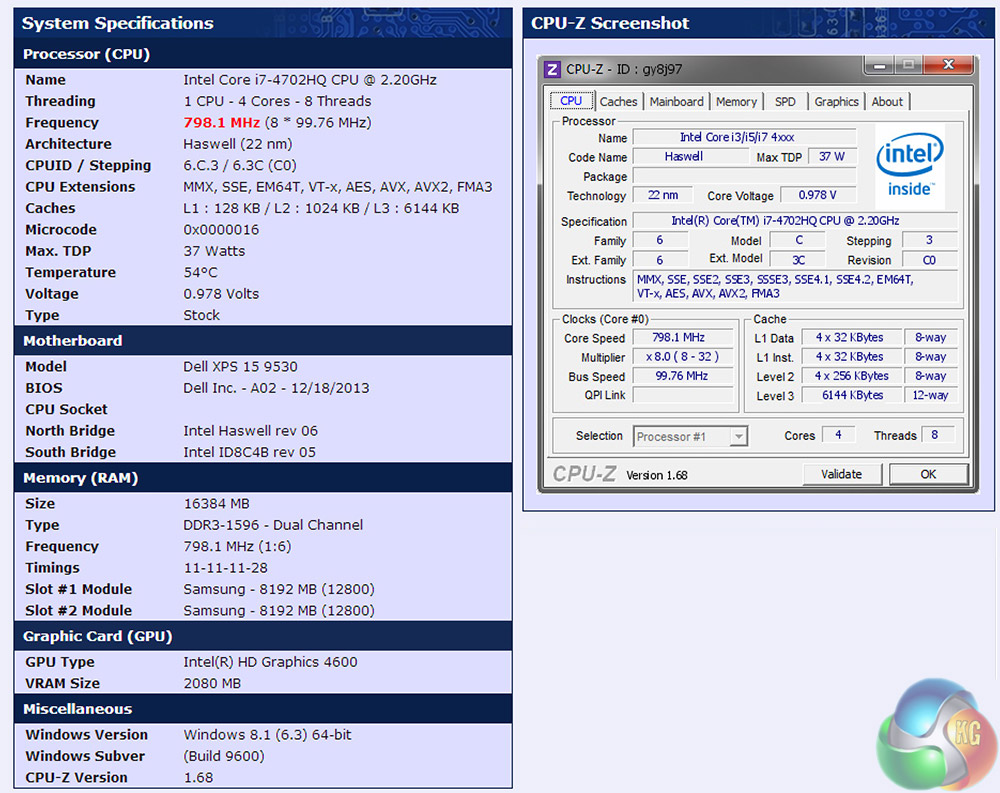
There's a few different hardware options with the XPS 15 9530 (see first page of this review), but this particular version comes with the 4th generation Intel i7-4702HQ CPU with 6MB of l3 cache. Its default clock speed is 2.2GHz, but this can be boosted up to 3.2GHz.
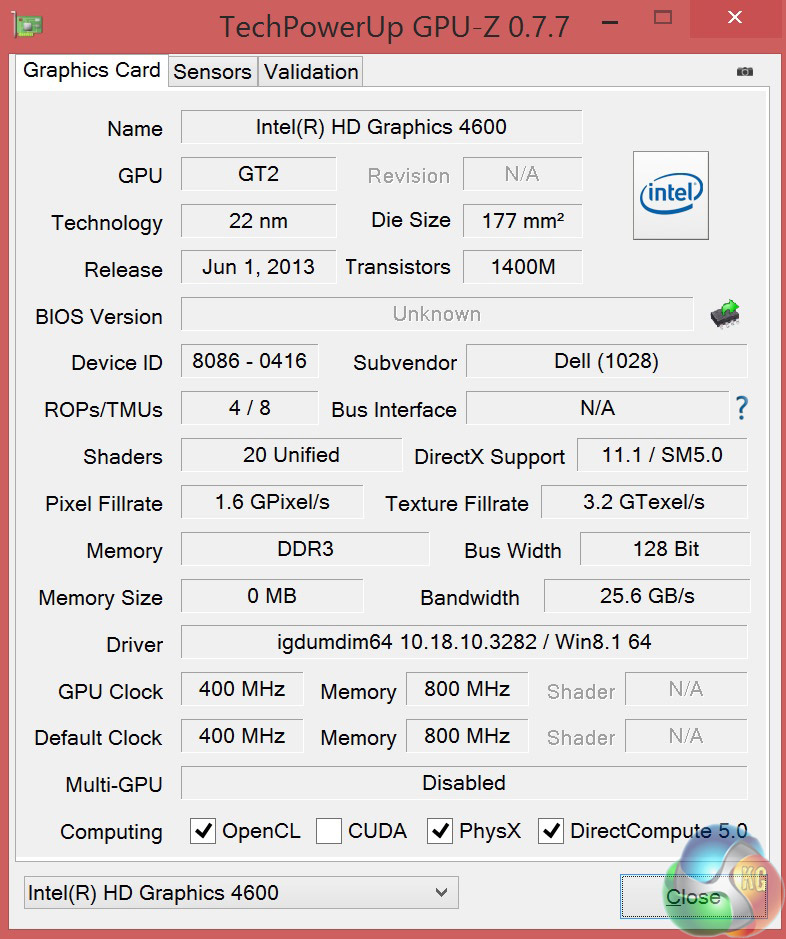
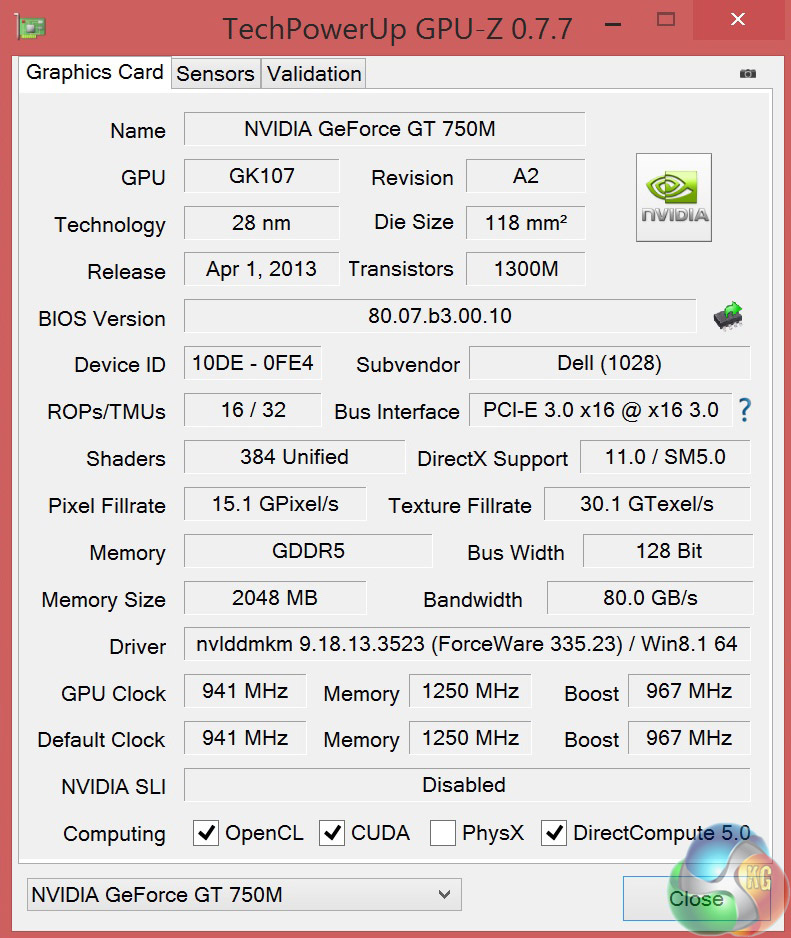
Memory wise, it's sporting 16GB (2x8GB) of dual channel DDR3 running at 1600MHz and an extra 2GB on the mobile GPU, a discrete Nvidia GT750M which runs at 941MHz and 1250MHz on the core and memory respectively. However that only kicks in when stressful applications are run, until then it makes use of an Intel HD 4600.
Software
Sisoft Sandra
PCMark 8
3DMark
3DMark 11
3DMark Vantage
Cinebench 11.5 64 bit
FRAPS Professional
Unigine Heaven Benchmark
Unigine Valley
CrystalDiskMark
ATTO Disk Benchmark
Cyberlink MediaEspresso
Thief
Titanfall
Hearthstone
League of Legends
Technical Monitoring and Test Equipment
Kingston HyperX USB 3.0 drive
Canon 300D DSLR
Some game descriptions are edited with courtesy from Wikipedia.
SiSoftware Sandra (the System ANalyser, Diagnostic and Reporting Assistant) is an information & diagnostic utility. It should provide most of the information (including undocumented) you need to know about your hardware, software and other devices whether hardware or software.
Sandra is a (girl’s) name of Greek origin that means “defender”, “helper of mankind”.
It works along the lines of other Windows utilities, however it tries to go beyond them and show you more of what’s really going on. Giving the user the ability to draw comparisons at both a high and low-level. You can get information about the CPU, chipset, video adapter, ports, printers, sound card, memory, network, Windows internals, AGP, PCI, PCI-X, PCIe (PCI Express), database, USB, USB2, 1394/Firewire, etc.
Native ports for all major operating systems are available:
- Windows XP, 2003/R2, Vista, 7, 2008/R2 (x86)
- Windows XP, 2003/R2, Vista, 7, 2008/R2 (x64)
- Windows 2003/R2, 2008/R2* (IA64)
- Windows Mobile 5.x (ARM CE 5.01)
- Windows Mobile 6.x (ARM CE 5.02)
All major technologies are supported and taken advantage of:
- SMP – Multi-Processor
- MC – Multi-Core
- SMT/HT – Hyper-Threading
- MMX, SSE, SSE2, SSE3, SSSE3, SSE 4.1, SSE 4.2, AVX, FMA – Multi-Media instructions
- GPGPU, DirectX, OpenGL – Graphics
- NUMA – Non-Uniform Memory Access
- AMD64/EM64T/x64 – 64-bit extensions to x86
- IA64 – Intel* Itanium 64-bit
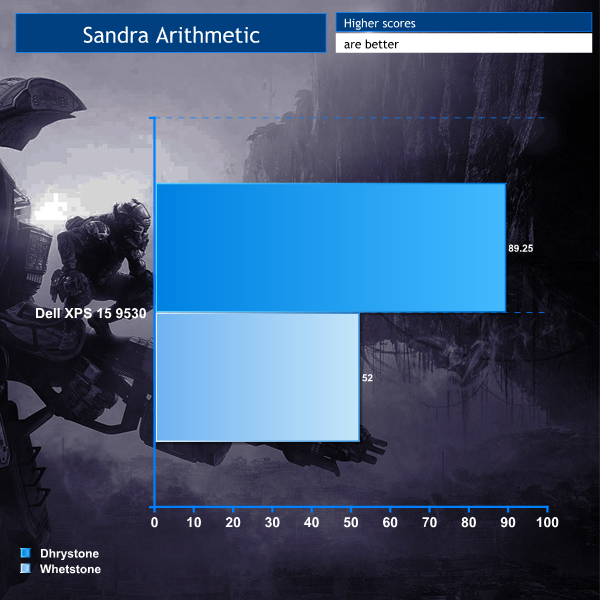
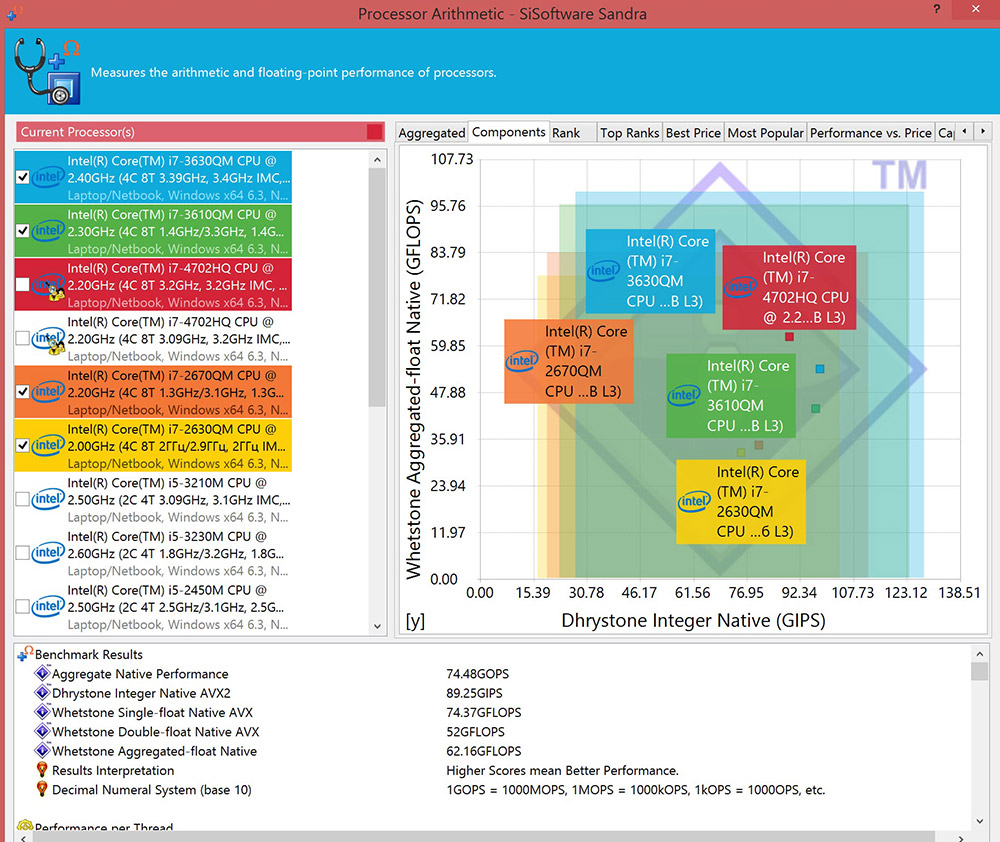
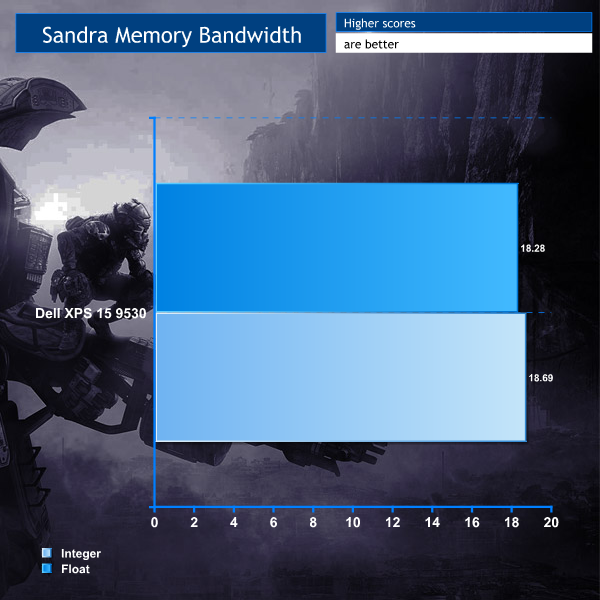
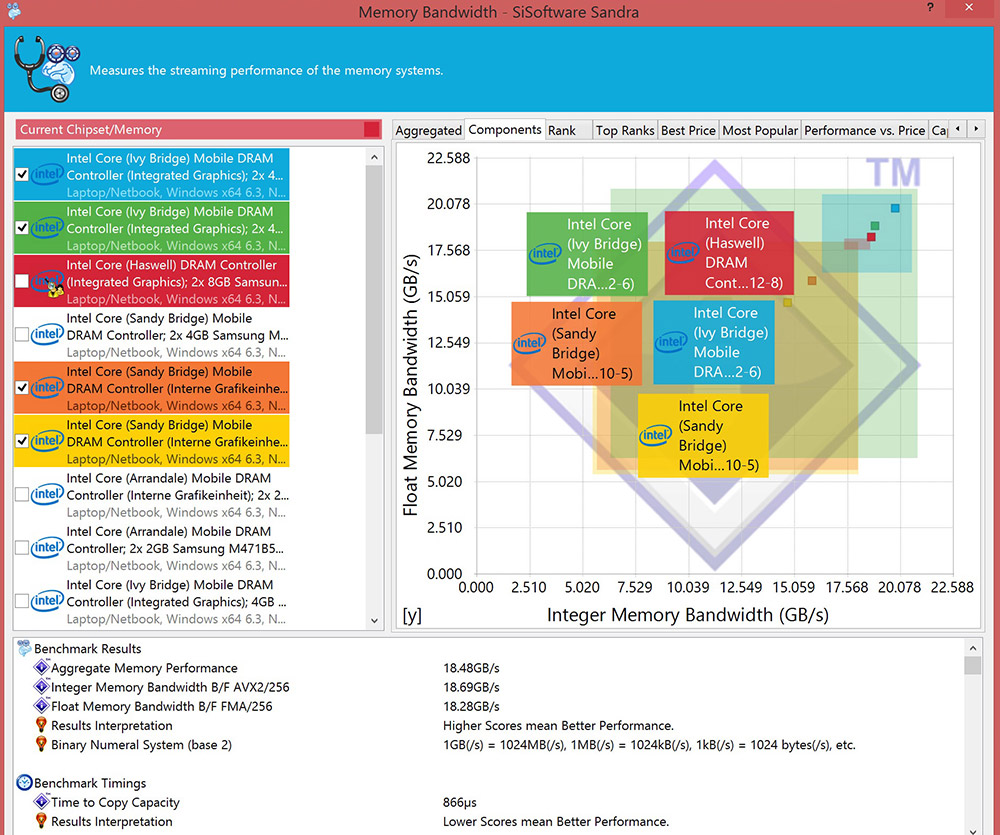
The i7-4702HQ does admirably in the CPU arithmetic tests, beating out the stock reference competitors and holds its own pretty well in the memory bench too.
PCMark 8 is the latest version in our popular series of PC benchmarking tools. Improving on previous releases, PCMark 8 includes battery life measurement tools and new tests using popular applications from Adobe and Microsoft. Whether you are looking for long battery life, or maximum power, PCMark 8 helps you find the devices that offer the perfect combination of efficiency and performance for your needs.

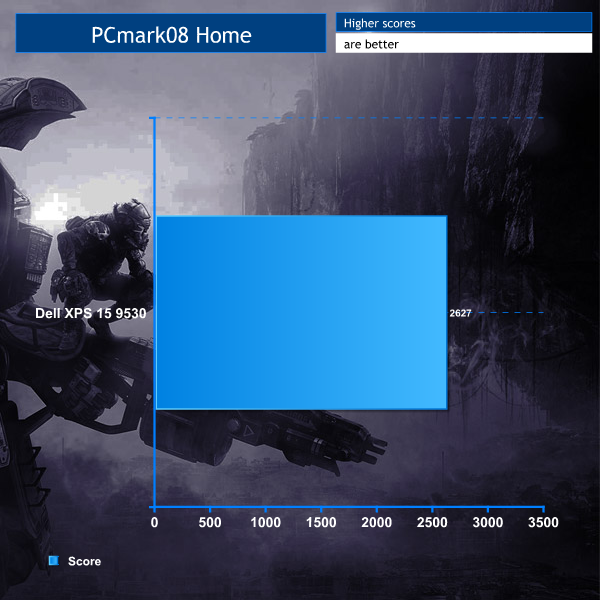
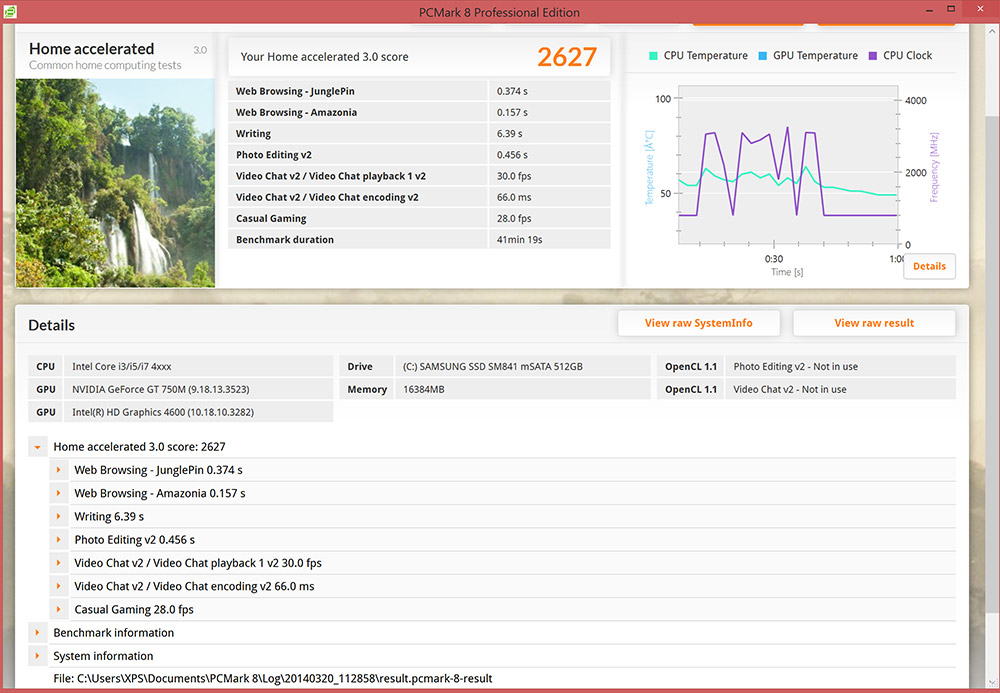
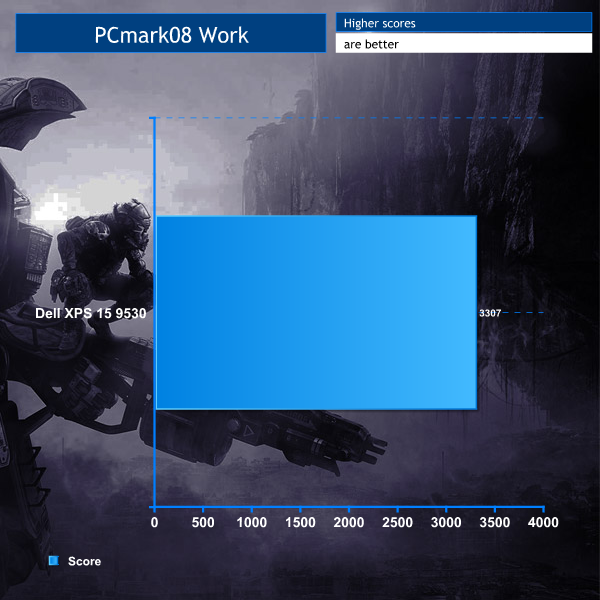
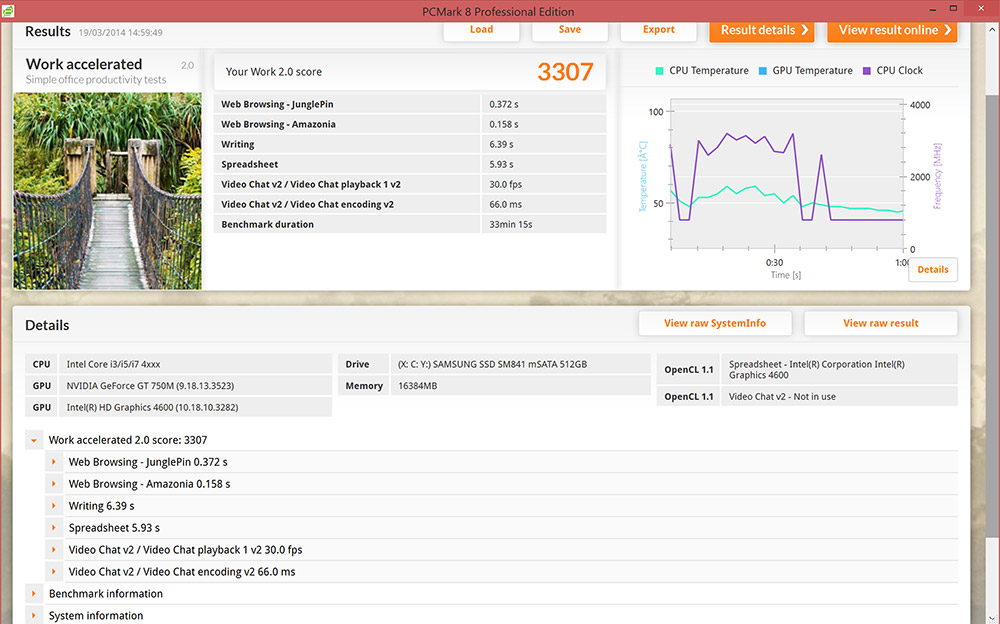
While these scores aren't mind blowing, they show adequate performance for the type of tasks this laptop was designed for.
3DMark is an essential tool used by millions of gamers, hundreds of hardware review sites and many of the world’s leading manufacturers to measure PC gaming performance.
Futuremark says “Use it to test your PC’s limits and measure the impact of overclocking and tweaking your system. Search our massive results database and see how your PC compares or just admire the graphics and wonder why all PC games don’t look this good.
To get more out of your PC, put 3DMark in your PC.”
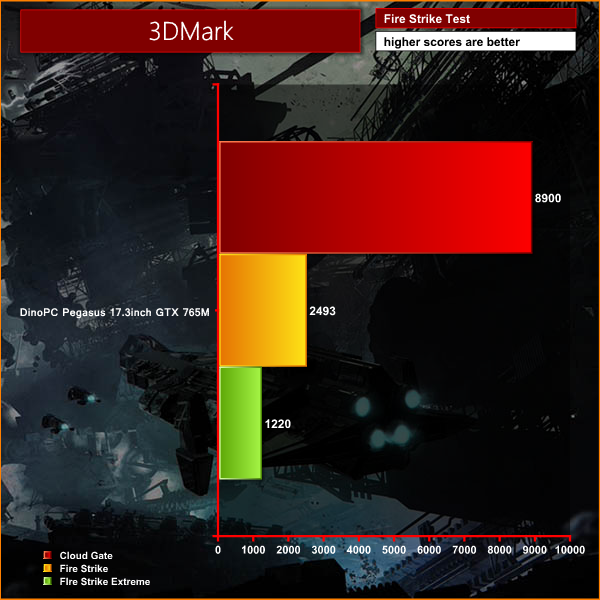
A good strong physics score, though graphics don't hold up quite so well – overall though not bad for a laptop.
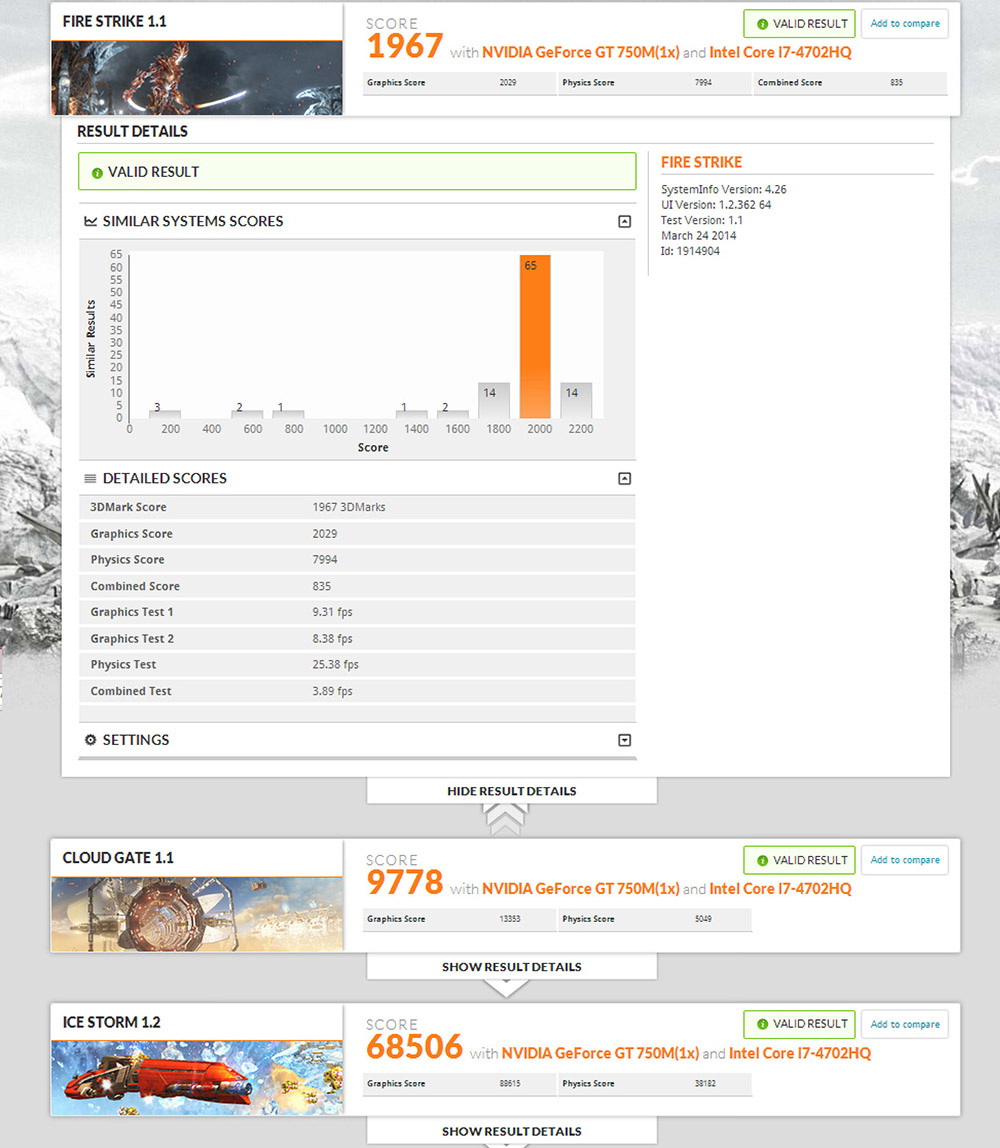
Decent scores, although we can see already that this machine will not be a gaming powerhouse.
3DMark 11 is designed for testing DirectX 11 hardware running on Windows 7 and Windows Vista the benchmark includes six all new benchmark tests that make extensive use of all the new features in DirectX 11 including tessellation, compute shaders and multi-threading.
After running the tests 3DMark gives your system a score with larger numbers indicating better performance. Trusted by gamers worldwide to give accurate and unbiased results, 3DMark 11 is the best way to test DirectX 11 under game-like loads.
If you want to learn more about this benchmark, or to buy it yourself, head over to this page.
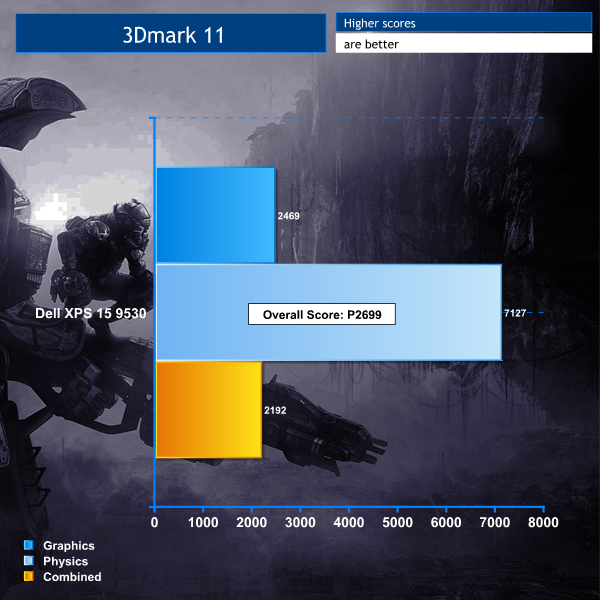
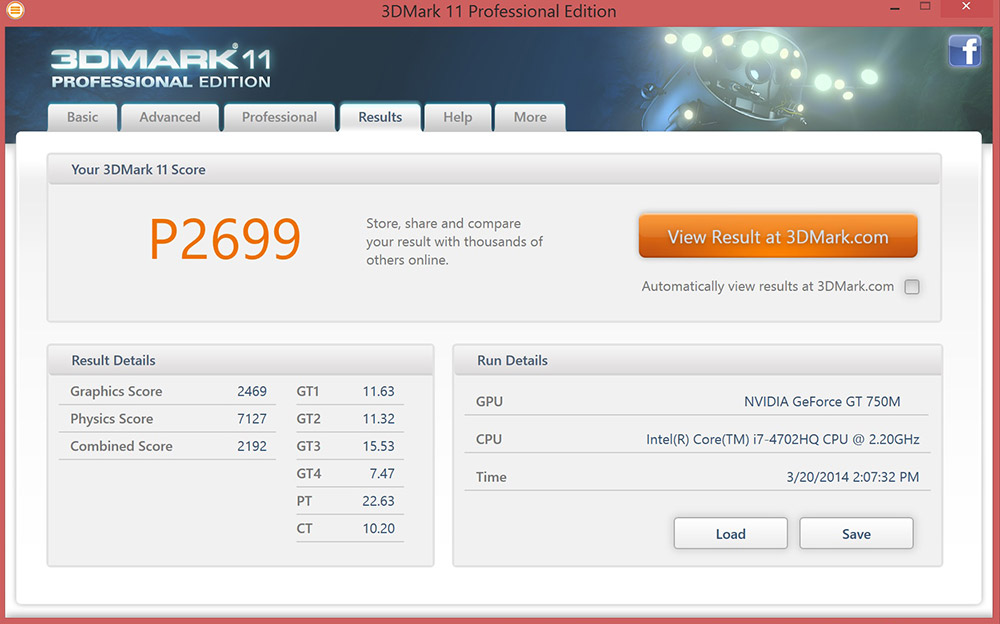
While graphically the XPS 15 is bound to fall behind more gaming centric laptops with more powerful mobile GPUs, the physics processing from the i7-4702HQ is very impressive.
Futuremark released 3DMark Vantage, on April 28, 2008. It is a benchmark based upon DirectX 10, and therefore will only run under Windows Vista (Service Pack 1 is stated as a requirement) and Windows 7. This is the first edition where the feature-restricted, free of charge version could not be used any number of times.
1280×1024 resolution was used with performance settings.
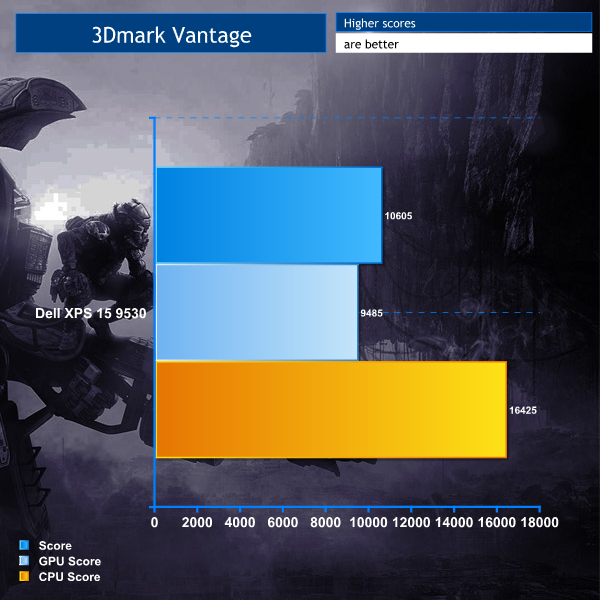
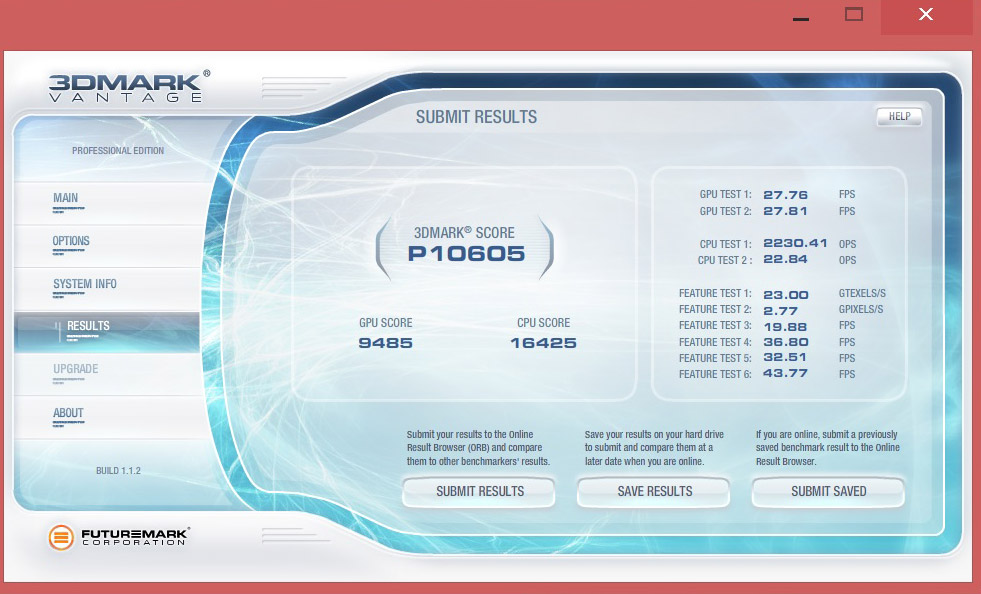
While the results here are far from poor, the XPS 15 does struggle to show anything particularly impressive in this older 3Dmark benchmark.
CINEBENCH R15 64 Bit is a real-world cross platform test suite that evaluates your computer’s performance capabilities. CINEBENCH is based on MAXON’s award-winning animation software CINEMA 4D, which is used extensively by studios and production houses worldwide for 3D content creation. MAXON software has been used in blockbuster movies such as Spider-Man, Star Wars, The Chronicles of Narnia and many more.
CINEBENCH is the perfect tool to compare CPU and graphics performance across various systems and platforms (Windows and Mac OS X). And best of all: It’s completely free.

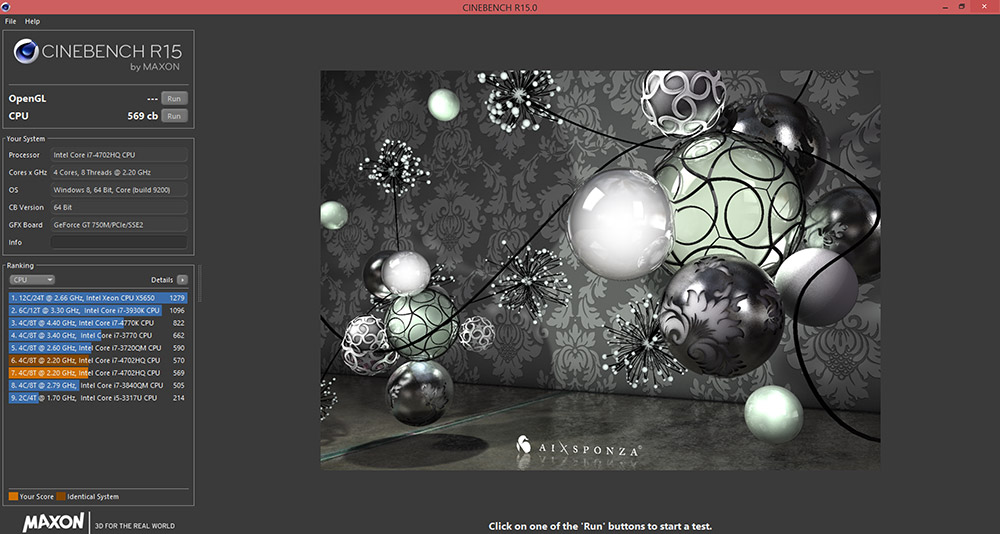
Here the i7-4702HQ chip performs as expected, fitting neatly into its own little performance bracket.
Unigine provides an interesting way to test hardware. It can be easily adapted to various projects due to its elaborated software design and flexible toolset. A lot of their customers claim that they have never seen such extremely-effective code, which is so easy to understand.
Heaven Benchmark is a DirectX 11 GPU benchmark based on advanced Unigine engine from Unigine Corp. It reveals the enchanting magic of floating islands with a tiny village hidden in the cloudy skies. Interactive mode provides emerging experience of exploring the intricate world of steampunk.
Efficient and well-architected framework makes Unigine highly scalable:
- Multiple API (DirectX 9 / DirectX 10 / DirectX 11 / OpenGL) render
- Cross-platform: MS Windows (XP, Vista, Windows 7) / Linux
- Full support of 32bit and 64bit systems
- Multicore CPU support
- Little / big endian support (ready for game consoles)
- Powerful C++ API
- Comprehensive performance profiling system
- Flexible XML-based data structures
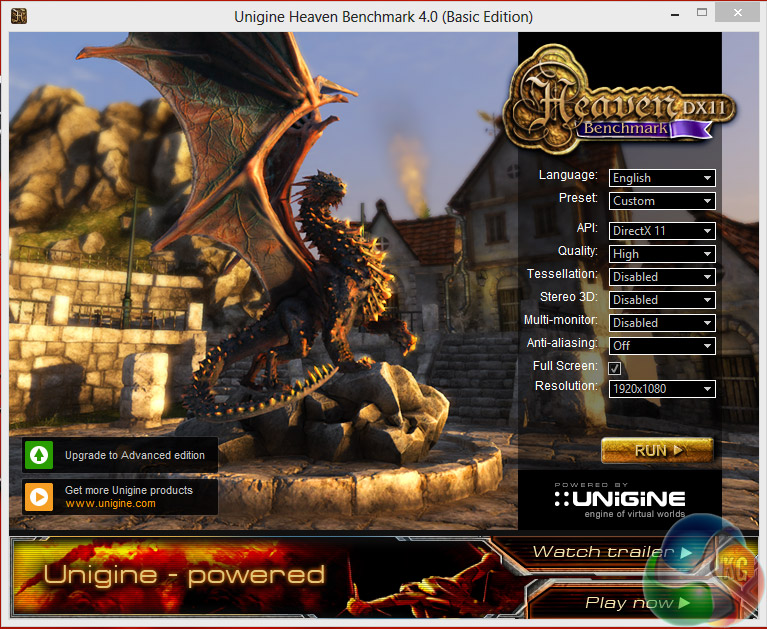
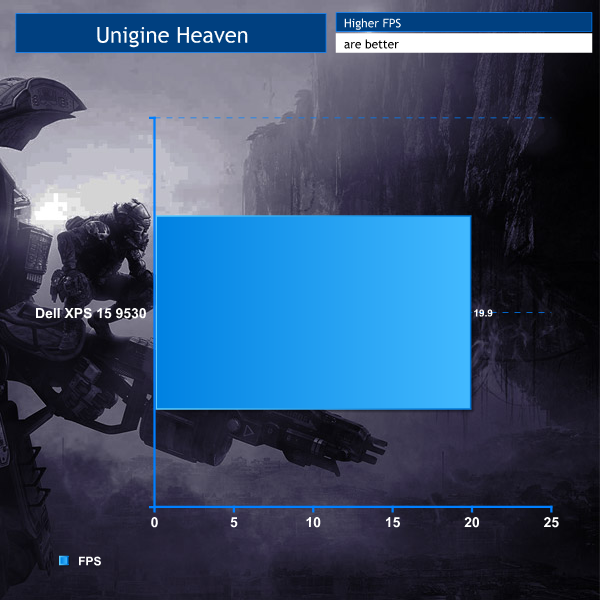
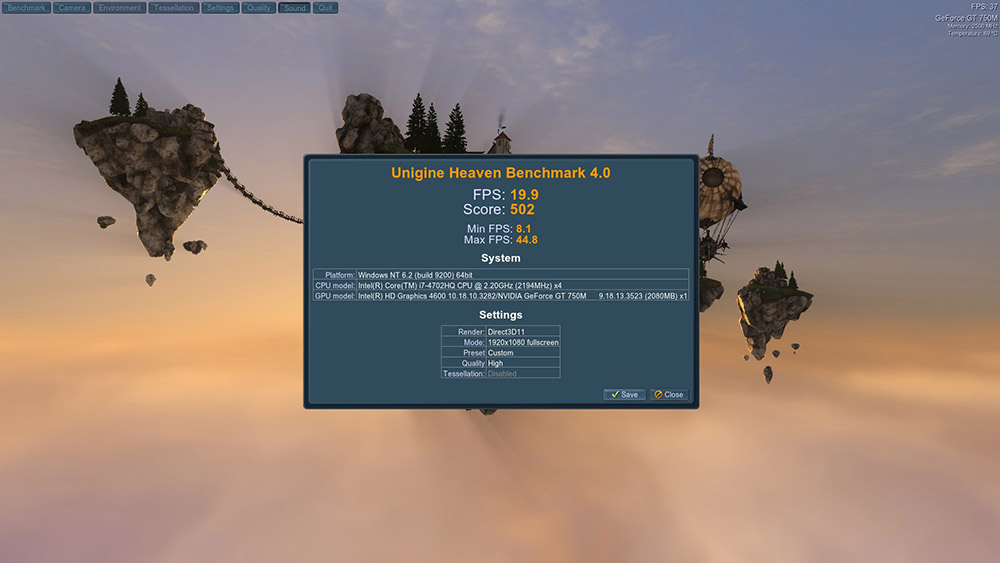
If this was a game, it wouldn't be playable at this sort of FPS, but fortunately for the XPS, this is a benchmark and quite a stressful one too, so this score is far from poor. In-fact it's only a few FPS behind some of the dedicated gaming laptops we've reviewed.
Valley Benchmark is a new GPU stress-testing tool from the developers of the very popular and highly acclaimed Heaven Benchmark.
The forest-covered valley surrounded by vast mountains amazes with its scale from a bird’s-eye view and is extremely detailed down to every leaf and flower petal.
This non-synthetic benchmark powered by the state-of-the art UNIGINE Engine showcases a comprehensive set of cutting-edge graphics technologies with a dynamic environment and fully interactive modes available to the end user.

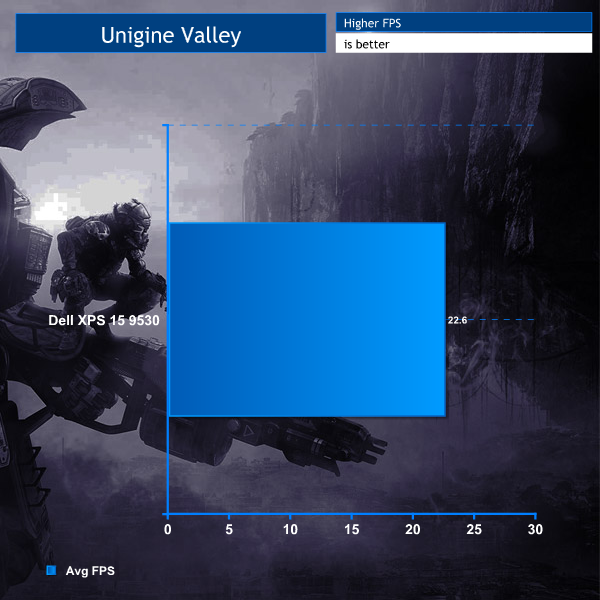
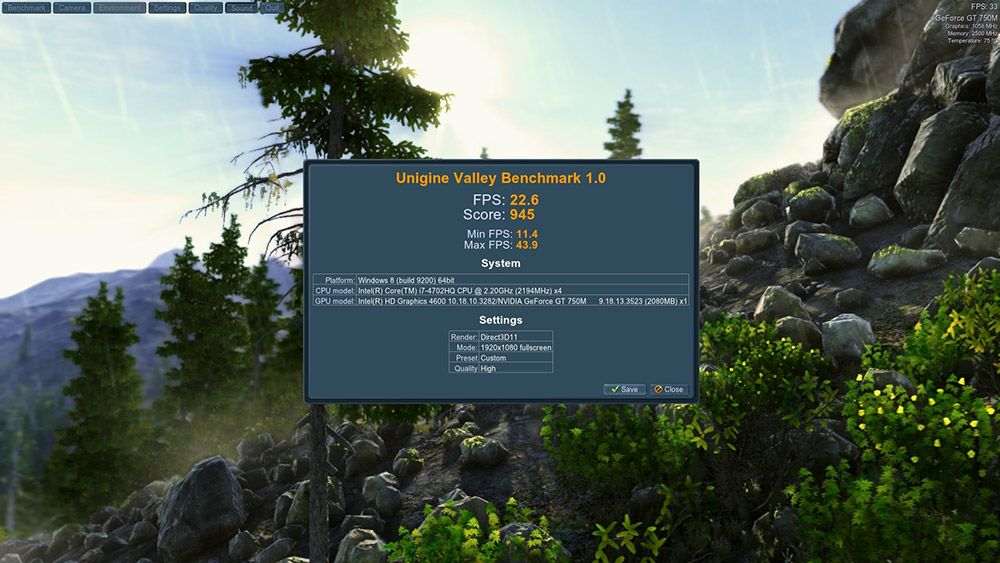
This is still a very pretty benchmark and the XPS 15 shows it, but struggles to maintain a smooth frame rate throughout.
The Dell XPS 15 9530 makes use of a 32GB caching SSD, so despite ‘only' packing a 500GB HDD, its performance should be up there with some of the SSD equipped notebooks.
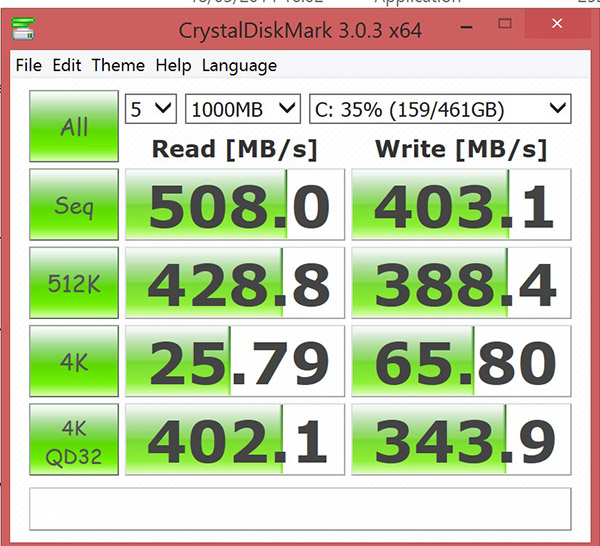
In the CrystalDiskMark benchmark it scores very well indeed, putting out results that traditional hard drives alone could only dream of.
The ATTO Disk Benchmark performance measurement tool is compatible with Microsoft Windows. Measure your storage systems performance with various transfer sizes and test lengths for reads and writes. Several options are available to customize your performance measurement including queue depth, overlapped I/O and even a comparison mode with the option to run continuously. Use ATTO Disk Benchmark to test any manufacturers RAID controllers, storage controllers, host adapters, hard drives and SSD drives and notice that ATTO products will consistently provide the highest level of performance to your storage.
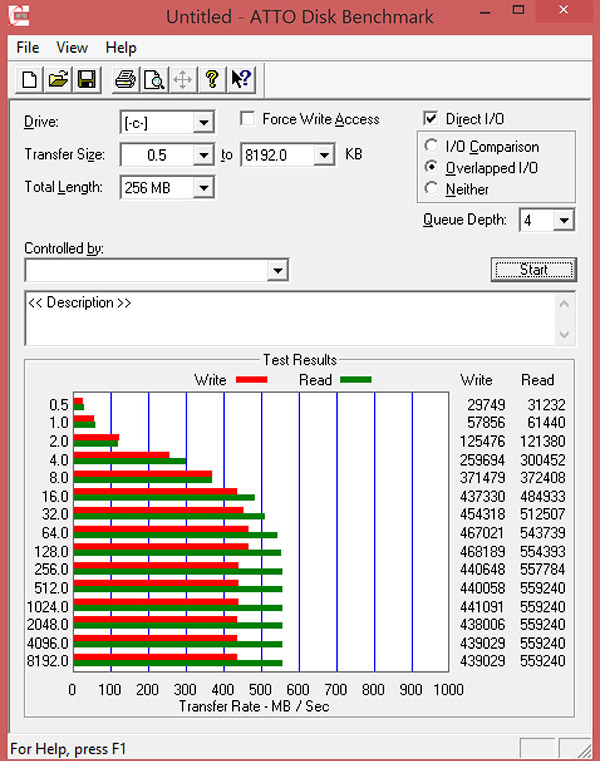
Here we actually see improved performance over the Crystal DiskMark results. Read speeds break the 550MBps barrier at a lot of file sizes and write performance is clearly a few points higher. Impressively too, it doesn't die off as quickly as many single SSD solutions.
We tested the USB 3.0 performance on the Dell system with the 64GB Kingston HyperX Max 3.0 flash drive.
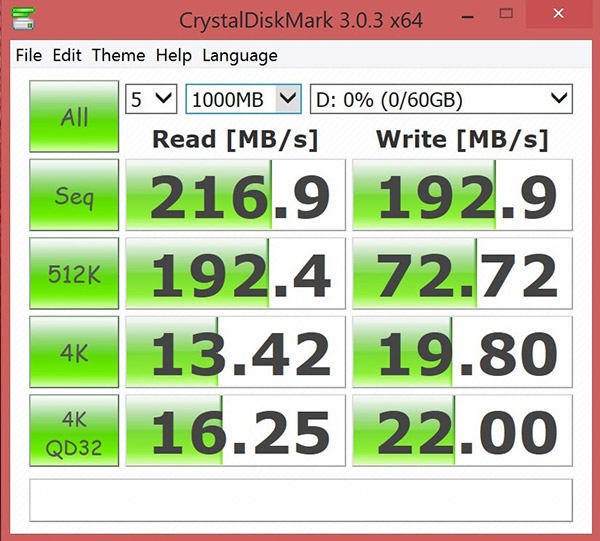
Reasonably strong performance there for the controller, especially when it comes to write speed which is able to almost keep pace with the read score.
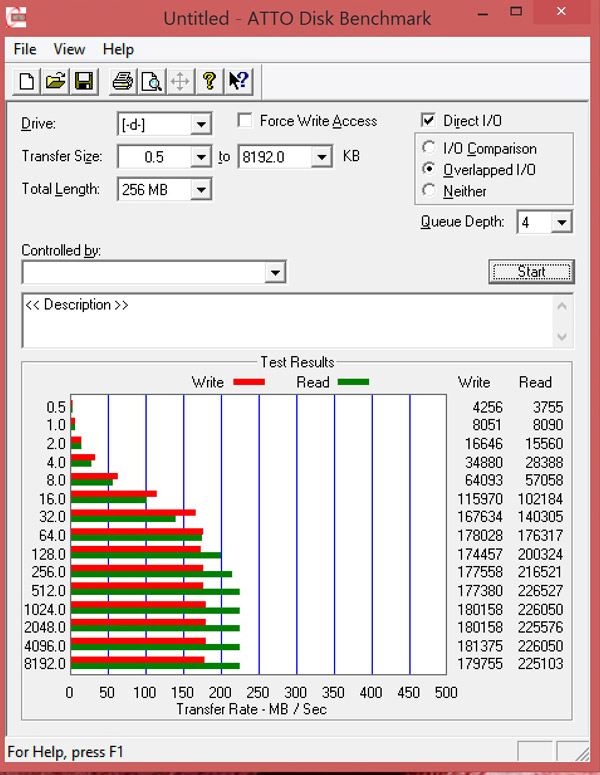
ATTO results were similar, though showed much improved write performance at lower file sizes. Read speed was a little faster here too, achieving around 270MBps consistently.
The Matroska Media container is a very popular, open standard Multimedia container which is usually found as .MKV files. It is a very popular format in enthusiast circles and can be played directly in Windows Media Player with suitable codecs installed. We use the Combined Community Codec Pack (CCCP).
We ripped our BluRay disc of Batman: Dark Knight to 1080P MKV and used Windows Media Player to playback the file.
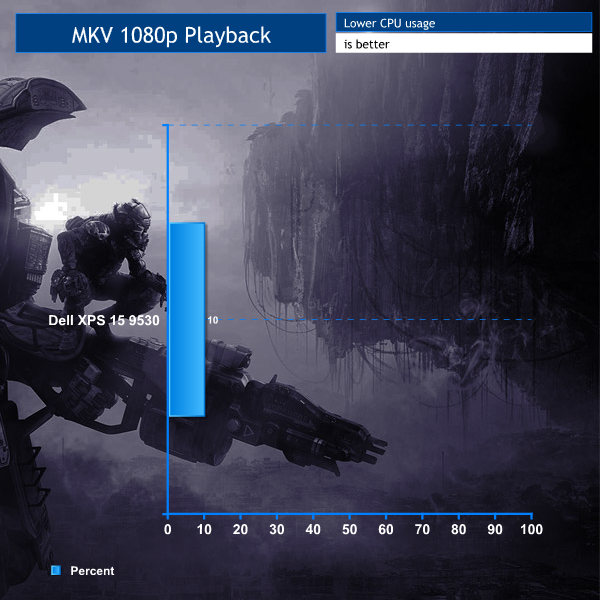
While the actual percentage usage flickered between eight and 12, the average usage was just shy of 10 per cent, which leaves plenty of spare cycles for multitasking.
CyberLink MediaEspresso 6 is the successor to CyberLink MediaShow Espresso 5.5. With its further optimized CPU/GPU-acceleration, MediaEspresso is an even faster way to convert not only your video but also your music and image files between a wide range of popular formats.
Now you can easily playback and display your favourite movies, songs and photos not just on your mobile phone, iPad, PSP, Xbox, or Youtube and Facebook channels but also on the newly launched iPhone 4. Compile, convert and enjoy images and songs on any of your computing devices and enhance your videos with CyberLink’s built-in TrueTheater Technology.
New and Improved Features
- Ultra Fast Media Conversion – With support from the Intel Core i-Series processor family, ATI Stream & NVIDIA CUDA, MediaEspresso’s Batch-Conversion function enables multiple files to be transcoded simultaneously.
- Smart Detect Technology – MediaEspresso 6 automatically detects the type of portable device connected to the PC and selects the best multimedia profile to begin the conversion without the need for user’s intervention.
- Direct Sync to Portable Devices – Video, audio and image files can be transferred in a few easy steps to mobile phones including those from Acer, BlackBerry, HTC, Samsung, LG, Nokia, Motorola, Sony Ericsson, and Palm, as well as Sony Walkman and PSP devices.
- Enhanced Video Quality – CyberLink TrueTheater Denoise and Lighting enables the enhancement of video quality through optical noise filters and automatic brightness adjustment.
- Video, Music and Image File Conversion – Convert not only videos to popular formats such as AVI, MPEG, MKV, H.264/AVC, and FLV at the click of a button, but also images such as JPEG and PNG and music files like WMA, MP3 and M4A.
- Online Sharing – Conversion to video formats used by popular social networking websites and a direct upload feature means posting videos to Facebook and YouTube has never been easier.
For this test, a 3.8GB MKV file was converted to a much larger MP4 file. The time it took to complete this task was noted down.
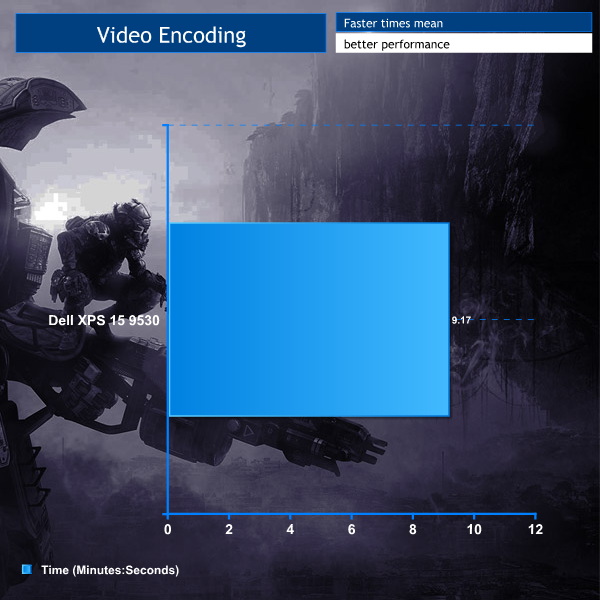
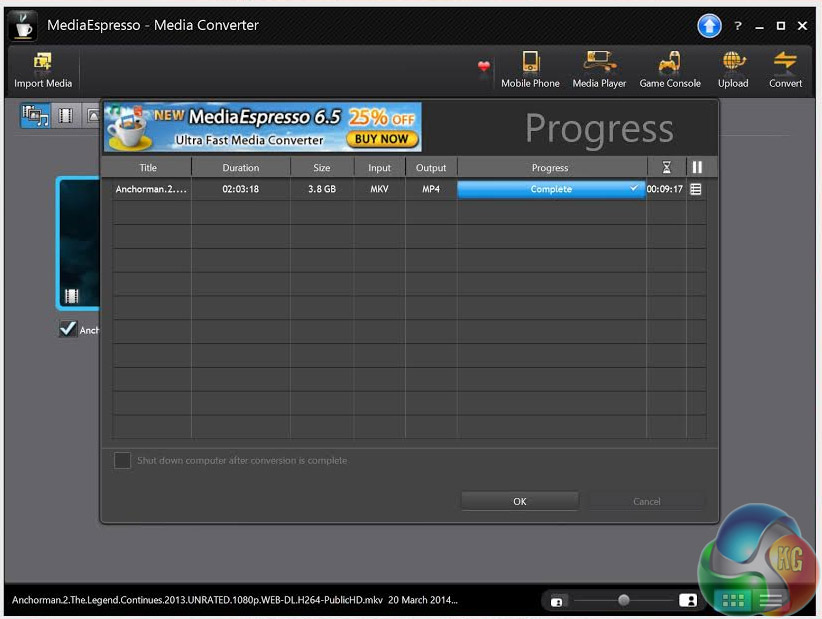
Considering how slow mobile chips in the past would perform this task, this is a great result, not far behind its desktop cousins even.
Thief, while not one of the best reviewed games of recent years, is certainly one of the best looking. Its grimy streets and dark atmosphere are all created using the popular Unreal Engine 3 with a few tweaks here and there, making it a good test of contemporary hardware.
The built-in benchmark was run with all settings on low, with a resolution of 1920 x 1080. While we would have liked to have run tests at native resolution, these settings were the only ones that didn't result in sub 10 minimum-FPS.

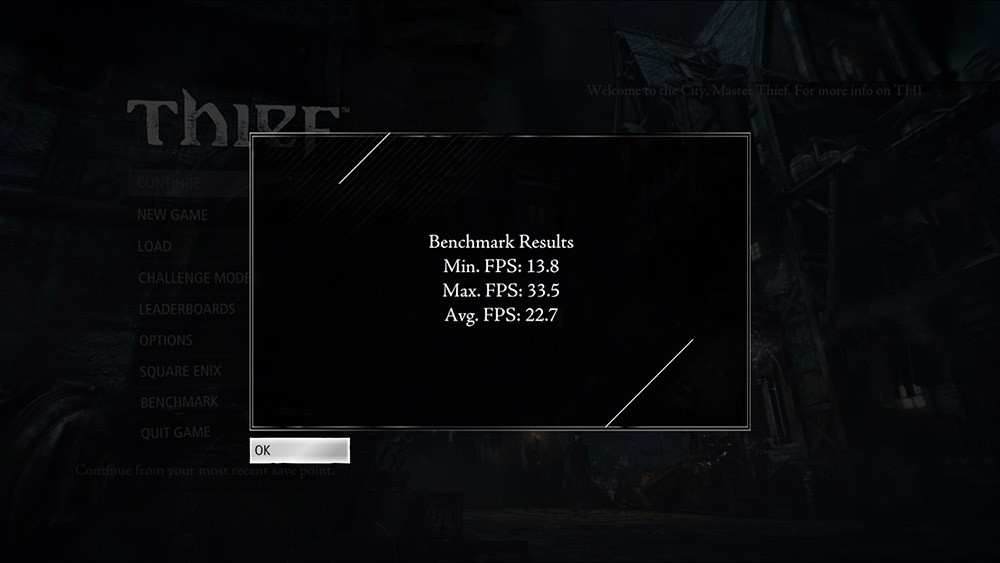
While not necessarily smooth, it's possible that you could play Thief at these settings. You can lower the resolution for some improvements to the FPS too, but the distance from the native resolution at that point starts to cause its own problems.
Titanfall is one of the biggest releases of the year and is slated by many to be the true replacement of the stagnant Call of Duty franchise. While very new though, its engine is an old one, being based off of a modifed version of the Source engine, making it playable on the Xbox One, as well as on lower end PCs.
Unfortuantely once again trying native resolution testing with the XPS 15 proved problematic, with the training level lagging so much (even on lowest settings) that we couldn't get through the doorway after the sprint. Reverting to 1080p fixed this. That had its own issues (game shrinking to 50 per cent of the screen with a big black border) but at least it was playable.
Since there was no built-in benchmark with this game, we played several levels of the campaign over a few hours, regularly running FRAPS to note the frame rate throughout the entire round. The average results from each game were then collated together to form the results below.
The settings for this benchmark were all low or disabled and a resolution of 1920 x 1080p.
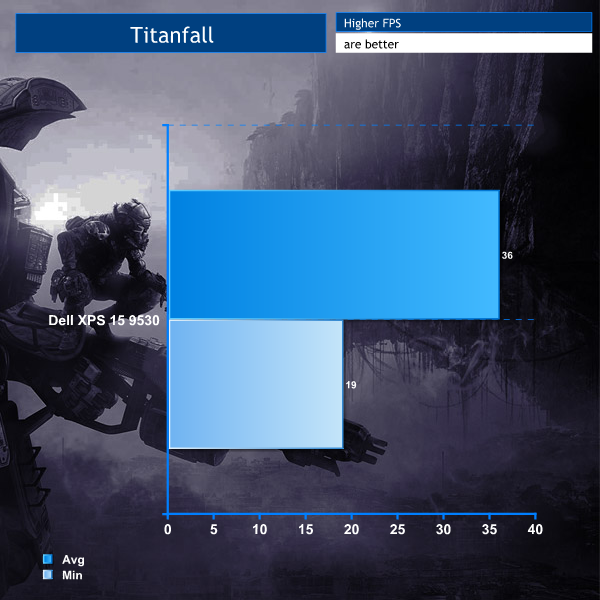
It's not the smoothest experience ever, but it's playable and for a brand new AAA game, that's impressive for a laptop like this.
I ran through several games of Titanfall to test a general usage experience and it was fine – except playing in the light is difficult due to the overly reflective screen.
Hearthstone was one of the few games that was more than happy to run at native resolution. It didn't like any graphical settings above low, but hey, that's a fair price to pay for 3200 x 1800 gaming.
All settings at low, resolution of 3200 x 1800. Again, it was tested with FRAPS during several average games.
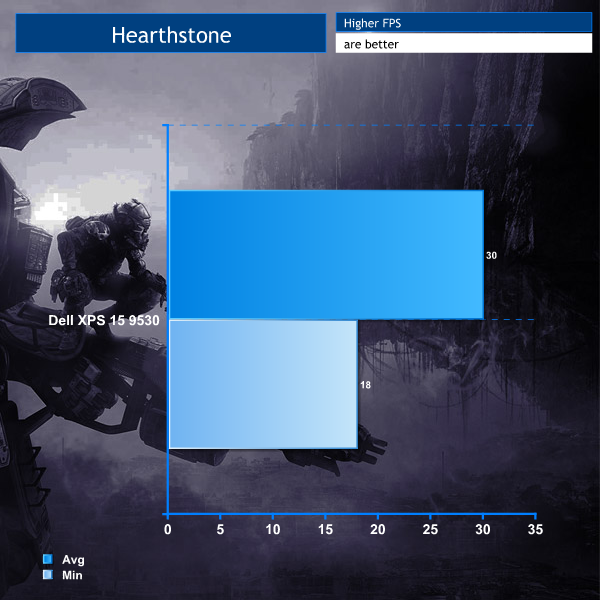
Like Titanfall, playable and you hardly notice the difference at low setting, because this game looks gorgeous at the 9530's native resolution. Everything is so crisp and clean. The touchscreen is also a great input method for a card game like this.
League of Legends like Hearthstone was more than happy to run at this laptop's native resolution, performing at the full 3200 x 1800, with all settings on high (apart from shadows: medium), vertical sync but no AA.
Results were taken using FRAPS throughout several standard games of ARAM, since those tend to have the most graphical effects on screen at once.
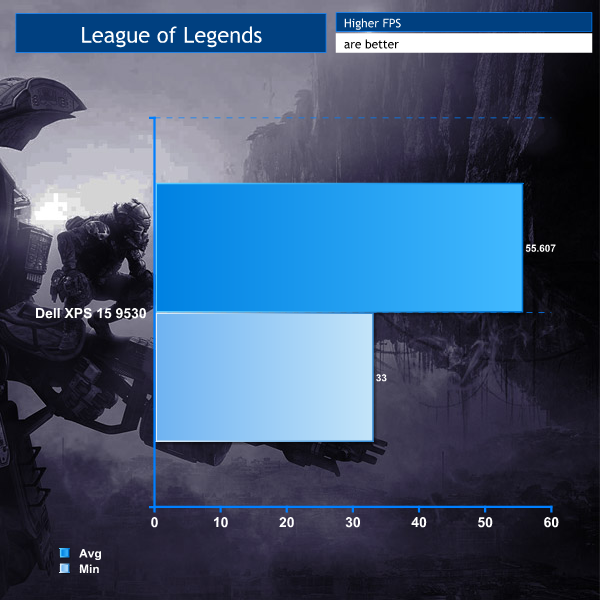
Partly as testament to the coding of the guys behind LoL and to the XPS' abilities, it maintained above 30 FPS even during the most hectic 5vs5 matchups and regularly almost hit 60FPS. This laptop is a perfect contender for a LoL gaming notebook.
Idle temperatures were measured after leaving nothing running on the laptop for 30 minutes. Load measurements were acquired by running Furmark and Cinebench together. Room ambient temperature was 20 degrees Celsius.

While things do get quite warm in there and the fans certainly make themselves heard, it's not high enough to cause too much concern. Just make sure you don't try gaming with the fan vents blocked.
To test battery life, we put the machine through a variety of ‘real world’ situations, mirroring the real world usage of a potential customer.
One as a media movie lover on the move (wearing headphones), a person wanting to watch high definition media on a train journey or bus with screen brightness two notches from maximum.
Second as a businessman, with screen brightness at a similar level. Wireless was enabled. A mixture of checking, answering emails using Microsoft Office, editing pictures in Adobe Photoshop and procrastinating with the odd sub-HD Youtube video.
Lastly as a gamer, playing a variety of games until the machine turned itself off.
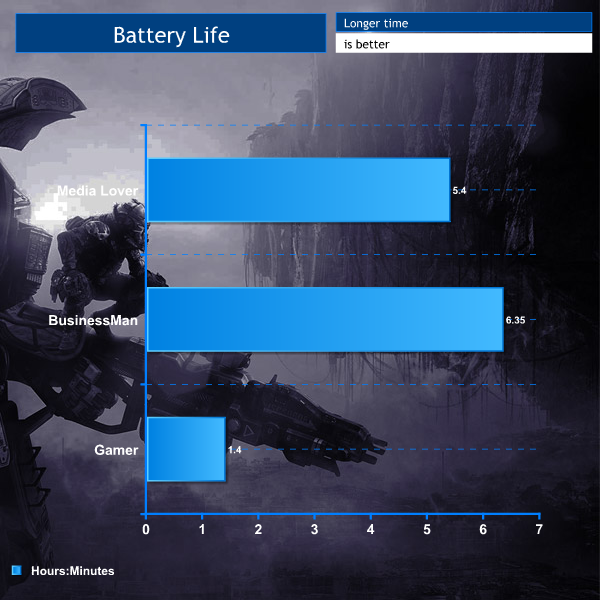
Bad battery life is good, especially when viewing media, being able to watch three and a bit full length movies on one charge. Gaming suffers a bit, but an hour forty isn't bad for a laptop that's not focused for the task. Also, the game of choice was Titanfall, which would have pushed this laptop to its limit. With less strenuous games, you might have better results.
The Dell XPS 15 9530 is a great laptop to use. The bright, vibrant and incredibly high resolution screen is truly beautiful to look at, though it does have a major drawback – it is extremely reflective.
This makes it very difficult to use in a bright room or in an outdoor environment, as the reflection of your own face will be very distracting. In low light conditions, the gloss screen does help improve media viewing quality, but a matt finish would be more to our own tastes.
That screen looks stunning when playing ‘casual' titles like Hearthstone but it will struggle to run anything moderately intensive at native resolutions … the modest GT750M graphics are just not designed for this. It's not that 1080p looks bad, but it just seems wasteful having all that pixel density and not being able to use it. It might have been nice to see an upgrade option for a 765M or 770M, but then you're crossing over into Alienware territory.
The insanely high resolution can also cause problems with menus that aren't designed to dynamically adjust. EA's Origin service for example is almost impossible to use as the text is so tiny. But that is a problem with third parties rather than Dell.
Despite all the issues though, I still love the screen.
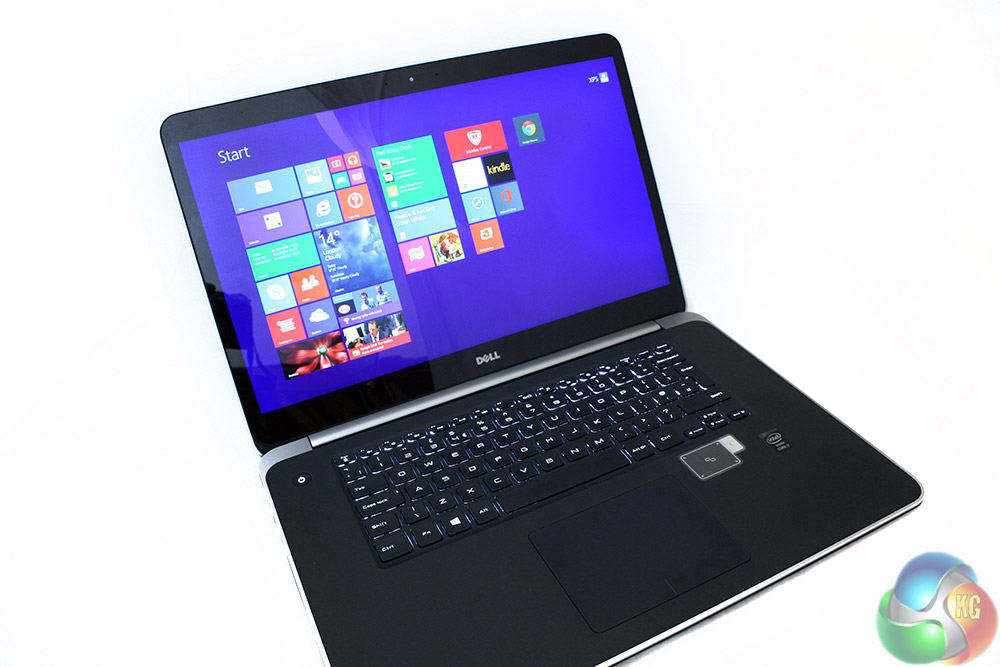
The touch panel is responsive and easy to use and great for certain tasks like photo viewing, or making your way through big buttoned menus. The keyboard is responsive and easy to use in the dark thanks to the backlighting and the touchpad is sensitive enough to cross the high-res screen without multiple sweeping movements.
Other areas of XPS 15 9530 performance are commendable. The 16GB of RAM and caching SSD ensure the laptop is snappy and responsive at all times and it handles intensive tasks without slowing down. The powerful Intel quad core processor is a good partner for media encoding and 3D rendering on the move, if the demand arises.
Noise levels are low during almost all operation. It is only when gaming that the fans will spin up dramatically to ensure high levels of airflow inside. Likewise the underside never gets uncomfortably hot, though the additional purchase of a little cooling pad might be useful for long term sessions.
The XPS 15 9530 is a seriously good mid-range mobile workhorse and would be perfect for a professional working indoors at home or in an office. The XPS 15 9530 is not designed with hardcore gamers in mind, but more for photo editors.
The Dell XPS 15 9530 is only available with Windows 8.1 which may alienate a percentage of the potential user base.
Pricing for the XPS 15 starts at £1180, but this particular version we tested will set you back £1680 when bought straight from Dell, making it a serious investment.
Discuss on our Facebook page, over HERE.
Pros
- Screen is beautiful, but highly reflective.
- Fast startup and responsive operation.
- Touch interface is nice, but situational.
- Good raw performance in office and business tasks.
- Quiet during normal usage.
Cons
- Lack of ethernet port means native resolution streaming requires 802.11ac supporting router.
- High-res means tiny 3rd party menus, hard to read text.
- GTX750M is underpowered for serious gaming, especially at high resolutions.

KitGuru Says: A great workman's laptop with good battery life, strong performance and some basic gaming abilities – all through a beautiful but reflective touchscreen.

This Dell XPS is so cool