 KitGuru KitGuru.net – Tech News | Hardware News | Hardware Reviews | IOS | Mobile | Gaming | Graphics Cards



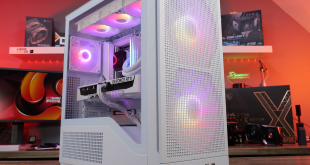
‘Unique' is a word that is reserved for only a few companies in the case market today. With a split-chamber design and cube shape, does Corsair's Carbide Series Air 540 create a spark that could relight the flame of innovation for the chassis market?
Designed to isolate heat-producing components from their less power-hungry counterparts, the Carbide Series Air 540's unique split-chamber design is one of the first of its kind to create a such a buzz across the market.
Watercooling options include simultaneous 360mm and 240/280mm radiator support, as well as a 140mm unit. Eight expansion slots make quad-card configurations a possibility.
Touting an impressive set of features and a unique style, does Corsair's Carbide Series Air 540 have what it takes to win the stamp of approval?

Specifications:
- Motherboard support: E-ATX, ATX, Micro-ATX, Mini-ITX.
- Expansion slots: 8.
- Included fans: 2x 140mm front intake, 1x 140mm rear exhaust.
- Fan mounts: 2x 140mm (or 3x 120mm) front, 2x 120/140mm roof, 1x 140mm rear.
- 5.25″ drive bays: 2.
- Internal drive bays: 2x 3.5/2.5″, 4x 2.5″.
- Dimensions: 415mm x 332mm x 458mm.
wow that is f*cking beautiful.
I like the shape, its very different. going to preorder this one.
Am I the only one who thinks this is shaped like a fridge? Its quite attractive, but very weird at the same time.
At least Corsair are trying. I like that.
Somehow missed the announcement of this but having seen it I’m truly obsessed! Seriously considering changing my whole setup to have one of these on my desk… Now just gotta convince the OH… Wish me luck…
where is the power supply?
Must have (y)
To Hemraj comment #5, page 3 has exterior pictures. The power supply is placed at the back of the motherboard. Not sure I’d place it there though.
how to purchase this case?
check your local retailers and give them your credit card information?
I have this case and I can say from experience that it is awesome. I went form a Cooler Master case in the 65-70 dollar range tto this and my average cpu temp went from 45 to 26 and my peaks went from 80 to 52 using only airflow. I have three intake three exhaust all 120’s. I did think the option of only having two 3.5 drivebay slots yet having 5 2.5 drive bay slots was ludicrous once I had it built, but I remedied this very easily by turning the two 5.25 drive bays into 3.5 drive bays with the use of an adapter. I have a usb 3.0 DvD drive anyway so this wasn’t a problem for me. Overall I can say that this case is a boss. The two separate compartments make everything simpler, cooler (temp), and just a breeze to build. Great job Corsair.
Thanks for a great review, if it wasn’t for the psu, would probably take this case.
I mean, who would ever mistakenly put a harddrive on top of their psu? I shouldn’t
People who is careful of their components wouldn’t do that in any traditional case.
So why not in this particular case? Electromagnetic fields has always a risk.