 KitGuru KitGuru.net – Tech News | Hardware News | Hardware Reviews | IOS | Mobile | Gaming | Graphics Cards


Retrofitted with a new CPU based on Intel’s latest-and-greatest Broadwell micro-architecture, MSI’s GT72 2QE Dominator Pro G also ships with an additional gaming-centric gem – the use of a 1920×1080 G-Sync panel that runs at 75Hz.
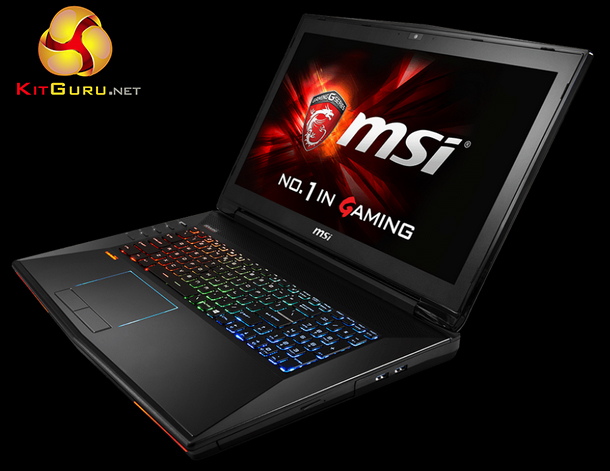
As is expected from MSI’s GT72 series of gaming laptops, a considerable portion of frame rate-pushing hardware is crammed inside the system’s thick plastic chassis. On the CPU front a user gets a Core i7-5700HQ CPU built on Intel’s latest Broadwell micro-architecture and 14nm manufacturing process. The chip operates at a nominal clock speed of 2.70GHz but regularly turbos as high as 3.50GHz.
Partnering the Broadwell CPU is an 8GB GTX 980M GPU based on Nvidia’s Maxwell architecture. The Nvidia mobile GPU flagship runs at a core clock of up to 1126MHz (from our testing) with the 8GB of GDDR5 memory operating at 1253MHz. Primary motives for the GTX 980M GPU are to drive the GT72 2QE Dominator Pro G’s 1920×1080 G-Sync panel at its native refresh rate of up to 75fps.
Other noteworthy hardware choices include 16GB of DDR3-1600 memory, a 128GB Toshiba SSD, 1TB of HDD storage, Killer Gigabit Ethernet and 802.11ac WiFi, and built-in USB 3.1 connectivity. Gaming-related peripherals include the backlit SteelSeries keyboard, SteelSeries Engine, Dynaudio sound system, and Nahimic audio processing technology.
Does MSI’s GT72 2QE Dominator Pro G offer an alluring balance of hardware and features that tempt gamers to part with their money?
System Configuration:
- Windows 8.1
- Latest 5th Gen. Intel® Core™ i7-5700HQ processor
- 17“ Full HD (1920X1080) , Anti-glare PLS, G-SYNC ready
- The latest USB 3.1 SuperSpeed+ interface built in
- Nahimic Sound Technology with immersive 3D sound processing
- Embedded NVIDIA® GeForce GTX 980M with ultra performance
- Exclusive SHIFT technology for system’s performance and balance
- Exclusive Cooler Boost 3 Technology
- Killer Double Shot Pro (Killer Gb LAN + Killer 802.11 a/c WiFi) with Smart Teaming
- Audio Boost 2 with 3 independent amp for best sound experience
- Evolution of Sound by Dynaudio 2.1 sound system
- SteelSeries Engine to personalize your own style
- XsplitGamcaster for broadcasting, recording and sharing
- Keyboard by Steelseries with full color LED back light
- Matrix display support up to 4 displays
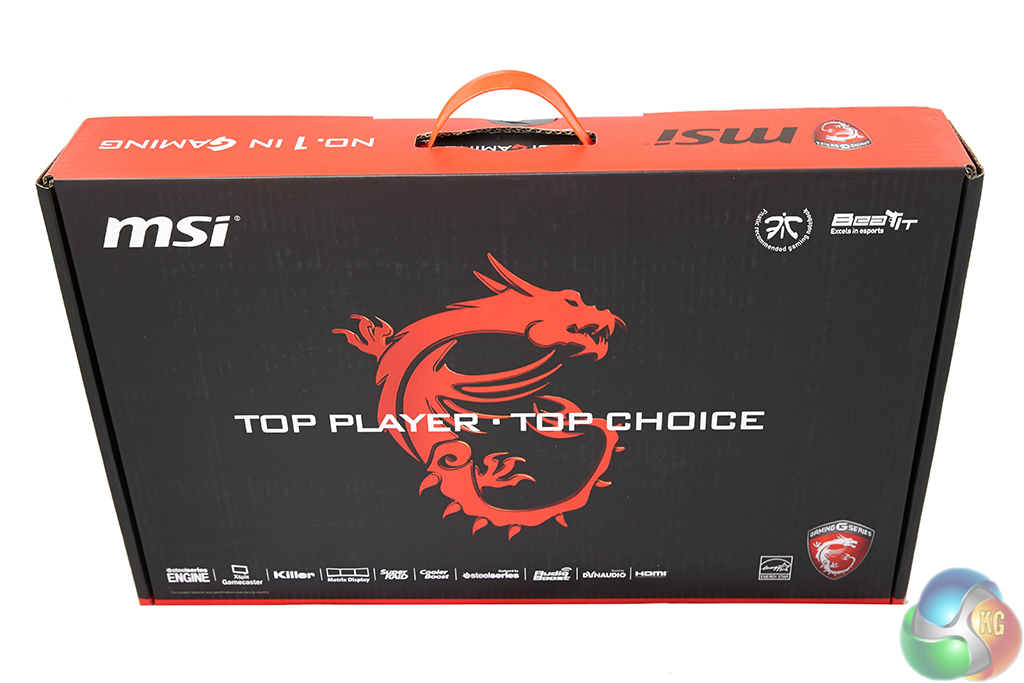
MSI ships the GT72 2QE in a large box sporting the company's dragon – Gaming – branding.
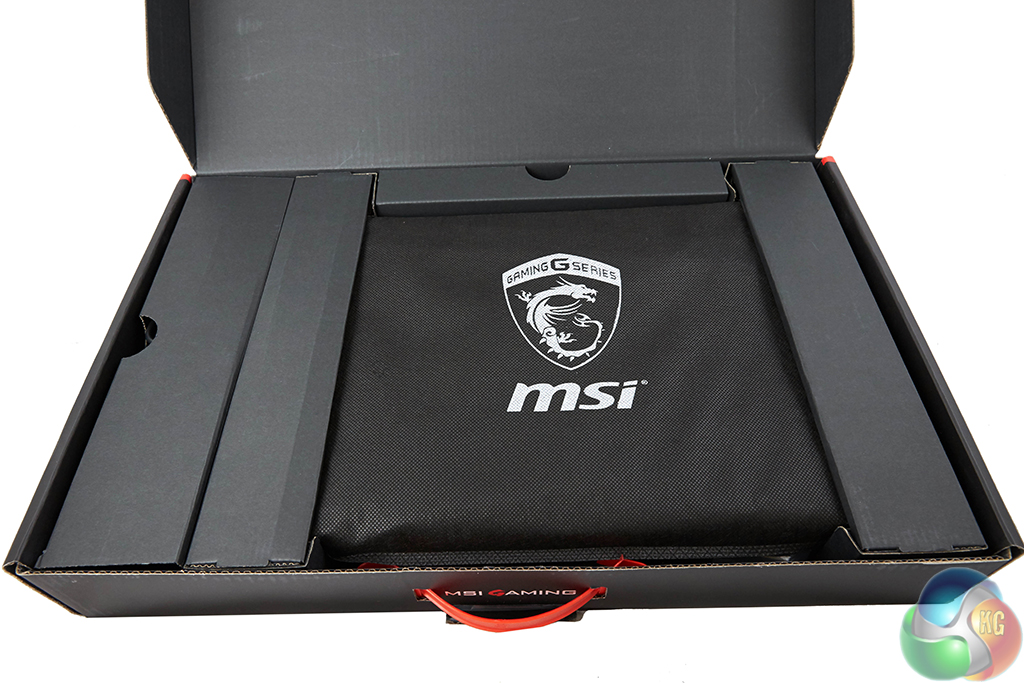
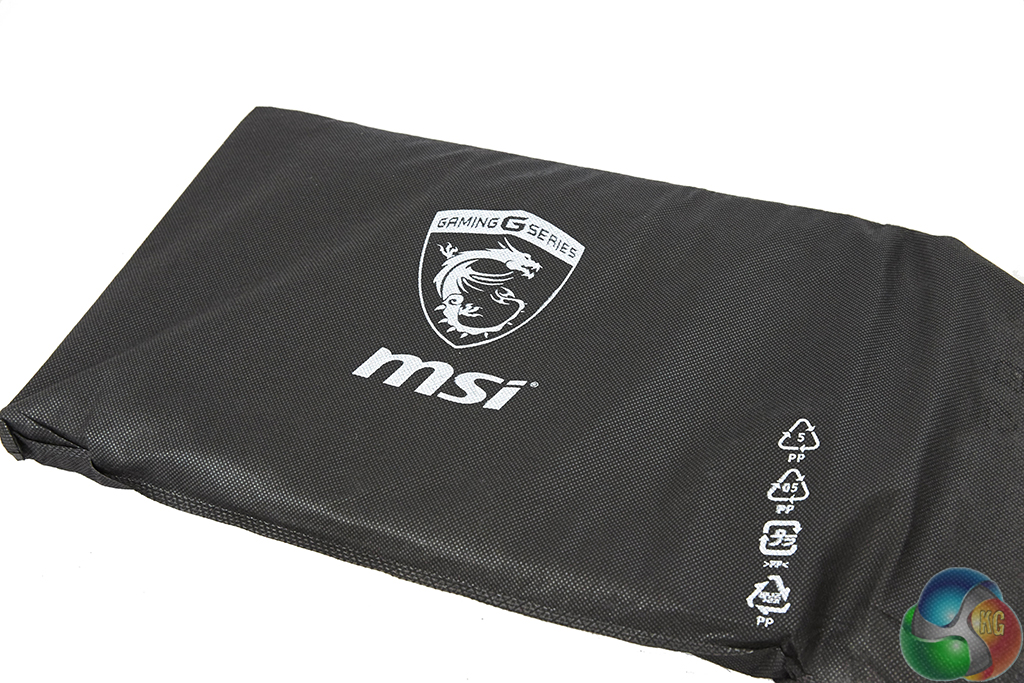
A cloth sleeve and some good protection are used to ensure that the laptop arrives safely.
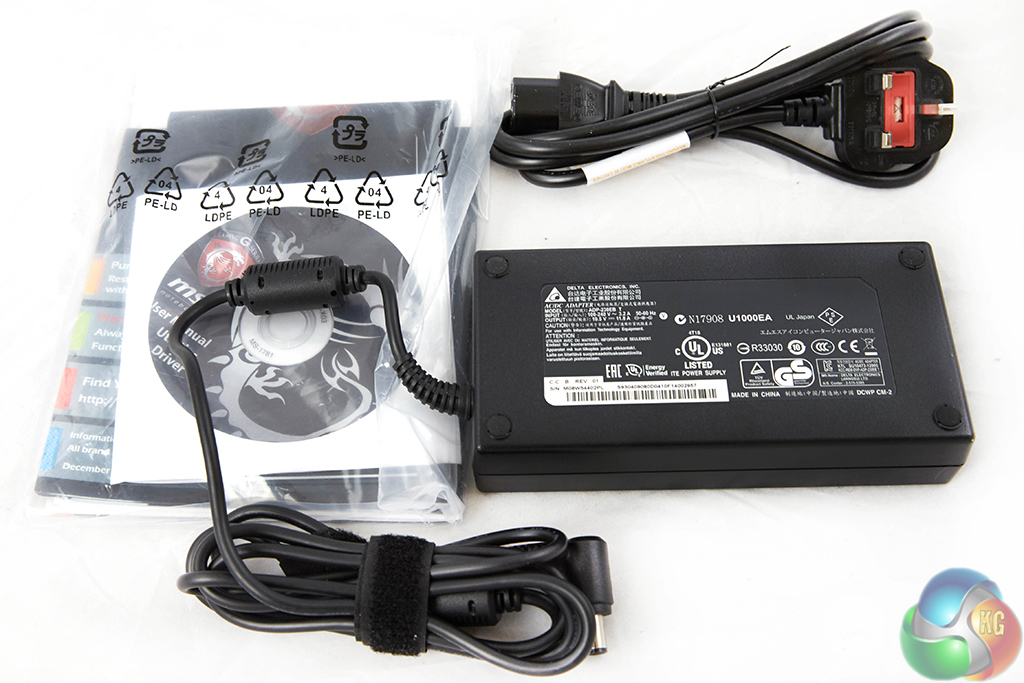
The hefty power brick is manufactured by Delta Electronics and is rated for an 11.8A output at 19.5V, which translates into a 230W power output.
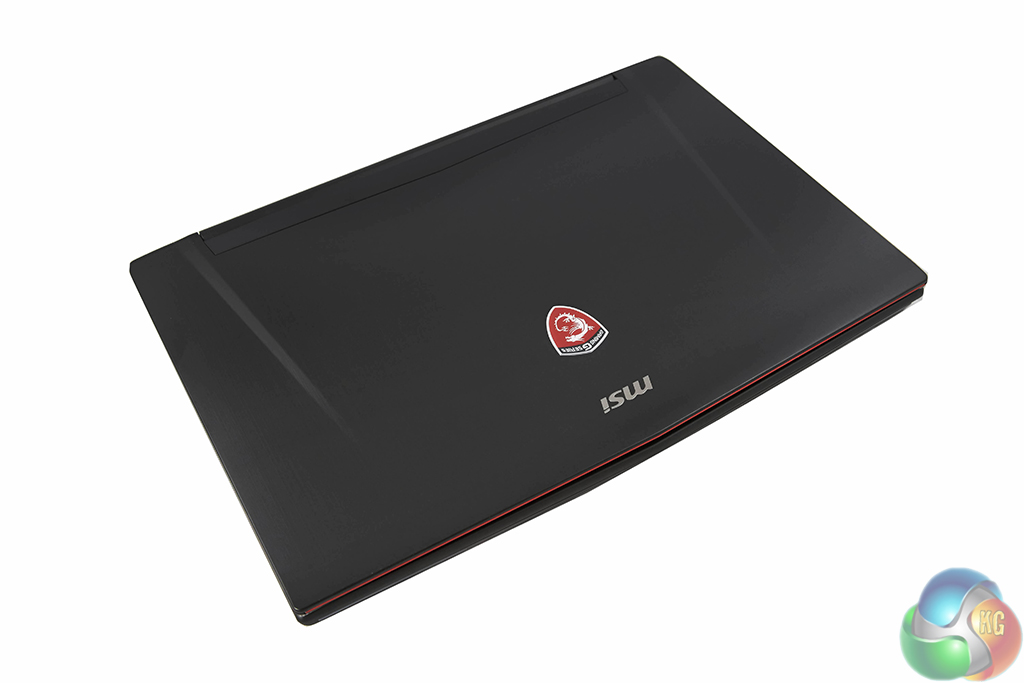
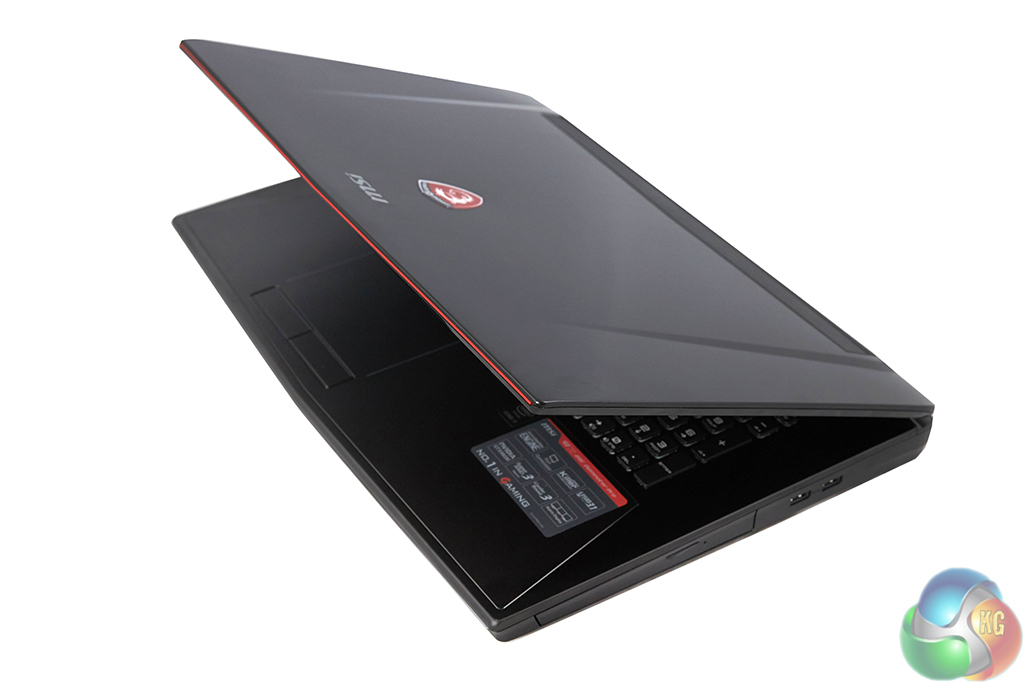
Measuring in at 428 (W) x 294 (D) x 48 (H), MSI's sizable GT72 uses a metal panel to style the exterior. Centralised in the metal panel is MSI's white LED-equipped dragon logo and the company name.
While the brushed metal design works wonders for styling, it has a horrible affect on cleanliness. The material catches fingerprints and grease with absolute ease which rapidly spoils the aesthetic appearance.
Weighing a sizable 3.78kg when equipped with the 9-cell, 83Whr battery, MSI's GT72 2QE Dominator Pro G is far from a stick it in the backpack and go laptop. It is, however, undeniably more portable than a fully-fledged desktop system, so the term desktop replacement starts getting thrown about. And it's hard to disagree with that marketing term when factoring in the Broadwell i7 5700HQ CPU, 16GB of DDR3-1600 RAM, and GTX 980M GPU.
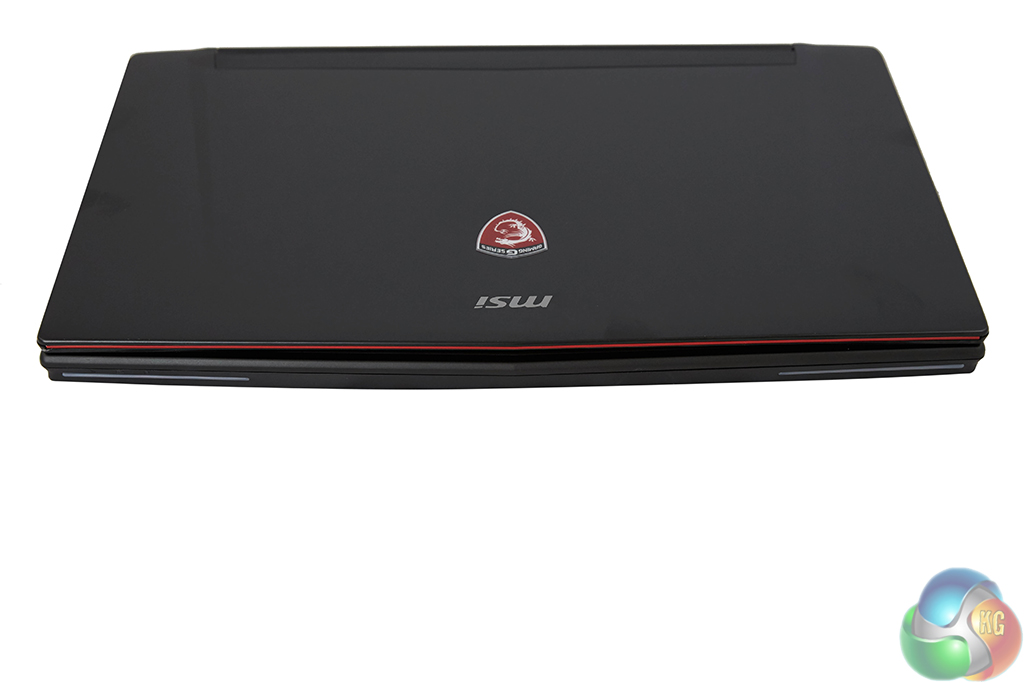
Two LED strips are found on the laptop's leading edge, with the left side strip incorporating the white power, battery, and HDD activity indicators.
The contrast between the metal panel behind the screen and the (largely) plastic chassis is evident very quickly. While MSI's chosen plastic is fairly solid, it has a far less premium feel to it than the metal. There are noticeable creaks and flexes from the chassis when force is applied in certain locations.
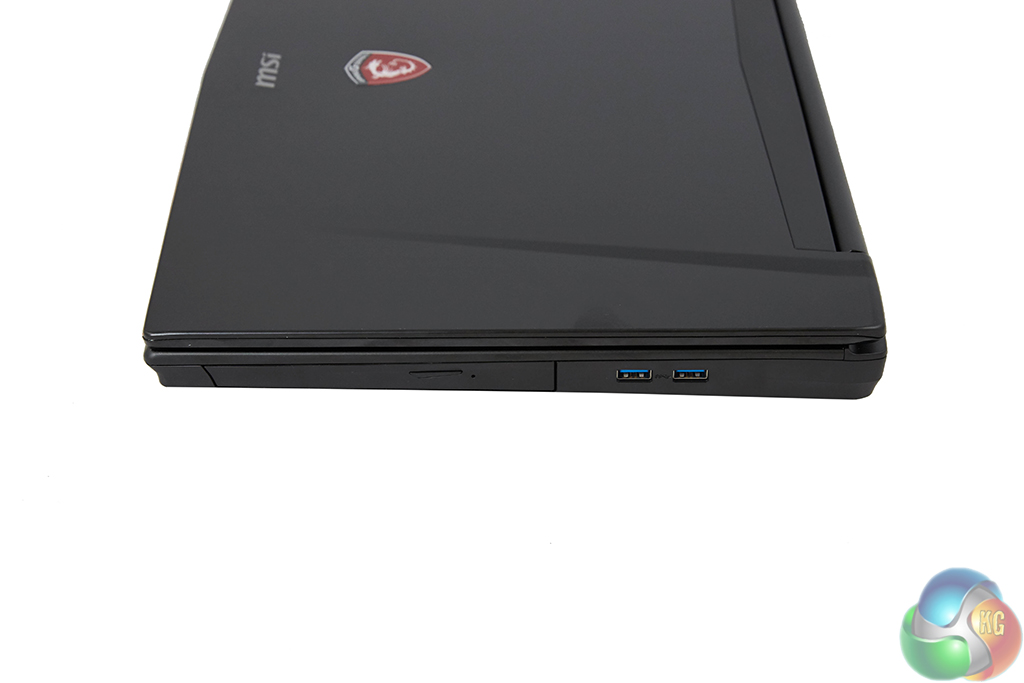
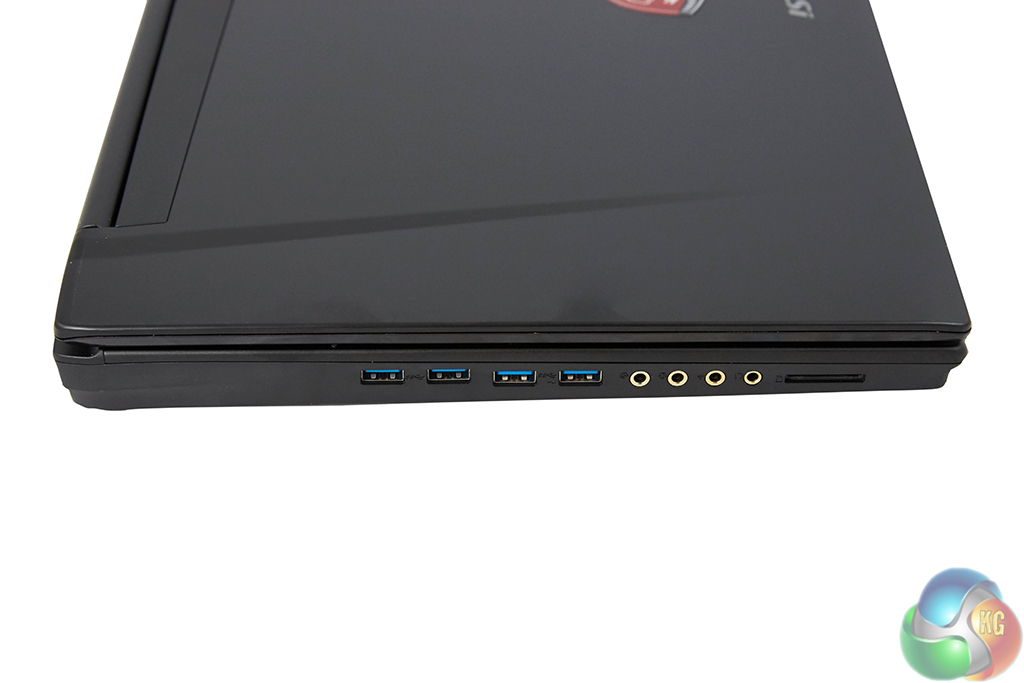
A DVD drive is found on the right side. A total of six USB Gen 3 ports are distributed between the left and right sides of the laptop, two of which are 10Gbps USB 3.1, while the remaining four operate at 5Gbps USB 3.0 bandwidth. I like MSI's USB port distribution, as well as the spacing between neighbouring ports.
Also on the left side is a card reader which, based on our testing, is connected with enough bandwidth to feed 90MBps to our Class 10 UHS-I SD card. Four gold-plated audio jacks complete the left side – two of which are the standard headphone and microphone ports, with the other two being line in and line out jacks.
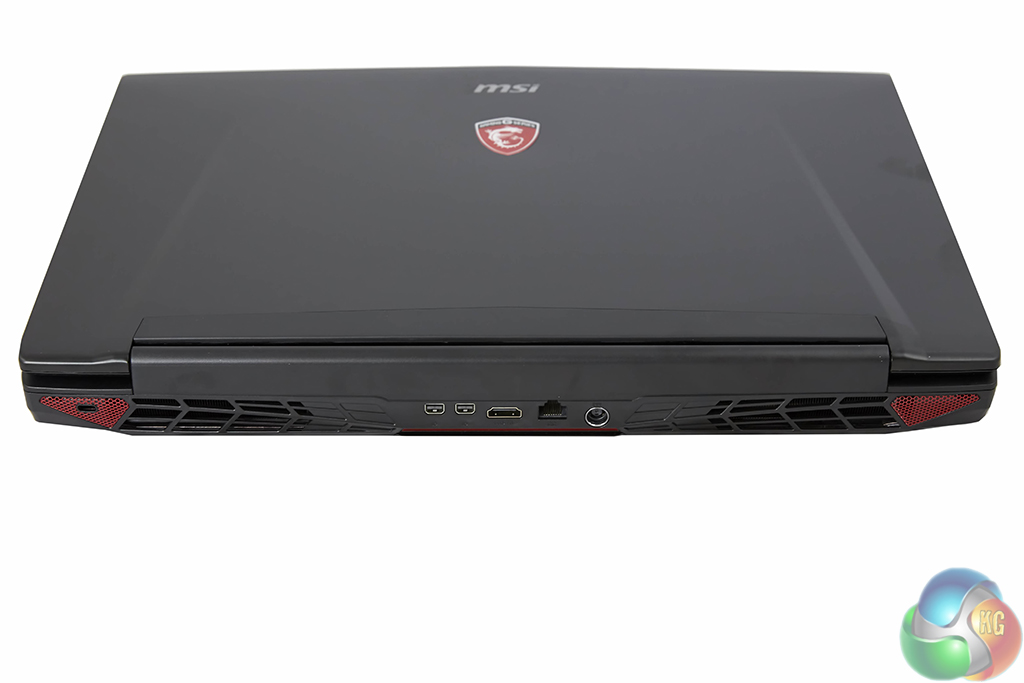
Moving around to the rear side, MSI equips the Dominator Pro G with a pair of Mini-DisplayPort 1.2 ports, a HDMI 1.4 connector, Killer E2200 Gigabit Ethernet, and the charger input. I am slightly disappointed to see the application of a v1.4 HDMI port on a machine that could comfortably drive some older gaming titles on a 4K TV at 60FPS.
MSI's Matrix Display technology is supported, meaning that the laptop's screen can be used in addition to a trio of external monitors. This is actually something that a multi-purpose user, such as a student, may find very useful – four high resolution displays can be used when working and then just one or two when gaming (and monitoring temperatures and video streams etc.).
Also visible on the rear side are the Kensington lock point and two large vents for MSI's hefty cooling system. More on that cooling system later.
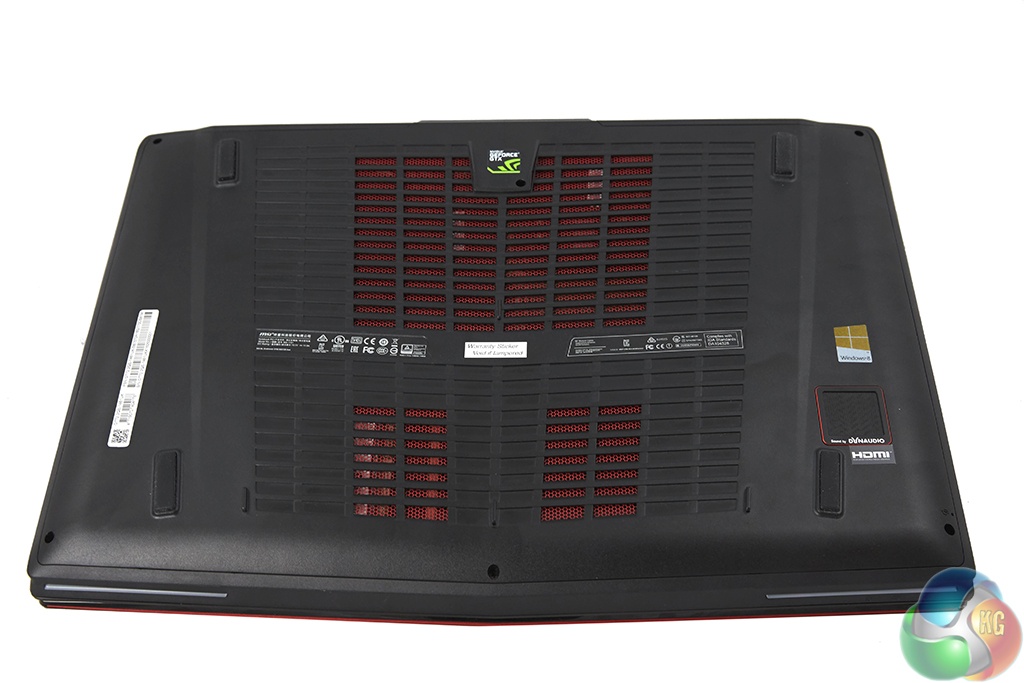
The bottom panel of casing is formed of a fairly solid plastic material, although there definitely is not a premium feel to this section. Large vent holes combined with four rubber-tipped feet give the pair of cooling fans room to breathe.
A closer look at the panel highlights a noticeable clearance section between the laptop hardware and plastic covering. This may not be the most space-efficient choice by MSI's design team, nor does it aid the unit's thickness, however it may have a useful benefit to cooling performance.
On the right side of the picture (the left side during usage) is the 5W Dynaudio subwoofer. Aided by the Audio Boost 2 technology and Nahimic audio processing software, MSI's 2.1 Dynaudio sound system delivers one of the best audio experiences that I have heard from a laptop. The bass packed a noticeable punch when it was required, and voice clarity from the pair of 3W speakers was a positive.
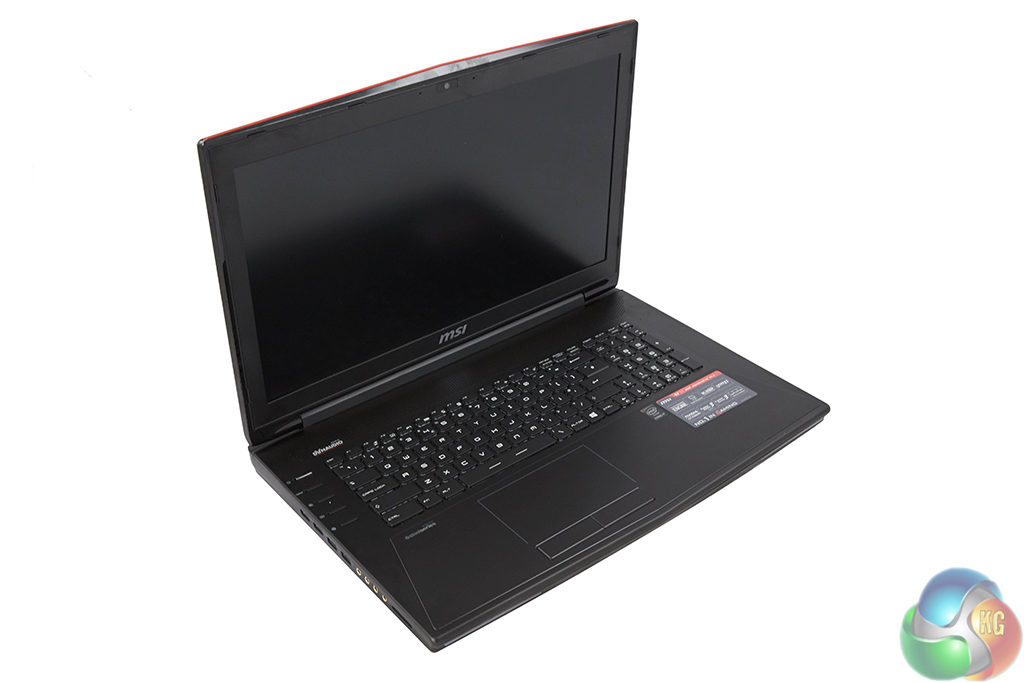
One of the Dominator Pro G's jewels is its 17.3″ 1920×1080 PLS panel that features G-Sync support and runs at 75Hz. The PLS panel coupled with the screen's anti-glare coating allow for accurate colour reproduction with excellent viewing angles. Brightness was able to be cranked up to a solid level, although operation in direct sunlight may see users yearning for higher brightness levels.
17.3″ is a little on the large side for a 1920×1080 resolution, so don't expect a retina-like pixel density. With that said, the 2 Megapixel, 16×9 Full HD resolution still remains the most popular choice amongst gamers. PLS simply adds some glamour to the colour accuracy while still aiming to maintain a functional level of lag.
With a desktop system and monitor, G-Sync requires a supported graphics card, display, and the G-Sync module. Because a laptop's screen is fed directly by the machine's GPU, a G-Sync scaler is not required for the laptop to support the frame-synchronising technology. G-Sync Direct relies solely upon the application of supported Nvidia graphics card and the G-Sync panel.
It is worth noting that manually updating to the latest (353.30) Nvidia drivers was required in order to get the 75Hz operation and windowed G-Sync mode functioning. MSI's website has yet to be updated with Nvidia's latest drivers and Geforce Experience did not prompt the update either. MSI tells us that newer stock should ship with the latest Nvidia drivers, making 75Hz and windowed G-Sync accessible out-of-the-box.
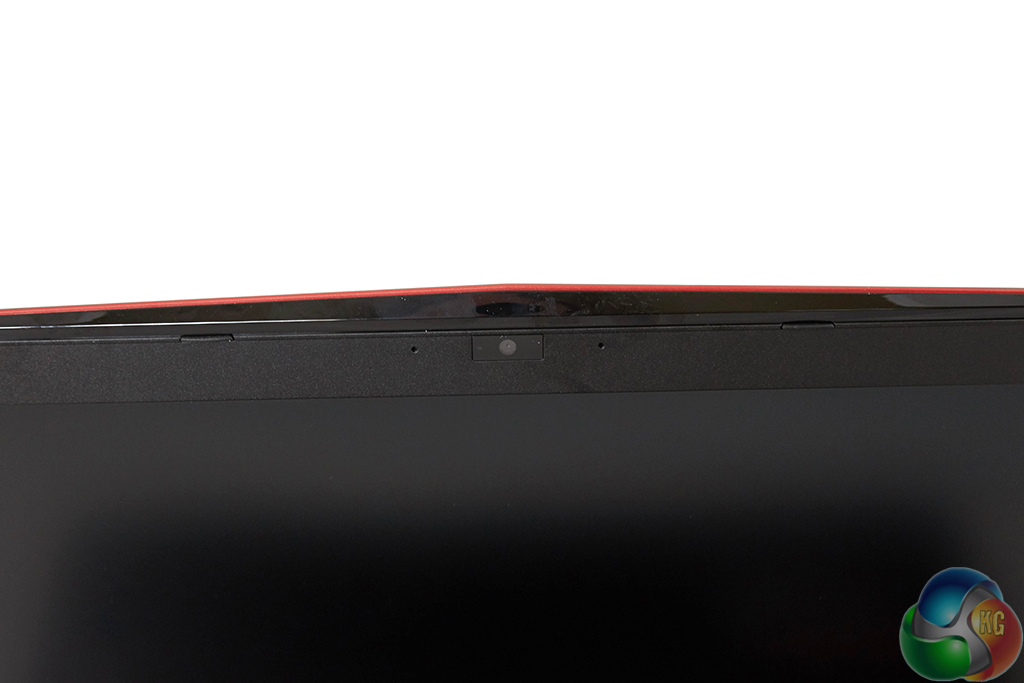
A Full HD, 30 FPS webcam is found in its typical location. Close to the webcam are audio receivers for the built-in microphone.
MSI puts emphasis on the webcam and opts for a Full HD model in order to please game streamers. With so much linkage being made between MSI and XSplit Gamecaster software, a HD webcam makes sense on the gaming laptop.
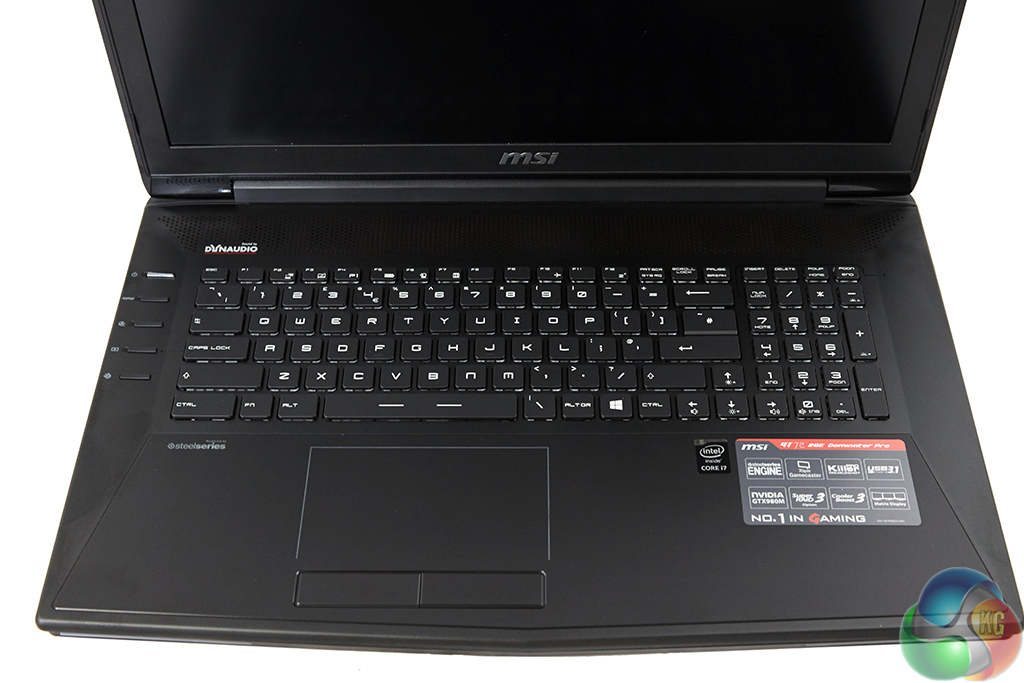
The full LED-backlit SteelSeries keyboard features SteelSeries Engine key control. This is useful to gamers who may want to create macros and assign them to specific buttons, control their keyboard LED colours, or even track their usage statistics.
While some of the layout features take a little getting used to (like the Windows key positioning and half-sized enter key), and others are plain stupid (placing a delete function next to the mute or insert button), typing on the keyboard very quickly becomes a pleasant experience.
The key pitch is good enough to know that an obvious press has been made, and feedback following an actuation is excellent, so gamers should be pleased. MSI and SteelSeries have designed one of the better laptop keyboards that I have used and, with a little practice, I would have no comfort complaints towards using it on a daily basis. Move that oddly placed delete function and the most obvious mode of mistakes is removed.
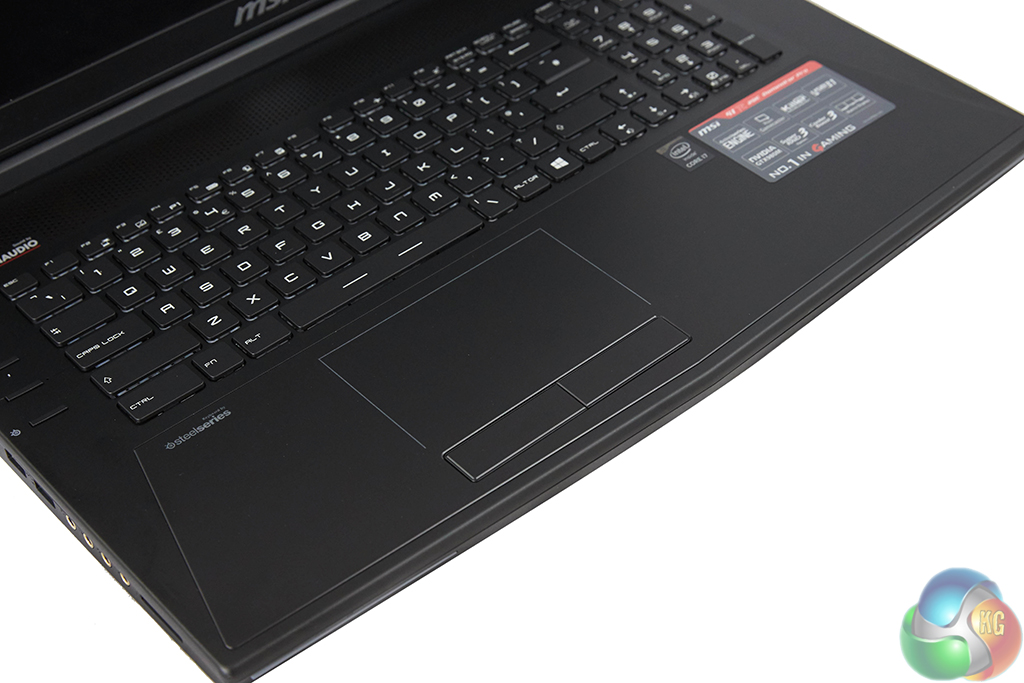
My positivity towards the keyboard does not extend to the trackpad. I found the unit frustrating to use. For a start, there is no clear boundary (other than an LED strip) that segregates the trackpad from the laptop chassis. I found this very annoying, especially when trying to locate the pad without looking at it (i.e. during gaming).
Omission of the boundary becomes even more frustrating when a useful function added by MSI becomes accidentally applied. Swiping in from the trackpad's right side brings up the Windows right-hand access bar. This gives quick access to the Search and Settings options and acts as a valid substitute for a touch screen (in my opinion). But without a boundary for the trackpad, this feature is regularly applied without meaning to do so. This results in the right-hand access bar flashing onto the screen at unexpected times – a process which quickly becomes frustrating.
Some users may like the streamlined trackpad for its design pointers; however I dislike it from a function and ease-of-use point of view. And the choice of materials warrants questioning by virtue of the trackpad area becoming a greasy fingerprint frenzy after very little use.
The buttons are fine – left click has a firm feel to it and can be actuated across the entire button. Right click can also be actuated along its length however the feedback seems less tactile.
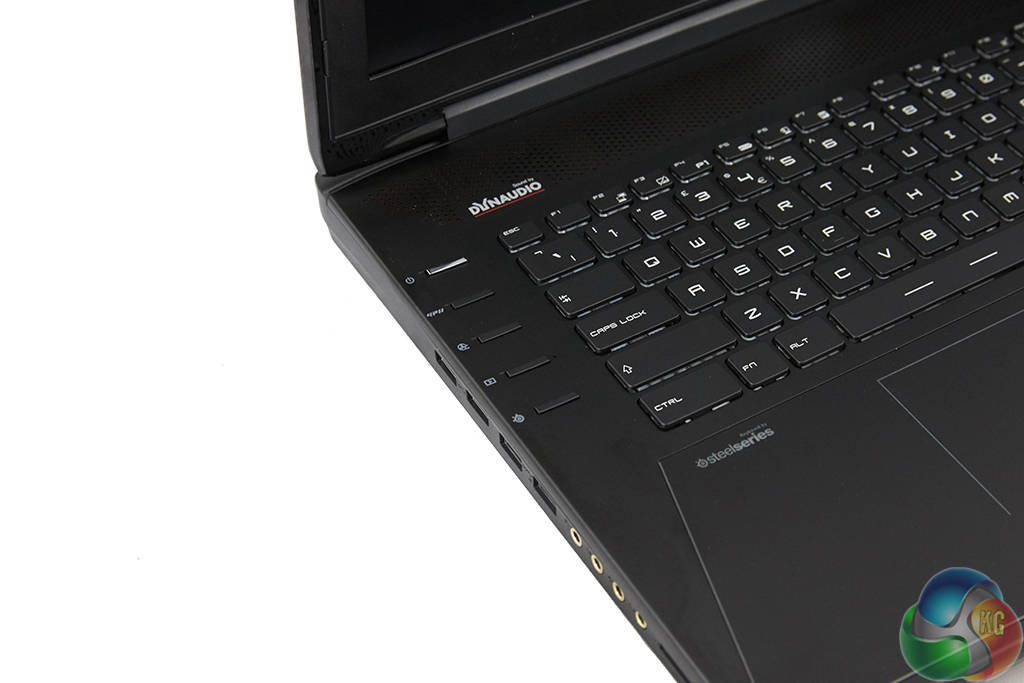
Five buttons on the top-left side control the power, GPU toggle mode, fan speed boost, XSplit app launch, and SteelSeries keyboard LED colour. Pressing the fan button steadily ramps the pair of blowers up to an intrusive level, although this is useful for a quick burst of higher-performance cooling.
Without supporting Nvidia Optimus technology, users are forced to manually push a button when they want to switch between using the discrete GTX 980M GPU and the Broadwell processor's integrated HD 5600 chip. Pressing the button prompts the user to reboot the system so that the relevant graphics adapter can be switched. This is a time-wasting process that will leave many users simply running the GTX 980M GPU at all times, thus having a negative effect on battery life and temperatures.
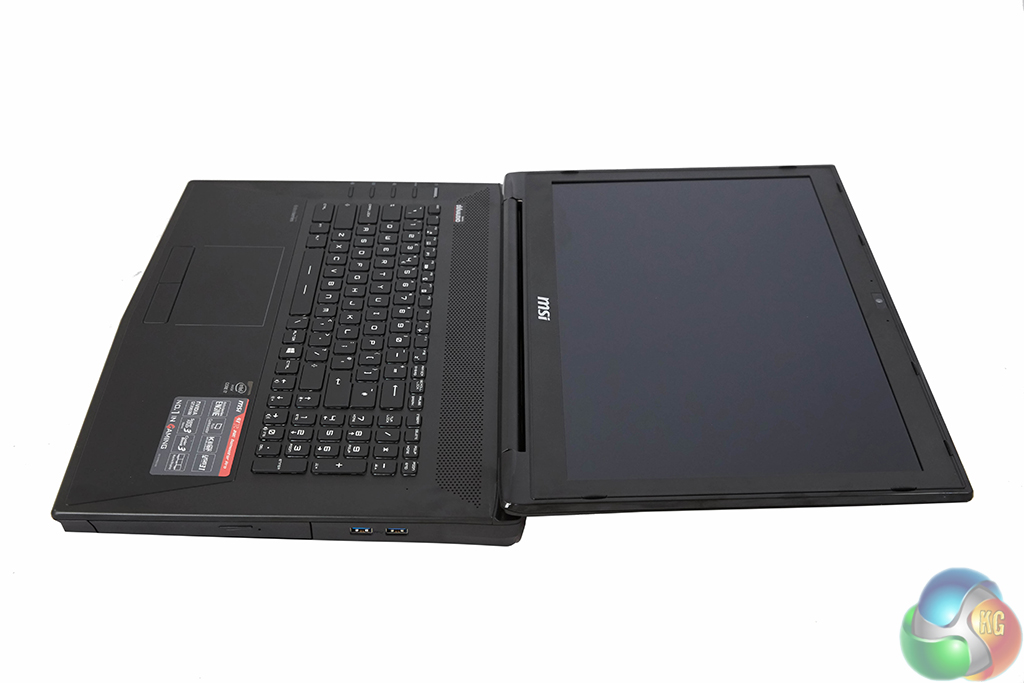
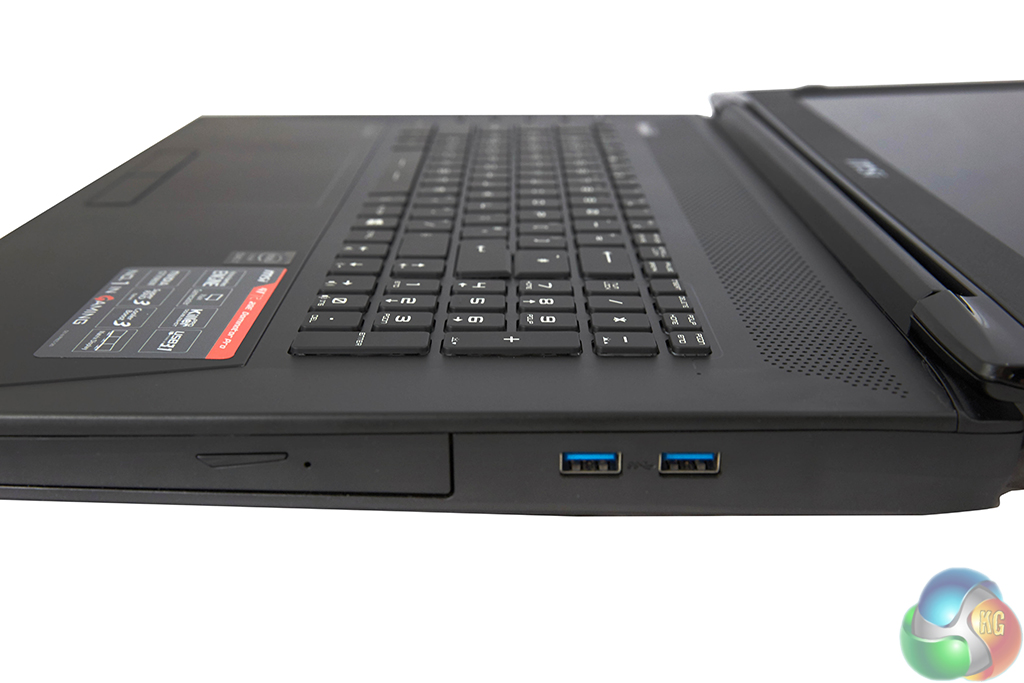
Full, horizontal rotation can be completed by the screen. This may be useful if the system is being used to drive an external display and has to be stashed out of sight.
MSI clearly has not aimed to create a thin and portable system and instead opts to use a greater level of thickness in order to cram an adequate cooling system under the hood. Spoiler alert: it is a smart move because MSI utilises one of the best cooling systems that you are likely to find on a laptop.
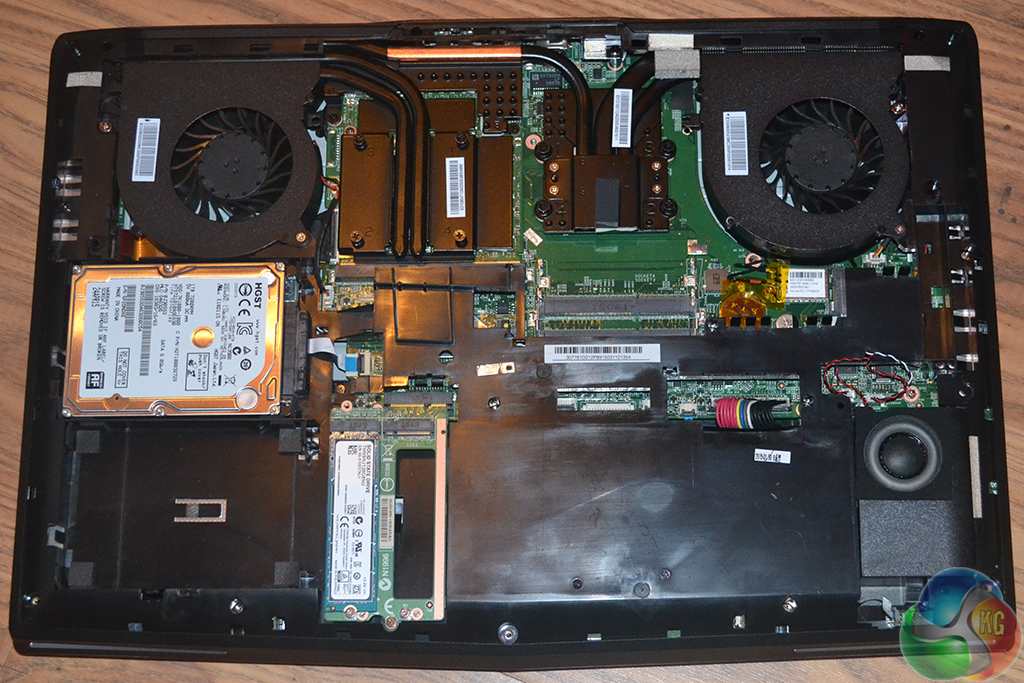
Removing the bottom plastic panel forces a user to ‘officially' void their warranty. One of the screws is positioned beneath the warning sticker. This is what I deem to be a sly move that many manufacturers of all hardware use, and it is one that really infuriates me.
I would like to think that users spending £2k on a laptop will have a general understanding of its components inside. And if they do not, I would also like to think that they are smart enough not to mess with things they don't understand. I do not believe that a user should be forced to void their laptop warranty if they simply want to add RAM or a new M.2 SSD.
The MSI UK team informed us that they will honour the system's warranty (not including the newly installed components) if the sticker is replaced. In other words, peel off the sticker carefully and then return it once the upgrades have been performed. The sticker is used to deter less experienced users from messing with the internals.
MSI's internal component layout choices are smart. There are two 2.5″ bays (only one cable is supplied and used on this model), one of which is occupied by a 1TB 7200RPM HGST Travelstar 7K1000 HDD. A daughter-board is used to connect up to four M.2 SSDs to a single connection. This allows MSI to provide (and users to upgrade) models with up to four-drive RAID 0. Our system was occupied by a single 128GB Toshiba THNSNJ128G8NU M.2 SATA 6Gbps SSD. 128GB of solid state storage seams meager for a £2000 gaming laptop.
A pair of empty DIMM slots is accessible and can be filled with up to 16GB (2x 8GB) of DDR3 memory, in addition to the 16GB already equipped. The Killer 1525 wireless card is easy to access should the process be required. MSI uses an MXM version of the GTX 980M in order to provide buyers with upgrade potential for the graphics chip.
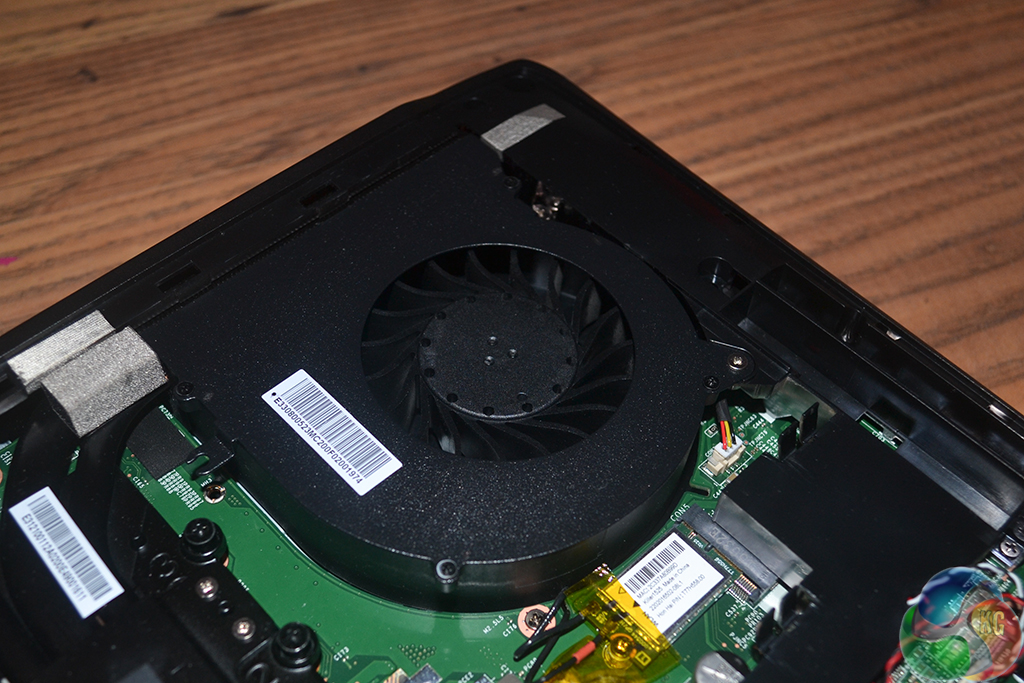
The removable, GTX 980M-equipped graphics board and Broadwell-H CPU are cooled by some of the thickest fans that you're likely to find in a laptop. Each of the seemingly 40mm units is powered and controlled by a dedicated fan header, allowing only the relevant fan to speed up if a CPU-only or GPU-only load is applied.
CPU cooling is primarily handled by the left side fan (looking from a user's point of view when using the laptop) and the right fan cools the GPU. Each unit has two dedicated heatpipes for their cooling task, although MSI adds a fifth heatpipe that is used to transfer heat from both the CPU and the GPU.
Showing a clear preference for cooling performance, MSI dedicated the entire rear of the laptop to the fans and heatsinks. Doing so requires the sizeable battery to be shifted to the front of the unit. Counterbalancing the two hefty metal heatsinks may be an additional reason for the battery's forward positioning.
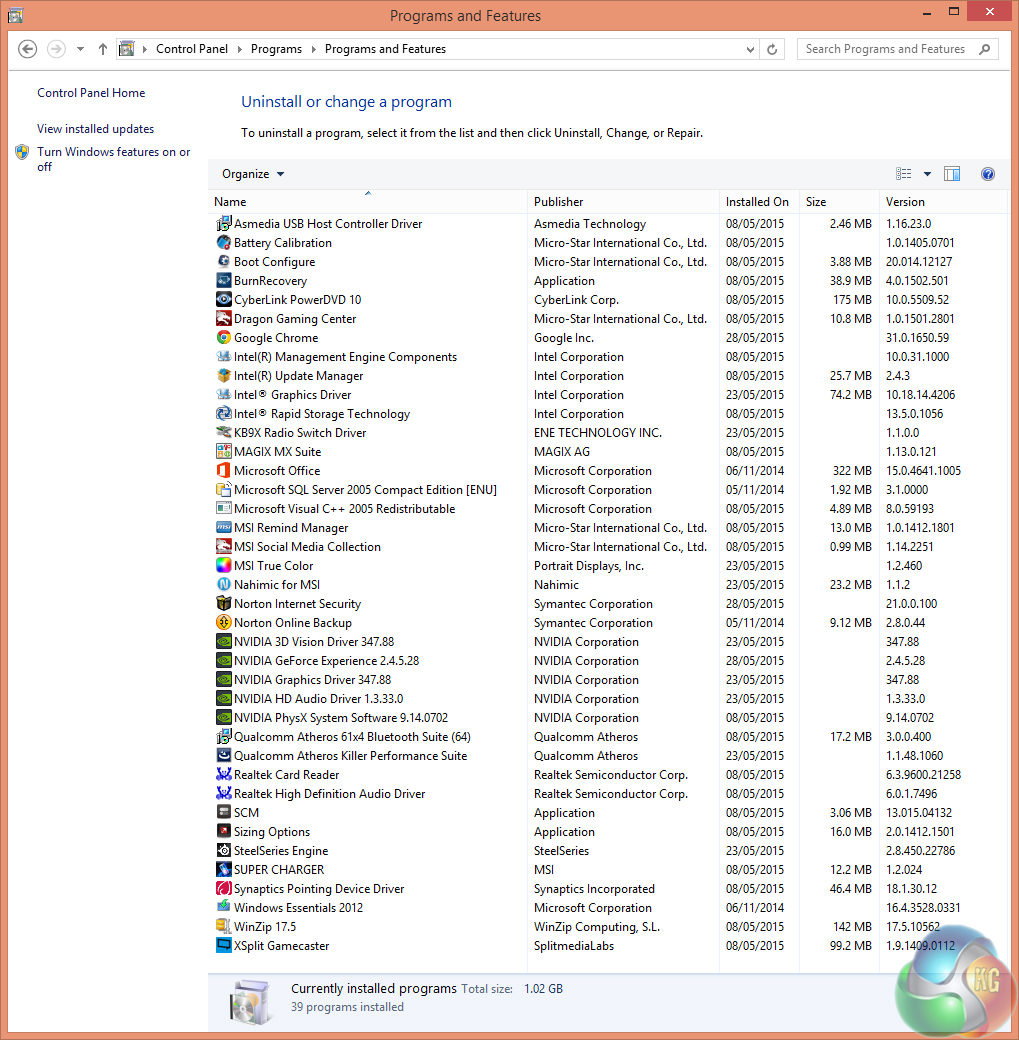
MSI ships the GT72 2QE with a substantial amount of pre-installed software. Some of the installs, such as XSplit, are useful. However, other installations, such as Norton (not even with a decent license term), will be considered bloatware that cannot be removed quickly enough.
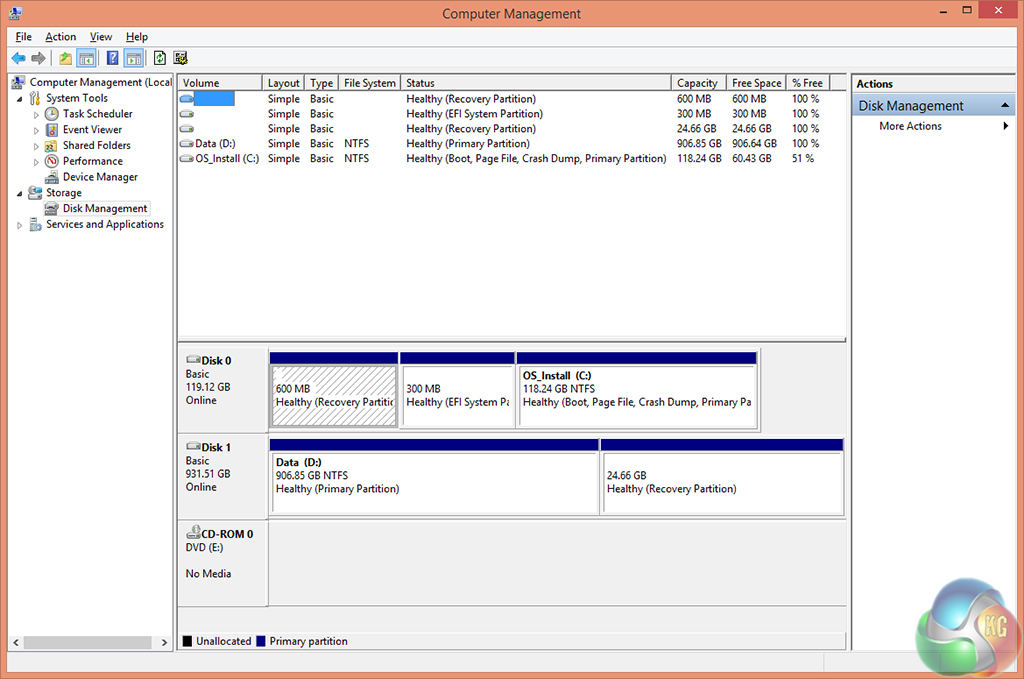
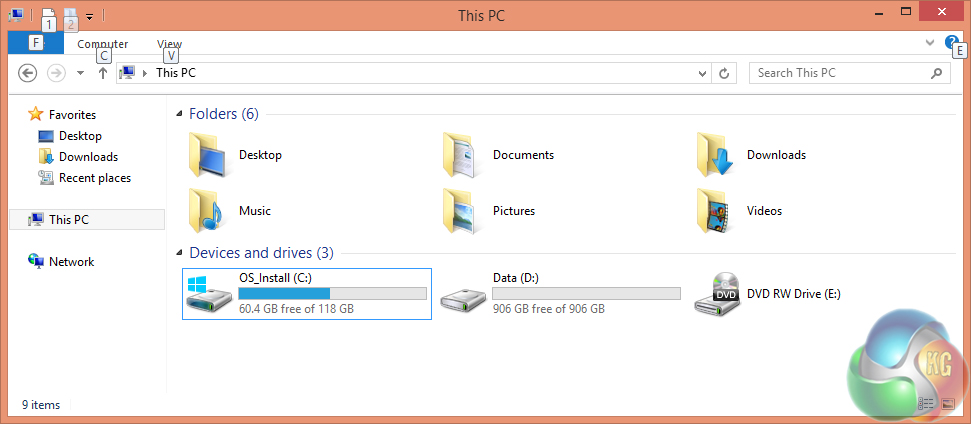
Shipping with only 60GB of free space, the 128GB boot SSD is going to be filled very quickly. Users hoping to get some of their games onto the SSD should look into adding another solid state drive to the system or simply making do with mechanical storage.
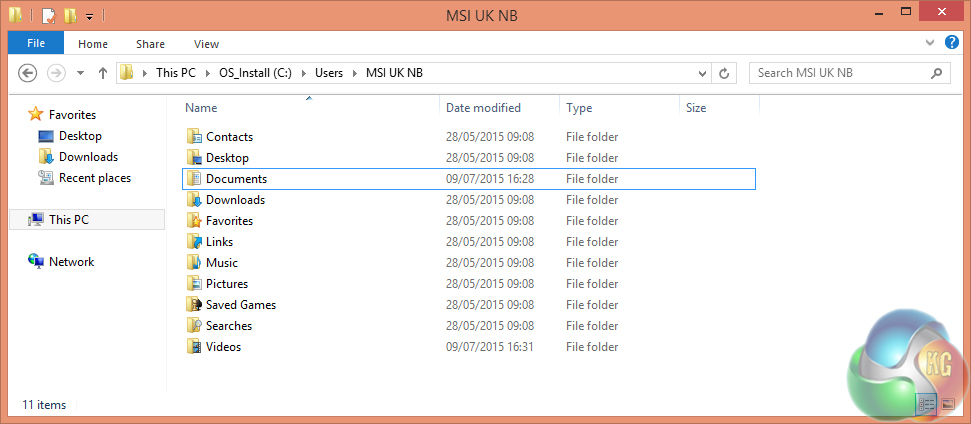
MSI keeps the default documents, videos, music (etc.) storage locations on the 128GB SSD. The small drive will fill quickly – MSI should have put default save locations for media directories on the larger HDD. This is, however, easy to edit manually.
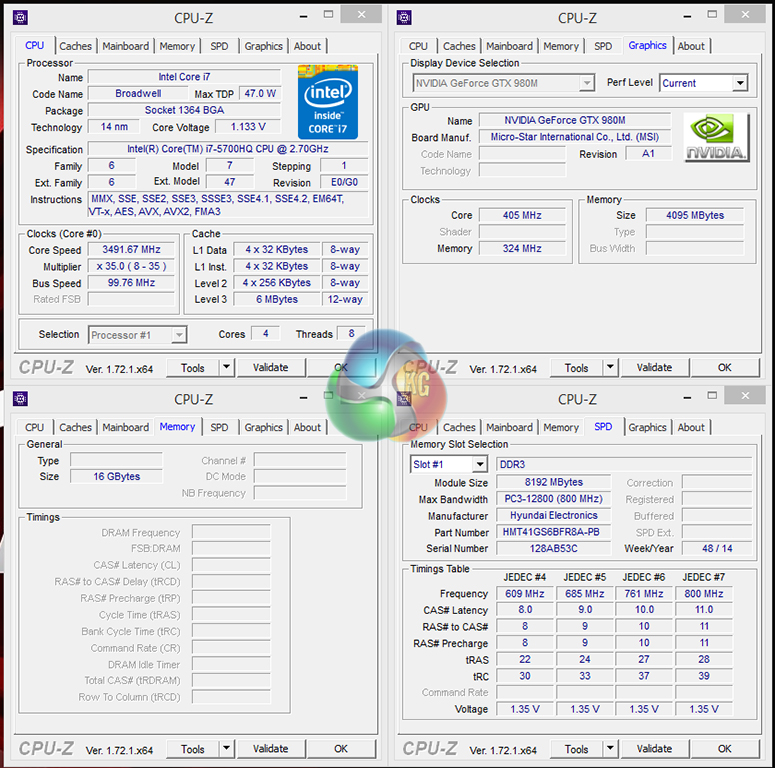
Despite being rated at 2.7GHz, the 47W Broadwell-H CPU spends most of its time at the maximum turbo level of 3.5GHz when AC power is used and Windows power option is set to High Performance.
MSI's excellent cooling system manages to keep the CPU temperatures in check, allowing the chip to remain at its maximum turbo frequency for the majority of usage cases.
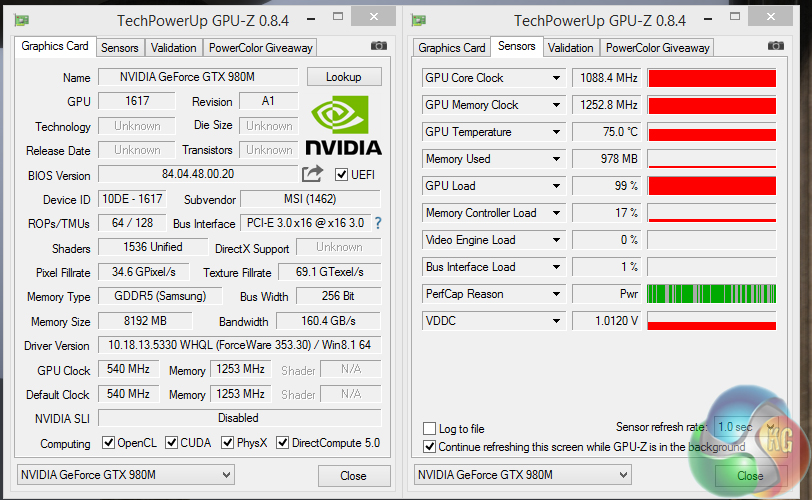
The GTX 980M is able to turbo its core clock as high as 1126MHz, although the operating clock speed stays largely constant at 1088MHz after extended loading periods. The 8GB of GDDR5 memory remained clocked at 1253MHz throughout its loading period.
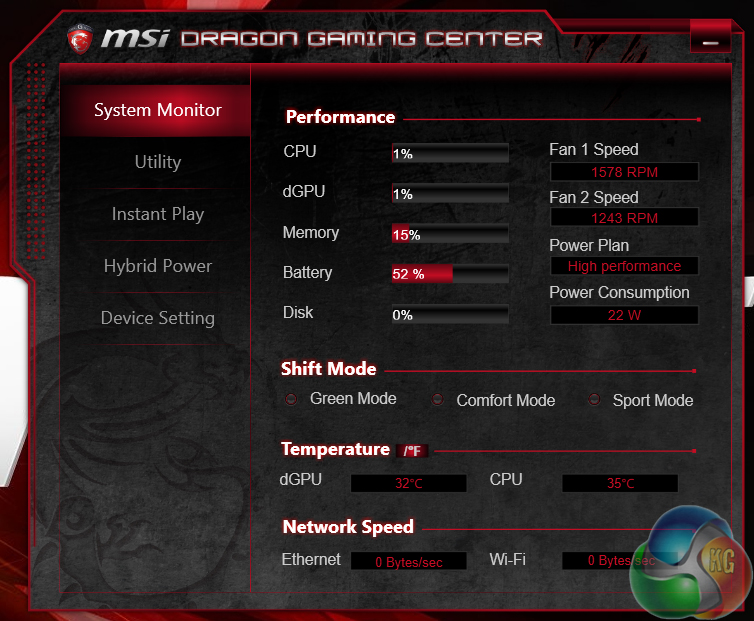
MSI's Dragon Gaming Center is a simple way of tracking basic system information. I quite like the software's layout and the way it fits a decent spread of general information onto a single page.
Tests:
- 3DMark – Fire Strike (System)
- PCMark 8 – Home (System & Battery)
- Cinebench R15 – All-core CPU benchmark (CPU)
- HandBrake – Convert 4.36GB 720P MKV to MP4 (CPU)
- SiSoft Sandra – Processor arithmetic, memory bandwidth (CPU & Memory)
- ATTO – SSD, HDD, USB 3.0 transfer rates (Connectivity)
- Totusoft LAN Speed Test – WiFi speed test, 100MB file transfer between GbE wired ‘server' computer (Connectivity)
- Bioshock Infinite – 1920 x 1080, ultra quality (Gaming)
- Metro: Last Light – 1920 x 1080, high quality (Gaming)
- Tomb Raider – 1920 x 1080, ultimate quality (Gaming)
3DMark
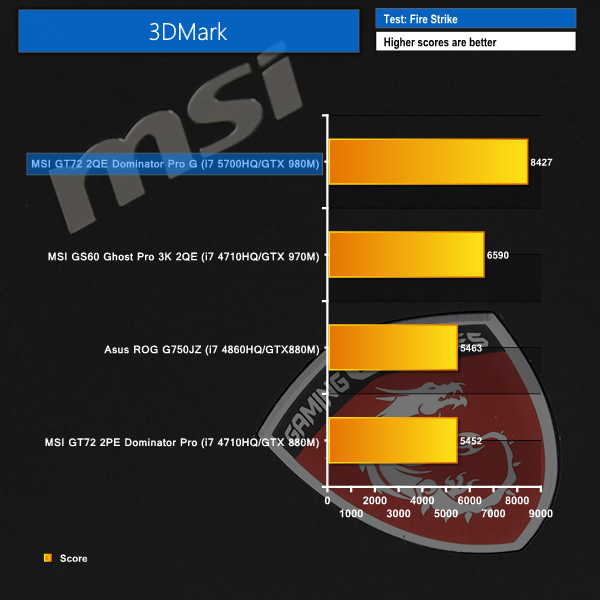
We used 3DMark‘s ‘Fire Strike’ benchmark which is designed to be used on gaming PCs. We opted for the Normal setting, NOT the Extreme mode.
PCMark 8
We used the ‘Home’ test in PCMark 8 to analyse the general-usage performance of each processor configuration.
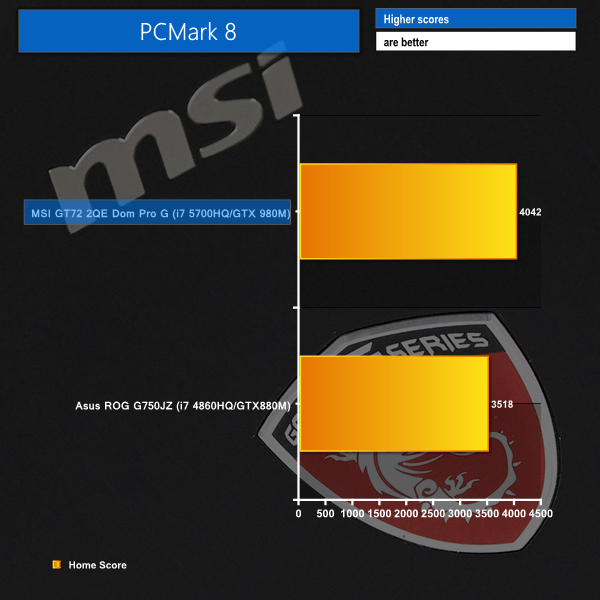
The fast combination of a Broadwell i7 CPU and GTX 980M GPU result in impressive performance levels in Futuremark's 3DMark and PCMark 8 tests.
3DMark's affinity for graphics horsepower speaks volumes about the 8GB GTX 980M graphics card's might.
Cinebench
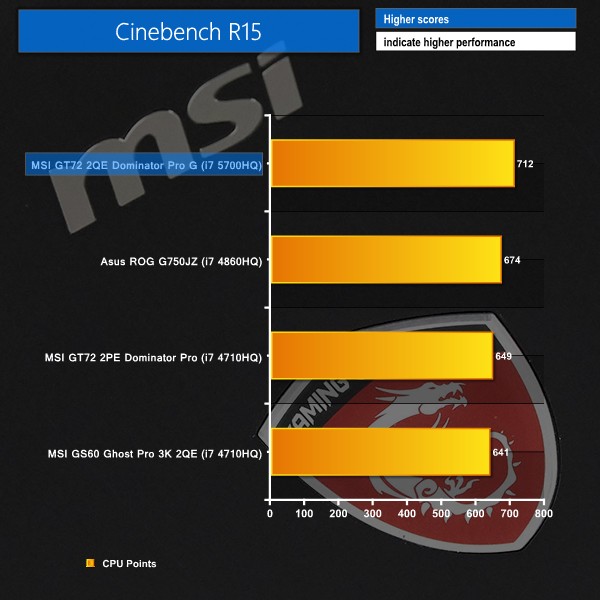
We used the ‘CPU’ test built into Cinebench R15 .
Handbrake Conversion
We measured the average frame rate achieved for a task of converting a 4.36GB 720P H.264 movie (in the MKV container) to one in the MP4 container.
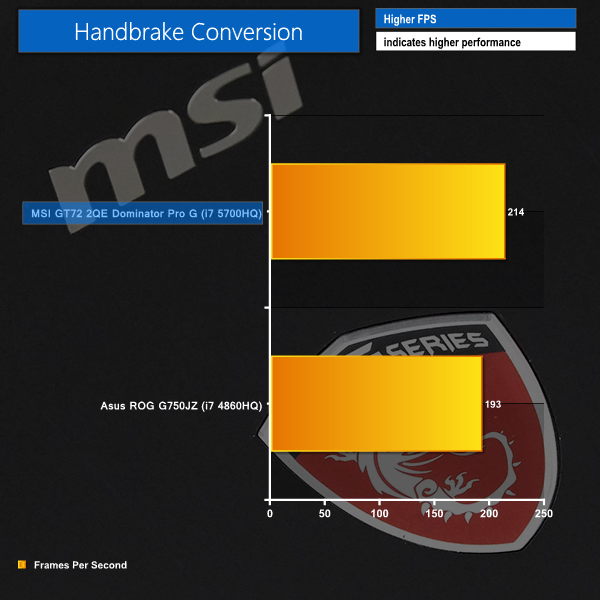
Reaching a maximum speed of a fast 3.5GHz and utilising Intel's latest – Broadwell – architecture, the Core i7 5700HQ delivers strong performance in the Cinebench and Handbrake tests.
214 FPS in our video converting test is not too far off desktop-grade Core i7 performance.
Sandra Processor Arithmetic
Sandra Memory Bandwidth
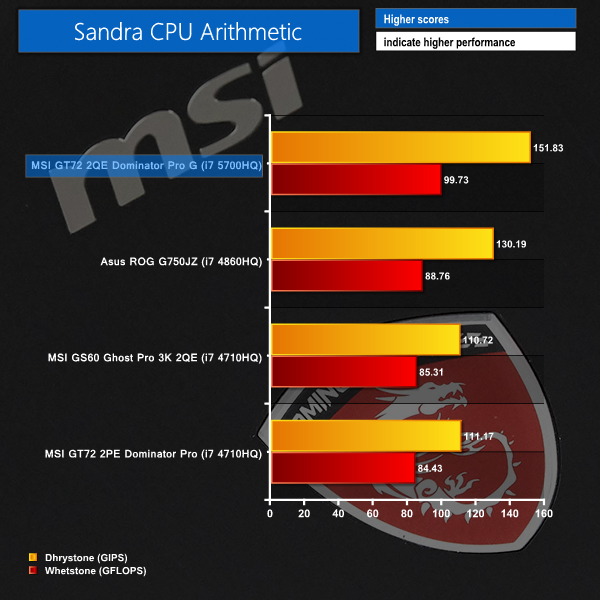
Sandra's synthetic testing of the Core i7 5700HQ CPU confirms that its performance lead in the real-world benchmarks is to be believed.
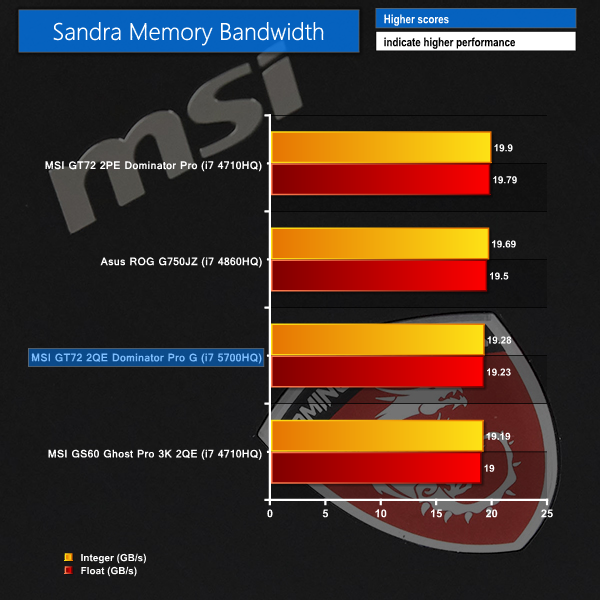
MSI is using a pair of 8GB DDR3 1600MHz DIMMs, so no speed awards are going to be won on the memory front.
Bioshock Infinite
We used the Bioshock Infinite demanding ‘Ultra’ setting and a 1920 x 1080 resolution to push today’s gaming hardware. Our data was recorded using a section of the game, not the built-in benchmark.


Metro: Last Light
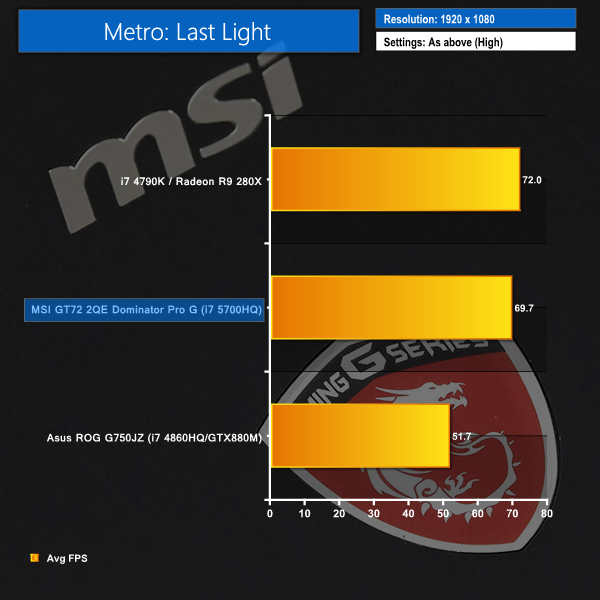
We used a 1920 x 1080 resolution and the Metro: Last Light built-in benchmark set to ‘High’ quality to offer an intense challenge for the gaming hardware while also making playable frame rates a possibility.

Tomb Raider
We used a 1920 x 1080 resolution and the Tomb Raider built-in benchmark set to ‘Custom’ quality.
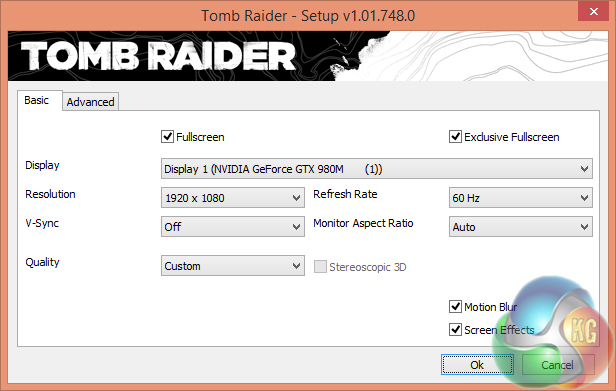
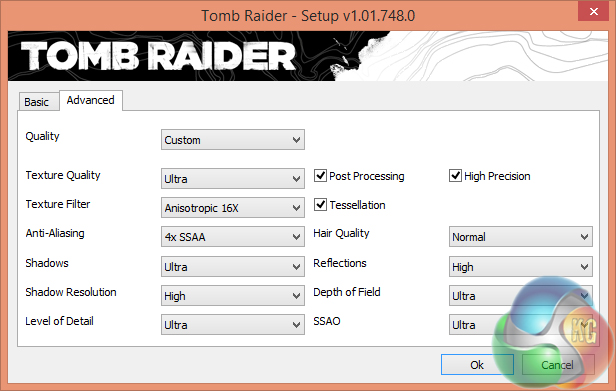
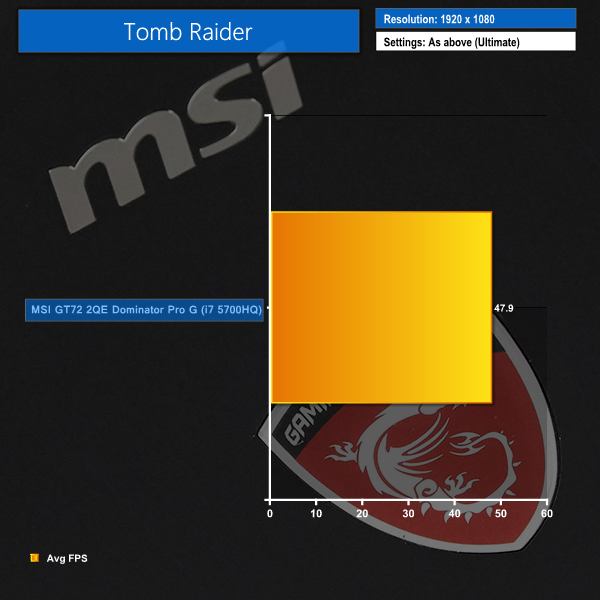
We tested the system using G-Sync which, while not fully representative of the GPU's raw horsepower (due to frame rates being linked with the display refresh rate of 75Hz), is an accurate representation of the performance that a gamer will observe. Users wanting higher average frame rates can change the behaviour of the screen synchronisation beyond the panel's native refresh rate – either V-Sync off or V-Sync on can be selected when the G-Sync operating range is surpassed.
MSI's GT72 2QE Dominator Pro G shows solid performance in games. There is enough horsepower under the laptop's hood to run popular AAA titles at close-to-maximum, or maximum, image quality settings and a playable frame rate on the 1920×1080 panel. Our Metro: Last Light and Bioshock Infinite tests actually see the system pushing frame rates towards the screen's 75Hz refresh rate.
G-Sync adds another dimension to the gaming experience by making lower frame rates less of an eye sore. An average frame rate of almost 48FPS in Tomb Raider would typical call for an image quality reduction. G-Sync, however, makes the lower average frame rate far more bearable.
Using V-Sync in this occasion would produce noticeable stutter that would present an unpleasant experience.
SSD Performance
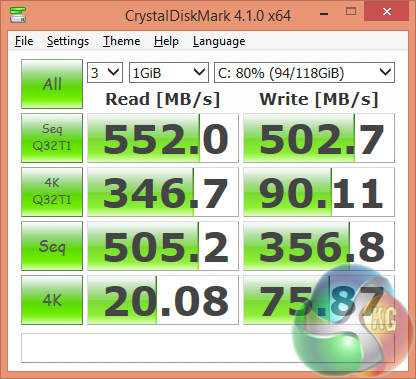
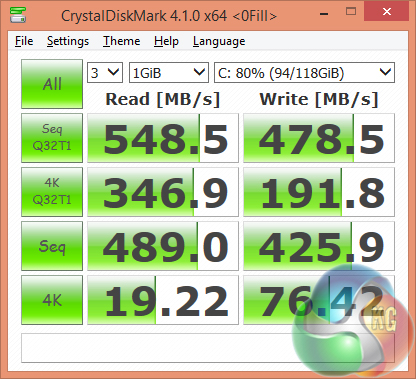
The 128GB Toshiba SATA 6Gbps SSD shows some positive performance numbers. The all-important 4K performance levels are good and the transition from compressible to incompressible workloads does not represent a cliff-edge drop in performance.
HDD Performance
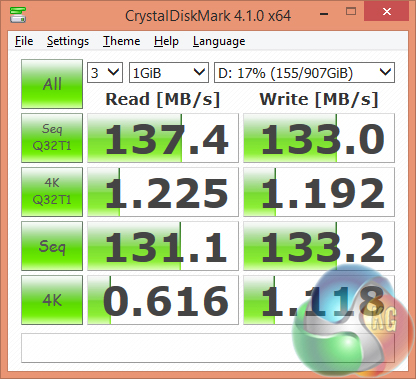
HGST's 1TB 7200RPM HDD is able to push more than 130MBps sequential reads and writes, which is good performance for a 2.5″ drive.
USB 3
We tested USB 3.0 performance using the Kingston HyperX 3K SSD connected to a SATA 6Gb/s to USB 3.0 adapter powered by an ASMedia ASM1053 controller.
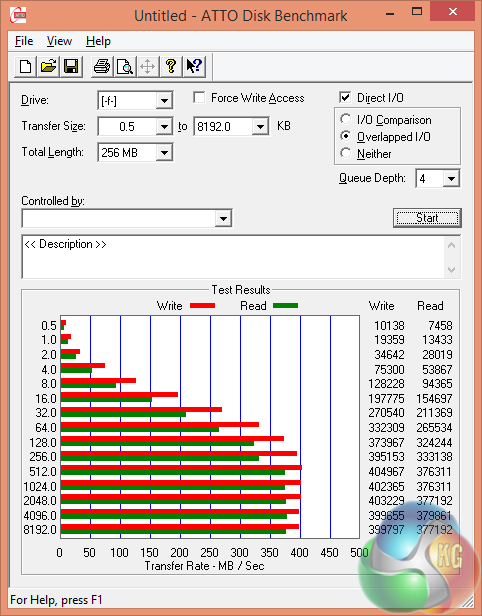
USB 3 performance tops out around the 400MBps mark. This is slightly slower than the interface's maximum speed that can be reached using the UAS protocol.
Wireless
We use Totusoft’s LAN Speed Test software to measure the real-world throughput offer by the Killer 1525 802.11ac networking solution.
The Linksys EA6900 router was used and there was a small amount of network clutter (mainly on the 2.4GHz frequency band).
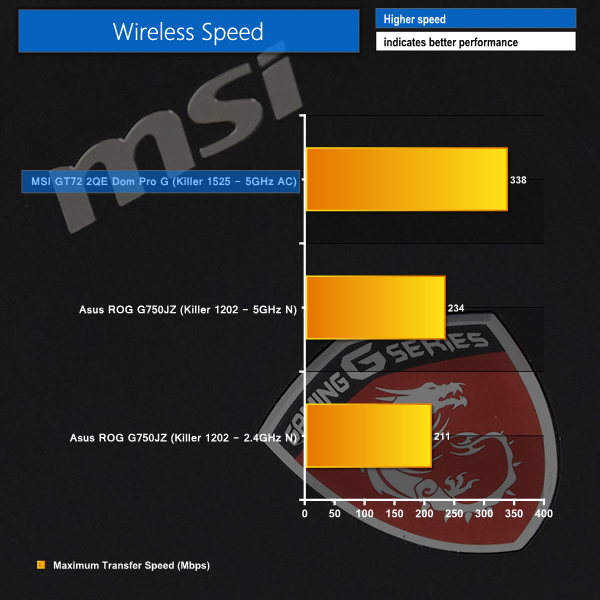
Killer's 802.11ac wireless chipset shows solid transfer rates when located in close proximity to the wireless router. The same vendor's Wireless-N 1202 chipset simply cannot compete with the level of performance shown by the 1525 solution.
Thermal Performance
Ambient temperature was maintained at 21°C throughout testing. Windows was set to High Performance mode. All fan settings were left on BIOS defaults.
Idle temperatures were measured after 30 minutes from initial boot up with the system inactive.
Load temperatures were measured when playing Metro: Last Light – a Direct X 11 game that taxes both CPU and GPU extensively.
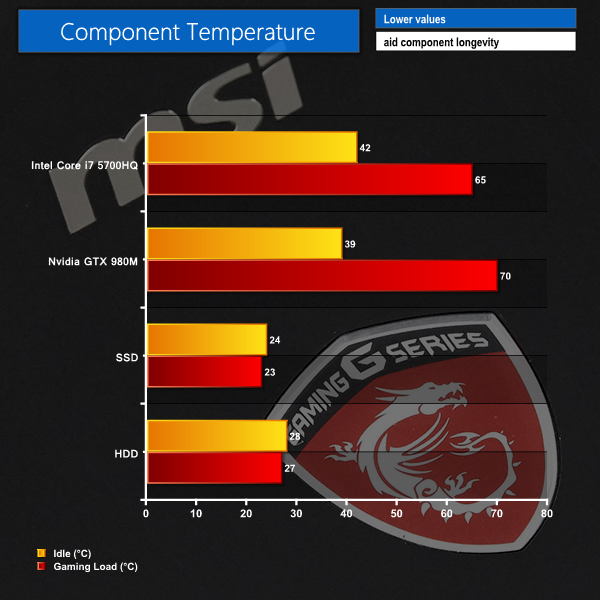
Cooling performance is one of the biggest positives for MSI's GT72 2QE Dominator Pro G laptop. The smartly designed system is able to maintain component temperatures well below 80C.
This ensures that there is minimal throttling for any of the hot hardware, meaning that every ounce of performance can be sapped from the machine.
Oddly enough, running a game resulted in slightly reduced temperatures for the storage drive. Other than the obvious answer of minor fluctuations during testing, the added airflow in the chassis may be responsible for lowering drive temperatures.
Acoustic Performance
We record the laptop’s acoustic emissions when it is idling and gaming (running Tomb Raider).
Our sound level meter is placed where a user’s ears are likely to be located – around 50 cm above the laptop and 50cm from the screen (which is around 25cm from the front of the keyboard).
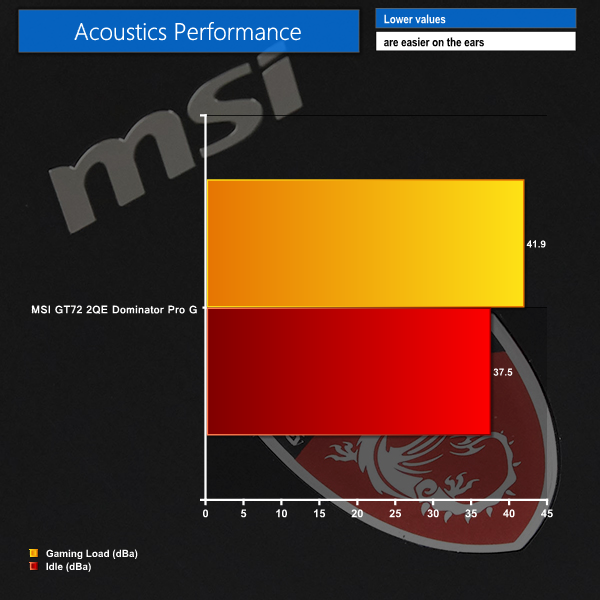
Given the level of cooling performance on offer, I was pleasantly surprised by the acoustic output of the Dominator Pro G laptop.
Under idle conditions, the pair of fans is barely audible unless the background noise is particularly low.
Ramping up the heat with a gaming load does cause a noticeable increase in acoustic emissions. The fans are clearly audible when the system is loaded, however the noise levels are far from intrusive. I would have no problem gaming on this laptop for an extended period of time and withstanding the fan noise.
Pushing the laptop's full fan speed button steadily drives the fans towards a very loud, intrusive level of noise. This was the point where I would want some headphones and an empty room whilst using the laptop. Thankfully, none of our testing pushed the fan speeds towards such a high level.
Battery Life
We use the PCMark 8 Home benchmark to test the battery life under real-world conditions.
Windows was set to high performance mode and screen brightness was maintained at 50%. Due to the inconvenient manner of GPU switching, we opted to use the Nvidia GTX 980M GPU for battery life testing. It is highly likely that most users will leave this GPU enabled most of the time.
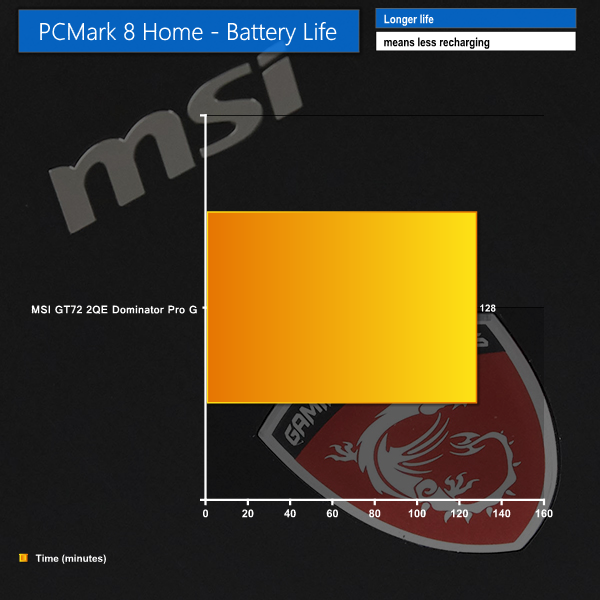
PCMark 8 registered an estimated battery life time of 2 hours and 8 minutes using the home benchmark. This is a solid result for the laptop when using its dedicated GPU. The integrated Intel GPU will increase battery life, however activating it requires a reboot and that's too much hassle for some people.
With a fast CPU and GPU combining to drive a 75Hz Full HD G-Sync panel, the MSI GT72 2QE Dominator Pro G is a gaming powerhouse that delivers an enjoyable usage experience in a variety of scenarios.
Focusing on the gaming experience, the application of a 75Hz G-Sync panel makes a huge amount of sense in a laptop ecosystem. While it is possible to add graphics horsepower until frame rates are playable in a desktop environment, that's not the case for a laptop. The hardware can show its age far quicker and that's why adaptive-syncing technologies are smart moves for a mobile environment.
When next year's AAA titles launch and the GTX 980M is already starting to look old, G-Sync may make it possible to enjoy a smooth, stutter-free gaming experience without needing to turn down eye-candy or invest in new hardware. 60 FPS (or perhaps in this case, 75) is no longer the sole target for enjoyable frame rates. And when the GPU is capable of showing its muscle, the panel's enhanced – 75Hz – refresh rate provides good motion clarity.
But let's not forget about the hardware behind the frame rates. Intel's Broadwell Core i7 5700HQ has shown itself as a strong performer, especially when its 47W TDP is cooled sufficiently to allow for consistent operation at its 3.5GHz turbo limit. The 8GB Maxwell GTX 980M is no slouch, either, and its MXM form factor means that a user can upgrade in the future, perhaps when Pascal arrives.
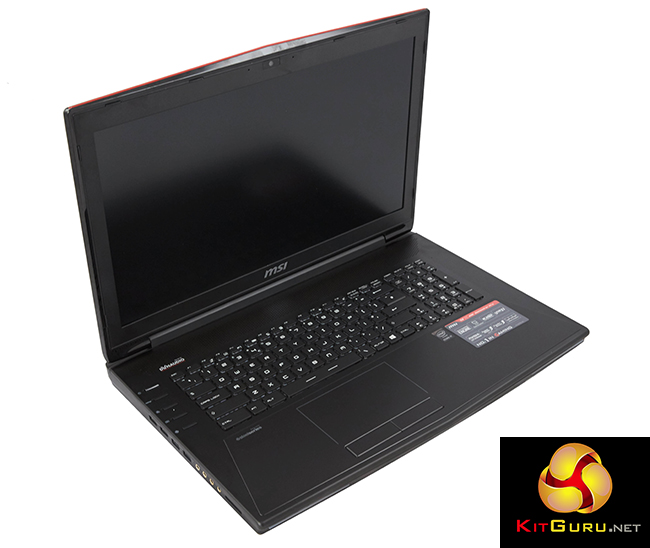
It's not all positive for the GT72 2QE Dominator Pro G, though. The 1461UK version that we received ships with a meager 128GB of solid state storage. And I, personally, find the trackpad design that integrates it into the chassis very frustrating. There's also the build quality issue – lifting this laptop in certain orientations releases squeaks and groans from the plastic chassis that don't sound representative of a £2000 unit.
While the trackpad can be irritating, the partnering keyboard and audio peripherals are excellent. Typing on the SteelSeries keyboard is great thanks to the keys' likeable feedback force. Indulging in heavy bass media allows the 2.1 Dynaudio speaker system to show its worth.
Connectivity is another key positive for the MSI GT72 2QE Dominator Pro G. The machine is well-equipped with six USB Gen 3 ports, two of which are USB 3.1, and a strong array of video and fast networking connectivity. Whilst MSI's premise for component upgrades is positive, putting a warranty void if removed sticker above a critical screw feels like a proverbial low blow.

For the same retail price, Overclockers UK currently stock a slightly upgraded version of the GT72 2QE Dominator Pro G (the 1460 version vs the 1461 we reviewed) that ships with an extra 128GB SSD. With an RRP of £1999.99 and available for just under £2K, MSI's GT72 2QE Dominator Pro G (1461UK) is one of the most costly gaming laptops on the market.
While I think that the well-designed cooling solution, excellent potential for vast hardware upgrades, and enhanced peripherals are key points in favour of MSI's design, I still feel that the price is a little steep. Competing vendors, such as Aorus, have faster hardware for a similar price so the focus is then put on MSI's exclusive features and design, although that's a battle where MSI have every right to feel confident in their offerings.
Discuss on our Facebook page, over HERE.
Pros:
- Excellent cooling system with positive acoustic emissions.
- G-Sync and 75Hz panel make for enjoyable gaming.
- Fast CPU and GPU hardware.
- Very good 1920×1080 PLS screen.
- Extensive upgrade options – room for up to four M.2 SSDs, MXM GPU, free DIMM slots.
- Excellent SteelSeries keyboard with a good amount of user control.
- Superb audio quality with especially strong bass.
- Good connectivity options – both storage (USB 3.1) and display (2x mini-DP and HDMI).
Cons:
- Build quality needs to be better for a £2000 machine.
- Switching between the Intel and Nvidia GPU via a button and reboot is inconvenient.
- Trackpad integrated into the chassis can be annoying to use.
- Very large and heavy.
KitGuru says: A well-designed, feature-laden laptop that uses smartly-picked hardware to drive games on the 75Hz Full HD G-Sync panel.


Whoa, why do I not remember Gsync for laptops being announced.
->>>
>