KitGuru KitGuru.net – Tech News | Hardware News | Hardware Reviews | IOS | Mobile | Gaming | Graphics Cards


KitGuru has given you the news about the Intel Core i9-12900KS CPU with its maximum Boost Speed of 5.5GHz and we have performed an unboxing (for the first time in ages), so now the time has come for a review. We shall be diving straight into the KS so you might want to do some background reading on the Core i9-12900K HERE.
Timestamps
00:00 Start
00:44 12900KS ‘explained’
03:35 Test hardware and retesting 12900k
05:24 12900KS plugged in – early results
06:29 Moving to MSI Meg Z690 Unify
07:23 Some more results
08:00 A look at cooling, temps
10:06 Reducing voltage – the findings
11:46 P-core ratio increased to 5.3GHz
12:45 Leo’s thoughts
13:15 5.5ghz behaviour
13:40 Benchmark results
16:35 Gaming results
18:49 Blender 3.1 temps
20:13 Power Consumption
21:13 Closing Thoughts
Key features
- Up to 5.5 GHz max turbo frequency with Intel Thermal Velocity Boost.
- Intel Adaptive Boost Technology for improved gaming performance by opportunistically allowing higher multi-core turbo frequencies.
- 16 cores (eight P-cores and eight E-cores), 24 threads, 150W processor base power, 30MB Intel Smart Cache, and PCIe Gen 5.0 and 4.0 support.
- Up to DDR5 4800 MT/s and DDR4 3200 MT/s support.
- Chipset compatible with existing Z690 motherboards with latest BIOS recommended for the best gaming experience.
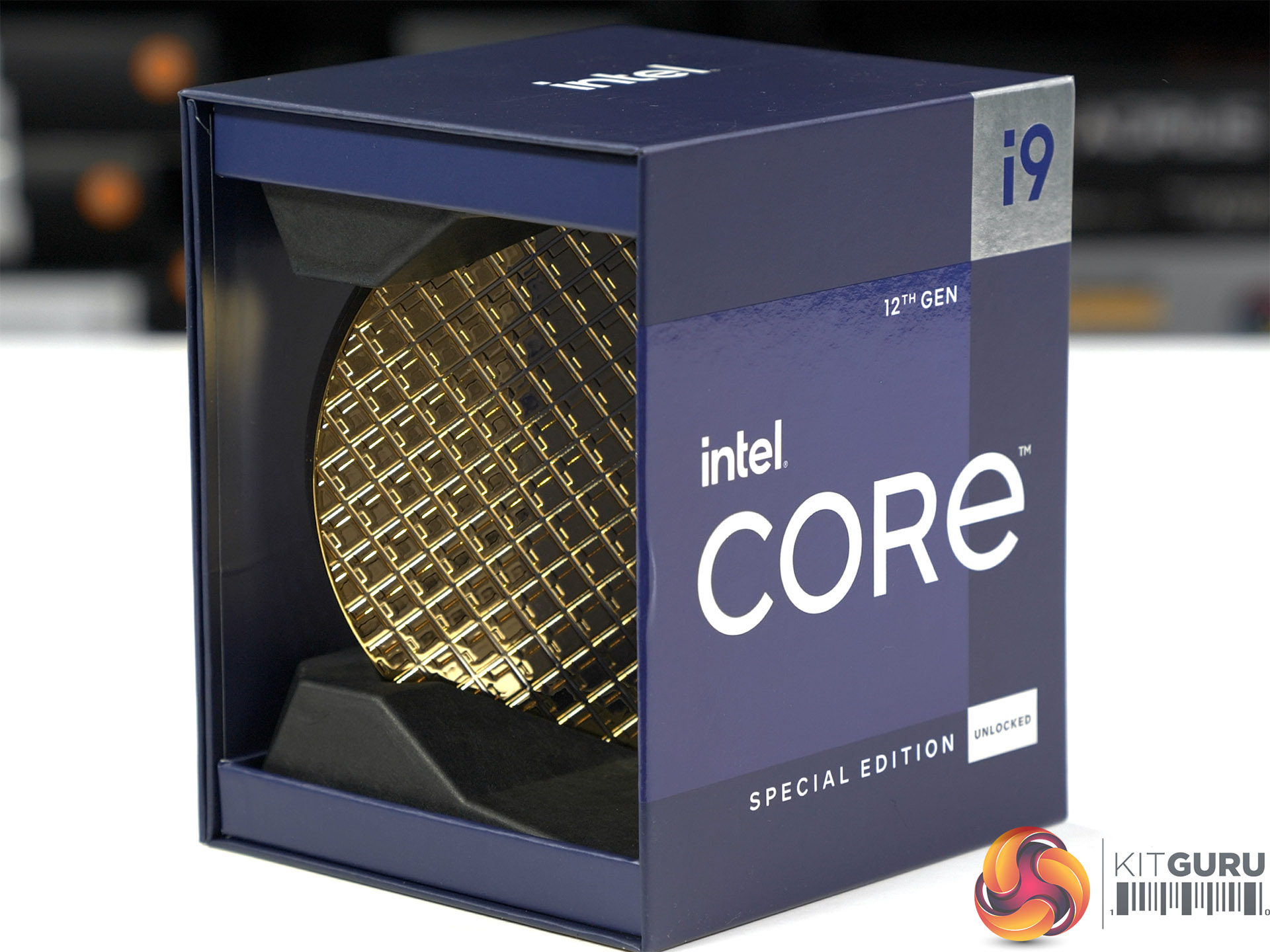
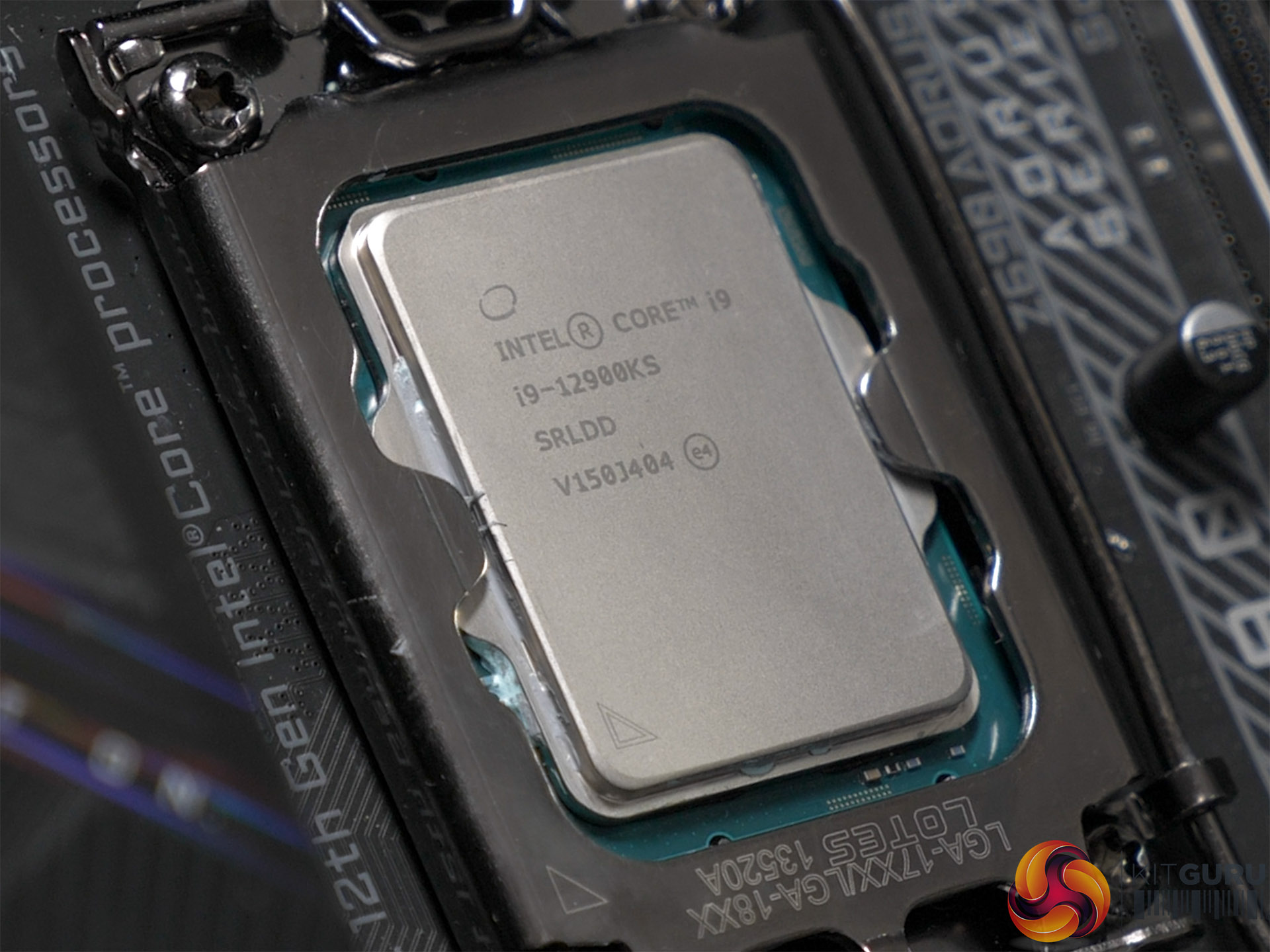
Intel introduced us to the concept of the KS processor in 2019 as you can see in Luke's review of the Core i9-9900KS. While we don't think it makes much sense to call a Special Edition KS when you could just as easily call it SE, the principle is easy enough to grasp. Intel selects the best CPUs in a process named binning, plonks them in a pretty package and jacks up the price. You pay more money for a CPU that draws more power and demands better cooling and in return you get higher clock speeds and better performance.
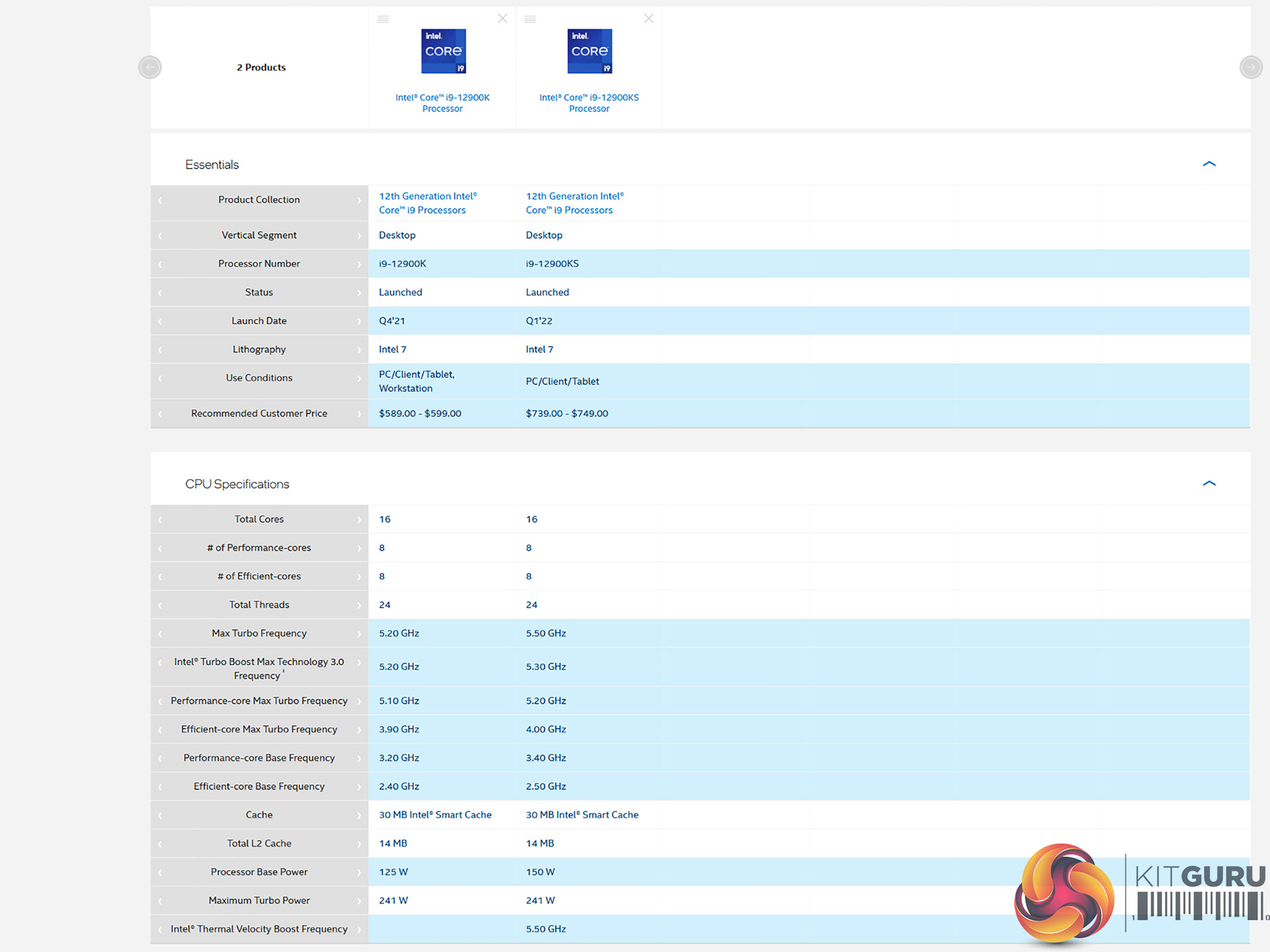
You can compare the Core i9-12900K and Core i9-12900KS by clicking this link however the key points are these:
- Core i9-12900K runs at 5.3GHz on one core and 5.0GHz on all cores.
- Core i9-12900KS runs at 5.5GHz on two cores and 5.2GHz on all cores.
- Base power increased from 125W to 150W. Maximum Turbo power remains at 241W.
- The KS is not part of Intel’s Stable IT Platform Program.
Testing
In our video we explain how we started our review process by testing with the Core i9-12900K CPU on a Gigabyte Z690 Aorus Master motherboard and then switched over to the Core i9-12900KS, fully expecting to see a boost in performance. Instead we ran into a few issues and first switched out the motherboard for an MSI MEG Z690 Unify and then replaced the Corsair H150i Elite LCD for a custom loop arrangement.
Test System:
- Processor: Intel Core i9-12900KS (16 cores/24 threads)
- CPU Cooler: Corsair H150i Elite LCD
- Motherboards:
- Gigabyte Z690 Aorus Master
- MSI MEG Z690 Unify
- Memory: 32GB Corsair Vengeance DDR5-5200
- Graphics card: Palit RTX 3080 Gaming Pro 10GB
- Power supply: Seasonic Prime Titanium 850W
- SSD: 500GB Sabrent Rocket 4.0 M.2 NVMe
- OS: Windows 11
Custom Loop Cooling:
- CPU Block: Corsair XC7 RGB Pro
- Pump/reservoir: EK-XRES 100 DDC MX 3.1 PWM
- Radiator: EK Coolstream SE360
- Fans: 3x Phanteks T30
CPU Testing
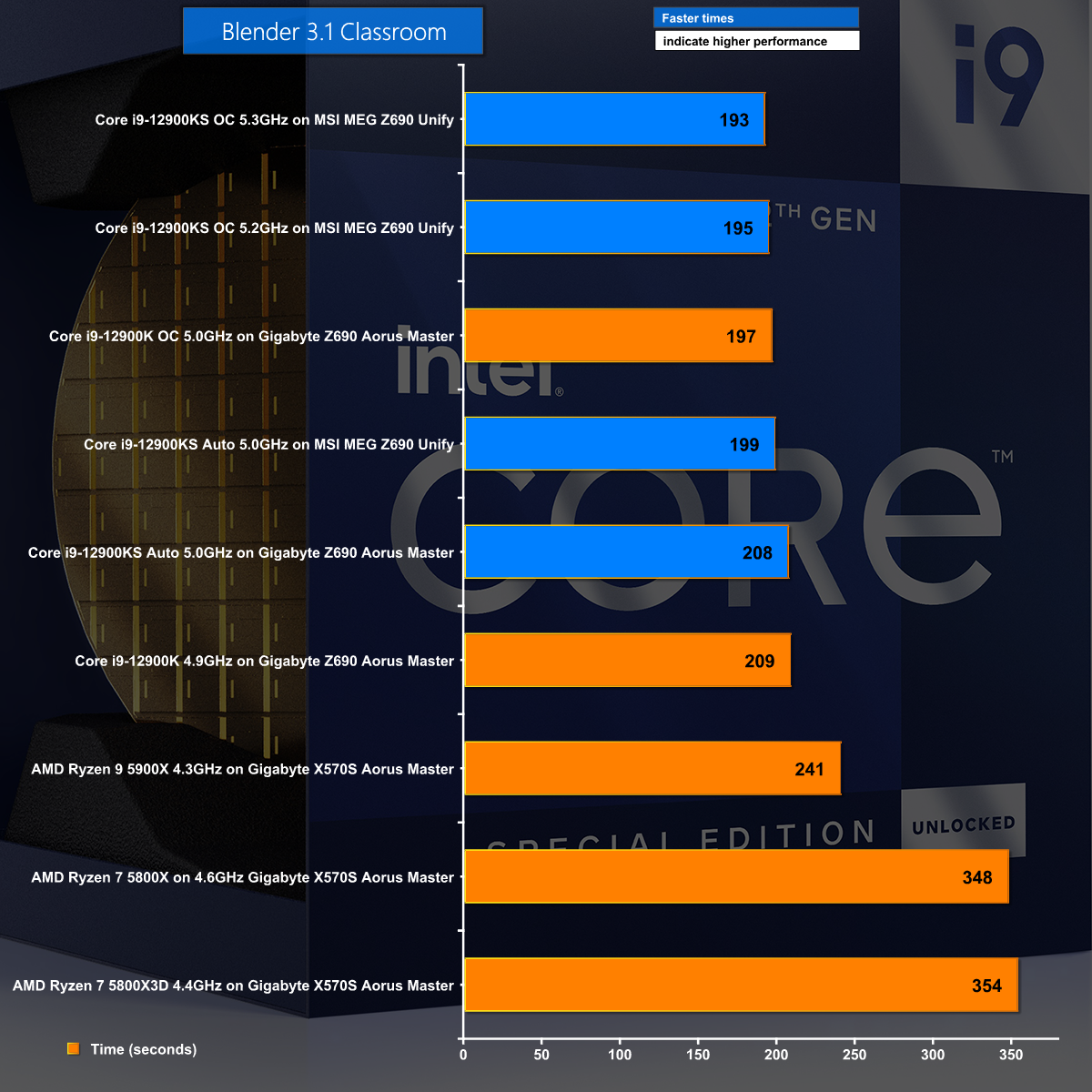
In Blender 3.1we can see that higher clock speeds deliver better performance. It is a nice, simple narrative that shows the KS in a good light.
BAPCo CrossMark
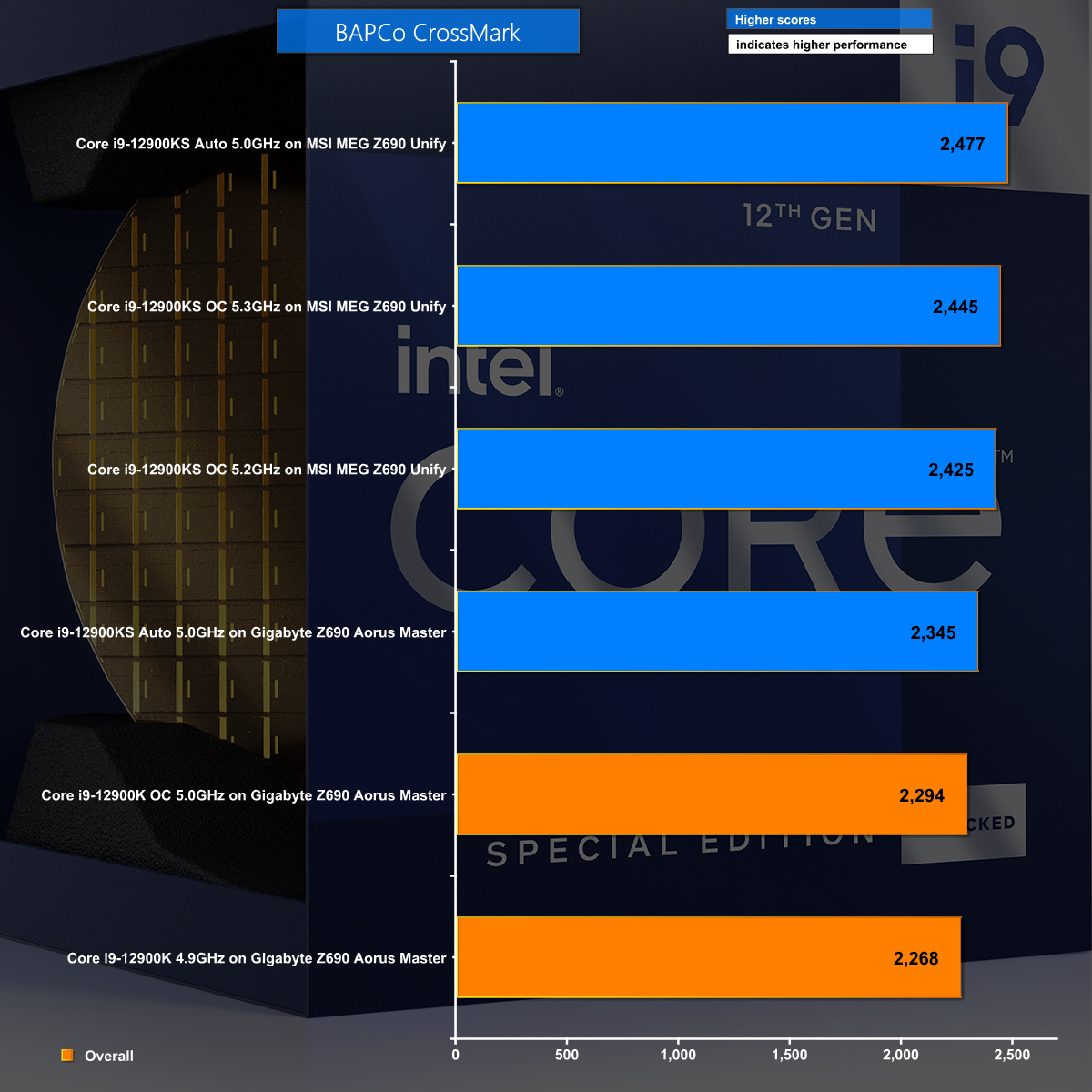
BAPCo CrossMark is interesting as the KS on Auto settings tops the chart by a small margin which suggests the bursty increase in clock speeds delivers better results than a fixed speed overclock.
Cinebench R15 Single Core
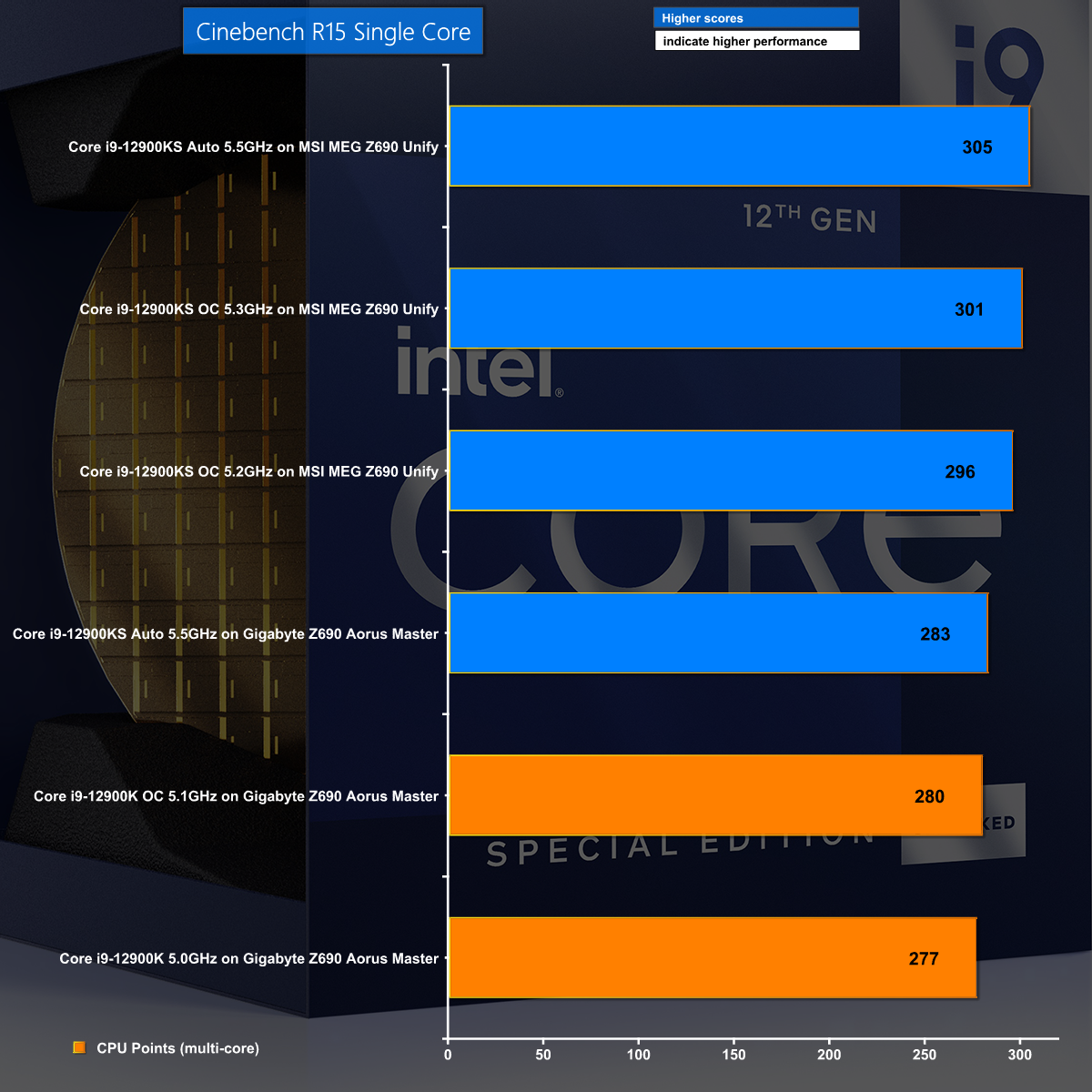
In Cinebench R15 Single Core the KS tops the chart on Auto settings thanks to its 5.5GHz clock speed.
Cinebench R15 Multi Core
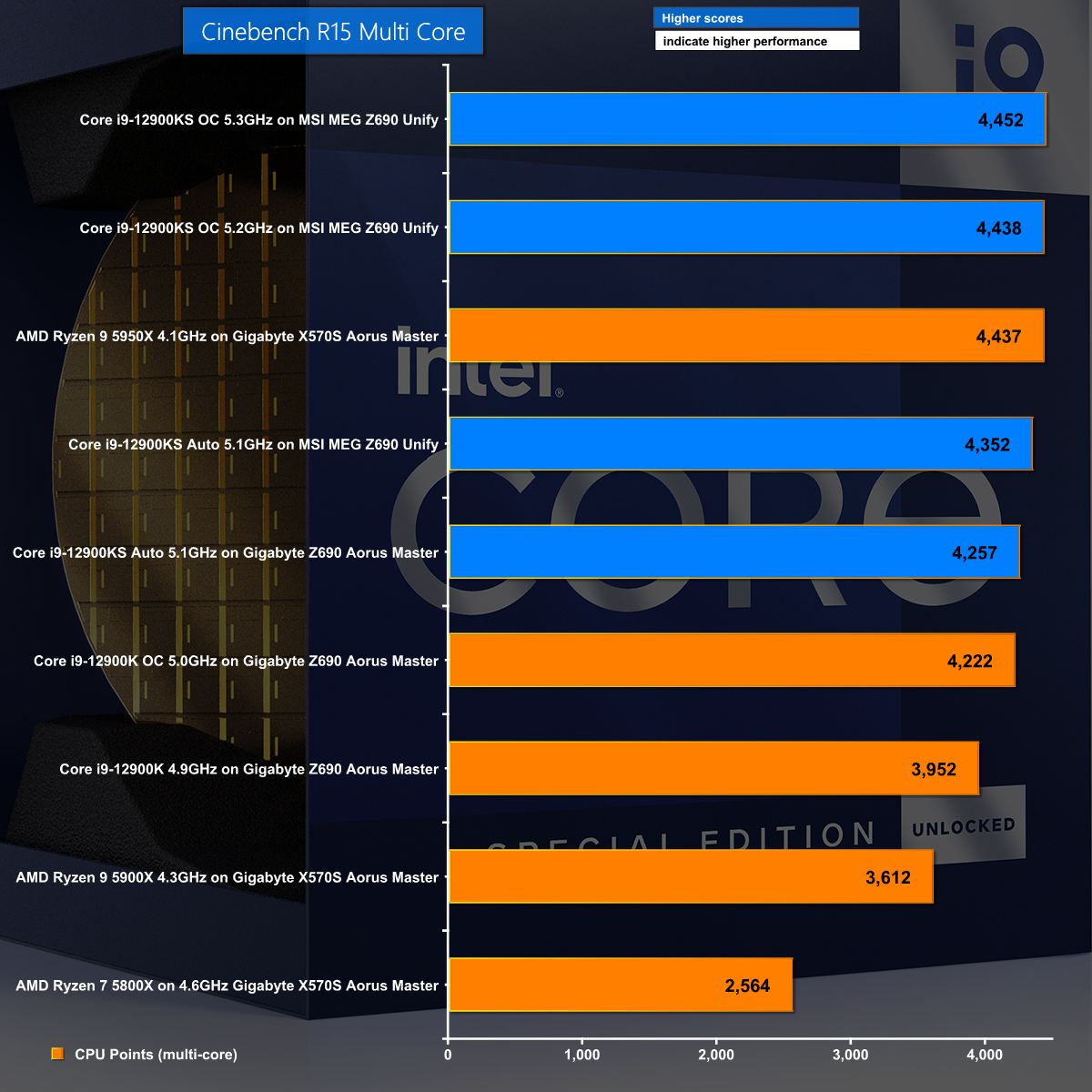
Cinebench R15 Multi Core plays to the strengths of the overclocked KS which manages to beat the mighty Ryzen 9 5950X.
Cinebench R23 Single Core
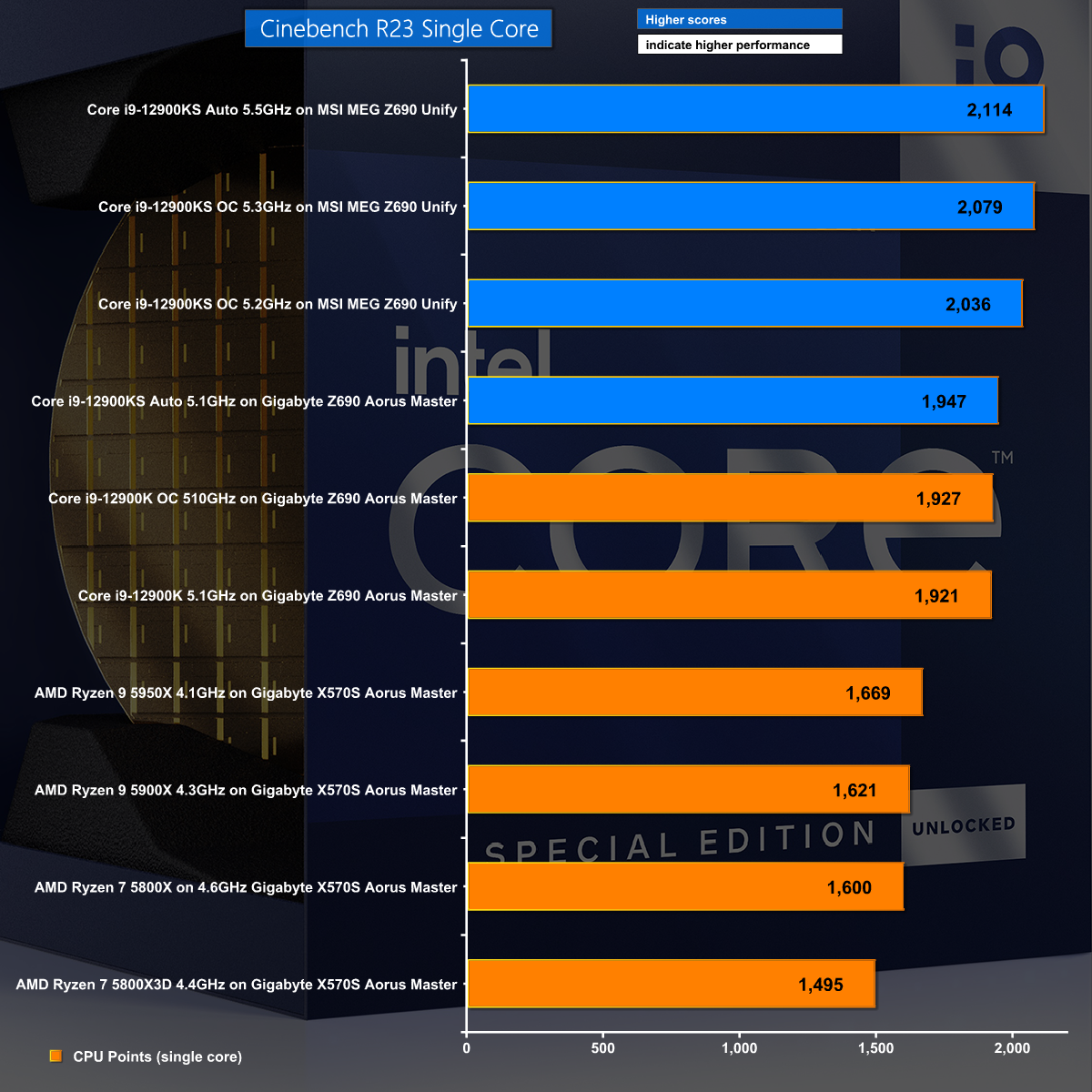
The Cinebench R23 Single Core benchmark test shows the KS in the best possible light, crushing the competition with its huge Boost speed and galloping along at a furious pace.
Cinebench R23 Multi Core
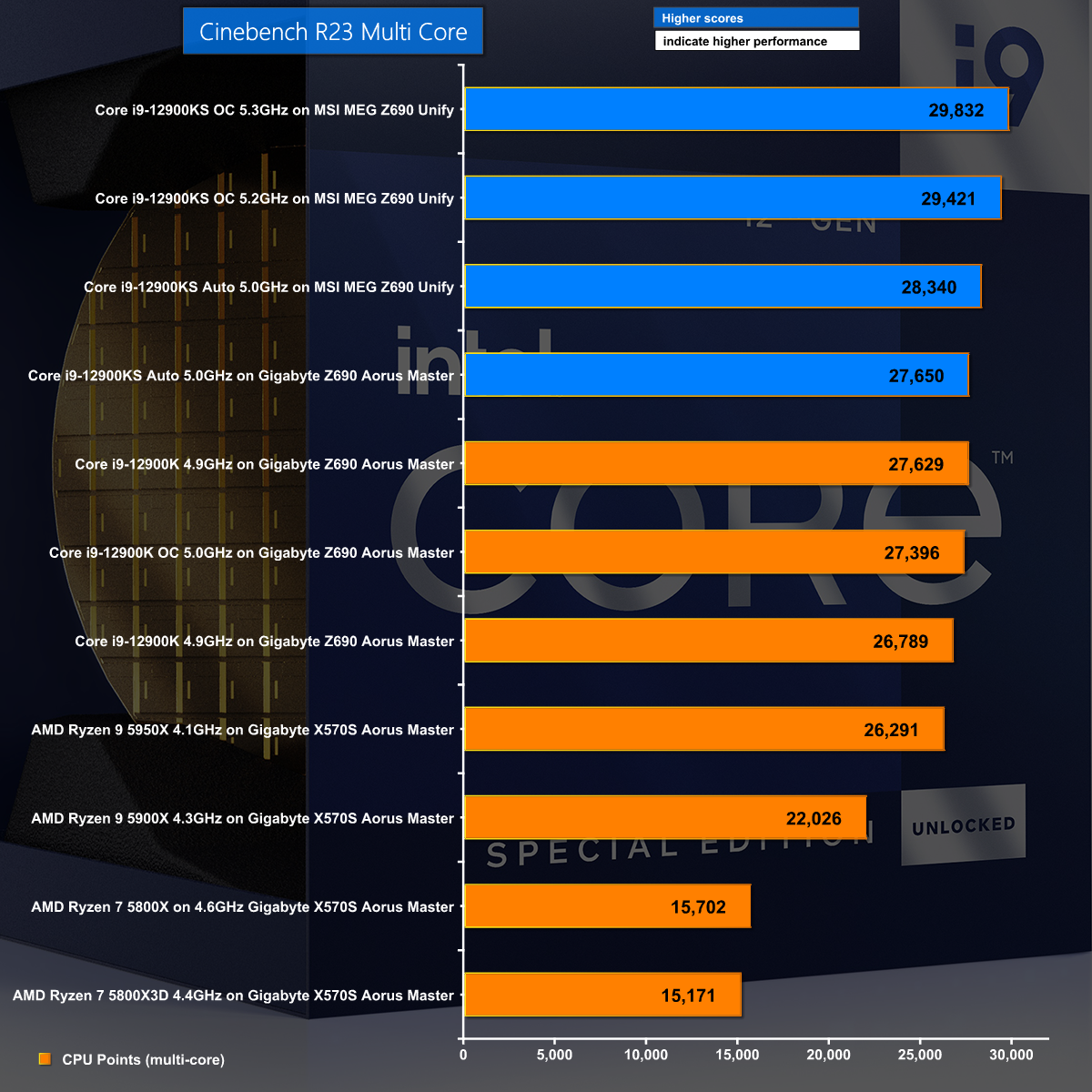
By contrast the Cinebench R23 Multi Core test shows the KS in a more nuanced light. As we show in our video, the initial run on Auto was nothing special and we had to work on voltage settings, clock speeds and CPU cooling to finally deliver the results we had been expecting.
Handbrake H.264
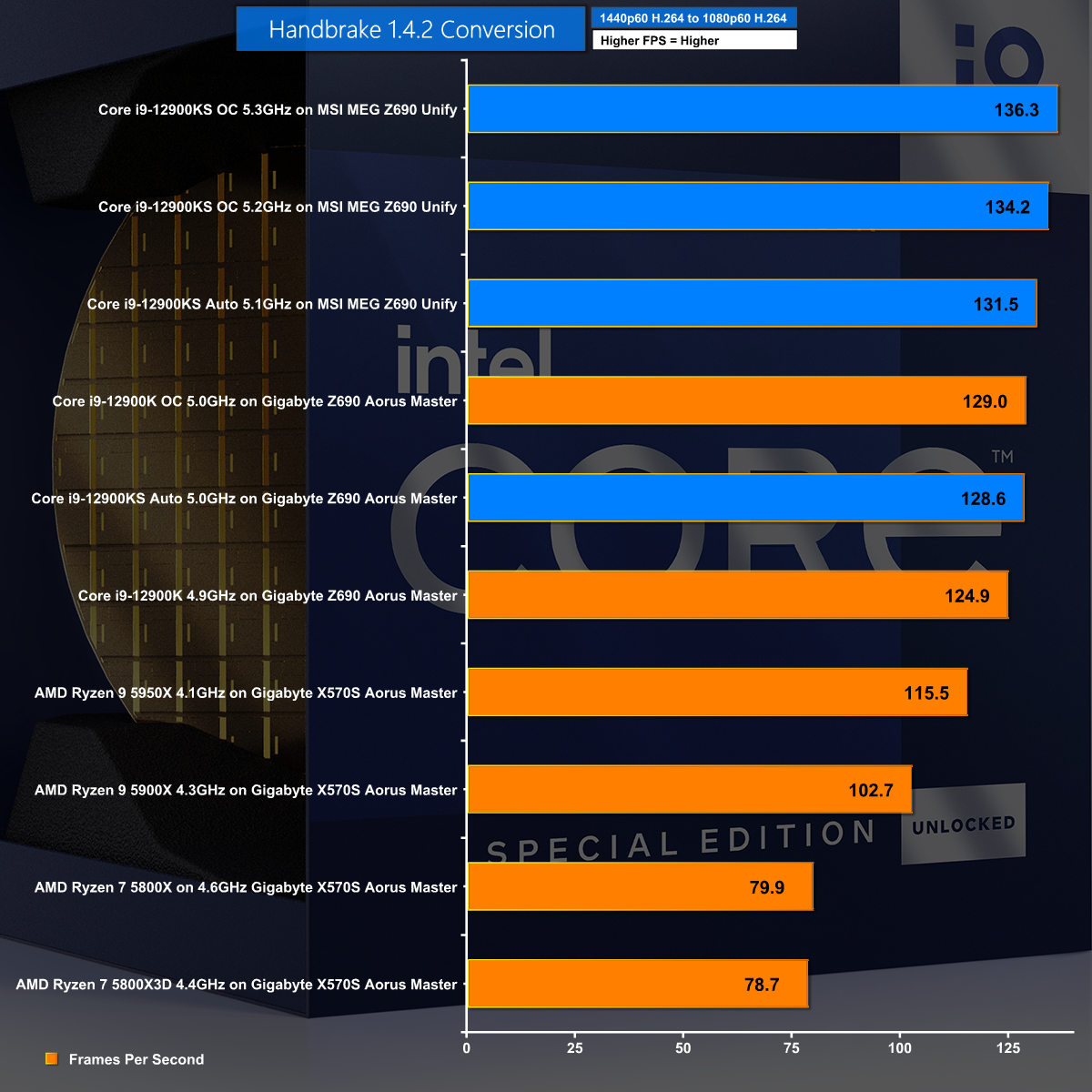
Handbrake H.264 shows a wide spread of performance between the Ryzen 7 at the bottom and Ryzen 9 in the middle. At the top of the chart we have the overclocked KS running at 5.3GHz.
Handbrake H.265
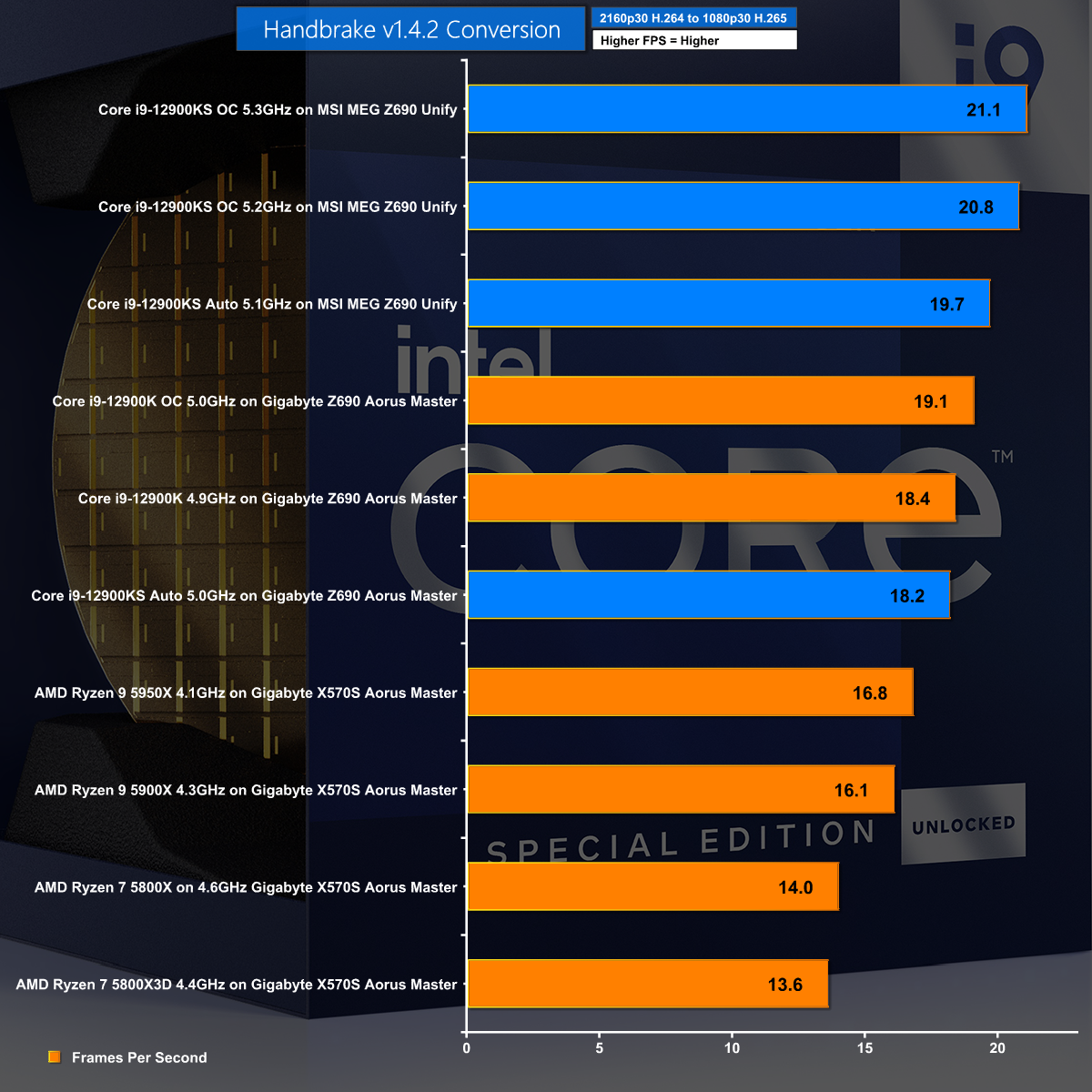
Our Handbrake H.265 chart is also dominated by the mighty overclocked KS running at 5.3GHz.
3DMark Time Spy – CPU Test
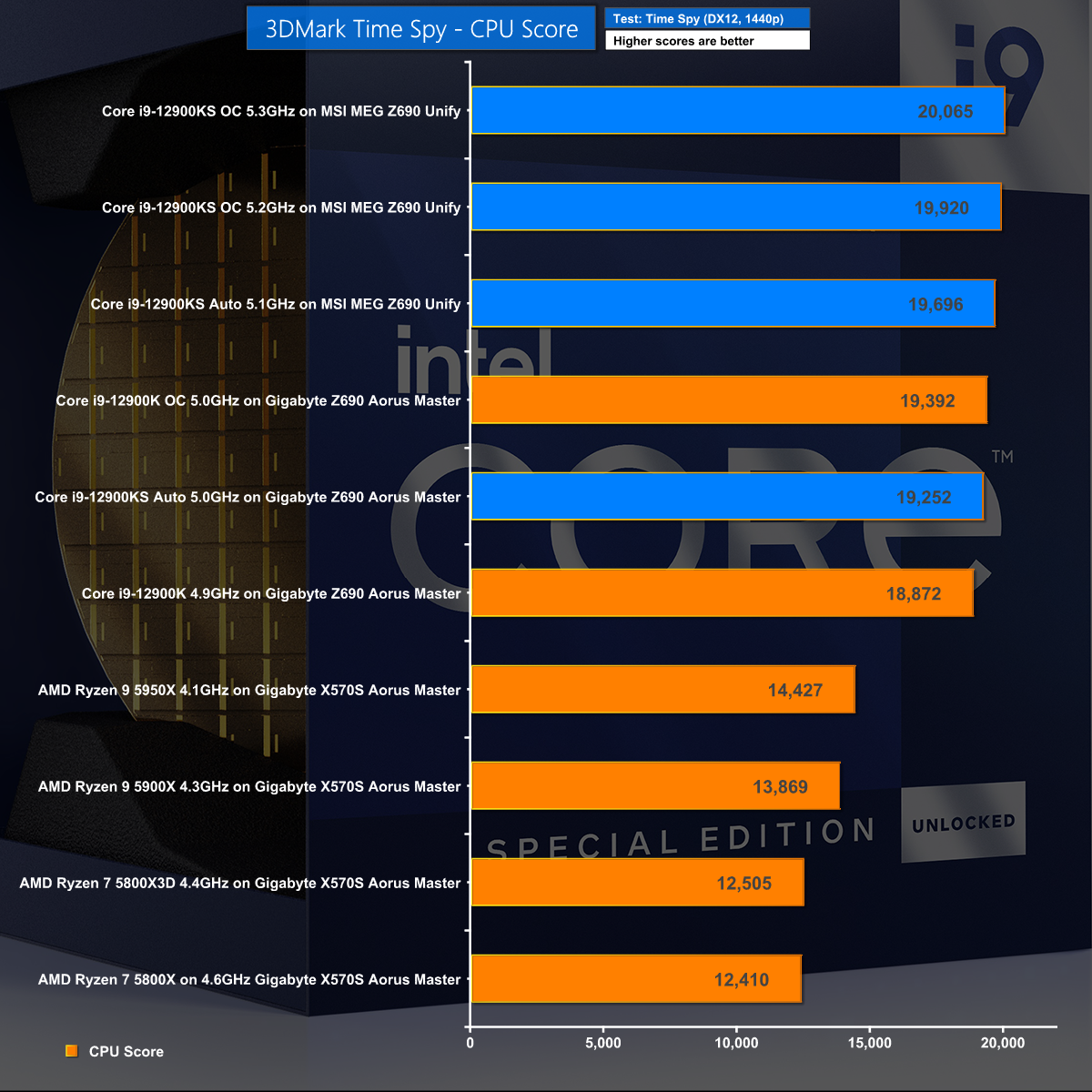
Our final CPU test is once again dominated by the overclocked Core i9-12900KS.
Far Cry 6 at 1080p
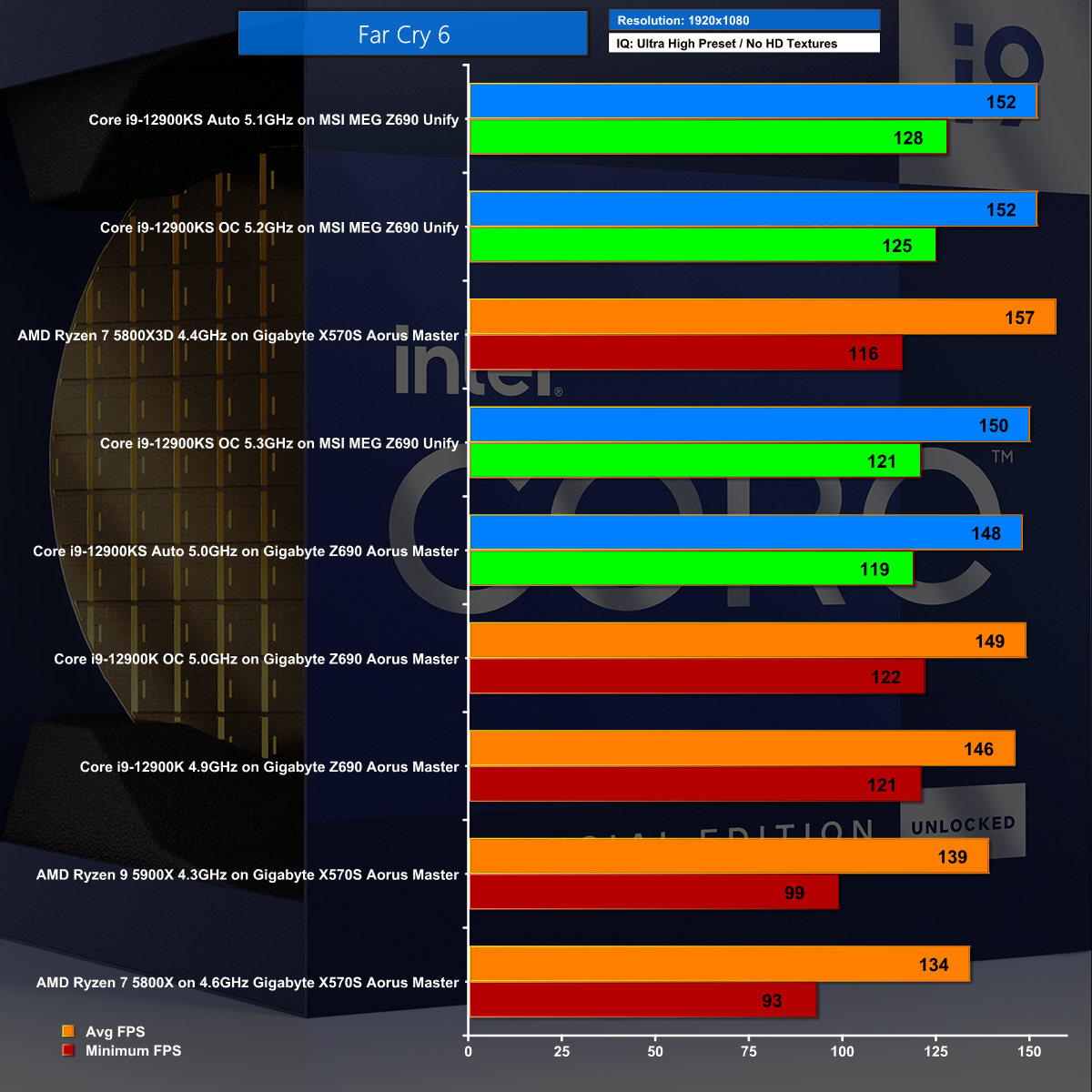
Our first gaming test is Far Cry 6 at 1080p which looks like a clear win for Intel, although the Ryzen 7 5800X 3D also makes a good showing.
Far Cry 6 at 1440p
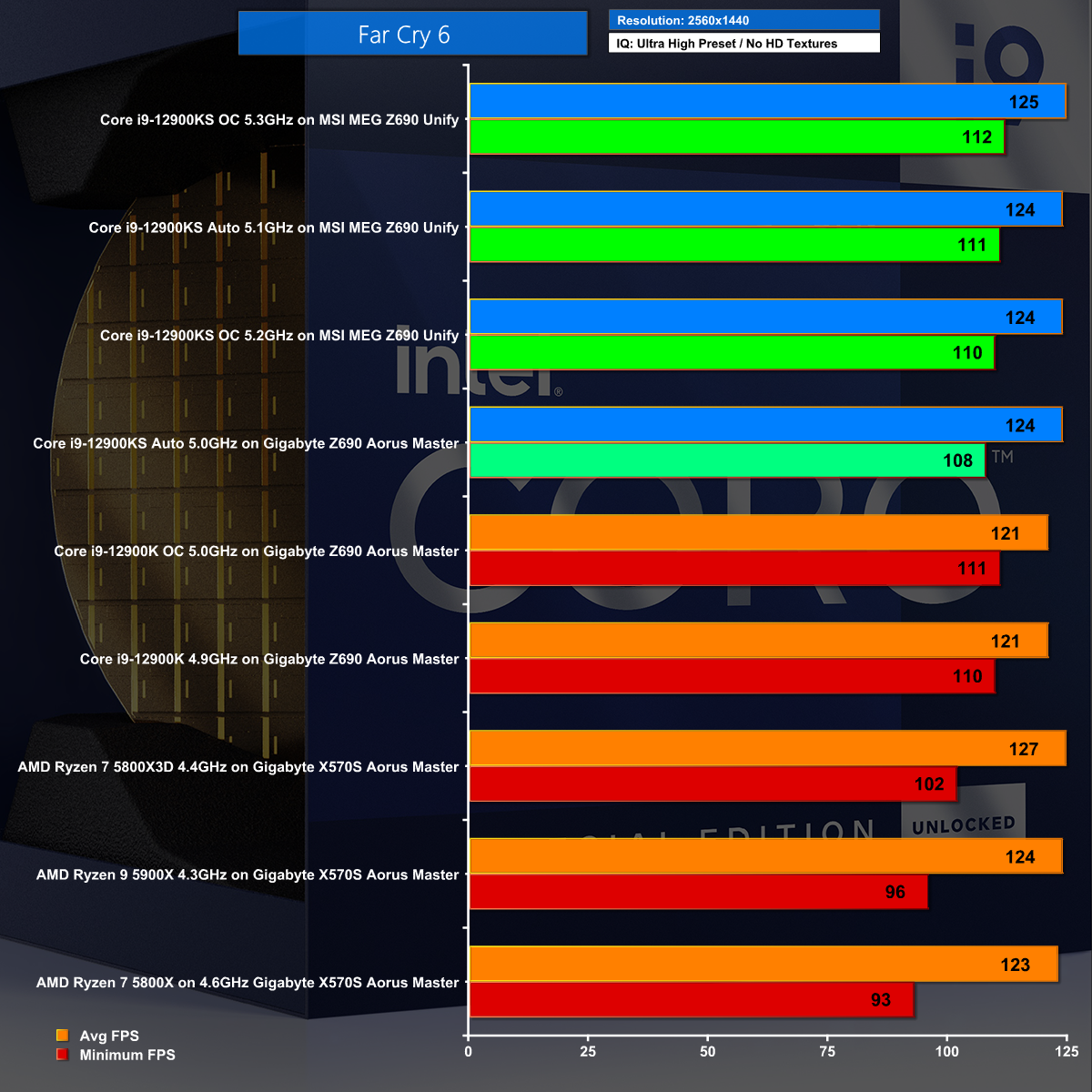
Increasing the screen resolution to 1440p in Far Cry 6 closes things up so while we see Intel winning it is fair to say there is very little to choose between one CPU and another.
Watch Dogs: Legion at 1080p
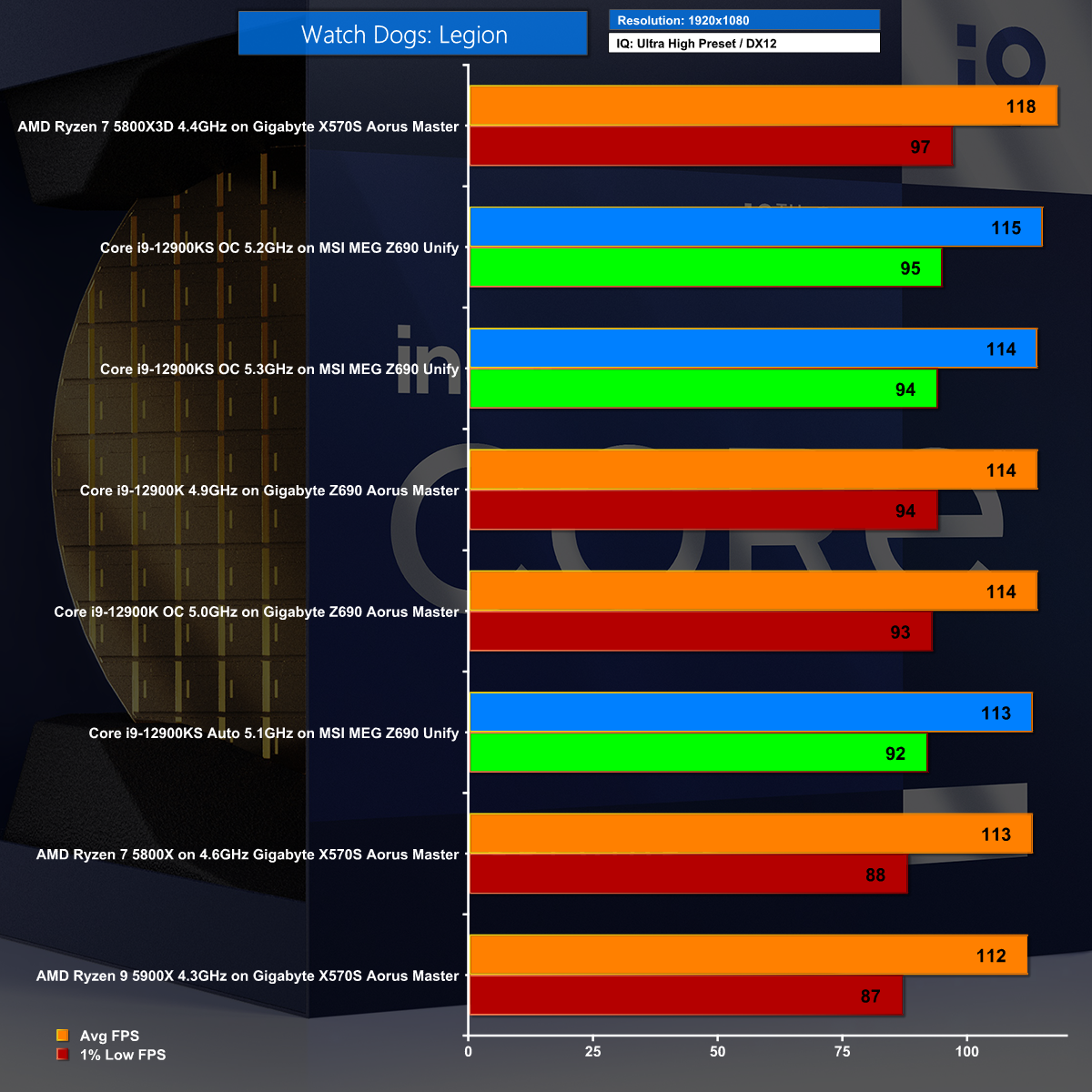
Watch Dogs: Legion at 1080p is a crazy mix of results that shows very little rhyme or reason.
Watch Dogs: Legion at 1440p
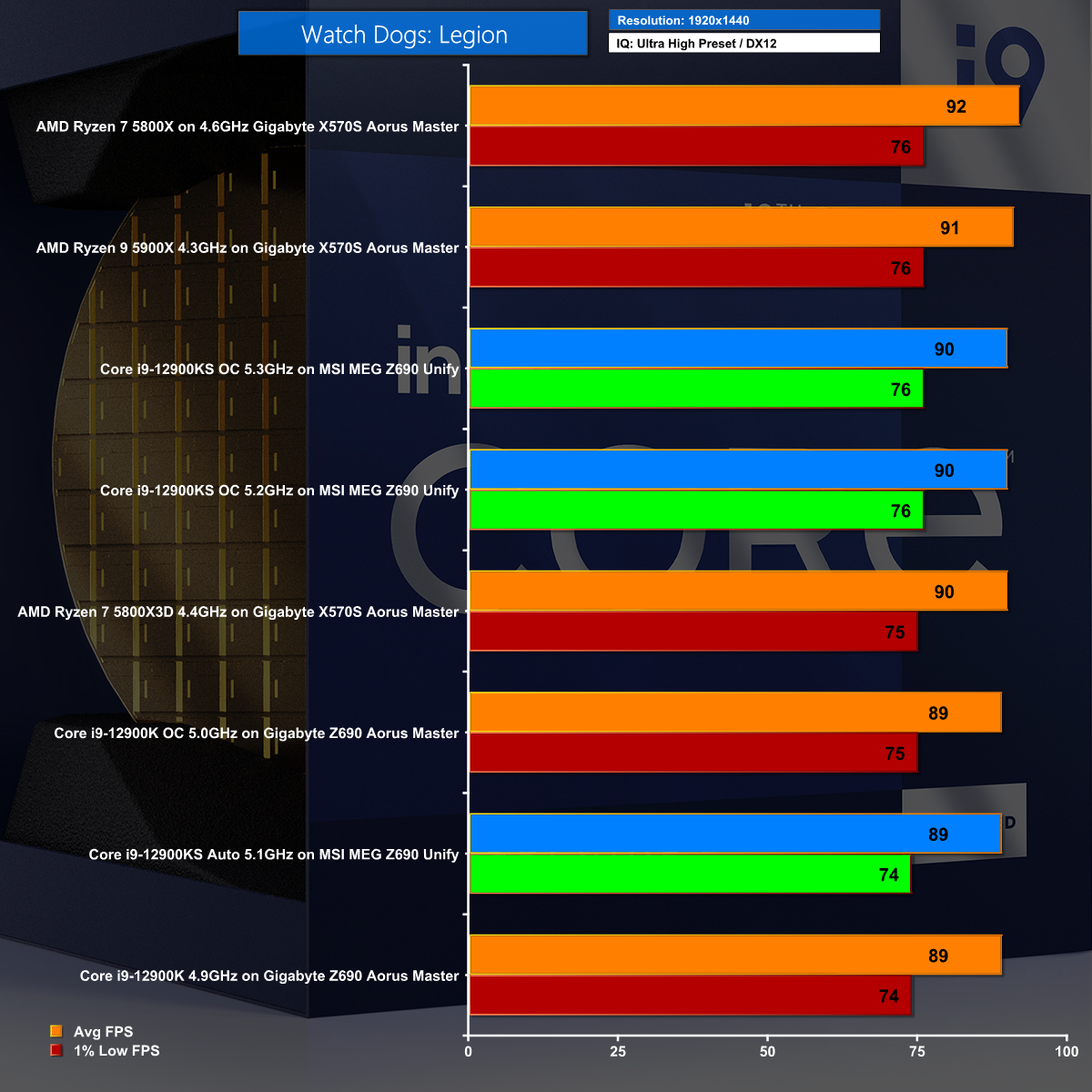
Watch Dogs: Legion at 1440p has the Ryzen 7 5800X at the top of the chart and Core i9-12900K at the bottom. We are only talking about 3fps difference from one end to the other so the fairest conclusion is that any of these CPUs will work quite nicely.
Marvel's Guardians of the Galaxy at 1080p
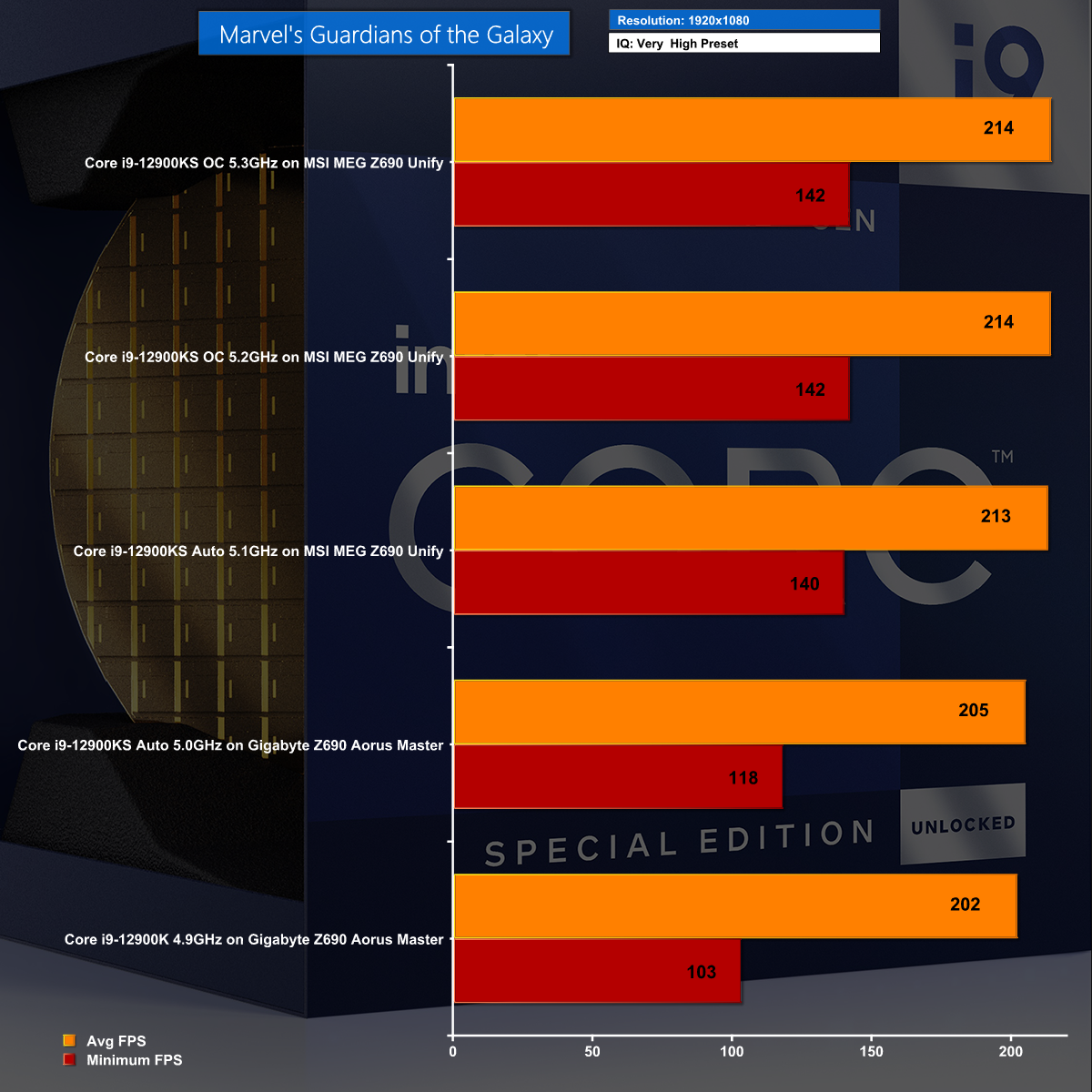
You can see a distinct benefit from the KS in Marvel's Guardians of the Galaxy at 1080p, in particular when you overclock to 5.3GHz.
Marvel's Guardians of the Galaxy at 1440p
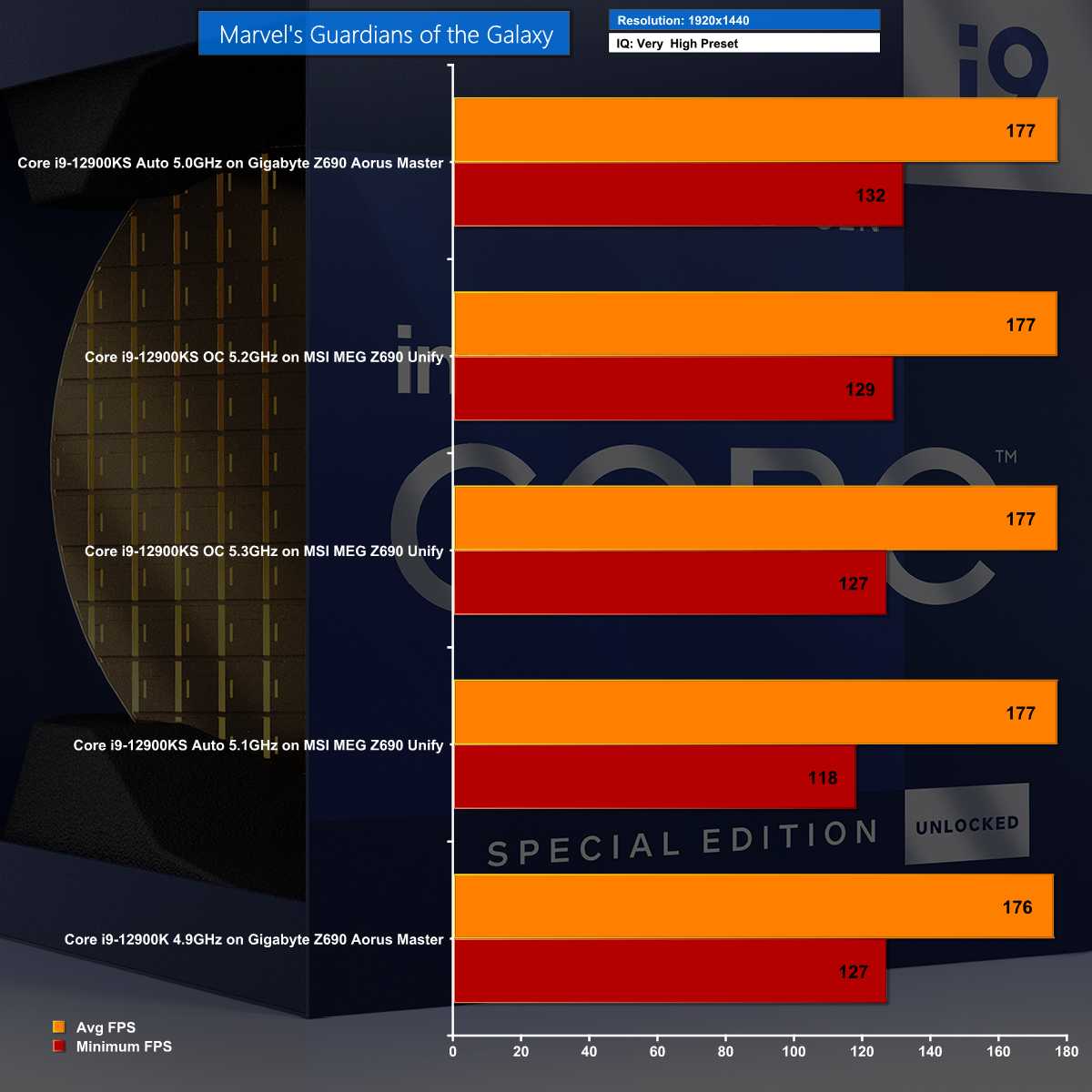
Marvel's Guardians of the Galaxy at 1440p closes the scores up so much that we cannot fairly draw a useful conclusion.
CPU Temperature
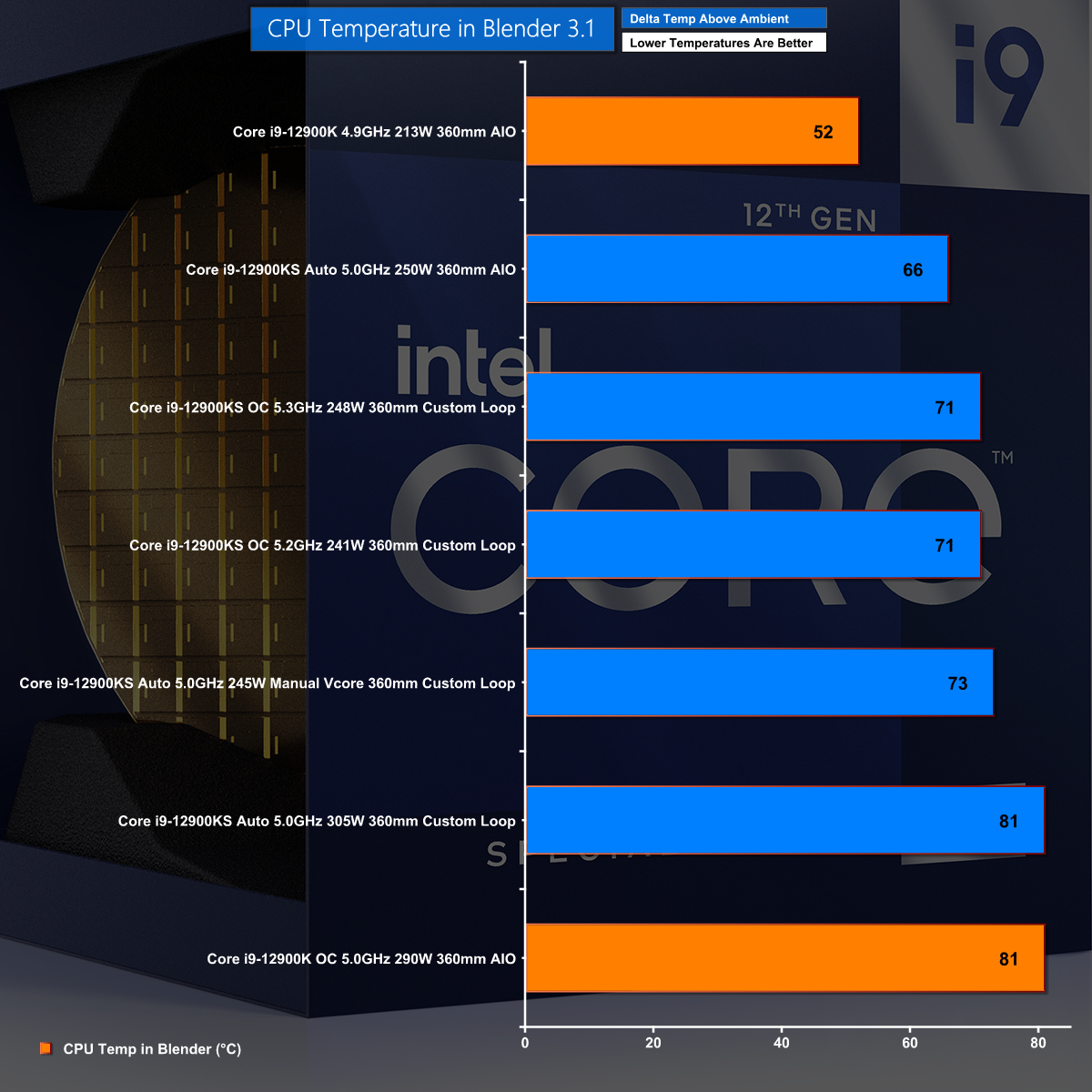
We ran through these results in some detail in our video but the main takeaway is that the KS will struggle on AIO cooling and pretty much requires a full custom loop system.
CPU Power Consumption
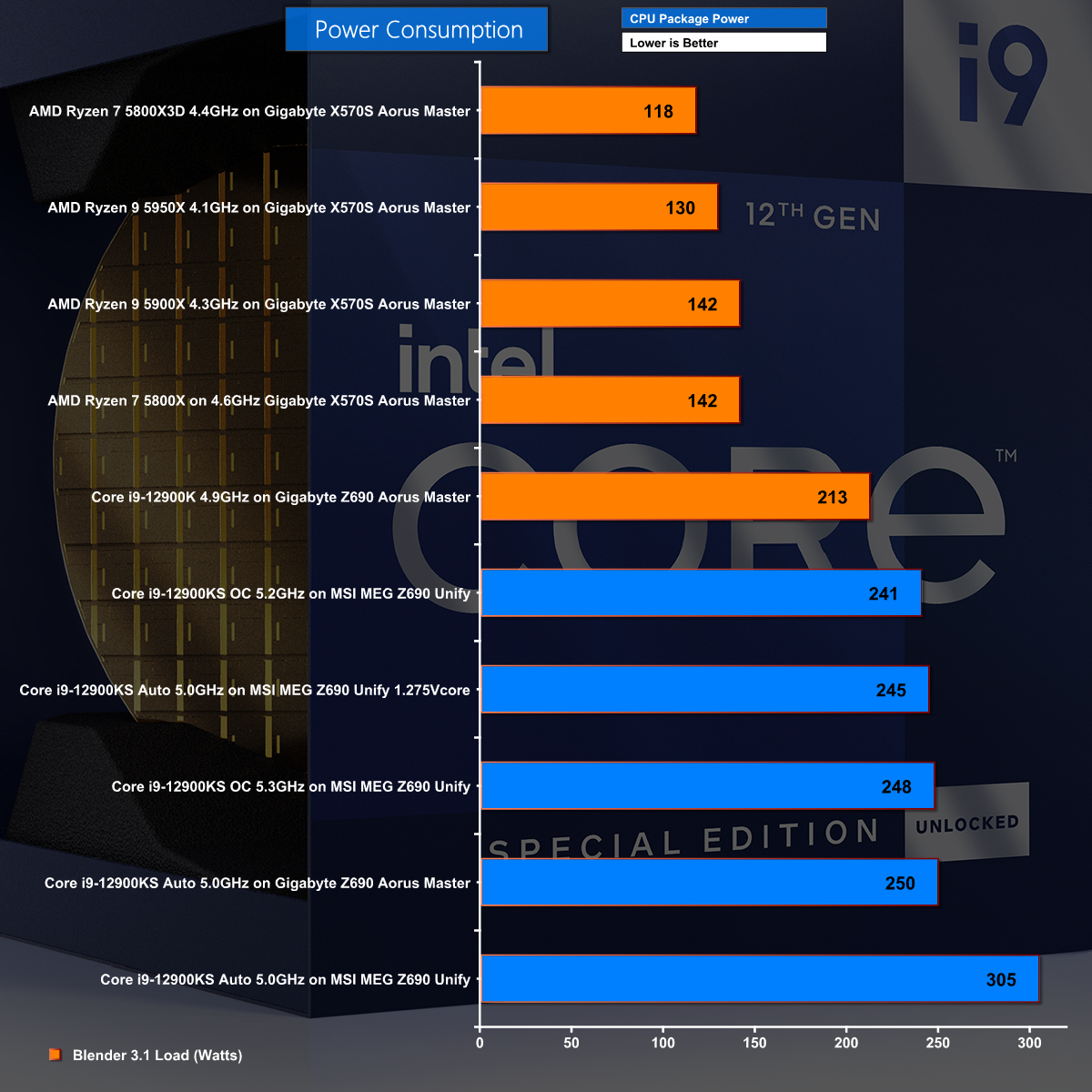
This chart is a horror show for Intel. The Core i9-12900K on Auto looks OK at 213W in Blender and then we step up to the overclocked KS with manual voltage settings at 250W which is getting nasty. The real problem is the MSI MEG Z690 Unify which feeds the CPU with 305W on Auto settings.
If you take one thing away from this review, please let it be that you should work with your KS settings and avoid Auto settings wherever possible.
We fully expected the Core i9-12900KS would draw too much power and produce too much heat, however we did not predict the results that we saw.
Gigabyte fed the CPU with 250W, which is in line with Intel's specification, and the performance was fairly lousy. By contrast MSI slammed the CPU with 305W which overwhelmed our Corsair AIO cooler and required a change to custom loop. That helped the situation and while temperatures were high, we saw decent performance and were reasonably happy with that state of affairs.
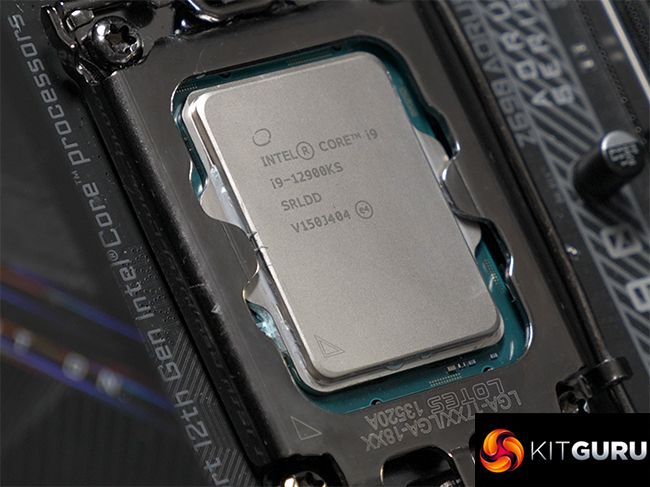
Once we dug in and set the Vcore manually and then raised clock speed we saw a different side to the KS. This CPU has the ability to deliver enormous performance and can work very nicely indeed in a high end gaming PC. Clearly you will be spending a tidy sum on your motherboard, graphics card and power supply and will also need to budget for a proper cooling system.
Provided you go all-in you will find the Core i9-12900KS delivers stellar results however the expenditure in time and money, along with the levels of power you require mean this CPU looks more like a white elephant than a practical choice.

You can buy the intel Core i9-12900KS for £749.99 from Overclockers UK HERE.
Discuss on our Facebook page HERE.
Pros:
- Stunning performance.
- Z690 platform with DDR5 can handle almost anything.
Cons:
- So much power, so much heat.
- BIOS support is patchy.
- The value-for-money argument is awful.
KitGuru says: Core i9-12900KS has blazing performance but mainly demonstrates how Intel desperately needs to improve power draw and efficiency.