KitGuru KitGuru.net – Tech News | Hardware News | Hardware Reviews | IOS | Mobile | Gaming | Graphics Cards


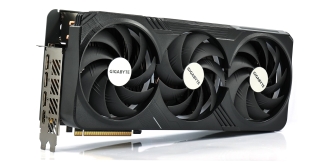
Alongside our launch day review of the new Nvidia RTX 4080 Super Founders Edition, we also have a couple of partner cards in for testing. The Gigabyte Gaming OC is one such model, featuring a near quad-slot cooler, dual-BIOS and factory overclocked core. The Gaming OC lineup has impressed us in the past, so let's find out how this new 4080 Super model stacks up…
It was just over a year ago that we reviewed Gigabyte's RTX 4090 and 4080 Gaming OC models and the RTX 4080 Super Gaming OC picks up where those two cards left off. It features a gargantuan cooler, with the addition of some RGB lighting, a metal backplate and a modest 45MHz factory overclock. Landing with an MSRP of £1059.99, Gigabyte is charging a 10.5% premium over the £959 baseline, so let's find out if it's worth buying.
| RTX 4090 | RTX 4080 Super | RTX 4080 | RTX 4070 Ti Super | RTX 4070 Ti | |
| Process | TSMC N4 | TSMC N4 | TSMC N4 | TSMC N4 | TSMC N4 |
| SMs | 128 | 80 | 76 | 66 | 60 |
| CUDA Cores | 16384 | 10240 | 9728 | 8448 | 7680 |
| Tensor Cores | 512 | 320 | 304 | 264 | 240 |
| RT Cores | 128 | 80 | 76 | 66 | 60 |
| Texture Units | 512 | 320 | 304 | 264 | 240 |
| ROPs | 176 | 112 | 112 | 96 | 80 |
| GPU Boost Clock | 2520 MHz | 2550 MHz | 2505 MHz | 2610 MHz | 2610 MHz |
| Memory Data Rate | 21 Gbps | 23 Gbps | 22.4 Gbps | 21 Gbps | 21 Gbps |
| L2 Cache | 73728 KB | 65536 KB | 65536 KB | 49152 KB | 49152 KB |
| Total Video Memory | 24GB GDDR6X | 16GB GDDR6X | 16GB GDDR6X | 16GB GDDR6X | 12GB GDDR6X |
| Memory Interface | 384-bit | 256-bit | 256-bit | 256-bit | 192-bit |
| Memory Bandwidth | 1008 GB/Sec | 736 GB/Sec | 716.8 GB/Sec | 672 GB/Sec | 504 GB/Sec |
| TGP | 450W | 320W | 320W | 285W | 285W |
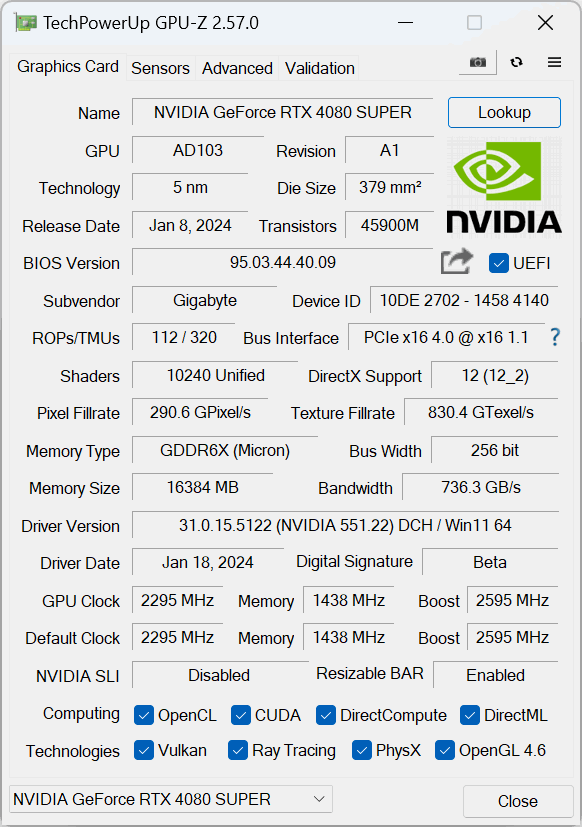
First, a quick spec recap. Unlike the RTX 4080 and RTX 4070 Ti which use cut-down versions of the AD103 GPU, the new 4080 Super is a full implementation of AD103 silicon, with the die measuring in at 379mm2. This means the RTX 4080 Super offers a total of 80 Streaming Multiprocessors (SMs), each housing 128 CUDA Cores, for a total of 10240. We also find 80 RT cores, 320 Tensor cores, 320 Texture Units, and 12 ROPs.
TSMC's N4 node has Nvidia cranking up the clock speed significantly this generation, with the RTX 4080 Super sporting a 2550MHz rated boost. That's 45MHz faster than the rated clock speed of the RTX 4080, but Gigabyte has pushed things even further, with the Gaming OC sporting a 2595MHz boost clock.
The memory configuration is almost identical to the RTX 4080, too. The 4080 Super comes equipped with a 256-bit memory interface, paired with 16GB GDDR6X running at 23Gbps, putting total memory bandwidth at 736 GB/s. L2 cache remains unchanged at 65536KB.
Considering the slightly increased core-count, it's interesting that power draw remains the same as the RTX 4080, with the new Super model still boasting a 320W TGP. This is something we focus on closely in this review, using our enhanced GPU power testing methodology, so read on for our most detailed power and efficiency testing yet.
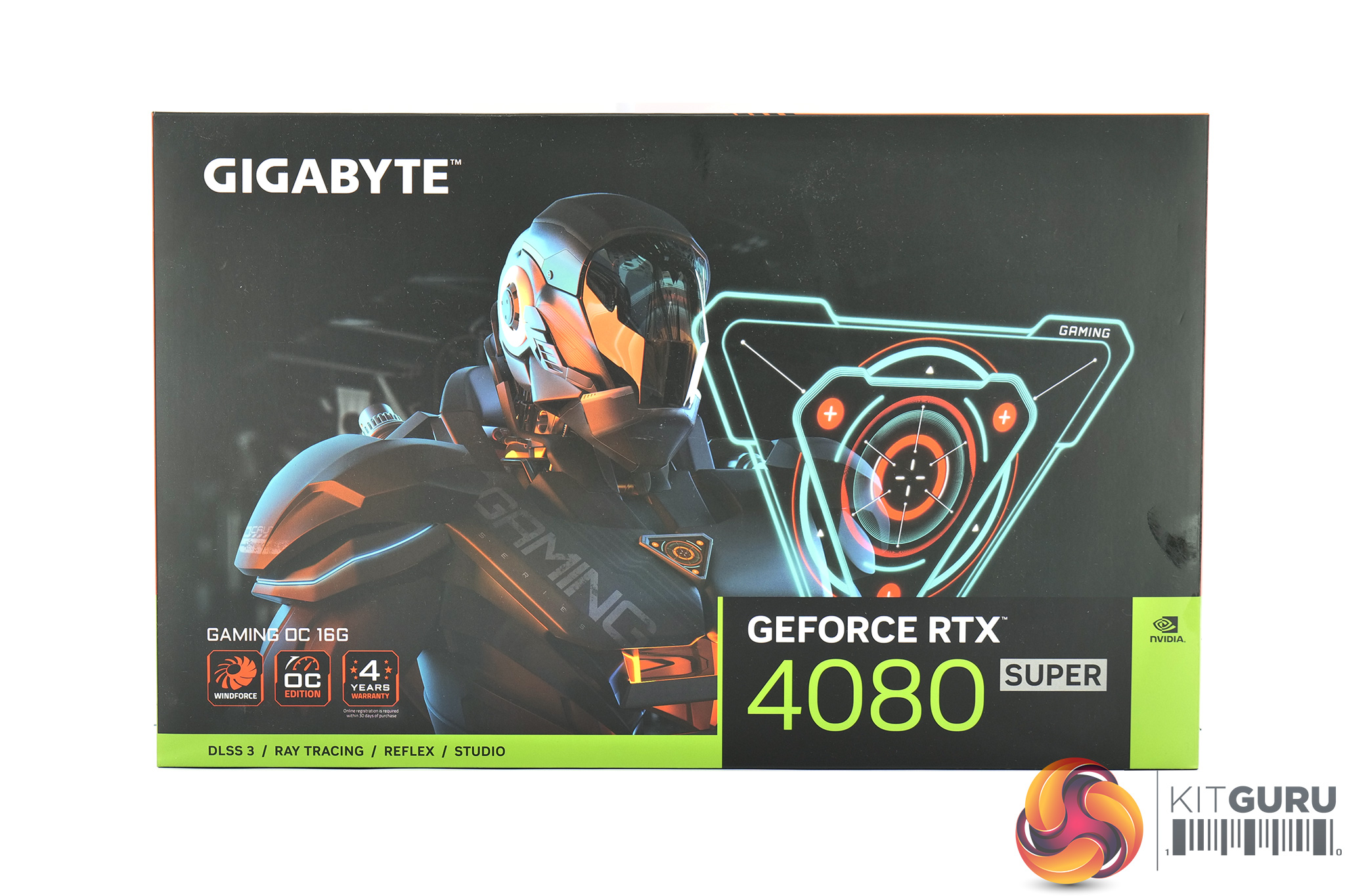
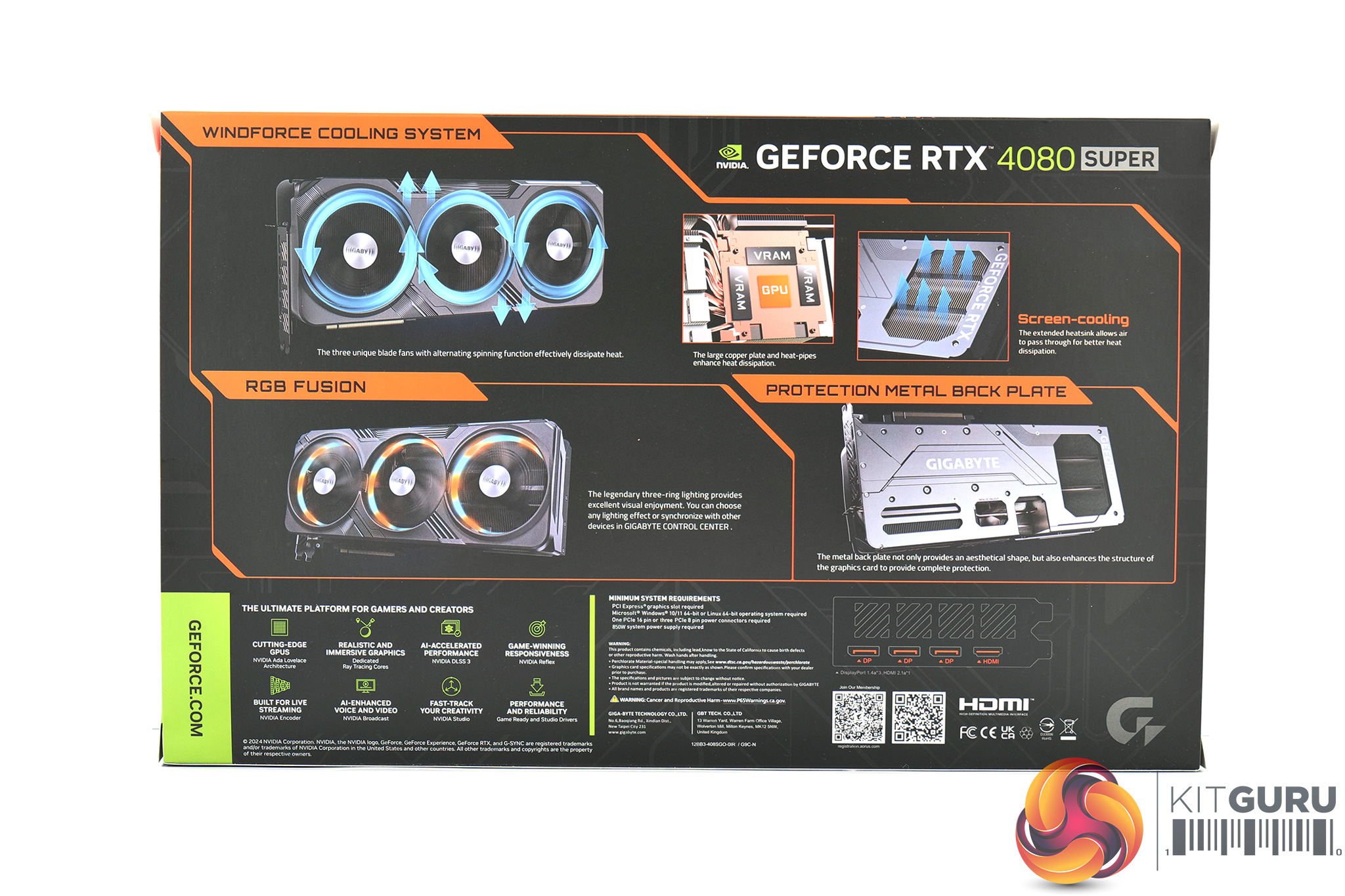
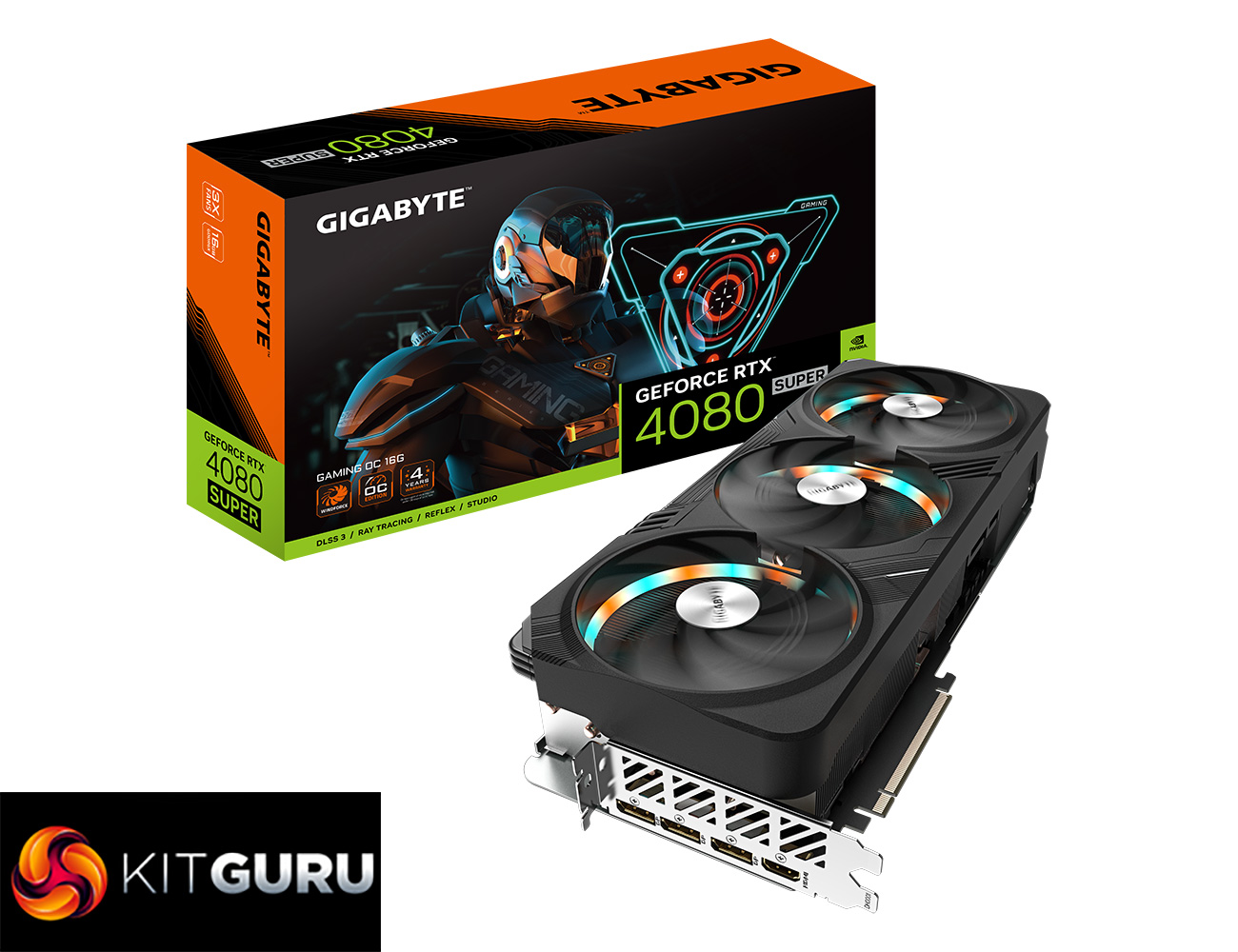
The Gigabyte RTX 4080 Super ships in a large black box, with a RoboCop style figure visible on the front. On the back, Gigabyte highlights a few key features of the Gaming OC and its Windforce 3X cooler.

Inside, we get a couple of quick start and warranty guides, along with a triple 8-pin power adapter. The final thing is a nifty GPU support bracket that screws into two motherboard standoffs to provide a solid support for the card.
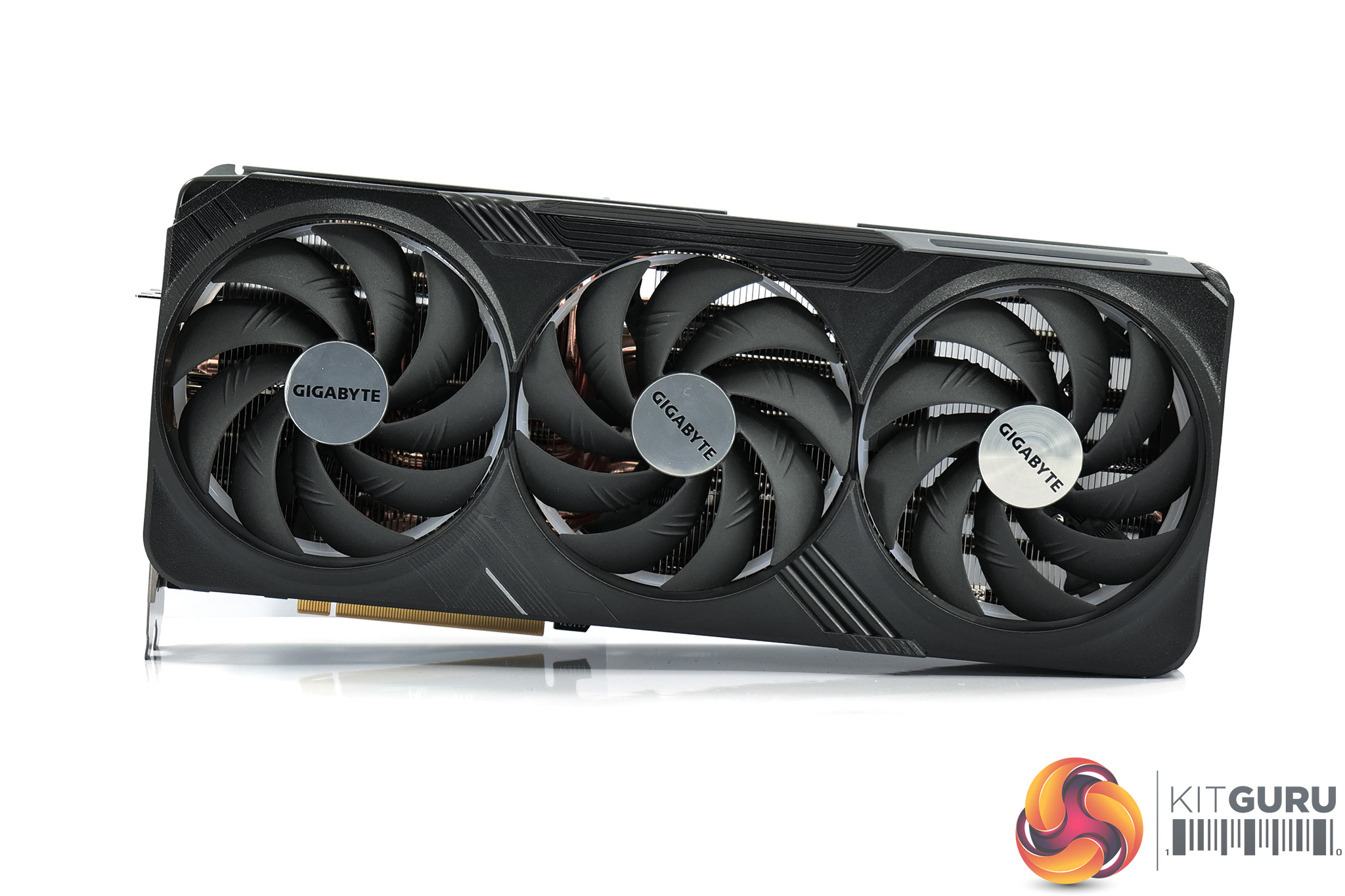
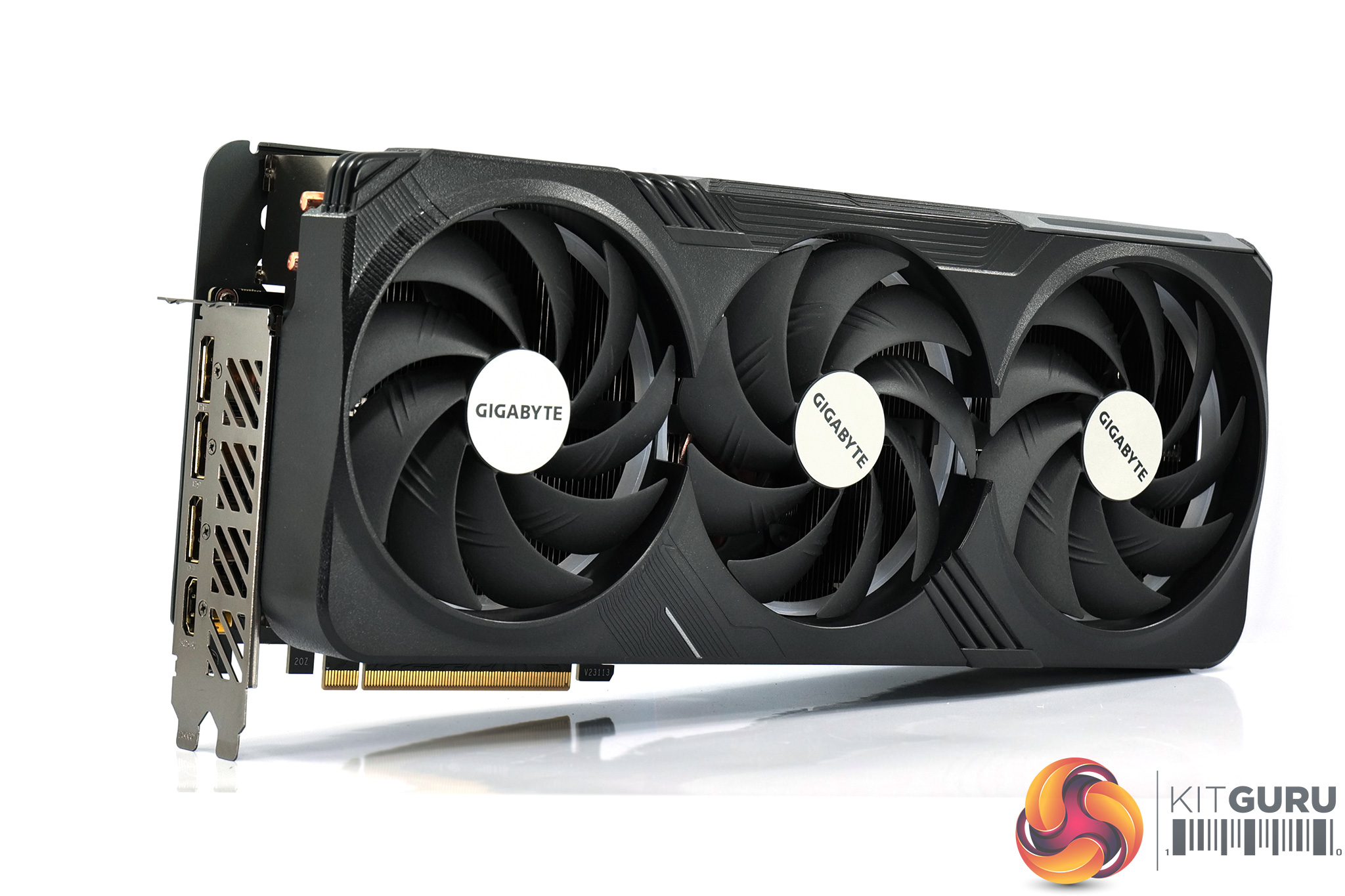
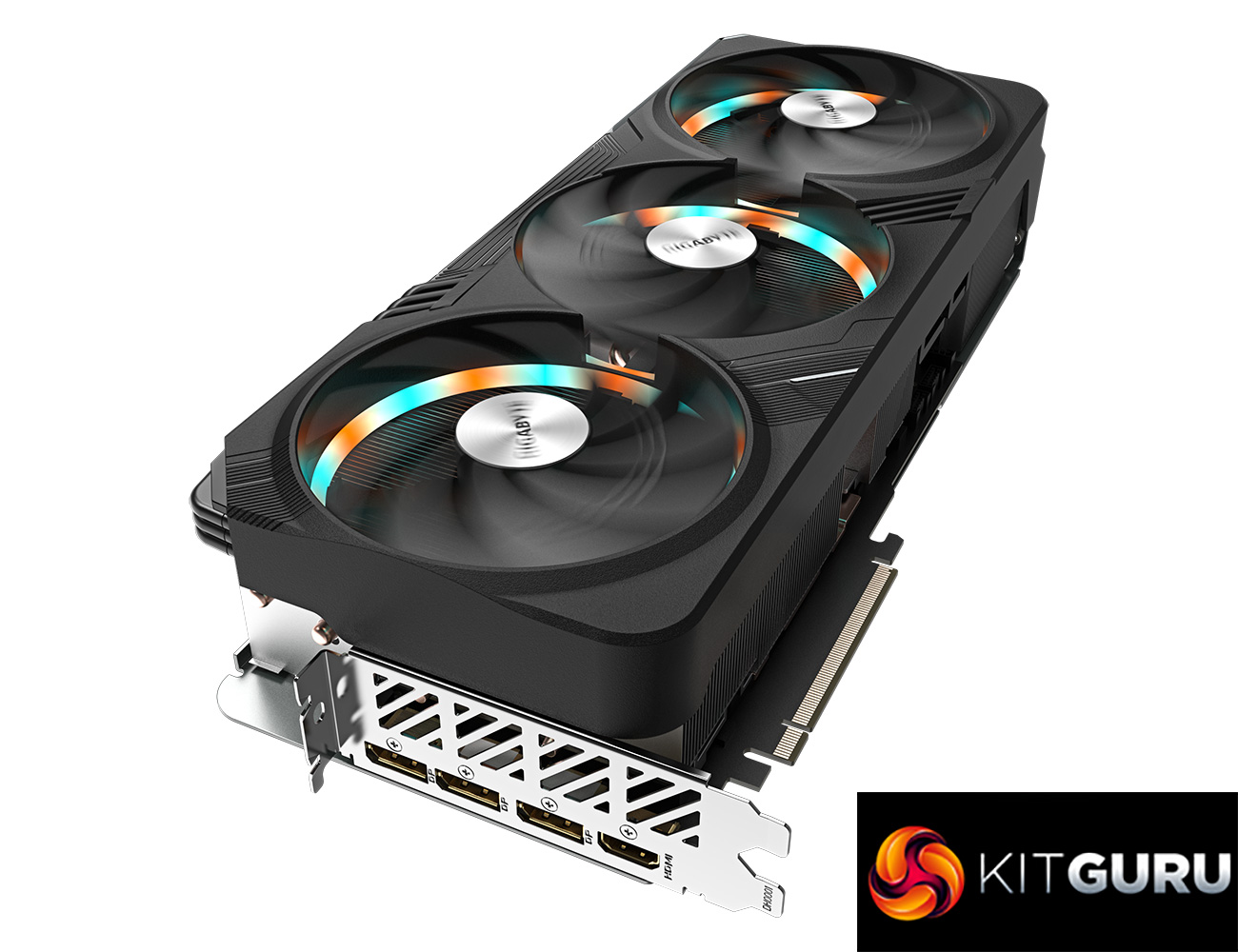
In terms of the design of the Gaming OC, as far as I can tell it is visually identical to the likes of the RTX 4080 or 4090 Gaming OC models we reviewed last year. That means it still sports a matte black shroud, which looks fine, though I have always felt the design was a little too plasticky considering the premium price point of these cards, but it doesn't matter too much once the GPU is installed in your case.
We can note the use of three 110mm fans, using Gigabyte's so-called ‘Unique Blade Fan' design. As expected from a Gigabyte card, the central fan spins in reverse relative to the others, which Gigabyte claims helps to reduce airflow turbulence and therefore increase air pressure down into the heatsink.
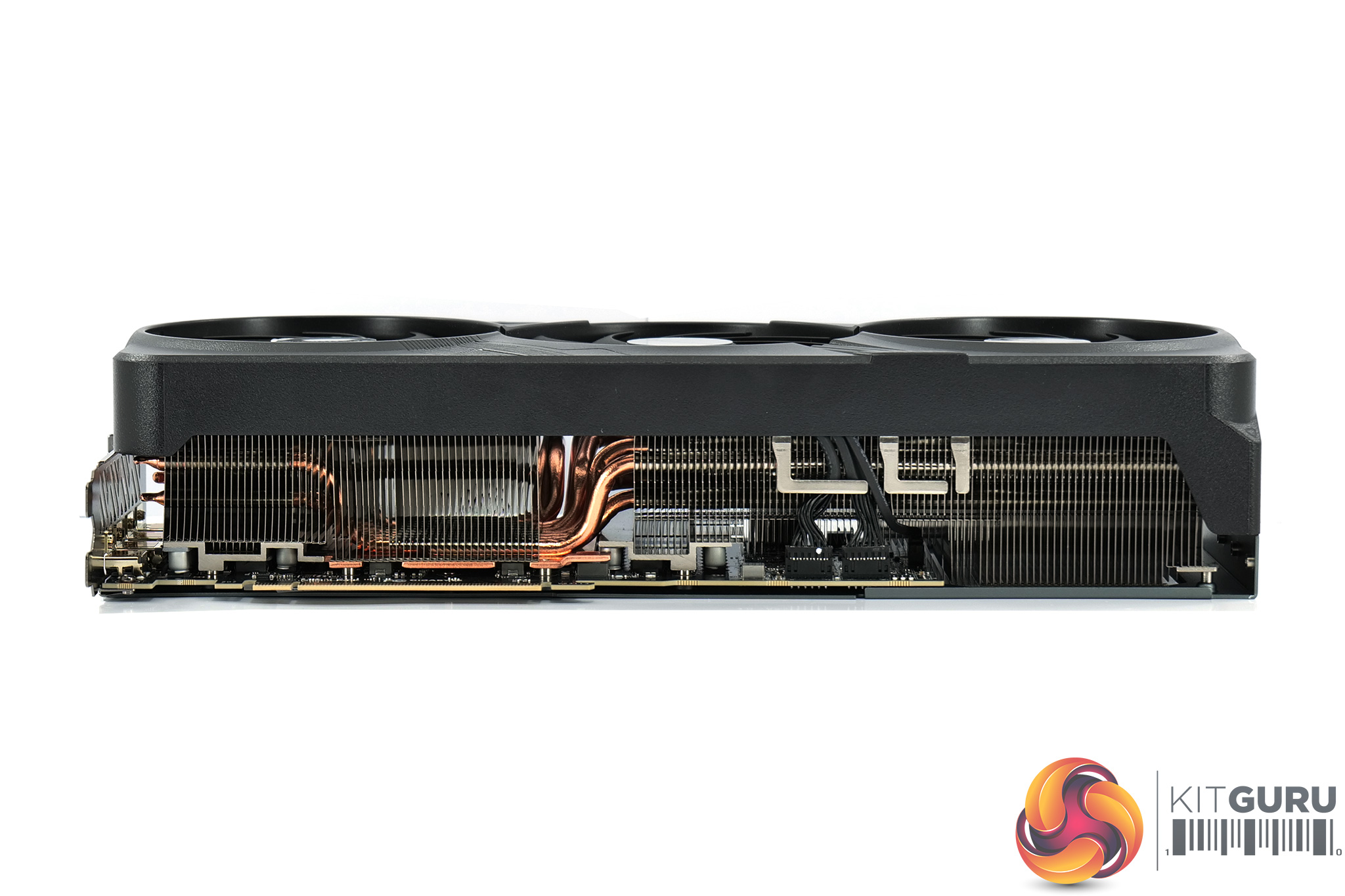
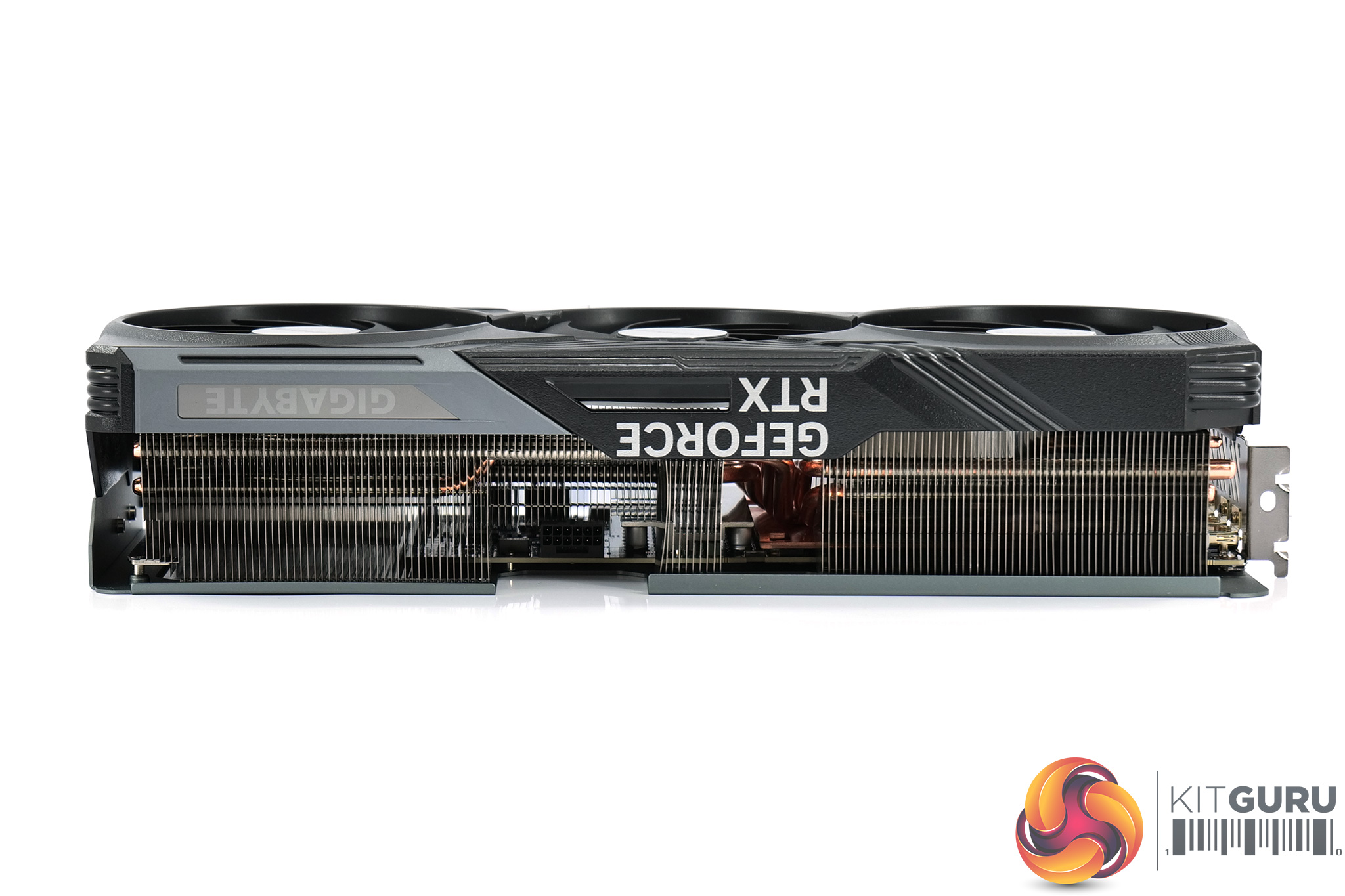
It's a behemoth of a card, too, measuring 343 x 150 x 75mm, while it weighed in at 1.73kg on my scales.
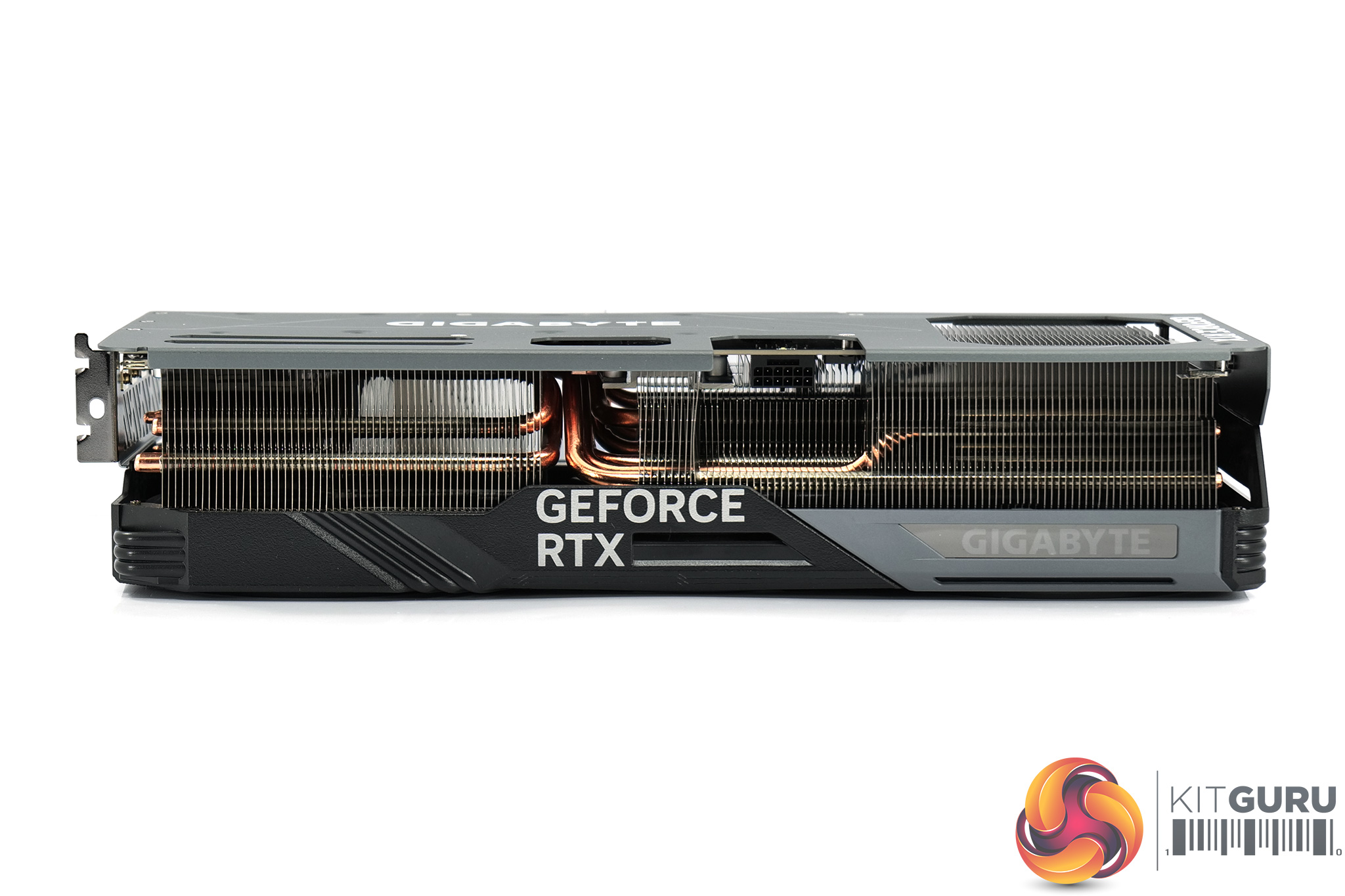
The front side of the card is home to the GeForce RTX branding, as well as the Gigabyte logo (one of the RGB zones on the card).
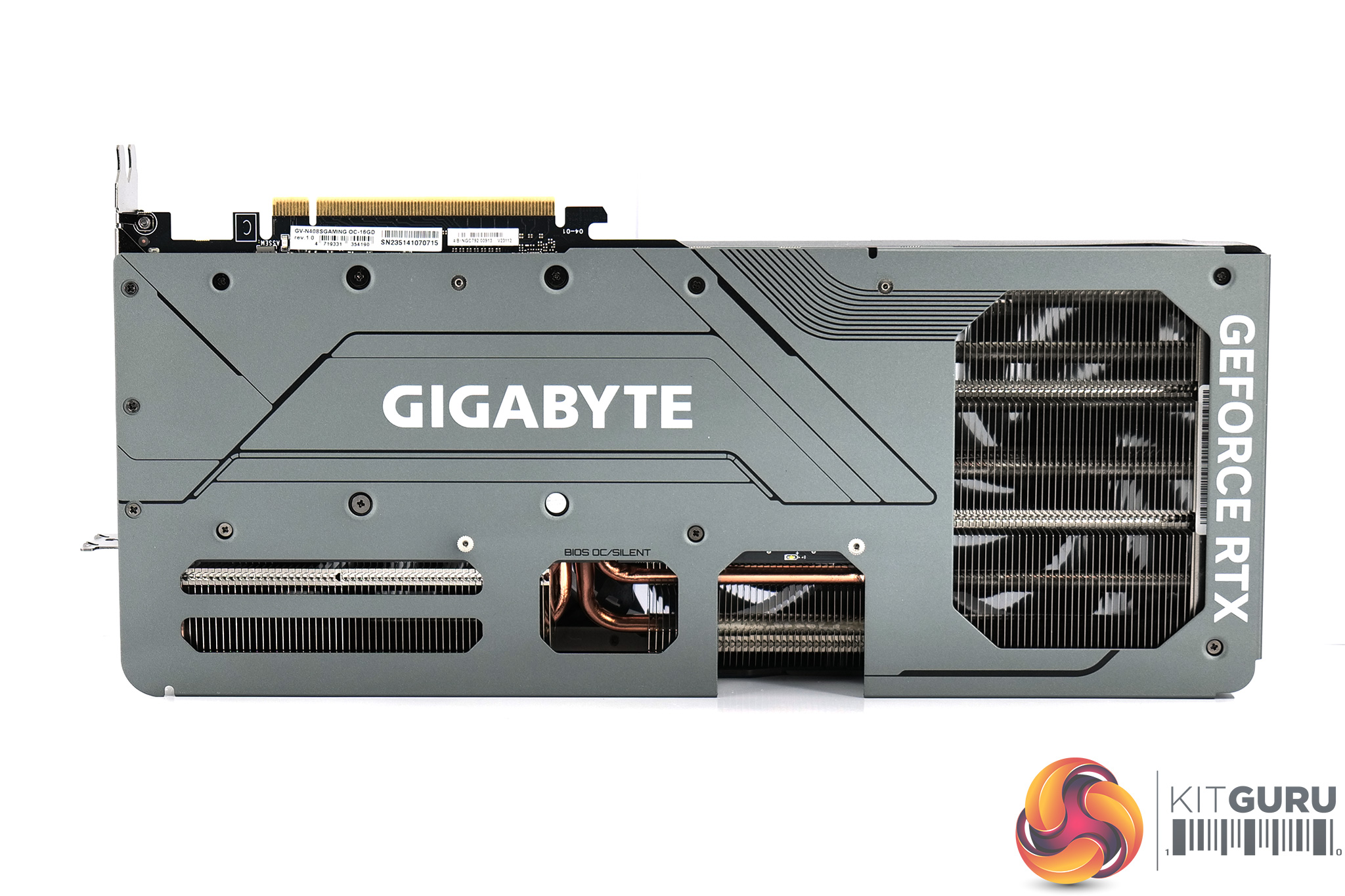
As for the backplate, this is made from metal and while it is a full-length design, there is a large cut-out towards the end of the card to allow airflow to pass directly through the heatsink. We can also note the dual-BIOS switch position in the middle, offering a choice of the OC or Silent modes. Both are identical in terms of the 2595MHz clock speed and 320W power limit, with only the fan curve separating the two.
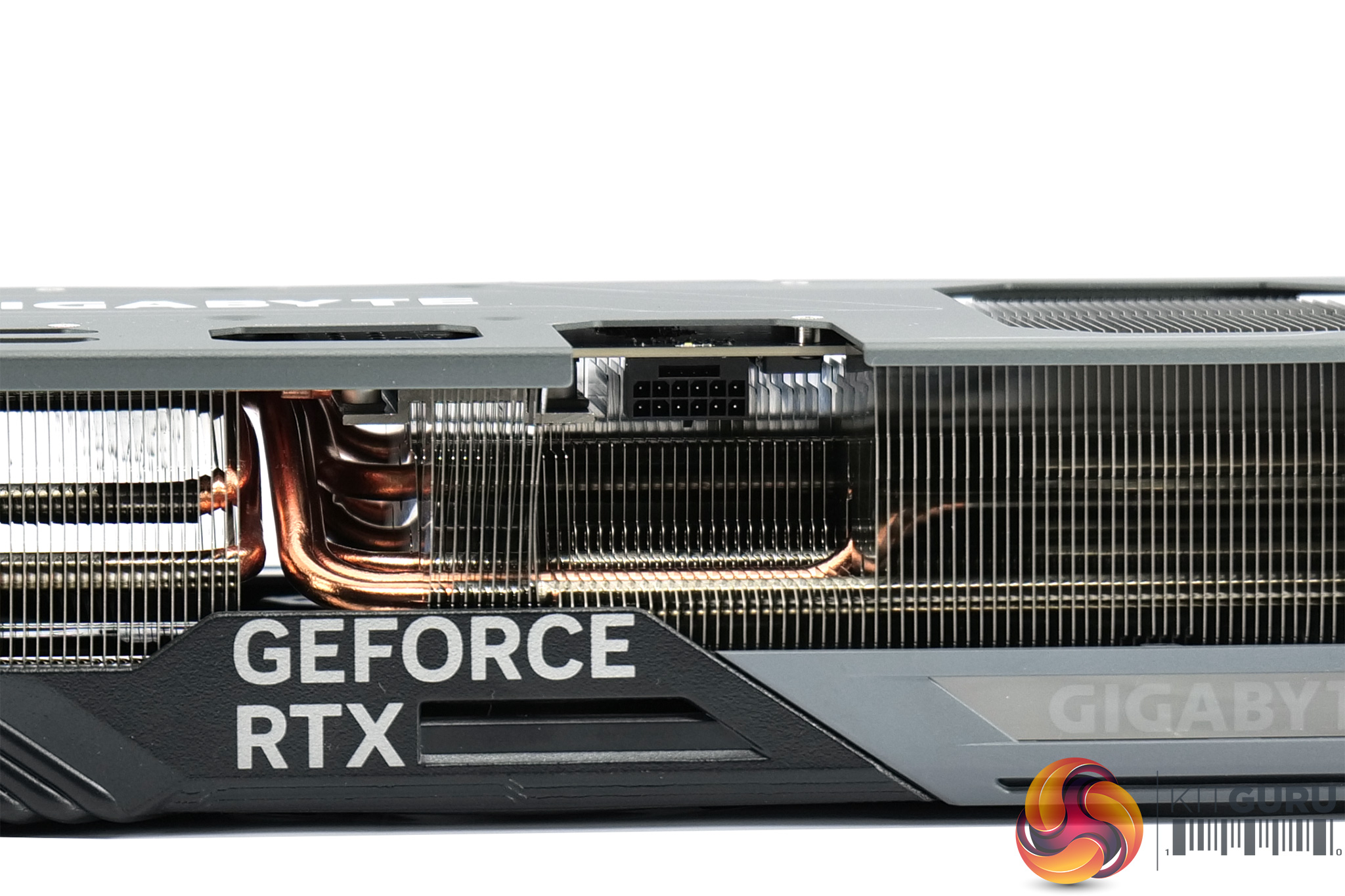
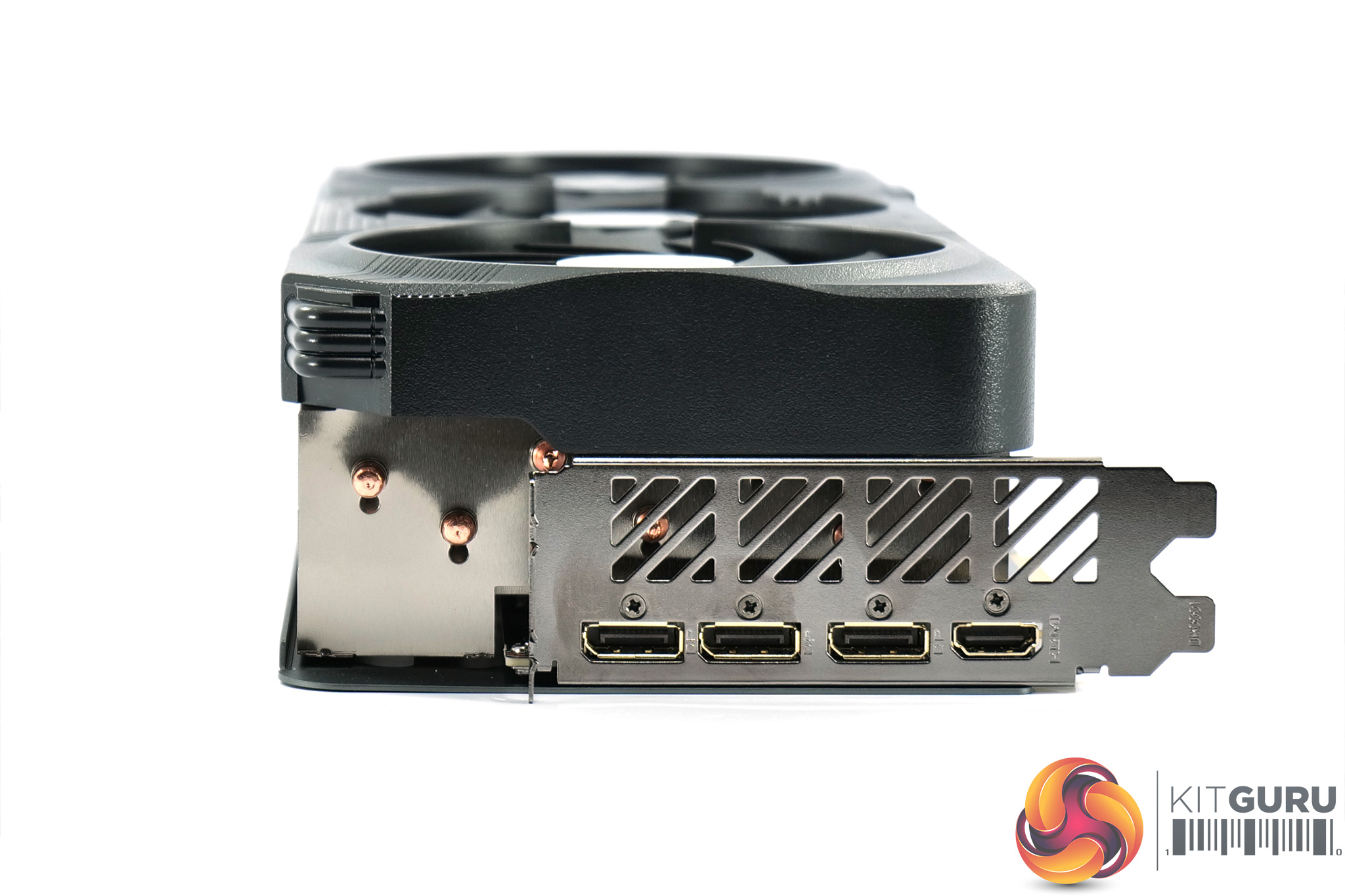
Power is of course supplied by a single 12VHPWR/PCIe Gen 5 connector. Display outputs consistent of 3x DisplayPort 1.4 and 1x HDMI 2.1.
Driver Notes
- AMD GPUs were benchmarked with the Adrenalin 23.12.1 driver.
- Nvidia GPUs (except RTX 4070 Super/RTX 4070 Ti Super) were benchmarked with the 546.33 driver.
- RTX 4070 Super was benchmarked with the 546.52 driver supplied to press.
- RTX 4070 Ti Super was benchmarked with the 551.15 driver supplied to press.
- RTX 4080 Super was benchmarked with the 551.22 driver supplied to press.
Results are only directly comparable where this exact configuration has been used.
Test System:
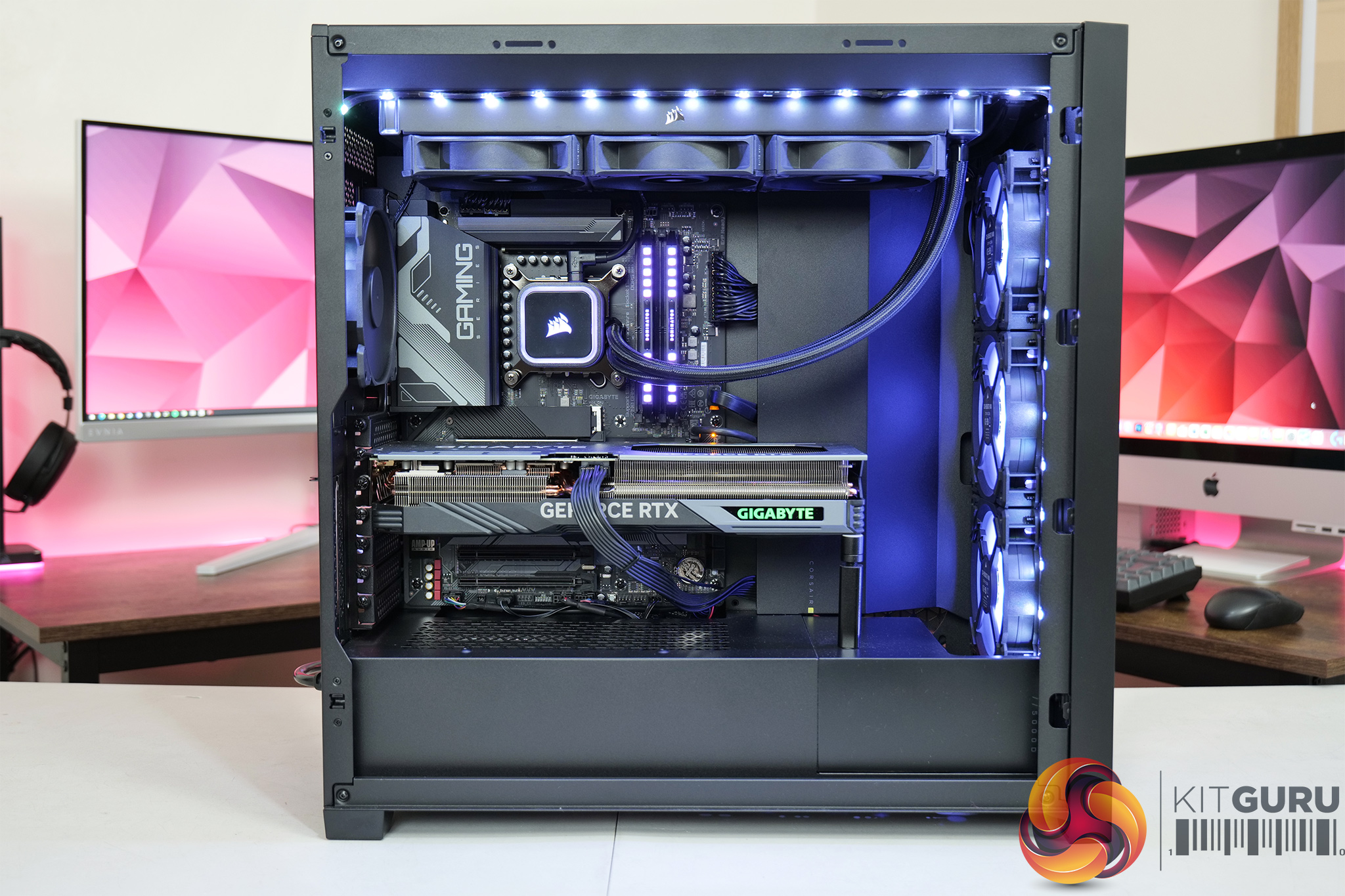
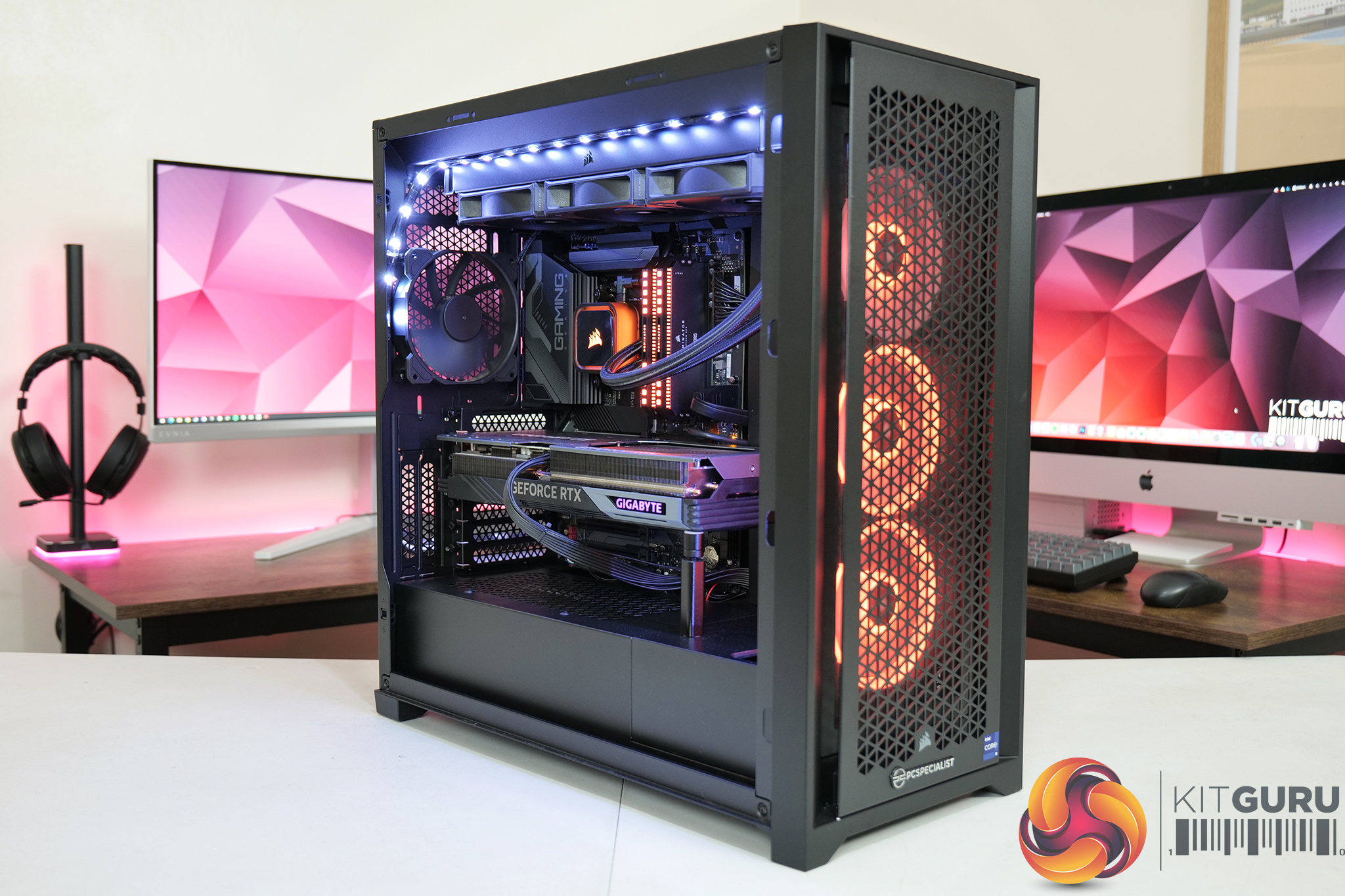
We test using a custom built system from PCSpecialist, based on Intel’s Rocket Lake platform. You can read more about this system HERE and configure your own PCSpecialist system HERE.
| CPU |
Intel Core i9-13900KS
|
| Motherboard |
Gigabyte Z790 Gaming X AX
|
| Memory |
32GB (2x16GB) Corsair Dominator Platinum RGB DDR5 6000MHz
|
| Graphics Card |
Varies
|
| SSD |
4TB Seagate Firecuda 530 Gen 4 PCIe NVMe
|
| Chassis | Corsair 5000D Airflow Tempered Glass Gaming Case |
| CPU Cooler |
Corsair iCUE H150i Elite RGB High Performance CPU Cooler
|
| Power Supply |
Corsair 1600W Pro Series Titanium AX1600i Digital Modular PSU
|
| Operating System |
Windows 11 23H2
|
| Monitor |
MSI Optix MPG321UR-QD
|
| Resizable BAR |
Enabled for all supported GPUs
|
Comparison Graphics Cards List
- AMD RX 7900 XTX 24GB
- AMD RX 7900 XT 20GB
- AMD RX 7800 XT 16GB
- Sapphire RX 7700 XT Pulse 12GB
- AMD RX 6700 XT 12GB
- Nvidia RTX 4090 FE 24GB
- Nvidia RTX 4080 Super FE 16GB
- Palit RTX 4080 Super JetStream OC 16GB
- Nvidia RTX 4080 FE 16GB
- MSI RTX 4070 Ti Super Ventus 3X 16GB
- Gigabyte RTX 4070 Ti Gaming 12GB
- Nvidia RTX 4070 FE 12GB
- Nvidia RTX 4060 Ti FE 8GB
- Gigabyte RTX 3080 Eagle 10GB
- Nvidia RTX 3070 FE 8GB
All cards were tested at reference specifications.
Software and Games List
- 3DMark Fire Strike & Fire Strike Ultra (DX11 Synthetic)
- 3DMark Time Spy (DX12 Synthetic)
- 3DMark DirectX Raytracing feature test (DXR Synthetic)
- Alan Wake II (DX12)
- Assassin's Creed Mirage (DX12)
- Avatar: Frontiers of Pandora (DX12)
- Cyberpunk 2077 (DX12)
- F1 23 (DX12)
- Forza Horizon 5 (DX12)
- Hitman 3 (DX12)
- The Last of Us Part 1 (DX12)
- Marvel's Spider-Man Remastered (DX12)
- A Plague Tale: Requiem (DX12)
- Ratchet and Clank: Rift Apart (DX12)
- Red Dead Redemption 2 (DX12)
- Resident Evil 4 (DX12)
- Returnal (DX12)
- Shadow of the Tomb Raider (DX12)
- Starfield (DX12)
- Total War: Pharaoh (DX11)
We run each benchmark/game three times, and present mean averages in our graphs. We use FrameView to measure average frame rates as well as 1% low values (99th percentile) across our three runs.
Here we test five games, all at 3840×2160 resolution using maximum image quality settings.
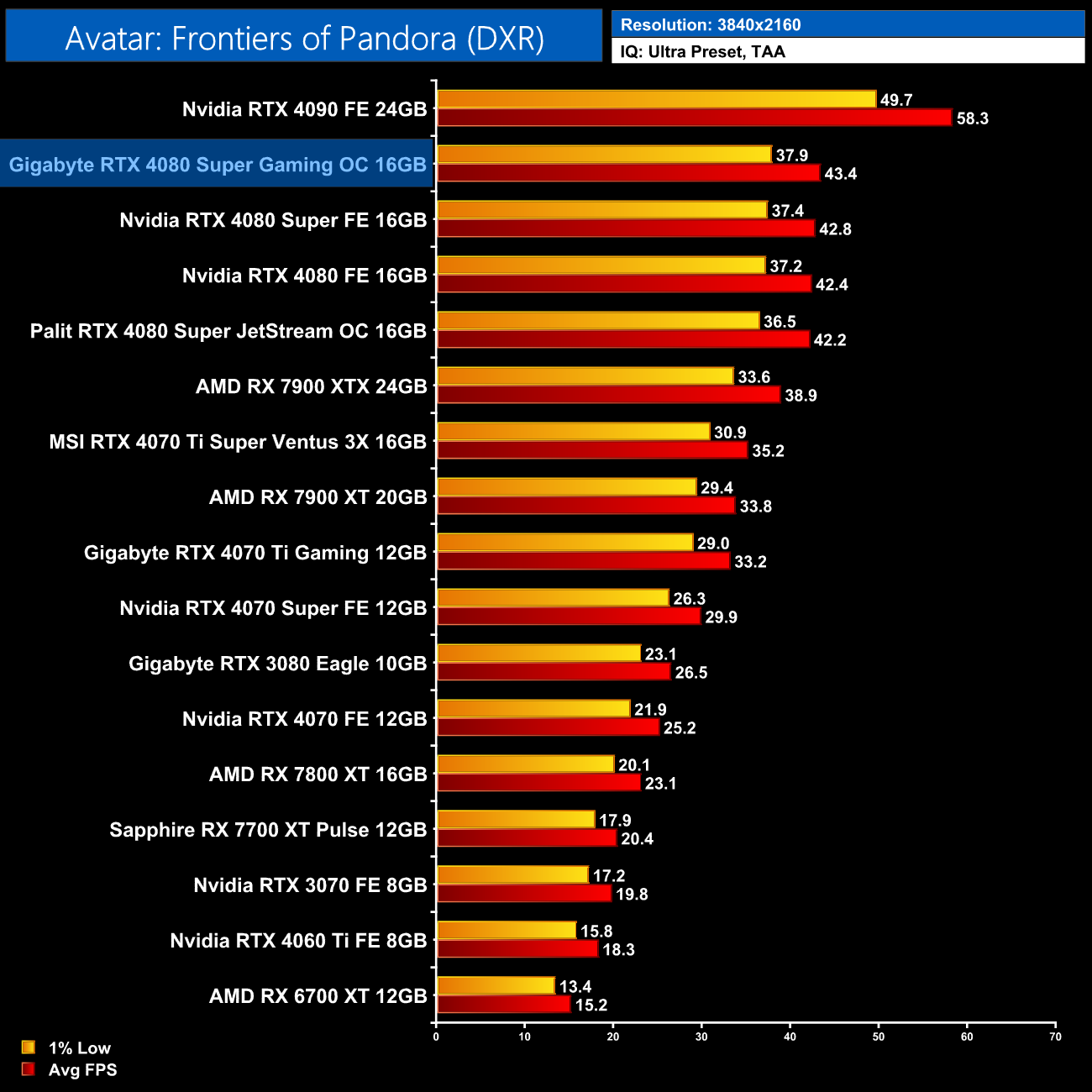
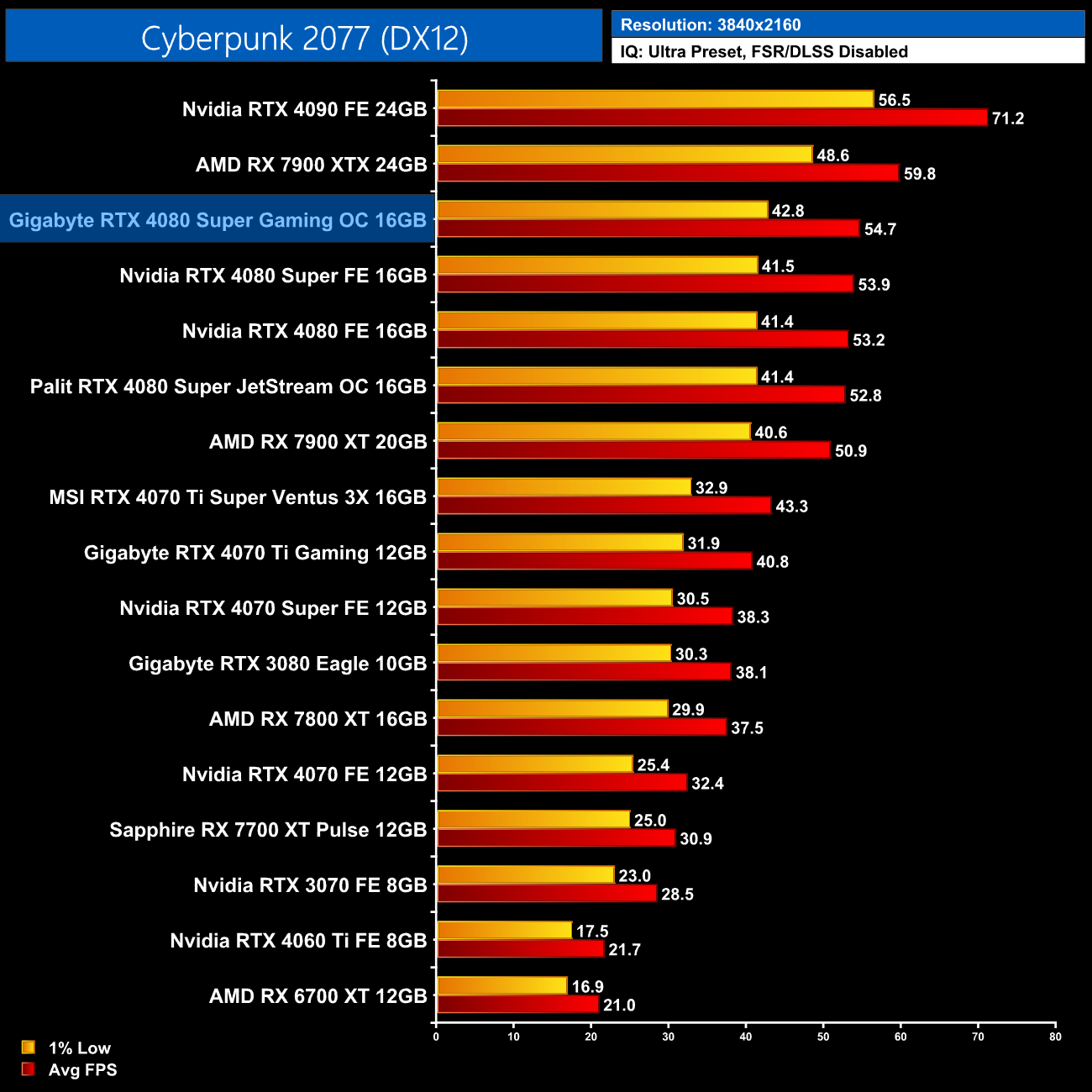
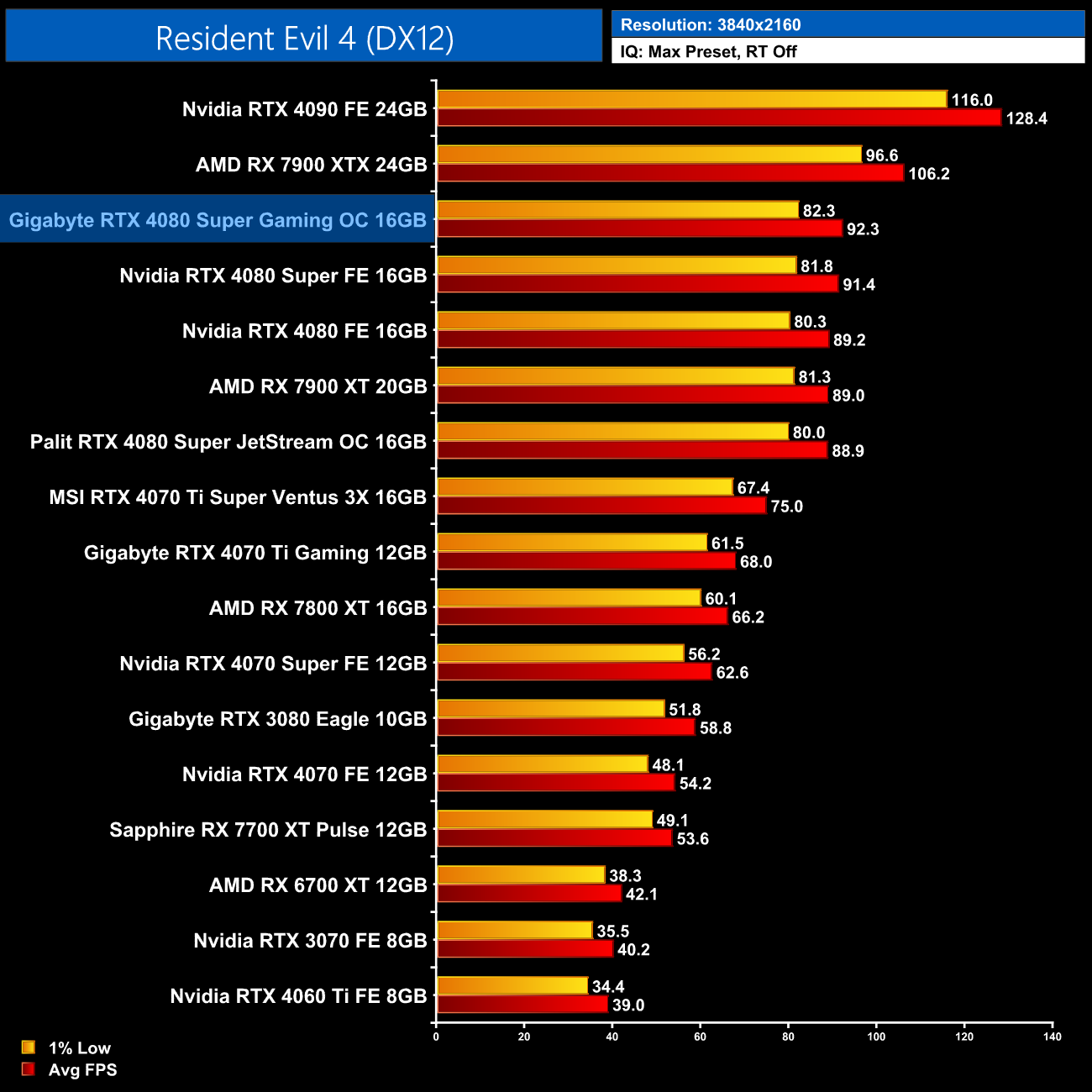
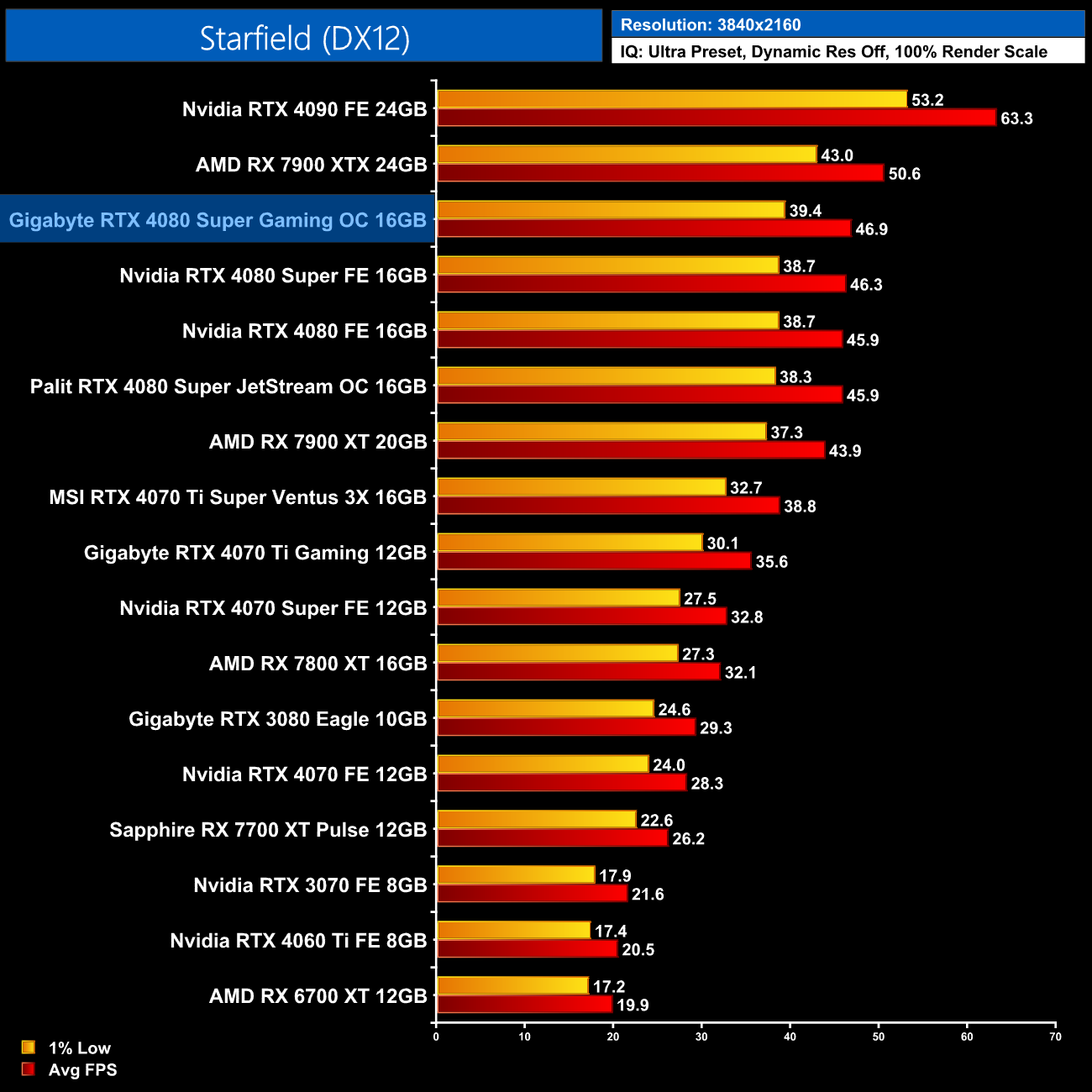
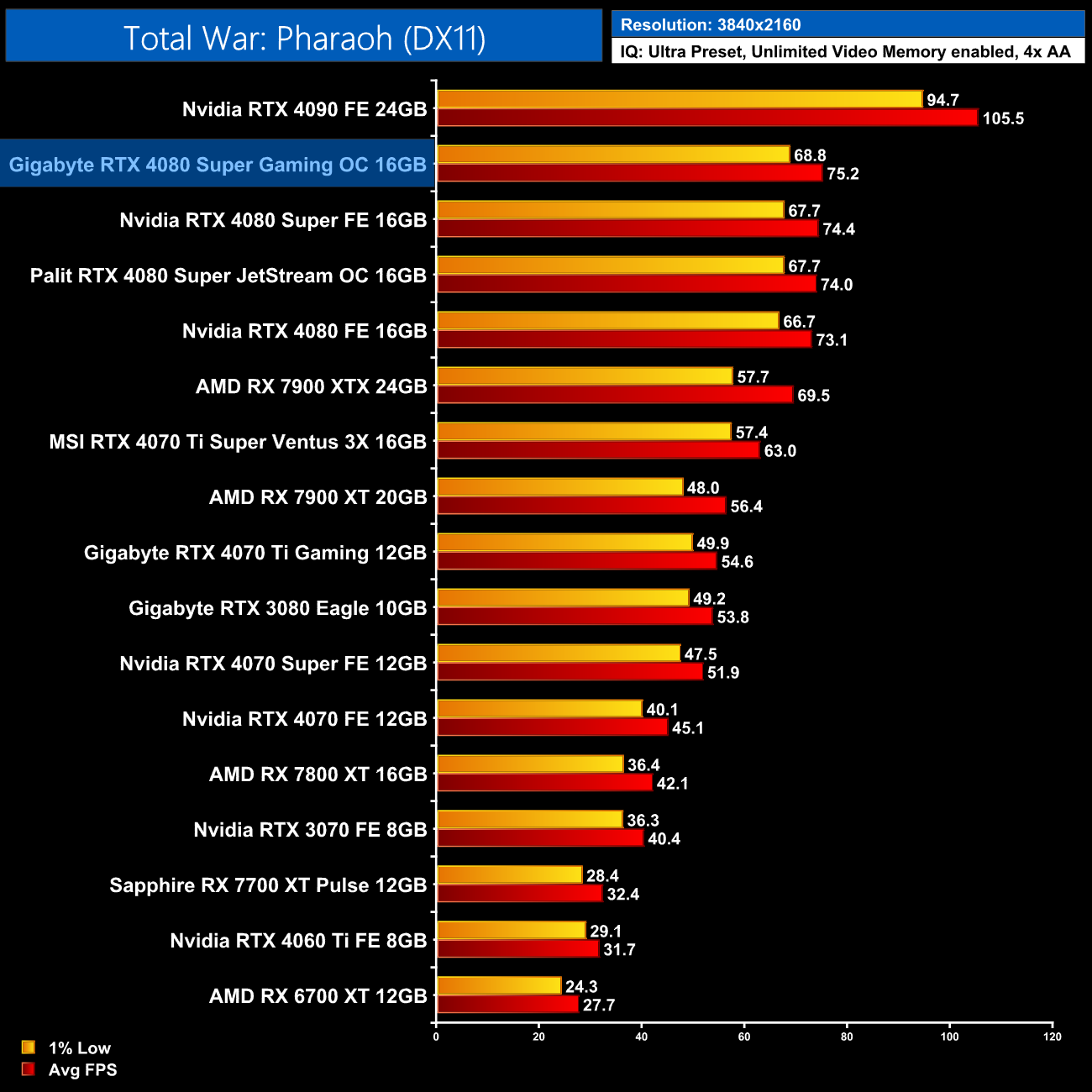
With just a 45MHz factory overclock, it's not a surprise to see the Gaming OC model is barely faster than the RTX 4080 Super Founders Edition – it was 1-2% faster across the 5 games tested, but that's a difference of barely 1FPS in the real world. It's still a very fast graphics card, but don't expect any big gains over the Founders Edition.
Here we present the average clock speed for each graphics card while running Cyberpunk 2077 for 30 minutes. We use GPU-Z to record the GPU core frequency during gameplay. We calculate the average core frequency during the 30 minute run to present here.
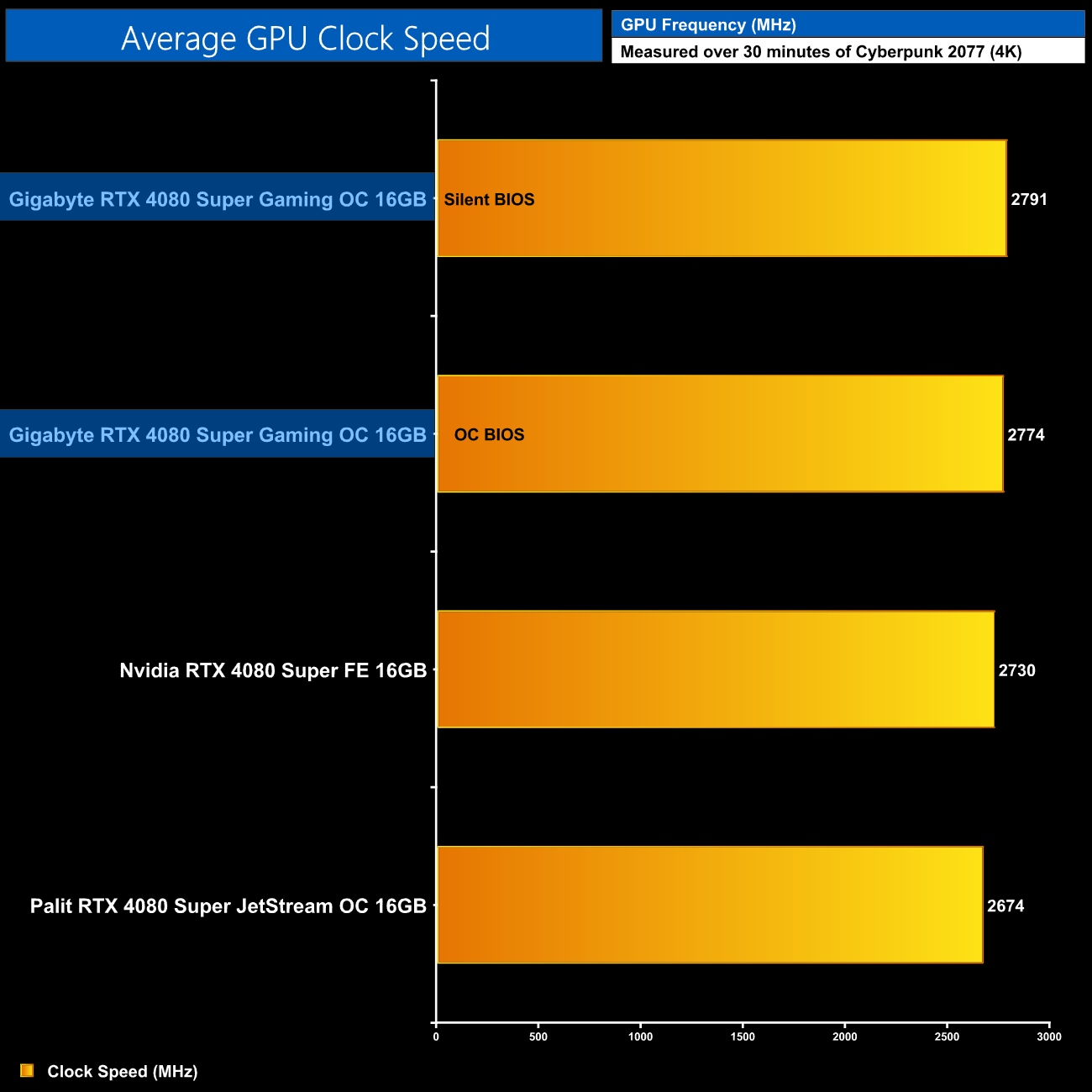
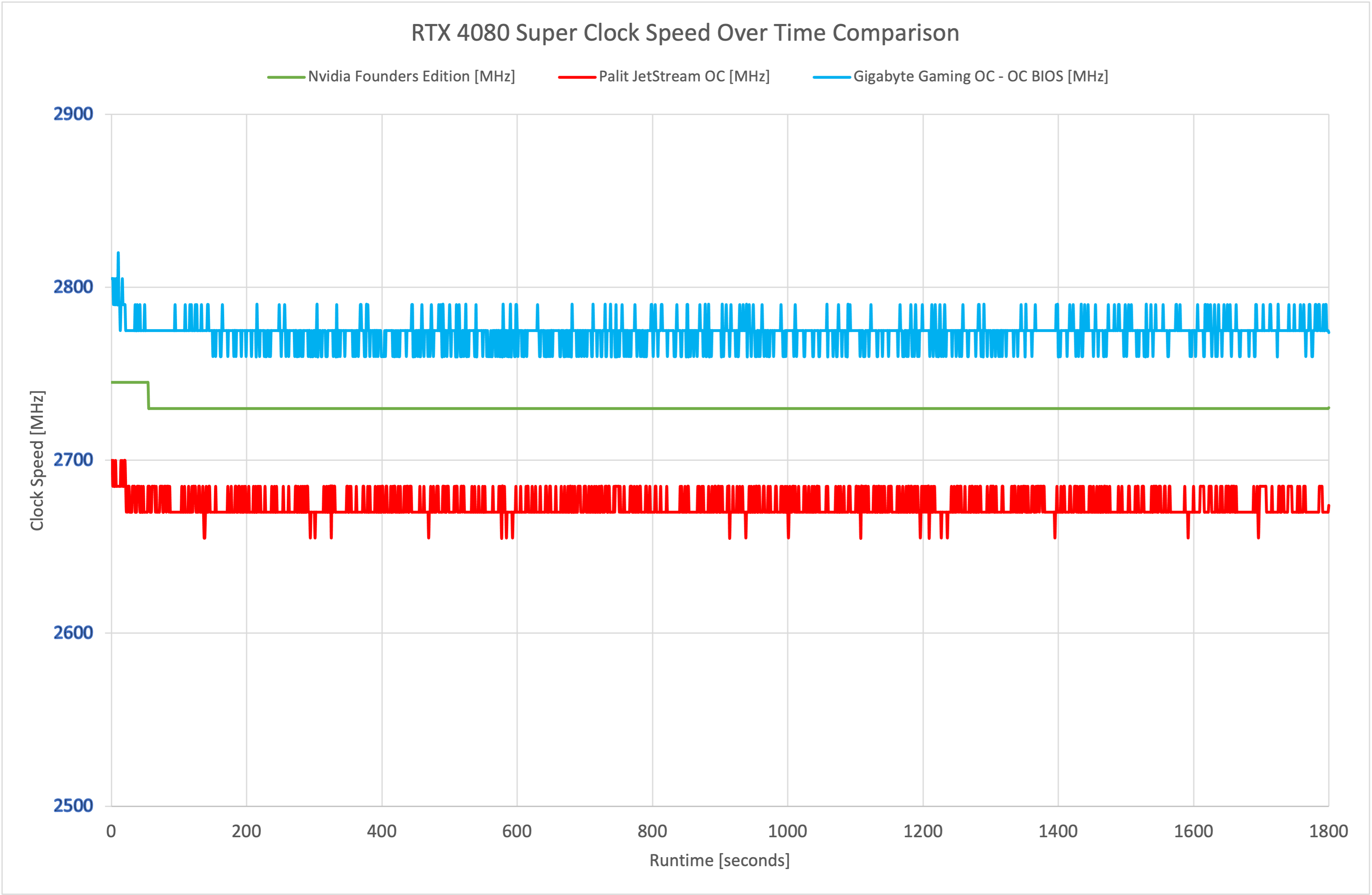
Those small performance differences over the Founders Edition can be attributed to the higher clock speeds of the Gaming OC, as it averaged 2774MHz over our 30-minute stress test when using the OC BIOS. Interestingly, the Silent BIOS ran a touch faster, but only by 17MHz, so there's not a lot in it.
For our temperature testing, we measure the peak GPU core temperature under load. A reading under load comes from running Cyberpunk 2077 for 30 minutes.
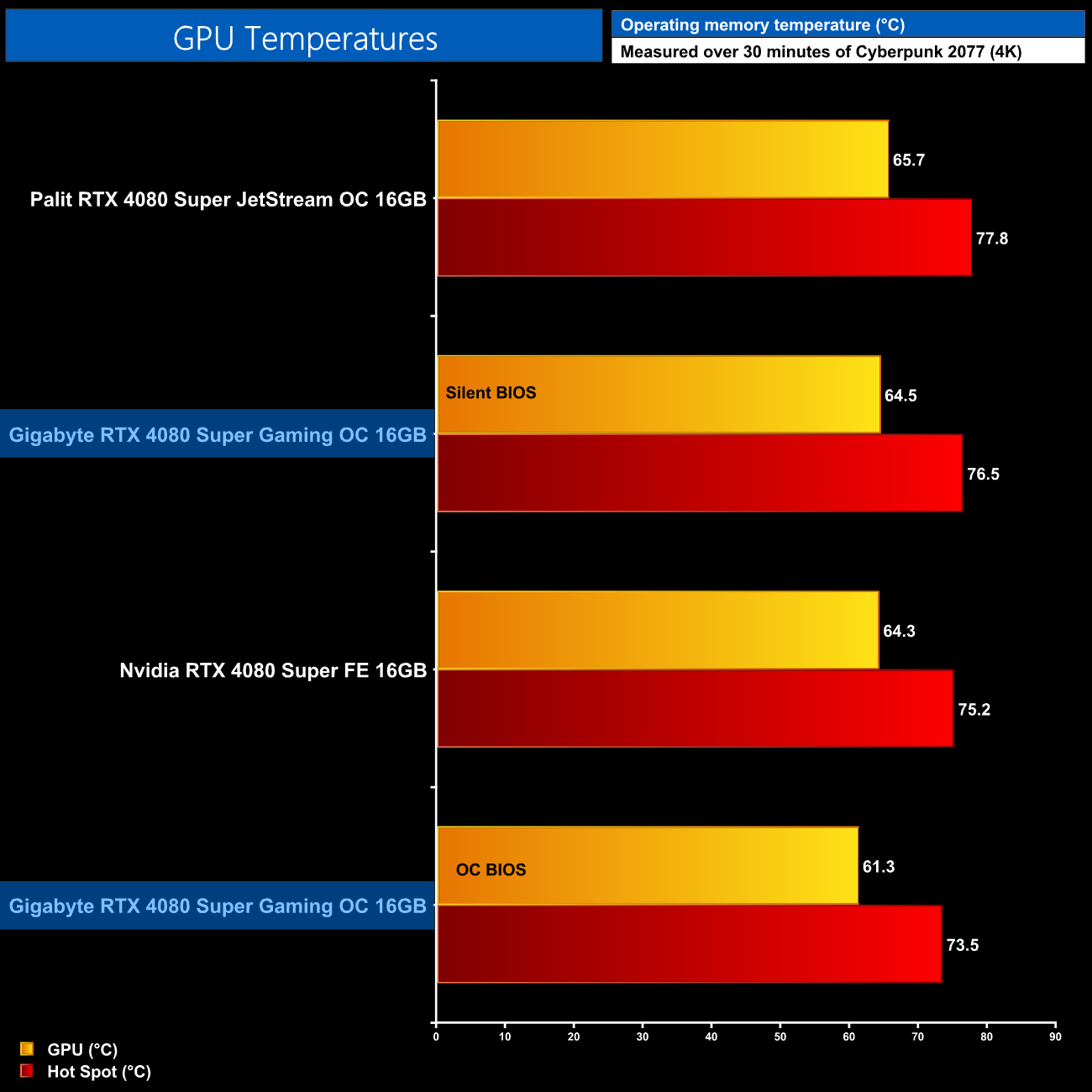
Thermal performance is a solid area for the Gaming OC. The OC BIOS ran the coolest of the three 4080 Supers we tested, not by a lot, but a peak GPU temperature of 61C is good to see. The Silent BIOS ran hotter due to its slower fan speed, but even then it was delivering very similar thermals to the 4080 Super FE.
For our memory temperature testing, we measure the peak memory temperature under load. A reading under load comes from running Cyberpunk 2077 for 30 minutes.
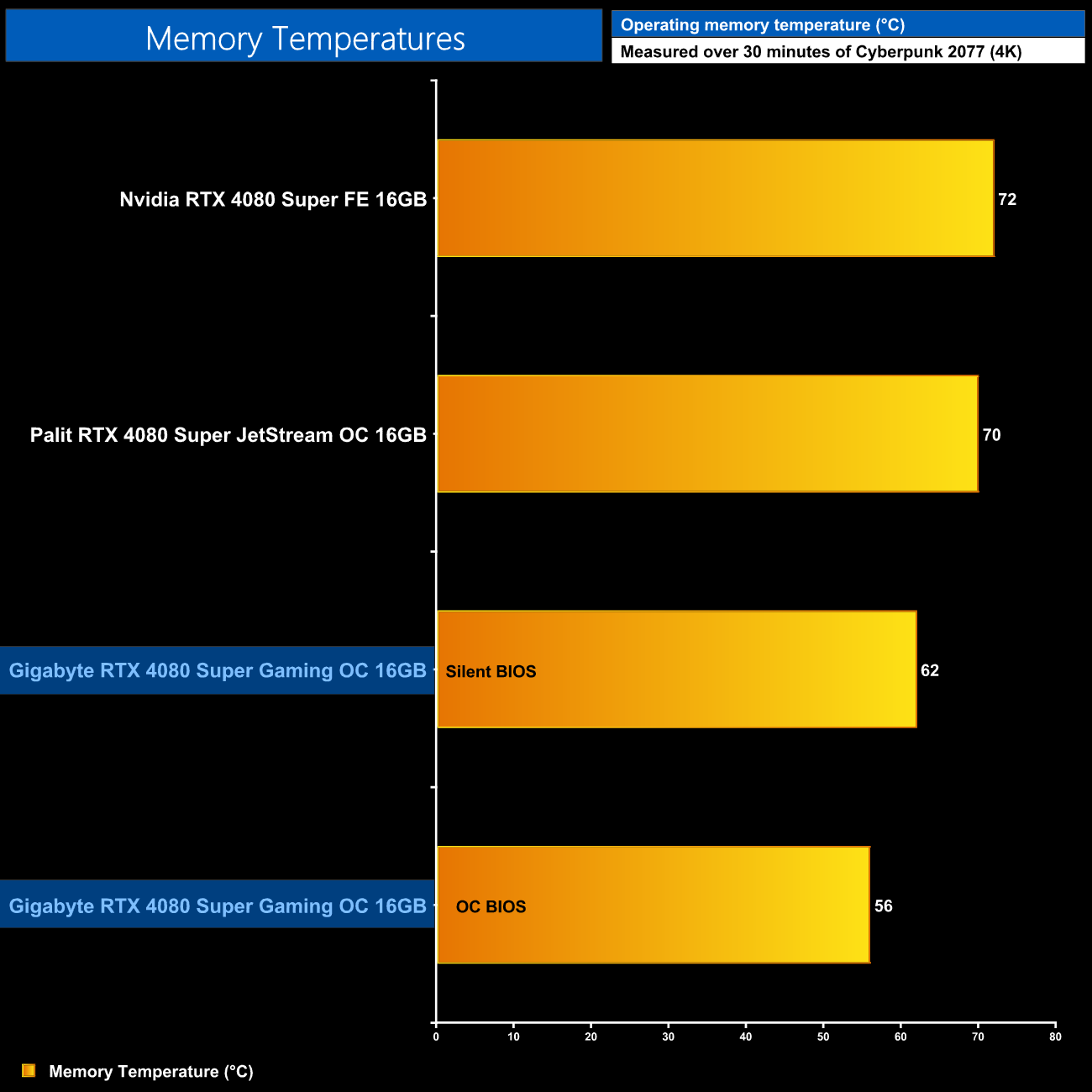
Memory thermals is an area where we see a clear win for the Gaming OC. Both the OC and Silent BIOS run significantly cooler than the other two cards tested – the peak temperature of just 56C from the OC BIOS really is quite impressive.
We take our noise measurements with the sound meter positioned 1 foot from the graphics card. I measured the noise floor to be 32 dBA, thus anything above this level can be attributed to the graphics cards. The power supply is passive for the entire power output range we tested all graphics cards in, while all CPU and system fans were disabled. A reading under load comes from running Cyberpunk 2077 for 30 minutes for 30 minutes.
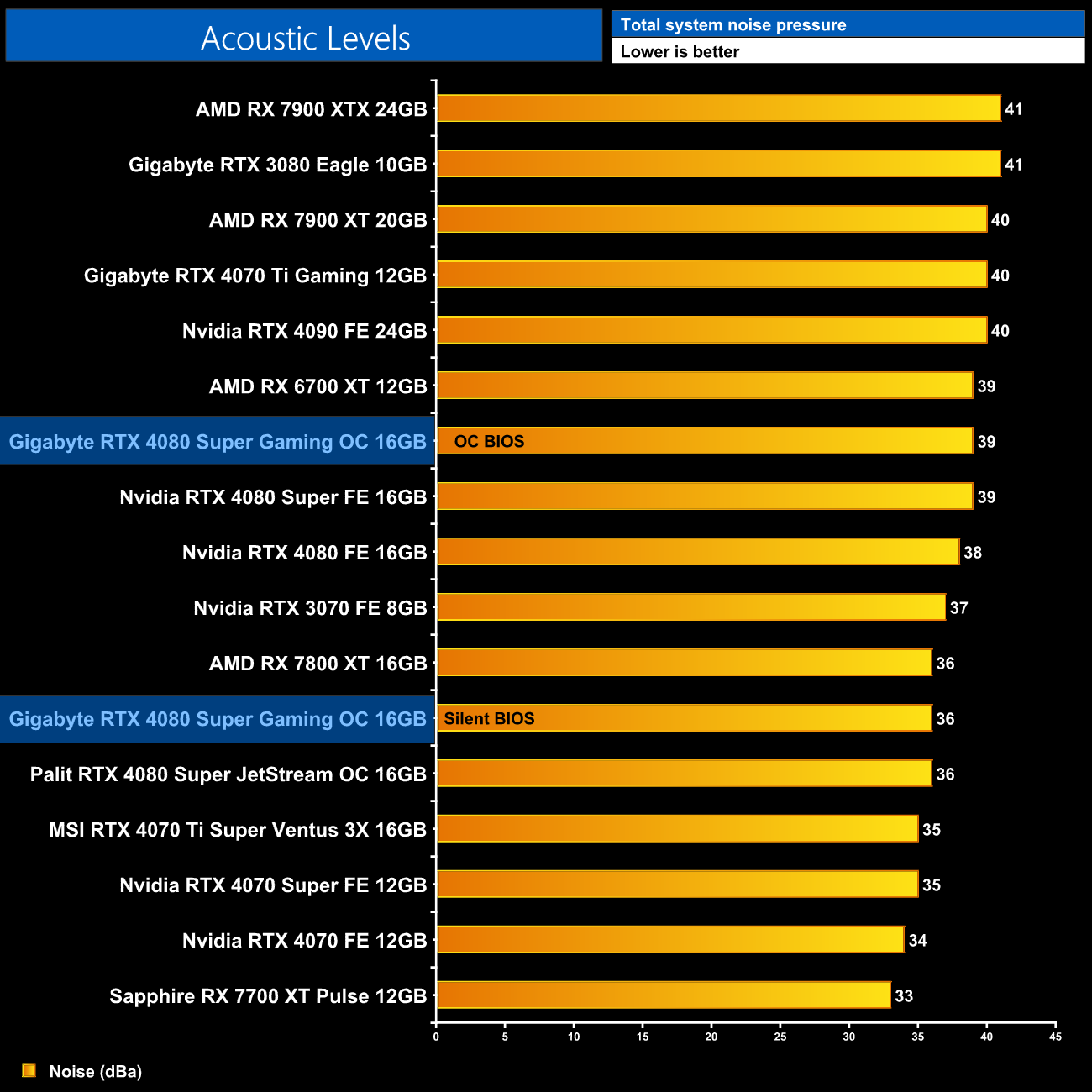
Of course, given the Gaming OC offers dual-BIOS functionality, you can choose between the OC or Silent modes. The former is a bit louder, with the fans running at 1650rpm, and while the Silent BIOS isn't quite silent, it is a good chunk quieter, running the fans at 1360rpm in my testing.
Following on from our stock thermal and acoustic testing, here we re-test the operating temperature of the GPU, but with noise levels normalised to 40dBa. This allows us to measure the efficiency of the overall cooling solution as varying noise levels as a result of more aggressive fan curves are no longer a factor.
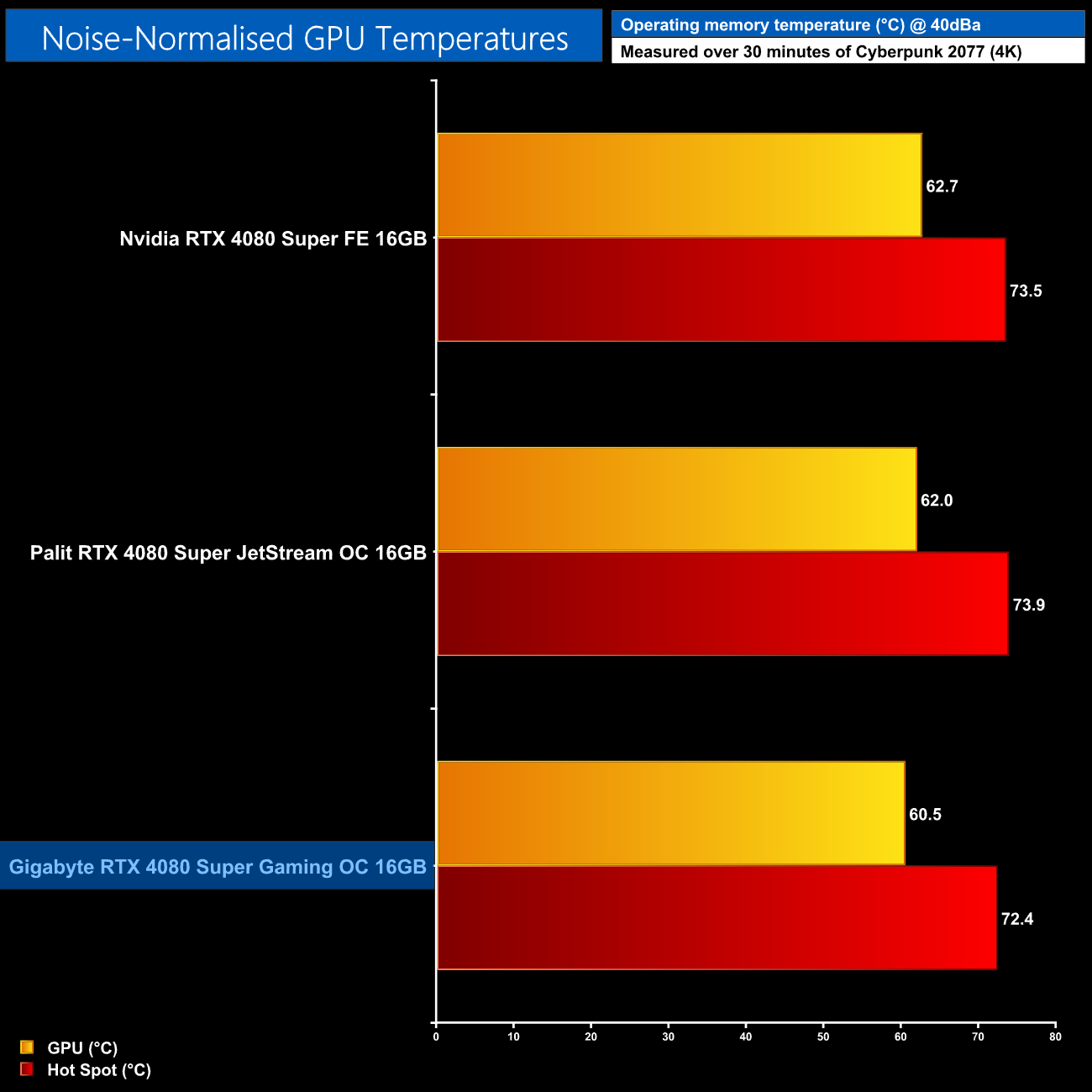
Once we normalised noise-levels to 40dBa, the Gaming OC did just sneak in as the best-performing cooler, but not by much – it's peak of 60.5C is less than 2C better than the Palit JetStream OC.
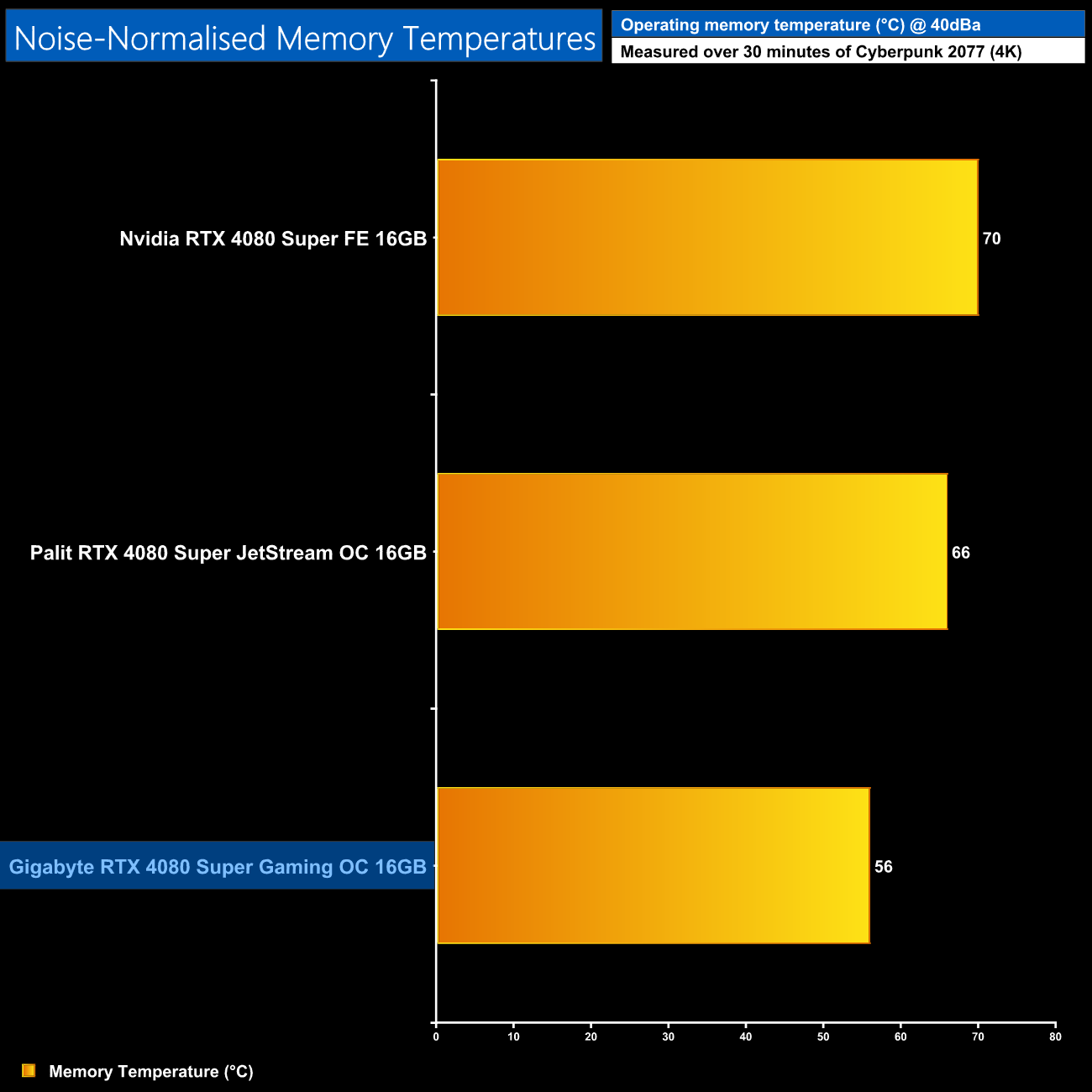
The memory thermals continue to impressive however, peaking 10C lower than the JetStream when noise-normalised.
We use Nvidia PCAT to measure power draw of the graphics card only, with readings from both the PCIe slot and the PCIe power cables combined into a single figure. We use Cyberpunk 2077 (1440p) for this testing.
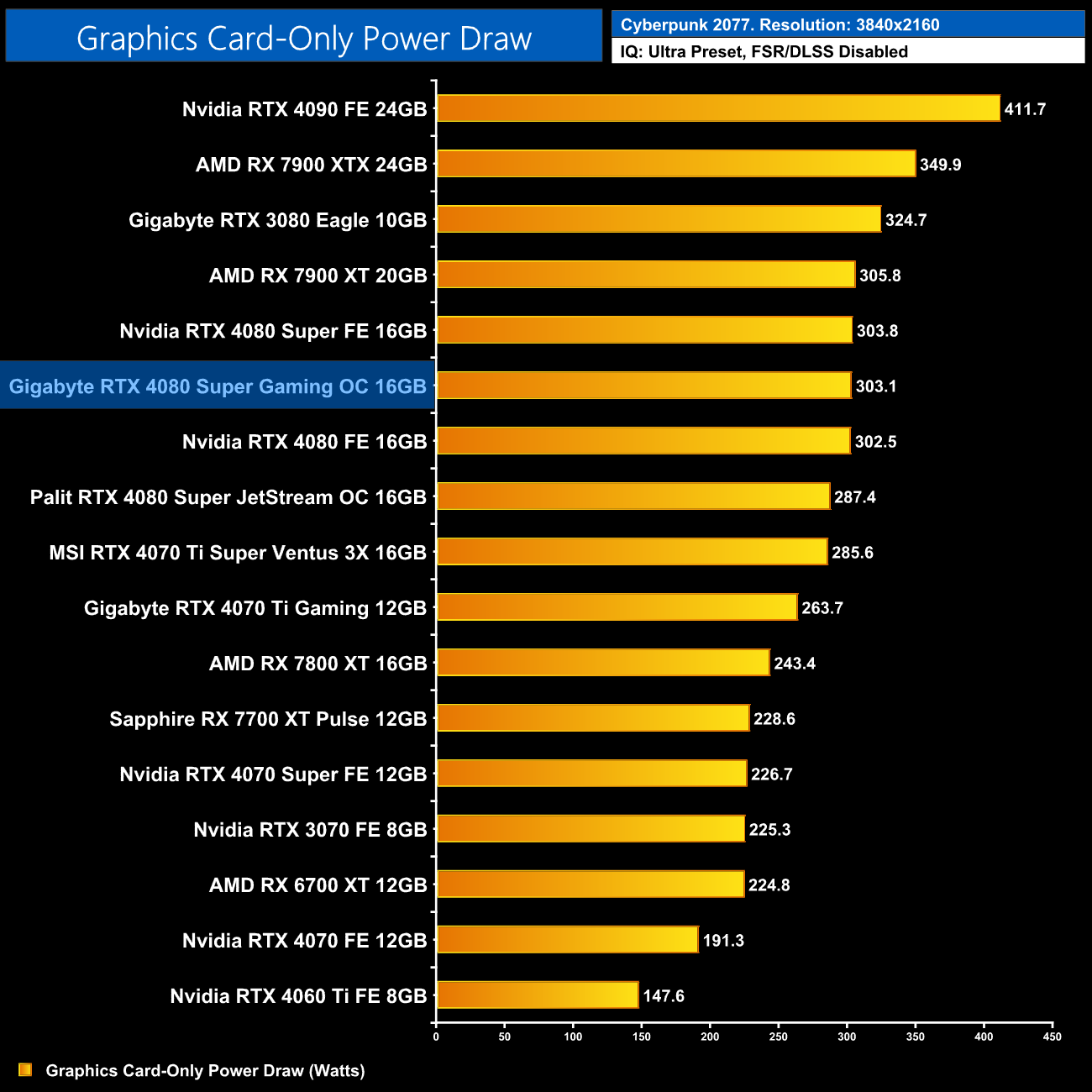
Given both the Gaming OC and Founders Edition share the same 320W TGP, it's not a surprise to see real-world power draw was basically identical between the two, hitting just over 300W in Cyberpunk 2077.
Combining the power draw values shown above with the performance data, we present performance per Watt for each graphics card tested:
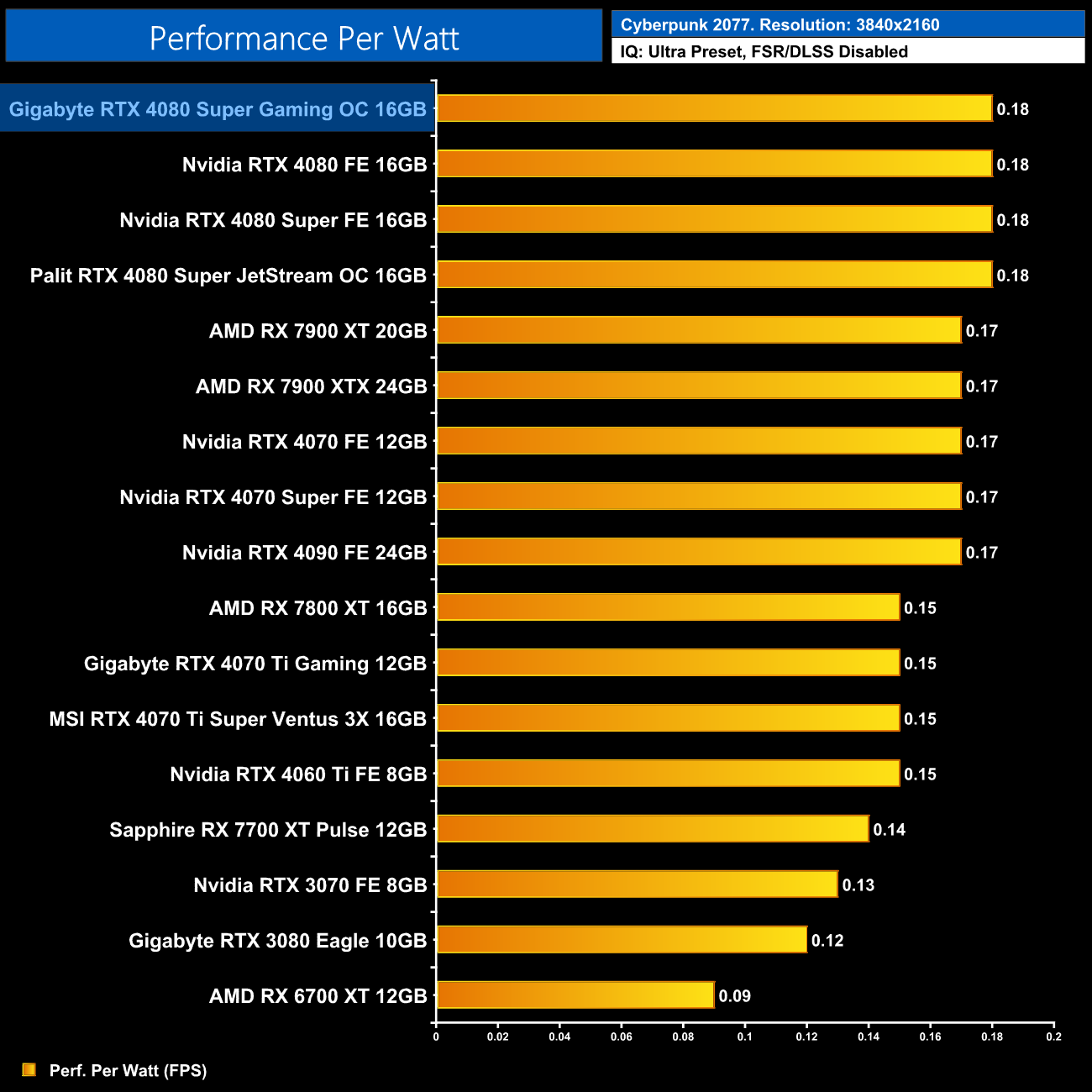
That also means performance per Watt is identical to other 4080 Supers.
For our manual overclocking tests, we used MSI Afterburner. Our best results are as below.
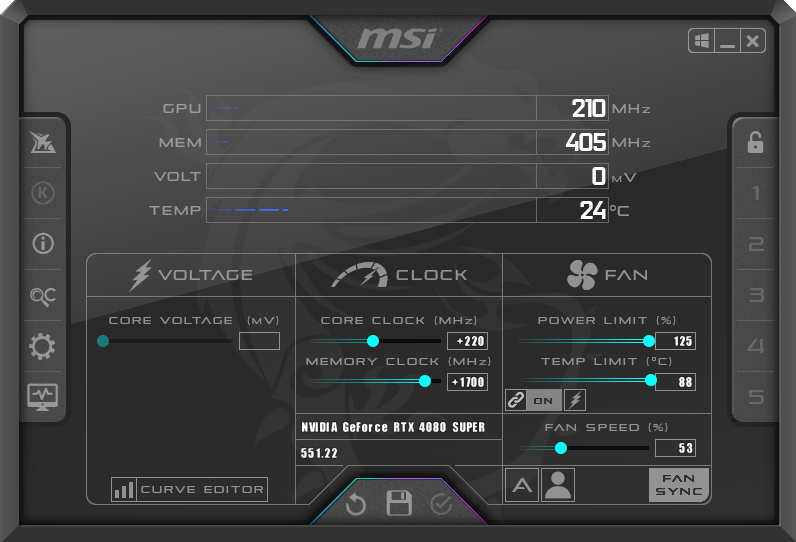
The Gaming OC sports a maximum power limit of 400W, so we increased the power limit to 125% and were able to add 220MHz to the GPU and 1700MHz to the memory.
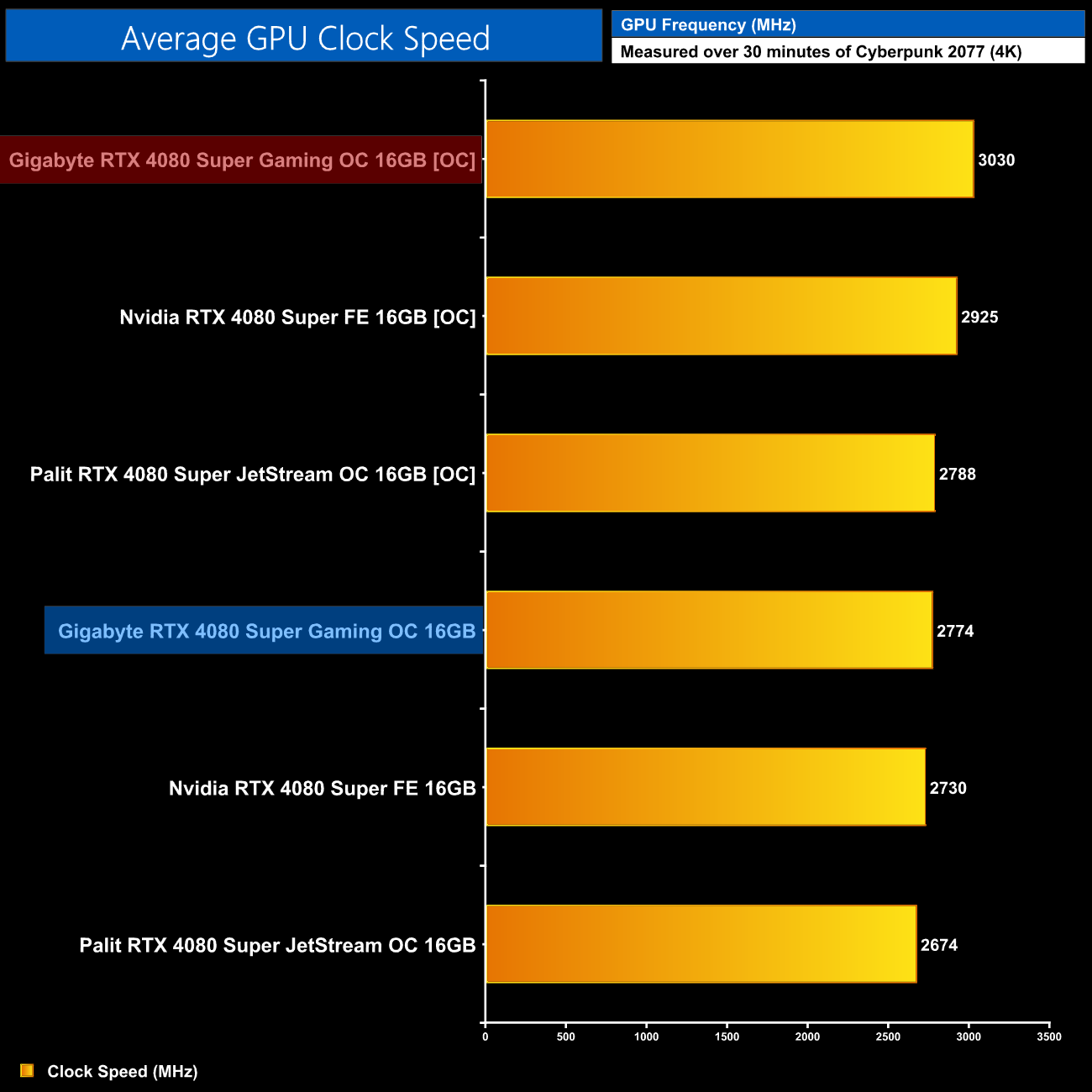
This brought average clock speeds up beyond 3GHz, remaining rock solid at 3030MHz over our 30-minute stress test in Cyberpunk 2077.
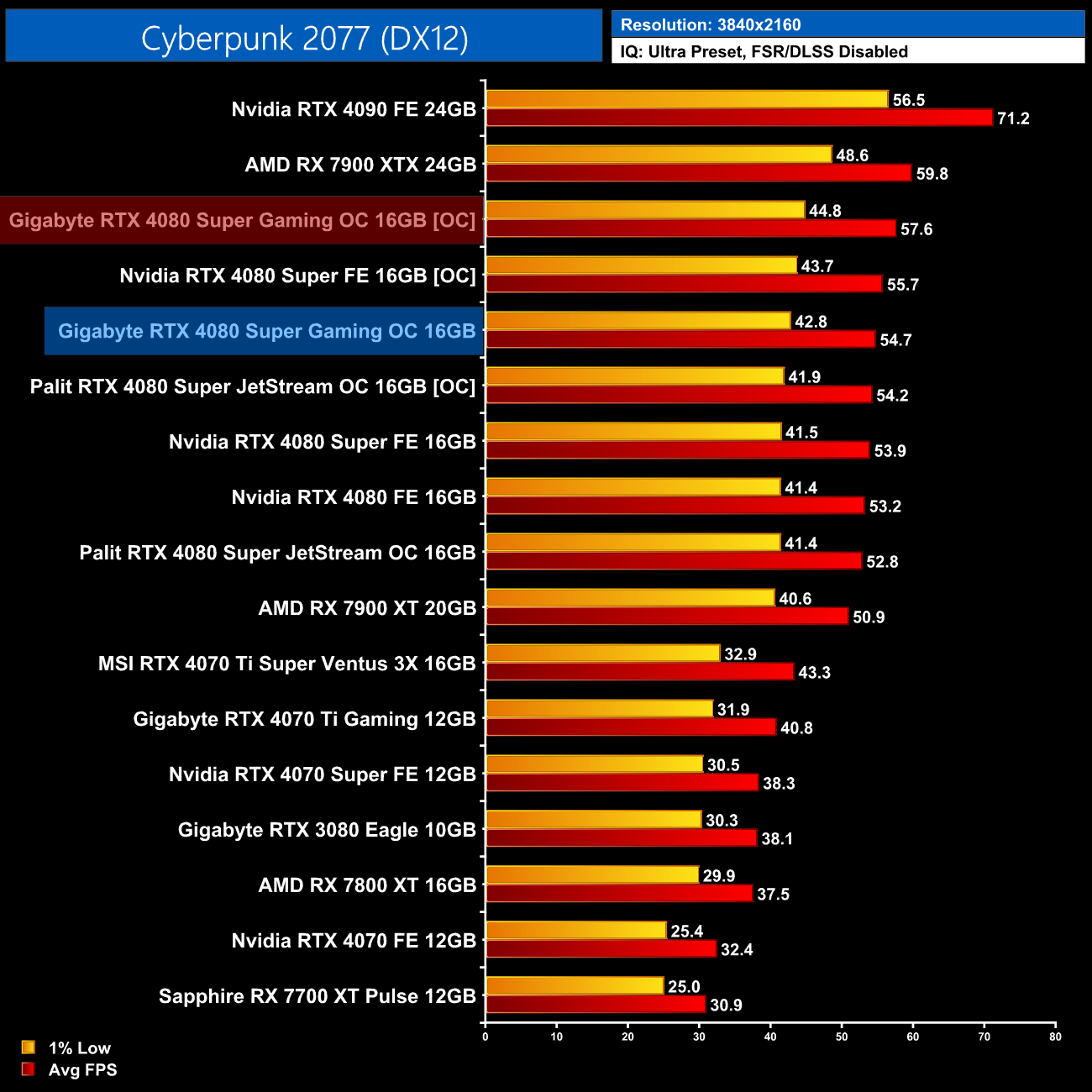
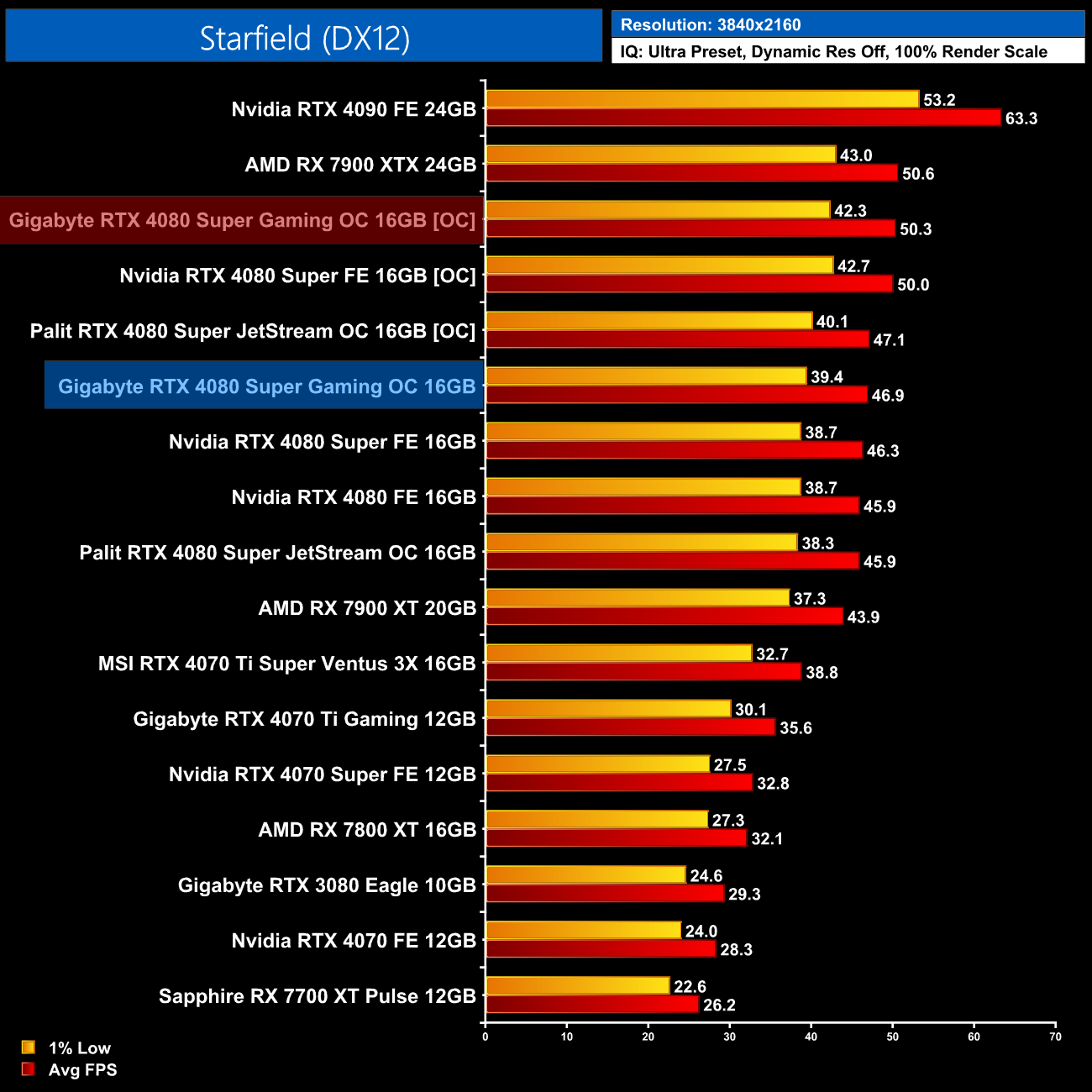
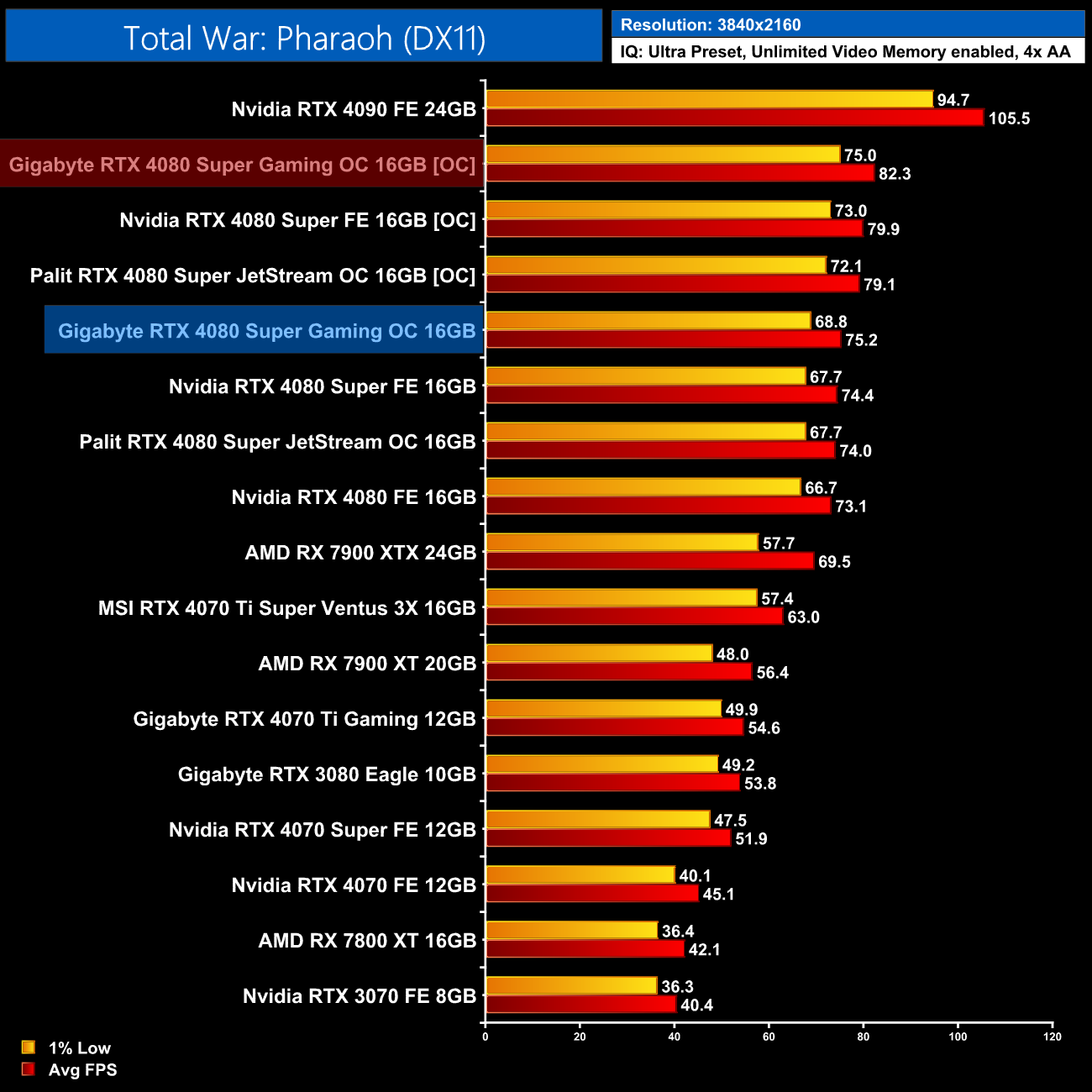
The gains from this overclock are decent enough, but nothing too extraordinary – we're again looking in the 6-9% performance range.
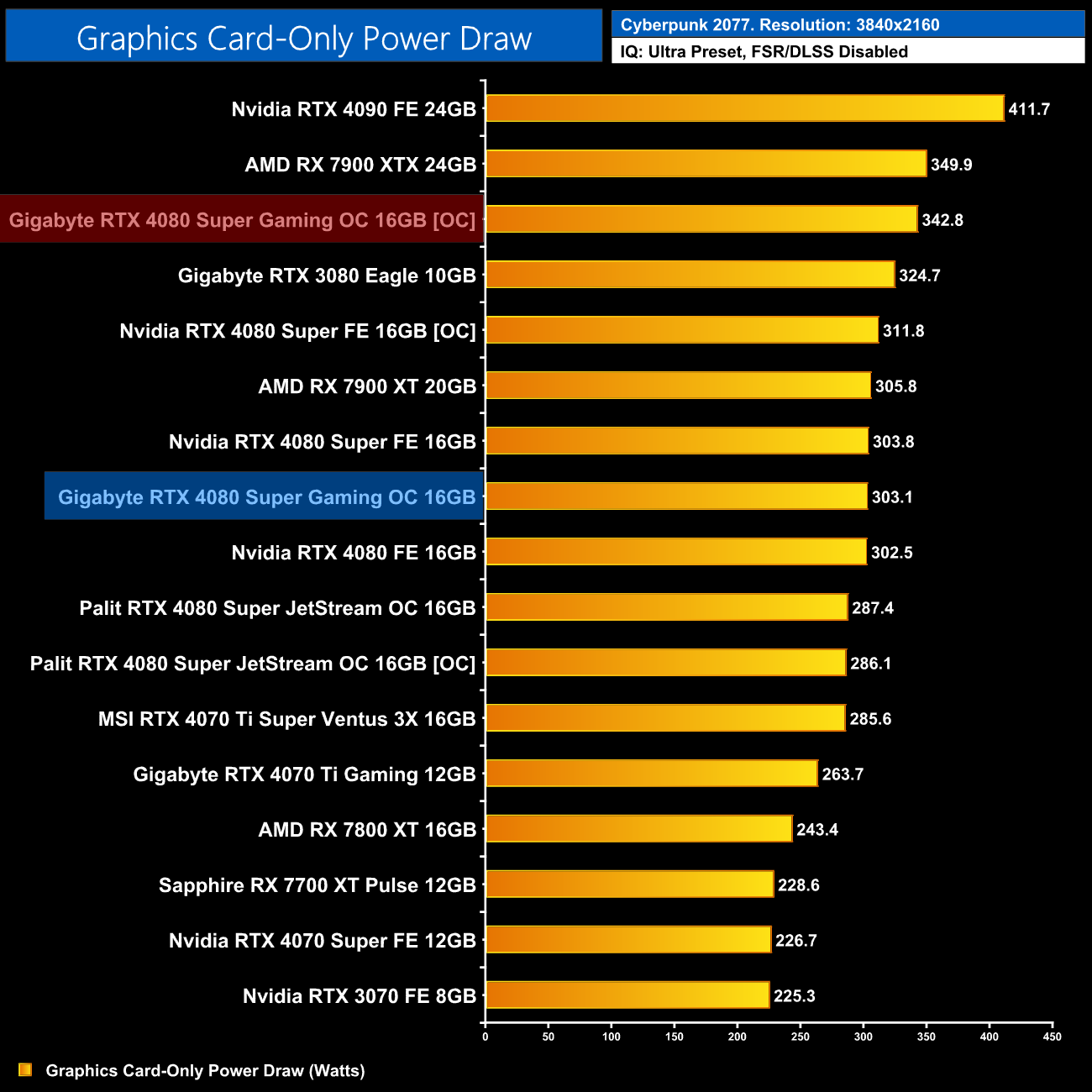
Power draw did increase by 40W or so when overclocked, which works out as an extra 13%, reducing efficiency slightly, but nothing too concerning.
Having already reviewed the Gigabyte RTX 4080 and RTX 4090 Gaming OC models at the end of 2022, we certainly had high hopes for the Gigabyte RTX 4080 Super Gaming OC and we are pleased to say it does not disappoint.
Simply put, it is just an all-round solid aftermarket card. The cooler is very effective, offering the best noise-normalised thermals of the three 4080 Supers we have tested, while you get a choice of the OC or Silent BIOS modes. The latter runs the three fans a just 1360rpm, making for a very quiet experience, but I always love to see dual-BIOS, even if it's just for redundancy in case you have an accident while flashing a BIOS.
Actual gaming performance is only very slightly ahead of the 4080 Super Founders Edition, as we saw the Gaming OC running about 40-60MHz faster in our testing. It won't make much difference at all to your gaming experience, but it's good to see it performs as expected.
We also had reasonable success overclocking the Gaming OC, thanks in part to its 400W maximum power limit. This meant we were 100% stable with the core frequency at 3030MHz, resulting in performance gains of up to 9%, though typically the uplift was more like 5-6%.
Overall, we don't have any real complaints about the Gaming OC. It is a massive card, yes, but that comes with the territory these days. It is, however, still a 4080 Super, and as I argue in my 4080 Super Founders Edition review, I see this as a fairly pointless launch from Nvidia, as a price-cut to the original 4080 would achieve the exact same thing. AMD has also pre-emptively responded with price cuts to the RX 7900 XTX, which is now available under £900.
Still, with the Gaming OC set to hit the market at £1059.99, it is a good chunk cheaper than the regular 4080 model which is still retailing for £1200. If you were already planning on buying a GPU in this price-class, I have no doubt you will be happy with the Gaming OC – it's just better to think of it as a price-cut for the vanilla RTX 4080, rather than anything new.
Pros
- Runs cool and quiet.
- Very impressive memory thermals.
- Dual-BIOS.
- Overclocked well, with 400W power limit.
- Colour-neutral design.
- Support for the full RTX feature set including DLSS, ray tracing etc.
Cons
- 4080 Super is a boring launch overall considering it is no real amount faster than the original 4080.
- Still very expensive at over £1000.
- Shroud feels a bit plasticky.
KitGuru says: It's a very solid custom card from Gigabyte, just don't expect any real performance gains over the regular RTX 4080.