KitGuru KitGuru.net – Tech News | Hardware News | Hardware Reviews | IOS | Mobile | Gaming | Graphics Cards


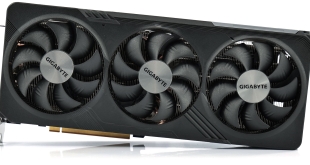
In the second of our RX 7800 XT partner card reviews, today our attention turns to Gigabyte and the Gaming OC model. Boasting the most aggressive factory overclock we have seen so far, with a 2565MHz boost, the Gaming OC also features a hefty triple-fan cooler, dual-BIOS and a smattering of RGB lighting. Hitting the market at £529, let's see what this card can do.
We were highly impressed with the PowerColor RX 7800 XT Hellhound that we reviewed just a few days ago, but the Gigabyte RX 7800 XT Gaming OC looks like it could be a potential rival. It sports the highest out of the box clock speed of any Navi 32-based graphics card to pass through our doors, and it's not small either, with a large heatsink and triple-fan Windforce cooling setup. We look at thermal performance, noise levels, game benchmarks, overclocking and more in this review.
| RX 7900 XT | RX 7800 XT | RX 7700 XT | RX 6800 XT | RX 6800 | RX 6700 XT | |
| Architecture | RDNA 3 | RDNA 3 | RDNA 3 | RDNA 2 | RDNA 2 | RDNA 2 |
| Manufacturing Process | 5nm GCD + 6nm MCD | 5nm GCD + 6nm MCD | 5nm GCD + 6nm MCD | 7nm | 7nm | 7nm |
| Transistor Count | 57.7 billion | 28.1 billion | 28.1 billion | 26.8 billion | 26.8 billion | 17.2 billion |
| Die Size | 300 mm² GCD
220 mm² MCD |
200 mm² GCD
150 mm² MCD |
200 mm² GCD
150 mm² MCD |
519 mm² | 519 mm² | 336 mm² |
| Compute Units | 84 | 60 | 54 | 72 | 60 | 40 |
| Ray Accelerators | 84 | 60 | 54 | 72 | 60 | 40 |
| Stream Processors | 5376 | 3840 | 3456 | 4608 | 3840 | 2560 |
| Game GPU Clock | Up to 2000 MHz | 2124 MHz | 2171 MHz | Up to 2015MHz | Up to 1815MHz | Up to 2424MHz |
| Boost GPU Clock | Up to 2400 MHz | Up to 2430 MHz | Up to 2544 MHz | Up to 2250MHz | Up to 2105MHz | Up to 2581MHz |
| ROPs | 192 | 96 | 96 | 128 | 96 | 64 |
| AMD Infinity Cache | 80MB | 64MB | 48MB | 128MB | 128MB | 96MB |
| Memory | 20GB GDDR6 20Gbps | 16GB GDDR6 19.5 Gbps | 12GB GDDR6 18Gbps | 16GB GDDR6 16Gbps | 16GB GDDR6 16Gbps | 12GB GDDR6 16Gbps |
| Memory Bandwidth | 800 GB/s | 624 GB/s | 432 GB/s | 512 GB/s | 512 GB/s | 384 GB/s |
| Memory Interface | 320-bit | 256-bit | 192-bit | 256-bit | 256-bit | 192-bit |
| Board Power | 315W | 263W | 245W | 300W | 250W | 230W |
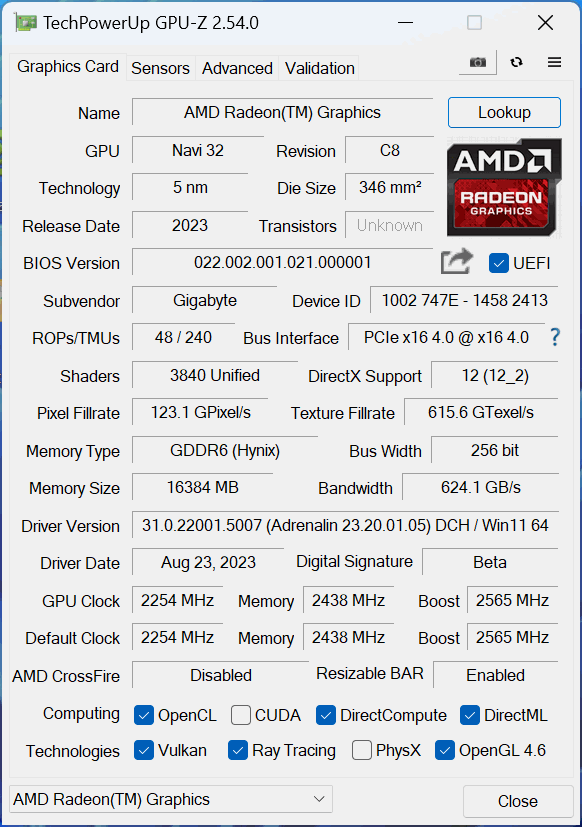
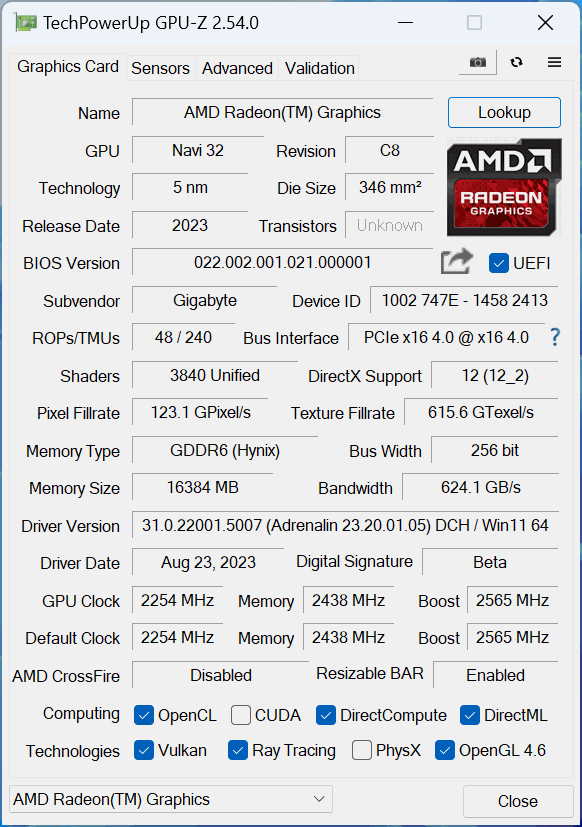
First, let's take a quick look at the specs. Unlike the most recent RDNA 3 GPU – the RX 7600 – AMD has made a return to its chiplet-based design for the RX 7800 XT, as we initially saw last year with the RX 7900 XTX and 7900 XT. This time around, the 7800 XT offers a 200mm² Graphics Compute Die (GCD) using TSMC's 5nm process, flanked by four 150 mm² Memory Compute Dies (MCDs) built on TSMC's 6nm node.
Internally though, the compute makeup hasn't been radically changed. Navi 32 packs in 60 Compute Units, each of which houses 64 Stream Processors, for a total of 3840 shaders. There are also 60 Ray Accelerators – one per CU – and 96 ROPs.
As for clock speed, this remains high with the RX 7800 XT, with AMD touting a reference boost of up to 2430MHz. Gigabyte has increased this further, to 2565MHz, regardless of which BIOS is used.
Meanwhile, the memory configuration is almost identical to the previous generation RX 6800 XT. We still find 16GB GDDR6 operating over a 256-bit interface, but this time the memory clocks in at 19.5Gbps, up from 16Gbps. This gives a memory bandwidth of 624 GB/s, though AMD claims an ‘effective' bandwidth of 2708.4 GB/s due to the 64MB of 2nd Gen Infinity cache.
Power draw for the RX 7800 XT is rated at 263W Total Board Power (TBP), though Gigabyte has increased this for both BIOS. We are using our well-established GPU power testing methodology in this review, so read on for our most detailed power and efficiency testing yet.
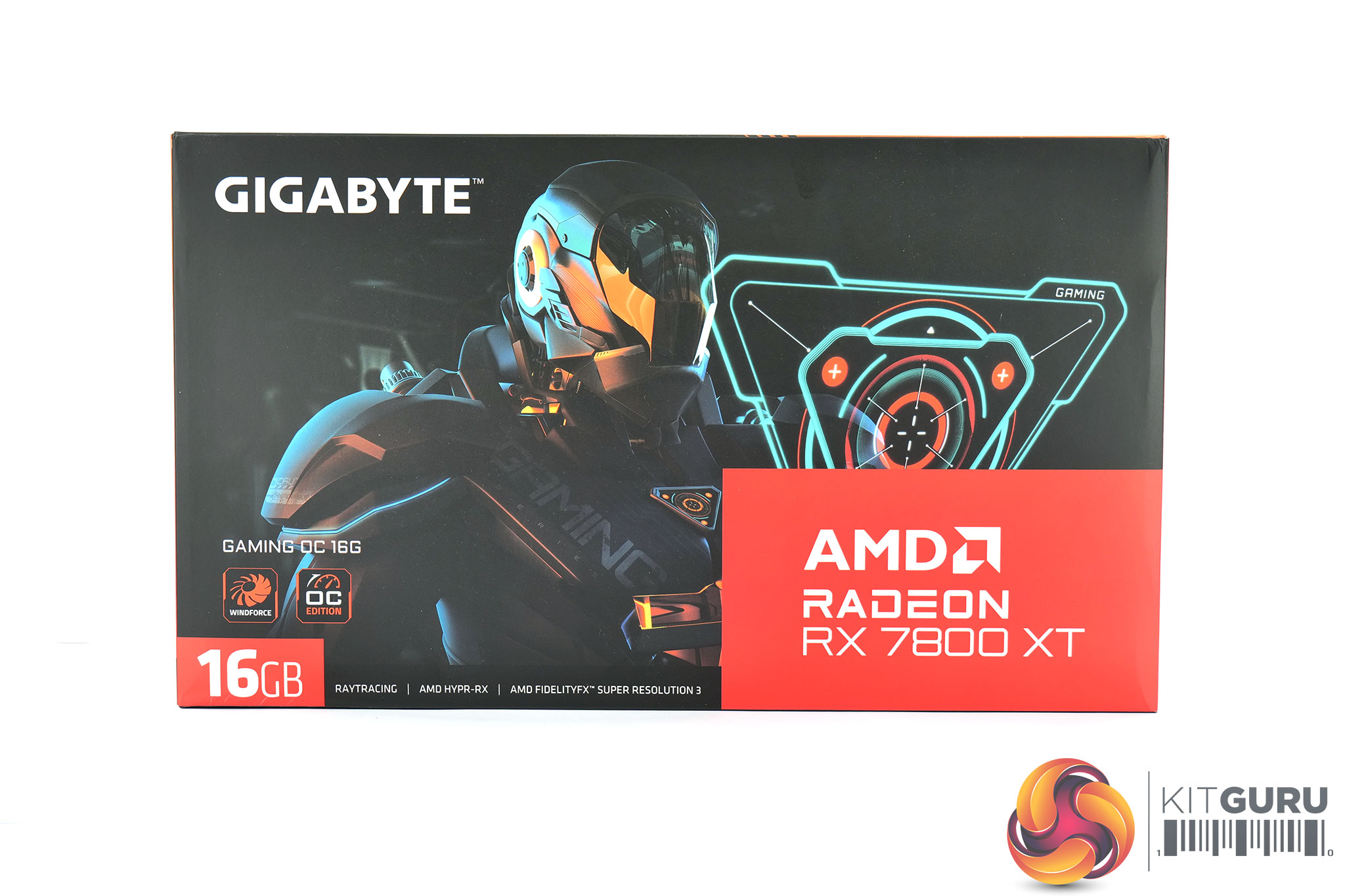
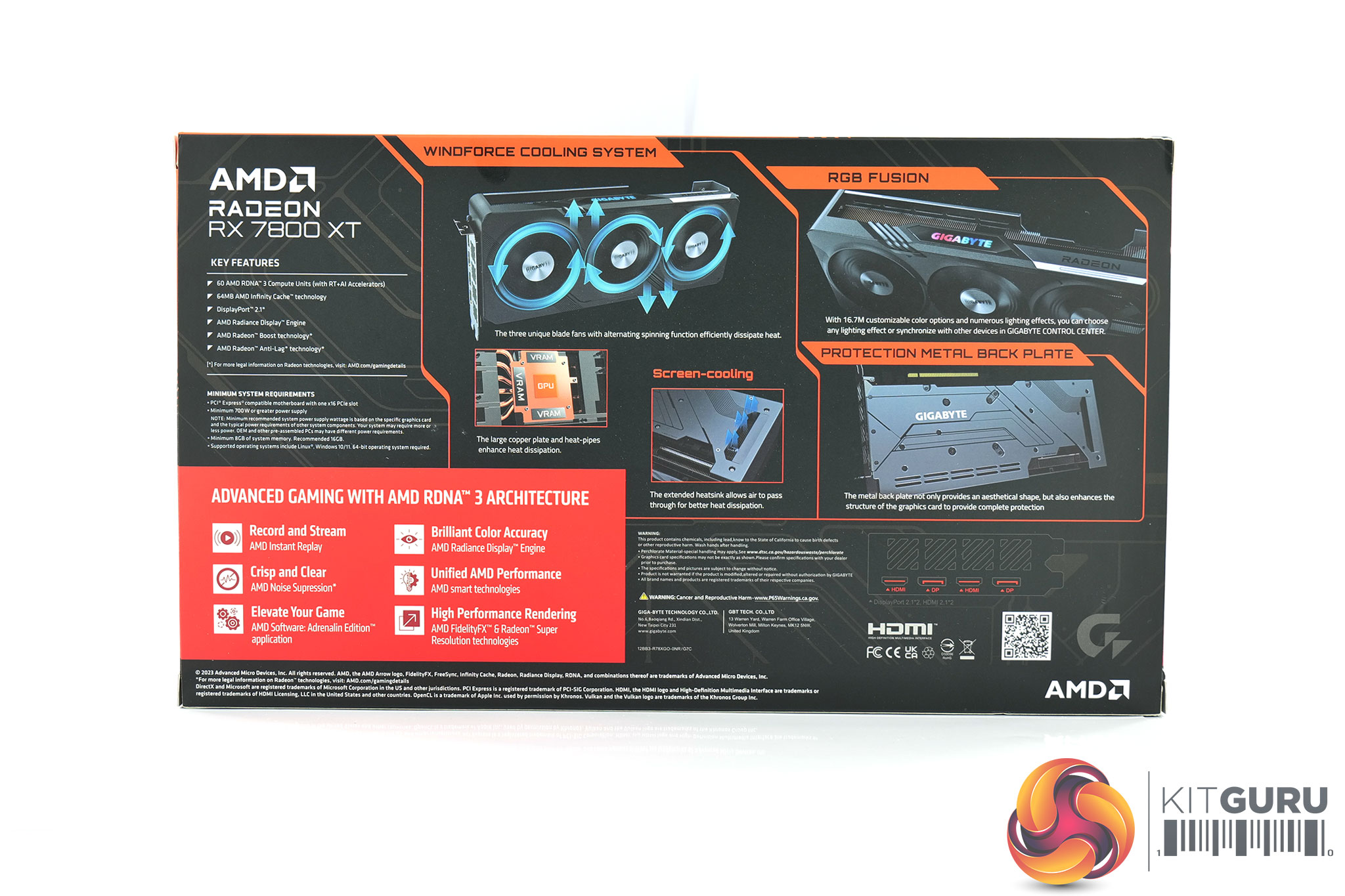
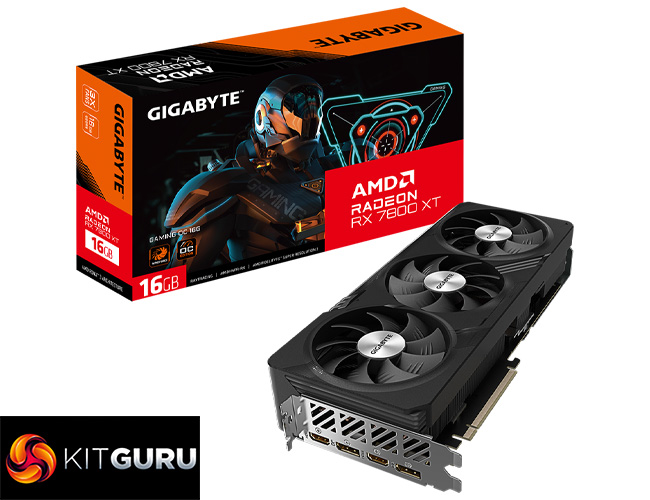
The Gigabyte RX 7800 XT Gaming OC ships in a black box, with a futuristic-looking image of some sort of cyber soldier on the front. On the back, the company highlights a few key features of the card and the Windforce cooler.
Inside, the only included accessory is a small quick-start guide.
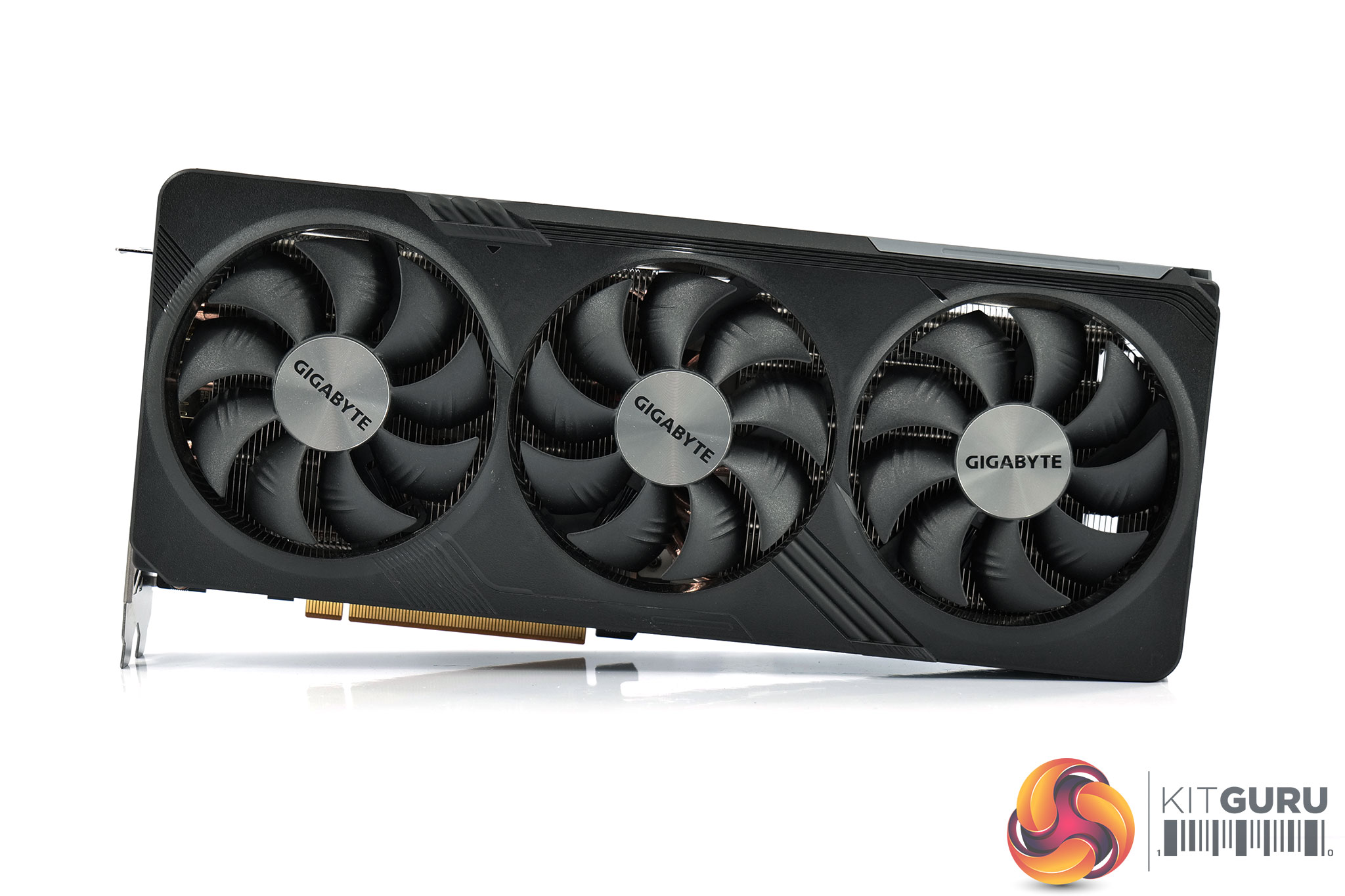
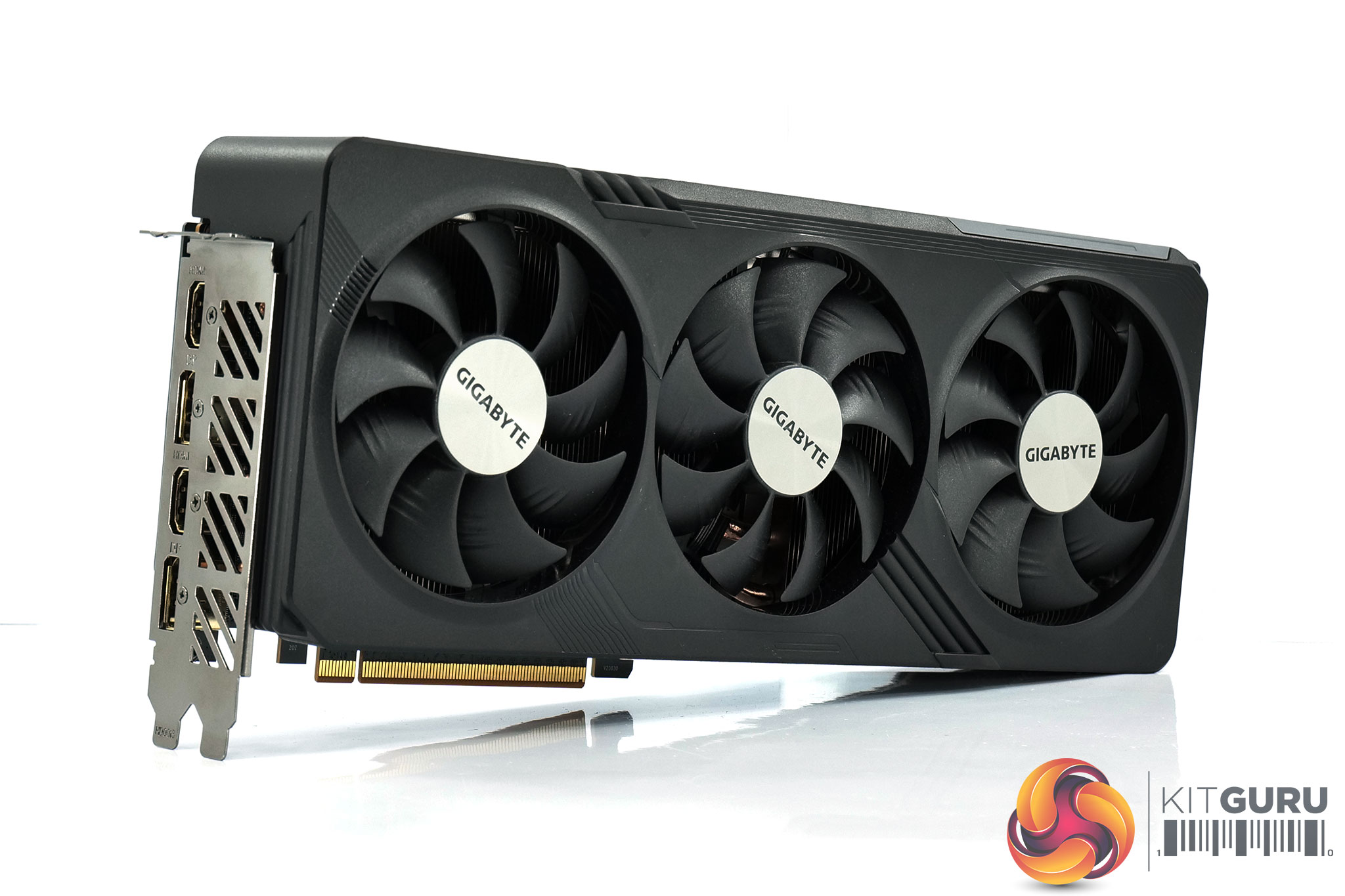
As for the card itself, the design will be instantly familiar if you've seen any of our other Gigabyte Gaming OC reviews this GPU generation. The shroud is almost entirely black, with just a couple of grey accents, while it features some circuit board-style traces and other design elements to add some visual interest.
It's obviously sporting a triple-fan setup as well, part of Gigabyte's Windforce cooling solution. Each fan measures 90mm in diameter, while the central fan spins in reverse, a common feature designed to reduce airflow turbulence.
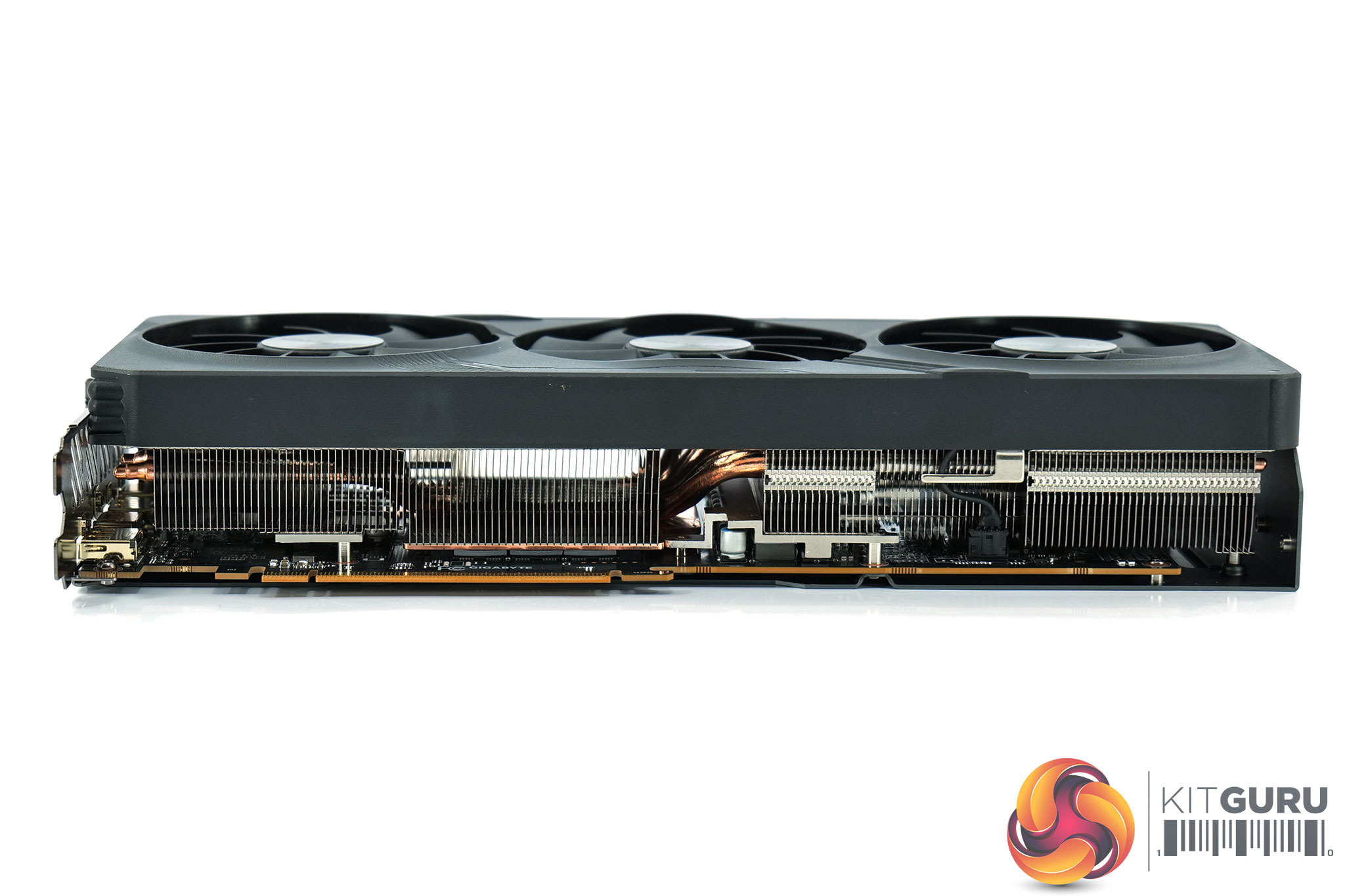
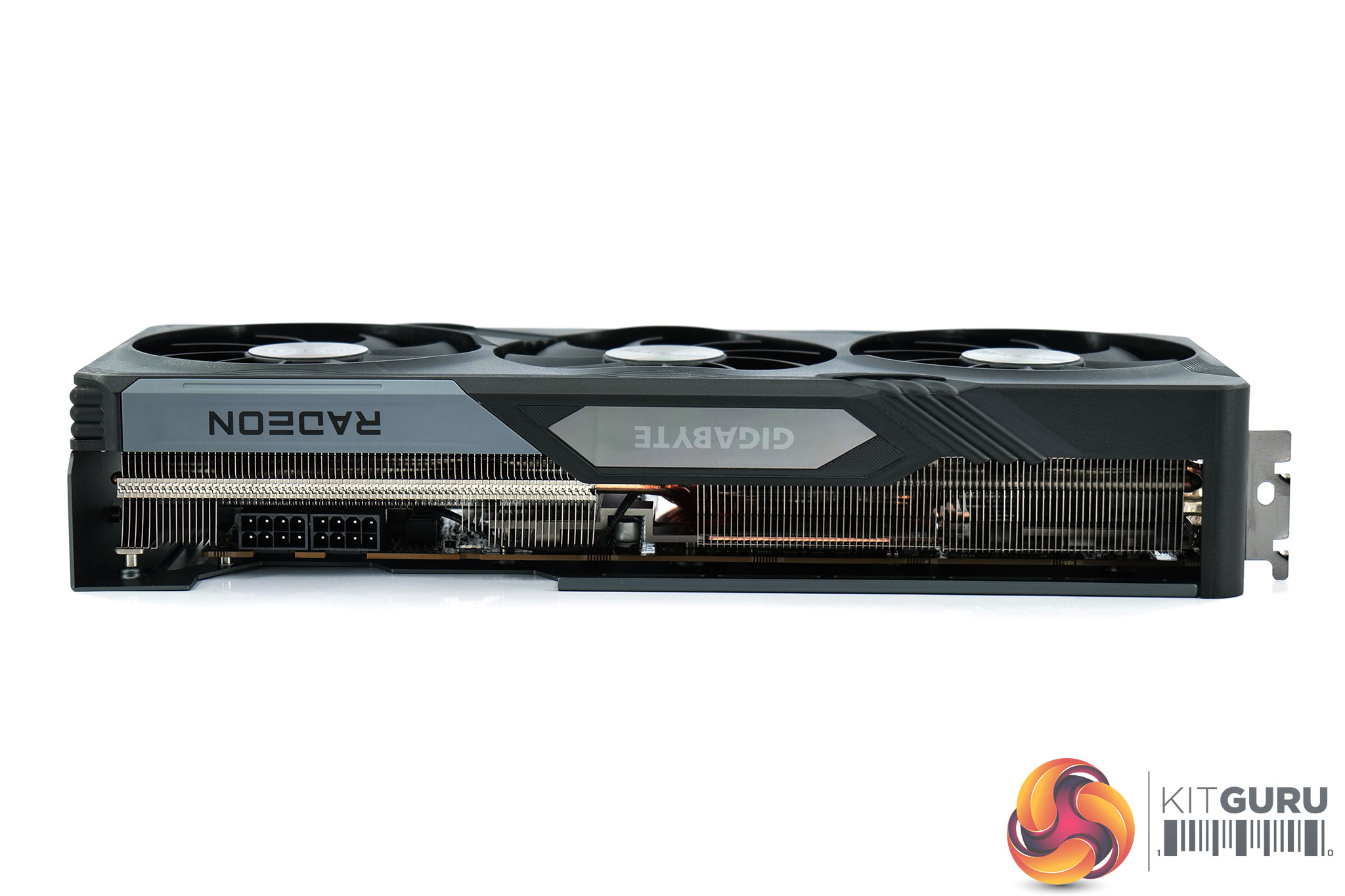
In terms of the dimensions, the Gaming OC measures 302x 130 x 56 mm, so it's fairly long and almost a triple-slot thickness, though it's not quite as large as the RTX 4090 Gaming OC… It weighed in at 1327g on my scales.
The front side of the card is home to a glossy plastic section, with the Gigabyte logo housed within it acting as the only RGB zone on the card. This uses a rainbow-style effect out of the box but can be configured using Gigabyte Control Center software.
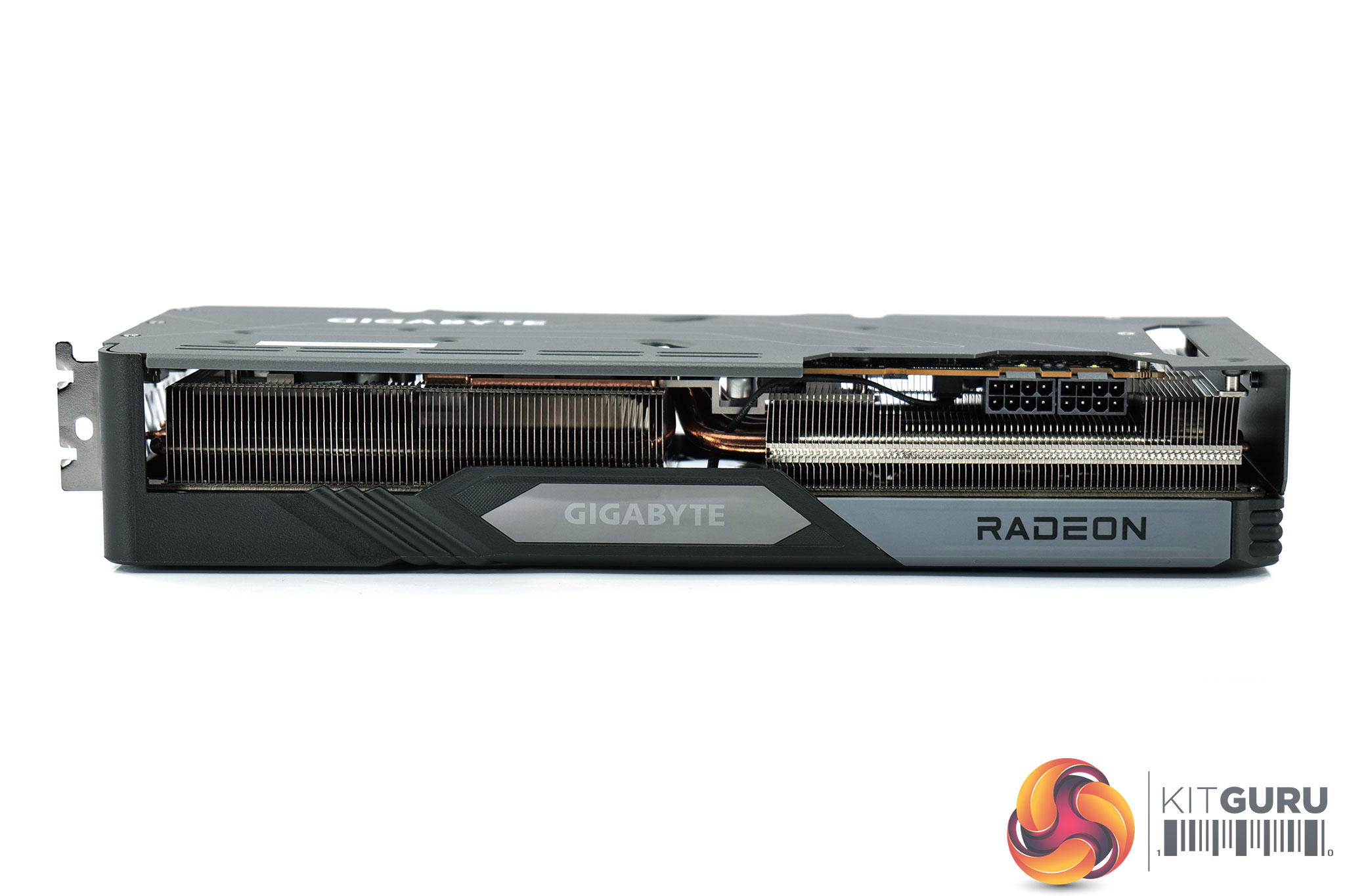
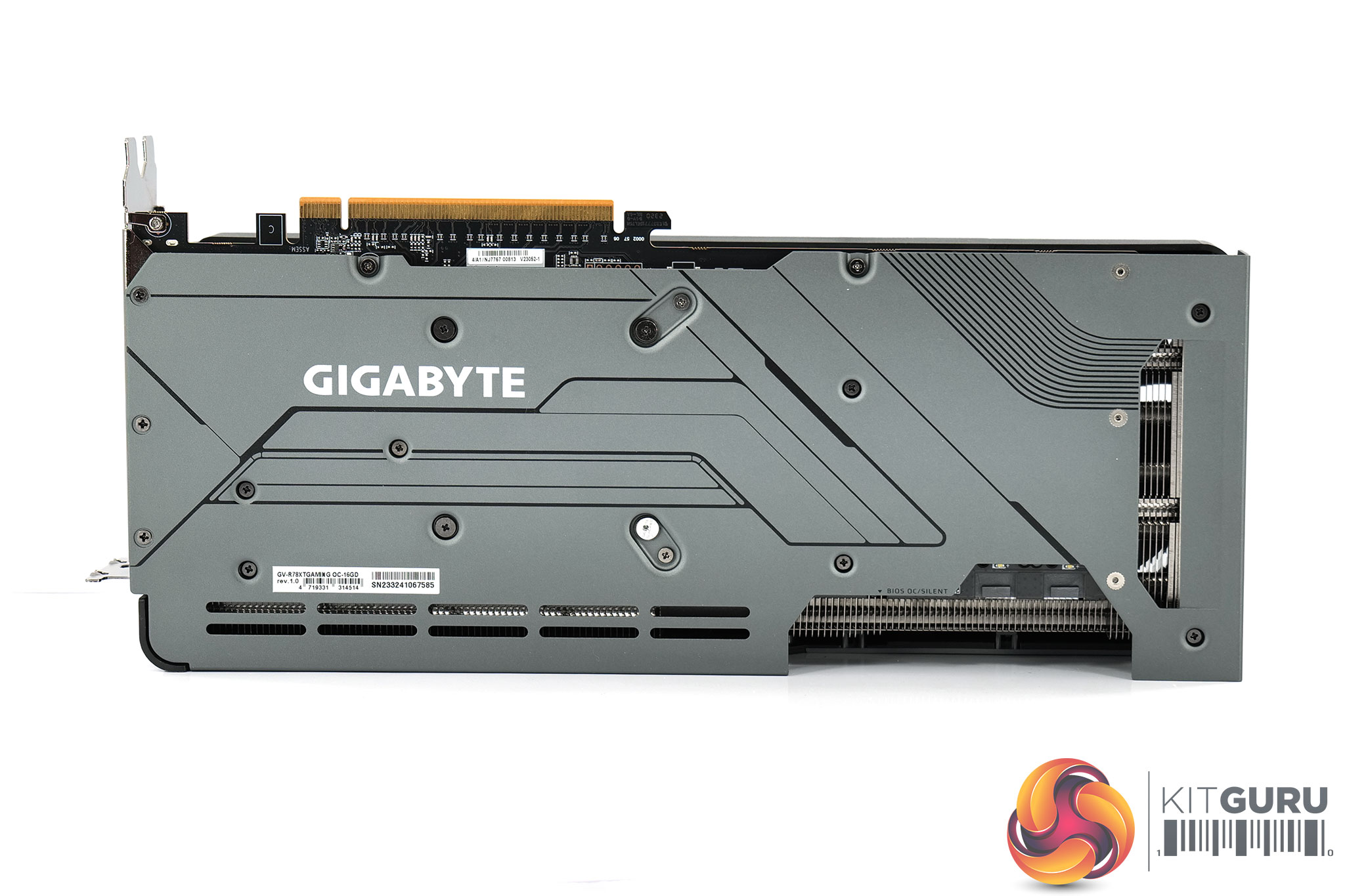
Flipping over to the backplate, this is a full-length design that is made of a grey metal. We can see the Gigabyte logo printed in white, while there is a very small cut-out right at the end of the card to allow some air to pass straight out of the heatsink – but as this is so small, I'm not sure it will do a whole lot for cooling.
A BIOS switch is located to the left of the two power inputs. This offers a choice of the OC or Silent modes – both offer identical power and clock speed targets, the only difference is the fan curve.
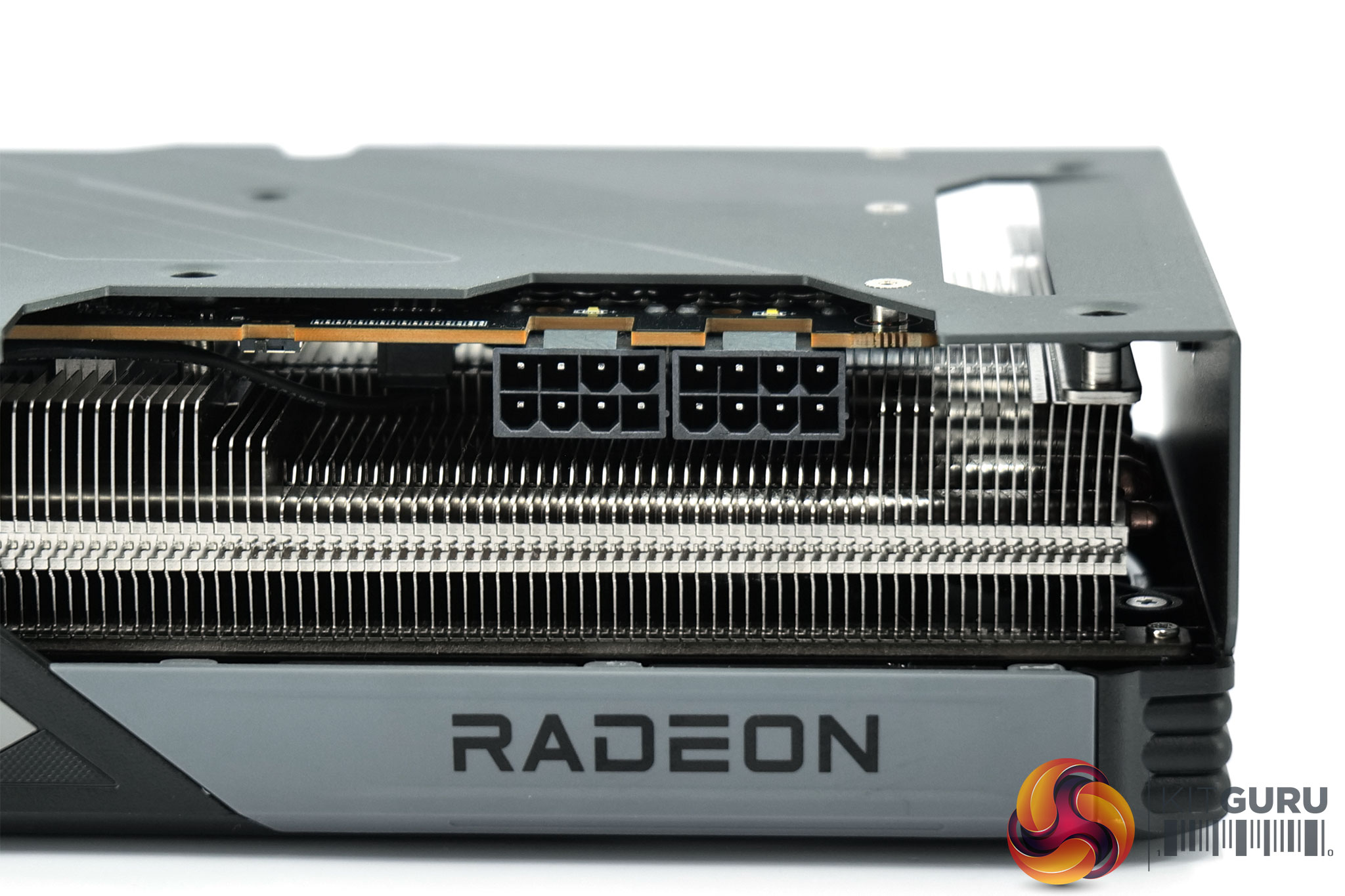
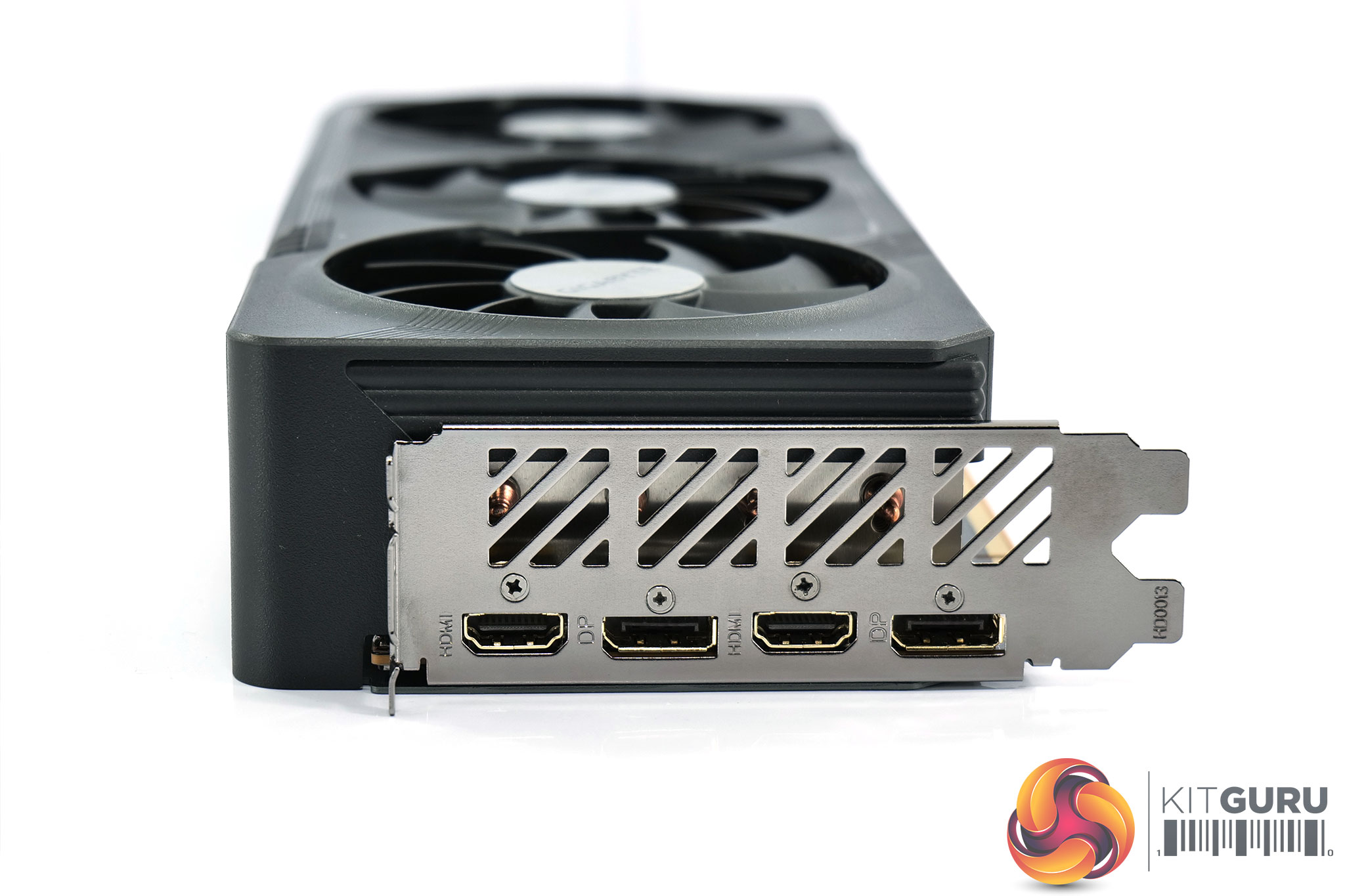
We can also note two 8-pin power connectors as expected, though for display outputs we have 2x DisplayPort 2.1 and 2x HDMI 2.1, so that's an extra HDMI port (and one less DisplayPort) than the typical configuration.
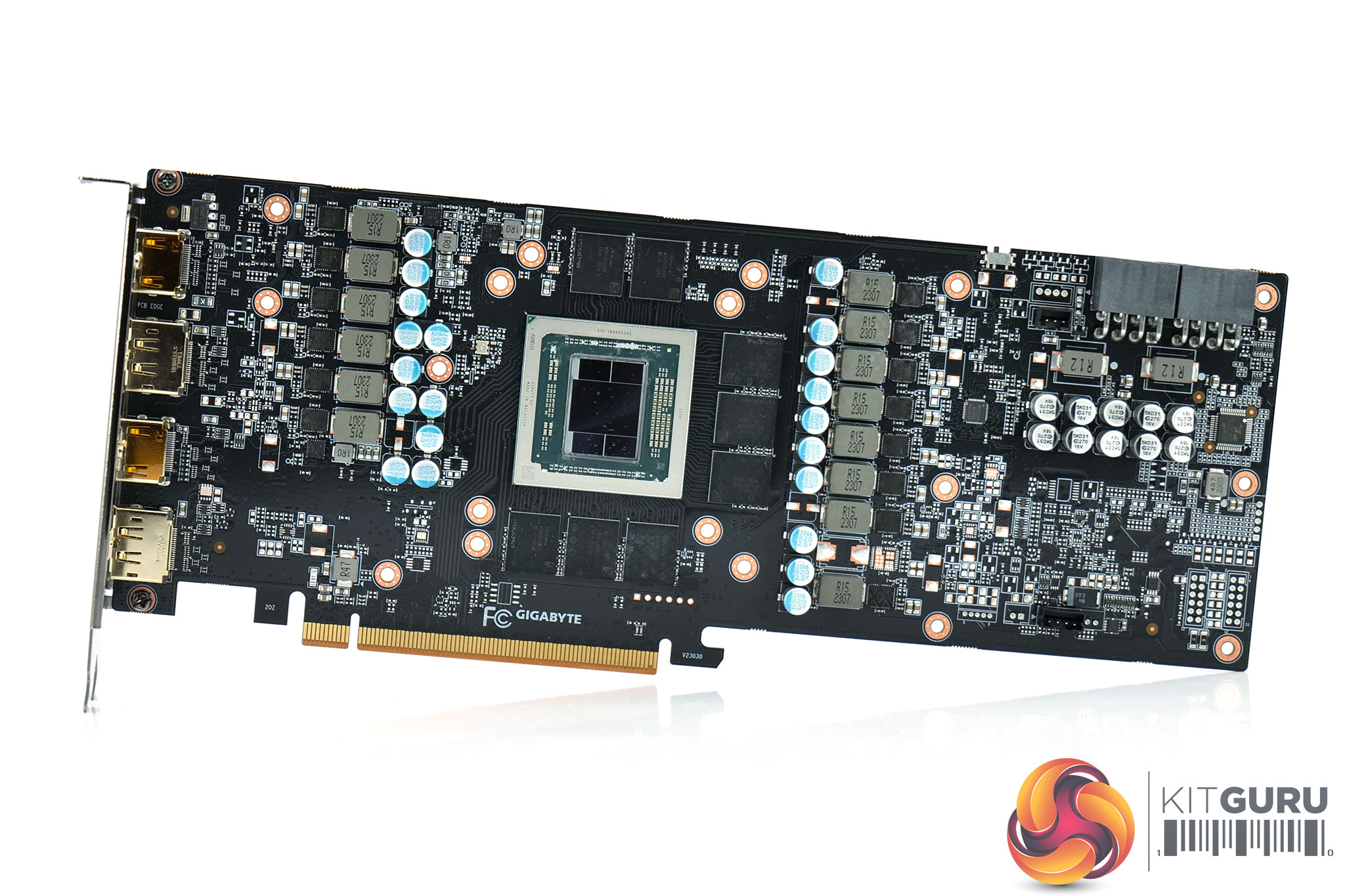
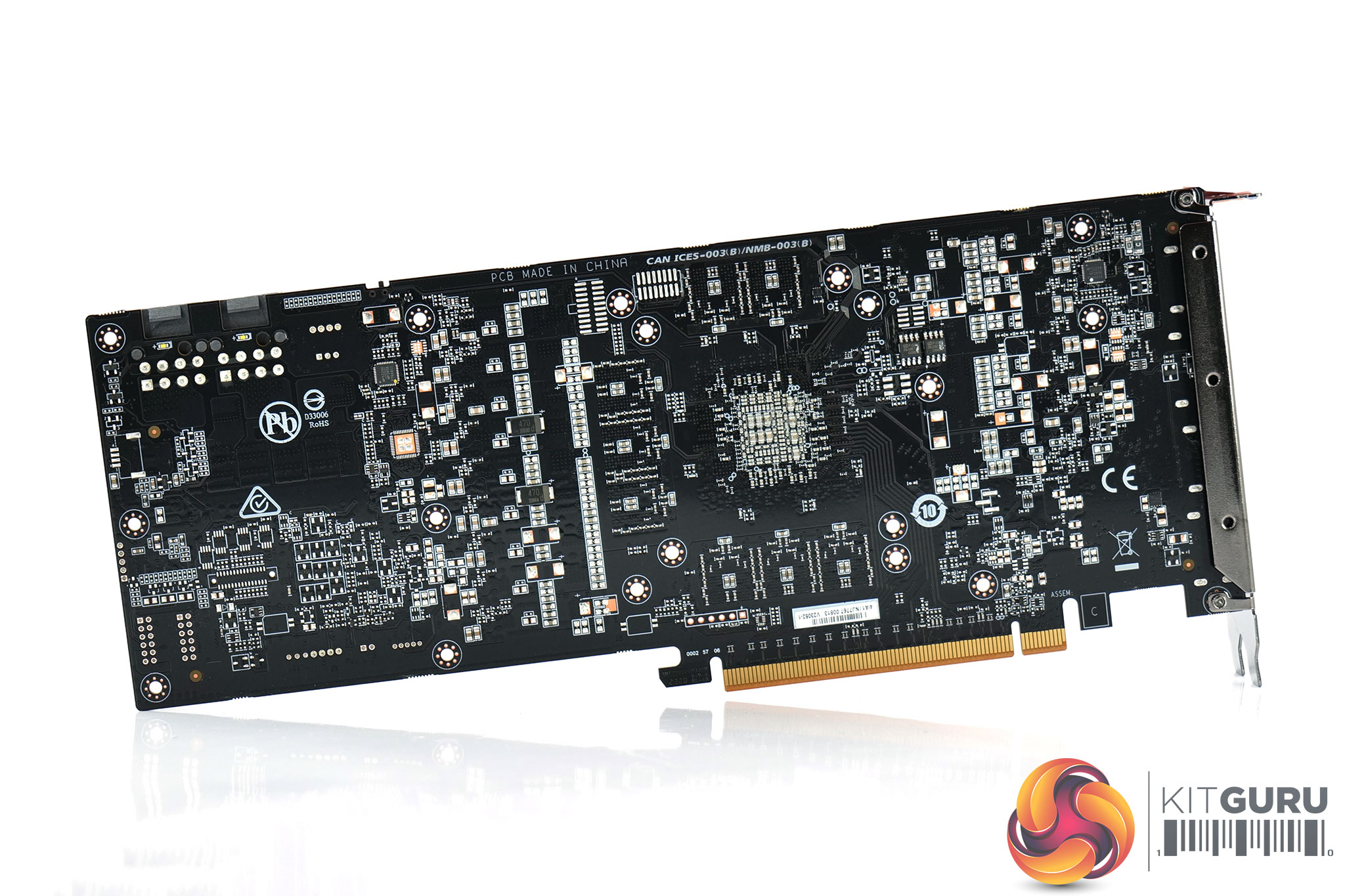
Opening up the card to take a look at the PCB, it looks like Gigabyte is using a fairly ‘vanilla' reference PCB here, certainly in terms of the VRM. We find an 11+3 layout – specifically, according to Gigabyte, ‘GPU 8+2+1 (VDD GFX /SOC/ USR);MEM 2+1 (MEMORY /VDDCI).' 70A Monolithic Power Systems MP87997 MOSFETs are used throughout, with a trio of Monolithic MP2856 controllers as well.
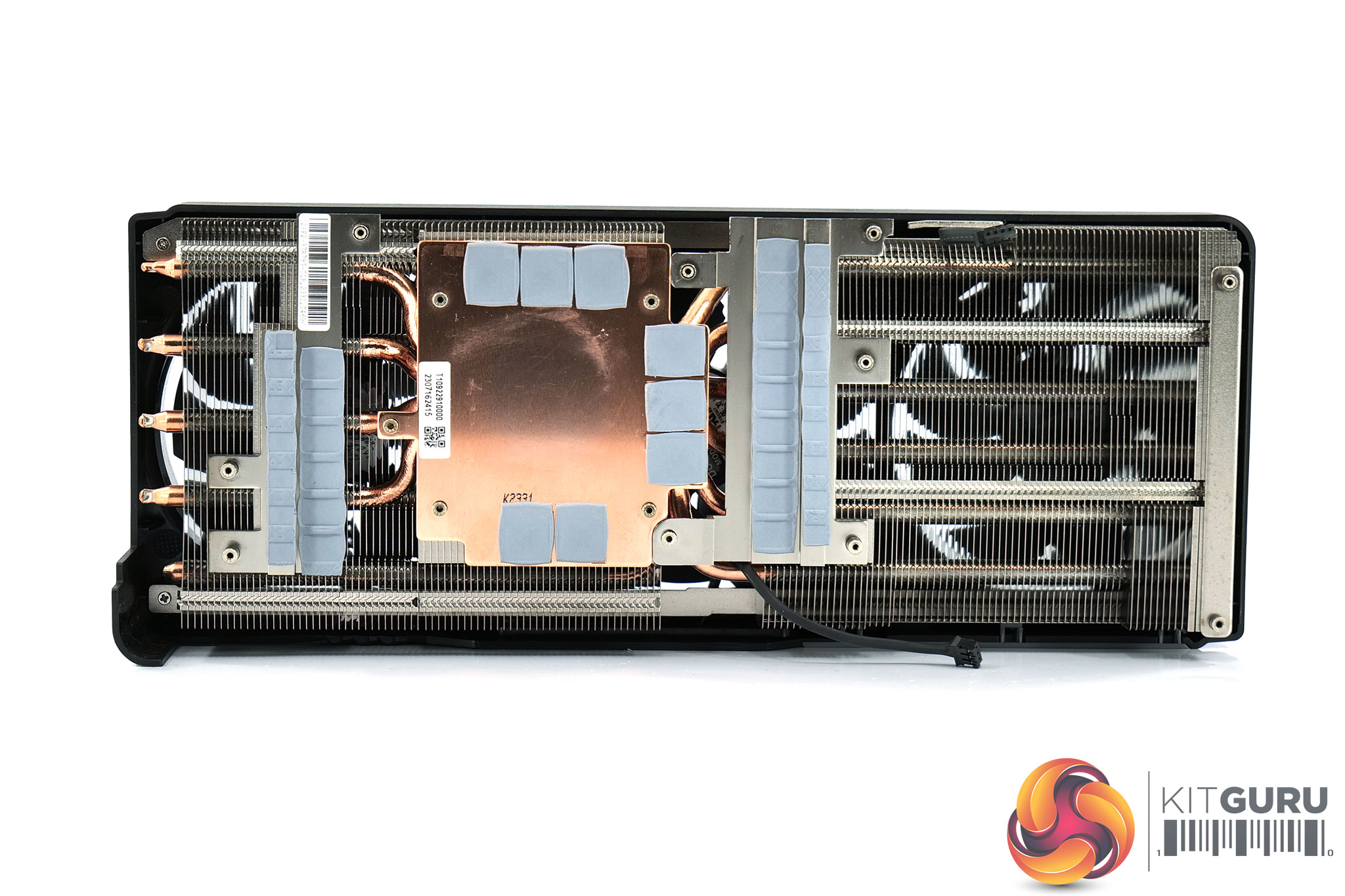
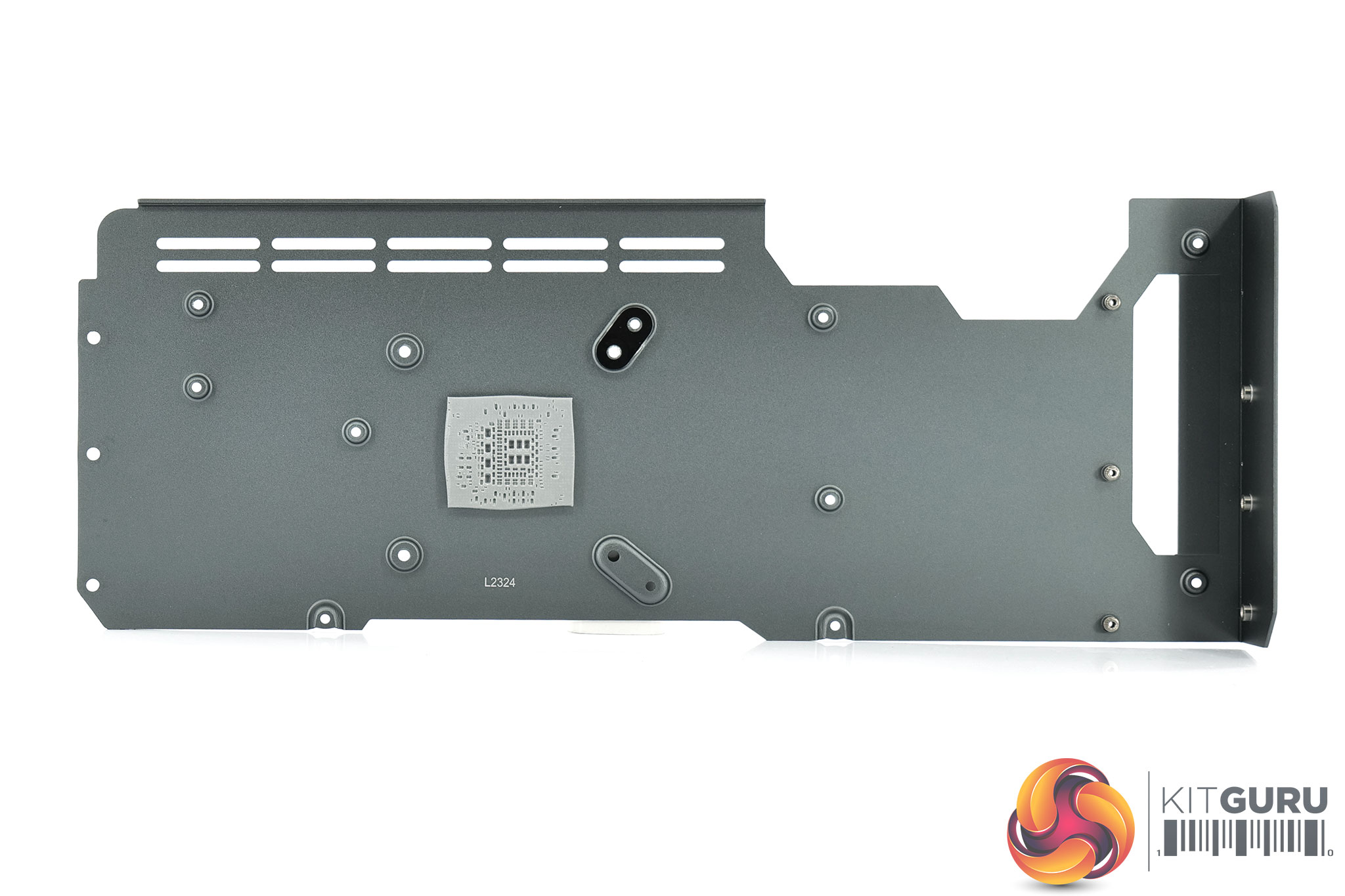
For the cooler, Gigabyte has deployed two aluminium finstacks, connected by a total of 7x 6mm copper heatpipes. The GPU and memory make contact with a copper baseplate, while there are some smaller secondary baseplates used to cool the VRM.
Driver Notes
- AMD GPUs (except RX 7800 XT and RX 7700 XT) were benchmarked with the Adrenalin 23.8.1 driver.
- AMD's RX 7800 XT and RX 7700 XT were benchmarked with the Adrenalin 23.20.01.05 driver supplied to press.
- All Nvidia GPUs were benchmarked with the 537.13 driver.
Results are only directly comparable where this exact configuration has been used.
Test System:
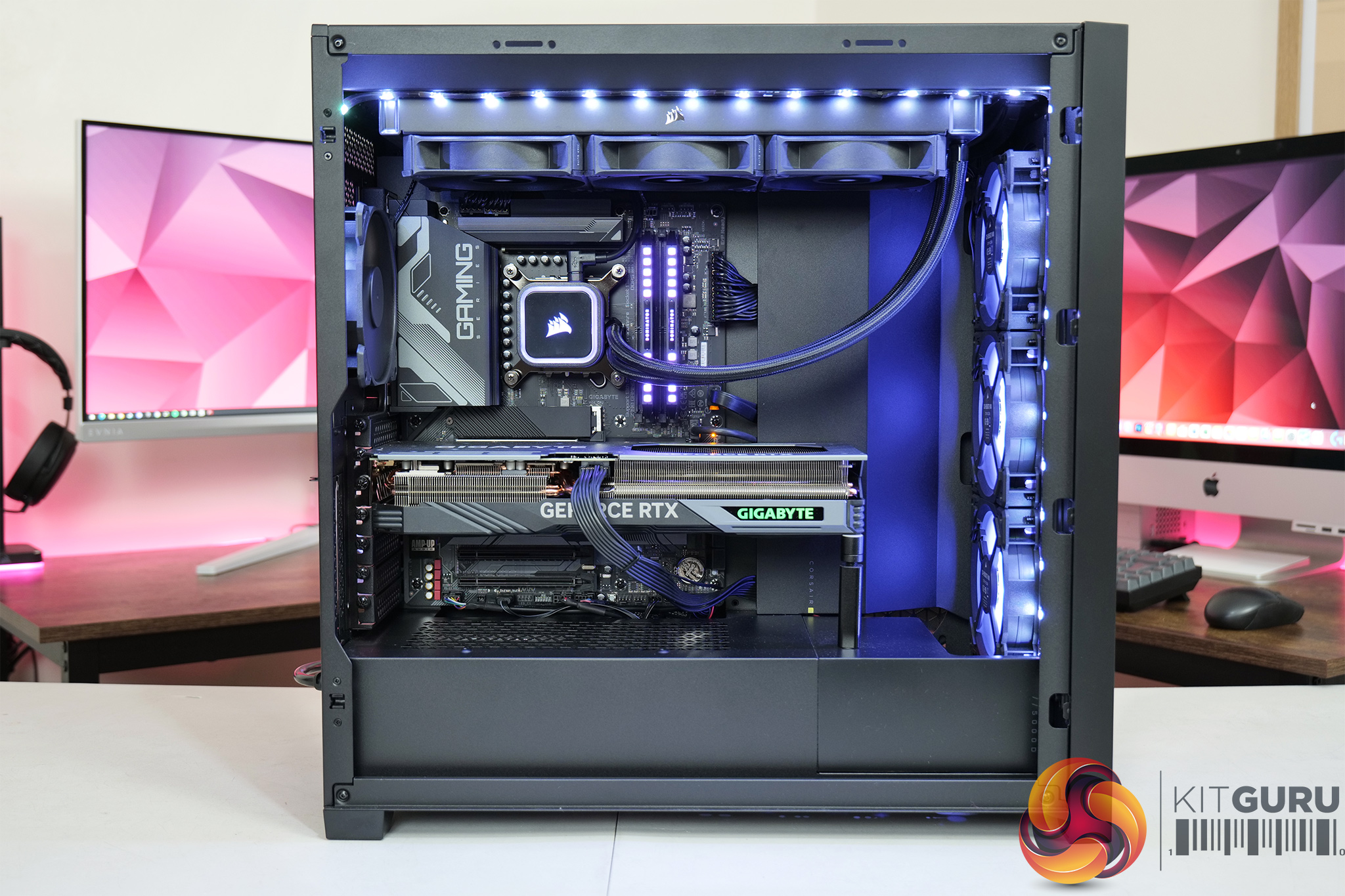
We test using a custom built system from PCSpecialist, based on Intel’s Rocket Lake platform. You can read more about this system HERE and configure your own PCSpecialist system HERE.
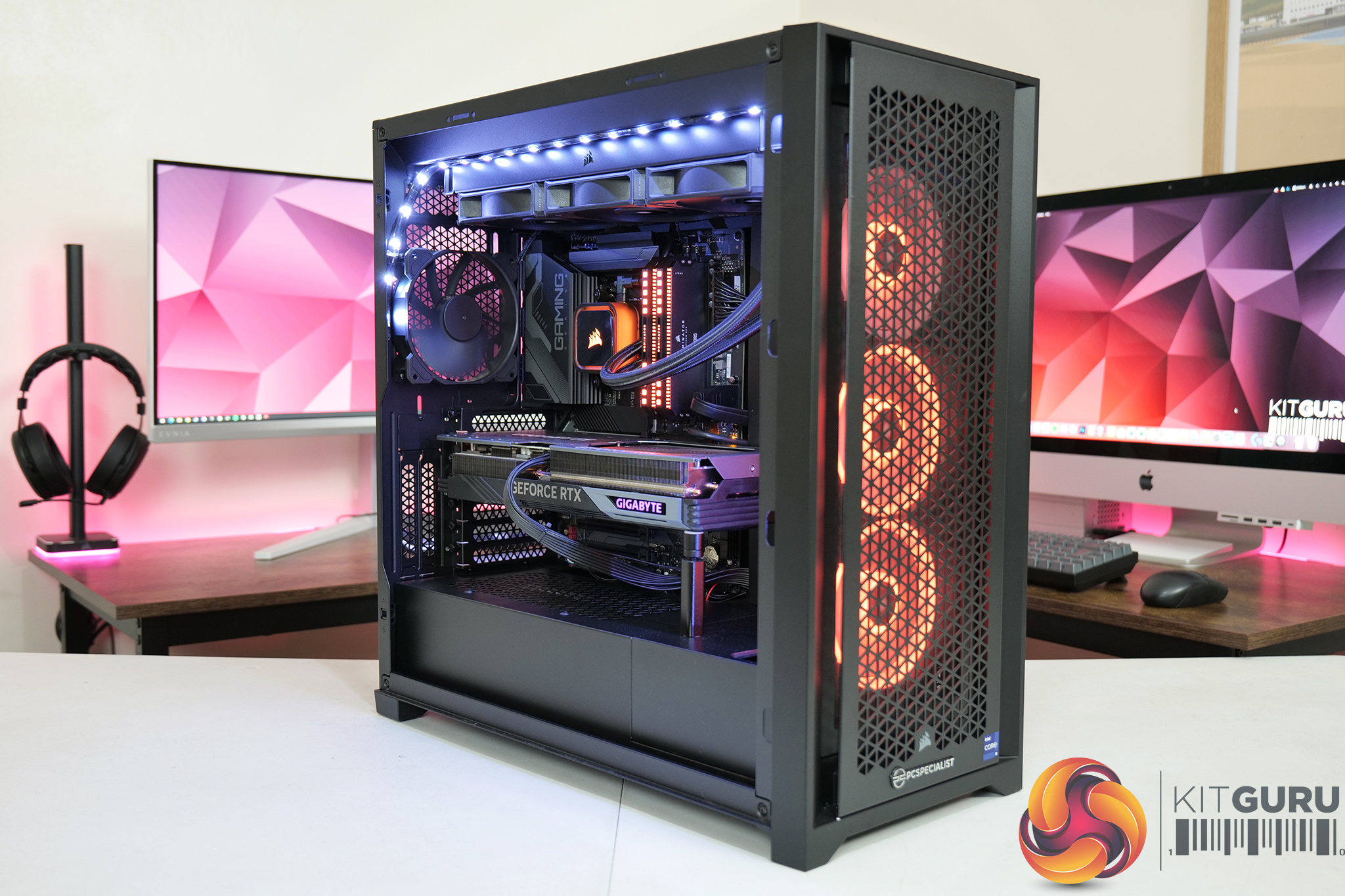
| CPU |
Intel Core i9-13900KS
|
| Motherboard |
Gigabyte Z790 Gaming X AX
|
| Memory |
32GB (2x16GB) Corsair Dominator Platinum RGB DDR5 6000MHz
|
| Graphics Card |
Varies
|
| SSD |
4TB Seagate Firecuda 530 Gen 4 PCIe NVMe
|
| Chassis | Corsair 5000D Airflow Tempered Glass Gaming Case |
| CPU Cooler |
Corsair iCUE H150i Elite RGB High Performance CPU Cooler
|
| Power Supply |
Corsair 1600W Pro Series Titanium AX1600i Digital Modular PSU
|
| Operating System |
Windows 11 22H2
|
| Monitor |
MSI Optix MPG321UR-QD
|
| Resizable BAR |
Enabled for all supported GPUs
|
Comparison Graphics Cards List
- AMD RX 7900 XT 20GB
- AMD RX 7800 XT 16GB
- Gigabyte RX 7800 XT Gaming OC 16GB
- PowerColor RX 7800 XT Hellhound 16GB
- Sapphire RX 7800 XT Nitro+ 16GB
- AMD RX 6800 XT 16GB
- AMD RX 6800 16GB
- AMD RX 6700 XT 12GB
- AMD RX 5700 XT 8GB
- Gigabyte RTX 4070 Ti Gaming 12GB
- Nvidia RTX 4070 FE 12GB
- MSI RTX 4060 Ti Ventus 2X 16GB
- Nvidia RTX 4060 Ti FE 8GB
- Nvidia RTX 3070 Ti FE 8GB
All cards were tested at reference specifications.
Software and Games List
- 3DMark Fire Strike & Fire Strike Ultra (DX11 Synthetic)
- 3DMark Time Spy (DX12 Synthetic)
- 3DMark DirectX Raytracing feature test (DXR Synthetic)
- Assassin's Creed Valhalla (DX12)
- Control (DX12)
- Cyberpunk 2077 (DX12)
- F1 23 (DX12)
- Forza Horizon 5 (DX12)
- God of War (DX11)
- Hitman 3 (DX12)
- Horizon Zero Dawn (DX12)
- The Last of Us Part 1 (DX12)
- A Plague Tale: Requiem (DX12)
- Ratchet and Clank: Rift Apart (DX12)
- Red Dead Redemption 2 (DX12)
- Resident Evil 4 (DX12)
- Returnal (DX12)
- Shadow of the Tomb Raider (DX12)
- Total War: Warhammer III (DX11)
We run each benchmark/game three times, and present mean averages in our graphs. We use FrameView to measure average frame rates as well as 1% low values across our three runs.
Here we test three games, all at 2560×1440 resolution using maximum image quality settings.
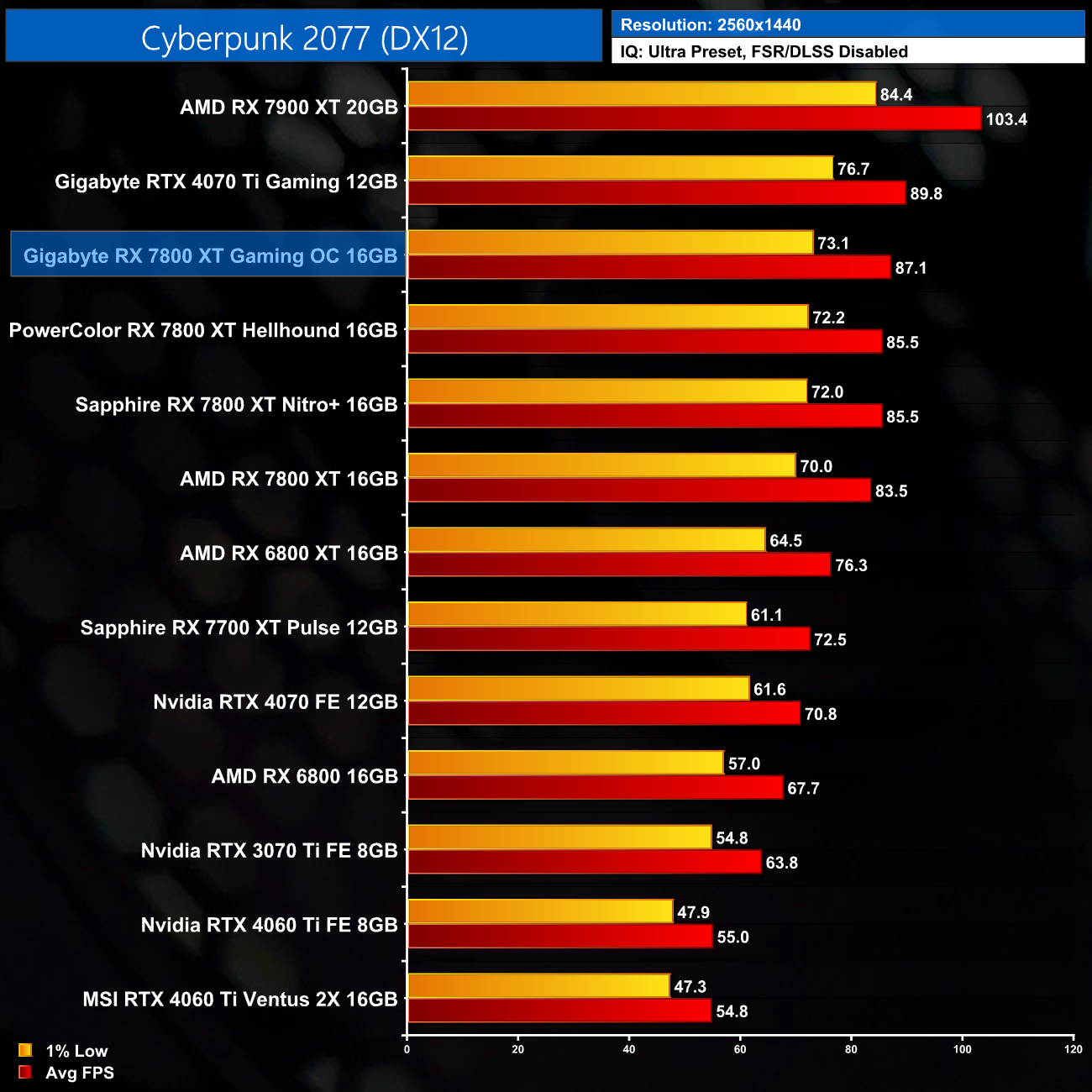
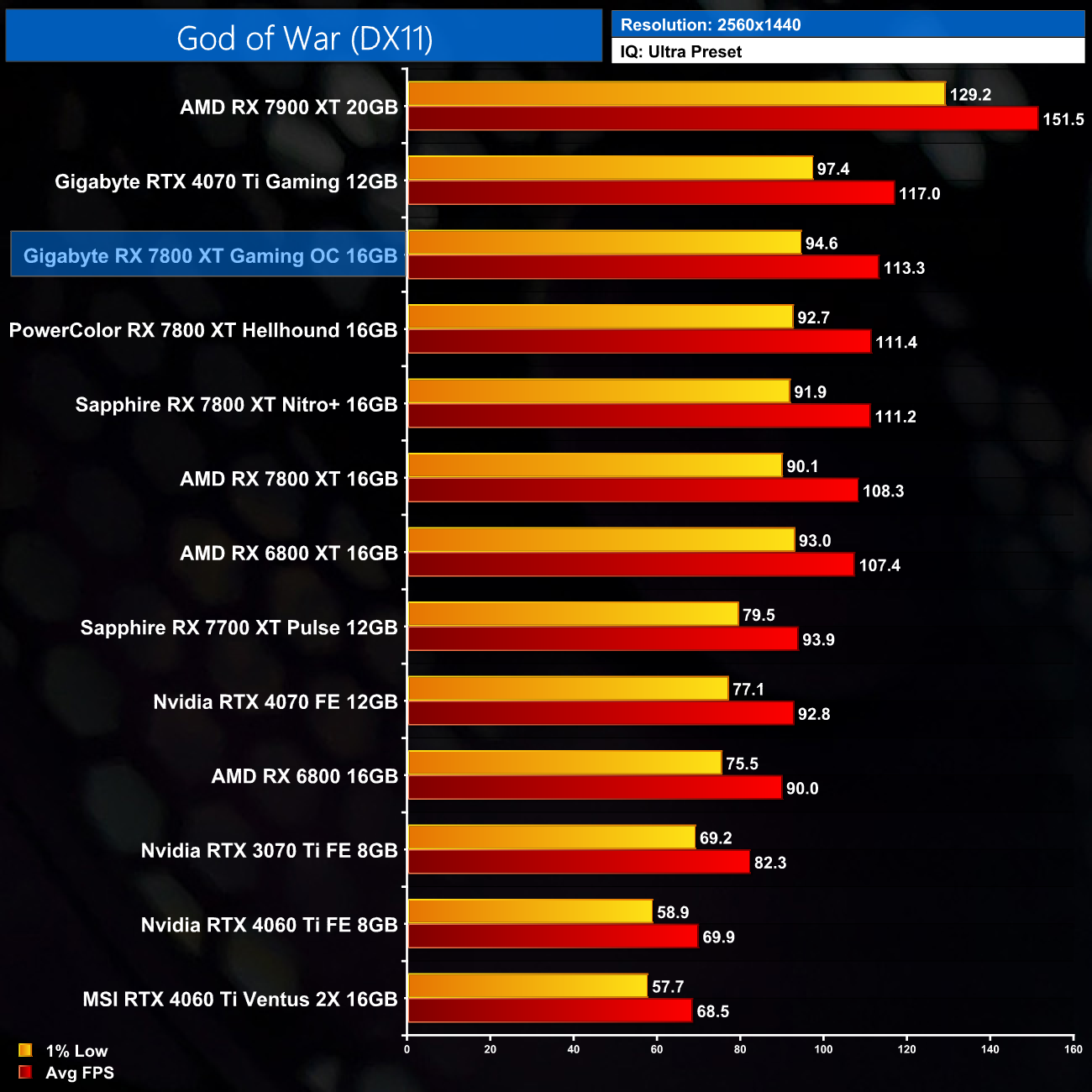
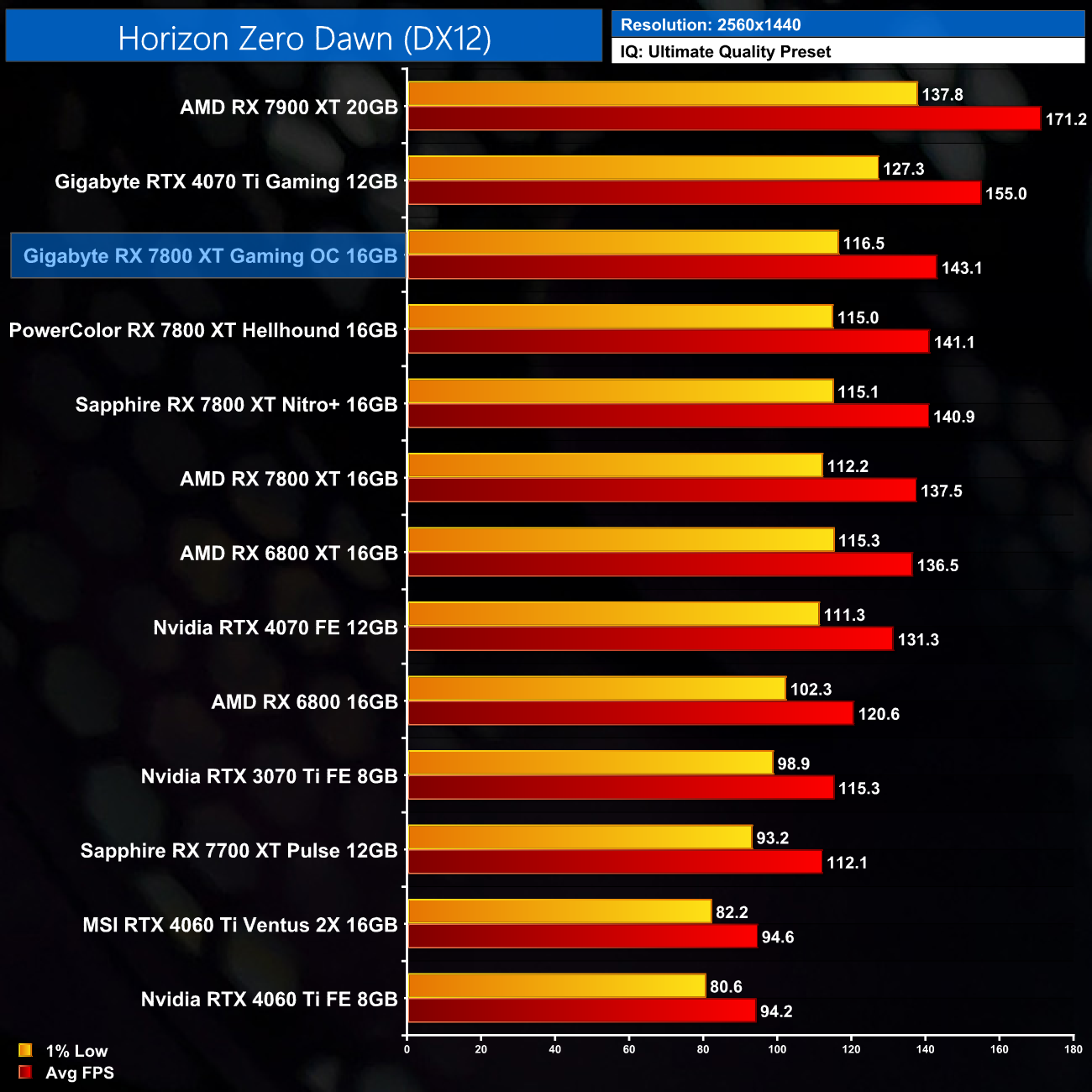
As the Gaming OC features the most aggressive factory overclock of any RX 7800 XT we've seen to-date, it stands to reason it also offers the greatest performance gains over the reference card. We're still not talking huge leaps in performance, but gains of 4-5% in the games we tested here.
Here we present the average clock speed for each graphics card while running Cyberpunk 2077 for 30 minutes. We use GPU-Z to record the GPU core frequency during gameplay. We calculate the average core frequency during the 30 minute run to present here.
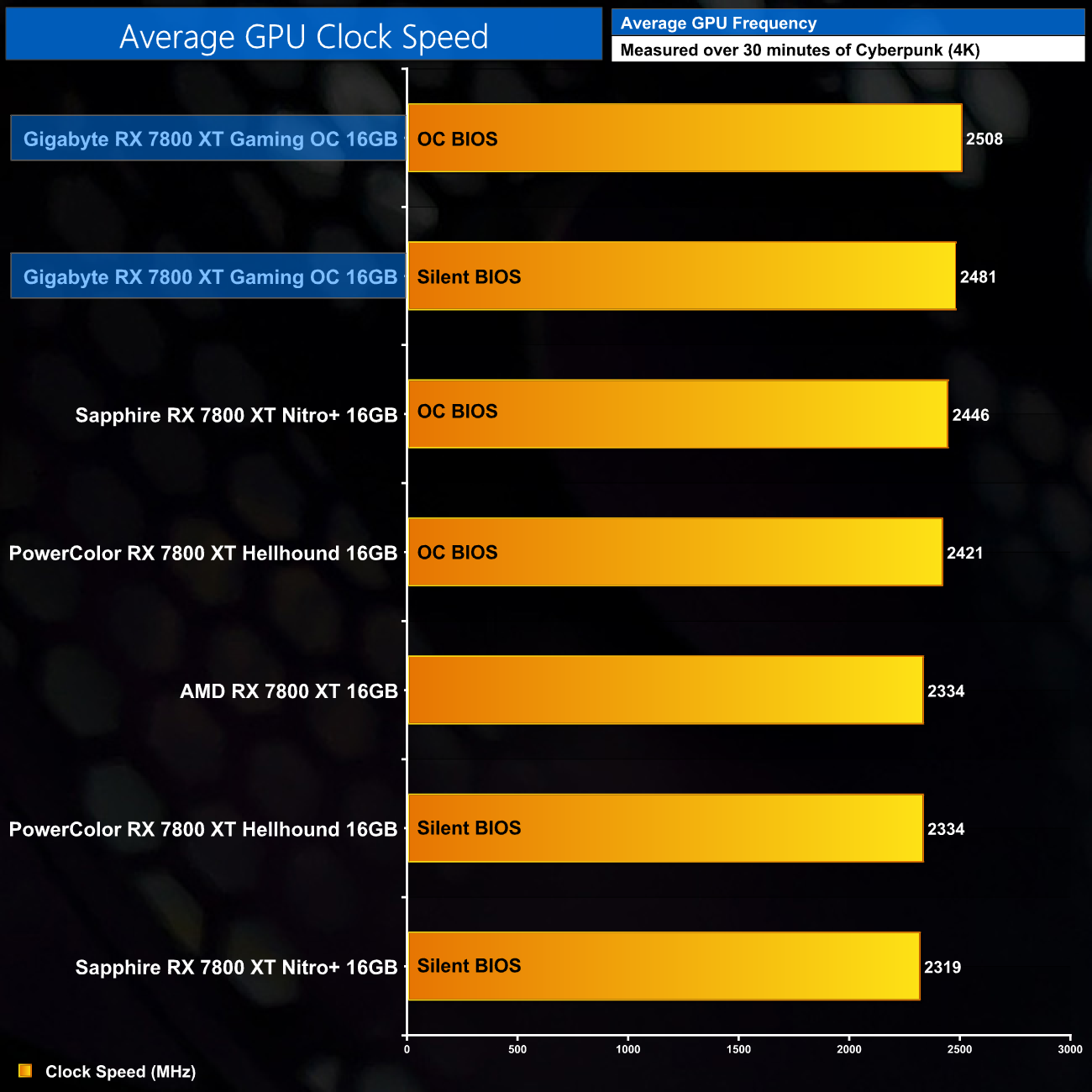
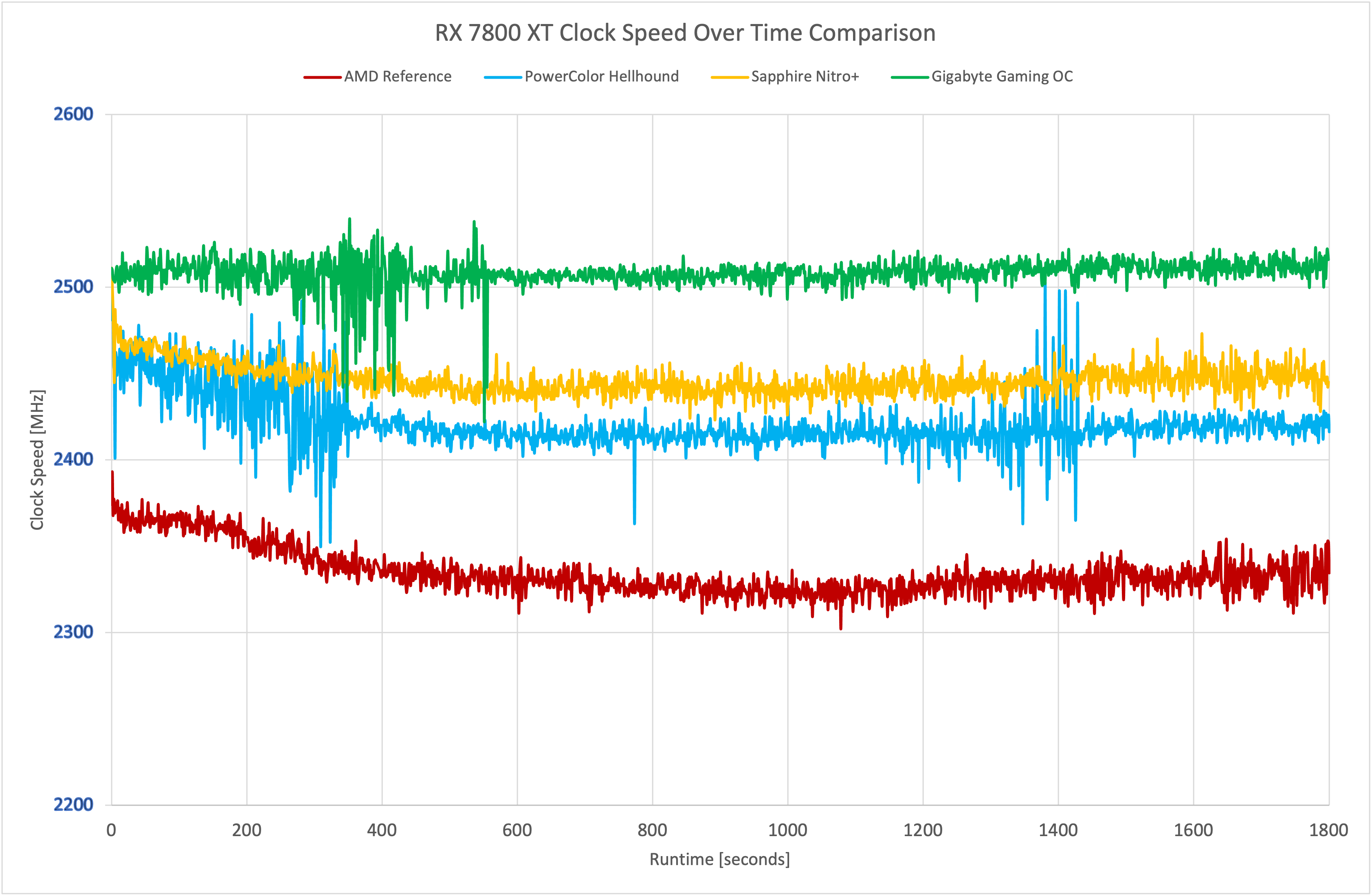
The small performance gains in games stem directly from the extra clock speed that Gigabyte has extracted from the GPU. Over our thirty minute stress test, the OC BIOS averaged 2508MHz, making it 174MHz (7%) faster than the AMD reference card. It's 62MHz faster than the next-best partner card, the Sapphire Nitro+. Incidentally, while both the OC and Silent BIOS have the same rated boost clock at 2565MHz, the Silent BIOS runs a bit hotter as we shall see, causing GPU frequency to come in about 30MHz slower in the real world.
For our temperature testing, we measure the peak GPU core temperature under load. A reading under load comes from running Cyberpunk 2077 for 30 minutes.
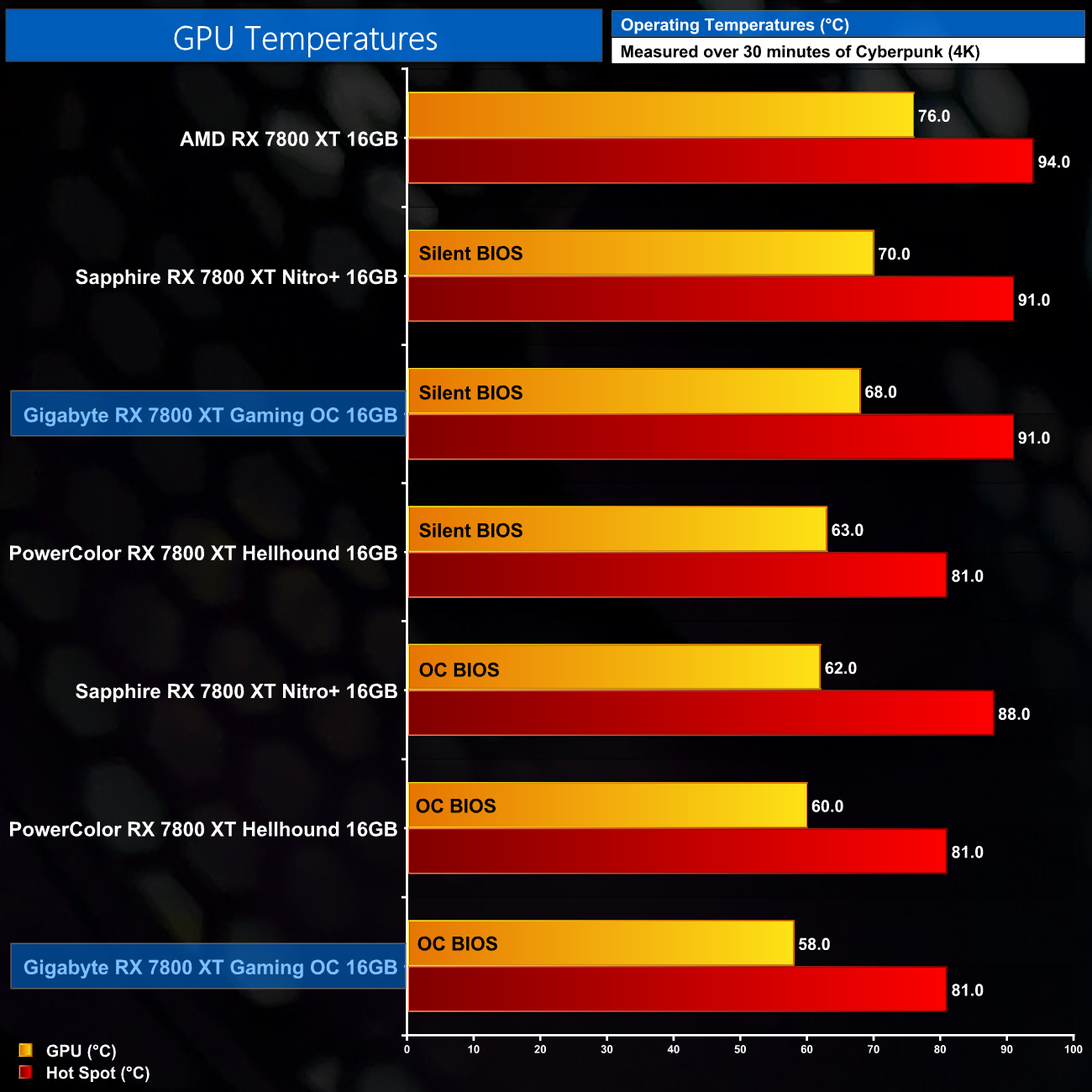
Thermal results look good at first viewing for the Gaming OC. The OC BIOS runs the coolest out of the box of any RX 7800 XT we've tested, with a GPU temperature of 58C and a hot spot of 81C. The Silent BIOS runs hotter, as we expected, this time hitting 68C and 91C, respectively, but that's still a good chunk better than the reference design.
We take our noise measurements with the sound meter positioned 1 foot from the graphics card. I measured the noise floor to be 32 dBA, thus anything above this level can be attributed to the graphics cards. The power supply is passive for the entire power output range we tested all graphics cards in, while all CPU and system fans were disabled. A reading under load comes from running Cyberpunk 2077 for 30 minutes for 30 minutes.
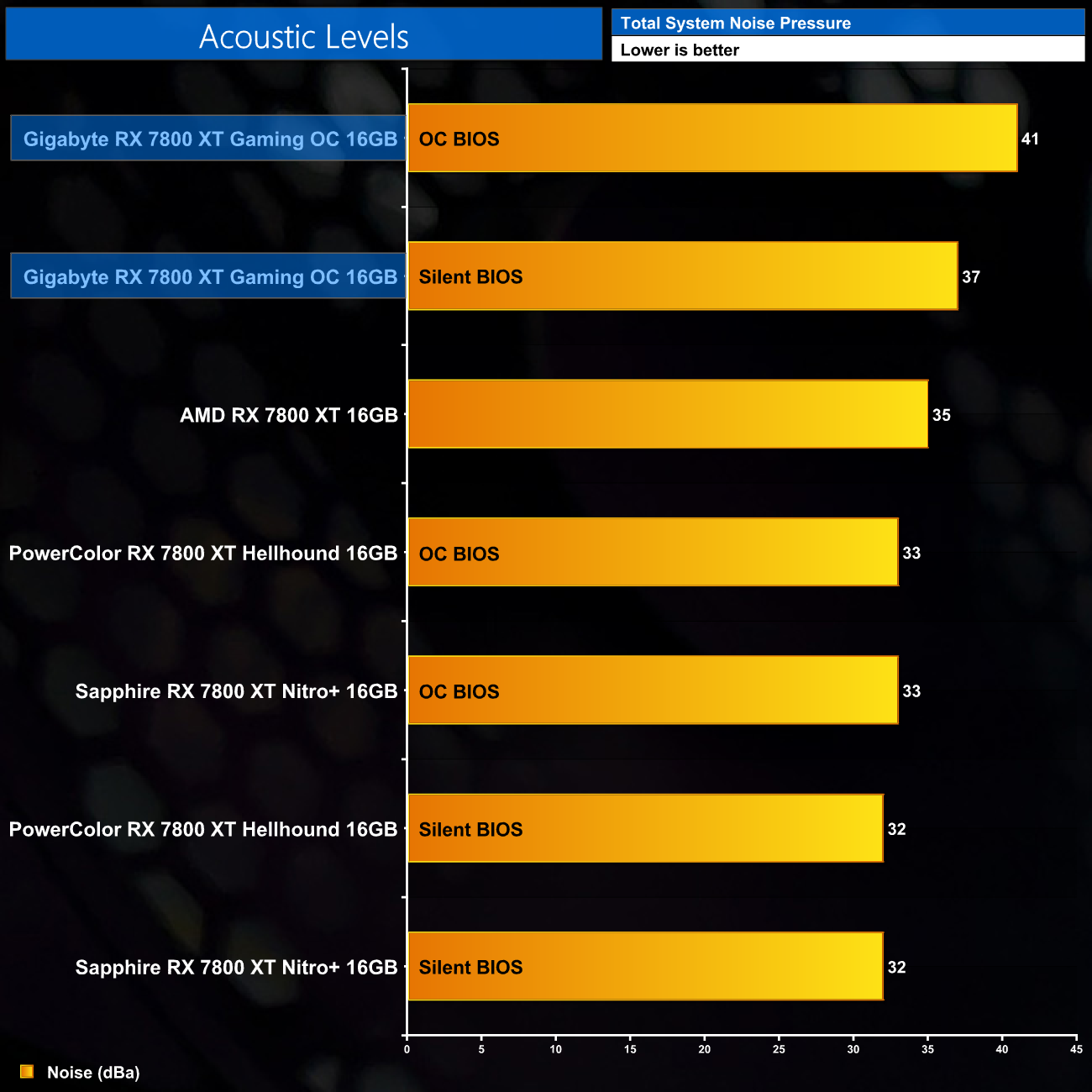
Those out of the box thermal results don't take noise levels into the equation however, and the Gaming OC is the loudest of the 7800 XT's we've tested – including AMD's reference design. The OC BIOS hit 41dBa, with the fans spinning at 41%/1740rpm, while the Silent BIOS is quieter as its fans targeted 30%/1200rpm speeds. 41dBa is definitely a bit louder than I'd like, and is getting to the point where you would hear the GPU over your case fans. Even using the Silent BIOS it isn't as whisper-quiet as the likes of the Nitro+ or PowerColor Hellhound.
Following on from our stock thermal and acoustic testing, here we re-test the operating temperature of the GPU, but with noise levels normalised to 40dBa. This allows us to measure the efficiency of the overall cooling solution as varying noise levels as a result of more aggressive fan curves are no longer a factor.
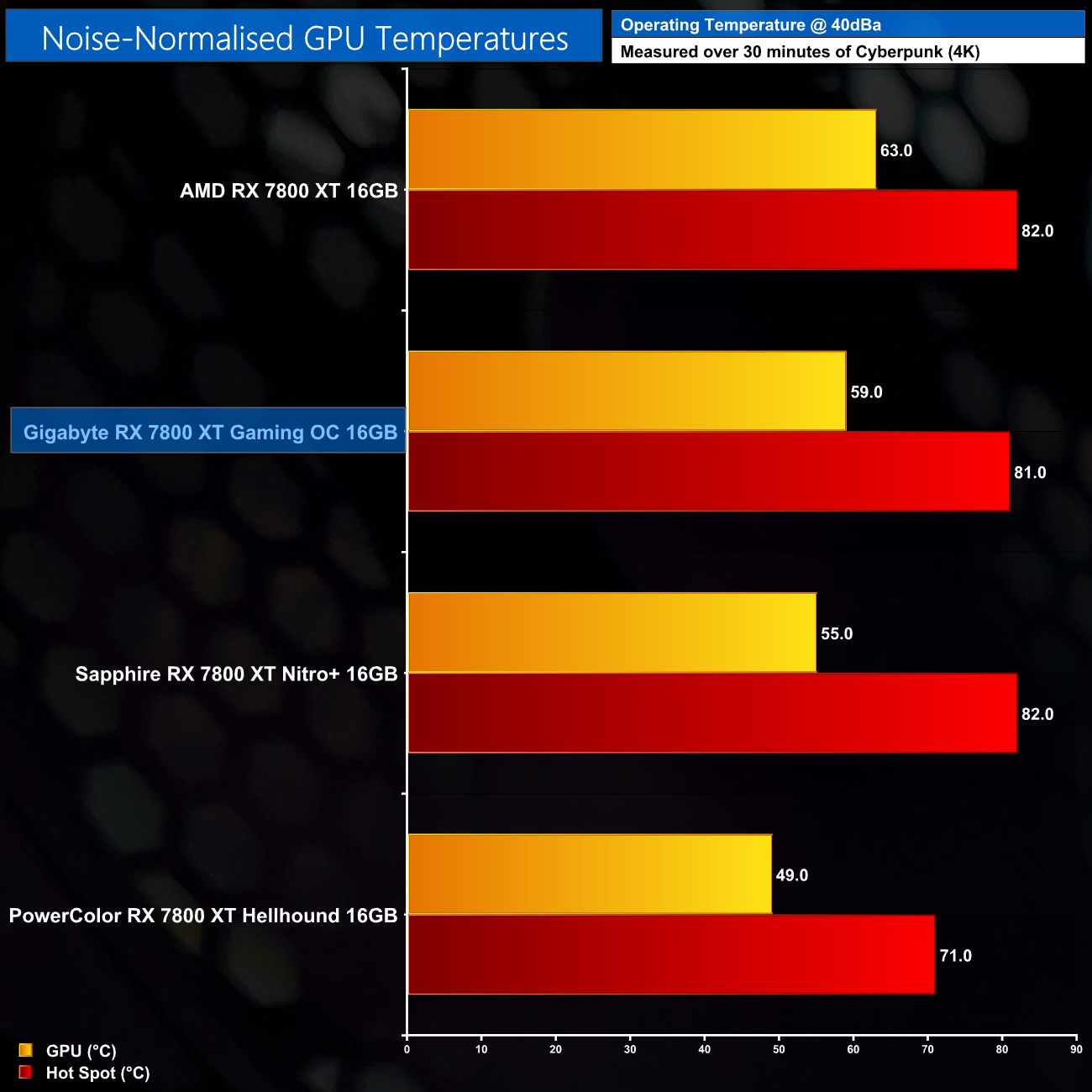
For our noise-normalised testing, we set the Gaming OC's fan speed to 39%/1630rpm and re-tested thermal performance. This saw the GPU hit 59C, with the hot spot at 81C. That does mean it's an improvement over the reference card, though the Nitro+ and Hellhound both deliver superior results. It's important to remember however, that this testing doesn't take difference in power into account – the Gaming OC has the highest power target of all four GPUs tested, and this will contribute towards higher thermals too.
We use Nvidia PCAT to measure power draw of the graphics card only, with readings from both the PCIe slot and the PCIe power cables combined into a single figure. We use Cyberpunk 2077 (4K) for this testing.
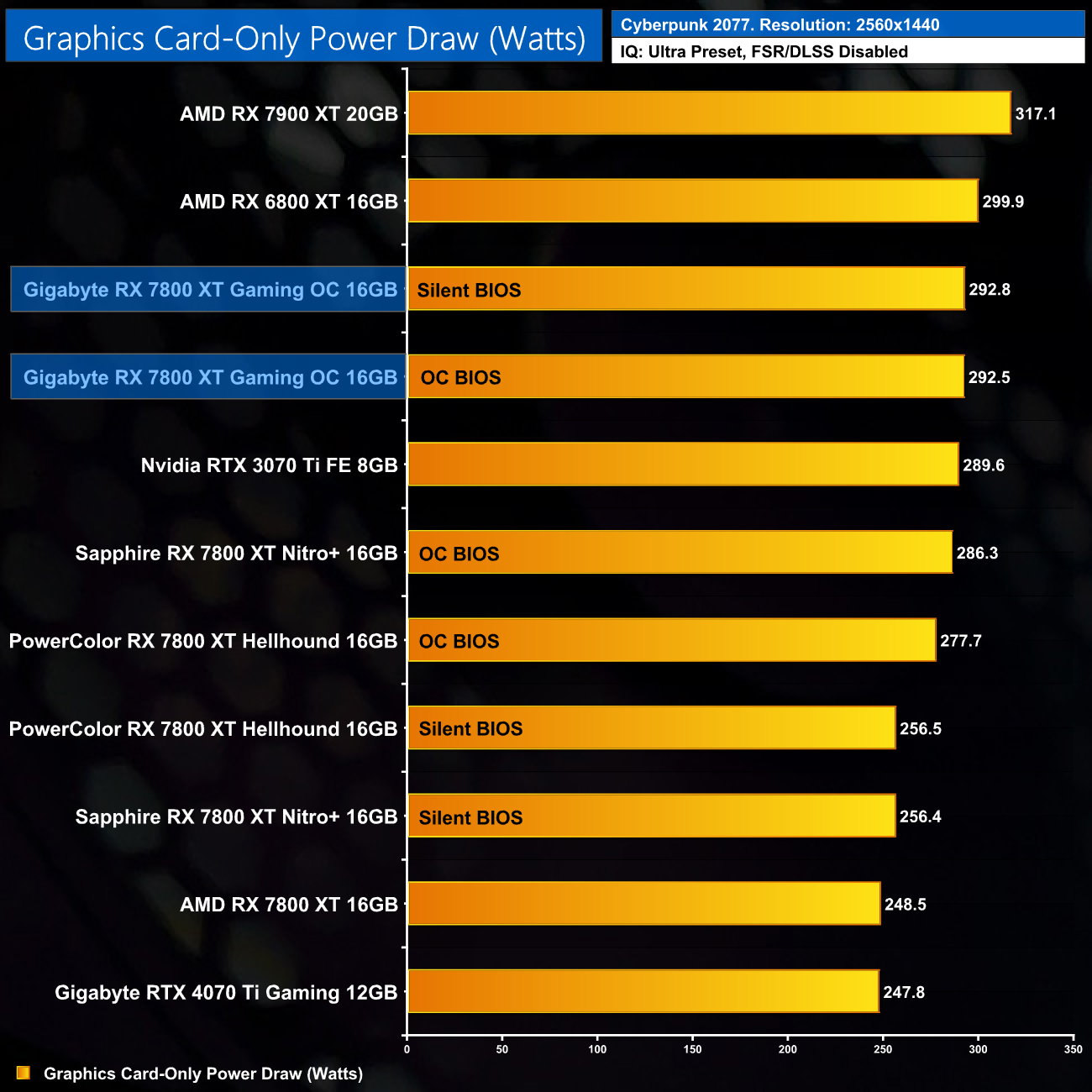
We can see that higher power target in play here in Cyberpunk 2077 – both the OC and Silent BIOS share the same power target and both draw about 293W under load. That's more than even the Sapphire Nitro+, and almost 50W more than the reference AMD card.
Combining the power draw values shown above with the performance data, we present performance per Watt for each graphics card tested:
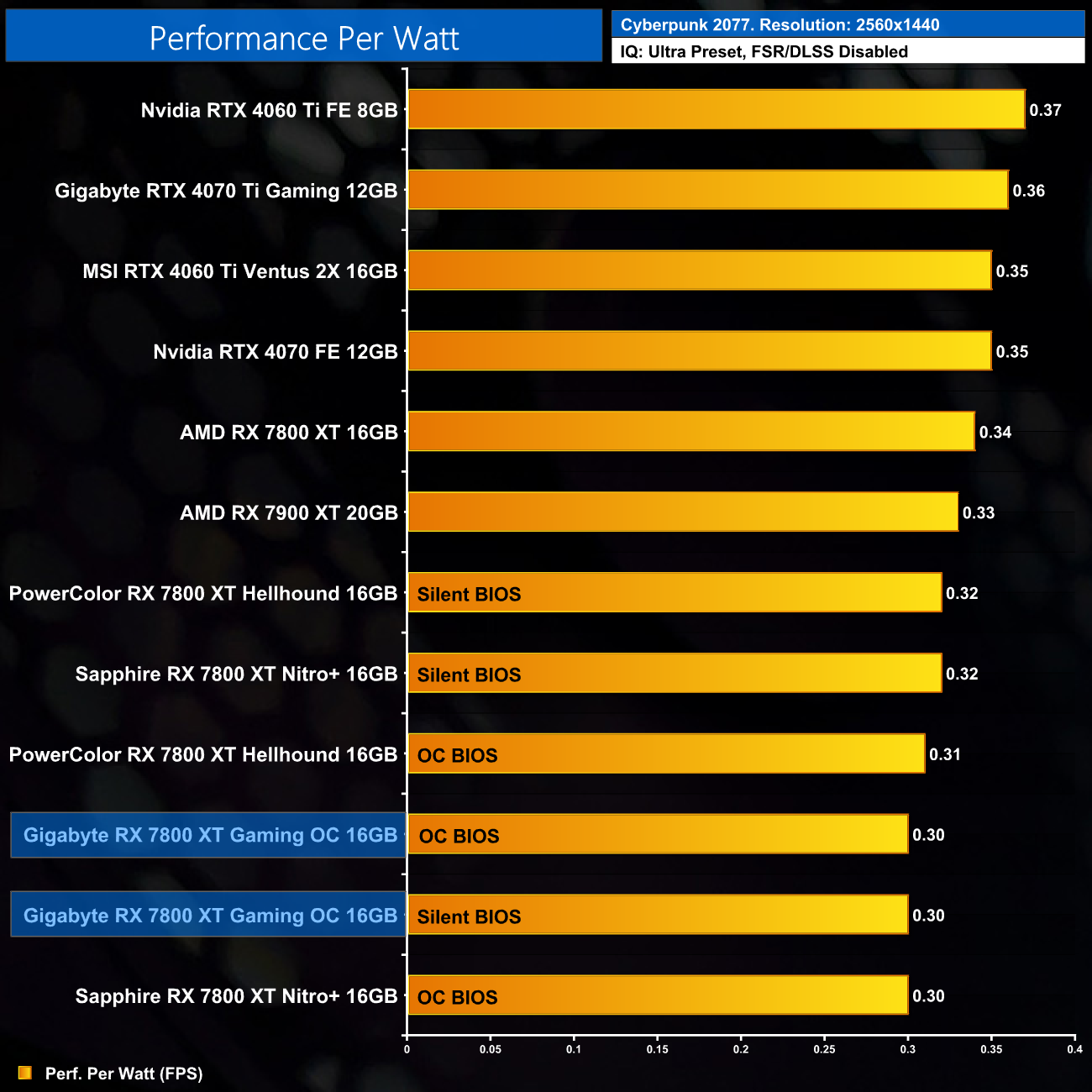
Unsurprisingly, that increased power draw does result in diminished efficiency – it's on par with the Nitro+, but performance per Watt is 12% worse than the reference RX 7800 XT.
For our manual overclocking tests, we used AMD's built-in tuning tool. Our best results are as below.
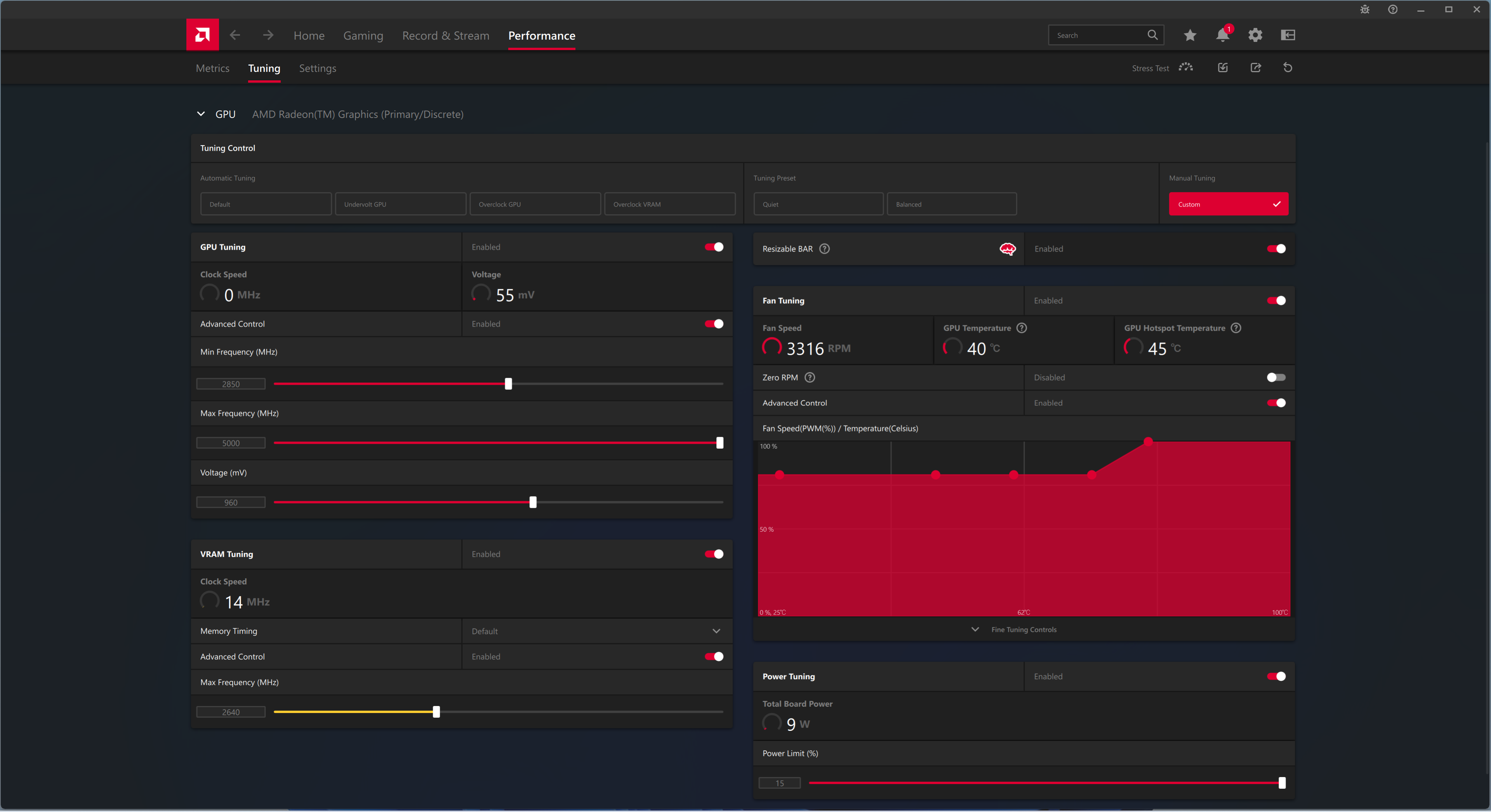
Overclocking the RX 7800 XT mainly hinges on how far you can undervolt the GPU, and then how much extra frequency can be added to the GDDR6 memory. In this case, the Gaming OC was stable at 960mV, while we increased the memory speed to 2640MHz (21.12 Gbps effective.)
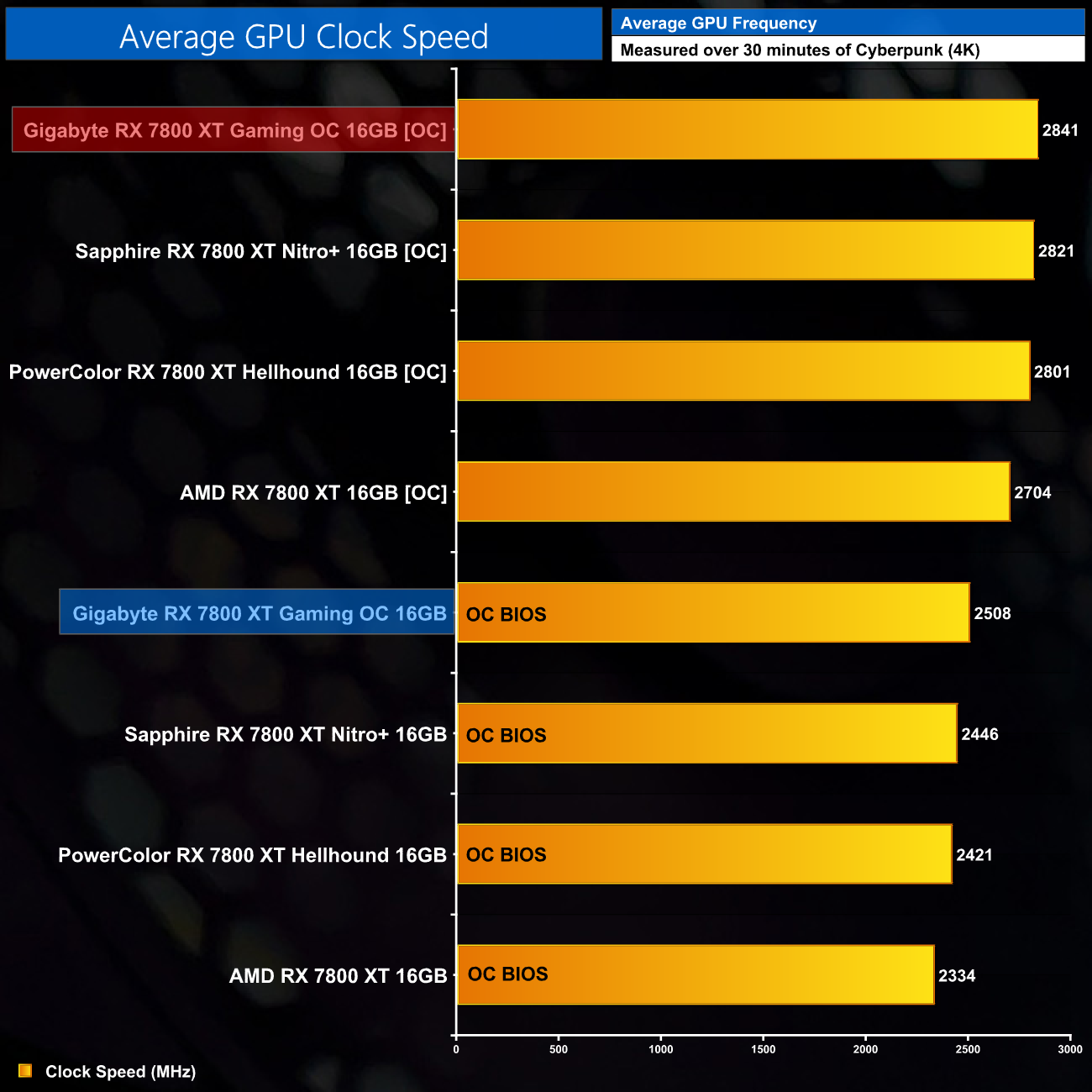
This overclock saw the real-world clock speed jump up by 330MHz or so, hitting 2841MHz over our thirty minute stress test, and this overclock was 100% stable in my testing.
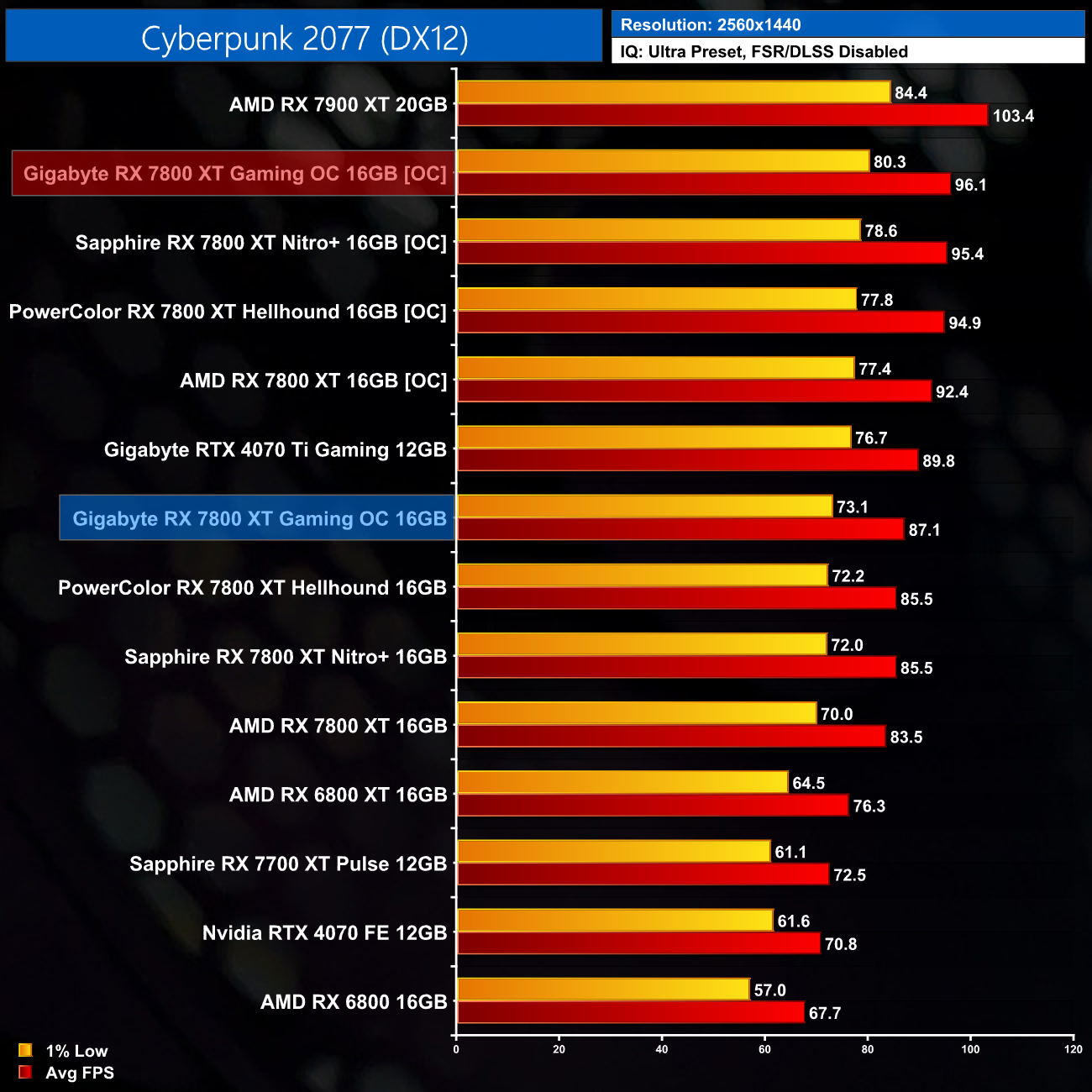
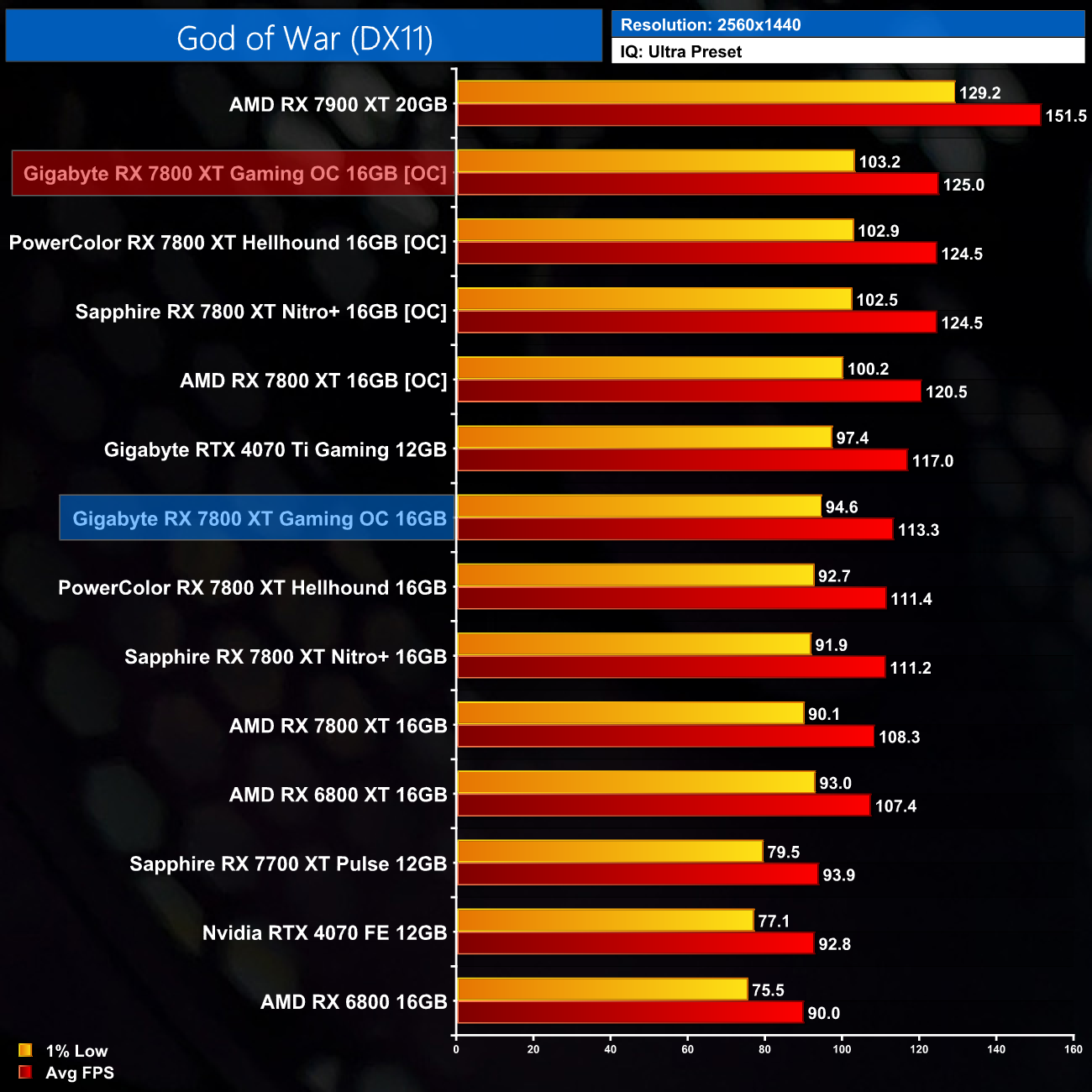
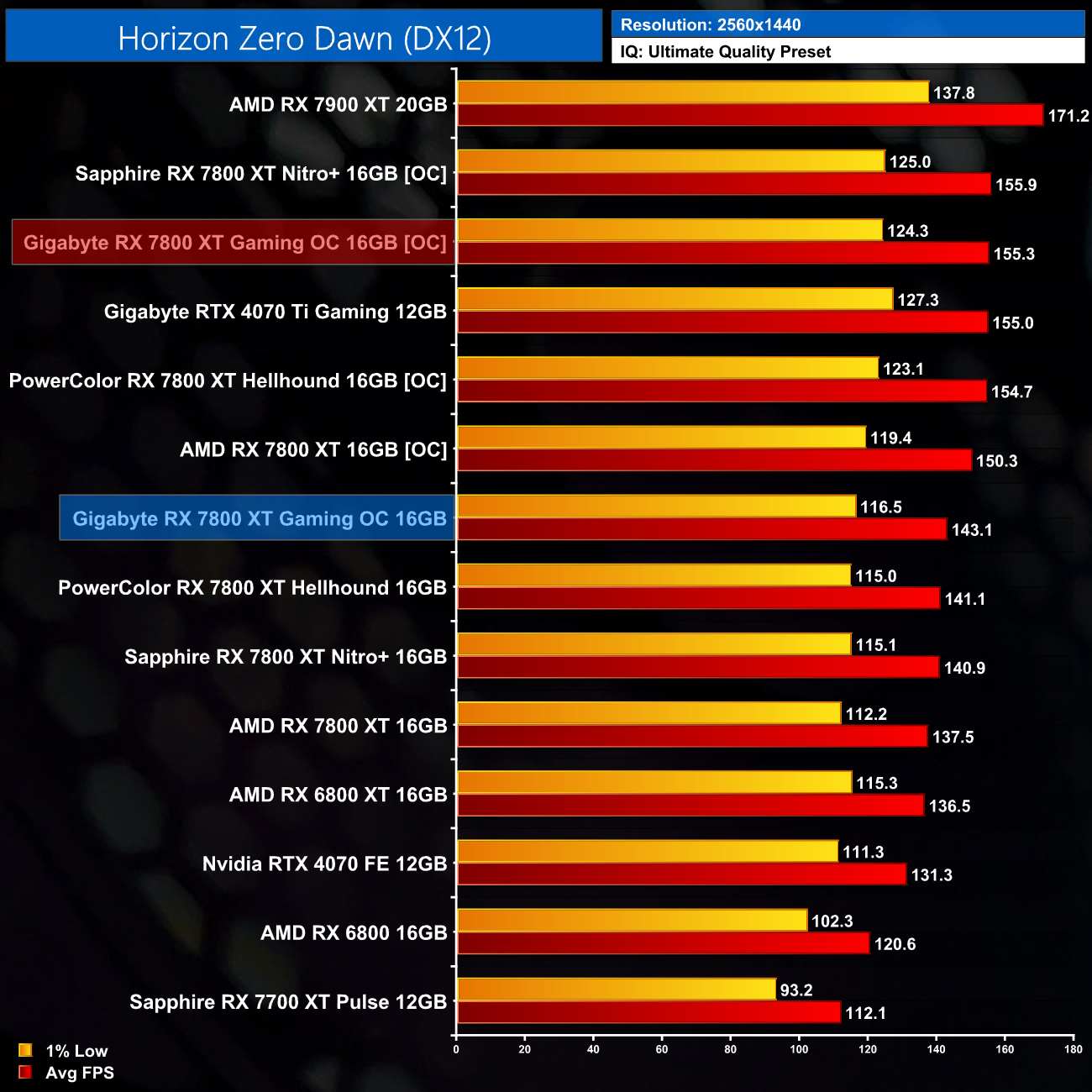
That extra GPU and memory frequency netted us gains of between 9-10% in the titles we re-tested. It's not quite as big a jump forward as we saw from the PowerColor Hellhound, but you have to remember the Gaming OC had a larger factory overclock to begin with.
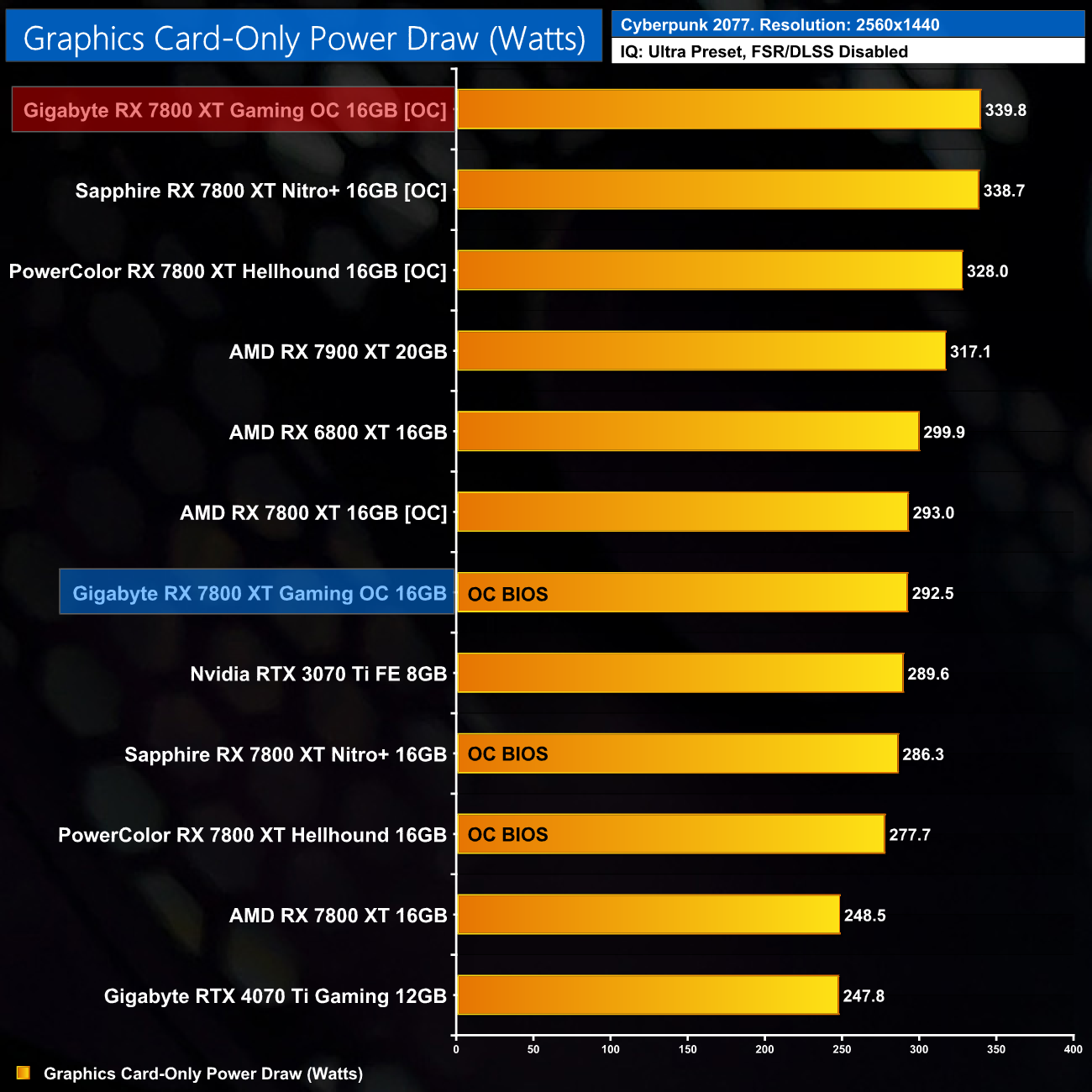
Unsurprisingly, power draw has risen by a fair chunk here, hitting 340W. That's a 16% increase in power draw.
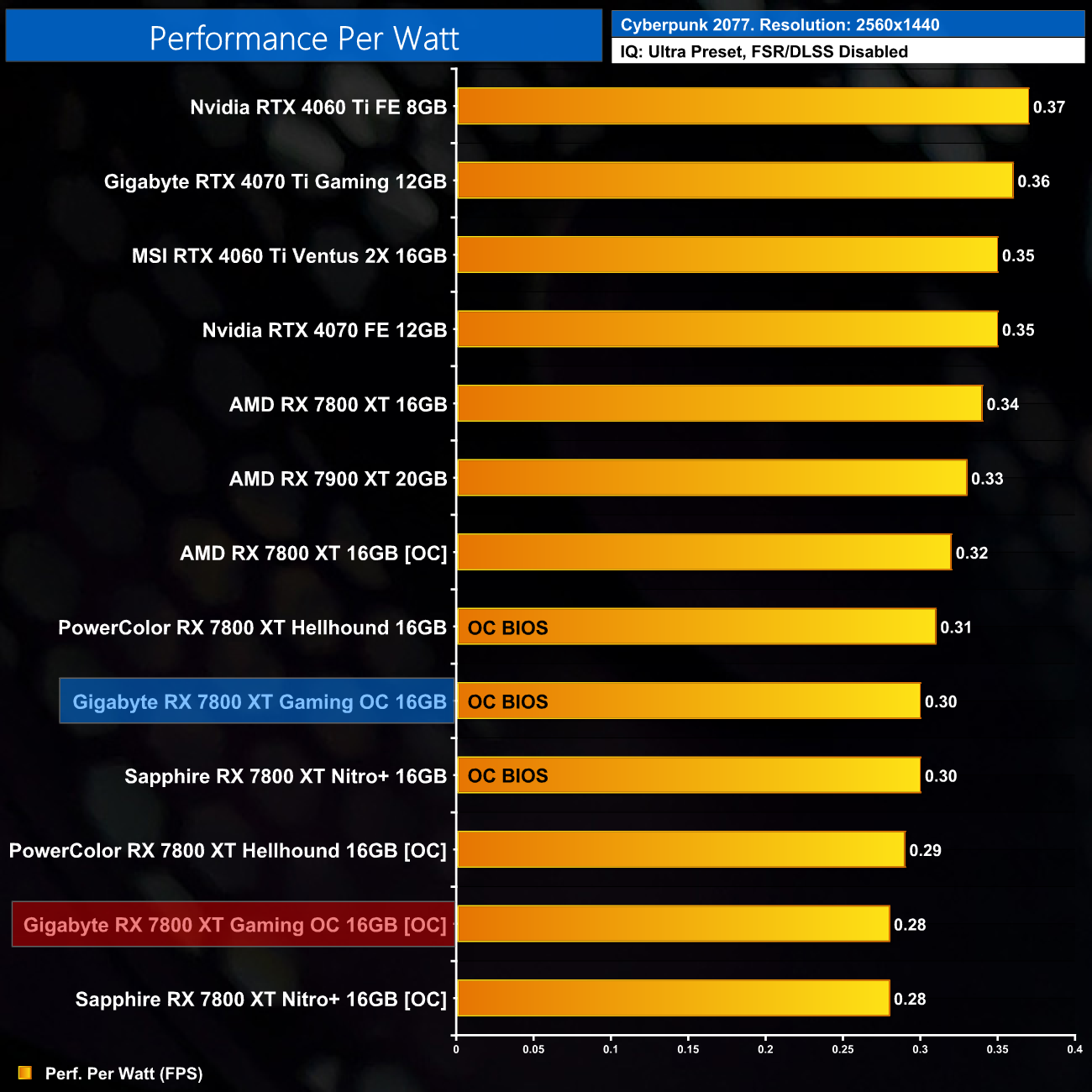
Considering power draw increased by 16% but performance rose by 10%, we do see worsened efficiency when running this overclock – performance per Watt falls by 7% compared to the stock settings, while it's 18% less efficient than a stock-clocked reference 7800 XT.
Gigabyte's Gaming OC is the second RX 7800 XT partner card we have reviewed in recent days, hot on the heels of the excellent PowerColor Hellhound. It's a solid card and makes some good strides compared to the reference design, but there are a few other areas to consider.
The first thing you need to know about the Gaming OC is that it has cranked up the power draw by a fair amount. I measured the card pulling almost 300W in Cyberpunk, so that's about a 50W increase over reference. The good news is that the extra power budget translates into higher clock speeds, so this is the fastest 7800 XT we've tested, coming in 4-5% ahead of the reference model.
There is a downside to this approach though, being the GPU consuming more power also equates to it dumping more heat into the cooler. The Gaming OC didn't run hot, but the fans did spin up noticeably louder than the likes of the PowerColor Hellhound to compensate. The OC BIOS, for instance, hit 41dBa of noise, compared to just 33dBa for the Hellhound.
Likewise, when we ran our noise-normalised thermal performance, the Gaming OC ran the hottest of the three partner cards tested so far. It was still cooler than the AMD reference design, but the extra power draw does mean the cooler has to work that bit harder.
Overclocking proved fruitful however, as we gained an extra 9-10% performance once we undervolted the GPU. This is well worth doing if you have picked up an RDNA 3 GPU, though it will increase power draw further, up to about 340W in my testing with the Gaming OC.
With a UK MSRP of £529, the Gigabyte RX 7800 XT Gaming OC is £50, or 10%, more expensive than the reference model. It certainly offers a decent improvement over AMD's reference, and I think it will particularly appeal to those who want to extract every last drop of performance from the Navi 32 silicon. That said, I can't help but feel the PowerColor Hellhound is the smarter choice for £10 less, as it offers noticeably lower noise levels and superior noise-normalised cooling performance. The Gaming OC certainly isn't bad, but it's just that bit hotter and louder than I'd like for a card at this price point.
That being said, there is a curveball that applies if you happen to be reading this from the US. I found the Gaming OC on sale for $499.99 from both Newegg and Best Buy, so it's an MSRP card in the States. If you can get one for that price, it's a clear win over the reference model and looks to be $20 cheaper than the PowerColor Hellhound. I'd just recommend running a custom fan curve to bring down the noise levels!
We don't yet have a buy link but Gigabyte has informed us the UK MSRP is £529. We found it listed for $499.99 in the USA from both Newegg and Best Buy.
Discuss on our Facebook page HERE.
Pros
- Fastest RX 7800 XT out of the box.
- Colour-neutral design.
- Runs cool (though with higher fan speed).
- Dual-BIOS.
- Priced at the $499 MSRP for US buyers.
Cons
- Loudest RX 7800 XT tested.
- High power limit reduces efficiency.
- PowerColor Hellhound runs 9C cooler when noise-normalised.
- Price puts it within £40 of the RTX 4070.
KitGuru says: The Gaming OC is a decent offering but it definitely runs louder than I'd like. Prospective customers in the UK are likely better served by the PowerColor Hellhound, but at $499, this is a compelling option for those in the US.