 KitGuru KitGuru.net – Tech News | Hardware News | Hardware Reviews | IOS | Mobile | Gaming | Graphics Cards


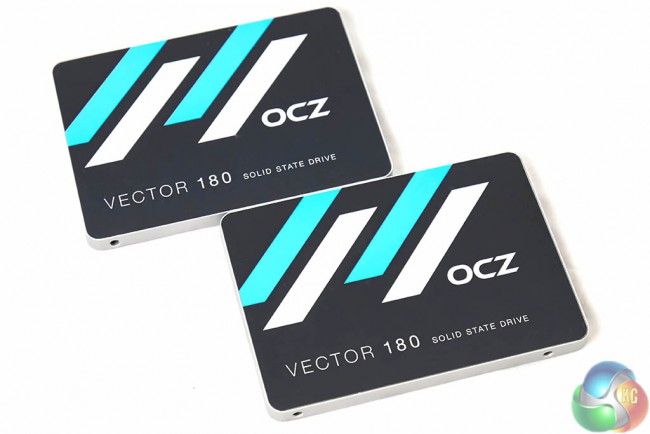
We run a lot of competitions on our Facebook page and some of these are ‘review competitions'. The idea is simple – we give the winner a product, and they review it for our readers. Reader Glyn Horton recently won an OCZ Vector 180 480GB SSD in one such competition and has taken the time to write up a full review. Let us see what Glyn has to say about the OCZ Vector 180, this is published verbatim (- Carl Muller, Facebook and Social Media Coordinator).
Let me start by introducing myself and my history with SSDs so that you know where I am coming from and what I am using as a baseline for comparison when doing this review. I’m Glyn and I have my own YouTube channel. I have been a gamer for almost 25 years now, mainly on console but branching out into PC in the last few years.
The end of last year I decided it was time to invest in an SSD after having a HDD for so long and seeing it struggle on a daily basis in its attempts to try and play all of the games I was throwing at it. By the end, it was beginning to feel like I was attempting to play games on nothing more than a lemon, even my phone was loading games up quicker than my HDD.
I decided enough was enough, did a little bit of research and dropped about £85 on a SSD on Black Friday last year. I decided to put my money into a Crucial MX100 256Gb and so I waited patiently knowing I was going to be the envy of all the cool kids on the block, even bought the case and screws from a local retailer and managed to eventually get it all screwed in (my DIY skills are so good that they rival a 3 year olds) in preparation for what seemed to be the saviour of my loading and storage problems.
The day came when I received my shiny new solid state drive, so I hastily unplugged my HDD and decided to start completely afresh on my new SSD, installed Windows, began installing all my programs after being amazed at the speed of the boot now Windows was on there and thought to myself that now, I may actually be able to play games the same day I began loading them. My haste got the better of me though and one slightly less savoury website (nothing naughty like that but instead full of nasty malware, spyware and all other baddies!), several minutes and a dodgy copy of Firefox later, I had managed to completely destroy my own dreams of owning an SSD in less than half an hour after completely filling this beautiful, shiny little piece of glory with lots of unforgiving and not overly friendly malware.
Two weeks and another £85 later though, I decided to have another go at the ownership of having a SSD and this time round, with the help of a little bit of cloning and a more speed, less haste approach, I can say I am still using this one whilst my original one looks on from a nearby shelf beside my PC, with the feelings of an unloved, dirty and abused toy in its eyes.
Enough of my past events and my previously ill thought out actions installing SSDs though, I thought it best to let you know of what I am currently using so that I do have something to compare the OCZ SSD to. Now, I am not going to go into anything too technical, I will have some statistics on what the SSD is offering but only the information I think that is useful for people on a consumer level as I know that that is what I would want to know personally from a review of an SSD. Hopefully by the end of this review, I will have answered a few of your questions such as “Is this SSD any good?”, “Is this SSD worth the price tag it’s asking?”, “Are these SSDs reliable and stable, especially given past history of the company?”, “Do I prefer savoury or sweet pies?”(I kid about this one, everyone knows savoury is best!) and “Is this SSD right for me?”.
Well, without further a due, let us begin by looking at what the SSD is, who it is actually coming from and a few other details that I can drag from the depths of the internet black hole.
So this SSD has been created and developed by OCZ, a company which was recently bought by Toshiba. Now the company itself always had a bit of trouble in the past with its SSDs, usually failing thus resulting the in the company having a high level of returns in comparison to other SSD manufacturers. Since being bought by Toshiba though, this has been rectified and now OCZ offer a range of high quality, affordable and well made SSDs. They have several families of SSDs, the main ones being the ARC, VECTOR and SABER families.
The VECTOR family is the brand of SSDs I will be focusing on though, they are offered as a 120 Gb, 240 Gb, 480 Gb or 960 Gb version, all boasting some quite respectable figures in terms of speeds, endurance ratings and prices.
The 480 Gb version offers the following speeds:
- Up to 550 MB/s Sequential Read
- Up to 530 MB/s Sequential Write
- Up to 100,000 IOPS 4KB Random Read
- Up to 95,000 IOPS 4KB Random Write
Now I will compare these to average speeds I found later in the review but looking at these speeds, these are some pretty good speeds if you're looking for a new SSD especially if you're moving over from a HDD, you will wonder why you put up with an HDD for so long, I definitely did!
The drive also boasts PFM+ or Power Failure Management Plus (It's all right, I'd never heard of it either!) In the event of a sudden power loss, the SSD uses a technique referred to as Power Failure Management Plus (PFM+) which holds up the SSD circuitry long enough to ensure the integrity of the device so that it can be fully operational again once power is restored. To achieve this, the SSD saves a single action on the log which is only the essential data needed to rescue the SSD from metadata corruption. As a result, the PFM+ logs are accumulated and saved frequently with no impact on overall SSD performance. PFM+ ensures that once the power is restored, and the server cluster stabilizes again, all SSDs will return back to the condition they were in at the time of failure.
In terms of the drive's endurance, the SSD boasts a 50Gb a day endurance rating. Now this is a lot of data for each day and even as a pretty active gamer and YouTuber, playing, recording, saving and rendering a lot of data each day, I come no where close to this amount of data each day, even through downloading and installing new games neigh on everyday. Couple this with the 5 year ShieldPlus Warranty (more in detail later on) that OCZ are offering and you really, really can't go wrong!
Now KitGuru recently did a very interesting experiment with OCZ drives (a different family but OCZ all the same), in an attempt to judge whether the company had improved it's SSDs since the early days of high failure and return rates. What Kitguru found, blew everyone involved away (in a good way!)
Being given 5 drives, Kitguru were tasked with destroying each one by constantly writing and re-writing data over and over again in an attempt to break the drive. Using the endurance rating and the ShieldPlus Warranty time (20 Gb a day and 3 years) Kitguru anticipated that the drives would last for just under 22Tb of data, after that then the drive had done that was expected from it. Expecting the drives to die pretty quickly after this amount of data, the SSDs went on to destroy everyone's conceptions of them, with the first one giving out at 322Tb and the last one failing at 695.5Tb. Now these were some extraordinary results, far surpassing what everyone believed would happen and I personally believe, showing everyone that the old days of high failure rates were long and truly gone.
With this in mind, I believe the SSD is going to last me a long, long time as the VECTOR boasts a 50Gb a day endurance rating and a 5 year ShieldPlus Warranty, so even if the drive did go Pete Tong (wrong) then at least I would have the warranty to fall back on. Talking of the warranty, I have been keeping you waiting about the details of it so I'll lay them out for you now. The warranty for the drive is 5 years which is a very long warranty for anything, so it goes to show how much faith and confidence the company places in its SSDs these days.
Now the warranty does not require any proof of purchase, all you have to do if a drive fails is get into contact with OCZ, they will determine if they can fix the drive or not and if not, they will send you a brand new one before you have to send yours back. They really do take the sting out of having a failed drive (as long as you've been sensible and do a regular back up of your files onto another drive!) as they do not expect you to even pay for shipping costs either which is a really nice bonus. None of us want a failed drive but if it does happen, then at least with OCZ you know they have your back.
Whilst completing this review, I was asked by OCZ and KitGuru to have a look at the SSD Guru software from OCZ. This software is readily available for anyone with an OCZ SSD from their website and it gives you a good bit of information regarding your drive, it's health, temperature as well as giving you some advice on how to better optimise your system for the SSD to perform at it's best.
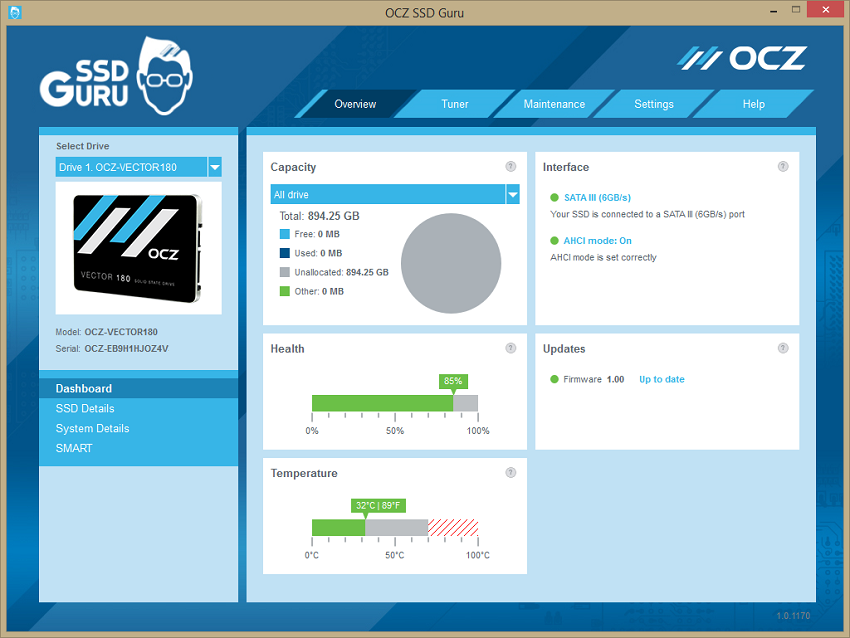
The software also makes sure your firmware is up to date by regularly checking to see if there are any updates for you, it also allows you to fine tune your SSD allowing you an easy way to reserve space on the SSD for over provisioning which can improve the performance of the drive as well as prolonging it's life.
Finally, the software allows you to easily perform a complete erasure of all the data on the drive, returning it to an unformatted state. Quite useful if you're looking at getting rid of or selling off your SSD (although why would you, you crazy person!?)
All in all, never having used this kind of software before for an SSD, I picked it up pretty quickly and easily and it allows me to keep an eye on the health of my drive and correct any problems with it before they become an issue, I would definitely say it is a bit of essential software especially as its free, so easy to use and takes so little time to install and figure out.
So I researched and dissected information I found based all over the internet, carefully retrieving the hard to locate, prized information from the deep depths of the internet where people would not even send a less liked relative to venture (I didn’t really, I just read the back of the pack) and found a few details that I know personally, I was very interested in back when I was researching for a SSD.
I have used the speeds as reported on the hardware comparison website userbenchmark.com.
For the OCZ Vector 180 480Gb SSD:
Average Sequential Read Speed is 505 Mb/s (Max. 550 Mb/s)
Average Sequential Write Speed is 486 Mb/s (Max. 530 Mb/s)
4k Read is 25.4 Mb/s
4k Write is 83.9 Mb/s
Average Sequential Mixed IO Speed is 489 Mb/s
Now these are some quick speeds as these speeds are the averages experienced by many users of the SSD so they should be pretty fair. Now the website states that the speeds were actually quickly in lab tests but I personally think its far better to go on results from actual users as the SSDs are then obviously put under the stresses and strains which would be expected of them in everyday life.
The averages are below what is stated as the max speed possible for the SSD but this is the case for most SSDs and I personally feel that the difference between the average speed and the max speed is quite fair and shouldn't raise any concern as some users would obviously experience higher speeds then the average and some lower.
In comparison to the Crucial MX100 256Gb SSD:
Average Sequential Read Speed is 483Mb/s (Max. 550 Mb/s)
Average Sequential Write Speed is 317 Mb/s (Max. 300 Mb/s)
4k Read is 23.8 Mb/s
4k Write is 73.2 Mb/s
Average Sequential Mixed IO Speed is 348 Mb/s
I know it's not the fairest of comparisons due to the fact that the OCZ SSD is over £100 more then the Crucial but these statistics go to show that actually the OCZ does a fairly good job of actually being pretty close to it's supposed max speeds where as the Crucial falls down a little bit on the read speed but for some reason actually registers quicker on its write speed but in comparison to the OCZ, no where near matches the actual speed.
You have to remember though that this is a pretty unfair comparison between SSDs due to the price difference and the fact that the Crucial was never designed to go up against this OCZ SSD. Bearing that in mind though, unless you're really wanting the best and have the money to pay for it, the Crucial MX100 has and still is serving me well and I would not turn my nose up at it, especially if I was still stuck with a HDD, as in comparison any SSD will poop all over a HDD in terms of speeds and the fact that all SSDs are becoming more affordable with pretty large amounts of space available, you would have to be very very silly to turn down a SSD in preference for a HDD unless you need very large amounts of space.
Now I do not claim to be an expert on SSDs, only ever owning the Crucial MX100 before this but I believe I know more than the average bear, especially after using them for a few months now.
I was always worried about moving over to SSD from HDD, thinking I would not know what I was doing technically to move files over, how to format the drive etc etc. But, boy am I glad I did eventually move over. It true what it says on the back of the VECTOR box, how on earth did I manage with a HDD as my main drive for so long?
For those of you poor souls still stuck on a HDD, whether through choice or not, I can assure you wholeheartedly that moving over to an SSD will be the best decision in your computing (and maybe your entire) life. Not only do speeds vastly improve in everything, from booting up, loading programs and games and generally just having a pleasant computing experience, but gone are the days of SSDs being inferior to HDD in terms of quality and failure rates.
Now is a great time to make the move and investing in a large drive such as the OCZ Vector 180 480Gb, you will be glad you saved all of those pennies and made the move. The speed will blow you away and the fact that you can store so much on the drive is an absolute god send, no matter what you do in your computing life. Not only this, but if you're a regular gamer, you will notice not only vastly improved loading times in your games but also an increase to FPS (frames per second) due to the fact that the drive isn't taking nearly as long to load game data and this I can personally vouch for.
OCZ have vastly improved their game and I can personally see OCZ being a real power player in the SSD market for many, many years to come. The quality, affordability, ease of use, ShieldPlus Warranty, features and everything else make this SSD an absolute dream to own and an investment I can whole heartedly tell you, you will never, ever regret making.
Thank you for taking the time in reading this review. If you would like to see the SSD in action facing off against a HDD so that you can personally see the difference in loading times for several games then please head over to my YouTube channel at Http://www.youtube.com/BetterGamerZone and watch my “Unboxing & Review” video of the OCZ Vector 180 480Gb SSD. Again, many thanks to KitGuru for giving me the chance to review this SSD and OCZ for making such a high quality drive. I am looking forward to using this drive for many years to come!
Last Few Days To Get Smart Deal with kitguru < Find Here
Nice review, congrats on the win. Loved the review right up until you said that an SSD can result in “an increase to FPS” 😀 Not sure that is has any more than one or two fps difference.