 KitGuru KitGuru.net – Tech News | Hardware News | Hardware Reviews | IOS | Mobile | Gaming | Graphics Cards


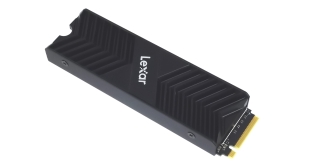
The latest model to join Lexar's stable of SSD drives is the Professional NM800 Pro, a PCIe Gen4 drive that uses an 8-channel controller and 176-layer 3D TLC NAND. In for review is the 2TB model, retailing for around £230.
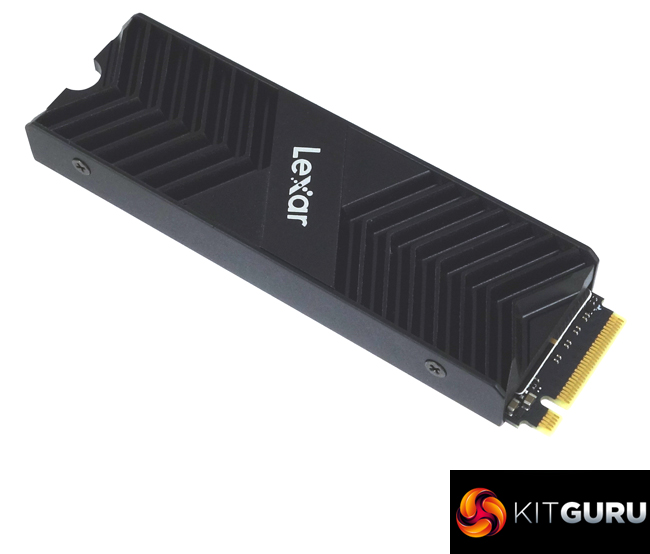
The Lexar Professional NM800 Pro is available (at the time of writing) in three capacities; 512GB, 1TB and a 2TB flagship and two versions, plain and one with a heatsink installed (the drive we are reviewing). At the heart of the drive is an InnoGrit IG5236 controller looking after 176-layer 3D TLC NAND.
Officially the 2TB NM800 Pro is rated as up to 7,500MB/s for Sequential reads and up to 6,500MB/s for writes. The 1TB drive gets the same read maximum but the writes drop to 6,300MB/s while the 512GB model is rated as up to 7,450MB/s and up to 3,500MB/s for read and writes respectively. There are no details about the 4K random performance on the specification sheet for the drive.
Lexar quote an endurance rating for the 2TB Professional NM800 Pro Heatsink as 2,000 TBW (Terabytes Written). The 1TB drive is rated at 1000TBW and the 512GB model, 500TBW. Lexar backs the drive range with a 5-year warranty.
Physical Specifications:
- Usable Capacities: 2TB.
- NAND Components: 176-layer 3D TLC NAND.
- NAND Controller: InnoGrit IG5236 8-channel.
- Cache: 2GB DDR4L.
- Interface: PCIe Gen4 x4, NMVe 1.4.
- Form Factor: M.2.
- Dimensions: 80 x 22 x 10mm.
- Drive Weight: 54g.
Firmware Version: 3.7.F.V
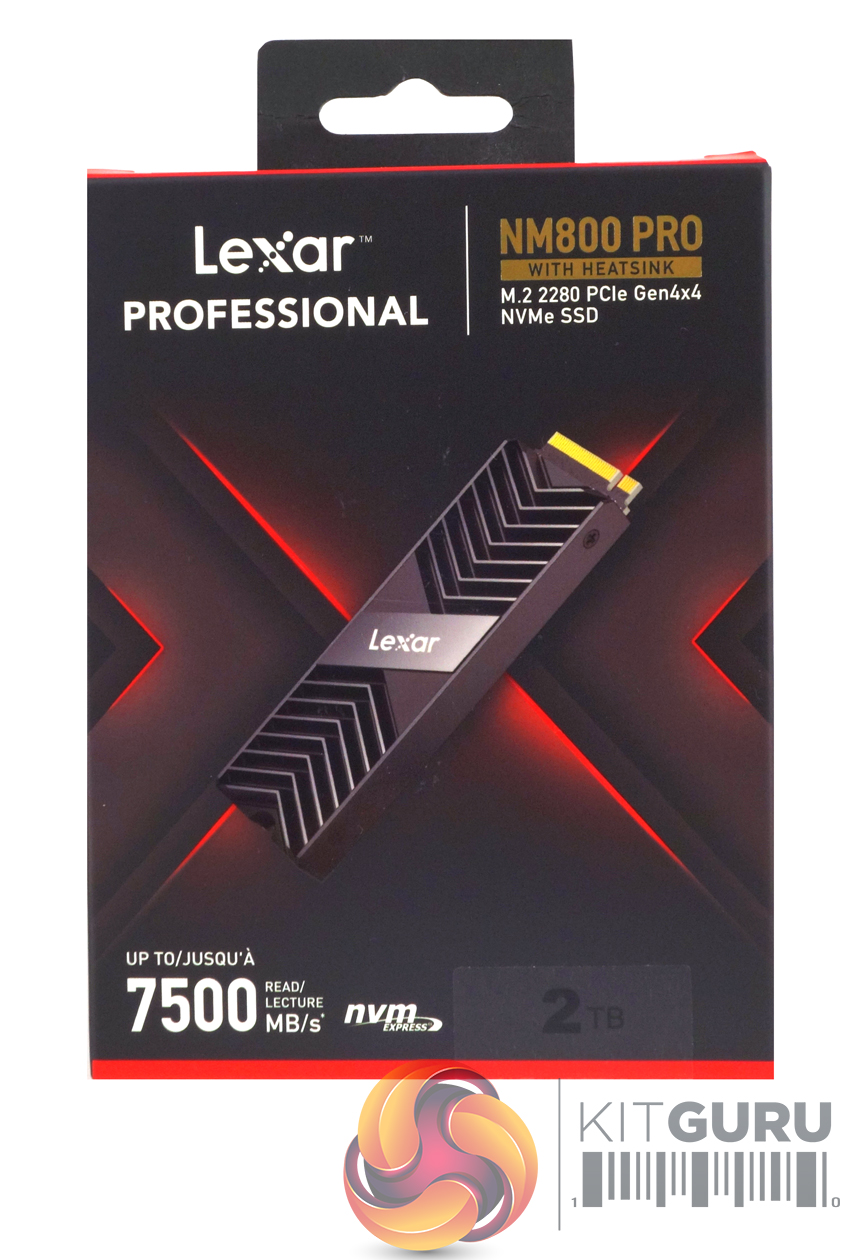
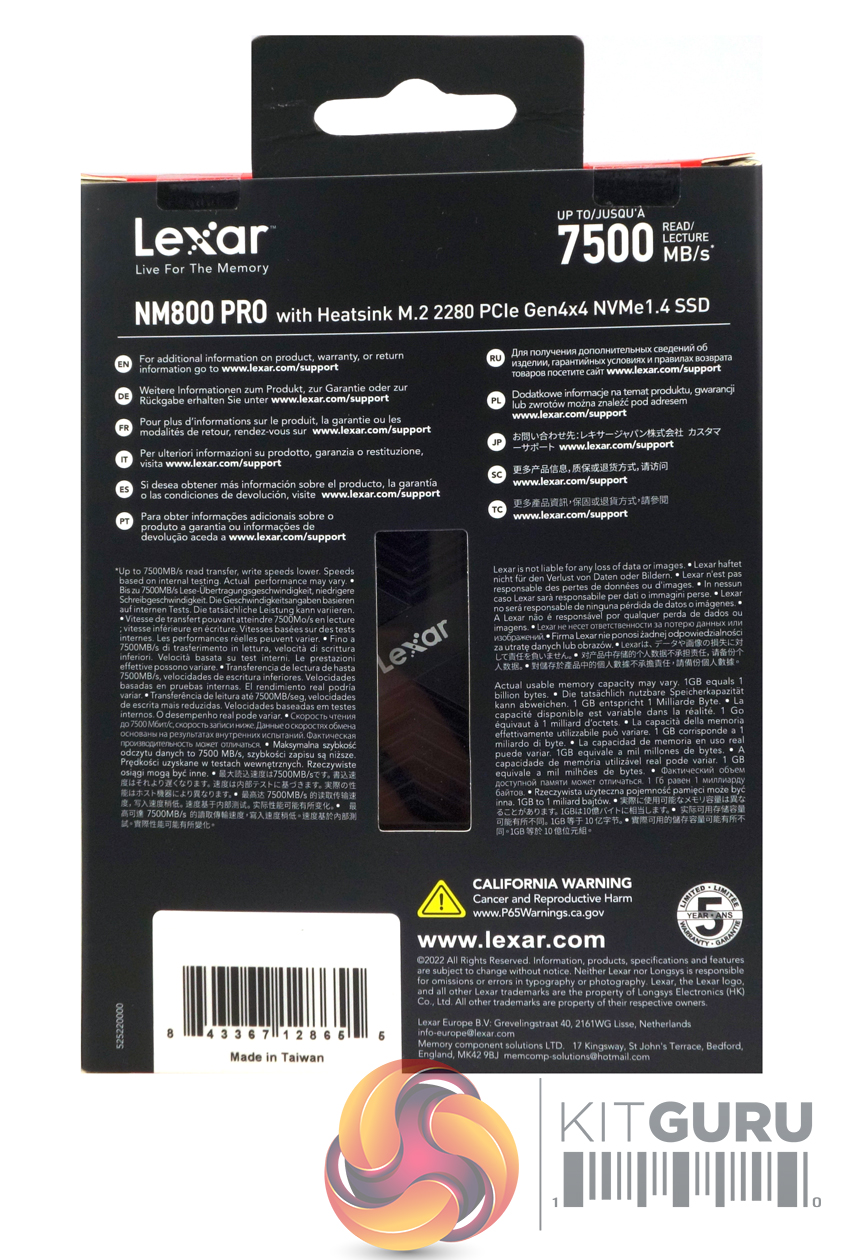
The Professional NM80 Pro Heatsink comes in a black and red finished box with a clear image of the drive on the front. Above the image and to the right the drive's name is picked out in gold which makes it stand out. Below the image of the drive is the Sequential read speed rating and to the right of this is a sticker with the capacity of the drive.
The rear of the box has a narrow clear plastic window to display the drive above which are multilingual instructions to find additional warranty and drive information. Each side of the window has multilingual notes about the drives speed rating.
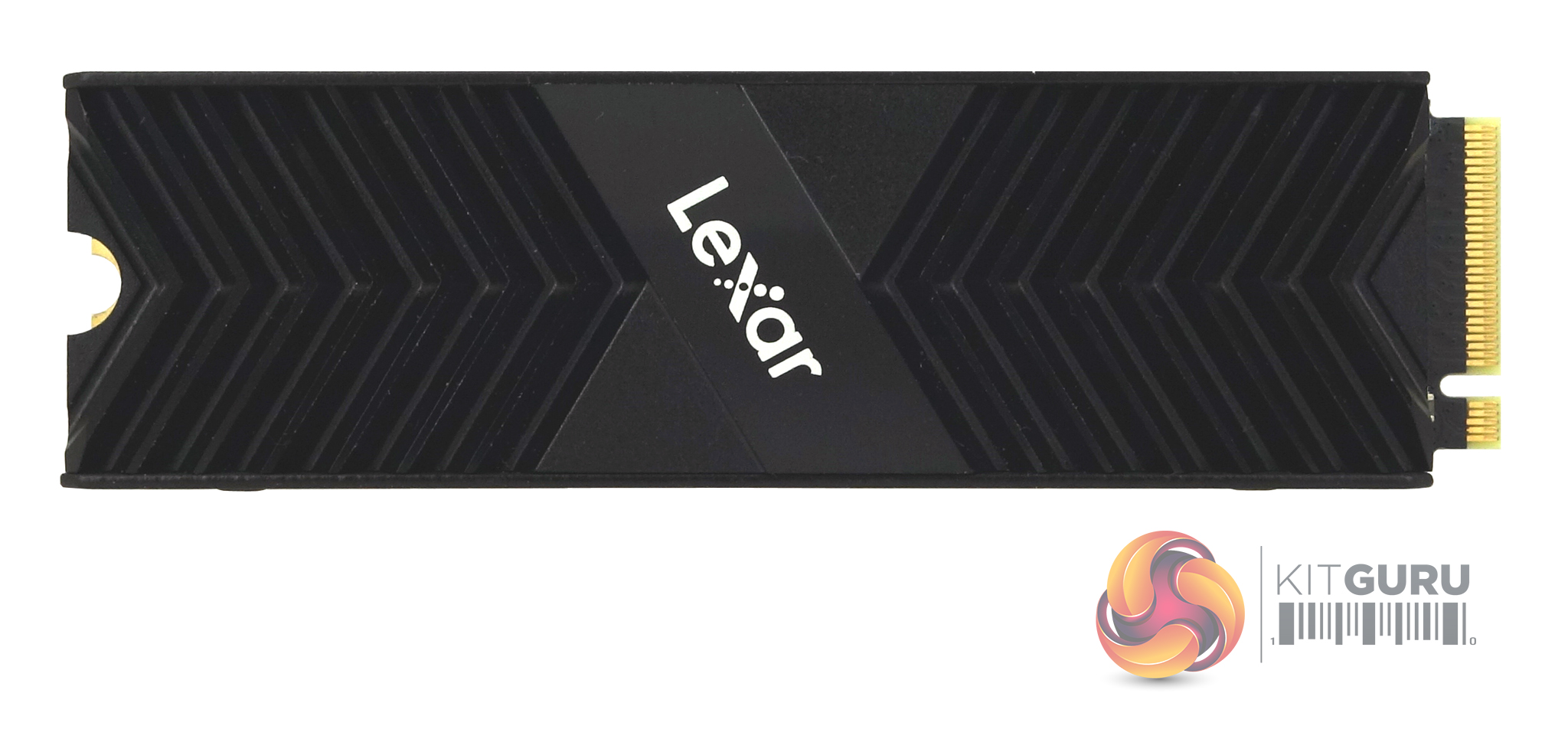
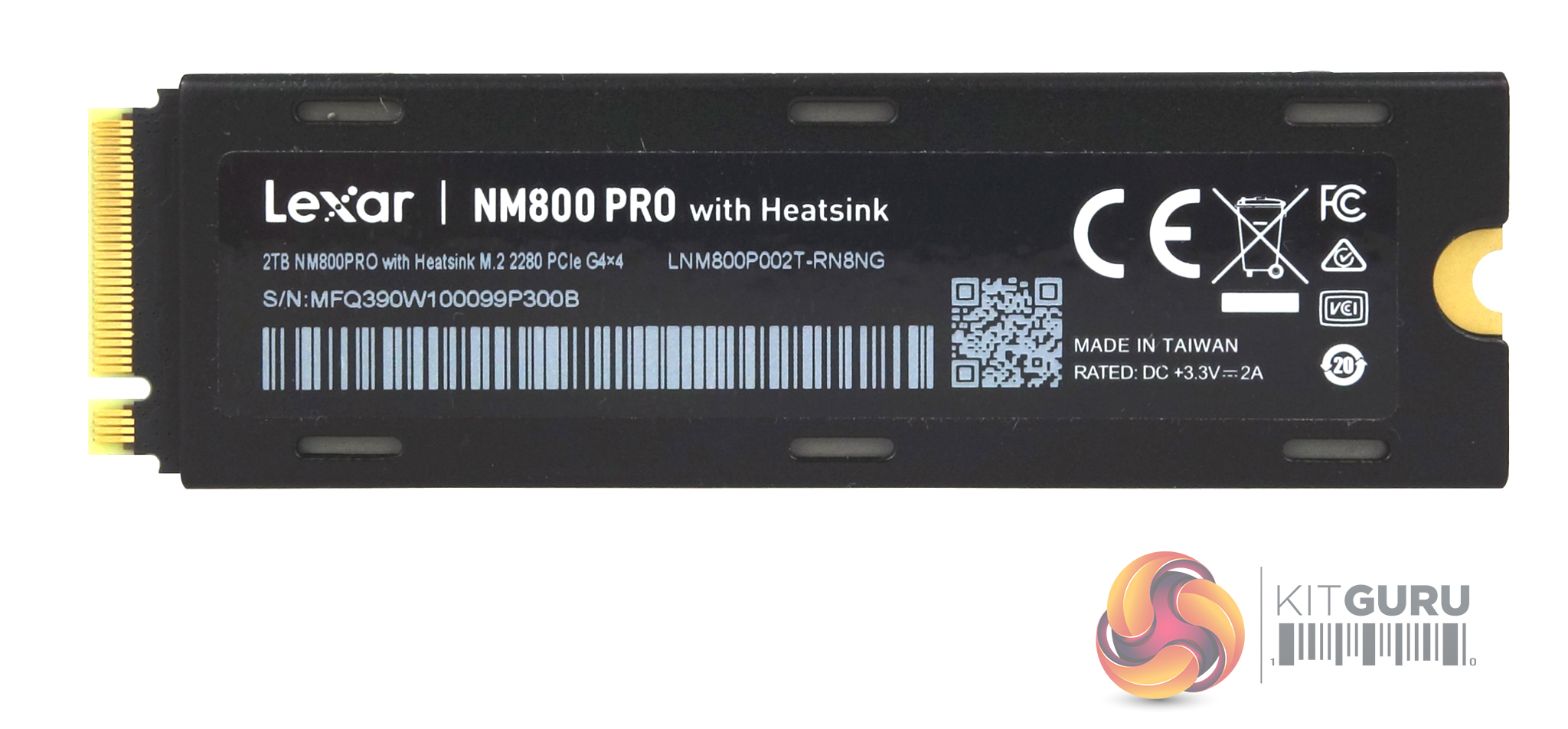
Lexar's Professional NM800 Pro Heatsink is built on a single-sided M.2 2280 format. The aluminium heatsink has been designed to fit into the storage container of PS5. Should you want to use the drive in a desktop PC, the heatsink is easily removed. The two-piece design is held together by four Philips micro-screws and Lexar has kindly used thermal pads on either side of the drive so there is no thermal gunk gluing down the drive making life a little awkward.
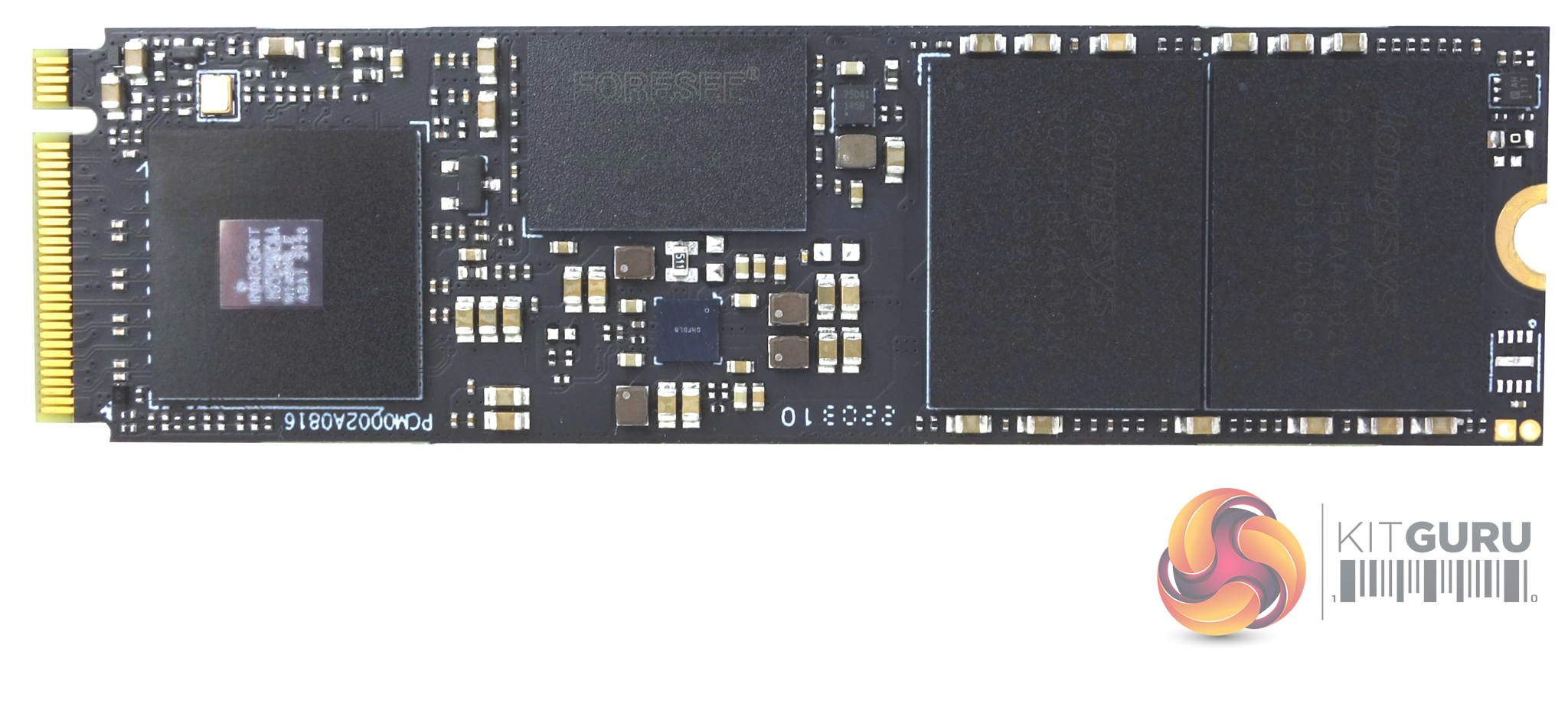
Removing the heatsink and the product label reveals the drive components. The drive uses an InnoGrit IG5236 controller which is the high-end client solution of InnoGrit's RainerPC family. Built using a 12nm FinFET CMOS process, the IG5236 is an 8-channel NVMe 1.4 controller using a 32-bit ARM Cortex R5 quad-core processor. It supports up to 8TB of SLC, MLC, TLC or QLC NAND flash with either ONFI 4.1 or Toggle 2.0/3.0/4.0 at speeds up to 1200MT/s.
Sitting between it and the NAND is a Forsee 2GB DDR4L DRAM IC (FLXC2002G-N2). The 2TB drive uses two packages of Longsys labelled 3D TLC 176-layer NAND. Longsys may be a name new to you, but they are in fact, Lexar’s parent company.
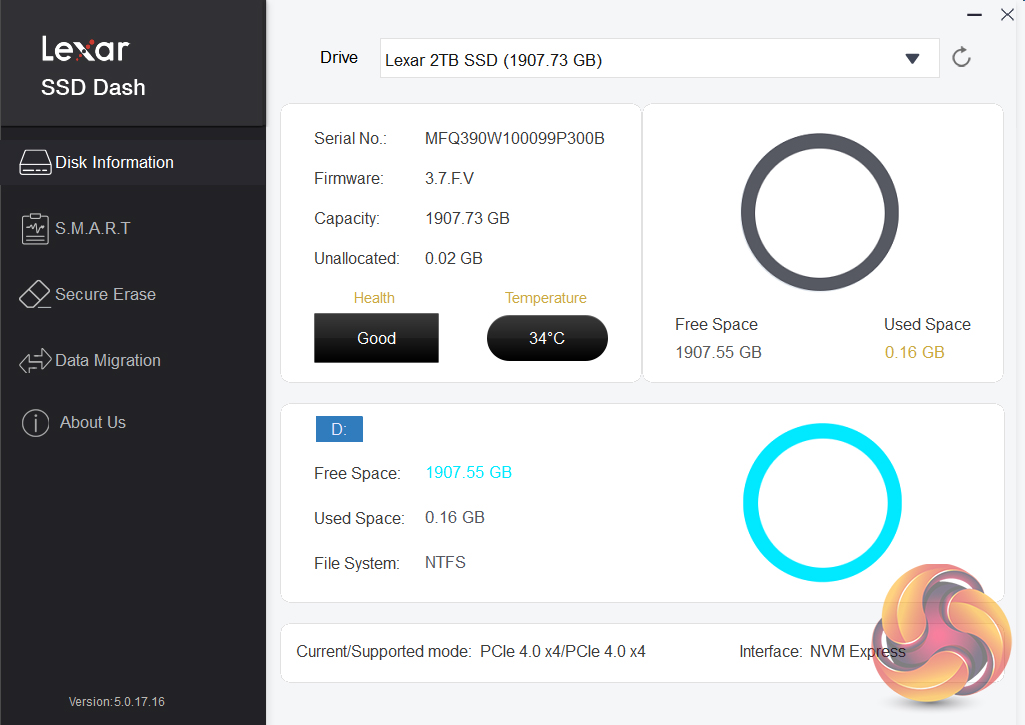
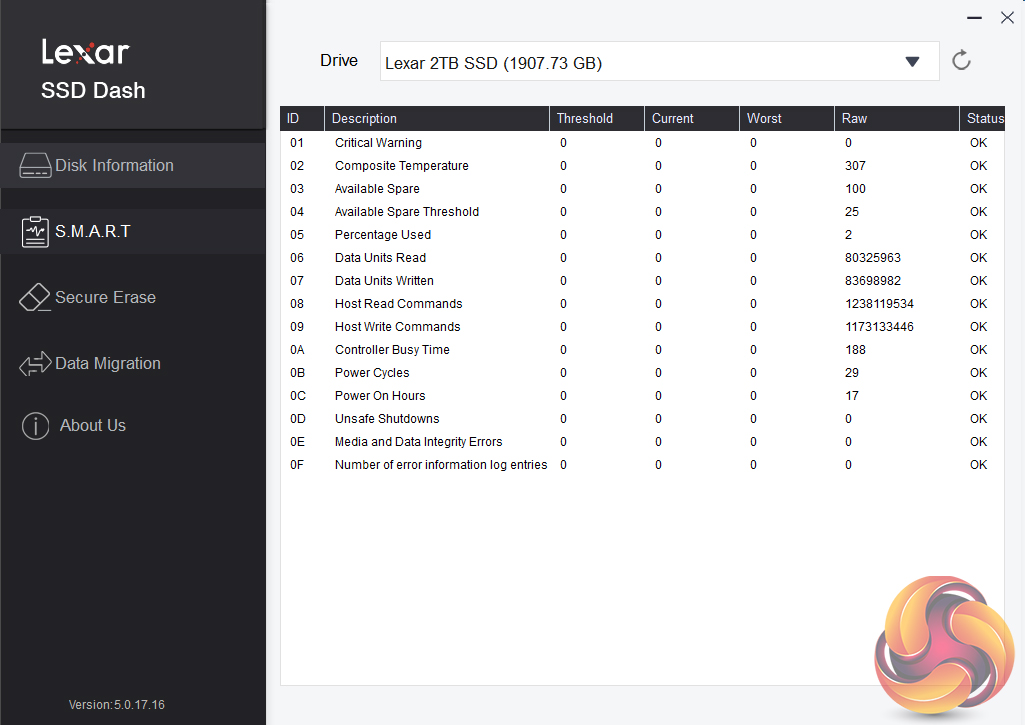
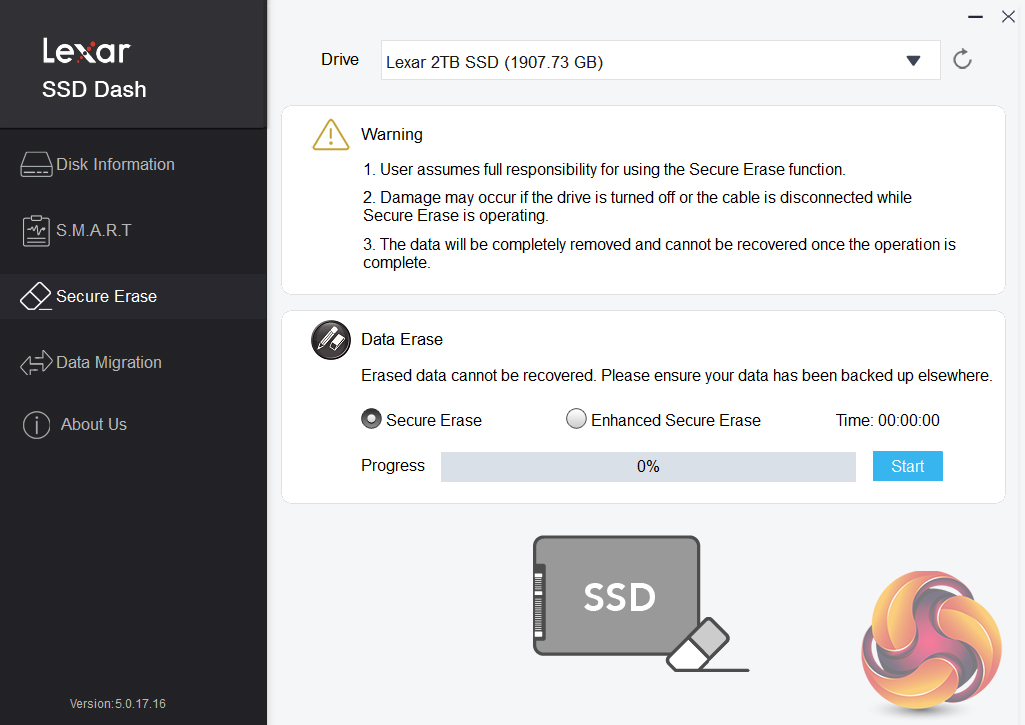
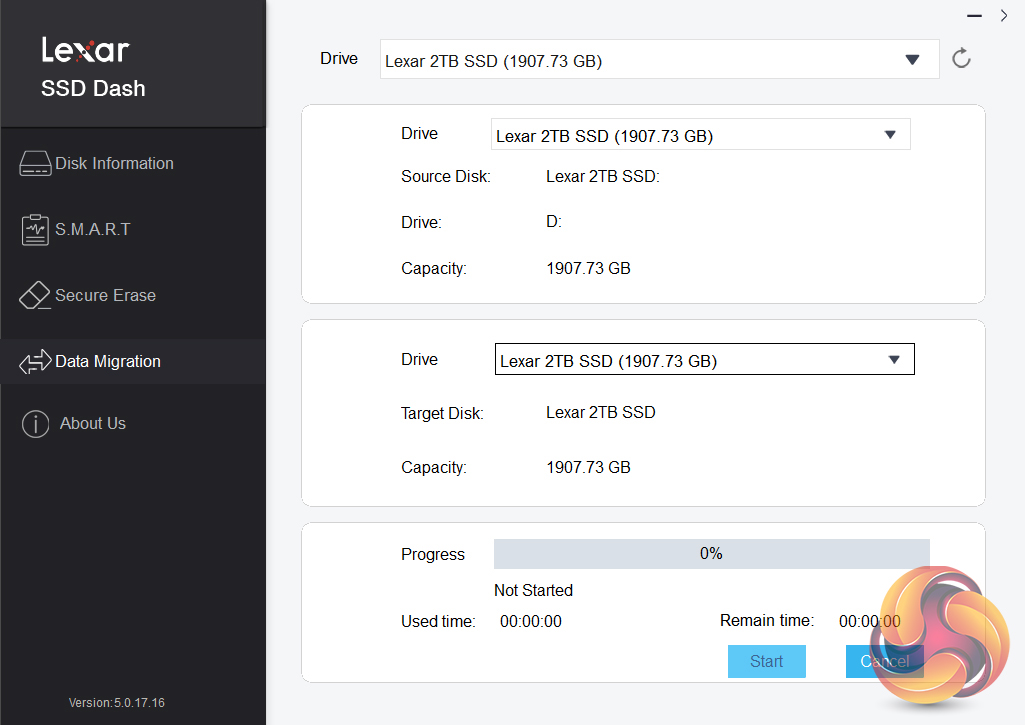
Lexar’s SSD utility goes under the name of SSD Dash. It’s not as fully featured or flashy as some of its competitors, but it does offer all the basic information you might need to keep an eye on your drive in an easy-to-understand way. It also supports Secure Erase and data migration.
For testing, the drives are all wiped and reset to factory settings by HDDerase V4. We try to use free or easily available programs and some real-world testing so you can compare our findings against your own system.
This is a good way to measure potential upgrade benefits.
Main system:
AMD Ryzen 5 3600X, 16GB DDR4-2400, Sapphire R9 390 Nitro and an MSI MPG X570 Gaming Edge Wifi motherboard
Other drives
Corsair MP600 Pro 2TB
Corsair Force MP600 1TB
Corsair MP600 Pro XT 2TB
Crucial P5 Plus 1TB
Gigabyte AORUS 7000e 2TB
HP FX900 Pro 2TB
Kingston KC3000 2TB
Kioxia BG5 1TB
Kioxia Exceria Pro 2TB
MSI Spatium M480 2TB
Patriot Viper VP4300 2TB
Patriot Viper VPN4100 1TB
PNY XLR8 CS3040 1TB
PNY XLR8 CS3140 1TB
Sabrent Rocket 4 Plus 1TB
Sabrent Rocket 4 Plus 2TB
Sabrent Rocket 4 Plus 4TB
Samsung SSD990 Pro 2TB
Samsung SSD980 Pro 1TB
Samsung SSD980 Pro Heatsink 1TB
Seagate FireCuda 520 1TB
Seagate FireCuda 530 2TB
Solidigm P41 Plus 1TB
Teamgroup T-Force Cardea Zero Z440 1TB
Teamgroup T-Force Cardea A440 Pro Special Series 1TB
WD Black SN770 1TB
WD Black SN850 1TB
WD Black SN850X Heatsink 2TB
Software:
Atto Disk Benchmark 4.1.
CrystalMark 8.0.0.
AS SSD 2.0.
IOMeter.
UL Solutions PC Mark 10.
UL Solutions 3DMark Storage Benchmark.
All our results were achieved by running each test five times with every configuration this ensures that any glitches are removed from the results. Trim is confirmed as running by typing fsutil behavior query disabledeletenotify into the command line. A response of disabledeletenotify =0 confirms TRIM is active
CrystalDiskMark is a useful benchmark to measure the theoretical performance levels of hard drives and SSD’s. We are using v8.0.
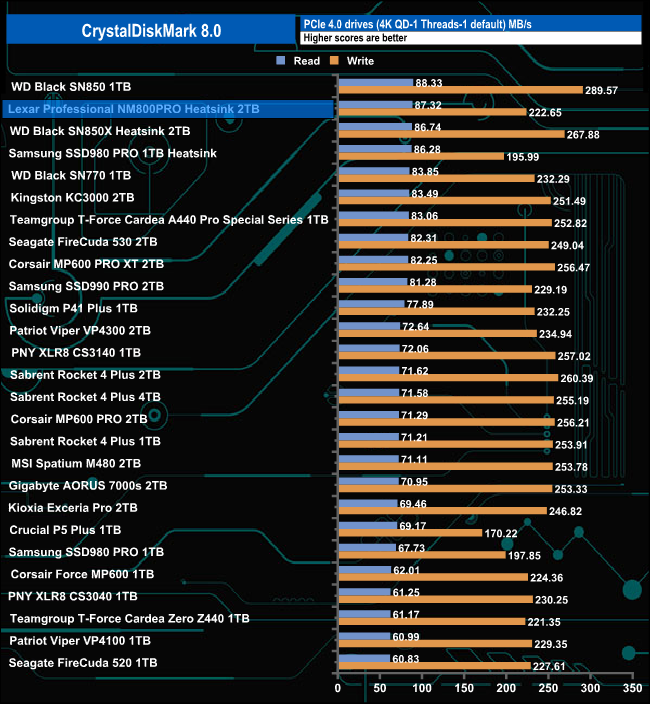
The Professional NM800 Pro heatsink version produces a very good read score of 87.32MB/s when tested with the CrystalDiskMark 4K QD1 1thread benchmark, which is good enough to put the drive into second place in our results chart. However, its write result of 222.65MB/s isn't as strong, bettered by the majority of drives we've tested.
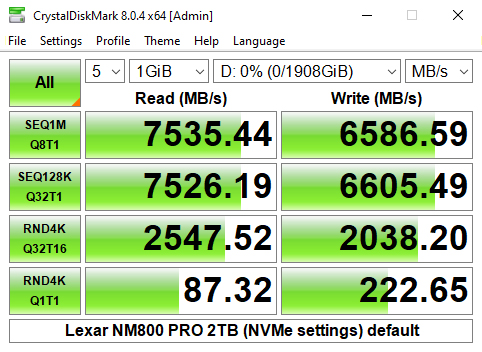
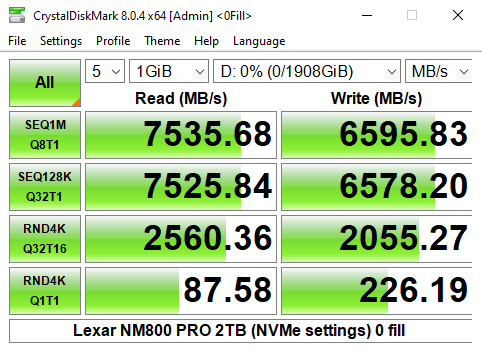
Looking at the benchmark result screens, we can confirm the official Sequential ratings of the drive of up to 7,500MB/s and up to 6,500MB/s for read and writes respectively with a best read test figure of 7,535.44MB/s and a best write result of 6,595.83MB/s.
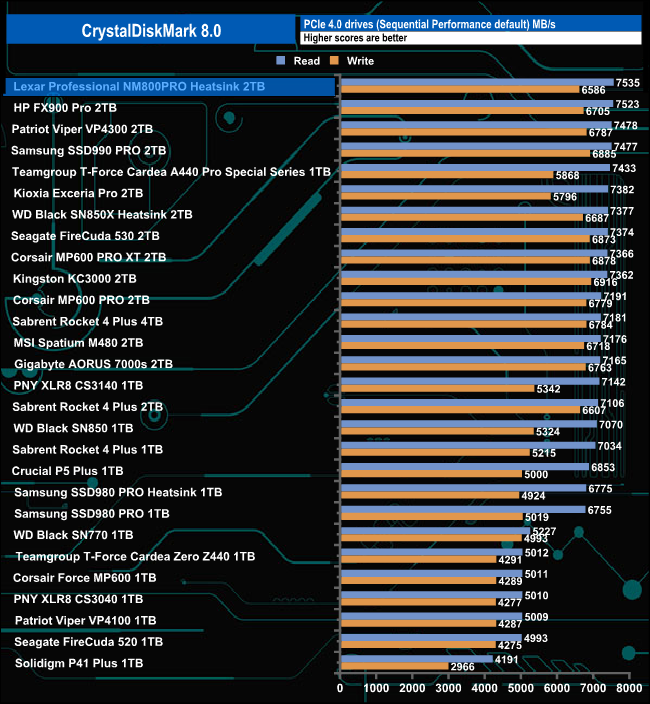
That 7,535.44MB/s Sequential read test result is good enough to put the drive at the top of the tree in our results charts.
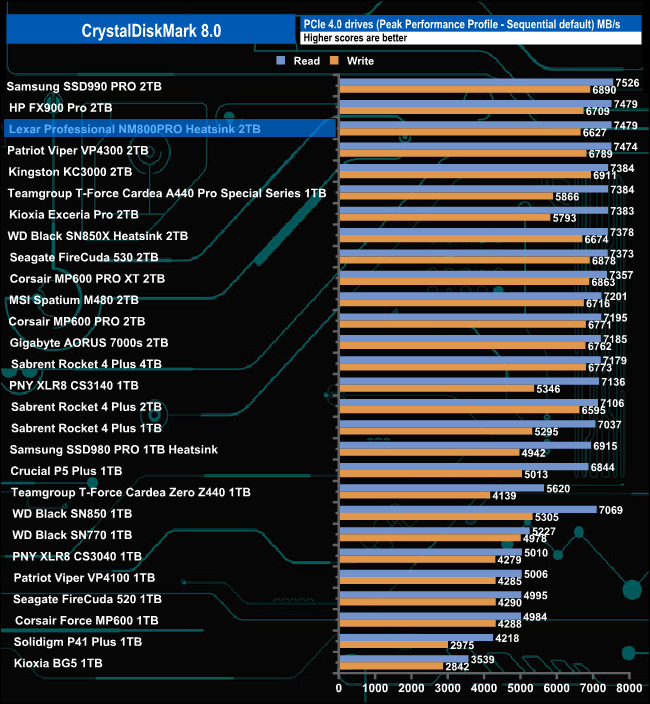
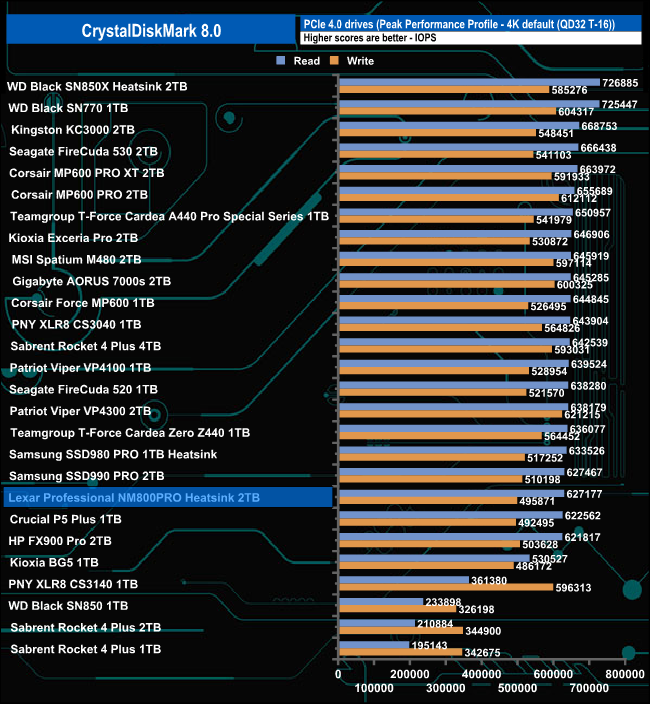
Using CrystalDiskMark's Peak Performance profile to test the drive we got a read result of 7,479MB/s which is identical to HP's FX900 Pro drive and just 5MB/s faster than Patriot's Viper VP4300. What these three drives have in common is that they all make use of InnoGrit's IG5236 controller.
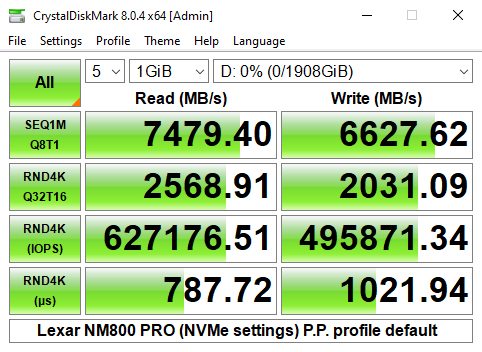
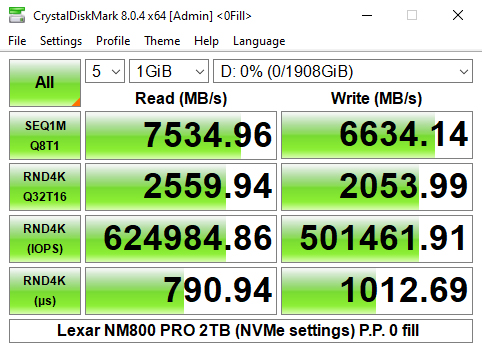
As with the default test, using the Peak Performance profile we could confirm the official Sequential ratings of the drives of up to 7,500MB/s for reads and up to 6,500MB/s for writes.
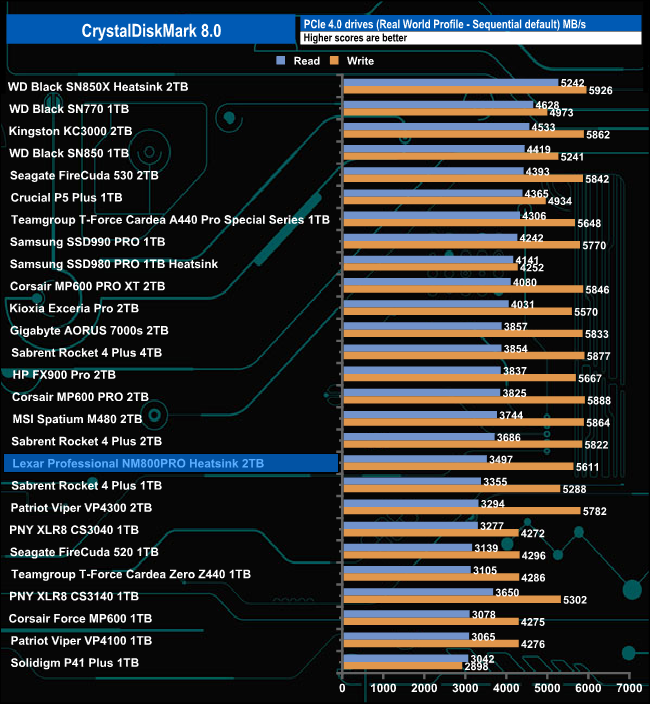
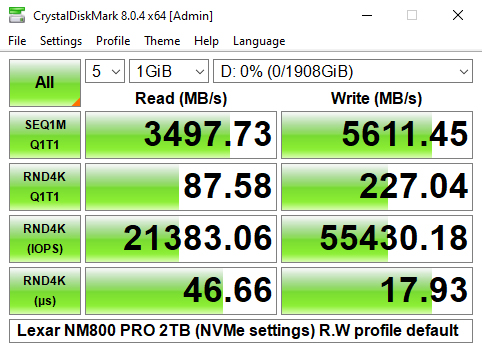
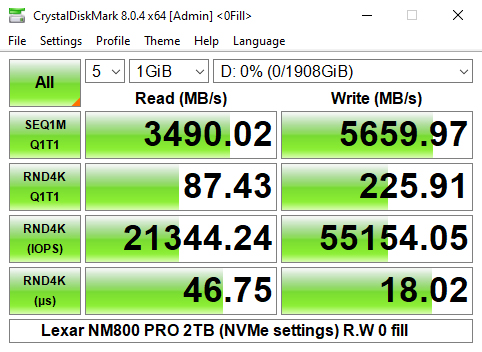
Using the default Real World profile sees the drive towards the bottom half of the results chart with a read result of 3,497MB/s and 5,611MB/s for writes.
The ATTO Disk Benchmark performance measurement tool is compatible with Microsoft Windows. Measure your storage systems performance with various transfer sizes and test lengths for reads and writes. Several options are available to customize your performance measurement including queue depth, overlapped I/O and even a comparison mode with the option to run continuously.
Use ATTO Disk Benchmark to test any manufacturer's RAID controllers, storage controllers, host adapters, hard drives and SSD drives and notice that ATTO products will consistently provide the highest level of performance to your storage.
We are using version 4.1 for our NVMe disk tests.
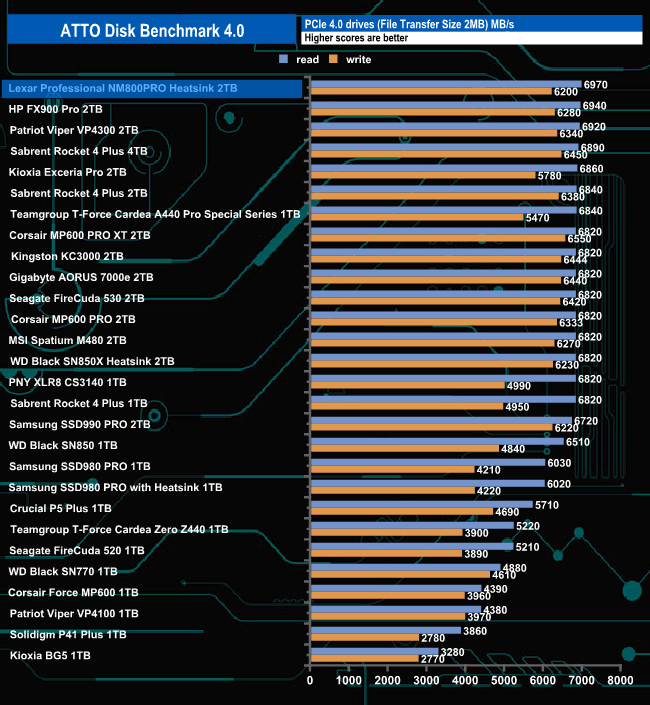
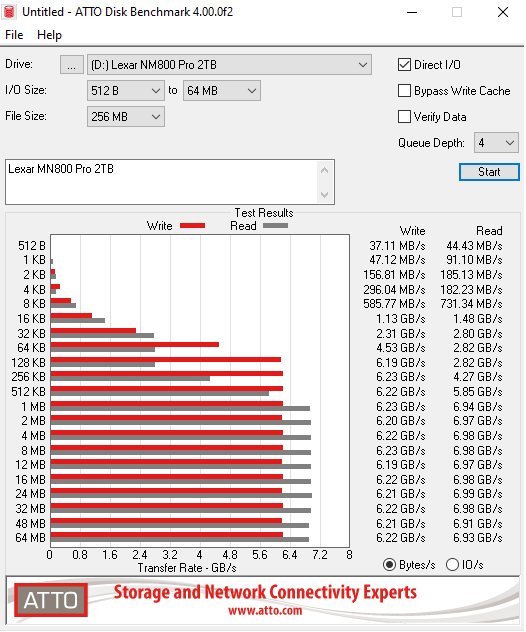
Using the ATTO benchmark we couldn't quite hit the official maximums of 7,500MB/s and 6,500MB/s for read and writes respectively with test results of 6,970MB/s for reads and 6,200MB/s for writes. However, while the tested read figure fell a little short of the official maximum it's the fastest read figure we have seen to date for a consumer drive tested with the ATTO benchmark.
AS SSD is a great free tool, designed just for benching Solid State Drives. It performs an array of sequential read & write tests, as well as random read & write tests with sequential access times over a portion of the drive. It uses incompressible data samples which many drives struggle with, so results can be viewed as the worst-case scenarios.
AS SSD includes a sub suite of benchmarks with various file pattern algorithms but this is difficult in trying to judge accurate performance figures.
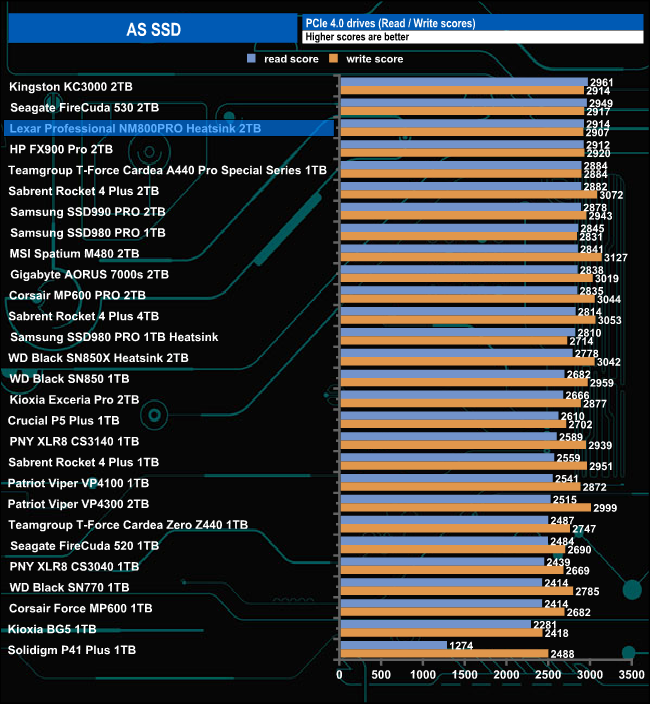
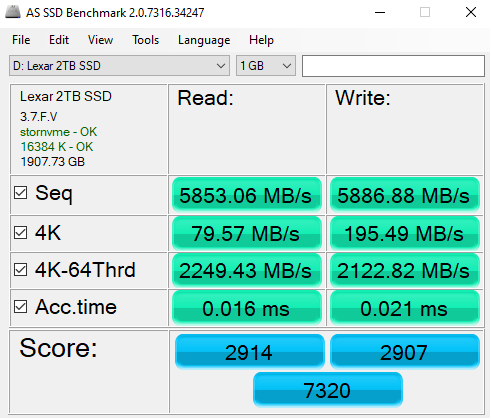
The AS-SSD read score of 2914 is good enough to see the Lexar Professional NM800 Pro Heatsink at third position in our results chart with the write score not too far behind at 2907.
We used CrystalDiskMark 8‘s custom settings to test the Sequential read and write performance of the drive through a range of queue depths. The setup for the tests is listed below.
Transfer Request Size: 128KB, Thread(s): 1, Outstanding I/O: 1-32.
128KB Sequential Read / Write.
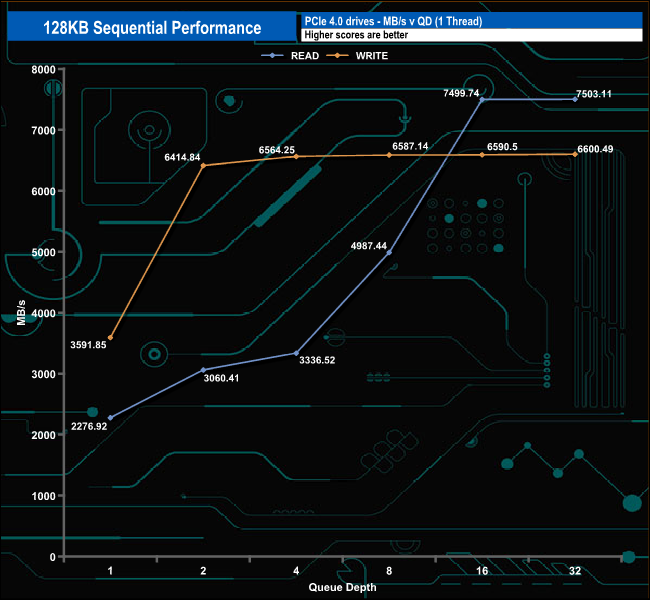
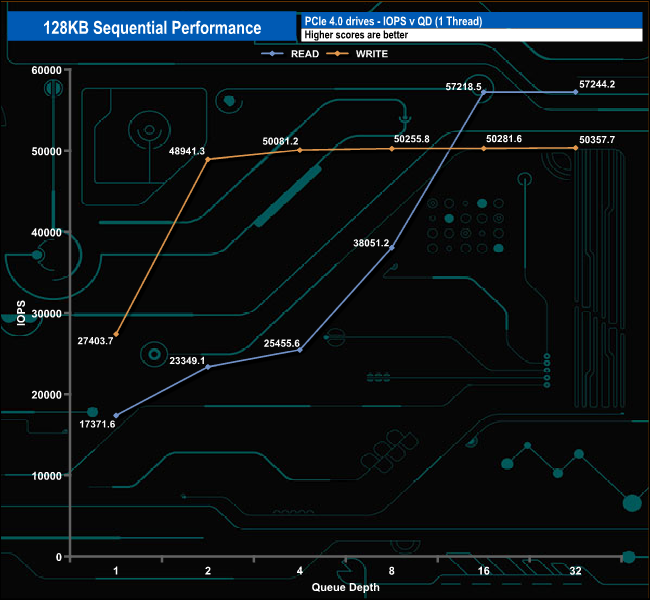
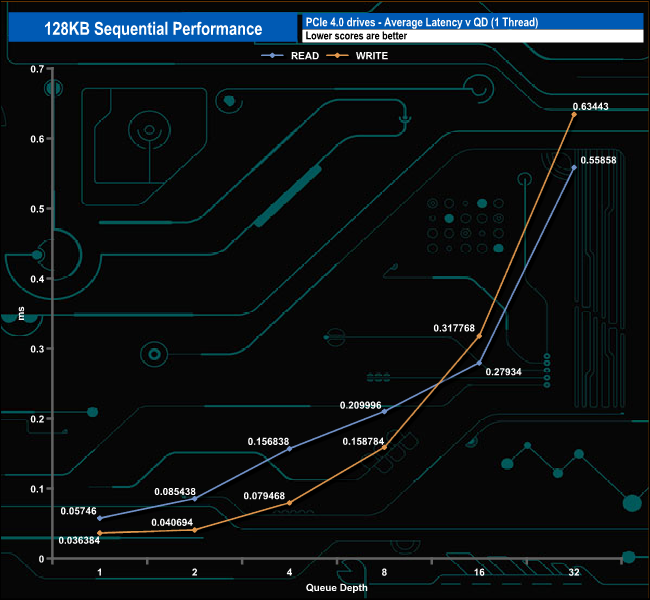
Using the custom CrystalDiskMark 8 settings we could confirm the official Sequential figures for the drive with a read test result of 7,503.11MB/s and a write result of 6,600.49MB/s, both at QD32.
128KB Sequential Read performance v QD compared.
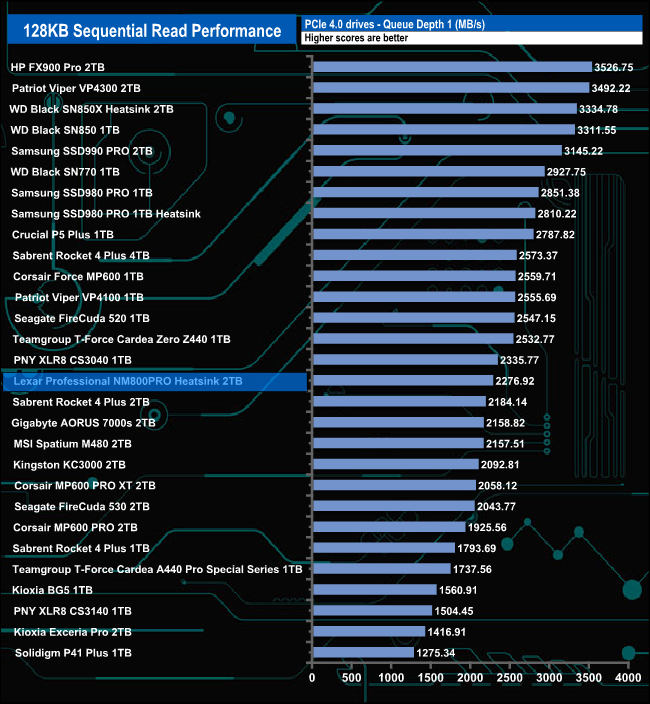
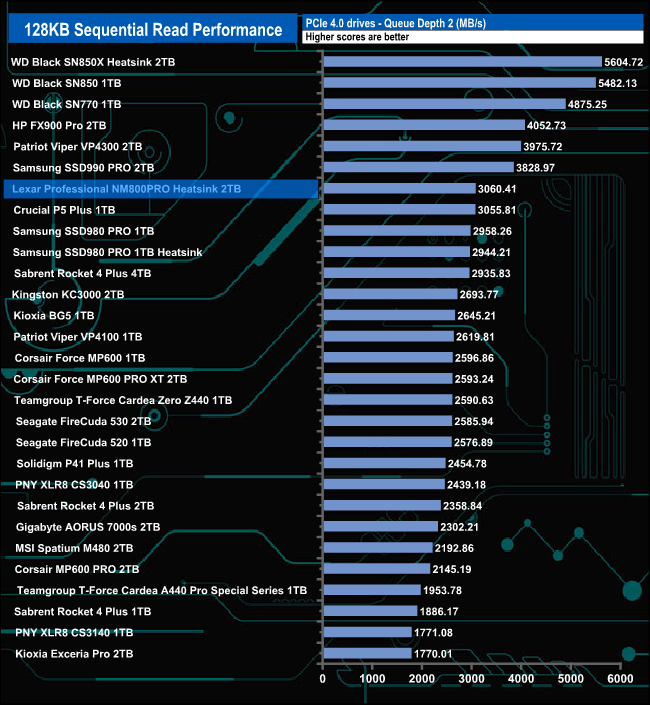
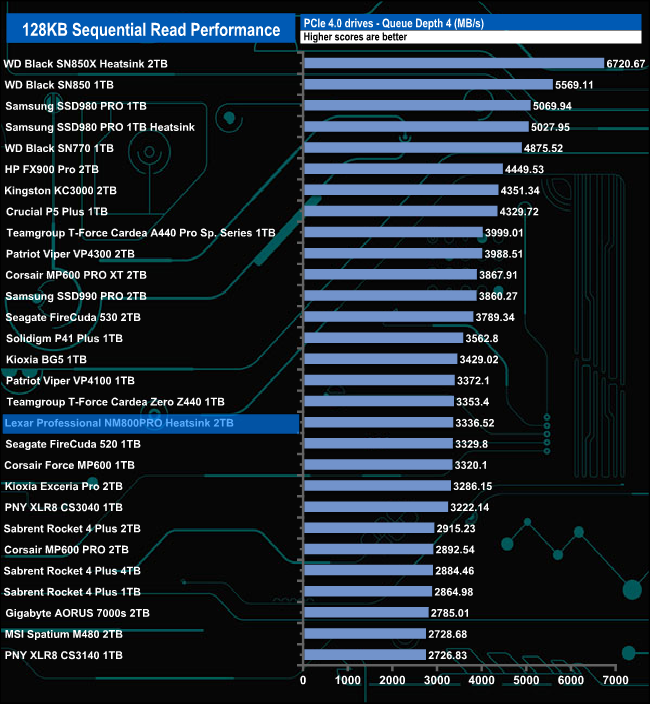
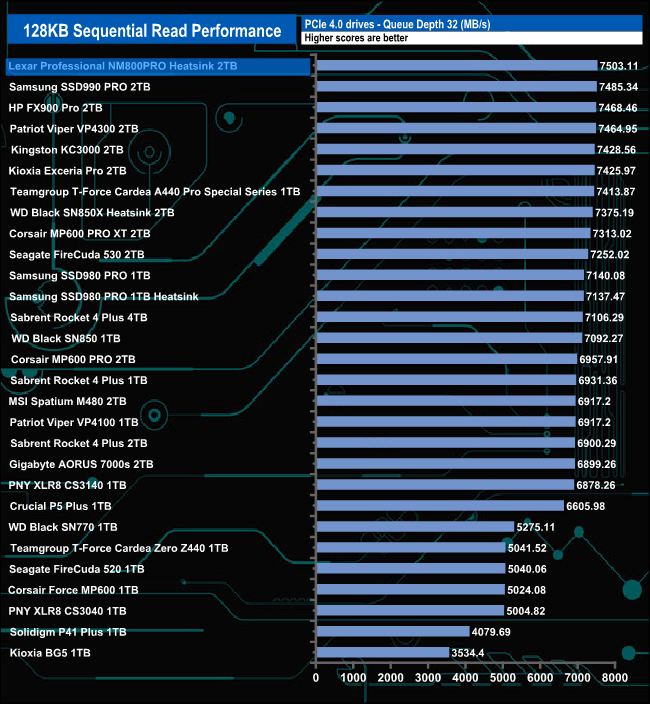
At the lower tested queue depths (1-4) the drive sits around the mid-table position in our Sequential read chart but at QD32 it sits on top of the pile.
128KB Sequential Write performance v QD compared.
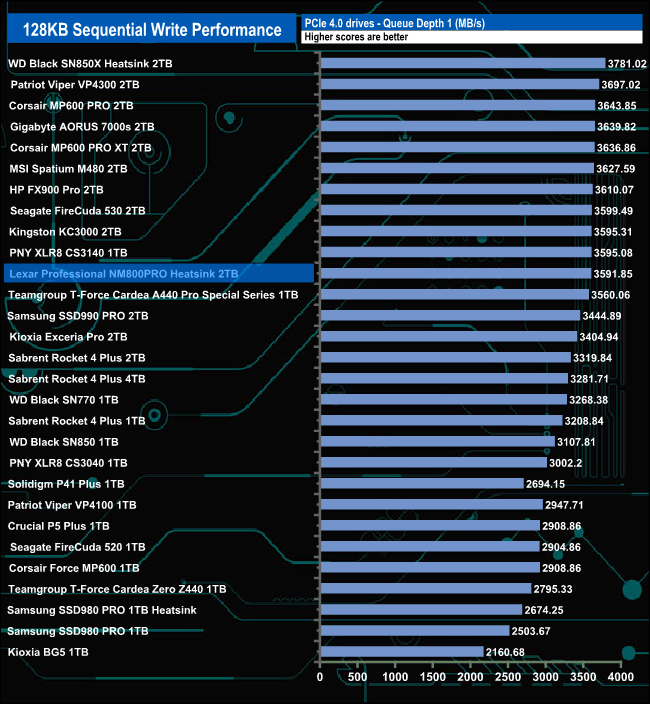
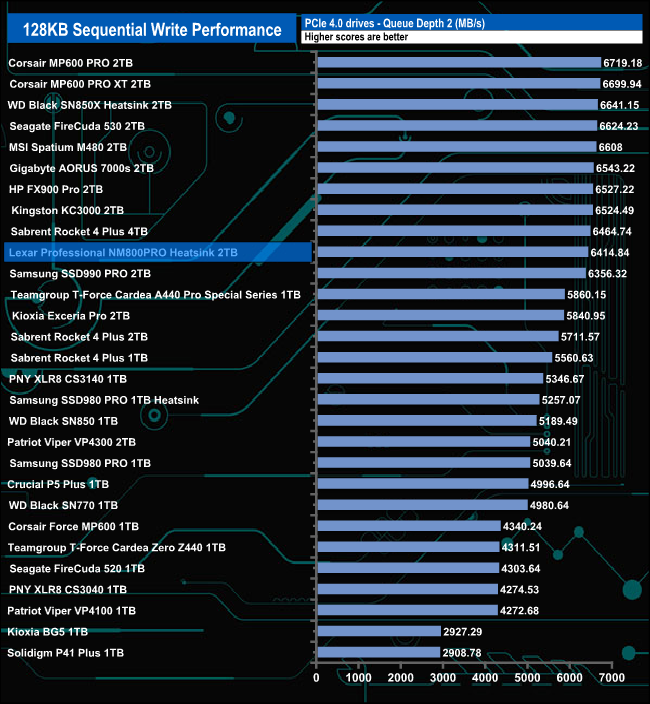
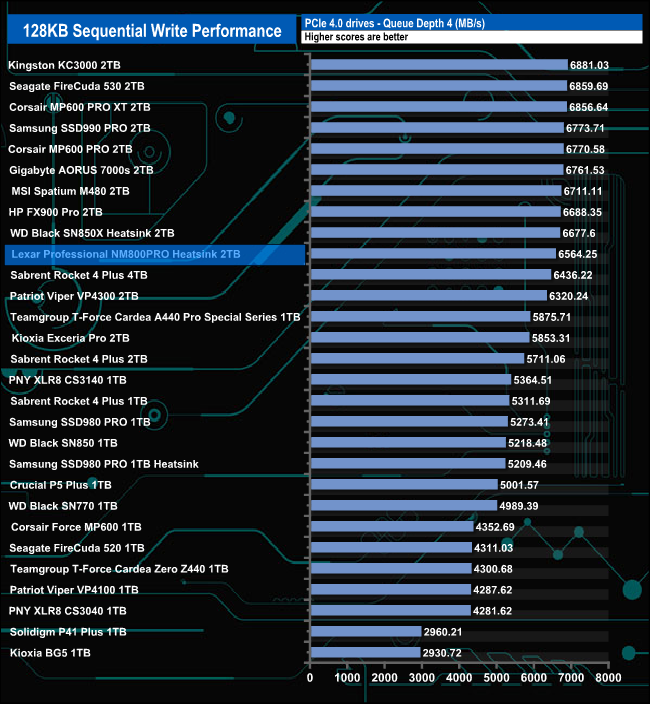
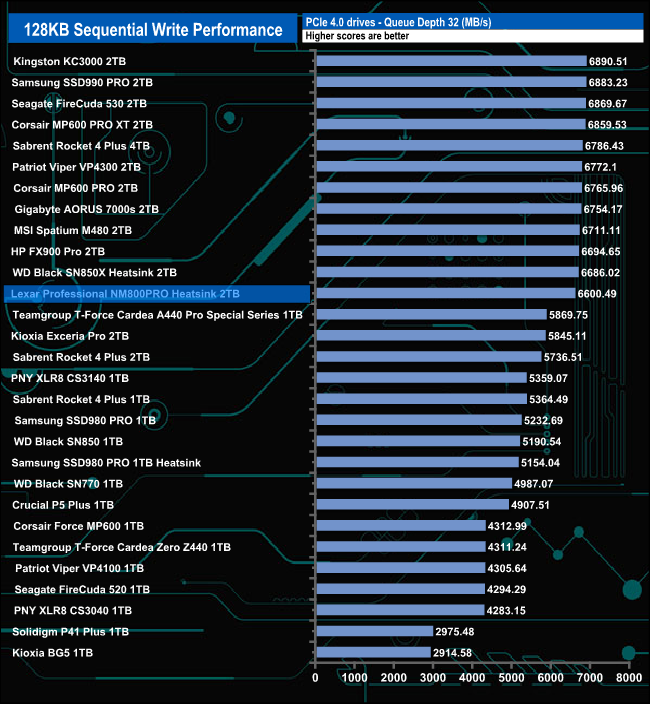
When it comes to Sequential writes, the drive sits around mid-table in our result chart for all the tested queue depths.
We used CrystalDiskMark 8‘s custom settings to test the 4K random read performance of the drive through a range of queue depths. The setup for the tests is listed below.
Transfer Request Size: 4KB, Outstanding I/O: 1-32.
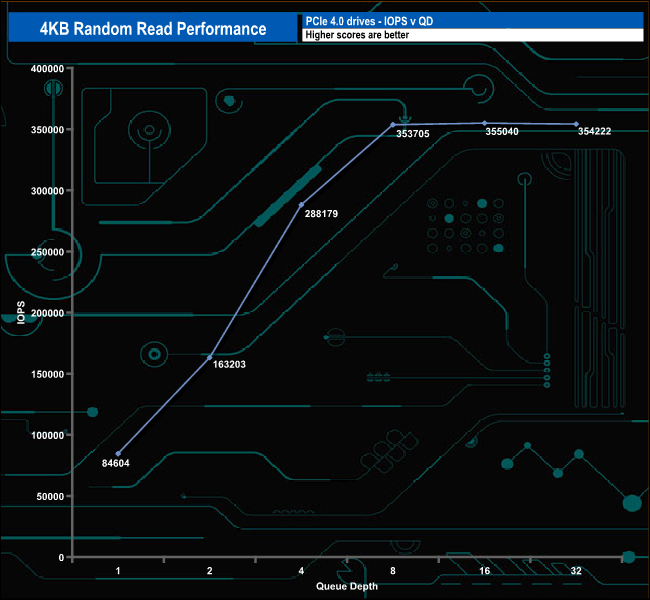
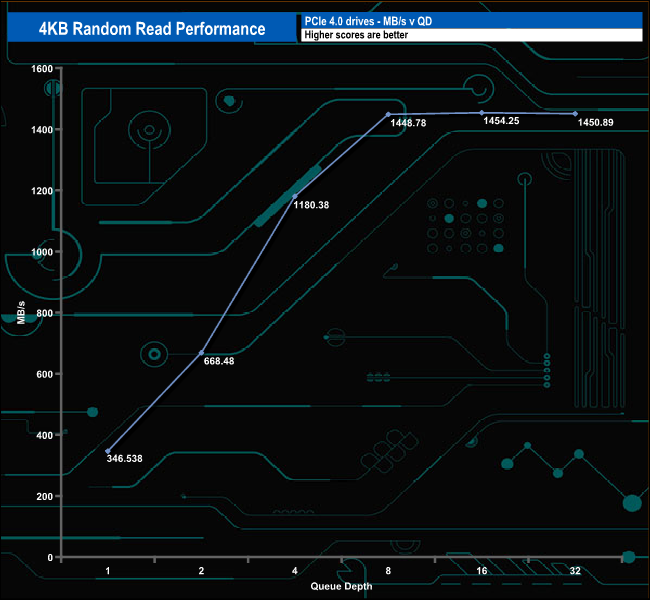
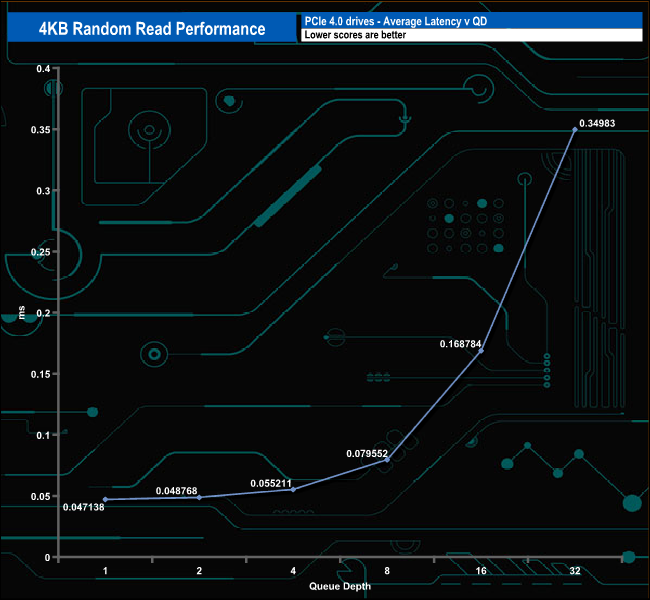
In our 4-thread 4K random read tests, the drive peaked at 355,040 IOPS at QD16 before dropping back to finish the test run at QD32 with a test result of 354,222 IOPS.
Random Read v QD compared.
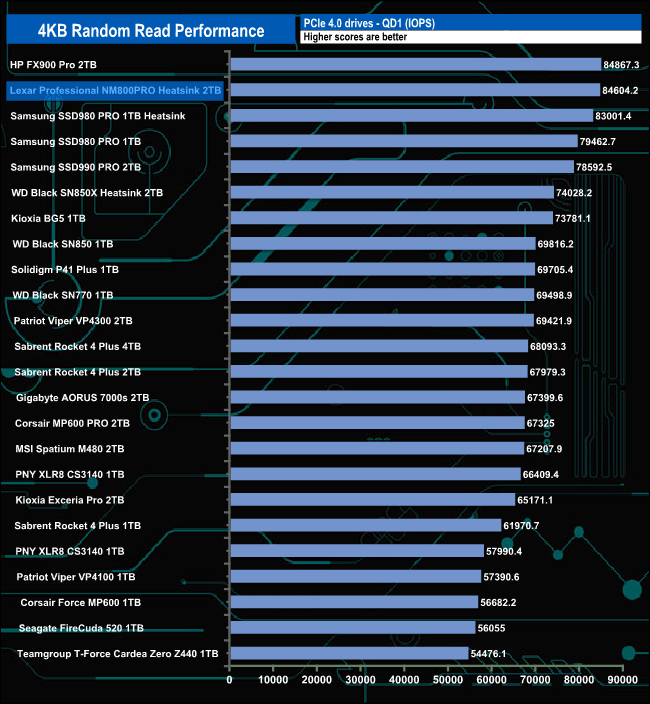
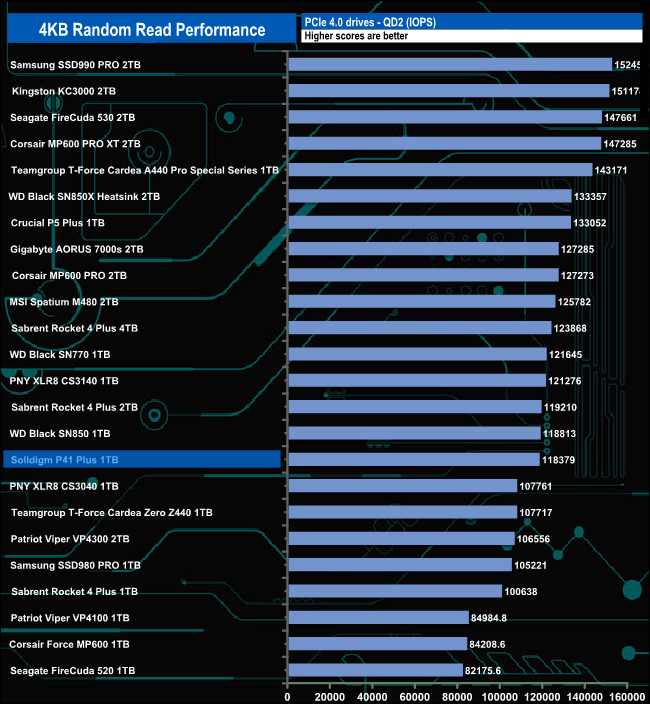
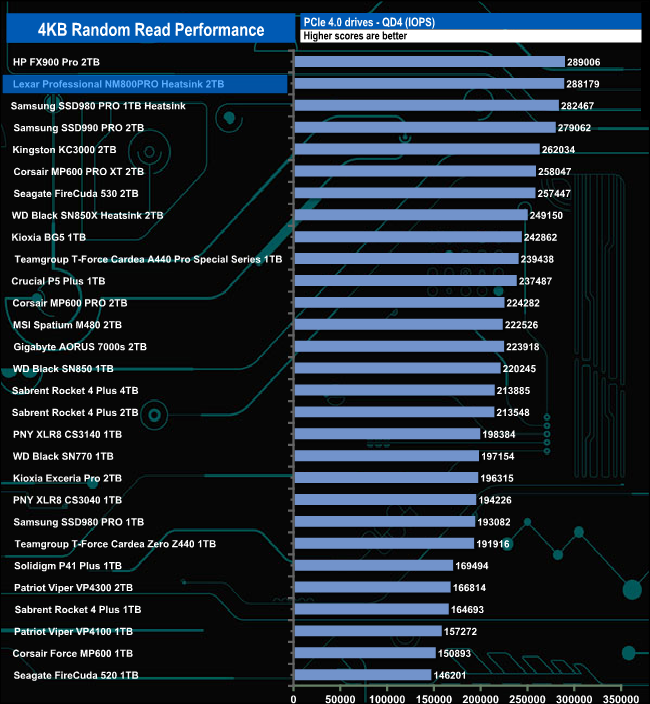
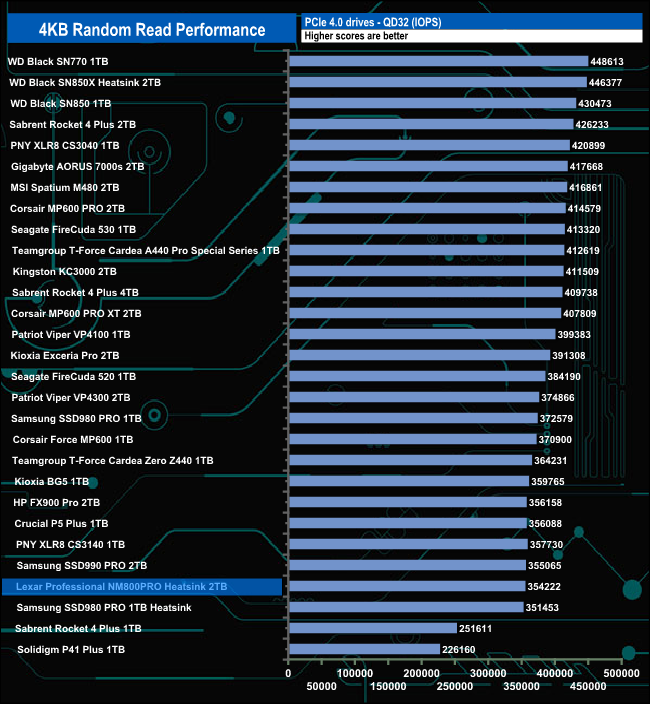
The Lexar Professional NM800 Pro Heatsink sits in second place in our results tables at QD's 1 and 4 behind the HP FX900 Pro, a drive that uses the same InnoGrit IG5236 controller. At QDs 2 and 32, the drive sits in the bottom half of the table.
We used CrystalDiskMark 8‘s custom settings to test the 4K random write performance of the drive through a range of queue depths. The setup for the tests is listed below.
Transfer Request Size: 4KB, Outstanding I/O: 1-32.
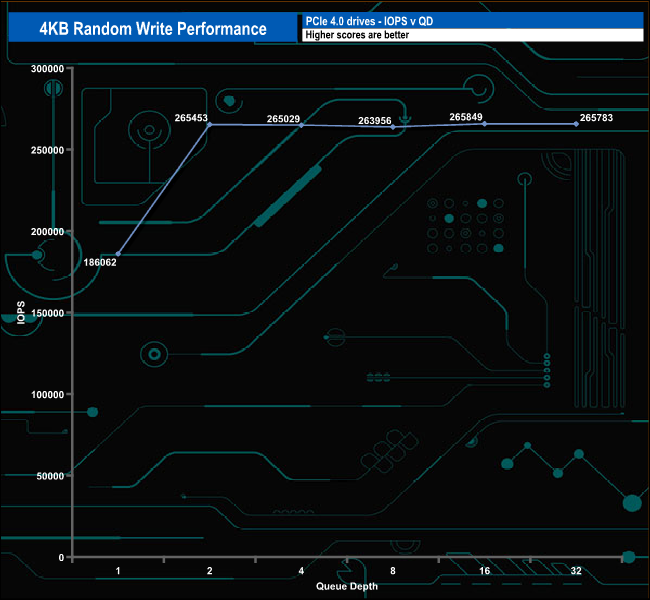
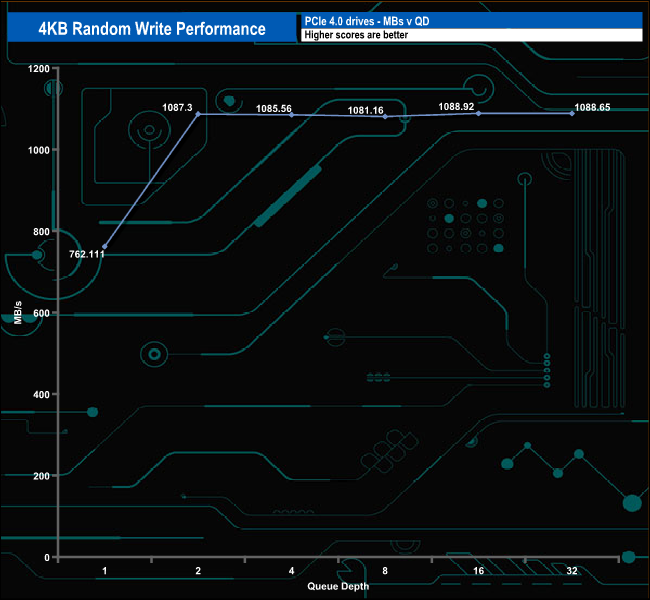
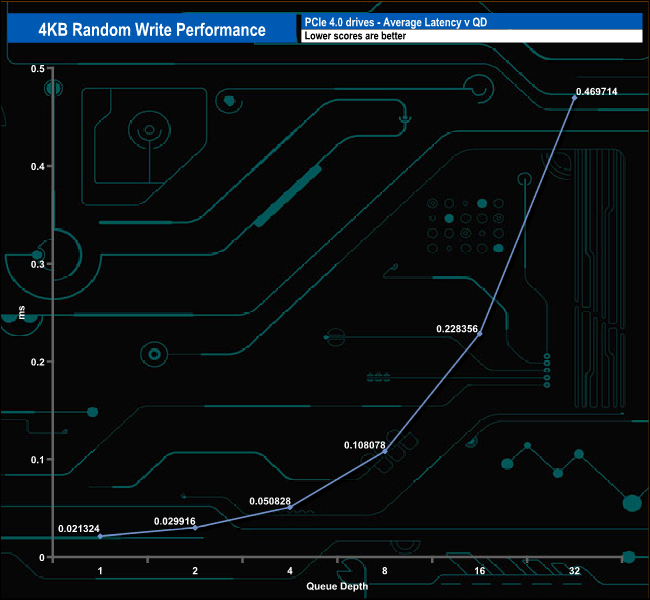
When it comes to random writes, the drive is pretty consistent in performance from QD2 to QD32, averaging 265,214 IOPS for the five tested queue depths. It peaks at QD16 with a test result of 265,849 IOPS before dropping back to finish the test run at QD32 with 265,783 IOPS.
Random Write v QD compared.
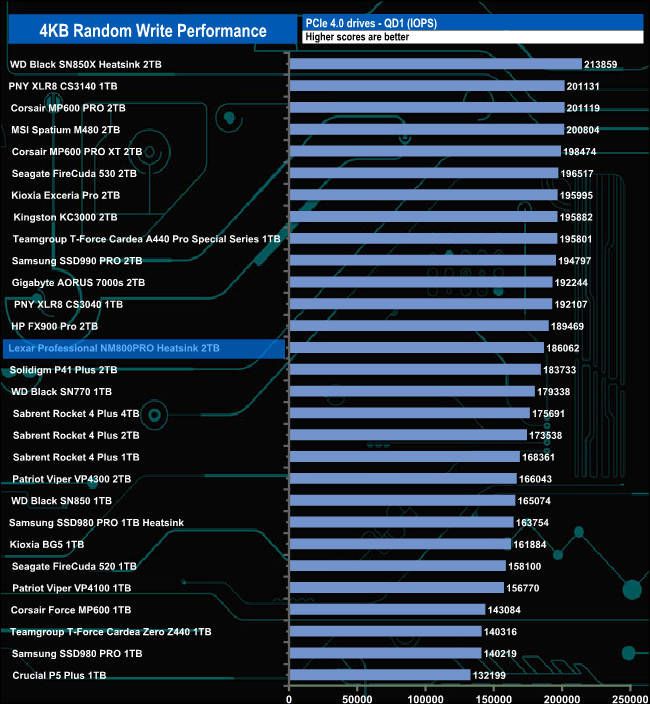
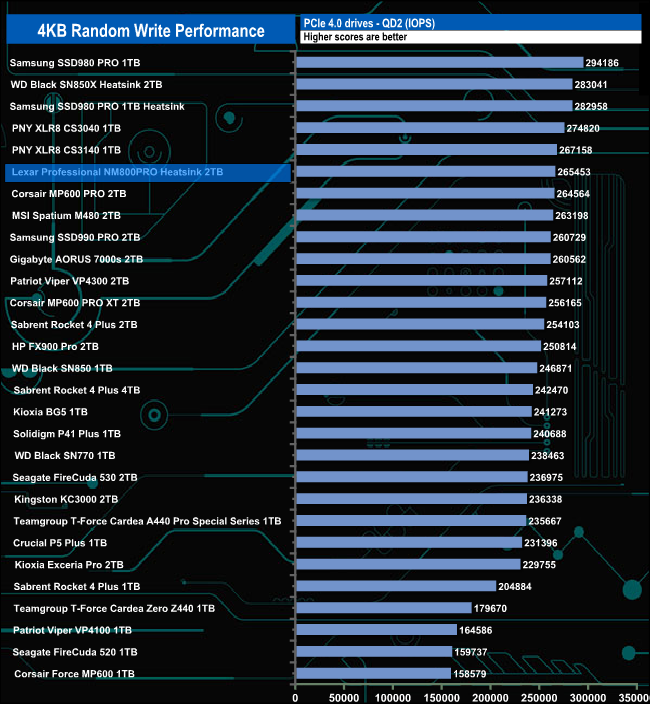
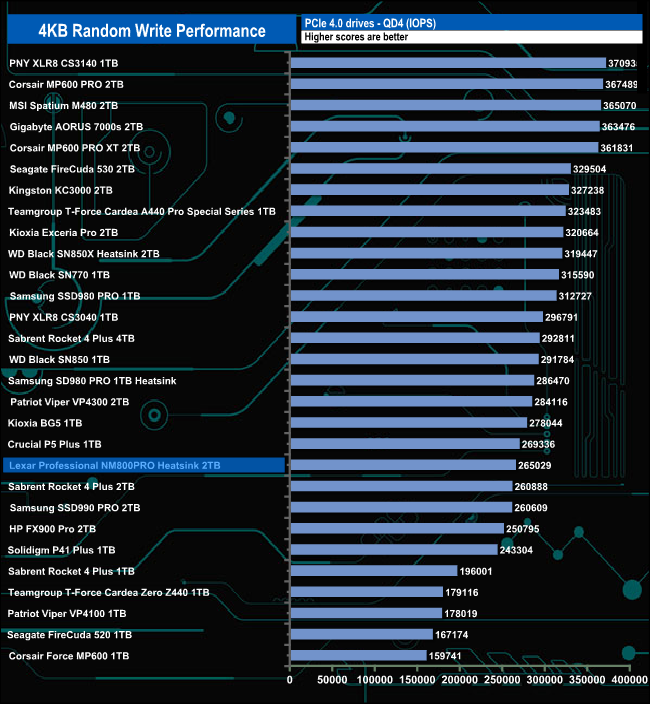
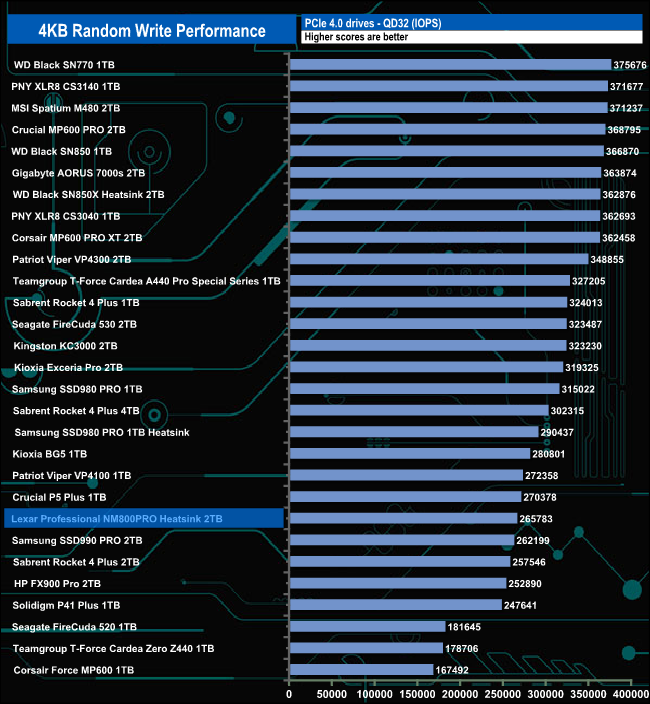
In the random write tests, the drive performs best in comparison to the drives around it at QD2 where it sits in the top 10 of drives tested. At QDs 1, 4 and 32 it sits much further down the chart.
We used CrystalDiskMark 8’s custom settings to test the 4K 70/30 mixed read/write performance of the drive through a range of queue depths using a single thread and four threads.
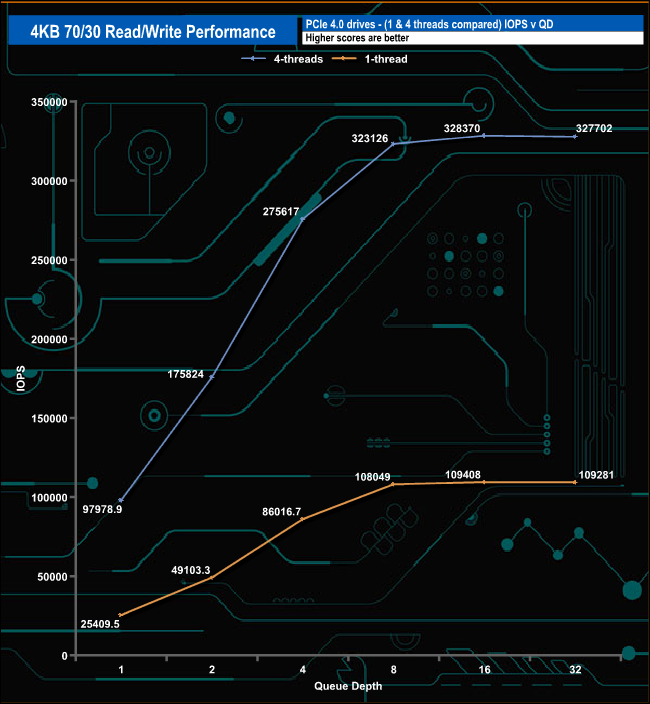
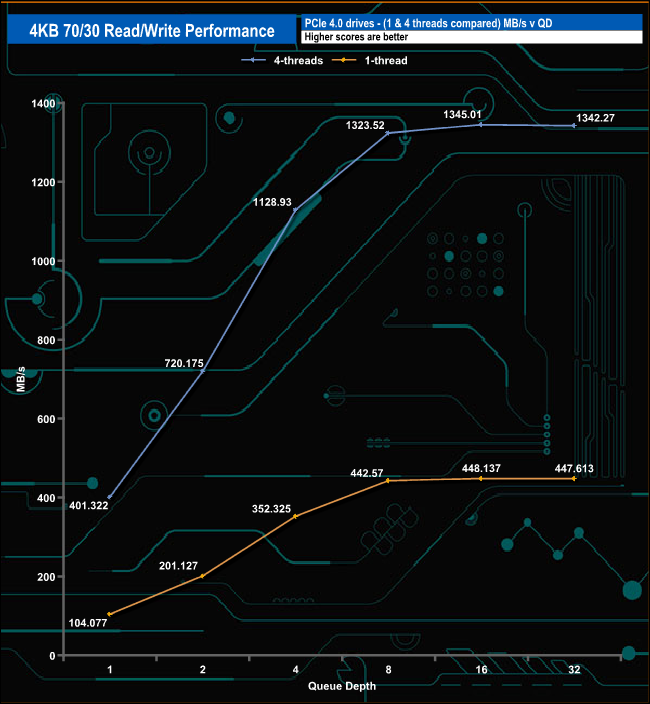
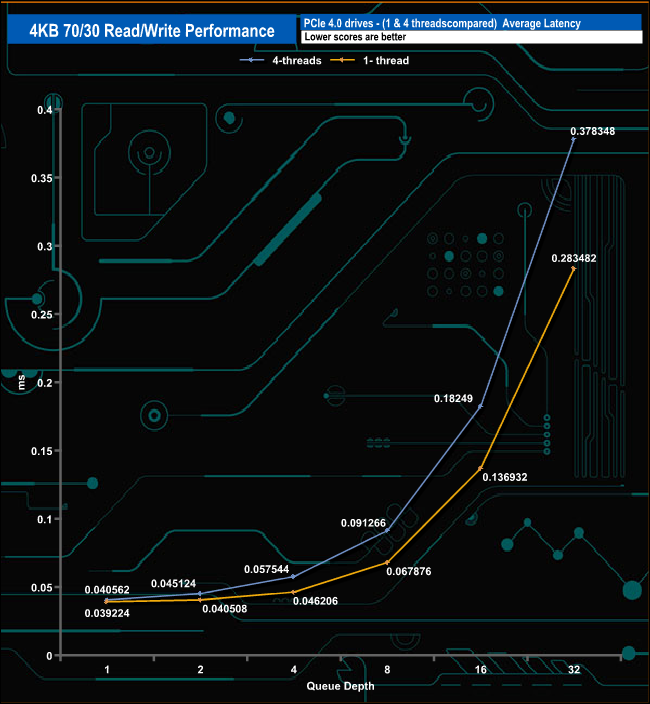
Using four threads the Professional NM800 Pro heatsink peaks at QD16 with 328,370 IOPS (1,345.01MB/s) before dropping back slightly to finish the test run at 327,702 IOPS (1,342.27MB/s) at QD32.
Using a single thread the drive also peaks at QD16 at 109,408 IOP (448.13MB/s) before, just like the four-threaded test, drops back to finish the test run at 109,281 IOPS (447.61MB/s).
We used CrystalDiskMark 8 to test the random performance of the drive at lower queue depths (QD1 – QD8 where most of the everyday workloads occur) using 1 to 4 threads.
Random Read
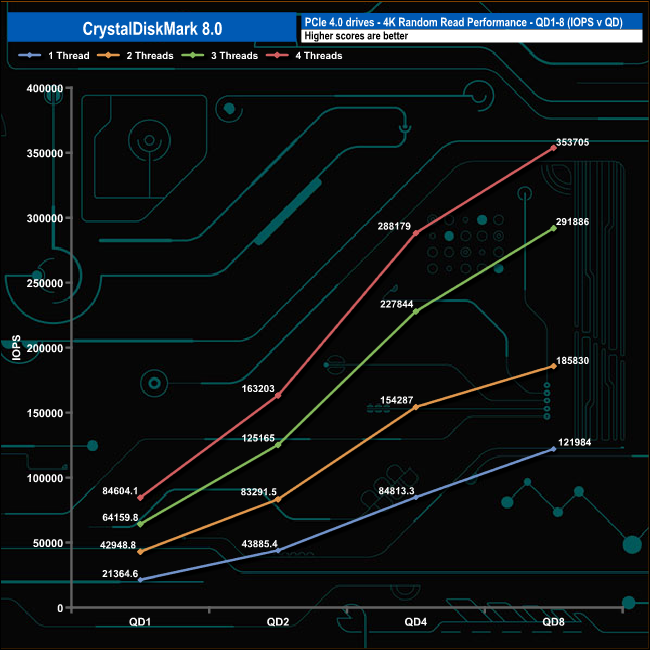
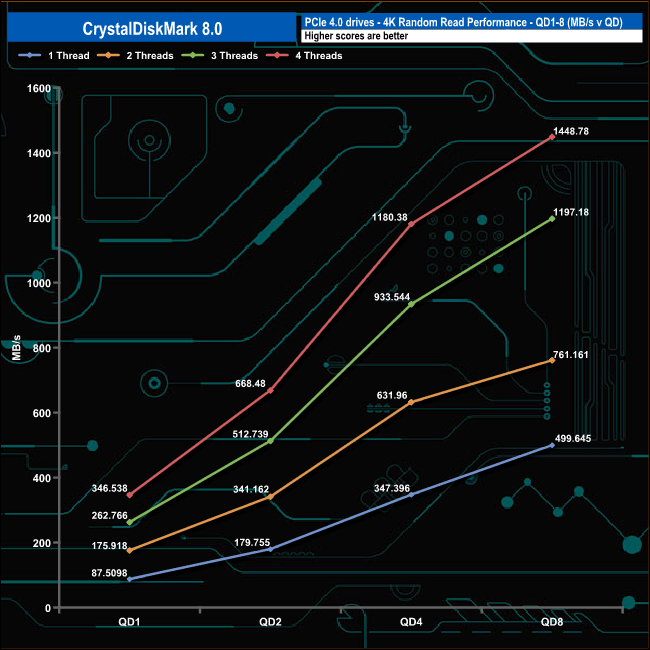
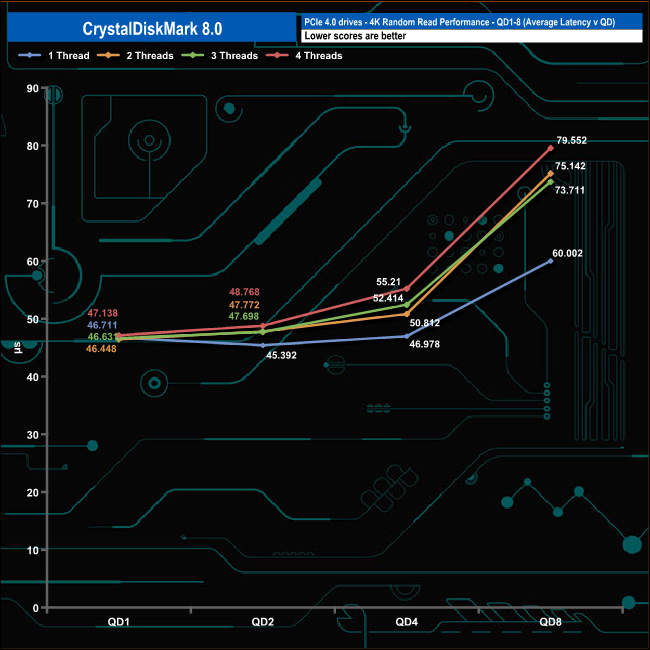
Using a single thread the performance of the Lexar Professional NM800 Pro Heatsink ranges from a low point of 21,364 IOPS at QD1 up to 121,984IOPS at QD8. The progression between QD1 and QD8 is a pretty smooth one. Using four threads the drive climbs from a low point of 84,604 IOPS up to 353,705 IOPS.
Random Write
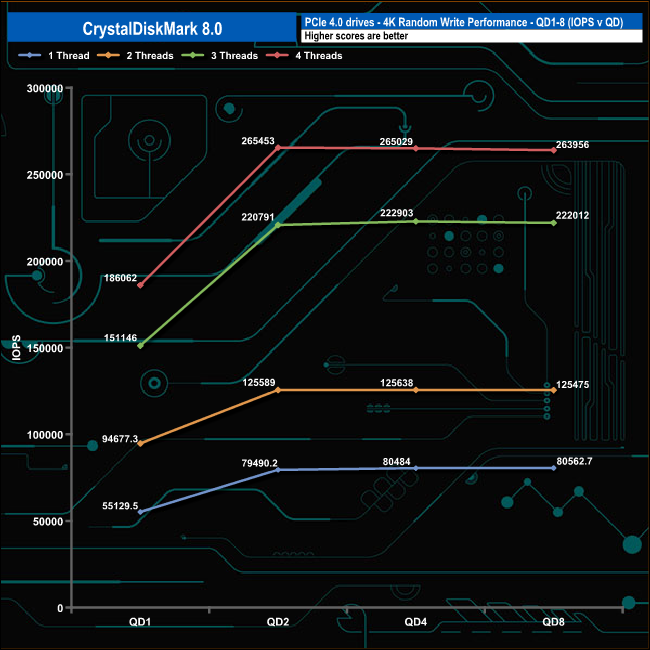
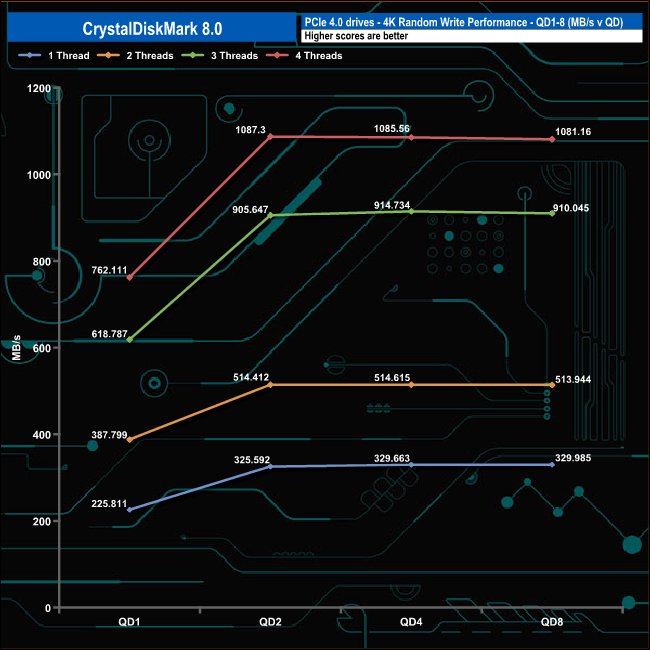
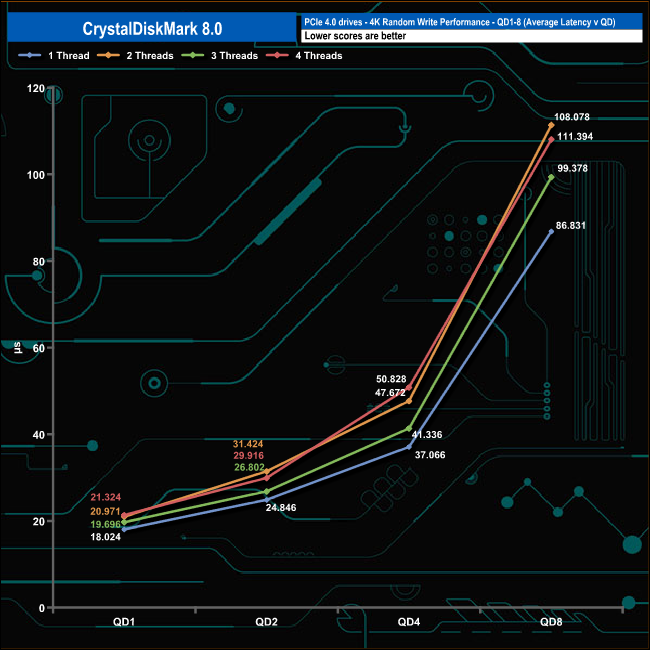
When it comes to 4K random writes, each thread tested peaked at QD2 before the performance seemed to plateau out.
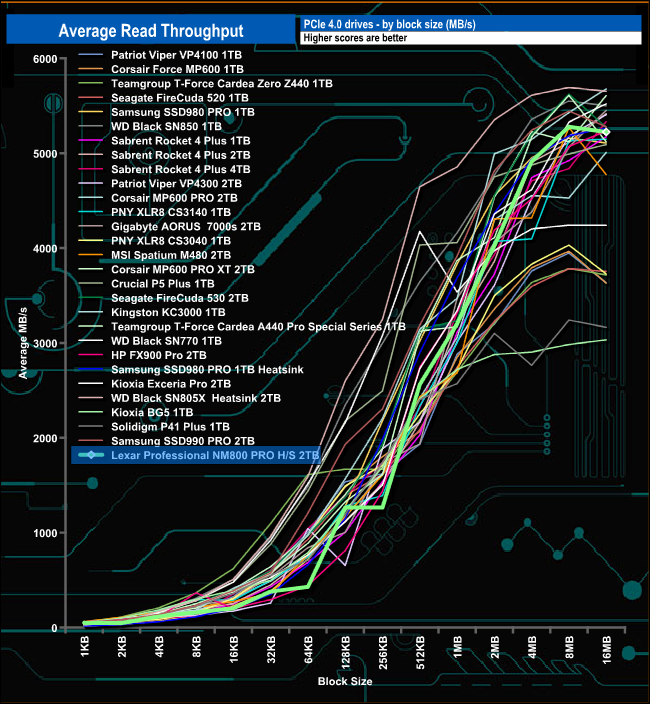
In the read throughput test, the drive peaked at the 8MB block mark with a figure of 5,279.44MB/s before dropping back slightly to finish the test run (QD32) at 5,224MB/s, both figures are quite some distance back from the official high point of 7,500MB/s.
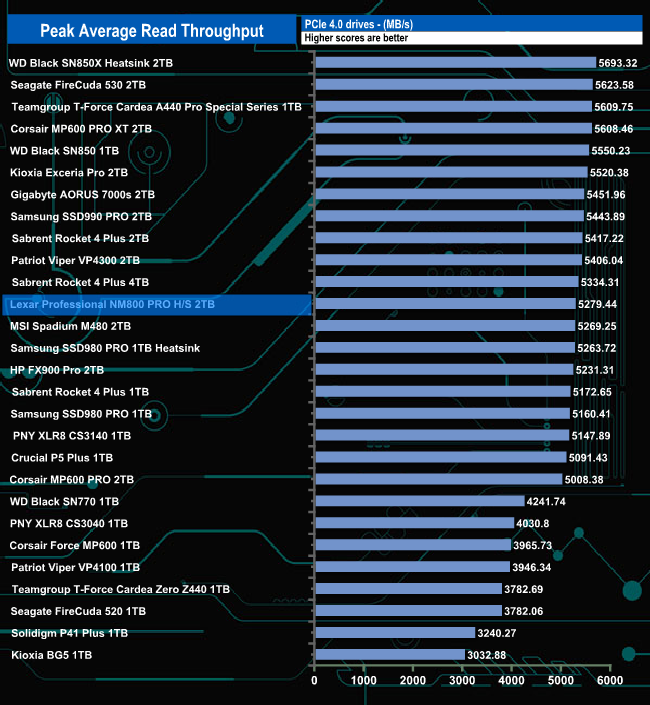
That peak test result of 5,279MB/s sees the drive in mid-table.
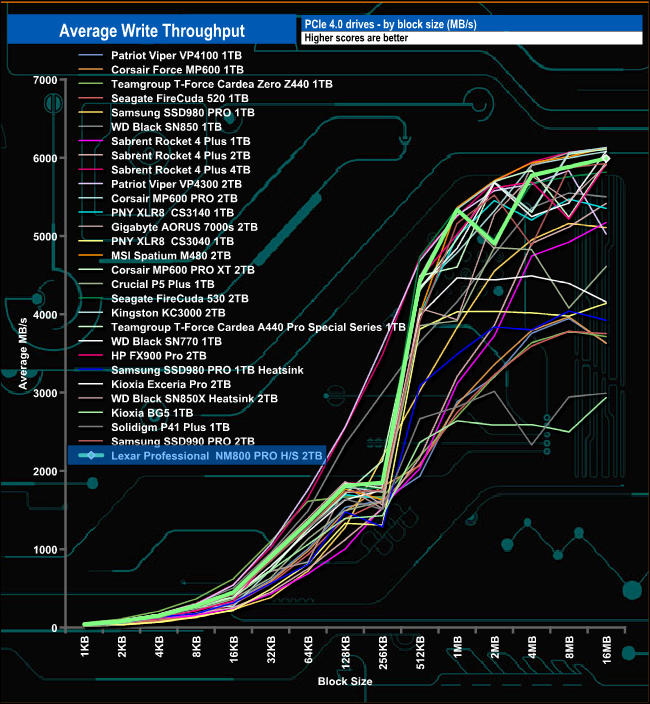
In the write throughput test, the drive peaked at 5,992MB/s at the end of the test run. But once again it was short of the maximum official figure of 6,500MB/s.
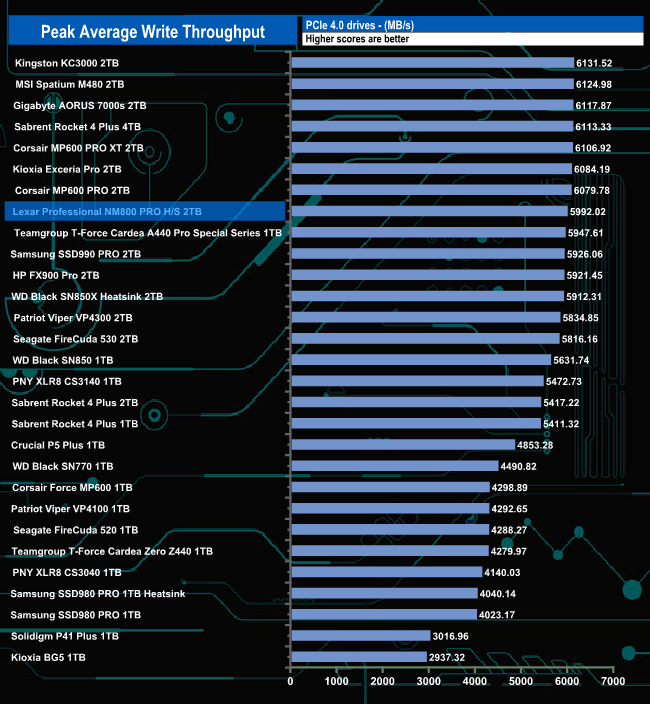
The peak write result we saw of 5,992MB/s sees the drive in the top ten in our results chart.
The PCMark 10 Full System Drive Benchmark uses a wide-ranging set of real-world traces from popular applications and common tasks to fully test the performance of the fastest modern drives. The benchmark is designed to measure the performance of fast system drives using the SATA bus at the low end and devices connected via PCI Express at the high end.
The goal of the benchmark is to show meaningful real-world performance differences between fast storage technologies such as SATA, NVMe, and Intel’s Optane. The Full System Drive Benchmark uses 23 traces, running 3 passes with each trace. It typically takes an hour to run.
Traces used:
Booting Windows 10.
Adobe Acrobat – starting the application until usable.
Adobe Illustrator – starting the application until usable Adobe Premiere Pro – starting the application until usable.
Adobe Photoshop – starting the application until usable.
Battlefield V – starting the game until the main menu.
Call of Duty Black Ops 4 – starting the game until the main menu.
Overwatch – starting the game until main menu.
Using Adobe After Effects.
Using Microsoft Excel.
Using Adobe Illustrator.
Using Adobe InDesign.
Using Microsoft PowerPoint.
Using Adobe Photoshop (heavy use).
Using Adobe Photoshop (light use).
cp1 Copying 4 ISO image files, 20 GB in total, from a secondary drive to the target drive (write test).
cp2 Making a copy of the ISO files (read-write test).
cp3 Copying the ISO to a secondary drive (read test).
cps1Copying 339 JPEG files, 2.37 GB in total, to the target drive (write test).
cps2 Making a copy of the JPEG files (read-write test).
cps3 Copying the JPEG files to another drive (read test).
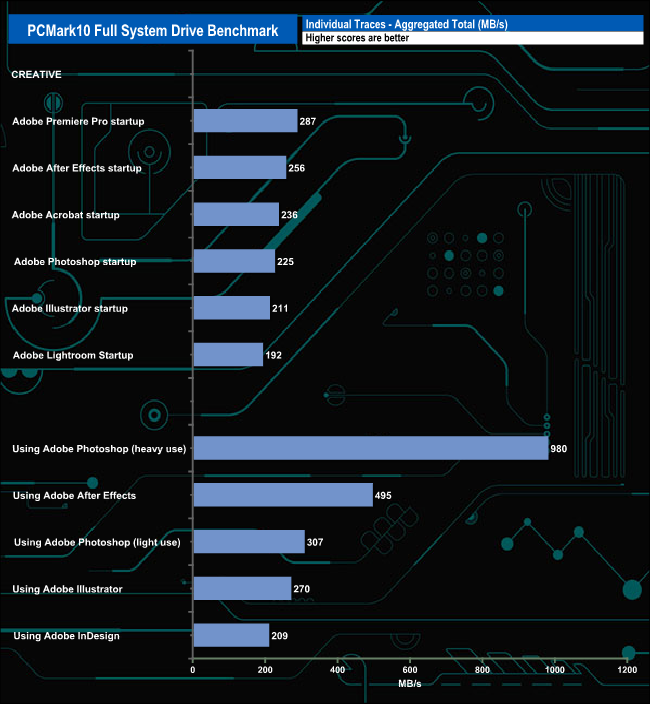
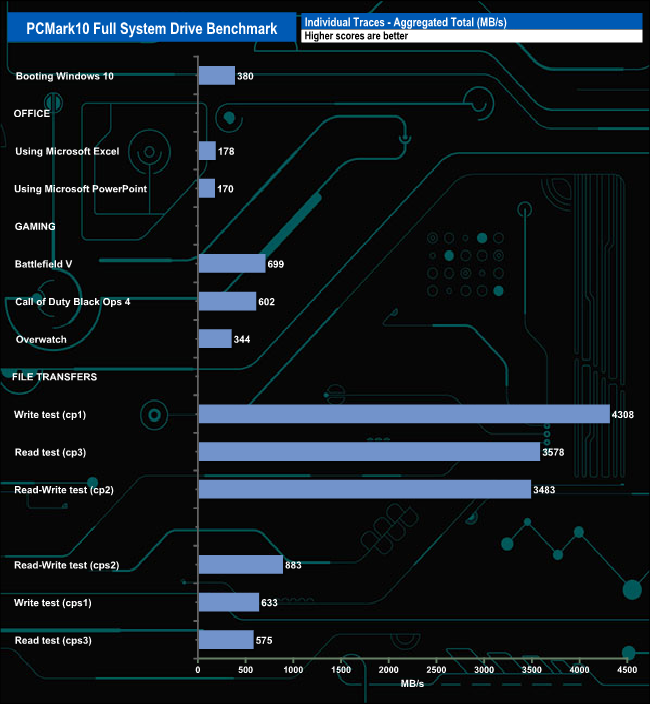
The Professional NM800 Pro Heatsink dealt with the rigours of the PCMark10’s Full System Drive pretty well. The best result from the Creative set of test traces was the 980MB/s for the Heavy Use Adobe Photoshop trace. Also worth a mention was the 495MB/s bandwidth figure for the Adobe After Effects use test trace.
The file transfer tests also produced some good bandwidth figures with one (cp1) over 4GB/s while the other two were over 3GB/s.
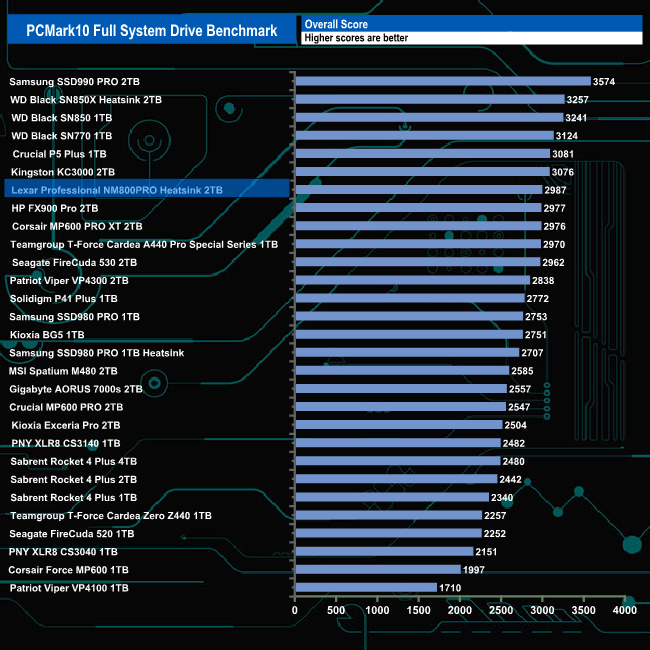
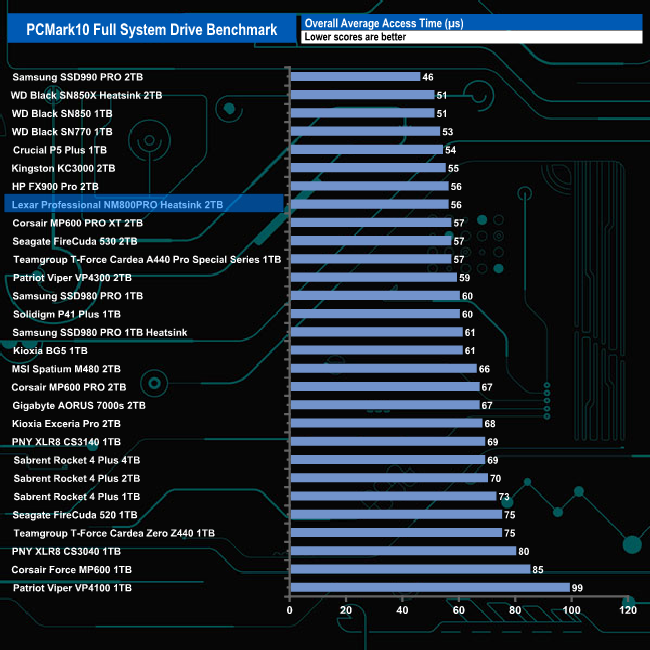
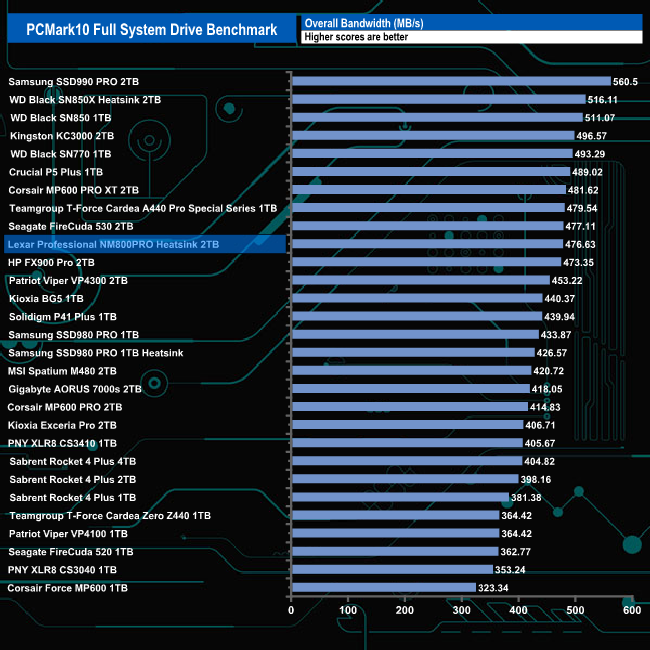
The overall bandwidth figure of 476.63MB/s sees the Professional NM800 Pro Heatsink just make it into the top10 of our result chart.
The 3DMark Storage Benchmark uses traces recorded from popular games and gaming-related activities to measure real-world gaming performance.
Traces used –
Battlefield V
Loading Battlefield™ V from launch to the main menu.
Call of Duty Black Ops 4
Loading Call of Duty®: Black Ops 4 from launch to the main menu.
Overwatch
Loading Overwatch® from launch to the main menu.
Game Move
Copying the Steam folder for Counter-Strike®: Global Offensive from an external SSD to the system drive.
Game Recording
Recording a 1080p gameplay video at 60 FPS with OBS (Open Broadcaster Software) while playing Overwatch®.
Installing Game
Installing The Outer Worlds® from the Epic Games Launcher.
Game Saving
Saving progress in The Outer Worlds game.
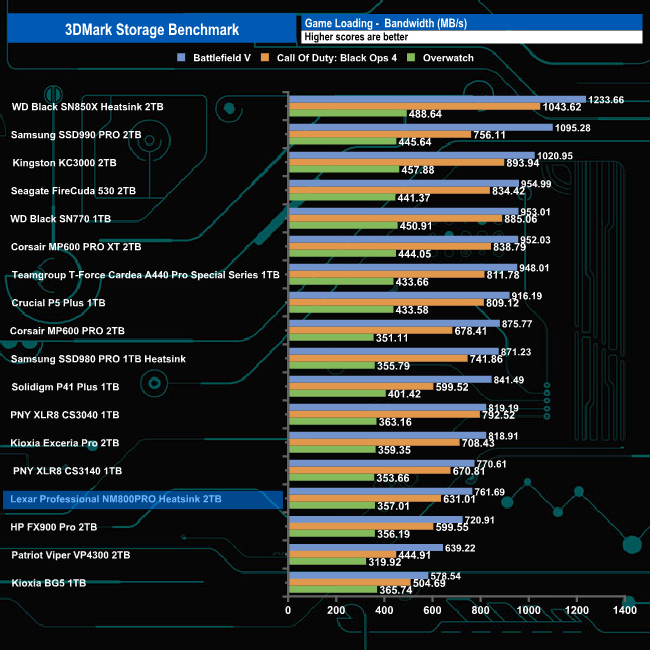
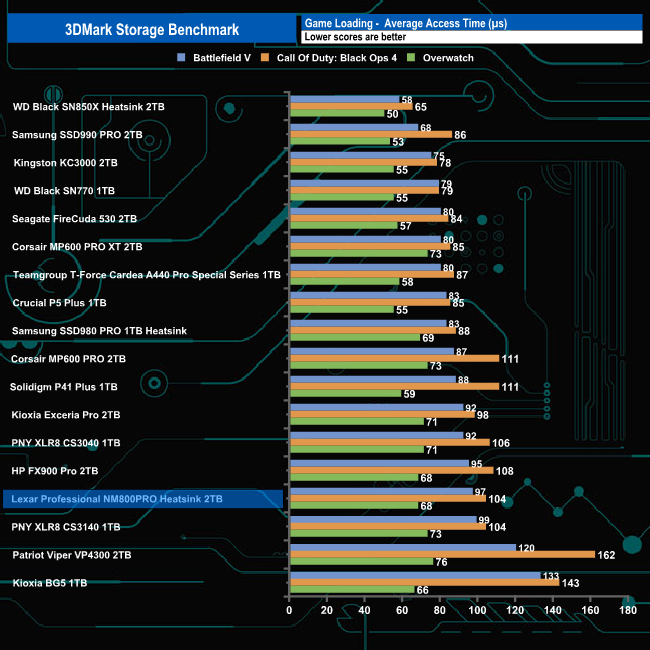
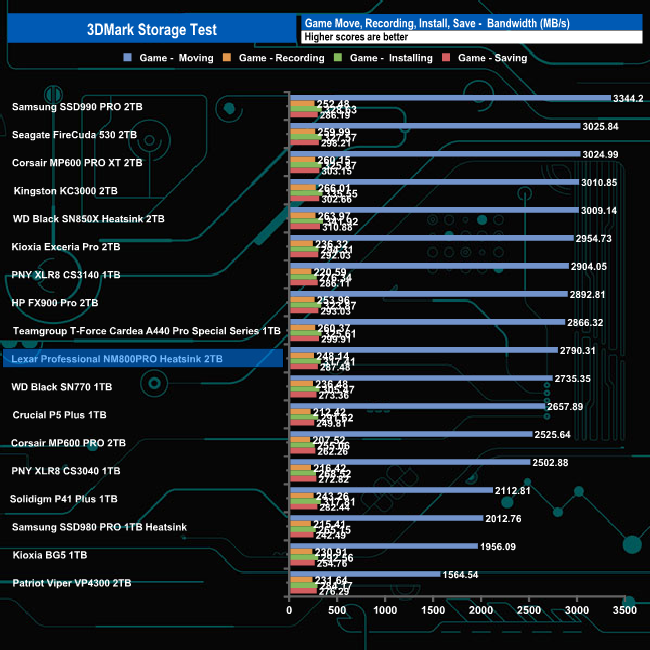
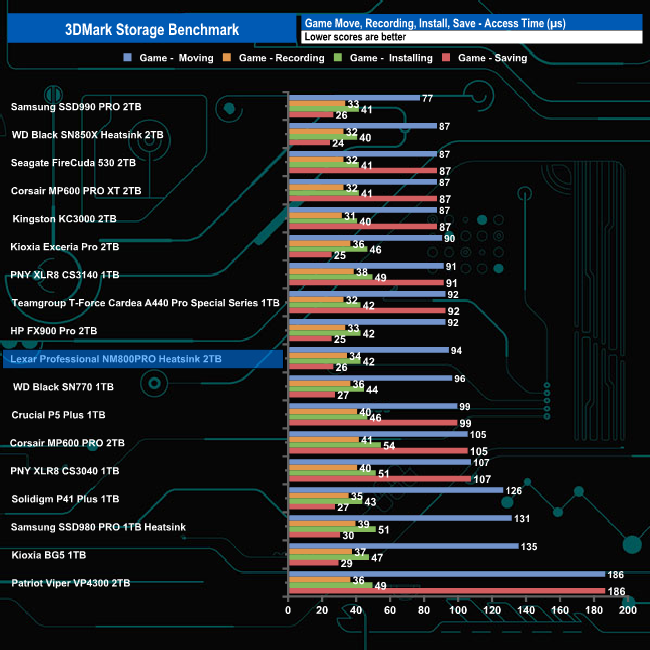
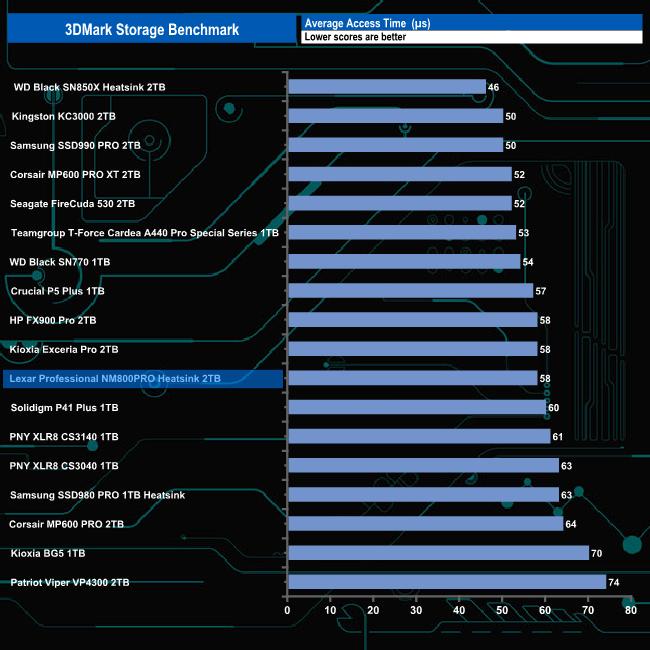
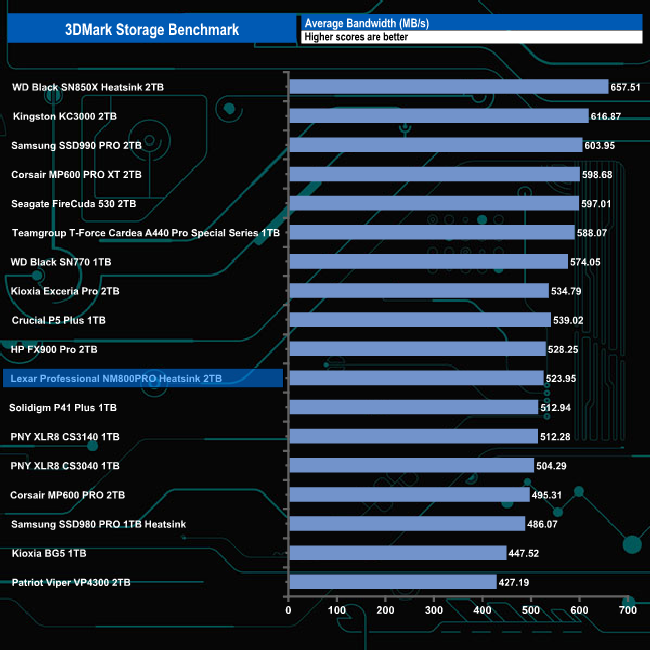
In 3DMark's Storage Test, the drive had an average bandwidth figure of 583.23MB/s for the three-game load tests and an overall average bandwidth for the complete test run of 523.95MB/s.
The Final Fantasy XIV Endwalker Official Benchmark uses actual maps and playable characters to assign a score to your PC and rate its performance including scene loading times.
The benchmark gives an overall load time as well as loading times for the five scenes that make up the test.
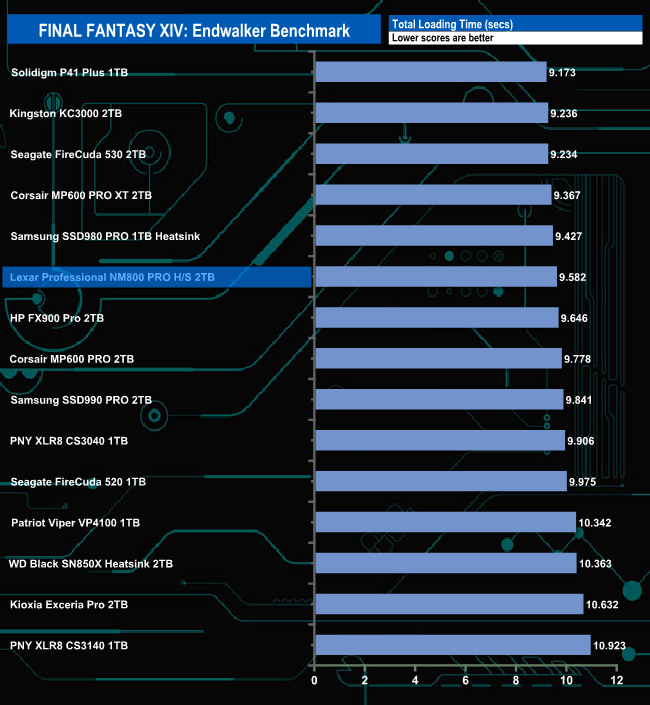
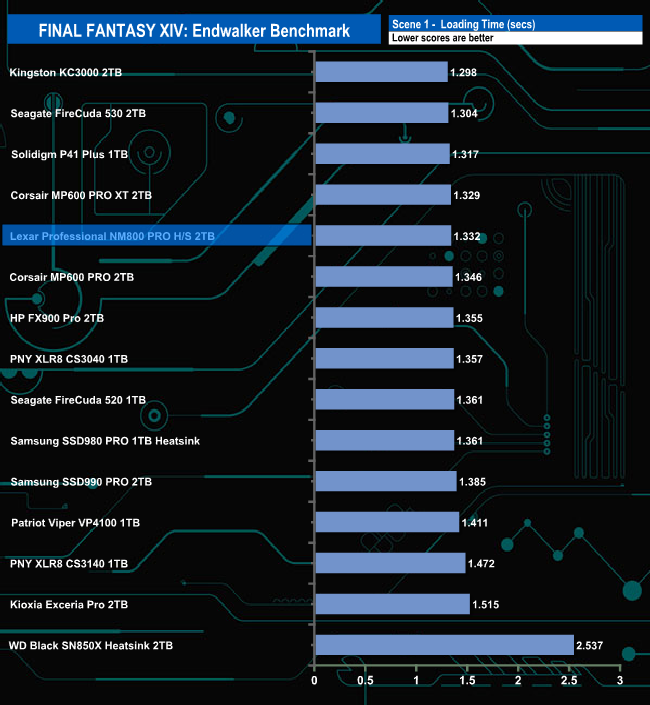
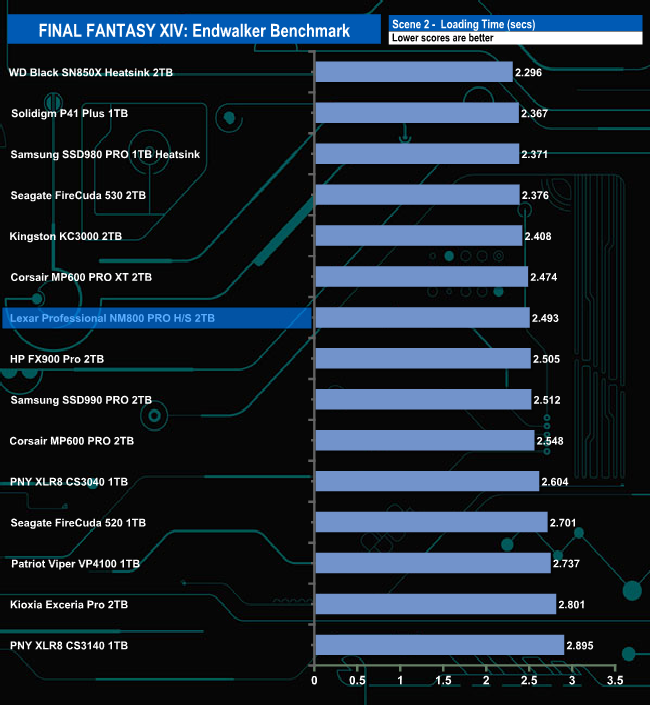
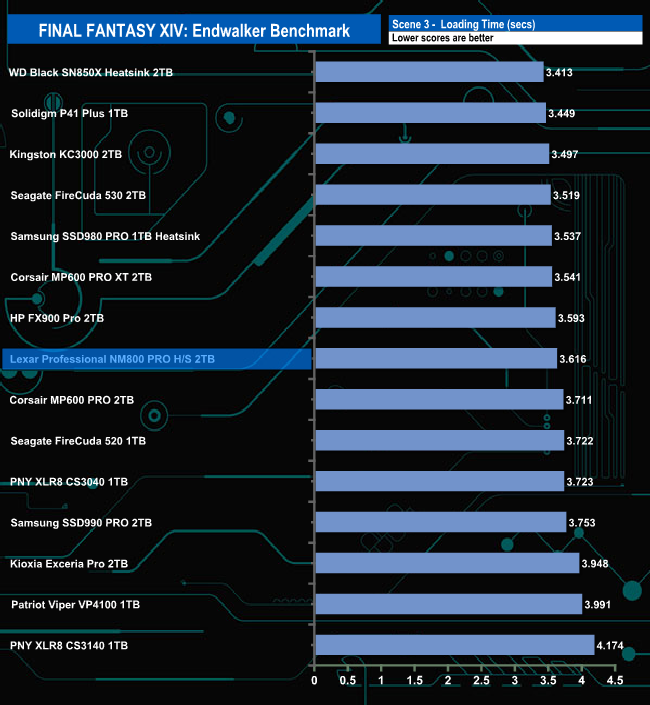
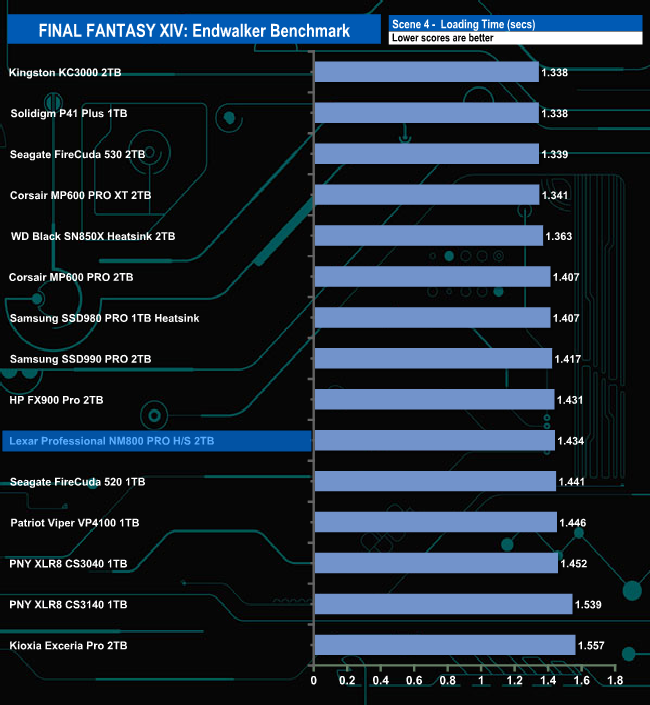
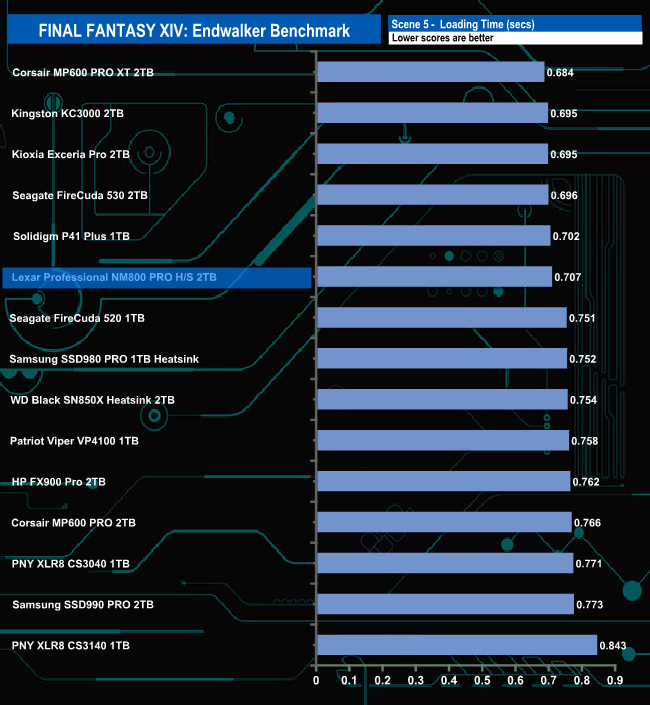
The Lexar Professional NM800 Pro Heatsink total load time of 9.582 seconds is slightly faster than the other InnoGrit IG5236 controller-equipped drive, HP's FX900 Pro.
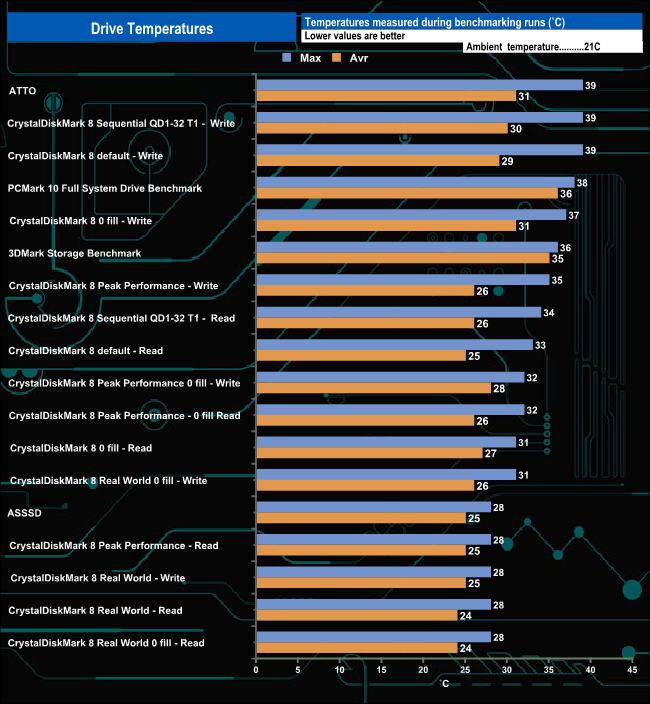
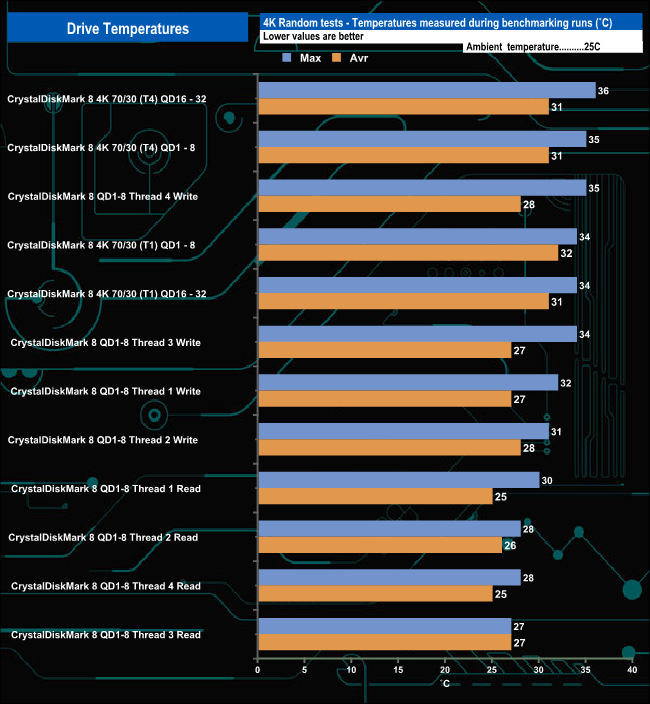
We took note of the drive’s temperature during some of our benchmarking runs. Lexar claims that the heatsink version of the Professional NM800 Pro can reduce temperatures by up to 30%. It certainly seemed to work very well. The hottest the drive got while testing was 39°C, which is comfortably well short of the official maximum operating temperature of 70°C.
To test real life performance of a drive we use a mix of folder/file types and by using the FastCopy utility (which gives a time as well as MB/s result) we record the performance of drive reading from & writing to a 256GB Samsung SSD850 Pro.
100GB data file.
60GB iso image.
60GB Steam folder – 29,521 files.
50GB File folder – 28,523 files.
21GB 8K Movie demos.
12GB Movie folder – 24 files (mix of Blu-ray and 4K files).
11GB 4K Raw Movie Clips (8 MP4V files).
10GB Photo folder – 621 files (mix of png, raw and jpeg images).
10GB Audio folder – 1,483 files (mix of mp3 and .flac files).
5GB (1.5bn pixel) photo.
Blu-ray movie.
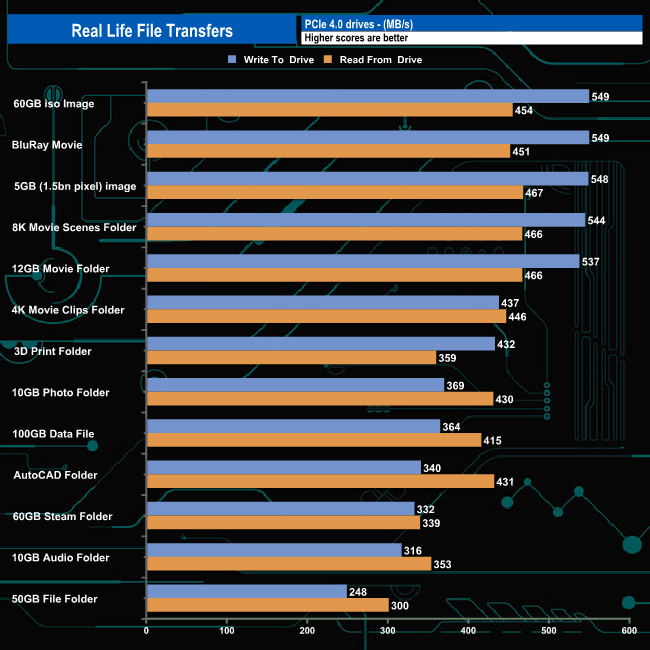
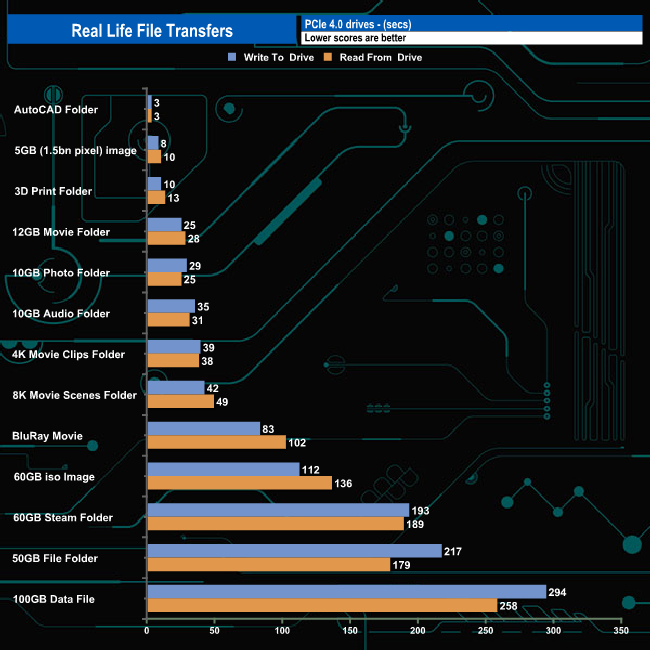
The drive handled our real-life file transfers without any problems. It averaged 527MB/s when writing large files and 458MB/s when reading the same data back. The fastest write transfer speed was the 549MB/s from the 60GB iso and BluRay movie. The fastest read performance was from the 5GB image transfer at 467MB/s. The slowest transfer for both reads and writes was the 50GB folder at 300MB/s and 248MB/s respectively.
To get a measure of how much faster PCIe NVMe drives are than standard SATA SSD's we use the same files but transfer to and from a 2TB Kioxia Exceria Plus drive:
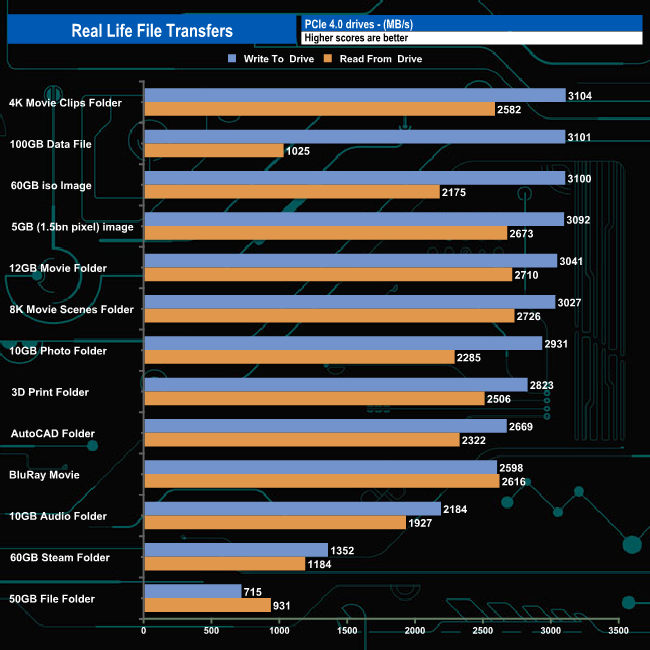
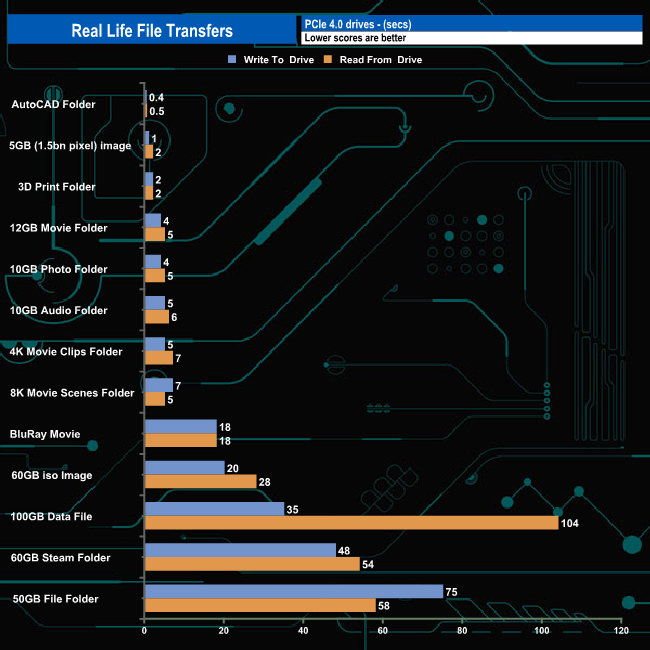
Swapping over to an all NVMe architecture saw transfer speeds rocket and transfer times slashed as you might expect. Six out of the thirteen tests topped 3GB/s when writing the data and nine topped 2GB/s when reading the data back. The drive seemed to struggle a bit when reading the 100GB data file, however, the write performance was very good. The slowest transfers were once again came from the 50GB file folder with 931MB/s for reads and 715MB/s for writes.
It's probably fair to say that Lexar is better known for its range of memory cards, USB flash drives and card readers than they are for SSDs, but they have a small range of M.2 NVMe drives with both PCIe Gen3 and Gen4 interfaces. The flagship of the range is the Professional NM800 Pro, a PCIe Gen4x4 drive which is available in two versions, one with a heatsink (our review sample) and a standard model.
Lexar's Professional NM800 Pro uses a controller we don't see too often, InnoGrit's Rainier IG5236 which is combined with another rarely seen item, namely Longsys NAND. Longsys are Lexar’s parent company and the 2TB Professional NM800 Pro uses two 3D TLC 176-layer NAND packages.
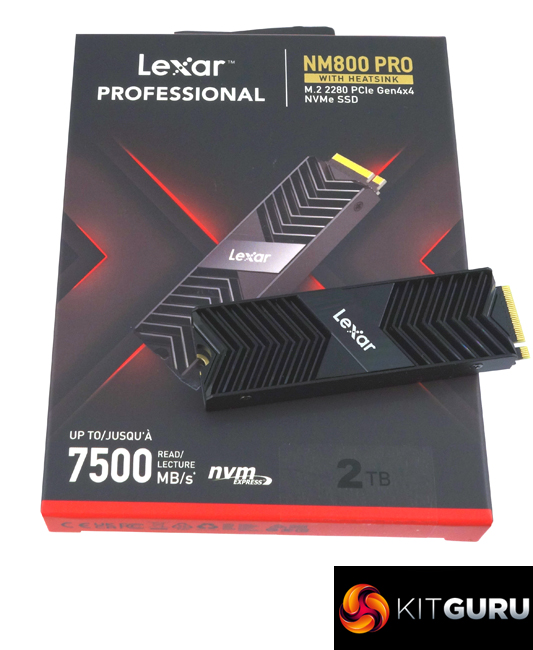
As the name implies the heatsink version of the Professional NM800 Pro comes with a well-designed heatsink preinstalled. It is compatible with PS5 and should you want to use it with a PC motherboard cooling solution, Lexar has made it easy to remove. The heatsink is a two-part design with four Philips micro-screws holding it together and thoughtfully Lexar has gone for a thermal pad option between the heatsink and drive so there is no thermal paste gluing parts together.
Lexar rate the Sequential performance for the 2TB version of the Professional NM800 Pro as up to 7,500MB/s for reads and up to 6,500MB/s for writes. Using the ATTO benchmark we couldn't quite hit those maximum figures with test results of 6,970MB/s and 6,200MB/s for reads and writes respectively. That tested read result of 6,970MB/s is the fastest ATTO read figure we've seen to date for a consumer drive. Switching over to the CrystalDiskMark 8 benchmark saw confirmation of the official figures using the benchmark's default setting with a best read figure of 7,535MB/s with writes at 6,586MB/s. As with the ATTO read score, the CrystalDiskMark Sequential score is the fastest we've seen to date.
Oddly Lexar doesn't mention the 4K performance of the Professional NM800 Pro on the specification page for the drive on their website. The best figures we saw with our four treaded testing was 355,040 IOPS (QD16) for reads and 265,849 IOPS (QD16) for writes. However, with the more aggressive settings of CrystalDiskMark 8 Peak Performance Profile, we saw speeds of 627,176 IOPS and 501,461 IOPS for reads and writes respectively.
The Professional NM800 Pro Heatsink is supported by Lexar's SSD Dash. It might not have the funky GUI of some of its competitors' utilities but does have all the basics to help you maintain the drive including the ability to perform firmware updates, Secure Erase and data migration.
We found the 2TB Lexar Professional NM800 Pro Heatsink on Amazon UK for £231.34 (inc VAT) HERE
Pros
- Overall performance.
- Endurance.
- Heatsink design.
Cons
- Write speeds in some benchmark tests.
KitGuru says: Lexar's flagship Gen4 drive performs very well especially when it comes to sequential read performance, in some of our testing it was the fastest drive we've seen to date. PCIe Gen4 drives are known for producing high temperatures when pushed but the heatsink on the Lexar Professional NM800 Pro Heatsink does a really good job of keeping the drive cool.

