KitGuru KitGuru.net – Tech News | Hardware News | Hardware Reviews | IOS | Mobile | Gaming | Graphics Cards


It's been two years since we last checked out a Corsair One prebuilt PC, but the series is returning for 2024 and it is bigger than ever – literally! Sporting a new design with a wood front panel, larger micro-ATX motherboard and liquid cooling for both CPU and GPU, it is safe to say Corsair is not holding back with the latest iteration of the One. We review the flagship model, with a Core i9-14900K, RTX 4090 and 64GB RAM, priced at an eye-watering £4699.99…
Timestamps:
00:00 Intro
00:54 Design overview
02:35 The teardown!
03:28 Hardware inside: CPU, memory and mobo
05:35 Storage and graphics
07:28 Cooling layout, PSU
08:27 No more iCUE!
09:28 Default CPU/GPU behaviour
11:17 System benchmarks
12:48 Gaming benchmarks
13:47 Thermals, noise, power
15:37 Closing thoughts
Specification:
- CPU: Intel Core i9-14900K, Liquid-cooled (8 P-Cores, 16 E-Cores, 32 Threads, Up to 6.0GHz)
- Chipset: Intel B760
- Memory (4x DIMM Slots): 64GB (2x32GB) CORSAIR DDR5-6000
- Graphics: NVIDIA GeForce RTX 4090 24GB GDDR6X, Liquid- cooled
- NVMe SSD: 2TB PCIe Gen 4 NVMe
- Power: CORSAIR 1000W 80 PLUS GOLD
- Networking: 2.5G Ethernet, Wi-Fi 6E, Bluetooth 5.3
- Front I/O: 2x 5Gbps USB Type-A, 1x 10Gbps USB Type-C, Mic/Headphone Combo Jack
- Rear I/O: 4x 5Gbps USB Type-A, 3x 10Gbps USB Type-A, 1x 20Gbps USB Type-C, HD Audio, 1x Display Port, 1x HDMI
- On GPU: 3x DisplayPort, 1x HDMI
- Software: Windows 11 Pro 64-bit, Corsair Diagnostics, Corsair One Dashboard
- Size: 391mm x 185mm x 300mm / 15.3″ x 7.6″ x 11.8″
- Warranty: 2 Years
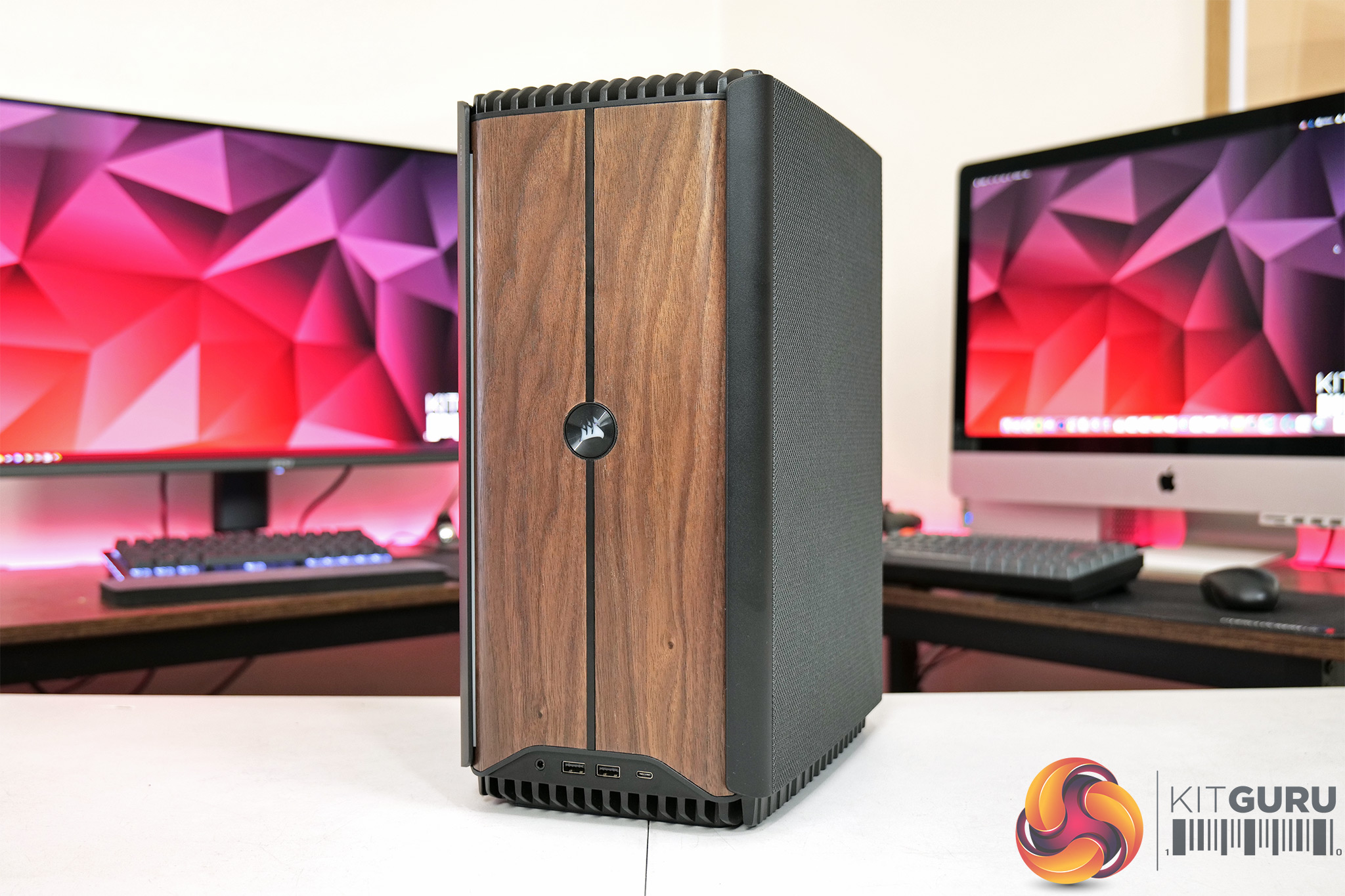
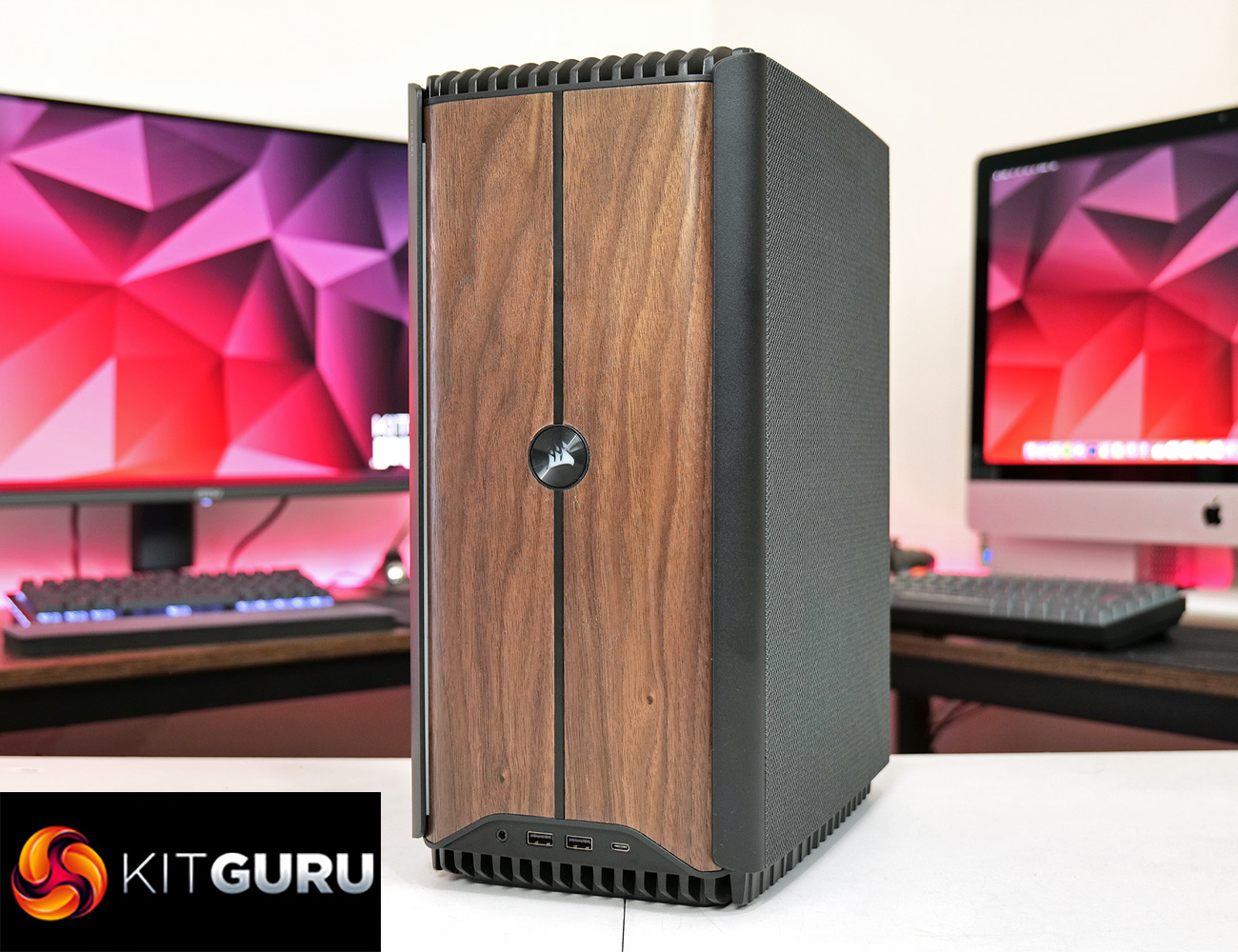
Starting with a tour around the system then, Corsair is offering the One i500 in two colours – I have the Wood Dark option, with a walnut front panel and dark aluminium panels, but there is a Wood Light option too. The power button sits right in the heart of the front panel, and those vertical strips in the wood are not just decorative – they are actually touch sensitive and can be used to change the RGB lighting without the need for software, which is a very cool addition.
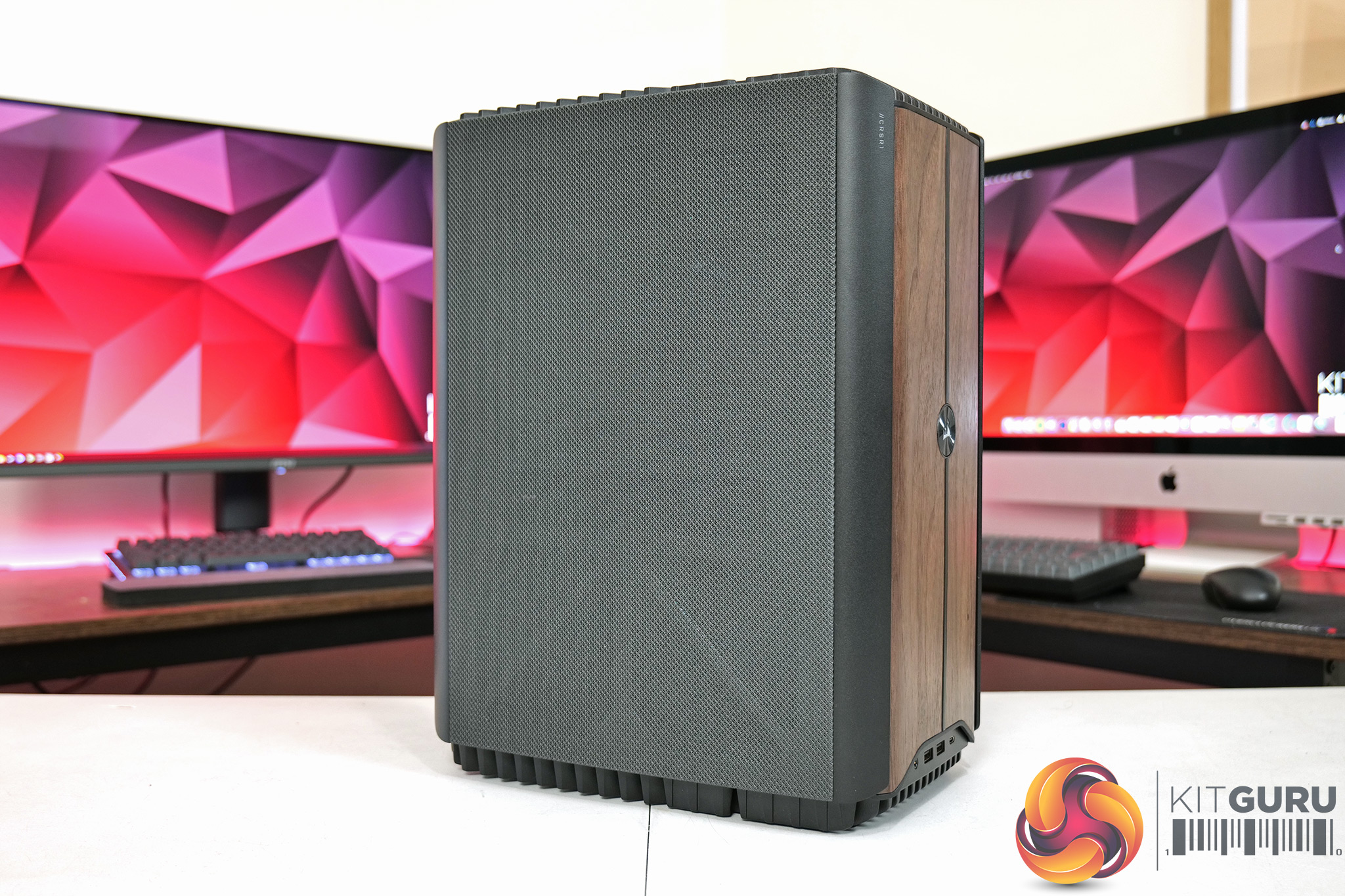
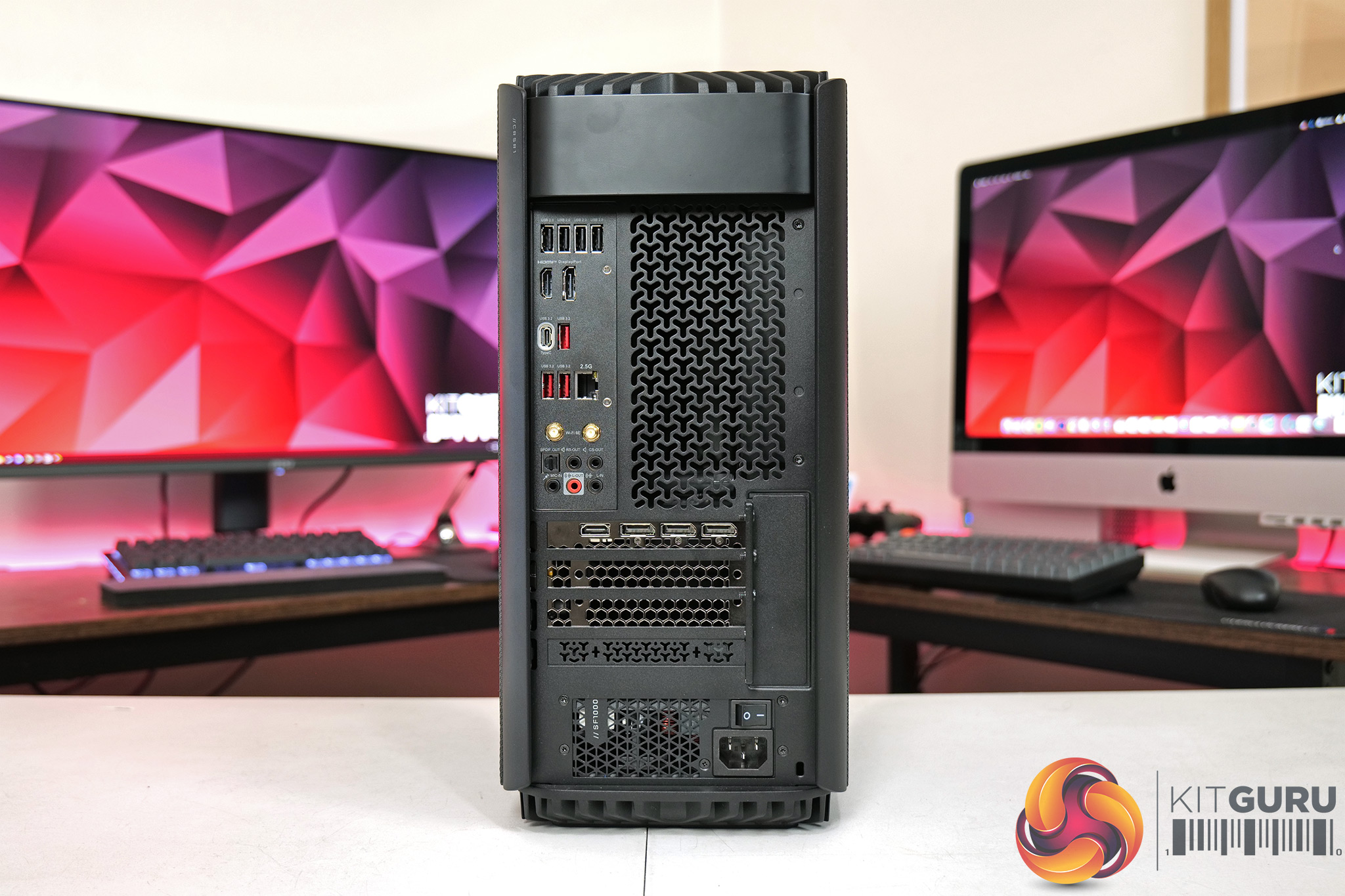
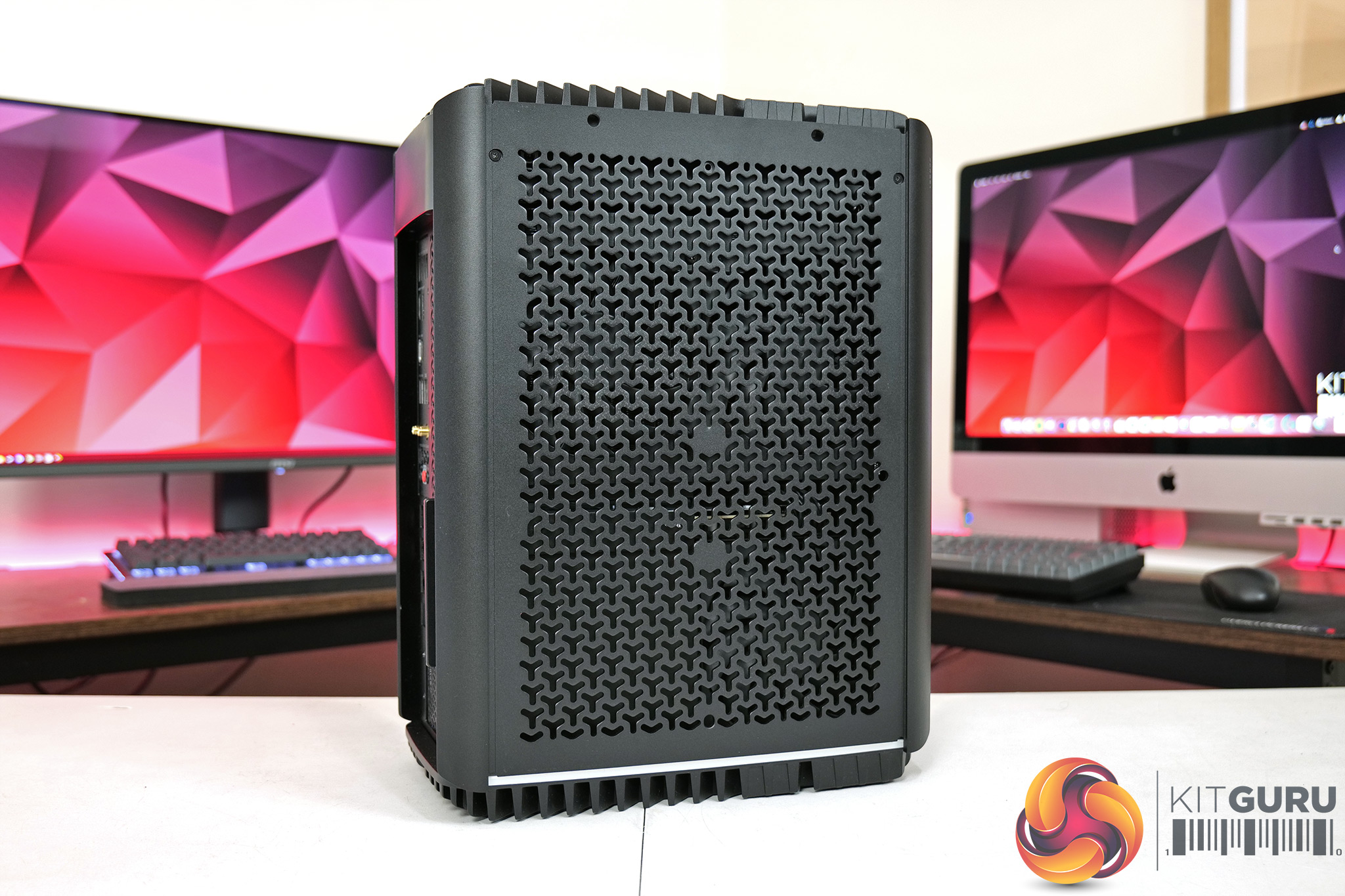
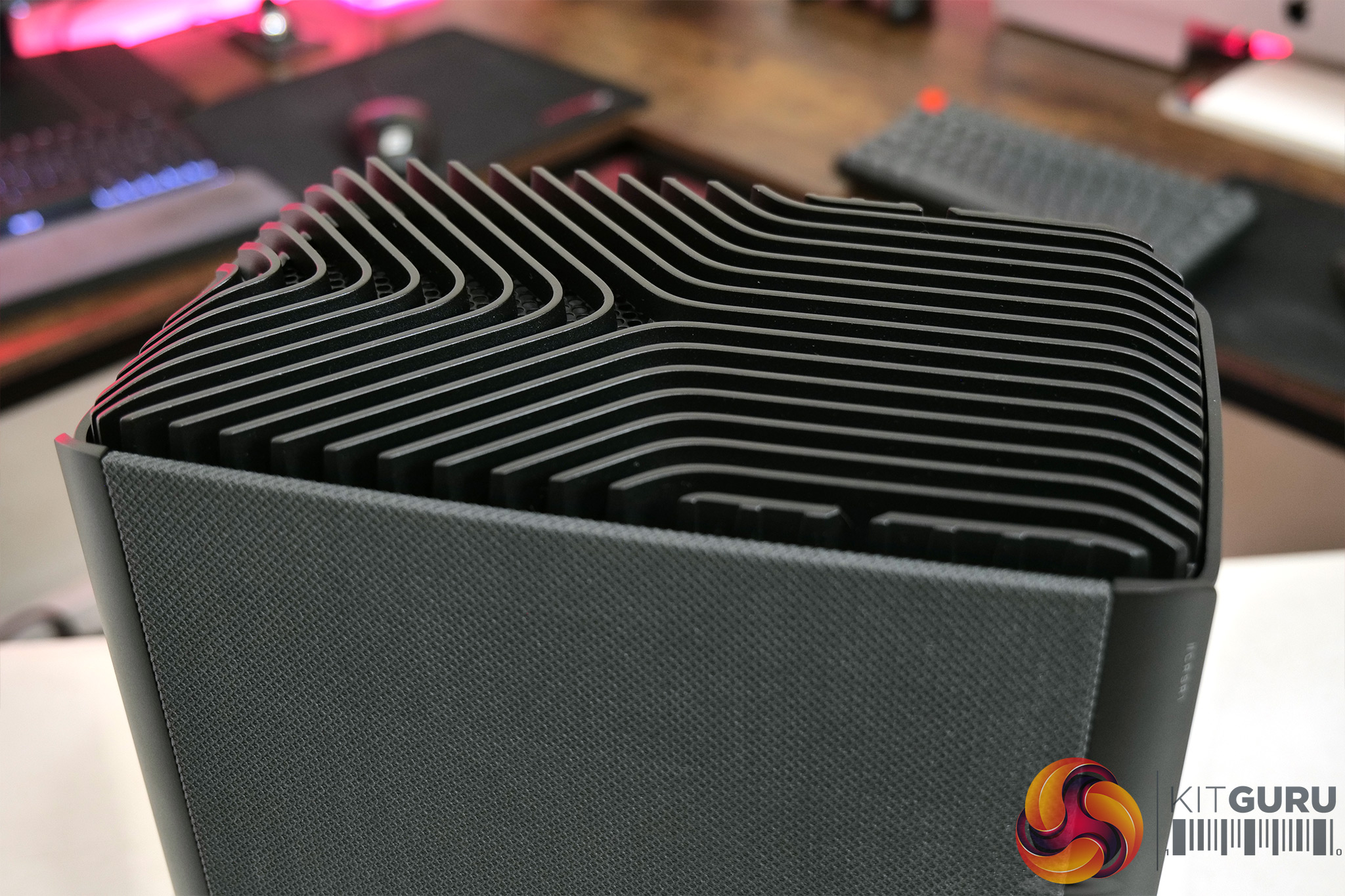
Both sides of the One are covered with grey fabric filters which I personally feel complements the aesthetic very well. These are magnetic and can simply be lifted away to reveal the perforated aluminium panels beneath. Then round the back, we find a very healthy selection of ports and connectors, with a ton of USB options, as well as the graphics card video outputs.
It is also worth pointing out that the One has got a fair bit larger since we last saw it. It now measures 391mm x 185mm x 300mm, where the previous One i300 was a similar height and width, but only about 200mm deep. My calculations put the new One i500's volume at 21.7L, compared to 12L for the i300. It's still a compact machine, but it definitely looks more like a proper PC now, whereas the i300 wasn't too much bigger than a console.
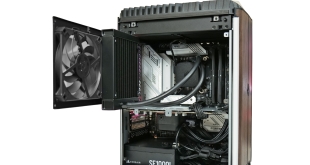
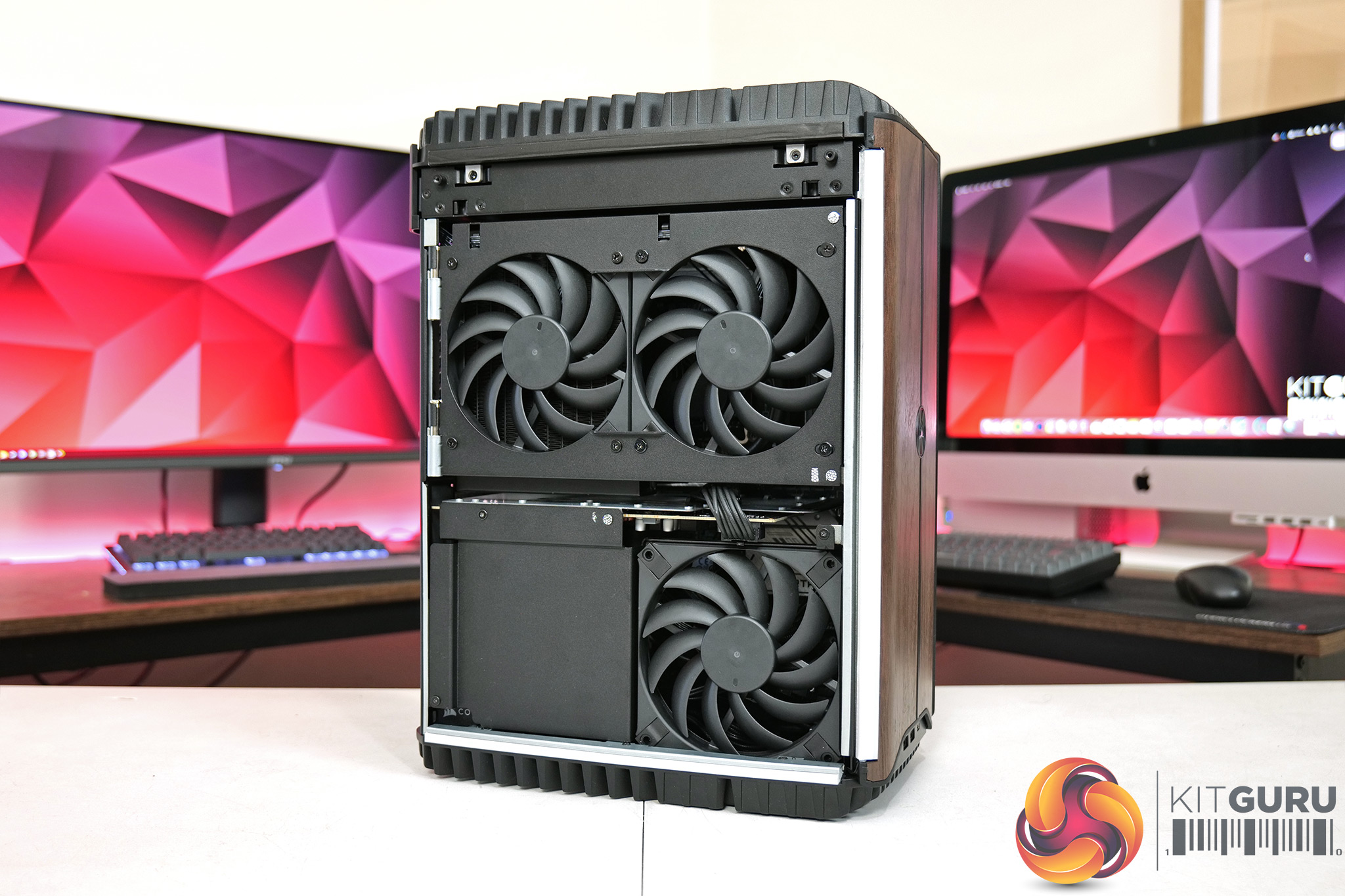
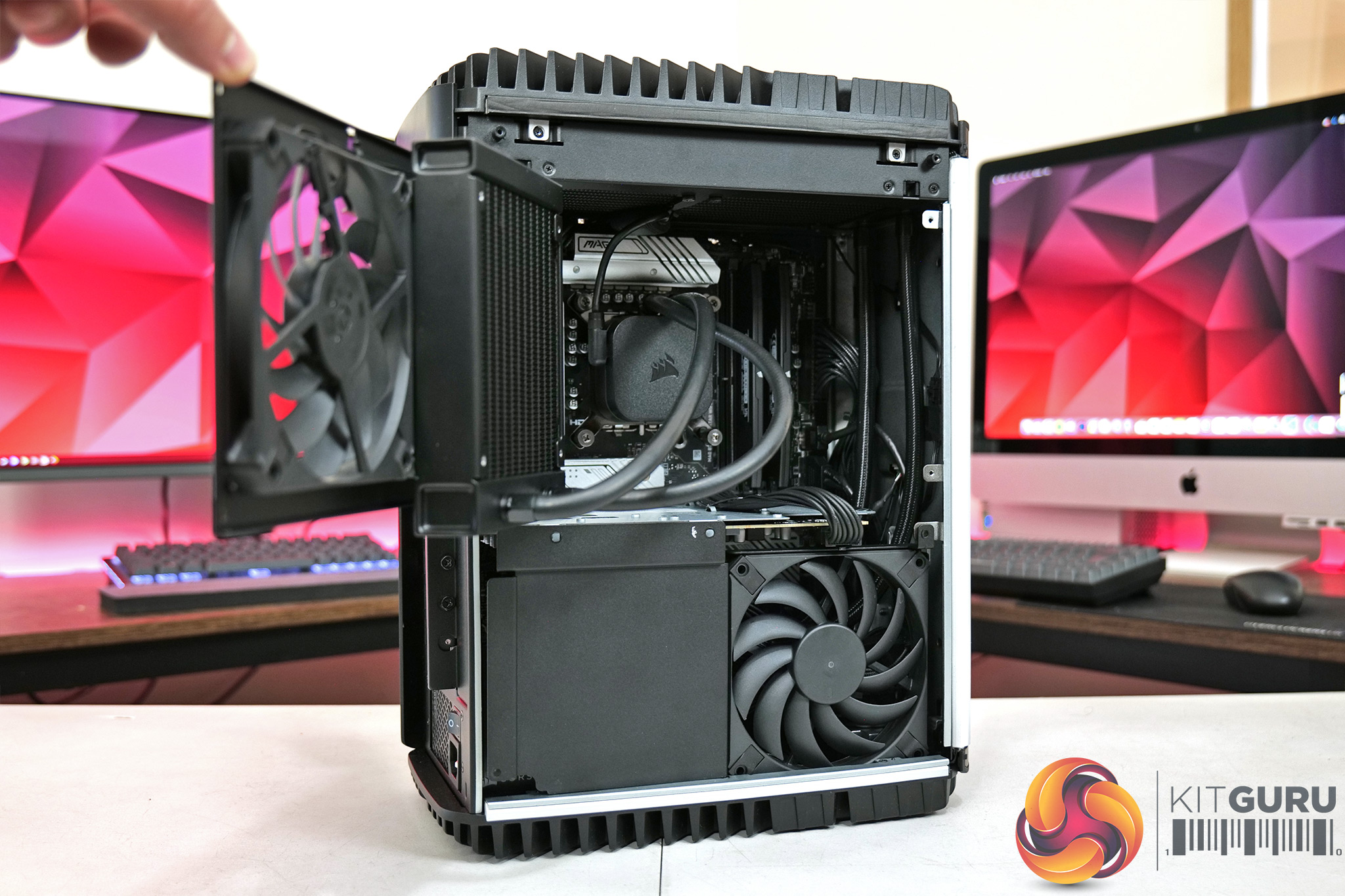
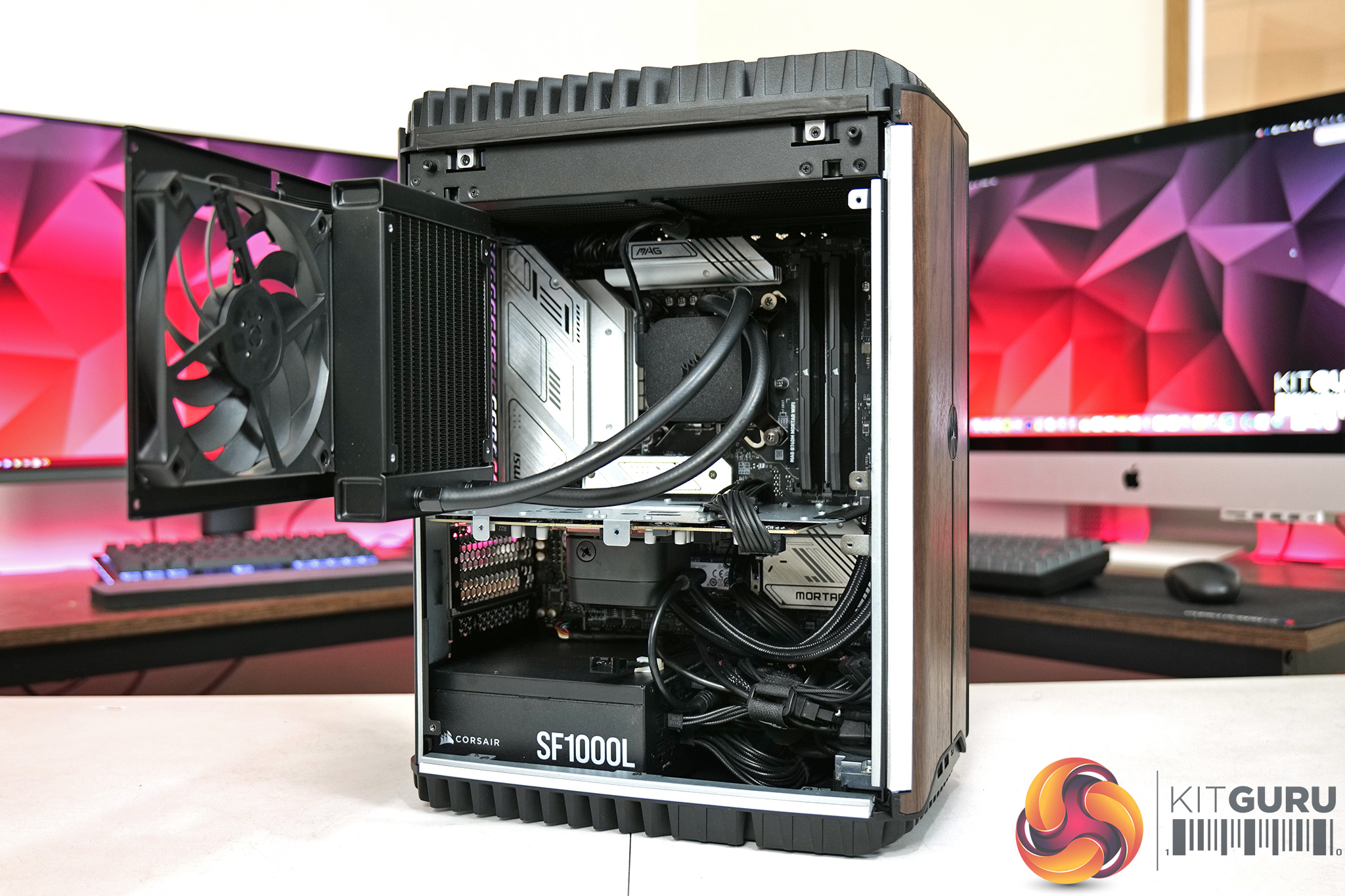
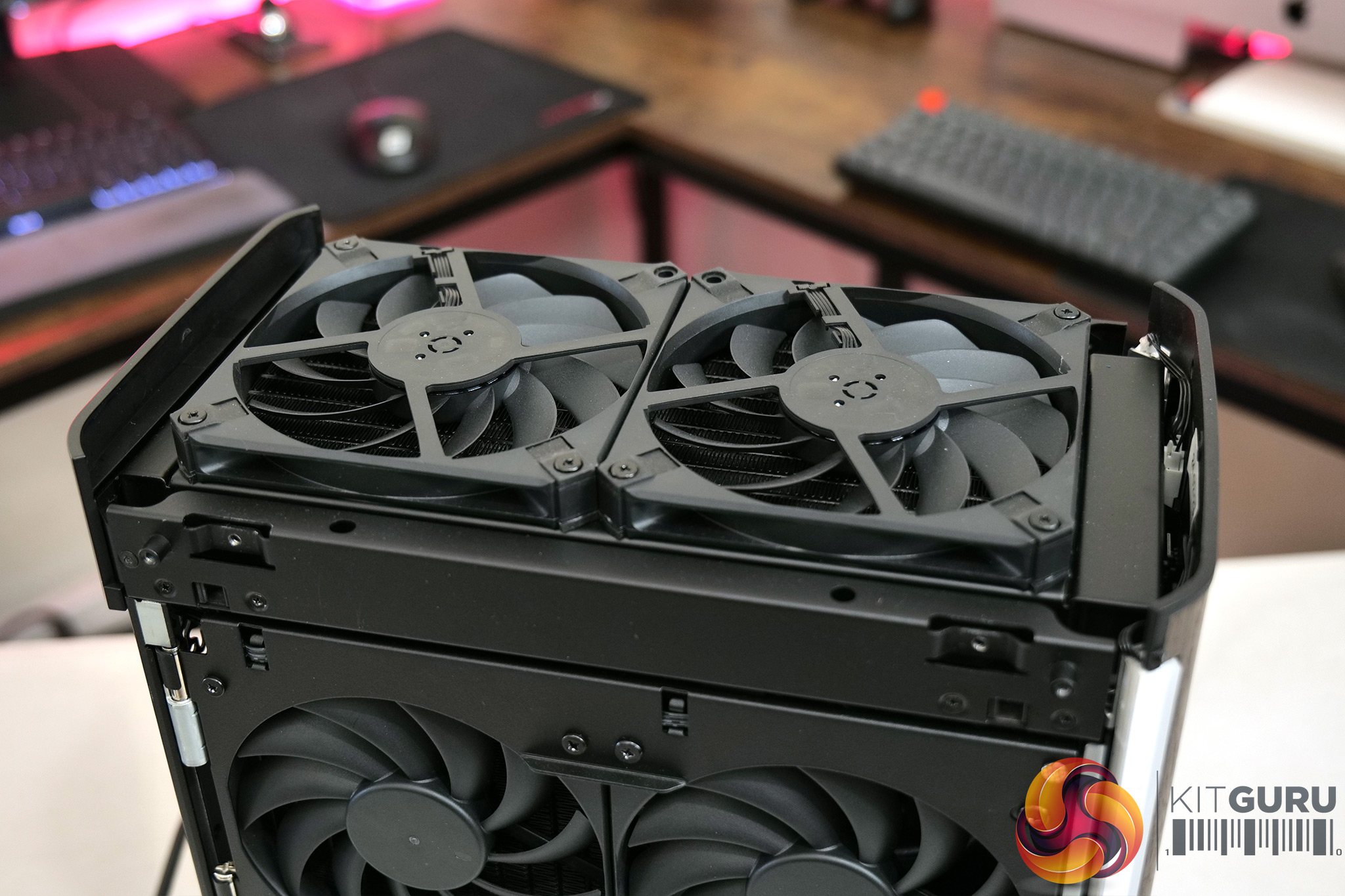
Accessing the internals is a three-part job. First just remove the left-side fabric filter, along with two screws at the top of the aluminium panel – the panel then pops out, revealing three intake fans which blow air into the chassis. Two more screws can be removed and the top fan bracket swings open as it's on a hinge. This then gives access to the CPU, memory and M.2 SSD slot. Four more screws can also be removed from the bottom bracket to remove it, opening up the lower half of the case and giving access to the PSU and GPU.
You can immediately notice that the internal layout is different to previous Corsair Ones – instead of a dual-chamber approach with CPU and GPU separated, everything is contained within the same side of the chassis with the new model, so it is more akin to a traditional PC in that sense.
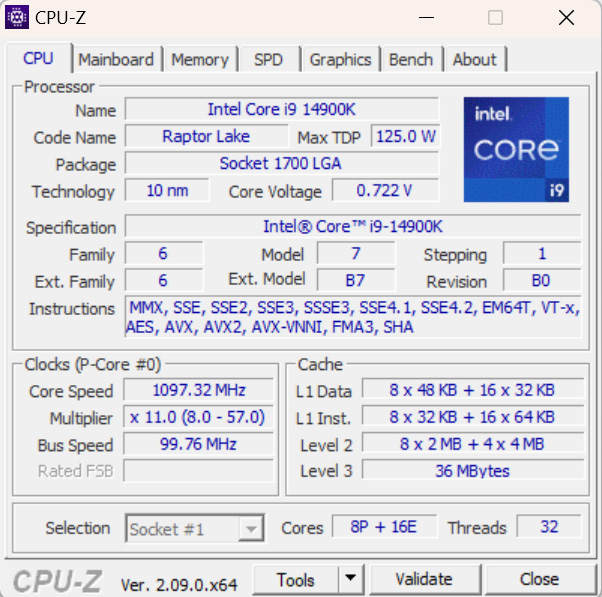
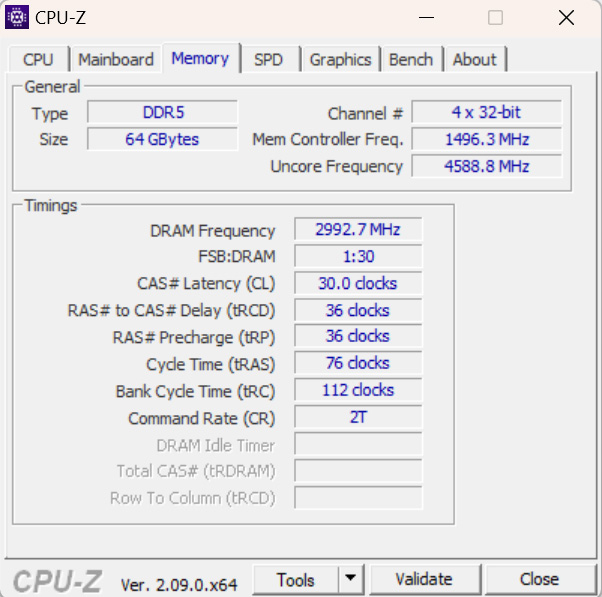
As for the hardware itself, Corsair has opted for the i9-14900K CPU, a Raptor Lake Refresh part, offering 8 P-cores and 16 E-cores. That's paired with no less than 64GB of DDR5 memory, running at 6000 MT/s and CAS Latency 30, so nice and tight timings there. The motherboard is where things get interesting, as it is now a micro-ATX unit instead of the ITX board of the previous Corsair Ones.
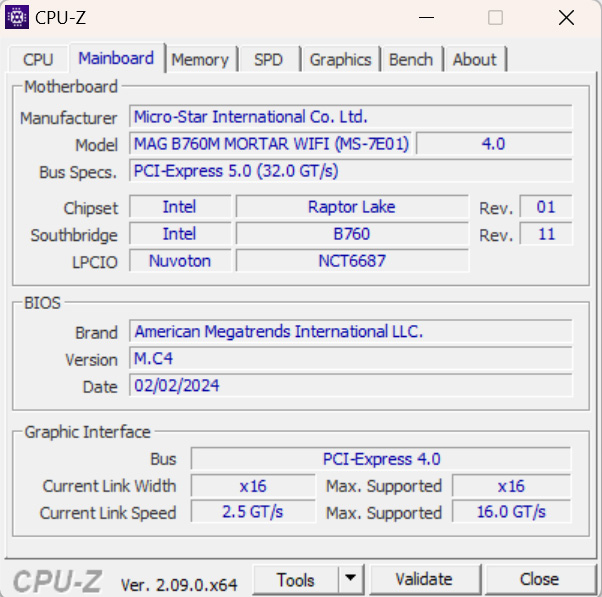
Specifically, Corsair is using the MSI MAG B760M Mortar WiFi. I've not used this board before but it has a serious-looking amount of VRM cooling and great I/O, so from that perspective I can't complain. I did ask Corsair why they didn't opt for a Z790 board however, especially considering the model I'm reviewing isn't far off 5 grand, and they said there weren't any ‘available'. I can only assume they mean from MSI who Corsair likely has a partnership with for the One, as there are a few Z790 mATX boards on the market, but they are admittedly scarce. It's not a major issue, but it does limit the M.2 SSDs to PCIe Gen4 speeds instead of Gen5.
It's also worth noting that the One uses a custom BIOS for the B760M Mortar WiFi, so users would need to get future revisions from the Corsair website, and not from MSI as the fan curves and power limits have been specifically designed for the i500. I took a quick look in the BIOS myself and everything looked fine, most settings were left on auto but XMP was enabled as was resizable BAR, with the fan curve left on default.
Storage comes in the form of a single 2TB Samsung PM9A1, though Corsair did mention users could also get an MP600 drive depending on pricing and stock levels. This is a solid Gen4 SSD, though I personally would have thought 4TB would be more appropriate considering the price. Corsair has been smart to install the drive in the lowest M.2 slot however, leaving the top slot under the mobo's heatsink spare and easily accessible if you want to upgrade down the line.
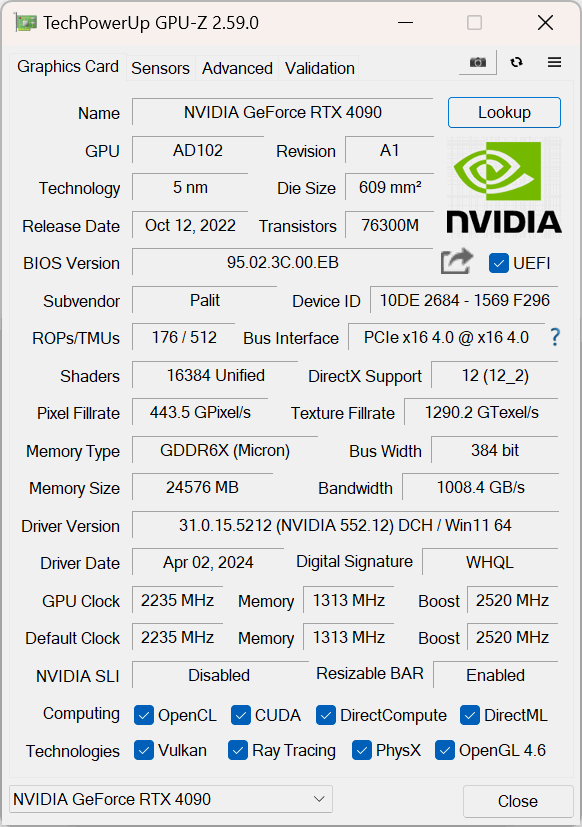
As for the graphics then, this is an RTX 4090, specifically the Palit Omniblack model, but that basically just means it is a reference PCB as Corsair is using its custom AIO cooler, installed in the roof, with the coldplate contacting with the GPU die and memory chips. Curiously however, I noticed that there are no heatsinks or anything for the VRM – the MOSFETs are left completely untouched, so they rely purely on chassis airflow for cooling. Unfortunately I don't have thermocouples required to take accurate temperature measurements of these MOSFETs, but it does strike me as an odd move to not even provide some copper heatsinks – after all, the 4090 is the most power-hungry gaming GPU on the planet. I can't say I experienced any instability or issues that would suggest the lack of VRM cooling is a problem, but I wanted to point this out.
I also referenced the custom cooling, but just for clarity, the CPU is cooled by a 120mm AIO which is installed on the fan bracket at the top of the case, and this brings air into the chassis. The GPU has a 240mm AIO installed in the roof of the case, with its two fans pulling air out of the case. You can access the top panel by removing two Torx screws from either side, and it lifts free giving access to the fans.
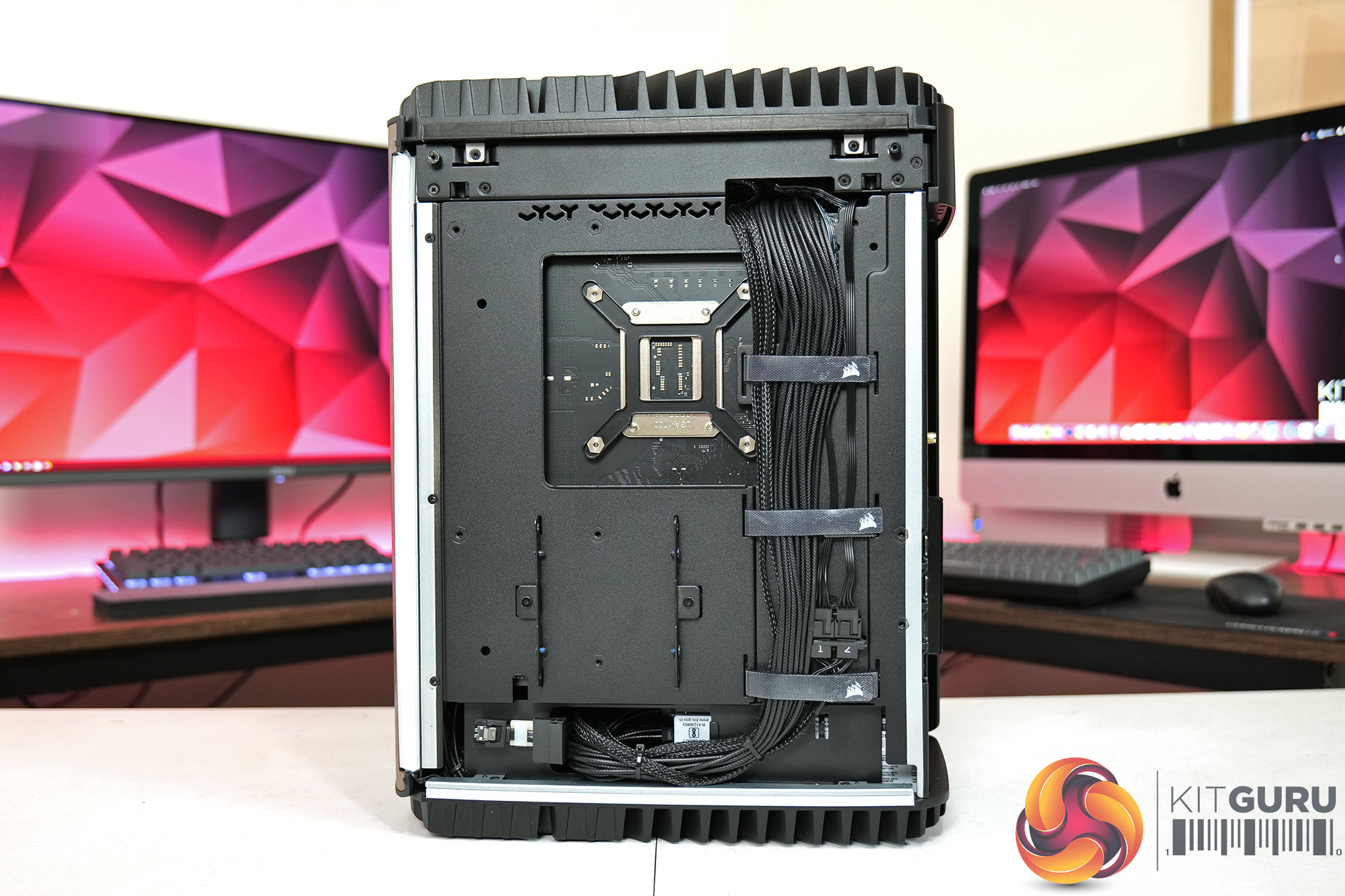
Powering the system we find a Corsair SF1000 80 Plus Gold PSU, which should be plenty even for this 4090 model. You can also access the right-hand panel which reveals the back of the motherboard tray, though there is also a spare 2.5in drive if you want to install extra storage, with the SATA and power cables routed just underneath.
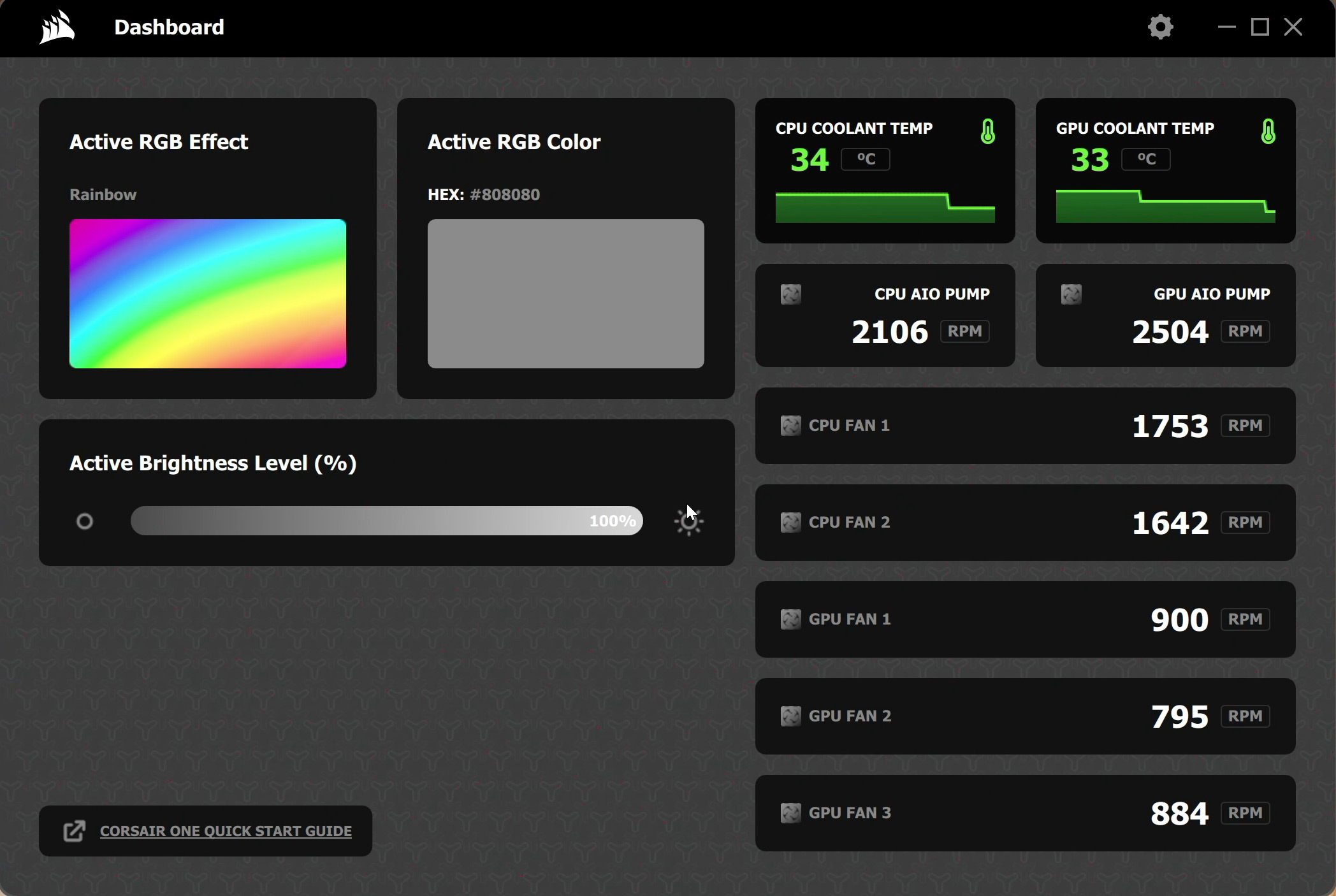
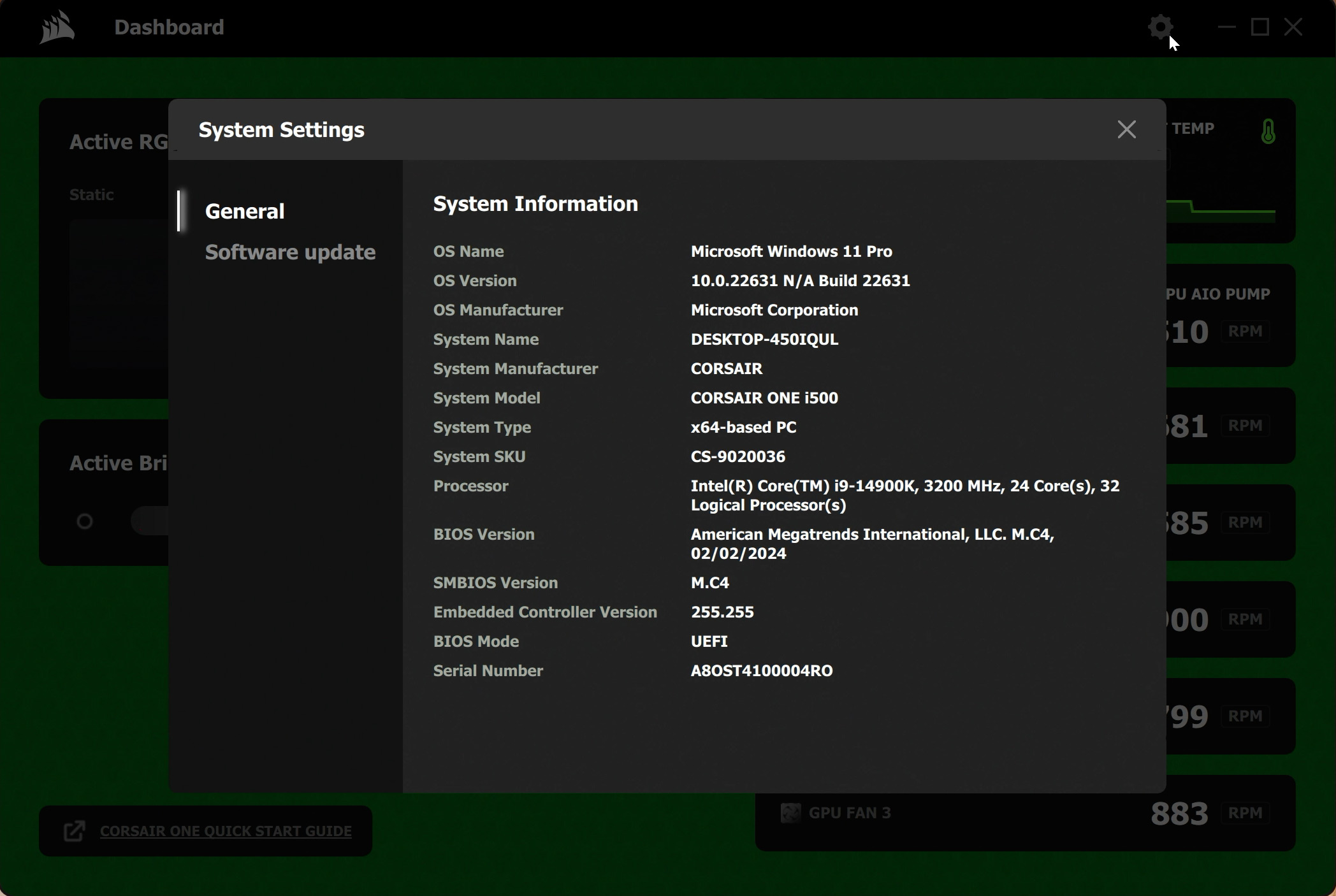

Finally, it is also worth mentioning that Corsair is not using iCUE to control the Corsair One. I was told this Corsair did not want to tie the system down with a specific piece of software that not everyone would want to use, something which also opens to the door to other operating systems being installed. Instead, Corsair developed a new Dashboard which simply controls the RGB lighting and shows a read-out of fan and pump speeds. It can also display system information and check for updates, but that's about it. For any fan curve or performance adjustments, users will need to access the BIOS or other third-party software.
Software and Games
To test the Corsair One, we used the following software/games:
- 3DMark Time Spy
- AIDA64 Engineer
- Blender Benchmark
- Cinebench R23
- CrystalDiskMark
- PCMark 10
- Cyberpunk 2077
- F1 23
- Marvel's Spider-Man Remastered
- A Plague Tale: Requiem
- Ratchet and Clank: Rift Apart
- Resident Evil 4
- Returnal
We used the Nvidia 552.22 driver, which was the latest at the time of testing.
Comparison Systems
We are using the KitGuru GPU Test System as the primary comparison for the Corsair. It a very similar CPU in the i9-13900KS and we installed the RTX 4090 Founders Edition GPU. This allows us to see what, if any, compromises have been made by using the almost identical components in a SFF chassis.
- CPU: Intel Core i9-13900KS
- Motherboard: Gigabyte Z790 Gaming X AX
- Memory: 32GB (2x16GB) Corsair Dominator Platinum RGB DDR5 6000MHz
- Graphics Card: RTX 4080 Founders Edition
- SSD: 4TB Seagate Firecuda 530 Gen 4 PCIe NVMe
- Chassis: Corsair 5000D Airflow Tempered Glass Gaming Case
- CPU Cooler: Corsair iCUE H150i Elite RGB High Performance CPU Cooler
- Power Supply: Corsair 1600W Pro Series Titanium AX1600i Digital Modular PSU
- Operating System: Windows 11 23H2
We are also using the Acer Predator Orion X as a comparison, with a full review of that machine coming soon:
- Graphics card: NVIDIA GeForce RTX 4080 16GB GDDR6X
- RAM: 32GB DDR5 (5600 MHz)
- Processor: Intel® Core™ i9-13900KS Unlocked Processor
- Motherboard: Z790
- Storage: 2TB M.2 PCIe Gen 3
- Cooling: Liquid cooling (240 mm) FrostBlade 2.0 fans
- Power Supply: 850W 80+ Gold SFX
- Colour: Black
- Weight: 10.3 kg
- Dimensions: 257.5 x 179 x 336 mm (H x W x D)
Default CPU/GPU behaviour
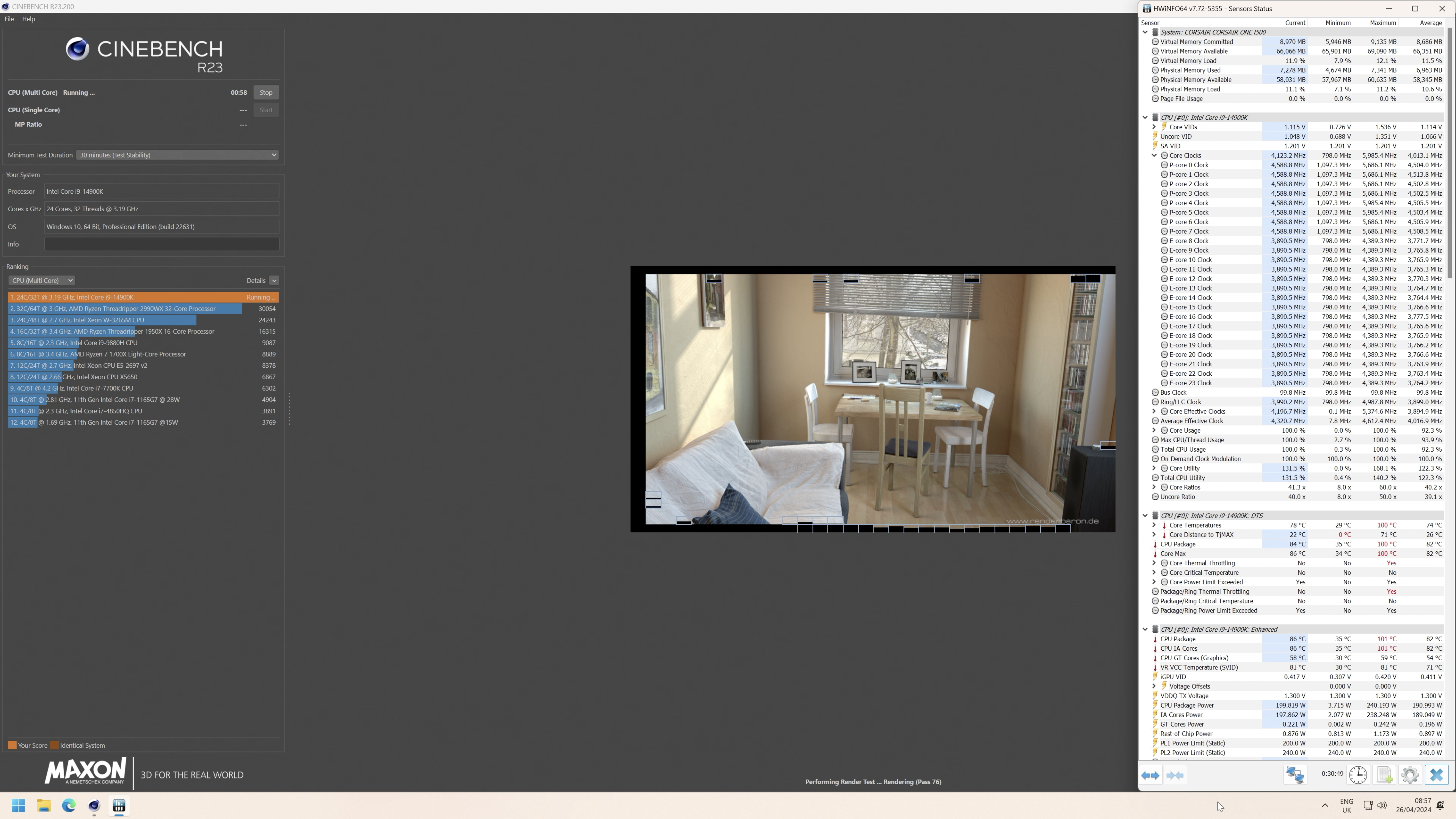
Before diving into our benchmarks, it's worth just establishing stock behaviour of the CPU. Unlike the Corsair One i300, which used a 12900K with a 165W PL1, this new model has upped the power, and the 14900K has a 240W PL2 and a 200W PL1.
In practice then, this means the CPU will initially boost to 4.9-5GHz on the P-cores, before dropping back to 4.6GHz once the package power drops down to 200W. For reference, a completely stock i9-13900KS in the KitGuru GPU test rig runs at 5.6GHz on the P-cores initially, only settling down to 5.4GHz or so due to thermal constraints – so the 14900K in the One is definitely leaving some clock speed on the table, but this is likely due to thermal constraints.
Click to enlarge.
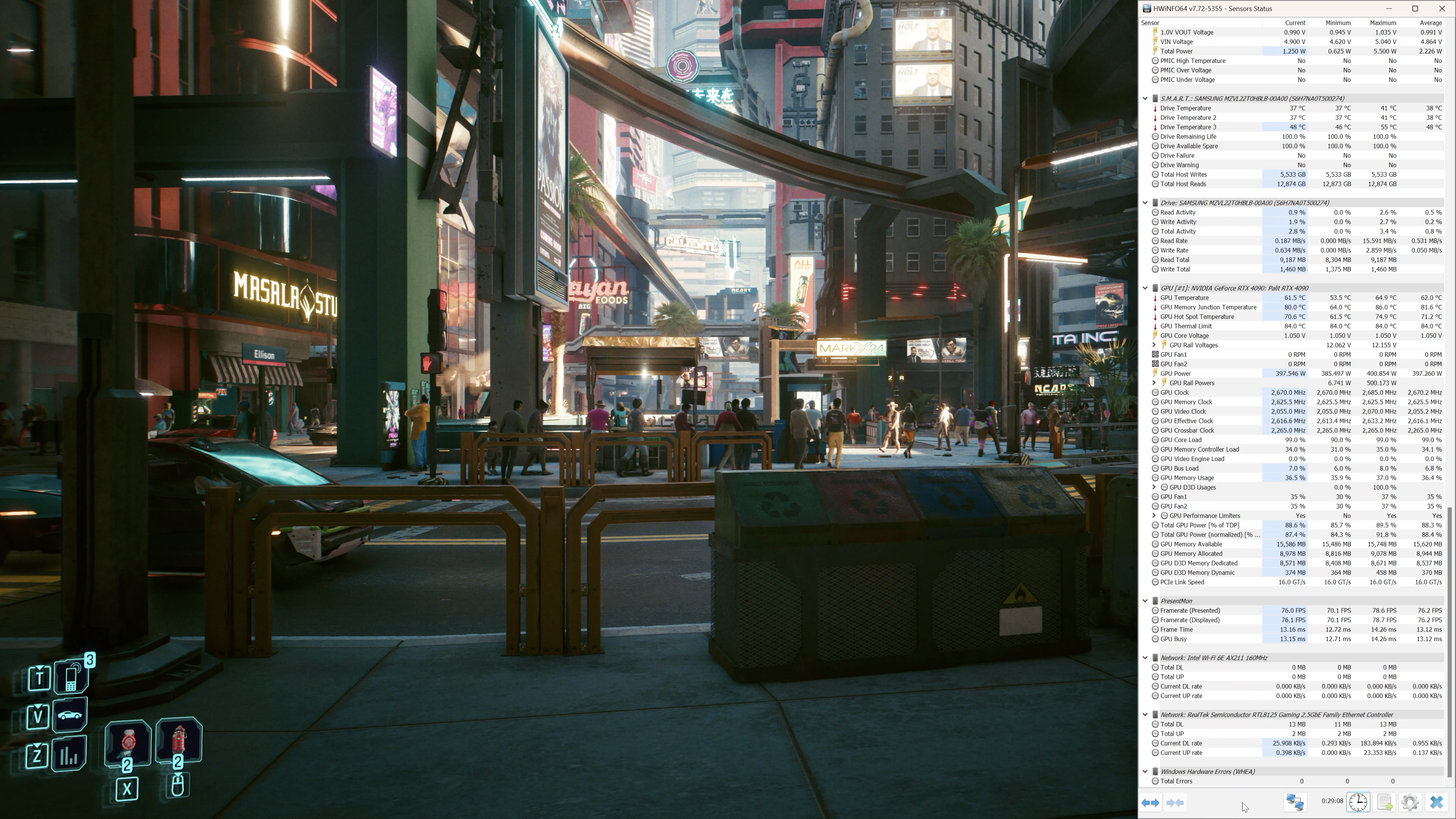
The GPU, meanwhile, is operating at about 2670MHz under 4K load, with board power reported in software at about 400W. The 4090 Founders Edition I used in the KitGuru GPU test rig ran a touch faster at 2730MHz, but it's a negligible difference.
Benchmarks
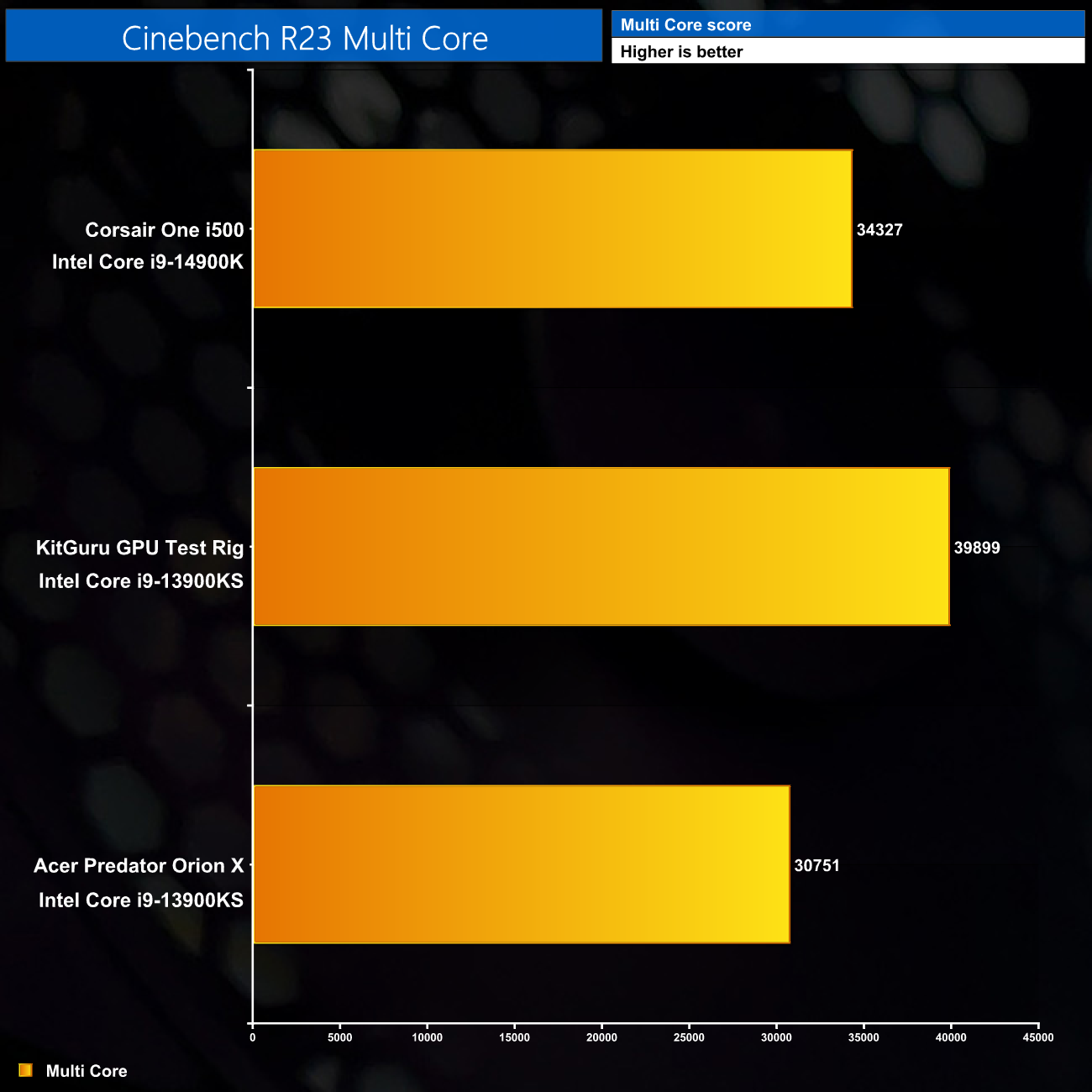
Cinebench Multi Core shows performance about 15% behind the completely stock 13900KS in the KitGuru Test Rig, due to the lower clock speeds.
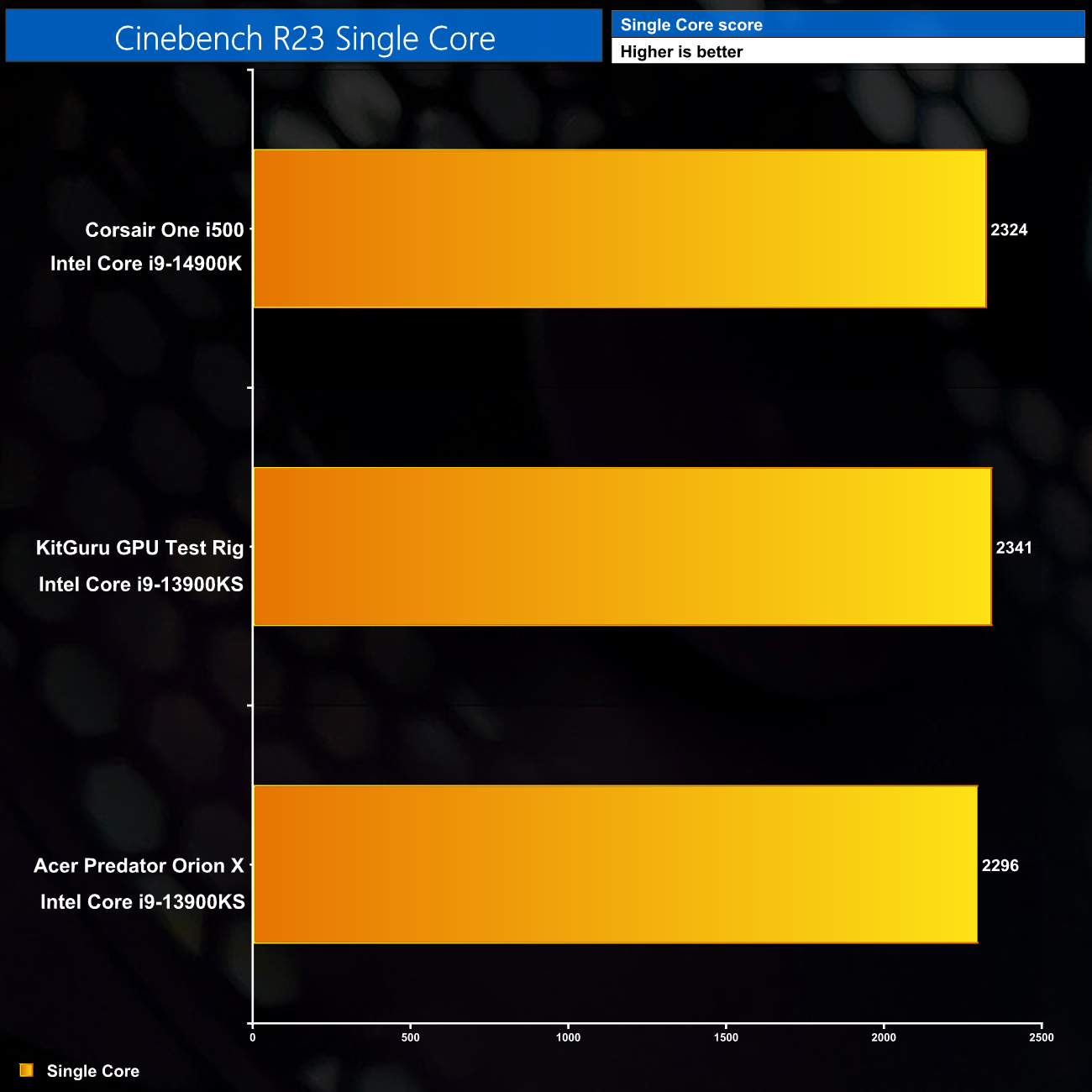
Single core performance is basically unaffected however, as power limits are not an issue here.
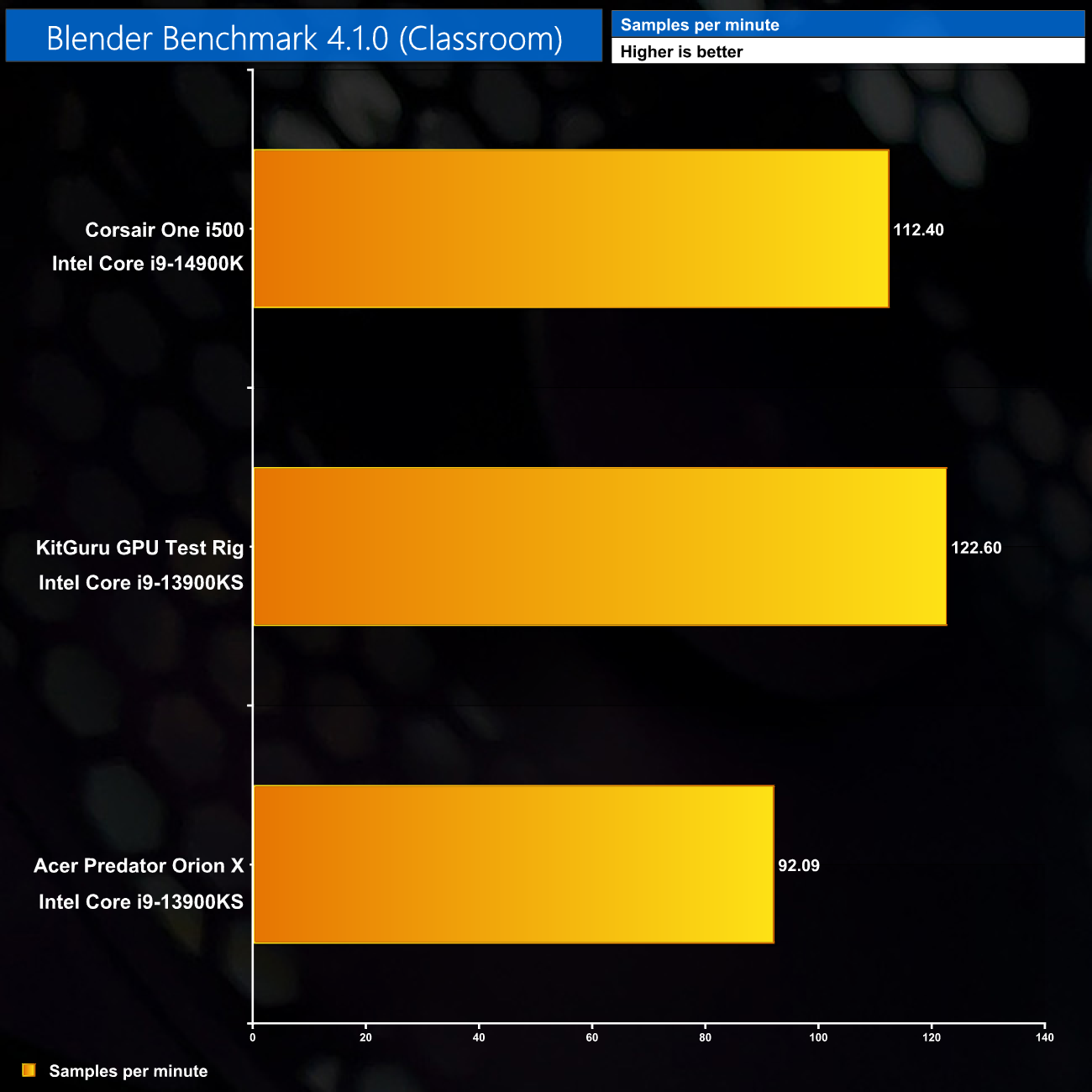
Blender is another multi-core workout however, and this does show the 14900K in the One to fall behind the 13900KS in our own test rig, this time by a 9% margin.
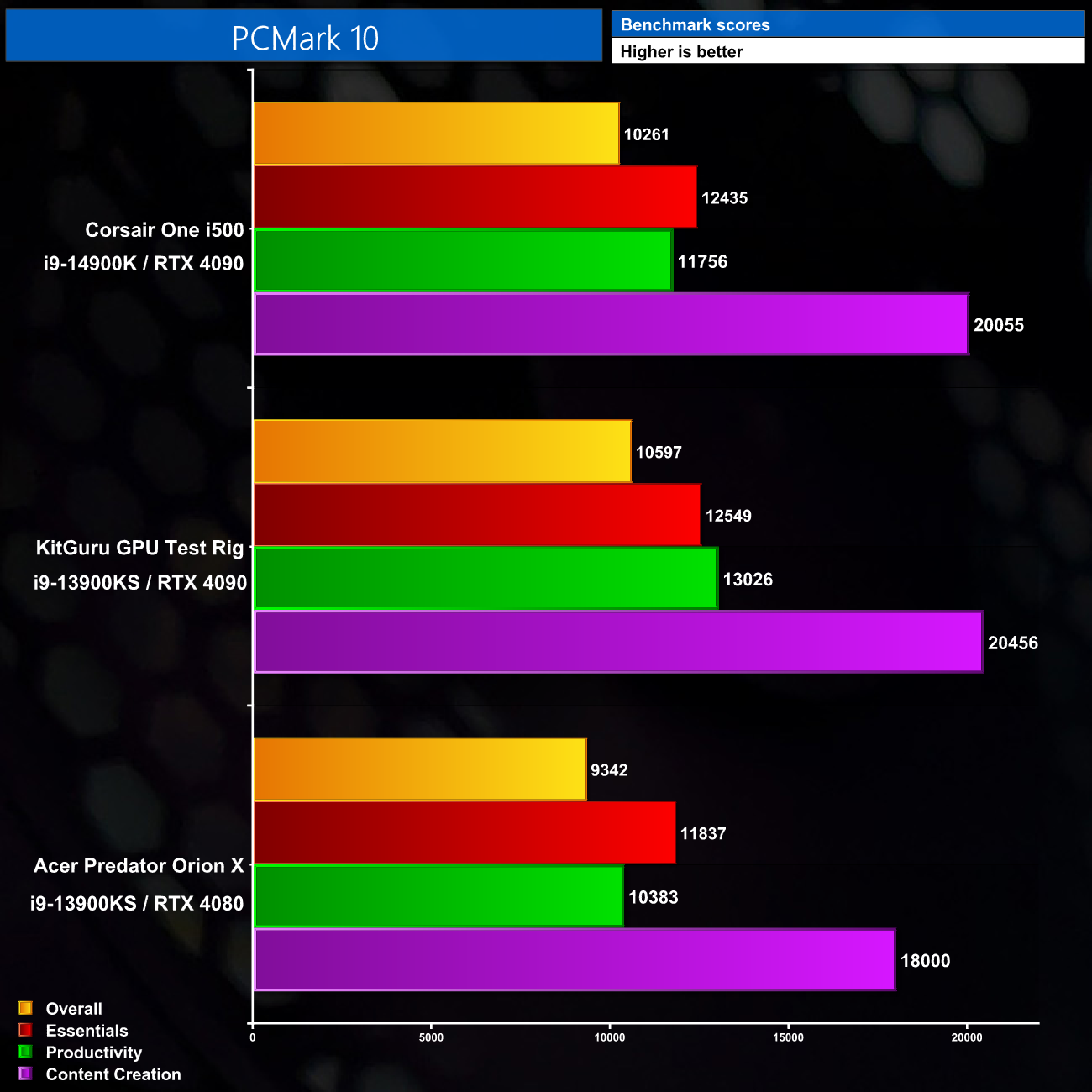
PCMark 10 is much of a muchness, there's not a whole lot of difference between the systems – the higher clocks do help our own test rig to slightly higher scores, especially in the Productivity workload.
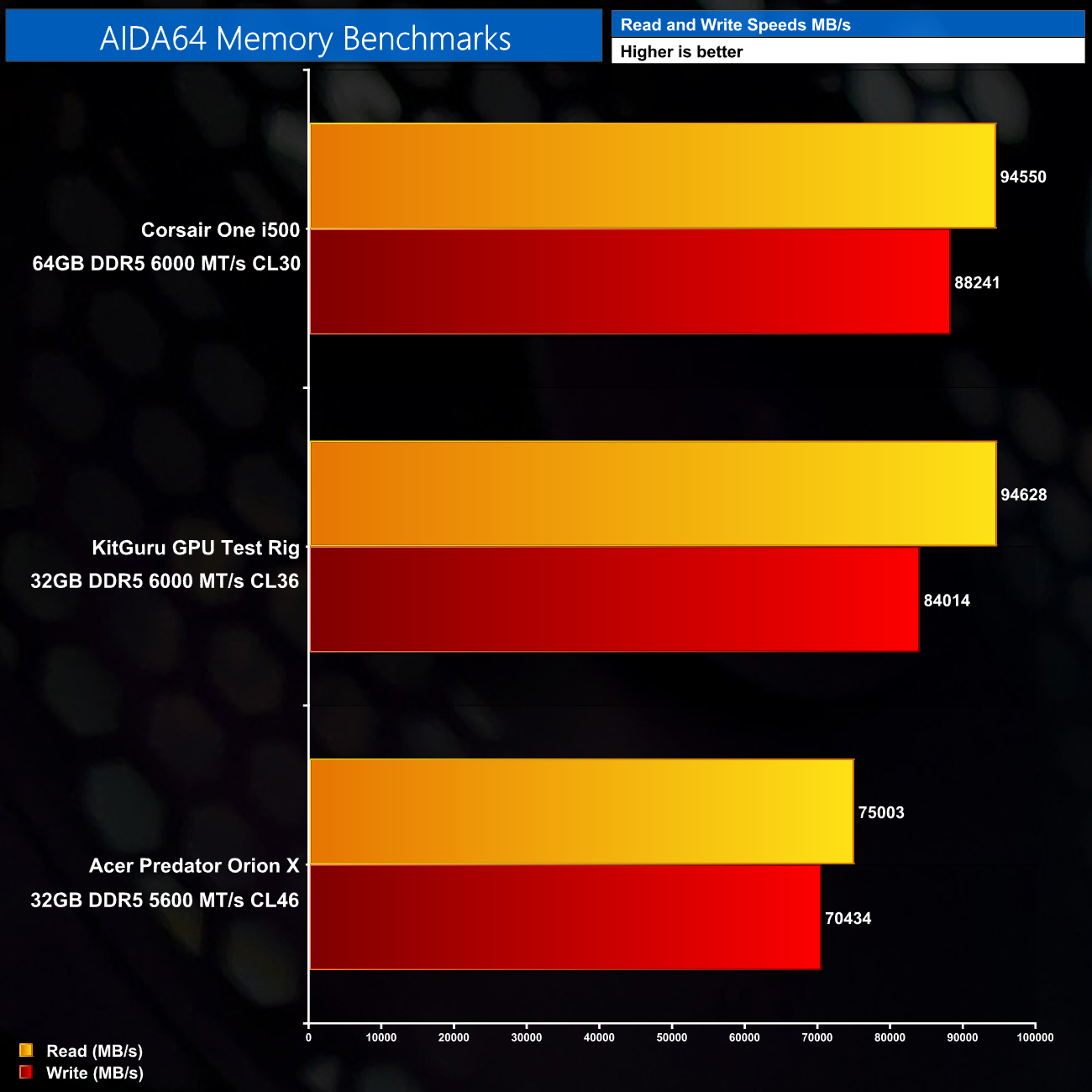
Memory bandwidth is a real strength of the One however, given its tight timings and CL30 latency. It delivers about 95000 MB/s reads and 88000 MB/s writes.

GPU performance from the RTX 4090 in the Corsair One is right where we'd expect, hitting over 36000 points in Time Spy. It's behind the 4090 Founders Edition we used in our test system, but only just.
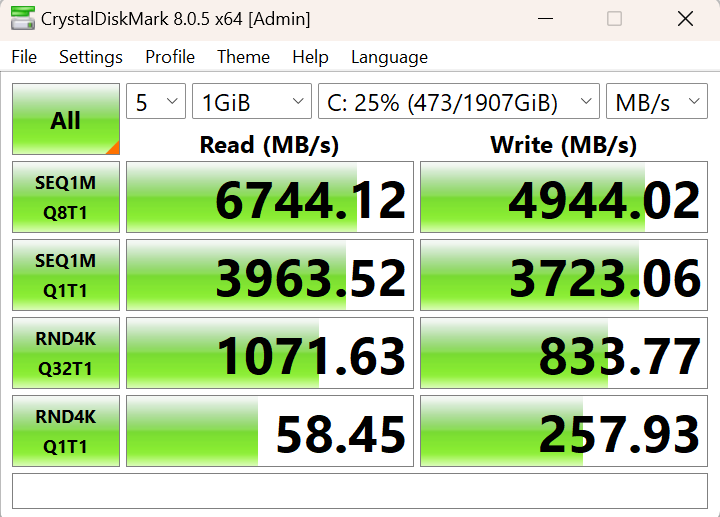
Lastly, as for the 2TB Samsung PM9A1, this delivers pretty much what we'd expected in terms of read and write speeds, hitting 6700MB/s reads and 4900MB/s writes. As a reminder, the B760 motherboard used here doesn't support Gen5 M.2 drives, so you couldn't get much faster storage than this in the Corsair One.
Here we test seven games, all benchmarked at 1440p and 4K resolutions using maximum image quality settings, but with no DLSS/FSR and no ray tracing.
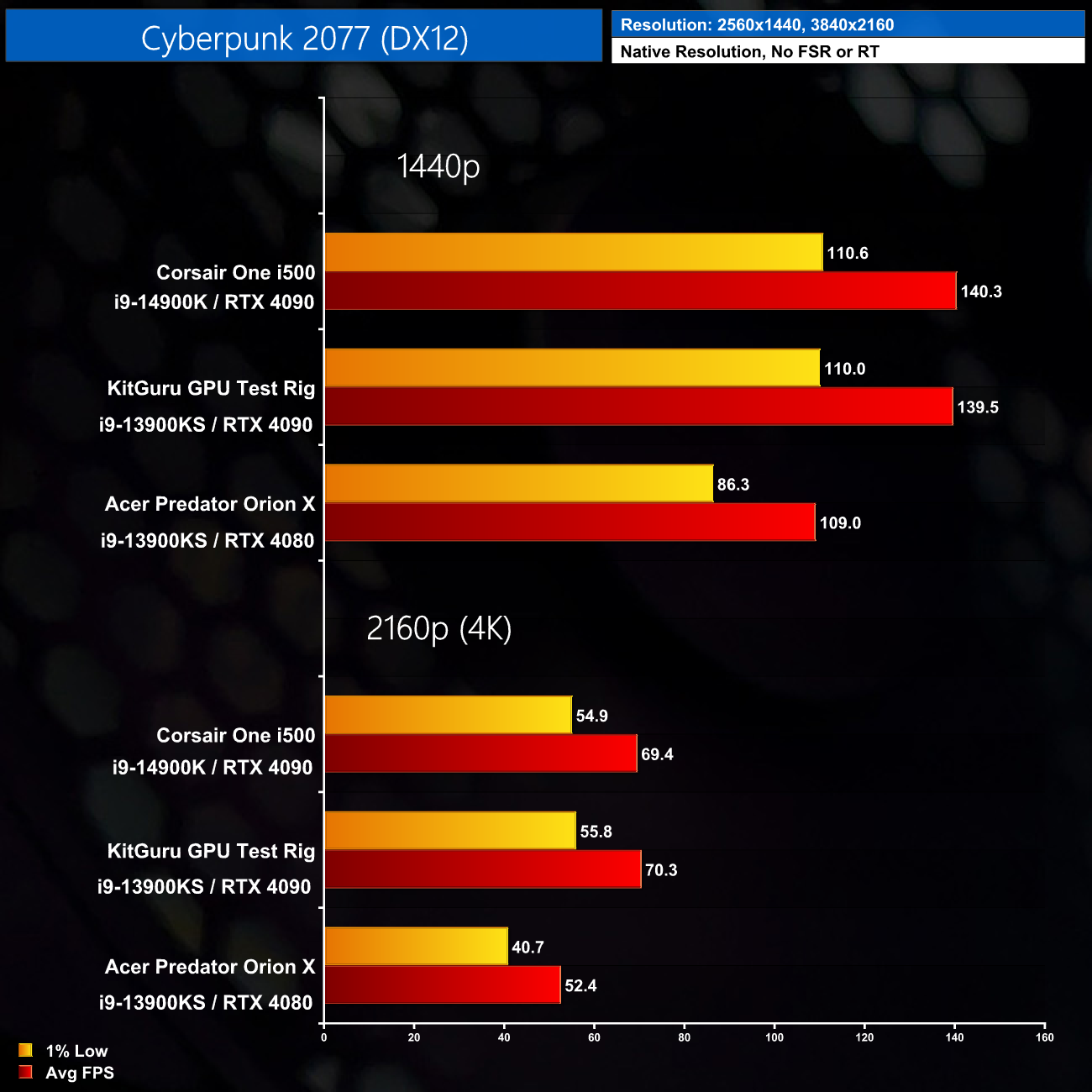
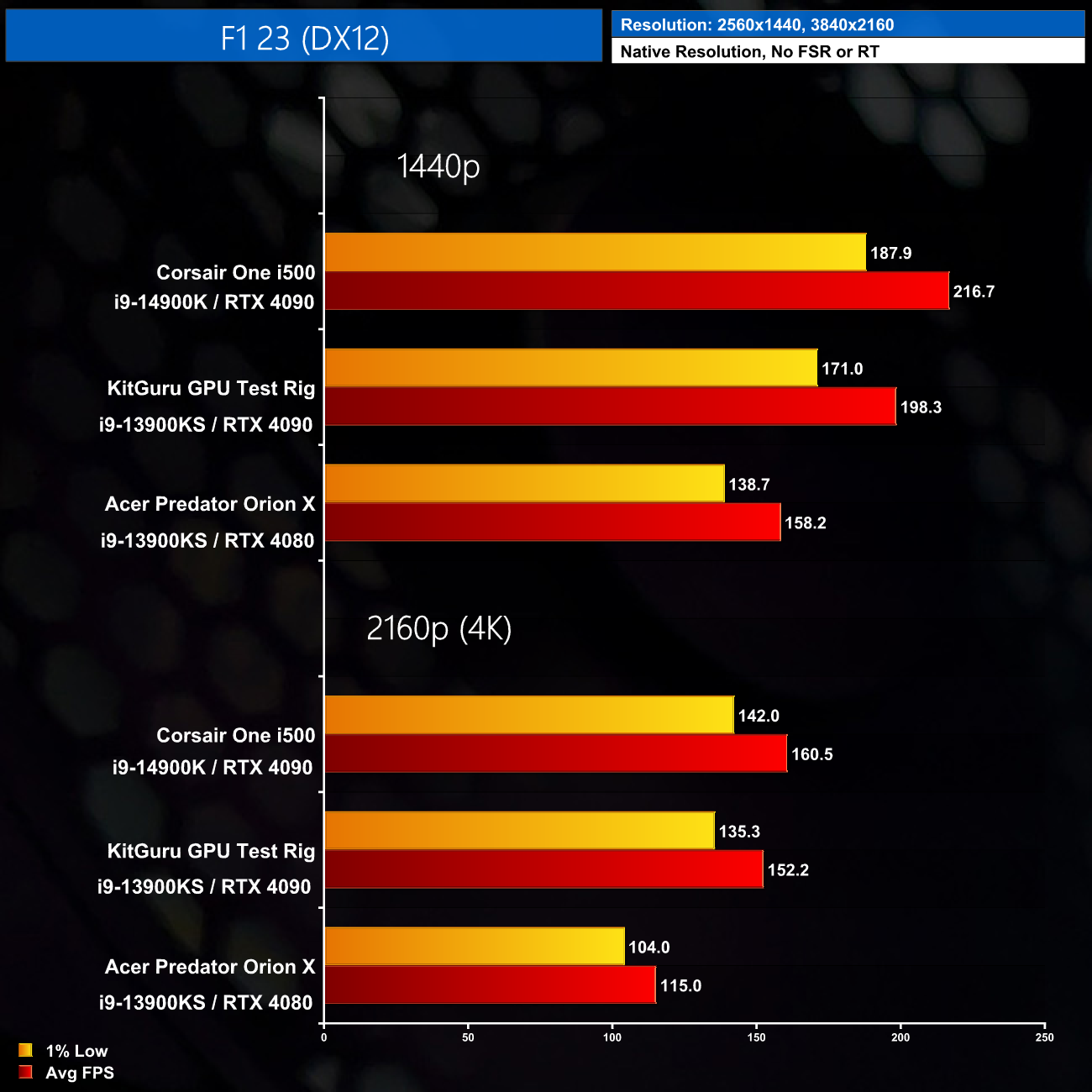
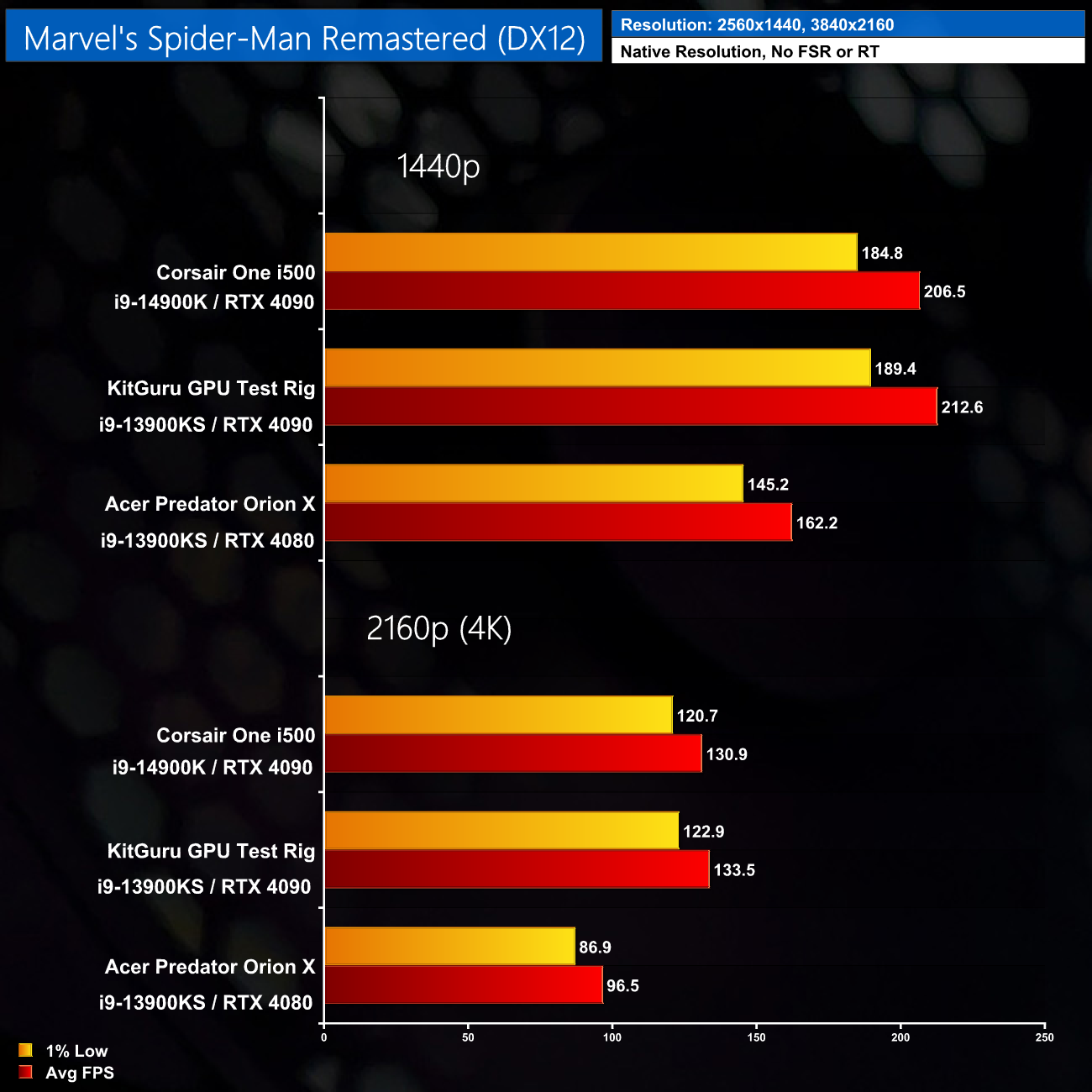
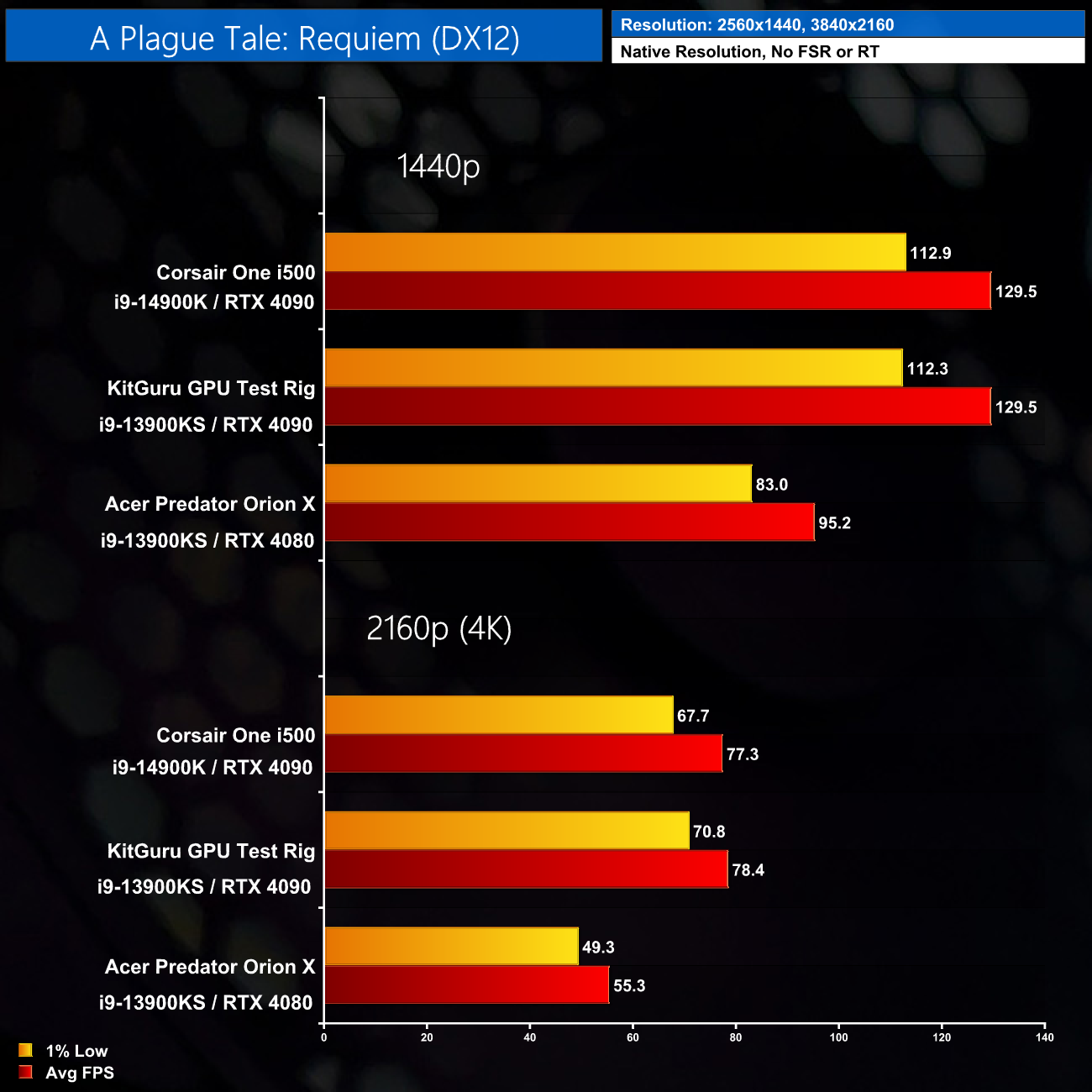
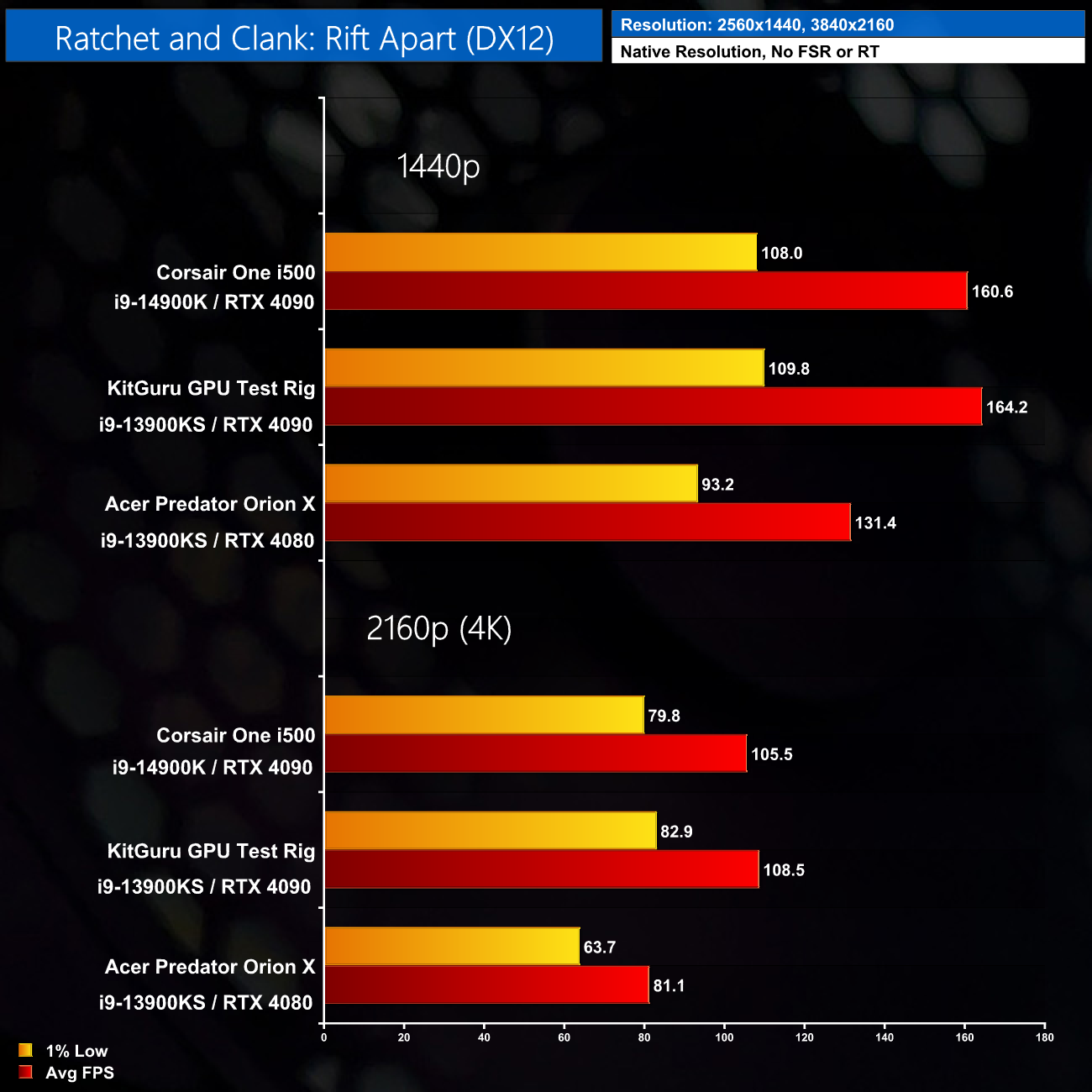
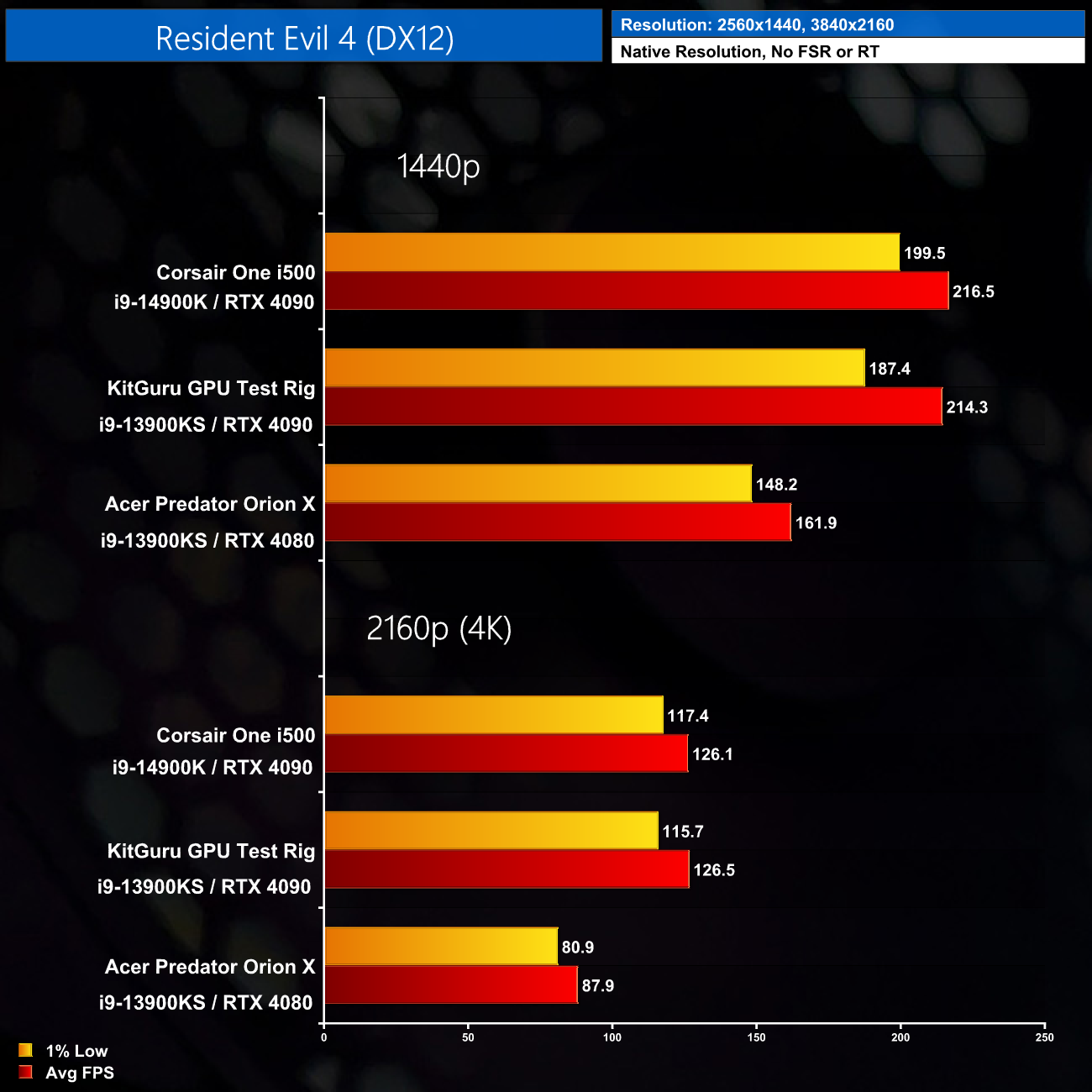
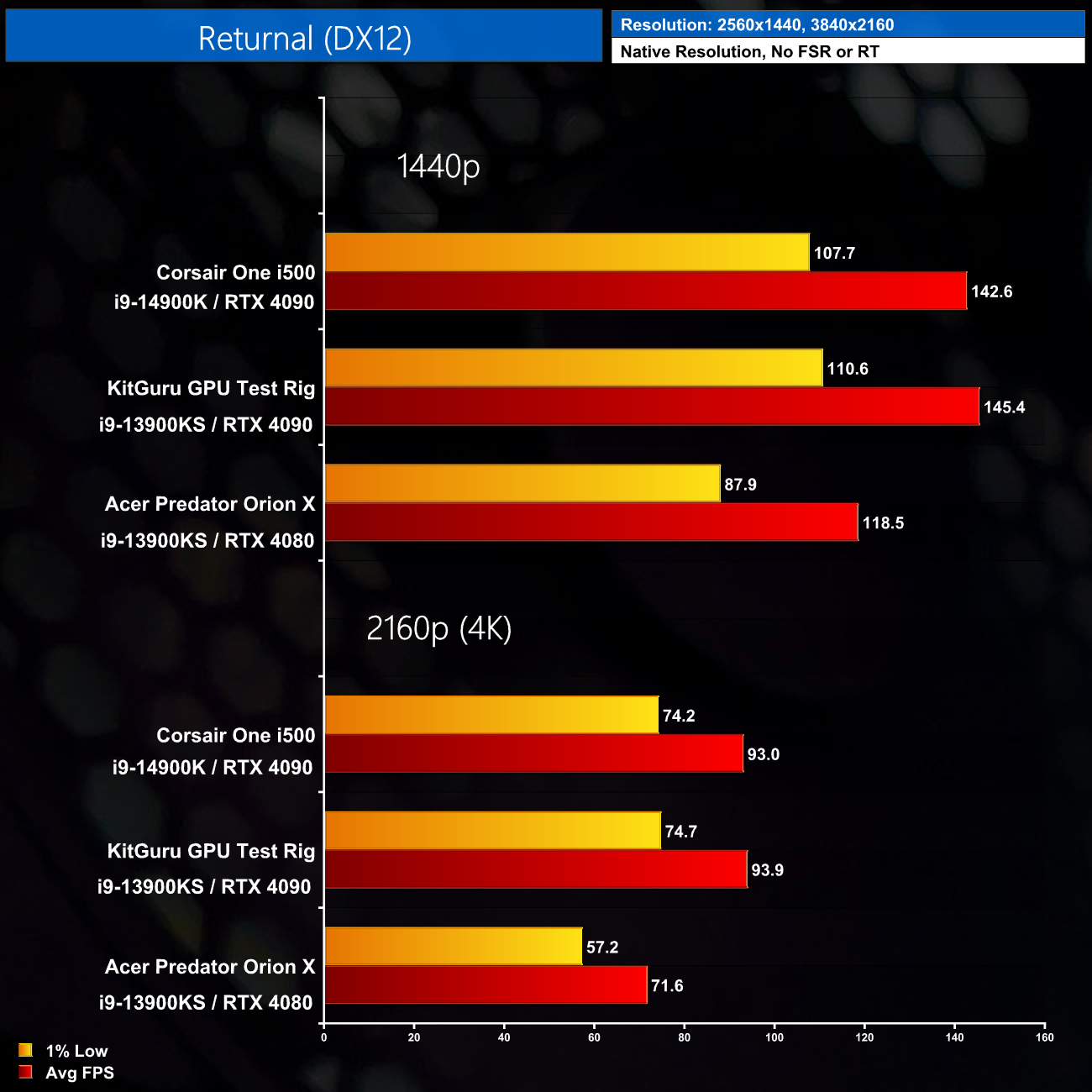
As you can see in these benchmarks, there's not much difference at all between the Corsair One and our own test system when it comes to gaming. In almost all instances, we are GPU bound and the 4090s perform very similarly. We did observe one instance where the Corsair One outperformed our own test rig, in F1 2023, by a 9% margin which could be due to the superior memory performance. Overall though, the One performs exactly as you'd expect for gaming, so it is nothing less than a beast considering is packs in a 14900K and a 4090 – in my view it'd be perfect for something like a 4K 240Hz QD-OLED monitor.
UPDATE: For an even deeper dive into the system's thermal behaviour, see our updated analysis HERE.
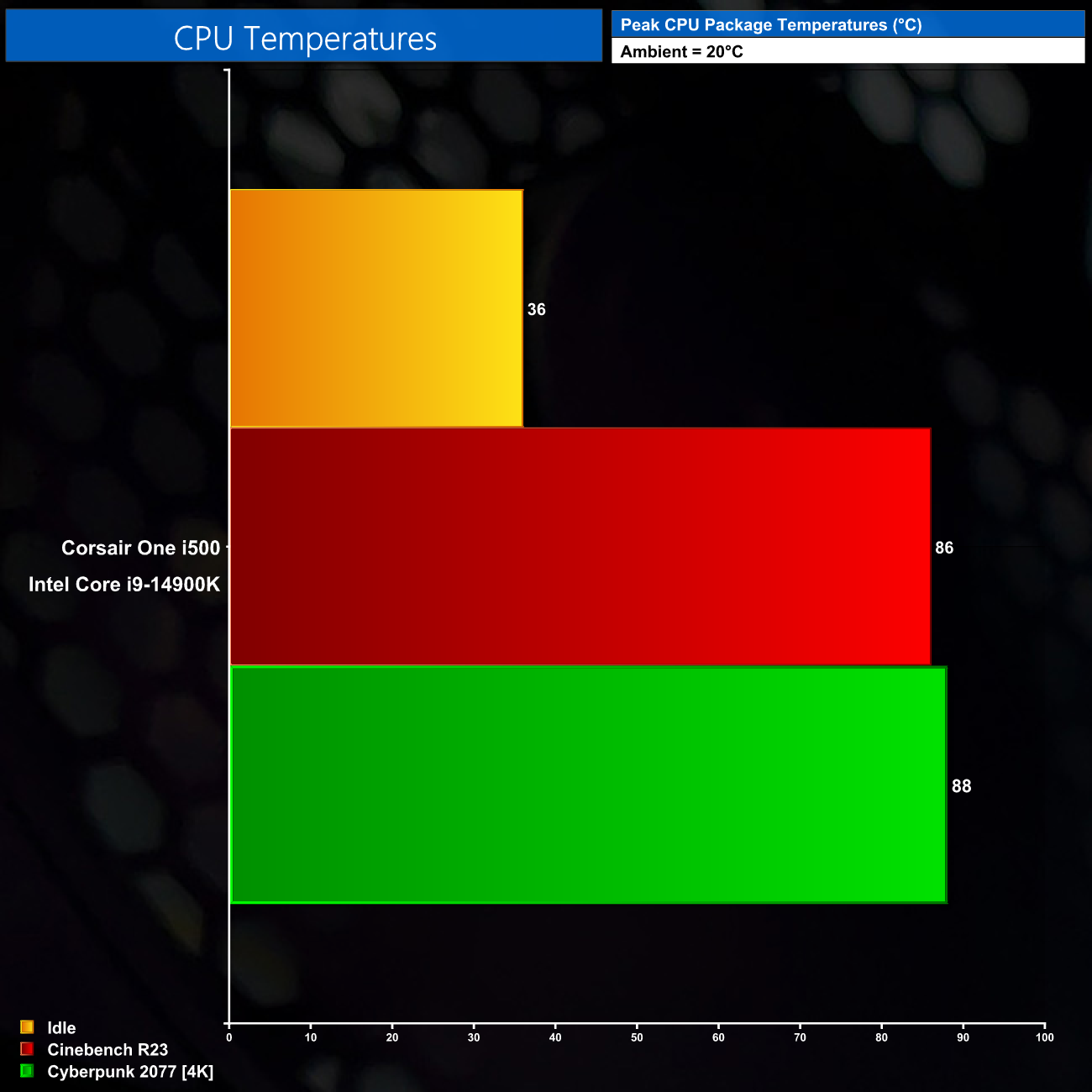
Moving onto CPU thermals, the 14900K gets warm, but not dangerously so, hitting 86C in Cinebench and 88C in Cyberpunk 2077. Limiting the PL1 to 200W definitely helps considering the CPU is only cooled by a 120mm AIO, but by this CPU's standards, the thermals are well in check.
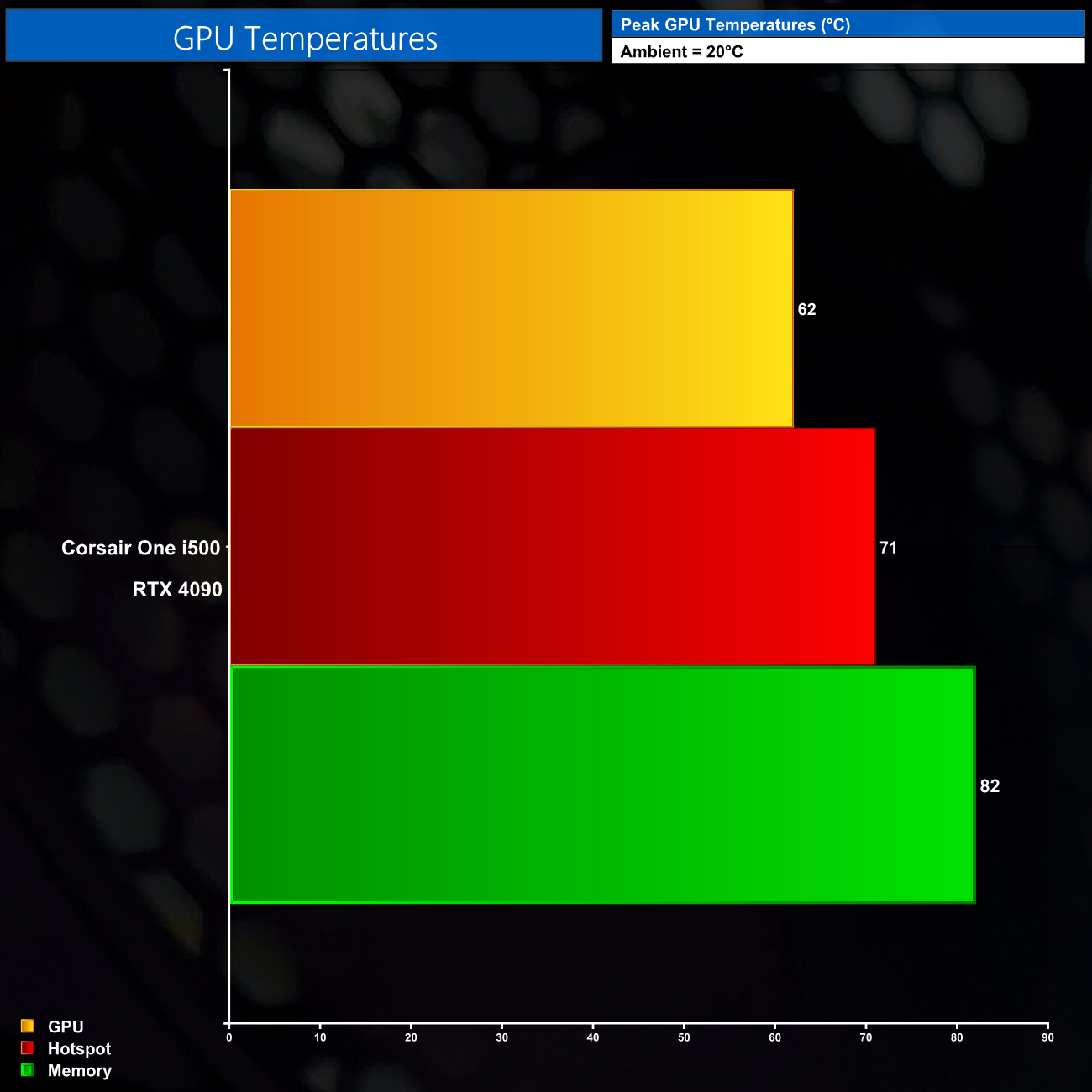
GPU thermals are also nothing to worry about as we saw the memory peak at 82C, with the GPU at 62C and the hot spot at 71C after a thirty minute stress test. Software tools don't report the MOSFET temperatures for the 4090 however, which I would be fascinated to know considering there are no heatsinks cooling the GPU VRM, but without the data all we can do is speculate.
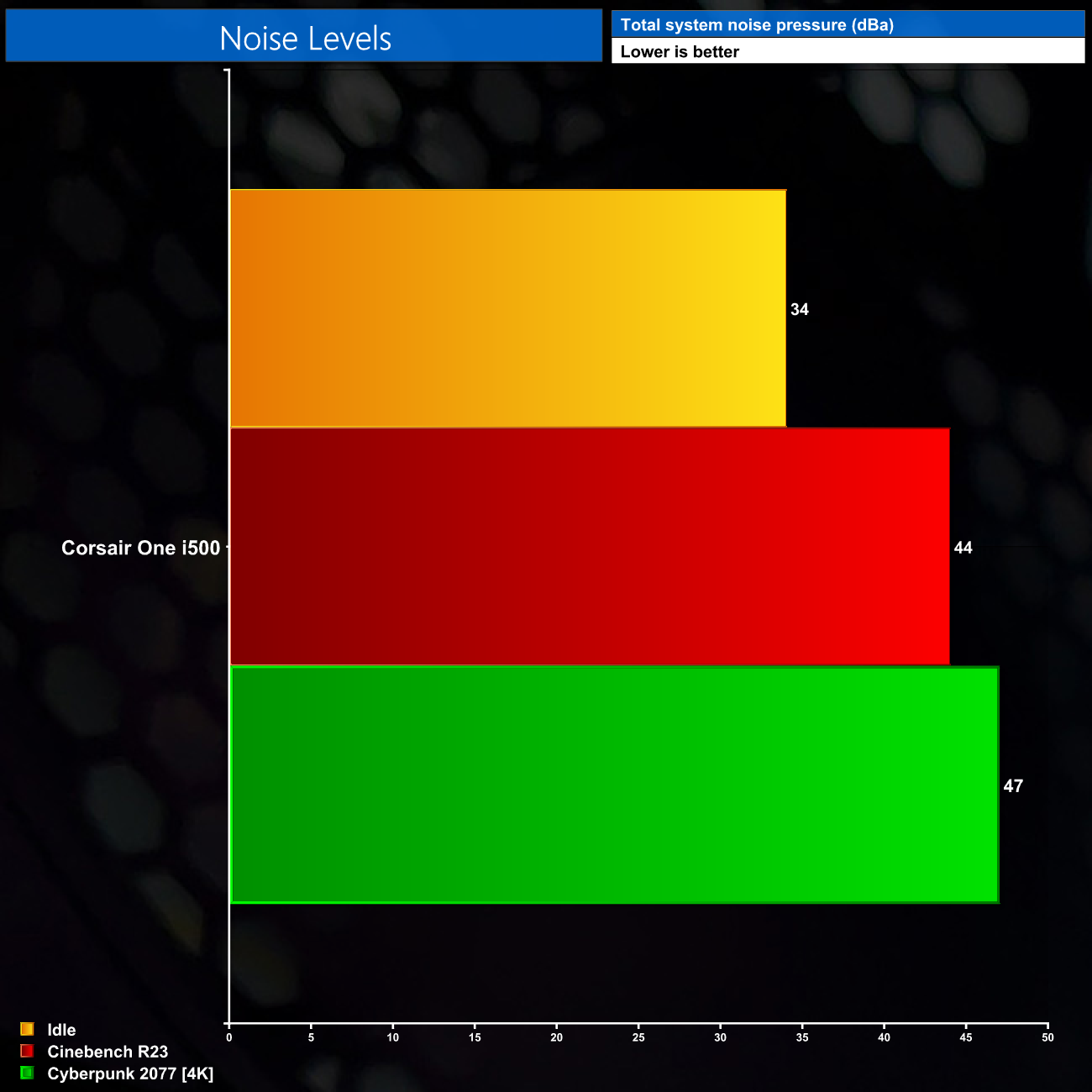
One downside for the One is that is does get loud under load. Considering its combination of 14900K and 4090 in a compact chassis, I suppose this was to be expected, but it could be distracting for some users – it didn't bother me when gaming with a headset on, though. There is just a touch of audible whine from one of the pumps inside the system when it is idling, but be sure to check out the video for a sound test.
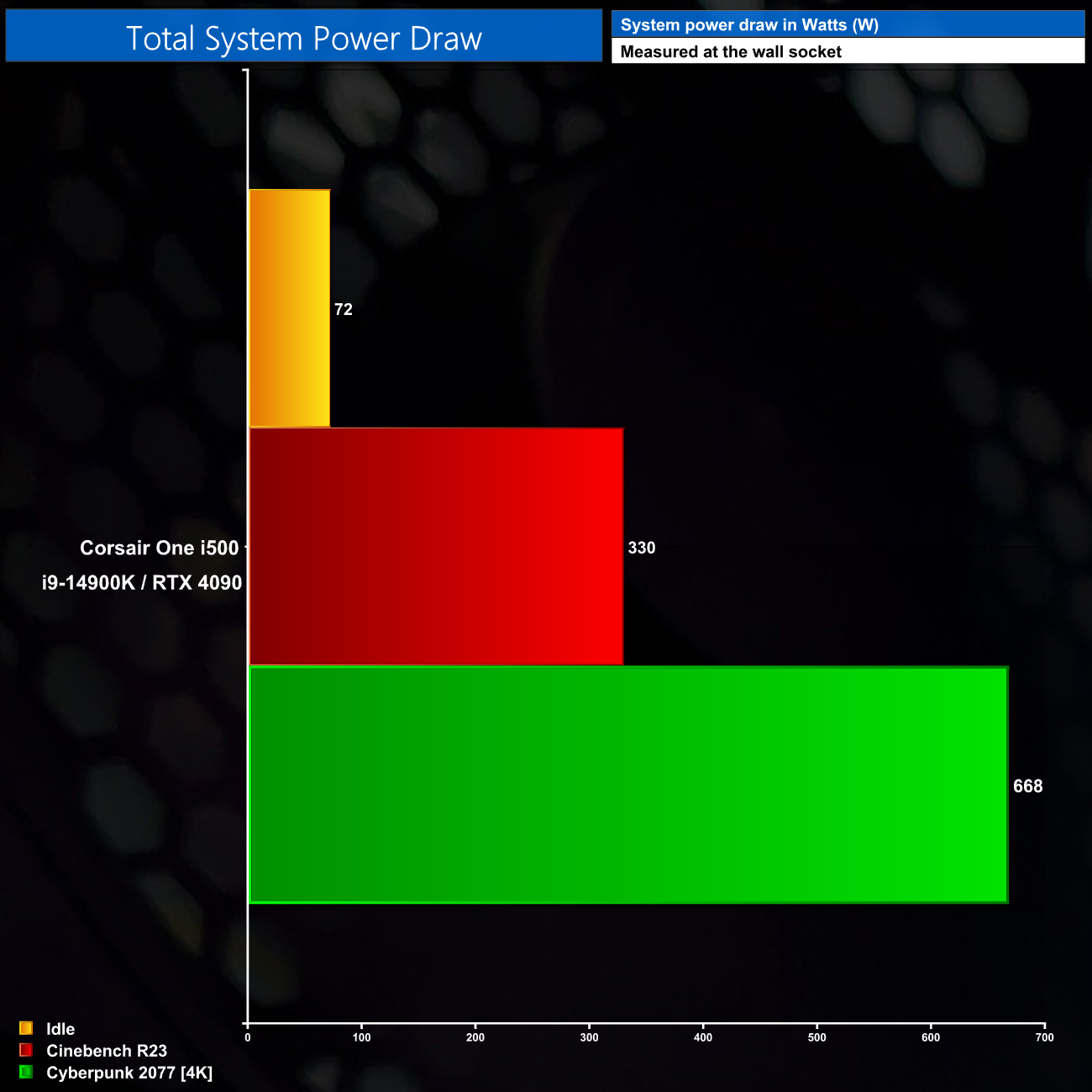
Lastly, total system power is nothing to worry about either. When gaming we saw almost 670W in Cyberpunk, but that's well below the 1000W capacity of the power supply, ensuring good levels of efficiency.
It's been about two years since I last got my hands on a Corsair One, but this new i500 has brought the series well up to date, considering it is packing in an Intel i9-14900K and RTX 4090.
No doubt about it, that combination of hardware, along with 64GB of fast memory, makes this a potent 4K gaming machine, and in our testing it was performing almost identically to a full-size desktop mid-tower with a 4090 Founders Edition, so you can be confident gaming performance has not been compromised despite the compact chassis.
Power users may notice the 200W PL1 limit for the CPU, as this does limit clock speed to around 4.6GHz when usually we'd expect more like 5.6GHz from the 14900K. The motherboard VRM looks rock solid so we can only think this is down to thermals, considering the 14900K is cooled by a custom 120mm AIO cooler in the One.
By and large, I have been impressed by what this system is capable of, and only have a few minor criticisms. The first is just 2TB of storage, which feels stingy to me considering the £4700 asking price. The second is the fan noise, as the One can get a bit loud under load – though I suppose this is to be expected considering the hardware inside.
We also have to mention the lack of VRM cooling for the RTX 4090. As mentioned, I am not able to accurately test MOSFET thermals, so without that data I cannot say whether this is an actual issue for the Corsair One, and certainly nothing from my game tests hinted at any instability. All I would say is that it does feel odd to install such a high-end GPU and not provide any sort of heatsinks for the VRM, but I'll have to leave it at that.
My final point comes down to the size, and then pricing, of this machine. At £4699.99 it is obviously incredibly expensive. Now, I've always understood that line of thinking doesn't always work with something like the Corsair One, given it's always been an incredibly diminutive system, packing high-end hardware in an incredibly well built case.
That's still true today with the i500, but I do just wonder if the increased size of the machine – up to 21.7L, compared to the 12L chassis of two years ago – hasn't taken some of the magic away. After all, the mini-ITX case market has come on hugely in the last few years and it's now possible to build some incredible high-end systems in tiny chassis. It could just be me, but the main allure of previous Corsair Ones was the flagship hardware in such a compact and unique case, and I can't help but feel that has been diminished slightly with this new model.
Nonetheless, if you are looking at the Corsair One i500 and love the aesthetic along with all the high-end hardware inside and are happy to pay the hefty sum required, I have no doubt you will have a great time with it – it is an objectively good machine. For me personally, I just don't think it quite captivates in quite the same way as previous models given how much bigger it is.
We don't yet have a buy-link but the model I reviewed will be on sale for £4699.99. A lower-spec version with 32GB of DDR5 and 4080 Super will also be available for £3499.99.
Update 10th May 2024: We have since published an even more detailed thermal analysis of the Corsair One i500 which you can find HERE.
Pros
- Beautiful aesthetic with wooden front panel.
- Top-tier gaming performance thanks to the RTX 4090.
- CPU power has been increased to 200W, up from 165W on previous Ones.
- 64GB of fast, low latency memory.
- Nifty front panel controls to adjust RGB lighting.
- Easy to access the internals.
- Plentiful I/O.
- Not reliant on iCUE to adjust system parameters, unlike previous models.
Cons
- Very expensive.
- Significantly bigger than previous versions of the One.
- Only 2TB storage feels stingy at this price.
- A small amount of CPU performance is lost due to the 200W PL1.
- Gets reasonably loud.