KitGuru KitGuru.net – Tech News | Hardware News | Hardware Reviews | IOS | Mobile | Gaming | Graphics Cards


Windows already plasters a watermark on your screen if you are running an unlicensed version of the OS, but soon, you may also get stuck with a watermark and multiple warnings for running Windows 11 on “unsupported” hardware.
According to The Verge, the latest Windows 11 builds will show a watermark on the bottom right corner of the desktop when the system requirements to run the OS are not met. In addition, you'll see a warning informing you of the same when opening Windows 11 settings.
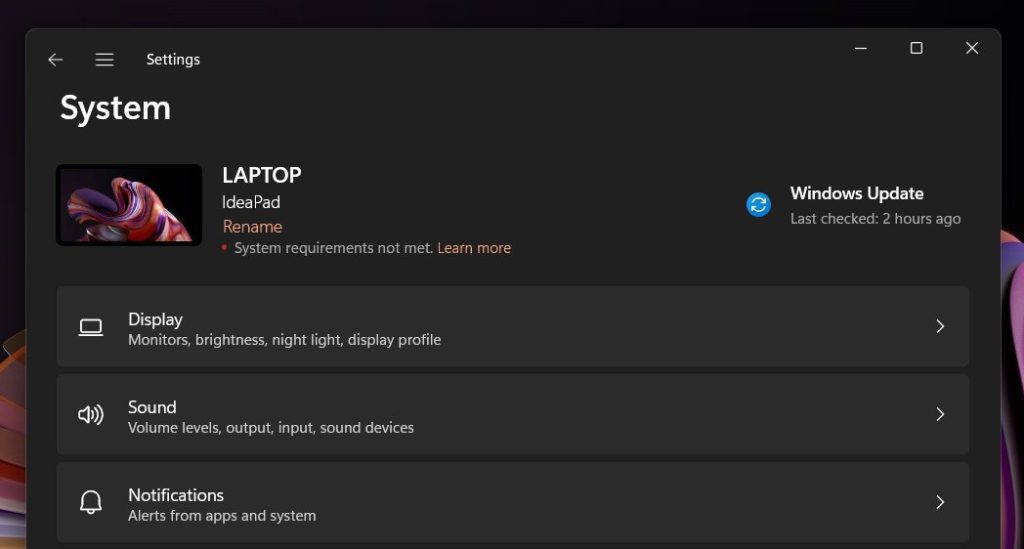
Image credit: Albacore
The watermark is similar to the message displayed when running Windows without a license. However, the “System requirements not met” message isn't transparent, making it more noticeable when you're on the desktop. On the other hand, it doesn't appear on top of other apps nor limits any OS features, at least for now.
For now, these warnings are only available in test builds, so you may never see them reach the public versions. Still, considering Microsoft's history with this type of message, we expect to see them in an upcoming Windows 11 version.
Discuss on our Facebook page, HERE.
KitGuru says: Are you planning on upgrading to Windows 11? Does your system's hardware support Microsoft's new operating system?