KitGuru KitGuru.net – Tech News | Hardware News | Hardware Reviews | IOS | Mobile | Gaming | Graphics Cards


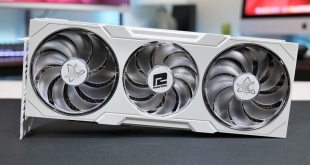
In PowerColor's own words, ‘Hellhound has long been guarding the gaming underworld and is committed to deliver the most reliable gaming experience.' What exactly that means isn't clear, but today we will find out as we put the RX 7900 XTX Hellhound Spectral White through its paces. A beautiful-looking card, we put it to the test and find out if the beauty is only skin deep.
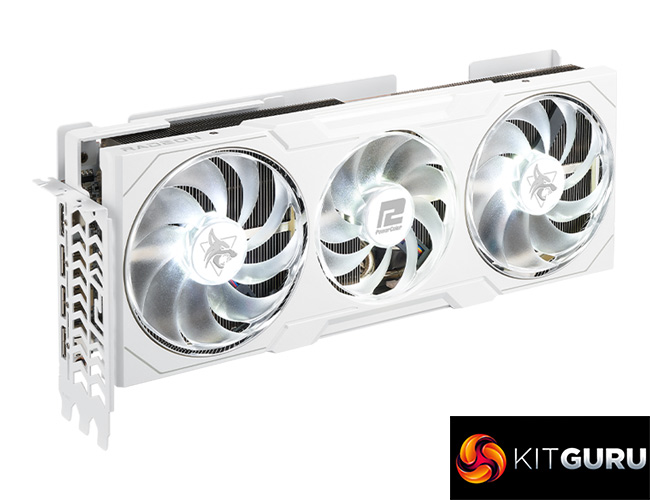
White PC components is an ever-growing market, something PowerColor will be looking to capitalise on with the RX 7900 XTX Hellhound Spectral White – impressively, even the PCB is white. That's alongside staple features such as dual-BIOS, a triple-fan cooler and a factory overclocked core, so let's find out exactly what the Hellhound Spectral White has to offer.
| RX 7900 XTX | RX 7900 XT | RX 6950 XT | RX 6900 XT | RX 6800 XT | RX 6800 | |
| Architecture | RDNA 3 | RDNA 3 | RDNA 2 | RDNA 2 | RDNA 2 | RDNA 2 |
| Manufacturing Process | 5nm GCD + 6nm MCD | 5nm GCD + 6nm MCD | 7nm | 7nm | 7nm | 7nm |
| Transistor Count | 57.7 billion | 57.7 billion | 26.8 billion | 26.8 billion | 26.8 billion | 26.8 billion |
| Die Size | 300 mm² GCD 220 mm² MCD | 300 mm² GCD 220 mm² MCD | 519 mm² | 519 mm² | 519 mm² | 519 mm² |
| Ray Accelerators | 96 | 84 | 80 | 80 | 72 | 60 |
| Compute Units | 96 | 84 | 80 | 80 | 72 | 60 |
| Stream Processors | 6144 | 5376 | 5120 | 5120 | 4608 | 3840 |
| Game GPU Clock | Up to 2300MHz | Up to 2000 MHz | Up to 2100MHz | Up to 2015MHz | Up to 2015MHz | Up to 1815MHz |
| Boost GPU Clock | Up to 2500 MHz | Up to 2400 MHz | Up to 2310MHz | Up to 2250MHz | Up to 2250MHz | Up to 2105MHz |
| ROPs | 192 | 192 | 128 | 128 | 128 | 96 |
| AMD Infinity Cache | 96MB | 80MB | 128MB | 128MB | 128MB | 128MB |
| Memory | 24GB GDDR6 | 20GB GDDR6 | 16GB GDDR6 18Gbps | 16GB GDDR6 16Gbps | 16GB GDDR6 | 16GB GDDR6 |
| Memory Bandwidth | 960 GB/s | 800 GB/s | 576 GB/s | 512 GB/s | 512 GB/s | 512 GB/s |
| Memory Interface | 384-bit | 320-bit | 256-bit | 256-bit | 256-bit | 256-bit |
| Board Power | 355W | 315W | 335W | 300W | 300W | 250W |
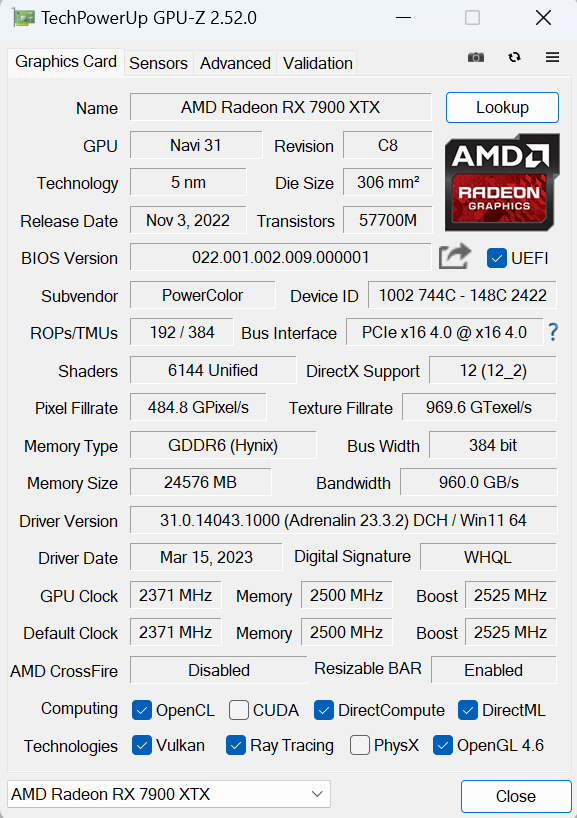
First, let's take a quick look at the specs. The RDNA 3 architecture has seen AMD transition to a chiplet-based design – a world first for a gaming GPU. We find a 300mm² Graphics Compute Die, based on TSMC's 5nm node, flanked by six 37mm² Memory Cache Dies. In total, the Navi 31 GPU packs 57.7 billion transistors.
Internally, the GCD makeup hasn't been radically changed compared to what we saw with RDNA 2. That means Navi 31 packs in 96 Compute Units, each of which houses 64 Steam Processors, for a total of 6144 shaders. There's also 96 Ray Accelerators – one per CU – and 192 ROPs.
As for clock speed, AMD has de-coupled the clocks, so the front-end and shaders can operate at different clock speeds in a bid to save power. With the RX 7900 XTX, the shader clock features a rated game clock of up to 2300MHz, and a boost of up to 2500MHz. PowerColor has increased this figure slightly however, with the primary BIOS operating with a 2525MHz boost clock.
Meanwhile, the memory configuration has taken a step forward. The RX 7900 XTX packs 24GB of GDDR6 memory clocked at 20Gbps, operating over a 384-bit memory interface, for total memory bandwidth of 960 GB/s. 96MB of Infinity Cache is also present, which allows AMD to claim an ‘effective memory bandwidth' of up to 3500 GB/s.
Power draw for the RX 7900 XTX is rated at 355W Total Board Power (TBP), though PowerColor's OC BIOS has increased this slightly as we will show later in the review.
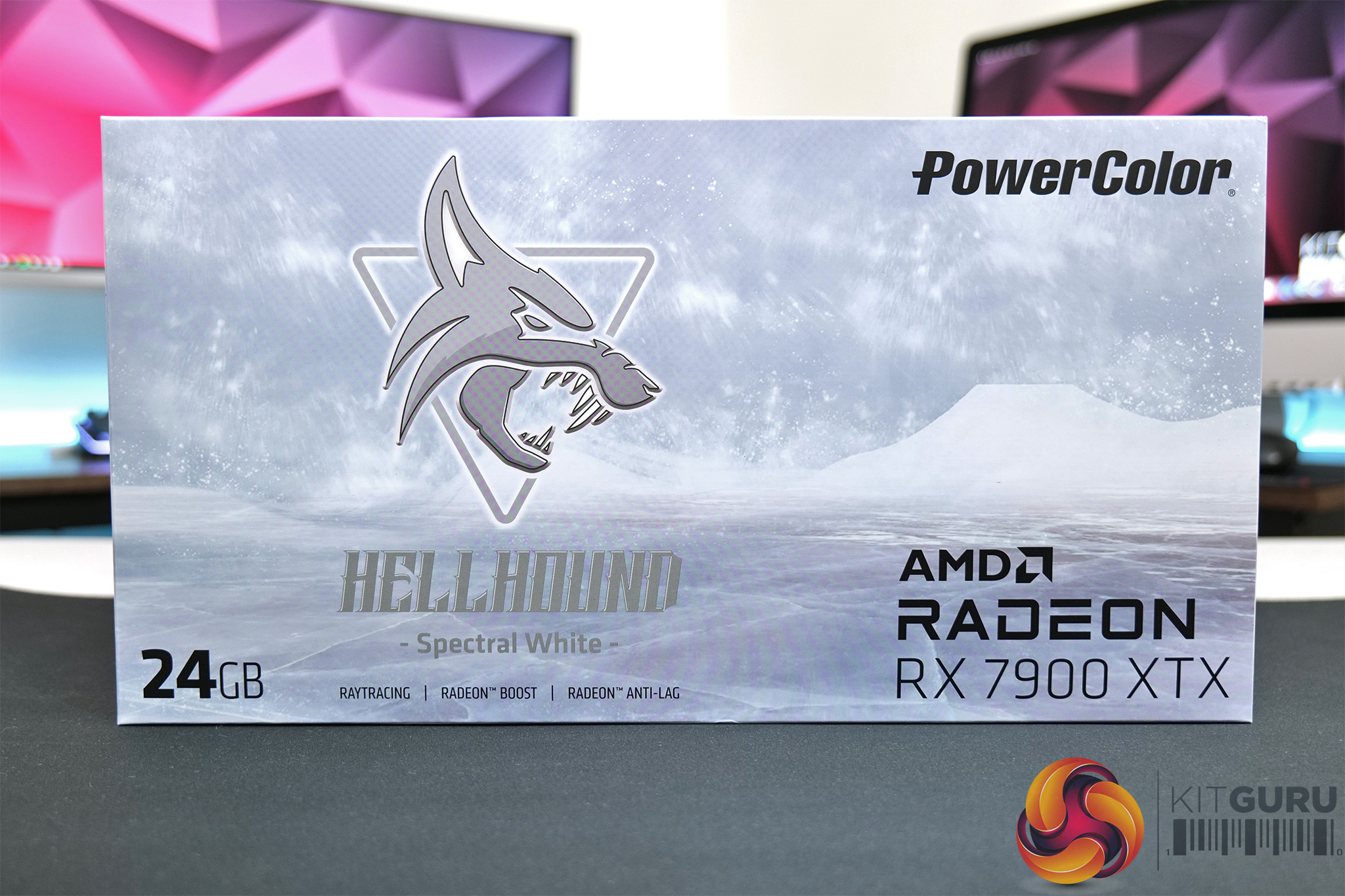
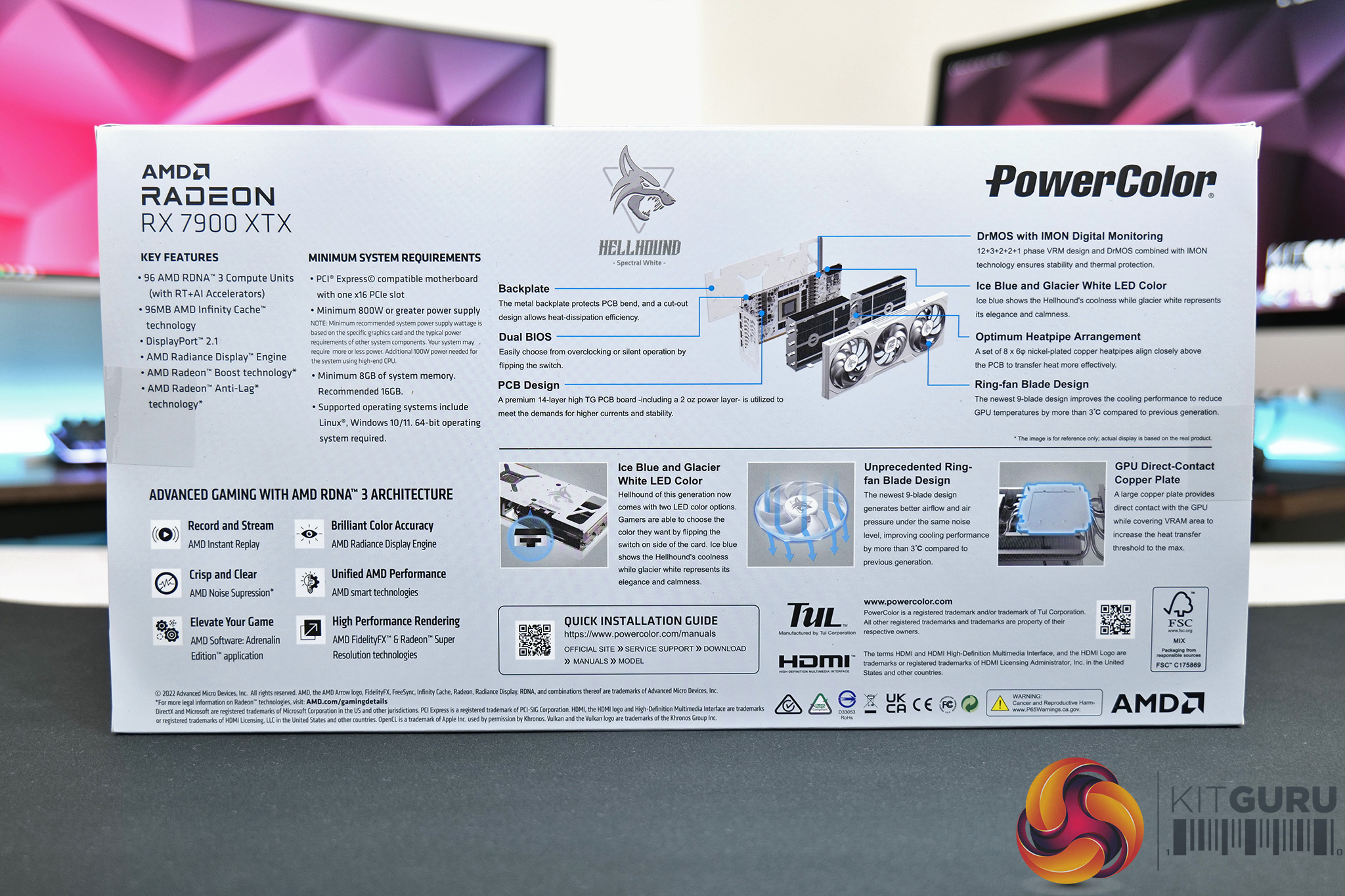
The PowerColor RX 7900 XTX Hellhound Spectral White ships in a light grey, almost white box – clearly in keeping with the Spectral White theme. The Hellhound logo takes pride of place on the front, while PowerColor highlights various key features of the card and cooler in the box.
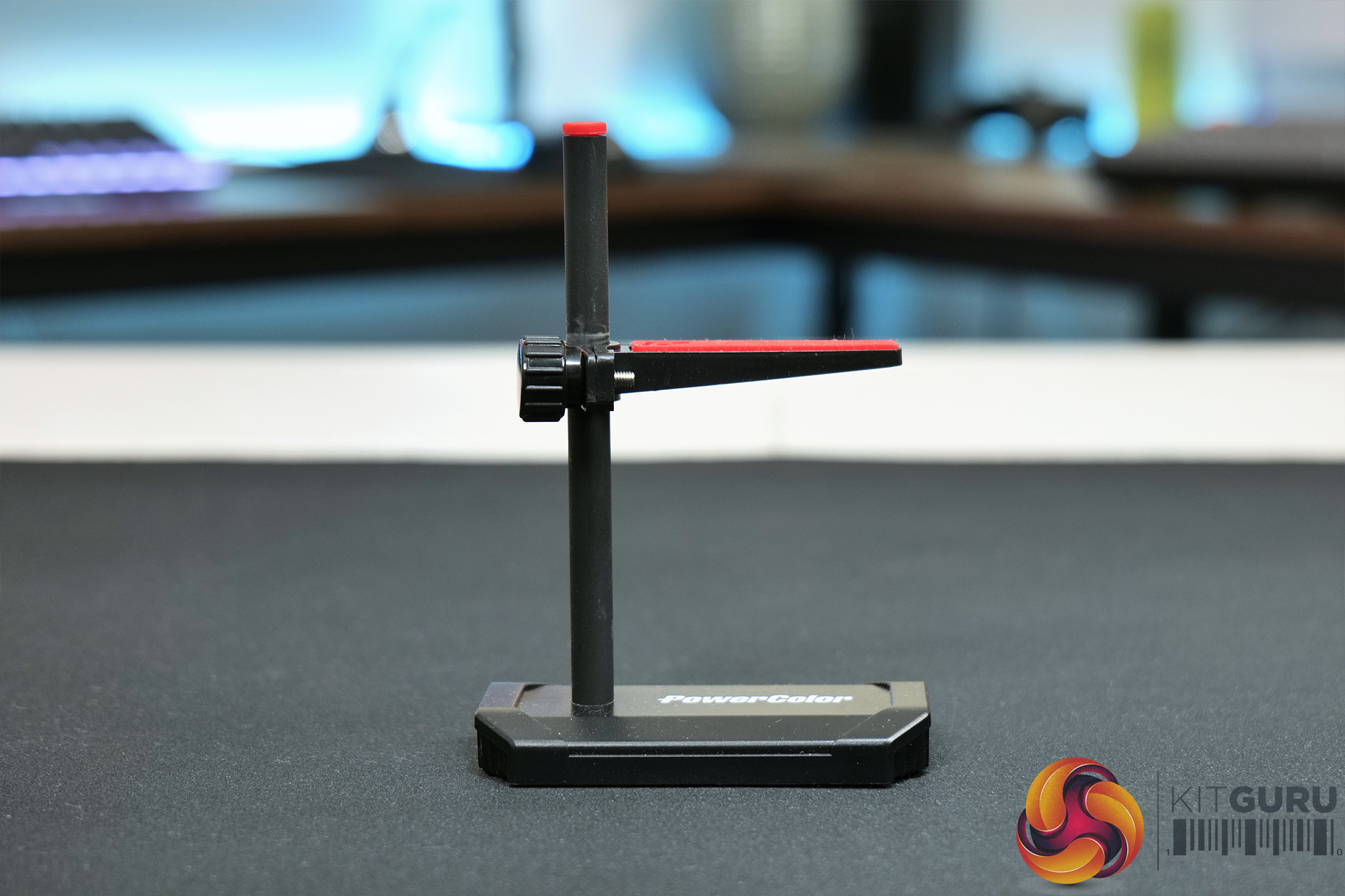
Inside, the only included accessory is a GPU support holder, designed to take some weight from the PCIe slot to prevent unwanted sagging.
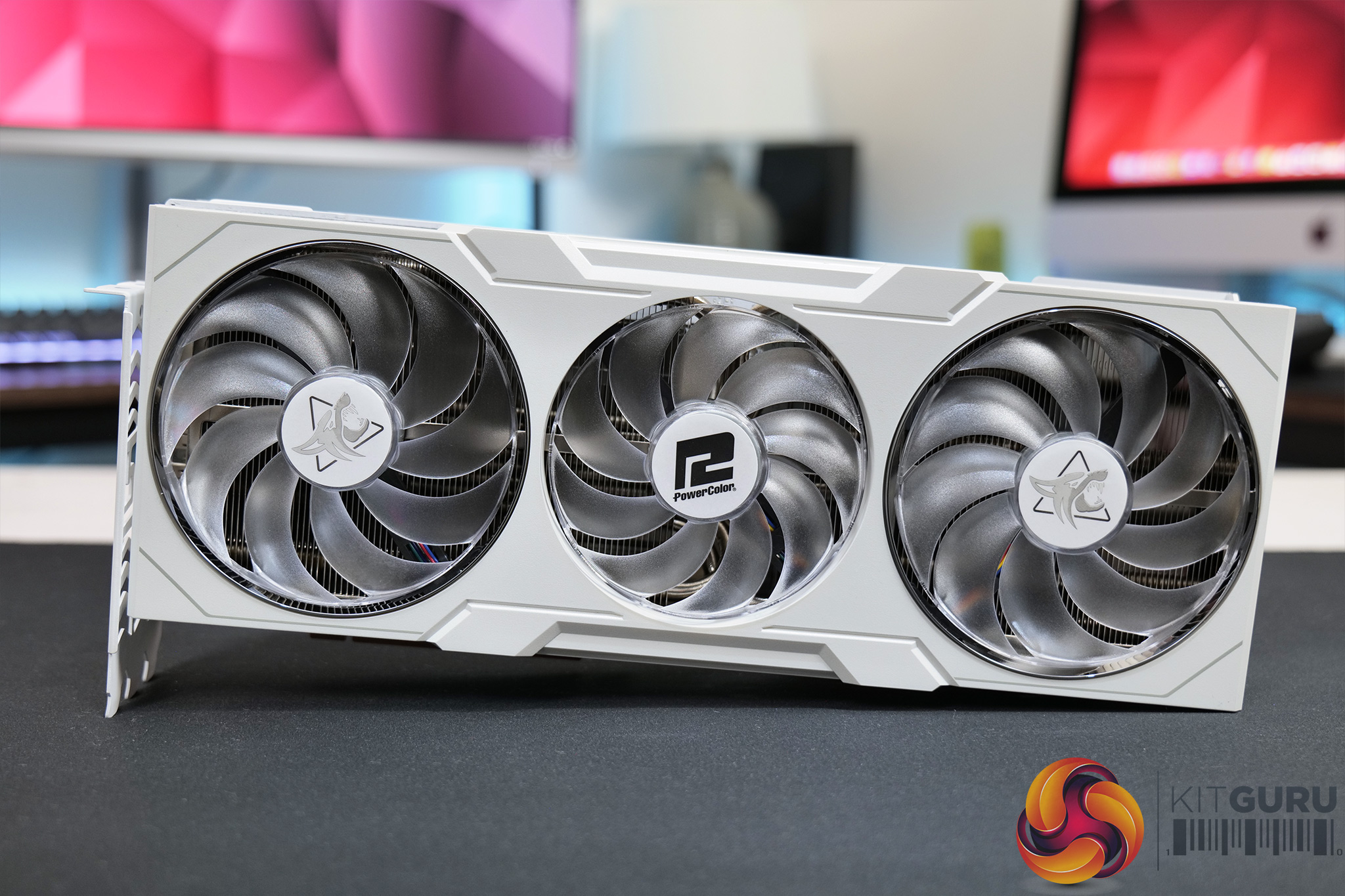
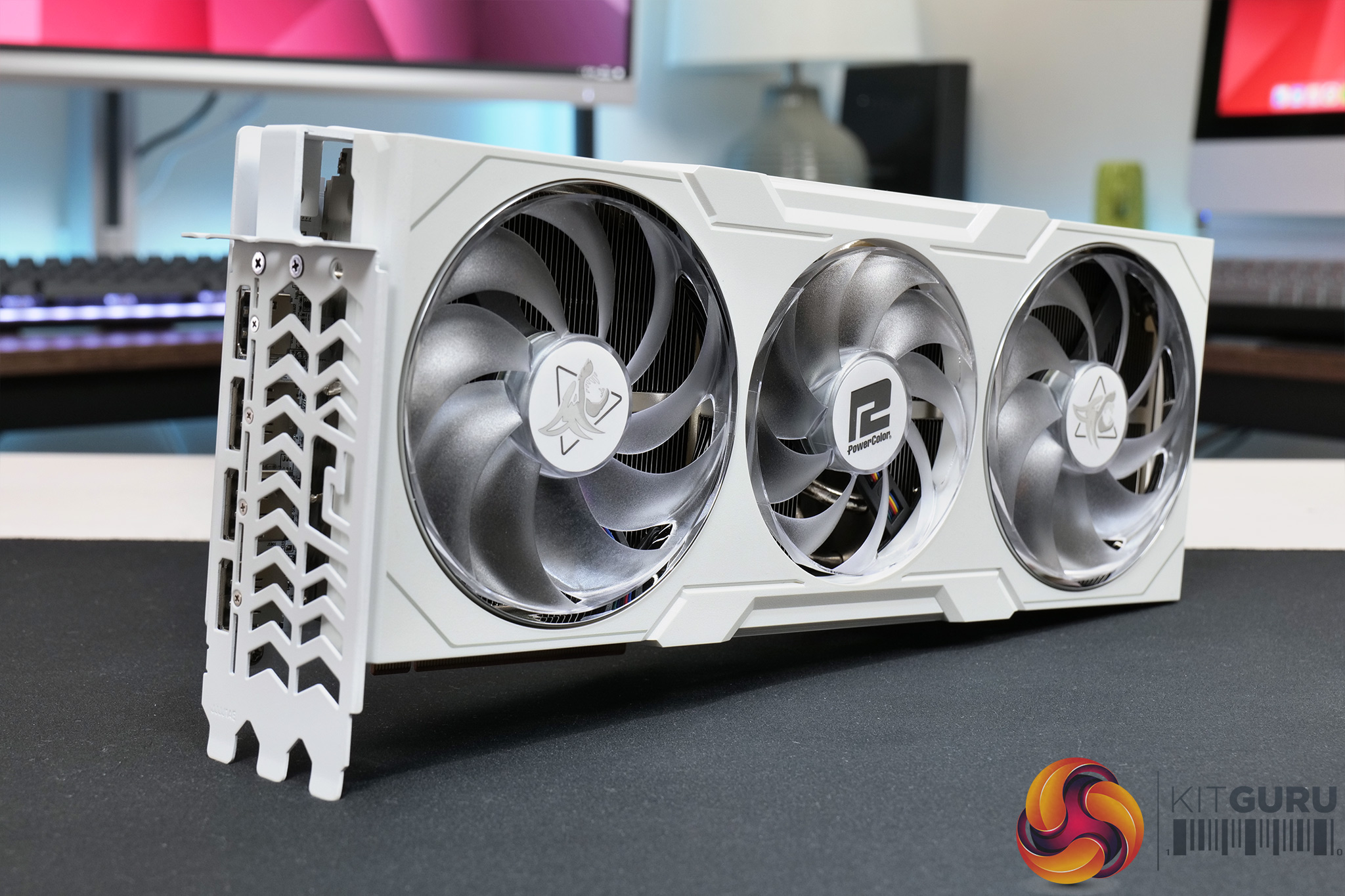
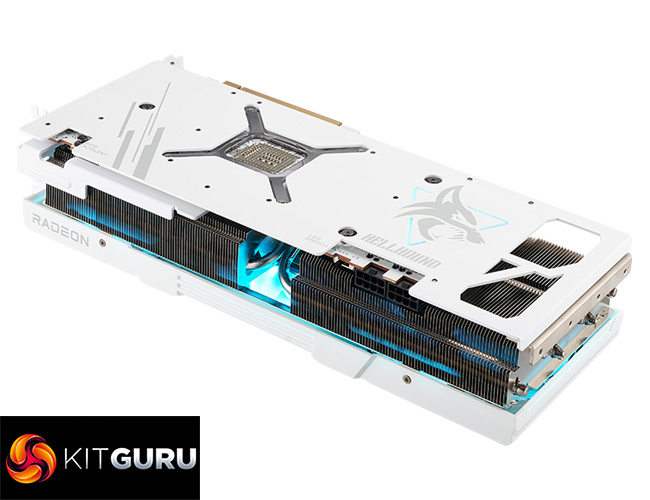
In terms of the card itself, clearly the focus is on the all-white aesthetic, which extends from the shroud to the backplate and even the PCB. Undoubtedly this will come down to personal preference – but I really like the look, it’s very clean but also more eye-catching than the usual black rectangular slabs we get for review.
The shroud itself is made from plastic and not metal, which I was initially disappointed by but it still feels reasonably solid in the hand, and I guess it will help keep the weight down too.
Speaking of weight, the Spectral White tipped the scales at just over 1.5KG, so it’s pretty hefty but not as monstrous as some other RTX 4090s we’ve seen over the last few months. Likewise, it measures in at 320 x 118.5 x 62mm, so it’s definitely a big card, but it’s ‘only' a triple-slot thickness rather than quad-slot, which is becoming increasingly common.
Fitted within the shroud we find three fans, each with translucent, almost frosted fan blades which fit nicely with the overall design theme. You’ll notice the outer two fans are 100mm in diameter, while the central fan is a touch smaller at 90mm – this central one also spins in reverse, a now commonly used feature aimed at reducing airflow turbulence.
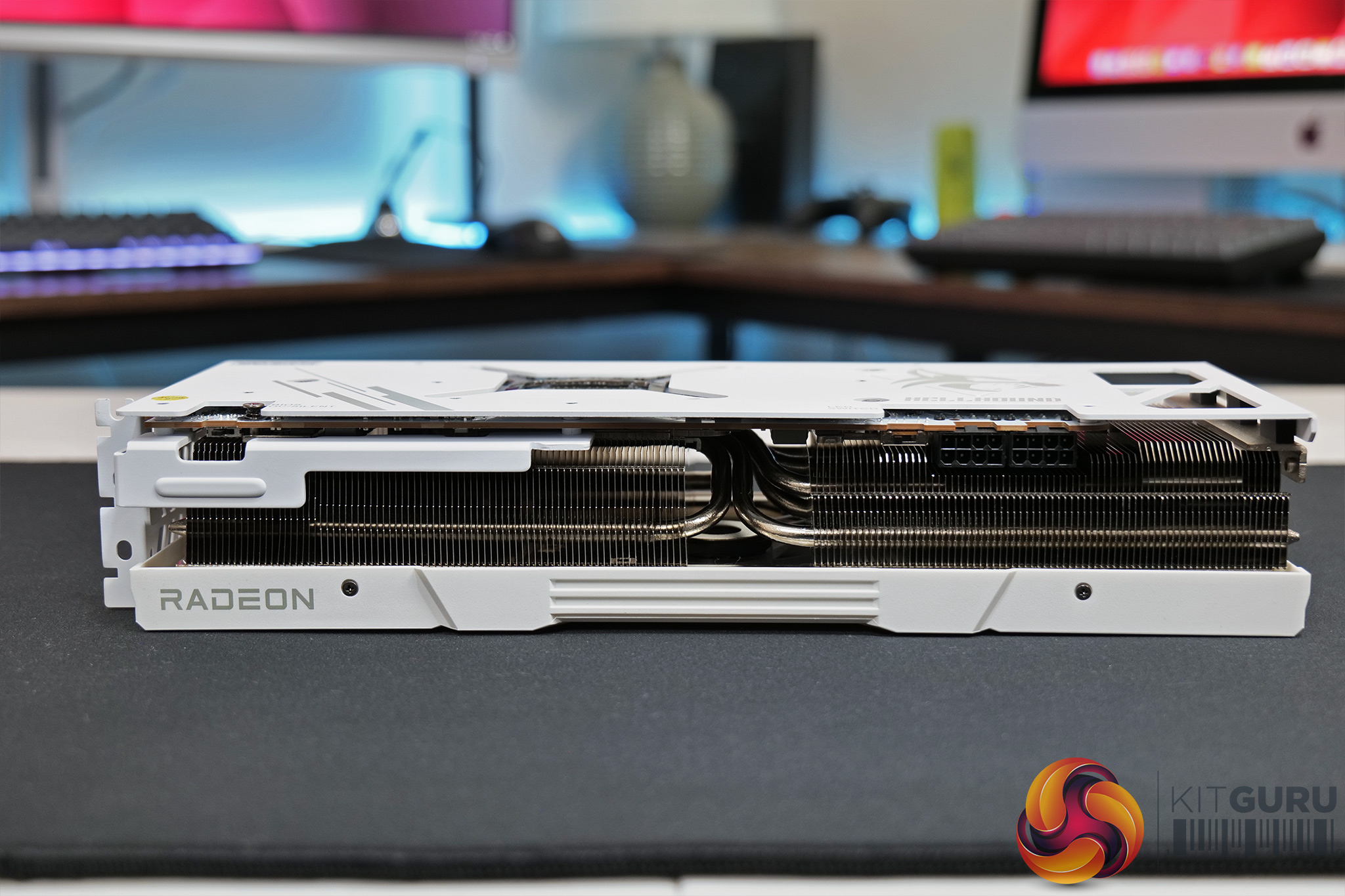
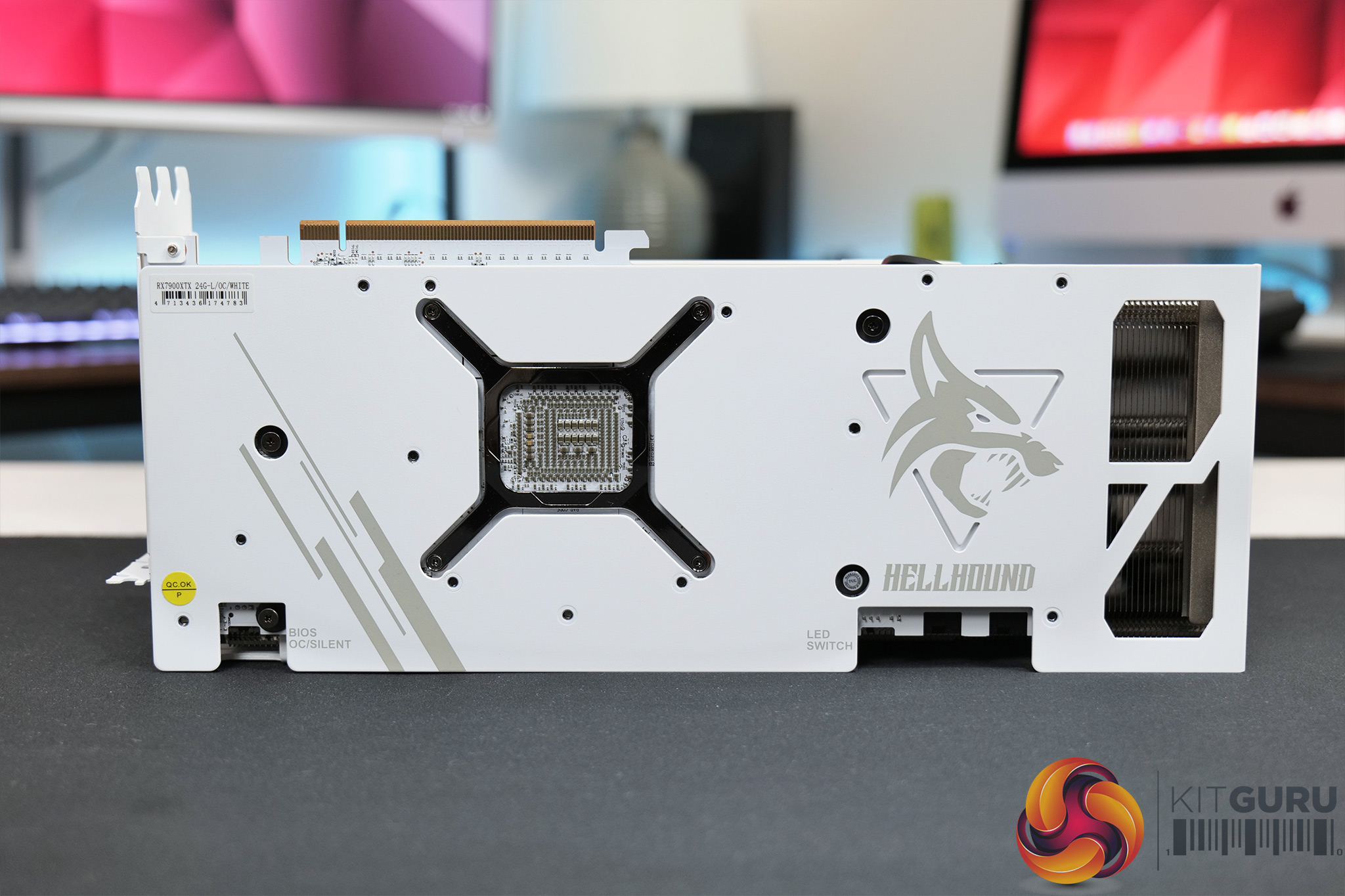
As for the backplate, this is made from metal and covers the entire length of the card, but with a couple of fairly small cut-outs at the end to aid with heat dissipation. The Hellhound logo is one of two lighting zones, with more LEDs also positioned on each of the three fan hubs.
Interestingly, there’s no RGB lighting on the Spectral White, instead we find a physical switch where users can toggle between a white or blue light. Both look fine in my opinion, but I’m not sold on the idea of a physical switch – is anyone actually going to open up their case just to change the lighting mode? A software solution would surely be the smarter choice here, and I’m surprised we only have two colour choices instead of RGB lighting in this day and age.
We can also note the dual-BIOS switch positioned near the I/O bracket, with a choice of OC and Silent modes. The OC mode runs a bit louder with a slightly higher clock speed, but we compare the two later in this review.
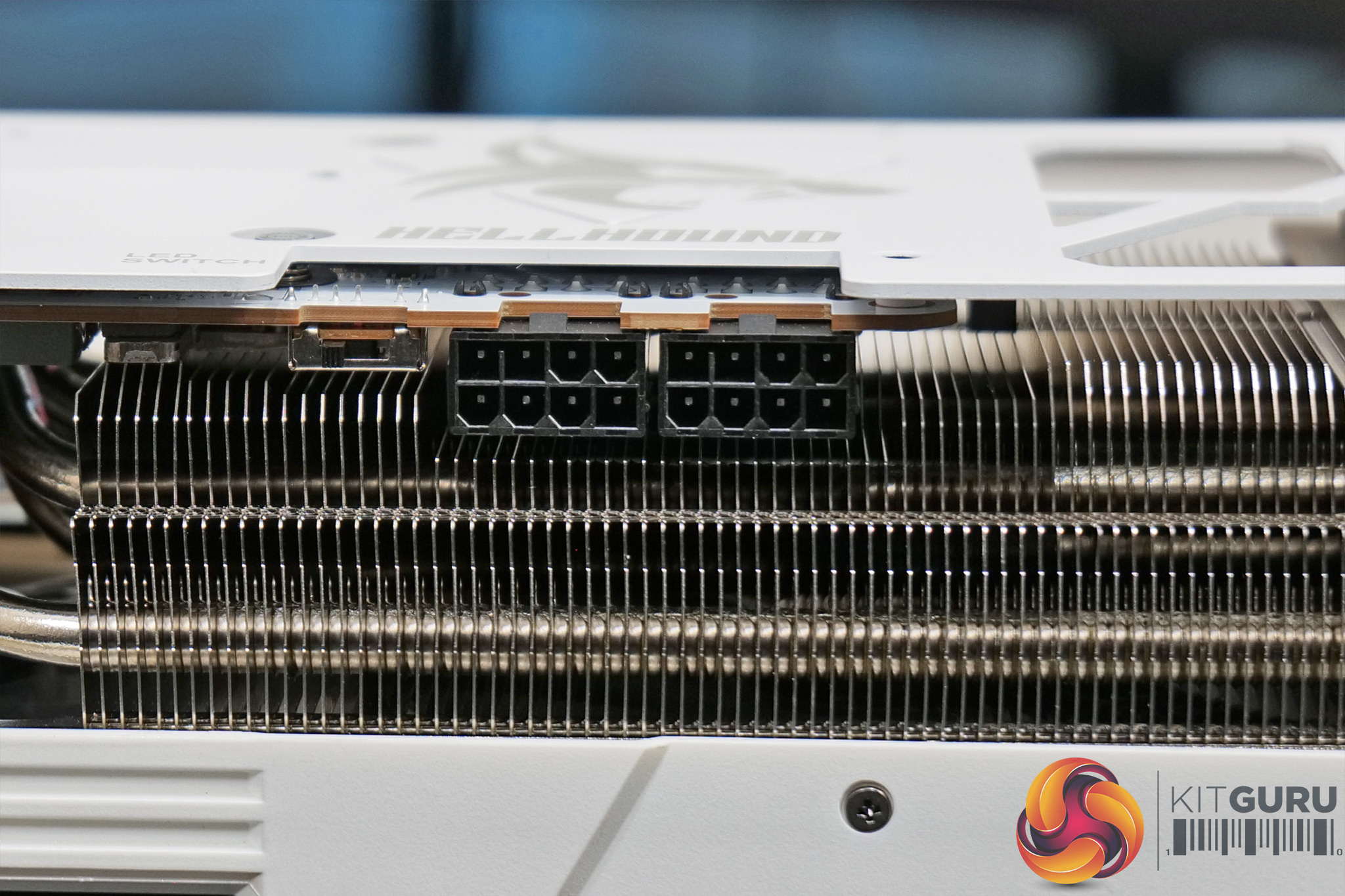
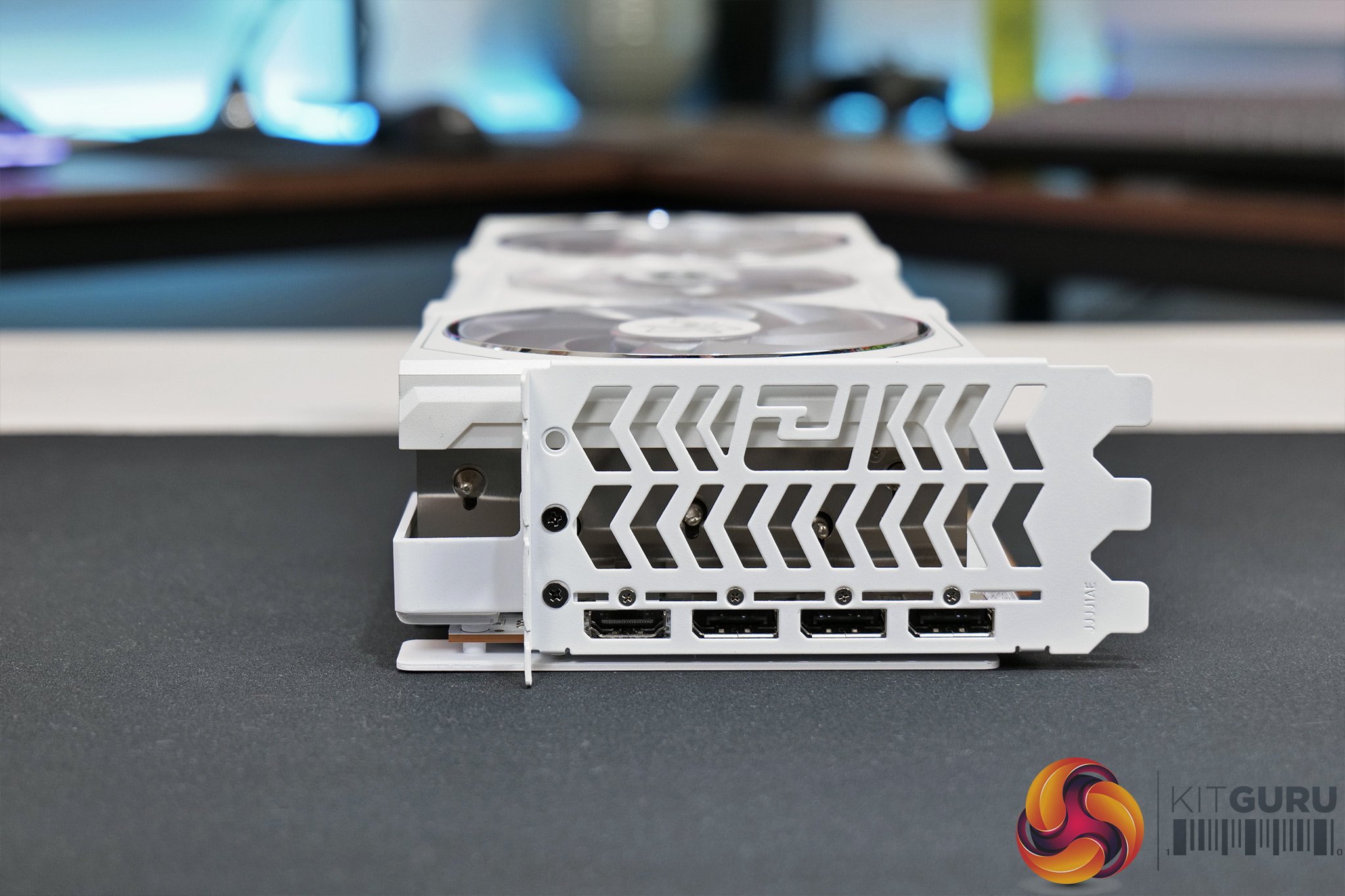
Elsewhere, we can note two 8-pin power connectors, so PowerColor has not increased the number of power plugs over the reference design. We also find standard display outputs, so that's one HDMI 2.1 and three DisplayPort t 2.1 connectors.
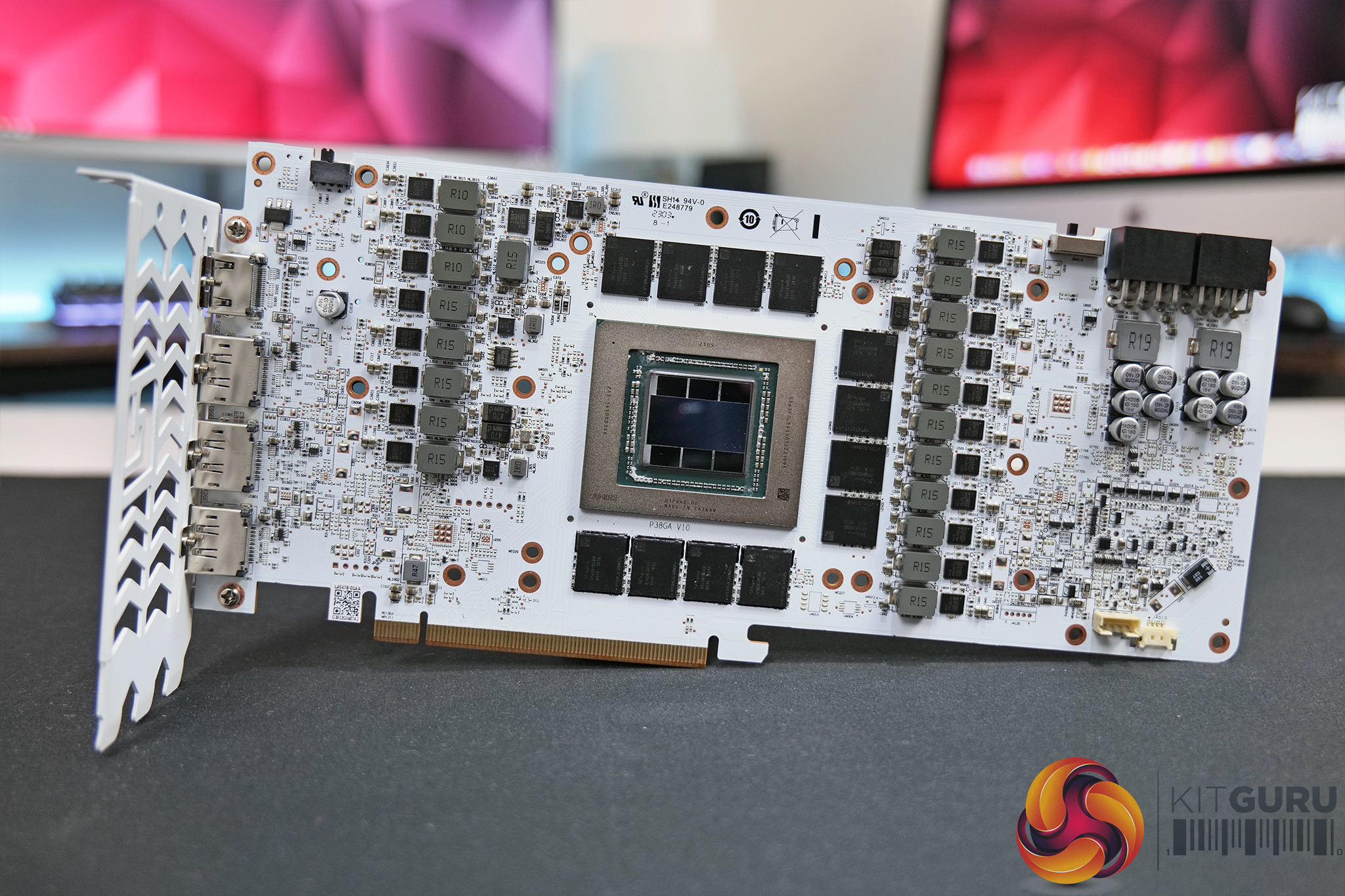
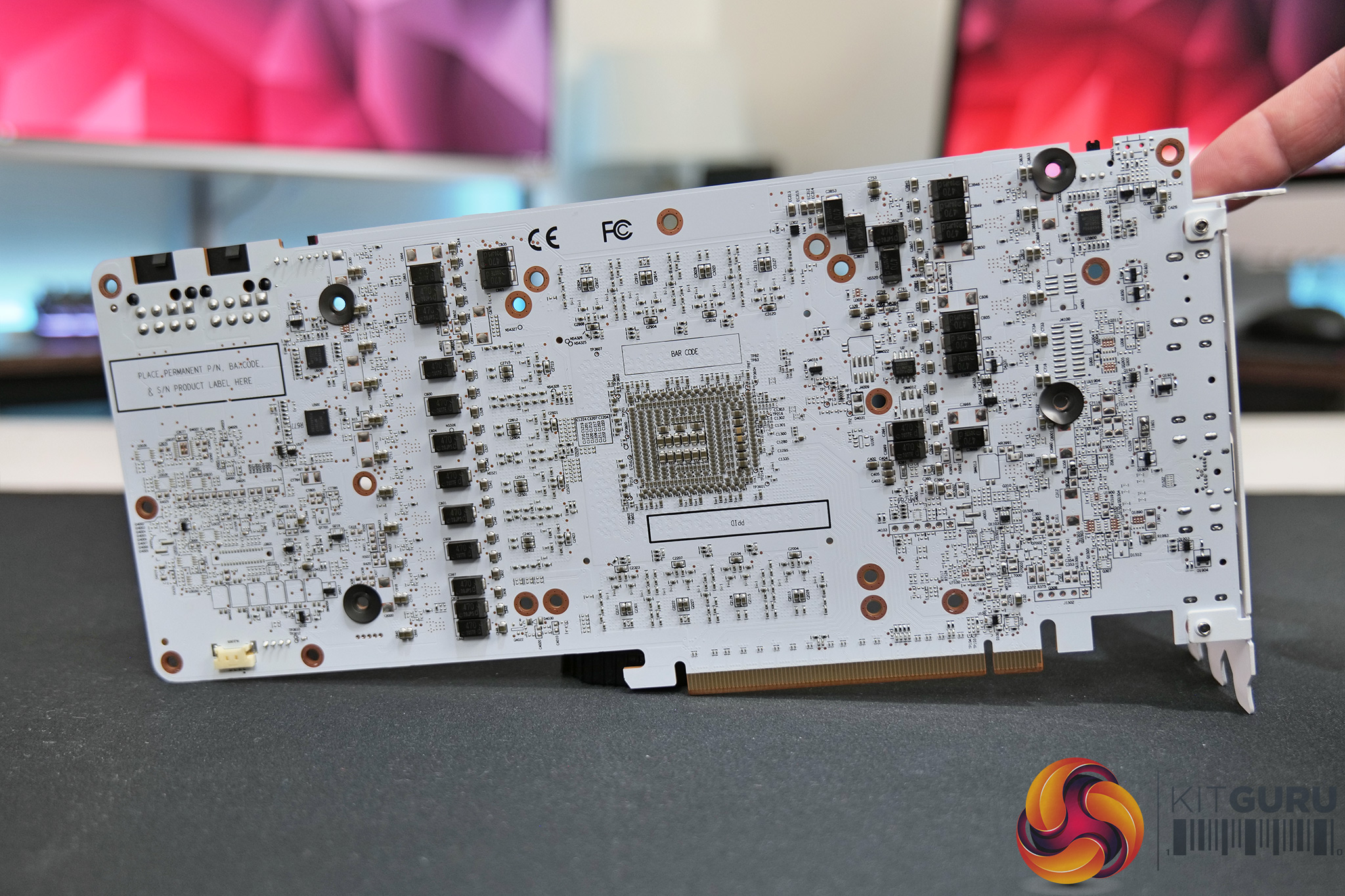
Moving onto the PCB, here PowerColor does not appear to have changed much compared to the reference design. We’re looking at a 17-phase VRM for the GPU and a 3-phase VRM for the memory, all using 70Amp Monolithic Power Systems MP87997 MOSFETs. The GPU VRM is controlled by a Monolithic MP2857, with an MP2856 controller handling the memory.
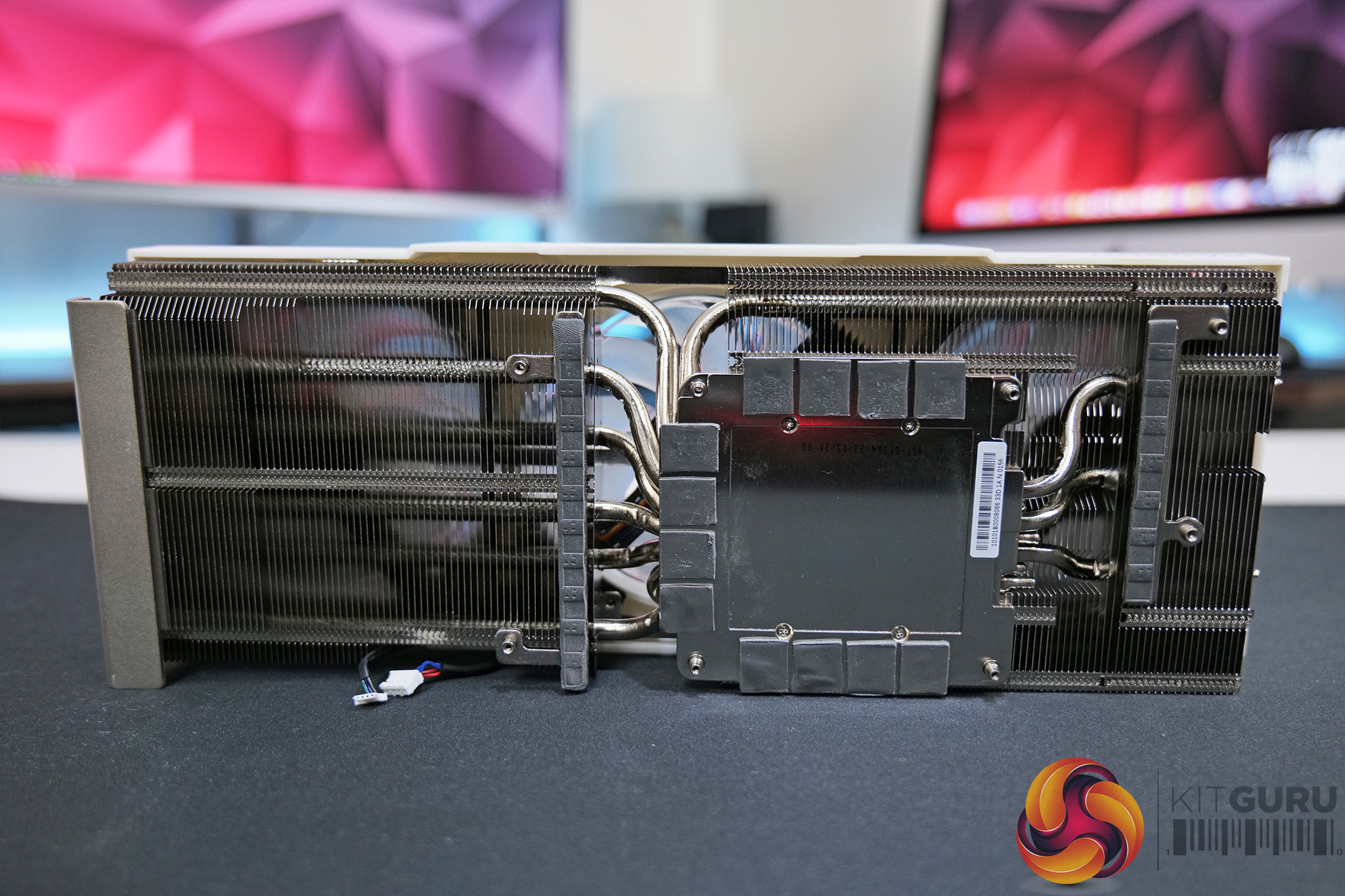
Then for the cooler, this is a tidy bit of work, with a total of two aluminium finstacks, connected by 8x 6mm heatpipes. The GPU makes contact with a plated copped baseplate, with an extra plate on top of that which contacts with the memory modules via thermal pads. Two separate plates are used to handle the VRM cooling.
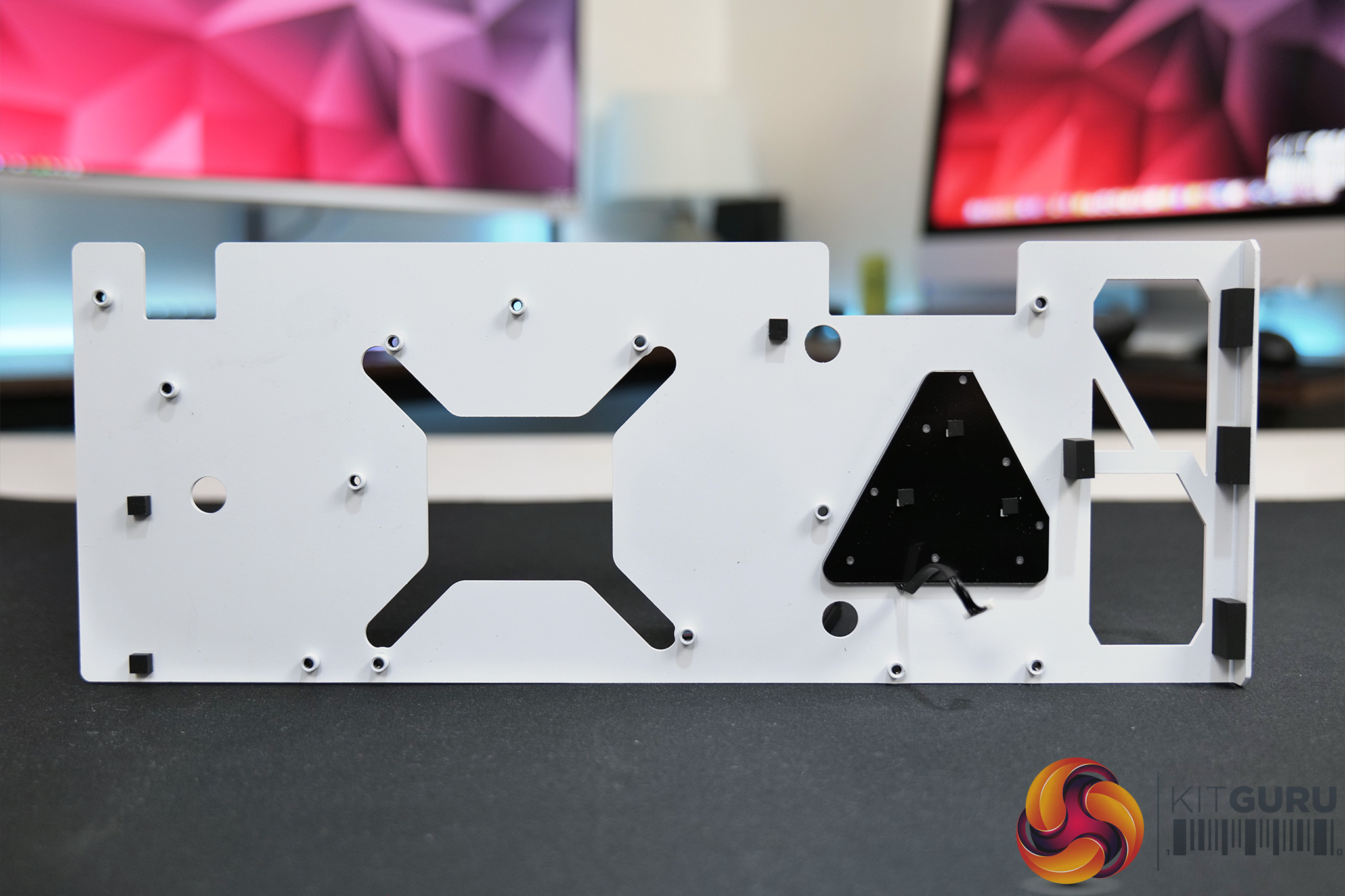
We can also note that PowerColor is not using any thermal pads on the back of the PCB backplate.
Driver Notes
- All AMD GPUs were benchmarked with the Adrenalin 23.3.2 driver.
- All Nvidia GPUs (except RTX 4070) were benchmarked with the 531.41 driver.
- RTX 4070 was benchmarked with the 531.42 driver supplied to press.
Test System:
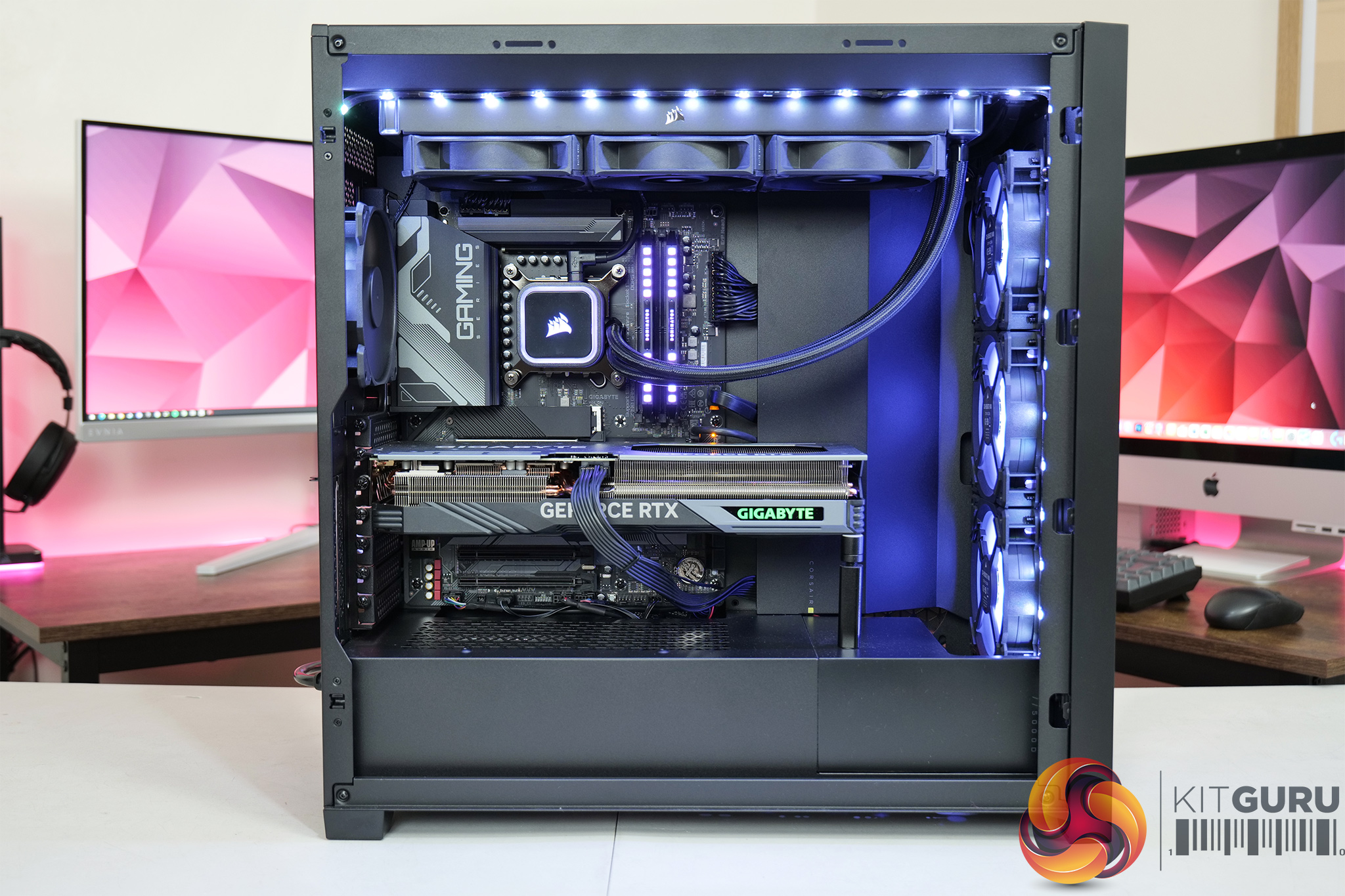
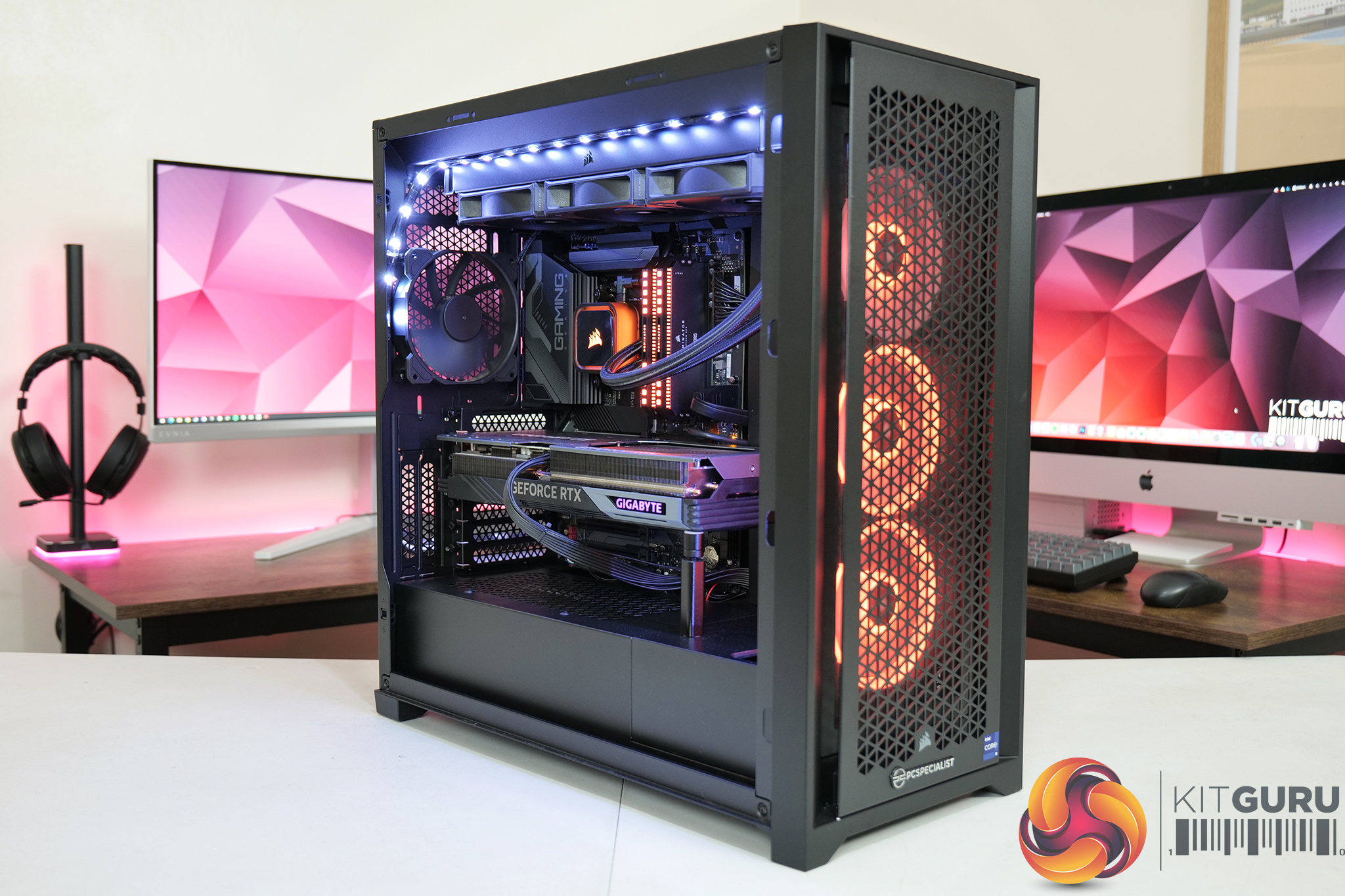
We test using a custom built system from PCSpecialist, based on Intel’s Raptor Lake platform. You can read more about this system HERE and configure your own PCSpecialist system HERE.
| CPU |
Intel Core i9-13900KS
|
| Motherboard |
Gigabyte Z790 Gaming X AX
|
| Memory |
32GB (2x16GB) Corsair Dominator Platinum RGB DDR5 6000MHz
|
| Graphics Card |
Varies
|
| SSD |
4TB Seagate Firecuda 530 Gen 4 PCIe NVMe
|
| Chassis | Corsair 5000D Airflow Tempered Glass Gaming Case |
| CPU Cooler |
Corsair iCUE H150i Elite RGB High Performance CPU Cooler
|
| Power Supply |
Corsair 1600W Pro Series Titanium AX1600i Digital Modular PSU
|
| Operating System |
Windows 11 22H2
|
| Monitor |
MSI Optix MPG321UR-QD
|
| Resizable BAR |
Enabled for all supported GPUs
|
Comparison Graphics Cards List
- AMD RX 7900 XT 20GB
- AMD RX 6900 XT 16GB
- AMD RX 6800 XT 16GB
- AMD RX 6800 16GB
- AMD RX 6700 XT 12GB
- Gigabyte RTX 4070 Ti Gaming 12GB
- Gigabyte RTX 3090 Ti Gaming 24GB
- Gigabyte RTX 3090 Eagle 24GB
- Gigabyte RTX 3080 Eagle 10GB
- Nvidia RTX 3070 Ti FE 8GB
- Nvidia RTX 3070 FE 8GB
- Nvidia RTX 2070 Super FE 8GB
All cards were tested at reference specifications.
Software and Games List
- 3DMark Fire Strike & Fire Strike Ultra (DX11 Synthetic)
- 3DMark Time Spy (DX12 Synthetic)
- 3DMark DirectX Raytracing feature test (DXR Synthetic)
- Assassin's Creed Valhalla (DX12)
- Control (DXR)
- Cyberpunk 2077 (DX12)
- Days Gone (DX11)
- Dying Light 2 (DX11)
- F1 22 (DXR)
- God of War (DX11)
- Hitman 3 (DXR)
- Horizon Zero Dawn (DX12)
- Marvel's Spider-Man Remastered (DX12)
- Metro Exodus Enhanced Edition (DXR)
- A Plague Tale: Requiem (DX12)
- Red Dead Redemption 2 (DX12)
- Resident Evil Village (DX12)
- Total War: Warhammer III (DX11)
- Uncharted 4: A Thief's End (DX12)
We run each benchmark/game three times, and present mean averages in our graphs. We use FrameView to measure average frame rates as well as 1% low values across our three runs.
3DMark Time Spy is a DirectX 12 benchmark test for Windows 10 gaming PCs. Time Spy is one of the first DirectX 12 apps to be built the right way from the ground up to fully realize the performance gains that the new API offers. With its pure DirectX 12 engine, which supports new API features like asynchronous compute, explicit multi-adapter, and multi-threading, Time Spy is the ideal test for benchmarking the latest graphics cards. (UL).
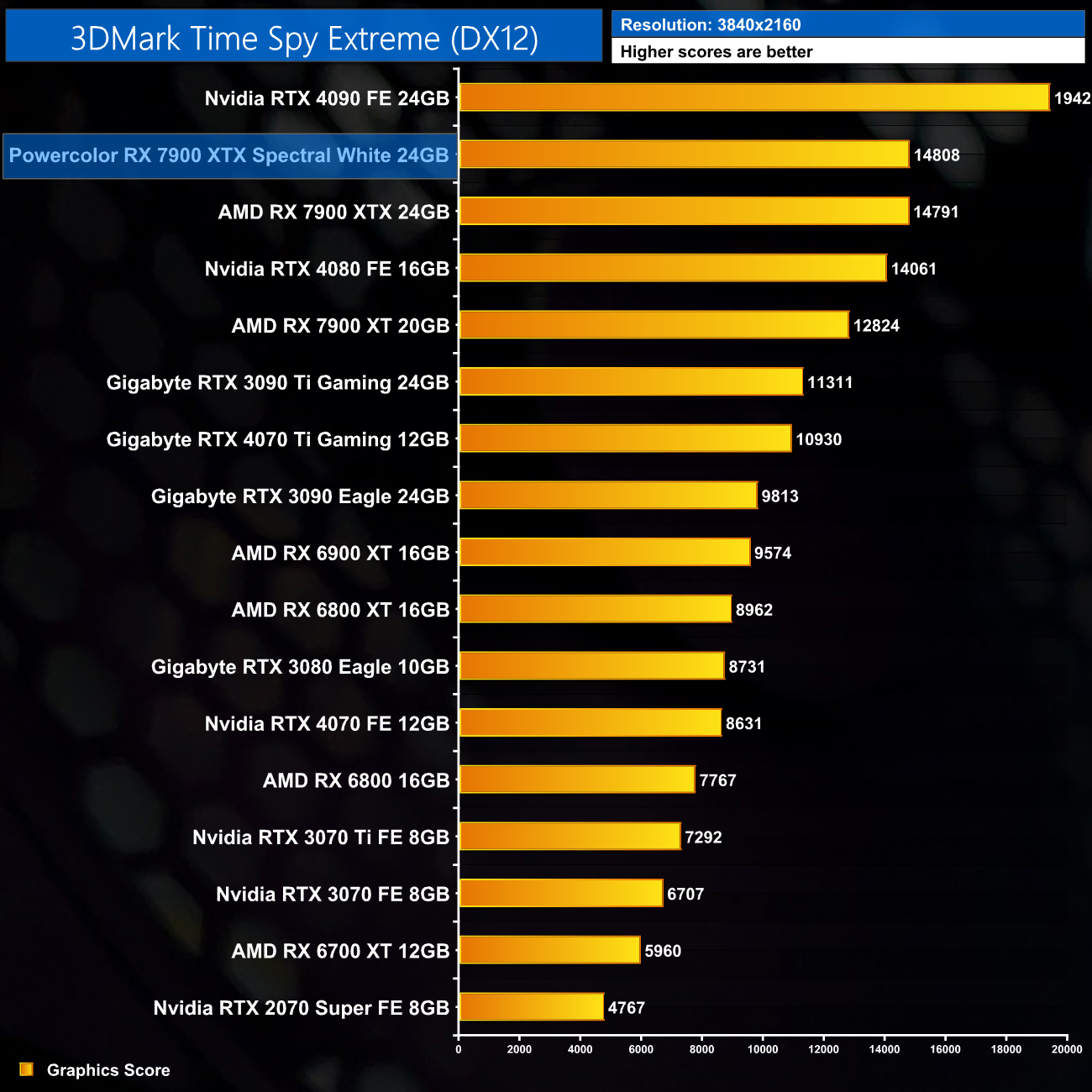
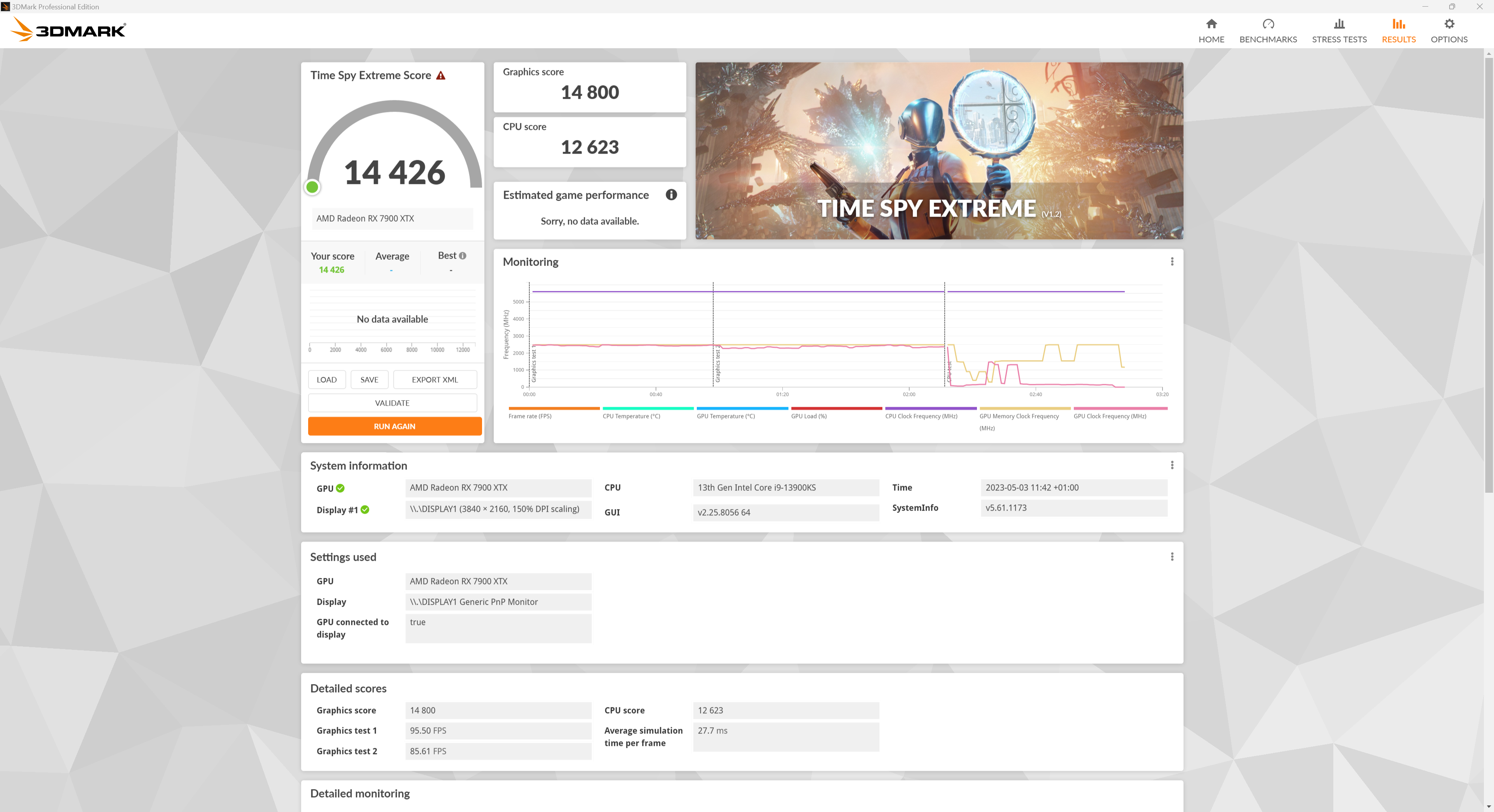
Getting our first look at performance, there is next to no difference between the Spectral White and the reference 7900 XTX – we're talking a margin of less than 20 points in 3DMark Time Spy Extreme.
Here we test five games, all at 3840×2160 resolution using maximum image quality settings.
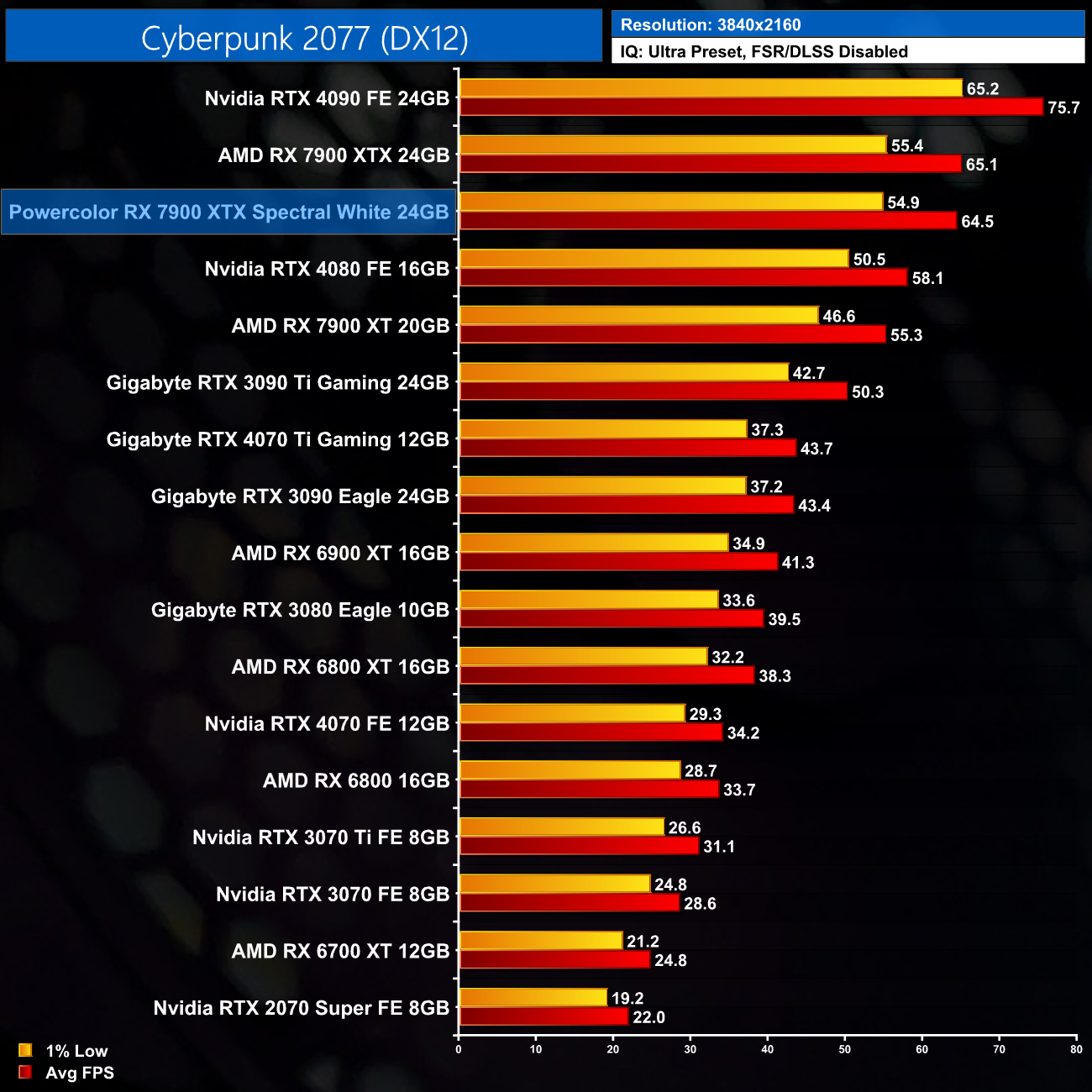
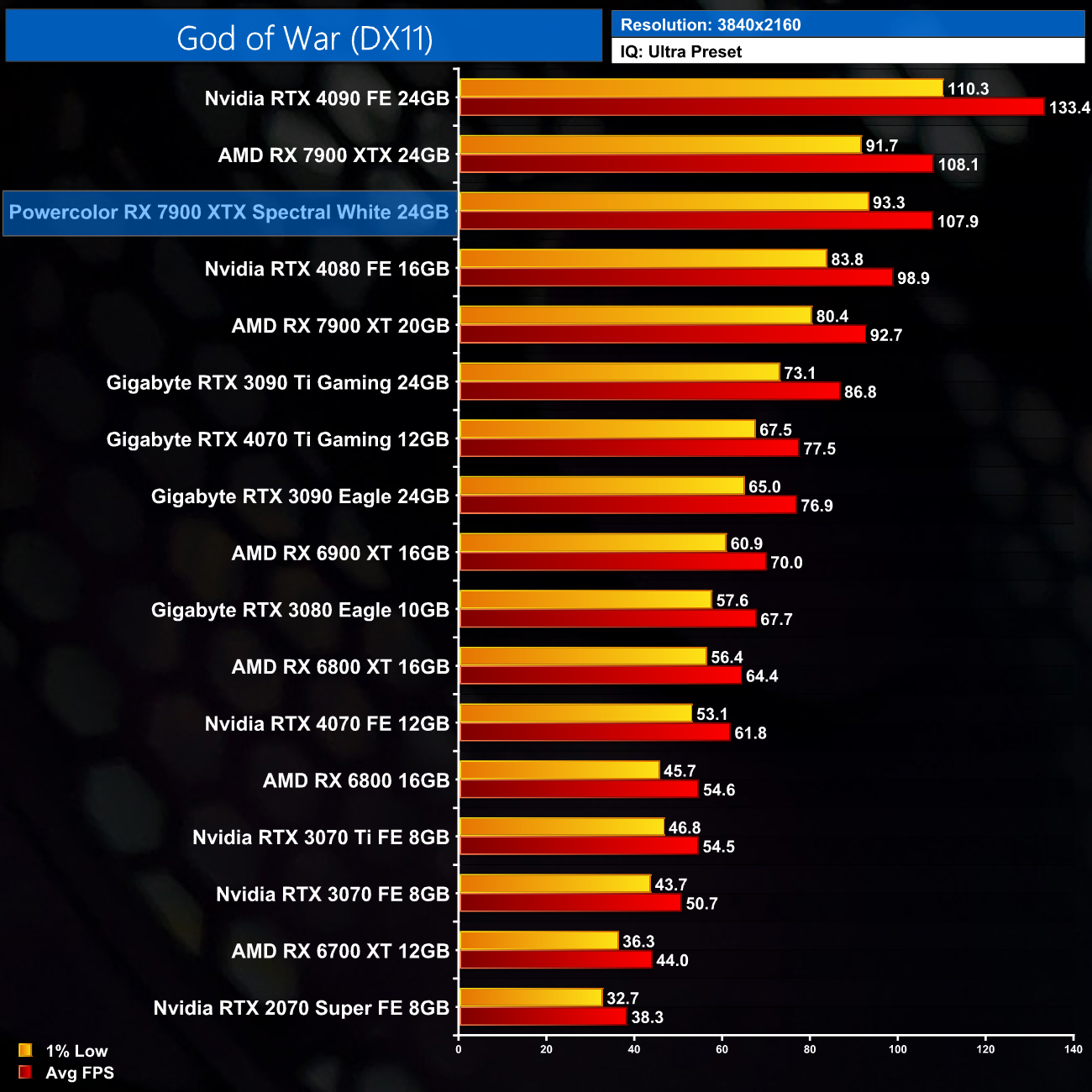
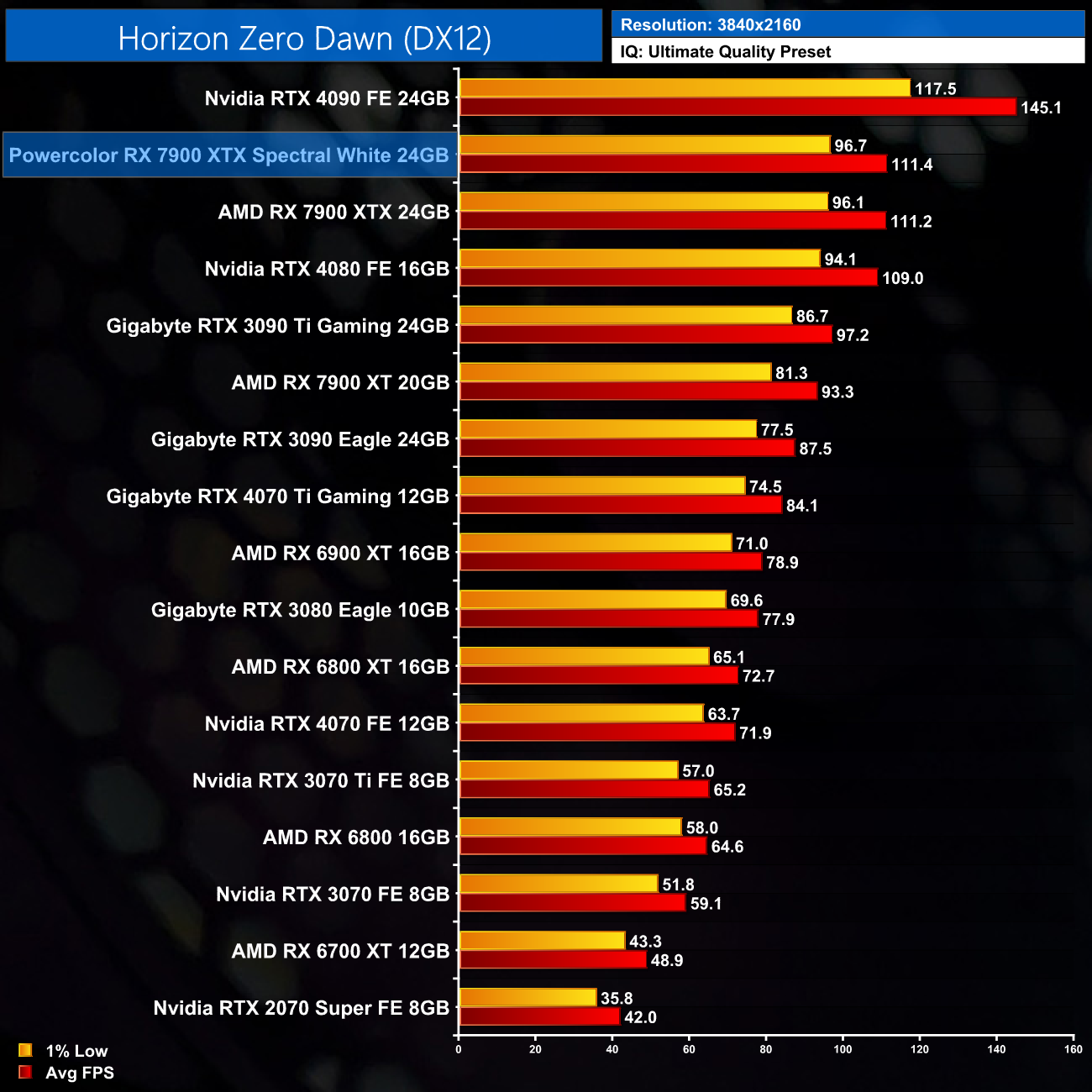
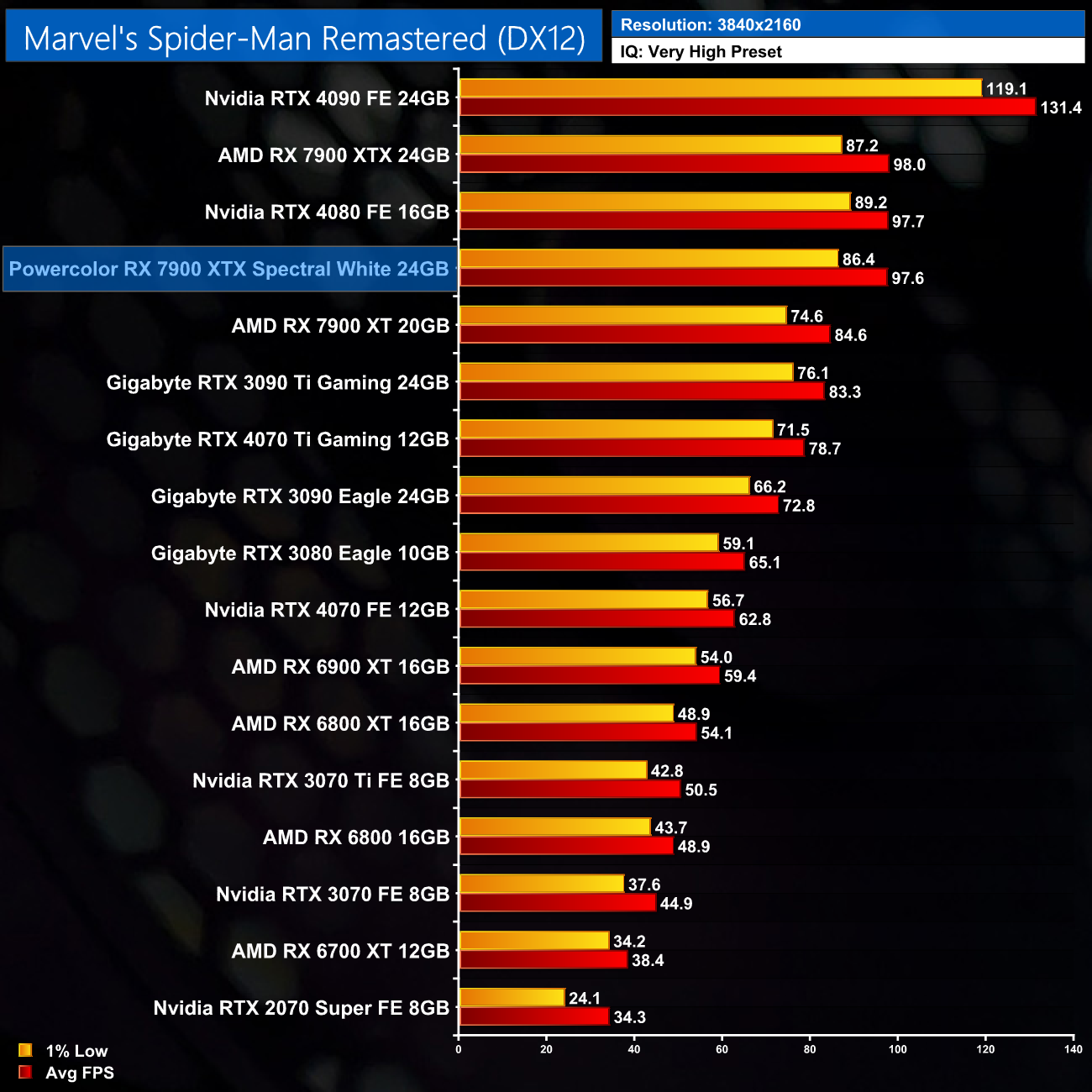
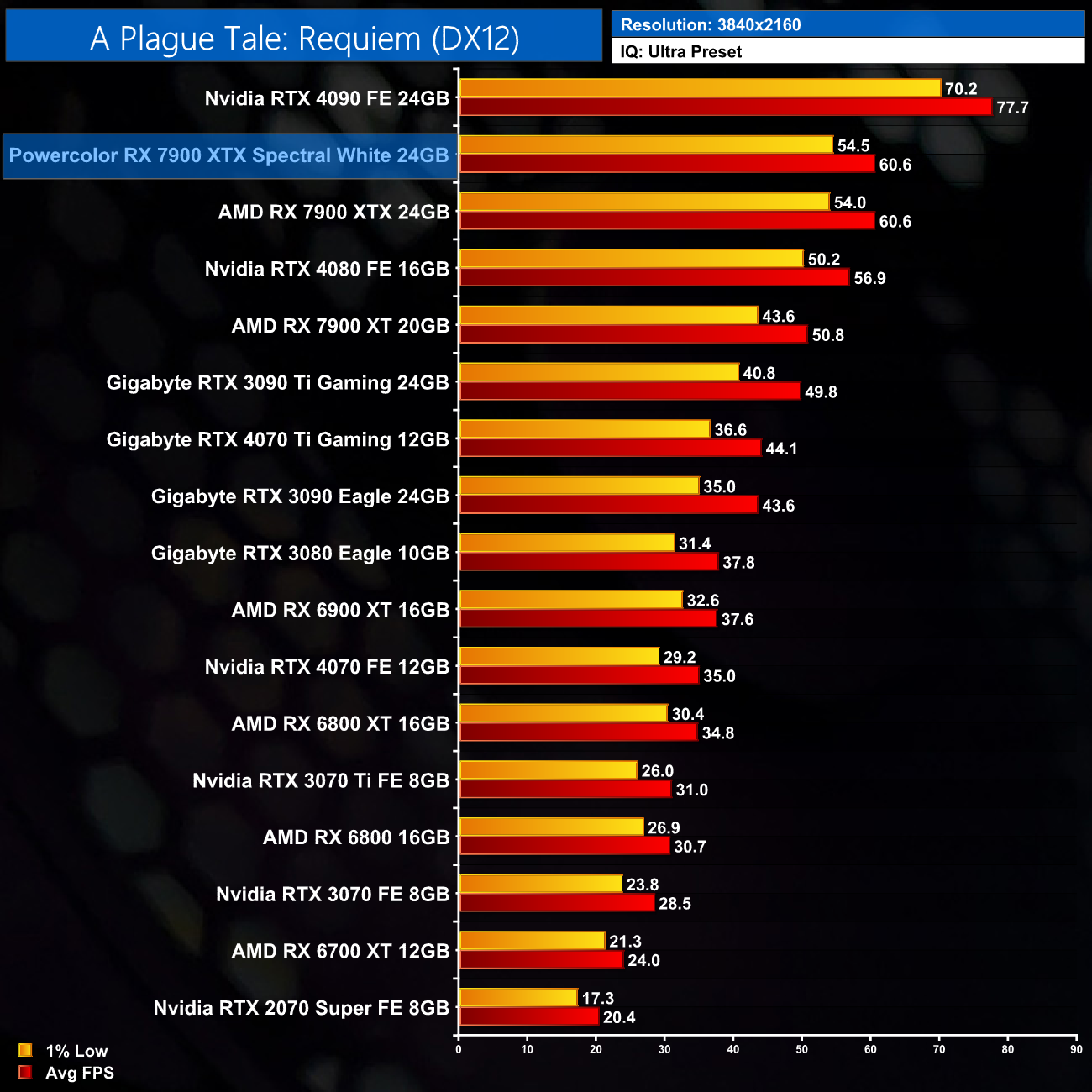
The reason why game benchmarks are less of a focus for us in an AIB review, compared to our launch day coverage, quickly becomes clear when looking at the above charts – there’s basically no difference between the Spectral White and AMD reference card in terms of frame rates. In actual fact, over the 5 games I benchmarked, I didn’t see a difference of more than a single frame, so the gaming experience is absolutely identical between the two. That’s been the case for a while now, but at the end of the day, this 7900 XTX performs like a 7900 XTX should, so we have no complaints – just don’t expect big performance gains out of the box versus the reference card.
Here we present the average clock speed for each graphics card while running Cyberpunk 2077 for 30 minutes. We use GPU-Z to record the GPU core frequency during gameplay. We calculate the average core frequency during the 30-minute run to present here.
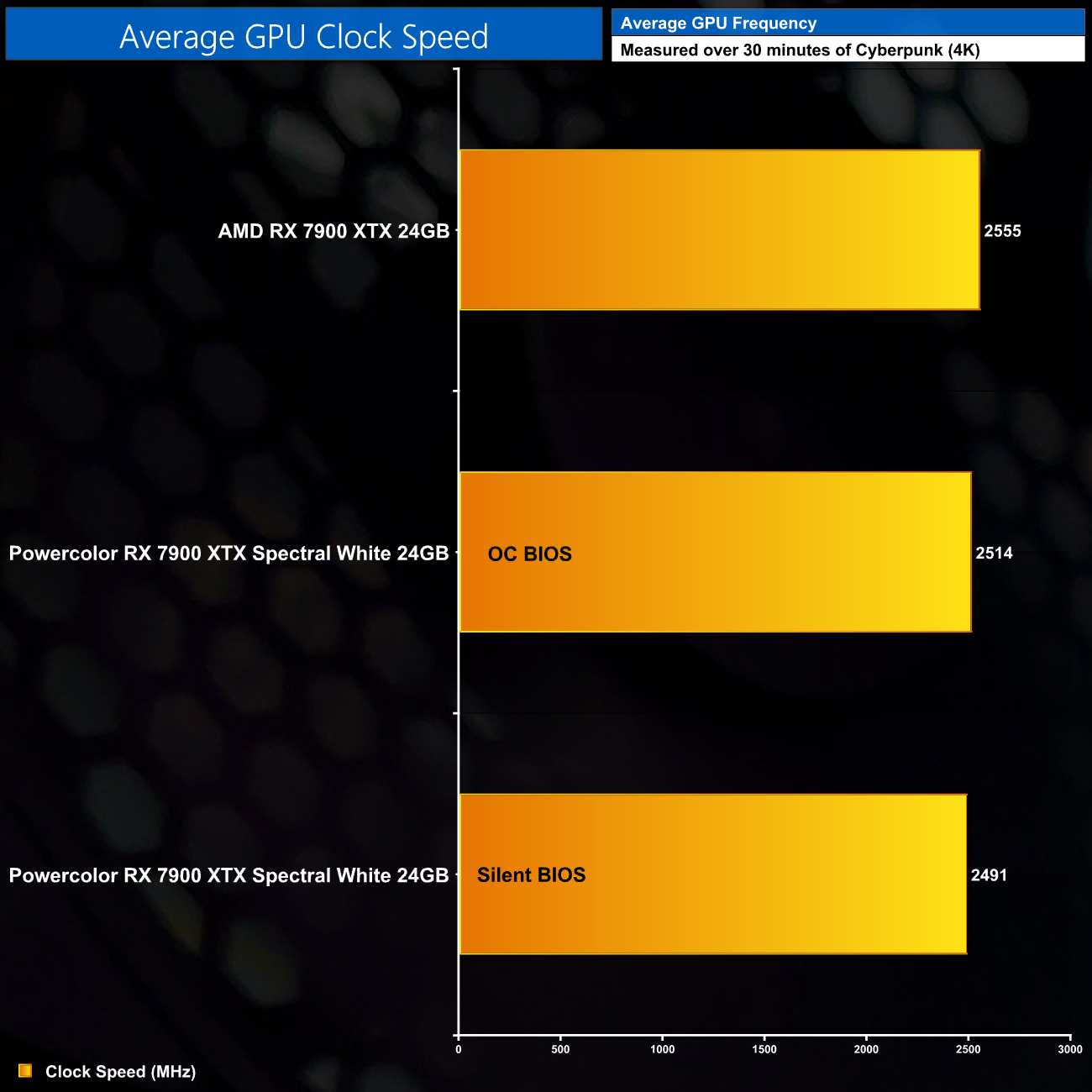
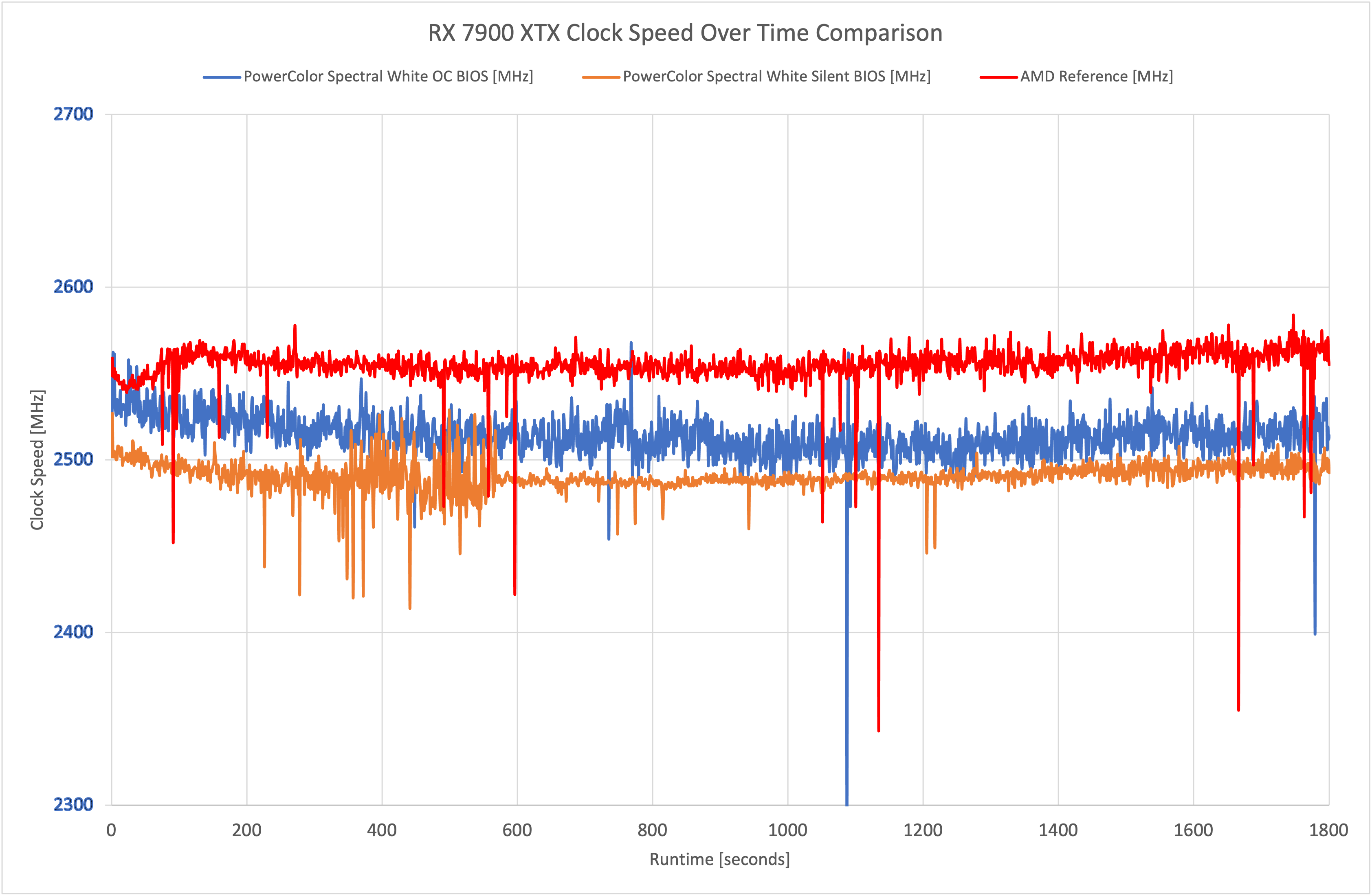
Looking now at clock speed, it was interesting to see that the Spectral White actually came in a fraction slower than AMD’s reference card. Not by much, but over the 30-minute stress test, the OC mode averaged 2514MHz, compared to 2555MHz for the reference card, while the Spectral White Silent BIOS came in at 2490MHz. These are very fine margins though, and explain why gaming performance is so close between the two cards.
For our temperature testing, we measure the peak GPU core temperature under load. A reading under load comes from running Cyberpunk 2077 for 30 minutes.
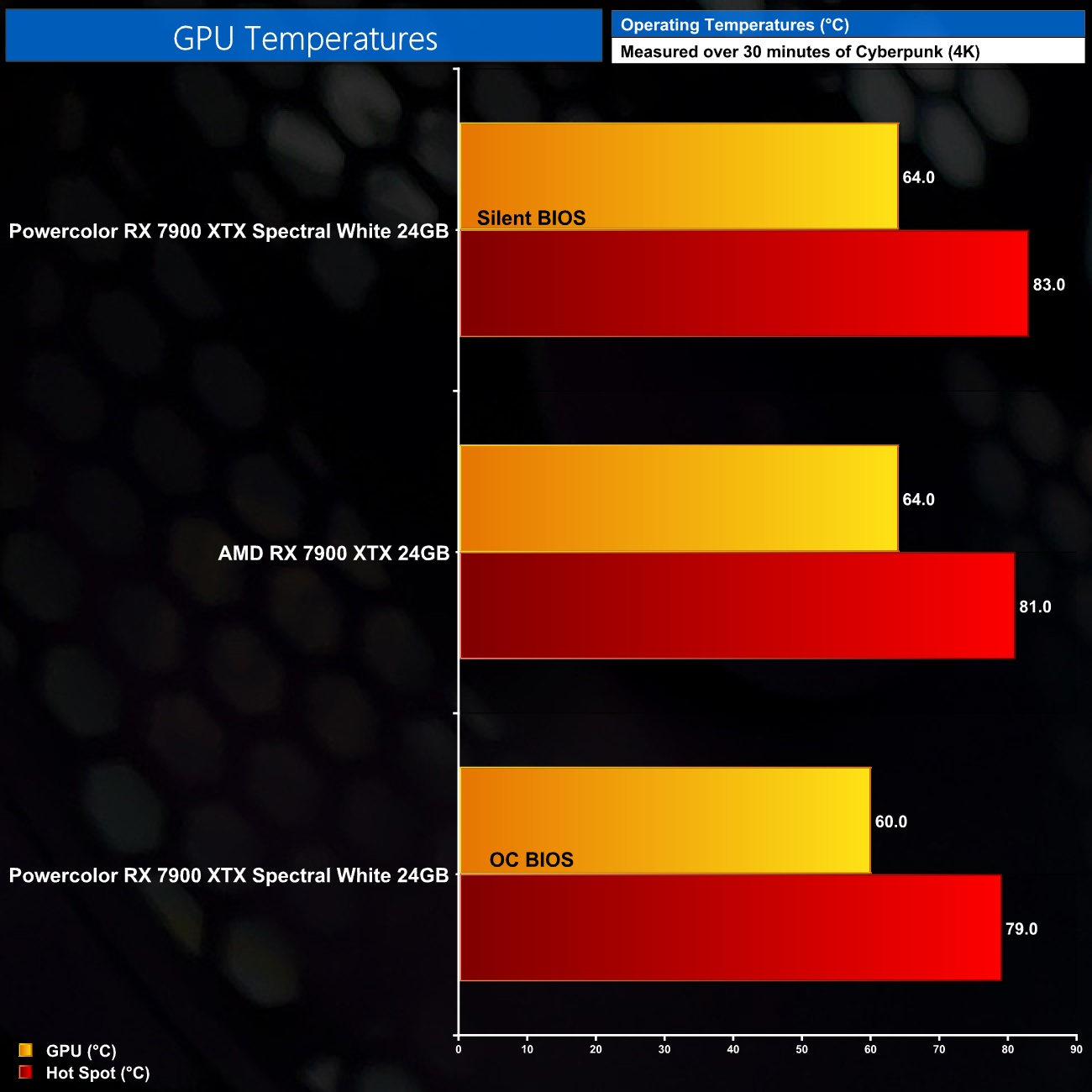
In terms of thermal performance, as we would expect, the Spectral White’s OC BIOS does run a bit cooler than AMD's reference card, with the GPU temperature hitting 60C, and the hot spot – also known as the junction temperature – coming in at 79C. The Silent BIOS runs 4C hotter in terms of both the GPU and hot spot metrics, with very similar thermal results to the reference card.
We take our noise measurements with the sound meter positioned 1 foot from the graphics card. I measured the noise floor to be 32 dBA, thus anything above this level can be attributed to the graphics cards. The power supply is passive for the entire power output range we tested all graphics cards in, while all CPU and system fans were disabled. A reading under load comes from running Cyberpunk 2077 for 30 minutes.
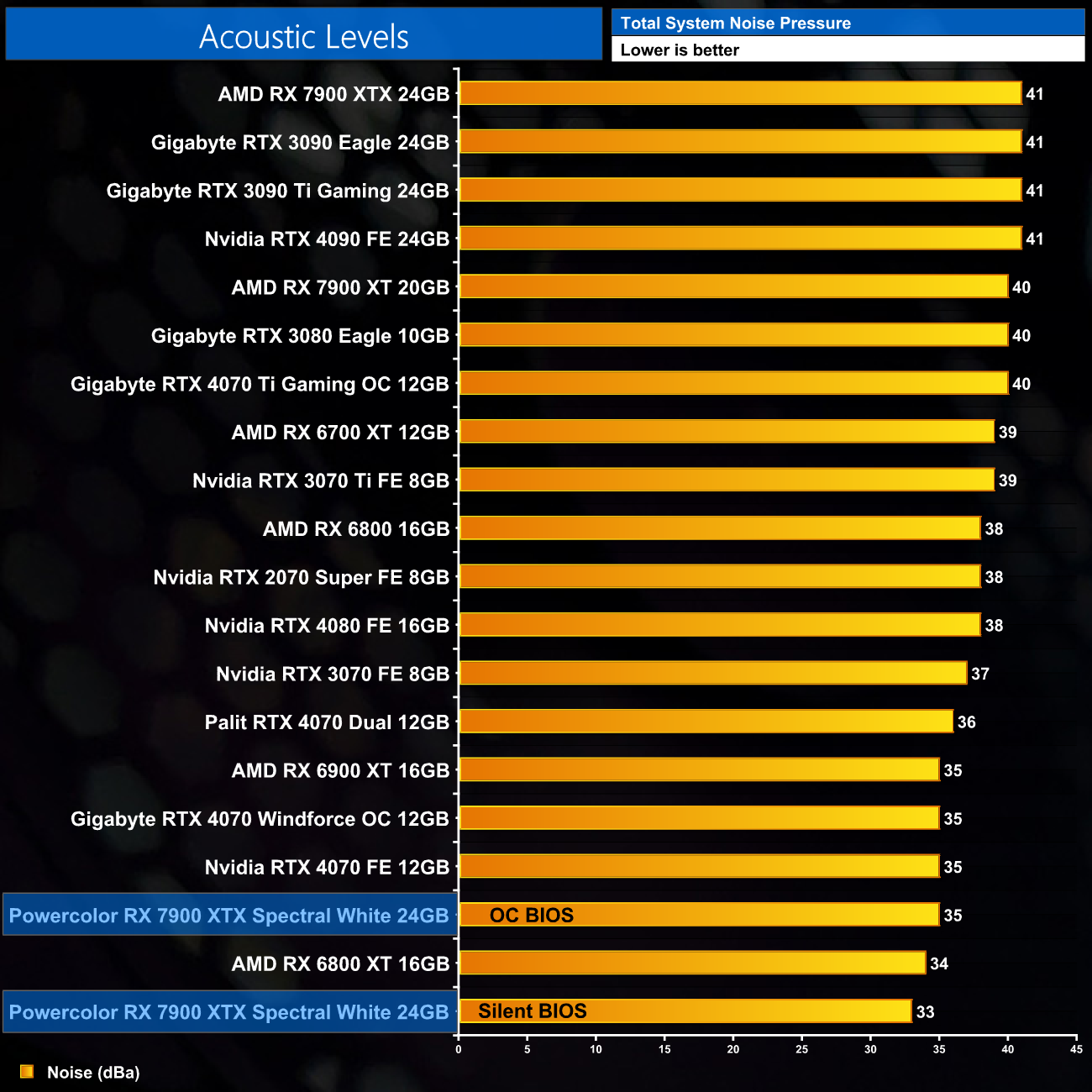
The Spectral White may not run massively cooler than AMD’s own design, but the real benefit comes in terms of noise levels. The OC BIOS operated the fans at 42%, or just 1200rpm, producing 35dBa on my sound meter, which is already a huge reduction in noise against the reference card. Switch to the Silent BIOS however, and fan speed drops to 37%, a mere 1000rpm, producing noise that measured in at just 33dBa.
Unfortunately though I did notice a bit of coil whine on my sample that was just about noticeable over the fan noise. It was worse in in-game loading screens and menus where frame rates are uncapped, but it was still audible while actually gaming – be sure to check out the sound test in our video review.
Following on from our stock thermal and acoustic testing, here we re-test the operating temperature of the GPU, but with noise levels normalised to 40dBa. This allows us to measure the efficiency of the overall cooling solution as varying noise levels as a result of more aggressive fan curves are no longer a factor.
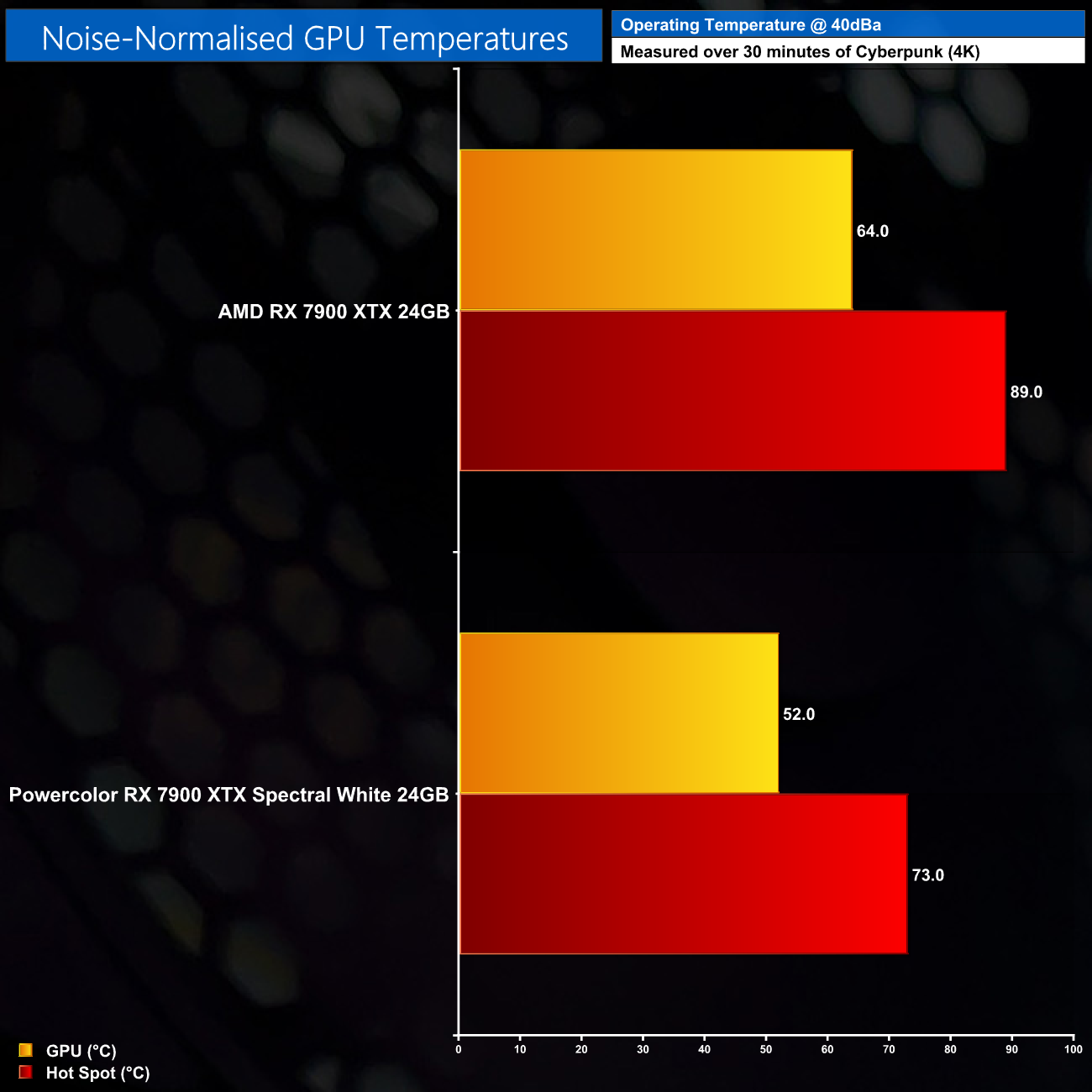
Moving onto noise normalised thermals, for this testing we had to increase fan speed up to 53%, or about 1675rpm, to hit 40dBa of noise. Unsurprisingly, the Spectral White really shines against the reference card here, with the GPU temperature peaking at just 52C, while the hot spot temperature hit 73C – a massive 16 degree reduction compared to AMD’s own card. The Spectral White is clearly just a much more efficient cooler.
We use Nvidia PCAT to measure power draw of the graphics card only, with readings from both the PCIe slot and the PCIe power cables combined into a single figure. We use Cyberpunk 2077 (4K) for this testing.
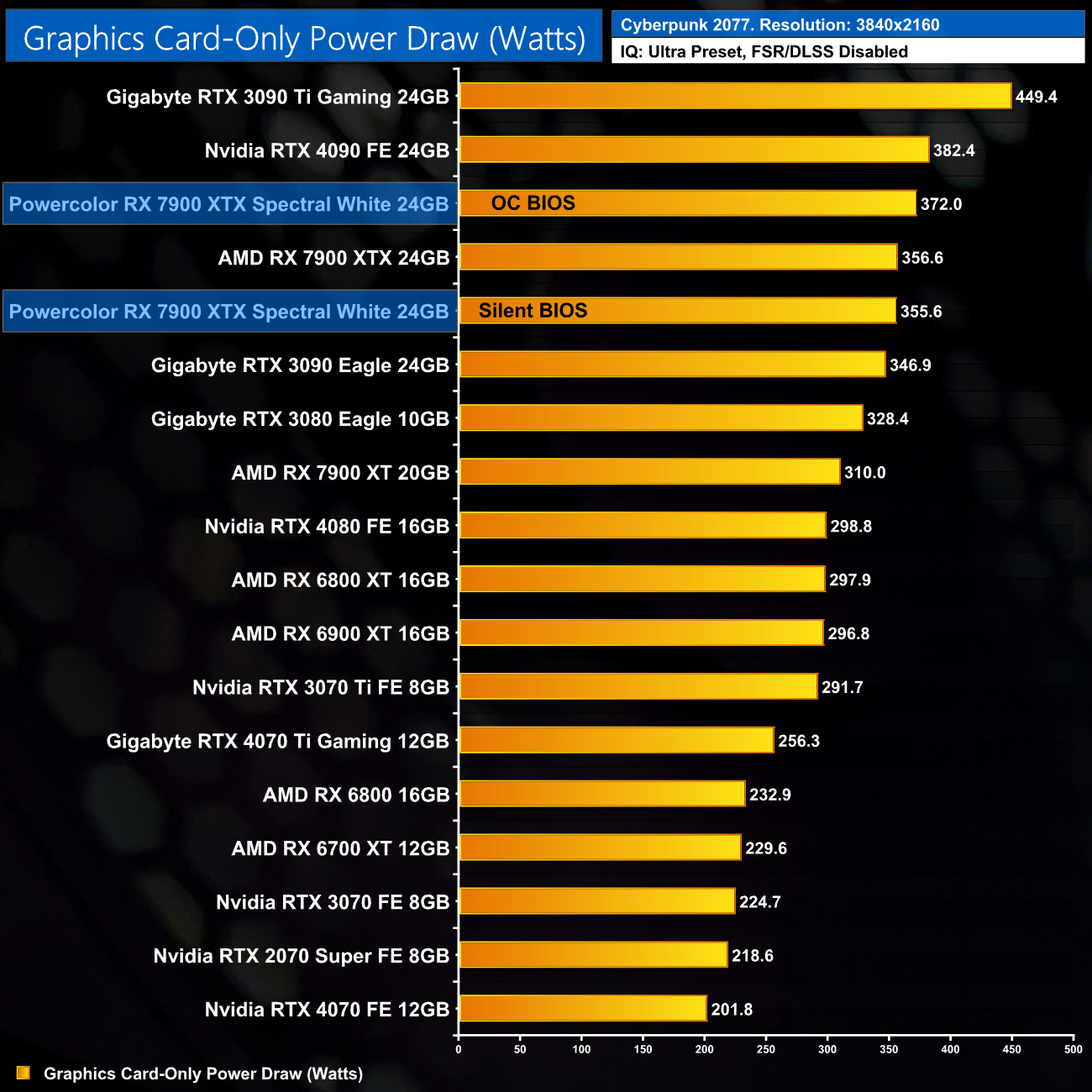
As expected, we can see a slightly higher power draw when using the OC BIOS, averaging 372W in Cyberpunk 2077. That’s about a 16W increase over stock, though the Silent BIOS is dead level with the reference card, drawing just under 356W power.
For our manual overclocking tests, we used AMD's performance tuning tool within the Adrenalin driver. Our best results are as below.
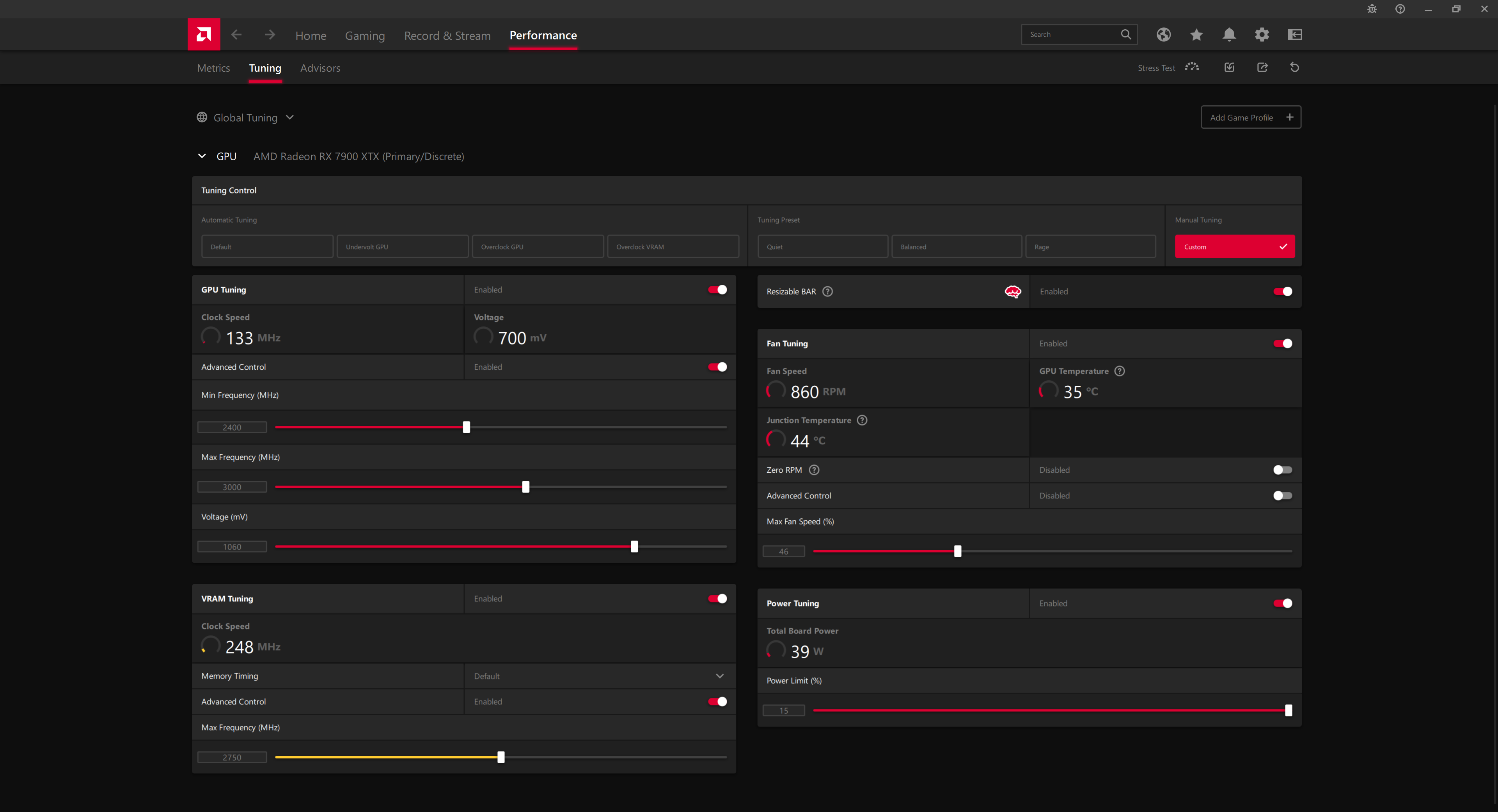
Undervolting is absolutely crucial for the 7900 XTX if you want to improve performance, and at 1060mv, we were able to push the core to 3000MHz, and set the memory to 2750MHz.
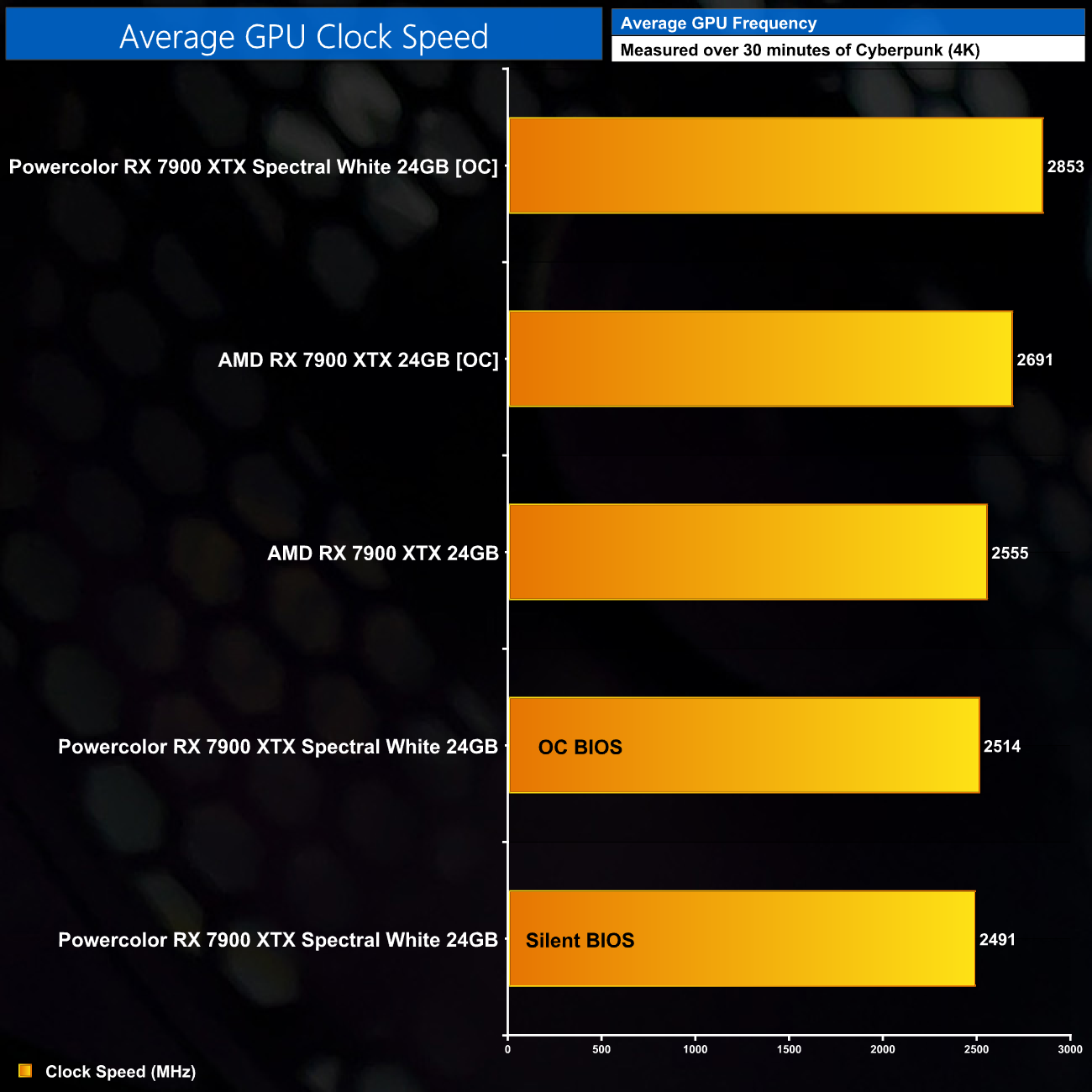
This saw real world GPU clock speeds increase up to 2853MHz, a 13% improvement over stock frequency.
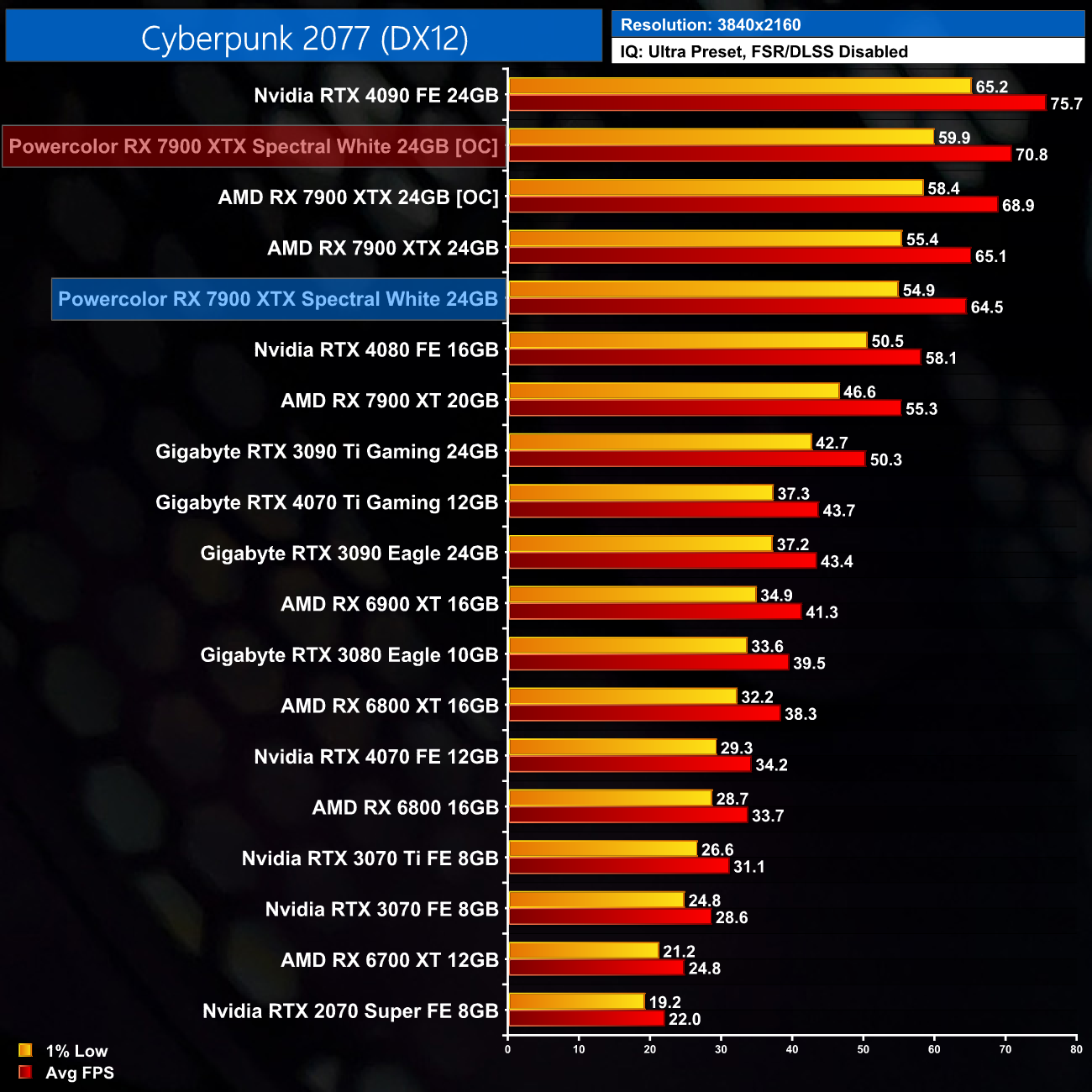
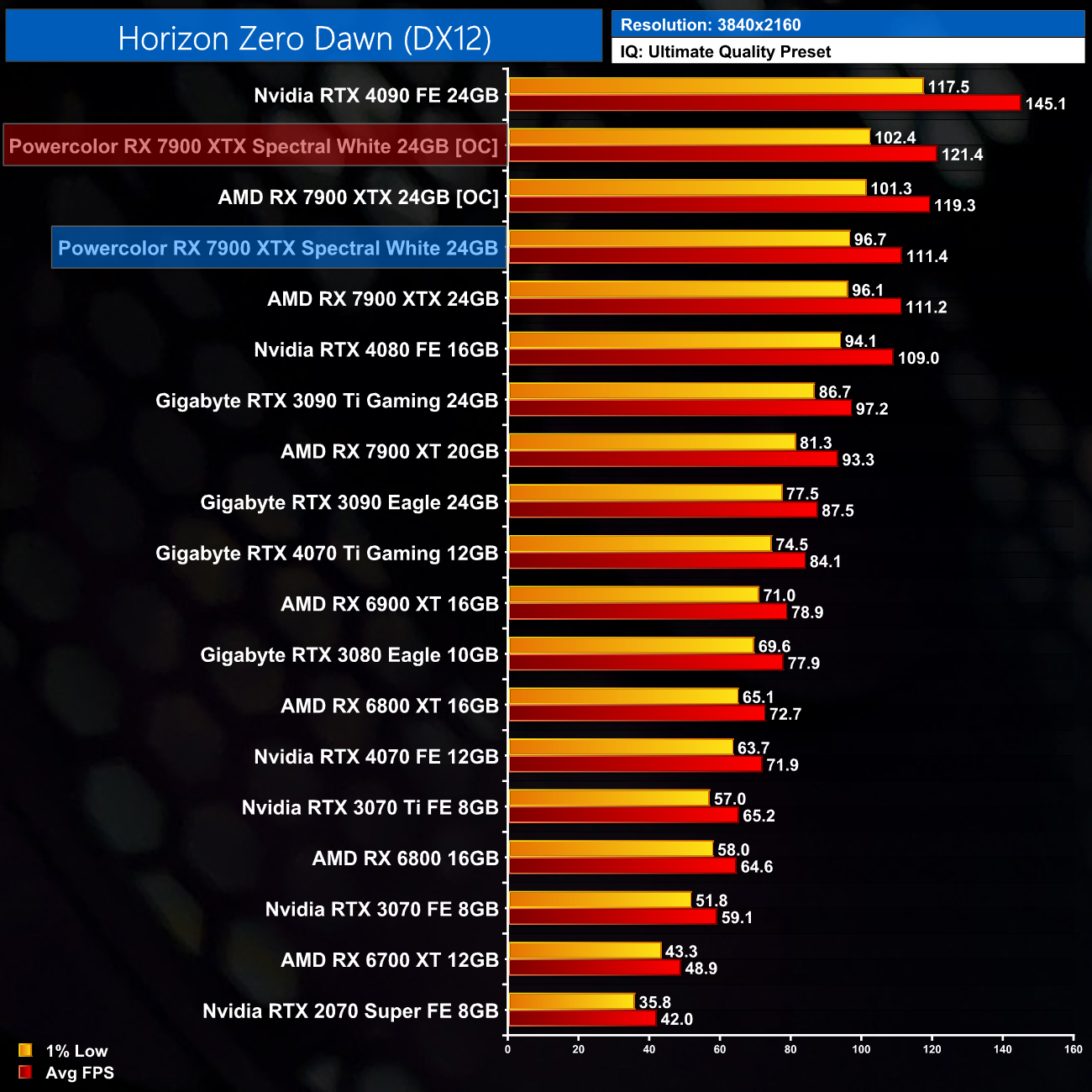
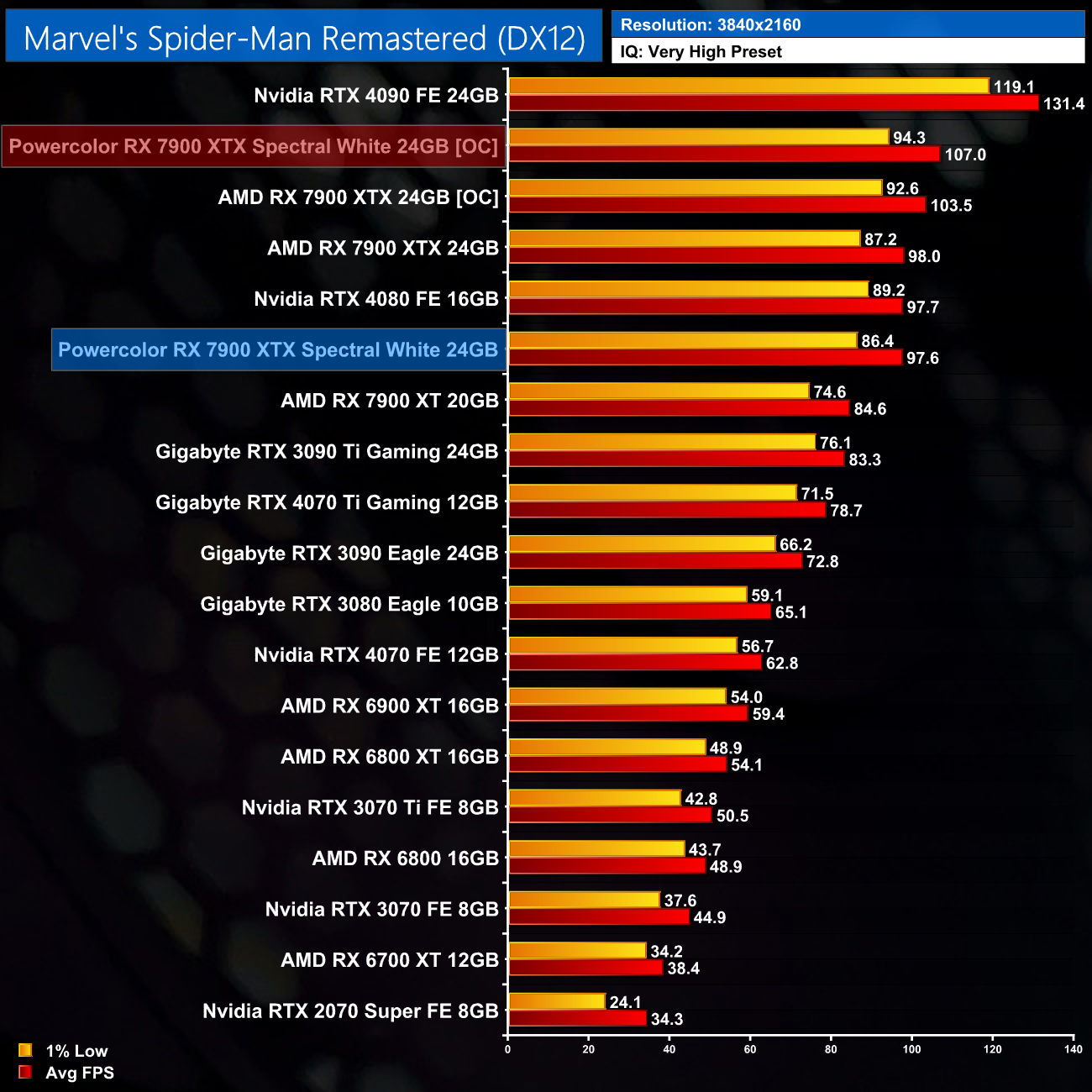
As you can expect, couple the GPU overclock with the memory overclock, and we saw our frame rates improve by between 9-10% in the titles we retested, which really isn’t bad at all. Admittedly It’s not a massive game changer and the 7900 XTX will still be slower than a stock RTX 4090, but as overclocking goes on modern GPUs, it’s pretty decent.
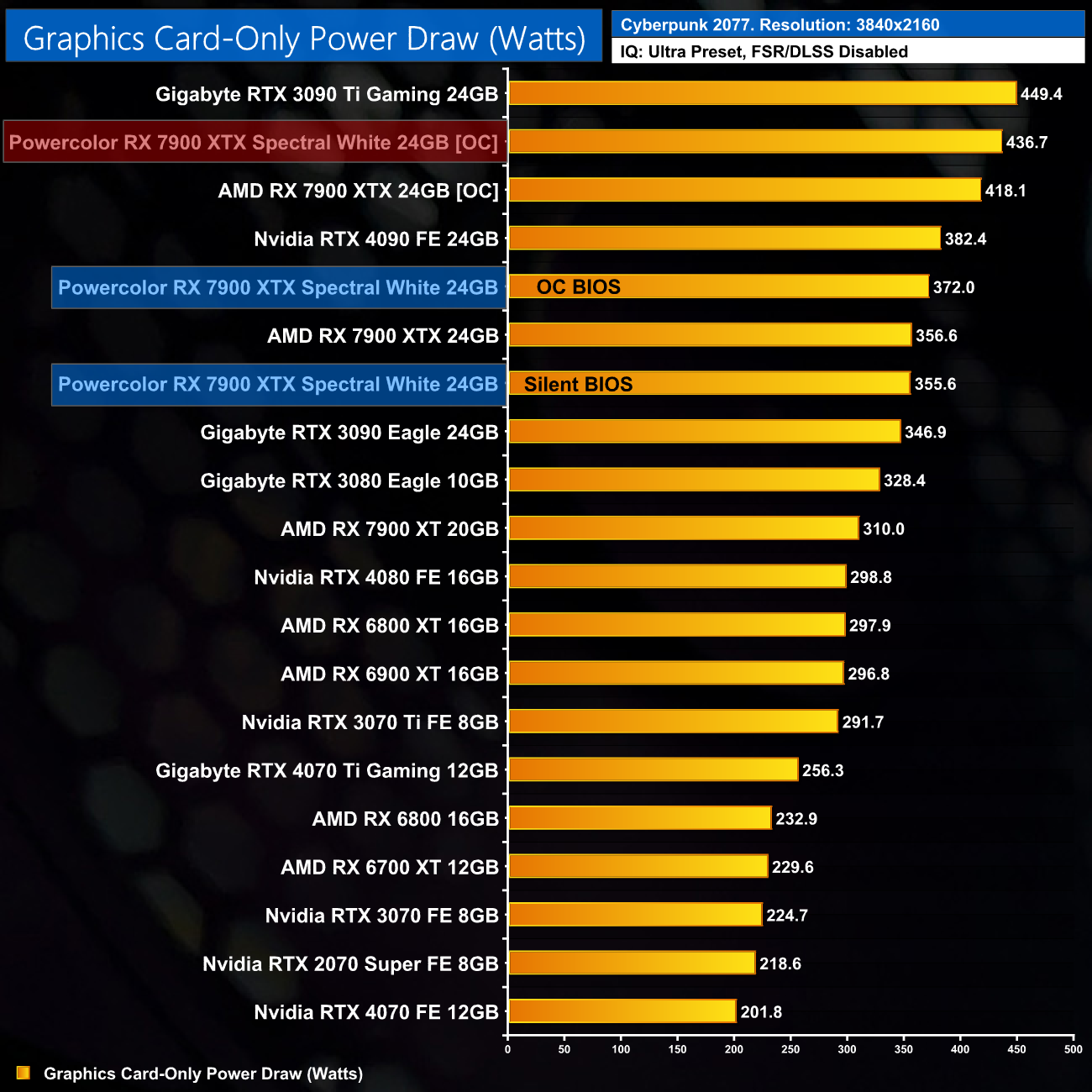
The only downside is that power draw increases further, now averaging just under 437W, which is a 17% increase over stock.
It's been a while since I last reviewed a PowerColor graphics card but I am impressed with what they have achieved with the Hellhound Spectral White 7900 XTX. Clearly a large amount of its appeal comes down to the all-white aesthetic, which alone is guaranteed to get it some attention.
PowerColor hasn't neglected the cooler though, as the heatsink and triple-fan setup is more than adequate for dealing with the 370W load. Noise-normalised thermals are also miles better than what AMD's reference card can achieve, while out-of-the-box noise levels are very easy on the ears with the Silent BIOS running the fans at just 1000rpm.
We do have a few minor quibbles with the Spectral White, primarily the amount of coil whine which was noticeable while gaming. It's important to remember that this can vary from card to card, and it is also affected by the PSU. My only other minor gripe is that I would have preferred to see proper RGB lighting instead of just a white and blue LED toggle, but maybe that's just me.
Ultimately, it all comes down to pricing, with the Spectral White listed for £1049.99 on Ebuyer at the time of writing. RTX 4080 is the obvious competition here, and with those GPUs now on sale for £1130, or even less, it's a close fought battle. RX 7900 XTX is typically equal to or slightly faster in rasterised titles, but RTX 4080 has the upper hand when it comes to ray tracing, while also offering support for DLSS 2 and DLSS 3 technologies.
With that in mind, PowerColor could stand to benefit by reducing the price of the card to, say, £999, which would be very competitive. Even as things stand though, the Hellhound Spectral White 7900 XTX is a solid option and it will certainly appeal to anyone looking to build an all-white gaming PC this year.
You can pick one up for £1049.99 from Ebuyer HERE.
Pros
- Lovely design.
- Noised-normalised thermal performance is miles better than AMD's reference design.
- Very low noise levels.
- Overclocked and undervolted well.
- Dual-BIOS.
Cons
- No RGB – just a choice of white or blue LEDs.
- Coil whine was audible while gaming.
- RTX 4080 provides stiff competition.
KitGuru says: The card itself is a solid piece of work, but clearly the Hellhound Spectral White is all about the appearance.