KitGuru KitGuru.net – Tech News | Hardware News | Hardware Reviews | IOS | Mobile | Gaming | Graphics Cards


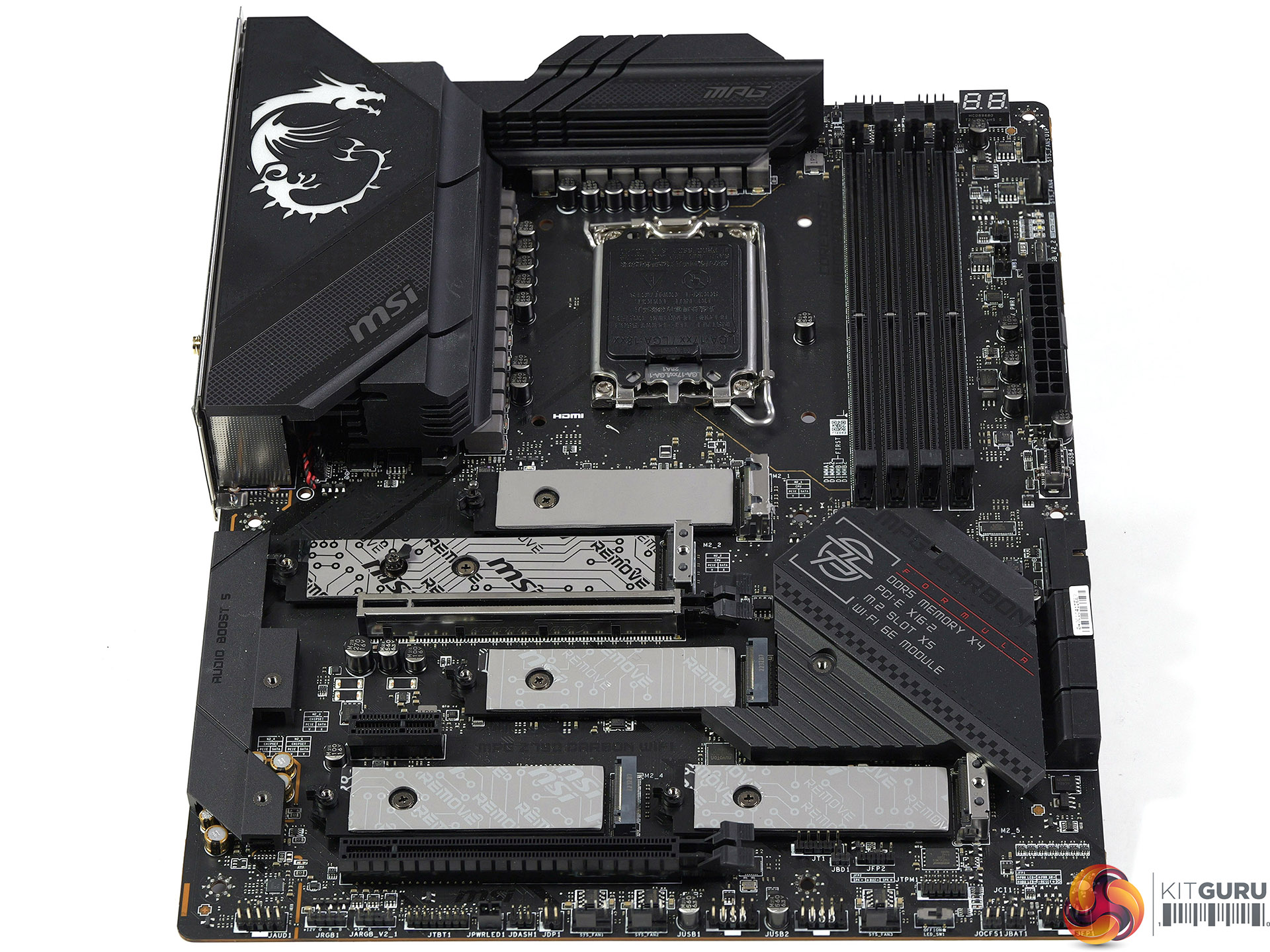
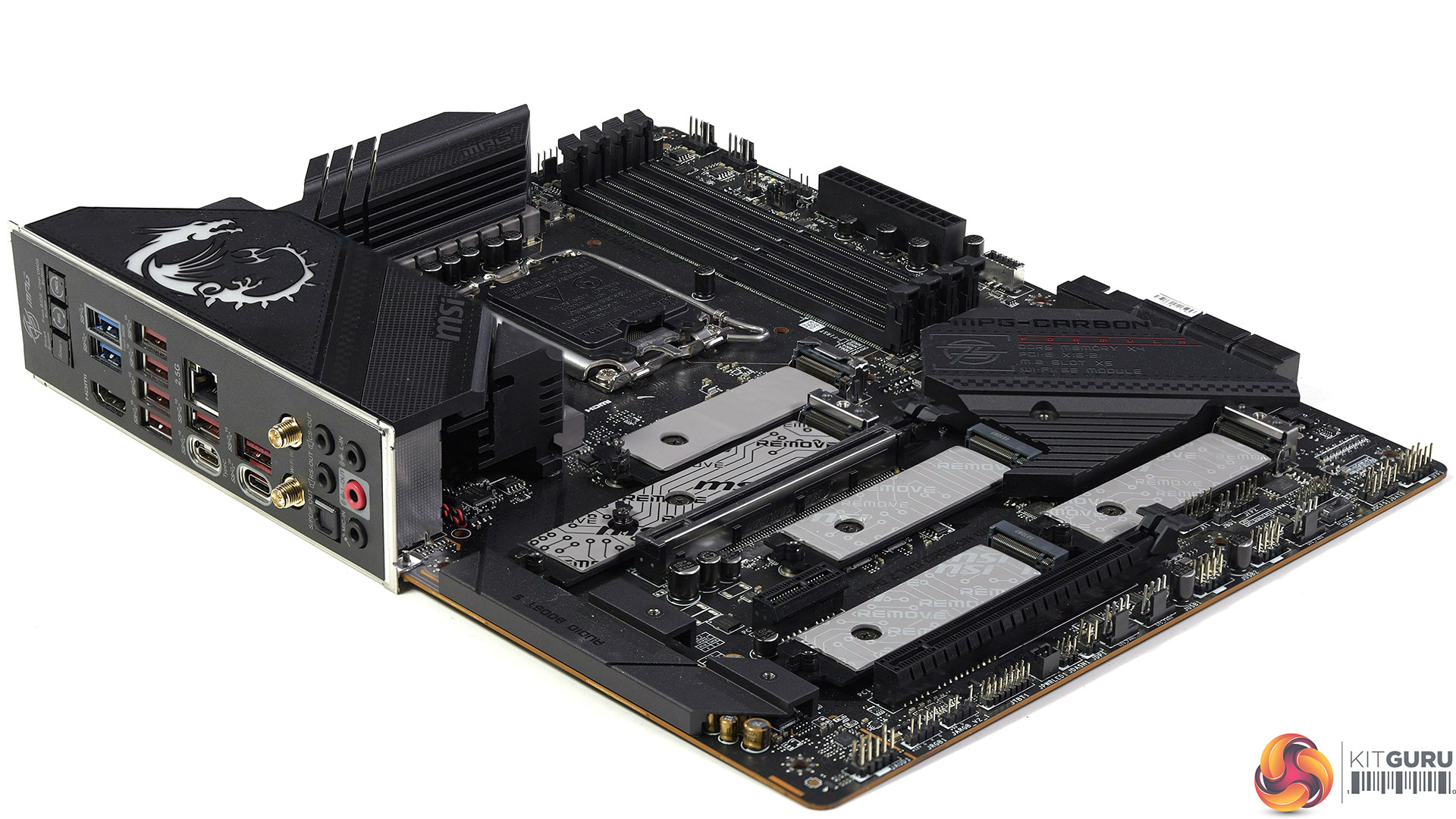
A mighty CPU such as the Intel Core i9-13900K deserves a mighty motherboard and that is a legitimate description of the MSI MPG Z790 Carbon WiFi with its five M.2 slots and 19-phase VRM to power the CPU. The question we are asking here is whether or not it lives up to its promise…
Time stamps
00:00 Start
00:59 A tour of the board
03:49 Rear I/O and power buttons
05:13 VRM’s
05:52 Hardware test configuration
07:30 BIOS / Package Power 300W
08:20 Leo’s (important!) BIOS changes
09:17 Checking with a 13700k
10:09 Performance test results / power
12:15 Game results
16:05 Closing Thoughts
In our reviews we always push you to watch our videos, however this time it is extra-special-important. We start our video by showing the default behaviour of the MSI MPG Z790 Carbon WiFi on Auto settings as it uses a very high Vcore that causes the CPU to thermally throttle in CPU tests. We then adjusted the BIOS, establish some manual settings and proceed to show an A-to-B comparison. The TLDR is that we improved the situation significantly. At the time of writing we have tested this motherboard with BIOS versions 1.30, 1.40 and 1.50 and consider them to be equally inadequate.
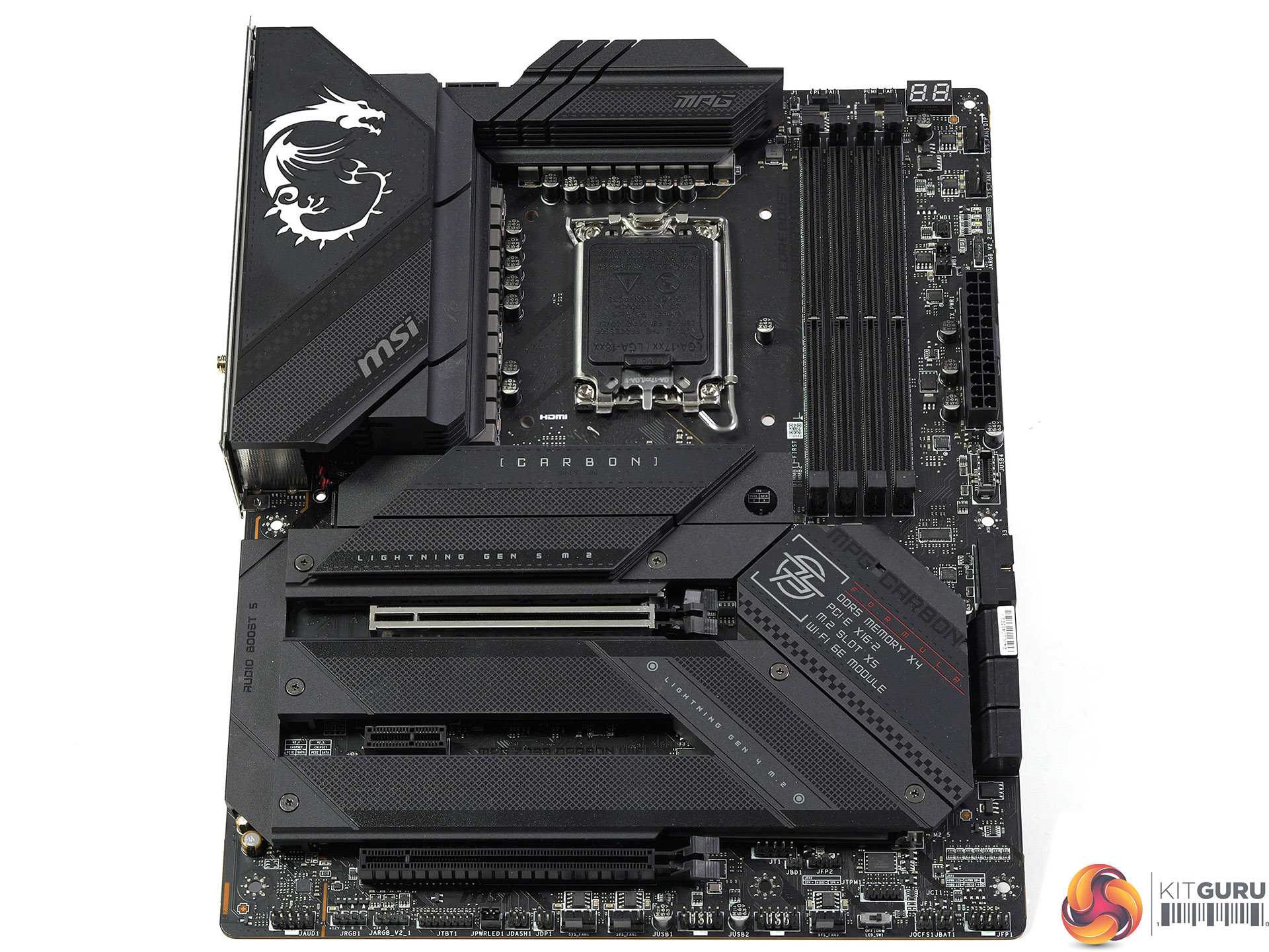
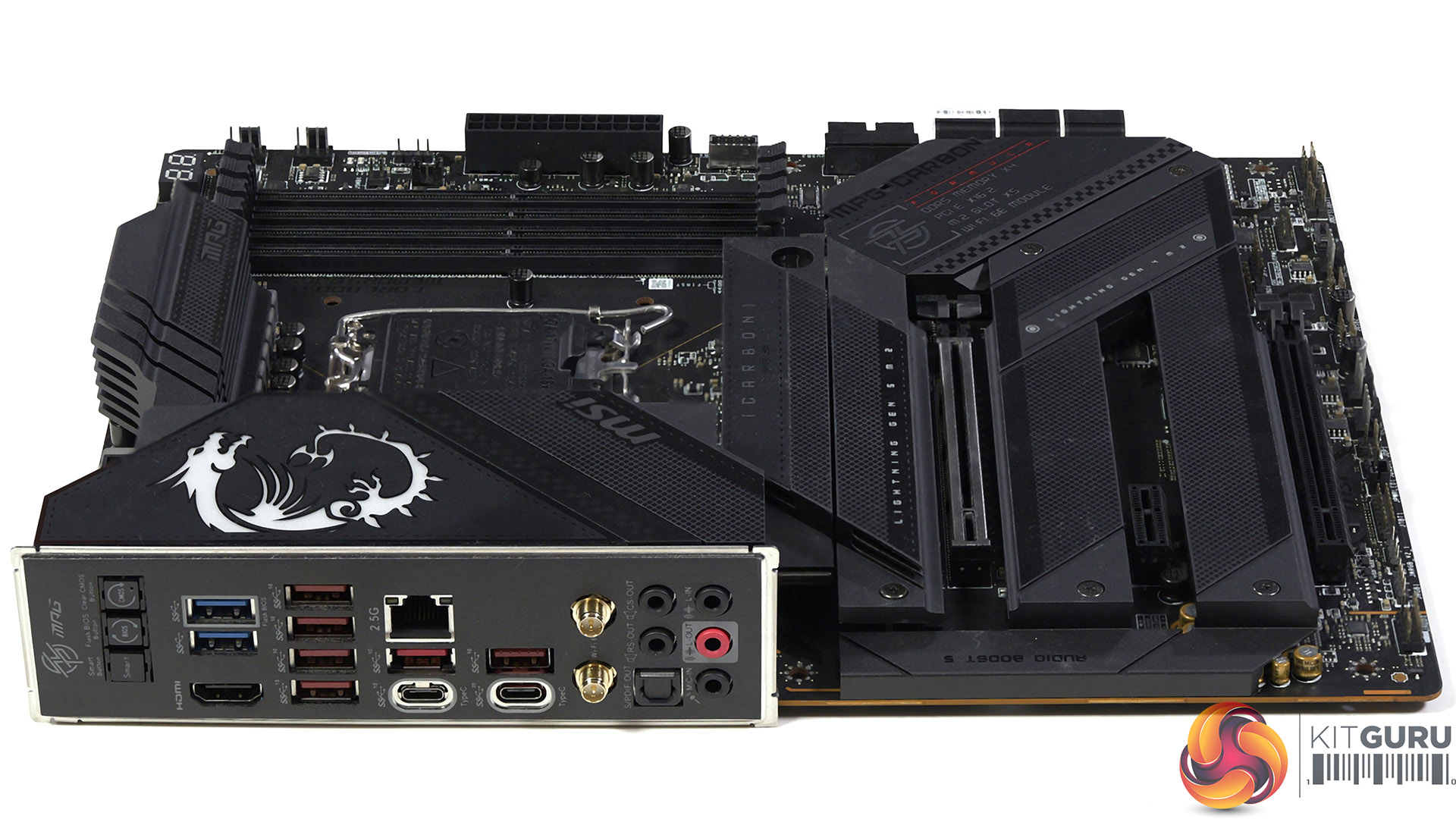
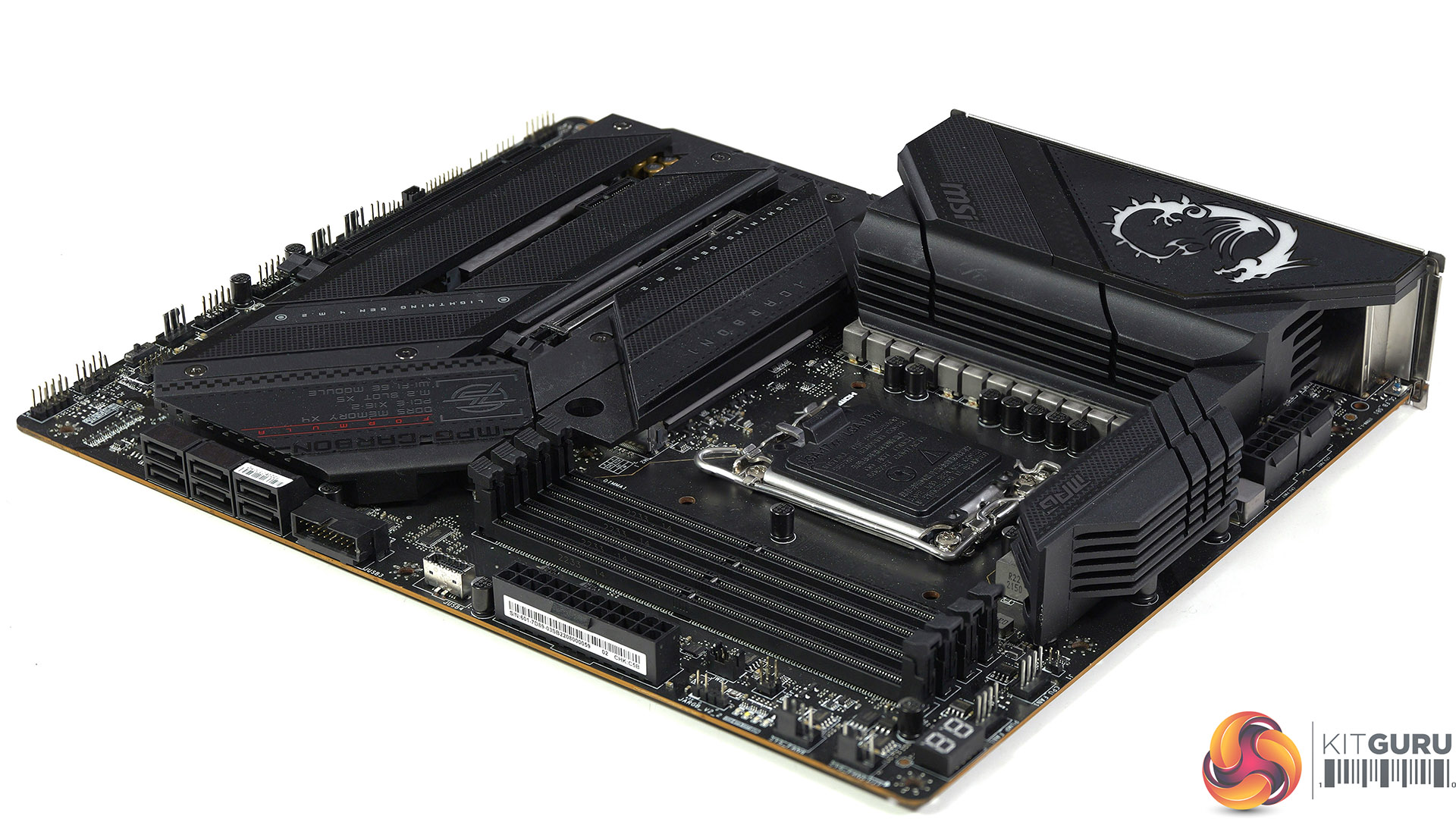
Key features
- Supports 13th /12th Gen Intel Core/Pentium/Celeron processors for LGA 1700 socket
- Supports DDR5 Memory, up to 7600+(OC) MHz
- Lightning Fast Game experience: PCIe 5.0 slot, Lightning Gen 5 x4 M.2, USB 3.2 Gen 2×2
- Enhanced Power Design: Direct 19+1+1 phases power, Core Boost, Memory Boost
- Premium Thermal Solution: Enlarged heatsink with heat-pipe, MOSFET thermal pads rated for 7W/mk, additional choke thermal pads and M.2 Shield Frozr are built for high performance system and non-stop gaming experience
- 2.5G LAN and Intel Wi-Fi 6E Solution: Upgraded network solution for professional and multimedia use. Delivers a secure, stable and fast network connection
- Audio Boost 5: Reward your ears with studio grade sound quality for the most immersive gaming experience
- High Quality PCB: 8-layer PCB made by server grade level material
- Pre-installed I/O Shield: Better EMI protection and more convenience for installation
Specification:
Chipset: Intel Z790
CPU Support: 12th/13th Gen Intel Core, Pentium Gold and Celeron Processors
Memory support:
4x DDR5, Maximum Memory Capacity 192GB
Max. overclocking frequency:
1DPC 1R Max speed up to 7600+ MHz
1DPC 2R Max speed up to 6600+ MHz
2DPC 1R Max speed up to 6400+ MHz
2DPC 2R Max speed up to 5600+ MHz
Expansion slots:
1x PCIe Gen 5.0 x16 slot (From CPU)
1x PCIe Gen 4.0 x16 slot (From Chipset)
1x PCIe Gen 3.0 x1 slot (From Chipset)
Storage:
1x M.2 Gen 5.0 x4
4x M.2 Gen 4.0 x4
6x SATA 6Gbps
USB support:
4x USB 2.0 (Front)
2x USB 3.2 Gen1 5 Gbps Type A (Rear)
2x USB 3.2 Gen1 Type A (Front)
6x USB 3.2 Gen2 10Gbps Type A (Rear)
1x USB 3.2 Gen 2×2 20Gbps Type-C (Rear)
1x USB 3.2 Gen 2 10Gbps Type-C (Rear)
1x USB 3.2 Gen2x2 Type C (Front)
LAN:
Intel 2.5Gbps LAN
Wireless/Bluetooth Intel Wi-Fi 6E 2.4GHz/5GHz/6GHz up to 2.4Gbps, Bluetooth 5.3
Audio: Realtek ALC4080 7.1-Channel Audio
Form Factor: ATX 244mm x 305mm
Testing and Performance – CPU
Test system
Processor: Intel Core i9-13900K (24 cores/32 threads)
Motherboard: MSI MPG Z790 Carbon WiFi BIOS 1.40
CPU Cooler: Corsair H150i Elite LCD
Memory: 32GB G.Skill Trident Z5 RGB DDR5-6000
Graphics card: Gigabyte GeForce RTX 4080 Gaming OC 16GB GDDR6X
Power supply: Seasonic Vertex GX-1200
SSD: 500GB Sabrent Rocket 4.0 M.2 NVMe
OS: Windows 11
Cinebench R23 Multi Core
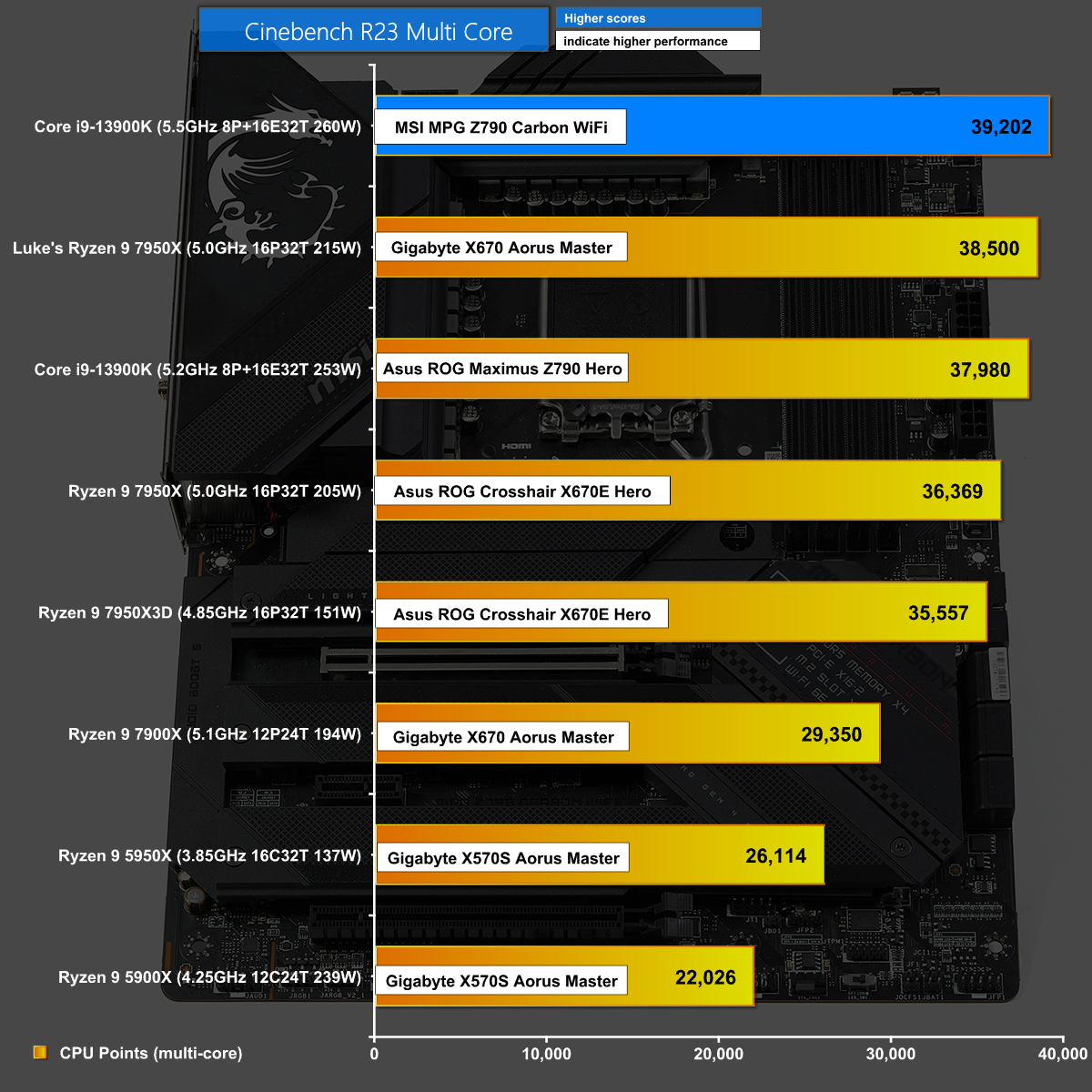
In the Cinebench R23 Multi Core performs well and sits at the top of the chart however, as you will see in our video, it required some work in the BIOS to ensure our Core i9 could run at full speed without throttling.
Cinebench R23 Single Core
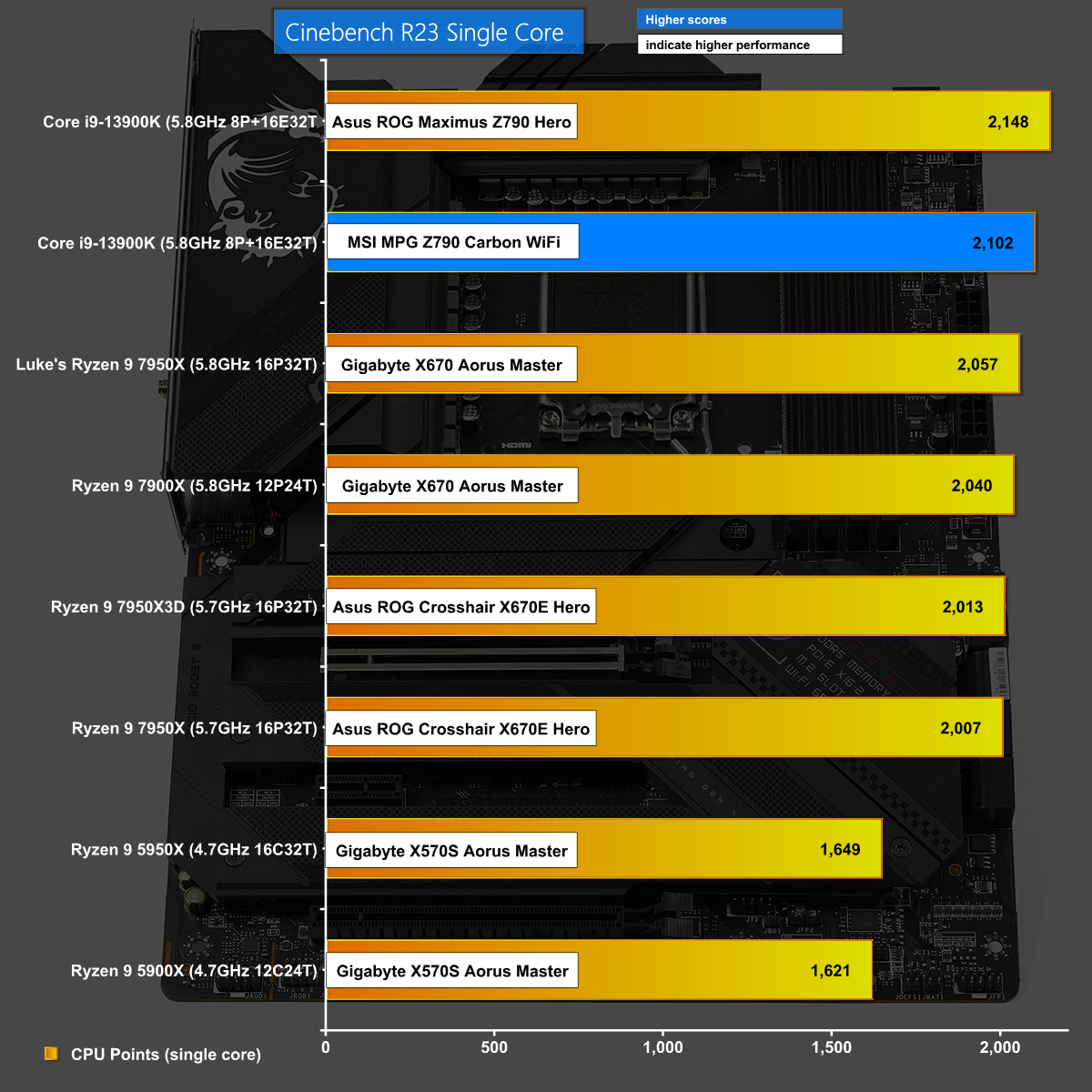
In Cinebench R23 Single Core the MSI also performed well and ran the Core i9-13900K at 5.8GHz but lost out to the Asus ROG Maximus Z790 Hero by a handful of points.
Blender v3 Classroom
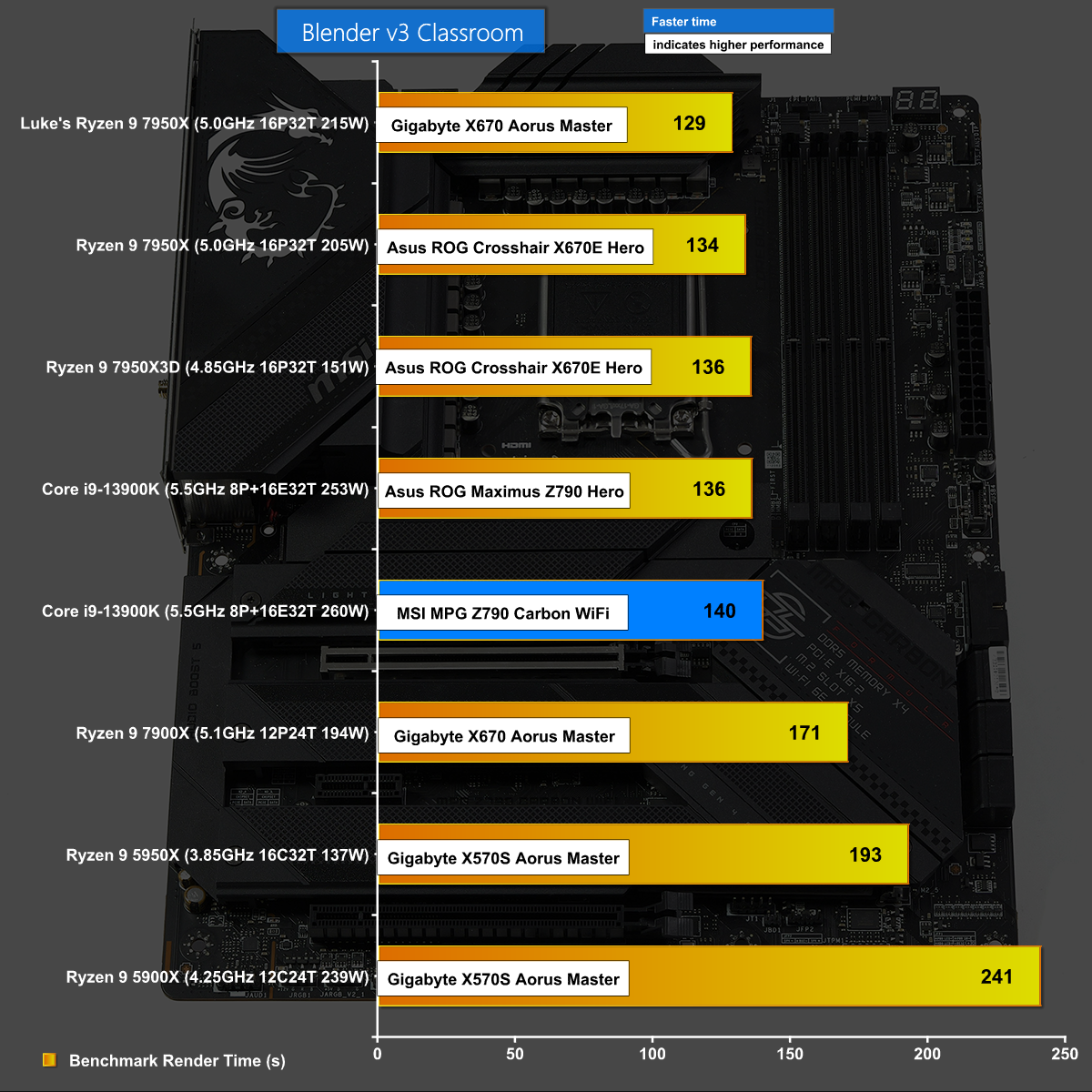
Blender v3 Classroom favoured our AMD CPUs over Intel however the difference between the fastest Ryzen 9 795X and our Core i9-13900K is relatively slender.
Power Consumption in Cinebench
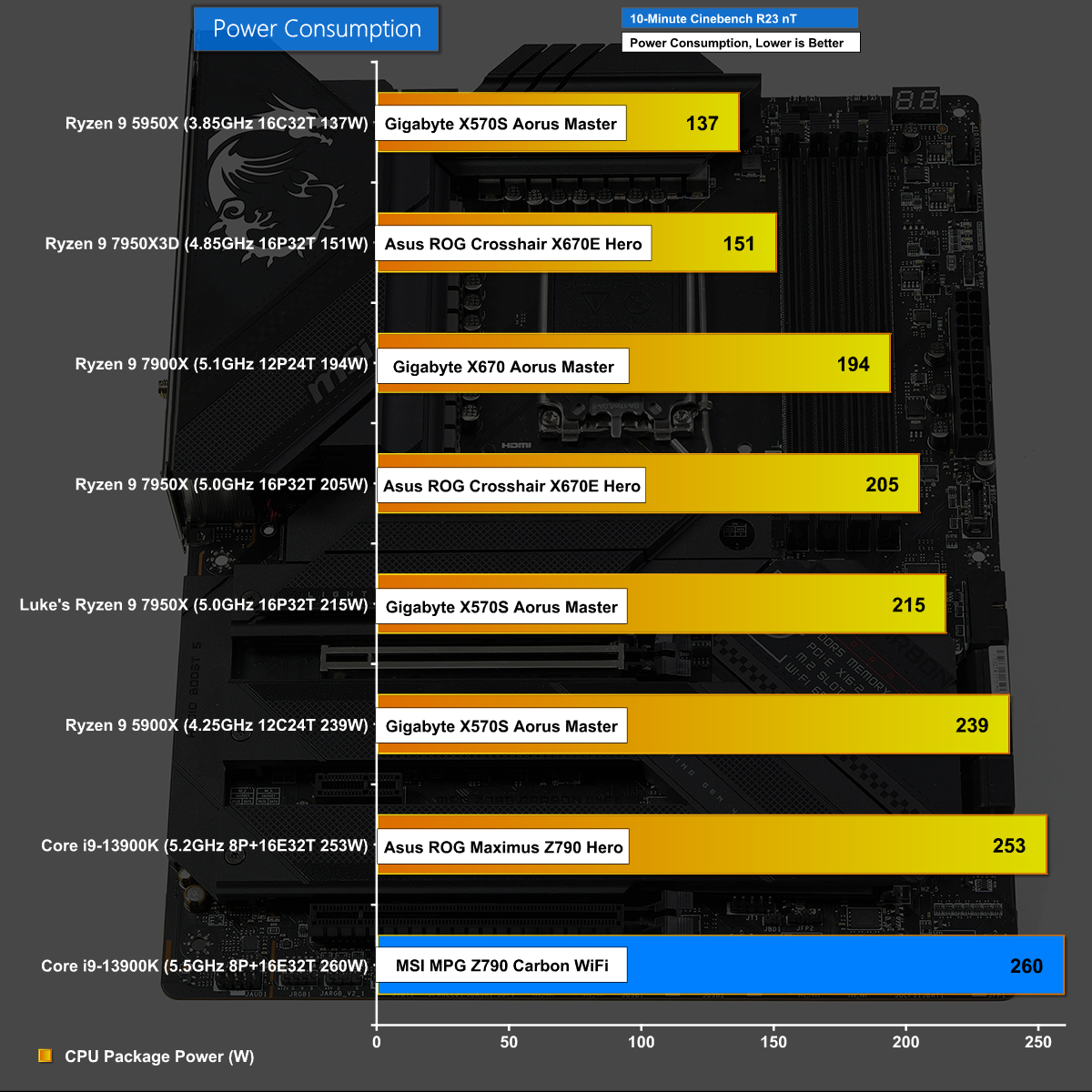
If you refer to our video you will see these Power Consumption figures are on manual settings and while the Core i9-13900K may look poor at 260W it looks positively awful on Auto settings where the power draw tops 300W.
CPU Temperature in Cinebench
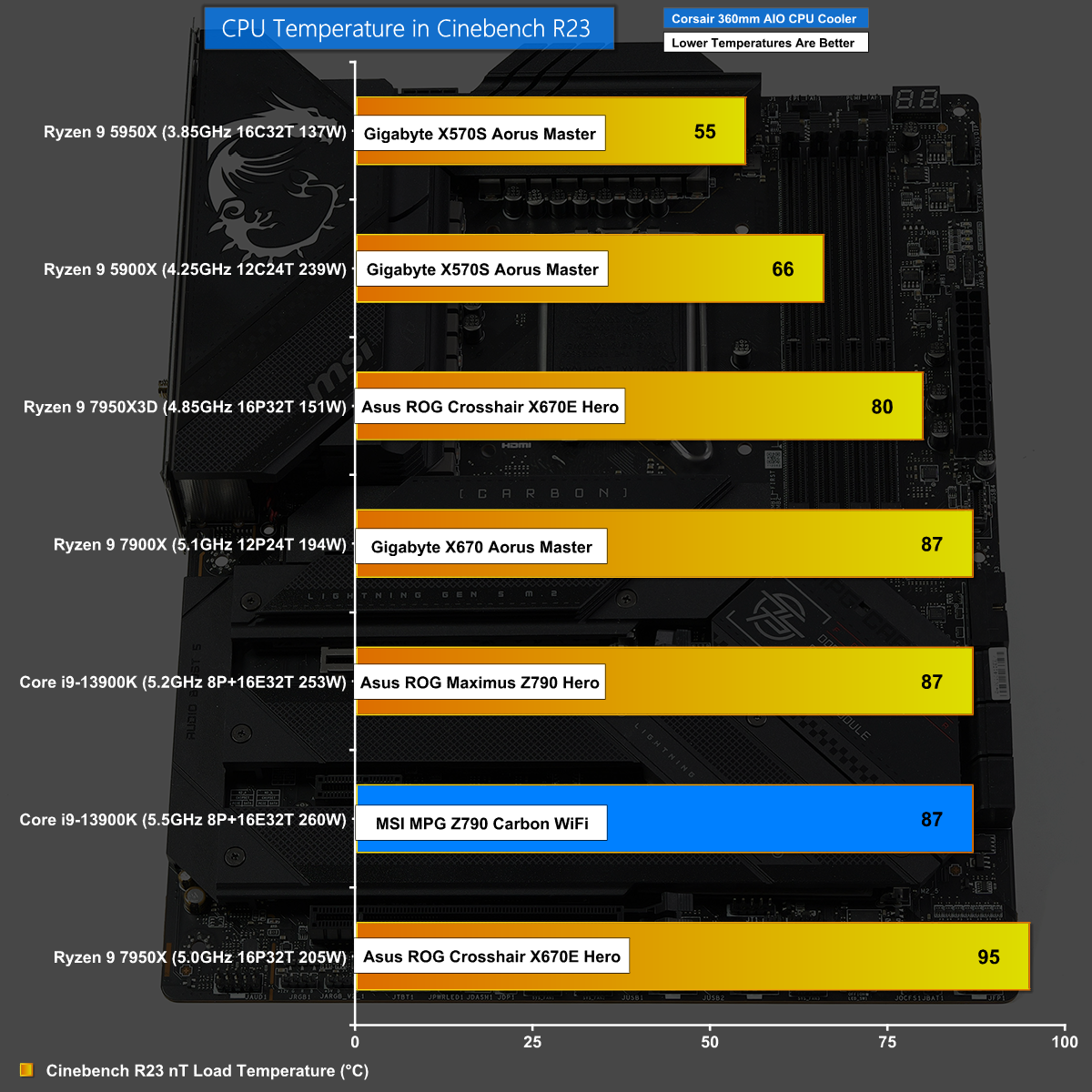
It is a similar story with CPU Temperature in Cinebench. On manual settings the temperature is a manageable 87 degrees C however on Auto the CPU bounces off 100C and thermally throttles.
7-Zip v21
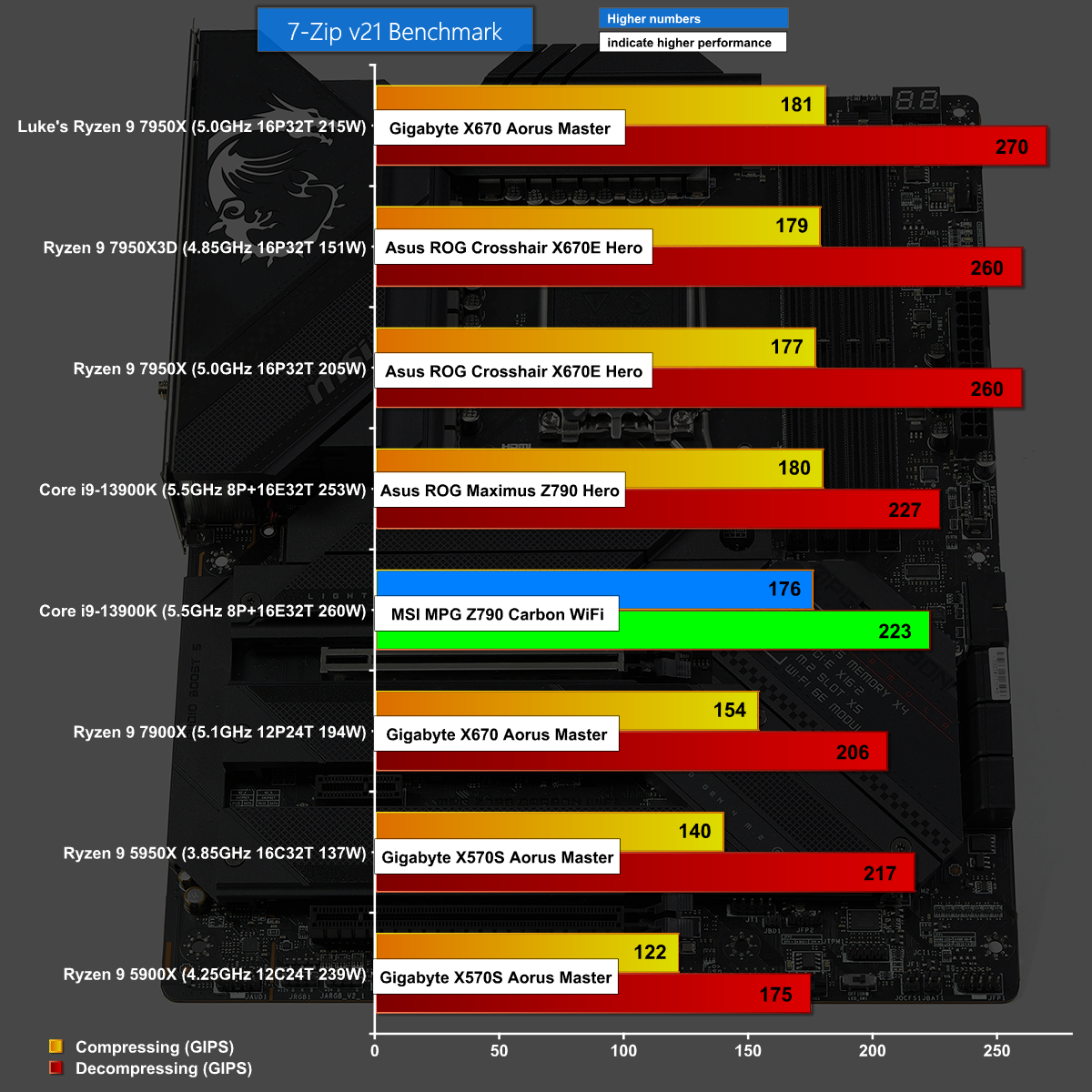
7-Zip v21 also shows the MSI MPG Z790 Carbon WiFi in a decent light. Performance is good and the numbers are in line with the competition.
3D Mark CPU Profile
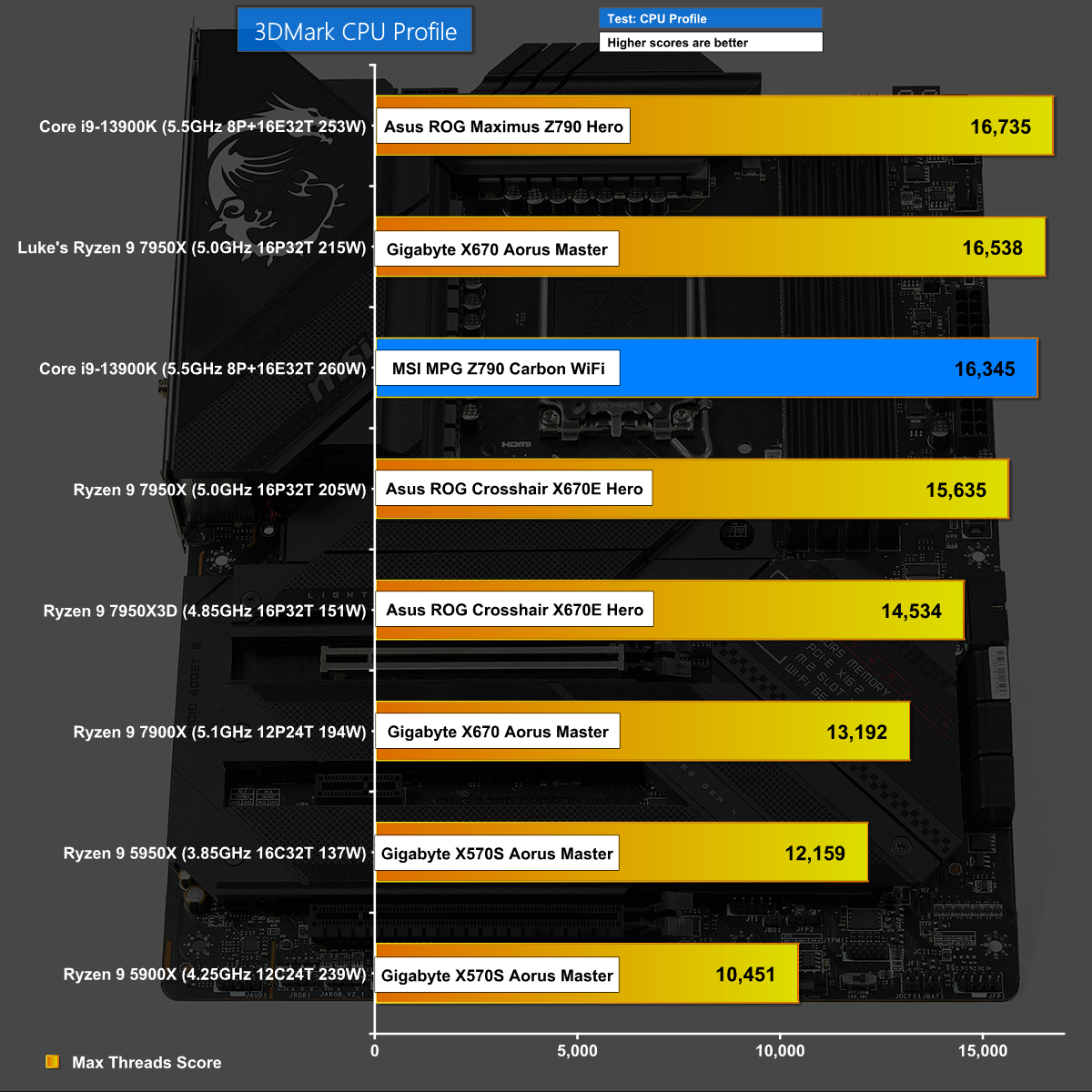
We see a familiar picture in 3D Mark CPU Profile where the MSI MPG Z790 Carbon WiFi narrowly loses out to the Asus ROG Maximus Z790 Hero.
Borderlands 3 at 1440p
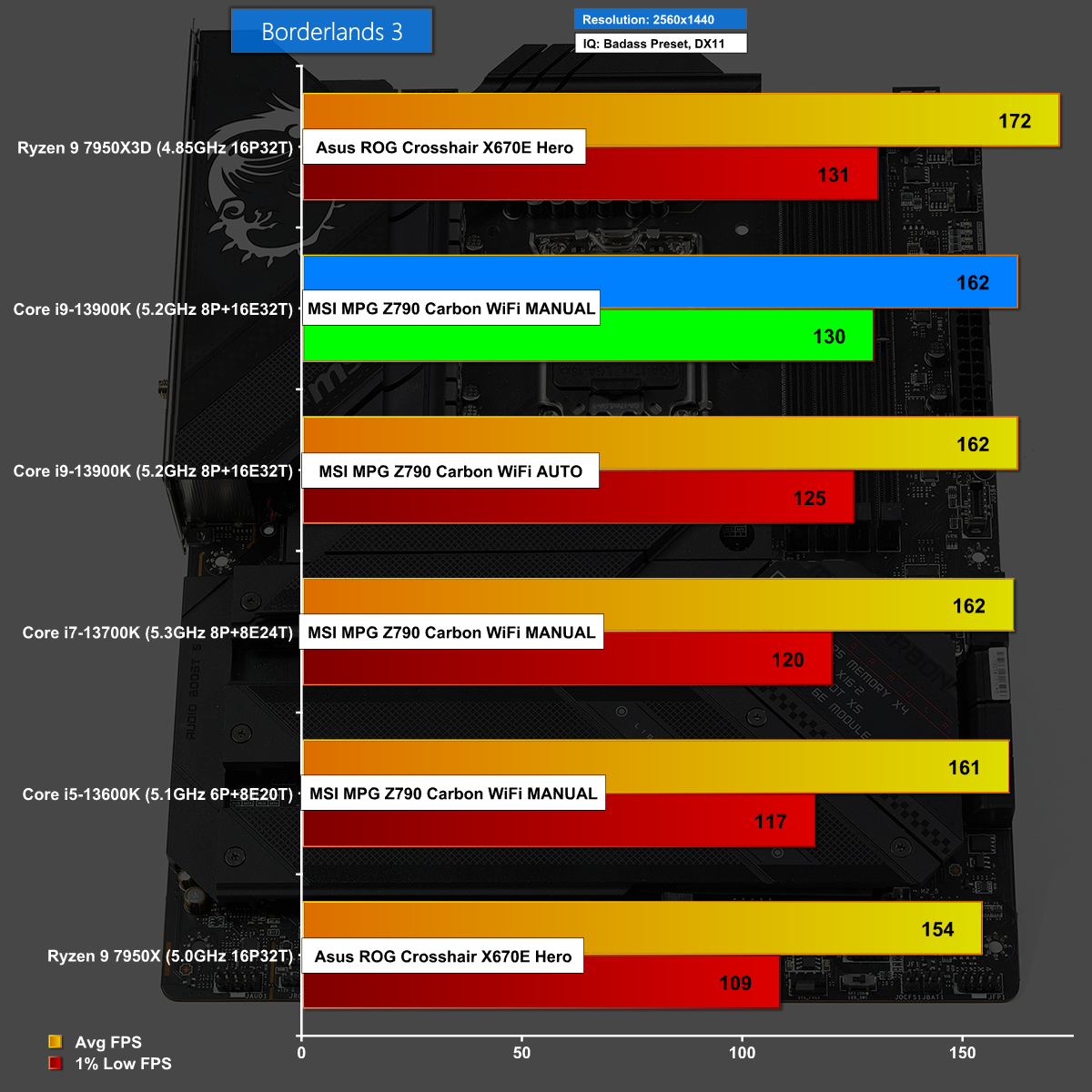
In our first gaming test, Borderlands 3 at 1440p, we see the benefit of manual settings on the MSI as the Core i9-13900K has better 1% lows than on Auto settings. We can also see how the Core i9 compares to the Core i7 and Core i5 when you game on the same RTX 4080 16GB graphics card.
Borderlands 3 at 1080p
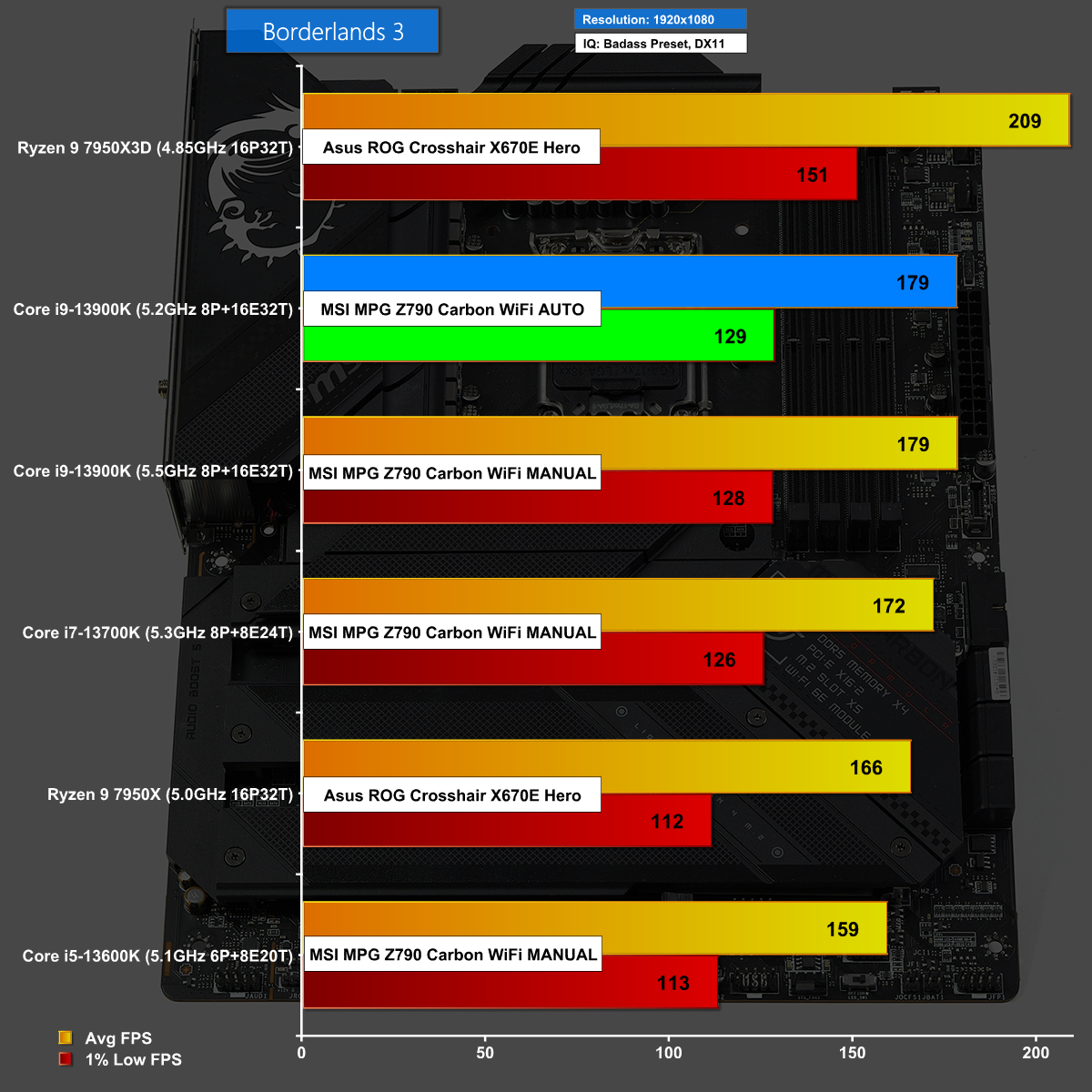
At 1080p in Borderlands 3 the frame rate opens out between the various CPUs and we see the Core i9 doing well on the MSI, although it gets soundly beaten by the new AMD Ryzen 9 7950X3D.
Hitman 3 at 1440p
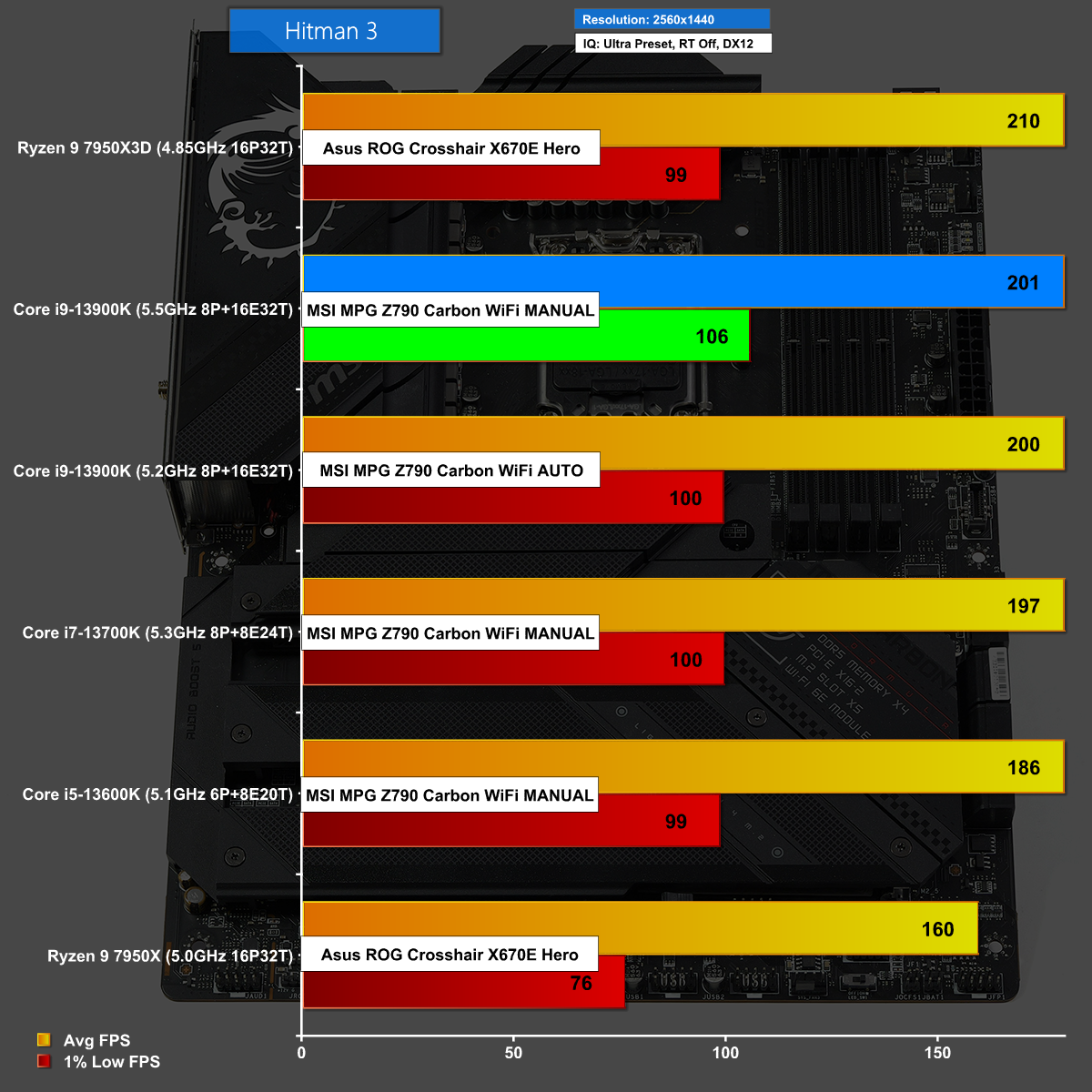
Hitman 3 at 1440p is another win for manual settings on the MSI over Auto settings. The gaming experience delivered by the MSI MPG Z790 Carbon WiFi is superb.
Hitman 3 at 1080p
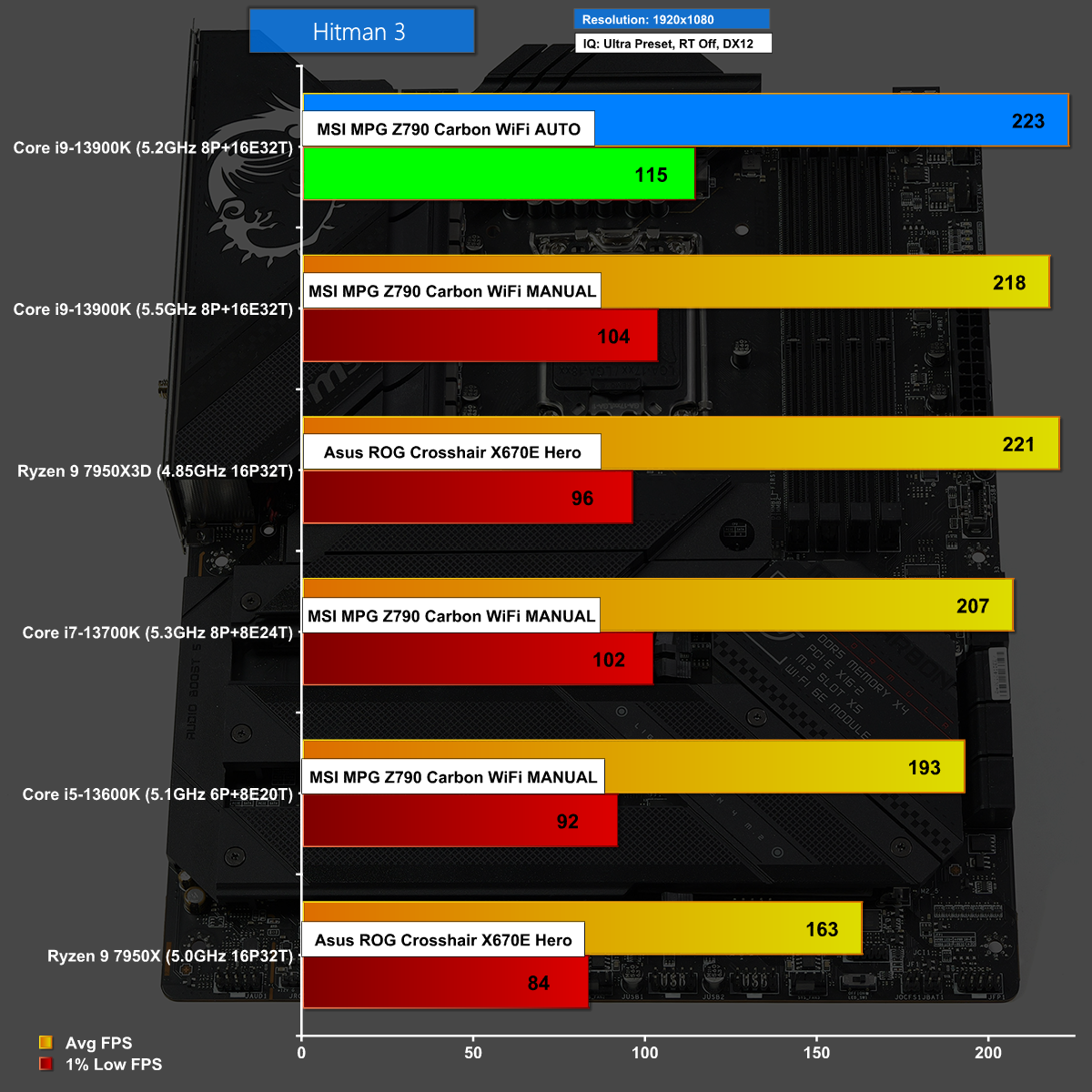
Hitman 3 at 1080p shows a clear win for the MSI MPG Z790 Carbon WiFi but this time the Auto settings perform better than our manual undervolting. This is superb news as it means MSI wasn't entirely wrong when they developed the settings for the BIOS and can most likely roll out a fix in the near future.
Shadow of the Tomb Raider at 1440p
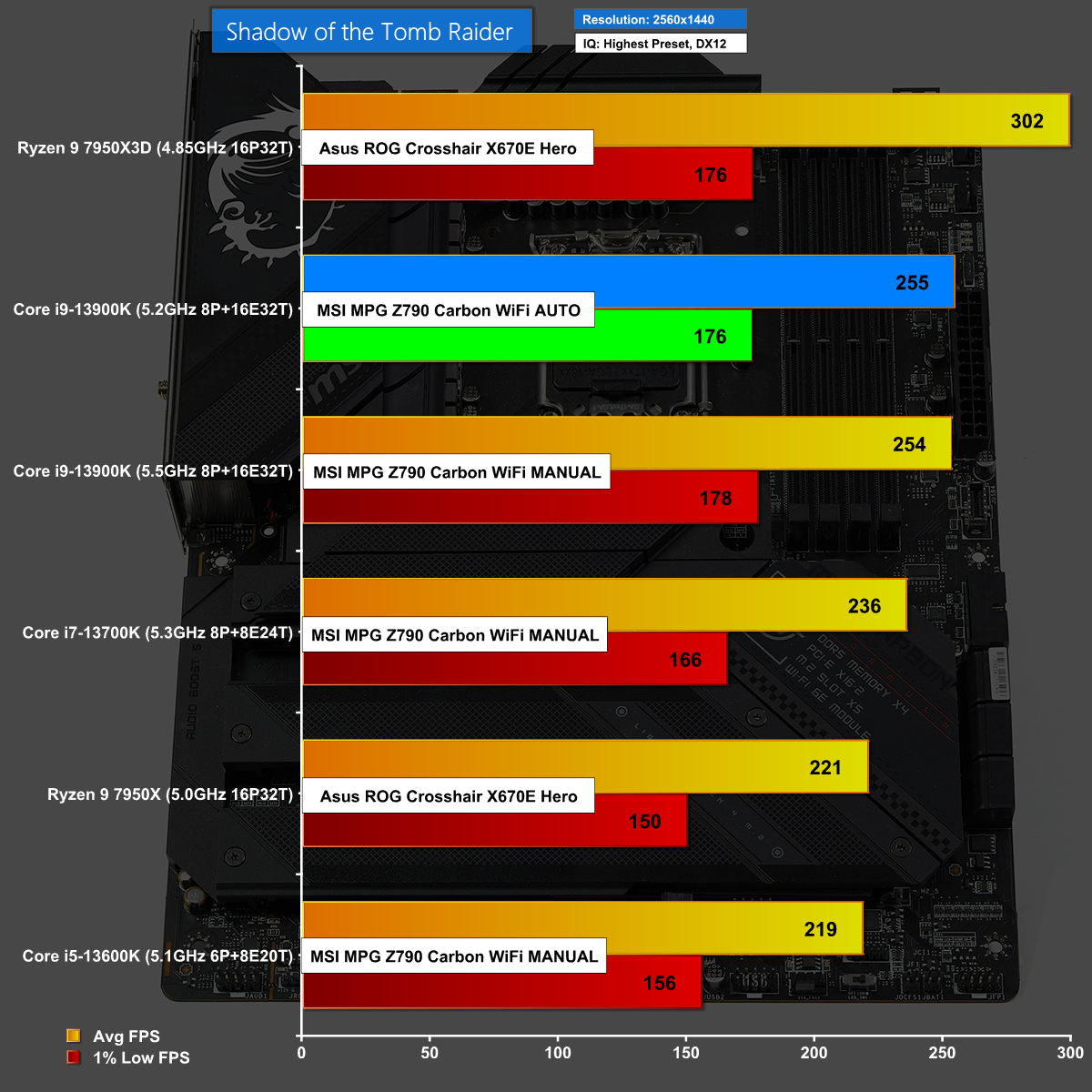
Shadow of the Tomb Raider at 1440p also shows the MSI MPG Z790 Carbon WiFi doing well on Auto settings, however this time it is an effective tie with our chosen manual settings.
Shadow of the Tomb Raider at 1080p
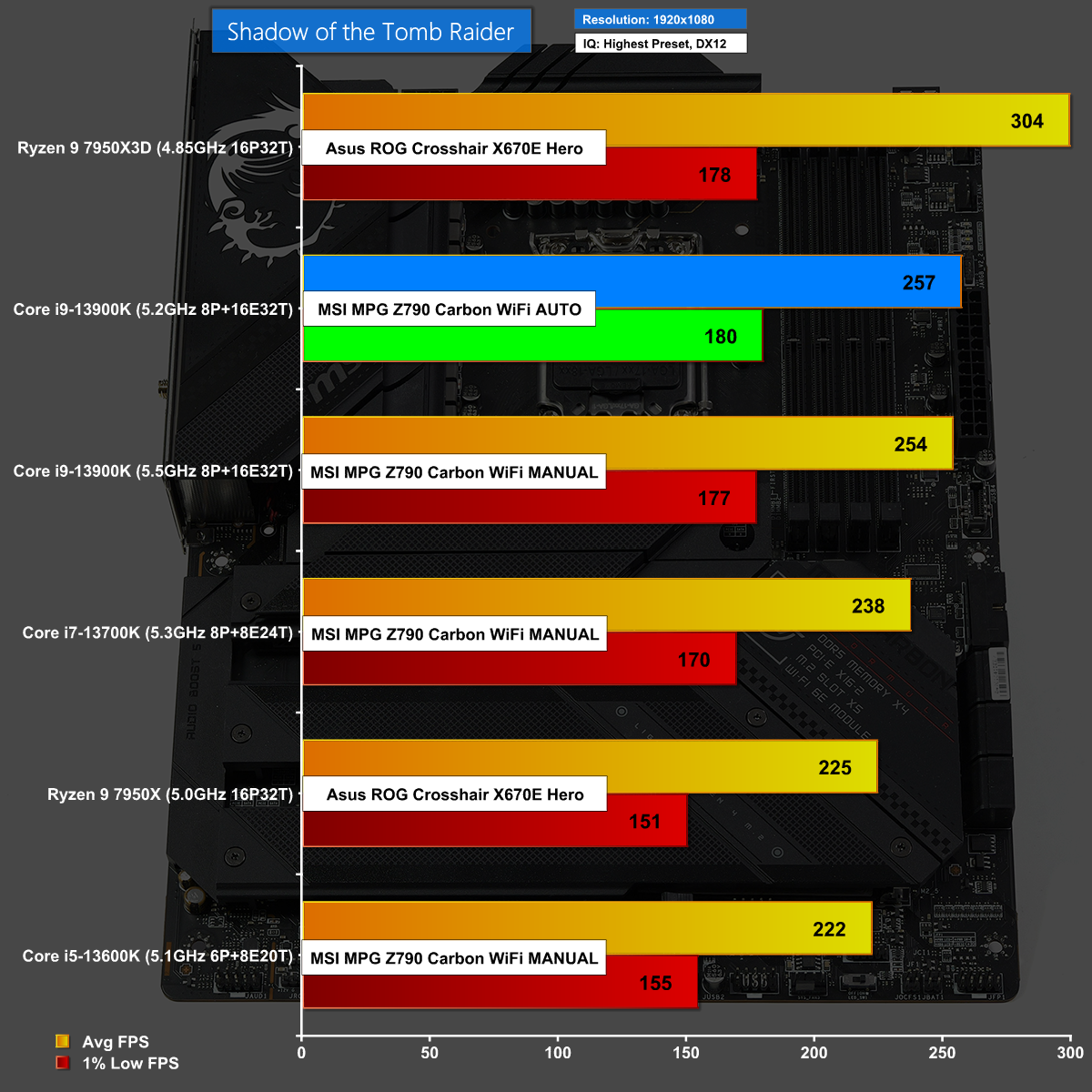
The MSI MPG Z790 Carbon WiFi drives Shadow of the Tomb Raider at 1080p along at a ferocious rate with excellent gaming performance.
Watch Dogs: Legion at 1440p
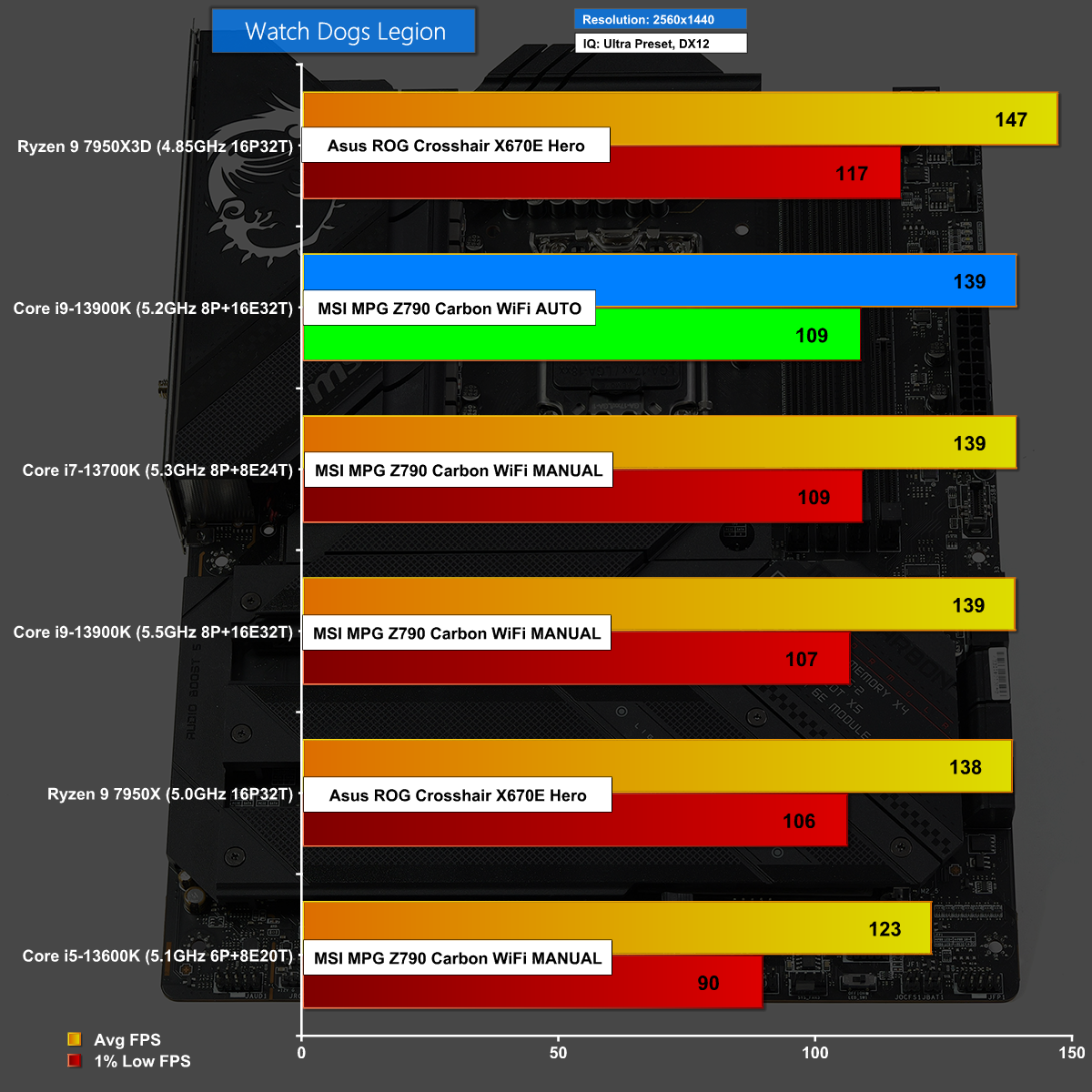
In Watch Dogs: Legion at 1440p we see the Ryzen 9 7950X3D scoring a clear win but after that we see very little difference between the other CPUs, although the Core i5 lags behind.
Watch Dogs: Legion at 1080p
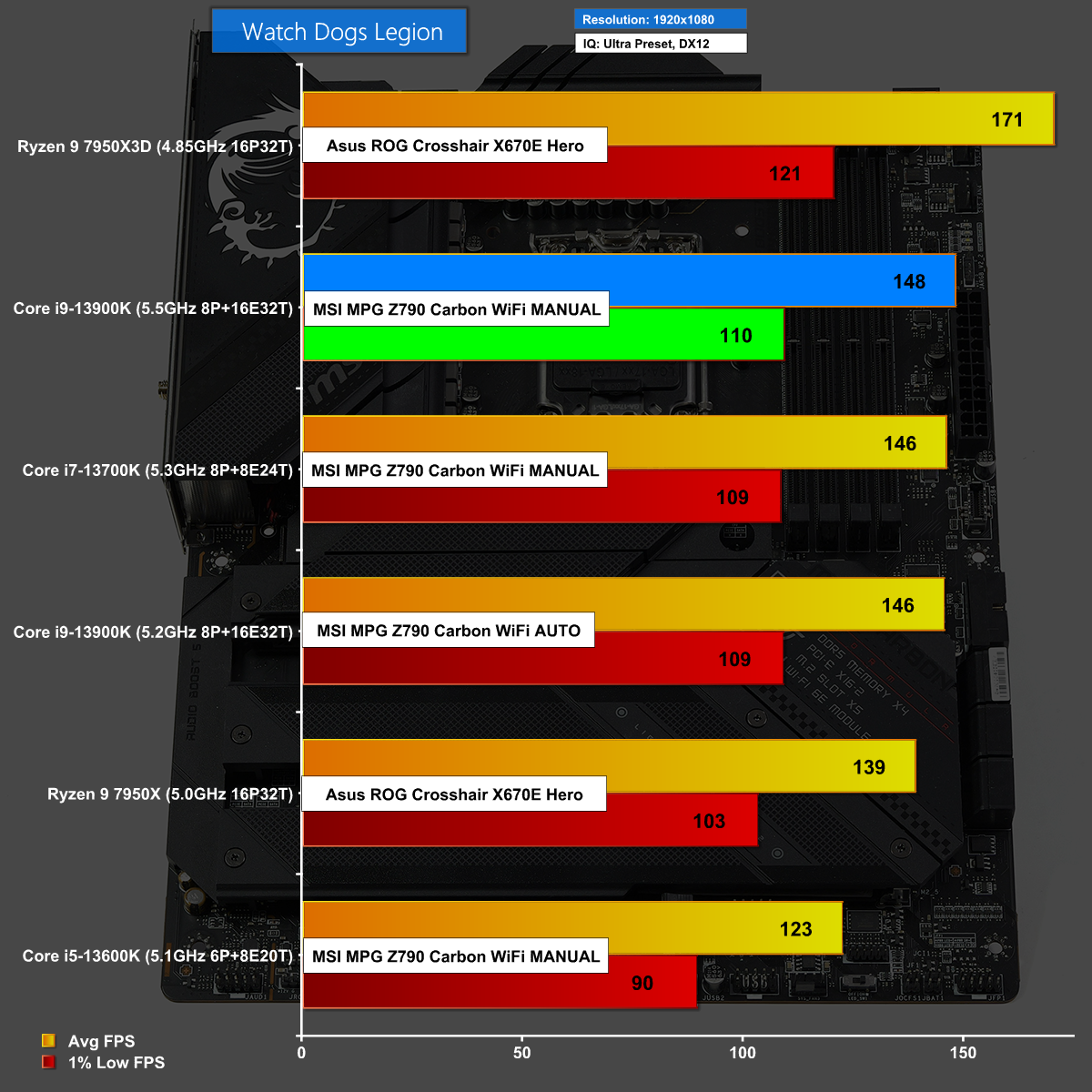
In Watch Dogs: Legion at 1080p there is a fair degree of spread between the difference set-ups and once again the MSI MPG Z790 Carbon WiFi does well.
The MSI MPG Z790 Carbon WiFi is a frustrating motherboard as it looks good on paper and also when it is sat on the test bench.The list of features is extensive and the hardware is almost beyond reproach, although we would like to see a Micro button for power.
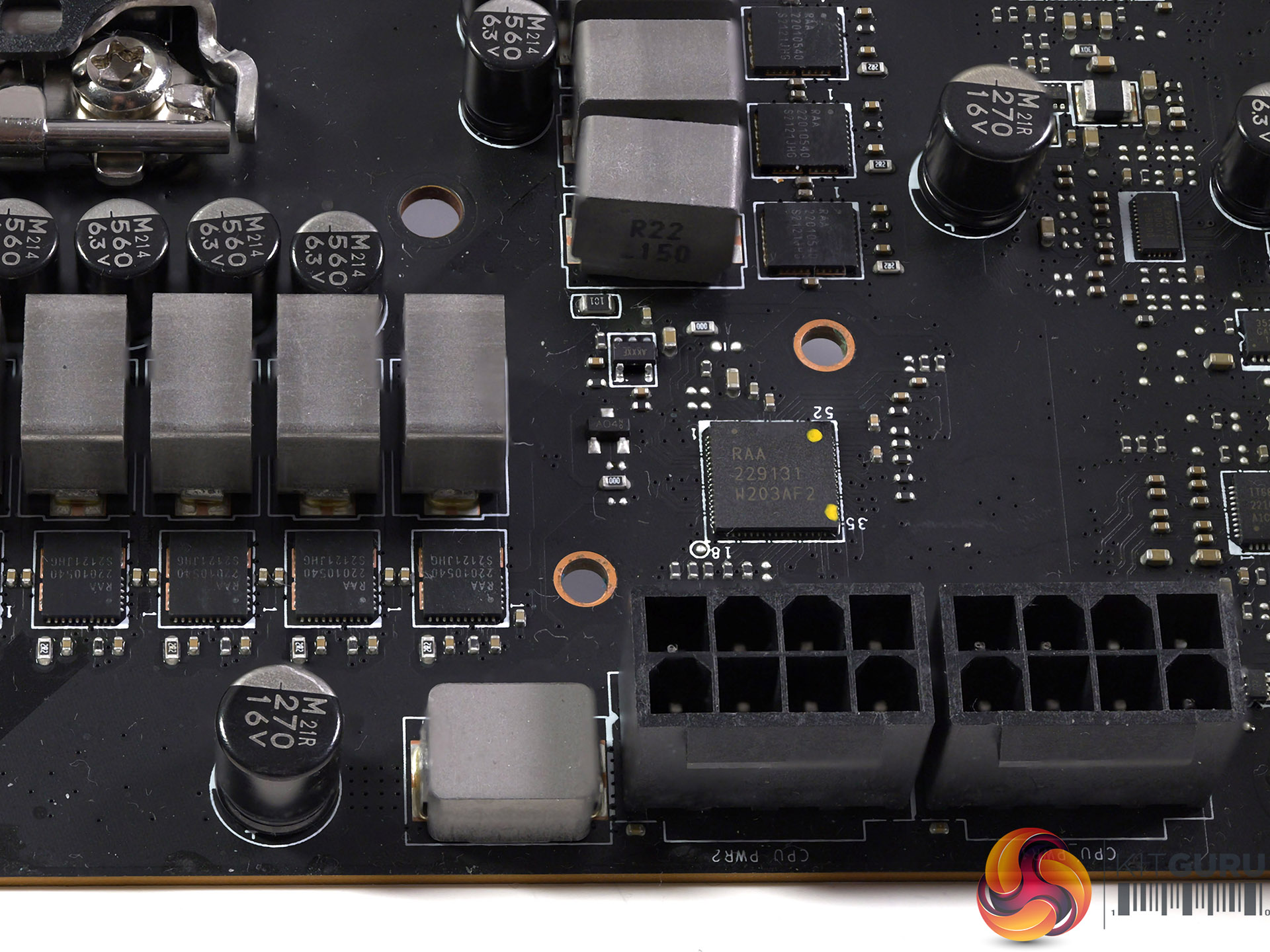
It is just a theory but we feel the hardware is part of the problem as the 20-phase Renesas RAA229131 VRM controller and 19+1+1 x10⁵A Renesas RAA 22010540 VRMs have the ability to deliver as much power as you choose to a Core i9-13900K CPU.
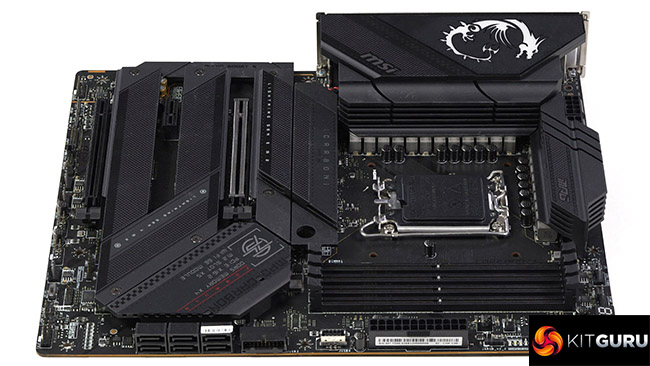
The snag is that it appears someone at MSI thought ‘Okey dokey let's do that' and then cranked the Vcore to an horrific 1.39V and shoved 300W into the CPU which means it throttles as soon as you run a CPU intensive task. As we show in our video, when you back off the power to Intel's rated 253W the CPU is perfectly happy and the temperature drops by 15 degrees C.
We have had a number of conversations with MSI during the course of this review and we are told updates are planned to improve the situation. To our surprise the latest BIOS v1.50, which was released after our video went live actually makes no difference to CPU performance, but we continue to live in hope.

You can buy the MSI MPG Z790 Carbon WiFi for £470 from Overclockers UK HERE.
Discuss on our Facebook page HERE.
Pros:
- High end hardware with rock solid VRMs
- Tool-free primary SSD installation
- Wi-Fi 6E is included
- Seven fan headers at the top and bottom of the board
Cons:
- The BIOS needs work as it delivers excessive power to your CPU
- Micro buttons do not include one for Power
- Price tag is fairly high
KitGuru says: MSI MPG Z790 Carbon WiFi shows strong potential, as indicated by our manual tuning, but the default BIOS settings need work.