 KitGuru KitGuru.net – Tech News | Hardware News | Hardware Reviews | IOS | Mobile | Gaming | Graphics Cards


We will be outlining the MSI X99A XPOWER AC motherboard's performance with the Core i7 5960X CPU at its stock frequency (3.5GHz due to forced turbo). Overclocked performance will be outlined later in the review.
By default, the MSI X99A XPOWER AC motherboard applies multi-core turbo (MCT) and forces the 5960X to a constant 3.5GHz when XMP is enabled.
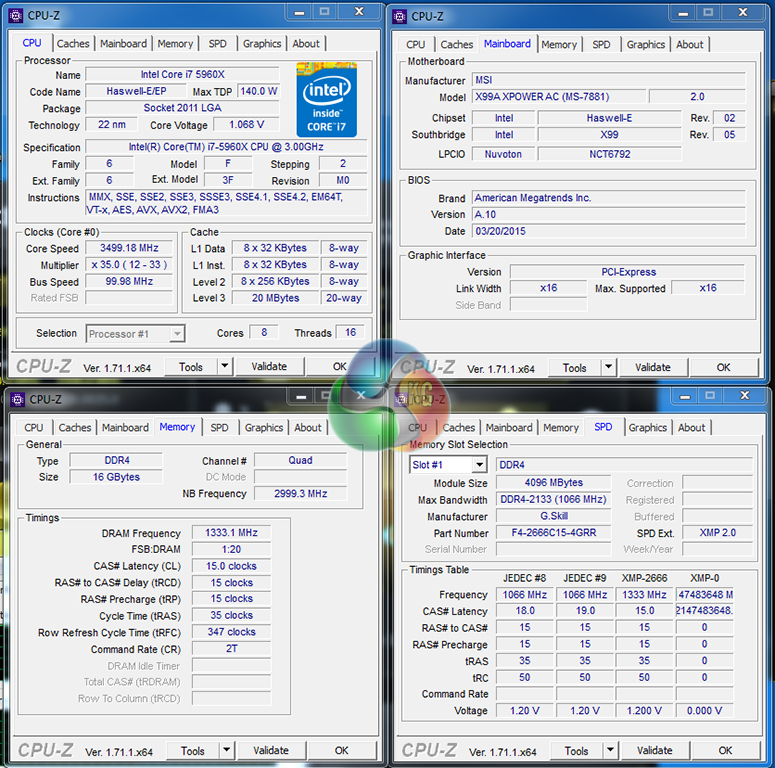
Although an A15 BIOS version was available for us to testing, we were very reluctant to gather results from a beta BIOS which could be a long time away from public release. As such, our testing was conducted with the latest public BIOS available – A10 – in order to provide the results that users can expect to achieve today.
MSI applies 1.07V to the CPU VCore when MCT is enabled.
Our typical testing procedure involves opening the motherboard vendor monitoring software and then running the benchmarks. Doing this with MSI's Control Center software on the X99A XPOWER AC resulted in lower-than-usual performance. The Control Center software seems to have some form of bug which reduces system performance when the monitoring tool is running.
As such we stopped opening the tool while gathering performance numbers and only used it to record system operating data.
X99 Motherboard Test System:
- Processor: Intel Core i7 5960X ES (3.5GHz forced turbo).
- Memory: 16GB (4x 4GB) G.Skill Ripjaws4 2666MHz CL15 DDR4 @ 1.20V.
- Graphics Card: Asus R9 280X Matrix Platinum 3GB.
- System Drive: 500GB Samsung 840.
- CPU Cooler: Corsair H100i.
- Case: NZXT Phantom 630.
- Power Supply: Seasonic Platinum 1000W.
- Operating System: Windows 7 Professional with SP1 64-bit.
Compared X99 Motherboards:
- ASRock X99E-ITX/ac (BIOS v1.20) – with 16GB (2x8GB) G.Skill Ripjaws4 2400MHz CL15 DDR4 @ 1.20V.
- ASRock X99 OC Formula (BIOS v1.16) – with 16GB (4x 4GB) Corsair Vengeance LPX 2800MHz @ 2666MHz 16-18-18-44 DDR4 1.25V
- ASRock X99 Extreme11 (BIOS v1.00) – with 16GB (4x4GB) G.Skill Ripjaws4 2666MHz 15-15-15-35 DDR4 1.25V.
- ASRock Fatal1ty X99 Professional (BIOS v1.50) – with 16GB (4x 4GB) Corsair Vengeance LPX 2800MHz @ 2666MHz 16-18-18-44 DDR4 1.25V
- Asus TUF Sabertooth X99 (BIOS v0216) – with 16GB (4x 4GB) G.Skill Ripjaws4 2666MHz CL15 DDR4 @ 1.20V.
- Asus X99 Deluxe (BIOS 0801) – with 16GB (4x4GB) G.Skill Ripjaws4 3000MHz 15-15-15-35 DDR4 1.35V.
- Gigabyte X99-Gaming 5P (BIOS F2c beta) – with 16GB (4x 4GB) G.Skill Ripjaws4 2666MHz CL15 DDR4 @ 1.20V.
- MSI X99S Gaming 7 (BIOS V17.3B1) – with 3.56GHz CPU and 16GB (4x 4GB) Corsair Vengeance LPX 2800MHz CL16 DDR4 @ 2800MHz 1.20V.
Software:
- MSI X99A XPOWER AC BIOS A10 (latest public BIOS).
- Catalyst 14.9 VGA drivers.
Tests:
- 3DMark 1.3.708 – Fire Strike (System)
- SiSoft Sandra 2014 SP2 – Processor arithmetic, memory bandwidth (System)
- Cinebench R15 – All-core CPU benchmark (CPU)
- WinRAR 5.10 – Built-in benchmark (CPU)
- HandBrake 0.9.9 – Convert 4.36GB 720P MKV to MP4 (CPU)
- ATTO – SATA 6Gbps, USB 3.0, M.2 transfer rates (Motherboard)
- RightMark Audio Analyzer – General audio performance test (Motherboard)
- Totusoft LAN Speed Test – WiFi speed test, 100MB file transfer to wired ‘server' computer (Motherboard)
- Bioshock Infinite – 1920 x 1080, ultra quality (Gaming)
- Metro: Last Light – 1920 x 1080, high quality (Gaming)
- Tomb Raider – 1920 x 1080, ultimate quality (Gaming)

Your first choice kitguru