KitGuru KitGuru.net – Tech News | Hardware News | Hardware Reviews | IOS | Mobile | Gaming | Graphics Cards


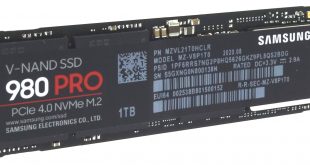
The SSD980 PRO is Samsung's latest flagship high-performance NVMe drive and is the South Korean tech giant's first entry into PCIe Gen4 SSD market. It uses a combination of a new in-house controller and 1** layer 3D V-NAND (it is over 100 layers but Samsung will not confirm the exact number).
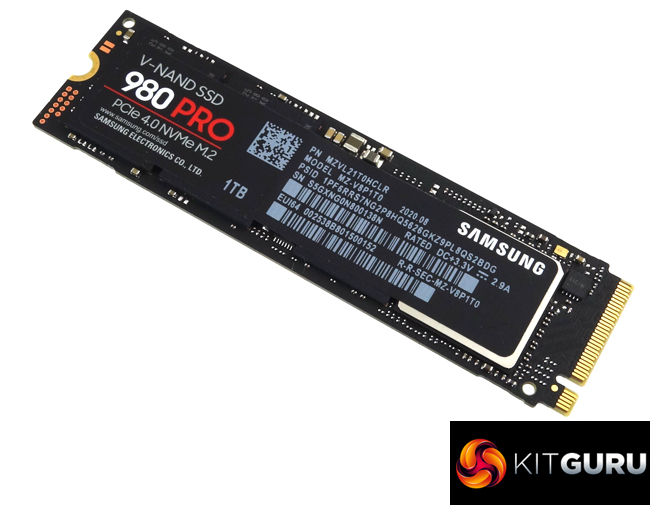
The new drive uses Samsung's newly-developed Elpis controller, details of which are extremely thin on the ground at the moment together but we do know it is built on an 8nm process and can simultaneously process 128 I/O queues, around 4 times the amount the previous generation Phoenix controller supported. To go with the new controller the drives use Samsung's latest 6th generation 1xx layer TLC V-NAND.
At launch, there are three capacities; 250GB, 500GB and the 1TB model (the drive we are looking at here). Later in 2020, there should be a flagship 2TB drive arriving.
Official performance ratings for the SSD980 PRO are pretty impressive, to say the least. Sequential read/write figures for the range are; up to 6,400MB/s and 2,700MB/s respectively for the 250GB drive, up to 6,900MB/s reads and 5,000MB/s writes for the 500GB drive and up to 7,000MB/s read and 5,000MB/s writes for the 1TB drive.
Random 4K performance is listed on the spec sheet at two different queue depths and threads. At a QD of 1 with 1 thread, all three drives are rated at up to 22,000 IOPs for reads and up to 60,000 IOPS for writes. At a QD of 32 and using 16 threads the 250GB drive is rated as up to 500,000 IOPS for reads and 600,000 IOPS for writes, the 500GB drive up to 800,000 for reads and a staggering 1,000,000 IOPS for writes while the 1TB drive is rated as up to 1m IOPS for both read and writes.
The quoted TBW endurance figures for the range are 150TB for the 250GB drive, 300TB for the 500GB and 600TB for the 1TB model. Samsung backs the drive with a 5-year warranty.
Physical Specifications:
Usable Capacities: 1TB.
NAND Components: Samsung 1** layer 3bit MLC V-NAND
NAND Controller: Samsung Elpis.
Cache: 1GB LPDDR4.
Interface: PCIe Gen 4.0 x4, NVMe 1.3c.
Form Factor: M.2 2280.
Dimensions: 80.15 x 22.15 x 2.38mm.
Firmware Version: 1B2QGXA7.
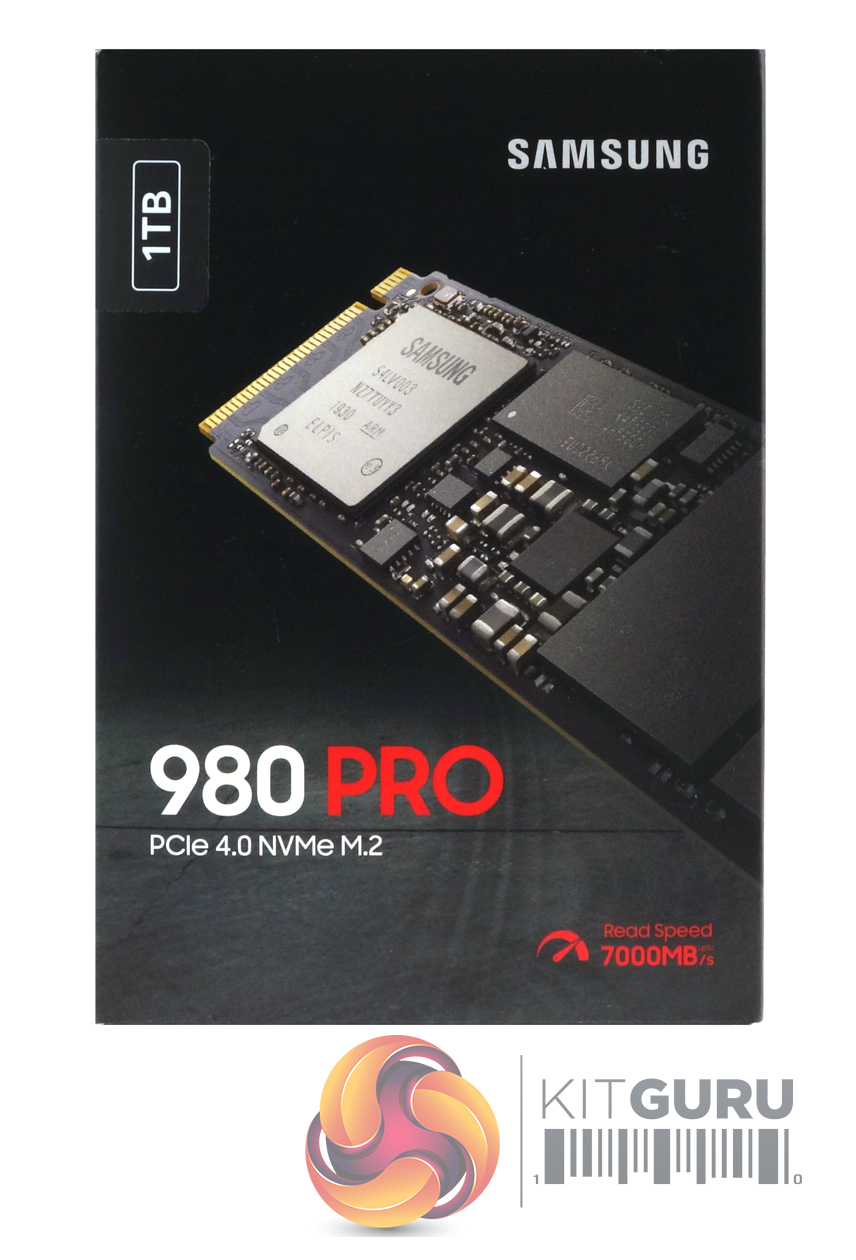
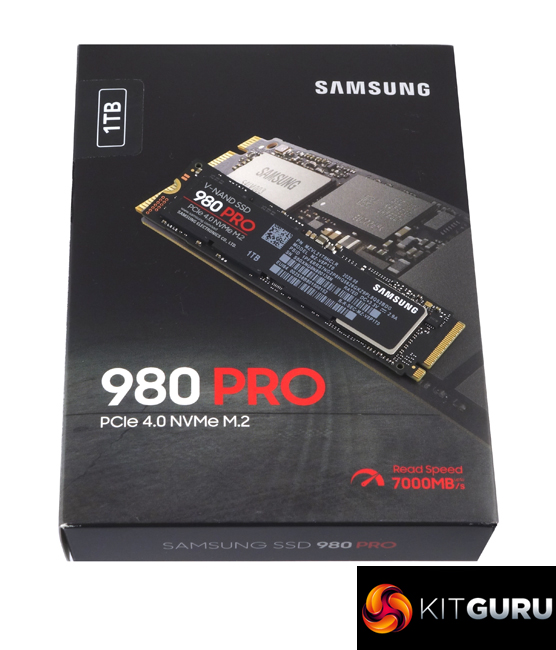
Samsung’s SSD980 PRO comes in a black box with a large image of the drive on the front. On the top left-hand side of the box, we find a sticker displaying the drive’s 1TB capacity. Also displayed is the fact that the drive uses a PCIe 4.0 interface and has a 7,000MB/s read speed.
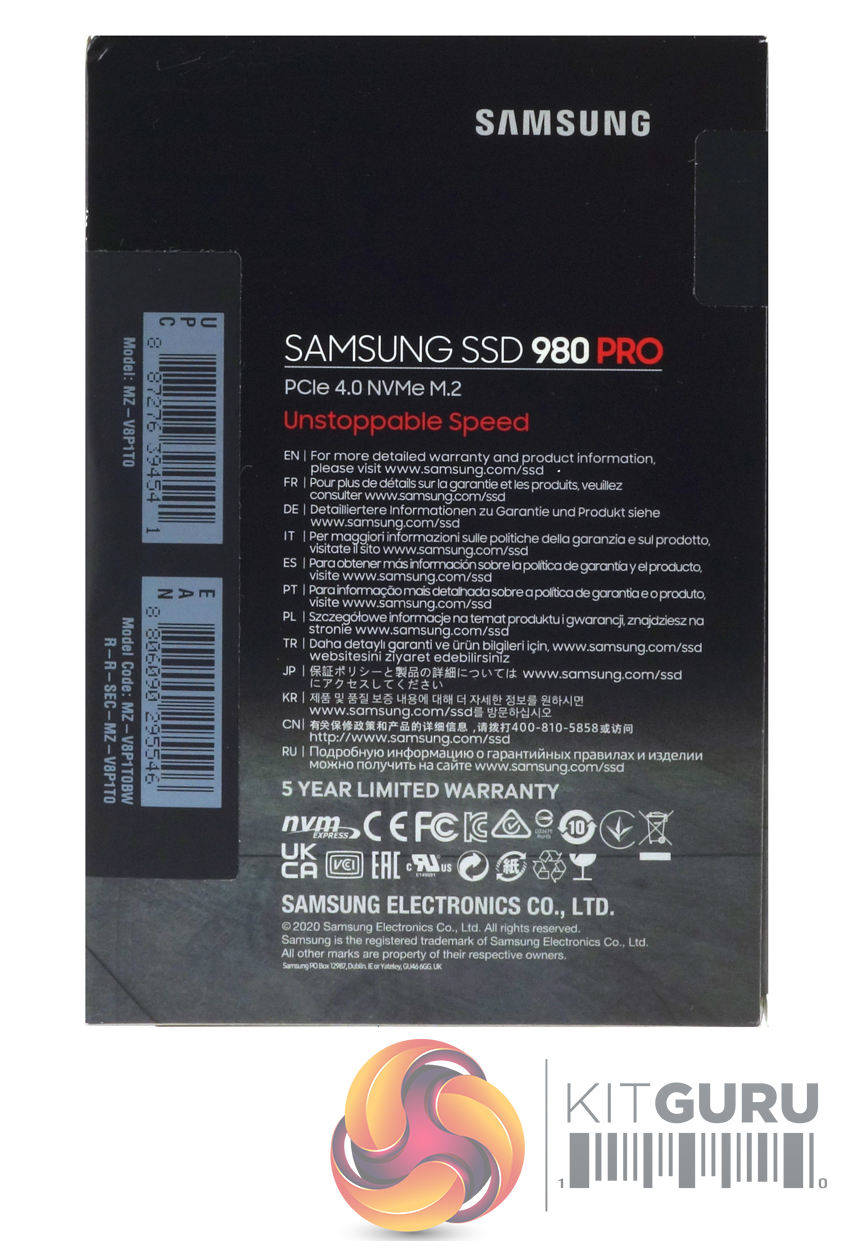
The rear of the box has a multilingual information panel giving the web address for more detailed warranty information. Under this is a reminder that the drive has a 5-year limited warranty.
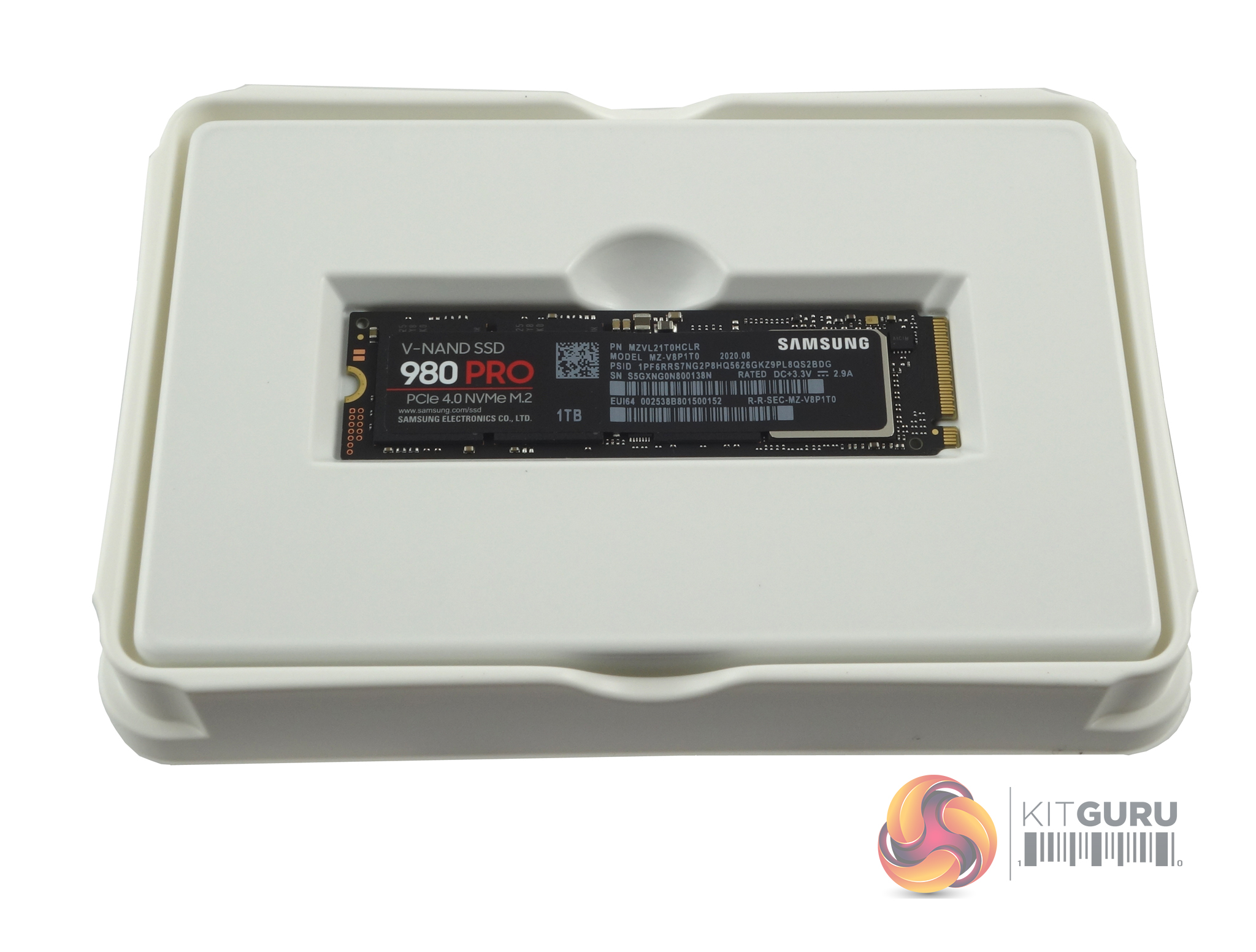
The drive itself comes tucked up in a plastic shell for extra protection. This outer shell fits into another piece of plastic which is home to the installation/warranty guide.
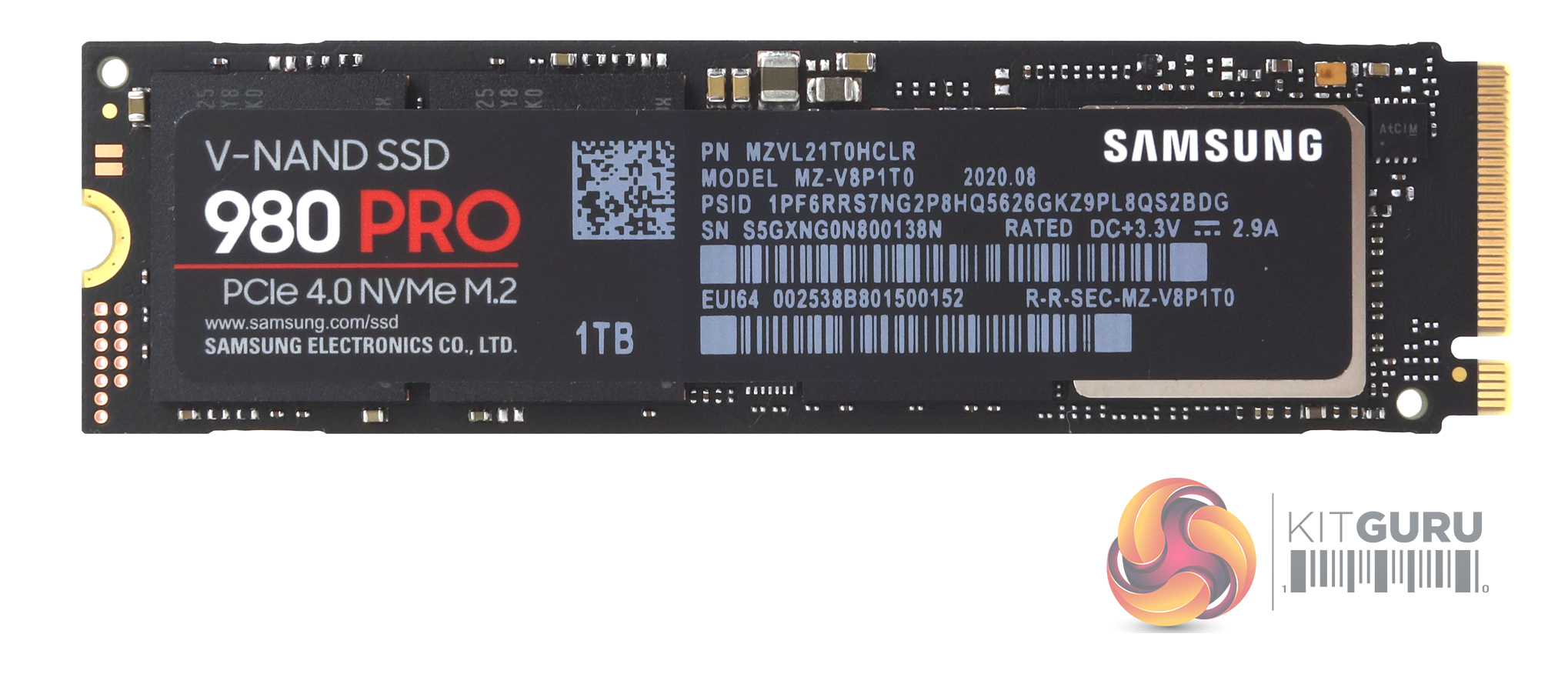
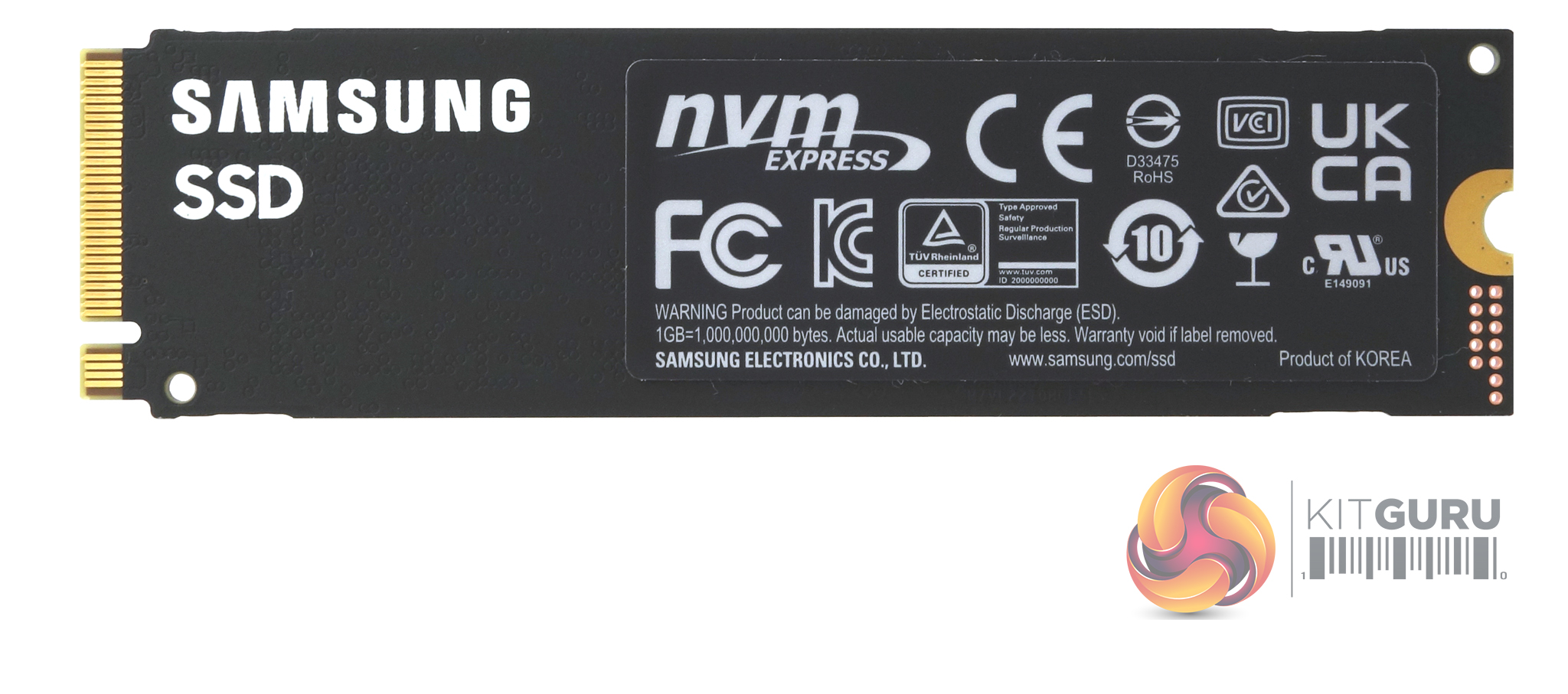
The SSD980 PRO is built on a single-sided M.2 2280 format PCB. Under the long product label on the top of the drive sits the new Samsung Elpis controller (which has a nickel coating to help with heat dissipation), a 1GB LPDDR4 cache IC and two packages of Samsung's 6th generation 1** layer 3-bit MLC (TLC) V-NAND. The sticker on the rear of the drive has a built-in copper layer to also aid heat dissipation.
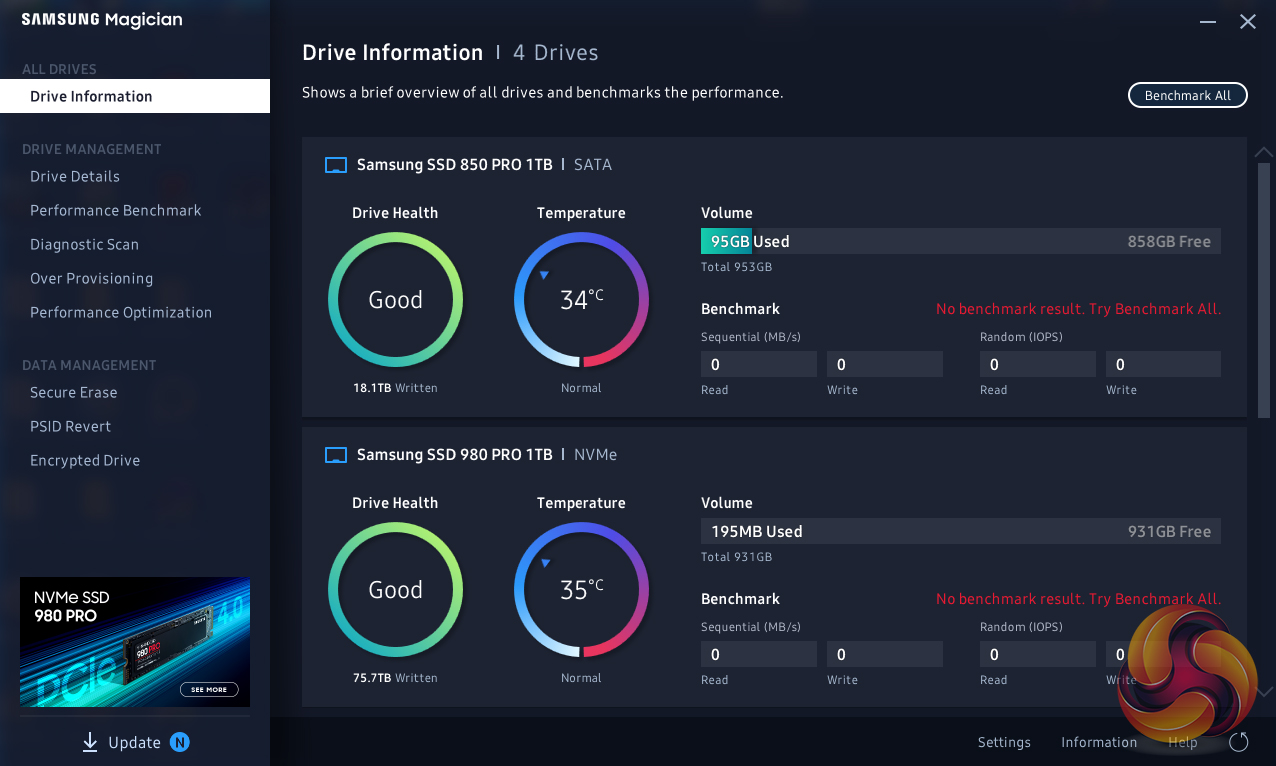
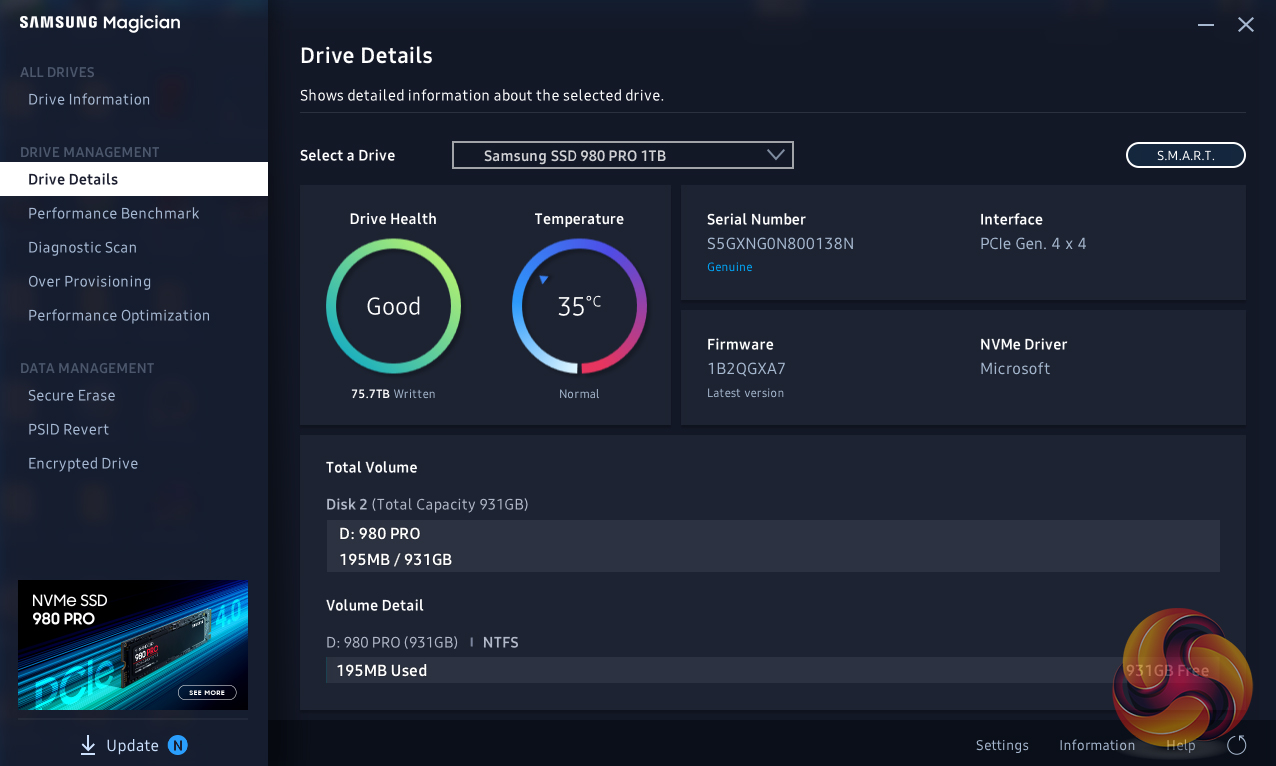
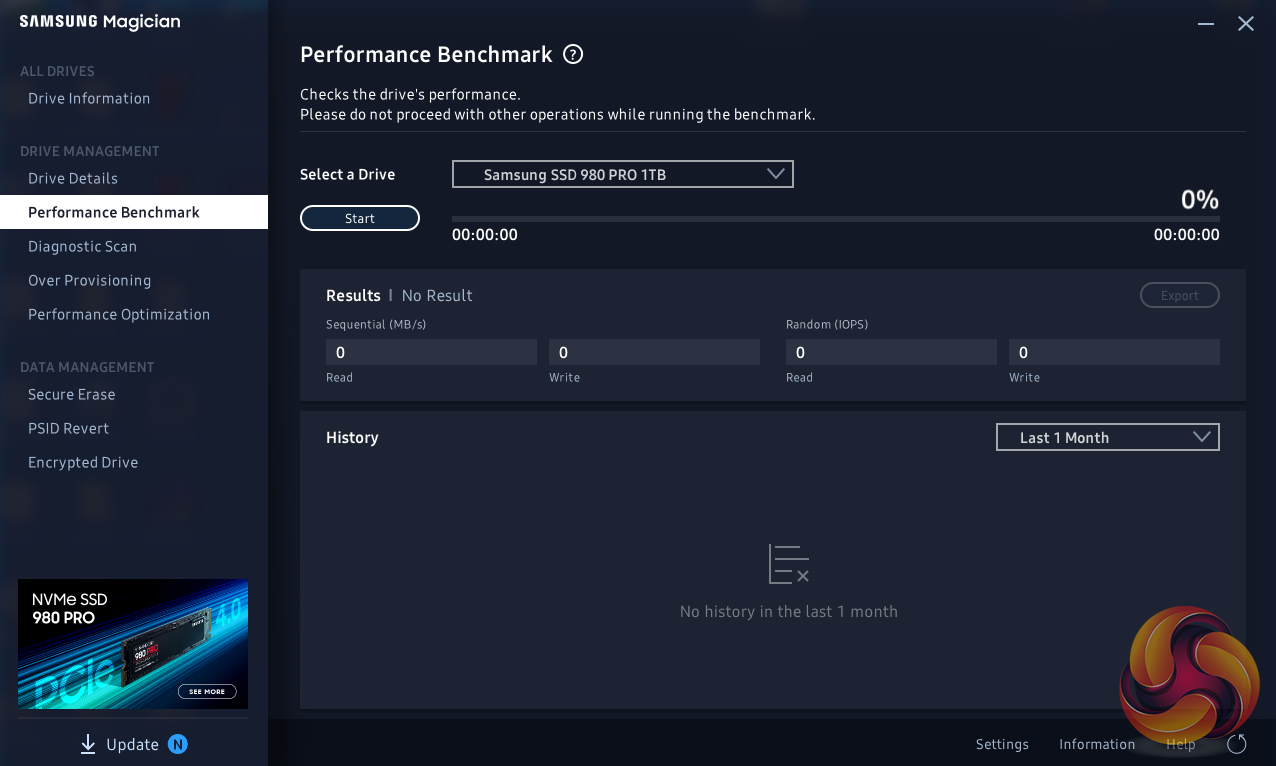
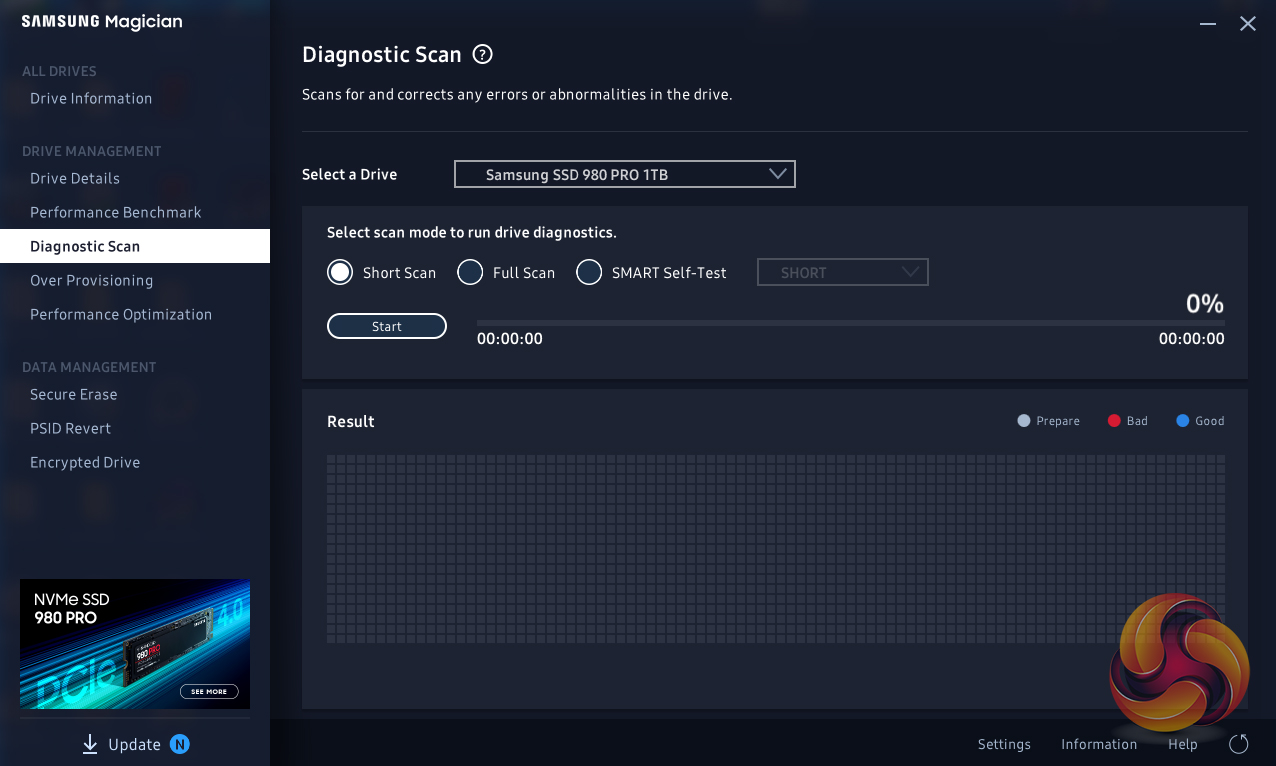
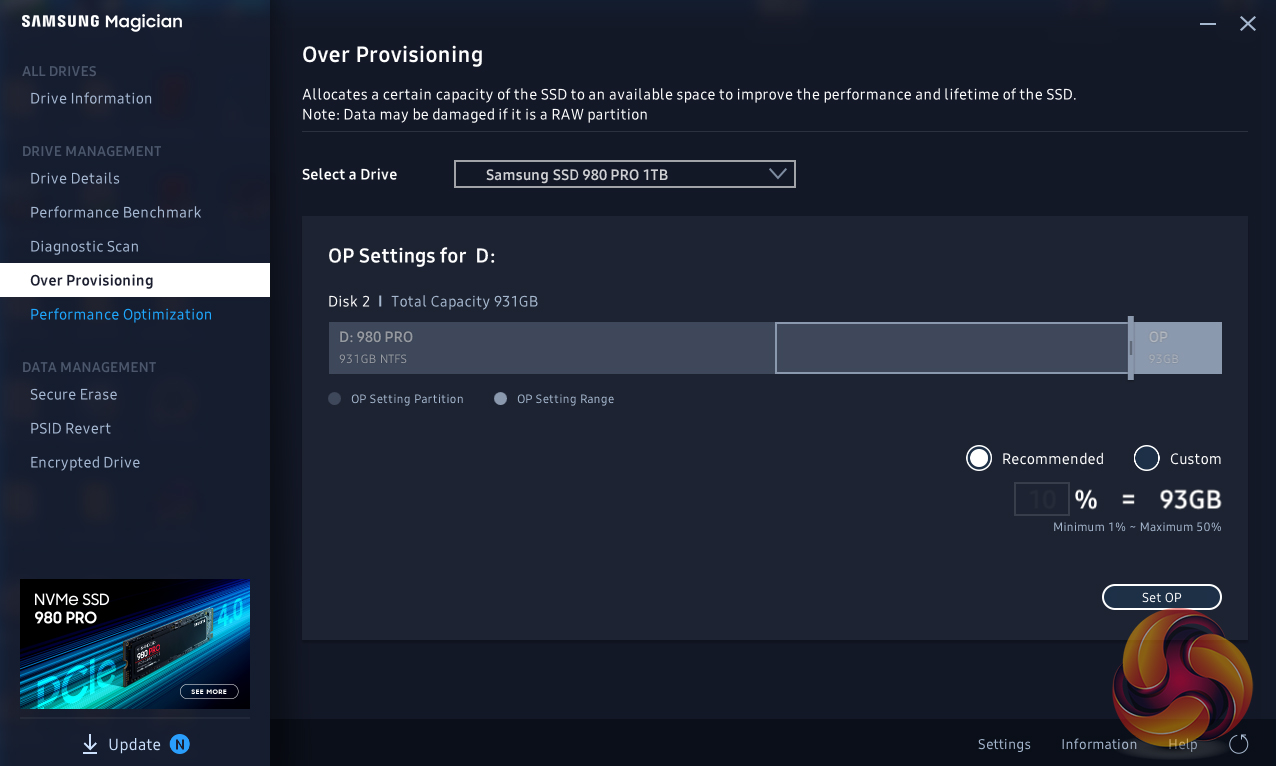
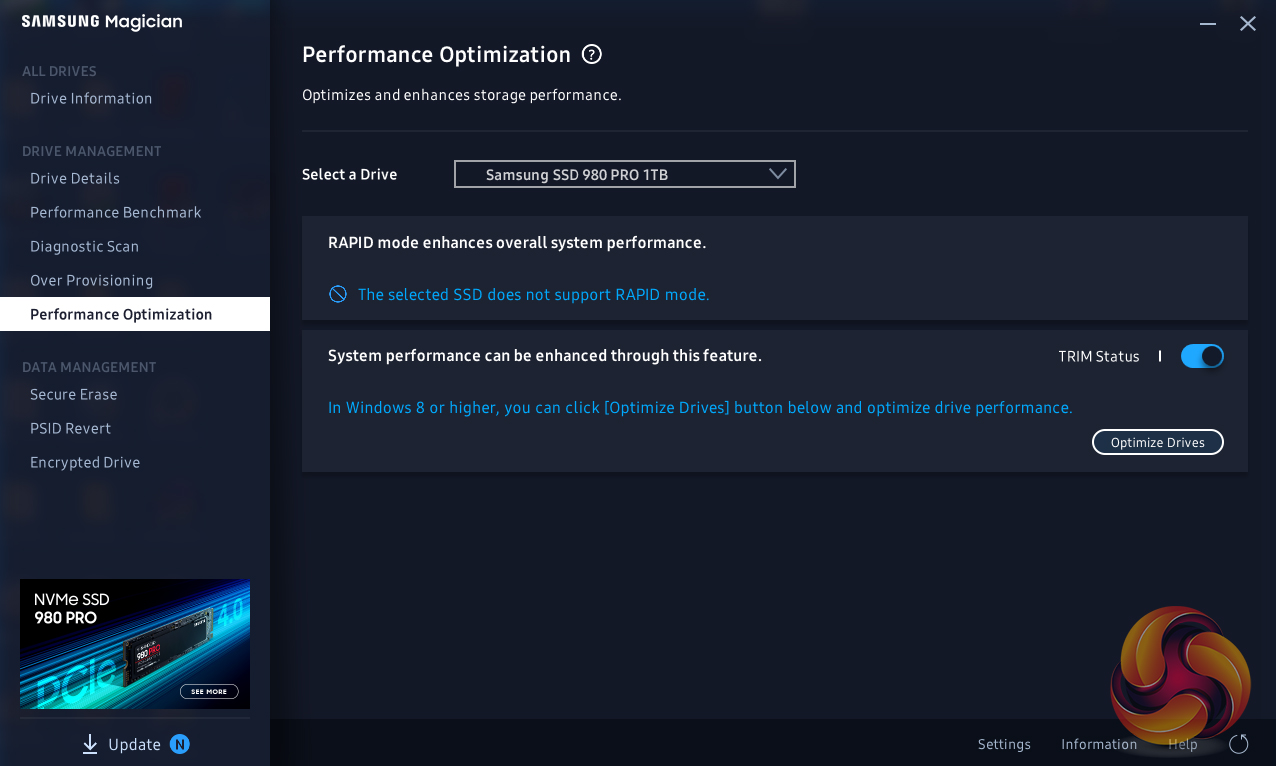
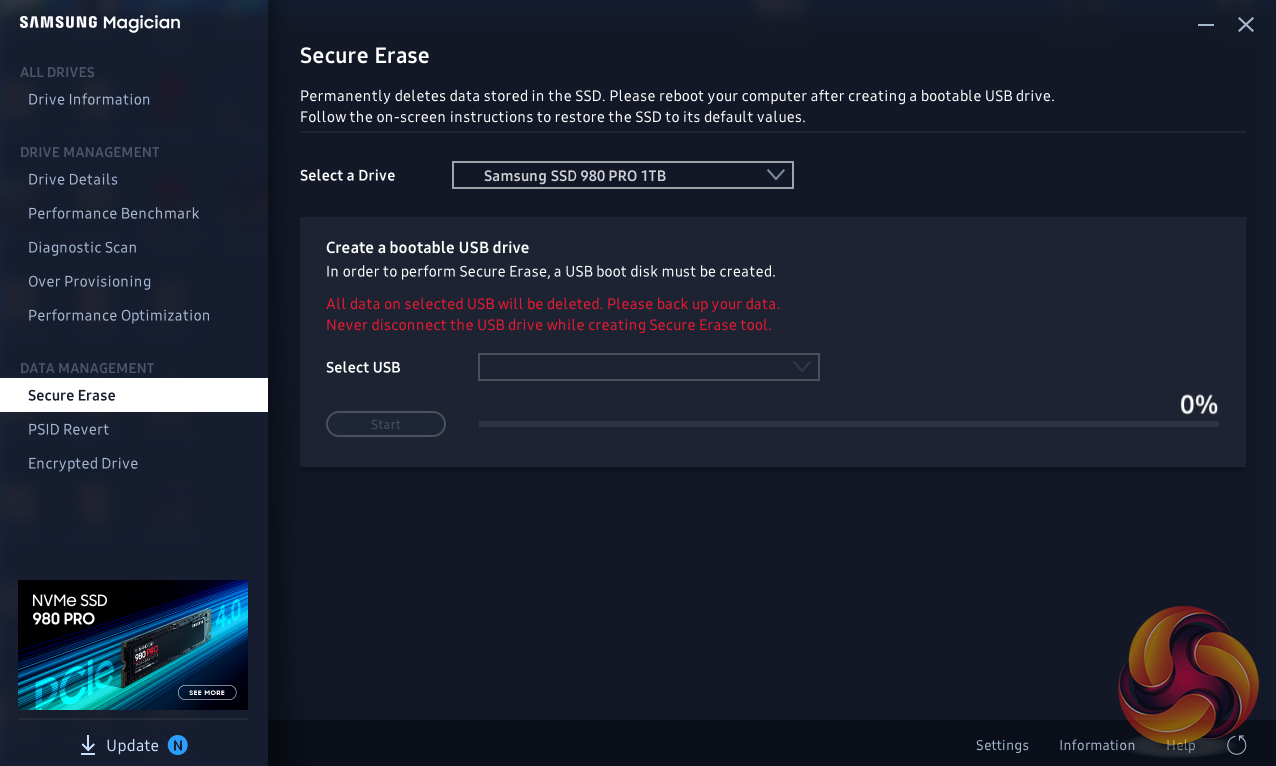
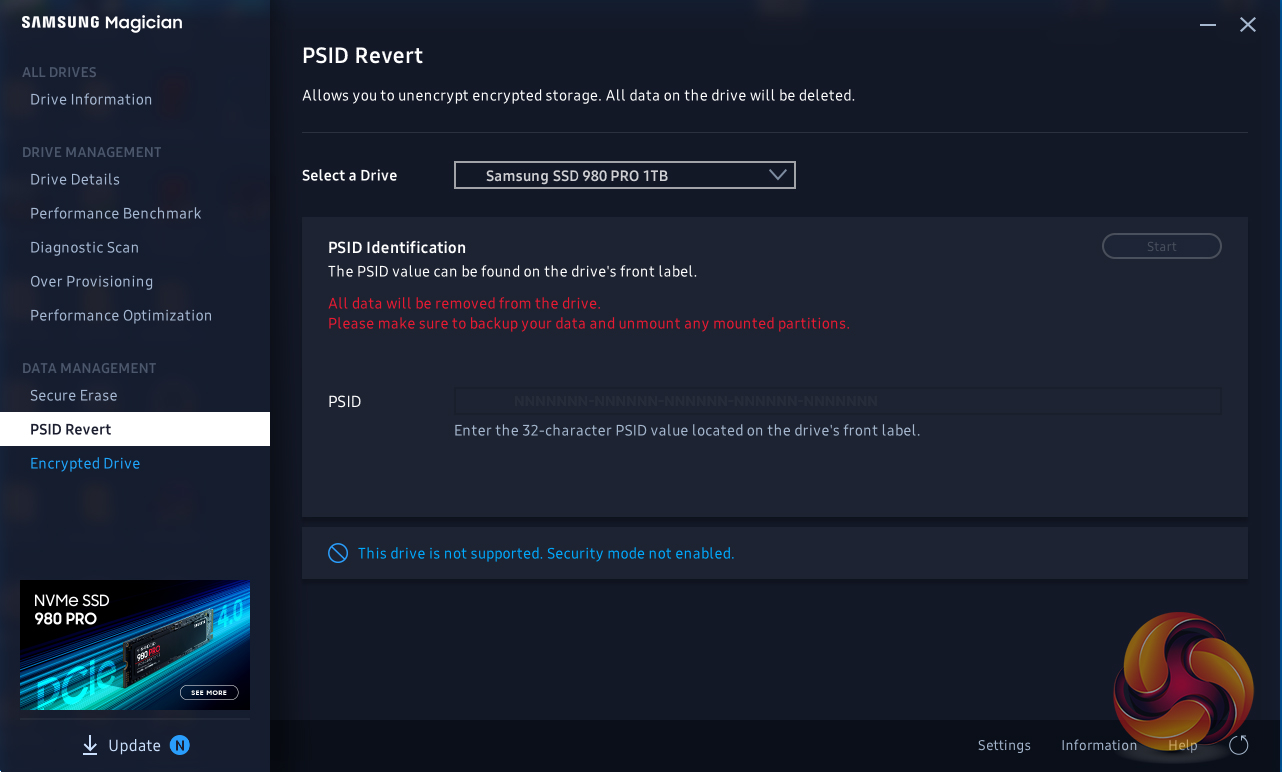
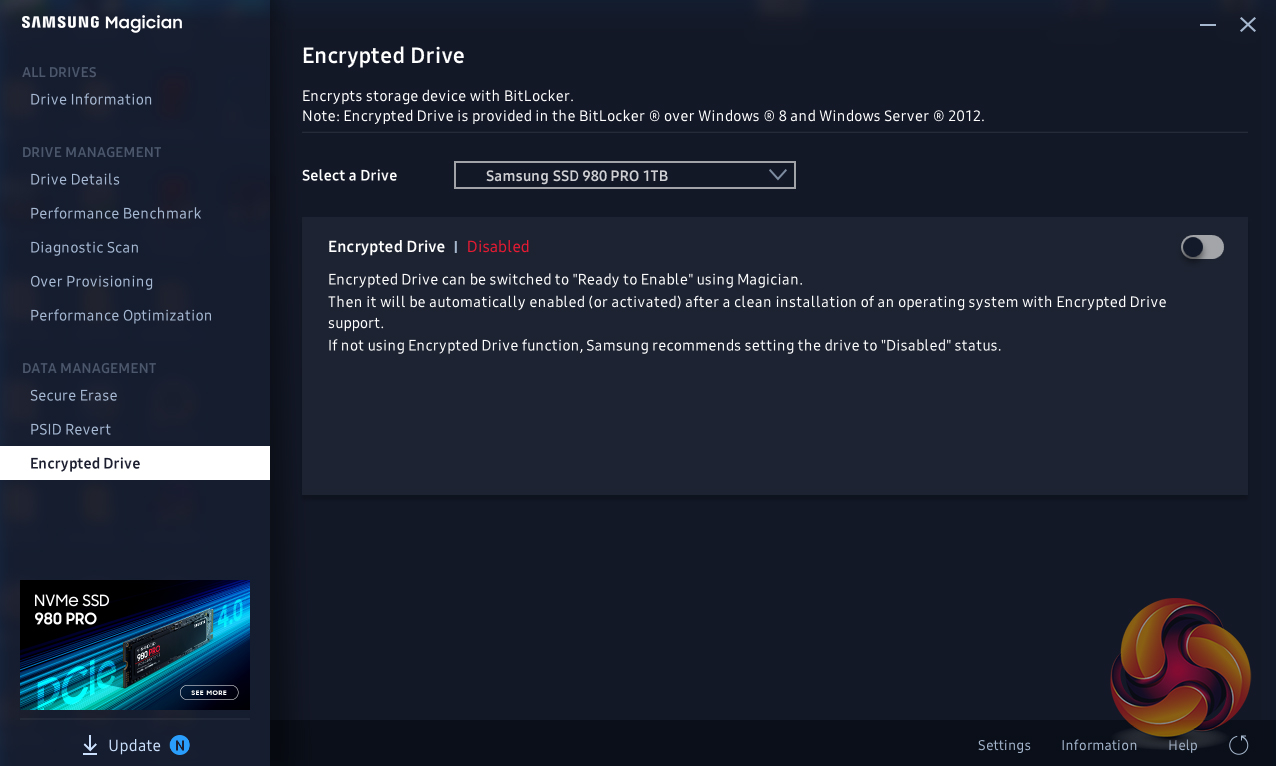
Samsung’s SSD management utility goes by the name of Magician and can be downloaded from Samsung’s website. The latest v6.2 version brings support for the SSD980 PRO.
Magician allows you to do most maintenance jobs you may need to do with an SSD; updating firmware, optimise performance, adjust the Over Provisioning, enable data security (the drive supports AES 256-bit full-disk encryption, TCG/Opal V2.0, and Encrypted Drive -IEEE1667 (MS eDrive ) ) and securely erase the drive. Magician also features a built-in benchmark tool.
The one thing missing from Magician is any form of integrated data migration tool but you can download a separate data migration tool from Samsung’s website.
For testing, the drives are all wiped and reset to factory settings by HDDerase V4. We try to use free or easily available programs and some real-world testing so you can compare our findings against your own system.
This is a good way to measure potential upgrade benefits.
Main system:
AMD Ryzen 5 3600X, 16GB DDR4-2400, Sapphire R9 390 Nitro and an MSI MPG X570 Gaming Edge Wifi motherboard
Other drives
Corsair Force MP600 1TB
Patriot Viper VPN4100 1TB
Seagate FireCuda 520 1TB
Teamgroup T-Force Cardea Zero Z440 1TB
Software:
Atto Disk Benchmark 4.
CrystalMark 6.0 & 7.0.0.
AS SSD 2.0.
IOMeter.
Futuremark PC Mark 8
All our results were achieved by running each test five times with every configuration this ensures that any glitches are removed from the results. Trim is confirmed as running by typing fsutil behavior query disabledeletenotify into the command line. A response of disabledeletenotify =0 confirms TRIM is active.
CrystalDiskMark is a useful benchmark to measure theoretical performance levels of hard drives and SSD’s. We are using v6.0 and v7.

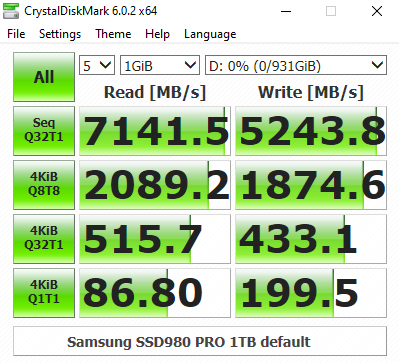
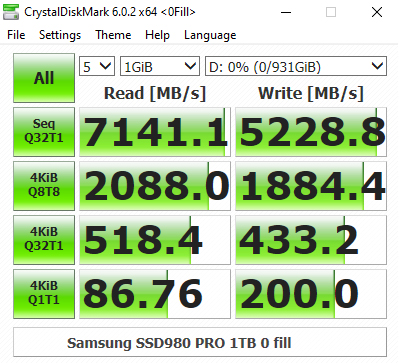
The SSD980 PRO doesn't do so well as the other PCIe Gen4 drives we've tested in the CrystalDiskMark 4K QD32 test but the Sequential test results do confirm the official ratings for the drive of up to 7,000MB/s read and 5,000MB/s writes. Looking at the two benchmark result screens, it appears that the new Elpis controller hasn't a preference for the type of data it's being asked to use.
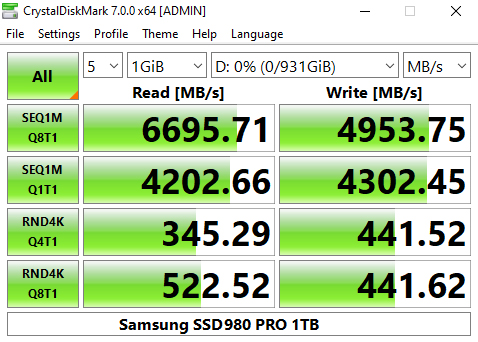
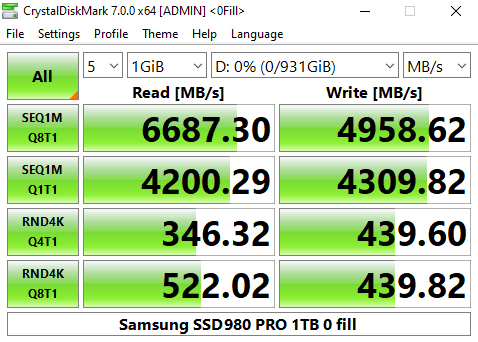
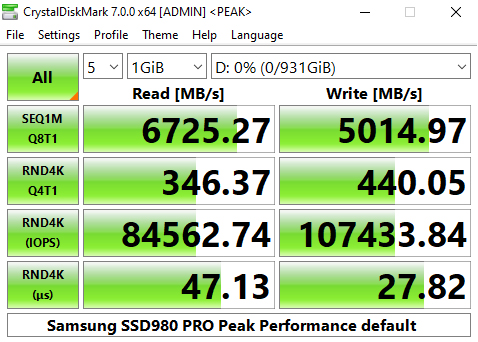
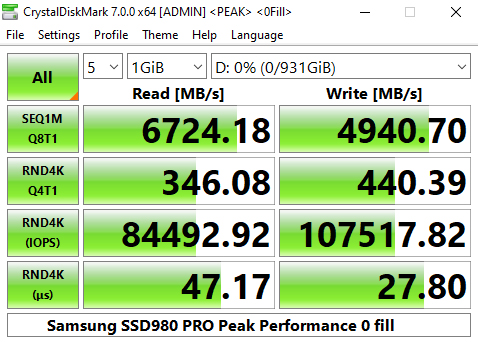
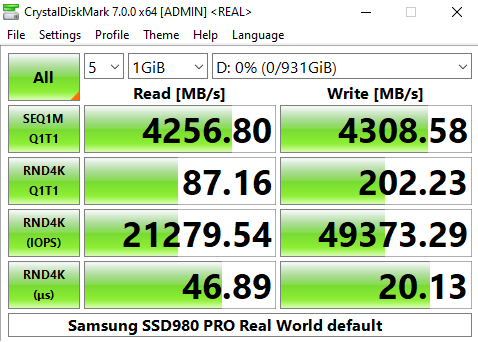
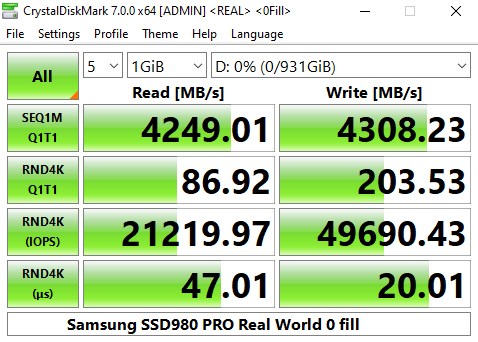
The latest version of CrystalDiskMark, version 7, includes a couple of profiles that can be used for testing – Peak Performance and Real World. The result screens for these two profiles not only display MB/s results but also IOPS and latency.
Although in the Peak Performance profile we couldn't hit the maximum 7,000MB/s official read figure, the test result of 6,725MB/s is well on the way to it. We could however confirm the maximum 5,000MB/s write figure with the drive producing a test figure of 5,014.97MB/s.
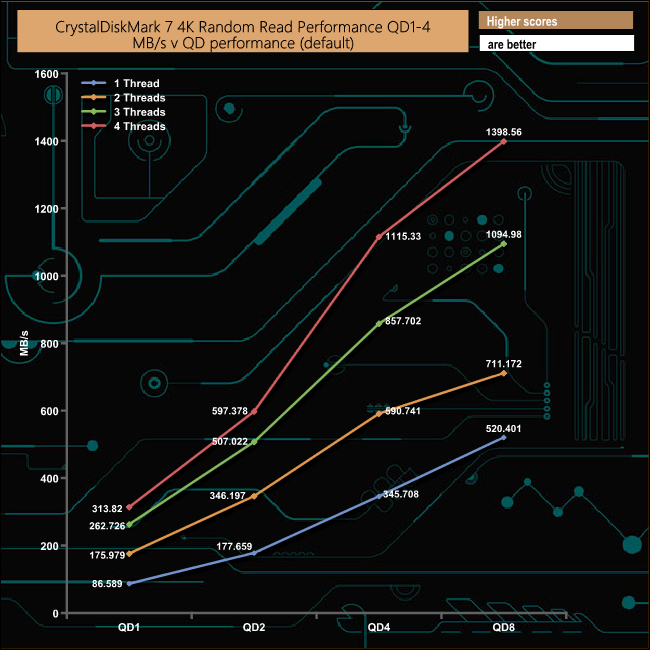
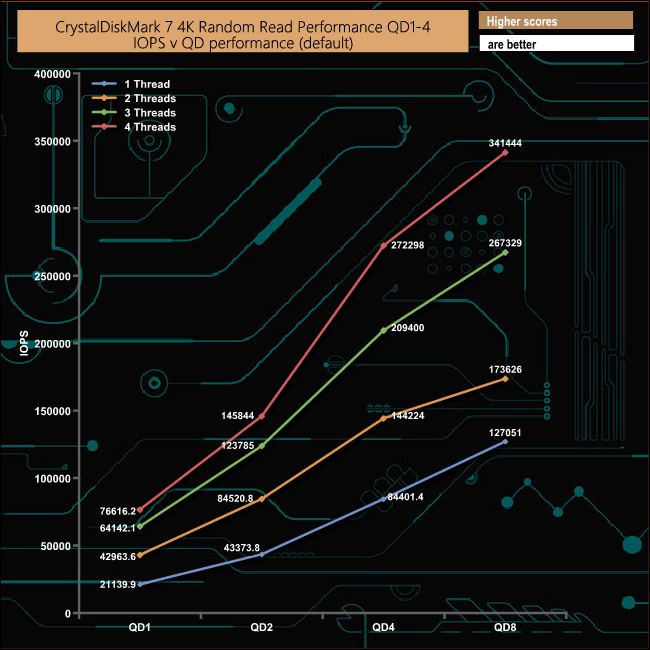
We also used CrystalDiskMark 7 to test the random performance of the drive at lower queue depths (where most of the everyday workloads occur) using 1 to 4 threads. The read performance climbs smoothly throughout the tested queue depths and threads.
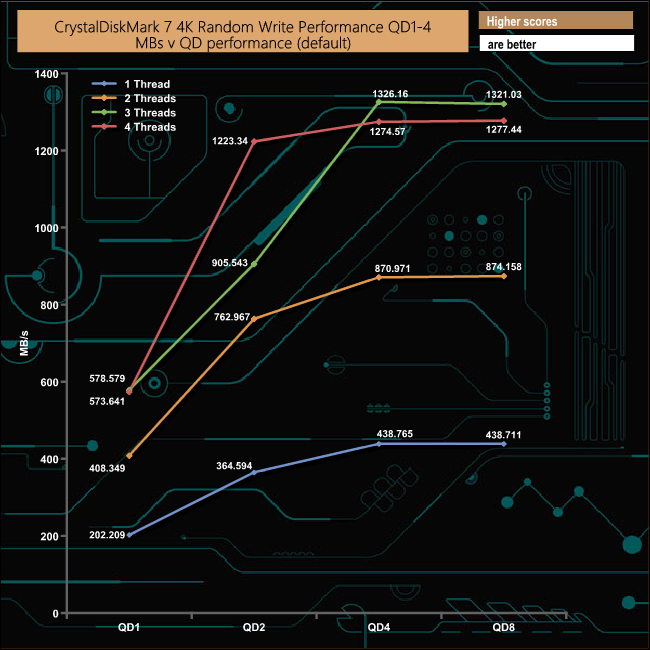
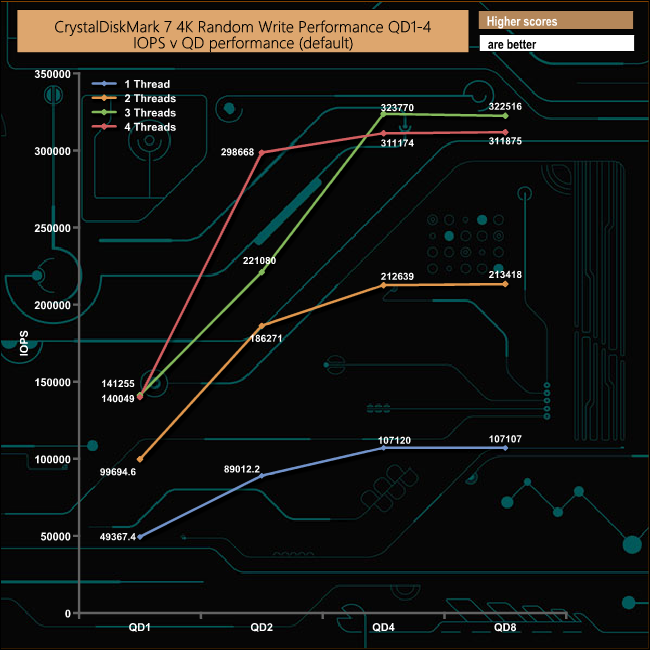
In the 4K random write tests, using 1, 2 and 4 threads the drive climbed smoothly to the QD2 mark and then began to flatten out. In the 3-tread test, the drive reached the QD4 mark before it began to level off.
The ATTO Disk Benchmark performance measurement tool is compatible with Microsoft Windows. Measure your storage systems performance with various transfer sizes and test lengths for reads and writes. Several options are available to customize your performance measurement including queue depth, overlapped I/O and even a comparison mode with the option to run continuously.
Use ATTO Disk Benchmark to test any manufacturers RAID controllers, storage controllers, host adapters, hard drives and SSD drives and notice that ATTO products will consistently provide the highest level of performance to your storage.
We are using version 4.0 for our NVMe disk tests.
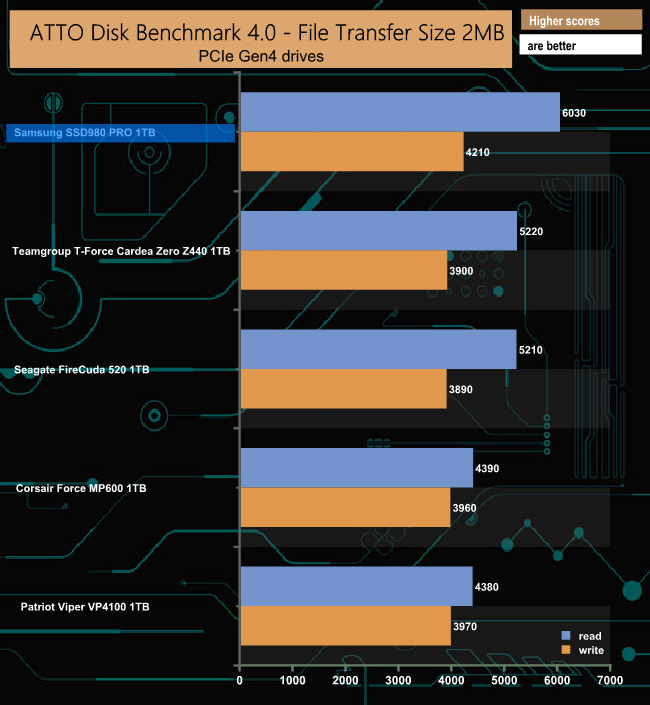
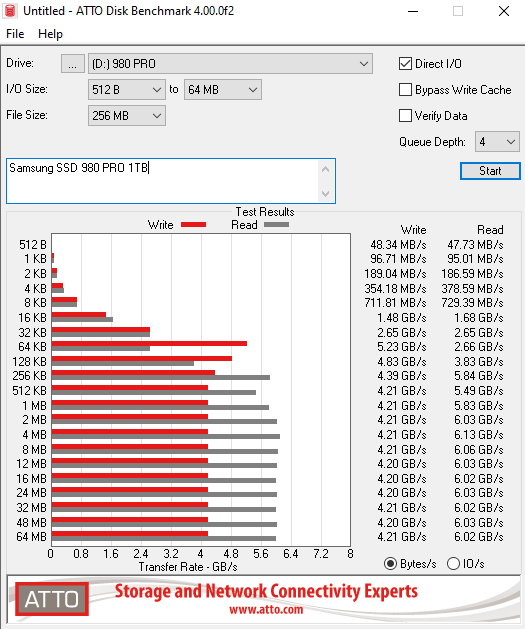
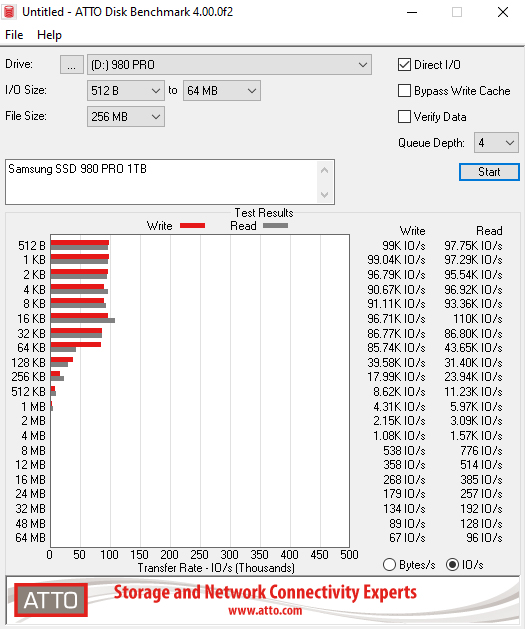
Using the ATTO benchmark we couldn't quite hit the top Sequential figures of 7,000MB/s and 5,000MB/s read and write respectively but the read result of 6,030MB/s with writes of 4,210MB/s make the SSD980 PRO the fastest PCIe Gen4 drive we've tested to date.
AS SSD is a great free tool designed just for benching Solid State Drives. It performs an array of sequential read and write tests, as well as random read and write tests with sequential access times over a portion of the drive. AS SSD includes a sub suite of benchmarks with various file pattern algorithms but this is difficult in trying to judge accurate performance figures.
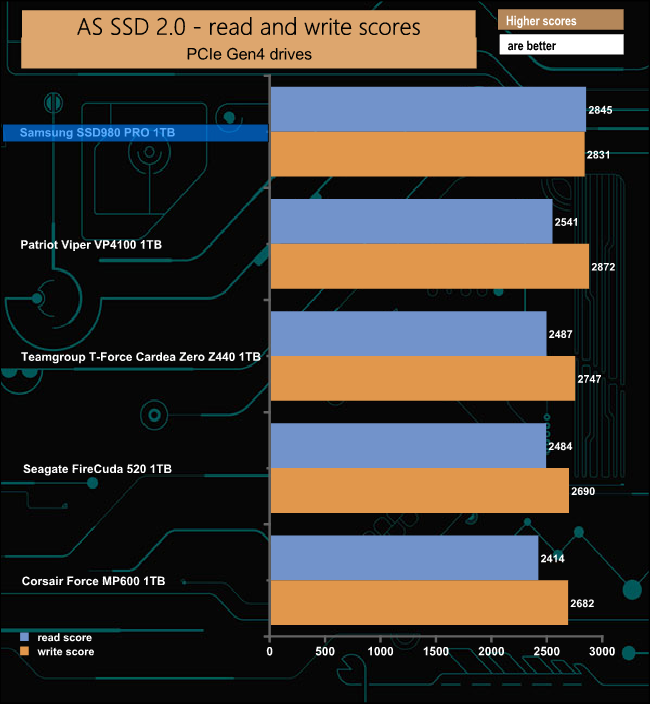
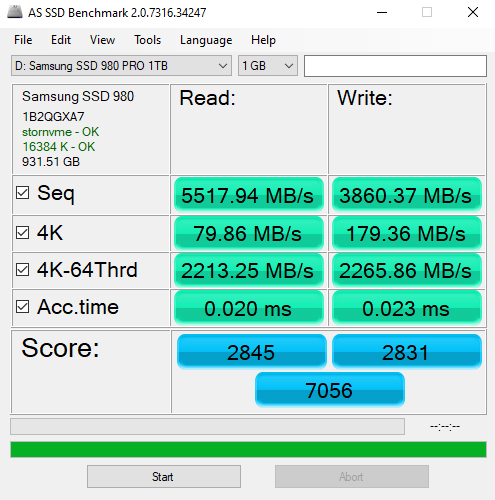
The read score of 2845 from the SSD980 PRO is the best we have seen from a PCIe Gen 4 drive by quite a margin but its write score of 2831 is bettered by the 2872 scored by Patriot's Viper VP4100.
IOMeter is another open-source synthetic benchmarking tool which is able to simulate the various loads placed on a hard drive and solid-state drive technology. There are many ways to measure the IOPS performance of a Solid State Drive, so our results will sometimes differ from the manufacturer’s quoted ratings. We do test all drives in exactly the same way, so the results are directly comparable.
We test 128KB Sequential read and write and random read and write 4k tests. The test setup’s for the tests are listed below. Each is run five times.
128KB Sequential Read / Write.
Transfer Request Size: 128KB Span: 8GB Thread(s): 1, Outstanding I/O: 1-32 Test Run: 20 minutes per test
4K Sustained Random Read / Write.
Transfer Request Size: 4KB Span: 80GB Thread(s): 4, Outstanding I/O: 1-32 Test Run: 20 minutes per test
4K Random 70/30 mix Read/Write.
Transfer Request Size: 4KB Span: 80GB Reads: 70% Writes: 30% Thread(s): 4 Outstanding I/O: 2 – 32 Test Run: 20 minutes.
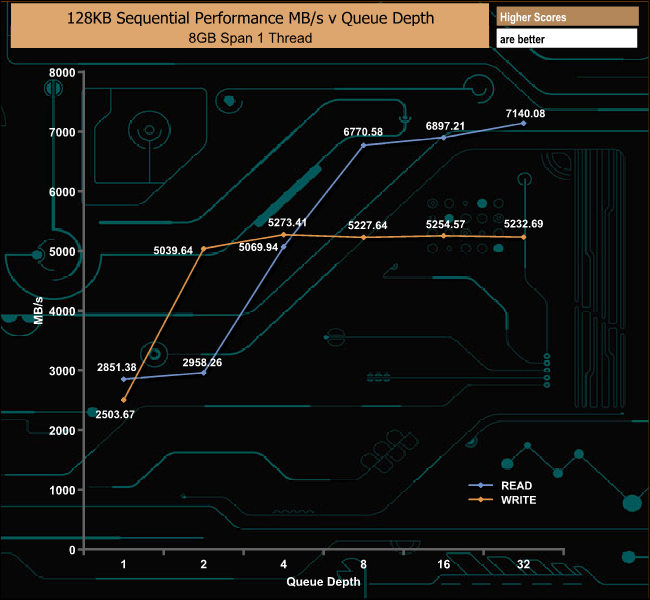
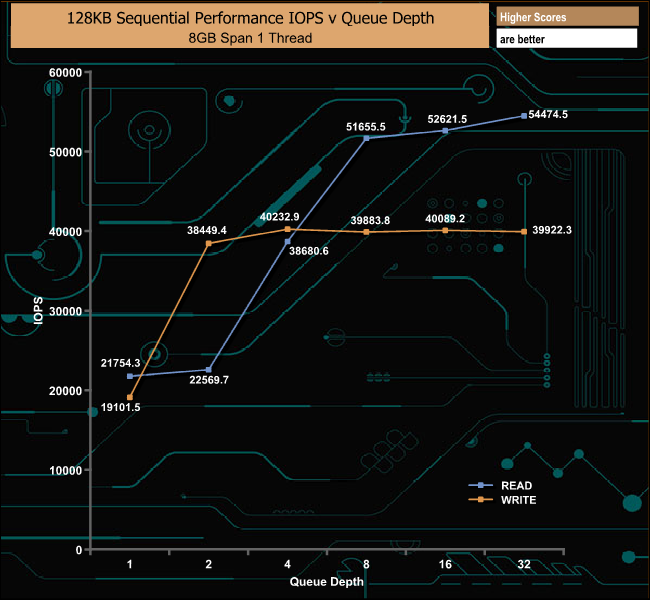
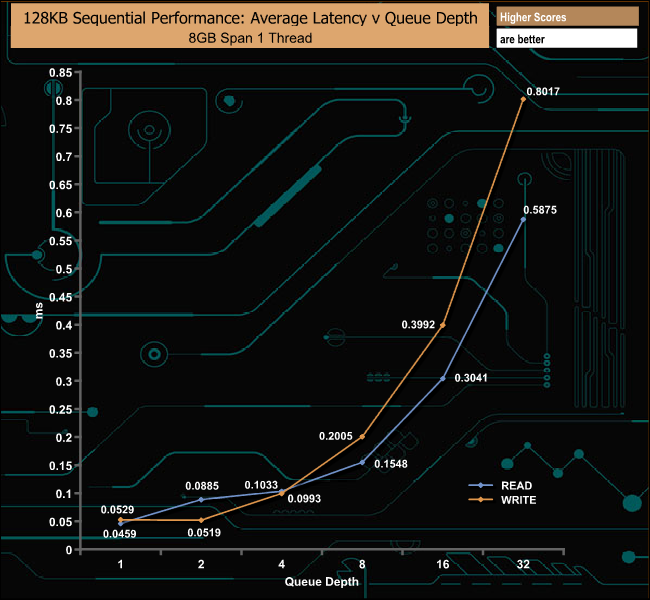
With our own Sequential tests, we could confirm the official up to 7,000MB/s read and 5,000MB/s write figures with the drive producing a peak read figure of 7,140.08MB/s (QD32) with writes peaking at 5,254.57MB/s (QD16).
128KB Sequential Read Performance v QD Compared
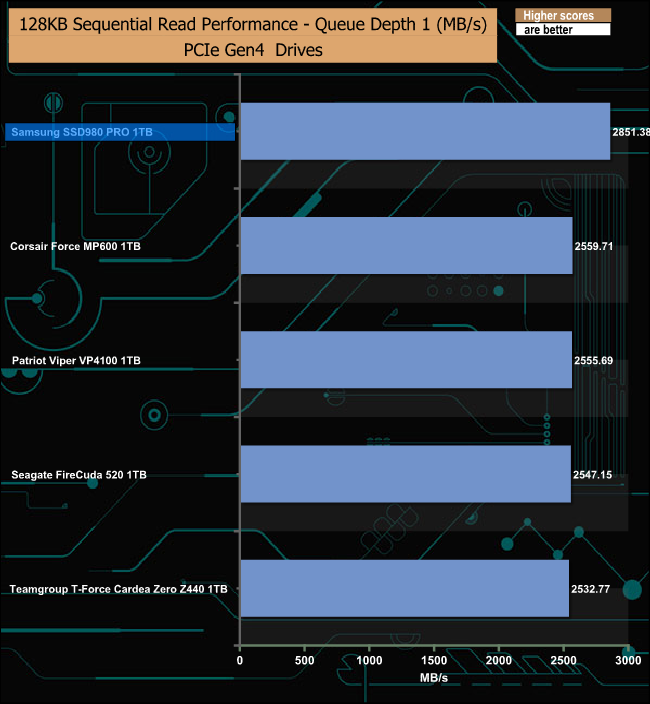
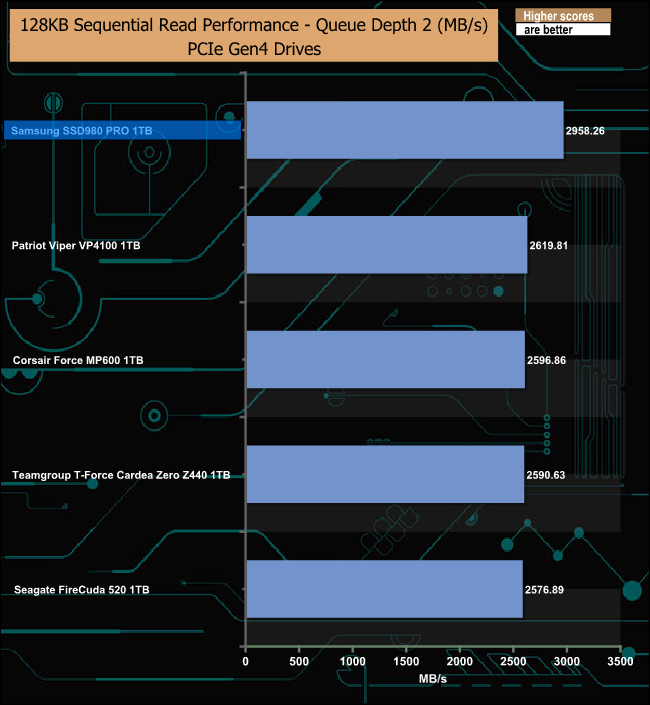
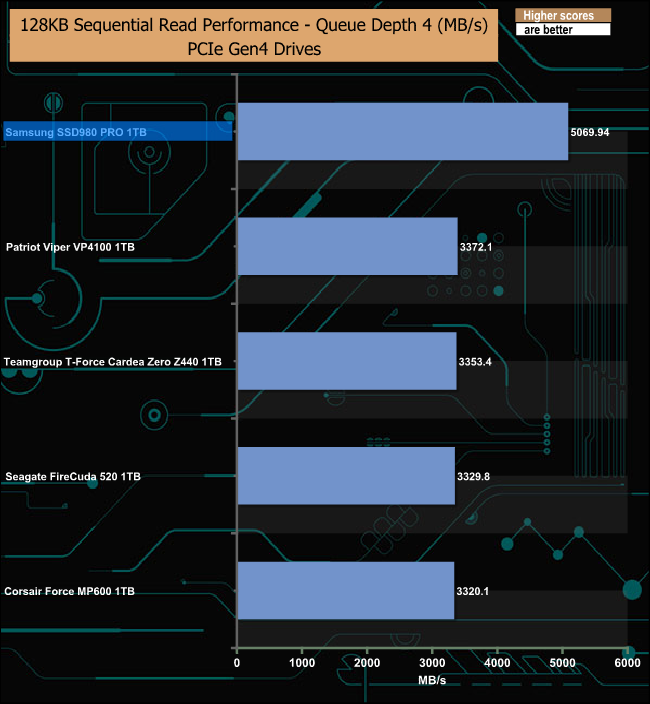
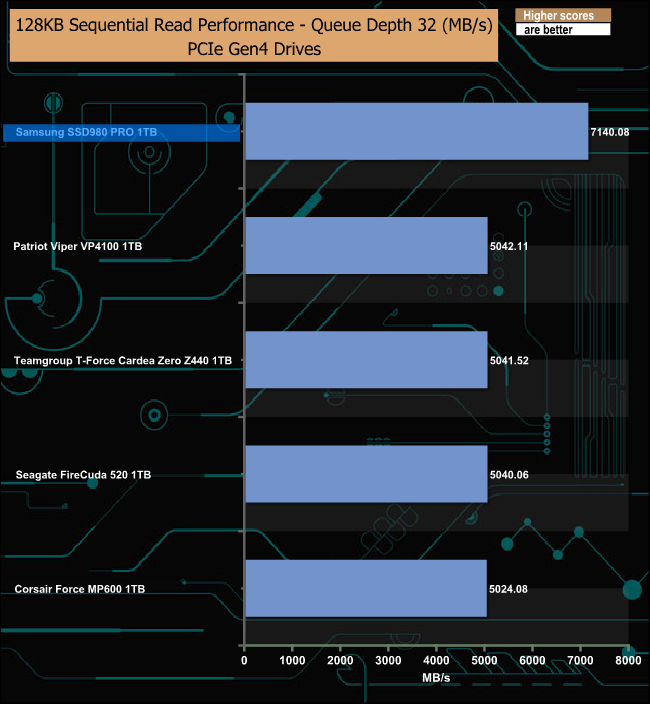
The SSD980 PRO tops our result charts at all the tested queue depths and by quite some margin especially at QD's 4 and 32.
128KB Sequential Write Performance v QD Compared
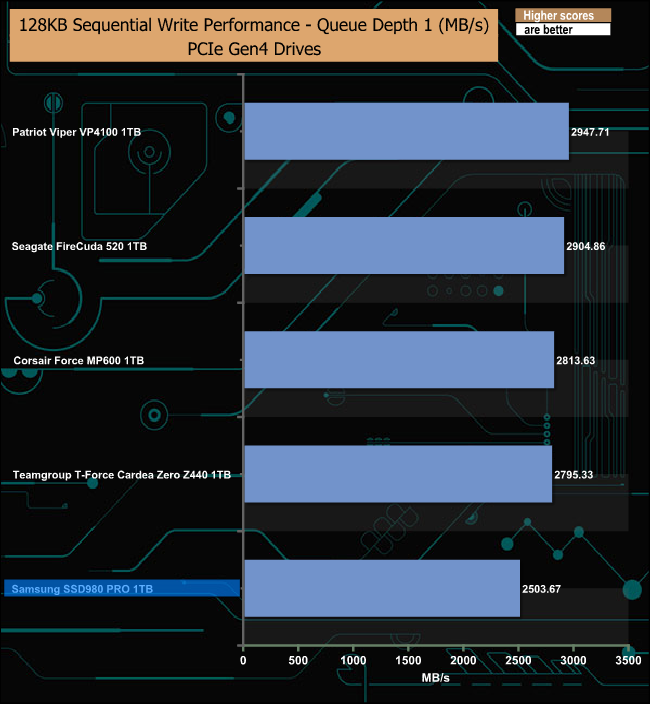
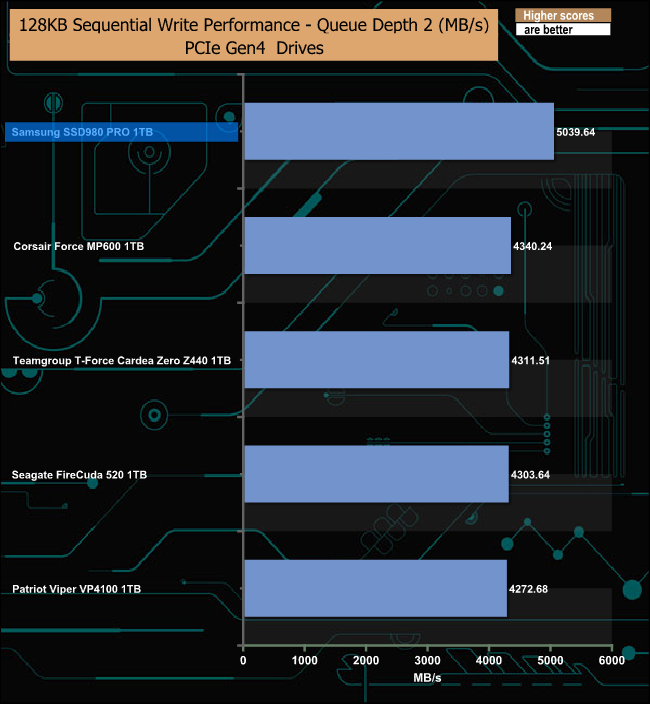
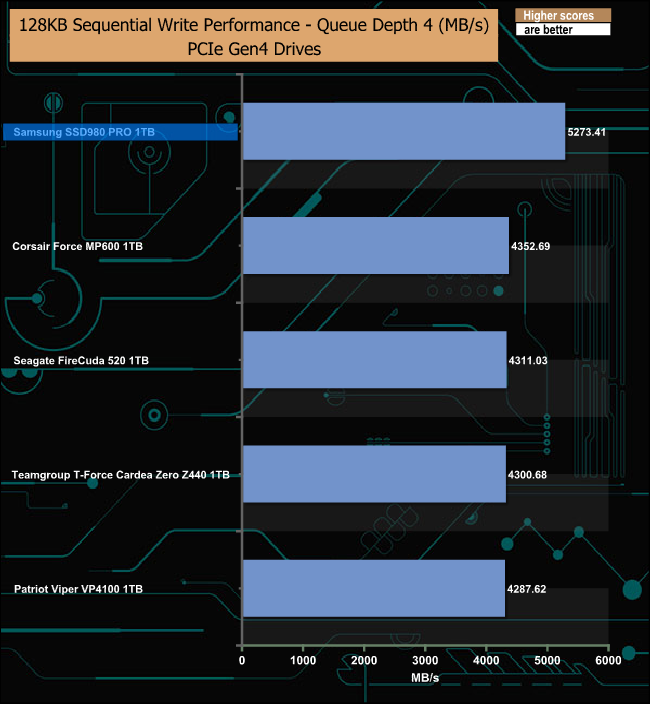
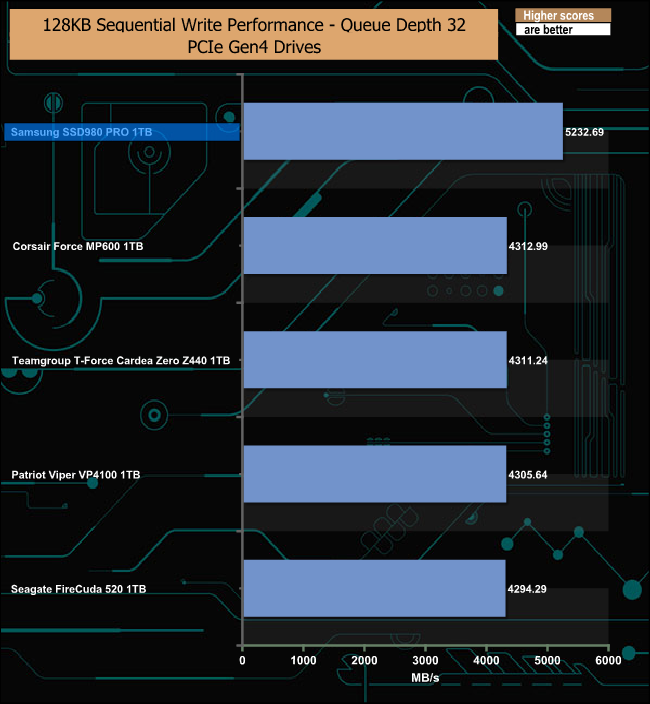
At a QD of 1, the SSD980 PRO languishes at the bottom of the chart. By QD2 it's at the top of the chart and stays there for the rest of the tested queue depths.
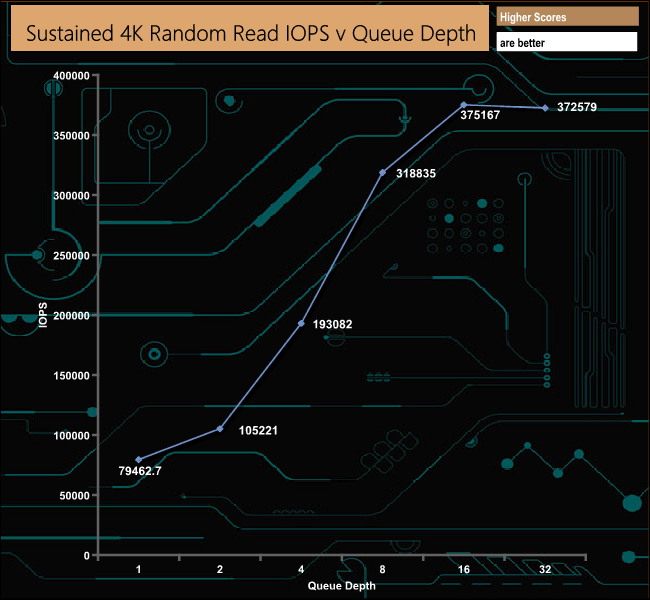
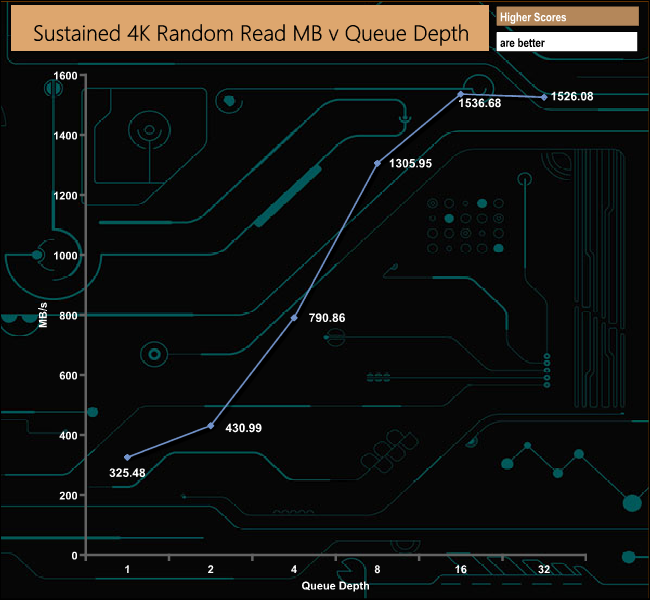
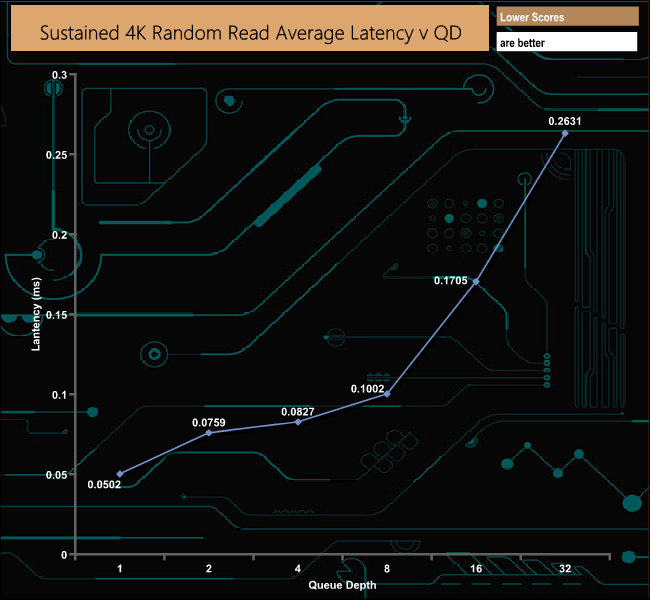
Samsung quotes a random 4K read figure of up to 1m IOPS for the 1TB SSD980 PRO (QD32 16T). Needless to say with our 4-threaded tests we couldn't get anywhere close to that figure with 372,579 IOPS.
4K Random Read v QD Performance Compared
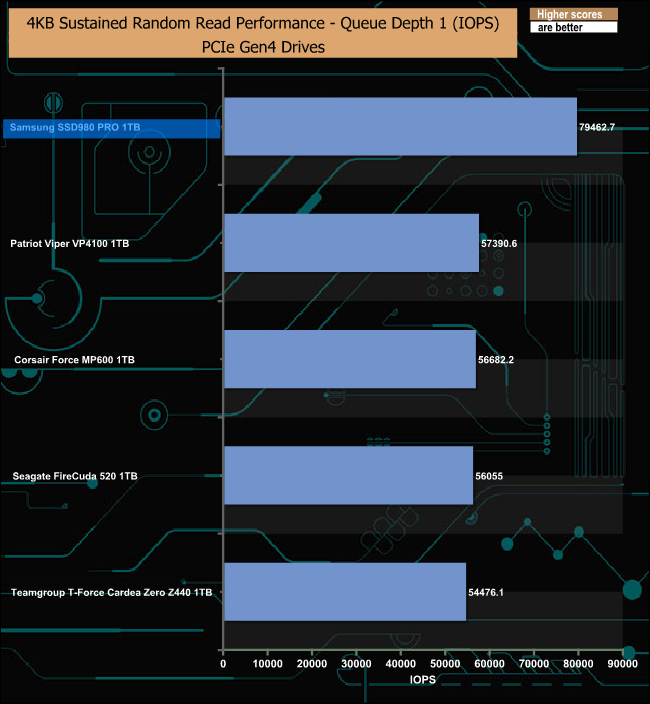
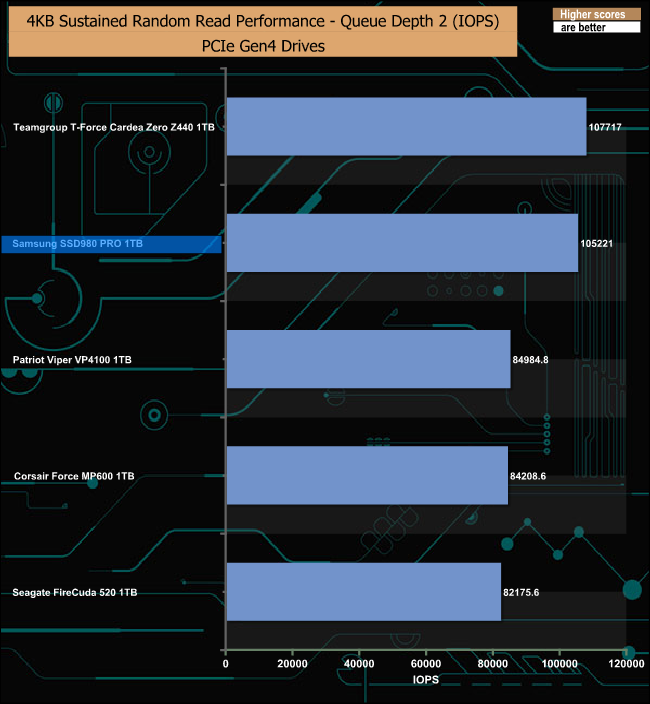
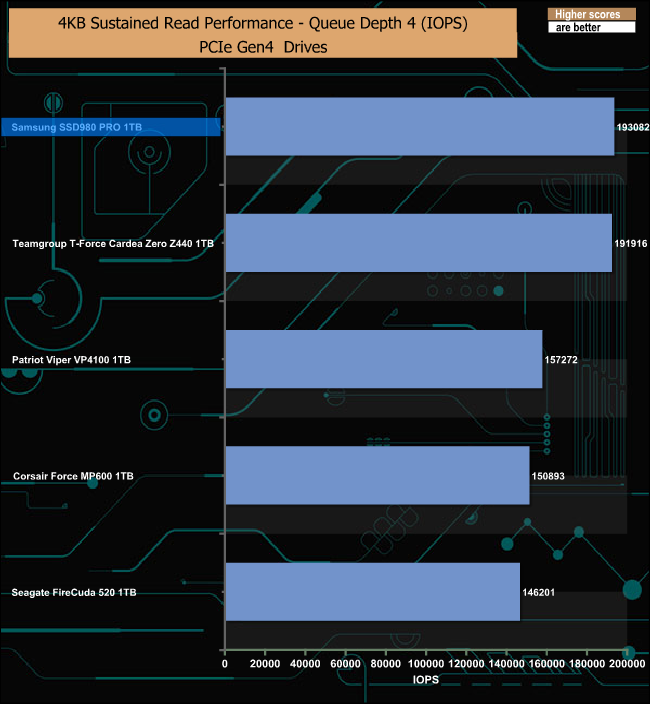
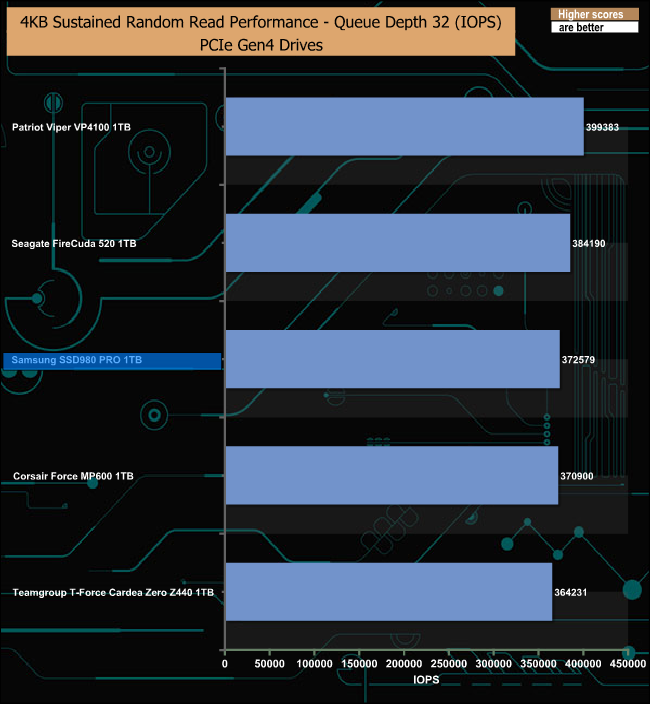
In our testing, the SSD980 PRO tops the results charts at QD's 1 (79,462 IOPS) and 4 (193,082 IOPS) but at a QD of 32, the drive sits behind Patriot's Viper VP4100 and the Seagate FireCuda 520.
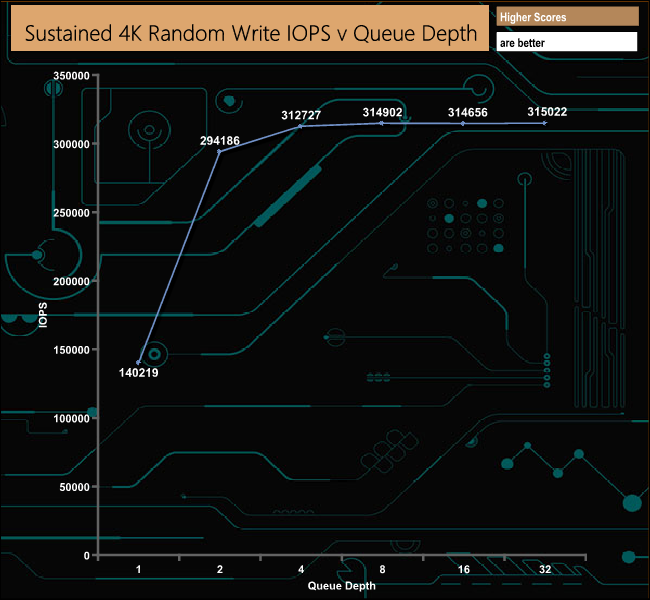
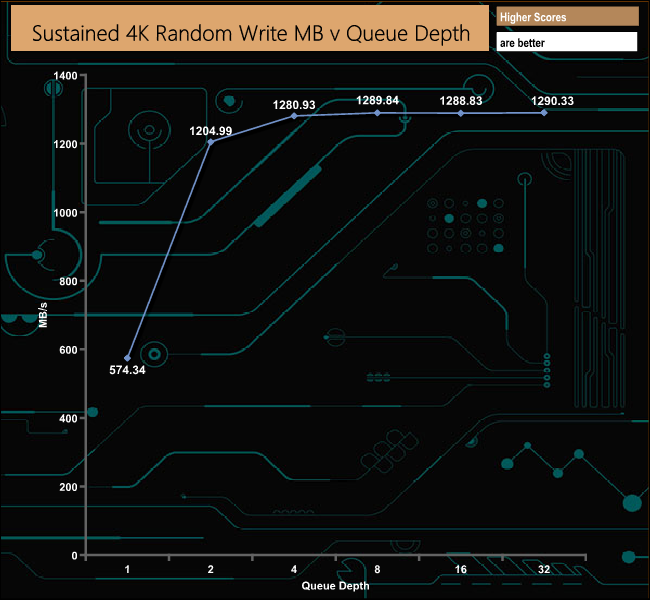
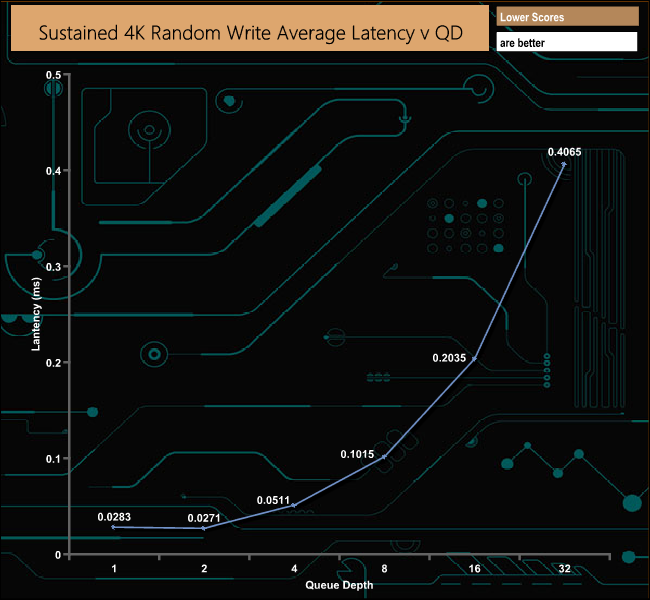
As with the random read results, our 4-threaded random write test result is light years away from the official 1m IOPS at 315,022 IOPS.
4K Random Write v QD Performance Compared
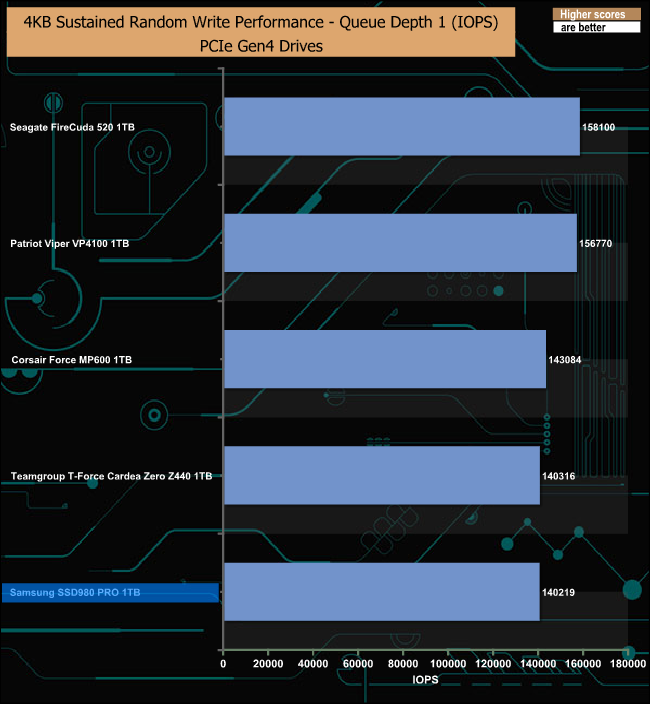
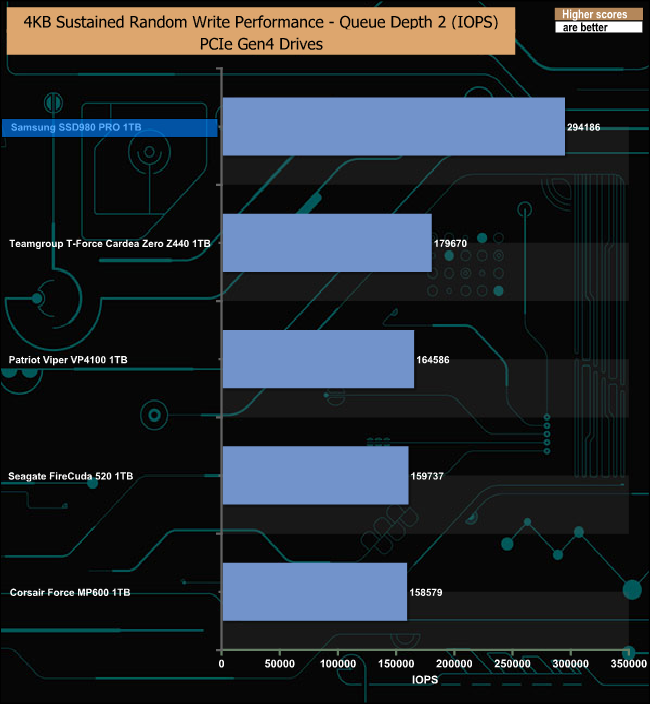
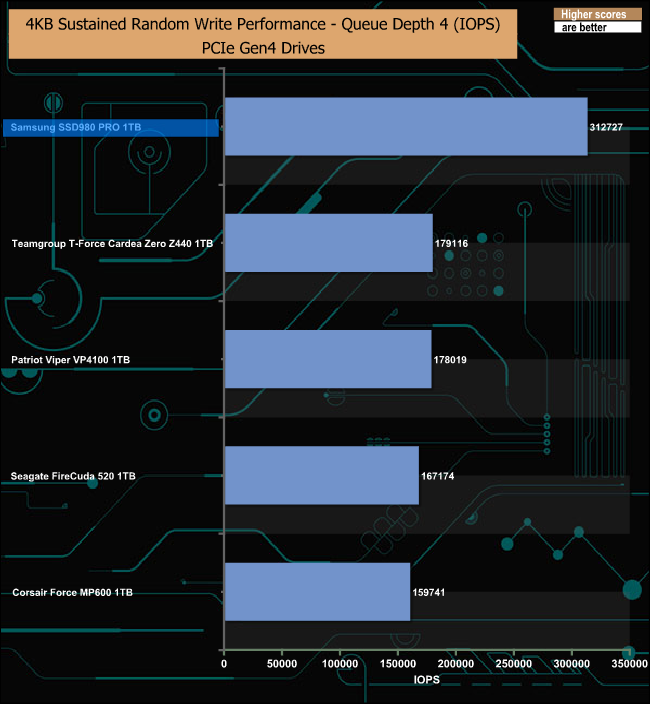
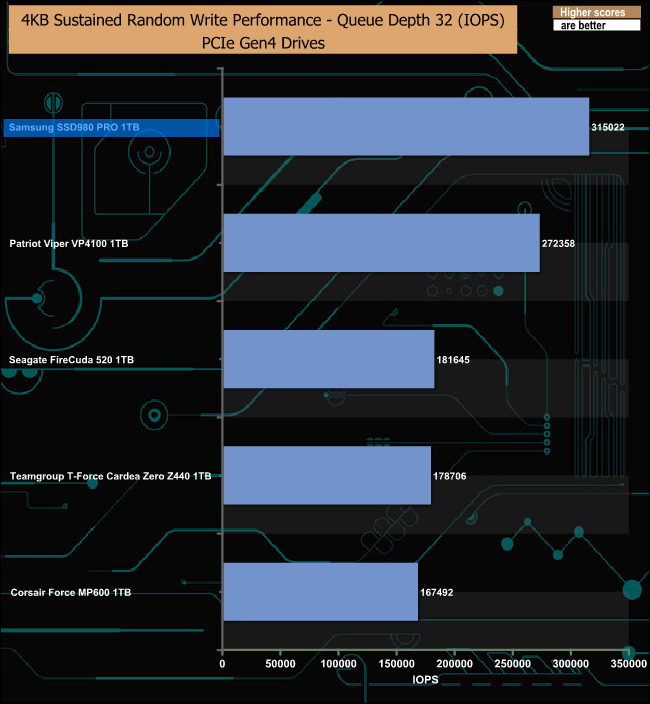
In our tests, the SSD980 PRO sits at the bottom of the pile at a QD of 1, but it doesn't stay there for long, as it tops all the other queue depth charts by some considerable distance after that.
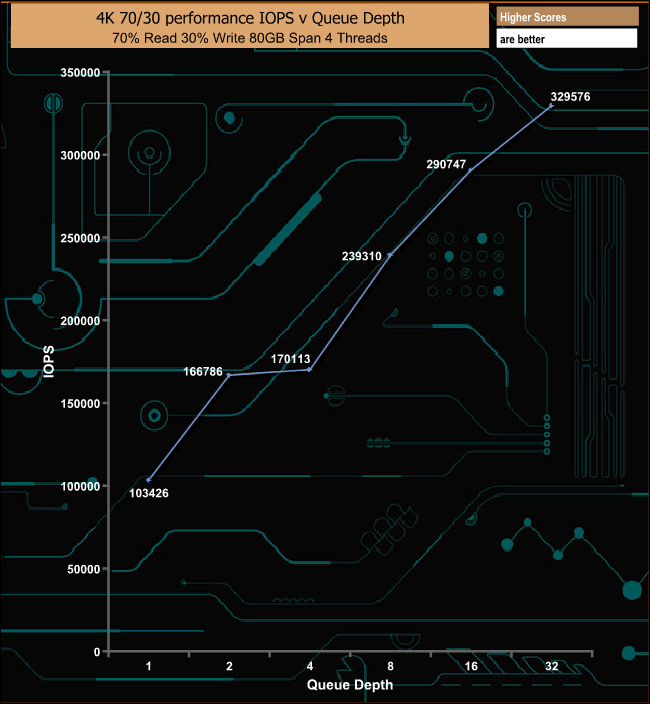
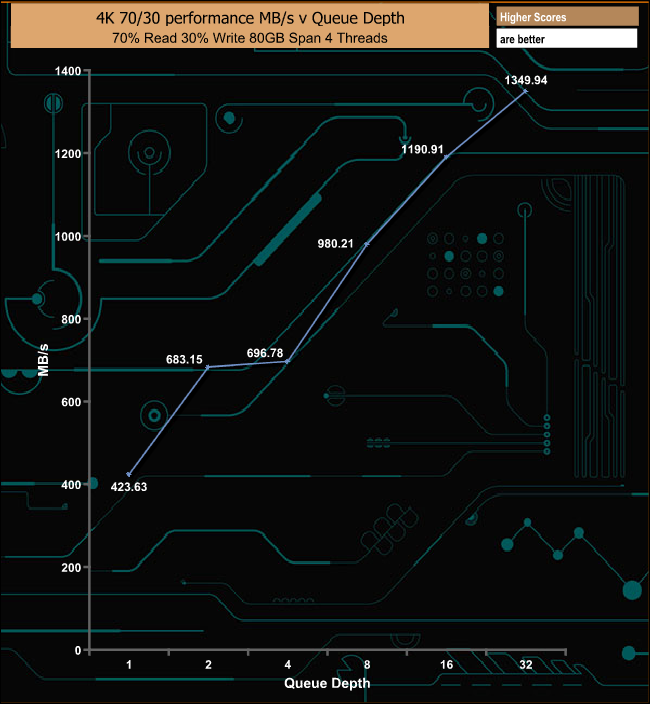
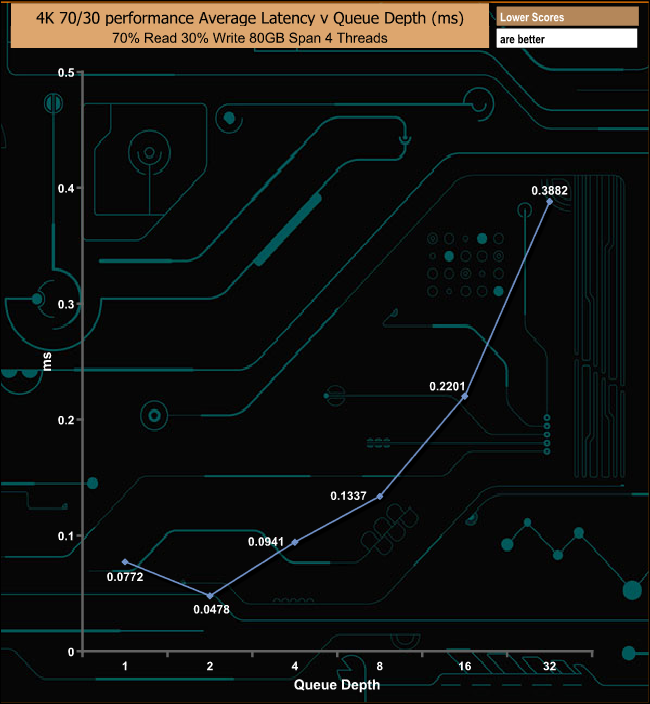
In our mixed 70/30 read-write test the drive's performance plateau's out a little between queue depths 2 and 4 but it soon recovers to finish the test run at 1,349.94MB/s (329,576 IOPS).
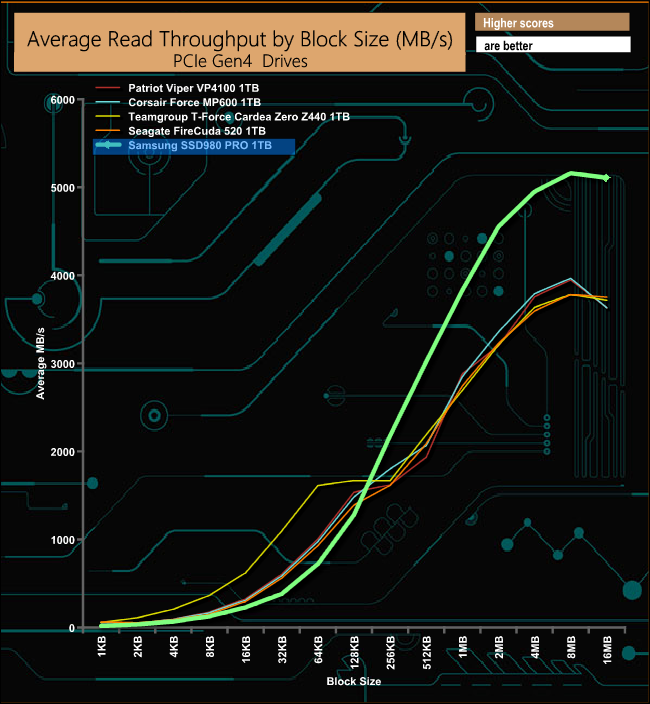
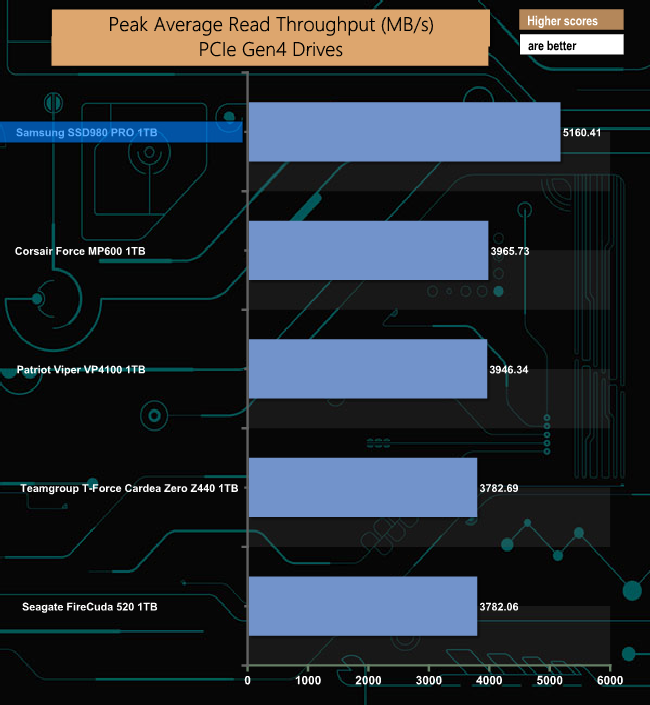
In our read throughput test, the drive falls short of the maximum 7,000MB/s at 5,160MB/s but even so it is the fastest Gen4 drive we have seen to date when it comes to this test.
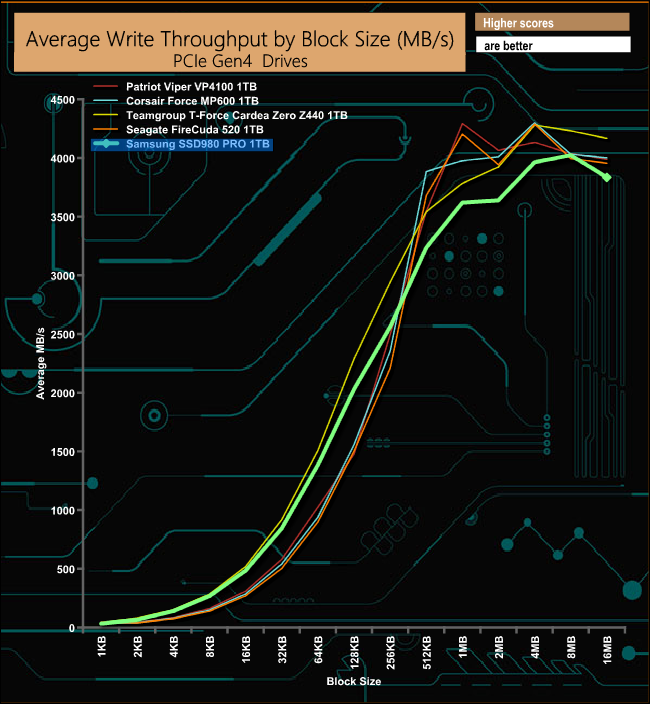
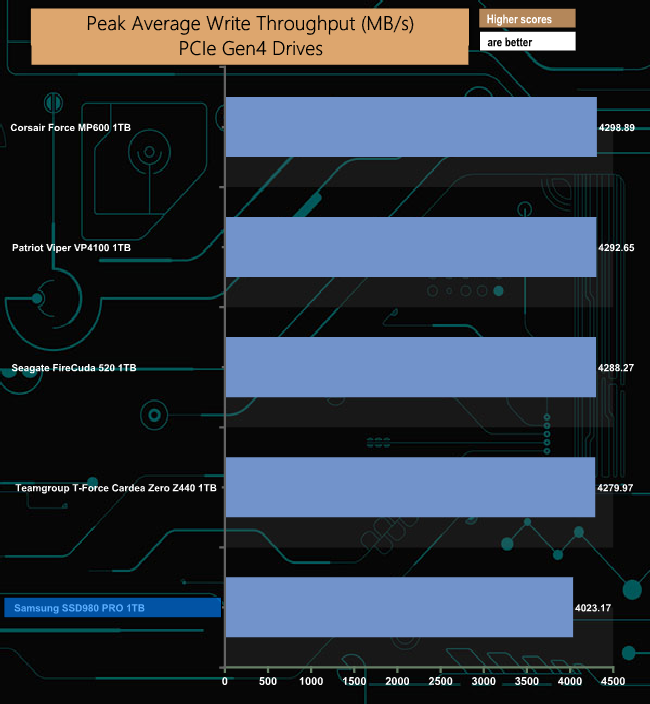
In contrast to the read throughput test, the write performance of the drive sees it at the bottom of the table but even so the peak figure of 4,023MB/s is nearer to the official write figure of 5,000MB/s than the read result was.
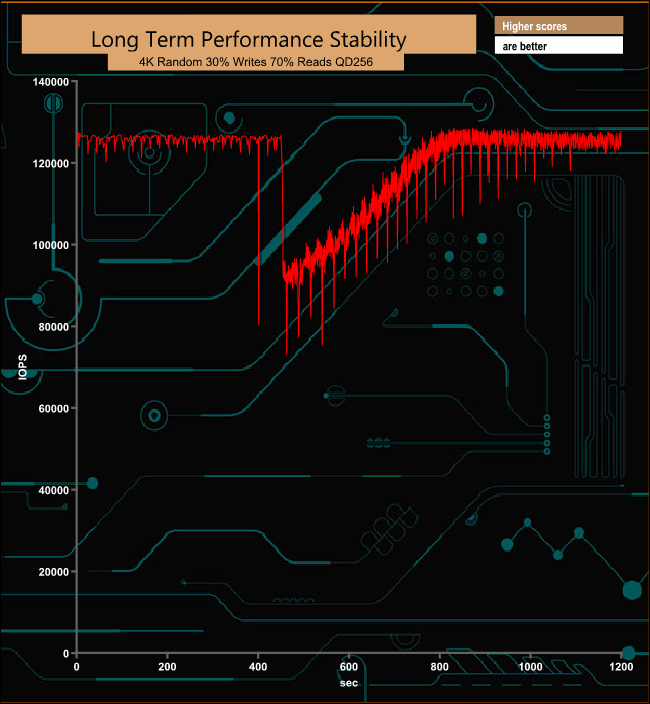
For the long term performance stability test, we set the drive up to run a 20-minute 4K random test with a 30% write, 70% read split, at a Queue Depth of 256 over the entire disk. The Samsung SSD980 PRO 1TB averaged 120,139 IOPS for the test with a performance stability of 93.6% which is excellent for a consumer drive.
The PCMark 10 Full System Drive Benchmark uses a wide-ranging set of real-world traces from popular applications and common tasks to fully test the performance of the fastest modern drives. The benchmark is designed to measure the performance of fast system drives using the SATA bus at the low end and devices connected via PCI Express at the high end.
The goal of the benchmark is to show meaningful real-world performance differences between fast storage technologies such as SATA, NVMe, and Intel’s Optane. The Full System Drive Benchmark uses 23 traces, running 3 passes with each trace. It typically takes an hour to run.
Traces used:
Booting Windows 10.
Adobe Acrobat – starting the application until usable.
Adobe Illustrator – starting the application until usable Adobe Premiere Pro – starting the application until usable.
Adobe Photoshop – starting the application until usable.
Battlefield V – starting the game until the main menu.
Call of Duty Black Ops 4 – starting the game until the main menu.
Overwatch – starting the game until main menu.
Using Adobe After Effects.
Using Microsoft Excel.
Using Adobe Illustrator.
Using Adobe InDesign.
Using Microsoft PowerPoint.
Using Adobe Photoshop (heavy use).
Using Adobe Photoshop (light use).
cp1 Copying 4 ISO image files, 20 GB in total, from a secondary drive to the target drive (write test).
cp2 Making a copy of the ISO files (read-write test).
cp3 Copying the ISO to a secondary drive (read test).
cps1Copying 339 JPEG files, 2.37 GB in total, to the target drive (write test).
cps2 Making a copy of the JPEG files (read-write test).
cps3 Copying the JPEG files to another drive (read test).
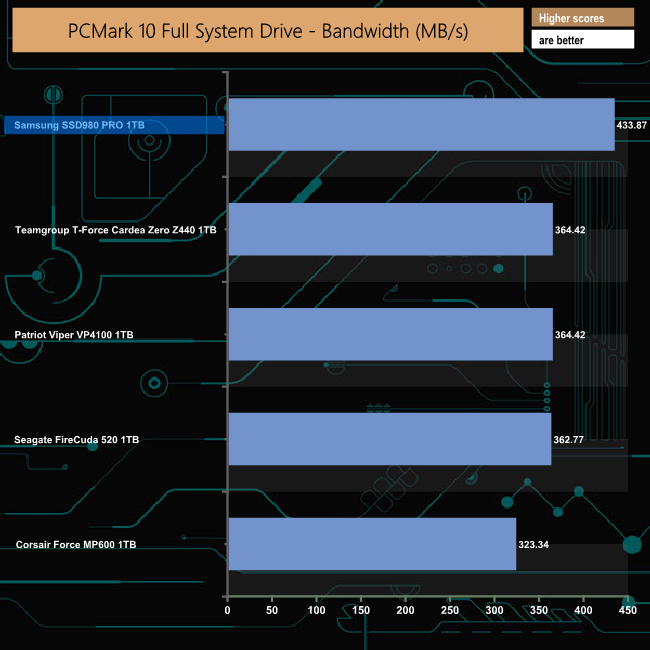
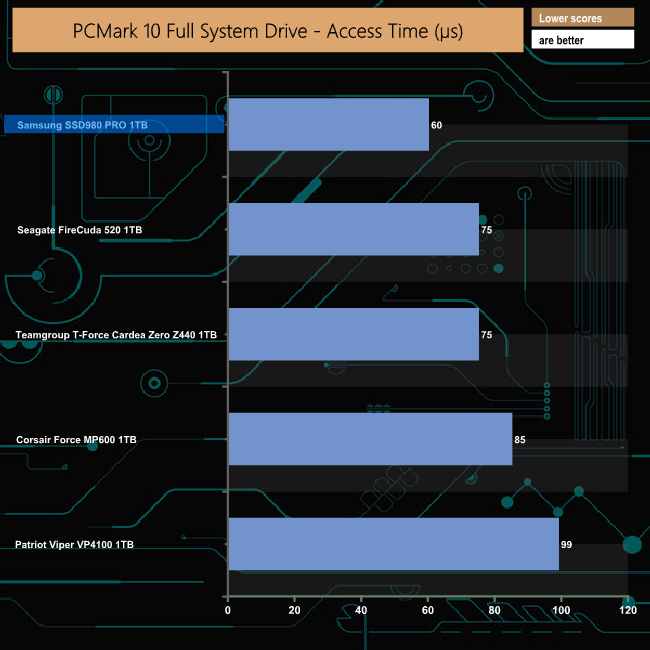
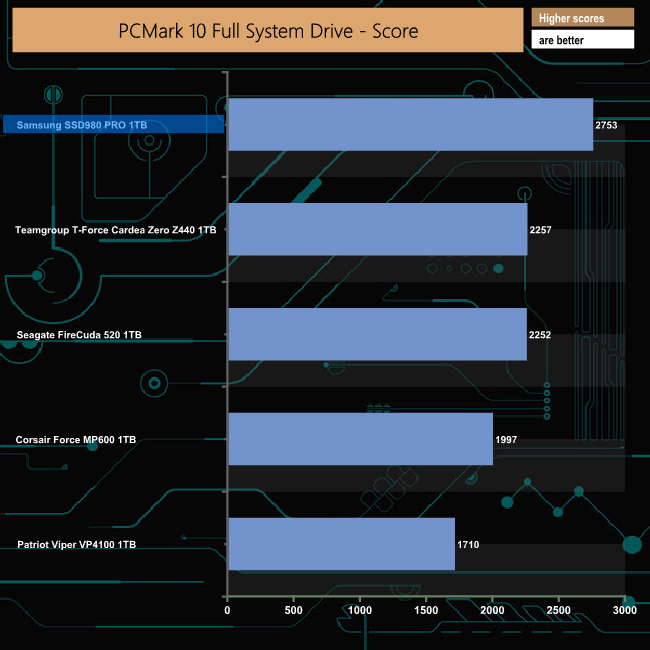
The Samsung SSD980 PRO has a PCMark 10 Full System Drive Benchmark overall bandwidth figure that is some 69MB/s faster than its nearest rival, the 1TB Teamgroup T-Force Cardea Zero Z440 drive.
To test real life performance of a drive we use a mix of folder/file types and by using the FastCopy utility (which gives a time as well as MB/s result) we record the performance of drive reading from & writing to a 256GB Samsung SSD850 PRO.
100GB data file.
60GB iso image.
60GB Steam folder – 29,521 files.
50GB File folder – 28,523 files.
12GB Movie folder – (15 files – 8 @ .MKV, 4 @ .MOV, 3 @ MP4).
10GB Photo folder – (304 files – 171 @ .RAW, 105 @ JPG, 21 @ .CR2, 5 @ .DNG).
10GB Audio folder – (1,483 files – 1479 @ MP3, 4 @ .FLAC files).
5GB (1.5bn pixel) photo.
BluRay Movie – 42GB.
21GB 8K Movie demos – (11 demos)
16GB 4K Raw Movie Clips – (9 MP4V files).
4.25GB 3D Printer File Folder – (166 files – 105 @ .STL, 38 @ .FBX, 11 @ .blend, 5 @ .lwo, 4 @ .OBJ, 3@ .3ds).
1.5GB AutoCAD File Folder (80 files – 60 @ .DWG and 20 @.DXF).
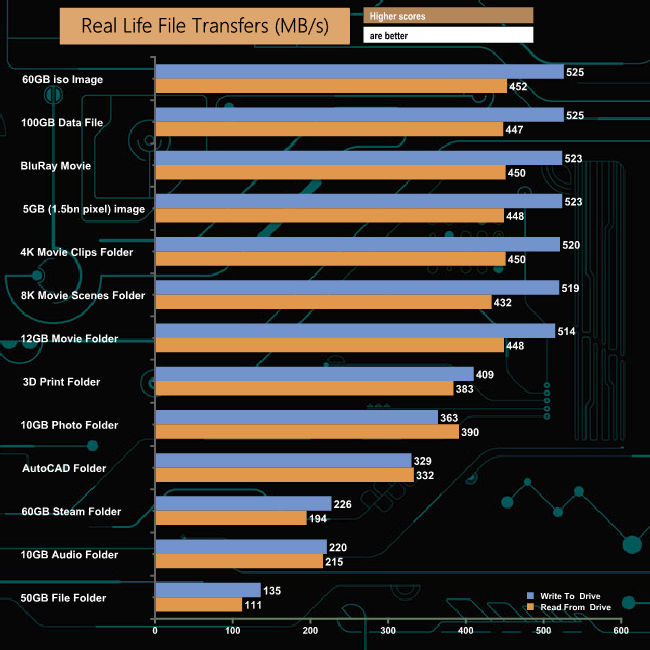
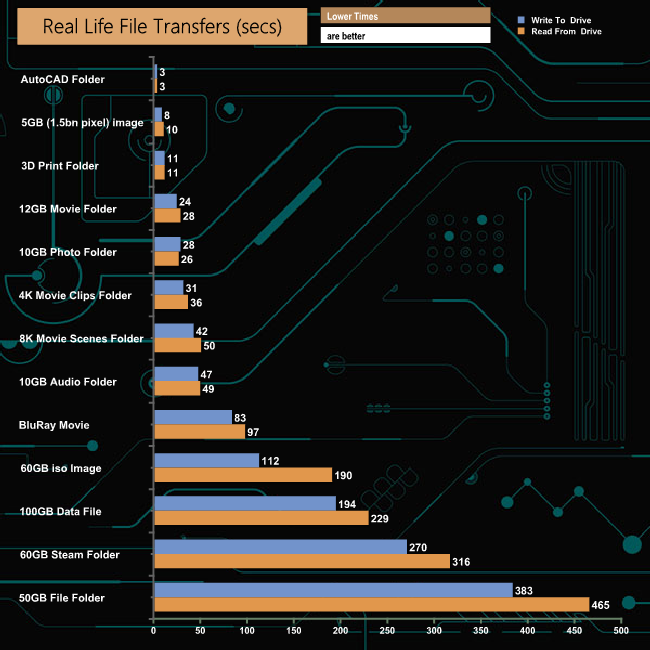
The SSD980 PRO handled our real-life file transfers without any problems particularly when dealing with the larger file size transfers, averaging 521MB/s for writes and 446MB/s for reads when dealing with these file types.
To get a measure of how fast the Samsung SSD980 PRO can transfer our real-life file samples we swapped the SATA based 256GB Samsung SSD850 PRO for an NVMe based 512GB Toshiba OCZ RD400.
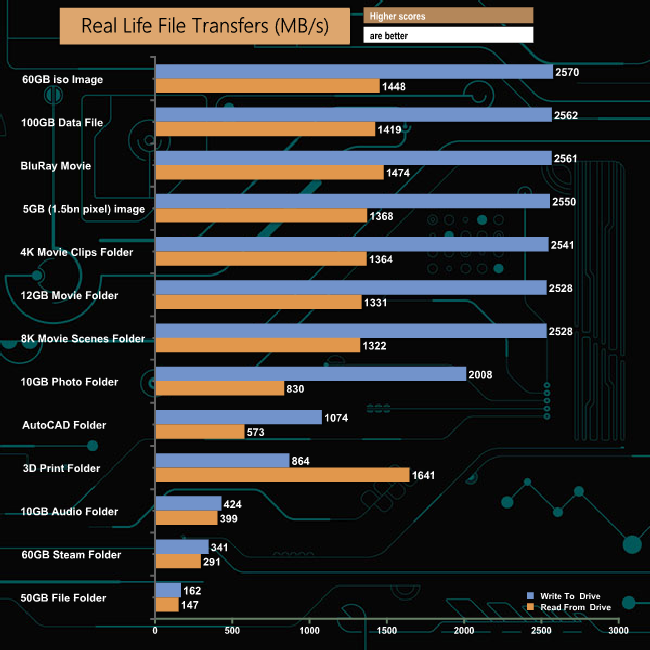
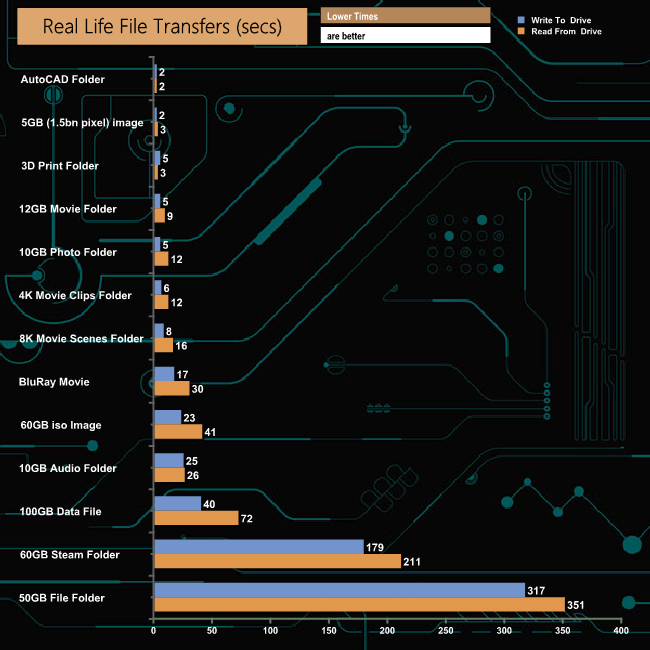
Switching over to the NVMe drive to transfer data to and from the SSD980 PRO saw transfer speeds for the large file transfers rocket and times taken drop dramatically. Eight of the transfers topped well over 2GB/s while another topped 1GB/s.
When the first few examples of SSD's using the PCIe Gen4 interface began to hit the market there was one manufacturer conspicuous by their absence, namely Samsung. While the PCIe Gen4 SSD market segment seems to have gone quieter than a quiet thing, Samsung seems poised to stir things up with their first drive to enter into this segment, the mighty SSD980 PRO.
The new drive sees the introduction of not only a new in-house controller but also the latest generation of Samsung's V-NAND. The new PCIe 4.0 controller goes by the name Elpis. Details of this controller are pretty thin on the ground at the time of writing but what we do know is that it's built on an 8nm process, (the previous generation PCIe 3.0 controller in the SSD970 PRO, Phoenix, uses a 14nm process). The Elpis is capable of simultaneously processing 128 I/O queues, a huge improvement over the 32 queue capability of the Phoenix.
The controller has a nickel coating to help dissipate heat during heavy workloads and the sticker on the back of the drive contains a copper layer to help in this as well.
The new 6th generation 3-bit MLC V-NAND (or TLC NAND to you and me) is stacked at 1** layers, a 40% increase in cell count over the previous 9* layer NAND. Samsung claims a 10% increase in read and write speed over the 5th generation NAND along with a 15% reduction in power consumption.
The drive features Samsung's Intelligent TurboWrite 2.0 technology to improve write performance. The default TurboWrite region of the 1TB drive is 6GB but if more is needed up to 108GB can be used as a dynamic SLC buffer of 114GB. In the case of the 1TB drive, if the drive has less than 324GB of free capacity, the Intelligent TurboWrite will not operate fully.
Performance-wise Samsung quote Sequential read/write performance figures for the 1TB drive of up to 7,000MB/s read and 5,000MB/s respectively. When we tested the drive with the ATTO benchmark, the best we saw from the drive was 6,030MB/s for reads and 4,210 for writes. However with the CrystalDiskMark benchmark and our own Sequential test we could confirm the official figures. With CrystalDiskMark we saw a read score of 7,141.5MB/s and a write score of 5,243.8. With our own test we got very much the same results; 7,140.08MB/s for reads and 5,254.57MB/s for writes.
When it came to 4K random performance, we couldn't get anywhere close to the official figures. Samsung quote a figure of 1,000,000 IOPS (yep a million) for both read and writes at a QD of 32 using 16 threads. With our standard 4-threaded tests the best we saw from the drive was 372,579 IOPS for reads and 315,022 for writes. Even though we couldn't reach the official maximums, the scores we did achieve make the SSD980 PRO the fastest PCIe Gen4 drive we've seen to date.
The 1TB SSD980 PRO is priced at £207.99.
Pros
- Overall performance.
- 5-year warranty.
- AES 256-bit encryption.
- Magician software.
Cons
- Needs a PCIe 4.0 supporting motherboard to get the best from it.
- Tested 4K performance couldn’t match the official maximum figures.
Kitguru says: It's been a long old while since we've seen a high-end Samsung NVMe SSD and it has certainly been worth the wait as the SSD980 PRO has put the company firmly back in the spotlight in the high performance consumer market space.