KitGuru KitGuru.net – Tech News | Hardware News | Hardware Reviews | IOS | Mobile | Gaming | Graphics Cards


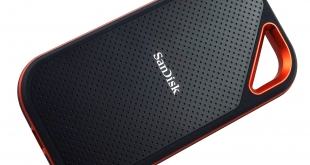
Aimed at professional users on the go, SanDisk's Extreme Pro Portable SSD features an NVMe SSD, a USB 3.1 Gen 2 interface and a rugged, rubberised case. Priced at £180 for the 1TB model in for review today, could this be the perfect portable SSD if you need something to withstand the rigours of everyday life?
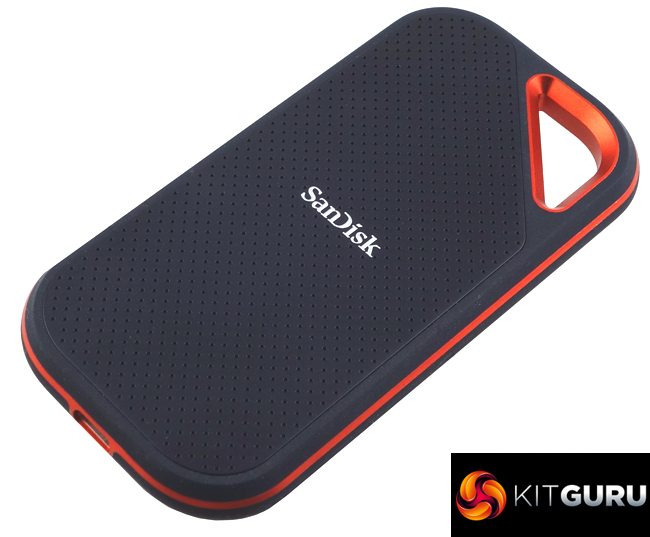
SanDisk's Extreme Pro SSD range consists of three capacities (at the time of writing this review), 500GB, 1TB and the flagship 2TB model. The drive uses a silicon rubber coating to provide it with protection against everyday bumps and scrapes.
There are no details in the specification information on WD’s website as to the NAND type and the make/model of the controller. Using the CrystalDiskInfo utility, the drive inside the case is recognised as a WD Black SN750E. So we are talking WD's G1 NVMe controller and 64-Layer 3D TLC NAND. When it comes to performance, there is only a read speed of up to 1,050MB/s quoted in the spec sheet for the drive.
The Extreme Pro SSD supports 128-bit AES encryption and it's backed with a 5-year warranty.
Physical Specifications:
- Usable Capacities: 1TB.
- NAND Components: WD 64-Layer 3D TLC.
- Interface: USB 3.1 Gen2.
- Form Factor: External.
- NAND Controller: WD G1.
- Dimensions: 57.34 x 110.26 x 10.22mm.
- Drive Weight: 79g.
Firmware Version: 0111.
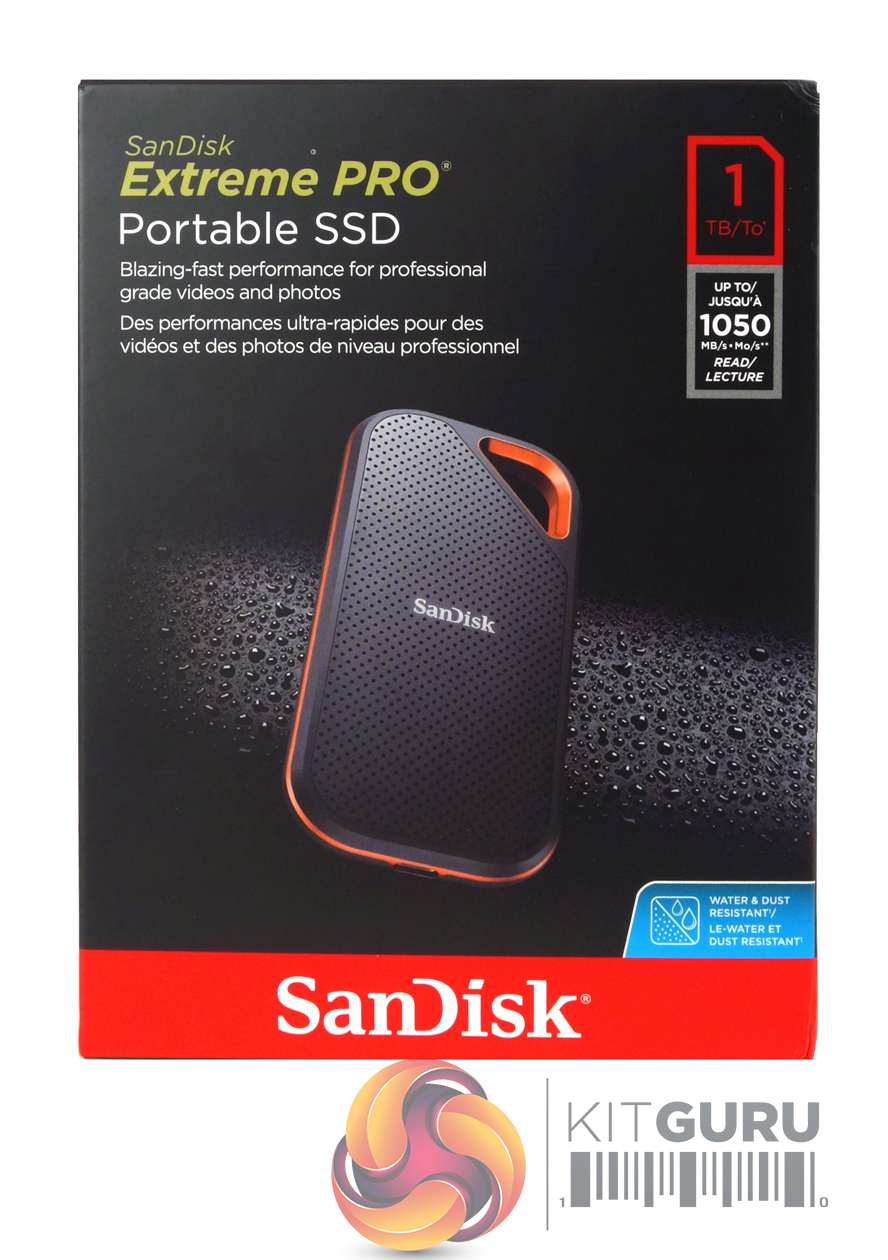
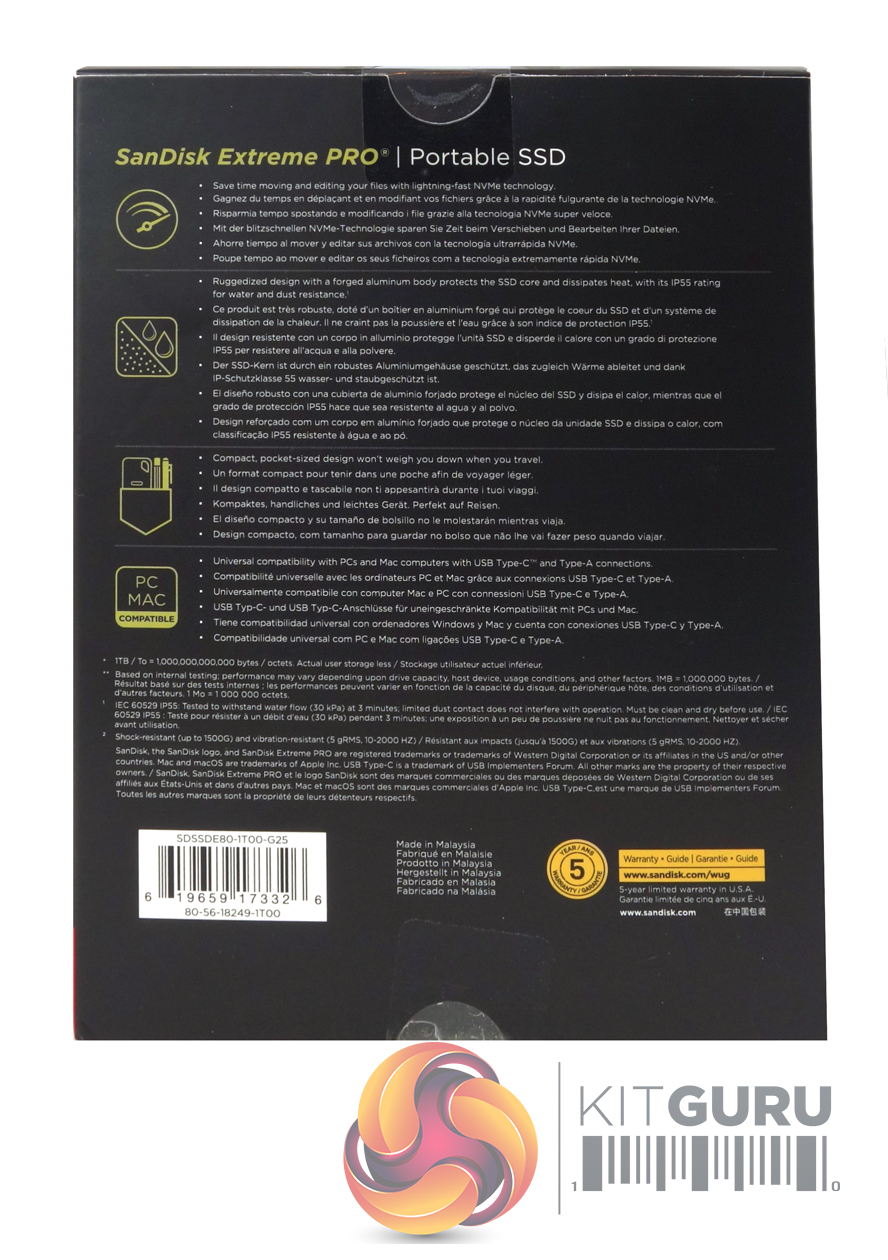
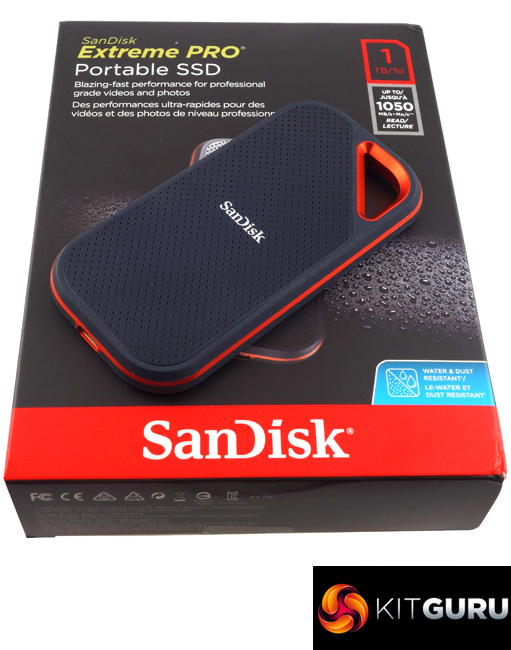
The Extreme Pro comes in a largish black and red finished box with an image on the drive on the front together with the drive’s capacity and performance. The rear of the box has some multilingual marketing data about the drive including performance and the fact that it is a ‘ruggedized' design.
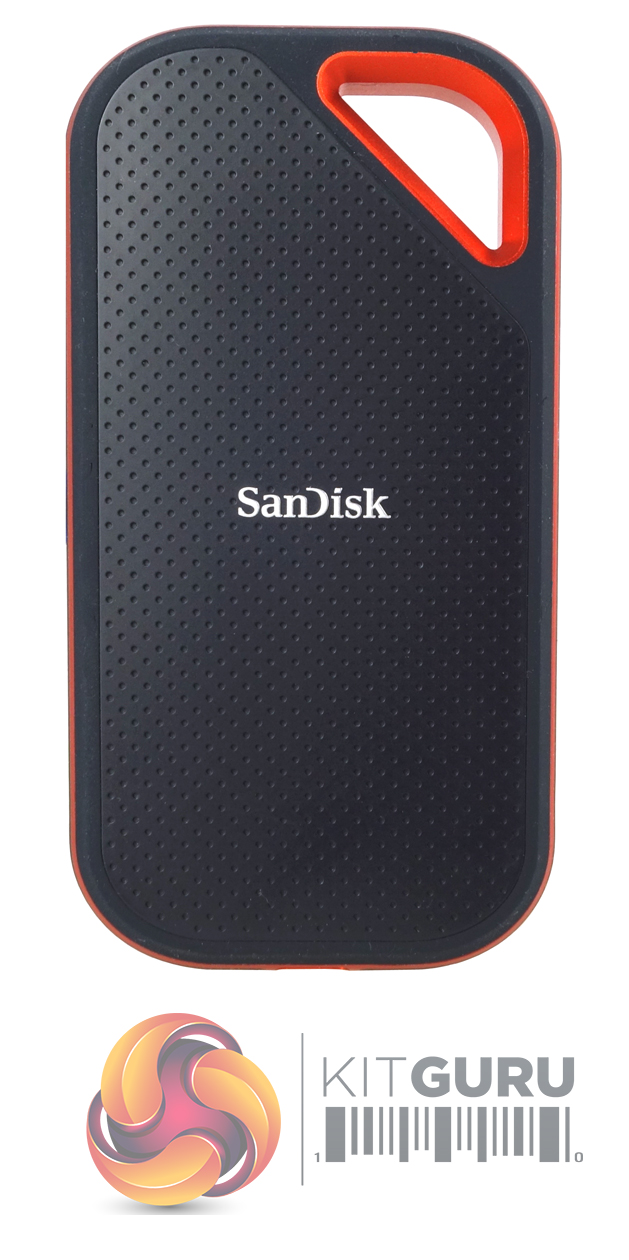
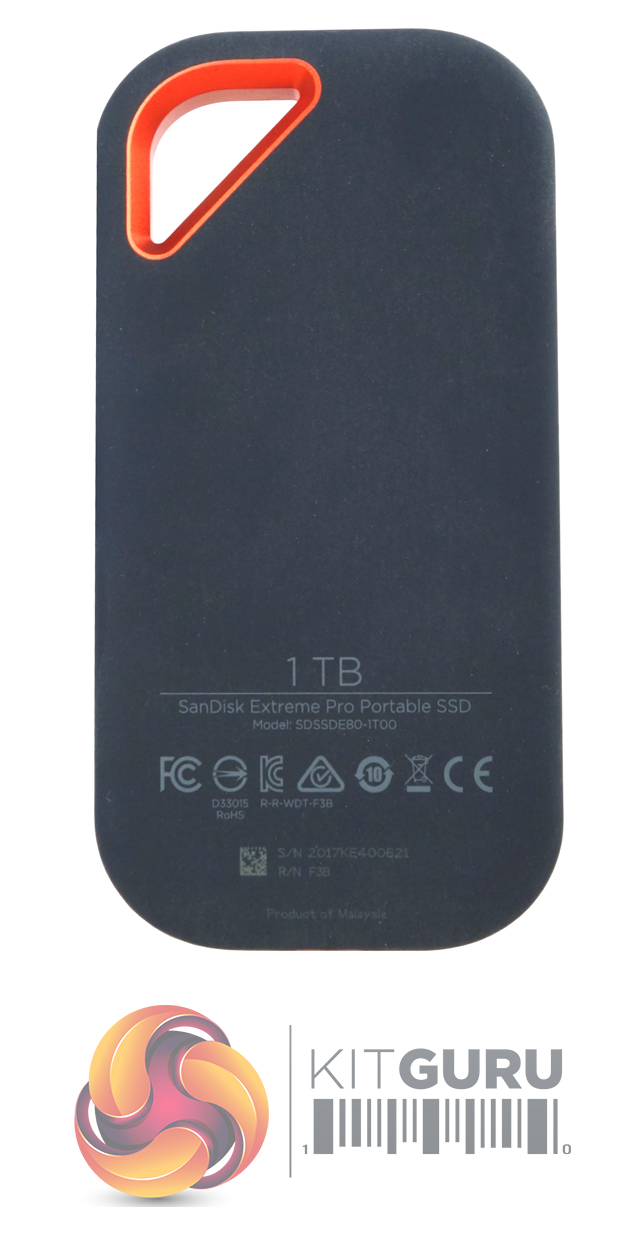
Measuring 110.23 x 57.34 x 10.22 mm the SanDisk Extreme Pro is small enough be carried in a pocket. The drive has a forged-aluminium body to help with heat dispersion and a silicon rubber coating to protect it in everyday use; it can survive a drop of up to 2m. The Extreme Pro SSD comes with an IP55 water-dust resistant rating but don't go thinking you can drop into the nearest puddle as, unlike some of its rugged competitors, the USB port in the bottom of the drive is left open to the elements.
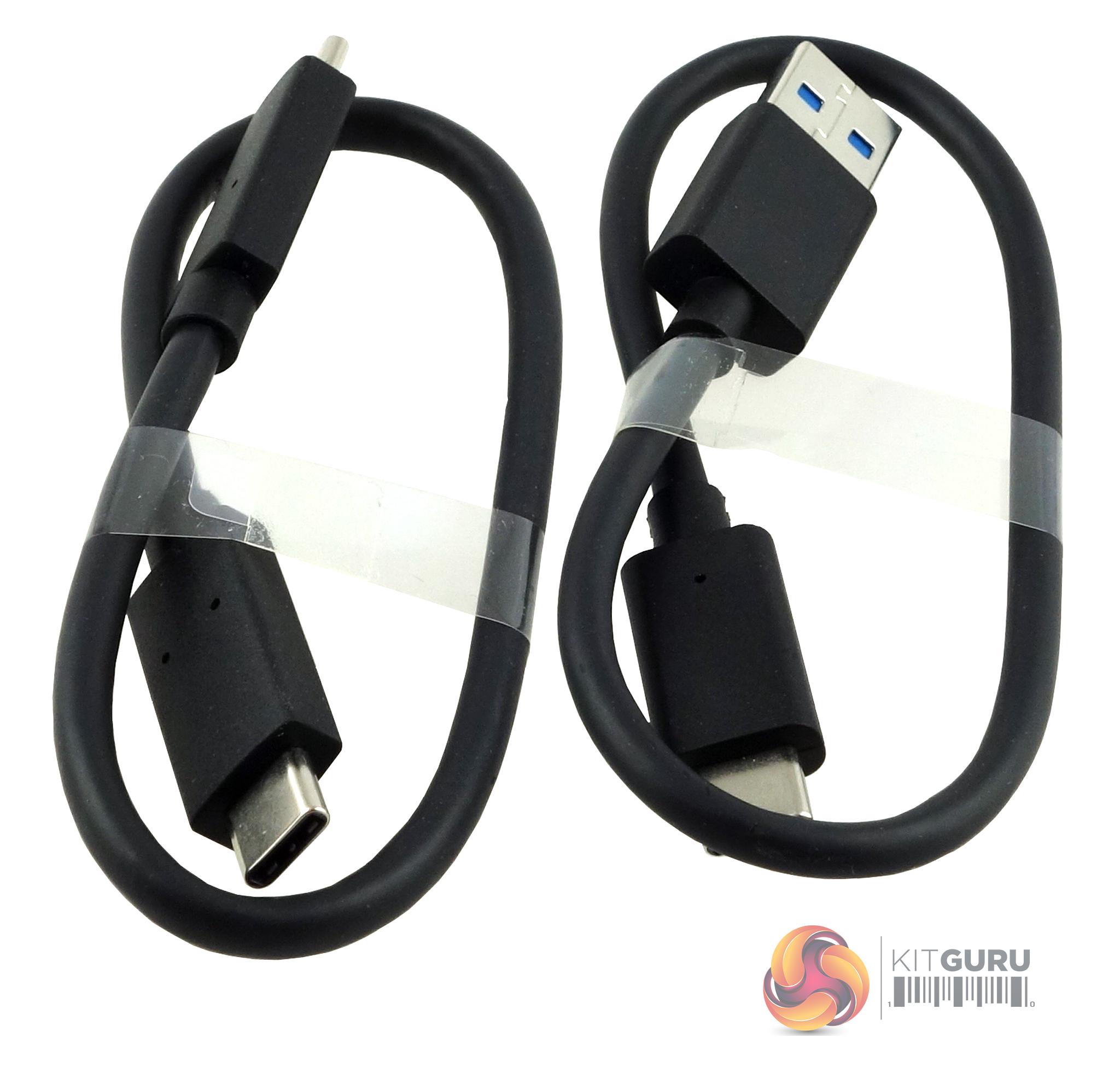
Bundled in with the drive are USB-C cable and USB Type-C to Type-A cables, although both are a little on the short side.
Out of the box, factory formatted as exFAT but to for our benchmarking purposes, we reformatted the drive to NTFS.
CrystalDiskMark is a useful benchmark to measure theoretical performance levels of hard drives and SSD’s. We are using V3.0.3.
The ATTO Disk Benchmark performance measurement tool is compatible with Microsoft Windows. Measure your storage systems performance with various transfer sizes and test lengths for reads and writes. Several options are available to customize your performance measurement including queue depth, overlapped I/O and even a comparison mode with the option to run continuously.
Use ATTO Disk Benchmark to test any manufacturers RAID controllers, storage controllers, host adapters, hard drives and SSD drives and notice that ATTO products will consistently provide the highest level of performance to your storage.
AS SSD is a great free tool designed just for benching Solid State Drives. It performs an array of sequential read and write tests, as well as random read and write tests with sequential access times over a portion of the drive. AS SSD includes a sub suite of benchmarks with various file pattern algorithms but this is difficult in trying to judge accurate performance figures.
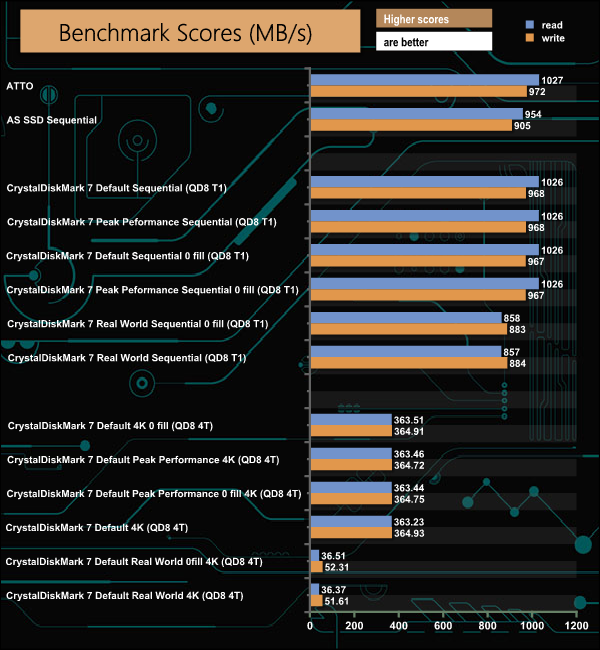
The specification sheet for the Extreme Pro only mentions a read speed rating of up to 1,050MB/s. We couldn't quite get to that maximum with our tests, with a figure of 1,027MB/s in ATTO and 1,026MB/s in CrystalDiskMark 7. The best write figure we got from the drive was 972MB/s when the drive was tested with the ATTO benchmark.
IOMeter is another open-source synthetic benchmarking tool which is able to simulate the various loads placed on a hard drive and solid-state drive technology.
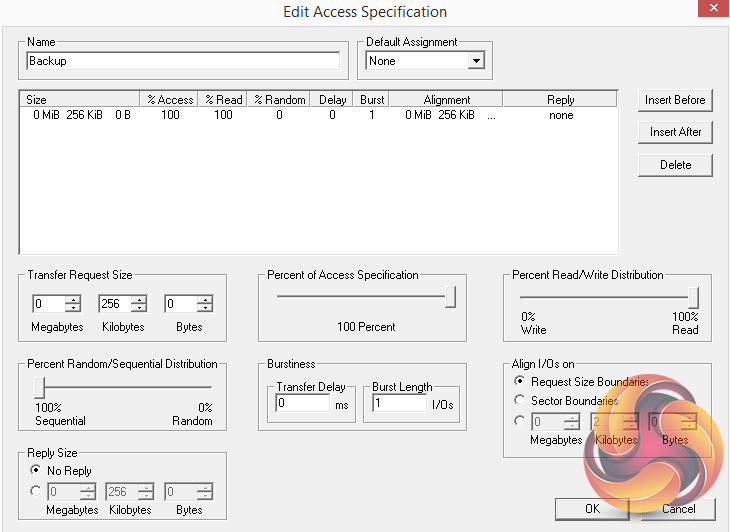
We set IOmeter up (as shown above) to test both backup and restore performance on a 100GB file.
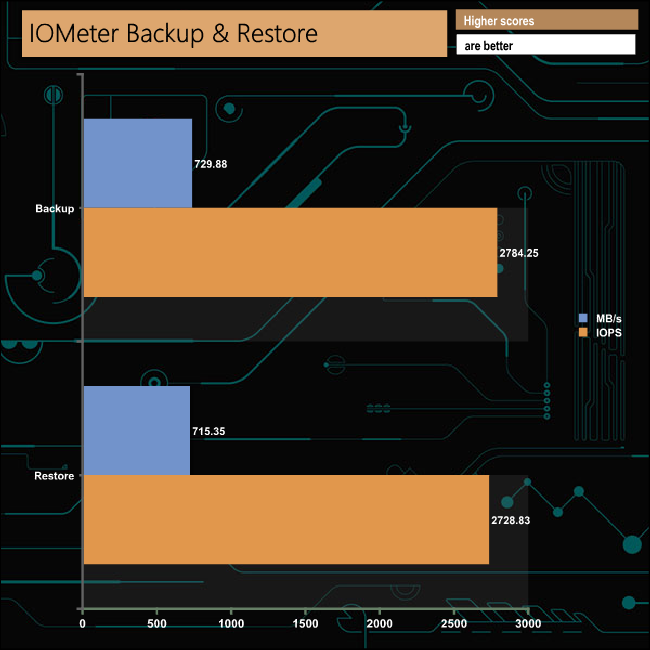
The SanDisk Extreme Pro handled our backup/restore test with ease, with a 729,88MB/s bandwidth for the backup test and 715,35MB/s for the restore test.
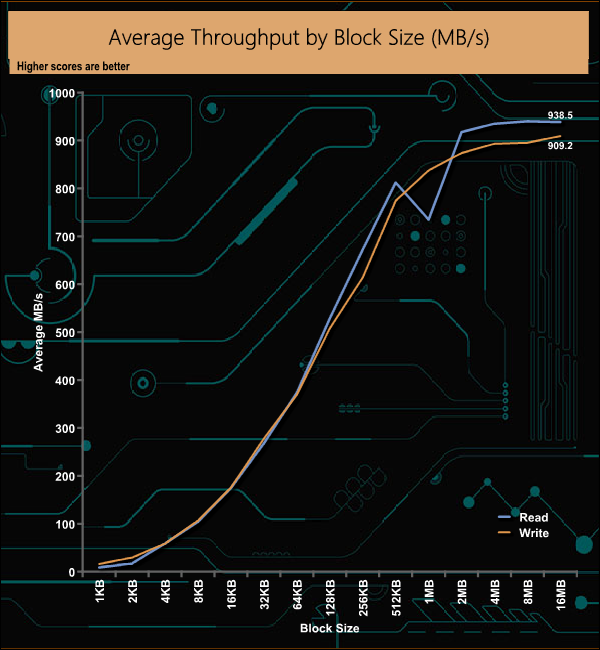
In our throughput tests, the read performance saw a dip at the 1MB block mark but the drive recovered quickly to peak at the 8MB block mark at 940.25MB/s before dropping back slightly to finish the test run at 938MB/s. The peak write figure of 909.20MB/s came right at the end of the test run.
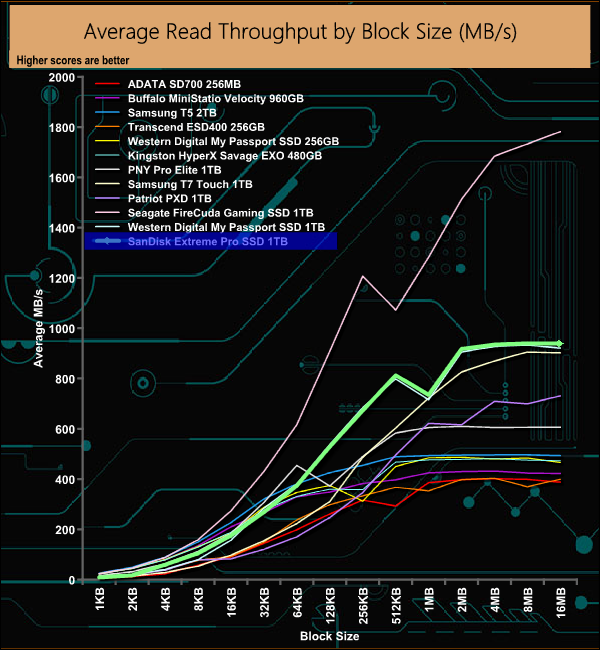
When it comes to read performance, the SanDisk Extreme Pro just edges ahead of all the USB 3.1 Gen 2 drives we've tested. The Seagate FireCuda Gaming SSD is still king of the hill for USB external drives thanks to its USB 3.2 Gen 2×2 interface.
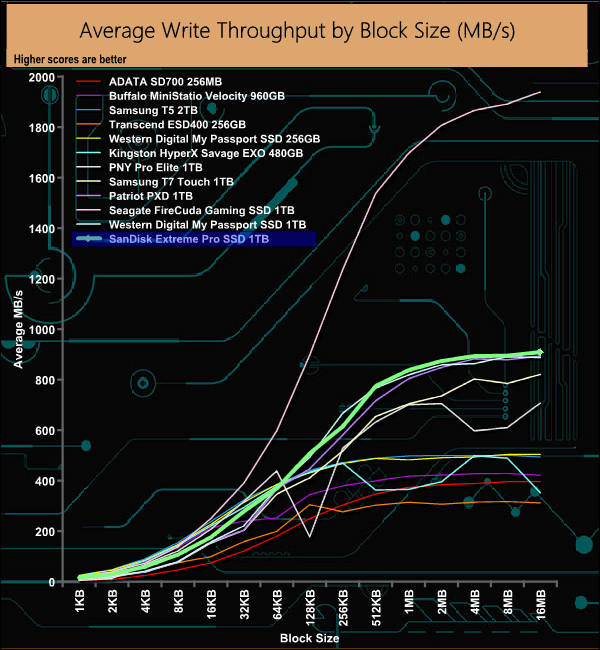
As with the read performance, the write performance of the SanDisk Extreme Pro edges it just in front of all the other drives we've tested with the exception of Seagate's FireCuda Gaming SSD.
The PCMark 10 Data Drive Benchmark has been designed to test drives that are used for storing files rather than applications. You can also use this test with NAS drives, USB sticks, memory cards, and other external storage devices.
The Data Drive Benchmark uses 3 traces, running 3 passes with each trace.
Trace 1. Copying 339 JPEG files, 2.37 GB in total, in to the target drive (write test).
Trace 2. Making a copy of the JPEG files (read-write test).
Trace 3. Copying the JPEG files to another drive (read test)
Here we show the total bandwidth performance for each of the individual traces.
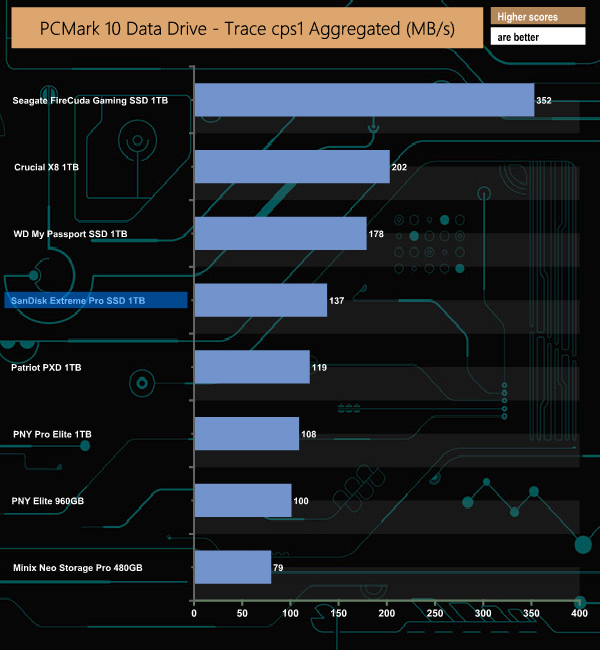
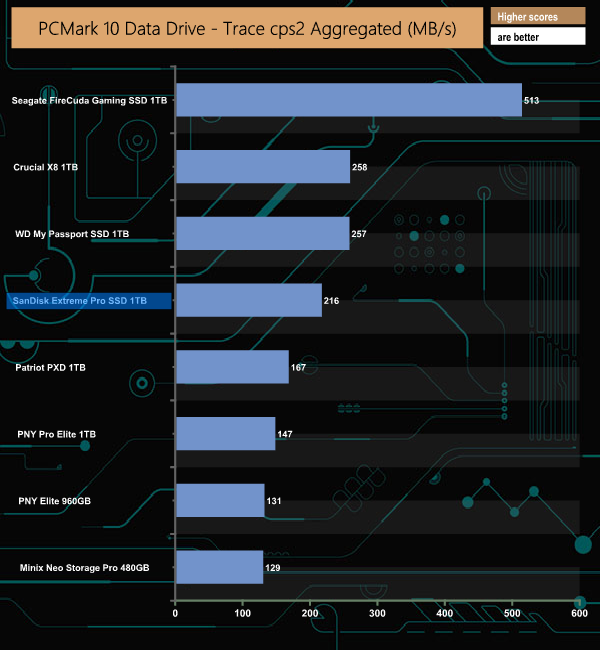
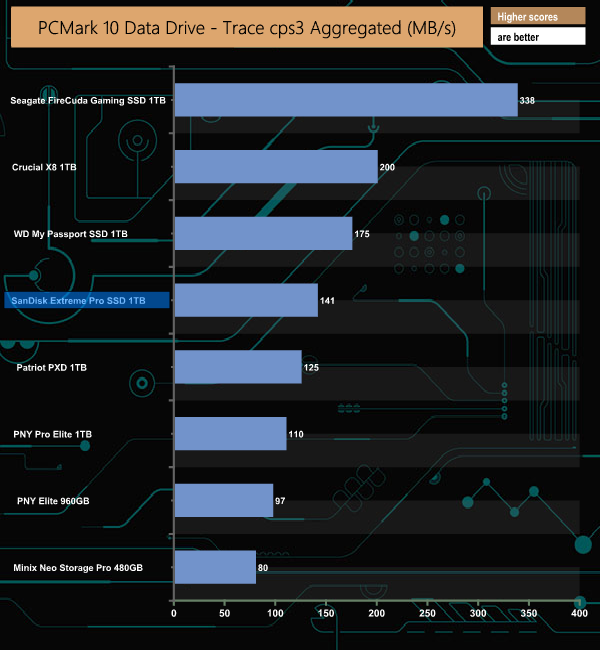
The SanDisk Extreme Pro SSD sits comfortably in mid-table for all three trace tests.
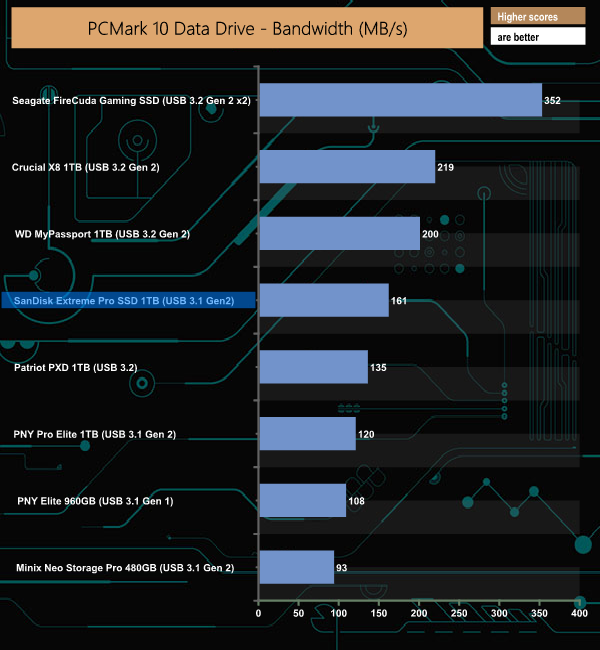
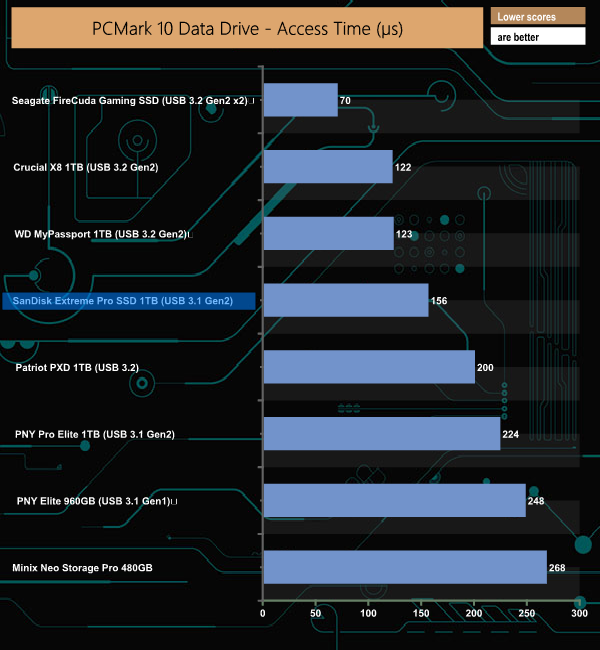
With a bandwidth figure of 161MB/s for the SanDisk Extreme Pro, the drive sits mid-way in our result table. It's 39MB/s slower than WD's MyPassport Drive and 26MB/s faster than the Patriot PXD 1TB drive.
To test real life performance of a drive we use a mix of folder/file types and by using the FastCopy utility (which gives a time as well as MB/s result) we record the performance of drive reading from & writing to a 256GB Samsung SSD850 PRO.
We use the following folder/file types:
- 100GB data file.
- 60GB iso image.
- 60GB Steam folder – 29,521 files.
- 50GB File folder – 28,523 files.
- 12GB Movie folder – (15 files – 8 @ .MKV, 4 @ .MOV, 3 @ MP4).
- 10GB Photo folder – (304 files – 171 @ .RAW, 105 @ JPG, 21 @ .CR2, 5 @ .DNG).
- 10GB Audio folder – (1,483 files – 1479 @ MP3, 4 @ .FLAC files).
- 5GB (1.5bn pixel) photo.
- BluRay Movie – 42GB.
- 21GB 8K Movie demos – (11 demos)
- 16GB 4K Raw Movie Clips – (9 MP4V files).
- 4.25GB 3D Printer File Folder – (166 files – 105 @ .STL, 38 @ .FBX, 11 @ .blend, 5 @ .lwo, 4 @ .OBJ, 3@ .3ds).
- 1.5GB AutoCAD File Folder (80 files – 60 @ .DWG and 20 @.DXF).
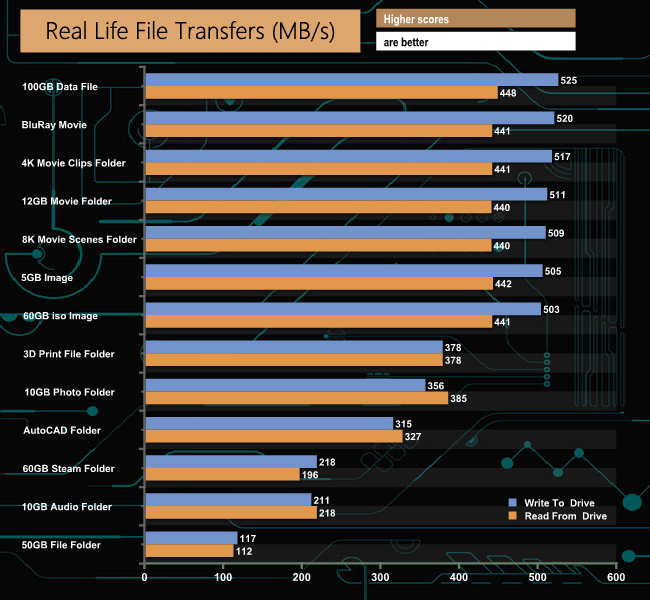
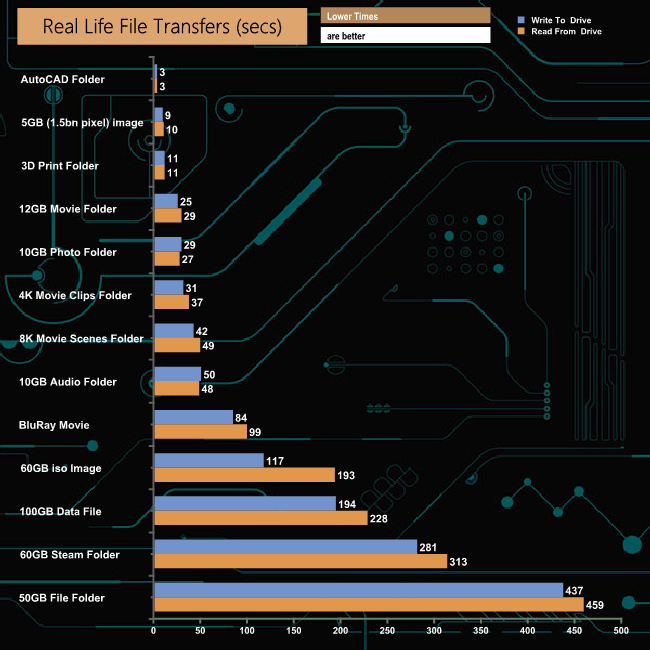
SanDisk's Extreme Pro SSD didn’t have any real problems dealing with our real-life file transfer tests. It handles larger file sizes much more efficiently than smaller ones that make up the 60GB Steam, 50GB File and 10GB Audio folders.
To get a measure of how much faster PCIe NVMe drives are than standard SATA SSDs we use the same files but transfer to and from a 512GB Kioxia RD400:
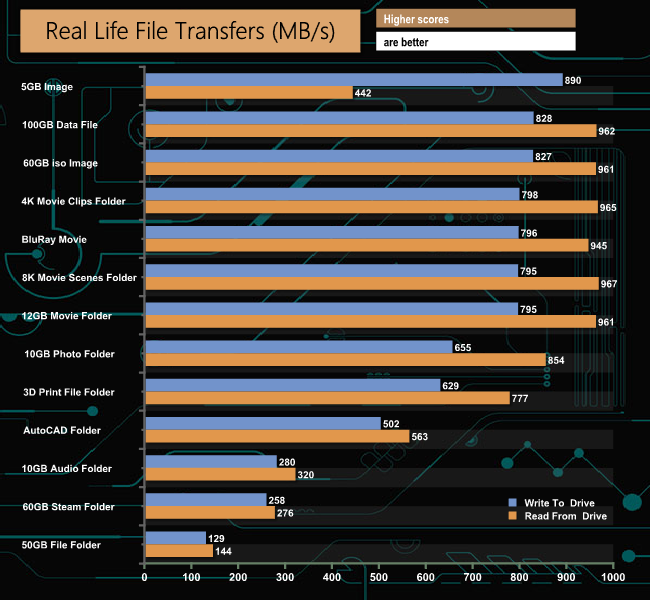
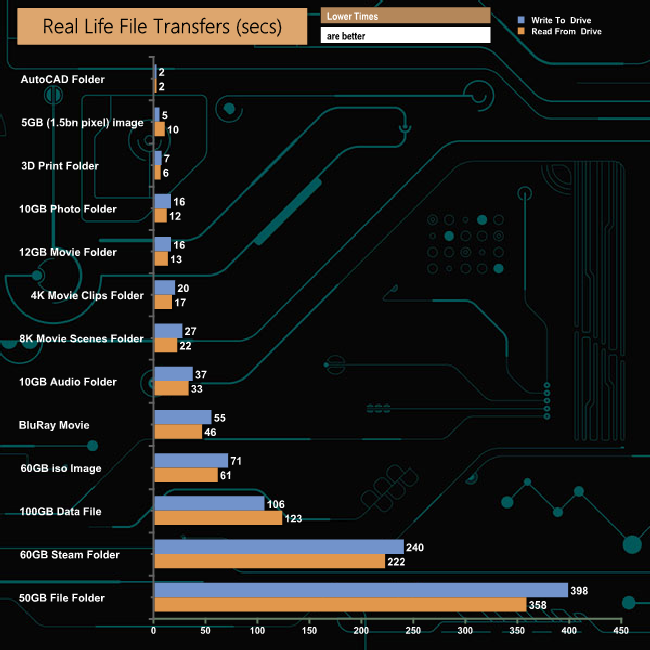
Transferring files to and from another NVMe drive saw read speeds of over 900MB/s for the folders containing larger file sizes. The drive did seem to stumble when transferring the 5GB photo back to the RD400.The Extreme Pro SSD joins a growing range of SanDisk external SSDs. With an NVMe SSD (WD Black SN750) inside it and a USB 3.1 Gen 2 Type-C interface, it certainly is a fast performing external drive. It is available in three capacities; 500GB, 1TB and 2TB.
The only official performance transfer rate figure in the spec sheet for the drive is a read speed of up to 1,050MB/s. Using the ATTO benchmark we couldn't quite reach this maximum figure, the best we saw was 1,027MB/s. Write performance topped out at 972MB/s. The more intensive AS-SSD benchmark produced read/write figures of 954MB/s and 905MB/s respectively.
Using the various profiles in CrystalDiskMark 7 we saw read performance figures of 1,026MB/s for default and peak performance with a figure of 858MB/s for the real-world profile. Write performance for the drive averaged 967.5MB/s for the default and peak performance profiles with the real profile producing a figure of 884MB/s.
Real-life file transfers when transferring data to and from a Samsung SSD850 PRO saw write performance go beyond the 500MB/s mark when dealing with large file sizes. However, switching over to another NVMe drive (Kioxia RD400) saw read speeds over 900MB/s and write speeds over or close to 700MB/s when dealing with the same large file sizes.
Although the Extreme Pro SSD comes with an IP55 water-dust resistant rating thanks to its silicon rubber coating, it's not as water-resistant as some of its competitors as the USB port doesn't have a cover of any sort so you still need to take care when you have it in a bag or pocket.
The drive comes with SanDisk's SecureAccess utility loaded on the drive ready for you to install. The software creates password-protected 128-bit AES encrypted folders on the drive, but make sure you remember the password as there is no option to re-set it should you forget it.
We found the 1TB SanDisk Extreme Pro SSD on WD’s UK store for £179.99 (inc VAT) HERE.
Discuss on our Facebook page HERE.
Pros
- Performance.
- Encryption.
- 5-year warranty.
Cons
- Data cables are a wee bit on the short side.
- Exposed USB port.
KitGuru says: SanDisk's Extreme Pro SSD is a fast, pocket-sized drive with the added bonus of being able to easily encrypt sensitive data. It's just a shame that the USB port doesn't have a cover to protect it.