 KitGuru KitGuru.net – Tech News | Hardware News | Hardware Reviews | IOS | Mobile | Gaming | Graphics Cards


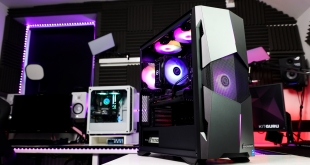
We’re checking out a prebuilt system by PCSpecialist, the Fusion Spark, priced at just £999. Its key specs include an Intel Core i5-11400F, 512GB NVMe SSD, 750W PSU and an RX 5500 XT 4GB. This review is slightly different to most, as we all know getting hold of the latest graphics cards is almost impossible, or they’re very expensive, and as such PCSpecialist have created the Fusion Spark system, designed to offer an easy upgrade path in the future.
This means is it comes with an OK graphics card for now, but it’s intended to be swapped out when the user can get a hold of one of the latest cards, giving you something that works today and that can get even better once the GPU market is slightly more sensible. We’ll be putting the stock system through its paces and then swapping out the RX 5500 XT for an RX 6700 XT just to see how well the system performs when upgraded as intended.
Specifications:
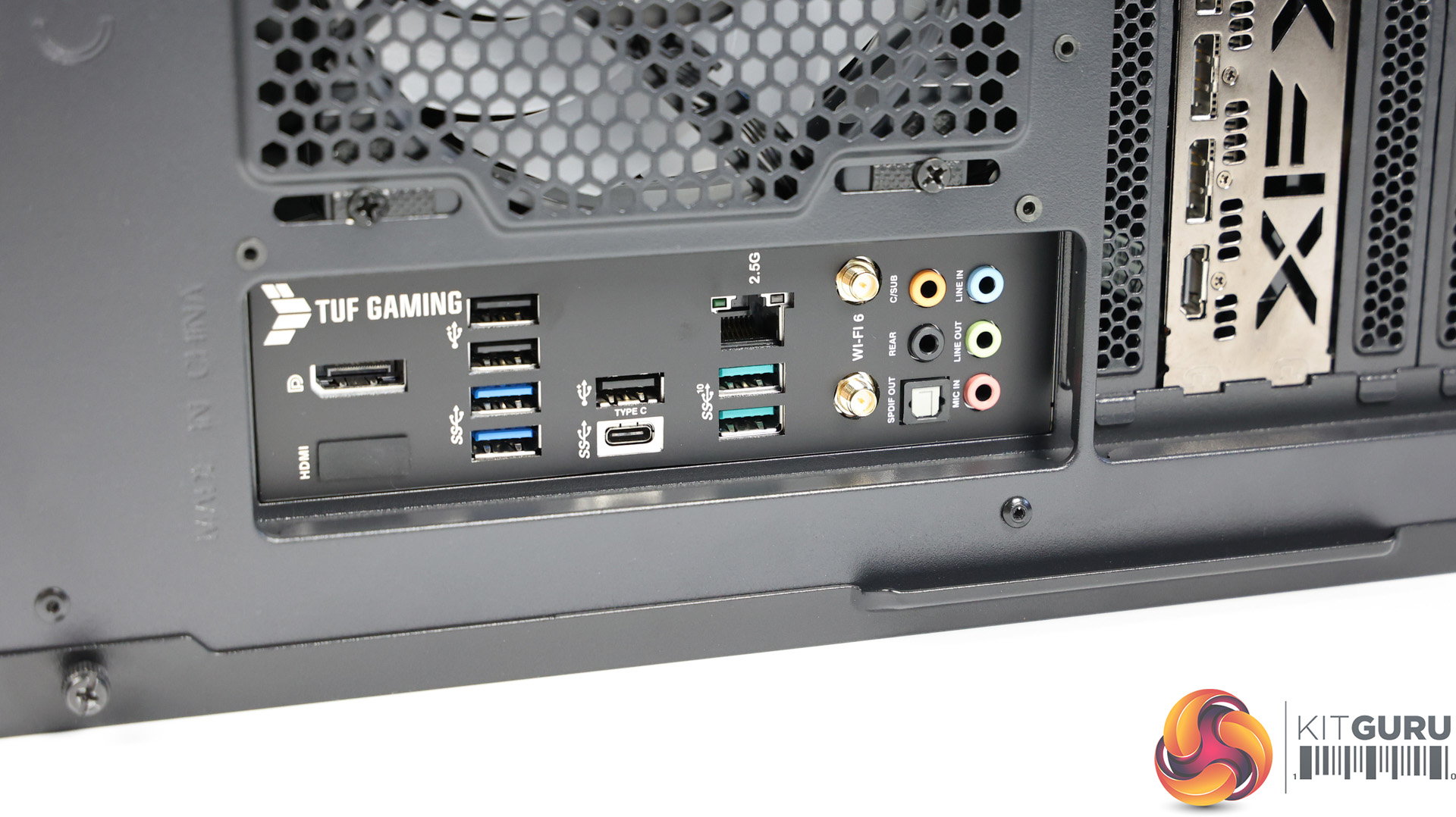
- ASUS TUF Gaming B560-PLUS WiFi motherboard
- Intel Core i5-11400F six core processor
- 4GB AMD Radeon RX 5500 XT GPU
- 16GB Corsair Vengeance DDR4 3200MHz, 2x 8GB sticks
- 512GB PCS-branded PCIe M.2 SSD
- 1TB Seagate Barracuda 7200RPM HDD
- Corsair 750W TXm semi-modular 80 Plus Gold PSU
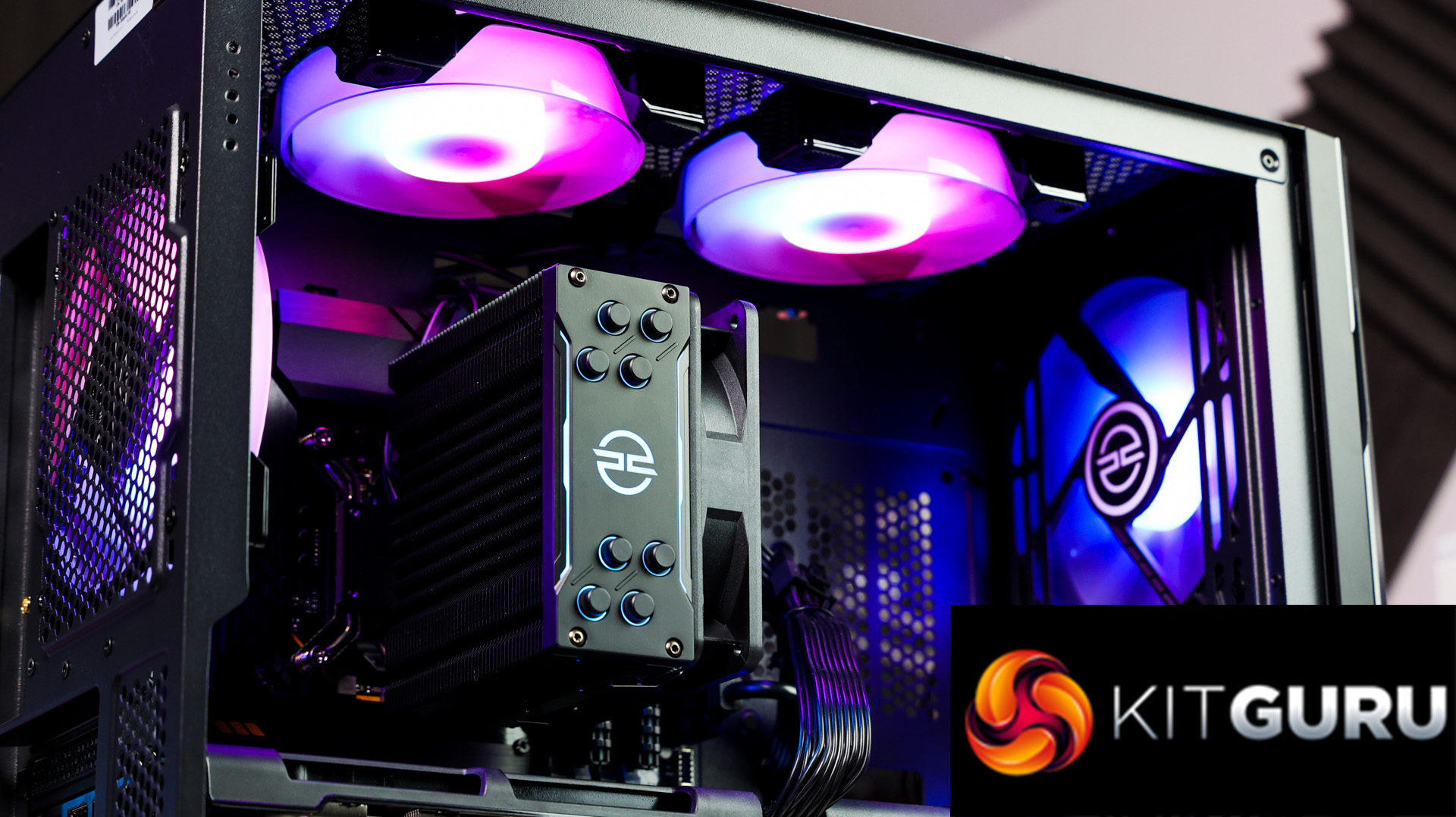
- PCS FrostFlow 100 RGB V3 CPU cooler
- 3 PCS ARGB LED fans + controller kit
- Windows 10 Home 64 Bit
- PCS Prism X RGB mid tower case
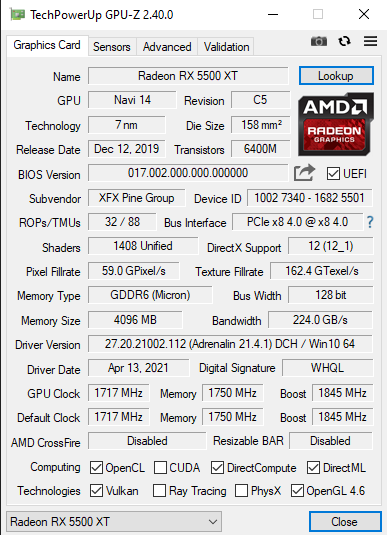
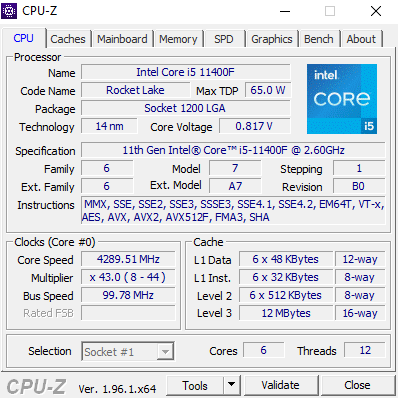
For just £999 the specs of this system are looking very good for gaming, but of course this is all relative to the price point. Remember the RX 5500 XT GPU is really just there as a placeholder until you can source or afford to upgrade it.
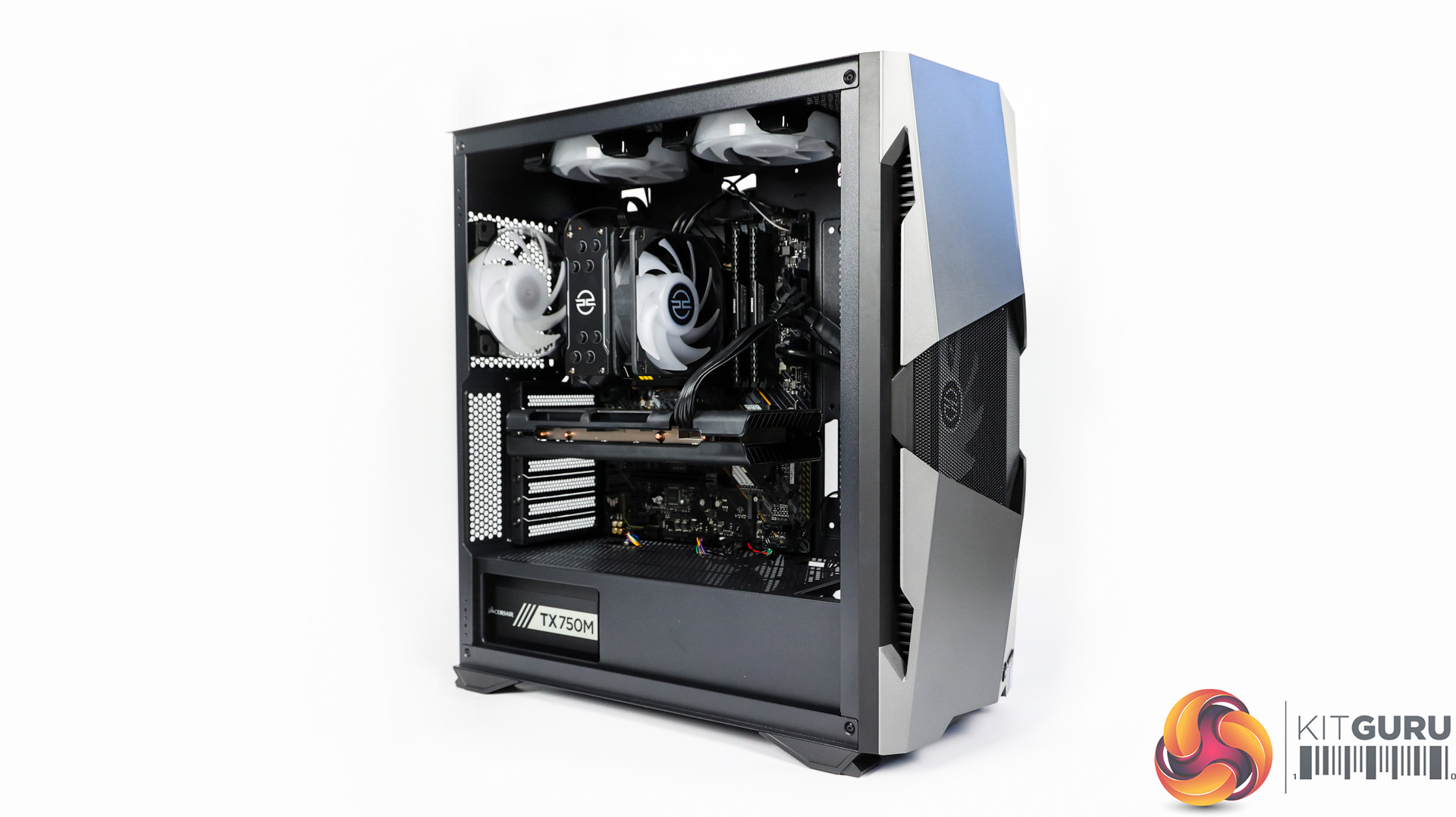
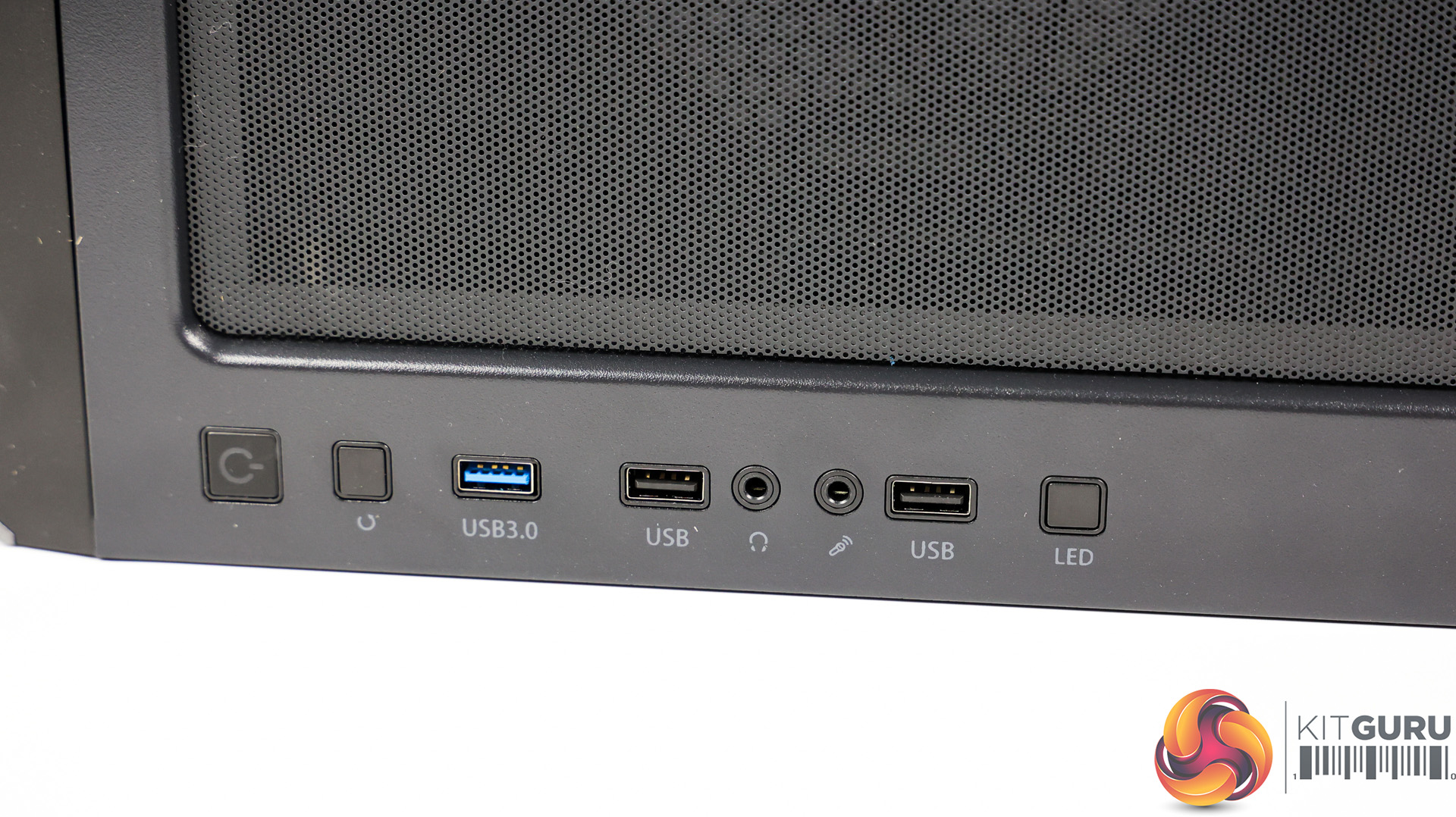
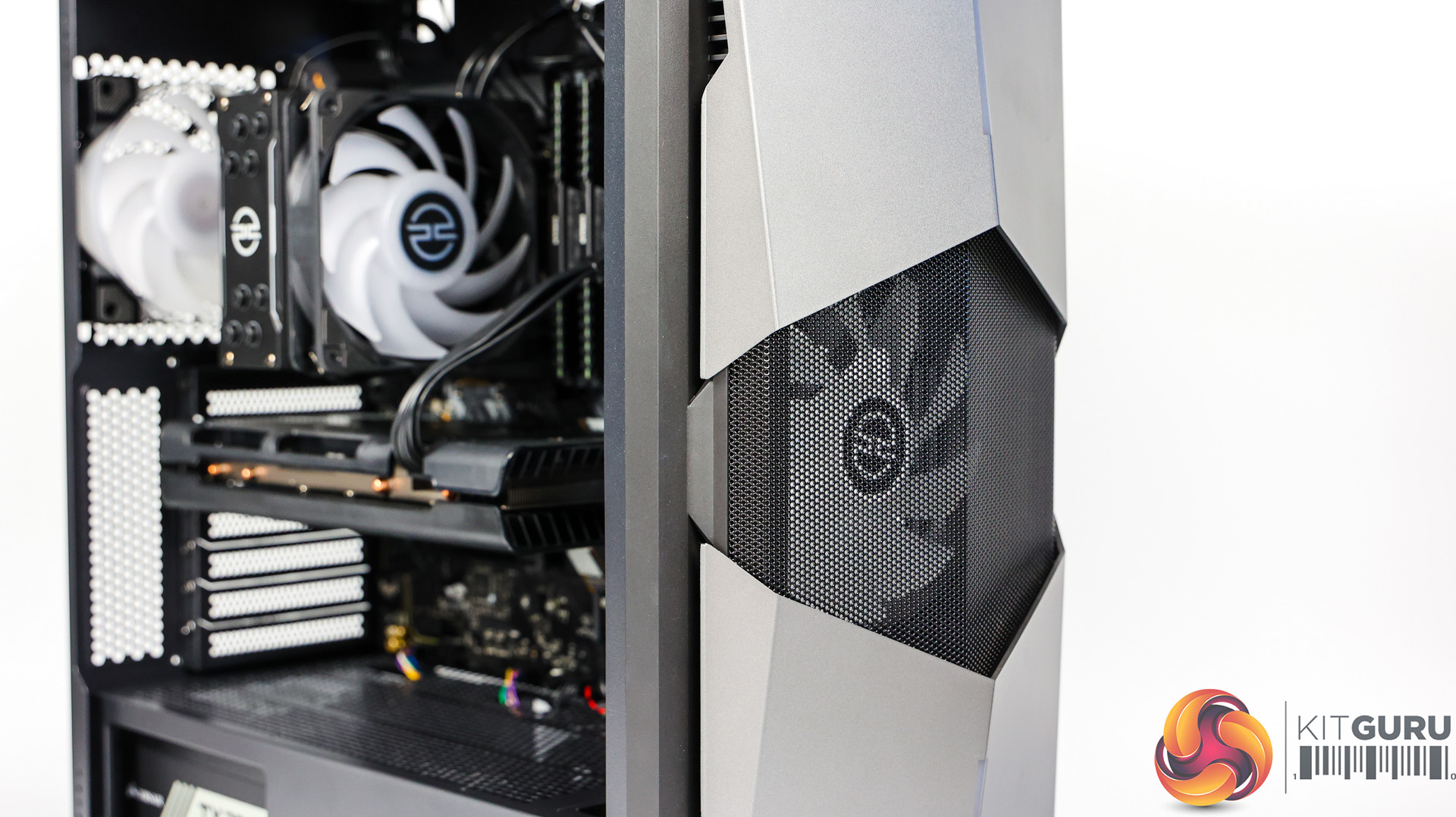
The PCS Prism X mid tower is certainly decent, the front panel might not be to everyone’s taste but I quite like the large opening with a grill that shows one of the 3 intake fans, the only negative really is there’s no dust filter on the front but there is underneath the system and on top.
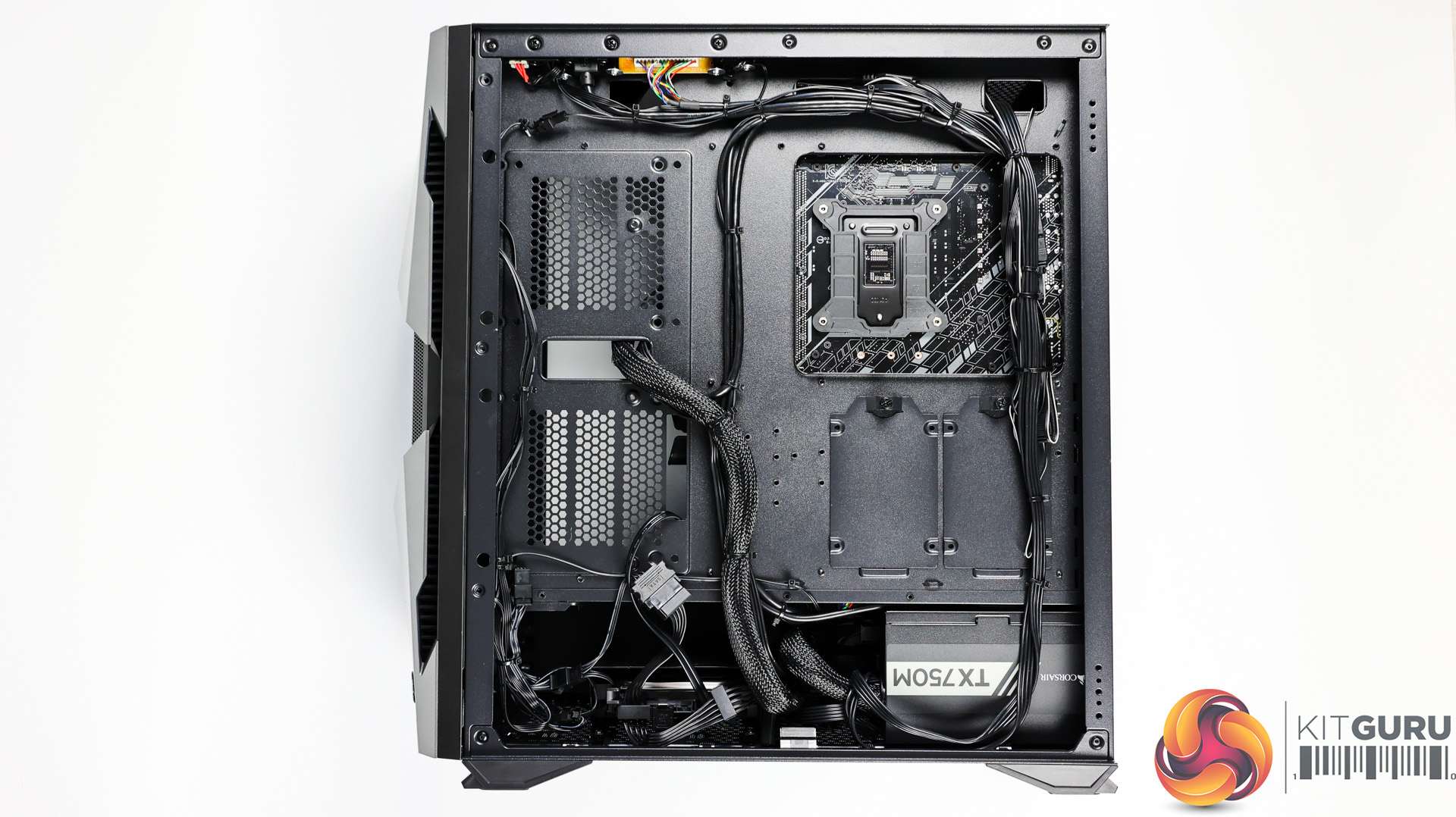
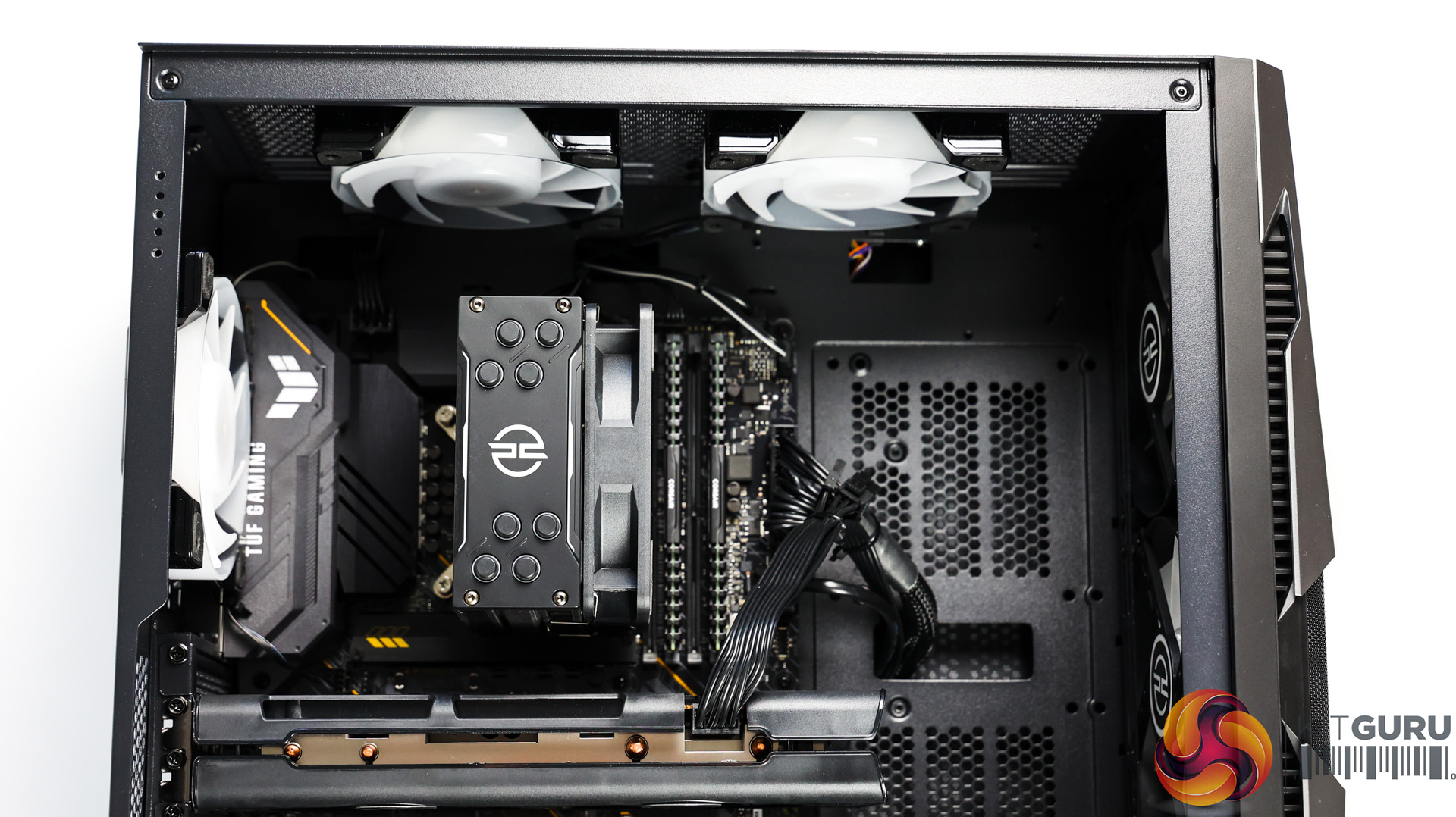
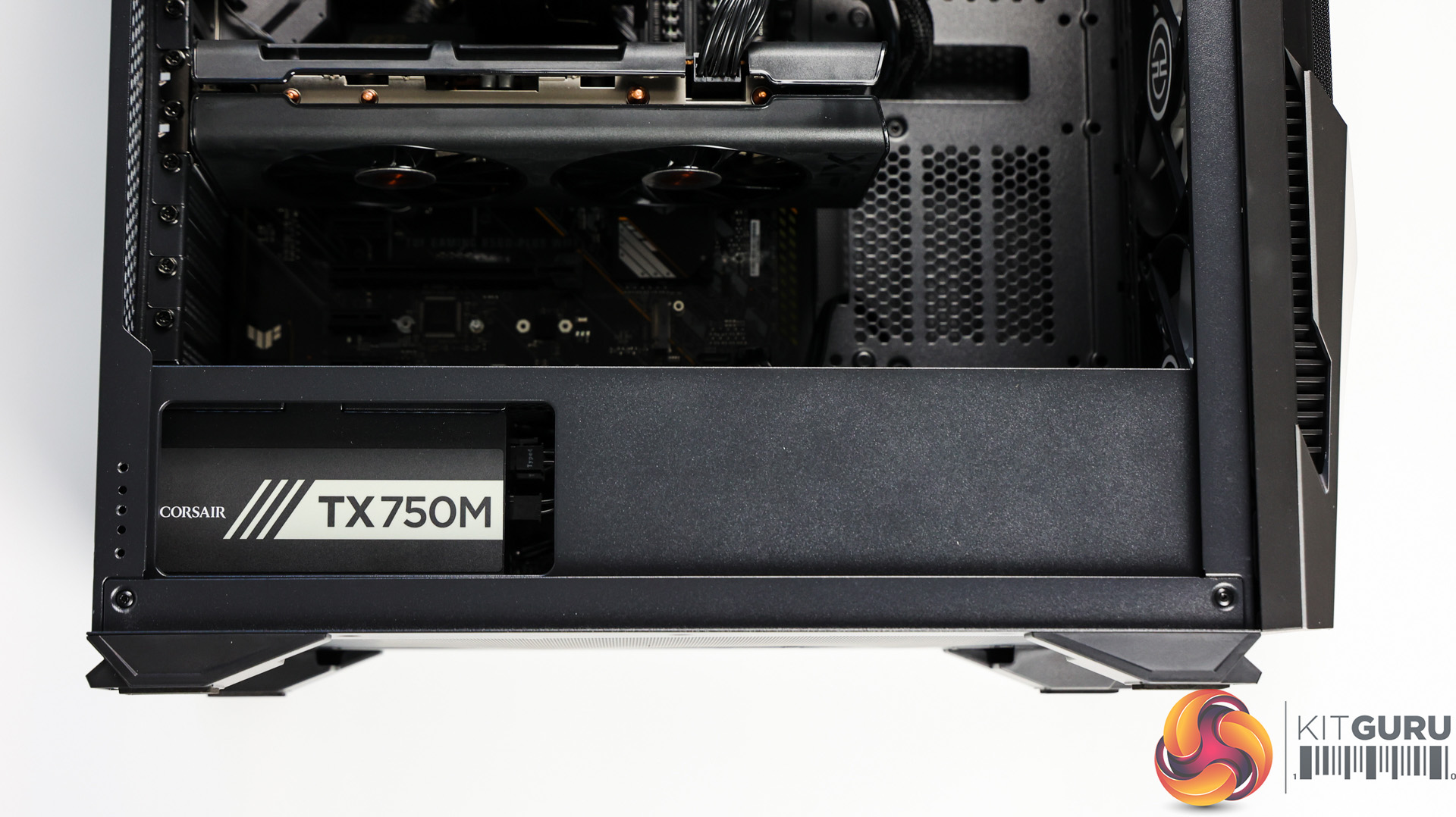
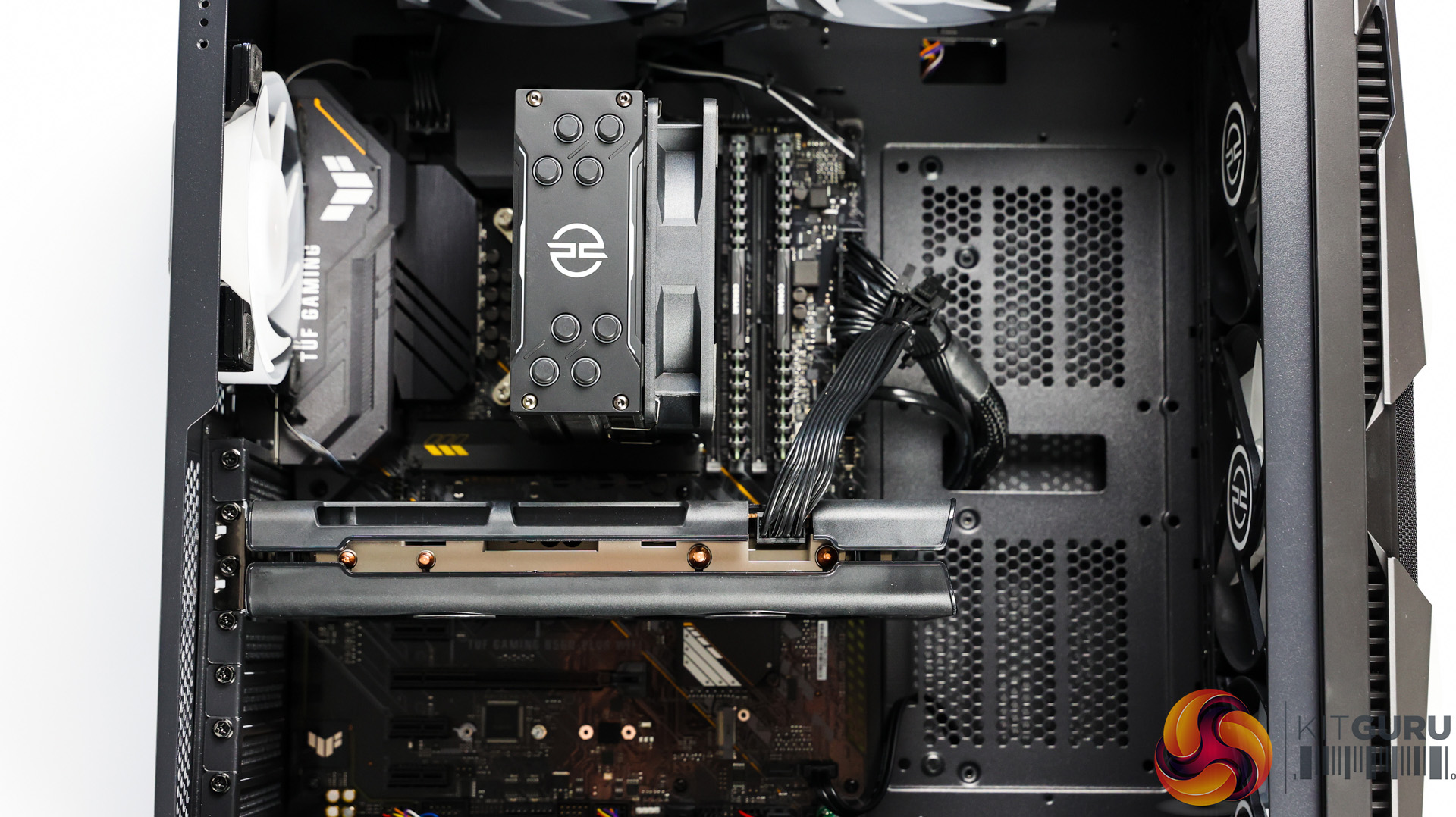
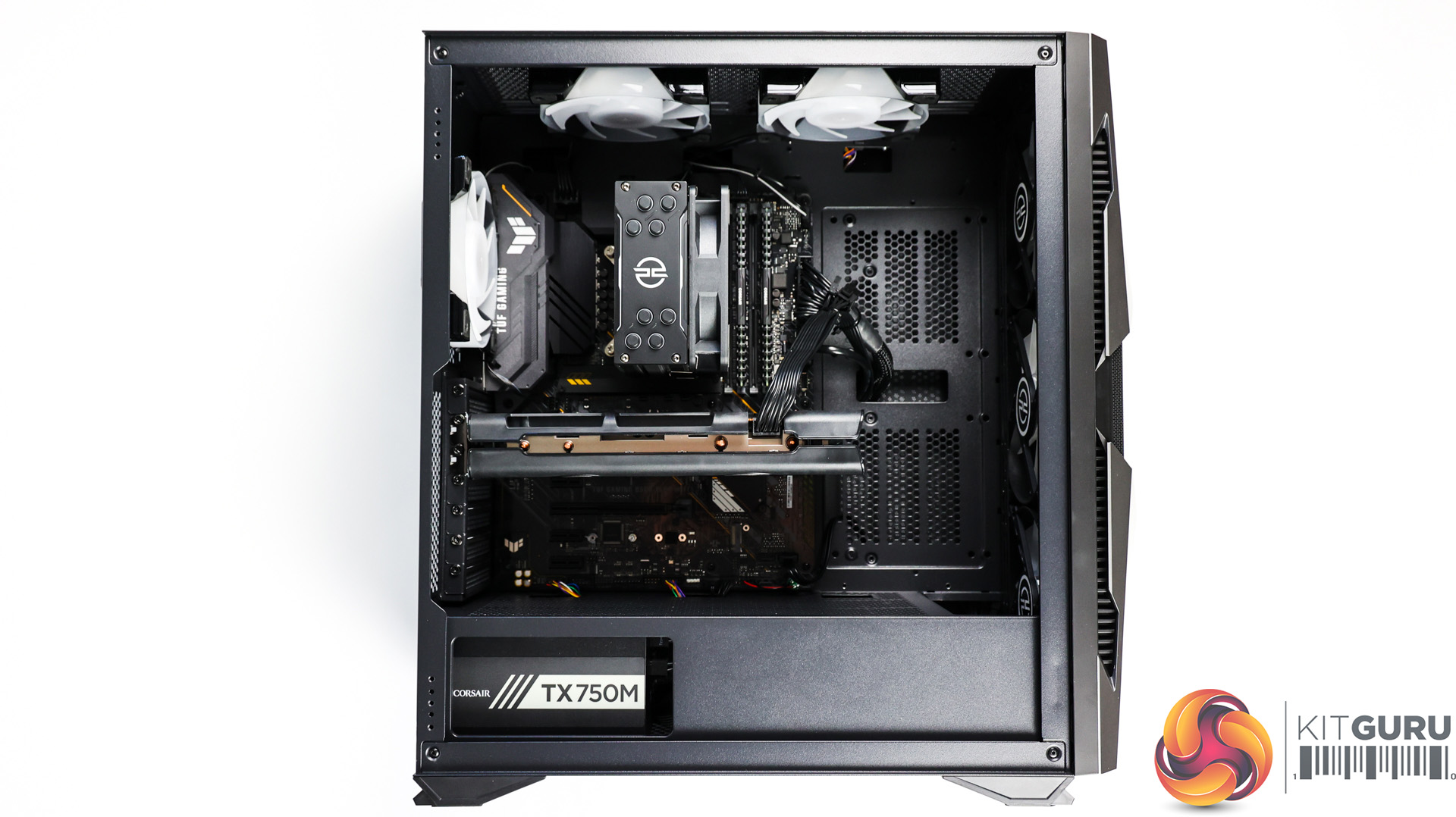
Inside there’s a fair amount of room to access the top of the motherboard and also plenty of room to route new cables if you wanted to install more SATA drives. There’s also a cut out from the shroud at the bottom to see our Corsair PSU, which is orientated the right way to see the graphic, rather than it being upside down.
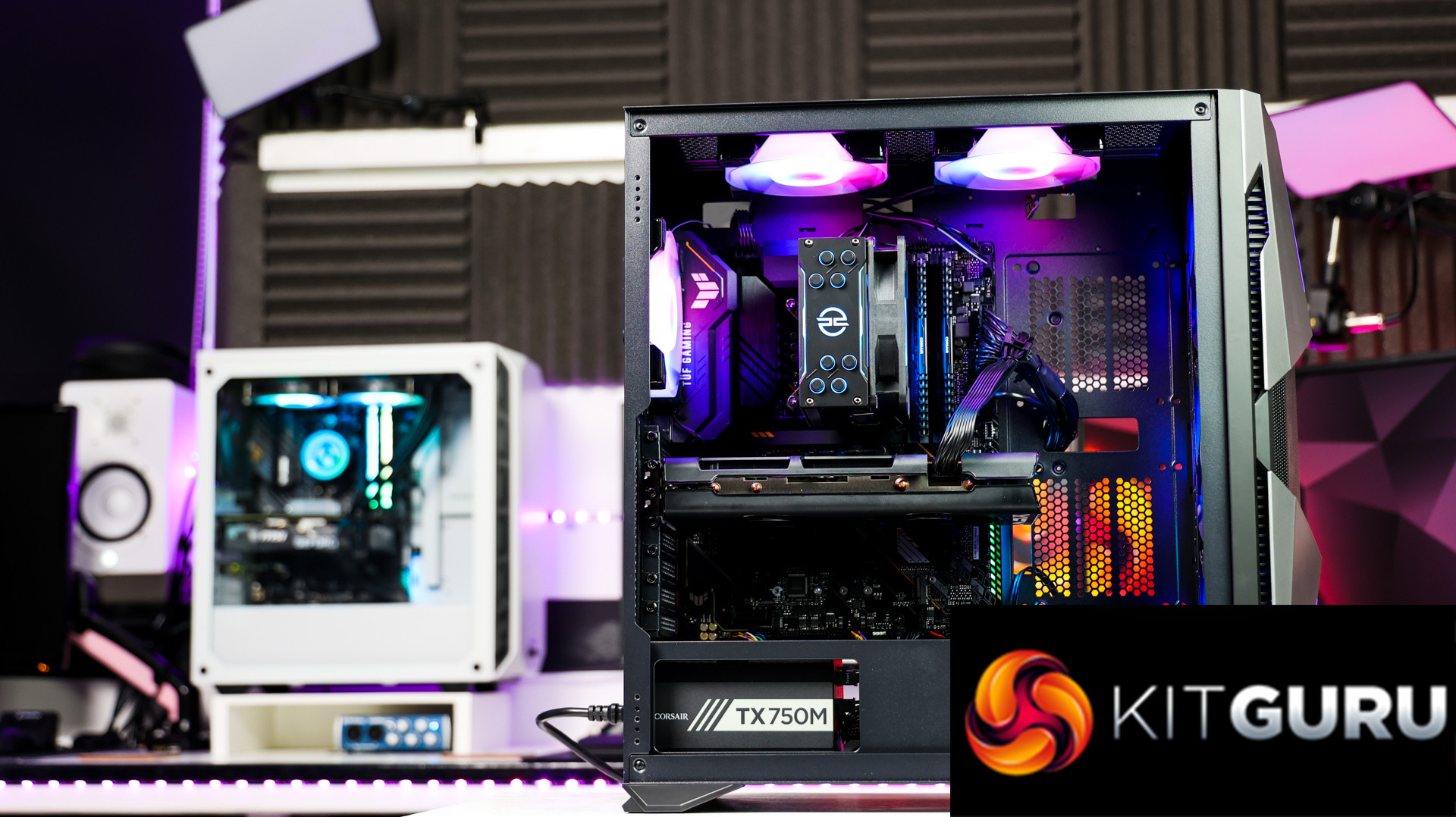
Everything inside the system has a black theme, luckily no ketchup and mustard cables either from our semi-modular PSU, and our CPU cooler’s heatsink is a nice matte black keeping in theme with the build. The only splash of colour, when the system if off at least, is from the ASUS TUF motherboard as it has the classic TUF yellow accents, but personally I quite like it. We do have RGB galore with the PCS fans installed, we have 3 RGB intake fans, 2 more exhausting at the top and one exhausting on the back and yet another on our CPU cooler, totalling 7 RGB fans in total!
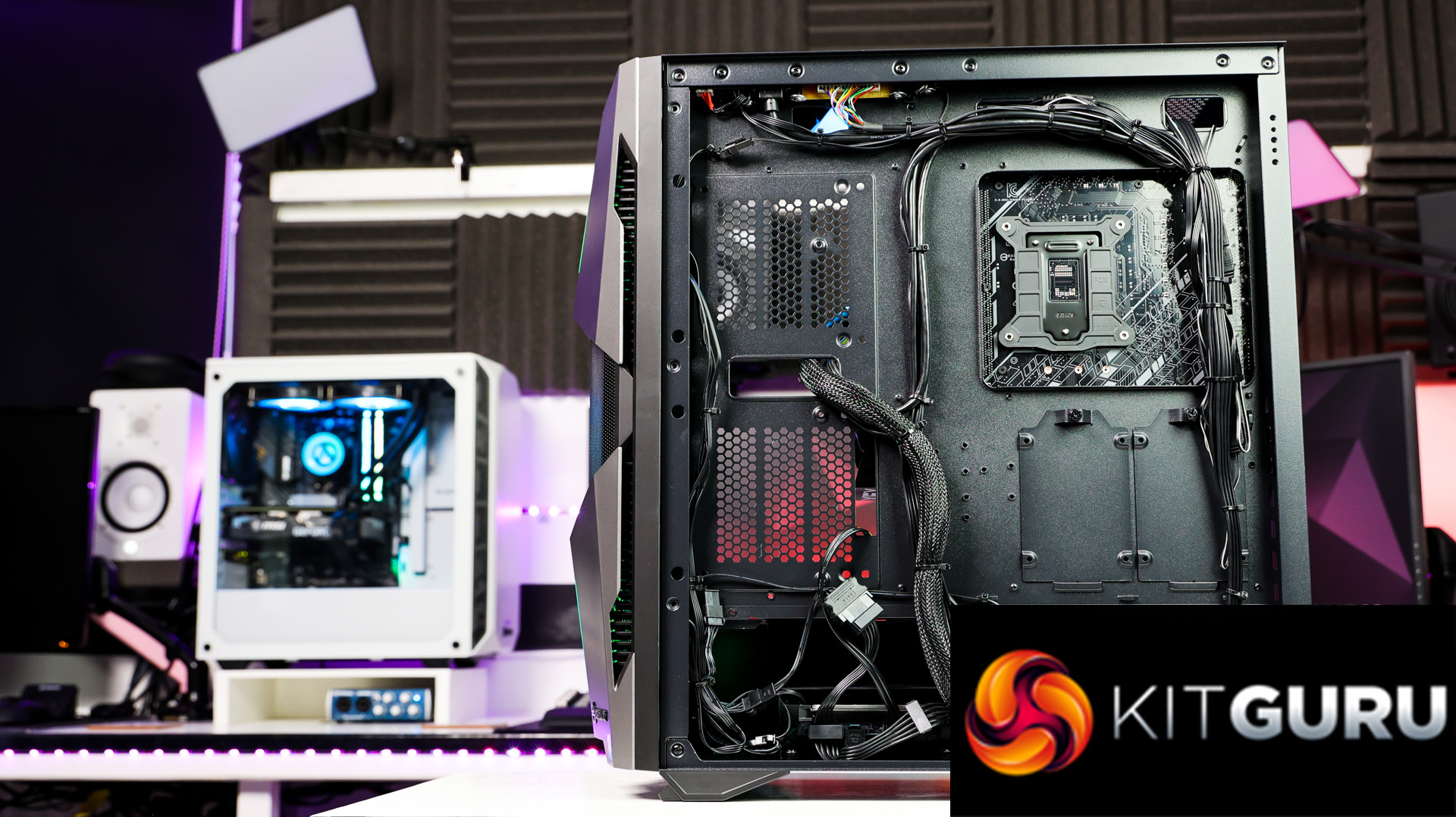
Overall, the build is very clean, it has been well cable managed and the placement of everything looks like it’s been installed with care. I like how they’ve thought about the theme with black cables and cable ties along with the matching CPU cooler and the same fans throughout.
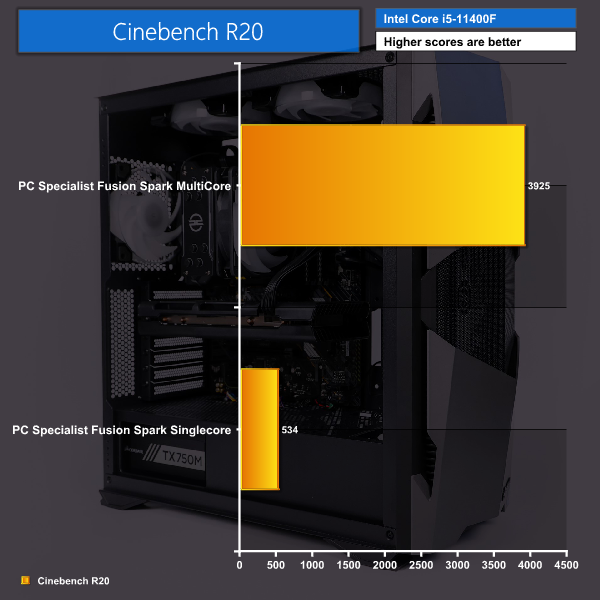
Cinebench R20 scored well with just under 4000 multi-core points and just over 500 single core points.
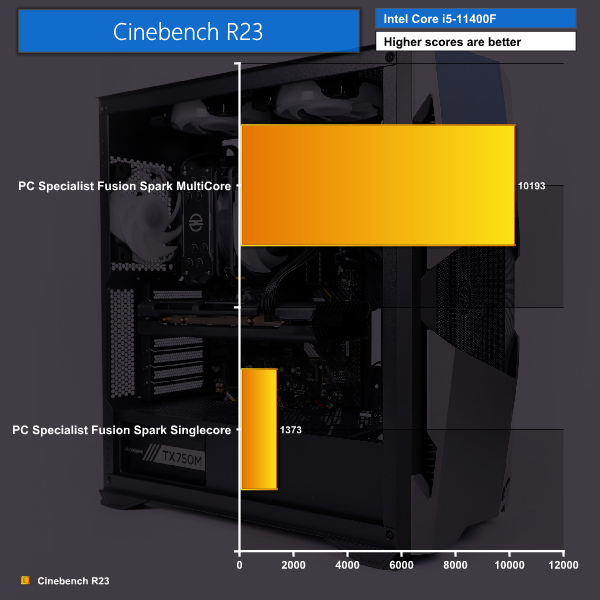
Cinebench R23 almost reached 10,200 in the multi-core test and 1400 on the single core test.
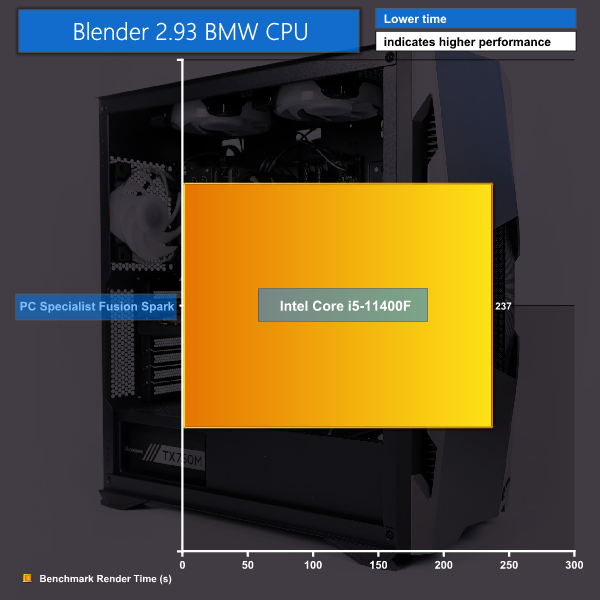
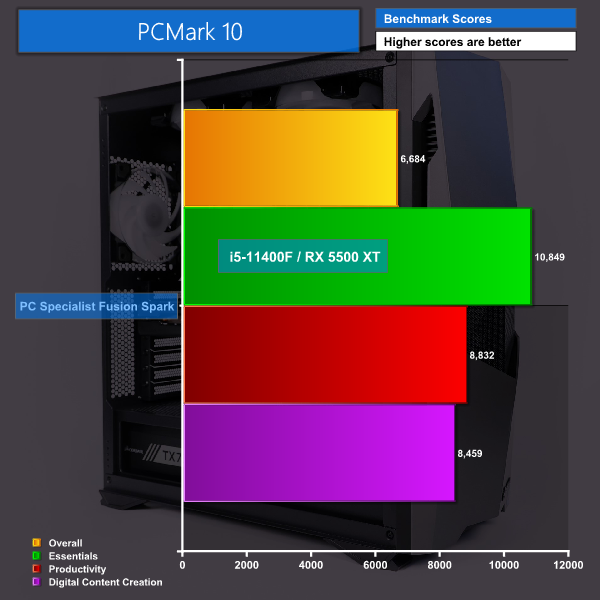
Time taken to render our BMW CPU test within Blender 2.93 was 236.95 seconds and PC Mark 10 shows how well the system performs at a variety of tasks and where it excels, scoring well across the board.
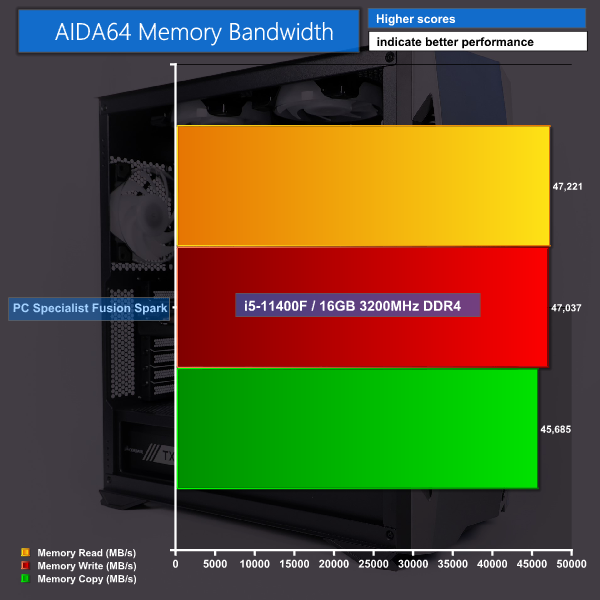
As expected, our Corsair Vengeance 16GB RAM at 3200MHz performed well during our AIDA64 memory benchmarking test.
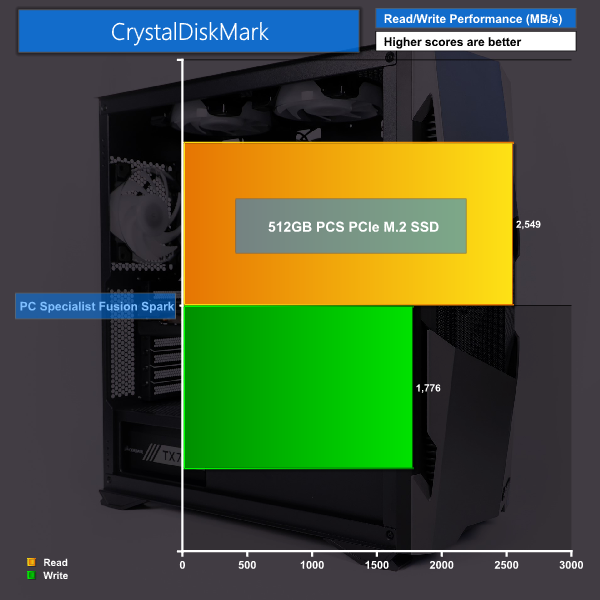
The 512GB PCSpecialist NVMe M.2 drive outperformed its rated speeds of 2000 MB/s read and 1100 MB/s write, by achieving 2550 MB/s and 1775 MB/s read and write, respectively, in our CrystalDiskMark testing. This isn’t the fastest NVMe drive out there but at the same time this system as a whole only cost £999 so the drive was one of the compromises that PCSpecialist have clearly made.
I ran each test with the included 4GB Radeon RX 5500 XT and then I swapped it out for a Gigabyte RX 6700 XT Gaming OC with 12 GB of GDDR6 VRAM, which Dominic has done a written review of HERE. Then I ran all the same tests again, and compared them, to simulate the users upgrade experience and what sort of improvements they may expect when swapping to a higher end card.
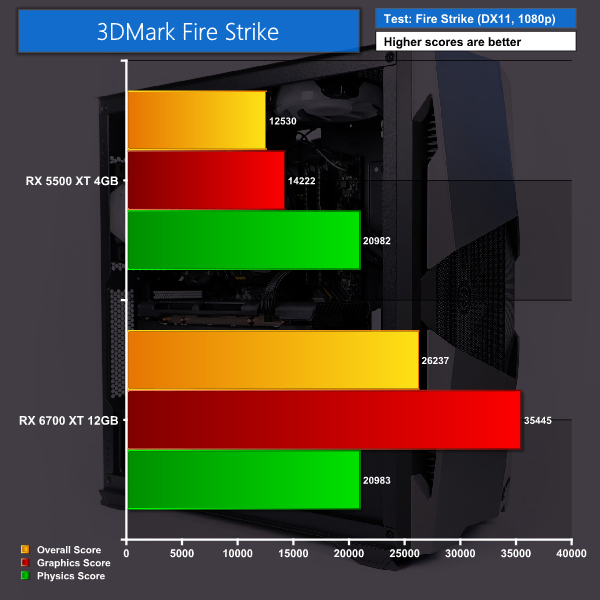
During 3DMark Fire Strike our system with the RX 5500 XT installed suffers overall and in the graphics tests but excels during the physics tests thanks to the capable i5-11400F. Swapping out to the RX 6700 XT card shows the physics score stays roughly the same as we’d expect, but there is a big performance boost overall and in the graphics area at over double the RX 5500 XT’s scores.
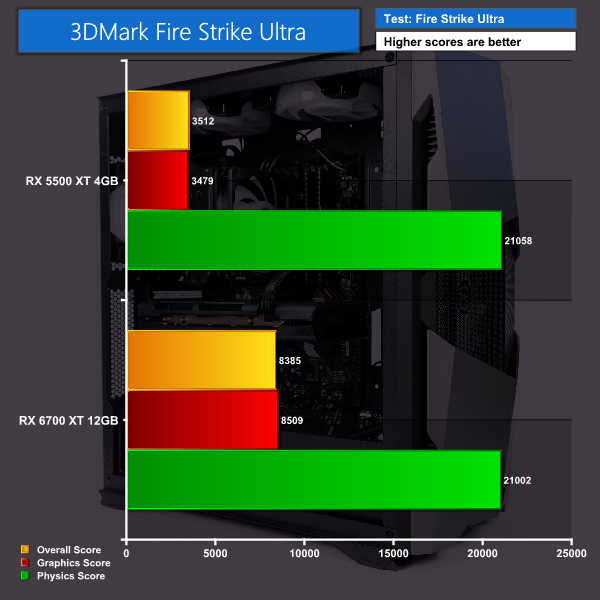
Stepping up to 3DMark Fire Strike Ultra we can see the stock system struggled overall and during the graphics test but still excels during the physics results. Swapping over to the RX 6700 XT shows a big gain in performance at almost triple the previous scores.
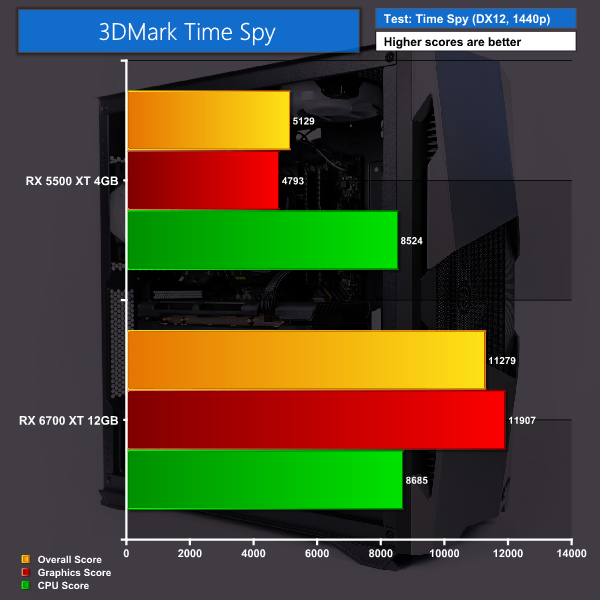
Finally, during 3DMark Time Spy we get average results with a decent CPU score but, once again, comparing to our RX 6700 XT the results speak for themselves.
Now let’s move onto some real-world gaming examples. I tested both cards at both 1080p and 1440p with the highest pre-sets available with any adaptive resolution scaling turned off and vsync off too. All games were installed on the 512GB NVMe M.2 SSD also.
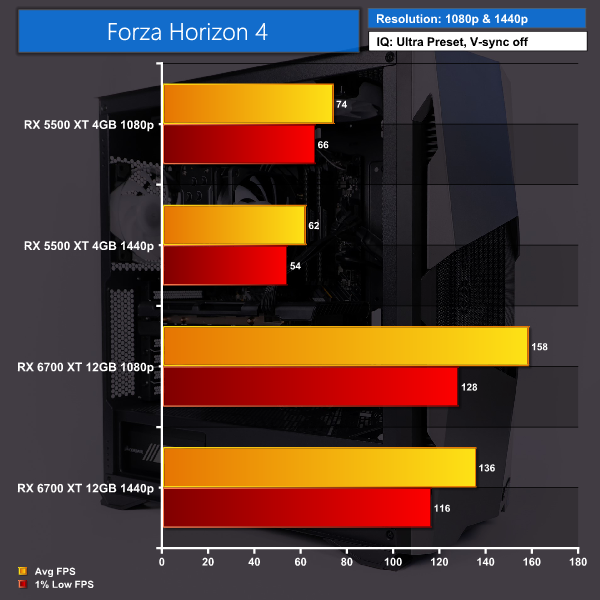
Starting with Forza Horizon 4 you can see our RX 5500 XT faired pretty well staying above 60FPS during 1080p and only just dipping below 60FPS at 1440p with the 1% lows. Comparing against our RX 6700 XT you can see the system really excels with the better card, giving out much better FPS results at both resolutions – with double the FPS.
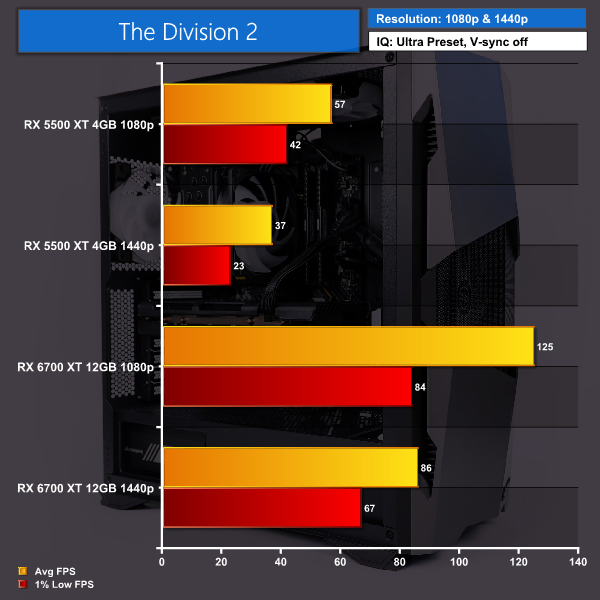
The Division 2 gave our RX 5500 XT a run for its money and you can see it’s struggling a lot during 1440p gaming, not even hitting 40FPS on average, and barely 20FPS for the 1% lows. As expected, our upgraded system results with the RX 6700 XT are the exact opposite and it doesn’t find The Division 2 a challenge in comparison making it much more playable at both resolutions.
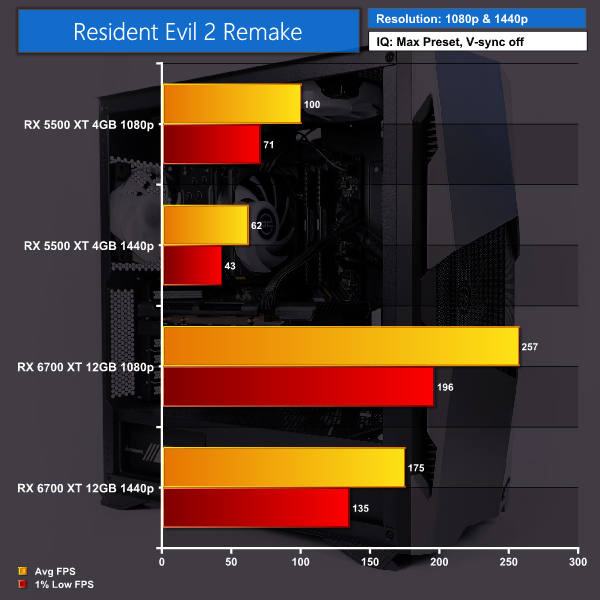
Resident Evil 2 performed very well at 1080p with the stock system and proved playable too at 1440p but, once again, the new card bumps this system into another level and gives us great results with over 250FPS on average at 1080p, and 175FPS on average at 1440p.
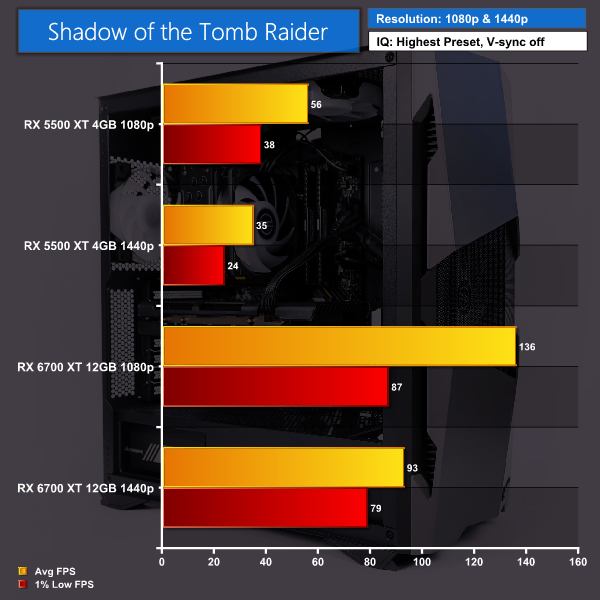
The classic test now with Shadow of the Tomb Raider, this game is clearly beating the stock system into submission with the 1440p results, and while it doesn’t fair too badly at 1080p it is still not ideal. Our new RX 6700 XT upgrade sees a very nice improvement for both resolutions however, reaching close to 140 FPS at 1080p and nearly 100FPS on average at 1440p, once again making this much more enjoyable to play.
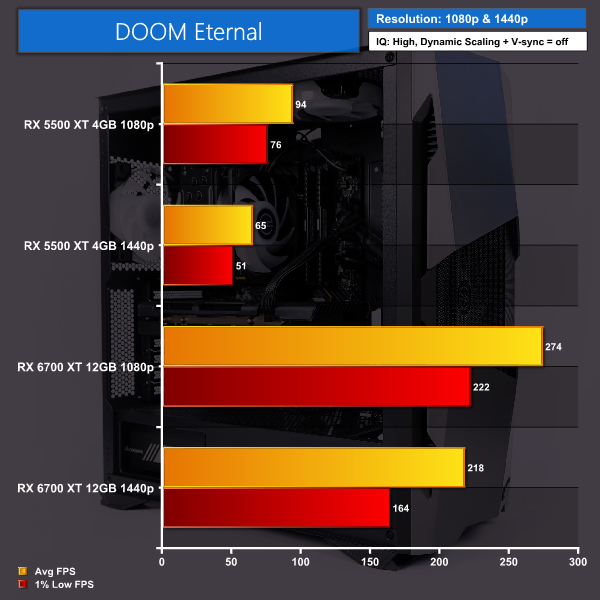
Finally, we tested Doom Eternal. Frustratingly the game does not let you apply settings that the card can’t handle based on your GPU’s VRAM, so we were forced to do both tests on both cards using the High preset as stock for the 1080p testing, but for 1440p tests we had to use the High setting with the texture pool size dropped down to medium. We almost hit 100 FPS at 1080p but drop right back to 65FPS at 1440p. Swapping the cards around you can see just how much of a boost in performance we can get from this system when the GPU is upgraded! Almost 275 FPS at 1080p and still well above the 200 FPS mark at 1440p.
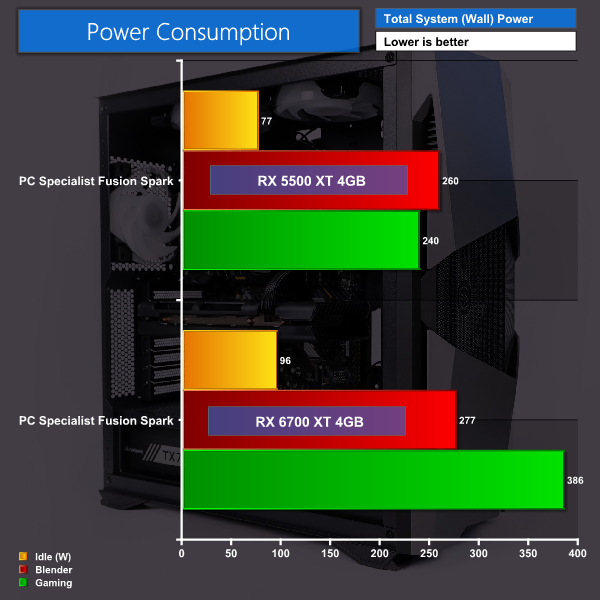
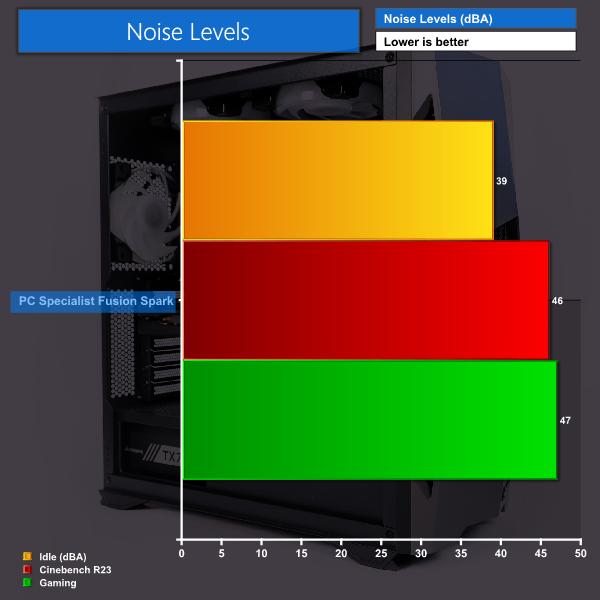
Sound wise our system idled at 39 dBa, whilst running Cinebench R23 only saw an increase of 7 dBa and whilst gaming sat at around 47 dBa. With the RX 5500 XT and our 750W PSU our idle wattage was 77, whilst running blender it jumped up to 260w and gaming reached a steady 240w. Swapping over our card to the RX 6700 XT saw our power consumption jump to 96w when idle, 277w during Blender and while gaming we see a considerable jump up to 386w.
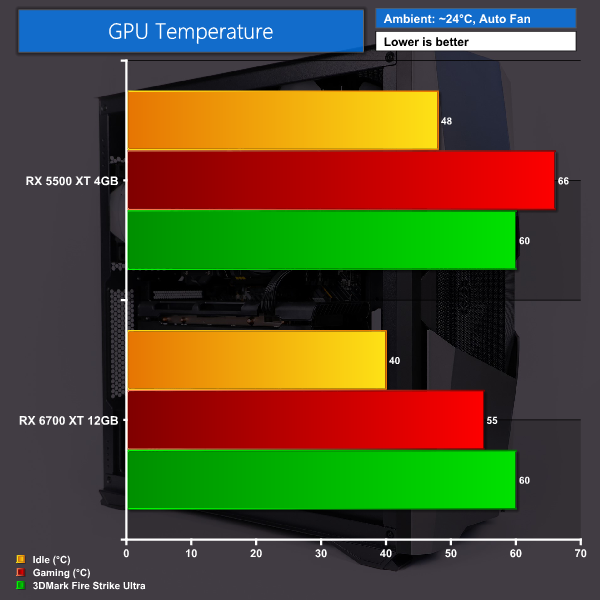
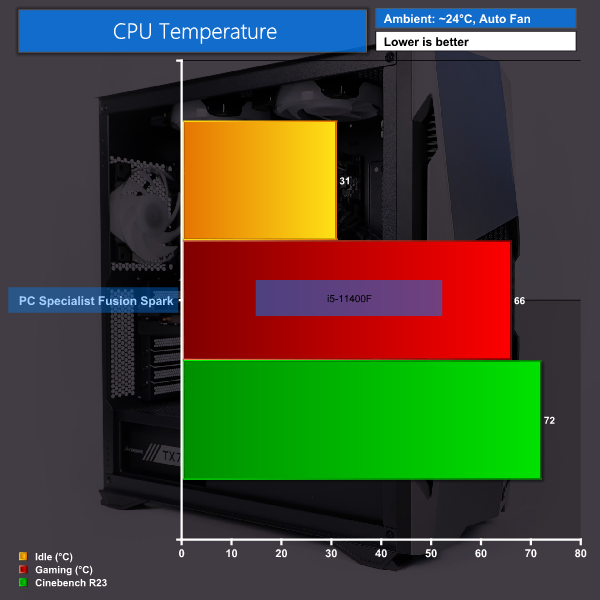
With our single fan CPU cooler and 6 chassis fans CPU temps idled at a good 31 degrees, whilst hitting 72 under an extensive Cinebench R23 run, gaming sat slightly lower at 66 degrees. Temps for our RX 5500 XT idled at 48C, reached 60C during 3DMark tests and 66C during gaming. Our RX 6700 XT card saw an idle temp of 40C, 55C during 3DMark and 60C while gaming.
In conclusion, the PCSpecialist Fusion Spark system performed very well overall during our standard CPU tests and other benchmarks. The only real let down was the speeds of the NVMe M.2 SSD, but we can forgive this as compromises clearly had to be made to keep the system under £1000.
My experience with the system overall has been positive, part choices are solid for the price point and it’s been cable managed well. The i5-11400F is particularly strong CPU, delivering great performance across the board without breaking the bank.
Gaming wise, the stock system with the RX 5500 XT 4GB actually faired pretty well and it’s certainly capable of gaming at 1080p, especially if you’re willing to sacrifice some image quality settings to get even better frame rates.
This system is intended to be upgraded however, and this is exactly where you see the Fusion Spark really shine. The performance boosts from our tests with the RX 6700 XT show that this is actually a very viable option for those that can’t source a high-end GPU currently and demonstrates that this system really does benefit from the upgraded GPU, giving great real-world results as seen from our gaming benchmarks.
If you're worried about upgrading the GPU yourself, PCSpecialist do offer this as an additional service for £69. If you're not confident doing it yourself this could be a stress-free way of boosting your frame rates in the future, the only downside being it would involve packing up and shipping the whole PC back to PCSpecialist.
Another thing to mention is that a second PCIe 8-pin power connector was easily accessible, with PCSpecialist using a daisy-chained 8-pin + 6+2-pin cable. If you're planning an even bigger upgrade and need two 8-pin cables, then you do get spares in the box to use with the semi-modular PSU but you will have to install these yourself. Realistically, the 750W PSU will be fine to use with even an RTX 3080 or RX 6800 XT, so there is scope for a huge GPU upgrade down the line.
At just under £1000 I think this is a great system to consider if you’re in the market for a new system without paying an extortionate amount for a current graphics card. Saving money by buying a system like this with an upgrade path means you can start saving for when those cards eventually become available at reasonable prices, while still being able to use and enjoy the system even when gaming.
You can purchase the PCSpecialist Fusion Spark, for £999, HERE!
Discuss on our Facebook page HERE.
Pros:
- Great price point with a 1080p-capable GPU included.
- Consistent black theme throughout with matching RGB fans.
- Great cable management.
- Upgrade path makes this system shine with a better GPU installed.
- Makes PC gaming in 2021 more accessible to those with lower budgets.
Cons:
- You may be potentially waiting to upgrade the GPU for quite some time.
- Stock RX 5500 XT isn't suited for 1440p gaming.
KitGuru says: If you're looking to build or buy a new system but cannot find any GPUs available at reasonable prices, then the idea of an upgrade path system, such as the Fusion Spark by PCSpecialist , is definitely an option to consider. The Fusion Spark performed well with the stock specs but truly excelled once the GPU was upgraded to something more powerful. How long you will wait to obtain a better GPU is another story though.

