KitGuru KitGuru.net – Tech News | Hardware News | Hardware Reviews | IOS | Mobile | Gaming | Graphics Cards


Today we’re checking out a prebuilt system by Box known as the Titanium X. Get ready to hold your breath and watch the moths fly out of your wallet, as this beast comes in at a hefty £3379.99. Now, as you can imagine, there’s good reason as to why this system is so expensive and yep, you’ve guessed it, that’s because it’s got some seriously enticing specs. With a Ryzen 9 5900X, 32GB 3200MHz RAM, 1TB PCIe Gen 4 NVMe SSD and a monstrous RTX 3080 Ti… is it really worth almost £3.5K?
Timestamps:
Spec:
- 3 years collect & return warranty
- Corsair 5000X Case
- AMD Ryzen 9 5900X
- Corsair H150i Elite Capellix RGB 360mm AIO Cooler
- MSI MAG X570 Tomahawk WIFI Motherboard
- Corsair RGB PRO SL 32GB 3200MHz DDR4 RAM
- Corsair 1TB MP600 NVMe Gen 4 M.2 SSD
- Seagate 1TB HDD
- MSI RTX 3080 TI Gaming X Trio 12GB
- Corsair RM850w PSU
- Corsair SP120 RGB Elite 120mm Fans
- Braided Cable Kit
- Win 10 Home
- Win 10 Recovery USB

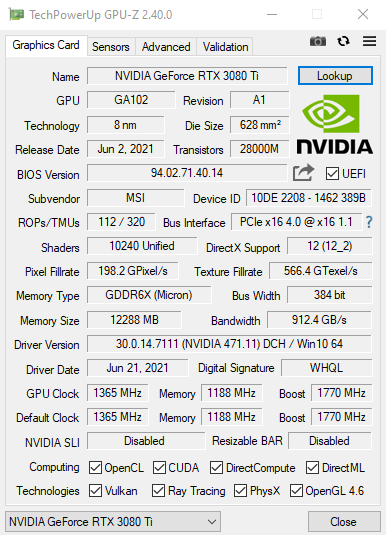
On paper there’s some very impressive specs here that look like this machine will absolutely breeze through the latest games and tasks that you throw at it… but of course, in true KitGuru fashion, we’ll be putting it through its paces later on within the review.
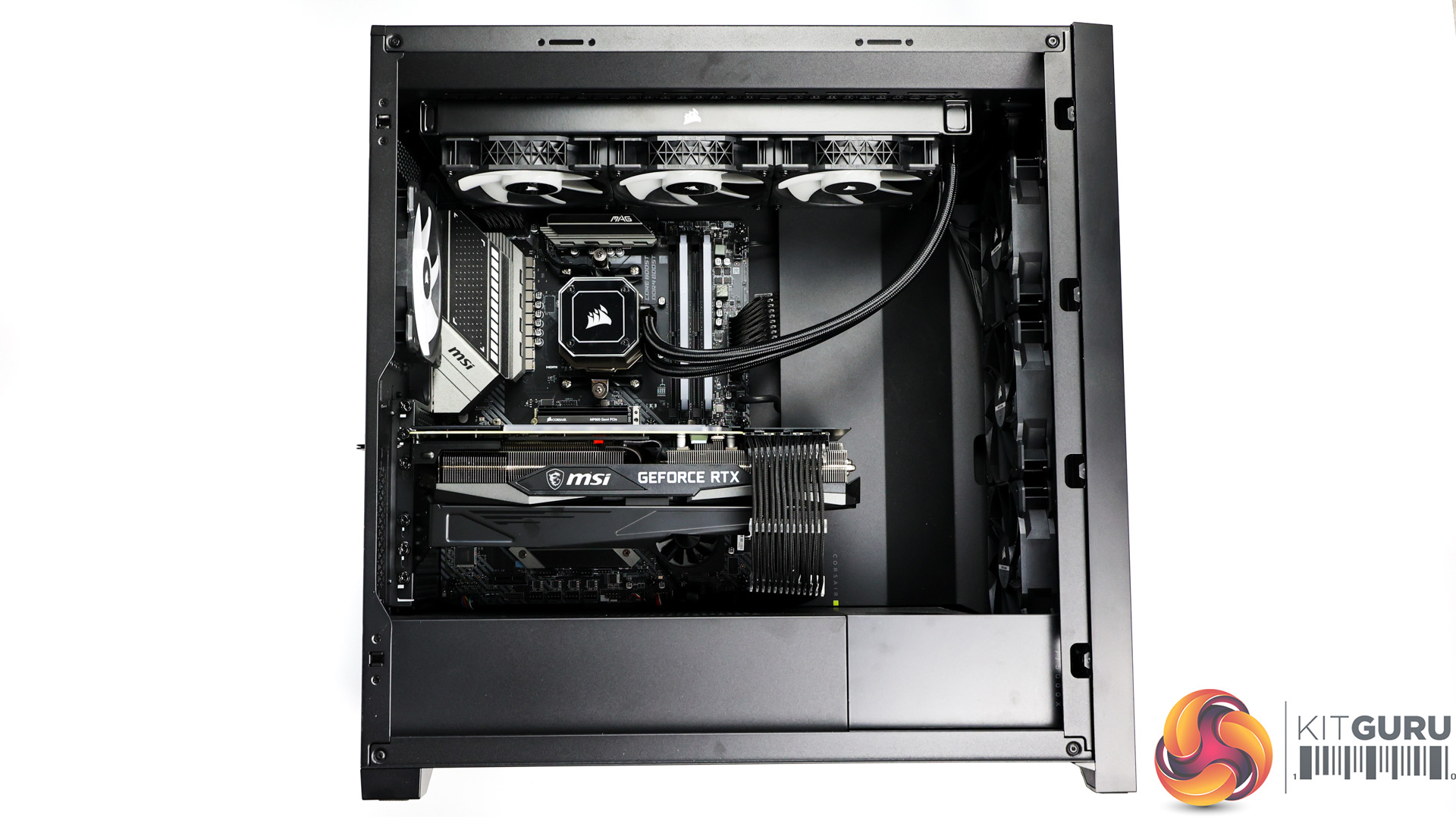
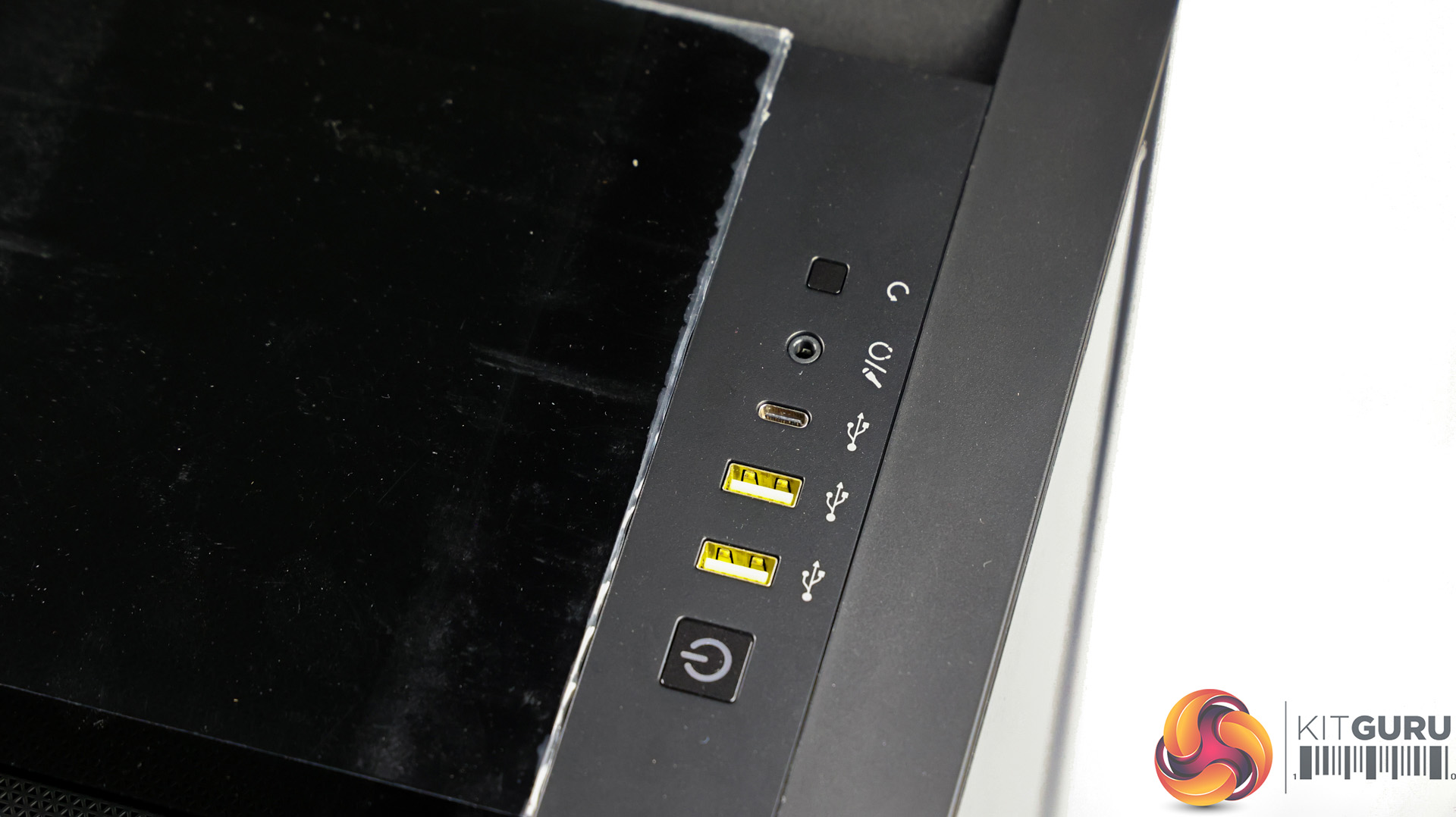
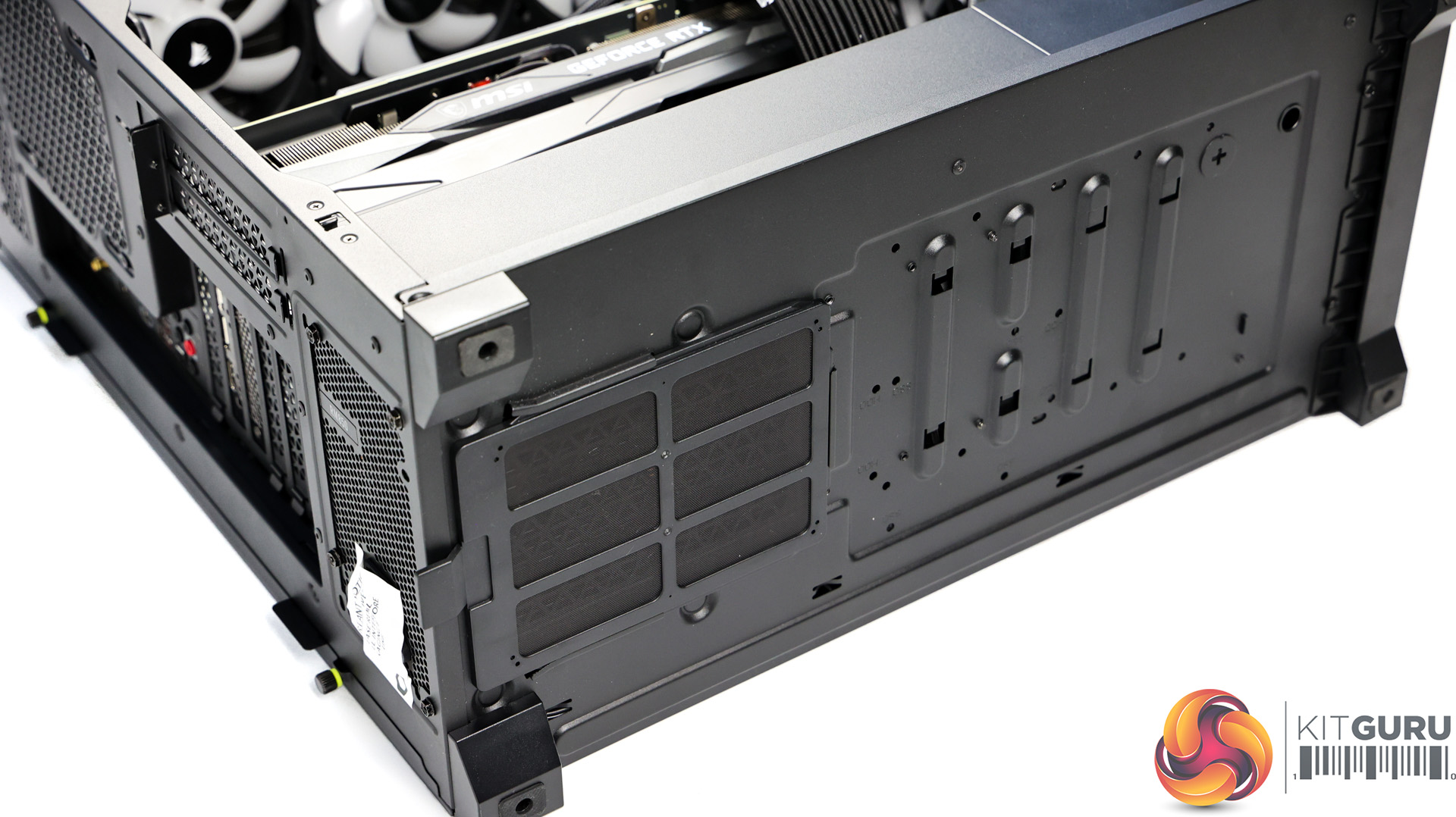
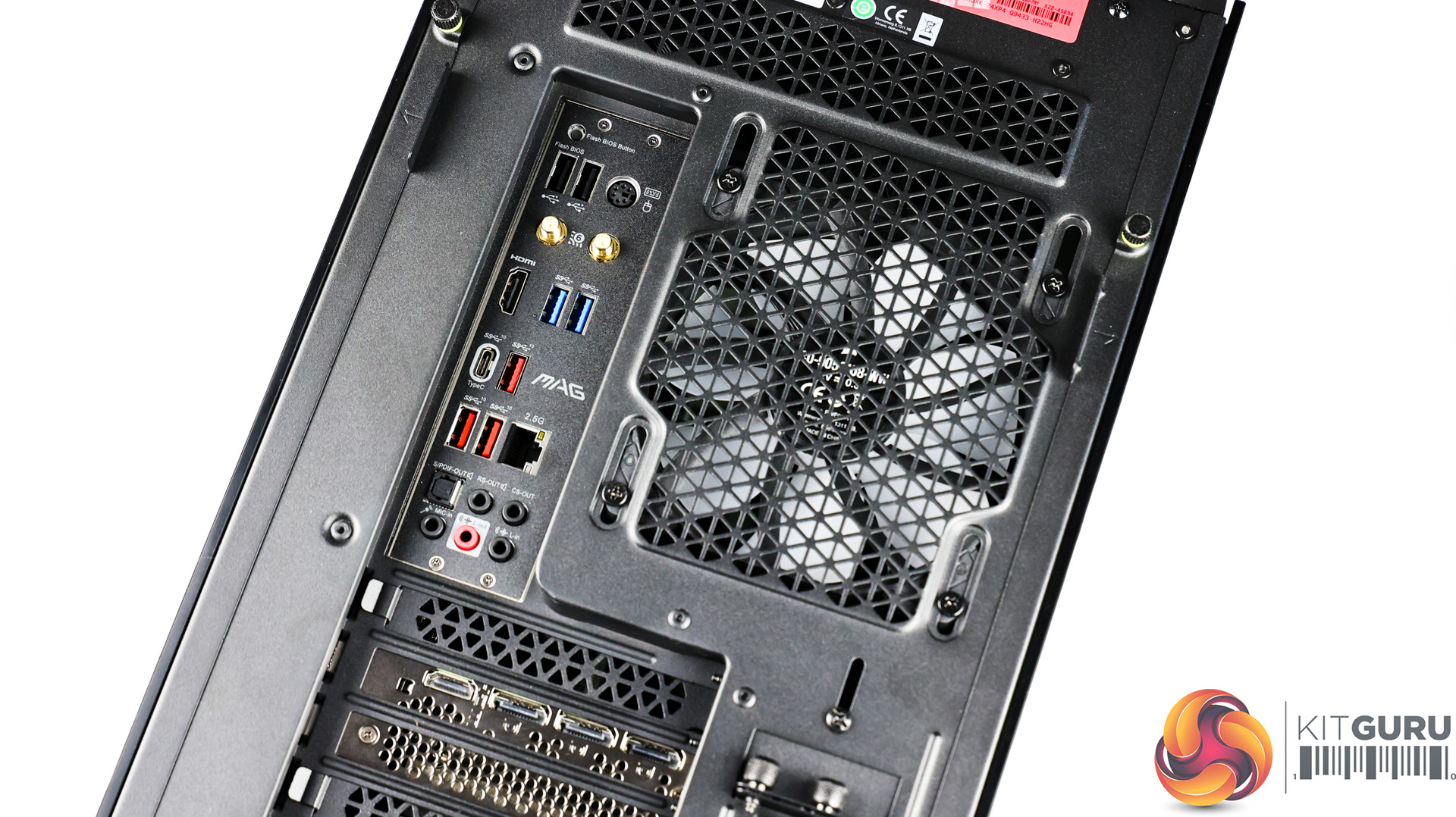
Starting with the PC itself, Box is using the Corsair 5000X case, and it looks stylish with smoked black tempered glass all-round, which can easily be removed on the front and top to get to dust filters. There’s plenty of large gaps around the glass for airflow too along with some nice front IO; USB 3.1 type-C, 2x USB 3.0 and a combo audio jack.
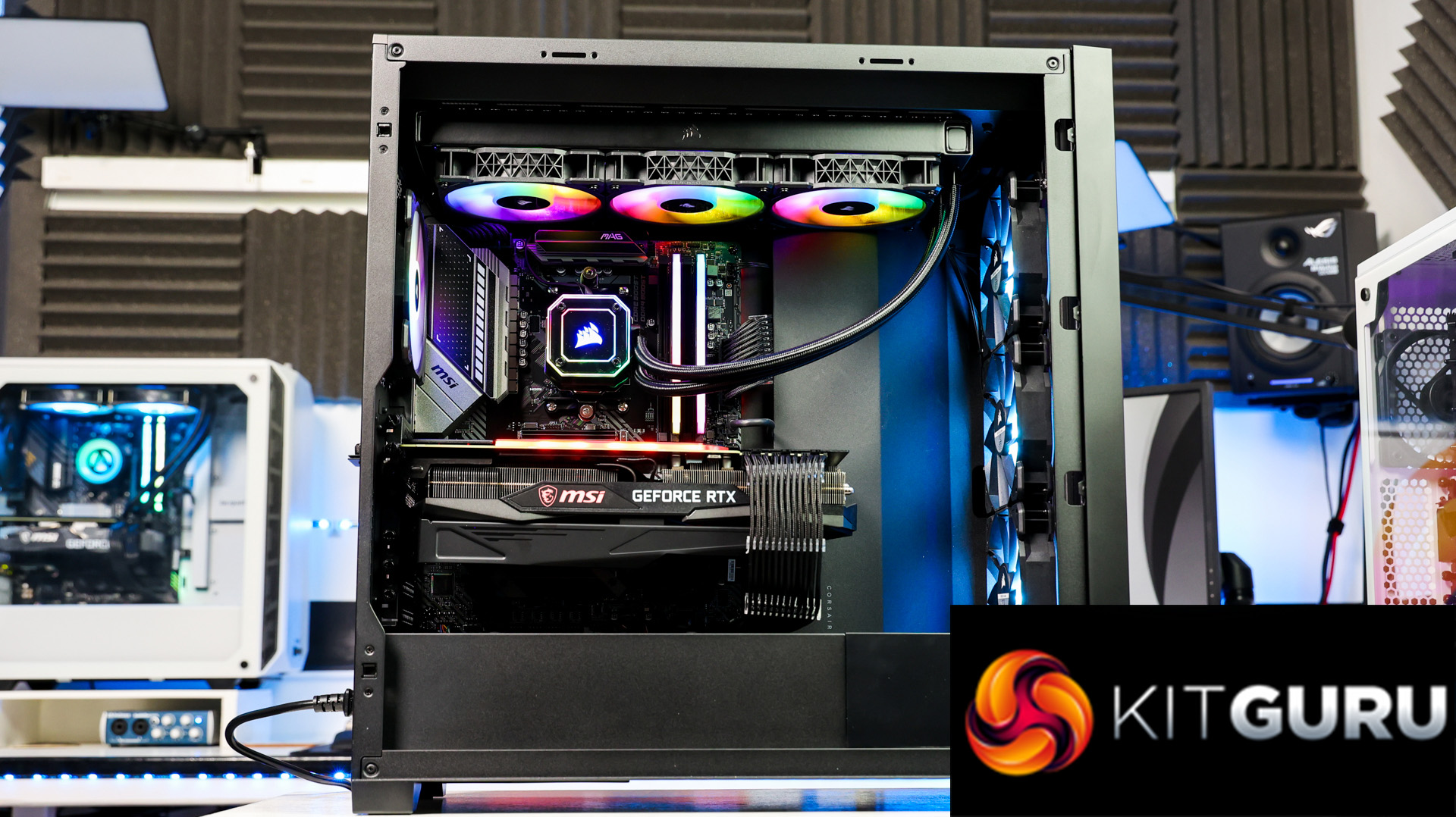
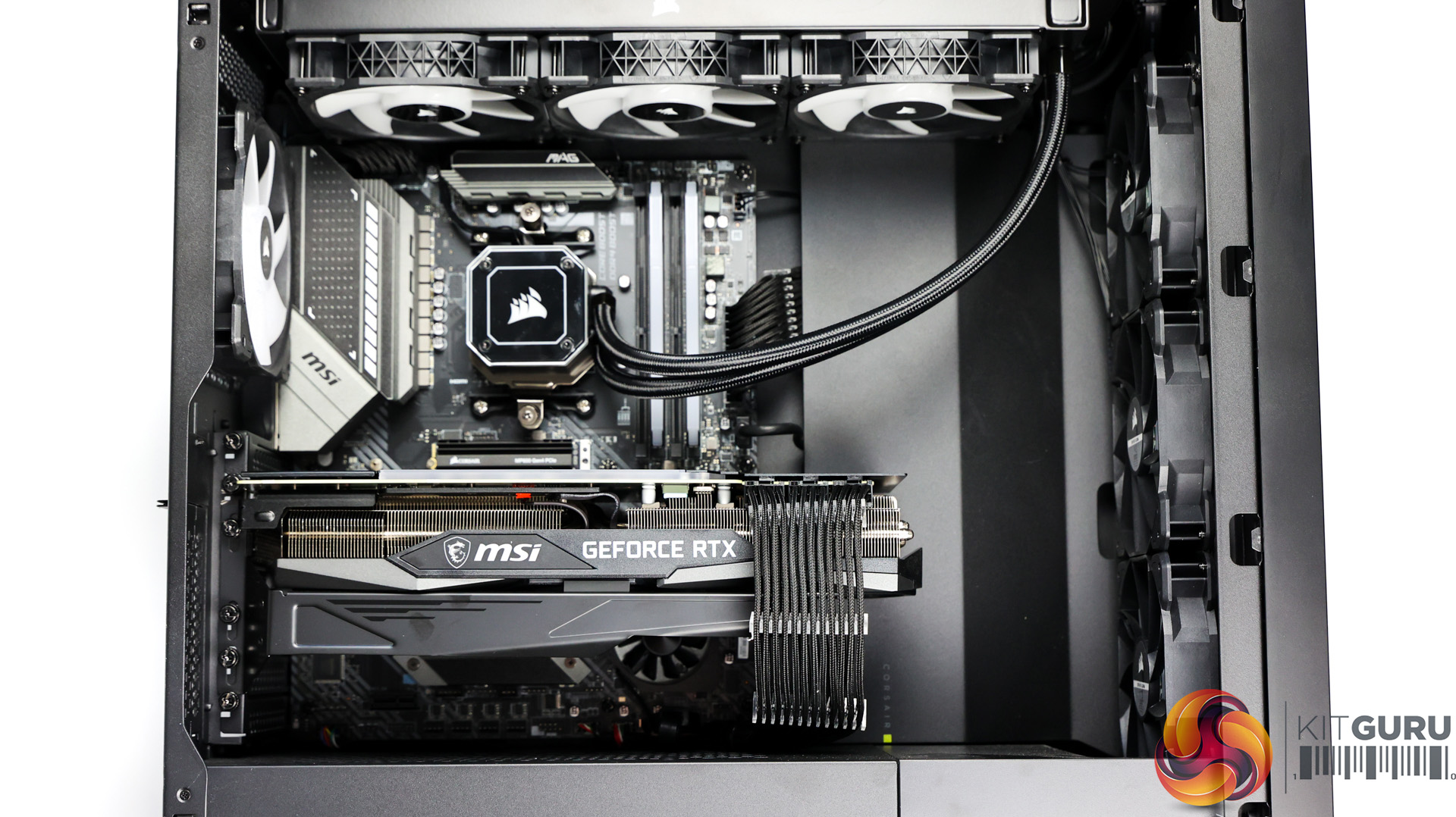
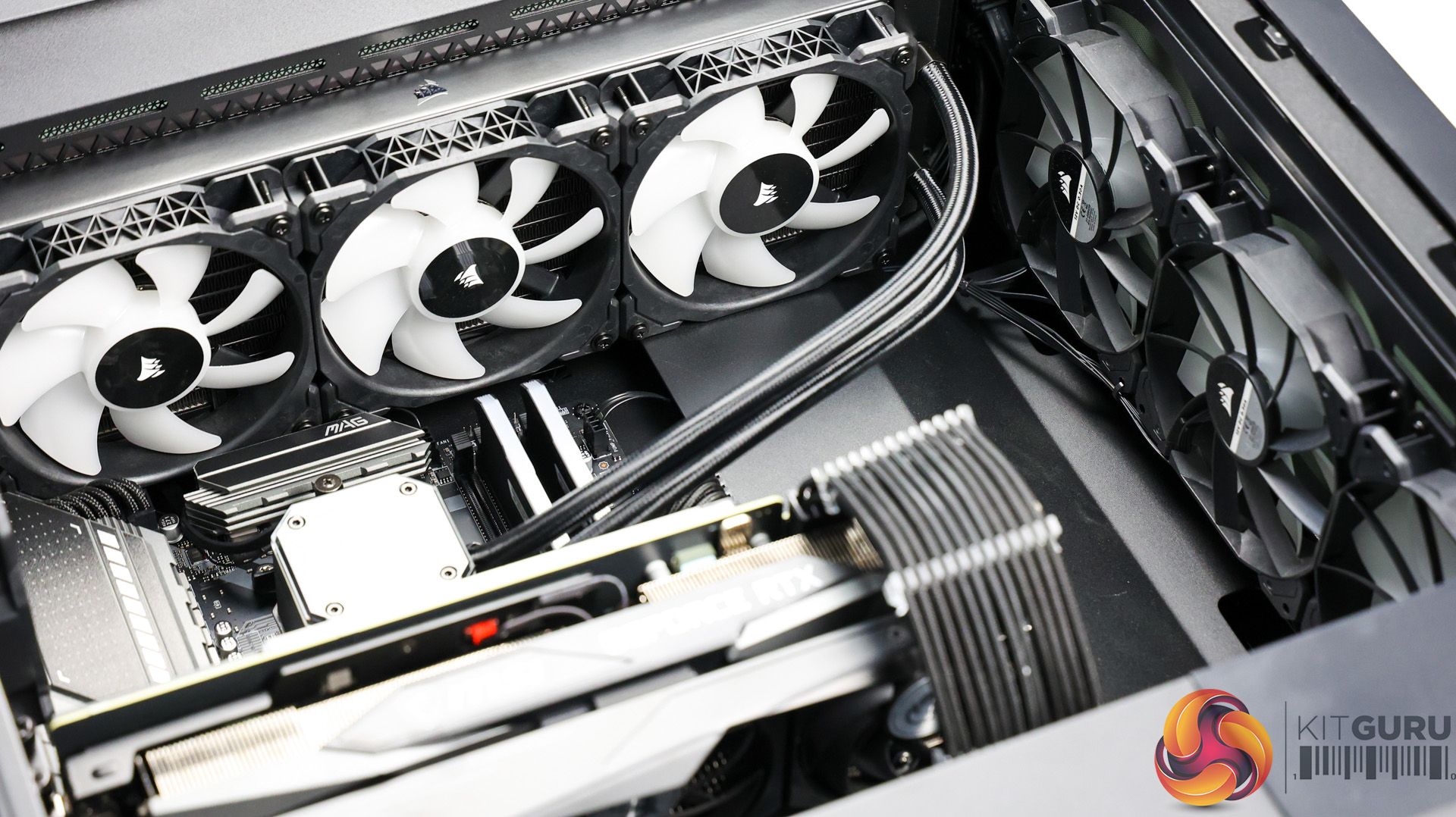
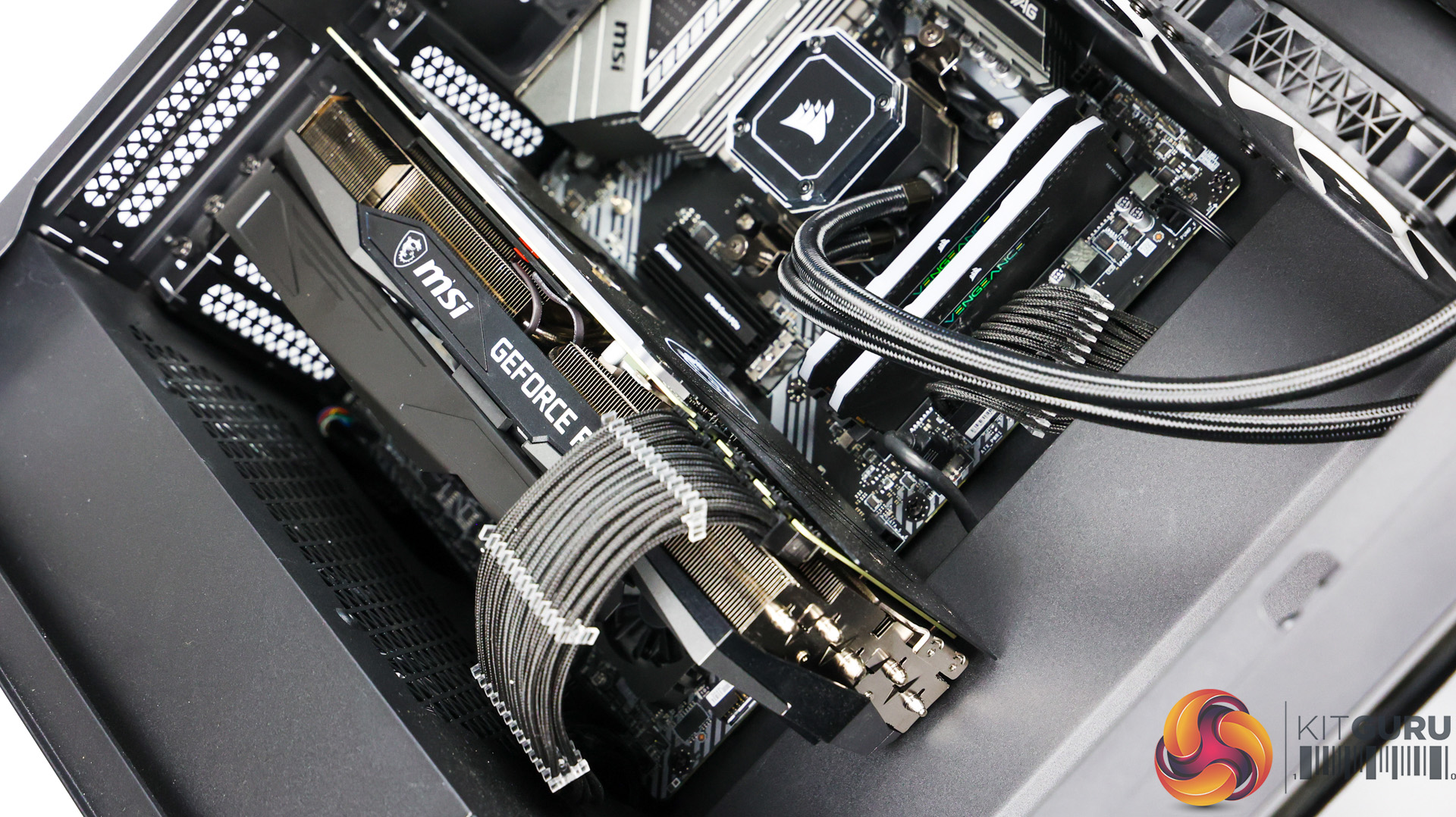
Inside, the system doesn’t look empty with any wasted space here. The MSI RTX 3080 Ti is a massive card, especially with the large bracket underneath it to try and help the inevitable and dreaded GPU sag. The bracket does pretty well though and the GPU only starts to sag at the end where it’s mostly unsupported. Paired with the Corsair H150i Elite 360mm AIO orientated at the top of the case, it definitely helps fill the space with the tubes coming down front the righthand side.
Despite that large AIO on top, the case is big enough to still give you ample room at access the top of the motherboard easily and I really like that as top mounted AIOs often end up covering the top of the motherboard and it can look a little too close for comfort in my opinion.
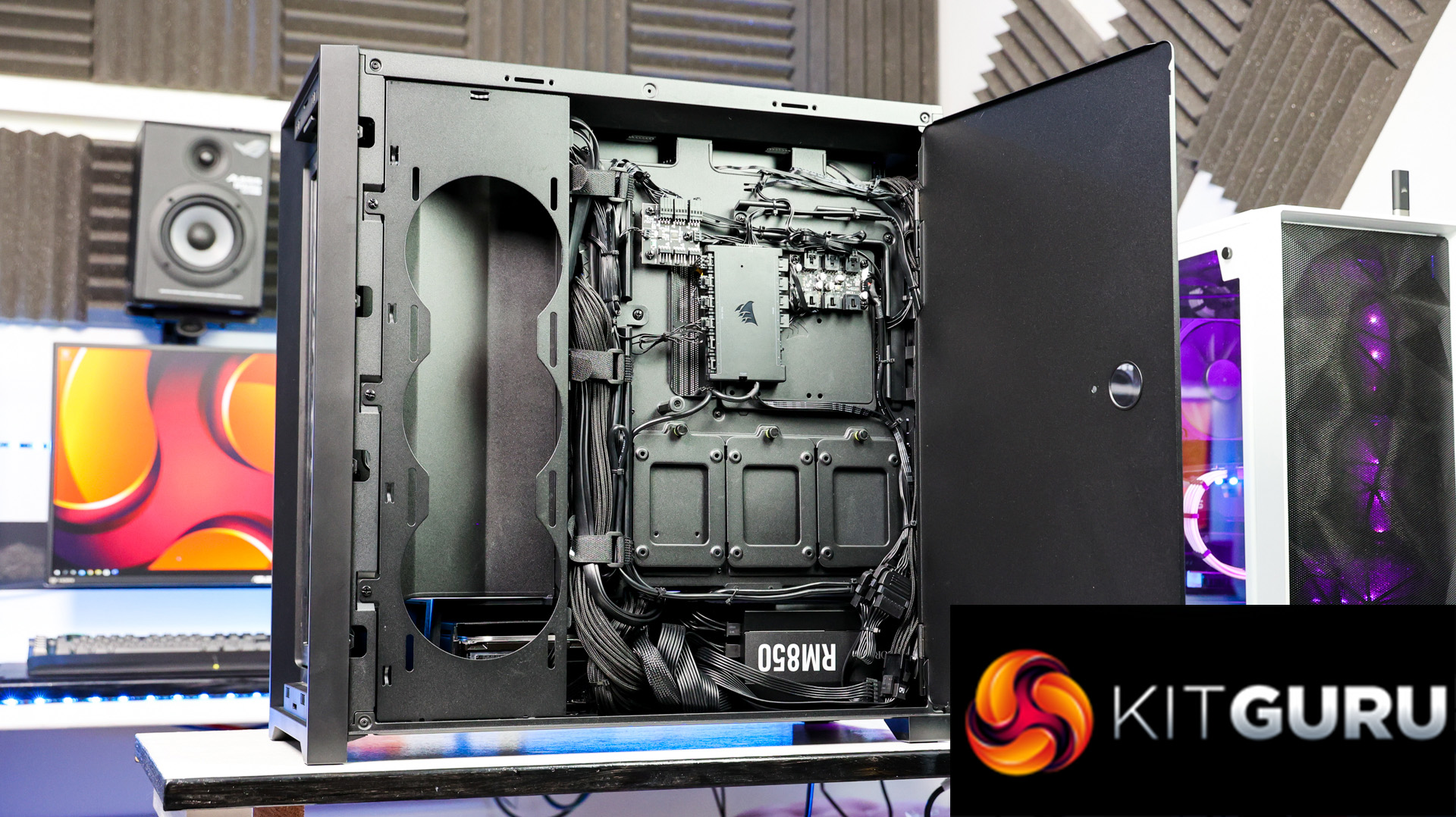
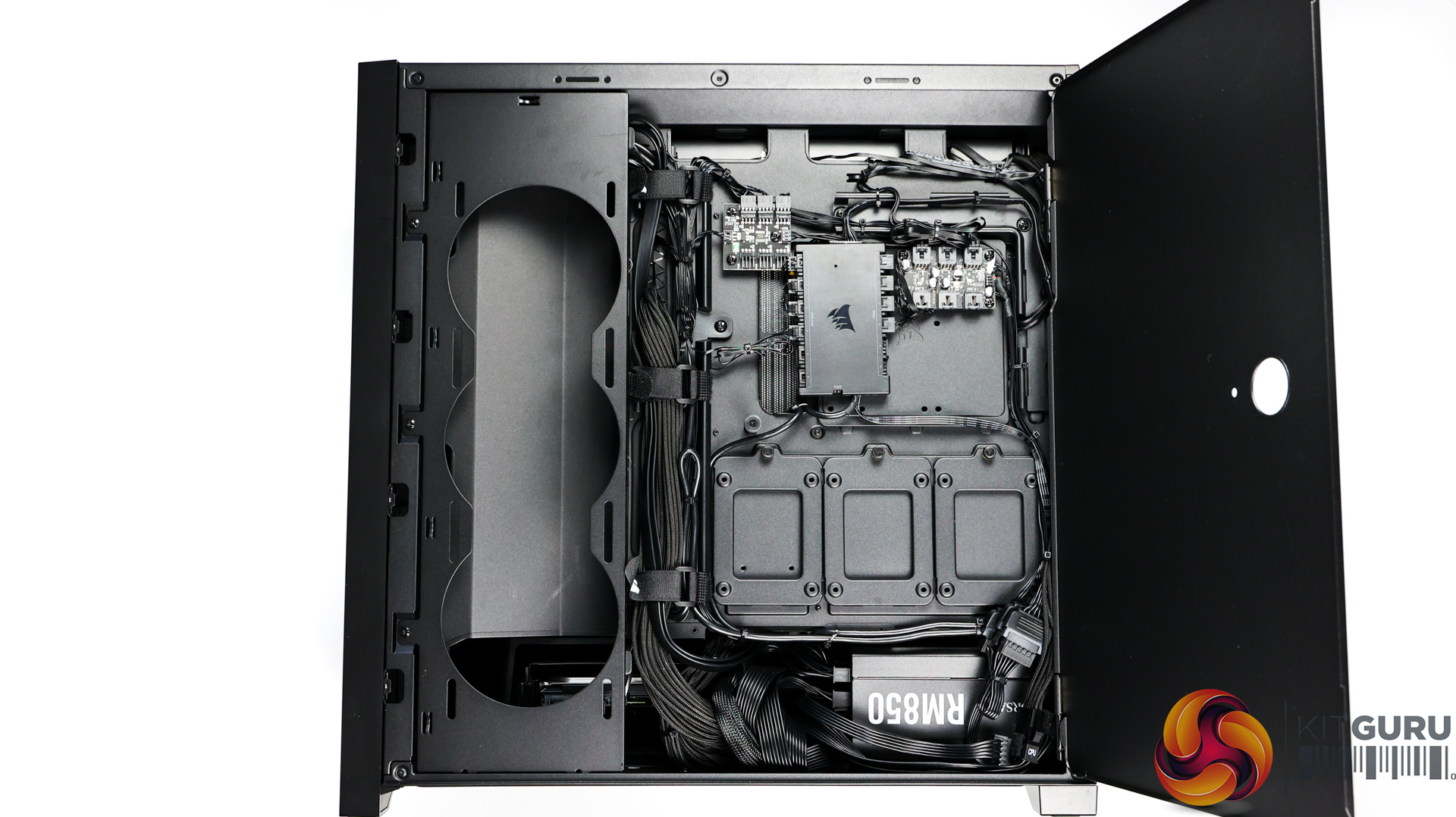
Theme-wise, the continuity is great, everything continues on nicely from the black frosted glass of the case, as all components are black with almost all of them having RGB elements if you want to enable them too. Finally, the cable management throughout the system is excellent. You can see the builders at Box have really taken time and care when assembling this build as everything is meticulously placed and well managed.
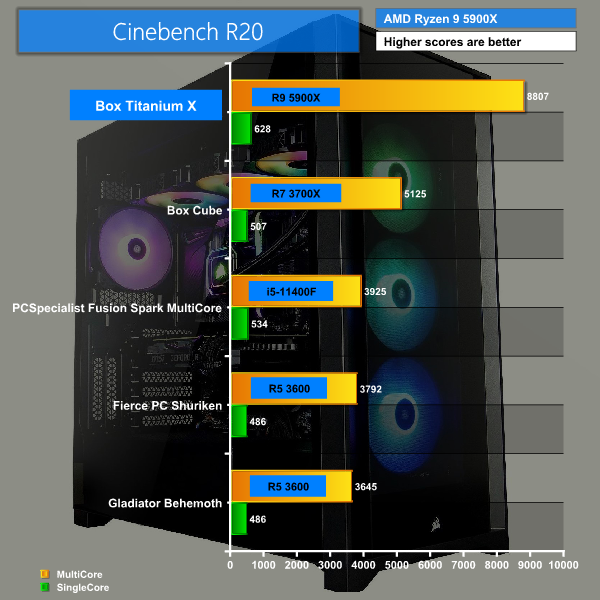
Cinebench R20 scored highly with 8807 during multi-core tests and 628 in single core.
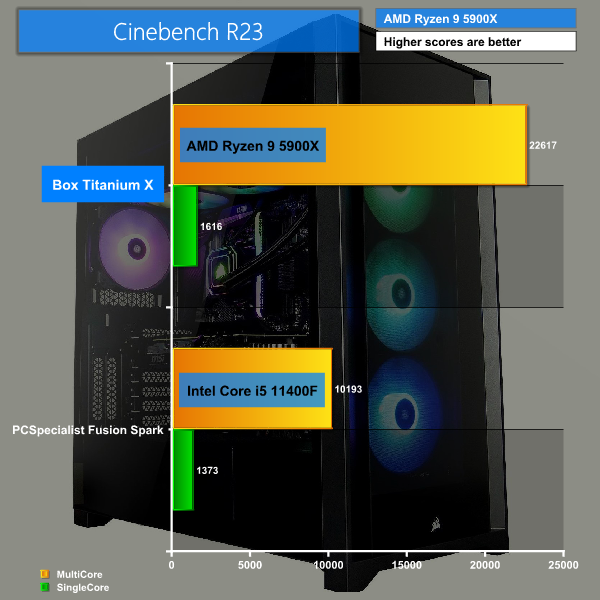
Cinebench R23 scored a whopping 22,617 during multi-core and 1,616 within the single core tests.
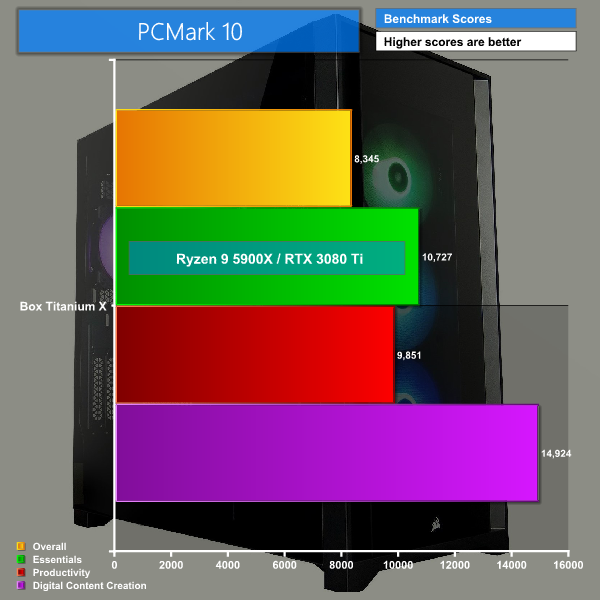
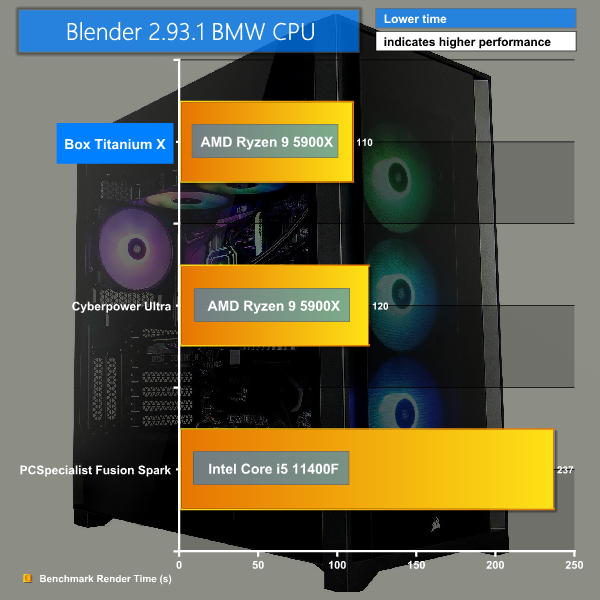
PC Mark 10 shows how well the system performs at a variety of tasks and where it excels, scoring very well across the board but really excelling in the Digital Content Creation tests. Time taken to render our BMW CPU test with Blender 2.93.1 was super-fast at just 110 seconds, or 1 minute 50 seconds.
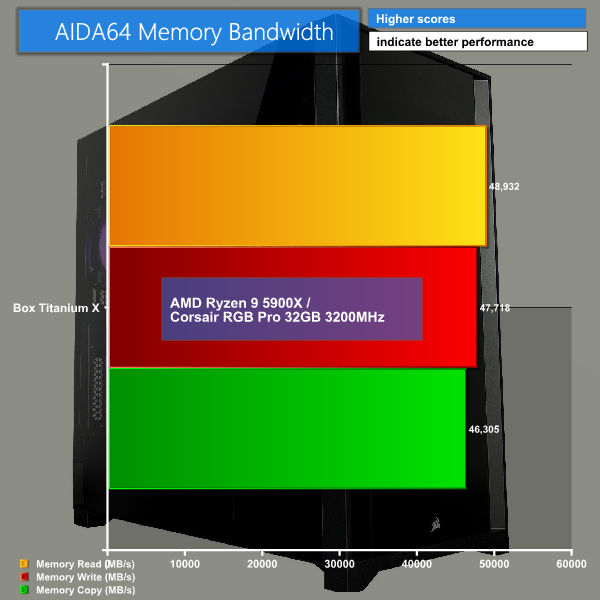
To test our 32GB 3200MHz RAM we put it to the test within AIDA64 where it scored very well and consistently within all 3 benchmarks here.
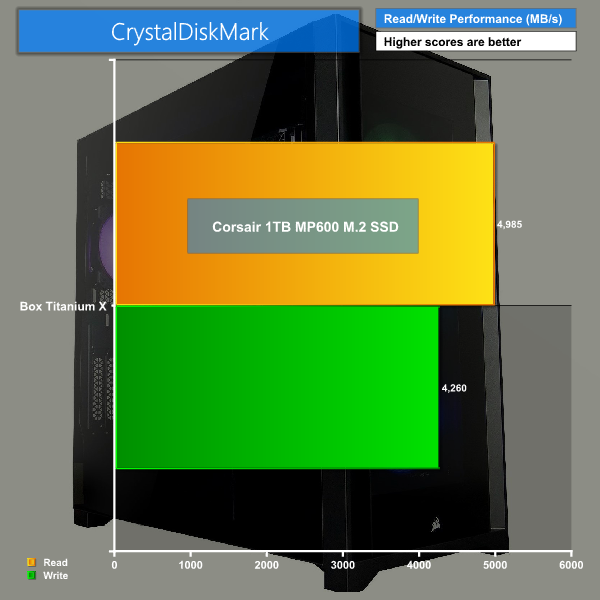
Moving over to CrystalDiskMark to test our Corsair MP600 PCIe Gen 4 NVMe SSD, we reach just shy of 5000Mbps read speeds with close to 4300Mbps write speeds, that’s definitely quick and actually just outperforms Corsair’s own claims of what speeds the drive can reach so that’s great to see. It's just a shame there isn't a 2nd gen' PCIe 4.0 drive used here instead though, like Corsair's own MP600 Pro, especially for the price of this system.
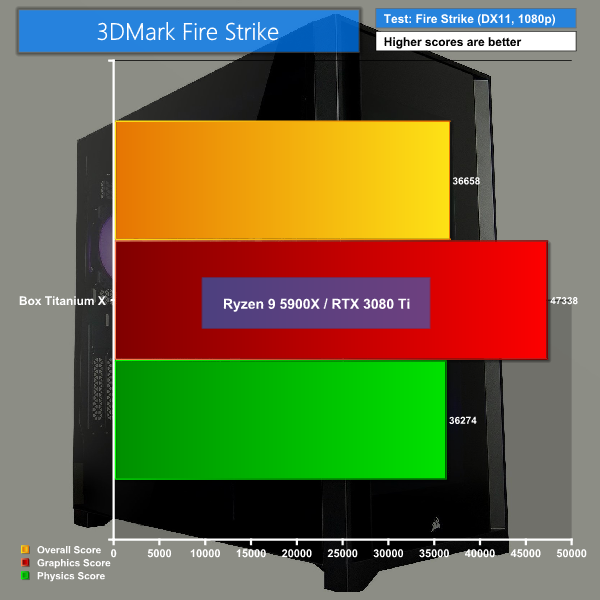
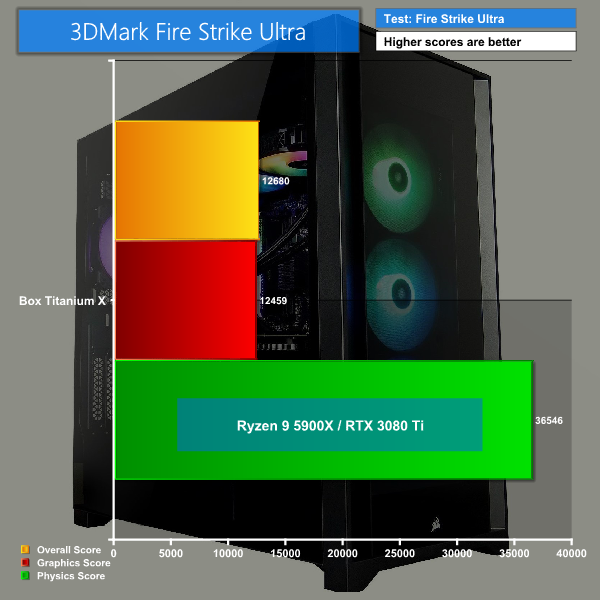
Starting with synthetic benchmarks 3DMark Fire strike performed well while excelling during the graphics portion of the test. 3DMark Fire Strike Ultra saw performance dip down, as expected, since it is a 4K benchmark.
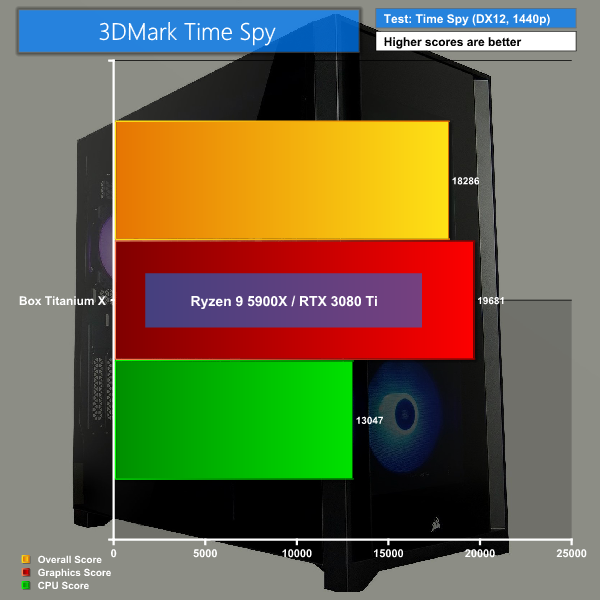
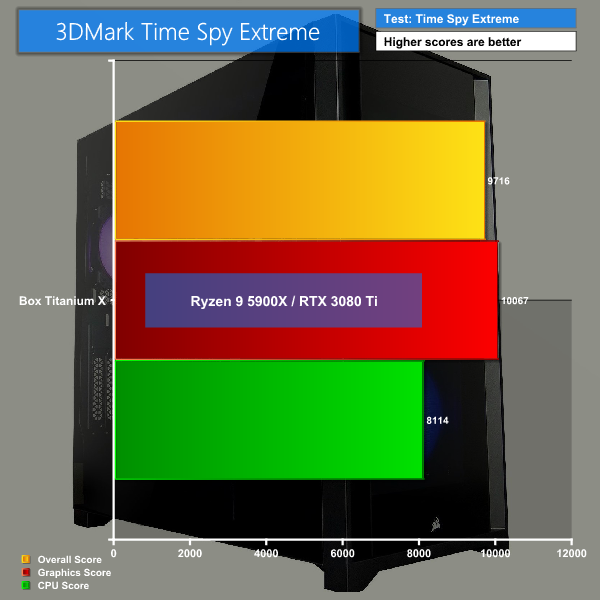
3DMark Time Spy performed well too and of course dipped down during the Time Spy Extreme benchmarks.
Now let’s move onto some real-world gaming examples. I tested at both 1080p and 1440p with the highest pre-sets available with any adaptive resolution scaling turned off and vsync off too. All games were installed on the Corsair MP600 SSD.
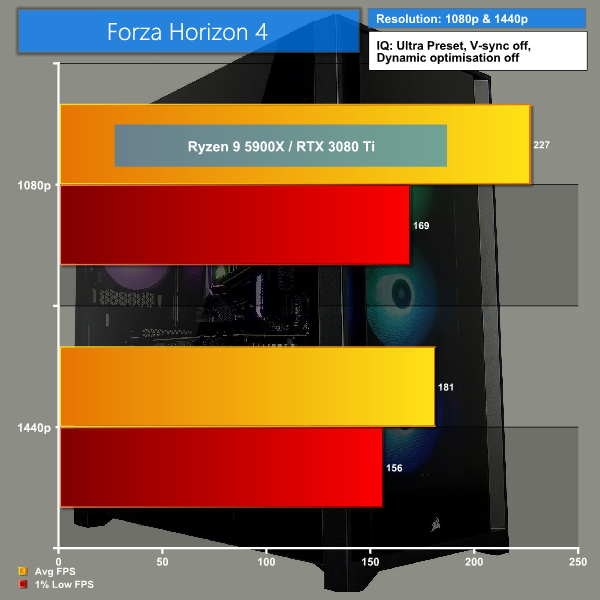
Forza Horizon 4, Ultra preset with dynamic optimisation and vsync set to off, was certainly no match for the 3080 Ti getting above 200 FPS in 1080p and not too far behind at 1440p too. Of course I’d rather take that small hit of performance and play at 1440p personally.
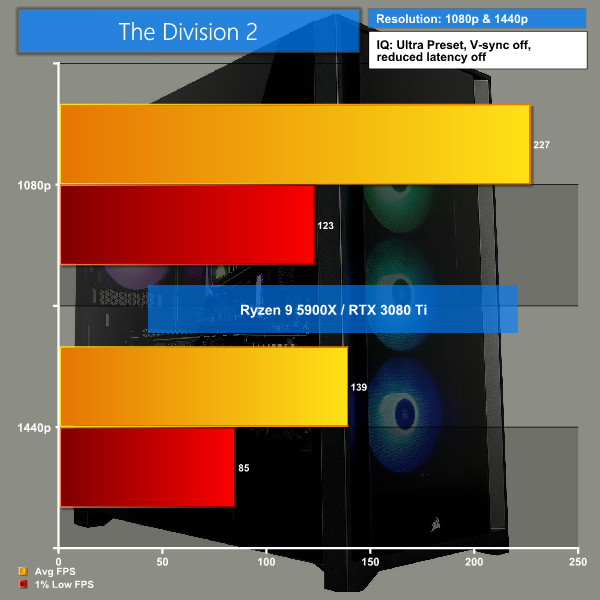
The Division 2 is usually quite a tough one on graphics cards but at 1080p we got a really high frame rate, but as expected the average FPS drops as we move up to 1440p. Nearly 140 FPS at that resolution is no mean feat though and playing at 1440p is very enjoyable without any noticeable dips.
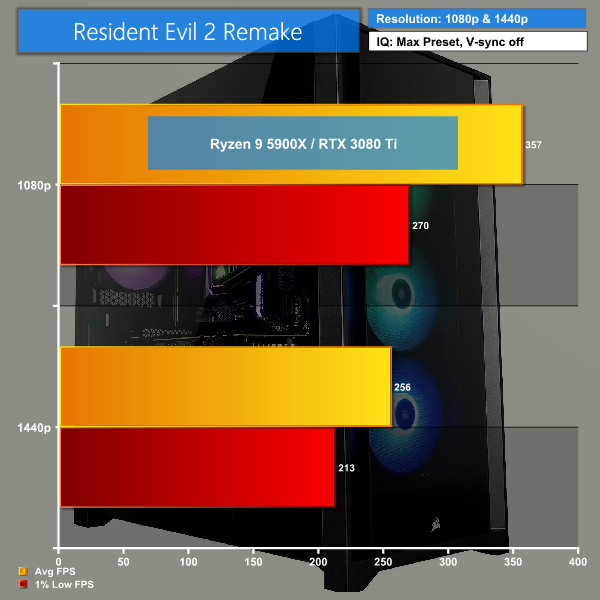
Resident Evil 2 Remake really was a breeze for our 3080 Ti, pushing above 350 FPS at 1080p and more than 250 in 1440p. That’s excellent and as expected really as this game isn’t as demanding as others.
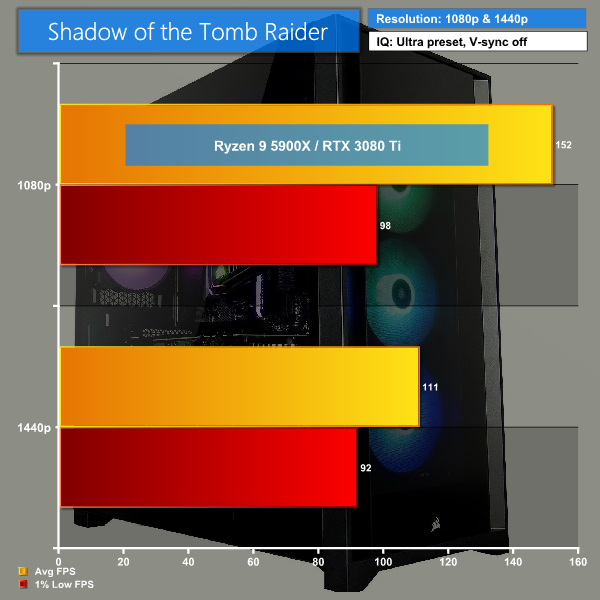
Now a game that is demanding is of course Shadow of the Tomb Raider, on Ultra settings with vsync off we only just breached 150 FPS at 1080p and only just kept our heads above 100 FPS at 1440p. For a game like this though, the performance is more than good enough.
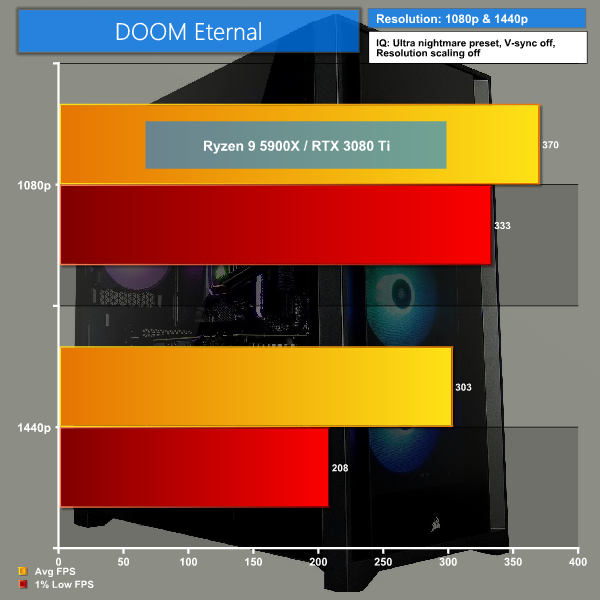
Lastly, our final game was DOOM Eternal set to Ultra Nightmare, with vsync off and res scaling off too, and as you’re probably expecting we almost get to that 400 FPS mark at 1080p and just hit above 300 FPS at 1440p. It really goes to show what an excellent job id Software have done with this game.
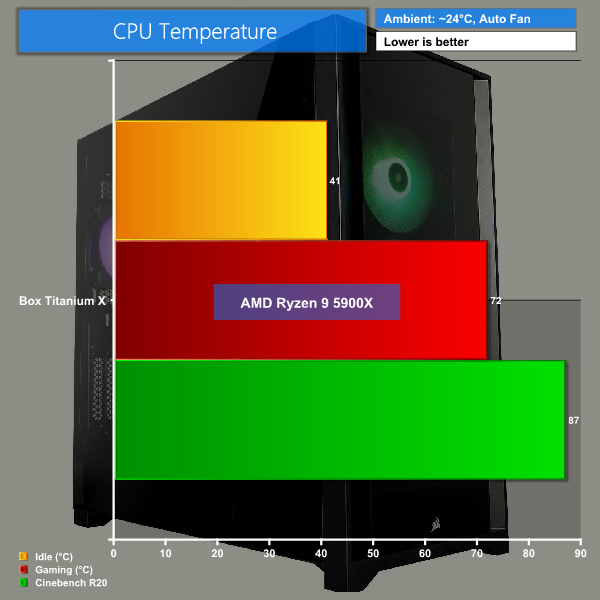
In terms of temperatures, our Ryzen 9 5900X remained relatively cool even when gaming and being pushed by Cinebench R20. It’s been fairly warm here during the summer too so these are good results.
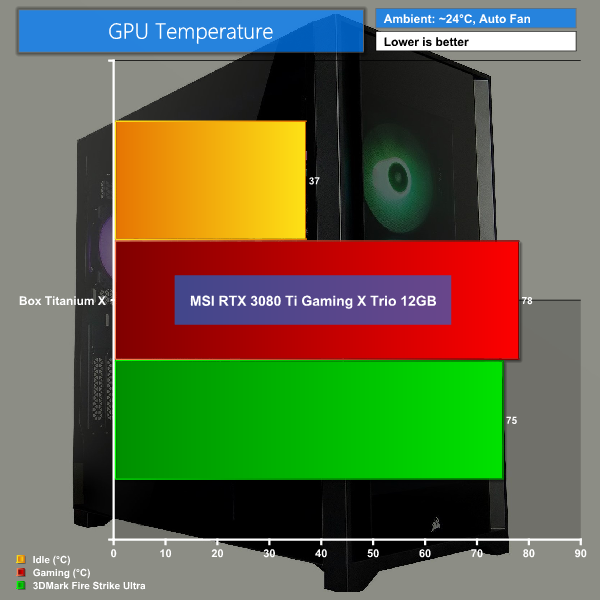
The same can be said for our GPU temperatures, keeping below 80C even after all of our strenuous game tests.
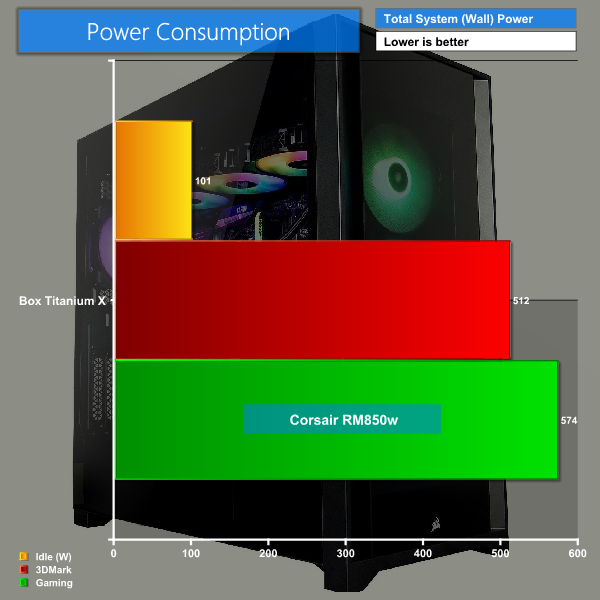
As for power draw, we were idling just above 100W but when gaming you can see it jumps right up to over 570W when the system is at full load. Luckily, we have plenty of head room with our 850W PSU.
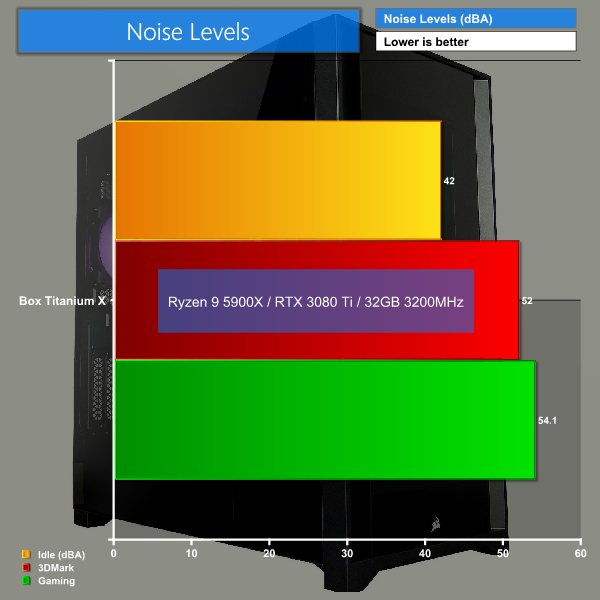
Lastly, for total system noise levels, I was pleasantly surprised that even at its loudest, the Titanium X still remained quieter than my own less powerful system and it didn’t bother me whatsoever.
Now before I give my conclusion, I wanted to see just how much this system would cost if I wanted to build myself, though this comes with the caveat that you're unlikely to find all of the components at their listed prices. Still, on PCPartPicker I managed to get almost everything totted up, with the price totalling £3142.86 vs Box’s £3,379.99 asking price – so that’s a difference of £237.13. However, that is excluding the cable extension kit, which can be anywhere from £20 – £50, along with the time taken to actually build the system and the fact that the Box system comes delivered, as well as a 3 years collect & return warranty.
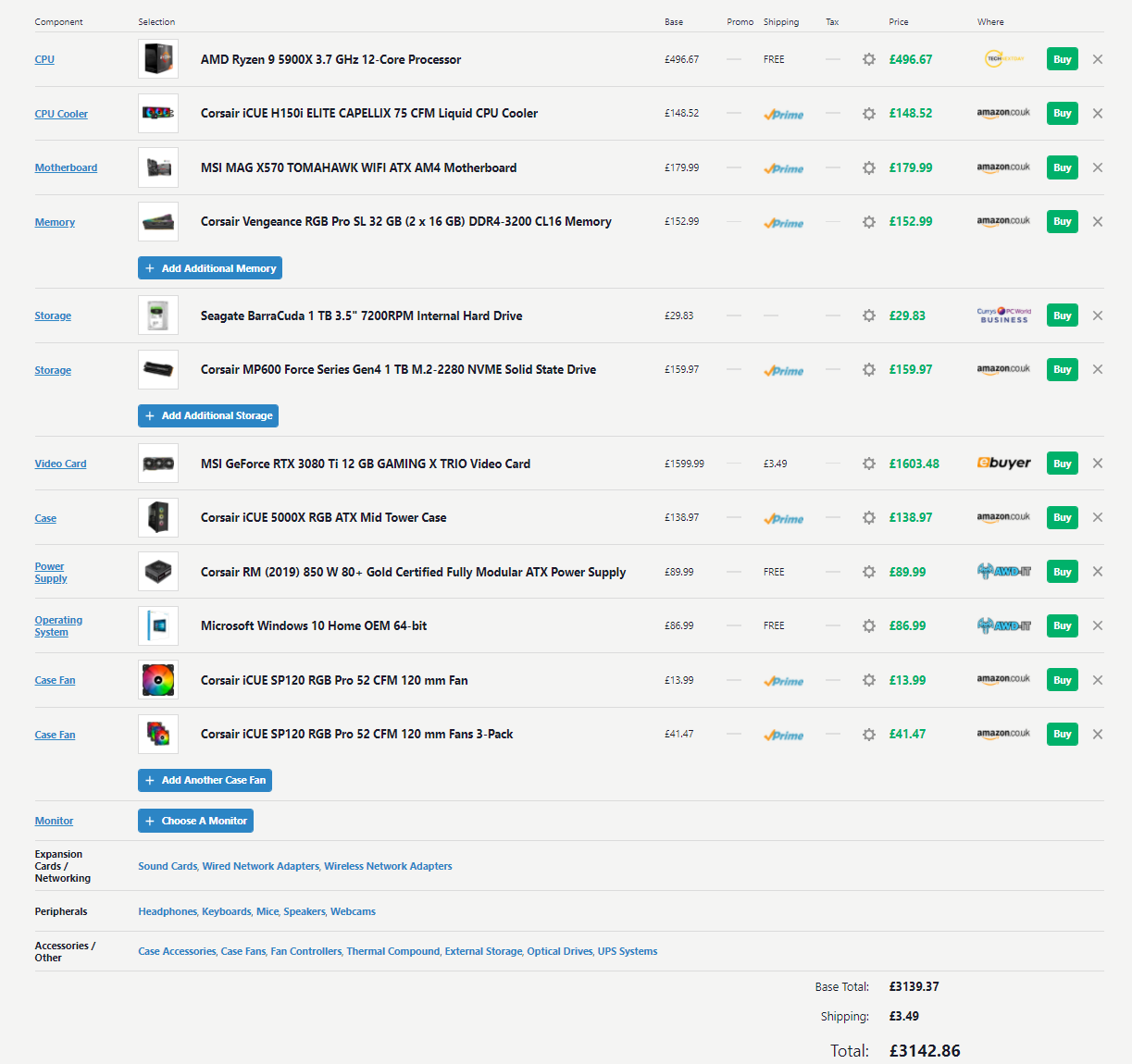
So you’re paying around a £200 premium to have Box expertly put this system together, along with delivery and 3 years warranty. I think that premium is definitely worth it but again it all depends on your situation and whether you care about the luxury of convenience or saving money. Lastly, if you wanted to save a bit then Box do offer some customisation of the build on their website, letting you select different CPU’s, RAM, GPUs etc.
That last point is important, as Box have chosen an RTX 3080 Ti as standard in this system, however with the findings from Dominic's dedicated RTX 3080 Ti review, found HERE, we think the RTX 3080 may be a better choice as it's only a touch slower but you could save a fair amount of cash. By selecting the RTX 3080 as an option on Box's website configurator you could save yourself another £250. It's definitely something to consider since this is a pricey system.
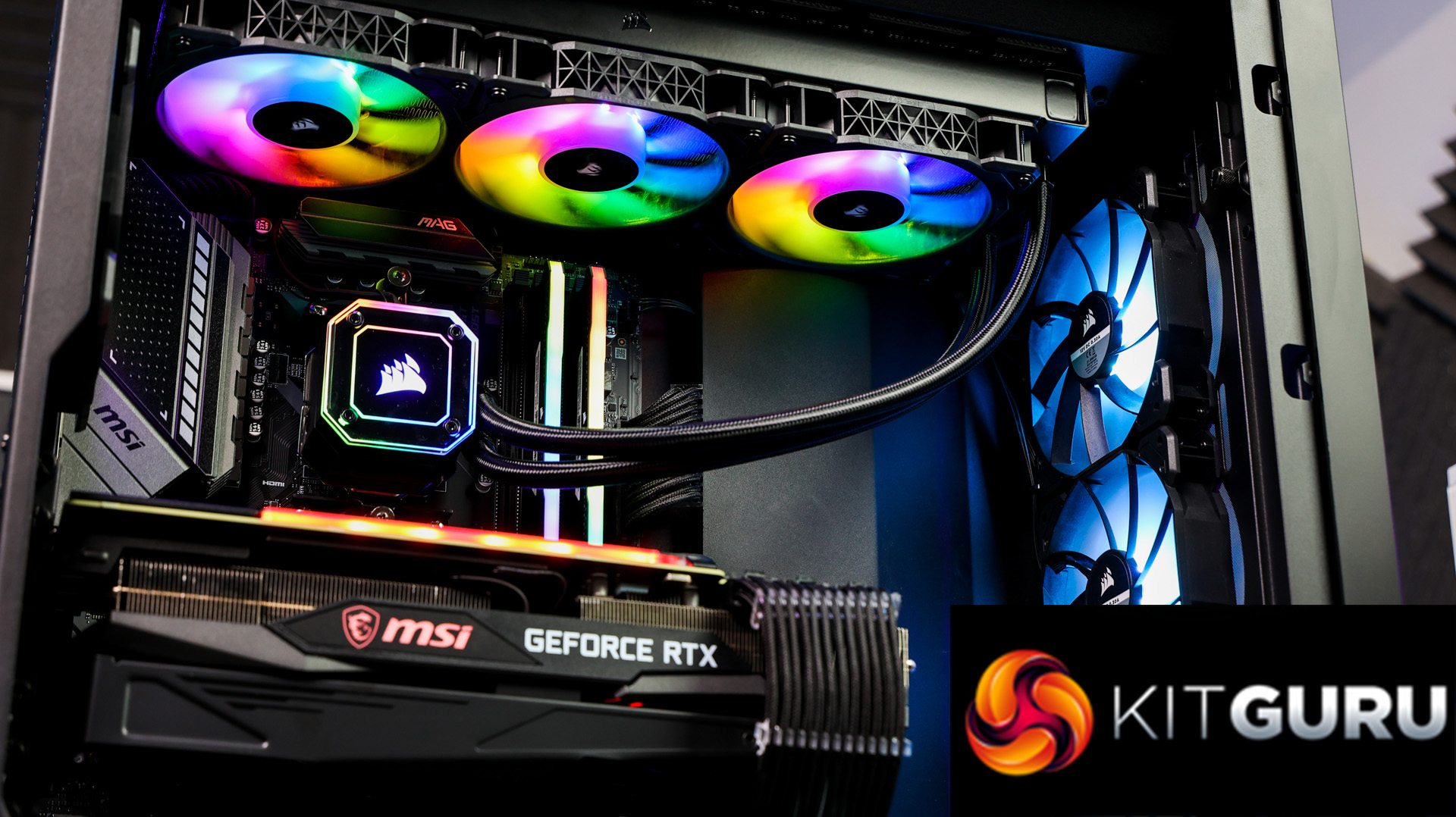
In conclusion, I’ve thoroughly enjoyed testing out the Titanium X system from Box, aesthetically it looks smart and stealthy. It’s very well put together and cable managed, all the part choices complement each other, with no real compromises for the price bracket.
Performance throughout our testing held up very well, with nothing noticeably letting the system down. The biggest drawback here is the MP600 drive, which is a 1st gen PCIe 4.0 drive and for the price of this system it would have been nice to see a 2nd Gen PCIe 4.0 drive, which can hit speeds of 7000Mbps, like the Corsair MP600 Pro that only costs £20 more than the standard MP600 that is seen here. That's a fairly minor point as the original MP600 is still quick, but at this price point we would expect to see one of the fastest drives on the market.
At the end of the day though, this is a great gaming PC, smashing through the likes of Doom Eternal and Shadow of the Tomb Raider – with these specs, the Titanium X will take any modern title on with ease. I also think the approximate £200 premium of having Box build the system is acceptable given the level of care and detail they’ve put into the build, along with free delivery and that 3-year warranty.
You can purchase the Box Titanium X system, from Box for £3379.99, HERE!
Discuss on our Facebook page HERE.
Pros:
- Excellent pairing of parts.
- 3 years collect & return warranty.
- Great FPS for both 1080p & 1440p gaming.
- Great performance all-round.
- Expertly built and cable managed.
Cons:
- We would have liked to see a 2nd gen PCIe 4.0 SSD instead, like the MP600 Pro.
- Could save some cash by going with the RTX 3080 instead of the RTX 3080 Ti.
KitGuru says: It’s a premium build that is aimed at serious gamers or those seeking the best performance and the best components. If you’re looking to spend nearly £3400 on a gaming PC, we think the Titanium X system by Box is worth buying.