KitGuru KitGuru.net – Tech News | Hardware News | Hardware Reviews | IOS | Mobile | Gaming | Graphics Cards



Gigabyte's BRIX line of barebones PCs are typically small and low-powered – at least, when compared with a mini-ITX desktop system, for example. However, the new BRIX Gaming UHD aims to change all of that. Gone are the integrated graphics and low-power processors, and in their place we find a desktop-grade 4GB GTX 950 and quad-core i7-6700HQ with Hyper-Threading. With that level of hardware in such a small package, it will be interesting to see how the BRIX Gaming UHD performs.
Of course, Gigabyte have been a bit sneaky with their marketing of the BRIX Gaming UHD. We have reviewed the GTX 950 and it is a decent card for HD gaming, but it is by no means a 4K-ready gaming GPU if you want to play modern AAA titles. It is capable of outputting to four 4K displays, yes – but it cannot run the latest games comfortably at that resolution. Think of it as a PC equivalent to the PS4 Pro – 4K-capable and potentially adequate for less-demanding titles, but possibly not an ideal solution for the more GPU-intensive games. Still, we put the BRIX UHD through its paces and see how it performs.

Specifications
- Dimension: 2.6L (220 mm x 110 mm x 110 mm)
- Motherboard Size: 100 x 150 mm
- CPU: Intel® Core™ i7-6700HQ, 2.6GHz / 3.50 GHz
- Chipset: Intel® HM170 Chipset
- Memory: 2 x SO-DIMM DDR4 slots 2133 MHz, max. 32GB
- LAN: Gigabit LAN (Intel i219LM)
- Audio: Realtek ALC255
- Video: NVIDIA GeForce GTX950, supports NVIDIA Discrete Technology (featuring Quad displays: mini DP x3, HDMI x1 Output)
- GPU: NVIDIA GeForce GTX 950
- Graphic memory: Graphic DDR5 4GB
- Wifi Card: Intel® Dual Band Wireless-AC Intel 8260
- HDMI Resolution (Max.): 3840×2160 @ 60 Hz
- Mini DP Resolution (Max.): 3840×2160 @ 60 Hz
- Expansion Slots: 1 x M.2 slot (2280_storage) PCIe /SATA, 1 x M.2 slot (2280_storage) PCIe (CPU directly), 1 x PCIe M.2 NGFF 2230 A-E key slot occupied by the WiFi+BT card
- Rear I/O: 1 x HDMI, 3 x Mini DisplayPort, 3 x USB 3.0, 1 x RJ45, 1 x DC-In, 1 x Kensington lock slot, 1 x Head phone Jack, 1 x Microphone Jack, 2 x USB 3.1 (1 x USB type C)
- USB 3.1: Asmedia
- Storage: Supports 2 x 2.5” HDD/SSD, 7.0/9.5 mm thick (2 x 6 Gbps SATA3)
- Power Supply: Input: AC 100-240V Output: DC 19.5V 9.23A
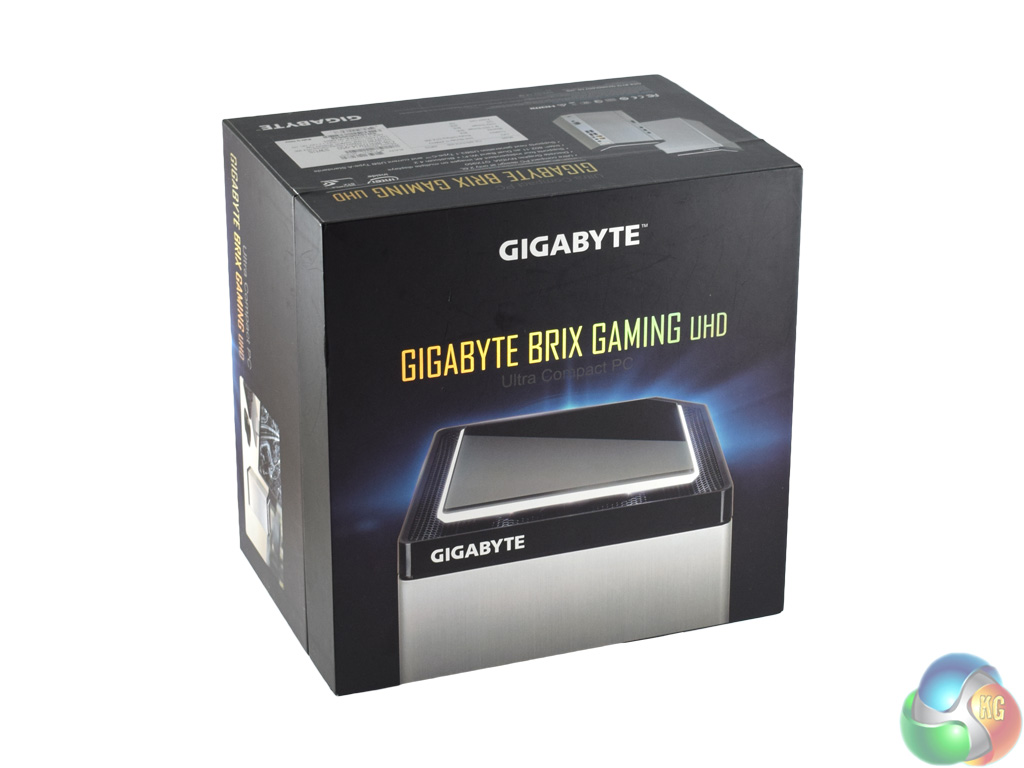
The Gigabyte BRIX Gaming UHD ships in an attractive black box. The front of the box is actually a lid which lifts up to reveal the hardware below.
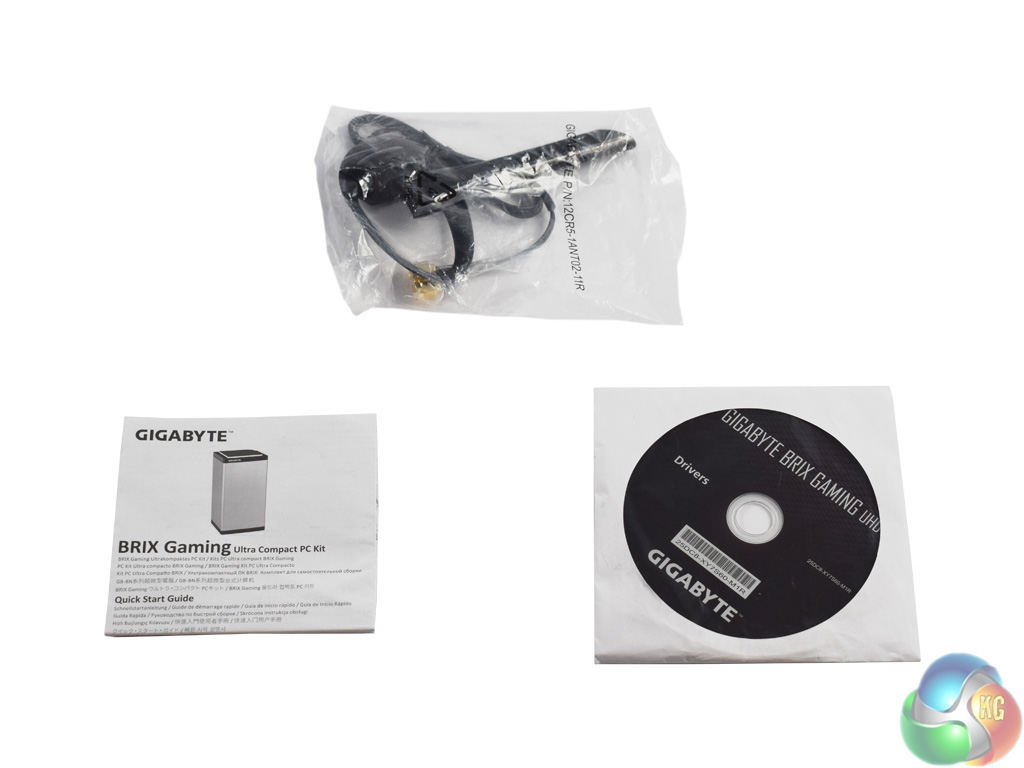
With the BRIX UHD comes a small collection of accessories. Users get a manual with information on how to get to the innards of the chassis, as well as a WiFi antenna and driver disk.
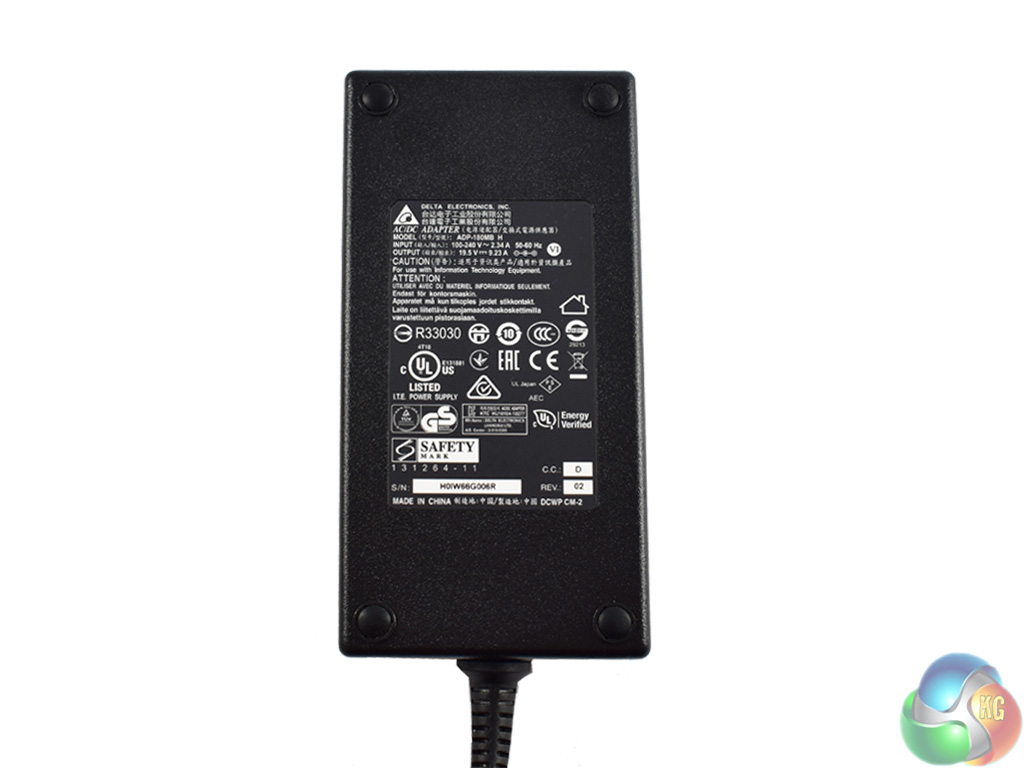
Finally, the power brick is rated at 180W – and compared to some other monsters I have seen recently, it is relatively small in size.
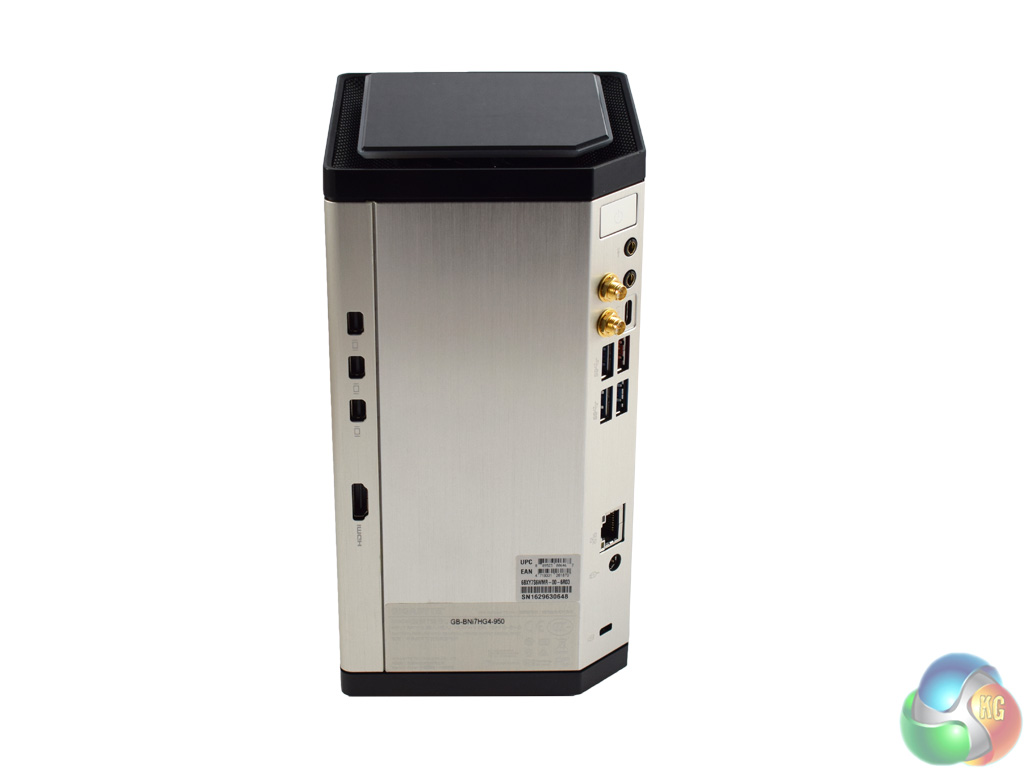
Here we get our first look at the BRIX Gaming UHD. Rather than the smaller, NUC-style BRIX devices we have seen before, the BRIX UHD looks more like the Mac Pro or the MSI Vortex G65. Yes, I suppose it does look a bit like a small bin. But a nice bin, to say the least.
The external fascia is brushed aluminium which looks swanky and feels sturdy. It is still very small, too, measuring 220 mm x 110 mm x 110 mm (L x W x D). Slightly larger than a pint glass, to my mind.
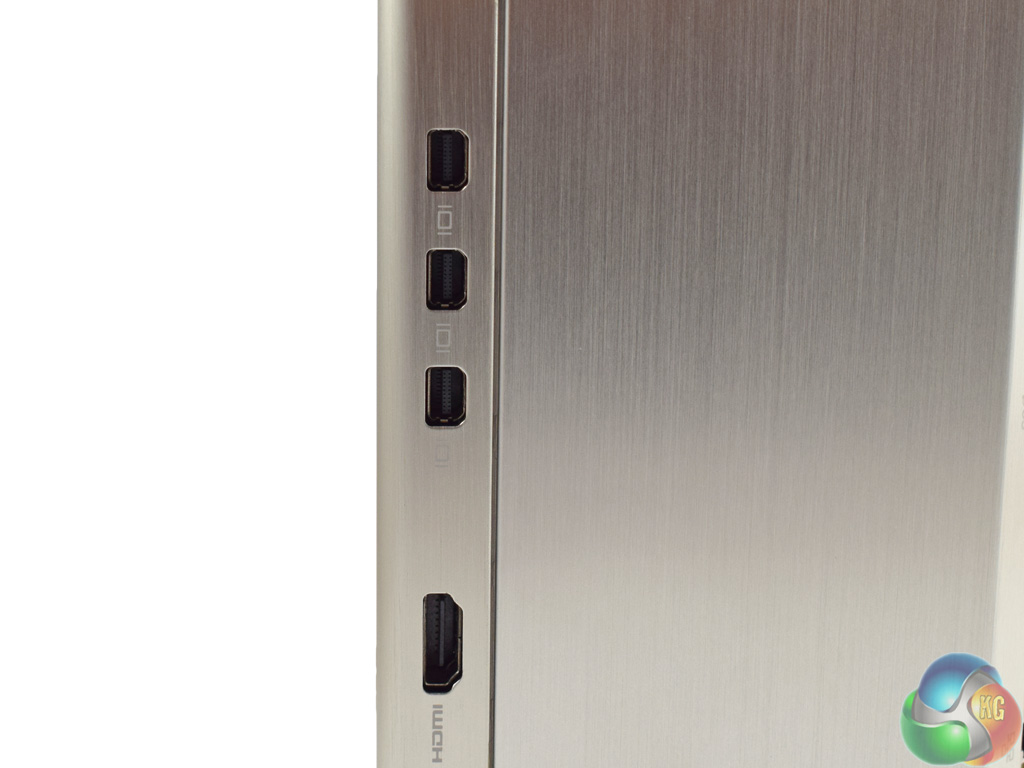
The video-out connectors are on the side, with 3x mini DisplayPorts, and just the 1x HDMI 2.0 (4K60 capable).

In the rear corner are the other I/O ports. A good array for such a small device, we find 2x USB 3.1 (one Type-C, one Type-A) as well as 3x USB 3.0. There are also the usual headphone jacks and antenna mounts for the integrated WiFi chip.
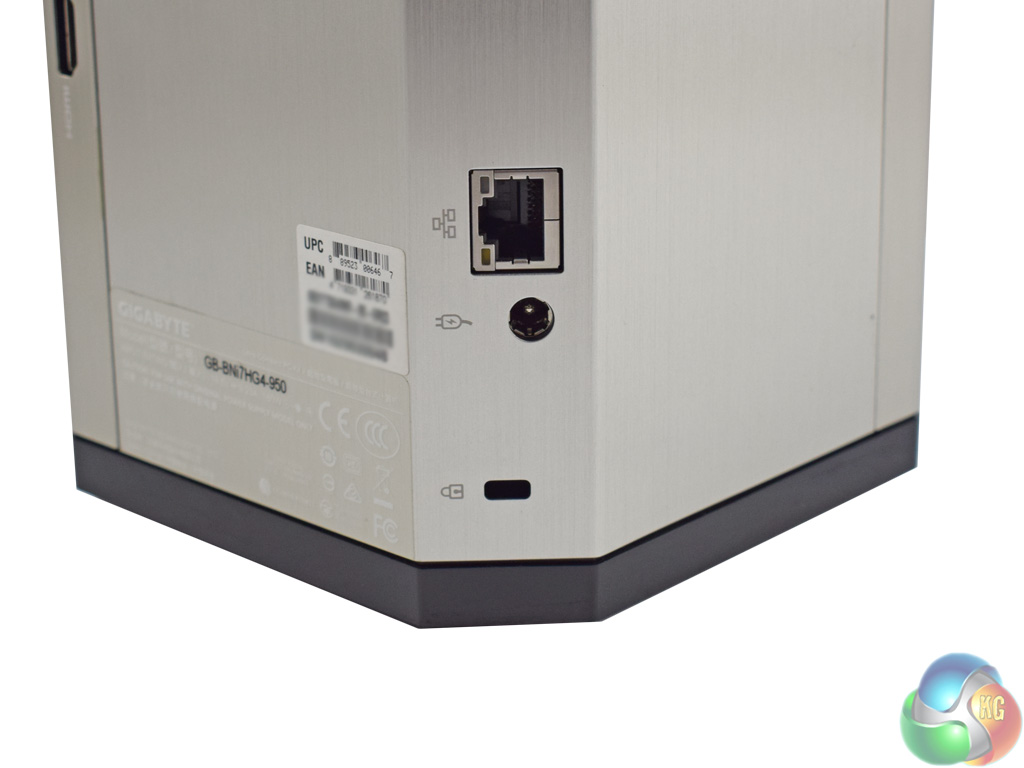
At the bottom is an Ethernet port, the power-in socket as well as a Kensington lock.
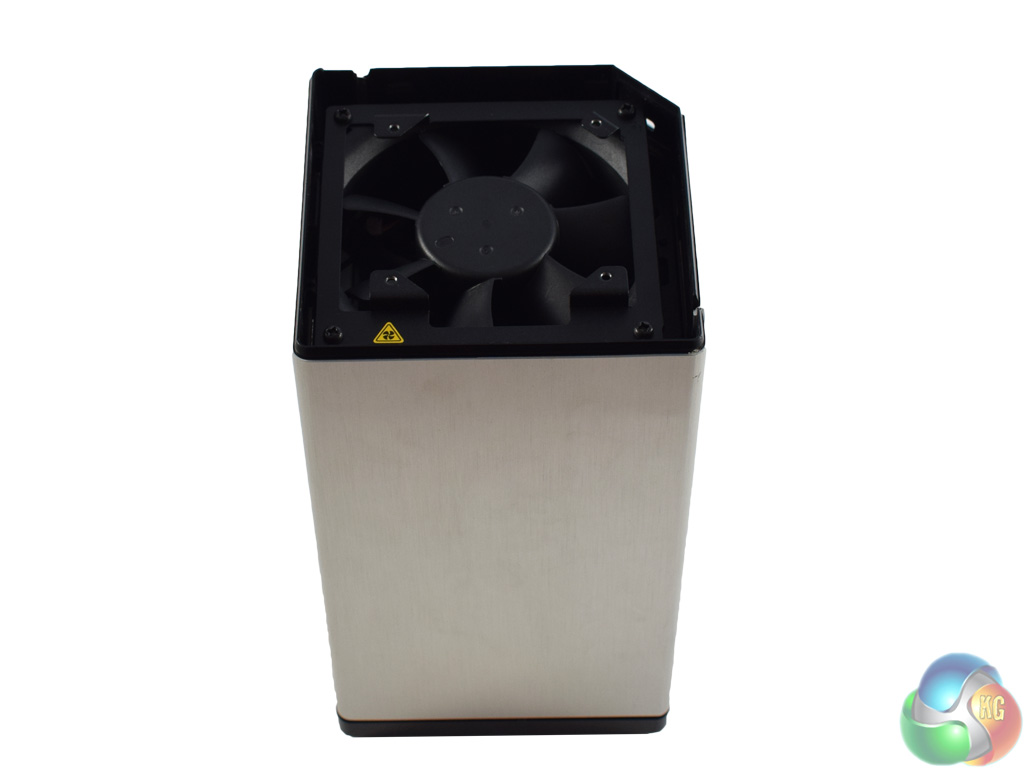
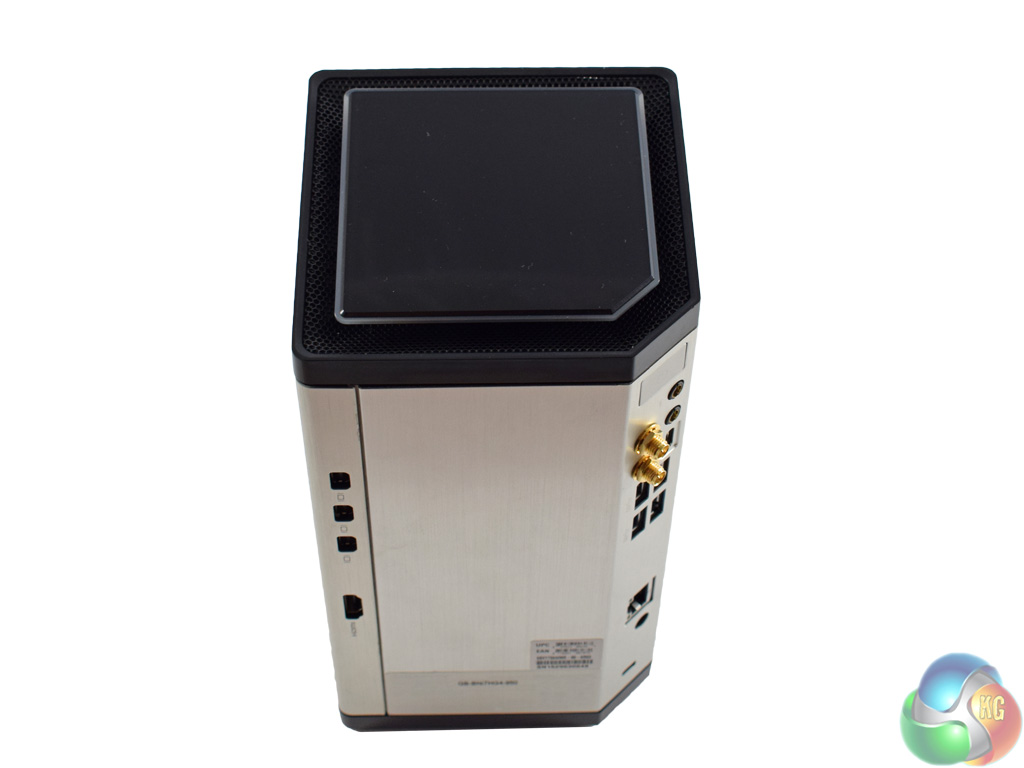
By now you are probably thinking, ‘well how does that stay cool?'. And the answer is simple, if not immediately obvious. A single fan is positioned at the bottom of the chassis, and it draws air through a mesh panel. That air then exhausts through the top of the device (pictured on the right), which also has a meshed section.
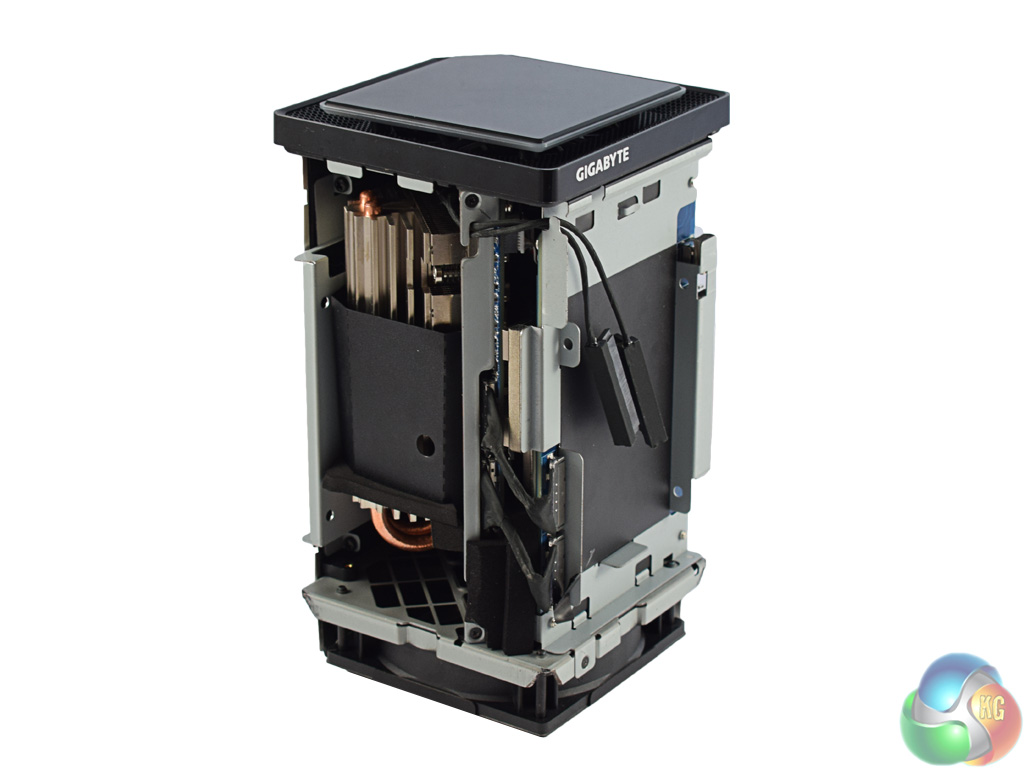
Four screws removes the base panel, allowing access to the 80mm fan. From there, the aluminium fascia slides off with a firm tug – and we see the insides of the machine.
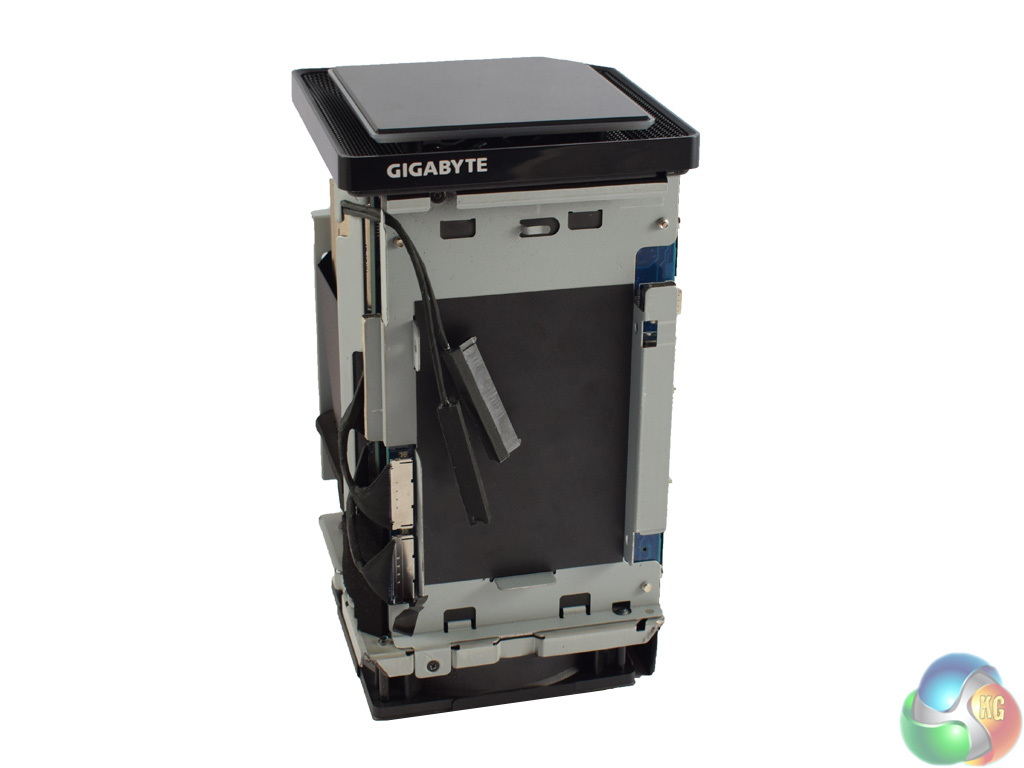
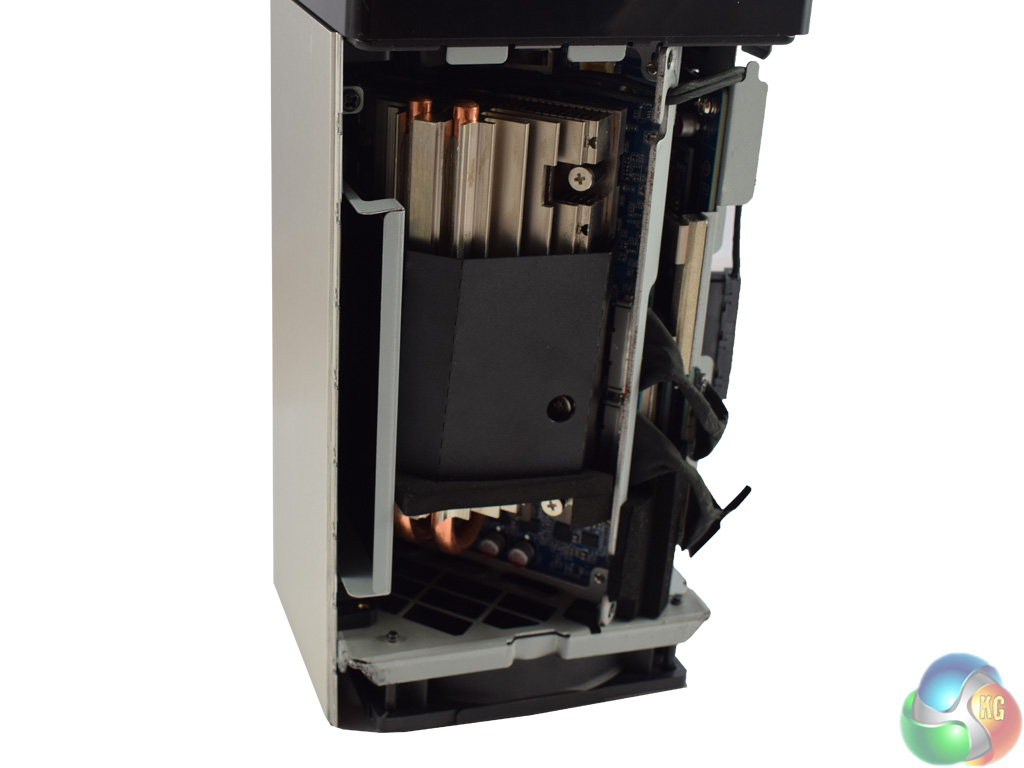
First, I want to point out where 2.5in drives mount. There are two locations, one which is obvious very quickly (pictured on the left). Simply screw in your drive to the metal bracket which is very straightforward. In the picture on the right, you can see a small bracket lodged behind the CPU heatsink. This can also be removed to house a second 2.5in drive.
While I did not receive any mounting screws with my sample of the BRIX UHD, we have been assured by Gigabyte the retail version does include the necessary 2.5in screws.
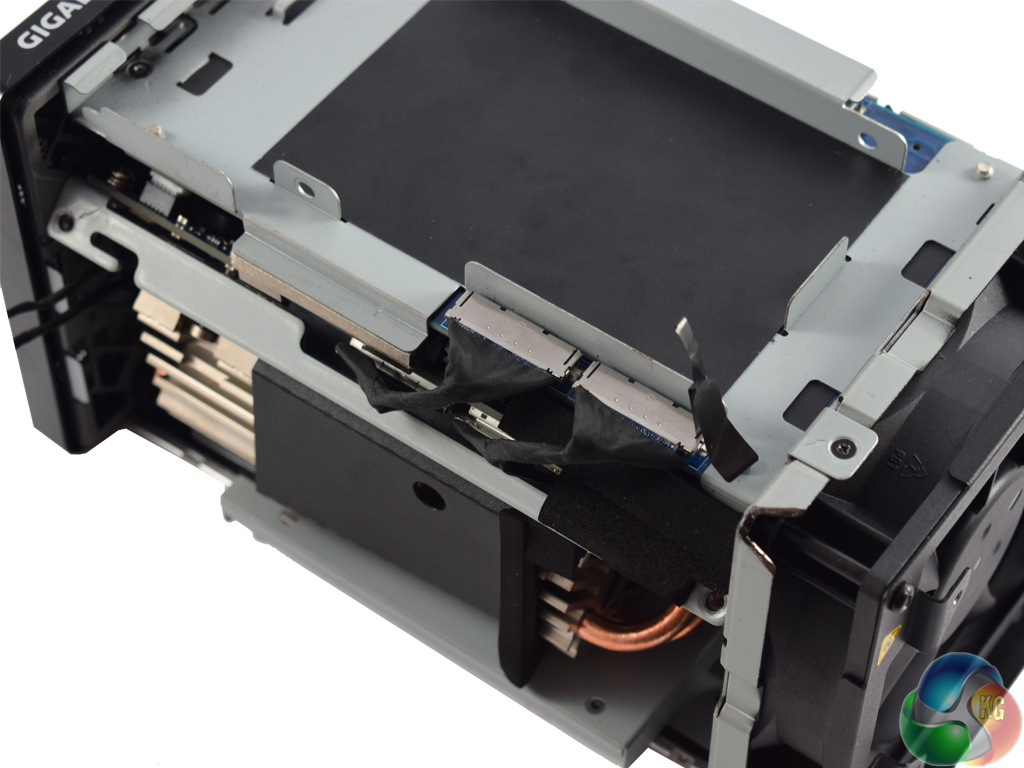
To get access to the rest of the machine, you must first unplug the power cables from the graphics card (as pictured). After that, there are just two more screws to remove.
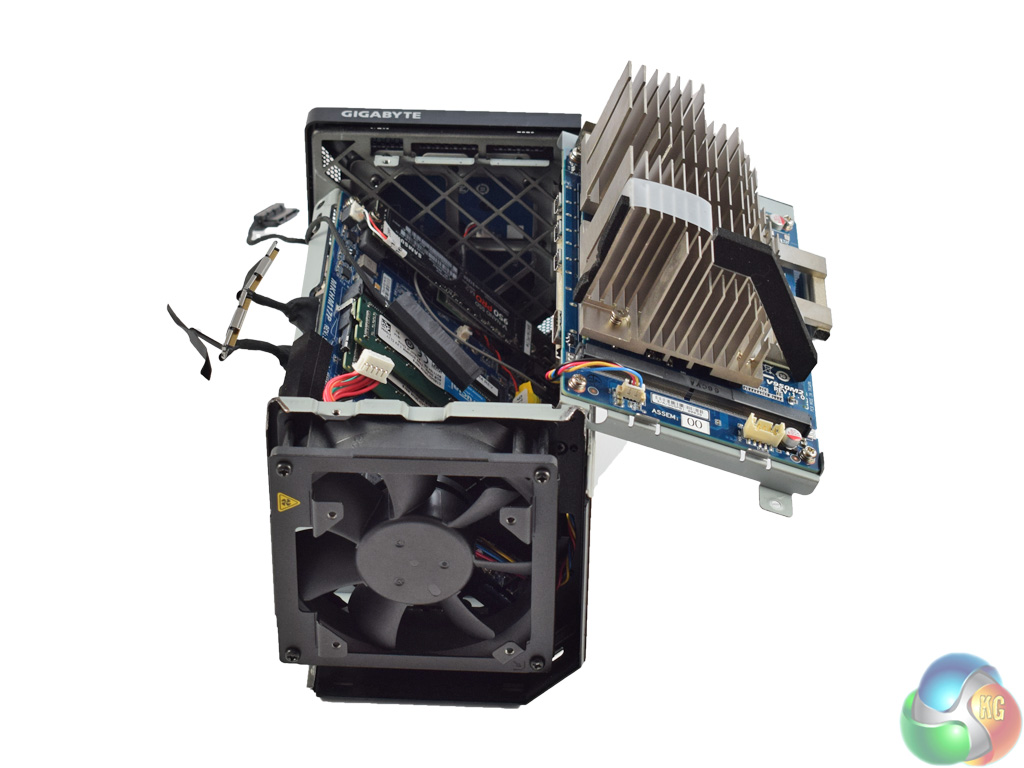
Once you have done that, the graphics card can be removed. It is actually installed using a hinge mechanism, which is very clever. You can also see the card itself has only a heatsink on it – the entirety of the active cooling in the BRIX UHD comes from the single intake fan at the bottom of the chassis.
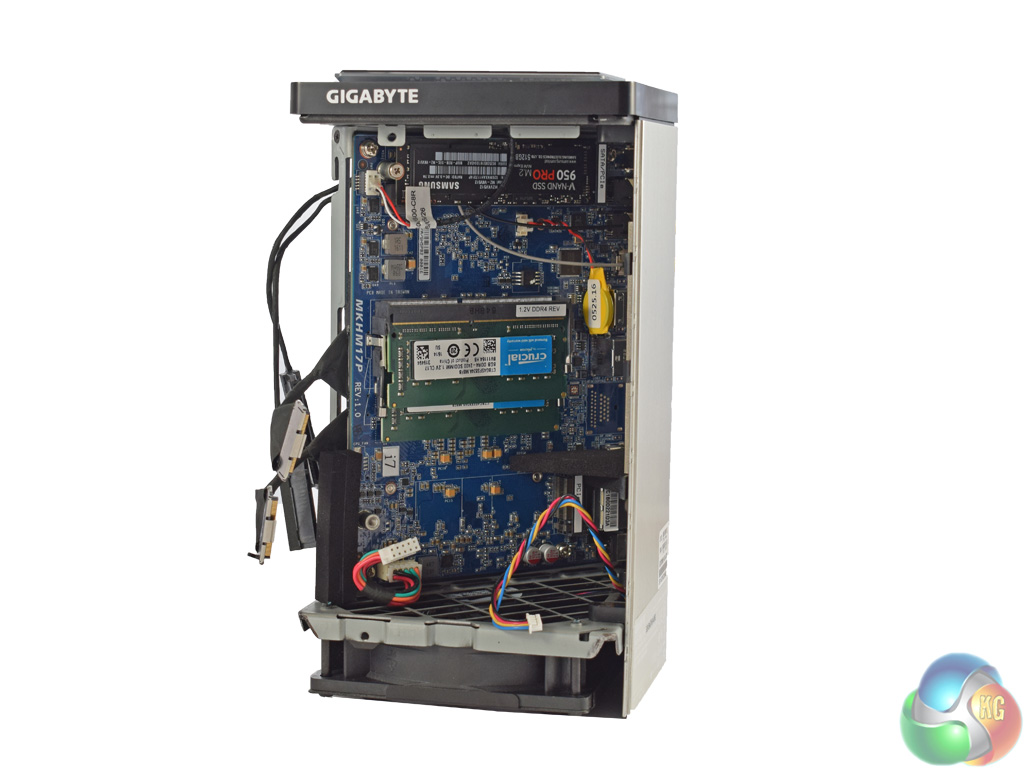
Once the graphics card has been lifted out, you get access to the mainboard. As the BRIX UHD is a barebones system, users must install memory and storage. Gigabyte did this for us, installing a 512GB Samsung 950 PRO, as well as 2x8GB DDR4 2400MHz SODIMMs from Crucial. The BRIX UHD supports up to 32GB of RAM, though the memory only runs at 2133MHz.
There are a total of 3 M.2 ports. One is populated by the WiFi card (under the 950 Pro), while two come empty. The slot populated by the 950 Pro can receive either PCIe or SATA drives, while the last M.2 port (at the other end of the motherboard) is PCIe only.
All-in-all, I think that is pretty good going for such a small device. The BRIX UHD has the ability to house 2x M.2 drives, as well as 2x 2.5in drives – which could mean terabytes of flash and mechanical storage space, all in the tiny chassis.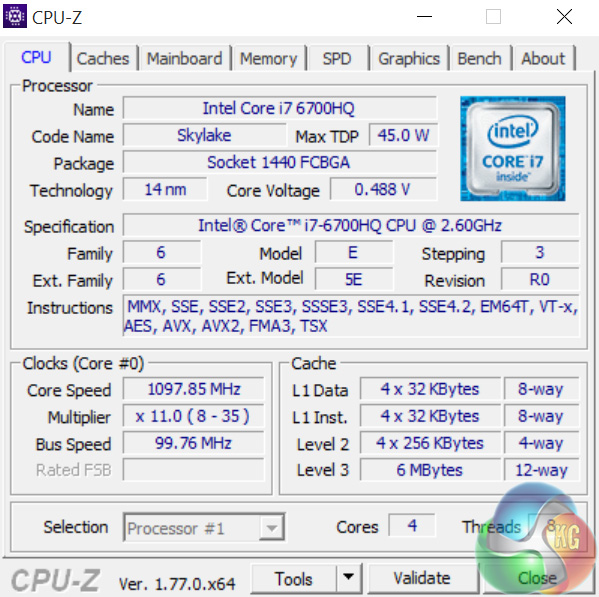
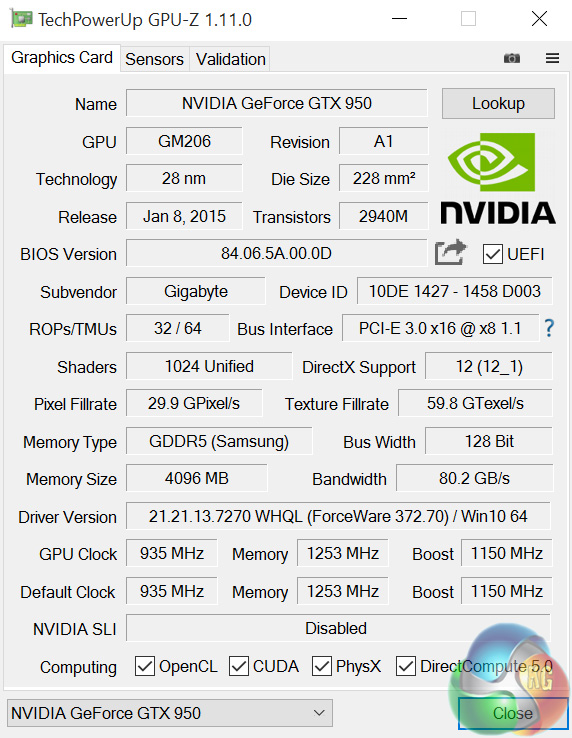
Above we can see overviews of the CPU and GPU, courtesy of CPU-Z and GPU-Z respectively.
The i7-6700HQ is a mobile processor I am now very familiar with, having used it in a number of different devices over the past year. It has 4 cores and 8 threads, with a base clock of 2.6GHz. However, its boost clock of 3.5GHz is where it spends most of its time.
The GPU is a 4GB version of the Nvidia GTX 950 – released towards the middle of last year. It is part of the Maxwell family, and we are yet to see a direct successor from the newer Pascal architecture. It has 4GB of GDDR5 memory, with an effective bandwidth of 80.2GB/s over the 128-Bit bus.
While it would be good to see a newer GPU in the BRIX UHD – the GTX 1060 would be very enticing – I can understand the decision to use a GTX 950. It is capable of good frame rates at 1080p, while it draws very little power – many models of the desktop chip draw all their power from the PCIe bus, negating the need for extra cables. This last point is critical, as less power = less heat, something which is important considering the size of the BRIX UHD.
Comparison Systems
Today I will be comparing the BRIX Gaming UHD with the following systems, where applicable.
- Intel Core i7-6700HQ
- Nvidia GTX 960M
- 16GB Dual-Channel 1600MHz DDR3 RAM
- 128GB SSD + 1TB HDD
- Intel Bay Trail-M Celeron N2808 SoC
- Intel HD Graphics
- 4GB DDR3L RAM
- 64GB eMMc storage
- Intel Braswell N3050 SoC
- Intel HD Graphics
- 2GB DDR3L RAM
- 32GB eMMC storage
- Intel Core i3 i3-5010U
- Intel HD Graphics 5500
- 8GB Kingston SODIMM DDR3 1600MHz (1 x 8GB)
- 240GB Kingston V300 SSD
- Intel Core™ m5-6Y57
- Intel HD Graphics 515
- 8GB LPDDR3 1866MHz Memory
- 256GB Solid State Drive M2 2280 PCIe
- Intel Core i5-6500
- Asus Turbo GTX 960
- 8GB Corsair Vengeance LPX 2400MHz DDR4 RAM
- 500GB Samsung 850 EVO SSD
- Intel Core i7-6820HK
- Nvidia GTX 980 (desktop)
- 32GB DDR4 2400MHz RAM
- 2x 256GB Samsung SM951 PCIe SSDs in RAID0
- AMD FX-8320
- AMD RX-480
- 16GB DDR3 2133MHz RAM
- 240GB Adata Premier SP550
PCSpecialist Defiance III 17.3
- Intel i7-6700HQ
- Nvidia GTX 1060
- 16GB HyperX DDR4 2133MHz RAM
- 512GB SanDisk X400 M.2 SATA SSD
And lastly my personal desktop with a Core i3-4160, 8GB 1866MHz DDR3 and a GTX 960.
Test software
- SiSoft Sandra
- Cinebench R15
- Handbrake
- CrystalDiskMark
- ATTO Disk Benchmark
- 3DMark 11
- 3DMark
- Prime 95 (version 26.6)
- CPUID HWMonitor
- AIDA64 Engineer
Test games
- Grid Autosport
- Middle Earth: Shadow of Mordor
- Grand Theft Auto V
- Doom (2016)
All games are tested at 1080p and 4K. While we do not expect anything near playable framerates at 4K, with a name like ‘BRIX Gaming UHD' we simply could not write a review without including 4K benchmarks. All games were tested using the latest (at the time of writing) Nvidia GeForce 372.70 driver.SiSoftware Sandra (the System ANalyser, Diagnostic and Reporting Assistant) is an information & diagnostic utility. It should provide most of the information (including undocumented) you need to know about your hardware, software and other devices whether hardware or software.
Sandra is a (girls’) name of Greek origin that means “defender”, “helper of mankind”. We think that’s quite fitting.
It works along the lines of other Windows utilities, however it tries to go beyond them and show you more of what’s really going on. Giving the user the ability to draw comparisons at both a high and low-level. You can get information about the CPU, chipset, video adapter, ports, printers, sound card, memory, network, Windows internals, AGP, PCI, PCI-X, PCIe (PCI Express), database, USB, USB2, 1394/Firewire, etc.
Native ports for all major operating systems are available:
- Windows XP, 2003/R2, Vista, 7, 2008/R2 (x86)
- Windows XP, 2003/R2, Vista, 7, 2008/R2 (x64)
- Windows 2003/R2, 2008/R2* (IA64)
- Windows Mobile 5.x (ARM CE 5.01)
- Windows Mobile 6.x (ARM CE 5.02)
All major technologies are supported and taken advantage of:
- SMP – Multi-Processor
- MC – Multi-Core
- SMT/HT – Hyper-Threading
- MMX, SSE, SSE2, SSE3, SSSE3, SSE 4.1, SSE 4.2, AVX, FMA – Multi-Media instructions
- GPGPU, DirectX, OpenGL – Graphics
- NUMA – Non-Uniform Memory Access
- AMD64/EM64T/x64 – 64-bit extensions to x86
- IA64 – Intel* Itanium 64-bit
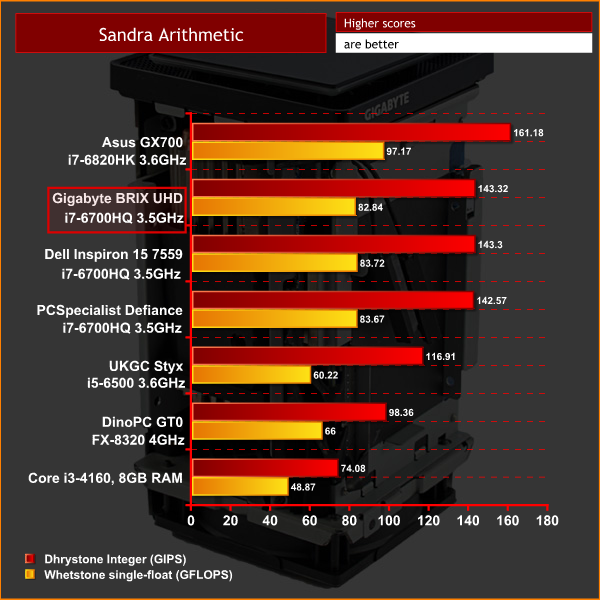
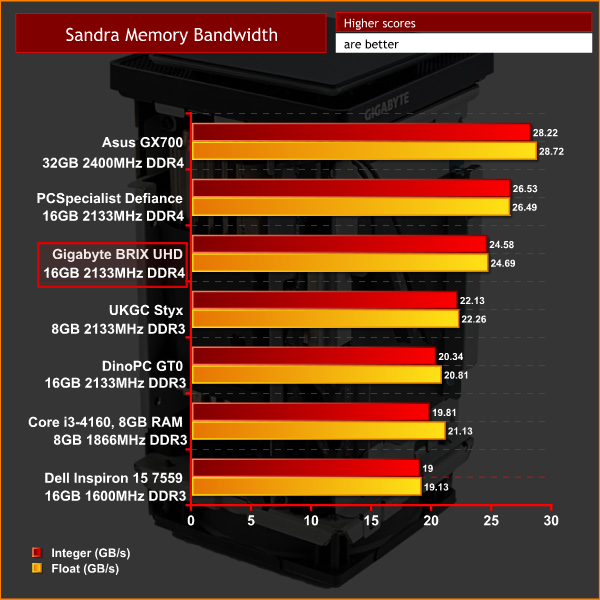
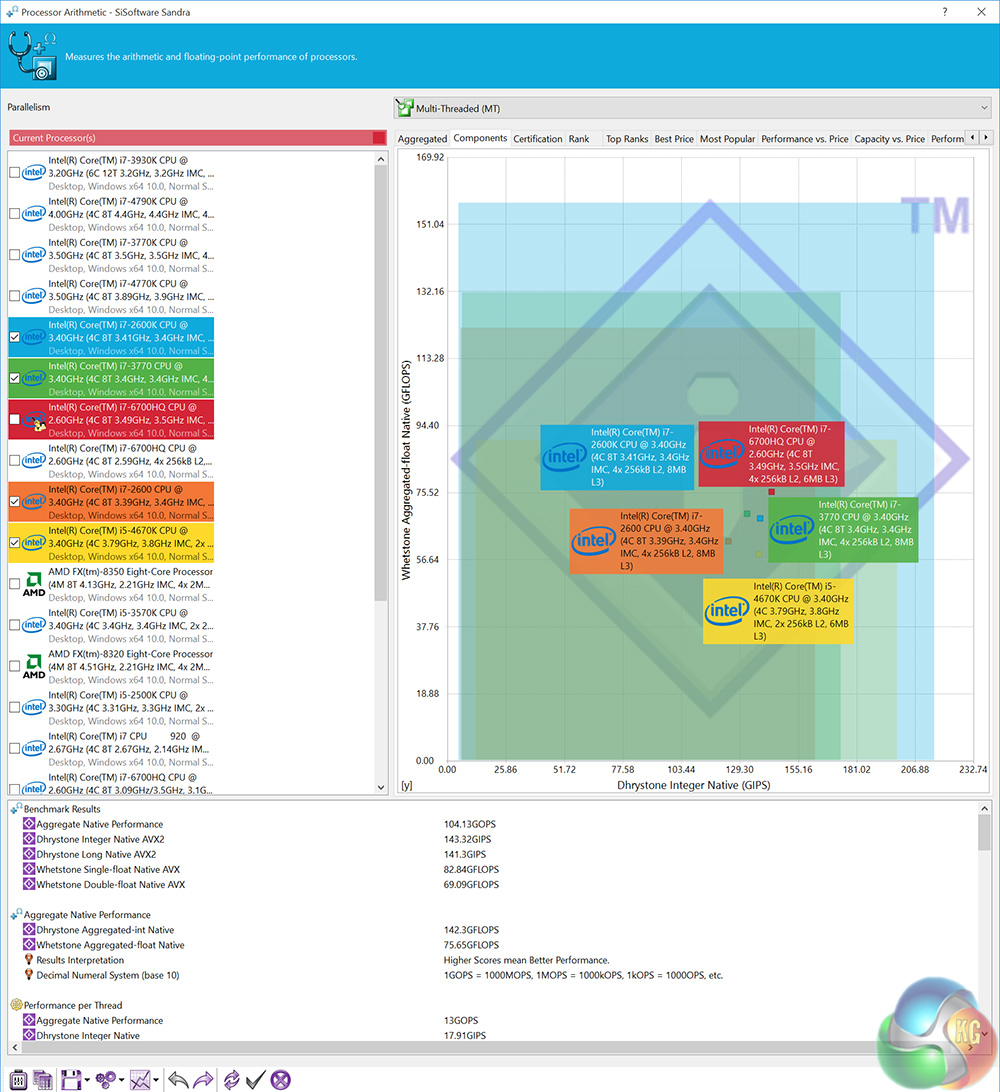
First indications are good for the BRIX UHD. Sandra arithmetic is a CPU-related task – and as such, we see very similar performance from all 3 devices sporting the i7-6700HQ.
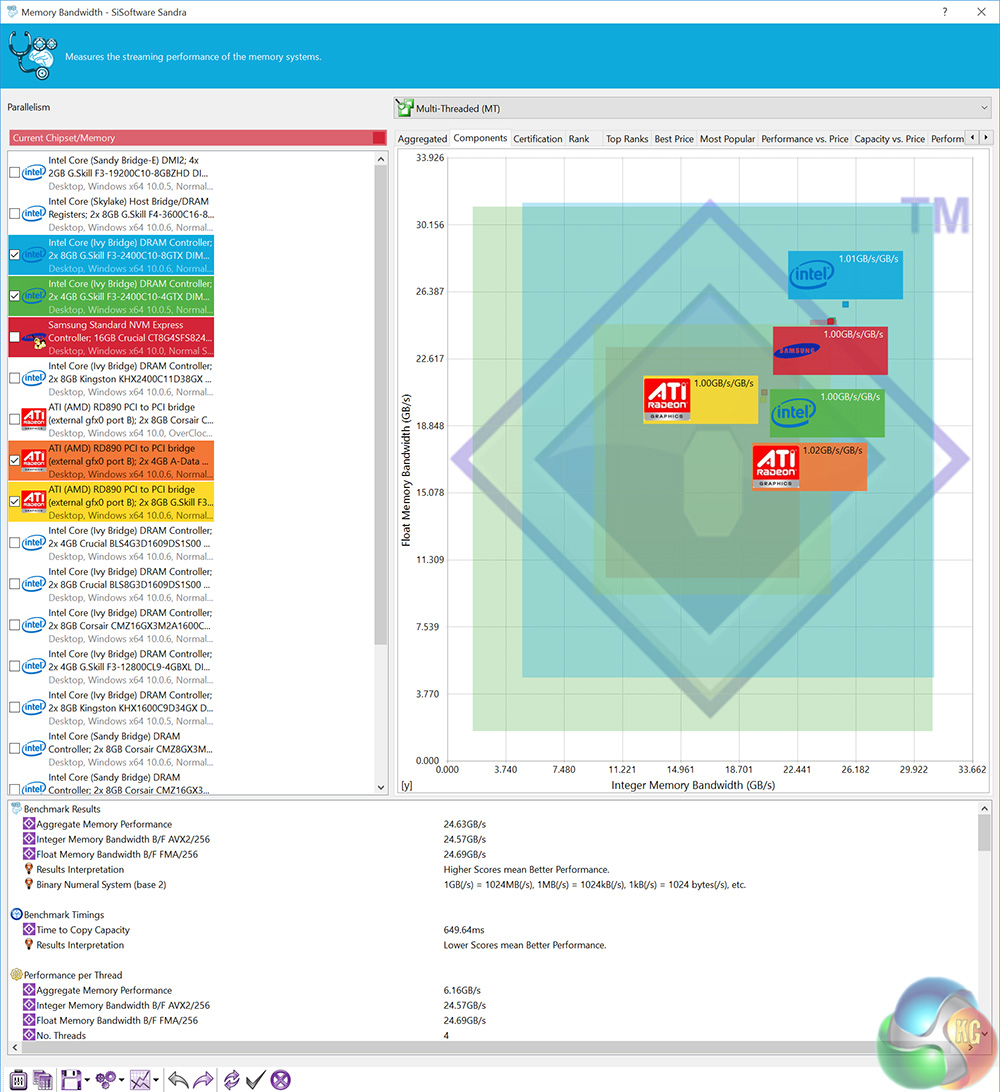
The scores for the memory bandwidth are also decent, though the BRIX UHD caps memory speeds at 2133MHz – preventing the 2400MHz SODIMMs achieving their full potential.CINEBENCH 15 is a cross-platform testing suite that measures hardware performance and is the de facto standard benchmarking tool for leading companies and trade journals for conducting real-world hardware performance tests. With the new Release 15, systems with up to 256 threads can be tested. CINEBENCH is available for both Windows and OS X and is used by almost all hardware manufacturers and trade journals for comparing CPUs and graphics cards.
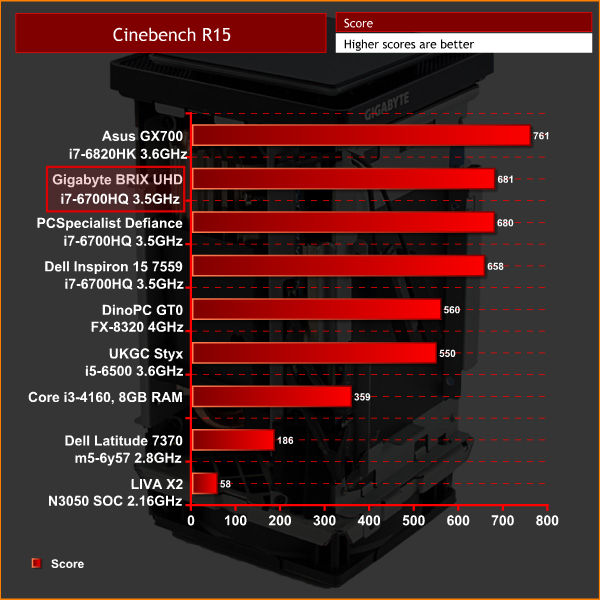
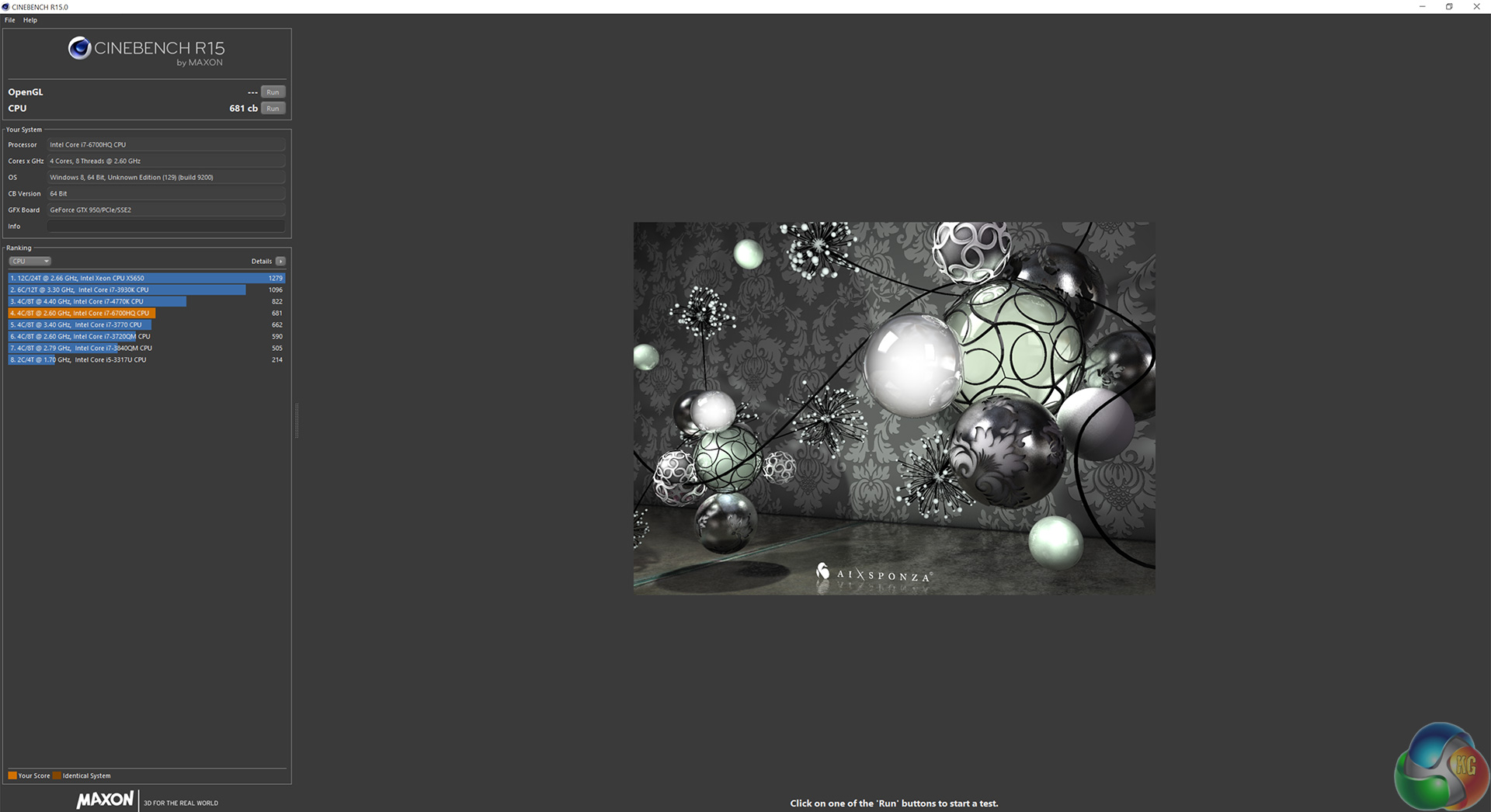
CinebenchR15 is another CPU test, and all three devices which use the i7-6700HQ perform within 23 points of each other. Still, this is over 100 points faster than the FX-8320 – not bad for a mobile chip.HandBrake is a tool for converting video from nearly any format to a selection of modern, widely supported codecs.
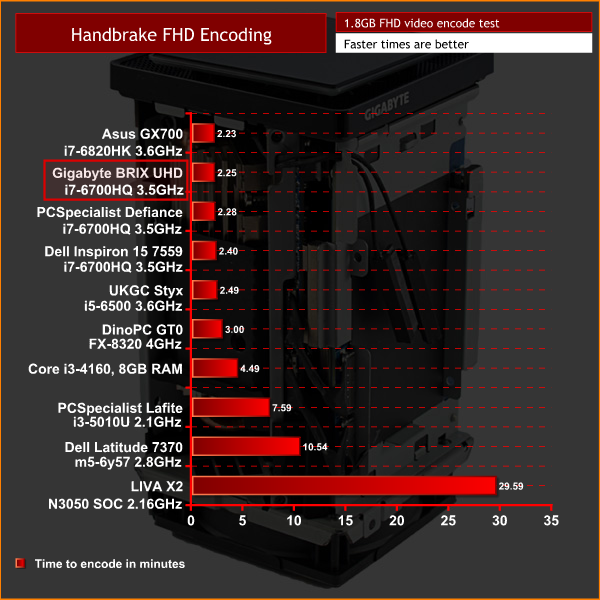
Here, we see more similarity between the mobile i7 CPUs. The BRIX UHD is just 3 seconds faster than PCSpecialist's Defiance III – the slenderest of leads.USB 3.0
To test the USB 3.0 ports on the BRIX UHD, I plugged in an OCZ Trion 150 SSD via a SATA-to-USB 3.0 5Gbps adapter, which uses the ASMedia ASM1053 controller. We reviewed the SSD HERE, finding it delivers good speed at a budget price.
Most importantly, it is capable of saturating the USB 3.0 bus, allowing us to test the speeds the USB 3.0 ports deliver. To test this, I ran both CrystalDiskMark and ATTO Disk Benchmark on the Trion 150 drive.
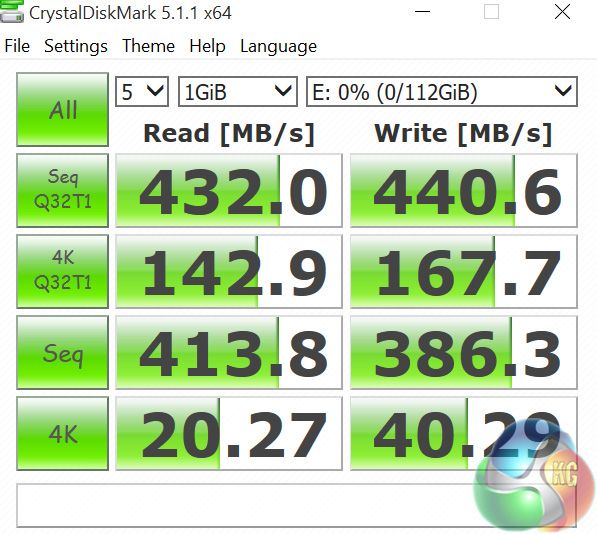
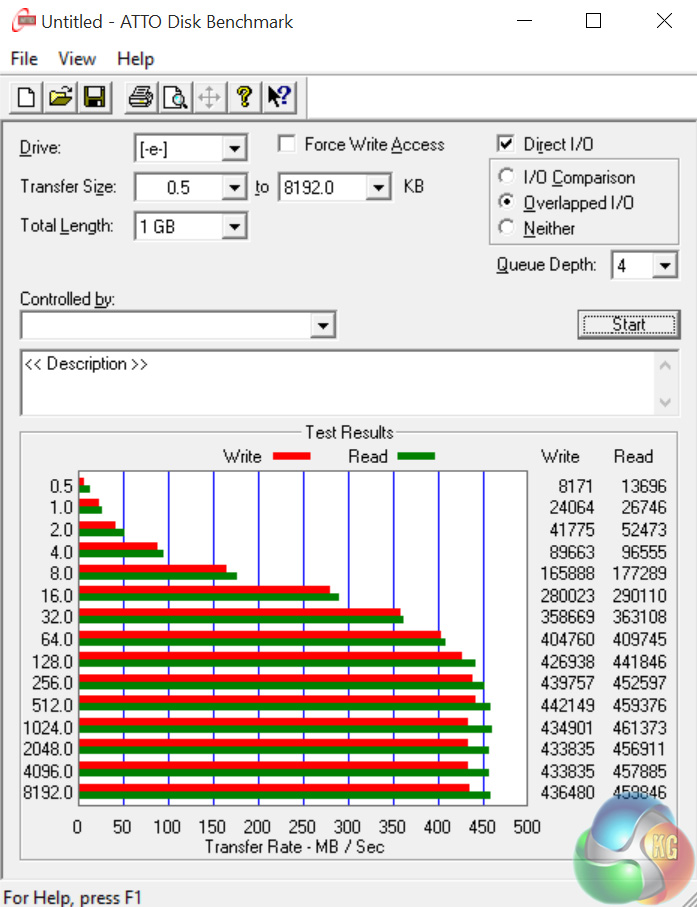
Testing USB 3.0 bandwidth is more a case of ensuring speeds are where they should be – and the speeds here are right at the limit of the USB 3.0 interface.
PCIe M.2 slot
To test the bandwidth of the PCIe slot in the BRIX UHD, I ran both CrystalDiskMark and ATTO Disk Benchmark on the 512GB Samsung 950 Pro PCIe SSD.
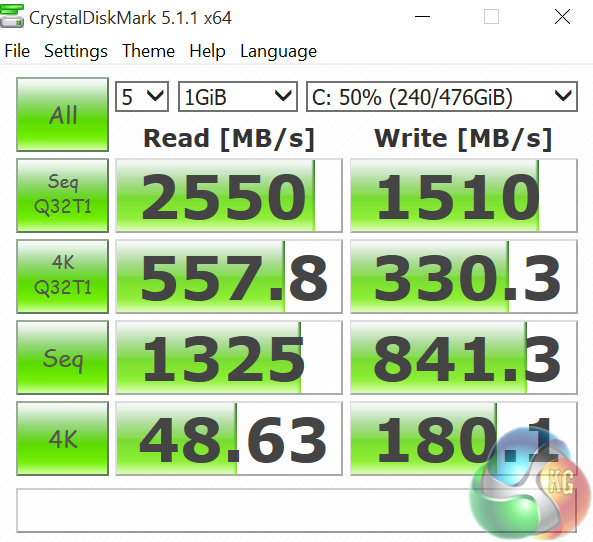
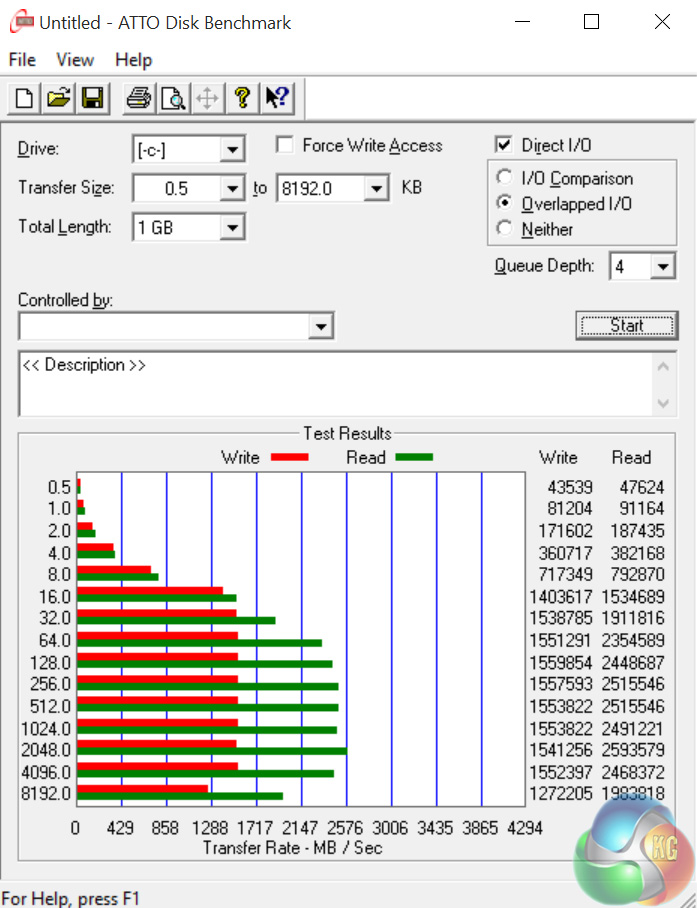
Both tests indicate that the 950 Pro was able to hit its maximum speeds of 2500 MB/s read and 1500 MB/s write respectively. We can thus be confident the PCIe bus link for the M.2 slot is operating successfully.
3DMark 11 is designed for testing DirectX 11 hardware running on Windows 7 and Windows Vista. The benchmark includes six all new benchmark tests that make extensive use of all the new features in DirectX 11 including tessellation, compute shaders and multi-threading.
After running the tests 3DMark gives your system a score with larger numbers indicating better performance. Trusted by gamers worldwide to give accurate and unbiased results, 3DMark 11 is the best way to test DirectX 11 under game-like loads.
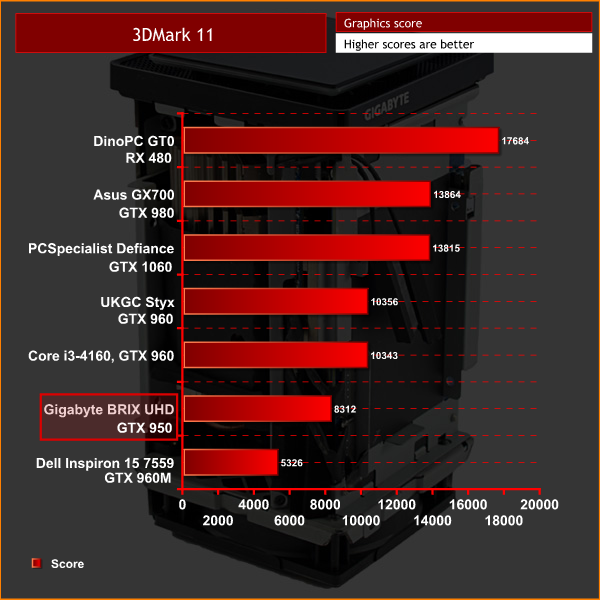

The first of our graphic tests, in 3DMark 11 we find the GTX 950 to be positioned significantly ahead of the mobile GTX 960M. However, as expected, it lags behind the GTX 960.3DMark is an essential tool used by millions of gamers, hundreds of hardware review sites and many of the world’s leading manufacturers to measure PC gaming performance. Futuremark say “Use it to test your PC’s limits and measure the impact of overclocking and tweaking your system. Search our massive results database and see how your PC compares or just admire the graphics and wonder why all PC games don’t look this good. To get more out of your PC, put 3DMark in your PC.”
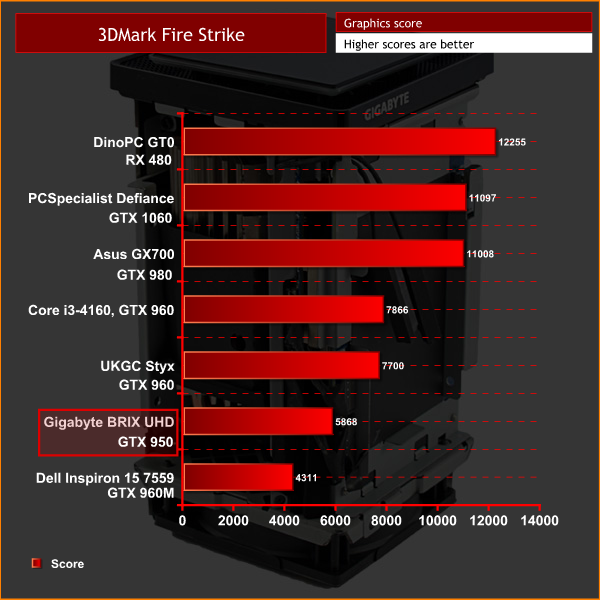

Here we find similar results to 3DMark11 – the GTX 950 is obviously behind the GTX 960, but still some way ahead of the GTX 960M.Grid Autosport is a racing video game by Codemasters and is the sequel to 2008′s Race Driver: Grid and 2013′s Grid 2. The game was released for Microsoft Windows, PlayStation 3 and Xbox 360 on June 24, 2014. (Wikipedia).

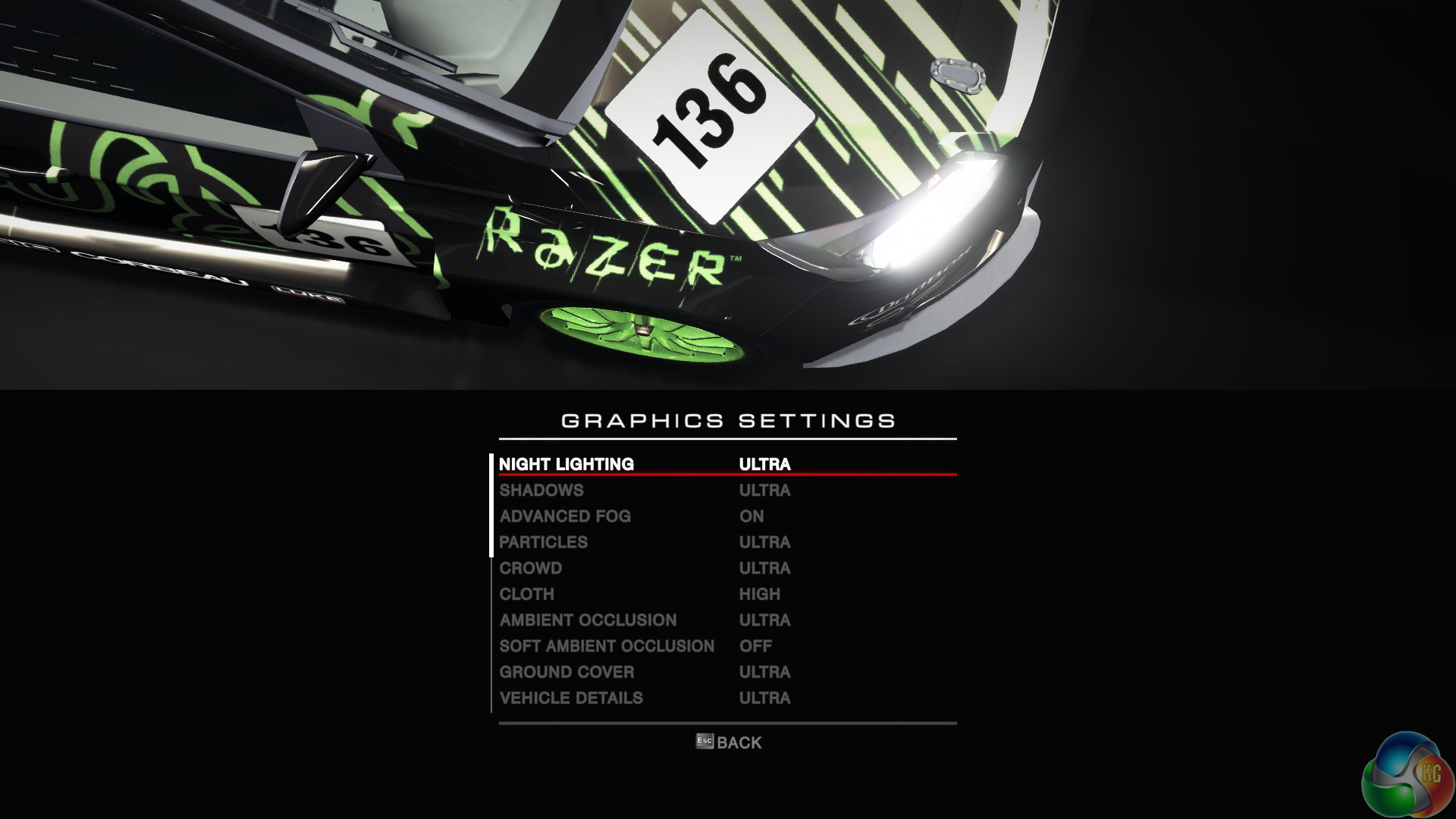
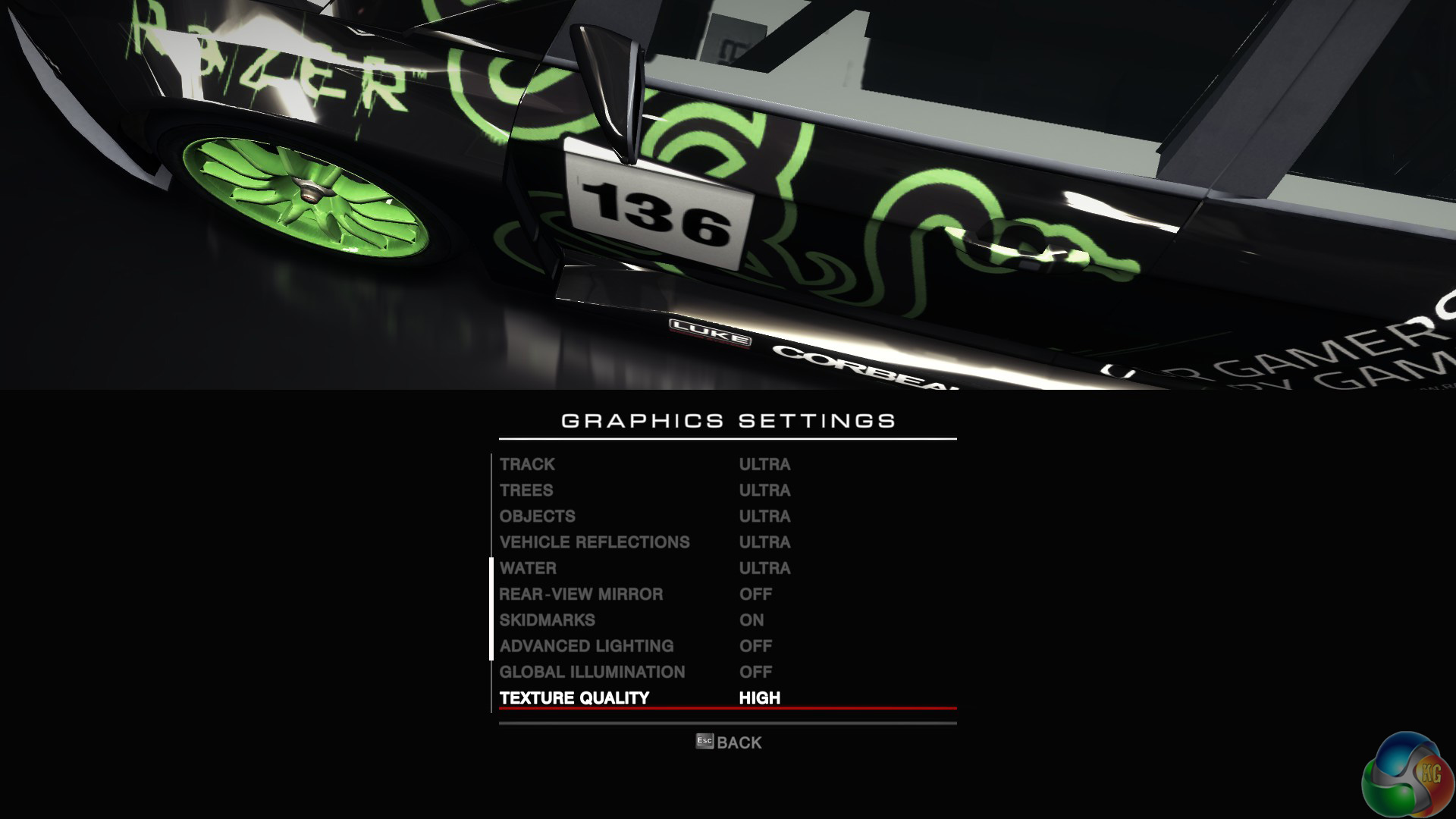
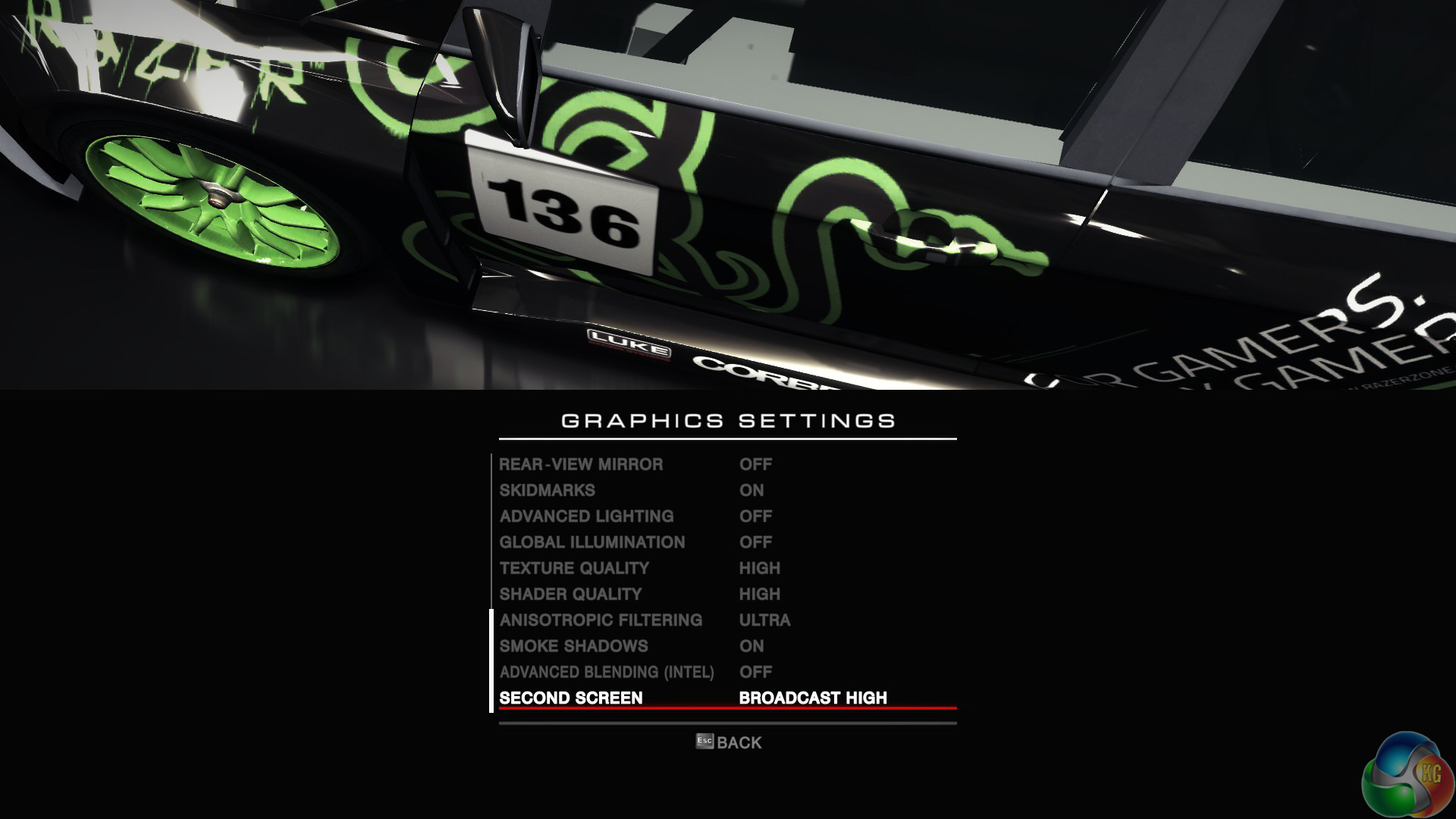
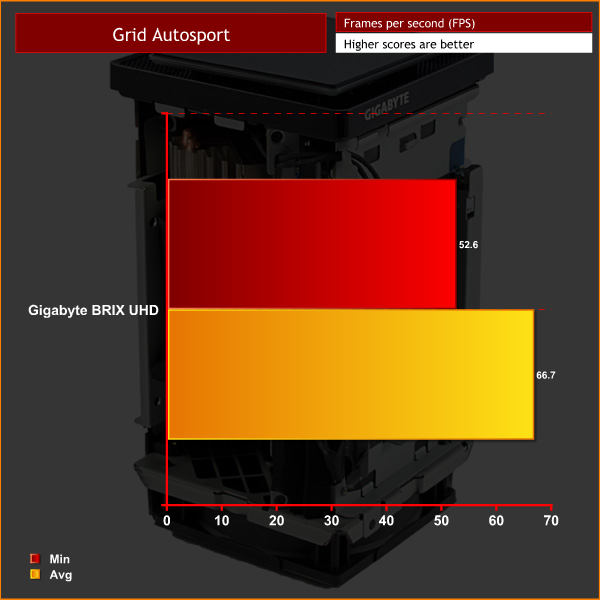
We test using the ‘ultra’ preset with 4x MSAA.
1080p
4K
At 1080p, the BRIX UHD performs admirably, averaging over the 60fps sweetspot.
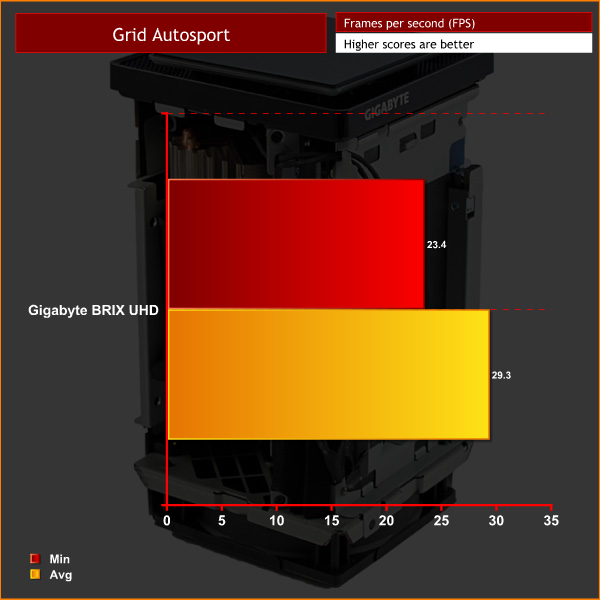
However, as expected, performance falters at 4K. You would have to seriously tune down the settings to get decent framerates at 4K.In Middle-earth: Shadow of Mordor, the player plays as a ranger by the name of Talion who has wraith-like abilities. In this open world video game, players have the freedom to pursue side quests and roam around the world.

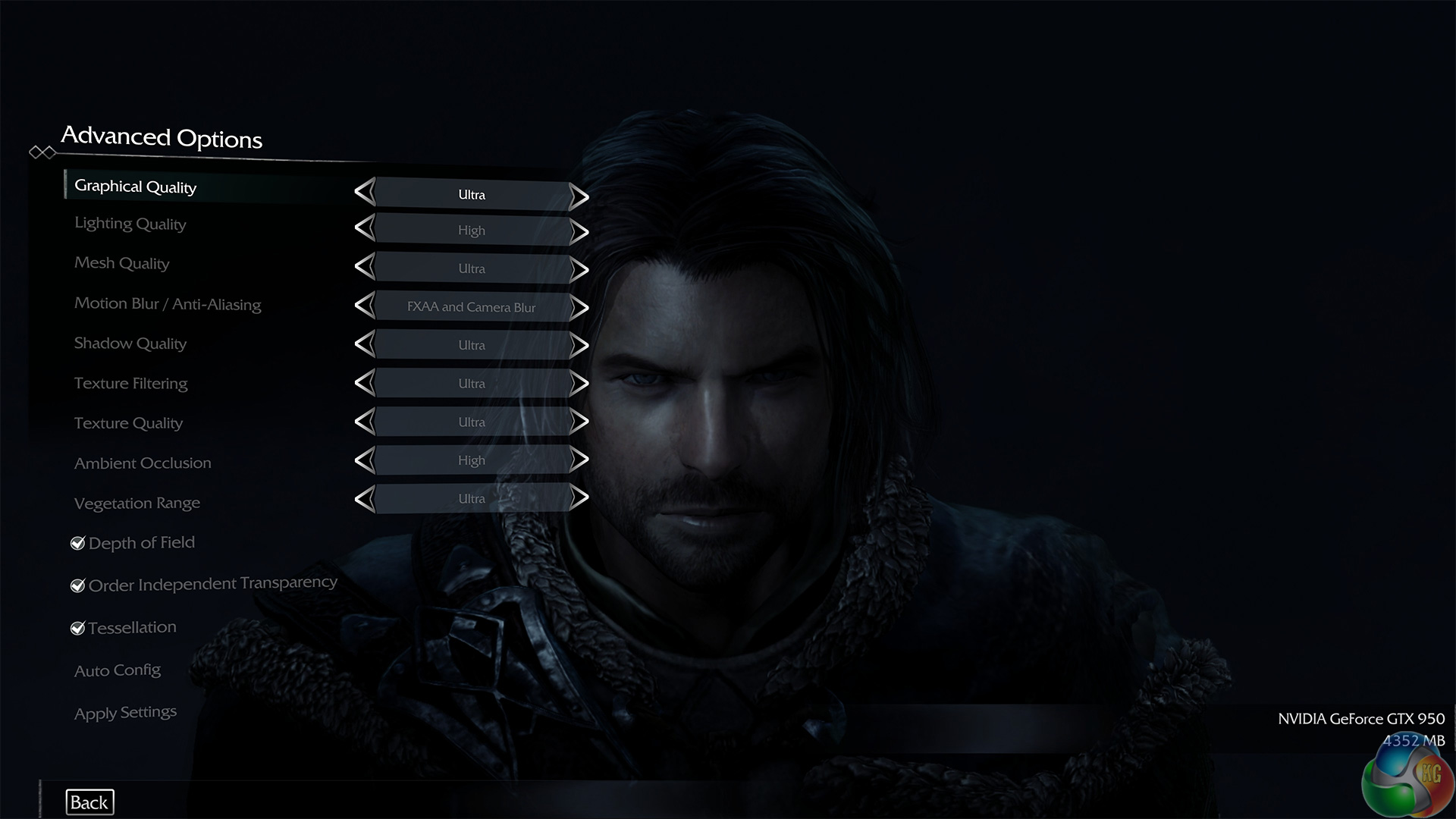
We test using the ‘ultra' preset.
1080p
4K
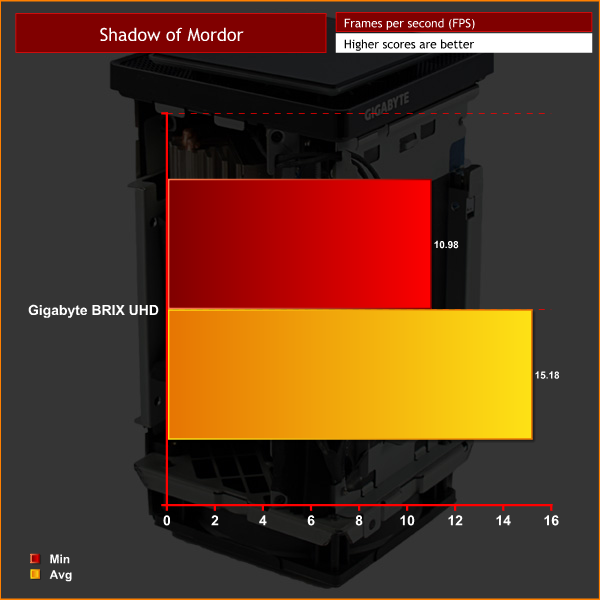
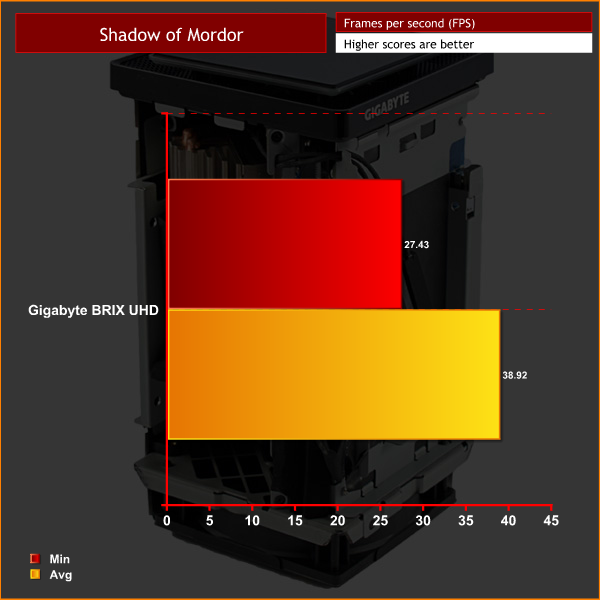
1080p performance is not ideal from the BRIX UHD, let alone 4K, when opting for Ultra image quality. Switching down to ‘very high' settings would help 1080p performance, as minimum framerates of 27fps are certainly very choppy.Grand Theft Auto V is an action-adventure game played from either a first-person or third-person view. Players complete missions—linear scenarios with set objectives—to progress through the story. Outside of missions, players may freely roam the open world. Composed of the San Andreas open countryside area and the fictional city of Los Santos, the world is much larger in area than earlier entries in the series. It may be fully explored after the game’s beginning without restriction, although story progress unlocks more gameplay content.
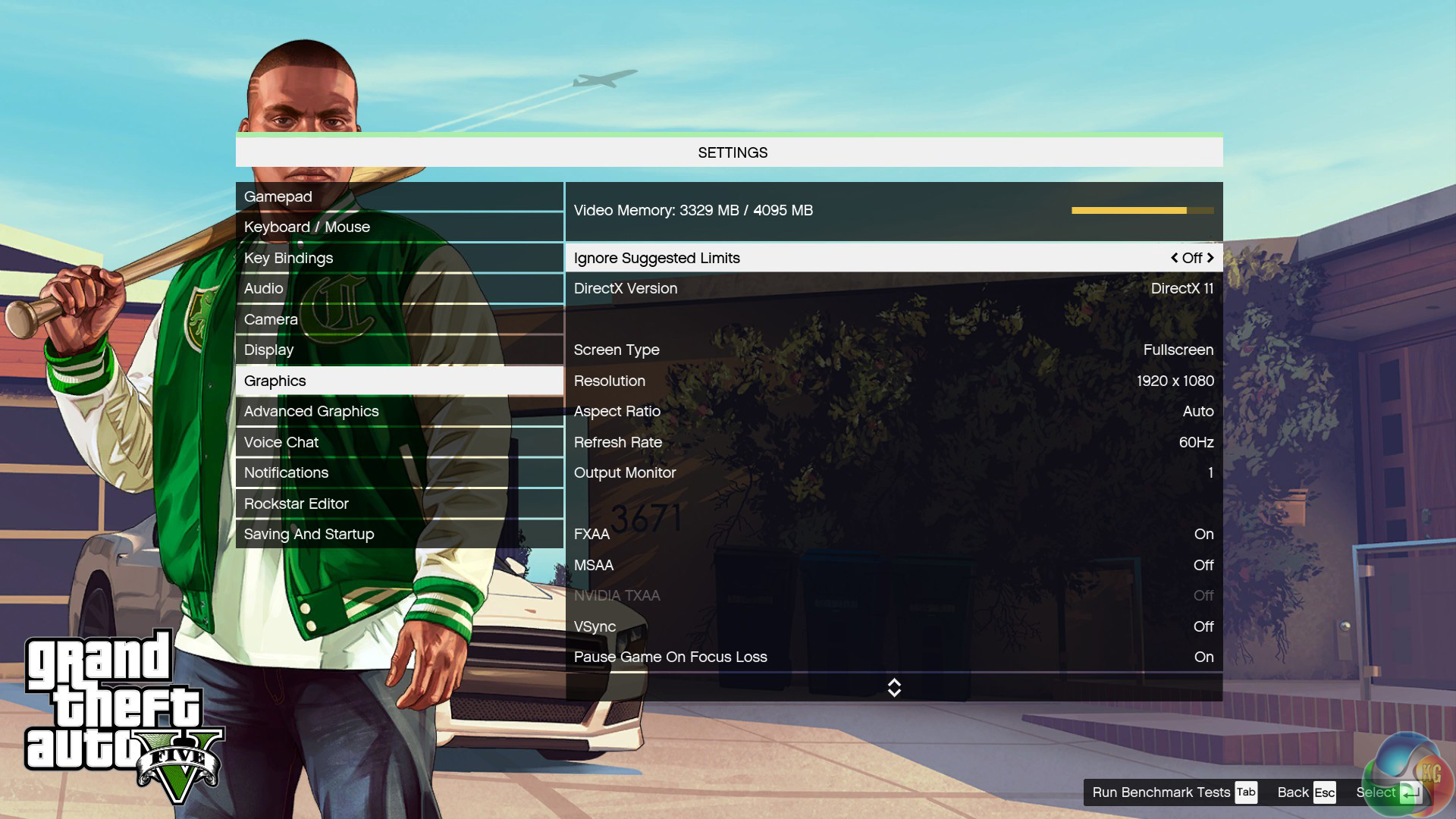
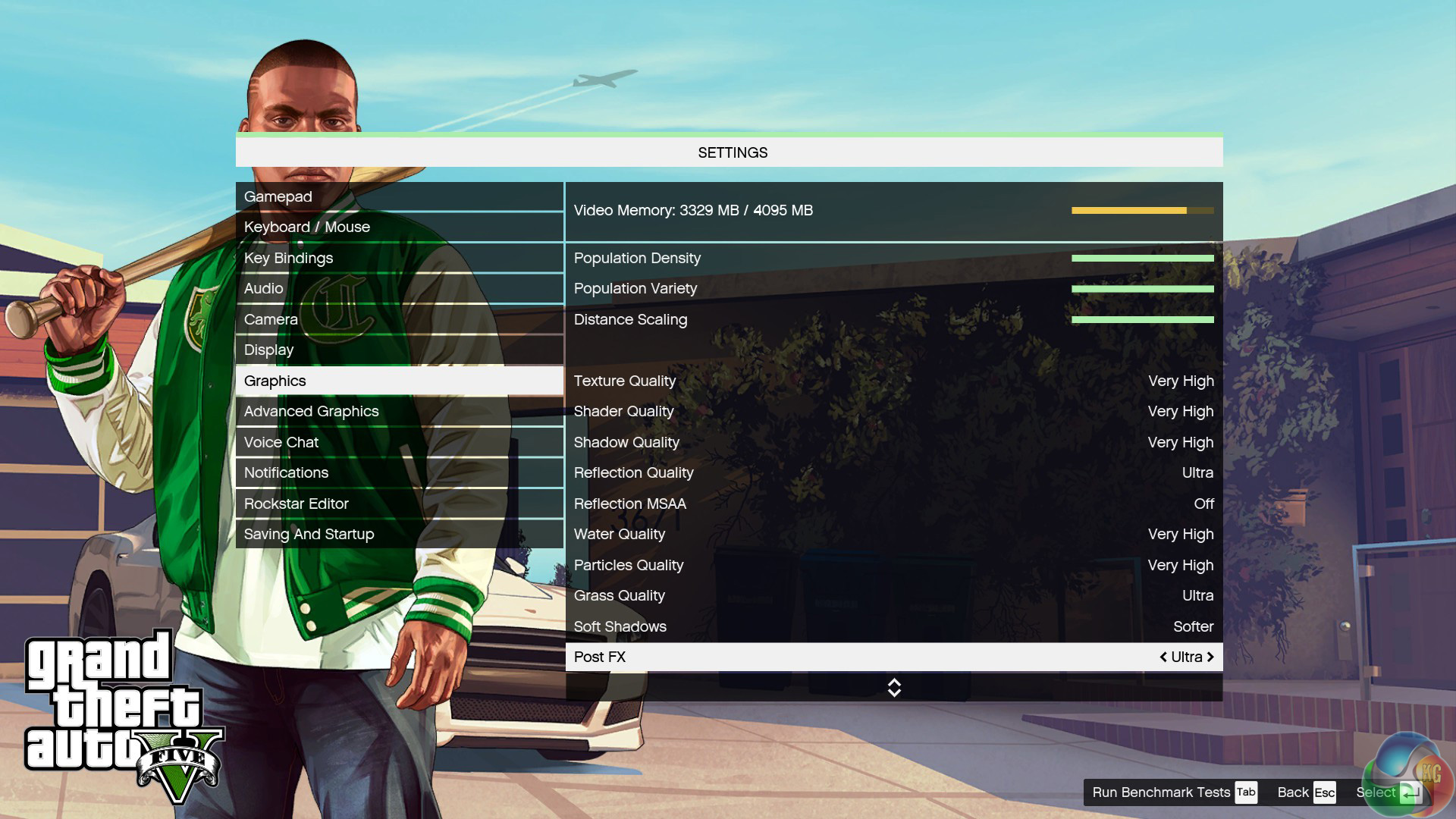
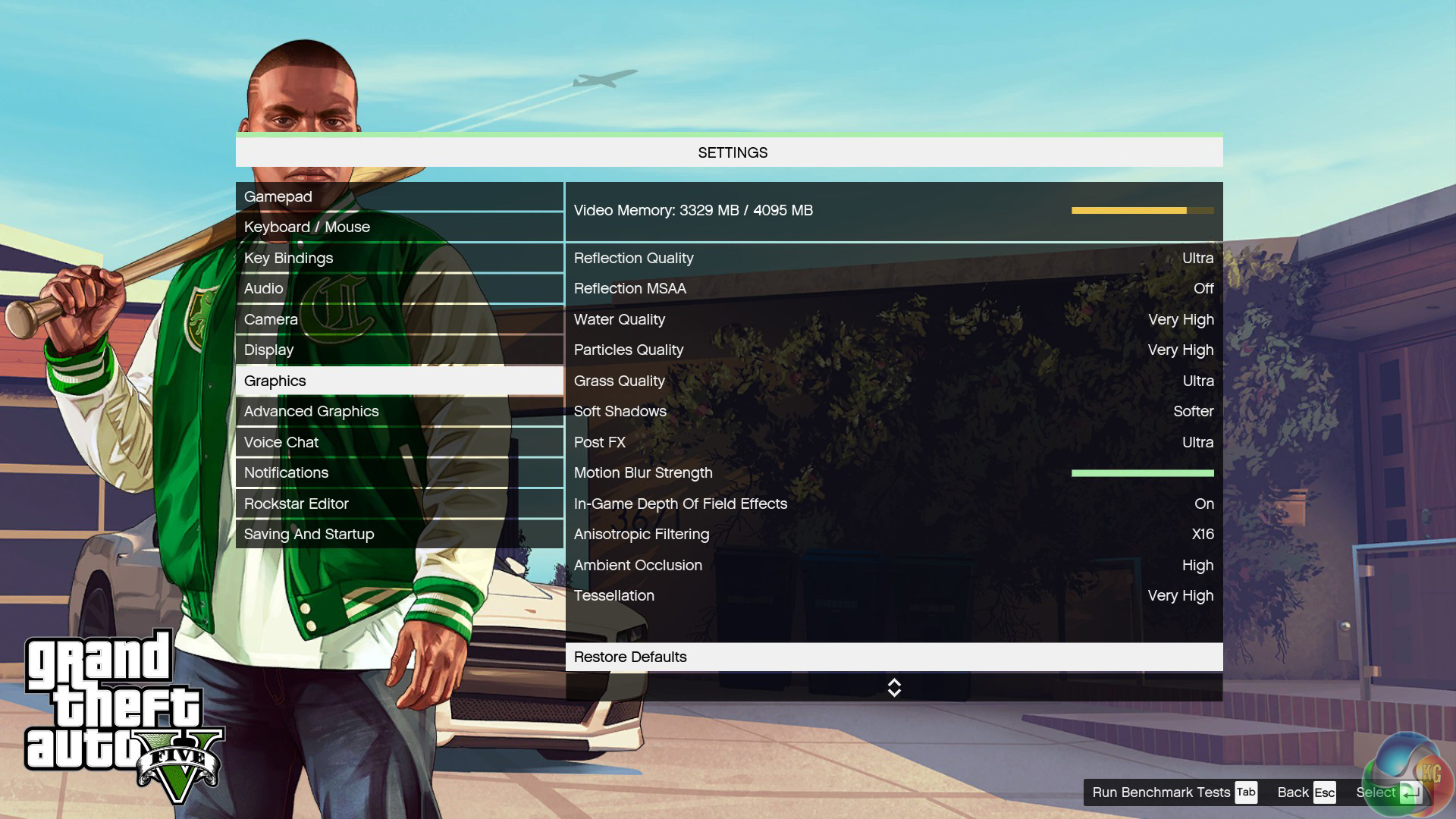
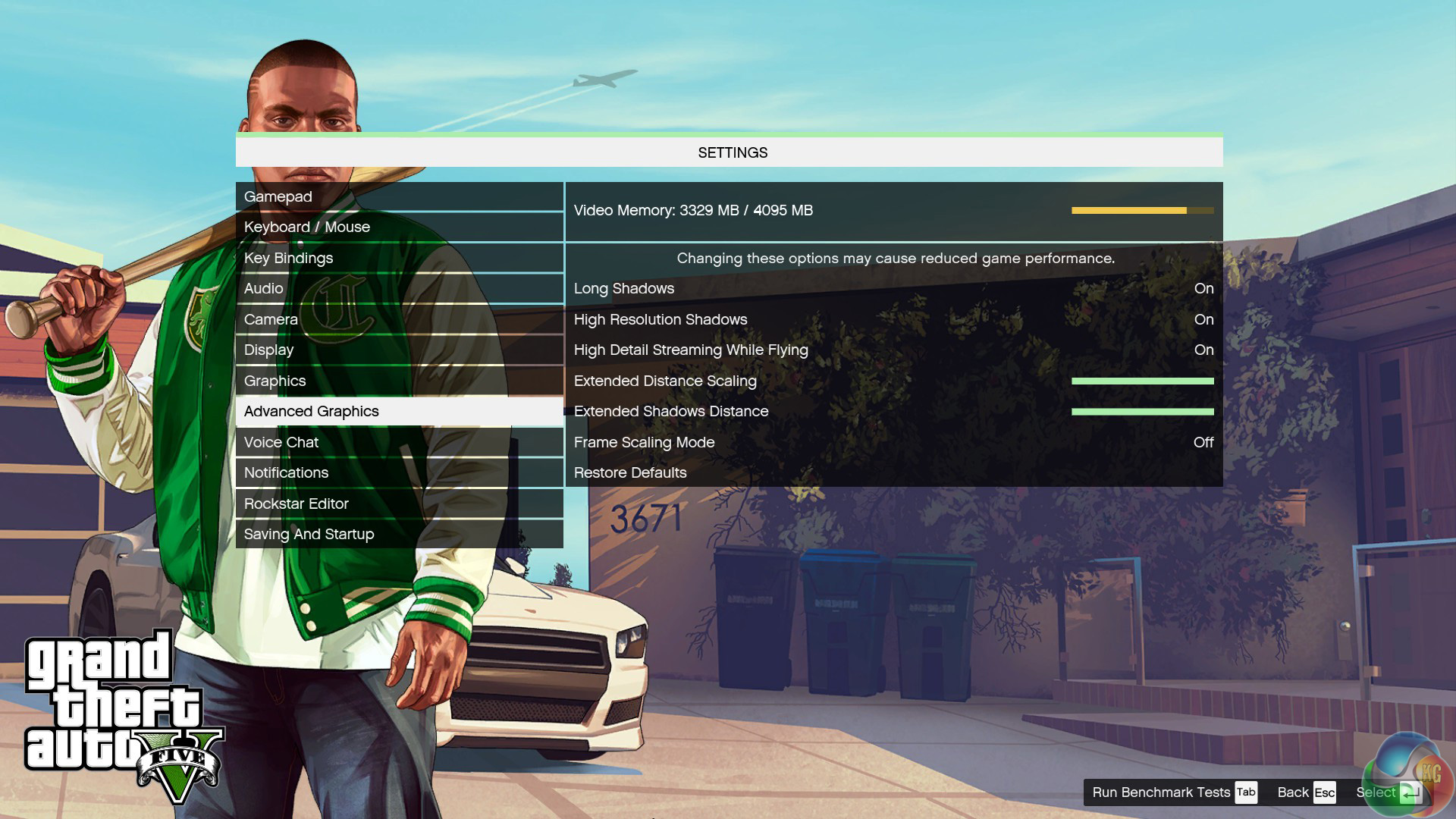
We test with every setting maximised, although MSAA is disabled.
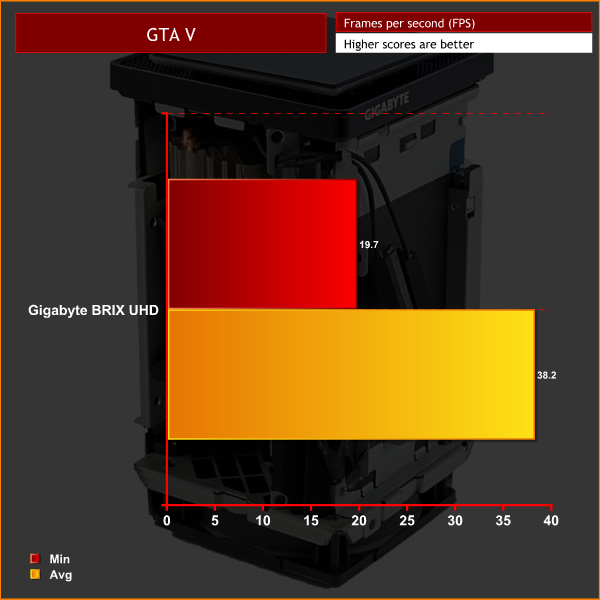
1080p
4K
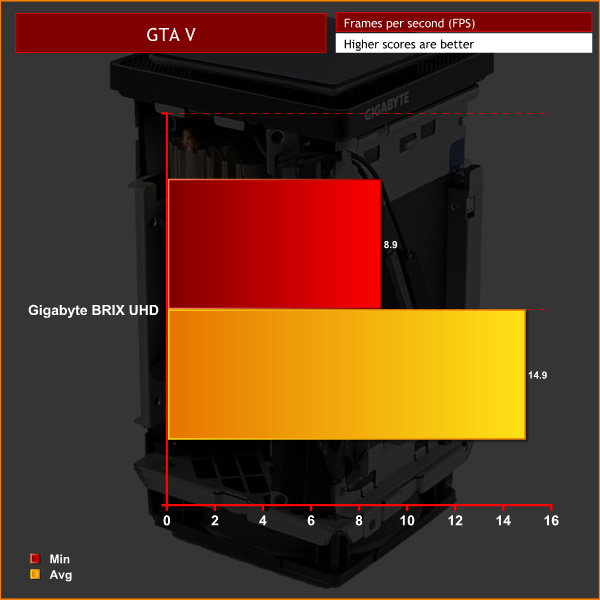
As with Shadow of Mordor, framerates are still not perfect, even at 1080p. That said, most graphics cards struggle with GTA V and its Very High and Ultra graphical settings. Cranking down the image quality will noticeably improve framerates at 1080P.
I think the 4K framerates are also conclusive proof the BRIX Gaming UHD is certainly not up to the task of 4K gaming for demanding games with high image quality settings.DOOM is a science fiction horror first-person shooter video game developed by id Software and published by Bethesda Softworks. It is a reboot of the Doom series and is the first major instalment in the series since the release of Doom 3 in 2004 and the fourth title in the main series of games. The game is played entirely from a first-person perspective, with players’ taking the role of an unnamed marine, as he battles demonic forces from Hell that have been unleashed by the Union Aerospace Corporation on a future-set colonised planet Mars.
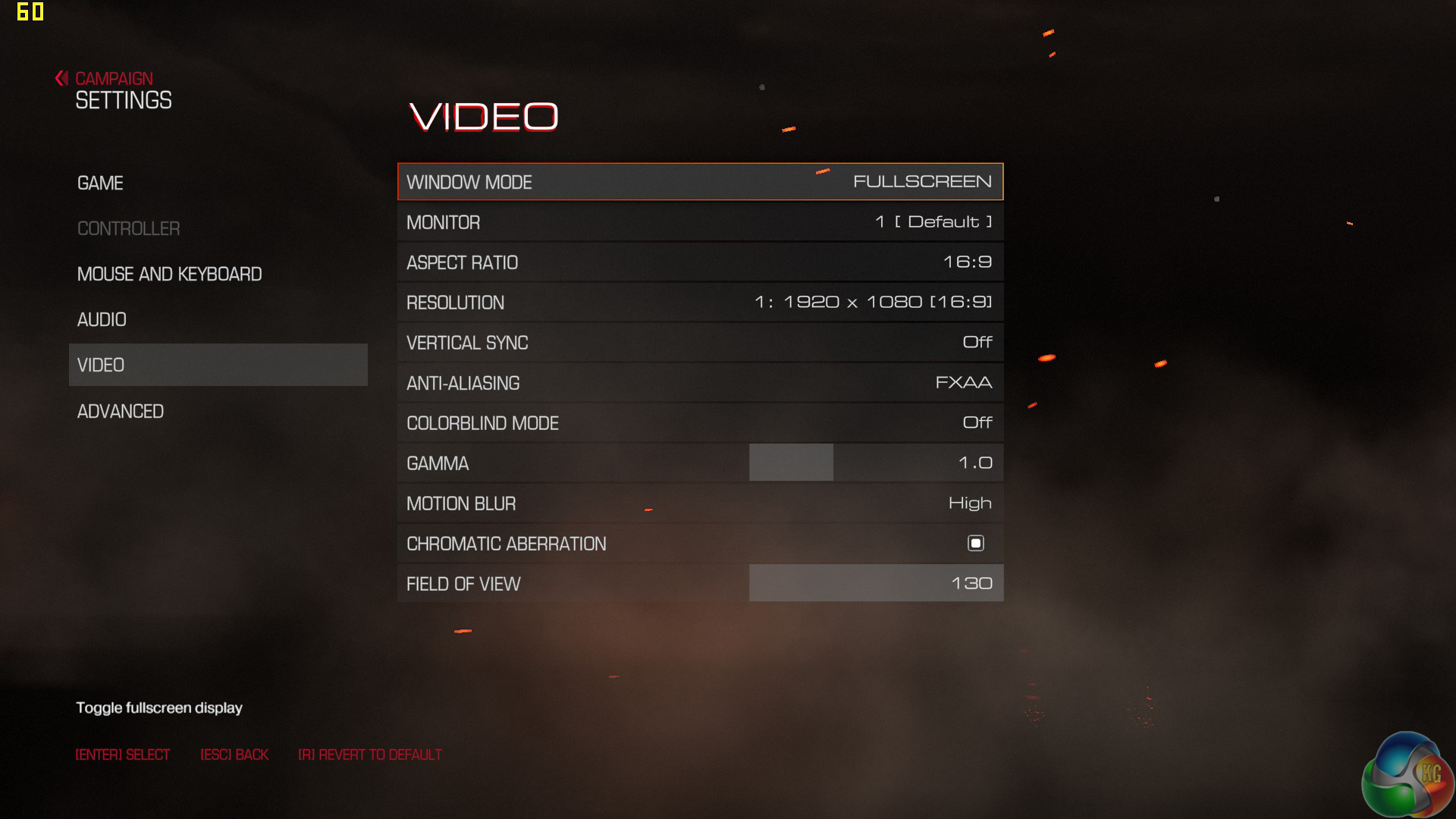
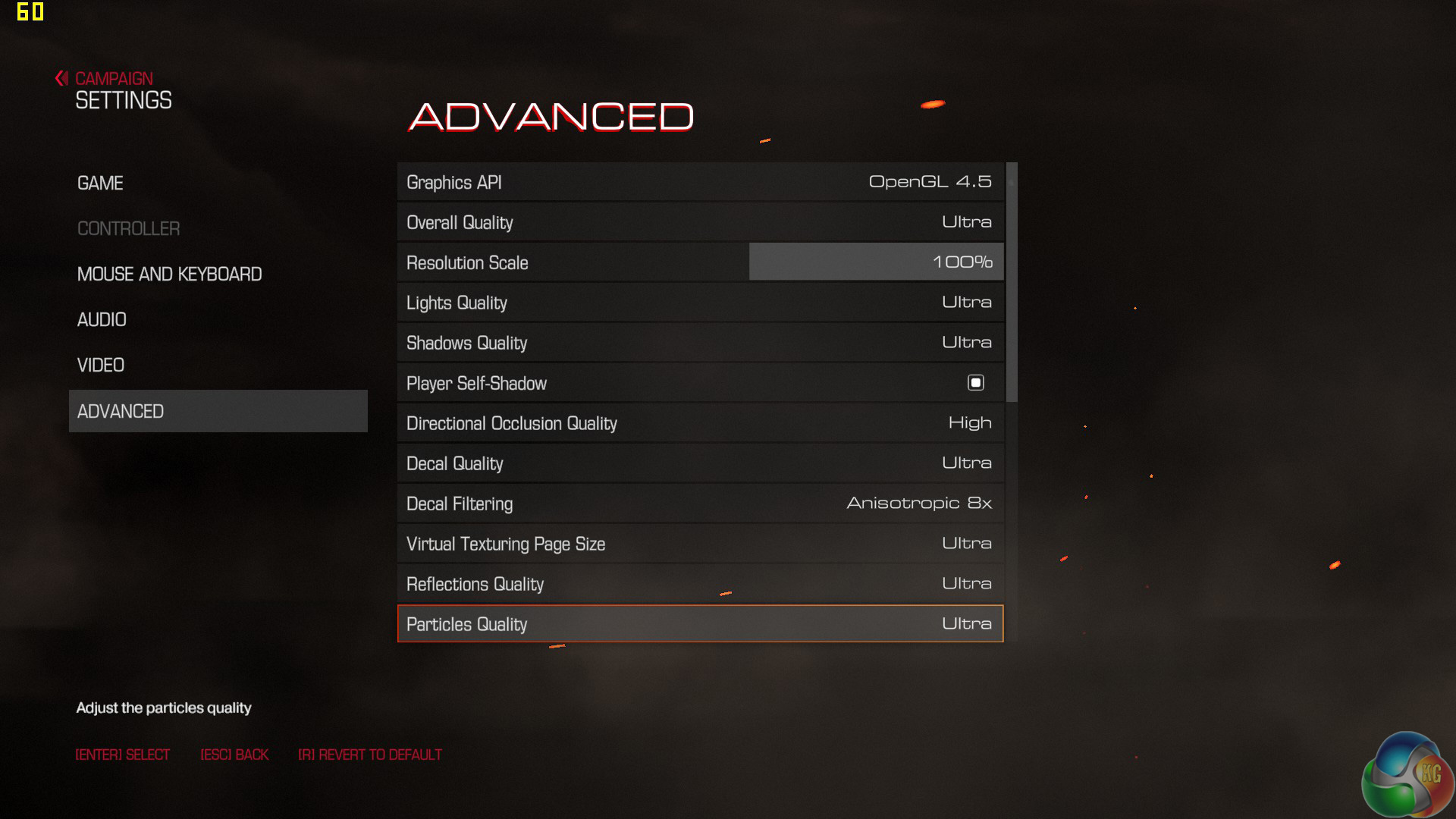
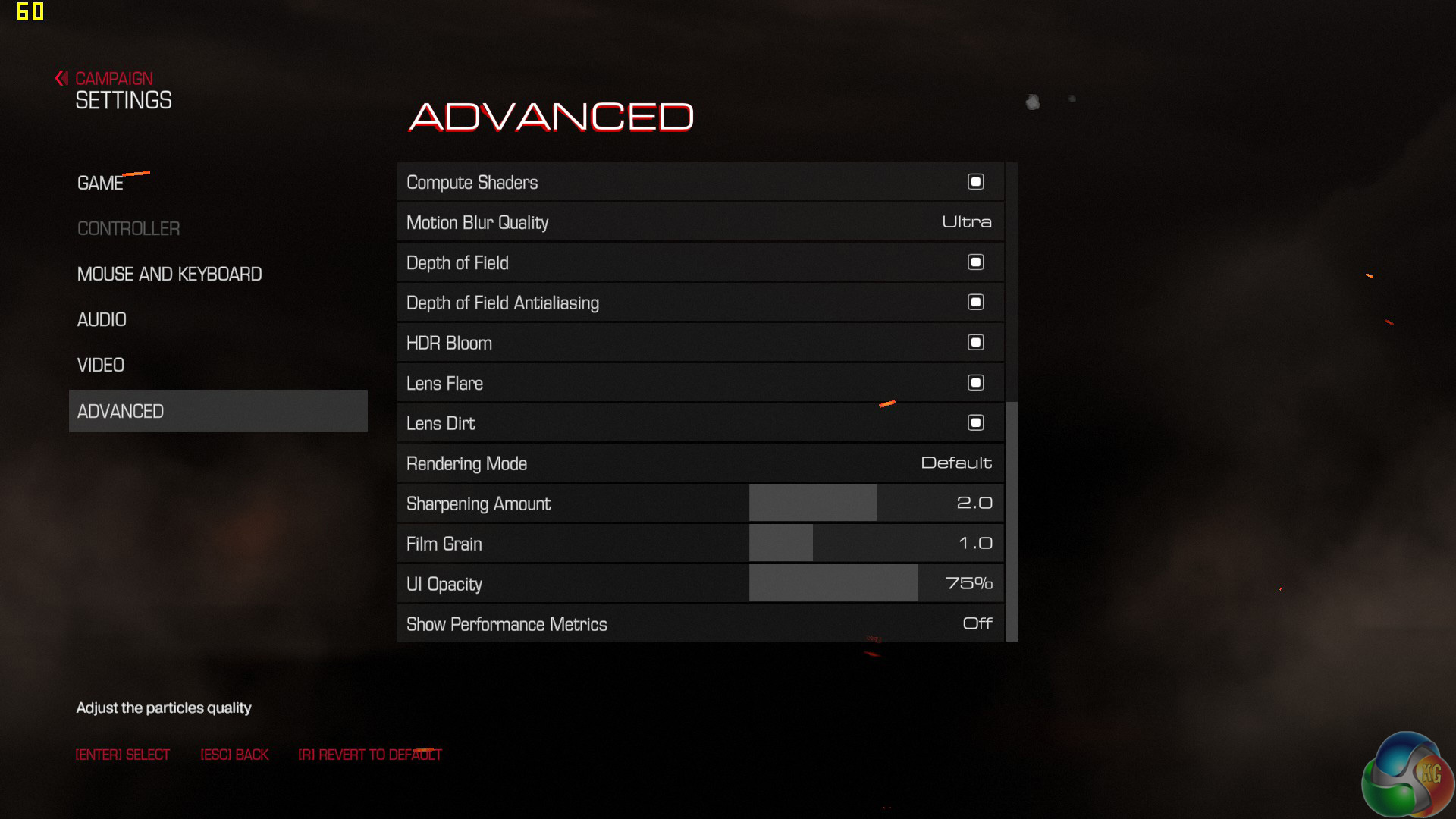
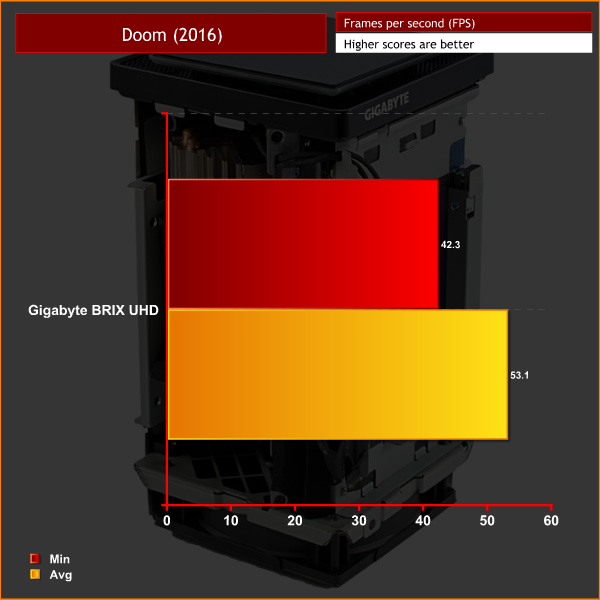
We test using the ‘ultra’ preset. Given Doom does not have its own in-built benchmark, I tested at the beginning of the game as the player destroys the very first Gore Nest. I benchmarked 3 closely-matched runs and then took the average figures from those runs to present here.
1080p
4K
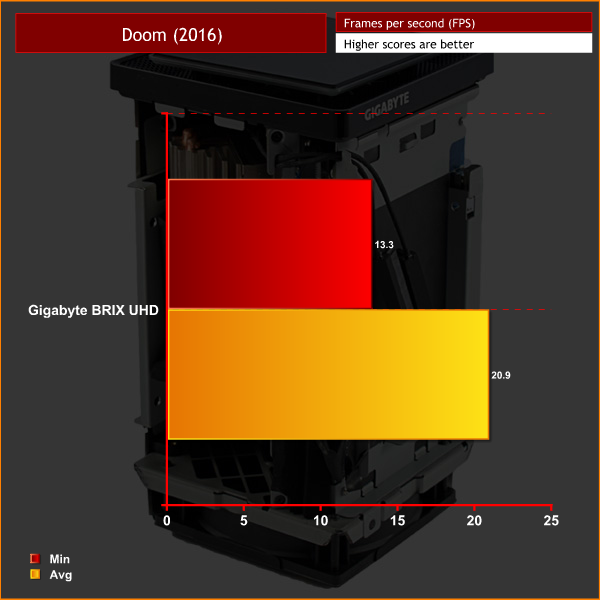
Decent framerates at 1080p in Doom – although the settings can still be tweaked to give a smoother experience.
Just like every other game today, the gaming experience is just not pleasant at all at 4K and image quality settings would have to be reduced significantly to reach a somewhat playable FPS level.So far, all the games I have tested indicate that the BRIX Gaming UHD is simply not capable of gaming at the 4K resolution when image quality settings are at high levels.
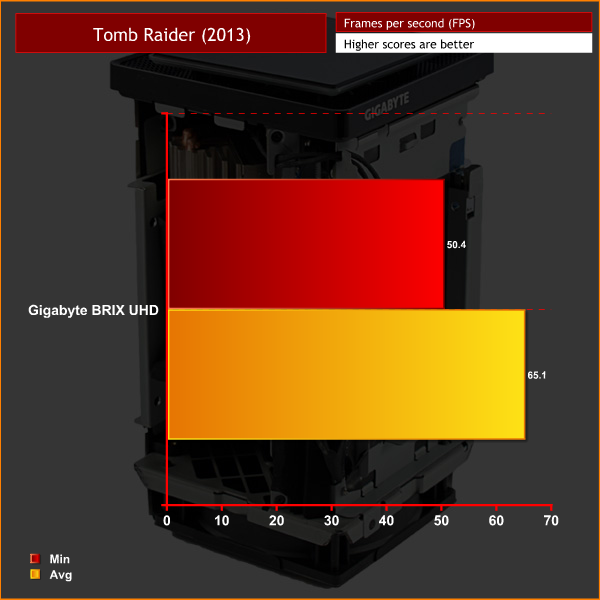
However, on this page I want to explore what it would take to game successfully at 4K using the BRIX UHD. To do that, I tested Tomb Raider (2013) and Grid Autosport – neither of which are hugely demanding games. I also dropped the image quality settings down to ‘low' in both games. Here are the results:
Tomb Raider (2013)
Grid Autosport
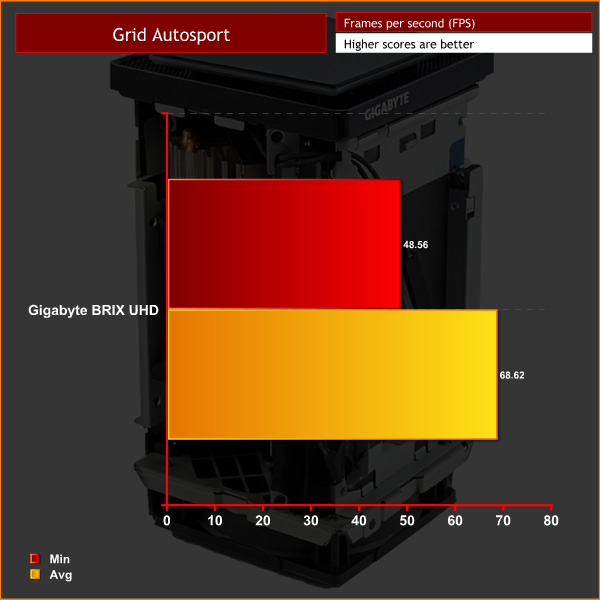
As you can see, the BRIX UHD is perfectly capable of running at 4K. The GTX 950 is just not powerful enough to run the latest AAA games with high image quality settings at 3840×2160. If you play less demanding games such as Overwatch, CS:GO or Rocket League, then it may well do the job.
However, as far as we are concerned, 4K gaming at decent image settings is out of the question for recent, and demanding, titles – as our testing of GTA V and Middle Earth: Shadow of Mordor has shown.
To measure idle temperatures, a reading was taken after having Windows open on the desktop for 30 minutes. A reading under load was taken by simultaneously running Prime 95 and 3DMark Firestrike. Prime95 stresses the CPU while 3DMark puts a heavy load on the GPU without it throttling back (as would be the case for a synthetic stress test).
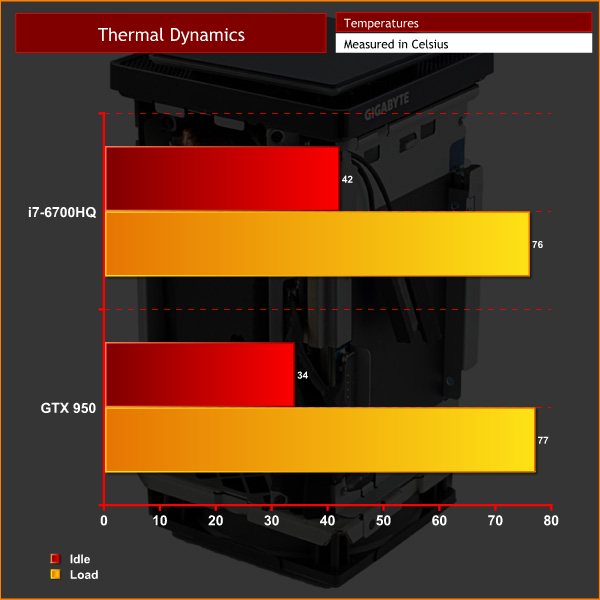
I was actually very (pleasantly) surprised with the thermals on display here. I was expecting the temperatures to be through the roof, given both the CPU and GPU have passive heatsinks – all the airflow comes from the single 80mm intake fan.
However, both results coming in at under 80 degrees Celsius is certainly a good outcome considering the very small form factor we are dealing with here.To measure the acoustics performance of the BRIX UHD I used a digital sound meter. I first took an ambient reading to act as a baseline figure, before measuring the system’s noise levels at idle and under load.
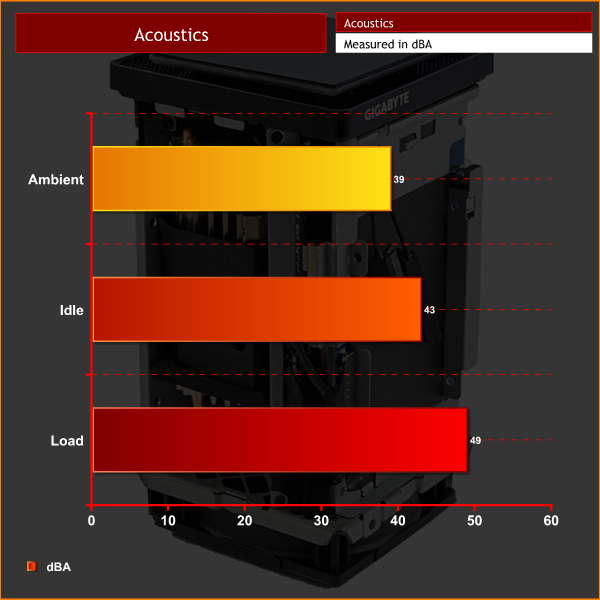
There is always a constant whirr coming from the BRIX UHD. The 80mm fan simply has to be spinning at reasonably high rpms at all times, otherwise the passively cooled components would creep towards overheating.
Under load, the fan does kick up and the noise is pretty intrusive. However, it is no worse than a gaming laptop – which, considering the tiny form factor, is actually impressive.For idle power draw, a reading was taken after having Windows open on the desktop for 30 minutes. A reading under load was taken with AIDA64’s stress test running.

The BRIX UHD draws very little power at idle, and even under load the power draw is still significantly less than what a full-sized gaming desktop would be pulling from the wall. Considering the good gaming experience at 1080p, this is another impressive result.I have been impressed with the Gigabyte BRIX Gaming UHD throughout my testing.
For starters, it is an attractive – and truly tiny – piece of kit. Of course, it is not as small as the Intel NUC, or other models of the Gigabyte BRIX range for that matter. That being said, the Intel NUC does not have a desktop GTX 950 inside it. To fit such hardware in a chassis with a volume of 2.6 litres is very impressive.
That level of hardware shows its class across our benchmark suite, too. If you read our section benchmarking games, you will know that the BRIX UHD is not capable of 4K gaming with Very High and Ultra image quality settings in demanding titles, though. That was always going to be out of the question with a GTX 950.

1080p gaming is what the BRIX UHD can do, though, and it does it just fine. If you are after a small, HDTV gaming machine – Steam Machine-esque – then the BRIX UHD could do the job very nicely.
While it has yet to hit the shops, we have been told by Gigabyte that it has an MSRP of £849.99. I have mixed feelings about this price. On the one hand, you pay for the small form factor, and laptops with similar hardware are available for not much more. However, you have to factor in the cost of storage and memory – not to mention peripherals. A 500GB PCIe SSD, for example, is going to add an extra £200+ straight away to that price, so the cost can quickly add up.
Still, the Gigabyte BRIX Gaming UHD can do a very good job, despite its minuscule proportions. When it is released, you will be able to pick one up for £849.99.
Discuss on our Facebook page HERE.
Pros
- Very small chassis.
- Powerful hardware despite the size constraints.
- Solid gaming experience at 1080p.
- GTX 950 draws little power.
Cons
- Cost adds up when you factor in storage and memory.
- GTX 950 is last gen Maxwell architecture.
KitGuru says: The BRIX Gaming UHD from Gigabyte is a good piece of kit, despite the semi-misleading name. If it were £100 cheaper, it would be a perfect HDTV-gaming solution. As it is, it falls just short of our highest award.