KitGuru KitGuru.net – Tech News | Hardware News | Hardware Reviews | IOS | Mobile | Gaming | Graphics Cards


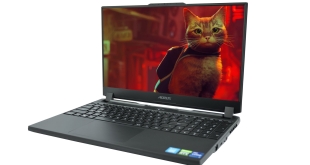
Packing an Intel i7-12700H, RTX 3070 Ti Laptop GPU and a snazzy 1440p display, the Aorus 15 gaming laptop ticks a lot of boxes – on paper, at least. It has also recently received a price cut, with the original MSRP of £2199 dropping down to £1749. We put this machine through its paces and find out if it is worth buying at its new asking price.
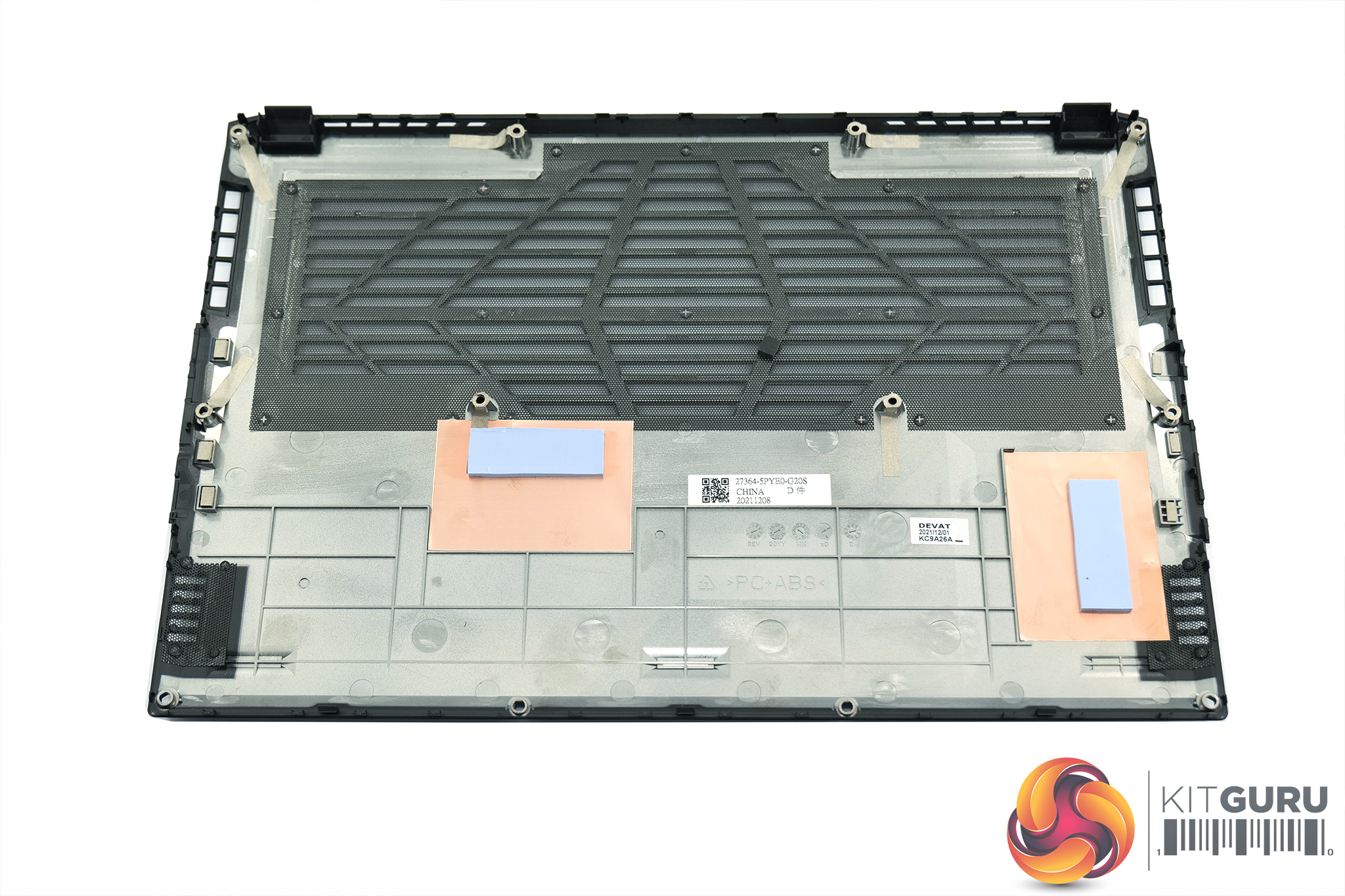
Specification:
- Screen Type: 15.6″ 165Hz Thin Bezel, QHD 2560×1440 Display
- Processor: Intel 12th Gen Intel® Core™ i7-12700H (2.3GHz~4.7GHz)
- Graphics:NVIDIA® GeForce® RTX 3070 Ti Graphics (8GB GDDR6 dedicated) 130W
- Storage: 1TB NVMe PCIe Gen4 SSD
- Memory: 16GB DDR4 3200MHz (2 x 8GB)
- Operating System: Windows 11 Home (64bit)
- Network:
- Ethernet: 1 x RJ45
- Wireless: Intel® Wi-Fi 6E AX210 (Gig+) Wireless (802.11ax, a/b/g/n/ac/ax compatible)
- Bluetooth: 5.2
- USB Ports:
- 1 x USB 3.2 Gen1 (Type-C with DP)
- 1 x USB 3.2 Gen1 (Type-A)
- 1 x Thunderbolt™ 4 (Type-C)
- Display Ports: 1x HDMI 2.1
- Dimensions: 360(W) x 244(D) x 27(H) mm
- Weight: 2.4 Kgs
- Warranty: 2 Year
- Extra Features:
- HD Camera
- Island-style AORUS Fusion Keyboard with per-key backlit control
- Thunderbolt™4
- 2x 2W Speakers
- Li Polymer 99Wh Battery
- Firmware-based TPM
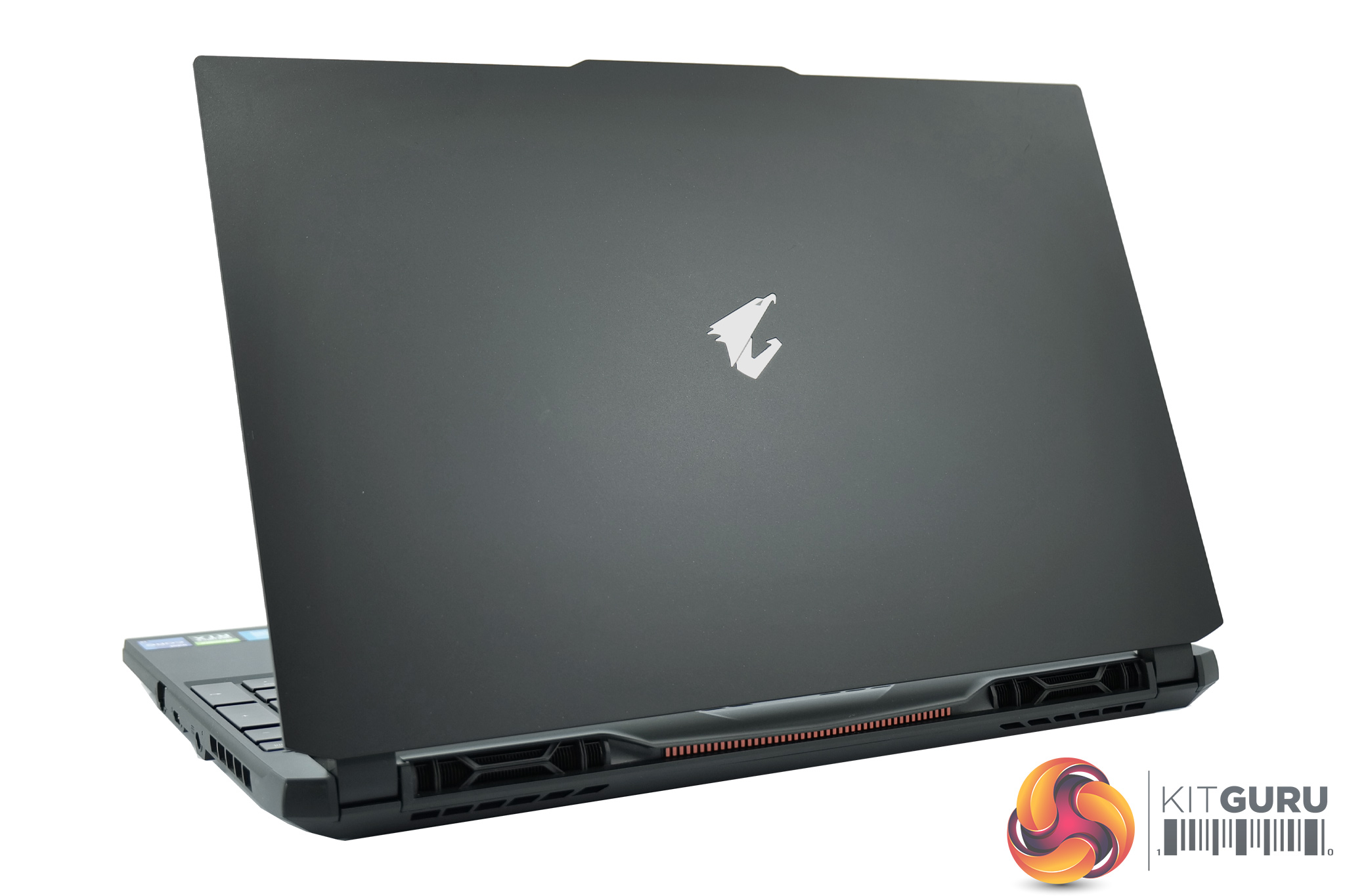
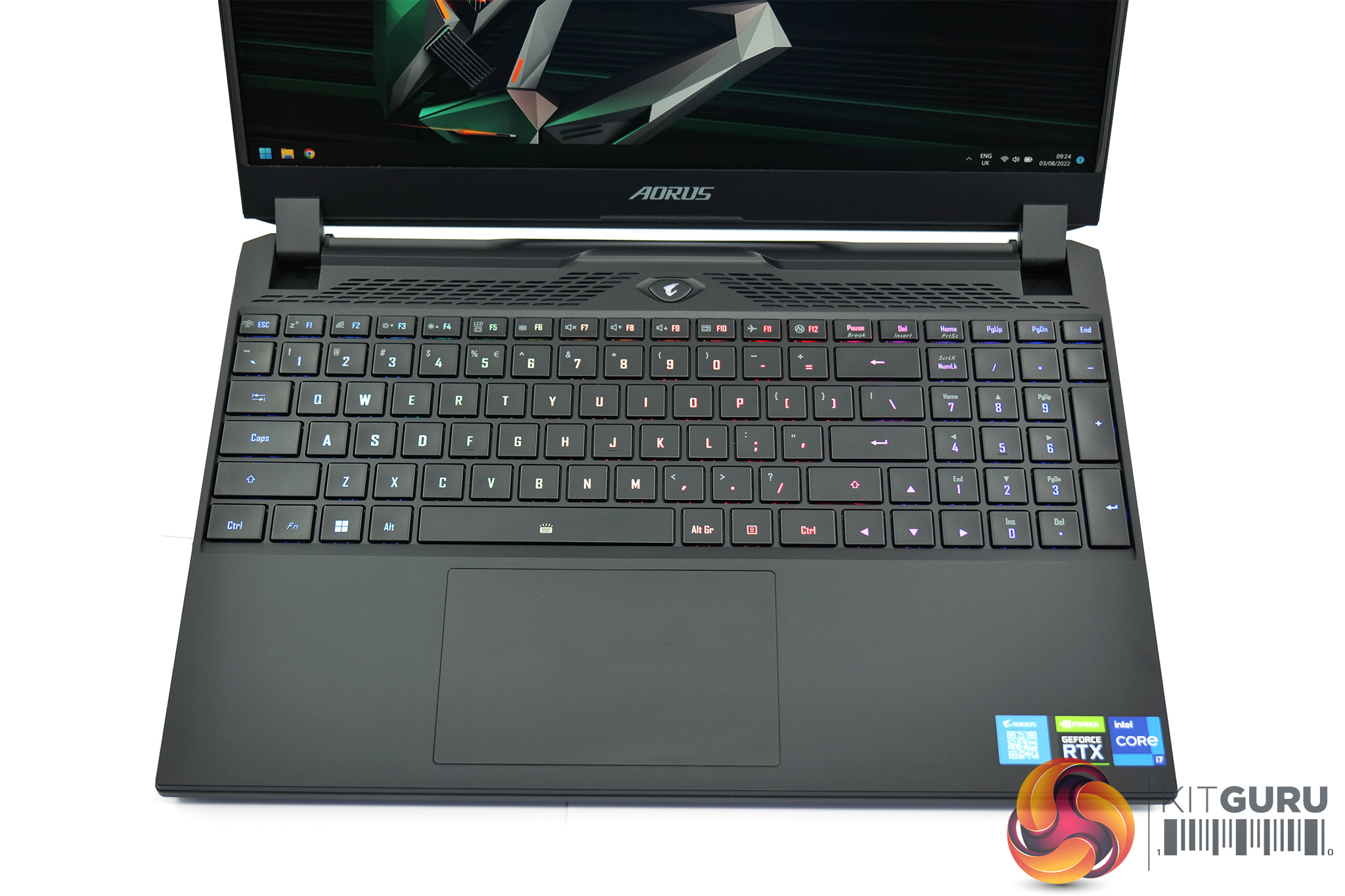
Starting with a look at the design of the Aorus 15, while it is recognisable as a gaming laptop, I wouldn't say it was an overly aggressive design. The chassis is almost entirely black, with the lid left almost completely bare, with just the Aorus logo to add a bit of gamer-y flair. There is a splash of orange on the rear of the screen hinge, but otherwise this is a fairly subdued design. It's also relatively slender for a gaming machine, coming in at 27mm thick and weighing 2.4 KG.
Despite being made almost entirely of plastic, the build quality is solid. There's minimal flex to the keyboard area, and just a small about of wobble if you try and put pressure on the screen, though of course that is not recommended! It's obviously not as premium-feeling as a metal chassis, but no doubt this has helped Gigabyte keep costs down.
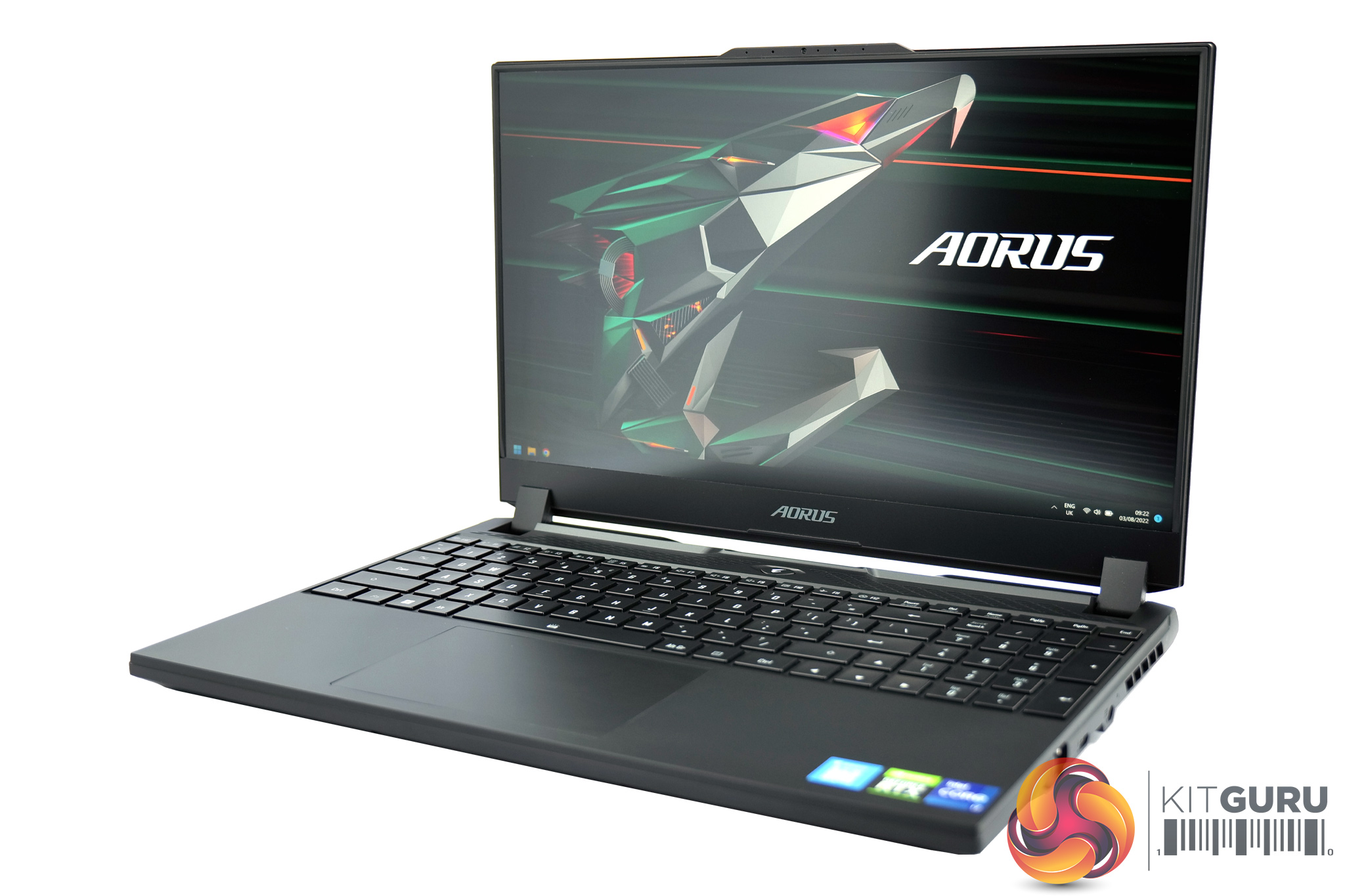
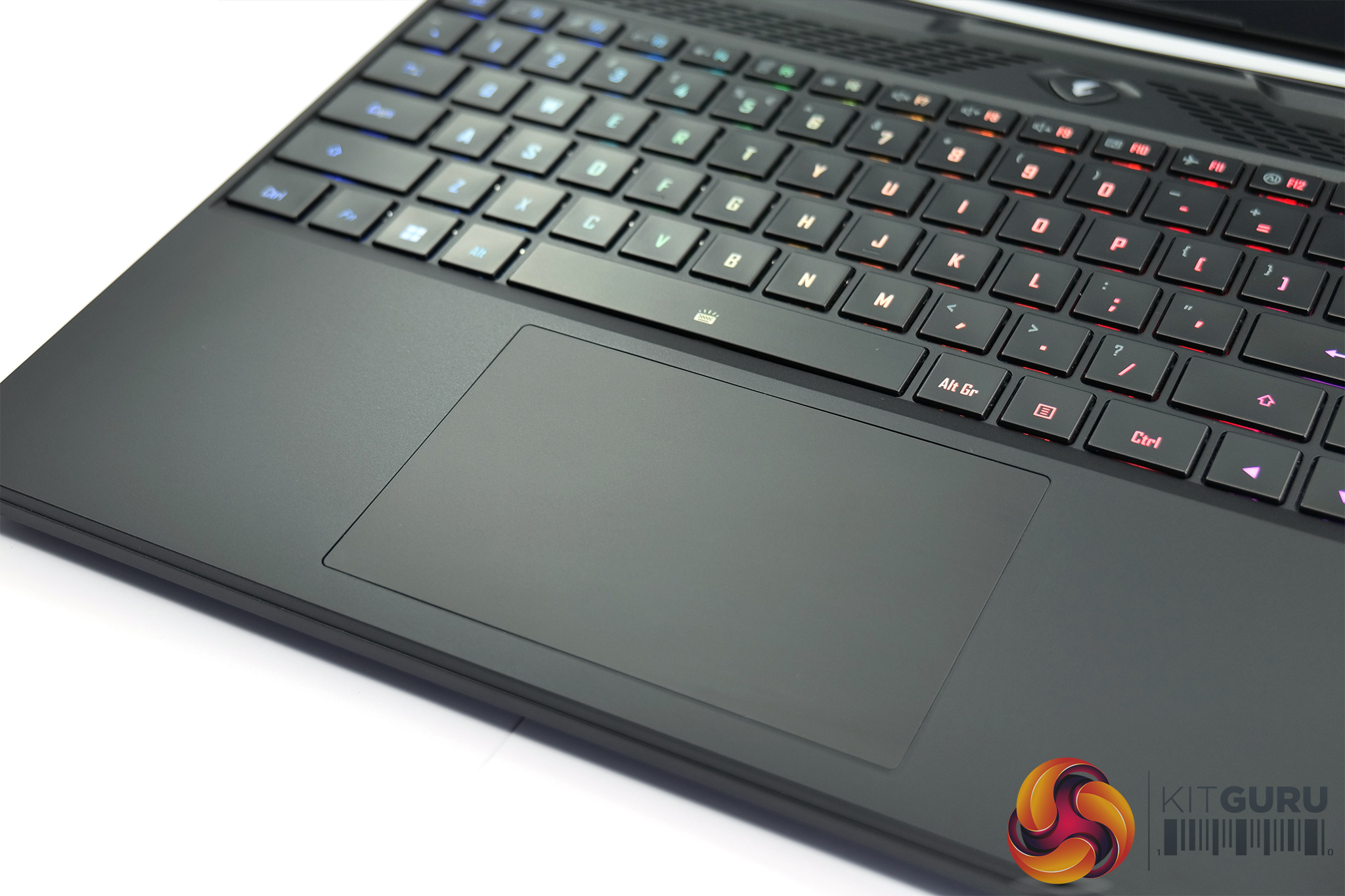
Once we open up the lid, we get a good look at the keyboard deck. The keys themselves are fairly satisfying to type on, it's just a standard scissor-switch laptop experience, but they're not overly mushy and the general typing experience is good. I'm less keen on the layout however, with even UK models have a single-height enter key, while the inclusion of the numpad makes the whole board feel a little cramped. My other gripe is that the secondary functions on the F-key row – which control things like screen brightness and volume – aren't illuminated by the RGB LEDs, so if you're in a darker or even semi-dark environment, it's very hard to see what you're doing if you want to use any of the function keys.
The trackpad I can't fault though. It's a good size, feels very smooth to the touch and the buttons offer a decent amount of tactile feedback without feeling spongy. For general usage and web surfing it is more than enough to get the job done.
Just above the screen we can note a fairly unique-looking notch which houses the webcam. Unfortunately the webcam is not very good at all, it's only 720p resolution and looks very grainy, as shown in our video at the top of this page. If you use your laptop for a lot of video calls, this could well be something to consider.
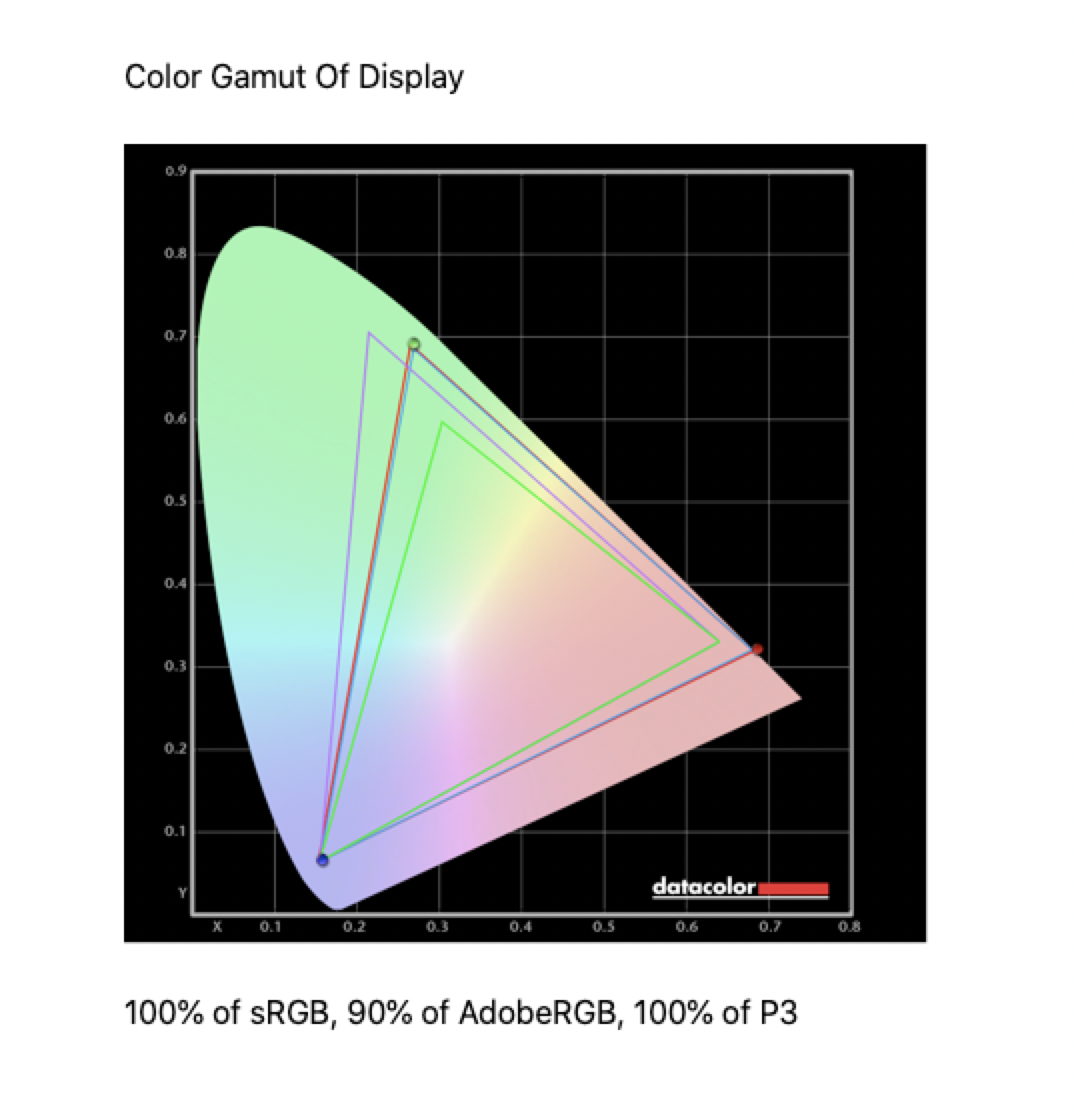
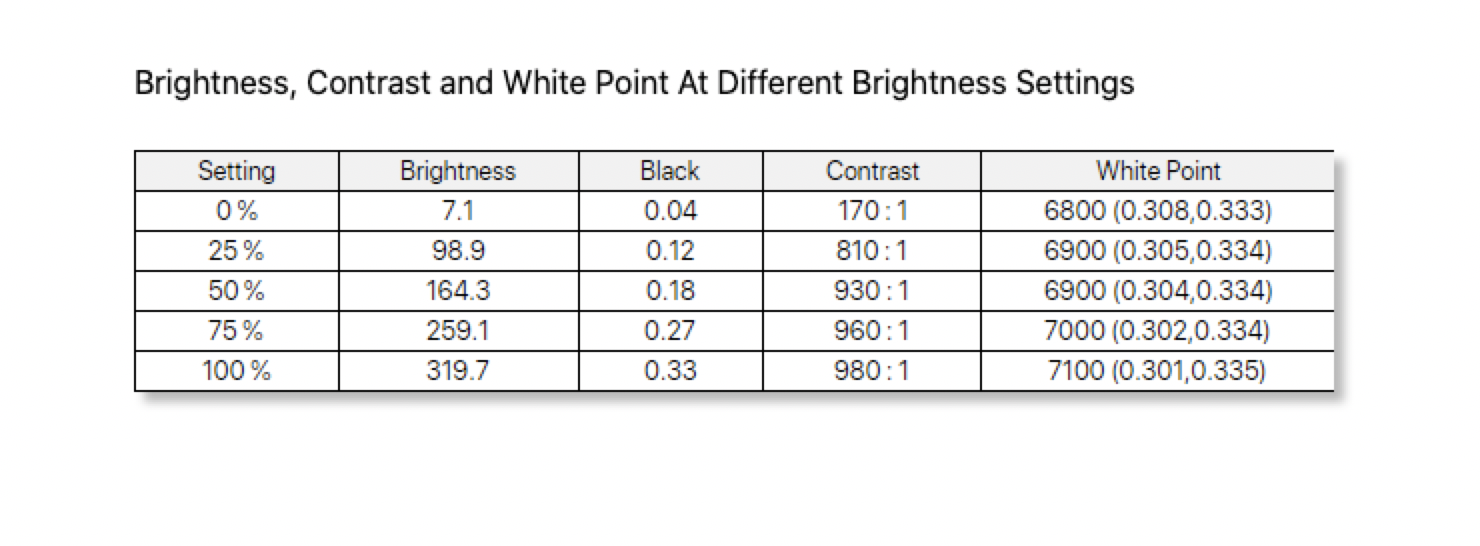
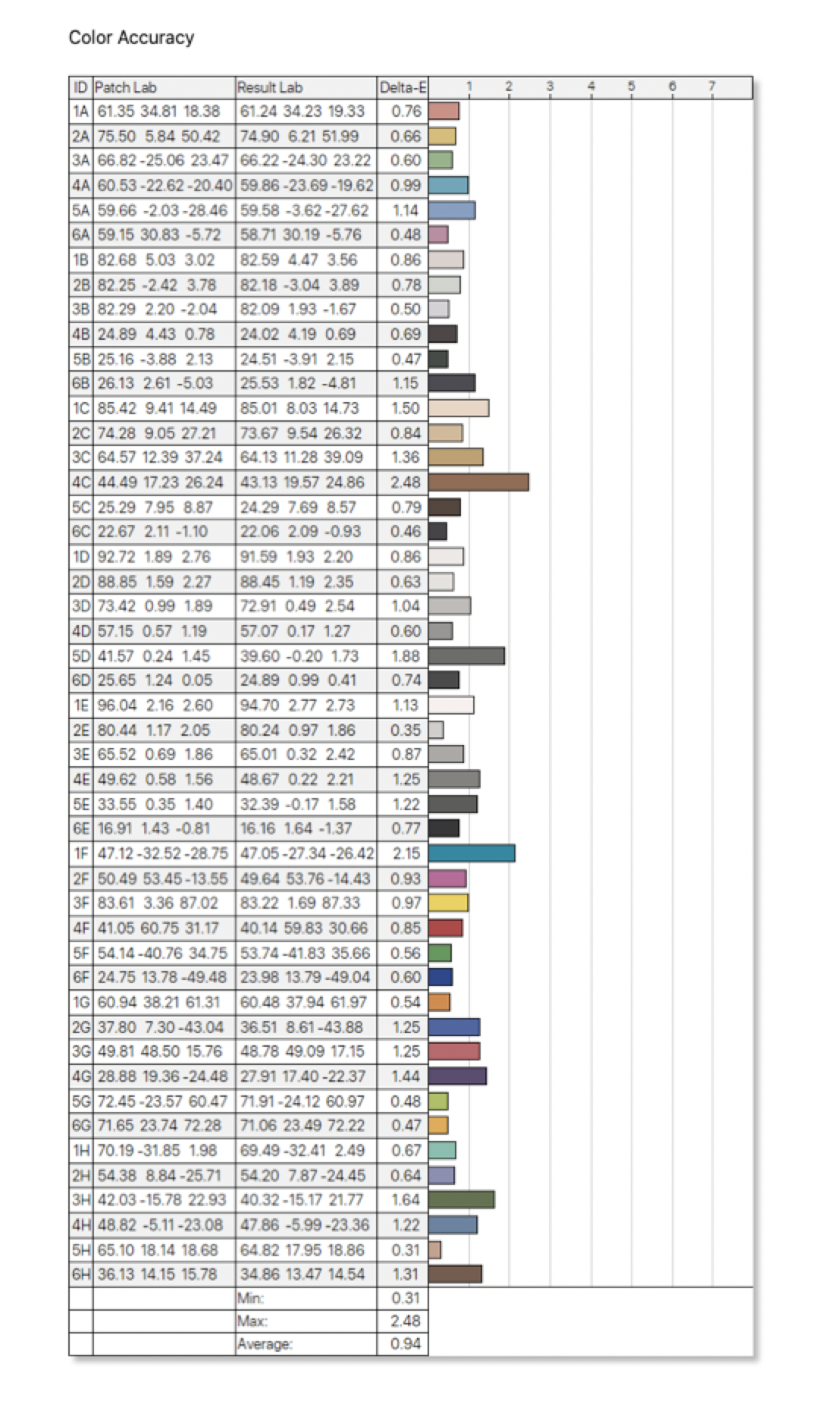
Speaking of the screen though, this is undoubtedly one of the highlights of the Aorus 15. Not only does it offer 1440p (QHD) resolution, something we think matches perfectly with the 15.6in panel size, but it's a high quality panel and offers a 165Hz refresh rate. Gigabyte hasn't actually specified the exact panel type used, but based on our SpyderX testing, where we see a very wide colour gamut and contrast of just below 1000:1, we can safely say it is an IPS type. Colour accuracy is very strong too, with an average deltaE of just 0.94, so the display here really is a joy to use.
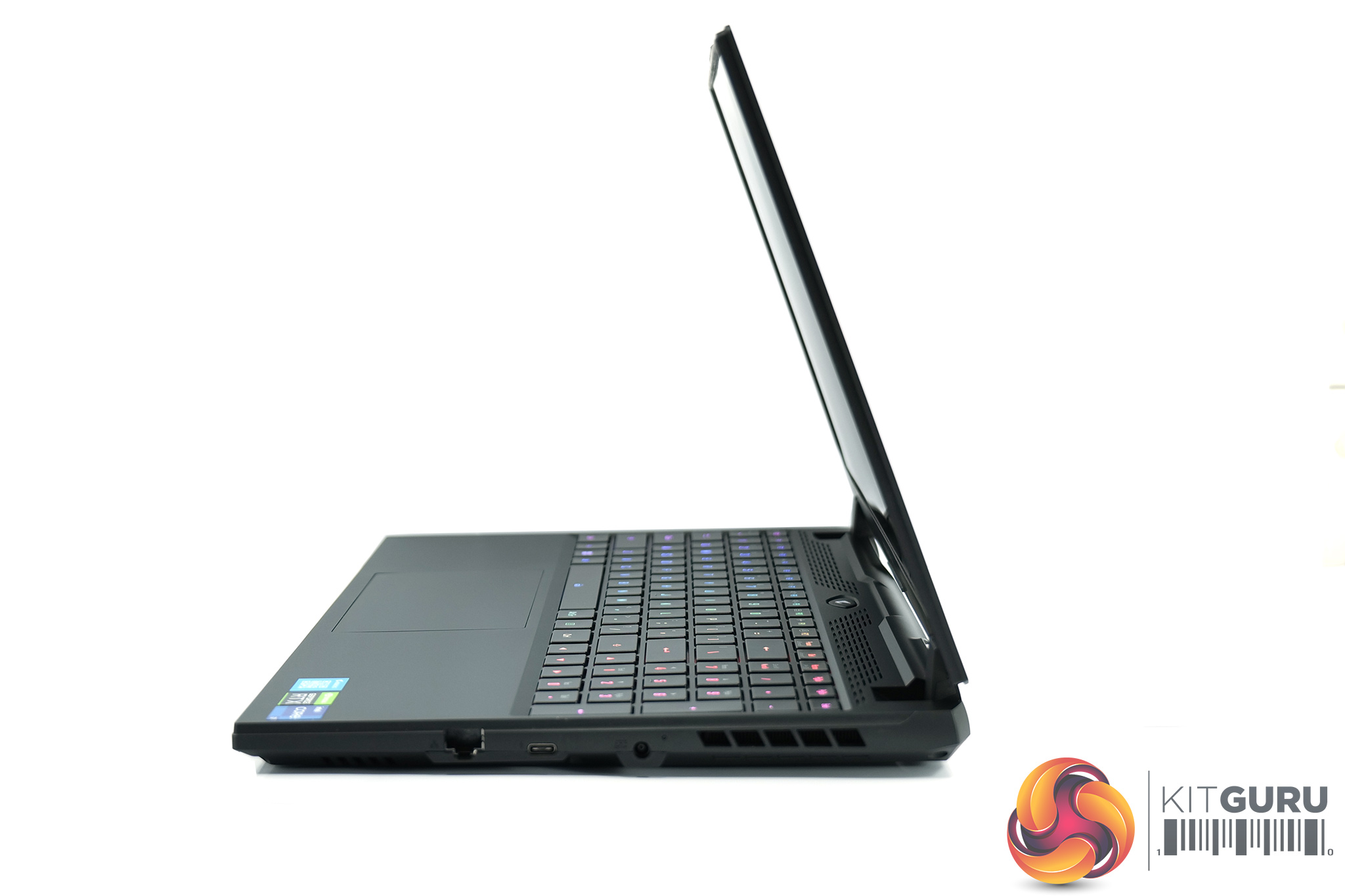
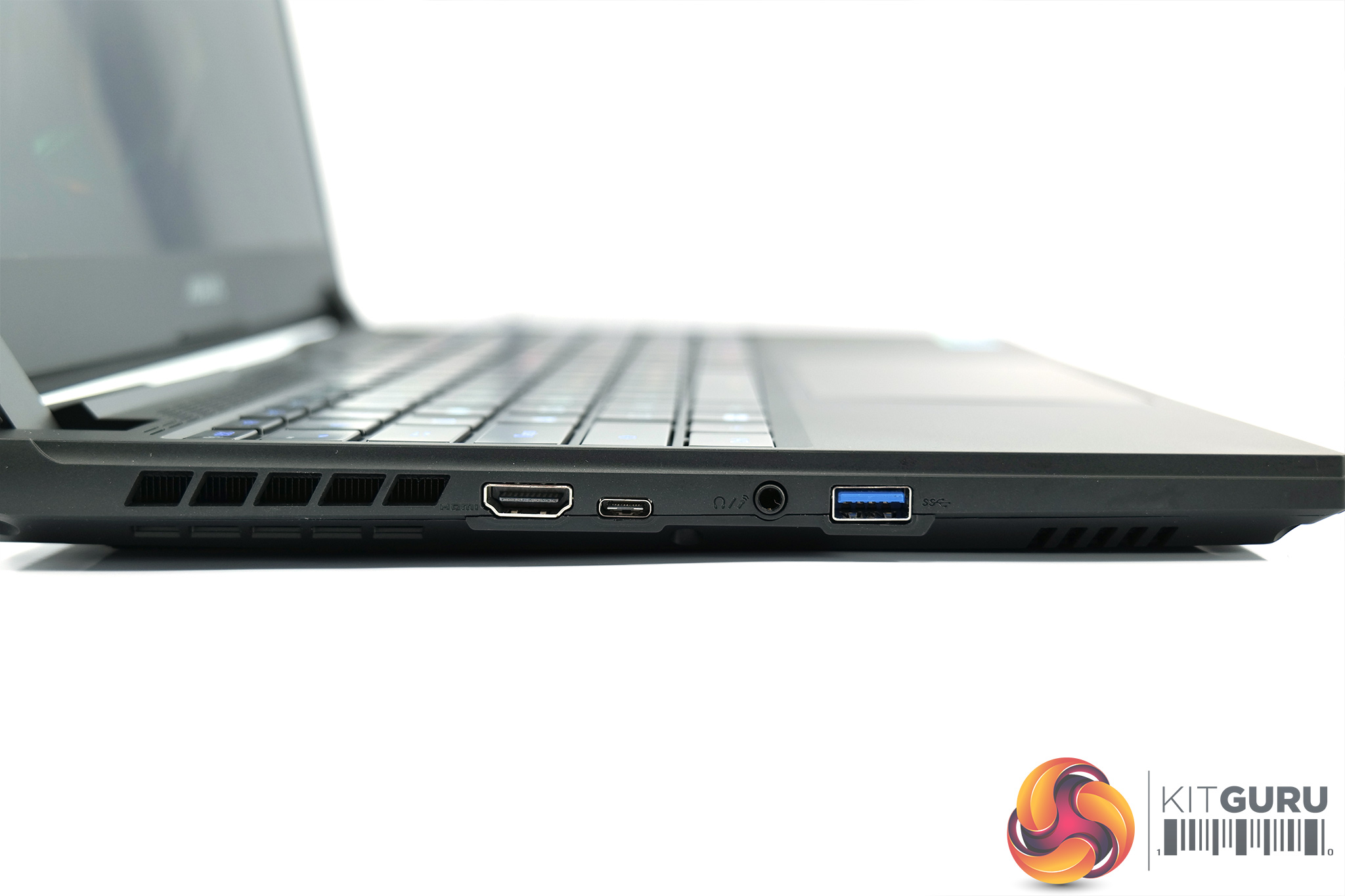
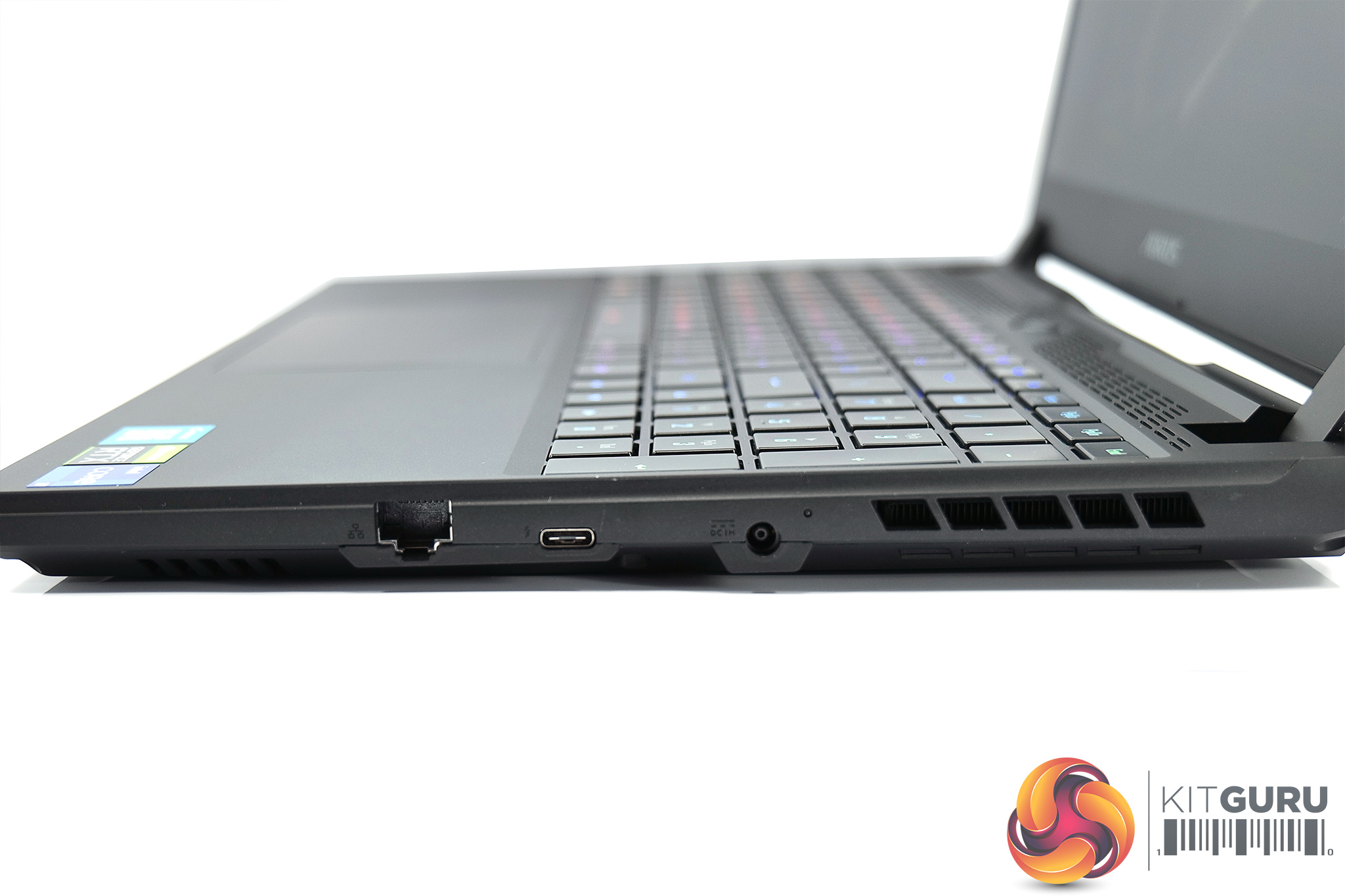
Unfortunately, I'm less keen on the selection of ports and connectors Gigabyte has fitted to the Aorus 15. The left-hand edge is home to a HDMI 2.1 output, USB 3.2 Gen1 (5Gbps) Type-C, an audio jack and one USB 3.2 Gen1 (5Gbps) Type-A port. Over on the right-hand side, there's the power input, a Thunderbolt 4 (Type-C) port and Ethernet. For me, this is very disappointing for a machine of this calibre. Two Type-C ports is fine, especially with one being Thunderbolt, but only one type-A port?! And no SD card reader either – I'd understand if this was a super thin-and-light machine, but for a gaming laptop of this calibre, this feels very weak to me.
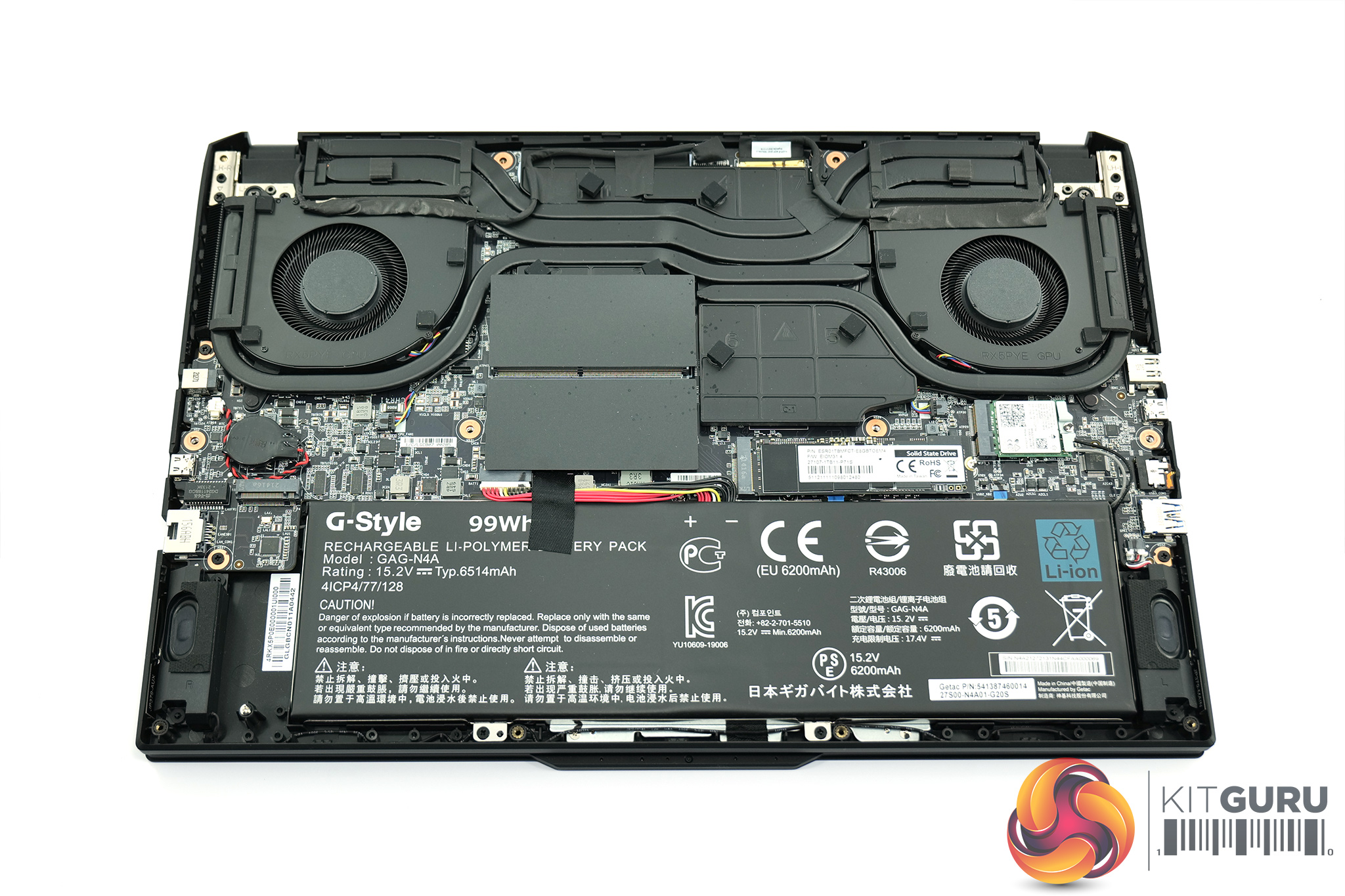
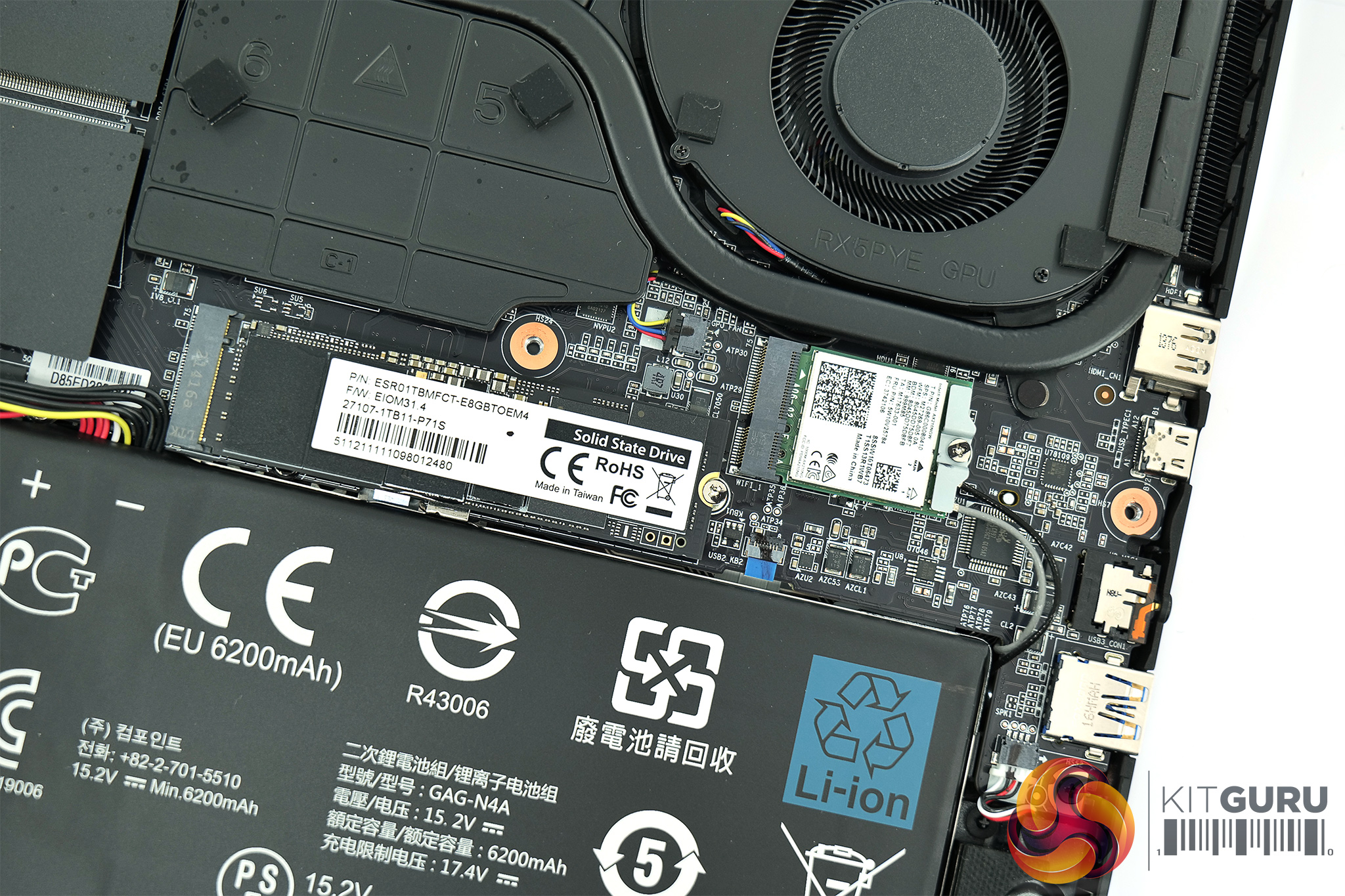
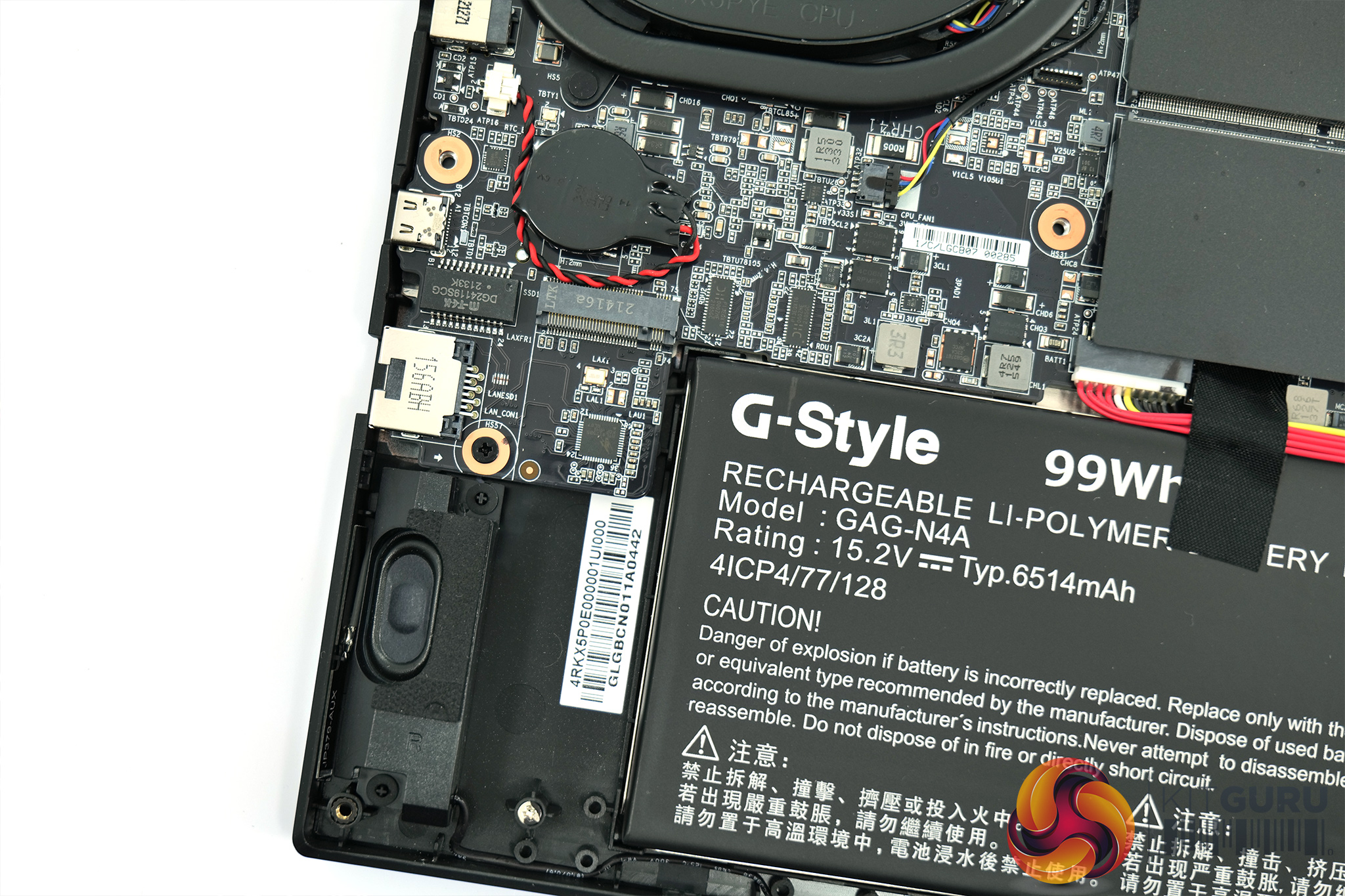
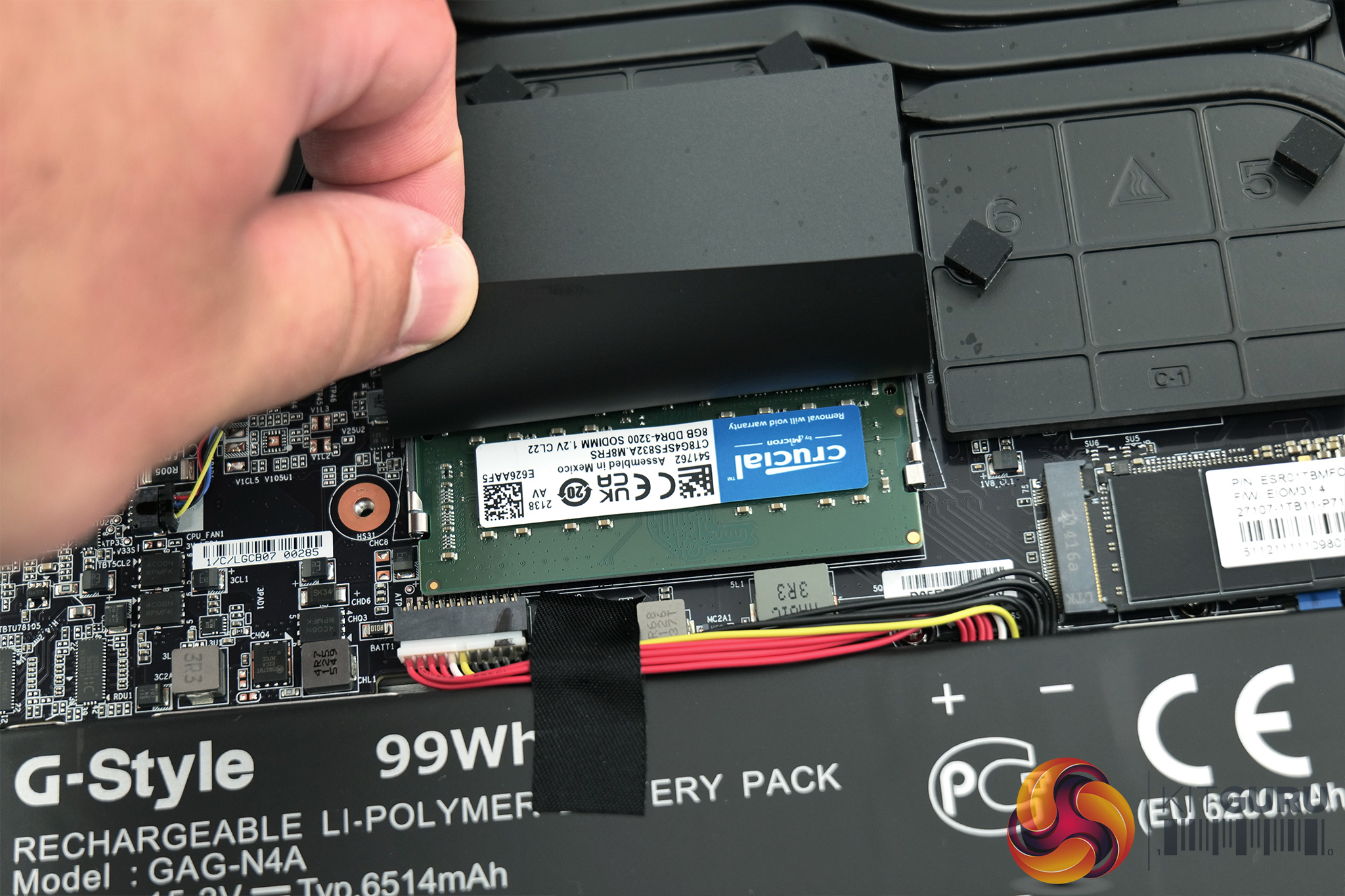
As for the internals, here things are fairly standard for a gaming laptop in 2022. First off we can see the large 99Whr battery, while on the right side, we can note a 1TB M.2 NVMe SSD and the Intel AX210 WiFi 6E M.2 chip. 1TB of storage isn't a ton, but there is a spare PCIe 4.0 M.2 slot to the left of the battery. We can also note two SODIMM slots, both occupied by 8GB DDRR4 modules from Crucial, for 16GB total. This is of course upgradeable, but as both slots are occupied you'd be left with the original modules if you did swap in new 16GB sticks.
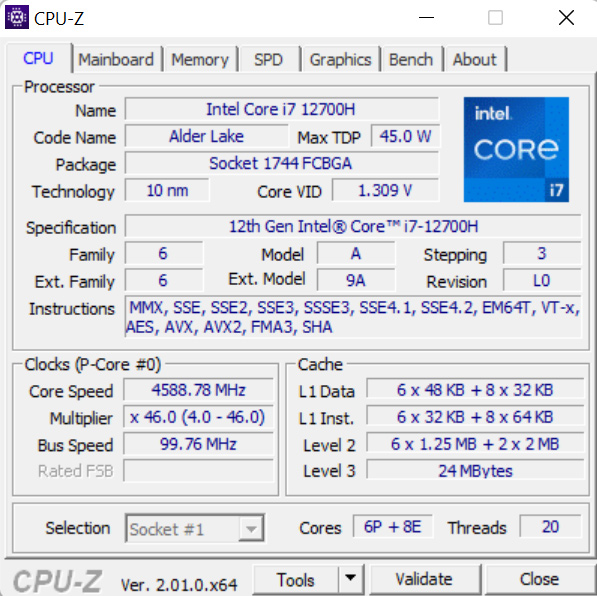
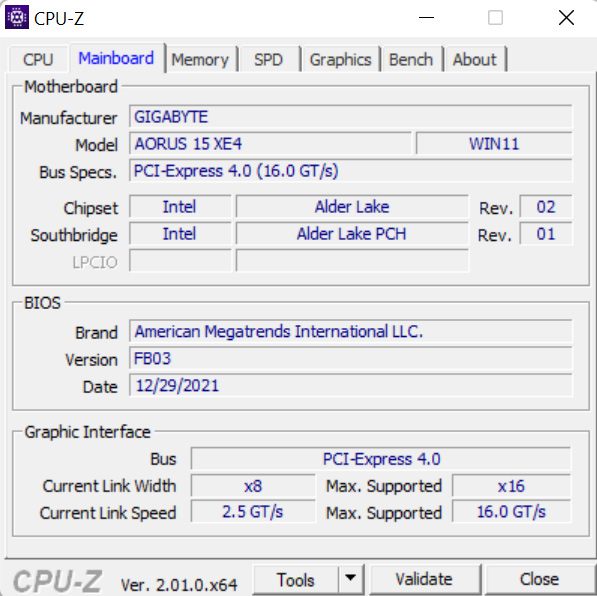
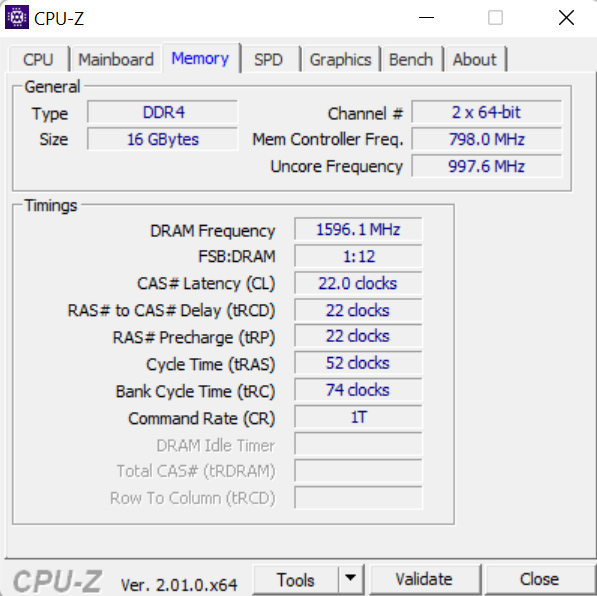
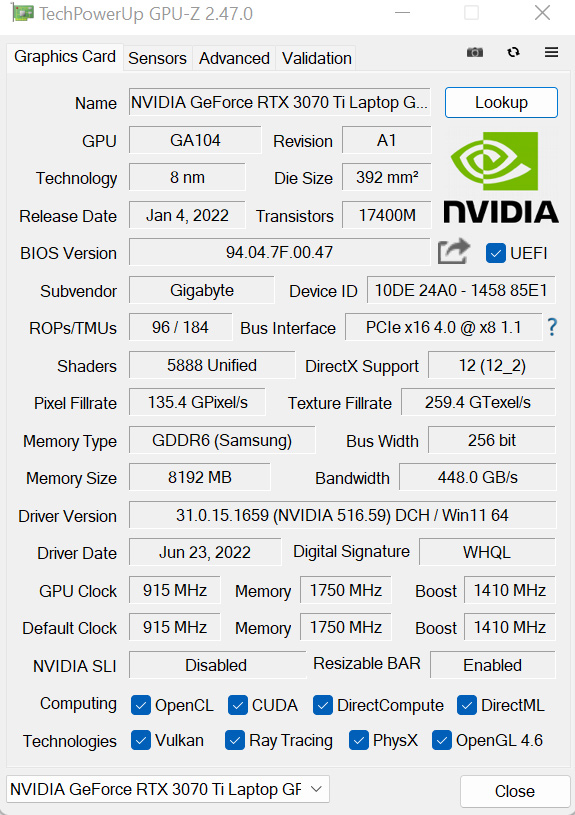
Lastly, just confirming the core spec of the machine with CPU-Z and GPU-Z, the processor is Intel's i7-12700H, offering six P-cores and eight E-cores, with a default 45W power budget. 16GB of Crucial DDR4 is supplied, rated at 3200MHz, with 22-22-22-52 timings. Graphics horsepower is provided by the RTX 3070 Ti Laptop chip, configured with a 130W power budget.
We test in the out-of-the-box state with minimal adjustments made to the laptop, other than installing our test software and Windows updates.
The Aorus 15 XE4, and all other laptops, are tested using their ‘Balanced’ fan and power profile (or equivalent).
Comparison Systems:
- MSI Katana GF66 12UE:
- Intel Core i7-12700H (6 P-cores, 8 E-cores, up to 4.7GHz Turbo, 35-115W Rated TDP)
- 16GB (2x8GB) DDR4 3200MHz SODIMM
- Nvidia GeForce RTX 3060 Laptop 6GB, up to 105W
- 15.6” 1920×1200 240Hz IPS-level
- 1TB Micron 2450 PCIe Gen4x4 NVMe SSD
- 53.5 Whr, 3-cell battery with 240W barrel-style power adapter
- Around 2.25kg weight with around 25mm chassis thickness
- MSI Crosshair 15 R6E B12UGZ-299UK:
- Processor: Intel Core i7-12700H (6 P-cores, 8 E-cores, up to 4.7GHz Turbo, 35-115W Rated TDP)
- Memory: 32GB (2x16GB) DDR4 3200MHz SODIMM
- Graphics Card: Nvidia GeForce RTX 3070 Laptop 8GB, up to 140W
- Display: 15.6” 2560×1440 165Hz IPS-level
- System Drive: 1TB Micron 2450 PCIe Gen4x4 NVMe SSD
- Battery: 90 Whr, 4-cell battery with 240W barrel-style power adapter
- Design: Around 2.47kg weight with around 27mm chassis thickness
- ASUS ROG Flow Z13 (Core i9-12900H System):
- Intel Core i9-12900H (6 P-cores, 8 E-cores, up to 5.0GHz Turbo, 35-115W Rated TDP)
- 16GB LPDDR5 5200MHz
- Nvidia GeForce RTX 3050 Ti 4GB GDDR6, Mux switch
- 13.4” 16:10 WUXGA 1920×1200 120Hz IPS-level
- 1TB Micron 2450 PCIe Gen4x4 NVMe SSD
- 56 Whr battery with 100W USB-C Power Adapter
- Around 1.1-1.2kg weight with around 12mm chassis thickness
- ASUS ROG Zephyrus G14 GA402RK (Ryzen 9 6900HS System):
- AMD Ryzen 9 6900HS (8C/16T, 3.3GHz Base, up to 4.9GHz Boost 35W Rated TDP Mode)
- 32GB DDR5 4800MHz
- AMD Radeon RX 6800S 8GB GDDR6
- 14” 16:10 QHD+ 2560×1600 120Hz IPS-level
- 1TB Micron 2450 PCIe Gen4x4 NVMe SSD
- 76 Whr battery with 240W barrel-style Power Adapter (100W USB-C support)
- 1.75kg weight with around 18.5mm chassis thickness
- ASUS ROG STRIX G17 G713QR (Ryzen 9 5900HX ‘Cezanne' System):
- AMD Ryzen 9 5900HX (8C/16T, up to 4.6GHz Boost, 45W Rated TDP)
- 32GB DDR4 3200MHz SODIMM
- RTX 3070 Laptop GPU 8GB GDDR6 115W
- 17.3-inch FHD (1920 x 1080) 16:9 300Hz IPS-level
- 1TB SK Hynix BC711 PCIe Gen 3×4 NVMe SSD
- 90 Whr battery with 240W barrel-style Power Adapter
- 2.70kg weight with 23.4-28.3mm chassis thickness
- Gigabyte U4 UD-70UK823SO (Core i7-1195G7 ‘Tiger Lake’ System)
- Intel Core i7-1195G7 (4C8T, 28W Rated TDP-up Mode)
- 16GB DDR4 3200MHz (8GB onboard, 8GB SODIMM)
- Integrated Intel Iris Xe iGPU (96 EUs)
- 14″ IPS Full HD 1920×1080 60Hz
- 512GB ESR512GTLG-E6GBTNB4 PCIe Gen4x4 NVMe SSD
- 36 Whr battery with 65W barrel-style Power Adapter
- Slightly below 990g weight with 16.5mm chassis thickness
- Razer Blade Stealth 13 OLED (Core i7-1165G7 ‘Tiger Lake’ System)
- Intel Core i7-1165G7 (4C8T, 28W Rated TDP)
- 16GB LPDDR4 4266MHz
- Nvidia GTX 1650 Ti Max-Q
- 13.3″ OLED Full HD Touch 60Hz
- 512GB Samsung NVMe SSD
- 53.1 Whr battery with 100W USB-C Power Adapter
- 1.41kg weight with 15.3mm thickness
- ASUS ZenBook Flip S OLED UX371 (Core i7-1165G7 ‘Tiger Lake-U’ System):
- Intel Core i7-1165G7 (4C/8T, 1.2GHz Base, 12W Rated TDP-down Mode)
- 16GB LPDDR4X 4266MHz
- Integrated Intel Iris Xe iGPU (96 EUs up to 1.3GHz)
- 13.3” 16:9 UHD 3840×2160 60Hz OLED Touch Display
- 1TB WD SN730 NVMe SSD
- 67 Whr battery with 65W USB-C Power Adapter
- 1.2kg weight with 11.9-13.9mm chassis thickness
- ASUS ZenBook 13 UM325S (Ryzen 7 5800U ‘Cezanne' System):
- AMD Ryzen 7 5800U (8C/16T, 1.9GHz Base, up to 4.4GHz Boost, 15W Rated TDP)
- 16GB LPDDR4X 3733MHz
- Integrated Radeon Vega 8 APU (up to 2GHz)
- 13.3” 16:9 FHD 1920×1080 60Hz OLED Display
- 1TB SK Hynix (HFM001TD3JX013N) NVMe SSD
- 67 Whr battery with 65W USB-C Power Adapter
- 1.12kg weight with 13.9mm chassis thickness
CPU:
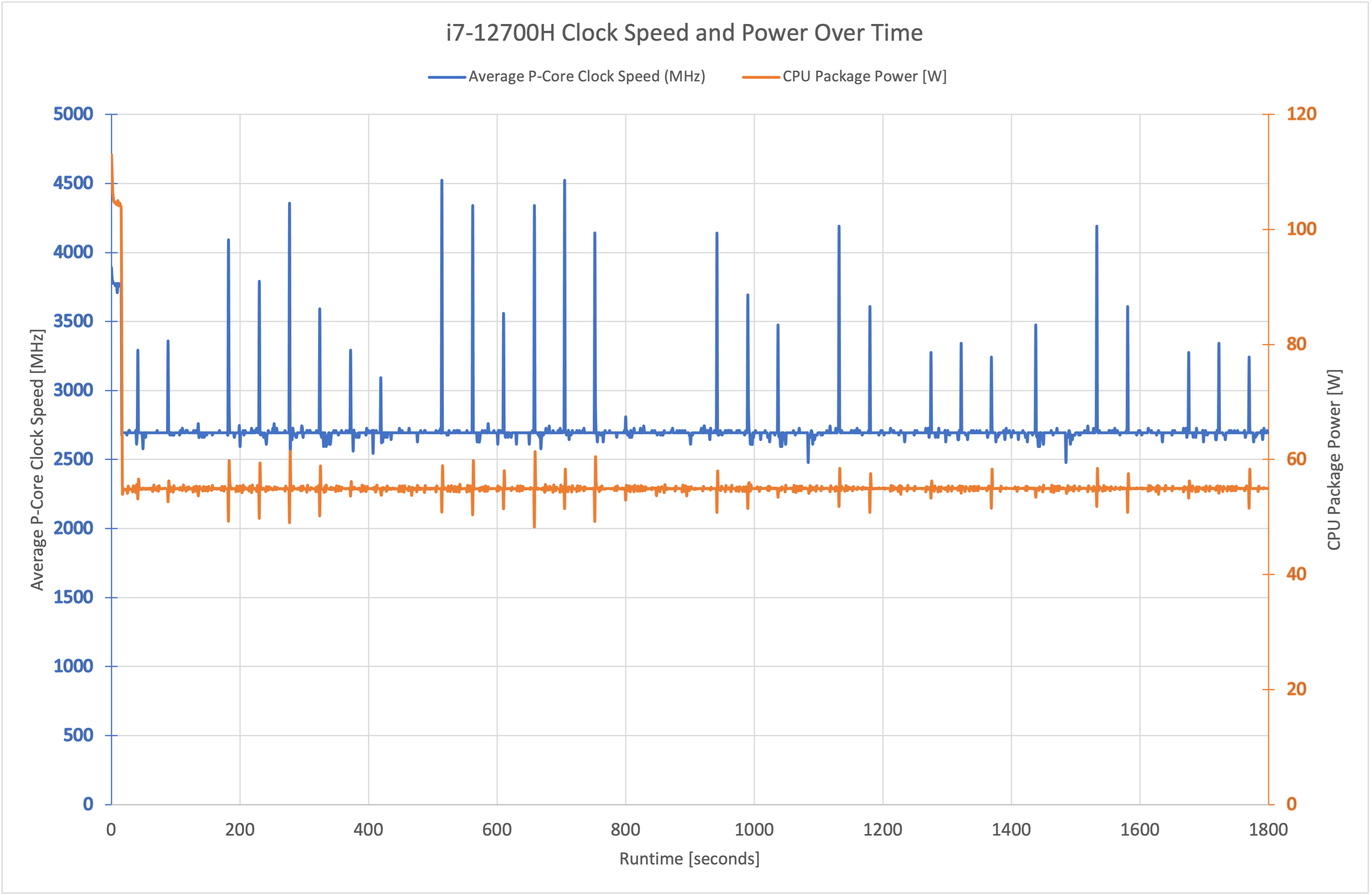
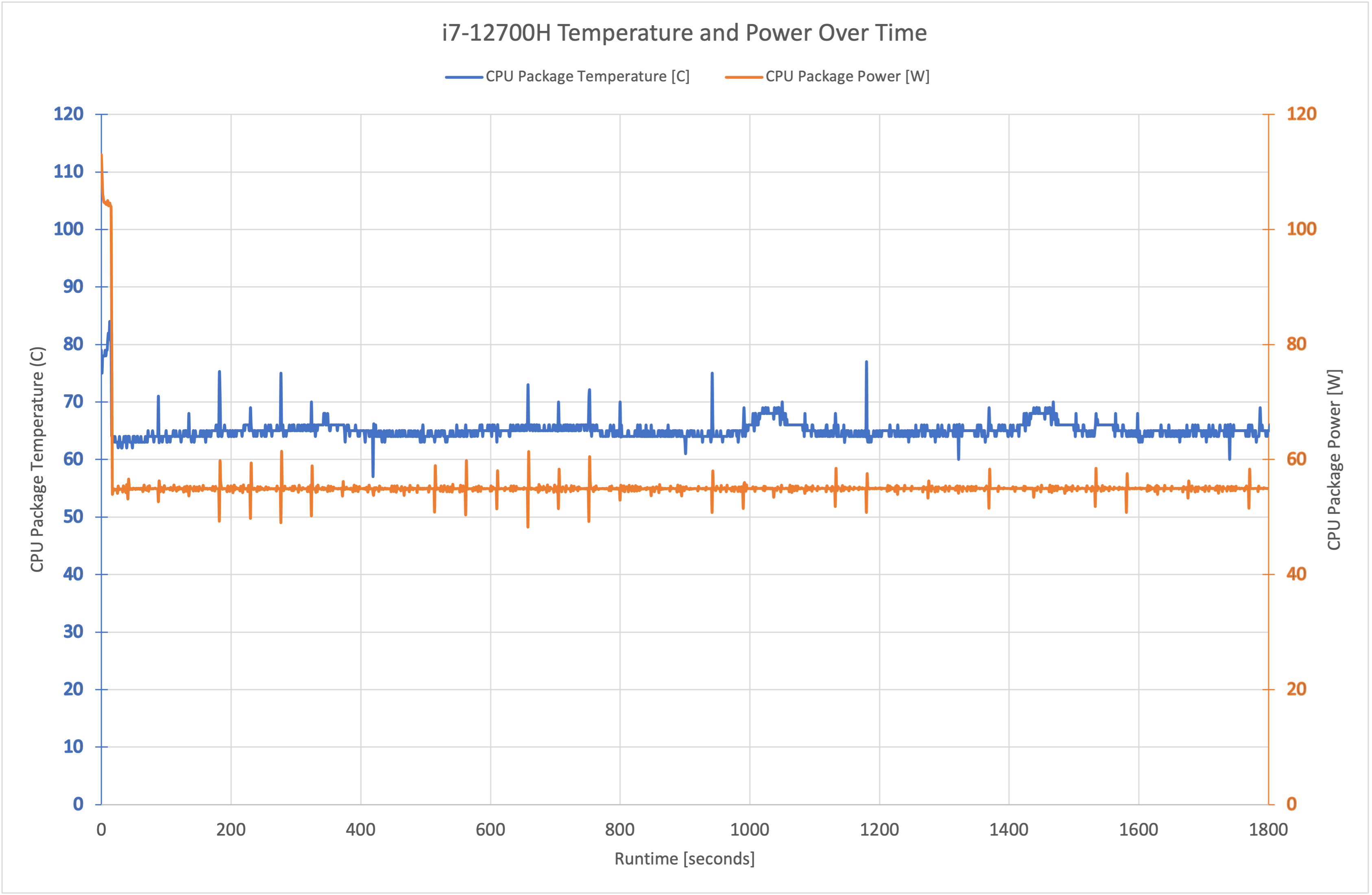
Starting with a look at default CPU behaviour, the i7-12700H draws 105W of power for a period just shy of 20 seconds, before quickly ramping down to 55W package power which it maintained for the rest of our 30-minute Cinebench R23 stress test. Clock speed for the P-cores similarly starts at 3.8GHz, before dropping down to hover at around 2.7GHz, occasionally flitting between 2.5-2.7GHz.
Package temperatures are kept very cool during this stress test, with some small variation but typically remaining below 70C during an extended workload, which is highly impressive.
GPU:
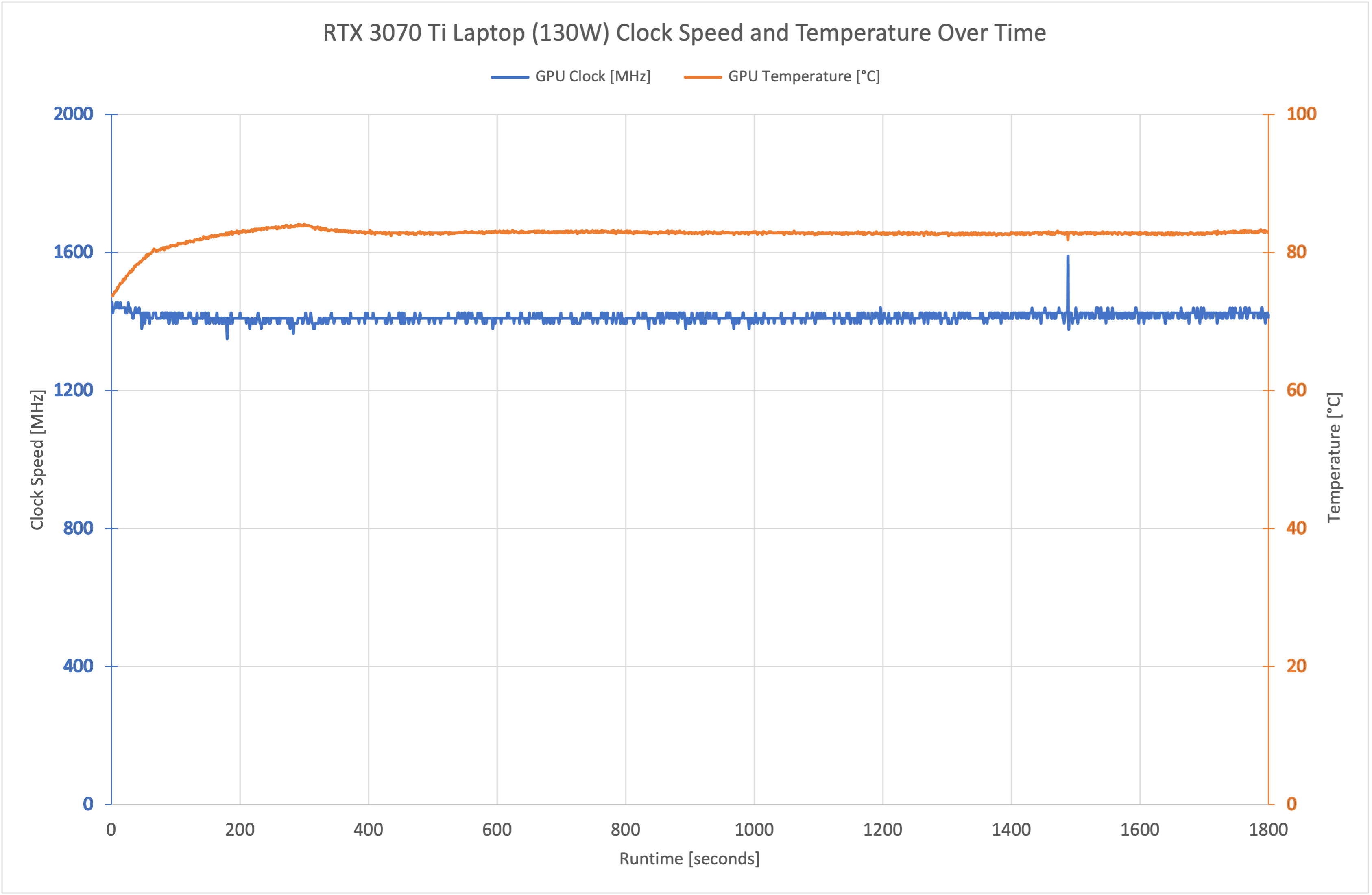
As for the GPU, the RTX 3070 Ti drew a consistent 130W across a 30-minute stress test in Cyberpunk 2077, with the core clock operating at an almost-fixed 1410MHz. GPU temperatures were well within safe limits, too, hitting 83C but no higher.
Noise:
The above thermal figures were recorded when using the Balanced fan profile. After 30 minutes of gaming, this produced 43dB of noise with the sound meter positioned 30cm away. There is also a Turbo fan profile, however I can't recommend this as noise hit 52dB and the thermal performance is fine using the Balanced mode anyway.
Battery:
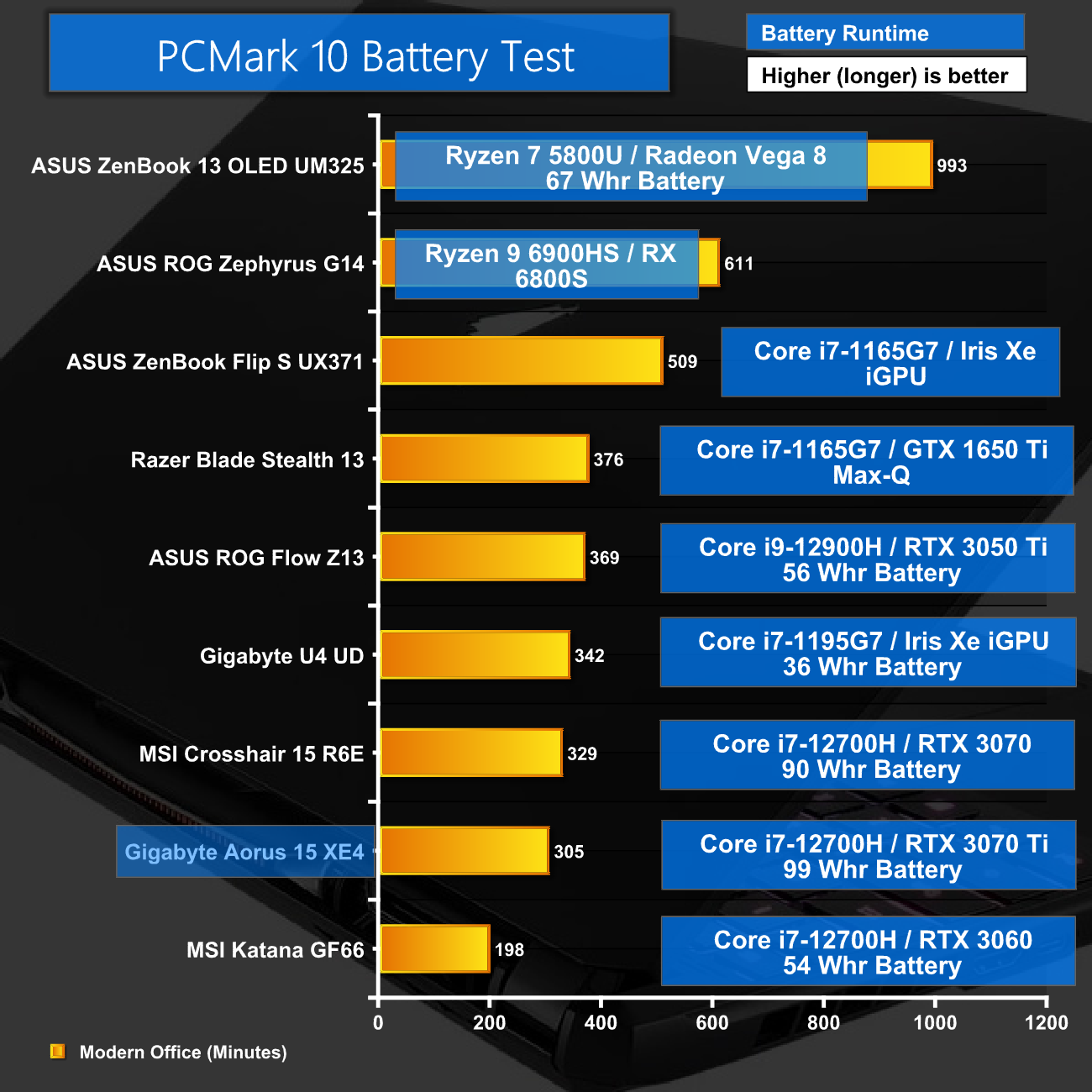
Battery life is OK for the Aorus 15. Despite the bigger battery than the MSI Crosshair 15 R6E, the CPU and GPU both draw more power so battery life is reduced by about 25 minutes. A run time of over 5 hours is still acceptable for light office tasks, but those who really need all-day battery would be better served by an ultrabook-style machine with a low-power CPU.
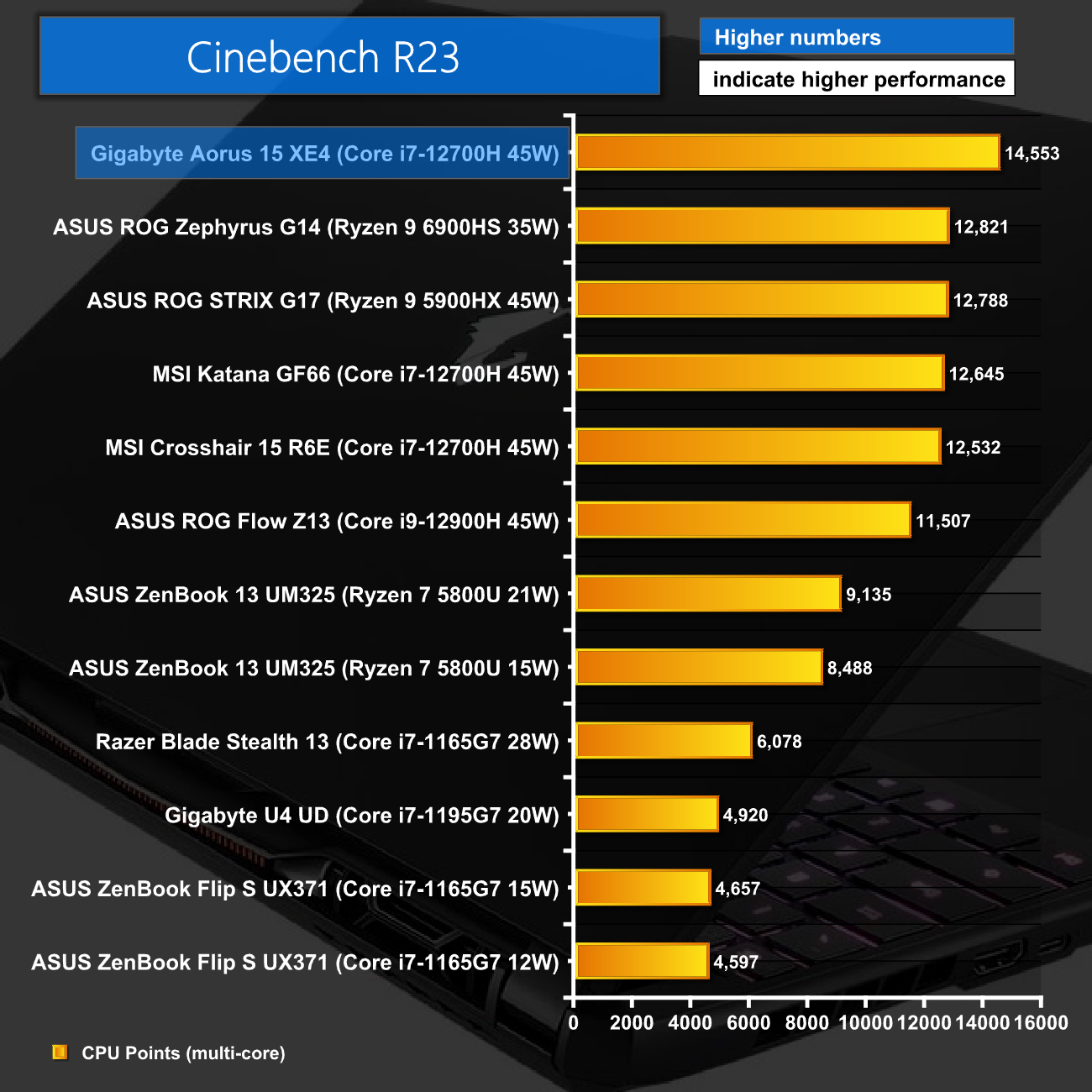
Cinebench R23 multi-core performance is very strong from the Aorus 15. Thanks to the relatively high sustained clock speed, it out-performs the likes of the MSI Crosshair 15 R6E by about 16%, as the MSI laptop managed to operate it's P-cores at 2.2GHz, compared to 2.7GHz for the Aorus 15.
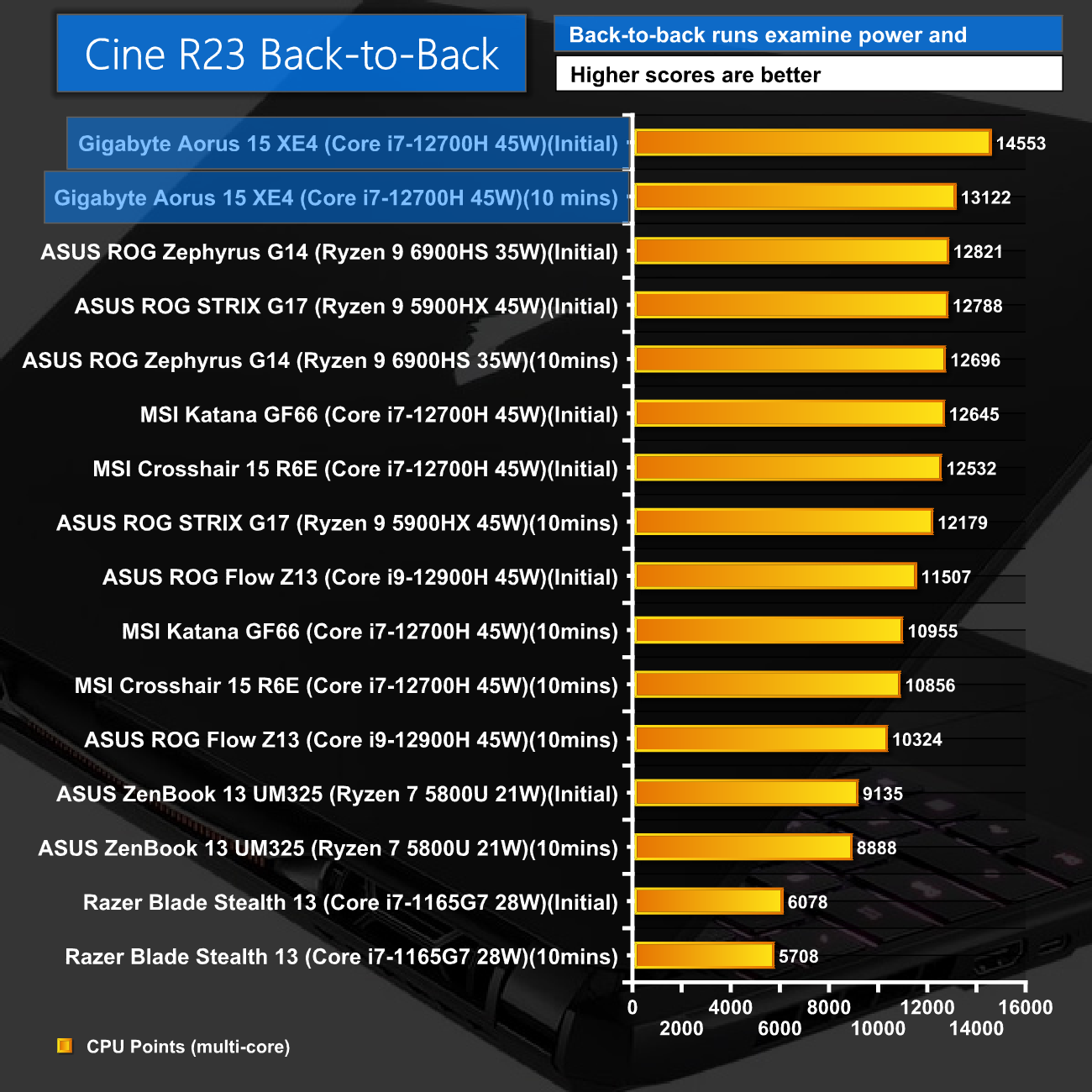
Even after ten minutes of Cinebench R23, performance remains high, with a score of 13122 – a reduction of around 10%.

Single-core performance is very similar to the other 12700H-based machines, but understandably lags behind the 12900H.
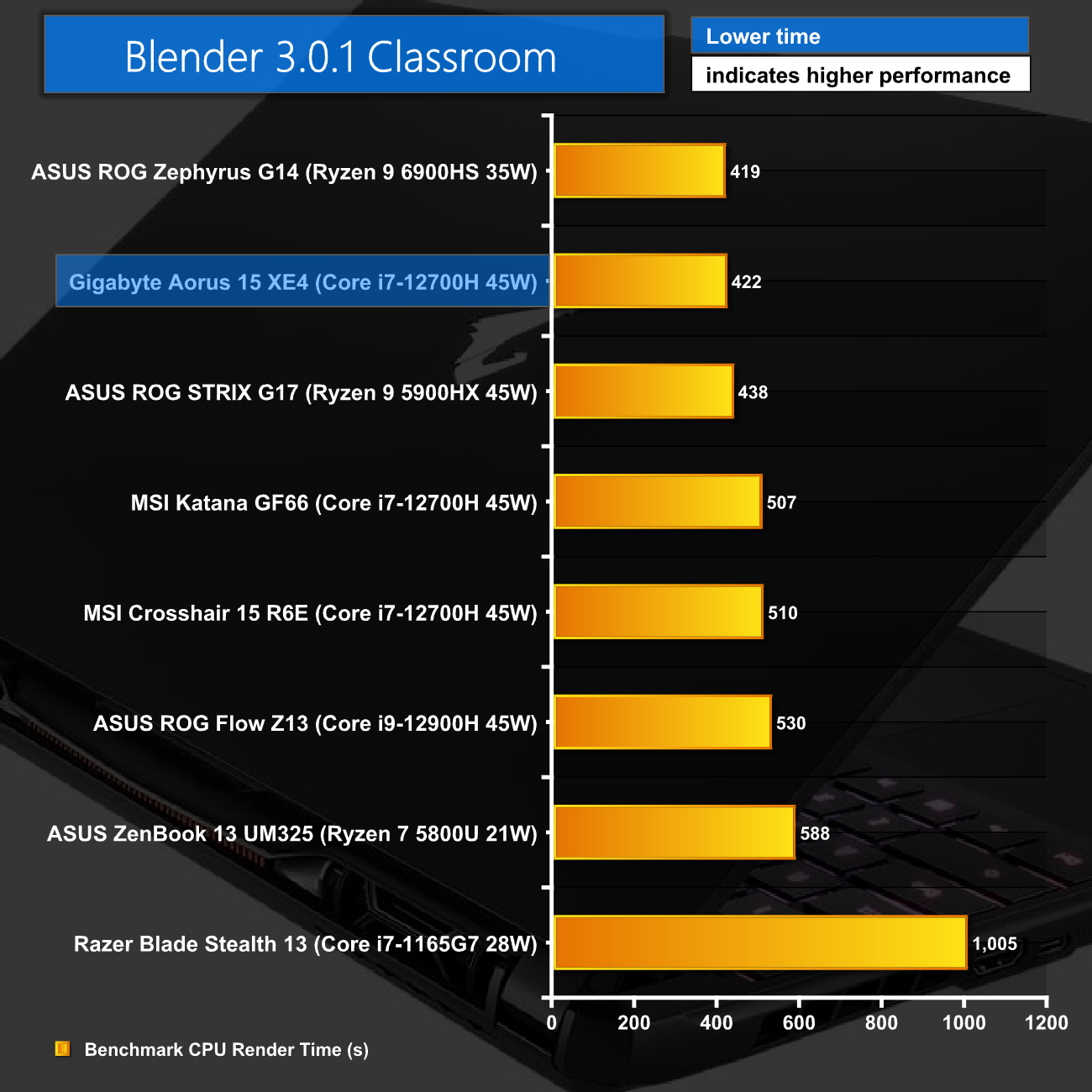
Likewise, Blender Classroom shows a good improvement in render times for the Aorus 15 compared to the other 12700H machines we have tested, once again due to the increased all-core speeds that the Gigabyte laptop is able to maintain.
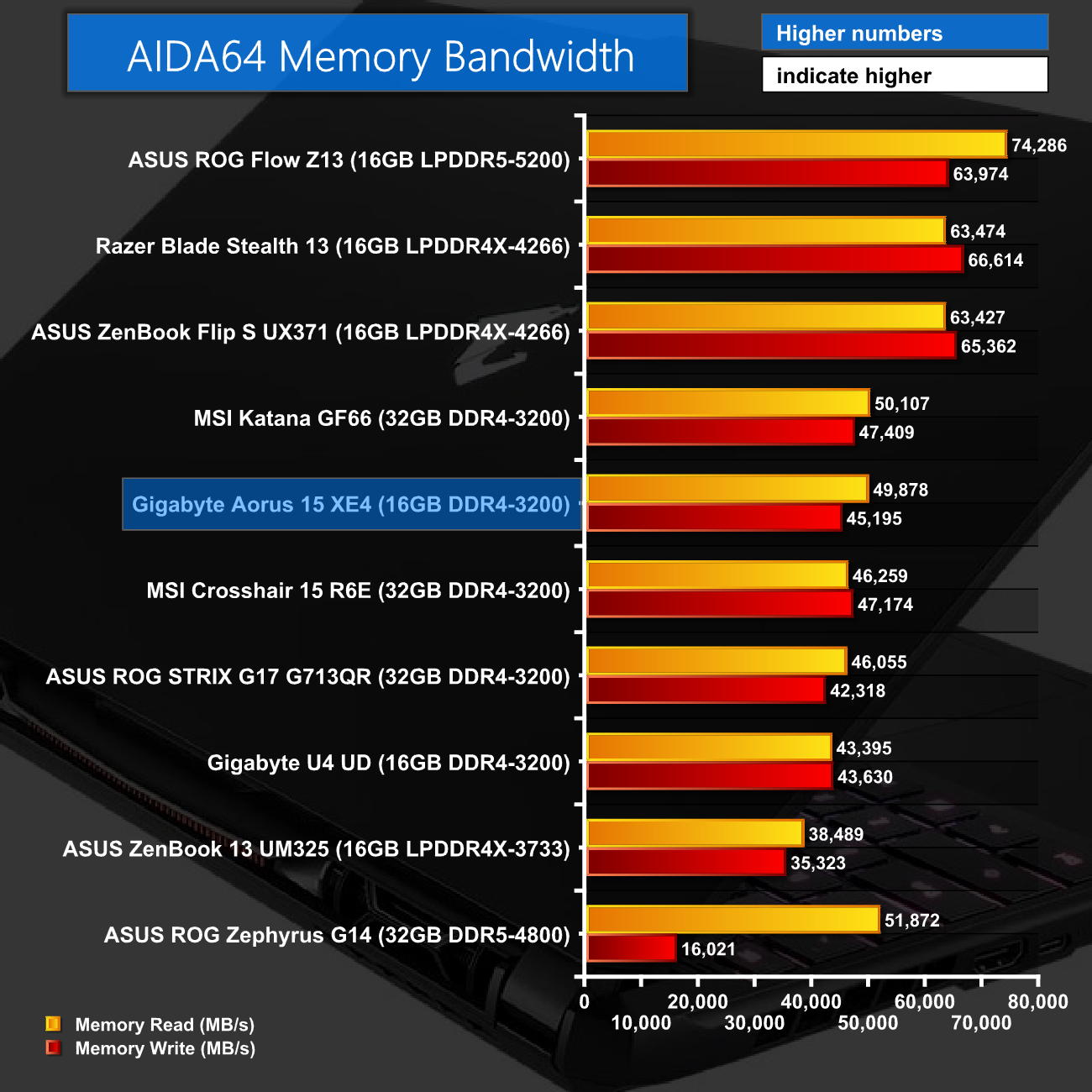
AIDA64 memory bandwidth performance is about where we'd expect from a 16GB kit running at 3200MHz. The write speed is perhaps a touch lower than the competition but not by a huge amount.

Similarly, aggregate memory bandwidth in SiSoft Sandra is right between other similarly-specced kits, coming in just shy of the 39GB/s mark.
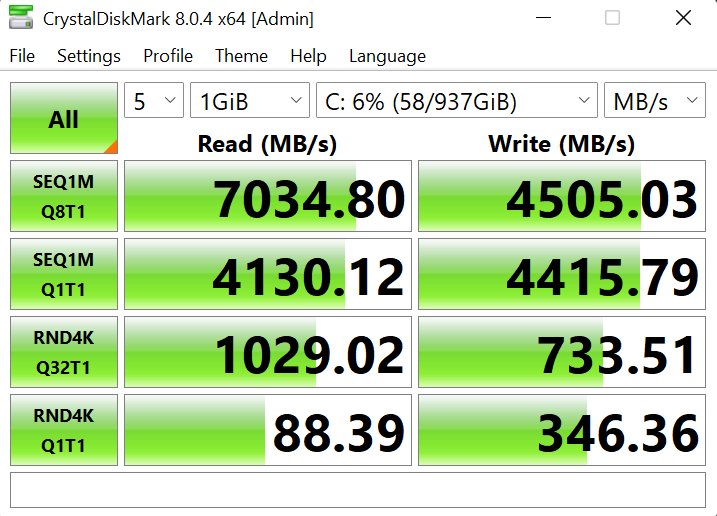
As for the SSD, we're not 100% sure who the OEM for this drive is, as almost nothing can be found online when searching the model number. Still, it is a PCIe 4.0 drive, with very fast reads at 7GB/s. The writes are a bit slower though, at 4.5GB/s, but for a gaming laptop of this class, I'd say drive performance is more than acceptable.
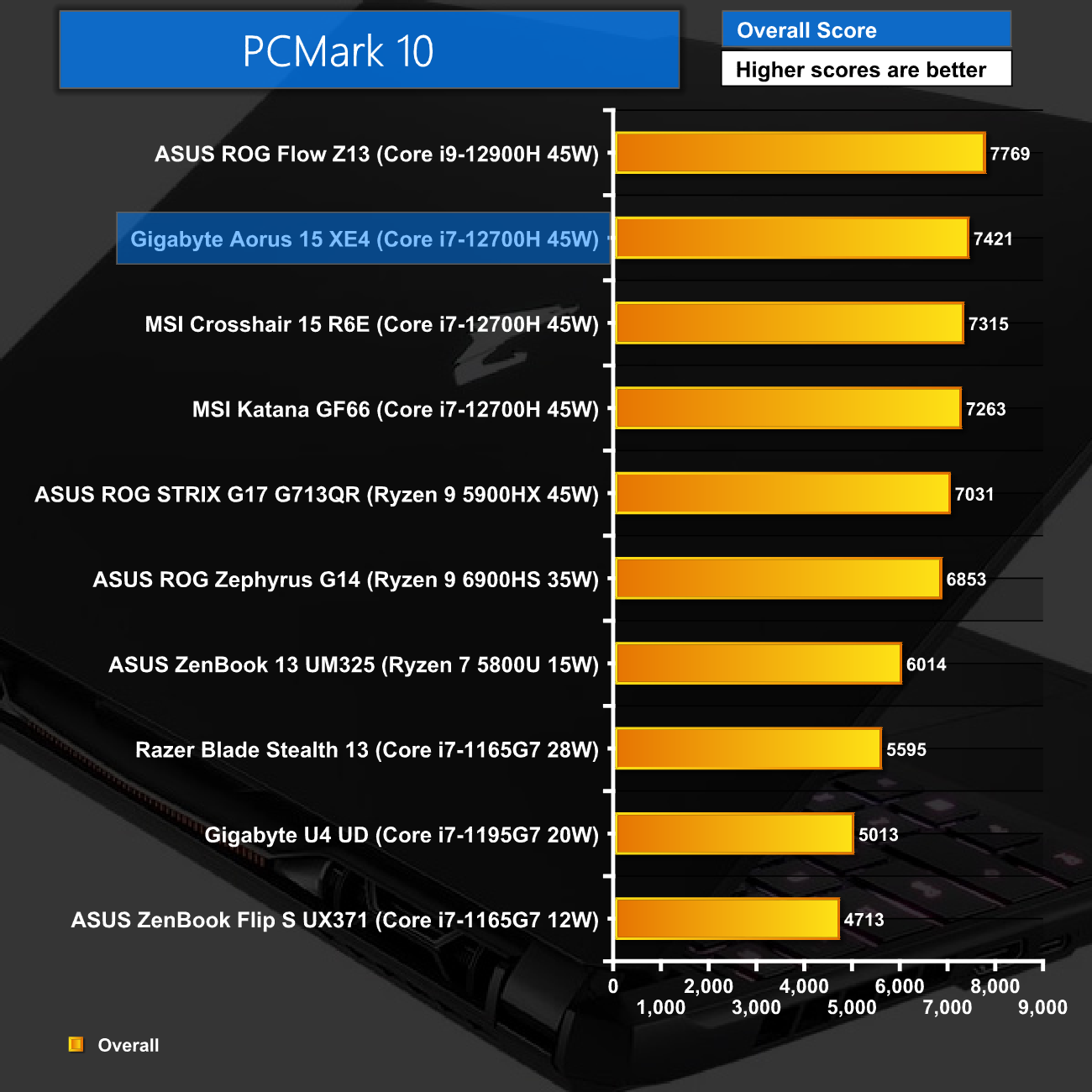
As for PCMark 10, the Aorus 15 is again competitive. The ROG Flow Z13, with its 12900H, does score a few hundred point more, but as an indicator of overall system performance, we can't complain with this result.
For gaming, we tested seven popular titles using maximum image quality presets at both 1080p and 1440p. Interestingly, it turns out that there is no Mux switch in the Aorus 15, which means the 12700H's iGPU may bottleneck performance from the 3070 Ti Laptop GPU. To put this to the test, I tested every game first using the laptop's built in display, but then again using an external monitor (which is fed directly by the dGPU, removing any potential bottlenecking).
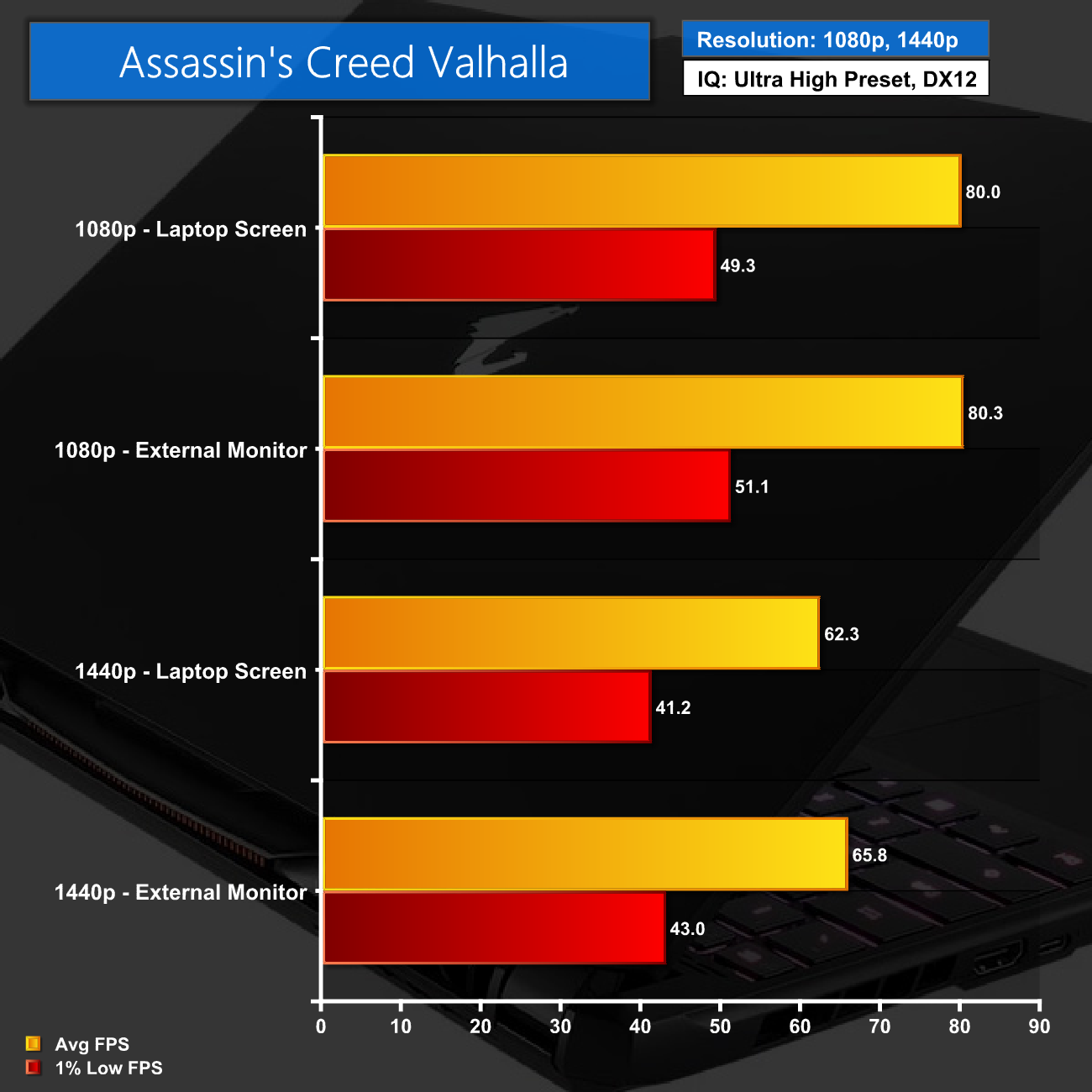
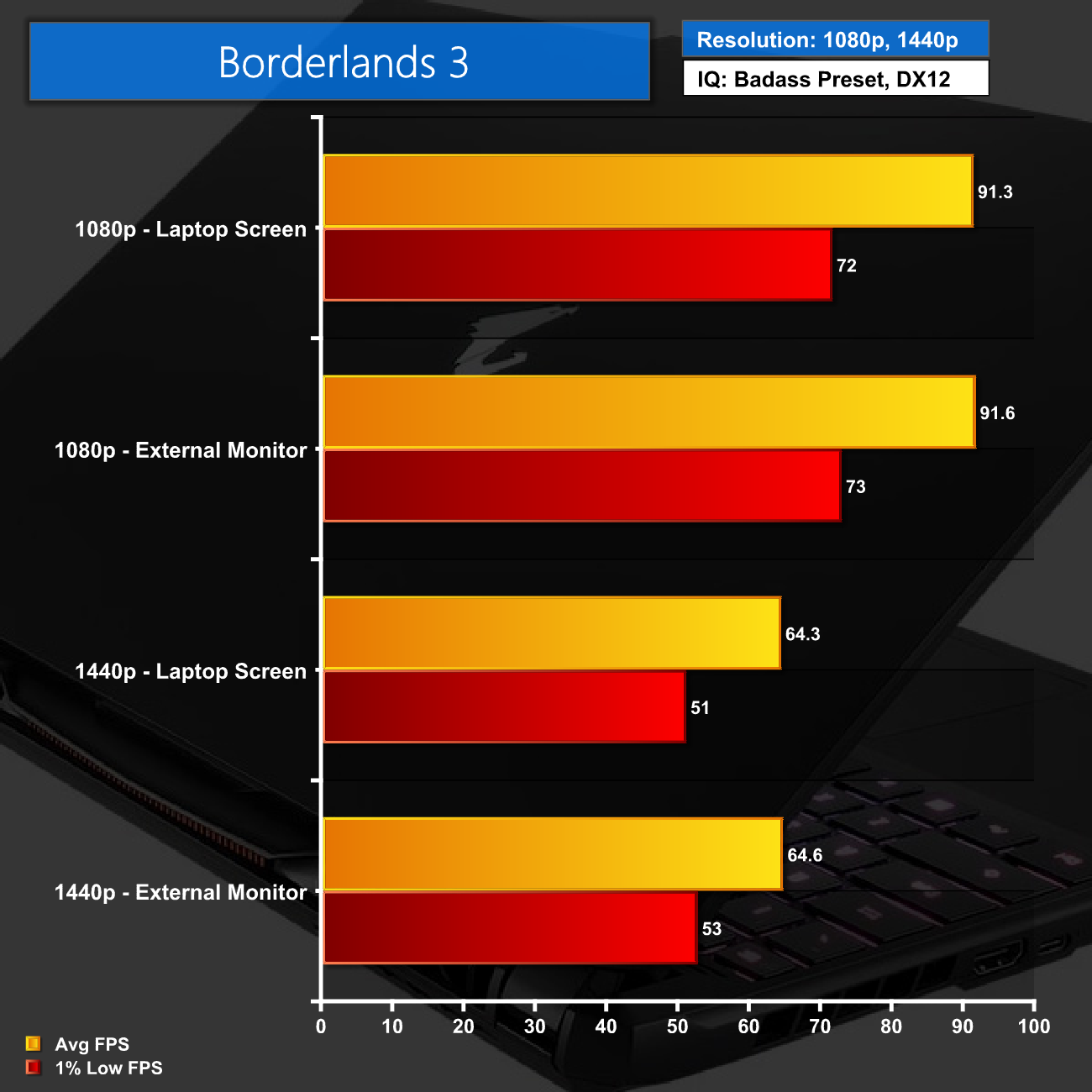
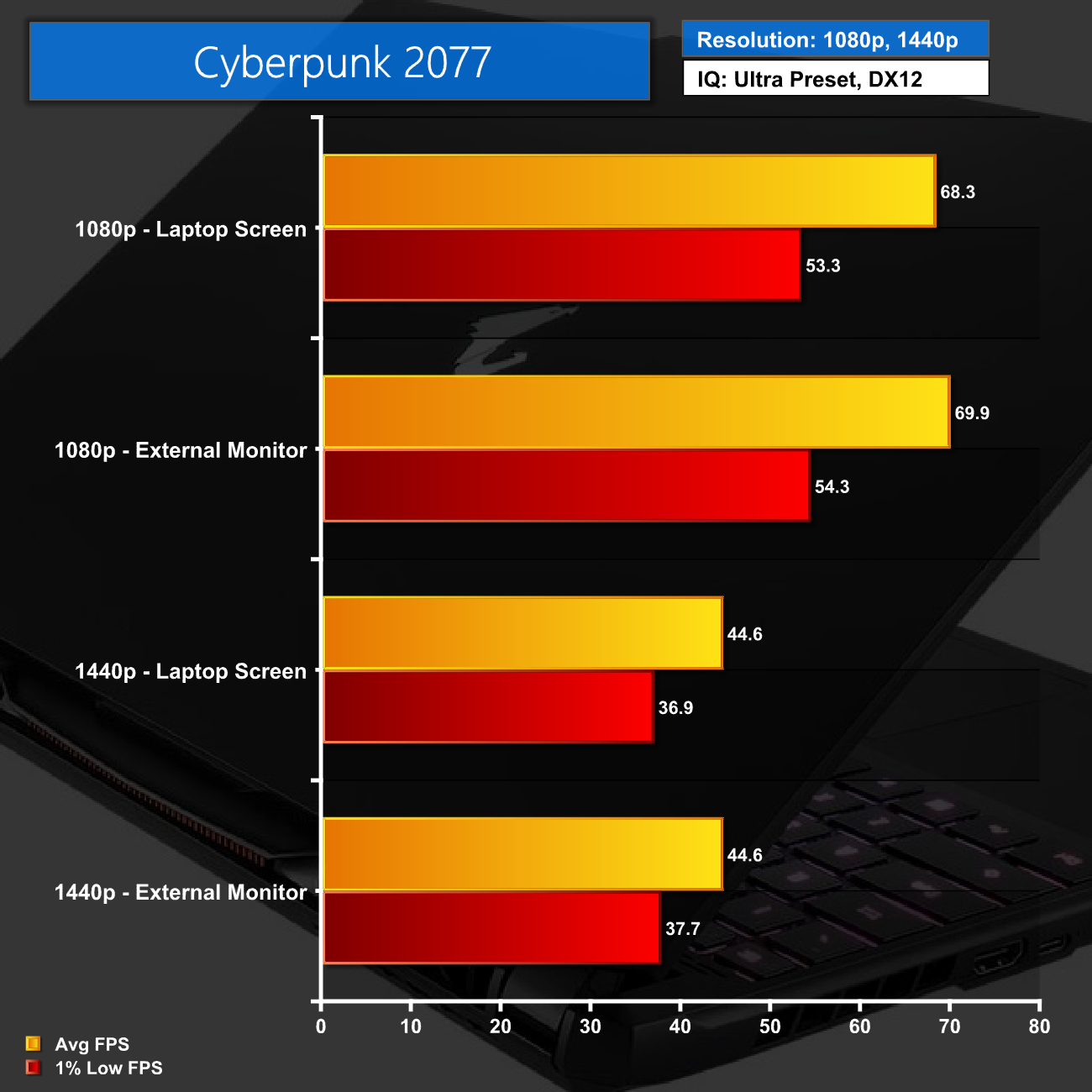
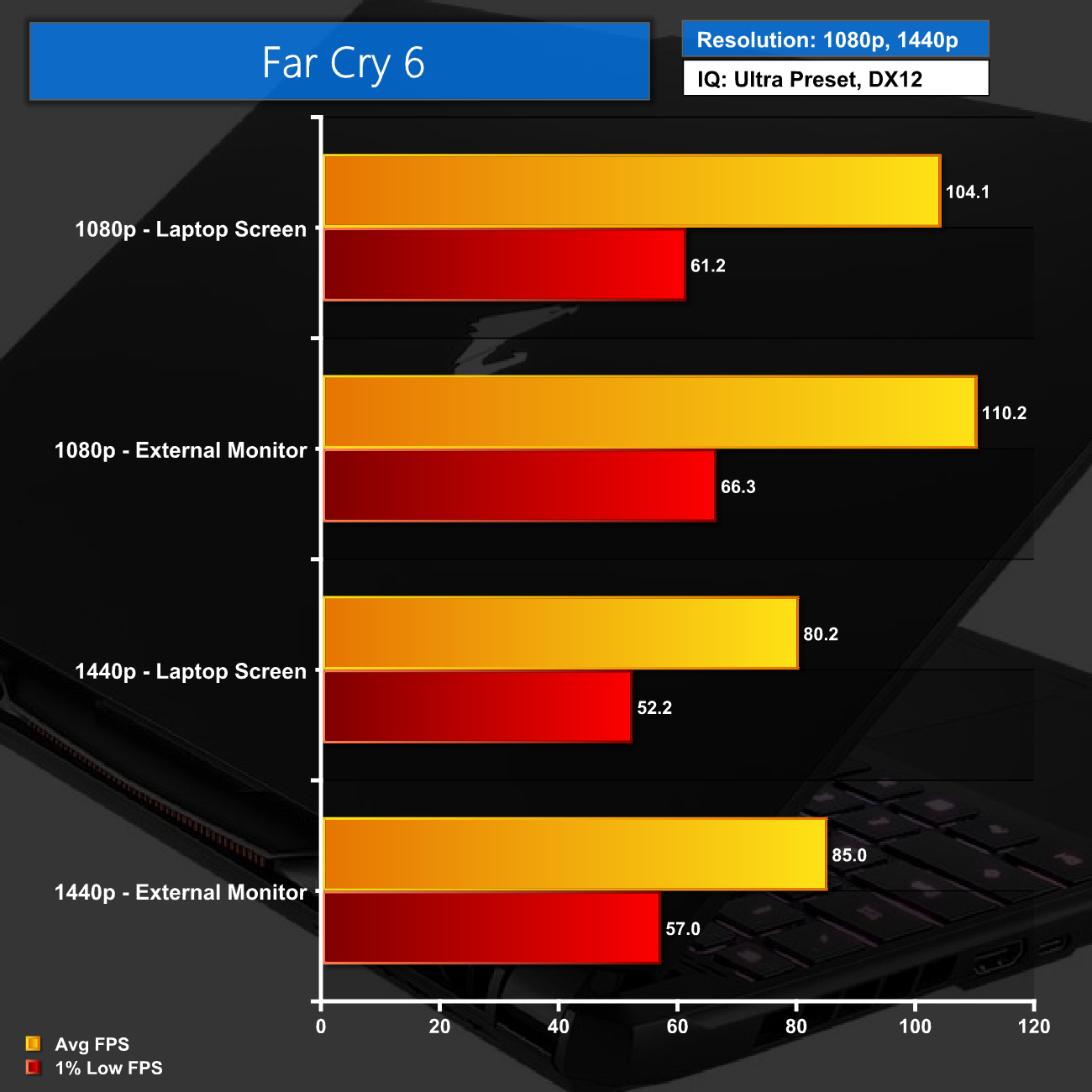
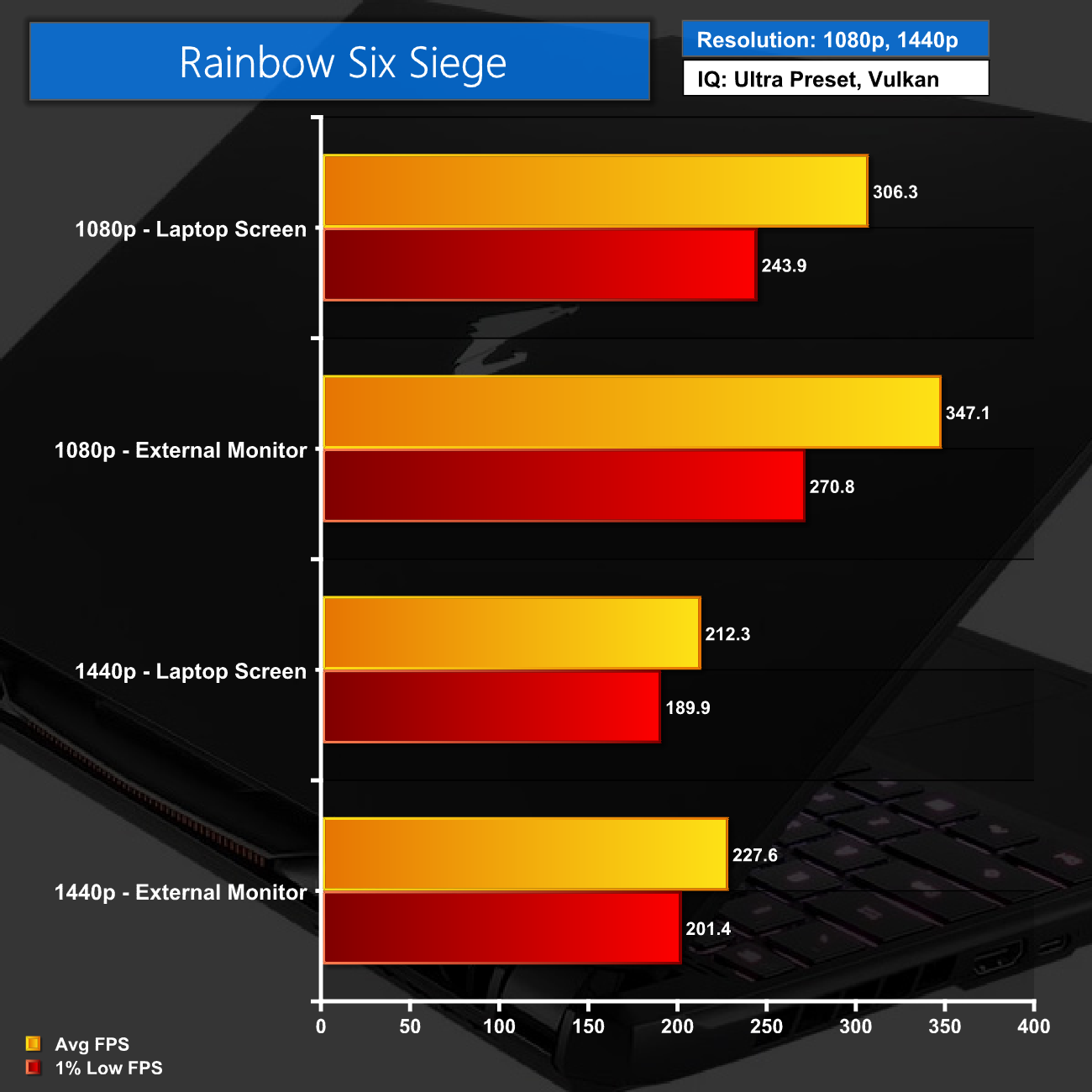
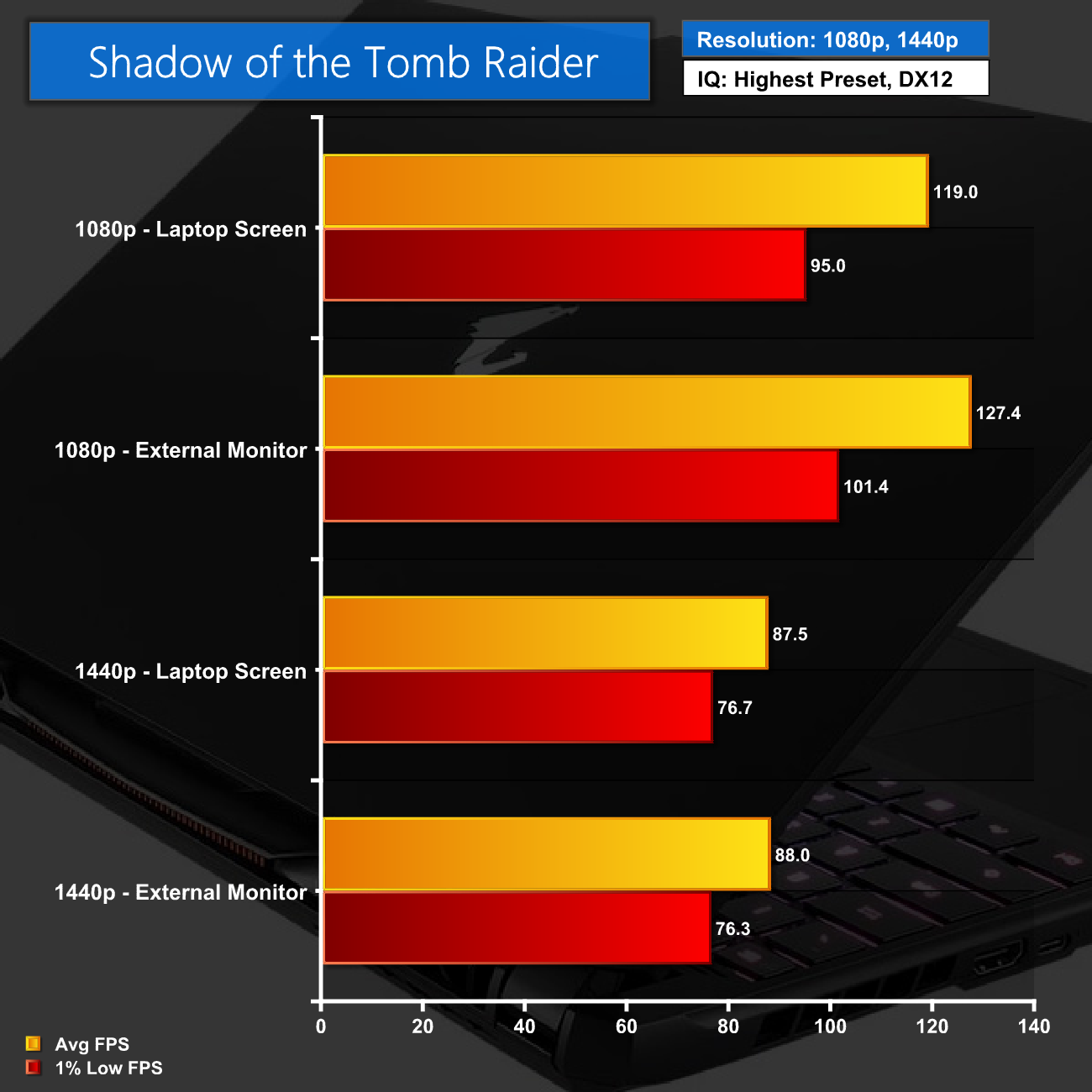
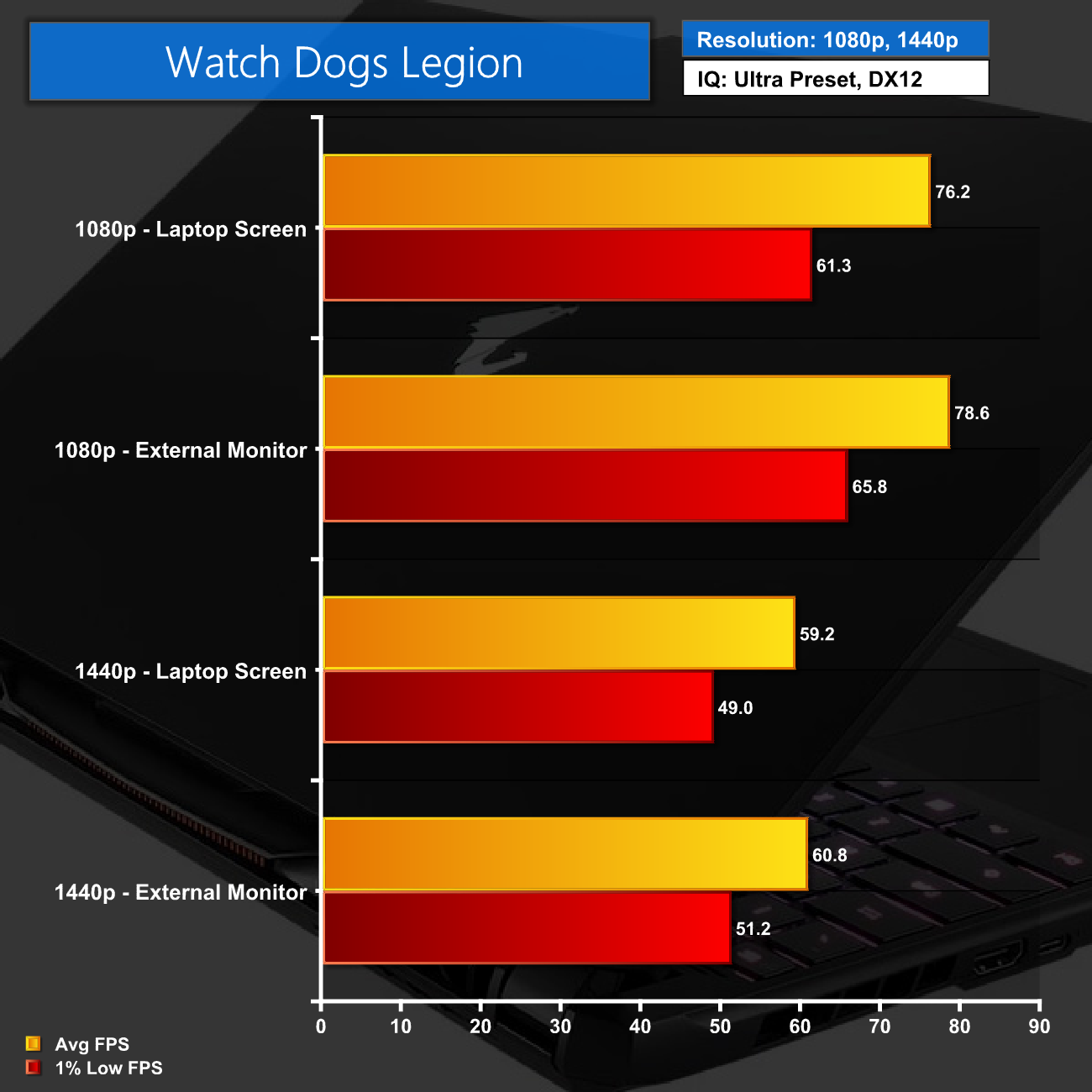
As we can see, overall gaming performance is certainly solid – as we would expect from the i7-12700H and RTX 3070 Ti! There are, however, a few occasions where the lack of a Mux switch does degrade performance. That doesn't apply to all games – Assassin's Creed Valhalla, Borderlands 3 and Cyberpunk all see next to no change – but in the likes of Far Cry 6, Shadow of the Tomb Raider and Rainbow Six Siege, there is much more of a pronounced difference.
It's also worth pointing out that although the laptop is fitted with a 1440p display, for mobile hardware this can be a tough ask in demanding titles like Cyberpunk when using Ultra settings. For esports titles however, we averaged over 200FPS in Rainbow Six Siege.
With a recent price reduction, the Gigabyte Aorus 15 XE4 has proved well worth looking at. Now retailing at £1750, this laptop packs in a lot of hardware for the money, including Intel's i7-12700H, the RTX 3070 Ti Laptop GPU, 16GB DDR4 and a 1TB NVMe SSD.
When it comes to gaming, it certainly delivers – frame rates are strong across the board, and while you won't hit 60FPS in every title at 1440p with maximum image quality settings, there's no denying the mobile horsepower on offer here.
The 1440p screen is a great addition, too. Many other machines with a 3070 Ti around this price point use 1080p panels, but I personally think QHD screens are a real step up in the notebook form-factor. It also helps that Gigabyte is using a high quality IPS-type panel, offering decent contrast but a very high degree of colour accuracy, with an average deltaE below 1.0.
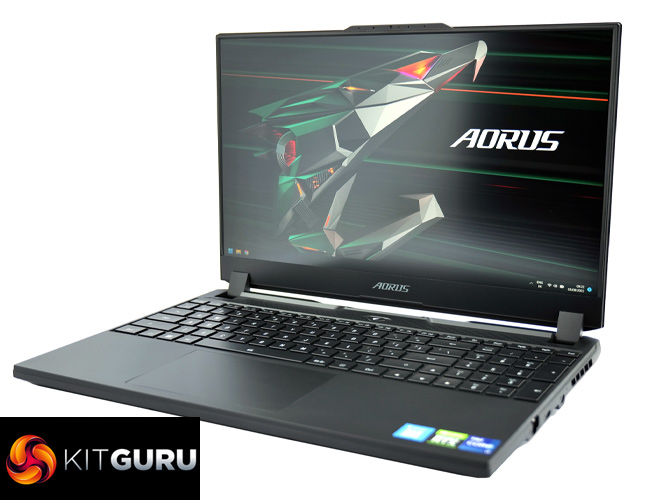
Factoring in the decent build quality, responsive trackpad and understated aesthetics, the Aorus 15 is overall a good gaming laptop. It could be very good, were it not for a few ‘quirky' design choices on Gigabyte's end.
The first of these is the removal of the Mux switch, which does hurt gaming performance in some games – as we have shown on the previous page. The Mux switch is something that was present on Gigabyte's last-gen gaming laptops, so I am not sure why it is missing here.
Additionally, the port selection is quite disappointing for a gaming laptop of this calibre. Just a single USB Type-A connector could make life complicated for a lot of people, and while it's good to have two Type-C ports (one of which is even Thunderbolt 4), no one wants to spend £1750 on a gaming laptop to carry around a USB dongle just to get more Type-A ports. There's no SD-card reader either.
Lastly, the keyboard could also be improved. I don't like the single-height enter key – even though we tested a UK model – and the keys do feel a bit squashed with the numpad thrown in on the side. Most bizarre though, is that the secondary functions are not illuminated by the keyboard's lighting, despite having per-key RGB, and that makes it almost impossible to adjust things like screen brightness and volume in darker environments.
On the whole, the Aorus 15 is certainly worth a look at the £1750 asking price. If we were reviewing it at the original £2199 asking price, those criticisms mentioned above would be a lot harder to take. Now, however, Gigabyte has dropped the price to £1749 and we can't deny the bang-for-buck on offer with £450 shaved off the price tag. There is still room for improvement, but with great gaming performance and a quality screen, you could do a lot worse for the money.

You can buy the Gigabyte Aorus 15 XE14 for £1749.95 from Overclockers UK HERE.
Pros
- 12700H and 3070 Ti is a potent combination.
- Lovely 1440p display.
- Fairly sleek design.
- Smooth trackpad.
- Recent price cut makes it more attractive.
Cons
- Lack of Mux switch can hurt gaming performance using the laptop's screen.
- Just one Type-A port and no SD-card reader.
- Keyboard layout isn't ideal.
KitGuru says: There are a few odd design choices which we think could be improved, but at its new retail price the Aorus 15 is well worth buying.