KitGuru KitGuru.net – Tech News | Hardware News | Hardware Reviews | IOS | Mobile | Gaming | Graphics Cards


Kingston is already well known for its desktop RAM modules and Solid State Drives but they also make flash drives for those of you who need to back up data and take it on the go. Chances are, you have several USB sticks lying around already so what makes the HyperX Fury stand out from the rest? Lets find out…
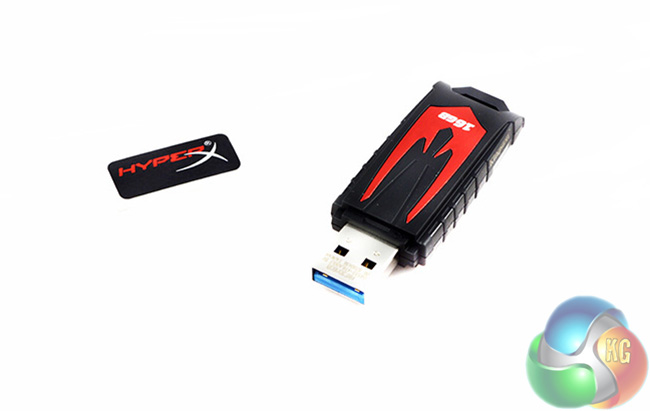
Kingston claims that the HyperX Fury delivers USB 3.0 speeds of 90MB/s read and 30MB/s write. Today we will be taking a look at the 16GB model, the cheapest of the lot with 32Gb and 64GB options also available for not too much more.
Specifications:
- 90MB/s read speeds.
- 30MB/s write speeds.
- Interface Type: USB 3.0.
- Mac, Windows, Linux and Console compatible.
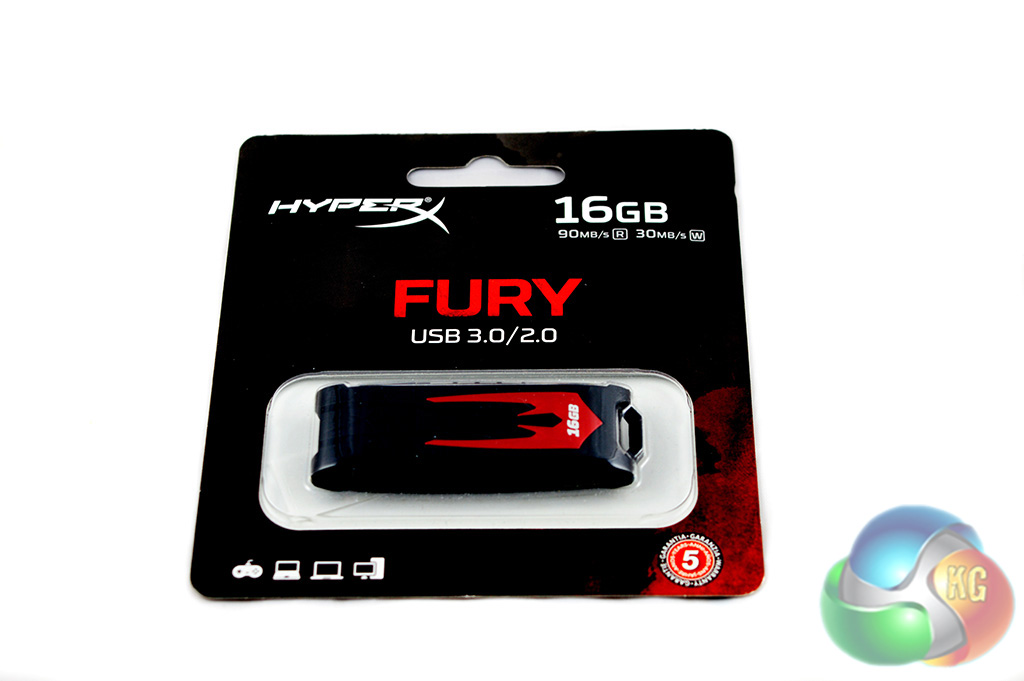
Kingston's packaging is pretty standard and effective. The HyperX Fury drive is sits behind some protective plastic covered in card. Anything more than a blister pack for packaging would have just been wasteful.
The front side gives away a few key details, the drive ships with a five year guarantee, works with consoles as well as PCs, uses a USB 3.0 interface and has 16GB of space.
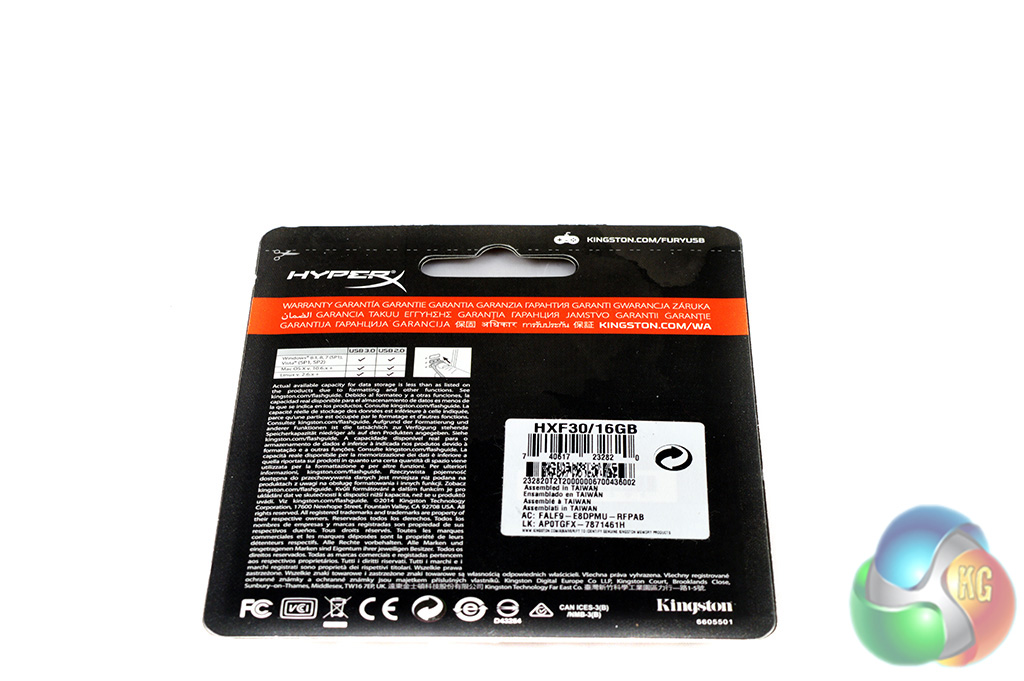
The back of the box is relatively devoid of details, although it does list compatibility with Mac OS X, Windows and Linux for both USB 2.0 and USB 3.0.

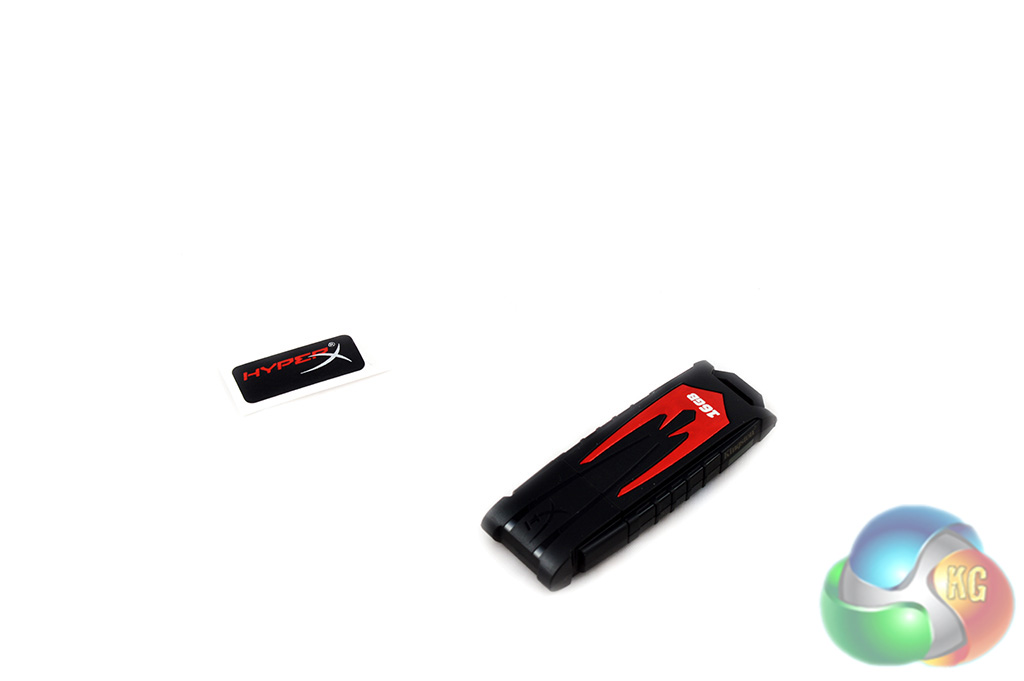
The HyperX Fury USB drive comes in a rugged plastic casing so it will withstand a few drops. It features a stylish red and black design and even comes with a little sticker.
Overall, I quite like the look of the HyperX Fury and I'm sure it will appeal to others too.

As you can see, once the drive is formatted you get 14.6GB of space to play around with.
For real world benchmarking, we take several custom made folders full of different types of files of varying sizes and time their transfer to and from the device – thereby determining its read and write speed. For the first test, we used 8GB of MKV video files. On all of our tests, the files were transferred from a Kingston V300 240GB SSD.
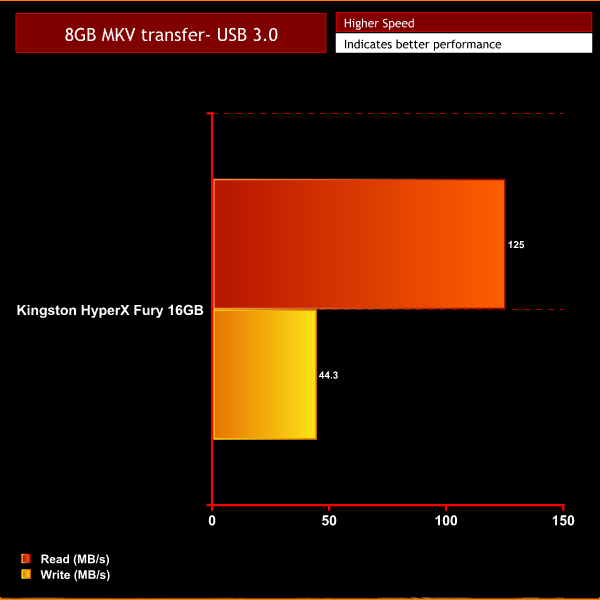
As you can see, read speeds are fairly impressive, coming in faster than the 90 MB/s speed Kingston advertises on the packaging. Write speeds are on the slow side, although we expected this going in as Kingston advertises a 30 MB/s write speed.
During our tests we actually observed the Kingston HyperX Fury 16GB drive sitting at 44.3 MB/s while transferring an 8GB MKV file. Much like the read speed, this is faster than what Kingston advertises on the packaging.
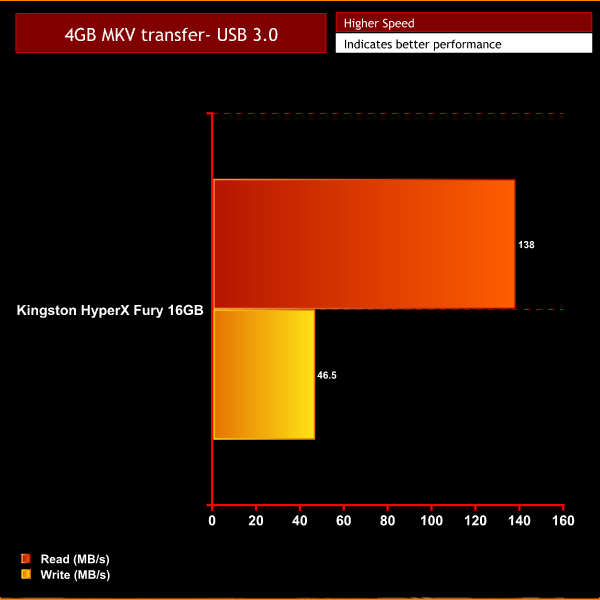
Next we transferred a smaller 4GB MKV file, which saw read and write speeds average a little higher this time around. Read speeds managed to hit 138 MB/s while write speeds sat at a steady 46.5 MB/s.
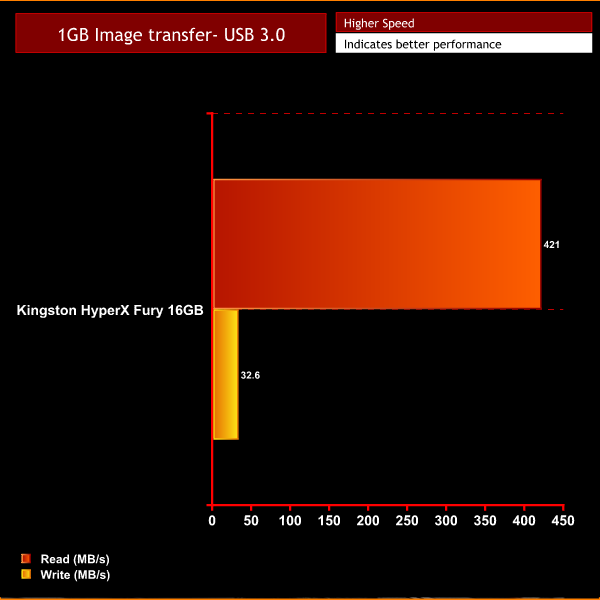
For our final real world performance test, we transferred a 1GB image folder to the Kingston HyperX Fury USB stick from a Kingston V300 240GB SSD. We then reversed this process to ensure that we measured both read and write speeds.
Reads went through the roof, I repeated this test multiple times and the speeds managed to stay sky high, moving the 1GB file in a matter of seconds. However, write speeds took a hit in this test, sinking down to just 32.6 MB/s.
Our real world tests show some fairly impressive numbers for this cheap little USB stick. However, it is important to note that speeds over USB 2.0 will inevitably be slower due to throughput limitations. USB 2.0 is still much more common than USB 3.0. Now let's move on to synthetic benchmarks…
While real world benchmarks are a better look at what you can expect to get out of a product, synthetic ones are good for quotable numbers and the reliability of repeatable tests.
So for our Synthetic tests we ran the Kingston HyperX Fury 16GB USB through CrystalDiskMark and the Atto Disk Benchmark. Each test will be performed twice to ensure accuracy.
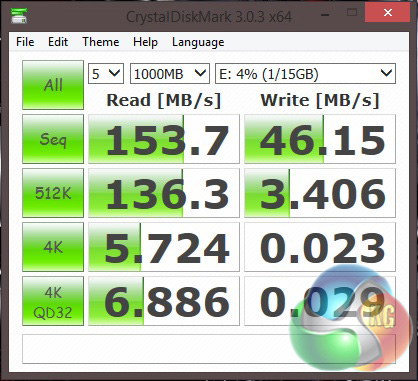
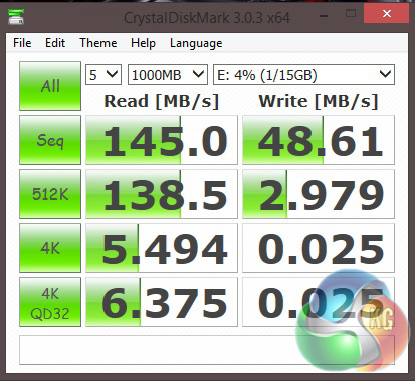
Sequential read and write speeds almost mirror what we saw in our ‘real world' performance tests. The USB drive has excellent read speeds and write speeds are faster than the 30 MB/s advertised on the packaging.
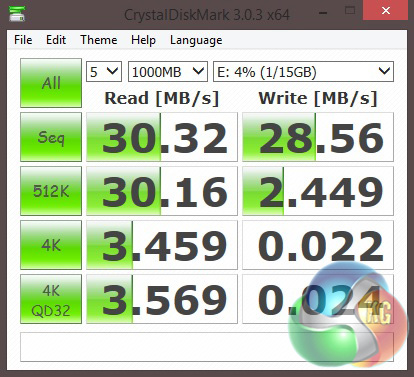
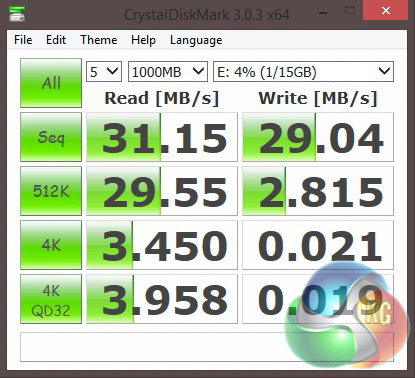
USB 2.0 performance is very limited, hovering around 30 MB/s for both read and write speeds. USB 3.0 has become more common in recent years but USB 2.0 still remains widely used so it's always worth taking both speed results in to account.
The ATTO Disk Benchmark performance measurement tool is only compatible with Windows. It essentially measures your storage systems performance with various transfer sizes and test lengths for reads and writes. Several options are available to customize your performance measurement including queue depth, overlapped I/O and even a comparison mode with the option to run continuously. You can use ATTO Disk Benchmark to test any manufacturers RAID controllers, storage controllers, host adapters, hard drives and SSD drives.
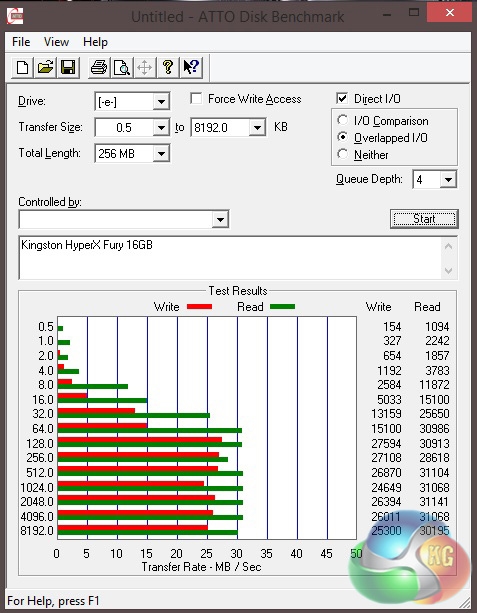
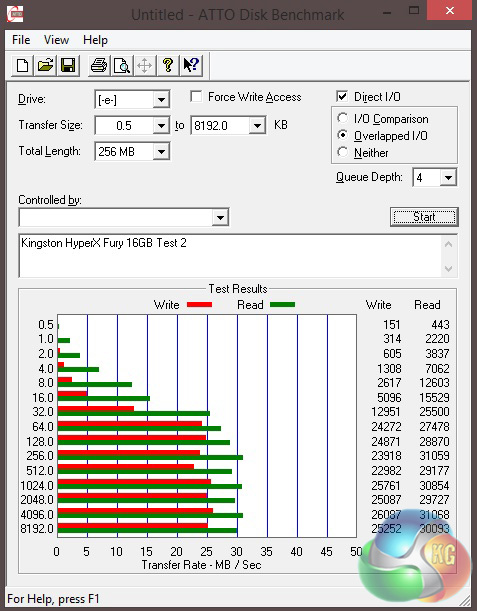
Our ATTO results remain fairly similar to our other tests. We have decent read speeds but much slower write speeds.
The Kingston HyperX Fury USB stick is a handy little device. It delivers reliable performance and is built to withstand a few drops. Obviously USB 2.0 performance numbers are lower when compared to USB 3.0 – which is to be expected.
While a USB 3.0 port is recommended to get the most out of the product, you don't necessarily have to ignore this device if you only have a USB 2.0 port. Just bare in mind that you will only be getting 30 MB/s read and write speeds.
During our real world and synthetic tests, we observed the Kingston HyperX Fury USB drive delivering faster speeds than advertised on the packaging, which is good news for potential buyers.
You can pick up the 16GB model for just under £10 from Overclockers UK, a good price for a decent USB drive to carry around a few files. Although the 32GB version doesn't cost much more, coming in at £16.99, so that is worth keeping in mind. If you need even more space, a 64Gb model is available, although it comes in at just over £30.
Discuss on our Facebook page, over HERE.
Pros:
- Rugged casing.
- Stylish look.
- Faster than advertised read/write speeds.
Cons:
- Write speeds suffer when dealing with some file types.
KitGuru Says: If you're in the market for a cheap, reliable USB stick to carry around then the Kingston HyperX Fury does the trick.

You can read up on how we assess our awards, HERE.