 KitGuru KitGuru.net – Tech News | Hardware News | Hardware Reviews | IOS | Mobile | Gaming | Graphics Cards


Out of the box, the drive is factory formatted as FAT32. For running some of our benchmarks we reformatted the drive as NTFS.
CrystalDiskMark is a useful benchmark to measure theoretical performance levels of hard drives and SSD’s. We are using V8.
The ATTO Disk Benchmark performance measurement tool is compatible with Microsoft Windows. Measure your storage systems' performance with various transfer sizes and test lengths for reads and writes. Several options are available to customize your performance measurement including queue depth, overlapped I/O and even a comparison mode with the option to run continuously. Use ATTO Disk Benchmark to test any manufacturer's RAID controllers, storage controllers, host adapters, hard drives and SSD drives and notice that ATTO products will consistently provide the highest level of performance to your storage.
AS SSD is a great free tool designed just for benching Solid State Drives. It performs an array of sequential read and write tests, as well as random read and write tests with sequential access times over a portion of the drive. AS SSD includes a sub suite of benchmarks with various file pattern algorithms but this is difficult in trying to judge accurate performance figures.
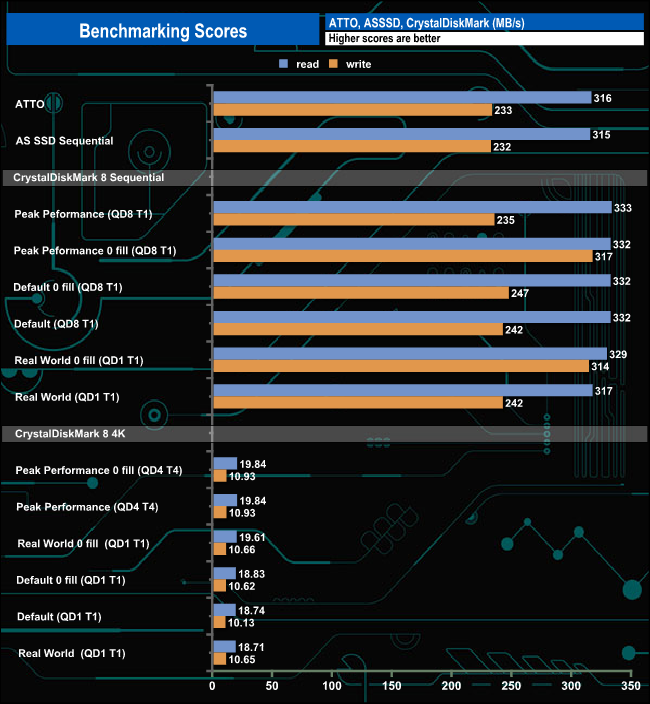
Kingston quotes speeds of up to 250MB/s for reads and up to 180MB/s for writes for the 16GB Vault Privacy 50. From our test results using the ATTO, AS SSD and CrystalDiskMark benchmarks these figures are very much on the conservative side as we saw over 300MB/s for Sequential reads from all three benchmarks, the fastest we saw was 333MB/s from CrystalDiskMark 8's Peak Performance Profile test. The fastest write performance came from the standard CrystalDiskMark compressed data test at 247MB/s. The 4K performance of the drive was very consistent throughout the testing, averaging 19.26MB/s for reads and 10.65MB/s for writes for the six benchmark tests.
