KitGuru KitGuru.net – Tech News | Hardware News | Hardware Reviews | IOS | Mobile | Gaming | Graphics Cards


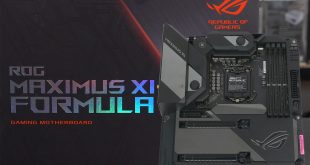
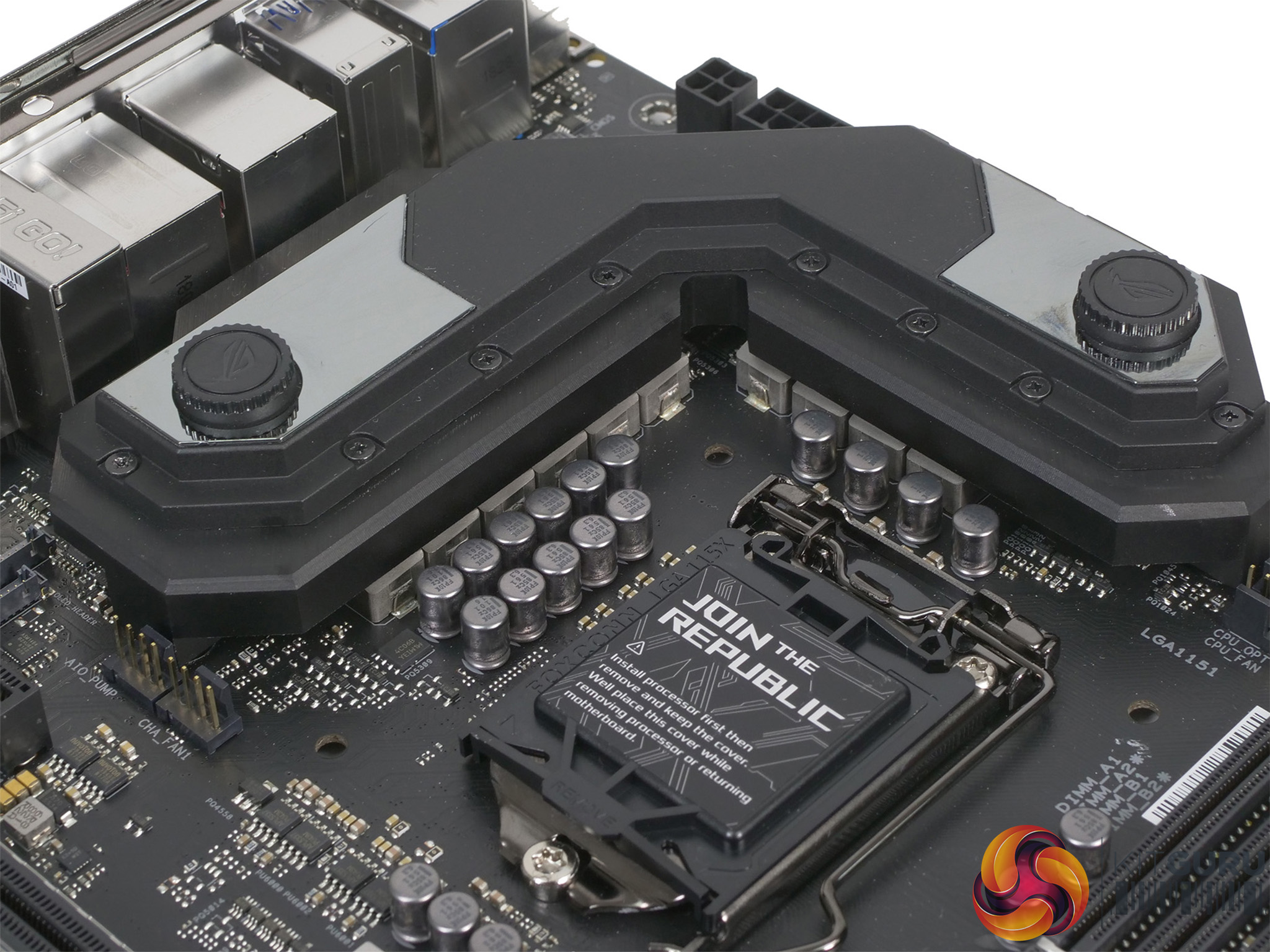
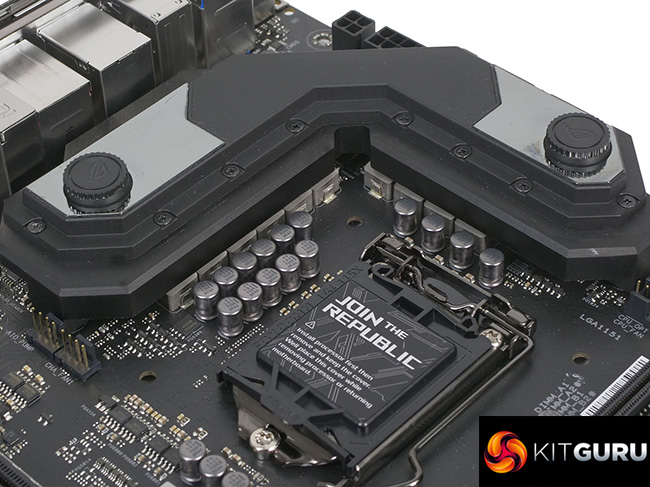
Asus currently lists 52 ROG motherboards in its impressive line-up of which 11 use the Z390 chipset to support Intel 9th Gen. Coffee Lake. The ROG Maximus XI Formula sits at the top of that particular stack and has been designed to address the vexed issue of VRM cooling, thanks to the use of a CrossChill III VRM hybrid cooling block made by EK water blocks. The board looks impressive and has a list of features as long as your arm, however it also costs a hefty amount of money.
Key features
- Intel Z390 ATX Gaming motherboard with M.2 heatsink, Aura Sync RGB LED, DDR4 4400MHz, 802.11ac Wi-Fi , dual M.2, SATA 6Gb/s, and USB 3.1 Gen 2
- LGA1151 socket: Ready for 9th/8th Generation Intel Core desktop processors
- Crosschill EK III and Water Cooling Zone: Keep your system cool when the action heats up
- ROG Eco-System: ASUS-exclusive Aura Sync RGB lighting, including headers for both standard and addressable RGB strips
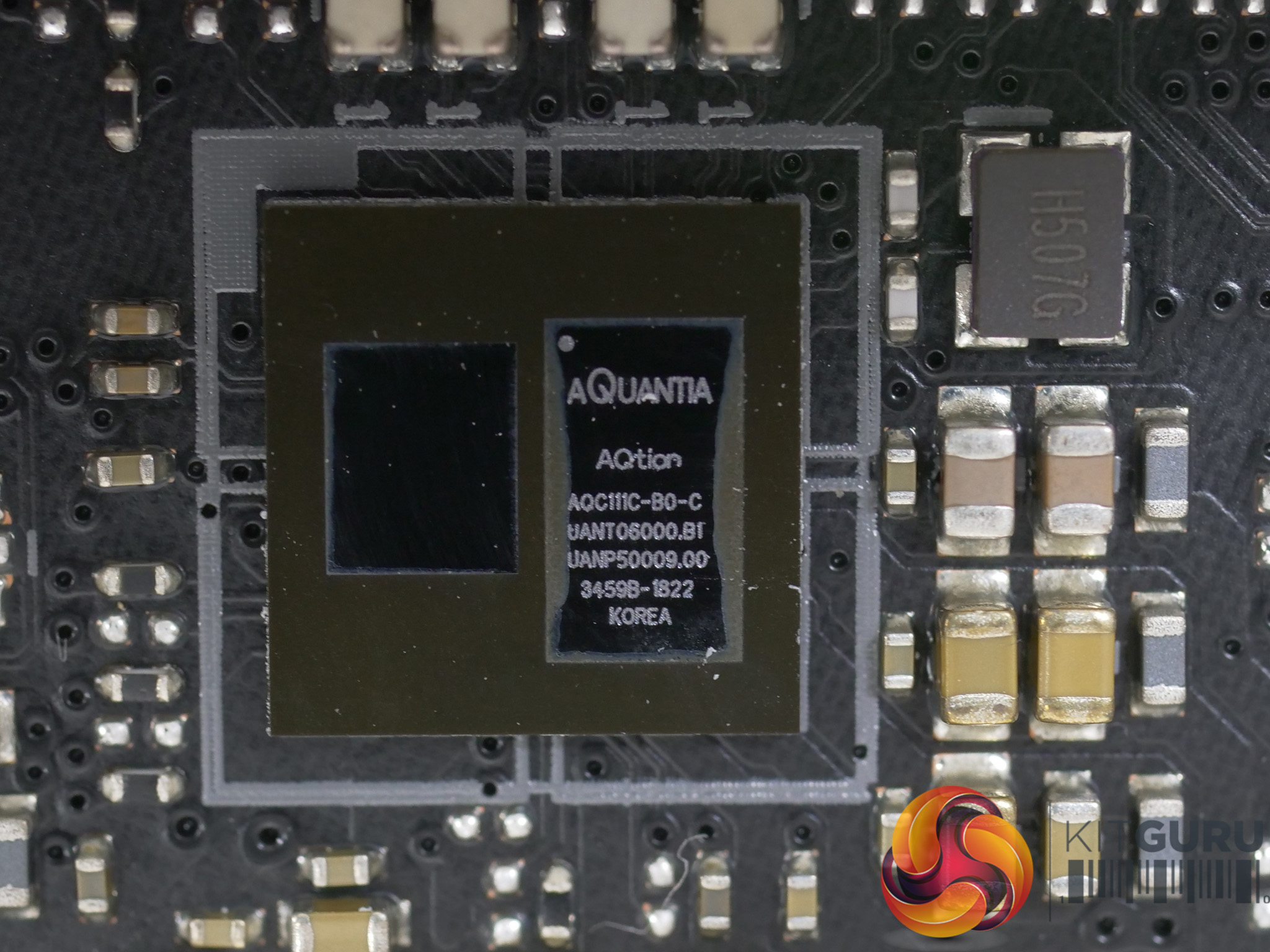
- Gaming connectivity: Aquantia 5G LAN and Intel Gigabit Ethernet onboard, dual M.2, USB 3.1 Gen 2, Intel 2×2 802.11ac Wi-Fi with MU-MIMO support, LANGuard and GameFirst
- 5-way Optimisation: Automated system-wide tuning, providing AI Overclocking and cooling profiles tailor-made for your rig
- Gaming Audio: SupremeFX and Sonic Studio III – High fidelity audio that draws you deeper into the action
- Gaming durability: ROG RGB Armour, ROG patented pre-mounted I/O shield, ASUS SafeSlot, and premium components for maximum durability
Full specification HERE
Note: if the above images are not displaying properly, you may need to disable your Ad Blocker as they are known to interfere with our display code
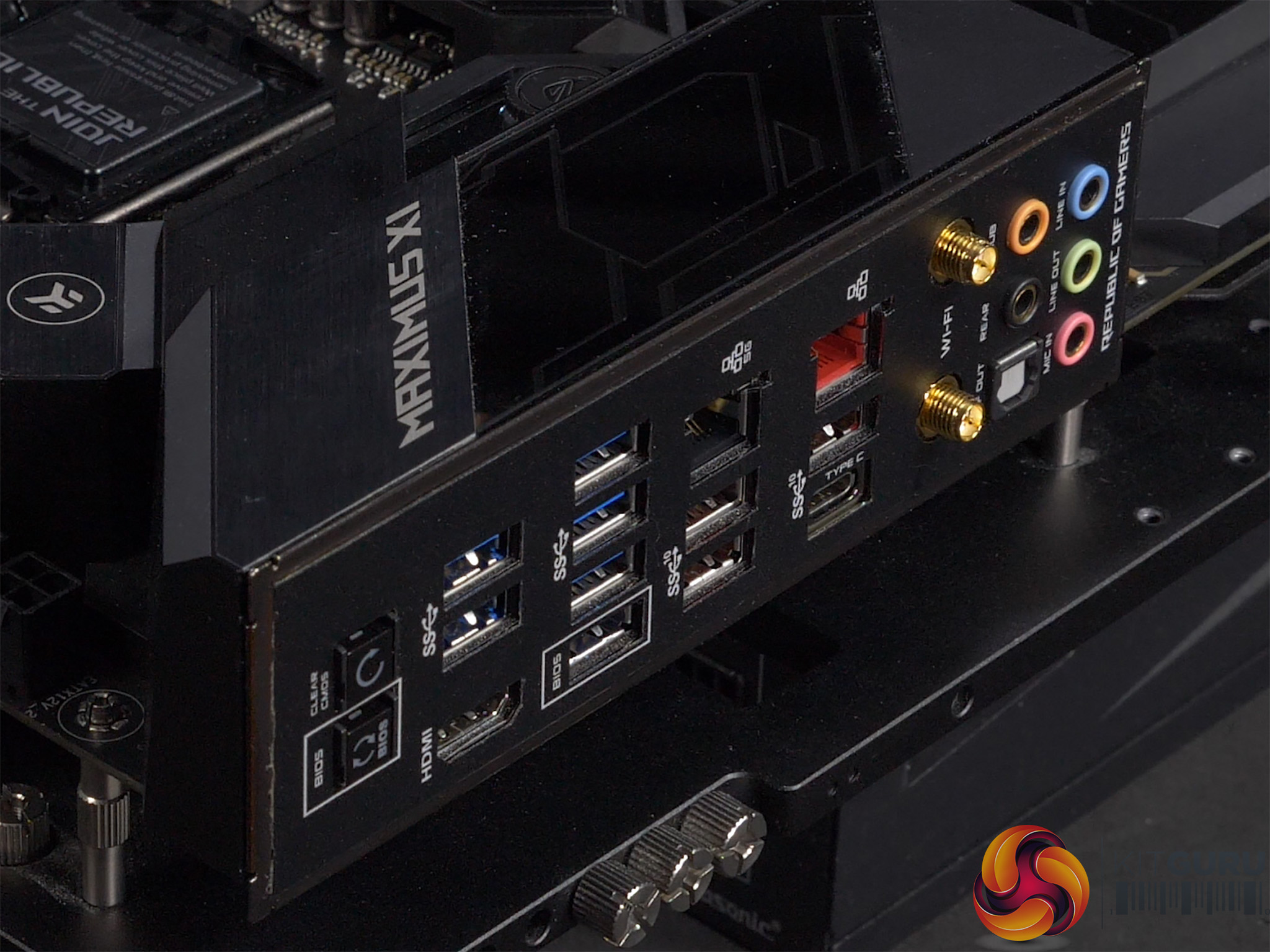
Asus has included an extensive list of features on the ROG Maximus XI Formula including Aquantia AQC111SC 5 Gigabit LAN, in addition to Intel Gigabit and Intel Wireless-AC 9560.
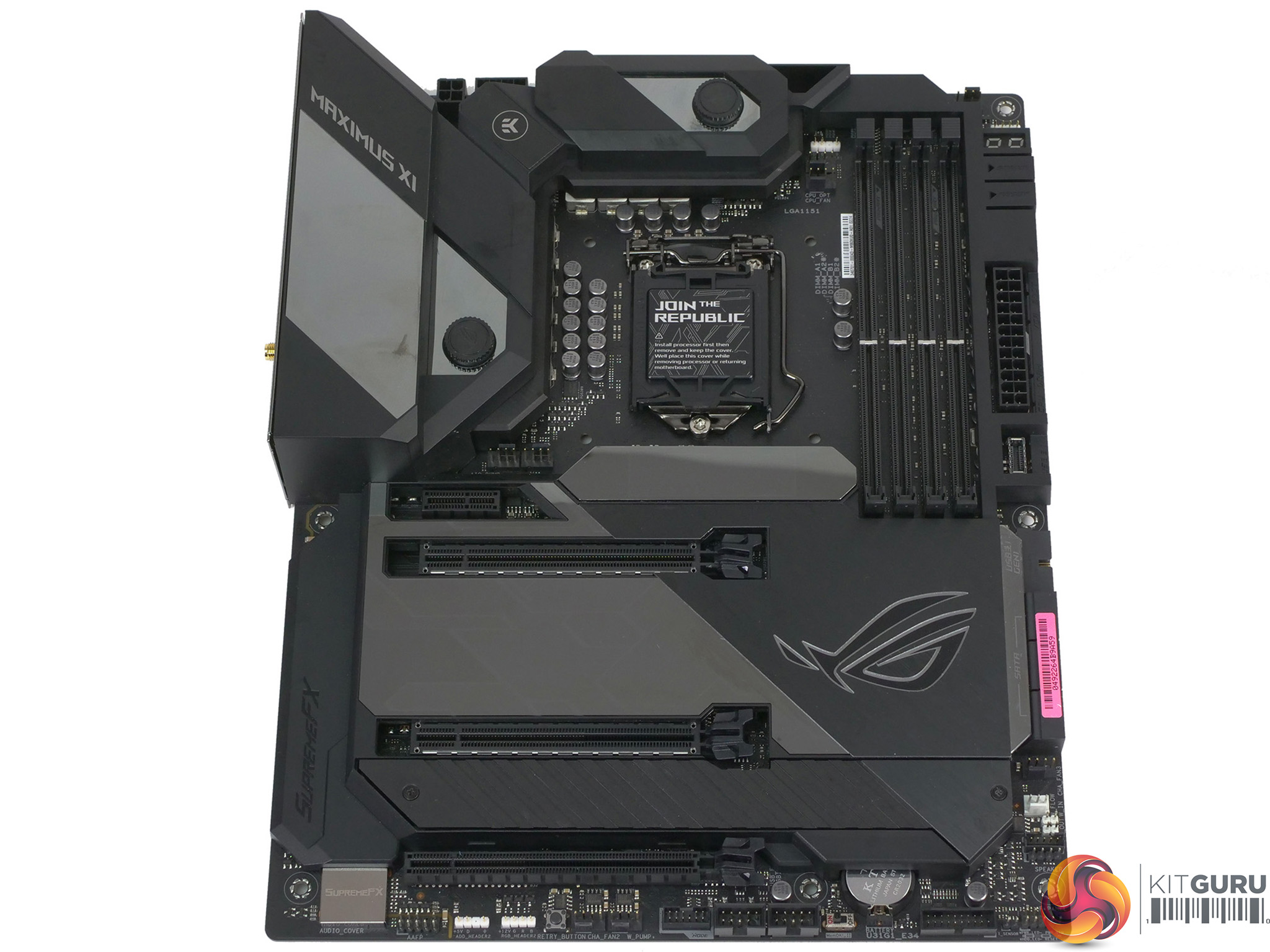
Visually, the main features of Asus ROG Maximus XI Formula are the extensive armour that covers a large part of the board, the huge integrated I/O shield and the CrossChill EK III VRM hybrid cooling block on the VRMs. The colour scheme is an understated grey and matt black, although you get a muted RGB light show when you turn the power on.
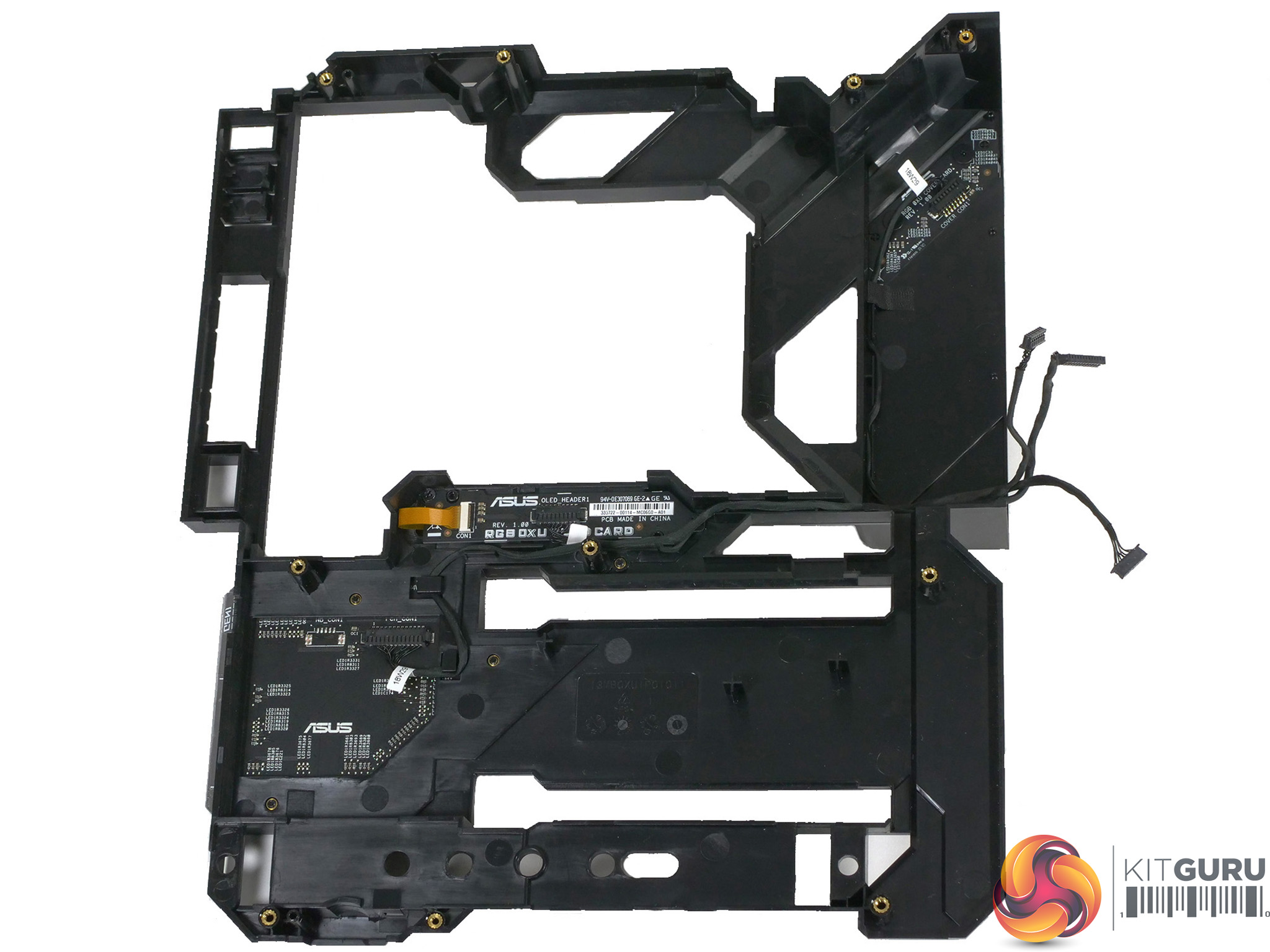
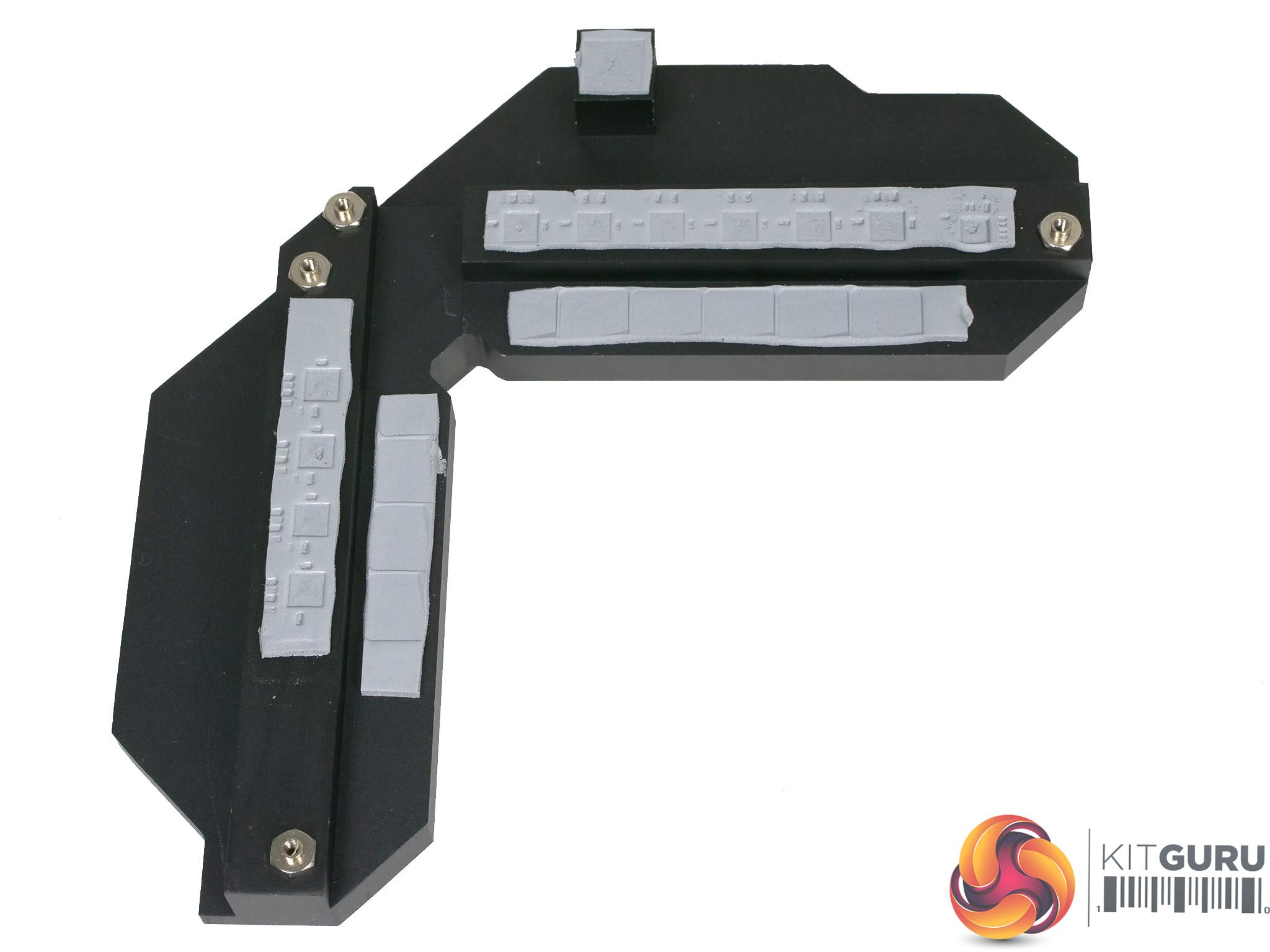
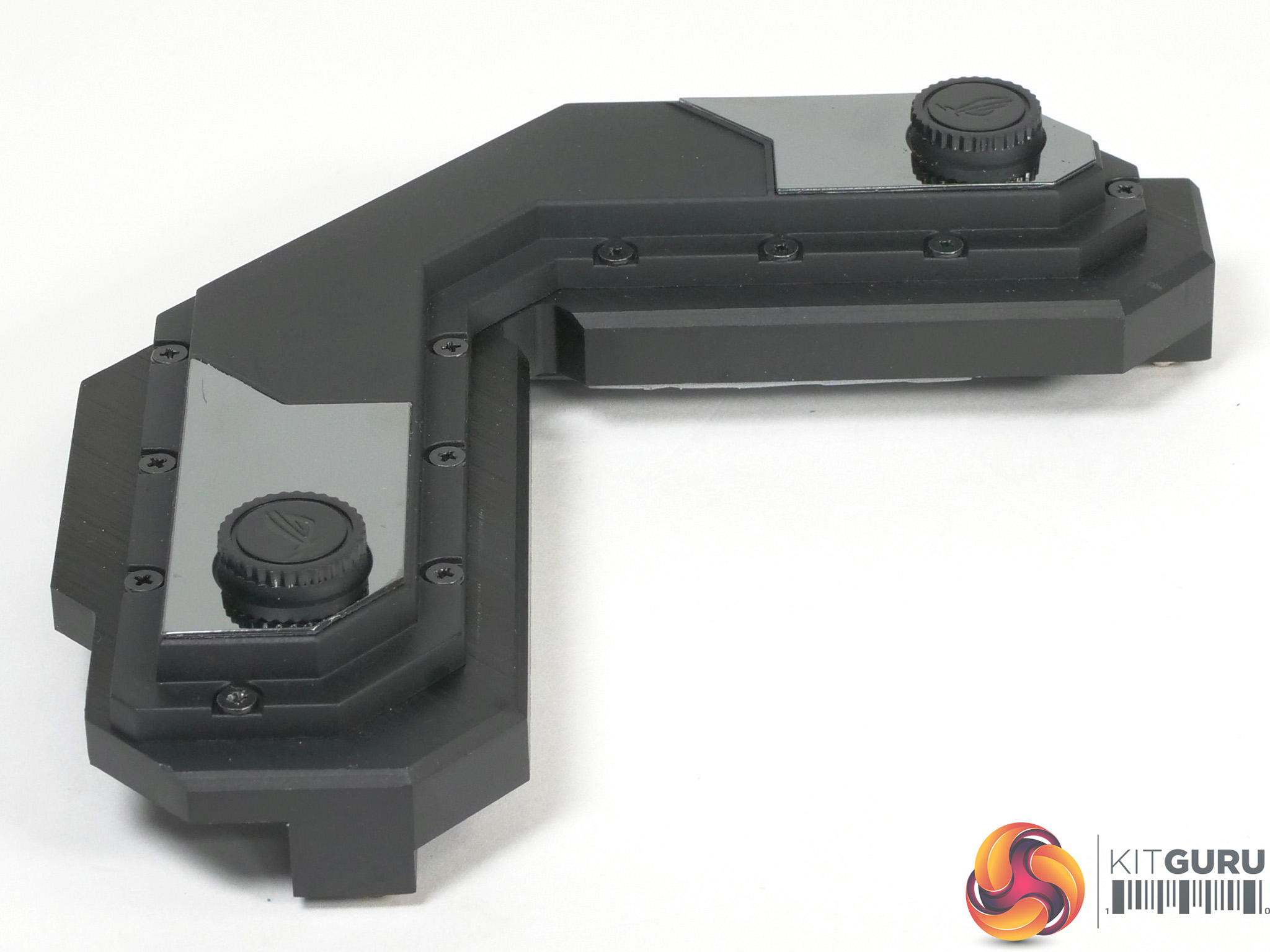
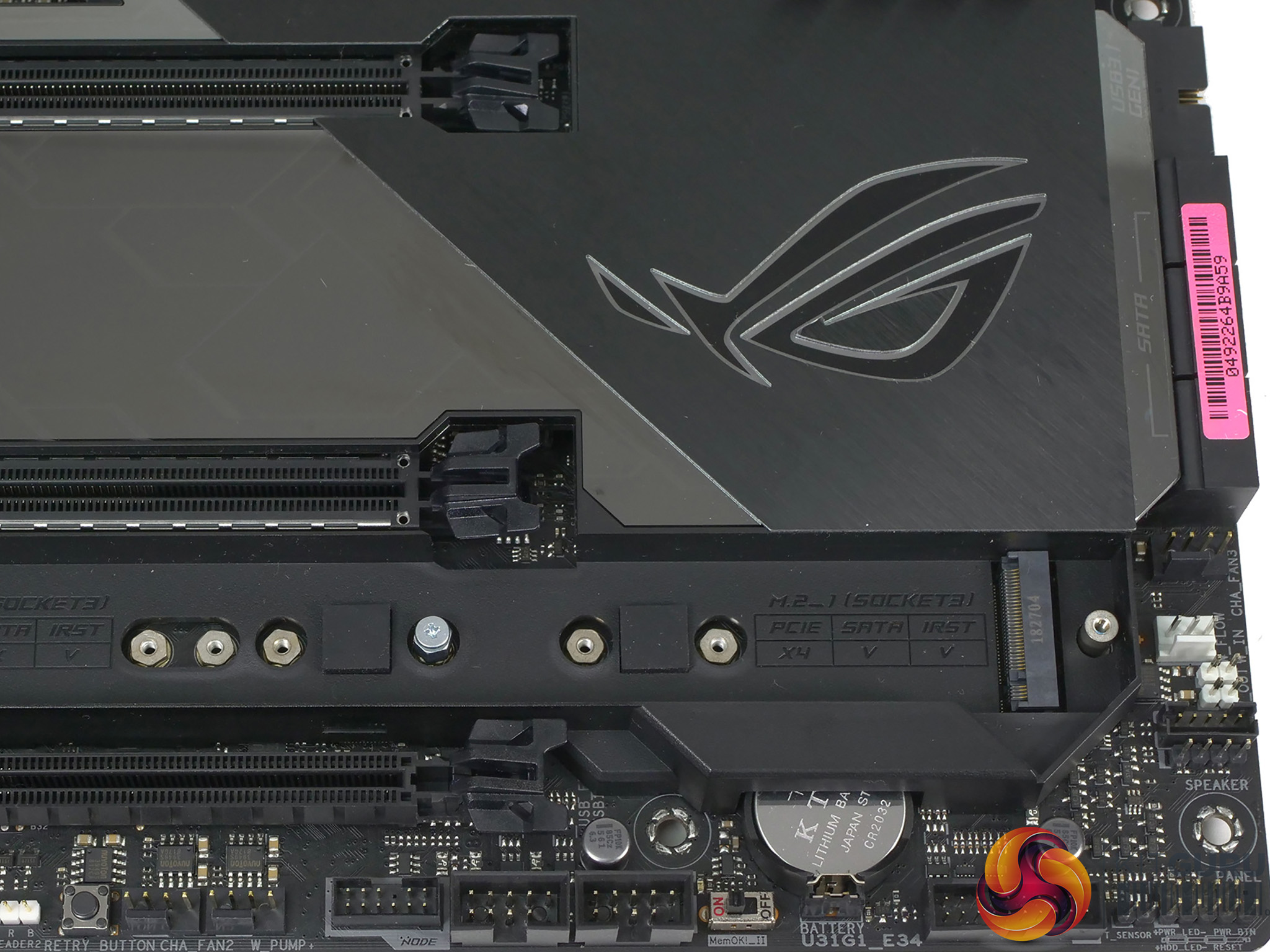
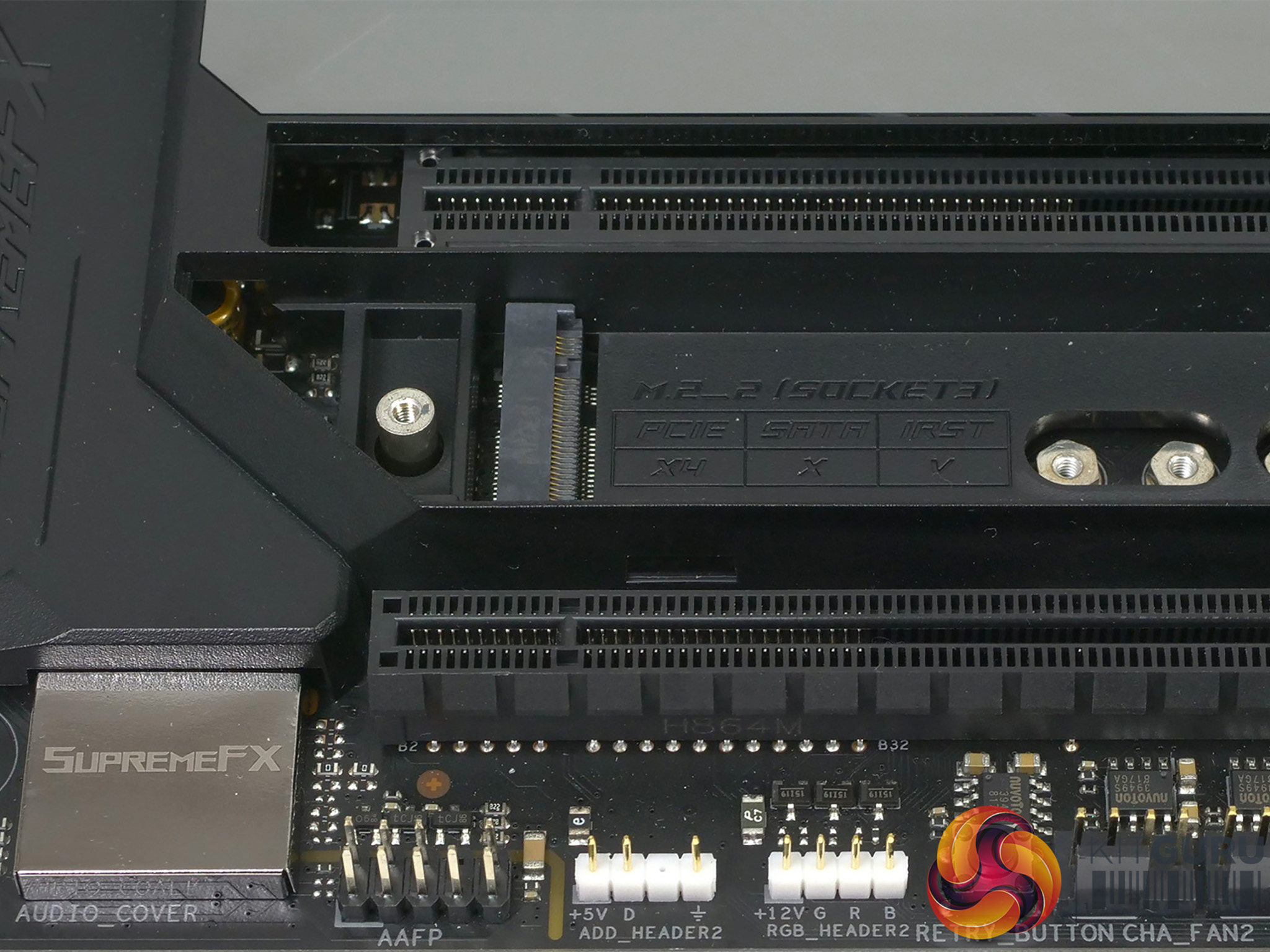
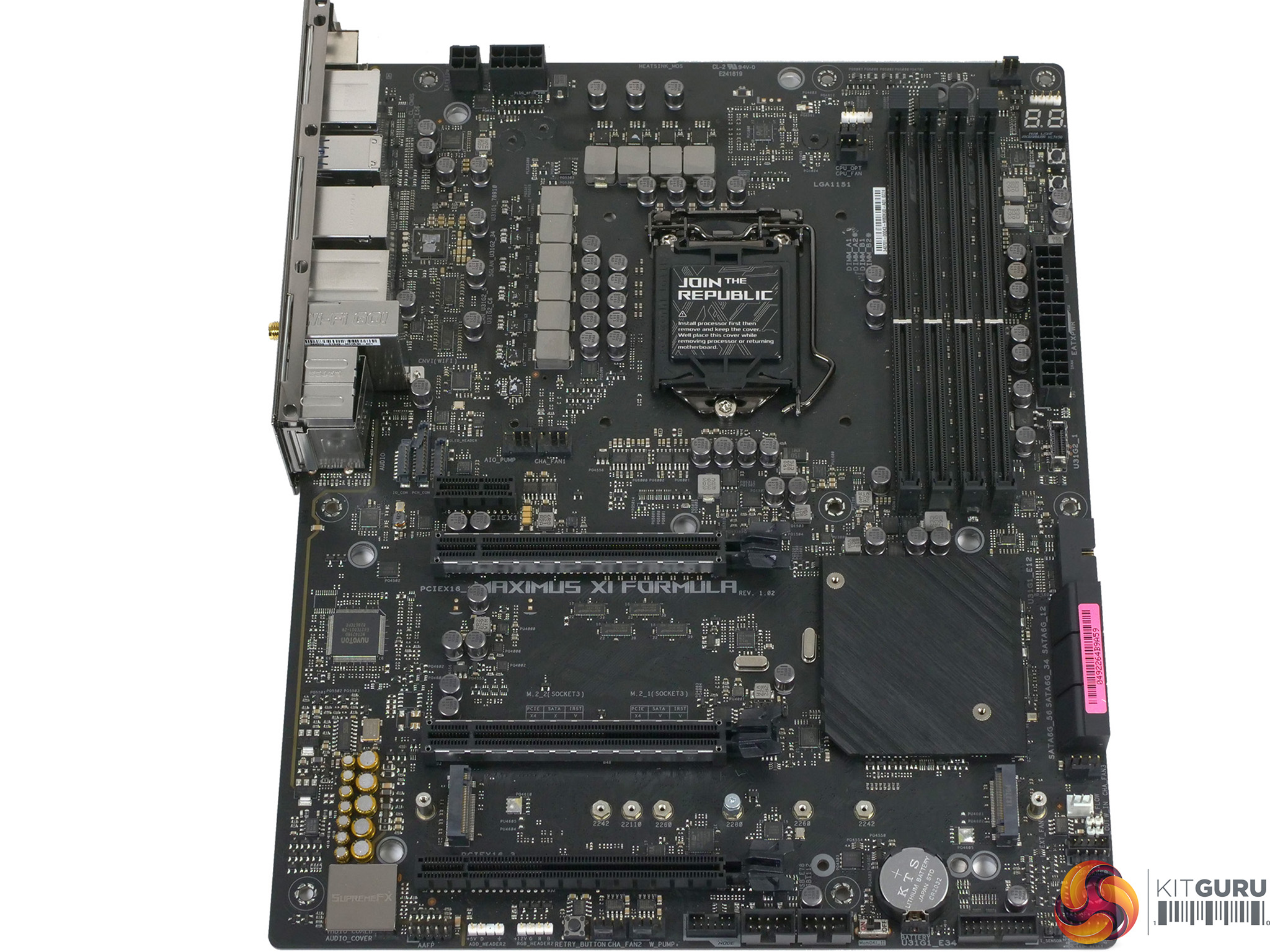
Asus has made the sensible decision to ‘only’ configure the Formula with two graphics slots, which leaves the lower half of the board looking somewhat empty. The reason this is a sensible decision is that Intel desktop processors only provide sufficient PCIe Gen.3 for x16 or x8+8 lanes, and we know that most people build their PC using a single graphics card.
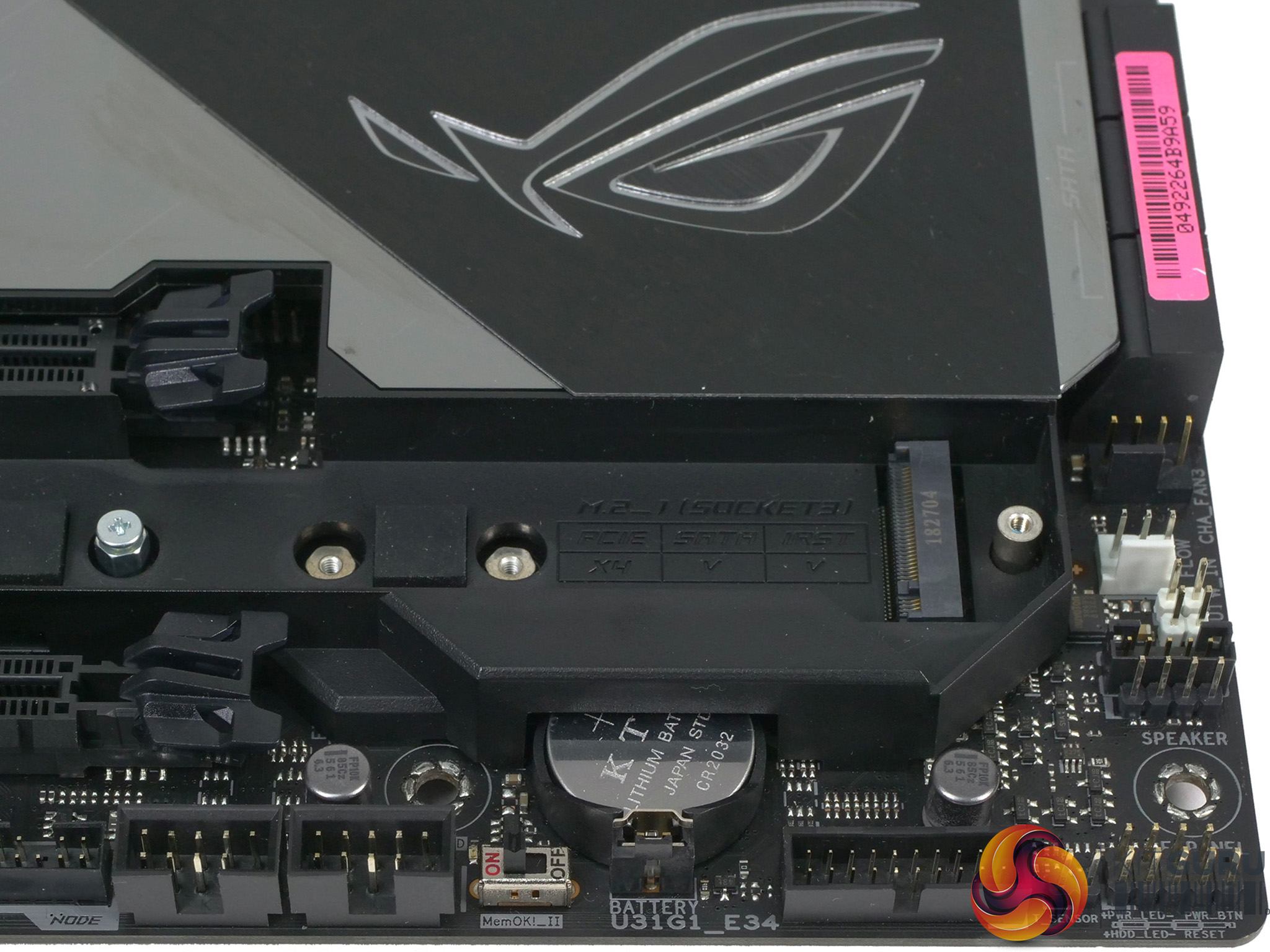
Below the second graphics slot you will find the heat shield/cover for the two M.2 slots which, naturally, is intended for bare SSDs that are supplied without their own heat spreader.
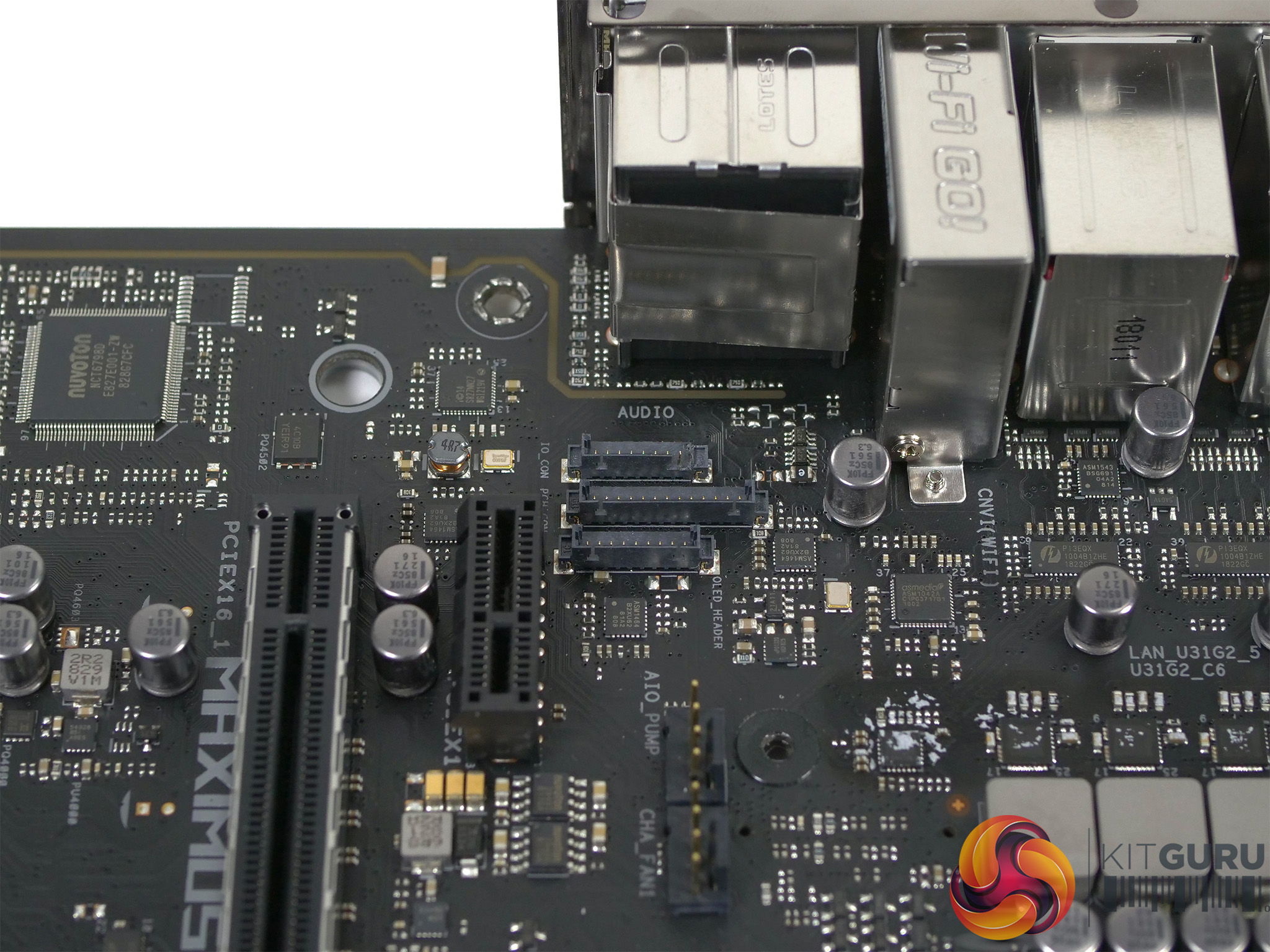
As we discuss in our video, there are a great many headers and connectors around the edges of the board and we saw nothing that gave us pause for thought. Some of the exclusive ROG features such as the Node connector or the water flow connector are fairly unnecessary but there are no problems with the layout and everything fits in well.
We particularly liked the inclusion of two pairs of RGB connectors (both 12V and ARGB) with one pair down near the audio connector and the other at the top of the board.
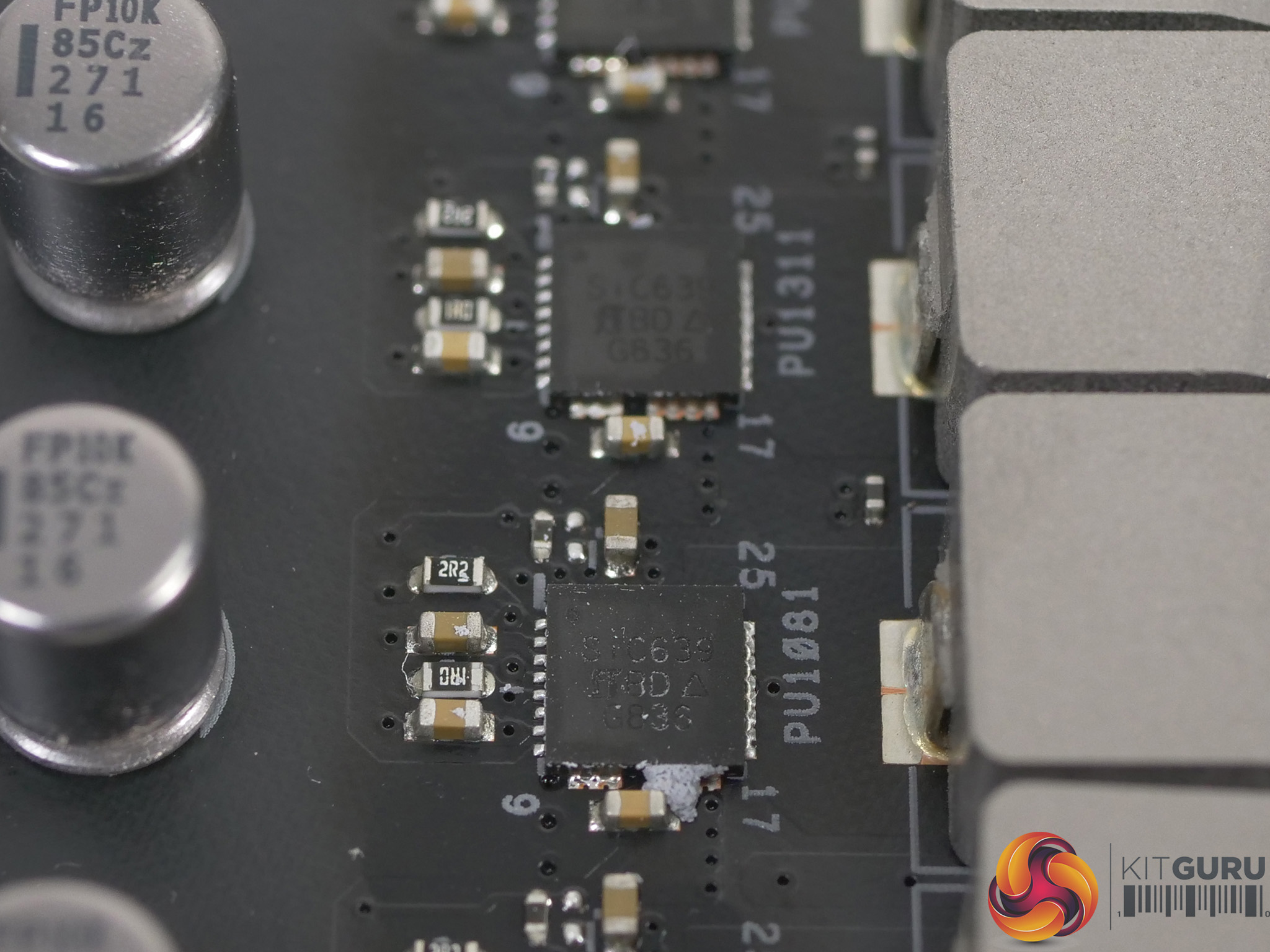
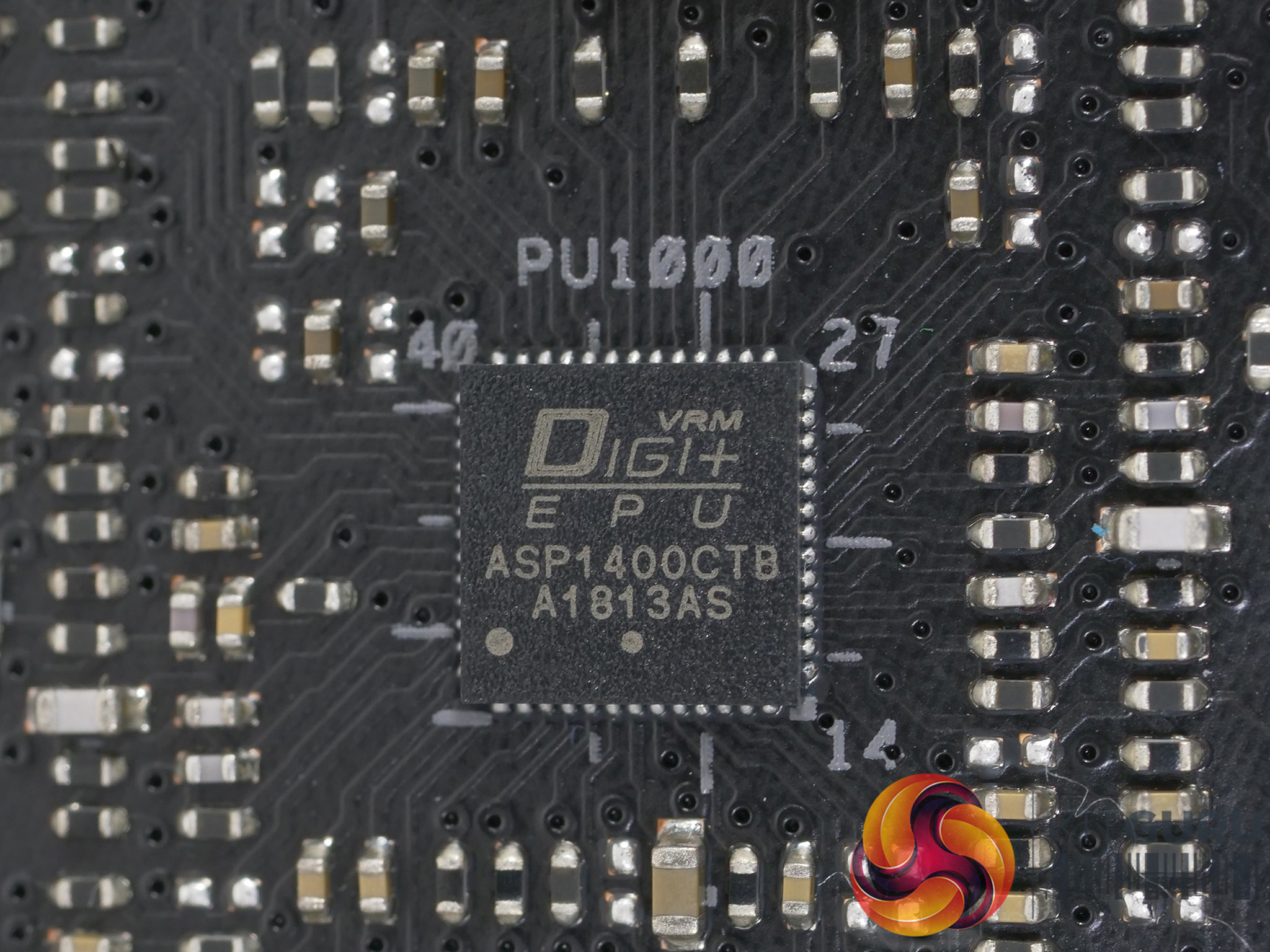
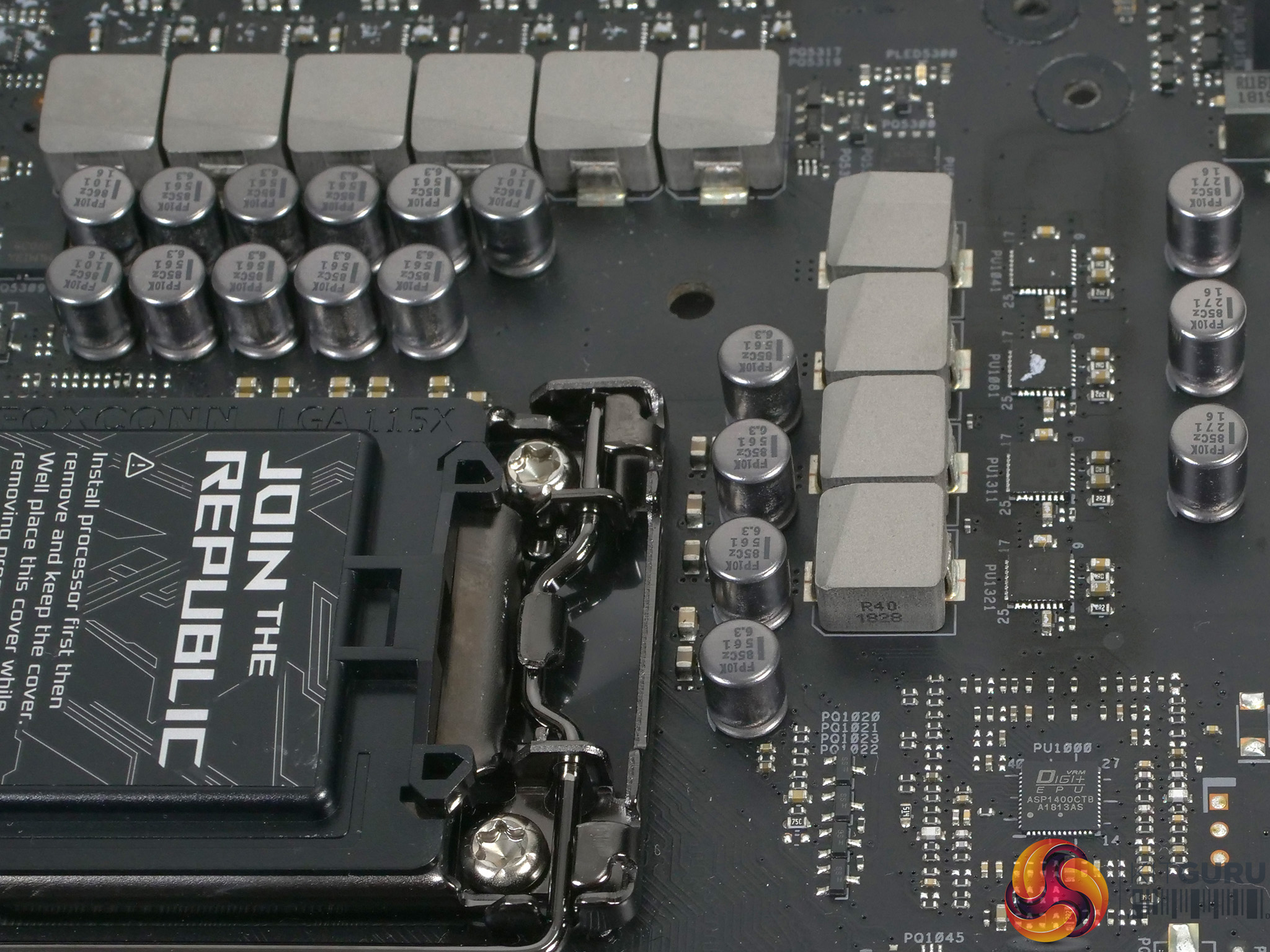
We stripped the board down and once we had removed the CrossChill EK III VRM cooling hardware we could see the VRM controller is marked ASP1400CTB, which might be a Richtek part. The ten power phases you can see are arranged in an 8+2 configuration but unusually the eight Vcore phases are not doubled but instead use control phases so the eight phases work in four pairs.
The MOSFETs are Vishay DrMOS SiC639 that are rated at 50A, so the board is capable of delivery all the power your Core i9-9900K might require (it would make no sense to install a lesser CPU such as a Core i7 or Core i5 in this premium motherboard) but even so, the 8+4 EPS connectors are unnecessary as the 8-pin will do a perfectly decent job on its own.
Test system
CPU: Intel Core i9-9900K
Motherboard: Asus Maximus XI Formula
RAM: 16GB G.Skill TridentZ Royal DDR4-3200MHz
CPU Cooler: Fractal Design Celsius S24
Graphics: Nvidia RTX 2080 Founders Edition 8GB GDDR6
SSD: 1TB Intel SSD 7 M.2 NVMe
Power Supply: Seasonic Prime Platinum 1300W
CPU Cooler Custom loop components
CPU Block: EKWB Velocity RGB
Pump/Reservoir: EKWB XRES 140 Revo D5 RGB PWM
Radiator: Alphacool NexXxos XT30 240mm
Fittings: Alphacool 10/16mm
Coolant: Corsair XT5
Thermal Compound: Arctic MX-4
We tested the Asus ROG Maximus XI Formula with an Intel Core i9-9900K that has a base speed of 3.6GHz, however our interest mainly lies in the all-core speed when the CPU is working hard. On Auto settings with XMP enabled the i9-9900K runs at 4.7GHz with a Vcore of 1.15V. For our second set of tests we used the overclocked settings shown in our video with the CPU running at 5.0GHz non-AVX and an ambitious 4.9GHz in AVX workloads.
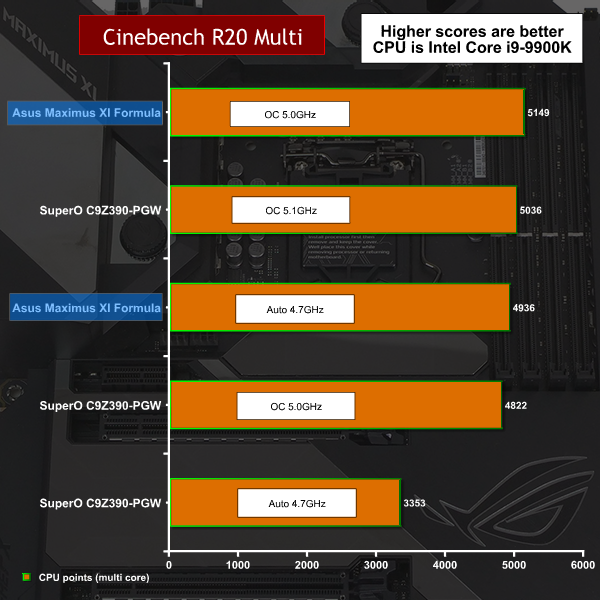
In Cinebench R20 our overclocked i9-9900K is running at a higher speed in this AVX workload and as a result it tops the chart.
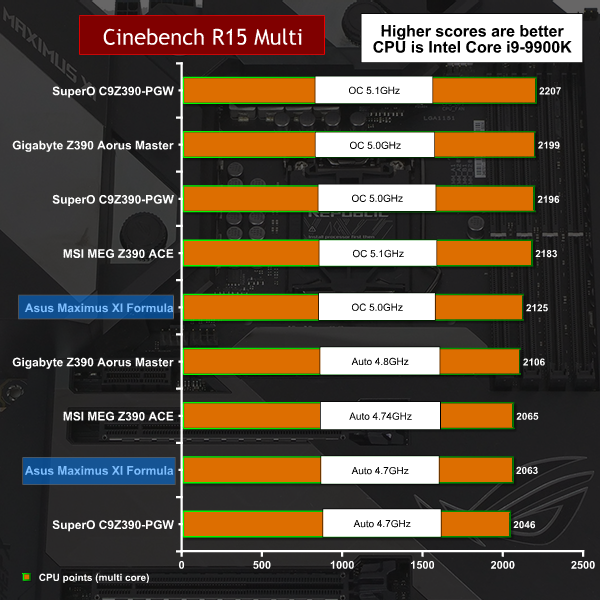
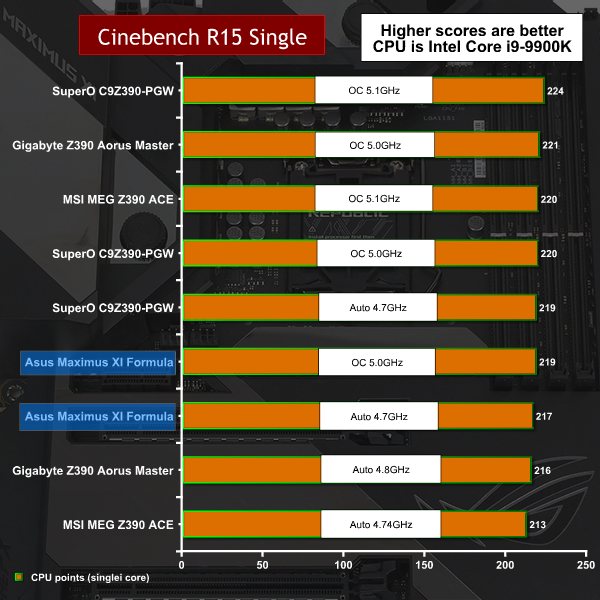
In the Non-AVX Cinebench R15 the Asus falls back to a mid-chart position.
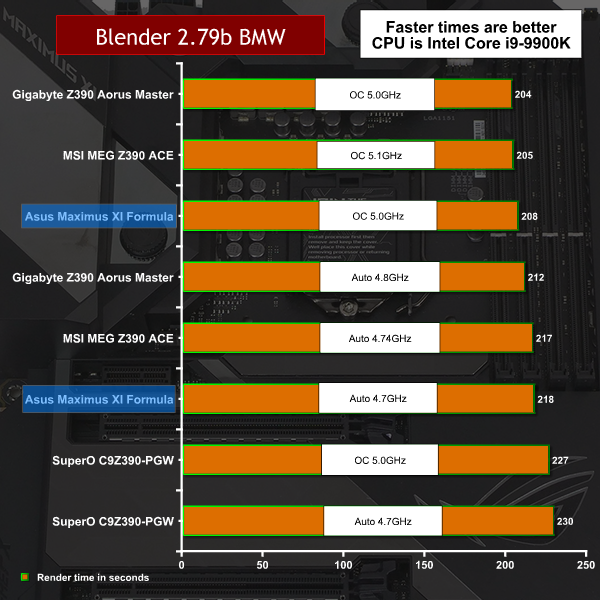
Blender is an intense test for the CPU and we see the Asus ROG Maximus XI Formula perform well.
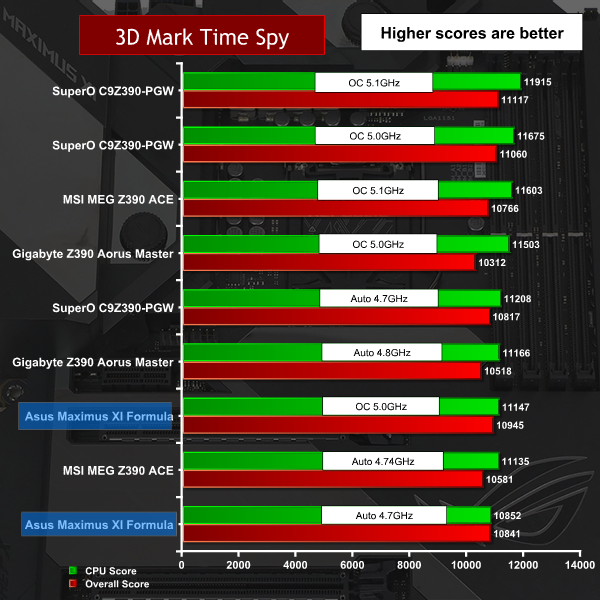
The Time Spy CPU test throws up some surprising results with Asus languishing way down the order.
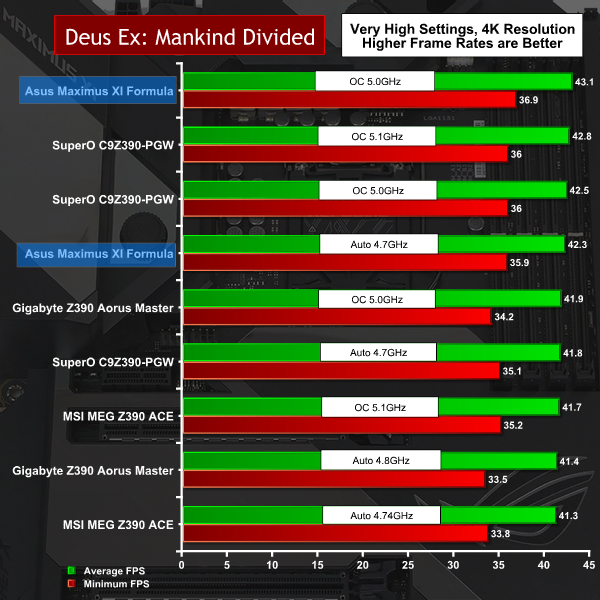
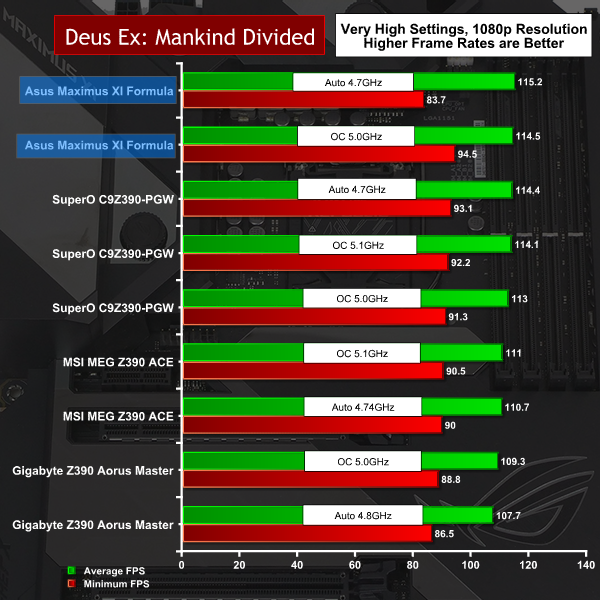
In Deus Ex at both 4K and 1080p there is very little to separate one motherboard from another. Nonetheless, the Asus performs and a win is a win.
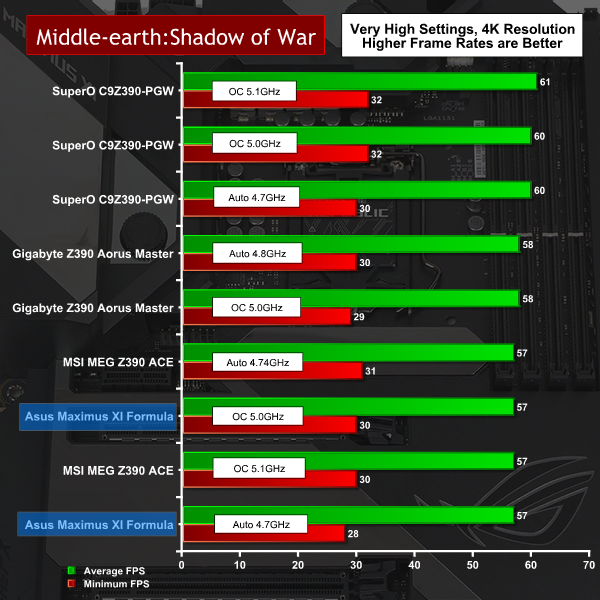
By contrast in Middle Earth the Asus crashes down the chart. The margins of difference are absolutely tiny, but still, this is unexpected.
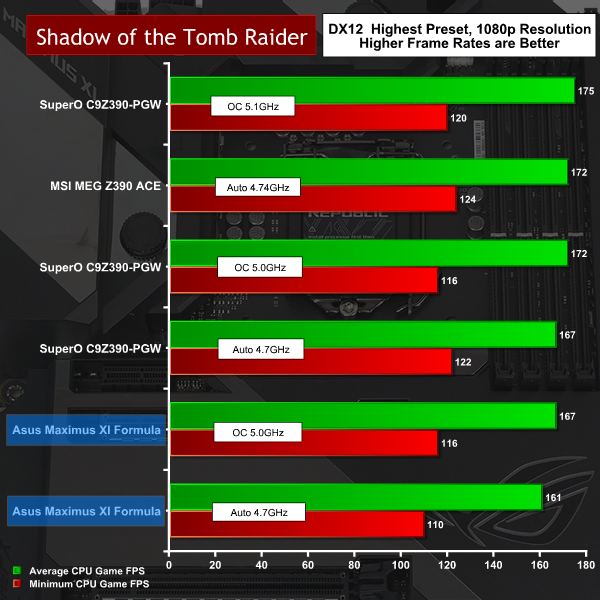
Our chart shows the CPU Game fps results in the Shadow of the Tomb Raider, rather than pure fps. You can see a fair spread of results between the motherboards and Asus does relatively poorly.
Performance and Overclocking Overview.
Overclocking our Intel Engineering Sample Core i9-9900K has never been much fun as the absolute limit has proven to be 5.1GHz with temperatures getting distinctly uncomfortable at 5.0GHz. The AI Overclocking section of the Asus BIOS predicted a maximum speed of 4.9GHz with a Vcore of 1.279V, which is certainly in the correct ballpark if you want to keep temperatures at a sensible limit.
We hit a snag with Load Line Calibration. We raised LLC from level 2 to level 7 (maximum is level 8) and found the Vcore drooped by 50mV under load, which forced us to raise Vcore in the BIOS from 1.30V to 1.35V. This allowed us to raise the clock multiplier to 50x for 5.0GHz on all cores which was stable but toasty, however it is also clear this is only an incremental improvement over the Auto setting of 4.7GHz on all cores.
Cooling Performance.
For our initial tests we used a 240mm All In One CPU cooler from Fractal Design and then switched to a Custom Loop cooler first on the CPU and then on both CPU and VRMs.
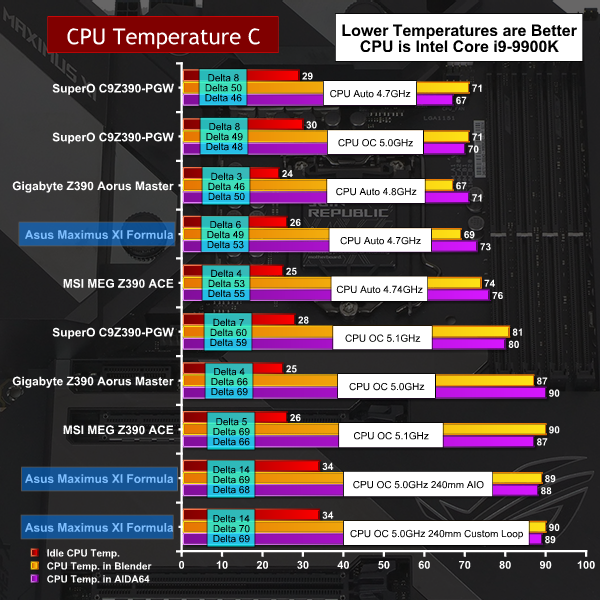
This chart tells the tale about our Core i9-9900K. On Auto settings at 4.7GHz it behaves superbly, but once we start overclocking the temperatures shoot up from a safe 70-75 degrees to a scary 90 degrees which is the threshold for throttling. This is nothing much to do with the cooling system and pretty much entirely dictated by the design of the CPU.
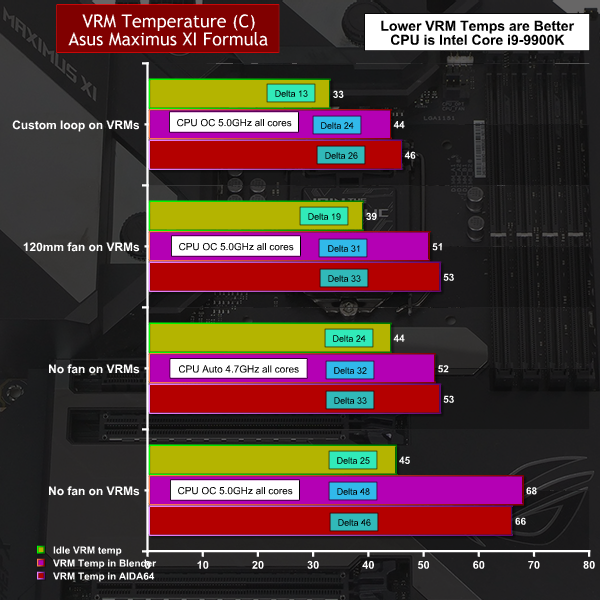
Our VRM temperature chart demonstrates that the CrossChill III VRM hybrid cooling block works superbly well.
Cooling Performance Overview.
On Auto settings our Core i9-9900K will happily run around 70 degrees C under extreme load, rising close to 90 degrees when overclocked. This is behaviour we have seen with other motherboards and it guides us to the view that overclocking our i9-9900K yields a marginal benefit while CPU temperatures are uncomfortably high.
By contrast VRM temperatures remained impressively low. Without any airflow around the CrossChill EK III VRM cooler we saw temperatures rise from the low 50s degrees to the high 60s when we overclocked the CPU. Adding a 120mm fan dropped temperatures back to the low 50s. Adding Custom loop cooling to the VRMs reduced the temperatures by five more degrees which is completely irrelevant as the VRMs were already nice and cool.
Power Draw
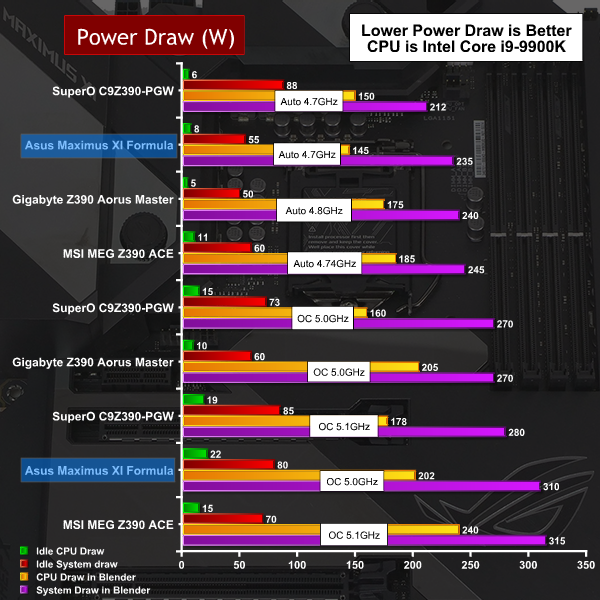
Power Draw Overview
When we used the Fractal Design AIO cooler we saw power draw that was slightly higher than we expected, however the numbers did not cause us any concern. Adding custom loop cooling to the CPU increased system power draw by 20W and then another 5W when we added active cooling to the VRMs.
We like the look of the Asus ROG Maximus XI Formula and were generally impressed by the build quality and list of features. It’s a good piece of kit but when you have a price tag around £400 you would expect nothing less as the going rate for a quality Z390 motherboard is £250 to £300. It is clear that Asus has spent a significant sum of money on the CrossChill EK III VRM cooler.
It is clear to us that a conventional finned VRM cooler would be cheaper to manufacture, however we can only speculate whether it would work as well as the EKWB hardware. We note that Asus uses the type of cooler we have in mind on the ROG Maximus XI Extreme so they have clearly made a deliberate choice about the cooler they arrived at for the Formula board.
The list of features on the Formula is extensive and pretty much beyond reproach. We assume the Maximus XII in 2020 will include WiFi 6 and that is the end of our wish list. OK, if you were to really push us, perhaps the HDMI output on the I/O panel could be changed for a DisplayPort.
Our criticisms of Asus ROG Maximus XI Formula mainly relate to the thermal performance of Core i9-9900K which is, of course, down to Intel rather than Asus.
Aesthetically we love the look of the Asus ROG Maximus XI Formula however it is a shame the Armour is plastic and offers no thermal assistance to the motherboard. We do not much like the way that Asus has mounted an aluminium heat sink on the Z390 PCH and then covered it with the plastic shielding. Surely it would be possible to use Armour that is functional, along the lines of the Gigabyte Aorus X570 Xtreme.
We were intrigued by the Asus AI overclocking feature in the excellent BIOS. It works well enough that you could seriously consider leaving it in training mode for perpetuity and simply rely on the silicon to do the work for you. When Intel launches its 10th Gen desktop CPUs with the rumoured ten cores and we run even deeper into Thermal Hell we can easily imagine that Auto settings will become more important, in which case we expect to see Asus AI moving to the fore.
You can buy the Asus ROG Maximus XI Formula for £355 HERE – its significantly cheaper than the OCUK price right now.
Pros:
- Excellent BIOS includes AI Overclocking.
- CrossChill EK III VRM cooler looks awesome.
- OLED LiveDash display is a delight.
- Good selection of USB ports.
- Aquantia 5Gb Ethernet is included.
Cons:
- Plastic Armour does not assist heat dissipation.
- VRM layout is unusual.
- Vcore droop seems excessive at 50mV.
- Hefty pricing.
KitGuru says: You pay a hefty chunk of change for Asus ROG Maximus XI Formula. In return you get a motherboard that looks superb and has excellent features.