 KitGuru KitGuru.net – Tech News | Hardware News | Hardware Reviews | IOS | Mobile | Gaming | Graphics Cards


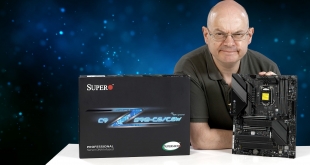
KitGuru has reviewed four motherboards from SuperO over the past four years with mixed results. Before you dive into our review of the SuperO C9Z590-CGW you might find it helpful to take a walk down memory lane and check out the C9Z390-PGW, C9Z390-CG-IW, C9Z370-CG-IW or C9X299-PG300 and you will get a feel for how SuperO goes about its work. The hardware is often very good while the finished product can be quirky or, occasionally, downright annoying.
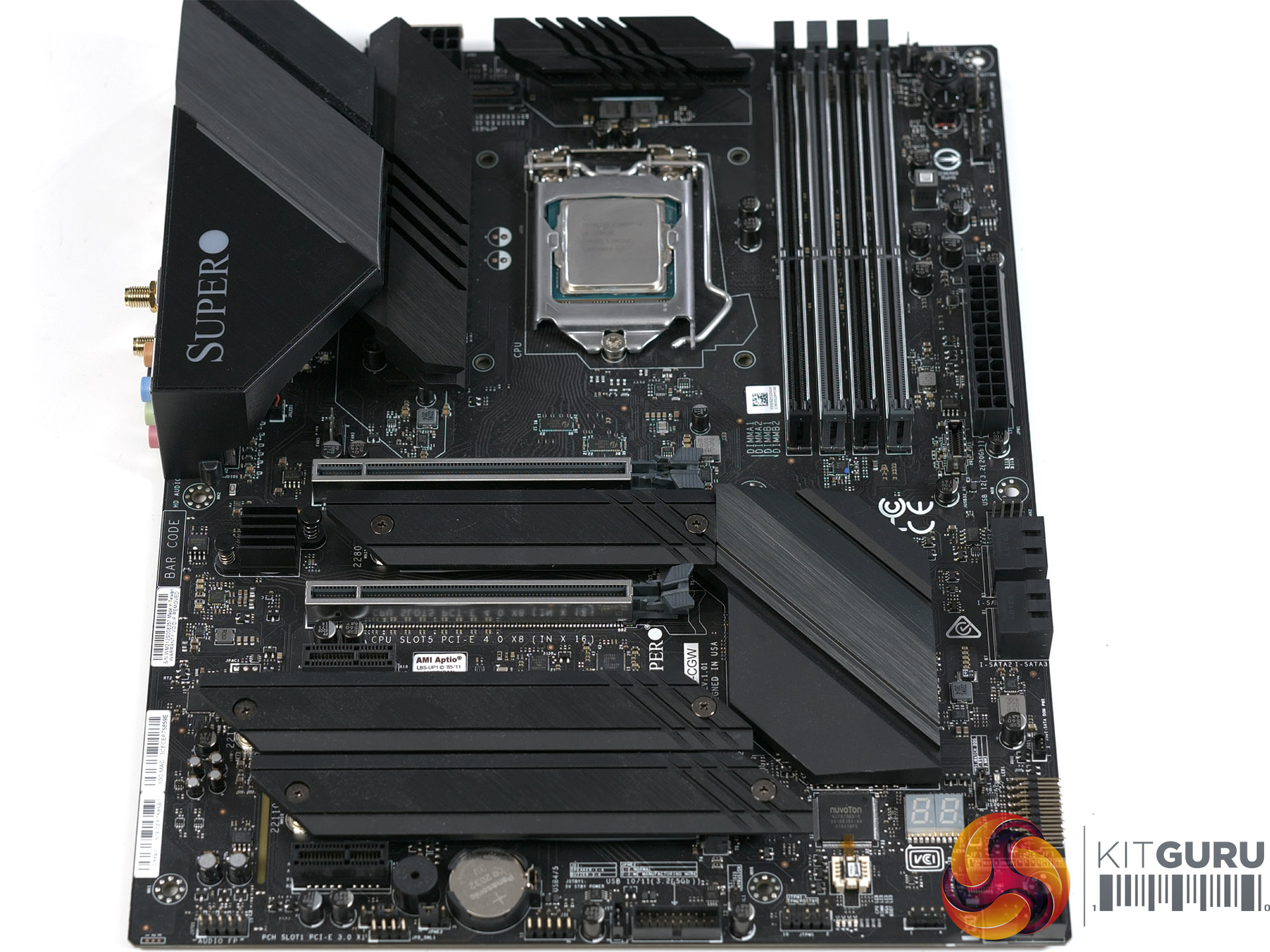
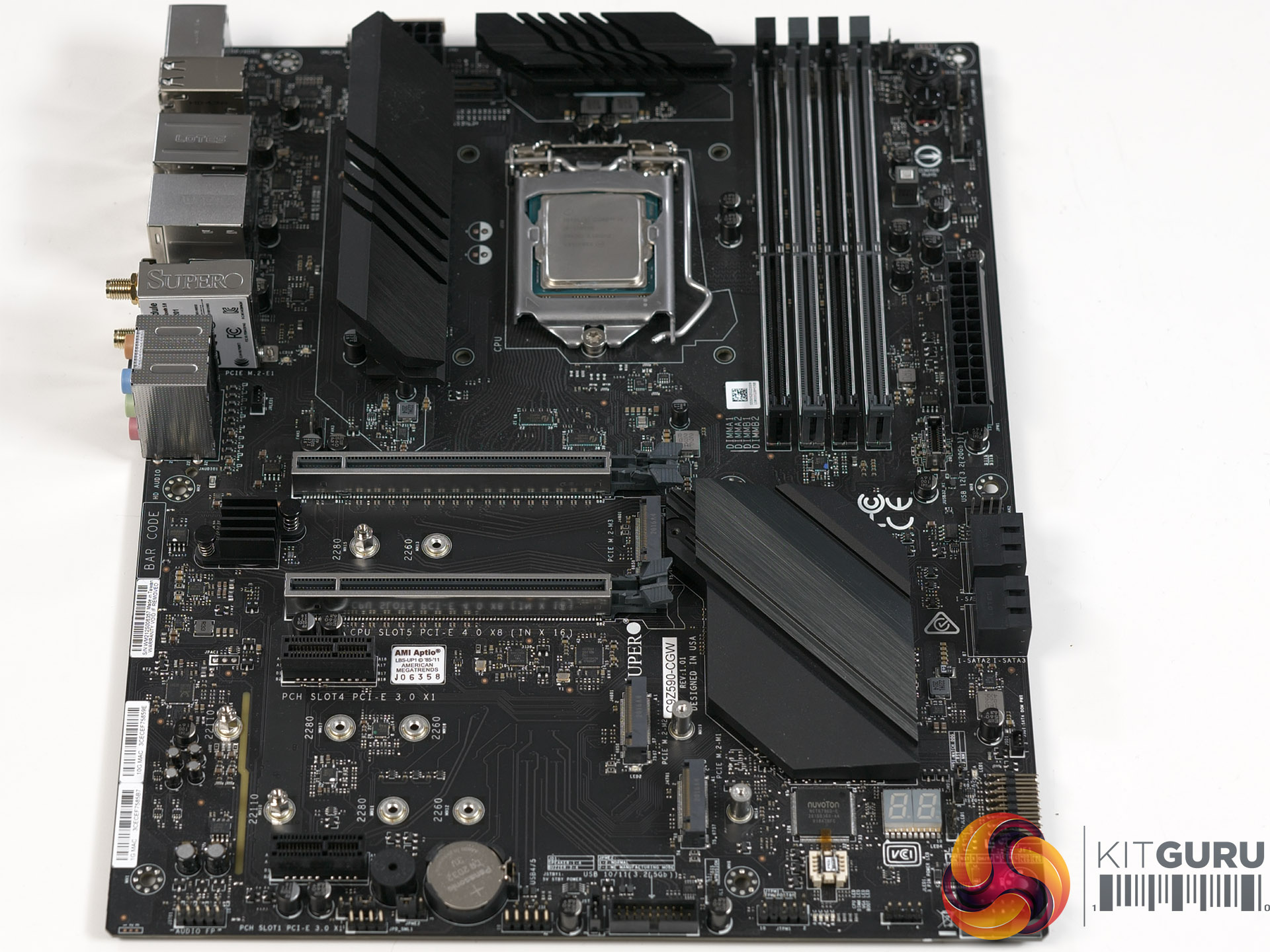
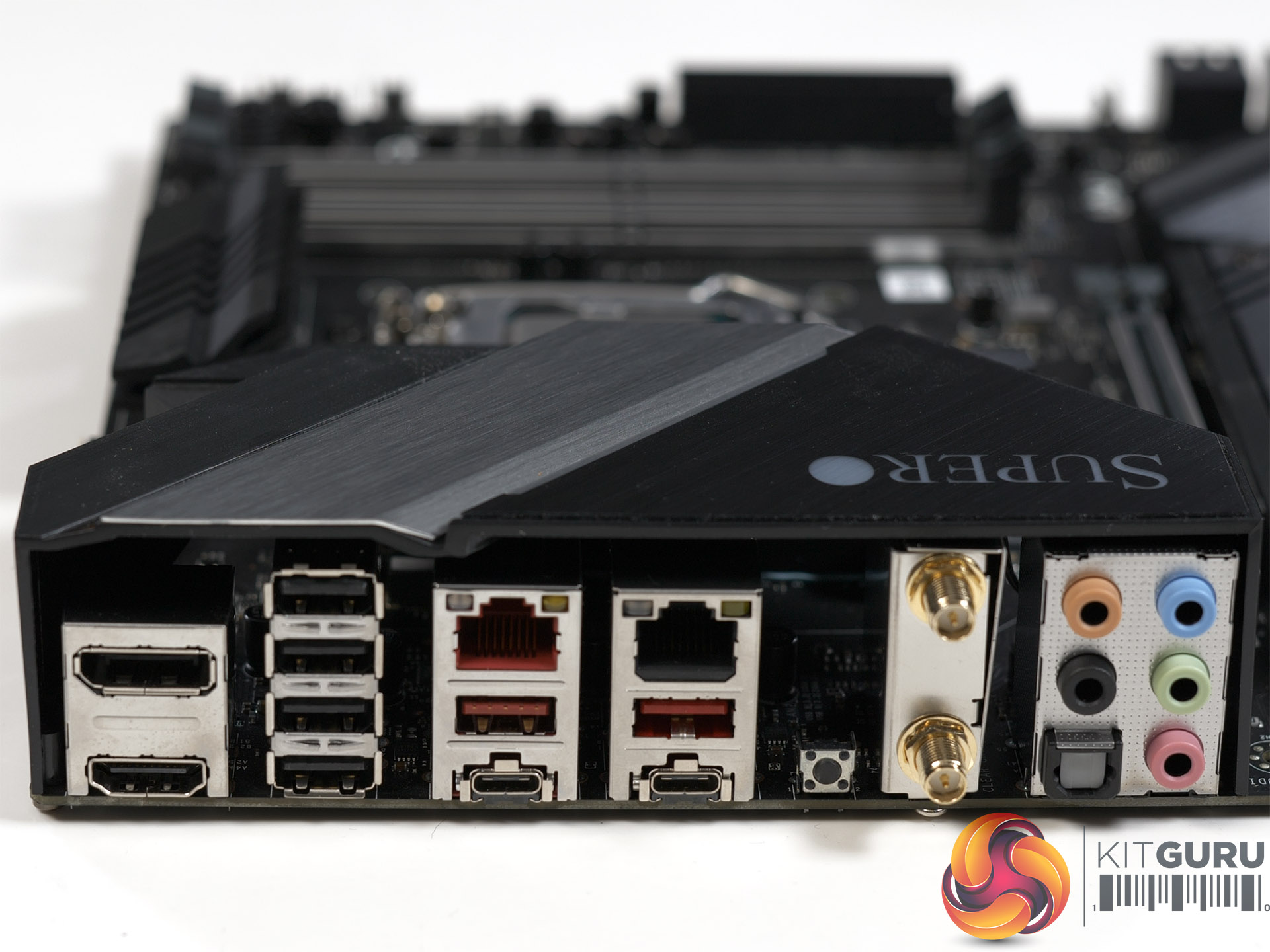


Specification
- Processor Support: 11th Gen Intel Core Processor Family LGA1200
- Chipset: Intel Z590
- Memory Capacity: up to 128GB non-ECC UDIMM Non-ECC DDR4-4000+ MHz(OC) in four DIMMS
- PCI-Express: 2x PCIe 4.0 x16 + 2x PCIe 3.0 x1 slots
- M.2 Interface: 1 PCIe 4.0 x4 and 2x PCIe 3.0 x4 2260/2280/22110
- On-Board SATA: 4x SATA3 ports (RAID 0, 1, 5, 10)
- On-Board Audio: Realtek ALC1220 High Definition Audio
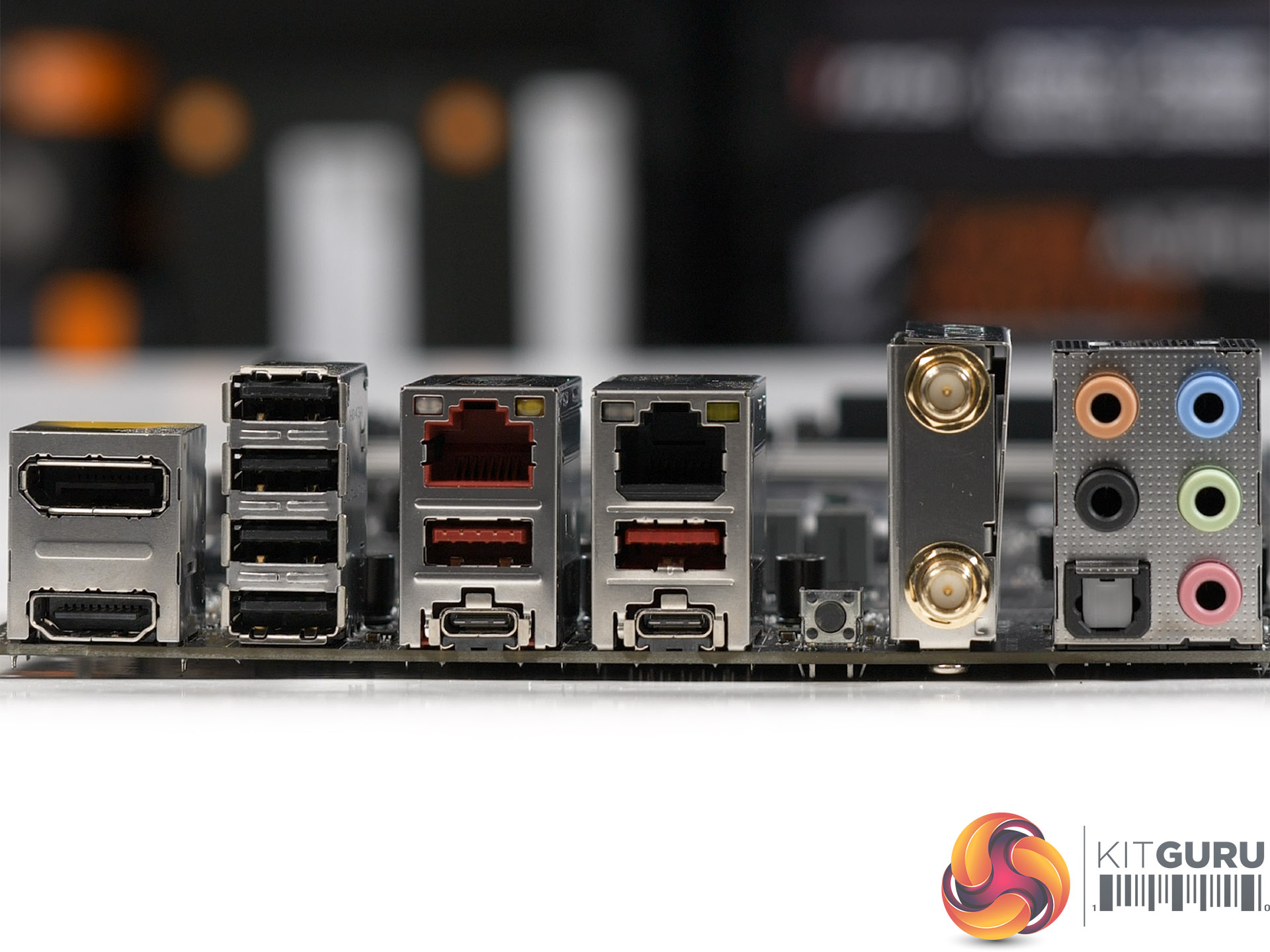
- Network Controllers: 1x 1GB LAN (Intel i219V) 1x 10Gb LAN Port (Marvell AQC113C) Wi-Fi 6 + Bluetooth 5.1
- LAN: 1x RJ45 Gigabit Ethernet LAN port 1x RJ45 10Gb Ethernet LAN port
- USB:
- 6x USB 2.0 ports (4 rear + 2 via headers)
- 2x USB 3.2 Gen1 ports (2 via headers)
- 2x USB 3.2 Gen2 ports (2 Rear Type A)
- 3x USB 3.2 Gen2x2 ports (2 Type C)
- Audio: 7.1 HD Jacks Optical S/PDIF out
- Display: 1x DisplayPort 1.4a + 1x HDMI 2.0b
- Serial Port/Header: 1x COM port (header)
- Fans: Total of 5 PWM fan headers supporting up to 5 fans with tachometer status monitoring
- BIOS Type: 256Mb SPI Flash EEPROM with AMI BIOS
- Form Factor: ATX 305mm x 244mm
- Software: SuperDoctor V Watch Dog SuperO Booster
The Hardware
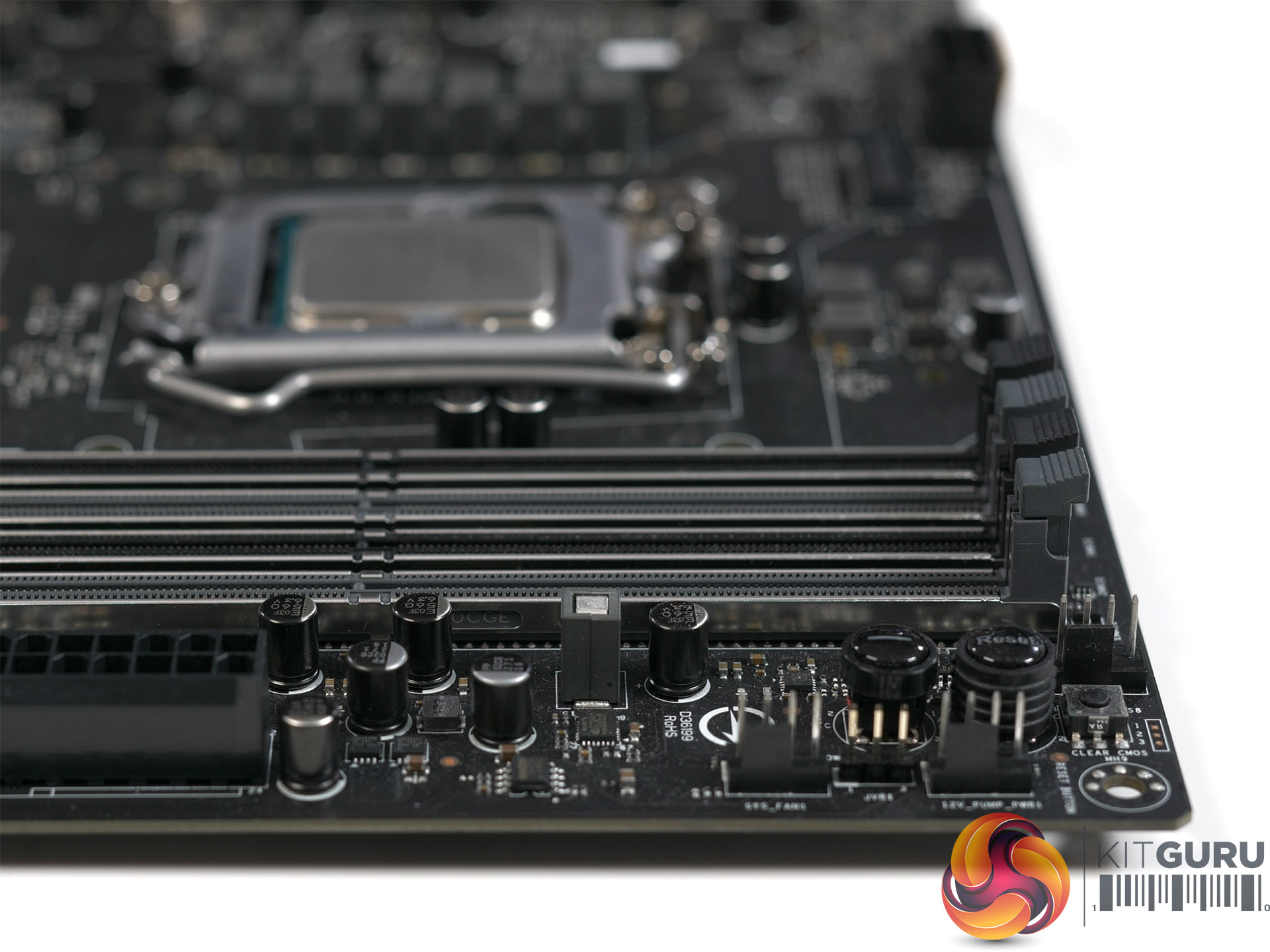
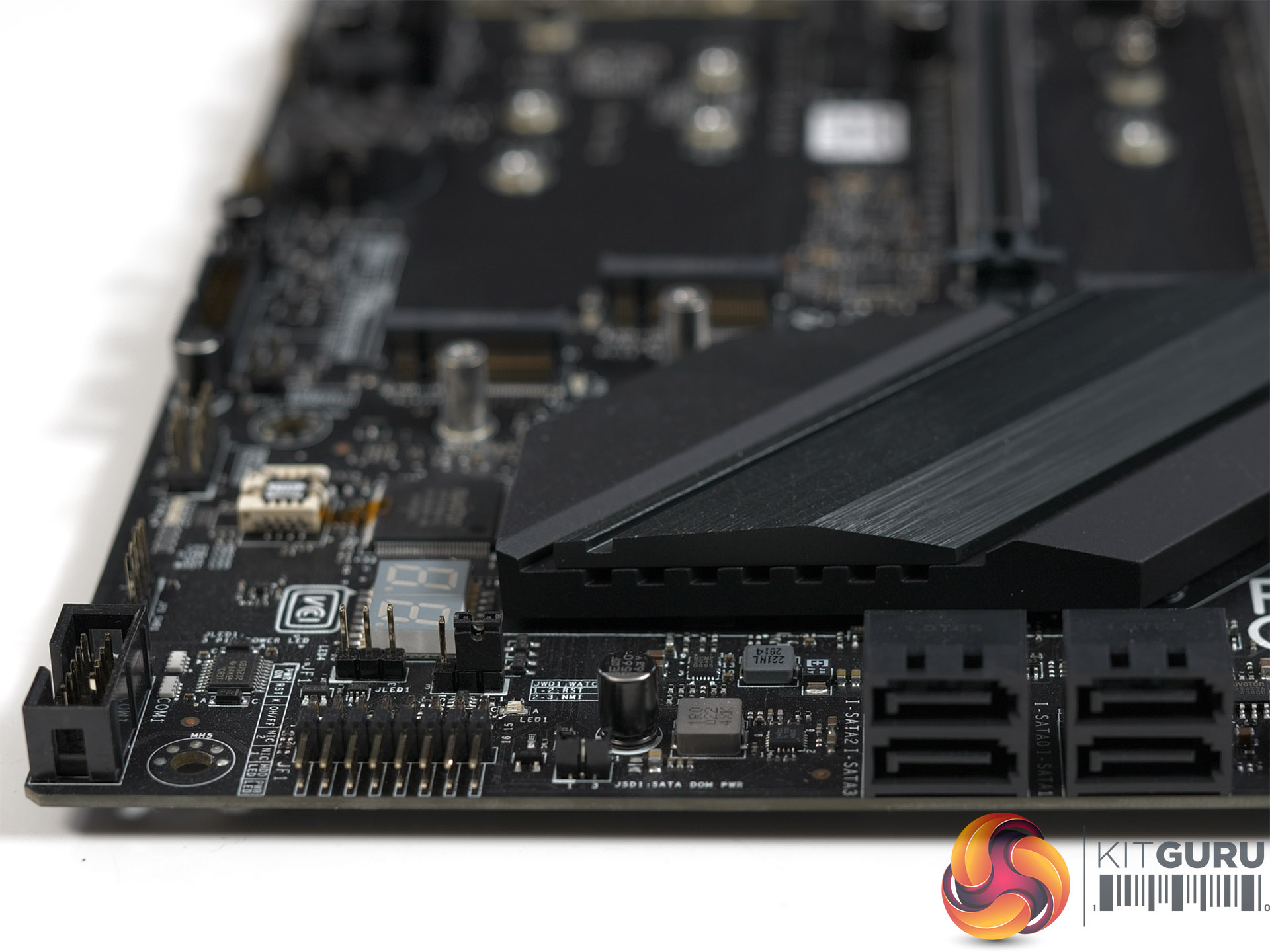
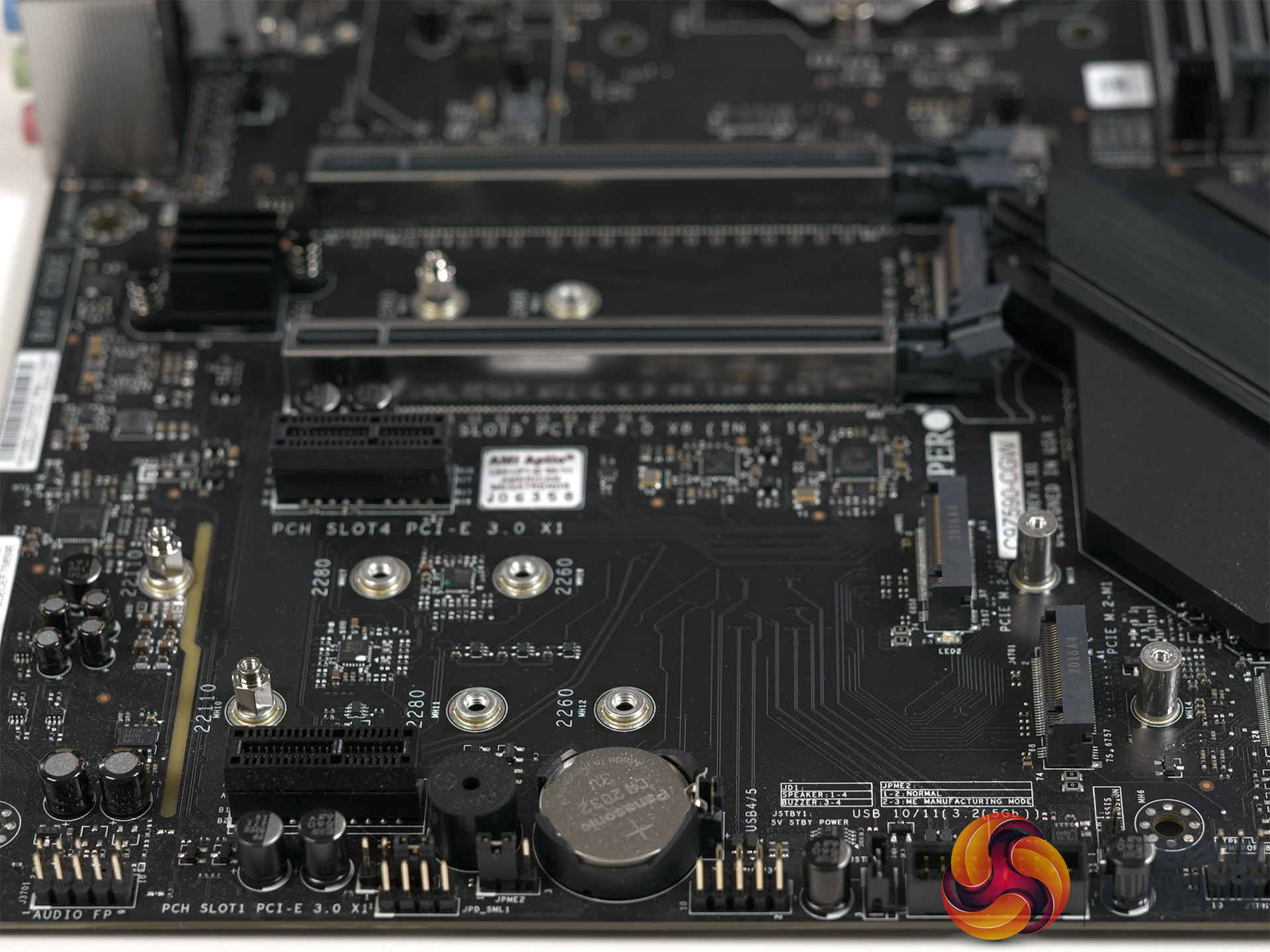
The layout and specification of the SuperO C9Z590-CGW is perfectly decent, although there are a few points worth noting. The first is that the board does not support RGB which seems like a curious omission on an enthusiast platform.
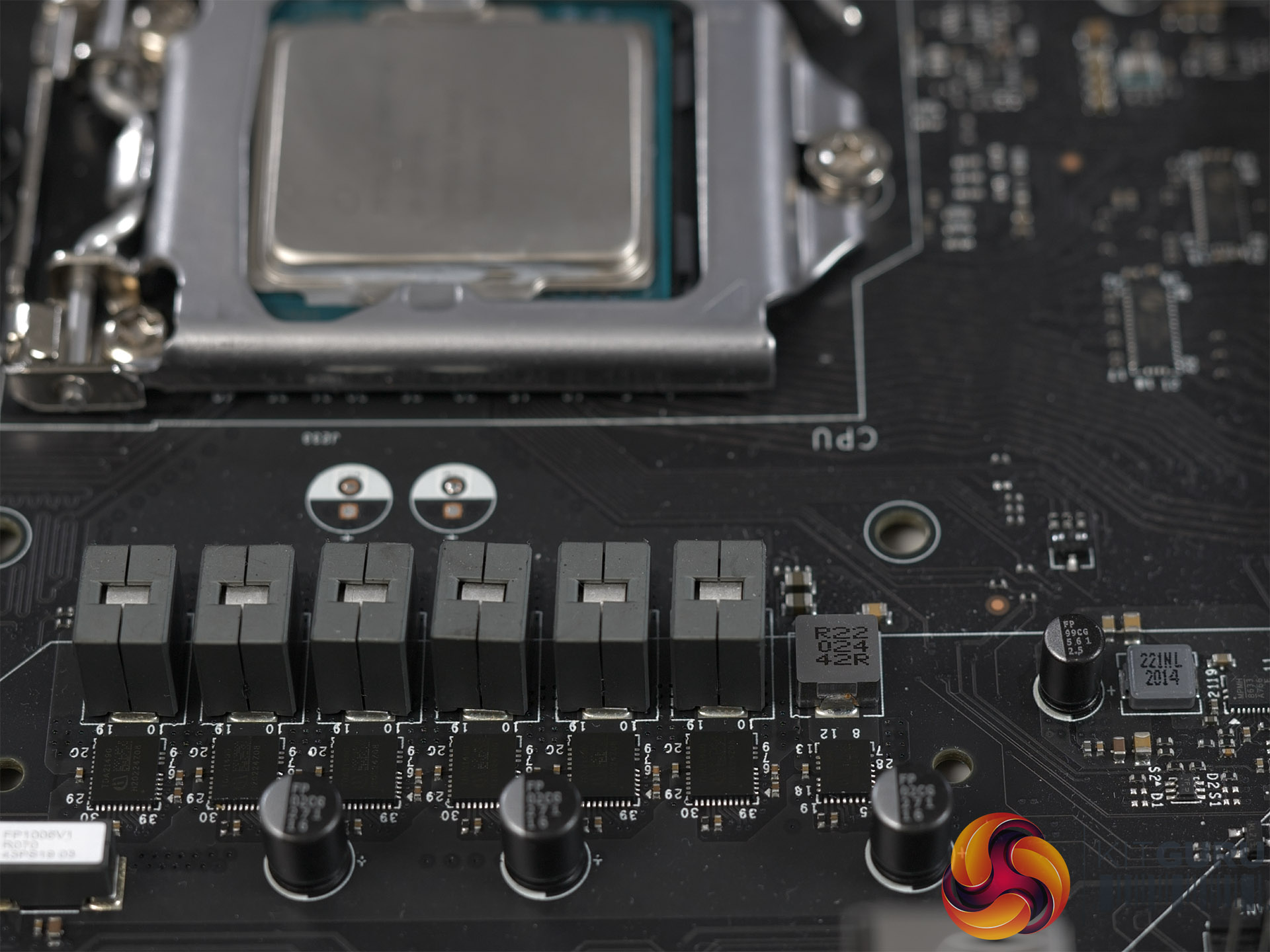

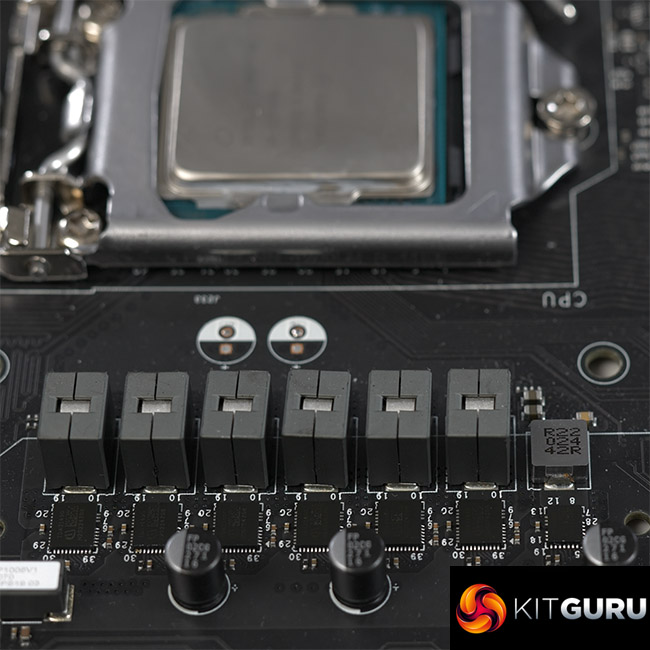
The second point is the VRM set-up which uses 6x Infineon TDA21490 90A power stages which looks a bit lightweight when compared with Gigabyte's Z590 Aorus Pro AX or the Asus ROG Strix Z590-E Gaming WiFi which respectively employ 12 and 14 power stages for the CPU. That does not mean SuperO has got anything wrong.
Indeed the maths tells us this set-up can supply about 350W to a Core i9-11900K while running at 50 percent load (or lower) so technically it is absolutely fine and has quite a decent margin in hand. The fact is we have got used to 10, 12, 14 or even 16 power stages and the consequence is that the VRM arrangement on the SuperO C9Z590-CGW may ring alarm bells with prospective customers.
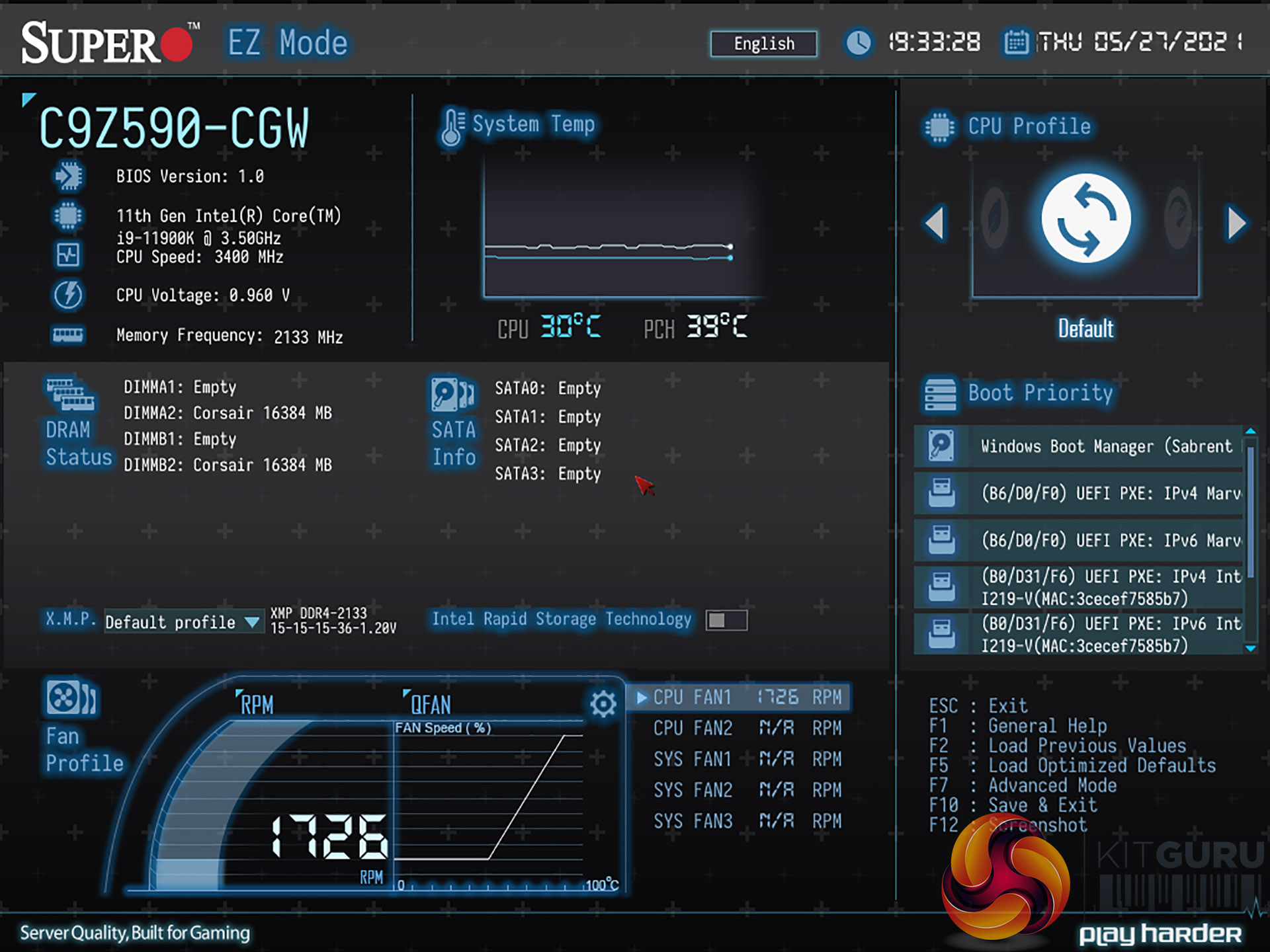
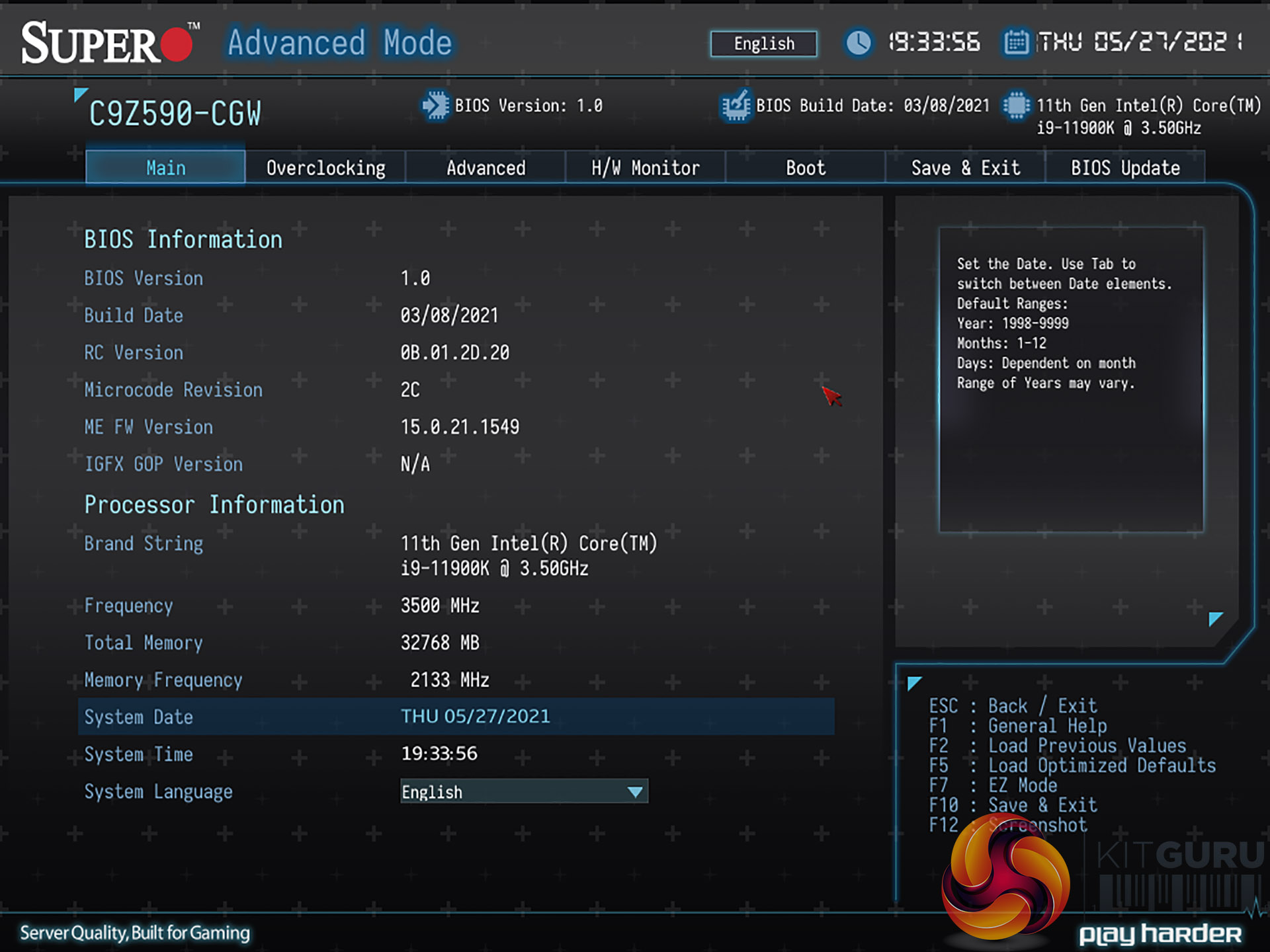
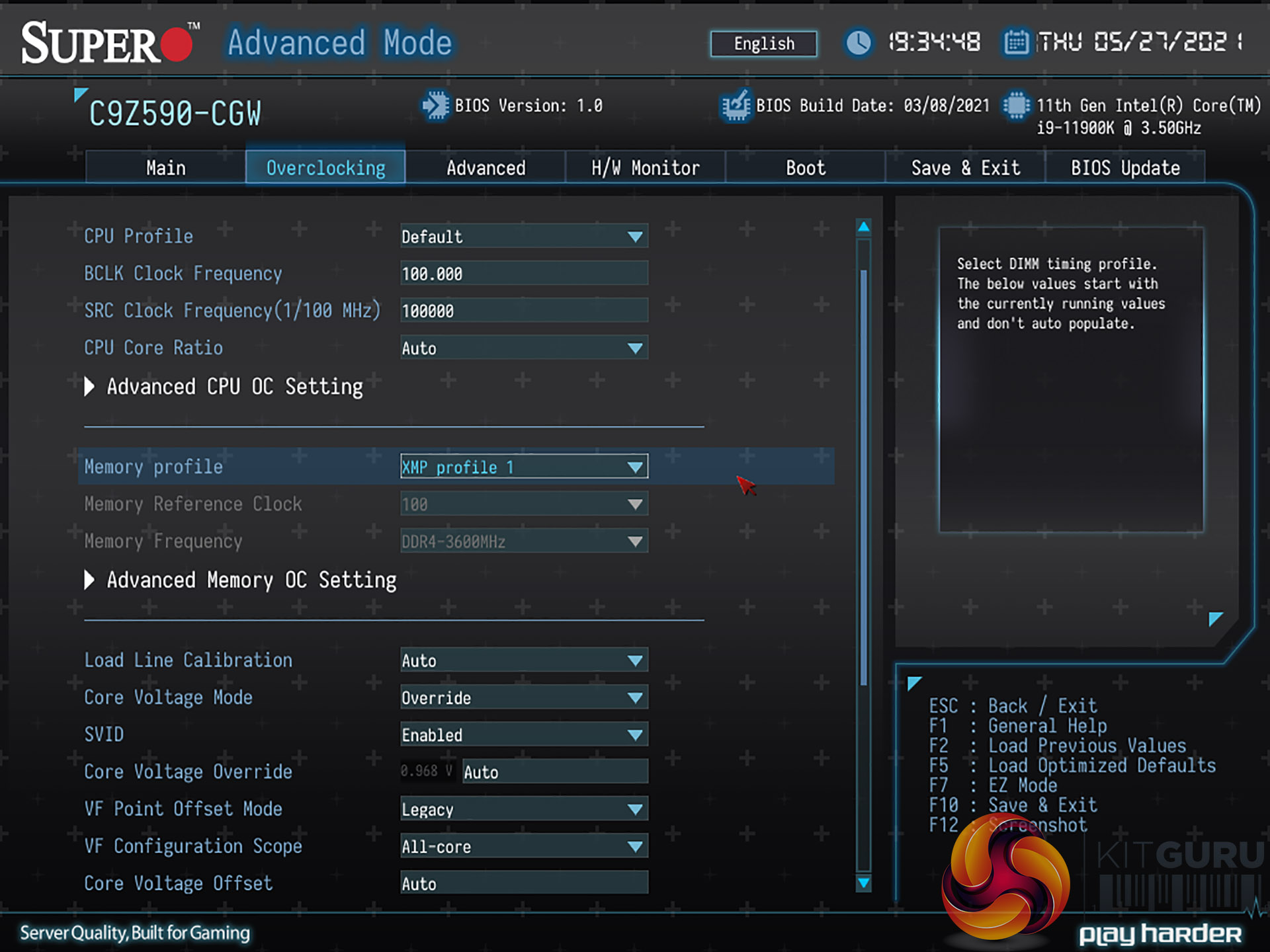
The BIOS is problematic and works in pretty much the manner you would expect for version 1.0 as it clearly needs a bit more work. As we demonstrate in our video, navigation in the BIOS is a bit clunky but our bigger concern is that the BIOS does not support Intel Adaptive Boost, which is pretty much the only reason why you might consider buying a Z590 motherboard.
Furthermore the BIOS follows Intel's policies when it decides how much power to supply. If you select the profile for a stock Intel CPU cooler the power will boost to 134W and then reduce to a mere 65W. Using the profile for a tower air cooler gives a boost to 177W and then long duration of 125W. The most ambitious profile for a water cooler boosts to 250W and then reduces to 125W.
In a sense this is admirable as it shows that SuperO respects Intel's technology however it is also problematic as an 8-core Rocket Lake CPU draws at least 200W under load, which can easily rise to 250W or even 300W in extreme cases, so we can be certain that SuperO is leaving performance on the table. In our video we describe how we tested with both the 125W power limit and also manually set a 250W power limit .
Test system:
- CPU: Intel Core i9-11900K
- Memory: 32GB G.Skill TridentZ Neo DDR4-3600MHz Dual Channel
- Motherboard: SuperO C9Z590-CGW BIOS 1.0
- CPU cooler: MSI MPG Core Liquid K360
- Graphics: Sapphire RX 6800 XT 16GB
- Storage: Sabrent Rocket 4.0 M.2 NVMe
- Power Supply: Seasonic Prime Platinum 1300W
- OS: Windows 10 Pro
CPU Testing – Time Spy and Blender

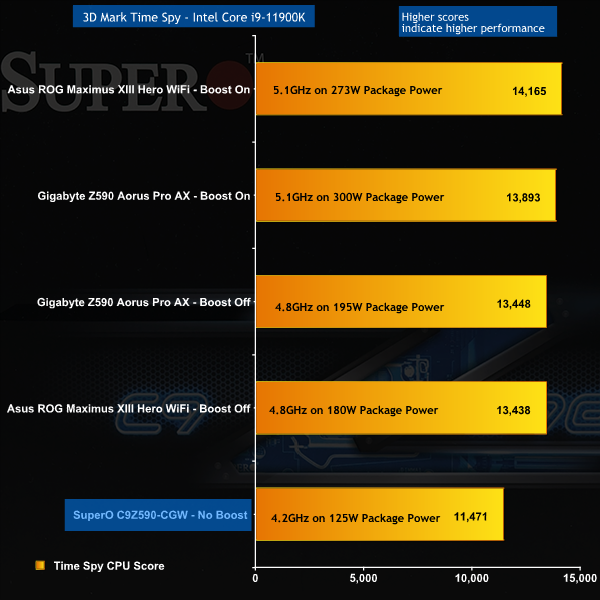
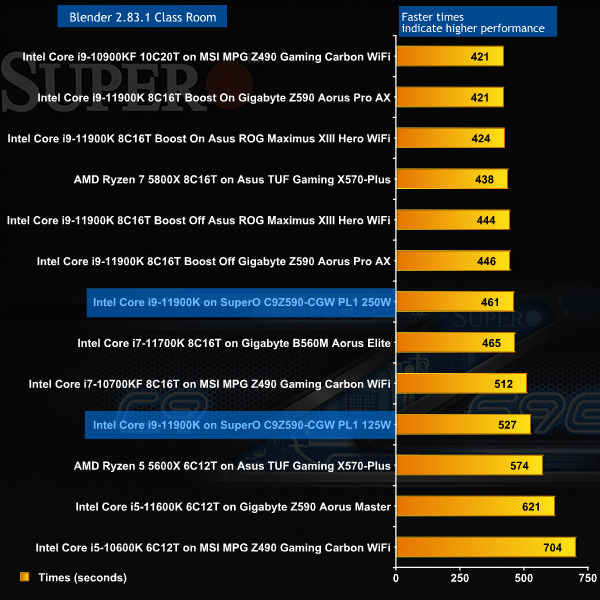
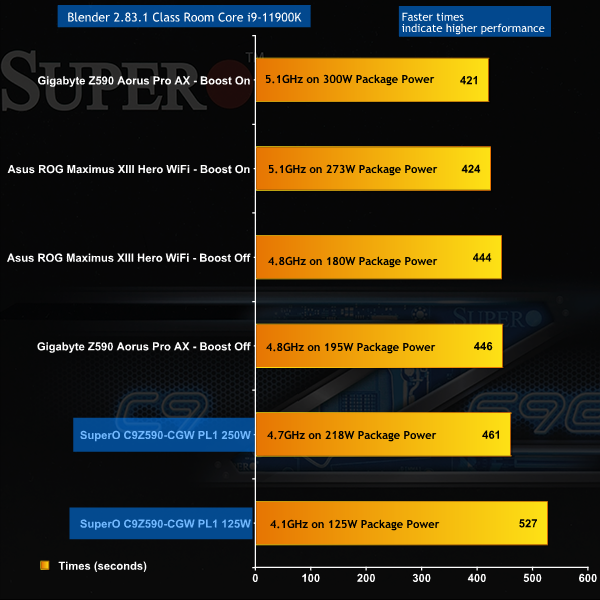
CPU Testing – Time Spy and Blender Overview
We can sum up the CPU benchmark results for 3D Mark and Blender quite easily as the Core i9-11900K is running at a low clock speed and as a consequence the SuperO sits a considerable distance down the charts.
CPU Testing – Cinebench
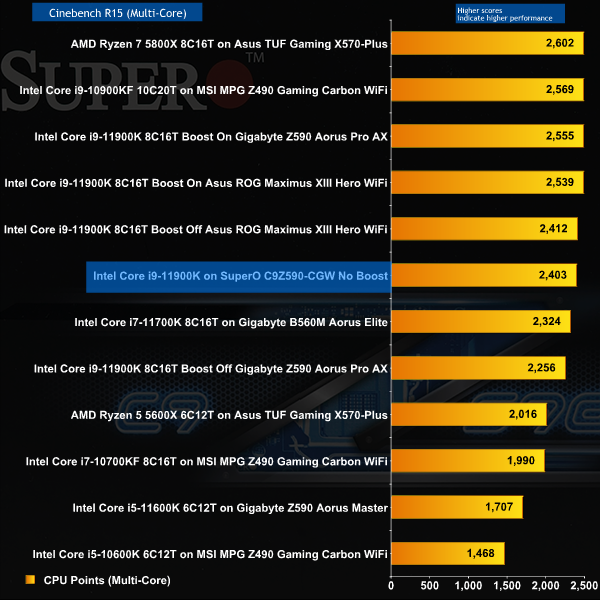
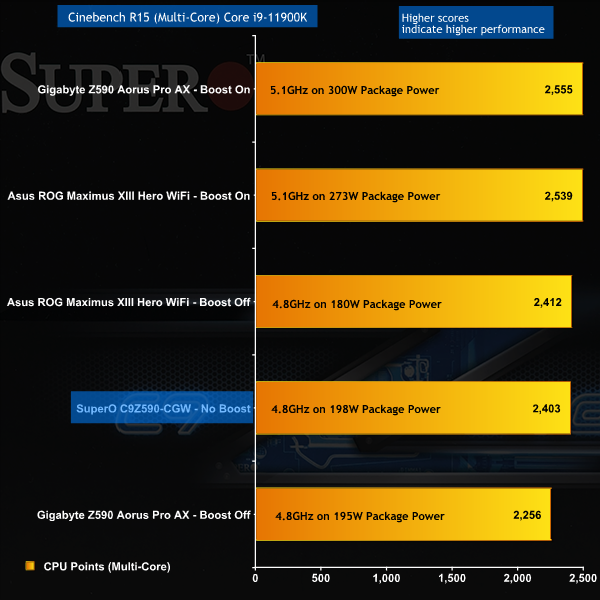
In Cinebench R15 Multi-Core the SuperO shows what might have been as this test is very short, and runs with the CPU in its faster PL2 boost state.
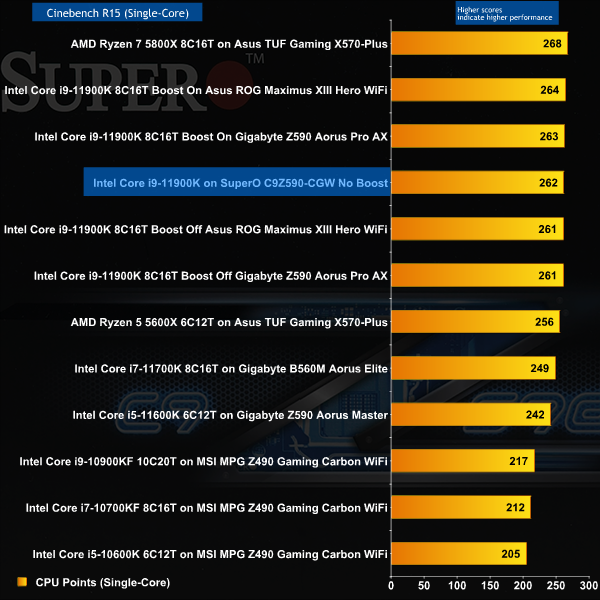
Cinebench R15 Single Core requires very little power for the CPU and once again we see the SuperO performing well.
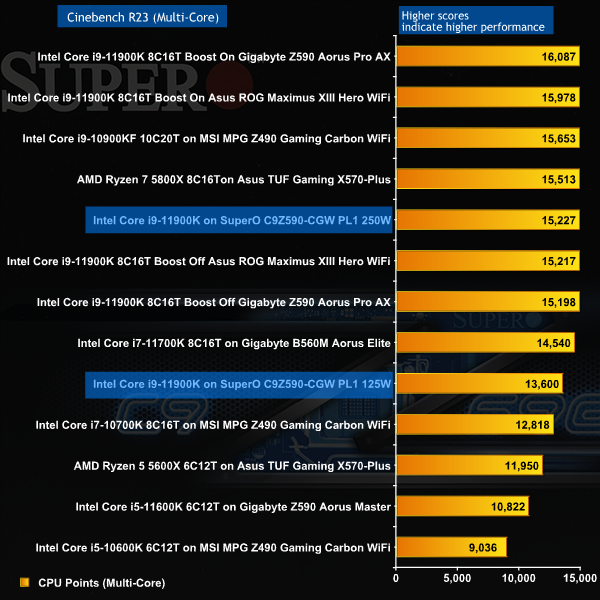
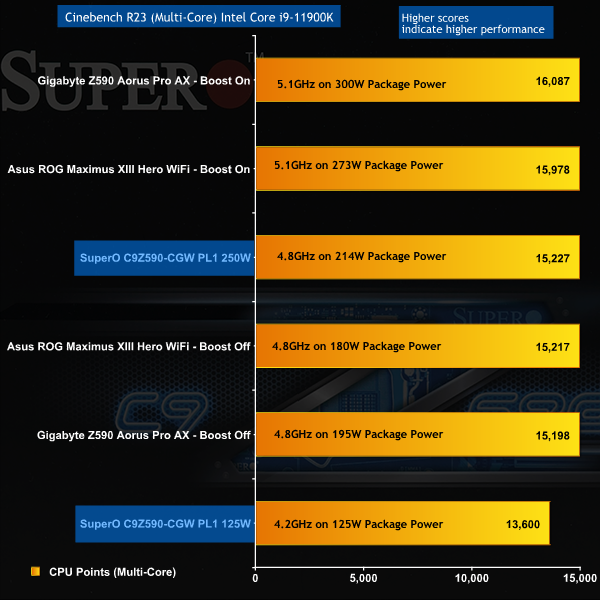
Cinebench R23 Multi-Core highlights our issues with the SuperO. In the 125W Auto mode the Core i9 CPU is starved of power and as a result the motherboard performs very poorly. Increasing the power limit manually allows the SuperO to stretch its legs to a certain extent. If SuperO can implement Intel Adaptive Boost effectively, we have every hope the C9Z590-CGW will perform reasonably well.
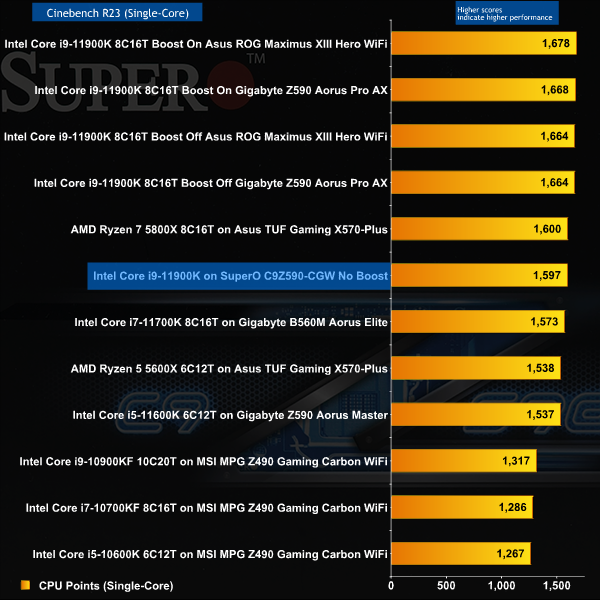
In Cinebench R23 Single Core we once again see the SuperO doing a decent job.
CPU Testing – Cinebench Overview
When the SuperO C9Z590-CGW limits the CPU to PL1 of 125W the system performs very poorly compared to any other Z590 motherboard we have seen. You can make the argument that Asus, Gigabyte, MSI and the others are pushing the limits but the fact is that SuperO ends up being the odd one out and it really is time that SuperO came to their senses and delivered more performance on Auto settings.
Gaming Tests
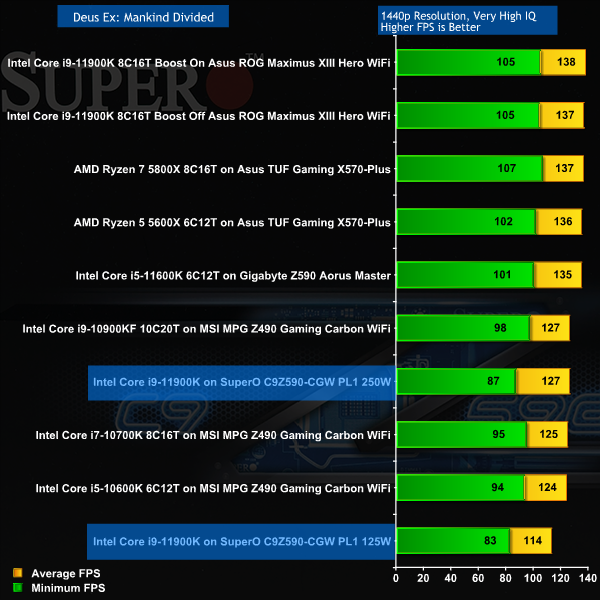
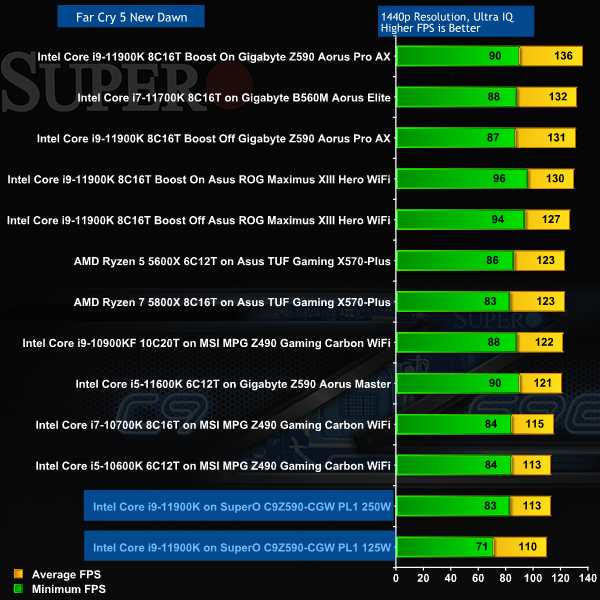
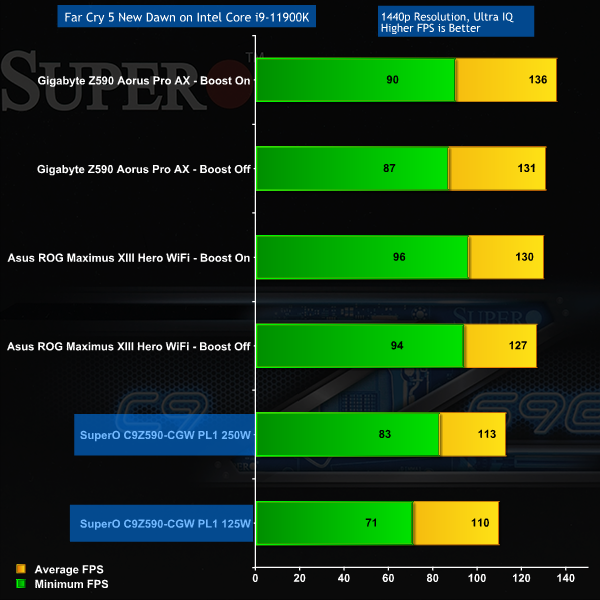
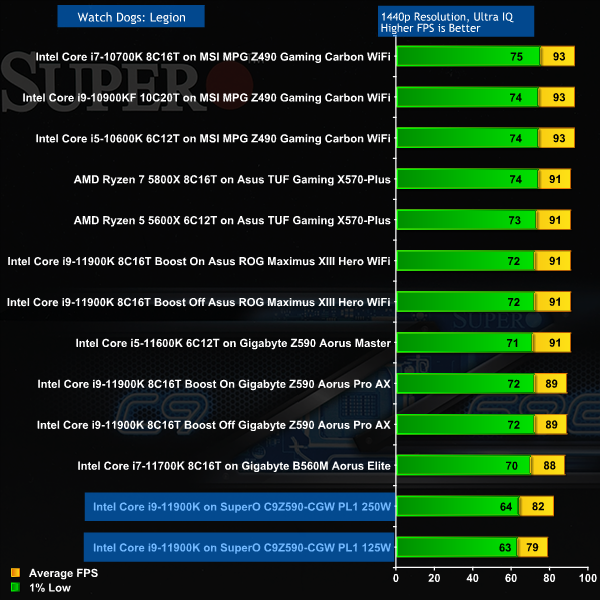
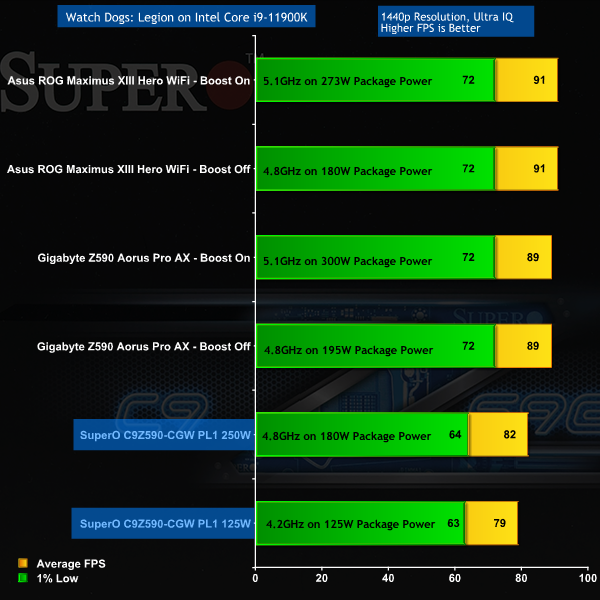
Gaming Tests Overview
Our gaming test results on the SuperO C9Z590-CGW are little short of disastrous with a 10fps differential compared to the other motherboards. Whatever is going on feels more significant than a mere lack of clock speed and we have to hope that SuperO can unlock at least some of the missing performance with a BIOS update.
Power and Temperatures
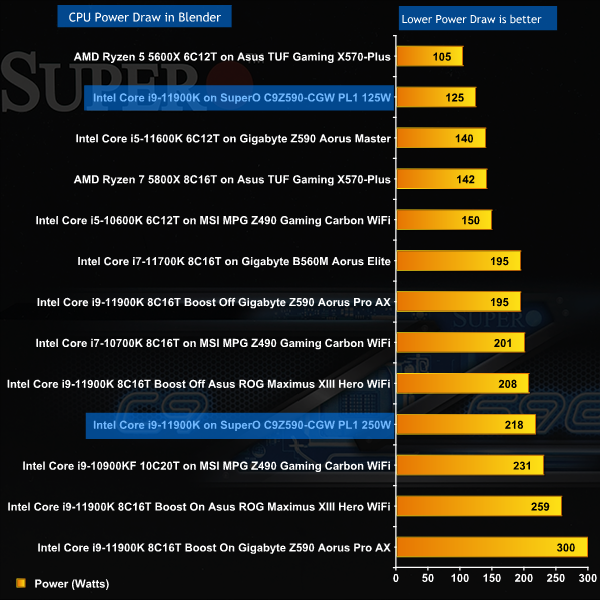
Power Overview
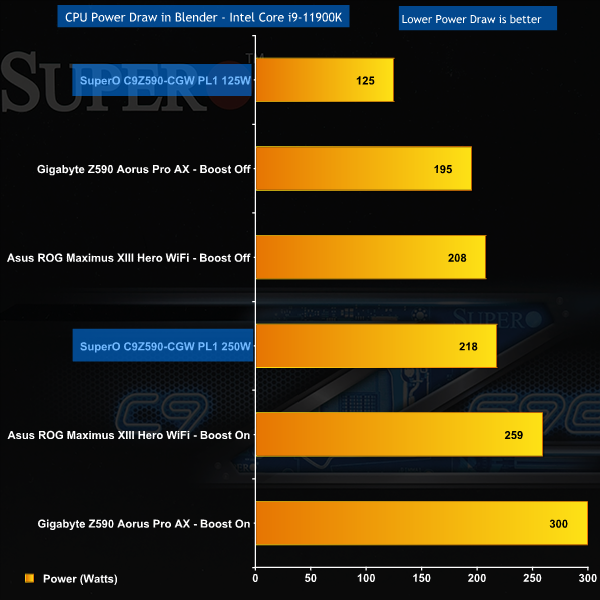
Power lies at the root of SuperO's problems as 125W is far too little to supply a Core i9. When we raised the PL1 power limit to 250W the CPU only pulled 218W and ran relatively slowly so it is clear the only way you can make the SuperO behave is to manually overclock the CPU. It is clear to us that SuperO needs to unlock a 200W Auto setting and a 250W+ Boost setting just as quickly as possible.
VRM Temperatures Overview
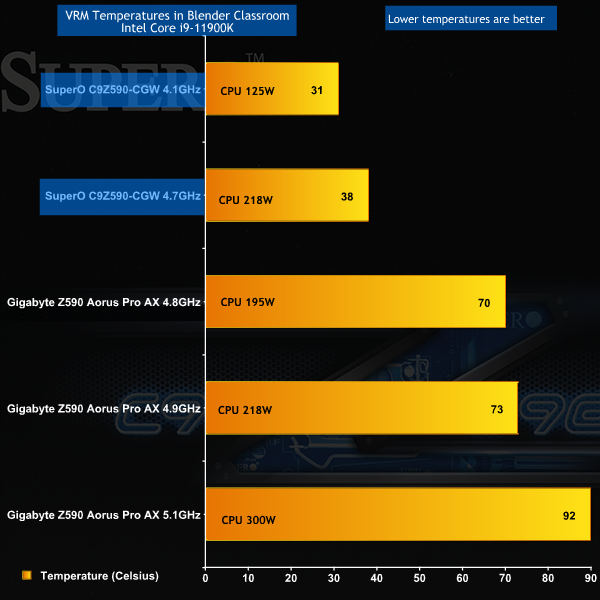
While we like to see low VRM temperatures, the figures reported by HWiNFO64 on the SuperO C9Z590-CGW seem just a bit too good to be true. The 31 degrees Celsius figure for the system running at 125W may well be correct as each power stage can only be losing a tiny amount of power through inefficiency. It's the other figure that looks problematic as the SuperO seems to be running the VRMs at 37 degrees while the CPU is pulling 218W, while the Gigabyte Z590 Aorus Pro AX has a VRM temperature of 73 degrees at the same 218W load.
The Gigabyte data looks absolutely fine so this suggests that either SuperO has worked some sort of magic or HWiNFO64 is reporting inaccurately.
To our way of thinking, the only reason for buying a Core i9-11900K with a Z590 motherboard is because you want the storming gaming performance that comes from eight cores running at clock speeds around 5GHz. You know this will require around 250W for your CPU and naturally that will put a strain on your cooling system but you're Ok with that, provided your expensive hardware delivers the goods.
The major problem here is that SuperO doesn't want to play the game that way and instead respects Intel's power limits with the result that your expensive hardware runs slowly. To make matter worse SuperO does not currently support Intel Adaptive Boost so this motherboard could use an H570 chipset rather than a Z590 and we would be none the wiser.
Clearly we could make life easier on the SuperO C9Z590-CGW if we swapped out the Core i9 CPU for a Core i7 or Core i5 and that would make perfect sense if we were dealing with a budget motherboard that cost, say, £200.
Instead we have been told the SuperO C9Z590-CGW will cost £419 here in the UK and for that sort of money we expect a premium motherboard that behaves perfectly, delivers good performance and is supplied with a list of impressive features. Instead we have a Z590 motherboard that performs poorly out of the box and which has features that are nothing special.
SuperO could help the C9Z590-CGW by fixing the BIOS and lowering the price to a sensible level, but you still have a bit of a conundrum where the offer is a gaming platform with 10 Gigabit Ethernet and nothing in the way of RGB. You may think that sounds like a confusing combination of features and frankly, we have to agree.
We haven't been able to find a buy-link for the SuperO C9Z590-CGW but the MSRP is £419 inc VAT.
Discuss on our Facebook page HERE.
Pros:
- Dual Ethernet, including Marvell FastLinQ Edge 10Gbps.
- The board has POST code debug and Micro buttons.
Cons:
- BIOS 1.0 requires some work, including XMP.
- There are no RGB headers.
- BIOS 1.0 does not support Intel Adaptive Boost.
- At this price we expect Thunderbolt and Wi-Fi 6e.
- 6x 90A Infineon VRMs seem out of place on a high end ATX motherboard.
KitGuru says: For the time being we suggest you avoid the SuperO C9Z590-CGW.
