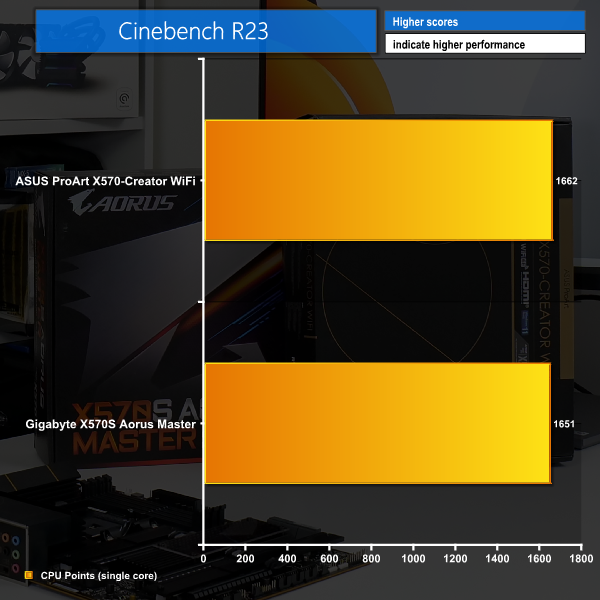
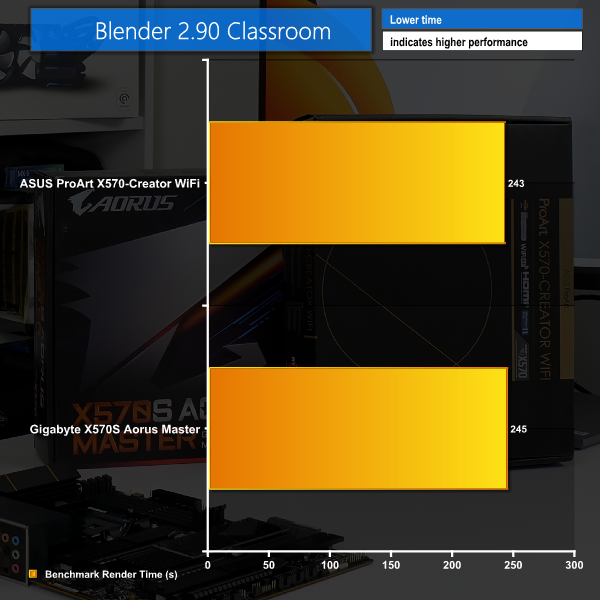
AMD’s X570 platform has been superb since its launch in July 2019, but B550 stole some of its thunder in summer 2020. Especially because B550 was fully passive and had some updated features given its 1-year newer status. With X570, only a couple of the ultra-high-end boards were passive – most had an annoying chipset fan. Not happy with the highest-end AM4 options just sailing into the sunset until AM5 arrives, the motherboard vendors have brought out some new X570 motherboards often designated ‘X570S’. And these boards are passively cooled without a chipset fan, thus eliminating one of the most annoying features for the X570 offerings in general. https://www.youtube.com/watch?v=Rrt10W3YJDc Before you get too excited about the 'new X570S' chipset, we spoke to AMD and they confirmed that there is no real difference with the chipset silicon itself. There is no new process node or adjusted feature set. Instead, the motherboard vendors have more or less taken it upon themselves to use X570S as a marketing term for the chipset... but it’s still X570! To be perfectly frank though, that is not such a bad thing. X570 is still a superb platform, with PCIe Gen 4 connectivity throughout and a high-bandwidth four-lane highway between the CPU and chipset. Realistically, the only downside to X570 motherboards as they have currently existed on the market has been the chipset fan. But now, better cooling implementations from the motherboard vendors have that annoyance fixed. Anyway, that’s enough for the introduction. We will be examining a couple of passive X570 motherboard from ASUS and Gigabyte. We have the £360 ASUS ProArt X570-Creator WiFi that is intended for prosumers with personal workstation type use cases. And the £340 Gigabyte X570S Aorus Master which carries on from the original X570 Aorus Master by intending to be an all-round enthusiast option with a high-end, but not over the top price tag. Let’s take a closer look at both of these motherboards. In terms of raw appearance, the passively cooled ASUS ProArt X570-Creator WiFi is clean and conventional looking overall, albeit with large VRM and chipset heatsinks, as well as a chipset plastic cover. Gold writing may be a weird point to some, but it is not over the top or gawky. Onboard RGB is not in favour for this prosumer motherboard, though there is a large plastic, translucent rear IO cover. Along the top edge we see 8-pin and 4-pin CPU power connectors. There are three fan headers up top, with two more nearby. The board has eight 4-pin fan headers in total, which is a good number and with solid distribution. All of the headers are 1A rated except the water pump header which is 3A. This is slightly disappointing and could limit support with fan splitters or high power pumps. You do, however, get good control through the ASUS UEFI. Three ARGB headers and one 4-pin 12V RGB header provide the board's lighting connectivity. There is also a thermal sensor header as well as a 14-1 TPM Header near the CPU area. There are no onboard buttons or voltage monitoring points and that is OK given the motherboard's target audience. However, a debug LED would have been useful. ASUS provides an internal USB 3.2 Gen 2 Type-C header runs at 10Gbps which is expected from a motherboard of this price point. There is a single 5Gbps USB 3 header which is right angled, so make sure you can avoid chassis interference. All six SATA ports operate from the X570 chipset without bandwidth sharing, so they can be used at the same time for RAID and heavy storage configurations. In lieu of a secondary USB 3.0 header, there are three USB 2 headers. This will actually be useful in a prosumer workstation type build, though I would have liked to see an internal USB Type-A port for handling a USB flash drive for licensing purposes. The COM header may be useful for some purposes. ASUS' audio system is based around the well respected Realtek S1220A solution. Dual strengthened PCIe slots run at x16/x0 or x8/x8 from the CPU Gen 4 lanes. Spacing is fine for fat cards up top as well as dual card setups which are actually useful in a workstation. Watch out for bandwidth headaches though, because the secondary full-length slot shares bandwidth with an M.2 connector and therefore drops to x4 when M.2_2 slot is used. This is smart for the M.2 bias to CPU lanes – which is good for bandwidth in prosumer type workloads. But it is not good for the reasonable use case of dual graphics cards for rendering or simulation users for example. One card will run at x8 and the other x4 alongside an x4 M.2 SSD. ASUS seems to think that a user will probably run an x8 GPU, x4 M.2, then perhaps another x4 device such as a PCIe SSD or a RAID card. The bottom PCIe Gen 4 x4 slot runs from the X570 chipset lanes and does not share bandwidth making it good for expansion cards or even added SSDs. Three M.2 slots are deployed in total. The top two run from the CPU lanes with the aforementioned bandwidth sharing for slot number 2. The bottom slot runs from the X570 chipset and does not share bandwidth which is ideal. Two metal strip heatsinks are used for M.2 SSD cooling. These are not particularly impressive by comparison to many of the oversized competing designs, but with the thermal pad they should be competent enough. There is, however, no real dual-sided M.2 SSD cooling provisions. That bottom cooling strip being shared between two M.2 slots is both good and bad. It can be good because it is more cooling mass if you only install one SSD. But it can also be bad because it means you cannot install an SSD with its own beefy heatsink alongside a bare M.2 drive. Installation of a drive is quick and easy thanks to ASUS' superbly innovative Q-latch tool-less method. The ProArt X570-Creator WiFi motherboard's rear IO is phenomenal and this is where ASUS really sets out this £360 motherboard’s prosumer credentials. Star of the show are the dual Thunderbolt 4 Type-C ports powered by the Intel JHL8540 chipset. Each port delivers up to 40Gbps bidirectional bandwidth which is actually useful for creative professionals and prosumers with data-heavy projects. Realistically, there’s no faster or better way than Thunderbolt to transfer large projects to massive external storage devices such as a multi-TB DAS. Just ask Apple users! Of course, you can also support up to dual 4K displays from the Thunderbolt/Type-C connector (aided by the DP-in for TB4 to re-route video from a dedicated graphics card). That means you can connect to Type-C monitors such as the ASUS ProArt 4K HDR model (shown in our video review) with a straightforward single Type-C cable. The ports also support up to 15W 5V/3A charging. I can wax lyrical about the benefits of TB4 - this is an excellent inclusion on a relevant spec motherboard. ASUS' networking decisions are also outstanding. A 10GbE RJ-45 connection is provided by a Marvell AQC113CS controller (with a strip metal heatsink) and is ideal for SOHO use with a 10-Gig NAS via a router such as the ASUS RT-AX89X shown in our video review. And the 2.5GbE secondary Intel NIC is also a stellar inclusion for actual internet connectivity if your 10GbE NAS is simply point-to-point. In addition, an Intel WiFi 6E network card provides brand-new 6GHz wireless capabilities and Bluetooth. There are plenty of USB Type-A ports positioned on the rear IO, alongside a BIOS Flashback button. No clear CMOS is presented, but that is probably OK for this type of board. HDMI 2.1 may have some uses, but it is unlikely an APU will go near this motherboard. A 14+2 power stage setup forms the power delivery solution. A Digi+ ASP1405I PWM controller runs the management. This is a teamed solution without doublers, so the granularity and response time is likely not as good as the competing true 16-phase solutions. The power stages themselves are ON Semi FDMF3170 Smart Power Stages. Rated at 70A instantaneous peak current handling capability, these should be fine for X570 usage, especially with good cooling. Rounding out the primary aspects of the VRM are MIL 5K-rated capacitors on the front and some 150-marked flat caps on the rear. Two large slabs of metal that have minimal effort made to fin them act as the VRM heatsinks. Realistically, these are such large metal slabs, their cooling will be fine with such an over-specced VRM system anyway. The two blocks are not connected via heatpipe but they are split as the bigger heatsink handling the top area ten stages, and the smaller heatsink cooling the left side six stages. Overall, this looks to be a solid power delivery cooling solution, but the height of the metal blocks is quite tall so watch out for air cooler interference. A very large slab of metal handles the X570 chipset cooling. This block is so oversized that it will be perfectly fine for the chipset duties. It also spans a large surface area so should pick up ample incidental airflow from surrounding components and the chassis fans. To summarise the closer look, ASUS has designed a high-spec core motherboard with the likes of a strong VRM, sensible spacing, and promising cooling. Many useful prosumer features are included and are blended in effectively. These includes dual TB4 ports, which is superb to see for file transfer and even display capability. The 10Gb and 2.5Gb RJ-45 networking alongside WiFi 6E is fantastic from a networking perspective. And then the advanced security features such as enhanced software and USB management make sense. It is also promising to see ASUS highlighting testing for 24/7 operation, which is a reasonable prosumer use case for this type of motherboard. ASUS UEFI: The ASUS UEFI is the same that we have come to know and respect. Navigation is swift, efficient, and straightforward. There are more features included for this prosumer level motherboard such as additional security settings that can be controlled. But you still get the important general system and clock speed and voltage management options. Though LLC is equally as confusing as usual! ASUS, please update this. Fan control is also the same system that we have come to expect from ASUS. The system is very good with its ability to set multi-point curves, hysteresis, and different temperature sensor inputs. However, the Smart Fan 6 solution shown off by Gigabyte does seem to be a little more advanced and user-friendly in some respects. Overall though, ease of use and general functionality are clear strengths. And the added security and virtualisation type features are welcomed. Aesthetically, we see superb design choices by Gigabyte for this £340 motherboard. Deep, dark black with touches of grey that fit in seamlessly create a board that looks like it means business with so much metal for the heatsinks. The X570S Aorus Master weighs a lot thanks to the vastly oversized heatsinks everywhere. There is also a solid backplate which adds some cooling benefit but primarily serves to stiffen the structure. Given its X570S naming, it comes as no surprise that this board is completely passively cooled. There is minimal onboard RGB - just a splash of lighting for the rear IO cover. Dual 8-pin CPU power connectors are found on the board's top edge alongside five 4-pin fan headers. All the board’s 10(!) 4-pin headers are 2A-rated, so they can run splitters and high-powered water pumps without issue. This is a fantastic solution for fan compatibility in terms of quantity of headers, distribution, and current capability. There are also some of the board's five total RGB headers in the CPU socket area. Voltage monitoring points positioned above the DIMM slots are good to see on a high-end, enthusiast board. The same can be said for onboard buttons and the 2-digit debug LED. One of those buttons can have its function switched by a user through the UEFI. A noise sensor header for the pressure cable that can tune fan speed is included. This is alongside one of the many temperature sensor headers for the included cables. An internal USB 3.2 Gen 2 Type-C 10Gbps header runs with connectivity from the X570 chipset. There is no concern about bandwidth interference here. The six SATA ports also run from the X570 chipset but some share bandwidth with an M.2 connection. Gigabyte includes Thunderbolt header if you want to upgrade via an add-in-card. Sitting alongside the SATA ports is a right angled USB 3.0 header which is great for cable management provided you have chassis clearance. It is also positive to see four debug LEDs that give a quick visual indication during system POST. Along the bottom edge, another USB 3.0 header is good to see, and I am perfectly happy with dual USB 2.0 connections. One positive point is that the battery is accessible even with graphics cards or M.2 heatsinks installed. This is a strong positive from a general usability perspective. Three full-length, steel-reinforced PCIe Gen 4 slots run at up to x16, x8, x4. The top two slots share sixteen lanes of CPU Gen 4 bandwidth, so multi-GPU configurations are technically supported. Spacing on those two is fine for fat graphics cards and dual cards (if anybody still cares). The bottom x4 slot is driven by the chipset lanes and shares bandwidth with M.2 slot C. This is absolutely fine in our opinion, especially given the motherboard's M.2 capacity. No x1 slots may be a little disappointing to users with a sound card or capture card. But this board’s onboard devices make x1 slots pretty much redundant in general. Gigabyte's M.2 SSD support is phenomenal, even by X570 standards. The top slot runs at Gen 4 x4 direct with CPU lanes and its own massive heatsink that is easy to install and remove. The other three slots are driven through the X570 chipset and are all cooled with a massive slab of metal and thermal pads. Given the size of that heatsink, you can run proper Gen 4 SSDs on here without worry. And you can also run high-capacity dual-sided M.2 SSDs fine because Gigabyte opts for top and bottom metal cooling. I am very impressed by Gigabyte’s M.2 configuration for the X570S Aorus Master. That top Thermal Guard III heatsink is particularly impressive. There is an ample quantity of USB Type-A ports on the rear. I quite like seeing four bulletproof USB 2.0 ports for lower priority peripherals. And five 10Gbps USB Type-A ports alongside the two USB 5Gbps Type-A is impressive. The single Type-C port is 20Gbps USB 3.2 Gen 2x2 from an ASMedia ASM3241 controller. 2.5GbE is provided by an Intel NIC. Users also get Intel networking for the new AX210 WiFi 6E 6GHz connectivity. It is excellent to see WiFi 6E included as it looks to be a pretty worthwhile upgrade versus WiFi 6. However, higher than 2.5GbE may have actually been worthwhile on a board of this calibre or even a secondary port. Perhaps even 10GbE would have been justifiable. No video output is deployed, but will anybody honestly use this motherboard with an APU? We doubt it! As always, it is great to see clear CMOS and BIOS Q-Flash buttons. Gigabyte's X570S Aorus Master uses 6-layer, mid-loss PCB. The 14+2 stage VRM is managed by the superb Infineon XDPE132G5C PWM controller. This true 16-phase digital solution is seen as one of the market leading options currently available; it oozes quality and capability. Continuing with the all-Infineon design, Gigabyte utilises TDA21472 70A power stages. Again, these are some of the very best solutions on the market and are more than ample for any high-end X570 offering. With such a high power VRM, the excellent heatsink is probably not even all that important, but it is there. A 9+7 split for the power stages is also pretty reasonable given the heatsink design and airflow direction. The VRM heatsink is exceptionally well designed. An 8mm flattened heatpipe is used and Gigabyte says that this is manufactured by a new process (and seems sintered given the surface texture, but could be cast). This connects the two fin arrays with each other. These fin arrays look to have an impressively tight fin pitch in order to enhance overall cooling surface area. But beneath the fins is a decent slab of metal that should act well for thermal capacitance to soak up initial heat spikes. Add in the premium thermal pads, nanocarbon coating, and aluminium backplate and I am very impressed with Gigabyte’s VRM cooling design. The all-important chipset heatsink that makes passive cooling a possibility is, well, simply a high quality and well designed slab of metal. Yes, it is very large and contacts the chipset via thermal paste. But it is simply an appropriately sized slab of metal that Gigabyte has put proper effort into. That’s good to see. To summarise the closer look at Gigabyte's X570S Aorus Master, this is a good-looking design with outstanding build quality and sensible features. Those sensible features include ten total 2A-rated fan headers alongside for LED headers. The overall feature set makes for a premium X570 motherboard even with its hefty £340 price tag. Gigabyte UEFI: Despite having just the single 256Mbit BIOS chip – not dual BIOS redundancy - I am happy to see a few updates to Gigabyte’s UEFI. As always, scrolling is fast and efficient, and the Easy Entry mode is functionally useful. The interface feels a little cleaner and a little easier to use versus previous generations. But important inclusions such as a graphical display for LLC remains included. Smart Fan 6 uses a full screen, in-depth display with excellent mouse control capability. There is lots of control ability including different curves or steps or hysteresis. Gigabyte also provides very good manual control and different temperature sources including external headers that are included. It is easy to copy settings across to different fan headers. The data and settings update in real-time, and the chosen configurations can be saved with ease. Smart Fan 5 was excellent, Smart Fan 6 is even better. This is the best fan control system on the market in my opinion. Just a quick note on one of the new features that Gigabyte has included – Active OC Tuner. We have seen this previously on some higher-end, overclocking geared ASUS ROG motherboards. It works by allowing a user to select PBO for low load operation and then a Manual OC for higher load. This means that lightly-threaded workloads such as games will benefit from the lofty boost clocks of PBO – which are typically over 400MHz higher than even a hefty manual OC. But when a heavy all-core load like Blender is applied, the motherboard will pretty seamlessly switch to the tuned manual OC settings such as 4.4GHz all-core and sensible voltage for example. This is generally faster than what PBO could achieve for an all-core load. Fundamentally, this gives the best of both PBO and manual OC. There are a few caveats that a user can control within the UEFI, such as the CPU current and temperature switch trigger. We often saw the chip throttle back to PBO conditions once it hit around 90-95C on the default manual OC mode, so watch out for this. But it works well, especially if you tune the manual OC sensibly. Have a watch of our video review for a closer look at Gigabyte's Active OC Tuner tool. We will be outlining the ASUS ProArt X570-Creator WiFi and Gigabyte X570S Aorus Master motherboards' performance with the AMD Ryzen 9 5950X CPU, 32GB of 3600MHz C16 DDR4 memory, and a Gigabyte RTX 3080 Eagle OC graphics card. AM4 Motherboard Test System: Processor: AMD Ryzen 9 5950X. Memory: 32GB (2x16GB) Corsair Vengeance LPX 3600MHz 16-18-18-36 DDR4 @ 1.35V. Graphics Card: Gigabyte RTX 3080 Eagle OC. System Drive: WD_Black SN750 PCIe 3.0 x4 NVMe M.2 SSD. Games and Test SSD: WD_Black SN850 PCIe Gen 4 M.2 SSD. CPU Cooler: Fractal Celsius+ S28 Prisma 280mm AIO (full speed fans and pump to eliminate thermal throttling). Power Supply: Seasonic Prime TX-1000 1000W. Case: Lian Li Open-air Test Bench. Operating System: Windows 10 Pro 64-bit. BIOS Version: ASUS ProArt X570-Creator WiFi BIOS 0402 (latest at the time of testing) Gigabyte X570S Aorus Master BIOS F3b (latest at the time of testing) Tests: Cinebench R23 – All-core & single-core CPU benchmark (CPU) Blender 2.90 – All-core rendering of the Classroom benchmark (CPU) SiSoft Sandra – Memory bandwidth (Memory) AIDA64 – Memory bandwidth, memory latency (Memory) 3DMark– CPU Profile test & Time Spy (1440p) test (Gaming) F1 2020 – 1920 x 1080, Ultra High quality preset with TAA, DX12 (Gaming) Watch Dogs Legion – 1920 x 1080, Ultra quality preset, DX12 version (Gaming) CrystalDiskMark– Storage transfer rates (Motherboard) HWiNFO – System sensor monitoring during stress test (Temperatures & Power Consumption) Cinebench R23 Blender Benchmark Stock performance is neck and neck between these two passive X570 motherboards, and that is not surprising given the quantity of on-chip resources. AIDA64 Engineer Sandra Memory Bandwidth Memory performance was also similar between the two motherboards. 3DMark 3DMark is a multi-platform hardware benchmark designed to test varying resolutions and detail levels of 3D gaming performance. We run the Windows platform test and in particular the Time Spy benchmark, which is indicative of high-end 1440p PC Gaming. We also run the CPU Profile test. F1 2020 We run the game with quality set to Ultra High with TAA, VSync disabled, and DX12 mode. Watch Dogs Legion We use the DirectX 12 mode and the Ultra quality preset. We did see ASUS running very slightly quicker in general for the CPU-biased tests, but this flipped in favour of Gigabyte for the more gaming focussed benchmarks. M.2 PCIe Performance We test M.2 PCIe performance using a WD_Black SN850 PCIe Gen 4 SSD. Gigabyte delivered a little over 7GBps peak speed for our WD_Black SN850 NVMe SSD, while the ASUS board’s scores were almost identical. Neither board provided any restrictions. M.2 PCIe SSD Cooling Performance The WD_Black SN850 1TB NVMe SSD is installed in the top slot of each motherboard. We test the cooling performance by measuring the temperature recordings during nine back-to-back runs of the CrystalDiskMark sequential read/write test. Gigabyte did look to have an upper hand in the department of SSD cooling though. And this comes as little surprise given the oversized bulk of its Thermal Guard III heatsink which does an absolutely superb thermal management job. A Note on WiFi 6E Unfortunately, we do not have access to a WiFi 6E router that we could also use to test full-speed performance – i.e. one with a sufficient 5GbE or 10GbE backbone. Creating a WiFi hotspot from the motherboards to test with a WiFi 6E-capable Samsung Galaxy S21 Ultra was not possible, seemingly due to the Microsoft virtual adapter limitations ASUS did send over their 10Gbps-capable RT-AX89X router, but this is RJ-45 and SFP+ with WiFi 6 – not 6E – so it looks more like an excellent solution for wired connectivity to a file server, especially with the 10GbE-equipped ProArt X570-Creator WiFi motherboard Manual CPU Overclocking: Manual overclocking was as straightforward as we would expect from both ASUS and Gigabyte. For ASUS, the trick is trying to decipher the loadline calibration actions and then picking a voltage that makes sense. That got us to 4.6GHz at 1.3125V with Level 3 LLC. With Gigabyte, the LLC setting is easier to comprehend thanks to the UEFI directions. We settled on 4.6GHz at 1.312V and Medium LLC. Thankfully, both motherboards had competent onboard sensors for voltage and temperature data. Overclocked Performance Overclocking performance is close between the two boards at the same CPU overclock. A worthwhile performance boost is clearly achieved. System Power Consumption We leave the system to idle on the Windows 10 desktop for 10 minutes before taking a reading. For CPU load results we run Cinebench R20 on loop and take readings. The power consumption of our entire test system (at the wall) is shown in the chart. Power draw favours ASUS slightly at stock but the favour quickly turns towards Gigabyte as the load is ramped up. While Gigabyte’s PBO numbers look good, the ASUS board was running at higher clocks so it deserves more credit. ASUS looks to be more aggressive with its default PBO settings based on our testing. Neither board had any trouble pushing CPU package powers in excess of 220W. We could have tuned the OCs better on both boards, but they handled the Ryzen 9 5950X just fine. System Temperatures We run a Cinebench nT loop stress test while recording the system data using HWInfo. This data is then analysed to show the CPU temperatures and also the VRM temperatures. Gigabyte takes another small temperature victory in the VRM cooling department. With the X570S Aorus Master pulling 381W wall power, it actually manages to keep its VRM running a couple of degrees below the ASUS board at a similar power level. We also see VRM cooling outperformance at stock clock speeds. This is a testament to Gigabyte’s superb VRM component and cooling design. But ASUS is clearly no slouch, either! Even with extended CPU+GPU loading dumping energy into the motherboard’s metal heatsinks and the PCB, we had absolutely no indications to be concerned about X570 chipset temperatures. X570 passively cooled is clearly a thing and – based on our testing – there is no cause for concern. That is great news! It is great to see two updated, high-end motherboards breathing new – passively-cooled – life into the X570 platform once again. The passive cooling worked very well on both motherboards in our testing, so we cannot really understand what took the vendors so long! Better late than never, though. And we saw obvious signs of the 2021 design spec with features such as high-speed NICs and WiFi 6E being included. Focusing on the ASUS ProArt X570-Creator WiFi, this motherboard has a really unique position on X570 by offering genuine prosumer features such as Thunderbolt 4, 10GbE networking, and advanced security capabilities. There are some downsides such as slightly questionable PCIe bandwidth allocations and less preferential fan splitter capabilities on heavily cooled systems. But this board will certainly appeal to WFH or freelancing prosumer types, especially with that 24/7 tested operation giving significant peace of mind. ASUS has delivered a really strong option that I enjoyed working with. The £360 price point is high, but if you value TB4 and 10GbE in particular, it is more than justifiable in my opinion. Gigabyte’s X570S Aorus Master offers up pretty much everything we could ask for from a high-end, enthusiast geared AM4 motherboard. The power delivery solution and overall focus on cooling is nothing short of exceptional. Gigabyte deserves real credit here as the company has been consistently improving their focus on motherboard cooling and this latest design is simply superb. The single 2.5GbE NIC is a little disappointing in a world of dual ports or 5Gb+. But with WiFi 6E connectivity, quadruple M.2 slots, and the market-leading Smart Fan 6 interface, there is plenty for enthusiast buyers to get very, very excited about - even at the lofty £340 price point! MSI’s MEG ACE MAX X570S is a notable competitor at £380, but I can see justification for this new Gigabyte X570S Aorus Master being one of the go-to high-end X570 offerings. The ASUS ProArt X570-Creator WiFi is currently selling for around £360 in the UK at e-tailers such as Scan. Gigabyte X570S Aorus Master is currently available for around £340 in the UK at e-tailers such as Amazon. Discuss on our Facebook page, over HERE. ASUS ProArt X570-Creator WiFi Pros: Exceptional connectivity options including Thunderbolt 4 All-round high-speed networking Competent prosumer design choices Enhanced security features Strong motherboard cooling ASUS ProArt X570-Creator WiFi Cons: CPU PCIe 4.0 lane allocation is slightly questionable Some minor UEFI updates would be welcomed for 2021 KitGuru says: If you are a prosumer user with demanding workloads, the ASUS ProArt X570-Creator WiFi is a superb solution thanks to the Thunderbolt 4 ports and 10GbE networking. Gigabyte X570S Aorus Master Pros: Overall cooling design and implementation is outstanding Power delivery solution is among the market’s best Enthusiast features - onboard buttons, lots of temperature sensors, ample fan headers Quadruple M.2 SSDs with smart lane allocations Plentiful USB connectivity Updated UEFI with Active OC Tuner works well Smart Fan 6 is exceptional Gigabyte X570S Aorus Master Cons: Only a single 2.5GbE NIC – secondary and/or 5GbE+ NIC would be better KitGuru says: A truly high-end, passively cooled X570 motherboard with few downsides. We can see the Gigabyte X570S Aorus Master replacing the original X570 Aorus Master as one of the go-to high-end AM4 options.