KitGuru KitGuru.net – Tech News | Hardware News | Hardware Reviews | IOS | Mobile | Gaming | Graphics Cards


Crucial's first crack at the external SSD market is the X8, a drive offering some impressive transfer speeds thanks to its internal NVMe SSD and a 10Gb/s USB Type-C interface. Priced around the £160 mark, is this a compelling option if you want 1TB of external storage space?
At the time of writing this review, the X8 is available in just two capacities, 500GB and the flagship 1TB drive we are reviewing here. Inside the chassis sits a Crucial P1 NVMe M.2 drive so we are looking at an SSD that uses four bit per cell (QLC) NAND flash memory. Officially the drives are rated as up to 1,050MB/s for Sequential reads, but no information is given on write speeds.
Crucial state that the drive can survive a drop up to 2m on a carpeted floor without damaging the data on the drive and it can work with a variety of devices, including PCs, Macs, PS4s, XBOX Ones, iPad Pros, Chromebooks, and select Android devices.
Crucial back the drive with a three-year limited warranty.
Physical Specifications:
- Usable Capacities: 1TB.
- NAND Components: Micron 64-layer QLC NAND.
- Interface: USB 3.2 Gen2 (10Gb/s).
- Form Factor: External.
- NAND Controller: Silicon Motion SM2263.
- Dimensions: 110 x 53 x 11.5mm.
- Drive Weight: 97g.
Firmware Version: P3CR013
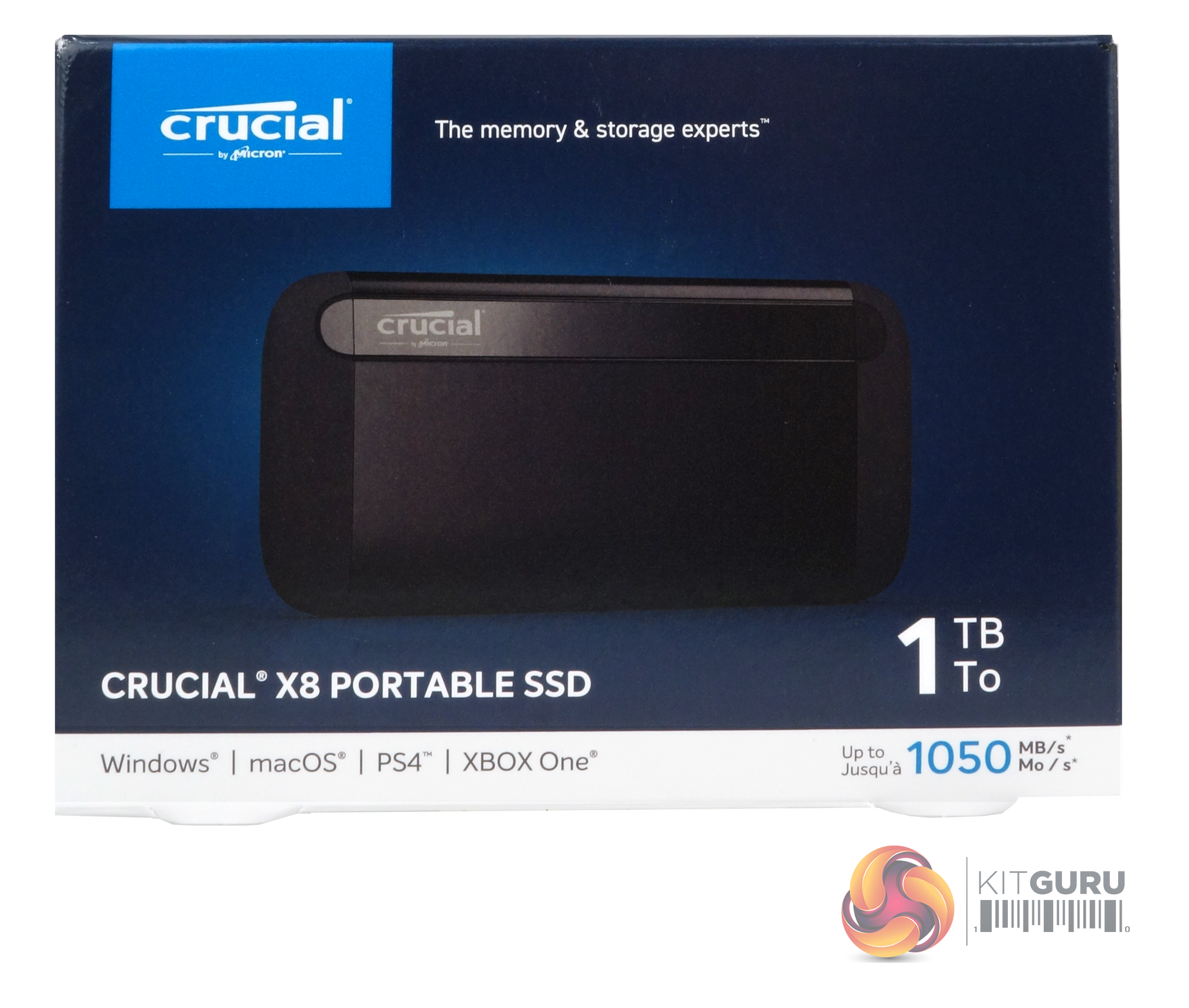
The X8 comes in a compact box with an image of the drive on the front along with the capacity. Below the image is a white panel that displays the drive's compatibility; Windows, macOS, PS4 and XBOX One. To the right of these is the read performance figure for the drive.
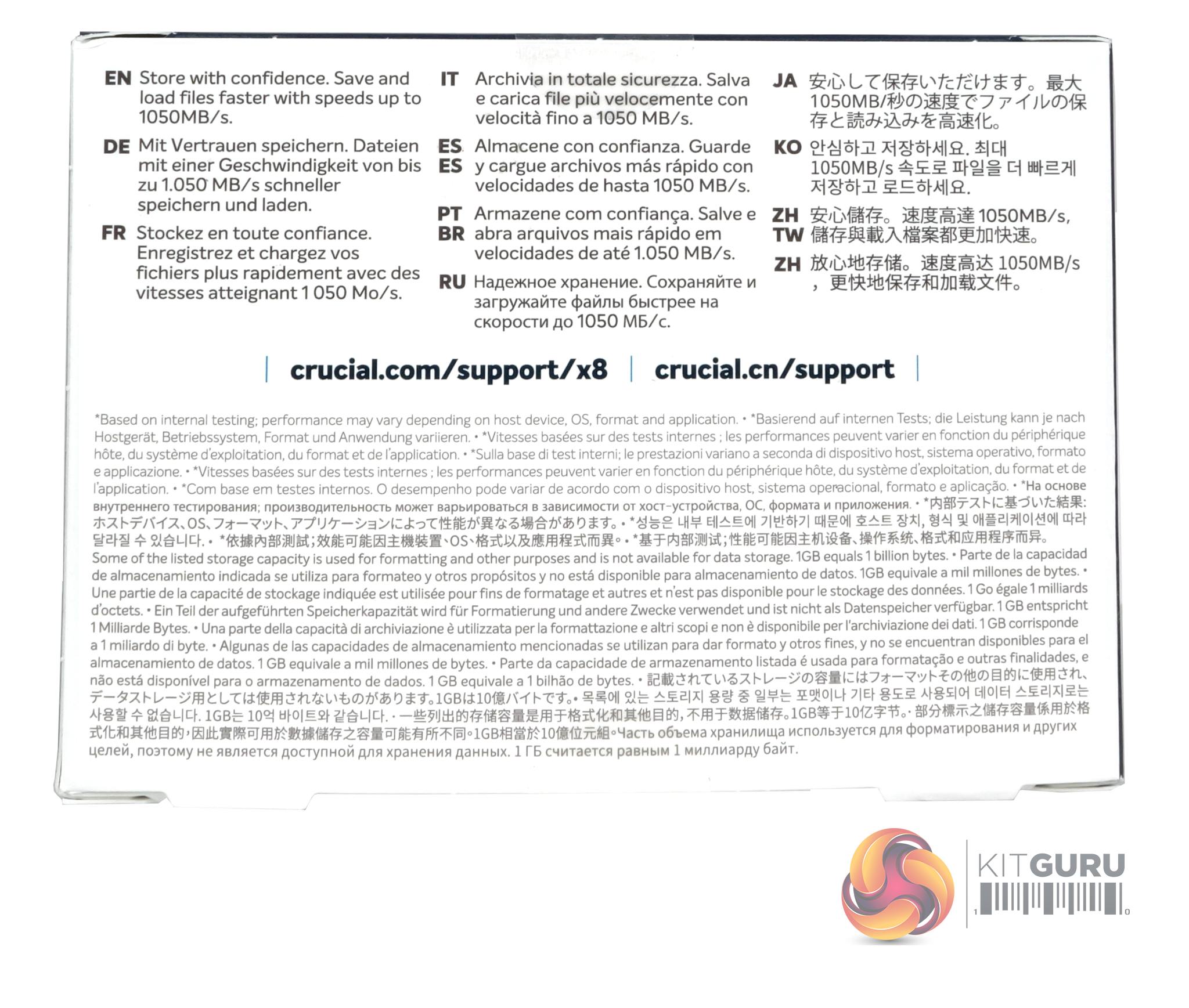
The rear of the box is covered by multilingual marketing and warranty information.
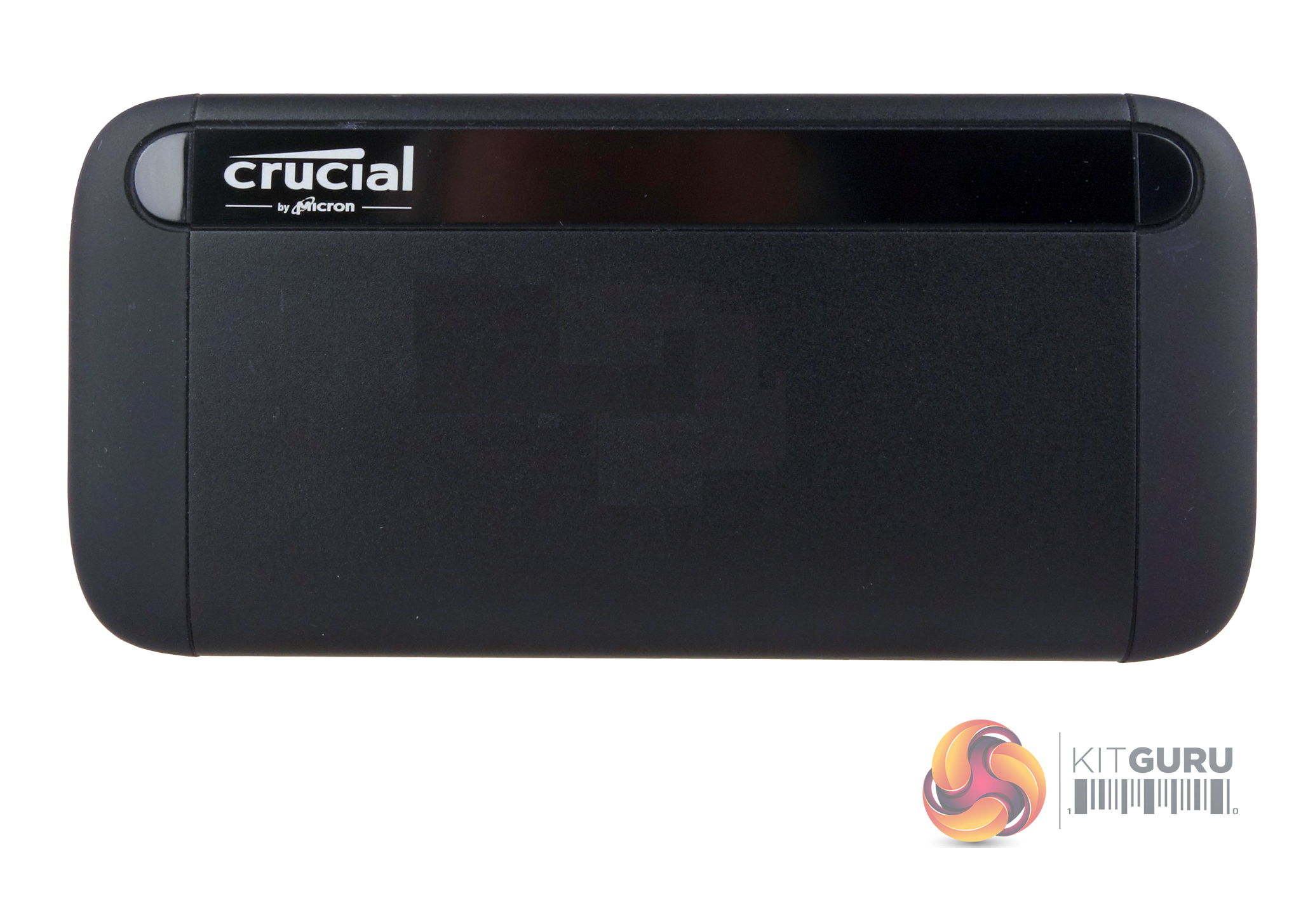

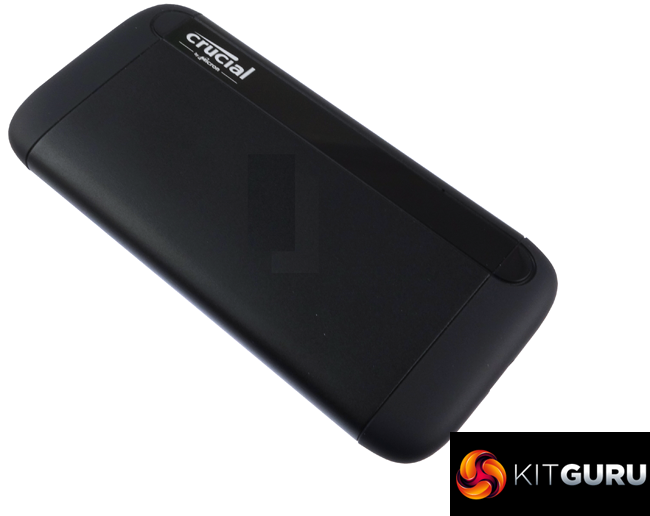
Crucial have designed a good looking chassis for the X8. The main body is constructed from anodised aluminium which also acts as a heat sink and has a rubber end cap on each end. Crucial says that drive can survive a 2m drop on a carpeted floor without damaging it. We couldn't find any IP certification for the drive so it may not be dust or waterproof.
Inside the drive is a Crucial P1 NVMe drive using 64-layer 3D QLC (quad-level cell) NAND with an ASMedia 2362 NVMe bridge chip connecting the drive to the USB 3.2 Gen 2 interface.
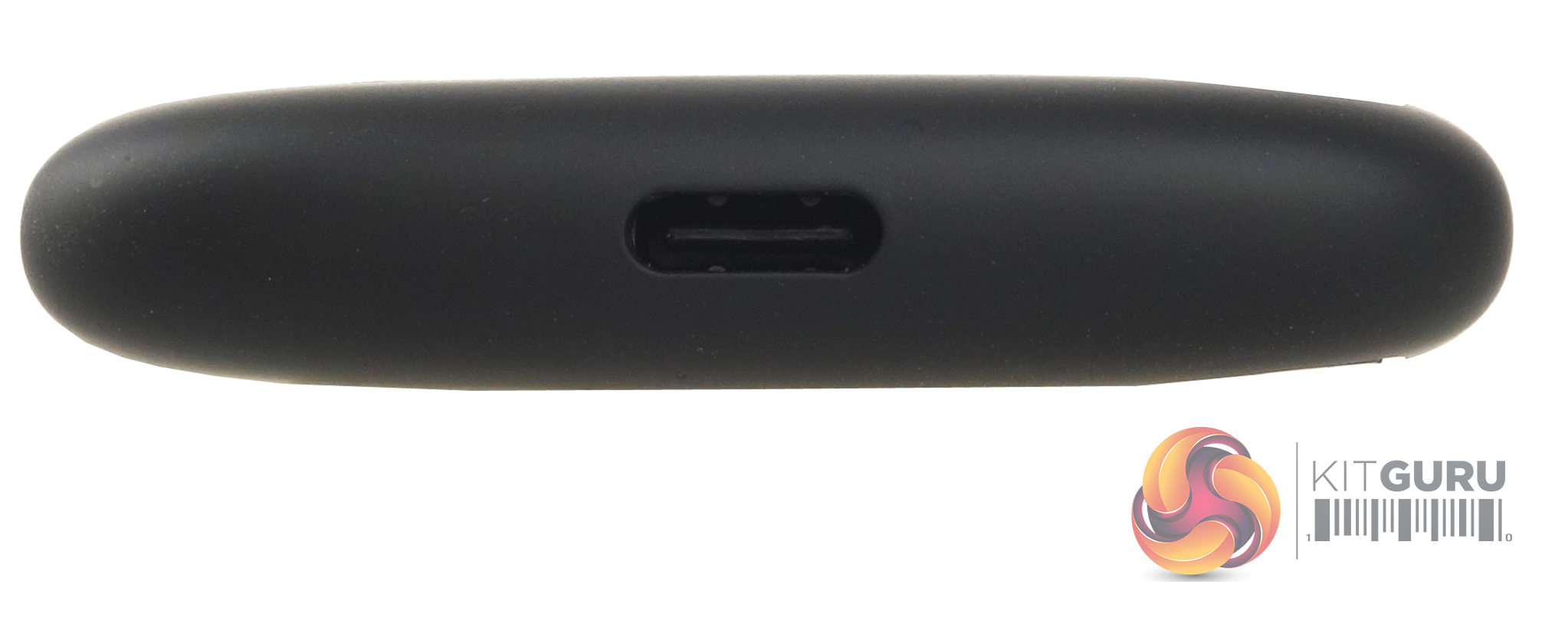
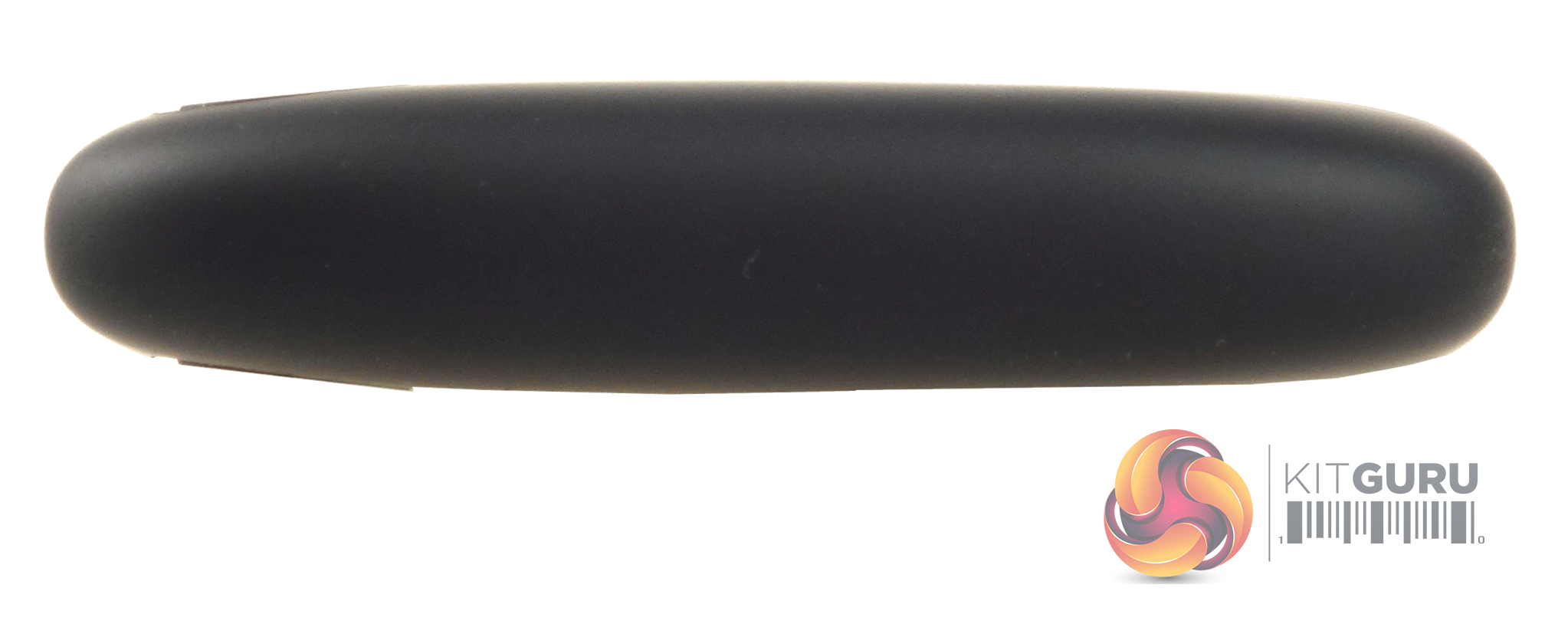
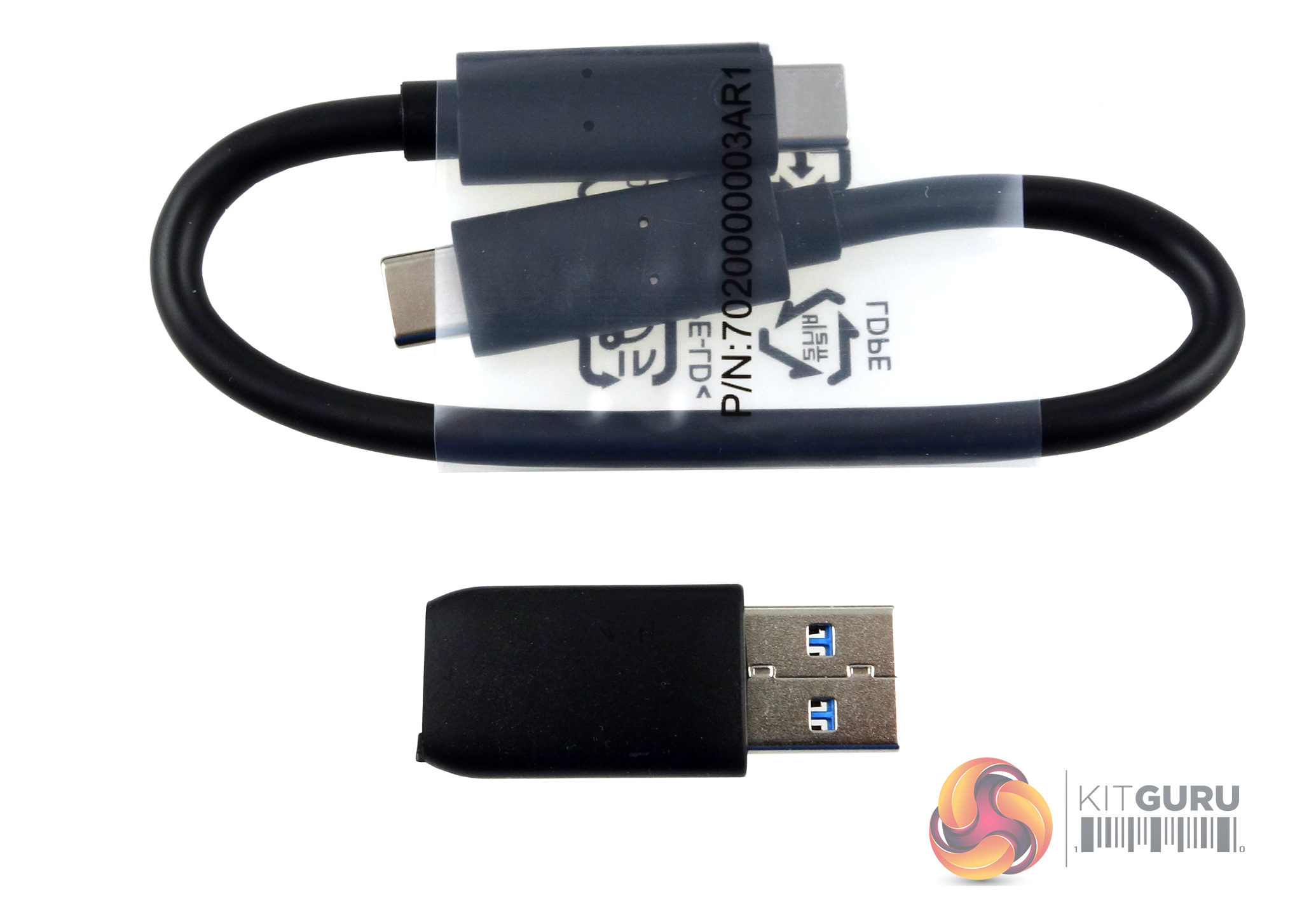
Bundled with the drive is a USB Type-C cable, which is on the short side, and a compact USB Type-A to USB Type-C adaptor.
Out of the box, the drive is factory formatted as exFAT but to run our benchmarks we reformatted the drive as NTFS.
CrystalDiskMark is a useful benchmark to measure theoretical performance levels of hard drives and SSD’s. We are using version 7.
The ATTO Disk Benchmark performance measurement tool is compatible with Microsoft Windows. Measure your storage systems performance with various transfer sizes and test lengths for reads and writes. Several options are available to customize your performance measurement including queue depth, overlapped I/O and even a comparison mode with the option to run continuously. Use ATTO Disk Benchmark to test any manufacturers RAID controllers, storage controllers, host adapters, hard drives and SSD drives and notice that ATTO products will consistently provide the highest level of performance to your storage.
AS SSD is a great free tool designed just for benching Solid State Drives. It performs an array of sequential read and write tests, as well as random read and write tests with sequential access times over a portion of the drive. AS SSD includes a sub suite of benchmarks with various file pattern algorithms but this is difficult in trying to judge accurate performance figures.
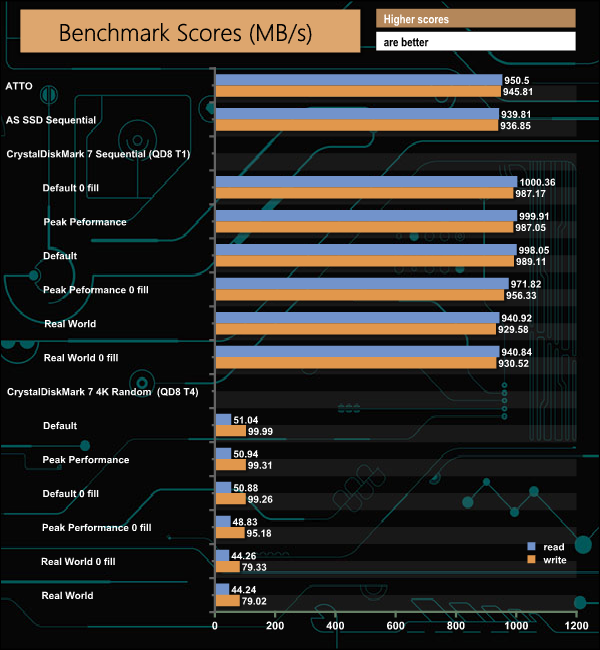
Crucial's official Sequential read figure for the drive is up to 1,050MB/s. With the ATTO benchmark, we couldn't quite get to the official read maximum, with the review sample topping out at 950MB/s, with writes reaching 945MB/s. All the other Sequential tests we tried, namely AS SSD and CrystalDiskMark, ended up shy of the official maximum, but the closest we saw was when the drive was tested with compressible data in Crystal Disk Mark, where the X8 produced a read figure of 1000MB/s.
IOMeter is another open-source synthetic benchmarking tool which is able to simulate the various loads placed on the hard drive and solid-state drive technology.
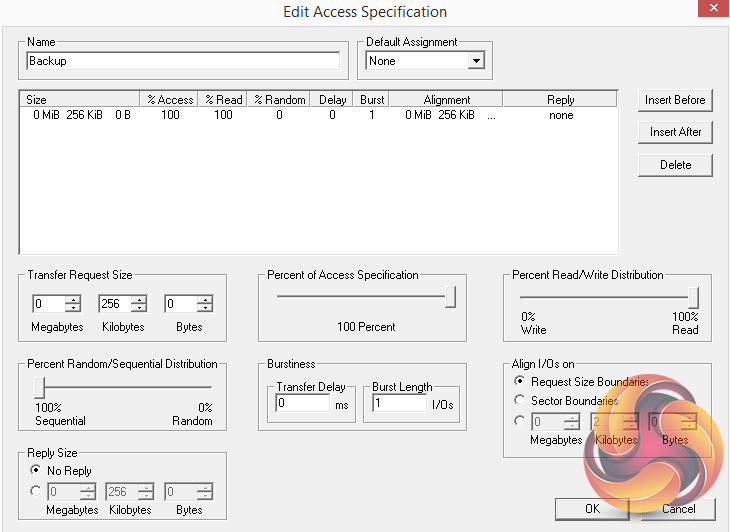
We set IOmeter up (as shown above) to test both backup and restore performance on a 100GB file.
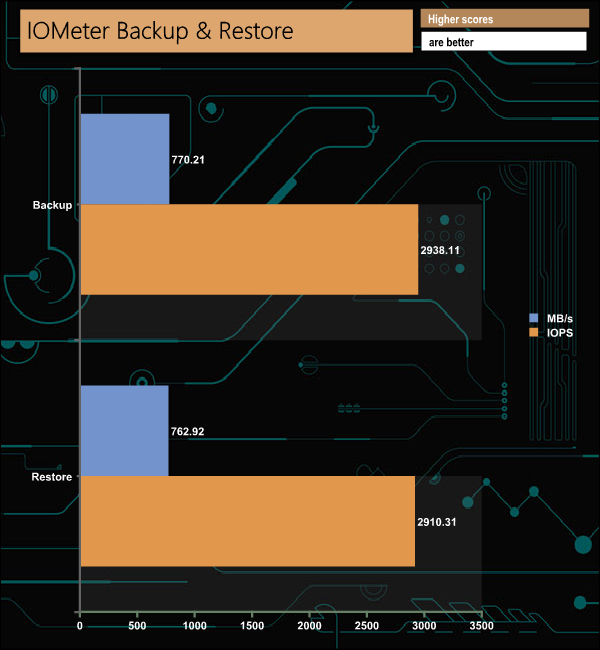
The X8 displayed strong performance in our backup and restore tests with over 750MB/s figures for both.
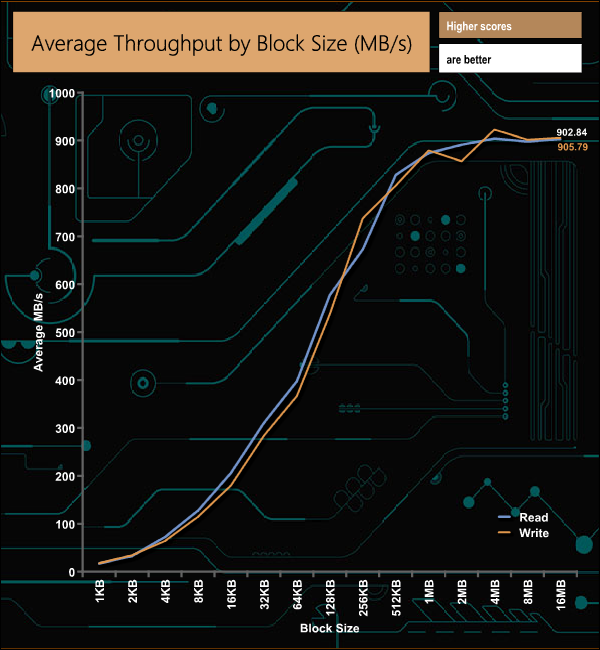
In our throughput tests, we couldn't hit the official maximum read speed of 1,050MB/s, but the peak read/write results of 904.03MB/s and 922.92MB/s (both at the 4MB block mark) respectively are nevertheless very impressive for an external drive.
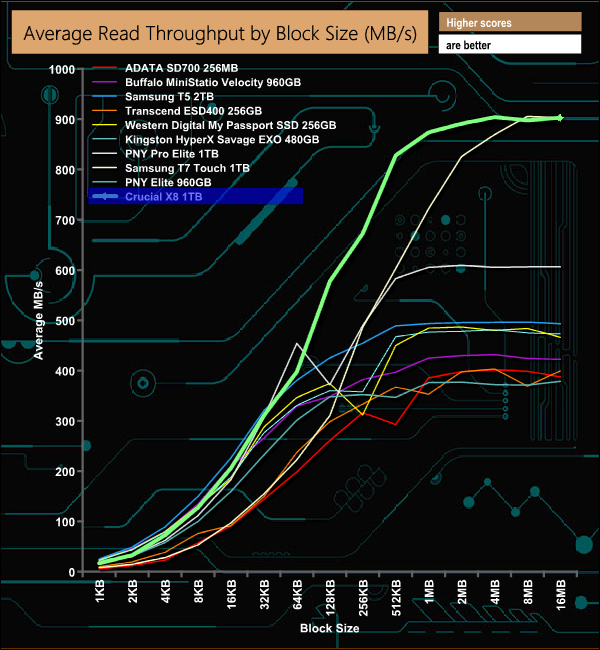
The X8 is a very quick external drive when it comes to read performance, trailing only slightly behind the fastest USB powered we've tested to date, Samsung's T7 Touch at the end of the test.
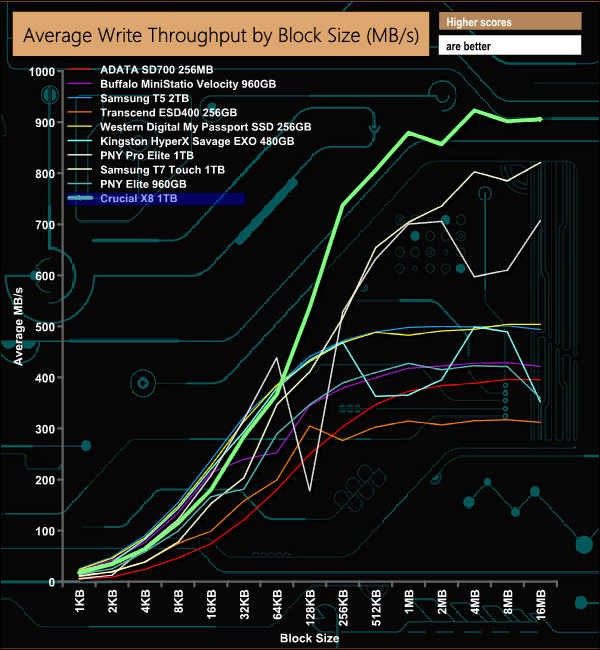
When it comes to write performance, the X8 is the fastest USB drive we've tested to date, peaking at 922MB/s (4MB block) before dropping back to finish the test run at 905MB/s.
The PCMark 10 Data Drive Benchmark has been designed to test drives that are used for storing files rather than applications. You can also use this test with NAS drives, USB sticks, memory cards, and other external storage devices. The Data Drive Benchmark uses 3 traces, running 3 passes with each trace.
Trace 1. Copying 339 JPEG files, 2.37 GB in total, on to the target drive (write test).
Trace 2. Making a copy of the JPEG files (read-write test).
Trace 3. Copying the JPEG files to another drive (read test).
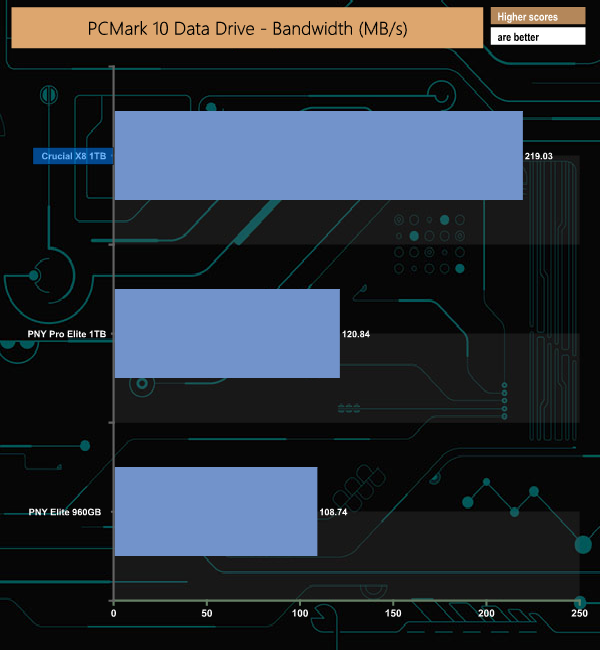
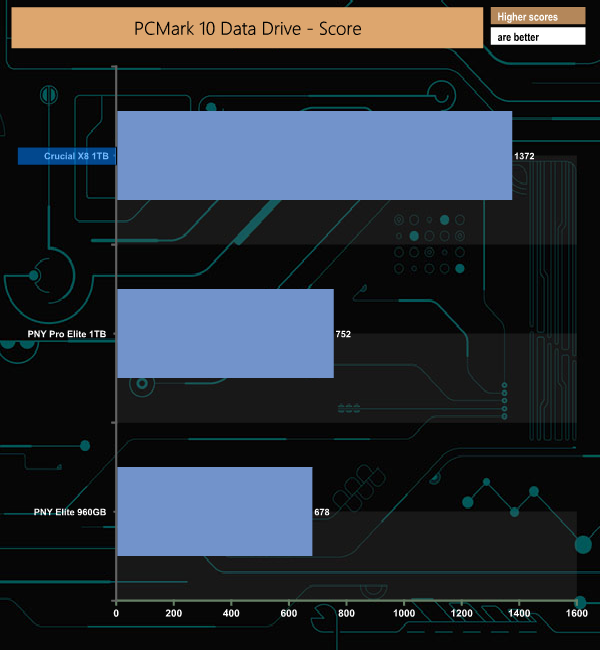
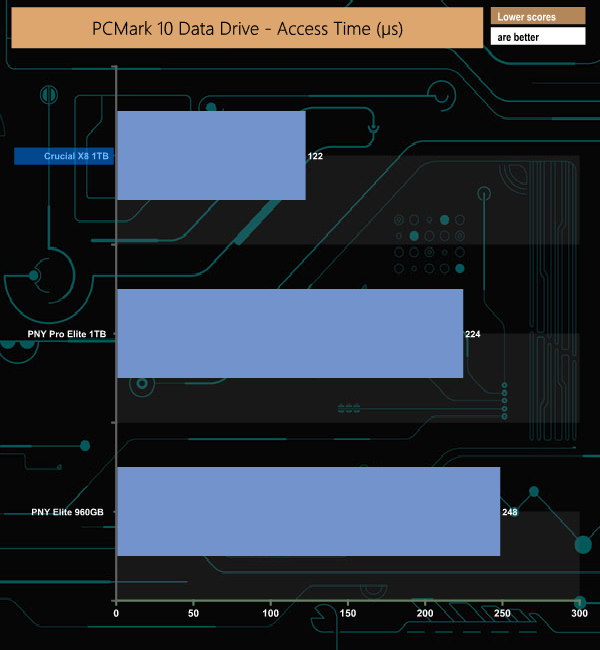
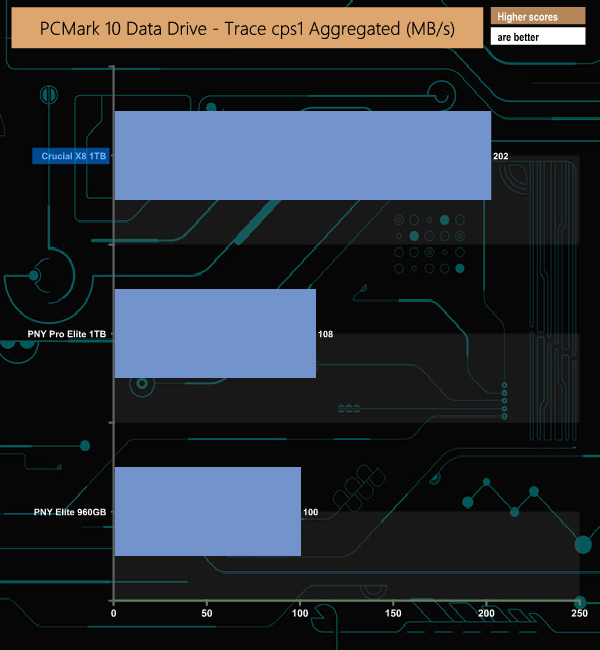
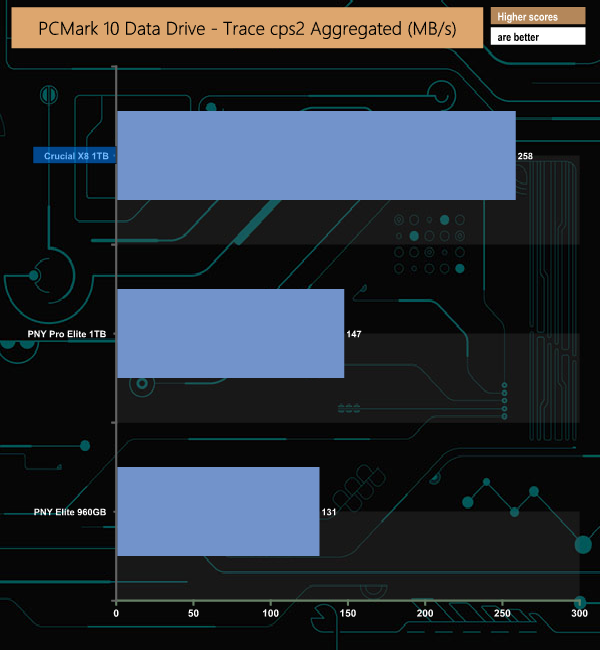
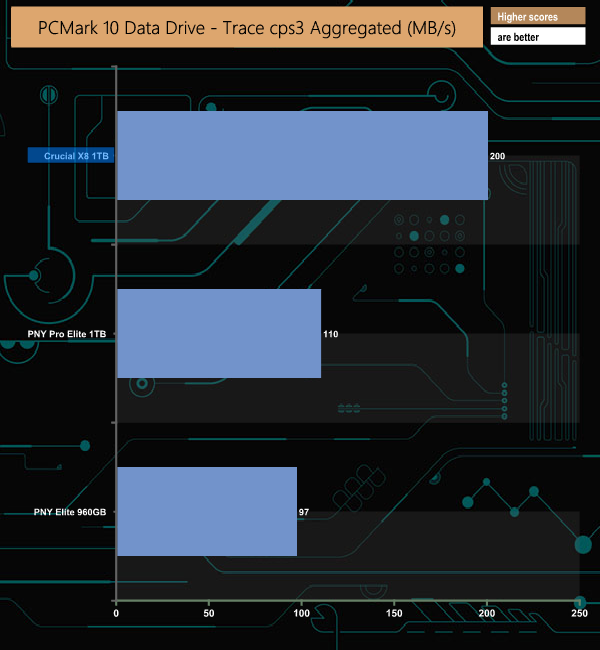
We've only just started to use the PCMark 10 Data Drive test for external drives and will add to these charts over time. What's clear from these results is the advantage that the NVMe-equipped X8 has in bandwidth and access time over the two SATA based PNY SSDs, particularly the Pro Elite which also uses a 10Gb/s interface. The PNY Elite uses a USB 3.1 Gen 1 interface.
To test real-life performance of a drive we use a mix of folder/file types and by using the FastCopy utility (which gives a time as well as MB/s result) we record the performance of drive reading from & writing to a 256GB Samsung SSD850 PRO.
We use the following file/folder types:
- 100GB data file.
- 60GB iso image.
- 60GB Steam folder – 29,521 files.
- 50GB File folder – 28,523 files.
- 12GB Movie folder – (15 files – 8 @ .MKV, 4 @ .MOV, 3 @ MP4).
- 10GB Photo folder – (304 files – 171 @ .RAW, 105 @ JPG, 21 @ .CR2, 5 @ .DNG).
- 10GB Audio folder – (1,483 files – 1479 @ MP3, 4 @ .FLAC files).
- 5GB (1.5bn pixel) photo.
- BluRay Movie – 42GB.
- 21GB 8K Movie demos – (11 demos)
- 16GB 4K Raw Movie Clips – (9 MP4V files).
- 4.25GB 3D Printer File Folder – (166 files – 105 @ .STL, 38 @ .FBX, 11 @ .blend, 5 @ .lwo, 4 @ .OBJ, 3@ .3ds).
- 1.5GB AutoCAD File Folder (80 files – 60 @ .DWG and 20 @.DXF).
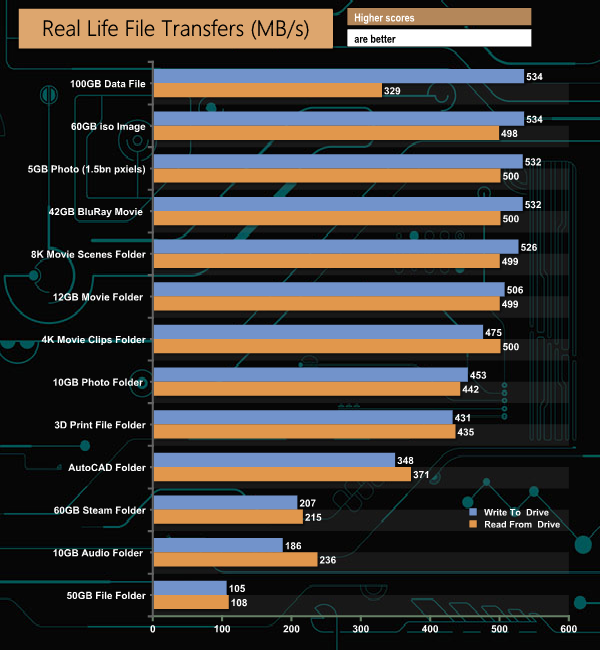
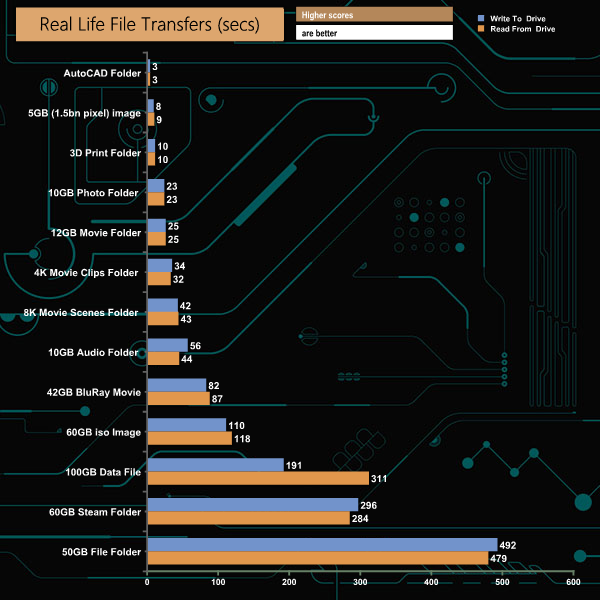
There’s no doubting that the X8 is a fast external drive especially dealing with larger file sizes. It took just 1m 8s to transfer the 60GB iso image to the X8, and just under the 2-minute mark going back the in the other direction. Even small bity data is dealt with pretty efficiently, with our 60GB Steam folder taking just 4m 9s to be copied to the drive and 4m 7s for the return journey. The only slight wobble came when the 100GB data file was being read back.
To get a measure of how much faster the X8 can transfer files, we took the SATA SSD out of the equation and used the same files but transferred to and from a 512GB Toshiba OCZ RD400 NVMe drive.
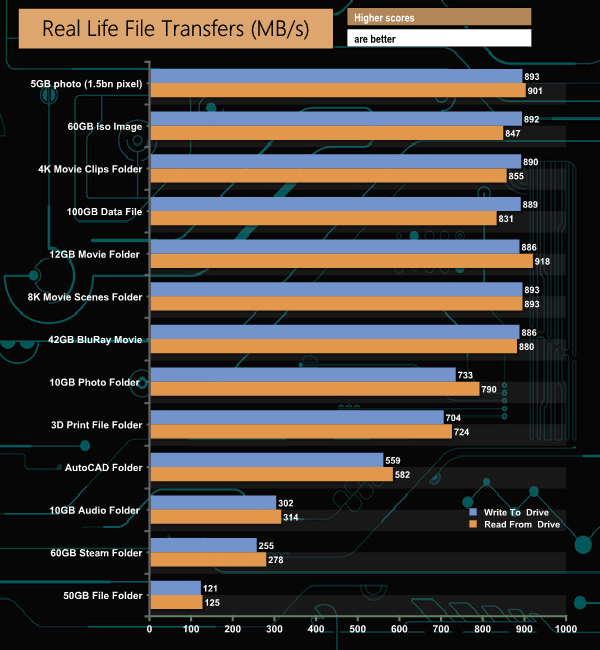
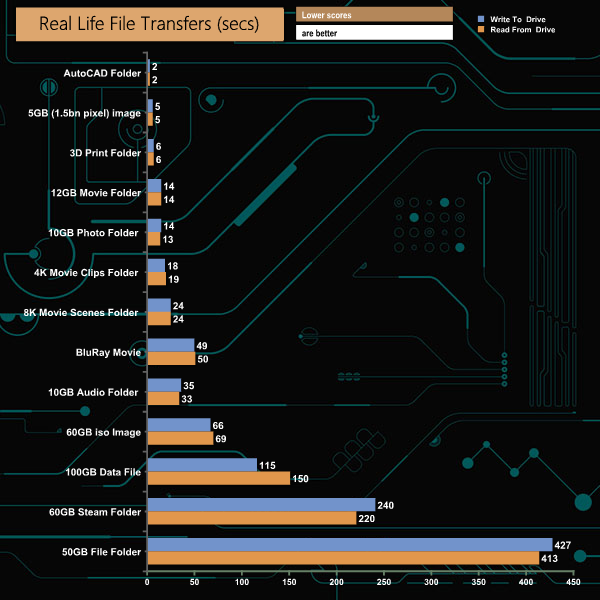
Swapping over to the NVMe drive saw the performance when dealing with large file sizes really ramp up, with reads topping 900MB/s and writes getting very close to 900MB/s on a couple of occasions.
Crucial's X8 is the company's first external SSD and it certainly looks the part with its smooth lozenge shape and black finish. Measuring 110 x 53 x 11.5mm and weighing in at 97g, the anodised aluminium chassis with its rubber ends can, according to Crucial, survive a 2m drop on a carpeted floor without damaging the data stored on the SSD.
As to the drive inside, using CrystalDiskInfo we see that the firmware number is one that was used for the P1 drive. The P1 was Crucial's M.2 NVMe first drive to use 64-layer 3D QLC (quad-level cell) NAND which is looked after by a Silicon Motion SM2263EN 4-channel controller. The X8 also uses an ASMedia 2362 NVMe bridge chip connecting the drive to the USB 3.2 Gen 2 interface.

Performance-wise, Crucial quote a maximum Sequential speed of 1,050MB/s. In our testing, we couldn't quite get to that figure. Using the ATTO benchmark we saw a maximum of 950MB/s for reads with writes reaching 945MB/s. With the tougher AS SSD benchmark, reads dropped to 939MB/s and writes to 936MB/s. In fact, the nearest we could get to that official figure was when we tested the X8 with compressible data in CrystalDiskMark 7 when the drive produced a read figure of 1000MB/s.
Real-life file transfers saw read performance go over the 500MB/s mark on numerous occasions when transferring data to and from a SATA drive. But the true potential of the drive was shown when transferring data to and from an NVMe SSD when we saw transfer read rates as high as 918MB/s (reading the contents of a 12GB Movie folder) and writes peaking at 893MB/s.
Unfortunately, the drive doesn't have any built-in hardware security nor does come with any form of backup software.
We found the 1TB version of the X8 for sale directly from Crucial UK for £160.79 (inc VAT) HERE.
Discuss on our Facebook page HERE.
Pros
- Overall performance.
- Design.
Cons
- The cable is on the short side.
- Disappointing random 4K performance.
KitGuru says: Crucial's X8 is a fast performing, elegantly designed external SSD with a competitive price tag to add to its attractiveness.