KitGuru KitGuru.net – Tech News | Hardware News | Hardware Reviews | IOS | Mobile | Gaming | Graphics Cards


The latest drive to join Seagate's growing portfolio of consumer SSDs is the FireCuda 520. Based around a Phison controller and BiCS4 96-Layer NAND, the PCIe Gen4 NVMe drive is the company's fastest consumer drive to date.
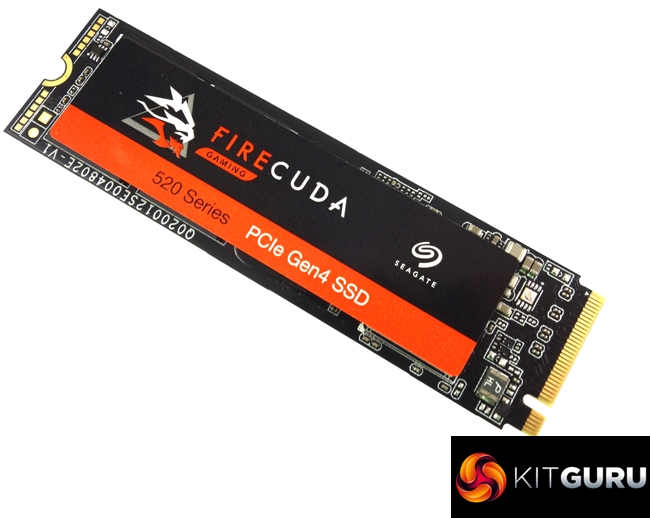
At the time of writing this review, there are three models in the FireCuda 520 line-up: 500GB, 1TB and the flagship 2TB drive. The new drive has opted for the well-used combination of a Phison E16 controller and Kioxia BiCS4 96-Layer TLC NAND, but with Seagate's hand firmly on the firmware.
Seagate quote Sequential read/write figures for the 1TB as up to 5,000MB/s and 4,400MB/s respectively. All three drives have the same 5,000MB/s Sequential read figure and the 2TB model shares the 1TB drive's write figure. However, the 500GB drive is only rated at 2,500MB/s.
Random 4K performance is quoted as up to 760,000 IOPS for reads and writes for the 1TB drive. The 2TB drive is rated as up to 750,00 IOPS for reads and 700,000 IOPS for writes while the 500GB drive is rated at 430,000 IOPS and 630,000 IOPS for read and writes respectively.
Seagate quote an endurance rating of 1,800 TBW for the 1TB drive and back it with a 5-year warranty.
Physical Specifications:
- Usable Capacities: 1TB.
- NAND Components: Kioxia BiCS4 96-Layer 3D TLC NAND.
- NAND Controller: Phison PS5016-E16.
- Cache: 1GB DDR4.
- Interface: PCIe 4.0 x4 (NVMe 1.3).
- Form Factor: M.2 2280.
- Dimensions: 22.15 x 80.15 x 3.58mm.
- Drive Weight: 8.5g.
Firmware Version: STNSC011
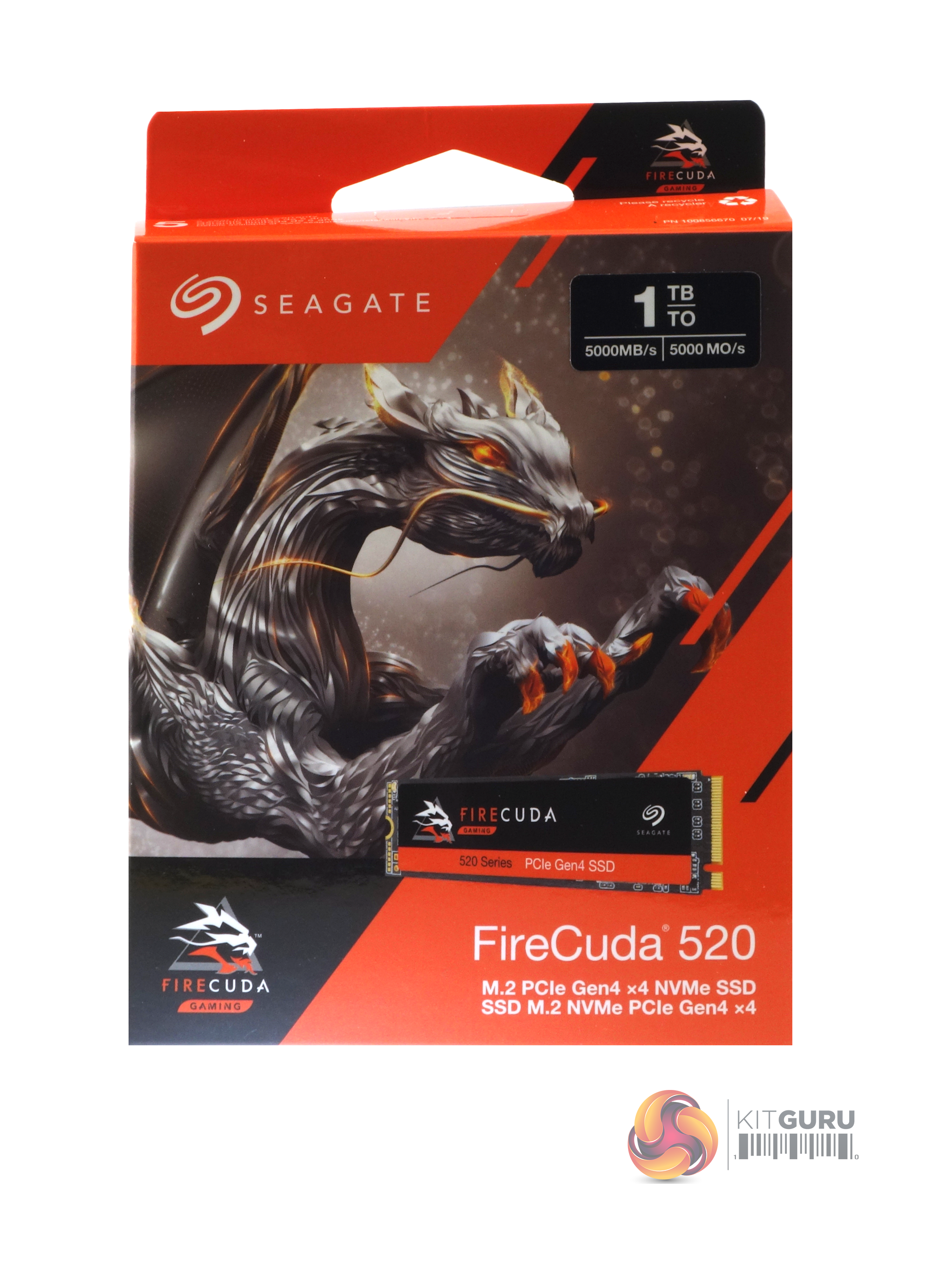
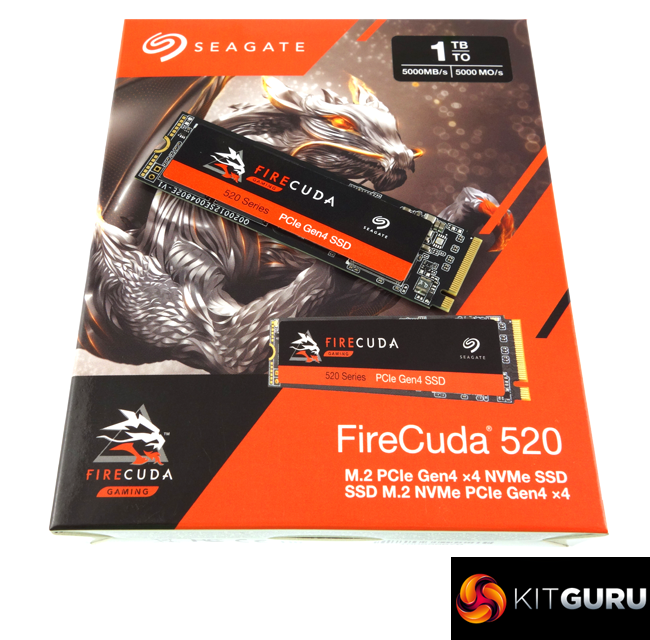
Seagate's FireCuda 520 comes in a striking orange and white box with Seagate’s FireCuda dragon mascot prominently displayed along with a small image of the drive. At the top of the box is a sticker which displays the drive's capacity and the Sequential read speed of the drive. Towards the bottom of the box is some text displaying the interface of the drive.
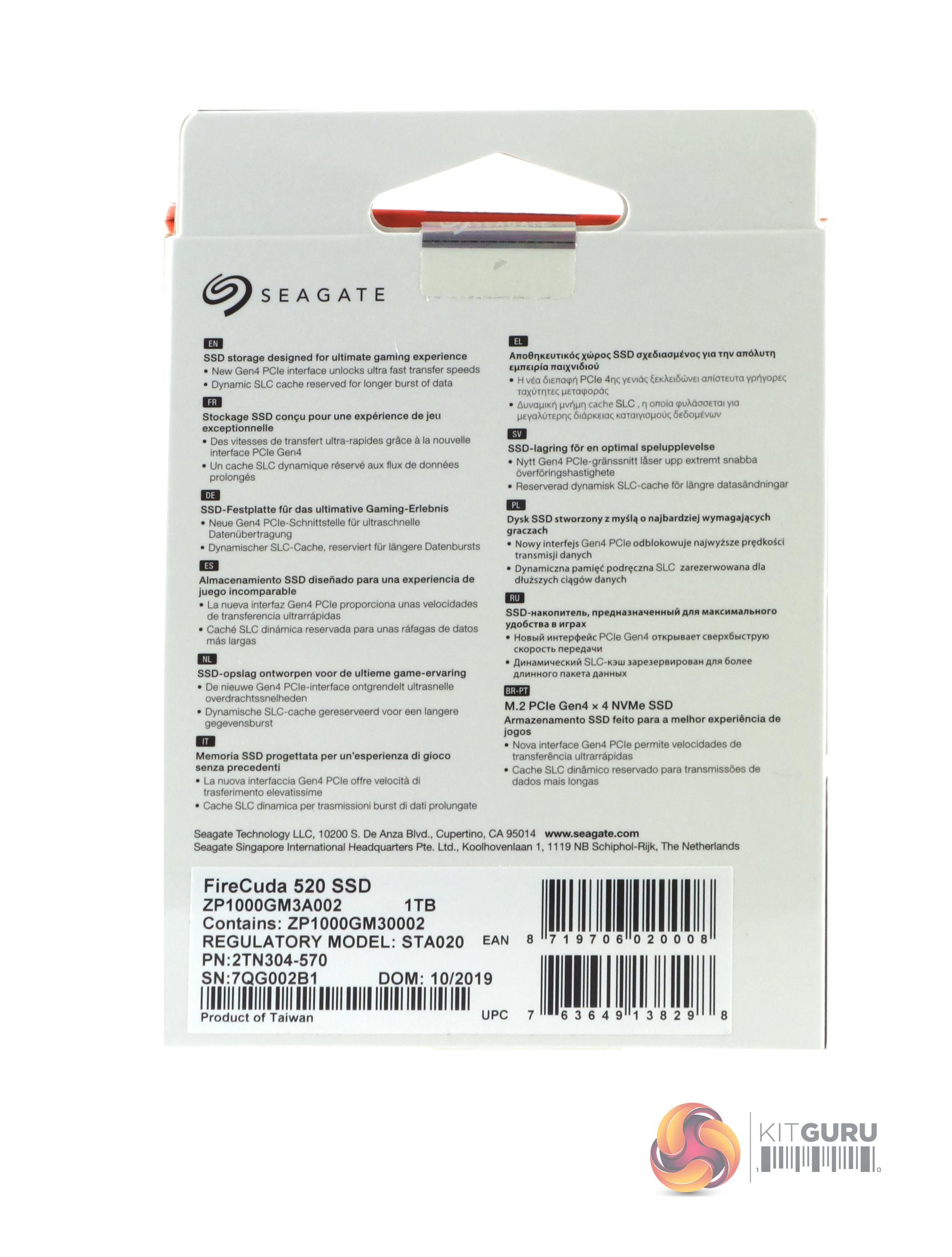
The rear of the box is covered my multilingual bullet points about the interface speed and the cache.
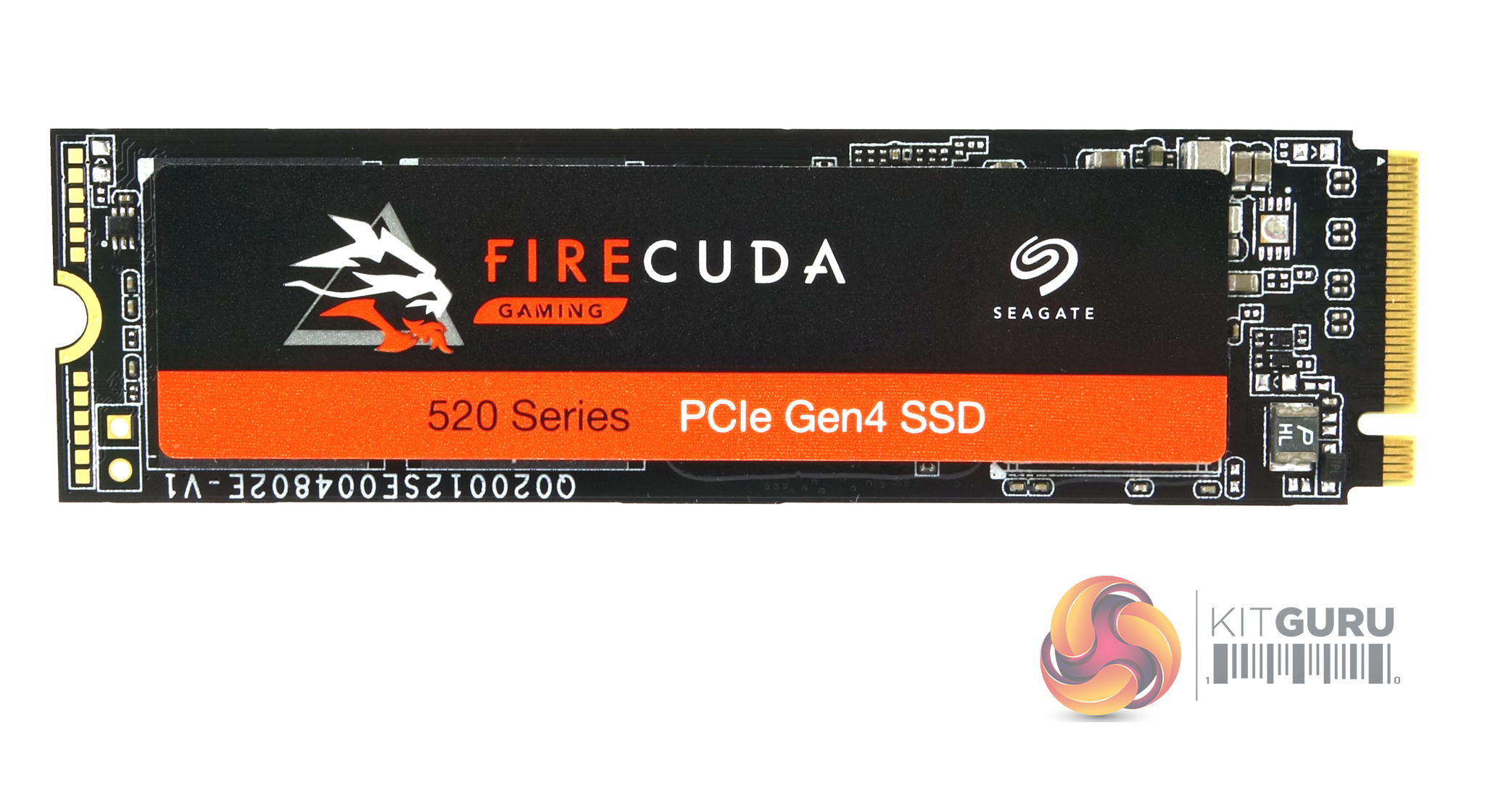
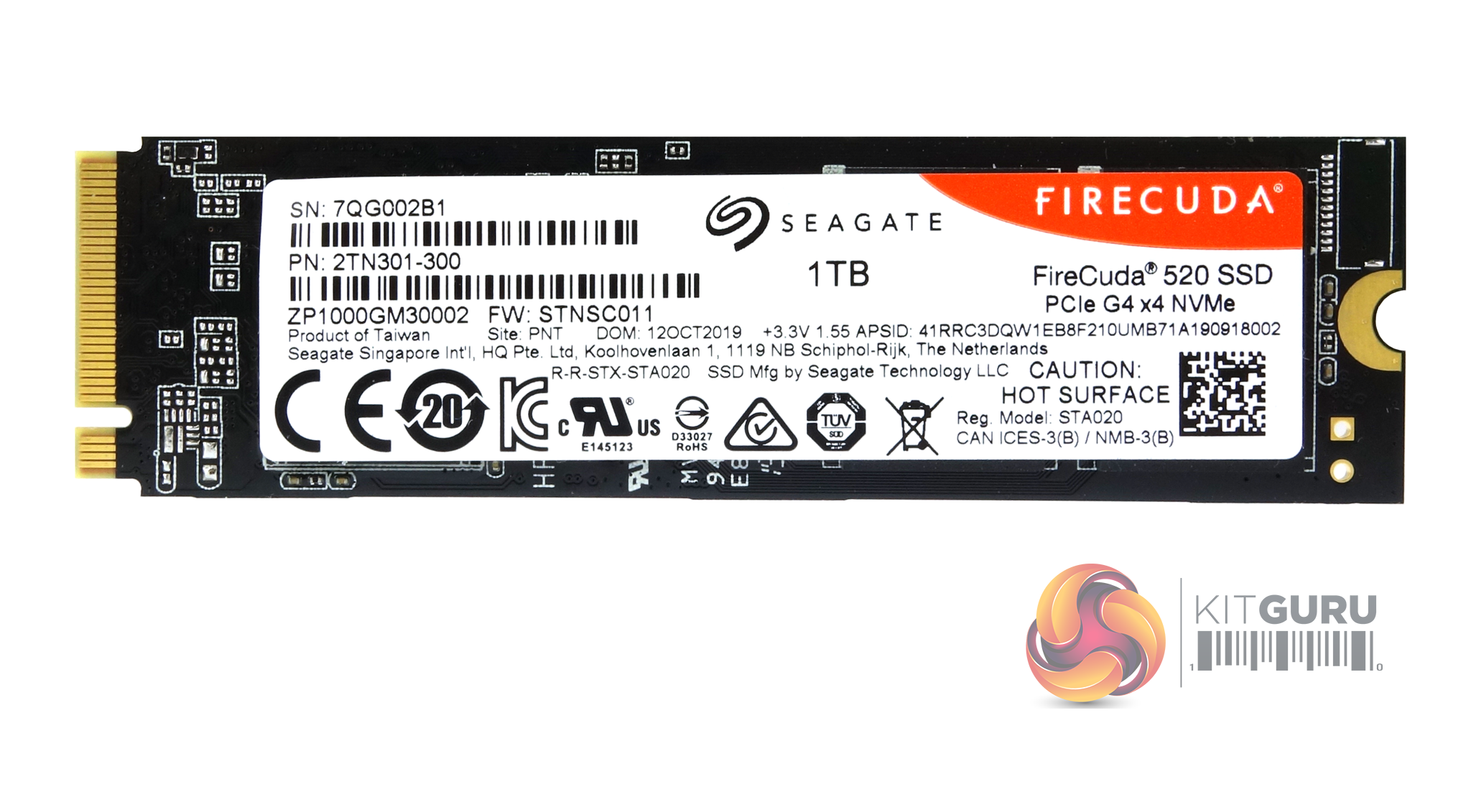
The FireCuda 520 is built on a double-sided M.2 2280 format.
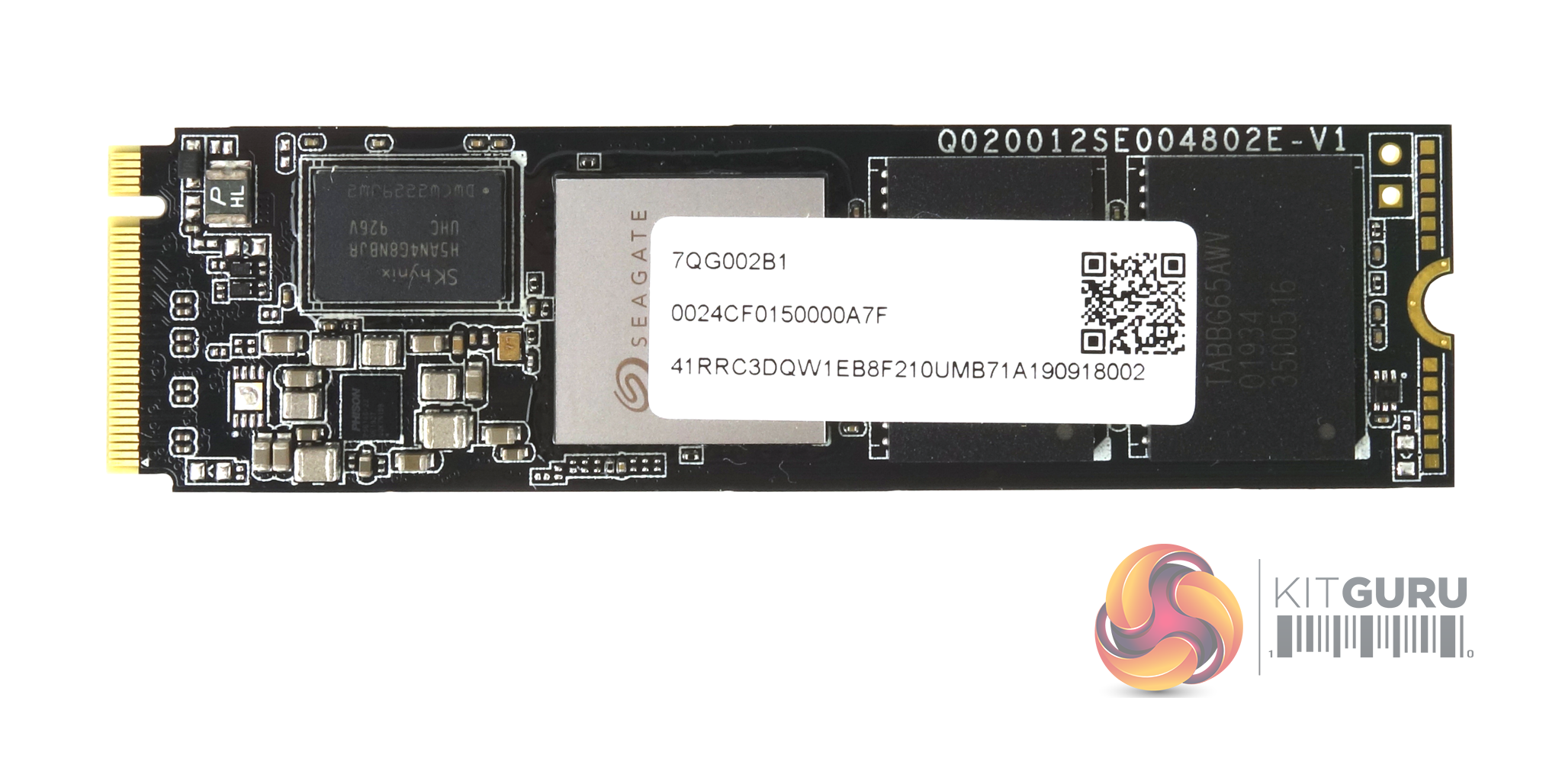
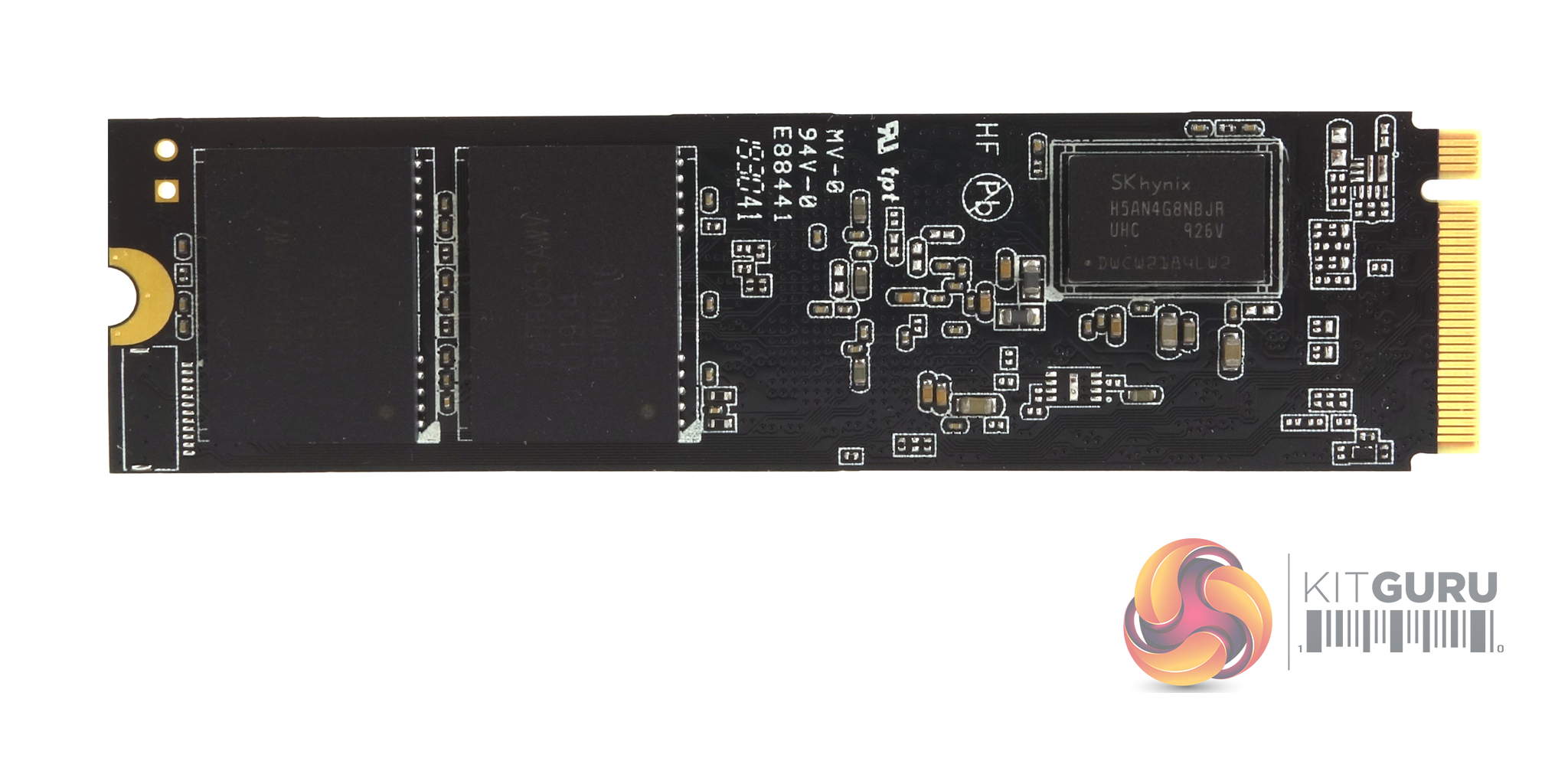
Sitting under the FireCuda branded label on the front of the drive are two 256GB Kioxia BiCS4 96-Layer 3D TLC NAND packages, the Phison PS5016-E16 controller (branded as Seagate) and a 512MB SK hynix DDR4 (H5AN4G8NBJR) cache chip. The other side of the PCB has two more 256GB NAND packages and another 512MB cache IC.
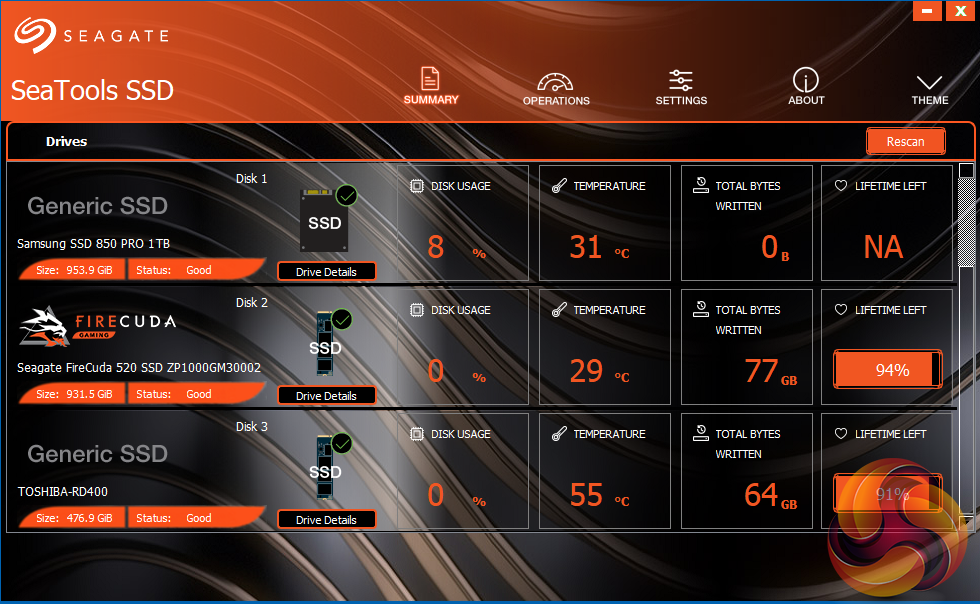
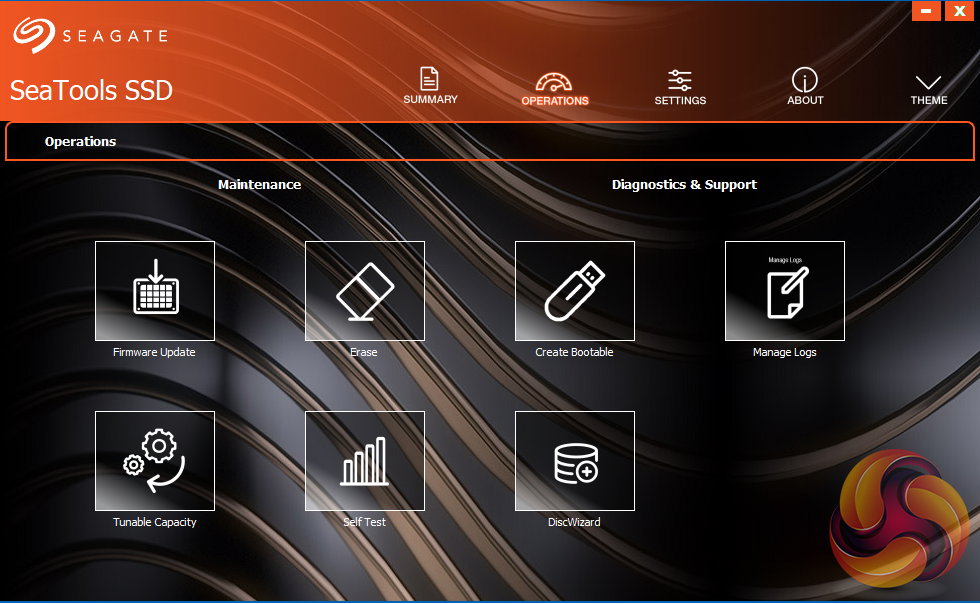
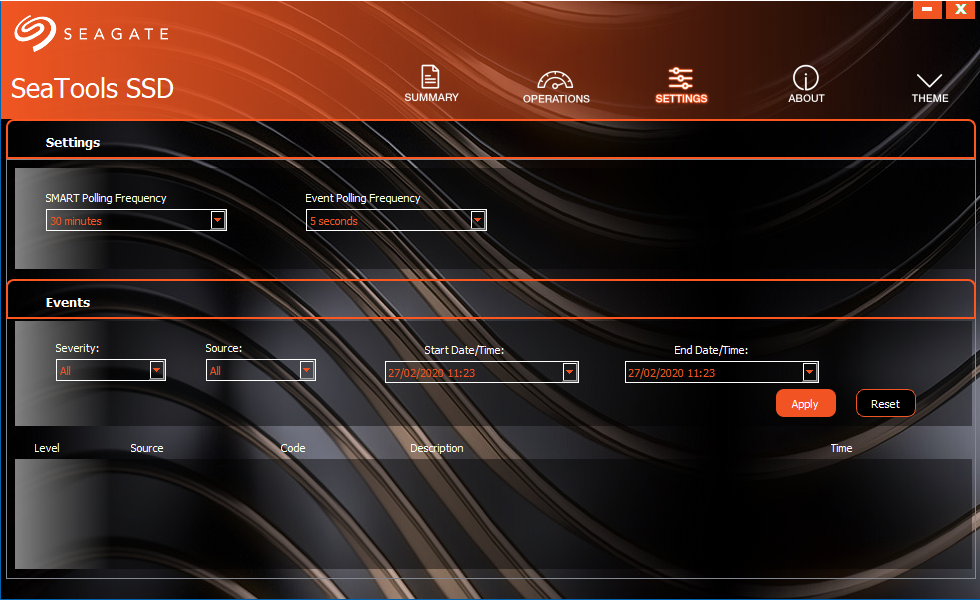
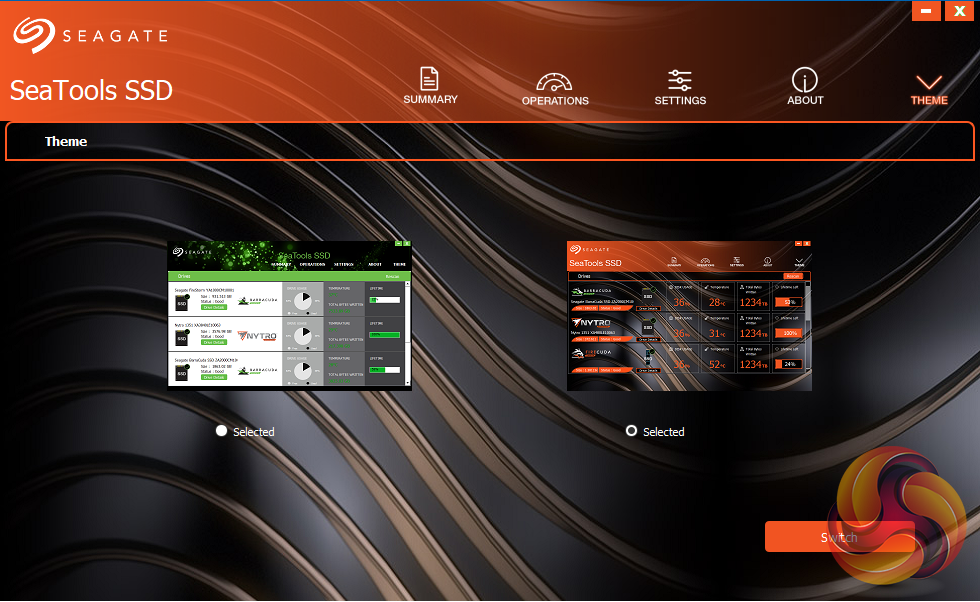
Seagate's management software for the FireCuda is the SSD version of their SeaTools software. SeaTools SSD displays the drive's health and supports firmware upgrading and secure erase. It even gives you a choice of two themes. Although SeaTools SSD doesn't come with any drive cloning utility built-in per se it does provide a link to download Seagate's DiscWizard cloning software.
For testing, the drives are all wiped and reset to factory settings by HDDerase V4. We try to use free or easily available programs and some real-world testing so you can compare our findings against your own system.
This is a good way to measure potential upgrade benefits.
Main system:
AMD Ryzen 5 3600X, 16GB DDR4-2400, Sapphire R9 390 Nitro and an MSI MPG X570 Gaming Edge Wifi motherboard
Other drives
Software:
Atto Disk Benchmark 4.
CrystalMark 6 & 7.0.0.
AS SSD 2.0.
IOMeter.
Futuremark PCMark 10.
All our results were achieved by running each test five times with every configuration this ensures that any glitches are removed from the results. Trim is confirmed as running by typing fsutil behavior query disabledeletenotify into the command line. A response of disabledeletenotify =0 confirms TRIM is active.
CrystalDiskMark is a useful benchmark to measure theoretical performance levels of hard drives and SSD’s. We are going to be switching over to v7.0 of the benchmark in the very near future so we've got results for both benchmarks.
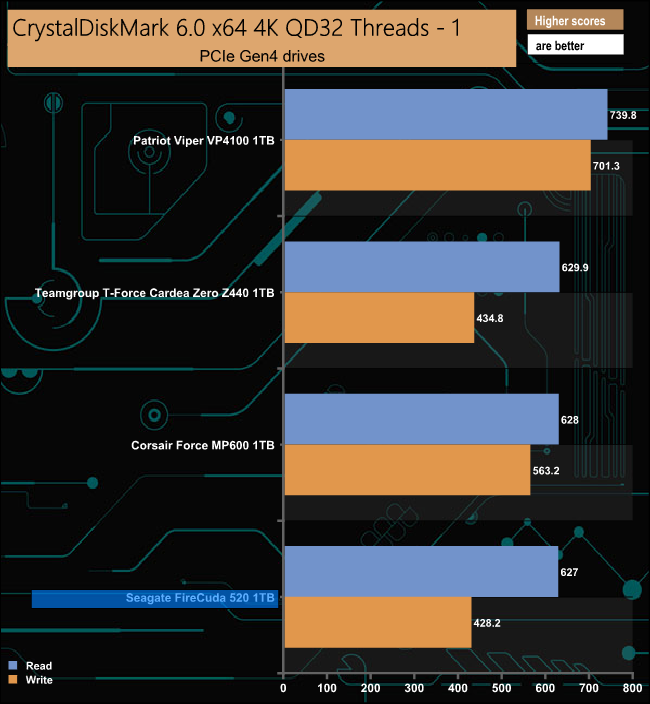
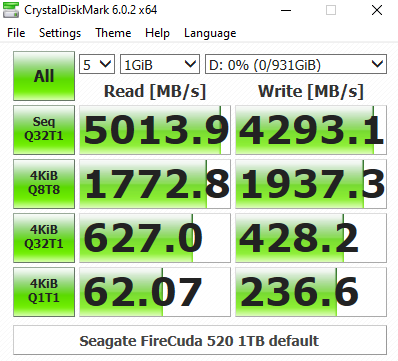
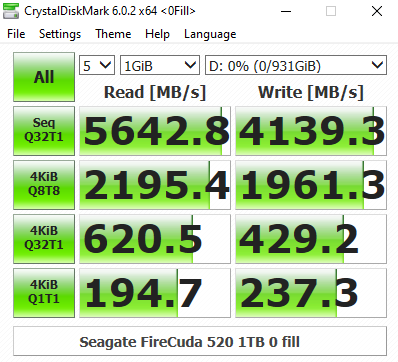
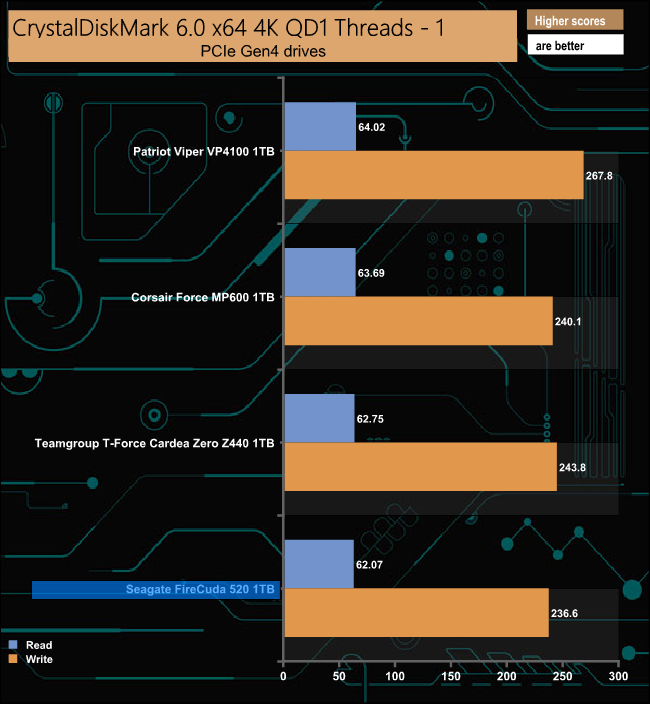
At a queue depth of 32, the Seagate FireCuda 520 has the slowest write score of the PCIe Gen4 drives we've tested to date. At a queue depth of 1, the difference in writes compared to all bar the Patriot VP4100 is hardly noticeable. Looking at the two CrystalDiskMark result screens it appears that the Phison PS5012-E12 controller is much more efficient when reading compressible data at certain queue depths.
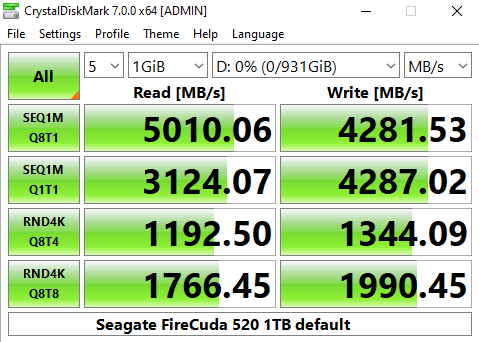
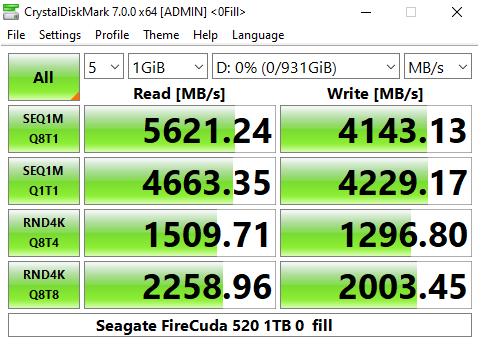
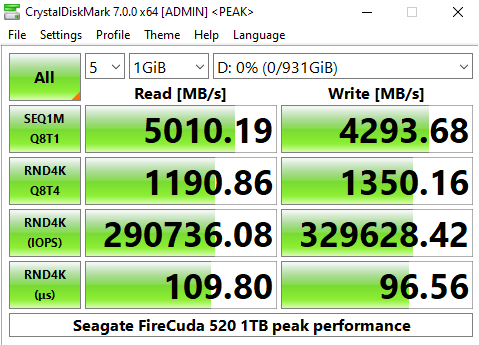
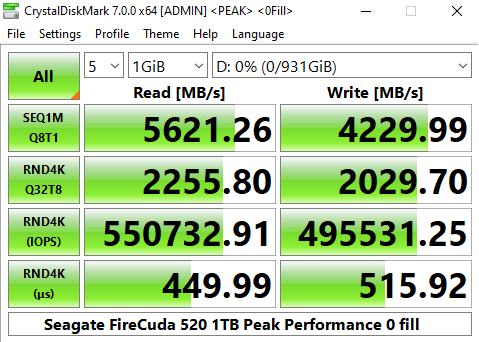
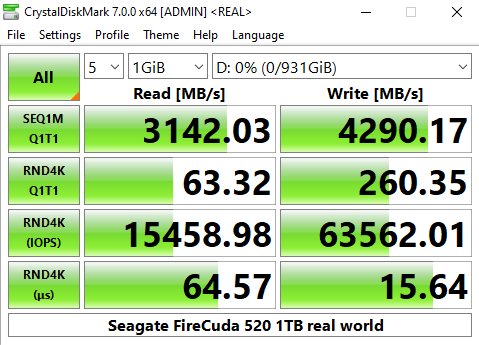
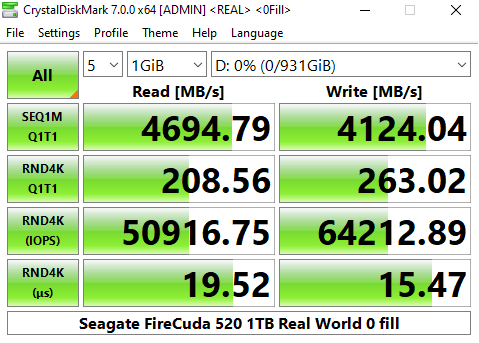
The latest version of CrystalDiskMark, version 7, includes a couple of profiles that can be used for testing – Peak Performance and Real World. The result screens for these two profiles not only display MB/s results but also IOPS and latency.
Looking at the Peak Performance results for Sequential read/write performance we see that the review drive surpassed the official Sequential read figure of 5,000MB/s, both at the default setting (5,010MB/s) and especially when dealing with compressible data (5,621MB/s). However, the fastest write figure of 4,293MB/s is still a little slower than the official 4,400MB/s figure.
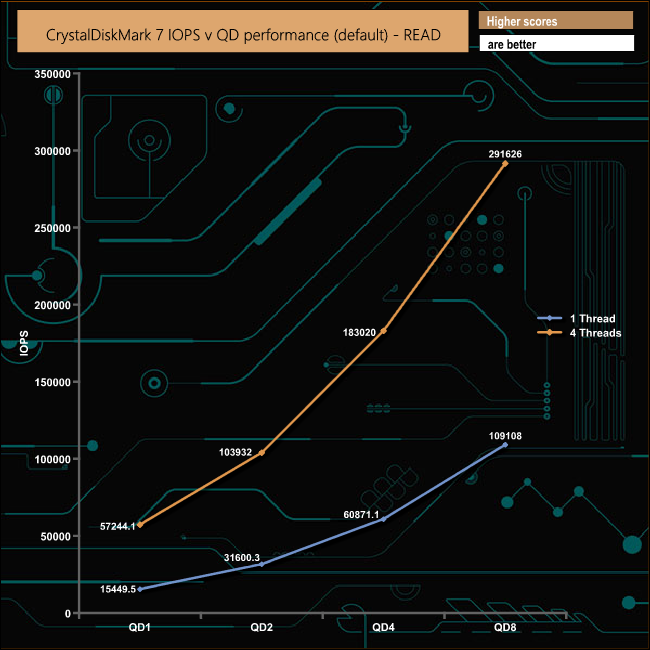
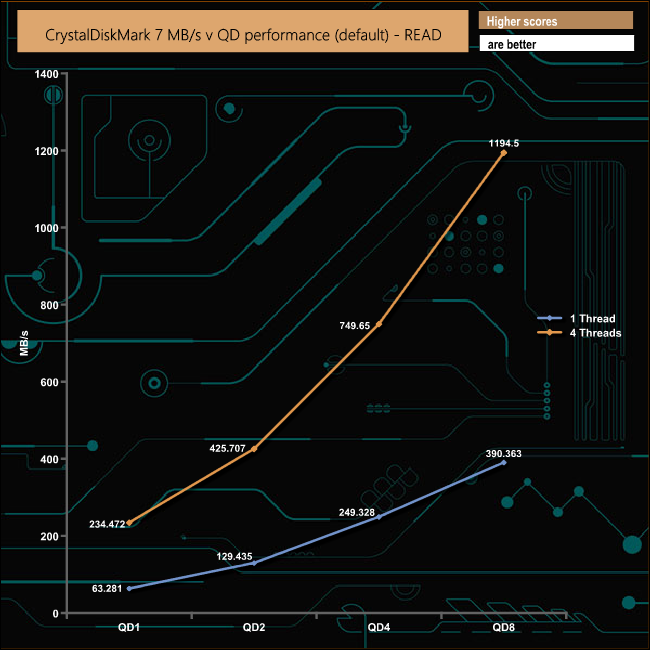
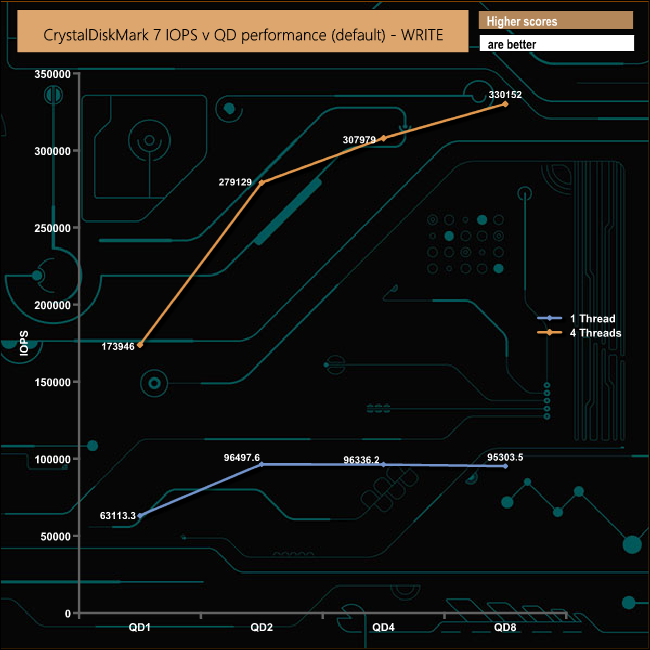
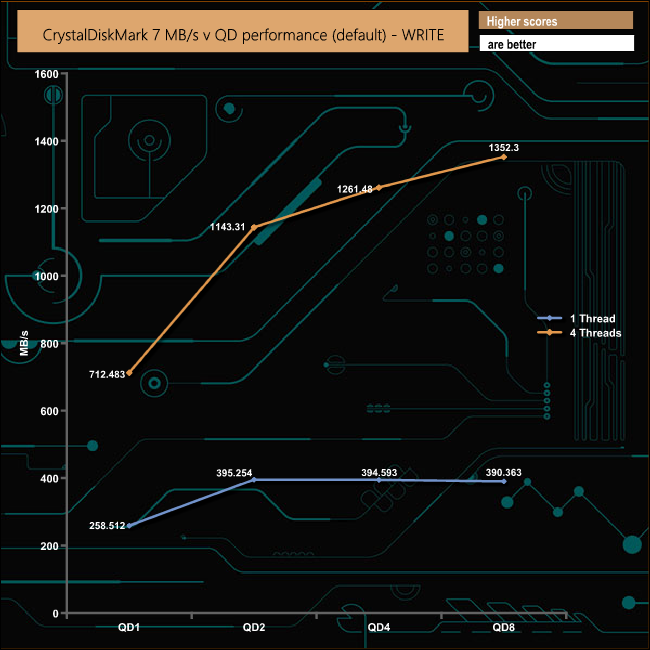
We also used CrystalDiskMark, version 7, to test the drive at a couple of the queue depths where most workloads occur. The drive produced strong performance figures throughout the tests.
The ATTO Disk Benchmark performance measurement tool is compatible with Microsoft Windows. Measure your storage systems performance with various transfer sizes and test lengths for reads and writes. Several options are available to customize your performance measurement including queue depth, overlapped I/O and even a comparison mode with the option to run continuously.
We are using version 4.0 for our NVMe disk tests.
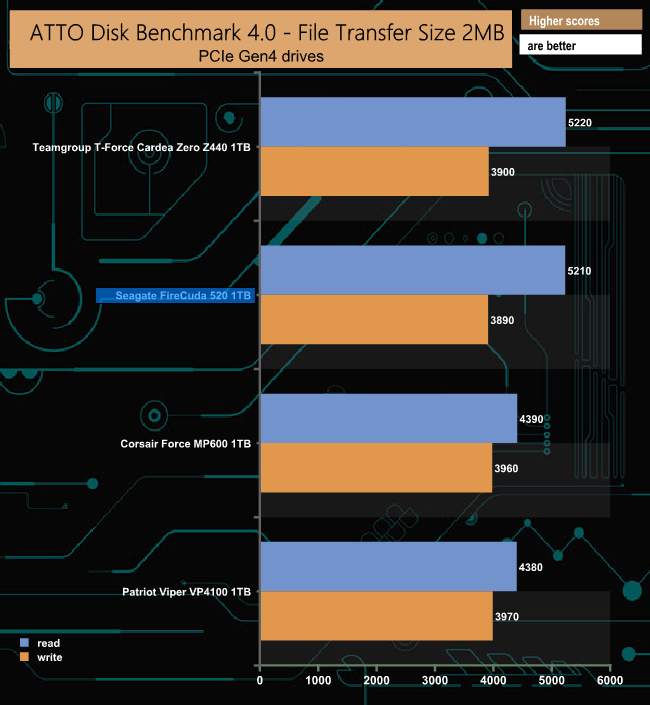
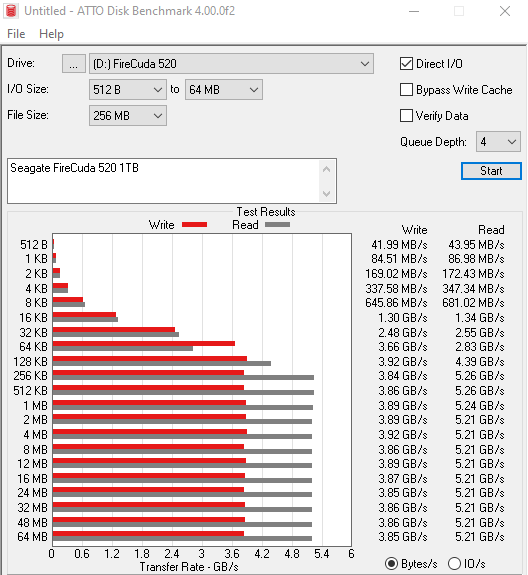
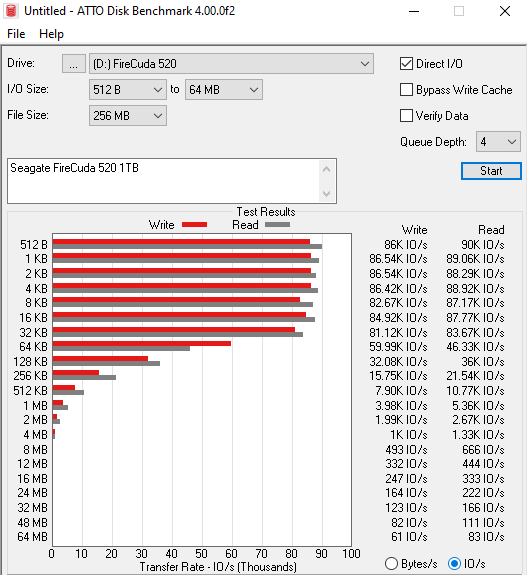
Seagate quote Sequential read/write figures for the 1TB FireCuda 520 as up to 5,000MB/s and 4,400MB/s respectively. Using the ATTO benchmark we could confirm that read figure with the drive producing a test result of 5,210MB/s. However, our tested write result of 3,890MB/s was some way shy of the maximum write figure.
AS SSD is a great free tool designed just for benching Solid State Drives. It performs an array of sequential read and write tests, as well as random read and write tests with sequential access times over a portion of the drive. AS SSD includes a sub suite of benchmarks with various file pattern algorithms but this is difficult in trying to judge accurate performance figures.
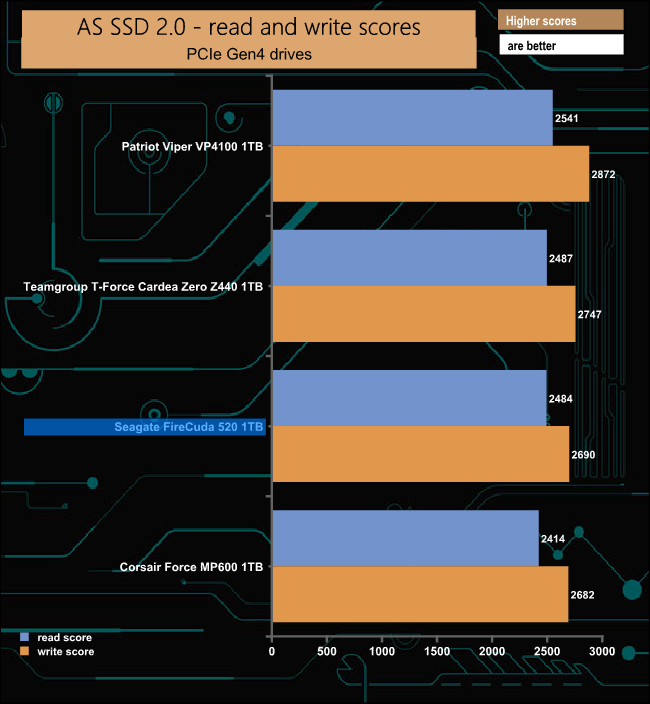
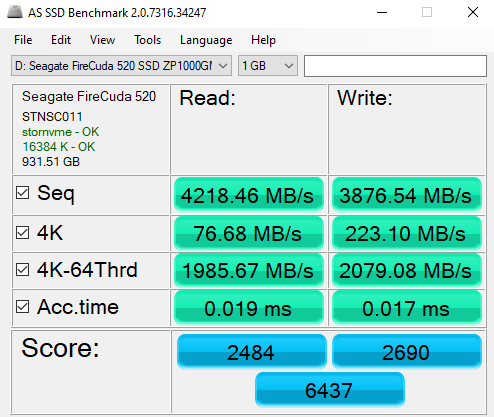
Seagate's FireCuda 520 slots into third place in our AS SSD results chart with a much better read score than Corsair's Force MP600 although the write score is practically the same.
IOMeter is another open-source synthetic benchmarking tool which is able to simulate the various loads placed on the hard drive and solid-state drive technology. There are many ways to measure the IOPS performance of a Solid State Drive, so our results will sometimes differ from the manufacturer’s quoted ratings. We do test all drives in exactly the same way, so the results are directly comparable.
We test 128KB Sequential read and write and random read and write 4k tests. The test setup’s for the tests are listed below. Each is run five times.
128KB Sequential Read / Write.
Transfer Request Size: 128KB Span: 8GB Thread(s): 1, Outstanding I/O: 1-32 Test Run: 20 minutes per test
4K Sustained Random Read / Write.
Transfer Request Size: 4KB Span: 80GB Thread(s): 4, Outstanding I/O: 1-32 Test Run: 20 minutes per test
4K Random 70/30 mix Read/Write.
Transfer Request Size: 4KB Span: 80GB Reads: 70% Writes: 30% Thread(s): 4 Outstanding I/O: 2 – 32 Test Run: 20 minutes
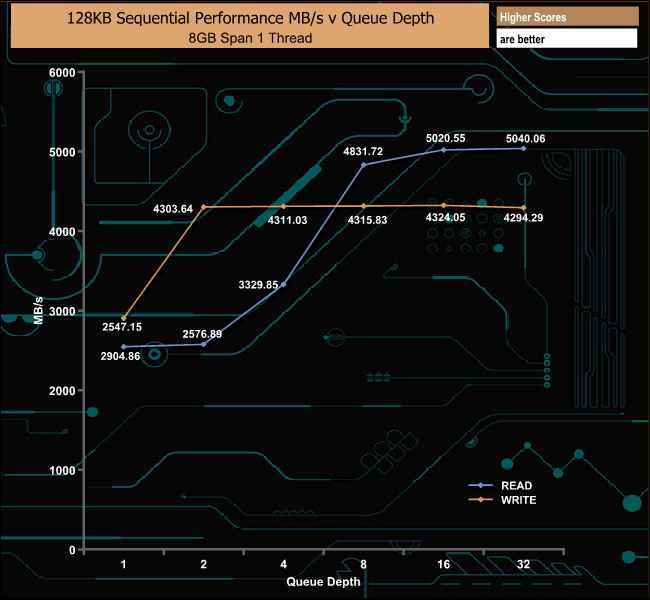
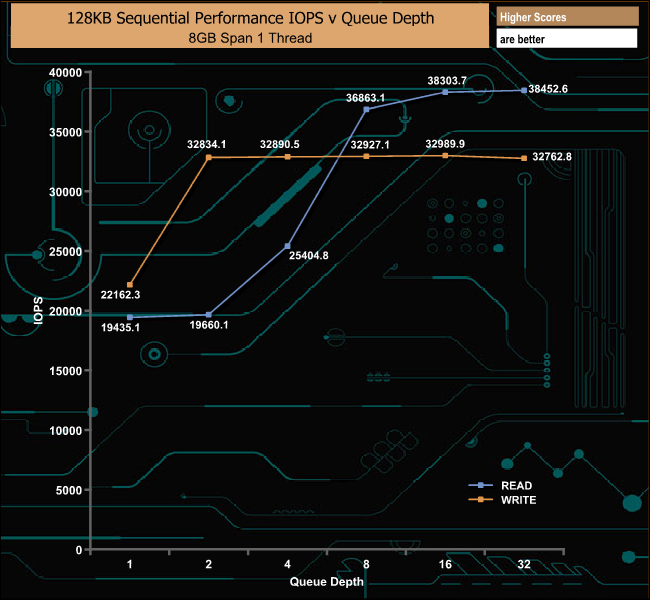
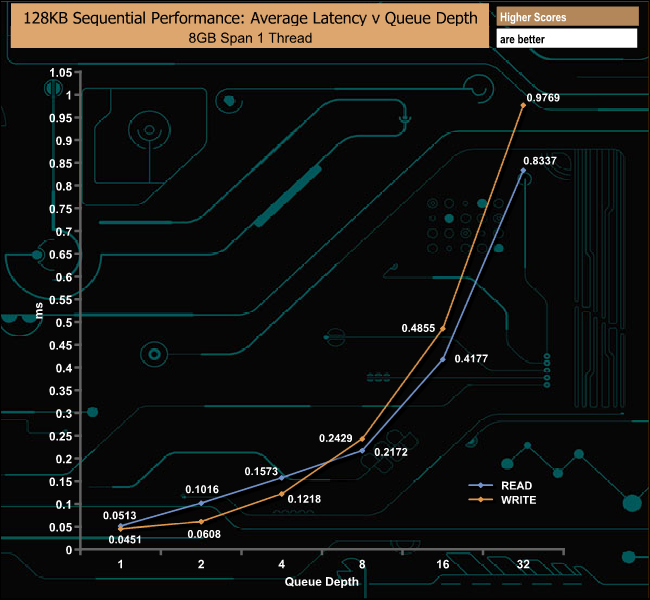
In our own Sequential tests, we could confirm the official maximum read figure of 5,000MB/s as the drive produced a peak of 5,040.06MB/s when tested. Tested writes peaked at 4,324.05MB/s, a little shy of the official maximum of 4,400MB/s.
128KB Sequential Read v QD Performance Comparison
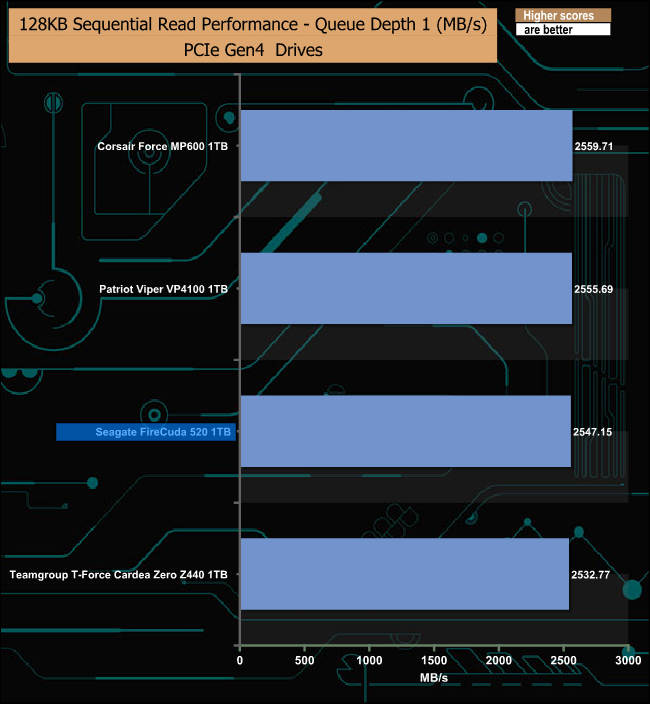
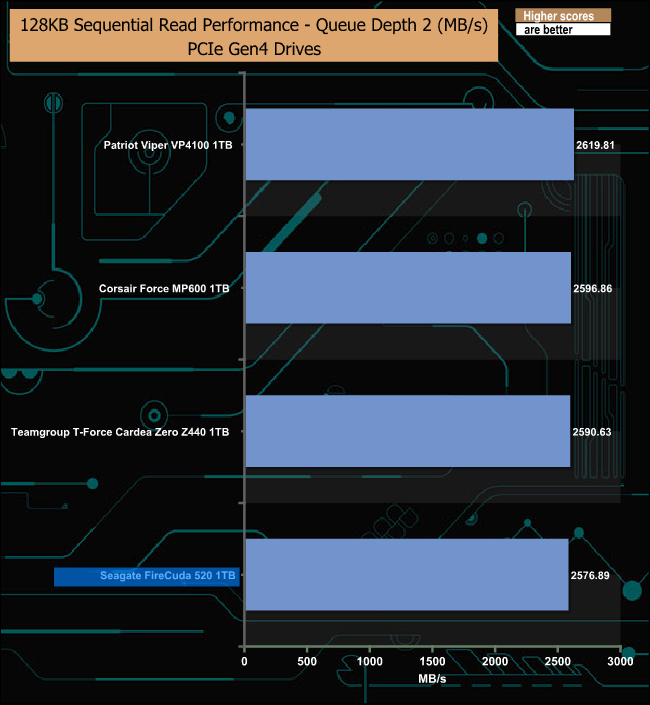
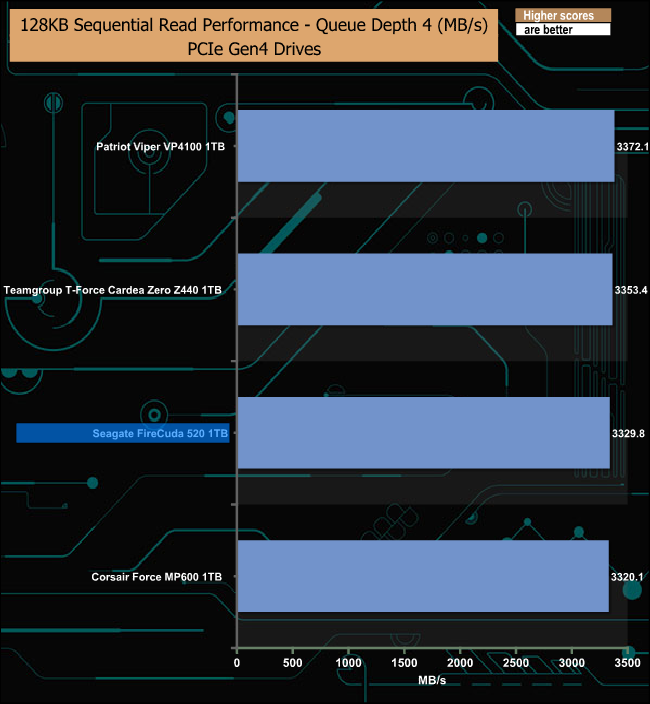
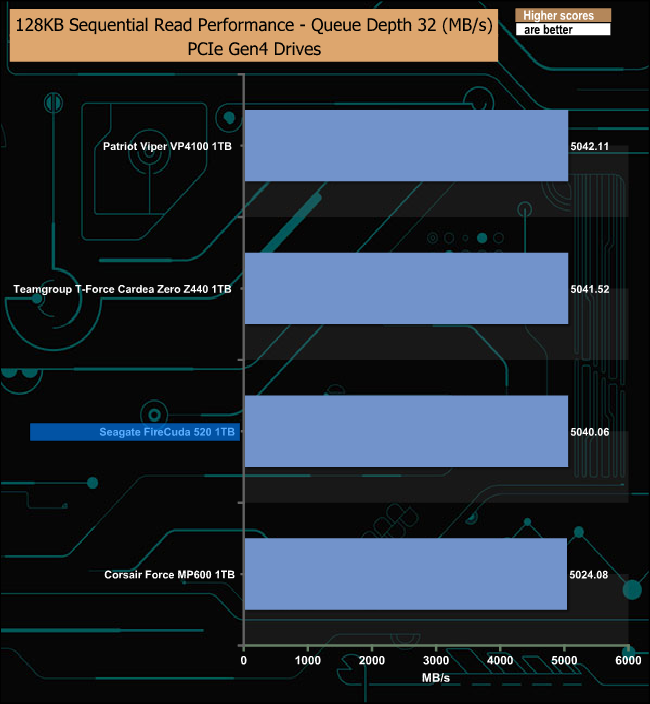
With all the tested PCIe Gen4 drives using the same controller and NAND combination, there is very little to choose between them when it comes to Sequential read performance.
128KB Sequential Write v QD Performance Comparison
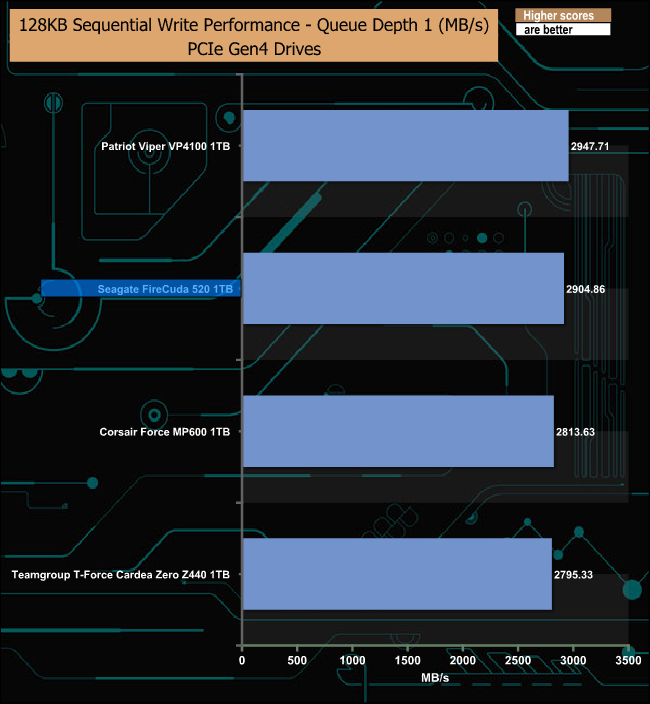
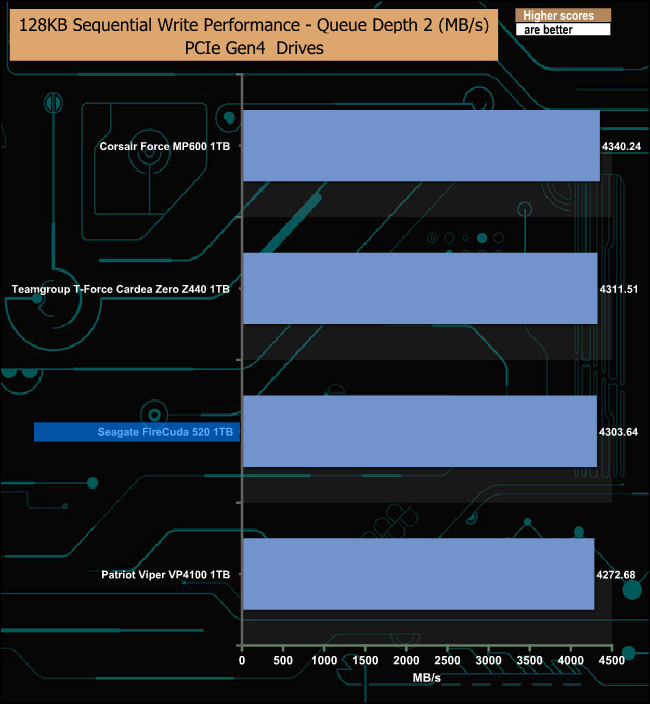
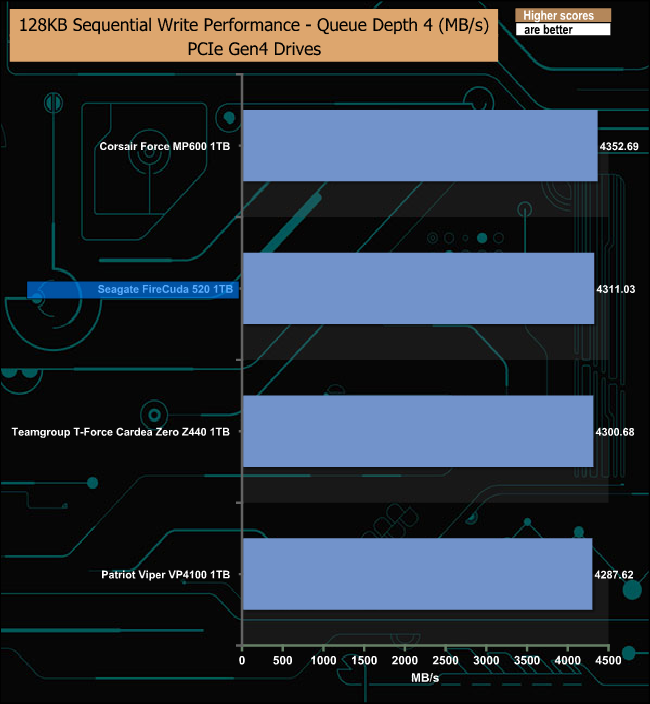
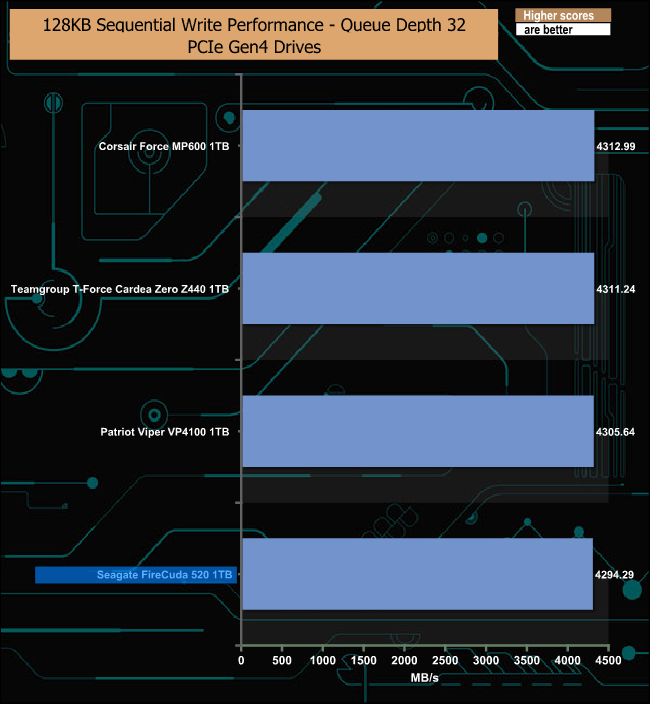
The only time the drive drops back a little from its competitors in Sequential write test was at a QD of 32.
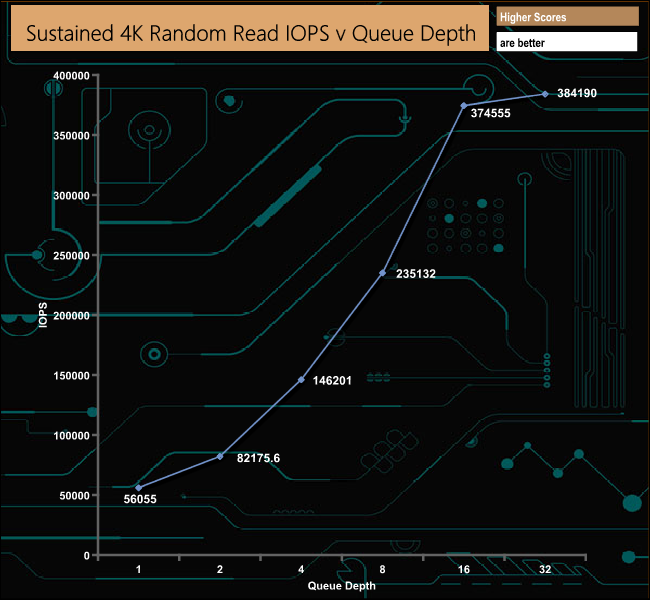
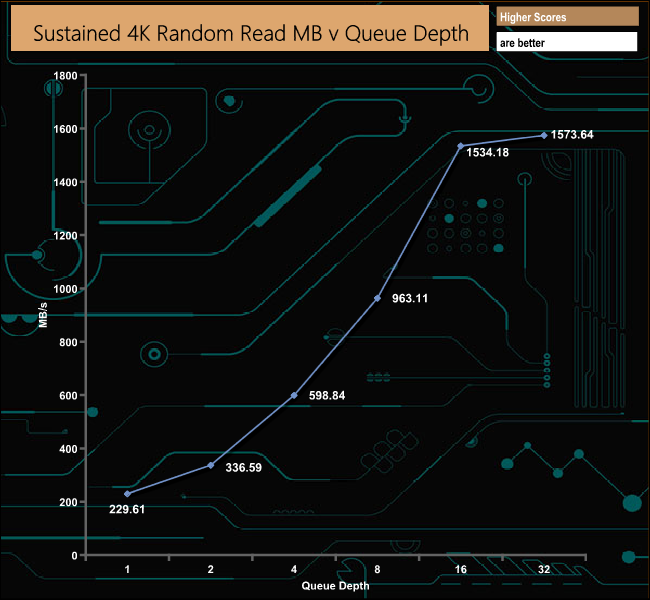
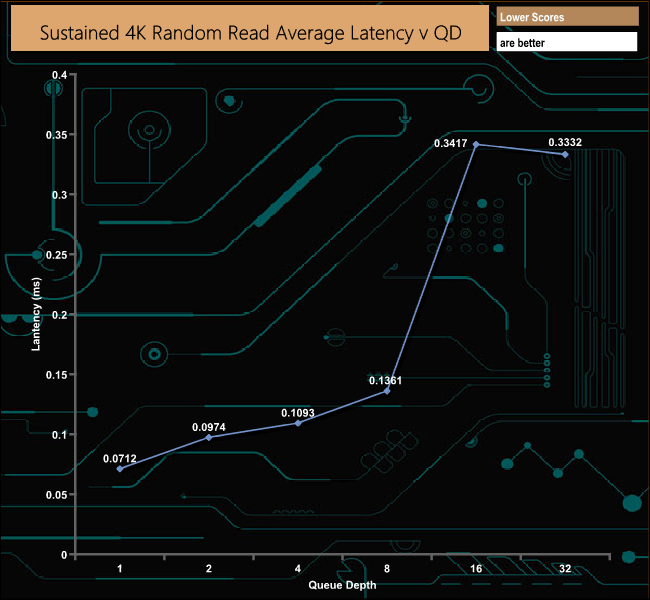
Seagate quote 4K random read performance as up to 760,000 IOPS. Using our standard 4-threaded 4K random read test we couldn’t get close to that number, with the drive producing a figure of 384,190 IOPS at a QD of 32. We did test the drive again at QD32 but with double the number of threads and got a figure of 555,330 IOPS, still well shy of the official maximum.
4K Random Read v QD Performance Comparison
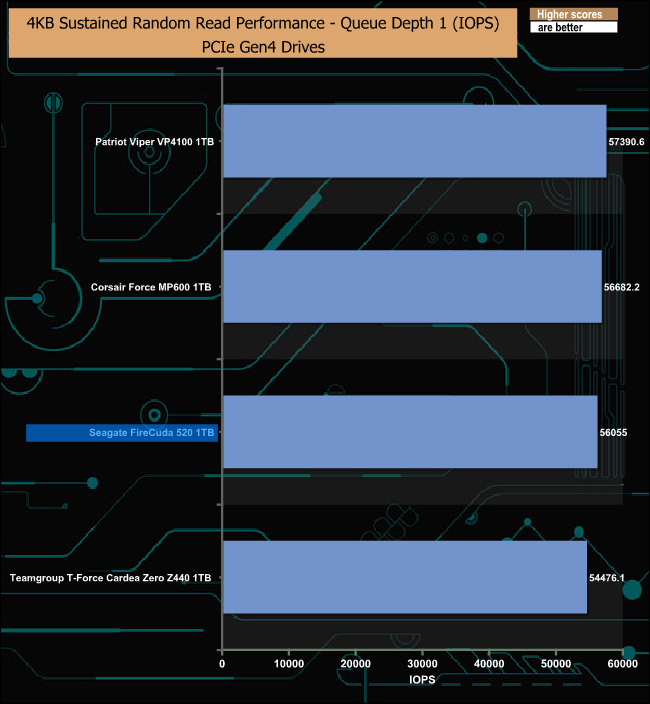
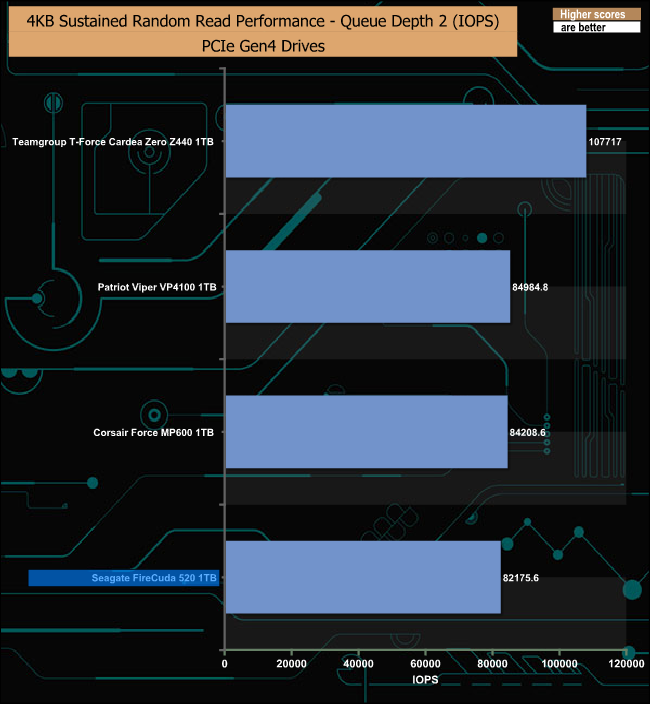
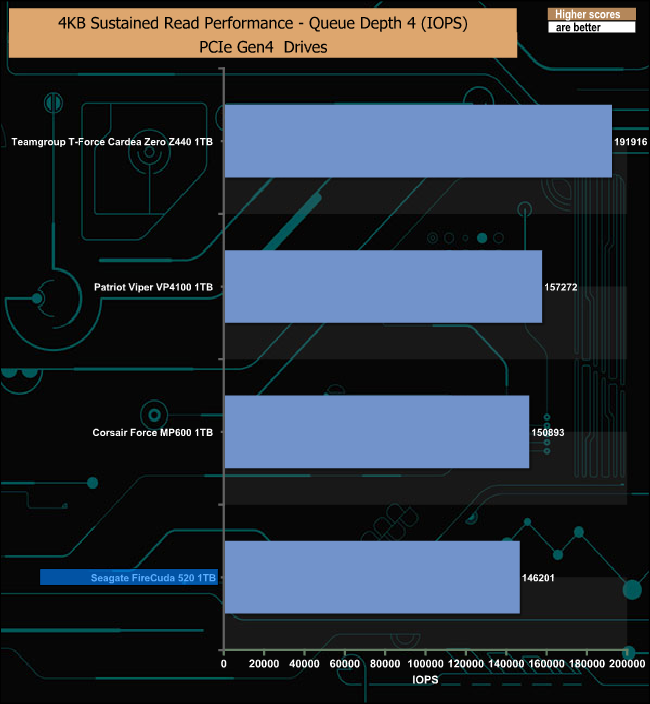
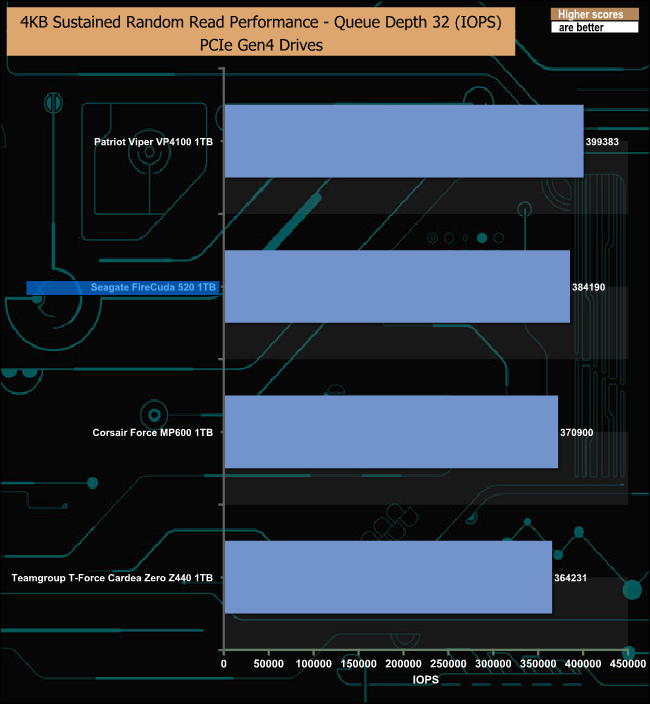
At lower queue depths the FireCuda 520 loses ground on most of its competitors. However, at a QD of 32, it trails only Patriot's Viper VP4100.
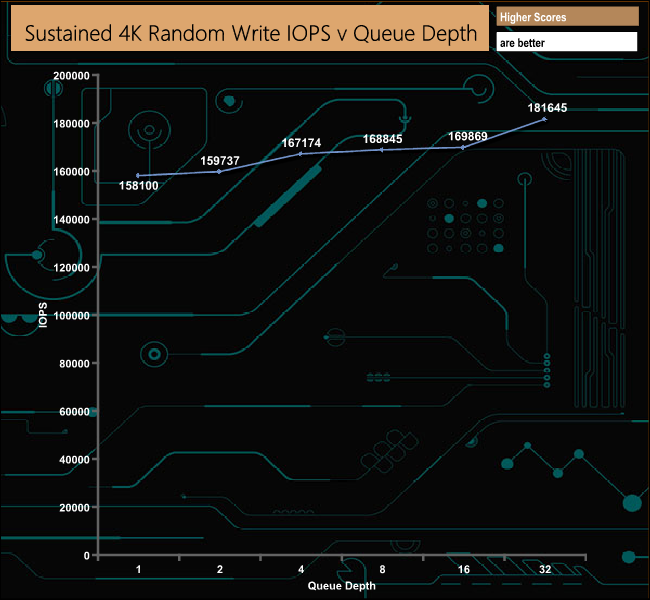
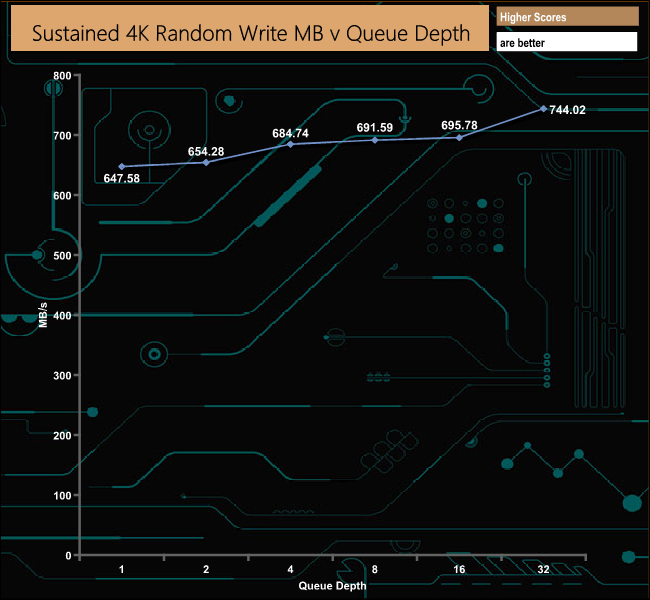
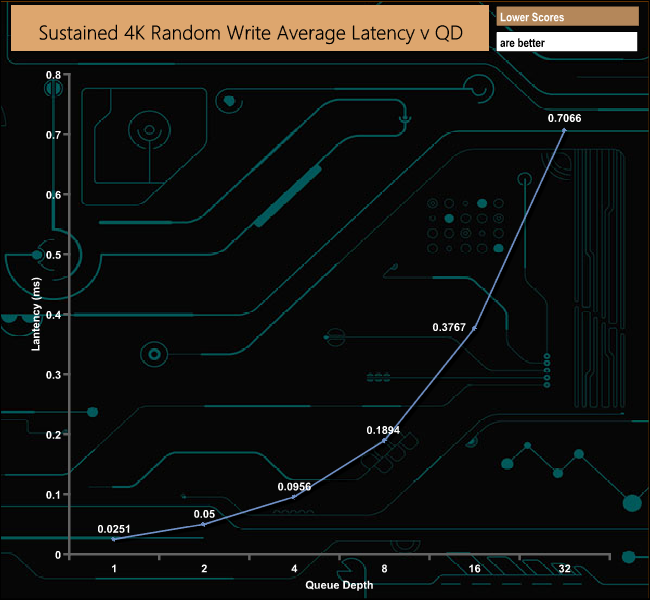
Seagate quote the same 760,000 IOPS for writes and with our 4-threaded testing our results we even further away from the official figure than the read results were. The drive peaked at 181,645 IOPS and once again testing at a QD of 32 with 8 threads improved the figure to 477,643 IOPS, still miles away from the official maximum.
4K Random Write v QD Performance Comparison
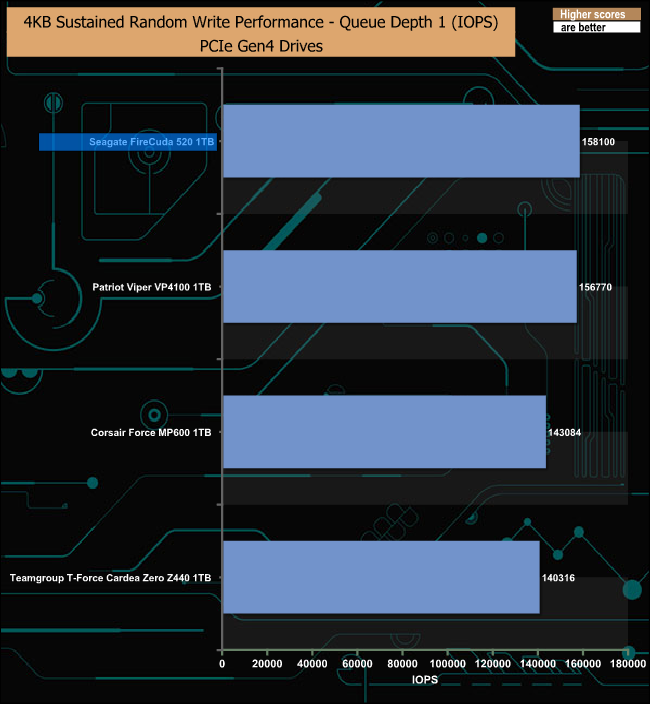
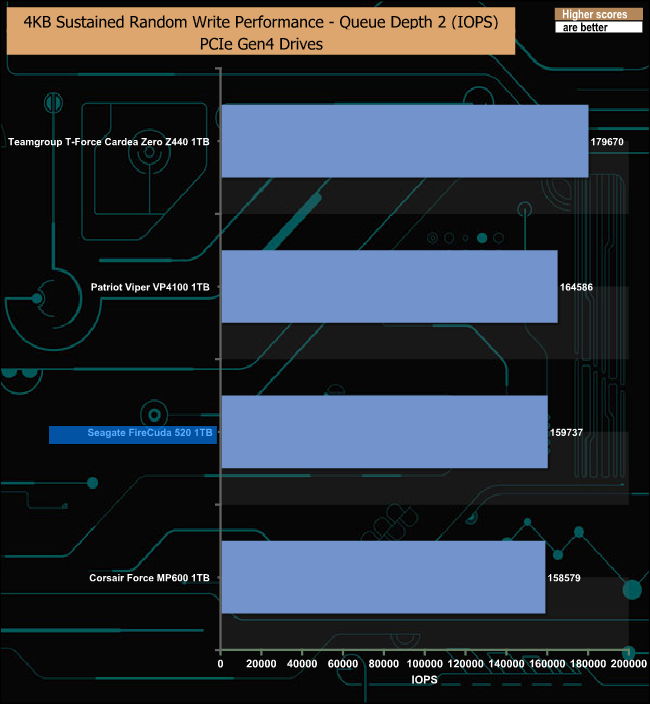
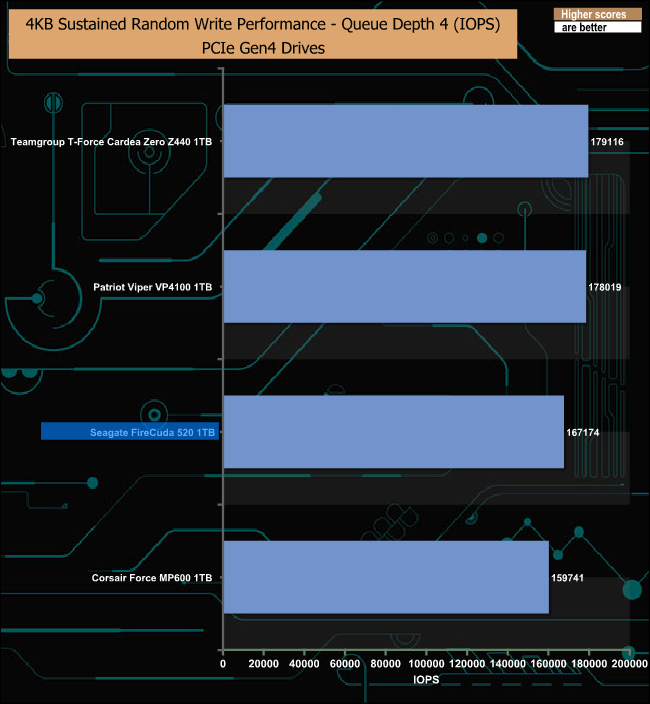
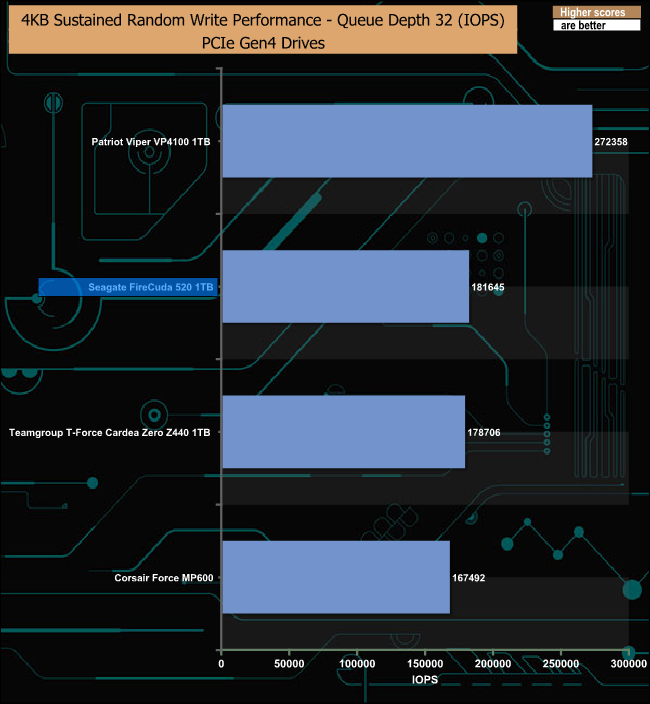
At a QD of 1, Seagate's FireCuda 520 produces the fastest writes of all the drives tested but it drops away again as the QD deepens, however at a QD of 32 it rallies to sit behind the Patriot Viper VP4100.
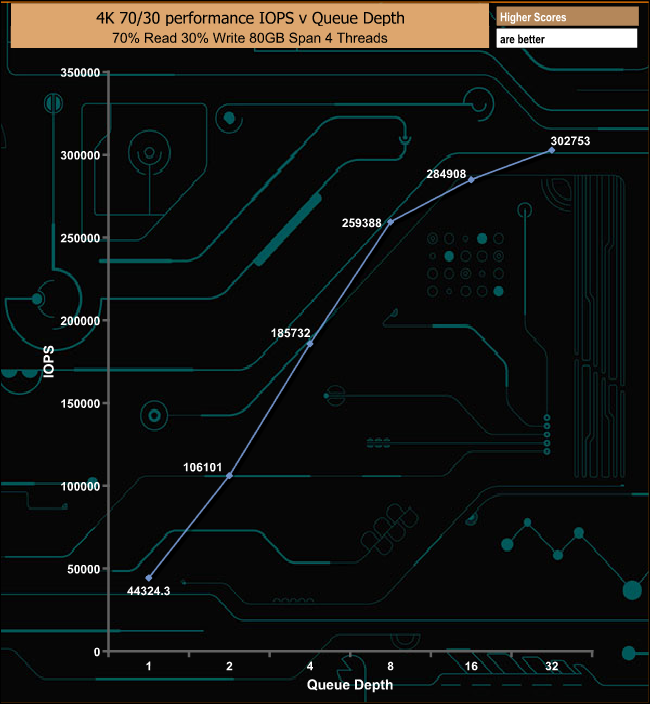
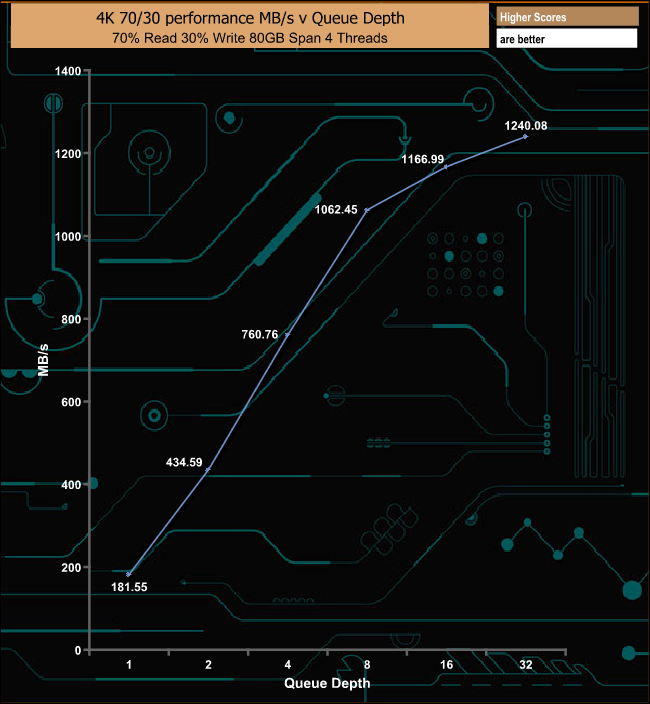
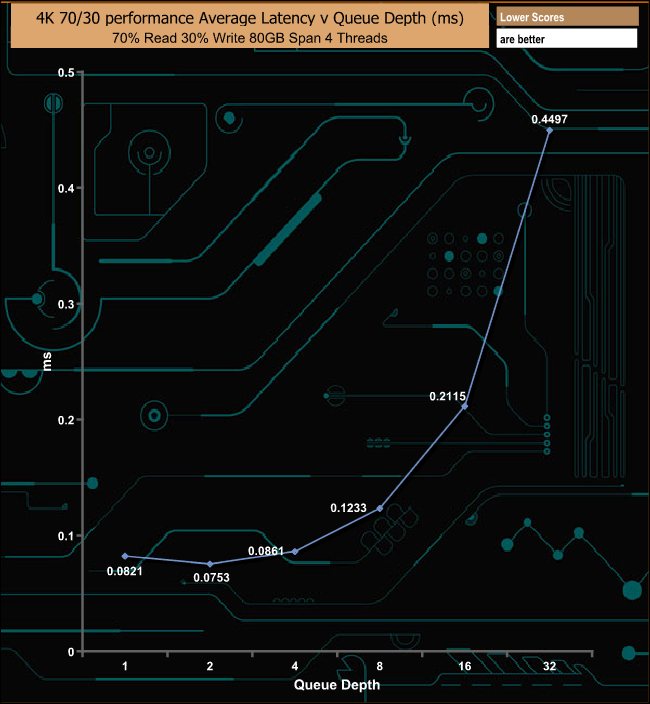
The Seagate FireCuda 520 performed very well in our 70/30 read/write mixed test, finishing the test at QD32 with a figure of 302,753 IOPS (1,240.08MB/s).
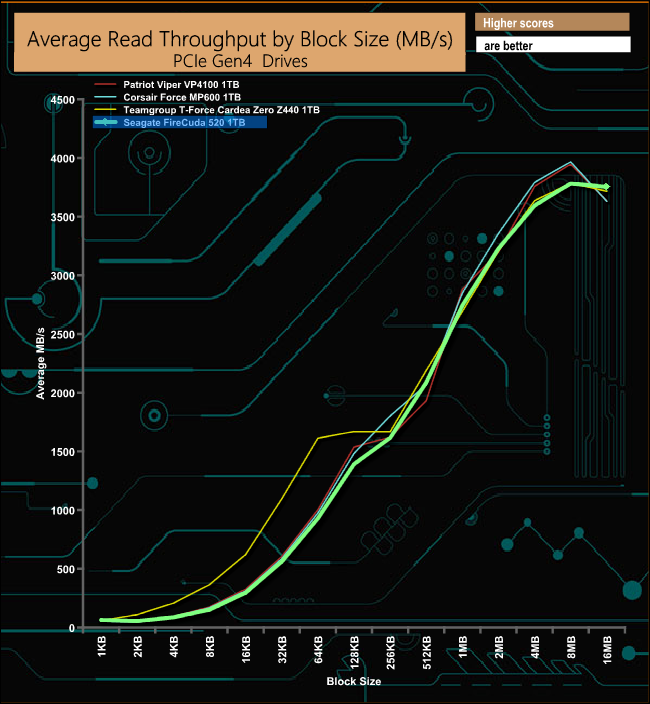
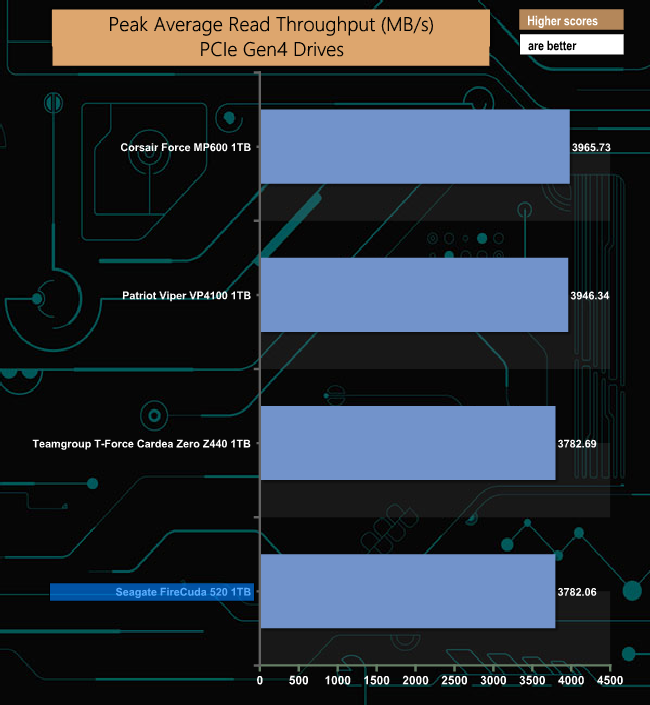
In our read throughput test, the Seagate FireCuda 520 performance peaked at 3,782.06MB/s, at the 8MB block mark.
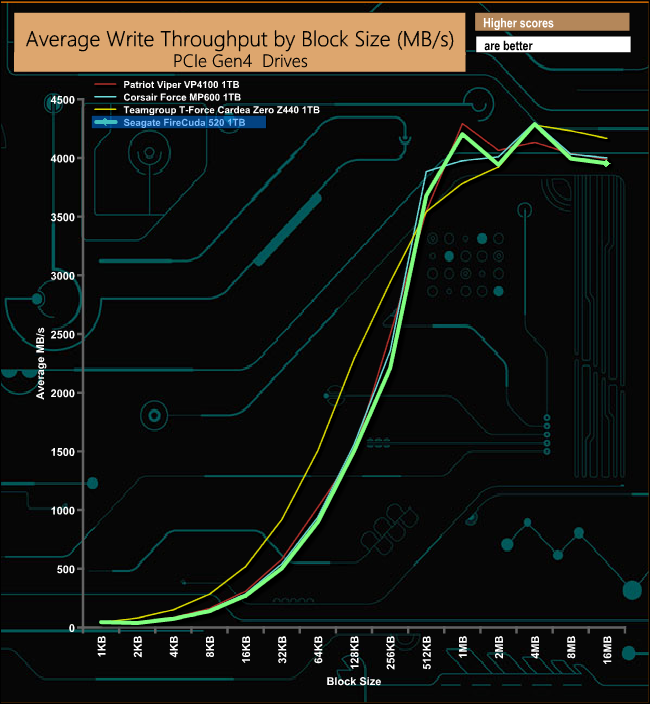
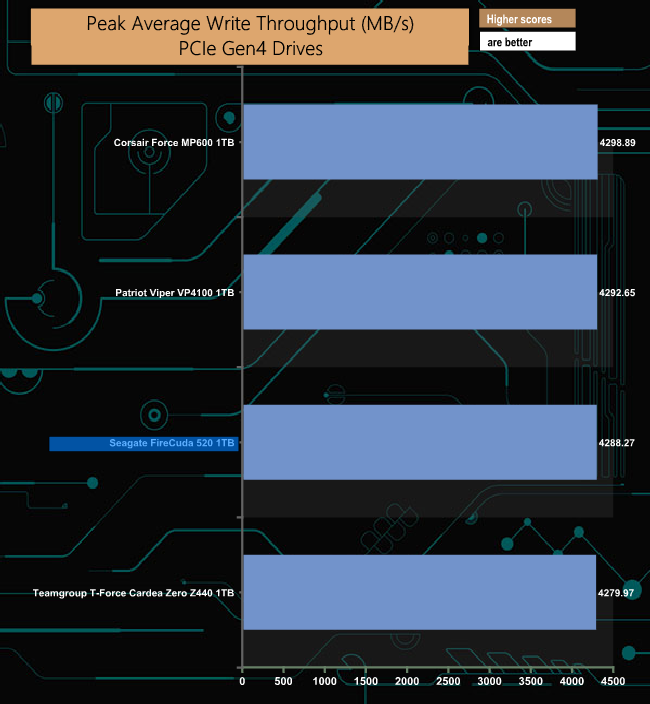
In our write throughput test, the drive peaked at the 4MB block mark at 4,288.27MB/s before dropping back to finish the test run at 3,954.96MB/s
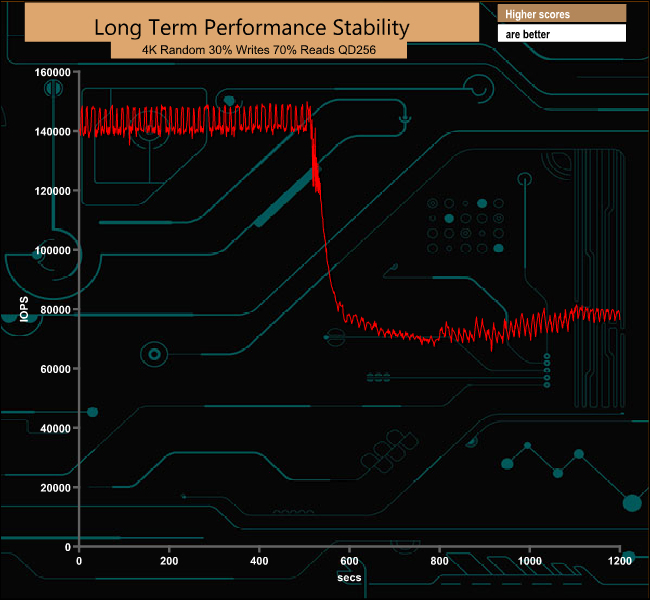
For the long term performance stability test, we set the drive up to run a 20-minute 4K random test with a 30% write, 70% read split, at a Queue Depth of 256 over the entire disk. The 1TB Seagate FireCuda 520 averaged 105,363 IOPS for the test run with a performance stability of 71%.
The PCMark 10 Full System Drive Benchmark uses a wide-ranging set of real-world traces from popular applications and common tasks to fully test the performance of the fastest modern drives. The benchmark is designed to measure performance of fast system drives using the SATA bus at the low end and devices connected via PCI Express at the high end.
The goal of the benchmark is to show meaningful real-world performance differences between fast storage technologies such as SATA, NVMe, and Intel’s Optane. The Full System Drive Benchmark uses 23 traces, running 3 passes with each trace. It typically takes an hour to run.
Traces used:
- Booting Windows 10.
- Adobe Acrobat – starting the application until usable.
- Adobe Illustrator – starting the application until usable Adobe Premiere Pro – starting the application until usable.
- Adobe Photoshop – starting the application until usable.
- Battlefield V – starting the game until the main menu.
- Call of Duty Black Ops 4 – starting the game until the main menu.
- Overwatch – starting the game until main menu.
- Using Adobe After Effects.
- Using Microsoft Excel.
- Using Adobe Illustrator.
- Using Adobe InDesign.
- Using Microsoft PowerPoint.
- Using Adobe Photoshop (heavy use).
- Using Adobe Photoshop (light use).
- Copying 4 ISO image files, 20 GB in total, from a secondary drive to the target drive (write test).
- Making a copy of the ISO files (read-write test).
- Copying the ISO to a secondary drive (read test).
- Copying 339 JPEG files, 2.37 GB in total, to the target drive (write test).
- Making a copy of the JPEG files (read-write test).
- Copying the JPEG files to another drive (read test).
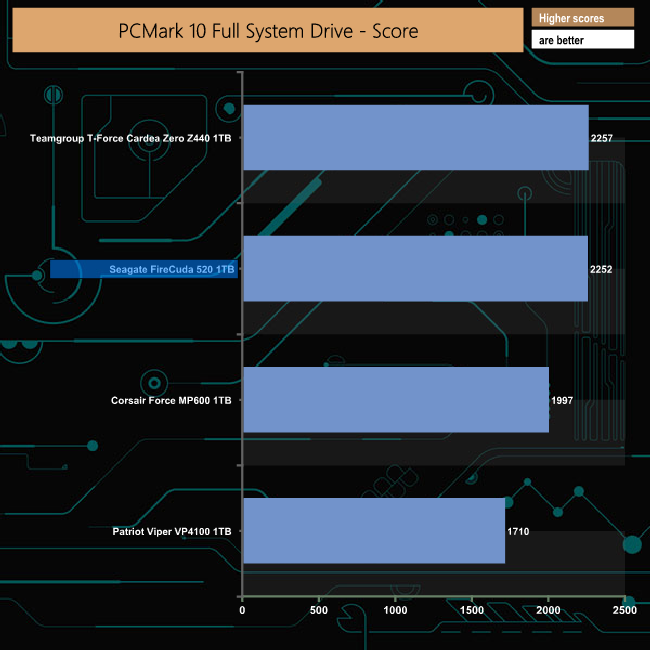
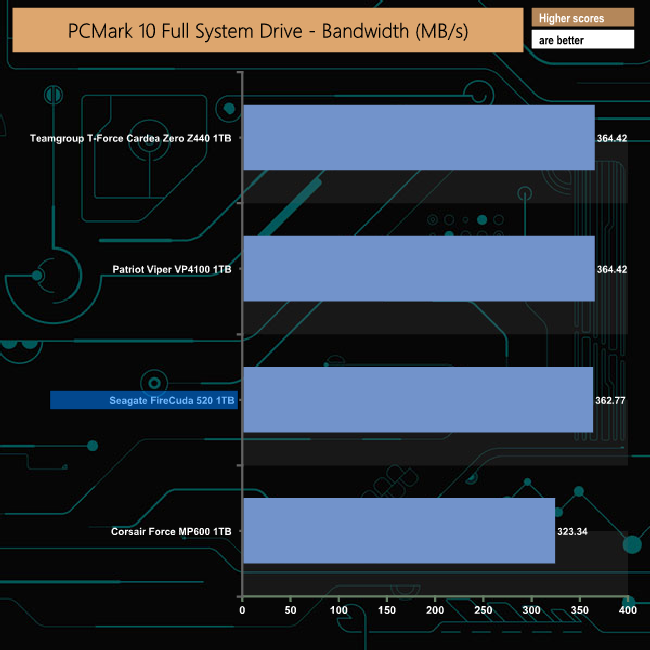
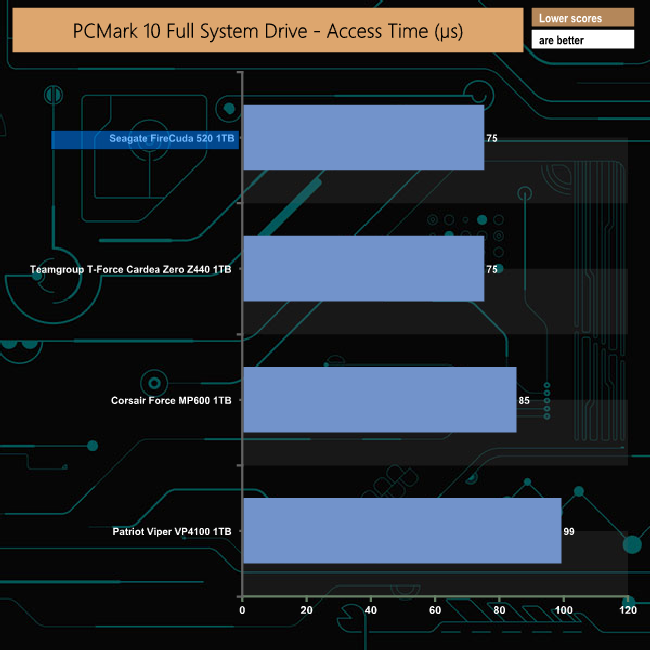
Seagate's FireCuda handles the PCMark 10 Full System Drive Benchmark very well producing the second-best overall score and third-best bandwidth figure of 362.77MB/s.
To test real-life performance of a drive we use a mix of folder/file types and by using the FastCopy utility (which gives a time as well as MB/s result) we record the performance of drive reading from & writing to a 256GB Samsung SSD850 PRO.
We use the following file/folder types:
- 100GB data file.
- 60GB iso image.
- 60GB Steam folder – 29,521 files.
- 50GB File folder – 28,523 files.
- 10GB Photo folder – 621 files (mix of .png, raw and .jpeg images).
- 10GB Audio folder – 1,483 files (mix of mp3 and .flac files).
- BluRay Movie.
- 21GB 8K Movie demos.
- 11GB 4K Raw Movie Clips (8 MP4V files).
- 4.25GB 3D Printer File Folder (mostly .STL).
- 1GB AutoCAD File Folder (.dwg and .dxf).
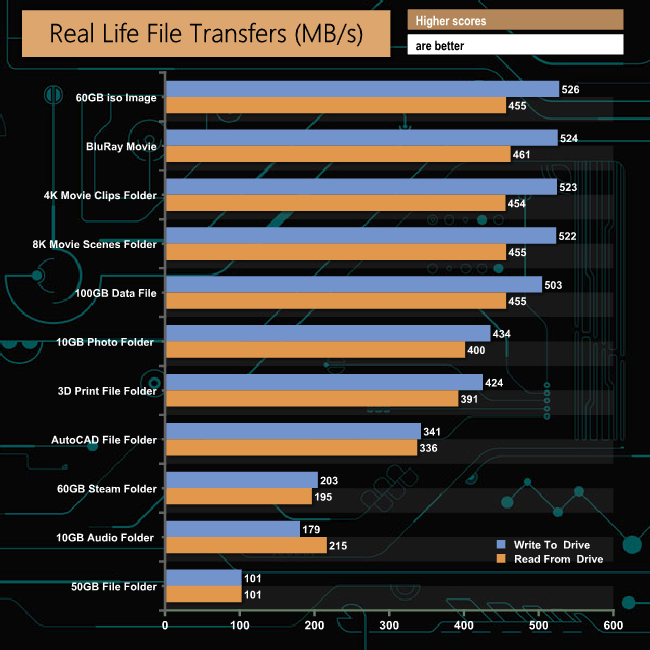
The FireCuda 520 had no problems dealing with our real-life file transfer tests. The drive is much more efficient at handling larger file sizes than the smaller files found in the 60GB Steam, 50GB file and 10GB audio folders as can be seen by the large difference in transfer rates.
To get a measure of how much faster PCIe NVMe drives are than standard SATA SSDs we use the same files but transfer to and from a 512GB Toshiba OCZ RD400.
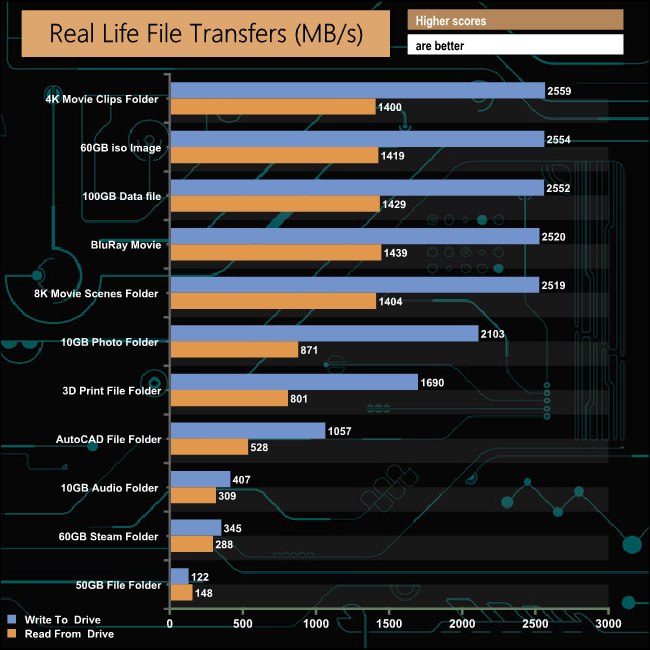
Taking the SATA SSD out of the picture gives an idea of just how capable a PCIe Gen4 drive is. For example, the 60GB ISO file took 1m 52s to write to the SATA drive and 2m 9s to come back the other way. The same file took 23 seconds for the FireCuda 520 to write to the NVMe drive and 41 seconds to read the data back. The 21GB 8K movie scene folder took 41 seconds to write to the SATA drive but a mere 8 seconds to write to the Toshiba OCZ RD400 NVMe drive.
It took quite some time to see the first Seagate NVMe SSD for the consumer space in the shape of the FireCuda 510 which we reviewed late last year, but in no time at all, we've got another 500 series FireCuda, the FireCuda 520. With this drive, Seagate has joined a rather exclusive club (at the time of writing at least) of SSD manufacturers that have a PCIe Gen4 drive aimed at the consumer segment of the market.
The FireCuda 520 uses the current standard NAND and controller combination for a PCIe Gen 4 drive; Phison PS5016-E16 8-channel controller (in this case, branded as Seagate) and Kioxia BiCS4 96-Layer 3D TLC NAND. The FireCuda 520 range consists of just three capacities, 500GB, 1TB and 2TB. Interestingly it doesn't have the large passive heatsink that Gen4 drives generally come with, so you don't have the potential risk of causing damage when taking the cooler off to use the drive in a motherboard with M.2 cooling.
The official Sequential speed ratings for the 1TB drive are up to 5,000MB/s for reads and up to 4,400MB/s for writes. Using the ATTO benchmark we got a little more performance out of the drive when it came to reads, but a little less when it came to writes. Our tested drive produced a write figure of 3,890MB/s, a little short of the official maximum of 4,400MB/s.
Seagate quote 4K random read/write performance of the 1TB drive as up to 760,000 IOPS for both. Using our standard 4K random read/write tests with four-threads we couldn’t get close to that figure with reads or writes; reads came in at 384,190 IOPS and writes at 181,645 IOPS at a QD of 32. We then did a quick test again at a QD of 32 but using eight-threads, which resulted in reads of 555,330 IOPS and writes at 477,643 IOPS.
Seagate’s well-known drive utility, SeaTools, now comes in an SSD version. SeaTools SSD is a pretty comprehensive management tool that displays capacity, disk usage, temperature and remaining life of the drive. The Operations page allows the firmware to be updated, drive diagnostics to be carried out, switch between performance optimised and capacity optimised modes if this is supported by the drive and the page includes a link to Seagate’s disc cloning software – DiscWizard. There’s even a choice of skins for the utility allowing you to swap from the standard looking SeaTools skin to a flashier looking one aimed at gamers.
With its very good all-round performance and excellent endurance, Seagate’s FireCuda 520 is another addition to the slowly growing number of PCIe Gen 4 drives in the market. Seagate is also helping the drive by giving it competitive pricing as the 1TB version is at least a tenner cheaper than the other 1TB PCIe Gen 4 drives we've tested.

We found the 1TB Seagate FireCuda 520 on Overclockers UK for £229.99 (inc VAT) HERE.
Discuss on our Facebook page HERE.
Pros
- Overall performance.
- Excellent endurance.
- 5-year warranty.
Cons
- Couldn’t match the official maximum 4K random figures under testing.
- Needs a X570/Ryzen 3000 combination to get the full benefit of the technology.
KitGuru says: It took Seagate quite some time to launch their first consumer NVMe SSD, the FireCuda 510, but they haven't been dragging their feet this time around with the new PCIe Gen 4 FireCuda 520.