 KitGuru KitGuru.net – Tech News | Hardware News | Hardware Reviews | IOS | Mobile | Gaming | Graphics Cards


Nvidia's GTX 970 sits in that graphics card sweet-spot where it's about 10-20% slower than its GTX 980 brother, but retails for only 60% of the price. It's that alluring balance between performance and value that makes the GTX 970 a smart candidate for constructing a strong SLI configuration.
OcUK realises that multi-GPU potential by offering up to a pair of KFA2 GTX 970 Infinity Black Edition graphics cards in its Ultima Finesse Blackhole system. Forging the path for the GTX 970s are Intel's competitive Core i7 5820K CPU and an MSI X99S SLI Plus motherboard.
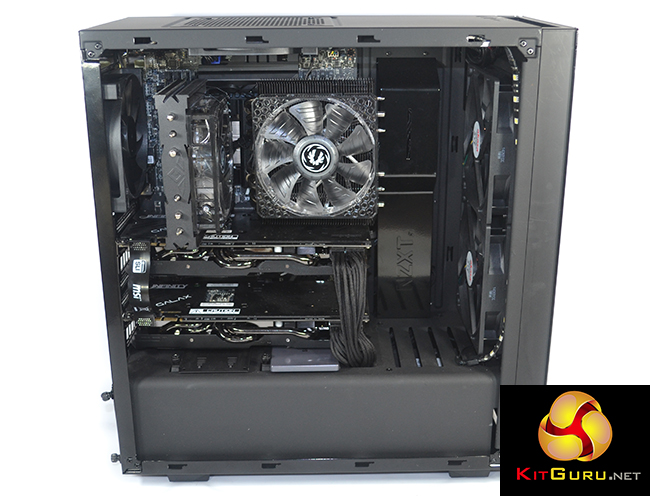
OcUK wraps up the SLI-capable system in NZXT’s competitively-priced S340 chassis, giving users excellent viewing angles of the internals. Cooling the 3.9GHz-clocked 5820K is a Prolimatech Genesis, which also provides incidental airflow for the motherboard and memory. Samsung’s 250GB 840 EVO SSD and Seagate’s 2TB SSHD are called upon for storage purposes.
Fiasco regarding the 3.5GB of high-speed memory aside, the GTX 970 is still an impressive graphics card. Does the pair of custom-cooled, factory-overclocked KFA2 Infinity Black Edition cards have what it takes to deliver the goods at a 2560×1440 gaming resolution?
System Configuration:
- CPU: Intel Core i7 5820K Six Core Haswell-E Processor overclocked to 3.9GHz
- Motherboard: MSI X99S SLI Plus (Socket 2011) DDR4 ATX Motherboard
- Graphics Cards: 2x KFA2 GTX 970 Infinity Black Edition 4GB Graphics Card SLI
- Case: NZXT Source 340 Gaming Case – Black
- Power Supply: Super Flower 750W Gold PSU
- Cooler: Prolimatech Genesis Dual Fan CPU Cooler
- RAM: 16GB (4x4GB) DDR4 2400MHz Quad Channel Kit
- SSD: 250GB Samsung 840 EVO
- Hard Drive: 2TB Seagate SSHD
- Sound: High Definition 7.1 On-board Sound Card
- Operating system: Windows 7 or Window 8.1
- Warranty: 3 years standard (up to 5 years available to purchase)
- Price as configured: £1870.92 (at the time of writing)

OcUK ships the system bundle in a large external box that protects it from damage. I like the inclusion of plastic straps – they make the heavy package easier to carry and minimise the risk of dropping it.
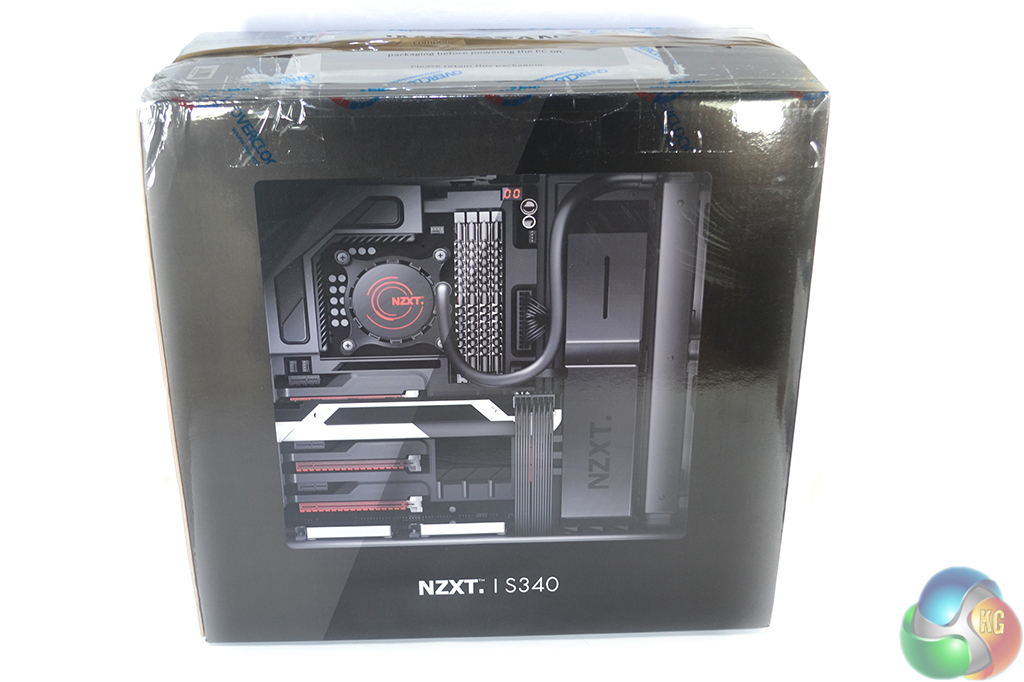
Removing the large (and sensible) amount of protective padding that OcUK uses reveals the chassis box. This is safest way of shipping a fully-built system as it ensures minimal movement of the case itself.
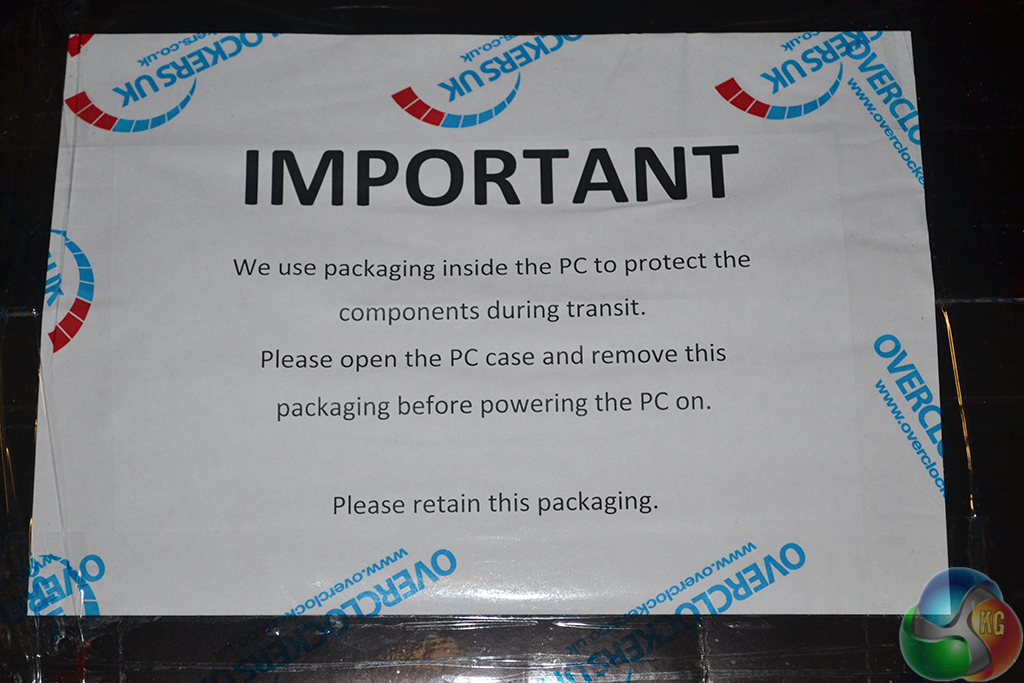
Given that an air CPU cooler is mounted onto the motherboard socket, OcUK includes extra protection inside of the case to prevent movement and damage.
OCUK will supply the system with individual component boxes and accessories. This is a review sample, so we didn't receive them.
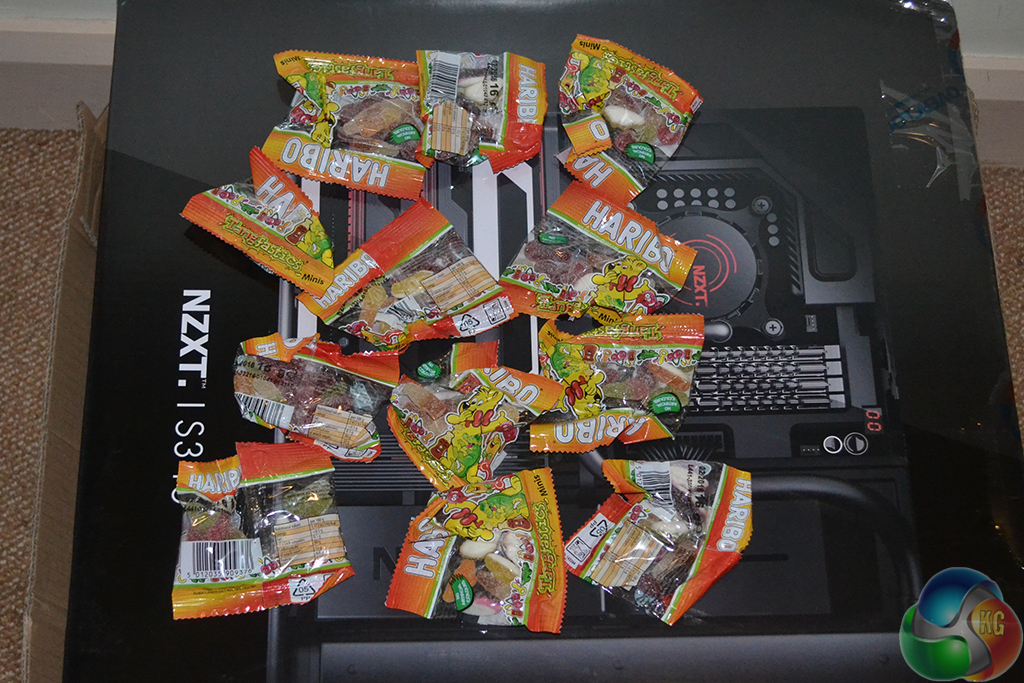
In typical OcUK/Caseking fashion, the system sample that we received was accompanied by no less than a dozen packets of Haribo Tangfastics. I guess they can keep everybody occupied during the initial setup and program installation process.
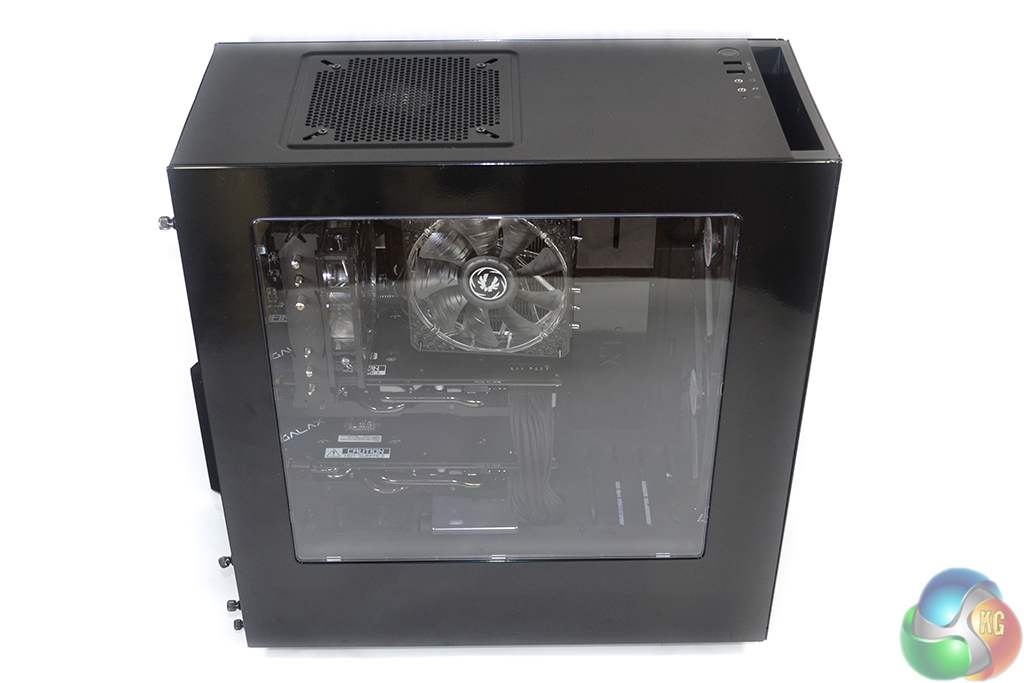
The decision to use an NZXT S340 as the OcUK Ultima Finesse Blackhole system’s chassis is likely to be met with praise amongst buyers and observers. We video-reviewed the NZXT S340 here.
NZXT produced a charm with the S340 – it’s an affordable chassis that still offers a number of bells and whistles and sports a unique, eye-catching appearance. The large, crystal-clear (not smoked) side panel window gives excellent viewing of the internal hardware, especially when combined with the Ultima Finesse Blackhole’s pre-installed lighting strips and LED fans.
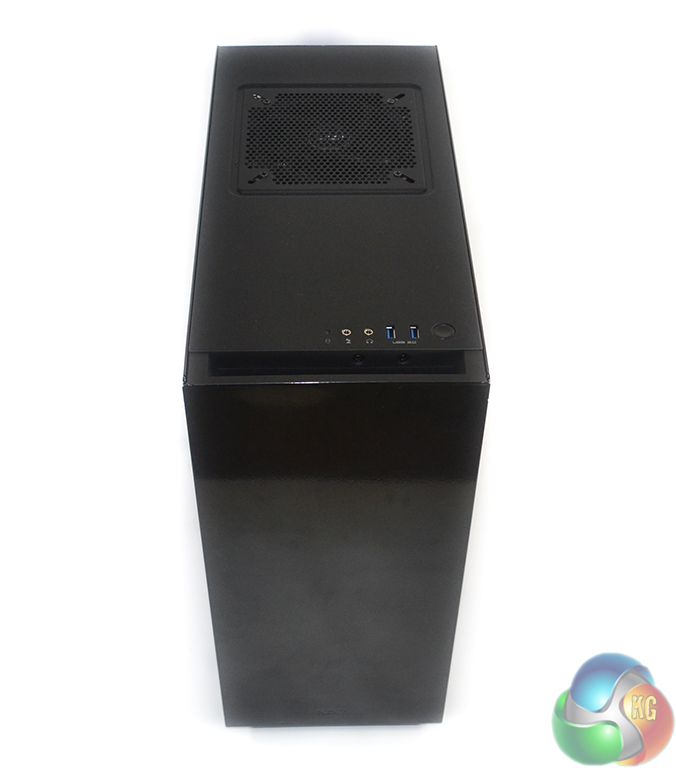
A gap behind the front bezel allows the pair of 140mm fans that OcUK installs to breathe.
Despite the shiny panels, NZXT's S340 actually shows decent fingerprint-resistance.
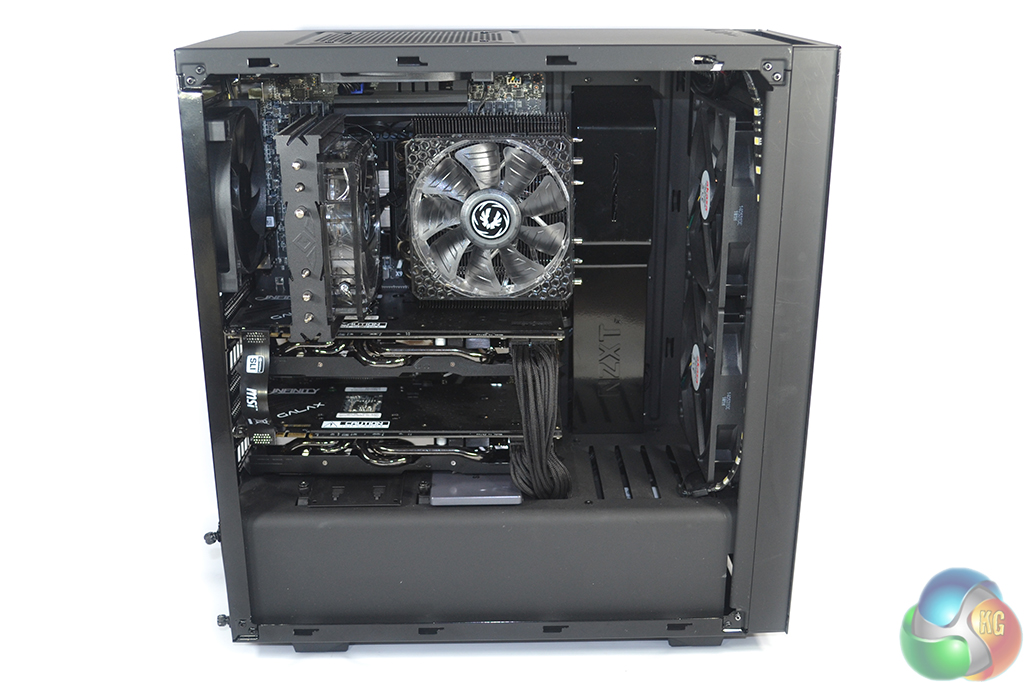
Possibly the best word to describe the system’s internals is ‘gorgeous’. OcUK’s ability to match colours, even down to the shade of black, is superb. And the cable management is equally strong, with black braided adapters chosen over the PSU’s potentially-ugly default connectors.
This impressive appearance stems back to the smart choice of components and chambered chassis design. But form is no good without function, hence why OcUK makes such an effort to ensure that the system’s cooling configuration is capable.
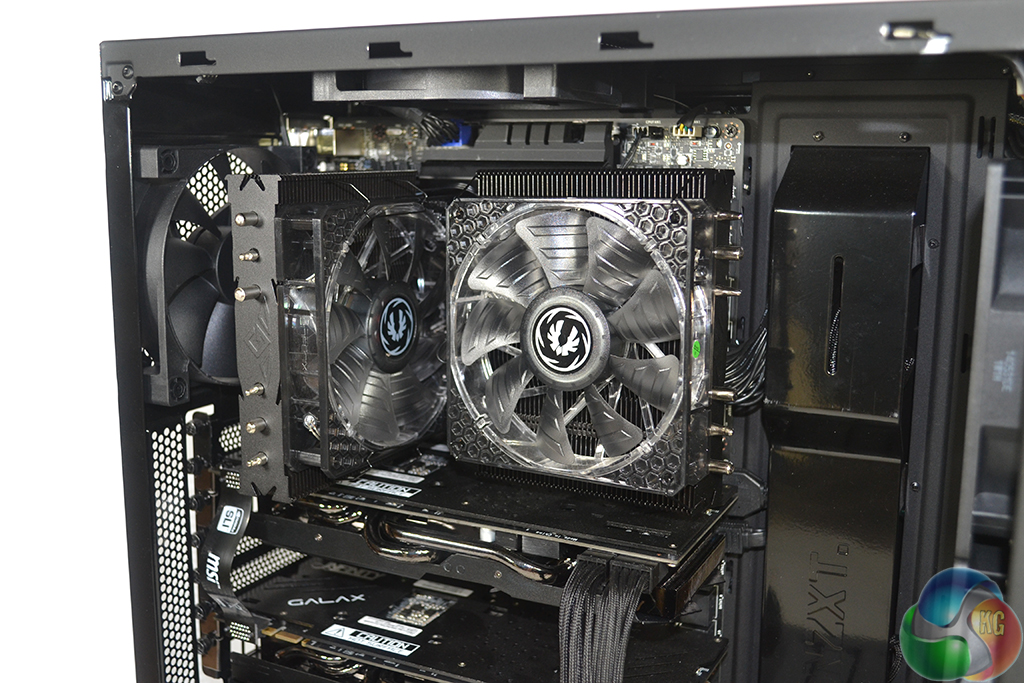
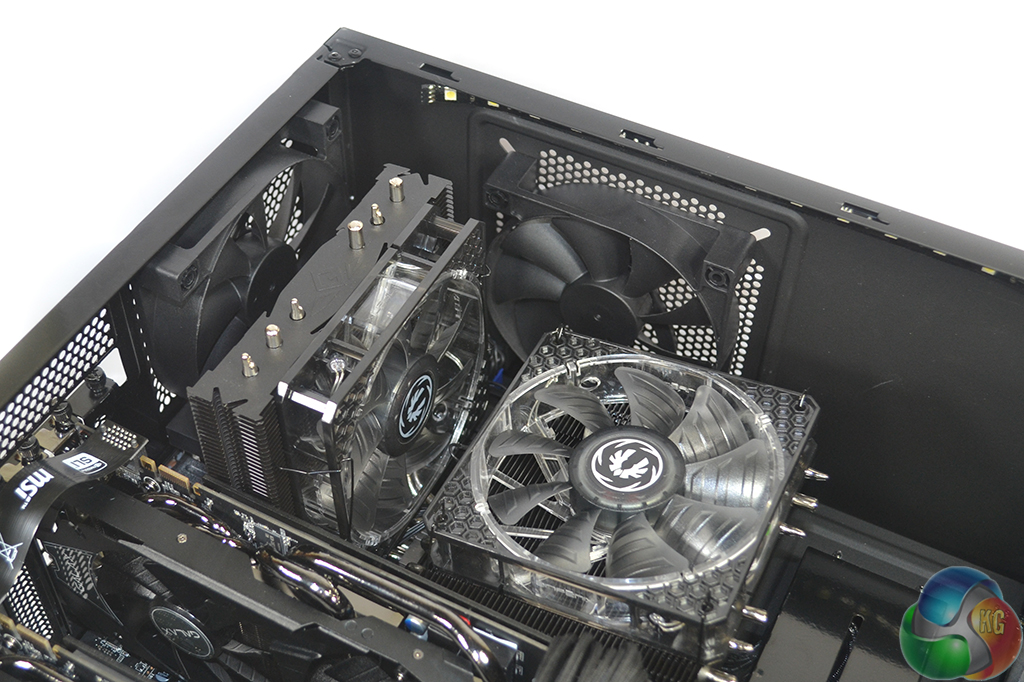
Cooling the 3.9GHz-clocked 5820K CPU is the job of a dual-tower Prolimatech Genesis Black Edition CPU cooler. Again, effort is made to maintain the black colour theme throughout and the pair of 120mm BitFenix Spectre PRO 1200RPM White LED fans streamline with the lighting configuration. The Genesis CPU cooler works well with low speed fans.
I like the choice of CPU cooler for thermal performance – two towers provide a large cooling surface area, while the downwards-facing fan will blow air over the 16GB quartet of TeamGroup Elite 2400MHz DDR4 memory modules and the X99 motherboard’s hot VRM. The biggest problem is Prolimatech’s terrible fan mounting mechanism.
There’s no worry about the CPU heatsink itself moving during shipping – the mount is as secure as a house. But the fans are sparingly ‘held’ on by clips that push against the frame. There’s no clipping through the fan holes for extra stability, so I would be surprised if they remain fully attached during shipping.
Securing the fans by a set of black zip-ties would be a sensible decision, and it would not negatively affect the system appearance.
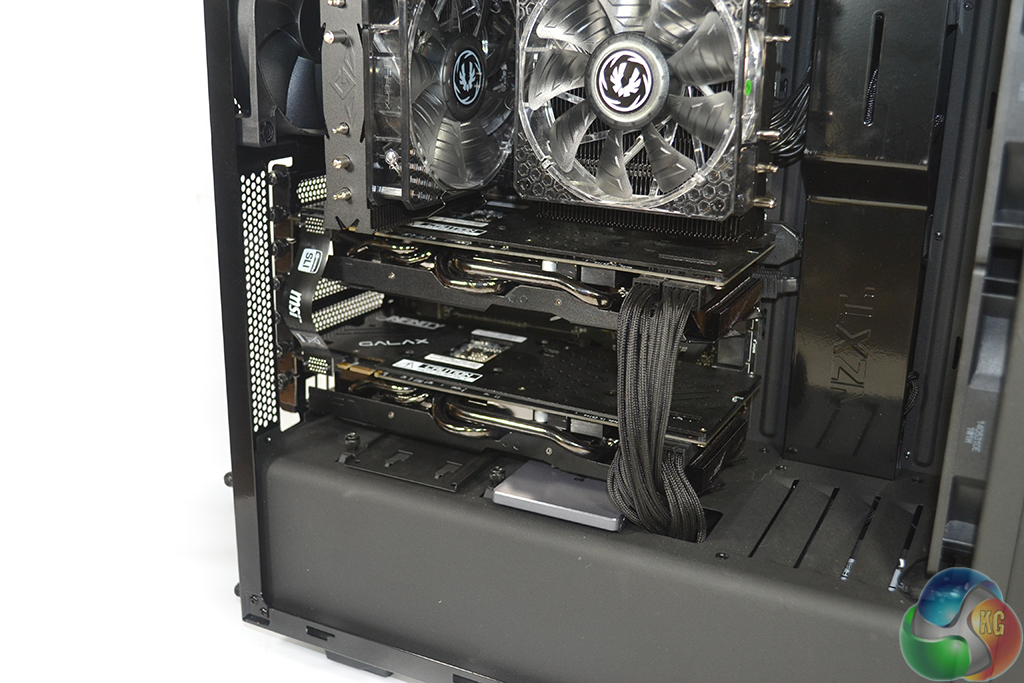
MSI’s X99S SLI Plus motherboard recommends using the top two PCIe x16 slots for two-card configurations, resulting in back-to-back graphics cards. This is not a good decision, hence why OcUK has tested the graphics cards with a cooling gap and certified them to function without issues or performance penalties.
It is pleasing to see that OcUK applies a common sense element to the system build, rather than simply take the questionable guidance of each component vendor. The two GTX 970 graphics cards operate with a PCIe 3.0 x8/x8 link from the CPU, and are permitted a two-slot cooling gap between them. A third graphics card would also run at PCIe 3.0 x8 and would command the cooling gap as its home.
We reviewed the factory-overclocked KFA2 GTX 970 Infinity Black Edition graphics cards here, and found them to be excellent all-round performers. Taking performance out of the equations, the cards look fantastic, with their black coolers and annotated backplates.
The eagle-eyed amongst you will notice the bottom graphics card sagging into contact with the 250GB Samsung 840 EVO SSD. Our sample simply shipped with the SSD mounted in an unintentional location; OcUK informed us that the system is intended to be built with the SSD in the left 2.5” slot or one of the HDD bays, removing it from interference headaches.
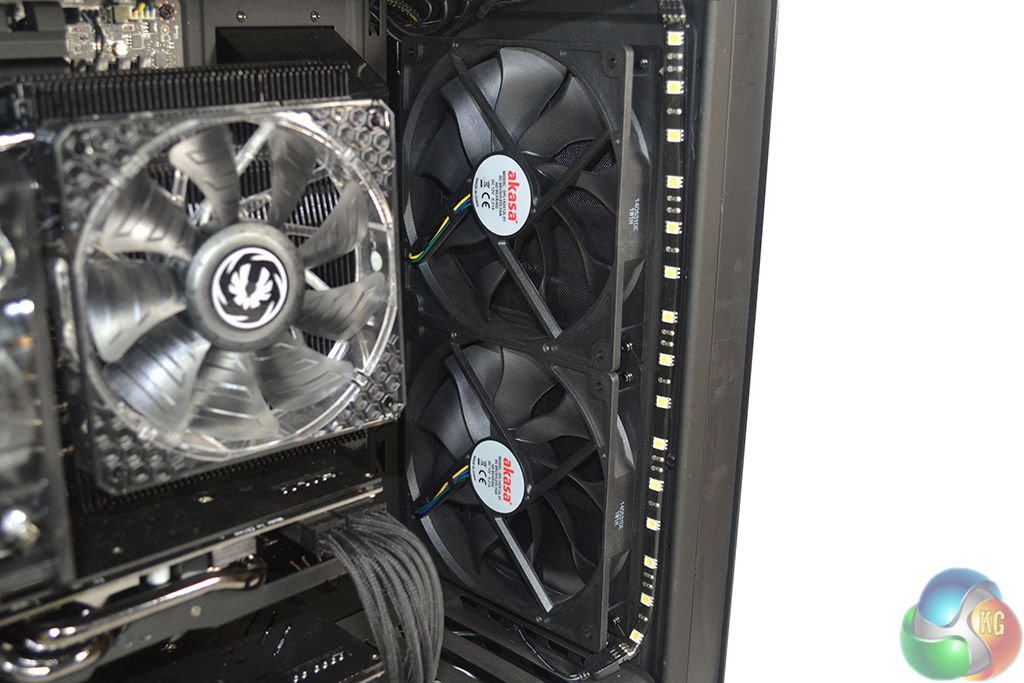
Two 140mm Akasa Apache fans bring air through the front of the case and blow it directly over the graphics cards. The 4-pin PWM fans are capable of operating at speeds between 600 and 1300 RPM. A white LED lighting strip is stuck next to the fans.
OcUK retains the two 120mm exhaust fans that are supplied by default with the S340 chassis. These are connected directly to a power source, rather than being managed by the motherboard.
The system’s overall cooling configuration is superb. The two larger fans being used as intake also promotes positive pressure, potentially reducing internal dust build-up. That said, acoustics may not be the best with a total of 11 fans spread throughout the system.
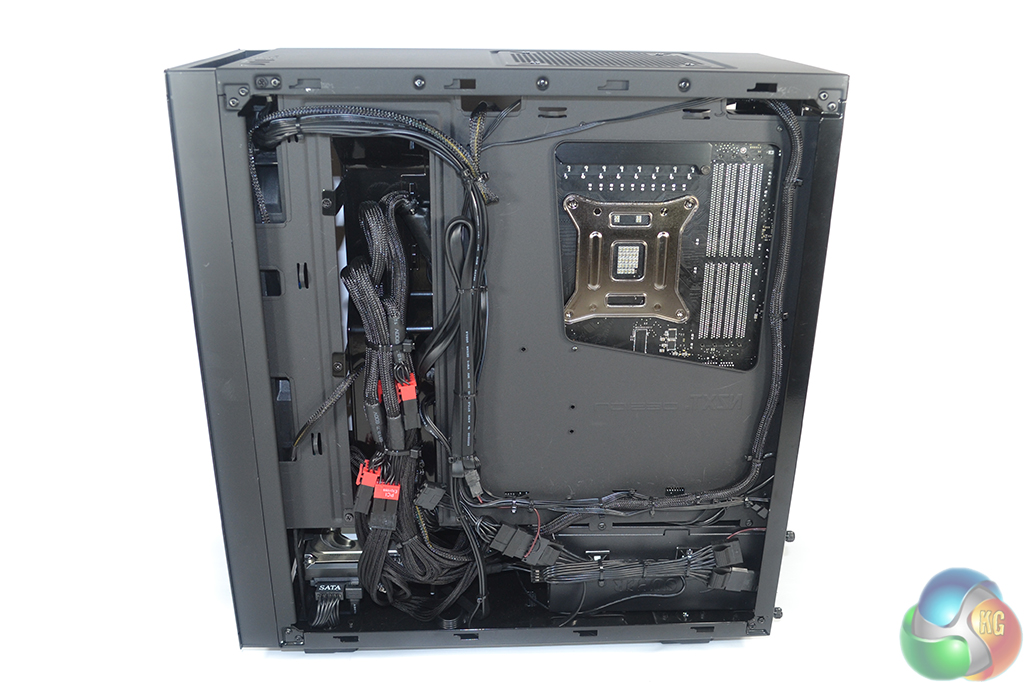
The chambered design of NZXT’s chassis reduces the complexity of cable management. Nevertheless, OcUK does a good job at neatly routing the cables and maintaining order behind the motherboard tray.
None of the rear cables are visible from the component side of the chassis.
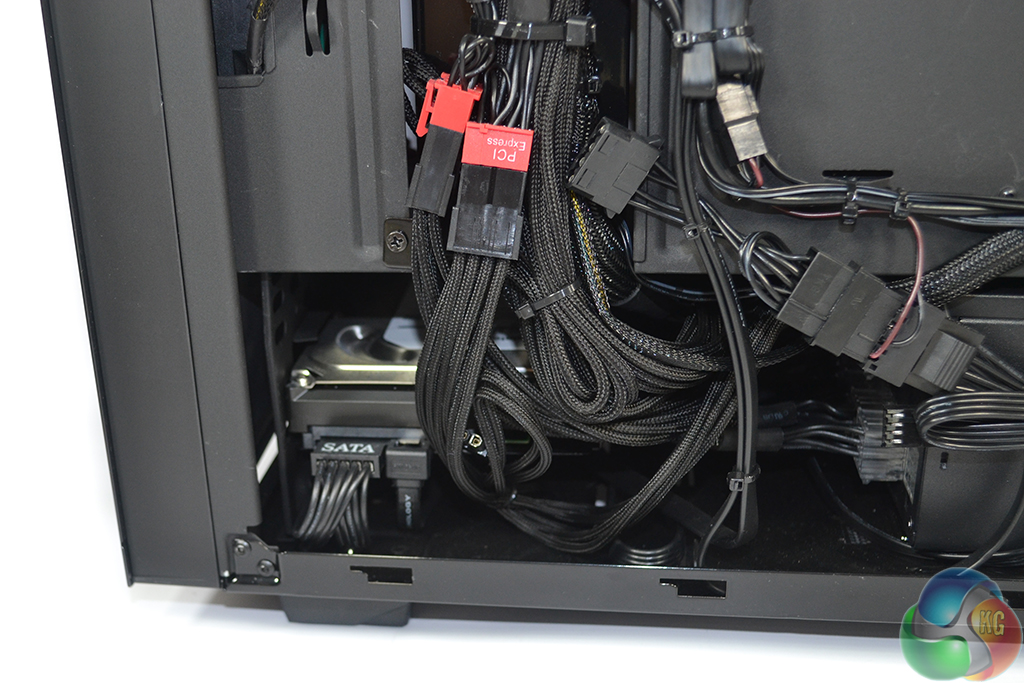
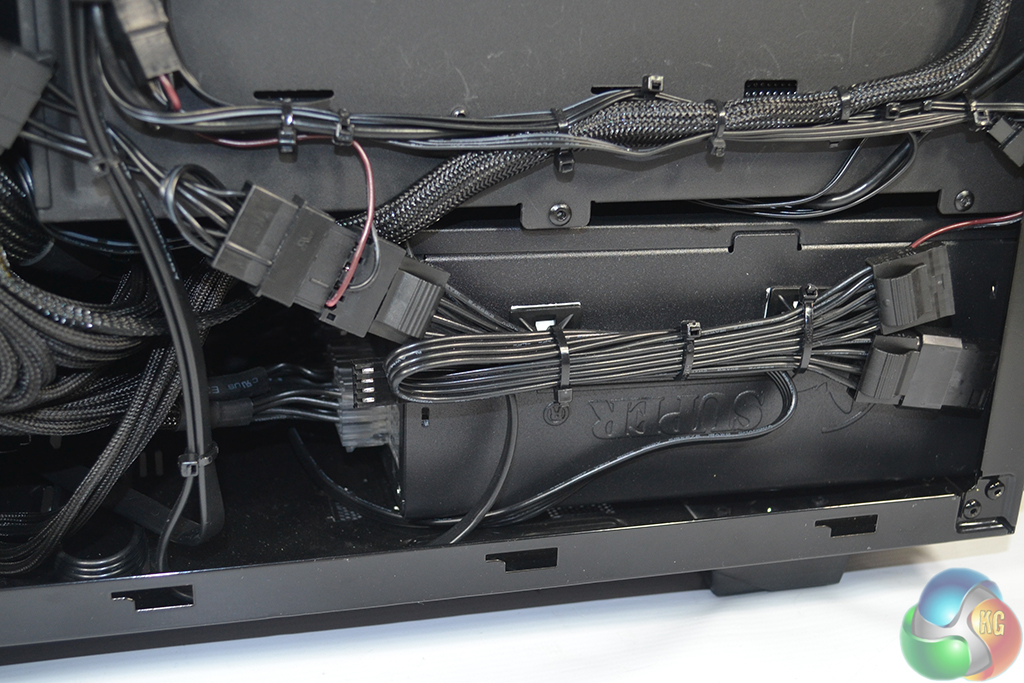
A 2TB Seagate ST2000DX001 SSHD is installed in the relevant bay. Accessing this drive, or installing another, will be a little tricky due to the bundle of cables. That is an infrequent task, though.
Power is supplied by an 80+ Gold-rated 750W SuperFlower Leadex unit. The unit is fully modular and cools itself with a 140mm fan.
750W is a smart capacity for two GTX 970 graphics cards and a LGA2011-3 5820K CPU. The additional headroom permits for CPU overclocking while staying within the PSU’s rated output specification.
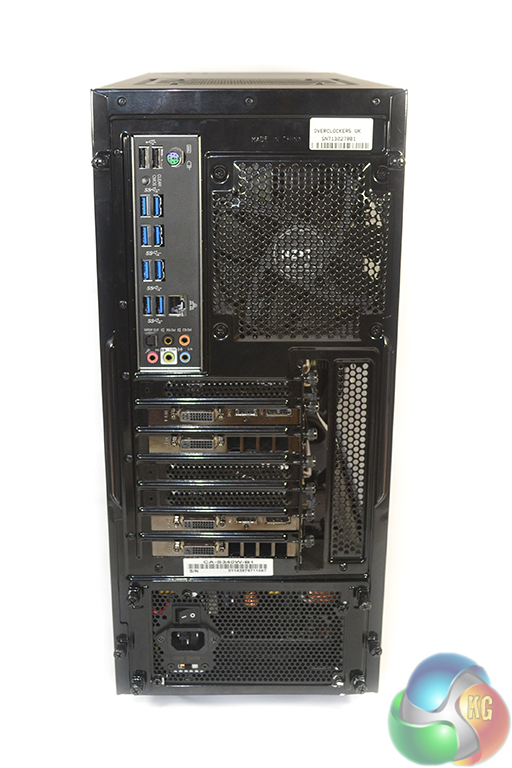
MSI’s motherboard provides eight rear-mounted USB 3.0 ports via a mixture of ASMedia, VIA, and X99 controllers.
Each of the graphics cards provides a pair of DVI connectors, a DisplayPort link, and HDMI 2.0. This configuration is suitable for driving a number of high-resolution monitors.
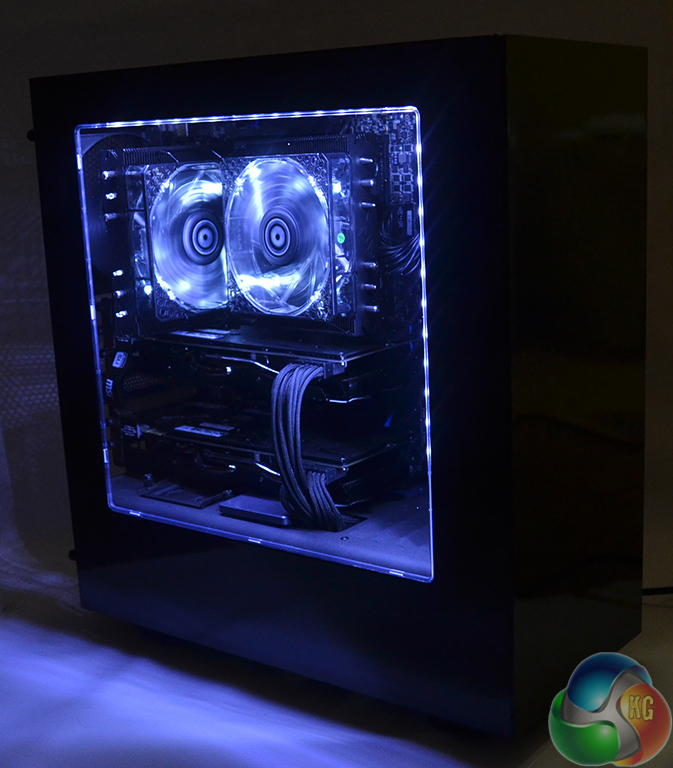
The lighting configuration created by OcUK is very impressive. The pure white colour is very difficult to capture in a photograph (it looks blue rather than pure white), but it is certainly eye-catching when in the same room as the system.
Surrounding hardware is illuminated by the lighting system, although not by an eye-straining amount.
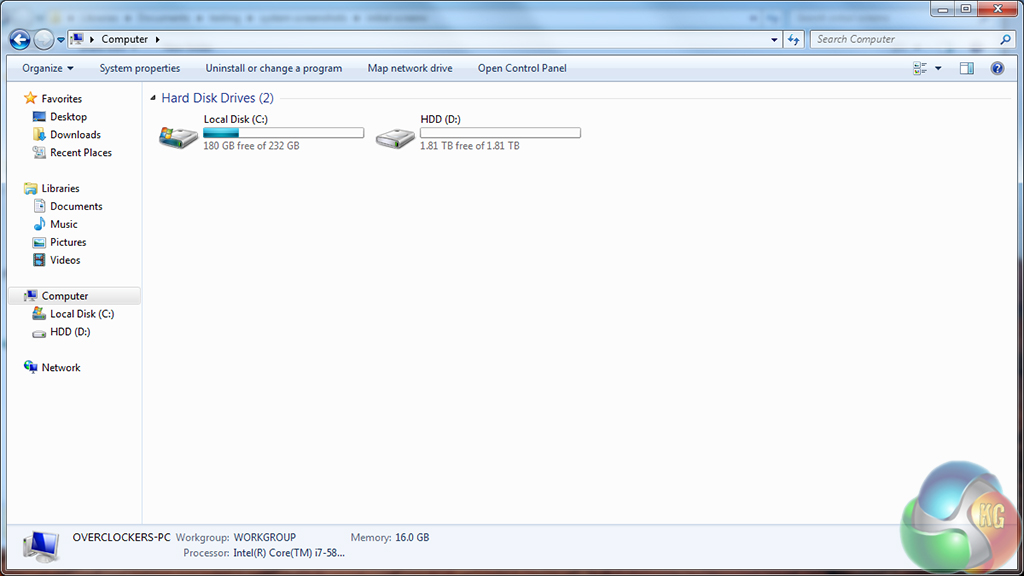
The system should ship with at least 180GB free on the 250GB SSD, while the 2TB SSHD in our sample was completely empty.
Our system actually shipped with Windows 7 Professional installed, although we assume that most users will save money by opting for Windows 7 Home Premium or Window 8.1.
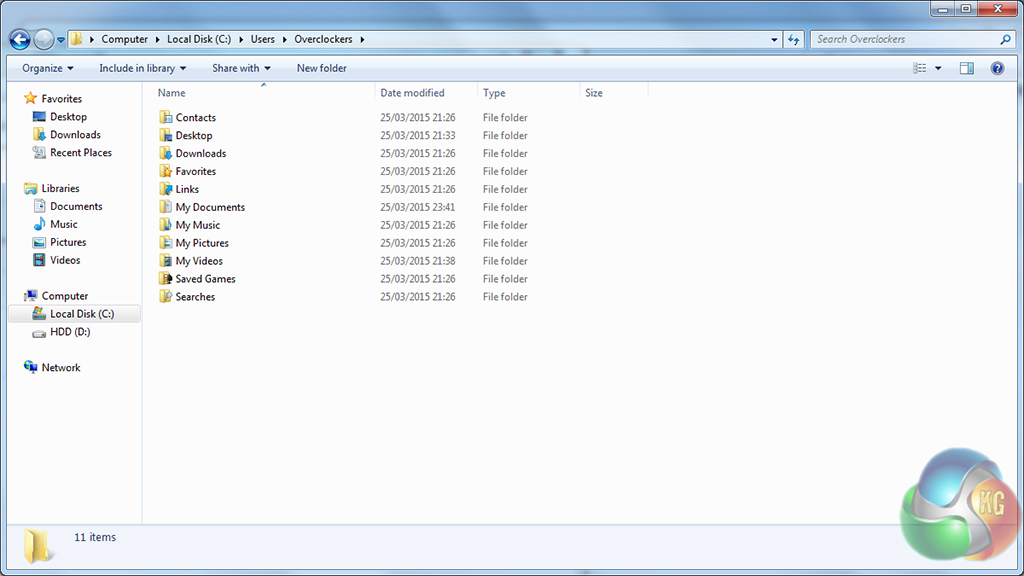
An empty hard drive indicates that the default file save locations are on the SSD. This is one of my pet hates – it would take the system integrator less than five minutes to shift the default save location for items such as music, videos, and downloads onto the high-capacity HDD.
That said, we suspect that a user buying an overclocked, SLI gaming rig will be knowledgeable enough to move their save directories off the relatively small SSD.
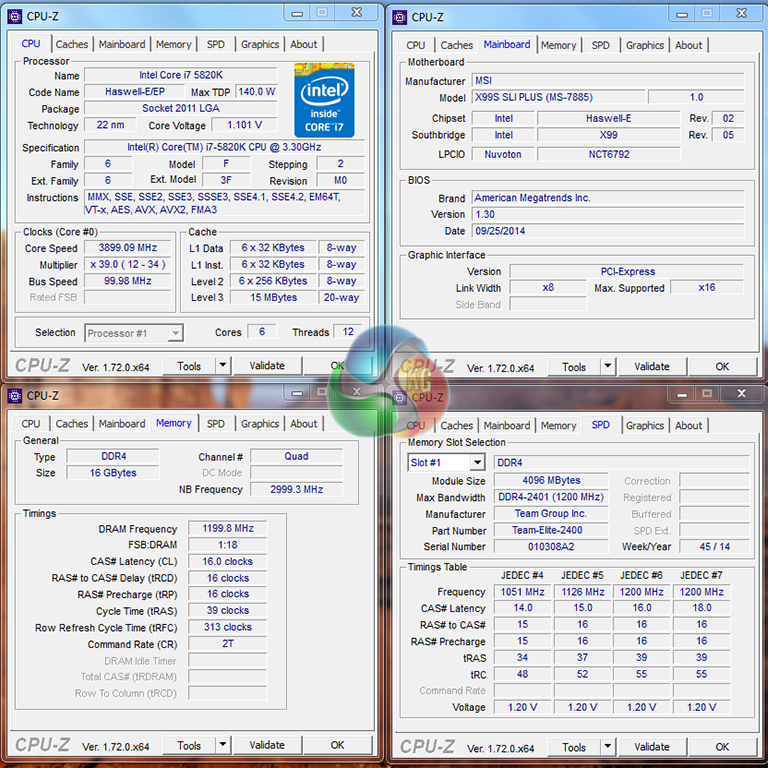
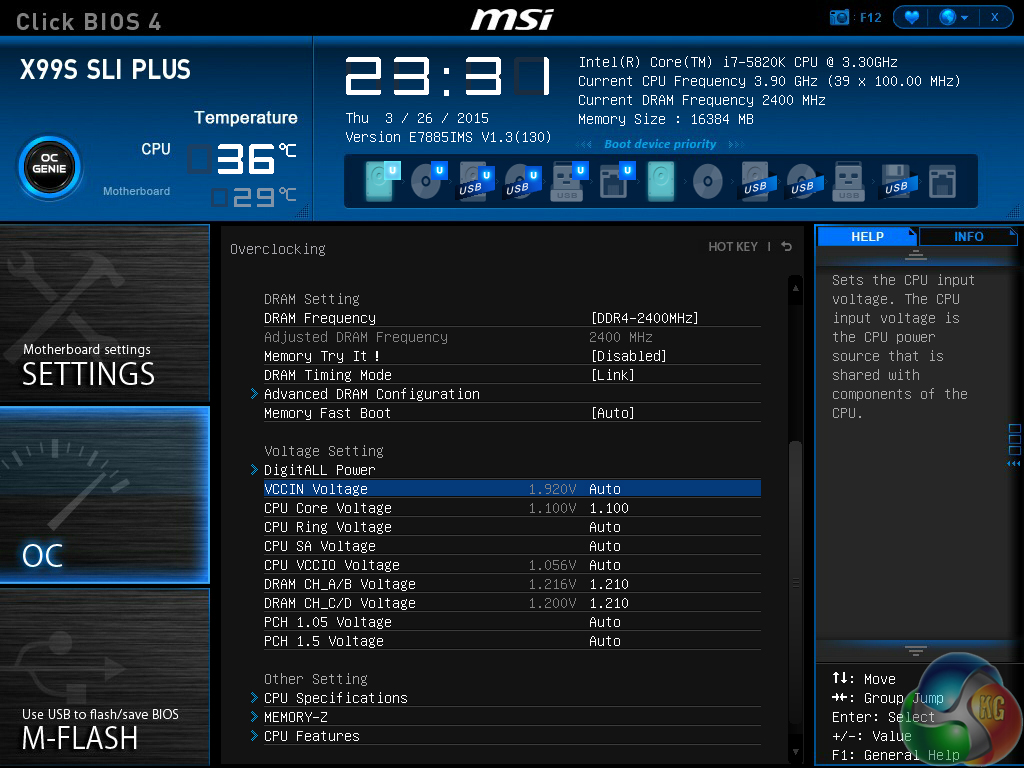
A static 3.9GHz overclock is applied to the Core i7 5820K processor. This overclock is actually achieved using the OC Genie profile built into MSI's X99S SLI Plus motherboard. The CPU hits 3.9GHz with a static core voltage of 1.1V, which is perfectly adequate for the processor's longevity and thermals.
The 2400MHz memory runs at its rated frequency, while the CPU cache speed is also maintained at 3GHz.
The system validation can be viewed here.
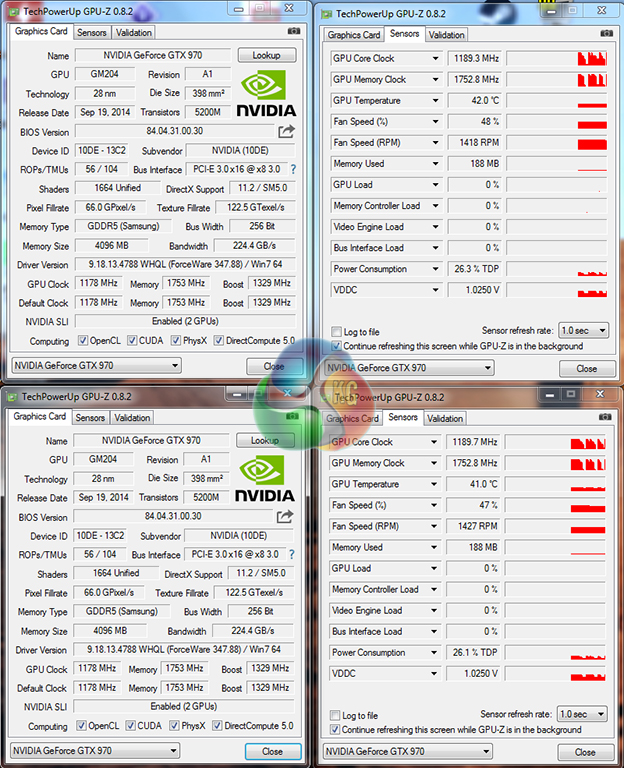
The pair of KFA2 GTX 970 Infinity Black graphics cards operate with a core clock of 1178MHz that boosts up to 1329MHz (although we recorded highs of 1392MHz whilst gaming). Memory is set to operate at 1753MHz.
Many GTX 970 graphics cards support a 0RPM fan mode, however the KFA2 version does not. Instead, only one of the fans remains stationary under small loads, with the other spinning at a low speed.
We will be outlining the OcUK Ultima Finesse Blackhole gaming system against a pair of Chillblast gaming machines and our Z97 test system. The Chillblast PCs are both significantly cheaper, so is the OcUK system able to translate its higher price tag into greater performance?
OcUK Ultima Finesse Blackhole
- CPU: Intel Core i7 5820K Six Core Haswell-E Processor overclocked to 3.9GHz
- Motherboard: MSI X99S SLI Plus (Socket 2011) DDR4 ATX Motherboard
- Graphics Card: 2x KFA2 GTX 970 Infinity Black Edition 4GB Graphics Card SLI
- Case: NZXT Source 340 Gaming Case – Black
- Power Supply: Super Flower Leadex 750W Gold PSU
- Cooler: Prolimatech Genesis Dual Fan CPU Cooler
- RAM: 16GB (4x4GB) TeamGroup Elite DDR4 2400MHz Quad Channel Kit
- SSD: 250GB Samsung 840 EVO
- Hard Drive: 2TB Seagate SSHD
- Sound: High Definition 7.1 On-board Sound Card
- Operating system: Windows 7 64-bit.
Comparison Systems:
Z97 Comparison Test System:
- Processor: Intel Core i7 4790K ES (4.4GHz forced turbo).
- Motherboard: Asus Maximus VII Impact.
- Memory: 16GB (2x 8GB) Corsair Vengeance Pro 2400MHz CL10.
- Graphics Card: Asus R9 280X Matrix Platinum 3GB.
- System Drive: 240GB SanDisk Extreme II SSD.
- CPU Cooler: Corsair H100i.
- Case: NZXT Phantom 630.
- Power Supply: Seasonic Platinum 1000W.
- Operating System: Windows 7 Professional with SP1 64-bit.
Tests:
- 3DMark 1.3.708 – Fire Strike (System)
- SiSoft Sandra 2014 SP2 – Processor arithmetic, memory bandwidth (System)
- Cinebench R15 – All-core CPU benchmark (CPU)
- WinRAR 5.10 – Built-in benchmark (CPU)
- HandBrake 0.9.9 – Convert 4.36GB 720P MKV to MP4 (CPU)
- ATTO – SATA 6Gbps and USB 3.0 transfer rates (Motherboard)
- Bioshock Infinite – 1920 x 1080, ultra quality (Gaming)
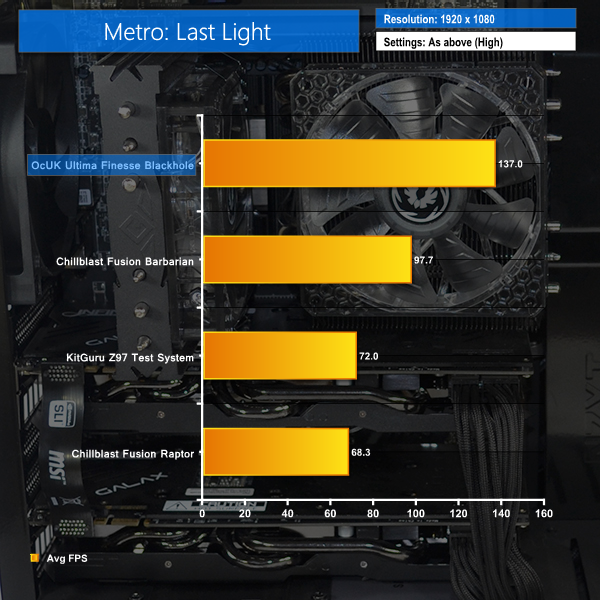
- Metro: Last Light – 1920 x 1080, high quality (Gaming)
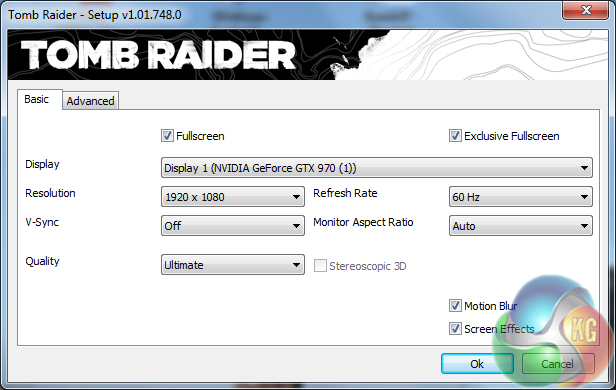
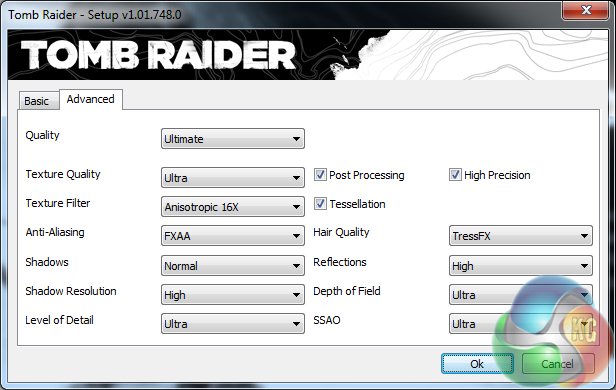
- Tomb Raider – 1920 x 1080, ultimate quality (Gaming)
3DMark
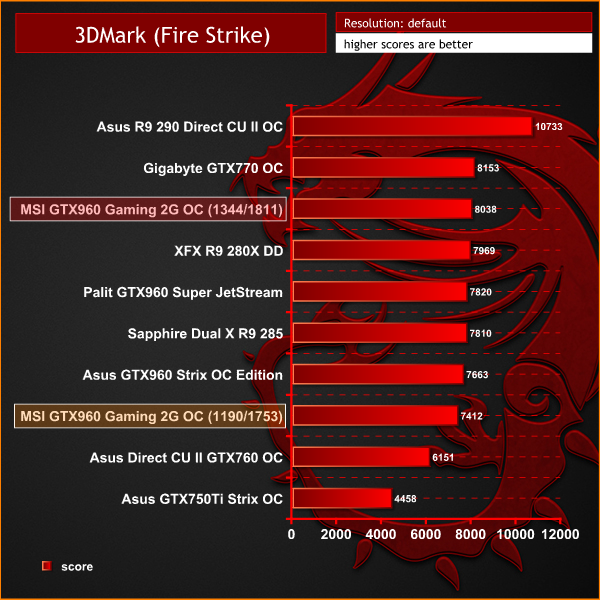
We used 3DMark‘s ‘Fire Strike’ benchmark which is designed to be used on gaming PCs. We opted for the Normal setting, NOT the Extreme mode.
Sandra Processor Arithmetic
Sandra Memory Bandwidth
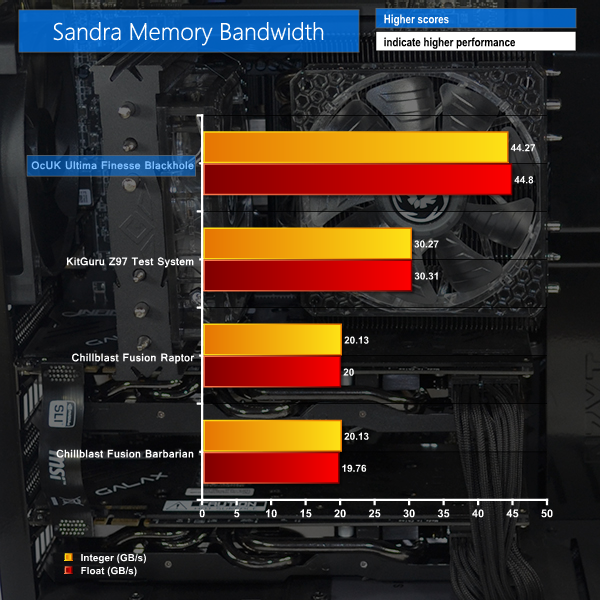
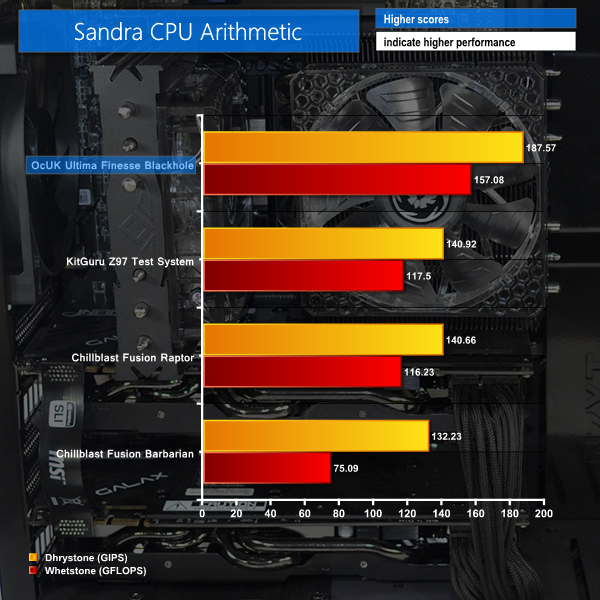
We have already reviewed Intel's Haswell-E Core i7 5820K and found it to be notably quicker than the slightly cheaper 4790K. Those same findings hold true when OcUK's X99-based machine is pitted against Z97-based contenders.
3DMark heavily rewards the Ultima Finesse Blackhole for its pair of GTX 970 graphics cards – the Fire Strike score hit almost 17,000 points. Quad-channel, albeit relatively slow and with loose timings, memory gives the Blackhole a distinct advantage when it comes to pure memory bandwidth.
Cinebench
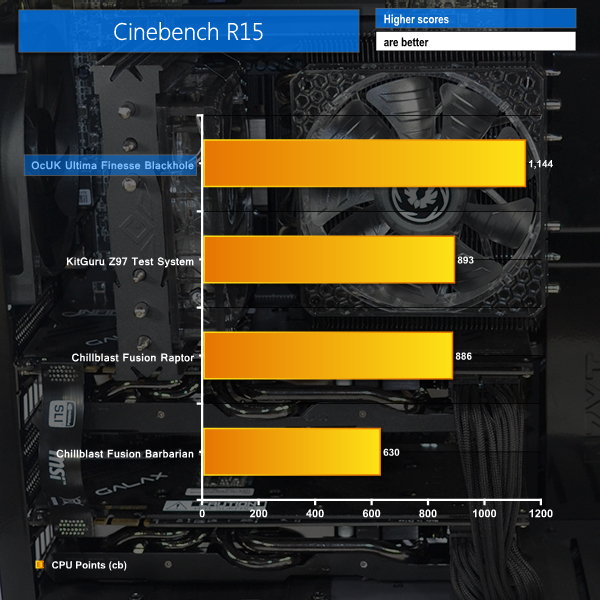
We used the ‘CPU’ test built into Cinebench R15 .
Handbrake Conversion
We measured the average frame rate achieved for a task of converting a 4.36GB 720P H.264 movie (in the MKV container) to one in the MP4 container.
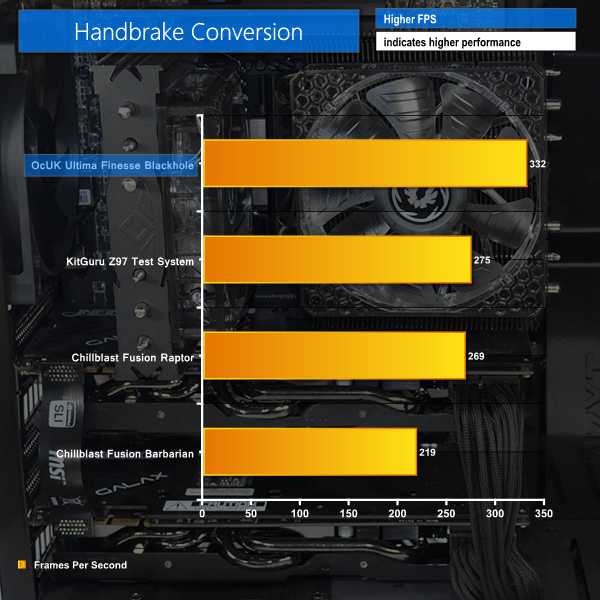
The Haswell-E chip in OcUK's system flaunts its muscle when CPU-intensive tasks are brought into the picture.
Cinebench registered a greater-than-250 point lead for the Ultima Finesse Blackhole, while Handbrake was rewarded with 20% better frame rates than the 4790K-based comparisons.
Bioshock Infinite
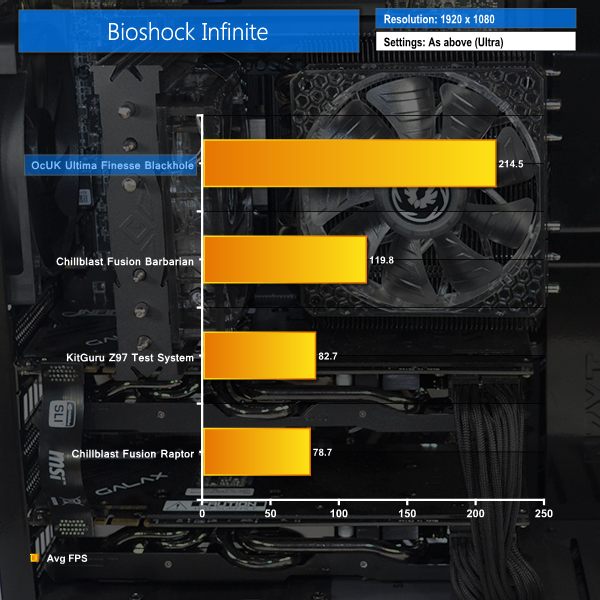
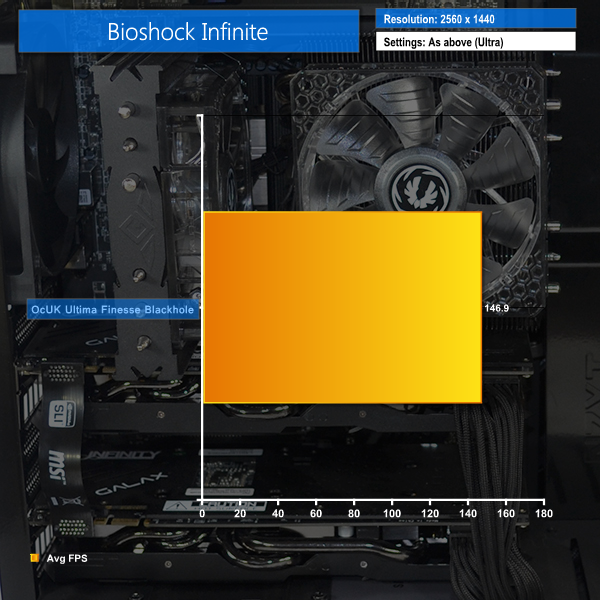
We used the Bioshock Infinite demanding ‘Ultra’ setting and 1920 x 1080 and 2560 x 1440 resolutions to push today’s gaming hardware. Our data was recorded using a section of the game, not the built-in benchmark.

Metro: Last Light
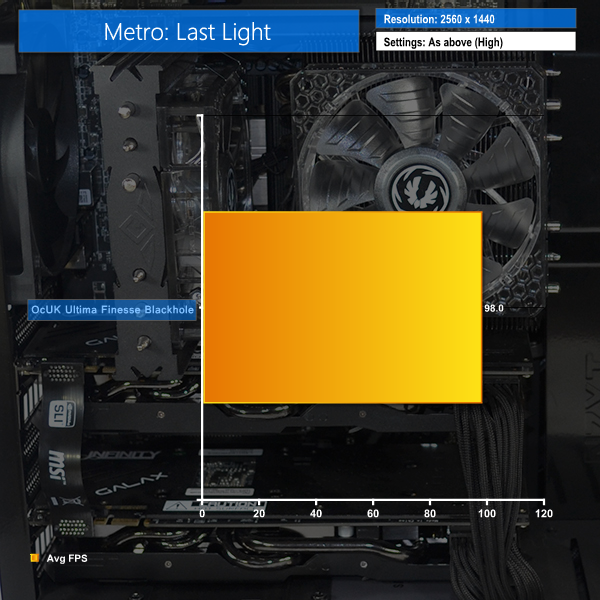
We used 1920 x 1080 and 2560 x 1440 resolutions and the Metro: Last Light built-in benchmark set to ‘High’ quality to offer an intense challenge for the gaming hardware while also making playable frame rates a possibility.

Tomb Raider
We used 1920 x 1080 and 2560 x 1440 resolutions and the Tomb Raider built-in benchmark set to ‘Ultimate’ quality.
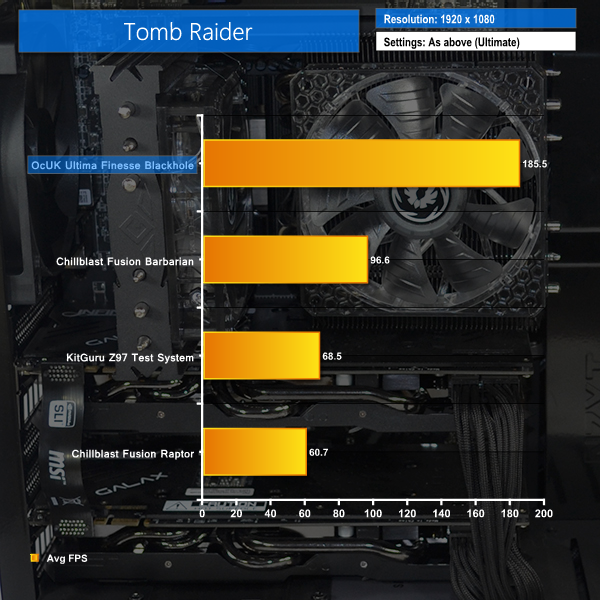
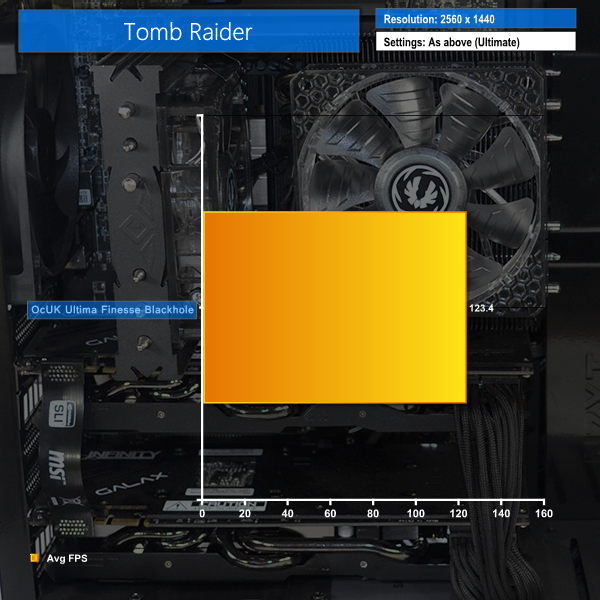
Our set of gaming tests proves that the pair of KFA2 factory-overclocked GTX 970 graphics cards are overkill for a 1920×1080 resolution. Anybody thinking of running the Ultima Finesse Blackhole as their gaming machine should be pairing it with at least a 2560×1440 resolution monitor.
Even with the resolution cranked up to the increasingly-popular 2560×1440 level, the combination of SLI GTX 970 graphics cards and the 5820K processor chew through games to deliver high frame rates. This system looks ideal for gamers wishing to run their new 144Hz, 2560×1440 G-Sync monitor at levels towards its rated refresh rate.
The graphics performance on show suggests that 4K gaming is also within the realms of OcUK's Ultima Finesse Blackhole system, provided the machine doesn't meet a game that exposes the GTX 970's 3.5GB of high-speed VRAM ‘specification'. We also noticed the graphics cards boosting to 1392MHz, which is higher than their rated 1329MHz Boost Clock.
SSD Performance
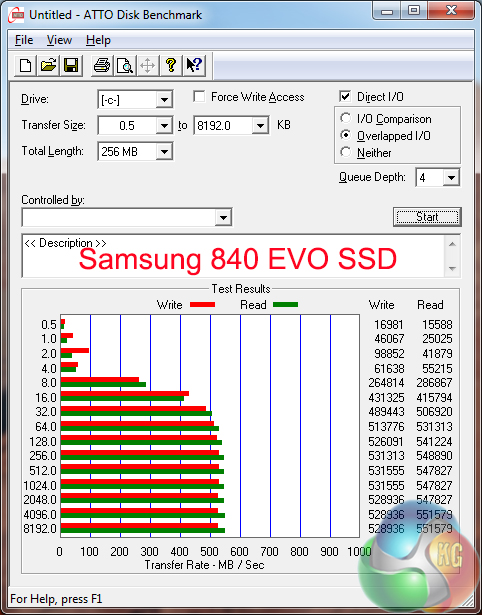
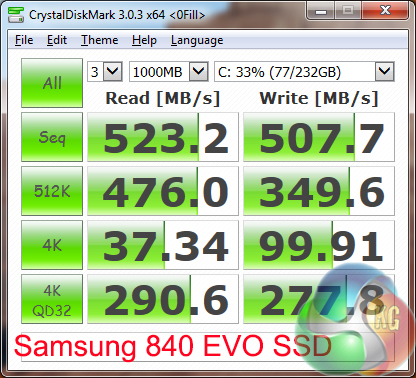
Performance of the 250GB Samsung 840 EVO SSD is strong. The sequential and 4K speeds are positive, both with incompressible and compressible data.
We were a little surprised to see OcUK using the older Samsung 840 EVO SSD rather than the company's newer 850 EVO model. Performance numbers suggest that the 840 EVO is no slouch and will deliver quick game loading times, but it would have been nice to see the newest model being used, especially with the 840 EVO's slowdown issues.
HDD Performance
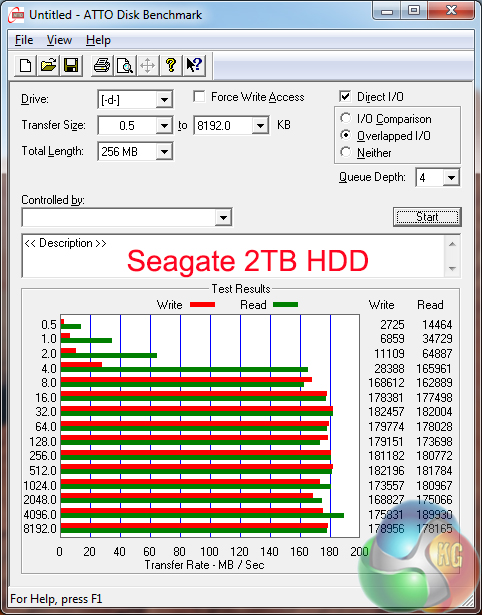
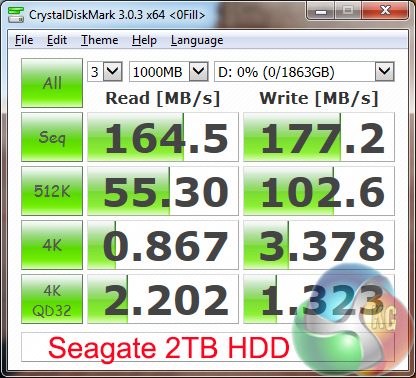
The 2TB Seagate SSHD uses 8GB of MLC flash (basically a small SSD) to speed up specific processes. For example, a frequently-accessed game file may be pushed into the SSD cache in order to reduce its loading time.
Sequential transfer rates of the SSHD are decent, although by no means market-leading. However, the drive's 4K performance is higher than we would see from a pure HDD (thanks to its MLC flash component), although nowhere near SSD level.
That combination of characteristics makes the SSHD a potentially smart choice for gamers with Steam collections too large to justify using valuable SSD-based storage capacity. The SSHD does, however, come with a ~30% price increase over a bare HDD without the SSD cache.
USB 3.0
We tested USB 3.0 performance using the Kingston HyperX 3K SSD connected to a SATA 6Gb/s to USB 3.0 adapter powered by an ASMedia ASM1053 controller.
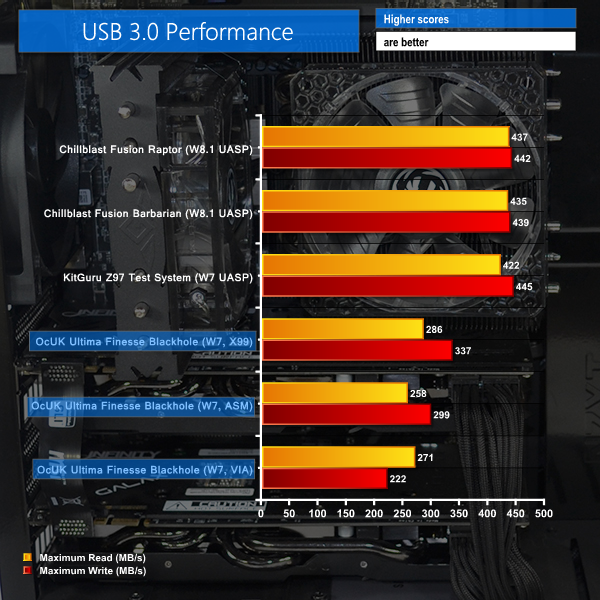
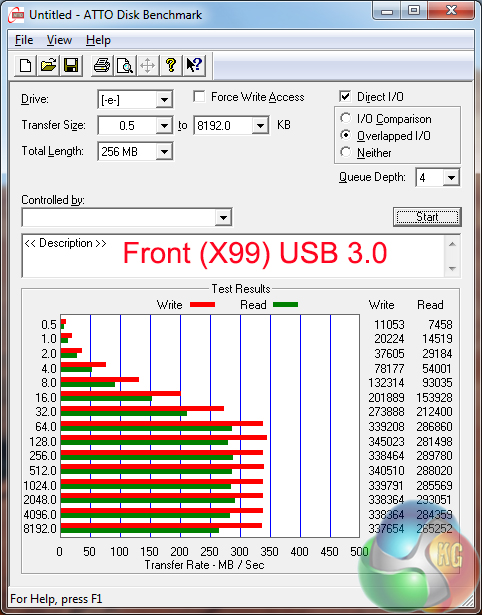
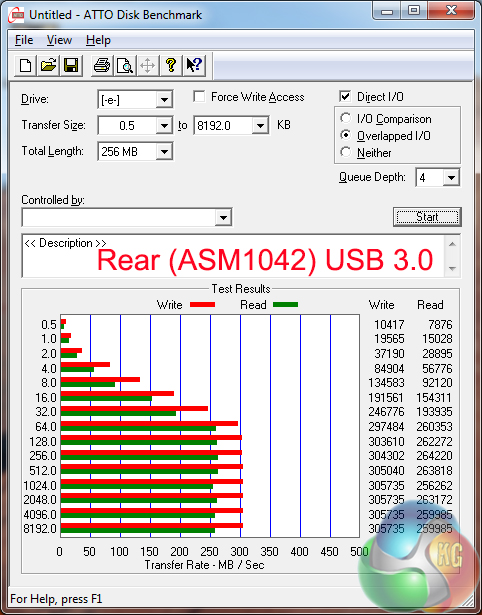
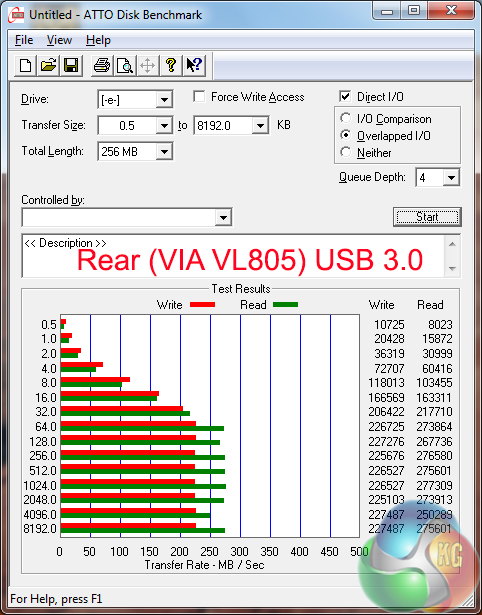
USB 3.0 ports running through MSI's X99S SLI Plus motherboard do not support UASP when using Windows 7. As such, the transfer rates shown by the X99-based ports are notably slower than those found on competing systems that are able to make use of UASP.
Connections running through the ASMedia ASM1042 and VIA VL805 chipsets are slower again, although should be sufficient for interaction with external HDDs (not SSDs). It is best to stick to the X99-fed connections when transferring large chunks of data.
Idle recordings are taken while the system sits at the desktop under minimum load. For the general usage test, we browse the internet while streaming 1080P videos on YouTube and running a background virus scan. Our gaming test uses Metro: Last Light – a DX11 title that taxes the CPU and GPU.
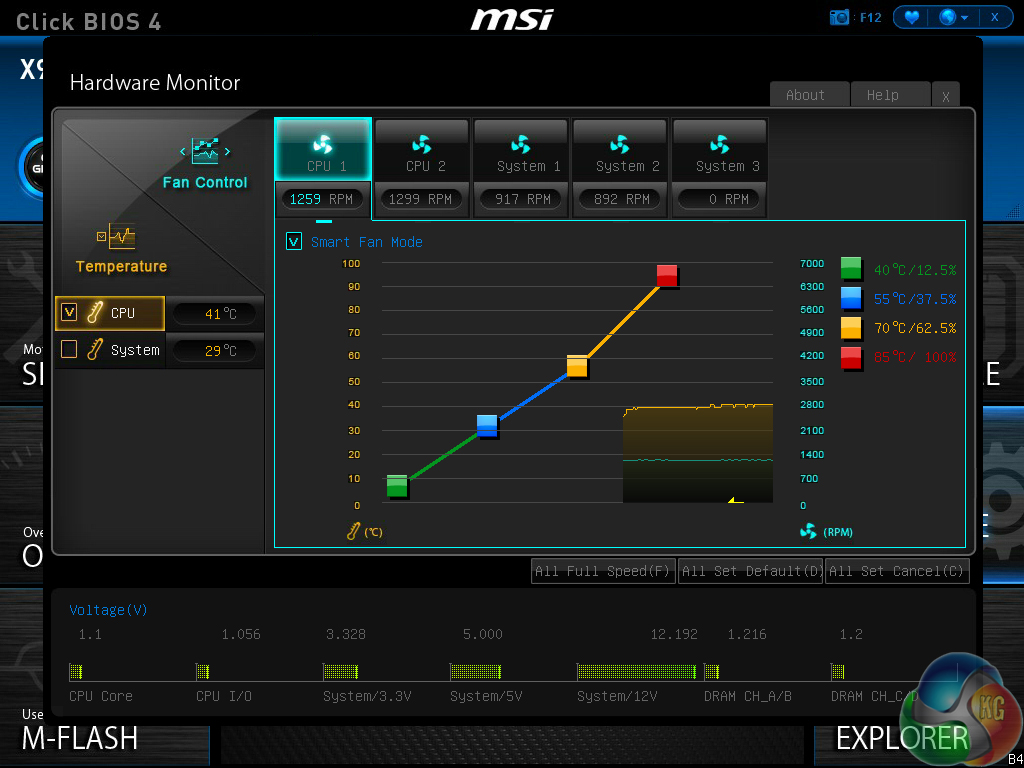
OcUK opts for 3-pin versions of the BitFenix Spectre Pro CPU fans, hence PWM speed control is not possible – they ran at a constant ~1300RPM. The front set of Akasa Apache fans and both NZXT chassis fans also ran at static speeds.
Thermal Performance
Ambient temperature was maintained at 24°C throughout testing. All fan settings were left on the OcUK defaults.
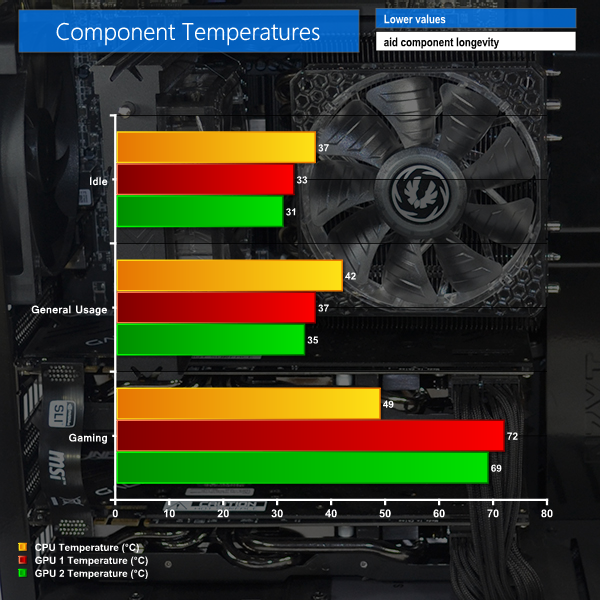
Temperature of the CPU remained below 50°C throughout testing, proving that the Prolimatech Genesis was performing well. Unless a particularly CPU-intensive game is being played, it is unlikely that CPU temperatures will rise above 60°C when gaming. That said, a pure CPU load (such as video editing) will push thermals higher.
GPU temperatures for both graphics cards were positive, with single-fan operation at lower loads giving temperatures in the mid-30s. Stressing the cards with a gaming load saw the GPU temperatures climb up towards the 70s.
OcUK's decision to space the graphics cards was an excellent one. The upper graphics card still engulfs hot air from the lower unit, but it is by no means starved of coolant, and only operates a few degrees higher than its partner.
Acoustic Performance
With the case positioned on the floor, our sound level meter is placed where a user’s ears are likely to be located – around 50cm above the system and 100cm in front of it.
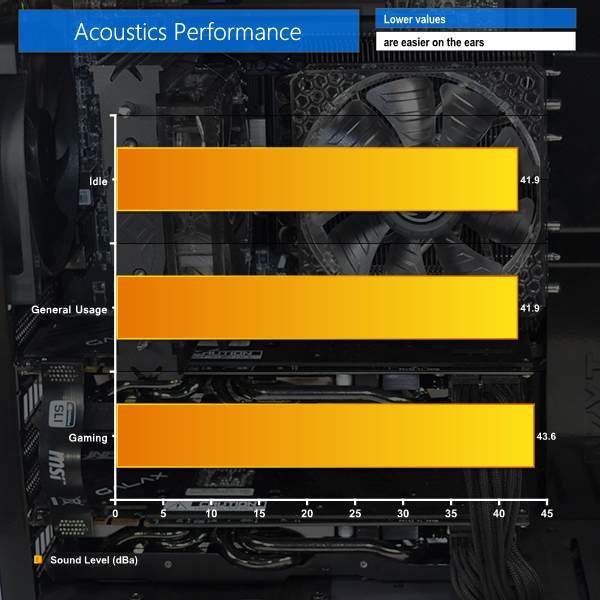
With a total of 11 fans installed in the system, noise output is actually surprisingly good. The system is clearly audible at lower loads, which is slightly frustrating given that speed-tuning could have garnered lower noise levels.
When pushed by a demanding gaming load, the graphics cards' fans start to speed up but the system noise is not intrusive. The dual fan coolers on the KFA2 graphics cards do a good job of cooling the GPU while maintaining unobtrusive acoustic emissions.
Power Consumption
Power consumption is measured at the wall, representing the energy drawn by the system.
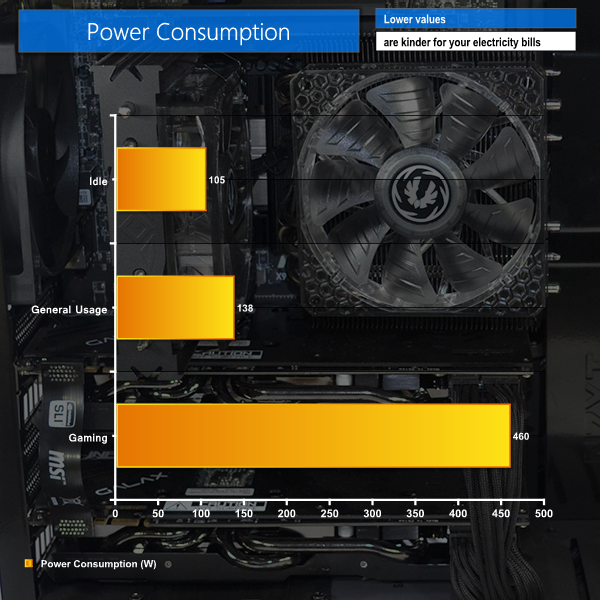
Idle power usage at just over 100W is nothing to worry about, nor is the general usage energy demand at little more than a pair of old incandescent light bulbs.
Stressing the system with Metro: Last Light registers a power usage level of around 460W, although we did notice peaks of up to 475W. With around 460W being pulled from the wall during gaming, the 750W SuperFlower PSU is likely to be running around its peak efficiency level. OcUK's PSU choice was a smart one.
The OcUK Ultima Finesse Blackhole is a gaming powerhouse that leverages Haswell-E's most appealing CPU and a pair of custom-cooled GTX 970 graphics cards to deliver excellent frame rates at a 2560×1440 resolution.
Gaming performance of the SLI KFA2 GTX 970 Infinity Black Edition graphics cards was excellent. That level of GPU muscle is complete overkill for 1920×1080, but is well-suited for driving a 144Hz, 2560×1440 G-Sync monitor.
Performance in other areas is strong thanks to the excellent 5820K processor and its slight overclock to 3.9GHz. The speedy 250GB Samsung 840 EVO SSD has room for a handful of games, although I would have liked to see the newer 850 EVO being used. The 2TB Seagate SSHD delivers decent (compared to a hard drive) randomised performance that will be good for loading times.
The cooling system deployed by OcUK has clearly been given serious thought. From spacing the graphics cards to lowering the fan speeds, a balance between thermals and acoustics has been targeted. And while the Ultima Finesse Blackhole performs strongly on the thermals front, acoustics emissions show clear room for improvement, especially at lower loads.
On the topic of cooling, Prolimatech's Genesis is one of the few heatsinks that I would feel confident about shipping due to its excellent mounting mechanism and distributed weight. But its fan retention system is terrible. OcUK needs to look for a solution to the poor fan mounts when shipping the system – zip-ties could be one potential answer.
Aesthetics and colour-matching are two distinct positives for the OcUK Ultima Finesse Blackhole. A sizeable amount of effort has been put into matching colours and the end result is a system that looks superb. Add in the pure white LED lighting and the Ultima Finesse Blackhole becomes a system that I would be proud to sit on my desk and show off to friends.
Some people may point out that ‘standard' LGA 1150 Haswell is just as fast as LGA 2011-3 Haswell-E in gaming, but the former is cheaper. That's a fair point, but I think that the extra ~£100-150 spend on a system of this calibre, at this price point is worth the CPU-performance upgrade to Haswell-E. It also leaves room for tri-SLI or PCIe storage capacity in the future.
I actually have very few complaints regarding the Ultima Finesse Blackhole system. One of those complaints is that I would have liked to see some of the individual components' accessories supplied. Shifting some of the default save locations off the SSD would have been a thoughtful touch. And I do not see why Windows 8.1 should cost £6.96 more than Windows 7 (minor, but slightly irritating).

Buying the parts separately would cost around £100 less than the ~£1,870 price tag of the system configuration that we tested. Given the level of build quality, cable management efforts, and included 3-year warranty, I think that £100 is a very fair and warrantable ‘build cost'.
At £1,870.92 for the tested configuration, the OcUK Ultima Finesse Blackhole rewards buyers who have made the considerable investment with superb performance, especially when gaming at 2560×1440 on a high refresh rate monitor. The system is fast, attractive, and well-built.
Overclockers UK informed us today after publication that this system will be getting an upgrade from Samsung 840 Evo to Samsung 850 Evo Solid State drives.
Discuss on our Facebook page, over HERE.
Pros:
- SLI GTX 970 GPUs and Haswell-E 5820K deliver strong frame rates at 2560×1440.
- Highly attractive system design, with thoughtful component choices and lighting effects.
- Smart SSD capacity with well-balanced SSHD alongside.
- Good cooling performance throughout the system.
- Smart component choices – relevant PSU capacity, no-frills memory, low-cost motherboard.
- Fantastic aesthetics and overall system design.
Cons:
- CPU cooler's fan retention clips are not strong enough during shipping.
- The sheer number of fans makes this system comparably loud at lower loads.
- A different SSD would have been welcomed, given the 840 EVO's age and current slowdown issues.
KitGuru says: A gaming powerhouse using KFA2's excellent GTX 970 graphics cards in SLI; OcUK's Ultima Finesse Blackhole delivers superb gaming performance on a high refresh rate 2560×1440 monitor.


Gotta love those BitFenix fans!