 KitGuru KitGuru.net – Tech News | Hardware News | Hardware Reviews | IOS | Mobile | Gaming | Graphics Cards


Targeting gamers with a keen eye for a deal, Wired2Fire has combined a concoction of the best bang-for-buck components to form an attractively-priced, and aptly powered, gaming system. Leveraging the power of a 4.4GHz overclocked Devil's Canyon i5 and the well-balanced GTX 970, can the Wired2Fire Diablo Reactor show off its performance potential in a variety of scenarios?
The i5 4690K CPU and GTX 970 graphics card components that form the system's beating heart are strong favourites amongst gamers. But that's not to say they're the only jewels in Wired2Fire's set. A 250GB Crucial BX100 SSD is used for the Windows 8.1 OS and its capacity leaves enough storage space for a couple of large games. For data-retention duties, a tried-and-tested 1TB Seagate Barracuda 7200.14 HDD is called up.
Adding 16GB of Corsair DDR3 memory installed on an Asus Z97-P motherboard into the mix, it is easy to see the Wired2Fire's bang-for-buck trend extends past simply the CPU and GPU alone. Rounding off the components are a mid-range Raijintek CPU cooler to tame the overclocked Core i5, as well as a mid-tower chassis from the same company, and a 600W FSP PSU.
The balance of competitively-priced components stems throughout, but it is clear that Wired2Fire understands where extra spend is deemed worthy. How will the Diablo Reactor fair in our tests?
System Configuration:
- Intel Core i5 4690K overclocked to 4.4GHz.
- Asus Z97-P motherboard.
- 16GB (2x8GB) Corsair XMS3 1600MHz CL11 DDR3.
- Palit Nvidia GeForce GTX 970 4GB (reference model).
- Crucial BX100 250GB SSD.
- Seagate Barracuda 1TB 7200.14 SATA 6Gbps HDD.
- Raijintek Arcadia Case.
- Raijintek Themis CPU cooler.
- FSP 600W PSU.
- DVD-RW.
- Windows 8.1.
Price of reviewed system: £859.97.
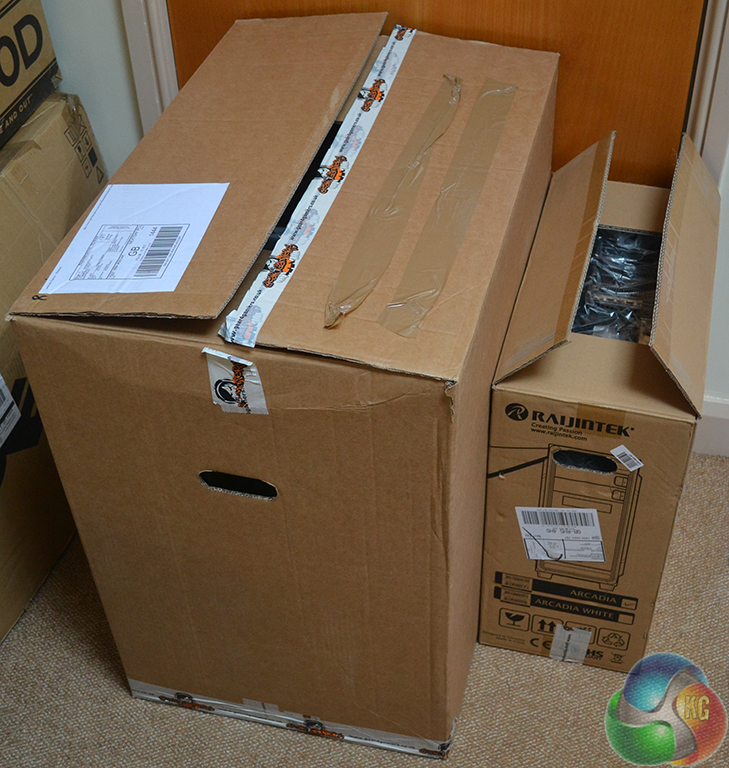
Wired2Fire ensures that the Diablo Reactor system arrives safely by using a very large outer box and plenty of impact-absorbing packing materials.
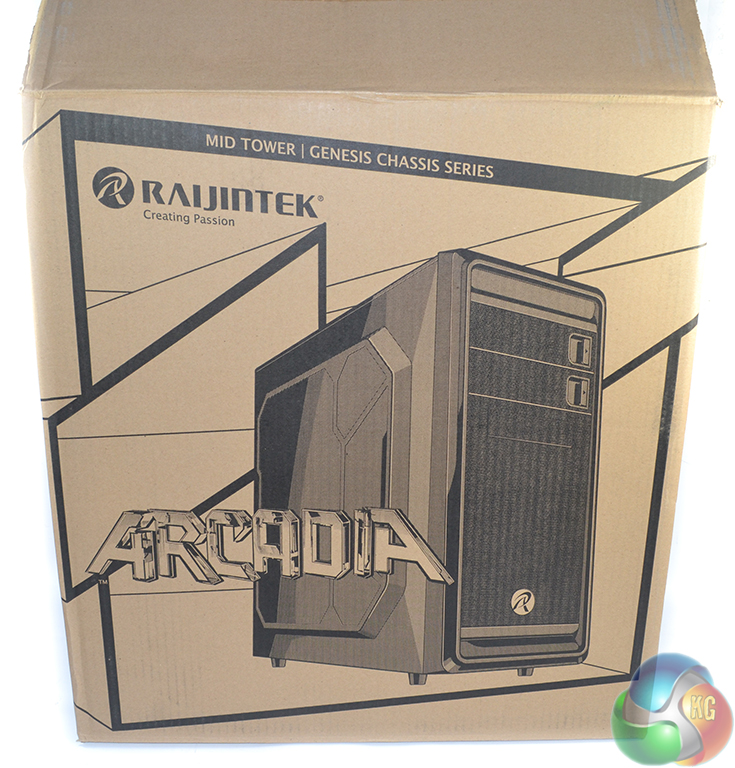
The Raijintek Arcadia chassis box is used to house the system safely.
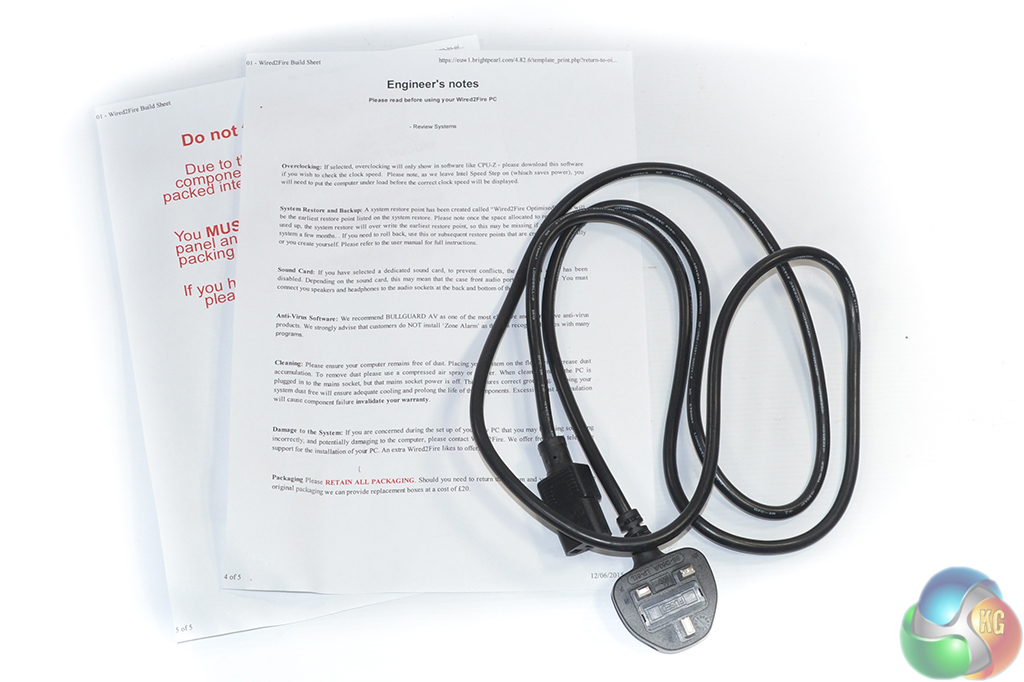
At the bottom of the chassis box are the power cord and clear installation notes.
Wired2Fire chooses not to provide the accessories that are supplied with individual components such as the motherboard. This is a decision that I do not like to see because it makes upgrades and future sales a more difficult procedure. Update: Wired2Fire tells us that the accessories and a Windows disk are shipped with retail systems, however they are only omitted from reviewers' samples.
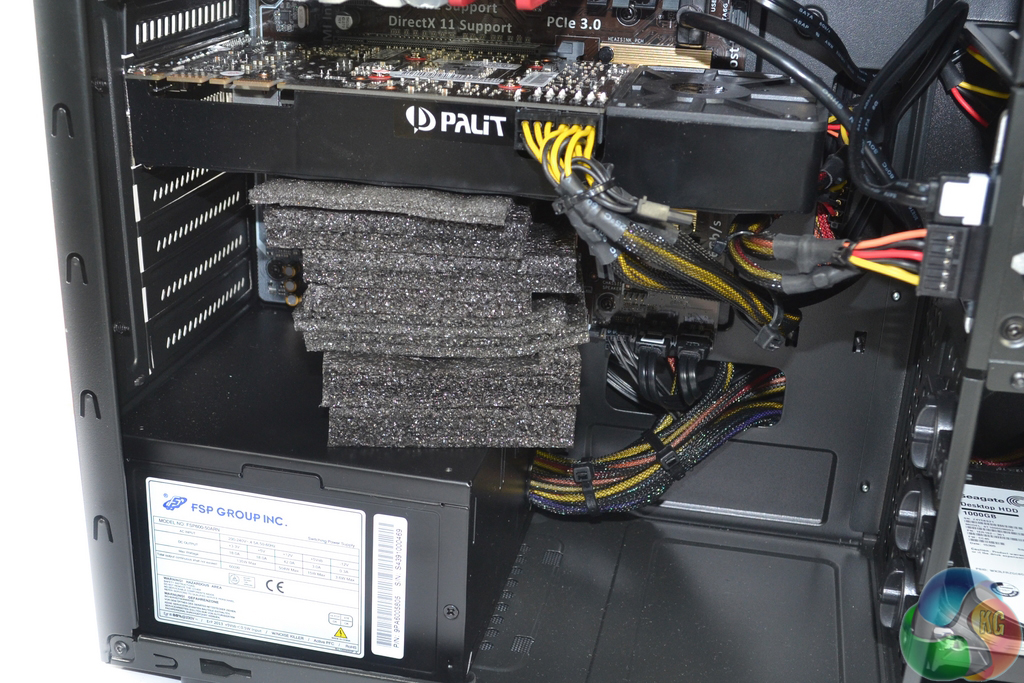
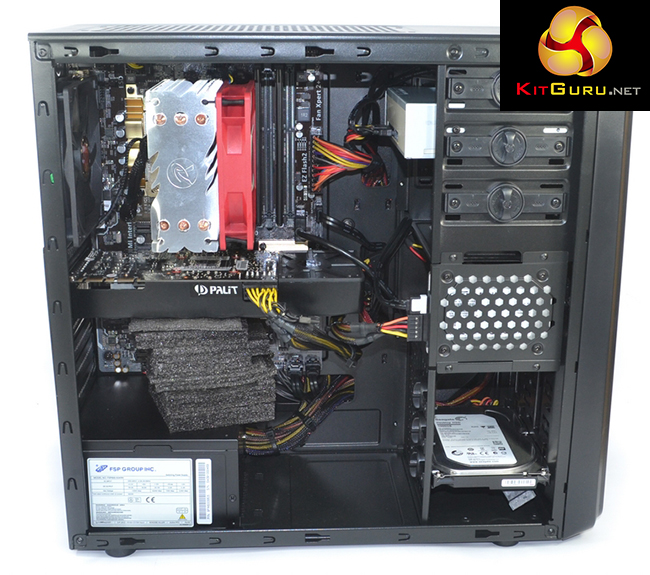
Multiple pieces of foam are used to prop up the graphics card in order to protect the PCIe connector. The foam pieces fit tightly against the graphics card's cooler and the PSU casing – the support idea functions well.
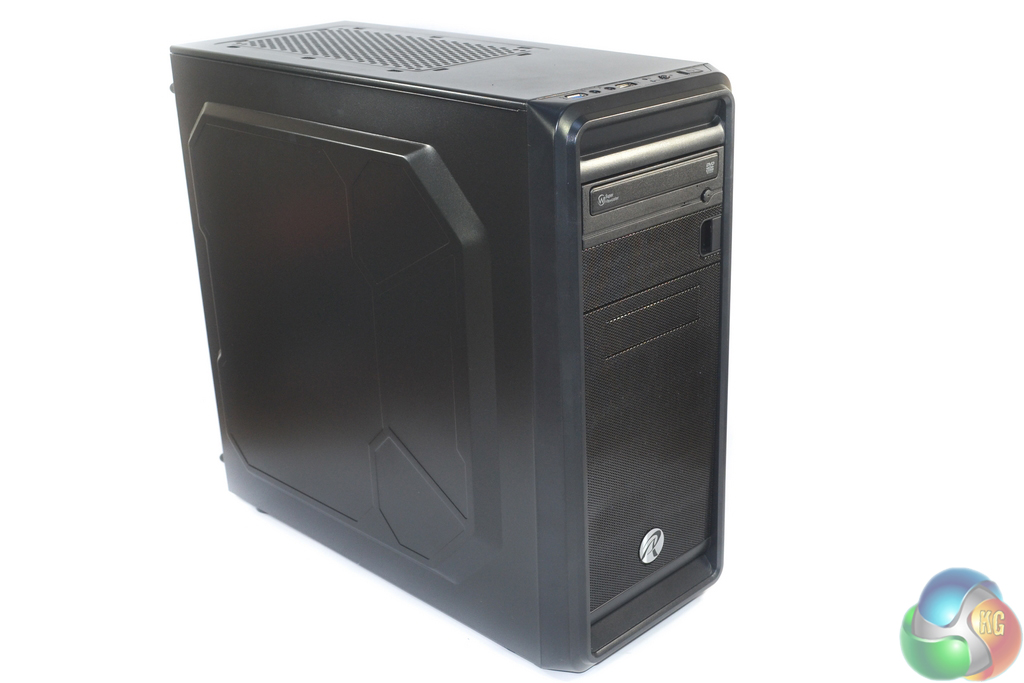
Continuing the process of offering high value, cost effective components for the Diablo Reactor, Wired2Fire chooses to house the system inside a Raijintek Arcadia mid-tower chassis.
Raijintek has released a number of well-priced products that have provided solid bang for the buck in the cooling and chassis market segments. The Arcadia seems to follow that trend by offering a good amount of expansion and solid build quality for a current OCUK retail price of under £25.
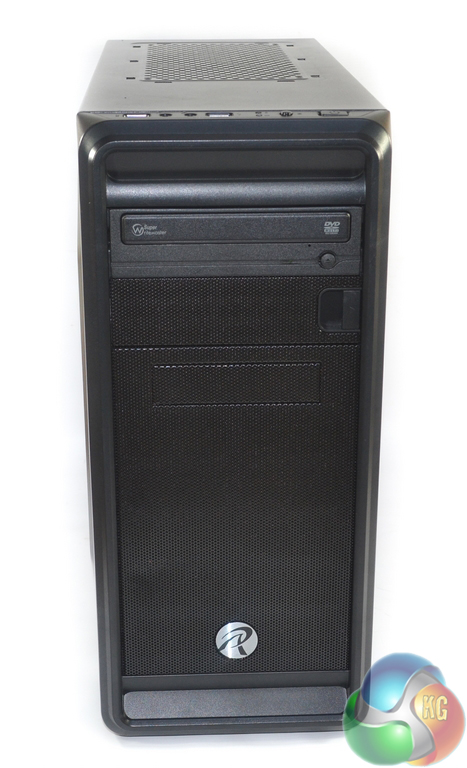
The system's front does not diverge much past the chassis mesh and badge, however Wired2Fire does include a TSST DVD-RW (which will only add a few pounds to the retail cost). Raijintek cuts costs of the case by employing a large amount of plastic, although segments of the innards rely upon steel for structural rigidity.
There is no fan in the front slot of the case by default, and Wired2Fire chooses not to populate the position. Adding a 120mm intake fan would help to reduce GPU temperatures, so I think this is an area where Wired2Fire should have invested the extra £5 or so in upgraded cooling.
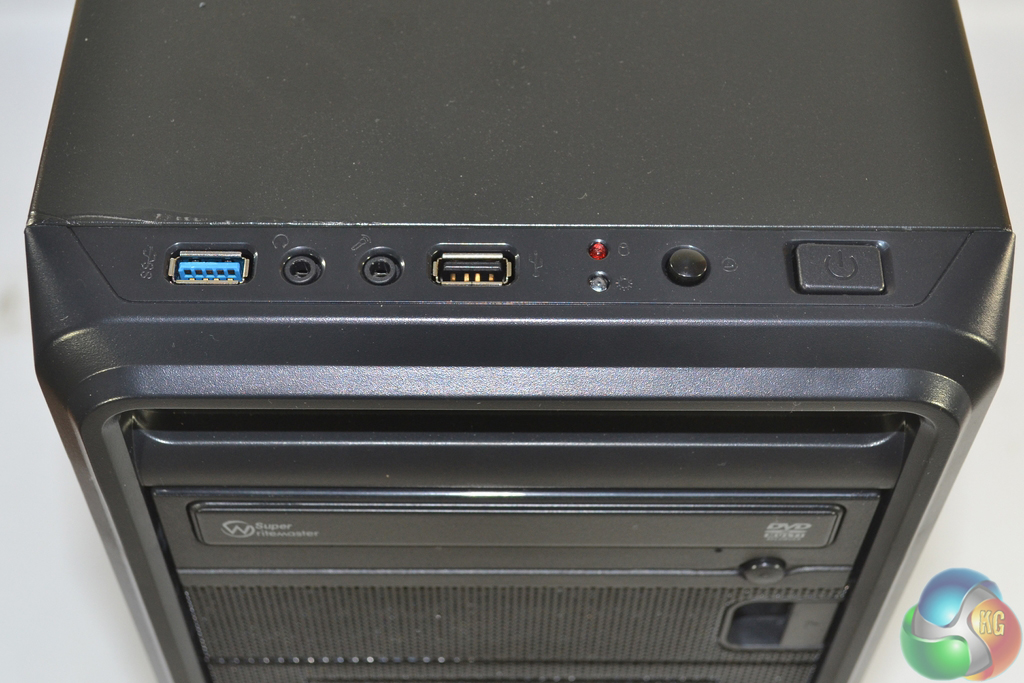
Indicative of its budget pricing, the Raijintek Arcadia front IO consists of one USB 3.0 port and one USB 2.0 port, headphone and microphone jacks, power and reset buttons, and operation LEDs.
The single USB 3.0 connector may actually suffice for gamers as they are less likely to be transferring large amounts of data on a regular basis (as, for example, content creators would).
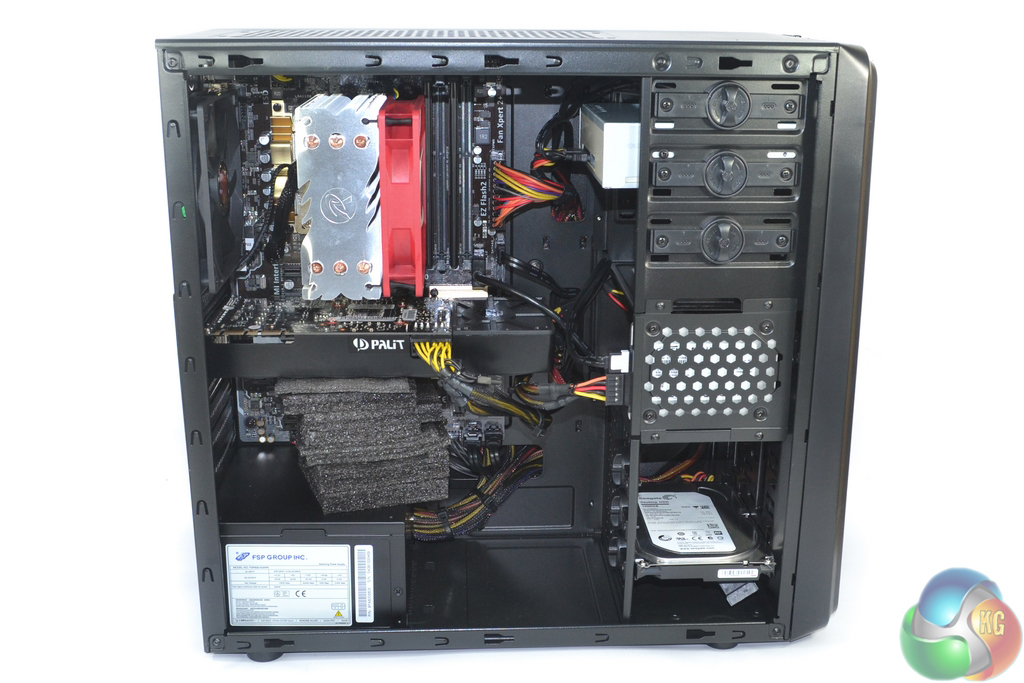
The first noticeable point regarding the Wired2Fire Diablo Reactor's internal area is that a decent job has been done for cable management. While the case may not have a side panel window, Wired2Fire has tucked away many of the cables in order to optimise airflow. Let's not kid ourselves and say that this is the best cable management result that we have seen, but a good job has been done with a budget chassis and non-modular PSU.
As far as component aesthetics go, that is not one of the primary aims for the Wired2Fire Diablo Reactor. The general colour coordination is decent, excluding the contrasting CPU cooler and DVD drive's back end.
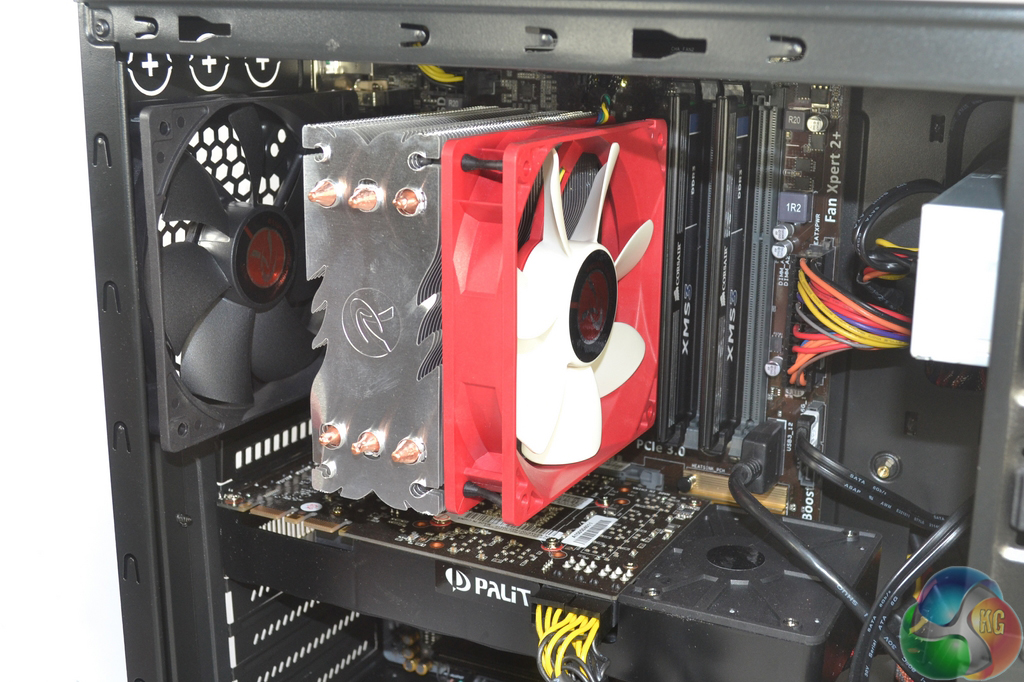
A mid-range Raijintek Themis Direct Contact CPU cooler (that retails for £19.99 on OCUK) is used to tame the 4.4GHz Devil's Canyon Core i5 CPU. Wired2Fire applies 1.22V to the CPU VCore which, thanks to the improvements brought out by Intel's Devil's Canyon refresh, is relatively easily handled by the modest cooler. Asus' Z97-P motherboard has no problem handling the clock speeds, either.
A pair of 8GB Corsair XMS3 DDR3 DIMMs provide 16GB of system memory operating at 1600MHz CL11. While CL11 is a loose setting for 1600MHz DDR3, it is unlikely to make a significant difference in games. The low profile XMS3 heatspreaders minimise interference issues.
Many people may be quick to question more than 8GB of memory in a gaming system. With recent titles like GTA V gobbling up RAM, as well as the need for extra resources to game-streamers, I think that 16GB is quickly become the new ‘go-to‘ capacity for gaming machines.
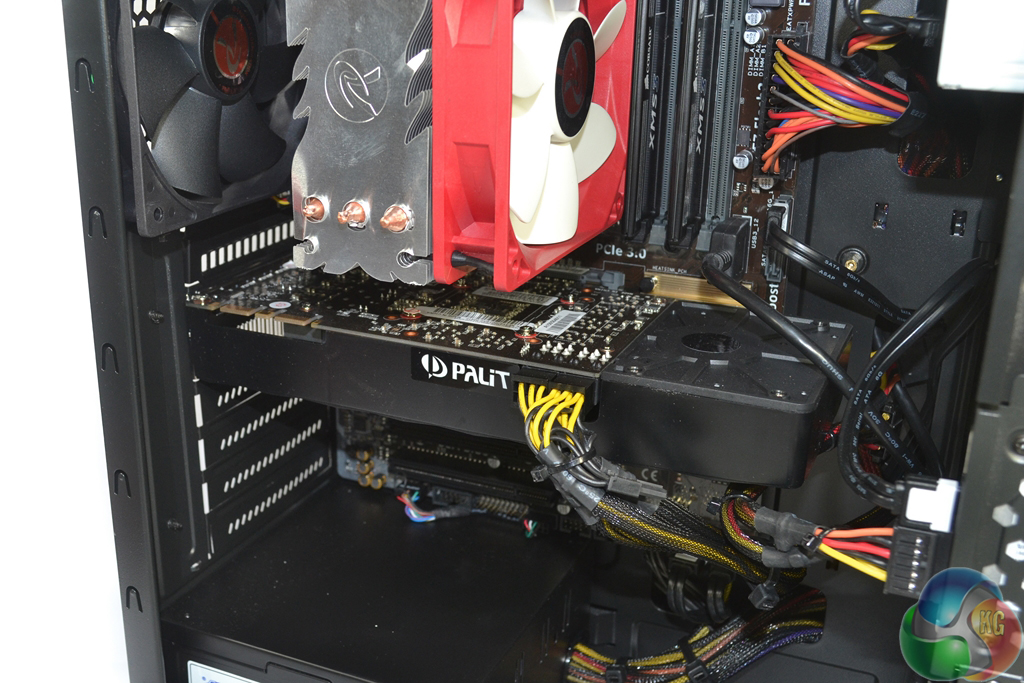
Providing the pixel-pushing power is a 4GB (or 3.5GB of fast VRAM, if you prefer) Nvidia GTX 970 manufactured by Palit and equipped with a ‘reference' blower-style plastic shroud. We have reviewed many GTX 970 models from board partners including Palit, however a variant of the card sporting a blower-style plastic shroud has yet to pass through our labs.
The blower coolers are typically preferable for multi-GPU systems because they vent most of the hot air out of the chassis. They do, however, typically operate with higher temperatures and noise levels in single-card operation.
There's no need for me to reiterate what is already known – despite the controversy/confusion over its VRAM design, the GTX 970 is a fantastic GPU that offers alluring frame rate performance with modest power draw. You can read our dedicated review of a Palit GTX 970 here.
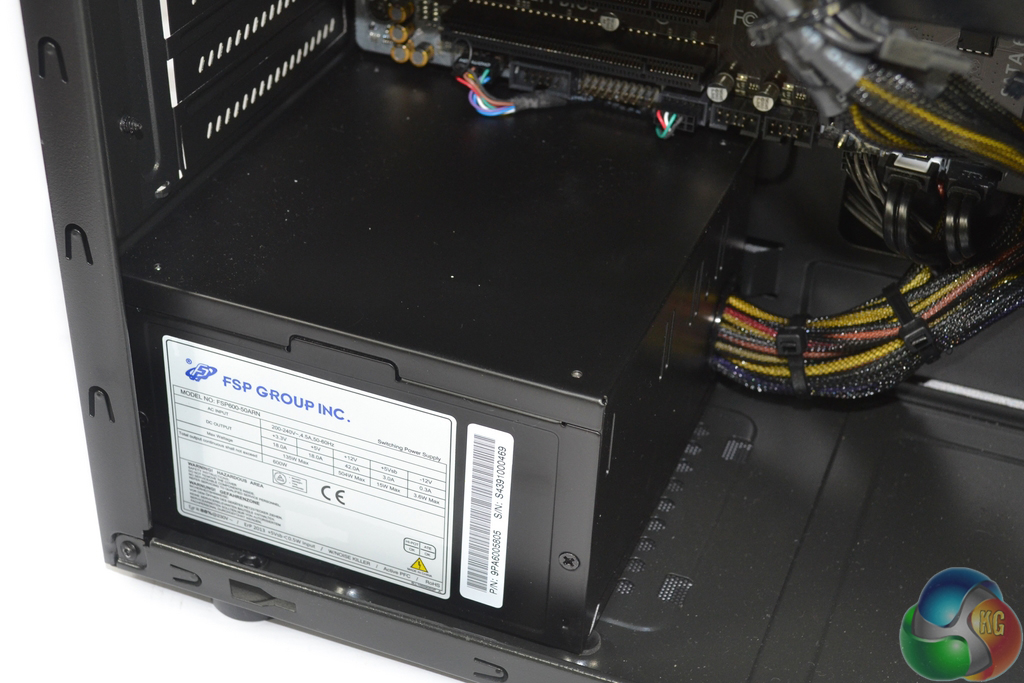

The 600W FSP power supply (model number FSP600-50ARN) uses a single 12V rail design that is able to output a maximum current of 42A, translating into a power delivery of 504W on the 12V rail. Despite not flaunting a badge on the housing, the unit is rated as 80 Plus Silver efficiency.
Many people are quick to berate the use of a non-modular PSU, and that's fair enough in a personal system building environment. Personally, I do not see a huge problem with system building companies using a non-modular unit as it is their workers who are expending the extra cable management efforts.
Understandably, user-led upgrades are made more complicated from a cable management perspective, however initial purchase costs are certainly reduced by using a non-modular unit.
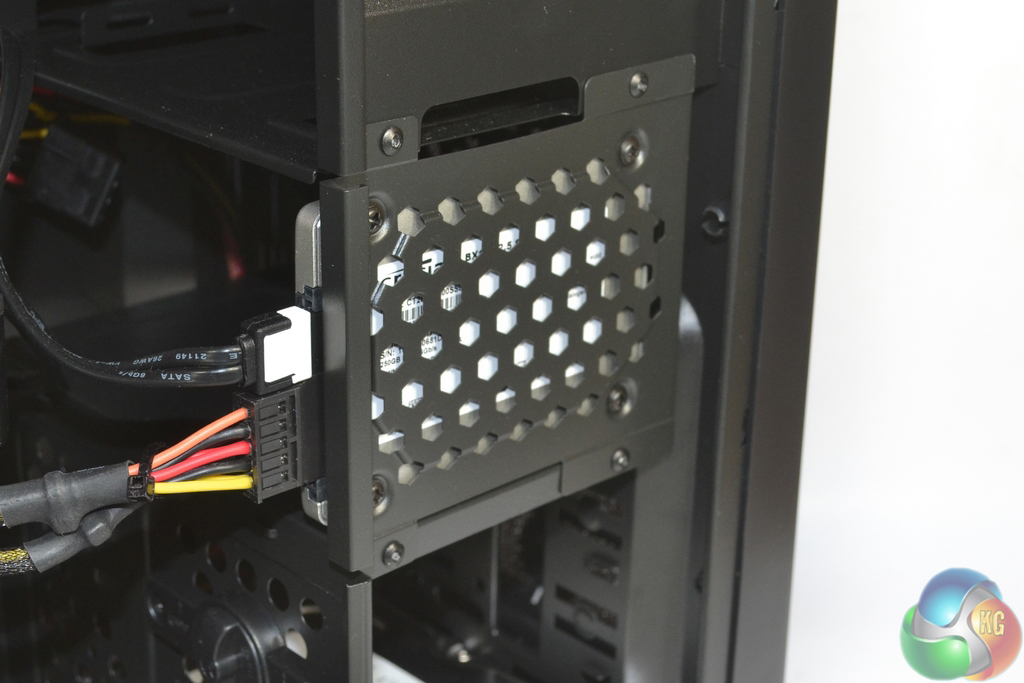
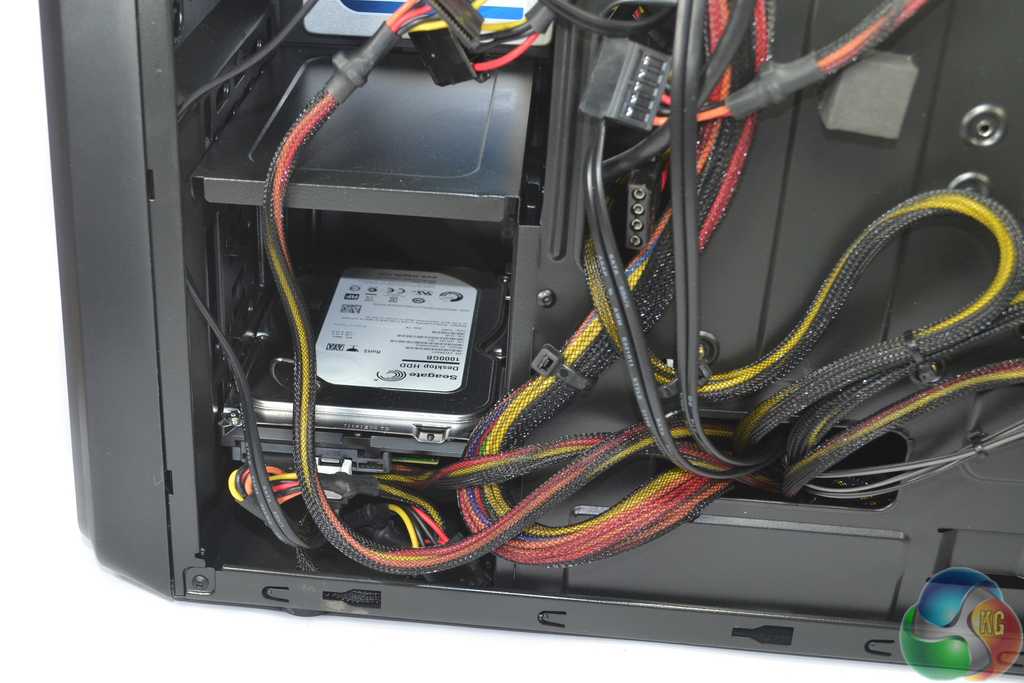
Wired2Fire opts to use Crucial's BX100 250GB SSD. The low-cost drive has a solid reputation for reliability. The Windows 8.1 OS and some initial programs are installed on the SSD, although there is enough space for a handful of games.
Higher capacity storage needs are handled by a 1TB Seagate Barracuda 7200.14 HDD.
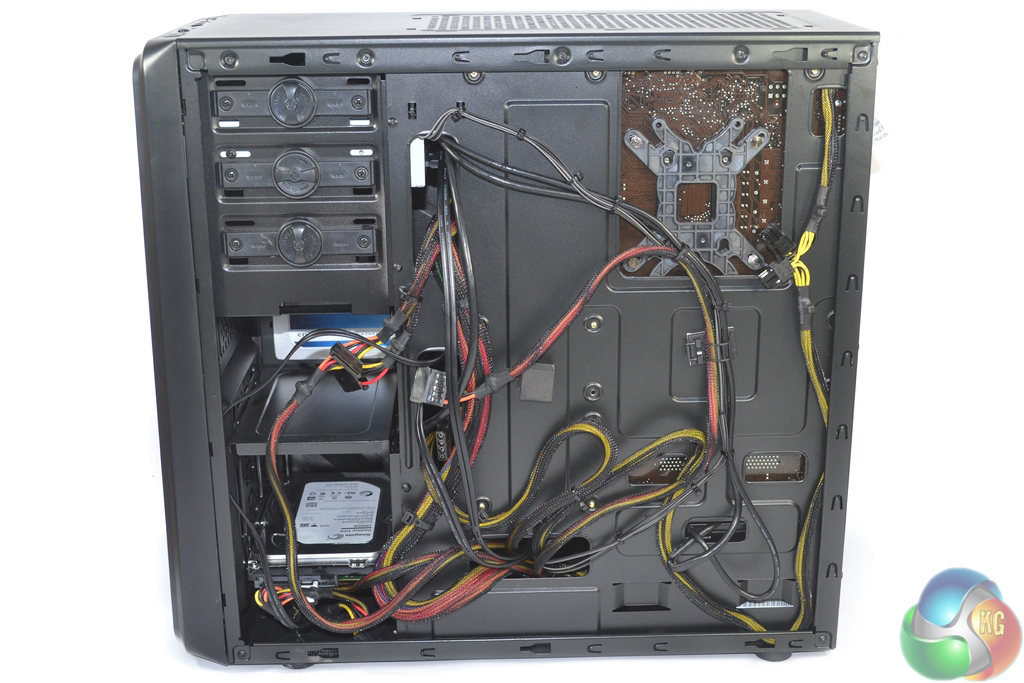
Rear cable management is not the tidiest we have seen although Wired2Fire's efforts ensure that the leads do not block airflow.
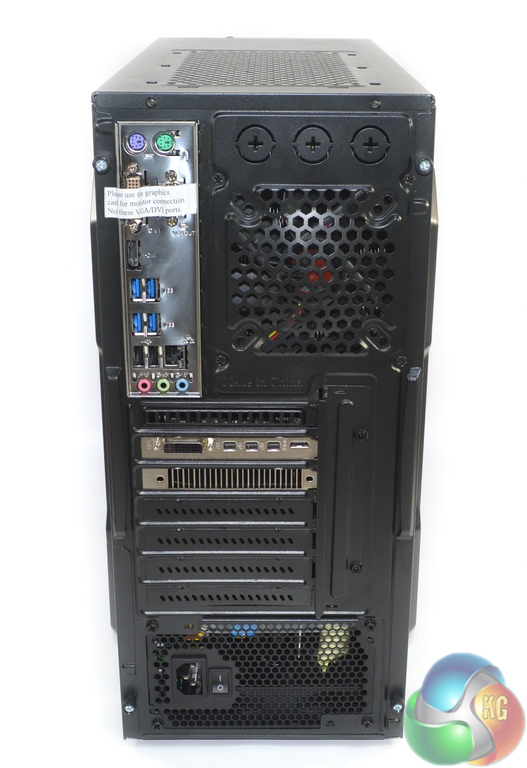
Wired2Fire smartly covers the motherboard video ports and instructs users to opt for ports on the graphics card instead.
Four USB 3.0 ports are found on the rear IO panel. Only three audio jacks are featured on the motherboard and there is no optical audio output. This could be an issue for users aiming to connect to a home theatre surround sound system.
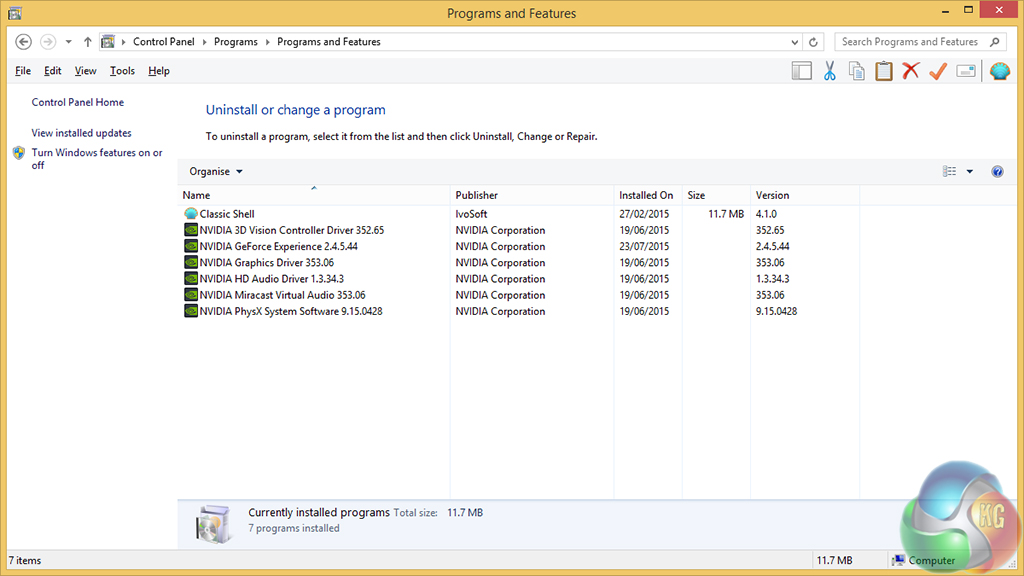
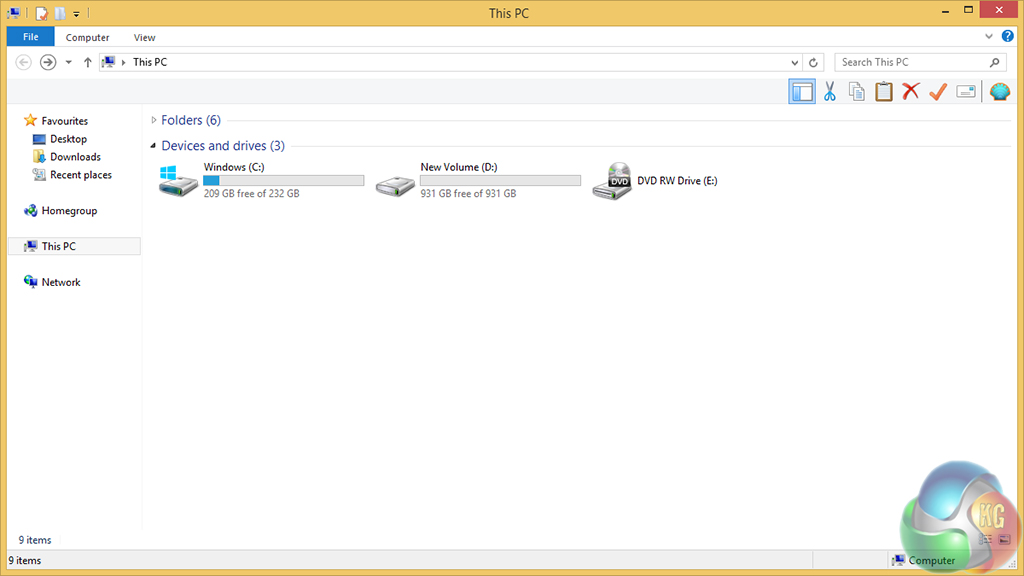
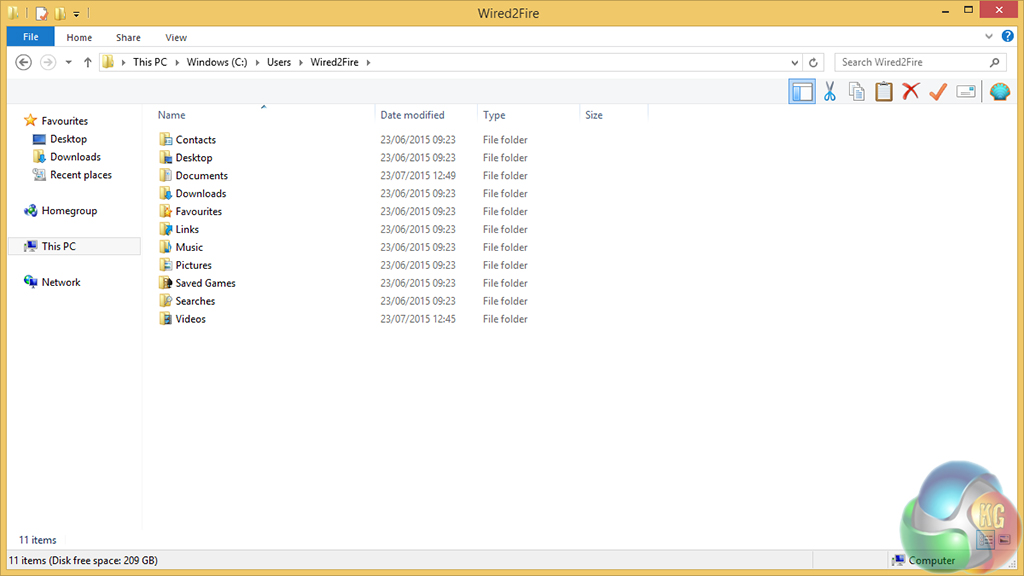
Wired2Fire does a good job of installing very little bloatware. Classic Shell allows a user to view the installed programs that they can adjust – i.e. not the important Windows-based software.
The Crucial BX100 SSD ships with more than 200GB of free space. Due to Wired2Fire's positioning of the default directories on the SSD, that 200GB will fill up quickly unless a users opts to store files on the 1TB Seagate 7200.14 HDD.
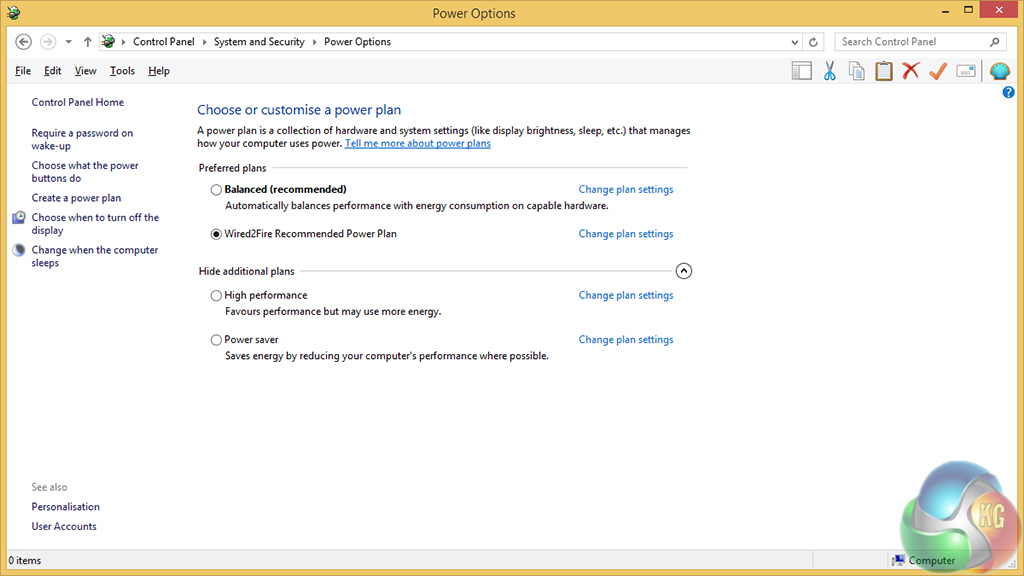
Wired2Fire applies a custom power plan that minimises power saving features in Windows in order to maximise system-wide performance. This is the power profile that we used throughout testing.
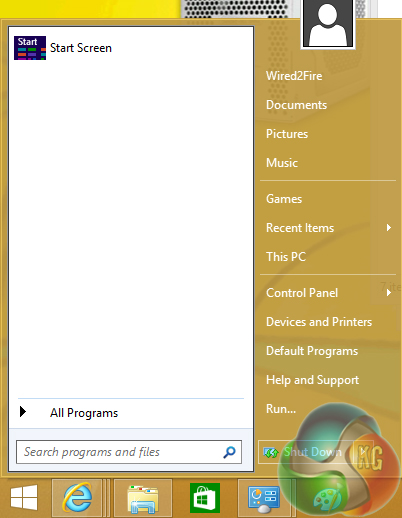
Classic Shell restores the start menu to Windows 8.1. This is a good addition that I attach value to.
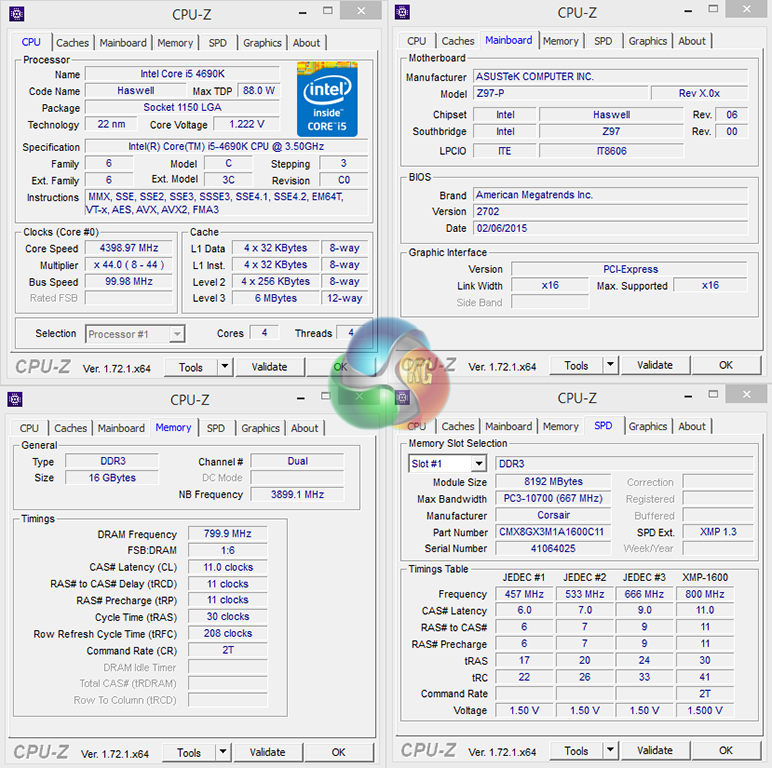
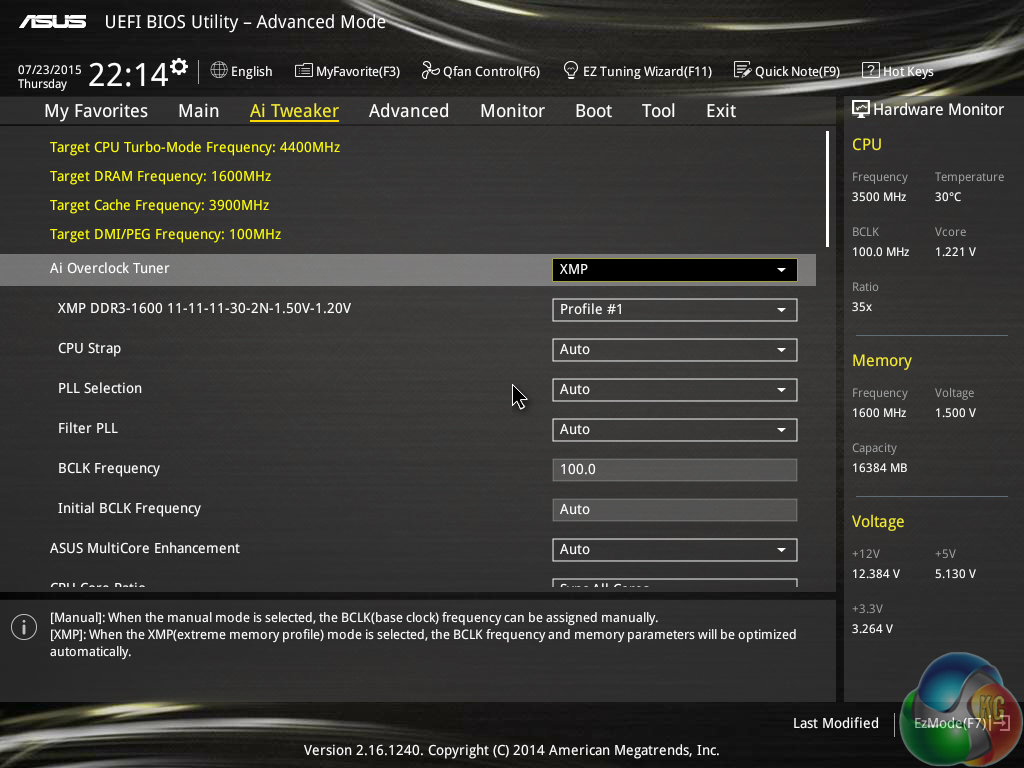
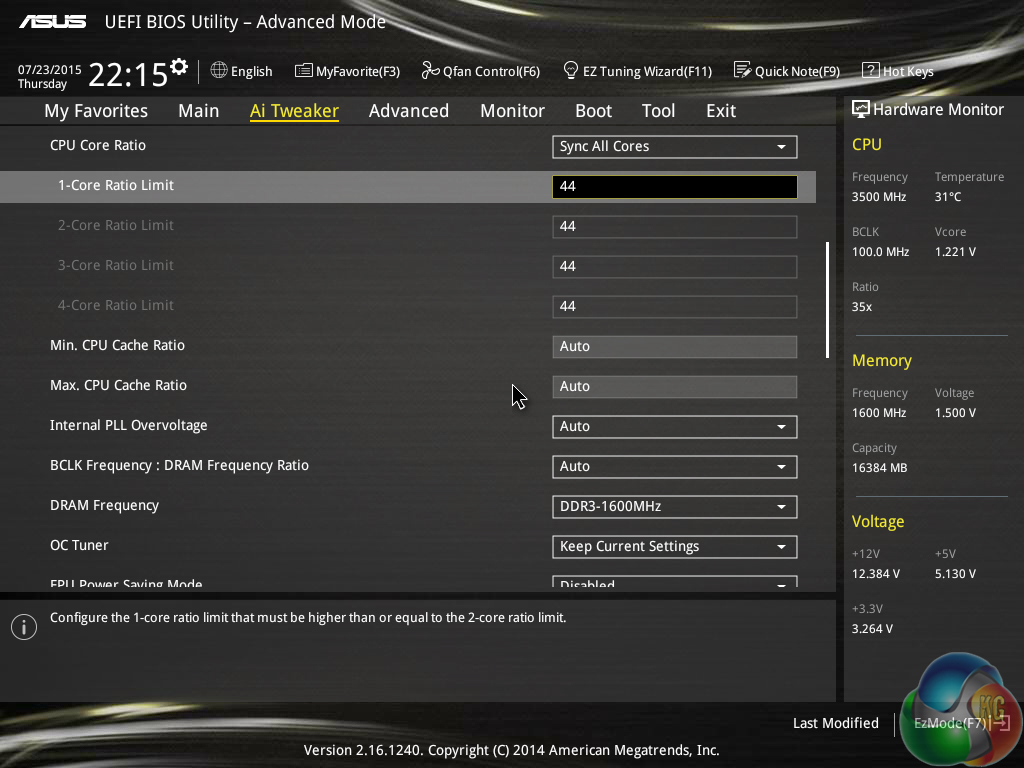
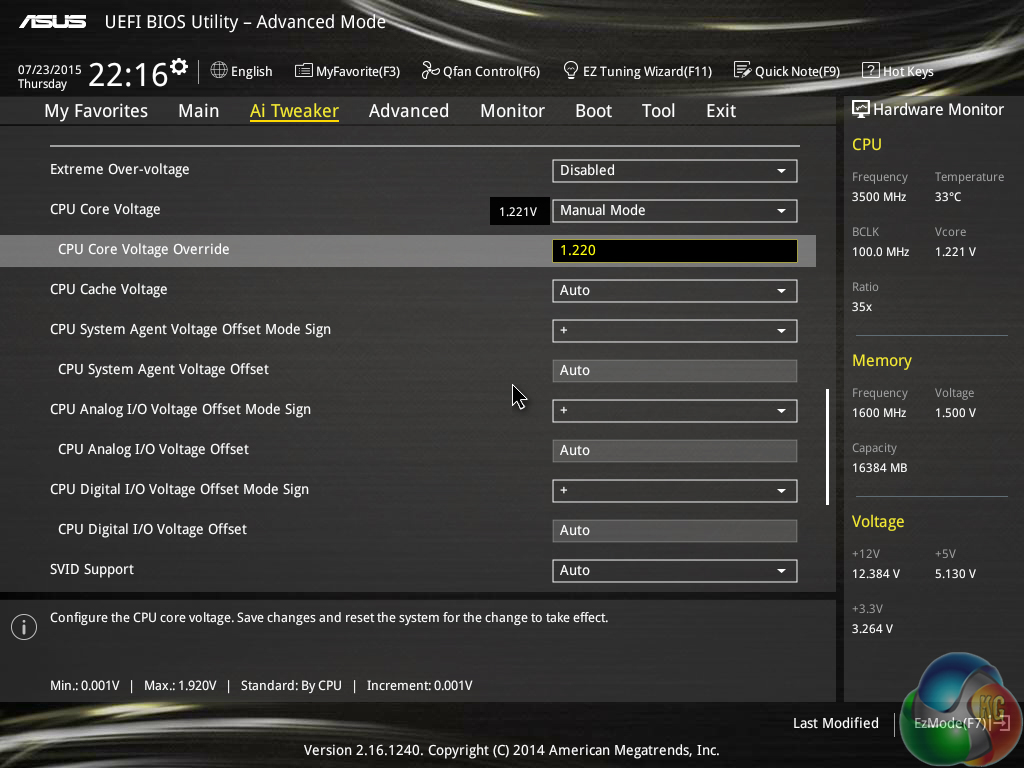
A 1.22V CPU core voltage is used to maintain the 4690K's 4.4GHz clock speed. This voltage level is sensible for 4.4GHz and results in a thermal output that is manageable for the Raijintek Themis CPU cooler.
Memory is maintained at its stock value of 1600MHz CL11, and the same is true for the CPU cache frequency that operates at 3.9Ghz.
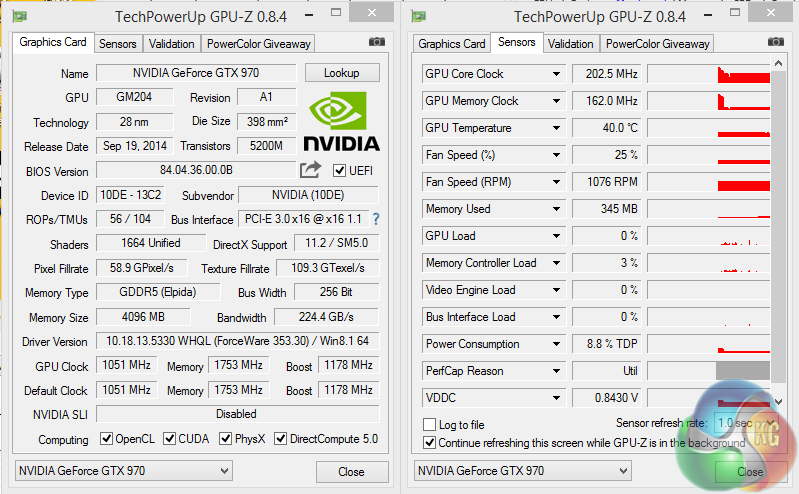
The GTX 970 graphics card is clocked at reference GPU speeds. Maximum core boost clock is listed as 1178MHz, however we observed spikes in the region of 1250MHz. This level, however, was unable to be maintained due to thermal throttling once 80°C on the GPU temperature was reached.
Wired2Fire Diablo Reactor
- Intel Core i5 4690K overclocked to 4.4GHz.
- Asus Z97-P motherboard.
- 16GB (2x8GB) Corsair XMS3 1600MHz CL11 DDR3.
- Palit Nvidia GeForce GTX 970 4GB (reference model).
- Crucial BX100 250GB SSD.
- Seagate Barracuda 1TB 7200.14 SATA 6Gbps HDD.
- Raijintek Arcadia Case.
- Raijintek Themis CPU cooler.
- FSP 600W PSU.
- DVD-RW.
- Windows 8.1.
Comparison Gaming Systems
Z97 Comparison Test System:
- Processor: Intel Core i7 4790K ES (4.4GHz forced turbo).
- Motherboard: Asus Maximus VII Impact.
- Memory: 16GB (2x 8GB) Corsair Vengeance Pro 2400MHz CL10.
- Graphics Card: Asus R9 280X Matrix Platinum 3GB.
- System Drive: 240GB SanDisk Extreme II SSD.
- CPU Cooler: Corsair H100i.
- Case: NZXT Phantom 630.
- Power Supply: Seasonic Platinum 1000W.
- Operating System: Windows 7 Professional with SP1 64-bit.
Tests:
- 3DMark – Fire Strike (System)
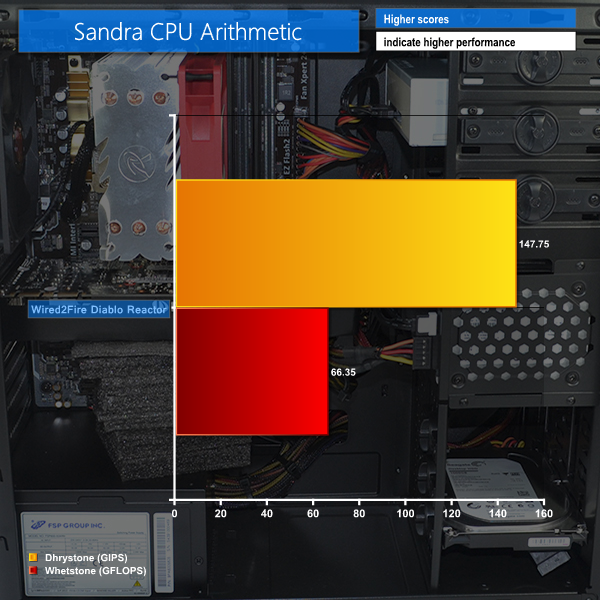
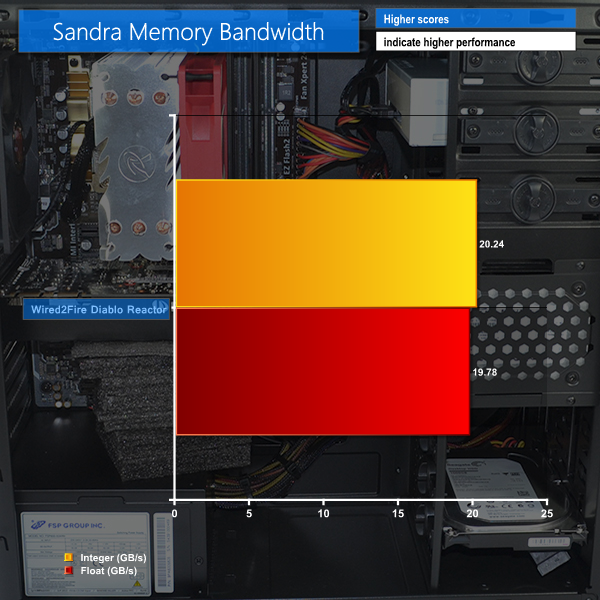
- SiSoft Sandra – Processor arithmetic, memory bandwidth (System)
- Cinebench R15 – All-core CPU benchmark (CPU)
- HandBrake – Convert 4.36GB 720P MKV to MP4 (CPU)
- ATTO – Drives and USB 3.0 transfer rates (Motherboard)
- Bioshock Infinite – 1920 x 1080, ultra quality (Gaming)
- Metro: Last Light – 1920 x 1080, high quality (Gaming)
- Tomb Raider – 1920 x 1080, ultimate quality (Gaming)
3DMark
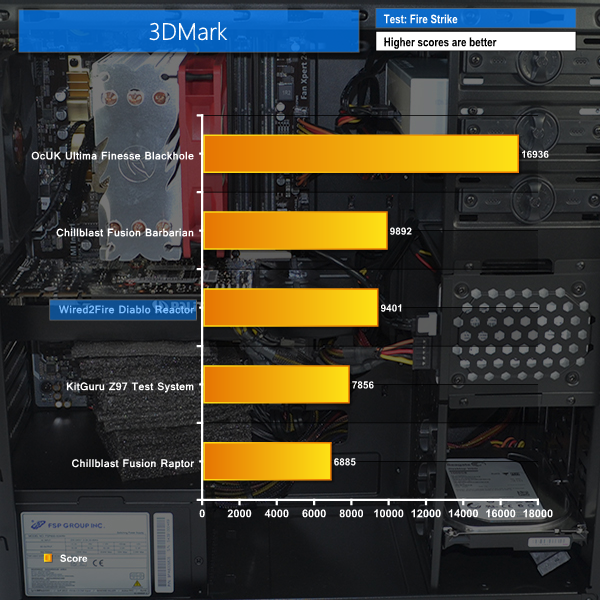
We used 3DMark‘s ‘Fire Strike’ benchmark which is designed to be used on gaming PCs. We opted for the Normal setting, NOT the Extreme mode.
Sandra Processor Arithmetic
Sandra Memory Bandwidth
The Wired2Fire Diablo Reactor makes a solid start in 3DMark, however the blower-cooled GTX 970 struggles to maintain its maximum turbo clock speed and therefore loses points against the custom-cooled, factory-overclocked card used by Chillblast's Fusion Barbarian.
Cinebench
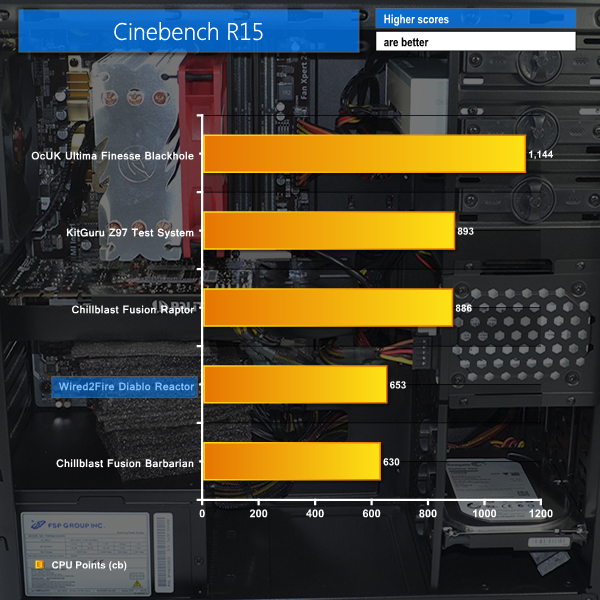
We used the ‘CPU’ test built into Cinebench R15 .
Handbrake Conversion
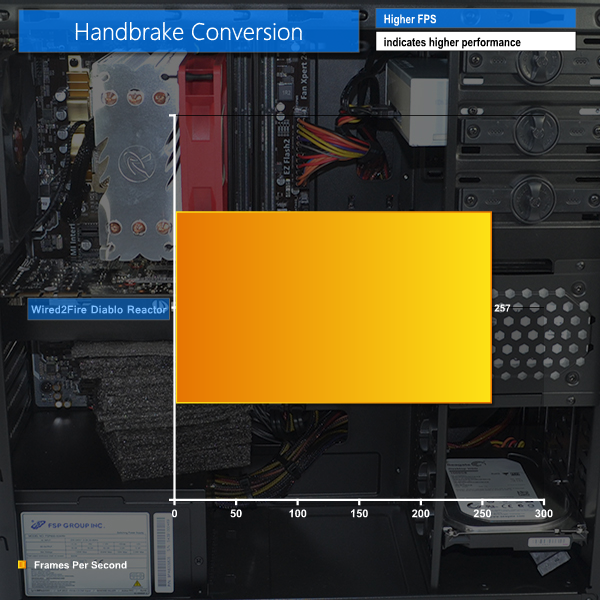
We measured the average frame rate achieved for a task of converting a 4.36GB 720P H.264 movie (in the MKV container) to one in the MP4 container.
The 4.4GHz 4690K CPU is able to score higher in Cinebench than the lesser-clocked chip used by Chillblast in their Fusion Barbarian.
257 FPS in our media conversion task is solid performance but it is still a fair way off i7 performance.
Bioshock Infinite
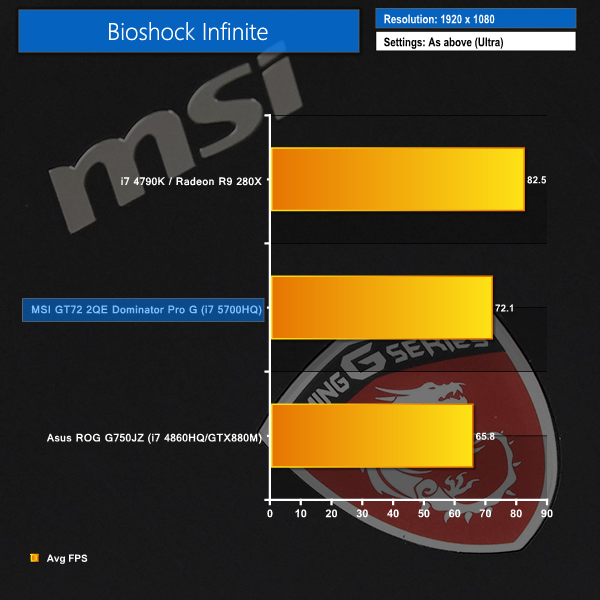
We used the Bioshock Infinite demanding ‘Ultra’ setting and a 1920 x 1080 resolution to push today’s gaming hardware. Our data was recorded using a section of the game, not the built-in benchmark.

Metro: Last Light
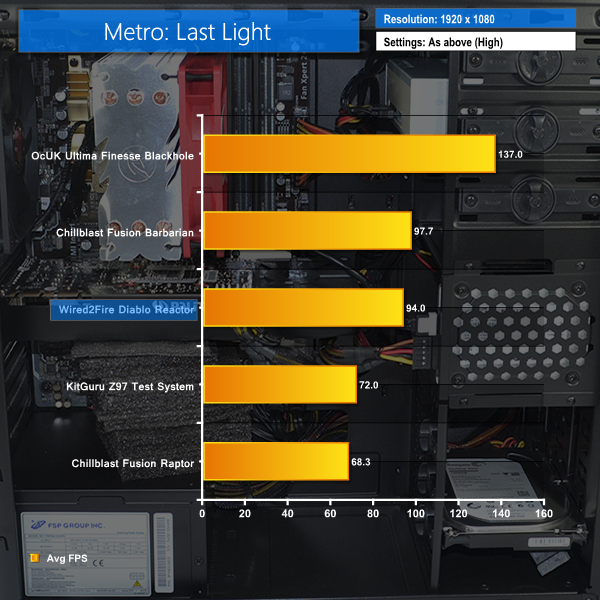
We used a 1920 x 1080 resolution and the Metro: Last Light built-in benchmark set to ‘High’ quality to offer an intense challenge for the gaming hardware while also making playable frame rates a possibility.

Tomb Raider
We used a 1920 x 1080 resolution and the Tomb Raider built-in benchmark set to ‘Ultimate’ quality.
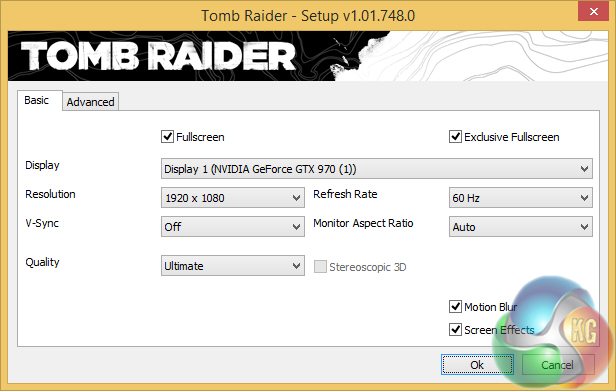
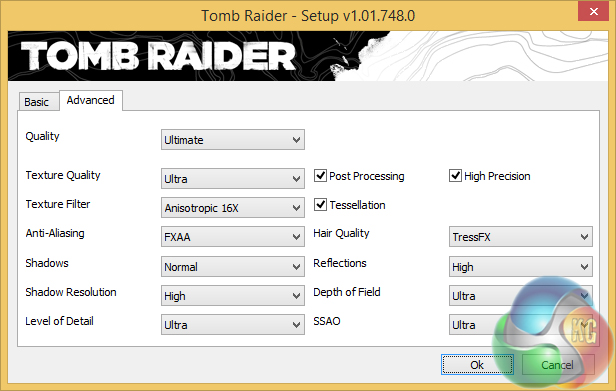
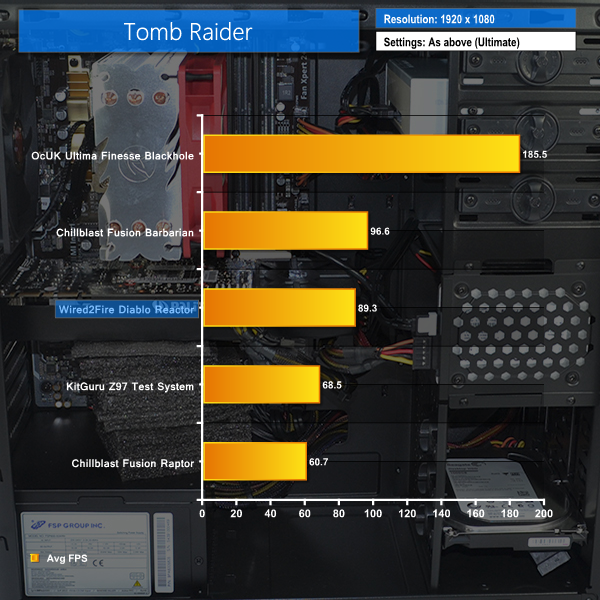
The GTX 970 is able to breeze through games at a 1080P resolution with high frame rates. We recorded clock speeds in the region of 1250MHz, however the value dropped to 1151MHz once the GPU (quickly) reached 80°C. The core clock was running at 1151MHz for most of the gameplay.
Wired2Fire's decision to use a blower-cooled variant of the GTX 970 results in lower frame rates than the similarly outfitted Chillblast Fusion Barbarian is able to achieve. The latter uses a GTX 970 cooled by Gigabyte's excellent Windforce cooler and is therefore able to hold its higher clock speed levels for longer periods of time (as well as being factory overclocked anyway).
SSD Performance
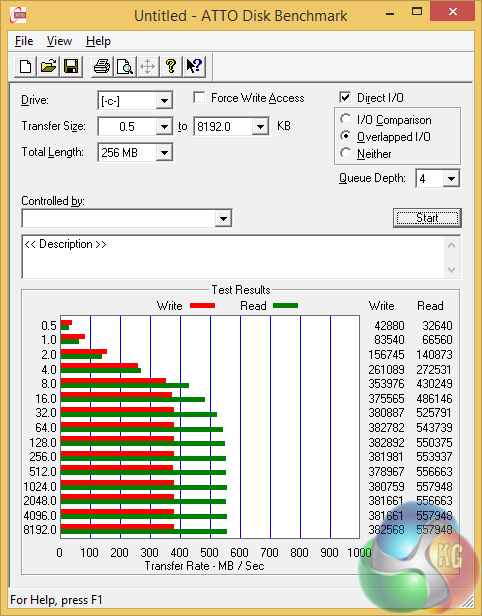
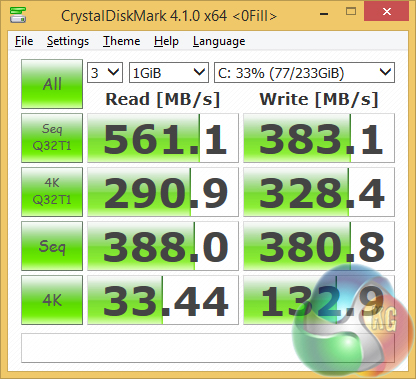
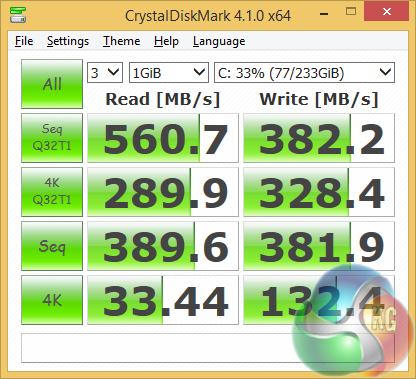
Performance of the Crucial BX100 SSD is strong. The drive is able to maintain its positive performance levels whether the data being worked on is compressible or incompressible.
HDD Performance
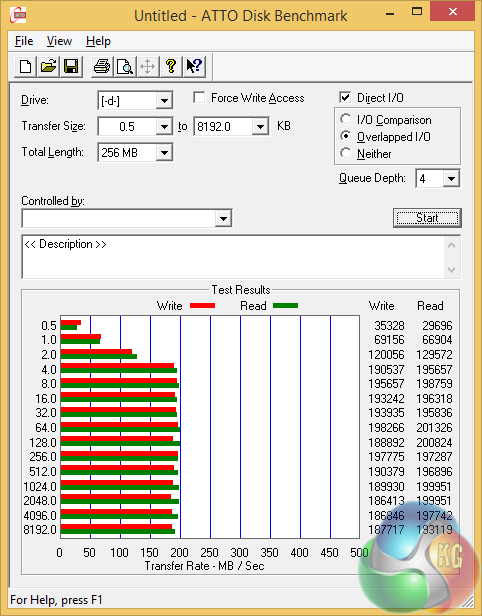
Seagate's modern Barracuda HDDs have strong sequential read and write performance. Values close to 200MBps are good for quick file transfers and backups.
USB 3.0
We tested USB 3.0 performance using the Kingston HyperX 3K SSD connected to a SATA 6Gb/s to USB 3.0 adapter powered by an ASMedia ASM1053 controller.
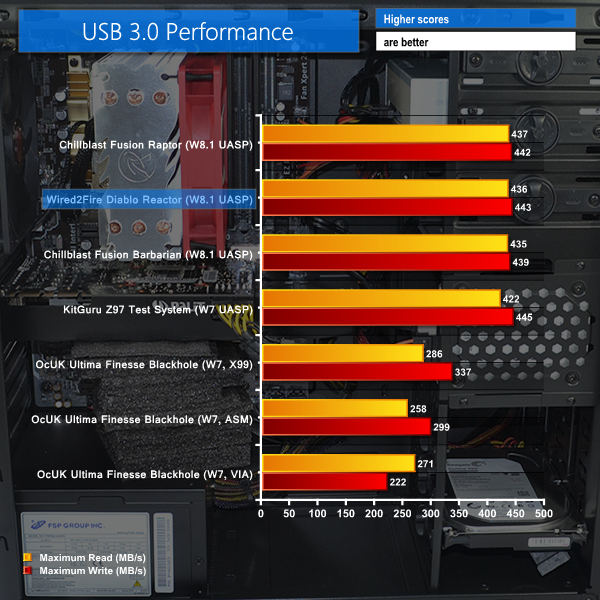
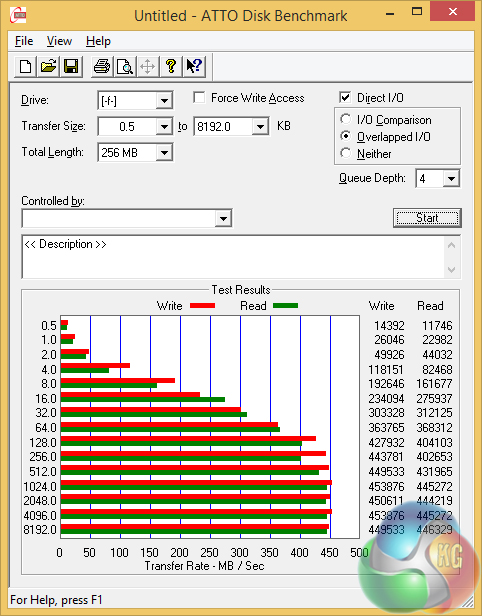
The built-in UASP driver in Windows 8.1 and use of an Asus motherboard allows USB 3.0 speeds to reach around 440MBps. This is about as fast as USB 3.0 transfer rates get.
Idle recordings are taken while the system sits at the desktop under minimum load. Our gaming test uses Metro: Last Light – a DX11 title that taxes the CPU and GPU.
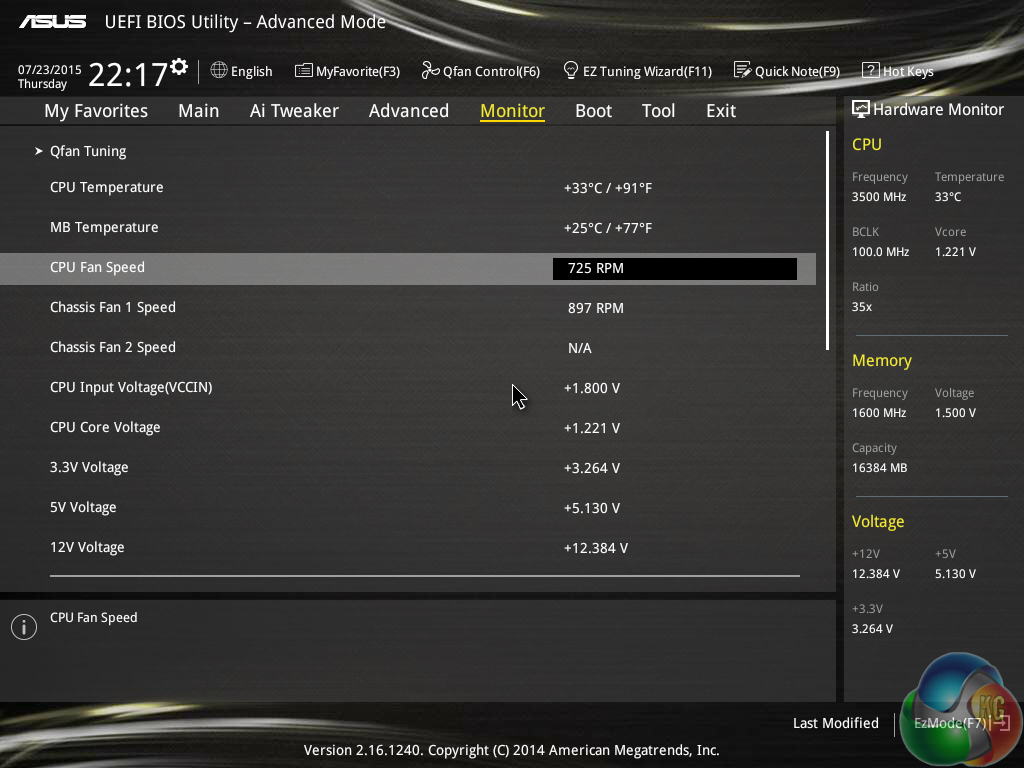
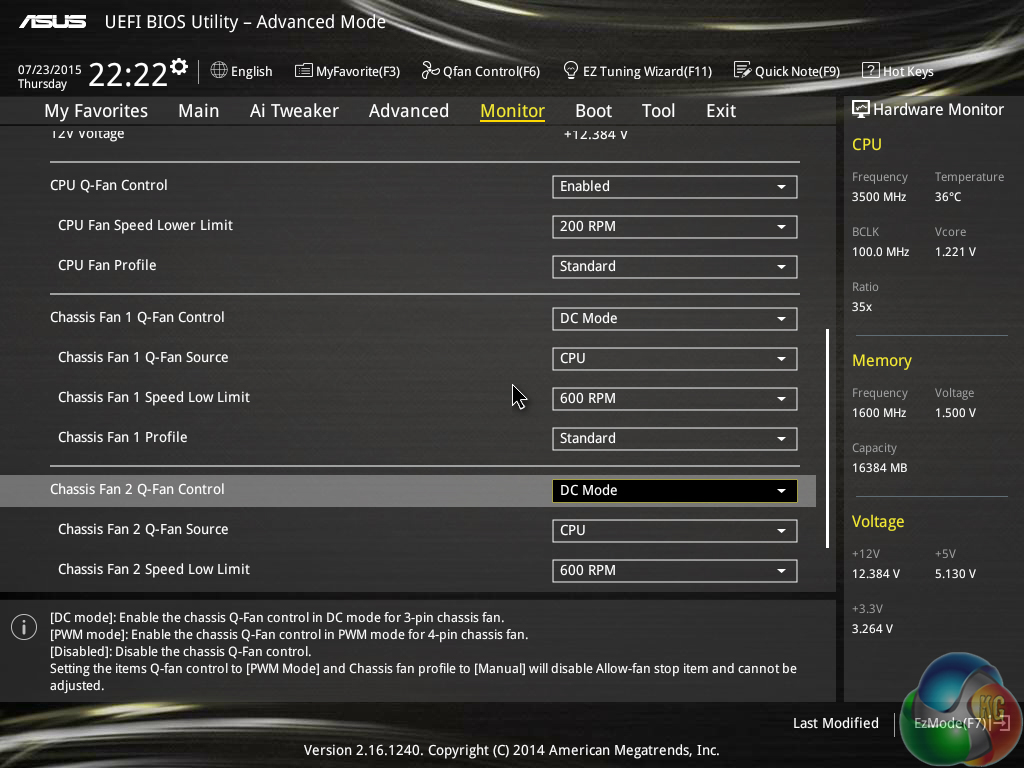
Wired2Fire sets the CPU cooler fan speed to Asus' ‘standard' profile.
Thermal Performance
Ambient temperature was maintained at 24°C throughout testing. All fan settings were left on the Wired2Fire defaults.
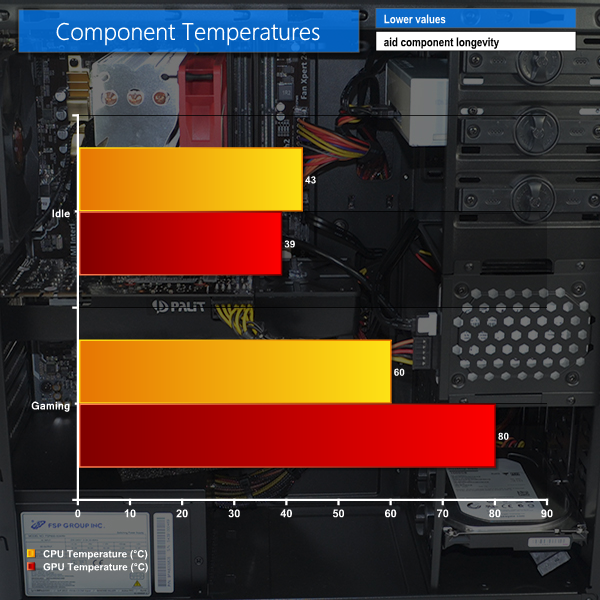
Idle temperatures are no cause for concern. The CPU cooler and GPU fan speeds run at lower levels in order to reduce noise output.
The gaming CPU temperature level of 60°C is a solid level given the 4.4GHz overclock and modest CPU cooling hardware. GPU temperature, on the other hand, is high at 80°C. This is the point where the Nvidia GPU starts to down-clock the core in order to reduce the core temperature level.
I would suggest downloading a utility such as MSI Afterburner and using it to set a custom fan profile that better maintains the GTX 970 GPU's boost core clock by sacrificing low levels of acoustic emission.
Acoustic Performance
With the case positioned on the floor, our sound level meter is placed where a user’s ears are likely to be located – around 50cm above the system and 100cm in front of it.
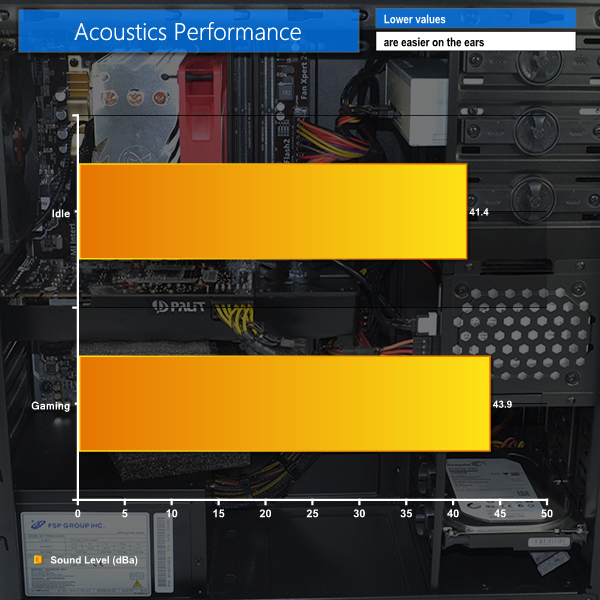
At idle, the system is quiet enough to be unobtrusive. The fan speeds, especially for the graphics card, quickly ramp up when a gaming load is applied. The machine noise is noticeable when running a game, however it is far from irritating.
Reaffirming the GPU fan speed profile suggestion, the load fan speed level could be set higher without going into the territory of annoying noise levels.
Power Consumption
Power consumption is measured at the wall, representing the energy drawn by the system.
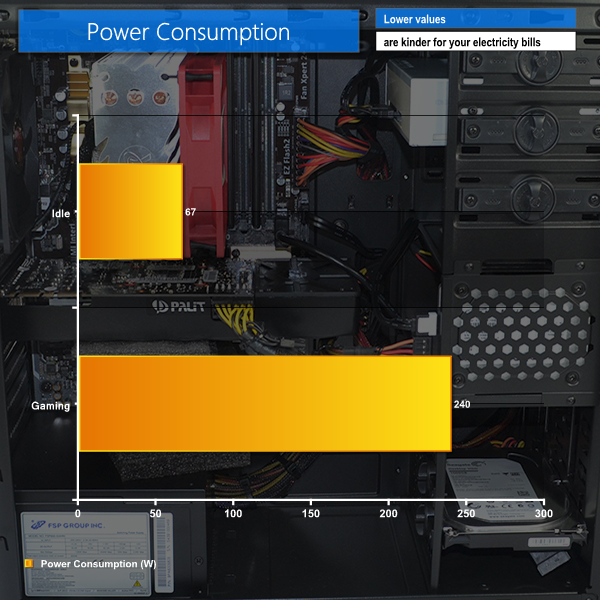
Given the overclocked CPU, idle power consumption is low at 67W. Even the gaming power draw of 240W is low enough to be considered a good result.
Users placing the system in a small room will be happy by the power draw levels as the low values directly translate into less heat being pumped into the surrounding area.
The Wired2Fire Diablo Reactor is a well-balanced gaming machine that focuses its efforts on the use of budget components in order to afford alluring gaming hardware while maintaining an affordable asking price. The areas of compromise are well thought out and allow the system to sell for well below the £1000 mark.
Stars of the show are the 4.4GHz i5 4690K CPU and the GTX 970 graphics card. Wired2Fire deserves credit for shipping the i5 with a 4.4GHz clock speed, which can be considered a fairly high level for the Devil's Canyon chip and a modest CPU cooler.
The GTX 970 graphics card performs well and doesn't run overly loud, however some thermal throttling concerns should be addressed by the use of a tweaked fan speed profile. A cheap, but effective, front intake chassis fan would have been a useful addition to aid GPU cooling. Opting for one of the cheaper custom-cooled GTX 970 graphics cards would also be preferable.
A good balance of supporting hardware is used on the Diablo Reactor. Budget options for the CPU cooler, case, PSU, and Asus motherboard allow for extra investment in other components. This results in 16GB of DDR3 memory and a 250GB SSD being equipped as the premium additions. They don't increase frame rates but they do enhance the general usage and gaming experiences.
Wired2Fire's shipping efforts are excellent (the system is very well protected) and the included 3 year warranty is a positive point for the system and one that may tempt buyers who were considering building it themselves.
The Wired2Fire Diablo Reactor is currently shipping for £859.97. Less than £900 for the calibre of hardware being offered is a very impressive asking price. An almost identical set of components (different brand PSU) would cost just over £900 at OCUK. So Wired2Fire is effectively building the system, overclocking the CPU to 4.4GHz, and including a 3 year warranty for less than the individual component cost. That's a good deal.
Pros:
- Good balance of components with focus on gaming hardware.
- Excellent, well-optimised overclock on the Core i5 4690K CPU.
- Very competitive pricing.
- Appropriately sized SSD.
- Quiet operation when idling and non-intrusive under gaming load.
- Solid upgrade potential.
- No bloatware with the OS install.
Cons:
- Graphics card cooling could be better optimised.
- Modular power supply may have been easier for user-led upgrades.
- A fan installed in the front mount would have been welcomed.
KitGuru says: A well-balanced, competitively-priced system that stays true to its gaming core.

Here is tips Easy with kitgur’u ********* Here’s Tips