 KitGuru KitGuru.net – Tech News | Hardware News | Hardware Reviews | IOS | Mobile | Gaming | Graphics Cards


Intel Corp. has formally unveiled its wireless docking technology first announced last year. The new tech will be supported by laptops, tablets and 2-in-1 hybrid systems powered by the company’s next-generation microprocessors code-named “Skylake”. The new tech will rely on WiGig technology and will eventually be accompanied by Rezence, a wireless charging technology.
Intel wireless docking tech requires a client device featuring Intel’s tri-band wireless-AC 17265 client card supporting high-speed 60GHz WiGig 802.11ad wireless technology as well as a dedicated Intel wireless gigabit antenna-M 10041R antenna module. Notebooks, tablets, 2-in-1s and other systems will connect to docks featuring Intel wireless gigabit sink-M 13100 modules specially designed for docking devices.
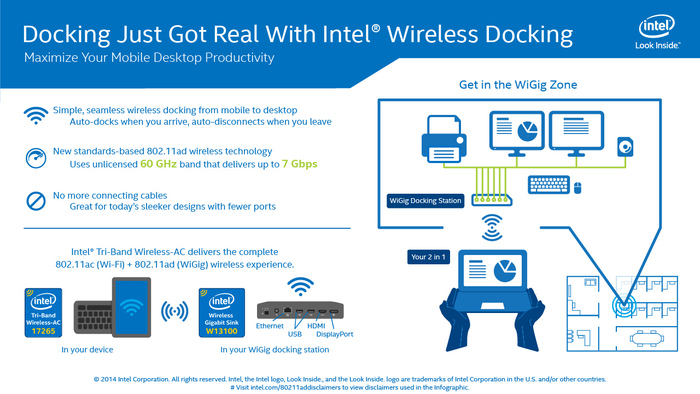
The WiGig technology (IEEE 802.11ad) allows devices to communicate at up to 7Gb/s data-rates using the 60GHz spectrum. Intel Wireless Gigabit docking supports up to two full HD displays and provides connectivity for any USB 3.0 device, such as storage or HD camera that is WiGig-enabled or connected to a wireless gigabit docking station. The WiGig docking station from Intel will have a number of ports, which will allow users to plug in various peripherals (displays, printers, speakers, storage, etc.) to the dock and then connect then wirelessly without hassles. Since 60GHz signals cannot penetrate walls, the technology complements, not replaces, the existing Wi-Fi networks.
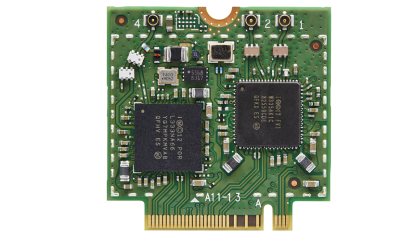
Intel’s tri-band wireless-AC 17265 client card
The Intel wireless docking technology automatically pairs all WiGig-enabled devices with the WiGig dock and peripherals based on the proximity to the dock. As soon as the owner arrives at his/her desk, the device is wirelessly paired with all of the devices without messing with cords.
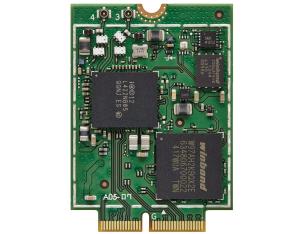
Intel's wireless gigabit sink-M 13100 module
At present Intel offers its customers its tri-band wireless-AC 17265 client cards, wireless gigabit antenna-M 10041R antenna modules as well as wireless gigabit sink-M 13100 modules. PC makers and manufacturers of docking stations yet have to build solutions based on the products from Intel.
Discuss on our Facebook page, HERE.
KitGuru Says: It remains to be seen how many “Skylake”-based systems will feature WiGig and wireless charging, keeping in mind that Intel rolls-out its WiGig solutions now and still has not unveiled anything featuring Rezence wireless charging tech…

As a big fan of QI charging for my phone, this can not come soon enough!
This is completely stupid. At first I was enthralled, but now I don’t understand why the fuck do you need a dock which still means cables? This FUCKING STUPID
So you don’t have to deal with cables for your laptop every time you come and go
Because i can have a dock set up statically at my desk connected to a monitor (or two) and a wireless mouse and keyboard. Then i can come home from work, drop my laptop on its wireless charge-pad and without touching a single cable I have a desktop experience. In the morning I grab my fully charged laptop and go to work. Simple.
The reall question should be, where are all the consumer wigig devices and accessories?