 KitGuru KitGuru.net – Tech News | Hardware News | Hardware Reviews | IOS | Mobile | Gaming | Graphics Cards


Go back just a single decade and you would find many high end gaming PC's with 80GB boot drives or some with even smaller 36GB Raptor drives – for added performance. Today multi-terrabyte drives aren't something we bat an eyelid at and most modern smartphones ship with tens of gigabytes of storage space. But what if you need a bit more than that? You can always upgrade the internal micro-SD card, but that's a bit of a hassle and can get expensive, especially if you don't need that storage permanently attached. That's where the Voyager Go from Corsair comes in.
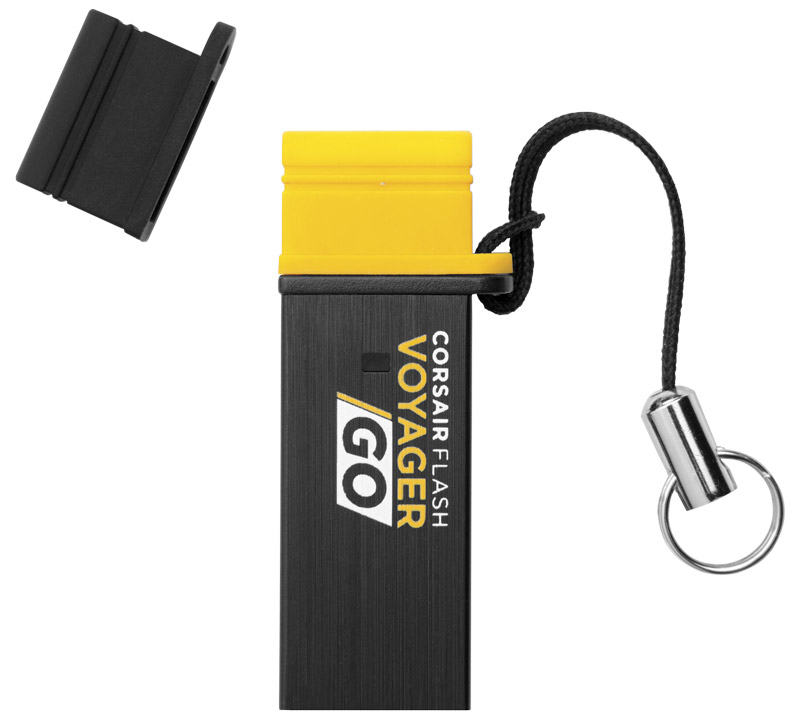
It's a 64GB, micro-USB (B) flash drive, that also has a full 3.0 connector on the other end, so you can easily transfer files from a PC/laptop to your phone and vice versa. Corsair say it is designed to be convenient, portable and affordable, but whether it ticks those boxes while offering decent performance still remains to be seen.
Available in three different sizes: 16GB, 32GB and 64GB, the Voyager Go we're looking at today is the biggest and baddest of the lot. Priced at £39 it's also the most expensive too, but it comes with a five year warranty so it should last long enough that by the time you upgrade it, 64GB will be considered tiny.
Features
- Designed for Android with USB On-The-Go
- Dramatically boosts your mobile device’s storage capacity
- USB 3.0 speed with USB 2.0 compatibility
- Plug and Play, with no driver or app necessary
- Includes extra caps and a lanyard for a personalised look and handy access
- Five year warranty
Phone Support
- HTC Butterfly
- HTC Butterfly S
- HTC New One
- HTC One X
- Samsung GALAXY NOTE (GT-N7000)
- Samsung GALAXY NOTE II (GT-N7100)
- Samsung GALAXY NOTE III (GT-N900)
- Samsung GALAXY R (GT-I9103)
- Samsung GALAXY S2
- Samsung GALAXY S3
- Samsung GALAXY S4
- Samsung MAGA 6″3
- SONY SONY XPERIA S (LT26i)
- SONY SONY XPERIA Z (C6602)
- SONY Xperia TX LT29i
- Xiaomi 2S
Tablet Support
- Tablet PC Acer ICONIA A1-810
- Acer ICONIA_Tab A700
- ASUS MeMO Pad ME302
- ASUS MeMO Pad 10 ME102
- ASUS Transformer Pad TF-100
- Fujitsu LTE F-01D Y Android 3.2
- Huawei MediaPad S7-301u(P)
- Lenovo A3000
- Samsung Note 8
- SONY SGPT111JP/S
- SONY SGPT112TW/S
- SONY SGPT211JP/S
- Toshiba AT700/35D
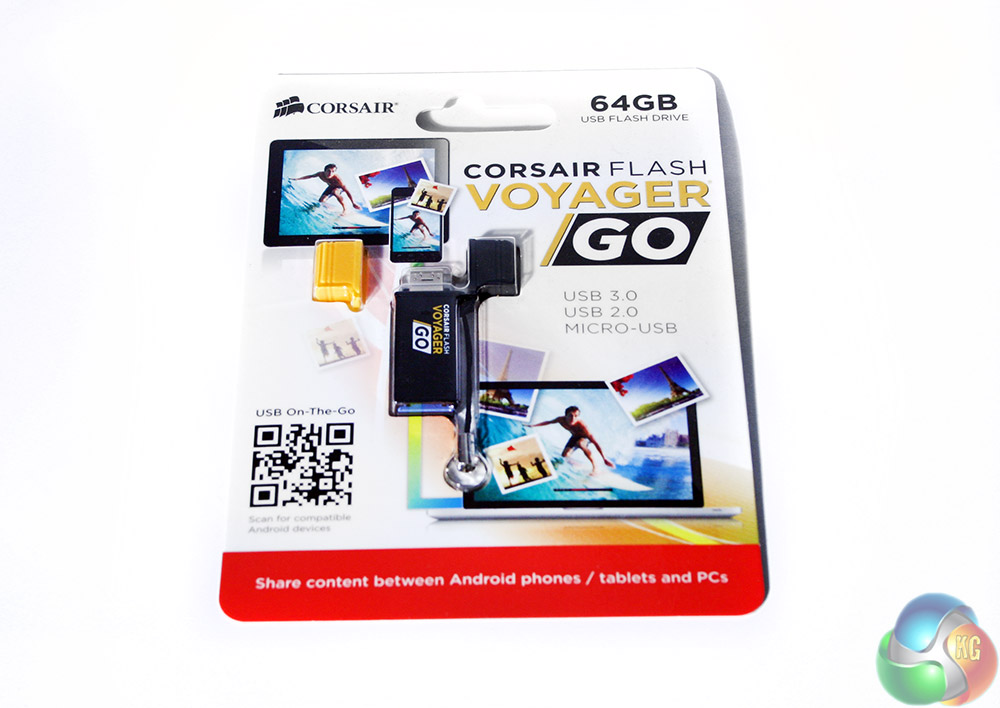
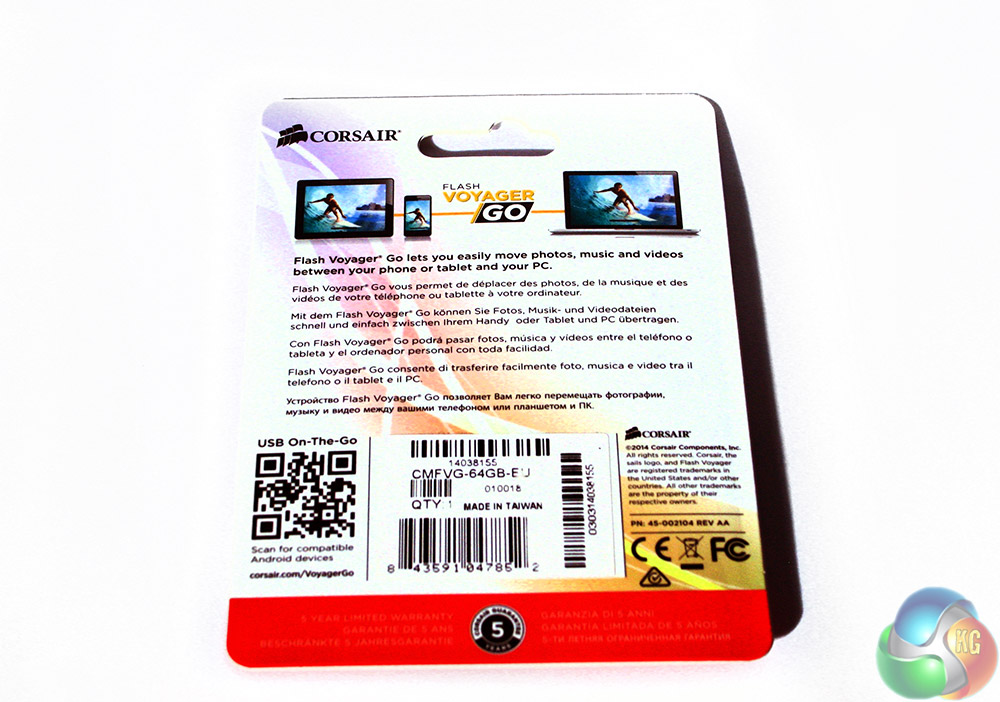
With such a miniature piece of kit to package up, you would have thought Corsair wasteful if they had used anything but a cardboard blister pack, so that's what we have. Clear plastic keeps everything secured on the inside, with a real emphasis in the product's marketing spiel of how this is a great product for photo and video backup.
The way Corsair envisages this product being used? You take it out with you and if you are taking a lot of pictures or video, you can backup directly to the drive and expand storage capacity.
You could also use it when you get home as a transfer device. Instead of having to use a cable, you can instead copy everything over to the Voyager Go and then plug it into your notebook or desktop for a more permanent backup or transfer.
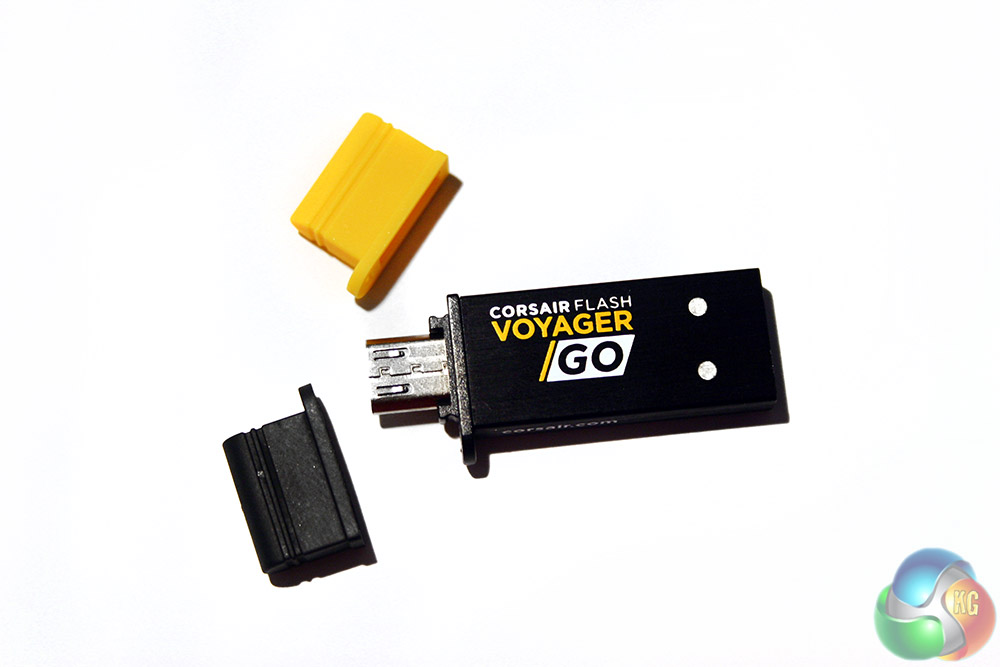
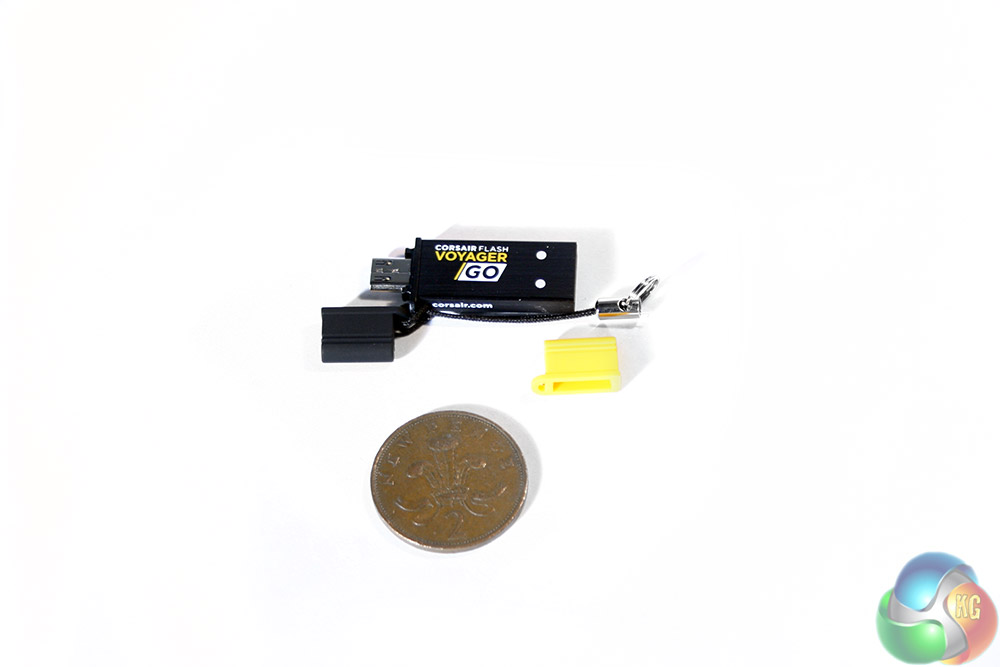
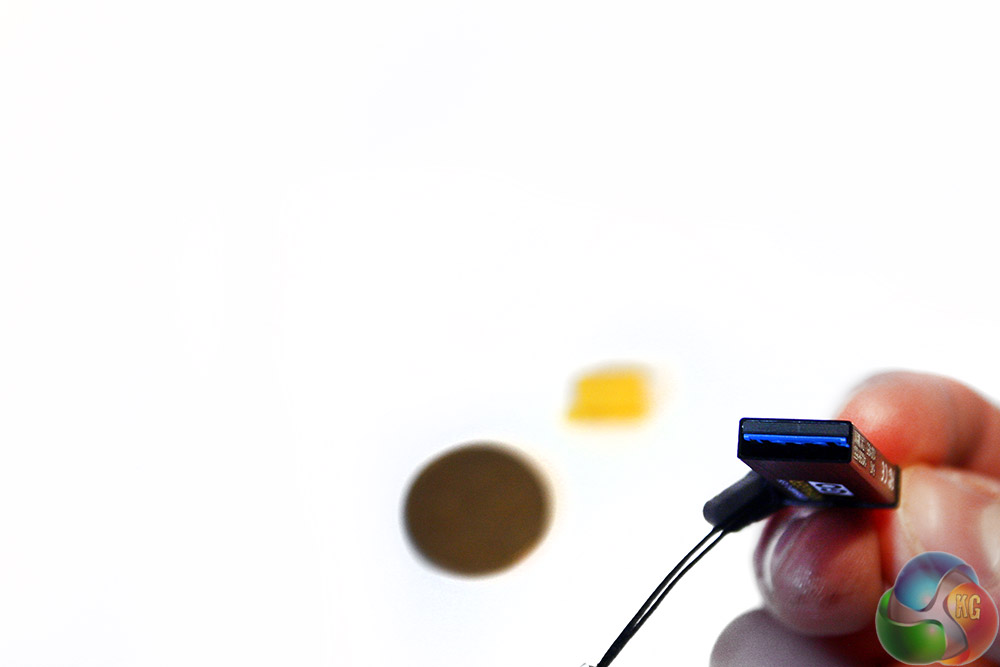
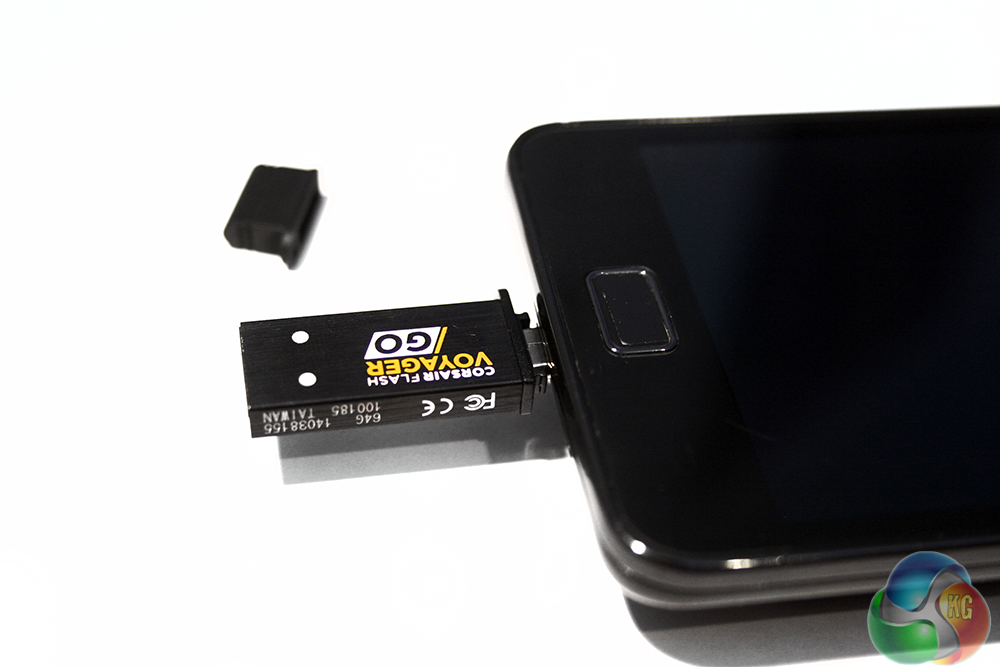
The Go itself is tiny. As you can see it's about half the width of a two pence piece and only a little longer. At one end you have the traditional USB 2.0/3.0 connector and at the other the micro-USB connector underneath the protective cover -of which there are two options: black or yellow.
The main body of the Go is made up of brushed aluminium and has a small lanyard connector on the side … which makes it easy to keep it on your keyring.
While a tiny drive like this does mean it will almost always fit into a busy USB port configuration, getting it out again can be another matter. Keep a pair of pliers handy or be prepared to unplug adjacent drives to get a good grip.

When formatted, the drive gives you 57.6GB of free space.
To test this device, we used a Samsung Galaxy SII and the following desktop PC:
CPU: Intel i5 760
Memory: 8GB (2x4GB) Corsair Vengeance
Solid State Drive: Kingston HyperX 3k 120GB SSD
Motherboard: ASUS P7P55D-E
Power Supply: Corsair 650w TX
Graphics Card: Sapphire VaporX 280X
Comparison drives: Patriot Supersonic Magnum 256GB USB 3.0, Mach Xtreme MX-ES 32GB USB 3.0. The Patriot, while much more expensive, is designed to show high end USB 3.0 speed, whereas the Mach Xtreme drive is there to show ‘average' USB 3.0 pen drive performance.
For real world benchmarking, we take several custom made folders full of different types of files of varying sizes and time their transfer to and from the device – thereby determining its read and write speed. For the first test, we used 8GB of MKV video files. In all but the phone tests, files were transferred to and from a Kingston HyperX 3k 120GB SSD.
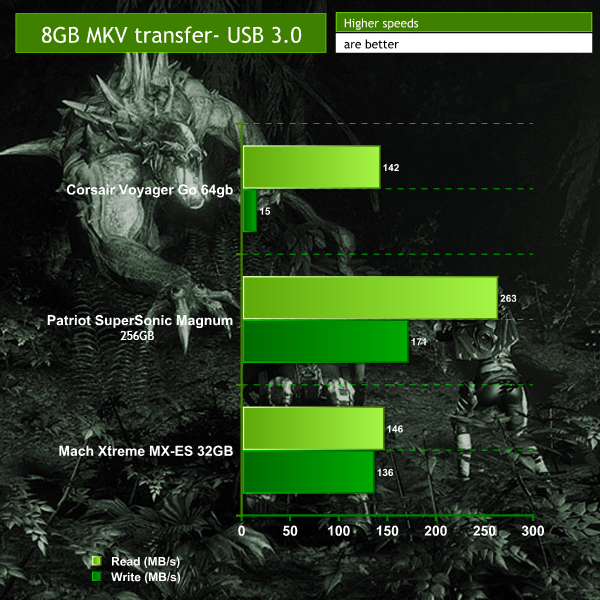
Clearly right off the bat, the Voyager struggles with the write test, which is a shame considering it's more expensive than the (though smaller) Mach Xtreme drive. However, the read speeds are very strong, even if they fall far behind the vastly more expensive (£180) Patriot SuperSonic – hardly a fair comparison.
For the mixed file test, we send over a 1GB folder filled with a combination of general office documents, photos, a couple of video files and some MP3s, timing the transfer speeds as before.
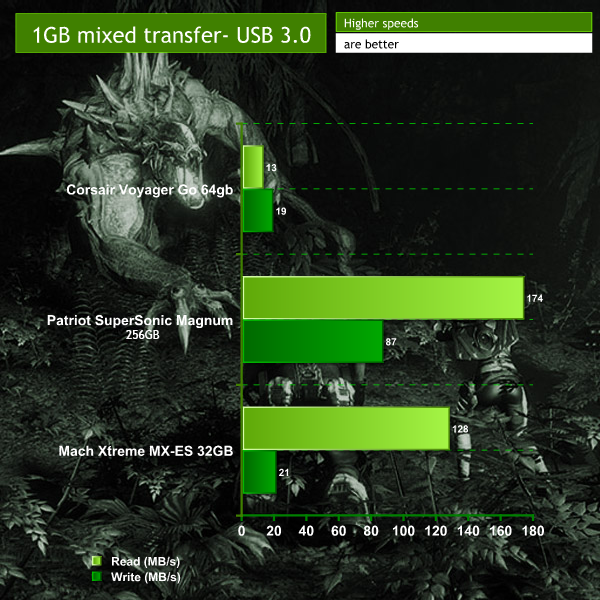
While mixed files tend to knock performance quite a lot, it's a shame to see the Voyager Go fall down so much here. Oddly its write performance improves and is almost able to match pace with the Mach Xtreme drive. However its read performance becomes woeful, making this a product that would be hard to recommend for serious business users.
Perhaps it'll be better at transferring images though, something that the Go seems focused on, being a smartphone backup drive. In this test we took a folder filled with 4GB of photos of different sizes and qualities and transferred it to and from the drive.
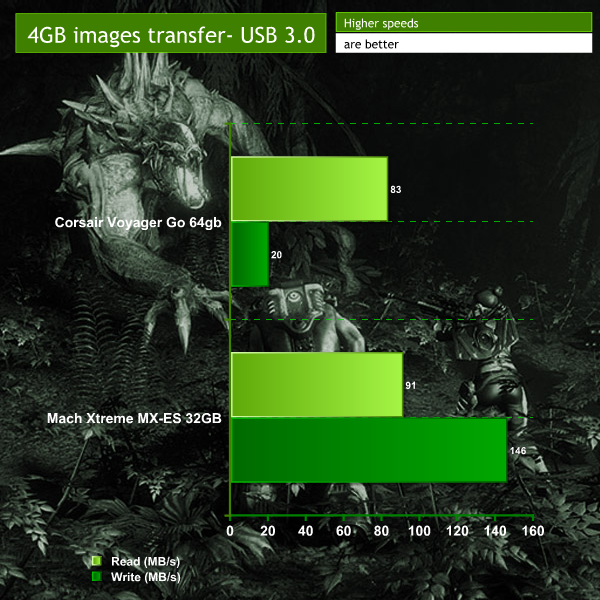
Here we see much better performance, suggesting that with uniform files, the Go is in its element. It's results are still lower than the cheaper Mach Xtreme drive, specifically when it comes to write speed, but it must be remembered that it is a physically more compact device and is designed with phone transfers in mind.
So, since that's what the Go is designed for, perhaps it will perform better when sending files back and forth to a smartphone? In this case we used the Galaxy SII.
Side note, you need to enable multi-user read/write permissions on the Voyager Go before it will allow you to transfer to and from a mobile handset.
First we'll try out the 1GB of mixed files.
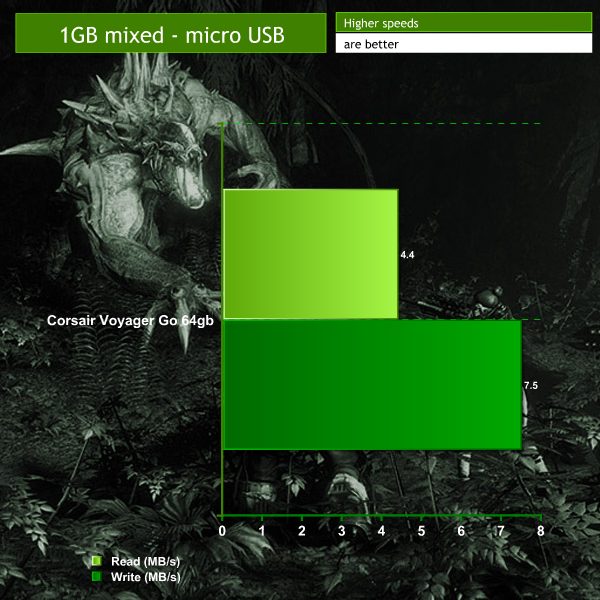
Performance here is reasonable, though there may be some bottlenecking due to the phone's storage speed. More testing with different file types/sizes should make that more obvious if that's the case.
Let's try it with the 4GB of images.
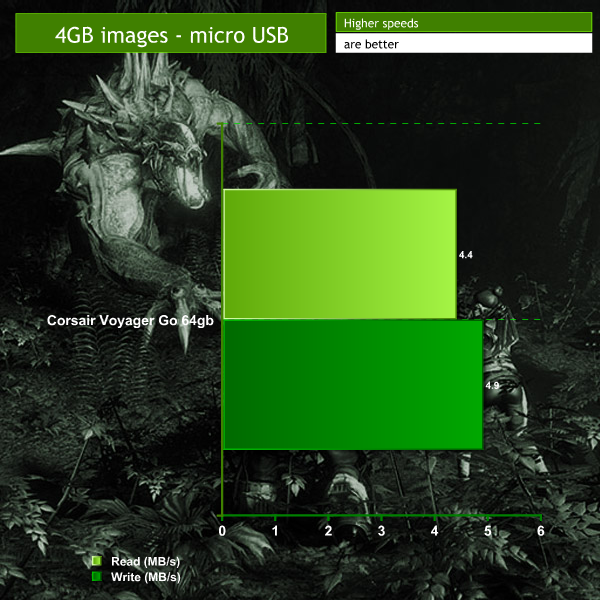
From these results it seems the Galaxy SII's write speed is hindering the read speed of the Corsair Voyager drive. Perhaps a more modern smartphone would perform better, but it's worth bearing in mind that file transfers to and from the Go when hooked up to a smartphone, aren't the quickest.
However bear in mind that all of the files transferred in these tests were large, all over a gigabyte and most of them multiple. Even if the read/write speed is slow, if you're only transferring a hundred or so pictures, it's still not going to take very long – a few minutes at most and in the case of the phone/Go tests, you need not even be near a computer.
While real world benchmarks are a better look at what you can expect to get out of a product, synthetic ones are good for quotable numbers and the reliability of repeatable tests. With that in mind, we also ran the Corsair Voyager Go through CrystalDiskMark and Atto Disk Benchmark to see what the raw numbers are like.
Each test was performed twice for accuracy.
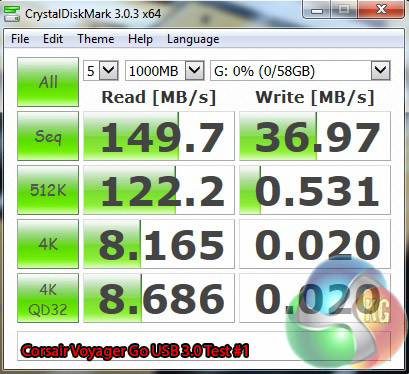

As we would have expected with the Voyager Go based on our real world testing, it has excellent read speed, but limited write speed. For comparison purposes, here's the Patriot and Mach Xtreme drive results:
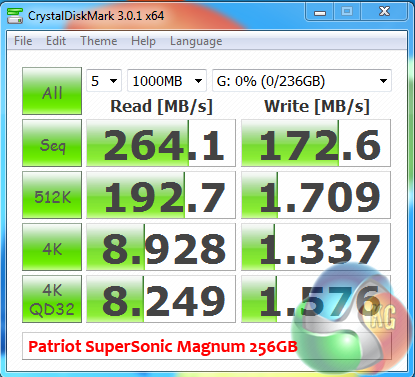
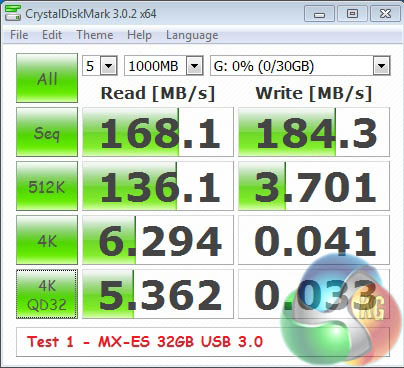
For those with laptops or desktops without USB 3.0 ports, it's worth checking how a device like this performs in a USB 2.0 port, as it's still the most common type around. Again, tests were run multiple times for accuracy.
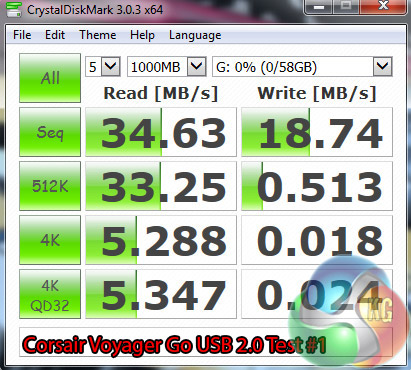
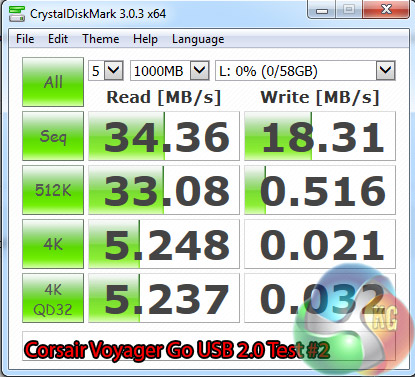
While obviously significantly reduced from the USB 3.0 results, the read speed result here is strong. However, the write speed isn't that inspiring, showing overall that the Voyager Go is not a strong device when it comes to write speed.
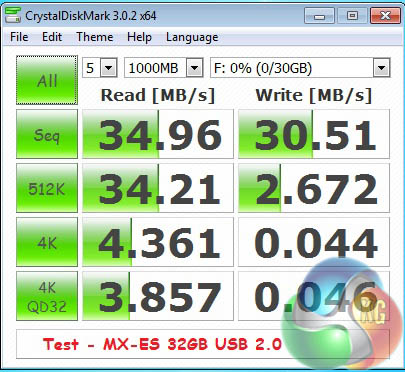
For comparison purposes, here's the Mach Xtreme drive's USB 2.0 results:
The ATTO Disk Benchmark performance measurement tool is compatible with Microsoft Windows. Measure your storage systems performance with various transfer sizes and test lengths for reads and writes. Several options are available to customize your performance measurement including queue depth, overlapped I/O and even a comparison mode with the option to run continuously. Use ATTO Disk Benchmark to test any manufacturers RAID controllers, storage controllers, host adapters, hard drives and SSD drives and notice that ATTO products will consistently provide the highest level of performance to your storage.
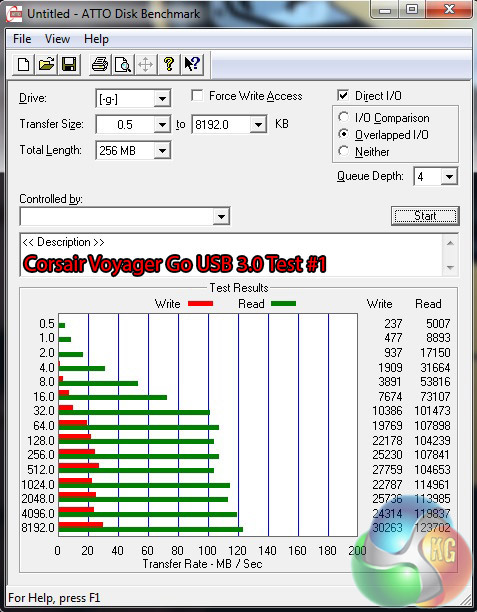
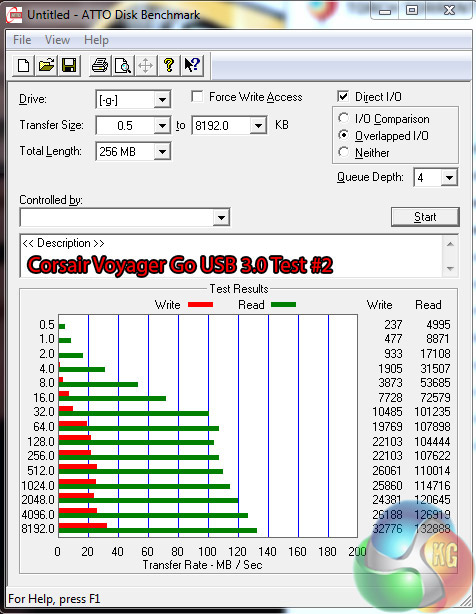
Atto results as expected, are fairly similar, with reasonable read speeds but low write rates.
The Corsair Voyager Go flash drive, is a decent little piece of kit. The read speed is excellent, but write speed is quite limited, indicated by our test results.
To be fair it is not built with pure performance in mind. It is designed to be a tiny, ‘on the go' drive with plenty of backup space. In this regard you are unlikely to be disappointed. Yes there are better performing backup drives readily available, but none of them have a micro-USB port built in, meaning if you want to take something off your phone you would need a cable and a PC.
The Voyager Go performs reasonably well in USB 2.0 and 3.0 environments. While you will get better performance from a USB 3.0 port, don't feel you need to ignore this device just because your system only has the older connectors.
The Go is well priced for such a large capacity. When we factor in the diminutive dimensions, 64GB is a huge capacity and is likely to be more than enough for the average smartphone. If you are running out of space, then the Voyager Go makes for a great low cost addition to your mobile world.
The Corsair Voyager Go is priced between £15 and £39, depending on which size one you want and where you shop for it. The one tested here today, can be found at Ebuyer for £38.76.
Discuss on our Facebook page, over HERE.
Pros
- Compact, tiny!
- Micro USB and USB 3.0 ports built in, no cables required.
- Portable, fits on lanyard, keyring.
- Very affordable.
Cons
- Weak write performance.
KitGuru Says: Portability, ease of use and storage capacity are key selling points. It is a very capable, diminutive drive and definitely worth considering.

No cable could also be a minus if you put music on then it might break in your pocket without a cable.