 KitGuru KitGuru.net – Tech News | Hardware News | Hardware Reviews | IOS | Mobile | Gaming | Graphics Cards


Nvidia's Maxwell GPU architecture has been well-received by enthusiasts and gamers. One of the most promising features for Nvidia has been the architecture's ability to scale positively from low-end to high-end hardware, showing competitive performance and positive power consumption numbers along the way. But the gap between a £100 GTX 750 Ti and £150 GTX 960 is a sizeable one, and it's an area where AMD currently roams freely with the R7 370. Nvidia's counter-weapon: GTX 950.
Held together by the same GM206 GPU found on Nvidia's higher-end GTX 960, albeit with a number of features disabled, the GTX 950 is targeting gamers who want Full HD performance at 60 FPS. While that's not exactly difficult to achieve, the high-to-ultra image quality settings that the GTX 950 is designed to be used with may be a more appealing point that pricks gamers' interest.
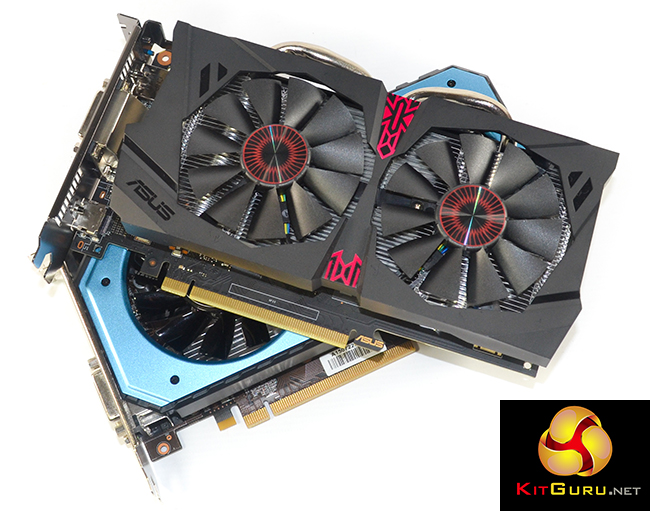
The Asus STRIX Gaming GTX 950 DC2 OC graphics card uses a dual-slot cooler with two 75mm fans. This is a similar solution to what many GTX 950 board partners will be using on their models because there is unlikely to be a vendor shipping Nvidia's reference-style design.
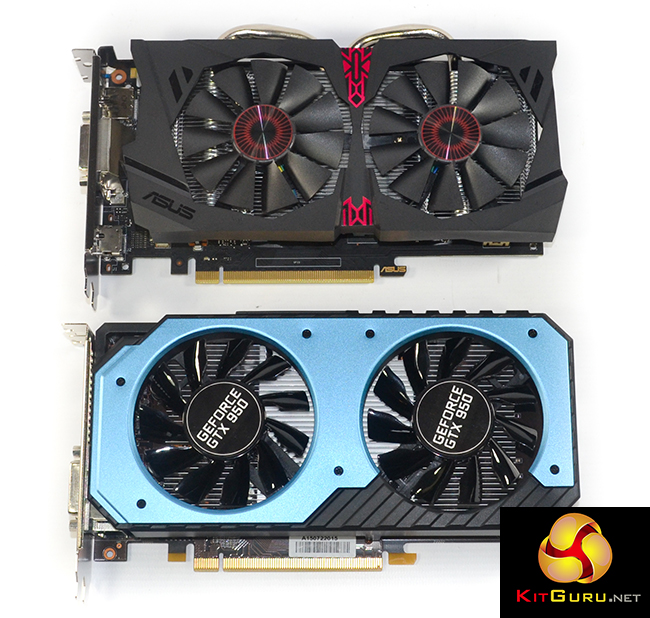
Nvidia says that the GTX 950 is designed to offer the best performance in its class. With an MSRP of £129 and a TDP of 90W, the GTX 950's goal is to beat AMD's similarly-priced R7 370 while using less power to do so. Both in terms of TDP and price, the GTX 950 is sat directly between its GTX 750 Ti and GTX 960 siblings, both of which will remain in Nvidia's current product stack.
| GPU | GeForce GTX 750 Ti (Maxwell) |
GeForce GTX 950 (Maxwell) |
GeForce GTX 960 (Maxwell) |
GeForce GTX 970 (Maxwell) |
GeForce GTX 980 (Maxwell) |
| GPU Codename | GM107 | GM206 | GM206 | GM204 | GM204 |
| Streaming Multiprocessors | 5 | 6 | 8 | 13 | 16 |
| CUDA Cores | 640 | 768 | 1024 | 1664 | 2048 |
| Base Clock | 1020 MHz | 1024 MHz | 1126 MHz | 1050 MHz | 1126 MHz |
| GPU Boost Clock | 1085 MHz | 1188 MHz | 1178 MHz | 1178 MHz | 1216 MHz |
| Total Video memory | 2GB | 2GB | 2GB | 4GB | 4GB |
| Texture Units | 40 | 48 | 64 | 104 | 128 |
| Texture fill-rate | 40.8 Gigatexels/sec | 49.2 Gigatexels/sec | 72.1 Gigatexels/sec | 109.2 Gigatexels/sec | 144.1 Gigatexels/sec |
| Memory Clock | 5400 MHz | 6600 MHz | 7010 MHz | 7000 MHz | 7000 MHz |
| Memory Bandwidth | 86.4 GB/sec | 105.6 GB/sec | 112.16 GB/sec | 224 GB/s | 224 GB/sec |
| Bus Width | 128bit | 128bit | 128bit | 256bit | 256bit |
| ROPs | 16 | 32 | 32 | 56 (following correction) |
64 |
| Manufacturing Process | 28nm | 28nm | 28nm | 28nm | 28nm |
| TDP | 60 Watts | 90 Watts | 120 Watts | 145 Watts | 165 Watts |
On a technical level, the cut-down iteration of the GM206 GPU is, in many areas, effectively 75% of the core used on a GTX 960. The GTX 950 version of the GM206 GPU ships with 768 CUDA cores and 48 texture units. Those numbers are more closely aligned with the GTX 750 Ti version of Nvidia's first-gen Maxwell GM107 core, however specifically focussing on the number of ROPs puts clear daylight between the GTX 950 and its lower-end sibling.
The same 128bit memory interface found on the GTX 960 is present, however that may be less of a potential choking point given the reduced raw horsepower of the GTX 950's cut-down GPU. As was the case with the GTX 960, the same argument for more efficient utilisation of the GM206's 128bit memory interface, in comparison to Kepler, is made by Nvidia.
Clock speeds for the GTX 950 are sliced by comparison to GTX 960 frequencies. The reference core clock is rated at 1024MHz, with a maximum boost speed of 1188MHz. The 2GB of GDDR5 memory is rated to run at 1650MHz (6.6Gbps effective) to produce a bandwidth level of 105.6GB/sec. With that said, most board partners will be unlocking the GM206 core's overclocking potential and shipping their cards with higher, factory-overclocked frequencies.
Asus, for example, ships the STRIX Gaming GTX 950 DC2 OC with a core clock speed of 1165MHz, and rates for a 1355MHz boost frequency, while the memory runs at 1653MHz (6610MHz effective).
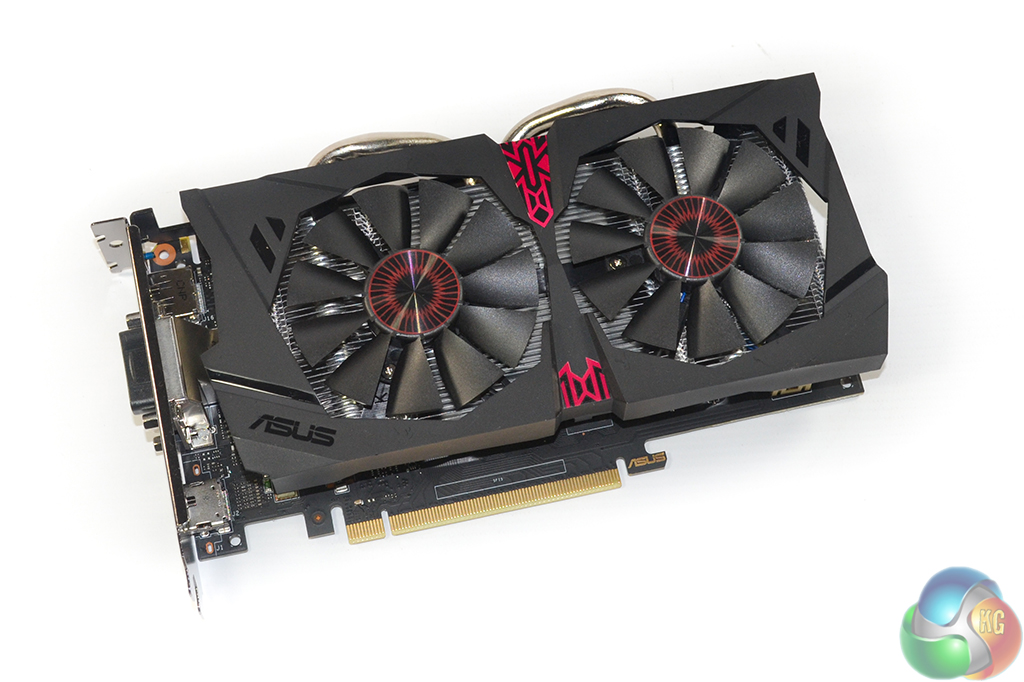
Extending to the GTX 950's features, the card supports the DirectX 12 API at feature level 12.1. A H.265 (HEVC) encoder/decoder engine built into the GPU, along with HDMI 2.0, shout loudly for the GTX 950 to be used inside a gaming HTPC. With the 90W TDP being low enough to comfortably fit inside SFF cases, the ability to output 60Hz video to a 4K TV (most of which do not have DisplayPort connections) is an important feature. HDMI 2.0 is a feature that team red's competitor card cannot offer.
One of the more notable changes between the GTX 75x cards and the GTX 950 is the TDP differential. While the GTX 750 Ti had a 60W TDP, the GTX 950 ups that number to 90W. Approximating TDP as an indicator of power consumption, the 90W rating narrowly tips the GTX 950 into a region where it requires a 6-pin PCIe power connector. This emphasises that Nvidia is focused on gaming performance with its new card, while the GTX 750 Ti, for example, still remains to cater for those wanting a graphics card to run on a PSU without a 6-pin PCIe cable (think Dell, HP, or some SFF units).
You can read more about the GM206 GPU's architecture and feature support in my colleague Allan's GTX 960 review HERE.
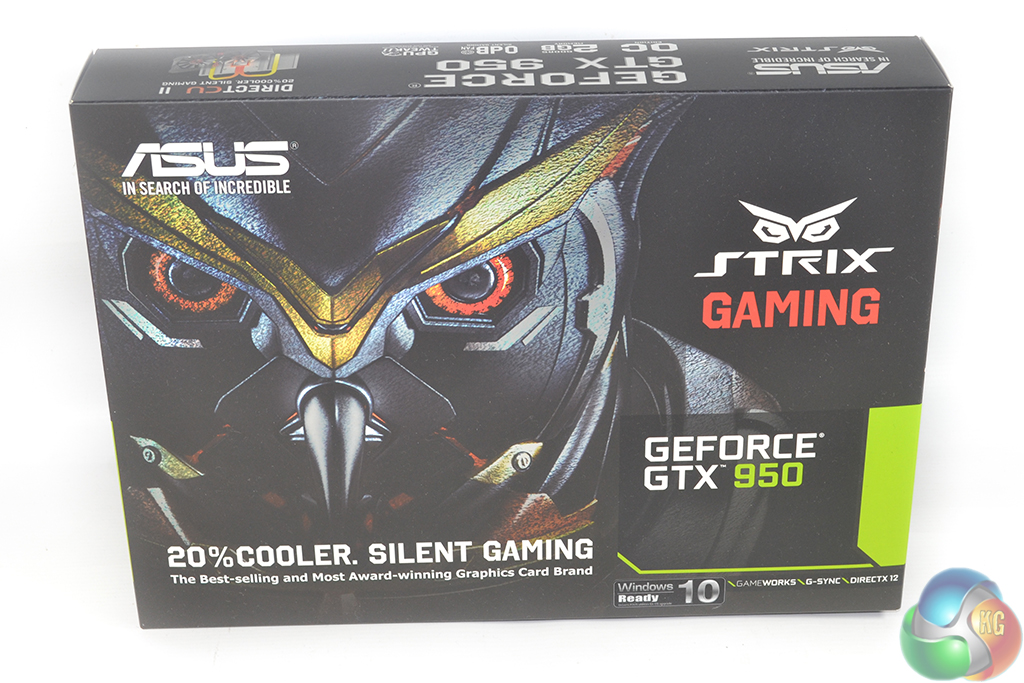
Asus ships the STRIX Gaming GTX 950 DC2 OC in packaging featuring the owl branding. A drivers CD, manual, and sticker form the bundle.
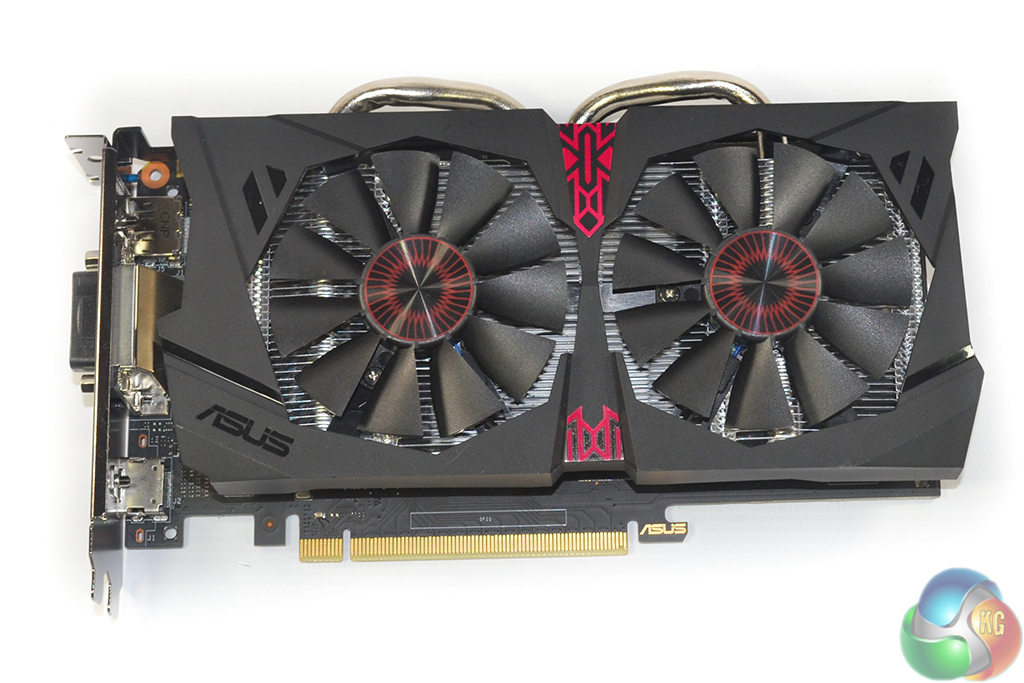

The card measures in at 220mm due to a slight overhang by the DirectCU II cooler. The cooler is a dual-slot form factor and should fit comfortably inside many smaller mATX or gaming mITX cases. Red touches contrast the black plastic shroud.
As many of the latest Nvidia-based cards are able to do, Asus' STRIX GTX 950 can switch its fans completely off when the GPU core runs below a certain temperature. So when you are browsing the web or doing some light work, the cooler's fans enter their 0 dB mode. That is positive for users trying to build a quiet system that also has good cooling performance while gaming.
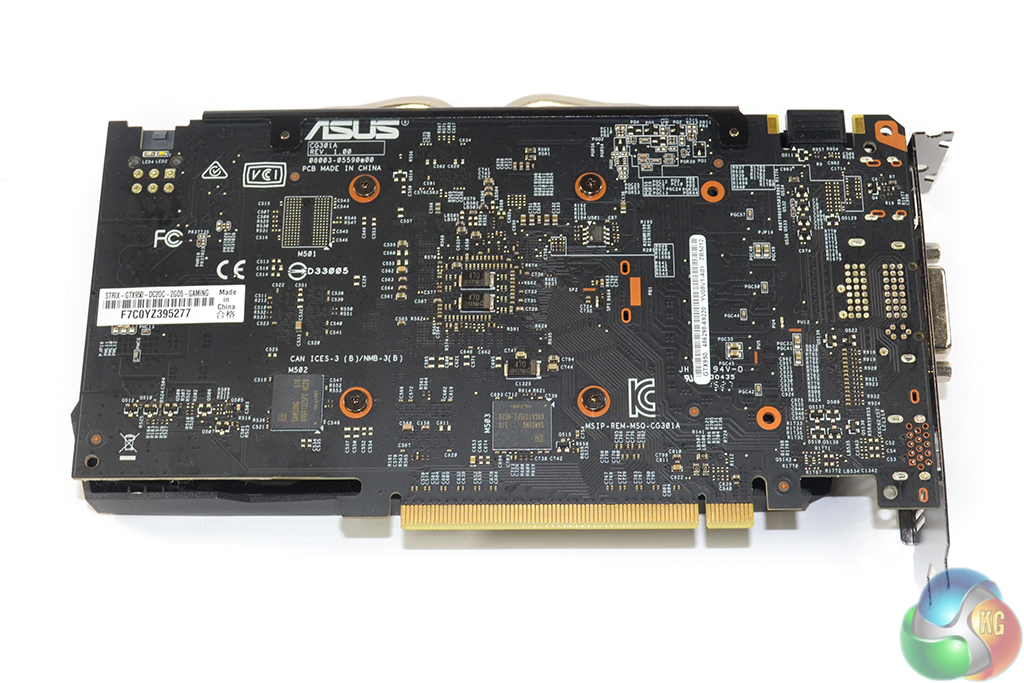
Asus builds the STRIX GTX 950 using the company's AUTO-EXTREME Technology, which is marketing speak for the automated manufacturing process. The matte black PCB will fit a system's colour-coded appearance well.
There is no backplate on Asus' card, although that is to be expected at this price point and when power circuitry cooling is not required.
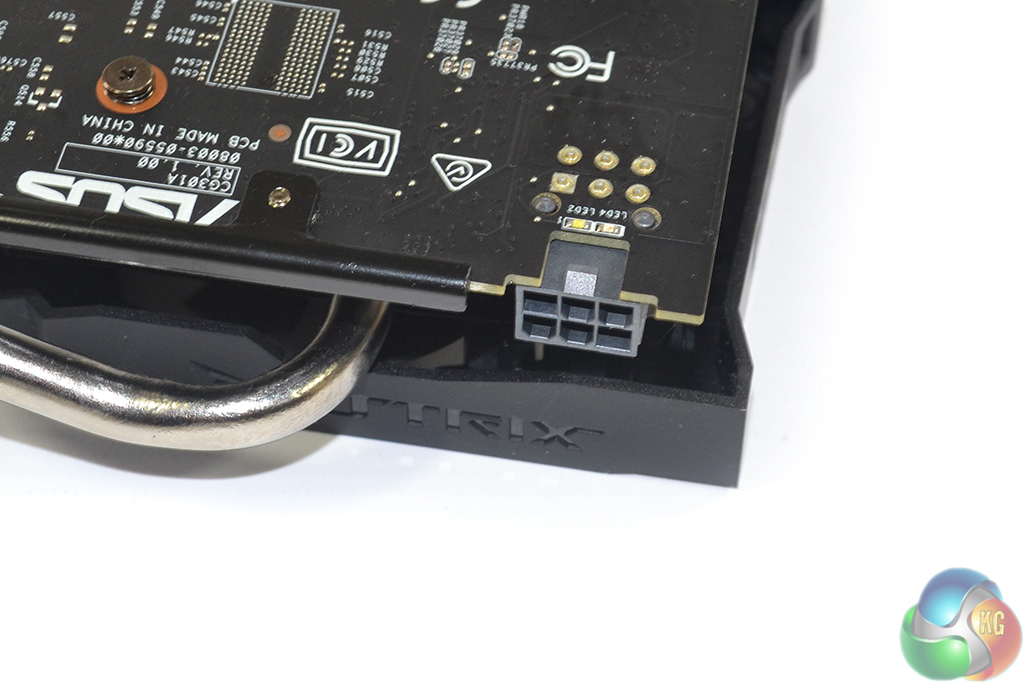
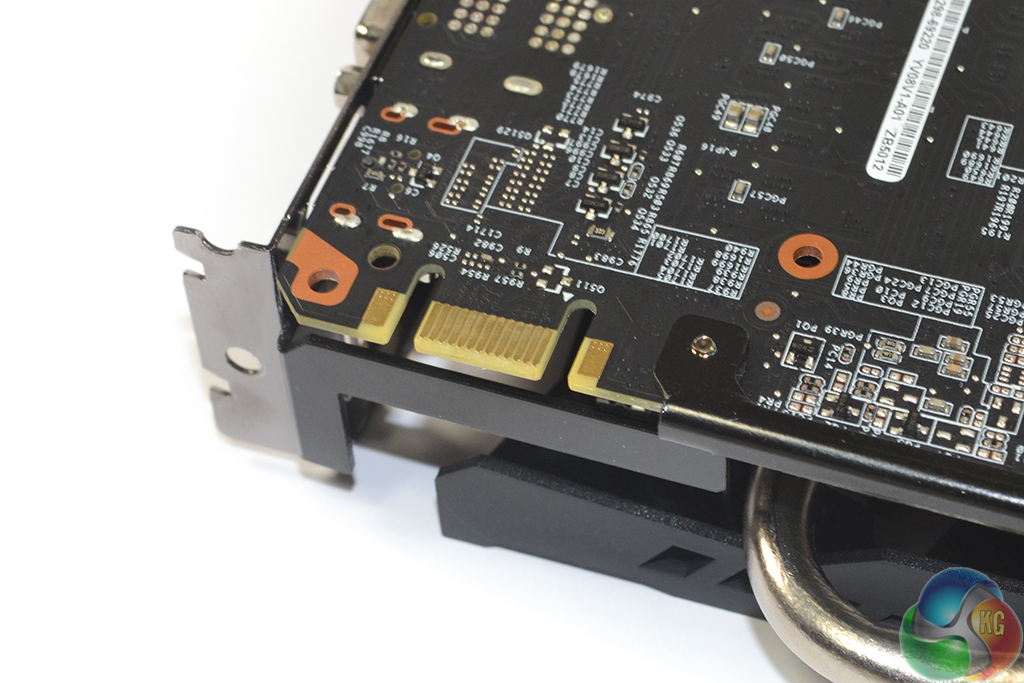
With the GTX 950 reference card being rated for a 90W TDP, it comes as no surprise that we see a single 6-pin power connector. The GTX 750 and GTX 750 Ti did not use 6-pin power connectors, which made them ideal for HTPC usage or users who have a decent quality PSU but without the relevant PCIe power cable (I'm looking at you, Dell and HP users).
It seems that Nvidia settled on the 90W TDP and sacrificed the lack of power connector in order to situate the GTX 950 above the GTX 750 Ti in terms of performance. Despite requiring a PCIe cable, the power draw is unlikely to be a problem even for gamers with a relatively inexpensive PSU. Asus uses the power delivery headroom to overclock the GPU core frequency by a healthy margin.
A single SLI finger points at 2-way SLI support. A white or red LED placed above the power connector indicates whether the 6-pin cable is attached while the system has power.
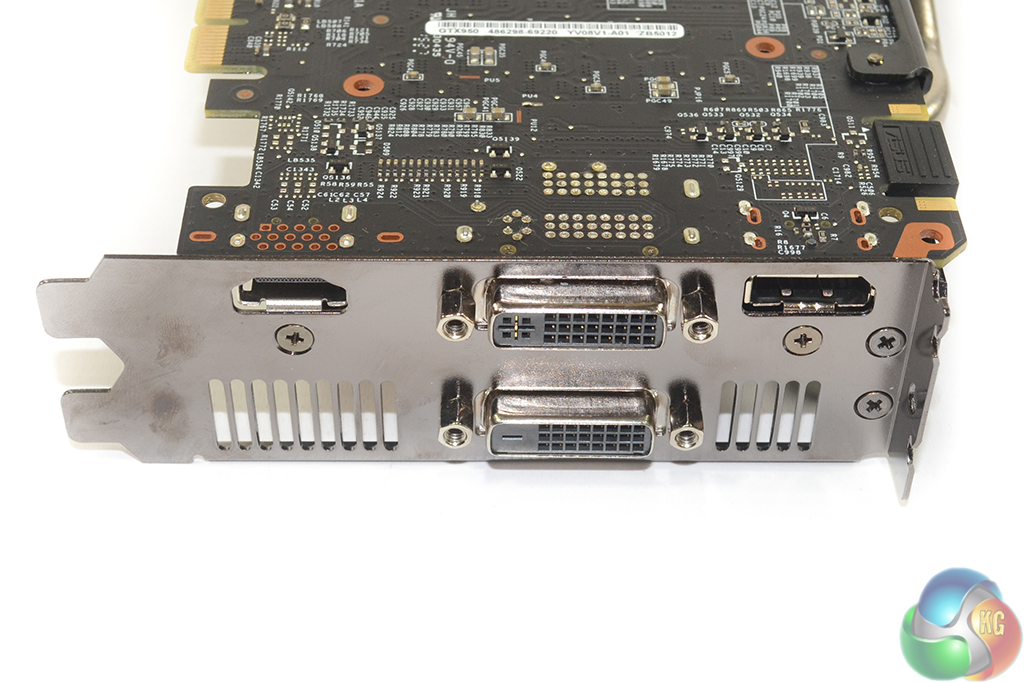
Dual-link DVI-D, DVI-I, HDMI 2.0, and DisplayPort 1.2 are the video outputs. I am happy to see the inclusion of a DVI-I connection, as many budget gamers looking at this card may have a secondary monitor that uses an older VGA connection. HDMI 2.0 which is capable of a 4K resolution at 60Hz will be welcomed by HTPC users and those who may have a pair of 4K monitors. AMD's competitor does not support HDMI 2.0, which is a real concern for media enthusiasts with a 4K TV.
The GTX 950 GPU supports usage of four simultaneous display outputs.
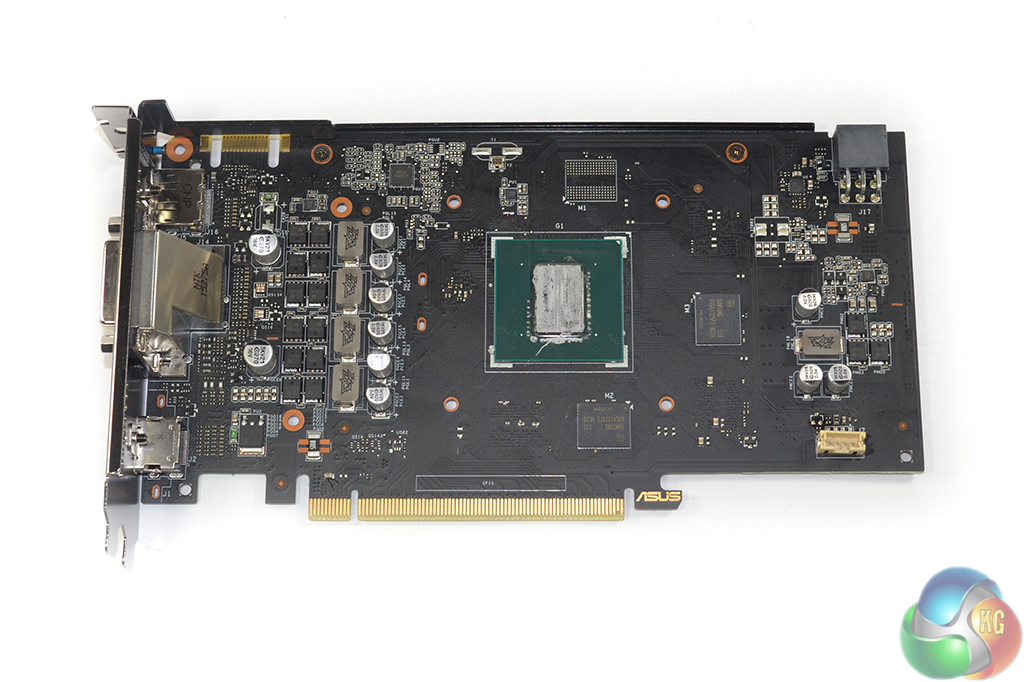
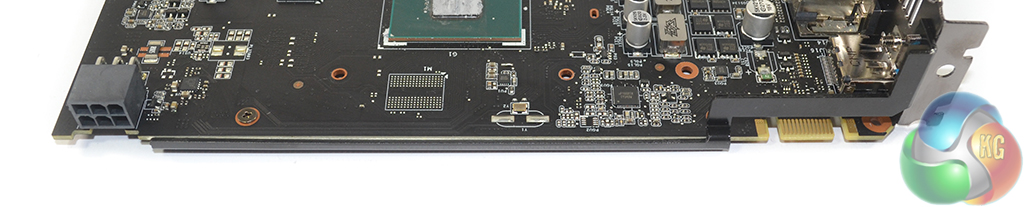
The small PCB has a very clean look to it thanks to Asus' automated manufacturing process. A pair of 4Gb Samsung GDDR5 memory chips (marked K4G41325FC) are found on either side of the PCB to form the 2GB VRAM capacity. Asus clocks the card's memory 3MHz above the reference frequency of 1650MHz. Two unused spaces for memory chips are visible, so this implies that Asus is recycling its PCB design, or Nvidia has a slightly tweaked card in the works.
A 5-phase power delivery system (four for the GPU and one for memory/operation) consisting of Super Alloy Power II chokes, capacitors, and MOSFETs feeds the card. The chokes are touted to decrease buzzing thanks to their concrete materials, and I can confirm that coil whine was not an issue, at all, with my sample.
Asus smartly uses a metal brace which is leveraged against the expansion slot bracket in order to minimise PCB flex.
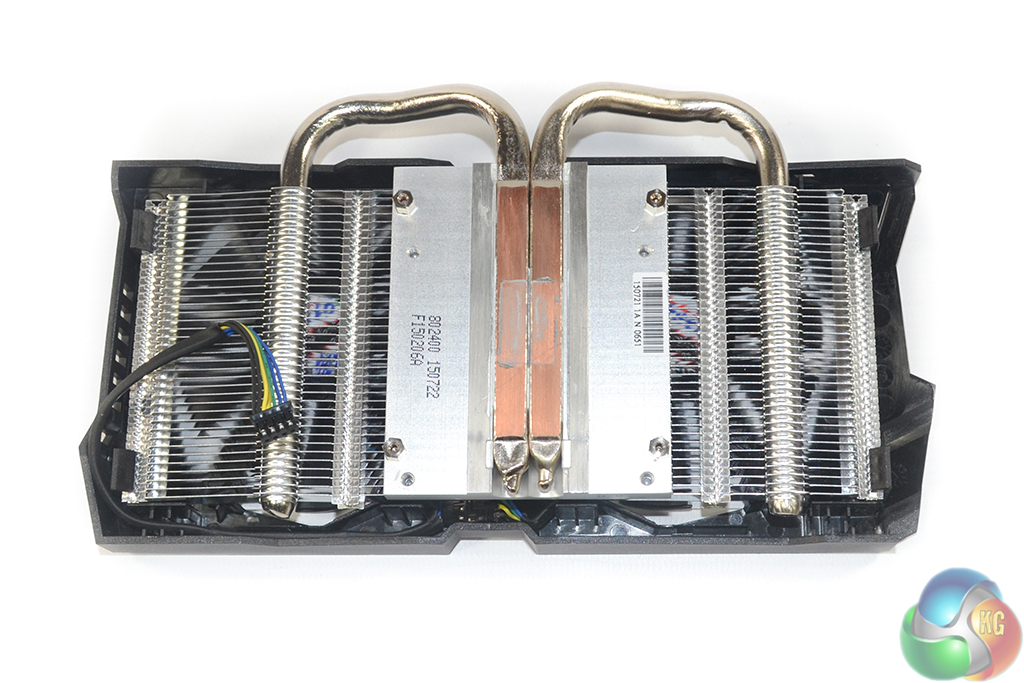
Two 8mm direct-touch copper heatpipes transfer thermal energy directly from the GPU to an aluminium fin array with a 1725.56cm2 dissipation area. The pair of fans, which we measured at 75mm blade-area diameter, feature Asus' patented pressure-enhancing design. According to Asus, its engineers have borrowed a few tricks from the aerospace industry in order to create 105% more air pressure from the wing-blade design.
The approach effectively uses a hump (which we would refer to as a camber when used on an aircraft wing/aerofoil) and a twist in order to drive air where the designers deem fit. An ability to drive the air to relevant areas of the surrounding zone allows the pressure differential to be optimised in an effective manner. Higher pressure, essentially, leads to greater heat transfer capacity of the fluid and therefore better temperature performance of the overall cooling system.
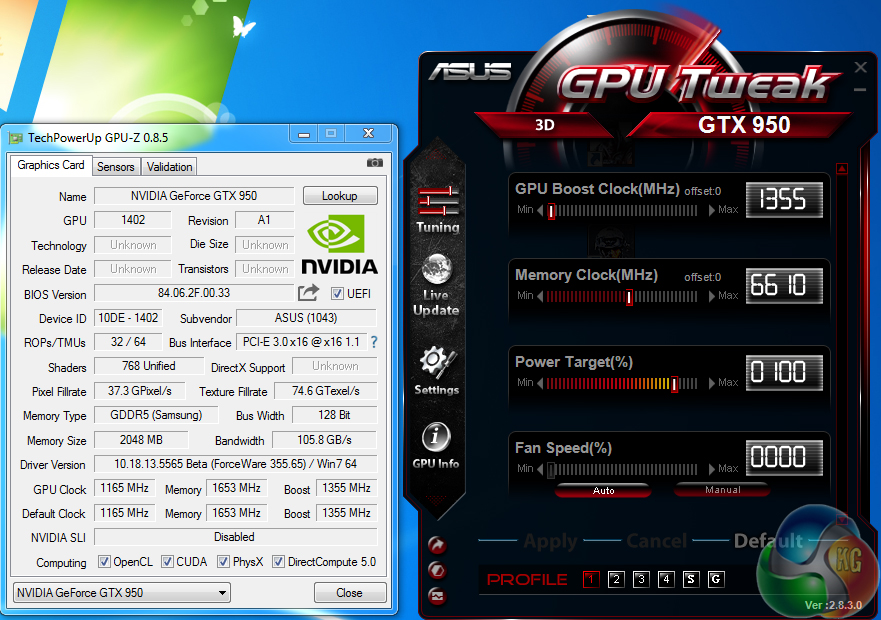
Asus ships the STRIX GTX 950 DC2 OC with a factory-overclocked setting applied. The core is rated to run at 1165MHz (141MHz greater than reference) with boosts up to 1355MHz (167MHz greater than reference), while memory is overclocked by a minor 10MHz to 6610MHz effective. We recorded the core boosting as high as 1392MHz over extended periods of gaming in our well-cooled system.
We know that the GM206 GPU has far more headroom in it than reference or board partner speeds would suggest, so we pushed to see how far we could overclock Asus' STRIX Gaming GTX 950 DC2 OC card.
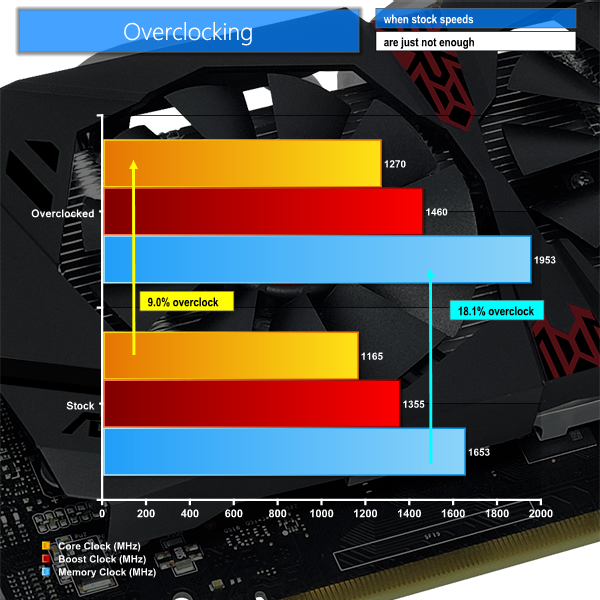
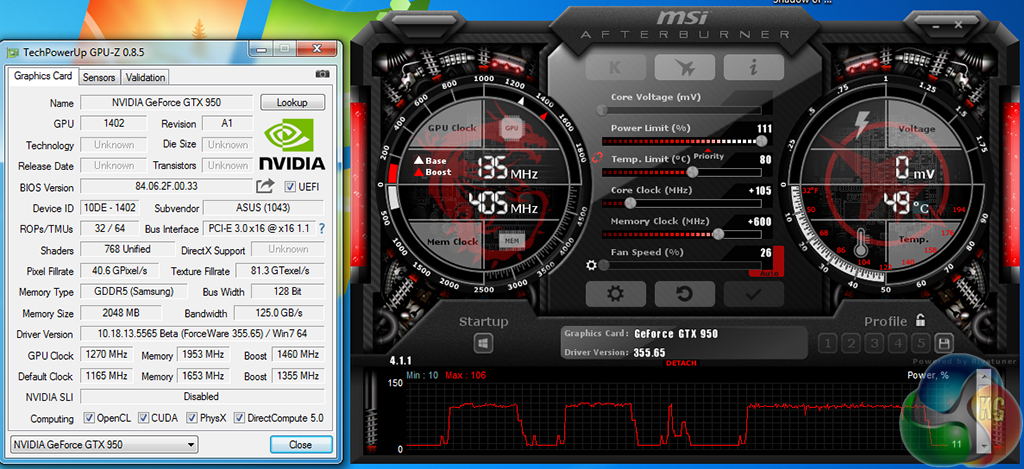
We managed to add a further 105MHz to the core frequency of Asus' STRIX GTX 950 DC2 OC card. This resulted in a maximum recorded (in-game) boost frequency of around 1535MHz. Memory overclocking was what we would expect from Samsung GDDR5 chips on Nvidia's cards – we managed 1953MHz (7812MHz effective) comfortably.
For reference, the Palit GTX 950 StormX Dual sample that we also received was able to hit a maximum in-game core boost frequency of around 1474MHz, with its memory running at 1953MHz (7812MHz effective).
Overclocking headroom is one of Nvidia's biggest strengths with the Maxwell chips. Board partners are able to successfully ship cards that are factory-overclocked to the point where their realistic performance segment is raised.
For the review today we are using the latest Nvidia 355.65 drivers which were supplied with the GTX 950 cards by Nvidia themselves. All Nvidia hardware was tested using this driver in order to eliminate performance discrepancies relating to newer driver updates. The AMD cards were all tested with the latest Catalyst 15.7.1 driver.
Unfortunately we could not gather comparison data for the AMD R7 370 graphics card. We spent more than 20 hours in the two days preceding GTX 950 launch trying to fix an issue with two samples of an identical R7 370 card, but to no avail. Instead, we decided to use an old-trusty 2GB Radeon HD 7850 card and manually overclock it to reference R7 370 speeds – 975MHz core and 1400MHz memory. Why the Radeon 7850? Because that is effectively the GCN 1.0 ‘Pitcairn' GPU upon which the AMD's R7 370 (now called Trinidad GPU) is based.
We are not saying that an overclocked Radeon 7850 is an R7 370 (there are some under-the-hood tweaks to memory speed and power management), but the results of the overclocked 7850 can be seen as a form of interpretation of rough performance levels for an R7 370 card. It is worth noting, however, that many R7 370 cards ship with a factory overclock that puts their core frequency above 1GHz. Our old Radeon 7850 simply could not push far enough for us to record performance with a 1GHz+ core clock.
Test System
- Processor: Intel Core i7 5960X ES (4.4GHz OC).
- Memory: 16GB (4x 4GB) Corsair Vengeance LPX 3200MHz DDR4.
- Motherboard: Asus X99-Deluxe.
- System Drive: 500GB Samsung 840.
- CPU Cooler: Corsair H100i.
- Case: NZXT Phantom 630.
- Power Supply: Seasonic Platinum 1000W.
- Operating System: Windows 7 Professional with SP1 64-bit.
Targeting 1920×1080 gamers, we would expect cards in this price range to offer the 60 FPS standard using high or maximum image quality settings. So those are the settings that we will be using in our games.
We try to paint a clear picture of the market by including performance data from Nvidia's higher-end GTX 960 and lower-end GTX 750 Ti. These cards sit either side of the GTX 950 market position. From Team Red, an R9 380 acts as the step-above comparison, while our Radeon 7850 overclocked to R7 370 frequencies gives an insight into the performance of the GTX 950's closet competitor.
Graphics cards:
- Palit GTX 750 Ti StormX Dual 2GB (1202MHz core / 1281MHz boost / 1502MHz memory)
- Palit GTX 960 Super JetStream 2GB (1279MHz core / 1342MHz boost / 1800MHz memory)
- Sapphire R9 380 Nitro 4GB (985MHz core / 1450MHz memory)
- HIS Radeon HD 7850 2GB overclocked to reference R7 370 frequencies to give an insight into the R7 370 graphics card (975MHz core / 1400MHz memory)
Software:
Unigine Heaven Benchmark
3DMark
Fraps
Steam Client
FurMark
MSI Afterburner
TechPowerUp GPU-Z
Games:
Battlefield 4
Bioshock Infinite
Grand Theft Auto V
Metro: Last Light
Middle Earth: Shadow of Mordor
Tomb Raider
Game descriptions edited with courtesy from Wikipedia.
3DMark is an essential tool used by millions of gamers, hundreds of hardware review sites and many of the world’s leading manufacturers to measure PC gaming performance.
Futuremark say “Use it to test your PC’s limits and measure the impact of overclocking and tweaking your system. Search our massive results database and see how your PC compares or just admire the graphics and wonder why all PC games don’t look this good.
To get more out of your PC, put 3DMark in your PC.”
Unfortunately we could not run the 3DMark tests using our overclocked Radeon 7850 graphics card as doing so forced the clock speed to revert to their reference levels. This seems to be a bug that was isolated to 3DMark, as all other games and benchmarks run at the fully overclocked speeds.
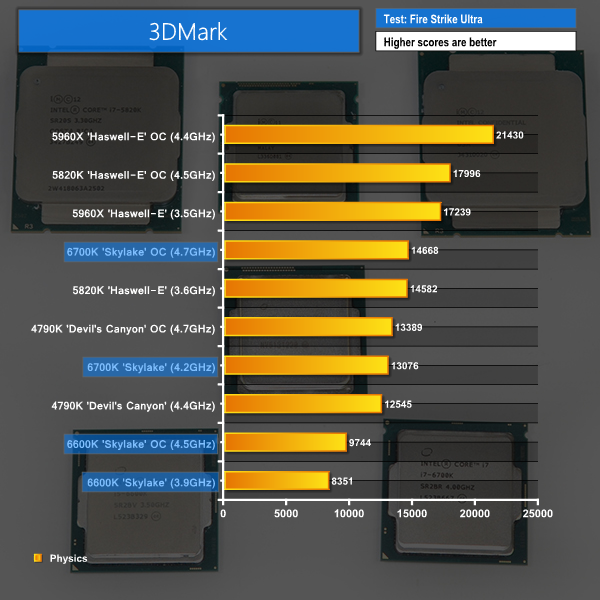
3DMark positions Asus' factory-overclocked GTX 950 exactly where Nvidia intended the GPU to lie. The card's Graphics score of almost 6700 points is just a little closer to overclocked GTX 960 performance than it is to factory-overclocked GTX 750 Ti numbers.
Looking at the out-of-the-box numbers for Palit's GTX 950 card, it is clear how much effect a core overclock and higher boost frequency have on the performance of Maxwell chips. Applying a heavy overclock to Asus STRIX GTX 950 takes it to within 10% of the performance of a factory-overclocked GTX 960.
Unigine provides an interesting way to test hardware. It can be easily adapted to various projects due to its elaborated software design and flexible toolset. A lot of their customers claim that they have never seen such extremely-effective code, which is so easy to understand.
Heaven Benchmark is a DirectX 11 GPU benchmark based on advanced Unigine engine from Unigine Corp. It reveals the enchanting magic of floating islands with a tiny village hidden in the cloudy skies. Interactive mode provides emerging experience of exploring the intricate world of steampunk. Efficient and well-architected framework makes Unigine highly scalable:
- Multiple API (DirectX 9 / DirectX 10 / DirectX 11 / OpenGL) render
- Cross-platform: MS Windows (XP, Vista, Windows 7) / Linux
- Full support of 32bit and 64bit systems
- Multicore CPU support
- Little / big endian support (ready for game consoles)
- Powerful C++ API
- Comprehensive performance profiling system
- Flexible XML-based data structures
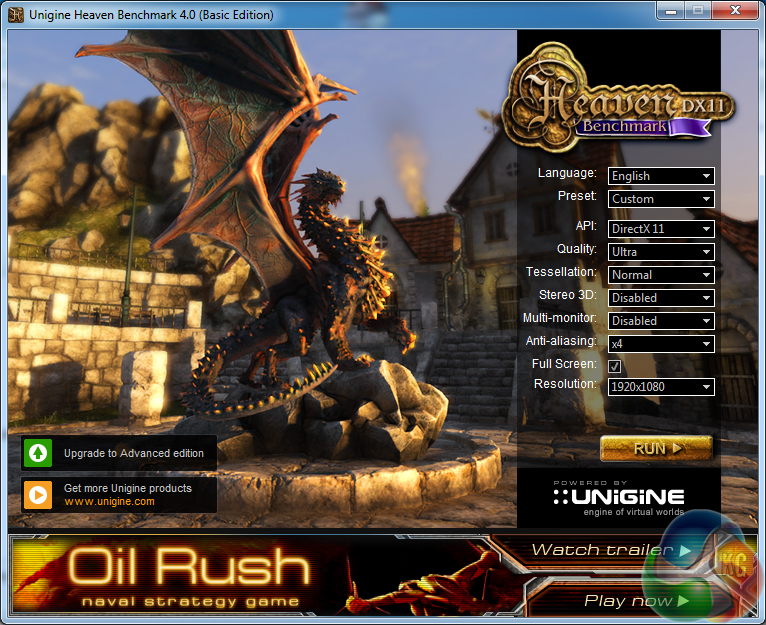
We set Quality to ‘Ultra', Tessellation to ‘Normal', Anti Aliasing to 4x and the resolution to 1920×1080 (1080p).

Positive numbers are shown by the GTX 950 in Unigine's Heaven benchmark. The STRIX-branded card is able to achieve an average frame rate of almost 40 FPS using our demanding test settings.
Battlefield 4 ’s single-player Campaign takes place in 2020, six years after the events of its predecessor. Tensions between Russia and the United States have been running at a record high, due to a conflict between the two countries that has been running for the last six years. (Wikipedia).
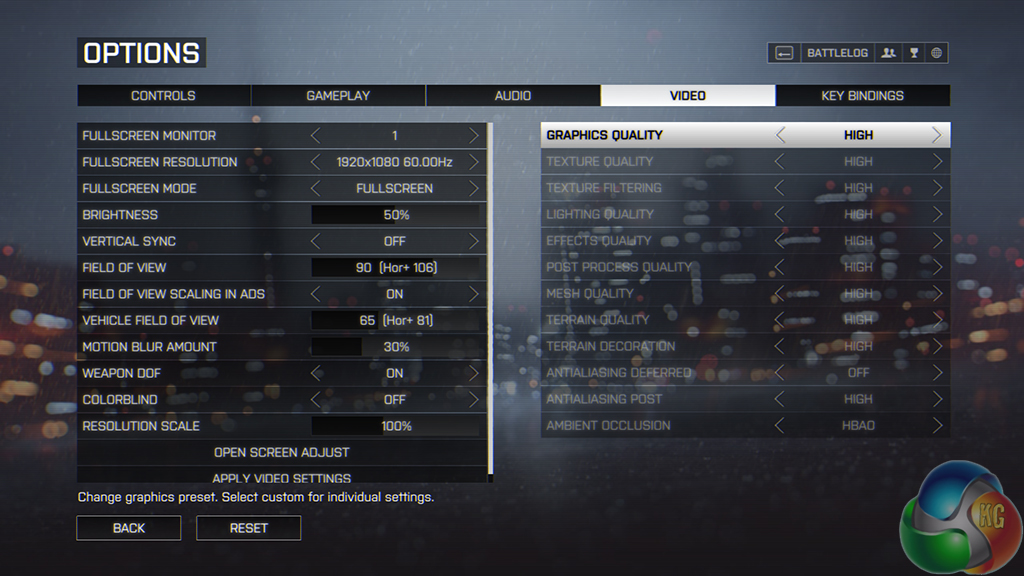
We opted for Battlefield 4's High IQ preset and did not apply AA in order to make the 60 FPS target obtainable for these cards. Our frame rates are recorded using a section of the game.

Battlefield 4 runs smoothly on Asus' STRIX GTX 950 when using the game's High image quality settings. A healthy clock boost over the reference GTX 950 setting widens the gap between Asus' GM206-based card and the performance numbers that an overclocked Radeon 7850 put in.
Applying a hefty manual overclock to the GTX 950 takes its performance to within touching distance of Sapphire's R9 380 Nitro graphics card and Palit's factory-overclocked GTX 960. The 2GB VRAM capacity of the GTX 950 did not present any issues in our testing of Battlefield 4's campaign mode.
Set in 1912, in Bioshock Infinite, players assume the role of former Pinkerton agent Booker DeWitt, sent to the flying city of Columbia on a rescue mission. His target? Elizabeth, imprisoned since childhood.
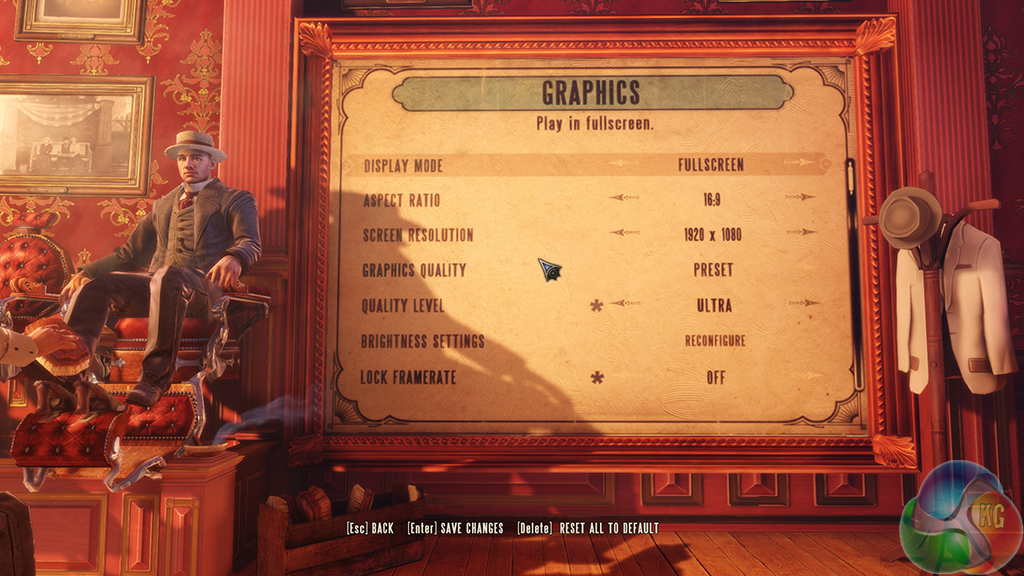
Bioshock Infinite is set to its highest image quality settings. We test a section of the game.
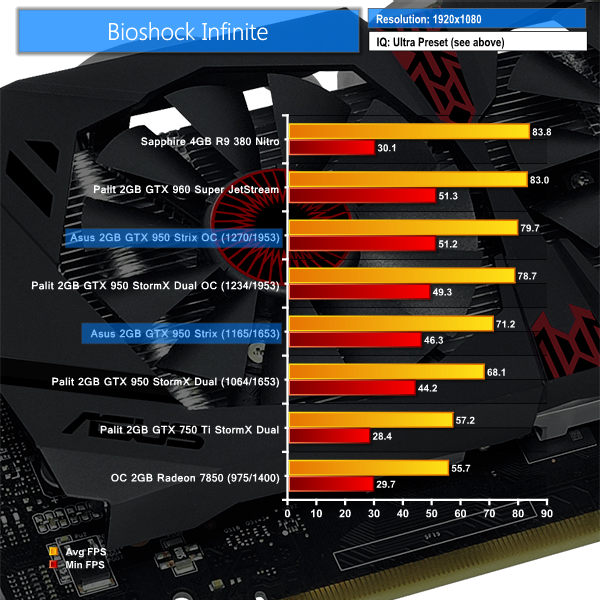
Using the GTX 950, Bioshock Infinite can be played smoothly at 1920×1080 with all image quality settings at maximum levels.
Asus' STRIX GTX 950 is, on average, 3 FPS faster than the lower-clocked Palit comparison. Using a 105MHz boost in core frequency, and with the memory clock set at 1953MHz, a healthy gain of 12% is registered for the overclocked Asus STRIX GTX 950.
Grand Theft Auto V is an action-adventure game played from either a first-person or third-person view. Players complete missions—linear scenarios with set objectives—to progress through the story.
Outside of missions, players can freely roam the open world. Composed of the San Andreas open countryside area and the fictional city of Los Santos, the world of Grand Theft Auto V is much larger in area than earlier entries in the series.
The world may be fully explored from the beginning of the game without restrictions, although story progress unlocks more gameplay content. (Wikipedia).
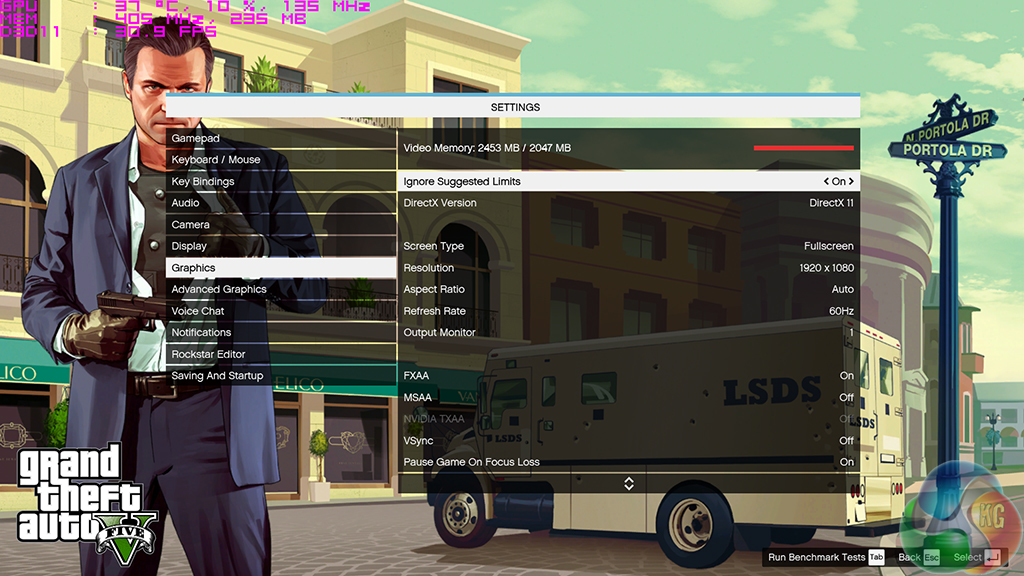
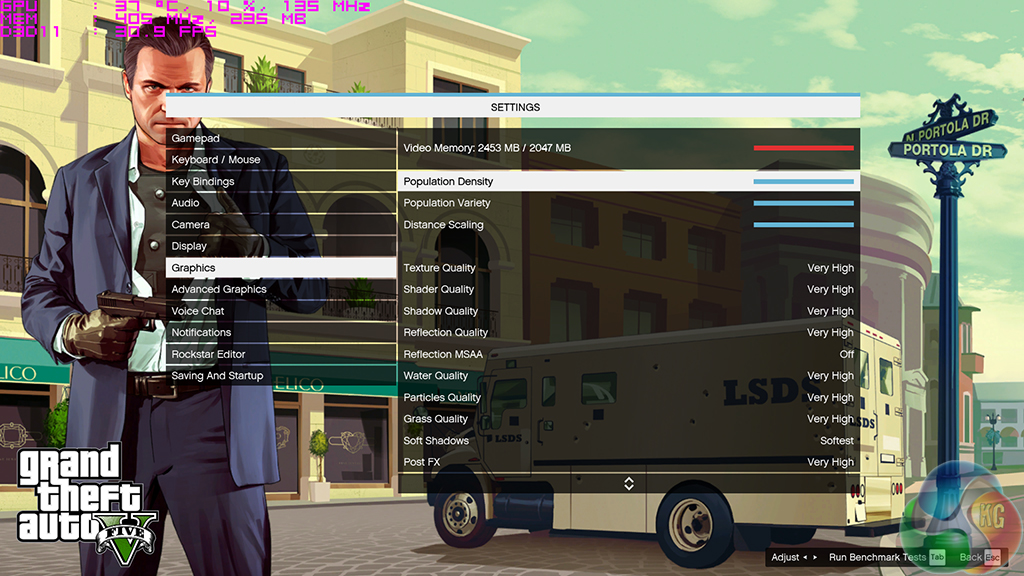
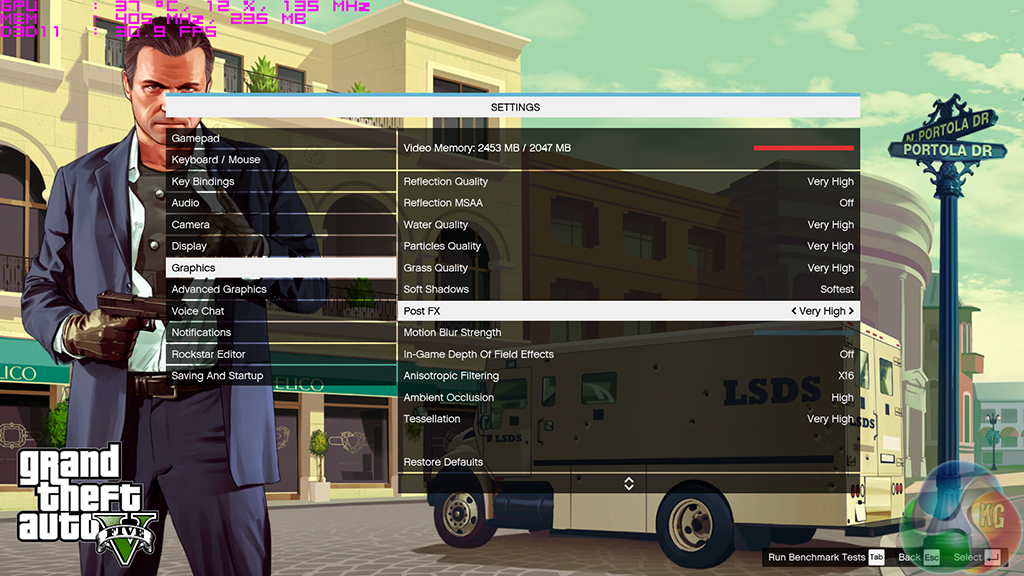
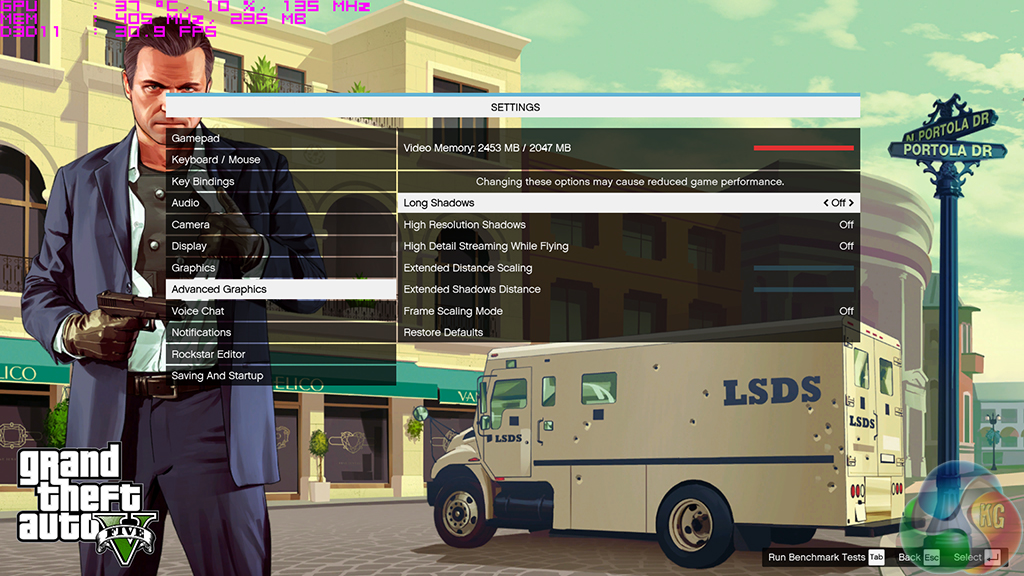
We set all of GTA V's primary settings to the Very High level (ambient occlusion was High). MSAA was turned off as it deals a harsh blow to the graphics cards' frame rates. We saw the game use over 3GB of VRAM on a 4GB graphics card, however squeezing the files into a 2GB frame buffer did not incur a noticeable performance penalty. The built-in benchmark is used to gather performance data.
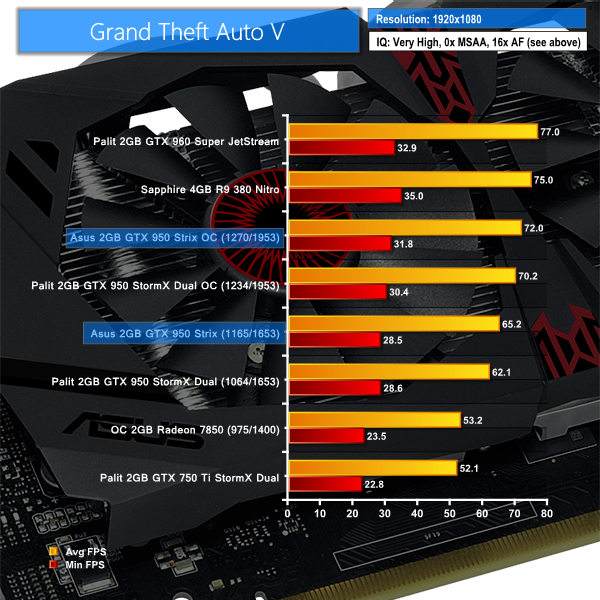
The magical 60 FPS mark is surpassed in GTA V using the GTX 950. Being able to push the game at Very High image quality settings and a 1920×1080 resolution is solid performance in itself. GTA V scales well with hardware performance, although it can be a difficult game to run when settings start getting turned up.
Our overclocked Radeon 7850 solution is around 18% slower than Asus' factory-overclocked GTX 950, and that forces the AMD card's performance below an average of 60 FPS. Manually overclocking the Asus STRIX GTX 950 yields a 10% improvement in the average frame rate, while also bumping the minimums up above 30 FPS.
While extra VRAM would have quickly been utilised by GTA V's engine, the GTX 950's 2GB frame buffer was able to cope without noticeable stutter or drop-outs. The only 4GB card in today's comparison – Sapphire's 4GB R9 380 Nitro – shows the benefit that a larger serving of VRAM can potentially have on GTA V's minimum frame rates.
Metro: Last Light takes place one year after the events of Metro 2033, proceeding from the ending where Artyom chose to call down the missile strike on the Dark Ones. The Rangers have since occupied the D6 military facility, with Artyom having become an official member of the group. Khan, the nomad mystic, arrives at D6 to inform Artyom and the Rangers that a single Dark One survived the missile strike.
4A Games’ proprietary 4A Engine is capable of rendering breathtaking vistas, such as those showing the ruined remnants of Moscow, as well as immersive indoor areas that play with light and shadow, creating hauntingly beautiful scenes akin to those from modern-day photos of Pripyat’s abandoned factories and schools.
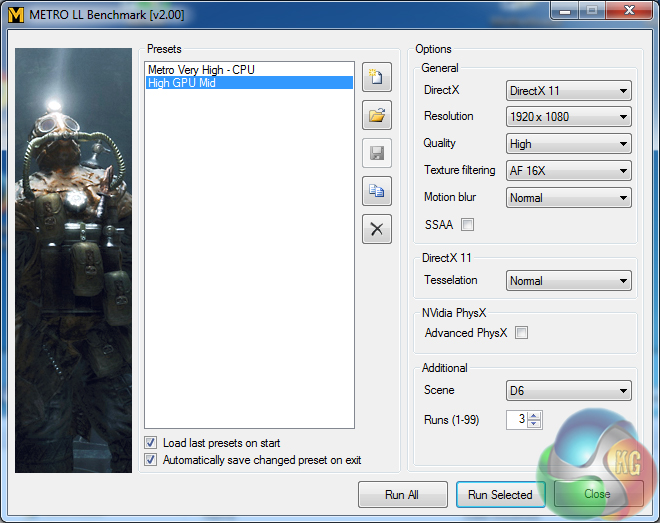
We opted for the High quality preset in the ever-demanding Metro: Last Light benchmark. AA was kept off, AF was applied as 16x, and tessellation was set to normal.
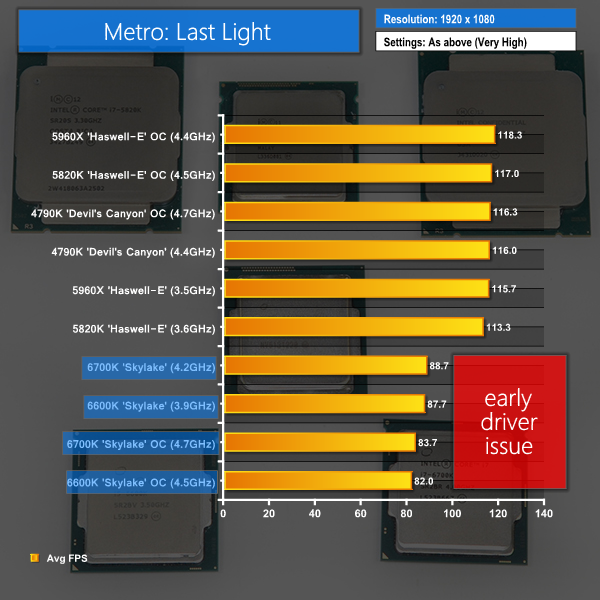
The ever-demanding Metro: Last Light benchmark is a tough one for graphics cards to overcome. Asus' GTX 950 manages to brush against the 60 FPS mark for average frame rates. Don't take too much notice of any card's minimum frame rate because particularly low numbers are a trend for the strenuous Metro: LL benchmarking tool.
The overclocked Radeon 7850 has a tough time trying to keep up with even Palit's lower-clocked GTX 950 solution.
In Middle-earth: Shadow of Mordor, the player plays as a ranger by the name of Talion who has wraith-like abilities.In this open world video game, players have the freedom to pursue side quests and roam around the world.
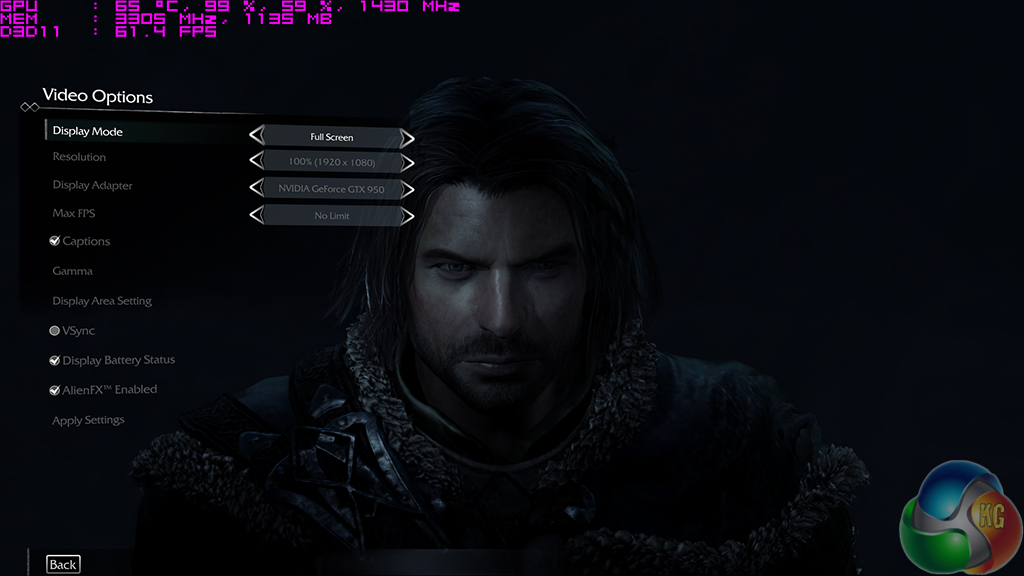
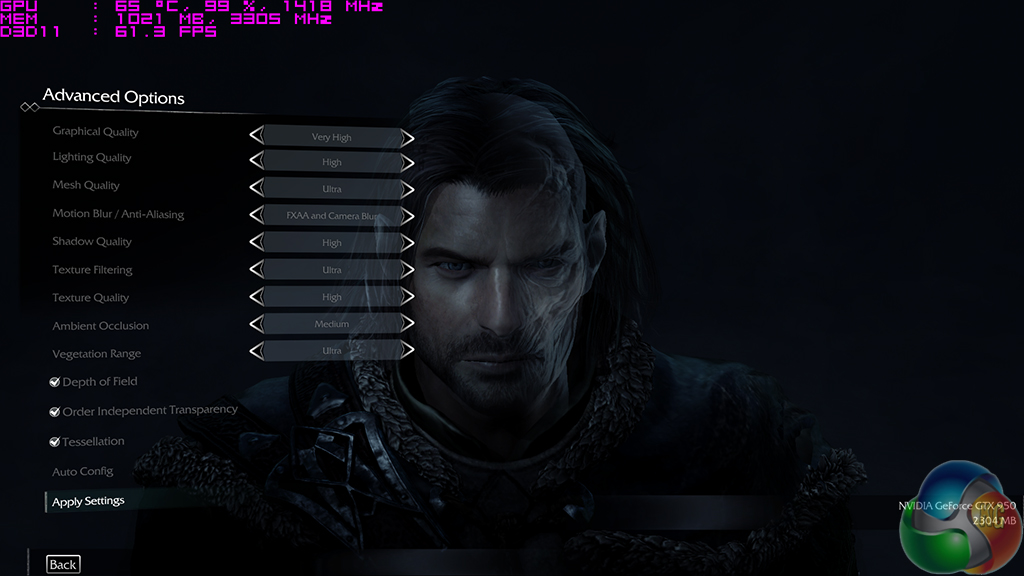
We used Shadow of Mordor's Very High image quality preset and test using the built-in benchmark.
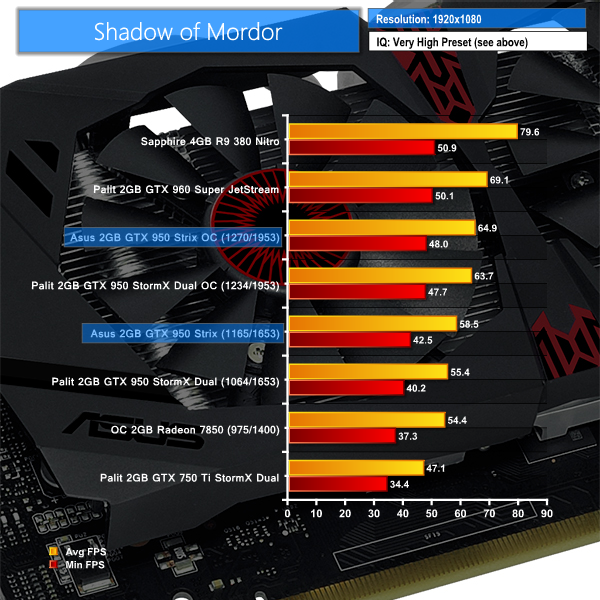
Middle Earth: Shadow of Mordor is a game where AMD hardware scores well. Asus' 141MHz boost over the GTX 950 reference core clock puts breathing room between itself and a Radeon 7850 overclocked to R7 370 frequencies.
Manually dialling the high core and memory overclock that our STRIX GTX 950 sample achieved results in the 60 FPS mark being surpassed and GTX 960 performance being neared. Minimum frame rates above 40 FPS are also positive to see.
Tomb Raider received much acclaim from critics, who praised the graphics, the gameplay and Camilla Luddington’s performance as Lara with many critics agreeing that the game is a solid and much needed reboot of the franchise. Much criticism went to the addition of the multiplayer which many felt was unnecessary. Tomb Raider went on to sell one million copies in forty-eight hours of its release, and has sold 3.4 million copies worldwide so far. (Wikipedia).
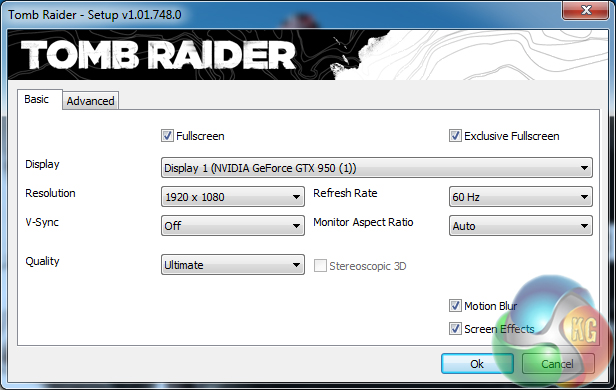
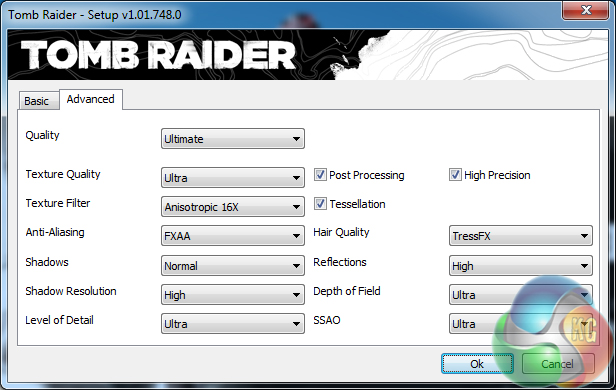
We test using the Ultimate quality profile enabled. The in-game benchmark is used.
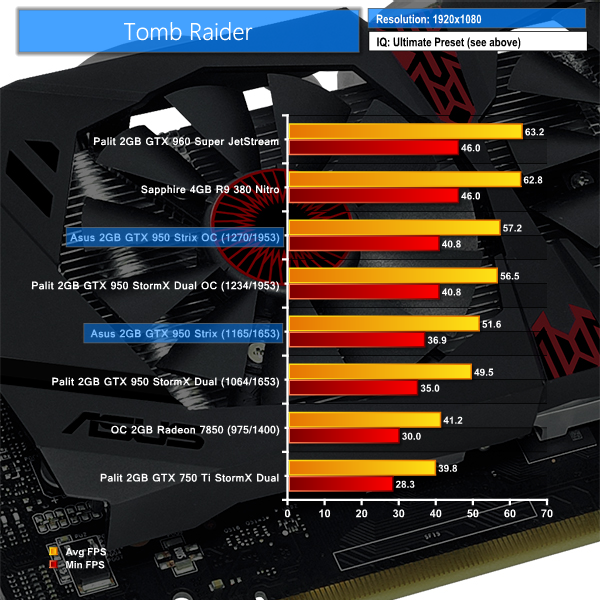
Tomb Raider's Ultimate quality profile is a tough test for graphics horsepower. The factory-overclocked GTX 950 board from Asus manages almost 52 FPS, while applying a sizeable manual overclock takes its performance to within 5% of the 60 FPS level.
Our manually overclocked Radeon 7850 graphics card scores an average frame rate of around 41 FPS, with the minimum level recorded as 30.0 FPS.
The tests were performed in a controlled room with temperatures maintained at a constant 25c – a comfortable summer environment for the majority of people reading this. Idle temperatures were measured after sitting at the desktop for 15 minutes. Gaming measurements were acquired by repeating the GTA V benchmark for 15 minutes and taking the stabilised reading. We also have included Furmark results, recording the core temperature after a 15 minute stress test. All fan settings were left on automatic.
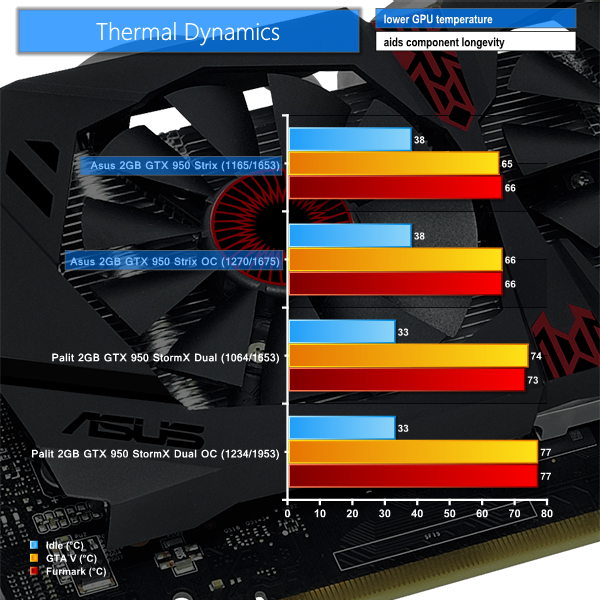
The dual-fan DirectCU II cooler manages to keep Asus' STRIX card well cooled. The core temperature stays below 40°C when idling, despite both fans entering their 0 dB mode and switching off completely.
We did not see load temperatures for the GPU core exceed 70°C throughout our testing. There should be no concerns of thermal throttling (which will kick in around the 80°C mark for this GPU) or lower-than-desired boost clock performance.
We measure graphics card acoustic emissions using a dedicated, passively-cooled system. The fan speed level at each point of interest is recorded when the card is in our test system. This fan speed is then manually set using the passively-cooled system and the noise output is recorded.
We measure at a distance of around 12 inches from the card and 12 inches above it. While this is arguably not the most realistic test scenario for acoustic emissions, it allows us to record perceivable difference in the cards' noise outputs while staying within the operating range of our recording hardware.
KitGuru noise guide
10dBA – Normal Breathing/Rustling Leaves
20-25dBA – Whisper
30dBA – High Quality Computer fan
40dBA – A Bubbling Brook, or a Refrigerator
50dBA – Normal Conversation
60dBA – Laughter
70dBA – Vacuum Cleaner or Hairdryer
80dBA – City Traffic or a Garbage Disposal
90dBA – Motorcycle or Lawnmower
100dBA – MP3 player at maximum output
110dBA – Orchestra
120dBA – Front row rock concert/Jet Engine
130dBA – Threshold of Pain
140dBA – Military Jet takeoff/Gunshot (close range)
160dBA – Instant Perforation of eardrum
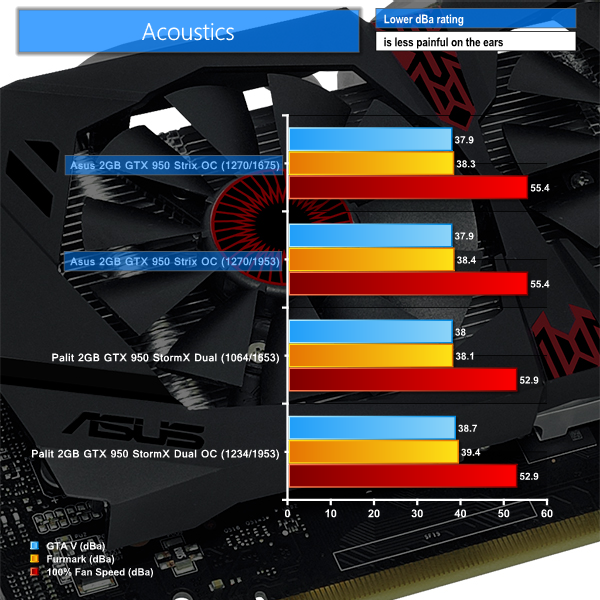
When idling and under low load, the pair of fans enter their 0 dB mode and completely stop spinning. This feature can be used to build a system that is very quiet when browsing the web, but then has promising cooling potential when a game is fired up.
It is very difficult to register any difference in sound level between the card's operating states. We did not see the fan speed level pass 44% throughout our testing. While 38.4 dB is audible (barely), it is difficult to identify when the fans are or are not spinning. Having to physically look to see if the fans are spinning is a welcomed sign of quiet operation.
The graphics card's cooler is loud at full speed (albeit not in the region of blower-style cooler noise output) although it is hard to imagine a usage scenario where the fans will reach anywhere near 100% operation.
We measure the amount of power drawn from the wall by the entire test system. Our Core i7-5960X CPU is heavily overclocked and has a large bearing on the power draw readings when it is heavily loaded in GTA V. The important information is the difference in power draw levels between each card.
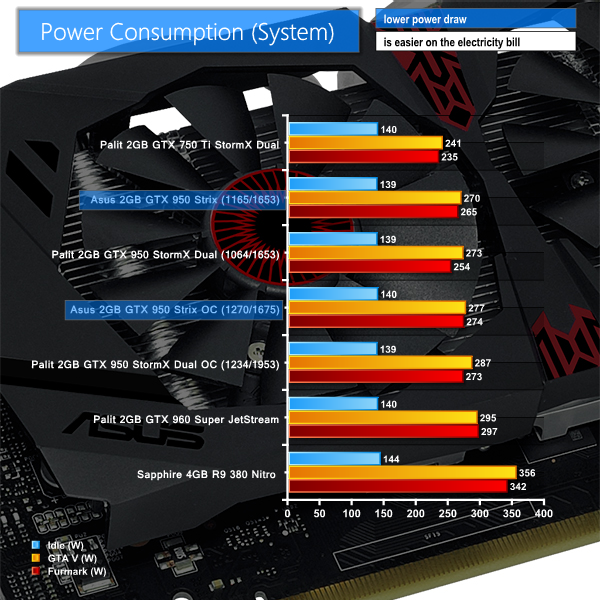
Power draw for the GTX 950 is low. Using a heavily-overclocked Core i7 5960X CPU (which would never be paired with this kind of GPU), the system power draw remained below 300W when playing GTA V.
Applying a GPU-only load by running Furmark still saw power consumption remain below the 300W mark. As the TDP values, product hierarchy, and GPU architecture would suggest, the GTX 950 sits between the GTX 750 Ti and GTX 960 in terms of power usage.
Asus' factory-overclocked model is more towards the energy usage level of a factory-overclocked GTX 960 than a sped-up GTX 750 Ti. With fairly modest power draw, the GTX 950 should be comfortable inside a decent SFF chassis without major throttling concerns.
Nvidia's GTX 950 is a smart card for the company as it aggressively hits a cost-effective price point where AMD has roamed freely for many months. The GTX 950, or more specifically factory-overclocked cards from board partners, is able to offer a smooth 60FPS gaming experience while typically using Very High or Maximum image quality settings and a 1920×1080 resolution. This is a positive for budget-conscious users who want to drive their 1080p panel without significantly reduced settings or a lower-than-60FPS average frame rate.
Running in its factory-overclocked state, Asus' STRIX Gaming GTX 950 DC2 OC sits pretty much directly between factory-overclocked GTX 960 and GTX 750 Ti solutions. This is what Nvidia aimed for, and it is roughly what retail pricing will also show.
Strong overclocking performance from the Maxwell GM206 core allows Asus' STRIX Gaming GTX 950 DC2 OC card to significantly close the gap between the more expensive GTX 960 and Radeon R9 380 solutions that we tested at their factory state.
We had no problem playing our suite of new and slightly older AAA titles at a mixture of High and Ultra quality settings. GTA V, for example, ran smoothly on Very High settings (with the frame-tanking MSAA switched off) and Tomb Raider was comfortably chugging on its Ultimate preset. Users interested in multiplayer games such as CS:GO, LoL, and Dota 2 will have no problem pushing high frame rates (and low latencies) using a 1920×1080 monitor.
Asus' selection of output connectors is smart and caters for a wide audience, from 4K HTPC users to gamers with an older secondary monitor that runs through VGA. A single SLI finger gives the GTX 950 2-way capability, although I do not think this will become a popular direct solution due to more compelling available options for the price of two GTX 950 cards.
The single 6-pin PCIe power connector may be deemed a negative by some. While it allows Nvidia to hit a performance point between the GTX 750 Ti and GTX 950, many HTPC users or gamers upgrading an off-the-shelf desktop system may have liked to see the no-power-connector approach of the GTX 750 Ti repeated. Given the GTX 950 performance results compared to a GTX 750 Ti, I would not consider the single power connector to be a negative point, but it is worth noting.
VRAM capacity may be another area for debate. 2GB is generally enough for 1920×1080 gaming, although games such as GTA V and Shadow of Mordor (and let's not forget Skyrim and its texture mods) will show rewards for higher VRAM capacities. Judging by our testing, the card has enough steam to handle GTA V settings that used 3GB of VRAM on a different card, so that is worth noting to those comparing the 2GB GTX 950 with AMD's 4GB R7 370.
Power consumption numbers from the Asus STRIX GTX 950 are low enough to make a decent quality 430W PSU (such as the Corsair CX430) perfectly capable, even when housed alongside a heavily overclocked CPU. Temperature and noise performance from the DirectCU II cooler was also promising, with Asus' card running cooler than its Palit competitor for a similar noise output.
While actual MSRP for the GTX 950 is £129, partner cards will be priced around the £119-139 mark in retailers. This puts GTX 950 solutions head-to-head with AMD's R7 370. Strong overclocking potential from the GM206 core and low power consumption are positives for Nvidia's solution. We expect the factory-overclocked, dual-fan Asus STRIX Gaming GTX 950 DC2 OC to sell towards the upper end of pricing, at around £139. Edit: the card is currently on pre-order for £149.99.
Discuss on our Facebook page, over HERE.
Pros:
- GTX 950 provides strong gaming performance at 1920×1080 with high/ultra image settings in AAA titles.
- Superb overclocking potential from the GM206 core and Samsung GDDR5 memory.
- Low power consumption levels.
- Positive cooling and acoustic performance from Asus' DirectCU II cooler.
- Fans support 0dB mode.
- Attractive card design.
- HDMI 2.0 and H.265 (HEVC) encode/decode support for media-lovers.
Cons:
- 6-pin power connector may limit the appeal to those with basic PSUs, compared to the GTX 750 Ti.
- 2GB VRAM is cutting it fine for some AAA titles at 1920×1080.
KitGuru says: A competitive option for 1080P gaming that gives Nvidia a foothold at the £129 price point. Asus' DirectCU II cooler performs admirably, and the factory overclock on its STRIX card provides a healthy frame rate boost.


Ok people what think about this great great explanation about why AMD should be better than NVIDIA over DirectX12 for have best supports the Shaders asynchronouscheck this is not my argument but It seems well argued.
first the souce:http://www.overclock.net/t/1569897/various-ashes-of-the-singularity-dx12-benchmarks/400#post_24321843
Well I figured I’d create an account in order to explain away what you’re all seeing in the Ashes of the Singularity DX12 Benchmarks. I won’t divulge too much of my background information but suffice to say
that I’m an old veteran who used to go by the handle ElMoIsEviL.
First off nVidia is posting their true DirectX12 performance figures in these tests. Ashes of the Singularity is all about Parallelism and that’s an area, that although Maxwell 2 does better than previous nVIDIA architectures, it is still inferior in this department when compared to the likes of AMDs GCN 1.1/1.2 architectures. Here’s why…
Maxwell’s Asychronous Thread Warp can queue up 31 Compute tasks and 1 Graphic task. Now compare this with AMD GCN 1.1/1.2 which is composed of 8 Asynchronous Compute Engines each able to queue 8 Compute tasks for a total of 64 coupled with 1 Graphic task by the Graphic Command Processor. See bellow:
http://cdn.overclock.net/4/48/900x900px-LL-489247b8_Async_Aces_575px.png
Each ACE can also apply certain Post Processing Effects without incurring much of a performance penalty. This feature is heavily used for Lighting in Ashes of the Singularity. Think of all of the simultaneous light sources firing off as each unit in the game fires a shot or the various explosions which ensue as examples.
http://cdn.overclock.net/8/89/900x900px-LL-89354727_asynchronous-performance-liquid-vr.jpeg
This means that AMDs GCN 1.1/1.2 is best adapted at handling the increase in Draw Calls now being made by the Multi-Core CPU under Direct X 12.
Therefore in game titles which rely heavily on Parallelism, likely most DirectX 12 titles, AMD GCN 1.1/1.2 should do very well provided they do not hit a Geometry or Rasterizer Operator bottleneck before nVIDIA hits
their Draw Call/Parallelism bottleneck. The picture bellow highlights the Draw Call/Parallelism superioty of GCN 1.1/1.2 over Maxwell 2:
http://cdn.overclock.net/7/7d/900x900px-LL-7d8a8295_drawcalls.jpeg
A more efficient queueing of workloads, through better thread Parallelism, also enables the R9 290x to come closer to its theoretical Compute figures which just happen to be ever so shy from those of the GTX 980 Ti (5.8 TFlops vs 6.1 TFlops respectively) as seen bellow:
http://cdn.overclock.net/9/92/900x900px-LL-92367ca0_Compute_01b.jpeg
What you will notice is that Ashes of the Singularity is also quite hard on the Rasterizer Operators highlighting a rather peculiar behavior. That behavior is that an R9 290x, with its 64 Rops, ends up performing near the same as a Fury-X, also with 64 Rops. A great way of picturing this in action is from the Graph bellow (courtesy of Beyond3D):
http://cdn.overclock.net/b/bd/900x900px-LL-bd73e764_Compute_02b.jpeg
As for the folks claiming a conspiracy theory, not in the least. The reason AMDs DX11 performance is so poor under Ashes of the Singularity is because AMD literally did zero optimizations for the path. AMD is
clearly looking on selling Asynchronous Shading as a feature to developers because their architecture is well suited for the task. It doesn’t hurt that it also costs less in terms of Research and Development of drivers. Asynchronous Shading allows GCN to hit near full efficiency without even requiring any driver work whatsoever.
nVIDIA, on the other hand, does much better at Serial scheduling of work loads (when you consider that anything prior to Maxwell 2 is limited to Serial Scheduling rather than Parallel Scheduling). DirectX 11 is
suited for Serial Scheduling therefore naturally nVIDIA has an advantage under DirectX 11. In this graph, provided by Anandtech, you have the correct figures for nVIDIAs architectures (from Kepler to Maxwell 2)
though the figures for GCN are incorrect (they did not multiply the number of Asynchronous Compute Engines by 8):
http://www.overclock.net/content/type/61/id/2558710/width/350/height/700/flags/LL
People wondering why Nvidia is doing a bit better in DX11 than DX12. That’s because Nvidia optimized their DX11 path in their drivers for Ashes of the Singularity. With DX12 there are no tangible driver optimizations because the Game Engine speaks almost directly to the Graphics Hardware. So none were made. Nvidia is at the mercy of the programmers talents as well as their own Maxwell architectures thread parallelism performance under DX12. The Devellopers programmed for thread parallelism in Ashes of the Singularity in order to be able to better draw all those objects on the screen. Therefore what were seeing with the Nvidia numbers is the Nvidia draw call bottleneck showing up under DX12. Nvidia works around this with its own optimizations in DX11 by prioritizing workloads and replacing shaders. Yes, the nVIDIA driver contains a compiler which re-compiles and replaces shaders which are not fine tuned to their architecture on a per game basis. NVidia’s driver is also Multi-Threaded, making use of the idling CPU cores in order to recompile/replace shaders. The work nVIDIA does in software, under DX11, is the work AMD do in Hardware, under DX12, with their Asynchronous Compute Engines.
But what about poor AMD DX11 performance? Simple. AMDs GCN 1.1/1.2 architecture is suited towards Parallelism. It requires the CPU to feed the graphics card work. This creates a CPU bottleneck, on AMD hardware, under DX11 and low resolutions (say 1080p and even 1600p for Fury-X), as DX11 is limited to 1-2 cores for the Graphics pipeline (which also needs to take care of AI, Physics etc). Replacing shaders or
re-compiling shaders is not a solution for GCN 1.1/1.2 because AMDs Asynchronous Compute Engines are built to break down complex workloads into smaller, easier to work, workloads. The only way around this issue, if you want to maximize the use of all available compute resources under GCN 1.1/1.2, is to feed the GPU in Parallel… in comes in Mantle, Vulcan and Direct X 12.
People wondering why Fury-X did so poorly in 1080p under DirectX 11 titles? That’s your answer.
A video which talks about Ashes of the Singularity in depth:
https://www.youtube.com/watch?v=t9UACXikdR0
PS. Don’t count on better Direct X 12 drivers from nVIDIA. DirectX 12 is closer to Metal and it’s all on the developer to make efficient use of both nVIDIA and AMDs architectures..
Nice and fine, NEM! Only problem with your wall of text is the context. Your talk about GCN being multithreaded by definition is overall wrong. What AMD suffers from is huge overhead in DX11 which for them luckily falls down in DX12. Nvidia optimized earlier for DX11 to compensate this and has not as much gains in comparison for DX12 instead.
All the talk about the wonder drivers of AMD are ridiculous. Right now we have almost 100% DX11 games or older. Even if you start a DX12 game and have somehow good performance, it is in vain. As soon as you start an “old” DX11 game, the AMD drivers screw up with bad performance again. In short you hurt yourself with suggesting AMD if the buyer is not a pure DX12-player. Brabble about this as much as you want, but get away from the borderline game which is Ashes of Singularity. We will see many DirectX12 games in the next years with performance all over the place. This counts for both AMD and Nvidia.
Cards like the GTX750 Ti, GTX960 and now the new GTX950 are for budget gamers and dedicated to MOBAs and RPGs and 1080p. With halfway balanced settings a player can get much more than in the past. Driver talk is uselss because all vendors have to set up their hardware for Windows 10 first. The graphic card brands are just one of many. To make predictions at this early state is overbearing.
❦❦❦❦❦❦❦❦❦❦❦❦❦❦❦❦❦❦❦❦❦❦❦❦❦❦❦❦❦❦❦❦❦❦❦❦❦❦❦❦❦❦❦❦❦❦❦❦❦❦❦my neighbor’s ex makes 60/hour on the web……last monday I got another McLaren F1 from getting 4948 this most recent 4 weeks and-in abundance of, ten/k last-munth . with no defenselessness it’s the most satisfying work Ive ever done . I began this 10-months back and expediently start..ad bringin in more than 76 for consistently . take a gander at this site….
===LOOK AT THIS=== > tinyurl.com/Net22Money95Search ➽➽➽➽➽➽➽➽➽➽➽➽➽➽➽➽➽➽➽➽➽➽➽➽➽➽➽➽➽➽➽➽➽➽➽➽➽➽➽ ➽➽➽➽➽➽ tAke a look and find more info clicking any link
If you think AMD will screw up with DX 12 , You’re Wrong.With DX12 , you don’t Need Driver interventions.Because DX 12 almost talks to ACE.on other hand , AMD CGN does not need driver optimizations for DX12.while on DX11 , AMD needs Heavy optimized driver.
Well, DX12 is not wonder technology. Lots of the improvements depend on the will and goals of the individual developers. I expect the performance for each vendor to be all over the place and will be up to the used game engine, developer team and of course partnerships with AMD and Nvidia will play a bigger role.
The GTX950 is the new contender in the ring now. As a pure gaming card it is not as tempting for over 150$. As soon as the price drops somewhere from $130 to $149, it could be the new reference for cheap but halfway good gaming-HTPC builds. IIRC it is the only card in this price range except the more expensive GTX960 to feature a HDMI 2.0 connection. The GTX750 Ti is 2014 tech and still has HDMI 1.4. AMD has not a single card in ther line-up to compete in this regard. APIs or FPS alone can not replace missing connection types and industry standards like HDCP 2.2. ASUS is one of the brands to get the cards wisper-quiet in operation and even turn the fan off in idle.