 KitGuru KitGuru.net – Tech News | Hardware News | Hardware Reviews | IOS | Mobile | Gaming | Graphics Cards


The near-simultaneous launches of Windows 10 and Intel’s Skylake processors means a new generation of hardware and software is upon us. The Z170 chipset in particular which has launched with Skylake brings a new set of technologies to desktop computers, particularly faster M.2 PCI-Express storage and DDR4 memory. Chillblast has been quick off the mark in shipping a retail Skylake PC to us and it also runs Windows 10 as standard. With a water-cooled Intel Core i7-6700k chip, a Z170 motherboard, 512GB Samsung SM951 M.2 PCI-Express SSD, 16GB of DDR4 memory and a GeForce GTX 980, this specification sets a new standard for high-end gaming PCs.
It’s only a few short weeks after we published our extensive coverage of Intel’s 14nm Skylake Core i7-6700k and Core i5-6600k products but we’ve now received our first desktop gaming PC built around the new chips.
The Chillblast Fusion Master has Intel’s quad-core Core i7-6700k Skylake processor and an Asus Z170 Pro Gamer motherboard based on the new Z170 chipset, which notably adds support for DDR4 memory and increases the bandwidth available to M.2 storage devices, with 4 PCI-Express 3.0 lanes, to offer up to 32Gb/sec.
The system takes full advantage of both of these new features. Firstly, it has a 16GB dual-channel kit of 3000MHz CL15 DDR4 memory. In the M.2 slot on the Z170 Pro Gamer, there’s s 512GB Samsung SM951 M.2 SSD, which is (just about) the fastest PCI-Express SSD you can buy for a consumer PC. There’s also a 2TB Seagate SSHD as well for additional storage.
Cooler Master's MasterCase 5 is used to house the system, and continuing the link between Chillblast and the aforementioned component company, the power supply is a Cooler Master VS Series V750. And lastly, Windows 10 Home is installed on the Samsung SSD.
In our review of the Skylake chips, we noted a slim performance improvement of around 10 per cent over the Devil’s Canyon Core i7-4790K processor. Although some may be disappointed that the overall gains aren’t greater from a processor that represents both a node shrink and a new architecture, a gaming PC with an Intel Core i7-6700k undoubtedly offers the fastest gaming performance on the planet, particularly when it’s overclocked.
When coupled with a high-end video card, fast storage and enough memory, a Skylake gaming PC like the Chillblast Fusion Master represents next-generation performance. Let’s see how fast it really is.
System Configuration:
- Cooler Master Master Case V
- Intel Core i7 6700k
- Cooler Master Nepton 240M CPU Cooler
- Corsair Vengeance 16GB 3000MHz DDR4 RAM (2x8GB)
- Asus Z170 PRO GAMER
- Zotac NVIDIA GeForce GTX 980
- 512GB Samsung SM951 M.2 SSD
- 2TB SSHD Secondary Drive
- Cooler Master VS Series V 750W
- Windows 10 64-bit
Price: £1699 inc VAT
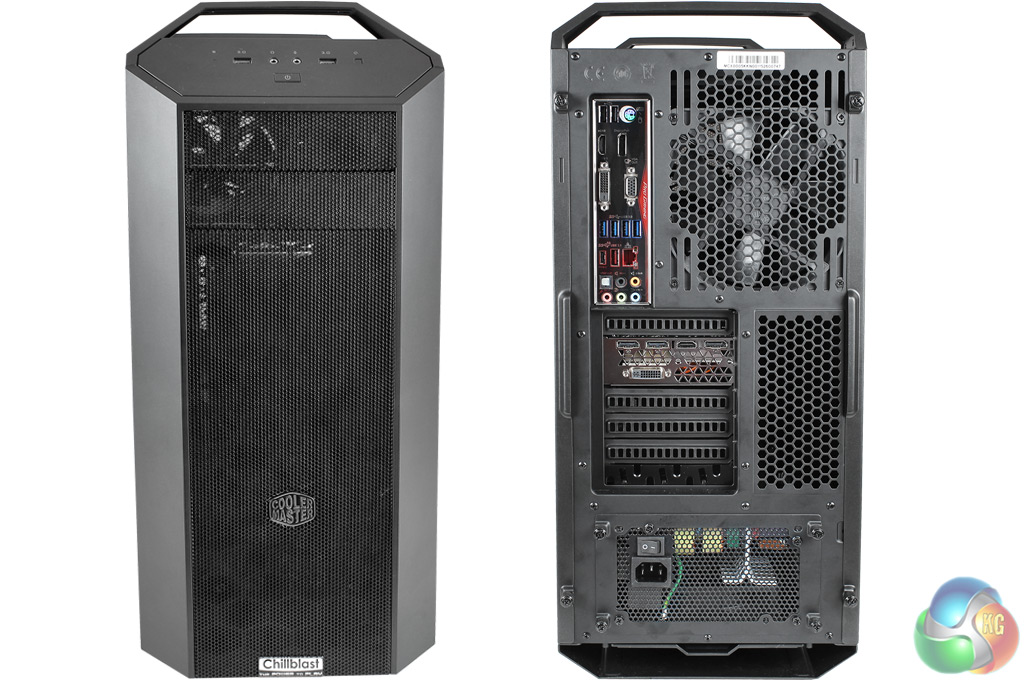
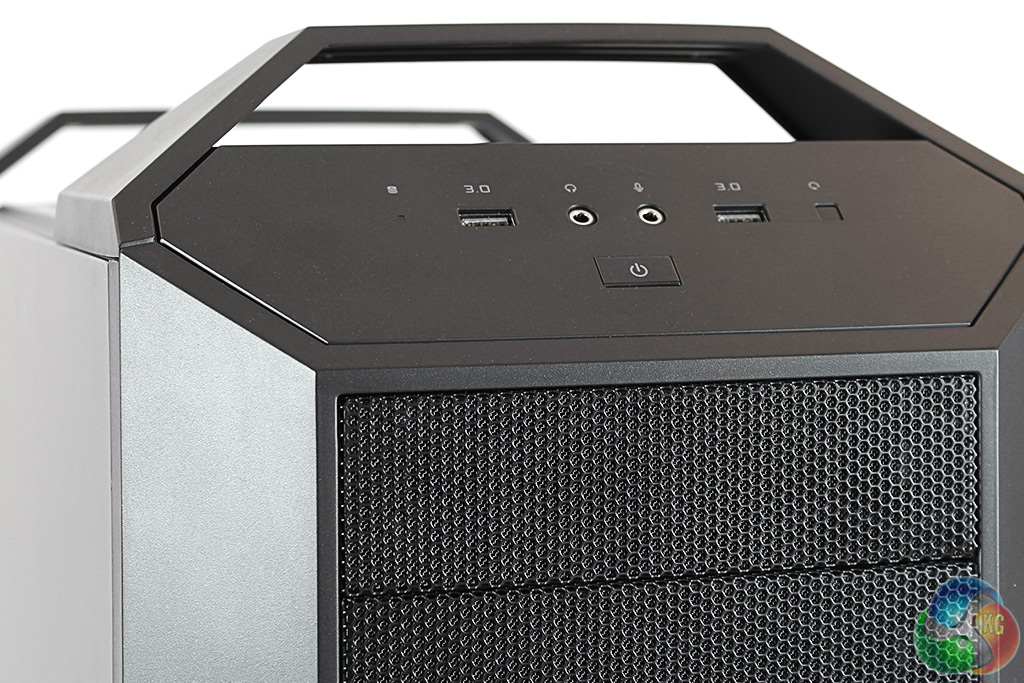
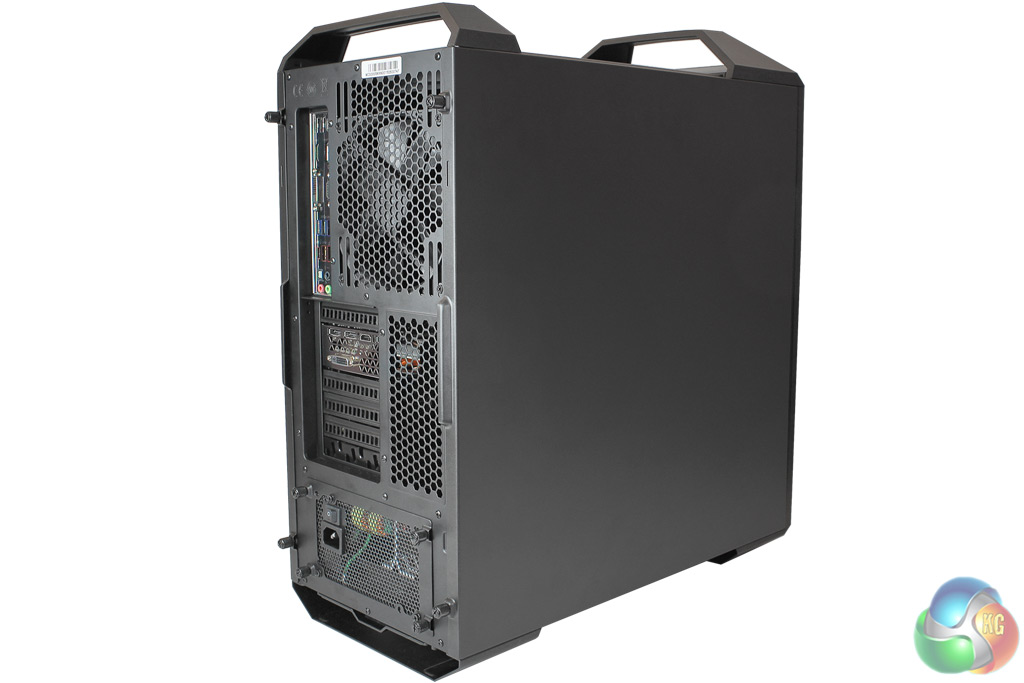
The Chillblast Fusion Master is a showcase of the new MasterCase 5 mid-tower chassis from Cooler Master. Externally, one of its most noticeable features is a pair of handles that help with transportation. On the front panel, the main power button is located at the bottom, with a single LED for disk access, two USB 3 ports and two audio jacks. The reset button is on the right.
Mesh covers the front fans that blow air onto the radiator of the 240mm Nepton all-in-one liquid cooler, which has been attached towards the front of the case.
At the rear you can see the I/O for the Asus Z170 Pro gamer, which includes two USB 2 ports, four USB 3 ports, a single 10Gb/sec USB 3.1 type-A port and a USB 3.1 type-C port. The board has four display outputs for integrated graphics, but you’re more likely to be using the display outputs on the Zotac GTX 980, which includes one HDMI, a DVI, and three DisplayPort.
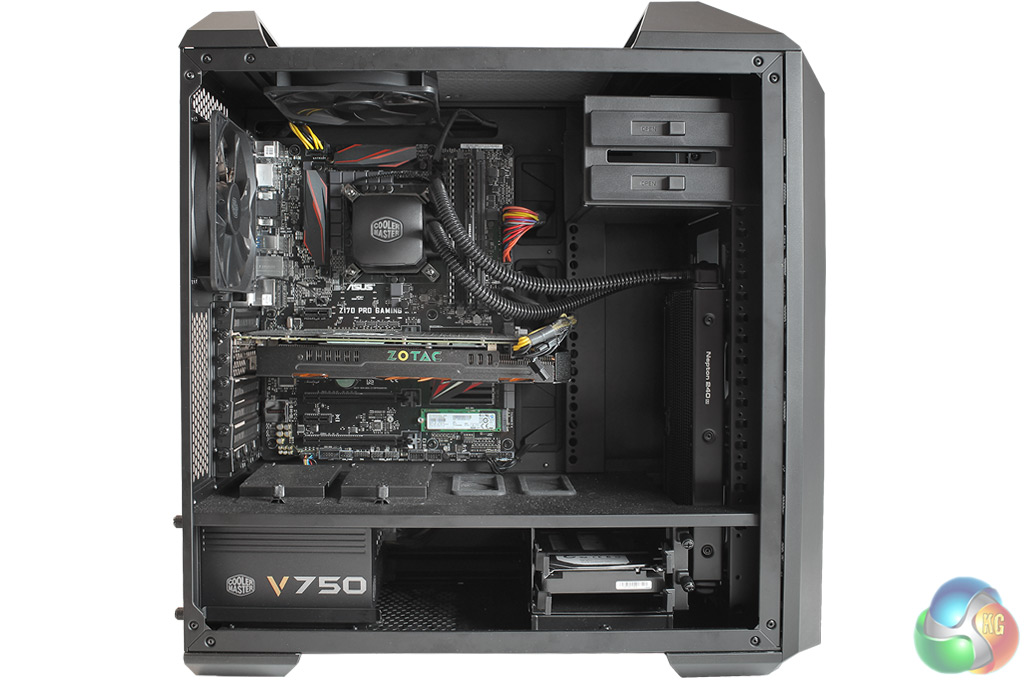
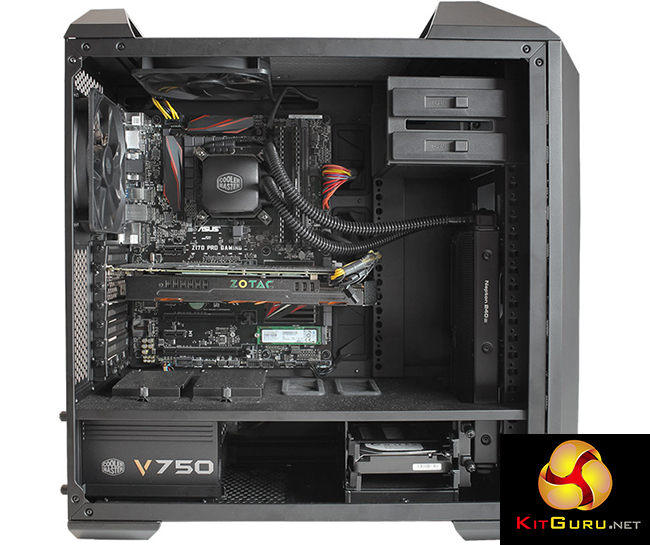
There’s plenty of space inside the case, providing good airflow and easy access to the components. Good room for expansion too, you’ll have no problems fitting an extra GPU later on.
With the aid of a Cooler Master Nepton 240M all-in-one liquid cooler, Chillblast has overclocked the 6700K to a juicy 4.6GHz for some extra performance. This is intended as a high-end gaming PC, so in addition, Chillblast has equipped the Fusion Master with a Zotac GeForce GTX 980 4GB graphics card, which is worth around £400.
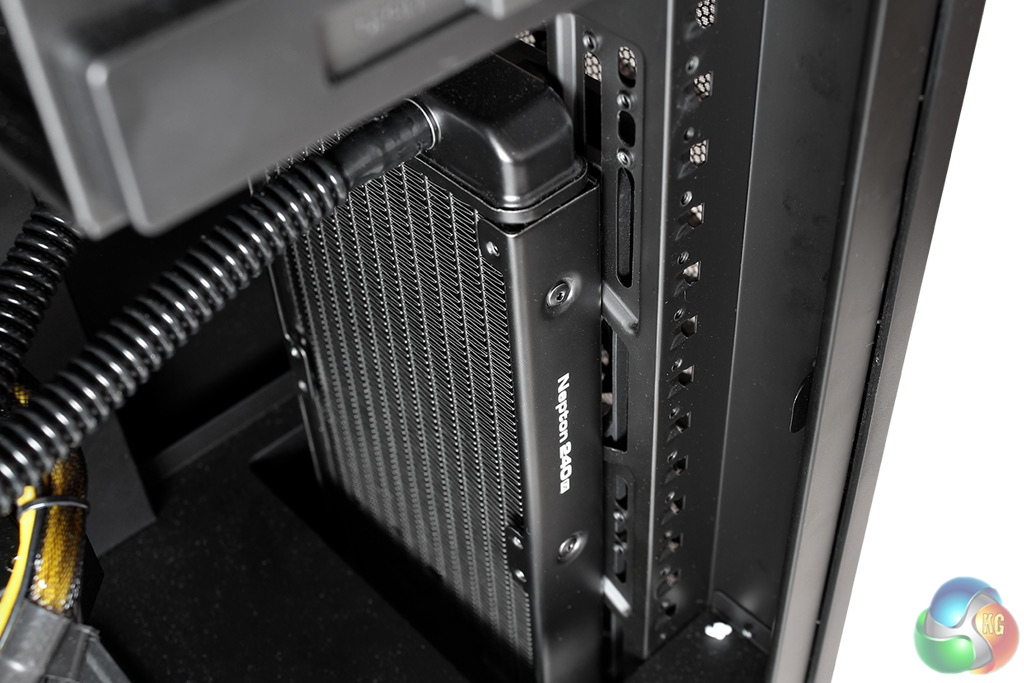
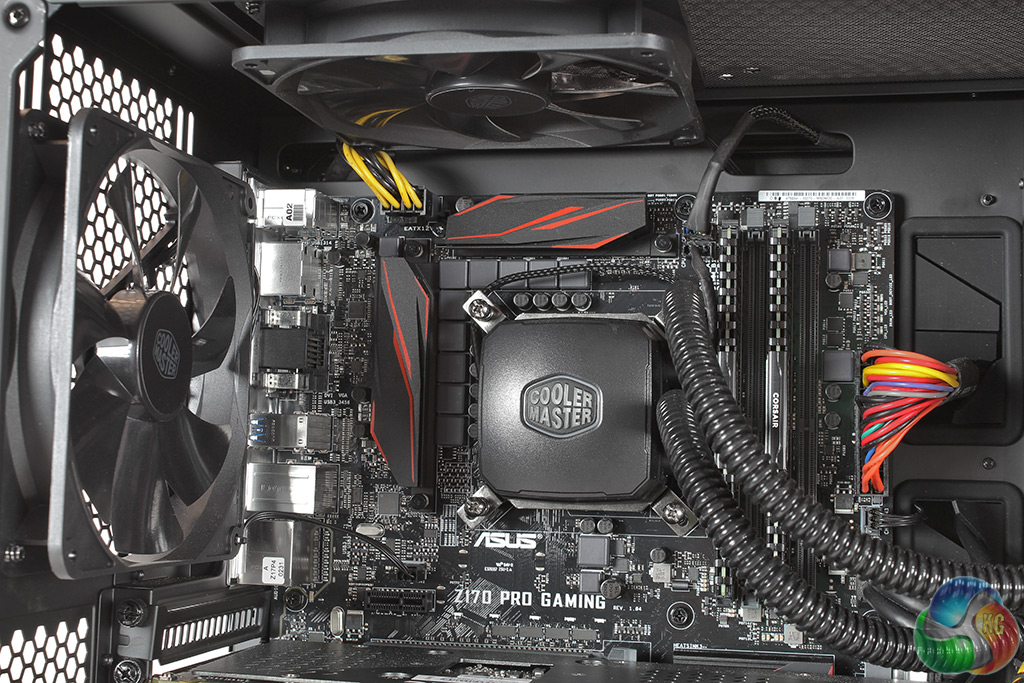
Exhaust fans mounted in the roof and rear of the case expel hot air from inside. The water-cooling block covering the CPU shows the Cooler Master logo clearly, and this illuminates in white when the PC is turned on.
The two 8GB sticks of Corsair Vengeance DDR4 memory are also visible, with the two empty slots providing room for future expansion.
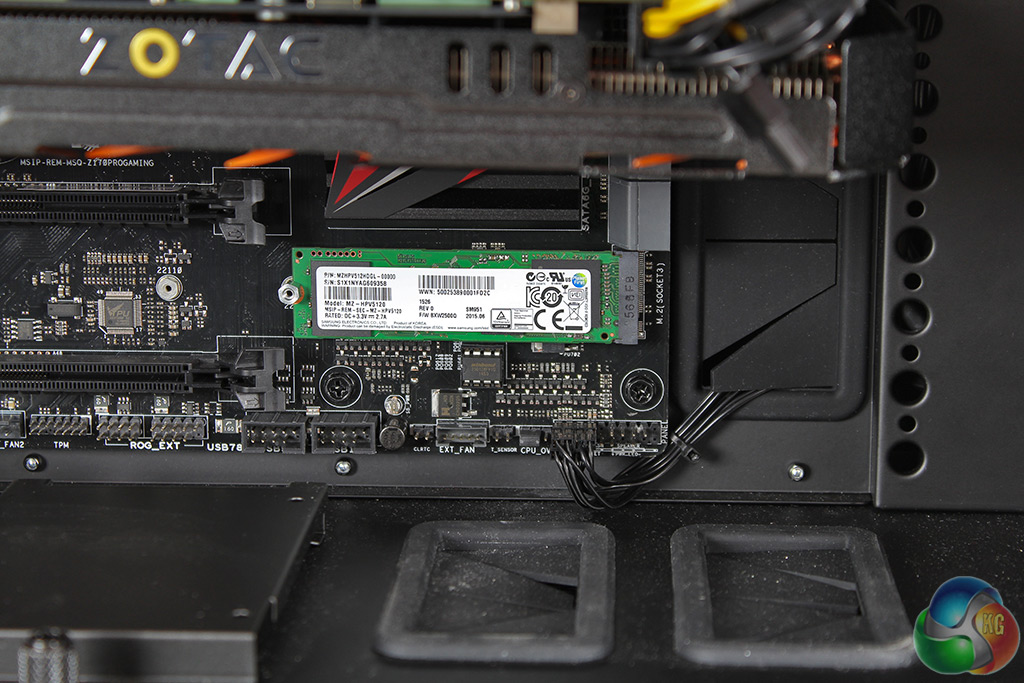
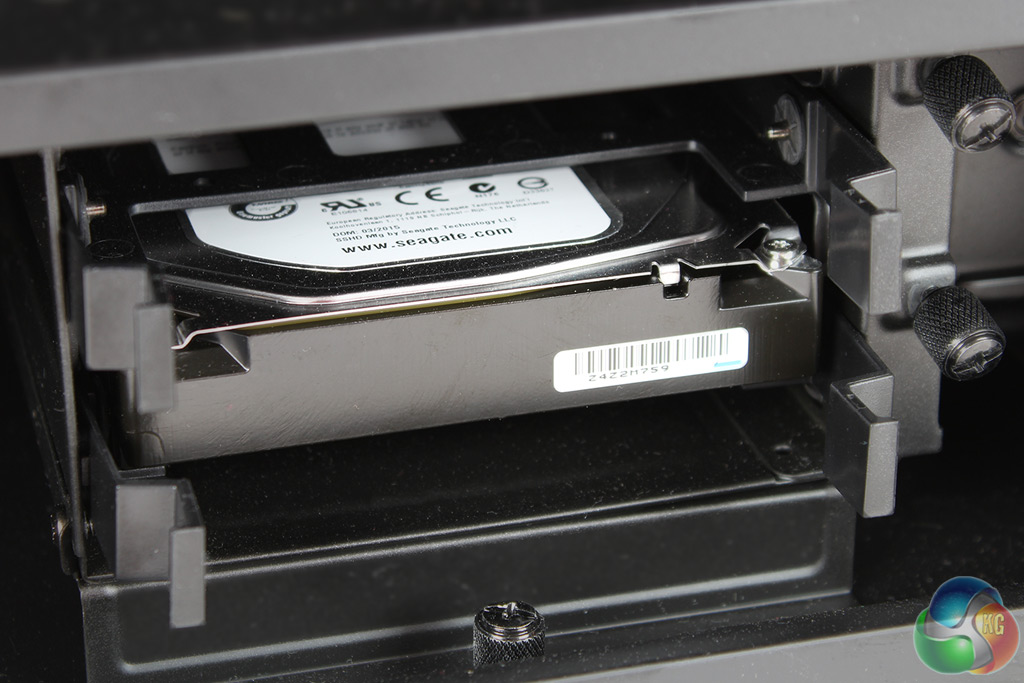
If you haven’t seen an M.2 SSD yet, they’re quite different to SATA drives – a small PCB slots into a dedicated slot on the motherboard. Samsung's 512GB SM951 is one of the fastest SSDs on the market, although Chillblast uses the AHCI version, not the (hard-to-find) NVMe variant.
A 2TB Seagate SSHD is located in the bottom-right of the chassis.
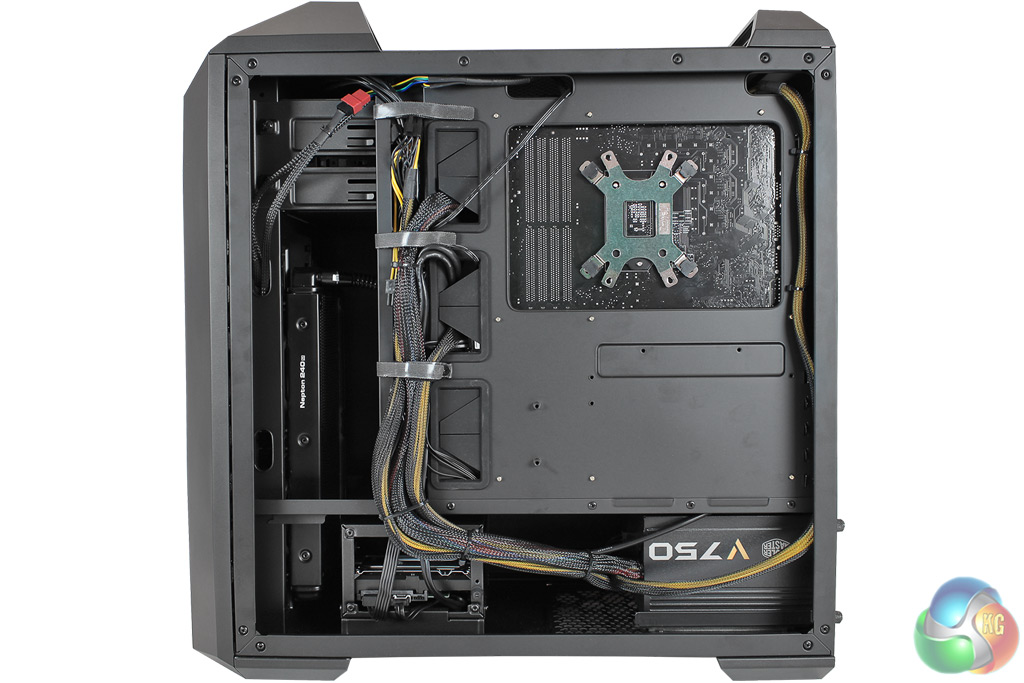
From the rear of the case, you can see Chillblast has done a good job with cable management, using zip ties for the smaller cables and the larger ones held to the side of the case.
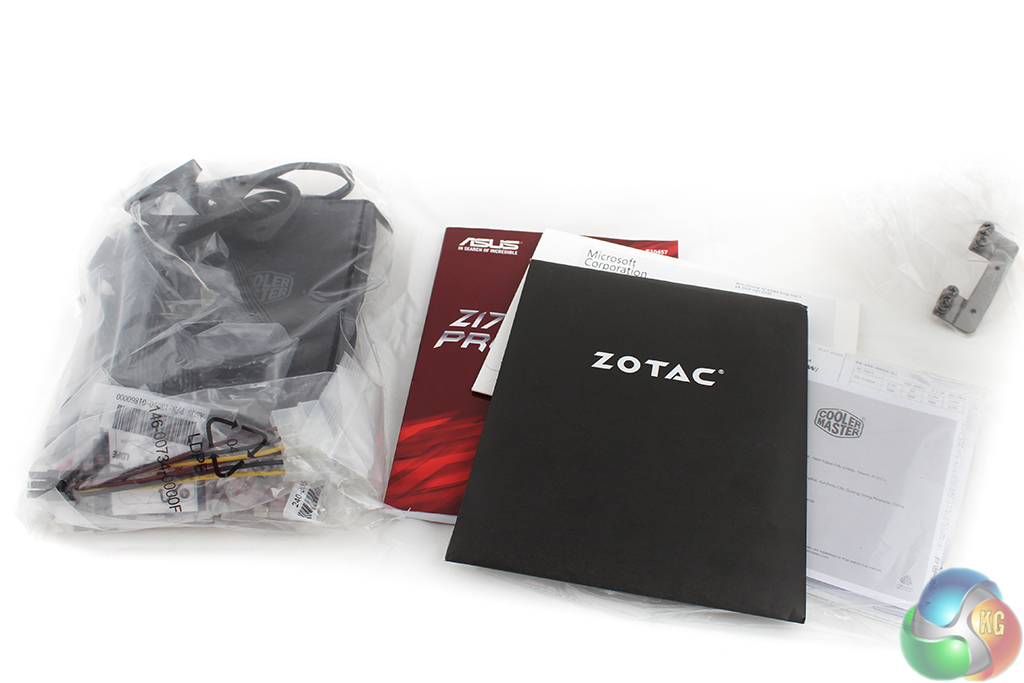
An accessories box contains a bag with all the extra fittings for the Nepton water cooler, the spare case screws and so on. There are a few manuals for the components, including the motherboard and graphics card. And you also get a DVD with an OEM copy of Windows 10. This is the first time we’ve seen this included with a PC.
We’ve stuck to the same tests we used in our review of the OCUK Titan Riptide X99 System as a good way to compare technologies.
For reference, that PC came with a six-core Intel Haswell-E Core i7-5820k processor, overclocked to 4.2 GHz. We noted in our Skylake coverage that a six-core processor is an alternative option to Intel’s Core i7-6700k. Having extra cores will make a significant difference in some tasks which are heavily multi-threaded, such as video encoding, which will see a significant performance improvement. However for gaming, although better use of additional CPU cores is a promised feature of DirectX 12, for now a quad-core Skylake processor could be a better option.
At the time we reviewed it, the OCUK system carried a lower retail price of £1189.98, although the difference in pricing can be explained by the slightly different configuration. For example, a Geforce GTX 970 rather than a GTX 980 and a smaller and cheaper 120GB 850 EVO rather than the 512GB SM951 PCIe SSD in the Chillblast Fusion Master.
It’s worth mentioning that both OCUK and Chillblast allow you to customise your order so these specifications can be altered if you aren’t happy with the SSD, or want a different graphics card, for example.
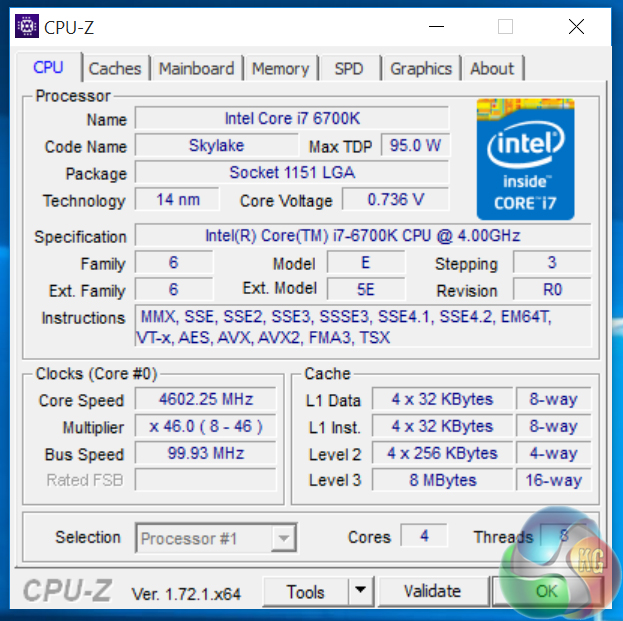
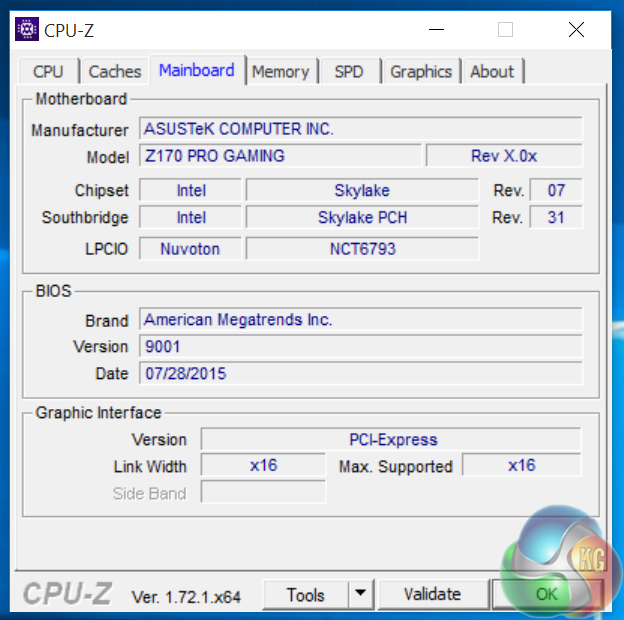
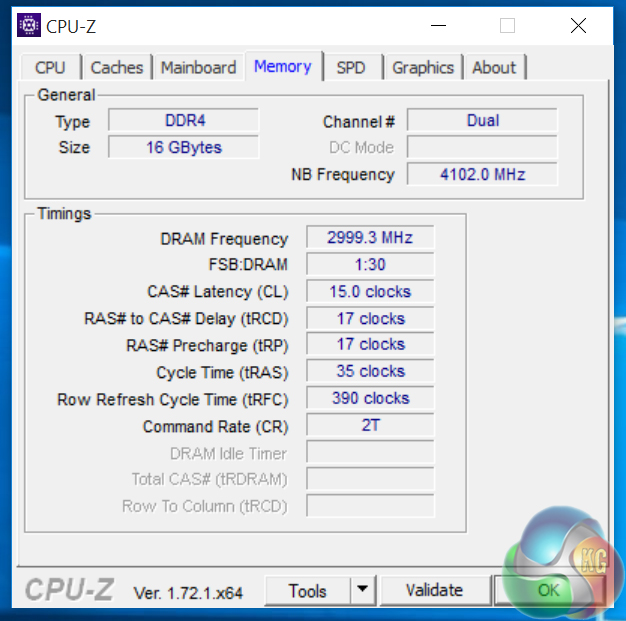
The memory is running an XMP profile of 3000MHz, with the voltage set to 1.35V. The CPU voltage is set to Offset mode, with it running at 1.36V when we looked (ignore the CPU-Z VCore reading).
It’s worth noting that like its predecessors, the Z170 chipset uses dual-channel memory rather than quad channel, as with X99. The two 8GB sticks of Corsair Vengeance 3000MHz DDR4 have timings of 15-17-17.
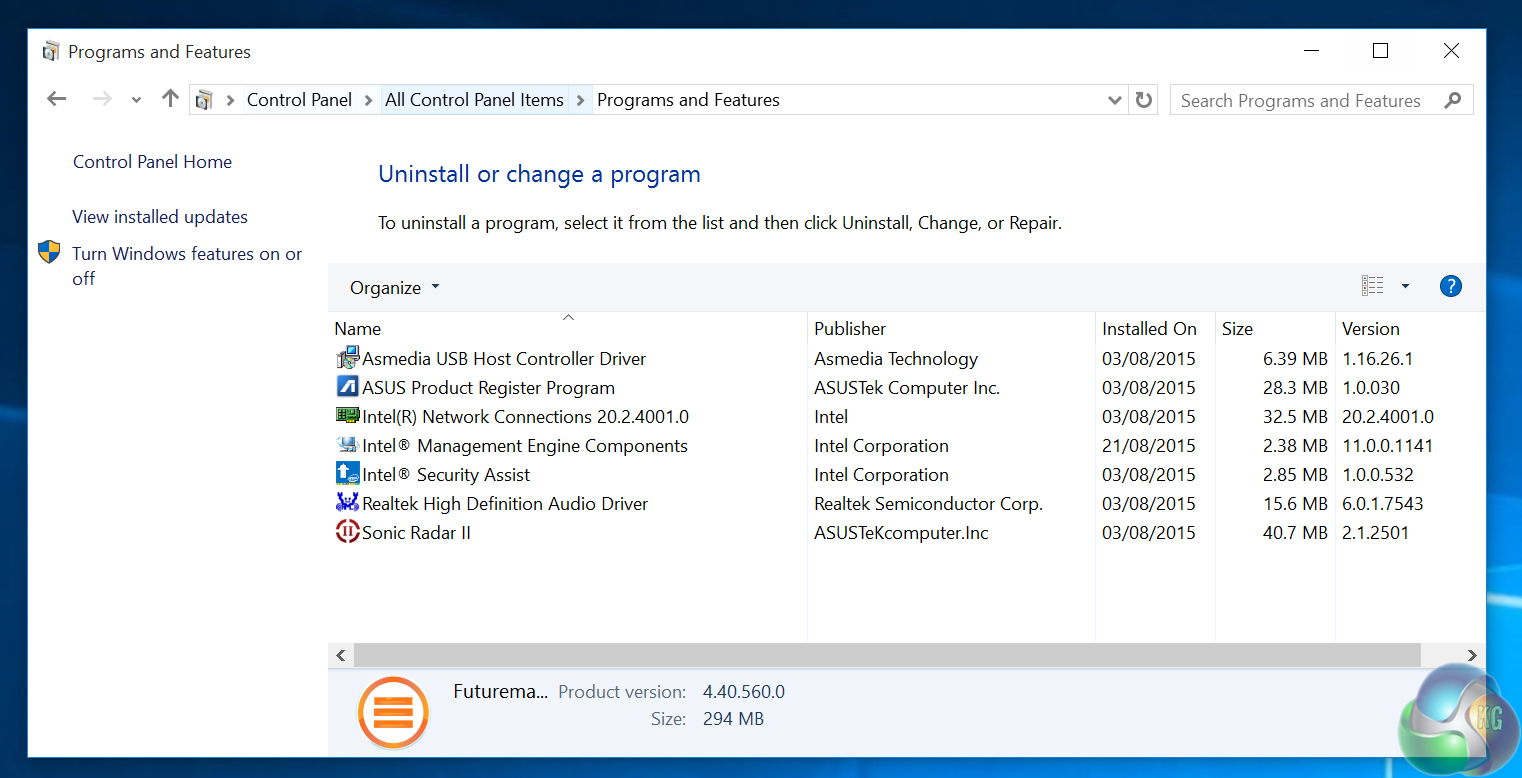
On booting up the system, we first looked at the installed programs list. Unlike an OEM PC from the likes of Dell or Lenovo, which contain a large amount of additional (usually unwanted) software, the Chillblast Master is totally clean of such bloatware.
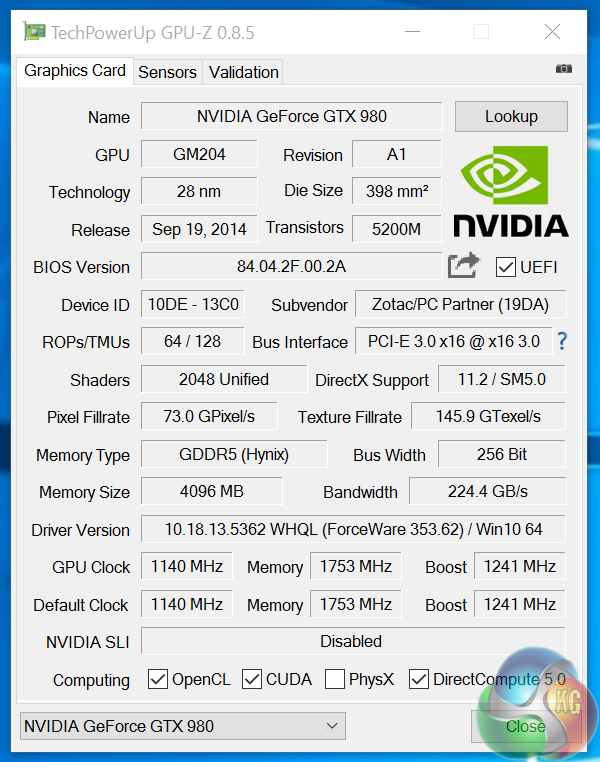
The GTX 980 has 2048 shaders, with a core clock speed of 1140MHz, and a 1754 MHz memory speed (effectively 7GHz).
For our tests, we used an Acer Predator XB280HK display, which is capable of 4K resolution and therefore enabled us to obtain benchmark results for 4K performance.
System Configuration:
- Cooler Master Master Case V
- Intel Core i7 6700k
- Cooler Master Nepton 240M CPU Cooler
- Corsair Vengeance 16GB 3000MHz DDR4 RAM (2x8GB)
- Asus Z170 PRO GAMER
- Zotac NVIDIA GeForce GTX 980
- 512GB Samsung SM951 M.2 SSD
- 2TB SSHD Secondary Drive
- Cooler Master VS Series V 750W
- Windows 10 64-bit
Price: £1699 inc VAT
Software:
3DMark 11
3DMark
Cinebench R11.5 64 bit
Cinebench R15
CrystalDiskMark
Atto Disk Benchmark
CrystalDiskMark
SiSoft Sandra
Games:
Tomb Raider
Grand Theft Auto 5
Metro Last Light Redux
Middle Earth: Shadow of Mordor
Some game descriptions edited with courtesy from Wikipedia.
3DMark 11 is designed for testing DirectX 11 hardware running on Windows 7 and Windows Vista the benchmark includes six all new benchmark tests that make extensive use of all the new features in DirectX 11 including tessellation, compute shaders and multi-threading.
After running the tests 3DMark gives your system a score with larger numbers indicating better performance. Trusted by gamers worldwide to give accurate and unbiased results, 3DMark 11 is the best way to test DirectX 11 under game-like loads.
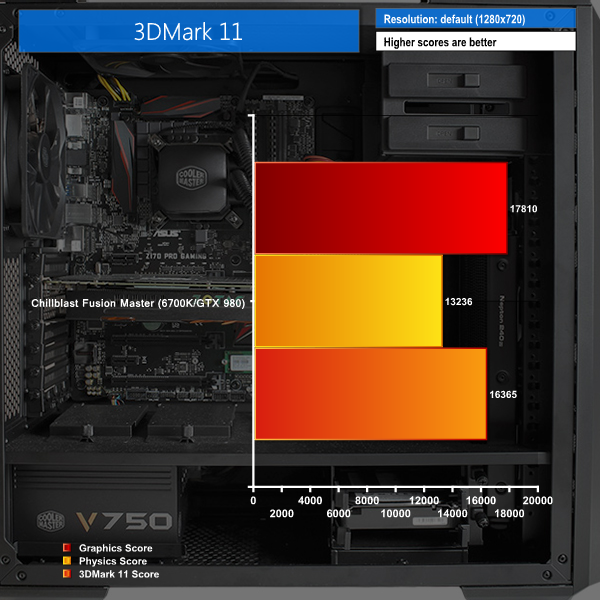
The score is over 1100 points higher than the Core i7-5820k and GTX 970 used in OCUK's Titan Riptide X99 system, which is around a 7 percent improvement. The physics score come out lower, which benefits more from the additional cores with the 5820k, but the graphics score gets a big boost of 2600 points.
3DMark is an essential tool used by millions of gamers, hundreds of hardware review sites and many of the world’s leading manufacturers to measure PC gaming performance.
Futuremark say “Use it to test your PC’s limits and measure the impact of overclocking and tweaking your system. Search our massive results database and see how your PC compares or just admire the graphics and wonder why all PC games don’t look this good.
To get more out of your PC, put 3DMark in your PC.”
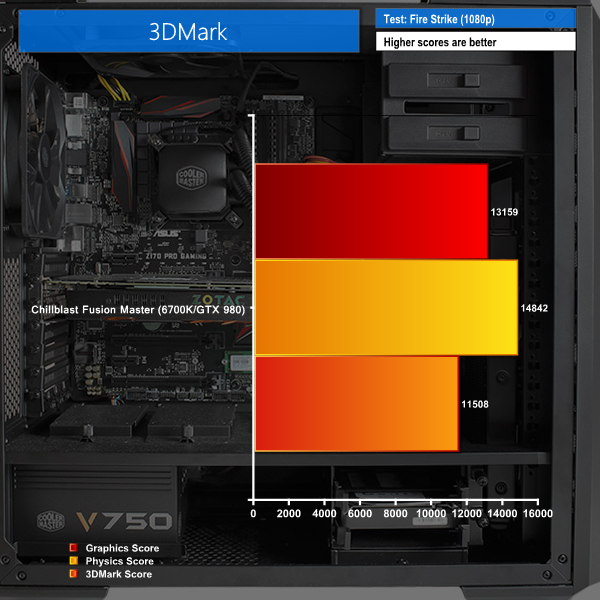
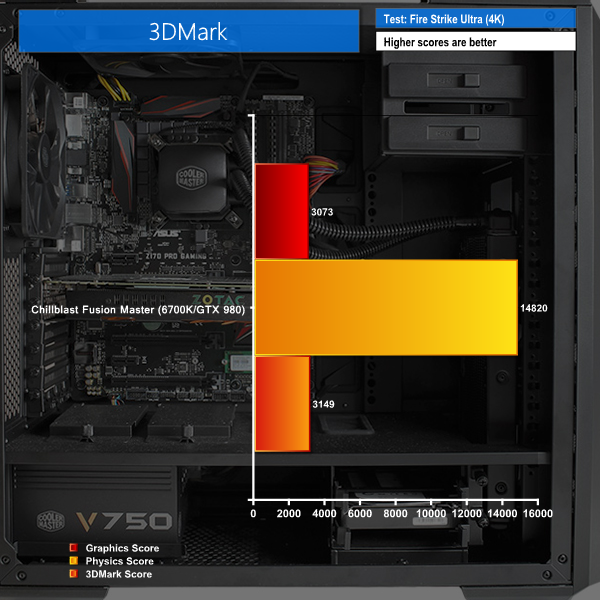
The Fire Strike benchmark sits at 11508 points, which is an increase of over 10 per cent compared to the OCUK GTX 970-based system. The extremely demanding Fire Strike Ultra test, which runs at 4K (and struggles to run well even on the Fusion Master) sees an increase from 2649 points to 3149, a rough 20 per cent improvement.
SiSoftware Sandra (the System ANalyser, Diagnostic and Reporting Assistant) is an information & diagnostic utility. It should provide most of the information (including undocumented) you need to know about your hardware, software and other devices whether hardware or software.Sandra is a (girl’s) name of Greek origin that means “defender”, “helper of mankind”. We think that’s quite fitting.
It works along the lines of other Windows utilities, however it tries to go beyond them and show you more of what’s really going on. Giving the user the ability to draw comparisons at both a high and low-level. You can get information about the CPU, chipset, video adapter, ports, printers, sound card, memory, network, Windows internals, AGP, PCI, PCI-X, PCIe (PCI Express), database, USB, USB2, 1394/Firewire, etc.
Native ports for all major operating systems are available:
- Windows XP, 2003/R2, Vista, 7, 2008/R2 (x86)
- Windows XP, 2003/R2, Vista, 7, 2008/R2 (x64)
- Windows 2003/R2, 2008/R2* (IA64)
- Windows Mobile 5.x (ARM CE 5.01)
- Windows Mobile 6.x (ARM CE 5.02)
All major technologies are supported and taken advantage of:
- SMP – Multi-Processor
- MC – Multi-Core
- SMT/HT – Hyper-Threading
- MMX, SSE, SSE2, SSE3, SSSE3, SSE 4.1, SSE 4.2, AVX, FMA – Multi-Media instructions
- GPGPU, DirectX, OpenGL – Graphics
- NUMA – Non-Uniform Memory Access
- AMD64/EM64T/x64 – 64-bit extensions to x86
- IA64 – Intel* Itanium 64-bit
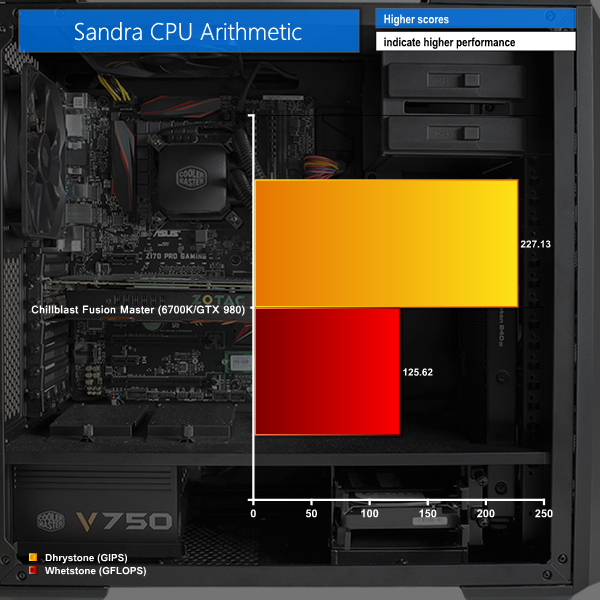
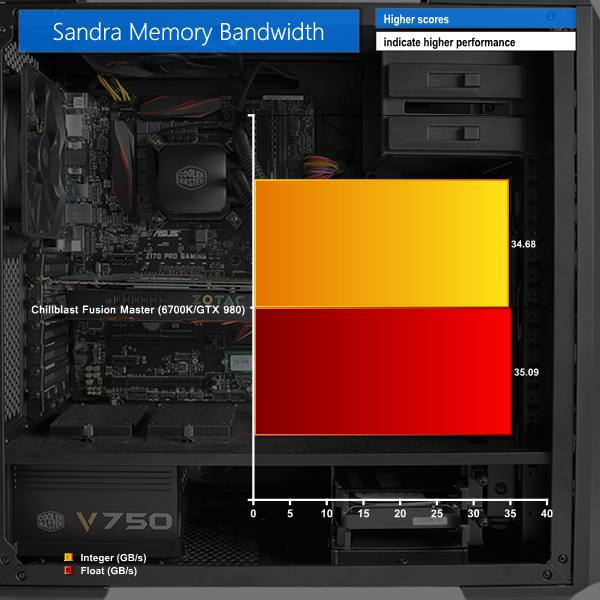
These are some interesting results. DDR4 improves memory bandwidth, but as we previously stated, the memory on Z170 only runs in dual channel mode rather than quad channel as with X99.
Therefore the results from the Core i7-6700k are below those of a Haswell-E Core i7-5820k, as expected. But it’s still an improvement of around 20 per cent over a Core i7-4770k and DDR3.
Drystone Sandra arithmetic tests clearly stress raw CPU performance rather than additional cores, as the results from the Core i7-6700k are about 5 per cent higher than the Core i7-5820k in OCUK's system. But the Whetstone result is significantly lower.
CINEBENCH R11.5 64 Bit is a real-world cross platform test suite that evaluates your computer’s performance capabilities. CINEBENCH is based on MAXON’s award-winning animation software CINEMA 4D, which is used extensively by studios and production houses worldwide for 3D content creation.
MAXON software has been used in blockbuster movies such as Spider-Man, Star Wars, The Chronicles of Narnia and many more. CINEBENCH is the perfect tool to compare CPU and graphics performance across various systems and platforms (Windows and Mac OS X). And best of all: It’s completely free.
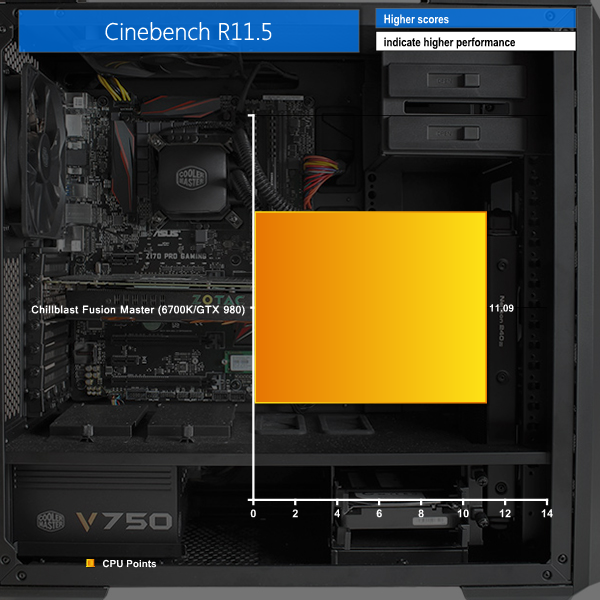
Cinebench always makes use of all the cores in a CPU, so the Core i7-6700k trails behind the performance of an overclocked 5820k, but again we noticed around a 10 per cent improvement over the Core i7-4770k Haswell chips.
CINEBENCH 15 is a cross-platform testing suite that measures hardware performance and is the de facto standard benchmarking tool for leading companies and trade journals for conducting real-world hardware performance tests. With the new Release 15, systems with up to 256 threads can be tested. CINEBENCH is available for both Windows and OS X and is used by almost all hardware manufacturers and trade journals for comparing CPUs and graphics cards.
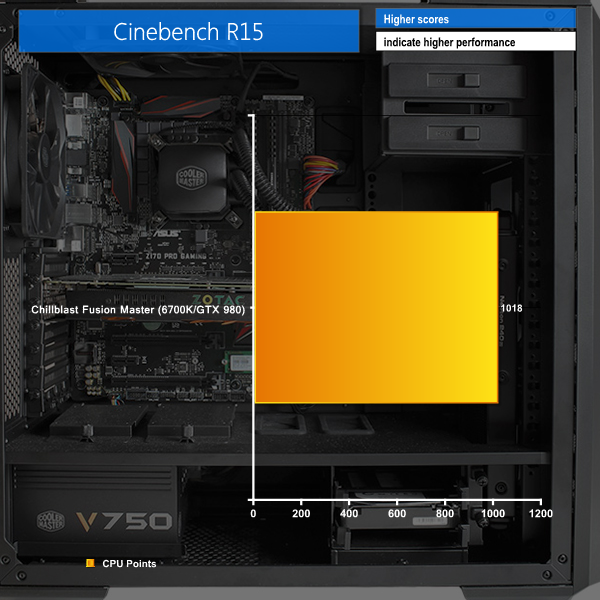
The same is true of Cinebench 15, with an overclocked 5820k pulling ahead in CPU performance, but again, the Core i7-6700k shows a good improvement over a Core i7-4770k of around 10 per cent.
Crystalmark is a useful benchmark to measure theoretical performance levels of hard drives and SSD’s. We are using V3.0.3. We test the Solid State Drive and the mechanical drive.
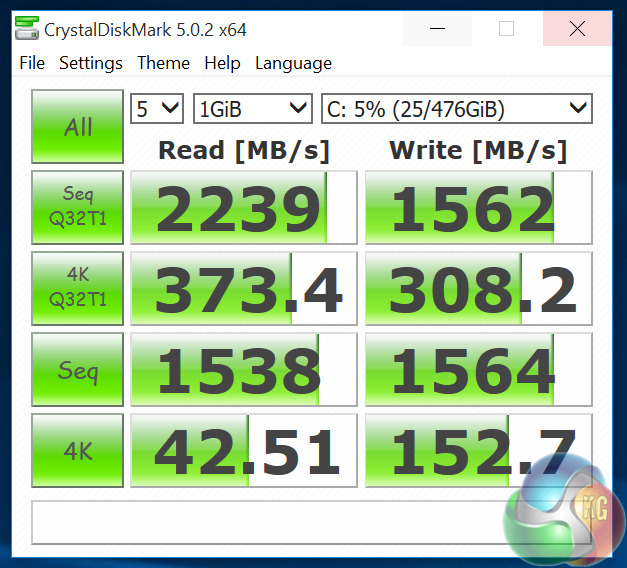
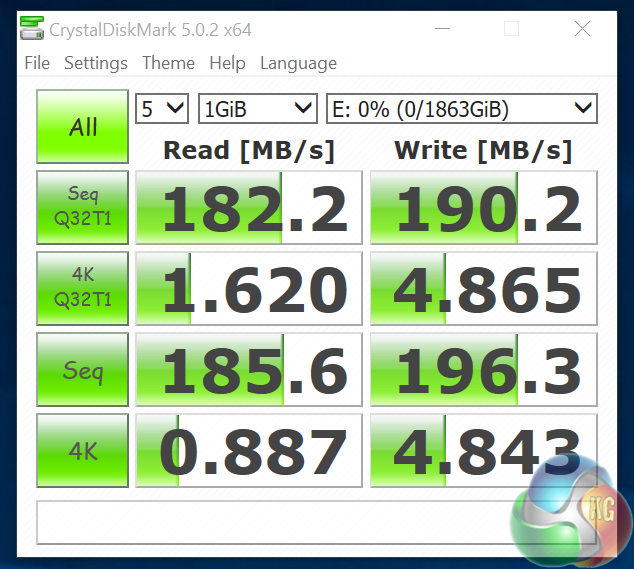
The SSD speed is one of the fastest results we’ve ever seen from Crystal Disk Mark, while the 190 MB/sec achieved by the Seagate SSHD is also quite good.
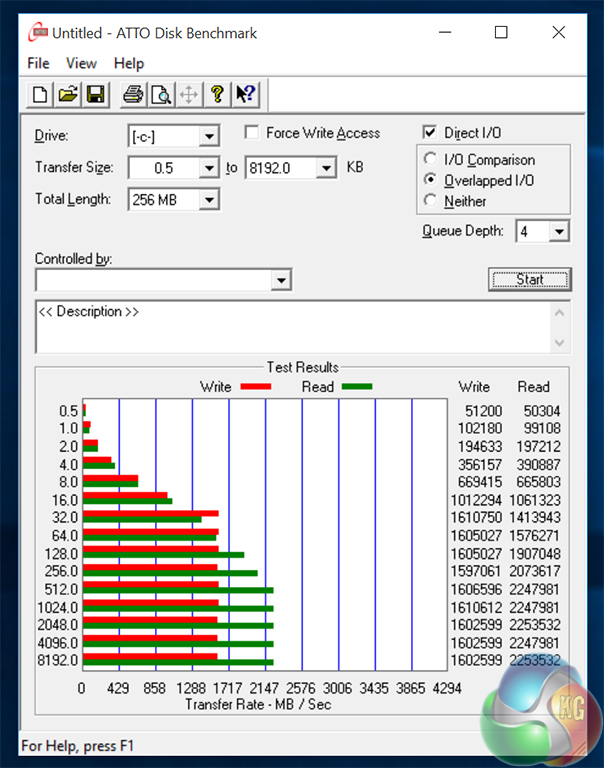
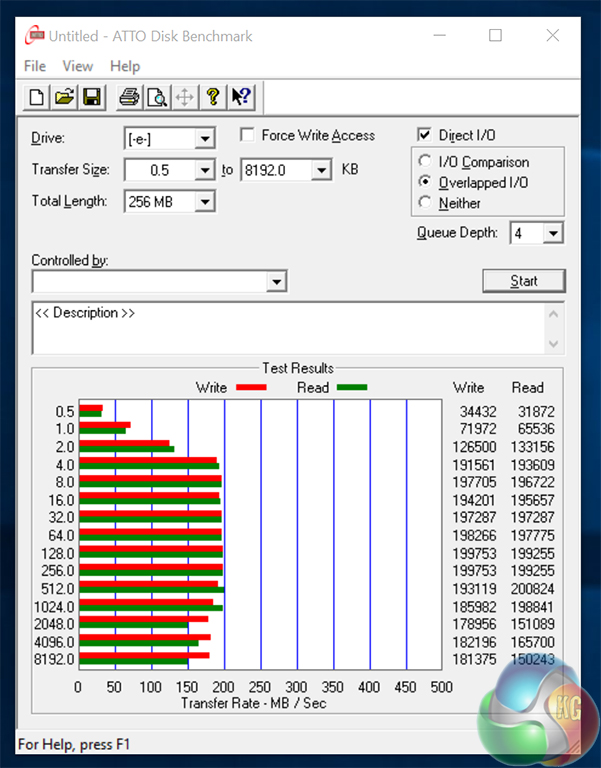
ATTO shows the same story. Clearly PCI-Express is the future of SSDs, and it’s quite amazing to think the small green PCB inserted into the motherboard’s M.2 socket is capable of such fast transfer rates.
Tomb Raider received much acclaim from critics, who praised the graphics, the gameplay and Camilla Luddington’s performance as Lara with many critics agreeing that the game is a solid and much needed reboot of the franchise. Much criticism went to the addition of the multiplayer which many felt was unnecessary. Tomb Raider went on to sell one million copies in forty-eight hours of its release, and has sold 3.4 million copies worldwide so far. (Wikipedia).
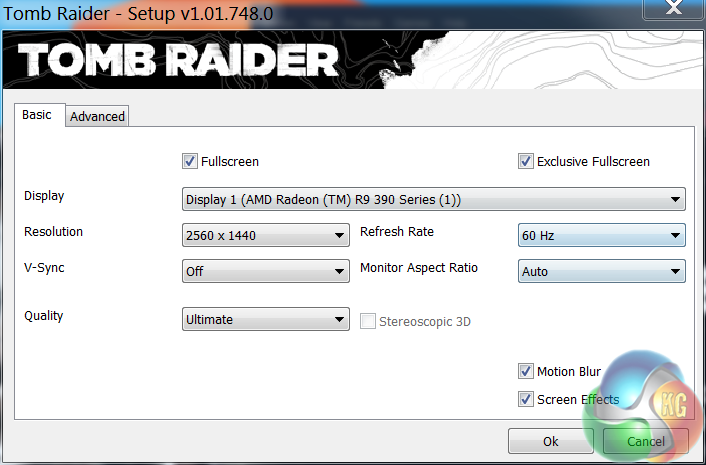
We test at 1440p and 4K with the ‘ULTIMATE’ image quality profile selected.
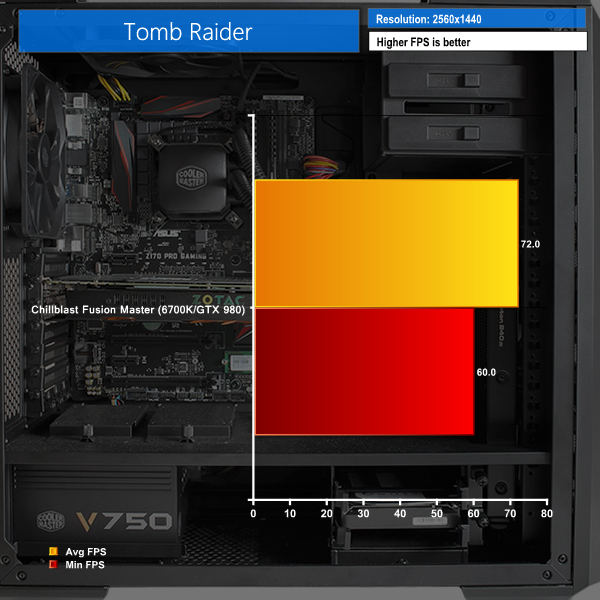
At 2560×1440, Chillblast's system sees an increase of 10 FPS over the GTX 970 OCUK system on the average frame rate, and 12 FPS in the minimum.
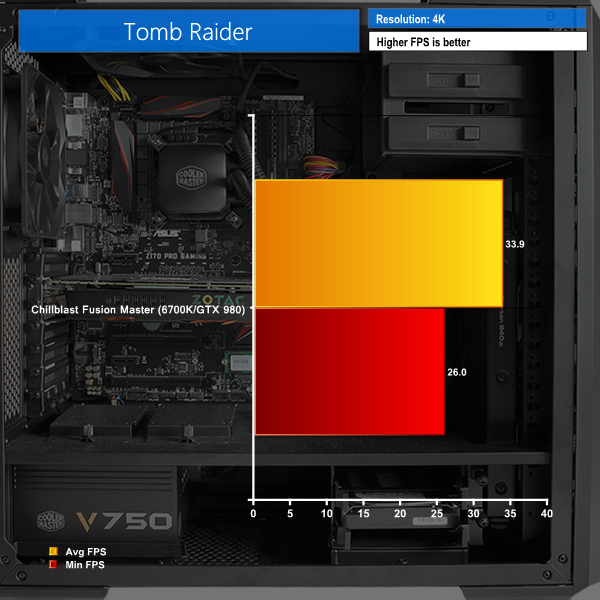
Depending on your definition of the word, these 4K results are just about playable, although with a minimum FPS of 26 it’s likely to get choppy without reducing the detail setting.
Grand Theft Auto V is an action-adventure game played from either a first-person or third-person view. Players complete missions—linear scenarios with set objectives—to progress through the story.
Outside of missions, players can freely roam the open world. Composed of the San Andreas open countryside area and the fictional city of Los Santos, the world of Grand Theft Auto V is much larger in area than earlier entries in the series.
The world may be fully explored from the beginning of the game without restrictions, although story progress unlocks more gameplay content. (Wikipedia).
We maximised every slider – FXAA was enabled, although we left all other Anti Aliasing settings disabled – based on reader feedback from previous reviews. ‘Ignore Suggested Limits’ was turned ‘ON’. The 2560×1440 and 3820×2160 (4K) resolutions were tested.
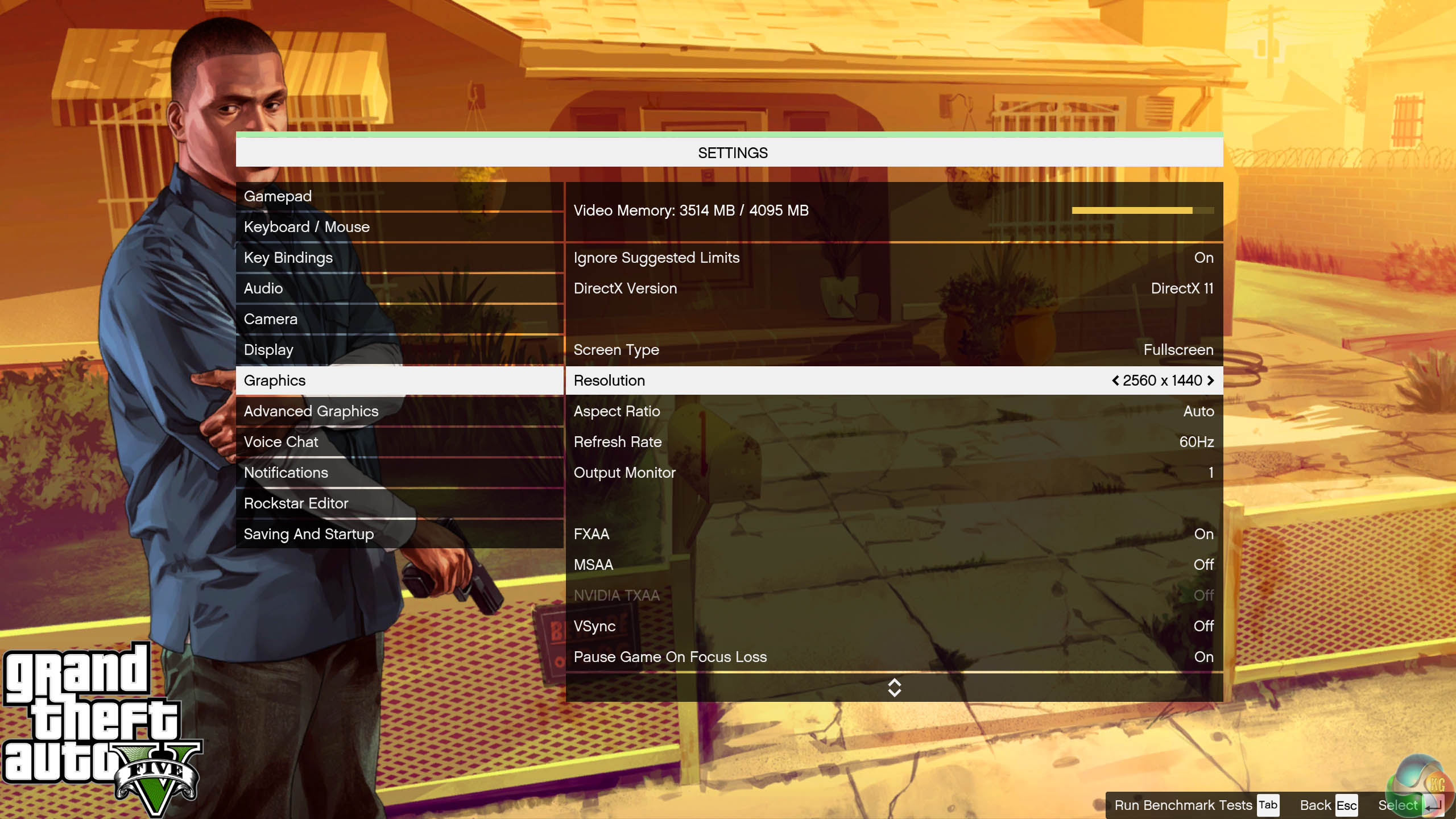

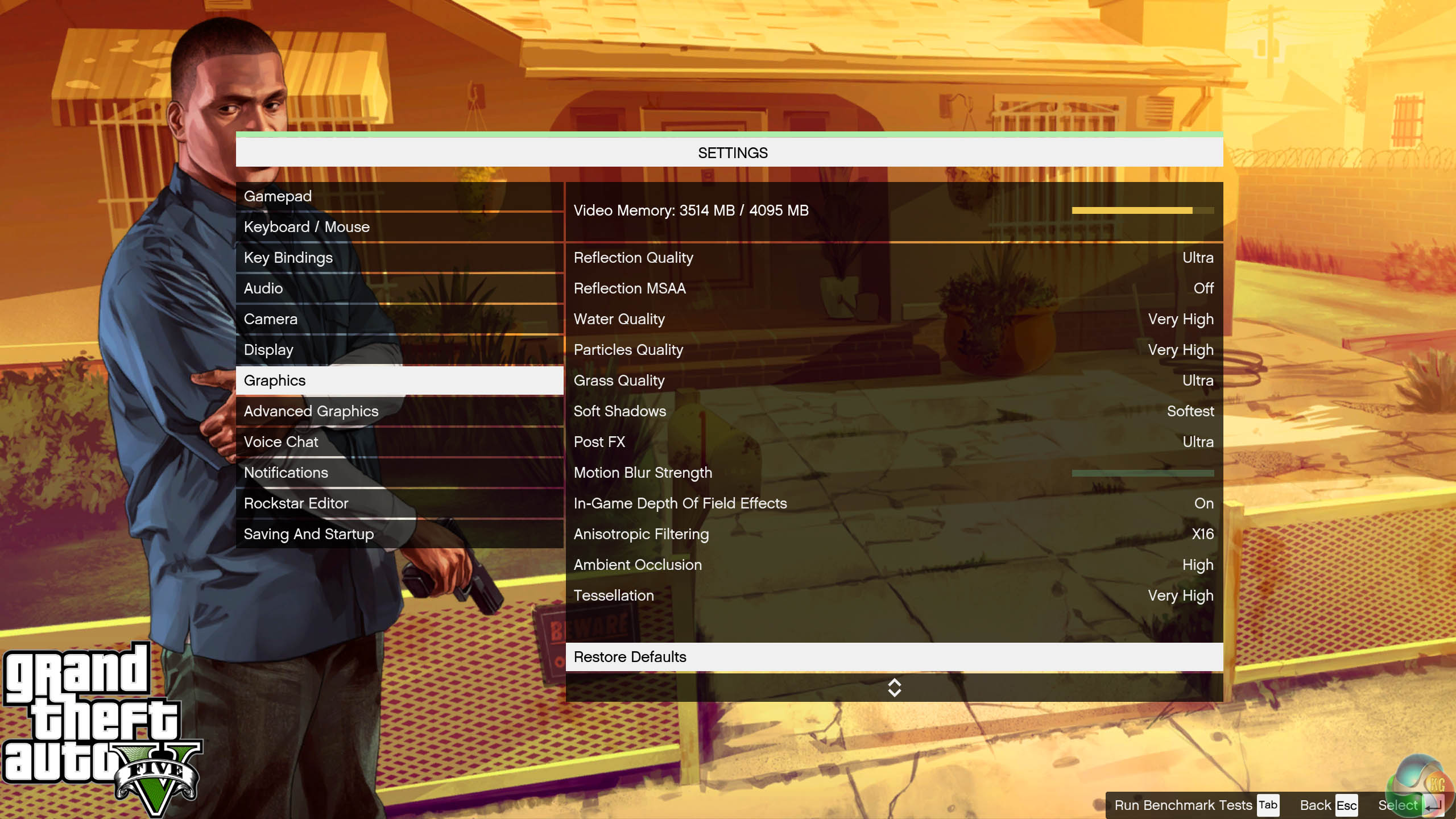
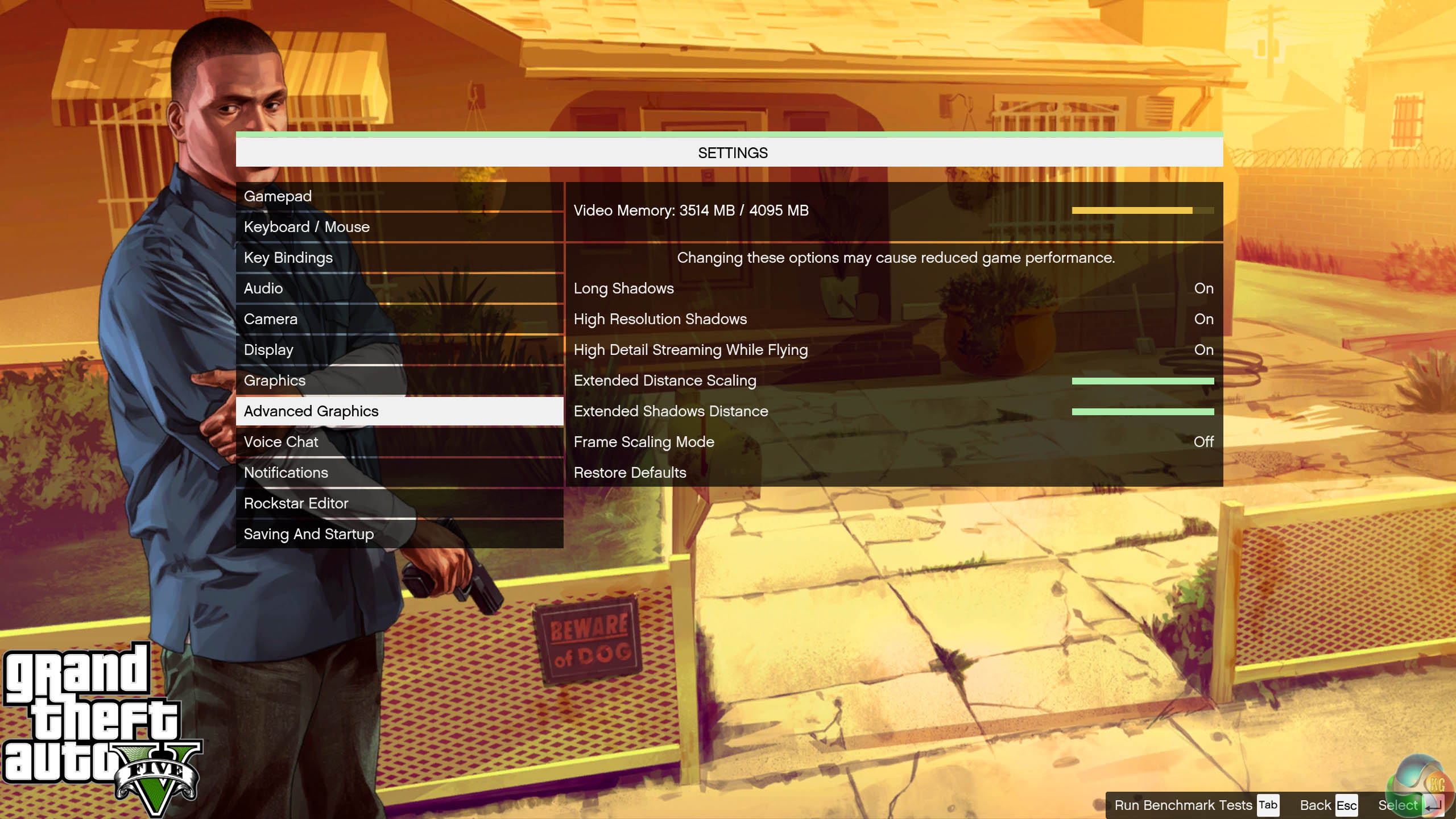
We found some intensive sections of the Grand Theft Auto 5 world and tested each card multiple times to confirm accuracy. These settings typically demand around 3.5GB of GPU memory at 1440p and just over 4GB at 4K.
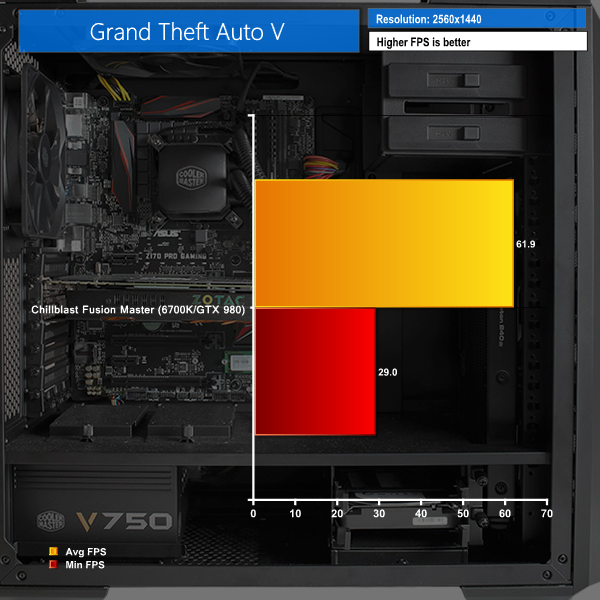
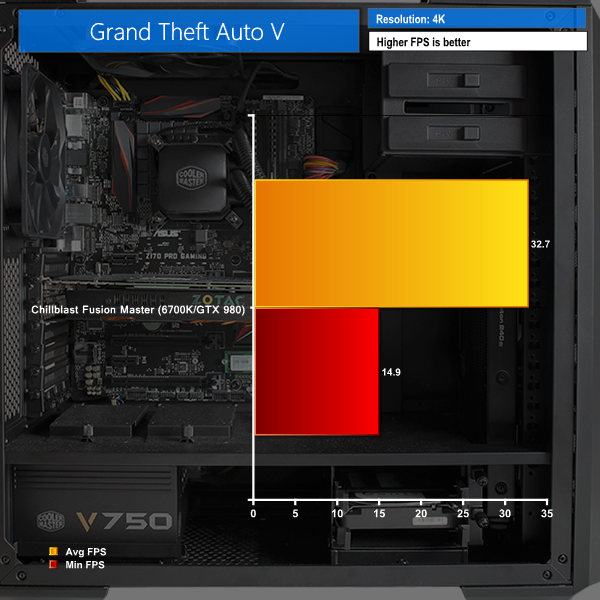
These results indicate stability at 1440P and an almost-playable experience at 4K. 4K gaming is a really, really tough task for a video card, and Grand Theft Auto V is a seriously demanding title. You’ll get a reasonable experience by reducing the graphics detail a bit (in practice we’re not sure any anti-aliasing is needed at this resolution).
Metro: Last Light takes place one year after the events of Metro 2033, proceeding from the ending where Artyom chose to call down the missile strike on the Dark Ones. The Rangers have since occupied the D6 military facility, with Artyom having become an official member of the group. Khan, the nomad mystic, arrives at D6 to inform Artyom and the Rangers that a single Dark One survived the missile strike.
4A Games’ proprietary 4A Engine is capable of rendering breathtaking vistas, such as those showing the ruined remnants of Moscow, as well as immersive indoor areas that play with light and shadow, creating hauntingly beautiful scenes akin to those from modern-day photos of Pripyat’s abandoned factories and schools.
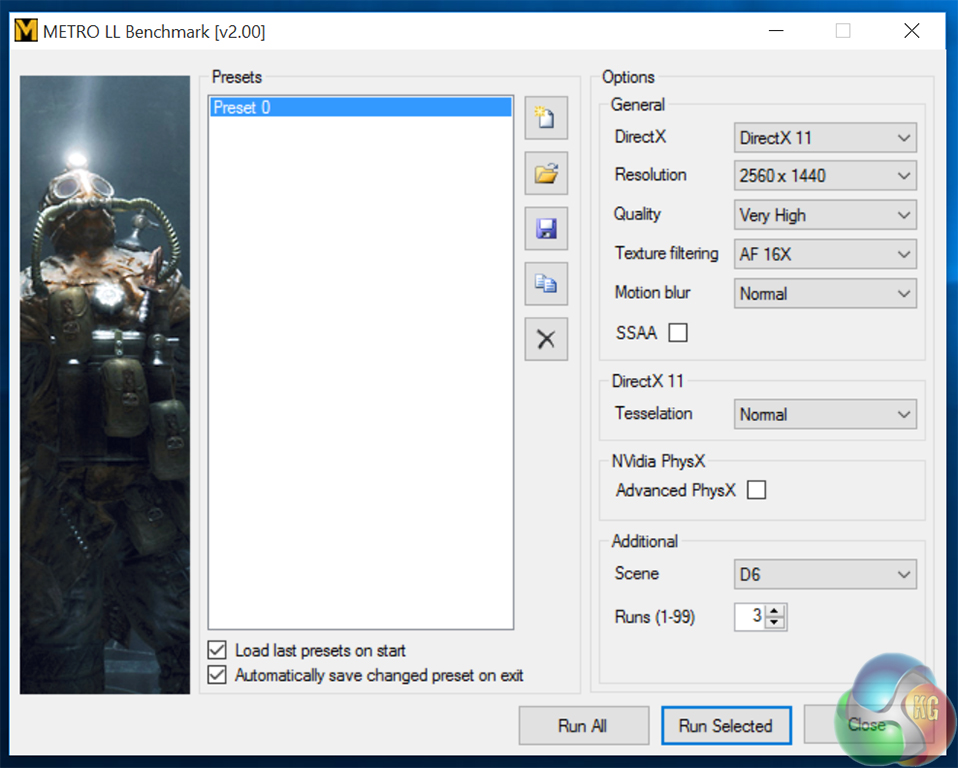
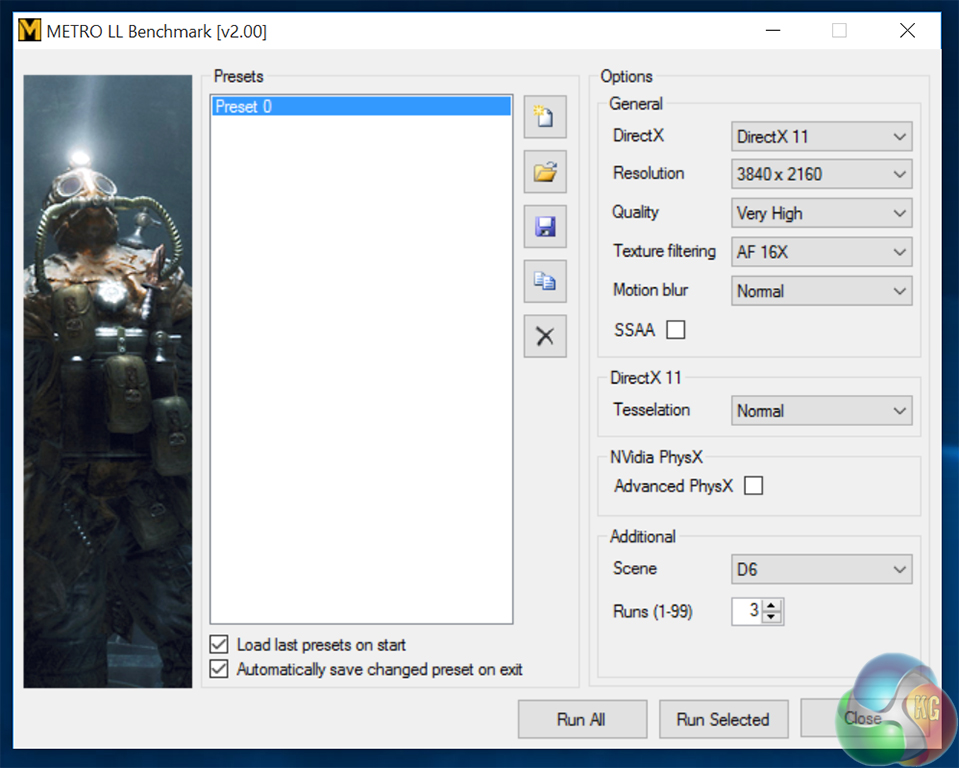
We test with following settings:
2560×1440, Quality-Very High, SSAA-off, Texture Filtering-16x, Motion Blur-Normal, Tessellation-Normal, Advanced Physx-off.
3820×2160, Quality-Very High, SSAA-off, Texture Filtering-16x, Motion Blur-Normal, Tessellation-Normal, Advanced Physx-off.
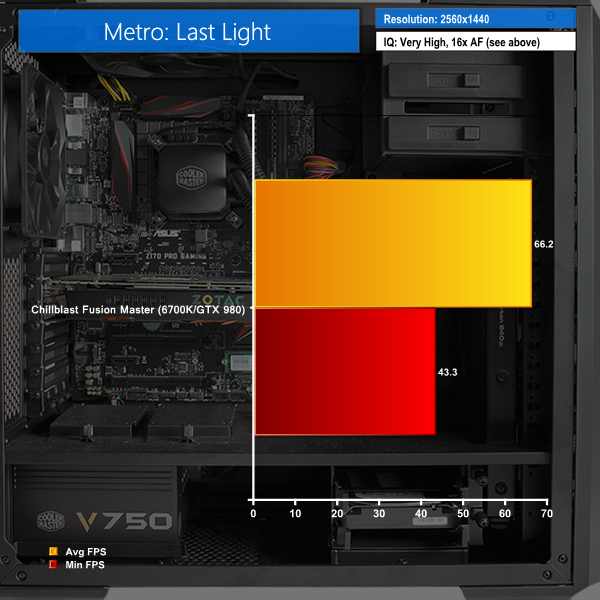
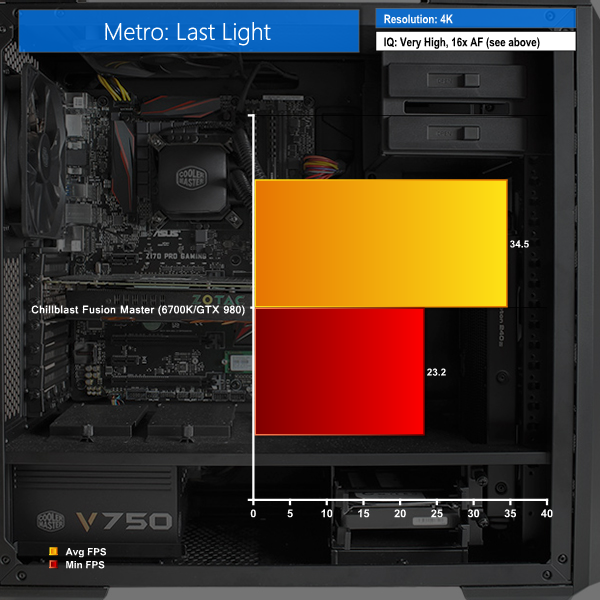
At 4K we see the same thing we did with other games. The average frame rate is a playable 34.5fps, but it dips below this at times for noticeable choppy updates. Again, for 4K gaming, you’ll need to drop the detail down slightly to eliminate the periods of low FPS.
In Middle-earth: Shadow of Mordor, the player plays as a ranger by the name of Talion who has wraith-like abilities.In this open world video game, players have the freedom to pursue side quests and roam around the world.
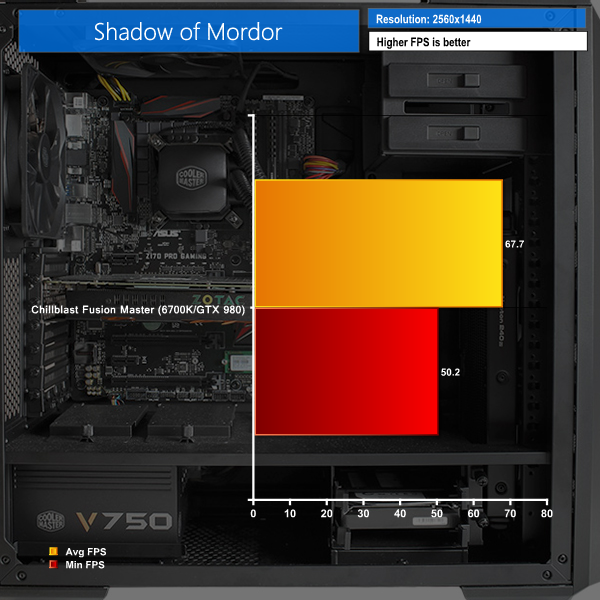
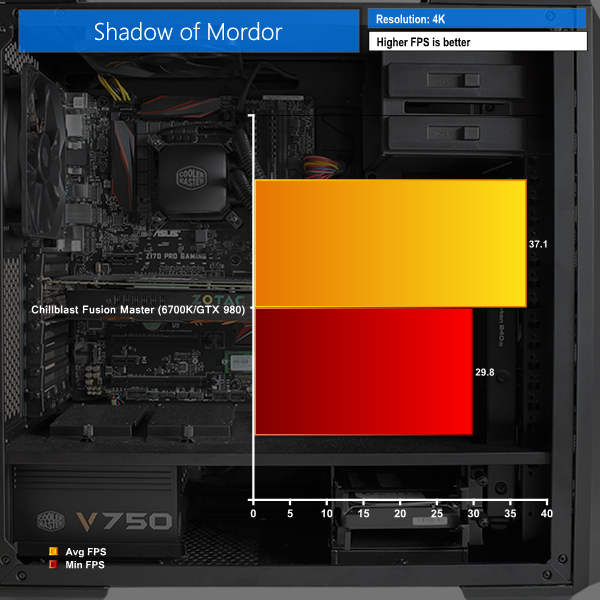
Shadow of Mordor is playable at 1440P, but settings will need to be reduced to stop 4K gameplay becoming choppy.
KitGuru noise guide
10dBA – Normal Breathing/Rustling Leaves
20-25dBA – Whisper
30dBA – High Quality Computer fan
40dBA – A Bubbling Brook, or a Refrigerator
50dBA – Normal Conversation
60dBA – Laughter
70dBA – Vacuum Cleaner or Hairdryer
80dBA – City Traffic or a Garbage Disposal
90dBA – Motorcycle or Lawnmower
100dBA – MP3 player at maximum output
110dBA – Orchestra
120dBA – Front row rock concert/Jet Engine
130dBA – Threshold of Pain
140dBA – Military Jet takeoff/Gunshot (close range)
160dBA – Instant Perforation of eardrum
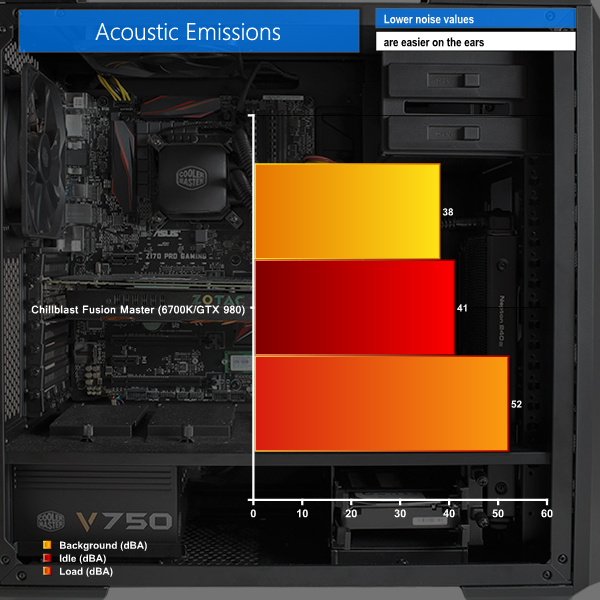
We measured acoustic performance in a slightly different environment to previous reviews, so these results cannot be directly compared, as the background noise was 38dBa. However it does show that at idle the Fusion Master only increased this to 41dBa, which indicates very quiet normal performance. Subjectively, in use, the system appears to be silent.
For the load measurement, we ran Prime 95 to maximise the load on all CPU cores and the fans did indeed spin up. In this situation, it was (subjectively) quite noticeable, but not too much to be a problem. In games, we noticed the fans did not spin up all the time in this way.We test power consumption at the socket with a calibrated meter under the following conditions.
1: when idle
2: running Grand Theft Auto 5 at Ultra HD 4K.
The monitor is not factored into the power draw, just the demand via the system power supply.
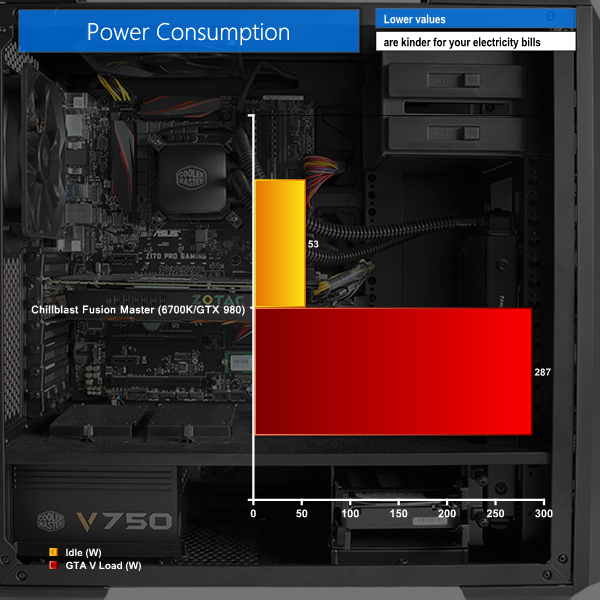
The system demands very little power at idle but will soon require almost 300W once GTA V is running.
As a first show for Skylake, Chillblast’s Fusion Master is an extremely powerful gaming PC. It offers superb performance and is capable of great frame rates in games. If you’re using a 1440p monitor, you’ll have absolutely no problem with any game you try at even the highest detail setting, as we found great frame rates from this resolution in all out tests.
The Samsung SM951 PCIe SSD is as fast as Samsung says it is, making even SATA SSDs look slow in comparison. It’s worth noting these results are in synthetic benchmarks only. In the real world, you won’t see such massive improvements to boot times or application load times as the results in Crystal Disk Mark suggest, but we still like the performance offered by this drive
With the GTX 980, 4K gaming is a bit of a mixed bag. The Chillblast Fusion Master is absolutely capable of playing games in 4K, but unfortunately not at the highest possible detail settings. For that, a GTX 980Ti would be a sensible upgrade to make, adding £150 to the price, or you could add a Superclocked+ EVGA GTX 980 Ti for an extra £350. Both of these are available in Chillblast’s customisation page.
This isn’t Chillblast’s fault though as it only goes to show how tough 4K gaming is. However, given the already-high cost of this system, an upgrade to the GTX 980Ti is a relatively small additional outlay for better 4K performance.
It’s worth mentioning Chillblast’s after-sales support. The five years warranty includes two years collect and return, so if you run into any problems, they’ll pick it up from you, repair it and return it free of charge. You’re covered for another three years after that where you’re responsible for returning the PC to them. The collect-and-return period can be extended by another year for an additional £99.
Looking at our benchmark results, the scores are a definite gain over current PC gaming technology, but the difference isn’t huge. If you bought a new high-end PC this year, Skylake doesn’t offer a huge improvement and it’s probably not worth upgrading.
But if your gaming PC is looking a bit long in the tooth, and you want to upgrade it to the fastest possible performance on the planet, there’s no reason not to go with Skylake, a high end Nvidia card and now an SSD that can reach 2GB/sec transfer speeds. Chillblast’s Fusion Master offers exactly that.
Buy from Chillblast, over HERE.
Discuss on our Facebook page, over HERE.
Pros:
- Skylake offers the best per-core CPU performance we’ve ever seen.
- The Samsung SM951 offers some of the best storage performance we’ve recorded.
- Very well built, Windows 10 is supplied free from bloatware and Chillblast offers a good warranty period.
- Plenty of room to expand and upgrade the system.
Cons:
- It’s not clear there’s a huge leap over current gaming systems (especially on the processor/platform side).
- Even this mighty specification can’t quite manage over 30fps in all games at 4K resolution, without reducing the detail settings a bit.
KitGuru says: Chillblast’s Fusion Master is well-built, incredibly powerful and filled with next-generation technology. If you’re shopping for a pre-built, powerful gaming PC, this is currently one of the fastest machines money can buy.


You’d be silly to spend £1600 on this when you can build a more powerful system for £100-200 cheaper.
Most people pay to have stuff done for them, that’s the point; not everyone has the time to sit down and build. No one needs to know how a computer works or is put together to use it; it is no different than an automobile.
WORK AT EXTRAORDINARY HOME REPORT………After earning an average of 19952 Dollars monthly,I’m finally getting 98 Dollars an hour,just working 4-5 hours daily online….It’s time to take some action and you can join it too.It is simple,dedicated and easy way to get rich.Three weeks from now you will wishyou have started today – I promise!….HERE I STARTED-TAKE A LOOK AT….dld…..
➤➤➤➤ http://googleonlinejobsnetworksharingtopplace/start/earning/…. ⚛⚛⚛⚛⚛⚛⚛⚛⚛⚛⚛⚛⚛⚛⚛⚛⚛⚛⚛⚛⚛⚛⚛⚛⚛⚛⚛⚛⚛⚛⚛⚛⚛⚛⚛
Building a PC is relatively easy. It mostly involves plugging/connecting things together as instructed in the hardware manuals. It just looks, and sounds more complicated than it actually is, and goes a long way in teaching the builder how, and what can go wrong with a system. I’m completely self taught from a young age, and i’m now a full time IT engineer.
If you learn even the basic concepts of PC hardware, it goes a long way in helping you to help yourself when something goes wrong, AND ultimately saves you money. Akin to learning how to change a flat tire, or a faulty headlamp bulb on an automobile. If you don’t learn the basics, you’re going to be paying a lot of money for an otherwise relatively simple task.
It’s not that “no one needs to know” its just that some people are too lazy to learn.
What warranty does your self-build come with?
I’m too too busy/lazy to learn how to subsist entirely on food I grow and rear myself. Instead I “overpay” by shopping at Waitrose. Feel free to judge me on that too.
It comes with the hardware manufacturers warranty. The same one you’ll get from resellers, unless you foolishly pay for an additional guarantee package, like on site, or return to Base. Yes, I will gladly judge you since you shop in Waitrose.
exactly. The build has zero warranty and you have no one to turn to if your system develops a fault.
what is it about waitrose that you are most strongly against? the high standards of animal and environmental stewardship they demand from suppliers, or the fair price they pay to them?
You are speaking of a system as a whole with a baseline warranty, such as a system that is pre-built. Of which, an additional guarantee package can be provided, at cost, by re-sellers. You know the type of insurance package that Curry’s, or one of the main electronic retailers will try to sell you at the checkout? It is not usually required since the manufacturers warranties exist. The only bonus from something like this is say for the likes of a Fridge-Freezer or Washing machine…..if it breaks down, they will offer a pick-up and replace scenario. Now that is useful. As I have experienced when my washing machine decided to flood the kitchen. I made sure I knew what went wrong, so that maybe I could repair it myself if there is a next time, and not have to get the extended warranty again.
Each component in a Personal Computer however, is (or at least should be) chosen by preference and thus also carries an individual standard manufacturers warranty for each component you decide to purchase. Pre-built or not.
In case you weren’t aware, with PC hardware, different manufacturers offer different lengths of warranty. For example; a graphics card from ASUS might have a 3 Year Warranty, where as other manufacturers will carry a 5 year, or even a lifetime warranty. Most RAM modules carry lifetime warranties. They all differ. This actually means that you really don’t have to purchase in an additional warranty package for a full pre-built system (a majority of these don’t come as standard anyway, and require additional cost after buying the system and paying for the building of the system)
If something fails within a PC, you only have RMA the failed component, (as long as it is still in warranty) and get it replaced. The trepidation for most people comes in how to go about figuring out what has failed. This goes back to what I was saying. Learning some of the basics ~ especially when you are investing a lot of money in hardware, and knowing what you are getting yourself into, goes a long way to saving money, and who doesn’t like to save some money? Hence why I wouldn’t shop at Waitrose either; but hey, it’s just my opinion…each to their own. I personally think all supermarket chains are as bad as each other.
When I was young, I bought pre-built systems, learnt about them when they broke down, and replaced the parts myself. Now I just build my own outright, and they don’t break down as much either.
Unless you are a computer expert or know one, how do you tell which is the failed component? You can’t and have no one to turn to, hence the warranty which all reputable system builders provide as standard, no matter how many times you try to lie claiming otherwise.
Suggesting we all train ourselves as white goods repair people is identical to your PC argument, and is therefore defeated by the same counterarguments I have provided. Cost is not the only consideration.
I’m not going to continue a discussion with somebody who says that I lose, am lying, or any other immature attack. That’s just trolling. I won’t reiterate on things that you choose not to pick up on either. If you read back on this discussion… I wasn’t arguing. I simply have my opinions and have shared them here. Take it or leave it.
It is sincere, valid argument which is not what trolling is. I have picked up everything and refuted it, including your “lie” about reputable system builders’ inclusive system warranty, thus you “losing”.
Good luck with your pre-built system if you decide to get one…. You’ll need it.
that is hypocritical and makes no sense. It will have an inclusive warranty and will require zero special skill on my part to maintain, thus taking “luck” out of the equation. However, over time living with it I have the option and opportunity to learn about maintaining it, like you did, should it interest me, because I am tech savvy and highly intelligent.